#arma3_texture
1 messages · Page 14 of 1
 severe rune
 full quarry
oof
 wooden lantern
severe rune
Btw just found, the SuperExt doesn't have TI texture. It uses the TI texture slo...
wooden lantern
severe rune
Btw just found, the SuperExt doesn't have TI texture. It uses the TI texture slo...
so that’s why mine didn’t work alrighty
 thick gate
What is/Where is the NightEmissiveCoefficient?
I've got everything working outside of the problem that it is extremely dull
severe rune
its something the engine decides, probably based on daytime, moonlight something
 burnt fjord
I have tried making the P07 pistol have night sights (glow in the dark sights) kinda like what the four-five and ACP-C2 pistols have, but i have been unsuccessful. I tired changing the TI_CA and SMDI textures, but both didnt do anything. I have been able to make cat eyes on the back of a helmet i made, but that was by using a seperate selection and rvmat file, where as the p07 uses 1 selection and texture for the entire handgun. What properties would i need to change to make this work?
 eager gorge
Is there a quick way of testing a new headgear texture via init without needing to reload?
Like with this setObjectTexture [0, "textures\custom_test_texture.paa"]; for uniforms?
 lethal condor
Check pinned
eager gorge
Thanks!
 tulip dirge
Does someone here have the TFAR RT-1523G (ASIP) Big base camo so I can reskin it?
severe rune
tulip dirge
Does someone here have the TFAR RT-1523G (ASIP) Big base camo so I can reskin it...
tulip dirge
Its the clf_nicecomm2, but I was wondering if there was a version with the original skin just made so I can put my own camo on or that I have to skin that on myself
severe rune
all the files in that folder, are the ones TFAR has
wooden lantern
severe rune
Btw just found, the SuperExt doesn't have TI texture. It uses the TI texture slo...
no luck still after removing TI slot btw
tulip dirge
Could someone tell me why the difference in quality is so different?


 stray relic
tulip dirge
Could someone tell me why the difference in quality is so different?
stray relic
tulip dirge
Could someone tell me why the difference in quality is so different?
The first screenshot is in substance painter or other paint software which probably uses metal/rough PBR materials?
While Arma 3 is older generation, and isn't using PBR but instead Specular/Gloss rendering.
So the skill for the artist is to export textures, combined with the rvmat, to make it look in game like it does in the paint software. There are a number of export presets around which do a fairly decent job most of the time. Try searching this discord.
 inner ingot
In substance painter, if you set your 3d Preview to base color (shortcut C) you'll get a fairer idea of what the texture actually looks like. I feel like a lot of the time I have to darken down my textures for Arma things

And like Apollo said, you should use the substance painter export presets https://github.com/MoonieFR/SubstanceToArma?tab=readme-ov-file
tulip dirge
That explains a lot, appreciate the help guys
full quarry
tulip dirge
That explains a lot, appreciate the help guys
Different programs also have very different lighting conditions. And out of Arma, VR has the worst harsh light
(map lighting is not the issue though but what was stated before buy the other guys.)
 hallow jay
tulip dirge
Could someone tell me why the difference in quality is so different?
hallow jay
tulip dirge
Could someone tell me why the difference in quality is so different?
Yeah its normal, compared to SP the ingame result is always brighter and oversaturated. It is what it is.
 tall stirrup
Does anyone have a list of images that can be displayed on a whiteboard, such as a map of LZ Connor or Camp Rogain? Or can you tell me how to do that?
 flint sinew
tall stirrup
Does anyone have a list of images that can be displayed on a whiteboard, such as...
flint sinew
tall stirrup
Does anyone have a list of images that can be displayed on a whiteboard, such as...
hope thats right / what you're looking for
it's just all the paths so theres not much description cus tehres al ot of them
had to send as a .txt because its too much for discord
tall stirrup
flint sinew
Thanks, you are a lifesaver. 
lethal condor
Because something is wrong with your something. Nobody can give you any good answer at this point since you gave no info
 rancid obsidian
I have insignia problem and this is my config

Resolution is 128×128
It shows in the list but no logo
rancid obsidian
Anyone alive?
stray relic
rancid obsidian
Example from A3 to use as template
 rancid obsidian
stray relic
Example from A3 to use as template
rancid obsidian
stray relic
Example from A3 to use as template
I didn't used material before and worked few months ago
And If I do that what material should I use exactly?
stray relic
rancid obsidian
And If I do that what material should I use exactly?
You make a texture. You also make a material.
rancid obsidian
stray relic
You make a texture. You also make a material.
Convert my logo to material
stray relic
Have you heard of .rvmat files before?
rancid obsidian
Yes
stray relic
What is one?
rancid obsidian
stray relic
What is one?
Wdym
stray relic
You've heard of rvmat files before. What would you say it is?
rancid obsidian
stray relic
You've heard of rvmat files before. What would you say it is?
Idk how to explain
But
I forgot
full quarry
rancid obsidian
if nothing shows up in game are there any error pop ups?
and is the path to the file actually correct
 hollow fulcrum
I am having issues with my textures, it says "Cannot load texture tablet_texture.paa" I looked for every misspelled word and looked if there were any issues, and i can't find anything that is causing this problem. Can someone help me?
    class MyGPSMod {
        units[] = {"My_GPS_Item_ground"};
        weapons[] = {"My_GPS_Item"};
        requiredVersion = 1.0;
        requiredAddons[] = {"A3_Data_F", "A3_Weapons_F"};
    };
};

class CfgWeapons {
    class ItemCore;
    class InventoryItem_Base_F;

    class My_GPS_Item: ItemCore {
        scope = 2;
        displayName = "Custom GPS";
        picture = "\Tablet\icon\black.paa";
        model = "\Tablet\data\tablet.p3d";
        descriptionShort = "Custom handheld GPS device.";
        hiddenSelections[] = {"camo"};
        hiddenSelectionsTextures[] = {"\Tablet\textures\tablet_texture.paa"};  // must match what your .p3d expects

        class ItemInfo: InventoryItem_Base_F {
            mass = 5;
            type = 401;
        };
    };
};

class CfgVehicles {
    class Item_Base_F;

    class My_GPS_Item_ground: Item_Base_F {
        scope = 2;
        scopeCurator = 2;
        displayName = "Custom GPS (Ground)";
        author = "YourName";
        vehicleClass = "ItemsElectronic";
        editorCategory = "EdCat_Equipment";
        editorSubcategory = "EdSubcat_Electronics";
        model = "\Tablet\data\tablet.p3d";
        hiddenSelections[] = {"camo"};
        hiddenSelectionsTextures[] = {"\Tablet\textures\tablet_texture.paa"};

        class TransportItems {
            class My_GPS_Item {
                name = "My_GPS_Item";
                count = 1;
            };
        };
    };
};```


 stray relic
hollow fulcrum
I am having issues with my textures, it says "Cannot load texture tablet_texture...
stray relic
hollow fulcrum
I am having issues with my textures, it says "Cannot load texture tablet_texture...
Are you using a p:\ drive for your mod files and have you tried using mikero's free pboProject (with error checking) to build?
hollow fulcrum
stray relic
Are you using a p:\ drive for your mod files and have you tried using mikero's f...
nope but ill check it out now
stray relic
hollow fulcrum
I am having issues with my textures, it says "Cannot load texture tablet_texture...
Also, you should be using a texture suffix, most likely tablet_texture_co.tga (before conversion to .paa).
https://community.bistudio.com/wiki/Texture_Map_Types
hollow fulcrum
stray relic
Also, you should be using a texture suffix, most likely tablet_texture_co.tga (b...
so for that part. I just do is change .paa into _co.tga
stray relic
hollow fulcrum
so for that part. I just do is change .paa into _co.tga
Rename your original texture (example: tga) to include the _co at the end, then convert to .paa.
hollow fulcrum
stray relic
Rename your original texture (example: tga) to include the _co at the end, then ...
ohhh okay
hollow fulcrum
@stray relic OMG!! thank you so much, everything works. That the only thing i was missing and that was using a different tool.
lethal condor
rancid obsidian
No errors
What have you done ingame to test is also the question
hollow fulcrum
what is the type for GPS slot? I thought it was 611?
full quarry
hollow fulcrum
what is the type for GPS slot? I thought it was 611?
Id refer to the vanilla configs to check
for example the all in one config file in the pinned messages
rancid obsidian
lethal condor
What have you done ingame to test is also the question
I tested in virtual arsenal and map editor it didn't show
Also when I selected 111th division insignia and selected my insignia the insignia didnt changed but that 111th division becomes brighter
Idk if that was inportant
lethal condor
- are you 100% sure it is not about missing texture (correct filepath)
- are you sure the texture itself is actually working elsewhere
- are you sure your config is following the correct structure
 fluid phoenix
A3 uses PBR spec gloss format from SP and not straight PBR right?
Disregard. Seen some good tips in pinned messages.
full quarry
yeh its not really PBR as modern rendering now does it
rancid obsidian
lethal condor
- are you 100% sure it is not about missing texture (correct filepath)
- are you...
It fixed
 valid cloak
im not sure if this is texture related but im trying to add some images to a mission file, i normally use JPG but i have around 40 images this time so i want to make them PAA, only problem is when i put them in game, the images are in negative? or something like that, like a blue filter on all images rather than their true colour, has anyone else encountered this?
my process is;
Open PNG in Text2View
Save As PAA
Path image in game
Incredibly simple stuff and it couldn't be going more wrong!
All help appreciated in advance!
i have attached an example

we do not operate as smurfs
burnt fjord
i might be wrong on this, but i think the images need to be in 1024x1024, 2048x2048 size.
mby 1024x2048 would work as well, as long as the ratio is correct and its in that computer sizeing instead of smth random like 800x760
full quarry
valid cloak
im not sure if this is texture related but im trying to add some images to a mis...
man above is correct. you are using wrong resolution
valid cloak
thanks guys, did a little test and were no longer smurfs, quick sound advice
 midnight kraken
guys is there a way to retexture inside the hunter vanilla ?
please tag me
full quarry
midnight kraken
guys is there a way to retexture inside the hunter vanilla ?
please tag me
no
 junior swan
Does anyone in here know why arm insignias don't show up for people?
Like I can place an AI unit, assign a patch but anyone connecting to the server doesn't see said patch? am I missing something?
full quarry
midnight kraken
why
the model has not been set up for that.
makind something retextureable is not automatic in creation process
and the interior probably has not been deemed needing retexturing
midnight kraken
ffs
btw is there a template for arma 3 vanilla vehicles somewhere ?
i need the files to retexture them
fluid phoenix
Do you recommend messing around with the rvmat before I mess around in SP tweaking textures? @full quarry
full quarry
fluid phoenix
Do you recommend messing around with the rvmat before I mess around in SP tweaki...
Hmm well typically I've liked to keep rvmat values pretty neutral/basic and let the textures do the work.
That usually seems to have worked best in different terrain lightings
also the rvmat values affect the whole texture instead of just controlled part
specularity is maybe the only thing worth messing with but that works in tandem with the SM/SMDI/DTSMDI texture
more specularity = higher maximum shine for the specular texture to have
but that too has technical limits on how much you can control it with the texture (bit depth of the channels)
fluid phoenix
full quarry
Hmm well typically I've liked to keep rvmat values pretty neutral/basic and let ...
Thank you. Good insight. Is a neutral rvmat easily obtainable and if not do you have quick access to one I could have?
full quarry
fluid phoenix
Thank you. Good insight. Is a neutral rvmat easily obtainable and if not do you ...
P:\a3\data_F\ has default super rvmat (although we have recently learned it could be better formatted)
but it likely works startup as reference just fine
then you can check vanilla assets too for how their rvmats are set up
there are some variation in there I think. Some have set final corrections via the rvmat values instead of textures and so on
fluid phoenix
Okay, thank you!
full quarry
Things like less ambient occlusion power can mimic translucency as in the thing does not get shaded so strongly. I recall I used that with the sogpf parachutes.
But most things are typically either quite solid or have straight transparency via alpha channel of the color texture
midnight kraken
is there a template for arma 3 vanilla vehicles somewhere ?
ping me where i can download them
 brittle rivet
@midnight kraken Most were on the forums
I found the drive link for these a while ago
You might be able to find others with wayback machine from the forum
It has some vehicles, not all though
midnight kraken
Thank you @brittle rivet
 fast atlas
Has anyone messed around with the Parallax changes in the dev branch yet today? Curious how much it will effect the ground textures.
midnight kraken
any idea how to deal with the ghost hawk colors being too glossy that wont match other vehicles?
stray relic
midnight kraken
any idea how to deal with the ghost hawk colors being too glossy that wont match...
Make a new _smdi texture which you link via a modified .rvmat material, which you display on your modded Ghost Hawk using hiddenSelectionMaterials.
 fickle yacht
hello!
I'm working with ace spray tags and i created a tag for our unit. Sadly, the texture is flickering quite roughly when using on vehicles.
Any advice in how to fix this?
full quarry
fickle yacht
hello!
I'm working with ace spray tags and i created a tag for our unit. Sadly,...
how is it applied?
and do you use correct naming suffix (_CA) to convert it to .PAA?
fickle yacht
the graphic on the vic? ace tagging, gotta check how it works exactly but its assigning a texture to the "clan logo slot"
full quarry
Ok so its part of the original model. 👍
fickle yacht
full quarry
and do you use correct naming suffix (_CA) to convert it to .PAA?
ah, no? i dont follow.
full quarry
texture naming rules have wiki page
fickle yacht
rename the stencil_white.png to stencil_white_ca.png before converting it? (im using grad paa website btw).
full quarry
but basically the source files need to have correct suffix so that conversion to .Paa follows right conversion rules for that type of texture
fickle yacht
full quarry
but basically the source files need to have correct suffix so that conversion to...
 full quarry
_CO for non transparent diffuse textures _CA for textures with alpha transparency
fickle yacht
never heard of that. okey cool. i will give it a try!
full quarry
most people have not 😅
fickle yacht
full quarry
but basically the source files need to have correct suffix so that conversion to...
just to clarify for my brain.
- rename src image file to
name_ca.png - convert to paa.
- naming convention after that doesnt matter.
right?
full quarry
well sure but you dont really typically go around changing the names after they are turned to .paa
it also helps to recognize what type of texture you have there
name_ca.png -> name_ca.paa
keep things simple
and no extra work
fickle yacht
fair. just wanted to make sure how it works
full quarry
the issue you see is due to the transparency picking up ambient occlusion shading from the surface behind it.
One way to combat that is to turn the white part also slightly transparent
fickle yacht
That worked 🥳
also got rid of the white fringing on the outside of the pixels 🥳
thanks alot @full quarry
 meager tinsel
hi guys, i made bake co maps (diffuse) but for some reason it's completely black, please help
 lethal condor
What is black, when it's black
meager tinsel
lethal condor
What is black, when it's black
after baking the resulting co uv map instead of displaying the texture shows just a solid black color in the lower left corner of the photo
lethal condor
Why don't use Material Base Color you use as the texture as the CO?
meager tinsel
lethal condor
Why don't use Material Base Color you use as the texture as the CO?
thanks, i will try, but will it give a metallic color?
lethal condor
Will what?
meager tinsel
lethal condor
Will what?
if i use the base color of the material, the texture in arma 3 will convey a metallic shade? (P.s. sorry for my bad english i speak with translator)
lethal condor
No. Base Color is not Metallic, not related even
I am saying there is no point to bake but just use the texture you use in Blender
meager tinsel
lethal condor
I am saying there is no point to bake but just use the texture you use in Blende...
okay, thanks
 twin saddle
Does anyone know if the UGV stomper is available to be retextured or is that a no no
full quarry
twin saddle
Does anyone know if the UGV stomper is available to be retextured or is that a n...
The model like all other A3 models not available for use, but Im fairly sure it can use hiddenselections so it can be retextured
twin saddle
Yeah not looking for the model but the texture
full quarry
you can find its classes to look at where if it has hiddenselections set up and where the texture paths point to with the ingame config viewer
twin saddle
Oh yea I forgot about that
full quarry
or I have all in one config dump file linked somewhere in the modding channels
leopards advanced modding tools mod gives also better config viewer
twin saddle
ill check config later for that hehe
I keep forgetting theres a built in config viewer to find all this stuff
full quarry
👍
open up notepad on computer and write it down with permanent marker on it 
(disclaimer: is joke dont do that for real)
 worthy pivot
Hello, y have problem, i have selected textures in object builder, but in eden edtior, i dont have texture only white, one have solutions ? its 3d

 full quarry
worthy pivot
Hello, y have problem, i have selected textures in object builder, but in eden e...
full quarry
worthy pivot
Hello, y have problem, i have selected textures in object builder, but in eden e...
do you use P drive to build your project from?
your texture names look bit odd there in the OB list. Arey adhering to correct texture naming rules and resolutions?
worthy pivot
full quarry
do you use P drive to build your project from?
yeah
worthy pivot
full quarry
your texture names look bit odd there in the OB list. Arey adhering to correct t...
have you example ?
full quarry
worthy pivot
have you example ?
pinned messages have the wiki link
can you preview the model in object builders buldozer previewer?
worthy pivot
full quarry
can you preview the model in object builders buldozer previewer?
i have this error
 worthy pivot
full quarry
starting buldozer?
worthy pivot
full quarry
starting buldozer?
yes when a start/restart buldozer
 cold carbon
I am having a hard time packing the textures with my model.
I got a boat model which is made of 3 materials in blender.
each material has its own texture png image (solid color)
i converted the PAA etc but they just dont link when going through object builder
lethal condor
Blender, Material tab, there is some slot to write the filepath for tex and mat
cold carbon
lethal condor
Blender, Material tab, there is some slot to write the filepath for tex and mat
does all this stuff need to be in the p drive even if its in blender
lethal condor
What you put there is not PNG but PAA if that's what you ask
cold carbon
lethal condor
Blender, Material tab, there is some slot to write the filepath for tex and mat
could you please show me where you find it? i have the toolbox plugin but in materials tab there is no slots for me
lethal condor
Scroll down the matetial
cold carbon
as far down as it goes
 lethal condor
Then you didn't checked ArmaToolBox's check
Once the object is checked as an P3D Export ready, should be there
cold carbon
lethal condor
Once the object is checked as an P3D Export ready, should be there
can you please show where can i find this
lethal condor
3D view, press T to open side menu, Toolbox, checkbox
Just in case, have you installed ArmaToolBox, even?
lethal condor
Sounds you've never used it if you never knew the checkbox
cold carbon
lethal condor
Sounds you've never used it if you never knew the checkbox
yes i never did
first time
cold carbon
lethal condor
Sounds you've never used it if you never knew the checkbox
how should I set the path to be properly found? is it relative to mod (same as model in config file, for example: "\DroneBomb\dronebom.p3d"?
lethal condor
Relative to a PBO
cold carbon
im getting error in addon builder and i cant tell
cold carbon
lethal condor
Relative to a PBO
ok thanks i'll try
 cedar folio
got a texture file but can see the outlines of the sleeves and front and back of the uniform?? you can see the textured areas which would be on on the elbows and shoulders of the uniform but nothing else is lined how do i do something to see the lines im using photoshop
full quarry
cedar folio
got a texture file but can see the outlines of the sleeves and front and back of...
you cant really see the uvmappin in image editor unless you have image of the uvmappin to use as reference layer
using uvmap grid image applied on the model can work though
this is about what you would see in game and can use as reference
 cedar folio
full quarry
you cant really see the uvmappin in image editor unless you have image of the uv...
cedar folio
full quarry
you cant really see the uvmappin in image editor unless you have image of the uv...
Brilliant Thankyou
 safe pendant
quick question, is the texheader.bin file created automatically when packing the mod as a .pbo file?
severe rune
Yes
severe rune
There are no pboprefix files inside pbo's
That's something mikero generates, to store information stored elsewhere in the pbo
safe pendant
severe rune
That's something mikero generates, to store information stored elsewhere in the ...
Oh, I see. I am using some extracted mods to learn modding and figuring what is necessary from me to add
brittle rivet
cedar folio
got a texture file but can see the outlines of the sleeves and front and back of...
Sometimes the matching normal and smdi textures can also help with finding edges as well
SMDI needs split by channel to view properly though
 flat current
hi totally noob here, is it possible to change a texture of a structure that doesnt have a hidden selection?
i wanted to change this arma3-land_connectortent_01_floor_dark_f
full quarry
flat current
hi totally noob here, is it possible to change a texture of a structure that doe...
No.
flat current
thanks, is there any other solution?
full quarry
flat current
thanks, is there any other solution?
No 😅
lethal condor
Technically yes. It requires a freaking amount of hacky solution
flat current
too hard for me, i just wanted to make a concrete floor
full quarry
no need to even imply that thanks
inner ingot
flat current
too hard for me, i just wanted to make a concrete floor
I have some concrete floor decals in my structures mod 👀 https://steamcommunity.com/sharedfiles/filedetails/?id=3336740643
I should probably make one with an attributes field so you can put a texture on it 
 versed axle
Does anyone have a photoshop file for Parade Uniform? There use to be one on the Forum, but thats been down for a millennia
full quarry
versed axle
Does anyone have a photoshop file for Parade Uniform? There use to be one on the...
theres been an alternate link pasted around occasionally
to at least partial collection
could be one there
flat current
inner ingot
I have some concrete floor decals in my structures mod 👀 <https://steamcommunit...
I'd love that, I wish I knew how to model and mod, your mod looks sharp btw
lethal condor
versed axle
Does anyone have a photoshop file for Parade Uniform? There use to be one on the...
Arma 3 Samples
rancid obsidian
Hey guys
Can someone help me with Viper helmet
I can't find the hiddenselection
Of helmet
lethal condor
Why
rancid obsidian
lethal condor
Why
Wdym why?
lethal condor
Because I see zero point to do so
 vernal sage
rancid obsidian
I can't find the hiddenselection
vernal sage
rancid obsidian
I can't find the hiddenselection
It has camo defined for its hiddenSelection.
hiddenSelectionTextures uses only one texture: \a3\characters_f_exp\opfor\data\headgear_vipersp_alt_co.paa.
Y'know, you can easily find all of this information by just looking at the Config Viewer and finding the Special Purpose Helmet's classnames...
lethal condor
There even is no reason to fetch it
rancid obsidian
vernal sage
It has `camo` defined for its *hiddenSelection*.
*hiddenSelectionTextures* uses ...
I looked but hiddenselection was empty
In config viewer
Also I used camo for hiddenselection but it was invisible
vernal sage
rancid obsidian
I looked but hiddenselection was empty
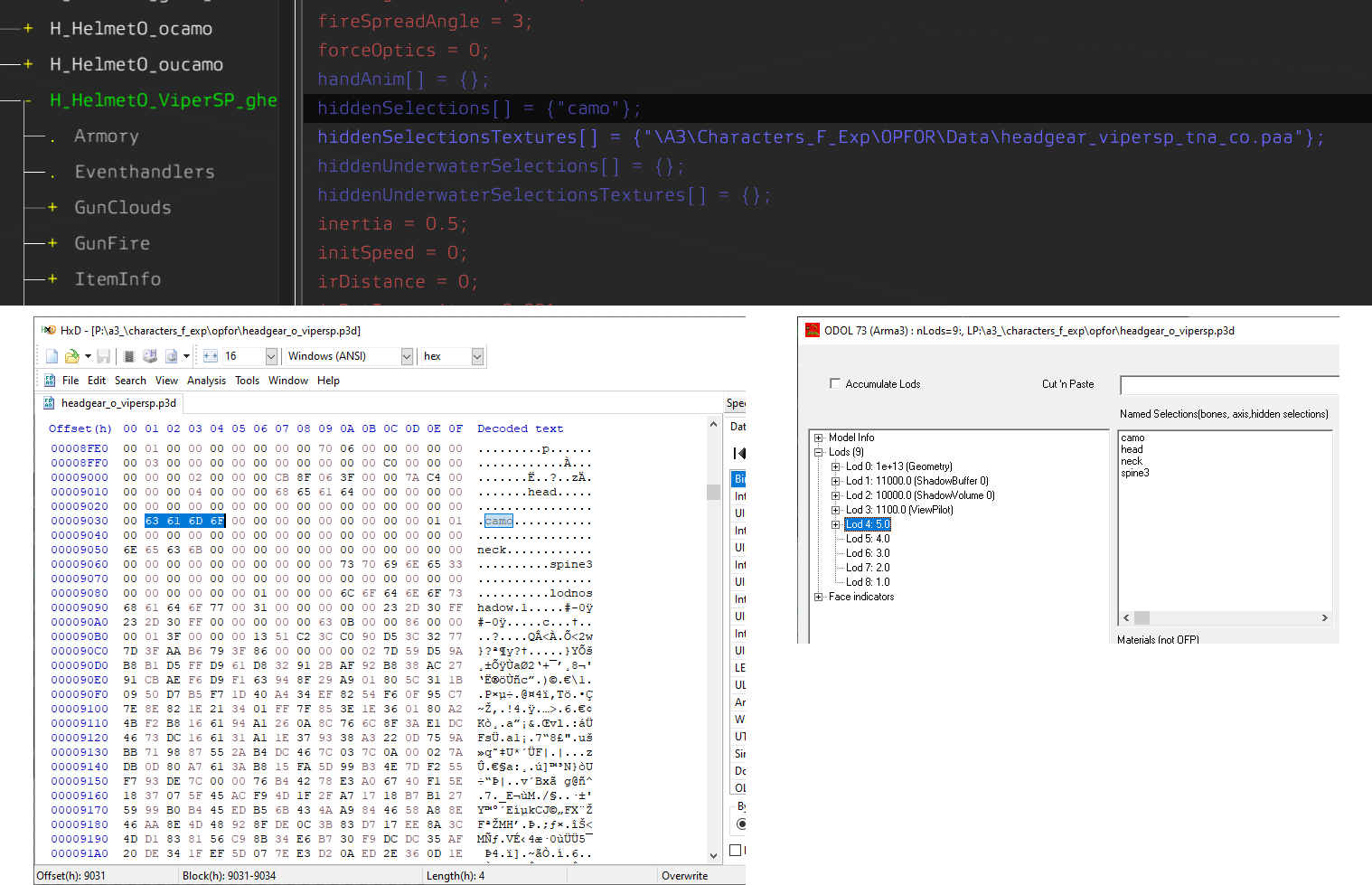
....no it isn't?
https://i.imgur.com/TJm4R5A.png
camo shows up consistently as a usable selection on Eliteness, the in-game config viewer, as well as in a hex editor.
Either you're using the wrong model altogether or you are not assigning the right texture.
 brittle rivet
I know for certain that it works, because Aegis adds two different hex camos for the viper helmet
cedar folio
looking at retexturing this buckle but cant retexture over the image with crossed rifles is there any way i can retexture over this?
 lethal condor
Overwrite RVMAT may fix it
 cedar elm
Hi,
I finished a mod, but when I other people use it the model.p3d ask for the texture directory from my PC and the texture just doesn't work properly at all. How do I make it just dependent on the .pbo?
 full quarry
cedar elm
Hi,
I finished a mod, but when I other people use it the model.p3d ask for the t...
full quarry
cedar elm
Hi,
I finished a mod, but when I other people use it the model.p3d ask for the t...
I'd recommend following the default method of setting up P drive and building your project from it.
cedar elm
full quarry
I'd recommend following the default method of setting up P drive and building yo...
Can you guide me a bit on that? I have the P drive mounted, but where should I locate my mod in there?
full quarry
I'd recommend stuff after addons folder.
Addons folder is where the pbo goes.
Beyond that I can't really type out on mobile.
cedar elm
ty ty
cedar elm
Ok, at the end, I ended assigning a random texture and mat from arma 3 and replacing it with hiddenSelections
 forest hazel
Why isn't the glass texture transparent?

I'm using a glass texture from a3 itself, not a custom one so the image can't be the problem
I tried selecting the glass selection in object builder and doing "move top" but that didn't do anything
lethal condor
Which texture and mat you used in OB (not config)
forest hazel
None are assigned through object builder, I'm using hiddenselections
I did try assigning them through ob but I got an error saying unable to load texture for some reason
lethal condor
Likely because P3D has no tex there
forest hazel
forest hazel
I did try assigning them through ob but I got an error saying unable to load tex...
Any idea why I would get this error?
The filepath is correct so idk
lethal condor
Wrong texture path likely
We can't tell because we don't know what it says and you do
forest hazel
 forest hazel
lethal condor
We can't tell because we don't know what it says and you do
forest hazel
lethal condor
We can't tell because we don't know what it says and you do
This is the same filepath i used in the config and it worked fine so im not sure why its not working now
lethal condor
Which path you use in config
forest hazel
lethal condor
Which path you use in config
in the config i used the same filepath in the screenshot
lethal condor
No, I'm not asking to clarify the same thing again, what is written in the config, just copy paste it here so I know it
And what is the P3D's texture path
forest hazel
lethal condor
No, I'm not asking to clarify the same thing again, what is written in the confi...
hiddenSelections[] =
{
"main",
"wings",
"det_1",
"det_2",
"seat",
"extras"
};
    hiddenSelectionsTextures[] =
    {
        "\MiG21\Data\main.paa",
        "\MiG21\Data\wings.paa",
        "\MiG21\Data\det1.paa",
        "\MiG21\Data\det2.paa",
        "\MiG21\Data\seat.paa",
        "\MiG21\Data\extras.paa"
    };
I took the glass hiddenselection out
lethal condor
I'm not asking to take it out
lethal condor
I asked what was literally written in the config
forest hazel
hiddenSelections[] =
{
"main",
"wings",
"det_1",
"det_2",
"seat",
"glass",
"extras"
};
    hiddenSelectionsTextures[] =
    {
        "\MiG21\Data\main.paa",
        "\MiG21\Data\wings.paa",
        "\MiG21\Data\det1.paa",
        "\MiG21\Data\det2.paa",
        "\MiG21\Data\seat.paa",
        "\MiG21\Data\glass_ca.paa",
        "\MiG21\Data\extras.paa"
    };
this is what was it said before
forest hazel
lethal condor
What about P3D
 lethal condor
Try without first backslash
forest hazel
lethal condor
Try without first backslash
Brilliant that fixed it thanks for your help
full quarry
forest hazel
Brilliant that fixed it thanks for your help
It is recommended to use mod tag in your folders and filenames for unique names.
If someone else makes mig21 folder with mig21.p3d it will conflict with your mod
forest hazel
full quarry
It is recommended to use mod tag in your folders and filenames for unique names.
Thanks I will do that
 gritty pasture
I was about to
they should effect quite a bit, especially on ground textures with bumpy normals
I have an issue I cannot solve... one of my models look ok in buldozer, but when I binarise it it looks broken
buldozer: http://i.imgur.com/iDeqFkT.jpg
ingame: http://i.imgur.com/vvpzKxX.jpg
I double checked everything, still can't understand why it does that
 copper helm
Does anyone know if I can make left and right arms have different textures?
lethal condor
A soldier's barearms, right? IIRC no
(Technically yes, if you make a custom model)
copper helm
Thats what I was aware of, which it very unfortunate. If I make a model that has multiple hidden selections on the body and then reference them in a config you think it could work for everyones face?
lethal condor
That is not how it works anyways
Arms are a part of a uniform model, so theoretically possible literally impossible task
copper helm
When saving textures as paa do I need to make them all the same size? I can seem to get the hand detail on my character. My co is 1024x1024 but the nohq/as are 512x512
lethal condor
That doesn't matter
copper helm
So I have retextured the arms and I can't seem to get the hand details back. I have all the other files linked to a3. For some reason no matter what I do I can't get the details back. Any ideas?
Second picture is how all the other ones look

 fast atlas
The texture looks good in buldozer at least :), have no idea what would cause that though I have little to no experience with textures. If you end up messing around with the parallax changes though I'm sure it would be greatly appreciated if you could post a quick sample so people not into the texturing could get a good idea of how much of an effect it would have.
lethal condor
You may miss a proper RVMAT
fast atlas
Also Bamburgh is looking great by the way from what I've seen, can't wait to get on there.
copper helm
I repathed it back to the OG folder and it worked fine, but the tattoos faded more now, is there a way to make them darker?
full quarry
copper helm
I repathed it back to the OG folder and it worked fine, but the tattoos faded mo...
You may need to look at how the skin rvmats are built on the wiki
And which stages you may need to edit
 unreal magnet
Just made the most ugly texture for the SUV known to mankind
http://abload.de/img/2016-01-17_000046ckbk.jpg
copper helm
I have been looking at them heavily, I am copying the rvmats that work and having the exact same pathing and they still mess up for some reason
 lunar kayak
@unreal magnet was the PedoBear needed? Kappa
unreal magnet
😄
lunar kayak
i wish you could edit addons without having to restart the server every change -.-
so much time wasted
lethal condor
We cannot tell because you told really no specifics
 bronze stone
unreal magnet
bronze stone
unreal magnet
hehe
 fair grove
anyone here with modding experience that can help me make a retexture addon for arma 2?
specifically: i want to make an addon that overwrites default chedaki camouflage with this texture

no model editing, nothing
just an addon folder with a data pbo that replaces the smersh_body textures on the chedakis
i have all the necessary tools i believe, texture editing software isn't needed since i already have a texture so thats about it
full quarry
fair grove
anyone here with modding experience that can help me make a retexture addon for ...
check if it uses hiddenselections in config that you can use to retexture it
and does the texture actually fit the model/original texture layout
 full quarry
fair grove
full quarry
fair grove
you would need to look at the original ins_soldier_base class
this config does not really have any useful information
if the models are set up with hiddenselections it would be defined in the ins_soldier_base class
since these classes dont define it
vernal sage
fair grove
specifically: i want to make an addon that overwrites default chedaki camouflage...
Unfortunately, the vanilla Arma 2 ChDKZ character models do not support retexturing via config. Most edits back in the day were done with hex edits to the original models (e.g. ins_soldier_1.p3d, ins_soldier_g.p3d, etc.). It was pretty much the standard until the Sample MLODs for A2 assets were released.
Seeing as how it appears that you're using modded models of the ChDKZ faction units, you can check if they have selections by scanning the model with Mikero's Eliteness tool. Unpack the mod's PBO and check the models one by one; Eliteness will show you whether or not the model has selections defined.
That being said, if the original mod didn't make use of hiddenSelections, then it's doubtful that you'll be able to find them.
full quarry
it was established in DMs that this may be too much work
(also why I do prefer helping in public)
 karmic bison
full quarry
karmic bison
karmic bison
full quarry
karmic bison
is this from Forza?
karmic bison
nop
It comes from a former person who had a French server and left their vehicle open source
full quarry
karmic bison
It comes from a former person who had a French server and left their vehicle ope...
then it probably is from Forza
cant use that
that kind of servers you talk about are known to do forbidden things
karmic bison
Ah, darn! And models purchased on Sketchfab.com, would they no longer cause this problem?
full quarry
karmic bison
Ah, darn! And models purchased on Sketchfab.com, would they no longer cause this...
there is no absolute guarantee to sold model not being ripped from some game
especially very cheap "game ready" models are often that
karmic bison
 very well i understand thank you
 true roost
Does anyone know the dimensions of the map texture for Land_map objects (paper maps)? Iv'e been trying to make a custom one but even though i extract the correct pbos i cant open the .paa's
full quarry
true roost
Does anyone know the dimensions of the map texture for Land_map objects (paper m...
you need to install the arma3 tools and use texView2 to open paa and save it as png
true roost
Thanks
 outer needle
Could someone clarify an engine behaviour to me?
Would a texture set that has a definition of multiple selections inside its uv space be called multiple times (once per selection that uses it) by the game, or would it be only called once and once loaded into vram it can populate the rest of the selections without additionals calls?
 graceful blaze
Idk if this goes here or #arma3_model but I'm trying to find out if it's possible to add an additional hiddenSelections to a vest model?
I'm trying to add patches to the chest of the GA Carrier but don't want to just edit it into the texture itself. Is it possible to make a custom 3D patch and attach it to a coordinate on the model and then just define the texture somehow?
I'm mostly just a config wrench monkey, I've never really done models or textures for the game so I have little to no clue what I'm doing lol
lethal condor
Usually not, especially if that's not a model you don't make
brittle rivet
graceful blaze
Idk if this goes here or <#105462541215358976> but I'm trying to find out if it'...
You can use attachTo with scripting and a custom patch model, wouldn't need model editing
There's a mod that does it with gui for custom vests, something similar could work for adding patches without editing the texture or model
The mod: https://steamcommunity.com/sharedfiles/filedetails/?id=3352708204
 full quarry
graceful blaze
Idk if this goes here or <#105462541215358976> but I'm trying to find out if it'...
full quarry
graceful blaze
Idk if this goes here or <#105462541215358976> but I'm trying to find out if it'...
Model edits are not possible.
graceful blaze
Gotcha, thank you. We'll probably just end up doing retextures then, until we bite the bullet and make our own models
outer needle
outer needle
Could someone clarify an engine behaviour to me?
Would a texture set that has a ...
bump ^
full quarry
outer needle
bump ^
If you define them as sections for retexturing it adds draw calls I believe.
outer needle
full quarry
If you define them as sections for retexturing it adds draw calls I believe.
ty
full quarry
outer needle
ty
If you are looking to make hidden variant parts via hiddenselections that will be performance intensive as the mesh is not hidden, it's transparent. And the rendering has to do a lot more transparency calculation
burnt fjord
 gentle mauve
as a noob who just stepped into all of this...

so this would be somehow inefficient? with different types of flash hiders or stocks/grips within one model?
model maker would have to consider "potential less performance" vs "more models/bigger filesize"?
lethal condor
Usually people make one P3D per one variant, as the game doesn't really offer such "hide some parts" for weapons natively
stray relic
Use hide animations, rather than hiddenSelections.
lethal condor
Which is not available for weapons
full quarry
gentle mauve
as a noob who just stepped into all of this...
Magazine and attachments like sights are typically separate objects
Hiddenselections are meant for texture swapping, not hiding a lot of mesh as it's not hidden, it's transparent.
gentle mauve
thank you. so it could be called sub-optimal then how the mod handles different configurations
outer needle
full quarry
If you are looking to make hidden variant parts via hiddenselections that will b...
nah, I got that clear pretty early on.
Im asking to know if I can maximize the texture size without compromising the mod file size, for example, hold multiple attachments into a single texture set, kind of like an atlas in itself
A practical example would be multiple 512px images that can be fit into a single 4k texture that would still achieve my target texel density while reducing the number of necessary files to achieve that.
While it would be neat to have a single texture set for 5 or 6 attachments sharing the same material, I'm worried that doing this will potentially strain the performance on the long run because instead of calling smaller files per selection, it would call a larger file per selection if engine behaviour is calling a set per selection.
Unless the engine calls it once and once in memory if it tries to be called again it knows that it should use something already there but with a different uv coords.
Idk, this might be elemental knowledge but I suppose I have always used an unconventional workflow, and yes, I understand that what I'm describing is basically an atlas itself, what I would like to know is whenever it's practical and if Arma would take advantage of it
full quarry
outer needle
A practical example would be multiple 512px images that can be fit into a single...
I don't think you'll benefit from combined atlas
Especially as retextured would be using only tiny portion of it but still need to load the whole texture
It is recommended to follow BI practices in these things most of the time.
full quarry
gentle mauve
thank you. so it could be called sub-optimal then how the mod handles different ...
Very sub optimal
 balmy dagger
what causes this
 full quarry
balmy dagger
what causes this
full quarry
balmy dagger
what causes this
which part you dont want to happen?
full quarry
usually caused by wrong pathing to the new texture
balmy dagger
full quarry
usually caused by wrong pathing to the new texture
but others work
only this doesn't work somehow
full quarry
typo
 balmy dagger
got the model working now but the retextured texture doesn't shows up
 molten quarry
where can i find the arma base game vic and unifoms as well dlc to re texture
or could some suggest a video or help me for 5mins to give me a good start
full quarry
molten quarry
where can i find the arma base game vic and unifoms as well dlc to re texture
retexturing is done by painting a new texture (possibly using original texture image as reference)
3d models are not involved
you can search chat history here and googling can bring up some guidance too
molten quarry
that true i meant the the original text to use as a blueprint of it but appty the response
brittle rivet
brittle rivet
@molten quarry This has templates for many of the vanilla textures
Some of the DLC texture templates are in Arma 3 Samples
All of the texture files are in the base game files, and can be viewed by unpacking the pbos or by viewing ingame with scripts or a viewer
I think the Advanced Developer Tools has an ingame texture viewer.
If you want to do stuff with the texture, you have to unpack it, and convert to a usable format with TexView2
These will probably help with the mod creation stuff
https://community.bistudio.com/wiki/Arma_3:_Creating_an_Addon
https://steamcommunity.com/sharedfiles/filedetails/?id=238437456 Retexturing guide
https://community.bistudio.com/wiki/Arma_3:_Characters_And_Gear_Encoding_Guide
brittle rivet
You can't the model
You can get the texture, and figure out how it works with some effort (and sometimes UV test textures)
Something like this, from when I did retexturing of the p90

You probably don't even need to go that far, since most of the uniforms are less messy
 mental night
when i view my texture in gimp it looks good but when i export it to png it becomes shit


why is this happenning
i am following this tutorial : https://www.youtube.com/watch?v=qZoI7f0ApSI
Welcome to my Arma 3 tutorial series where I show you all the basics required to start creating your very own Arma 3 mods, from retexturing existing game assets to importing and implementing new ones.
Project Files Download:
https://drive.google.com/file/d/0B6voDxYIREkgQ2I4VXdubkN6VG8/view?usp=sharing&resourcekey=0--WkZzElEp_FzlbE1Nqqhog
Elite...
Pls Help
 ashen violet
mental night
i am following this tutorial : https://www.youtube.com/watch?v=qZoI7f0ApSI
ashen violet
mental night
i am following this tutorial : https://www.youtube.com/watch?v=qZoI7f0ApSI
Save it as a .tga
full quarry
mental night
when i view my texture in gimp it looks good but when i export it to png it beco...
you can make a "visible copy" of it as separate layer or image to get all the layer blending right
something breaks when its exporting it but its not really possbile to say what
probably how it merges the layers
mental night
ashen violet
Save it as a .tga
Can text view 2 convert a tga to paa
ashen violet
mental night
Can text view 2 convert a tga to paa
Yes
mental night
still i am getting that flat ugly image
full quarry
mental night
still i am getting that flat ugly image
did you do what I mentioned?
mental night
full quarry
did you do what I mentioned?
yeah i merged all layers
but it still gives me the ugly camouflage
full quarry
mental night
but it still gives me the ugly camouflage
did you try the copy visible to new image?
the template you are using could be broken
mental night
full quarry
the template you are using could be broken
i made the template my self
full quarry
does not mean it could not be broken. 😅
mental night
and it worked for the camouflage i created earlier
full quarry
mental night
and it worked for the camouflage i created earlier
unfortunately this is irrelevant since now it dont work.
try copy visible to new image
mental night
full quarry
try copy visible to new image
ok
doing it right now
wait
which layer to do it
the nohq ur the template one
full quarry
mental night
which layer to do it
copy visible would copy everything as it is
 full quarry
 full quarry
that would indicate your layers are somehow messed up and dont merge correctly on export.
mental night
love you my man
full quarry
but this is simple workaround
mental night
yep
 heady solar
Is it possible to change the texture of pylon weapons/magazines? Like the ones in the pic?
 lethal condor
Likely no
 solemn crystal
Heyo, I'm looking for a Texture Dev for an upcoming Oceania Altis Life server.
full quarry
solemn crystal
Heyo, I'm looking for a Texture Dev for an upcoming Oceania Altis Life server.
outer needle
is there any tip to improve texture quality output once compressed?
Im observing a lot of anisotropic artifacting in sections in my models once the textures are in/game, they tend to look almost like a very subtle perlin noise
Im using Substance 2025 with 8bit png outputs to convert into PAA if that info is relevant.
severe rune
TexConvert.cfg defines what kind of compression is used for the textures, based on the suffix. Maybe tweaking that a bit can help
full quarry
outer needle
is there any tip to improve texture quality output once compressed?
Im observing...
picture?
could be ambient occlusion bleed if game treats your model as transparent where its not
(dont mix solid parts and transparent parts on same texture)
outer needle
full quarry
picture?
sure, give me a couple mins
full quarry
and remove alpha channel from _CO textures
outer needle
full quarry
picture?
its very subtle, there is a lot of green and red spots all over the texture. I imagine its due compression
 full quarry
right thats from the compression I think
you could try reduce colors on the texture beforehand
liek if you got lot of very subtle gradient changes on surface it can get messed up when it reduces colors on compression
stray relic
Common issue with textures all of a similar colour, especially black.
One way around it is to remove weathering/scratches etc from the main _co texture and put them on the _mc texture in supershader.
That way when it gets converted to .paa with compression you avoid most of the green/purple blotches.
outer needle
stray relic
Common issue with textures all of a similar colour, especially black.
One way ar...
thank you, this is actually very informative
full quarry
super shader also has the DT /detail stage that can be used
outer needle
full quarry
super shader also has the DT /detail stage that can be used
changing topic for a bit, is there a way to transfer rvmat and texture into the selections of different lods?
doing so manually with 3 or 4 selection is not that bad, but im doing a vic to test and im just dreading having to do +30 texture set setup per lod hahaha
stray relic
outer needle
changing topic for a bit, is there a way to transfer rvmat and texture into the ...
30 textures in a LOD? That will be terrible for performance. Aim for 3 - 7.
outer needle
severe rune
TexConvert.cfg defines what kind of compression is used for the textures, based ...
I do notice a difference between compressions indeed, whats the downside of using for example, dxt5 vs dxt1? File size on disk?
brittle rivet
outer needle
I do notice a difference between compressions indeed, whats the downside of usin...
Found this, don't know if the table applies to .paa files, but the compression algorithms are mostly the same from what I understand (except I don't think Arma 3 supports BC7)
https://www.modding-forum.com/guide/3-texture-compression/
I'd guess Arma 3 has safe greyscale colours as well, but I don't know if anyone has made a complied list or palette
Also https://community.bistudio.com/wiki/TexConvert.cfg (file is in Arma 3 tools directory), if you want to play with forcing certain compression algorithms. Might be some issues with certain paa formats for some uses, haven't played with it
 lilac gorge
anyone have project argo textures?
hallow jay
outer needle
changing topic for a bit, is there a way to transfer rvmat and texture into the ...
Why would you need to do this?
You assign the textures and rvmats to the first resolution LOD, and you then keep duplicating this mesh to create the other resolution LODs, making the necessary changes (either decimating or reducing poly count manually).
This will retain the texture and rvmat information
This now sounds as if you first created all the LODs without assigning textures and rvmats to anything, which is nonsensical
full quarry
outer needle
changing topic for a bit, is there a way to transfer rvmat and texture into the ...
You make first lod complete the. Make the lesser lodss from that.
If you assign textures/materials after lods are done your workflow needs to change.
outer needle
full quarry
If you assign textures/materials after lods are done your workflow needs to chan...
indeed, im still working on that hahahaha. Yeah, ive just been doing tests here and there, this is the first actual time I do additional resolution lods for stuff with has more than 3 selections at once
outer needle
hallow jay
This now sounds as if you first created all the LODs without assigning textures ...
its because I did, read above xD
full quarry
outer needle
its because I did, read above xD
Basically it means you need to do the lods again.
outer needle
I did haha. Now I know I need to be better or this will happen again haha
severe rune
outer needle
I do notice a difference between compressions indeed, whats the downside of usin...
Yes
hallow jay
outer needle
its because I did, read above xD
Then you shall suffer the consequences of your actions 
Resolution lods should imo be the very very last thing you create in your workflow
And I personally create textures as the penultimate thing, just before the resolution LODs. This makes sure you can correct any mesh issues (mostly animation related, but could be anything really) without having to redo the textures as well.
Oftentimes you might find yourself having to cut / scale / whatever the mesh or its parts multiple times before you get the correct final result, and if such changes affect your UVs then redoing the textures can be a nightmare.
graceful blaze
Does anyone know how to texture this thing?
 stray relic
graceful blaze
Does anyone know how to texture this thing?
stray relic
graceful blaze
Does anyone know how to texture this thing?
If that model is heli_light_01_f.p3d then I don't think you can retexture it, as BI didn't provide hiddenSelections on that part of the airframe.
 granite sail
Hi guys, inquiring how i would go about using a reskin based on CUP 'guerrilla jacket' so the texture the same model but 3CB version in stead?

this arma 2 original model is used in both CUP and 3CB, i want to change the dependency to 3CB if possible in the mod i'm working on (with permission of the original author)
outer needle
hallow jay
And I personally create textures as the penultimate thing, just before the resol...
yeah, I often come over and over again to the models I do a tweak here and there, im running on a non conventional workflow anyway so its always been "weird" since I first imported stuff into arma a couple of years ago. Just wanted to get closer to the conventional process for game making assets. For the moment being, lesson learnt regading lods haha
full quarry
outer needle
yeah, I often come over and over again to the models I do a tweak here and there...
sometimes one must learn the hard way 😅
brittle rivet
How do textures get applied to resolution LODs
Most importantly, if I have an LOD 0 with clean uv, and LOD 1 and higher have messy UVs from using decimate to make them, will I run into texture issues from incorrect uv mapping?
full quarry
brittle rivet
How do textures get applied to resolution LODs
Most importantly, if I have an LO...
decimation might not be the best way to reduce the first lods
if it messes up the uvmapping you did it too rough
the model can also be made in ways that dont really support decimation
sometimes manual reduction is must
but basically the same textue is used on all lods
brittle rivet
So at least for lod 1, it would be better to match UVs
Which means making good topology that reduces easily is probably the best solution
full quarry
brittle rivet
So at least for lod 1, it would be better to match UVs
Which means making good t...
all lods should have at least relatively matching uvs
outer needle
full quarry
sometimes one must learn the hard way 😅
after tweaking the noise in the texture "dirt" the result was much more cleaner, the splotches are not that visible anymore. Also tweaked the rvmats to make the shine slightly duller, im much more comfortable with the result now. Thanks for the info and help yesterday

 lyric dagger
Can you have a multimaterial texture with transparency? I want to create a ground decal that mixes 3 textures: water, mud and transparent texture around the edge. I want to use multimaterial as I will create multiple variants and I don't want to bog down the game with large textures for each variant.
ashen violet
lyric dagger
Can you have a multimaterial texture with transparency? I want to create a groun...
No, multimaterial doesn’t support transparency
lyric dagger
Damn. That creates a big issue for me then.
ashen violet
You can still use a multimaterial for all of your non transparent textures and use a single super shader for the water
full quarry
lyric dagger
Can you have a multimaterial texture with transparency? I want to create a groun...
water decal wont really look great anyway
youd want some sort of specular wet surface look
not water
since decals shape on the ground
and the water would not look like it pools properly
wet mud works nice though
lyric dagger
full quarry
water decal wont really look great anyway
Yeah it's for a muddy puddle stream, not just the water. I found a workaround. I made an edge loop and assigned it a normal CA texture to achieve the edge fading off so the decal can blend with the ground texture
full quarry
how big decal are we talking about?
lyric dagger
1.45x10 meters

The "water" is just a trick, it's a simple texture that has high specular so it shows the env map.
full quarry
it could work with supershader too
so you could have the alpha on the edge with more control
DT, MC and SMDI channels could get you same results
lyric dagger
Yeah, but i want to have many variants and multimaterial is better for that as I can just use base mud and water textures and blend them using a mask.
full quarry
👍 then all good
lyric dagger
On a related note: is it possible to make a land decal to have different footstep noises? I want my puddle stream segment to have the squelchy mud noises when walked on.
full quarry
lyric dagger
On a related note: is it possible to make a land decal to have different footste...
with roadway lod should be possible
lyric dagger
Any idea for existing assets that do that? I can look it up how they do that.
full quarry
lyric dagger
Any idea for existing assets that do that? I can look it up how they do that.
all buildings have roadway lod that defines the walkable surfaces and the soundscape that surface has
lyric dagger
I'm trying to go back into moddingafter few months of break, but now stuff I know had worked fails to pack.
"ModelInfo.MemSphere is not a float"
Is the error and I have no idea what that means or how to fix it.
using pbo project
stray relic
lyric dagger
I'm trying to go back into moddingafter few months of break, but now stuff I kno...
Map or assets?
lyric dagger
stray relic
Map or assets?
Assets. This getting werid now.
I took a mod that I know packed fine. I packed it to test just now for test and it worked fine, packed and all.
However when I just made a copy of a mesh that was in the working mod folder and renamed the copy. Now I get the ModelInfo.MemSphere is not a float.
Even more weird after deleting the copied file the error stays.
Great, bulldozer also stopped working after I reinstalled it to see if that would help...
stray relic
lyric dagger
Assets. This getting werid now.
I took a mod that I know packed fine. I packed i...
Perhaps start with some basic things
- re-launch Arma tools from Steam (just once)
- rerun arma3p to unpack game data to p
- delete temp cache
Also update to all latest mikero tools if not done already. Latest free version of pboProject is 4.29, but also update other sub-tools.
wooden lantern
what suffix is for raw textures
cuz _raw doesnt work, and the _uc posted here like years ago also doesnt
_8888 doesnt even compress it to 8888 it does 1555 😭 and replacing the 1555 with 8888 in texconvert.cfg doesnt work
full quarry
wooden lantern
what suffix is for raw textures
what is it you try to achieve?
wooden lantern
uncompressed noise texture for clouds
im trying to use a perlin noise but it keeps getting absolutely crunched, dxt5 works decently but ofc compression artifacts mess up the clouds
 full quarry
wooden lantern
im trying to use a perlin noise but it keeps getting absolutely crunched, dxt5 w...
full quarry
wooden lantern
im trying to use a perlin noise but it keeps getting absolutely crunched, dxt5 w...
what does vanilla use?
wooden lantern
_raw

that's what happens when you save with raw
    class Uncompressed
    {
        name                   = "*_uc.*";
        format                 = "ARGB8888";
        dynRange               = 0;
    };
that's the config i found in this channel from years ago but it did not work
full quarry
wooden lantern
```cpp
class Uncompressed
{
name = "*_uc.*";
...
did you use this or did you replace _uc with _raw?
wooden lantern
i tried first with the _raw that's normal in the cfg, then copied in this classname and tried _uc
full quarry
raw already exist in the config though

so I doube you can have 2 rules for same suffix
wooden lantern
raw isnt actually raw
no i copied in the _uc suffix as a new one
not replacing the old _raw
full quarry
technically you can have any suffix you like and create a new rule for it
wooden lantern
yeah, so it should save as uncompressed but it doesnt seem to be following that rule
full quarry
wooden lantern
im trying to use a perlin noise but it keeps getting absolutely crunched, dxt5 w...
this is the actual file you used yes?
wooden lantern
yeah
this is saved with _uc from the config above

it uses ARGB4444, still not uncompressed for some reason
full quarry
wooden lantern
it uses ARGB4444, still not uncompressed for some reason
do you convert it with texview2 or imagetopaa?
wooden lantern
imagetopaa
full quarry
do you edit imageToPaa rule cfg?
 full quarry
just making sure its not something simple as this 😅
wooden lantern
lmao ur good yeah ive just been staring at this because there's no reason why it shouldn't allow it
that's my source file if ur curious
 wooden lantern
alpha channel is black
original noise texture from arma has it that way so i do too
full quarry
👍
wooden lantern
many undocumented mysteries
wooden lantern
strange
8888 is a valid dds compression
so i wonder what actually gets you an uncompressed paa
full quarry
@severe rune we could use your advice with the texture compression rules.
ARGB8888 is listed as valid format type
but it results in ARGB4444 image
full quarry
wooden lantern
original noise texture from arma has it that way so i do too
what resolution is the original texture?
wooden lantern
4096x4096
 heavy crystal
Hi guys
full quarry
no
heavy crystal
full quarry
no
If I hook the app the will battle eye stop me from injecting custom shaders?
full quarry
probably
heavy crystal
They're kernel level anti-cheat scares me with how often Arma 3 crashes
Dang

I want more fps
And I seen a guy bypassing it last night with iron sights snipes. 5 in under 1 second from 1000+ meters.
Can just run a VM e.e
full quarry
that guy probably ran some cheats too
full quarry
probably cheats
anyway its not really topic of the channel
@wooden lantern 2k texture had no change
heavy crystal
Mmm, oh yeah
heavy crystal
full quarry
the argb8888 type dont seem to work
Just copy the existing format
What is it?
RGBA8 is pretty common though. So that's odd.
full quarry
is fine. dont worry about it
heavy crystal
Okedoke. I'm a graphics software engineer though, so can probs halp
full quarry
heavy crystal
Okedoke. I'm a graphics software engineer though, so can probs halp
not really. its issue of the texture convert program.
heavy crystal
Is it a proprietary internal format?
wooden lantern
full quarry
lets see if dedmen has any insights 🙏
on god 🙏
lyric dagger
For some reason my ground decal using the multimaterial is broken really badly. There puddles are misalliged, there are artifacts, and it looks wrong as well, no normals.
I can't tell if it looks good in buldozer as that went tit's up and I can't get it to work properly. I tried running it from arma 3 directory, but that way it does not display any textures at all.

This is the mask file.
An my rvmat: https://pastebin.com/EFgawqUx

Pastebin
Pastebin.com is the number one paste tool since 2002. Pastebin is a website where you can store text online for a set period of time.
full quarry
lyric dagger
For some reason my ground decal using the multimaterial is broken really badly. ...
the multimaterial uses 2 uvsets by default
do you have 2 uvsets
lyric dagger
full quarry
the multimaterial uses 2 uvsets by default
Ah! That might be it, I do not have 2 uvs. I only ever did multimaterial once, quite some time ago
lyric dagger
full quarry
the multimaterial uses 2 uvsets by default
Sadly that was not it, I had two sets of UVs. I guess I'll supershader it.
ashen violet
lyric dagger
Sadly that was not it, I had two sets of UVs. I guess I'll supershader it.
You can use your mask as an ID map to create your textures in substance painter
 valid venture
Hello guys, anybody know if/why Blastcore compiled by Neetch was deleted from the workshop ?
full quarry
valid venture
Hello guys, anybody know if/why Blastcore compiled by Neetch was deleted from th...
unknown
also #arma3_questions is the place to ask such
here its bit lost
valid venture
full quarry
also <#105784487148802048> is the place to ask such
Couldnt find a general mod channel but that makes sense. Thanks
 silver glen
If I were a complete beginner in texture stuff for arma and wanted to make custom vests/uniforms/helmets, do y'all have any suggestions/vid recommendations on where you started?
brittle rivet
silver glen
If I were a complete beginner in texture stuff for arma and wanted to make custo...
Retexture guide: https://steamcommunity.com/sharedfiles/filedetails/?id=238437456 (There are some more out there, but this one is pretty good)
Making an addon: https://community.bistudio.com/wiki/Arma_3:_Creating_an_Addon
Characters and gear config stuff: https://community.bistudio.com/wiki/Arma_3:_Characters_And_Gear_Encoding_Guide
Pete's texture templates are pretty good, if it's there for what you want to make textures for (most vanilla stuff, not quite all) #arma3_texture message
You will need Arma 3 Tools, and either Mikero's tools or Hemtt is highly recommended for packing mods
paa addon, for gimp or photoshop, faster than texview2, but texview2 still sometimes needed https://github.com/gruppe-adler/paa-gimp-plugin, https://github.com/gruppe-adler/PaaPhotoshopPlugin
(Gimp addon is gimp 2 only at this time, doesn't work on gimp 3)
I use Mikero's tools, in part because I started with it, in part because it has useful tools with it.
If you are trying to retexture stuff, the config browser ingame is useful for checking all of the config required
For reference configs, either Arma 3 samples or unpack from game files using Arma3p from mikero's tools
(Do the P: drive setup if you are going to unpack, much easier to keep the files neat that way: https://pmc.editing.wiki/doku.php?id=arma3:tools:setup-p-drive)
Edited to add gimp 2 note, since I keep forwarding this message
There's some other useful stuff on pmc.editing.wiki as well
gentle mauve
the PS Plugin doesn't seem to work with PS2025?! or is it just me?
brittle rivet
gentle mauve
the PS Plugin doesn't seem to work with PS2025?! or is it just me?
Wouldn't be surprising, since the last release was in 2020
I can't test though, since I use GIMP
You could try building the plugin for PS2025, with the instructions on the github
Or just use the online converter https://paa.gruppe-adler.de/ or TexView2
full quarry
or imageToPaa
midnight kraken
GUYS WHY ISNT THERE A NYX TANKETTE IN THE SAMPLE FOR TEXTURES there are not tank templates for the tankettes or the tank dlc
btw why isnt there any templates given out by BI?
i mean except the ones in the samples
and where do i find more templates? like the good ones stuff that BI has given out on samples are great since you can remove the dirt and the scratches
midnight kraken
tag me please
 young patio
question for people how do people go about making their skin textures? ive got a head in game but it looks "waxy" as hell
Im using SCOUTS Substance export preset on PBR-Metal-Rough
Rvmat attached as well


 full quarry
young patio
question for people how do people go about making their skin textures? ive got a...
full quarry
young patio
question for people how do people go about making their skin textures? ive got a...
Wiki page about skin shader.
Substance painter metal rough won't work and the normal Arma export templates probably don't know how to export stuff for skin shader
young patio
Ah cheers both
wooden lantern
young patio
question for people how do people go about making their skin textures? ive got a...
that's an export for super shader 😭
ive never tried texturing the skin shader with it
young patio
wooden lantern
that's an export for super shader 😭
 full quarry
Won't really work but you can maybe use the export results to combine what skinshader uses.
 uncut flower
Can someone tell me please how to super easily get the normal map and other necessary texture maps for arma 3 from blender?? I also have two objects joined into a single headgear and I dont know how to combine the textures for the two... please...
young patio
full quarry
Wiki page about skin shader.
coolio ive got the skinshader to work also @wooden lantern ill show you now what your workflow looks like combined with that shader looks dope imo
question about the hair though its got a super reflective quality now so im thinking seperate material-new rvmat-default shader?
Either that or somehow fix my green channel in substance because i have no idea wtf is going on with it bit it is not exporting

So that is the PBR-METAL ROUGH Scout Export workflow + the skin shader
theres an obvious SMDI issue which im pretty sure is related to the missing green channel
severe rune
full quarry
but it results in ARGB4444 image
I'm a bit unnerved that the config in our tools says version 6, but the tools source code I have here says it should be 8.
TexFormDefault, ///< no preference, autoselect
TexFormARGB1555,
TexFormARGB4444,
TexFormARGB8888,
TexFormAI88,
TexFormDXT1,
TexFormDXT2,TexFormDXT3,
TexFormDXT4,TexFormDXT5,
TexFormP8,
Hah. Here you go.

Also not sure if anyone tested the game's 8888 parsing. I only recently added DXT to 8888.
The export code for 8888 doesn't exist, I could write it, but updating PalToPacE would be a pain, it hasn't been touched since 2018
That would probably take atleast a day
With a FT ticket I could do it, but I doubt its worth it
full quarry
severe rune
With a FT ticket I could do it, but I doubt its worth it
Well it does look like the cloud raw file can't be made right without it. 😅
Sure there are not many who might want to mess with it. But none can.
 urban marlin
Hi all, modding newbie here. I'm making a retexture mod for the Black Wasp that adds a few skins to the virtual garage via textureSources. In addition to the body of the plane, I'd like to change the color of the glass canopy too.
But it doesn't look like it's set up to accept different textures through hiddenSelections. Is there some way I can get the game to load a custom .paa for the glass texture instead of the default a3\air_f_jets\plane_fighter_01\data\fighter_01_glass_01_ca.paa ?
lethal condor
You (normally) can't because it has no hoddenSelection
urban marlin
Understood, thanks
 gritty kettle
So I am completely new to texturing and I made a model. Now I am in substance painter trying to bake the maps onto it. But the AO map seems to cause this any idea why that might be?
 lethal condor
urban marlin
Understood, thanks
lethal condor
urban marlin
Understood, thanks
There is however a workaround for it. Arma 3 Aegis did retexture Black Wasp II's canopy
urban marlin
Ooh interesting, I'll take a look at the Black Wasp Aegis config and see if I can figure out how they did it
 warped hornet
hello, I'm new around here, and I'm trying to make a smdi.paa texture on gimp.
Anyone know how to do that? or just help me and create it for me using the texture that i can provide.
 paper citrus
warped hornet
hello, I'm new around here, and I'm trying to make a smdi.paa texture on gimp.
A...
paper citrus
warped hornet
hello, I'm new around here, and I'm trying to make a smdi.paa texture on gimp.
A...
You cant use gimp to directly output a .paa, you need to save it as png or tga, then use the paa converter from the arma 3 tools to get it
If youre asking about how to make a proper smdi, that entirely depends on what youre doing, there is a substance plugin for outputting a correct smdi, doing it by hand is not exactly ideal
warped hornet
Yes, a proper smdi 😅
stray relic
warped hornet
hello, I'm new around here, and I'm trying to make a smdi.paa texture on gimp.
A...
Import your blender model into Substance Painter.
Texture it with appropriate materials, PBR.
Export using a plug-in or custom mapping to produce tga textures of _co, _smdi, _nohq, _as (Arma doesn't use PBR)
Convert from tga to paa using texView2
warped hornet
ok thank you, I will try to do it. but first I need to buy that substance program first.
gritty kettle
Alright
 abstract rapids
Hello! I'd like to know if that could cause any trouble if i put an ogg video in the hiddenTexture class in the vehicle's config. The goal is to have an animated screen for a bus
lethal condor
If it has a hiddenSelection, just script it so it can apply the texture in game
Not in config
abstract rapids
It has, putting right in the config will cause performance issue or something ?
I'd like to make it the most simple possible
lethal condor
I don't know why it makes it simple
And no, there is no performance difference between config vs script
 wispy sundial
Hi. Who Can help? I'm applying a texture edited in Photoshop by "setobjecttexture" and getting this ingame. Another textures working good. I made something wrong in photoshop?
https://i.postimg.cc/7hgrVRZK/20250629143311-1.jpg
 lethal condor
Getting what?
 gritty rain
Hey, is there a guide out there, where the steps of the texturing are explained (config.cpp, layers.conf, .paa nad .rvmat files)?
versed axle
Does anyone have layered paintdotnet or photoshop files for AAF fatigues texture?
brittle rivet
versed axle
Does anyone have layered paintdotnet or photoshop files for AAF fatigues texture...
Might be in here: #arma3_texture message
Don't remember since I haven't done an AAF fatigues retexture
lethal condor
gritty rain
Hey, is there a guide out there, where the steps of the texturing are explained ...
There is likely no comprehensive guide for these files because these files are very generic. You can tell what's unclear in your situation it can help us to explain
urban marlin
Hi all, any insights as to what's going wrong here? On the left is my texture as it should be, loaded directly with setObjectTexture referencing a .jpeg within the mission file. On the right is the same texture as loaded by my mod's config, discolored and with artifacting.
It's a 4096 x 4096 .paa converted from a .tga of the same size using ImageToPaa. No compression done when exporting. The mod texture looks fine in GIMP and TexView 2. But clearly something is going wrong in Arma! Have texture graphics set to "extreme" in-game.

 lethal condor
Likely because PAA is a compressed foemat
urban marlin
That makes sense, but it seems odd the color of the PAA is correct in TexView 2 and incorrect when the same file is loaded in Arma. Is additional compression done when the texture is loaded in-game?
lethal condor
Maybe. Regarded to some artifact, you may find it in vanilla assets too, if you take a look very carefully
urban marlin
Ok, thank you. Yeah I can live with the artifacting but the color being wrong is problematic because I'm trying to closely match some real colors. Will keep tinkering.
stray relic
urban marlin
Ok, thank you. Yeah I can live with the artifacting but the color being wrong is...
Some discussion about artifacting (green/purple) and how to reduce it here
#arma3_texture message
urban marlin
Appreciate it, thanks. I ended up changing the color curve of my red channel slightly and it helped quite a bit. I'll avoid solid, all-black textures going forward!
severe rune
full quarry
Well it does look like the cloud raw file can't be made right without it. 😅
Dude what a pain.
Even back in 2011 we couldn't build TexConvert anymore.
We don't have a library we used to use, and even intel got rid of it.

Arma 3 legacy is already a nice beast.
pre 2010's legacy is a whole other level
 cedar lichen
lol
severe rune
The game also cannot read 8888.
It mean, it has the parsing and handling code, but the pac format specifier for 8888 doesn't exist. So it cannot detect if a paa file is in 8888
If it could detect that, it could handle it fine though 🤣
Nevermind some of the parsing code is also missing.
Also TexConvert won't be handling it either
    class TexRGBA8888
    {
        name = "*_8888.*";
        format = "ARGB1555";
        dynRange = 1;
    };
This is also funny.
"Give me 8888" "Ok, I'll give you 1555"
TexView has "ARGB888" as display option, but it cannot read 8888 paa's 🤣
Here's one that'll pack ARGB8888. (But cannot handle jpg)
Now you just need a TexView and a Game that can read it 🤣
severe rune
 severe rune
A matching set with ARGB8888.
It might go into next tools dev branch.
You'll need next (not todays) A3 dev branch or next profiling branch for the game to read 8888
severe rune
severe rune
With a FT ticket I could do it, but I doubt its worth it
And I never even got my FT ticket 😠
severe rune
wooden lantern
im trying to use a perlin noise but it keeps getting absolutely crunched, dxt5 w...
That image is not power of 2 sized! 😠
tadaa

Here's a TexView that doesn't crash when you double click a PAA because microsoft added code that thinks we are windows 7 and then does something that just doesn't work and crashes it.
Did you know that ImageToPaa can convert jpg's ?
"No, it throws an error that it cannot load it" you say?
Well. TexView has this fancy "ijl15.dll" file, and if you copy that next to ImageToPaa, then it can do jpg too!
Magic!
severe rune
I tried my best
 wooden lantern
severe rune
That image is not power of 2 sized! 😠
wooden lantern
severe rune
That image is not power of 2 sized! 😠
It was a small screenshot from a 4k texture to show compression 😭
wooden lantern
wooden lantern
that's my source file if ur curious
that’s the source file
 wooden lantern
Mine is RGBA
severe rune
Actually, that also doesn't look correct 🤣
 wooden lantern
wacky
severe rune
Blue and red are literally swapped, how did that happen
severe rune
If I swizzle it in TexConvert.cfg, then it works ingame.
But TexView, shows both the broken and working verseion the same, both working in there, what sorcery is this
Ok seems I swapped it inside ImageToPaa 💀
or rather, I didn't swap it
severe rune
TexView shows the correct always, because the swizzle is stored inside the image, and TexView automatically un-does it 😄
severe rune
BAH.
So.. A RGBA8888 texture, is actually stored on disk as BGRA.
The game (and TexView and ImageToPAA) then flips it around when loading.
For the smaller formats that doesn't matter, it anyway needs to convert the 4444 to 8888 when loading it, so at the same time flipping it around is no big deal.
But for 8888 that's super annoying, if it were the right way around I could just do a stupid simple copy when loading it :/
So I'll just leave it that way. A bit more weirdness added to Arma, for the benefit of making the texture loading cheaper.
That seems good, on tomorrows profiling

I just made _8888 that used to be 1555 to be real 8888 now 
Don't know why someone bothered to put a 8888 in there that isn't even 8888
wooden lantern
😭 the mysticism of a 10+ year old game
severe rune
Our internal 4444 to 8888 conversion is also F'ed up as heck.
Probably lucky that no-one is using it?
it should turn 0xF alpha, into 0xFF alpha. Instead it turns it into 0x1E
I tried to use it to test if the things I'm doing are correct, but that thing in itself is already F'ing broken
wooden lantern
thank god no one before me has ever tried to experiment with texture formats lmao
severe rune
It was fun though.
Important to have a mix of things to work on, has been a while since I dug in super old stuff
full quarry
 night sundial
I'm trying to re-skin an existing in game uniform and the vanilla normal map is affecting the outcome. So I see there are vanilla normal maps in the folder and I'm thinking how can I add a custom normal map to my uniforms?
 short carbon
i have no clue if this is the right channel to ask about this but does anybody have like a clear sample png of the syndikat camo
 dense peak
Still struggling between B2M vs Designer...
Since I think I wouldnt use designer that much, I have painter but for normals etc.
 worn sedge
You can upgrade to live and get both for about 25 bucks more than 1
 calm tangle
short carbon
i have no clue if this is the right channel to ask about this but does anybody h...
calm tangle
short carbon
i have no clue if this is the right channel to ask about this but does anybody h...
why don't you take it from game files ?
Install Arma 3 Tools
Extract game data
then you can find syndicat camo
but if you mean the camo pattern itself, unfortunately we dont have it, you gonna have to reproduce it yourself
short carbon
calm tangle
but if you mean the camo pattern itself, unfortunately we dont have it, you gonn...
yea
dense peak
mm... but monthly payment 😄
full quarry
Heya!
#arma3_terrain is the best place to talk about this subject.
Video tutorial are usually lacking in many areas for this unfortunately. We have some resources pinned in the terrain channel
gritty rain
full quarry
Heya!
<#105463116002816000> is the best place to talk about this subject.
Okay thanks, I post it there as well, I hope someone can give some guidance
 oak pollen
Hey it is not a big deal but my build log complains about Unsupported procedural texture type #(argb,512,512,1)r2t(rtt1,1.0) Can not create source for procedural texture - probably badly formed texture name: "#(argb,512,512,1)r2t(rtt1,1.0)"
It works in game
stray relic
oak pollen
Hey it is not a big deal but my build log complains about Unsupported procedural...
I think we all get that error when we use renderTargets. It only started showing in the logs a few updates ago. Presume it's a BI bug in reporting.
oak pollen
ah ok thanks for the answer
 cunning viper
Just like many other people, idunno if this is the right place to ask since there isnt really a dedicated channel for graphics but does anyone know how to avoid jagged dotted lines in arma 3 without my performance being affected if its possible? i know its something to do with Anti Aliasing in the settings but whenever i crank that up i get horrid FPS. Thanks in advance
lethal condor
full quarry
cunning viper
Just like many other people, idunno if this is the right place to ask since ther...
Antialias is what smooths that out
 tropic crater
anyone use Tex2View in linux? if so, how did you get it set up? it instant crashes on steam w/ proton for me
severe rune
oak pollen
Hey it is not a big deal but my build log complains about Unsupported procedural...
You're probably talking about binarize.
Binarize has no rendering, thus no "render to texture".
It cannot create such a texture.
It's trying to create it to see if it has transparency
oak pollen
severe rune
You're probably talking about binarize.
Binarize has no rendering, thus no "rend...
safe to ignore then? like I said mirrors work in game
 atomic kernel
Hello, not sure if this is the correct forum but I'll try
I'm having a really weird issue with object builder view for a helmet model. Its not showing texture as I want to look, looks like is just messed up somehow. Even looking inside object builder my Color texture is shown good.
Heres what I've tried:
Apply transform (lined up in Arma3 char head), textures baked pre-triangulation, textures baked pos-triangulation (this solved a problem where my model was totally blank), exported with arma 3 tools for blender (already use this for a scope and worked fine), did all lods and shadow volumens and exported it in p3d, exported only the mesh res1 in p3d, assing texture and rvmat inside blender with the A3 tools, used tga and png (testing each one) format to convert it to paa, did the RVMAT from a tutorial (also a helmet tutorial) and in the tutorial works but not mine, did a test using only color texture (using only color or with normal, specular and shadow maps give me the same error) and even still not working
Really I'm out of ideas, remember that doing a scope was really easy to make work textures but now I don't know what's going on
full quarry
atomic kernel
Hello, not sure if this is the correct forum but I'll try
I'm having a really w...
textures need to be baked triangulated
atomic kernel
full quarry
textures need to be baked triangulated
already did that
full quarry
atomic kernel
Hello, not sure if this is the correct forum but I'll try
I'm having a really w...
what are the files?
please post files with file extensions
atomic kernel
sure
full quarry
so they actually embed
atomic kernel
this are the paa I'm using with model triangulated
in the rvmat I'm sure are correctly named also in cfg
full quarry
atomic kernel
this are the paa I'm using with model triangulated
post png or jpg so they embed into discord for easy viewing
but also the texture does not matter
atomic kernel
heres all the docs using in pdrive
full quarry
the model is the problem
atomic kernel
full quarry
post png or jpg so they embed into discord for easy viewing
okok
full quarry
post picture of the actual error view


 full quarry
you probably mess up the uvsets on export
so they dont combine
and instead create multiple separate uvsets
A you must only have 1 uvset after export
B in blender all separate objects uvsets need to have same name
atomic kernel
I did the uvs once all obs were joined. Also exported it into Unreal and shows ok 😦
I'll check anyways the uvsets
as far as I know this is telling me that I'm using only 1 uv

and all the obj like lods and shadow volumes have the same one with samen name
atomic kernel
but even trying to export only 1 obj like resolution 1 is causing thaat error
letme take a ss
using the arma 3 blender tools... choosing export as p3d

with this configs

already tested without checking all or seperate and doesnt help
full quarry
you dont use P drive?
when you open the model in OB
is it and the textures on P drive in your mod project folder?
atomic kernel
full quarry
you dont use P drive?
Yes I use it, it is named on spanish hehe. It's Disco Local (P:)
And yes, I put all the things I'm using for my helmet in P drive
atomic kernel
Aaaaand yes, I put textures inside the pdrive, using the PAA files
full quarry
atomic kernel
Aaaaand yes, I put textures inside the pdrive, using the PAA files
what kind of pathing do you have for the textures?
on the model?
have you checked what path gets exported out inside OB?
atomic kernel
SOLVED!
I installed tools in another disk. So I reinstalled it in the disk where I have arma 3 😅
now model shows color but wrong specular
Maybe cuz I did not made it in G channel(?)
or B and G... I dont know, im pretty noob in this
solved the specular! Now time to test it inside game! 😄
full quarry
🤔
the tools location should not matter
your OB might be configured wrong though
or you run OB from the arma tools launcher
atomic kernel
Well... Reinstalling it where arma 3 is solved the problem 😅
full quarry
if it works 😅
atomic kernel
Then it works 🚬
 ancient smelt
The indie pack has them all.
And designer is worth it, often you want to play with your textures and do more than just make maps from them (e.g. you might mask out parts of the image and blend them into the height map to give it more depth).
Plus then you can package your textures into substances for painting directly in painter.
severe rune
oak pollen
safe to ignore then? like I said mirrors work in game
yes, I think R2T wouldn't let you have any transparency anyway.
It failing to create the texture, will detect it as non-transparent, which is correct in that case
stray relic
severe rune
yes, I think R2T wouldn't let you have any transparency anyway.
It failing to cr...
Why have these bin log errors, such as this one about R2T or the subskeleton indexes, only started appearing in the last year or so?
Are they new checks added by BI or were they always there but somehow not being "output" to the report file? (using pboProject)
It's frustrating that so many of them appear to be incorrect, or unfixable, bloating the report file and potentially hiding the real important errors amongst the mass of irrelevant clutter. Would be a great benefit to modders if this could be rectified.
Subskeleton index out of range. There seems to be a SubSkeleton index that is greater than the number of sub skeletons, this should not be happening. Please report it with reproduction steps/files.
Geometry LOD has UVSet, it is useless, consider removing it.
Can not create source for procedural texture - probably badly formed texture name: "#(argb,512,512,1)r2t(rendertarget1,1.0)"
severe rune
stray relic
Why have these bin log errors, such as this one about R2T or the subskeleton ind...
There was a bug in binarize where all warnings would not be printed at all
We have different log levels. Errors were printed, warnings were just spewed into the void.
We fixed it so that warnings are reported properly
Also we added some new messages, like that geometry and subkeleton ones
stray relic
severe rune
Also we added some new messages, like that geometry and subkeleton ones
Thanks for the explanation.
Can you remove them again please?!
Or explain how to "fix" the subskeleton or geometry LOD, as it doesn't seem possible? For example, you can't remove the UVSet (even when completely empty of uv maps) from the Geo LOD. And you've explained that the R2T lines are spurious. And no one really knows anything about the subskeleton stuff.
It's great having error reports, but only if they're accurate and useful.
severe rune
yeah the subskeleton should go away.
I don't udnerstand why you cannot remove uvset.
stray relic
severe rune
yeah the subskeleton should go away.
I don't udnerstand why you cannot remove uv...
Try it in Object Builder. Every LOD has UVSet 0 as a minimum, which cannot be deleted.

 severe rune
stray relic
Try it in Object Builder. Every LOD has UVSet 0 as a minimum, which cannot be de...
severe rune
stray relic
Try it in Object Builder. Every LOD has UVSet 0 as a minimum, which cannot be de...
An empty UVSet == no UVSet.
The message is only printed if it has points inside it
stray relic
severe rune
An empty UVSet == no UVSet.
The message is only printed if it has points inside ...
That appears to be incorrect. You can check for yourself though. Make sure you have absolutely no uv points in the Geo LOD UV Set and you'll still get the message.
severe rune
Well thats what the code says it should happen.
I would need to repro it to check why thats not working, but thats a low priority
 silver nacelle
Hello, I am using this glass texture and the underneath looks like this. Any suggestions on how to fix that?
 full quarry
silver nacelle
Hello, I am using this glass texture and the underneath looks like this. Any sug...
full quarry
silver nacelle
Hello, I am using this glass texture and the underneath looks like this. Any sug...
Did you sort the alpha surface order?
silver nacelle
full quarry
Did you sort the alpha surface order?
probably not, how do I do that?
full quarry
The blender toolboxes have thing for it in their menus and in OB there's tool for setting the order.
Simples way in OB is to select transparent surface and use move to top tool to no put it at the top of the alpha stack.
If you had overlapping transparent surfaces you would want to select all,move top, deselect lowest one, move top, and repeat untill they are sorted so that they are in order.
silver nacelle
yep, that fixed it
inner ingot
Oh, you can do the alpha sort in blender toolbox? I always just did it as a last step like, do everything in blender, make a hiddenSelection of all glass named _glass, select it in OB and do the move top -> sort alpha
but if I can eliminate that last step... 👀
 pliant imp
Would anybody happen to have a retexture template for the F/A-181 Black Wasp? Just took a look through Pete's texture templates Google Drive folder but it's not in there.
lethal condor
Arma 3 Samples has one. It is incredibly hard to make a proper tex tho
pliant imp
lethal condor
Arma 3 Samples has one. It is incredibly hard to make a proper tex tho
What makes it so difficult?
lethal condor
You can see. It uses very user unfriendly layers
pliant imp
Ah okay
 wise sun
Is there an easier/better way to make vehicle textures other than just tossing a file like this in photoshop? Would I be able to somehow upload the hatchbacks p3d into Blender or something than export it? Is there some sort of community plugin or addon for such a thing?

 balmy palm
wise sun
Is there an easier/better way to make vehicle textures other than just tossing a...
balmy palm
wise sun
Is there an easier/better way to make vehicle textures other than just tossing a...
not unless you make/buy your own model, no
and to be fair, even then you'd still need to use something like substance painter, which still isn't an easy process
worn sedge
I think its well worth getting all of them. Get the pack if you can. I think you can make payments on upgrading but I'm not sure. Worst case make payments on one and when you pay it off pay the additional 25 to upgrade to the pack
oak pollen
Can somebody tell me what have I fucked up & why I see outlines thro my model?

never mind I fixed it bad naming and forgot to include in config
 chrome cave
hello. anyone knows how to make in game patches and upload them as mods?
full quarry
oak pollen
Can somebody tell me what have I fucked up & why I see outlines thro my model?
your texture has transparency. when it should be completely solid
dont mix transparent parts (_CA) with non transparent surfaces (_CO)
 toxic jungle
does anyone have a texture folder full of the main vehicles and their layers? i cant find then anywhere... thanks!
lethal condor
Unpack some relevant PBO might help with it
toxic jungle
ive tried, still cant figure out where they are
lethal condor
We can't either because we don't know which Mod which vehicle
toxic jungle
i was just wondering because maybe someone here has old files of them
lethal condor
That info doesn't tell us what you are looking for
toxic jungle
Textures for stuff like the hatchback, hummingbird, and other normal original vehicle textures
brittle rivet
toxic jungle
Textures for stuff like the hatchback, hummingbird, and other normal original ve...
Hatchback is in soft_f iirc
AH-6/MH-6 is in air_f
soft_f is unarmoured vehicles
armor_f is armoured vehicles
air_f is aircraft
Stuff is also in the related PBOs, like the apex aircraft are in air_f_exp
The Arma 3 Samples from steam also has templates for some, and Pete's texure templates (#arma3_texture message) have a bunch of the other templates
 warped current
Any shirtless torso textures out there? Wanting to make a tank top model so it need a chest/torso.
full quarry
warped current
Any shirtless torso textures out there? Wanting to make a tank top model so it n...
negative
or one of the vietnam mods might have actually
warped current
Like unsung? Or the DLC?
full quarry
warped current
Like unsung? Or the DLC?
was not unsung I think but one of the mods
so not sogpf either
warped current
I don't think there's any vietnam-era gear mods besides Unsung, and if there are, it's new factions/compats made for SOG.
There are no sleeve tshirts tho.

Incase that's what u ment.
Pretty sure it's S&S you're talking about.
full quarry
warped current
Pretty sure it's S&S you're talking about.
yes that sounds familiar
urban marlin
pliant imp
Would anybody happen to have a retexture template for the F/A-181 Black Wasp? Ju...
Hey, just saw this. Idk if you still need it, but I recently made templates for the F/A-181 Black Wasp II and To-201 Shikra that you can use (or anyone else if they want). It's too big to upload in Discord so here's a Google Drive link: https://drive.google.com/drive/folders/1BCoqCeiJDwt-r0N61-uljBG2IjBj43UC?usp=drive_link
pliant imp
urban marlin
Hey, just saw this. Idk if you still need it, but I recently made templates for ...
You are absolute royalty, may your bedroom be the perfect temperature for as long as you live 🙏
urban marlin
Happy to help lol
 prime rock
hey everyone, posting this before I go to bed. How do I properly export my files from substance painter? I seem to be stuck at this preset issue. I followed this guy’s tutorial: https://youtu.be/l5NvcEnS8m4?si=iN9oJgInpKYfsZja but my .sdmi png is not exporting because of a texture set issue. I can send pictures in the morning if that helps
copied over from #arma3_model

Hi I'm tox I'm brand new to the modding community I just wanted to make a series to try helping new people like me. I'm probably going to get stuff wrong and if I do please let me know so I can fix it. Take care and stay safe out there.
Adobe Substance 3D Painter : https://www.adobe.com/products/catalog.html#category=3d-ar
My google drive for ...
hope it doesn't come off as rude that I'm posting it twice, just want to make sure I'm not messing anything up if I miss the .sdmi file
prime rock
Figured it out, I was missing some channels under the texture set list
inner ingot
prime rock
Figured it out, I was missing some channels under the texture set list
https://github.com/MoonieFR/SubstanceToArma/tree/main can try these too

GitHub
Substance Painter export presets for Arma 3 and DayZ - MoonieFR/SubstanceToArma
 cold citrus
I'm looking to take up texturing for a unit I'm in, we're using the SOG Prairie Fire dlc and was wondering if its possible to use Substance Painter with the models
lethal condor
No, you can use sample PSD
full quarry
cold citrus
I'm looking to take up texturing for a unit I'm in, we're using the SOG Prairie ...
substance painter is not possible to use with any arma content
cold citrus

I've got PAA files from the previous texturing person with the units insignia on it, is there anything I can do with those?
 terse agate
You can convert them back into jpg etc using texview
cold citrus
For example, here's two of the textures converted to png

 terse agate
yes, so you can edit those and then convert them back into paa
 lethal condor
No, you can use sample PSD
lethal condor
lethal condor
No, you can use sample PSD
^
cold citrus
As well as the writing
 cold citrus
I suppose now I'm just asking for general texturing advice
full quarry
cold citrus
I suppose now I'm just asking for general texturing advice
lot of practice
lethal condor
You were supposed to at least read my answer(s)
cold citrus
lethal condor
You were supposed to at least read my answer(s)
I did. I have the example PSD from the SOG google drive
For the cobra
I also have this open on photoshop
 lethal condor
Okay, now what is the question? You got the sample, you got the PSD
cold citrus
Is there a way to do something like this easily or is this something I'd have to do entirely by hand
 lethal condor
By using the sample (template)?
cold citrus
Ok clearly I'm confused
cedar lichen
the answer is no you only have the template to work with
so yeah you're doing it by hand
substance etc requires the model
lethal condor
I just see the point, no they don't have easily reskinnable PSD
cedar lichen
with file patching you can atleast view it ingame quickly
cold citrus
cold citrus
Is there a way to do something like this easily or is this something I'd have to...
So I'd have to do the weathering entirely by hand
full quarry
cold citrus
So I'd have to do the weathering entirely by hand
yes



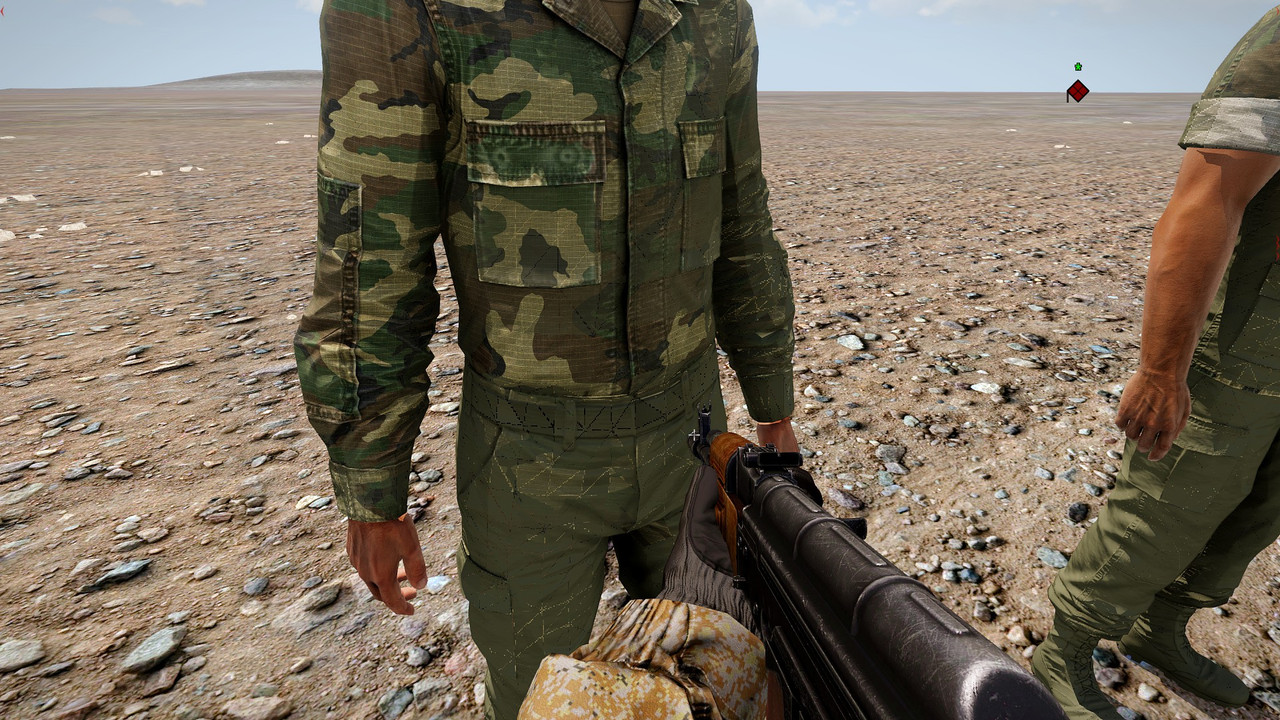
 dire stone
Anyone know how to access the SOG files. Im trying to reskin the SVH
severe rune
You can ask the SOG devs to give them to you, they have a discord
You'd need their permission anyway
dire stone
Wheres about could i find a link to the discord
severe rune
I think its pinned in #sog_prairie_fire or maybe in #channel_invites_list
dire stone
Found it, Thanks
wooden lantern
cold citrus
And this is where my lack of artistry kills me
charcoal brush
easiest way
cold citrus
wooden lantern
charcoal brush
Hm, I'd been trying to use grunge masks
dire stone
Retexture Item wont show ingame, any ideas why not? No errors when packing.
full quarry
dire stone
Retexture Item wont show ingame, any ideas why not? No errors when packing.
What do you pack with?
dire stone
mikeros tools
full quarry
do your classes appear in the ingame config viewer?
are you sure your pbo is actually running in the game?
dire stone
Whats the handiest way to find it in the viewer
stray relic
Place the asset in Eden Editor, right click, find in config viewer
dire stone
Its not in the game though.
stray relic
Let's see your config then - use pastebin and post a link to it
dire stone
The retextured item itself is not here
full quarry
leopards advanced dev tools has better config viewer with more easier search
dire stone
Pastebin
Pastebin.com is the number one paste tool since 2002. Pastebin is a website where you can store text online for a set period of time.
stray relic
b_helmet_svh4_01_01 is not a valid class name?
Shouldn't it be vn_b_helmet_svh4_01_01?
dire stone
stray relic
`b_helmet_svh4_01_01` is not a valid class name?
Shouldn't it be `vn_b_helmet_sv...
Thanks alot
 slim smelt
Does anyone know how to retexture the RHS Heli pilot helmets? I couldn't find a video or anything related to it.
brittle rivet
slim smelt
Does anyone know how to retexture the RHS Heli pilot helmets? I couldn't find a ...
Pretty much it will be the same as any other retexuture
This here has most of the starting stuff: #arma3_texture message
I don't know if RHS helmets actually are retexturable, haven't looked at the config. They likely are though
Be aware of the RHS license, best would be to ask Pufu or RHS[ Soul_Assassin] before putting much effort into it
Helmets should be acceptable though: https://www.rhsmods.org/page/EULA
slim smelt
brittle rivet
Pretty much it will be the same as any other retexuture
This here has most of th...
I've seen a bunch of people add textures to them. But I can't seem to find the PBO its in
brittle rivet
Start with the config browser to find the file names for the textures and models
Then use the unpacker from mikero's tools to search until you find the right PBO
Not certain which PBO it would be in
I'd check the rhs_infantry PBOs first, but I don't know how RHS is organized internally (other than obvious stuff, rhs_melb is the little birds matching MELB)
dire stone
Anyone know why its flashing this error? The image is converted into a PAA already.
 ashen violet
dire stone
Anyone know why its flashing this error? The image is converted into a PAA alrea...
ashen violet
dire stone
Anyone know why its flashing this error? The image is converted into a PAA alrea...
Check your source image to ensure it’s the correct bit depth before converting to paa. Does the image have an alpha channel ?
dire stone
Yeah its got an Alpha Channel and is 256x256
ashen violet
dire stone
Yeah its got an Alpha Channel and is 256x256
I’d save the source image as a 32 bit targa before conversion
dire stone
How do i save it as a 32 bit
ashen violet
I’m only familiar with photoshop. That process looks like File>Save a copy>save as type(select Targa)>32 bits/pixel
Also remember to name your texture correctly before conversion so it would be yourTexture_ca
burnt fjord
is it possible to apply emissive textures per pixel using a Super shader?
i want to make the P07 pistol have glow in the dark sights
full quarry
dire stone
Anyone know why its flashing this error? The image is converted into a PAA alrea...
use proper naming suffix _CA in your source texture
naming rule wiki page is linked in pins
full quarry
burnt fjord
is it possible to apply emissive textures per pixel using a Super shader?
i want...
night sights typically have just the dots with separate mesh and rvmat
wooden lantern
burnt fjord
is it possible to apply emissive textures per pixel using a Super shader?
i want...
yes
I’ve never gotten it to work tho
I just know in theory it exists
dire stone
Retexturing some S&S helmets and trying to have it so the code just links back to their models. Some help would be appreciated.
 lethal condor
Retexturing 101: don't re-introduce what you don't expect to update. AKA just include your texture
dire stone
Now im getting inheritance classes missing when all the required ones are there
dire stone
Pastebin
Pastebin.com is the number one paste tool since 2002. Pastebin is a website where you can store text online for a set period of time.
lethal condor
Line 88-89 is not closed
dire stone
Still not packing
lethal condor
Troubleshooting 101: not telling the error is one fault, now do it
dire stone
 lethal condor
What your current lines around 88
dire stone
 lethal condor
You didn't started it but ended
burnt fjord
wooden lantern
I’ve never gotten it to work tho
it kinda works, but it also looks broken


this is how it should look
 lethal condor
I also tried that method before. AFAIK it was introduced in TKoH and to depict skyscrapers nightscape. I have actually never got the emmissive coef work, or not even sure if it even has one
dire stone

 lethal condor
Now you started a bracket with no info
dire stone
What line
burnt fjord
80 and 90
dire stone
 burnt fjord
it should be
class classname: inheritanceclassname
{
code
};
and not how it is between lines 81 and 85
dire stone
 lethal condor
Now TestHel is invalid
dire stone
How do i make it valid again
lethal condor
You need to think simple
EVERY class use this format
class YourClass
{
};```or if your class have a parent
```cpp
class YourClass: ParentClass
{
};```You see TestHel is not doing itprobably need to post your modified rvmat
my guess is the coordinates of the as/nohq arent right anymore
the way the _em texture works in terms of emissive level is iirc you need to make the texture how you want it to look in use so you need to make it overly bright
burnt fjord
cedar lichen
the way the _em texture works in terms of emissive level is iirc you need to mak...
so _em isnt just a black background with white stuff that should be emissive?
cedar lichen
lemme quickly look I did an experiment with it a few months back
lethal condor
_em can have colors AFAIK, not just BW
cedar lichen
yeah my EM texture is like this
 cedar lichen
burnt fjord
cedar lichen
burnt fjord
yeah the coordinates are wrong i think
        aside[] = {1,0,0};
        up[] = {0,1,0};
        dir[] = {0,0,0};
        pos[] = {0,0,0};
at least this is what it is in p07
you might also need a second texgen for the DT stage
as it has a completley different coordinate that might be affecting the visuals
burnt fjord
i will try that
dire stone
 lethal condor
Line 91
burnt fjord
feels like it is less bright with a new _em texture that is green highlights and transparent on the rest
and still looks broken

 lethal condor
I would make it sure what is broken by using very obvious tex like FF0000
dire stone
lethal condor
Line 91
Whats wrong with it
lethal condor
It is wrong. You still did not get the point, you can't start a bracket without a class declaration
cedar lichen
you can also try changing the vertexshaderID back to super, atleast in my testing you didn't need superext for the em texture to work
but i doubt thats the issue with the em not working proper
burnt fjord
what stage would _em go into then? isnt Super limited to 7 stages?
cedar lichen
no no keep it for pixelshader
like this:
PixelShaderID = "SuperExt";
VertexShaderID = "Super";
These stages and numbers do matter, don't try to bother with changing the stage and textype combo
burnt fjord
it is still quite dim in the dark, but the texture seems better, still has this visual glitching tho, this visual glitching also changes on the direction of the light
 cedar lichen
yeah thats definitely the normal map not being right
burnt fjord
not being right as in the coordinates or something else?
cedar lichen
yeah the uvtransforms
hold on try this
the only other thing I can think of is the stage6 and stage7 being different from the original but idk
burnt fjord
same as before
i changed the DT coordinates back to:
aside[] = {1,0,0};
up[] = {0,1,0};
dir[] = {0,0,0};
pos[] = {0,0,0};
and now it seems slightly offset
gotta dip for now, will come back to this later, ty for the help @cedar lichen


 upper thicket
what is needed for the thermal view of a vehicle? I just know its a texture but I dont know anything else
full quarry
upper thicket
what is needed for the thermal view of a vehicle? I just know its a texture but ...
That is all.
upper thicket
full quarry
That is all.
Do I just color it in grey scale?
full quarry
upper thicket
Do I just color it in grey scale?
the different channels have different uses if I recall right
there was a wiki page about them Im pretty sure
upper thicket
full quarry
the different channels have different uses if I recall right
https://community.bistudio.com/wiki/Thermal_Imaging_Maps
ah this very simple one I hope 
this willl be very odd to do ngl, but I suppose I can see wat base game stuff does for each channel. maybe I can load the thermal textures a co? to help visually see
cedar lichen
better would be to open the texture in texview and cycle through the colour channels
 low helm
Cool blogpost from allegorithmic: https://www.allegorithmic.com/blog/texturing-ubisofts-rainbow-six-siege
 near warren
not sure where to ask, but it's related to texture so-
What's the max size of a unit/clan insignia?
lethal condor
2^n until 4096
near warren
ooo perfect