#arma3_texture
1 messages · Page 5 of 1
 steel geyser
nooo kinda like if the material is to high would there be an issue loading a low poly count model but high quailty picture
 full quarry
nothing else but higher memory imprint
steel geyser
@full quarry so it could cause a server over load if there’s multiple uses of object?
full quarry
Would have to be a lot but sure
 balmy palm
I'm having a slight struggle with, I presume, my SMDI texture..
1 - I want my cars body to be glossier
2 - I want my tyres to be completely matt
3 - there is a part I want to be chrome (but I believe this may be done by changing material in the object builder)
From my understanding, blue channel being lighter in places means more gloss, green channel lighter being more metallic - I've been playing for a while but I can't seem to get a desirable result.. is there something I'm missing, or even better, a way to cheat?

 mild olive
balmy palm
I'm having a slight struggle with, I presume, my SMDI texture..
1 - I want my ca...
mild olive
balmy palm
I'm having a slight struggle with, I presume, my SMDI texture..
1 - I want my ca...
From what I have found, you cant really get as dynamic of a range in the material that you are looking for.
I'd create a separate RVMAT and selection for the tyres with less gloss. And potentially a separate RVMAT and selection for chrome trims.
balmy palm
more to do with RVMATs then, 'fraid you'd say that.. I'll have a play, thanks!
 wispy vigil
Question, why doesn't this work?

 lethal condor
It is very hard to answer anything only with this picture. Which software you use to pack those PBOs?
wispy vigil
lethal condor
It is very hard to answer anything only with this picture. Which software you us...
no clue, it's a mod from the workshop
at this point I should just ask for the source code
lethal condor
I have zero idea why you have to do this when is a somebody's work
 subtle minnow
Does anyone have the Rhino texture template? (B_AFV_Wheeled_01_cannon_F)
 low helm
Thank you!
full quarry
wispy vigil
no clue, it's a mod from the workshop
you dont need to touch anything inside some mod
you make your own stuff as separate mod that loads on top of the other one
 queen cobalt
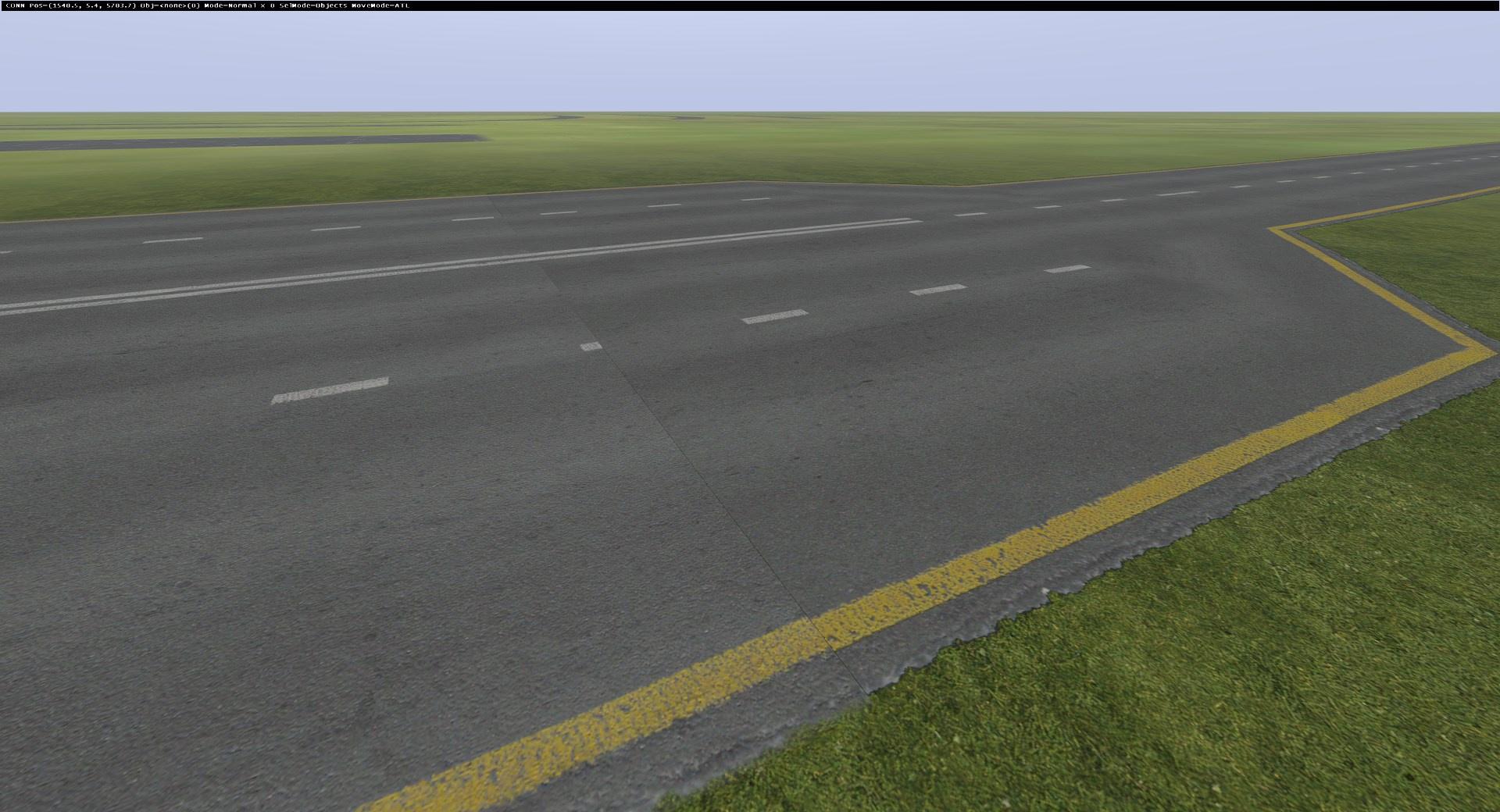
Just curious I was messing with some road textures and noticed this little gap: https://i.imgur.com/cfcxm6U.jpeg is this just because the road wasint scooted all the way up in photoshop? Also on the right side of the road the edges seemed to be very defined could that just use some some "shading"? I cannot think of the right word aha
 full quarry
Looks like the texture is not made repeating
Or it's repeating but you have a Same parts and one is flipped
 rigid grove
so...did someone have the guide the Fresnel? I want to make my rail has the same to sp render,it seems like I just need to set Fresnel value
on the rvmat
 stable swallow
You need to adjust Specular Power in the Rvmat along with fresnel
full quarry
rigid grove
so...did someone have the guide the Fresnel? I want to make my rail has the same...
there is no 1 value that makes it look same as in SP
 dawn jay

Just want to ask if this is the right config for a retexture
I can't seem to get this texture working in game overriding the original mtp uniform
Made sure my prefix was right and had hidden selections
full quarry
dawn jay
Just want to ask if this is the right config for a retexture
Does it match with the original conifg for that uniform?
as in is the hiddenselection "camo" same as in the original
dawn jay
full quarry
Does it match with the original conifg for that uniform?

Oh! Never mind, I got it working
full quarry
dawn jay
Oh! Never mind, I got it working
do you intend on changing the original uniform or creating new one?
full quarry
👍
rigid grove
stable swallow
You need to adjust Specular Power in the Rvmat along with fresnel
gocha
specular power 255,fresnel 1.3,6


pretty close the render auslt
stable swallow
Nice Stuff!
lethal condor
I'd suggest two:
- adjust specular and speculaPower
- don't use VR to test lighting
rigid grove
yeah i k
it seems like I put specular RGB value too Orange or brown


em....
yeah....too freaking shine
lethal condor
This is why I suggest 2
Unless the VR has modded lighting, that lighting is very dark than regula lightings. You better to use Stratis, unless the weaopon is meant to be used in vanilla VR
Or... you can check my Mod to replace VR lighting. Too lazy to link it rn
One thing to add: better to use diag exe to adjust rvmat on the fly
rigid grove
ok thx,I'll try
full quarry
Specular of 255 is very very high powered. I suspect you don't have correct kind of smdi texture that fits Arma.
rigid grove
yeah,I'm trying to use met and rough in smdi's G&B channel
but I still don't understand how to conform the speculor and speculor value in rvmat
full quarry
metal and roughness dont directly translate to SMDI
so youll need to adjust it both in texture and with the specular settings
the specular[] array and specular power determine the maximum of what the rvmat outputs and then the texture modulates that
rigid grove
so the rvmat setting higher than texture map or?
full quarry
rvmat sets maximum. texture alters it
black on texture should still be 0
and white would be what the max is set as
if I recall right
 mint hare
if that's the math used in the shader https://community.bistudio.com/wiki/HQ_Normal_Maps#Specular_map - i can't possibly bend my brain around it 
 severe rune
My brain is already melting from trying to read that text
"In order that shaders were simpler (faster), then inside them is inconsiderable multiplication of specular component with coefficient, which is derived in detail analysis"
Excuse me wha
mint hare
85 rounds of bootleg machine translation 🙃
mint hare
like, that's equvalent to k = 1 / (sp + 1); y = green p * (blue p * (1 - k) + k);. Or even y = green p * lerp (blue p, 1, k); And max difference between specularPower of 70 and 7000 would be like 3/255 (if the color has 8 bits per channel). 
stable swallow
rigid grove
specular power 255,fresnel 1.3,6
i see 3DMA Stuff here nice
mint hare
or, if i read from another angle, the point of omitting the red/diffuse channel is: red/diffuse + green/specular should always be 1... and the point of blue/power channel is to make that sum not 1 effectively. Yaay, my head hurts 🤣
mint hare
https://www.math3d.org/rnGgfwgM4 yaay for graphing calculators

 spark shore
I'm confused are you calculating how directX works?
or are you trying to export spec gloss in one single texture normal map included?
mint hare
i'm trying to understand what specularPower in rvmat means and what are the sane values for that
 zenith mulch
mint hare
i'm trying to understand what `specularPower` in rvmat means and what are the sa...
zenith mulch
mint hare
i'm trying to understand what `specularPower` in rvmat means and what are the sa...
you have look at the basics right?
https://community.bistudio.com/wiki/RVMAT_basics
specularPower is mainly just glossiness
not directx but close enough http://learnwebgl.brown37.net/09_lights/lights_specular.html
 neat cape
mint hare
i'm trying to understand what `specularPower` in rvmat means and what are the sa...
neat cape
mint hare
i'm trying to understand what `specularPower` in rvmat means and what are the sa...
You can also edit rvmat files with texteditor so you see some values and you can easy try out some stuff with it.
I did experiments with it very often and with the OB Bulldozer viewer i was able to see what i did after each rvmat save. SpecularPower defines how much gloss the env_map reflects
Less power it makes the gloss matt, more power it makes the gloss very glossy
Best is you try and learning by doing
Also fresnel can do a lot of differences to the whole rvmat
Also if you set specular as example instead of 1,1,1,1 to 1.5,1,1,1 you got a red shine gloss effect, you can play around with these values, some stuff gets cool effects


Such stuff ive tested around with specular and specular power as example
 tulip oyster
stable swallow
tulip oyster
stable swallow
You can find it in the enoch pbo
 odd herald
Why is it giving me this? I have the .jpeg in the mission folder like it needs.

 rancid obsidian
Guys is this right place for flags and insignias?
full quarry
rancid obsidian
Guys is this right place for flags and insignias?
depends what about them
rancid obsidian
full quarry
depends what about them
I created a custom faction but I need a flag
Custom flag
Idk how to add it
And insignia
full quarry
well you would start from making those textures I suppose
if you made a faction you probably are a bit familiar with configs
so then you would make new configs for those
rancid obsidian
full quarry
so then you would make new configs for those
What configs?
full quarry
insignia and flag if those are what you want to make
rancid obsidian
I created faction with that orbat alive thing
full quarry
for reference you can get the all in one config dump or use the ingame config viewer (or one of them advanced config viewer mods that have better search)
full quarry
rancid obsidian
I created faction with that orbat alive thing
ah thats something quite different then
thats just for use with Alive if I recall right
rancid obsidian
full quarry
thats just for use with Alive if I recall right
Tutorials it's in pins?
full quarry
well there are no tutorials for flags or insignias exactly
you would proably have to make it a separate mod
I dont remember how the Alive stuff worked exactly but if I recall right its not separate mod that you build with the stuff you make
rancid obsidian
full quarry
I dont remember how the Alive stuff worked exactly but if I recall right its not...
It's a module in editor
rancid obsidian
full quarry
yeh that wont be able to make new flags or insignias
I didn't said how to create flags with orbat
full quarry
that is true
was just making an observation
youll need to learn how to set up a proper mod addon and config and how to pack that into a pbo
rancid obsidian
full quarry
youll need to learn how to set up a proper mod addon and config and how to pack ...
I did
Created an custom faction and packed it for test
full quarry
then you can use the all in one config or in game config viewer to find examples of insignia and flag configs
rancid obsidian
full quarry
then you can use the all in one config or in game config viewer to find examples...
Also do u know white or black textures for vehicles?
That workshop it's big idk what should I search
full quarry
dont know.
maybe look for black retexture or white retexture
could be hard to find like youve noticed
rancid obsidian
full quarry
could be hard to find like youve noticed
Thanks anyway
 full quarry
rigid grove
any idea?
full quarry
rigid grove
any idea?
Can't do much but to look at it in game (or buldozer viewer with real lighting set up (pins) and tweak colors until it's good.)
rigid grove
oh god pls no
lethal condor
This is why I mentioned about diag exe
It is very easy to check in-game and its lighting
full quarry
Diag exe and filepatching is very fast yeah
 floral fiber
rigid grove
trying to made a perfct m110a1 reciver color
floral fiber
rigid grove
trying to made a perfct m110a1 reciver color
isnt that RAL8000? #89683C if so
though as goat and polpox mentioned it'll be a good idea to do diag exe + filepatching
rigid grove
u guys mean the DX diag.exe or?
severe rune
Arma 3 has development branch which has a diagnostic game binary
floral fiber
which branch is it again i forgot the link to all the places
severe rune
development branch :U
floral fiber
oh, not possible to have diag and profiling then?
severe rune
you could manually copy the exe out of it and into the other
floral fiber
or is it just diag is included in dev branch
ah epics i shall do that later
thats for the reload config stuff isnt it?
severe rune
ye
 rare dove
I would love to update the old SU35 model, and see that the left side MFD is looking awkward. There are artifacts all over the place, probably due to z-fighting? Not sure about it though. On the right is the same MFD with AO disabled

 rare dove
the base texture is _ca
 crisp jewel
Hello, I’m just writing this absurdly long text wall as to a few questions I had regarding the texture files of certain items in Arma.
First of all, I’ll make it clear that I do not have much experience with such stuff, and some of the following questions may be completely irrelevant, as I don’t know what is and what isn’t when it comes to such files. So:
(1.) Is there a whole long process to retrieving texture files for Arma and the process of making/replacing them? Or is it pretty straightforward and direct?
(2.) Do you need any special applications or programs to edit/manipulate texture files from Arma?
(3.) If I am able to do this all, does it take up a lot of space on a drive or not? Would I need a separate drive to put them on?
If anyone is willing to give me a detailed, but simple step by step guide (preferably with images as I’m mostly visual in learning such stuff/directions (sorry…)) to learning how to edit textures for certain things in Arma 3, it’d be heavily appreciated. Feel free to PM me and give me the instructions and rundown on how to get myself set up, and how to begin with this all. (Basically what I said above-…) I really would like to try my hand at a seemingly interesting… Creation of new ideas-?
Thanks. Sorry again for the inconvenience…
lethal condor
- from PBO, extract a PAA, edit, pack it into another PBO, with proper config
- Arma 3 Tools' TexView to export/import
- P Drive helps anything about Modding in A3 indeed
rigid grove
why the diag.exe doesn't lunched the mod?
lethal condor
Reasons or somehow. I rename diag exe arma3.exe so you can run as "32 bit"
Of course itself is 64 bit but this way you can easily switch the exe
lethal condor
Check bit depth
rancid obsidian
lethal condor
Check bit depth
Change that to what?
lethal condor
I don't recall, IIRC it accepts only certain depth(s). You can search this channel
 rancid obsidian
Someone? Anyone?
rancid obsidian
 stray relic
https://community.bistudio.com/wiki/TexView_2_Manual
stray relic
https://community.bistudio.com/wiki/TexView_2_Manual
My icon is 128×128
And png and it has alpha channel
stray relic
rancid obsidian
My icon is 128×128
And png and it has alpha channel
You haven't said how you are converting it or what the error message is? Hard to give better advice without some basic info.
rancid obsidian
stray relic
You haven't said how you are converting it or what the error message is? Hard to...
It just said fail
full quarry
Where did you make the png? what bit depth did you save it in?
stray relic
That's sort of half the info required
rancid obsidian
I didn't changed bit depth I just changed the format
rancid obsidian
rancid obsidian
I didn't changed bit depth I just changed the format
@full quarry
full quarry
rancid obsidian
<@150949769953411072>
You have not answered either of my questions 
what progrma didd you use? what bit depth is it saved as
rancid obsidian
full quarry
You have not answered either of my questions <:blobcatsweats:728343057354850325>
I used gimp
full quarry
and the bit depth?
full quarry
youll have to check then
rancid obsidian
full quarry
youll have to check then
I think it's 8
full quarry
is it greyscale or rbg?
rancid obsidian
Rgb I think
full quarry
then I got nothing more if you are correct those should work
stray relic
He still hasn't said how he tried to convert it or a better description (like a screenshot) of the error message. Doesn't seem to want to help himself, low effort.
stable swallow
rancid obsidian
Change that to what?
8 bit
rancid obsidian
stray relic
He still hasn't said how he tried to convert it or a better description (like a ...
I'm in game
After the game I tell u
rancid obsidian
stray relic
He still hasn't said how he tried to convert it or a better description (like a ...
It's a png
And 128×128
In file properties its bit depth 32
In gimp at top of the screen it says RGB color 8-bit


@stray relic
stray relic
medic_icon_co.png if it is not transparent, medic_icon_ca.png if it is
rancid obsidian
Should I add that co or ca?
stray relic
yes
stray relic
From the original web page I linked previously
 rancid obsidian
stray relic
From the original web page I linked previously
rancid obsidian
stray relic
From the original web page I linked previously
It has alpha channel
rancid obsidian
Still can't convert
floral fiber
isnt there a list of useful base game icon paths? looking for a magnifying glass icon at the moment
ah yeah 3den enhanced had it
just need to find that lmao
 sullen vapor
floral fiber
isnt there a list of useful base game icon paths? looking for a magnifying glass...
sullen vapor
floral fiber
isnt there a list of useful base game icon paths? looking for a magnifying glass...
there is a wiki page that has a lot of them listed
floral fiber
ive been looking for it for ages but can never ifnd it
sullen vapor
lemme try
theres that one
hmm maybe I'm confusing that one with the one you need
I found this though  https://www.youtube.com/watch?v=PFDw6dw2VTo

Icon viewer UI for ArmA 3 to find any image in any pbo.
floral fiber
yeah 3den enhanced's is just in tools part
 mossy estuary
Are there any good places to find arma 3 retexture templates. Specifically looking for the beret and the Bonnie hat.
stable swallow
rancid obsidian
Still can't convert
bit depth is too high or you first have to convert it to tga. i always save copy as tga then convert it to paa
rancid obsidian
stable swallow
bit depth is too high or you first have to convert it to tga. i always save copy...
Finally someone answered
rancid obsidian
stable swallow
bit depth is too high or you first have to convert it to tga. i always save copy...
What about flags?
stable swallow
rancid obsidian
What about flags?
never did flags
rancid obsidian
Anyone here?
 rancid obsidian
full quarry
negative 😄
rancid obsidian
full quarry
negative 😄
I figured how to make custom insignias
Also when I'm trying to run game it gives an error
The bad thing is connection it's bullsht here I can't send image
lethal condor
You can write down what exactly is the error
 drowsy stream
full quarry
https://tenor.com/view/doggo-boop-gif-22290017
drowsy stream
full quarry
https://tenor.com/view/doggo-boop-gif-22290017
Posting dog GIFs is my job here 😢
Making me unemployed
 rancid obsidian
lethal condor
You can write down what exactly is the error
rancid obsidian
lethal condor
You can write down what exactly is the error
It says line 28: /CFGUnitInsignia/: 'i' encountered instead of '{'
lethal condor
Then it is a config error, not texture error
rancid obsidian
There is no i there
lethal condor
There is no what?
rancid obsidian
"i"
lethal condor
Post around Line 28
rancid obsidian
Line 28 it's empty
lethal condor
I said around
rancid obsidian
I looked
lethal condor
I said post
rancid obsidian
lethal condor
I said post
Wdym?
lethal condor
Post around Line 28
full quarry
post the whole config
the error is somewhere around line 28 but due to how config is processed it dont reportt the exact place
you are missing an { though
rancid obsidian
full quarry
you are missing an { though
I don't see any problem
rancid obsidian
lethal condor
But since the game says so, there is
Yeah but I don't see missing "{" all of them is there
lethal condor
Once again, post the config
full quarry
post the config already
lethal condor
As I said, and HG said, multiple times, there is an issue
rancid obsidian
rancid obsidian
lethal condor
As I said, and HG said, multiple times, there is an issue
Of course there is an issue
lethal condor
Are you sure this is your latest config? Did you made it into the Mod?
rancid obsidian
lethal condor
Are you sure this is your latest config? Did you made it into the Mod?
Yes
And it's an .pbo
lethal condor
Are you 100% sure your Mod has been updated and loaded properly into the game?
rancid obsidian
lethal condor
Are you 100% sure your Mod has been updated and loaded properly into the game?
I didn't published it but it loaded in mod list
full quarry
how do you pack the pbo?
rancid obsidian
lethal condor
The game? Or AB?
When loading the game
When it says initializing addons
This error comes
Also can u reply on my message or ping me ?
lethal condor
Well, it looks like an AB's issue? Or, maybe due to you lack requiredAddons[]?
rancid obsidian
lethal condor
Well, it looks like an AB's issue? Or, maybe due to you lack `requiredAddons[]`?
AB?
Ah addon builder
rancid obsidian
lethal condor
Well, it looks like an AB's issue? Or, maybe due to you lack `requiredAddons[]`?
U asking me?
rancid obsidian
lethal condor
Well, it looks like an AB's issue? Or, maybe due to you lack `requiredAddons[]`?
I don't think so
lethal condor
Again, the game will not care if you think so
rancid obsidian
lethal condor
Again, the game will not care if you think so
How should I know my required addons?
lethal condor
rancid obsidian
I just added some pngs
mossy estuary
mossy estuary
Are there any good places to find arma 3 retexture templates. Specifically looki...
Anyone able to answer this?
full quarry
mossy estuary
Anyone able to answer this?
BI forums has a thread where templates were collected once
other than that there isnt any centralized repository
mossy estuary
Sounds good thanks
stable swallow
rancid obsidian
Of course there is an issue
bist du deutsch ?
rancid obsidian
stable swallow
bist du deutsch ?
No
stable swallow
rancid obsidian
No
ok was wondering because the link to the author url ends with _de
rancid obsidian
stable swallow
ok was wondering because the link to the author url ends with _de
Yes
rancid obsidian
stable swallow
ok was wondering because the link to the author url ends with _de
So did u see that config?
I think I sent the wrong 1
rancid obsidian
stable swallow
ok was wondering because the link to the author url ends with _de
But I have some german friends
rancid obsidian
stable swallow
ok was wondering because the link to the author url ends with _de
Do u have any idea about my config problem?
stable swallow
rancid obsidian
Do u have any idea about my config problem?
cant see something wrong there, might be the wrong config you attached
rancid obsidian
stable swallow
cant see something wrong there, might be the wrong config you attached
I sent a wrong cfg
The difference is I added 4 lines there cuz I have 5 icons
stable swallow
explanation unclear, ended up throwing my cat in the microwave
rancid obsidian
stable swallow
explanation unclear, ended up throwing my cat in the microwave
I sent wrong cfg anyway
 snow kelp
Do the cargo buildings have hidden selections?
full quarry
snow kelp
Do the cargo buildings have hidden selections?
buildings rarely have hiddenselections as they dont work on terrain objects
snow kelp
So that’s a no to being able to retexture them?
full quarry
snow kelp
So that’s a no to being able to retexture them?
usually yeah they are not set up for that
snow kelp
Bugger
 rough nacelle
Hello, how do I add icons to these?

I did put this here but
that just added an arsenal icon
 lethal condor
Put \ before HAMS_Armor
rough nacelle
Hoooo, thank you
rancid obsidian
@full quarry can I ask u something?
full quarry
rancid obsidian
<@150949769953411072> can I ask u something?
sure, though the channel works the way that people can just ask their questions
rancid obsidian
full quarry
sure, though the channel works the way that people can just ask their questions
It's about modding
rancid obsidian
floral fiber
ask the question
I asked
floral fiber
no you didnt you asked to ask
rancid obsidian
floral fiber
no you didnt you asked to ask
Idk that works for multiplayer
floral fiber
what
rancid obsidian
floral fiber
what
rancid obsidian
Anyone here?
lethal condor
Then ask your question first
rancid obsidian
lethal condor
Then ask your question first
Do u know those banners in rectangle form?
lethal condor
What banner?
rancid obsidian
In arma
lethal condor
Okay, which?
rancid obsidian
lethal condor
What banner?
Those banners without flagpole
lethal condor
In-game prop you mean?
lethal condor
And?
rancid obsidian
I created a banner mod but it won't show my flag texture on it it just shows the white flag texture
rancid obsidian
lethal condor
Then show us what you've done
I can't upload cpp cuz of shitty net
lethal condor
Why? It is not a image but text
rancid obsidian
lethal condor
Why? It is not a image but text
Ask from our government
lethal condor
That's not a question. Since you can read my message it won't be a concern to upload a few KB of text
rancid obsidian
lethal condor
That's not a question. Since you can read my message it won't be a concern to up...
U mean I type those codes?
lethal condor
You can of course
rancid obsidian
lethal condor
You can of course
It's 30 lines
rancid obsidian
lethal condor
You can use pastebin too if you need
Idk how to work with that
lethal condor
Not hard. Let's not waste our time for nothing, please do so I can point what's wrong
rancid obsidian
Can I upload images with pastebin?
lethal condor
What why?
rancid obsidian
To show the results in game
lethal condor
I thought I've asked for the config and you said you can't upload images
rancid obsidian
I can't upload in discord
lethal condor
That's not even related with how weak your internet is
You may simply have no perm to upload here
rancid obsidian
lethal condor
Config please
It says "u are not allowed to paste"
@lethal condor it worked
lethal condor
A banner does not use setFlagTexture
rancid obsidian
lethal condor
A banner does not use `setFlagTexture `
💀
Ah yes
I forgot to change that
rancid obsidian
lethal condor
A banner does not use `setFlagTexture `
So the other things is fine?
lethal condor
In what sense?
rancid obsidian
lethal condor
In what sense?
Nothing
lethal condor
It is 100% not recommended to have requiredAddons[] empty though
rancid obsidian
lethal condor
It is 100% not recommended to have `requiredAddons[]` empty though
So I can delete that or I Need to fill it?
lethal condor
Fill it. I thought I've ever taught you that what is the recommended string to put
rancid obsidian
lethal condor
Fill it. I thought I've ever taught you that what is the recommended string to p...
That flag mod I made yesterday that requiredaddons was empty and worked
And insignias worked too
lethal condor
Yes, it will work. Because it only adds. But it is a good habit always to fill it
rancid obsidian
lethal condor
A banner does not use `setFlagTexture `
So what should I do with this?
Change flag to banner?
lethal condor
hiddenSelectionsTextures[]
rancid obsidian
lethal condor
`hiddenSelectionsTextures[]`
Give my texture address to this?
lethal condor
Yes
lethal condor
class Blackwood_Banner_01: Banner_01_F
{
    author = "Punisher";
    editorPreview = "\Blackwood Banner\data\Blackwood_banner.jpg";
    scope = 2;
    scopeCurator = 2;
    accuracy = 1000;
    displayName = "Blackwood Banner";
    hiddenSelectionsTextures[] = {"\Blackwood Banner\data\Blackwood_banner_co.paa"};
};```Thanks. also can u tell me the best size for that banner?
lethal condor
Anything 2:1 ratio
 halcyon wren
Hi, I was told to come here for a issue I was having with RVMATS.
This is the issue: http://i.imgur.com/eHZjRHg.png
This is the RVMAT: http://pastebin.com/UhaYrgzG
These are the textures: (Diffuse: http://i.imgur.com/lv07kKQ.jpg) (Specular: http://i.imgur.com/qpdYMeg.jpg) (Normal: http://i.imgur.com/tXeut0I.jpg)
Anyone know what I'm doing wrong?
 silver adder
Specular should not be a b/w image, check BI textures SMDI is Spec in Green, Gloss in Blue.......should result in a red/pink/yellow texture
 frozen blade
Specular is a black and white image
 livid knot
Is it impossible to have a mesh inside another mesh? The mesh inside is using a standard rvmat, and the one around it is using one with transparency, however the one on the inside doesnt render through it. Is there a workaround for this?
frozen blade
SMDI is spec+gloss, which means the end result is a redish/yellowish map texture
full quarry
livid knot
Is it impossible to have a mesh inside another mesh? The mesh inside is using a ...
correcting the alpha sorting so the transparent surface renders on top
livid knot
full quarry
correcting the alpha sorting so the transparent surface renders on top
Could you give a bried explanation on how to do that?
full quarry
in OB select the transparent mesh, go to faces menu on top and hit "move to top"
in Blender there is also a dialog to set face sorting order
frozen blade
;)
silver adder
+1 ;P
livid knot
That worked perfectly! Thankyou
stray relic
Bear in mind you'll need to keep doing it periodically if you copy and paste new mesh into OB.
frozen blade
i stil hope enfusion will allow color spec and color gloss maps though
silver adder
spec gloss pbr
frozen blade
or metalness ggx, PBR
silver adder
too serious, Spec Gloss would be fine for a start .....
halcyon wren
How would I go about creating a specular map like that?
silver adder
photoshop, manually or simplest / worst / fastest way is to use the specular map filter in texview2
halcyon wren
Thanks, one more question though, the model is a little bit dark, what should I adjust to make it brighter?
 silver gull
first make sure textures are all proper. This looks like the Ambient occlusion, OR the shadow LOD is not proper
halcyon wren
If you're talking about the numbers at the top of the RVMAT, I have no idea what they all mean or do
 dense peak
has anyone a workflow from substance painter to arma 3?
 waxen shoal
Does anyone know if theres a way to "sharpen" my texture around these curved edges in the UV here? the unpainted portions are intended to have a different base material as a lens, and im not too keen on this random spillover of paint application
 livid knot
waxen shoal
Does anyone know if theres a way to "sharpen" my texture around these curved edg...
livid knot
waxen shoal
Does anyone know if theres a way to "sharpen" my texture around these curved edg...
How did you apply the black color?
waxen shoal
VIA polygon fill
disregard
im a numpty that forgot to bake his mesh maps
looks fine now
 floral fiber
isnt there a lighting preset or smth for arma for substance
sullen vapor
floral fiber
isnt there a lighting preset or smth for arma for substance
there is a shader but its outdated
 celest anvil
Hi, so I'm trying to retexture a MV-22 from the workshop that is a Arma 2 port but with modifications to model (such as nose and belly mounted miniguns and a pylon rack). Typically I understand it's as simple as going to the hiddenselections and just changing the texture from there, but when looking withing the config file, there is no option for hiddenselections, but when looking at the config viewer within Arma 3 on the vehicle itself, it shows that there's not only texture sources but also a hiddenselections with textures in them. I've added hiddenselections to the config file which hasn't worked, and I've tried using the setObjectTexture within the attributes of the vehicle but that hasn't worked either, even though these are the texture files for the MV-22 Arma 2 port. I can send both the modified and unmodified configs if needed.
lethal condor
First thing first, a config does not necessary config every part of a config entry (this case an MV-22 from whichever the Mod is) but multiple config can involve into one entry. This could be why you can't find hiddenSelectionsTextures in config.cpp you found
On the other words: If you want to have a modded hiddenSelectionsTextures, you can define that and nothing else in your config (of course some basic header and inheritance is still needed)
celest anvil
So theoretically I could just make a new config file within it's own mod that adds hiddenSelectionsTextures and effects the respective mod. And not inherently need to modify the config from the parent mod itself.
lethal condor
Inherit is still needed, but guess the you got the idea
celest anvil
Right, thank you, but I'm still confused on why even using the setObjectTexture method isn't working with the mod.
lethal condor
You simply may done a easy mistake, but in order to check you want to post the cfg
celest anvil
*update: I tried using this and it did not work
lethal condor
Gimm bit, will check
lethal condor
celest anvil
*update: I tried using this and it did not work
Okay checked the config.
I'd like to ask:
- is
requiredAddons[]correct? - What exactly do you mean by not work?
- Any errors you got?
- Those file path are correct for sure?
_coVMM.paais not a preferred suffix but_VMM_co.paa
mint hare
and
units[]doesn't look correct as well :3
lethal condor
Oh true
celest anvil
lethal condor
Okay checked the config.
I'd like to ask:
- is `requiredAddons[]` correct?
- Wha...
- requiredAddons[] I have just as a place holder because I'm loading it with just parent mod but it should be "EX3B_V22"
- Textures do not apply to the aircraft at all, and hold their default USMC gray textures
- No errors that I've gotten in the editor, when launching, nor when actually spawning in and playing as the unit
- 100% confident that the file path is correct, I can move it to the same drive Arma 3.exe is on but when doing this with other units it doesn't seem to affect it negatively
- I can change that and report back a change
lethal condor
Can you check EX3B_T_MV22_Inf_F 's hiddenSelections[] ?
celest anvil
lethal condor
Can you check `EX3B_T_MV22_Inf_F` 's `hiddenSelections[]` ?
when checking the file out of game, there is no hiddenSelections[], but when I check in the ingame config viewer, this is what I find: hiddenSelectionsTextures[] = {"\A3\Air_F_Exp\VTOL_01\Data\VTOL_01_EXT01_olive_CO.paa","\A3\Air_F_Exp\VTOL_01\Data\VTOL_01_EXT02_olive_CO.paa","\A3\Air_F_Exp\VTOL_01\Data\VTOL_01_EXT03_olive_CO.paa","\A3\Air_F_Exp\VTOL_01\Data\VTOL_01_EXT04_olive_CO.paa","\A3\Air_F_Exp\VTOL_01\Data\VTOL_01_signs_CA.paa"};
lethal condor
It would mean your base MV22 has no hiddenSelections
mint hare
🍿
check for hiddenSelection[] (sic) in-game, though
or spawn it in editor, look at it and run selectionNames cursorObject in the debug console 🤷♂️
lethal condor
Yeah, please make sure they have one
celest anvil
mint hare
check for `hiddenSelection[]` (sic) in-game, though
I found this when looking for hiddenSelection[]
hiddenSelections[] = {"Camo_1","Camo_2","Camo_3","Camo_4","Camo_5"};
celest anvil
mint hare
or spawn it in editor, look at it and run `selectionNames cursorObject` in the d...
and when running that in the debug console I don't actually get anything in return but I'm confident I'm just running that command incorrectly
So does this mean my base MV22 does have hiddenSelections or?
lethal condor
It does have, if I believe your report
mint hare
(or it inherits the config from vanilla and doesn't)
lethal condor
Maybe 🤔
mint hare
celest anvil
mint hare
<https://steamcommunity.com/sharedfiles/filedetails/?id=2747026822> this mod?

mint hare
the model isn't set up with hidden selections and config is just inherited
or wait
for Mikero's sake. Try and add hiddenSelections[] = {"camo1","camo2"}; to your config before the hiddenSelectionsTextures[] line
celest anvil
Mikero? Uhh alright just give me a sec
alrightly, changed what was suggested
New textures still didn't apply
mint hare
 mint hare
nah, the selections don't seem to be applied in model
celest anvil
Is there a way to apply them...?
mint hare
without editing the p3d model - no
 mint hare
and unbinarized model? Then that's the question of licenses and ethics, i'm no expert in those
celest anvil
an unbinarized model, yeah i don't have that. Hopefully the author will make his mod open source
though even id I did have the p3d, modelling is wayy out of my expertise
mint hare
if you did have the p3d it's be "Open - select the faces that need to be retexturable - assign to a new (or existing) selection (aka vertex group) - save - pack"
like... 8 clicks per LOD for total of ~50-ish
 mint hare
oops, i've forgot the model.cfg edits
celest anvil

I literally just want to slap an anime girl on this aircraft why must it be so difficult
mint hare
inb4 "find flat enough section on the fuselage or wings and attachTo a user texture object there" 🤣
 mint hare
or just fix their stuff themselves
 nocturne scroll
Hopefully this is the right place - does anyone have civilian/construction textures for the IFV-6C/CRV-6E? Kinda like a yellow/black CAT aesthetic.
 agile surge
Does anyone know why textures wouldn't be showing up when I have randomization turned off and the filepath specified?
class CfgPatches
{
    class MS_Retextures_Config
    {
        units[] = {"Mako_Retextures"};
        weapons[] = {};
        requiredversion = 0.1;
        requiredAddons[] = {rhsusf_hmmwv};
    };
};

//**************************************************************************************
//********* Factions *******************************************************************
//**************************************************************************************
class cfgFactionClasses
{
    class Mako_Retextures
    {
        displayName = "Mako Retextures";
        priority = 3;
        side = 2;
    };
};

class cfgVehicles
{

//**************************************************************************************
//********* Vehicles *******************************************************************
//**************************************************************************************
    class LandVehicle;
    class rhsusf_m1025_d;
    class m1205_m: rhsusf_m1025_d
    {
        crew = "C_Man_casual_1_F_afro";
        side = 2;
        faction = "Mako_Retextures";
        displayName = "M1025 (Unarmed) [Mako Blue]";
        hiddenSelections[] = {"exterior","interior","A2","wheels","mainbody","hood gratting","camo1","camo2"};
        hiddenSelectionsTextures[] = {"data\rhsusf_hmmwv\textures\m998_exterior_m_co.paa", "data\rhsusf_hmmwv\textures\m998_interior_m_co.paa", "data\rhsusf_hmmwv\textures\A2_parts_m_co.paa", "data\rhsusf_hmmwv\textures\wheel_wranglermt_m_co.paa", "data\rhsusf_hmmwv\textures\m998_mainbody_m_co.paa", "data\rhsusf_hmmwv\textures\gratting_m_co.paa", "data\rhsusf_hmmwv\textures\tile_exmetal_m_co.paa", "data\rhsusf_hmmwv\textures\m1025_m_co.paa"};
        class EventHandlers
        {
            init = "(_this select 0) setVariable [""BIS_Enablerandomization"", false];";

            };
        };

    };
maybe path in config and path in pbo dont match
agile surge
full quarry
maybe path in config and path in pbo dont match
That's what I thought, the .pbo is called Mako Retextures. m998_exterior_m_co.paa is in Mako Retextures>Data>rhsusf_hmmwv>Textures>m998_exterior_m_co.paa
full quarry
yeh does not look like your config path matches that structure
also dont use spaces in your folder names
use _
agile surge
Oh what did I miss?
agile surge
full quarry
yeh does not look like your config path matches that structure
Sorry I've been having issues, what did I miss?
full quarry
 agile surge
Mako Retextures is the name of the pbo
mint hare
pbo prefix strikes again
mint hare
full quarry
that means nothing 😅
*except when no pbo prefix is set and engine automatically uses pbo file name as a prefix when loading. Yaaay for consistency
full quarry
well as you can see it dont do that
mint hare
nonono
agile surge
Gotcha, so in $PBOPREFIX$ I would put the name of the pbo?
or just x\myMod\MyAddon?
(in this instance, x@MakoSecurityFactions\MakoRetextures)
mint hare
full quarry
well as you can see it dont do that
it'd be "Mako Retextures\data\rhsusf_hmmwv\textures\m998_exterior_m_co.paa", though
mint hare
agile surge
or just x\myMod\MyAddon?
(in this instance, x\@MakoSecurityFactions\MakoRetextu...
you can make $PBOPREFIX$ with x\MakoSecurityFactions\MakoRetextures contents and change the texture paths to look like "x\MakoSecurityFactions\MakoRetextures\data\rhsusf_hmmwv\textures\m998_exterior_m_co.paa"
agile surge
mint hare
you can make $PBOPREFIX$ with `x\MakoSecurityFactions\MakoRetextures` contents a...
Perfect, thank you
agile surge
mint hare
you can make $PBOPREFIX$ with `x\MakoSecurityFactions\MakoRetextures` contents a...
would it need to be @nimble latchSecurityFactions or just MakoSecurityFactions
mint hare
pboprefix and texture paths in config need to match each other
well, initial parts (prefixes) of texure paths
agile surge
mint hare
pboprefix and texture paths in config need to match each other
Yeah that's why I'm asking, as the game adds the @ automatically when it's installed
mint hare
whatever is happening outside of PBO doesn't matter if pboprefix is set up
files would always be accessible at <pboprefix>\<path_inside_the_pbo>
mint hare
mint hare
you can make $PBOPREFIX$ with `x\MakoSecurityFactions\MakoRetextures` contents a...
x\MakoSecurityFactions\MakoRetextures BOLD BACKSLASH data\rhsusf_hmmwv\textures\m998_exterior_m_co.paa :3 in example here
agile surge
I ran it with the new file prefix and it's not going, holdon
nvm
I see my mistake
I am a GENIUS
/j
IMPROVEMENT!
The first texture path worked, the rest didn't
I'll take a closer look
Went from this to this


Thank you all so much
 rancid obsidian
agile surge
Thank you all so much
rancid obsidian
agile surge
Thank you all so much
I like this color especially for the offroads
agile surge
rancid obsidian
I like this color especially for the offroads
I'm going to make an entire retexture mod which has them in solid black and a ton of different camo patterns
(With credit to rhs obviously)
rancid obsidian
agile surge
I'm going to make an entire retexture mod which has them in solid black and a to...
I kinda have a faction with this dark blue color
For uniforms and vehicles (actually not vehicles)
 tranquil mason
What resolution should insignias be?
rancid obsidian
tranquil mason
What resolution should insignias be?
Mine is 1024×1024
And it's fine
mossy estuary
Some uniform textures of ICP assets.


 olive pawn
Is it possible to layer a transparent texture that's emissive over the model's base texture. Aka make parts of the texture "glow" without whole things glowing. There some config magic or something?
lethal condor
No. A whole rvmat can only glow
olive pawn
So pretty much impossible unless a model is made for that in mind?
lethal condor
Basically
olive pawn
Darn
lethal condor
Blame 15 yo rvmat system
Where PBR was not a thing yet
I actually wanted to have such too, but not even sure if Arma 3 can get a shader update
full quarry
SuperExt shader from tokh has masked emissivity buuut it might not work always
lethal condor
Uh, never heard of thaat
severe rune
SuperExt.
And afaik it should work just fine always?
full quarry
lethal condor
Hmmmmm, just testing
class Stage3
{
    texture = "#(argb,8,8,3)color(1.0,0.0,0.0,1.0,EM)";
    uvSource = "tex";
    class uvTransform
    {
        aside[] = {1.0,0.0,0.0};
        up[] = {0.0,1.0,0.0};
        dir[] = {0.0,0.0,0.0};
        pos[] = {0.0,0.0,0.0};
    };
};```Using default_super as base and this is working it seemsthree axis vectors in uvTransform scare me
lethal condor
Wait I guess I was misunderstanding
severe rune
Yeah the vectors in transform are wrong (many people copy paste that)
dir should be 0,0,1 to be valid
lethal condor
I actually found some SuperExt examples in TKOH buildings, but it has different format with regular Super
full quarry
severe rune
Yeah the vectors in transform are wrong (many people copy paste that)
dir should...
it does not seem to make any difference though
severe rune
😠
severe rune
lethal condor
I actually found some SuperExt examples in TKOH buildings, but it has different ...
what is different? Using TexGen's?
lethal condor
Indeed
severe rune
That is because there is a max number of these uvSource/transform things
lethal condor
Am I okay just to copy n paste the rvmat?
severe rune
texGen's is... I think the more modern way to do it, to be able to re-use them
Just, people tend to build their rvmat's by copy-pasting old ones before that was added
severe rune
lethal condor
Am I okay just to copy n paste the rvmat?
you can also just drag the file in here, it should embed nicely
might need to name it .cpp for syntax highlighting


 full quarry
mint hare
on the positive note - that's probably super good enough to claim that's safe 🤣
lethal condor
Hmm managed to use (ported from TKOH) em paa, but not sure how to adjust the power
 silver adder
depends if you are painting in Spec/Gloss or Metalness, or something else
I have a workflow, im at this very moment converting that workflow into a Substance Designer Node, with some exposed parameters to tweak it as you would in photoshop doing it manually, try to publish it tonight
 mighty crest
@silver adder I would be interested in your substance designer workflow, if you are sharing for A3?
silver adder
this ;) http://i.imgur.com/KLImOco.png
mighty crest
Very nice!
silver adder
that then becomes a node like this http://i.imgur.com/eK3U9mi.png connect it up to your inputs and it should output AS, CO, NOHQ and SMDI
mighty crest
very cool indeed.
silver adder
something like this is the end result, some issues with outputs coming back in the wrong size which is strange :s http://i.imgur.com/XbnffWD.jpg
mighty crest
humm, that is strange with respect to the wrong size.
silver adder
it is since it is all the way though told to respect the input size
mighty crest
ah, that would cause it.
 vocal copper
all i see is black :>
 cedar lichen
man that'd make things a lot easier if the emission can be tweaked
vocal copper
shame this isn't a default thing in a3. imagine having houses at night with lights on
but wait. isn't this possible via regular textures with emissions?
like, making a glowing texture in itself is not a big deal. could just do them as overlays on the model
full quarry
yep thats possible
cedar lichen
Yeah it just means you have extra faces for it and then extra alpha sorting / possible z fighting etc
would be a lot nicer to just do it via texture/rvmat
 stray relic
vocal copper
like, making a glowing texture in itself is not a big deal. could just do them a...
stray relic
vocal copper
like, making a glowing texture in itself is not a big deal. could just do them a...
Standard practise for glowing cockpit instruments that come on at night. Duplicates mesh, needs careful face ordering and has undocumented effect on bone count, so would be nice to do it another way as Kerc says.
stray relic
Something I found the other day in relation to animations breaking when close to the bone limit:
I suspect that a named selection which has mesh in two sections (texture / rvmat combo), even though it has only one bone entry in the skeleton, actually counts as 2 towards the 255 bone limit.
full quarry
we might have to try to reproduce that in simpler model to confirm how it works.
stray relic
I would if I had any confidence that BI would care about it, but past experience suggests I should not waste time on it.
silver adder
if you have Substance Designer you can drag this SBSAR into a window, load up your textures and it should output ARMA ready textures https://www.dropbox.com/s/jl8mv58oqnl8994/PBR_to_Supershader.sbsar?dl=0
it still needs work to make it more friendly, will keep working on it, and an accompanying wiki page
 warped skiff
 abstract willow
I've ran into an issue, where the texture doesn't darken the same as other textures in shadow


Normal map is plugged in and everythong
pouches use specgloss workflow (Ambient occlusion and Normal Map overlaid at .8 opacity)
full quarry
normalmap done in right direction?
ambient occlusion levels matching the originals?
is it modifiend original normalmap that you know works or fully new one?
compare original and new normalmaps together
abstract willow
I’ll check if the shade of the normal map is fine
abstract willow
full quarry
normalmap done in right direction?
Think so
It's a heavily edited photoscan that came out of substance painter
it should be good to go on that front
I don't think it's a lack of shadow LODs
other pouches act fine
that's how it looks with the arm occluding some light

 near warren
am I allowed to use and modify existing arma textures?
I need a road decal, so I wanted to grab the texture from the game files and edit that. But I've just realized, Idk if that's actually allowed 😅
olive pawn
How does emmisive values work?
emmisive[] = {3000.0,500.0,10.0,0.0}; gives an orange tint and i dont why the first number is so high. (taken from a3 vr emissive rvmat)
lethal condor
0 = no emission
1 = slight
1000 = very
100000 = sun
floral fiber
near warren
am I allowed to use and modify existing arma textures?
I need a road decal, so I...
Generally allowed in the sense its not taken down usually but there's no explicit permission
Tho if its in the A2 licensed data packs thats diff
near warren
ah ok. So I should probably be fine- although, I decided to do something else, but still, good to know ^^
dense peak
but that is not usable in substance designer if i understand that correctly
rare dove
I got an rvmat with a specularPower of 280. Wasn't there a sane upper limit like 60 or so that the RV engine can handle? Or no ill-effect ranking it up so high?
severe rune
specularPower is passed to shader as float. So.. not really a limit.
SuperShader sets a expected limit of 1000. You can go above and it'll clip it.. in some cases.
Skin shader seems to expect up to 500
 cyan mason
more questions about rvmat files! I've been trying to get mine to load the textures but it doesn't matter what path I change it to, it can never find it. What am I doing wrong here? It's maybe noteworthy to say I use Hemtt to build the mod.
 livid knot
cyan mason
more questions about rvmat files! I've been trying to get mine to load the textu...
livid knot
cyan mason
more questions about rvmat files! I've been trying to get mine to load the textu...
it looks like your files are in something called "main" and not "unif"
cyan mason
livid knot
it looks like your files are in something called "main" and not "unif"
Still no luck. 😦
Changed it to main\data\ui\camo1_nohq.paa this time
livid knot
do you have pbo manager?
cyan mason
I do, should have all the tools
livid knot
can you open the pbo and take a screenshot?
livid knot
hm, could you try building it in conventional way?
cyan mason
I could, but I would have to transfer over my whole workflow. Might try it tomorrow
livid knot
you could just try packing the folder with pbo manager quickly to see if it gives the same error
not binarizing anything
full quarry
cyan mason
Changed it to main\data\ui\camo1_nohq.paa this time
since you dont use P drive your pboPrefix is likely not set up right so the paths go poop
silver adder
yes it is, drag and drop the PBR_to_Supershader.sbsar into a open Substance Designer Graph, and it will just appear, if you place the file in the correct place for SD to look it will also appear in the shelf
 hallow jay
Guys, could someone perhaps help me? I am texturing a model I made, and I have issues getting a reflective glass of a scope to work properly. In SP everything is okay

but in OB, it breaks

I have tried both _co and _ca textures
full quarry
your rvmat for it is probably wrong
hallow jay
Hmm, is there something I need to keep in mind when it comes to the rvmat for reflective surfaces?
because yes, I do not have a separate rvmat for it now
full quarry
youll likely need that so you can get different glass like values for it
hallow jay
I see, thanks, I will play around with it
mint hare
inb4 "at least one rvmat per material. Like bare metal, painted metal, chrome, glass, glossy plastic, matte plastic, bare wood, laquered wood..." :3
hallow jay
Ah, I see, thanks
mint hare
that was meant mostly as a joke in "give the wrong answer so people correct you" way, but if there are no complaints...
hallow jay
I wouldn´t know, for now I am content with having learned Blender and SP, I´ll save the quirks of Arma for another time 
 frosty pumice
what are the pros and cons for a vehicle having multiple texture files vs one texture file?
full quarry
frosty pumice
what are the pros and cons for a vehicle having multiple texture files vs one te...
more pixels per surface (texel density)
unless you mean more smaller resolution textures vs one bigger one
where you have really no benefits
frosty pumice
is there a specific rule for tanks in which vehicle parts need to be its own texture
from what ive seen it seems to be pretty random with the samples
frosty pumice
full quarry
and transparency should not be mixed with solid parts
do you mean windows with this?
full quarry
for example ye
but also anything with transparency
nets
wire mesh
stuff like that
frosty pumice
alright, thanks
 pastel hornet
How legal is it to rip models from Arma 3 to retexture them in Substance Painter?
lethal condor
Illegal.
 dense bramble
Hello! can someone help me with making a custom flag and patches? I have followed youtube videos but it dosen't work.
lethal condor
What exactly you look for?
dense bramble
lethal condor
What exactly you look for?
making a custom flag and patches
dense bramble
In the patches loading the mod into mods in Arma 3
lethal condor
ArmA? Not Arma 3?
 lethal condor
And?
dense bramble
I cant do it i need help
lethal condor
Can't how?
dense bramble
Putting the mod into the mod thing in Arma 3
lethal condor
What exactly are you trying to putting into? A folder? Or a PBO?
dense bramble
PBO
lethal condor
?
dense bramble
How do i load a folder into arma 3
lethal condor
- Make a folder
- Make the addons folder in it
- Put some PBOs in addons
- Load in Launcher
dense bramble
But how do i load it into the launcher
 lethal condor
Excuse me, you name a folder pbo?
dense bramble
They said that in the video
lethal condor
I don't know what is the video but literally teaching false things
 chrome void
Hey all. I'm looking at this mod, and when I tried it out, the Yellow and Green Lights are glowing correctly, but the Red Light gives off no light. Any idea what may be causing this? As a heads up all three colors are all on one single texture. https://steamcommunity.com/sharedfiles/filedetails/?id=2444073983&searchtext=Traffic+Light

Here's the texture called by the script for all 3 colors:

And here's the lights appearance ingame; note the difference with the red:

 full quarry
chrome void
And here's the lights appearance ingame; note the difference with the red:
full quarry
chrome void
And here's the lights appearance ingame; note the difference with the red:
probably just wrong set up wiht rvmat
chrome void
I've never done any rvmats before; only reskins using the SetObjectTextureGlobal command. What file should I be looking for? I don't see any filenames that match the texture in question.
chrome void
Interesting... seems like Green and Yellow use a Chemlight, but Red uses a different source. This is based on the P3D files. Do you recognize the rvmat it's calling for?


Nvm I don't even see the rvmat in either A3 or the mod itself; the drr is similar to the modname - drr_trfl. Easy fix; I'll try to text-edit to save time and to prevent damaging it.
chrome void
After checking with people in #ip_rights_violations, it looks like I can't use the source code since it lacks a license, unfortunately. I'm going to move over to #arma3_config to figure out how to create a patch that doesn't modify any of the creator's content as per the EULA.
severe rune
The filepaths in the p3d also seem messed up. s and lights prefix? 😕
mint hare
*ights
full quarry
chrome void
After checking with people in <#105792634995388416>, it looks like I can't use t...
At this stage it might be simpler to make your own thing from scratch.
The model itself is not super complex so could be easy enough "first model" if you are not familiar with model making yet.
chrome void
full quarry
At this stage it might be simpler to make your own thing from scratch.
The model...
Potentially. I've made models for Total Annihilation, and briefly dabbled in it in game dev school circa 2005, but as you can imagine going back that far, Poly counts are a lot higher today than they were back then. I can probably learn it including texture wrapping, but that's learning a whole new skill.
full quarry
the kind of object you got there does not need super high resolution model
simple one is more than enough
if you have a bit of background it might not be a big thing at all once you get into it
chrome void
full quarry
if you have a bit of background it might not be a big thing at all once you get ...
Fair enough. Do you have a quick list of video tutorials that you recommend? I know the website has a lot of information as well.
full quarry
chrome void
Fair enough. Do you have a quick list of video tutorials that you recommend? I k...
Im not really up to date on what tutorials are good sorry.
typically the popular ones pop up at top of searches though and have been decent
at least generic modeling tutorials
Arma specific things there are less tutorials and not all of them are always on point
frosty pumice
is the CO texture supposed to be a blank slate for the normals, SMDI, etc. to be applied to, or is it where all the textures have been applied to?
as in, do i need to photoshop the normals. smdi, etc. into the CO texture file?
mint hare
normals go into _no (most likel _nohq), smdi goes into _smdi...
https://community.bistudio.com/wiki/Texture_Map_Types related doc 🤷♂️
frosty pumice
i know, but in ARMA 3 files it seems the CO textures themselves have already had the other textures applied to them
hence my question
mint hare
🤷♂️ whatever looks better. You may even try plain camo in _co and move all the panel lines etc into _dt
frosty pumice
what do people (and BI) use usually?
 atomic kernel
Hello! Does Arma 3 supports ORM Textures?
full quarry
atomic kernel
Hello! Does Arma 3 supports ORM Textures?
no
full quarry
frosty pumice
what do people (and BI) use usually?
you can check out vanilla textures from unpacked arma 3 data
sometimes some shading might be added to the CO texture but not much
its usually just pretty plain color
frosty pumice
looks like the normals have been applied to the CO?
 frosty pumice
alright no issue
on another note
i tried baking my AO in blender and it came out as this? i dont know what seems to be wrong because yesterday went perfectly fine
 full quarry
that looks wrong yah
frosty pumice
do you know why? i did correctly yesterday but didnt change anything and now its like this... i mustve missed something?
full quarry
not off the top of my head
atomic kernel
full quarry
no
thanks
atomic kernel
frosty pumice
i tried baking my AO in blender and it came out as this? i dont know what seems ...
Maybe you just need to change a little the baking config like extruccion and ray distance, or even samples and then return to your used values. Sometimes blender does the same for me but with changing configs for bake solves my problem.
And its always good to check and recheck if there's not any object overlaping
chrome void
To save faces and complexity on my 3D model, I'd like to use a square instead of a circle. If I did this can I use transparency around the parts not to be textured?
Namely, I'm making a new 3d model to make a proper traffic light, using a model based on a Canadian style of traffic light. I hope to also make it have appearance states to switch between different global styles for the heads, and different kinds of heads as well. The square I was speaking of was for the light itself. Also, if the RVMAT makes it glow, will the transparency glow as well?


There. I'll also probably need some help making the textures themselves, as I haven't done texture mapping in over 10 years.
 upper thicket
What is the best way to make a ti texture? I kinda have been doing a naive way of taking the smdi and making it black/white. and I forget does the thermal heating look only at the red channel?
full quarry
upper thicket
What is the best way to make a ti texture? I kinda have been doing a naive way o...
Manual painting unless you create some sort of 3d representation of heat you can use to bake/project it on the main model
 leaden fox
I've got a question regarding multimaterials and optimalization in general.
Say I have 10 different assets and I want to apply 10 different seamless textures on them in various combinations. The seamless textures are wood, bricks, dirt, concrete and so on.
The question is: for better optimisation should I rather:
- make 3 different multimats (3 different textures + dirt on black layer) and mix them over all those assets? The result would be 3 multimats, 10 different mask files, 10 textures, but some assets will use all 3 multimats at the same time.
- make sure to optimise the assets so they don't utilize more than 3 different textures, then create separate multimaterial for each asset? The result would be 10 different multimaterials, 10 different masks, 10 textures, but at the same time no single asset would use more than one multimaterial.
On one hand we have less materials, on other we have less textures per asset. The second option also limits the choises sadly
full quarry
leaden fox
I've got a question regarding multimaterials and optimalization in general.
Say...
Less used materials per asset cuts down section count per object so it might have bit better performance. But it might be pretty marginal difference.
How many of the objects would be in same scene at the same time? And how large structures we talk about? For a "Hero" asset like the Hanoi Train Station on Cam Lao Nam Ive used 3x multimaterials for interios (different floors with different surface types) and +1 multimaterial for exterior +1 supershader for shiny detail parts and +1 supershader for non shiny detail parts.
I would maybe not do that for each individual building in the neighbourhood though. 😅
leaden fox
Yeah that makes sense. I'm thinking about any assets since well concrete or wood material can be used on quite much every asset
I didn't think 5 multimats for hero asset though but I'm glad it's possible 😄
What should I pay most attention to then for optimisation of static objects?
texel density? polycount?
texture size?
Does 512x512 texture scaled up drain as much resources as 2k texture with the same texel density?
full quarry
leaden fox
Does 512x512 texture scaled up drain as much resources as 2k texture with the sa...
512 texture would have smaller memory imprint but in todays "memory norms" 2k is more a standard
depends a bit on what kind of potato you want to optimize for 😅
material count is the main thing I think
full quarry
per asset
leaden fox
damn it
full quarry
less of an issue these days with GPUs having so much power. And good distance lodding keeps scene complexity down
with polycount its more important to have very simple far distance lods so things can be drawn far without eating performance
close up stuff can be more complex
but within reason of course
leaden fox
Okay so as a rule of thumb I'll design small assets like fences/walls/defences to use single multimat but for buildings it can be 2 or 3 multimats depending on size and importance
full quarry
yes thats pretty solid goal
leaden fox
Coolio
full quarry
I've found things with just exterior quite often can be fitted into 1 multimat pretty well.
"normal sized house" with interior works with 2multimats
the fine line balance between realism and game design requirements is thin sometimes 😅
leaden fox
What set of materials then?
- Roof
- Walls
- Details
- Dirt
I'm always one material short
😄
full quarry
details might be their own super shader for example
leaden fox
They can yeah
full quarry
with dirt you mean some sort of surrounding ground/earth mound stuff?
leaden fox
Maybe I'm focusing too much on squeezing everything on multimats and multimat+supershader will be good enough (and I assume better for performance?)
Dirt would be something to add on top yeah
I was more thinking about making AO baked there and some bottom-top gradient to make the house look less copy-pasted
full quarry
Dirt could be done on MC overlay
and just painting some discoloration
it does not necessarily need to have its own separate texture
leaden fox
Technically is MC something like 5th multimat material?
I never understood the principle of it so my brain refused to consider it
full quarry
its an texture overlaid on top of the tiling textures
but in the same UV as the mask
just tiling textures

MC on top
 leaden fox
Yoooo
I was putting that on black layer of the multimat
Also is that 4k resolution?
full quarry
yes
full quarry
leaden fox
The arches are trimsheet?
yes
I have not fixed the dozer lighting since I refreshed P drive but should be alrigh. so with MC

 full quarry
without MC
 full quarry
leaden fox
And that's probably part of the multimat, right?
full quarry
leaden fox
And that's probably part of the multimat, right?
its used for both multimaterial and supershader
leaden fox
because of shine?
full quarry
yes
theres also second detail sheed with some alternate concrete parts and lamp and railing colors

used again both in multimat and supershader
 leaden fox
yeah makes sense
so also optimized because it's using less textures
one might think that since it's a different material details used in multimaterial and in supershader could be split into different textures without impacting the performance
full quarry
probably could be, but that would be double the files since I've multi used parts of many textures in many surfaces accorss different materials
would be waste to split the texture
 upbeat cradle
Quick question with a hopefully simple solution: My RVmat is making my texture darker than it should be, what do I need to edit in the RVmat to fix this ?
full quarry
upbeat cradle
Quick question with a hopefully simple solution: My RVmat is making my texture d...
depends what causes it
best to just paste your whole rvmat here
upbeat cradle
full quarry
best to just paste your whole rvmat here
ambient[] = { 1, 1, 1, 1 };
diffuse[] = { 1, 1, 1, 1 };
forcedDiffuse[] = { 0, 0, 0, 1 };
emmisive[] = { 0, 0, 0, 1 };
specular[] = { 0.01, 0.01, 0.01, 1 };
specularPower = 2;
PixelShaderID = "Super";
VertexShaderID = "Super";
class Stage1 {
texture = "#(argb,8,8,3)color(0.5,0.5,1,1,NOHQ)";
uvSource = "tex";
class uvTransform {
aside[] = { 1, 0, 0 };
up[] = { 0, 1, 0 };
dir[] = { 0, 0, 0 };
pos[] = { 0, 0, 0 };
};
};
class Stage2 {
texture = "#(argb,8,8,3)color(0.5,0.5,0.5,1,dt)";
uvSource = "tex";
class uvTransform {
aside[] = { 1, 1, 0 };
up[] = { 0, 1, 0 };
dir[] = { 0, 0, 0 };
pos[] = { 0, 0, 0 };
};
};
class Stage3 {
texture = "#(argb,8,8,3)color(0,0,0,0,mc)";
uvSource = "tex";
class uvTransform {
aside[] = { 1, 0, 0 };
up[] = { 0, 1, 0 };
dir[] = { 0, 0, 0 };
pos[] = { 0, 0, 0 };
};
};
class Stage4 {
texture = "#(argb,8,8,3)color(1,1,1,1,AS)";
uvSource = "tex";
class uvTransform {
aside[] = { 1, 0, 0 };
up[] = { 0, 1, 0 };
dir[] = { 0, 0, 1 };
pos[] = { 0, 0, 1 };
};
};
class Stage5 {
texture = "#(argb,8,8,3)color(1,1,1,1,SMDI)";
uvSource = "tex";
class uvTransform {
aside[] = { 1, 0, 0 };
up[] = { 0, 1, 0 };
dir[] = { 0, 0, 0 };
pos[] = { 0, 0, 0 };
};
};
class Stage6 {
texture = "#(ai,64,64,1)fresnel(3.7,2.2)";
uvSource = "tex";
class uvTransform {
aside[] = { 1, 0, 0 };
up[] = { 0, 1, 0 };
dir[] = { 0, 0, 1 };
pos[] = { 0, 0, 0 };
};
};
class Stage7 {
texture = "a3\data_f\env_land_ca.paa";
useWorldEnvMap = "true";
uvSource = "tex";
class uvTransform {
aside[] = { 1, 0, 0 };
up[] = { 0, 1, 0 };
dir[] = { 0, 0, 1 };
pos[] = { 0, 0, 0 };
};
};
class StageTI {
texture = "a3\data_f\default_vehicle_ti_ca.paa";
};
full quarry
could be your mc
or lack of proper anything
texture wise
or DT I suppose since it too is at 0.5 grey
you sure its the rvmat causing it?
upbeat cradle
full quarry
or DT I suppose since it too is at 0.5 grey
texture = "#(argb,8,8,3)color(0.5,0.5,0.5,1,dt)"; so change that to:
texture = "#(argb,8,8,3)color(1,1,1,1,dt)"; ? And yeah, it only happened after I updated it (I had to update it so can't revert)
upbeat cradle
No, it was a generated one
full quarry
ah
upbeat cradle
full quarry
ah
The DT fixed it, thanks mystical goat man
full quarry
upbeat cradle
The DT fixed it, thanks mystical goat man
try this too. looks like "default" is like that

but use whichever works best
 upbeat cradle
full quarry
try this too. looks like "default" is like that
upbeat cradle
full quarry
try this too. looks like "default" is like that
Tried it and all 1s work best, thanks again
 empty nexus
Mhm is it possible to open the a3 gdt files in gimp somehow? I am thinking about mixing two groundtextures together for dunes on the beach 🤔 gimp could combine two images to one image
empty nexus
Yeah paa files or that what you can see in the tex view 🤣
mint hare
quick google gives at least https://github.com/gruppe-adler/paa-gimp-plugin, but i haven't tested that myself. Or you can use "Save As" in TexViewer and enter .tga/.jpg/.png file extension, it converts to at least some of those.
But editing other people's files sounds dangerously close to being shouted at 🙃
empty nexus
Mhmmm they are just the basefiles
mint hare
@lethal condor sorry for ping, but i'm seeing you are active at the moment. Can you please provide a comment on editing/remixing files (textures in this case) from the base game?
lethal condor
In what kind of terms?
mint hare
"opening 2 a3 gdt paa textures and combining them into one image"
lethal condor
Nnnnot really sure what it does mean. Maybe I'm missing the context?
mint hare
disregard me, i'm most likely talking to voices inside my head and/or going way above my explaining skills. Sorry again.
empty nexus
lethal condor
Nnnnot really sure what it does mean. Maybe I'm missing the context?
I want to mix grass green and beach textures to get a more suitable gdt for some beach dunes
lethal condor
I think I have never messed with terrain texture, so you guys probably confused someone with me
mint hare
sorry for the third time, i meant that not technicality of that, but legality/ethics/whatchamacallit of editing other people's (BI in this case) texture files versus creating totally from scratch
empty nexus
Mhm maybe there is a solution to it on placable objekts.. need yellowgreenbrown gras or short seagras. Will take a look today evening and dont edit the gdt 🤔
full quarry
mint hare
sorry for the third time, i meant that not technicality of that, but legality/et...
BI has been fine with that when it's done in Arma mod context
empty nexus
full quarry
BI has been fine with that when it's done in Arma mod context
It does, thats for sure...i want a smoother overlapping from beach texture to main grass texture
Or dunes texture
full quarry
Just remember you'll need to also combine the nopx texture the same way
To get that mix
Beach/sand is typically one of the difficult ones to blend though and most of the time it's just left for clutter to handle
It is also going to eat one material slot from tiles that have beach, so just bear that in mind when you plan the shape of your terrain and how you want the mask to go
empty nexus
full quarry
Just remember you'll need to also combine the nopx texture the same way
I am hoping that gimp can do this...looks like some filters or masks. Dont know, i am going to finish sculping the beach first this week
full quarry
Yes it's possible to in Gimp for sure.
stable swallow
Does someone have very good experience with Substance Painter and managed to found a shader that is close to Arma ?
lethal condor
Check the pinned
floral fiber
those are export things not shaders
dense peak
And what if i only have SP an no SD? ^^
stable swallow
export things are fine, but is there an appropriate rvmat for the arma 3 export sets ?
full quarry
Rvmats are very use case specifc
hallow jay
Can someone perhaps help me? After importing stuff to Arma my model´s _co texture seems to have gained some strange additional scratchy detail:

While in Substance the textures are smooth:
 hallow jay
stable swallow
export things are fine, but is there an appropriate rvmat for the arma 3 export ...
hallow jay
stable swallow
export things are fine, but is there an appropriate rvmat for the arma 3 export ...
https://jdtools.dev/rvmat/index.html maybe this can help you? not exactly sure what you are looking for
Generally importing anything from Substance into Arma makes it look like a regurgitated dog turd compared to what you see in Substance
full quarry
hallow jay
Can someone perhaps help me? After importing stuff to Arma my model´s _co textur...
did you use some vanilla rvmat as base?
the game adds nothing but what you feed it
hallow jay
full quarry
did you use some vanilla rvmat as base?
Hmmm, would this be caused by a specific stage of the rvmat? Because all the textures I made in SP
I used the rvmat generator to get the properties for rubber, glass, etc
full quarry
yes
you will have to remember that substance painter uses PBR shader and Arma uses Specular Gloss shader
so they dont work the same way
hallow jay
Hmmm. My assumption was that the export presets would handle it. I mean, in SP afaik you can also choose to work with a spec gloss shader, but I havent really tried that yet, question is how much would that help.
full quarry
if textures are right then the material values are not I suppose
or the material generation you have used does not do it right
I dont know how well that rvmat generator works
heard some folks using it though
hallow jay
I'll play around with it tomorrow, thanks
full quarry
the scratches you see are likely caused by your normalmap
and the different lighting in the editor does not show them
and also your shinyness of the tube is very different
so if you want that you will need to tweak it
hallow jay
I baked the normal map in Blender with bevel nodes, so the only details on that should be around the edges
hallow jay
full quarry
and also your shinyness of the tube is very different
Yeah this is deffo an rvmat thing, shouldnt be too difficult
cedar lichen
some rvmats have a DT texture thats can cause stuff like that
hallow jay
yep, it was the DT, now it works fine, thanks!
lethal condor
For the future reference, a3\data_f\default_super.rvmat is an empty Super Shader material. You can use this as the base of your material
hallow jay
ah, okay, I´ll take a look, cheers
I can´t even remember where did I get this DT from
upper thicket
hallow jay
yep, it was the DT, now it works fine, thanks!
what did u change hte DT to? I get the same issue but my solution has been to just in subs painter
hallow jay
class Stage2 {
texture = "#(argb,8,8,3)color(0.5,0.5,0.5,1,dt)";
uvSource = "tex";
class uvTransform {
aside[] = { 1, 1, 0 };
up[] = { 0, 1, 0 };
dir[] = { 0, 0, 0 };
pos[] = { 0, 0, 0 };
};
};
full quarry
👍
it is imperative to understand how the materials work even if generators are used to make the files
upper thicket
hallow jay
class Stage2 {
texture = "#(argb,8,8,3)color(0.5,0.5,0.5,1,dt)";
uvSourc...
huh so I have that already, and with that I have the following for substance vs arma
https://cdn.discordapp.com/attachments/221488699484012566/1162691863233429614/image.png?ex=653cdc2d&is=652a672d&hm=874227d53a9ec70f5910c71b353692d01f23598c6a9afe9a0ff5704ab3e9bcd8&
https://cdn.discordapp.com/attachments/221488699484012566/1162691454846636072/image.png?ex=653cdbcc&is=652a66cc&hm=6b0b3b4b25284cec6b7bd3674f068f8269700386e41816005e02507d94137638&
but its never exactly 100% so 

 hallow jay
I am afraid it will never be 100percent, no matter what you do
wait for Arma 4 and normal shaders is the usual reply I receive 
 runic basin
Good evening.
By Our last Operation i encountered a Bug. One of Our custom patches glitched and was displayed as a trouser of an uniform. Does anyone have an idea what the reason for this could be?
full quarry
broken mod somehow
runic basin
full quarry
broken mod somehow
Is there a solution or reason for this?
I mean how this error is triggered?
full quarry
runic basin
I mean how this error is triggered?
the mod you got is not made right I suppose
or you got mismatched versions withing the group maybe
such behavior means model or modelcfg issue usually
which is fixable only in the soure files
runic basin
Ok
Means the uniform has an error? Or could there also be an relation with the Name and ending of the .paa file?
https://community.bistudio.com/wiki/Arma:_Texture_Naming_Rules
runic basin
full quarry
config breaking something is possible though
Ok so the error is more likely to be caused by the uniform and not my custom Patch
runic basin
full quarry
is it a custom uniform?
this is how the bug looks
 livid knot
It looks like whoever made that uniform defined the insignia selection incorrectly, including the pants in the selection
Try using one of the default ones from the Unit Insignia wiki page and see if it does the same (it should)
 west ingot
Good day people,
I have no experience in texturing whatsoever, but I do know some scripting.
I would like to create a custom livery/texture for the h-60 hatchet mod.
Where do I start? 😄
lethal condor
We would like to hear what is the goal. As a Mod? Or as a part of mission? Do you have a texture to put? Or you want to make one?
empty nexus
Mhm nice, do you have tipps for making a texture, too? Need some stone textures for my coast and would like to create them in gimp from scratch
lethal condor
Me? Unfortunately no. I only have some experience with existed texture template. I'd say if you want a tutorial to make a stone/rock texture, I think it is more of a generic question that can be asked on Google
 soft silo
west ingot
Good day people,
I have no experience in texturing whatsoever, but I do know so...
soft silo
west ingot
Good day people,
I have no experience in texturing whatsoever, but I do know so...
- Find the H-60 texture file
- Import that to your photo editor and edit the texture
- Implement it in game
west ingot
lethal condor
We would like to hear what is the goal. As a Mod? Or as a part of mission? Do yo...
oh i see, i want to make a custom little livery with the dutch flag, my unit already has a custom local mod, maybe i could add it to that, but if it is not much harder i might just upload it to the steam workshop.
I have never made a mod before, so no clue how this all works 🙂
im just gonna try to find the default h-60 texture and try to edit that for the texture itself
west ingot
soft silo
1. Find the H-60 texture file
2. Import that to your photo editor and edit the t...
i figured the first 2 steps yea, i just need some help on how to implement it ingame
 short sorrel
How to make a glowing texture not-glowing, like a matte?
livid knot
west ingot
i figured the first 2 steps yea, i just need some help on how to implement it in...
Tldr: you'll need to create a config that replaces the hiddenselectiontextures path with the file path to the new texture
livid knot
short sorrel
How to make a glowing texture not-glowing, like a matte?
Edit the emissive or specular values in the rvmat
soft silo
west ingot
i figured the first 2 steps yea, i just need some help on how to implement it in...
If you want to implement it as a mod, you’ll need to make a config file. You can probably see some of my posts on #arma3_config
If you want to implement it inside a mission, then you can script it in
floral fiber
hello texturererers if i have a _ca texture with bits completely transparent will it cause the rvmat to be applied to the transparent bit
i do not know anything about rvmats im just asking for a frend
severe rune
yes
floral fiber
so if i have emissive rvmat with transparent bits of texture transparent bits will still be emissive
severe rune
I would say yes
Is it emissive= property in rvmat, then yes.
Is it SuperExt with emissive texture, and the emissive texture part is transparent, no
Though I'm not sure how the emissive property creates the end result color. If its additive or multiplicative. I would think additive
floral fiber
i have no idea im just asking for ir tabs
idea being ca selection with bits showing instead of 4 selections on each arm 
west ingot
soft silo
If you want to implement it as a mod, you’ll need to make a config file. You can...
Is scripting it in any different then?
severe rune
tabs? 😄
You probably want SuperExt then
 soft silo
west ingot
Is scripting it in any different then?
soft silo
west ingot
Is scripting it in any different then?
Yes
Scripting you can just throw the the texture as a .paa inside the folder, write a “this setObjectTextureGlobal” command and done
west ingot
ohhh, then all i have to do is bully the mission maker to add it
soft silo
Yes
west ingot
soft silo
Scripting you can just throw the the texture as a .paa inside the folder, write ...
soooo, there isnt a single texture for the entire thing, it is split up into multiple parts
full quarry
west ingot
soooo, there isnt a single texture for the entire thing, it is split up into mul...
yes vehicles typically have 2-4 textures
depending on size and complexity of the model
soft silo
west ingot
soooo, there isnt a single texture for the entire thing, it is split up into mul...
So i have an easy solution for you
west ingot
oh lord
soft silo
You can either go into the config viewer and count which texture slot the actual texture is in
Just count from 0
Im not at my pc but theres also “getObjectTexture” or “getObjectTextureVehicle” or something like thT
severe rune
floral fiber
glow in nv
I did that glow in dark for Arm Patches. But you cannot choose only NV. Itll always glow
floral fiber
severe rune
I did that glow in dark for Arm Patches. But you cannot choose only NV. Itll alw...
you can
ish
let me find one mo
emissive = 7 in rvmat is what we think did it, i'll pm a pic as can't post here
severe rune
mh nvm can't set material on patches. mustve been something else
Well you can make it very dark, but itll still glow in pitch black
Someone should do a NV-only glow rvmat property (no, I don't mean that, please don't)
floral fiber
i'll put a patch of your profile picture into usp if you do it


 floral fiber
severe rune
mh nvm can't set material on patches. mustve been something else
floral fiber
severe rune
mh nvm can't set material on patches. mustve been something else
im pretty sure i did this at one point though
i remember my patch being way too bright and i changed something config side to make it dimmer
and im like 90% sure i used an rvmat or something similar
severe rune
Well I thought so too, but the patches config has no rvmat parameter 🤔
Oh wait, We have two patches addons
floral fiber
can only make the entire thing glow in nv though so 🤷
baer said emmisive[]={7,7,7,7}; was likely what caused it to glow in nv in the rvmat
havent a clue what it means so
severe rune
its just rgba color
floral fiber
oh, neat
severe rune
Found it
floral fiber
_ir.paa map when
severe rune
actually you can set material.
And you can user SuperExt material to only have specific parts glow
severe rune
severe rune
omfg these aren't even using SuperExt 😠