#arma3_animation
1 messages · Page 28 of 1
 quaint token
 desert raven
for future, use correct channels
 zealous coral
wait a minute all of my collision shapes have inverted faces
i didn't notice until just now because i didn't have display faces turned on
what the hell
desert raven
thaat might not be good either
zealous coral
is that normal
desert raven
does not sound like it
zealous coral
lol basically
hmm well just to sanity check, do these need to be centered in the model space grid?
 zenith token
why do you decompile in the first place?
desert raven
zealous coral
hmm well just to sanity check, do these need to be centered in the model space g...
yes
the vanilla character should be used as reference in all ways
zealous coral
zenith token
why do you decompile in the first place?
couldn't find a sample version of animstate collisionshapes and they're like 50 polys each
so i figured the debinariser noise wouldn't hurt too much
zenith token
oh it will
desert raven
there are no samples for those Im afraid
closest things are Arma 2 collision shapes
zenith token
collision geometry has to be pristine perfect convex.
zealous coral
zenith token
collision geometry has to be pristine perfect convex.
oh yeah i ran convex hull on them in object builder after LOL
zenith token
i trust OB results only as far as i can throw them... 0m because its digital
zealous coral
yes somehow my normals got flipped along the way so all my collisionshapes are inside out
¯_(ツ)_/¯
desert raven
zenith token
i trust OB results only as far as i can throw them... 0m because its digital
you must install it on a usb stick!
zenith token
but then its only a copy of the thing i dont trust
zealous coral
it's easy just pull out your hard drive
then you can build a trebuchet or something, for maximum trust
man i love that running buldozer fails if you run OB from steam
desert raven
yep. never run the tools from steam
zealous coral
"people say it's bad but how bad could it be" me, 50 hours ago
desert raven
@zealous coral looks like my hit geometry has stopped working completely too.
on custom character
zealous coral
hmm
well that's "good"
aka lame
so what's the general strategy for this kind of thing
hm meanwhile i guess i can like, attachto some invisible agents inside my guy or something lol idk
desert raven
the dreadnougts in the wh40k mods did something like that I think
which is probably alright workaround
it probably will be a while before I return to my walkers, Im deep in terrain part of my project right now
I think the Spartan and space marines still work with hitpoints
but they are not quite as big as my walker legs
which are 8 meters tall
and about 8 meters wide
zealous coral
that's quite big
hmm is this something where one can bother BIS about it via semi-official channels and then they'll deal with it in 18 months
or are we otherwise just sol
desert raven
zealous coral
that's quite big
need the height 😄
 desert raven
buut yeah migth try if I Dedmen could find some spot to help. 😅 He is rather busy with his work though
can be just some simple blob object that simulates a hitpoint
not its a valid option
for now at least
zealous coral
oh yeah i just meant like, it's big enough that it being a blob will probably be noticeable due to the joints articulating etc etc
and youll need a blob for each moving bit
hmm on the plus side though this would be a way to get the AI to actually shoot at the arms intentionally lol
desert raven
 desert raven
zealous coral
hmm on the plus side though this would be a way to get the AI to actually shoot ...
desert raven
zealous coral
hmm on the plus side though this would be a way to get the AI to actually shoot ...
actually true
however it might limit a bit how many of the things you can field at once
zealous coral
i read some bugpost thread about how nato tanks lost to opfor ones in a 1v1 even though it's statistically superior because there's like, exactly one memory vertex the AI tries to shoot at
and the nato tank one is right where the armor is weakest, whereas the opfor one is right where the armor is strongest
zealous coral
desert raven
however it might limit a bit how many of the things you can field at once
how many 40' mechs do you need to field at once anyways
desert raven
mechwarrior?
zealous coral
hmm actually in retrospect that answer was obvious
actually mechwarrior is kinda perfectly suited to arma
in the sense that mechwarrior has exactly the same combined arms as RL but +mechs
desert raven
or do you mean mine?
zealous coral
desert raven
or do you mean mine?
oh yeah i meant yours
desert raven
(not that im trying to sneakiily figure out your porject 😉 )
desert raven
zealous coral
oh yeah i meant yours
for our purposes we are probably going to limit the amount how many there can be yeah

seems like there is about a man sized area where hit geometry works
@deft fern might you have any insight on what defines characters hitgeometry bounds?
for this one cfgmoves boundingsphere is set to 20 and visibility works just fine (smaller boundsphere made the model disappear at high angles)
collision works fine and covers the whole model. Hit geometry just does not seem to work in this size, only a small area about the size of the man character
desert raven
there seems to be about this big area where hitgeometry takes shots


so about 2 meter radius sphere
zealous coral
yeah this is consistent with my experience where it seemed like i could get shots on the legs of my character (who was about 4m tall, so not quite as big as that walker) up until waist height (i.e. 2m/regular man height), then bullets stopped registering
desert raven
@white juniper you did some stuff with the hit calculation range a while back didnt you? could this be related to that?
 little crystal
desert raven
little crystal
desert raven
https://www.youtube.com/watch?v=s-8igodclDg this is a bit older one

Long time no news!
Well here's some!! Little teaser of things we've combined from various tests! Still a bit raw here and there.. But you can see where this is going!
The legs are still the old version but new ones are on the assembly line waiting to get stomping!!
Music by the great Tommy Iberg:
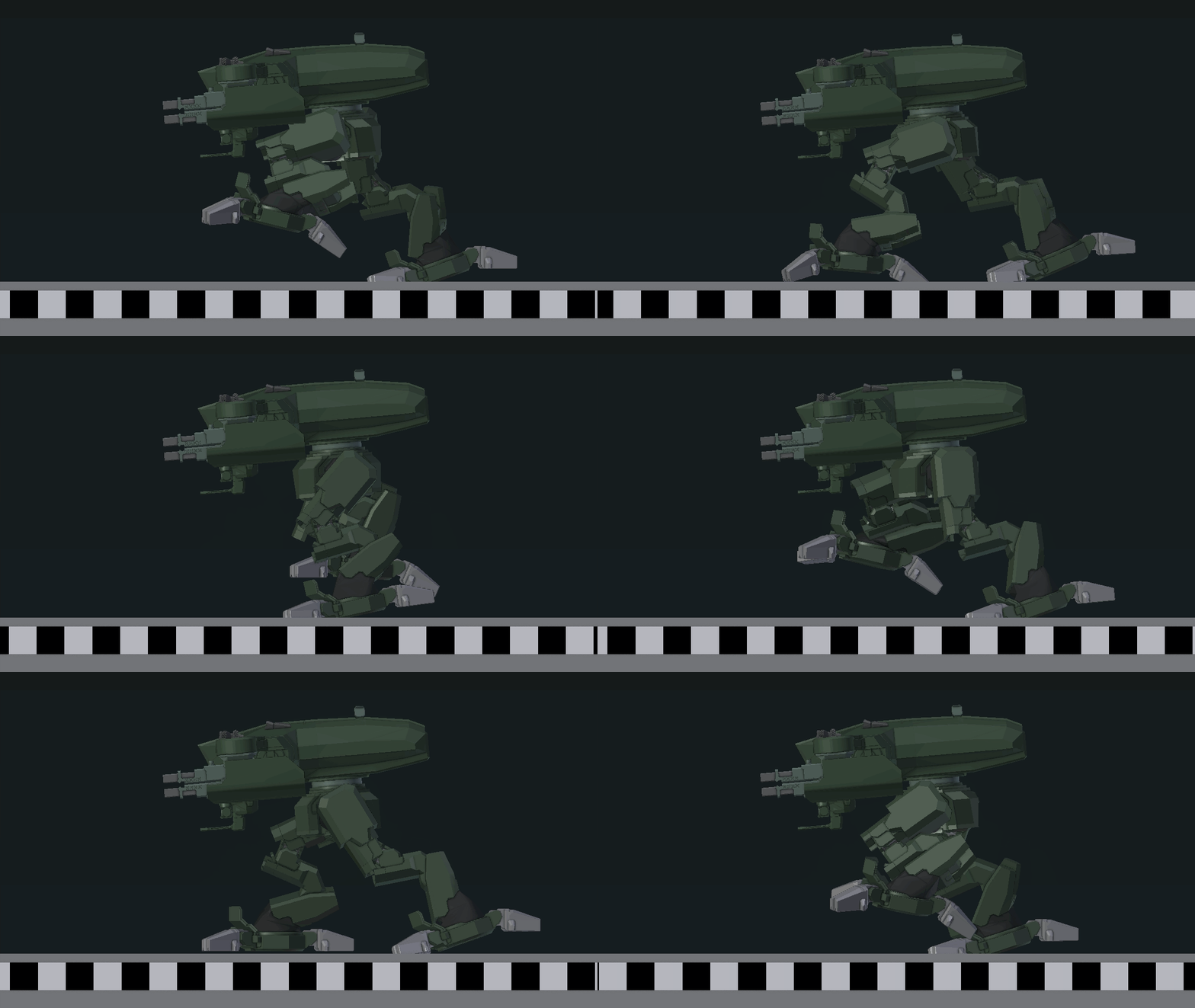
the legs have gone through a redesign

something along these lines

this is one of more recent ones I recall.
Might still aim to stabilize the torso more
(the measure line is in meters btw 😉 its pretty fast boi running )
zealous coral
Dang that walking animation has some nice oomph to it
desert raven
Thanks. Still looking for that balance between oomph and stabilised torso
 cerulean pivot
desert raven
Thanks. Still looking for that balance between oomph and stabilised torso
cerulean pivot
desert raven
Thanks. Still looking for that balance between oomph and stabilised torso
it looks nice, but if you don't mind me getting a bit critical, the motion is a bit unrealistic and the placement of joints is impractical in actual robots 
 cerulean pivot
true, but the part that looked bad to me was this:

even if assuming the structure is extremely robust, the torque there is probably impossible to maintain with a real life actuator
desert raven

cerulean pivot
🤓
zenith token
cerulean pivot
even if assuming the structure is extremely robust, the torque there is probably...
its not worse than for a human in normal gait, if actual center of mass (not visual center of mass) is on the upper torso pivot
yes it cant hold still with one leg in the air, but humans cant do so either (freeze motion while their front foot is just about to make contact to ground)
 white juniper
desert raven
<@!90532520101183488> you did some stuff with the hit calculation range a while ...
white juniper
desert raven
<@!90532520101183488> you did some stuff with the hit calculation range a while ...
I don't remember that
desert raven
white juniper
I don't remember that
I'll try to look it up. Was maybe something about how high collision detection went. Could be totally unrelated too.
 graceful basalt
Hello, i have a doubt concerning animating; From where can i get info or documents for making custom animations for arma, not static but as mods
If anyone can help, Dm'me or something
desert raven
@graceful basalt there isnt really much any documentation.
 brisk jewel
setting up a working pipeline is complicated
desert raven
starting point would be just learning how to do animations in your chosen 3D program
brisk jewel
i tried motionbuilder, couldn't make heads or tails of it. that thing is rocket surgery, though that's par for the course with an autodesk product
i tried this newcomer on the scene, akeytsu which seems very nice and easy to use but unfortunately it doesn't yet support roll joints
might still be able to make it work. the conversion between rtm and this is going to be a pain though
desert raven
Id really suggest just plain Blender
zealous coral
does anyone know if there's a config setting for the acceleration of man-type characters?
my mans decelerate and accelerate kinda slowly vs their movement speed so they slide to a stop well after the running animation stops playing
i saw there was an "acceleration" setting for vehicles but it doesn't seem to do anything for mans
desert raven
I dont think there is any. animations only have X amount of vector speed
graceful basalt
But how do i properly export the anim from Blender to ArmA
'Cause i have for Blender the oficial riggin for making anims but idfk how to make it compatible
zealous coral
desert raven
I dont think there is any. animations only have X amount of vector speed
yeah but mine don't immediately go from 0 to 100 on that speed, it takes a little bit and doesn't seem to care about the corresponding anim state's interpolationspeed :/
i guess i could always run a script that each frame sets my velocity to be exactly the absolute offset of that animstate's RTM or something
ughh
brisk jewel
The man movement is hardcoded in thr engine
zealous coral
lame
i guess i didn't waste my time writing this script to dump all the RTM offset vectors and match them to the animstates they get loaded on so i can increase acceleration via script
hm does anyone know what the base accel is
actually i guess i can just print it
zealous coral
ok so the base acceleration is 20m/s^2
i guess i'll have my script write out a dictionary of {animstatename: (RTM offset / anim time)} and then just run a while loop that increases the magnitude of velocity by 20 * (scale-1) as long as it's currently slower than that value for the current animstate
desert raven
You can create a set of animations that run between the standing and walling/running state that have different vector speeds.
Like 1 step with speed 1,second step with speed 2 and then the repeating walk at speed 3
 regal dawn
@scarlet wraith might be the right place for you
 scarlet wraith
regal dawn
<@!773363709648699423> might be the right place for you
scarlet wraith
regal dawn
<@!773363709648699423> might be the right place for you
Appreciate it. I was torn between the two channels. haha. I'll put that message here
Hey everyone. I'm trying to make Arma cinematics and I'm pretty new to it. I'm trying to figure out how to use playMove (or any other good methods) to use several animations in a sequence. For example, a soldier switching from his primary to his secondary, but there are several animations to do so. Any tips on how to do that effectively?
regal dawn
scarlet wraith
Appreciate it. I was torn between the two channels. haha. I'll put that message ...
👍
cerulean pivot
regal dawn
<@!773363709648699423> might be the right place for you
no, this channel is for animation making (rtm)
brisk jewel
surely it is the right place for animation graph questions as well
brisk jewel
scarlet wraith
Hey everyone. I'm trying to make Arma cinematics and I'm pretty new to it. I'm t...
generally you want to use playAction if applicable
desert raven
there are also commands for weapon swapping.
 meager mirage
does anyone have the biskeleton.p3d file?
brisk jewel
i have one of those. can't post here though
meager mirage
brisk jewel
i have one of those. can't post here though
could you dm it to me?
zealous coral
out of curiosity what is a biskeleton.p3d file
is there an important such file aside from the one from the samples
brisk jewel
no it's the one from the sample models
desert raven
For Blender users Macrsers Armarig serves the same purpose
zealous coral
hm not sure if this is best for scripting or here but is there a good way to get where a selection's position in model space would have been without ik?
zealous coral
i want to play a smoke/dust puff effect when a character's foot hits the ground
checking for stuff like z-position in model space doesn't really work because of slopes and IK
a thing that will "obviously" work is to write an external script that just checks all the animations "by hand" and then writes out the animation times when contact occurs to an array somewhere
but this seems like overkill
brisk jewel
i believe there is a command to get the current animation phase
combine that with sound edges
zealous coral
sound edges?
brisk jewel
animation states have a soundEdges config which specifies when to play sounds, particularly footstep sounds
brisk jewel
i think it plays multiple sounds. footsteps is one, shuffling or clacking from the equipment also
zealous coral
hmm well i see for instance
soundOverride="adjust_stand_to_right_prone";
soundEnabled=1;
soundEdge[]={0.0099999998};```and it doesn't look like you can specify more than one sound
i guess the sound overrides can contain multiple sounds but there doesn't seem to be a way to specify what gets played when, it seems like a normal "pick one at random" thing like for soundshaders
well i guess all of that is academic anyways because the walk anims only seem to have sound edges for walkin' anyways
Well I'll try it out, thanks
 echo quiver
desert raven
https://media.moddb.com/images/mods/1/26/25069/WK209_NewRun_06.gif
echo quiver
desert raven
https://media.moddb.com/images/mods/1/26/25069/WK209_NewRun_06.gif
Amazing, Just confirming, this mod is not on Steam Workshop?
desert raven
@echo quiver no, work in progress. Not released yet
brisk jewel
anyone know what purpose, if any, the world root node in the A3 character samples serves?
brisk jewel
does the A3 man skeleton have a Hips bone?
zealous coral
are there any gotchas i should know about when trying to retarget animations onto the armarig skeleton?
desert raven
Nothing specific comes to mind 
zealous coral
lol well i tried to retarget a mixamo animation and bad things happened
matching rest poses is really fiddly it turns out since the armarig dude rests at an A-pose and almost every other rig i've looked at rests at a T-pose
desert raven
ah
yeah people have asked about that before too
it does need a correct kind of setup
not impossible
buut not easy to explain either
and usually people after such animations have not been interested in the hard work part as much I suppose. Mostly doing stuff for meme purposes
zealous coral
i did get armarig-im or whatever set up to import/modify RTMs but it either doesn't import or re-export the camera bone correctly so the 3p camera dramatically swoops to stare at your pelvis during the animation lol
brisk jewel
i once had this issue when my skeleton config had Camera instead of camera
zealous coral
hmm i think my skeleton is just copy pasted from example character or something but i'll check it
brisk jewel
so was mine
zealous coral
it works fine on every other animation so far
hm yeah it does have Camera instead of camera
well this will be dumb if it's the problem
desert raven
Those are case sensitive yeah
zealous coral
hm well i changed it in the config and tried rebinarizing all the models/the RTM and it didn't seem to fix it :/
the camera bone looks like it actually is placed at Z=1 instead of Z=2 like it's supposed to be when i open it in dertm
brisk jewel
use a hex editor to check the name in the rtm
oh do you mean it also looks wrong in oxygen?
zealous coral
well i was looking at the actual bone transform data in dertm
most animations have the Z (actually Y because for some reason RTMs use a different coordinate space than the engine??) at 2 but my exported anim has Z at 1
it does call it Camera though
brisk jewel
the engine uses +X right, +Y up, +Z forward
zealous coral
hm in script it's +Z up, i'm pretty sure
it just happens that p3d and rtm both do it as you say
brisk jewel
yeah, it converts for sqf
zealous coral
ok, sure, but it's still confusing
but yes regardless my exported bone transform is offset to a different position than most other RTMs are
so i guess i can just add 1 to the Y or Z or whatever we're calling the vertical axis
brisk jewel
that's an unbinarised RTM with Camera?
zealous coral
yes
brisk jewel
it should be camera
zealous coral
well i opened a debinarized "vanilla" RTM and that's also Camera
cerulean pivot
zealous coral
but yes regardless my exported bone transform is offset to a different position ...
you sure you're putting the correct file in your pbo?!
zealous coral
reasonably sure?
i mean, i don't have any other versions of that animation
and it does play in the game
it just swoops the camera to a weird spot
cerulean pivot
zealous coral
so i guess i can just add 1 to the Y or Z or whatever we're calling the vertical...
this sounds like it's not following the camera bone
brisk jewel
okay, open the binarised rtm in a hex editor and see if it has the camera bone
zealous coral
cerulean pivot
this sounds like it's not following the camera bone
no i mean, i literally examined the bone transforms on the camera bone in both my RTM and a vanilla one and they're off by 1 on the Y-value
zealous coral
brisk jewel
okay, open the binarised rtm in a hex editor and see if it has the camera bone
oh i just realized, it's because binarizing lowercases bone names
that's why the debinarizer requires a skeleton file
brisk jewel
well that's not the only reason but sure
zealous coral
well it also needs a hierarchy i guess
brisk jewel
right
zealous coral
but regardless it is the reason that mikero specifically called out in his docs for needing a skeleton file
but yeah it shouldn't matter what the case is in the unbinarized file
brisk jewel
no
zealous coral
weird
i get a little zoom effect whenever the animation plays in 1p
i wonder if that's just because the camera bone isn't tracking exactly correctly or something
zealous coral
yeah one sec
desert raven
1st person view is defined by memorypoints
does your animation move the head selection?
 sacred oxide
can one ask code based animation questions here?
 vagrant fable
Hello good afternoon there is some editor here. I need help with moderate urgency
sacred oxide
desert raven
code based animation? <@!540584779977064470>
Aye, indeed
desert raven
for model.cfg?
and yes this channel works for that too. Though usually #arma3_model has been used for those since its more tied to it. But either is fine
sacred oxide
desert raven
for model.cfg?
yeah
brisk jewel
something is weird about the camera bone
the bind pose fbx has it here, between the clavicles https://i.imgur.com/roFT3rL.png
all the player models have the camera memory point here, between the legs https://i.imgur.com/qg2xeqP.png
the shipped animations result in the camera memory point moving to above the character's head https://i.imgur.com/0DaqKKa.png
sacred oxide
how do reloads and different weapons work in arma 3? do you have to customise it to each weapon, e.g each AR?
desert raven
yes each weapon has reload gesture and holding rtm
you can use same ones too if they fit
but they often dont
sacred oxide
desert raven
yes each weapon has reload gesture and holding rtm
is this a long winded process ones guessing?
desert raven
brisk jewel
something is weird about the camera bone
as far as I know the camera bone default pos is between the legs and it is animated to be above/behind the head in the movement rtms.

so exactly what you experienced
the bindpose fbx is probably for something else entirely
like motion capture data handling
brisk jewel
no, the bind pose is used for fbx->rtm conversion
the converter needs to know the fbx bind pose in order to convert the bone transforms to the game's coordinate space
shipped along with A3 tools FBXToRTM there's a couple of animation FBX like AmovPercMrunSlowWpstDbl. those have the camera bone in between the legs as well
desert raven
ah I never bothered with the FBXtoRTM after I found the blender plugins so I have no experience with those.
brisk jewel
mmh
i'm using motionbuilder instead. i wrote my own rtm-fbx conversion but really i'm lacking the game's bind pose
BISkeleton.p3d has bone translations but i'm not sure if it contains the true rotations
 zenith field
Has anyone tried using motion capture with Xbox Kinect 2?
 subtle falcon
zenith field
Has anyone tried using motion capture with Xbox Kinect 2?
subtle falcon
zenith field
Has anyone tried using motion capture with Xbox Kinect 2?
No, I don't have the adapter to connect my kinect sensor to the PC. I've always wanted to try it though.
zenith field
subtle falcon
No, I don't have the adapter to connect my kinect sensor to the PC. I've always ...
 naive hemlock
zenith field
Has anyone tried using motion capture with Xbox Kinect 2?
naive hemlock
zenith field
Has anyone tried using motion capture with Xbox Kinect 2?
motion capture and translation into A3 is not all that easy, considering the setup required.
regal dawn
i honestly dont know much abt modding so i wouldnt know how hard it is to implicate such a thing but i was wondering if anyone is wiling to create a sort of marching animation for my unit, i have cerimonial parades and would kind be helpful if we had marching xDDDD msg me for more details. Money is there ;)))
cerulean pivot
what is relSpeedMin and relSpeedMax?
I think it's used to scale the RTM motion vector that you've defined in blender, correct?
brisk jewel
you know what speed does i assume?
cerulean pivot
yes
brisk jewel
they are the minimum and maximum modifiers applied to speed
the engine might play a running animation at any speed ranging from relSpeedMin*speed to relSpeedMax*speed
you the user can't control it from SQF. any manually played animation always plays at speed
cerulean pivot
well then there's something I don't understand. I imported a vanilla anim in blender, and RTM motion vector is 0, -5.7, 0
and yet in the game the unit moves at ~4-4.5 m/s
is it because the units are different?
brisk jewel
that vector is not units per second if that's what you're asking
it's the movement caused throughout one cycle of the animation
if you play that animation once, you will move 5.7 units
brisk jewel
so the speed of movement depends on the speed of the animation
cerulean pivot
yep, it's correct now
brisk jewel
so in a sense, yes relSpeedMin and relSpeedMax do define relative bounds on the scaling applied to the movement vector, but only indirectly
cerulean pivot
thanks
brisk jewel
on a side note, that's probably 0, 0, -5.7 since Z is forward/backward
though +Z is forward for the engine and backward for oxygen
brisk jewel
it might be that RTM uses the oxygen coordinate system for the movement, i couldn't say off the top of my head
in blender +Y is backward?
 brisk jewel
yeah, oxygen flips X and Z
desert raven
which corresponds to -Y in Blender
zealous coral
if i want to attach primary weapon to the back, which bone should it be following via constraint
spine3?
if i target the @Weapon memory point it seems to bend in the wrong way
desert raven
you mean in blender?
zealous coral
yeah, armarig with blender
i actually figured it out, it's because i was messing with an animation that moved the @weapon bone around due to it being a Wrfl animation
hmm what's the best way to get the game to play an animation, then "freeze" at the end pose of the animation, but without blocking user input (i.e. allowing the user to cancel the pose by hitting the move keys)
i tried having a CustomAnimation state that connects to a CustomAnimationFinalPose state (with a static pose that's just the final frame of the last state), and putting the latter under CivilStandActions; then i PlayMoveNow "CustomAnimationFinalPose" which properly causes it to play CustomAnimation
but then it doesn't stop on the static pose and goes straight back to normal stand/walk anims
would i want to make my own actions set that inherits CivilStandActions?
zealous coral
secondary followup question; if i want to play a gesture at the same time as another animation (say, walking), is it safe to do e.g.
playActionNow "Gesture_whatever";
playActionNow "WalkF";
or will the second call override the first (and if it does, how does one accomplish playing a gesture and a normal animation simultaneously?)
cerulean pivot
zealous coral
secondary followup question; if i want to play a gesture at the same time as ano...
yes
brisk jewel
Yeah you want Stop = "CustomAnimationFinalPose";
brisk jewel
zealous coral
or will the second call override the first (and if it does, how does one accompl...
Primary animations and gestures don't affect one another
cerulean pivot
does anyone know what these properties are used for?
minPlayTime
interpolationRestart
also another question: is there a minimum anim play time before an anim can interpolate to another?
I'm guessing if playTime > minPlayTime you can interpolate? 
cerulean pivot
it seems like minPlayTime is a percentage, correct?
as in:
minTime = minPlayTime * animDuration
when interpolating from state A to B, interpolationRestart controls the behaviour of B.
B can start from time 0, it can start at 1-t where t is the current time of A, or it can start at t (sort of)
really this should be a property of an edge and not of a state, they kinda fucked up here
think of some transition animation, like putting your gun on your back, or taking it off your back. when you cancel the action and want to go the other way, you want to interpolate from A to B starting B at 1-t
for interpolating between running forward and running diagonally forward and right, you want to interpolate from A to B starting B at t (though really this mode is affected by the walkCycles of A and B)
for interpolating to a death animation you want to always start at 0
minPlayTime i've never seen. must be new in A3
brisk jewel
cerulean pivot
also another question: is there a minimum anim play time before an anim can inte...
in A2 no, but maybe that is exactly what minPlayTime does. it makes sense to be able to do this, though it should also be a property of the edge
cerulean pivot
brisk jewel
in A2 no, but maybe that is exactly what `minPlayTime` does. it makes sense to b...
well that's the thing. there should be. otherwise I get this:
cerulean pivot
cerulean pivot
it seems like minPlayTime is a percentage, correct? <:thonk:700311400152825906> ...
if I use this instead, the movement is almost correct, but:
- movement is not responsive anymore
- some transitions are still partly skipped (see the last "stand to prone" thing)
brisk jewel
It's so fast it's hard to figure out what's happening
Yeah it wouldn't be responsive if animations are forced to play without being cancelled
Need more information on what you're doing in order to provide more help
cerulean pivot
brisk jewel
Need more information on what you're doing in order to provide more help
I've created an anim system for my "debugger" thing and I'm trying to replicate Arma's anim system as close as possible.
I have converted the rtms to my own format that I use in my "engine"
and I read the anims config to read the anim state info like connection, interpolation, speed, etc.
next I ask the unit to play a new anim every ~0.1 s
for the first video I consider an anim done and ready to play the next anim like so (using interpTime)
if (!animPath.empty()) {
        auto& nextAnim = animPath.back();
        if ((nextAnim.interpolated && animTime >= interpTime) || animTime >= anim.duration) {//
...
for the second I use minPlayTime:
if (!animPath.empty()) {
        auto& nextAnim = animPath.back();
        if ((nextAnim.interpolated && animTime >= minPlayTime) || animTime >= anim.duration) {//
...
not sure what else I should consider to make this match Arma's more closely
cerulean pivot
brisk jewel
It's so fast it's hard to figure out what's happening
what's happening is that the transitions (e.g. stand to prone anim) are just interpolated immediately to the next anim (since they're in interpolateTo instead of connectTo)
brisk jewel
so how are the actual states in your graph connected and how do you play them?
oh you're not running this in game at all
what is decltype(animPath)::value_type?
cerulean pivot
brisk jewel
what is `decltype(animPath)::value_type`?
it's a custom type (a struct of pairs: next anim node index, and a bool that indicates whether it can interpolate)
brisk jewel
just checking that you're interpolating depending on the edge and not the target
cerulean pivot
yes, it depends on the edge (I call it "Link" tho...)
brisk jewel
is interpTime another config field?
cerulean pivot
brisk jewel
is `interpTime` another config field?
it's the inverse of interp speed
brisk jewel
oh. then your use of it doesn't make sense
cerulean pivot
you mean in the first case?
brisk jewel
yeah
cerulean pivot
rn I use it for interpolation from one state to another
brisk jewel
interpolationSpeed determines how long the interpolation from A to B takes, i.e. starting at 1*A + 0*B how long it takes to reach 0*A + 1*B
0 and 1 blending weight that is of course
cerulean pivot
yeah that's what I use it for rn
brisk jewel
okay. that's not how the code reads
cerulean pivot
the second one does:
if ((nextAnim.interpolated && animTime >= minPlayTime) || animTime >= anim.duration) {//
brisk jewel
yeah, that seems reasonable, if that is what minPlayTime does
on a side note, it's probably easier to use normalised animation factors, i.e. [0, 1]
anyway, need to see more code to say anything further about why it doesn't match arma
cerulean pivot
cerulean pivot
the second one does:
`if ((nextAnim.interpolated && animTime >= minPlayTime) || ...
the only part that matters is this (the condition I use to determine if the current animation is done and the next one can be played)
the rest of the code is correct. right now my primary concern is the responsiveness. there is another factor in play here that I'm not considering
cerulean pivot
I think it's finally done (almost)
changed the condition to this
if ((nextAnim.interpolated && !interpRestart && animTime >= interpTime) || animTime >= anim.duration)
it looks correct so I think interp restart is actually used for what I do rn? 
brisk jewel
i explained it before, it actually has 4 different meanings i think
depending on the value
0 is t (with walk cycle taken into account)
1 is 0
2 is 1-t
and any other value i think is t with walk cycle not taken into account
if i remember this correctly... i think i do
cerulean pivot
brisk jewel
i explained it before, it actually has 4 different meanings i think
it could be that too..
but it seems it is also used to determine if an anim can be "interpolated" at all too
I noticed that all transition anims had interpRestart = 1 which is what sparked that idea (and it looks I was right)
cerulean pivot
no it's either 0 or 1
no wait there is 2 too
I was using it as a bool
let's see what 2 means then
brisk jewel
1-t
cerulean pivot
brisk jewel
they should have 2 🤔
yeah they were 2 my bad...
I meant they were not 0
brisk jewel
okay
cerulean pivot
brisk jewel
0 is `t` (with walk cycle taken into account)
1 is `0`
2 is `1-t`
and any other ...
what does walk cycles do tho?
brisk jewel
well you know of walkCycles right?
it specifies how many walk cycles the animation has
cerulean pivot
yeah
brisk jewel
well interpolationRestart = 0 somehow correlates the walk cycles of two animations
the idea is that you want to end up in the same phase within a walk cycle in the interpolation target animation
cerulean pivot
cerulean pivot
the second one does:
`if ((nextAnim.interpolated && animTime >= minPlayTime) || ...
oof...looks like I was right the first time. I had mistakenly set the default value of minPlayTime to 1 instead of 0
that's why I was getting incorrect results
this is what I do now, and it works fine:
if ((nextAnim.interpolated && animTime >= interpTime && animTime >= minPlayTime) || animTime >= anim.duration)
(in the above code I've converted minPlayTime to actual time instead of percentage)
brisk jewel
does it work when you play A to 0.5 normally and then start interpolating to B?
cerulean pivot
brisk jewel
does it work when you play A to 0.5 normally and then start interpolating to B?
sometimes...
I can't reverse the transition anims (they have to play almost all the way to the end; in the game you can interrupt them half way...)
maybe interp restart plays a role after all
brisk jewel
yeah this case is interpolationRestart = 2, are you not listening?
cerulean pivot
brisk jewel
yeah this case is `interpolationRestart = 2`, are you not listening? <:thonk:700...
yeah but they also have a minPlayTime
so they ignore minPlayTime in the game
there is a property: IgnoreMinPlayTime, but it doesn't list the reverse animation
cerulean pivot
brisk jewel
yeah this case is `interpolationRestart = 2`, are you not listening? <:thonk:700...
also it's 1 for the animation I'm talking about (stand to prone, and prone to stand)
brisk jewel
if ((nextAnim.interpolated && animTime >= interpTime && animTime >= minPlayTime) || animTime >= anim.duration)
you'd be better off handling the interpolation separately from the animation queue
the interpolation factor is not related to the time factor of any animation
cerulean pivot
the interpolation itself is separate
that code just determines when an anim is finished
it has nothing to do with interpolation itself
cerulean pivot
added walkCycles too 
brisk jewel
nice
cerulean pivot
well now there's a problem with gestures...
it appears that the weapon transformations are absolute, not relative to a bone
or is that a problem with the rig I used?
brisk jewel
weapons do have some kind of special treatment
well the weapon bone does
launcher doesn't
see CfgSkeletonParameters/OFP2_ManSkeleton/weaponBone
gesture .rtm are not special, they're just like any other .rtm
what gesture is that? the video would be more informative if the character was standing still
cerulean pivot
brisk jewel
what gesture is that? the video would be more informative if the character was s...
it's a typical rifle reload gesture. if the unit stands up it looks correct ofc, but when the anim is not the stand-stop anim the weapon just stays there
as you can see the weapon movement is correct too, but the problem is its transformation is absolute
brisk jewel
i see. so it's just a bug in your program then?
cerulean pivot
brisk jewel
see `CfgSkeletonParameters/OFP2_ManSkeleton/weaponBone`
also where is this?
brisk jewel
config
cerulean pivot
brisk jewel
i see. so it's just a bug in your program then?
no, the problem is probably the rig
brisk jewel
are you reading .rtm for this?
cerulean pivot
no. I imported them into blender (using Macer's blender importer rig) and exported them as .dae, then I converted them to a format that I use in my program (custom format)
brisk jewel
seems like it would improve usability to handle .rtm directly
cerulean pivot
I wasn't sure how to read the format, but maybe that's not a bad idea
I could see how the blender importer script works
cerulean pivot
brisk jewel
see `CfgSkeletonParameters/OFP2_ManSkeleton/weaponBone`
this was empty
 brisk jewel
oh okay, i guess it changed in A3 then
cerulean pivot
brisk jewel
i could also give you the code for my tool
that sounds like a lot of effort...
cerulean pivot
yeah but I also have to set up a different mesh and rig for that, no?
I doubt it works directly with the blender rig I use
brisk jewel
well, depends on what you've done so far
your skeleton hierarchy isn't different from OFP2_ManSkeleton is it?
cerulean pivot
I think it is. I just use the macer's blender importer (not sure if you've used that before)
brisk jewel
nope
i use motionbuilder and made my own fbx import/export. that would be the tool i mentioned
it also binarises and debinarises rtms. that's why i offered you the code if you wanted to have a look at it
cerulean pivot
brisk jewel
your skeleton hierarchy isn't different from OFP2_ManSkeleton is it?
you tell me:

this is what I get in dae file after I export it
cerulean pivot
brisk jewel
which ones are the bones
the ones with an icon next to them are joints
bones are those without icons I guess...
brisk jewel
anyway, weapon and launcher are direct children of Spine1
cerulean pivot
brisk jewel
i use motionbuilder and made my own fbx import/export. that would be the tool i ...
oof...I thought that's a free program.
no thanks
(I mean motion builder)
brisk jewel
yeah. mine is just a CLI tool
cerulean pivot
what does it do?
brisk jewel
dayz-edit rtm bin a.rtm b.rtm reads a.rtm writes binarised b.rtm, that sort of thing
cerulean pivot
brisk jewel
`dayz-edit rtm bin a.rtm b.rtm` reads `a.rtm` writes binarised `b.rtm`, that sor...
can it export to fbx?
cerulean pivot
do you also have a mesh for that too?
brisk jewel
i don't know how useful that feature would be to you though. i just figured if you wanted to write your own rtm deserialiser, that part of the code would be of interest to you
cerulean pivot
no this animation thing is just a "gimmick" for me I guess. this thing I'm making is for debugging my AI
I figured some anim would be nice too
cerulean pivot
brisk jewel
https://i.imgur.com/JDGTrhW.gif
nice!
I guess that works for me too 😅
brisk jewel
oh the fbx uses a different skeleton too actually
it shouldn't really matter for the character though
your character is skinned for essentially the same skeleton
 rocky wyvern
Is it possible to hide or scale limbs with gestures or animations by clipping them through the body?
 glad crypt
having some trouble getting my RTM file to actually animate on Object Builder. I've applied multiple RTM Keyframes on Blender , exported it as .rtm, but when I put it on Object builder, it displays RTM Keyframes -0.5, 0 and 1. The rtm file size is only 13kb.
I have 6 frames in total between 0.0 and 1
desert raven
did you add all the frames in the export list
glad crypt
Only options I have when I export are Static Pose and Clip Frames to [0,1]
 glad crypt
Well, seems like I'm still stuck in the "Jesus Pose" once I try to view the animation in Splendid Animation Viewer.
Things I have tried so far:
1.Re-installed Blender and Arma 3 Toolbox
2. Exported the .rmt with and without the default jesus pose in the RMT keyshapes.
3. Change the values "looped" and "speed" in config.cpp
4. Changed requiredAddons to "A3_Anims_F" in config.cpp
really hitting a wall here again, I feel like I'm missing something in the config or a file all together from my source folder.
brisk jewel
okay, let's see the .rtm
glad crypt
Sent you a Dm
desert raven
t pose could indicate the rtm either contains nothing or does not get packed into the pbo
or is not packed in right path
glad crypt
desert raven
or is not packed in right path
This, my config.cpp did not have the full path from P:, after adding the full path it works perfectly. Thanks @brisk jewel
I do feel like my lack of understanding of coding and syntax bites me in the ass with everything related to Arma😆
cerulean pivot
is it just me or is my gesture implementation a lot more "correct" than Arma's?
I use the exact same skeleton and mask as those of Arma's of course (I import the vanilla config)
white juniper

brisk jewel
what is the mask?
cerulean pivot
class GestureReloadBase: Default
        {
            file="a3\anims_f\data\anim\sdr\gst\gesturereloadmx.rtm";
            looped=0;
            mask="handsWeapon";
            canPullTrigger=0;
        };
class GestureReloadMX: GestureReloadBase
        {
            file="a3\anims_f\data\anim\sdr\gst\gesturereloadmx.rtm";
            speed=0.37;
            leftHandIKCurve[]={0.012,1,0.041000001,0,0.94099998,0,0.98199999,1};
        };
handsWeapon[] =
{
    "head", 1,
    "neck1", 1,
    "neck", 1,
    "weapon", 1,
    "LeftShoulder", 1,
    "LeftArm", 1,
    "LeftArmRoll", 1,
    "LeftForeArm", 1,
    "LeftForeArmRoll", 1,
    "LeftHand", 1,
    "LeftHandRing", 1,
    "LeftHandPinky1", 1,
    "LeftHandPinky2", 1,
    "LeftHandPinky3", 1,
    "LeftHandRing1", 1,
    "LeftHandRing2", 1,
    "LeftHandRing3", 1,
    "LeftHandMiddle1", 1,
    "LeftHandMiddle2", 1,
    "LeftHandMiddle3", 1,
    "LeftHandIndex1", 1,
    "LeftHandIndex2", 1,
    "LeftHandIndex3", 1,
    "LeftHandThumb1", 1,
    "LeftHandThumb2", 1,
    "LeftHandThumb3", 1,
    "RightShoulder", 1,
    "RightArm", 1,
    "RightArmRoll", 1,
    "RightForeArm", 1,
    "RightForeArmRoll", 1,
    "RightHand", 1,
    "RightHandRing", 1,
    "RightHandPinky1", 1,
    "RightHandPinky2", 1,
    "RightHandPinky3", 1,
    "RightHandRing1", 1,
    "RightHandRing2", 1,
    "RightHandRing3", 1,
    "RightHandMiddle1", 1,
    "RightHandMiddle2", 1,
    "RightHandMiddle3", 1,
    "RightHandIndex1", 1,
    "RightHandIndex2", 1,
    "RightHandIndex3", 1,
    "RightHandThumb1", 1,
    "RightHandThumb2", 1,
    "RightHandThumb3", 1,
    "Spine", 0.2,
    "Spine1", 0.3,
    "Spine2", 1,
    "Spine3", 1
};
is it the same as A2?
cerulean pivot
handsWeapon[]= { "head", 1, "neck1", 1, "neck", 1, "weapon", 1, "LeftShoulder", 1, "LeftArm", 1, "LeftArmRoll", 1, "LeftForeArm", 1, "LeftForeArmRoll", 1, "LeftHand", 1, "LeftHandRing", 1, "LeftHandPinky1", 1, "LeftHandPinky2", 1, "LeftHandPinky3", 1, "LeftHandRing1", 1, "LeftHandRing2", 1, "LeftHandRing3", 1, "LeftHandMiddle1", 1, "LeftHandMiddle2", 1, "LeftHandMiddle3", 1, "LeftHandIndex1", 1, "LeftHandIndex2", 1, "LeftHandIndex3", 1, "LeftHandThumb1", 1, "LeftHandThumb2", 1, "LeftHandThumb3", 1, "RightShoulder", 1, "RightArm", 1, "RightArmRoll", 1, "RightForeArm", 1, "RightForeArmRoll", 1, "RightHand", 1, "RightHandRing", 1, "RightHandPinky1", 1, "RightHandPinky2", 1, "RightHandPinky3", 1, "RightHandRing1", 1, "RightHandRing2", 1, "RightHandRing3", 1, "RightHandMiddle1", 1, "RightHandMiddle2", 1, "RightHandMiddle3", 1, "RightHandIndex1", 1, "RightHandIndex2", 1, "RightHandIndex3", 1, "RightHandThumb1", 1, "RightHandThumb2", 1, "RightHandThumb3", 1, "Spine", 1, "Spine1", 1, "Spine2", 1, "Spine3", 1, "pelvis", "MaskStart" };
almost. yeah
brisk jewel
hmm reading this it seems like the arma clip is correct
everything is 1 including pelvis
you still have bone transforms from the primary move
oh no pelvis is "MaskStart"
A2 doesn't have that. what is it?
brisk jewel
is that a mistake?
cerulean pivot
no, all Arma gesture masks have that
cerulean pivot
yeah when I import the config I read bone-value pairs.
if it fails I skip it
brisk jewel
uhh i reckon that bit is important
if you can't handle something you should error not just silently skip 😛
anyway, looking at the clips you posted, it looks to me like you keep the primary animation spine transforms during the gesture
all the spine bones are clearly 1 on the mask
the config might be dumb, but it seems to me like arma is more correctly handling it
cerulean pivot
brisk jewel
the config might be dumb, but it seems to me like arma is more correctly handlin...
the difference is that I interpolate relatively (before applying parent transformation)
Arma does abs interpolation
so my interpolation respects the bone hierarchy
brisk jewel
huh? there's no way that's right
cerulean pivot
it looks correct
brisk jewel
what happens if you look up or down as far as you can and then reload?
it works fine in A2, did they screw it up for A3?
cerulean pivot
brisk jewel
what happens if you look up or down as far as you can and then reload?
when sprinting it looks almost the same as the video I posted (except the unit looking up)
otherwise it's correct
maybe it's intentional
but still it's weird that the unit "stands up" when reloading
imagine trying to run away from the enemy and keeping your head down, and you suddenly reload - you're screwed
brisk jewel
it's weird that that mask has all spines at 1, and that maskstart on pelvis
cerulean pivot
brisk jewel
it's weird that that mask has all spines at 1, and that maskstart on pelvis
maybe because pelvis is the root bone
brisk jewel
yes, i think the important part is that it is the common ancestor of all bones in this mask
however that does not explain its purpose or behaviour
 grizzled igloo
Hi guys, I'm replacing the vanilla animations and I'm currently replacing the static animation for "standing weapon", but the animation only uses the animation I replaced when aiming and firing, so I'd like to know what the problem is?
And I also checked the animation library, the two static standing gun animations have all been replaced
desert raven
well you probably need to replace the rest of the standing animations as well
you are likely going to see a looot of problems though
especially with reload animations
grizzled igloo
desert raven
well you probably need to replace the rest of the standing animations as well
Like standing turn and standing gun forward?
 grizzled igloo
desert raven
yeh
grizzled igloo
desert raven
yeh
Oh, well, I did not expect that dynamic animation also has an impact on the static movement
desert raven
there is a command to check what animation is running
that could be useful to debug what happens there
grizzled igloo
desert raven
there is a command to check what animation is running
Oh god, if you can tell me this command then I would appreciate it😄
desert raven
dont remember off the top of my head
but you should be able to find it in the wikis Arma3 scripting command list
grizzled igloo
okey cool
zealous coral
hm apparently the lowest-cost path from AmovPknlMstpSlowWrflDnon to AmovPercMstpSlowWrflDnon is via the "treat wound" animation
rather than the standing up animation
brisk jewel
you must have changed something?
zealous coral
is there any way to force the game to play the standing up animation instead other than by manually clicking it
hmm i don't think i did?
brisk jewel
so this is in pure vanilla with no mods?
zealous coral
it is from a full config dump from vanilla with no mods
so going directly between those two states has a cost of 0.01
but going from AmovPknlMstpSlowWrflDnon to Acts_TreatingWounded_in costs only 0.0001
and then from _in to _loop is also only 0.0001
etc
so the total cost through the treatingwounded animations is actually only 0.0004
so this is "correct"
it is just strange
brisk jewel
and those connect to AmovPercMstpSlowWrflDnon?
zealous coral
yeah Acts_TreatingWounded_Out dumps into AmovPercMstpSlowWrflDnon
oh i misread, the cost there is 0.001
so the total cost is like 0.0013
so basically if a man is kneeling with a rifle and you need them to do something standing with a rifle they always play like 6 seconds of treating wounds first if you use PlayMoveNow
brisk jewel
so you do observe this in game?
zealous coral
yeah
brisk jewel
okay. so it's just a crappy animation graph then
zealous coral
hm ok i'm actually wrong; my animation seems to loop
cerulean pivot
zealous coral
hm apparently the lowest-cost path from `AmovPknlMstpSlowWrflDnon` to `AmovPercM...
it plays correctly for me (both in the game and my own implementation)
zealous coral
cerulean pivot
it plays correctly for me (both in the game and my own implementation)
weird
actually when i run it it seems to go through the same state twice before it loops into the treating wound stuff, but i'm just calling playmovenow once
so idk what's happening
 fast canopy
zealous coral
so idk what's happening
fast canopy
zealous coral
so idk what's happening
If I read the issue correctly, open the folder where rpts are, and delete AnimDataCache
zealous coral
hm alright
subtle falcon
Well now there are elephants in Arma. Models and anims imported for the Pilanesberg map made by Icebreakr.
I spent 5 hours trying to figure out why the model kept disappearing when you weren't looking at it directly. It was the boundingSphere. 🙃
desert raven
subtle falcon
I spent 5 hours trying to figure out why the model kept disappearing when you we...
Very cool!!!
brisk jewel
desert raven
Very cool!!!
replying to that particular message made that sound incredibly sarcastic 😃
desert raven
Ah true it was not all one xD
 crimson granite
I've got a weapon where I want the front sight to be folded down both when there is an optic fitted and when the weapon is on the player's back - I'm currently finding that when it has an optic and it's on the player's back the front sight rotates all the way through 180 degrees - how do I get it to sort of reach a 'maximum' of 90 degrees and not go any further?
zealous coral
ah the ol' boundingsphere view culling
desert raven
subtle falcon
Well now there are elephants in Arma. Models and anims imported for the Pilanesb...
hows the hit detection working btw?
the elephant is rather largeish creature
subtle falcon
desert raven
hows the hit detection working btw?
Well, it doesn't work very well actually, but since I haven't finished all the LODs, I thought I'd spend more time on this later. 😅
desert raven
Let me know how that goes. I'm combating the fire geometry not extending beyond ~2meter sphere myself. No matter what the boundsphere is set to.
 dusky frigate
🤯
Is there any tutorial for custom animations? want to animate my custom creature. I have made animations for unity and unreal. But arma has its own and weird method I dont know how to define custom bones (checked A2 model.cfg and models but still 🤯 )
brisk jewel
A2? are you targeting A2 or A3?
dusky frigate
A3
Checked A2 models to learn how selections, ... defined
brisk jewel
you have a skinned model?
dusky frigate
Yes
brisk jewel
well defining the skeleton hierarchy is simple. in model.cfg under CfgSkeletons you have a class containing an array of bones specified as (name, parent) pairs
regal dawn
How do I make the people with animations move? In the apex reveal trailer there are guys moving within the forest. I have put the animations on them but they don't actually move, just have walking animations.
Using Acts_SupportTeam_Move
desert raven
the are pathed with waypoints usually
and the clips are shot live in game
at least for long distance moving
some cutscene animations have bit of walking around but they are made for very specific compositions
 drifting plinth
Hey guys, how would I go about tying a custom user action (with a custom key bind) to ManActions in CfgMovesBasic/CfgMovesMaleSdr? I want to emulate the "toggle raise weapon" logic but I am not sure how the internal logic goes in ManActions.
For example:
agonyStart = "";
relies on some internal logic, something that triggers it and through the animation trees lands on the "agony" animation.
Im trying to figure out how to configure what would trigger the action, like in this case a player getting shot, or like what I'm trying to emulate which would be something like toggling it with pressing 2 x Left Ctrl
drifting plinth
Does it need to be defined somewhere first? or do you define it by referencing it in the CfgUserActions?
say I wanna be able to do something like player playAction "raiseWeaponUp"
drifting plinth
No. But am I able to do it if I do something like:````ManRaiseWeaponAction:ManActions {raiseWeaponUp = "";};in the config and then reference it later on asplayer playAction "raiseWeaponUp"``` ?
brisk jewel
not like that, exactly
but yeah
you need
class ManActions
{
  jonmo_raiseWeaponUp = "something...";
};
player playAction "jonmo_raiseWeaponUp";
altho you should use the correct actions group
brisk jewel
it depends. if it's a gesture you can probably get away with it in ManActions
cerulean pivot
and you need to tell the animation which action group it belongs to
cerulean pivot
brisk jewel
it depends. if it's a gesture you can probably get away with it in `ManActions`
wasn't the question about anims and not gestures?
brisk jewel
hmm maybe it was. gestures are just animations on another layer though 😛
drifting plinth
That helps me out a lot though, I now know how to "start" the animations, now I just gotta figure out the animation logic which is explained better on the wiki 
brisk jewel
@drifting plinth
#arma3_config message
this previous explanation i gave to someone else might be of interest to you
drifting plinth
Wow, the cost part of the interpolations here are really well explained, definitly going to make use of this
brisk jewel
would be good to have this on the wiki i suppose, but i don't have the energy to go revamp the whole cfgmoves page
grizzled igloo
Hi guys, I would like to ask a funny question, with the current animation mechanism of ARMA is it possible to make a reload animation like COD16?
grizzled igloo
desert raven
got an example clip?
desert raven
well the double magazine could not be dynamic
other than that sure
https://www.youtube.com/watch?v=gOhD8OwE0Tc this is a good example how much can be done

contained in Creator DLC: Global Mobilization - Cold War Germany
though getting this right is from the more difficult end
grizzled igloo
desert raven
https://www.youtube.com/watch?v=gOhD8OwE0Tc this is a good example how much can ...
Sounds good mate, and I have another question about the Memory settings in P3D, I was wondering if these can be automatically generated and exported based on the animation settings using software like Blender, or can they only be set manually in OB?
desert raven
there are couple of model.cfg exporters but there is very little in the way of tutorials on how to use them.
you would have to sync that and the reload rtm
it requires quite a bit of setting up
grizzled igloo
Seeing Model.cfg has given me a headache, lol
I thought there was a very good mod.cfg exporter
grizzled igloo
haha, yes, hopefully the new engine will improve this, and finally thanks for your help mate😁
fast canopy
It's more Blender question, but... is it possible to do “move relatively to the bone” in the NLA Editor?
desert raven
@sacred oxide not posting about it on 3 channels is a start. pick 1 and stick to it
sacred oxide
desert raven
<@!540584779977064470> not posting about it on 3 channels is a start. pick 1 and...
my bad, didnt mean to post here, was posting two seperate questions on model makers and config
desert raven
focus.
crimson granite
Hey folks, I'm trying to import an .rtm (via https://github.com/4d4a5852/rtm_import) to Macser's ArmaRig and when I import my existing .rtm the pose all comes in properly, but the controllers for the hands become disconnected - is this a known issue/any workaround? How it looks after import: https://i.imgur.com/ZDeebUw.png (the orange handles near the bottom being the hand controls)
desert raven
this is normal, the import can not handle the IK constraints
and teh finger bones are not connected to their parents so they get the rotations wrong
you would have to do some fixing on the rig to get the import to work right
crimson granite
Right, understandable - thanks - in that case I suppose my follow up question is, is there a 'neutral' weapon hold pose for weapons? Basically the right 'stance' for the unit from their shoulders to their feet - or is this just masked off in the config when you apply the reload/hand anim/animation? I'm finding it difficult to understand what pose I should start my reload/prone reload/hand anims in
desert raven
there are poses for standing, crouch and prone holding rifle, that the weapon hold animation is blended with
crimson granite
Ok - and is it the same for reloads?
desert raven
reloads start from it yes
thugh reloads can be made to blend with it so the start is smoother
sacred oxide
desert raven
you would have to do some fixing on the rig to get the import to work right
or animate in FK, which niehter of us would recommend, any animation in FK takes twice as long to design @crimson granite
brisk jewel
yes
dusky frigate
Weight Paint:
https://i.imgur.com/h1l5nPu.png
Vertex Groups:
https://i.imgur.com/PjmbCLm.png
Don't know why Vertex Groups are different
sacred oxide
is it possible to put an armature on an object, ik it to a part of body, so it stays in position as you animate the rest of body around that point?
e.g arm to a wall/fence?
brisk jewel
i don't think you can do any custom IK in game
though my knowledge pertains mainly to A2 and not A3
desert raven
not in game, in animation tools usually Id guess yes.
sacred oxide
desert raven
not in game, in animation tools usually Id guess yes.
in animation tools blender, of course not in game but thanks for the help
desert raven
yes that is possible in blender if the rig is made to support that kind of a thing.
sacred oxide
desert raven
yes that is possible in blender if the rig is made to support that kind of a thi...
how would that be possible please? tried adding a cylinder object and make it the child of the left hand
desert raven
I dont really know how to explain it easily. I've used various keyframed constraints and IK targetting for that kind of thing
brisk jewel
MB allows pinning bodyparts. does blender not have something like that?
https://imgur.com/a/LEyIuuP
desert raven
such can be achieved. MB is geared towards that from the getgo though, Blender is more bare bones by default but it allows that kind of setup to be made
for $2K/year id expect there to be some off the shelf usefulness too..
sacred oxide
brisk jewel
MB allows pinning bodyparts. does blender not have something like that?
https://...
pivot /child of constraint frob object bone to hand, i thought would do that job @desert raven ?
desert raven
I dont remember off the top of my head how to do such stuff
and it depends a lot how the rest of the rig works
 placid shell
How does 1 go about importing an .rtm into object builder? Right now I have my armature selected and arma object properties checedk for the rtm animations. Ive added the keyframes. I can export it as an rtm by itself or an fbx. But when i do the fbx there are no animations present.
sacred oxide
placid shell
How does 1 go about importing an .rtm into object builder? Right now I have my a...
why dont you just do the whole animation pipeline process via blender and alwarrens arma toolbox addon for blender?
placid shell
its a custom rig
sacred oxide
placid shell
its a custom rig
custom rig, that can be used in blender, no?
sacred oxide
just use blender, the pipeline process is alot easier and more user friendly
sacred oxide
placid shell
its not letting me post any pictures here :/
use imgur/imgur.com
placid shell
i have blender and arma toolbox addon
sacred oxide
rig in fbx?
placid shell
im not sure. I can show you if you go down to voice channels
would i need to select the fbx node type when i export?
sacred oxide
placid shell
im not sure. I can show you if you go down to voice channels
lets do this
placid shell
Do I need to create a model.cfg and skeleton file to create my own custom rig that can work in a3?
brisk jewel
are you using a custom skeleton?
desert raven
Model. Cfg, yes.
placid shell
I've noticed that the sample rabbit skeleton is entirely connected via bones. In blender, you're able to "keep offsets" so no bone is required inbetween. Are bone connections required?
desert raven
not necessarily. depends how you build the armature and use it
cerulean pivot
how do you apply a transform to a selection in all keyframes in Blender?
in my rtm I want to move the entire model a few meters in x/y direction (absolute)
desert raven
take its root bone and move that
 median seal
Is the paid version of Mikero's tools the only way to debinarize an rtm file?
naive hemlock
afaik yes
brisk jewel
I wrote my own debinariser. Maybe i should make it open source
white juniper
The last debinarizer that someone wrote and that got made open source (voluntarily or not) has since caused the far majority of stolen/ripped models.. so..
 crisp berry
is rtm debin the same as p3d @white juniper ?
white juniper
they are seperate things
crisp berry
this talk here is about animations only, isnt it?
white juniper
Yes
placid shell
export p3d from blender. export .rtm from blender. Open p3d in object builder, start bulldozer in object builder. Set .RTM in object builder. No animations play when I use scroll wheel in bulldozer. What am i doing wrong?
desert raven
that does not quite work right
you would have to change buldozer rtm preview skeleton in the configs and the rtm might need to be binarized even to work
and it still does not always work
I dont personally bother with OB or buldozer when it comes to rtms
cerulean pivot
how is the camera bone used by the game exactly?
I tried importing a few rtms into blender to figure this out but the camera movement was so weird
e.g. it was pointing down and moving downwards, or kept swinging left and right
but that's not how it looks like in the game
is that a bug in the rtm importer addon?
or is there a trick for getting it to work properly in the game?
just asking first in case I end up facing problems with this later
cerulean pivot
I have a newbie question.
let's say I make a running animation in blender
and the character actually moves in the world
but when I want to export that for Arma, I want to remove the translation, as if the unit is tread-running, and instead use RTM motion vectors in the game.
is it possible?
desert raven
yes
though
not easy since youve already made it move
also depends a lot on the rig setup how easy that would be
cerulean pivot
I'm just using Macer's rig for blender
desert raven
did you make it move with the control master bone?
cerulean pivot
desert raven
yes
I can start from scratch. it's not a big anim
I'm just wondering how...
cerulean pivot
desert raven
did you make it move with the control master bone?
no
desert raven
well you can for example just scroll further in the timeline and make it there
and just export that range of animation
or you can make new action in the action editor
using the control master ar the main mover can be beneficial if you then want to make treadmill varian of the sequence
cerulean pivot
desert raven
using the control master ar the main mover can be beneficial if you then want to...
yeah I wanted to do this first.
but then I noticed that the hand IK bones are not a child of the control master...
so I moved the body instead 😬
I guess I can just move them under the control master, right?
this is my first time animating, so sorry if it's a dumb question
desert raven
you could make them child of control master
cerulean pivot
yeah that's what I meant 😅
desert raven
there is also an addon that lets you keyframe just about anything
so you could keyframe them to be child of the master or something else if required
keyframing different sets of constraints can yield nice results
cerulean pivot
desert raven
keyframing different sets of constraints can yield nice results
sorry I'm not sure what you mean 😅
cerulean pivot
desert raven
you could make them child of control master
so basically, I move the unit using the control master
then once I'm done, I delete the specific motion curve from the graph editor?
desert raven
yeh that sounds about right
cerulean pivot
thanks. I'll see what I can do! 👍
 sweet pier
I'm trying to make a video and am using POLPOX to help with animations, but when I choose a walk animation the character just walks in place
is there a script I need or an additional mod?
desert raven
polpox artwork supporter is note meant for video making
its meant for static screenshots
so yes, you will need to do a lot of scripting to make live moving sequences
zenith token
we need to release a model kit mod where you have individual body parts (feet, fingers, upper arm, ...). Then people can assemble them in editor and make stop motion films 😄
zenith token
the pain of animating a figure out of those individual tiny parts in eden.... without changing the camera... shudder
cerulean pivot
even if you ignore that part, how would you texture it?
naive hemlock
that is possible, but screw section count
desert raven
You would not need much of a live framerate for stop motion film making :D
 quick vortex
desert raven
polpox artwork supporter is note meant for video making
quick vortex
desert raven
polpox artwork supporter is note meant for video making
still works, tho :p
it's limited, but if you only need stationary animations to play, it works good enough
desert raven
well yes, but people are asking on using non stationary animations
which its not meant for
 compact mauve
is there a animation where a soldier is kneeling over a soldier in hand to hand combat and pushing a knife into the other soldier's chest?
desert raven
not in vanilla
 frank scaffold
zenith token
we need to release a model kit mod where you have individual body parts (feet, f...
frank scaffold
zenith token
we need to release a model kit mod where you have individual body parts (feet, f...
better yet you might be able to make something that lets you move a character's torso and adjust the hand/feet placement with IK
fake vehicle that has IK parts attached to elements that can be manipulated somehow
desert raven
Probably static object version of human with skeleton and animation setup that can mimic human poses and then pieces are attached to it
 next cloak
Anyone in here got any good guides on making moving animations? Looking to create some malfunction clearing animations.
desert raven
there are general animation making tutorials for all popular programs
arma specific ones, not so much
next cloak
Yeah, figured that'd be the case. I want to figure it out but there isn't that much documentation out there it appears.
desert raven
Id suggest starting from basic animation stuff and working your way up from there
next cloak
I've done a fair amount of static poses already so I have some idea of what I'm doing but I want to take the next step.
desert raven
for example youtube is filled with tutorials on how skeletal/armature animations are done in blender
then there isnt really much anything else to it but using more frames
basically anyway.
next cloak
Yeah, I like to think I know my way around Blender when it comes to making animations but getting them in-game is really difficult.
desert raven
of course theres infinite amount of ways to do stuff
well the getting it in game part is not really documented much
it comes down to understanding how configs work
that part is not really something a simple tutorial can explain
next cloak
Yeah.
cerulean pivot
I should make a full wiki page about that I guess
you don't have wiki access HorribleGoat, do you?
desert raven
dont think so
next cloak
cerulean pivot
I should make a full wiki page about that I guess <:meowsweats:70762603061313539...
That'd be fantastic.
cerulean pivot
desert raven
dont think so
I thought you'd be more suitable, because you have more experience with this stuff
desert raven
Main problem is I dont really have the energy to write a book about it 
cerulean pivot
I guess I'll just try to write up some stuff and ask you for advice 😅
next cloak
cerulean pivot
I guess I'll just try to write up some stuff and ask you for advice 😅
It would be an outstanding community service if you'd create a wiki page for it.
cerulean pivot
next cloak
It would be an outstanding community service if you'd create a wiki page for it.
I'm writing it up rn. I'll ping you when it's done
next cloak
cerulean pivot
I'm writing it up rn. I'll ping you when it's done
Thank you very much.
cerulean pivot
next cloak
Thank you very much.
it'll take a couple of days to finish tho. I'll try adding to it little by little when I'm free.
next cloak
cerulean pivot
it'll take a couple of days to finish tho. I'll try adding to it little by littl...
All good, I appreciate that you're taking the time to do it either way. :)
next cloak
Anyone have any pointers for how to lower the launcher position in-game?
At present the character holds the launcher way above his shoulder.
 drowsy nymph
It depends to some degree how the launcher is positioned in the 3D model
To move it down for all launchers you'd have to replace all the animations for launchers - which is no small task since you cannot really import BI's existing animations to edit on a animation rig. But you can do it for your own specific weapon by moving it in the weapon model (or by isSelected animation) and make your own handanims to fit it
next cloak
drowsy nymph
To move it down for all launchers you'd have to replace all the animations for l...
Thank you, this helped a lot.
fast canopy
https://fxtwitter.com/polpoxEN/status/1485092247909826564?t=hpwaHQXWRrekS1eO4KHPYg&s=19
Barely learning how to in Cascadeur
 desert raven
fast canopy
https://fxtwitter.com/polpoxEN/status/1485092247909826564?t=hpwaHQXWRrekS1eO4KHP...
desert raven
fast canopy
https://fxtwitter.com/polpoxEN/status/1485092247909826564?t=hpwaHQXWRrekS1eO4KHP...
 Cool!
Cool!
fast canopy
I still really don't know what I can and can't with it, like how about "idle" anim? Looks Cascadeur's not good at such as far as I tried
Also, probably it's possible but not sure how to make a gun recoil
desert raven
its interesting looking program. need to find more time to use it
 smoky void
Hi, defining a regular model.cfg animation for the Jet Blast Deflectors (JBD) I wonder if there isn't a way to tie in a sound to the animation right now? In Nimitz I basically have a script that calls animate + say3D to play the sound. Any pointers to an existing animation+sound config or example on the wiki?
current config in mode.cfg is ```cpp
class Animations
{
class jbd1_source
{
type = "rotation";
source = "user";
memory = "true";
angle0 = 0;
angle1 = "rad -60";
minValue = 0;
maxValue = 1;
axis = "jbd1_axis";
selection = "jbd1";
};
I started to do some tests with Cascadeur when it came out but I stopped because I had other priorities. It's a nice program, you can do great things with it. I'm glad to see that other people are interested in using this kind of software. It's innovative and it helps to speed up the production of some animations
 plucky sierra
So, I’ve got an animation for a vehicle made in blender. How would I translate it to be on the vehicle when it’s configured?
Rtm?
Or just make sure the key frames are on it
desert raven
theres is a blender to model.cfg addon, it could work for you. setting up RTM for vehicle to use is a lot more complicated
 cyan ivy
class translation
{
    type = "translation";
    memory = 1;
    minValue = 0;
    maxValue = 1;
    angle0 = 0;
    angle1 = 1;

};

class CfgSkeletons
{
    class Default
    {
        isDiscrete = 1;
        skeletonInherit = "";
        skeletonBones[] = {};
    };
    class ELEVATOR
    {
        isDiscrete=1;
        skeletonInherit = "";
        skeletonBones[]=
        {
            "ass",  "",
        };
    };
};

class CfgModels
{
    class A_entrance
    {
        skeletonName = "ELEVATOR";
        sectionsInherit = "";
        sections[]={};
        class Animations
        {
            class ass : translation
            {

                type="translation";
                source="lift_source";
                selection="ass";
                axis="main_axis";
                animPeriod = 1;
                minValue="0";
                maxValue="1";
                offset0= "0";
                offset1= "1";
                memory=1;

            };

        };
    };
};```

I'm trying to create an elevator and I think I've got most of the model.cfg right but it still doesn't move
did I miss something?is p3d name A_entrance.p3d
is the elevator part named "ass" selection
cyan ivy
yes and yes
desert raven
can you select "lift_source" animation source in buldozer?
(enter, backspace, middelmouse to swap sources)
cyan ivy
it does appear when I do the scroll wheel thingy
the object is rather.. large
should I boost some value to reflect its size?
like MaxValue
desert raven
is main_axis 2 points in memory lod?
cyan ivy
yes
2 vertical points
Ideally I put them at the position the elevator has to start and the position it has to arrive
desert raven
currently the offset from 0 to 1 distance is the distance of those points
does it move at all?
cyan ivy
no it doesn't move
the points are something like 3km apart
how should I reflect that distance in the offsets?
cyan ivy
its a collisionless object
what problems could it cause?
desert raven
its calculations might activate everything in 3km radius
cyan ivy
activate?
desert raven
how things like collsions get caluclated on object and then checked around it
cyan ivy
even if there is no geometry?
cyan ivy
basically instead of lowering the elevator I'm raising the entire building
 cyan ivy
I was well aware making an elevator in arma was a failing quest, especially one this big
so I just decided to move the elevator shaft upwards while the actual cabin remains still
still even if it caused problems I'd expect it to move first and then crash my game or something
but nothing happens
desert raven
I just dont understand how that would work
cyan ivy
desert raven
I just dont understand how that would work
its like how old games (and some recent ones aswell) did train levels
instead of unnecessarily moving the train you just move the landscape
same concept just vertical
cyan ivy
its a closed room
and you can't see below you because of how the elevator is made
so you just see the walls of the elevator room go upwards giving you the illusion it goes down
I made a rough test by simply attaching the object to an helicopter and guiding it up
the effect works, just need to make it precise through model.cfg
desert raven
well if you want just that, you can attach whatever is inside the elevator to it and animate it up
cyan ivy
but how can I just animate it up?
desert raven
something wrong with your setup if it does not animate
fix that and it will animate
right now you are climbing backwards to the tree
cyan ivy
of course something is wrong with the setup
thats why I came here 
but this is almost a copypaste of another object I made and that one worked
the only difference is that object is smaller
so is there anything in the model.cfg that should be edited to reflect the size and distance to travel?
desert raven
well start by making the axis smaller and see if that changes anything
I assume the axis is not 3km tall
no nothing in there relates to size
cyan ivy
the axis is indeed 3km tall
was hoping it could use the points of the axis to precisely catch the starting and ending points
I'll shorten it
desert raven
if it still does not move you have typo somehwere
cyan ivy
found the issue
I created the named selections for the axis but did not assign it to the points
cyan ivy
now lets hope it moves precisely how I need it to move
desert raven
if your axis would be 1 meter long
cyan ivy
desert raven
then it should default to 1 meter per 1 offset unit
will that make the animation "laggy"?
cyan ivy
the axis is still 3km long at the moment
desert raven
oh you meant the 1 meter
no that does not apply when you make the axis points properly named
if your axis points were 1 meter long
you could use offset0 = 0 and offset1= 3021.35 to make it go 3021.35 meters
cyan ivy
mhm I see
I have the precise lenght so I could do that
desert raven
well you got get it to move first
and if it does not move, then its likely there is some typo
or empty selections
cyan ivy
it does move
very rapidly
and in the correct position
I can fix the speed by just increasing the anim period I guess
so I guess the problem is solved
desert raven
or add move maxValue
cyan ivy
thanks for the help
desert raven
👌
cyan ivy
I feel stupid
I've been trying to slow down the animation but animPeriod does nothing
and boosting maxValue does slow it down but stops the animation too soon
cerulean pivot
cyan ivy
I feel stupid
I've been trying to slow down the animation but animPeriod does no...
animPeriod is defined in the config (animationSources) afaik
cyan ivy
so the one in the model.cfg is redundant?
or I guess its used for specific animationSources?
 deft fern
cyan ivy
so the one in the model.cfg is redundant?
or I guess its used for specific anima...
deft fern
cyan ivy
so the one in the model.cfg is redundant?
or I guess its used for specific anima...
not always
gear, gmeters, rpm & some other sources can be smoothed by using animPerioed

 desert raven
Uuh thanks for the link!
crimson granite
can scope/lamp attachments be animated via model.cfg for stuff like isSelected?
desert raven
only as a whole as far as I know
crimson granite
aha so only on the proxy rather than the item itself?
desert raven
yes
crimson granite
cheers
desert raven
not parts of it
crimson granite
Was trying to figure out if I can do scope covers when the weapon's on back, it's not a big blocker to anything
desert raven
Unless Im mistaken that cant be done
crimson granite
yeah the only routes I can think of are not worth the squeeze (attachment switching)
desert raven
you could maybe swap the scope attachement when weapon is put away
crimson granite
exactly
desert raven
yeah
it could be made as player action too I suppose
so player has to put/swap the scope to covered one manually
crimson granite
right
desert raven
I mean if you are going for immersion
imo it would be silly if the cover just popped up when the weapon is put away
crimson granite
🤷♂️ I can't think of an interesting gameplay need for it
desert raven
make dirty scope variant
crimson granite
like maybe if you had some crazy 'if you dive whilst on dirt your reticle gets messed up'
lol similar minds
desert raven
if you move around a lot with cover not on it gets dirty
ye
in that case I think it would need to be players own responsibility to cover it
crimson granite
true
or if you were able to like uhh reflections on scopes
so things like snipers at a distance could give off lens glare
but I don't see a straight forward way of simulating that
desert raven
that might get more tricky
crimson granite
anyway it was just for cosmetics for this thing: https://imgur.com/a/r5KOmPE so no big deal - thanks!
desert raven
heh 😄
 dense mist
quick question: is there anything I should be aware of in importing BVH files into the object builder to try to make custom animations?
desert raven
likely going to be a nightmare
Id recommend going through blender.
it is unlikely that your BVHs are Arma man compatible
@dense mist
dense mist
okay, using blender as an intermediary
I can do that
any tutorials for adjusting them, or is it just a long manual process?
desert raven
not really no
there are plenty of tutorials for how animating in blender works
but for this particular case, nope
probably many parts of it are covered in more general tutorials
dense mist
Well, I'll have to feel it out the best I can then. Thanks for the warning.
I'll probably try importing it directly into object builder first, see what breaks, and then get into blender and adjust accordingly.
desert raven
Im gonna say everything breaks. 😅
 errant dock
anyone know mod which
reproduce "War Thunder shell hit camera?"
https://www.youtube.com/watch?v=F0GLPu3FyOM
please @ me
desert raven
errant dock
anyone know mod which
reproduce "War Thunder shell hit camera?"
https://www.yo...
there is none. also #arma3_questions for such questions in the future
Armas engine does not support that kind of replay stuff
 safe patrol
Hello! I trying to make my own animation, but everytime is static.
Probably i doing something wrong?
I exported animation from blender, copied model.cfg from example, and named just like my anim
In config i set:
file = "the_anim\misc\the_openPad.rtm";
speed = -3;
mask = "handsWeapon";
InterpolateTo[] = {"AmovPercMstpSnonWnonDnon", 2};
model.cfg does not need to be renamed. it just needs to exist with the rtm
assuming you packed the pbo with pboProject
but it could be you did not export all the frames you need
safe patrol
desert raven
but it could be you did not export all the frames you need
im sorry for asking stupid questions, but did i right made here?
http://prntscr.com/26unykn
i added to frames to Arma Object Properties, is looks like that:
http://prntscr.com/26unz91
but no idea, if there must be 10 keyframes, or...
when i open animation in animation viewer ingame - i see only first keyframe 😦
cerulean pivot
safe patrol
im sorry for asking stupid questions, but did i right made here?
http://prntscr....
shouldn't the times be normalized?
You have 1.5, 2, etc. in timeline
cerulean pivot
safe patrol
im sorry for asking stupid questions, but did i right made here?
http://prntscr....
Also when you export the anim, make sure static animation is not checked
safe patrol
cerulean pivot
Also when you export the anim, make sure static animation is not checked
ah, that was my error, i think 🙂
i had Static pose marked
desert raven
you also want your start and end frames for blender timeline to be set to your start and end+1 frames
so that the time of the animationa is 1
cerulean pivot
Yeah. Like I said it has to he normalized @safe patrol
safe patrol
desert raven
you also want your start and end frames for blender timeline to be set to your s...
you mean - make something like that?
http://prntscr.com/26uo50b
ah, one more question - is needed to replace RTM keyframes when i moved them on timeline?
desert raven
you also will want to export all the frames
not just your keyframes

and I mean these
when you change these you can see the timings in the arma properties frame list changing
safe patrol
desert raven
when you change these you can see the timings in the arma properties frame list ...
ah, im sorry - didn't get - how to change this setting 😦
desert raven
enter number into the field
safe patrol
ah, i find that 🙂
safe patrol
desert raven
enter number into the field
thank you a lot!
have one more question:
when i press space button - to check, how looks animation - is too fast
Should i make more frames, or better - to setting it with config.hpp?
desert raven
you can set animation speed in config yes
but if your animation does not have a lot of frames playing it slowly can look bad
safe patrol
i have 10 only ( 7 of them with animation )
desert raven
you just have to test it
safe patrol
desert raven
you just have to test it
thank you a lot! It works 🙂
safe patrol
also thanks to @cerulean pivot! 🌞
ah i got one more problem :\
something happens with my camera, is moves down when animation is getting started
desert raven
your rig does not have animation bone perhpas
you could maybe also config it so that it does not affect the camera
safe patrol
Ah, understood. Thank you again!
safe patrol
trying to understand - how to add camera bone to rig
find that in default arma rig, but no idea - how to move it to my
cerulean pivot
safe patrol
trying to understand - how to add camera bone to rig
find that in default arma r...
the rig you showed already does have a camera. at least in the new version...
safe patrol
cerulean pivot
the rig you showed already does have a camera. at least in the new version...
ah, probably i downloaded old one :
Thank you, will update to new one
Ye, this one works perfect!
safe patrol
Got one more trouble:
my character ( when animation started ) - moved half of the model - to under ground
cerulean pivot
safe patrol
Got one more trouble:
my character ( when animation started ) - moved half of th...
you can already see that half of the model is under the "ground" in blender as well
Move the model
safe patrol
Got one more trouble with custom animation:
default camera position: http://prntscr.com/26vklpw
my camera move down and back when i start anim: http://prntscr.com/26vkn08
I used updated version of rig, moved character up ( to avoid half under ground position )
http://prntscr.com/26vknro
Is it possible to somehow get default position of camera?
dense mist
@desert raven thank you for your assistance a few days ago. I took a lot of what you said and went and grabbed a friend that knows how blender works.
I now have an rtm file to begin experimenting with in object builder, god help me
dense mist
Not going well so far, but I think it might come down to failure to export properly
I'm not finding a specific option for .rtm files on importing into object builder though
if someone more familiar with the process of getting animation files in can assist, it'd be much appreciated.
desert raven
if you have rtms from Blender you dont need them in object builder
dense mist
Oh! Well then. That makes things easier.
dense mist
Hrm. Getting a build error 1 when trying to use addon builder.
Dammit, I'm close. I can TASTE it.
I can't tell if I've just set up the addon builder wrongly or if there's something wrong with the config.
cerulean pivot
dense mist
Hrm. Getting a build error 1 when trying to use addon builder.
better use pboProject with rtm files
addon builder can't binarize them (tho that has nothing to do with your error)
dense mist
Aye, that's true. Turning off the binarize option did nothing.
I'll download pboProject once the test mod proves the concept, just want to determine what the issue is
cerulean pivot
dense mist
I'll download pboProject once the test mod proves the concept, just want to dete...
well what's the error?