#arma3_animation
1 messages · Page 9 of 1
 desert raven
and add 1 of the animations
just so you can easily debug why that does not work
and once it does you can add next piece and so on
this way you only need to manage 1 thing at a time
 thin temple
I've fixed up your model.cfg into a simplified form, fixed some errors, and tested it with a weapon p3d. Bipod is available as an animation source in buldozer.
 distant onyx
it stil wont show for me?
is it perhaps something to do with my settings in bulldozer/OB?
distant onyx
i check it on the top left of bulldozer that says "anim"
thin temple
You need to put the model.cfg into the same folder as the p3d and match that class to your p3d file name
 distant onyx
yes the PSC_BAR.p3d and the model.cfg are both in the same folder
thin temple
Show a screenshot of the folder?
distant onyx
 thin temple
Is it around 4pm for you at the moment?
distant onyx
yes
thin temple
So buldozer normally shows just "Anim" when the class name doesn't match the p3d
distant onyx
i have the correct .p3d open as well on OB, rechecked it
should it be "animation sources" instead?
what would be the issue then
thin temple
Should what be animation sources?
distant onyx
thin temple
So buldozer normally shows just "Anim" when the class name doesn't match the p3d
what should it show instead of "anim" if it does match?
thin temple
It will show all the source names from class Animations, such as "reloadMagazine" and "bipod"
thin temple
You cycled all the way through?
distant onyx
yes
I rewrote the entire model.cfg to as simple as possible as horriblegoat suggests. And all the sources show up except "Bipod"
desert raven
and you have bipod_leg_L named selection on the model?
 thin temple
lol
distant onyx
let me dig in more
thin temple
Probably a missing or mis-typed selection name
distant onyx
yes that was an issue, i think i mightve saved the p3d into another folder without realizing
so many criterias sometimes you dont notice something small like that
thanks alot
thin temple
glad there was a simple explanation - we've all been there with that kind of issue, quite easy to do and hard to debug
desert raven
👍
distant onyx
just one more thing 😅 . After this its done
How do i make the bipod precisely touch the surface? I already have a "bipod" memorypoint but that doesn't seem to affect where it is pivoted at (ive changed it around)
I also already have this in the cfgweapon class
hasbipod = 1;
deployedPivot = "bipod";```
and i swear this time the paths are correct
 zenith token
and? still salty that you didnt win manw?
 naive hemlock
is there an existing max or maya rig better than kiory's/toadie?
 jade yew
hello, can someone tell me what mod was used for this animation of the rake/rifle??? I found it on the internet and I don't know the name of the mod. the animation works when the soldier is standing and running and walking (arma 3)
"problem" solved, this mod https://steamcommunity.com/sharedfiles/filedetails/?id=3283612524

 desert raven
jade yew
hello, can someone tell me what mod was used for this animation of the rake/rifl...
desert raven
jade yew
hello, can someone tell me what mod was used for this animation of the rake/rifl...
please dont crosspost the same thing on multiple channels. you have to figure out 1 channel to use
jade yew
desert raven
please dont crosspost the same thing on multiple channels. you have to figure ou...
I removed that one when I posted this one
zenith token
i'm not aware of any... if you find one, please tell me^^
didnt somebody fool around with a rig in motionbuilder? i only vaguely remember
 quaint fulcrum
I have issue when exporting animtion when i play my animation half my player goes under the ground i would apperciate any help

 fast canopy
What did you actually done. What are you actually trying to achieve
quaint fulcrum
fast canopy
What did you actually done. What are you actually trying to achieve
I made arma 3 blender animation using the arma-3-object-builder and exported the animation as .rtm and put it to .pbo and everything but when try to run the animation in-game it teleport half of the player under ground
fast canopy
More specifically. Config and SQF wise
quaint fulcrum
// config.cpp
class CfgPatches
{
    class MyAnimMod
    {
        units[] = {};
        weapons[] = {};
        requiredVersion = 1.0;
        requiredAddons[] = {"A3_Anims_F", "A3_Anims_F_Config_Sdr"};
    };
};

class CfgMovesBasic
{
    class DefaultDie;
    class ManActions
    {
        PlantTree = "PlantTree";
    };
};

class CfgMovesMaleSdr : CfgMovesBasic
{
    skeletonName = "MyCustomSkeleton";
    gestures = "CfgGesturesMale";

    class States
    {
        class StandBase;

        class PlantTree : StandBase
        {
            file = "\myanim\anims\arma3plantatree.rtm";
            looped = 0;
            speed = 0.2;
            mask = "bodyFullReal";
            disableWeapons = 1;
            canBlendStep = 0;
            enableDirectControl = 0;
            interpolationSpeed = 1;
            connectTo[] = {"AmovPercMstpSnonWnonDnon", 0.1};
            interpolateTo[] = {"AmovPercMstpSnonWnonDnon", 0.1};
            rightHandIKCurve[] = {0};
            leftHandIKCurve[]  = {0};
        };
    };
};
SQF i don't have i just use Eden Editor
Tried ArmaRig_V6_4.blend and made simplier animation and got same result no idea why
fast canopy
Then how do you even run PlantTree anim even
quaint fulcrum
debug console:
player SwitchMove "PlantTree";
fast canopy
It is an SQF
quaint fulcrum
fair enough
fast canopy
More specifically animation wise, how it does look in Blender
quaint fulcrum


 fast canopy
How it does look in OB
quaint fulcrum
OB?
fast canopy
Object Builder on Arma 3 Tools
quaint fulcrum
 quaint fulcrum
fast canopy
Object Builder on Arma 3 Tools
quaint fulcrum
fast canopy
Object Builder on Arma 3 Tools
thank you sorry didn't know the term
quaint fulcrum
The intention is to make that mod simply plant a tree squad in the ground and do plant a tree/seed etc.. but for now i put some dance animation to try it out cus my 1st animation had the same issue made 2 more with same issue half the player goes under ground
Simple dance
fast canopy
- The 0,0,0 point is the surface. So the animation is half buried in the ground
- The roll bone for each limbs are not supposed to rotate like that and results broken limbs
quaint fulcrum
I'm aware of point 2 but point 1 0,0,0 is the surface and the rig located at 0,0,0 that should make his feet top of the ground correct?
fast canopy
- If the first pic here #arma3_animation message is the rest pose, that's not how it works. Why don't you use Macser's Arma Rig?
quaint fulcrum
I did use Macser's Arma Rig got same issue, that's why i went to import the arma3 sample rig to try on it and still got same issue
fast canopy
I don't know what "same" issue though. If you don't know what you really do, Macser's ArmaRig is your goto. And nothing else is
quaint fulcrum
fast canopy
I don't know what "same" issue though. If you don't know what you really do, Mac...
buried in the ground issue
fast canopy
It is not an ArmaRig's issue
This is basically how it looks in the rest pose. You can't use other rest pose
 quaint fulcrum
fast canopy
This is basically how it looks in the rest pose. You can't use other rest pose
quaint fulcrum
fast canopy
This is basically how it looks in the rest pose. You can't use other rest pose
thank you i'll try again with Macer's ArmaRig
desert raven
quaint fulcrum
I'm aware of point 2 but point 1 0,0,0 is the surface and the rig located at 0,0...
no
quaint fulcrum
desert raven
no
z = 1?
desert raven
quaint fulcrum
z = 1?
?
quaint fulcrum
if 0,0,0 will not make the character flat on the ground should i make the z axies in the blender to 0,0,1 or it will not make any difference i'm lost
desert raven
I dont quite understand what you mean
but animations are all done do that the 0 Z level is the ground
when the armature is at 0 height
quaint fulcrum
I still has no clue what cause my player to be burrend when running the animation even if i used Macser's Arma Rig with no animation just pure as is and still when run the animation player get's burred really annoying i'll try to figure out the issue, thank you so much for responding
desert raven
quaint fulcrum
I still has no clue what cause my player to be burrend when running the animatio...
you need to lift the animation so the feet touch the armature origin
fast canopy
Because your RTM is buried
desert raven
 quaint fulcrum
desert raven
you need to lift the animation so the feet touch the armature origin
quaint fulcrum
desert raven
you need to lift the animation so the feet touch the armature origin
i'll try that
quaint fulcrum
desert raven
Thank you for that drawing xD
quaint fulcrum
desert raven
Worked thanx
 rocky wyvern
Bit of a strange question but I thought it’d be worth asking anyway, is it possible to create physical animations? I.e ragdolls with an animation blended into them.
desert raven
rocky wyvern
Bit of a strange question but I thought it’d be worth asking anyway, is it possi...
No
Characters don't have that kind of simulation
It was not really a thing when the engine and animation framework was first established.
And such simulation/live calculations are bit rare even today
fast canopy
More looking for ideas and insights:
I have a project of a reload animation right now. Making an animation is not an issue however, but wonders a bit of ideas:
- Currently I only move the arms including shoulders to make the block process. How do you animate rest of the upper body not to make the animation boring in third person? What's your philosophy to move upper body?
- Let's say whenever the unit removes or inserts a mag, to make some immersion it would be a good idea to shake the camera a bit. Is tilting the head the only way?
- Do you have an efficient way to create prone variation? I can do it manually anyways, but it requires struggle a bit and destructive
 dusty spoke
fast canopy
More looking for ideas and insights:
I have a project of a reload animation righ...
dusty spoke
fast canopy
More looking for ideas and insights:
I have a project of a reload animation righ...
in order:
- generally you don't move your upper body too much when reloading from a standing position, that is not to say it doesn't move at all (like we see with pretty much every arma reload), but regardless it will depend on where mag is stored - you'll get more movement if you go with a hip-holstered mag motion so that's a good start - the initial twist to the left (mag on left, grabbed by left hand) and return will help make it feel more dynamic, especially with a little exaggerated ease in-out, but after that torso motion you'll be doing would almost be in single-digit degrees (or barely above 10 to 20 at most) where it is reacting to the actions and forces of the arm (pulling and pushing)
- another thing most arma reloads don't do but really should, i would agree - adjusting the camera rotation would help (since it's position is already gonna be offset by the hierarchy of the torso moving)
- specifically in arma context, not really; since iirc you can't make the gun animation (the mag itself for example) different based on the position - best you can do is just the same as vanilla does (make the mag only appear before insertion, and have only that moment of insertion be the same between prone and standing, while the rest of it is unique)
i havent said it because i assume you already might've done - but i would suggest just looking at tactical reloads on youtube for reference
desert raven
dusty spoke
in order:
- generally you don't move your upper body *too* much when reloading ...
gun animation cant be different but the way gun is held in the hand can be and that can guide the magazine path to fit the different poses
needs bit of setting up though
so for example rotating the gun sideways affects the the path of the magazine.
dusty spoke
yeah that's why the mag is usually spawned just before insertion; since regardless of animation that tends to be the same relative positioning between the mag/hand/gun; i've personally always wanted to make the mag present longer in the process (like spawning it just as the hand grabs it from the pocket) but that's when you'd run into the relativity issue
desert raven
for example standing and prone reloads overlapping.
when stading the grenade is pulled from chest height when in prone its almost at the neck
This combined with good timing to show the magazine can give nicer look with the magazine visible longer
 desert raven
dusty spoke
granted yeah that still means a very similar animation
desert raven
dusty spoke
granted yeah that still means a very similar animation
true
in this setup the hand is keyed to follow the grenades path which is separately exported into model.cfg
so they match very nicely
(SOGPF Nickel Steel Type56 with XM148 grenade laucnher)
for magazines it can sometimes also mean quite a bit more movement. 😅

this is a bit drastic 😅
and sometimes just got to work with the vanilla style of unhiding the magazine very close to the insertion
fast canopy
Thanks people for thoughts, guess I "just" have to struggle to make some immersive details
fast canopy
desert raven
for magazines it can sometimes also mean quite a bit more movement. 😅
Hold on, does SOG have multiple reload animations depends on the stance?
desert raven
fast canopy
Hold on, does SOG have multiple reload animations depends on the stance?
no just the one
I've made couple that can manage the magazine movement by turning the gun around
fast canopy
Ah, so more of a PoC?
desert raven
fast canopy
Ah, so more of a PoC?
Yeah the Type56 with grenade launcher uses it the best but not all of the animations are done like it.
The clips here are from various WIP stages of the process
fast canopy
I see
desert raven
theres lot of automagic going on in my setup to get the prone and context left/right anims synchronize with the standing up reload.
the context and prone just need little bit of manual per stance fine tuning
actuallly the SG animation did have that kind of sideways movement but I toned it down a little bit
this is so the magazine that moves as part of the gun can be put into the vest


the other poses do similar thing but naturally due to the gun and body orientation they are all relatively same

or the magazine movement is always the same
but by controlling the gun I can control where the magazine is
in relation to the body
 strong basin
having issue with creating custom animations for arma 3. im brand new to the modding community and im almost 99% positive im exporting my animations through blender incorrectly. the image shown is the result of me importing a vanilla arma3 animation into blender, then exporting it and using it for my weapon.

any help would be greatly appreciated
 little vortex
Are you modifying the anim in any way? Or is it just the vanilla anim with no changes?
And is it from the samples?
desert raven
strong basin
having issue with creating custom animations for arma 3. im brand new to the mod...
how did you pack the pbo?
strong basin
yea this is a vanilla anim with no changes from the arma 3 samples.
strong basin
desert raven
how did you pack the pbo?
i packed it using addon builder. ive tried using the RHS 590 hand animations and those work, the hands just dont line up with my model
little vortex
strong basin
yea this is a vanilla anim with no changes from the arma 3 samples.
Try to just put it in your mod files without exporting it from blender, see if that works
desert raven
strong basin
i packed it using addon builder. ive tried using the RHS 590 hand animations and...
pls dont take files from other mods.
Addon builder has trouble handling rtms anyay.
Id recommend using Mikerost PboProject instead
another thing is related to the blender Rig you used
but get pboProject running first
strong basin
desert raven
pls dont take files from other mods.
Addon builder has trouble handling rtms an...
yea i apologize i have no intentions of using anything from other mods i was just hitting a brick wall and wanted to see if it would work
where can i find the Mikerost PboProject?
strong basin
could the model.cfg cause this issue?
desert raven
strong basin
could the model.cfg cause this issue?
difference between model.cfg and rig bone names leads to this kind of issues too yes.
as in if "Weapon" in one and "weapon" in other
Im not sure if addon builder works with that though
strong basin
Really appreciate the help. was able to fix the fingers being stretched out. characters arms are still stretching straight up but so far its more progress than ive made in days.
desert raven
strong basin
Really appreciate the help. was able to fix the fingers being stretched out. cha...
this usually indicates the weapon bone in the animation/rig is no in right place or its wrong named so it does not read correctly
For the weapon holding animation the game reads the hand and finger position in the RTM in relation to the weapon bone
strong basin
desert raven
this usually indicates the weapon bone in the animation/rig is no in right place...
so i checked names of bones/parents and everything seems to be correct. i wrote them into my model.cfg but i didnt keep everything lowercase? ive tried exporting it forcing lowcase and without but nothing changes. i also noticed the rig im using doesnt have a visable weapon/launcher bone? could that be the issue im having?
desert raven
strong basin
so i checked names of bones/parents and everything seems to be correct. i wrote ...
dont maky your own model.cfg
use the chracter sample one from the arma3 samples
strong basin
so i swapped it for the arma3 samples model.cfg and the stretching got worse and now im getting a different bones count error. i read through them all and didnt see any missing or extra bones
desert raven
strong basin
so i swapped it for the arma3 samples model.cfg and the stretching got worse and...
what does your animation look like in Blender
where is you weapon bone?
strong basin
this is what my skeleton looks like. i watched a MrClock tutorial on the setup
 strong basin
ok do i need to add the OFP2 rig to it or is it already fully set up?
desert raven
strong basin
ok do i need to add the OFP2 rig to it or is it already fully set up?
its fully setup
yours is missing the weapon bone as far as I can see
strong basin
ok yea this one is working much better. hands are all twisted up but nothings streched (sorry for the 1000 questions)

 desert raven
looks accurate 😅
you should import your gun into blender and position it on the weapon bone with constraint so it moves with it
so you can properly align hands on it
strong basin
is there a better way to get the arma3 vanilla static pose into this rig or do i need to create one myself? cant get the hands to unflip for the life of me
fast canopy
People usually do that using that Rig. So you are doing something wrong
strong basin
fast canopy
People usually do that using that Rig. So you are doing something wrong
the image on the left is what i get when i import the vanilla gun ready animation from a3 samples, weird thing is it seems to detach the hands bones so i cant rotate them at all, only the fingers.
fast canopy
No, the rig is doing its job pretty well. It's not the Rig's issue but how you used it
How do you move your hand
strong basin
Selecting and rotating with R or moving with G. Issue im having is the bone for the hand gets detached when i import the rtm and wikl no longer move the hand.
Im sure theres a way to reattach it but i dont know how to do that yet
Im new to all this so i apologize if im explaining this all wrong
fast canopy
Do you grab the red triangle
strong basin
fast canopy
Do you grab the red triangle
yea the two little red boxes that represent the hand dont change position when i import the animation and moving them doesnt do anything with the actual hand mesh. the fingers still have their bones but thats it
 fast canopy
Because you imported an RTM, didn't you
strong basin
yea i imported the arma3 samples AmovPercMstpSrasWrflDnon.rtm from the TestAnim folder.
im just trying to get a good static pose i can use to start animating off of. id imagine having to start from the t-pose everytime would be a pain
fast canopy
Because Macser's rig is not compatible with that feature
strong basin
fast canopy
Because Macser's rig is not compatible with that feature
is there a way to get a premade stance for it or do i have to make everything off the t-pose?
fast canopy
Yes, but complicated. So you better to just use the Tpose. It's not hard, as handanim requires not a precise anim
strong basin
ok well you probably just saved me a day of fiddling with it so thanks. ill take a whack at setting one up
little vortex
fast canopy
Yes, but complicated. So you better to just use the Tpose. It's not hard, as han...
What's the complicated way?
fast canopy
I don't want to explain in text
little vortex
Fair enough
desert raven
little vortex
What's the complicated way?
for import to work the rig needs "fixing" with additional connection bones between all the "floating" bones like the fingers.
The floating allows bit more easier animating but is not compatible with importing RTM. any extra bone with @ in front of its name gets ignored on export (like all the helper/target etc bones in the rig already)
There is probably couple mentions of this in my message history with pictures
little vortex
desert raven
for import to work the rig needs "fixing" with additional connection bones betwe...
Hmm ok
I've dug into your history a bit (and been tinkering in blender) and I'm getting the impression of two possible approaches
- You make @ bones for each finger and then set that up in the constraints somehow (I don't really know how this works, I'd need to look into it)
- You connect the finger bones to the hand directly and just use that for import, then somehow transfer that to a rig that still has all its constraints
desert raven
little vortex
Hmm ok
I've dug into your history a bit (and been tinkering in blender) and I'm ...
the constraints can be enbaled afterwards with bit of work sure.
One thing I find useful is to keep 0 frame at the default A pose and import from 1 frame onwards
 granite leaf
@zenith token, yeah that would be me on the motionbuilder rig. Honestly, the example rig for MoBu in ArmA 3 Tools does not work with the latest versions (which really pisses me off). They are outstanding and incredibly easy to use rigs, but useless if you don't have MoBu 2009. 😦
little vortex
Quick question, what causes the player to lean back a little bit during reload anims? Vanilla anims do this too but somehow they get a really smooth transition between the reload and standing anims (which I can't get working either lol).
I've tried messing with the IK curves and making a custom anim mask but they haven't really produced good results. I used the stand anim from the samples so everything should be more or less 1-1 with the vanilla stance position wise.

Also sorry for asking so many questions here, I really do try to dig around online first before I come here lol
fast canopy
There is nothing you can do other than try to make it more closer to the actual stand anim
little vortex
It is 1-1 with the stand anim already
I'm guessing the only way is to lean the anim forward to counter act the lean back? I'll give that a go, ty
fast canopy
I know. It's slightly not
You can actually see that vanilla animations are slightly off as well
 median magnet
Hello,
For several days now, I've been trying to make a custom RTM for my weapon.
Every time, my hands seem to do whatever they want, even though I've tried several times. Do you have any suggestions?
 fast canopy
- How do you make the RTM
- What software you use to pack
median magnet
I made it on Blender with a RIG, but I’ve tried on OB too
I use Addon Builder, but when I want to pack with pboproject, I have an error which is « skeleton failed »
fast canopy
Using AB is very likely the fault
desert raven
also could be the weapon bone is not at the shoulder
median magnet
fast canopy
Using AB is very likely the fault
So do you know why I have troubles with Proproject?
I have a model.cfg, ect…
fast canopy
Without seeing your error, no
median magnet
here is
 fast canopy
Your folder/file structure please
median magnet
 fast canopy
Put your RTMs into a child folder
median magnet
Packed successfuly
Arms are better but always fucked x)
 fast canopy
It's not. The RTM is doing its job very well
median magnet
Oh, so the placement is not Good ?
fast canopy
Yeh
median magnet
Ok, how can I correct that, in the rtm or the weapon’s P3D?
fast canopy
RTM
median magnet
It works thank you !!!
Now my weapon is in my hands as expected.
However, in the game, the hands and weapon are at shoulder level, whereas in the RTM they are in the correct position. Do I have to go back to the RTM again?

 desert raven
median magnet
It works thank you !!!
Now my weapon is in my hands as expected.
However, in the...
desert raven
median magnet
It works thank you !!!
Now my weapon is in my hands as expected.
However, in the...
the weapon bone is always at the shoulder you cant animate that
if you want offset like that you need to lower the weapon mesh in the model
and then position the hands
 hexed scroll
@fast canopy curious, have you fiddled with the new Cascadeur ragdoll stuff for armarig?
any good or does it need extra fiddling with the rigging for it to look nice?
fast canopy
Nope. But no extra rig is required
hexed scroll
🫡
median magnet
desert raven
and then position the hands
Perfect !
Thanks for the help

 half palm
Not sure why it's broken... Packing with pbo manager, rtm is in a child folder


I do have the OFP2_ManSkeleton in a model.cfg in the child folder
desert raven
half palm
Not sure why it's broken... Packing with pbo manager, rtm is in a child folder
Pbo manager is the problem
half palm
desert raven
Pbo manager is the problem
do i need to use mikeros?
half palm
Well its sorta better now

I am getting this


I didn't export as a static pose, is that why?
folder structure

 woeful pelican
you're using the wrong skeleton
half palm
I fixed that, but still not working despite the pbo packing
woeful pelican
use the model.cfg from the a3 samples template rtm folder
half palm
this is the model.cfg that's in the folder with it now. Still didn't fix the issue
But I no longer get errors
half palm
I did as you said, after fixing another issue that prevented me from testing that more, but still no luck
fast canopy
How the RTM does look in Blender and Object Builder
half palm
fast canopy
How the RTM does look in Blender and Object Builder
II have fiddled with it a lot, and it seems it was a pathing issue? Not sure why or how. but now my issue is the stock being so far back


move it forward some on the p3d and that worked!


 desert raven
 torn lance
How fix this?
torn lance
How fix this?
you are making animation with wrong kind of rig. use better rig like Macsers Armarig
torn lance
 torn lance
desert raven
you are making animation with wrong kind of rig. use better rig like Macsers Arm...
torn lance
desert raven
you are making animation with wrong kind of rig. use better rig like Macsers Arm...
Blender version?
desert raven
torn lance
Blender version?
?
Youll need macsers armarig, model.cfg from the sample character and pack with pboProject
torn lance
 desert raven
torn lance
desert raven
torn lance
I dont know what you mean with these pictures
 lilac lagoon
@median magnet With the blender project u had for that tiny gun,How did u actually make a body? and weapon itself?
desert raven
lilac lagoon
<@226640067651698690> With the blender project u had for that tiny gun,How did u...
youll want to first learn blender basics and modeling and texturing basics
before you go into more specifics like that
no cutting corners
median magnet
lilac lagoon
<@226640067651698690> With the blender project u had for that tiny gun,How did u...
I founded the weapon on google;)
desert raven
median magnet
I founded the weapon on google;)
Is it from some other game?
because using ripped things is strictly forbidden 😉
lilac lagoon
@median magnet but how did u put it in game?And how to make the body in GIMP? Of the like grey person?
desert raven
lilac lagoon
<@226640067651698690> but how did u put it in game?And how to make the body in G...
gimp is not really involved in 3d process
unless you draw/edit textures in it
lilac lagoon
So what else can I use? (Preferably Free)
desert raven
lilac lagoon
So what else can I use? (Preferably Free)
blender
is the go to free 3d modeling tool
lots of basic "how to" tutorials
the main thing is that you have to just practice the tools and what they do
so you can later apply that how to into making something specifc
lilac lagoon
Right,And should I keep gimp or get rid of it?
desert raven
lilac lagoon
Right,And should I keep gimp or get rid of it?
you can keep it
but youll have to start doing the legwork
cant ask what every step is
learing to find stuff on internet is part of the process
as this is very vast topic and nobody else can tell you exactly what to do all the time
median magnet
desert raven
Is it from some other game?
IDK, i have just a link to download it with textures x)
desert raven
median magnet
IDK, i have just a link to download it with textures x)
This isn't good enough answer
It's not a laughing matter
We have zero tolerance on ip theft
hexed scroll
how do I prevent the player from rotating around in an animation config-level?
they can use their mouse to rotate their entire body in an animation and it's pretty jarring
i've tried static=1; and fiddled with the headbob stuff
if not i'll use a script solution, but surely there's a way without it? i've seen the breaching animations where the player can't "move" or rotate in them
desert raven
hexed scroll
how do I prevent the player from rotating around in an animation config-level?
t...
is it movement animation?
hexed scroll
desert raven
is it movement animation?
Nah more for cutscene
they can rotate 360 in one spot but I don't want that
desert raven
hexed scroll
Nah more for cutscene
so just to make sure if you play one of vanilla cutscene animations the same way does that stay put or can you roll while it plays too?
hexed scroll
desert raven
so just to make sure if you play one of vanilla cutscene animations the same way...
yeah if I play one of the vanilla cutscene animations
IIRC i can't move/rotate my whole body around
desert raven
have you compared your animation class with such vanilla class?
hexed scroll
desert raven
have you compared your animation class with such vanilla class?
yeah ive tried looking for the var that would make it so they cant rotate
on wiki and in config
one thing i cant find yet is the cutscene base anim that they all inherit from
maybe ill just look again
desert raven
hexed scroll
one thing i cant find yet is the cutscene base anim that they all inherit from
do you inherit from it too?
desert raven
you can also inherit from one of the animations that behave as you want
hexed scroll
it was StaticCutsceneLoop
hexed scroll
desert raven
you can also inherit from one of the animations that behave as you want
oh true that
dusty spoke
hexed scroll
they can rotate 360 in one spot but I don't want that
forceAim = 1 - forces freelook
hexed scroll
dusty spoke
forceAim = 1 - forces freelook
cheers will give a try 👌

 stoic estuary
Is there a mod to allow you to open doors on vehicles?
 humble valve
hey erm how i can import arma 3 assets to blender to animate? I want to do some reload animation stuffs for weapons and have no idea about coding...
 static kayak
If they're not already your assets, you cannot.
humble valve
static kayak
If they're not already your assets, you cannot.
Welp its the default weapons. I tried to download samples but in objects builder it kinda broken so if there anyways to convert arma3 file into blender file format
static kayak
humble valve
Welp its the default weapons. I tried to download samples but in objects builder...
Then they are not your assets. You can technically animate around the sample "mx" because it's the same proportions
desert raven
humble valve
Welp its the default weapons. I tried to download samples but in objects builder...
No this is strictly forbidden
humble valve
desert raven
No this is strictly forbidden
Oh alr
 viral granite
desert raven
you should import your gun into blender and position it on the weapon bone with ...
viral granite
desert raven
you should import your gun into blender and position it on the weapon bone with ...
Just read this trying to research the same problem. It worked. Thank you @desert raven ❤️
 chilly scroll
Hi! Does anyone know the purpose of the RTM_MDAT format variant, and where I can find samples of it? It looks like neither Arma nor any of the mods I have installed uses it...
desert raven
chilly scroll
Hi! Does anyone know the purpose of the `RTM_MDAT` format variant, and where I c...
you probably dont need to worry about it
chilly scroll
desert raven
you probably dont need to worry about it
but I'm curious, or is it a kind of version with drm?
desert raven
chilly scroll
but I'm curious, or is it a kind of version with drm?
honestly no idea. Where did you even come accross it?
 regal dawn
If possible, how would I add a color tint to the translucent heat effect using the in game exhaust?
 icy nebula
desert raven
honestly no idea. Where did you even come accross it?
icy nebula
desert raven
honestly no idea. Where did you even come accross it?
There's a tiny bit about it in https://community.bistudio.com/wiki/Rtm_(Animation)_File_Format
No idea where or how it's used though
Looks like it might allow animating named properties from what limited description there is
chilly scroll
desert raven
honestly no idea. Where did you even come accross it?
I found its description on the wiki, but I couldn't find any files to check that it matches the description
desert raven
chilly scroll
I found its description on the wiki, but I couldn't find any files to check that...
is there something you are making in relation to RTM?
as in something that isnt already done?
chilly scroll
desert raven
is there something you are making in relation to RTM?
Not exactly, in my free time, I'm trying to create comprehensive descriptions of RV formats, which may be useful for creating compatible tools (I'm kinda autistic)
desert raven
@dusty spoke has done a lot with that recently
dusty spoke
hi - yes i've documented nearly parameter for cfgmoves so far
chilly scroll
dusty spoke
hi - yes i've documented nearly parameter for cfgmoves so far
Oh, are there any links?
dusty spoke
chilly scroll
Oh, are there any links?
it's currently localized within the motion state machine tool i put together, but i can DM you the values independently
 light folio
Most vehicles don’t have the ability to have the doors open in terms of model. Like the doors aren’t separate from the body of the vehicle. Even in some cases like the off-road I think if I’m not mistaken it lacks the model cfg setup to have the doors swing open
light folio
stoic estuary
Is there a mod to allow you to open doors on vehicles?
^
Looks like there’s a mod for those vehicles that do have the ability but not all do
https://steamcommunity.com/sharedfiles/filedetails/?id=1111709730
there’s also documentation on the commands that can be used for those that support it
 stoic estuary
Thank you
 frank scaffold
I was looking into how vanilla helicopters do door guns that are sideways since arma requires weapons in vehicle models to be facing forward and noticed that in order to make the animations fit with that default front facing direction of the weapons, the animations have the hands offset to be position where the gun's default position would be so it would then rotate back into the right position, would the RTM had to have been made with this kind of hand position or would the animation have been made with the normal hand positions and then some config stuff would have moved them like this? https://cdn.discordapp.com/attachments/1123892608335347753/1428714430014820504/107410_20251017145959_1.png?ex=68f38180&is=68f23000&hm=09ed0370e931e86e0302c1ad553da83d91104b9a70550c5099d09eba70d02177&

 graceful drum
Hiya everyone! I've been working on animations for when a passenger turns out in an FFV seat, it seems the animation exists,
it working in Bulldozer as shown. However, it doesn't get triggered in game. Any pointers for what may be wrong?
 desert raven
graceful drum
Hiya everyone! I've been working on animations for when a passenger turns out in...
desert raven
graceful drum
Hiya everyone! I've been working on animations for when a passenger turns out in...
the custom animationSource for the hatch to open needs to be "door" I think
 graceful drum
Ahhh, I see. Ok, thank you
Me thinks I may also be doing something wrong in the config then, as I had the animationsourcehatch set to the name in source
Nvm, I'm a dum dum
For future me, it also seems that the compiler(?) doesn't like putting 0 into the "0 rad" thing
thin temple
graceful drum
For future me, it also seems that the compiler(?) doesn't like putting 0 into th...
? angle0 = "rad 0"; or angle0 = 0; are both fine.
angle0 = 0 rad; is not ok though.
graceful drum
I wouldn't be shocked if that's what I did
 unborn pilot
so i'm trying to make a cinematic and I have for example 3 guys moving forward in place one facing left one right one center i'm trying to make them move forward together using keyframe but not sure how to I'm able to get 1 to go but for the other 2 idk how
kinda wonky but I think I'm doing it right

 elder latch
Hi folks, I tried partial weighing of animations in weapon proxies (e.g., magazines). My assumption is that arma 3 does not allow for this? The implemented result looks like anywhere the spring was weighed > 0 for "follower" selection is weighed 100%. Note that I did have a static selection as well that is the inverse of the "follower" weigh such that they add up to 100

 static kayak
There's an isDiscrete parameter in the skeleton
desert raven
dis 👆
elder latch
thank you so much that fixed it for me
 red jetty
ok so i got a question regarding to static animations?
So ive got an animation for a weapon its a little bit out of the ordinary as instead of "shouldering" the weapon the weapon is held in 1 hand and tucked in under the arm
Whats confusing me however is it looks great in blender but in game its a cthuluesque nightmare. anyone got any idea what im missing to fix it?
Animations are in their own folder with the OFP2_ManSkeleton as is the way.
relevant config chunk below.


 desert raven
red jetty
ok so i got a question regarding to static animations?
So ive got an animation ...
desert raven
red jetty
ok so i got a question regarding to static animations?
So ive got an animation ...
the weapon bone in the animation can not be moved
so the weapon technically is always shouldered
red jetty
desert raven
the weapon bone in the animation can not be moved
so i cant do 1 handed weapon poses?
desert raven
youll have to move the weapon in the p3d
and then animate the hand to fit
but it may or may not work as the arms are automaticlally handled and only the actual hand and finger positions are read from the weapon holding animation
red jetty
desert raven
youll have to move the weapon in the p3d
ah i getcha
 buoyant lagoon
so idk what this would be called so Idk wat to search up on, but for a reload animation how do you for certain segments have it where the weapon bone is attached to the left hand instead of the right? and then for other back to right hand.
like lets say my character would grab gun with let hand, pull out mag with right, then right hand would grab the pistol grip and use left hand to pull charging handle
 visual comet
So i think this goes here, me and my unit are currently playing Liberation but last week we played antistasi, both times the AI get stuck in an animation where they stand straight up in the casual stance but shooting at us at the same time, anyone having the same issue or know a fix?
desert raven
visual comet
So i think this goes here, me and my unit are currently playing Liberation but l...
some broken mod
or incompatible mod
possibly some AI or Melee mod
as those might play with animations
visual comet
thing is, we had all of the same mods on another server and it didnt break it
desert raven
visual comet
thing is, we had all of the same mods on another server and it didnt break it
can be random happening
visual comet
hmm
visual comet
hmmm, we do have some animation mods but they are under our own mod
desert raven
visual comet
hmmm, we do have some animation mods but they are under our own mod
some sort of mod pack?
those are usually broken mashups
mods are not really supposed to be mashed together
visual comet
yeah i guess, it just has everyone in a static ambient animation
desert raven
well it means something breaks the animation configs very severly
and vanilla does not do that
so its a mod
nothing more to it
fix is to find what mod does that and remove it or figure out way to fix it
 lethal willow
I am slowly loosing my mind again so any help would be appreciated. I am creating a custom animation for a new rifle I am bringing in. How do I set it to whatever the rifle parent is in the arma rig so it's movement is pinned to the hand?
https://gyazo.com/f75c66ce3fbd13a4dd771ee143e9fa89 instead of the m16.
 fast canopy
Put your rifle model in X, Y, Z = -1, 0, 0, rotate it accordingly, select the rifle model, then the armature, Ctrl+P, Set Parent With Empty Groups
desert raven
"child of" constraint also work
lethal willow
desert raven
"child of" constraint also work
What am I selecting in child of? Because that's what I was trying but not succeeding at lol
lethal willow
alright one final dumb question
https://gyazo.com/c7b6676e1d5198bdebdc9b6457e659ea Set the constraints, but now how do I get back to manipulating the bones?
 fast canopy
If you mean animating it, Tab
desert raven
pose mode.
lethal willow
Thank you!
desert raven
🤏 of blender basics can be found in the blender manual
fast canopy
A good meme is, one asks one's final dumb question
lethal willow
I know, It's just late and everything seems to have left my brain lmfao
 lethal willow
Lmfao If I did that I would never be able to work on anything 😂
Thanks again guys, I always really appreciate the help.
lethal willow
Any ideas on why the model gets like this when I import an RTM I previously made a couple years ago? https://gyazo.com/79c0f554c01286169f34aabd96bd6318
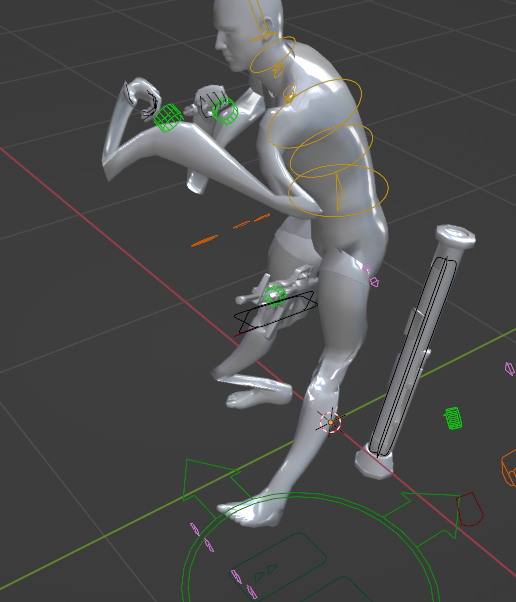 desert raven
lethal willow
Any ideas on why the model gets like this when I import an RTM I previously made...
desert raven
lethal willow
Any ideas on why the model gets like this when I import an RTM I previously made...
did you disable constraints?
the rigs dont always support importing right off the bat and may need modifying to work
lethal willow
I believe I tried it disabled and not on the import menu
desert raven
then the rig probably needs modification to accept import
regal dawn
I am trying to make my first custom pose, this is just a rough one for testing. When I export FBX and put it in OB to save as an .rtm, this is what I got. I am new to Arma animations, so any pointers greatly welcomed.

 desert raven
regal dawn
I am trying to make my first custom pose, this is just a rough one for testing. ...
desert raven
regal dawn
I am trying to make my first custom pose, this is just a rough one for testing. ...
use arma toolbox addon to export directly to rtm
there is a basic static animation tutorial in the pins too
regal dawn
Thanks, I believe it was user error on the software side.
lethal willow
Are there any pose libraries for the arma 3 rig? Similar to what reforger has? because I am struggling to get this rifle hold to look good since I get the hands right but then in-game the character is all wonky because I didn't do a great job with the upper body postioning.
I've also tried importing some of the arma 3 rtm examples but they import kinda wonk and I usally loose some ability to adjust certain bones
desert raven
lethal willow
Are there any pose libraries for the arma 3 rig? Similar to what reforger has? b...
No libraries. And the rig needs fixing up to work with importing right.
The constraints that power the posing can be enabled back after rtms import too but that also needs few steps before like repositioning the IK targets to the wrists so the hands stay in where they are supposed to be.
lethal willow
desert raven
No libraries. And the rig needs fixing up to work with importing right.
The con...
Know of any decent tutorials or documentation for this? Or should I just try to wing it lol
desert raven
lethal willow
Know of any decent tutorials or documentation for this? Or should I just try to ...
theres no arma specific tutorials as far as I recall
theres a lot of blender animating related stuff online though
lethal willow
Amazing, I'll take a look
lethal willow
Alright gentlmen I come to you with one final problem for the day before I move onto other things I got the hold animation good enough to wanted I wanted. However when I pack the PBO with pbomanger to test it, it works fine. However when I go to pack it and compress/sign and do all the other fancy bits with PBO manager it breaks and I get no errors. Any ideas? https://gyazo.com/5b5f0db9fa42355c16e880d61c0e0de2 https://gyazo.com/5e68ec7e52c04669fe9d64a48b73cccd

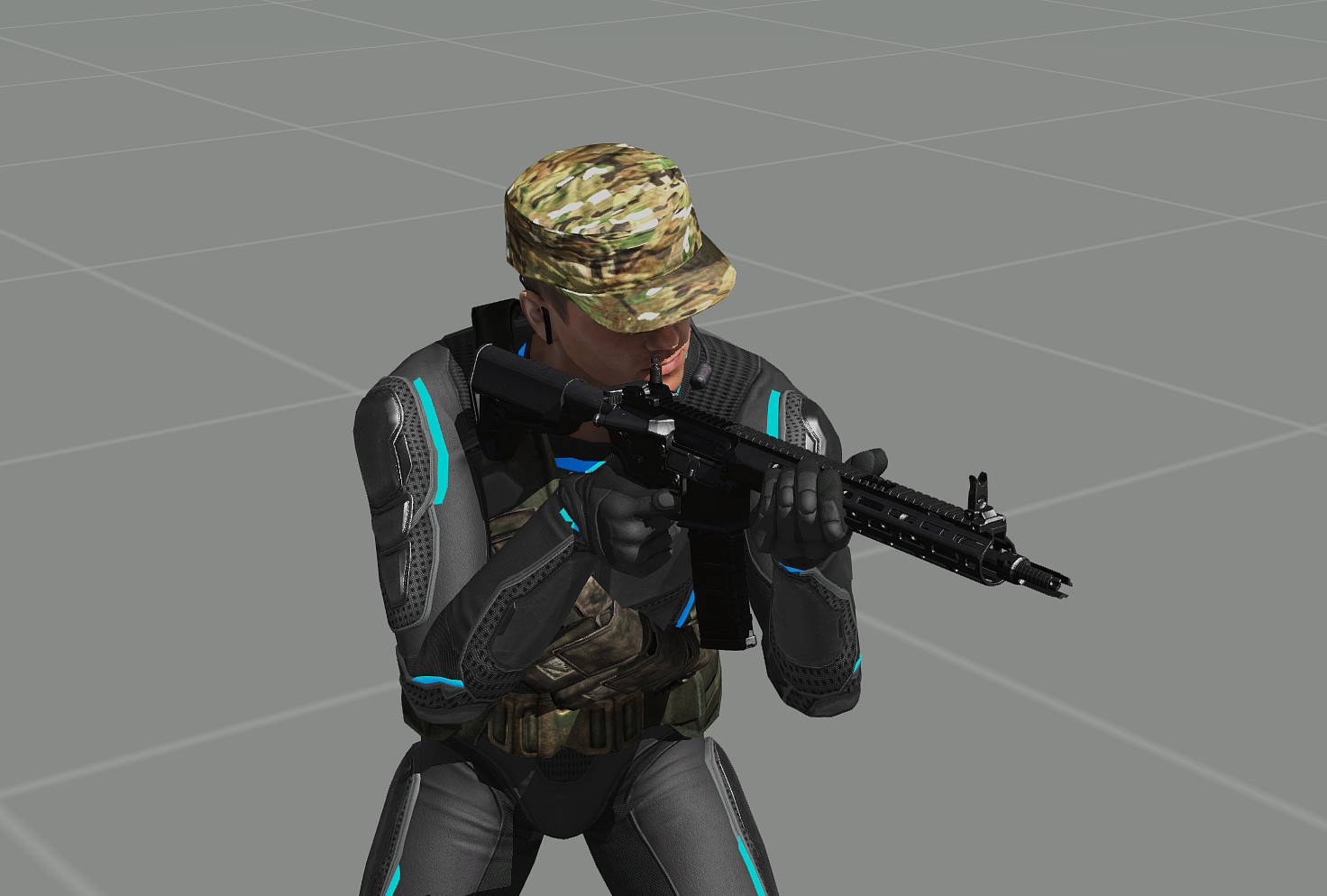
also I wasn't sure what channel to put this in but it's still related to animations 🤷♂️
fast canopy
Don't let pboManager handle it. Use addonBuilder or pboProject or HEMTT, not broken software
lethal willow
Well so that's my problem lol
I was using pboManager to test it quickly but now when I go to use pboProject it breaks the animation
fast canopy
Don't skip it. You'll only face an unforseen issue
lethal willow
Yeah I’ve been flamed for it but it still doesn’t work when packed with pboProject and pboProject hasn’t thrown me any errors even with them all turned on.
lethal willow
The picture of the animation functioning is from when I packed with pboManger
The picture of it broken is from when I packed it with PBO project. I got no errors during the pack or loading it in-game
fast canopy
Post your config
lethal willow
class CfgPatches {
class KS1_Hold {
author = "Davis";
requiredVersion = 0.1;
requiredAddons[]= {
"A3_Anims_F"
};
units[] = {};
weapons[] = {};
};
};
class CfgMovesBasic {
class default;
};
class CfgMovesMaleSdr: CfgMovesBasic {
skeletonName = "OFP2_ManSkeleton";
gestures = "CfgGesturesMale";
class StandBase;
class States {
class KS1_Hold: StandBase {
file="DC_Weapons\Kac_KS\anim\KS1.rtm";
looped=1;
speed=1;
mask = "bodyFullReal";
rightHandIKCurve[] = {0};
leftHandIKCurve[] = {0};
};
};
};
That is what I've used in the past on 2 other guns without any problems
lethal willow
It's just an animation to hold the rifle in different spots then normal due to the model
fast canopy
So handsAnim[] is what you look for?
lethal willow
yes
lethal willow
Are you talking about to config for the animation? or the gun?
fast canopy
Config
lethal willow
That is the config for the animation.
Then I have this in the gun config: handAnim[] = {"OFP2_ManSkeleton","\DC_Weapons\Kac_KS\anim\KS1.rtm"};
fast canopy
No, that's not how it works. handAnim[] does not use it
And that is the only relevant config
lethal willow
I was unaware then since I was following an old tutorial
Where can I find what I need for handAnim[] then?
fast canopy
You got it right already
lethal willow
and also that has worked for me on a couple different guns before so that's why I was confused about this breaking
fast canopy
It never should work like that. If it ever did, that's a news to me
lethal willow
I have 3 other guns that's worked for lol
So should I get rid of that second config then? and just have handAnim[] point to the rtm?
 fast canopy
It does mean CfgMoves is still illerelevant to it
lethal willow
Ok
fast canopy
How does the RTM look in OB?
lethal willow
https://gyazo.com/a3feef1c172f883ea9b4f6f856232104 It looks how it's supposed to
fast canopy
And in Blender just in case?

 fast canopy
It seems fine to me as well
Then it is more likely to be a filepath issue or the RTM not being PBO's correctly
Or model.cfg not set right
lethal willow
So that's what is confusing me because it works just it break when pboProject packs it
It won't let me send the model.cfg but it's the same one I've used on the other working guns
fast canopy
Where is your RTM and model.cfg terms of filepath
lethal willow
P:\DC_Weapons\Kac_KS\anim
fast canopy
Both is in there?
lethal willow
Yes
fast canopy
Move model.cfg to the parent folder
lethal willow
Move it just to Kac_KS or all the way back to DC_weapons
fast canopy
Kac_KS I guess
lethal willow
That's where I have my model.cfg located for the gun itself, won't that interfere?
having two in the same folder
fast canopy
It will 🤔
lethal willow
Do you want me to dm you my current model.cfg for the animation?
fast canopy
No
lethal willow
Ok
fast canopy
So like, you should have CfgModels and OFP2_whatever class in it
Or can't remember right now
Put class YourExactRTMName: OFP2_ManSkeleton; or similar into your bottom part of CfgModels
Follow the parent class right, I'm not sure what was the parent class
lethal willow
That might be my problem
I don't have the rtm in there anywhere
but I hadn't before
fast canopy
Honestly, I also might telling something wrong
lethal willow
https://gyazo.com/92e8a750e78444426861d8c0b8a4e7fa Something like this?
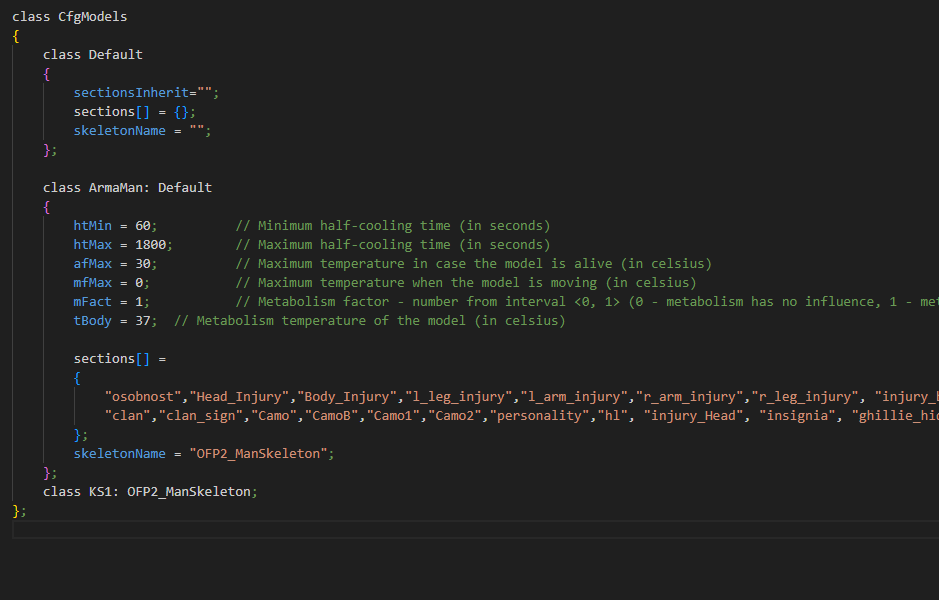 fast canopy
Because I am not 100% sure it is required or not
lethal willow
Honestly man I am appreciative of any help
fast canopy
ArmaMan is the parent
Sometimes it works automatically, sometimes not
And I'm not sure why
lethal willow
so instead of skeleton put ArmaMan?
fast canopy
Ja
lethal willow
alright let me try that
That got me packing failed https://gyazo.com/f713f129e07474ea6f76f42afee4ad7e
 fast canopy
For what error
lethal willow
fast canopy
class KS1: ArmaMan {};
lethal willow
Where am I checking the file path?
fast canopy
handsAnim
lethal willow
Yup path is fine
fast canopy
No errors at all? In RPT too?
lethal willow
Nothing that I can find
I am trying to pack in in A3 tools to see if it's just a pboProject problem
It broke it even worse..
ngl I might just shelve this for now because it's been hours lol
fast canopy
pboProject is a good friend, if you know how to tame it correctly
Otherwise you'll see something worse
lethal willow
Yeah, I'm just confused about what's breaking it lol and why everyother gun works fine but this doesn't lol
desert raven
class cfgModels is not needed for rtm packing, just the class cfgSkeletons with the ofp man skeleton in it.
model.cfg with the skeleton and rtm need to be in same folder <- simplest/safest setup
rtm needs to be made with a rig where the weapon bone name matches whats in the ofpMan skeleton. as in if it is Weapon - weapon the capitalized W makes it not match
the cfgMoves config for the rtm is not needed. the handanim= line is all thats needed config side
the animation working unbinarized (pbomanager) indicates to me that the weapon bone names dont match
@lethal willow
lethal willow
desert raven
<@224402405112938511>
That seems to have fixed everything 😑. Thank you I really appreciate it.
dusty spoke
would be nice to have a command to manually set the strength of masks like aiming/aimingBody/etc 🫠
trying to manually manipulate AI using only animations that seems to be the only limitation i've encountered
fast canopy
Unfortunately, Leopard's investigation concludes with a "no"
At this point all hopes regards to CfgMoves or human anIm smth is abandoned. We don't have a command to let an AI aim somewhere even
dusty spoke
fast canopy
At this point all hopes regards to CfgMoves or human anIm smth is abandoned. We ...
tbf i figure dedmen (besides all the requests he already has) could implement it relatively quickly, after all in theory it should just be forcing a normalized value - otherwise having built a character from scratch myself the rest of it (albeit primitive) does the job relatively well - it's just AI control specifically with aiming that's missing
 pastel ridge
@fast canopy Your animation viewer is something I needed in my life a long time ago 🙏🏼 So glad it exists, thank you!
regal dawn
I have attempted to get a simple rtm pose installed in a vehicle mod for testing, for a couple weeks now. I finally have the config working, as it loads without any errors, and allows me to enter the vehicle. I provided the video clip to show what is happening. I am recieving this result by entering the pilot's seat, and when out of vehicle using the debug to test the animation. Any ideas what I have done incorrectly? The rtm is a very simple pose crafted using the pdf tutorial pinned on this channel. Seemed straightforward, but I am sure I have made an error.
fast canopy
How do you make your RTM
regal dawn
I used the Arma rig, added the skeleton with the addon, frames 0 trough 1 same static pose, frame 2 blank, exported with the static pose box ticked, all in blender.
fast canopy
How do you pack your PBO
regal dawn
I am using Tools. I attempted the ones from Mikero, but I received so many errors using the Samples heli, that I didn't know where to begin. The stock file seems to function flawlessly in game, as well as any derivative models I have made, but throws a bunch of problems using PBO Project.
fast canopy
If you mean you use Addon Builder from Arma 3 Tools, that is the issue
regal dawn
I think Goat may have been trying to explain that, my cognition is awful some days. So, are Mikero tools really the only way to go? I am sure if I start slow I can figure out the mystery that is Project.
fast canopy
Arma 3 Tools' Addon Breaker is horrendeous software to struggle. If you have an issue with packing the sample with pboProject, your setup is anyhow not right, but that's just about something you've done wrong. I don't think I had face a big issue with packing Samples' helicopter
Besides that, I highly suggest not to abbreviate the tools name like that. That's confusing
regal dawn
fast canopy
Arma 3 Tools' Addon Breaker is horrendeous software to struggle. If you have an ...
Apologies for the abbreviations. I will go back and reinstall everything, as I know if it works fine for you, the problem is definitely on my end. THank you for the clarifications.
 jade whale
does anybody have a blend file for weapon animation? i had one before but lost it when i switched pcs
fast canopy
Macser's ArmaRig you mean. That's not "weapon anim" we call but handAnim
 unreal coyote
can i use A2 rtm files for my A3 mod? Mainly for weapon reloads and such.
zenith token
no you can't
incompatible skeleton
iirc you can rebinarize with new A3 skeleton however
lethal willow
So I am in a bit of need for help again.. Lol
I am creating a small SMG that fits in a matching holster on the players belt. However as far as I'm aware for it to be usable in the holster proxy it has to be a secondary weapon, which I also want it to be. However when the character draws it from the holster I want it to be held similar to a rifle stance since it was an SMG. I tried just doing the hand placement but very quckly rembered why that wouldn't work... as the placement is still all messed up. Is there any easy way to import or find a premade rifle rtm that I can use to just repostion the hands? I know the straight forward solution is just reanimate the whole stance however I suck at animating and I'm struggling as I'm not sure how to apple the animation the the weapon besides using the handanim in the config cpp. any help or advice or thoughts would be greatly appreciated.
fast canopy
Short answer: don't bother it
Unless I miss some fact about the question, you need to reanimate WHOLE animation set which is realistically impossible. You may want to show the result and expected result but I bet you'll conclude it with a "nah"
lethal willow
I mean is there a way to have it in the handgun slot but inherit everything from the rifle? Or it’s just that, redoing everything? Or another way to make it appear in a different proxy spot when not equipped?
Tbh the main thing is just getting it to appear in the holster lol
fast canopy
Short answer, forget the idea. Holster is for handgun
lethal willow
I appreciate the honesty lol
 sonic sparrow
trying to excute a walking animation, the charchter keeps walking in place, any ideas on whats wrong ?
Man2 SwitchMove "Acts_welcomeOnHUB03_AIWalk_1_IK"
dusty spoke
sonic sparrow
trying to excute a walking animation, the charchter keeps walking in place, any ...
iirc you need to play an action to which that animation is assigned; just animations don't necessarily "activate" the root motion
i.e WalkF
(though also that animation could just not have root motion)
fast canopy
If you attachTo it, don't
unreal coyote
okey
sonic sparrow
fast canopy
If you `attachTo` it, don't
EY ITS YOU im using you're mod man, nah i didn't attach it but i don't understand the WalkF works ?
desert raven
It means the cutscene animation you try to use does not have movement build into it so it needs a lot of scripting to make look like moving
you probably want to try some other animation that is easier to handle
sonic sparrow
oh alright
 graceful storm
I’m currently facing an issue. I have two cockpit pilot animations available, but after testing, neither of them can place the left hand on the throttle and the right hand on the control stick at the same time. The two animations I’ve tried are “Plane_Fighter_03_pilot” and “Pilot_Plane_Fighter_02.”
Could anyone tell me if there are any other cockpit animations I could try one by one?
And if none of the preset animations work, is there any method to force the left hand to stay on the throttle position? (Even if the arm becomes slightly distorted, that would be acceptable.)
desert raven
graceful storm
I’m currently facing an issue. I have two cockpit pilot animations available, bu...
Custom plane needs custom animation basically
You can't get the hand on the throttle without one
graceful storm
desert raven
Custom plane needs custom animation basically
I’ve never created animations before, so what is the simplest way to make one? I don’t have any motion-capture equipment. Is it possible to modify an existing animation—such as adjusting only the left hand and moving it to the position I want?
desert raven
graceful storm
I’ve never created animations before, so what is the simplest way to make one? I...
mocap not needed
theres a tuttorial for simples static animations in the pins
the process is basically same just pose that fits your plane
regal dawn
Hey guys, looking for an anim guy to join my project- anyone available ?
granite leaf
@regal dawn didn't you just ask for a modeller? But nevertheless I'm an amateur animator as well, but I have my own project, though. Sorry :(
 fair galleon
Hello, I'm trying to create a pose with Blender ArmARig, but I don't know how to make the pose for the two characters. I've heard that once you create a pose, you can import it to create another pose, but I don't know how to load an existing ARMARIG into another ARMARIG.
desert raven
fair galleon
Hello, I'm trying to create a pose with Blender ArmARig, but I don't know how to...
select bones in pose mode, ctrl C go to other armature in pose mode ctrl v
for example
fair galleon
desert raven
for example
I accidentally used the Append function to load an existing pose into the pose editor window to create a new one. Is it okay to do it this way?
 😅
fair galleon
desert raven
only the end result really matters
😅
fair galleon
desert raven
only the end result really matters
well i will test it later thanks for the help
 kind canopy
Hello, was wondering if there was any resources for learning how to do reload animations for guns with the blender Character Rig, is there anything special to it?
fast canopy
Nothing really. If there is one, it would be a Blender tutorial, not Arma's
kind canopy
aye then, cheers anyways
I've got a grenade launcher I wanna do a reload anim for, and I have no idea about exporting for arma
fast canopy
Exporting RTM can be done through ArmaToolBox, or another addon for Blender which I forgot the name
desert raven
mrclocks object builder
kind canopy
I guess what I mean is like
I know the animation, and I know the procedure to export
I'm just not sure if there are any skeleton changes that need to be made to the rig, or if I can just get away with separating all the moving parts out into their own objects
I have some progress towards it, but uh
embarassingly enough, that was for a pistol reload anim
kind canopy
oof
fast canopy
If you've ever seen a reload anim that is vert smooth or complex in A3, (like SPE or some of SOG anims) that uses a some magic to export anim into model.cfg directly
kind canopy
I was told there was something that spit out a model.cfg though, that's how weapon anims are handled, right?
fast canopy
Ja
kind canopy
I think that's what I'm looking for then
reload animations have been on my to-learn list for a while, but like with most things, life gets in the way
fast canopy
Weapon anims... in this context, weapon part of the reload anim
kind canopy
yeah
fast canopy
Human part of it uses CfgMoves smth and RTM
kind canopy
yeah, ideally, I'd like to make them in tandem so that they line up really nice, especially where it's a grenade launcher
fast canopy
You can lobotomy some pains of developing reload anim via pinned solution
kind canopy
fast canopy
You can lobotomy some pains of developing reload anim via pinned solution
model.cfg anim sources?
kind canopy
cheers
fast canopy
So, you can at least debug your anim without repack PBO and relaunch A3
desert raven
model.cfg exporter can be found here:
https://forums.bohemia.net/forums/topic/234351-animexport-blender-to-modelcfg-complex-multi-bone-animations-for-objectsvehiclesweaponsetc/
however I do recommend doing the basic simple movements directly in model.cfg and to learn understand it
kind canopy
desert raven
model.cfg exporter can be found here:
https://forums.bohemia.net/forums/topic/23...
Big thanks
I’ll take a whack at it some time this weekend I think
 nocturne birch
Hi guys! I have a request! 😄
https://media.giphy.com/media/V28dRRdDUzD0s/giphy.gif
 zinc wadi
I have the urgend demanding in myself... to... idk... hug you
with a Baseballbat or something else hard
😛
 tired needle
Find a local mocap studio and do it, I'm sure you'll find someone in here that would clean and re-target the data.
Don't forget to upload a video. It'll.. uh.. help out with the editing.
 livid canyon
Anyone got any ideas on what I'm doing wrong?
5in_fpv_frag: grenadedropped - unknown animation source ammo.0
class grenadeDropped
            {
                type = "hide";
                source = "ammo.0";
                selection = "mag";
                minValue = 0.000000;
                maxValue = 1.00000;
                hideValue = 0;
                unhideValue = 1;
            };
Even did it without the .0 to the same effect
I'm trying to get a proxy model on a vehicle to be hidden when you fire and empty the weapon on the main turret
thin temple
livid canyon
Anyone got any ideas on what I'm doing wrong?
```
5in_fpv_frag: grenadedropped -...
You need an animation source in your config.cpp
{
    class my_weapon_reload
    {
        weapon = "my_weapon";
        source = "reload";   // or reloadMagazine, revolving, ammo, ammoRandom, isEmpty
    };
};```
which you can then reference in your model.cfg
```class my_weapon_animation
{
    type = "hide";
    source = "my_weapon_reload";
    selection = "mag";
    minValue = 0.000000;
    maxValue = 1.00000;
    hideValue = 0;
    unhideValue = 1;
};```although be aware that most weapon animation sources run from 1 to 0
livid canyon
Understood :)
 regal mauve
What animation source do i need to use to rotate the optics of the grenade launcher according to the discreteDistance ? I tried to use zeroing2 but its not working
 desert raven
regal mauve
What animation source do i need to use to rotate the optics of the grenade launc...
desert raven
regal mauve
What animation source do i need to use to rotate the optics of the grenade launc...
zeroing.1 maybe was it
the model.cfg wiki page should explain how teh muzzle indexes worked
regal mauve
desert raven
zeroing.1 maybe was it
This page https://community.bistudio.com/wiki/Arma_3:_Weapon_Config_Guidelines says it shoud be like class OP_ROT { type="rotation"; source = "zeroing2"; // use second muzzle zeroing for rotation sourceAddress = "loop"; // loop when phase out of bounds selection = "OP"; // selection we want to rotate axis = "OP_axis"; // has its own axis minValue = 0; maxValue = 3; // this weapon has array with 4 distances angle0 = "rad 0"; angle1 = "rad 65"; }; but for some reason its not working for me
I tried zeroing1 but it didn't work either
My model.cfg is as following: ```class L75_gl: L75
{
skeletonName = "iarts_L75_skeleton";
sections[] =
{
"camo",
"camo1",
"camo2",
"reticle",
"op_look",
"op_eye_50",
"op_eye_75",
"op_eye_100",
"op_eye_150",
"op_eye_200",
"op_eye_250",
"op_eye_300",
"op_eye_350",
"op_eye_400",
"zasleh"
};
sectionsInherit = "";
class Animations : Animations
{
        class OP_ROT
        {
            type="rotation";
            source = "zeroing2";        // use second muzzle zeroing for rotation
            sourceAddress = "loop";        // loop when phase out of bounds
            selection = "op";            // selection we want to rotate
            axis = "op_axis";            // has its own axis
            minValue = 0;
            maxValue = 8;                // this weapon has array with 4 distances
            angle0 = "rad 0";
            angle1 = "rad -18.91";
        };
    };
};```
And my config class EGLM: UGL_F { muzzlePos="usti_granatometu"; muzzleEnd="konec_granatometu"; useModelOptics = 0; useExternalOptic = 0; reloadMagazineSound[] = {"A3\Sounds_F\arsenal\weapons\Rifles\TRG20\TRG20_UGL_reload",0.7943282,1,10}; cameraDir = "op_look"; discreteDistance[] = {50,75,100,150,200,250,300,350,400}; discreteDistanceCameraPoint[] = {"op_eye_50","op_eye_75","op_eye_100","op_eye_150","op_eye_200","op_eye_250","op_eye_300","op_eye_350","op_eye_400"}; discreteDistanceInitIndex = 1; reloadAction = "GestureReloadTrgUGL"; };
    {
        scope = 2; /// should be visible and useable in game
        displayName = "L75 (GL)"; /// some name
        model = "\IARTS_L75\L75_gl.p3d"; /// path to model

        picture = ""; /// different accessories have M, S, T instead of X
        UiPicture = "\A3\Weapons_F\Data\UI\icon_gl_CA.paa"; /// weapon with grenade launcher should be marked such way
        weaponInfoType = "RscWeaponZeroing"; /// display with zeroing is good for iron sights
        muzzles[] = {"this","EGLM"};
        hiddenSelections[] =
        {
            "camo",
            "camo1",
            "camo2",
            "reticle"
        };
        hiddenSelectionsTextures[] =
        {
            "\IARTS_L75\data\L75_co.paa",
            "\IARTS_L75\data\L75_attachments_co.paa",
            "\IARTS_L75\data\L75_launcher_co.paa",
            "\IARTS_L75\data\optic_ReflexSight02_ca.paa"
        };
        hiddenSelectionsMaterials[] =
        {
            "\IARTS_L75\data\L75.rvmat",
            "\IARTS_L75\data\L75_attachments.rvmat",
            "\IARTS_L75\data\L75_launcher.rvmat",
            "a3\weapons_f\acc\data\collimdot_cshader.rvmat"
        };
};```I don't understand why its not working
 regal mauve
desert raven
regal mauve
desert raven
Oh i did miss this part. Thank you its working better now 🙂
 tribal dirge
Greetings ! I'm currently using the animation of holding a weapon while standing in water. (asdvpercmstpsnonwrfldnon) the thing is I don't use it when the player is inside water, however after some random times it make a sound of water waves and I don't know why.
At first I thought it was elevation, the closer to the water the more frequent and louder the sound (Which is a bit true) but even at high elevation it does the same.
I don't know how to disable that water sound from the animation, is there a way to disable specific sounds in an animation ?
desert raven
tribal dirge
Greetings ! I'm currently using the animation of holding a weapon while standing...
They are not animation related but surface related I think.
 strange abyss
how many FPS should animation be?
 light vale
I'm trying to animate a cylinder for a revolver to spin, but it keeps changing the scale. Is there any properties on the model that stop that from happening? Right now I only have autocenter set to 0
desert raven
light vale
I'm trying to animate a cylinder for a revolver to spin, but it keeps changing t...
that means you have more than 1 bone selection affecting the cylinder
you must only have 1
so if something has multiple bone chain
bone1 - bone2 -bone3
if you want all the animations to affect the part you use only the last one in the chain
ie bone3


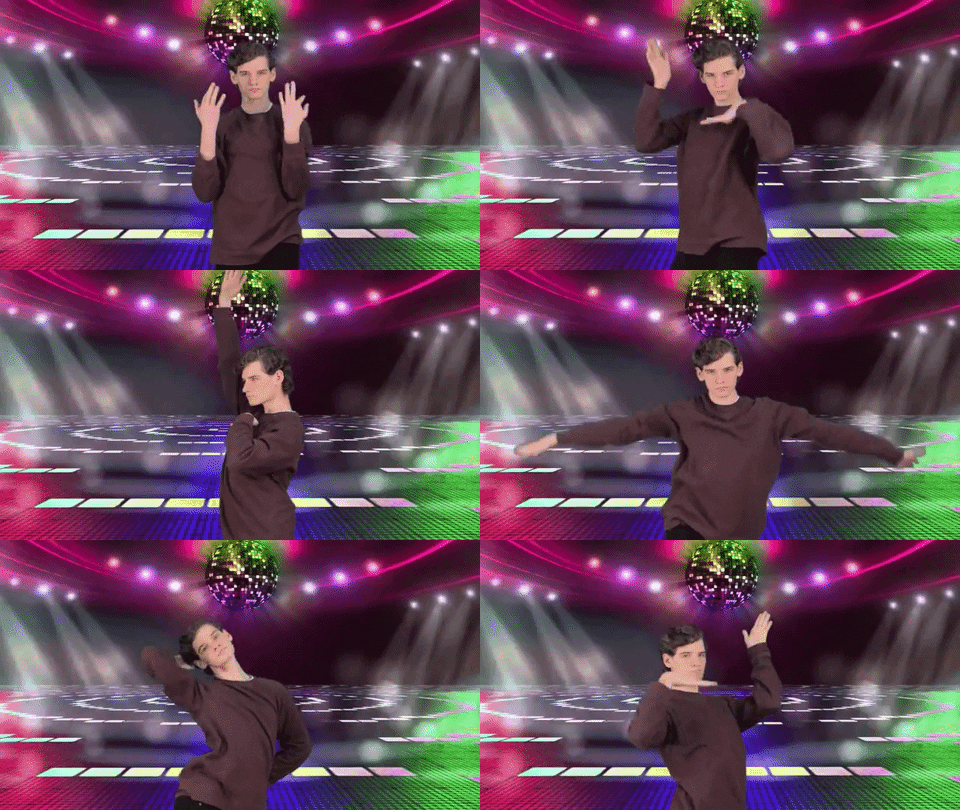 light vale
desert raven
bone1 - bone2 -bone3
if you want all the animations to affect the part you use o...
light vale
desert raven
bone1 - bone2 -bone3
if you want all the animations to affect the part you use o...
I had a camo selection that covered the entire model, so that was causing the issue. Thanks for the help
desert raven
light vale
I had a camo selection that covered the entire model, so that was causing the is...
do you have bone called camo?
light vale
desert raven
do you have bone called camo?
No, I just wasn't sure how hidden selections worked, so I thought it was a selection over where the texture would apply
Tbh I still don't really understand how hidden selections are defined, but one problem at a time hehe
Although I did list it under the bones, so maybe that was it?
Oh, removing camo as a bone fixed
I'm still confused, but it works now, thanks again
desert raven
light vale
No, I just wasn't sure how hidden selections worked, so I thought it was a selec...
hiddenselections would be defined in the sections array of the model.cfg
light vale
Oh, so that's what it's for
desert raven
there is pin about that in the #arma3_model l
desert raven
light vale
Oh, so that's what it's for
sections list is for various engine related things but often those are related to texture swapping
light vale
Got it, thanks. I've been banging my head against the wall for a day now trying to figure it out through trial and error lmao
desert raven
light vale
Got it, thanks. I've been banging my head against the wall for a day now trying ...
these channels are good place to ask
tired needle
Pretty sure ARMA interpolates between keyframes, so whatever faithfully samples your animation curves should be fine.
The only wrinkle would be that ARMA probably uses quaternion interpolation where as most animation packages default to some euler basis, so the interpolation might be very different from your animation package if you make the keyframes too sparse.
 lean pivot
Hi, I am trying to animate a rifle where when the reloading begins, the charging handle has a part (circled in red) where it will rotate left & outward, then start the pulling animation
However, when the rotation starts going, the part would start shrinking smaller as the animation continues, and then it will return to the correct size by the end
I am not sure why this is happening and how I can fix this

 desert raven
lean pivot
Hi, I am trying to animate a rifle where when the reloading begins, the charging...
desert raven
lean pivot
Hi, I am trying to animate a rifle where when the reloading begins, the charging...
Same reason as with the previous asker
lean pivot
Ah the timing, thank you, fixed it too now
naive hemlock
for ADSK, make sure you're anims are set to liniar interpolation
be it max, maya and/or motionbuilder
 sacred oxide
lean pivot
Hi, I am trying to animate a rifle where when the reloading begins, the charging...
sacred oxide
lean pivot
Hi, I am trying to animate a rifle where when the reloading begins, the charging...
What program are you doing this on?
lean pivot
sacred oxide
What program are you doing this on?
I was just doing trial and error in the model.cfg
sacred oxide
where does one find the export profiles?
desert raven
sacred oxide
where does one find the export profiles?
which export
sacred oxide
for anims
desert raven
sacred oxide
for anims
which game?
sacred oxide
reforger
desert raven
sacred oxide
reforger
then #enfusion_animation
regal dawn
Hey dudes, coming to you seeking some help identifying an animation today. I've come to find the animation that triggers the 'twitch' that occurs when you shoot someone else in ArmA 3 to be pretty annoying, and im looking to find away to prevent it from occuring in the future. For example, the twitch you see while I shoot the AI's in this video: https://www.youtube.com/watch?v=a7nP2WH0x3Y&feature=youtu.be
Any help with identifying this would be much appreciated.
 smoky dragon
it's a ragdoll effect
ragdoll plays for 0.5s (don't remember the interval) then switches back to previous anim.
regal dawn
hmm.
Do you know of a way to prevent the effect from occuring? Or where I could find what triggers the ragdoll?
smoky dragon
don't remember where the config is located, but you can modify it.
regal dawn
Fantastic, thanks - I'll do some looking around and report my results.
 sterile iron
how do i know which animations have movement build into them?
fast canopy
https://community.bistudio.com/wiki/getUnitMovesInfo
I don't think there is any other in-game way to find it
sterile iron
thank you!
 plain knot
Can you have different reloads depending on if the weapon is either fully empty or only partially?
desert raven
plain knot
Can you have different reloads depending on if the weapon is either fully empty ...
not natively
with scripting maybe
plain knot
Okay
static kayak
The most complete way is to use another muzzle (which allows different model.cfg things for reloads) and script the swap and the reload
thin temple
Not quite sure what you mean there Scotty, but I'm currently using a weapon with 250 bullets in it.
 plain peak
Hello, where can i find information about animation of antennas and tank armor plating (armor skirt for the tracks? idk how this thing called)
I want some parts of the car model to sway when car is on the sloped surface.

I think there is some axis of movement involved, aswell as pre-made animation (talking about antenna) and maybe phys-x (don't know anything about phys-x)
thin temple
Um, yeah, but that's a bit obvious isn't it? It looked like you were saying a mag couldn't hold more than 200 ammo.
thin temple
plain peak
Hello, where can i find information about animation of antennas and tank armor p...
Use the built in animation source gmeter, or gmeterx y z to rotate the parts.
https://community.bistudio.com/wiki/Model_Config
Antennas need to be split into multiple pieces and weighted.
plain peak
@thin temple thank you
 umbral spindle
@thin temple ok thx
 patent galleon
hello, can someone tell me what im doing wrong? This happens when i try to import rtm with object builder (Using vanila GestureReload_smg_03.rtm file)
 desert raven
patent galleon
hello, can someone tell me what im doing wrong? This happens when i try to impor...
desert raven
patent galleon
hello, can someone tell me what im doing wrong? This happens when i try to impor...
cant import binarized rtms
patent galleon
desert raven
cant import binarized rtms
nvm wrong version of blender
dusty spoke
huh... @desert raven i was going to grab some vanilla animations so i have a proper start frame for some transitions for future things im going to do but i wasn't aware you cant import the rtms... do i have to eyeball it then or is there a package of vanilla rtms somewhere?
desert raven
the binarized rtms dont import with the plugin
clocks toolbox might handle those too. I dont remember
But mikeros DeRTM can turn them into readable too.
dusty spoke
@desert raven sorry to bother - i've managed to import a vanilla rtm using clock's tool (turns out it works out of the box) - the animation works fine besides the fact that the pelvis bone for some reason gets pushed 2x up from the world/body root - seen this happen before?

if i offset it down it's perfect, which i can probably do with scripts, but i wanted to know if you know why it could be
nevermind, hierarchy broke, spine wasn't parented to pelvis - works fine now
desert raven
dusty spoke
<@150949769953411072> sorry to bother - i've managed to import a vanilla rtm usi...
this is expected
while the character model is centered from pelvis on 0,0,0
the animations are done so that feet touch 0,0,0
so the charater is lifted up
so spine etc should be connected with pelvis so they rise with it
dusty spoke
aye, the spine wasn't parented to the pelvis in the max file for some reason, so i was confused (since i matched the hierarchy in blender to be the same as in max) - i suppose it's because the max controllers were responsible for fixing it there
desert raven
yeh most likely
dusty spoke
in any case - good news - seems like you can import any vanilla rtms using clock's tool directly onto the skeleton; everything animates properly, even the camera/weapon/launcher helpers
dusty spoke
aye
makes it a breeze for people who are doing custom movesets (like i am) but dont really want to create entire new walk/run/etc animations (why would you if you're changing only the upper body)
desert raven
Since Ive been Mikero tools user for ages it never bothered me 😅
but it is good to have new tools
dusty spoke
@white juniper apolocheese for the ping; but im curious if some of the animation bugs that seem to have been present since forever are on your/someone else's radar for a future fix? firstly the network desync that most commonly happens when doing switchMoves/actions during/around unconscious states (people sliding on the floor) and what i found recently which is using playActionNow within a HandleHeal event handler (during the automatic animation trigger) completely breaking the player camera controller (camera gets locked and the unit seems to be stuck in a contorted aim offset)
I can produce reproduction steps for both of these (the latter is pretty rare so maybe you're not even aware of it) but im asking incase you already know so i dont make duplicate tickets
 white juniper
desync. Not on radar.
Other thing, also not
There might be tickets already, but I don't know about them
 next cloak
Is there any way one can change the animation for holding binoculars for only one set of binoculars?
desert raven
next cloak
Is there any way one can change the animation for holding binoculars for only on...
no
well technically you could maybe do some scripting to apply a gesture on top
next cloak
Ah damn.
next cloak
desert raven
well technically you could maybe do some scripting to apply a gesture on top
Yeah, was hoping there'd be a simpler way though.
Thank you for the answer, anyways.
dusty spoke
thought i had a stroke for a sec when retargeting my mocap but fun(fact?), unless the same verbose naming convention is only coincidentally used, arma skeletons were made based on the Xsens mannequin 🙃
@desert raven quickie - does hand IK get applied when holding the launcher too, or just primary weapon? if you know at least; i'd test but being lazy rn
desert raven
dusty spoke
<@150949769953411072> quickie - does hand IK get applied when holding the launch...
yes
technically for pistol too but it works properly only if pistol were to be set up as floating proxy instead of glued to the hand
dusty spoke
gotcha, good to know
also im still recovering from the fact that twist bones are part of the limb hierarchy 
just arma things i guess
(normally we put those as orphan children of the main joints, not as sequential parents to lower bones)
desert raven
😅 it does somehow make sens in my head
since doesnt the body work like that. twisting limb affects all the parts
dusty spoke
desert raven
since doesnt the body work like that. twisting limb affects all the parts
well yeah but from an animation perspective it isn't intuitive since for example you wanna rotate the hand independently from the forearm - of course none of this is an issue once you introduce a control rig, but it makes making a control rig difficult since you have to do extra work to cancel out unwanted motion from the parent; effectively redo the hierarchy (make the hand rotate the forearm instead of the forearm rotating the arm due to hierarchy) - animation is "backwards" since another example is IK - the hand/foot controls the thigh and calf, mechanically it's the other way around, etc...
having twist/roll bones be orphans allows for more control in that way
dusty spoke
Am i missing something or is there no reliable method to check the current queued Action sequence?
In general just checking the current action and queued actions, for example i walk forward to trigger WalkF, then manually do playaction x, then playaction y - some getter that returns an array of [walkf, x, y], and which Action we're currently in (for example RifleStandActions)
first i figured i'd just check the actions config entry of animationState but that one will give you whatever the current set action is for the current played animation, not the one that we're trying to get to if the current anim is transitionary
sacred oxide
Is there anywhere i can find the medical animations?
desert raven
sacred oxide
Is there anywhere i can find the medical animations?
from arma3?
dusty spoke
@desert raven would you happen to know a way around the defaulting of an action upon using playActionNow? it might be a bug or it might be intended design but it seems like running non-engine-native actions causes the motion machine to run the "default" as soon as the played action finishes, causing a small hitch that i havent noticed until now because of the way i constructed the transitions
to be exact; run action x, animation plays, you hold W to go forward during the animation of the x action - you'd expect the state machine to transition to WalkF as soon as action X is finished, but instead it goes X>default>WalkF - no direct transition from X action's animation is made to the walkF action's animation
desert raven
is the X animation configured to connect with walkF?
dusty spoke
it's unnoticeable in most cases esp if the transition from X to default is a connectTo (which is why i havent noticed cause i have bespoke transition anims for most things) however if the animations are quick enough you'll notice the stopping
dusty spoke
desert raven
is the X animation configured to connect with walkF?
yeah there's a direct interpolation to it
i think the issue isnt the animation but rather the action queue
desert raven
can you reproduce it with vanilla action set?
dusty spoke
havent tried that yet, i'll attempt that now
desert raven
comparison with it could be useful
does the default show in any of the animation related scipt commands?
like if you monitor what animation is playing
or is it just visually seen
dusty spoke
desert raven
does the default show in any of the animation related scipt commands?
yeah that's how i noticed it since i was debugging why there was a hitch - basically i do playActionNow on action "meleeaction", which is assigned animation "melee1"; during the animation melee1 playing (and before, tried both), i'm holding W so that the engine immediately tries to switch to the WalkF action (meaning melee1 to transition to walk forward animation, to which it has a direct connection) - but i notice that for like a couple of frames, after finishing the melee1 animation, animationState reports the animation that's assigned to default action before switching immediately to the walkF action's animation
make sense?
at first yeah i thought maybe there was no direct transition and it had to go through the default action which has the idle stance on it, but i checked a dozen times and there is the cheapest possible direct connection from melee1 to the walk animation
engine-side actions don't have this issue, even when switching one of them to play the melee1 animation - only happens if the animation is played through playActionNow instead of a native input
dusty spoke
desert raven
can you reproduce it with vanilla action set?
ok yeah so it happens there too - i did playActionNow on WalkLF - has the same issue, uploadinng video
desert raven
ah
dusty spoke
im triggering the strafing with playactionNow on WalkLF, not by pressing A - and you can see theres a hitch
im holding W the entire time
if i were to strafe normally (pressing A instead of playactionnow) its immediate, it doesnt transition to hum_absstacom_idllhtmel
(kinda cropped it badly but uuh... you can see it happening immediately if you go frame by frame on the video 😂 )
desert raven
yeah I saw
dusty spoke
this might be an engine failsafe to make sure that an action always returns to default after using playActionNow, but its problematic when you want smooth movement with custom actions
desert raven
this is still a modded moveset though so would it be possible to find a vanilla moveset reproduction
desert raven
dusty spoke
this might be an engine failsafe to make sure that an action always returns to d...
this is a possibility too
dusty spoke
desert raven
this is still a modded moveset though so would it be possible to find a vanilla ...
i can try that too right now (if you just mean vanilla animations)
desert raven
dusty spoke
i can try that too right now (if you just mean vanilla animations)
yeah just vanilla animations
dusty spoke
yeah, definetly a vanilla issue 😄
desert raven
then yeah it feels like its something in the way the forced animation works and goes back to engine driven animations
like you said
dusty spoke
in this case, the walking forward can infact transition from forward leftward to forward and vice versa, if you hold W, tap A, then go back, it's instantaneous - the only reason the hitch is here is because walkLF is being triggered in playActionNow instead of by pressing A
dusty spoke
desert raven
then yeah it feels like its something in the way the forced animation works and ...
unfortunate indeed, i feel like i've reached the maximum allowed dedmen pings per month but it'd be nice if there was a workaround here 😂
hard to make custom movesets when engine behaviour is different from scripted animation behaviour
desert raven
😅 he would be the one who can see how it works under the hood yeah
dusty spoke
like i'd love my character to be able to transition directly from idk, a scripted playActionNow action's animation to whichever keybind is currently being held (like a walk), instead of having to stop at "default" first to transition to said walk - sure one might say unnoticeable when thinking about it but it's very noticeable when you have to have responsiveness (and especially since the engine blends root motion when transitioning between two animations - a custom animation with lots of movement will have an abrupt stop when its not suppoused to if you're holding W because you expect it to transition to that walk, not to a stop and then walk)
dusty spoke
aye 😄
considering im seemingly the first person to notice this i feel like rarely anyone in the community ever tried to make animations "the right way" (i.e not just spamming switchmove on everything and instead using the engine's motion machine)
desert raven
yeah its not something lot of people touch
dusty spoke
@desert raven think this satisfies a feedback tracker "bug" report?
woeful pelican
wonder if it's 'intended' due to the 'now' part
like it's how the command skips to the new action
dusty spoke
i thought so too, however problem with using the regular playAction is that playAction queues the action, doesn't play it immediately, which has its own use case (and doesn't really justify why once that "now" action is finished, the hardcoded exit is always seemingly the "default" action instead of the current user input)
i did try inputting W AFTER the playActionNow command gets called (so in the middle of the animation itself, incase it overrides it) and that didnt fix it either
woeful pelican
ah I think I misunderstood and thought the 'default' was happening before the new action
dusty spoke
nah
desert raven
its probably some transition between the forced animation state and normal animations
dusty spoke
i suppose "playActionNow blocking user input action queue" is an appropriate way to word it
strange abyss
can anyone give me a hint why my reload animation does not run to the end?
desert raven
Yeah could lead with that. Ticket will have more chance to get looked into.
dusty spoke
@desert raven @woeful pelican https://feedback.bistudio.com/T197480
I suppose i should edit to propose the actual tweak lmao
desert raven
dusty spoke
I suppose i should edit to propose the actual tweak lmao
could be good idea yeah
dusty spoke
done
desert raven
Try to trick dedmen to get interested 😅
dusty spoke
in theory this should be an "easy" change 😂 just make a duplicate command that does the same thing and rips the "transition to default" part out
playActionNowRaw to keep the name short, so to say
strange abyss
it should do this https://www.youtube.com/watch?v=9LnJ22rM6jg
dusty spoke
desert raven
Try to trick dedmen to get interested 😅
also would be sweet if you wanted to replicate yourself or perhaps find other behaviours with this "bug" - new set of eyes might find something else too
but in any case cheers for going over this with me 😄
strange abyss
but it comes to game like this https://www.youtube.com/watch?v=yrvZ_tUjxDM
strange abyss
I got it working the IKcurves was fuking shit up.
dusty spoke
where does soundOverride in states derive sound from? im seeing names like "tactical" and "bodyfall" but i dont know what class that comes from
dusty spoke
 royal totem
Any alternative of unitcapture ??
royal totem
Any alternative of unitcapture ??
Unitcapture is for vehicles not units if you mean the BIS function
And specifically air vehicles
Technically yes you could use it for units but as you said it doesnt play well with animations
desert raven
It had some decimal issue I recall. There was some trickery done for it to in SOGPF to get it run properly in our cutscenes. Just dont remember exactly what
dusty spoke
desert raven
It had some decimal issue I recall. There was some trickery done for it to in SO...
according to the wiki it doesn't store animation data; you sure it will accurately portray exactly the movement beyond just positional changes?
dusty spoke
I dont assume theres any setting im missing to make gesture mask influence root relative rather than parent bone relative? I.e wherever vectordir is pointing rather than its parent bone
desert raven
dusty spoke
I dont assume theres any setting im missing to make gesture mask influence root ...
no, 
😅 cant have too nice things
dusty spoke
Gah, additive anims are great but gestures in arma are so limiting because most animations dont have a normalized direction for the body so they end up being incredibly offset
I tried different mask values for the spine and as soon as i get one that works for one moveset it breaks for another
Likely because the actual spinal iffset compared to the pelvis tends to originate sometimes from spine and sometimes from all 4 spine bones gradually
buoyant lagoon
can rocket launchers have their custom reload animation, in the past when I made one the arma man ends up like 4 feet underground or something
fast canopy
Yes. Apex RPG-7 has one
 ruby hill
Heya. I just found out about this discord-thingy here. I'm BISim's anim-guy. Throw your toughest questions at me and I'll see what I can do.
strange abyss
@ruby hill can you have more than one HandAnimation?
ruby hill
handAnim[] allows to only have one hand-anim per weapon. This anim is then used in all stances/actionmaps. Sadly I haven't found an easy way to have a different hand-anim per stance in Arma3. Which makes holding MGs look ridiculous, especially if the frontgrip is still used when prone. 😦
 quick ingot
I'm digging in the ragdoll config and trying to understand what exactly the drive does in the joint config. Googling and asking AI doesn`t help. Could someone explain this to me?
Also, it would be great to get some docs on arma 3 ragdoll/PhysX in general
(Mention if responding)
desert raven
AI has no chance of knowing nitpick specific info like this
from Arma side I dont think its documented
so PhysX documentation would be the place to look I think
sacred oxide
i tried importing the 'A3_character_example.FBX' into blender, but got this error message, is there a work around for this?
 dusty spoke
sacred oxide
i tried importing the 'A3_character_example.FBX' into blender, but got this erro...
dusty spoke
sacred oxide
i tried importing the 'A3_character_example.FBX' into blender, but got this erro...
Use the better fbx plugin for blender to import it
sacred oxide
dusty spoke
Use the better fbx plugin for blender to import it
how do i get that?
dusty spoke
sacred oxide
how do i get that?
sacred oxide
dusty spoke
https://superhivemarket.com/products/better-fbx-importer--exporter
this costs, is there not a free version?
dusty spoke
sacred oxide
this costs, is there not a free version?
unfortunately not
sacred oxide
dusty spoke
unfortunately not
Thanks anyway
desert raven
sacred oxide
i tried importing the 'A3_character_example.FBX' into blender, but got this erro...
you could just import the p3d with the arma3 blender toolbox
sacred oxide
desert raven
you could just import the p3d with the arma3 blender toolbox
Thanks, but im recieving this error message?
 desert raven
sacred oxide
Thanks, but im recieving this error message?
desert raven
sacred oxide
Thanks, but im recieving this error message?
this is reforger tools
not arma3 tools
they are different addons
sacred oxide
desert raven
they are different addons
importing fbx will not work, but importing p3d will import this abomination;

if i import the Male.p3d, found in
\Arma 3 Samples\Addons\TemplateRTM, i get this;
 desert raven
sacred oxide
importing fbx will not work, but importing p3d will import this abomination;
desert raven
sacred oxide
importing fbx will not work, but importing p3d will import this abomination;
thats all the lods
what is it that you are looking for?
sacred oxide
a plain and simple model, at the least, but preferably, like reforger, a rigged model
icy nebula
sacred oxide
a plain and simple model, at the least, but preferably, like reforger, a rigged ...
There's a couple of the LODs that are just the model
For a blender armature rigged model, Mascer's ArmaRig is the only one I know of https://www.moddb.com/games/arma-3/downloads/armarig
desert raven
sacred oxide
a plain and simple model, at the least, but preferably, like reforger, a rigged ...
you would then use the 0 lod
and remove/hide the others
However the model is not compatible with reforger so with reforger it may be best to use the reforger sample
desert raven
icy nebula
There's a couple of the LODs that are just the model
For a blender armature rigg...
the p3d is rigged, (weighted selections are in place) it just does not come with Blender armature
the sample p3d character can be appield to macsers armarig
icy nebula
desert raven
the sample p3d character can be appield to macsers armarig
Good to know
That might be quite useful when I try to make some uniforms
dusty spoke
dusty spoke
<@150949769953411072> <@106958417830096896> https://feedback.bistudio.com/T19748...
this uuh... i dont know what this is but it sure looks like a bot

(conveniently bumps my ticket tho so thanks bot lmao)
tired needle
@ruby hill I've been wondering how exactly interpolateTo/interpolationSpeed work. e.g. if you have a 10 second "from" animation and a 10 second "to" animation and a playMove triggers an interpolation edge 2 seconds into the "from" animation, how are the two animations blended together?
desert raven
dusty spoke
this uuh... i dont know what this is but it sure looks like a bot
yeah most likely a bot
 glossy junco
I have an animation done in blender exported as an rtm
When i import into object builder with the test model from samples, the animation works fine, all points are there, but when set up in weapon config as the reload animation, it doesnt run on reload.
Would the issue be the rtm file or the config?
Rn the animation is just some arm movements to practice actually getting an animation in
fast canopy
I think you'd need to tell what's your config and exact goal
glossy junco
Exact goal is a gunspin and changing the normal hold animation, i haven't done either of those yet though just trying to get an animation in
Config id have to send in a bit
desert raven
glossy junco
Exact goal is a gunspin and changing the normal hold animation, i haven't done e...
pistol?
and which parts are you trying to animate with rtm?
glossy junco
Yes
Rn im literally just trying to get an animation in for the right arm
fast canopy
Wait what
If you mean you want to animate (move/rotate) the pistol of the character model, there's nothing we can suggest but forget the idea
dusty spoke
if it's just the arm not moving it's highly likely IK is applied to the animation from whichever class you inherited for the state
but as polpox said you should reconsider if your intent is to do anything with a pistol weapon itself actually moving since it's bound to the hand bone and will always be stuck to the right hand
desert raven
technically there is some possibilities to do things withing the pisto p3d with model.cfg
But getting all that set up right is likely difficults
dusty spoke
also kinda off topic but it's unfortunate because arma 3 can have a separate weapon bone for the pistol, i do that with my custom space marines, it's just that a commitment was made to the right hand bone for the standard man and it probably got too far in the animation process to change it
desert raven
yeah 
glossy junco
Im fine with gun spin not being possible, my whole thing rn is just getting an animation in game first, which is getting stuck at the config stage
It exports fine and applies fine to the test model in obj builder, between that and getting it ingame is my issue
desert raven
It would be fairly straight forward to create new animation set with separated pistol bone. but that would have isseues with all the custom content
dusty spoke
glossy junco
Im fine with gun spin not being possible, my whole thing rn is just getting an a...
yeah i'd check for IK first, if the only animation is on your right arm then IK being applied to it would nullify it completely and thus seem like it isn't working
dusty spoke
desert raven
It would be fairly straight forward to create new animation set with separated p...
true - unless you make compats i suppose, but that ends up turning into a whole other can of worms
dusty spoke
dusty spoke
yeah i'd check for IK first, if the only animation is on your right arm then IK ...
anyway if it's not IK then you should try playing the reload gesture manually, see if it works then - or turn it into a move and check in the animation viewer (the ingame one, not object builder) to see how it plays
that should let you isolate the problem
desert raven
dusty spoke
true - unless you make compats i suppose, but that ends up turning into a whole ...
would need all pistol adding mods authors to opt in. converting the rtms would be pretty straight forward too I think. But the permission side would be a lot
dusty spoke
desert raven
would need all pistol adding mods authors to opt in. converting the rtms would b...
acutally.. maybe you wouldn't - see if the new bone shares the same position and orientation as the right hand bone, and is also a child of the right hand bone - then animations that are missing keys for the new pistol bone wouldn't necessarily care since it'll just follow the right hand
have you tested that before where animations dont have keys for bones but are played on skeletons with said bones? does it break anything?
desert raven
rtms dont like missing bones though
dusty spoke
ah, damn
desert raven
since there is no pistol bone right now
thats the main problem
but
also custom pistol animations are more rare
dusty spoke
yeah this might be a lot of work for something that barely anyone would use
any in cases where one does they're probably doing something funky that they have their own skeleton for anyway 😂
desert raven
the reason its not more used is because it does not support much customization 😅
dusty spoke
true 😂
granite leaf
interpolateTo works say that you want to move forward and you want to cancel your current animation state. What it does is that it cuts its current animation state and moves onto another. So if you were to do: interpolateTo[]= {"Unconscious", 0.02}; on a custom animation, your custom animation will immediately move onto the death animation when you are killed.
A quick reference is here: https://community.bistudio.com/wiki/CfgMoves_Config_Reference#interpolateTo.5B.5D
tired needle
Yeah, I'm after the specific details of the timings though.
granite leaf
k, well I think 0.02 is the speed of how it transits into the other animation. So I assume that 0.02 is like sleep 0.02;
But the timing of it transiting to the other animation (with the given input integer) has no external delay.
interpolateFrom is used a lot less than what it was in ArmA 2 Vanilla. However, I think the two animations that blend together on interpolateTo just move the bones into the start position of the next animation.
tired needle
If that's the case how does it interpolate to the start frame? It wouldn't have any data to be blending into.
granite leaf
interpolateTo works similar to the way handAnim treats reload animations. As soon as you finish reloading, the animation pose at the last frame blends back into the weapon's given handAnim.
But like one of the devs mentioned on the forums, it is used for situations where something needs to transit to the other animation as quickly as possible. (And of course for two or more animations that do not look the same)
tired needle
That isn't what I've seen though; the animations appear to overlap, they don't sit end to end.
sacred oxide
It seems as though, no matter how much one imports an RTM, it ruins the models ik, and vertices (some go astray), the only effective work around is to work without the test anims and build your own stance anims and work around that, but that would cause massive interpolation issues, so thats why im stuck in the mud
im not sure macsers rig would be allowed for CDLC
 desert raven
sacred oxide
It seems as though, no matter how much one imports an RTM, it ruins the models i...
desert raven
sacred oxide
It seems as though, no matter how much one imports an RTM, it ruins the models i...
IK is part of the rig and the IK stuff does not exist in the RTM
getting IK to work again would need some setting up to do
sacred oxide
desert raven
IK is part of the rig and the IK stuff does not exist in the RTM
im aware of that, but now its just these vertices, ive been experimenting alot lately
desert raven
MrClocks blender addon might have had something that automates that, but I might be remembering wrong.
In any case, IK can be made to work but its difficult
Macsers rig does have some import issues with hand/finger bones though as they are not connected
so you probably will need to add some extra fake bones in there to connect the floating bones back into the hierarchy
sacred oxide
Also, look at the RTM, that is definitely not an accurate AmovPercMstpSrasWrflDnon, because, if im reading this correctly, SrasWrfl, means raised rifle? look at where the arms are positioned, its not holding an aimed weapon thats for sure
dusty spoke
sacred oxide
Also, look at the RTM, that is definitely not an accurate AmovPercMstpSrasWrflDn...
if you're working with existing anims (i.e importing vanilla anims and modifying them) you might be better off without using the rig (depending on how many modifications you wanna do) - for my own motion capture i ended up just using the raw skeleton with minimal control bones i made for myself just to have blender-constrained IK
generally when it comes to a mocap>rig pipeline you wanna have a retarget mapper that defines exactly what deform bones map to which controller bones, otherwise you wont get the results you expect
desert raven
👆
sacred oxide
dusty spoke
if you're working with existing anims (i.e importing vanilla anims and modifying...
your using motion capture?
are you using the test anims?
I am really thinking of leaving the test anims, make an RTM and port into game
dusty spoke
sacred oxide
your using motion capture?
are you using the test anims?
I am really thinking o...
both, i did my own mocap and also modified the game's existing animations, though it being motion capture doesnt really matter in either context - any baked animation means you dont have the reference of rig bones being used and must make a proper retarget mapping if you wanna apply the baked animation to a rig
sacred oxide
dusty spoke
both, i did my own mocap and also modified the game's existing animations, thoug...
can you please elaborate on;
- 'must make a proper retarget mapping'
- ' baked animation to a rig'
have never needed to bake an animation before?
dusty spoke
sacred oxide
can you please elaborate on;
- 'must make a proper retarget mapping'
- ' baked a...
Okay so if youre importing an rtm, or any format for that matter that contains animation data, tĥat animation data will be for the deform bones and will have keys on each frame - the issue here is that with the majority of rigs that exist, arma or anything else for that matter - the bones that are animated from the import are not the same bones you use to animate - i.e the rtm gives you motion data for something like rightfoot, but the rig has its rightfoot bone constrained to potentially an ik controller bone and/or an fk controller bone - those controller bones end up not having data and end up causing issues because the underlying bone of rightfoot is trying to move by itself
The issue youre having with the arms looks like that - im not familiar with the control rig you use but its more than likely the issue
what you essentially need to do is either:
A - write a retargeter (or use a retarget mapping from an addon) which will essentially move the motion data from the deform bones to controller bones - i.e in your case the equivalently named finger bones mapped to the controller bones, possibly the hands too, that the rig uses
B - make your own control rig that either directly uses the deform bones as controllers (the option i went with, but it is limiting, however if you're working with existing data it's "good enough")
the terminology is essentially that a baked animation is one that uses deform bones entirely, does not contain data for controller bones, and has keys on each frame
which is exactly what you get when you import an animation (rtm, fbx, bvh, etc...)
from what i can tell it seems like the rig you're using already kind of goes for option B (since it looks like the spine and the legs are properly adjusted location wise, but im not sure about rotation for legs) but doesn't do it for arms
sacred oxide
this is my first problem when importing the rtm;

and all of the names of the bones are 100% correct, checked against the vertex group
dusty spoke
sacred oxide
this is my first problem when importing the rtm;
have you checked the constraints and drivers though? also the hierarchy is important, the rig might've changed the bone hierarchy
also, what animation are you importing exactly? one that you've seen work ingame? if it works ingame, then the only issue can be with whatever's going on in your blender file
here, try importing the rtm onto this skeleton (this is the one i use as a reference)
i just did and it worked fine
sacred oxide
i havent put any constraints or drivers on yet, that is just the bone naming system
what animation will i import? probably start with the 'AmovPercMstpSrasWrflDnon' variation and experiment around that
dusty spoke
sacred oxide
i havent put any constraints or drivers on yet, that is just the bone naming sys...
ok great so a vanilla animation - should be fine then - the reason im asking about constraints is because i can clearly see some applied in the first screenshot you sent, on the fingers, and secondly because you have something T-posed down there at 0 origin so i assumed it might be a rig of some sorts (unless that's the pivots file you imported for whatever reason)
sacred oxide
i have parented bones/connected them, is that where i went wrong?
dusty spoke
if you have changed the bone hierarchy to be any different from the one defined by the CfgSkeletons for OFP2_ManSkeleton, yes, that's your issue
explains why some of it works and some of it doesn't - the hierarchy had been altered in some places
the one i sent you in the .zip has the correct hierarchy and you'll see if you try to import an rtm into it
sacred oxide
Terribly simple in that case, just removes all the connections, but you got offsets?
dusty spoke
sacred oxide
Terribly simple in that case, just removes all the connections, but you got offs...
sorry can you elaborate?
sacred oxide
dusty spoke
sorry can you elaborate?
i connected and parented all my bones didnt i, didnt have to
dusty spoke
ah, yeah correct, in short you shouldn't be changing the hierarchy if you're importing existing animations
obviously there are cases where you might want to use your control rig with the imported animation - that's where the retargeting i mentioned before comes in
sacred oxide
this
 sacred oxide
dusty spoke
obviously there are cases where you might want to use your control rig with the ...
sacred oxide
dusty spoke
obviously there are cases where you might want to use your control rig with the ...
this should make retargeting much easier, as there is little to no conflict
dusty spoke
well... the connected flag doesn't exactly do much in this context - your spine bones were also completely fine, it's whatever you might've done with the arms
in any case the short of it is - you can use the one i sent you which is just the barebones arma deform skeleton that you can import existing RTMs into - and then you can have your control rig later down the line with fancy features and IK and FK and all that good stuff, onto which you can retarget an RTM animation you import into the raw deform skeleton
essentially import rtm to deform skeleton, then retarget animation to control skeleton, adjust animation, export back to RTM
most pipelines automate this process and have varying levels of complexity based on the requirements, it all depends on what you're doing
sacred oxide
dusty spoke
well... the connected flag doesn't exactly do much in this context - your spine ...
dude, i made the most silly error, i put leftarm/leftarmroll, not leftforearm/leftforearmroll 😢
nope, still not it
ruby hill
Heya! (good morning). There's a lot of misinformation about this out there, so let me clear it up. :)
First:
interpolateTo
interpolateFrom
interpolateWith
connectTo
connectFrom
connectWith```

These parameters do all kinda the same thing: create the possible animation chains.
This is the route that anims take to play.

***1. Difference between `interpolate????` and `connect????`***

Interpolate takes the current animation frame the character is in and then interpolates from there to the target animation's frame directlyand linearly.
The speed at which this is done is configured by interpolationSpeed. This value states how much of the anim per second should be interpolated.
I.e a value of 0.5 means it will take two seconds to interpolate. a value of 2 means 0.5 seconds for the interpolation. Usually you want this value to be fast to keep the anim flow smooth.

Another parameter helps out: `interpolationRestart`
This value states what frame of the new animation should be interpolated to. 0 means the same phase (if I my current anim is 50% done, then the anim will interpolate to to the mid (0.5 phase) frame of the new animation. Values 1 and 2 state that the target frame be the first or the last frame of the target animation.

`Connect????` parameters state that the current animation must finish before it can play the next one.
`Interpolate????` connections are used instead of `connect????` connections when their cost values are equal (see below), as they are faster. So be sure to configure them correctly.

`????With` commands make a `*To` and `*From` connection for this animation. Both linked animations can be target and start for a transition, while `????from` connections only serve as start, and `????To` serve as target.2. Cost values
They always must be pairs: {animclassname, cost}
The second value is not the connecton speed or anything related. The interpolation speed is configured as stated above.
Instead, this value defines the cost of this connection.
Say you want to reach anim B from anim A. The configuration is set up to not allow a direct connection interpolation between them, but rather there are two anims that serve as the "link":
Anims C and D.
C has this set up:
interpolateFrom[] = {A, 0.01};
interpolateTo[] = {B, 0.1};
And D has this:
interpolateFrom[] = {A, 0.01};
connectTo[] = {B, 0.01}
Both anims are viable transitions, but D will be chosen, as it's cost is 10 times lower than anim C.
Be careful with the cost values!
If you introduce too cheap cost transitions into the main action maps such as the walking-actionmaps (subclass actions), you may mess up the entire game.
(I once made freefall anims too cheap, and suddenly it would transition through the free-fall anims when going from standing to prone... :D)
It would appear that the information in the wiki is wrong on this topic. 😮
@granite leaf As soon as you finish reloading, the animation pose at the last frame blends back into the weapon's given handAnim.
The "power" of the handAnim is controlled per animationState basis, namely these two parameters:
leftHandIKCurve[] = {};
rightHandIKCurve[] = {};
Normally you don't need to worry about these unless you add entire new action maps (= movement sets). If your custom anim shows the handAnim, but you don't want it to, I recommend that the transitionAnim to your custom anim uses these parameters to phase out the IK
{0, 1, 1,0} // Format is again in pairs of {anim phase, ik-influence}
The above would start with 100% IK at 0 anim phase (==start) and end on 0% IK influence at the last frame (== 1.0 phase)
In your custom anim itself simply set the array to {0} OR set the parameter weaponIK to -1.
(weaponIK's values correspond to the weapon types in cfgweapons. handAnims are only supported for rifle, launcher and handgun)
ruby hill
Sorry for the wall of text, but it's a complex topic. Perhaps we could gather all interested anim-people of the community and do a Q&A session?
ruby hill
At least its not reddit formatting. 😄
zenith token
formatting doesnt really matter if 2 weeks from now it will be burried and nobody will be able to find it
zinc wadi
agree
ruby hill
True indeed.
 jolly tree
🤔 Good day, I'm trying to fix some mod and on load I see error messages
Error: Bone slot_backpack doesn't exist in skeleton OFP2_ManSkeleton
Error: Bone slot_backwpnr doesn't exist in skeleton OFP2_ManSkeleton
Error: Bone slot_patrolwpn doesn't exist in skeleton OFP2_ManSkeleton
Error: Bone slot_backwpnl doesn't exist in skeleton OFP2_ManSkeleton
Error: Bone slot_buttpack doesn't exist in skeleton OFP2_ManSkeleton
This must be in-built skeleton, right? Should I change it to something else?
dusty spoke
jolly tree
🤔 Good day, I'm trying to fix some mod and on load I see error messages
```
Err...
The mod is trying to use bones that dont exist in the vanilla skeleton
Would need more context but generally the gist is you cant (easily) add extra bones to the skeleton without changing every animation
jolly tree
dusty spoke
Would need more context but generally the gist is you cant (easily) add extra bo...
Noted, thanks 📝
fast canopy
Though the error is actually harmless, slot_whatever are nonexistent in ManSkeleton
desert raven
It may have been made with a skeleton/armature with those extra bones. Or the model.cfg skeleton the rtms are packed with have those bones.
royal totem
Hello I'm newbie in arma 3
How do I make bot talk like this
(Just yap not lips syncing)
dusty spoke
royal totem
Hello I'm newbie in arma 3
How do I make bot talk like this
(Just yap not lips...
royal totem
Thanks man
pastel ridge
I am trying to make a Vanilla V-44 X Blackfish (Vehicle ) become a decorative object on the ground WITH the rear ramp open. I want to make disable simulation and a simple object for it as well. I just can't seem to make it happen. Is this a possible thing without mods?
 fast canopy
Yes
Well, it is straightforward enough to do. Just disable simulation or make it Simple Object, do animateSource
pastel ridge
fast canopy
Well, it is straightforward enough to do. Just disable simulation or make it Sim...
Can the animateSource for the vehicle blackfish be found on the BI wiki?
fast canopy
Try animationNames command
pastel ridge
Ahh so i need to use _vehicle animate ["door_1_source", 1]; ?
since "door_1_source" is the aniamte for the ramp of that vehicle
Nope... I just reaaaallllyyyy have no idea what im doing haha
fast canopy
You need to animateSource it instantly
pastel ridge
this animateSource ["door_1_source", 1, true]; ?
fast canopy
Might work if the name is correct
tired needle
@ruby hill That's fantastic, one question about interpolationRestart though; if the target frame is the first frame of the new animation, what is it interpolating with since there are no frames before the first frame? Does it treat the new animation as a looped animation in that case?
e.g. with (interpolationRestart = 1)