#arma3_animation
1 messages · Page 7 of 1
 buoyant lagoon
I was using the wrong rig, so I would now use this as a refernece since something something bones are locked

 fast canopy
Because it disables all constraints
 desert raven
If you know what you do constraints can be brought back to working. But you can also just have that on the background for reference.
buoyant lagoon
okay cool it all worked 🙏 ty very much @fast canopy
I eventually just copied the x.y.z,w rotation numbers manually over to a 2nd instance that has the actual stuff
buoyant lagoon
desert raven
If you know what you do constraints can be brought back to working. But you can ...
i know that I know nothing 🙂
only problem now is the gun is in the shoulder but 🙏 better then before
desert raven
Gun model may need to be edited to fit the pose.
 plain knot
Is there any way to get the default starting crouch, standing and pose positions for armarig?
fast canopy
Arma 3 Samples
 deep berry
Lol that was the RTM file i was always looking for 😂😂😂 that one i can simply import into ArmaRig, yes?
fast canopy
Yes
plain knot
fast canopy
Arma 3 Samples
Arma tools doesn’t let me import RTM’s
Or at least it didn’t the last time I tried
desert raven
plain knot
Arma tools doesn’t let me import RTM’s
binarized rmts cant be imported
plain knot
desert raven
binarized rmts cant be imported
Why would the arma samples be binarised?
fast canopy
It's not
 timber pendant
Any1 have good ai animatioms?
desert raven
timber pendant
Any1 have good ai animatioms?
can you elaborate what you are looking for?
timber pendant
desert raven
can you elaborate what you are looking for?
Animations for like pow so like mining or farming sum like that and like combat Animations like radio talking ect
desert raven
there arent really much in way of stuff like that. if there are any youll find them on the steam workshop
also please clean up your crosspost of this same question from the other channels
crossposting is agains the #rules
 sturdy sphinx
can someone help me understand how to do animations for a vehicles, i am creating a mech and o have the model and i gave it bones in blender but i am confused as to how i translate the animations from blender to arma
desert raven
sturdy sphinx
can someone help me understand how to do animations for a vehicles, i am creatin...
since this may be better channel to talk about that, I'll copy over my answer from the #arma3_model channel and delete the question from there.
In the future @sturdy sphinx dont crosspost same question on multiple channels. you have to pick one as per #rules
mechs in Arma are extremely difficult thing to do so I would suggest practicing with someting far more simpler
there basically 2 ways to make a mech.
The fake tank
or
new character
both have pros and cons
sturdy sphinx
desert raven
mechs in Arma are extremely difficult thing to do so I would suggest practicing ...
okay but how would i do the vehicle animations, like what is the process because everything is really confusing and chatgpt isnt helping much either
also thanks for replying
desert raven
sturdy sphinx
okay but how would i do the vehicle animations, like what is the process because...
do not use chatgpt for anything arma related
actually
dont use it for anything 
its full of crap
and it knows nothing of arma for real
what you can do is read the wiki pages about "how to animate model" and "model.cfg" to understand the model.cfg procerural animations and skeleton definitions
thats what would be used for "tank based mech"
and its easiest starting point to learn stuff
blender and animating in blender are not much related to that
not for the basics anyway
you can also study the sample vehicles and buildings to see how they are built
and you should practice with something simple like just 2 boxes that you animate to move in certain ways to get familiar with how it works
and youll need to P drive development environment set up right so you can use objectBuilders Buldozer previewer to check your model.cfg works with your p3d model
sturdy sphinx
yep yep thank you 👍🏼
desert raven
sturdy sphinx
yep yep thank you 👍🏼
👍 this will be quite difficult road but there are cool things that can be achieved if you can put in the effort to learn it
some examples of the tank type walkers are the TIOW Warhound and Tiberian Genesis Titan for example
and for the character based walker, Webknights warhammer 40k Knight
sturdy sphinx
desert raven
and for the character based walker, Webknights warhammer 40k Knight
yep yep
 limpid lion
Hello everybody, does it happen to any of you that the keyframe to make animations/kinetic jumps you an error when using the center to an object?
this error to be exact, and when starting the game the camera stays still and does not make the path.
 desert raven
limpid lion
this error to be exact, and when starting the game the camera stays still and do...
desert raven
limpid lion
this error to be exact, and when starting the game the camera stays still and do...
you must be feeding something wrong to the script
limpid lion
desert raven
you must be feeding something wrong to the script
I am not using a script, I am using the modules of the game itself, could it be that I am missing the eden ID?
desert raven
I dont know what exactly it says but I think its expecting you to feed it an object
and its getting a number
limpid lion
if so I don't know how to get it, I'm trying to do it with chatgpt but I can't find a simple method to do it.
desert raven
limpid lion
if so I don't know how to get it, I'm trying to do it with chatgpt but I can't f...
never use chatgp for arma stuff
its shit
it dont know anything
limpid lion
it has solved things for me sometimes, and right now it is relatively accurate, although it hasn't given me a method to obtain the eden ID of an object in a simple way.
limpid lion
desert raven
https://community.bistudio.com/wiki/Arma_3:_Key_Frame_Animation
I have created a video of how I try all the combinations that come to my mind and it doesn't work, I have looked at the documentation and nothing.

I have even removed the look and the camera does not move along the line it is supposed to move along.
 next cloak
Hello, does anyone happen to know how to make the hand animation change when you're deployed on a bipod/surface?
Like this, as seen in RHSUSAF's M107.


 static kayak
RHS scripts it
 drifting light
Anyone know of an animation where civilians will look like they're chanting? (I'm looking to make some protesters/rioters)
 night dune
How do I select the bones in the object builder?
desert raven
night dune
How do I select the bones in the object builder?
Object builder does not really know bones.
What is it you try to do?
night dune

The bones literally, the green part of the photo or skeleton
I want to select the bones as seen in the image
 desert raven
I'd recommend doing this kind of animation in better program. Like blender
night dune
desert raven
I'd recommend doing this kind of animation in better program. Like blender
That is already set, I am exporting to rtm etc, I just want to know about selecting bones
https://www.youtube.com/watch?v=Q0ACIBZrNIA&t=133sthe reference video is this
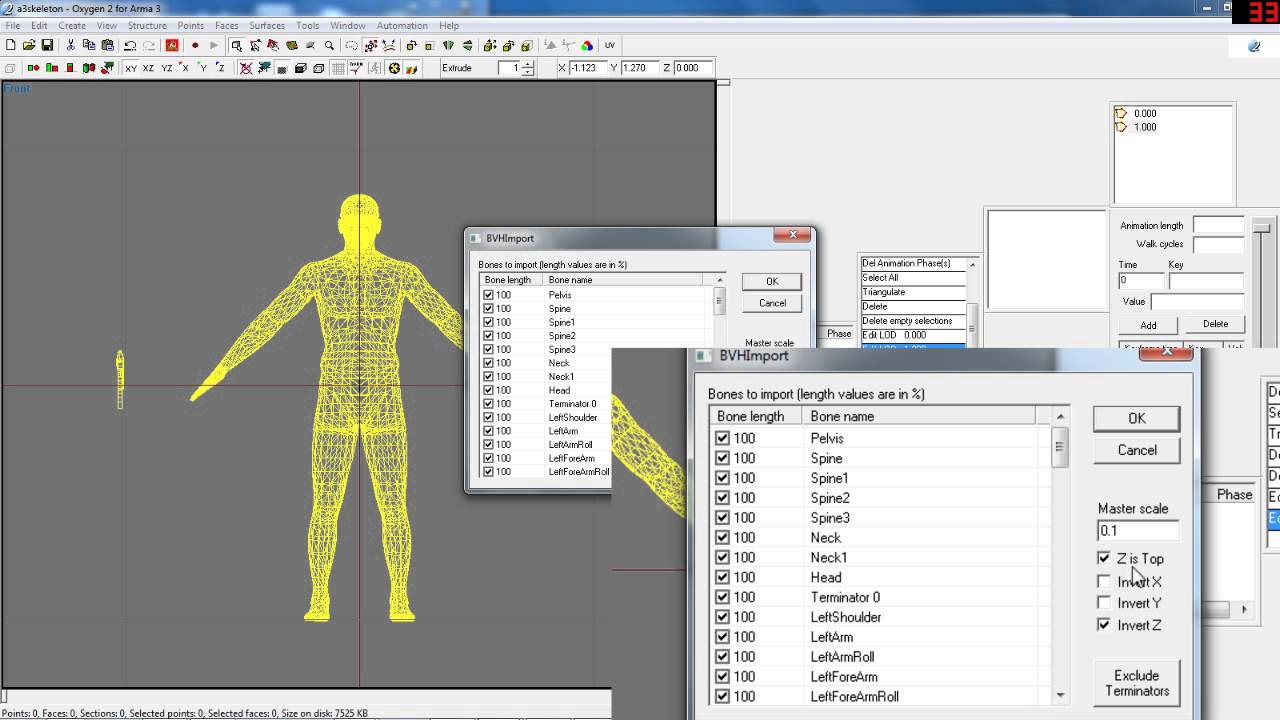
This is a simple tutorial to get animations from Blender 3D into Arma 3.
5 Steps :
- Make the animation you desire.
- Export the Character and Weapon bones with animation to two separate .bvh files.
- Import said .bvh files into Arma 3's Oxygen for placement correction and export the .rtm
- Write the appropriate configuration files in orde...
night dune
@desert raven ?
fast canopy
You just really need to use RTMExporter for Blender instead importing into OB
desert raven
night dune
That is already set, I am exporting to rtm etc, I just want to know about select...
There is no need to do anything in object builder if you do your animations already in blender and export as rtm.
I'm pretty sure you are on wrong track
night dune
fast canopy
You just really need to use RTMExporter for Blender instead importing into OB
For example, the one that comes with the tools?
night dune
 fast canopy
It literally came with ArmaToolBox
next cloak
Anyone know why this might happen when trying to edit a weapon handAnim? I've placed the model.cfg from Arma 3 Samples\Addons\Test_Character_01\ in the same folder as the .rtm. CfgWeapons as follows: ```c++
class CfgWeapons {
class srifle_EBR_F;
class UK3CB_BAF_L129A1 : srifle_EBR_F {
handAnim[] = {
"OFP2_ManSkeleton",
"\z\Sniper Supported Anims\addons\uk3cb_weapons_compat\anims\UK3CB_L129A1_HoldAnim.rtm"
};
};
};
I've ensured the weapon bone in ArmaRig and `model.cfg` have the same capitalisation (namely none, i.e. all lowercase).
Blend file should it be needed.
fast canopy
Which software you use to pack
next cloak
hemtt
fast canopy
Can you check the RTM in OB and does it look fine
next cloak
Shall do.
Forgive my ignorance but how do I import the RTM into Object Builder?
I've never edited a handAnim before
fast canopy
Open a character P3D, right click on Animations Window (open it if you don't have one Window > Animations) and import
desert raven
next cloak
hemtt
Does hemtt handle rtms correctly?
next cloak
desert raven
Does hemtt handle rtms correctly?
I've been able to pack other animations just fine.
desert raven
next cloak
I've been able to pack other animations just fine.
Other hand anims or just general anims?
next cloak
desert raven
Other hand anims or just general anims?
General animations
desert raven
Hand anims are bit special.
next cloak
fast canopy
Open a character P3D, right click on Animations Window (open it if you don't hav...
I am clicking "Import" yet nothing happens.
desert raven
Import from matrix
fast canopy
Indeed, I stand correct
next cloak
Ah
desert raven
Was it that? XD was just gonna say or something like that. That just popped in mind
next cloak
As far as I can tell it looks like the weapon bone isn't being repositioned properly:
 fast canopy
Then it could mean you did something in binarize
next cloak
Oh nevermind
I did hemtt launch -b and it works just fine now.
Apparently you have to specify -b for it to binarize.
Thank you, @fast canopy and @desert raven. Appreciate the help in brainstorming.
desert raven
👍
night dune
fast canopy
It literally came with ArmaToolBox
what
fast canopy
?
fast canopy
?
night dune
wait

The problem I have is that when reloading the charger you cannot see how it is inserted
Any idea what was going on there? I have the memory LODS. Do you want a photo?
fast canopy
Do you mean you have a different question other than the question you've made initially
night dune
In fact it has always been the same
but that's what it is
I don't know what could be happening
fast canopy
Importing/exporting RTM and animating a weapon is not even related like at all
night dune
fast canopy
Importing/exporting RTM and animating a weapon is not even related like at all
Sorry, I had the idea that making the animation myself would fix it :(
The thing is that I don't know how to make the charger animate.
or magazine
 median magnet
Hello,
I have a problem with a helicopter I imported.
When I do a ‘hide’ animation, the selection is not completely hidden, but is shrunk and shifted, as if the animation was broken. Do you have any solutions?
desert raven
median magnet
Hello,
I have a problem with a helicopter I imported.
When I do a ‘hide’ animati...
you have applied 2 bones to it
you have to chain your bones so hide is before the other bone(s)
median magnet
So, if "treuil_boue", and "treuil", is included in "hide_treuil", i have to set
"hide_treuil","",
"treuil","hide_treuil",
"treuil_boue","hide_treuil",

 desert raven
yes
median magnet
Mhh it's not good :/
median magnet
Corrected thanks !
 undone mirage
Hi
I make a animation with cfgGesture but my gesture use righthand et lefthand
Who can i add this two things in the mask variable ?
Because mask[]={"RightHands","LeftHands"} dont work
desert raven
I dont think those are bone names you can use in the mask
median magnet
Hello,
I have a problem with my helicopter. When the rotor is due to break (collision with the ground for example), instead of hiding, it immediately stops turning and remains frozen. I've been at it since 11am lol
desert raven
median magnet
Hello,
I have a problem with my helicopter. When the rotor is due to break (coll...
do you have a hide animation for it connected to the hitpoint for the rotor?
median magnet
@desert raven


 desert raven
median magnet
<@150949769953411072>
desert raven
median magnet
<@150949769953411072>
where do you inherit the hitrotor class?
in model.cfg
median magnet
desert raven
where do you inherit the hitrotor class?
from here
 desert raven
I would recommend forgetting that inheritance and just writing the necessary lines into your classes
its likely not going to actually contain what you need

I dont think you have such model.cfg on your drive that contains this info
it is more an example
median magnet
Mhhh ok
undone mirage
desert raven
I dont think those are bone names you can use in the mask
Where is the list of the bones names who can use it ? On the cfg ?
 tired needle
Tried browsing through the animation viewer?
limpid lion
hi everyone, i'm shooting a trailer and i want to do a scene with some soldiers walking but the animation is on location and i don't know how to simulate them walking forward.
 strange canopy
limpid lion
hi everyone, i'm shooting a trailer and i want to do a scene with some soldiers ...
strange canopy
limpid lion
hi everyone, i'm shooting a trailer and i want to do a scene with some soldiers ...
https://community.bistudio.com/wiki/BIS_fnc_scriptedMove
#arma3_scripting its more suited to the question, or #arma3_editor if you are using editor modules
drifting light
I have, nothing there looks particularly useful for what I want
 west nimbus
Does this game have like a pose mod of some sort or like an animation mod so I can make my own without having to go into Blender and learn that
 icy nebula
Pose mod, not really but there are some animation packs
POLPOX's Artwork Supporter is one of the animation poser tools, https://steamcommunity.com/sharedfiles/filedetails/?id=1341387001&searchtext=polpox+animation
Haven't used it myself, but seen numerous scenes built with it (screenshot/image building only, playable will require scripting or other means)
icy nebula
west nimbus
Does this game have like a pose mod of some sort or like an animation mod so I c...
Searching static animation in the workshop will find the static animation mods, just more animations to work with
desert raven
west nimbus
Does this game have like a pose mod of some sort or like an animation mod so I c...
Can't make new animations in live game
night dune
How can I adapt my animation that I made in blender to the cfg model?
desert raven
night dune
How can I adapt my animation that I made in blender to the cfg model?
what kind of animation?
night dune
desert raven
what kind of animation?
To reload a weapon
desert raven
the player animation or the weapons animation?
desert raven
for player you would need to export the animation as rtm and configure a reload action in config for it and then set your weapons config to use that reload action
as to the weapons model.cfg, it is typically written in text editor with the procedural animations model.cfg uses
if its complex sequence there is a model.cfg exporter that can export a list of frame by frame animations that can be used in model.cfg
but often the simple procerural animations are enough
@young carbon its for complex animations like moving magazine along hand type of stuff that is not really feasible to write procedurally
night dune
Okay, and if I only want the reloading one but not the weapon I need, how would I do it? I already have the animation exported to rtm
Can you explain it to me and I'll send you photos?
@desert raven
desert raven
sorry I dont have time right now to explain in more detail
night dune
Well, a question, can I define an animation only using the cpp file or do I have to use the text file?
define it like this
 desert raven
night dune
Well, a question, can I define an animation only using the cpp file or do I have...
desert raven
night dune
Well, a question, can I define an animation only using the cpp file or do I have...
no this is not right
rtm is not refered to in model.cfg
buoyant lagoon
is it possible to disable the slight index finger curl that the right index finger has for weapon hand anims?
fast canopy
Trigger finger animation is defined in CfgMovesMaleSdr's something
 woeful pelican
i think its defined in the unit config
at least I remember seeing a trigger rtm in there
only way I know of to disable it without messing with that is via a gesture or animation that has canPullTrigger = 0; set
despite the name it only means the trigger animation doesn't play
you can still fire weapons
buoyant lagoon
its not the act of pulling the trigger per say, but the little curl the dude does.

 fast canopy
Which is the pulling the trigger animation
buoyant lagoon
Oh okay, so then about canPullTrigger, I thought handanims are not defined in CfgMovesMaleSdr? Would I need to script it in where it plays the animation with the finger not curled? Kinda like how the RHS m240b when you deploy bipod the dudes left hand goes to the stock?
desert raven
I believe the trigger finger anim plays on top of that
Id assume this weapon needs some sort of trigger too?
buoyant lagoon
desert raven
Id assume this weapon needs some sort of trigger too?
nope 🙂
u know how it be in sci fi settings
something something, shoot with ur the thought of ur mind
 buoyant lagoon
tbh I could just extend the index finger, I am sure it will be fine
desert raven
that would keep it "on trigger" when weapon is held
but it would still pull the trigger when shot
buoyant lagoon
I guess that is fine in the end, a small little thing that atleast doesnt impact functional game play
or just model a trigger 🙂
woeful pelican
thats the easiest way to deal with it
what I was suggesting requires you to play a gesture/animation
which is a giant pain as you'll have to replay each time the player/unit throws a grenade, reloads, etc
 amber belfry
this is going to probably be a super stupid question but i cant seem to google the right question to find an answer, how can I select just the individual bones in the rig? when I select any of them, IE the box around the foot, it selects the whole rig
 desert raven
amber belfry
this is going to probably be a super stupid question but i cant seem to google t...
desert raven
amber belfry
this is going to probably be a super stupid question but i cant seem to google t...
need to enable pose mode
amber belfry
desert raven
need to enable pose mode
thank u
buoyant lagoon
for binos is there any special restrictions on hand anims, like how for pistols the right hand is fixed
fast canopy
I recall Ded ever said some idea. But I don't even know if binoc IK is even implemented
buoyant lagoon
woeful pelican
https://discord.com/channels/105462288051380224/108187245529268224/1275552313259...
will that mess with existing binos?
oh wat does weaponIK = 0x3000 mean?
I will try this out in the weekend then
fast canopy
Good to know
 chilly fox
I'm trying to import an animation into Object Builder for some troubleshooting, but nothing happens when I click import on the animation window
Any ideas if this is even still functional?
fast canopy
What do you really trying to achieve would be the first question
chilly fox
fast canopy
What do you really trying to achieve would be the first question
I'm trying to set up a handanim but there's some weird warping with the arms going on in-game, so I wanted to load it up in OB just to troubleshoot faster
fast canopy
And what do you really mean by warping
chilly fox
Like so.
 desert raven
chilly fox
Like so.
desert raven
chilly fox
Like so.
How do you pack the RTM pbo?
chilly fox
Through addon builder
fast canopy
You sure you really export RTM
chilly fox
fast canopy
You sure you really export RTM
I'm exporting through A3 toolbox on blender.
fast canopy
How many KB your RTM has?
chilly fox
fast canopy
How many KB your RTM has?
13kb
fast canopy
You sure your filepath is 100% correct?
AKA, do you have an error message regarded to the handanim
chilly fox
Nah, fairly sure all of that is correct.
 desert raven
chilly fox
Through addon builder
desert raven
chilly fox
Through addon builder
Addon builder often has trouble with hand anims it seems.
You could try with pboproject.
You will then also need a model.cfg with the A3 character skeleton next to the RTM. And rtm should be in its own folder like yourthing/data/anims/rtms and model.cfg
fast canopy
I don't think that at least is a case. It should become a broken anim, not a default anim
desert raven
fast canopy
I don't think that at least is a case. It should become a broken anim, not a def...
Isn't that broken stretch hands in the picture?
fast canopy
It isn't. It is default anim
chilly fox
desert raven
Addon builder often has trouble with hand anims it seems.
You could try with pb...
I didn't set up any character skeleton in my model.cfg so that could be something.
desert raven
chilly fox
I didn't set up any character skeleton in my model.cfg so that could be somethin...
I dont think addon builder cares about that.
chilly fox
desert raven
Addon builder often has trouble with hand anims it seems.
You could try with pb...
Well I'm trying to get my head around pboproject and it's not picking up my files. I'll assume there's something wrong with my structure but I can't point it out.
\Havish Modding\Arma 3 Modding\No 1 Mk3\no1mk3_rifle\config.cpp circa Line 39: \no1mk3_rifle\data\anims\no1mk3_hand_anim.rtm``` desert raven
well probably you need to set up your pboPrefix files so it skips all the extra folders your stuff is in
or just use the absolute paths
thats what I do
Like all my stuff is in simple project stucture like this
 chilly fox
desert raven
Like all my stuff is in simple project stucture like this
chilly fox
desert raven
Like all my stuff is in simple project stucture like this
Alright so that solved the pboproject issue and my animations, I guess I'll need to organise my P drive another way.
Thanks for your help guys. 
 brittle nacelle
Is it possible to keep a player aiming down the sight while playing a gesture?
fast canopy
AFAIK yes
fast canopy
chilly fox
Any clues why model.cfg animations would be completely different between bulldozer and in-game? I have my sights correctly rotating in bulldozer and yet they're translating/rotating in what seems to be a massive arc when tested in-game.
I'm using something like this atm:
    type = "rotation";
    source = "zeroing.0";
    selection = "ladder_sight";
    sourceAddress = "clamp";
    axis = "sight_axis";
    minPhase=0;
    maxPhase=0;
    minValue=0;
    maxValue=0;
    memory=1;
    angle0=0;
    angle1=0;
};
class LadderSight200 {
    type = "rotation";
    source = "zeroing.0";
    selection = "ladder_sight";
    sourceAddress = "clamp";
    axis = "sight_axis";
    minPhase=0.19;
    maxPhase=0.2;
    minValue=0.19;
    maxValue=0.2;
    memory=1;
    angle0=0;
    angle1=-0.02;
};```mayhaps missing autocenter 0 named property in geometery lod
chilly fox
desert raven
mayhaps missing autocenter 0 named property in geometery lod
That works! Tyvm
 placid glacier
Hello everyone, please help me, I've been sitting here for 2 days and can't figure out animexport


Why does everything work fine in the bulldozer but poorly in the game?
help please
fast canopy
I don't really see how it is in game though. The Buldozer model is not representing how it behaves ingame
placid glacier
It just doesn't work correctly in the game, the bulldozer works fine
As if there are no points of some kind, he is still trying to pull somewhere, he did it earlier, but now it doesn’t work
The animation plays, I wrote it all down, but it leaves.
placid glacier
 teal nexus
Hi , how i can find animate of some object like
RuggedTerminal_02_communications_F
desert raven
teal nexus
Hi , how i can find animate of some object like
RuggedTerminal_02_communication...
 dusty spoke
For locomotion on custom characters, having an issue finding out where im suppoused to input x and y translation for the unit to actually move - dont know if its cfgmoves related or somewhere else but i couldnt find anything relevant under states, anyone?
(land contact and geometry LODs were set up and the unit is affected by gravity, + the walking animation does in fact play when pressing W, so the only thing that's actually missing is the translation)
desert raven
dusty spoke
For locomotion on custom characters, having an issue finding out where im suppou...
The movement vectors are baked into the rtm
dusty spoke
desert raven
The movement vectors are baked into the rtm
Aah ok... odd... how does one set that up? Blender plugin rtm export doesnt give me any option for that
unless im suppoused to be opening the rtm in object builder post-export and setting it up there?
desert raven
dusty spoke
Aah ok... odd... how does one set that up? Blender plugin rtm export doesnt give...
The blender plugin should have dialog for it
Right under the buttons to add export frames to the list
dusty spoke
desert raven
Right under the buttons to add export frames to the list
must be completely missing a window then since i dont see that under the export dialog
desert raven
It should have it too but it might be in different place.
I can check later but just look into the tool tabs
dusty spoke
ooh wait no i found it it's under the dope sheet
desert raven
👍
dusty spoke
thank you! i've been looking at configs for two hours 
desert raven
Negative Y is forward
dusty spoke
didnt even think it might've been in the actual addon lol
dusty spoke
gotcha; cheers!
dusty spoke
i'll probably find this out but while here might as well ask - i assume variable root motion speed is possible?
i.e slowing down or speeding up
there appear to be indexes for it so actually probably yes...
yeah i'll play around with this - at least punched through that hurdle now
desert raven
dusty spoke
i'll probably find this out but while here might as well ask - i assume variable...
variable root motion?
dusty spoke
desert raven
variable root motion?
oh i was referencing non-linear vector motion (not just from A to B with constant speed) (in other game engines the character moves based on the root bone instead of this vector designation in arma) - so there could be a speed-up, slow down, then speed up again, etc.. .depending on what the action in the animation is - like a transition animation from standing to walking would ideally cubic-ease into the speed of the walking
however i do see in the settings here that it may be possible
desert raven
I dont think it is. 🤔 at least cant recall seeing such anywhere
what you can do is move the character forward and back/faster slower though
the vector stays constant but the visual looks varied
dusty spoke
Eh aint a big deal if it isnt - i know its an older engine so ceetain limitations are to be expected 😄
And yeah as you said i reckon i could probably just play a lot with different transition anim speeds and durations alone
Gotta say tho the rtm export process and skeletons seem a lot more forgiving than say unreal engine lol
Maybe its clocks addon making if super easy but horray for not having to worry too much about different asset types
 grizzled blaze
do i have to export an animation i intend to loop in a special way or am i missing something else?
  class ArmShieldAnim_Loop: ArmShieldAnim_Start
        {
            file="\PHEN_EquipmentPLUS\anims\SpartanArmShieldAnim_Loop.rtm";
            looped=1;
            speed=-5;
            leftHandIKCurve[]={0};
        };
What, of course you need to export an RTM to show the RTM
grizzled blaze
fast canopy
What, of course you need to export an RTM to show the RTM
well yea silly
the character plays the animation, but it doesnt loop
it just stops when it ends
my blender

my export
 grizzled blaze
connect to and interpolate to itself?
okay pog
❤️
since its a gesture... i can still use those properties
fast canopy
That is not what you implied until now. CfgGesturesMale, AFAIK doesn't support it
grizzled blaze
fast canopy
That is not what you implied until now. CfgGesturesMale, AFAIK doesn't support i...
it does ; w; webnight has a looping shield gesture and i've copied its config directly
fast canopy
And it doesn't mean it uses no script
grizzled blaze
we use the same anim with no script
and it loops on regular skelly
but the new animation for spartan anim does not loop, so i figured it would be an export thingy
fast canopy
I don't even know/understand what you do or what you talk about
grizzled blaze
fast canopy
I don't even know/understand what you do or what you talk about
one sec o wo
fast canopy
If you want to troubleshoot something in your Mod, or animation, just tell it literally in details, not summary that tells nothing
grizzled blaze
i am trying my hardest, but im not 100% certain on what details to say, as far as i know i've explained it properly 😄
fast canopy
Tell everything then
fast canopy
And how do you even run this animation
grizzled blaze
[_unit, 'ArmShieldAnim_Loop'] remoteExec ['playAction', [0,-2] select isDedicated];
we do this for regular skelly as well and it works
fast canopy
And how does WebKnight's something run
grizzled blaze
the same way since there arent many ways to play a gesture
fast canopy
The same way is the summary I call, not detail
grizzled blaze
[_unit, 'ArmShieldAnim_Loop'] remoteExec ['playAction', [0,-2] select isDedicated];
i mean literally the same way
fast canopy
What, so you are modifying the ArmShieldAnim_Loop gesture itself that is integrated into the game by WebKnight's something
grizzled blaze
no
these are our animations for the spartan, im just using the same action name for code reasons
but as you can see the same code run on this fella has him loop the anim
this is our stuff in our mod, webknight only donated the rtm file for teh human skeleton
fast canopy
Okay, what do you do in config wise
grizzled blaze
one sec
fast canopy
And what is supposed to happen, without your Mod
grizzled blaze
wym
nothing, no mod no animations no shield no equipment
we arent editing anything webknight is doing
this is a completely seperate thing
fast canopy
So you mentioned WebKnight's animation, not Mod, like at all
grizzled blaze
fast canopy
So you mentioned WebKnight's animation, not Mod, like at all
because this has nothing to do with webknight
he gave us an rtm thats literally it
fast canopy
That was the biggest twist in this conversation so far
I thought you are modifying something over WebKnight's whatever Mod
fast canopy
grizzled blaze
do i have to export an animation i intend to loop in a special way or am i missi...
Then this is the ONLY config that should be involved on?
grizzled blaze
yes
fast canopy
speed = -10e30;
grizzled blaze
lol we ball aight
grizzled blaze
okay solved it is indeed an export issue with my toolbox version and arma rig ; w;
grizzled blaze
fast canopy
`speed = -10e30;`
ty for the help polpox ❤️ this also worked
plain knot
Is there any possible way to have a strap/ wrap that has physics and or can be animated
I’m trying to animate a tourniquet
desert raven
plain knot
Is there any possible way to have a strap/ wrap that has physics and or can be a...
Not in a good enough way I'd say.
Physics you can't have anyway.
And if you mean a worn sling you could make it a piece of equipment
It just has to me modeled quite distorted so it fits the T pose. But then proper animation would bring it to right shape when hand is in right pose
plain knot
desert raven
It just has to me modeled quite distorted so it fits the T pose. But then proper...


I modelled multiple versions, would it possible to transition between the different models/ states?
desert raven
No
Well yes
You can of course delete old and spawn new object
But it won't really look great
plain knot
I already know it would probably be hell but could you do it with vertex points in config?
desert raven
No
plain knot
For tightening/ loosening the loop
What if I made it a ‘weapon’
And that as the reload animation
desert raven
Especially not
Well OK via reload maybe
But how much effort you want to put into this?
plain knot
desert raven
But how much effort you want to put into this?
Quite a lot
I’m trying to make all the medical animations for ACM
Somewhat related would these animations translate into arma or is there something I need to change

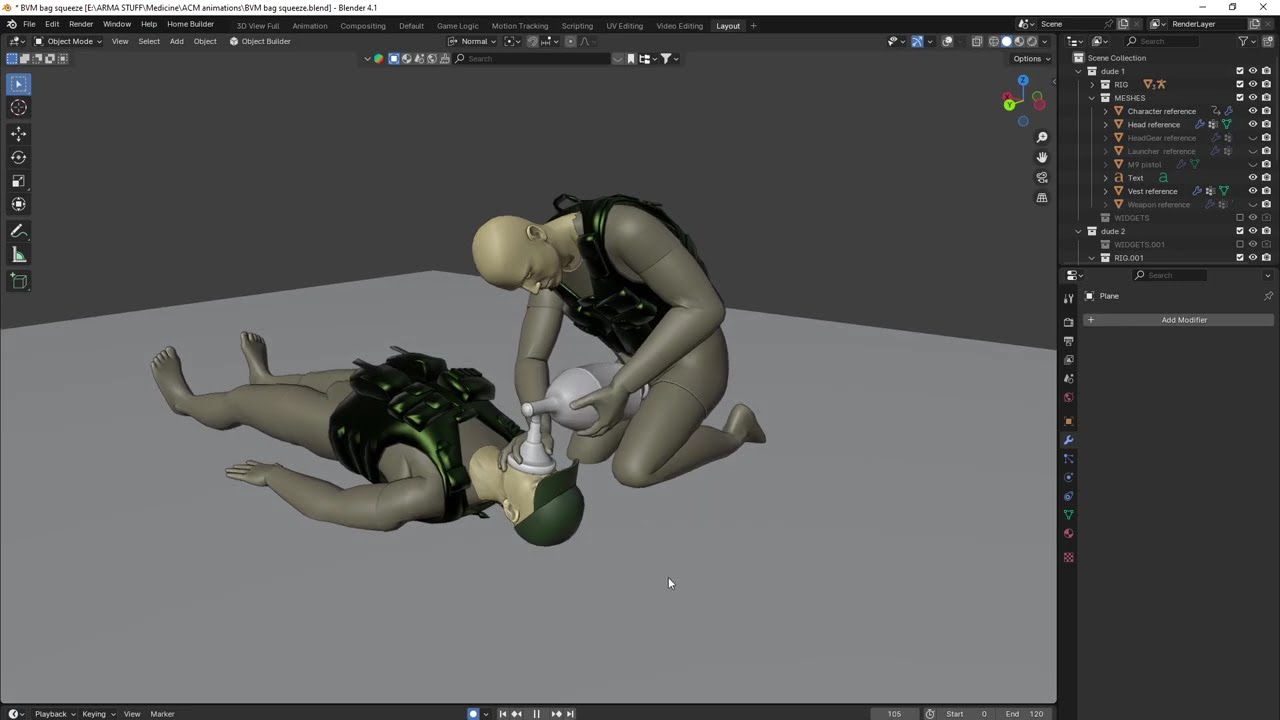 desert raven
Quite difficult.
Main problem points are that If it's separate object attached to the scene it looks shit in first person
And if it's say weapon as you mention, how to control the animations
Ok sure you could theoretically get it to fire and reload while those other animations play on the character.
And maybe that way trigger the movements of different parts.
Buut that's huge maybe
Then comes issues with dynamic surfaces
desert raven
That animation would work only if characters are in exact positions and at same level etc
plain knot
Where the animations start in the same kneeling
I realised that has issues with gameplay (like tryna do medical in cover)
desert raven
Also on slope
plain knot
desert raven
Also on slope
Yeah
What would be the way round that
Maybe I could make some animations that work for a slope, so above or below the patient
And have them used if there’s a slope detected or something
But that’s a ridiculous amount of effort
The main thing I want is for the animations to actually line up
I hate how immersion breaking it is doing CPR on someone’s balls
desert raven
plain knot
The main thing I want is for the animations to actually line up
This is not really realistically possible.
desert raven
plain knot
But that’s a ridiculous amount of effort
Due to this
Precision works only in tightly controlled events
static kayak
Is there a way to pose the community rig in the "pistol" pose completely accurately? I uh, need an animation to start and end there.
 mild wolf
static kayak
Is there a way to pose the community rig in the "pistol" pose completely accurat...
mild wolf
static kayak
Is there a way to pose the community rig in the "pistol" pose completely accurat...
If in Blender, you can copy the start frames to end frames so you have the start and end as the same.
static kayak
mild wolf
If in Blender, you can copy the start frames to end frames so you have the start...
That part ain't the problem, lol
It's getting the pistol pose
Trynna make a bolt animation for my stupid needle-shooting nerf gun
Gotta pull that plunger back and press it forward
 mild wolf
The thing in the back? You can separate the mesh from the base model and then animate that part, or vertex group it, assign and animate. It has been awhile since i last animated so excuse if i don't quite get it
static kayak
oh no i know how to animate it in model'cfg
it's bolt action
so i need to animate the hands
I just uh, need to figure out how to get the start and end to be correct to the pistol post
mild wolf
Ah right, i animate everything in Blender and then just export a model.cfg from that, but pistols has always been a nighmare for me so no clue on that one
static kayak
Actually...lemme dm Soko. I know he's done it.
mild wolf
True
 cloud perch
You can import the base-game RTM using the Blender A3 Toolbox and line your rig up to match. Alternatively, you can fix the IK after the import, but I am not sure which requires more effort.
mild wolf
Never gotten those to work 🤔
desert raven
Mikeros toolset dertm is needed to read them.
mild wolf
Ah makes sense then
dusty spoke
question about the blendAnims class under cfgmoves - is it possible to somehow create one from a reference pose so i dont have to do guesswork on the value i should put into each bone? its also a bit confusing how it's only 1 value from 0 to 1 but there are three axies (albeit it works as intended for aiming for example - so i wont question it i guess) - for one I wanna try creating a version of the vertical aim offset that doesnt rotate the entire torso too much - rather mostly the arms/hands/weapon - this is for an entirely custom character btw
desert raven
dusty spoke
question about the blendAnims class under cfgmoves - is it possible to somehow c...
Blendanim means blend strength of animation pose per bone with underlying stance pose
Typically it works with gestures
And how much gesture can affect the pose
The stance animations are the base poses
dusty spoke
which pose does it inherit from? like, for my character atm i only actually have an idle aiming forward and that's it - no reference pose for aiming down, aiming up, aiming center - etc (as you'd do in other engines)... so im a little confused as to what it blends with exactly
desert raven
It does not inherit from any pose
Or I don't understand what you mean with it
The movement stances are what move/shape the character. Gestures are on top of that
Like reloading
What kind of character are you making?
dusty spoke
to reiterate - right now my character is practically blank - it only has an idle aiming animation with a rifle and that's it - so having applied the vanilla blendAnims to it - it is now capable of aiming up/down like the arma 3 Man model - which is great (some bones arent moving because they're not listed in the blends but i'll fix that up later) - im mainly curious as to how the game knows how to rotate the bone and on which axis if it doesnt have a refernece for what aiming down and aiming up look like (in other engines you'd usually have an aiming up pose - and you interpolate between that pose and the center aiming pose for when the player aims up)
dusty spoke
desert raven
What kind of character are you making?
humanoid but taller and bigger 😂 so not much difference skeletally from a regular man but the proportions are different
desert raven
Space marine?
dusty spoke
yeah i've decided to make my own
desert raven
I'm just curious because not many people work with this stuff
dusty spoke
desert raven
I'm just curious because not many people work with this stuff
all good, its quite a daunting task but i've got the blessing of an animation background professionally
its just the arma implementation is different from say unreal engine so im hitting a few roadblocks
the main reason of the question is because i find the way you aim vertically in arma 3 (where your entire torso rotates up from the pelvis) is quite unnatural - i'd want something more like 33% spinal rotation of vanilla - and 66% more rotation in the arms and hand rotating the actual weapon instead of the body (if that makes sense)
and ofc having made my own skeleton that's not similar to the arma 3 Man in any way save for being bipedal - i have to redo a lot
desert raven
I'm not sure if you can have that off the top of my head. But if you can aim it might indicate you are inheriting some of the vanilla things I stead ow having fully blank set to start with
dusty spoke
oh that's cause i straightup just copied the vanilla blendAnims class
cause i wanted to work off of it as a base to modify it to my criteria
desert raven
If you have matching bone names you are probably picking up a lot of default stuff fro. The base man class
dusty spoke
desert raven
If you have matching bone names you are probably picking up a lot of default stu...
yeah the torso does rotate since i've kept spine names the same - the rest doesnt (however i understand i just need to add those bones and blend values to the array so that's not really a big deal)
i just didnt expect it to work lol
since as i mentioend - how does the game even know how to rotate my spine bones if it doesnt have a reference for aiming up/down yet
but i guess it's procedural in arma as opposed to other engines - i assume it looks at the current vector direction and bases the rotation on that
desert raven
The rest might not still work as there are all kinds of bone functional definitions also in the cfgVehicles man class
dusty spoke
ye i've seen those, specifically for each limb + the spinal structure - i'll get to renaming those later - i've mangaed to get the actual animations to work as intended which is great (and with your help of the vector tip to make walking work 😄 )
right now i just haave an idle and a walk since i wanna make sure im doing things right before implementing the other hundreds lol
also finished setting up proxies so weapons are held in the right spot and all that
but anyway back to the original topic - assuming it's a limitation of how the aiming works i suppose i'll have to live with it - it was more of a pet peeve than anything - and im having no apparent issue from a technical perspective to making the blendAnims work - its more visual on how they look rather than anything that i wanna adjust
classic arma - break-your-spine looking upwards
desert raven
It might work out,at least in some poses. Arma basic setup is more geared towards gameplay
Like to be able to aim up from downward slope
dusty spoke
hopefully - considering it seems to be procedural and not entirely dependent on an animation reference - its always something i can adjust later
 young carbon
am i misunderstanding something? Blends should be literal blends afaik. "How much does RTM2 affects the bone, how much is still previous RTM1" O_o
dusty spoke
young carbon
am i misunderstanding something? Blends should be literal blends afaik. "How muc...
yeah thats the crux of my curiosity since there is no animation to tell the game how aiming down/aiming up should look like - which is why i was baffled as to how it even worked
theres transitions and theres blendAnims - which are different
blendAnims is the one that im investigating
what you described is transitions (one animation to another)
young carbon
class CfgMovesMaleSdr {
    class States {
    ...
        class vehicle_passenger_stand_2_Aim_Launcher: cargo_base
        {
            actions="vehicle_passenger_stand_2LauncherActions";
            file="\A3\cargoposes_F_heli\anim\vehicle_passenger_stand_2aimlauncher.rtm";
            speed=100000;
            weaponIK=4;
            enableMissile=1;
            canPullTrigger=0;
            enableOptics=4;
            aiming="aimingLauncher";
aimingBody="aimingUpLauncher";``` seems to point to specific rtm for aiming pose, though?Blendanim is still just blend strength but it may be for procedural input
dusty spoke
aiming forward - yeah
desert raven
Honestly I don't remember off the top of my head
young carbon
except "forward" is along the aiming line?
dusty spoke
in unreal engine for example - you would have a single frame pose animation of the character aiming forward - then another of the character aiming up - and another of the character aiming down
the latter two of the three dont seem to exist in arma 3
only the forward one
therefore my assumption was "ok so its procedural - but if its procedural i'd assume the number in the blendAnims array dictates the amount of rotation for the bone for aiming up and down - however it seems to consider itself as more of a blend rather than a value of "rotate spine on X axis by 30 degrees when aiming down, and 30 degrees when aiming up"
it's probably hardcoded somewhere and based off of the vectorDir
young carbon
well, for all i care, broken back pose is literally "aim forward, but forward is up and don't affect legs, btw" 


so, a blend of "aim to the sky with affected bones" with "be prone with unaffected ones"
dusty spoke
actually... ok ... that makes sense now.... the blendAnims dont move the bones - they dictate which bones should move with the assumption the whole body rotates (based on that reference pose)
so in essence this means that the entire character is rotated but the engine dictates which bones not to rotate 😂
that explains it now
welp this means i cant do what i intended to do - eh no big deal
yeah i can work with this now - thanks for the help!
first time for everything lol - pose-based aim offsets and animation-time based aim offsets were what i learned on
desert raven
thats cool
I have a marine model I've been occasionally working on to figure out all the armor internals and what shaped body would actually work in there
dusty spoke
desert raven
I have a marine model I've been occasionally working on to figure out all the ar...
ah, love that type of stuff - always wanted to make "plausible marines" myself - now i've finally gotten to it i suppose
desert raven
😄 I've gone through a few versions of body shape already. Its getting pretty good now with arms reaching far enough to actually do stuff.
night dune
Hi, can anyone help me with an animation?
The animation is not displayed but I have it defined in the config although I don't know if it will be correct
 night dune
?
night dune
@desert raven
desert raven
I think you deload config is wrong.
but no need to ping me. I answer when I see questions and know answers
night dune
desert raven
I think you deload config is wrong.
so?


Look at the original it's like this
What I did was change the animation but it is not displayed, I know that the model cfg is not because it does not connect to the pivot
and I'm using this config as a reference to try to learn
any ideas?
night dune
desert raven
but no need to ping me. I answer when I see questions and know answers
srry
mild wolf
Put this in the same location as your .rtm (put them in a different folder)
 mild wolf
You don't change anything in there, just a default skeleton model.cfg for animations to work
mild wolf
I like to have these separate to config.cpp but same way. You can use the ones i used for Cytech as references
night dune
If I don't want to do the work
mild wolf
The samples are just there to show you how it works, you can't preuse them
night dune
rtm files
And for the model cfg that you sent me, do I have to import it into an animation already made? in Blender
I have one already done here, could I import the model cfg file that passed?

 mild wolf
You don't need the rig informations for weapon animation

 mild wolf
Bunch of weapon related things here https://community.bistudio.com/wiki/Arma_3:_Weapon_Config_Guidelines as well as this playlist https://www.youtube.com/watch?v=VyXbwzvfVog&list=PLW_2sDEfasH1FfrJgHpyUviFuC15CP_Ih

Laying out the goals of my tutorial.
These in config.cpp
reloadAction = "Cytech_Nailgun_reload"; //this is the name from class CfgMovesBasic -> class ManActions -> Cytech_Nailgun_reload = "Cytech_Nailgun_reload";
handAnim[] = {"OFP2_ManSkeleton","\Cytech\Cytech_Gamemode_Assets\Cytech_Weaponry\Cytech_Weapons\Cytech_Anims\handAnim_Nailgun.rtm"};
Wow
The problem is that the guides are not that complete and it becomes a bit tedious.

Are these just for character animation meaning movement?
does that go in config.cpp?
The difference is that I change the path of the files for the animation that I have done manually?
mild wolf
night dune
Are these just for character animation meaning movement?
Weapon animations yes
You can put them in config.cpp if you want, don't need .hpp files
night dune
and what is each line of this for?
 mild wolf
All you need/want to know is in the youtube play-list sent above, recommend watching while learning, I'm heading offline
night dune
ok
night dune
mild wolf
All you need/want to know is in the youtube play-list sent above, recommend watc...
Although the config part is not explained or in this case it is model cfg
static kayak
Does anyone have any tips for posing hands? I've been rotating on normal and avoid translating and I'm still uhhhh breaking a lot of fingers. I figure it'll get better with practice but I'd love exercises or stuff to Get Good
dusty spoke
static kayak
Does anyone have any tips for posing hands? I've been rotating on normal and avo...
Is the normal/local axis not oriented straight in your control rig? Cause thats the correct way to do it given that the axies are indeed accurate
static kayak
dusty spoke
Is the normal/local axis not oriented straight in your control rig? Cause thats ...
They are, I'm just not very good at, like, knowing how much to move them. Is the answer just "practice more"?
dusty spoke
static kayak
They are, I'm just not very good at, like, knowing how much to move them. Is the...
well... you shouldnt really be "moving" finger bones per se - you should only be rotating them, and rotating them only on the axis that points dowards so that positive rotation bends the finger straight down
desert raven
the basic community rig has the fingers floating
which makes them bit more difficult to work with
desert raven
I've set up mine with connecting bones to keep them in line
dusty spoke
i have a feeling a new community rig needs to be made lmao
i've not looked at it myself but now im curious
desert raven
It probably just worked for the makers purposes as is
Macser isnt here now I think so cant ask him
have not seen him for a while now come to think of it
dusty spoke
RIP
static kayak
desert raven
which makes them bit more difficult to work with
... I see. Yeah that makes sense why I'm not great with them yet lol
desert raven
the original rig was made for OFP I think 😄
dusty spoke
static kayak
... I see. Yeah that makes sense why I'm not great with them yet lol
yeah its not your fault if the fingers are floating that's just bizzare design
sounds like a nightmare
im sure there was some issue he ran into and that's why he did it but still i cant actually imagine what
static kayak
The way to fix it your way is just add a new bone between between the hand and each finger start?
dusty spoke
if its a non-exported control bone - yes; but not a deform bone - adding deform bones in the middle of a hierarchy that's being used already is a big no no
 dusty spoke
yeah doing that should be fine
desert raven
has worked for me for about 10 years 😅
static kayak
I shall try that. Working on making a bolt action chambering for my needle shooting nerf gun
(the texture is obviously not final)
 dusty spoke
i usually have an entirely separate rig for deformation vs for controls (either a different rig or a different armature layer) - depends on your workflow both ways are valid
desert raven
it can help to put to togehter some real life mocup shape to grab it with your own hands
and see how that looks like
static kayak
🙂
 desert raven
fingers have very limited range of motion
static kayak
(also for sound design, of course)
desert raven
so as small movements as you can have are usually most natural
since this is game environment you may sometimes need to bend the realism a bit to achieve nice look
static kayak
Yeah
Hilariously, the animation will also work for a reasonable project such as a vp9
dusty spoke
aye for that reason its usually okay to disjoint things - it's done all the time in viewmodels (arma is different i suppose cause the same arms are used for first person and third person but in a constrained area like the handle of a gun you can hide imperfections)
heck the thumb in one of the vanilla pistols rotates around its axis in one of the animations, even though it physically isnt possible
desert raven
even with the connected non exporting bones it can be done
dusty spoke
Also remember to use the individual origins transform mode with as many finger bones selected as you want, makes it much quicker to curl and make fists @static kayak
 rich pulsar
I've been looking all over the discord but haven't found anything concrete, has anyone here managed to get the zeroing animation source working on a vehicle's turret mounted cannon?
desert raven
rich pulsar
I've been looking all over the discord but haven't found anything concrete, has ...
it dont work
rich pulsar
at all?
desert raven
nope
rich pulsar
I could swear I've seen mods where the cannon raises or lowers with the ranging
desert raven
maybe scripts 🤔
rich pulsar
sigh great, more scripting 
desert raven
would be cool to have though. sorry to be the bad news bear
rich pulsar
no worries I still appreciate it, much better than spending hours trying to make it work
desert raven
rich pulsar
no worries I still appreciate it, much better than spending hours trying to make...
been there
rich pulsar
desert raven
been there <:blobcatsweats:728343057354850325>
yeah I saw, you were basically the only source I could find on it in this discord, secretly hoped you had figured it out by now 
 rich pulsar
Yep, that was exactly my plan as well
desert raven
xD
desert raven
well sure yeah I had 2 barrels on both sides
so 4 total
but got to do more fancy system for that
with the power of math
rich pulsar
Yep
I saw one interesting vid on the forums where someone added a userAction for ranging, so might just go with something like that
desert raven
yeh that can work
though AI wont understand that
so for AI there may be need for extra considerations
but its basically something that triggers the same convergence for AI when necessary
rich pulsar
yeah I'll look into how AI behaves with it once I get it working for players
desert raven
🙏
rich pulsar
desert raven
🙏
I think I actually found a possible nice alternative.
With a user source for the anim, I'll just use addUserActionEventHandler and call a script to animate it when the player uses the zeroingUp or zeroingDown action when in my specific vehicle.
desert raven
rich pulsar
I think I actually found a possible nice alternative.
With a user source for the...
yep that sounds like it could work! 👍
rich pulsar
I'll let you know if it works out, in case you wanna try it on your gun again as well 🫡
fast canopy
It's more of a sanity check or workthought. I know weapon switching anim behaves like a gesture (in this context, animation over animation) so they can walk while playing switch animation. Can we do similar using switchMove (the latest syntax)? Mainly I'm looking to play an animation only for upper body
(I tried some tests of course, but I am not sure it's working or not)
desert raven
is the animation configured as gesture?
fast canopy
No, switch anim is CfgMovesMaleSdr
I tried both attempts for my Mod. Will try again and share maybe later
desert raven
I dont think those layer 🤔
fast canopy
Leopard did some update while he was there, but main question might be I am just not 100% sure what it would do
I just recalled there is a command to get animation status as a whole, so I'll try to see what's happening, if it is even possible
desert raven
animationState
but thats the thing
theres only 1 animation state as far as I remember
and then gesture layer on top of that
fast canopy
Not only that, Leo added more command
fast canopy
Ultimately, my goal is having proper aim animation in upper body, while reusing lower body walk anim
 cerulean pivot
fast canopy
It's more of a sanity check or workthought. I know weapon switching anim behaves...
cerulean pivot
fast canopy
It's more of a sanity check or workthought. I know weapon switching anim behaves...
Yes, just use the "weaponSwitching" mask for your anim (or define your own mask that only affects the upper body)
Then use the new switchGesture command (the one that takes arrays)
If you use switchMove it will affect the whole body and won't use the mask
cerulean pivot
desert raven
<@360154905148653568> what did ya dooooo
Nothing, I just exposed an engine feature that was used for weapon switching to make it work for all anims 😅 (anim states and gesture states are essentially the same thing in the engine so using anim states as gesture works as long as they have a valid mask)
Well it did need some small tweaks to work tho but they were just related to idles
grizzled blaze
cerulean pivot
Nothing, I just exposed an engine feature that was used for weapon switching to ...
Should be added to the wiki 
fast canopy
Hmm, I wonder if that actually works with connectTo connection so "AmovPercMstpSrasWrflDnon_AmovPercMstpSrasWpstDnon" to "AmovPercMstpSrasWrflDnon_AmovPercMstpSrasWpstDnon_end" automatically?
desert raven
grizzled blaze
Should be added to the wiki <:TeeHee:962802136779980870>
@somber aurora
 somber aurora
I do not know what to write where! 😄 what is the intel
grizzled blaze
apparently there's a new command called switchGesture?
and is not in the wiki?
or at least i wasnt able to find it by searching it
grizzled blaze
i thought he said new command
u-u
weird when i looked it up earlier it just gave me empty page, probably had a typo
fast canopy
BIKI or rather MediaWiki is case sensitive
cerulean pivot
fast canopy
Hmm, I wonder if that actually works with `connectTo` connection so `"AmovPercMs...
It probably can work but it won't look as clean
fast canopy
Hm, so EventHandler that is
 fast canopy
You don't. ArmaRig for Blender is not for Cascadeur because ArmaRig is for Blender
plain knot
 plain knot
fast canopy
You don't. ArmaRig for Blender is not for Cascadeur because ArmaRig is for Blend...
plain knot
fast canopy
You don't. ArmaRig for Blender is not for Cascadeur because ArmaRig is for Blend...
is there a version for cascedeur?
fast canopy
I made one
plain knot
fast canopy
I made one
could I please use it
fast canopy
https://polpox.cyber-ninja.jp/articles/arma3mods/armarigCascadeur/
Criminally outdated

The website of POLPOX. POLPOXのウェブサイトです。
fast canopy
FBX -> Blender -> RTM -> Arma
Cascadeur does not need a Controller bones (more like just don't) so this is the only thing you need to prepare in Blender
 fast canopy
On this page
Importing Props


	(optional) Adding Joints


Attaching Props (without rigging)
Attaching Props (with rigging)

	Rig Info
	Rigging & Final Touches
Sometimes you might need to supply a pre-existing character rig with additional pa
Woah what a broken embed...

 plain knot
fast canopy
What am I supposed to understand from these pictures
plain knot
fast canopy
What am I supposed to understand from these pictures
it said i needed to rig it in blender before i import it, would this work?
fast canopy
It says you don't
plain knot
fast canopy
It says you don't
"The most ‘basic’ kind of a prop would be a simple mesh object without any Joints associated with it. A prop like this can’t be integrated into the character’s skeleton, and it won’t affect the way the character moves (because it has no mass), but it can still be attached to one of the character Joints, and move along with it."
I don't know if i'm misreading it
fast canopy
It literally says the props has no bone but attached to Cascadeur rig will work
plain knot
okay, my only concern is that it says that it won't have mass
fast canopy
It is not something you do in Blender but in Csacadeur
plain knot
okay
dusty spoke
was anyone here successful in implementing custom gestures for non-OFP2_ManSkeleton skeletons? im having a very annoying but very straightforward issue - the interpolation is broken - the gesture animations themselves work perfectly fine, but during the begining interpolation phase the model slowly shrinks down into the ground to scale 0, and then snaps to the actual gesture animation - and then during the end interpolation it shrinks down the same way again, after which it snaps back to the original animation played before the gesture - the only "fix" i have right now is to set interpolation to 999 so it's instant, but that ofc means snapping, and that looks ugly
note that only the affected (masked) bones are shrunk, which makes sense given the nature of interpolation only affecting the bones affected by the gesture animation
another note: vanilla gestures do exhibit the same issue, for the bones are of the same name that is, on my custom skeleton - meaning that it's not an .rtm issue necessarily
- i do have a pivots mesh
- interpolation works just fine with non-gesture (so cfgMoves) states
- IK for things like legs rising on elevated ground works fine (though seemingly irrelevant)
it's unfortunately a brick wall since i've spent hours on this with no luck by now
(i did also check the configs of webknight's stuff and TIOW which i know have unique skeletons but unfortunately they have not created any custom gestures for them)
 subtle falcon
dusty spoke
(i did also check the configs of webknight's stuff and TIOW which i know have un...
subtle falcon
dusty spoke
(i did also check the configs of webknight's stuff and TIOW which i know have un...
I've made all the MFR_Dogs files public, there are a few gestures that work there: https://github.com/MoonieFR/MFR_Dogs/tree/main/MFR_Dogs/configs

GitHub
Contribute to MoonieFR/MFR_Dogs development by creating an account on GitHub.
I used gestures for barking
ok bad example with this video since there are no interpolations x)
dusty spoke
subtle falcon
I've made all the MFR_Dogs files public, there are a few gestures that work ther...
thanks! i'll take a look 😄
dusty spoke
hm, yeah @subtle falcon its likely that the large interpolation speed in your case is also avoiding the potential issue - since there's not much difference in how you set yours up compared to mine or vanilla :/
 quaint oyster
anyone have a tutorial or perhaps a wiki link to creating a new skeleton? itd basically be a base game arma skeleton but small. Not really sure how to go about it.
desert raven
quaint oyster
anyone have a tutorial or perhaps a wiki link to creating a new skeleton? itd ba...
No there is nearly no information about that.
It basically requires ypu to understand how configs work to be able to trace and recreate move configs and figure out what parts work together.
And on modeling and animation side it requires you to known the required elements very well.
quaint oyster
desert raven
No there is nearly no information about that.
That’s incredibly unfortunate, thanks much for the insight my friend
desert raven
theres few of us around who dabble with the stuff and pretty much everyone has had to figure out the basics on their own by studying the config and the samples
the popular definition of "new skeleton" is a bit misleading simplification as the skeleton of a character is just small part of the whole
I prefer "custom size/shape character"
all in all theres the making of the 3d model, rigging it to a animateable skeleton, creating the animation loops necessary, exporting those into RTM, creating the new character and moveset configs and putting all that together
 charred elm
Hey, I have a problem. I want to add a new animation via mod. It should be in the Ace Medical menu. We already have a config that overwrites the normal Ace config. The animation is displayed correctly in the animation viewer, but not the button in the Ace Medical menu. We suspect that Ace uses "playMove" to play animations. I, on the other hand, can only play the animation in-game with "switchMove." So, how can I adjust my animation so that I can change it? Or is this not necessary? Or could someone give me an example of a config?
Best regards, Street
 deft night
charred elm
Hey, I have a problem. I want to add a new animation via mod. It should be in th...
deft night
charred elm
Hey, I have a problem. I want to add a new animation via mod. It should be in th...
Have the same Problem, does someone have an example for creating an playMove compatible Animation?
dusty spoke
@deft night@charred elmyou need an interpolateTo path from the standard idles that leads to your custom move - interpolateFrom might work too so you dont have to retroactively add your new animation to them and instead just add the idles to your animation - but i havent tried the From variant yet since it doesnt seem to be used much if at all in vanilla ones
it not triggering might mean your path is too deep - i saw (havent confirmed) that it has a maximum depth of 3, meaning that for example starting at an idle - it can only step over three different animations to get to the one youre trying to trigger
deft night
dusty spoke
<@282576385640497152><@421205720113872897>you need an interpolateTo path from th...
so adding interpolateTo to the default Standing animation when wanting that the Animation gets played after standing should work fine?
dusty spoke
deft night
so adding interpolateTo to the default Standing animation when wanting that the ...
yep
just remember to do a += so that you don't overwrite the current interpolateTo entries
deft night
dusty spoke
just remember to do a += so that you don't overwrite the current interpolateTo e...
I think thats the problem xD
Guess I overwrote the interpolate entries there
thx for the info!
dusty spoke
oh yeah 😂 lmk if that works - yeah when it comes to editing config entries you have to be really careful, its very easy to overwrite and break existing stuff you're editing
deft night
I will 🫡
dusty spoke
also on a side note - i would recommend adding your custom animation as an action, so you can have different animations depending on the state of the player (standing, crouch, or prone) - cause using playMove will strictly trigger an animation regardless of the state - so if the context is standing, the prone person will end up going up to standing which may not be desired - if you add it as actions, you can dictate a specific animation that is used depending on the state so there is a more natural transition
(for example how triggering the "Gear" action plays the "open inventory" animation depending on the three "up" states - so the player doesnt stand up and then play it, instead they stay at the stance they're currently in)
deft night
dusty spoke
also on a side note - i would recommend adding your custom animation as an actio...
Quick Search didnt showed up any Documentation, do you got some source? 😅
dusty spoke
deft night
Quick Search didnt showed up any Documentation, do you got some source? 😅
yeah that's the great part about animations in arma - there is practically no documentation lmao - i'm planning on writing one soon myself but essentially all you have to do is go under the ManActions class and add a new entry there for your own action - then make sure that entry also exists for all of the primary classes and is assigned the correct animation based on the up stance/state
ofc all of the interpolateTo paths will have to be set up but once that's done you should be able to do a simple playActionNow command and the engine will take care of deciding which animation to use for you
it's the "correct" way of doing new animations, or rather the way that allows for most flexibiliuty - but obviously does require a bit more work
deft night
Oh I think I did that allready^^
class CfgMovesBasic {
    class ManActions {
      test="test";
  };
};
```?Thats true, wrote it fast and copy pasted the wrong lines xD Its fixed now
dusty spoke
all good but yep that's it, and then you open up the class Actions, then open up one of the primary subclasses listed in the main class, like RifleStand-something, and add it there but actually assign the standing version of your animation to it
deft night
I will give it a try, thanks alot again 🙂
dusty spoke
it can be daunting and convoluted to look at since there's so many, but if youre persistent you'll get used to it
lmk if you need anything else 😄
quaint oyster
desert raven
theres few of us around who dabble with the stuff and pretty much everyone has h...
yeah sadly, lots of time and effort goes into both learning and creating all of this
dusty spoke
quaint oyster
yeah sadly, lots of time and effort goes into both learning and creating all of ...
tbf half the reason why its so difficult is because of the lackluster documentation - assuming you've got a grasp of the principles of how animation in games works - the integration process into arma 3 itself is actually quite painless if you know the steps - which again are too obscure right now which makes it seem overly complicated
 digital charm
anyone got this issue? models are breaking when entering vehicles, no matter where, in editor, scenarios, etc.
 desert raven
digital charm
anyone got this issue? models are breaking when entering vehicles, no matter whe...
desert raven
digital charm
anyone got this issue? models are breaking when entering vehicles, no matter whe...
might be mods breaking something in the moves configs
fast canopy
AnimDataCache
digital charm
3denenhanced is the issue, removed it and it's fixed.
dusty spoke
digital charm
3denenhanced is the issue, removed it and it's fixed.
That mod inherently cannot be the issue unless you intentionally set a unit to play a custom animation using it for that mission
digital charm
every single ai unit in a vehicle had a broken animation
idk
removing it fixed everything somehow
dusty spoke
Bizzare but ok
digital charm
i played the east wind and it affected the ai there too
dusty spoke
Yeah that makes no sense since 3den enhanced only affects 3den.... though you could have some weird bootleg version of it installed, or something... idk
digital charm
dusty spoke
Yeah that makes no sense since 3den enhanced only affects 3den.... though you co...
perhaps
fast canopy
Still, it is likely an AnimDataCache issue
digital charm
fast canopy
Still, it is likely an AnimDataCache issue
how do u fix that?
fast canopy
Find and delete AnimDataCache that is located in somewhere around Profile folder
digital charm
when i encounter the issue again with 3den i'll make sure to remember this
 shadow spade
does anyone know this mod

 signal edge
shadow spade
does anyone know this mod
signal edge
shadow spade
does anyone know this mod
Drongos DYEL, you can turn off that menu in CBA settings.
 jovial hawk
anyone knows an alternate running anims
desert raven
jovial hawk
anyone knows an alternate running anims
Aren't any.
 lethal wasp
I'm having some trouble with a static hand animation i made (holding a gun). When i build it from the P drive is turns all spaghetti 😂 but when i build it from any other location it works fine. I think the issue is the model.cfg file that is accompanying my rtm file.
Does anyone here have a model.cfg file that i can look at for reference to see how it ties in with the rtm?
desert raven
lethal wasp
I'm having some trouble with a static hand animation i made (holding a gun). Whe...
It should be the man modelcfg you can find in the sample character.
And pack with pboproject
lethal wasp
desert raven
It should be the man modelcfg you can find in the sample character.
aye, thats the one i have been using. But do i add a class for the rtm file like i do for p3d's or how does that work? Because if not then i am at a loss why building my mod from P breaks the rtm
desert raven
lethal wasp
aye, thats the one i have been using. But do i add a class for the rtm file like...
no
it just needs the character skeleton in it
nothing in cfgmodels
lethal wasp
this is the one i use which i assume is the one you mean
Well, then im at a loss for why this doesn't work ;_;
desert raven
lethal wasp
Well, then im at a loss for why this doesn't work ;_;
do your bone names in the rig you use match the modelcfg?
like weapon - Weapon is bad
lethal wasp
desert raven
do your bone names in the rig you use match the modelcfg?
I would say so yea. I'm using the ArmaRig from Macser.
I can load the RTM in ObjectBuilder onto the arma man from the samples and the animation looks like its supposed to. It also works in game when i don't build from P. So i dont think there is a problem with the rig.
desert raven
lethal wasp
I would say so yea. I'm using the ArmaRig from Macser.
I can load the RTM in Ob...
macsers rig used to have wrong W
so open up model,cfg
see if its weapom ot Weapon
and compare to the rig
weapon hand animations are only place this matters
this is the most common cause for your issue
lethal wasp
desert raven
macsers rig used to have wrong W


seems to be weapon in both rig and model.cfg
is there anything that i could have done wrong in how the P drive is setup that could affect this?
desert raven
lethal wasp
its big W in rig small w in modelcfg
thats the problem
change rig to weapon and export and it likely works
lethal wasp
desert raven
its big W in rig small w in modelcfg
In my files its big W in both rig and config. But i tried what you suggested and changed it to be small in both rig and config, but no change
 analog magnet
hello! Wanted to download the armarig from the forum but apparently the website is down. It said i should join this discord, so i'm here. Could You guys tell me where i could get my hands on a blender character rig for arma 3?
nevermind, found it!
 grim rover
Is it possible to somehow import a .rtm back into the Blender rig? I seem to have accidentally deleted the .blend where I exported the .rtm from 
analog magnet
grim rover
Is it possible to somehow import a .rtm back into the Blender rig? I seem to hav...
https://github.com/4d4a5852/rtm_import
i found this addon for blender which might help You. I haven't tested it tho and it's for blender 2.80
GitHub
Blender 2.80 Addon for importing Arma 2/3 RTM files - 4d4a5852/rtm_import
so You might need to roll Your updates waaaay back
grim rover
Cheers I will check, albeit I think I can work around it
desert raven
grim rover
Cheers I will check, albeit I think I can work around it
Rtm will import as all frames and bones keyframed and constraints disabled but it possible to enable constraints back and add tweaks
Do remember to check you blender temp folder for automated backups of the original blend though
strange canopy
hi guys im trying to create a gesture to be used with a left hand
but im not finding any tutorials or documentation
desert raven
strange canopy
hi guys im trying to create a gesture to be used with a left hand
but im not fi...
not finding any is kinda expected
strange canopy
😦
desert raven
strange canopy
😦
if you check out any gesture config as reference it should be pretty simple
you would want to use correct mask and adjust lefthandIK parameter to define when in the animations time from 0 to 1 the left hand is free from the underlying animation
fast canopy
Does anybody actually got a copy or link to it? Once I take a dinner I may peek there
young carbon
fast canopy
Does anybody actually got a copy or link to it? Once I take a dinner I may peek ...
maybe this? https://github.com/Talyataya/animExport? Date seems to somewhat conicide with whatever web archive has for for neighboring topic numbers
username seems to match whatever conversation happened under the forwarded message
mild wolf
young carbon
maybe this? <https://github.com/Talyataya/animExport>? Date seems to somewhat co...
Same one i use, all you need in model.cfg is to #define the .hpp(s) it gives you, the weapon movement is still .rtm but the moving parts will go in .hpp(s) (1 hpp per moving part)
desert raven
yes its that one
fast canopy
Thanks, I'll take a look whenever I can
 proud fossil
I have an issue i can't seem to figure out. When I have the turret arms animated, the Ai can't fire from the turret properly, they'll sometimes fire one shot and then do nothing else. But when I remove the turret arm animations, the AI works properly with no problems. I have no idea why its doing this

AI not firing properly when turret arms are animated. Ai sometimes fires a single shot.

here's a pastebin for the model.cfg with just the turret animations. just removing the turret arm rotations make the ai fire normally.
Pastebin
Pastebin.com is the number one paste tool since 2002. Pastebin is a website where you can store text online for a set period of time.
proud fossil
and here's the config for the left turret
Pastebin
Pastebin.com is the number one paste tool since 2002. Pastebin is a website where you can store text online for a set period of time.
desert raven
proud fossil
and here's the config for the left turret
https://pastebin.com/7NL13h1Q
is the turret initially modeled pointing forward
the AI aiming might not be able to hanlde multi jointed aiming 🤔
proud fossil
desert raven
is the turret initially modeled pointing forward
yes, its modeled pointing forward. same direction the falcon is facing.
I was thinking the ai couldn't handle it, but was hoping that wasn't the case.
If there is no fix, i'll probably just end up making two different p3d's, one where the ai can shoot so player can fly with ai operating the turret and one with the turret animations for players, who can still use it fine. works pretty good.
 woeful pelican
that's very strange as to my knowledge the only thing the AI care about is the muzzle memorypoints
unless for wahtever reason the AI thinks its turned the turret to face the target but the memorypoint isnt lined up
or something
might be a waste of time but one thing that might be worth trying is changing the source name to be different from the animation name
ie. leave
class SideTurretL
class SideGunL: SideTurretL
as is but change
source = "SideTurretL";
also I wasn't even aware of these:
                turretAxis="sideturret1_axis";
                gunAxis="sidegun1_axis";
feels like some OFP leftover
proud fossil
woeful pelican
might be a waste of time but one thing that might be worth trying is changing th...
that didn't work, but i was able to get it working by using translation animations instead of rotation for the turret. a little rough but stills needs a few more animations to get it looking nice
 desert raven
you could probably set up the turret as simple 2 axis way and have the arm movement animated separately
sort of like IK
id do that in blender and export out as model.cfg frames to be honest
proud fossil
oh, i sort of did that i think. I separated the turret bone from the arm bones and just translated the turret bone to move along two different axis points for going right or left. arm bones are just using the rotation anims.
 craggy dagger
guys anyone can help me learn keyframe animation with a camera? i would like to do some cinematics or filmmaking on arma 3
digital charm
trying to setup an animation where player works on a laptop standing, in Contact DLC the player moves "smoothly" towards the position that's front of the laptop then animation happens.
trying to achieve this effect without setPos, any help would be appreciated.
        player switchMove ["Acts_Accessing_Computer_in", 0, 0, false];
        player playMove "Acts_Accessing_Computer_loop";
        sleep 5;
        player switchMove ["Acts_Accessing_Computer_Out_Short", 0, 0, false];
Bunch of setPos and setDir shall do
 hard trellis
You can try the keyframe system as well
 ornate lintel
im trying to make my own reload animations and i just started to learn but i cant download the arma rig mascer made because forums are down right now can anyone who has it send it to me please?
desert raven
ornate lintel
im trying to make my own reload animations and i just started to learn but i can...
if you plop in macser arma rig on google other sources should plop up
ornate lintel
i did but only a arma rig for arma 2 popped up and im trying to use it right now
desert raven
ornate lintel
i did but only a arma rig for arma 2 popped up and im trying to use it right now
find the one on moddb
digital charm
fast canopy
Bunch of setPos and setDir shall do
_targetPos = getPosATL player_pos;
_startPos = getPosATL player;

_x = _startPos select 0;
_y = _startPos select 1;
_z = _startPos select 2;

_x1 = _targetPos select 0;
_y1 = _targetPos select 1;
_z1 = _targetPos select 2;

_step = 0.01; // smaller = slower & smoother
_done = false;

while {!_done} do {
    if (abs(_x - _x1) < _step && abs(_y - _y1) < _step) then {
        _done = true;
        player setPosATL [_x1, _y1, _z1];
    } else {
        if (_x < _x1) then { _x = _x + _step; } else { _x = _x - _step; };
        if (_y < _y1) then { _y = _y + _step; } else { _y = _y - _step; };
        player setPosATL [_x, _y, _z];
        sleep 0.01;
    };
};

player switchMove ["Acts_Accessing_Computer_in", 0, 0, false];
player playMove "Acts_Accessing_Computer_loop";
came up with this code with the help of GPT, problem is the animation requires the player to be near the laptop and the player sometimes glitches because its colliding with the table, got any ideas?
fast canopy
private _startPos = getPosWorld player;
private _targetPos = getPosWorld player_pos;
for "_i" from 0 to 1 step 0.01 do {
  vectorLinearConversion [
    0,1,_i,
    _startPos,_targetPos,true
  ];
  sleep 0.01;
};```Not testedplayer does move smoothly but goes up in the air.
fast canopy
I appatently forgot setPosWorld in my code. Not sure what you mean
digital charm
nevermind, it works perfectly, is there a case for direction as well? or must i use setDir
fast canopy
Same thing. linearConversion and setDir
young carbon
 paper rapids
Hi, i have this vehicule. https://youtu.be/UV4Sww0yC9s?si=kNK62wk0dWd4FWl2 but i need the name of animations when the mast is deploy. because i want my crew can generate misions using execVM 'zdz_socom\System\MISSION\mission_activate.sqf
the addactions only can show up when the mast it´s deploy!
 knotty cosmos
Is anyone able to teach me how to make animations for arma? All i have is the model but i dont know how to animate it.
its the tripod
desert raven
knotty cosmos
Is anyone able to teach me how to make animations for arma? All i have is the mo...
theres model.cfg wiki pages that you can check out
and various samples in arma3 samples on steam
knotty cosmos
desert raven
theres model.cfg wiki pages that you can check out
i'll try my best
desert raven
start from something simple
desert raven
those are needed for varioust things yes
knotty cosmos
okay
desert raven
but start from simpler
like just a box
with a lid
diving into something complex is not good
knotty cosmos
my main goal is to make this for arma 3 players. alot of players been wanting this vehicle for a long time
 desert raven
extreme deep dark end of doing things
knotty cosmos
desert raven
extreme deep dark end of doing things
meaning that its complexed?
desert raven
very
desert raven
just start simple
knotty cosmos
okay
knotty cosmos
desert raven
just start simple
i have a question
so my idea is to make the head move
but
the walking animation
knotty cosmos
desert raven
ok so since you are trying to jump waaay ahead
just listen
desert raven
do you want to make it a vehicle or a character
knotty cosmos
desert raven
do you want to make it a vehicle or a character
vehicle
desert raven
then you can make different parts animated separately
and the head a turret for example
knotty cosmos
will it work if i make the walking animation in blender
like the start up animation
then after a couple seconds then i can do a constant walking
knotty cosmos
once your done walking the tripod will have a stopping animation
desert raven
you really really need to get the basics down first 😅
knotty cosmos
desert raven
you really really need to get the basics down first 😅
i know
i was just wondering if there is a way to do that
desert raven
knowing the basics and then learning more advanced techniques will give you the answers
knotty cosmos
okay
desert raven
And you might not really believe me on this
but you are not the first one I guide on to take the basics
especially with "walking" things. Theres a lot you need to understand about how vehicles work to be able to pull this off
 thin temple
knotty cosmos
i was just wondering if there is a way to do that
thin temple
knotty cosmos
i was just wondering if there is a way to do that
For a very experienced Arma modder with 10 years experience, what you want to do would be incredibly difficult and almost no one has managed it successfully, with the exception of a few people including HG.
For a person new to modding, it will be close to impossible.
Not saying that to put you off trying, but just helping describe the scale of the mountain ahead of you.
 ocean tinsel
Hello, I am wondering how to get player hand anim to change depending on if a bipod/grip is selected? I noticed RHS does it with their pods, would like to not have floating hands on our EF88's when there's no pod attached
desert raven
ocean tinsel
Hello, I am wondering how to get player hand anim to change depending on if a bi...
They use trickery to change different weapons that use different animation I recall
 bold ember
what is the directory for the default pistol handamin?
 red jetty
help! i tried to make a shotgun idle & reload animation and have accidentally created SIREN HEAD.
WTH IS HAPPENING.
 fast canopy
How do you export your RTM
red jetty
fast canopy
How do you export your RTM
Blender using these settings wait one


also ignore the fact that thats a browning A5 and the RTM is for an ithaca i was just testing it on that i havent done the rest of the config for the ithaca yet
red jetty
fast canopy
How does it look in OB?
 red jetty
fast canopy
That is not the tool I use 🤔
red jetty
fast canopy
That is not the tool I use 🤔
so dumbass N00b question but how am i meant to view in object builder like im trying to import the animation from Matrices like depicted in this video but im getting nada

Introduction to the RTM export features in the Arma 3 Object Builder add-on for Blender.
NOTE: The purpose of the video is to serve as a general overview of the features presented. Specific details might change between versions of the add-on, and the video may or may not be remade to reflect the changes. For the up-to-date specifics, the writte...
fast canopy
How nada it is
red jetty
wait one
i right click on this little box and im getting nothing no list nothing its like its not even registering that ive right clicked there

meanwhile in that video
 fast canopy
You really sure your RTM is at least exported and has some data?
red jetty
 fast canopy
I don't know how that particular RTM exporter works but
This is either not exported well or binarized RTM which you can't import into OB
red jetty
yeah but wouldnt i still be able to like pick and choose from the list
because thats what im not getting
is the option
fast canopy
That is not what OB asks, both unbin'd or bin'd RTM are RTM
Okay anyways... I think I thought of one theory
Is your armature in Blender scaled (aka not 1,1,1)?
 fast canopy
No, that is not the point
That particular armature object, not a particular bone or any reference object
red jetty
fast canopy
That particular armature object, not a particular bone or any reference object
again noob question theres a difference? i thought the armature was the bones aka its just like nomenclature its a different name for it or an alternative name for a "rig"/"skeleton"
fast canopy
Latter would be more accurate to tell
The orange-highlighted is the armature object which I ask for

Object Mode to select it
red jetty
ah copy thanks
im not seeing that in my version of the arma rig?
im in V6_4
tbf yours looks way different to mine come to mention it
fast canopy
No idea what Rig you use but you have these lines you can select
That is just preference/how it is visualized
red jetty
fast canopy
No idea what Rig you use but you have these lines you can select
tbh neither do i i dont even remember where i got this from it might of been like PMC.org or some shit i cant remember
so this?
 red jetty
do you have the rig that you use? im thinking i saw a pinned PDF document here im going to try and follow that instead
fast canopy
No, that is just my setup that is not supposed to be work with Blender but for Cascadeur
red jetty
ah ok completely different software fair enough
fast canopy
And built on Blender, so that is not a big deal
red jetty
either way you mentioned that this was not the method youve seen before or done? what is the typical way that youve done it. like im not asking for a full tutorial lawd knows nobody got time for that just literally the programs and like step 1 2 3 thats it the rest i can figure out
fast canopy
I use ArmaToolBox, but that doesn't matter if your tool is actually made right
Which I imply, I would just take a rest tonight and wait for others who understands the tool
red jetty
fast canopy
Which I imply, I would just take a rest tonight and wait for others who understa...
fair thanks for the help anyways amigo also love your work on the workshop big fan! ❤️
 wicked rain
anyone have any idea why my bipod animation works (mostly) in O2 but is completely off in game? Other animations work well and the model is being binarised properly each time with Mikero's


 cyan nimbus
Hey folks, first time here dealing with a reloading anim i made. I exported the RTM (total of 18 frames) and configured the gestures and moves, but for some reason the hands are not moving in game, there is only movement of the biceps and of the gun, everything else its not animating. Have i done something wrong in the config cpp or in the export of the animation from blender?
cyan nimbus
wicked rain
anyone have any idea why my bipod animation works (mostly) in O2 but is complete...
Can you relate on this? Im dont think what you have is related to the config (hasBipod?), maybe its a model cfg issue?
 cyan nimbus
Hey folks, first time here dealing with a reloading anim i made. I exported the ...
cyan nimbus
cyan nimbus
Hey folks, first time here dealing with a reloading anim i made. I exported the ...
maybe i know, the clipFrames option was on when exporting from blender, maybe that's why
wicked rain
cyan nimbus
Can you relate on this? Im dont think what you have is related to the config (ha...
the only major difference I see is that my max value is 1 instead of 0.5
otherwise code is pretty much identical, and bones are setup the same way
cyan nimbus
Added anything on the config side?
Or perhaps
Where is the bipod mempoint in the memory lod
wicked rain
this is where the axis mempoints are, do I also need mempoints for the legs too?


just noticed one point isn't visible in the front screenshot, it is there just obscured behind the model
cyan nimbus
wicked rain
this is where the axis mempoints are, do I also need mempoints for the legs too?
do you have a single "bipod" memory point immediately under the bipod legs in the mem lod?
if not, try to add it
then check hasBipod=1 in the config
then you can crunch
cyan nimbus
cyan nimbus
maybe i know, the clipFrames option was on when exporting from blender, maybe th...
ofc issue still there, no matter what
wicked rain
added the config line, where do I put the mem point? In between and below the two legs?
cyan nimbus
wicked rain
added the config line, where do I put the mem point? In between and below the tw...
single mem point centered between the bipod legs, positioned under them
cyan nimbus
you can tweak its height afterwards if you notice the player sinking into the ground or floating above the ground
wicked rain
booting up the game now, hopefully it works
this bipod has been the bane of my existence for the last day or so
cyan nimbus
wicked rain
booting up the game now, hopefully it works
np, that will be 5.99 $
wicked rain
no payment till I see the results
cyan nimbus
wicked rain
no payment till I see the results
 wicked rain
no payment for you

I'm also getting a no entry .model error now
can't decide if it's for the gun or the mag tho
cyan nimbus
i guess the mag
wicked rain
yeah seems it
cyan nimbus
you do have any autocenter property in the p3d?
wicked rain
not sure
cyan nimbus
im not sure if you need it, but i got autocenter 0 in the geolod of the gun
wicked rain
I don't have a geolod yet
cyan nimbus
i see, that's everything i have in my guns
not sure why yours seems cursed bipod wise
wicked rain
it's really irritating as it's basically the only thing left to do
cyan nimbus
wicked rain
it's really irritating as it's basically the only thing left to do
deployedPivot="bipod";
wicked rain
all the other errors I have to iron out I know how to fix and are pretty easy
cyan nimbus
mm no clue then
wicked rain
it seems like it's going to the weapon origin point when rotating to me, as it budges back to near the 0,0 coord. Is that something that could happen, and if so what could I do about it?
red jetty
fast canopy
That is just preference/how it is visualized
Figured out what the issue was a missing menu window.
 cyan nimbus
wicked rain
it seems like it's going to the weapon origin point when rotating to me, as it b...
cyan nimbus
wicked rain
it seems like it's going to the weapon origin point when rotating to me, as it b...
try adding the autocenter 0 after you make a geo lod, maybe that's why
wicked rain
cyan nimbus
try adding the autocenter 0 after you make a geo lod, maybe that's why
where do I actually add that?
desert raven
wicked rain
I don't have a geolod yet
you need all the basic parts of a model to test it properly
missing this and the mentioned autocenter are the problem
wicked rain
I've made a geolod now, how do I apply the autocentre?
desert raven
named properties panel can be toggled here

you can compare with the sample weapon too
cyan nimbus
Is there a way to select all key frames at once and add them all at once into the RTM keyframes window? Ofc im using the alwarren blender addon
160 keyframes to add one by one doesnt sound clever
fast canopy
This
 cyan nimbus
fast canopy
This
cyan nimbus
fast canopy
This
maybe i still have an old version? i don't see that window
 fast canopy
Probably
cyan nimbus
 desert raven
cyan nimbus
maybe i still have an old version? i don't see that window
desert raven
cyan nimbus
maybe i still have an old version? i don't see that window
yeah version mismatch usually is reason for that dialog to not be there
cyan nimbus
alright, will update it later, gonna add the last half one by one, i guess "dedikation"
bold ember
Anyone know it?
 marsh talon
Is it possible to make a Animation of a Bending Bow ?
 quiet imp
Probably... if you make the 'arms' of the bow out of 10 different sections where each section rotates a little bit with the 'reload' animation source
 keen parrot
once i shoot someone's arms weapon flies like this anyone knows why?
 desert raven
some modded thingy probably breaking it
keen parrot
i make the weapons and handanims for them also ACRE2 animations are broken aswell
i need help really
desert raven
its not really common problem you have there so no immediate solution
most likely you got some mod that forces some animation stuff or alters configs in way that breaks the weapon dropping
you could try testing with all extra mods disabled
keen parrot
desert raven
you could try testing with all extra mods disabled
its my weapon mod causing this thing its 100% i tried other weapons and they r fine
keen parrot
i deleted trigger cus i didnt want any trigger rotation while firing its prolly because of that