#perf_prof_branch
1 messages · Page 40 of 1
 autumn timber
 whole cloud
all my changes were reverted, the bugs that are still there are just old bugs
autumn timber
Isn't this something that has "always been happening"?
Low RPM engine sound coming from no discernible direction and you have to jump out of the vehicle (sound still playing) and jump back in for it to stop?
Had that multiple times in various vehicles
 kindred radish
When ultra is not enough. Had a good laugh 😄
 pallid pebble

 queen owl
kindred radish
When ultra is not enough. Had a good laugh 😄
https://gyazo.com/5c1737118f0f854...
queen owl
kindred radish
When ultra is not enough. Had a good laugh 😄
https://gyazo.com/5c1737118f0f854...
I see someone has expanded my Enhanced Video Options mod. 😀
Do those extra object options have any visible effect? I thought I had gone as far as possible already with the mod.
queen owl
Ok so it's just about adding more pluses and superlatives in the end? Got it, I'll fix it right away
whole cloud
I think I checked the engine side and thought yours was already maxed
kindred radish
queen owl
I see someone has expanded my Enhanced Video Options mod. 😀
Do those extra obj...
I did nothing. I just stumbled upon this settings. No mod for that loaded 😄
queen owl
Well there must be some mod loaded
whole cloud
Object quality..
Ah it's config entry
queen owl
The same as scenecomplexity iirc
kindred radish
queen owl
Well there must be some mod loaded
Blastcore Murr Edition it is
never saw it before, guess its newish ^^
queen owl
kindred radish
Blastcore Murr Edition it is
Never heard of it, but thanks. Ill check it out
kindred radish
my first thought was it's dedmen's work. since i run performance build 😄
queen owl
whole cloud
Ah no, you can add more to that one via config
Good to know. I guess I'll add a new option then 😁
 hushed seal
queen owl
Good to know. I guess I'll add a new option then 😁
hushed seal
queen owl
Good to know. I guess I'll add a new option then 😁
Could you call the highest option "Slideshow"?:D
queen owl
😀 That would certainly be descriptive enough. Kinda like the maximum shadow detail setting used to be called "Batman"
hushed seal
😄 what a great name
 indigo zinc
I have a few questions about the perf/prof branches on the client, is using the code CautionSpecialProfilingAndTestingBranchArma3 still the right way to enable it like the wiki indicates (the fact that it can also be downloaded from dropbox/gdrive confuses me)?
It also looks like it's fully compatible with the stable version on the server, is there any risk of breaking/slowing down/doing anything bad to the server if I use the perf branch as the client?
indigo zinc
ok, thank you for the details
While I'm at it, I can now see the "Profiling" image top left of my launcher but how do I know if it's using profiling or perf?
Also any advice on the right mem allocator to use, I've always used the default one
hushed seal
perf is default, for profilling you need to launch from the profilling.exe (which steam doesn't do by default)
if you're running profilling you have a permament watermark in the bottom right/left of your screen
 cerulean agate
Hi, It can be serverside only ?
 silk pewter
cerulean agate
Hi, It can be serverside only ?
silk pewter
cerulean agate
Hi, It can be serverside only ?
…?
cerulean agate
This branch can be serverside only or not ?
 stone patio
What's best malloc?
pallid pebble
stone patio
What's best malloc?
default iirc, might be wrong tho
 knotty moth
CMA
 charred heart
hello, don't see PERFORMANCE binaries, v9 on google drive or dropbox, am I missing something?#perf_prof_branch message
 heady parcel
Gotta get it via steam other wise have to wait for dewarden to find time to upload it.
charred heart
oh, so only on dev branch? thought they might have been removed from gdrive for some reason, thx
 empty goblet
i was sort of expecting newer perf/prof to materialize (it didn't) and forgot to add that one ...
whole cloud
new prof build today, you can put that on dropbox then 😄
empty goblet
whole cloud
new prof build today, you can put that on dropbox then 😄
well ye i was waiting for that 🙂
heady parcel
lol
silk pewter
see? the stars are aligned!
 rain moth
will there be updated perf with 2.04 today? 🙂
whole cloud
Either that, or well disable perf branch till we are able to get a build
Should happen in the next 2 hours
If we can't get it to work well force switch people back to main branch by disabling Prof branch temporarily
whole cloud
Prof branch has been updated. But need to verify if 32bit Linux binary is correct
 hexed verge
does that mean current linux 32bit build is still 2.04.147538?
whole cloud
2.04 is new
hexed verge
testing right now on server then. client is also on perf branch atm
kindred radish
Server performance build not compatible with the stable branch ? I put the latest performance exe on our server and clients with the stable branch couldn't connect 🤔
whole cloud
kindred radish
Server performance build not compatible with the stable branch ? I put the lates...
It is, if you updated properly
kindred radish
I did as far i can tell, not the first time i do this. Guess Steam messed something up 🤷♂️
Will try again next server restart.
hexed verge
clients running stable and perfbranch can connect to the linux dedicated server 32bit performance built just fine so far.
i am running some zeus mission right now to see if anything errors but it looks like it is working just fine.
autumn timber
https://cdn.discordapp.com/attachments/624586104737234944/836663841471332394/unknown.png
@whole cloud dedmen_f.pbo is now illegal 😦
Sign it please; I need these sqfc files 
 iron saddle
A3 2.04 support SQF Bytecode, sqfc isn't the same thing?
autumn timber
Yes
iron saddle
Then you don't need the companion
autumn timber
AFAIR support and actual files containing code are different things
iron saddle
Oh I see, sorry for the mistake
autumn timber
Anyway, I can't connect to servers with the companion mod anymore 😦
I can't feel better than other people anymore
 gritty wasp
So how can third party modders compile sqfc?
 neon harbor
yeah I'd be interested too. the documentation is a bit... uuh... short
 stark canyon
you put the config in the folder you are running the executable from. that is all really.
for example in my testing the config is in Q:
{
  "inputDirs": [
    "Q:/"
  ],
  "includePaths": [
    "Q:/",
    "P:/"
  ],
  "excludeList": [
  ],
  "outputDir": "Q:/out",
  "workerThreads": 8
}
and my .bat does this
@echo off

subst Q: "D:\__git\_tools\asc\test"
Q:

"D:\__git\_tools\asc\ArmaScriptCompiler.exe"

subst Q: /D

pause
exit
which works for the most part

when using it properly i think you're supposed to make the input dirs follow the addon prefix though (like it would in the P drive) because it saves the path it compiled from near the end of the .sqfc
 fickle geyser
It does not seem to be fully ready, can't exclude files, only folders. Hashmap commands seem to fail.
stark canyon
the parsing isnt entirely correct either i dont think, because both those files that failed in that image work fine ingame
gritty wasp
How to check that byte code used?
Create sqf
Compile
Modify sqf
Pack and check expected behaviour
Or better way exist?
whole cloud
autumn timber
https://cdn.discordapp.com/attachments/624586104737234944/836663841471332394/unk...
I think our own sign tools weren't updated yet 😄
whole cloud
fickle geyser
It does not seem to be fully ready, can't exclude files, only folders. Hashmap c...
I need to add new script commands to it
whole cloud
gritty wasp
How to check that byte code used?
Create sqf
Compile
Modify sqf
Pack and check ...
There is nothing ingame that tells you "this came from bytecode"
diag binary diag_dumpScriptAssembly maybe, when you see the optimizations
or just run performance profiling, if you use params you should see a small improvement
whole cloud
stark canyon
the parsing isnt entirely correct either i dont think, because both those files ...
Afaik the parser is almost perfect.
All errors I know of are it compiling files that shouldn't be compiled (stuff that is included elsewhere) and missing script commands, and actual real errors in macros that noone caught because Arma silently ignores them
whole cloud
fickle geyser
It does not seem to be fully ready, can't exclude files, only folders. Hashmap c...
There will also be a lua script config.
Where you can adjust everything you'd like to because everything runs through script
2.04.147541 new PROFILING branch with PERFORMANCE binaries, v0, server and client, windows 32/64-bit, linux server 32/64-bit
- Sync with 2.04 main branch
whole cloud
whole cloud
2.04.147541 new PROFILING branch with PERFORMANCE binaries, v0, server and clien...
Next one probably tomorrow. This is missing some experimental things that were in 2.02 prof towards the end, I'll readd all of that for v1
whole cloud
autumn timber
https://cdn.discordapp.com/attachments/624586104737234944/836663841471332394/unk...
Fixed version was uploaded to workshop. Please verify that it works
gritty wasp
Include Paths is for optional includes?
Parser seems does not support relative path or I miss something.
Error on #include "file.sqf"
gritty wasp
My bad. Not optional, but third party from other paths as ace refer to a3
rain moth
at least one path in includePaths should be your work drive in the format DRIVE:/, must be three characters and must have trailing forward slash
gritty wasp
Parser seems like does not support compileScript. unexpected [
whole cloud
correct
I just pushed new script commands a few minutes ago
including compileScript.
So everything should compile now
 quaint flame
Are we going to create a Biki How to page?
whole cloud
not yet
fickle geyser
rain moth
at least one path in includePaths should be your work drive in the format `DRIVE...
you've added the json config support, right? Could you add a way to exclude file patterns?
whole cloud
I wanted excludes to be regex anyway
fickle geyser
🙏
whole cloud
its a contains check now
fickle geyser
will be needed to exclude initSettings.sqf addKeybindings.sqf etc.
whole cloud
just add "initSettings.sqf" to exclude
fickle geyser
did not work
whole cloud
it checks
filePath.contains(excludeItem)
lua script config would give you maximum configurability if you want it
fickle geyser
meh, json is good just needs some more options.
fickle geyser
whole cloud
just add "initSettings.sqf" to exclude
 whole cloud
yeah 😄
 whole cloud
fix pushed
kindred radish
Is there a ready to use version of the ScriptCompiler ? I have no clue how to compile it 😄 (Tried CMake but no success)
rain moth
you can download prebuilt binary from github
 merry shuttle
Except that it doesn't build the binaries currently (last 3 didn't build)
rain moth
here's the latest successful build, https://github.com/dedmen/ArmaScriptCompiler/suites/2577232973/artifacts/56194394
Guess I need to fix so the newer commits builds as well 
merry shuttle
Yup 🙂
rain moth
last successful build includes the json config support at least
kindred radish
Thanks guys 🙂
whole cloud
Should've fixed the build
rain moth
whole cloud
Should've fixed the build
error C2338: You must have an even number of arguments for a key, value ... list. (compiling source file D:\a\ArmaScriptCompiler\ArmaScriptCompiler\src\luaHandler.cpp) [D:\a\ArmaScriptCompiler\ArmaScriptCompiler\build-win64\ArmaScriptCompiler.vcxproj]
whole cloud
yeah stuffs wip
kindred radish
Will the .sqf fallback always be required ? Or will there be a way to only use the .sqfc ? (Not sure if it's the right channel for these questions)
whole cloud
yes, no, no #arma3_tools
autumn timber
whole cloud
Fixed version was uploaded to workshop. Please verify that it works
It of wörkings! 👍
 charred dagger
Hey, my group's trying to use the performance binary - we normally start our servers with .bat files, but with the performance binary they were getting a connection failed message. Is there anything we have to do other than just replace/rename the original .exe? Is there anything in the .rpt we should look for?
whole cloud
Nope, just replace exe (with the correct one) and done
Where did you download from?
Do you have 2.04?
Because you can download the old/previous version on Dropbox. But that's not a good idea
charred dagger
202, don't see 204 on the Google Drive. Are we able to run the performance beta code in Steam like with client exes?
whole cloud
yeah the new ones might not be up yet. Dropbox and Google drive are done manually
Yes. It's the same for the server install
whole cloud
2.04.147581 new PROFILING branch with PERFORMANCE binaries, v1, server and client, windows 32/64-bit, linux server 32/64-bit
- Added: Warning if a server fails to bind to the BattlEye port
- Tweaked: Performance improvement for PBO file lookups
- Fixed: _forEachIndex variable inside forEach over HashMaps was broken
- Fixed: Crash when saving a singleplayer game while a forEach over a HashMap was running
- Fixed: Sound volume resetting when switching audio output device - https://feedback.bistudio.com/T158124
- Fixed: Crash related to createSimpleObject
whole cloud
whole cloud
2.04.147581 new PROFILING branch with PERFORMANCE binaries, v1, server and clien...
 fickle spade
whole cloud
2.04.147581 new PROFILING branch with PERFORMANCE binaries, v1, server and clien...
fickle spade
whole cloud
2.04.147581 new PROFILING branch with PERFORMANCE binaries, v1, server and clien...
this changelog is perfprof-to-perfprof or perfprof-to-public branches?
whole cloud
between perfprof builds
 cold vale
These builds still haven't been uploaded yet?
 night mulch
it has if you are on performance branch
cold vale
I'm a bit confused as I see different build numbers and significantly different exe timestamps for the perf exe vs the prof exe on the branch
Original output filename: Arma3RetailProfile_Server_x64
Exe timestamp: 2021/04/23 04:22:03
Current time:  2021/05/05 07:05:53
Type: Public
Build: Profile
Version: 2.04.147541
```compared to
Original output filename: Arma3Retail_Server_x64
Exe timestamp: 2021/05/03 15:35:45
Current time: 2021/05/05 15:14:04
Type: Public
Build: Stable
Version: 2.04.147581
 marble mason
Any chance that we can get anLogObjectNotFound
setting for the client version of the
Client: Object 5:1219 (type Type_96) not found. error? its really spamming our rpts alot.
 thin wyvern
I see this message in my .rpt Download of the list of servers has failed: https://www.bistudio.com/export/servers/official -> C:\Users\name\AppData\Local\Arma 3\OfficialServersCache\tmp.json
empty goblet
whole cloud
its possible that there were issues with building
yep, it's the client branch ... dedicated server branch has 147581 (both win/linux)
empty goblet
thin wyvern
I see this message in my .rpt ```Download of the list of servers has failed: htt...
thanks, i wonder, can you reach that page in browser w/o issue ?
anyone else with the same error ? at which build
thin wyvern
empty goblet
thanks, i wonder, can you reach that page in browser w/o issue ?
I see official servers w/o problem only have 0KB tmp.json file in OfficialServersCache folder. list.json in that folder have last update 14.04.21
empty goblet
if you erase that 0kB file, does it still happen and i mean if you can open the file in your web-browser aka https://www.bistudio.com/export/servers/official
rain moth
will profiling branch be updated to include the new cdlc depot?
thin wyvern
empty goblet
if you erase that 0kB file, does it still happen and i mean if you can open the ...
Just re-create 0kB file and my list.json have 135 vs 163 servers from your list.
empty goblet
erase the tmp.json , rename your list.json to list.json_ and restart the launcher / game
thin wyvern
min
thin wyvern
empty goblet
erase the tmp.json , rename your list.json to list.json_ and restart the launche...
This fix it. Now I have last list.json 👍🏼
And I don't use launcher...start game with batch file.
SOG servers is online too👌🏼
whole cloud
2.04.147593 new PROFILING branch with PERFORMANCE binaries, v2, server and client, windows 32/64-bit, linux server 32/64-bit
- Added: Ability to configure Picture in Picture resolution
- Tweaked: Moved PiP view distance setting to a slider
- Fixed: TrackIR head rotation not synchronizing in multiplayer
- Fixed: A rare crash
Note: This update comes with an experimental companion mod that adds new UI components for the video settings menu and also includes SQF Bytecode for most vanilla functions.
You can download it here: https://steamcommunity.com/sharedfiles/filedetails/?id=2419451036
If you don't load the companion mod you will get the message "No entry 'bin\config.bin/CfgVideoOptions.PiPVisibility'" at startup, but you can just click OK and Arma will launch and run fine.
whole cloud
whole cloud
2.04.147593 new PROFILING branch with PERFORMANCE binaries, v2, server and clien...
silk pewter
off to test I see 😄
 silk pewter
no, Arma 3

 whole cloud
quaint flame
off to cry rather
whole cloud
quaint flame
off to cry rather
Yeah I just remembered that... But nice that it still starts up
whole cloud
quaint flame
😄
Thats 4k, just for testing.
That won't happen outside of prof
silk pewter
next setting: Overkill
 covert grove
silk pewter
next setting: _Overkill_
covert grove
silk pewter
next setting: _Overkill_
"cloud-based"
silk pewter
and I thought I was running Folding@Home for medicine… while it was for Arma render
 hushed seal
quaint flame
off to cry rather
hushed seal
quaint flame
off to cry rather
happens to me aswell if the mod isn't loaded, is that wanted behaviour?
whole cloud
whole cloud
2.04.147593 new PROFILING branch with PERFORMANCE binaries, v2, server and clien...
See last line ^
hushed seal
Shame on me....
whole cloud
I'll try to fix it for next prof update next week 🙃
But it doesn't cause any harm right now
 neon pond
can somebody please upload the latest builds on the drive/dropbox , thanks ahead
whole cloud
@empty goblet 🙃
 boreal wigeon
@tame marsh it uses the default key that is also used by the game.
 vale shoal
quaint flame
off to cry rather
vale shoal
quaint flame
off to cry rather
would really know how to solve this on servers - should I load the companion as servermod or mod with the server itself?
 finite gyro
whole cloud
2.04.147593 new PROFILING branch with PERFORMANCE binaries, v2, server and clien...
finite gyro
whole cloud
2.04.147593 new PROFILING branch with PERFORMANCE binaries, v2, server and clien...
I'm unable to find the server files 
arma wiki directs me to the dropbox/gdrive which only have 2.02 files there
I can't seem to find the 2.04 anywhere
vale shoal
yes @whole cloud
whole cloud
finite gyro
I'm unable to find the server files <:think_turtle:700311400094105672>
dropbox is done manually, and wasn't done yet.
use Steam branch
quaint flame
@vale shoal It was fixed for me by a mod update. Hasn't happened since
vale shoal
I dont use the companion on the server
I just asked because I might have to because of the popup window
hushed seal
vale shoal
I just asked because I might have to because of the popup window
just tested it on my server,no pop up.
whole cloud
Its video settings, servers don't tend to have video settings
 topaz steppe
first time using the profiling branch, just asking if I got it right: the normal arma3_x64.exe is the performance binary, and the arma3profiling_x64.exe is the profiling binary?
fickle geyser
yes
topaz steppe
thanks 👍
 wise wadi
as for PiP settings, it seems thermals are more pixelated than before
 whole cloud
Where can I get a thermal pip for testing?
 maiden wasp
whole cloud
Its video settings, servers don't tend to have video settings
maiden wasp
whole cloud
Its video settings, servers don't tend to have video settings
Huh, interestingly not popping up on my normal server but the headless does have the popup.
maiden wasp
Scratch that, am actually getting it on both.
wise wadi
whole cloud
Where can I get a thermal pip for testing?
yea, you can use armed ifrit or hunter to test it. Render to target is synced to turret view so you will have go to optic view and switch to thermals. There is also keybind to do it in internal view - right ctrl + n
 nocturne obsidian
anyone know anything about bugged player slots
quaint flame
Someone probably does.
 cyan prairie
Define bugged player slots?
silk pewter
the ones with a bug, obviously
night mulch
I think its the bug when you select a mission and then the player slots dont appear, usually it resolves after a while for me but it could also be caused by a missing dependency


 worldly badge
Yeah. Is this a new setting that to set a forced resolution of it?
worldly badge
Ah
hexed verge
does TI have its own internal sampling rate? E.g. is scales the resolution down by some value inside the source code?
whole cloud
certainly seems like it ¯_(ツ)_/¯
whole cloud
look at these bois

 whole cloud
Splendid 2k bois... looks exactly the same oof
 silk pewter
 whole cloud
Beautiful 1k thermal PiP (instead of 128) :u
 autumn timber
Scared to ask but here we go: what about the delay? 😬
whole cloud
it renders 1 PiP frame per frame
there are 8 pip render targets. so 1/8th framerate.
if you run 60fps that should be somewhat acceptable I guess
I'll try to make it faster but I can only do 1 PiP per frame
autumn timber
Please tell me that rear-view mirrors won't be showing you "the past" anymore 🙏
empty goblet
just in relation to above duscssion, i do wonder, separate PIP refresh rate slider or dropdown (as setting) is out of question?
silk pewter
pings Dedmen furiously
whole cloud
empty goblet
just in relation to above duscssion, i do wonder, separate PIP refresh rate slid...
All I can do is slow it down even more, don't think that makes much sense
I can't speed it up beyond 1 PiP frame per frame
and if you have 4 active PiP cameras, that'll be one update every 4 frames
 uneven quartz
Does the janky HDR effects on TI create the PiP problem?
whole cloud
what janky HDR effects? what PiP problem?
uneven quartz
The high amount of aliasing at the edges on the PiP image
But by the janky HDR I mean how HDR makes the TI image go from a kind of greyscale to just a sea of black with white heat spots
autumn timber
if you run 60fps that should be somewhat acceptable I guess
Having 60fps inside a vehicle is a rather tough challenge, I'd dare to say 😦
So I'd rather use 30fps as a baseline. I don't know how many cameras there are in the hunter but that gives you less than 10fps for the mirrors 😦
quaint flame
The Angara Tank will be fun 😄
whole cloud
Ti PiP does some weird stuff to downscale the screen first to cameraRes/4, then again /4 to artificially blur it and then it blows it back up which can make it look weird.
The contrast of (only black and white, no proper greyscale) I wanted to fix but not really sure how yet, probably won't fix that
 inland dew
In T140 Angara tank you have several screens and you have to have PiP on, because screens are the only possibility to see from inside
uneven quartz
I suppose they might have been trying to make TI screens look worse than DTV. That's fair since they are usually less than HD resolutions in real life.
whole cloud
Yes seems like it.
Even after my fixes its still lower res.
1k if you set to 4k (2k will be max on release)
quaint flame
1k is pretty good given that it's never full screen
uneven quartz
Yeah, a lot of TI imagers used on armoured vehicles today are only 720 resolution. Top of the line are up to 1080. 4k isn't really a thing for thermal imaging yet. So in many cases Arma3 optic view TI is too sharp. The heavy aliasing on the edges is largely what is making it look worse than it perhaps should in PiP
stone patio
So on the server side when you install performance build do I run the arma3_x64.exe or arma3profiling_x64.exe ?
What is the difference between the profiling and perf build?
rain moth
server should use arma3server_x64.exe which is the performance binary. profiling can provide extra logging for investigation by developers
vale shoal
https://abload.de/img/unbenannt14k4e.png
I've readded the performance exe but this error occurs again on the server, but it shouldn't?
also the headlessclients getting it
merry shuttle
You need the Arma 3 Profiling Branch Companion Mod and load that too: https://steamcommunity.com/sharedfiles/filedetails/?id=2419451036&searchtext=%40Arma+3+Profiling+Branch+Companion+Mod
vale shoal
as servermod?
merry shuttle
Yes
merry shuttle
Yes, try it.
vale shoal
ok, I set the configs - will load them on the next auto restart and call again if there are any problems
vale shoal
works fine
whole cloud
ugh what a time sink to get this working properly, but hopefully now noone complains anymore 🍿
pallid pebble
 Fancy
Fancy
whole cloud
whole cloud
2.04.147593 new PROFILING branch with PERFORMANCE binaries, v2, server and clien...
@inland dew I invite you to read the second line of the changelog. k thx bye
inland dew
whole cloud
<@!295665812897923072> I invite you to read the second line of the changelog. k ...
sorry, haven't seen it in your video demo and haven't played/followed A3 (changes) recently
whole cloud
video isn't loading the companion mod
inland dew
unfortunately no time for Arma now...
- Fixed: TrackIR head rotation not synchronizing in multiplayer
could you then also fix this, please?
https://feedback.bistudio.com/file/data/hjlsfwd6w6ra6cc5ca7y/PHID-FILE-k2rgabzszqvovw7qvi4r/helicopter-cyclic-limits.jpg
https://feedback.bistudio.com/T61125 - left/right cyclic inputs are limited for joysticks compared to keyboard/mouse
thus it is possible to fly more effectively with a keyboard/mouse
note: forward/back cyclic does match, so this issue is only for left/right motion
 inland dew
unrelated to TrackIR, yes, but not unrelated to choppers
I though since you have fixed TrackIR stuff, you could also fix this
been like this since 2013
 upper wigeon
@inland dew Do you have more than one joystick bound to cyclic left/right? When I upgraded joysticks I noticed the same problem, removing all binds of the old joystick fixed the problem for me but I flew with it for a year before I accidentally fixed it.
 half tartan
I recently looked at this command CautionSpecialProfilingAndTestingBranchArma3 from Arma 3 and downloaded your most recent post from the workshop
If I have it selected for that beta, along with the workshop mod downloaded, is there anything else I need to do? and If I could get some more information on what exactly this does I would appreciate it
From my understanding the workshop mod and the beta help provide performance gains?
covert grove
inland dew
> - Fixed: TrackIR head rotation not synchronizing in multiplayer
could you the...
That image looks fundamentally wrong on mobile if I may add that
 stray prawn
how may i fix this line? 'No entry "big/confing.bin/cfgvideoOptions/PiPVisibility"?
stray prawn
how to download per parameter? app_update 2419451036 says "access denied"
rain moth
workshop_download_item 107410 2419451036 to fetch workshop data
 trim ether
The pinned message suggests that the companion mod is optional, but the server will not proceed past the warning if the mod is not present. Is this working as intended ?
silk pewter
trim ether
The pinned message suggests that the companion mod is optional, but the server w...
if so, use the mod 😉
it is here only to ensure test compat, it will not be needed on release
trim ether
I was just checking that it was intended behaviour. I know I can avoid it by adding the mod, but that is not so straight forward with our server management tools, as we routinely swap between vanilla and perf builds. Thanks
whole cloud
fix for that on monday
wasn't really intended.
But as you can just click it away and everything continues working just fine, not a priority
atleast on windows client/server you can just click it away, dunno about linux?
hexed verge
linux x86 works just fine, you see the config error pop up but it just continues
 inland burrow
The new PiP settings are pretty awesome 
 vast siren
new PiP settings?
inland burrow
Check the last pinned message
 hearty sierra
Is it just me or is headtracking in the latest profiling branch exaggerated ? I mean, I can, without changing my settings, turn my head about 380 degrees, which would normally get me an exorcist in my house...
autumn timber
You mean it wasn't like that in earlier versions or did you just start testing with the profiling branch?
Turning your head 380 degrees was possible to do for as long as I remember (with FreeTrack)
hearty sierra
Yeah, but it is much more exaggerated now... I had it set up so that it was halfway "normal", but the same settings now allow this stuff
Also, I wish you could stop the headtracking when you look through optics
autumn timber
hearty sierra
Also, I wish you could stop the headtracking when you look through optics
Oh yes! That's true! That's the thing that made me stop using FreeTrack 😦
You RMB and all of the sudden you're looking somewhere with a 10x zoom. And no, not down the sights 😂
...
😢
hearty sierra
Yeah, and with the exaggerated movement, it's next to impossible to aim anymore 😐
autumn timber
In theory, you can set a deadzone which may help you, but it's still annoying because in the heat of the moment it's really easy to forget that you still have to hold your head almost perfectly still because any minimal movement (just outside of the deadzone value) will make you instantly lose track of where you're actually looking relative to your body 😬
hearty sierra
Yeah... and to top it all off, head tracking and ALT freelook add up, so you can turn your head 400 degrees and then look down into the stump of your neck... I wonder why headtracking doesn't use basically the same method as ALT freelook... it does in vehicles
quaint flame
Sounds like I am not getting TrackIR anytime soon
whole cloud
hearty sierra
Yeah... and to top it all off, head tracking and ALT freelook add up, so you can...
That they add up was like that before the profiling branch change though right?
Pretty sure I had that right when i first used TrackIR
inland burrow
Loaded Contact with the performance branch and the companion mod, but the new PiP settings weren't available, and I got the error on startup. Is that expected or...?
whole cloud
Then companion mod isn't loaded
if you get the pip config error, and the settings aren't visible, the compat mod isn't loaded
quaint flame
I remember there was a change to the bandwidth settings? Was this only performance bin. or did this make it into stable?
Also, are the new values set automatically or do I need to change them in the server.cfg?
whole cloud
its still in perf
Defaults were changed. You can still override them in server.cfg (and should for MinBandwidth)
hearty sierra
whole cloud
That they add up was like that before the profiling branch change though right?
...
Yes they always added up
And headtracking never followed any constraints, like, with the appropriate sensitivity on the head tracker, you could always do an Exorcist and turn your head on your back, except for when you are in a vehicle
But the big problem is that it's now really exaggerated
Also, while you're at it, is there a chance to get headtracking automatically disabled while looking through the scope of a gun ?
quaint flame
whole cloud
Defaults were changed. You can still override them in server.cfg (and should for...
Since biki is lacking documenation, how do I find a proper min bandwidth?
whole cloud
hearty sierra
Also, while you're at it, is there a chance to get headtracking automatically di...
no
hearty sierra
Meh
whole cloud
hearty sierra
But the big problem is that it's now really exaggerated
Gotta look into how that happens, because I changed nothing on how far you move.
Just fixed that movement wasn't transmitted over network 
hearty sierra
Strange
whole cloud
quaint flame
Since biki is lacking documenation, how do I find a proper min bandwidth?
MinBandwidth == The upload bandwidth your server is guaranteed to have
inland burrow
whole cloud
Then companion mod isn't loaded
I'll try to replicate it
autumn timber
whole cloud
no
We'll buy you chocolate bars if you do 🍫
Or maybe make it configurable in the options (although that would probably mean more work).
Anyway, since you have TrackIR you should be able to see the pain anyone who is trying to aim down sights has to go through 😕
But the big problem is that it's now really exaggerated
Tbh it's not a problem at all since you usually set a magnification factor for your own head movement anyway (because you don't want to really turn your head 120 degrees in RL to be able to look behind - and you simply can't because TrackIR will lose track of you 🤷♂️ ) so just modify that factor and you're good again.
hearty sierra
Maybe a script command to disable the tracking, can then be used in conjuntion with cameraView to disable tracking when in the gunner view
autumn timber
A script command would mean that unless you're playing on your own custom server with your own custom script running it simply will stay the way it is
whole cloud
I don't know where I would add such an option
Anyway, since you have TrackIR you should be able to see the pain anyone who is trying to aim down sights has to go through
I use a deadzone in the center, works fine for me
autumn timber
Maybe your deadzone is much much bigger than mine 🤔
gritty wasp
autumn timber
In theory, you can set a deadzone which may help you, but it's still annoying be...
What if bind center/turn off tracking macro to rmb
autumn timber
This will easily quickly go out of sync with the game because you can rmb, rmb-hold, rmb in the context of a situation that doesn't change your ADS state, etc... @gritty wasp
gritty wasp
MinBandwidth == The upload bandwidth your server is guaranteed to have
Most of the time such approach end up with dying CPU and rpt full of pending messages reports. At least for me
whole cloud
then you set it too high, if you send so many messages that they don't get through
There may be servers/firewalls who interpret such a spam of UDP packets as being part of a DDoS attack and might throttle you below the bandwidth you're supposed to have
gritty wasp
Yep. So I think more reliable approach would be to somehow measure bandwidth to players. Or at least regions.
For example we have Hetzner 1Gb server in Germany but to some regions it barely hit 70mbit(speedtest)
gritty wasp
autumn timber
This will easily quickly go out of sync with the game because you can rmb, rmb-h...
Ok. Then only separate hotkey.
autumn timber
Obviously, I have though about that eariler.
Try to play like that for 30 minutes, in CQB and you'll see why this is really annoying 😛 (to the point where I stopped using it at all) Also, Arma needs more hotkeys /s 😉
Regarding the deadzone, I'm always looking around and the only moment when I really need the view to "snap" to my rifle is when I'm ADS (ADSing? how do you use that acronym correctly? :P), so my deadzone settings are really minimal - just enough to prevent the view from wandering around when I'm looking perfectly straight. Otherwise, one degree of difference doesn't change anything for me, when I'm looking 90 deg right.
Obvious getting in an out of the deadzone were annoying to me, so I toned them down as much as possible
whole cloud
Arma does auto-adjust network speed per player.
But if suddenly multiple players take full load and the servers bandwidth either in general, or to some network node that the players share is not enough, you'll drop messages.
But after a while all these players bandwidths will be dialed down
quaint flame
We are going to test higher values and if we drop messages just going to lower is until the issue is gone. Guess that's the only way to figure out a good value.
hushed seal
What I've tried (with @eternal karma) was lowering maxmsg send and upping the max data size for guaranteed and non guaranteed messages.
That really lowered the occurrence of "network pending" and the massive message sent spikes you can see with #monitor
whole cloud
2.04.147616 new PROFILING branch with PERFORMANCE binaries, v3, server and client, windows 32/64-bit, linux server 32/64-bit
- Added: Timeout for Arma 3 Units data acquisition (default 30 seconds, serverside)
- Added: server.cfg option "armaUnitsTimeout" to configure the Arma 3 Units timeout
- Fixed: PiP quality changes not updating the Post Process resolution
- Fixed: Config entry not found error if launching without the Profiling companion mod (mod still required for the actual UI changes)
Note: This update comes with an experimental companion mod that adds new UI components for the video settings menu and also includes SQF Bytecode for most vanilla functions.
You can download it here: https://steamcommunity.com/sharedfiles/filedetails/?id=2419451036
whole cloud
whole cloud
2.04.147616 new PROFILING branch with PERFORMANCE binaries, v3, server and clien...
fickle geyser
@whole cloud latest server profling exe tries to do something with non pbo files and crashes:
https://cdn.discordapp.com/attachments/600089051445461012/843875705451315240/unknown.png

windows x64 host, we're having unpacked missions in mpmissions
earlier it was failing on our archived missions in .rar file so I've moved them out of the folder and it died on .md file now.
IDK if it was an issue in earlier prof builds as we were running stable since 2.04
pallid pebble
you've did borked it
whole cloud
K problem solved, good night (I'll push fix tomorrow, or try to)
fickle geyser
What was the issue? 😄
whole cloud
I don't know what exactly, but i know what change it was. Will fix it tomorrow
 shell wyvern
Oh man, sending all the blame my way 👀 😆
At least we now know what weird edge cases we'll hit...
whole cloud
@fickle geyser when does the message come up? on mission selection? When you start that specific mission?
I cannot reproduce with just a mission as folder with a LICENSE.md inside.
I think I know what the issue is, but just pushing update and hoping it will fix it oof
fickle geyser
whole cloud
<@!257209588607090688> when does the message come up? on mission selection? When...
not sure, got it reported by our mission maker, I think when he was starting the lobby.
whole cloud
Can you zip me that folder and send it over?
fickle geyser
dm
whole cloud
welp didn't work out, but tomorrow then
whole cloud
2.04.147628 new PROFILING branch with PERFORMANCE binaries, v4, server and client, windows 32/64-bit, linux server 32/64-bit
- Fixed: Crash when trying to load a mission from a folder (not PBO)
- Fixed: Crash when loading some terrains
Note: This update comes with an experimental companion mod that adds new UI components for the video settings menu and also includes SQF Bytecode for most vanilla functions.
You can download it here: https://steamcommunity.com/sharedfiles/filedetails/?id=2419451036
rain moth
- Fixed: Crash when loading some terrains
weferlingen winter on linux? 😛
hexed verge
just tried it out again, seems to work now.
 silk summit
- Added: Timeout for Arma 3 Units data acquisition (default 30 seconds, serverside)
data acquisition? Related to radar/emission stuff?
whole cloud
Arma units.
https://units.arma3.com

Arma 3
Experience true combat gameplay in a massive military sandbox. Authentic, diverse, open - Arma 3 sends you to war.
pallid pebble
Thats an interesting way to reduce that problem 
Instead of the expected approach of something like "lets get a better potato to run units service on", the approach is "lets reduce how little impact the bad potato has on the game"
whole cloud
Lets do the best I can
pallid pebble
True, guess that'd be something for the IT team to do
quaint flame
pallid pebble
Thats an interesting way to reduce that problem <:heh:730942424444305479>
That's how many countries in the world are governed 😄
silk pewter
quaint flame
That's how many countries in the world are governed 😄
hah! as if they were
silk summit
whole cloud
Arma units.
https://units.arma3.com
Got it... never even knew that was a thing... will set my servers timeout to 9999999999
whole cloud

fickle geyser
That's not the best idea... 
pallid pebble
silk summit
Got it... never even knew that was a thing... will set my servers timeout to 999...
 I dont think you understand why that timeout was introduced
silk summit
pallid pebble
<:sip:692932119894294570> I dont think you understand why that timeout was intro...
How often the server updates its status to arma 3's units platform?
silk summit
pallid pebble
dont think that thats relevant to that timeout though
So you are telling me that I don't know how that works but you also don't know how that works... well thank you for your deep insight 😉 Next time you shouldn't bother and let someone who actually knows do the talking 😆
pallid pebble
Huh? Sorry that I dont know the specifics of a timeout that was introduced roughly 2 days ago I guess?
I'm just pretty sure that you dont know what that timeout is actually for
silk summit
pallid pebble
I'm just pretty sure that you dont know what that timeout is actually for
Well that makes two of us... thank you for pointing out the obvious... that is why I was asking what was that about a couple posts ago...
pallid pebble
Uhuh
silk summit
I am just happy that I've just learned so much 😆
nocturne obsidian
°peeks in, holding a 250 year old wooden box° Someone asked for dueling pistols?
silk summit
nocturne obsidian
°peeks in, holding a 250 year old wooden box° Someone asked for dueling pistols?
Duel is over dude, we both died... by our own guns misfiring and exploding in our faces 

nocturne obsidian
Well, that IS the best outcome for bystanders :o)
silk summit
nocturne obsidian
Well, that IS the best outcome for bystanders :o)
🤔 🤣 probably right! Damn I wish I was just a bystander this time!
silk summit
fickle geyser
That's not the best idea... <a:hide:669112406554968074>
What would happen?
pallid pebble
Most likely it'd be waiting for ages for units data, even if the units service is down
silk summit
pallid pebble
Most likely it'd be waiting for ages for units data, even if the units service i...
You died at the duel! Well I guess I died too so we both shouldn't be able to write right now
pallid pebble
Wat
fickle geyser
silk summit
What would happen?
if you configure timeout of someting to 99999 seconds it will wait 99999 seconds before timeouting and continuing...
silk summit
fickle geyser
if you configure timeout of someting to 99999 seconds it will wait 99999 seconds...
Really? I didn't figure that out 🤣
My guess is that nobody knows what that does, just AliveMen
fickle geyser
it configures how long arma server waits to acquire arma 3 units data for client...
silk summit
Perfect, my server couldn't care less about arma 3 units nor my clients so... 999999999999
I don't like my servers using bandwidth for features we don't care about anyway, so set it to NEVER ask anything about arma 3 units. Thank you for this parameter aliveMen!
fickle geyser
999999999999
https://en.wikipedia.org/wiki/Timeout_(computing)

you want 0 timeout. You want to wait 0 seconds for the response.
silk summit
fickle geyser
you want 0 timeout. You want to wait 0 seconds for the response.
Lets say I set it to 1.... does this 1 second wait happens only once per server creation or every X seconds during the servers run time?
And using that analogy setting it to 9999999 would just make the server never continue with its normal operation or it just means that the server keeps pinging the units server for info while everything runs normally?
fickle geyser
Not 100% sure but iirc every time clients tries connect to server it tries to fetch his units data. That's why you get long joining / no slots when arma 3 units is down. As it waits for that data until client is let into lobby.
silk summit
fickle geyser
Not 100% sure but iirc every time clients tries connect to server it tries to fe...
I see... finally someone who really knows! Thanks!
whole cloud
silk summit
How often the server updates its status to arma 3's units platform?
uh. never? It pulls unit data from arma units, it doesn't send anything to it
whole cloud
pallid pebble
Most likely it'd be waiting for ages for units data, even if the units service i...
correct
pallid pebble

 pallid pebble

whole cloud
So... I think changing PIP Quality leaves you with a blackscreen.
Can anyone confirm?
 cobalt forge
Okay so it wasn't a mod that caused it then...
I can confirm it, that changing the PIP quality leaves you with a black screen.
whole cloud
Welp. I fixed that last week but apparently somehow lost one line of code between my local code and the code in profiling branch.....
Fix next week
 pallid island
Just curious, does the performance branch reduce/reformat certain lines in mission.sqm? For example:
class data
{
  singleType="STRING";
  ...
};
instead of:
class data
{
  class type
  {
    type[] =
    {
      "STRING"
    };
  };
  ...
};
incoming to stable?
whole cloud
probably
silk pewter
yey
 raven delta
Anyone having issues with drones not staying at altitude? they just drop to ~100m
 feral harness
raven delta
Anyone having issues with drones not staying at altitude? they just drop to ~100...
feral harness
raven delta
Anyone having issues with drones not staying at altitude? they just drop to ~100...
is this limited to perf prof branch or happens on other branches too?
raven delta
I believe it is only perf branch. I have not had time to test further yet
feral harness
Could you please confirm that it is perf prof issue
whole cloud
2.04.147660 new PROFILING branch with PERFORMANCE binaries, v5, server and client, windows 32/64-bit, linux server 32/64-bit
- Tweaked: Server performance improvement
- Fixed: Changing PiP resolution resulted in a black screen (oops)
- Fixed: Players now cannot get in vehicles with disabled simulation via the action menu
- Fixed: "Engine" Event Handler parameter was flipped if an engine change came in over network
Note: This update comes with an experimental companion mod that adds new UI components for the video settings menu and also includes SQF Bytecode for most vanilla functions.
You can download it here: https://steamcommunity.com/sharedfiles/filedetails/?id=2419451036
whole cloud
whole cloud
2.04.147660 new PROFILING branch with PERFORMANCE binaries, v5, server and clien...
quaint flame
- Tweaked: Server performance improvement
How ? 🙂
whole cloud
I profiled on linux and found a place to do a 10-20% improvement
should also apply on windows.
I just never profiled a running server thats why I didn't find it before
 tropic shuttle
"players now cannot get in vehicles with disable simulation via the action menù"
quaint flame
whole cloud
I profiled on linux and found a place to do a 10-20% improvement
Sounds like a lot oO
whole cloud
The improvement is not on main thread tho, its on the seperate threads who do the networking.
But considering main thread is waiting for the seperate threads to be done with their work, it might (very likely does) influence main thread
But how much... dunno
They are also the threads with the highest CPU load
pallid pebble
Good guy dedmen making stuff work better 
kindred radish
He should have been part of the team way earlier. Good work,keep it up 👍
kindred radish
Arma players don't care about Geneva Conventions and for FPS gains we don't care about child labour  😂
😂
silk summit
Hell some would sell their own souls to the devil for 15 more FPSs!
Outstanding work from the Dedmen as usual
silk summit
Guys, now that we are getting official RegEx functions support, and knowing that RegEx is several (hundred) times faster than regular SQF. Are there any default loop in Arma 3 that runs on every single match and that could greatly benefit from this? I am thinking about perhaps: The Unit Stamina System; The vehicle's Radars; Basically scripts that currently hit FPSs the most
 restive pilot
silk summit
Guys, now that we are getting official RegEx functions support, and knowing that...
restive pilot
silk summit
Guys, now that we are getting official RegEx functions support, and knowing that...
wat?
what does regex have to do with any of that?
silk summit
restive pilot
wat? <:meowsweats:707626030613135390>
what does regex have to do with any of th...
From KK on that link: "I can assure you this method is one thousand hundred millions times faster and more efficient than current method used in ArmA 3."
silk summit
restive pilot
wat? <:meowsweats:707626030613135390>
what does regex have to do with any of th...
Again, from KK: "Again mega fast and efficient. As you can see using RegEx can speed up and optimise your SQF scripts significantly."
restive pilot
silk summit
From KK on that link: "I can assure you this method is one thousand hundred mill...
he's talking about finding something
silk summit
restive pilot
he's talking about finding something
So what you are telling me that there are no looping SQF scripts in vanilla Arma 3 running on every session by default that are "trying to find something" that could benefit from RegEx?
If that is the case... why implement RegEx at all!?
silk pewter
…the community?
 violet elbow
For mods.
restive pilot
silk summit
So what you are telling me that there are no looping SQF scripts in vanilla Arma...
vanilla stuff is mostly written in C++
which is faster than regex
silk pewter
although, I am quite sure there are some regex optimisations that could be done in old SQF scripts
restive pilot
silk summit
If that is the case... why implement RegEx at all!?
regex is a string search function
silk summit
restive pilot
vanilla stuff is mostly written in C++
Isn't for example the expectator NAME TAG functionallity written in SQF and not C++?
silk pewter
e.g BIS_fnc_inString maybe (if it doesn't already use in)
you should also look at the effort/gain ratio
if it saves 0.5s once, it's not super worthy
if Dedmen optimises the engine to gain 5FPS, now that's worthy
silk summit
silk pewter
if it saves 0.5s once, it's not super worthy
if Dedmen optimises the engine to g...
Exactly!
restive pilot
silk summit
Isn't for example the expectator NAME TAG functionallity written in SQF and not ...
so? what does it have to do with regex?
quaint flame
Nothing. Someone has to read up on Regular Expression
silk pewter
silk summit
Exactly!
but this is only "bringing regex to SQF", the engine most likely already used it / did not need it before
silk summit
restive pilot
so? what does it have to do with regex?
Nothing... it is just answering your previous statement that also has nothing to do with RegEx
silk pewter
…what was your point again?
silk summit
silk pewter
…what was your point again?
Asking if anyone knows where (outside of mods and non vanilla scripts) the recently implemented RegEx could be used in order to get the most from it. (Basically that)
quaint flame
anything that has to do with finding patterns in strings
silk pewter
so not a lot of places
see my answer here too
you should also look at the effort/gain ratio
if it saves 0.5s once, it's not super worthy
if Dedmen optimises the engine to gain 5FPS, now that's worthy
silk summit
quaint flame
anything that has to do with finding patterns in strings
Yes but more concrete examples? LIke a specific SQF or FNC?
silk pewter
fixing old functions with new commands may sound great, but sometimes it is not worthy and time better spent on something else
maybe the gain is 1000% faster, but since that search is only used twice in the mission, there is no point is "optimising" this
silk summit
silk pewter
maybe the gain is 1000% faster, but since that search is only used twice in the ...
Exactly, that is why I was thinking about loops that are used constantly in missions...
Like an ambient conversation looping script that is constantly searching for nearby players etc
quaint flame
yeah
silk pewter
I can't think of string-searching loops really 🤷♂️
quaint flame
true
silk pewter
silk summit
Like an ambient conversation looping script that is constantly searching for nea...
searching for nearby players is not a string search
quaint flame
also, loops don't kill your frame rates if done properly
restive pilot
silk summit
Like an ambient conversation looping script that is constantly searching for nea...
nearby players
and how do you plan to do that with regex?
silk summit
I see OLD MAN greatly benefiting from this thou. Haven't checked its scripts but I am pretty sure there are few that are constantly comparing player position vs an array of markers which I believe would be optimised by RegEx but again... just speculation.
I got my question answered anyway
quaint flame
old man does not suffer bad fps because of the scripts
silk summit
Basically there are no places where RegEx could benefit vanilla SQF scripts
quaint flame
it suffers because it's a huge open world mission with tons of objects in urban areas
That's what arma is bad at
quaint flame
silk summit
Basically there are no places where RegEx could benefit vanilla SQF scripts
Yes, because regex itself is very specialized.
silk summit
quaint flame
Yes, because regex itself is very specialized.
Exactly, question answered! Thanks @restive pilot , @quaint flame and Lou.
Please excuse my headstronglyness (made up word btw)
quaint flame
all good
feral harness
In many cases doing built in string searches are more fast and efficient than using regex even normal parsers don’t use regex. Regex has very specific uses, sure you can use surgeon’s scalpel to cut a loaf of bread but if you already have bread knife in your drawer, why do you want to?
as for my statements, you took it out of the context, at the time there were literally no string manipulation commands in sqf and everything was done via toArray and toString. I made extension that would let you manipulate string that was as fast as C++ due to in and out type being string already.
silk summit
feral harness
as for my statements, you took it out of the context, at the time there were lit...
Yeah sorry for that... I did not meant to take them out of context. That was more due to my previous lack of true understanding regarding the scope and limitations of RegEx rather than wanting to take things out of context. Thankfully that ignorance was quickly quelled by our illustrious community members 😅
silk pewter
*onward, throw in the hammers!!*
silk summit
silk pewter
\*onward, throw in the hammers!!\*
As a non american nor native english speaker for that matter, what does throw in the hammers mean?
Like "let loose the punches"?
Or more like "The police is chasing you Drop your weapons"?
silk pewter
Non-native here as well,
I meant something like "throw in the moderator's hammer" as in "add the hammers to the mix", really having big guns out for only a minor issue :blush:
whole cloud
silk summit
Guys, now that we are getting official RegEx functions support, and knowing that...
and knowing that RegEx is several (hundred) times faster than regular SQF
What? I don't think you know what regex is.
silk pewter
whole cloud
> and knowing that RegEx is several (hundred) times faster than regular SQF
What...
it's ok, we've been through this ^^
whole cloud
silk summit
I see OLD MAN greatly benefiting from this thou. Haven't checked its scripts but...
I don't see how comparing player positions to makers is in any way related to regex string searching
But yeah "vs an array of markers " I recently optimized marker lookup times, so that would already be faster now
whole cloud
silk pewter
it's ok, we've been through this ^^
No I don't see that
silk summit
whole cloud
I don't see how comparing player positions to makers is in any way related to re...
Thanks! But I have already been punished by my foolish remarks
whole cloud
Looks to me like Valmont thinks regex is some faster kind of scripting.
Its not, regex is literally only string comparisons.
Nothing with loops or generic scripts, only string comparisons
silk summit
You are late to the punching bag party
But, If you want to release some steam by all means please use my stupid face as much as you want
whole cloud
Just clarifying what regex is (which so far I haven't seen anyone do). Don't take that as a personal attack
The feature that CAN optimize these things you're talking about though is optimized bytecode
which vanilla isn't doing yet.
And probably won't be that noticable anyway
silk summit
whole cloud
Just clarifying what regex is (which so far I haven't seen anyone do). Don't tak...
Never gonna take anything here as a personal attack, nor from you nor the other guys, you are all too cool and I just idolatrate you all too much
Besides I deserve everything I got coming... because I keep defending my stupidity and I hate guys who do that but I end up being that guy I hate sometimes :*(
Yeah RegEX would probably sound like "The best new toy" or the "game changing feature" for a noob like me but like KK kindly explained... that was many years ago and currently Arma 3 already has "equally good" solutions implemented
whole cloud
currently Arma 3 already has "equally good" solutions implemented
No it doesn't
There is lots more stuff. But RegEx is still good/important enough for me to spend a couple days of my time on it
silk summit
whole cloud
There is lots more stuff. But RegEx is still good/important enough for me to spe...
That sounds good, yeah you don't look like a guy who would invest time on a thing that would not greatly benefit the community, now we the community just need to learn how to benefit from RegEX
feral harness
currently Arma 3 already has "equally good" solutions implemented
🤦♂️ 🤦♀️ 🙄 I don’t even... how did you come to this conclusion after what I said?
silk summit
feral harness
> currently Arma 3 already has "equally good" solutions implemented
<:meowfacep...
Maybe I should just stop responding... if that is ok for anyone here 😆
Like I tend to mess things up
 eternal karma
whole cloud
2.04.147660 new PROFILING branch with PERFORMANCE binaries, v5, server and clien...
eternal karma
whole cloud
2.04.147660 new PROFILING branch with PERFORMANCE binaries, v5, server and clien...
in order to use this i just have to swap out my arma 64 exe on the server right? clients don't need to do anything?
whole cloud
yes
eternal karma
@whole cloud do you recommend running -bandwidthalg=2 with the new profiling server
whole cloud
yes
whole cloud
no
nocturne obsidian
At the moment the limiting factor for us in our games is not in the scheduled or unscheduled environment, all the gain and cost is client side inside of rendr on the wPrep, oPrep and wDraw. Ace is taking up to about 2ms on per frame handlers so optimisations that work there would help but we have basically moved just about everything else server side now (or got rid of it) leaving the growth in those 3 areas being 90% of the issue.
I don't know what practically can be done about wPrep, oPrep and wDraw costs from our end beyond reducing mission complexity. If you put 50 v 50 AI in a fight in an empty field you see a substantial climb in those 3 together.
quaint flame
That's exactly what we have observed as well. Scripting it almost neglectable if done half way properly.
nocturne obsidian
Greetings :o) I am trying to follow a "ARMA 3 Complete Performance Guide [2020] [ENG]" from Kubas on steam, but the download link for the xtbbmalloc he posts is not working. Maybe someone has an alternate Link? ( Link to that guide: https://steamcommunity.com/sharedfiles/filedetails/?id=1731305438 )
silk pewter
@nocturne obsidianhi,
it is not really related to #perf_prof_branch (about Arma 3performance profiling branch), you will have better chances in #arma3_questions actually ^^
nocturne obsidian
°faints° that's 250 stairs... again
and i got nothing there, nada, zip, line and sinker
oh, ok, i just read "profiling" and since i only want to follow that guide, not having any clue really what this or that branch is, i thought i might have a higher chane here :o)
A lot of the malloc stuff just isn't really worth messing with anyway. Last time we did a bunch of testing of it and the current default is optimal.
oh! okay.
The main thing is getting hugepages working, that did show a worthwhile gain and the existing malloc supports it but getting Windows to do it can be a pain.
I sure won't get my panties in a jiffy for 5 FPS more, i expected 15 at least.
kindred radish
Any server admins (running perf + companion mod) with much more CPU load and Server FPS fluctuation compared to stable ?
https://gyazo.com/0be383c1b2e1d2870f400ab184f516ff
https://gyazo.com/8948169751535e5c2abb2d666d1ff434
(18:00 was a server restart)
kindred radish
- in some situations something causes a Server FPS boost (+ 20 - 30 FPS) for a short moment and then it goes back to normal. 🤔
silk summit
kindred radish
+ in some situations something causes a Server FPS boost (+ 20 - 30 FPS) for a s...
Hidden teaser of Enfusion inside performance branch? 😆
cyan prairie
He said the word which we do not speak of!
silk summit
cyan prairie
He said the word which we do not speak of!
Is "Enfusion" allowed? 😅
silk pewter
kindred radish
+ in some situations something causes a Server FPS boost (+ 20 - 30 FPS) for a s...
will be fixed ASAP 😛
whole cloud
adds fps limiter
 high wedge
kindred radish
Any server admins (running perf + companion mod) with much more CPU load and Ser...
high wedge
kindred radish
Any server admins (running perf + companion mod) with much more CPU load and Ser...
I think that you need to capture data more often, because lots of your fluctuations last only one sample, which means that the real picture in between the samples is most likely more interesting.
whole cloud
2.04.147732 new PROFILING branch with PERFORMANCE binaries, v6, server and client, windows 32/64-bit, linux server 32/64-bit
- Sync with 2.04 mini-update
- Added: Ability to 'force load' Eden Editor scenarios with missing addons - https://feedback.bistudio.com/T157981
- Tweaked: Light flare effect is now visible during the day, if daylight is enabled for a light source - https://feedback.bistudio.com/T152896
- Fixed: selectionPosition command could not return the position of a face selection - https://feedback.bistudio.com/T158916
- Fixed: Zeus camera could get stuck if its direction was set via script - https://feedback.bistudio.com/T158928
- Fixed: getLightingAt was ignoring some dynamic light sources - https://feedback.bistudio.com/T156930
- Fixed: Server would kick players when a scenario contained a custom models with textures - https://feedback.bistudio.com/T147191
- Fixed: "Killed" Event Handler was sometimes firing twice - https://feedback.bistudio.com/T149510
- Fixed: Never ending barrage of explosions when a "HandleDamage" Event Handler returned 0
Note: This update comes with an experimental companion mod that adds new UI components for the video settings and Eden Editor menus and also includes SQF Bytecode for most vanilla functions.
You can download it here: https://steamcommunity.com/sharedfiles/filedetails/?id=2419451036
whole cloud
whole cloud
2.04.147732 new PROFILING branch with PERFORMANCE binaries, v6, server and clien...
 golden wedge
Is the version correct? I don't see the 2.04.147738. I just downloaded the 2.04.147732.

 pallid pebble

kindred radish
high wedge
I think that you need to capture data more often, because lots of your fluctuati...
https://gyazo.com/0180e9bee0544c022e74d785b2a3d2ee
Before 18:00 Latest Stable Build, after 18:00 latest performance build
Not that it has any negative effect as far as i know, i was just curious if any other server admins have the same effect^^
vale shoal
we also have some huge CPU load issues after the latest update, sadly
autumn timber
I'd suggest comparing the servers after an hour or so because your stable build values have not been obtained just after restart
whole cloud
Can't think of any change that would cause that
kindred radish
Two hours mission runtime
https://gyazo.com/eb62b9af8072bbbcd7b5452c2890a9ba
Will post again before restart ^^
Maybe it's just something we use in our mods/scripts. Since Maletzki is also running a Exile server.
I want these FPS boosts from 50 to 80 all the time Dedmen. Please fix
After three hours runtime:
https://gyazo.com/c1ef989b8795bfd8966f98fc483954c8
 viral portal
Wonder why the Zeus camera cant look up ? You can look left/right/down - but not up.
silk pewter
viral portal
Wonder why the Zeus camera cant look up ? You can look left/right/down - but not...
always found it weird too - have to "look down on mere players" I guess?
viral portal
Also Camera keys cant be assigned to arrow keys - maybe a good fix /feature for a future perf-prof version 🙂
whole cloud
Its specific code to prevent it from looking up, I also wondered about that when I touched it, but its always been like that so someone intended it to be that way
silk pewter
I guess we should ask Mr Zeus himself
viral portal
Yer thats what i thought too - just cant find a good reason why - i tried 🙂
uneven quartz
- Tweaked: Light flare effect is now visible during the day, if daylight is enabled for a light source - https://feedback.bistudio.com/T152896 Is it possible to change the color of the flare in daylight or are they always white? Regarding the UGL flare shell ammo
quaint flame
- Added: Ability to 'force load' Eden Editor scenarios with missing addons - https://feedback.bistudio.com/T157981
Did that make it into prof? It's not working for me 😦
pallid island
Did the camera control system change with this update? Right now, Forwards/Backwards dollys the camera and Up/Down moves the camera relative to where you're looking (ex. going "up" while looking down at the ground moves you North instead of only gaining height). I don't remember it being like this but I might just be crazy
 obtuse swallow
- Fixed: Server would kick players when a scenario contained a custom models with textures
wait you can add models to a scenario? I guess as simple objects?
feral harness
obtuse swallow
> - Fixed: Server would kick players when a scenario contained a custom models w...
Has been possible for a long time
 quaint flame
pallid island
Did the camera control system change with this update? Right now, Forwards/Backw...
quaint flame
pallid island
Did the camera control system change with this update? Right now, Forwards/Backw...
tbh, I thought something changed as well.
But I also thought it's just me being crazy
quaint flame
Yep, camera movement definitely changed.
 modern spade
Safe to revert to stable branch from profiling branch?
quaint flame
I have to admit though. This is actually kinda nice. So if you know how you break it, would it be possible to have that as alternative movement? 😮
quaint flame
modern spade
Safe to revert to stable branch from profiling branch?
yes
modern spade
Well that's a relief, thank you for the swift reply!
pallid pebble
quaint flame
Yep, camera movement definitely changed.
props related to the ticket about the camera controls bugging out and not letting you move
quaint flame
Yeah, was my conclusion as well.
whole cloud
uneven quartz
`- Tweaked: Light flare effect is now visible during the day, if daylight is ena...
Afaik they use the lights color.
whole cloud
quaint flame
> - Added: Ability to 'force load' Eden Editor scenarios with missing addons - h...
someone told me it works on second try
whole cloud
pallid island
Did the camera control system change with this update? Right now, Forwards/Backw...
thats a bug, fixed next update
whole cloud
quaint flame
I have to admit though. This is actually kinda nice. So if you know how you brea...
yes but... would need to add option for 3den, and thats kindof a chore
quaint flame
whole cloud
someone told me it works on second try
Not for me. I tried it like 5 times and it would show me the ui or load the mission.
quaint flame
whole cloud
yes but... would need to add option for 3den, and thats kindof a chore
Too bad. It really allows for some precise and fluid movement. Very handy when placing small objects.
pallid pebble
quaint flame
Not for me. I tried it like 5 times and it would show me the ui or load the miss...
do you have the mod?
pallid pebble
whole cloud
without the mod you wouldn't have the "force load" button
uneven quartz
whole cloud
Afaik they use the lights color.
lightColor[] from the cfgAmmo class or one added in the class Light1 of the effectflare class of the ammo? because lightColor[] from ammo only seems to affect the colour of the flare at night.
whole cloud
Well for scripted lights with flare, it uses the lights color.
For flare simulation ammo, I'm not sure what it uses
uneven quartz
There's somewhat odd behaviour on the flare shells in that you can use flare parameters on it for the night time - flare size etc. but the daytime one only shows if there's class Light1 type effect in the effectFlare. Seems it uses two lights in parallel
autumn timber
whole cloud
thats a bug, fixed next update
For once, I would have loved hearing the phrase "it's not a bug, it's a feature!" 😦
This [the old "correct"] movement scheme has always been bugging me so I was actually happy to hear it has changed
whole cloud
whole cloud
Zeus Master agrees that making it an option is good.
So I'll put it on the list
pallid pebble

quaint flame
whole cloud
Zeus Master agrees that making it an option is good.
So I'll put it on the list
Tell him thanks 😄
quaint flame
About the "Load Anyway" feature. Currently one has to click through four or five different dialogs before one can start editing. While it's not super bad it looks kinda unpolished. Is this going to be changed?
whole cloud
no
This way you are sufficiently aware that what you are doing can cause unforseen consequences and isn't really supported
quaint flame
Yep, true.
Oh wow, I just realized that the warning text didn't make it into the final version.
Or is that supposed to be in the last, empty dialog?
quaint flame
This one I guess
 whole cloud
uff.
But the translation is there
quaint flame
If the text is there then forget everything I said before.
pallid pebble
Is it good to have the warning at the end? That might lead to people just clicking through it after reading the first 2 or 3 messages
whole cloud
it should be there, and I didn't typo the stringtable entry
quaint flame
pallid pebble
Is it good to have the warning at the end? That might lead to people just clicki...
I guess an ideal solution would look differntly, but it's way better then editing the sqm
pallid pebble
Yup
quaint flame
whole cloud
it should be there, and I didn't typo the stringtable entry
What#s the name of the stringtable key?
whole cloud
STR_3DEN_Display3DENRequiredAddons_warningForceLoad
quaint flame
It's not there yet
 rose moth
I did not yet add any new strings for 2.06 nor pack them, so I guess they will not be available.
whole cloud
its in my companion mod's stringtable
quaint flame
😄
whole cloud
or should be atleast
quaint flame
I loaded the mod this time. I am not to blame 😛
whole cloud
force load button and its tooltip are in there too.
And I guess you see these?
quaint flame
Nope
whole cloud

quaint flame
The screenshot I posted is what I get. The empty dialog
whole cloud
    <Key ID="STR_A3_RscDisplayOptionsVideo_CA_PIPVisibility_tooltip">
      <Original>PIP drawing distance.</Original>
    </Key>

    <Key ID="STR_3DEN_Display3DENRequiredAddons_btnForceLoad">
      <Original>Force Load</Original>
    </Key>

    <Key ID="STR_3DEN_Display3DENRequiredAddons_btnForceLoad_tooltip">
      <Original>Force loading of the scenario even though required content will be missing. Autosaving will be disabled until you next manually save. Consider backing up the scenario files first!</Original>
    </Key>

    <Key ID="STR_3DEN_Display3DENRequiredAddons_warningForceLoad">
      <Original>Mission was loaded despite missing addons. Some objects might be missing or not work correctly.\nAutosaves have been disabled until the next manual save.</Original>
    </Key>
is there something wrong with that?
its not $STR is it?
quaint flame
nope
I mean no $ needed
Looks good to me

Something is wrong with your mod. If I put these strings into my stringtable it works

 quaint flame
Happens
silk pewter
quaint flame
dat screenshot
silk pewter
get a bigger screen I told you 😄
quaint flame
Is it possible that the launcher doesn't save anymore whether or not DLCs were selected?
I selected them once, but now even if I deselect them and save the preset, they are re-enabled every time I restart the launcher.
fickle geyser
works fine for me. weird.
kindred radish
can we do something about the animation bugs when entering water from boats or land.
character starts floating and if you are to close to ground you might even die from "falldamage"
restive pilot
kindred radish
can we do something about the animation bugs when entering water from boats or l...
Actual water? I'm not sure I've seen that before
quaint flame
fickle geyser
works fine for me. weird.
Indeed weird. It's still reset every time for me.
silk pewter
try clearing the launcher's settings mayhaps? (registry, xml, everything)
whole cloud
quaint flame
Is it possible that the launcher doesn't save anymore whether or not DLCs were s...
profiling branch has no launcher change
quaint flame
ok
I started happing after the last update which was not profiling but stable and added support for Iron Curtain. Sorry for posting it here
autumn timber
restive pilot
Actual water? I'm not sure I've seen that before
Easy! Here you are 🙂
https://youtu.be/6GascfPISh0
Unless you meant "floating" as in that weird "sitting"-like animation, then I didn't see it either
autumn timber
I wonder if it's something fixable without messing the whole fall damage system up, in the process
kindred radish
restive pilot
Actual water? I'm not sure I've seen that before
Happens sometimes when you get out of a boat, jump into water or even just walk into water. The character shows the "falling" animation and the game is not sure if the player is falling or swimming
I try to find a way to reproduce it
whole cloud
2.04.147757 new PROFILING branch with PERFORMANCE binaries, v7, server and client, windows 32/64-bit, linux server 32/64-bit
- Tweaked: Improved performance of light flare handling
- Tweaked: Increased number of dynamic lights for the Ultra setting from 16 to 32 (currently only with the companion mod, see below)
-Fixed: Type attribute search in 3DEN was not reset when 'X' was clicked - https://feedback.bistudio.com/T158966 - Fixed: Zeus/3DEN camera vertical movement with Q/Y hotkeys was not vertical
-Fixed: Crash when placing vehicles with no resolution LODs in the model on a Dedicated Server in view of AI units - https://github.com/CBATeam/CBA_A3/issues/1440
Note: This update comes with an experimental companion mod that adds new UI components for the video settings and Eden Editor menus and also includes SQF Bytecode for most vanilla functions.
You can download it here: https://steamcommunity.com/sharedfiles/filedetails/?id=2419451036
silk summit
whole cloud
2.04.147757 new PROFILING branch with PERFORMANCE binaries, v7, server and clien...
👏 Well done, I also agree that 32 Dynamic Lights is the right number for Ultra, higher than that takes an increasingly toll on performance. Daylight flares are not yet a thing in this branch right?
queen owl
How can you tell that over 32 lights gave a performance hit? I thought 32 was the hardcoded limit you couldn't mod higher.
Great change btw, I've waited for 4 years for that 😄
whole cloud
queen owl
How can you tell that over 32 lights gave a performance hit? I thought 32 was th...
I posted my benchmark results in #arma3_feedback_tracker
whole cloud
whole cloud
2.04.147757 new PROFILING branch with PERFORMANCE binaries, v7, server and clien...
whole cloud
silk summit
👏 Well done, I also agree that 32 Dynamic Lights is the right number for Ultra,...
daylight flares were enabled in v6
queen owl
whole cloud
I posted my benchmark results in <#108187245529268224>
ah I see. Or didn't see to be precise. I'll check them out
 vivid rune
I have a question about this point:
"-Fixed: Crash when placing vehicles with no resolution LODs in the model on a Dedicated Server in view of AI units - https://github.com/CBATeam/CBA_A3/issues/1440"
Is there also a fix in the arma engine for that or have been CBA only fixed?
I asked, because in the patch notes of the dev branch it looks like the arma engine has a fix too (because of the absence of the note to CBA).
And if yes, which kind of error handling is implemented?
PS: Thank you for that great bug fixing work. 🙂
whole cloud
Is there also a fix in the arma engine for that or have been CBA only fixed?
If it weren't a fix in the arma engine, why would it be listed as fixed in the arma engine changelog
 vivid rune
whole cloud
> Is there also a fix in the arma engine for that or have been CBA only fixed?
I...
vivid rune
whole cloud
> Is there also a fix in the arma engine for that or have been CBA only fixed?
I...
And if yes, which kind of error handling is implemented?
vivid rune
Thanks, i understand. From now it is okay to have models without empty resolution LODs.
whole cloud
well this specific crash was fixed
I don't know if there are other places. The game doesn't really expect models without resolution lods. Can't know where else stuff might go wrong
kindred radish
Can anyone explain how to properly compile sqfc
I have a pbo loaded on the server, i compliled the scripts but its not loading the sqfc files (companion mod loaded)
I think it has something to do with the path at the end of each sqfc file
I had no problem to get it running in the missionfile 🤔
at the end of the sqfc there is this path
/code/AEOG_FNC_HELICRASHDROP.sqf
The pbo is called exile_server.pbo and inside there is a folder code
I tried either way
exile_server/code/AEOG_FNC_HELICRASHDROP.sqf
But its not loading
  "inputDirs": [
    "D:/code/"
  ],
  "includePaths": [
    "D:/"
  ],
  "excludeList": [
    "missions_f_contact",
    "missions_f_epa",
    "missions_f_oldman",
    "missions_f_tank",
    "missions_f_beta",
    "showcases\\showcase",
    "\\unitplay\\",
    "\\backups\\"
  ],
  "outputDir": "D:/code",
  "workerThreads": 8
}
i compliled the scripts but its not loading the sqfc files
how are you checking?
at the end of the sqfc there is this path
what is "at the end of the sqfc" ?
kindred radish
i uncommented a line in the SQF that logs to rpt, did the same when i tried from missionfile
whole cloud
So you have
exile_server/code/AEOG_FNC_HELICRASHDROP.sqf
and
exile_server/code/AEOG_FNC_HELICRASHDROP.sqfc
?
whole cloud
You use CfgFunctions for your script functions?
kindred radish
fn_preInit.sqf
private ['_code', '_function', '_file'];

{
    _code = '';
    _function = _x select 0;
    _file = _x select 1;
    _isLocked = _x select 2;
    _code = compileScript [_file];

    missionNamespace setVariable [_function, _code];
}
forEach
[


    ['AEOG_FNC_HELICRASHDROP','exile_server\code\AEOG_FNC_HELICRASHDROP.sqf'],
        ......
Did the same thing in the missionfile and it worked (a while ago)
whole cloud
using filePatching?
kindred radish
no
whole cloud
Then no idea
kindred radish
ok thanks, i will play arround a bit more
do i have to include the pbo name or just the folder name ?
kindred radish
allright, i test again from missionfile. maybe i made a stupid mistake somewhere ^^
kindred radish
same thing, not working. 100 % sure it worked the exact same way, even tried the same compiler build i used last time 🤔
initplayerlocal.sqf
private ['_code', '_function', '_file'];
{
    _code = '';
    _function = _x select 0;
    _file = _x select 1;
    _code = compileScript [_file];
    //_code = compileFinal (preprocessFileLineNumbers _file);
    missionNamespace setVariable [_function, _code];
}
forEach
[
    ["ExileClient_object_baseLights_switchOn", "ExileClient_object_baseLights_switchOn.sqf"]

];
Worked last time i tried (28.04.2021), now doesn't work anymore (using latest perf build on the server and client and both have the companion mod loaded)
whole cloud
Are you sure filePatching is really disabled on the server?
empty goblet
what about server.cfg settings like ```
allowedLoadFileExtensions[] = {"hpp","sqs","sqf","fsm","cpp","paa","txt","xml","inc","ext","sqm","ods","fxy","lip","csv","kb","bik","bikb","html","htm","biedi"};
// only allow files with those extensions to be loaded via loadFile command
allowedPreprocessFileExtensions[] = {"hpp","sqs","sqf","fsm","cpp","paa","txt","xml","inc","ext","sqm","ods","fxy","lip","csv","kb","bik","bikb","html","htm","biedi"};
// only allow files with those extensions to be loaded via preprocessFile/preprocessFileLineNumber command
allowedHTMLLoadExtensions[] = {"htm","html","xml","txt"};
// only allow files with those extensions to be loaded via HTMLLoad command
Yes iam sure about filepatching.
Start parameters for the server
-limitFPS=200 -enableHT -hugePages -loadMissionToMemory -bandwidthAlg=2
Last time i tried i didn't change anything except
_code = compileScript [_file];
```instead of
```sqf
_code = compileFinal (preprocessFileLineNumbers _file);
Server settings are unchanged since then
allowedLoadFileExtensions[]         = {"hpp"};
allowedPreprocessFileExtensions[]     = {"sqf","hpp"};
Tested again with the same script i tested last time to exclude any weird script errors and changed to allowedPreprocessFileExtensions[] = {"sqf","sqfc","hpp"};
https://gyazo.com/f3bf924f58eea4c9f3d1a00c1ea07a2a (Screenshot from a working sqfc last time)
Same outcome 🐛
To test if the sqfc is loading i removed all code from the sqf like i did last time and then used the function ingame.
inland dew
Have compared default Intel malloc and CMA AVX2 with Windows large pages in official Warlords game mode with 44 players (EU01), playing more than 6-8 hours non stop, without relaunching Arma or PC.
CMA AVX 2 malloc with 2 MB RAM blocks instead of 4 kB RAM blocks, brings a slightly higher FPS, at the beginning, but contrary to default Intel malloc, FPS degrades relatively quickly (with 32 GB RAM and Windows managed paging file size).
With "only" 16 GB RAM, FPS might go down even quicker.
After like 5-6 hours, FPS drops to sub 20 and I start to experience trees and other stuff flickering/briefly disappearing and if I don't restart Arma, it will simply force-close while playing, with no errors displayed.
With default Intel malloc, FPS also degrades over time, but more hours are needed.
FPS doesn't drop so low, no visual flickering/briefly disappearing objects and Arma doesn't force-close.
Using "-flush" I can improve FPS to continue playing with default Intel malloc at playable FPS.
"-flush" doesn't help when using CMA AVX2 malloc.
So I'm back to default Intel malloc.
Your experience might vary, depending on how long your uninterrupted game session lasts and how intensive the game mode you're playing is.
Warlords allows to place/buy a lot of objects that will stay for a very very long time, a lot of corpses, hundreds of AI, hundreds of mines, dozens of vehicles etc and it's very very intesive, on the whole Altis map.
 dense badge
Nice findings 👍
nocturne obsidian
this "-flush" is that a cmdline thing or where is that being entered?
whole cloud
its a cheatcode
I think
CTRL+SHIFT+NUMPAD- -> F L U S H
or maybe it was something with ALT, don't remember the combo to enter mode
google "Arma 3 cheat codes"
nocturne obsidian
This one presumably (shift + numpad- and then f l u s h) - #perf_prof_branch message
inland dew
nocturne obsidian
this "-flush" is that a cmdline thing or where is that being entered?
Simply in-game you press Shift and - on num pad and type flush on the keyboard (there is no visual line where to type it) and it will flush the memory.
The screen will go black during the time it will take to flush
nocturne obsidian
Hold shift throughout or just the shift + numpad- and then flush without shift?
inland dew
"Shift" + "-" and type -flush
gritty wasp
kindred radish
Any server admins (running perf + companion mod) with much more CPU load and Ser...
Looks like same for us at 2.04.147757
https://imgur.com/TRtSHAC
I'm glad that it spikes up not down. But still it feels like freezes
Using "-flush" I can improve FPS to continue playing with default Intel malloc at playable FPS.
TKL keyboard users leave the chat
silk pewter
playing Arma without is also a pain, so
restive pilot
inland dew
Have compared default Intel malloc and CMA AVX2 with Windows large pages in **of...
Can intel tbb4 use large pages?
Or the other one (don't remember its name; was it jtbmalloc?)
inland dew
@whole cloud you increase overall view distance and also increase to same value PiP distance and when you change overall distance to a smaller value, PiP distance remains at 12000 m, until you press the right arrow
it should automatically lower PiP distance to max overall distance currently set and not remain at value previously set, especially when this value exceeds the current max overall distance
https://www.youtube.com/watch?v=GxcMUDgjNPc
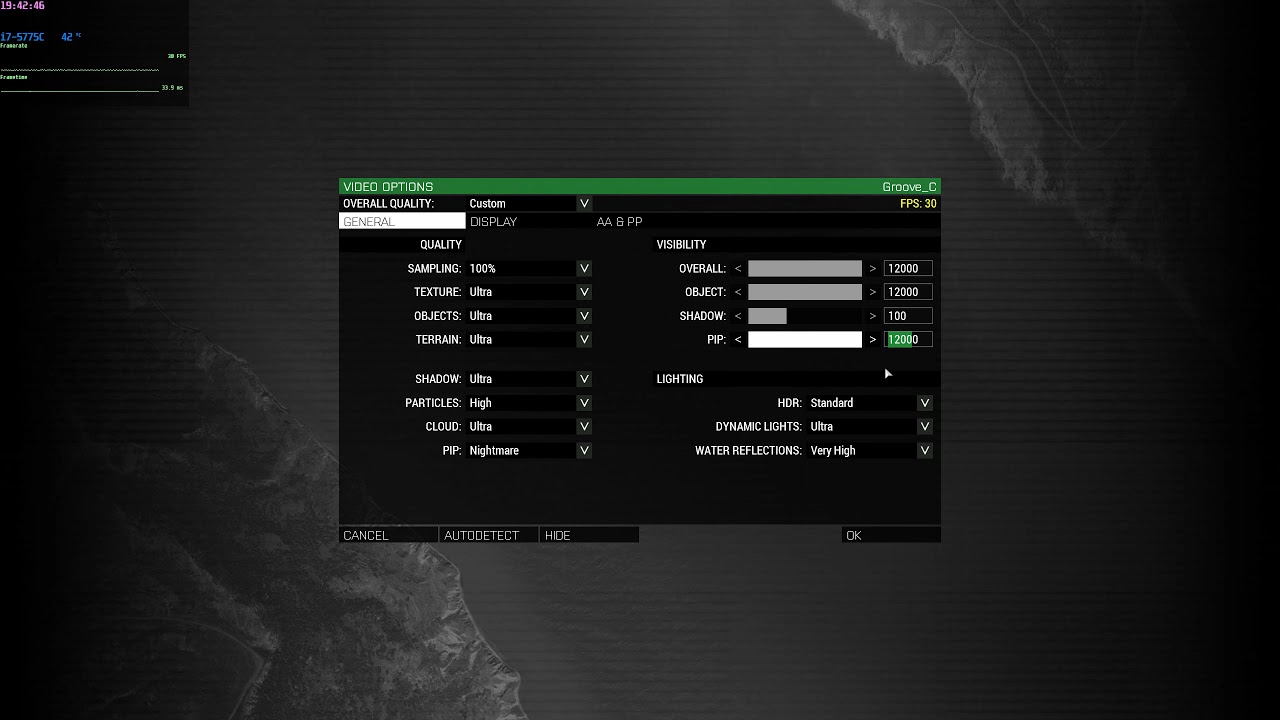 whole cloud
it should work the same as the object view distance
inland dew
it doesn't
as you can see in the vid, when I lower overall distance, objects is also lowered, but not PiP
well, maybe PiP is in reality lowered as well, but the 12000 number remaining unchanged after lowering overall distance suggests otherwise
maybe it's because I change values in the boxes and don't use the arrows/slider
but still, I shouldn't have to touch slider/arrows/values for PiP for it to be lower than 12000 m, after lowering overall to 4500m. PiP should auto-adjust to same value as overall, without any additional actions from my side
I guess
also as I change PiP quality settings, default PiP draw distance always remains at 500 m, which is not how it normally works, in STABLE
normally, the greater PiP quality you select = the greater the default PiP draw distance associated with it, in STABLE, even if there is no visible slider with value.
I manually checked what's the default PiP draw distance for each PiP quality setting in the editor.
I know that PiP draw distance has nothing to do with PiP quallity/resolution, but it's normal for higher res PiP to come with greater default PiP draw distance, like it was and still is now, in STABLE
it's same like when you select Ultra video preset instead of standard video preset and overall + objects automatically move from 1600/1300 m to 3800/3200 m
whole cloud
inland dew
also as I change PiP quality settings, _**default**_ PiP draw distance always re...
Correct, in stable you have no quality setting.
Quality and view distance are seperate settings
The presets should have higher values in them I think
inland dew
What I mean is that you have no PiP draw distance slider in STABLE, but I checked in the editor and when you select higher quality PiP, the PiP draw distance gets also increased.
So in STABLE there is a specific PiP draw distance for each PiP quality preset and the higher the PiP quality preset - the higher is PiP draw distance, even if there is no visible slider
Which isn't the case right now in perf
whole cloud
Yes it wasn't a slider before. Now it is
inland dew
I know
But what I ask for is despite the visible slider now, please, let there be default PiP draw distance values for each PiP quality setting
inland dew
So when you select a specific PiP quality setting, you can see the PiP draw distance slider changing to a apecific value associated with PiP quality setting in question, for it to look polished/consistent, like the rest
whole cloud
no setting currently does that. so why would it be consistent to make one do it?
Why is resetting your view distance, if you just want to set your resolution any consistent/polished. I don't see that
whole cloud
Also the resolution is a GPU factor, while the distance is a CPU factor.
So can't assume that just because you have a good GPU, you also have a good CPU
inland dew
But still, PiP slider should auto-lower the value, for it to be not higher than current overall draw distance value
inland dew
Haven't paid attention to it, until today, since I was thinking it naturally defaults to lower or not higher than overall draw distance value
quaint flame
Bug with the Load Anyway feature https://feedback.bistudio.com/T157168
whole cloud
Ah. I disable the autosave when you click on "load anyway" I should probably do that when the dialog opens, not when you click the button 😄
quaint flame
Yep 😄
gritty wasp
any thoughts about performance spikes on perf? Should I debug them somehow?
whole cloud
2.04.147808 new PROFILING branch with PERFORMANCE binaries, v8, server and client, windows 32/64-bit, linux server 32/64-bit
- Tweaked: Increased number of dynamic lights for the Ultra setting from 16 to 32 (requires companion mod)
- Tweaked: Zeus pricing handling when in 'god mode' (everything is free)
- Tweaked: selectionPosition alternative syntax now supports proxies
- Fixed: +/- buttons in the Arsenal container loadout list were drawn outside of the listbox - https://feedback.bistudio.com/T156702
- Fixed: Multiple joystick axis key binding was not ignoring disconnected devices in averaging - https://feedback.bistudio.com/T119742
- Fixed: Crash if a weapon adds itself as sub-item
- Fixed: Sound of ladder climbing being stuck at the bottom of a ladder when in third-person view - https://feedback.bistudio.com/T159152
Note: This update comes with an experimental companion mod that adds:
- New UI components for the video settings
- New UI components Eden Editor menus
- SQF Bytecode for most vanilla functions
- Increase of dynamic lights Ultra setting from 16 to 32
You can download it here: https://steamcommunity.com/sharedfiles/filedetails/?id=2419451036
About the Zeus pricing handling: you should now NEVER get the "Insufficient Resources" message while you are using Zeus in 'god mode' (no prices/resources, everything allowed). If you find a case where you still get the message, please report it.
whole cloud
whole cloud
2.04.147808 new PROFILING branch with PERFORMANCE binaries, v8, server and clien...
inland dew
No fix for PiP distance slider/value vs. Overall distance slider/value? Or simply not mentioned?
night mulch
thanksss a lot for the zues fix 
whole cloud
inland dew
No fix for PiP distance slider/value vs. Overall distance slider/value? Or simpl...
no fix
inland dew
(((
autumn timber
- Fixed: Multiple joystick axis key binding was not ignoring disconnected devices in averaging
Thanks for fixing that issue!
 charred holly
I have found an issue to what seems to be specific to this update:
At first I thought it was ZEN (which also updated today), but I have managed to reproduce the bug on a different computer when being on the profiling branch. I didn't have the bug when I switched over to the stable version.
https://github.com/zen-mod/ZEN/issues/603 for more info
whole cloud

 molten berry
@whole cloud Can I just copy the binaries from this experimental branch to stable in order to use them but not the entire profiling build?
whole cloud
yes
 marsh gyro
I've had an issue twice now after switching to the profiling branch where Steam thinks that ARMA is not installed, yet it's still there. So it wants to reinstall the whole thing over again.
And I don't have the free 100gb on my drive to reinstall the whole thing twice so it won't let me launch. Any suggestions other than uninstalling and reinstalling over again?
quaint flame
@marsh gyro I think there is a way to let steam repair the games library IIRC.
restive pilot
marsh gyro
And I don't have the free 100gb on my drive to reinstall the whole thing twice s...
They used to upload the profiling builds somewhere (I think Google Drive). The links are in the forums.
Not sure if they're still updated.
It probably thinks the game is installed elsewhere. (or not installed)
Verify the game data. If that doesn't help, you can do this:
Make a copy of the game data (or simply rename the game folder)
Uninstall
Put the data back
Reinstall (it won't download the game)
Mods will be lost tho
I couldn't make steam recognize them the last time I did this
marsh gyro
I just ended up uninstalling and reinstalling
whole cloud
Steam sometimes F's up its data, not profiling branches fault
autumn timber
marsh gyro
And I don't have the free 100gb on my drive to reinstall the whole thing twice s...
I know that you don't have the issue anymore, but for future reference:
https://steamcommunity.com/app/107410/discussions/1/135510194254064583/
marsh gyro
autumn timber
I know that you don't have the issue anymore, but for future reference:
https:/...
Thanks for this, however it wasn't just mods, it was the entire game. I could not open the launcher.
autumn timber
Yeah, I understand, but that could still cut the size of the download by half, by keeping the mods and just reinstalling the game
whole cloud
charred holly
I have found an issue to what seems to be specific to this update:
At first I th...
Thank you! Could reproduce fix tomorrow or friday
whole cloud
2.04.147848 new PROFILING branch with PERFORMANCE binaries, v9, server and client, windows 32/64-bit, linux server 32/64-bit
- Added: -preprocDefine command-line parameter to define global preprocessor macros
- Tweaked: Eden Editor now disables autosaves if an error happens during scenario load - https://feedback.bistudio.com/T157168
- Fixed: Eden Editor shift-click rotation was resetting rotation widget rotations - https://feedback.bistudio.com/T159275
- Fixed: PiP view distance not scaling when the overall view distance is adjusted
- Fixed: Crash when deleting the Mission Display through the createDisplay script command - https://feedback.bistudio.com/T157895
- Fixed: Eden Editor's 'Force Load' button did not work on the first try if the scenario is too old
- Fixed: Zeus' Recent menu was not working correctly in 'god mode'
- Fixed: A bug in setVectorDirAndUp - https://feedback.bistudio.com/T153531
- Fixed: Eden Editor's placeCompositionInLayer setting was not correctly reordering layers if the composition contained waypoints - https://feedback.bistudio.com/T156806
Note: This update comes with an experimental companion mod that adds:
- New UI components for the video settings
- New UI components Eden Editor menus
- SQF Bytecode for most vanilla functions
- Increase of dynamic lights Ultra setting from 16 to 32
You can download it here: https://steamcommunity.com/sharedfiles/filedetails/?id=2419451036
About the Zeus pricing handling: you should now NEVER get the "Insufficient Resources" message while you are using Zeus in 'god mode' (no prices/resources, everything allowed). If you find a case where you still get the message, please report it.
whole cloud
whole cloud
2.04.147848 new PROFILING branch with PERFORMANCE binaries, v9, server and clien...
kindred radish
were there any changes to setpos ? i have some different behaviour now when i do setpos on player corpses 🤷♂️
previously it moved the player corpse to [0,0,0] after reviving (creating a new character), but today i realised the player body stays on the old position (it just "flickers" for a sec)
 charred estuary
That insufficient resources thing was driving me CRAZY. I’m so relieved it was fixed, I had developed all sorts of wonky work-arounds using Zeus custom compositions etc
feral harness
kindred radish
were there any changes to setpos ? i have some different behaviour now when i do...
did you do setpos[0,0,0] previously?
trim ether
@kindred radish We've noticed the exact same flickering for at least 12 months. It happens only occasionally. As the player respawns, you seem them very briefly standing above their corpse, before being moved to their respawn location.
kindred radish
feral harness
did you do setpos[0,0,0] previously?
Yes i did, worked without a problem. Iam not aware of any other changes that could cause this. The player corpse is not moving at all even tho the player is already respawned.
I already solved it differently, but still weird that _obj setpos [0,0,0]; has no effect on player corpses anymore.
feral harness
kindred radish
Yes i did, worked without a problem. Iam not aware of any other changes that cou...
since when this doesn’t work?
kindred radish
feral harness
since when this doesn’t work?
Hard to say, but not too long ago (Maybe 1-3 weeks ). I hade some reports of the old body staying on position instead of disappearing. But i thought it was a random bug, looks like it isn't.
But our setups is so far from vanilla, maybe it's a issue on our side.
feral harness
kindred radish
Hard to say, but not too long ago (Maybe 1-3 weeks ). I hade some reports of the...
which branch?
kindred radish
i always use the performance branch + companion mod
feral harness
you mean this happened right after 2.04 update?
kindred radish
Not sure
feral harness
I gonna need a ticket and also confirmation that it is happening in current dev no mods
kindred radish
Iam gonna make some more tests, with the different branches and make a feedbacktracker ticket if i can reproduce it
feral harness
splendid
kindred radish
feral harness
splendid
nvm me stupid, simulation was not enabled globally for the corpse
 eager sorrel
pretty sure this is a prof branch feature but objects orientation not being reset by shift rotating is really throwing me off big time esp with trying to place comps down
cus the way it is now its a bit of a pain to get things nice and level
whole cloud
What do you mean by nice and level?
If you don't disable the snap to terrain, they should all still stay snapped to terrain?
eager sorrel
I don't want it to snap to the terrain is the problem
but when you first place it even with terrain snap off it'll snap to the ground you place it on
theres transform > orient to sea normal but as weird as it sounds I really liked being able to quickly shift rotate something to level it instantly
whole cloud
if you leave snap to ground enabled, and move it around I think the rotations still reset
I thought also with snap enabled and rotate they reset, there were some cases I don't fully remember
whole cloud
Maybe you can also right-click -> snap to ground.
I don't know if that maybe resets it too
eager sorrel
oh is orient to sea normal not a vanilla eden thing?
whole cloud
I don't use eden that much 
eager sorrel
p sure its a vanilla thing
silk pewter
Basically @whole cloud changed that and it will be in Eden next patch
eager sorrel
whats funny is iirc shift rotating will not respect the rotation of objects but the rotation widget does
but I can see why change it cus its not very intuitive unless you specifically are one with the jank
whole cloud
To most people the rotation reset was frustrating (inclusive me and my friends who use the editor)
I can see why you may want that rotation gets reset as it was before, but as you can still get the old "broken" behaviour via other ways (moving via mouse click with snap to terrain enabled) you're not really loosing a "feature" via this fix.
So all is good 🙂
eager sorrel
yeah thats why I'm all for it
literally its not a bug its a feature moment with the old behavior of rotation lol
eager sorrel
good find with the vertical mode though might actually be faster than the old method
the totally real and not a thing I just made up arma comp speedrun community gonna be scrambling to get new wr's with this method
pallid pebble
eager sorrel
the totally real and not a thing I just made up arma comp speedrun community gon...
whole cloud
This is a bug right?
Yes.
This has always been broken right?
Yes.
The Designers didn't intend it to work this way right?
Nope.
The Players also want this bug fixed right?
Yes.
So I can fix it then?
No, some players/missions/mods depend on it being broken.
┬─┬ ノ( ゜-゜ノ)
eager sorrel
a classic problem
pallid pebble
that actually reminds me of an event a unit did where the mission makers had to make a mission in something like 30 minutes
eager sorrel
even mod devs have to deal with that
afaik thats why cup hasn't replaced all the arma 2 buildings with their livonia versions and change the maps to accomadate that
I think the best way to handle that is just to let the community know ahead of time "hey were gonna change this it might break some stuff here it is in a beta branch and heres roughly when its gonna come out"
which afaik is p much what is done with the dev and perf branch
whole cloud
We aren't supposed to make any changes anymore that break stuff ^^
pallid pebble
eager sorrel
I think the best way to handle that is just to let the community know ahead of t...
problem is that there's a ton of stuff that isnt being maintained anymore
eager sorrel
yeah
and alot of people are weird about reuploads even if the mod is super dead and the creator is no where to be found
pallid pebble
oh god no dont get into this debate
eager sorrel
I mean I'm broadly speaking its really a case by case issue I think
real gamers actually apply a license to their mods so people know what is and isn't allowed without having to pester them or if they disapper
pallid pebble
license doesnt necessarily mean you can reupload to steam either though
but yeah thats all a discussion for #ip_rights_violations
eager sorrel
the great edge case war of mod that hasn't been touched since 2017 with no license and probably reuploaded from armaholic but armaholic is dead so no one knows who made it
true
whole cloud

pallid pebble
its a big rabbithole of laws, steam agreements and personal interpretations and opinions
eager sorrel
yeah
pallid pebble
like the topic of who actually owns what in what situation
whole cloud
pallid pebble
good luck having an actual debate about that, see #ip_rights_violations for quite a few attempts that didnt work out well
eager sorrel
I'm imainging the video of new york union guys arguing about truck drivers or something
pallid pebble

eager sorrel
I'll dm it its a classic
pallid pebble
https://www.youtube.com/watch?v=XfkhS1R8A2Q
Old NYC Union Guys Know How To Argue
yup, seems pretty accurate to #ip_rights_violations
especially everyone talking over everyone else
eager sorrel
damn that heated that people manage to talk over eachother in a text based chat?
pallid pebble
Oh boy they definetly managed to do that
eager sorrel
wild
I tend to stay out of there cus my views on copyright and such are different than most I feel
 solemn fox
Just wanted to know if people are experiencing significant performance gains using this build? I have a beefy computer but can barely keep 60 frames on low and ultra
worldly badge
Profiling branch offers no magic
solemn fox
I would be happy with a stable 60
At the moment it’s 30-60
I only lose a few FPS having it on ultra, something just doesn’t feel right
worldly badge
Because Arma 3's engine Real Virtuality 4 uses more CPU when you decrease your graphics
solemn fox
Yeah I’ve been trying to balance it out to prevent a bottleneck but the frames are extremely unstable. This is playing antistasi with 10-20 peeps
I’ve tried all the tweaks and OC’d. Does the perf build automatically run once you choose it in the betas tab?
Cause I saw you can get it on GitHub and was just wondering which one is the most up to date
worldly badge
IIRC yes. But shouldn't expect any magic as I said
feral harness
in betas is dev build and sometimes staging for the next release unless another build was added I am not aware
You can get additional branches with the code, did you use the code to download prof?
solemn fox
Yeah and I renamed the experiment exe to arma_64.exe to get it to run from the launcher
feral harness
what’s your spec?
solemn fox
2700x Super, 3600x Ryzen, 16GB 3600 Ram, SSD
feral harness
and what you get in vanilla?
solemn fox
I haven’t dabbled in vanilla. I just came back from a long hiatus and went straight into antistasi
feral harness
would be interesting to compare.
solemn fox
The performance variation with people on the server was large
Those who had lower specs were running ultra just fine
feral harness
do you use any custom memory allocator?
solemn fox
Others not so much
I’ve tried the 3 options but I don’t think it changes much
Havent benchmarkd it properly
I should probably run some with dif variations
feral harness
try default startup line. ie leave everything to the engine to decide
solemn fox
I spent a whole day tweaking everything maybe I should just reset as you say with the parameter tweaks and see what happens
I unparkes my cores, OC’d CPU and used a task manager performance system aswell
whole cloud
solemn fox
Cause I saw you can get it on GitHub and was just wondering which one is the mos...
You can't get the perf build on github, atleast you're not supposed to...
kindred radish
Is there a "remove item from container" command like "removeItem" for players ? Would be nice addition if not !?
silk pewter
kindred radish
Is there a "remove item from container" command like "removeItem" for players ? ...
there is not
whole cloud
2.04.147888 new PROFILING branch with PERFORMANCE binaries, v10, server and client, windows 32/64-bit, linux server 32/64-bit
- Added: Ability to place Eden Editor Compositions in Zeus
- Added: zeusCompositionScriptLevel server.cfg / description.ext option
- Fixed: Secondary ladder climbing sound being stuck at the bottom of the ladder when in 3rd Person Perspective - https://feedback.bistudio.com/T159152
- Fixed: It was possible to change seat to a locked position with the Eden Editor context menu
- Fixed: Multiple typos in ingame command help for lnbXYZ commands - https://feedback.bistudio.com/T159533
- Fixed: enableGunLights did not always work for every AI unit in a group - https://feedback.bistudio.com/T154810
Known Issue: There is one report of issues when running profiling build serverside and having non-profiling players, I will investigate tomorrow but for now I'd recommend not to install the new profiling on servers. If there is an issue it will be fixed on wednesday or thursday.
Note: This update comes with an experimental companion mod that adds:
- New UI components for the video settings
- New UI components Eden Editor menus
- SQF Bytecode for most vanilla functions
- Increase of dynamic lights Ultra setting from 16 to 32
- Fix for Composition custom vehicle inventory not working when placed from Zeus
You can download it here: https://steamcommunity.com/sharedfiles/filedetails/?id=2419451036
whole cloud
whole cloud
2.04.147888 new PROFILING branch with PERFORMANCE binaries, v10, server and clie...
neon harbor
Added: Ability to place Eden Editor Compositions in Zeus


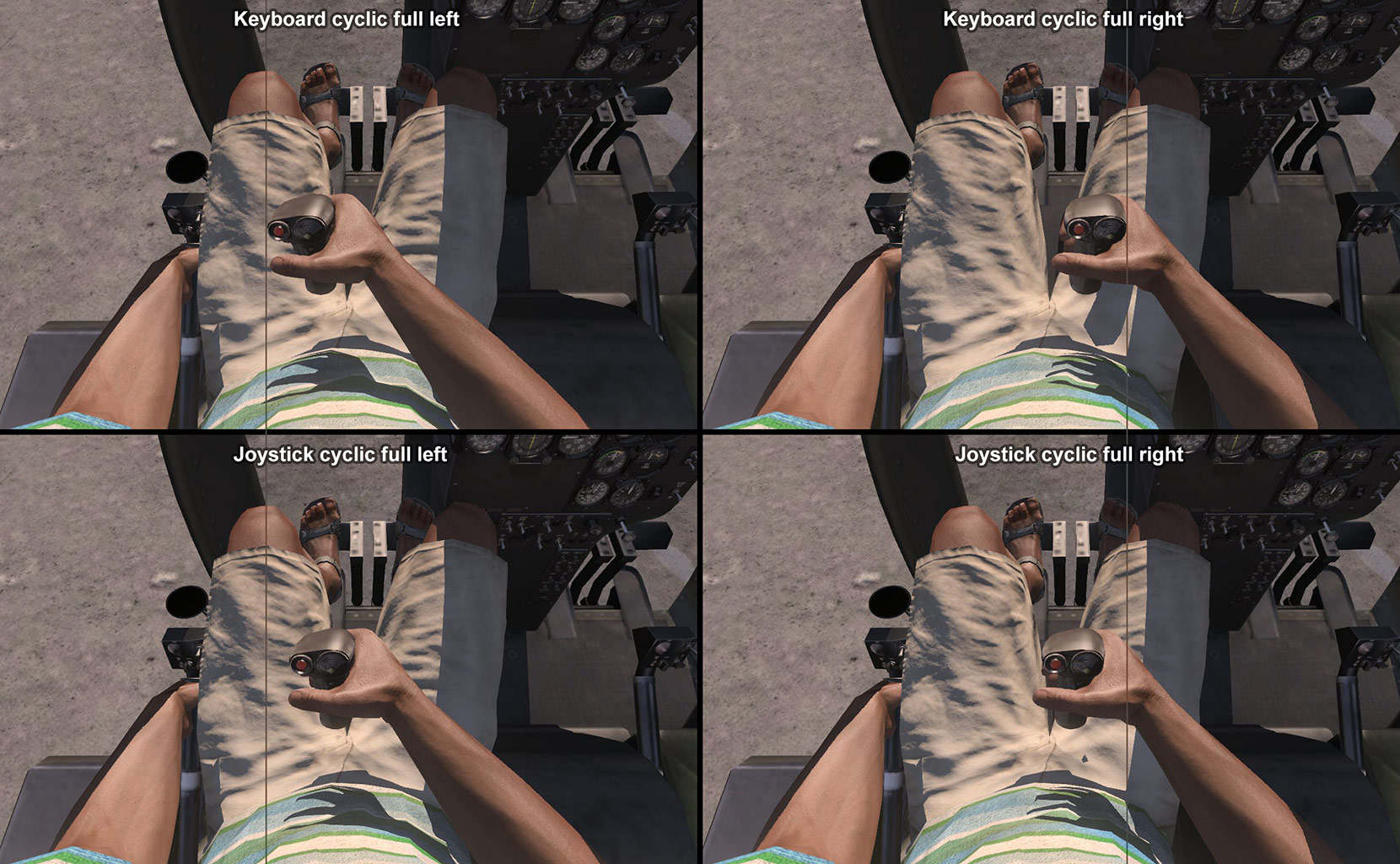


 ripe escarp

 unique osprey
whole cloud
2.04.147888 new PROFILING branch with PERFORMANCE binaries, v10, server and clie...
unique osprey
whole cloud
2.04.147888 new PROFILING branch with PERFORMANCE binaries, v10, server and clie...
i fucking love this
ripe escarp
Indeed, Eden Editor Compositions being usable in Zeus is an amazing addition, thank you so much A3 Team
unique osprey
this is gonna be super useful for Public Zeus, you could literally now prepare entire missions in eden and put them down in public servers
holy christ in heaven
you can now customize your units and put them down as compositions
@whole cloud Do you think we could get a function where you can "spawn composition in original position"? Right now it's a little hard to properly align stuff, especially for larger compositions.
whole cloud
Same problem with ATL/ASL placement. No decision made yet, would maybe need some modifier key
unique osprey
whole cloud
Same problem with ATL/ASL placement. No decision made yet, would maybe need some...
ATL / ASL?
whole cloud
follow terrain or not
unique osprey
ohh right I see
yeah it'd be a great function to have, right now it's OK to just split up missions parts though
thanks a lot really
hexed verge
Linux 32bit server is on version 2.04.147887 instead of 2.04.147888. I assume that is still a-ok?
silk pewter
i'd say ye
whole cloud
thats annoying but ok
silk pewter
his ^ fault
 upper sierra
just curious, is the companion mod going to get you kicked if you try to join BI official servers?
whole cloud
no its signed with the main Arma key
upper sierra
alright, good.
upper sierra
well it seems that players do not show up in the zeus interface when they join in, at least in BI's default scenarios.
Also the compositions that contain unallowed objects seem to lag the servers out.
or the zeus who spawns them out, more like.
whole cloud
which unallowed objects?
They should just be skipped
with or without mods?
If with, which?
upper sierra
without mods, just testing on official servers.
I was trying to spawn in the carrier or the destroyer, for one.
also compositions seem to not give all objects to the zeus interface to edit.
whole cloud
can you upload the composition to workshop for me and link me? so I can test
whole cloud
I try to assign all objects to zeus, but some things like simple objects just don't work
whole cloud
Thanks, I'll test it out tomorrow
upper sierra
that's all i tested that seem to lag things out.
not only me but apparently the server itself.
this happened on official zeus EU #0A
having a second player around and it seems to be lagging him a lot when i spawn compositions aswell, just any composition in general.
Also not all workshop compositions seem to show up in the zeus interface.
whole cloud
Missing mods ones are hidden
upper sierra
Nope, compositions that do not show up are no mods at all.
this one for example won't show.
upper sierra
upper sierra
well it seems that players do not show up in the zeus interface when they join i...
apparently this was a one time thing, might have been because server was chugging and not catching up to player spawning in?
not really sure.
But yeah any composition with scripts seems to just desync the server entirely, tested on both EU #0A and EU #0D
whole cloud
scripts should not be allowed anyway. They get blocked by default
but then ofc also not cause lags
pallid pebble
whole cloud
scripts should not be allowed anyway. They get blocked by default
is there a setting to allow that, or?
upper sierra
ye he added a server.cfg command for that
"- Added: zeusCompositionScriptLevel server.cfg / description.ext option"
pallid pebble
empty goblet
upper sierra
But yeah any composition with scripts seems to just desync the server entirely, ...
those are still on 147808 not `887
upper sierra
ah, interesting.
whole cloud
The composition thing is all clientside, except that flag for scripts
unique osprey
@whole cloud We were checking things out a little:
- Simple Objects just get stuck and dont' get added to the interface (no move, no delete etc)
- Got this report from a friend (who's banned sadly):
spawned in a rhino
with a cage
spawned in 2 inside of eachother
and they killed everyone```
- Spawn in stuff in their 'original positions' would be optimal

that's it for now, we'll continue testingSimple Objects just get stuck and dont' get added to the interface (no move, no delete etc)
yes Zeus doesn't support simple objects.
Decision would be to either exclude them from being able to place, or keeping them like now
or I just add compatibility for simple objects, but that can only happen in godmode.. I think, unless its simple object with classname
empty goblet
Zeus servers with 2.04.147887, let's see how it goes
zeusCompositionScriptLevel=0 , 5.101.164.123:2302
zeusCompositionScriptLevel=2 , 5.101.164.123:2402
zeusCompositionScriptLevel=1 , 5.101.164.123:2502
zeusCompositionScriptLevel=2 , 5.101.164.123:2602
the higher the number the more higher-level script commands it allows?
whole cloud
1 is only attributes, 2 is init scripts and waypoint scripts
 storm spire
When my friend placed a composition with the Liberty it acted like a simple object and wasn't added to the interface, but it did spawn
storm spire
whole cloud
or I just add compatibility for simple objects, but that can only happen in godm...
I have made things prior that get the class name of terrain/simple objects, unsure if it works for everything though I just used it to god mode fences on the map
Also the compositions spawned dont include triggers right?
 versed yoke
empty goblet
Zeus servers with 2.04.147887, let's see how it goes
```
zeusCompositionScriptLe...
versed yoke
empty goblet
Zeus servers with 2.04.147887, let's see how it goes
```
zeusCompositionScriptLe...
one of the servers (EU 0D) is not working, counts as introOrange and generally just makes you spawn in the air, and crash into the ocean
not really sure about the other ones
EU #0A is broken as well
EU #0B as well, basically every server is broken, in the two of those servers the black screen appear, same with the third one, and then the air thing at EU 0D
empty goblet
well, we can then conclude the test is failure
anyone joining with the new profiling client actually or old one or main branch ?
versed yoke
empty goblet
well, we can then conclude the test is failure
i mean its mostly because the servers didnt really work, you were able to enter them but when you go in game itself on that server, black screen stuff happens, unless it was caused by the new zeus scripts
empty goblet
nothing has changed on the servers, just the binary swap to newer build
so maybe i need add the companion mod server side ... hmm
marble mason
"- Added: Ability to place Eden Editor Compositions in Zeus"
This currently does not work with ZEN loaded. Tested in editor. Objects are listed but nothing spawns when placed.
empty goblet
added the mod and restarted
upper sierra
marble mason
"- Added: Ability to place Eden Editor Compositions in Zeus"
This currently does...
that'd be a problem on side of ZEN then
pallid pebble
marble mason
"- Added: Ability to place Eden Editor Compositions in Zeus"
This currently does...
iirc dedmen already told the zen author that and an update is in the works
might be misremembering though
 torn warren
pallid pebble
iirc dedmen already told the zen author that and an update is in the works
torn warren
pallid pebble
iirc dedmen already told the zen author that and an update is in the works
Indeed, we are aware of it.
pallid pebble
empty goblet
so anyone tried after the restart?
versed yoke
lemme check again
Mm nope, still doesnt work sadly
Apparently as well at the bottom of the test zeus servers in the lobby, theres that weird scenario thing called "introExp", not sure if it should be here but I dunno.
Most likely one of the reasons why theres so much problems in those test servers, with duplicated roles, being able to put AI into the squads and other stuff, etc etc
correction: the scenario name thing of introExp could be seen at the bottom left side at the map lobby area, just when you continue at the lobby itself
whole cloud
marble mason
"- Added: Ability to place Eden Editor Compositions in Zeus"
This currently does...
https://github.com/zen-mod/ZEN/pull/611 Thats this.
You can download a working zen beta version here https://github.com/zen-mod/ZEN/runs/3008151048
whole cloud
versed yoke
one of the servers (EU 0D) is not working, counts as introOrange and generally j...
Yes known.
Which is why I added this to the changelog two hours before your post
Known Issue: There is one report of issues when running profiling build serverside and having non-profiling players, I will investigate tomorrow but for now I'd recommend not to install the new profiling on servers. If there is an issue it will be fixed on wednesday or thursday.
I just confirmed the bug, fix in a few hours
unique osprey
whole cloud
https://github.com/zen-mod/ZEN/pull/611 Thats this.
You can download a working z...
Wait, you can run ZEN on Public Zeus now?
whole cloud
no
unique osprey
aw shame :/