#perf_prof_branch
1 messages · Page 29 of 1
 frosty heath
I got a freeze and an mdmp this time which hasnt happened in my previous flythroughs so I'm not sure what that was
 heavy vortex
I have a lot of those :P
How bad it looks when the VRAM overspills is likely dependent on your main memory usage.
frosty heath
yea on my flythrough just now it was displaying 13/11.8 by the end
checking on stable right now
oh
exact same on stable but no lag?
maybe im misreading something
gonna send this over to you real quick
heavy vortex
Maybe it has more free main memory on stable.
Interesting difference from my test is that your VRAM usage is already very high before you loaded the map.
frosty heath
could it be some other processes I left open on accident or something?
I can retake it again if need be
think I had everything except discord closed though
getting a new video on stable real quick it kept getting compressed to shit
heavy vortex
Fly slower :P
frosty heath
that's probably why 😭 because on profiling it was stuttering so much I couldn't fly any faster
 feral harness
This is not it. The terminals are handled locally, you can still take someone else terminal but it wont be connected in your locality. Was like this for awhile. Think about it as home screen lock or auto-disconnect. You should be able to reconnect it afterwards provided you are allowed
 patent sky
patent sky
heavy vortex
patent sky
patent sky
patent sky
heavy vortex
Ok, once I convinced my weaker PC not to freeze hard on the Mortain flythrough case, the jitter is clearly worse on perf than stable, so it might be worth looking into. Slow frame captures show a lot of asset loading, especially wss files. Not sure why that would be worse.
 whole cloud
I did an experiment with file loading, I think that's currently active on prof.
If so I'll turn it back off and we'll see if that's it
 restive pilot
heavy vortex
Ok, once I convinced my weaker PC not to freeze hard on the Mortain flythrough c...
restive pilot
heavy vortex
Ok, once I convinced my weaker PC not to freeze hard on the Mortain flythrough c...
I also noticed some weird stutters at some points on dev but I didn't look into how it happens
 eternal kraken
are diag_captureSlowFrame still wanted, or are you already past that phase?
whole cloud
If it just shows that its loading files, it doesn't tell me much
 fiery crescent
Server crash on latest perf. Was this not fixed in recent version or it is new issue. Crash GUID: d0d94620-95e1-40a9-ab15-353995ad4ed2
 stable wasp
guys. whats the best memory allocator for an intel 10th gen procÉ
 acoustic lynx
heavy vortex
acoustic lynx
heavy vortex
I wrote a shitty microbench where AI drives you through Mortain to check my sanity:
```
Perf worst frame: 450ms, 5th worst: 200ms
Stable worst frame: 200ms, 5th worst: 75ms
Average frametime is very similar.The crash fixes certainly seemed to have an effect.
Lowest crash rate of the year
 whole cloud
I did an experiment with file loading, I think that's currently active on prof. ...
whole cloud
whole cloud
I did an experiment with file loading, I think that's currently active on prof. ...
Nope, its turned off
whole cloud
fiery crescent
Server crash on latest perf. Was this not fixed in recent version or it is new i...
new-ish.
It is some multithreading issue.
I have seen something similar happen right at game start, or at game exit.
But your server has been running for 2 hours and was not exiting.. that is .. oof
People really like to be creative right.
A createDialog, ran inside the onLoad script, of the same dialog.
Everytime its created it creates itself...
The game topped out at ~600 levels deep
y u do dis
 kindred radish
Rookie mistakes, people do stupid shit when they have no clue and try stuff.
I once made script to craft from containers for ExileMod and because I didn't think twice the forEach rewrote the inventory for every single item of the crafting recipe.
"Ddosed" everyone from the server except me xD
 patent sky
whole cloud
People really like to be creative right.
A createDialog, ran inside the onLoad s...
patent sky
whole cloud
People really like to be creative right.
A createDialog, ran inside the onLoad s...
Could it be some scripter executed crasher?
 heady plinth
i do stuff like this all the time, but i dont submit the crashlog 😄
whole cloud
Probably more likely dev failure.
But because it could be used for that, I'll have to fix it
32 nested createDialog's is the new limit 🔨
Why 32? Because its a round number
whole cloud
heady plinth
i do stuff like this all the time, but i dont submit the crashlog 😄
Just send them anyway but put it in the note that its a dev error.
If I can make you not crash when making a mistake, everyone is happier
 quaint flame
whole cloud
Probably more likely dev failure.
But because it could be used for that, I'll ha...
quaint flame
whole cloud
Probably more likely dev failure.
But because it could be used for that, I'll ha...
Is this going to write some warning to the rpt?
whole cloud
Yes script error
quaint flame
Nice
whole cloud
I'm starting Arma right now because I don#t know what the error actually says
"Recursive array"
😠 Frick
We have a Recursion error, but then its something specific like that
"Too deep recursion"?
"Too much recursion"?
"Deep recursion"?
"Recursion"? 😢
Naming is hard
Is this installation path Faster's fault? or user error?

 silk pewter
he wrote ArmA, that's why it crashes
whole cloud
I've seen before how RPT messes up and writes into your profile file instead.
It wrote a game freeze report, into a config.
And after that, the game crashed trying to read that config 🤣
It'd be so funny if it weren't sad
 fiery crescent
whole cloud
People really like to be creative right.
A createDialog, ran inside the onLoad s...
fiery crescent
whole cloud
People really like to be creative right.
A createDialog, ran inside the onLoad s...
Dedmen, thanks for looking the GUID, are you referring to this crash with createDialog, ran inside the onLoad script?
whole cloud
No
feral harness
whole cloud
I've seen before how RPT messes up and writes into your profile file instead.
It...
Probably due to magnetic bleeding on the tape drive
 empty goblet
whole cloud
I've seen before how RPT messes up and writes into your profile file instead.
It...
empty goblet
whole cloud
I've seen before how RPT messes up and writes into your profile file instead.
It...
don't forget about what happens when it freezes while writing (or run out of space) ... zeroed configs / profiles etc.
whole cloud
empty goblet
don't forget about what happens when it freezes while writing (or run out of spa...
I will, forget.
whole cloud
whole cloud
whole cloud
That should show me more info for the suddenly not executable crashes, maybe.
Also makes the multithreading code slower but I think you won't notice
restive pilot
did you also disable the file loading optimization?
empty goblet
whole cloud
q, do you have any/lot of crashes from 153495 ?
whole cloud
yes
some server running into already fixed crashes because they don't want to update
empty goblet
ok, that means i'm going to replace those with new profiling just incase those spam reports
stable wasp
is there a speciifiic profiling versiion thats good for fps and still works onliine? i use the usual steam one
empty goblet
stable wasp
is there a speciifiic profiling versiion thats good for fps and still works onli...
that's all of them unless borked, the whole purpose of profiling branch (profiling/performance binary) is to be MP compatible with main branch while allowing test the changes which don't break the compatibility
stable wasp
empty goblet
that's all of them unless borked, the whole purpose of profiling branch (profili...
Oh yeah i know I've been using it for a while but noticed it gets updated often and sometimes stuff are disabled, do u guys recommend a version from that drive that's stable and got all the optimisations?
empty goblet
just go for the latest and see if it works, the reason Dedmen disabled some minor optimizations is stability and debugging
and if you need you can always download some of the older builds manually
stable wasp
Oh yea i got the latest from steam already, so no recommend versions from the drive?
empty goblet
stable wasp
Oh yea i got the latest from steam already, so no recommend versions from the dr...
nope, unless you get bug or performance issues there is usually no need to bother with that, but ofc. when someone suffer from either they can manually revert to older version which works for them
stable wasp
empty goblet
nope, unless you get bug or performance issues there is usually no need to bothe...
That makes sense 😄 just one last question may sound dumb, if i want more stable fps should i just use public branch or keep using pref prof?
whole cloud
use prof and set your FPS limit to 20.
Tadaa, stable.
empty goblet
whole cloud
use prof and set your FPS limit to 20.
Tadaa, stable.
tsk tsk i'm sure he wants 144fps because of v-sync and forgot (or doesn't know) there is TripleBuffering option in arma3.cfg 😁
stable wasp
whole cloud
use prof and set your FPS limit to 20.
Tadaa, stable.
Um nope I'm just trying to squeeze every fps i can 😄 so i figured people here know, and ik the game won't hit 144 and my hardware isn't even that good 🙂 and dw i know what each graphics setting does lol but seems like using another memory allocator and normal branch got me a stable 90 atm
whole cloud
More fps != Stable fps
heavy vortex
There wasn't anything obvious causing the asset loading jitter, right? So it'd be worth me doing a perf branch bisect?
whole cloud
Well my idea, is not it
If I had a clear repro or benchmark I could go back in the versions...
Wait, that's what you're proposing isn't it?
frosty heath
if it's any help I feel it's worth mentioning the issue seems to go back to as early as october
since it's so visible on my end if you guys need someone to rollback versions of profiling and find which version it started happening I can do that
heavy vortex
v25 (September 22) is already bad so it's going back a bit.
ah wait, the baseline for perf 2.20 isn't stable 2.20 is it. So I might need to go back further.
whole cloud
if the issue is present on v0, that already narrows it down alot.
There's only a somewhat small list of features there
heavy vortex
v0 good, v12 baaad
heavy vortex
v0 good, v2 baaaad. I think v2 is slightly better than some of the later ones but the worst frame is still near 500ms.
I guess it could be something in 2.18 v29-v32 but nothing obvious stands out either in that or 2.20 v2.
I don't suppose I can test 2.18 without swapping to legacy branch and that's kinda painful here.
silk pewter
by these empirical notes, v -10 should be perfect
empty goblet
silk pewter
by these empirical notes, v -10 should be _perfect_
but that's 2.18 something 🤣
silk pewter
back to v0.50!!
 nocturne obsidian
 fair swan
Exception: Access violation. Illegal write by 0x7ffccec9ff05 at 0x22e858c4180
whole cloud
heavy vortex
v0 good, v2 baaaad. I think v2 is slightly better than some of the later ones bu...
152945 to 152958
168 changed files.. ez
whole cloud
Netcode en masse, doesn't apply here.
Game start speed, shouldn't apply.
"Improved performance of engine closing files (could in some cases cause lag spikes)"
🤔
I'd think we'd have noticed worse consequences if that was broken. Also why would that cause lags when loading an object. But worth a try.
PhysX joints, doesn't apply. The benchmark is specifically loading some unit models right? not like.. tree's?
SimpleVM, doesn't apply.
And that's it.
So there is only one change somewhat related to file loading (after loading the files will be closed again 🤷 )
Ah no there are 3 parts to it.. 🤷 We'll see on monday
heavy vortex
The benchmark is specifically loading some unit models right? not like.. tree's?
Driving through a town. No entities aside from the car & two units.
 deft oak
I get some hard frames drops from some particle effects in otherwise smooth gameplay that seem to be related to perf. I don't really notice them on stable but overall performance is noticeably worse so they may just be "masked" by that.
In particular the dust while driving causes it. Not sure if it's related to when you're driving through the town in the benchmark scenario. It's most noticeable when you're kicking up dust and then stop hard for me.
whole cloud
whole cloud
whole cloud
whole cloud
heavy vortex
> The benchmark is specifically loading some unit models right? not like.. tree'...
Thats the only one that seems relevant
 heavy galleon
Isn't the terrain SVG export disabled in perf/prof?
(would be cool if it wasn't, so I wouldn't have to switch)
whole cloud
its available to extensions
heavy galleon
So an extension could call it? 
I'll need to look into that then.
frosty heath
whole cloud
this completely fixed it for me
like immediately apparent the stutter is gone on my mortain flythrough with this update
game runs great
gonna check my graphics to make sure
yep, all ultra on mortain and it runs perfect now after that
whole cloud
But why 
empty goblet
deft oak
I get some hard frames drops from some particle effects in otherwise smooth game...
would like to hear if the most recent profiling solves your problem too or still hitchup with Particles
whole cloud
whole cloud
But why <:notlikemeowcry:724201124369793068>
I looked at the code again.
Its about cleaning up files from the cache.
Old code iterated over all cache entries (linked list), trying to find ones that belong to the same file, to delete them.
New code, the file itself keeps a list of its cache entries, and it deletes them directly. No more searching.
Added some test, and the new and old variant delete the exact same entries, there doesn't seem to be any bug here 🤔 So why would it make a difference...
empty goblet
whole cloud
I looked at the code again.
Its about cleaning up files from the cache.
Old cod...
Old code vs New Code. Fight ! {mortal combat music in background}
heavy vortex
Confirmed v52 is smoooooth.
Is there any MT locking involved with writing the list of cache entries?
whole cloud
no
heavy vortex
For what it's worth, the biggest hitches are always at the same points of the benchmark. Whatever is happening is quite deterministic.
deft oak
empty goblet
would like to hear if the most recent profiling solves your problem too or still...
Does seem noticeably smoother testing today
heavy vortex
btw, with that benchmark the difference between v52 and v51 is also clear on my better PC, but it's 170ms vs 50ms for the worst frame instead of 500ms vs 150ms, so it's not as visible.
 rain moth
heavy galleon
So an extension could call it? <:hmmyes:1147624204909433022>
I'll need to look ...
rain moth
heavy galleon
So an extension could call it? <:hmmyes:1147624204909433022>
I'll need to look ...
use libc::{c_char, c_void};
use std::ffi::CString;
use std::ptr;

#[link(name = "kernel32")]
extern "stdcall" {
    pub fn GetProcAddress(hModule: *const usize, lpProcName: *const u8) -> *const usize;
}

const EXPORT_SVG_PROC_NAME: &'static [u8] = b"?ExportSVG@@YAXPEBD_N11111@Z\0";

type FnExportSVG = extern "stdcall" fn(*const c_char, bool, bool, bool, bool, bool, bool) -> *const c_void;

pub fn export_terrain_svg(file_path: String, draw_location_names: bool, draw_grid: bool, draw_countlines: bool, draw_tree_objects: bool, draw_mountain_heightpoints: bool, simple_roads: bool) {
    let export_svg_proc = unsafe {
        GetProcAddress(ptr::null(), EXPORT_SVG_PROC_NAME.as_ptr() as *const u8)
    };
    let export_svg: FnExportSVG = unsafe {
        std::mem::transmute(export_svg_proc)
    };
    let file_path = CString::new(file_path).unwrap();
    export_svg(
        file_path.as_ptr() as *const c_char,
        draw_location_names,
        draw_grid,
        draw_countlines,
        draw_tree_objects,
        draw_mountain_heightpoints,
        simple_roads
    );
}
Do I look like Brett? 
(Love you Brett)
heavy galleon
good, good
rain moth
I have the rust extension published on workshop if you want something pre-made as well, it has a sqf wrapper
 strange badge
Should just add those things to arma-rs directly. So you could just arma_rs::export_terrain_svg()
rain moth
I don’t need that in my other arma-rs extensions 
 fickle geyser
features = ["svg"]
strange badge
Dead code elimination would take it out
No additional dependencies would be needed
whole cloud
strange badge
Should just add those things to arma-rs directly. So you could just `arma_rs::ex...
Its not official API and the arguments might change at any point.
But it works and the arguments are unlikely to change
strange badge
I was going to ask where one could find the functions and arguments
Until I saw a link to WolfCorps 😔
whole cloud
This pre-dates the extension game functions.
Should probably convert it to that someday, but meh
strange badge
Are there others like that, and are they documented anywhere?
whole cloud
yes, no
 edgy chasm
whole cloud
I looked at the code again.
Its about cleaning up files from the cache.
Old cod...
edgy chasm
whole cloud
I looked at the code again.
Its about cleaning up files from the cache.
Old cod...
FWIW im re-experiencing the ingame browser freeze that this patch originally fixed, if that's of any relevance
fair swan
Load screen tends to hang when joining a server. Is anyone else experiencing this?
gets hung up on a grey screen
 whole cloud
Chat ends up at connecting but you don't get to connected?
heavy vortex
That behaviour's normal if the server has an empty class Missions entry and no-one has manually started a mission on it.
It's not a hang in that case. You can do #login adminpass and #missions in the text box.
 warm sedge
yup like #login AP1234 and then #missions in the chat box
then of course you can select a mission from the terrain you want and then the mission
heavy vortex
For some reason almost every server provider sets up their server.cfg like that.
 hexed sleet
warm sedge
yup like #login AP1234 and then #missions in the chat box
hexed sleet
warm sedge
yup like #login AP1234 and then #missions in the chat box
Now we know Scotty's password.
warm sedge
no its not my password it just made up
plus i dont have a Ded server i only host 🙂
but if you want to try that password: you can 🙂
fair swan
heavy vortex
That behaviour's normal if the server has an empty `class Missions` entry and ...
Its my server and missions are set up. (I manually change each mission each day) 30 other people were on but me and my friend on perf branch had same bug, after backing out and going to the home screen, and waiting for the servers to load in the browser it worked. But it was hanging when joining from the launcher
It took 2-3 minutes for this to load after saying the game wasnt responding

class Missions
{
    class Mission1 {
        template = "FEB26_Posadkovo.m_36tuu484111s99";
        difficulty = "Custom";
    };
};```In summary everyone was able to join fine just a few of us had to wait
heavy vortex
Hmm, staring at v51 profiling results. The hitches happen when it's loading assets for a large building, but the main thread is waiting for a much simpler object. In this example it's a tree that takes about 2ms to load, but that's not started on the FileServerAsync thread until the house is completed.
Maybe this is normal and the building is just supposed to load faster :P
If you spawn the same building in VR though, it loads in gradually without causing a long frame.
empty goblet
1.54.134495 profiling & performance v18 server and client, windows/linux
- more crash fixes
- several new error logging to narrow crash hunt
- extra crash-logging via new commandline -crashDiag
https://www.dropbox.com/sh/582opsto4mmr8d8/3BSy9PdRGm
 whole cloud
The change I did, only runs on the FileServerAsync thread.
Its cleaning up handles when closing a file. I still don't understand it because new and old code do the same thing, the new just more efficiently.
But there were two parts of it, I'll readd one of them and see what happens
whole cloud
Its either somehow that the deletion works different.
or that we insert each handle into a sorted array (which slightly slows down inserts, but it shouldn't be that much). I can probably make it unsorted if that's the issue.
whole cloud
whole cloud
whole cloud
Now the question if the lag spike is back, if yes, then it's the sorted insertion
frosty heath
whole cloud
Now the question if the lag spike is back, if yes, then it's the sorted insertio...
it's been reintroduced for me
the lag has been reintroduced*
 mystic anvil
hello guys im learning about the game. after this 50mb update on profiling performance seems weird is it for all and is there a way to fix it?
heavy vortex
Go to the google drive download above and get v52.
heavy vortex
they have different names
mystic anvil
do i want profiling or performance?
heavy vortex
you want client & performance.
mystic anvil
i downloaded the exe so now i just replace the older one with this yes?
empty goblet
or manually download the previous build and replace the binary
heavy vortex
mystic anvil
i downloaded the exe so now i just replace the older one with this yes?
Technically the one you're downloading is the older one :P
empty goblet
you want the performance one, not server
 opal hound
Are you new to arma 3? or just this server
empty goblet
you want the arma3client_x64_performance_220_153552_v52.7z
opal hound
Just curious why you want to run perf, it's a bleeding edge branch and can break things quite often (as you're seeing now)
mystic anvil
my cpu is not that good so i have fps stutters
laptop connected to external monitor 1440p so it runs hot
empty goblet
opal hound
Just curious why you want to run perf, it's a bleeding edge branch and can break...
often because of fixes, tweaks, improvements ... also because we always attempted improve performance
opal hound
yep just checking this is definitely what they wanted to do
empty goblet
hence the performance binary {i will not try explain the marketing effect of that 😁 }
mystic anvil
yup i understood that
empty goblet
profiling binary is like debug branch with extra logging and diagnostic components active
mystic anvil
so it should be saying performance right?
opal hound
yes
empty goblet
no, because the main point was to test and profile, hence branch itself is named profiling
mystic anvil
o lawd
opal hound
on the mini splash
mystic anvil
aah
empty goblet
it would be too confusing to have another branch
in short those who need profiling just rename the binaries, but default in the STEAM is the performance binary
opal hound
The steam option, launcher will say profiling, but unless you take manual action it will launch the performance binary
empty goblet
they most important take is that this branch is (in 9 of 10 cases) compatible with MP of main branch
because simply put, as history shown with DEV branch and RC branch, there isn't enough users and creative makers testing those
it also serve like rapid public beta branch, we can roll out stuff and test it, live
quite sure lot of features would take way longer to be released w/o such branch
lot of public servers are running some version of profiling / performance binary because of the fixes
mystic anvil
the performance version makes a big difference in multiplayer fr me
i think i have it all sorted out
thank you very much
❤️
 knotty wraith
Periodically the server just freezes and nothing else happens. I have to manually shut it down through the Task Manager
there is nothing in the logs
This has been happening for a long time
rt stopped writing about 10 minutes ago, the server is still running, you can hear the fans running all over the place - but the temperatures are normal
I do not know how to get a dump to find out the reason for the hang.
21:13:12 Server: Object 2:83108 not found (message Type_100)
21:13:12 Server: Object 2:44500 not found (message Type_128)
21:31:36 NetServer::finishDestroyPlayer(11035370): DESTROY immediately after CREATE, both cancelled
21:32:36 NetServer::finishDestroyPlayer(70182798): DESTROY immediately after CREATE, both cancelled
21:33:53 NetServer::finishDestroyPlayer(2079906792): DESTROY immediately after CREATE, both cancelled
21:35:19 NetServer::finishDestroyPlayer(206903916): DESTROY immediately after CREATE, both cancelled
21:39:48 NetServer::finishDestroyPlayer(387307199): DESTROY immediately after CREATE, both cancelled
21:43:14 NetServer::finishDestroyPlayer(1907687501): DESTROY immediately after CREATE, both cancelled
21:44:09 NetServer::finishDestroyPlayer(245158075): DESTROY immediately after CREATE, both cancelled
21:44:26 NetServer::finishDestroyPlayer(2030071049): DESTROY immediately after CREATE, both cancelled``` fiery crescent
knotty wraith
Periodically the server just freezes and nothing else happens. I have to manuall...
fiery crescent
knotty wraith
Periodically the server just freezes and nothing else happens. I have to manuall...
Same exact thing happened to me on v51 perf last week. Things frozen in place. Sound is coming from suspended in air Heli. Other players standing still, I'm moving fine and we all talk on comms fine. Same, no crash log and had to kill Arma 3 server process from the task manager.
I used to have this issue few months back don't remember perf version and it went away at some point
knotty wraith
Well, I created a dump in Task Manager, but I'm not sure if it will help
knotty wraith
fiery crescent
Same exact thing happened to me on v51 perf last week. Things frozen in place. S...
Yes, we could have talked by voice as well
fiery crescent
knotty wraith
Yes, we could have talked by voice as well
From the way you described the issue it is identical to what happened to my server.
empty goblet
knotty wraith
I do not know how to get a dump to find out the reason for the hang.
```sqf
21:1...
is that on/just before server restart ?
whole cloud
heavy vortex
how long is this array...
Good question. In my testing it wasn't so bad.
whole cloud
empty goblet
they most important take is that this branch is (in 9 of 10 cases) compatible wi...
in 9 of 10 cases
More like 99 of 100 cases
whole cloud
knotty wraith
Well, I created a dump in Task Manager, but I'm not sure if it will help
It does, it tells what the server has been doing at that time
whole cloud
mystic anvil
hello guys im learning about the game. after this 50mb update on profiling perfo...
Why is it so bad? It only went back to the version of 1 week ago
knotty wraith
empty goblet
is that on/just before server restart ?
it was during the game, all the freezes were during the game, there were no restarts.
whole cloud
whole cloud
whole cloud
 light cargo
official mimalloc?
whole cloud
Only on prof branch for now
It uses the same code, but a different compiler from GJK's version.
There might be a performance difference between them
light cargo
which compiler?
whole cloud
MSVC
patent sky
Same as the other allocators, game_root/Dll/
knotty wraith
should there be a separate dll?
empty goblet
knotty wraith
should there be a separate dll?
this is the new file you looking for Arma 3\Dll\mimalloc_bi_x64.dll
restive pilot
is it shown in launcher btw? I don't remember if the options were hardcoded or automatic
empty goblet
restive pilot
is it shown in launcher btw? I don't remember if the options were hardcoded or a...
yes it is, i just checked, it lists all allocator DLL i have in the folder (which is A LOT e.g. three CMA, many previous mimalloc, multiple tbb4 etc. and ofc the new mimalloc_bi_x64 too)
knotty wraith
empty goblet
this is the new file you looking for `Arma 3\Dll\mimalloc_bi_x64.dll`
OK, where do I get this new mimalloc_bi_x64.dll?
 pallid sluice
u download the new version from steam and if you're using profiling branch you're going to see it in the launcher parameters
if you're using the stable(default) branch, you probably cannot see it(as it is not officially out yet)
 pallid sluice
ok it seems like they haven't included the new malloc in the zip files
if you want i can send the mimalloc from private chat
patent sky
just like crash reporter not included in the gdrive zips
(waste of space to zip it up multiple times per profiling run and keep historical copies when it barely changes anyway)
whole cloud
If you want mimalloc without using profiling branch, just use the one from GJK 
pallid sluice
i don't currently have a problem with it right now, i am using the profiling branch and also i have the new malloc too, just tried to help
patent sky
someone doing a comparison benchmark would be interesting tho, should™ be about the same if not the same. but you never know
pallid sluice
comparison between gjk version and newly published version or between newly published and vanilla version(like system or inteltbb or jemalloc)
eternal kraken
patent sky
someone doing a comparison benchmark would be interesting tho, should™ be about ...
no difference with my 7800x3d + 9070xt
 patent sky
pallid sluice
comparison between gjk version and newly published version or between newly publ...
patent sky
pallid sluice
comparison between gjk version and newly published version or between newly publ...
between GJK and this one
patent sky
eternal kraken
no difference with my 7800x3d + 9070xt
settingsCustom is GJK?
pallid sluice
so i have ryzen 5 7600 cpu, a cheap mobo
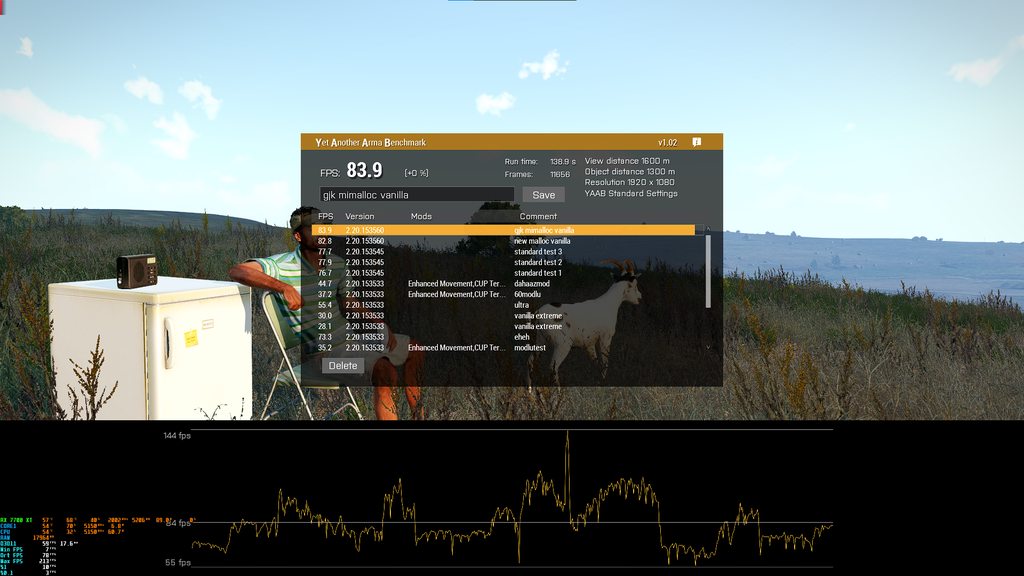
with new mimalloc: I get 59 lowest, 142 max and 82.8 avg
Gjk version(2026.02.03): 55 lowest 144 max and 83.9 avg
kinda same (can't send an img)
eternal kraken
mimalloc had an strong impact when i had my 7700k but since i use a x3d processor the impact of the allocator is very small
pallid sluice
pallid sluice
so i have ryzen 5 7600 cpu, a cheap mobo
with new mimalloc: I get 59 lowest, 142...
- rx 7700xt
patent sky
with new mimalloc: I get 59 lowest, 142 max and 82.8 avg
Gjk version(2026.02.03): 55 lowest 144 max and 83.9 avg
within margin of error, thanks :D
pallid sluice
i used to get 70ish on vanilla and when i started to use mimalloc from gjk i got 80ish(i discovered this like 1-2 week ago ... the days i played 15 fps is over)
pallid sluice
patent sky
> with new mimalloc: I get 59 lowest, 142 max and 82.8 avg
> Gjk version(2026.02...
yeah thought the same within a margin of error
 knotty wraith
I have not seen a message that there will be an increase in FPS.
opal hound
pallid sluice
yeah probably the aim for this is the version from the new malloc to be as close as possible to gjk in terms of performance(like shouldn't be less than gjk's version)
knotty wraith
mimalloc_v217_lock_pages - the most productive - it has already been said hundreds of times
patent sky
It literally is his version, just compiled ourselves.
different compiler etc so I wanted to validate it at least still works aproximately as good
opal hound
didn't we already find there was no benefit to locking pages lol
pallid sluice
so yeah different kind of compiling, same kind of performance so overall not bad. And even better if its going to make its way into the base(default) version in the future. I didn't know that changing malloc could improve performance that much and i was shocked when i saw that like a week ago(playing this game since the end of 2015)
 cloud sky
opal hound
didn't we already find there was no benefit to locking pages lol
cloud sky
opal hound
didn't we already find there was no benefit to locking pages lol
How come?
eternal kraken
with my 7700k mimalloc 214 lock pages was the best choice
knotty wraith
 opal hound
I remember there being a discussion a while back but I've forgotten most of the details
The lock_pages variant has been removed from recent builds and instead mimalloc will always lock large pages, I'm just not sure on the size of those pages (lock_pages was 8x1GB)
knotty wraith
knotty wraith
at the bottom are the results of mimalloc_v217_lock_pages
empty goblet
crumble / dedmen ... does the BI Mimalloc support the customizable option parameters defined as system/local variables ? (i assume it does but making sure)
whole cloud
Same as GJK, yes
empty goblet
thanks
oh i see, the new malloc dll is missing from server's dataset (it's only in client dataset)
empty goblet
eternal kraken
with my 7700k mimalloc 214 lock pages was the best choice
you shall try apply this in batch starting the server binary #perf_prof_branch message
empty goblet
opal hound
I remember there being a discussion a while back but I've forgotten most of the ...
see the post i linked in my previous message, there are environmental varible options for mimalloc you can define the behaviour
and get the similar(same) effect of pre-locked region
empty goblet
knotty wraith
mimalloc_v217_lock_pages - the most productive - it has already been said hundre...
same as above ;)
knotty wraith
- Added: Mimalloc allocator
Is this the beginning of a new path or just the official version of an unofficial one?
empty goblet
knotty wraith
- Added: Mimalloc allocator
Is this the beginning of a new path or just the off...
the latter as explained above by crumble
knotty wraith
a tribute to modernity)
heavy vortex
eternal kraken
mimalloc had an strong impact when i had my 7700k but since i use a x3d processo...
Note that malloc-spam was heavily reduced in 2.20, so A3 depends less on the allocator than it used to.
whole cloud
Might consider later (much later) whether to also add it to main branch.
Afaik mimalloc causes higher memory usage, and stops paging out memory to Pagefile. Which I consider a blocker for making it a default option.
whole cloud
🤔
I can't think of a way that makes sense.
Unless I forgot to actually push the changes I did
What was the repro for the old lag, for which this fix was originally introduced?
heavy vortex
You mean back in 2.18 v28 or whatever? No idea. Wasn't mine.
whole cloud
Waiting for the person who knew to read this
knotty wraith
heavy vortex
~~v53~~v54 still high jitter btw
can you make a vanilla version of your dough without dls? We're also interested in checking it out.
heavy vortex
I don't know if I can replicate on any vanilla map. SPE is brutal.
Maybe some bit of Livonia.
oh, that's not exactly vanilla either
knotty wraith
heavy vortex
Maybe some bit of Livonia.
no dls
heavy vortex
Altis and Malden are the same four buildings everywhere :P
 obsidian condor
But they are different colours on each 😉
heavy vortex
Tried it on La Trinite but you don't consistently get any long frames there.
Sometimes there's one.
light cargo
knotty wraith
- Added: Mimalloc allocator
Is this the beginning of a new path or just the off...
learn to read conversations
knotty wraith
light cargo
learn to read conversations
learn to be tolerant of non-Latin speakers
heavy vortex
Holy shit, leave it out.
 spiral pond
heavy vortex
I don't know if I can replicate on any vanilla map. SPE is brutal.
spiral pond
heavy vortex
I don't know if I can replicate on any vanilla map. SPE is brutal.
one can get the free "compatibility" version from workshop and use camera in Eden - fast fly that way may be enough?
heavy vortex
You can open the map with the compat mod?
light cargo
dont compatibility mods not include terrains?
spiral pond
yes in Eden - just not preview/play
heavy vortex
Curious. But yeah that'll work, you just won't get the measurements.
frosty heath
whole cloud
the jitter is still present however it's less than it was in v53
on my end
spiral pond
shift or alt or combo was fast camera from what i recall
heavy vortex
Oops, did I quote the wrong version.
spiral pond
do you need to fly over Mortain (city/center of map) or also other areas?
frosty heath
frosty heath
the jitter is still present however it's less than it was in v53
actaully the jitter is barely present
spiral pond
our team tried to reduce the complexity (less unique objects) - no clue if the 4k textures are relevant, or just object complexity and unique amount per area
anyone tried to capture frames of the jitter yet? ie if file load threads are actually the problem
spiral pond
hm low cell size may also play a role. however other terrains should also have 3.125 (or similar). maybe its the combo
heavy vortex
Also:
Hmm, staring at v51 profiling results. The hitches happen when it's loading assets for a large building, but the main thread is waiting for a much simpler object. In this example it's a tree that takes about 2ms to load, but that's not started on the FileServerAsync thread until the house is completed.
spiral pond
does it require ultra setting for texture quality?
spiral pond
ok. afaik only ultra loads 4k
frosty heath
it's also pretty visible for me on Zargabad 2025 in the cup terrains 2.0 mod
which i assume uses 4k textures
for the new buildings
heavy vortex
I was wondering about Cherno 2020 as it uses Livonia buildings.
frosty heath
heavy vortex
hmm, like 50% worse if anything
for me v54 ran better than v53 but theres still a slightly noticeable jitter than on stable / back on v52 when he removed it all
empty goblet
so, ultra settings (4k textures), and high terrain fidelity and complex building ? for the jitter repro
heavy vortex
Very high textures is fine, need ultra for it to be measurably bad.
Standard terrain with ultra textures was still awful.
 vale shoal
Hello. I have reports of players having issues to connect on servers with latest profiling. Mostly a freeze and the character stuck in the process, while the character is getting duped.
Edit: both players playing on my Chernarus 2020 server, I couldn't reproduce this issue for Altis
heavy vortex
Server with latest profiling or client?
vale shoal
Client is latest prof, server should be on v52
 void badger
rpmalloc_bi_x64.dll soon?™
eternal kraken
empty goblet
you shall try apply this in batch starting the server binary https://discord.com...
no difference with my 7800X3D sir

 empty goblet
eternal kraken
no difference with my 7800X3D sir
empty goblet
eternal kraken
no difference with my 7800X3D sir
ofc i must ask if your account (or the user group) has the Large Pages allowed and has continuous blocks to allow those to be properly used (even MS OS allocator can end with fragmented memory blocks unable to provide the large blocks)
also are you aware you trying reserve 32 x 1 GB of large page blocks ? see the documentation https://microsoft.github.io/mimalloc/environment.html
eternal kraken
ok now i added my windows user to the group of "Lock pages in memory" allowed users and then made a restart, the environment variables now doing something
 opal hound
huh that's a few. Are you launching the exe directly with a batch script?
eternal kraken
yes
eternal kraken
eternal kraken
this is how is start arma for now
opal hound
I presume if I launch the launcher with env variables they won't be inherited by the child process (if it even is one)?
oh yeah I'm blind
eternal kraken
i will do more tests with increasing the MIMALLOC_RESERVE_HUGE_OS_PAGES
the only thing with increasing MIMALLOC_RESERVE_HUGE_OS_PAGES above 8 is my RAM usage
 empty goblet
eternal kraken
the only thing with increasing MIMALLOC_RESERVE_HUGE_OS_PAGES above 8 is my RAM ...
empty goblet
eternal kraken
the only thing with increasing MIMALLOC_RESERVE_HUGE_OS_PAGES above 8 is my RAM ...
ye don't expect miracle ... especially on cpu with large l2/l3 cache but there is slight but noticeable improvement
eternal kraken
i made more YAAB runs

now after i added my windows user to the group of "Lock pages in memory" allowed users i even got the higer fps without environment variables
empty goblet
do you know System Informer ? it has special feature in the memory cleanup where it combines continious pages
eternal kraken
but i will stop here
if i hit 104 FPS or 109 FPS in YAAB isnt that big deal for me
empty goblet
if https://systeminformer.sourceforge.io/downloads , run , ctrl + i > memory > empty all, then memory > combine memory pages , then try run A3 with locked pages (especially if trying to go more than 8x1 GB)

System Informer
System Informer, A free, powerful, multi-purpose tool that helps you monitor system resources, debug software and detect malware.
eternal kraken
dwarden, i feel like you laboratory mouse, stop triggering me 😆
empty goblet
eternal kraken
if i hit 104 FPS or 109 FPS in YAAB isnt that big deal for me
ye in normal scenario/usage it will not be that noticeable either, it does work on extensive situation (100s to 1000s entities, tons of mods, etc.)
anyway the options are there, it's up for everyone to use
eternal kraken
now i am a bit confused because with no environment variables i also hit that 108 fps in YAAB, must be the added windows user to "Lock pages in memory"
empty goblet
ie this is before RAM cleanup (W10)

this is after

now in my case there is always like 32 to 48GB of zeroed so ... not that much of issue but for those with less RAM such step can help with the LP/HP use
whole cloud
whole cloud
What was the repro for the old lag, for which this fix was originally introduced...
@frosty heath did you know?
frosty heath
like when I originally found it? I just place a unit outside of mortain from Le terte, place game master and fly up through mortain at ultra texture settings
you can see in the videos in our DMs
Unless you mean the lag for which the fix thats causing this was introduced, then I have no idea
frosty heath
if it was me that said something like that I just meant the more recent texture loading jitter lag
this was the original addition of what's seemingly been causing the texture jitter right?
could be worth it to ask the guy you mentioned there
whole cloud
Ah right.
#perf_prof_branch message
#perf_prof_branch message
There it was, and the huge number of files, was caused by bisign files being loaded in server browser
 inland dew
eternal kraken
now i am a bit confused because with no environment variables i also hit that 10...
inland dew
eternal kraken
now i am a bit confused because with no environment variables i also hit that 10...
have to restart pc after adding user.
otherwise it doesn't work
eternal kraken
inland dew
have to restart pc after adding user.
otherwise it doesn't work
yeah i know like i wrote, but now i get YAAB 108 FPS average without the EnvVars only with the added user in "lock pages in memory"
heavy vortex
whole cloud
PhysX joints, doesn't apply. The benchmark is specifically loading some unit mod...
Hmm, any particular reason you asked about trees here? Because it's generally spending the time in the async thread loading building textures but the main thread is blocked on a tree model.
edgy chasm
whole cloud
someone days ago said the original lag is back
oh the server browser freezing? it was me simply viewing my recent servers, i can try getting vTune set up again if that'd help
whole cloud
heavy vortex
Hmm, any particular reason you asked about trees here? Because it's generally sp...
physx joints changes. Every tree has one
But it shouldn't have performance impact, and we already found out thats not it
whole cloud
edgy chasm
oh the server browser freezing? it was me simply viewing my recent servers, i ca...
no need
whole cloud
Adding an entry into the filecache.
Without my "fix" 1us per call.
With my fix 16us per call
The new version, 6us per call
But.. Overall. Its actually not much.
It doesn't explain lag spikes.
whole cloud
Found one lag spike issue in texture loading.
We calculate how much spare time we have to spend with loading textures.
The code decides that we have 26ms of time.
And then goes ahead and runs texture loading for 81ms.
During texture loading, it never checks the remaining time, it just processes all requests 🤔
whole cloud
whole cloud
Adding an entry into the filecache.
Without my "fix" 1us per call.
With my fix 1...
Oh... What.. the hell.

That must've been OS suspending the game tho 😄
silk pewter
whole cloud
Found one lag spike issue in texture loading.
We calculate how much spare time w...
in the end, do you remove remaining time calculation or do you check remaining time for texture loading 😁
empty goblet
want load, enough spare time, keep loading, plenty of time, keep loading ... OS: SUSPEND !
whole cloud
I added a time limit for the texture loading, so it cannot spike too hard.
Or rather, I made the current time limit actually work, and I also limited it to max 20ms.
I removed the fileCache changes.. I cannot properly reproduce a benchmark to actually find the problem.
It definitely is about 16x slower, but 16us instead of 1us, still is too little to be noticeable.
Downside is we get back the several second freeze when the server browser cleans up the bisigns after loading them all.
A cooler solution would be to put all bisigns for a mod, into a single file.
Then we don't need to open hundreds/thousands.
But that's also too much work
The next biggest issue flying over Mortain, loading models, p3d's from disk. Can't do much there. Could probably async request the model, and not render till them. I thought that was already a thing but apparently not for all models.
Next is creating the cache for ground clutter (grass).
Mh... Loading p3d's.
Is again a spare time thing.
We decide we have enough time to load the model right now.
So... we bog down for 30ms to load this model immediately, instead of async requesting it.
silk pewter
limited it to max 20ms
if this is the remaining time, why limit it – leave more room for something else just in case?
whole cloud
silk pewter
> limited it to max 20ms
if this is the remaining time, why limit it – leave mor...
Because when FPS is low, it might decide to spend 50ms for loading textures.
If we limit it, FPS could be higher, but textures load in slower
whole cloud
whole cloud
Mh... Loading p3d's.
Is again a spare time thing.
We decide we have enough time...
This code is weird.
If we have spare time, do it immediately and cause a minor lag spike.
If we don't have time, don't even request it, go to lowest possible resolution and force load that one.
Next frame when we have time, we load the higher resolution immediately and cause a minor lag spike.
Why not just, file a request for async loading when we don't have time to do it now 🤔
Let it load in background...
whole cloud
Its supposed to load in background into ram, before it loads the model from it.
But somehow that's still not enough. Its still loading from disk in there 🤔
whole cloud
heavy vortex
hmm, like 50% worse if anything
So according to my tests #perf_prof_branch message
Yes the old was slow, but v54 one takes less than half the time.
But you still judge it to be worse.
Confusing :/
But I'm removing it in next update.
You wrote you had profiling results, but I didn't get to see them. Maybe I can spot something?
heavy vortex
I didn't mark the versions so I'll get some fresh ones for v54 shortly.
One run of Mortain on v54 with 0.3s slow frame captures:
cpuCount 4 btw :P
(4c8t CPU)
I like how in the last one, 600ms into the frame it decides it's a good time to load some more textures.
heavy vortex
It looks like the AudioJob threads are also waiting 300ms so that they can load 4k of data.
whole cloud
Processing crash reports of last 8 days.
200 total
34 are the same server who didn't update, still running in a old long fixed crash like 5 times per day.
4, that same server running into another already fixed crash.
20 xaudio
17 amd graphics driver crash
19 exit crashes related to strings :/ There is still something corrupting, but what is it..
3 about selecting lights and there are some invalid/already deleted lights in the list. I don't know, it seems to be some scifi mods that have lasers, where this happens the most.
A couple that didn't update and still have the chat channel crash.
1 Reshade
7 drawing icons on map (Still no repro, but I was told it was more likely to happen when drawing while the map is still loading textures. I think I asked someone for a repro but I don't see it in my open DMs...)
1 Nvidia driver crash
1 Discord overlay crash
Some corrupted model files
1 Steam crash
A dozen attached objects crashes (that's because I added multithreading to it and something is wrong, but its pretty rare)
5 crashes, already fixed months ago. Same server who is running old version.
About a dozen crashes of people trying to pirate but failing.
2.. uh.. -cpuCount=2 -maxmem=0 wtf are you trying to do buddy.
1 uh.. someone removed the exit/cancel button from the options menu??
1.. config "3AS_LAATC_Wampa" inherits "3AS_LAATC" which inherits "3AS_LAATC_Wampa" ... how do you even manage to do that?
Pretty good overall.
I want to get the map icons fixed
heavy vortex
I couldn't reproduce the map icon crashes. Ended up taking speculative measures to reduce them and then had one crash in six months.
Was gonna turn off some of those measures for a test cycle to see which ones actually helped, but we have a lot of other things to test.
whole cloud
I know the texture ones are something corrupting a linked list.
But I added locks around it in case its multithreading, but that wasn't.. oh. mh. Something might remove itself from the list on deletion, where there is no lock 🤔 To be investigated
fair swan
I had reported a heavy stutter/freeze when you get sort of close to a player a few weeks ago.
It seems that the behavior has changed, instead of a hard stutter, their body and gear and weapons turn completely white for a short period of time - almost like a flash
Edit: [AMD GPU / Drivers] - if it makes any difference
 tawdry parrot
FWIW, my nVidia crash is back with v54. Seemed to be fine since v50 up until today (first time playing with v54 was today).
 timid coyote
We just had a server crash because of a stack overflow in some .net framework dll. @whole cloud Are you guys interesed in that? Got a RPT, bidmp and mdmp
 whole cloud
timid coyote
We just had a server crash because of a stack overflow in some .net framework dl...
whole cloud
timid coyote
We just had a server crash because of a stack overflow in some .net framework dl...
We don't use net framework, but I can tell you which of your mods is broken if you send the mdmp
silk pewter
the launcher uses .NET Framework :-p
fair swan
Lou is .NET Framework
silk pewter
it's rich, coming from "C" 😄
heavy galleon
you got 4 more + than C 
patent sky
timid coyote
We just had a server crash because of a stack overflow in some .net framework dl...
clib is .net framework, probably that
 drifting swan
And I took the RAM sticks from another server. Server hasn't crashed for a couple of weeks
fair swan
If I crash and click send, I dont need to do anything else right?
 restive turtle
fair swan
I had reported a heavy stutter/freeze when you get sort of close to a player a f...
restive turtle
fair swan
I had reported a heavy stutter/freeze when you get sort of close to a player a f...
Wtf XD
whole cloud
drifting swan
And I took the RAM sticks from another server. Server hasn't crashed for a coupl...
I disabled compiler optimization of that code section two weeks ago. Since then no new crash reports about it
Probably just have to do that in Stable too
drifting swan
whole cloud
I disabled compiler optimization of that code section two weeks ago. Since then ...
in 2.20.153545 ?
whole cloud
yes
drifting swan
heh, server is running this version)
 plush valley
would this branch help my fps in ai heavy missions
or alteast make arma 3 use more of my system it barely uses 50% cpu in ai heavy missions
void badger
Probably, as long as the server itself is running perf and fits the hardware needs. More info in #hardware_vs_arma
 minor epoch
@plush valley it might, depends on circumstances, but one thing is for sure youre never getting to 100% usage if you have more cores than the game uses
whole cloud
plush valley
would this branch help my fps in ai heavy missions
Help, yes definitely.
How much? Uncertain.
whole cloud
Any feedback on the weapon deployment on ground?
Noone complained yet so maybe it's good?
kindred radish
I just wanted to try but somehow my performance is so bad with the latest profiling build i have to check what's wrong first 😅
Edit: Still had the "Vulkan-based translation layer for Direct3D 8/9/10/11" active, surprisingly it doesn't make much off a difference at 1080p, but with 1440p (Very high pre-set) I suddenly got sub 60 FPS with a 7800x3d and a RX 9060 XT.
I could swear that was different some versions ago.
kindred radish
I couldn't get the char to get under the map, but with some wiggling you can still get this kind of situations.


@whole cloud
whole cloud
Do you think thats still better than previously?
kindred radish
Some players will always find a way to cheese I guess.
Maybe it can be improved in a way that there is a additional "measure point" for such collisions further back at the body, and then adjust the positions of the player or block bipod deployment?
managed to get under the map here

Or it looks like that at least, cant even see my char anymore.

 uneven bluff
^ Have collisions changed at all recently? There's like a 20 year old bug with armas where if you have high enough fps you can just sprint-prone through fences and walls.
heavy vortex
I would imagine that still works.
uneven bluff
heavy vortex
I would imagine that still works.
Yeah. Looks like just prone deploy is changed. Has a few exploitable positions but doesn't feel like something you can get to easily. Feel like easiest way to do it without these kinds of glitches is to just not lock player animation (bipod anim still plays), apply the recoil reduction, and then exit deployment state when player is no longer in a spot where they're allowed to deploy.
whole cloud
whole cloud
whole cloud
 ember owl
The ReShade one is huge that rocks 🙏
patent sky
whether rendering modifications like DXVK
inb4 servers start blocking proton
 ember owl
I didn't know what DXVK was but that's equally awesome to have access to though- honestly huge. I'm not the guy who implements those kind of things, but I doubt that the guy who is ever would. We got Linux users on our team 
I guess not to say that maybe other servers won't, but I'm optimistic. Would be pretty stupid as they'll just resort to playing somewhere better 🙂
 potent sparrow
patent sky
> whether rendering modifications like DXVK
inb4 servers start blocking proton <...
potent sparrow
patent sky
> whether rendering modifications like DXVK
inb4 servers start blocking proton <...
I'm honestly surprised battleye wasn't already blocking reshade or is that a "can be selectively enabled" thing? given how easy (sadly) it was/is to use reshade to cheat
whole cloud
Tell me if anyone knows more of such mods that might be useful to list there, I only know those two, and Nvidia filters which we already blocked.
If multiple can be active at same time though I might need to change it to array 😄
whole cloud
potent sparrow
I'm honestly surprised battleye wasn't already blocking reshade or is that a "ca...
We can choose to disable reshade.
But chose not to.
knotty wraith
whole cloud
We can choose to disable reshade.
But chose not to.
Well, in communities where players under 200 turned it off with their tools, because even in arma2 it was possible to even trivially draw a sight on the screen.
opal hound
My monitor has that capability too but you're not gonna be able to block that
whole cloud
Your monitor most definitely does not have the capability to see information it doesn't have
opal hound
Maybe I'm misunderstanding what a sight is
empty goblet
whole cloud
Tell me if anyone knows more of such mods that might be useful to list there, I ...
quite sure some can be combined ... so the array is safest
 analog acorn
whole cloud
Your monitor most definitely does not have the capability to see information it ...
analog acorn
whole cloud
Your monitor most definitely does not have the capability to see information it ...
I think they meant the monitor has the ability to draw a crosshair (sight) on the screen. Some monitors can do it as part of the OSD, though it's just a static centre point and not anything dynamic - I'm not sure if that's what Dimon meant.
analog acorn
whole cloud
We can choose to disable reshade.
But chose not to.
Reshade does have 2 versions, the basic one that disables certain features if it detects it's in MP, and the full version that can do everything at all times. I believe the second one is, or at least was, blocked by BE in Arma (source: had to turn off BE to launch with it)
whole cloud
Oh yeah. My monitor can also draw a sight, its called a marker pen. Or a piece of tape.
heady plinth
we talking about cheat monitors? https://www.youtube.com/watch?v=3PEdVFoCOJ0&t=22s
not gonna lie, i only read like 5 messages, so.. 😄
heavy vortex
Hmm, did that 20ms per frame cap for texture loading get implemented?
light cargo
whole cloud
Oh yeah. My monitor can also draw a sight, its called a marker pen. Or a piece o...
no, it's a built in feature that draws on top in the display side without physical marking needed
empty goblet
i have one monitor with such feature ... those crosshairs are ugly and they can't even be modified ... like ... imagine if they made it skinable and sold them for fee 🤣 no wonder so many of those corporations run out of money
it's also double funny as the firmware of the monitor is upgradeable and the OSD is skinable and the crossharis are just form of the OSD and overlay...
{so you can do whatever you want on the whole screen (ie show text or draw shapes) if you have diag mode and unlocked firmware}
whole cloud
heavy vortex
Hmm, did that 20ms per frame cap for texture loading get implemented?
yes it says in changelog
whole cloud
light cargo
no, it's a built in feature that draws on top in the display side without physic...
Oh really? WOW! That's so amazing! So cool!
light cargo
nice sarcasm -.-
heavy vortex
Was curious whether that would fix the jitter issue even with the engine closing files fix enabled, but you changed them both at the same time :P
light cargo
curious question: is the internal access for select third parties pretty much the same as dev branch or some form of sdk is licensed? sorry for asking something kinda confidential, also have any equivalent to profiling branch over there?
how do you profile multiplayer situations with the profiling binary if it got mp disabled?
same with dev branch, how do you develop mp stuff on it?
 quartz rampart
empty goblet
it's also double funny as the firmware of the monitor is upgradeable and the OSD...
quartz rampart
empty goblet
it's also double funny as the firmware of the monitor is upgradeable and the OSD...
what if i tell you that my monitor is that way....(i spend to much on that screen ffs, and for features i dont really use)
 willow vault
- Added: Proper time limit for per-frame texture loading, should smooth out lag spikes due to texture loads
I used to wait sometimes minutes after opening Chernarus 2020 for the first time and setViewDistance 20000 and setObjectViewDistance 20000. Now it doesn't freeze. Pretty cool 👍
light cargo
why do you need such excessive distances?
willow vault
i can, im usually just floating around the editor messing with lighting. No AI or game whatsoever.
light cargo
?
willow vault
customizing lighting. Not playing. Edit: I meant splendid camera =/= editor.
potent sparrow
whole cloud
We can choose to disable reshade.
But chose not to.
oh nice, I might have a play with it then if it's whitelisted 🙂 (or at least no explicitly blacklisted)
potent sparrow
empty goblet
i have one monitor with such feature ... those crosshairs are ugly and they can'...
Can on the Gigabyte M28U - it supports custom cursors/position however I never even bothered trying it, don't see the point and it requires another USB cable running to the monitor to do it
whole cloud
heavy vortex
Was curious whether that would fix the jitter issue even with the engine closing...
It won't, the closing files was a multi second freeze on bisigns
heavy vortex
Are you saying that the file closing change didn't fix the problem it was supposed to fix anyway?
fair swan
Very happy to see the weapon bipod deployment exploit getting some attention. 👏
I hope in the future this is looked into as well, the good ol' vehicle egress through a wall exploit.
whole cloud
fair swan
Very happy to see the weapon bipod deployment exploit getting some attention. 👏...
lol. Probably not
whole cloud
heavy vortex
Are you saying that the file closing change didn't fix the problem it was suppos...
It did fix it. But the side effect was just too bad
 median belfry
fair swan
Very happy to see the weapon bipod deployment exploit getting some attention. 👏...
median belfry
fair swan
Very happy to see the weapon bipod deployment exploit getting some attention. 👏...
You can make a script for it which triggers on getout eventhandler which checks for line intersects between the getout position and when the animation is done.
If there is something in between you just put the player back into vehicle
knotty wraith
median belfry
You can make a script for it which triggers on getout eventhandler which checks ...
We’re always happy to create things ourselves… but we really want to see this coming from the developers. I asked them to add a camera zoom‑in when a player presses up against a wall, so they wouldn’t be able to peek around the corner… and they told me no
median belfry
being able to change player position and zoom via scripts would actually be really good. First thing I would do is that the player is able to shoulder swap
knotty wraith
These are tiny details… yet they make a huge difference in how comfortable the game feels
knotty wraith
give the players the opportunity to get the ID of any weapon in the player's equipment, little things?
The game itself has this feature
patent sky
knotty wraith
give the players the opportunity to get the ID of any weapon in the player's equ...
knotty wraith
patent sky
https://community.bistudio.com/wiki/weapons
https://community.bistudio.com/wiki/...
string is everywhere, setvariable only works with an object
patent sky
I don't believe the weapon a player is holding is even a real separate object but i could be wrong
fiery crescent
Since there is talk about game improvements, can the AI respect walls and doors etc .. and stop walking through it like they don't exist.
patent sky
knotty wraith
We’re always happy to create things ourselves… but we really want to see this co...
This isn't a small "fix" this is a fundamental change to the 3rd person camera. probably controversial as well so we can't just replace the logic. it would have to be toggleable. which means UI changes, localization of setting strings etc
knotty wraith
patent sky
I don't believe the weapon a player is holding is even a real separate object bu...
The engine can somehow track a magazine as a unique entity even when it’s loaded in a weapon
knotty wraith
patent sky
This isn't a small "fix" this is a fundamental change to the 3rd person camera. ...
When you press up against a wall, the camera zooms in toward the player — is that really a problem? Just give me control over the player camera and I’ll handle it myself.
analog acorn
knotty wraith
The engine can somehow track a magazine as a unique entity even when it’s loaded...
Magazines can be unique entities [edit: not object entities, a different special kind of entity], and there are a couple of commands that return the unique magazine ID. It'd certainly be nice to have commands that can directly target magazines by ID.
But most other things don't work like that and don't exist as unique entities. The game just knows you have This Rifle with These Attachments and displays those models.
knotty wraith
I don’t need a detailed explanation of why it doesn’t work — I’d just like to have the ability to identify a weapon
analog acorn
I too would like to have many things that are impossible to have.
patent sky
knotty wraith
When you press up against a wall, the camera zooms in toward the player — is tha...
for some people it will be, I for one hate cameras adjusting automatically without my input
and in dayz you can straight up see less in 3rd person vs 1st person
control over the player camera is different, but you didnt ask for that.
I dont know specifics over why that is not currently possible
knotty wraith
analog acorn
I too would like to have many things that are impossible to have.
Flares that divert incoming missiles? They don't work... and everyone pretends that there is no problem.
patent sky
knotty wraith
Flares that divert incoming missiles? They don't work... and everyone pretends t...
feedback ticket? i don't recall having issues flaring missiles
analog acorn
I didn't know there was any problem with how flares work. It's a bit of a simple percentage chance, but that's not broken.
....but also, how does that have anything to do with what we were talking about?
potent sparrow
analog acorn
I didn't know there was any problem with how flares work. It's a bit of a simple...
was a bit of a rapid context shift 🙈
knotty wraith
I mean that we can fix a lot of things with scripts (scripted countermeasures in Arma 2 worked perfectly), but we would really like to have this implemented by the developers themselves.
ember owl
I'm not aware of any issues with flaring. Only "issue" which I guess I'm not even sure I'd call an issue since not sure if it was ever really intended is that flaring doesn't work when adding flares to a vehicle that otherwise wouldn't have flares with addWeaponTurret or whatever the command is (on my phone and can't check).
patent sky
would really like to have this implemented by the developers themselves
There is a skeleton crew working on a 13+ year old game, those sort of changes are pretty out of scope
you also bring up countermeasures again without saying whats actually wrong with them
analog acorn
knotty wraith
I mean that we can fix a lot of things with scripts (scripted countermeasures in...
There's a difference between "scripted feature that could have an engine counterpart" and "thing that is just straight up not possible at a fundamental level". Targeting specific weapons is the latter. There's nothing to target.
knotty wraith
patent sky
> would really like to have this implemented by the developers themselves
There...
They simply don’t work, and I have no idea how to demonstrate it — avoiding a missile always comes down to maneuvering, not countermeasures.
patent sky
countermeasures are useless without maneuvering (with certain exceptions)
thats how they work IRL too
you cant just pop a flare and go on with your day
knotty wraith
patent sky
countermeasures are useless without maneuvering (with certain exceptions)
thats ...
that's the point, we have real helicopter pilots flying)
potent sparrow
patent sky
you cant just pop a flare and go on with your day
I mean you can, it's just your day won't be very long 😄
ember owl
Our server typically has a good bit of people on a day and no ones reported any issues outside of the addWeaponTurret deal'o which also isn't very relevant tbh
-# Also no AI though either so maybe that's the difference maybe?
-# Idk iirc though disabling certain AI stuff prevents target locking? So maybe there's something in your mission giving you issues / different behavior?
patent sky
helicopter flaring is generally harder due to them being slower, but its not impossible
analog acorn
Worth noting that Arma does model different kinds of countermeasures. IR flares will do nothing against radar missiles.
Also, the individual missile's cmImmunity config matters; if you use missiles that are highly resistant to countermeasures then...yeah.
patent sky
could also be a Seeker/Countermeasure mismatc... ^^
what Nikko said
knotty wraith
I know the difference...
whole cloud
patent sky
I don't believe the weapon a player is holding is even a real separate object bu...
it is not.
whole cloud
knotty wraith
The engine can somehow track a magazine as a unique entity even when it’s loaded...
Because it manually passes an ID along.
or.. in places where it doesn't, creates a new magazine with same ammo count before deleting the old one
whole cloud
knotty wraith
I mean that we can fix a lot of things with scripts (scripted countermeasures in...
Thats great for you.
But there are a half handful of developers with already not enough time.
And hundreds of scripters that are bored after school
potent sparrow
whole cloud
Thats great for you.
But there are a half handful of developers with already not...
And hundreds of scripters that are bored after school
Or work 😉
knotty wraith
patent sky
helicopter flaring is generally harder due to them being slower, but its not imp...
That’s what a real helicopter pilot told me… the chance of flares diverting a missile when you’re basically stationary is around 30 percent, and a maneuver simply increases that percentage
ember owl
Also scripting support is pretty good given event handlers like incomingMissile exist
https://community.bistudio.com/wiki/Arma_3:_Event_Handlers#IncomingMissile
Plus 13+ year old game, I imagine only so much one can implement engine wise with everything already kinda being built the way it is
potent sparrow
depends on the missile (if it's a starstreak you aren't jamming/flaring anything), helicopter and altitude/speed, terrain and a bunch of other factors, doesn't really matter though because arma doesn't (and couldn't practically anyway)
analog acorn
potent sparrow
depends on the missile (if it's a starstreak you aren't jamming/flaring *anythin...
Arma does model some of this. Missiles have distinct cmImmunity ratings as I mentioned before, as well as flight models and handling characteristics, and guidance type matters. Altitude and speed are considered to an extent through the Sensors config.
potent sparrow
analog acorn
Arma does model some of this. Missiles have distinct cmImmunity ratings as I men...
I'm aware fella, it was more a "arma3 doesn't/can't simulate everything" comment even if they still had a big team on it which they don't, that they have anyone on it after more than a decade makes me happy
analog acorn
Please don't "fella" me.
ember owl
I'm probably gonna regret asking but what's wrong with "fella"? 😄
potent sparrow
ember owl
I'm probably gonna regret asking but what's wrong with "fella"? 😄
assumes gender, person I replied to had a preference in their profile (when I looked afterwards), people are allowed to have a preferred way of been addressed, they politely pointed it out, I'll politely use their preference and the world keeps turning 🙂
Ain't no drama if no one makes it drama
ember owl
Ah okay. I always took it as like "pal", "buddy" or "dude"; something that could kinda be used for anyone. Fair enough
 analog acorn
Actually just felt condescending in this context. "Buddy" would've seemed the same. If it wasn't intended to be then I apologise.
potent sparrow
analog acorn
Actually just felt condescending in this context. "Buddy" would've seemed the sa...
Oh no worries and no apology required, it's just a colloquialism in the local dialect where I'm from, in place of "mate" both are just a friendly way of saying affirmative 🙂
silk pewter
to avoid further confusion, use "duderino"
potent sparrow
silk pewter
to avoid further confusion, use "duderino"
I had the Flander's 'tache (for about 10 minutes and then the missus was all aww hell no), I left it when I shaved my beard because I knew that's how she'd react 😄
silk pewter
mustache ? 'aww hell no' : 'aww yisss'; 😁
potent sparrow
I normally look like my profile picture on here (that is eerily close to how I look, though less so without the helmet) it's why it's been my profile picture for years
whole cloud
avry's profilin logs from the Mortain lags are very interesting.
Main thread is suppossed to load a p3d, but its stuck waiting, because a sound file is currently loading.
This is sadly a very annoying limitation of Arma 3's async filesystem.
The operating system would let you read multiple files in parallel. So the sound load would not block the p3d load, especially on SSDs.
But the async file load, puts all requests in a queue (sorted by priority, and preventing DVD seeks), and then processes them one by one. If there is one super slow task in there, everything gets held up..
In this case, the worker thread just did nothing.. at all... It was sleeping.. I'd suspect the OS didn't wake it up?
Enfusion solved this nicer.
All resource loading is an async task, but all the filesystem is direct OS access.
Multiple tasks can run in parallel, the OS can read multiple files in parallel.
I can somewhat easily rip out this async filesystem, but then we loosse the ability to preload files, and do the actual loading later.
For example models, when they want to be shown, they request a preload and check every frame if its done yet. Only if its all loaded into ram, does it load the actual model from ram.
Digging quite deep into it.
The actual root cause seems to be this model loading.
Rendering code decided to load a specific LOD (It either waits for the async preload before loading it, or forces to use the lowest res one if none is available yet).
And after it decided to use that one, it MUST lock the model to access it, which loads it if it isn't yet. And it wasn't.
So either, the lowest resolution LOD of this model (spe_sandbag_long_line) had to be force loaded in (and maybe its too large and takes too long to load?), or the LOD selection code, somehow selected one that it thought was ready, but actually wasn't.
Enfusion also solves this problem... uhm... "better".. maybe. depends.
They just don't render the model until lowest LOD is ready, so you stand in emptyness and suddenly buildings pop up in your face.
A3 freezes until it manages to load the lowest LOD.
A3 has a distance limit for where it forces that a model must be loaded, and that is 200m.
200m distance, seems about right for the Mortain fly through test cases, for when the lag spikes appear?
That disstance could be reduced.
More time to gradually load the object while getting closer to it. But also you'll get more noticeable pop-ins
I'm not sure how this works, I assume with SPE it could be a LOD issue on the model.
Say the lowest LOD is too complex and too small on the screen.
So at 250m the game decides "I don't need to load that yet, its not visible enough to matter"
And then it gets into the 200m and suddenly needs to force load it, no matter how unimportant it is
spiral pond
once a p3d has been loaded, does the lowest LOD stay in memory (until mission end/terrain change)?
aka the mini stuck/freeze issue should no longer happen once you fly over the "whole" terrain to have all models loaded once?
whole cloud
@frosty heath can you confirm (next week or so is fine) that the last prof got rid of the lag spikes?
Your profiling logs didn't at all point to the file closing issue, so I'm not sure if removing that really fixes it..
Regarding the
the worker thread just did nothing.. at all... It was sleeping..
There was a change how it waits for the next task to be submitted, that was in prof v24.
But John found the lag started earlier. And this also doesn't seem to be causing problems in other cases. This lag seems too specific to be caused by that
quaint flame
whole cloud
Enfusion also solves this problem... uhm... "better".. maybe. depends.
They just...
That's not better..I hate that when I load into a scenario😅
 limpid steeple
I'm not sure how this works, I assume with SPE it could be a LOD issue on the model.
Say the lowest LOD is too complex and too small on the screen.
Lowest lod on that model is 264 faces with one section. Just for reference.
whole cloud
That's definitely good enough then. Maybe because of the encryption its slower
 pliant fulcrum
limpid steeple
> I'm not sure how this works, I assume with SPE it could be a LOD issue on the ...
pliant fulcrum
limpid steeple
> I'm not sure how this works, I assume with SPE it could be a LOD issue on the ...
It does use a multimat for its lowest lod. Whearas our other sandbags use a single unique 2048x2048 co supershader texture per object.
So the multi would reference 7 2048x2048 textures And 2 more from enoch.
whole cloud
Texture loading is separate.
Not good loading so many textures, but not lag spiking because of it
limpid steeple
pliant fulcrum
It does use a multimat for its lowest lod. Whearas our other sandbags use a sing...
Ooh that model isn't using an MLOD. I see what you mean.
pliant fulcrum
The same setup is present on these objects as well.
SPE_Sack_Potato_Pile.p3d
SPE_Sack_Wheat_Heap.p3d
SPE_Sack_Wheat_Pile.p3d
SPE_Sack_Corn_Heap.p3d
SPE_Sack_Corn_Pile.p3d
SPE_Sack_Potato_Heap.p3d
Roughly similar face count, and have a multimat on the lowest lod. Broadly a similar size to the sandbags. Although *long_line is quite thin.
whole cloud
This HDD/DVD seek handling code is also a bit.. old maybe.
If a file request would cause a seek and is not urgent, we sleep for 4ms and wait if maybe a urgent request comes in meanwhile, and take that instead if it does. So we don't block with a slow seek while something more important is waiting.
But on SSD's, we never block for a seek, that's just wasting 4ms per request there..
And that is minimum 4ms, because the worker thread will suspend, and we'll depend on the OS to wake us back up
silk pewter
moar purrformance you mean??
heady plinth
this issue is only on hdd?
empty goblet
whole cloud
This HDD/DVD seek handling code is also a bit.. old maybe.
If a file request wo...
detecting media or speed ? or maybe commandline / config setting where we could define how fast the storage is :) , in MB/s and IOPs 😁
then you can just skip the legacy code for the fast storage
whole cloud
heady plinth
this issue is only on hdd?
no, our HDD code also runs on SSD's
whole cloud
empty goblet
detecting media or speed ? or maybe commandline / config setting where we could ...
Thank you for telling me the idea that I had myself but rejected because too much effort.
quaint flame
Just show error message if game is started with hdd😬
silk pewter
refuse to start
empty goblet
and how you define that ? you can have slow flashdisk / usb 🤣 or someone with data on DVD  or even worse ... on LAN NAS (but oops 1gbit is slow and what about 100mbit only)
and for example SATA SSD or even NVME SSD w/o DRAM cache and which are very full (85-99%) can be as slow as HDD (happens especially with cheap controllers)
quaint flame
We just start crystal disk mark in the background before arma and read the speeds
empty goblet
and then someone like me digs out really good ramdrive driver which doesn't suffer from performance issue and giggle with 10GB/s
 ripe willow
empty goblet
and then someone like me digs out really good ramdrive driver which doesn't suff...
ripe willow
empty goblet
and then someone like me digs out really good ramdrive driver which doesn't suff...
So you literally downloaded more RAM?
frosty heath
whole cloud
<@1321562487652352051> can you confirm (next week or so is fine) that the last p...
I actually took a look last night and it ran fine, I noticed some slightly lower fps but I am going to rerun with nothing else running to actually verify that because it was negligible overall
will look later today and let you know how it is on my end for sure
frosty heath
frosty heath
I actually took a look last night and it ran fine, I noticed some slightly lower...
FPS was fine actually, must have been some settings or a mod when I had looked last night
checked just now and it ran fine, smooth flythrough on mortain
 indigo anvil
ripe willow
So you literally downloaded more RAM?
indigo anvil
ripe willow
So you literally downloaded more RAM?
ramdirve / ramdisk is a term used to define storage backed by.. ram.. most common example is tmpfs where lots of small files are written..
frosty heath
whole cloud
<@1321562487652352051> can you confirm (next week or so is fine) that the last p...
can confirm the lag spike is gone on my end
heavy vortex
What I don't get is why if the main thread is waiting for some forced object, that doesn't seem to get priority in the async thread? It's often loading dozens of textures first.
Also why on earth this file closing change has anything to do with it :P
 honest fulcrum
I agree with R3vo earlier regarding the Enfusion method- I too really dislike when you see literally nothing and then buildings start popping in. Lol
empty goblet
ripe willow
So you literally downloaded more RAM?
possible only for base Arma 3 + DLC for me because with size of the CDLCs it's larger than the RAM i have (so only some mods / some CDLC could be on it, if let say i sacrify 64GB for the ramdrive)
empty goblet
empty goblet
and then someone like me digs out really good ramdrive driver which doesn't suff...
also i was too conservative, the speed is more like 25 to 35GB/s
 weak radish
empty goblet
also i was too conservative, the speed is more like 25 to 35GB/s
weak radish
empty goblet
also i was too conservative, the speed is more like 25 to 35GB/s
For when you want the files loaded yesterday…
empty goblet
empty goblet
also i was too conservative, the speed is more like 25 to 35GB/s
nah it's just something i was using in era of slow mediums / drives with just bit of creative use of junctions you could save tons of loading time and get rid of stuttering in many games
fair swan
median belfry
You can make a script for it which triggers on getout eventhandler which checks ...
Interesting, is this easy to achieve?
Ive never looked into line intersects and such
potent sparrow
empty goblet
also i was too conservative, the speed is more like 25 to 35GB/s
never occurred to me to use a RAM disk on windows for arma3, that's exactly the kind of madness we like to see 😄 (which is ironic since I use them all the time on linux for stuff) at least a reason to have 64GB when running windows 😄
fiery crescent
potent sparrow
never occurred to me to use a RAM disk on windows for arma3, that's exactly the ...
Better have a good UPS 😁
fair swan
Server FPS is really good on this ver. My mission runs warlords which just kills FPS but today its resting around 45-50 FPS which I have never seen before. Normally it is around 35-40
100 gb of mods as well


129 AI / 18 players
empty goblet
fiery crescent
Better have a good UPS 😁
well that's why you have ramdisk software which loads / saves into image file of the drive and ofcourse you have UPS for more than reason to not be afraid of losing content of your RAM 🤣
1.54.134533 profiling & performance v19 server and client, windows/linux
- additional crash fixes
- integrity check on game/server startup with -crashDiag
https://www.dropbox.com/sh/582opsto4mmr8d8/3BSy9PdRGm
 worn obsidian
can u tell more on -crashDiag?
 smoky ridge
#arma3_troubleshooting message
Crossposting this as this is for some reason amplifies on the perf binaries for no apparent reason
heavy vortex
Curved surfaces with over-detailed roadway maybe?
If you provided the location then someone could probably figure it out pretty fast.
smoky ridge
heavy vortex
If you provided the location then someone could probably figure it out pretty fa...
happens in random positions over the whole map
if you place 10 Ch67s in the field to the west of Vyazuluk it starts to happen at a noticeable scale, but even 1 helo starts it
 thick jewel
I was the one who actually initially discovered the bug and Cplhardcore is trying to help me debug and research it, and I had some notes from when I was testing it. Basically, I would just take a manned helicopter and place it on the ground in various places on the map, and depending on where it was, I would get more lag spikes or less. sometimes the frame hitches were "wider" in the FPS graph than others, and basically anywhere I placed the helicopter was just flat ground in a field. Sometimes there is no lag, move the thing 50 meters north, little bit of lag, move it WAY north and then the lag was constant and severe. So it's not even consistent or like a "lag or no lag" situation, it's like a gradient but with no discernable pattern. I couldn't find a pattern with anything to do with proximity to the edge of the map or in correlation to the terrain itself it was sat on, we ran a mission on the map tonight and we had about 60 people in humvees and everyone was getting about 2FPS till everyone dismounted, then magically it was all ok. So, it's incredibly strange.
opal hound
Can you use the profiling binary and frame capture it?
opal hound
Is it specific to the one heli or any vehicle triggers it?
smoky ridge
Any vehicle. It can be AI crewed or player.
empty goblet
all what you need is in the 2 changelogs ^above, it just logs more stuff for us on certain crashes
worn obsidian
integrity check just drop the txt or really check and warn ?
empty goblet
it will output stuff into server log and additional files e.g. bankDiag_2016-02-11_17-25-27.log
whole cloud
smoky ridge
got it, trace attached
There is just a F ton of AI targeting
I need to repro this to see it better
I think this is just a case of ultra-huge sensor range, that ends up scanning the whole map
fickle geyser
Had similar issue years ago on few different missions. Once we had it on some African map, was caused by CUP Mi8 sensors (there was few of them parked in an airfield without crew). On the other occasion it was the big frigate thing.
heavy vortex
Hmm, where's the config for that sort of sensor?
whole cloud
vehicle / components / SensorsManagerComponent
Then maxRange
heavy vortex
thx
whole cloud
https://community.bistudio.com/wiki/Arma_3:_Sensors_Config_Reference#class_AirTarget like this I think?
It would probably be ground target?
I wanted to optimize exactly this.
So having a repro for it would be amazing
fickle geyser
A lot of them are 16k iirc so idk why it would be only some vehicles causing it
Might be a combo of few aligning things
whole cloud
More like terrains. Outside terrain gen
This is the thing of doing a super long raycast, to see if you hit terrain.
And going outside, it generates the whole terrain under the raycast, even if you're high up in the air
I talked about optimizing this.. half a year ago or so
heavy vortex
Is this the one where it raycasts past the target to check whether it's skylined?
whole cloud
yeah
 whole cloud
I actually forgot about that.
Now is a pretty good time to do it actually.
Give me that repro 😄
fickle geyser
heavy vortex
that one always seemed way OTT to me. Like if it hasn't hit anything after ~1km then it's effectively skylined anyway.
Never mind that the concept seems... overdetailed compared to other parts of Arma.
On that note I was a bit shocked to notice that bullets bounce :P
thick jewel
smoky ridge
got it, trace attached
and a point to add on this specifically is that it was reproduced in Vanilla + that map, so the sensor settings of the vehicles tested was just whatever they ship with base-game. CplHardcore might have more to add on that, but seems like a compelling theory that this is what is happening. That trace specifically might not have been when it was run in vanilla.
heavy vortex
The CH67 only has PassiveRadarSensorComponent which is described as "detects vehicles with active radar switched on at twice their active radar's range".
So unless there's some obviously dumb code where it does the expensive raycasting before checking for an active radar, it shouldn't be expensive if the only objects are other CH67s.
Also there's no reason that a passive radar would care about skylining...
smoky ridge
whole cloud
I actually forgot about that.
Now is a pretty good time to do it actually.
Give ...
Mods used are novogorsk and cup terrains core, plus ASP and its dependencies
smoky ridge
thick jewel
and a point to add on this specifically is that it was reproduced in Vanilla + t...
the trace was vanilla
heavy vortex
What's ASP?
smoky ridge
heavy vortex
What's ASP?
arma script profiler, mod that dedmen made
 obsidian relic
thick jewel
I was the one who actually initially discovered the bug and Cplhardcore is tryin...
obsidian relic
thick jewel
I was the one who actually initially discovered the bug and Cplhardcore is tryin...
I encountered something similar before and posted here, in my case it seems to be connected to map border: #arma3_troubleshooting message
thick jewel
obsidian relic
I encountered something similar before and posted here, in my case it seems to b...
Yea thats consistent with my findings, that the lag was more severe in proximity to the world border, though there was enough inconsistency i wasnt certain. The map is also so small that the issue could be exacerbated, you spend a lot of time near at least 1 border.
 cold vale
whole cloud
This is the thing of doing a super long raycast, to see if you hit terrain.
And ...
cold vale
whole cloud
This is the thing of doing a super long raycast, to see if you hit terrain.
And ...
Yep, would be nice to not have to do a patch like this to sidestep the issue although I don't really miss the terrain gen at this point, it had the initial work of having to tweak templates and missions that utilize any outside terrain area for staging or other stuff to handle it being turned off.
 worn obsidian
i have a lot of "BE protection kicked in for player id=xxxxxxx, name='xxxxxx', msgType=85" i dont know what this
whole cloud
whole cloud
whole cloud
feral harness
Don't spawn with UAV terminal - problem solved
whole cloud
smoky ridge
Mods used are novogorsk and cup terrains core, plus ASP and its dependencies
My FPS are finding great joy in this mission 😄

Lets see how much I can stomp on this
 whole cloud
Going in like "this'll be easy"
Arriving in the code like:
 silk pewter
is this Arma 4 leaks?
smoky ridge
whole cloud
Lets see how much I can stomp on this
wait is that ASP?
whole cloud
no
smoky ridge
oh
whole cloud
well ASP could do that too, but no
ASP's engine profiling mode would show basically the same, but it doesn't work right since the AI coroutine stuff
smoky ridge
ahh
whole cloud
lol a stupid two-liner optimization.
We do a raycast to try to hit terrain.
If the ray goes upwards, and the ray start position is already above the maximum terrain height, abort immediately.
So stupid simple, but it actually does get hit.
In the repro, the maximum height is 281m
A vehicle at 241m is trying to check a vehicle at 260m
it's casting 20km outside of terrain, even though after 1km its already above the max height and cannot possibly hit anything (Exactly as expected lol)
quaint flame
Someone had flying tanks in mind maybe
analog acorn
whole cloud
lol a stupid two-liner optimization.
We do a raycast to try to hit terrain.
If t...
Curious about how this interacts with non-terrain objects. I think checking if the target is in front of e.g. a skyscraper would be valid, even if it's above max terrain height.
whole cloud
It doesn't interact with any objects
whole cloud
@smoky ridge do you have such outside terrain issues too, or did I break something 😄
 potent sparrow
quaint flame
Someone had flying tanks in mind maybe
potent sparrow
quaint flame
Someone had flying tanks in mind maybe
isn't that just anything starting Su- or Mig-?
whole cloud
whole cloud
Lets see how much I can stomp on this
heeeeeey. That looks like something.
P90 from 2.8ms to 90us..
Now just need to figure out if I got some edge cases wrong...

 lethal gorge
silk pewter
*is this Arma 4 leaks?*
lethal gorge
silk pewter
*is this Arma 4 leaks?*
even you know thats a lie
Arma 4 is just Arma Reforger 2
whole cloud
Direct comparison, calling old and new with same arguments, and getting the same results out
The worst case is just it going nearly horizontal, along outside terrain and it might hit something. Not much I can do there.

 silk pewter
you saved the peak
whole cloud
oops nevermind. I messed up that test and actually left the outside terrain part disabled 😄
This was only cutting off parts that are above max height.
Makes the line to be checked much shorter.
There is the full one

 honest fulcrum
Did Alt+F4 behavior get changed? It seems to kill slower. Not a problem per se but something feels different
fair swan
honest fulcrum
Did Alt+F4 behavior get changed? It seems to kill slower. Not a problem per se b...
Do you ever get a crash code when you alt f4?
honest fulcrum
I used to, but now I don't. I guess it feels slower becuase it's exiting correctly now 🤣
whole cloud
Yes some exit cleanup was fixed, making it a bit slower. But I don't think that much
fair swan
honest fulcrum
I used to, but now I don't. I guess it feels slower becuase it's exiting correct...
My game throws error code when I alt f4 sometimes but I use a lot of mods so I dont focus too much on it
empty goblet
do you want to exit or crash out 🤣
smoky ridge
whole cloud
<@979038425439154206> do you have such outside terrain issues too, or did I brea...
you broke something
whole cloud
 proud cape
exiting cleanly is always slower than crashing
proud cape
exiting cleanly is always slower than crashing
I was thinking about making the crash cheat code available in prof 😄
whole cloud
smoky ridge
you broke something
It was the rendering multithreading, which we turned off because it made things flicker 😄
It also makes the outside flicker apparently
empty goblet
whole cloud
I was thinking about making the crash cheat code available in prof 😄
then someone will figure out how invoke it via remote exec 🤣
empty goblet
whole cloud
It was the rendering multithreading, which we turned off because it made things ...
always something blocks nice things more smoother FPS 😁
whole cloud
Fixed: Possible fix for map drawIcon crash
Nope, that didn't work.
heavy vortex
If it'd help to get more crashes then we could turn our mitigations off temporarily :P
whole cloud
I need to crash myself
heavy vortex
yeah not happening. It never crashed here.
whole cloud
ref to non-network object.
Assigning a local-only unit to zeus (please don't do that)
Seems only one server is doing that.
Those are all the reports I've received in the last month
 heavy vortex
That reminds me. We get an warning message about creating a local vehicle with backpacks. I assume that's harmless as long as we're not actually accessing the inventory?
whole cloud
Backpack is such a mess. Its harmless if you ignore it
whole cloud
Wow someone managed to put a backpack inside itself xD
Calling setUnitLoadout from within a WeaponChanged eventhandler. Impressive.
fair swan
whole cloud
Wow someone managed to put a backpack inside itself xD
Lol it wasnt until recently I discovered you can put guns in your bag
But a backpack in backpack is impressive
Oh I read that wrong they put it inside of itself 💀
minor epoch
overall ItemAdded/Removed EH (any inventory item in any slot) when 
obsidian condor
Have been putting empty backpacks in backpacks for years in A3 Epoch mod
Oh, just noticed the "inside itself" too lol
empty goblet
curious question any update to profiling recently could increase the speed (amount) of addmagazine and similar into cargo per cycle / frame / second ?
empty goblet
whole cloud
Wow someone managed to put a backpack inside itself xD
half step toward bag of holding with pocket dimension 😁
potent sparrow
empty goblet
half step toward bag of holding with pocket dimension 😁
Having written a persistence system for arma 3 that fully saved/restored all containers of containers of containers with magazines partially used, I'm convinced that arma3's inventory system exists in a non-euclidean 11 dimension topology 😄
empty goblet
ignore the BE messages, it's just for us to track some bugs, also it's bugged (wrong info) and spammy (too many/second) in v18/v19 (will be fixed in v20)
uneven bluff
Any recent changes to pylons? Been seeing a new bug that may be around setting pylons, pylon ammo, and rearming.
heavy vortex
With whose pylon code? :P
uneven bluff
Probably mine tbh. Pylon sqf code is so complex esp with locality and timing issues. I'm just wondering if anything's changed recently. Had a game where a couple people were experiencing the same issue.
heavy vortex
I had issues with our pylon code, but I'm not sure how many of them were new because I hadn't tested it properly before.
uneven bluff
heavy vortex
I had issues with our pylon code, but I'm not sure how many of them were new bec...
How recently and with which version?
heavy vortex
About a week. The main discovery was that setPylonLoadout isn't reliable unless you spam it everywhere. But I read the ACE code and they were already doing that. So it's probably not new.
uneven bluff
Hm we usually just call it on where the vehicle is local
heavy vortex
yeah, just do what ACE does. They know better than the wiki :P
heavy vortex
Thing is, setting where the vehicle is local nearly works.
uneven bluff
And 2 regulars reported the same issue today
 clever roost
heavy vortex
Thing is, setting where the vehicle is local *nearly* works.
clever roost
heavy vortex
Thing is, setting where the vehicle is local *nearly* works.
is that just removing the players so its local to server?
heavy vortex
but I could convince it to break by setting on one client and then boarding the vehicle on another client.
I couldn't replicate the issues when the plane was server-local, so maybe you just need local + server.
Feels like a bug, but I suspect it's an old one.
clever roost
I have always wished setting pylons was more reliable especially in MP
uneven bluff
Don't think that's related to my issue but it's possible. The most common use case for us is with the vehicle being server owned.
But owned by one of the clients is also common..
whole cloud
uneven bluff
Any recent changes to pylons? Been seeing a new bug that may be around setting p...
Yes alot. Please more details
uneven bluff
whole cloud
Yes alot. Please more details
Whatever it is, it seems to have been an intermittent issue, probably related to timing. It occurred in exactly one game, and then not again. I can't replicate.
Our pylon switch + rearm script (both happen at the same time) order is as follows:
On a loop of pylons to set:
_asset setPylonLoadout [_pylonName, _magazineName, true, _turret];
_asset setAmmoOnPylon [_pylonName, _ammoToSet];
What that does is it applies the pylons and empties them all. There's some other code, and then we do:
_asset setVehicleAmmo 1;
Finally, we do a getAllPylonsInfo (which is supposed to be after everything is set and rearmed) and store the result in a variable.
This script is remoteExec'd on the asset's locality.
Actual behavior: when the bug occurred, the pylon was correctly set by the first block of code. But the vehicle's ammo was not refilled. I was able to check to make sure the pylons were not in a bad state by running setVehicleAmmo 1 manually afterwards on the asset, which worked as expected. It seems like 3-4 vehicles had this issue in that game, and once a vehicle was bugged, running this apply pylon + rearm script would not rearm the vehicle. It would set pylon correctly, and then it would not fill the pylons up with ammo.
And there may be once where getAllPylonsInfo returned the state of the pylons before they were set even though that was supposed to come after.
I haven't seen any reports of the issue in another game. It was just that one game.
This is our pylon apply/rearm code. https://github.com/spooker0/warlordsredux.core/blob/main/scripts/WLM/fn_applyPylon.sqf
uneven bluff
I guess the short of it is, there seems to be some rare circumstance where calling setVehicleAmmo 1 shortly after setting pylons would not work. And possibly also running getAllPylonsInfo shortly after setting pylon would not get the updated pylon info. Does that sound plausible?
heavy vortex
btw the turret commands need to run turret-local, not vehicle local. Tested a few days ago.
Which is a pain when you're trying to use them from a client UI, because the client can't remoteExec stuff with turret locality.
 violet elbow
CBA has turretEvent
 cold lantern
whole cloud
ref to non-network object.
Assigning a local-only unit to zeus (please don't do ...
cold lantern
whole cloud
ref to non-network object.
Assigning a local-only unit to zeus (please don't do ...
lmao, its my unit server  i wonder what the hell happened on that mission
cold lantern
would using addCuratorEditableObjects produce such errors?
whole cloud
uneven bluff
Whatever it is, it seems to have been an intermittent issue, probably related to...
locality would definitely be an issue, but if you remoteExec it correctly
whole cloud
cold lantern
would using addCuratorEditableObjects produce such errors?
Yes. Adding a local-only object via that.
Probably also the right-click of ZEN would do the same
I don't really want to bother to add engine check into the script command to filter them out.
whole cloud
whole cloud
whole cloud
uneven bluff
whole cloud
locality would definitely be an issue, but if you remoteExec it correctly
Yeah there may be bugs with it, but the code hasn't changed for a year and this one game was the only time I got reports of it.
I'll try to see if it re-occurs.
heavy vortex
whole cloud
locality would definitely be an issue, but if you remoteExec it correctly
On that note, can you check what the intended locality is for setPylonLoadout? As far as I can tell it's mostly LA GE but there are client->client glitches that mean you have to spam it.
The wiki is confused on the subject. Says LA LE but the MP example implies LA GE.
 spice dirge
i mean, i'm pretty sure i've seen people use different pylon loadouts for pilot and gunner of the same vehicle 
heavy vortex
From what I've seen, that'd be hopelessly glitchy.
whole cloud
heavy vortex
On that note, can you check what the intended locality is for setPylonLoadout? A...
LA GE.
Effect is only broadcasted from vehicle owner.
I think you can run the command with non-local arg, it will do the thing, but it will not broadcast, and get overwritten back by owner?
Not recommended, maybe need to add check for that..
Wiki already says local arg, so it shouldn't be a compat break to check locality and skip running the command. I'll add that
This is setPylonLoadout's multiplayer code
 heavy vortex
If it's supposed to be LA GE then it's bugged. Transferring locality from client to client after a local argument call causes the pylon to disappear.
whole cloud
I don't remember if this was new.
Current code, when pylon was added, broadcasts a message that instantly does the adding on other machines too.
This is probably new for 2.22. The code has comments from me on it, so it must be new
heavy vortex
Is that code in perf branch too?
whole cloud
no
heavy vortex
In that case I'll wait until 2.22 and poke it again :P
whole cloud
Depends how quickly the locality is transferred.
The vehicle update needs a while to propagate. If you change locality before it was able to do so, the new owner can probably overwrite it
heavy vortex
ah that might be an issue
It's kinda odd because the visible pylon load changes immediately, but then disappears after the vehicle changes to local.
 fierce flower
needed to switch back to main branch after today's update, keeps crashing my game 🙁
whole cloud
whole cloud
fierce flower
needed to switch back to main branch after today's update, keeps crashing my gam...
Are you submitting the crash reports?
fierce flower
cant remember if i did, but will go do now
whole cloud
I see a spike in crash reports. But please send yours too so that I really have whatever is causing yours.
We'll revert it
patent sky
reverted to v56 
violet elbow
whole cloud
I see a spike in crash reports. But please send yours too so that I really have ...
You interested in Proton crashes? Well, Arma 3 crashes while running under Proton.
whole cloud
they are hard to analyse, so probably not
 dull arrow
whole cloud
dull arrow
whole cloud
I assume you didn't catch the revert then 🫂
whole cloud
A whoopsie
 whole cloud
This one F'ing server who's not updating :unhappyemoji:

A server killing itself repeatedly because of nonsense preprocessor garbage.
@obfusqf
Ah. Ok. Onto the ignore list it goes..
whole cloud
P̵̡̳͗͆r̸͇͎͑̿o̸̳͕͗̑f̸͔̠̞̈i̵̤͙͗̎l̶͍̎͐͑īng̢̎̅̾ B̵̻̐͆̕u̴͙ḯ̓l̸̀͛͆ͅd̴̥̋
whole cloud
The next 𝙿𝗋𝗈𝒻іⅼіո𝗀 Βυіⅼԁ is on the way, you'll soon be able to enjoy your Profiling Build with all the Pro-Fyl-Ling Byld joys.
opal hound
damn this build is fancy
patent sky
Now with 80% less crashes compared to the last one? 
whole cloud
This update includes a comprehensive pass on several low-level systems responsible for session stability. Using aggregated crash telemetry and internal diagnostics, the team identified multiple failure points occurring under high-load gameplay scenarios.
We’ve since introduced improvements to memory handling, system synchronization, and runtime safeguards to ensure the game behaves more predictably across a wide range of hardware and playstyles.
These changes substantially reduce crash frequency and provide a stronger foundation for future updates and content expansions.
This update introduces a comprehensive set of next-generation stability enhancements designed to elevate the foundational reliability of the gameplay ecosystem. Leveraging expanded telemetry insights and advanced diagnostic pipelines, the development team executed a holistic optimization pass across multiple core runtime pathways.
These improvements focus on reinforcing systemic resilience, refining execution consistency, and minimizing edge-case interruption scenarios across diverse gameplay environments. As a result, players should experience a markedly more stable and continuously responsive play session.
This initiative represents a key milestone in our broader commitment to iterative platform evolution, enabling the game’s underlying architecture to scale more effectively alongside upcoming content, systems, and experiential improvements.
✅
Just great. Magnificent
Now where's the update, why's it taking so long 😄
patent sky
whole cloud
Oh cool, I can actually see the progress myself
patent sky
its already live, wdym where is it
whole cloud
whole cloud
whole cloud
 severe prairie
Theres a weird little issue in perf-prof version regarding LOD rendering and shadow settings, i have some pictures but i cant post them here, where can i post them?
whole cloud
severe prairie
Theres a weird little issue in perf-prof version regarding LOD rendering and sha...
So if shadow is set too low, the back ones load too-bad LODs?
severe prairie
1st pic is the issue and the game version on the bottom right
2nd pic is the settings
3rd pic is the issue fixed with changing the shadow settings
severe prairie
whole cloud
So if shadow is set too low, the back ones load too-bad LODs?
kind of, you can see their hands are super stretched out and hitting the floor
whole cloud
Can reproduce. Also goes away when zooming in as expected
light cargo
what's the record amount of perfprof builds in a single version cycle?
edgy chasm
according to message history v58 is the current record lol, i think the last records were 2.18 v32, then 2.08 v23 in 2022, and then 1.66 v22 in 2017
ember owl

We run obfusqf and have CICD that puts the server back up- had to double check that wasn't any of our boxes 😄
It wasn't but I can't imagine we auto report crashes like that though?
patent sky
ember owl
It wasn't but I can't imagine we auto report crashes like that though? <:meowswe...
prof/perf server binary automatically reports crashes
ember owl
Oh nice- that's probably a good thing for you guys though tracking wise; makes sense. Does make me wonder how much we maybe spam or if we reasonably got added to a ignore list xd. We don't tend to have many crashes, but wouldn't be surprised if ours got caught in a boot loop while we were asleep and spammed at one point maybe?
light cargo
patent sky
prof/perf server binary automatically reports crashes
isn't that also true for client binary running -server?
patent sky
light cargo
isn't that also true for client binary running -server?
No idea tbh
light cargo
it's virtually the same thing
patent sky
no, one is a server binary. the other is not
light cargo
the functionality when running client binary with -server is the same as server binary
patent sky
I think the automatic crash reporting is behind compile time flag, but i could be wrong
light cargo
hm
knotty wraith
severe prairie
kind of, you can see their hands are super stretched out and hitting the floor
knotty wraith
why is it that when I download the latest profile #arma3_branch_changelog message, the game shows me the old version 220_153586, and not the new 220_153601?
whole cloud
My installation updated yesterday, and is the correct version
knotty wraith
- maxvram is not working?
I set the maximum 8, but I see that the game is not limited to this, by the way, why are the maximum 8 gigs - where are 16, 24?
whole cloud
Correct, not working
analog acorn
The wiki says:
The value is ignored (under DX11) if engine properly detected VRAM size, minus 20% reserve with ceiling limit 300MB max
So "not working" is probably on purpose - it sounds like it's meant to be an emergency fallback only.
knotty wraith
Question - does the player have any problems if the video memory is completely full?
whole cloud
Might crash if it fails to allocate a texture
knotty wraith
whole cloud
Might crash if it fails to allocate a texture
do I always need to reset the video memory via FLUSH? or is there nothing to do?)
whole cloud
The game frees memory by itself, if it can
 dusky spire
What's currently the recommended memory allocator for up-to-date hardware, if at all?
whole cloud
mimalloc, the one that comes with profiling branch, or the one from GoldJohnKing
fair swan
whole cloud
mimalloc, the one that comes with profiling branch, or the one from GoldJohnKing
If I leave CPU count / extra threads / Sys Memory / V-memory parameters blank - does it default to a standard value? Or is it using the most of my specs without filling them in?
whole cloud
Yes, the standard is your spec
fair swan
Okay thanks!
 wispy bronze
Anyone able to help me find the problem in my coding while trying to start my server
light cargo
wispy bronze
Anyone able to help me find the problem in my coding while trying to start my se...
don't ask to ask, this is the profiling branch channel specifically
potent sparrow
light cargo
don't ask to ask, this is the profiling branch channel specifically
second only to "hey" then <types for 15 minutes> <actual question> in a DM 😄
light cargo
lolwut
fair swan
wispy bronze
Anyone able to help me find the problem in my coding while trying to start my se...
https://discord.com/channels/105462288051380224/141866231362879488 or https://discord.com/channels/105462288051380224/105462984087728128 will be the best place to ask
 tawdry gazelle
whole cloud
mimalloc, the one that comes with profiling branch, or the one from GoldJohnKing
tawdry gazelle
whole cloud
mimalloc, the one that comes with profiling branch, or the one from GoldJohnKing
Speaking of this, could you credit my original GitHub link in the official release note, something like Thanks for the original idea from <Github URL>? 
whole cloud
tawdry gazelle
Speaking of this, could you credit my original GitHub link in the official relea...
You mean in the changelog on the wiki?
Give me the full text with the URL
tawdry gazelle
whole cloud
You mean in the changelog on the wiki?
I mean the SPOTREP of game update changelog (when it's merged and released as an official game update).
whole cloud
There is no plan yet for if it will be going into stable branch.
And I think we haven't done something like that before.
I'll need to consider that when we make the decision, it will not be next update
tawdry gazelle
Okay, I totally understand.
tawdry gazelle
whole cloud
Give me the full text with the URL
I cant send url in this channel, will DM to you.
silk pewter
tawdry gazelle
I cant send url in this channel, will DM to you.
you can, but not in [hidden](URL) format
spiral pond
A3\dll has a readme.txt with credits and links
whole cloud
Which seems a bit outdated.
The search order is
"tbb4malloc_bi", "tbb3malloc_bi", "jemalloc_bi", "tcmalloc_bi", "nedmalloc_bi", "custommalloc_bi"
spiral pond
2021 is the timestamp for me
 fair ore
whole cloud
Which seems a bit outdated.
The search order is
"tbb4malloc_bi", "tbb3malloc_bi"...
fair ore
whole cloud
Which seems a bit outdated.
The search order is
"tbb4malloc_bi", "tbb3malloc_bi"...
jennaloc you say
light cargo
lol
 teal rivet
so Im using the performance branch and after the recent windows update if i try alt tab out of arma 3 my entire pc restarts, not a hardware issue, it only happens with arma 3
is there any fix
bringing up the steam overlay seems to negate this to some extent but not reliably
 autumn timber
jemalloc_bi
For what it's worth: https://engineering.fb.com/2026/03/02/data-infrastructure/investing-in-infrastructure-metas-renewed-commitment-to-jemalloc/
TL;DR: Meta plans to start investing in jemalloc again and work on removing technical debt and also continue work on huge-page allocator
fair swan
teal rivet
so Im using the performance branch and after the recent windows update if i try ...
works fine for me
whole cloud
autumn timber
> jemalloc_bi
For what it's worth: <https://engineering.fb.com/2026/03/02/data-i...
I don't plan in building a new jemalloc version though 😂
The solution to alt tab issues is generally to use Fullscreen windowed
teal rivet
whole cloud
The solution to alt tab issues is generally to use Fullscreen windowed
thank you
autumn timber
whole cloud
I don't plan in building a new jemalloc version though 😂
I was just stating that for the record. It was going to probably take a year (?) before it results in any meaningful changes in the allocator anyway. And I honestly don't even know how well jemalloc_bi fares anyway
light cargo
whole cloud
The solution to alt tab issues is generally to use Fullscreen windowed
but fullscreen windowed has the mouse issue where it escapes the window especially when using multiple displays
minor epoch
light cargo
but fullscreen windowed has the mouse issue where it escapes the window especial...
I use displayfusion to fix that - helps with various bs you have to deal with in multimonitor setups, including locking the mouse to a screen
light cargo
minor epoch
I use displayfusion to fix that - helps with various bs you have to deal with in...
windowed mouse works fine
should be possible to fix once for all on the arma 3 dev side
whole cloud
light cargo
but fullscreen windowed has the mouse issue where it escapes the window especial...
I only have it when opening a UI and you have free mouse.. which is very much expected.
Never had any trouble with my mouse escaping when I wouldn't want it to, even with left and right monitor
light cargo
whole cloud
I only have it when opening a UI and you have free mouse.. which is very much ex...
odd, well i had it escaping during gameplay where its supposed to be relative to the center
i'm talking about when doing something like aiming
it's fine when the mouse is visible and absolute, the problem starts when it becomes relative and invisible
heavy galleon
whole cloud
Never had that myself
For me, the "mouse" doesn't "escape" fully. I can't click things or anything, but I can scroll.
The mouse is "virtually" on the second monitor and I can scroll stuff, can't click it
opal hound
That's just a focus thing, it seems web browsers and electron apps will let you scroll without focus
heavy galleon
Yes. Tbh, half the time, I'm happy for this "feabug", half it's annoying AF
whole cloud
heavy galleon
For me, the "mouse" doesn't "escape" fully. I can't click things or anything, bu...
When you want it to escape?
I have that sometimes, and need to ALT+Tab to get it properly out
edgy chasm
i don't recall having the problem juesto's describing, but ilbinek's description is normal for me, i right click anytime that happens to escape it
heavy galleon
whole cloud
When you want it to escape?
I have that sometimes, and need to ALT+Tab to get it...
To scroll down the article I'm reading while playing
fiery crescent
What's the benefit of full screen windowed vs full screen?
silk pewter
fiery crescent
What's the benefit of full screen windowed vs full screen?
fullscreen has exclusive control over refresh rate and other things, whereas windowed fullscreen is an overlay on top of Windows display, afaik
heavy galleon
Your pc doesn't want to kill itself every time you alt tab
 unborn urchin
full screen used to have performance benefits but that's been added to any game application since... I think windows 7?
cloud sky
Alt-tab from fullscreen app/game is much faster, almost instant, with the newest Windows update. But yeah, it's been a buggy update for me too
whole cloud
whole cloud
whole cloud
whole cloud
Uh oh...
If the context menu hits the bottom edge of screen, then sub-menu's inside it have wrong mouse offset 😢
Can we live with that till tomorrow or friday? probably.
Just click a bit higher :harold:
🙂

 robust parcel
what will this mean for any 3deners...
light cargo
opal hound
That's just a focus thing, it seems web browsers and electron apps will let you ...
thats a os feature
whole cloud
robust parcel
what will this mean for any 3deners...
Instead of right-clicking an object at the bottom of the screen.
Move the camera and right click it at the top.
I'll fix it tomorrow afternoon probably

 robust parcel
ahhhh
 static briar
whole cloud
🙂
static briar
whole cloud
🙂
I was about to report it, but it seems you already knew about it...
quaint flame
12:12:44 Error in expression <if (!isMultiplayer || _value == 0 || is3DEN || !hasInterface) exitWit>
12:12:44 Error position: <== 0 || is3DEN || !hasInterface) exitWit>
12:12:44 Error Generic error in expression
12:12:44 ➥ Context: ENH_saveLoadout
This has been a really nice addition ❤️ (config context for sqf errors)
whole cloud
Why is the context so short though, it should be the full config path to the entry, not just c lasssname?
And why is it generic error instead of a proper error 😢
heavy vortex
always was
Hell, at least when it says generic error it's not slapping you in the face with a red herring as usual :P
whole cloud
severe prairie
kind of, you can see their hands are super stretched out and hitting the floor
v45
Fixed: attachTo with followBoneRotation would not apply Hand IK and Head Mimic animations
bing bing bbing
heady plinth
hm. can be fixed in code, or needs model changes? i didn't notice this happening with normal soldiers so far, seems to be only the vr models?
whole cloud
The attachTo thing which is only for memory lod, also applied to visual lod.
I just hackfixed it to not do this when visual lod, so both things work properly ish now
whole cloud
whole cloud
whole cloud
 leaden relic
Script conditions for Eden properties sounds nice, I had a kind of jank solution to just hide the controls if the object didn't support my thing
 ancient fractal
whole cloud
🙂
ancient fractal
whole cloud
🙂
Ayy I just came in here to report this but ok, I just need to have my mouse that low, got it, thanks!
whole cloud
high* not low.
Also already fixed
ancient fractal
Ahh perfect. Just had to switch back to profiling to force the update, thanks again!
quaint flame
leaden relic
Script conditions for Eden properties sounds nice, I had a kind of jank solution...
That was the idea. Gonna test it tomorrow
void badger
Just in the nick of time, I was mission building last night and was ready to explode each time I needed to sync units together 
acoustic lynx
Are there any docs in scripted conditions? I'm probably just blind but I couldn't find anything
whole cloud
All in #arma3_editor
very fresh
search for "conditionScript1"
static briar
Since the 3denGUI update (that's what I'm calling profBranch v56~v60 changes), the checkboxes for modules in the LAMBS_Danger.fsm mod (like Patrol and Garrison) have disappeared.
Does anyone else experienced this?
It might be happening with other mod modules as well, but at least the vanilla modules displayed the options correctly so maybe something in this mod is not normal...
I don't think I've seen this kind of symptom up to at least v54. I haven't checked thoroughly yet, though.
whole cloud
static briar
Since the 3denGUI update (that's what I'm calling profBranch v56~v60 changes), t...
The waypoints modules? Like this one ?

Screenshot is on v59
It spossible that they had bad "condition" in their module attributes.
But because those were broken until the fix today..
static briar
whole cloud
The waypoints modules? Like this one ?
yeah waypoint. (in v60)
 whole cloud
Their "condition" is literally 0
 static briar
oh no
whole cloud
https://github.com/nk3nny/LambsDanger/blob/158ad94d4c8db59aa6ae3e5b307644e3695d9ab7/addons/wp/modules.hpp#L383 Their code intentionally does that
GitHub
AI enhancement mod for Arma 3 . Contribute to nk3nny/LambsDanger development by creating an account on GitHub.
@quartz rampart :harold:
conditon=0 -> Attribute is disabled/hidden.
static briar
Thanks for looking into it.
quartz rampart
whole cloud
<@105810605822214144> :harold:
conditon=0 -> Attribute is disabled/hidden.
will look into it thanks 😄
but i think i copied that condition = "0"; from the wiki :S
so it maybe causing some others to disapear
yeah that has been in there since i first added it.
whole cloud
current wiki does not show any "condition" property on module attributes.
Current wiki says
To make an attribute available for all objects, use: condition = 1;.
Both of these, have been that way in 2020 and also in 2019 before R3vo reworked the pages
quartz rampart
so that means it must have been from a faulty BIKI tutorial 🤣
there was once a page with a config of a module in code format where i just copied the base i think.
but i cant seem to find it.
and i dont remember ever touching/manually adding the condition = "0";
🤔
but yeah removing that should easily be possible
and do the trick
but just a small warning that it maybe not the last that will have that happen :S
static briar
I know it should be fix, but is there any reason to restrict (cons=0) it?
Just to hide the developer's debug check boxes in the public version?
Well, it's a problem that really feels the ArmA (RV engines) legacy and history..
whole cloud
condition=0 makes no sense, it just makes your attribute always unavailable. At which point, why have the attribute at all.
Usually you don't define any condition, and the fallback default is condition=1
quartz rampart
yeah i know that is why i would not have added that
do you have a ETA on rollout of that change to stable?
whole cloud
month-ish
 hexed verge
thanks for the headsup, fix pr already opened
whole cloud
Once we release 2.22 RC branch, you'll have ~3 weeks
hexed verge
well looks like we need to somehow get nkenny in a call to get this version out
quartz rampart
hexed verge
well looks like we need to somehow get nkenny in a call to get this version out
i mean with the publisher we can also release it 😛
hexed verge
quartz rampart
i mean with the publisher we can also release it 😛
well we could but that would be wrong
whole cloud
If he accepted the last steam eula update thing. If he didn't your item might get privated
quartz rampart
we can spam him 😛
static briar
whole cloud
condition=0 makes no sense, it just makes your attribute always unavailable. At ...
So, to put it bluntly, you're saying they've fix the nonsense will actually works as nonsense...?
Anyway, basically, all bugs should be fixed, so thank you as always. hahaha
 north sandal
Can somone help me arma 3 keeps getting errors
quaint flame
 weak panther
Seems some latest update broke attributes, for example attributes of module Key_F on 153620 and stable


 idle valve
It would also seem the latest update has broken the Low medium high etc words for Dynamic lights video settings
 quaint flame
weak panther
Seems some latest update broke attributes, for example attributes of module *Key...
quaint flame
weak panther
Seems some latest update broke attributes, for example attributes of module *Key...
I did a config dump with all dlcs and cdlcs and found the following entries using the false condition = "0"
configFile >> "Cfg3DEN" >> "Object" >> "AttributeCategories" >> "System" >> "Attributes" >> "VehicleCustomization"
configFile >> "CfgVehicles" >> "Timeline_F"
configFile >> "CfgVehicles" >> "Camera_F"
Luckily it seems that no cdlcs are affected.
@ dedmen
whole cloud
I'll have to add an engine check for that mistake then, too many will be copying the bad vanilla config
knotty wraith
2.20.153620 new PROFILING branch with PERFORMANCE binaries, v60, server and client, windows 64-bit, linux server 64-bit
- Fixed: Stretched hands for far away units
is there a difference between vanilla or mod units?
I saw the Stretched hands of a mod unit again today.
whole cloud
no. Mods could have buggy models
 misty flax
Hello, I have a question, after capturing a frame and displaying it on ui.perfetto.dev, how do I interpret it?
is there a legend somewhere explaining what graph bars mean?
Some of them can be deduced, but other stuff is not really understandable.
heavy vortex
That site just tells me that the trace is corrupt for captureFrame outputs, so I'm not sure what you're feeding it with.
spiral pond
misty flax
Hello, I have a question, after capturing a frame and displaying it on ui.perfet...
Dedmen explained a fair amount of sub scopes in #1301458792323743817 #1301452742186766389 #1303792932314157108
aka use search with "in: #perf_prof_branch" with the given scope name and you may find it explained
if thats not what you are after, best ask a few specifics in this channel I'd say
misty flax
heavy vortex
That site just tells me that the trace is corrupt for captureFrame outputs, so I...
i'm feeding it a .trace that was generated by a dedicated server.
misty flax
spiral pond
Dedmen explained a fair amount of sub scopes in <#1301458792323743817> <#1301452...
very nice, I'll have a look in those threads (i did not notice them)
fiery crescent
Got two dedicated server crashes few hours apart on V58.
Crash GUID: 5b96d155-91a2-45f2-9950-8d70c01b9e15
Crash GUID: ae781afc-feaa-408f-91b0-f1c26ddada40
Is this new issue?
 thin wyvern
fiery crescent
Got two dedicated server crashes few hours apart on V58.
Crash GUID: 5b96d155-91...
thin wyvern
fiery crescent
Got two dedicated server crashes few hours apart on V58.
Crash GUID: 5b96d155-91...
Last perf is V60 or send that 2 dumps to Dedmen 🧐
light cargo
fiery crescent
Got two dedicated server crashes few hours apart on V58.
Crash GUID: 5b96d155-91...
update and find out :)
fiery crescent
I did not see any server related fixes since v58, just Eden stuff. Will update over the weekend and see.
 hoary jolt
I am getting a weird RENDERING error with the current profile build in that some models are replaced with a non-textured block with 4 smaller blocks where wheels may be? If I switch over to 32 bit, it goes away but I lose massive performance.
It seems to be affecting some older terrains or mods such as the current ArmStalker mod's Chernobyl map.
 plain trout
This is on purpose so you can see missing model better. I wish dedmen put a smaller model there so it doesn’t completely break gameplay on some maps.
hoary jolt
plain trout
This is on purpose so you can see missing model better. I wish dedmen put a smal...
But I can see the models in 32-bit mode? I went back and it appears to be those junk roadblock models, piles of cement slabs, or other terrain models which I can see in 32-bit stable, but not in 64-bit profile.
plain trout
32bit is EOL *fixed
hoary jolt
You guys can test it by loading up this mod, switch over to the Chornobyl map in the editor and will be spammed with the ghost car model in 64-bit performance. Switch to 32-bit stable and it renders all the environment models correctly. https://steamcommunity.com/sharedfiles/filedetails/?id=889103214&searchtext=armstalker
 whole cloud
hoary jolt
I am getting a weird RENDERING error with the current profile build in that some...
whole cloud
hoary jolt
I am getting a weird RENDERING error with the current profile build in that some...
Have you played Garry's mod and ever seen those big "ERROR" blocks before?
That's what you're seeing.
It's a placeholder inserted for missing models. It's only on profiling branch. You can either not run broken content like that, or switch away from profiling branch
whole cloud
plain trout
This is on purpose so you can see missing model better. I wish dedmen put a smal...
Terrain objects are often scaled
hoary jolt
whole cloud
Have you played Garry's mod and ever seen those big "ERROR" blocks before?
That'...
I have gmod, but 32-bit renders fine, while 64-bit performance does not. That is what I am reporting.
whole cloud
32bit profiling branch does not exist
hoary jolt
32bit stable
whole cloud
This is a profiling branch feature, to prevent crashes from missing models
hoary jolt
Wait... I will switch back to 64-bit stable and test to see if those models show up... BRB.
opal hound
We have a missing mag model (I'm fixing it) and its huge, like 2x the player size at least
whole cloud
hoary jolt
Wait... I will switch back to 64-bit stable and test to see if those models show...
I just told you... You just need to read what I'm telling you
plain trout
It‘s a cave and even the normal sized model blocks the entire cave
But I just run without profiling
whole cloud
What kinda thing was supposed to be there though, which is the missing file?
plain trout
no idea, it's something on a table or the floor in a cave object of PR FATA
 brazen oyster
whole cloud
v45
> Fixed: attachTo with followBoneRotation would not apply Hand IK and Head M...
brazen oyster
whole cloud
v45
> Fixed: attachTo with followBoneRotation would not apply Hand IK and Head M...
Is there any way this same fix could come to the selectionPosition function for selections like the head?
whole cloud
no
whole cloud
hoary jolt
You guys can test it by loading up this mod, switch over to the Chornobyl map in...
On one hand I'd like to look at what the problematic models actually are. On the other hand I'm not downloading a 30gb blob of death.
brazen oyster
whole cloud
no
Thanks
heavy vortex
Any chance of taking a look at the signature verification system kicking players with minor packet loss?
whole cloud
If I can repro it 🤣
I have Clumsy, if someone can make a repro with it, then there is a chance
knotty wraith
Reproduction scenario:
Simulate a situation where excessive network traffic (network spam) is generated on the server.
That's about it, but I think you'd better know how to do it.
{ _x hideObjectglobal true } forEach (nearestTerrainObjects [[worldSize / 2, worldSize / 2], ["Tree", "Bush","SMALL TREE"], worldSize * sqrt 2 / 2])
Connect to the server using a VPN to artificially increase latency (high ping).
Observe that under these conditions, the client is disconnected (kicked) from the server.