#perf_prof_branch
1 messages · Page 24 of 1
 heady plinth
 whole cloud
Ah I didn't get to that channel yet
 latent sigil
It doesn't trigger for me. I am pressing shift + (num - ) and typing sframe, nothing happens. My fps is actually above 30 fps but there are instances of those micro stutters.
whole cloud
need to run profiling binary, not performance (the default one)
 raven delta
Ran stable and had several players revert back to it (I stayed on performance)
Some people still had bad desync, one person was about 30-60 seconds in the past!
Is this just unfortunate timing where 3 players in different countries have suddenly had their internet connections become unreliable, or is it an arma issue?
 cedar turret
I've spotted a couple of blocking bugs in Windows 7 for version v2.20.152984. I think the main one is that the new version tries to use a Steam API that no longer works with the W7 Steam client (which has been unsupported since last year, although it still works). Up to v2.19 everything worked fine regarding Steam. So basically now I see no servers, no multiplayer, and no other Steam-related functions. Manually connecting to an official server by IP, it seems to connect but blackscreens for ever. I've registered both bugs in the feedback tracker, with codes T192972 and T192977. For the first one the key log lines are the launcher.log file showing [ERROR] 5: SteamLayer: SteamAPI_Init failed. Unable to initialize SteamWorksSDK. and the game .rpt file which is littered with Unable to initialize Steam API. Seems to be the way the game talks to Steam in the new version, but it should work as W7 is still supported as per the changelog.... I wonder If in the meantime I could download the beta for v2.19 in another folder and patch the launcher executable in the v2.20 folder?
whole cloud
I had a big event on saturday, no issues at all 🤷
whole cloud
cedar turret
I've spotted a couple of blocking bugs in Windows 7 for version v2.20.152984. I ...
The Steam API works with the latest steam client available for win 7 #perf_prof_branch message
Up to v2.19 everything worked fine regarding Steam.
But 2.19 is (steam-wise) then same as 2.20, that doesn't make sense
Also please use line breaks, that text blob is hard to read
cedar turret
Well that's interesting. The v2.19 launcher worked fine in April. Now the v2.20 launcher shows "Update unavailable, Steam is not running" after fetching the news. Sorry about the wall of text.
whole cloud
If the new Steam API is not supported by the steam client, then there's nothing I can do to fix that.
Only way is you upgrading to a steam client that does support it
cedar turret
But theoretically v2.19 already used the Steam API, didn't it? Maybe it's another little thing that prevents the game from communicating to Steam.🤔
whole cloud
yes
cedar turret
Here is the launcher log for the v2.19 version:
Launcher.log:2025-04-20 22:58:21,948 [ INFO]   1: LauncherViewModel: - Initializing connection to Steam client...
Launcher.log:2025-04-20 22:58:22,036 [ERROR]   5: SteamLayer: d:\Bis\Source\Stable\Futura\El\Interfaces\iEval.hpp(38) : Assertion failed 'n == 0'
Launcher.log:2025-04-20 22:58:22,057 [ INFO]   5: Steam.Wrap: SteamAPIWrap::Init
Launcher.log:2025-04-20 22:58:22,560 [ INFO]   5: Steam.Wrap: SteamAPIWrap::InitServices
Launcher.log:2025-04-20 22:58:22,561 [ INFO]   5: Launcher.Steam.LauncherSteamFacade: Steam init result: Online
And here the v2.20 version:
Launcher.log:2025-06-29 00:50:20,875 [ INFO]   1: LauncherViewModel: - Initializing connection to Steam client...
Launcher.log:2025-06-29 00:50:20,994 [ERROR]  13: SteamLayer: d:\Bis\Source\Stable\Futura\El\Interfaces\iEval.hpp(38) : Assertion failed 'n == 0'
Launcher.log:2025-06-29 00:50:21,029 [ INFO]  13: Steam.Wrap: SteamAPIWrap::Init
Launcher.log:2025-06-29 00:50:21,112 [ERROR]  13: SteamLayer: SteamAPI_Init failed. Unable to initialize SteamWorksSDK.
Launcher.log:2025-06-29 00:50:21,113 [ INFO]  13: Launcher.Steam.LauncherSteamFacade: Steam init result: APIInitFailed
Launcher.log:2025-06-29 00:50:21,271 [ INFO]  13: SteamDlcManager: Steam is offline
 empty goblet
cedar turret
I've spotted a couple of blocking bugs in Windows 7 for version v2.20.152984. I ...
empty goblet
cedar turret
I've spotted a couple of blocking bugs in Windows 7 for version v2.20.152984. I ...
quite sure you can use the steamclient 021 (nov 8th 2024 build) just fine on Windows 7
and it works with the API Arma 3 uses
(A3 launcher shows servers, ingame browser shows servers, connects to servers and auth fine and can play)
cedar turret
I will see if I can update the client as well (although I surely had it frozen for a reason).
empty goblet
it's bit more complicated as you need keep the old STEAM web client from around jan-april 2024
so \steam\bin\cef\cef.win7x64from the older
but i didn't investigate much more after getting it to work on vm w7 snapshot and old PC ...
 cedar turret
Would a Steam connection problem cause the other problem of not being able to enter driver or gunner as well? That seems to happen in pretty much every mission (I tried a couple in single player).
whole cloud
cedar turret
Would a Steam connection problem cause the other problem of not being able to en...
yes
But its weird that the game launches at all, if it cannot connect to steam
cedar turret
There is a Steam, just maybe not the kind of Steam it expects 🙄
empty goblet
whole cloud
But its weird that the game launches at all, if it cannot connect to steam
i suspect it's just the libraries used by the game are too new for the too old version of steam client
too old version of steam client == steam verifies account login / game ownership, game starts (singleplayer) yet it fails to work with auth on server join (multiplayer)
i actually tested it , ie downloaded n versions of steam client until it MP worked on legacy OS
whole cloud
I know that, and you know that I know because I told you that before..
I don't get what this reply is supposed to accomplish.
 uncut wigeon
I talked you before about those I know what does. (and to not have those on at all with the perf branch) the names of what they are... are pretty clear.
I was mainly inquiring into any known visual issues like I was having if it was known or something new it wasnt always that way couple months ago, for me this is recently new...
 sharp hornet
@whole cloud I’ve been having a unique issue since the last update. On the profiling build when I get into an aircraft with a helmet mounted display, frames drop to <1 FPS upon engine startup. This is only occurring in profiling, not dev or stable builds, and only in first person. Has anybody else had this issue?
whole cloud
sharp hornet
<@90532520101183488> I’ve been having a unique issue since the last update. On t...
Yes it was reported just above that helicopter has some problem with MFD.
More profiling captures could help, in case I cannot reproduce it tomorrow.
sharp hornet
whole cloud
Yes it was reported just above that helicopter has some problem with MFD.
More p...
I’m not sure how to do a profiling capture, but I can boot it up and screen share when you have some time if that helps
uncut wigeon
actually would be a good thing to get pinned to the top cuz discord search sucks for finding on how to do that profiling capture.
whole cloud
sharp hornet
I’m not sure how to do a profiling capture, but I can boot it up and screen shar...
No problem then, I'll just try to run into it myself, maybe the one capture above already shows the info I need
uncut wigeon
sharp hornet
I’m not sure how to do a profiling capture, but I can boot it up and screen shar...
https://community.bistudio.com/wiki/Performance_Profiling explains how. Just googled for it and had no idea Dedmen set up a wkik page explaining how.
 heavy vortex
Holy shit, that page is a lot bigger than it used to be
 outer moat
whole cloud
No problem then, I'll just try to run into it myself, maybe the one capture abov...
outer moat
whole cloud
No problem then, I'll just try to run into it myself, maybe the one capture abov...
did you, by any chance, investigate the crash on proton with 2.20 any further or is it not a arma issue? 
 floral socket
i have a problem on the profiling build with seemingly random crahses, i dont know if this is the right channel but this is what my rpt says:
Fault time: 2025/06/29 09:24:10
Fault address: 5DCEEC56 01:0003DC56ll C:\WINDOWS\system32\XAudio2_7.dll
file: WarlordsRedux2 (__CUR_MP)
world: Malden
Prev. code bytes: 0F 83 8A 00 00 00 0F 1F 40 00 41 0F BF 4C 54 FC
Fault code bytes: 41 0F BF 04 54 49 83 C0 02 2B C1 66 0F 6E C1 41
note: Minidump has been generated into the file C:\Users\Gigachad\AppData\Local\Arma 3\Arma3_x64_2025-06-29_07-19-13.mdmp
 light cargo
cedar turret
I've spotted a couple of blocking bugs in Windows 7 for version v2.20.152984. I ...
light cargo
cedar turret
I've spotted a couple of blocking bugs in Windows 7 for version v2.20.152984. I ...
update your client to the one that brought game recording. dont do partial update or other hackjobs
light cargo
empty goblet
quite sure you can use the steamclient 021 (nov 8th 2024 build) just fine on Win...
the api version in about dialog doesnt seem to matter a lot
a3 launcher before 2.20 is on older api
light cargo
cedar turret
I will see if I can update the client as well (although I surely had it frozen f...
its valve breaking things
light cargo
empty goblet
it's bit more complicated as you need keep the old STEAM web client from around ...
no suggesting hackjobs please.
i have it working perfectly fine except for the bug where it just refuses to start on first try. ymmv
light cargo
cedar turret
I will see if I can update the client as well (although I surely had it frozen f...
so have i, but there's a point where its paperweight in one way or another thanks to backend updates
 spiral pond
latent sigil
spiral pond
latent sigil
something no good 😄

 glass lagoon
proton, https://community.bistudio.com/wiki/Performance_Profiling#Steam_Branch and in-game detection of it on official servers can be broken (it is for me)
 patent sky
glass lagoon
proton, https://community.bistudio.com/wiki/Performance_Profiling#Steam_Branch a...
patent sky
glass lagoon
proton, https://community.bistudio.com/wiki/Performance_Profiling#Steam_Branch a...
in-game detection of it on official servers can be broken
in-game detection of profiling branch on official servers?

 fiery crescent
Having a sporadic dedicated server crash on 3 separate hardware. Happens on the latest prof and latest Main ver. I sent dump zip to Dedmen. Does the auto crash reporting working on server side or client only or both?
patent sky
fiery crescent
Having a sporadic dedicated server crash on 3 separate hardware. Happens on the ...
crash reporter is only on perf branch (client manually and server automatically)
latest Dev is very outdated
fiery crescent
patent sky
crash reporter is only on perf branch (client manually and server automatically)...
Sorry, not dev I meant latest profiling 91 version
Exception code: C0000005 ACCESS_VIOLATION at F0738DDA
Version 2.20.152991
Fault time: 2025/07/01 08:06:09
Fault address: F0738DDA 01:00777DDAll C:\Arma 3 Server\arma3server_x64.exe
Prev. code bytes: 49 8B 49 28 4D 89 59 38 41 C7 41 40 00 00 00 80
Fault code bytes: 48 89 0A 49 8B 51 28 49 8B 49 30 48 89 4A 08 4D
spiral pond
is the AR crash reporter fully custom, or uses some 3rd party tool to collect the reports (ie sentry), or is it some Windows service again?
 fickle geyser
internal tool.
fiery crescent
fickle geyser
internal tool.
When the server crashed, there was no confirmation of any logs being sent. Perhaps it happens in the background.
glass lagoon
patent sky
> in-game detection of it on official servers can be broken
in-game detection of...
yeah there is some UI on official servers, it has a detected/not detected descriptive whatevers with recommendations on .exe replacement and state of client's profiling substack detection
thought that makes sense
whole cloud
And there you are wrong sir :harold:
Please write more messages. Its fun to read them

 knotty wraith
why does a player from germany have 14 mbps traffic with the server? if other players have about 1.2 mbps on average


the second player from Germany - standard traffic

 thin wyvern
knotty wraith
why does a player from germany have 14 mbps traffic with the server? if other pl...
thin wyvern
knotty wraith
why does a player from germany have 14 mbps traffic with the server? if other pl...
Maybe because player from DE have better upload than player from RU 🤔
ADSL/VDLS vs optic
knotty wraith
thin wyvern
Maybe because player from DE have better upload than player from RU 🤔
our internet comes from Moscow - so I'm sure this is not true
thin wyvern
Ask them, RU player/s, if they have optic or cable
knotty wraith
thin wyvern
Ask them, RU player/s, if they have optic or cable
the thing is that in Russia 90% is optics, there is no point in even asking
uncut wigeon
cuz maybe they flat out on the backbone of where the server is or even the hosts local's network....
light cargo
would it be possible to make crashreporter automatic for clients?
fiery crescent
knotty wraith
the thing is that in Russia 90% is optics, there is no point in even asking
VPN, ISP throttle, in home equipment like poor WiFi upload.
thin wyvern
knotty wraith
the thing is that in Russia 90% is optics, there is no point in even asking
Aha
I play last 5 years on RU server...Ural66
 inland dew
offtopic
uncut wigeon
just a single gateway inbetween you throttling would do it too... also prob better off taking the convo into #hardware_vs_arma
knotty wraith
inland dew
**offtopic**
this information is displayed only with the prof version and I am asking in the prof version channel!
light cargo
knotty wraith
this information is displayed only with the prof version and I am asking in the ...
that does not matter, the topic at hand is between arma and network which falls under hardware
uncut wigeon
actually its shown on all clients on the player list always has.
inland dew
uncut wigeon
just a single gateway inbetween you throttling would do it too... also prob bett...
rather #arma3_troubleshooting
uncut wigeon
or maybe #arma3_config isnt a bug thats purely a client<>server quality issue if everything is default
inland dew
heady plinth
knotty wraith
why does a player from germany have 14 mbps traffic with the server? if other pl...
clearly the german is using the data autobahn
there is no speed limit in germany
uncut wigeon
you should see what its like when you running the server on the same rig as your client ^_^ but again offtopic. Im dropping off this now.
inland dew
uncut wigeon
actually its shown on all clients on the player list always has.
yeah, it was showing the speed of clients since forever.
just that now it shoes it in megabits
knotty wraith
we checked - this is the speed for everyone who entered the server, then it gradually drops to 1 Mbit per second
uncut wigeon
again offtopic ... its not specific to this branch. and how to adjust that would be best to discuss in arm3_config.
thin wyvern
Now you just have better information...there's no problem with perf/prof exe 👋
 analog acorn
uncut wigeon
again `offtopic` ... its not specific to this branch. and how to adjust that wo...
analog acorn
uncut wigeon
again `offtopic` ... its not specific to this branch. and how to adjust that wo...
#arma3_config is not the correct channel for this. That channel is for config files (e.g. CfgVehicles) not for network issues.
uncut wigeon
so then where would .cfg editing be at then ? since its... https://community.bohemia.net/wiki/Arma_3:_Basic_Server_Config_File
analog acorn
uncut wigeon
so then where would .cfg editing be at then ? since its... https://community.boh...
- it's unlikely that that file is causing this issue; I don't really see how any of those parameters could cause this unless something is not working as intended, in which case FT ticket
- a better place for that would be #server_admins as that deals specifically with server configuration.
inland dew
guys, just let it be.
enough clutter already for nothing perf/prof related
empty goblet
knotty wraith
why does a player from germany have 14 mbps traffic with the server? if other pl...
do you have MaxBandwidth in the class sockets defined ? if yes, are those 14 higher than the value or within the limit ? if within defined or not defined, probably best to define the limit to something lower to enforce cap
whole cloud
latent sigil
HUH!
Very curious.
There should be a parallel for, running jobs over all your threads.
But instead of doing that, it does... nothing at all for 19ms, and then... does all the jobs in only the main thread.
Wha the kaboozle indeed.
Can you send me a RPT too to go along with this data?
whole cloud
uncut wigeon
https://community.bistudio.com/wiki/Performance_Profiling explains how. Just go...
whole cloud
floral socket
i have a problem on the profiling build with seemingly random crahses, i dont kn...
XAudio is a known thing
Often it helps to set your audio output to 44.1khz, you probably have it on 48khz.
whole cloud
outer moat
did you, by any chance, investigate the crash on proton with 2.20 any further or...
You are here sir.
Soon, hopefully...
 whole cloud
glass lagoon
proton, https://community.bistudio.com/wiki/Performance_Profiling#Steam_Branch a...
whole cloud
glass lagoon
proton, https://community.bistudio.com/wiki/Performance_Profiling#Steam_Branch a...
Which in game detection do you mean?
Detecting whether running on proton? for what is that relevant?
whole cloud
fiery crescent
Having a sporadic dedicated server crash on 3 separate hardware. Happens on the ...
You also get a CrashReporter.log next to your RPT's that reports the crash GUID, with that I can look up the same data as when you send me the dump directly.
whole cloud
glass lagoon
yeah there is some UI on official servers, it has a detected/not detected descri...
That text makes no sense to me. I don't know what a profiling substack is
whole cloud
knotty wraith
why does a player from germany have 14 mbps traffic with the server? if other pl...
traffic onl goes up if the server both can AND needs to send so much
whole cloud
light cargo
would it be possible to make crashreporter automatic for clients?
yes, but I don't plan it
outer moat
whole cloud
You are here sir.
Soon, hopefully...
 I see. good luck to you
floral socket
whole cloud
XAudio is a known thing
Often it helps to set your audio output to 44.1khz, you ...
thx ill try that
fiery crescent
whole cloud
You also get a CrashReporter.log next to your RPT's that reports the crash GUID,...
Already sent zip earlier today with full RPT and dump directly to you. I could not find CrashReporter.log in whole server folder/subfolders just CrashReporter.exe Thanks for your time Dedmen.
glass lagoon
whole cloud
Which in game detection do you mean?
Detecting whether running on proton? for wh...
i don't know how else to put it, but on official servers there is an in-game UI which has a specific profiling related options, among which there is a detection status of profiling code stack presence at the client's side, this is all i got and if this is funny (while may not work lol) so be it
however, there is sandboxing and whole a lot so in my case there could be other causes rather than game's implementation, but for the record the steam perf branch might not be detected by your servers on clients' behalf, in specific conditions probably
empty goblet
glass lagoon
i don't know how else to put it, but on official servers there is an in-game UI ...
getting confused what you got in mind or do you talk about requiredBuild ?
patent sky
glass lagoon
i don't know how else to put it, but on official servers there is an in-game UI ...
Could you take a screenshot of what you mean? I have no idea what this supposed in-game UI is
uncut wigeon
the profiling UI? see pinned msg.
sharp hornet
@whole cloud Getting home from work tomorrow, do you still need more data for the Helo HMD issue? Anxious to get back to profiling, vanilla gives me an unrecoverable black screen 60-70% of the time when I try to boot, have to restart my PC.
uncut wigeon
Does BattlEye mess with running the profiling UI? because I can not even find any diag_* functions at all and trying to do anything from the wiki page to open it keeps giving me a script error.
 cloud sky
uncut wigeon
Does BattlEye mess with running the profiling UI? because I can not even find an...
cloud sky
uncut wigeon
Does BattlEye mess with running the profiling UI? because I can not even find an...
AFAIK only profiling exe (not performance exe) contains the diagnostic commands, which one are you using?
uncut wigeon
yeah Im using that installed via steam branch and it says experimental profiling branch 2.20..... so Im like totally stumped
like main screen bottom right showing the icon and version
so its def running the right one and installed.

so Im totally stumped. following the wiki page it just does not see the function. BE on/off regardless.

 charred pagoda
uncut wigeon
so Im totally stumped. following the wiki page it just does not see the function...
charred pagoda
uncut wigeon
so Im totally stumped. following the wiki page it just does not see the function...
Start your game by arma3profiling_x64.exe
uncut wigeon
no that wasnt the issue steam should renamed it but I figured why it didnt cuz some reason I had a dead arma3_64.exe still running in the BG so steam could not select it... talk about one oddball quirk
literally just noticed in task manager I had one running still when I wasnt IG
and even oddly enough it flat out was saying its the profiling version when it wasnt.
charred pagoda
uncut wigeon
no that wasnt the issue steam should renamed it but I figured why it didnt cuz s...
Why steam should renamed it? They are different files with different purposes. Profiling branch doesn't mean that arma3profiling_x64.exe just be renamed to arma3_x64.exe. Just try to open the game with arma3profiling_x64.exe, don't argue
uncut wigeon
sorry its 3am I meant from the launcher when ya pick which one to run
charred pagoda
uncut wigeon
sorry its 3am I meant from the launcher when ya pick which one to run
You are not able to start the game with arma3profiling_x64.exe from launcher afaik. You need to run it manually
uncut wigeon
Finally, use the dropdown list to select the branch profiling - Performance Profiling Build
nvm again its late that was a combo errors. but I figured it out.
charred pagoda
uncut wigeon
```Finally, use the dropdown list to select the branch profiling - Performance P...
This is about Steam client only
uncut wigeon
still looking at the photo its clearly saying its running profiling.
charred pagoda
uncut wigeon
still looking at the photo its clearly saying its running profiling.
You are running profiling branch, but not profiling exe  to make additional diag commands works, you need to run profiling exe from the profiling branch
Profiling exe is arma3profiling_x64.exe
uncut wigeon
welp now its been renamed.
charred pagoda
uncut wigeon
welp now its been renamed.
It should not be renamed

That is the great anwser that might help you understand - #perf_prof_branch message
uncut wigeon
I'm following this https://community.bistudio.com/wiki/Performance_Profiling and Setup flat out copy renames it
I figured it out but do appreciate the help.
charred pagoda
Ok, renaming it to arma3.exe makes sense
uncut wigeon
guessing then to use the launcher easily ya just then use the pulldown and pick the 32 bit version and that makes it simple to keep'm seperated but still use the launcher to run it if needed
ie arma3.exe vs arma3_64.exe
also just exited and again the exe didnt shut down still showing up in task manager brb gonna reboot my rig.
whole cloud
sharp hornet
<@90532520101183488> Getting home from work tomorrow, do you still need more dat...
yes. Looking for more capture frame, and a RPT to go along with it
No idea about that black screen
uncut wigeon
Dedmen not gonna ping ya over this but is it normal since I started using the profiling branch that my arma executable is not closing and shutting down even after leaving the game like currently Im looking at two of them running in task manager.
 whole cloud
Can you do a right-click and create memory dump and send me that? I can look why its not closing
uncut wigeon
gonna be a min I just started a verify on my install just to eliminate that possiblity
uncut wigeon
just got done. launching now want it sent in a DM?
whole cloud
yes, pack in zip or 7z
inland dew
I had also 7 players wondering about black screen out of nowhere yesterday, just like that, at random moments (no alt+tab, no full screen)
don't think they were on perf/prof, since that were players that just bought Arma and our server was the 1st they've connected to
our server also isn't on perf/prof
uncut wigeon
Ugh. file size exceeds limits...
inland dew
so they just terminated arma process and I couldn't get anything useful from them, since they knew barely anything to begin with
inland dew
uncut wigeon
Ugh. file size exceeds limits...
upload somewhere and link here
uncut wigeon
again thanks for the help and taking the time, its time for me to put the brain in sleep mode.
inland dew
alt+f4 = arma closes, but exe continues to run 🤔
current perf
patent sky

 tribal pasture
Gotta mine them coins
 restive turtle
inland dew
alt+f4 = arma closes, but exe continues to run 🤔
current perf
restive turtle
inland dew
alt+f4 = arma closes, but exe continues to run 🤔
current perf
Thats always been a thing
When u close arma, steam continues to detect it running lol
(Cuz exe is running(
inland dew
no
restive turtle
Its been a thing for me personally for atleast 4+ years
Also yes
200% I've had this happening for years lol
fickle geyser
inland dew
alt+f4 = arma closes, but exe continues to run 🤔
current perf
for me it always results in an crash
at least when I work on a gamemode for SGD.
I think I've sent lke 10+ crash reports last weekend 
empty goblet
restive turtle
When u close arma, steam continues to detect it running lol
you sure you don't talk about launcher, because launcher is considered as running game for steam too, so both .exe (launcher and client) must be gone from active memory
whole cloud
inland dew
alt+f4 = arma closes, but exe continues to run 🤔
current perf
Same as above, need a dump of that.
SycHolic had Arma script profiler loaded, that was doing it
inland dew
i was just playing (online), perf, not prof
then I had to go and pressed alt+f4
as usual
actually, I tried again and arma exe always continues to run, each time I alt+f4, although arma itself closes, as expected
inland dew
ok, when I launch arma and alt+f4 from its main menu, arma exe is insta gone
when i connect to a server, but then alt+f4, without even spawning a single time, arma exe takes several seconds to disappear from task manager
arma exe was still running, after alt+f4, is after i spent several hrs playing online
ok, I see.
spent several minutes flying in a jet over altis (online) and then alt+f4.
it took some time for arma exe to vanish from task manager
it's like the longer you're in mp, the longer it takes for arma exe to vanish from task manager 🤔
cloud sky
Deallocating memory or something?
inland dew
exiting the server and then the game (no alt+f4), feels ~same as alt+f4
 unreal sparrow
I mean, given that A3 blocks alt-f4 when the main menu is not open it would not surprise me if it just exits the same way in both circumstances.
 silk pewter
when the main menu is not open
(when no menu is open*)
unreal sparrow
Ye
empty goblet
from dev branch Added: Multithreaded loading of BISIGNs already in profiling or will be ?
light cargo
inland dew
ok, when I launch arma and alt+f4 from its main menu, arma exe is insta gone
whe...
thats because it has a lot of memory in use that it needs to unload, that's not super quick even with a ssd when moving gigabytes
restive turtle
empty goblet
you sure you don't talk about launcher, because launcher is considered as runnin...
Could be either I close Launcher too
Steam still detects it running

But its literally always been like that for me
 hoary jolt
There appears to STILL be a syncing issue between perf on client vs stable branch on server for smoke and fire particles not showing up. I am using perf builds conncted to stable server. In the escape mission, smoke and fire particles do not show or takes like a while to be "enabled". I can see the fire glow and destroyed vehicle husks, but cannot see smoke or fire client side. Stable to stable no issue. It appears to happen MORE with RHS loaded but it happens in SOGPF Escape missions with no other mods as well.
 tawdry gazelle
mimalloc has updated to v2.2.4 and fixed several memory release problems.
Any feedback is welcomed.
https://github.com/GoldJohnKing/mimalloc/releases

GitHub
mimalloc is a compact general purpose allocator with excellent performance. - GoldJohnKing/mimalloc
whole cloud
empty goblet
from dev branch `Added: Multithreaded loading of BISIGNs` already in profiling o...
it was in v31 and v1. Must've missed it in the changelog
 orchid mesa
Have had a few comments from friends running the current prof build, apparently going first person in RHS jets is causing significant stuttering
possibly something to do with the jet targeting huds and the recent multithreading changes to MFD target filtering?
orchid mesa
rgr
fiery crescent
whole cloud
You also get a CrashReporter.log next to your RPT's that reports the crash GUID,...
Have you had a chance to look at that server crash report I sent to you a few days ago?
whole cloud
fiery crescent
Have you had a chance to look at that server crash report I sent to you a few da...
Did I reply to your DM about it? No? Mh, I wonder what that could mean
patent sky
No ice, AC tho
fiery crescent
whole cloud
Did I reply to your DM about it? No? Mh, I wonder what that could mean
I had no reply from you, I figured you must be busy solving other requests.
whole cloud
fiery crescent
I had no reply from you, I figured you must be busy solving other requests.
Indeed, and busy people enjoy being pinged. You just catapulted yourself to the other end of my todo list
fiery crescent
whole cloud
Indeed, and busy people enjoy being pinged. You just catapulted yourself to the ...
I understand completely
whole cloud
outer moat
did you, by any chance, investigate the crash on proton with 2.20 any further or...
Now I did!
!ban 138342923312824320 0 software piracy
 solemn tartanBOT
whole cloud
!ban 138342923312824320 0 software piracy
solemn tartanBOT
whole cloud
!ban 138342923312824320 0 software piracy
*fires them railguns at @outer moat* Ò_Ó
whole cloud
Goodbye sir. Don't ever try to waste my time again. If you want to play our games then you gotta pay for them. For fucks sake
heady plinth
what a twist
 quaint flame
That escalated quickly
charred pagoda
did he send own logs from non-legal copy of the game? 💀
 ripe willow
I just dont get it why pirate a game with this price:
If you go on street and look for loose change you can find more money then this.
 silk pewter
(even working can bring this much money, so I heard!)
tawdry gazelle
Just being curious: how do you tell it's pirated through log? 🤔
silk pewter
tawdry gazelle
Just being curious: how do you tell it's pirated through log? 🤔
NDA 😎
(the CRC of the logs did not match Dedmen's birthday)
 autumn timber
ripe willow
I just dont get it why pirate a game with this price:
If you go on street and lo...
autumn timber
ripe willow
I just dont get it why pirate a game with this price:
If you go on street and lo...
The crash was was on Proton. Proton is on Linux and is supposed to be free. Paying for a game defeats the purpose of it all being free /s
empty goblet
autumn timber
The crash was was on Proton. Proton is on Linux and is supposed to be free. Payi...
there're plenty of free and open-source games then ...
empty goblet
tawdry gazelle
mimalloc has updated to v2.2.4 and fixed several memory release problems.
Any fe...
whole cloud
The annoying thing is that I cannot repro the problem at all :/

The one capture I've seen so far, looked like the OS didn't have enough threads. And when waking up the worker threads to start the parallel execution, it somehow lead to the main thread being suspended.
Probably the main thread was suspended, so the OS could run the worker thread on the same CPU core.
The worker thread then started spinning at 100% load, and didn't let go of the core until the quantum expired.
But with proper cpuCount set, that would only happen if otherwise the system is very busy and other processes take up the other cores.
Which.. does seem a bit of a problem indeed.
(proper cpuCount in this case also means -enableHT off, because having it on, could cause exactly this)
The problem is that we spin up the workers before the actual work is ready to be worked....
Turning that off is easy but also means we loose valuable time on main thread, because the worker start will be delayed.
I could just spin up only half the workers, that way we immediately get some multithreaded work, but don't bog down the whole system. I shall try that
Also instead of spinning forever waiting for work, I shall add a time limit.
If someone told them to spin up for upcoming work, but the work doesn't come, they should just shut back down.
That should turn this ~20 millisecond freeze down to a couple microseconds
autumn timber
empty goblet
there're plenty of free and open-source games then ...
Sadly, Arma is not one of these anymore

(yes, i know, #offtopic_arma; I'll shut up, now)
whole cloud
MFD drawing in general could use a bit of work 😄
We have multithreaded rendering, but its not used there. But thats so much effort 💀
 orchid mesa
is cpuCount necessary if using cpuAffinity?
whole cloud
no, cpuAffinity also sets the count
orchid mesa
gotcha
whole cloud
In the last months/half year there have been quite a few crashes where objects had no shape/model, I wonder where thats coming from.
Like theres a soldier crew member in a vehicle, and he has no model, I don't even know how thats possible 🤔
is that a engine messup, or are some mods somehow doing that.
The first big one was some sign object in cup, that was actually missconfigured and really did not have a shape.
And it ripped up every code it came in contact with
patent sky
Maybe culled due to being in a vehicle(not visible)?
whole cloud
Not just visible shape. No shape at all, not even loadable
 vivid rune
Something like the "pilot" in the drone?
whole cloud
Don't think so, I think they do have a model, its just a invisible one with nothing in it
Like if you set model="" or a path to a non-existent p3d in the objects config.
That would be one without shape
analog acorn
issues caused by not having mods instead of the opposite is a new one
whole cloud
Next crash I'm looking at, a physx smoke grenade, without a model. Why does this happen so much. Or are these all modders working on their broken mods
Scifi mods loaded, that must be it 😄 Probably just broken mod
heady plinth
i blame addonbuilder
whole cloud
ajo. I guess broken mod then


 visual tapir
vivid rune
visual tapir
vivid rune
Or an attempt for being fps friendly.
whole cloud
We reverted it, we'll repush in about 5070min
inland dew
barely touching any bush/fence, in armored vehicle -> you insta die...
whole cloud
🤔 Uh, you mean in the last update? the one that we instantly pulled back?
Ah yes, thats correct ✅
patent sky
Did i revert to the wrong one? 😂
whole cloud
Good that we pulled that back 😄 It was supposed to be 026, but it actually built 025 and I didn't check
025 had the breaking it again, and 026 had fixing it again
whole cloud
no
patent sky
soon™
heady plinth
perf branch, the new dev branch
 void badger
Read up, dedmen reverted
spiral pond
whole cloud
Like if you set model="" or a path to a non-existent p3d in the objects config.
...
wasnt this what FlyingTarta had here: #server_linux message
not clear from the talk if he id the responsible mod tho
patent sky
V6 now on steam :D
whole cloud
spiral pond
wasnt this what FlyingTarta had here: https://discord.com/channels/1054622880513...
I don't think so. I think the "no geometry" comes if a shape was loaded, but has no geo lod?
 rain moth
- Added: -keysFolder= command line parameter
😍
empty goblet
rain moth
> - Added: -keysFolder= command line parameter
😍
custom keys folders now supported ... , default \keys\ is always loaded unless ! stroke out, format like -mod= and -servermod=
i do wonder, could crash reporter collect some info / snapshot about frozen process ? like if manually invoked CrashReporter.exe -frozen %PID% , unless beter to make freezereporter.exe 😁
light cargo
empty goblet
custom keys folders now supported ... , default \keys\ is always loaded unless !...
wdym exactly
also finally about time for that
empty goblet
light cargo
wdym exactly
also finally about time for that
that mean you can have \Keys2\ with custom bikey and load it via -keysFolder=Keys2;
light cargo
ah ok
autumn timber
What would be the use-case for that? You'd want to have an external keys directory, outside of the game directory (because it's dockerized without external mounts) or something else?
analog acorn
Handy for running multiple servers on the same key configuration and managing them all at the same time, or for quickswapping a server between key configurations by just changing which folder it looks at
light cargo
if only there was a cmdline for allowing the mods' shipped keys folder
that would remove managing keys on a server because it'd be dynamically loaded based on modlist
analog acorn
(as long as the server and client are running exactly the same mods)
light cargo
yes sure of course
the idea is to make keys work out of the box without needing to go digging each mod and stuff
qol to facilitate hosting signed servers
empty goblet
1.54.133998 profiling & performance v10 server and client, windows, linux
- fixed access violation crash on UI menu
- more debug traps to catch/log unresolved crashes
- added new server.cfg setting, disconnectTimeout, range 5 to 90 seconds (90 is default)
https://www.dropbox.com/sh/582opsto4mmr8d8/3BSy9PdRGm
 whole cloud
empty goblet
i do wonder, could crash reporter collect some info / snapshot about frozen proc...
whole cloud
empty goblet
i do wonder, could crash reporter collect some info / snapshot about frozen proc...
We can automate that, I shall do that
whole cloud
empty goblet
custom keys folders now supported ... , default \keys\ is always loaded unless !...
-keysFolders=keys1;keys2;!keys;keys3
That way to exclude default keys
whole cloud
light cargo
if only there was a cmdline for allowing the mods' shipped keys folder
Well you can, as you generate -mod you can generate -keyFolders
Small bit more effort, but a lot easier now
empty goblet
whole cloud
Well you can, as you generate -mod you can generate -keyFolders
unless we could support e.g. -keysFolder=ws/keys; format
whole cloud
-keysFolder=@modfolder/keys;@othermodfolder/keys; this should work
empty goblet
tawdry gazelle
mimalloc has updated to v2.2.4 and fixed several memory release problems.
Any fe...
some might missed it, there is option to define params via environmental variable for mimalloc set MIMALLOC_ALLOW_LARGE_OS_PAGES=1 set MIMALLOC_ARENA_EAGER_COMMIT=1 set MIMALLOC_EAGER_COMMIT_DELAY=1 set MIMALLOC_PURGE_DECOMMITS=1 set MIMALLOC_PURGE_DELAY=100 set MIMALLOC_RESERVE_HUGE_OS_PAGES=8 set MIMALLOC_SHOW_ERRORS=1 set MIMALLOC_SHOW_STATS=1 set those in batch before the start of engine binary (client or server) ,
MIMALLOC_RESERVE_HUGE_OS_PAGES shall work as older locked pages library, in GB
if you have plenty of memory feel free to toss like 16,24,32 there ...
so those who like to benchmark for more FPS, here you have something to play with
atm. not sure about the errors / stats part
note: the documentation https://microsoft.github.io/mimalloc/environment.html
rain moth
light cargo
if only there was a cmdline for allowing the mods' shipped keys folder
Keys are not consistently placed in mod folders, some use keys, some use key, some straight in mod folders etc
And you can’t just find all bikey and load those, some mods include optional keys for sub addons
charred pagoda
2.2.4 still not whitelisted :sad:
-# p.s. is it ok that we discuss mallocs / performance improvements in this channel?
-missionsFolder=path/to/tvt
-missionsFolder=path/to/pve
for multi-instance servers will be amazing
light cargo
rain moth
Keys are not consistently placed in mod folders, some use `keys`, some use ` key...
the majority uses keys as they should anyway
rain moth
I’m tempted to pull stats from my steam workshop metadata mirror 😄
heavy vortex
A lot of hosts automatically pull keys, so there must be a fair amount of consistency.
knotty wraith
there is an old problem - you create a local weaponbox... but at the same time the global wehicle simply moves it when it is run over, sometimes at the expense of the physicist quite decently
 fast hornet
what even is the reason to not load bikeys by default? I can't really think of a scenario where the server would load a mod but then not allow clients with that mod to connect?
since most mods come with the bikey included anyway that would make things easier i guess
cloud sky
empty goblet
some might missed it, there is option to define params via environmental variabl...
I guess permanent setting with setx would work too?
heavy vortex
fast hornet
what even is the reason to _not_ load bikeys by default? I can't really think of...
I have no idea, maybe security? I suppose if the original behaviour needs preserving then you could add -autokeys which would automatically add the keys folder for everything in -mod.
empty goblet
cloud sky
I guess permanent setting with `setx` would work too?
that's for future sessions but yes shall work then too
light cargo
heavy vortex
A lot of hosts automatically pull keys, so there must be a fair amount of consis...
by copying the keys to keys?
 uncut linden
Thank you 🙏 That made things better for my server
 storm crag

 sullen crow
@whole cloud How many cores the new update can utilize on a dedicated server? Currently we're seeing full load on the 6 cores and 12 threads on Ryzen 3600 (with HC), alot of AI on the mission. Asking because we're considering what CPU to upgrade to.
floral socket
whole cloud
- Fixed: Possible crash when switching in/out of thermal imaging
is this out yet? i have this issue
heavy vortex
I think that update got hotfixed because that change is in 153034 now.
153034 is current perf branch on steam.
floral socket
heavy vortex
I think that update got hotfixed because that change is in 153034 now.
can i check which version i have downloaded? idk what you mean by the update got hotfixed
yeah im on 153034 but i still have that issue
 hallow yew
These the debug traps you mention?
21:54:33 Streaming anim a3\anims_f\data\anim\sdr\mov\knl\wlk\ras\rfl\amovpknlmwlksraswrfldfr.rtm
21:54:33 Anim stream offset 0 = 2814
heavy vortex
dedmen is probably gonna want your mdmps then.
floral socket
heavy vortex
dedmen is probably gonna want your mdmps then.
none get created when it CTD, most recent ones i have are from march
floral socket
heavy vortex
Do you have a reliable replication case?
reliable, no, but it happens often enough and not only to me that its noticeable that most of the time switching to thermal will crash
note that it only happens on vehicle thermals (drones and turrets), the ENVG's are fine
and only started happening after july 03 update on profiling build, had no problems with it before
i will see if the guy i talk to who also has this issue has .mdmps, but either way for both of us the .rpt does not show anything in the last line, sometimes being delayed by a few minutes from the crash
floral socket
floral socket
reliable, no, but it happens often enough and not only to me that its noticeable...
often meaning about 60 to 75% of the time when turning on thermals, i could clip it but there isnt much to see besides being in a vehicle and an instant CTD once switching from nvd to thermal
what ive done: verified game files, the other guy verified, reinstalled arma, verified again
ran the game without mods
the mods i had installed before was JSRS Soundmod 2020
have not been able to replicate it in editor, but ive only tried a few times and that was in the virtual reality map with no units spawned
incase someone wants to look at it here is a .rpt from a crash
https://cdn.discordapp.com/attachments/1219689481964097557/1391282538676486214/Arma3_x64_2025-07-05_21-40-14.rpt?ex=686b5456&is=686a02d6&hm=d0870c49d53131574ae07a494e602233f3ed061d2c284dd9415fc78fae22f171&
heavy vortex
Does the time of the last message there match up with the crash?
floral socket
heavy vortex
Does the time of the last message there match up with the crash?
no, the crash was at 22:28
floral socket


i attached the .rpt of the crash in each message
spiral pond
notable things
- no crash info in rpt
- startup params:
-exThreads=7 -enableHT -malloc=system -hugePages -enableHT -noPause -noPauseAudio - bunch of
Client: Unhandled user message Type_402 - bunch of
Client: Unhandled user message Type_395 ...: Unknown action ListRightVehicleDisplay/ListLeftVehicleDisplay..Ref to nonnetwork object 829127: shell_tracer_yellow.p3d Sh_120mm_APFSDS_Tracer_Yellow// so probably not scripted if happens with vanillaObserver B Alpha 1-1:1 (derangriffsteiner) REMOTE in cargo of B Alpha 1-1:1 (derangriffsteiner) REMOTE; message was repeated in last 60 sec: 9666Road not found - (7077.414551, 91.761566, 7302.433594)// noticed this too in our logs. is that a new log? i can only recall it with ``Road not found ""` which still exists also - both would benefit of more info 🙏Sound: Error: File: a3\sounds_f_orange\vehicles\air\uav_01\uav_01_land_hit_04.wss not found !!!- from JSRS or vanilla A3?Sound: Error: File: .ogg not found !!!// certainly from JSRS but still interesting -soundX = "";entry?
@floral socket this was locally hosted MP?
empty goblet
spiral pond
notable things
- no crash info in rpt
- startup params: `-exThreads=7 -enableHT ...
just q, running performance or profiling binary ?
floral socket
spiral pond
<@429967561329737738> this was locally hosted MP?
no, server
floral socket
empty goblet
just q, running performance or profiling binary ?
i just crashed, 1 sec

 weak panther
spiral pond
notable things
- no crash info in rpt
- startup params: `-exThreads=7 -enableHT ...
weak panther
spiral pond
notable things
- no crash info in rpt
- startup params: `-exThreads=7 -enableHT ...
uav_01_land_hit_04.wss file does not exist in vanilla data but vanilla config define it for UAV_01
Sound: Error: File: a3\sounds_f_orange\vehicles\air\uav_01\uav_01_land_hit_04.wss not found !!!
empty goblet
floral socket
https://cdn.discordapp.com/attachments/1219689481964097557/1391335204408266803/A...
just edit the message to include that this RPT is from Profiling branc profiling client binary
floral socket
spiral pond
notable things
- no crash info in rpt
- startup params: `-exThreads=7 -enableHT ...
...: Unknown action ListRightVehicleDisplay/ListLeftVehicleDisplay..
either warlords specific or the gps / info right and left tabs while in a vehicle, im guessingRef to nonnetwork object 829127: shell_tracer_yellow.p3d Sh_120mm_APFSDS_Tracer_Yellow// so probably not scripted if happens with vanilla
happened right after i shot with a 120mm as in the video, desync?Observer B Alpha 1-1:1 (derangriffsteiner) REMOTE in cargo of B Alpha 1-1:1 (derangriffsteiner) REMOTE; message was repeated in last 60 sec: 9666
the guy sitting in back of one of my transports, probably warlords specific
floral socket
floral socket
https://cdn.discordapp.com/attachments/1219689481964097557/1391335204408266803/A...
note the timestamp of the video (clipped 2s after crash) and how there is nothing in the .rpt about it (i still get no .mdmps)
https://cdn.discordapp.com/attachments/1219689481964097557/1391341063528120390/image.png?ex=686b8ad7&is=686a3957&hm=a967b308d697e553d756b46b2a5e8c5a7bae0affaa625b2c0b89890f3ce727a5&
https://cdn.discordapp.com/attachments/1219689481964097557/1391340907290165389/image.png?ex=686b8ab2&is=686a3932&hm=a614df1de31c1e18b54d137b207e61420221eb3187d9995c8ceb43f0c67c372f&

 fast hornet
sullen crow
<@90532520101183488> How many cores the new update can utilize on a dedicated se...
fast hornet
sullen crow
<@90532520101183488> How many cores the new update can utilize on a dedicated se...
the engine can utilize a maximum of 16 threads.. but a huge cache usually gets more performance than that many cores. So a 9800X3D or 9950X3D would be best.
sullen crow
fast hornet
the engine can utilize a maximum of 16 threads.. but a huge cache usually gets m...
With/without HC? and u sure you're talking about server?
fast hornet
HC are extra, but they are very rarely needed with a modern CPU anyway.. yes, server.
empty goblet
so, i guess thanks to @my name is jeff
when the profiling branch client crashes (performance and profiling binaries),
if it's while using SYSTEM malloc it seems to fails to produce dump files 🐛
while with mimalloc 2.2.3 and tbb4 it produces crashdumps fine
so now, hopefully we have the thermals crashdump tracked
floral socket
floral socket
reliable, no, but it happens often enough and not only to me that its noticeable...
961219e83d93 this is for tbb4
cbeb153bda60 this is mimalloc v223
960aa9f97300 this was an unrelated crash i think , also mimalloc v223
(the videos were all using Windows allocator (system) malloc)
restive turtle
@dedmen
Is there any optimizations that have happened with waypoint calculation for AI and such.
or is that off the table for compatibility reasons
whole cloud
sullen crow
<@90532520101183488> How many cores the new update can utilize on a dedicated se...
maximum possible is 16
whole cloud
restive turtle
@dedmen
Is there any optimizations that have happened with waypoint calculatio...
No, more details of what you mean?
uncut wigeon
Cores or Logical Processors?
whole cloud
uncut wigeon
Cores or Logical Processors?
threads, up to the OS what it does with them
uncut wigeon
yeah why I asked always been fighting for what side of the CPU it should use. since affinity isnt an option without a 3rd party program or using task manager on launch every time.
whole cloud
affinity is an option since recently
uncut wigeon
so /AFFINITY (hex flag here) ?
uncut wigeon
thats only the main thread is it not?
nvm read the wrong one
but ty yeah was looking for the syntax. already know the hex setting
 pastel folio
@empty goblet I am back. reforger perf branch when? ;)
also, long time. Hope all is well!
whole cloud
pastel folio
<@94784638945337344> I am back. reforger perf branch when? ;)
also, long time. H...
If you want to talk to Dwarden then send them a DM.
This channel is about the Arma 3 profiling branch
inland dew
so if I want arma to use 8 first cores (0-7), then it should be 80, right?
whole cloud
No. I will not explain hexadecimal to you, look it up on the interwebs.
uncut wigeon
https://bitsum.com/tools/cpu-affinity-calculator/ hasnt failed me yet
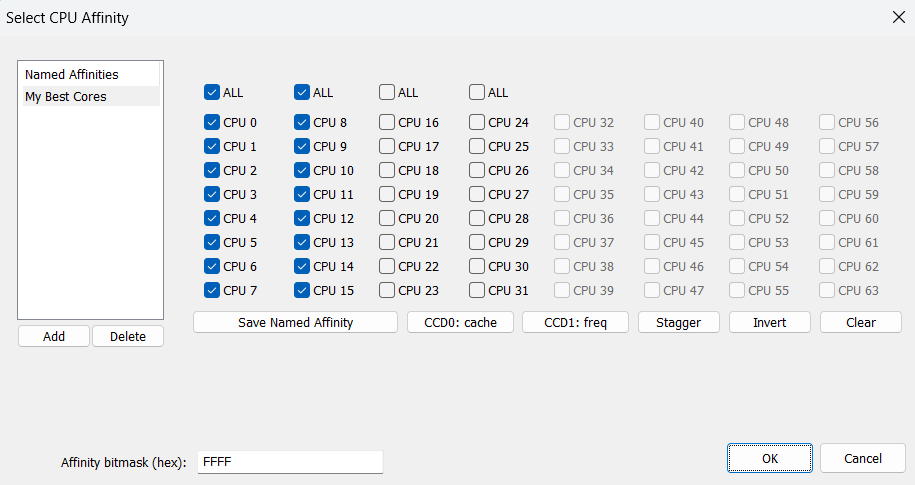
on GitHub How to Set the CPU Affinity of a Windows Process Permanently The best way to set a CPU affinity permanently on Windows is to use Process Lasso. The custom CPU affinity will be applied eac…
inland dew
found a problem
when using cpuAffinity, cpuMainThreadAffinity doesn't work
8 p-cores + 16 e-cores (24 cores no HT)
1st screen:
-cpuMainThreadAffinity=0x0000000000000080 (core nr. 7, so 8)
-cpuAffinity=0x00000000000000FF (0-7, so limited to 8 first cores)
2nd screen:
-cpuMainThreadAffinity=0x0000000000000080 (core nr. 7, so 8)
no cpuAffinity used

 fast hornet
never tried the mainthread one.. but it should? Did you define a single core for it?
nvm 🙂
ah .. no. That's expected.
When the game's affinity is 0-7 it can't use 8 for anything of course.. it needs to be within the affinity range
inland dew
so I need to do 0-6, so 7 cores and 7, so 8th core as main?
fast hornet
you don't need cpuMainThreadAffinity at all unless you have a specific reason for it.. but when you specify it i'd expect it needs to be within the range specified by cpuAffinity - because those are the only threads it's assigned to.
since how should it do anything on 8 if it only runs on 0-7 😄
inland dew
0-7, means 8 cores
fast hornet
you wrote "core nr. 8".
inland dew
so I'm still right
cpuMainThreadAffinity doesn't work, when used with cpuAffinity
affinity 0-7, main thread 7 - main thread affinity doesn't work
main thread 7 only (no cpu affinity) - works
whole cloud
inland dew
8 p-cores + 16 e-cores (24 cores no HT)
1st screen:
-cpuMainThreadAffinity=0x000...
"cpuMainTreadAffinity"
You mean "cpuMainThreadAffinity" ?
whole cloud
checked RPT? it logs when affinity couldn't be applied for some reason
quaint flame
I feel like we need a thread just for affinity
#community_wiki message I made some suggestions to improve the docs. Please add to the list if something else could be added. (E.g. I didn't know it logs to rpt)
 whole cloud
mh looks good 🤷
inland dew
but doesn't work
orchid mesa
CPUCount : 9 ? 🤔
inland dew
I'm not using cpuCount at all
so yeah, cpuMainThreadAffinity doesn't work, when used with cpuAffinity...
 tardy adder
anyone else realized that Steam doesnt show the current server anymore since the recent update from performance to stable. (talking about friendslist) only reason im posting here since this has been happening since the prof update to stable and ive only used prof
 opal hound
Yes it's done that for a while on perf (though I prefer it this way 😆)
empty goblet
inland dew
so yeah, `cpuMainThreadAffinity` doesn't work, when used with `cpuAffinity`...
it does work as long at the Main Thread's designated affinity core is within range covered by allowed affinities (be it -cpuAffinity or CMD /AFFINITY )
opal hound
Going to stab a guess that it was related to the SteamAPI update? I don't remember when that was
inland dew
empty goblet
it does work as long at the Main Thread's designated affinity core is within ran...
well, cpuAffinity is 0-7 and cpuMainThreadAffinity is 7, so...
tardy adder
opal hound
Going to stab a guess that it was related to the SteamAPI update? I don't rememb...
could definitely be but should be fixed IMO
opal hound
1FF is 0-8, but it's mostly irrelevant
uncut wigeon
sadly I regret opening this bottle in the discord real issue is MS has basically zero documentation on this. and anything they do have is based on 32bit API
inland dew
opal hound
1FF is 0-8, but it's mostly irrelevant
ok, it's 1FF (0-8), so 9 cores, whereas it should be 0FF, for 0-7, so 8 cores.
but doesn't change the fact that cpuMainThreadAffinity doesn't work, with cpuAffinity
restive turtle
whole cloud
No, more details of what you mean?
Generally, I mean when using a lot of way points/ having a lot of AI Moving does a good amount of fps drop although its fine when they are idle (I was wondering if there's room for optimization there)
I don't have specifics its more so a topic suggestion or conversation
Probs wasting time sorry 
whole cloud
would need a repro
quaint flame
@whole cloud Do both affinity startup parameters log to the rpt if setting could not be applied? Or does only cpuMainThreadAffinity do that? (Updating the wiki right now)
whole cloud
main thread only logs to RPT when it failed
quaint flame
Rgr
whole cloud
the overall affinity logs when success and failed
quaint flame
ok
 idle wren
Can confirm the crashes are still happening when going into thermals on the profiling branch
whole cloud
Just press submit, and I'll find it 🫂
whole cloud
600 crash reports since thursday 💀
previous prof had 700 over 10 days.
Either alot more people played on the weekend, or something is not good 😄
ajo I see the thermals crash
empty goblet
shows how the TI optics are popular 🤣
void badger
Was going to follow up with "been running stable client and perf server with no crashes" and just found out my server segfaulted earlier after about a 60 hour uptime
empty goblet
void badger
Was going to follow up with "been running stable client and perf server with no ...
the million fixes question is, did it generated dump and was it uploaded successfully 😁
void badger
I'm a chump running Linux perf so no dumps here 😩
whole cloud
Only 126 of them are the thermals though
45 XAudio
22 game exit
102 0xDEAD error messages, I won't even look at them
9 amd graphics driver
The storage space used for all things script is limited to 3gb.
There are quite alot of people running out of space in that and the game force crashing itself
Also guys, if you are a modder, and you are F'ing up your own config while modding, and the game throws an error and kills itself.
Please do not submit that crash, that stuff is really useless for me 🥺
There are soooo many crashes of broken configs or preprocessor errors
I made a fix attempt for a crash at game exit, that was just a guess hoping it would fix it.
Well since that version the crashes are gone so ✅
Having this info is amazing, that was a great idea
heavy vortex
Server auto-submits, right
inland dew
@whole cloud @empty goblet disabled 16 e-cores in the bios, so now that i have only 8 p-cores (hyper-threading off), so all cores are of same type (non hybrid architecture) - main thread 7 + cpu 0-7 works 🤔
whole cloud
heavy vortex
Server auto-submits, right
yea
whole cloud
inland dew
<@90532520101183488> <@94784638945337344> disabled 16 e-cores in the bios, so no...
We are asking the OS to pin the thread, afaik it doesn't have to listen to our demands
But server is quite stable, compared to client 🤣
 heavy vortex
Are you sure that's not just fewer servers than clients :P
whole cloud
And considering client also has a dark number of players who don't click submit
heavy vortex
I should probably force a crash just to check what this submit UI looks like
It's not the old windows one, right?
heavy vortex
It would if I had any inclination to install reforger :P
but I was waiting until it crashed less
inland dew
inland dew
<@90532520101183488> <@94784638945337344> disabled 16 e-cores in the bios, so no...
so that has something to do with cpu having hybrid cores architecture.
when all cores are of same type, main thread affinity + cpu affinity works no problem
so only a problem for intel 12-14 gen owners
 modest geode
empty goblet
some might missed it, there is option to define params via environmental variabl...
modest geode
empty goblet
some might missed it, there is option to define params via environmental variabl...
Any way to verify these parameters are actually set in the Arma 3 client/server? Batch ECHO returns them correctly so just wanna make sure it works ingame
 dense light
whole cloud
Also guys, if you are a modder, and you are F'ing up your own config while moddi...
dense light
whole cloud
Also guys, if you are a modder, and you are F'ing up your own config while moddi...
Never submit crash reports. Simple. 
inland dew
with only 8 p-cores enabled (no ht, no e-cores)...
- tried to do cpu affinity 6 cores (0-5) and main thread affinity core 4 (3) - cpu affinity doesn't work and main thread affinity doesn't work
- tried to do cpu affinity 4 cores (0-3) and main thread affinity core 2 (1) - cpu affinity doesn't work and main thread affinity doesn't work
with only 8 p-cores enabled (no ht, no e-cores)...
- tried to do cpu affinity 8 cores (0-7) and main thread affinity any core I want - works (cpu affinity + main thread affinity)
🤷♂️ 🤔
heady plinth
how much do you have to f' up your config for the game to crash? i didn't even know the game can crash from config stuff 😄
guess i will blame addonbuilder again, which just compiles whatever you feed it
modest geode
inland dew
with only 8 p-cores enabled (no ht, no e-cores)...
- tried to do cpu affinity 6 ...
What does it say in the RPT when it doesn't work?
inland dew
modest geode
What does it say in the RPT when it doesn't work?
everything's "fine" #perf_prof_branch message
modest geode
inland dew
with only 8 p-cores enabled (no ht, no e-cores)...
- tried to do cpu affinity 6 ...
Why do you have so many zeros? 0x00...0080
inland dew
modest geode
Why do you have so many zeros? 0x00...0080
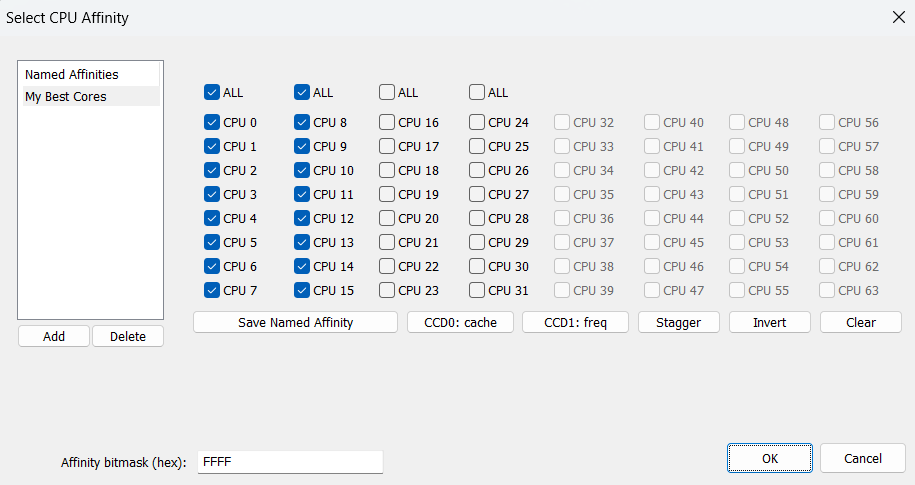
on GitHub How to Set the CPU Affinity of a Windows Process Permanently The best way to set a CPU affinity permanently on Windows is to use Process Lasso. The custom CPU affinity will be applied eac…
modest geode
Ah, that's just not needed at all, this is what one of my servers use -cpuAffinity=0xFE -cpuMainThreadAffinity=0x2 That's core index 1-7 affinity and core 1 as main
returns this in rpt
22:03:14 Process affinity forced to 0xFE (requested 0xFE)
22:03:14 Process has custom affinity mask FE/FFF
1-7? not 0-7?
modest geode
inland dew
1-7? not 0-7?
Yes, windows likes using core 0 for tasks so not assigning that gives increased performance
inland dew
modest geode
Yes, windows likes using core 0 for tasks so not assigning that gives increased ...
so 7 cores?
so 2-8 cores + 2nd core being main?
what's your cpu model?
modest geode
inland dew
so 2-8 cores + 2nd core being main?
 modest geode
inland dew
what's your cpu model?
modest geode
inland dew
what's your cpu model?
i7-8700K
inland dew
so non-hybrid cpu
modest geode
Kinda weird, mine is returning 22:03:14 Process has custom affinity mask FE/FFF FE/FFF would be 11111110/11111111
While yours return 16:07:00 Process has custom affinity mask 1FF/FFFFFF 1FF/FFFFFF would be 111111111/111111111111111111111111
I can only assume that "/FFFFFF" would be total detected cores?
inland dew
just ignore that
inland dew
modest geode
Kinda weird, mine is returning ``22:03:14 Process has custom affinity mask FE/FF...
it's FF, for 0-7
modest geode
You still getting /FFFFFF though? That would be 24 cores total
modest geode
Try moving the affinity declaration to before -malloc? This is the order i have it in
{self.path}\arma3serverprofiling_x64.exe" -port={self.port} -cpuAffinity={cpuAffinity} -cpuMainThreadAffinity={mainThread} -malloc=mimalloc_v224_20250703
I can't remember if I put it in that order for a reason or if it just happened to be that way
inland dew
it is before anything
modest geode
inland dew
Guess you changed it after this then
have you tried with both profiling exe and normal one?
inland dew
i just have the check mark for malloc in the launcher - not using command
modest geode
Gotcha
 indigo anvil
I've just switched to mimalloc_v224_20250703 along with -maxmem=8192, however running the mission seems to run away with all the memory it can find (22G) . Any tips on what can go wrong?
indigo anvil
lovely. Any other way to constrain server process mem hunger?
modest geode
empty goblet
some might missed it, there is option to define params via environmental variabl...
Could try messing with this Fixit
indigo anvil
modest geode
Could try messing with this Fixit
yea I have it on MIMALLOC_RESERVE_HUGE_OS_PAGES=4
modest geode
inland dew
i just have the check mark for malloc in the launcher - not using command
Could always try it as a command and play around with the order and see if it fixes things. I'm out of ideas as I've never used affinity on client only server
modest geode
indigo anvil
I've just switched to mimalloc_v224_20250703 along with -maxmem=8192, however ru...
What mission? Hosting through server browser or singleplayer?
indigo anvil
modest geode
What mission? Hosting through server browser or singleplayer?
redux latest 🙂 / dedicated @ LAN
indigo anvil
indigo anvil
I've just switched to mimalloc_v224_20250703 along with -maxmem=8192, however ru...
never mind: it was just soft_f_exp.pbo corrupt, after redownloading it the issue of runaway memory (
23:51:14 Error decompressing block 450091..555132 of a3\soft_f_exp\lsv_01\lsv_01_f.p3d
23:51:28 Error decompressing block 35..4319 of a3\soft_f_exp\lsv_01\lsv_01_f.p3d
) went away
heavy vortex
heady plinth
how much do you have to f' up your config for the game to crash? i didn't even k...
the game throws an error and kills itself
That's just normal behaviour for any config error.
We don't currently compile config so Arma killing itself is how we find config errors.
light cargo
tbh, crash report should be no opt out for clients on profiling branch too
floral socket
idle wren
Can confirm the crashes are still happening when going into thermals on the prof...
have u tried running mimalloc v2.2.4? was a lot more stable from me haven't gotten thermal crash using it yet
tawdry gazelle
Hi, anyone would like to test if mimalloc has any performance difference on different compilers?
One is Intel C++ Compiler, another is LLVM.
floral socket
tawdry gazelle
Hi, anyone would like to test if mimalloc has any performance difference on diff...
real world or yaab?
tawdry gazelle
floral socket
real world or yaab?
yaab is enough. real world test is too difficult to evaluate.
hoary jolt
tawdry gazelle
Hi, anyone would like to test if mimalloc has any performance difference on diff...
ARMA 3 x64 or ARMA 2 x32?
hoary jolt
tawdry gazelle
mimalloc has updated to v2.2.4 and fixed several memory release problems.
Any fe...
I am experiencing more out of memory errors CTD xxx005 windows error on the same system vs the previous 303 and 223 versions. I checked do have enough free SSD space on C. Do I need to keep more free RAM running? I split off 32GB for a ramdisk while keeping 32GB for the OS and games.
tawdry gazelle
hoary jolt
ARMA 3 x64 or ARMA 2 x32?
currently released mimalloc only supports x64. It wont work on x86 executables.
tawdry gazelle
hoary jolt
I am experiencing more out of memory errors CTD xxx005 windows error on the same...
Access Violation C0000005 is not out of memory error.
hoary jolt
tawdry gazelle
`Access Violation C0000005` is not out of memory error.
Any log settings I should enable to capture this for review?
tawdry gazelle
hoary jolt
Any log settings I should enable to capture this for review?
I believe it always create crash log despite your log settings.
 magic elm
tawdry gazelle
I believe it always create crash log despite your log settings.
magic elm
tawdry gazelle
I believe it always create crash log despite your log settings.
Had a similar issue "no memory during frame initialization" with our server using 224 during one of our ops this weekend. Going to DM you our logs.
tawdry gazelle
hoary jolt
I am experiencing more out of memory errors CTD xxx005 windows error on the same...
do you have a crash dump? It should located in C:\Users\<username>\AppData\Local\Arma 3 with an extension .mdmp and a corresponding .rpt file.
whole cloud
heady plinth
how much do you have to f' up your config for the game to crash? i didn't even k...
myEntry = = oh wow
-> crash
heady plinth
i see. pboproject would instantly complain and not even let you finish 😄
whole cloud
modest geode
Kinda weird, mine is returning ``22:03:14 Process has custom affinity mask FE/FF...
The second part is the total system affinity. So total "list" of coers available
I saw a couple mimalloc crashes, but they were 223, not the new 224
tawdry gazelle
whole cloud
I saw a couple mimalloc crashes, but they were 223, not the new 224
what are these crashes looks like? I just got an mdmp (below) but can't tell if it's mimalloc related.
Oh poor alignment...
 whole cloud
Well my crashes are crashes inside mimalloc.dll
In that one, I see no mention of it
tawdry gazelle
yep. they say crash occurs since they switched from mimalloc v223 to v224, but mdmp gives no mention of mimalloc.dll, that's why I can't tell if it's a crash by arma exe or mimalloc.
floral socket
whole cloud
I saw a couple mimalloc crashes, but they were 223, not the new 224
personally havent gotten crashes at all with v224 yet all the ones were with v223 and the other memory allocators
charred pagoda
tawdry gazelle
Hi, anyone would like to test if mimalloc has any performance difference on diff...
It does a little bit.
Left side is A, right is B, from 1 to 3 runs
-# Fullscreen (exclusive) 1920x1080 with all graphics on ultra minimum.
-# 14700K (stock) with DDR5 2x16 GB 6400 MT/s
 tawdry gazelle
charred pagoda
It does a little bit.
Left side is A, right is B, from 1 to 3 runs
-# Fullscreen...
tawdry gazelle
charred pagoda
It does a little bit.
Left side is A, right is B, from 1 to 3 runs
-# Fullscreen...
Thanks a lot for your tests! However test results of B vary too much. Would you please re-run B for another two or three times? 🥹
charred pagoda
tawdry gazelle
Thanks a lot for your tests! However test results of B vary too much. Would you ...
 quaint flame
whole cloud
quaint flame
whole cloud
No RHS uses RHS prefix
charred pagoda
whole cloud
Anyone know which mod is "USAF_GBU38"?
github search says that it's https://steamcommunity.com/sharedfiles/filedetails/?id=2397360831

 whole cloud
Someone crashed every player on the server by dropping one of those 😄
charred pagoda
by explosion fx?
whole cloud
the bomb being spawned itself, no explosion
quaint flame
Well..it was effective at least...in its own way.
whole cloud
lol I think, it has an Init eventhandler, that deletes itself.
Object created, init event runs, deletes itself, PostInit event.... oh no what happened
heady plinth
dedmen about to start fixing other peoples mods now
whole cloud
engine bug though.
They actually delete the object by calling setPos
😄
When we create the object, we don't set the reference counter and leave it at 0.
setPos takes a reference to the object (tbh its stupid code that shouldn't be there and wastes performance.. I'll remove that), and once it lets go of the reference again, it goes to 0. That means we should delete the object now 😄
 lethal trench
mods about to break with fix to setPos 🥷
heady plinth
"you cant change that, my mod depends on the object being deleted by setPos!"
autumn timber
xkcd: workflow
 slender lagoon
tawdry gazelle
Hi, anyone would like to test if mimalloc has any performance difference on diff...
slender lagoon
tawdry gazelle
Hi, anyone would like to test if mimalloc has any performance difference on diff...
A is marginally better but it could be just another fluctuation
 heavy galleon
I had to use a delay because setPos in fired event didn't work.
Is it because of the same reason?
whole cloud
did your game crash? no? then no
Function call gives parameter 0x00007ff693647940
Then inside function it crashes, because parameter was 0xfafd7ff693647940
?
Mh I wonder what CPU that user has..
12th Gen Intel(R) Core(TM) i9-12900K
Ah yep. Well good luck with your warranty
Can someone tell the optre guys to fix that.
I got 9 crashes because of that

 tulip arrow
tawdry gazelle
Hi, anyone would like to test if mimalloc has any performance difference on diff...
tulip arrow
tawdry gazelle
Hi, anyone would like to test if mimalloc has any performance difference on diff...
intel 12600k (e-cores disabled)
64gb ddr4 "3500"
nvidia 4060ti 16gb (undervolting max 0,9v)
windows11
MIMALLOC_ALLOW_LARGE_OS_PAGES 1
MIMALLOC_ARENA_EAGER_COMMIT 1
MIMALLOC_PURGE_DELAY 100
TBB_MALLOC_USE_HUGE_PAGES 1
process lasso Arma3_x64.exe priority above normal
Arma3_x64.exe -hugePages -limitFPS=1000
video 1920x1080 "standard"
difficulty "veteran"
https://i.postimg.cc/WbNM2gXX/mimalloc-v224-20250703-1.jpg
https://i.postimg.cc/yYxkQPf4/mimalloc-v224-20250703-2.jpg
https://i.postimg.cc/DZ5w5JLw/mimalloc-v224-20250703-3.jpg
https://i.postimg.cc/K8LcwsBV/mimalloc-v224-A-1.jpg
https://i.postimg.cc/s24jDQn4/mimalloc-v224-A-2.jpg
https://i.postimg.cc/yd6VJ1t4/mimalloc-v224-A-3.jpg
https://i.postimg.cc/XJ2n9M6Z/mimalloc-v224-B-1.jpg
https://i.postimg.cc/XNzVJ0gm/mimalloc-v224-B-2.jpg
https://i.postimg.cc/rFRqRYnm/mimalloc-v224-B-3.jpg
https://i.postimg.cc/43sGM4J7/rpmalloc-v145-1.jpg
https://i.postimg.cc/zBfrzdHq/rpmalloc-v145-2.jpg
https://i.postimg.cc/2ysRxrc5/rpmalloc-v145-3.jpg
https://i.postimg.cc/1R2QSrmZ/tbbmalloc-v202170-1.jpg
https://i.postimg.cc/zXh1GHvH/tbbmalloc-v202170-2.jpg
https://i.postimg.cc/DwK3Jf4j/tbbmalloc-v202170-3.jpg
https://i.postimg.cc/CxHTjyjF/tbbmalloc-v202170-4.jpg
https://i.postimg.cc/6QYkmdjg/tbbmalloc-v202170-5.jpg
https://i.postimg.cc/tTcLX9Hz/tbbmalloc-v202170-6.jpg
whole cloud
whole cloud
Can someone tell the optre guys to fix that.
I got 9 crashes because of that
Also I think the components are not ordered.
They have to count from zero or one (don't know which) upwards, without gaps.
I think it only has two components, but one of them is named 41?
heady plinth
whole cloud
Can someone tell the optre guys to fix that.
I got 9 crashes because of that
funny. i think this is exactly what i fixed myself just a few weeks ago. i've updated the geo mesh in my uniforms to reflect the "new" short pointy stick. after that i regenerated the components, which would create Component01 and Component02 ... but this is wrong. for some reason uniform geo needs to be Component01 and Component03 else it causes rpt spam
this mesh needs to be Component03

no clue why. i suspect some ancient dark magic
there is no Component02.
whole cloud
Well I had crash it trying to access 41 when only two were present (but I couldn't see the numbers of the two)
heady plinth
the issue did not make my game crash, though. i just noticed the rpt spam and it confused me so i investigated
there might still be some issue with the mods uniforms ofc
this is how the named selections need to look. 42 is the last named entry before the components starts (41 if we start counting at 0) - so you might still be onto something here :p

 unborn urchin
heady plinth
this mesh needs to be Component03
unborn urchin
heady plinth
this mesh needs to be Component03
I think its defined in the config somewhere (like the animation geo configs) that the two components are 01, and 03
why? dunno
unborn urchin
unborn urchin
I think its defined in the config somewhere (like the animation geo configs) tha...
yeah
class CfgMovesBasic
{
    collisionGeomCompPattern[] = {1,3};
a2 mesh was different yeah it was the 'long' pointy geo that people were using
cant remeber if it had an extra component tho
whole cloud
whole cloud
In the last months/half year there have been quite a few crashes where objects h...
Hah I found it, "Land_SignB_Pub_RU1"
And people are still crashing on it
 timid veldt
Where can I report a problem? I'm using the Profiling but my FPS runs at 50+ but then will just drop down to 7- and then I lag big time. Thanks
whole cloud
timid veldt
Where can I report a problem? I'm using the Profiling but my FPS runs at 50+ but...
64bit?
You can switch to the profiling exe and capture a frame with the SFRAME cheatcode, so we can look whats so slow
whole cloud
First crash with SimpleVM 😄
The code
if (!argument.IsNull())
  argument.GetType(); // Crash! Argument was null
The users CPU: 12th Gen Intel(R) Core(TM) i7-12700H
Yeah.. Good luck with your warranty
empty goblet
whole cloud
Function call gives parameter `0x00007ff693647940`
Then inside function it crash...
faulty cpu ? ram ? overclock ? not using latest firmware ? ...
whole cloud
I assume the famous intel degradation story
empty goblet
whole cloud
I assume the famous intel degradation story
right ... 12th and 13th are literally like lotto, there is chance for win but most of time it's loss ... because there is so much what could go wrong
(tho users who have 13th gen told me recent firmware UEFI and drivers updates fixed theirs crashes)
it's also interesting to hear that several people stopped crashing with 2.2.4 mimalloc (vs 2.2.3)
whole cloud
We had alot of tbbmalloc crashes in latest prof too, because of the thermal imaging stuff
empty goblet
charred pagoda
It does a little bit.
Left side is A, right is B, from 1 to 3 runs
-# Fullscreen...
seems Intel compiler is 0.25% faster than LLVM on Intel CPU ... {likely just some extra optimization flag}
fast hornet
guess my 10+ 13900 server crashes trained your eye for intel degradation 😂
empty goblet
fast hornet
guess my 10+ 13900 server crashes trained your eye for intel degradation 😂
actually there are some Xeons based on 13th gen but they were different (new?) tapeout and i heard not single of them had the bugs compared to the original 13th gen xeon rollout
fast hornet
haven't heard about xeons degrading so far, only the consumer chips.. but maybe it's just because of limited press exposure
empty goblet
it wasn't actually degrade with those initial 13th gen xeons, those were bugged from get go it was just hard to get the errors to start appear
not-our partner but one of my friends in game server hosting told me they replaced all of those early 13th gen xeons w/o mercy after being unable to figure it out
charred pagoda
empty goblet
right ... 12th and 13th are literally like lotto, there is chance for win but mo...
the main reason of degradation were wrong power/temp limits that ships with mobo 😁 1000+ Watt iirc
fast hornet
our A3 server runs on a dedicated 13900 machine and i (and as a result dedmen) was chasing weird random crashes and errors for months until it finally completely died.
Hoster replaced it with a new machine and everything's working perfectly again. (just hope the second 13900 survives for longer...)
empty goblet
charred pagoda
the main reason of degradation were wrong power/temp limits that ships with mobo...
that's on client-side CPUs ... on server-side those were on solid-quality mainboards
fast hornet
charred pagoda
the main reason of degradation were wrong power/temp limits that ships with mobo...
nah, was default 65W tdp for us.. and i checked
empty goblet
i think i've some 13th gen Xeons too, let me check
actually we don't , uff 🤣 guess someone listened to my scream while ordering replacements
heady plinth
oh, I just remembered that my old pc had a 12gen cpu and it was randomly crashing since always
hard blue screen of death
whole cloud
fast hornet
guess my 10+ 13900 server crashes trained your eye for intel degradation 😂
it eroded my trust in intel
empty goblet
ok, we moving toward #hardware_vs_arma scenario of troubled and cursed hardware
heady plinth
more like off topic, because it was crashing with anything at random.. except arma :p
empty goblet
whole cloud
it eroded my trust in intel
for many it was final nail to coffin and then AMD came with X3D for anyone with both AM4 and AM5 sockets , so for gaming or good parallel compute it was simple choice
whole cloud
Another crash fix prof tomorrow, hopefully this time I won't introduce another big new one 😄
fast hornet
whole cloud
it eroded my trust in intel
same here.. fuck intel.
empty goblet
whole cloud
Another crash fix prof tomorrow, hopefully this time I won't introduce another b...
definitely looking forward to that (the abusable crash and the other 'problem' hopefully fixed)
 quartz rampart
whole cloud
First crash with SimpleVM 😄
The code
```
if (!argument.IsNull())
argument.G...
quartz rampart
whole cloud
First crash with SimpleVM 😄
The code
```
if (!argument.IsNull())
argument.G...
12th gen CPU do not have the issues with the degradation, that was 13th and 14th gen cpus.
whole cloud
Then I'll still blame it on intel and overclocking 😄
quartz rampart
just wanted to clear that 😄
empty goblet
quartz rampart
12th gen CPU do not have the issues with the degradation, that was 13th and 14th...
that's the problem , you can't really tell if it's just bad firmware with incorrect timings or voltages, if faulty from get go, or faulty over time (the worst type) ...
heavy vortex
whole cloud
I assume the famous intel degradation story
For what it's worth (not a lot), Intel have only admitted degradation problems with the 13 and 14 series, not the 12.
empty goblet
fast hornet
DDR5 speed and stability was a shitshow for everyone at the start to be fair.. modules nowadays are a lot more reliable with tighter timings, lower voltages etc. compared to 2-3 years ago
 carmine stump
dedmen fix AI NOT stopping when inside a jet even if you 1-6
empty goblet
carmine stump
dedmen fix AI NOT stopping when inside a jet even if you 1-6
reproductio steps and better description of the bug ? unless there is already Arma 3 Feedback Tracker ticket you can provide with that so please share the URL
carmine stump
pretty much what I already said. tell an AI from your group to get inside a jet as pilot, tell him to stop and he wont. jet will be rolling regardless
this is bad in cti when you want to have a jet in standby at base.
inland dew
carmine stump
pretty much what I already said. tell an AI from your group to get inside a jet ...
that's the place for that. definitely not here
inland dew
also need to see if there is already a ticket on feedback tracker for that or if no, create one and describe that in the ticket
carmine stump
I wont, just leaving it here hoping it´s a quick fix from him. if not, ok.
inland dew
carmine stump
they will never fix it there.
this discord section is perf/profiling only
heady plinth
any ai behavior thing is never a quick fix
analog acorn
carmine stump
they will never fix it there.
There are only like 3 devs actively working on A3, and they all visit both this channel and that one. This isn't a special direct-Dedmen-access channel.
thin wyvern
inland dew
this discord section is perf/profiling _only_
Really...look few messages above... cluster messages about intel CPU's and CUDIMM 👀
 patent dome
thin wyvern
Really...look few messages above... cluster messages about intel CPU's and CUDIM...
patent dome
thin wyvern
Really...look few messages above... cluster messages about intel CPU's and CUDIM...
Related to some Perf/prof crash reports Dedmen was sharing.
uncut wigeon
I just wanted to thank Dedmen and everyone else that was involved in that convo the other day because I just finally got to double check. and Process has custom affinity mask FFFF0000/FFFFFFFF got a victory!
tawdry gazelle
I compiled mimalloc for Arma 3 32-bit executable and Arma 2 Operation Arrowhead as requested.
If anyone need it, here:
https://github.com/GoldJohnKing/mimalloc/releases/tag/Arma-3-v2.2.4-x86-20250708

GitHub
Note
Previously, mimalloc does not provide 32-bit DLL, thus it does not support Arma 3 32-bit executable and Arma 2: Operation Arrowhead (which is 32-bit only).
Since Arma 3 is strongly considering...
whole cloud
carmine stump
dedmen fix AI NOT stopping when inside a jet even if you 1-6
Not with that attitude
whole cloud
carmine stump
they will never fix it there.
And especially not with that one
whole cloud
tawdry gazelle
I compiled mimalloc for Arma 3 32-bit executable and Arma 2 Operation Arrowhead ...
32 bit lol.
Also tell them that they won't have fun for long
hoary jolt
tawdry gazelle
I compiled mimalloc for Arma 3 32-bit executable and Arma 2 Operation Arrowhead ...
would this work for ARMA 1 and CWA?
whole cloud
patent sky
Soon™ no more crashes, right? 😂
quaint flame
Seems the crash reporter already pays off.
 feral harness
carmine stump
dedmen fix AI NOT stopping when inside a jet even if you 1-6
feral harness
carmine stump
dedmen fix AI NOT stopping when inside a jet even if you 1-6
Ticket?
inland dew
feral harness
Ticket?
he doesn't want to waste time on a ticket...
#perf_prof_branch message
but fix NOW!
indigo anvil
inland dew
he doesn't want to waste time on a ticket...
https://discord.com/channels/105462...
F logic...
tawdry gazelle
hoary jolt
would this work for ARMA 1 and CWA?
I don't know because I don't own them. Do they support custom memory allocator?
ripe willow
whole cloud
-Fixed: When a land waypoint was given above water the helicopter would attempt to land on water. Isnt that expected when you set waypoint above water ?
whole cloud
ripe willow
-Fixed: When a land waypoint was given above water the helicopter would attempt ...
I think its about when a helipad is nearby? Going by the FT ticket
ripe willow
whole cloud
I think its about when a helipad is nearby? Going by the FT ticket
Helipad ?
whole cloud
yes
idle wren
whole cloud
What exactly was causing the thermal crashes?
whole cloud
The scope/muzzle specific resolution/zooming parameters
empty goblet
hoary jolt
would this work for ARMA 1 and CWA?
A2/A2OA/TKOH/A3/DayZ SA before switch to Enfusion ... there was no custom allocator prior
whole cloud
diwako'nt
 hexed verge
pls
Found a weird one. I was trying with last profiling version to connect to my unit's server. I got this error as our server runs the "small" cdlcs. (as a side note those flder are symlinked to the steam supplied addon folders inside the arma directory)
I figured i somehow corrupted something and just deleted the folders and let steam verify and redownload them. just for it to happen again
I switched off the profiling branch and tried connecting again, and it worked.
dwarden asked me to verify on current profiling version, so i did, this screenshot is from the current version.
The server is running the 64bit linux binary from the stable branch.
 whole cloud
Prof has that change for bikey loading, but if you are not running profiling server that obv doesn't apply.
Its a bikey side only thing, so it'd only apply on the server there
When did you last try? If its the bikey thing then v6 would've been it
hexed verge
i tried just now, screenshot is like 4 minutes old
whole cloud
I mean when did it last work, previous prof build
hexed verge
one week ago. it started happening when i tried playing this sunday.
was not palying much muliplayer as i was busy irl and used othe free time to do some modding
whole cloud
so v6, last thursday.
Which added -keysFolder argument
But if you don't set the argument, then it wouldn't do anything.
I assume setting it -keysFolder=!keys on clientside might break like this?
fast hornet
btw. just a quick question inbetween: If you don't explicitely negate the default key folder it always looks in there as well, correct?
whole cloud
yes
hexed verge
whole cloud
But if you don't set the argument, then it wouldn't do anything.
I assume setti...
want me to try v5?
whole cloud
yeah, and verify that you don't have -keysFolder in start parameters
Also maybe RPT says this?
WARNING! No bikey's were found in 'keys' folder. Please check, there should always be atleast one key for the base game.
hexed verge
checked my latest rpt with the mismatch messages and there is no "-keysFolder" param anywhere as i use A3S to launch arma.
also nothing of the sort of the warning message inside my rpt
stable: works
v5: works
v6: does not work
whole cloud
The question then is, how did I mess something up, that when rechecking the code is not messed up, and that so far no-one else had issues with
hexed verge
maybe it is some weird compounded issue that only happens with a specific setup
these are the start up params minus the -modones
"E:\Program Files (x86)\Steam\steamapps\common\Arma 3\arma3_x64.exe" -debug "G:\GIT\diwako_cbrn\diwako_cbrn.vr\mission.sqm"
-noPauseAudio
-limitFPS=144 -noPause -hugepages -nosplash -world=empty -connect=138.201.249.238 -port=2302 -password=****
"G:\GIT\diwako_cbrn\diwako_cbrn.vr\mission.sqm" is to launch into a mission directly
whole cloud
If you remove the -connect and direct loading of mission?
maybe the connect triggers too soon?
hexed verge
will try
fast hornet
if it helps, i also use a batch with -connect= to start the client and it works fine with v6/v7
hexed verge
so far
-connect without mission: works
no -connect and no mission: works
-connect with mission: does not work
no -connect but mission: does not work
funny how that is... so it is again a me issue....
whole cloud
But I don't get how a mission would do that 😢
hexed verge
neither do i, i just want to launch into 3den :V
also if you set the path to some none existent sqm file it also does not work
strange enoguh tho it seems to be only an issue with ebo's?
fast hornet
-keysFolder works like a charm btw.. would be cool if the game would just recurse through subfolders as well so i could just point it at the mod folders. Since i generate those anyway.
How it is now i need to generate it for every single mod since the folder name is not standardized.. i've seen key, Key, keys, Keys and server_key so far 
light cargo
or make automatic loading keys folder from -mods list
fast hornet
yeah that would also be a nice option
light cargo
fast hornet
`-keysFolder` works like a charm btw.. would be cool if the game would just recu...
wouldn't recommend that recursion for different server profiles with different mod lists on the same install
fast hornet
the key folder should not contain any mods that are not loaded anyway though?
light cargo
i'm referring to doing recursive folders search in say !workshop
fast hornet
ah no, that would be a bad idea
i'm talking about pointing it at each of the mod folders
light cargo
imo taking advantage of the mod list is better
it's mostly standardized as the folder name in the game afais
isn't that how the launcher detects signed mods?
pbo + bisign + keys
i'm not sure though
fast hornet
the key file is server side only. The client calculates a key/hash from the pbo files .. otherwise you could just use modified pbo files with a correct key
light cargo
ah
fast hornet
or well, not a hash.. i guess it reads the signature and that must match the key on the server
light cargo
i imagine launcher just processes the pbos and bisigns
this subsystem is like gpg sort of?
fast hornet
never looked into what arma actually does.. but yeah something like that. You sign the files with your private key, the server gets the public key and then you can check if it's actually corrupted somehow or not
light cargo
the bisign is the sig equivalent
hoary jolt
whole cloud
WEIRD! I was testing something else in ARMA, DXVK with my 7800X3D iGPU, and then this came online and updated. After the update, I GAINED FPS on the iGPU. Before I was running 2K resolution at 50% scaling ~ 55 - 60 FPS, and now I can run it at 100% if I turn down HDR, and OFF PP, AA and AF, same FPS!! It is totally playable and the only issue was streaming of assets as it will hitch coming from DRAM, not VRAM, and smoke at 100% is laggy.
whole cloud
Well then thank your OS automatic updates. Because there was no performance in thid
hoary jolt
whole cloud
Well then thank your OS automatic updates. Because there was no performance in t...
I'm on a locked down W10 LTSC OS.
 slow dust
Do people usually also run profiling branch on the server as well? Or just on clients?
void badger
Perf binary server is a great choice
And still benefits clients running it in some ways
whole cloud
Server binaries get the same Bugfixes and performance improvements.
charred pagoda
slow dust
Do people usually also run profiling branch on the server as well? Or just on cl...
We do. We have server FPS on stable: 100-150, but on profiling branch: 300-350
empty goblet
hoary jolt
WEIRD! I was testing something else in ARMA, DXVK with my 7800X3D iGPU, and then...
the last segments feels like plea for more optimized smoke particles 🙂
empty goblet
slow dust
Do people usually also run profiling branch on the server as well? Or just on cl...
ie 40% of the official servers now sits on 153053 and so far nobody complained about anything (except cheaters and vandals)
hoary jolt
empty goblet
the last segments feels like plea for more optimized smoke particles 🙂
It's not but good idea and you can verify for academic curiosity. 😄 It's something I've noticed while playing around with the iGPU that smoke particles at 100% greatly affects performance (I have this setting maxed out for immersion), dropping it to 50% see high FPS gains, while TEXTURE quality barely affects FPS so long as we set the iGPU to GAME mode, not UDMA in the BIOS. Lowering PP, AA, AF and HDR settings also secure high gains so that iGPU is actually playable. Guessing it is hitting specific HW limitations - TMU or Shaders.
whole cloud
This is looking pretty great. Now you just gotta keep it that low

And most of them are just 0xdead forced crashes, not even real ones
Some server hoster getting their server.cfg wrong a dozen times in a row 🤣
 patent sky
whole cloud
And most of them are just 0xdead forced crashes, not even real ones
Some server ...
patent sky
whole cloud
And most of them are just 0xdead forced crashes, not even real ones
Some server ...
Can we cheat by excluding certain useless crashes before we even send them?
whole cloud
I would prefer to exclude them after we receive them.
Sometimes there might be 0xdead's that are interesting or that we might want to prevent
whole cloud
3 servers are still running prof v5, and crashing on already fixed stuff.
Last week:
Wed: 76 crashes (21 0xDEAD)
Thu: 81 crashes (21 0xDEAD)
This week:
Wed: 49 (22 0xDEAD)
Thu: 30 (20 0xDEAD)
So yesterday we had 10 "real" crashes total.
Out of those 10:
6 were from one server who's own extension "bandicam" was crashing?
2 of them don't have any logs so 🤷
1 is still running v5 and ran into a already fixed crash
1 is some crash inside the graphics drivers 🤷
whole cloud
Today so far
7 0xDEAD (All from the same server with a preprocessor error in a config)
4 real ones
1 proton without crash files
1 with... doesn't make sense, but its an i9-14900K so..
1 crash on exit, I've seen that before, something wrong on our end but don't know where.
1 server crash in particle simulation
tawdry gazelle
@whole cloud Hi, I see Arma 3 allocating memory through either aligned or non-aligned malloc interface.
I am just being curious: in what case or for what purpose does it allocate through aligned malloc? And what for non-aligned malloc?
tawdry gazelle
whole cloud
Today so far
7 0xDEAD (All from the same server with a preprocessor error in a c...
It's time to make an AI to filter that out. (doge
whole cloud
tawdry gazelle
<@90532520101183488> Hi, I see Arma 3 allocating memory through either aligned o...
PhysX does aligned.
Outside terrain generation has a couple because it does SSE
Multithreading code has a couple aligned ringbuffers
Video data for the ogv videos
Audio buffers
Vehicle in Vehicle for the code that finds empty space
And some old code that is unused and that I'll delete now
tawdry gazelle
I recently read an article about memory allocator types and implementation and wondered if forcing all non-aligned allocation to be aligned would benefit performance. Then I came up that aligning itself also consumes performance, so I gave up. 
whole cloud
I think we do depend on the allocator giving us a minimum alignment of 8 anyway
Oh also our page-size allocators are aligned to 4096.
They are generally used for pool allocators or filecache
tawdry gazelle
whole cloud
I think we do depend on the allocator giving us a minimum alignment of 8 anyway
If align to 8 bits (1 byte) is aligned, then yes
Okay according to some dev replies on issues, mimalloc's non-aligned interface always guarantee 16 bytes aligned.
(I really can't read the magic code of mimalloc...)
whole cloud
whole cloud
Oh also our page-size allocators are aligned to 4096.
They are generally used fo...
Our page allocations go through a custom 2001 era management system that just dies if you reach 3gb 
whole cloud
I have alot of crashes at game exit, while its trying to unload models.
And its crashing because models aren't present.
And indeed..
6:57:37 Warning Message: Cannot open object zeus_games_pcu\pcu_untucked.p3d
I can add checks to this, but checking for objects without models would be hundreds of checks, and more things to be checked == less performance..
So probably just gonna ignore all the reports there, and hope people realize they should fix their mods
Or... I turn "Cannot open object" into a popup error 🤔 Mh
Fixed by force crashing the game earlier ✅
oi. I hope that's just corrupted files? @heady plinth

 honest fulcrum
Those booniehat lines look like they maybe meant to use \a3\characters_f\data\ui\icon_h_booniehat_desert_ca instead of the same but with their mod pathing in the front
knotty wraith
Can you separate the surface detail and the grass removal?
How is this appropriate?
whole cloud
That sounds possible
knotty wraith
whole cloud
That sounds possible
you can implement it?)
whole cloud
I certainly can
knotty wraith
surface detail and lack of grass feel like two different worlds. I don't understand why they are interconnected
Well, it's like a cry from the heart) the problem is old - everyone is used to it
autumn timber
Especially in the context of people turning their grass off to get an unfair advantage.
However, now that I think of it, people will be able to turn the grass off without being punished by having to look at 2005 terrain 😦
Not that I'm against adding that feature! It's just unfortunate that we'll have that situation as a side-effect
knotty wraith
playing pve from grass only minus fps and you are seen by the ai, whoever has the opportunity removes the grass, but the detail is reduced
for pve projects grass does not make sense until the ai takes grass into account
heady plinth
whole cloud
oi. I hope that's just corrupted files? <@235232762188005386>
🤔

no issues on my end
whole cloud
maybe a 3rd party mod trying to use ws paths but getting them wrong
heady plinth

rpt log is fine as well
whatever is going on, it's not us 😄
the paths look ok to me. can't find anything obviously wrong right now
also they havent changed in 4 years now, so no clue
whole cloud
Thanks for checking 🫂
void badger
whole cloud
I have alot of crashes at game exit, while its trying to unload models.
And its...
That feels like weird behavior anyway- doesn't crash and instead logs when model is missing or corrupt, but crashes when attempting to unload? I mean, doesn't make a difference if the server is closing anyway I guess, but....
whole cloud
90+% of the code accessing the model, never checks for the model potentially not existing.
Because in real use, you would also never have an entity without a model, that's just not something that happens so its not checked for.
But when the model is not there, the starting code just lets it continue on anyway, thats where the issue is
spiral pond
whole cloud
oi. I hope that's just corrupted files? <@235232762188005386>
is this from the full rpt? aka does it list the mods/pbos loaded?
whole cloud
yes but I don't want to look now
tawdry gazelle
tawdry gazelle
~~If align to 8 bits (1 byte) is aligned, then yes <:blobcloseenjoy:700312018430...
Ah I finally figured it out... mimalloc separates arena into blocks, which is aligned to 16 byte. When malloc, it just takes existing blocks. So blocks are aligned == allocated memory are aligned.
spiral pond
You could share with @heady plinth , so he can figure out the source and contact the author.
Less crashes = good, less complaints "on WS" = good
whole cloud
tawdry gazelle
Ah I finally figured it out... mimalloc separates arena into blocks, which is al...
16 byte probably, no one would do bit
whole cloud
spiral pond
You could share with <@235232762188005386> , so he can figure out the source and...
I already closed the report though and don't remember which it was :3
heady plinth
meh, if they have issues, they can write us
empty goblet
whole cloud
Today so far
7 0xDEAD (All from the same server with a preprocessor error in a c...
always fascinating when server crashes with particle simulation , does even server need it (or it's used alongside with blocking volumes for e.g. visibility calc) ?
whole cloud
Its for AI visibility
empty goblet
whole cloud
Its for AI visibility
though so , ty
 olive silo
Ran into something odd but no logs or things like that unfortunately for it. Server (latest profiling) got stuck at 15 to 17 FPS for minutes at a time (25 players or so) and it looked like the server was only using one thread, even though it has 16 available. It fixed itself eventually and fps jumped back up to 300+. Anyone else run into this?
heavy vortex
most likely it was working extremely hard at something that's not threaded. Unscheduled scripts maybe.
 uneven bluff
Does it make sense to try to combine setVariable when sending over the network?
As in, is it worth manully combining a bunch of setVariables on the same object into a single hashmap, serialize, and then deserialize on the client end, or are these kinds of optimizations already done automatically by the game?
^ This is in context of a script that likely sets a bunch of variables in a single frame.
heavy vortex
If you had a lot of setVariables that you were setting at the same time, maybe?
Otherwise each one is a separate network message.
uneven bluff
heavy vortex
Otherwise each one is a separate network message.
Ah, ok. Was wondering if the game did any optimizations with that, like combining it all into a packet or something.
heavy vortex
Messages are combined into packets but there's still per-message overhead.
Whether that's significant compared to running extra SQF is another matter.
The per-message cost should be much lower on perf branch.
 nocturne obsidian
whole cloud
Its for AI visibility
nocturne obsidian
whole cloud
Its for AI visibility
I noticed that regardless of how much memory a player has (from 8GB to 32GB) or how powerful their graphics card is, the game always starts to lag when the number of particles approaches the engine's limit. I think this is an internal engine issue. Where exactly is the performance bottleneck in the engine?
restive turtle
nocturne obsidian
I noticed that regardless of how much memory a player has (from 8GB to 32GB) or ...
The engine is probably deleting particles at a certain point and then at a certain point it starts discarding sections of the buffer
This is just my experience with engines that are the age of around this time
I dont actually know anything lol
restive turtle
restive turtle
The engine is probably deleting particles at a certain point and then at a certa...
The buffer would be when it starts chopping memory blocks
At the absolute limit
heavy vortex
I suppose it might be doing something daft like grinding through the entire particle list to find the oldest one each time it creates a new one. Not seen a similar issue personally though.
nocturne obsidian
heavy vortex
I suppose it might be doing something daft like grinding through the entire part...
Are you saying that CPU performance is the limiting factor? Have you never experienced lag when particles disappear? Please tell me your specs, if you don't mind.
restive turtle
nocturne obsidian
Are you saying that CPU performance is the limiting factor? Have you never exper...
ive never experienced particle lag ever
but i run 7800X3D and 4090 (both Overclocked)
orchid mesa
Not completely sure if it's profiling related, however I've been experiencing reproducible desync roughly since the current build was posted.
Start up arma -> join server -> after ~15 minutes my connection suddenly destabilizes with severe rubberbanding until eventual kick for >2000 ping
however I can immediately reconnect without desync, and it doesn't happen again. appears to only happen on first server join after starting the game
nocturne obsidian
restive turtle
ive never experienced particle lag ever
Are you using a particle effects mod, or just the vanilla effects? Maybe it's my system that's not good enough.
restive turtle
I use Murr
nocturne obsidian
Then it's probably a problem with the computer.
heavy vortex
My PC is trash, but I never saw a need to turn up particles and I heard there's a hard count limit that isn't changed by the setting.
If that's how it works then there might be a detectable tipping point. Like 20 smoke grenades is fine but after that it goes rapidly downhill.
 limpid fern
Hey, yesterday I played an operation but we had a very strange issue were every 3-4 seconds there would be a major stutter. I checked the rpt file and found this error that was being spammed every 2-5 seconds.
ThingX 22707732b00# 172506: dummyweapon.p3d WeaponHolderSimulated was falling under terrain! Position corrected to ground [6202.79, 27.40, 5241.59]. Disable simulation to keep object under terrain.
Is it possible that several WeaponHolderSimulated objects constantly falling through the map could cause this issue?
The issue was happening on the performance branch so i thought id ask this in here
heavy vortex
Those are normal. Not sure if they have much perf cost.
2-5 seconds sounds like it's just one of them, but you can check the IDs.
limpid fern
there were several objectsIDs that were falling under the map according to the rpt
analog acorn
Were you perhaps using certain radars with very long range? e.g. some mods with ship-based radars, RHS strategic SAM radars.
There's a thing with radar, which I don't think got fixed yet because it's complicated, where they force dynamic generation of filler terrain if they search outside terrain bounds, and this tends to manifest as a stutter every few seconds if their coverage extends a long way out of bounds.
limpid fern
analog acorn
Were you perhaps using certain radars with very long range? e.g. some mods with ...
ill check the mission file again for radars but i dont think there were any
the issue could be resolved by turning down the view distance
carmine stump
limpid fern
Hey, yesterday I played an operation but we had a very strange issue were every ...
yep, stuttering in latest version
heavy vortex
Maybe -enableHT should be removed. Lots of servers using it for archaic cargo-cult reasons, often with violently bad results in 2.20.
If you really want to use more threads then there's -cpuCount with a lot more control.
fast hornet
just documenting it properly might be enough.. i believe before Dedmen or someone else mentioned it here maybe 1-2 years ago noone knew that all it does is doubling the amounts of threads. Even the BI wiki still does not reflect that.
heavy vortex
Uh, I don't think it'll double the number of threads unless all your cores are SMT.
I don't think documenting it properly is enough because there so much old/bad config out there.
fast hornet
Meh.
I agree with people that run the client/game being mostly clueless, for them it could make sense to prevent some ancient wrong steam community guide hurting their performance.
Running a server requires keeping up with technical changes.. if you don't do that, your fault. Imho.
hoary jolt
restive turtle
but i run 7800X3D and 4090 (both Overclocked)
Trying running Arma on your iGPU at 100% 1080p with max particles or blastcore. Even if all PP, AA, AF, HDR set to low or off, it lags... There is a GPU limit. Probably could be offloaded to further seperate threads. 1080 Ti GTX would suffice.
nocturne obsidian
whole cloud
16 byte probably, no one would do bit
In Arma 3, functions like addForce and other PhysX-related implementations sometimes don't work properly when applied to units. Occasionally, the unit may fly up into the air and then get stuck mid-air, or show other strange behaviors. (Note: I'm not applying excessive force—just enough to possibly lift them 30–40 meters.) Is this normal, or am I using them incorrectly?
feral harness
nocturne obsidian
In Arma 3, functions like addForce and other PhysX-related implementations somet...
Next time you see this happen check awake status of the object https://community.bistudio.com/wiki/isAwake and report back
whole cloud
nocturne obsidian
I noticed that regardless of how much memory a player has (from 8GB to 32GB) or ...
if I had a repro of it I could look
whole cloud
limpid fern
Hey, yesterday I played an operation but we had a very strange issue were every ...
Is it possible that several WeaponHolderSimulated objects constantly falling through the map could cause this issue?
That is exactly what that message is trying to tell you
heady plinth
would be nice if this issue could be fixed :x for some reason the game keeps failing to keep them above surface. they jump up and clip back into the surface, jump up again, etc.
 empty plover
well its been a while, so a friendly reminder to @whole cloud 🙂 would be awesome to get the loading optimized
whole cloud
heady plinth
would be nice if this issue could be fixed :x for some reason the game keeps fai...
Yeah easy fix probably, if it happens more than a handful times, we just disable physx on that object
spiral pond
possible to recreate the engine check in sqf with PX EH to help with repros?
heady plinth
it's a similar thing to the vehicle tire clipping which i was showing a video of long time ago
sadly it seems to be hard to reliably repro for some, but for others it happens a lot
spiral pond
curious if its happens more frequently with low(er) cell size
whole cloud
😾
 whole cloud
weekend summary
106 reports
-80 0xdead
26 "real" crashes
5: Two servers that pirated the game crashing because of it. May your milk be spoiled!
1: Graphics driver crash, I think thats the same user as the last couple times
2: XAudio
3: Crash that was already fixed in v7 but they didn't update
1:
2: Missing log files
1: Bug in SVG terrain export causing crash at exit, fixed.
The rest are all servers crashing at shutdown. Clearly something is buggered but I don't know what. But crash at shutdown isn't that big of an issue anyway
nocturne obsidian
whole cloud
if I had a repro of it I could look
I conducted extensive testing and found that if an object is killed while in flight, it will immediately stop physical simulation and freeze mid-air instead of falling. I'm okay with that.
However, there's another issue — please take a look at my video:
https://drive.google.com/file/d/1UzSJCWHAAf8Lac3CPLbhRMAqxsyQ1Uag/view?usp=drive_link
After being thrown, sometimes characters snap back to their original position.
Note: this is not caused by having too many simulated objects — even with only a dozen units, if I test several times, one or two of them may experience this bug. It seems to happen randomly.
In the video, I used a large number of units only because the more characters there are, the more frequently the problem appears — which makes it easier to demonstrate.
Google Docs
nocturne obsidian
whole cloud
if I had a repro of it I could look
By the way, this is the test code I used.
_explosionPos = getPos c1;
{
// find vector to ground zero
_ovec = (_explosionPos vectorFromTo getpos _x);

if (_x isKindOf "CAManBase") then
{

        _x addForce [_ovec vectorMultiply 7000, [0,0,0]];

        _x awake true;

        [_x] spawn {
            params ["_x"];

             sleep 1;

             // _x setDammage 1;

        };
};
} forEach nearestObjects [_explosionPos, ["AllVehicles"], 500];
whole cloud
I also finally went through all the linux proton crashes.
ALL of them were pirated game...
indigo anvil
whole cloud
I also finally went through all the linux proton crashes.
ALL of them were pirat...
@whole cloud is there a specific issue you are trying to replicate/trigger on linux?
whole cloud
no
heady plinth
should build a filter that automatically discards all reports from pirated game
quaint flame
But if you can detect pirated games then why not block them from being used
heady plinth
then pirates will know that you know they pirated it, i guess
they could improve upon their piratery
limpid fern
whole cloud
> Is it possible that several WeaponHolderSimulated objects constantly falling t...
I thought it’d be strange for objects falling through the map to cause major stuttering so I asked to get other people’s input on it since I don’t fully understand it. Thanks
knotty wraith
Will long range air defense beyond the map create problems?
 potent sparrow
quaint flame
But if you can detect pirated games then why not block them from being used
potent sparrow
quaint flame
But if you can detect pirated games then why not block them from being used
Just ends up as an arms race between devs and pirates with a bunch of time wasted, however if it was me and I could reliably detect pirate I'd just add a much larger random horizontal component to anything they fire but only some of the time
cloud sky
potent sparrow
Just ends up as an arms race between devs and pirates with a bunch of time waste...
That's what their anti-piracy functionality already does I think? Or did in Arma 2 at least
It is/was called FADE:
*Here's an excerpt from the Wiki page of it and what happens in Arma 2. "FADE will begin by gradually decreasing the accuracy of the player's weapons, making it very difficult to hit a target. FADE might reverse the left/right controls of vehicles, or make them randomly start and stop moving. Eventually it will turn the player into a bird and display a message saying "Good birds do not fly away from this game, you have only yourself to blame"" *
inland dew
what does any of this have to do with perf/prof...
empty plover
it just hit me, people with pirated arma can use prof to turn it into "non pirated" game?
whole cloud
empty plover
it just hit me, people with pirated arma can use prof to turn it into "non pirat...
no
whole cloud
inland dew
what does any of this have to do with **perf/prof**...
You didn't read the context it seems
whole cloud
knotty wraith
Will long range air defense beyond the map create problems?
If its a map with outside terrain generation, it will cause performance problems
empty plover
whole cloud
no
oh ok, i wonder whys that, do you still have the protection going in the exe or what
whole cloud
keep wondering
empty plover
lol, yeah i understand you cant say that... i forgot these things are secret
inland dew
whole cloud
You didn't read the context it seems
i did. but if everybody starts to write/discuss here what's done against cheaters in other games, it has nothing to do with perf/prof section, other than just cluttering it with nothing relevant to it.
that's the only point
feral harness
nocturne obsidian
_explosionPos = getPos c1;
{
// find vector to ground zero
_ovec =...
from wiki : PhysX object or
Arma 3 logo black.png
2.04
LALocal unit, in which case the unit must be local and will be set unconscious
you seem to not care if unit is local, remote unit will most likely snap back when sync packet arrives
hoary jolt
whole cloud
I also finally went through all the linux proton crashes.
ALL of them were pirat...
I think back in the days ARMA 2 forced the player into birds if someone used pirated copies. Suggest to maintain these "features". Maybe a massive drone strike against those players... Imagine bird attacks following them all over the map at random times!
whole cloud
I am aware
 lethal forum
hey guys uus
mimalloc still needed with the latest patch?
got to say im impressed its so smooth
opal hound
Does anyone else experience freezing when initially opening the server browser? I'm not sure if it's because I localhost for testing sometimes and it has put a bunch of interfaces into my recents list which then don't respond. I also tried clearing the cache list a while back but that didn't help
What's the best way to profile a full freeze? (Stopped responding)
heavy vortex
You can generate a crash dump from a frozen process using task manager. May or may not be useful to Dedmen.
 foggy vine
So... how would I send 10 GBs of a full crash dump?
Also, got error 500 in the crash reporter logs
inland dew
upload somewhere and then link
foggy vine
Good point
whole cloud
lethal forum
got to say im impressed its so smooth
mimalloc still makes it a bit better
whole cloud
foggy vine
Good point
but zip/7z first, it makes it much smaller
and often the full dump isn't actually needed


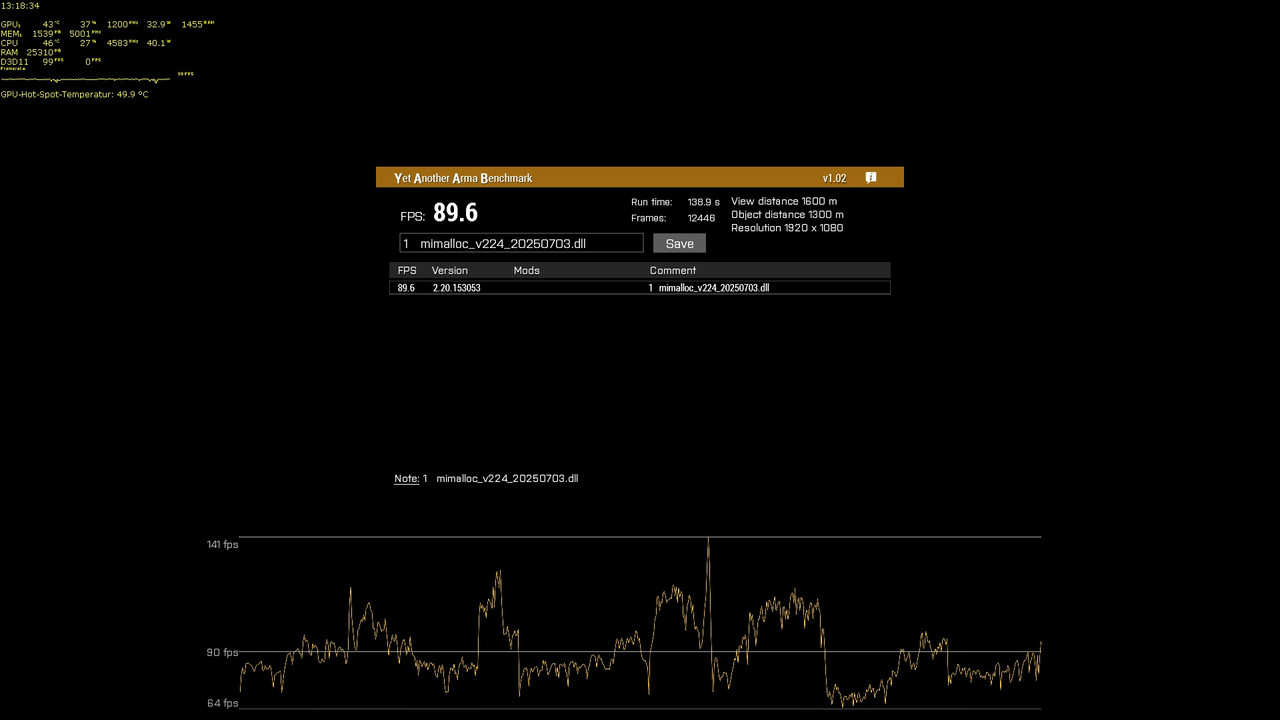
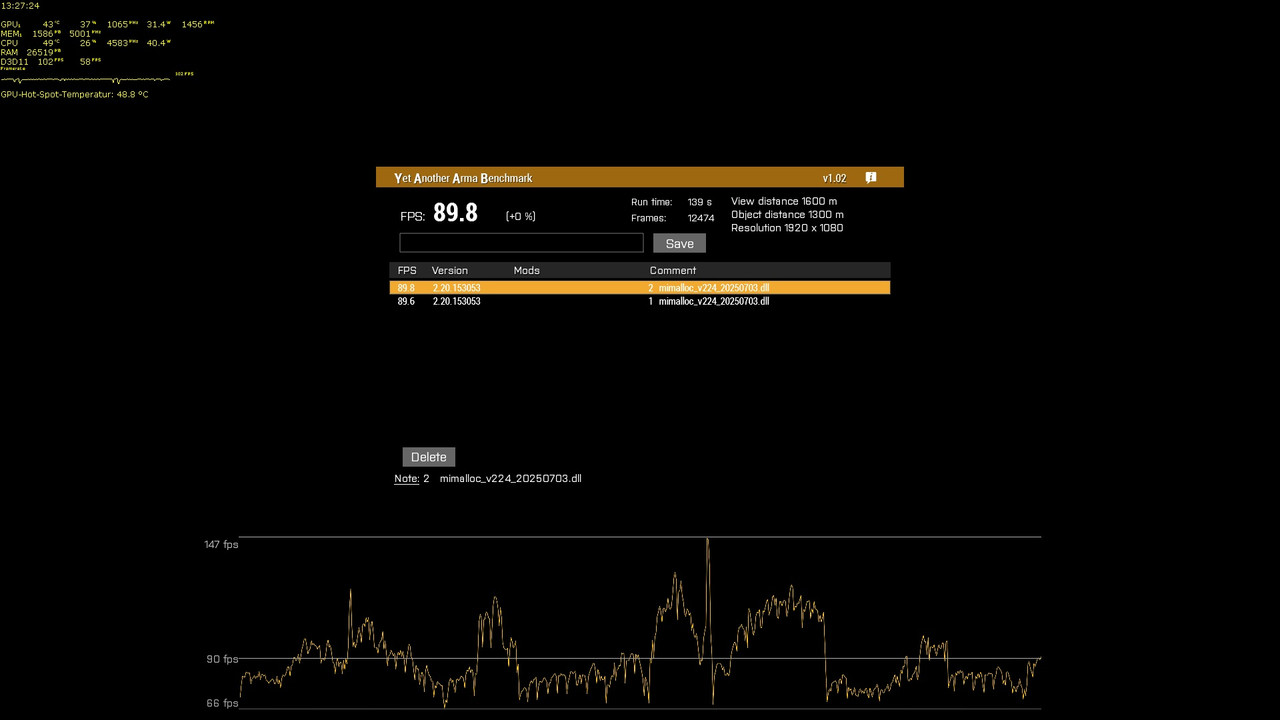
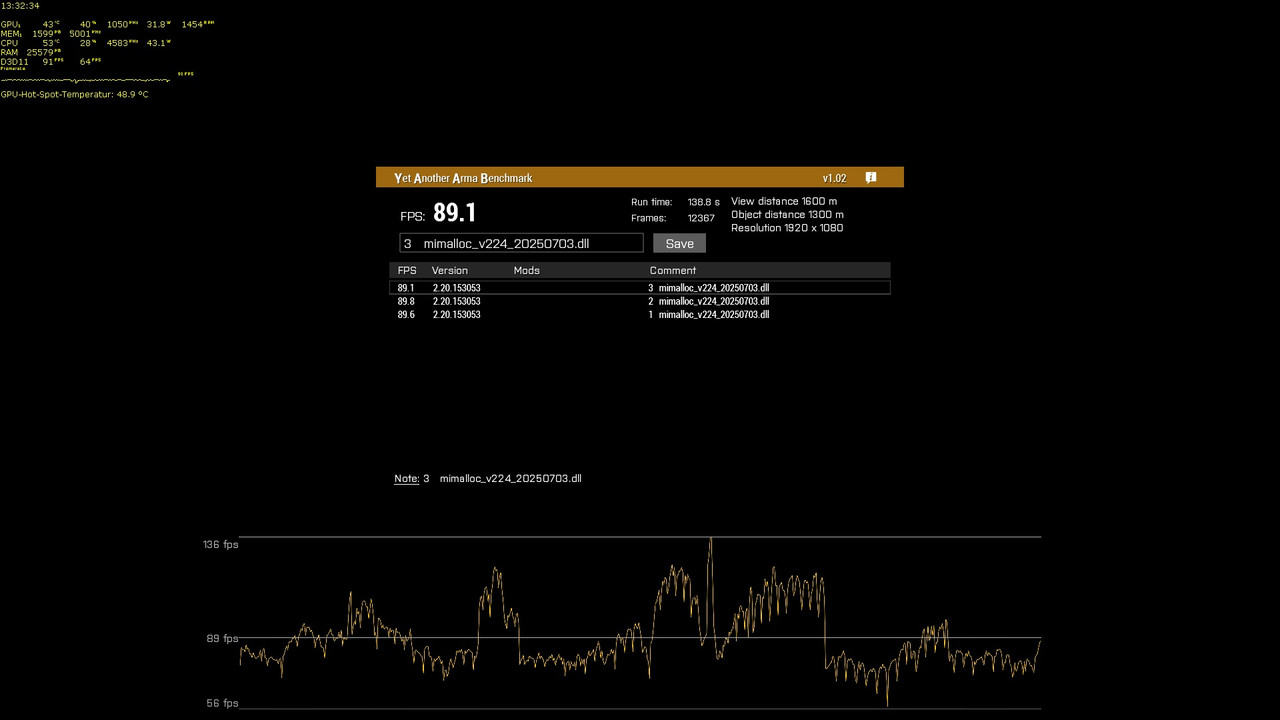
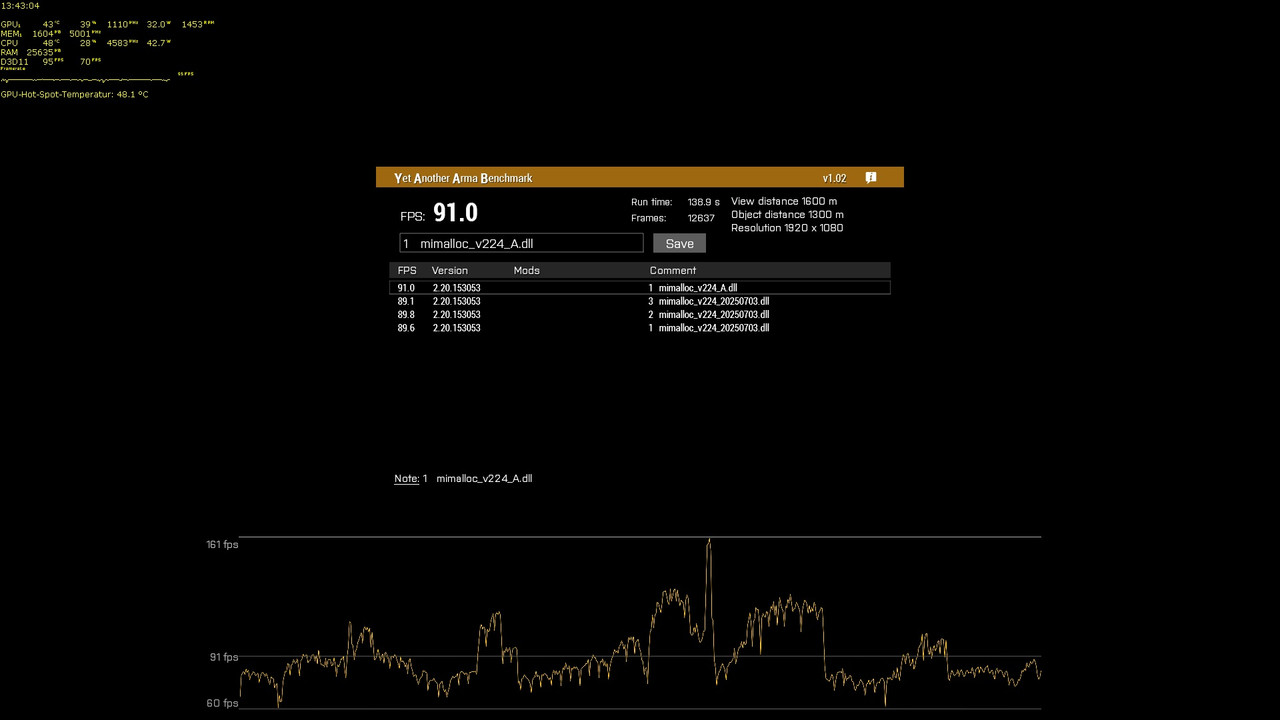
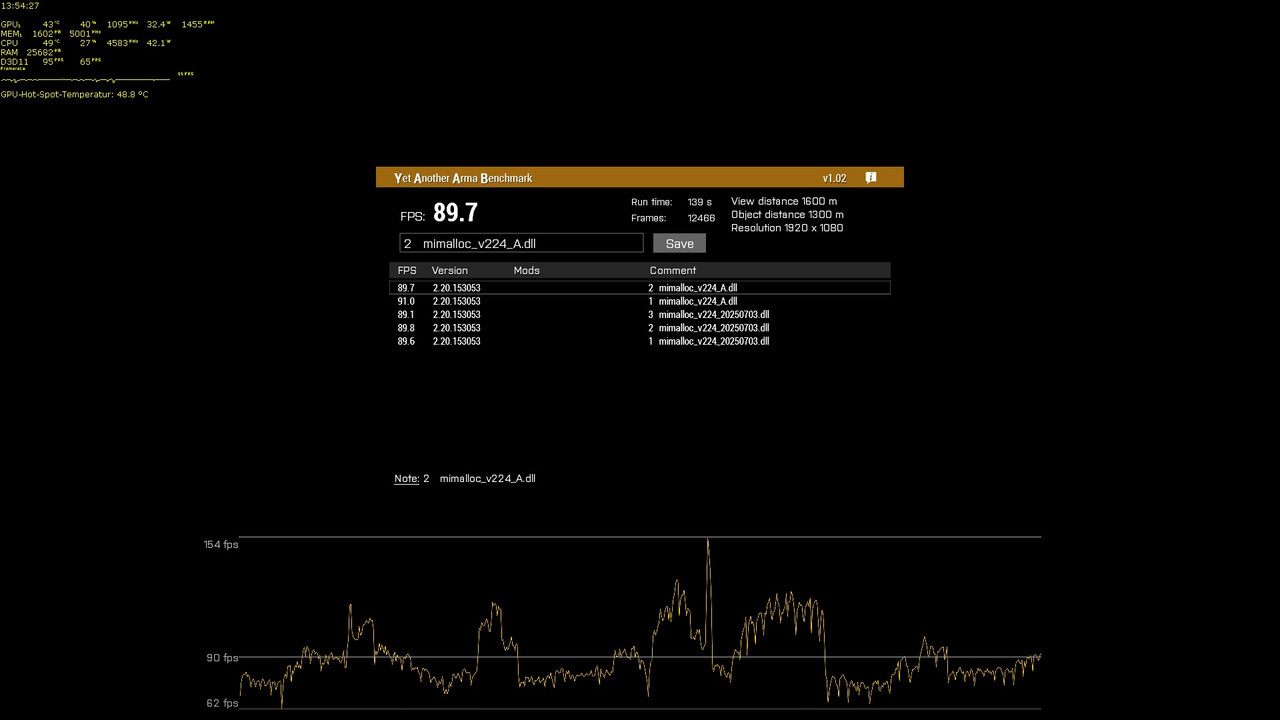
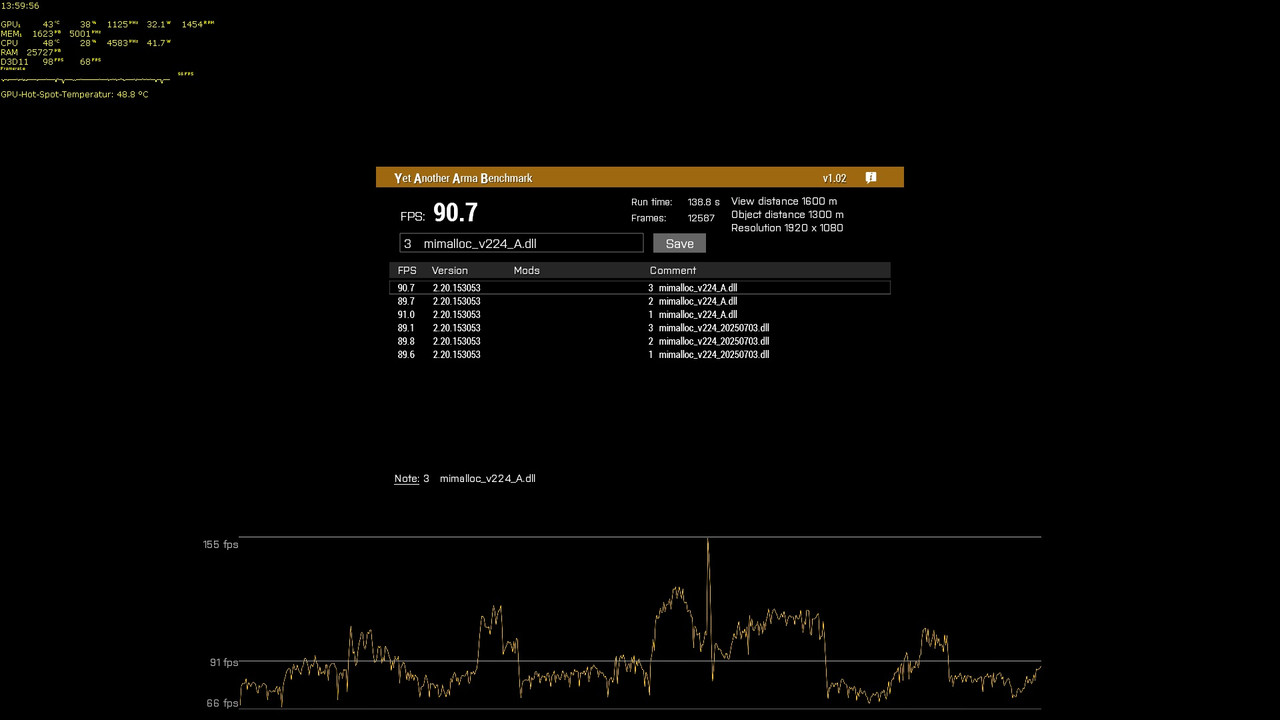
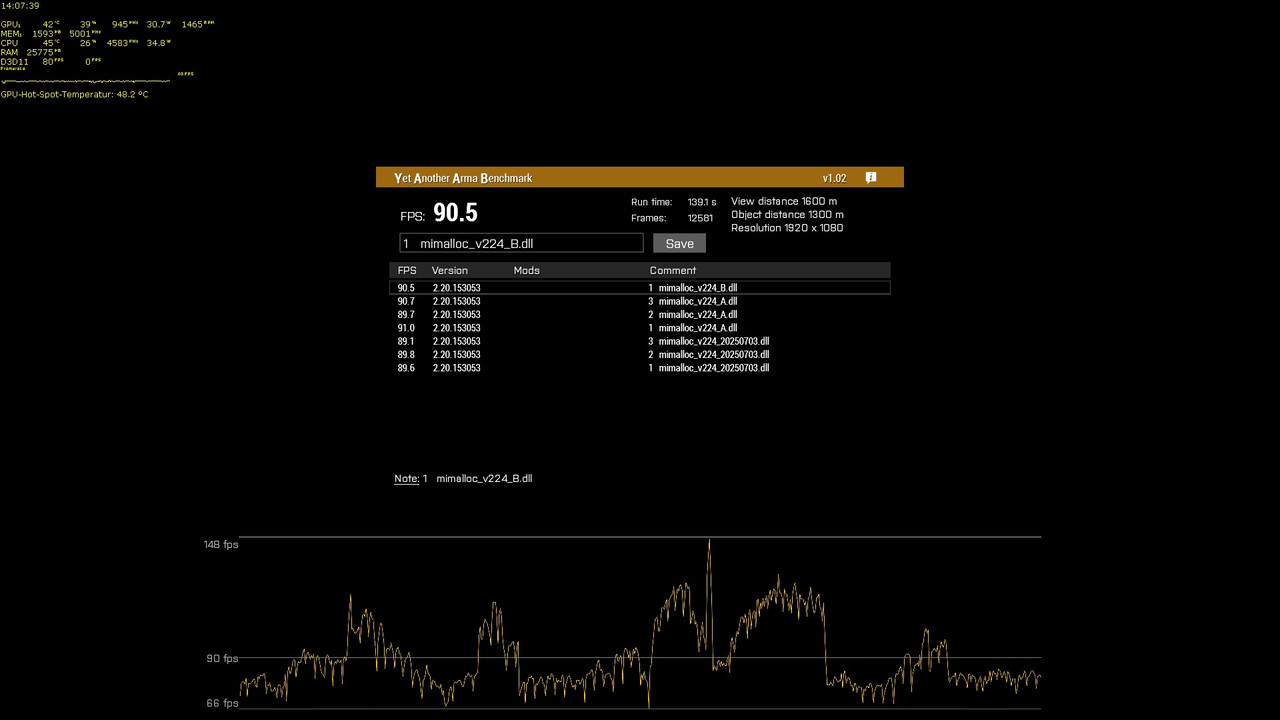
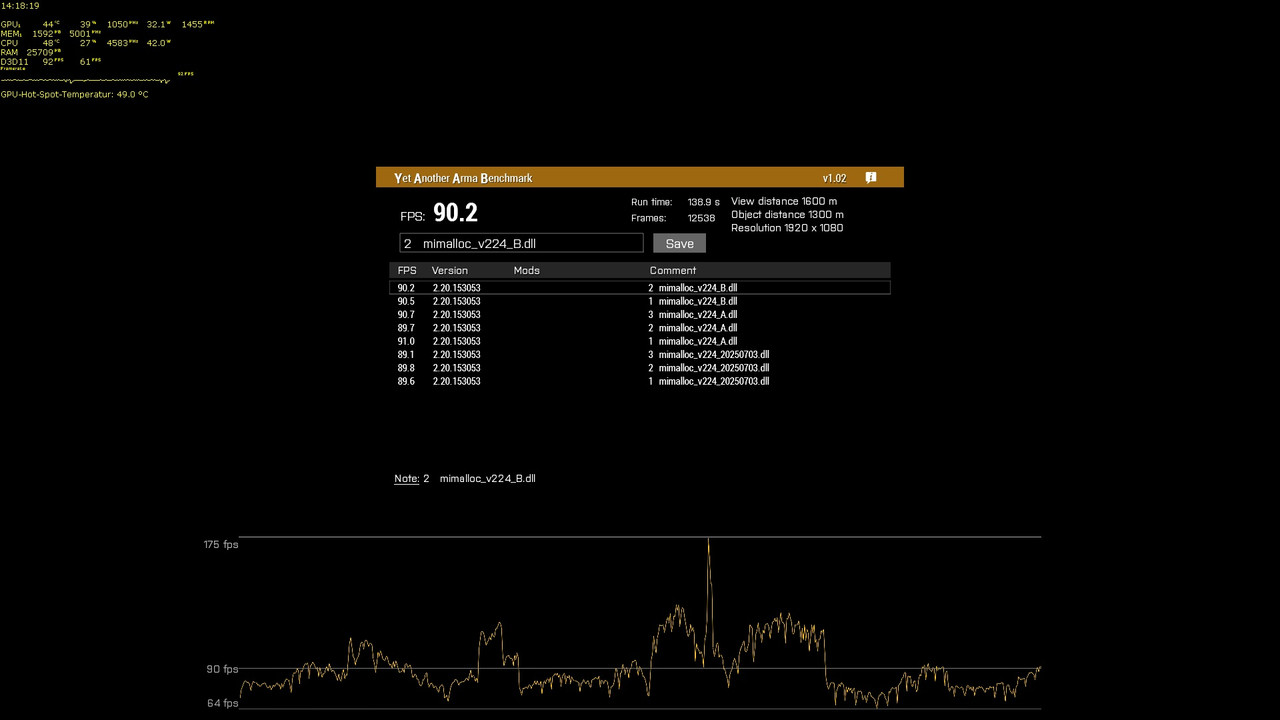
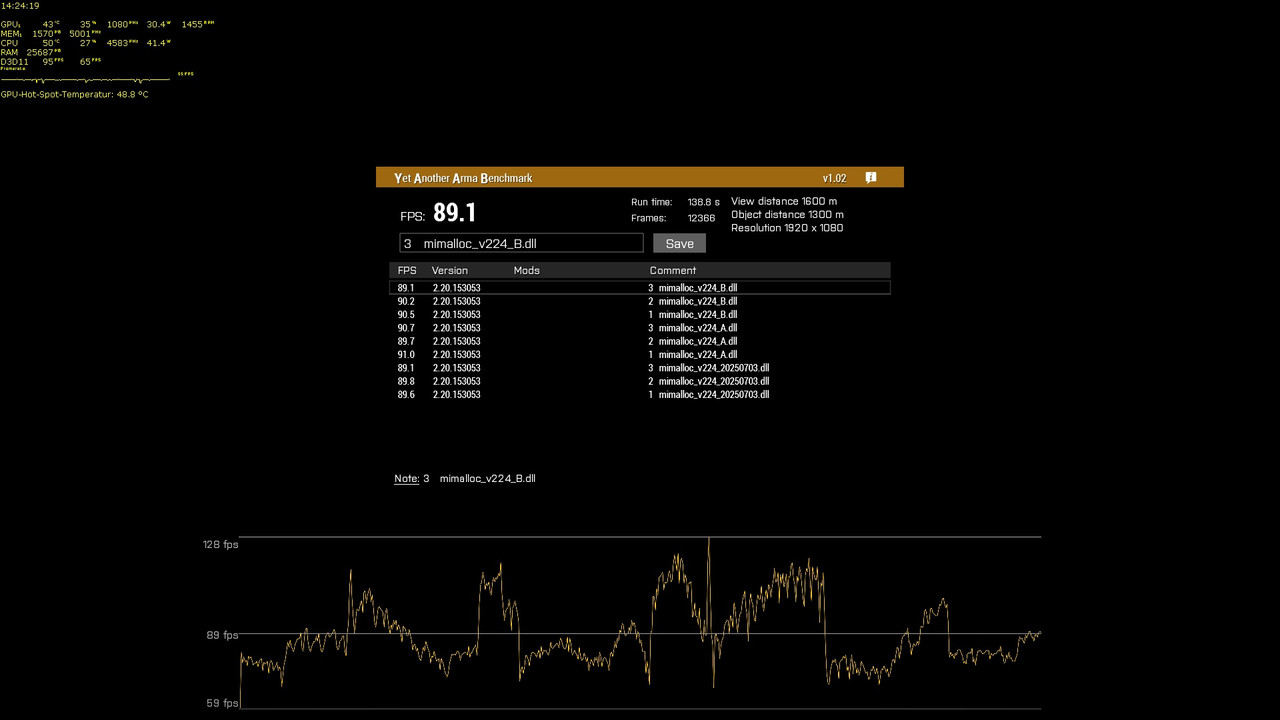
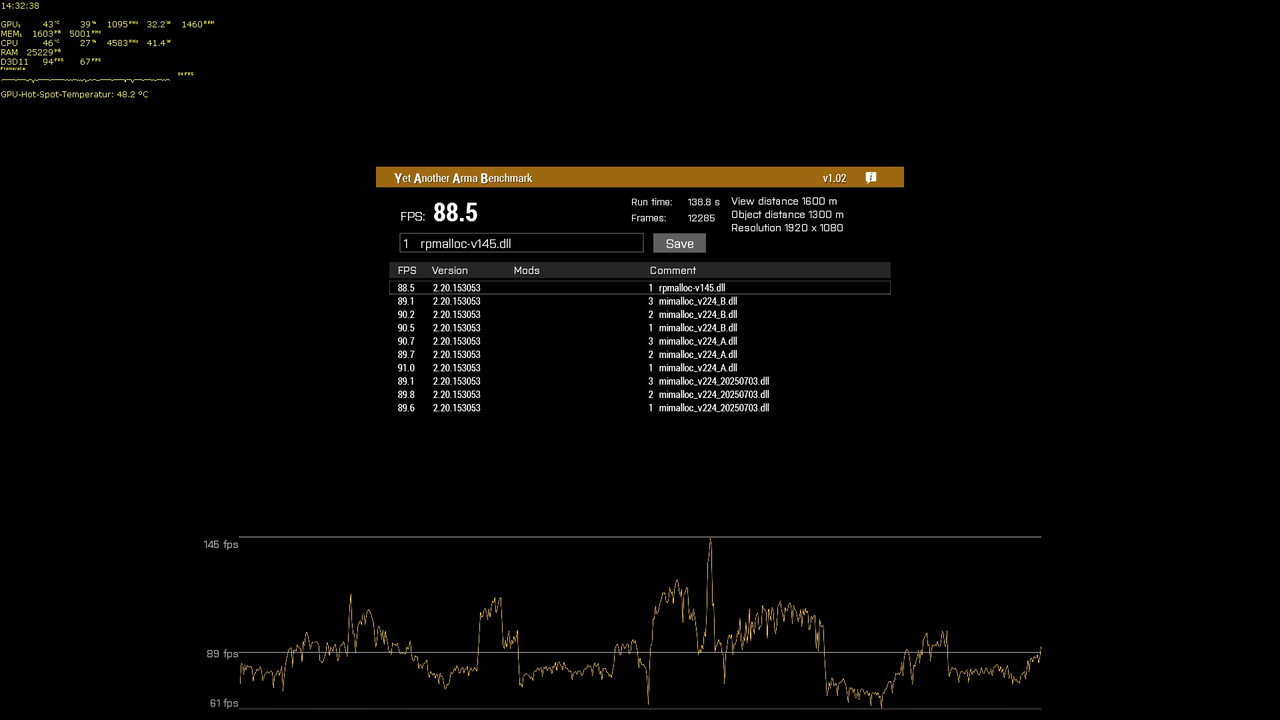
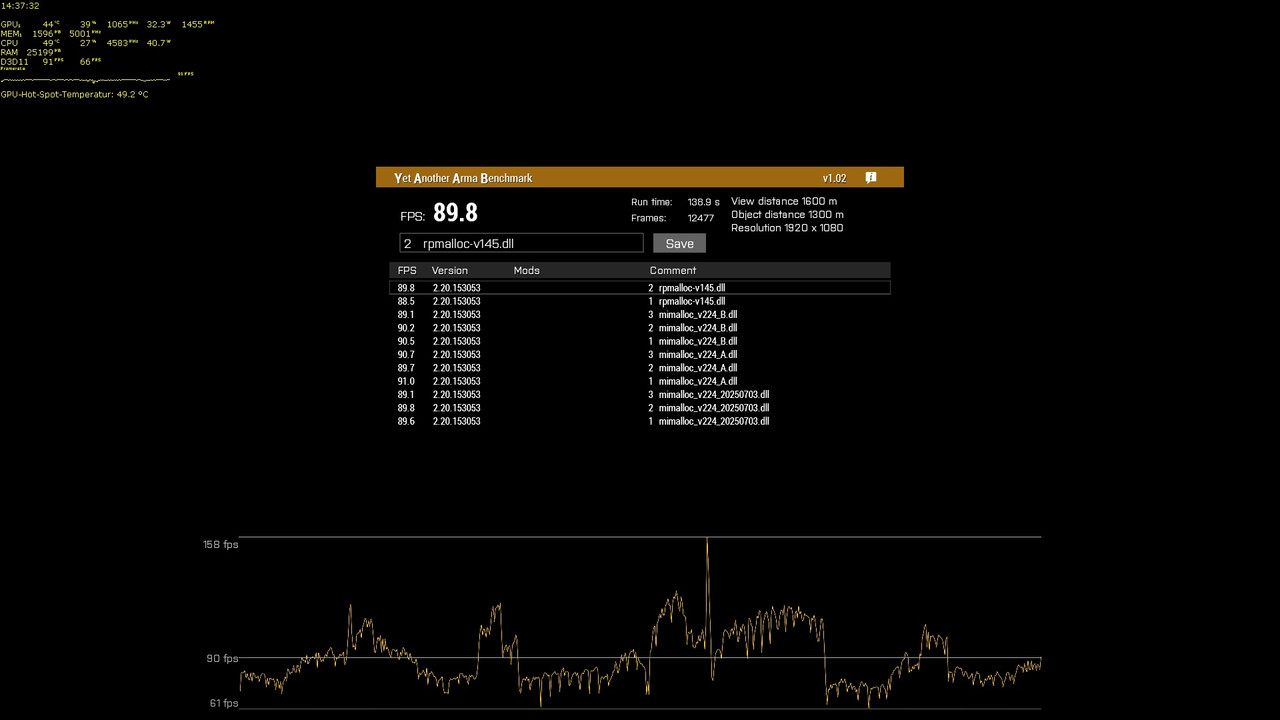
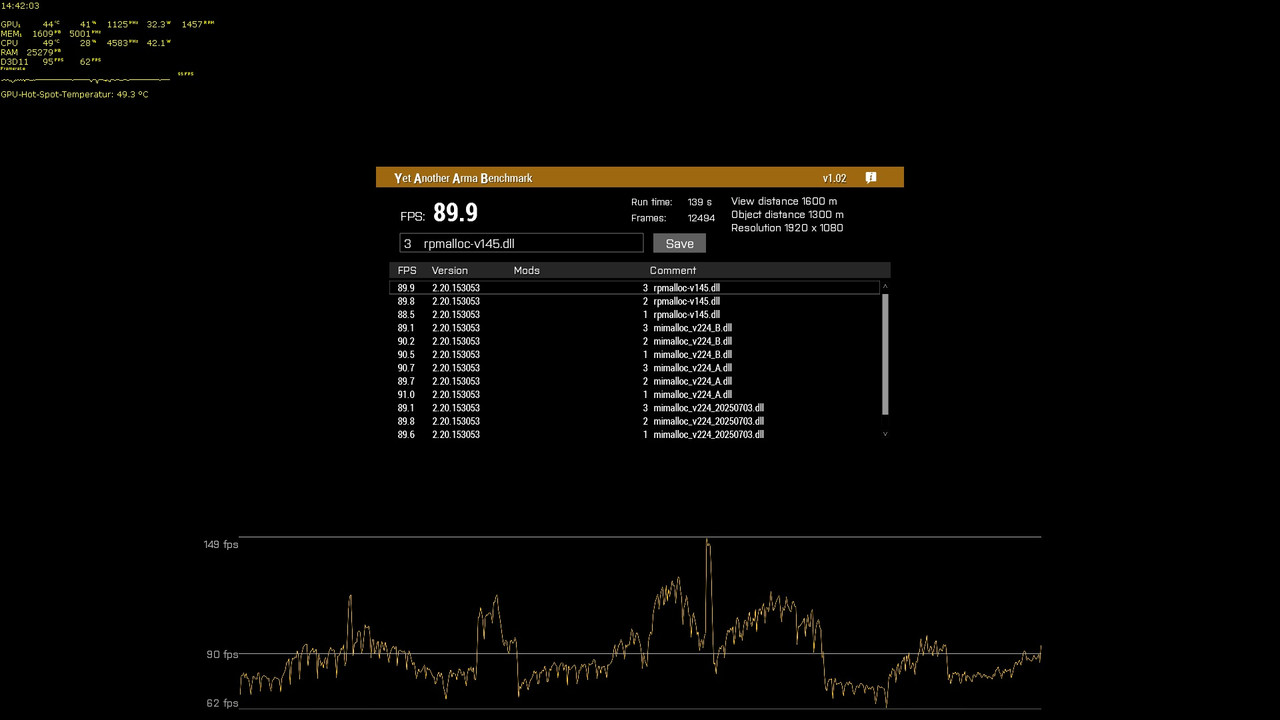
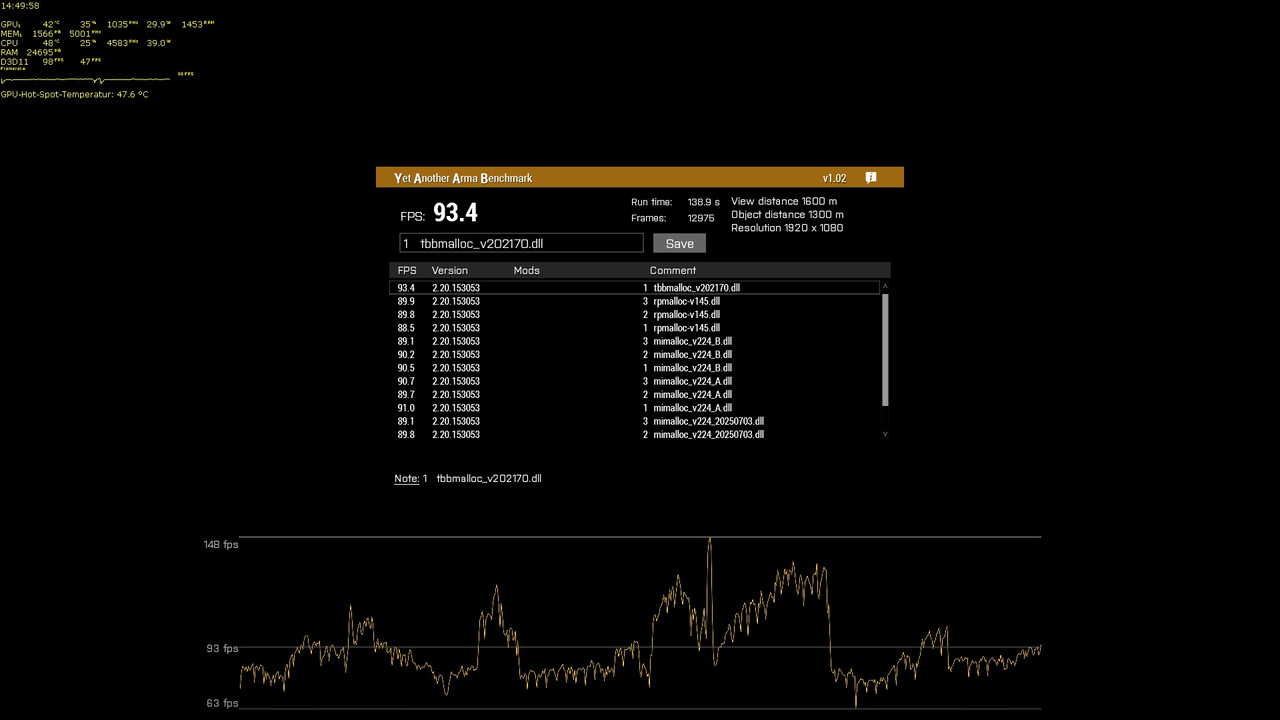
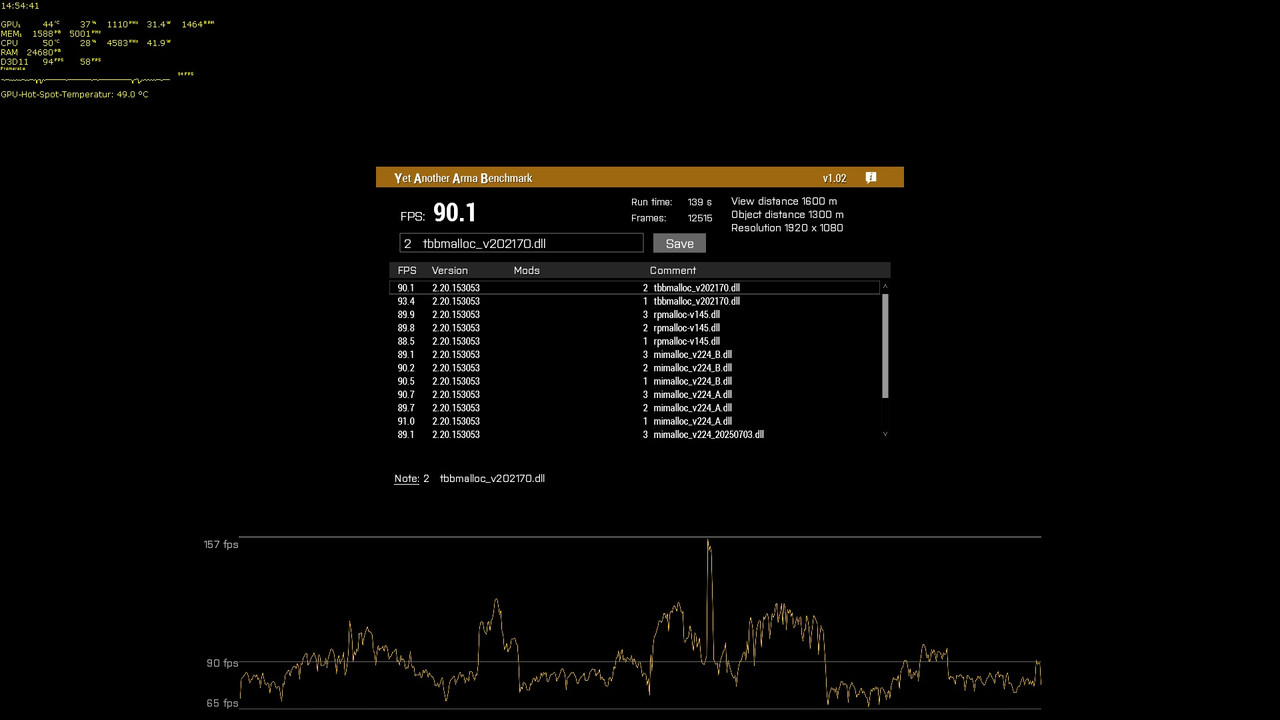
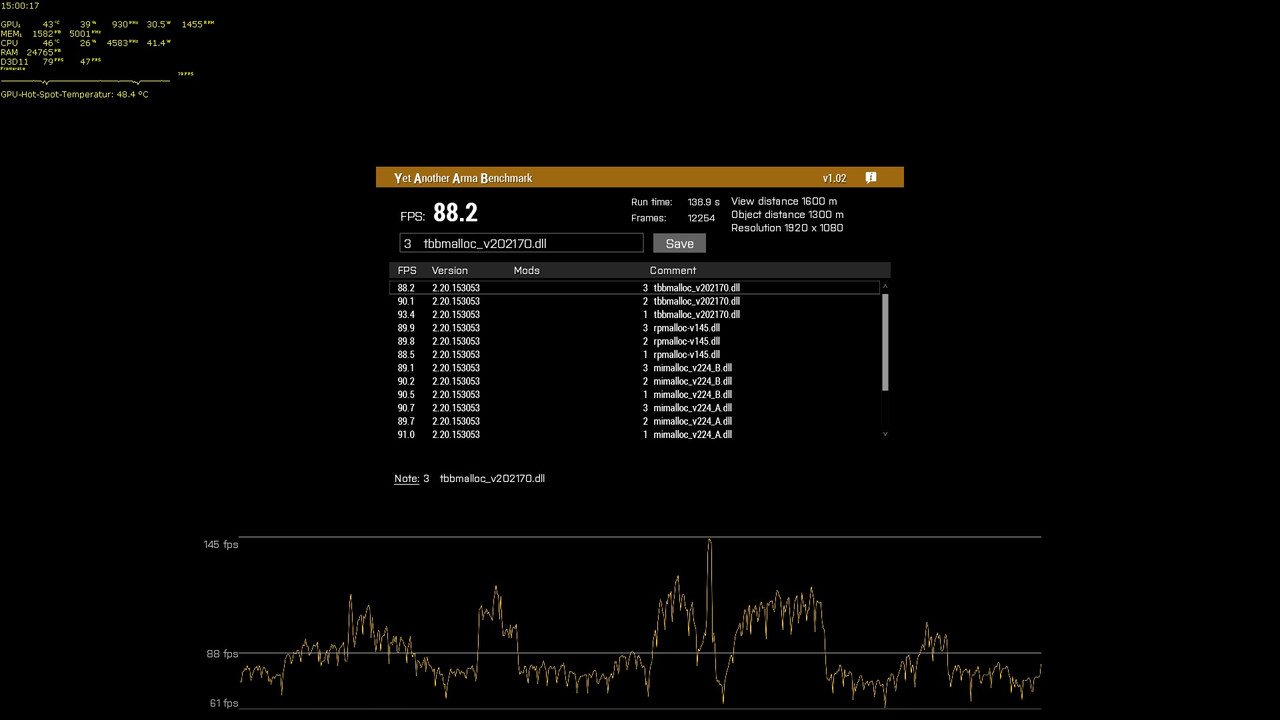
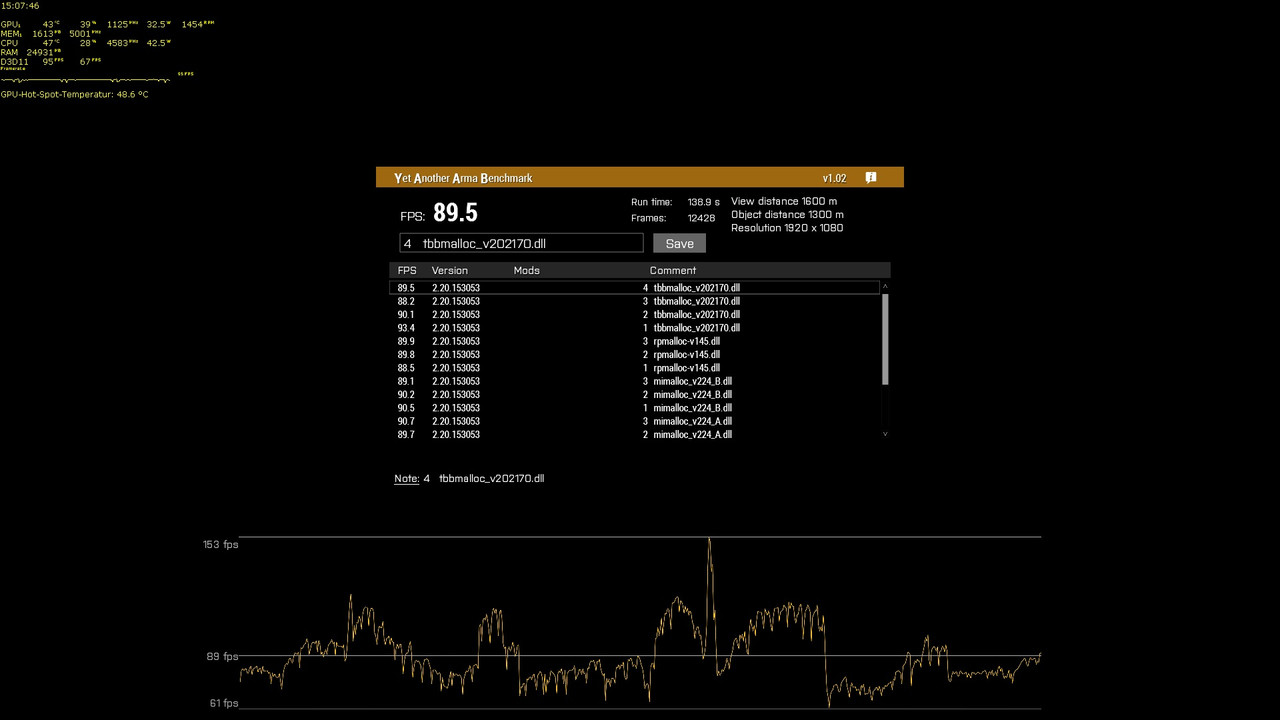
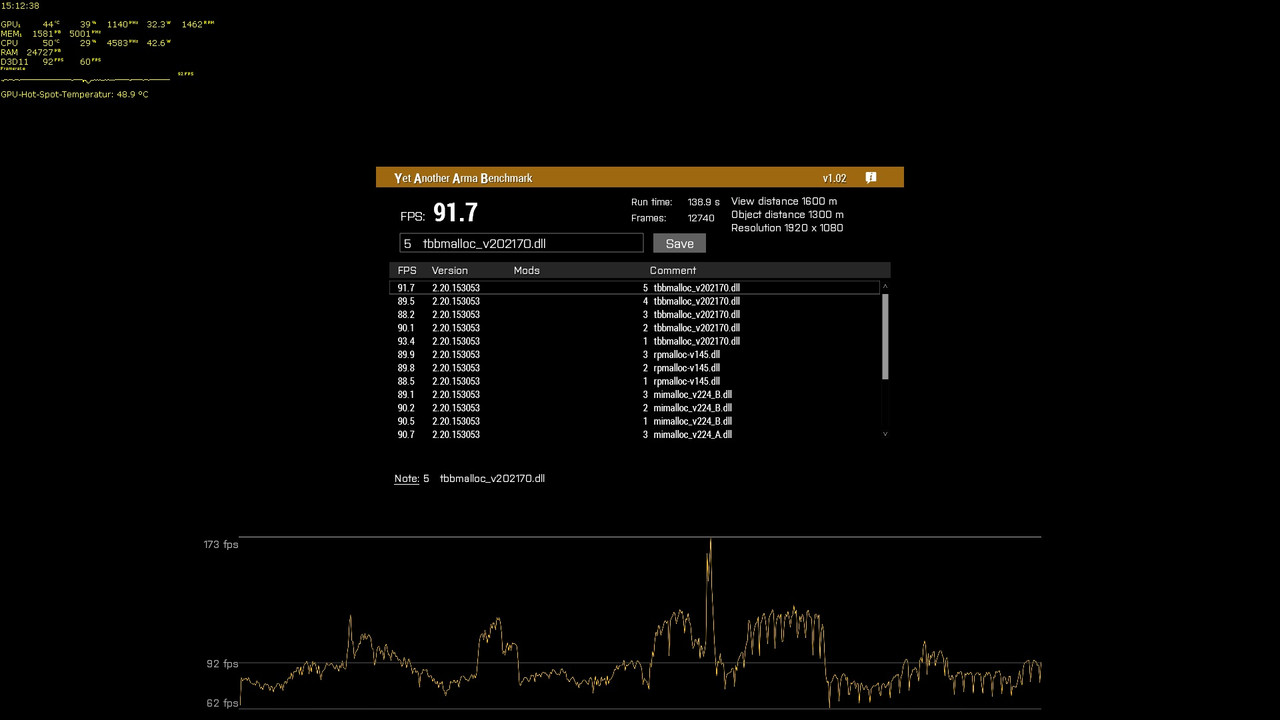
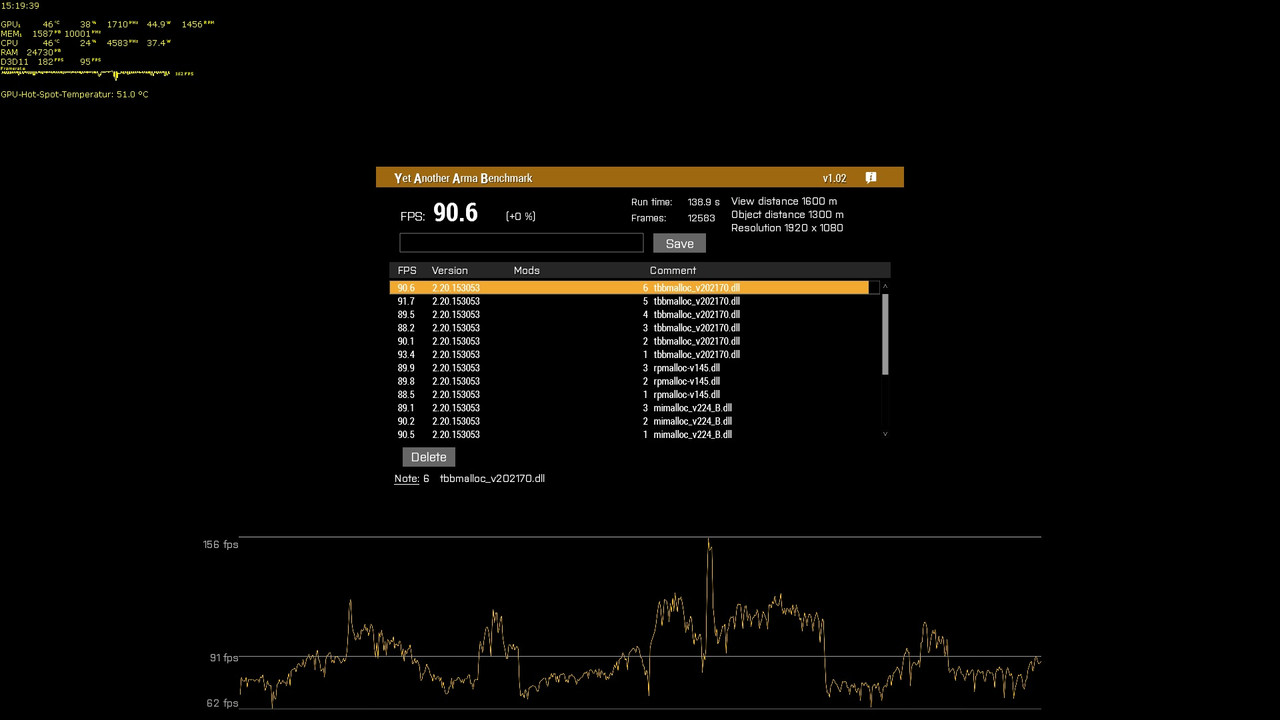 light cargo
eww rar
nocturne obsidian
feral harness
from wiki : PhysX object or
Arma 3 logo black.png
2.04
LALocal unit, in which c...
I tested everything entirely in a local environment.
whole cloud
foggy vine
Safe to just send it here, right?
It contains your windows username, if that is fine then yes
whole cloud
foggy vine
https://drive.google.com/file/d/1YirbxmOYQuuIXq9ksiI4hfLESg0ujmjq/ :P
Well if you don't set it to public access, the public cannot access it 😄
feral harness
nocturne obsidian
I tested everything entirely in a local environment.
even better, means you should be able to make a repro for us
whole cloud
foggy vine
Fixed
Windows multimedia api
The final crash at the end, I cannot see what that belongs too, its out of range for any of the loaded DLL's. But FreeTrackClient is close to it.
The full dump was not needed here
 opal hound
Does anyone else experience freezing when initially opening the server browser? ...
opal hound
opal hound
Does anyone else experience freezing when initially opening the server browser? ...
Can you do anything with the FROZENx.mdmps? I have one of those for every session, but of course when I go to try and actually get a memory dump the issue magically disappears...
foggy vine
whole cloud
<:blobdoggoshruggoogly:748124048025714758> Windows multimedia api
The final cras...
Neato, just a thingamajig with launching MSI Afterburner with its statistics server in a chaotic order on top of launching OBS then. It was a one time occurrence so I'm happy enough
Thanks
whole cloud
opal hound
Can you do anything with the FROZENx.mdmps? I have one of those for every sessio...
The frozen dumps are memory dumps. They tell me what it was doing during freeze
nocturne obsidian
feral harness
even better, means you should be able to make a repro for us
I finally managed to reproduce the issue I encountered yesterday:
https://drive.google.com/file/d/1uM2ckP06acFd6JptuoXMwj_vGGRDuGc5/view?usp=sharing
However, I was able to resolve it using my own method.
I believe (please correct me if I’m wrong) that when the frame rate drops, the engine automatically puts some PhysX objects to sleep.
So after using addForce, I immediately attached a thread to the object that continuously runs _object awake true;, and that solved the problem.
Google Docs
feral harness
nocturne obsidian
I finally managed to reproduce the issue I encountered yesterday:
https://drive....
still need that repro
nocturne obsidian
feral harness
still need that repro
To reproduce the issue where the object moves back to its original position, it's very simple:
Just create an object and name it c1, then place a few hundred units within a 500-meter radius around it.
After that, run the code I sent you — that's exactly how I tested it.
feral harness
nocturne obsidian
To reproduce the issue where the object moves back to its original position, it'...
what kind of object it could matter
nocturne obsidian
feral harness
what kind of object it could matter
I just used a "chair."
feral harness
is it physX chair?
as in when you place chair above ground in editor, does it fall down on preview?
nocturne obsidian
feral harness
is it physX chair?
The chair was just used to provide a reference position — I didn’t apply the addForce function to it.
The objects I applied addForce to were the hundreds of infantry units I placed, as shown in my video.
feral harness
that wasnt my question though
nocturne obsidian
feral harness
that wasnt my question though
How about this — I’ll create a mission and send it to you.
feral harness
physx engine does not normally work on individual objects but on a scene where multiple objects could be involved at once, hence the specific question
try removing the chair and just use position coordinates and see if it behaves the same
nocturne obsidian
feral harness
physx engine does not normally work on individual objects but on a scene where m...
This is the test mission file (the version with the chair).
The issue occurs almost every time I run the test.https://drive.google.com/file/d/1sreZLX1Juan60ilwNs2dNTsLBa7wa1Fr/view?usp=sharing
Google Docs
nocturne obsidian
feral harness
physx engine does not normally work on individual objects but on a scene where m...
This is the version where I removed the chair and used coordinates instead — the issue still occurs:
https://drive.google.com/file/d/1d4TKhIwP7zVlUeyKAo240tWsZ6ny5YVI/view?usp=sharing
Google Docs
nocturne obsidian
feral harness
physx engine does not normally work on individual objects but on a scene where m...
Look, the issue I mentioned earlier doesn't really affect my mod development. Whether it's fixed or not doesn't matter to me — it might not even be an Arma 3 engine issue, but rather a PhysX-related one.
However, I’ve discovered a new issue that significantly impacts my ability to make mods. Please watch this video:
https://drive.google.com/file/d/1CygBnlwNcEuAncX3PRmRs9v-SryI4g-D/view?usp=sharing
In the video, you'll see that units close to an explosion are completely unaffected by the addForce function (even if I repeatedly execute _object awake true). Meanwhile, units farther away do react correctly.
After thorough testing, I found the root cause: my script applies addForce immediately after the explosion. Units that are close to the explosion don’t respond at all, while those farther away — whose code execution is slightly delayed — do respond properly.
In other words, if I insert a short delay (sleep) after the explosion, then all units — near or far — respond correctly to addForce. What’s even stranger is that if I skip the explosion effects entirely and just apply addForce directly, then all units respond as expected without needing any delay.
Please investigate and fix this issue — or at the very least, document the cause and provide a recommended workaround on the official Wiki. Thank you!
Google Docs
feral harness
nocturne obsidian
Look, the issue I mentioned earlier doesn't really affect my mod development. Wh...
Indeed an interesting issue, could you please make a ticket on FT and add all this to it and I will open internal ticket
nocturne obsidian
feral harness
Indeed an interesting issue, could you please make a ticket on FT and add all th...
I've created the ticket. Here's the link:
https://feedback.bistudio.com/T193399
feral harness
nocturne obsidian
I've created the ticket. Here's the link:
https://feedback.bistudio.com/T193399
thanks, if you have updates post it there plz
nocturne obsidian
feral harness
thanks, if you have updates post it there plz
Will do.
 inner elbow
where to send profiling crashes
patent sky
inner elbow
where to send profiling crashes
You should get prompted to upload them using the crash reporter now (or automatic for servers)
inner elbow
ah yeah
 dusky spire
I get a ‘not responding’ freeze and have to kill the process to exit arma, no prompt though.
Does arma still create a report?
whole cloud
It creates and sends a report if you get the popup dialog asking if you want to send it.
I think for freezes we do not generate one
 final hearth
IDK if its of interest but... Rainbows dont render properly on widescreen (21:9), disappears when on the last 1/4th of the screen - Literally unplayable 
fiery crescent
final hearth
IDK if its of interest but... Rainbows dont render properly on widescreen (21:9)...
Guess, no unicorns mod will be made for A3 😁
final hearth
No gold at the end of them either 😭
knotty wraith
the server crashed for the first time on new hardware
https://drive.google.com/file/d/1eHFAqDiJAgSnBAWwIWok8ju_MOo-QChr/view?usp=sharing
Google Docs
 swift drift
AIThinkOnlyLocal - it completely disables knowsAbout and Targers for AI's?
And in theory it can be changed mid mission too?
So in theory it should be possible to workaround this, by disabling and enabling it inside the mod, when the command is needed to be executed?
heavy vortex
Well, your issue there is that knowledge takes time to accumulate.
It's not network synchronized. Each machine is doing its own visibility checks.
swift drift
So I need to test and experiment then.
Is just that:
Server - mod that affect AI behavior,
HC - all AI units are on it.
- clients that have nothing to do with it
 tribal remnant
Dedmen hi, maybe you can give me a clue?
My dedicated server started to hang spontaneously (iirc, never happened before 2.20, but maybe it is just o coincidence).
I tried 2.20, tried profiling branch with -debug, but the server log doesn't contain anything suspicious.
I can't reproduce it playing locally, only on dedicated.
The server process not crashing, and clients can move across the map freely, but no output for console commands at all.
Is there any way to inspect the server deeper, to understand what could cause it?
 weak radish
whole cloud
64bit?
You can switch to the profiling exe and capture a frame with the SFRAME c...
weak radish
whole cloud
64bit?
You can switch to the profiling exe and capture a frame with the SFRAME c...
Ded has suggested the following in the past. SFRAME
weak radish
tribal remnant
Dedmen hi, maybe you can give me a clue?
My dedicated server started to hang spo...
.
tribal remnant
and capture a frame
->
no output for console commands at all
heavy vortex
Technically the server only needs to receive the commands, not send anything back. Check if something like diag_log works.
There are also various #debug commands (which you'd probably need to run before it breaks) but I never convinced any of those to work.
tribal remnant
not send anything back
??
The server returns output for all commands that executed in console for the server itself.
Check if something like diag_log works.
Client scripts works, at least it writes to the client log, not sure about diag_log in the console.
For server - nothing works, it hangs.
heavy vortex
You're just guessing that from the lack of response though.
In theory server could still be capable of processing incoming messages even if it can't send.
fiery crescent
tribal remnant
Dedmen hi, maybe you can give me a clue?
My dedicated server started to hang spo...
Do you use modified network settings for a dedicated server? If yes did you try default settings? Just guessing.
tribal remnant
-bandwidthAlg=2
Tested with and without it with no difference.
In theory server could still be capable of processing incoming messages even if it can't send
How can you know it, if you have no signs that the server "capable of processing incoming messages"?
No logs, no server units moving, nothing. In theory of course, I can assume that it still doing something 🙂
heavy vortex
by sending a debug console command with a diag_log in it :/
fiery crescent
tribal remnant
> In theory server could still be capable of processing incoming messages even i...
I think, that if server hangs completely you would most likely lose connection and under task manager the A3 would show Not Responding message
heavy vortex
Nah, client just sits there and waits, IIRC.
tribal remnant
by sending a debug console command with a diag_log in it
The server does not respond at all. No logs, no output, no units moving. My scripts/loops contains many logging, and all stops.
I think, that if server hangs completely
If the server process hangs completely - yes. In my case I suppose the network part is still doing its job, but it is beyond my knowledge about the game engine.
My own investigation:
I noticed that often the server log ends with
Waypoint conpleted for ***" // My own marker
16:21:38 Road not found - (3790.758545, 31.094397, 12093.906250)
Comes from the new algorithm I wrote not so long ago for civilian vehicles, the idea was to dynamically add a new waypoint when it finishes the current one, to imitate road traffic, so the function for finding new position was called from setWaypointStatements.
I checked it many times, and it always finds positions correctly, but I remembered that sometimes waypoints could be finished momentary, and in theory it could lead to endless cycle.
I changed the algorithm to use WaypointComplete EH instead of setWaypointStatements, and today all works stable during all tests, while before the server could hang in 50%.
heavy vortex
Kinda curious what exactly you wrote to do an unscheduled infinite loop there, but that's a topic for #arma3_scripting
heavy vortex
Yeah but Dedmen doesn't like this channel cluttered with things that aren't profiling-branch specific. For what it's worth I don't think there's any way for a user to diagnose an unscheduled recursion hang except by staring at their code.
 bold raven
Can off topic stuff like this be moved/deleted? It is annoying to browse this channel with this stuff cluttering it up
 scarlet jolt
Are there any current incompatibilities between stable and profiling?
Running a mission right now and everyone on stable crashes on connect to server and everyone on profiling makes it through
scarlet jolt
Seems to be a mission file thing specifically, server is running stable, only reason I bring it up here is because whatever the issue is, only clients on profiling are able to connect
I built the mission on profiling
opal hound
Pass the crash dumps on to dedmen, there are fixes on profiling for crashes but I don't think any of them are 100%-always-crash
scarlet jolt
I'll see what I can get from people
heavy vortex
That sounds more like a bug on stable that's been fixed in profiling than an incompatibility.
It shouldn't matter what version you created the mission on.
scarlet jolt
That was what I was thinking
foggy vine
Got this when I tried to launch the launcher. My mods didn't want to load after this exception 🤔
One-time occurrence so far, restart fixed it
 restive pilot
@upbeat breach plz use the relevant channels
empty goblet
tribal remnant
Dedmen hi, maybe you can give me a clue?
My dedicated server started to hang spo...
you can try take memory dump of the frozen process using Task manager (if that doesn't work Process Explorer and System Informer (formerly known as Process Hacker) can too
tribal remnant
empty goblet
you can try take memory dump of the frozen process using Task manager (if that d...
Thanks, but I found the cause, it was the SHK_pos function (inside the function for finding a road) failed somehow on dedicated (at least judging by execution inspection). What is weird, it worked well for years until now. But anyway, I replaced it with vanilla randompos, and now the server is stable.
 spring zealot
tribal remnant
Thanks, but I found the cause, it was the SHK_pos function (inside the function ...
spring zealot
tribal remnant
Thanks, but I found the cause, it was the SHK_pos function (inside the function ...
how'd you debug the freeze? I'm getting the same now out of nowhere
heavy vortex
Did you write anything weird recently? :P
uneven bluff
Since munitions were touched recently with the arming distance fixes, I'm hoping that there's some interest in this:
Specifically for projectiles that are ShellCore, there should be a way to reference its corresponding networked objects. For missiles, bombs etc, there is a single machine which they are local to. In the scripting, you can find that machine and force the local machine to triggerAmmo, causing the missile/bomb to explode. Or you can delete them, and this propagates throughout the network.
This does not happen with shells. When you generate a shell, there is a new shell on each machine, and there's no way to reference each other. When you call triggerAmmo, it blows up the one on your local machine, and all the other ones will keep on going. As far as I know, there is no way to find all the other shells on the other machines, other than a hacky workaround where I store all fired munitions in a fired event handler in sequence and use the sequence id to find it. It would be nice if shells get the same system as missiles/bombs.
heavy galleon
uneven bluff
Since munitions were touched recently with the arming distance fixes, I'm hoping...
Afaik only one is the "real" one (the one on who's machine the gun firing it is local I think ?) and the rest are copies. If you trigger it on the real local machine, the rest will copy it.
It's very shit system, but we managed to work around it 
uneven bluff
heavy galleon
Afaik only one is the "real" one (the one on who's machine the gun firing it is ...
I've had the remote mortar shells land and do damage anyway.
heavy galleon
uneven bluff
I've had the remote mortar shells land and do damage anyway.
Then no idea. For us both adjusting the trajectory and triggering the munitions worked using this approach
whole cloud
tribal remnant
> and capture a frame
->
> no output for console commands at all
you can start the frame capture before the problem starts
while server is hund, is cpu load high or low?
Someone found a way to crash their HC at startup, by malformed command line parameters. I'm impressed
knotty wraith
knotty wraith
the server crashed for the first time on new hardware
https://drive.google.com/f...
@whole cloud Have you looked at the cause of the crash?
whole cloud
knotty wraith
<@90532520101183488> Have you looked at the cause of the crash?
If I did I would've replied to you. Did I? No? Mh.
knotty wraith
It's just an extra way to remind yourself.
we changed the server to a new 9800x3d processor and the latest Windows server - it's very interesting to know the reasons
I just shouted... if you put a boat with a bot outside the map and tell it to sail to a point on the map, it doesn't sail anywhere... the boat must also be inside the map
cam_start is the spawn location of the boat, and the task is to drive to the shore. It doesn't work outside the map, script is old and has always worked
_grp Move markerpos "intro_start";

And that's how it works.
 knotty wraith
I've already made the air inside the map spawn
FFA_DISTANCE = _objPos distance2d [worldsize/2,0,0];
// 4,6 - heli, other - air
_spawnpoint =
if (_type in [4,6]) then {
  [random worldsize, random [abs (FFA_DISTANCE -5000) ,abs (FFA_DISTANCE - 6500),abs (FFA_DISTANCE -8000)]]
 } else {
  [random worldsize, random [abs (FFA_DISTANCE -8000) ,abs (FFA_DISTANCE - 10000),abs (FFA_DISTANCE -12000)]]
};
but resp planes are very close if within the map... immediately launch missiles
thoughts come to spawn without missiles, somehow to determine that AI is identified by the player and only then add missiles
tribal remnant
whole cloud
you can start the frame capture before the problem starts
while server is hund, is cpu load high or low?
50% of CPU time (i5-4570T, two threads).
tribal remnant
spring zealot
how'd you debug the freeze? I'm getting the same now out of nowhere
how'd you debug the freeze? I'm getting the same now out of nowhere
Intuition 🙂 Long observation process with analytics. Identification of patterns. Comparison with your own actions before ("Did you write anything weird recently?") and the period of stable work... LUCK.
spring zealot
tribal remnant
> how'd you debug the freeze? I'm getting the same now out of nowhere
Intuition ...
I had to remove so many layers lmao. Mine was a saveload component not working in capture and hold with campaign struct causing it to freeze after default save time
no idea how that got in there
 knotty plinth
Is it possible autonomous AI has now sort of reduced behaviours and wont work at all if no player is watching at it? Noticed if im not close as player (also with a extern stallite camera) its just not driving, when i watch at it or im close as player it starts moving/driving again). Not sure if something has been changed, didnt notice this before.
 plain trout
Is it only happening on perf branch?
heavy vortex
Pretty sure someone would have noticed on our servers if AI couldn't drive off-camera. Although there could potentially be localhost vs server differences.
AI does randomly fail to drive for no good reason at all, but that's nothing new.
olive silo
knotty plinth
Is it possible autonomous AI has now sort of reduced behaviours and wont work at...
Isn't that just MinErrorToSend normal behavior?
empty goblet
tribal remnant
Thanks, but I found the cause, it was the SHK_pos function (inside the function ...
it would be still interesting to know if it's bug in the SHK_pos function or our bug ...
empty goblet
knotty plinth
Is it possible autonomous AI has now sort of reduced behaviours and wont work at...
that feels like some sort of behavior doesn't firing up (or incorrectly used waypoints (stuck in specific 'do not do' oddities/loop)
tribal remnant
empty goblet
it would be still interesting to know if it's bug in the SHK_pos function or our...
If you're interested, I could try to prepare a use-case this week. But I'm afraid it would end up with SHK_pos functions fixing, and I have doubt anybody here interested in it. Because, as I wrote before, often the server log ends with "Road not found", and SHK functions use nearroads, as well as "while" loops. I catched the moment it hangs once - it was the time the civilian vehicle finished its waypoint, when a new waypoint should be generated. Marker just before the SHK_Pos function call was shown, and the one right after it - wasn't.
Taking in account that SHK_pos function used widely in the mod for a long time (and I test that function in console many times using absolutely the same params I got from my markers in the code), I can assume that something happens when this function called at waypoint completion, both in waypointstatement or WaypointComplete event handler, but this guess is appropriate only if these two call options are similar "under the hood".
spiral pond
Often the server log ends with "Road not found"
Something seems to have changed with 2.20 though from what i can tell.
Either its better logging, or some other reason I've seen this more than before (plus the other variant that mentions the position)
Road not found - (928.849487, 100.501747, 3485.518555)
tribal remnant
Something seems to have changed with 2.20 though from what i can tell.
Either its better logging, or some other reason I've seen this more than before (plus the other variant that mentions the position)
Road not found - (928.849487, 100.501747, 3485.518555)
I can reproduce it in a couple of hours maximum, if somebody would need. I just need to be told what to do to get all needed info.
knotty plinth
empty goblet
that feels like some sort of behavior doesn't firing up (or incorrectly used way...
New test
It happens when a lot is happening in the mission itself after a time, like bigger attack waves going on. Looks like it does priorities. But still weird it works when you watch the units what they do. Also happens with the 2.20, tested on both
knotty plinth
heavy vortex
Pretty sure someone would have noticed on our servers if AI couldn't drive off-c...
We did autonomous Harvesters and they do these problems now. AI attack waves with regular AI works fine no issues (CTI styled mission)
knotty plinth
olive silo
Isn't that just MinErrorToSend normal behavior?
Is there anything to add in the server cfg?
empty goblet
knotty plinth
New test
It happens when a lot is happening in the mission itself after a time, ...
ye some reliable repro would be helpful
knotty plinth
empty goblet
ye some reliable repro would be helpful
Not sure if we can do a repro with vanilla stuff, probably replacing our Harvester with a UGV and replace our other units and vehicles with vanilla stuff.
Would a video work too and show how it happens/what happens exactly and when it happens?
whole cloud
spiral pond
> Often the server log ends with "Road not found"
Something seems to have change...
There is only one "Road not found", I think I added the coordinates to that recently.

Its in pathfinding, when AI wants to stay on roads only, they will walk through the road network.
I don't know how the error happens though, some connection to a road that doesn't exist, don't know where the connections come from
Probably need a repro and then look closely at it
spiral pond
Alright thanks. We have a test mission for the road network with logging and 2d map visualization you can also run unattended on a DS.
It checks all roads between different type of keypoints. I will run it again with 2.20 (prof) and see what the rpt brings up this time.
Can try to cross reference then the road not found positions with the custom 2d map "collision" event logging.
For road connections we had used another scripted approach; if not mistaken the internal version, has also additional debugs for the road network (2d and 3d).
One more question about that rpt log - is that tied to vehicles, or infantry, or any AI?
If possible, please add the vehicle simulation that triggers it - it may help to narrow it down if its not just about vehicles (carX/tankX).
whole cloud
whole cloud
whole cloud
whole cloud
lethal trench
that has a 0 byte dump 😄
Seems stack overflow is still not properly fixed
zombi also has a 0 byte, but a couple older ones too
I'd recommend fixing some of the script and other errors spamming the RPT to reduce the noise a bit
Getting those errors in CUP models fixed is probably gonna be hard tho
No the other dumps in there are also nothing
whole cloud
knotty plinth
New test
It happens when a lot is happening in the mission itself after a time, ...
AI does have limited time per frame, maybe you could run the server controlling the AI at higher fps?
whole cloud
spiral pond
One more question about that rpt log - is that tied to vehicles, or infantry, or...
any AI. But its for pathfinding requests that specify they want roads, which I think mostly vehicles do
Btw crash rate is magnificent.
There were about a dozen over weekend with the command line bug fixed in next prof, the others are all on-exit crashes.
 unborn urchin
- Fixed: CarHorn type weapons did not work for Tank type vehicles
holy shit
was wanting that one a long time ago
fickle geyser
well, shame we won't be able to fix that in all of SOGPF content anymore.
opal hound
Anything notable in the server side stuff? 😊
heady plinth
unborn urchin
was wanting that one a long time ago
thank me later (or now)
heady plinth
fickle geyser
well, shame we won't be able to fix that in all of SOGPF content anymore.
why? no patches anymore? or you could do it in that mod - replace the custom horn weapons with actual horns?
fickle geyser
yes, we don't have any patches planned anymore.
We could patch that in Nickel Steel indeed.
Maybe would be worth taking a look as the scripted horns are tiny bit buggy sometimes.
fickle geyser
whole cloud
Horns for boats too pls
 plucky field
final hearth
plucky field
final hearth
Couldn't find that one, cheers!
charred pagoda
I think I shouldn't send this report if it happens while normally closing the game, should i?
 floral socket
on another note, is it okay to close the game by alt f4? clicking exit takes too long
weak panther
Crash Reporter should open if I press Yes, correct? If click No it will open Crash Reporter anyway, I'm not sure, but it doesn't seem to have opened before on prof in No pressed 
(not from todays update I seeing this for a few days)
 weak panther
fickle geyser
Horns for boats too pls
weak panther
fickle geyser
Horns for boats too pls
gud for vanilla police boat https://feedback.bistudio.com/T128495
 proud mist
whole cloud
proud mist
whole cloud
@whole cloud
What p3d fatal error change ?
Most modmakers have now more work to do ?
What is the reason to change this ?
Can this be consider to back in error state ?
quaint flame
proud mist
<@90532520101183488>
What p3d fatal error change ?
Most modmakers have now mor...
It would crash anyway before. Now it's just a proper error message afaik
patent sky
weak panther
Crash Reporter should open if I press Yes, correct? If click No it will open Cra...
This is a different functionality separate from the enfusion crash reporter, 😅
they should both open actually? possibly only on diag exe? my local code might be outdated tho, so i'm not sure
and the crash reporter one should™ run first
weak panther
patent sky
and the crash reporter one should™ run first
it appears not after pressing y/n, few sec after crush
patent sky
Yeah that sounds right (its still starting in the background), I thought u meant it only shows up once yes/no is pressed on the other one
 thin magnet
quaint flame
It would crash anyway before. Now it's just a proper error message afaik
thin magnet
quaint flame
It would crash anyway before. Now it's just a proper error message afaik
Before the update we had no problems with our mods, and now any attempt to put them on results game crash. So it seems to me that it is not working as it should
proud mist
quaint flame
It would crash anyway before. Now it's just a proper error message afaik
Most of the units create personal gear and like mine units we never have issue of crush someone due fact gear stuff. Most of them was according to Arma engine or memory errors.
@thin magnet he is from mine unit
That's something terrible for most of them you trying do something in Arma 3 when acctualy this game is in good shape. Forgive my reaction for that. But with all respect to you creators is it worth it ? With this you destroy most of the community created mods 😂
 cold lantern
proud mist
Most of the units create personal gear and like mine units we never have issue o...
cold lantern
proud mist
Most of the units create personal gear and like mine units we never have issue o...
 then I guess send crash dump to dedmen and maybe send him said mod
quaint flame
(previously it would be a RPT message, followed by a game crash)
That's for dedmen to clarify then. The changelog says otherwise
whole cloud
fickle geyser
Horns for boats too pls
Ticket please, probably with a example mod that adds a horn to a boat
empty goblet
fickle geyser
Horns for boats too pls
cough, what's next ? horns for submarines and helicopters (cough hovercrafts) ? 😁
opal hound
trains
empty goblet
opal hound
trains
those are just trucks and tanks slapped on rails 😁
opal hound
true
empty goblet
but UUV and submarine doing 'honk' ping to get range 🙂 ... someone will for sure recreate Red October scene in Arma 3 then
opal hound
what does it look like for players?
empty goblet
opal hound
what does it look like for players?
player is kicked and temp banned, in short, nobody can play on 2.20.153074 server
gulps over the mass revert ahead of him
ok, maybe not everyone, i just see 1 player at 1 server somehow playing but most of players fails to connect
whole cloud
opal hound
Anything notable in the server side stuff? 😊
Not for you, I hope, unless something breaks
indigo anvil
empty goblet
but UUV and submarine doing 'honk' ping to get range 🙂 ... someone will for sur...
Submarine doing sonar pings 🙂
whole cloud
charred pagoda
I think I shouldn't send this report if it happens while normally closing the ga...
All reports are good, except 0xDEAD if you know its your fault
whole cloud
weak panther
Crash Reporter should open if I press Yes, correct? If click No it will open Cra...
No thats a different thing. That is for full dump (rarely needed, needs lots of space)
whole cloud
patent sky
and the crash reporter one should™ run first
Afaik it does, but its quite slow in starting up, probably because it creates a dxdiag report first that I never look at nor care about
whole cloud
thin magnet
Before the update we had no problems with our mods, and now any attempt to put t...
Send in the crash reports