#perf_prof_branch
1 messages · Page 13 of 1
 ashen helm
 whole cloud
Well.. Most.
YAAB runs fine 😄
The lambs issue has been identified.
But v8 is affected by the lambs issue too!
 heavy galleon
still time for v10
ashen helm
whole cloud
The lambs issue has been identified.
But v8 is affected by the lambs issue too!

 silk pewter
 whole cloud
That is the original
oi why is the original not working
https://media.discordapp.net/attachments/
https://cdn.discordapp.com/attachments/
😠
 vivid rune
Yeah posting pictures was violated by members of BI so it is forbidden...
whole cloud
Okey thanks to the dumps, I found and fixed the lambs and flashlights issues.
Bit too late for today, but in time for tomorrow morning
whole cloud
Bah I forgot to fix the bug in the non-chrome COPY ALL button thing. v10 for that one then :harold:
vivid rune
I played the Eastwind campaign. In "Signal lost" (Kerry wakes up on the Beach of Altis) the stand up animation freezes if he put his left hand in the sand for a couple of seconds. After that it cut after some seconds to the next animation. Verified it with stable. There is all fine. Dev version has the same flaw (14.11.24)
 minor geode
So has the current build on steam addressed the blinking unit bug? I had reverted to a previous 2.18 build waiting for it to be addressed, no rush, just wondering.
 knotty wraith
minor geode
So has the current build on steam addressed the blinking unit bug? I had reverte...
knotty wraith
minor geode
So has the current build on steam addressed the blinking unit bug? I had reverte...
v9 is no longer available
but the flickering is fixed
knotty wraith
knotty wraith
~~but the flickering is fixed~~
I saw the flicker again
vivid rune
knotty wraith
I saw the flicker again
You playing the v8 again. It is a roll back.
knotty wraith
vivid rune
You playing the v8 again. It is a roll back.
I managed to download v9
vivid rune
knotty wraith
I managed to download v9
Which build number are you playing right now?
knotty wraith
arma3client_x64_profiling_218_152408_v09
 acoustic lynx
Has there been a change with how mission objects are created in MP vs SP on profiling? I'm noticing some vehicles and objects get placed in SP but not MP when testing in the editor on profiling.
Seems to not be just a profiling issue :\, I'll see if I can narrow down the issue and post about it in the most apt place
 primal silo
Curious if there is a specific recommendation for a mimalloc or memory allocator I should be using other than default?
heavy galleon
primal silo
Curious if there is a specific recommendation for a mimalloc or memory allocator...
I am running with these, but I wouldn't expect any big differences https://github.com/GoldJohnKing/mimalloc/releases

GitHub
mimalloc is a compact general purpose allocator with excellent performance. - GoldJohnKing/mimalloc
 fallen furnace
Hi, I'm sorry if this has been asked before; I know generally the average FPS is supposed to be better but should we also expect better 1% lows? General performance has always been decent, but in Antistasi for example FPS can be conistently low late game w/ many stutters.
 woven loom
heavy galleon
I am running with these, but I wouldn't expect any big differences https://githu...
woven loom
heavy galleon
I am running with these, but I wouldn't expect any big differences https://githu...
I did see a notable improvement with this (lock_pages variant)
woven loom
fallen furnace
Hi, I'm sorry if this has been asked before; I know generally the average FPS is...
Because of performance binary or the malloc?
 void badger
Considering the optimizations done, certainly
 plain trout
fallen furnace
Hi, I'm sorry if this has been asked before; I know generally the average FPS is...
plain trout
fallen furnace
Hi, I'm sorry if this has been asked before; I know generally the average FPS is...
You can’t make any predictions on performance. The workload is also very different for different scenarios in arma. Also most things in performance branch are still WIP. So once this crowder finds an issue with a feature, it might disappear and it usually comes back a later time. Sometimes features only get re-added in reduced or changed functionality. Some things that get optimized are for ver special uses. Until the next arma version is released consider nothing final.
 eternal kraken
woven loom
I did see a notable improvement with this (lock_pages variant)
eternal kraken
woven loom
I did see a notable improvement with this (lock_pages variant)
with mimalloc_v214_lock_pages and the last profiling version my YAAB avg. FPS increases from 47 to 57 🙂
 spiral pond
anyone fancy to upgrade it with storing the fps data points to MissionProfileNamespace and show the graph for the selected run?
(+ native support of console via desc.ext settings and logging slow frames if ran with profiling build)
woven loom
eternal kraken
with mimalloc_v214_lock_pages and the last profiling version my YAAB avg. FPS in...
Aye I saw a good 10 fps increase too iirc
primal silo
heavy galleon
I am running with these, but I wouldn't expect any big differences https://githu...
Appreciate your help, this was very helpful and honestly gave me a solid avg 15 fps boost
heavy galleon
 happy to
primal silo
ashen helm
if you have a lot of ram you could try using goldjohnking's mimalloc
Same to you, thanks as it really did help with performance
whole cloud
2.18.152418 new PROFILING branch with PERFORMANCE binaries, v9, server and client, windows 64-bit, linux server 64-bit
- Added: Multithreaded PhysX simulation
- Fixed: Crash when AI group is deleted while being simulated
- Fixed: AI visibility checks did not consider per-frame time limits
- Fixed: Crash related to weapon flashlights/IR lasers
- Fixed: Game would try to re-download Steam Workshop Compositions repeatedly - https://feedback.bistudio.com/T171116
- Fixed: Zeus map did not render "Empty" markers - https://feedback.bistudio.com/T185279
- Fixed: Difficulty could get stuck in "Regular" after a campaign intro mission
- Fixed: DataLink config attributes in "Man" type classes were ignored - https://feedback.bistudio.com/T186290
- Fixed: inArea/Array/Indexes did not support legacy hexagon
- Fixed: RPT file header would not print completely if too many mods are loaded
- Fixed: RPT file header would not print all arguments (if arguments are too long)
- Removed: One rendering optimization (caused objects to visibly flicker, pending further investigation)
Note: Profiling branch contains experimental changes that can be unstable. Please report issues to developers, and consider switching back to stable / default branch if the issues are too severe.
If you don't want to use the Steam branch, the files are also available for alternative download here:
https://drive.google.com/drive/folders/15p9j7C2nHUt6NoVfChX4YFuqzFXzblJh

whole cloud
whole cloud
2.18.152418 new PROFILING branch with PERFORMANCE binaries, v9, server and clien...
eternal kraken
what a nice new arma feeling with those improvements. thank you dedmen 🙂 https://i.ibb.co/TbBXpBy/20241114110113-1.jpg
plain trout
- Fixed: Game would try to re-download Steam Workshop Compositions repeatedly - https://feedback.bistudio.com/T171116
just realised you get really bad fps (22-25) in the menu if you run with -noworld startup paramenter and 40k view distance. On prof and vanilla. Worse than on an actual map.
Also the background shadow calculations that were supposed to be fixed with 2.18 are still only deactivated by lower shadow drawing distance. Do you want FT tickets?
heavy galleon
I might have an unorthodox solution. Don't use 40k view distance
 inland dew
eternal kraken
what a nice new arma feeling with those improvements. thank you dedmen 🙂 https:...
inland dew
eternal kraken
what a nice new arma feeling with those improvements. thank you dedmen 🙂 https:...
looks like you have a fps lock, thus wrong numbers in yaab
eternal kraken
inland dew
looks like you have a fps lock, thus wrong numbers in yaab
this is called VSync and its intended
eternal kraken
the parts in game where i get 100 fps i dont care. but the parts where i get less then 60 fps i care a lot so
for me everything is benching as intended
inland dew
it's not, but ok
heavy galleon
Doesn't vsync make it even worse for situations where you're pushing less frames than your monitor can do?
plain trout
 empty goblet
it depends what type of buffering is active and arma has alternative vsync and there is also option for tripleBuffering=1; for client-side arma3.cfg
ashen helm
"alternative vsync"?
empty goblet
there are multiple types of Vsync and multiple types of buffering
the usual tearing-prone vsync is so called double-buffered
ashen helm
oh I am aware of this and set vsync through nvidia control panel, thought there is a setting for vsync type within arma
empty goblet
i don't think the tripleBuffering is definable in UI nor launcher ... it's less known feature added on my request sometime in A2 development (so works in A2. A2OA, TKOH, old dayz (not the new renderer) and A3
if anyone want to test the 2.18.152418 build on servers
Warlords XL (so with AI) 85.190.148.53:2102
KOTH (no AI) 85.190.148.52:2102
Warlords Redux 85.190.148.62:2302
just note yesterday there was like 60 players on the KOTH server with 152408, FPS in range 400 to 500, when 40 players it was over 700 😁
 hybrid cradle
Is there any chance of getting a frame limit graphics option btw? Want to clamp lower than 144 with vsync lol
empty goblet
hybrid cradle
Is there any chance of getting a frame limit graphics option btw? Want to clamp ...
there is limitFPS -limitFPS= but that is just for no-UI server-side only (ie shall work with headless client too)
tho for frame-rate limiting i suggest to use MSI afterburner
hybrid cradle
Yeah I meant in the video settings bit
Would be more convenient imo
I'd figure it's most likely not in because it's just meddling with gui in rv4 which is Hate
whole cloud
hybrid cradle
Is there any chance of getting a frame limit graphics option btw? Want to clamp ...
there is a frame limit cheeatcode
 gusty viper
empty goblet
there is limitFPS `-limitFPS=` but that is just for no-UI server-side only (ie s...
gusty viper
empty goblet
there is limitFPS `-limitFPS=` but that is just for no-UI server-side only (ie s...
Does that also work on client? Thought it was server only.
whole cloud
⚠️ One of the crash fixes from yesterday didn't work.
We'll replace this build by a hotfix on 152413 in about 30 minutes
empty goblet
gusty viper
Does that also work on client? Thought it was server only.
not sure, @whole cloud is that server-side only or affects client too ?
whole cloud
limitFPS is called "FPSLimitServer" internally
empty goblet
i claim ignorance on this because i always use MSI afterburner and it's RivaTunerStatisticsServer to define maxFPS for each game / situation i need
empty goblet
whole cloud
limitFPS is called "FPSLimitServer" internally
ok , that answers it 😁
whole cloud
It also works on client, but only when rendering is disabled, so when the game is minimized it probably would do it
empty goblet
whole cloud
⚠️ One of the crash fixes from yesterday didn't work.
We'll replace this build b...
clientside crash or recommended server update too ?
whole cloud
both
plain trout
Performance enhancements are crazy in modded koth.
knotty wraith
eternal kraken
with mimalloc_v214_lock_pages and the last profiling version my YAAB avg. FPS in...
wow, + 6 fps on YAAB (mimalloc_v214_lock_pages)

 drifting swan
does it make sense to install custom allocators on the server?
whole cloud
If the allocator is better/faster, then yes
empty goblet
empty goblet
if anyone want to test the 2.18.152418 build on servers
Warlords XL (so with AI...
so both servers on 2.18.152413
whole cloud
Fix is up now. So should now be crash safe? 🤞
Also need info about the flickering, it should be gone now
drifting swan
flickering is gone for me
 hallow lantern
Still crash on linux dedi 
whole cloud
verified its running the 413 build?
analyzing linux crashes is such a chore
 short hollow
Crash safe including the LAMBS issue?
whole cloud
should be yes
hallow lantern
whole cloud
verified its running the 413 build?
analyzing linux crashes is such a chore <:me...
2.18.152413 yes, I will try to remove lambs and try again
hallow lantern
Without lambs no crash 
empty goblet
empty goblet
if anyone want to test the 2.18.152418 build on servers
Warlords XL (so with AI...
Redux is now on 152413 build too ... 
hallow lantern
It's the 3,5 Gb file named "core" that has the crash dump in linux, right?
knotty wraith
empty goblet
Redux is now on 152413 build too ... <a:This_is_fine:817480781286211595>
Do you have a HC client in some north?
empty goblet
knotty wraith
Do you have a HC client in some north?
nope, no need as no gains for any of those scenarios on A3 official servers
knotty wraith
empty goblet
nope, no need as no gains for any of those scenarios on A3 official servers
very sad, I feel like I’m the only one suffering from the fact that the NS doesn’t work as it should, but I can’t provide complete information
empty goblet
knotty wraith
very sad, I feel like I’m the only one suffering from the fact that the NS doesn...
what was the problem again ? today's build so far seems relatively stable so maybe time to make good repro/report
empty goblet
hallow lantern
Still crash on linux dedi <:meowsweats:707626030613135390>
except this one 
knotty wraith
empty goblet
what was the problem again ? today's build so far seems relatively stable so may...
I don’t know what exactly the problem is, but with v5 the HC does not work as before... I’ll just test today’s prof...
empty goblet
knotty wraith
I don’t know what exactly the problem is, but with v5 the HC does not work as be...
'doesn't work as before' is very non-descriptive 🤣 also 152307 is last 'stable' build before massive dump of MT tweaks, so you would need to say which exactly was the last build HC was working as before
whole cloud
hallow lantern
It's the 3,5 Gb file named "core" that has the crash dump in linux, right?
yes. But to analyze it I also need the libraries that your server loaded into the Arma process
hallow lantern
whole cloud
yes. But to analyze it I also need the libraries that your server loaded into th...
I'm using this docker https://github.com/fugasjunior/arma-server-manager/
knotty wraith
empty goblet
'doesn't work as before' is very non-descriptive 🤣 also 152307 is last 'stable'...
All my players have already run away from these tests due to constant problems with the HC and due to problems in the entire game and its results, I would be glad to roll back to V5, but I have a feeling that everything will remain the same, you will be fine because you are not using HC
empty goblet
knotty wraith
All my players have already run away from these tests due to constant problems w...
1st need to know what was last build which was working fine ? v4 or older ? and again what doesn't work ...
need clearly defined what is wrong , hard to fix something something unclear
is there Arma 3 Feedback Tracker ticket for this issue ? if not, make one
knotty wraith
empty goblet
is there Arma 3 Feedback Tracker ticket for this issue ? if not, make one
If I don't do it, the problem won't go away, will it?
It’s strange to me that I’m the only one who doesn’t know English, I have to do things that carry responsibility
empty goblet
well crap, WL redux server just crashed
knotty wraith
knotty wraith
If I don't do it, the problem won't go away, will it?
It’s strange to me that I’...
Then I need an adequate translator from your side)
empty goblet
you just need to explain the problem and ideally make the ticket, just saying 'stuff is broken' isn't much helpful unless it's broken for everyone
knotty wraith
empty goblet
you just need to explain the problem and ideally make the ticket, just saying 's...
I sometimes report problems Dedmen, but according to his rhetoric, for my implementations I need to purchase a nuclear collider after his innovations 🤪
heavy galleon
whole cloud
If the allocator is better/faster, then yes
Where Linux allocators?
empty goblet
linux allocator is hardlinked
knotty wraith
I just very much doubt that I, with my hardware with A2 on the server and ignorance of the English language, should here defend the HC for the right to live (that is, a performance check) - I think this is the work of the developers
empty goblet
empty goblet
well crap, WL redux server just crashed
dump is in dedmen's hands now 😁
empty goblet
knotty wraith
I just very much doubt that I, with my hardware with A2 on the server and ignora...
again, you arguing about HC, describe the problem, make ticket ... which will allow to replicate it
in short, many lines later, i still have no idea what's wrong with Arma 3 HC except you saying so
hybrid cradle
Just to check - prof changes aren't being merged into main with cdlc release right?
Assuming cdlc release still requires stable update ofc
empty goblet
hybrid cradle
Just to check - prof changes aren't being merged into main with cdlc release rig...
while i wish we could smuggle performance update like that, due to risk of breaking stuff, it's better to be separate updates
hybrid cradle
Yeah figured as much
 fickle geyser
They're not merged.
empty goblet
so bad news, repeated crashes on Warlords Redux server, reverting that one to 152307
2024/11/14, 16:30:25  ➥ Context:     [] L71 (A3\Functions_F_Jets\Functions\Ejection\fn_PlaneEjectionFX.sqf)

2024/11/14, 16:30:25 Ref to nonnetwork object 1841484: <no shape> #particlesource
2024/11/14, 16:30:25 ➥ Context: [] L76 (A3\Functions_F_Jets\Functions\Ejection\fn_PlaneEjectionFX.sqf)``` let me guess ... airplane + ejection == server crash^ All the crashes are inside mimalloc
gusty viper
Should the advice here not be that people stop using these custom allocators?
They are just another noisy variable
whole cloud
Usually they don't crash
eternal kraken
but those are only server crashes not client or am i wrong?
vivid rune
This still happens:
#perf_prof_branch message
empty goblet
so what i did was check if Microsoft released new allocator version and i see they did, 2.17 is last (A3 one is at 2.14)
 naive osprey
I did have 2 crashes earlier on YAAB with tbb4 (pretty sure its default) with v09 - 152413
Ran YAAB 4 times with each allocator (tbb4, JEMalloc, mimalloc, mimalloc lock pages) just to check for FPS differences, only crashed the twice and only with tbb4 - Could just be a fluke, or something on my end, but worth reporting.
https://www.mediafire.com/file/dav8a90hronjgdm/Arma3_x64_v09_crashes.rar/file
 restive pilot
whole cloud
Usually they don't crash
restive pilot
whole cloud
Usually they don't crash
A3 mimalloc by @tawdry gazelle runs an async thread that periodically "frees" memory (it calls the mi_collect fnc iirc). I wonder if that's why
As in mimalloc collection is not thread safe
 fast hornet
empty goblet
so what i did was check if Microsoft released new allocator version and i see th...
fast hornet
empty goblet
so what i did was check if Microsoft released new allocator version and i see th...
he's usually pretty fast to release a new version.. but it takes 1-2 weeks until battleye whitelists the new one... guess you guys could potentially speed that up 😬
heavy galleon
restive pilot
A3 mimalloc by <@439247699418677268> runs an async thread that periodically "fr...
I did not encounter any crashes client side and I am running locking pages version
whole cloud
naive osprey
I did have 2 crashes earlier on YAAB with tbb4 (pretty sure its default) with v0...
Is that vanilla? no mods?
naive osprey
whole cloud
Is that vanilla? no mods?
Correct, no mods loaded
Can see if I can find a linked RPT for the crashes
naive osprey
whole cloud
Is that vanilla? no mods?
https://www.mediafire.com/file/gi25am304z9fvul/Arma3_x64_2024-11-14_07-05-19.zip/file
Has the bidmp and the rpt for the first crash, second crash seems to have either not generated or been auto-deleted?
whole cloud
oki I found something wrong, there's a use-after-free atleast
I didn't test run with system allocator. tbb allocator doesn't free memory when game tells it to free, so it doesn't detect use-after-free
empty goblet
fast hornet
he's usually pretty fast to release a new version.. but it takes 1-2 weeks until...
i didn't see GJK for half year so i hope he is fine ...
empty goblet
heavy galleon
I did not encounter any crashes client side and I am running locking pages versi...
i run 2 other servers with the same allocator and 413 and those didn't crash yet (different scenarios)
spiral pond
no crashes here yet - running WLs on SPE. only AI in vehicles is having a hard time to advance to next sector.
most likely unrelated to the branch, but rather general pathfinding problems due to bocage landscape and object density
restive pilot
heavy galleon
I did not encounter any crashes client side and I am running locking pages versi...
locked pages never decommit iirc
empty goblet
ye but the server which crashed has 64GB ram and half was free
restive pilot
I mean maybe the crash Dedmen got was access violation. i.e. page was decommitted
empty goblet
but if page is locked then it shall not be
restive pilot
Oh you have locked pages on?
empty goblet
ye
fast hornet
jumped into a plane_fighter_04 a few times and ejected btw.. no crash. Client and server 2.18.152413 .. with the locked pages mimalloc (and huge/locked pages enabled in the windows policies ofc)
empty goblet
-hugePages -maxmem=32768 -malloc=mimalloc_v214_lock_pages -maxFileCacheSize=16384 + lockpages enabled for the system and user account and the a3 process
empty goblet
fast hornet
jumped into a plane_fighter_04 a few times and ejected btw.. no crash. Client an...
could be someone eject and the plane gets hit or eject after hit ? ... {not sure what Redux does to planes}
fast hornet
possible.. my test was on our dev box, so i was the only client.. the plane just crashed after ejecting
empty goblet
arma, breaking the most advanced allocators since 2008, including those who were 'rock stable part of certain linux distro' 🤣
whole cloud
restive pilot
I mean maybe the crash Dedmen got was access violation. i.e. page was decommitte...
it was a crash on malloc
heavy galleon
empty goblet
arma, breaking the most advanced allocators since 2008, including those who were...
I am just about to pick up new HW for Linux server, don't tell me I better get windows license for it too
empty goblet
307 is like 10 GB peak private byes and 10 GB peak working set, on Redux, peak virtual is 22GB
tho KOTH server with 413 peak virtual already is 38GB
whole cloud
Okey so the error I found, is in AI simulation.
But even if I disable all my AI tweaks.. it still happens.
Likely hitting an old bug here
empty goblet
heavy galleon
I am just about to pick up new HW for Linux server, don't tell me I better get w...
that was joke related to some bug Suma found while testing dozens of allocators decade+ ago, for servers, Linux is superior
empty goblet
whole cloud
Okey so the error I found, is in AI simulation.
But even if I disable all my AI ...

whole cloud
Ah the FSM deletes itself, while its running.. Yeah that'd be an old bug.... ugh
There is probably some new bug in latest prof there, but I cannot even get to it because it dies before then
heavy galleon
empty goblet
that was joke related to some bug Suma found while testing dozens of allocators ...
Good, the Ubuntu usb I made today will be handy then. 9700X time, hopefully will manage to not crash with ~130 players
 fair ore
whole cloud
Ah the FSM deletes itself, while its running.. Yeah that'd be an old bug.... ugh
fair ore
whole cloud
Ah the FSM deletes itself, while its running.. Yeah that'd be an old bug.... ugh
Personally, I think FSM is pronounced fism, like schism
whole cloud
The good old
_simulate = {_stack resize 0};
{_x call _simulate} forEach _stack
😠
int n = _stack.Size() - 1;
if (n < 0)
{
return;
}
This is the worst
if (_stack.IsEmpty()) return;that I've ever seen.
empty goblet
argh, 2nd server crashed ... w/o fulldump or mdmp ... just bidmp
Exception code: C0000005 ACCESS_VIOLATION at D645C4E6``` 🤣it ain't enough to crash, let's double crash
 vivid reef
same as my arma did just now. crash, and crashed again 
empty goblet
80 players on KOTH, ~300 fps ... sitting in middle of combat zone, playable ...
knotty wraith
vivid reef
you got nasa super computers at bohemia? <:pepekek:670325653509505064>
-- limitFPS
empty goblet
vivid reef
how tf you make 300fps in middle of ao?
that's server fps ... my window has like 30 to 40 fps
vivid reef
good
i was happy about the +10avg fps and peak at 130 in ao with new profiling but the crashes aint worth it 
empty goblet
ye the game is definitely smoother on the client ... so far my client didn't crash so that's +
vivid reef
lucky you
plain trout
KOTH+Zombies server?
vivid reef
it crashed after 25 mins, then restarted and crashed again immediately
empty goblet
no zombies anymore
but on the older machine i have different allocator ... the cma one
spiral pond
still getting the rendering issues with proxies (headgear, backpack, etc) on soldiers or as vehicle crew
empty goblet
ye i got some weird bug with stuff vanishing depending on angle of view
spiral pond
it seems like some frames it resets the relative position to 0
it appears to happen more if you turn your view on something, but also happens if you keep the view on something
video of that useful or no need?
plain trout
80-150fps at 2* 4k
vivid reef
plain trout
80-150fps at 2* 4k
maybe i was limited by the setcpu 12 core option from the last profiling i used
empty goblet
spiral pond
video of that useful or no need?
would be useful to see if it's same or different from what i got
 analog acorn
empty goblet
ye i got some weird bug with stuff vanishing depending on angle of view
analog acorn
empty goblet
ye i got some weird bug with stuff vanishing depending on angle of view
I've recently had a couple of incidents of specific people being invisible depending on what angle you look at them from.....on stable though 🤔
empty goblet
so that makes 3 of us 🤣
knotty wraith
strangely enough, but my server is still working, there were personal crashes and often... but the server is working
spiral pond
empty goblet
would be useful to see if it's same or different from what i got
OBS is glitching a lot tho - missing frames. probably need to do the pc restart first
still you can see it somewhat
whole cloud
naive osprey
I did have 2 crashes earlier on YAAB with tbb4 (pretty sure its default) with v0...
Please don't rename the Arma exe, that makes crashes hard to analyze..
One crash is a similar malloc thing as the others. The others I don't know.
But I now don't get any more issues in YAAB. And the bug I fixed wouldn't cause this
minor geode
with the multithreading enhancements coming up and in place, is it necessary to change our CPU affinity still?
whole cloud
minor geode
with the multithreading enhancements coming up and in place, is it necessary to ...
I don't remember it ever being necessary. Except on servers where you run multiple on the same machine and want to separate them
I think all the crashes i got so far, were profiling builds. Maybe only that is bad
minor geode
whole cloud
I don't remember it ever being necessary. Except on servers where you run multip...
It had been an optimization suggestion for single core speed etc for so long, I dont even know if it's been valid tbh lol
whole cloud
Can't think of what that would help
naive osprey
whole cloud
Please don't rename the Arma exe, that makes crashes hard to analyze..
One crash...
There a way to properly launch Arma via the launcher when using the profiling build then?
Using the Steam profiling build hasn't allowed me to use commands like diag_captureSlowFrame since 2.14, so I've been manually downloading and renaming it.
naive osprey
Hm
Be a possibility to add an option in the launcher to switch which .exe to point towards?
 honest fulcrum
naive osprey
There a way to properly launch Arma via the launcher when using the profiling bu...
honest fulcrum
naive osprey
There a way to properly launch Arma via the launcher when using the profiling bu...
Rename the original exe to "stable arma3_x64.exe" and then rename the branch exe to just good ol "arma3_x64.exe" is what I do
naive osprey
honest fulcrum
Rename the original exe to "stable arma3_x64.exe" and then rename the branch exe...
This is what he's asking me not to do when I provide crash dumps
honest fulcrum
Oh, sorry. I misunderstood
knotty wraith
I can't wait for the crash, it's time to sleep - the server is still alive
whole cloud
naive osprey
Be a possibility to add an option in the launcher to switch which .exe to point ...
no
minor geode
But if you have the profiling build selected in Steam, it runs the arma3profiling_x64.exe by default right?
plain trout
steam replaces the arma_x64.exe if you run profiling
whole cloud
minor geode
But if you have the profiling build selected in Steam, it runs the arma3profilin...
no, default is performance
minor geode
whole cloud
no, default is performance
oh? so in order to actually run the profiling build, you should manually execute the arma3profiling_x64.exe?
whole cloud
If you need profiling, then yes
minor geode
after all these years, I never knew that. lol I just assumed Steam chose the right exe
whole cloud
It does choose the right exe
naive osprey
The "right" exe just isn't the one you expected
minor geode
right.. I know there's differences between the profiling and performance builds, namely some of the binaries, but with the profiling build be selectable now instead of how it was previously... it's good to get a clarification
empty goblet
you can always check .rpt file , it will tell you if you run profiling or stable (performance) build (at start of it) Type: Public Build: Stable Version: 2.18.152413
whole cloud
Okey found one AI thing that could cause issues, and shows up in one of Dwardens dumps.
🤞 that that's the crashes.
vivid reef
whole cloud
I think all the crashes i got so far, were profiling builds. Maybe only that is ...
saw my dumps?
whole cloud
yeah. and its inside mimalloc too. Probably same thing
 whole cloud
Type: Public
Build: Stable
Version: 2.18.152413
That's what you're running
 whole cloud
launcher always says that.
yes both same
vivid reef
wtf
vivid reef
whole cloud
> Type: Public
> Build: Stable
> Version: 2.18.152413
That's what you're running
Type: Public
Build: Stable
Version: 2.18.152302
why there is a different version number?
whole cloud
because thats not profiling branch, that is stable/default branch
vivid reef
that one is 19:05, the next rpt from the second one i send you
yeah, but the one you got should be profiling. the version number form the one you had in the rpt is different to the one i have now running stable
whole cloud
Yes the ones you sent are performance binary on profiling branch
vivid reef
now im totally braindead
Version: 2.18.152302 this was profiling in beta tab, the rpt i did send you
whole cloud
the two rpt's with crashes you sent me, are both 152413
whole cloud
it is yeah
whole cloud
yes
whole cloud
the standard exe on profiling branch is a "Stable" build, just a beta stable one
no. It must be some wrong allocations done by game, but I couldn't reproduce any.
Only have one guess of one that could maybe happen
whole cloud
Kinda weird, this AI thing probably causing the crashes, has been in since v6 and these crashes probably caused by it only appear today
vivid reef

void badger
v5 on Linux supremacy 💪
empty goblet
KOTH server is still running ... 80 to 90 players ... defying the crashes 🤣
whole cloud
152416 for tomorrow. With this the crashes should then be fixed.
I won't put up other binaries, you can run dedicated server with this too.
If there are no reported crashes with this we'll just push it tomorrow morning
gusty viper
Need client test with that binary too?
whole cloud
whoever crashed before probably
empty goblet
whole cloud
152416 for tomorrow. With this the crashes should then be fixed.
I won't put up ...
can't run on dedicated server, complains about lacking steam or something lol
whole cloud
oh right.. oh well
gusty viper
Crash while playing SP mission Combined Arms. Got dumps, will send
vivid rune
YAAB is running with two heavy mod sets and without.
I tried to play "lost signal" with a heavy modset and there was no animation flaws but without mods it still freezes.
naive osprey
whole cloud
152416 for tomorrow. With this the crashes should then be fixed.
I won't put up ...
Using this build (152416 symlinked as arma3_x64.exe), crashed ~5 minutes into playing Koth. Using MiMalloc. May be related to the Bad Conversion: string error happening nearly every frame, but still seems to be erroring inside the mem allocator.
¯\_(ツ)_/¯
https://www.mediafire.com/file/0gsbaef7hzw1d8l/arma3profiling_x64_2024-11-14_15-09-52.rar/file
 light cargo
the launcher should really have support for specifying which exe to launch
light cargo
hmmmm, which alloc would be recommended for win7?
it seems i got improved performance by turning off ht and hugepages???
heavy galleon
perf still supports win 7?
fair ore
light cargo
hmmmm, which alloc would be recommended for win7?
windows 8+
(windows 10 or 11)
light cargo
fair ore
windows 8+
very funny
so, whatever default allocator then. system sucks and i cant run minalloc
fair ore
light cargo
very funny
so, whatever default allocator then. system sucks and i cant run mina...
i mean it; 7 is four years past extended support.
It's hella eol
hybrid cradle
Bit like my knees
light cargo
fair ore
i mean it; 7 is four years past extended support.
im aware, yet im still using it because it has everything and will break if i upgrade to a newer os. i use legacy software here
fair ore
Then I guess you shouldn't expect support from anyone
light cargo
....
spiral pond
some chat commands like #monitor have auto completion. others like #captureframe dont - would be convinient to have the auto completion list updated 🙏
woven loom
fair ore
Then I guess you shouldn't expect support from anyone
Yeah, hardly anyone would still be using it at this point, so will be difficult for most people to know what stuff still works with it
 tawdry gazelle
empty goblet
i didn't see GJK for half year so i hope he is fine ...
tawdry gazelle
empty goblet
i didn't see GJK for half year so i hope he is fine ...
I'm pretty fine Aha, though I didn't quite catch up the conversation. 😅
plain trout
tawdry gazelle
I'm pretty fine Aha, though I didn't quite catch up the conversation. 😅
Are you going to update mimalloc to v217?
tawdry gazelle
restive pilot
A3 mimalloc by <@439247699418677268> runs an async thread that periodically "fr...
mimalloc handles thread safety issue internally, or it can't be a general allocator. For example, in C++, failed to handle thread-safety issue will cause new and delete malfunction due to free storage (or we call heap). 😂
tawdry gazelle
plain trout
Are you going to update mimalloc to v217?
I assume v217 contains some minor updates and is not that complete, so I prefer waiting for a later version. 🤔
whole cloud
spiral pond
some chat commands like `#monitor` have auto completion. others like `#capturefr...
I didn't know there was auto completion in chat 😮
plain trout
been there all the time since OFP… 🙃
woven loom
So... YAAB ran without any problems for me today (but my game hadn't crashed so far anyway). No real change in performance when running the ultra preset + yaab standard settings, but i did see an improvement in ultra preset + 12km view distance. but i don't have a good record of this so not exactly sure by how much. I used to see around 70 fps with the latter settings iirc, now i saw 81, which is pretty nice.
But more interestingly, in of the scenes in YAAB there is a car that flips after an explosion. Previously, even last week, it would do a pretty short flip and very quickly fall back to the ground, almost in place
But now, it gets blown out of the scene and the physics looks a lot more natural
I haven't played a normal MP game in a long time though 😄
empty goblet
light cargo
hmmmm, which alloc would be recommended for win7?
you can always use the cma allocator (the next best after mimalloc)
light cargo
empty goblet
you can always use the cma allocator (the next best after mimalloc)
thanks, is it stable?
light cargo
woven loom
Yeah, hardly anyone would still be using it at this point, so will be difficult ...
i understand, yes. but it's not a reason to whine against it.
the computer is pending for a replacement and it's grandfathered and the software will break with an upgrade which is unwanted
light cargo
whole cloud
I didn't know there was auto completion in chat 😮
amazing
 dusky perch
light cargo
i understand, yes. but it's not a reason to whine against it.
the computer is pe...
dusky perch
light cargo
i understand, yes. but it's not a reason to whine against it.
the computer is pe...
yeah but no reason to call the other person a fascist
light cargo
dusky perch
yeah but no reason to call the other person a fascist
its a expression for people who are too strict about things, so not really fascistness
dusky perch
calling someone n*zi is def a slur and is even punishable in alot of countries
light cargo
¯_(ツ)_/¯
woven loom
i'm super tempted to ask which countries these are lol
but that would be super off topic, so unfortunately we will never be able to question this outlandish claim
tawdry gazelle
light cargo
hmmmm, which alloc would be recommended for win7?
have you tried mimalloc on Win7? will it work?
light cargo
tawdry gazelle
have you tried mimalloc on Win7? will it work?
uhhhhhh, but is it said it doesnt support win7 in the gh page?
doesn't it use win8+ api functions?
tawdry gazelle
light cargo
doesn't it use win8+ api functions?
Nope.
tawdry gazelle
light cargo
uhhhhhh, but is it said it doesnt support win7 in the gh page?
Nope. Where did you read that? 😅
light cargo
(also technically win7 is valid to support albeit with more limited success because the game isnt going to drop win7 support soon)
oh oops
i vaguely recall people saying it doesnt work properly or something, sorry.
idk i didnt try it because of the potential of being unstable
light cargo
empty goblet
you can always use the cma allocator (the next best after mimalloc)
not easily googleable, im not sure what terms to put
i found something for linux not windows
tawdry gazelle
light cargo
i vaguely recall people saying it doesnt work properly or something, sorry.
That could be true... I dont own an Win7 PC so I dont know if it works on Win7... 🤣
light cargo
my computer is a i7-4790
tawdry gazelle
tawdry gazelle
That could be true... I dont own an Win7 PC so I dont know if it works on Win7.....
So I ask if you tried it.😅
light cargo
thats ok, can always test a vm
yeah im going to try it
however im not a best case because my memory/motherboard/cpu is not at its best shape
tawdry gazelle
If the game started correctly and RPT shows allocator as mimalloc, then it runs well.
empty goblet
light cargo
not easily googleable, im not sure what terms to put
i found something for linux...
i posted the latest download of CMA 2016 here #end_of_life_arma message
tawdry gazelle
light cargo
ok, how about potential issues during gameplay?
Then we will see the crash log or BSOD info to see what caused it. Generally, CMA shouldn't issue a BSOD.
light cargo
ok
ohhh im not sure if intel compiler doesnt support win7 hmmmm
we'll see, i'll give it a try!
ill try general use first
i have 16gb of ram but as i said huge pages does slow me down
i think i just recall that mimalloc kinda doesnt support win7, just that
im not sure however
also i have significant issues with my installation such as having a large non-paged pool occupied by the registry
Well, it causes registry operations to take a longer time than usual to complete
also @tawdry gazelle, mimalloc might be due for a update since its 245 commits behind microsoft?
okay im launching, so far so good
whole cloud
Found one more rare use-after-free, I could reproduce it in the mission where @gusty viper crashed.
And that one, is actually new code that came with v9, maybe its that 
But trust a "maybe hopefully that was the cause" over the weekend? ehh
plain trout
people can always switch back to vanilla?
whole cloud
Yeah after they'll notice its unstable by repeatedly crashing mid mission
light cargo
oof, i cant upload images here
 spice dirge
upload them into some stupid discord bot DMs (like MEE6 or whatever), then post the link here 😄
light cargo
spice dirge
upload them into some stupid discord bot DMs (like MEE6 or whatever), then post ...
discord cdn expires after 24h
ashen helm
you can forward messages to bypass CDN expiration.
spice dirge
#arma3_config message going strong 2 years after
light cargo
ashen helm
you can forward messages to bypass CDN expiration.
uh, it wont allow forwarding attachments/links if they're restricted in the target channel
spice dirge
spice dirge
https://discord.com/channels/105462288051380224/122121444703338496/1032041800485...
literally a link to the image posted in literally MEE6 DMs
naive osprey
Imgur link embed too ¯_(ツ)_/¯
https://i.imgur.com/Ye63DcL.png
 light cargo
lol ok
finally
ok, this is the second run of yaab, same fps as last time, and this is also modded lol.
also this is with mimalloc
inland dew
iGPU?
light cargo
one of the mods is blastcore
gtx 1660
yea, the system is actually pretty hampered
i am using a better smoke mod and blastcore murr
so that's probs the lag and the view distance
light cargo
ashen helm
you can forward messages to bypass CDN expiration.
kinda abusable, i'd expect a patch soon when people figure that out
anyways i have cup, real engine, niarms, ace with tracers, particles and no medical as well
third run gave me 16.4 average fps
max 31 fps, min 5 fps
silk pewter
I don't get it, are we testing mod compatibility now or just vanilla?
light cargo
i was testing mimalloc with my usual mods :P
im going to test with 2 cpu count, also this is with HT off
 autumn timber
light cargo
ok, this is the second run of yaab, same fps as last time, and this is also modd...
autumn timber
light cargo
ok, this is the second run of yaab, same fps as last time, and this is also modd...
Hmm... I had been using a i7-4790k with a GTX1070 for years and I could swear that I had better FPS.
||And yes, obviously, Windows 10, which has always worked fine and still works fine for my father who got that computer from me when I switched to something better||
light cargo
@tawdry gazelle excuse me, are there benefits with ht in mimalloc and lower cpu count?
light cargo
autumn timber
Hmm... I had been using a i7-4790k with a GTX1070 for years and I could swear th...
its a 4790k and hdd, also with some sound mods i think.
ehhh its whatever, the system is paging constantly which is why its slow
splendid smoke rework is enabled
so yeah... :D
i'll try yaab with vanilla
light cargo
autumn timber
Hmm... I had been using a i7-4790k with a GTX1070 for years and I could swear th...
what are your video settings btw?
plain trout
light cargo
sorry
its related to here because of the use of performance branch and mimalloc
with -cpucount=2 it freezes after loading a mission such as yaab
it wasnt freezing for so long without it
autumn timber
light cargo
what are your video settings btw?
You must have missed the part where I said that I gave that computer away to my father (click the spoiler 😛 ), which was 2 years ago, so my current settings are irrelevant and i don't remember the old ones
light cargo
sorry lol its ok
i adjusted some of my settings and in vanilla im getting ~26 fps
better fps now, yay.... well i'll leave it there
inland dew
hdd...
autumn timber
As long as the game fits into memory, that shouldn't be a problem I think? (don't quote me on that, though)
inland dew
that's where so so low fps comes from and the freezes
nothing to do with mallocs or perf branch
hybrid cradle
no such thing as good arma performance on a hard drive
inland dew
thus #hardware_vs_arma
light cargo
yeah uh, it does improve on a second run however. yeah sound and graphics mods do impact my performance a lot more
inland dew
light cargo
whatever, at least im more comfortable with my game now
hybrid cradle
step 1: upgrade to an ssd
step 2: get windows 10/11
 quaint flame
At this point. Buy a new pc. 4th generation is super slow
empty goblet
step 5 , realize Windows was mistake and migrate to Linux OS
spice dirge
mandatory path capitalization joke
light cargo
hybrid cradle
step 1: upgrade to an ssd
step 2: get windows 10/11
yeah, im aware, soon™
knotty wraith
light cargo
yeah, im aware, soon™
I used 4790 k + m2 at one time
light cargo
nice, i do plan to have a 2tb m2 which is pcie 2.0 as boot drive for this system soon. but financial issues
hybrid cradle
spice dirge
*mandatory path capitalization joke*
Mandatory path capitalization joke*
whole cloud
⚠️ Hotfix pushed to 152418
another attempt at fixing the crashes
silk pewter
hybrid cradle
Mandatory path capitalization joke*
mandatory Path capitalisation joke** 😁
silk pewter
en-GB is still a thing
silk pewter
hybrid cradle
remember to remove the french language pack
(wait that was a rm -fr / reference, right 😄)
hybrid cradle
yes 🙂
silk pewter
thought you were nudging at the capitalisation, sorry for not catching it ^^
hybrid cradle
i wish i could remove my ability to speak french 😦
 hybrid cradle
😦
heavy galleon
Might have been mentioned few times.
I was stress testing our new server HW and was getting flood messages about me in the server console, then my game crashed.
I spawned around 90 grads and made them all shoot 20 rockets at the same time.
Any recommendations to avoid the flood warnings etc?
Both client and server are on perf, server is Linux.
empty goblet
empty goblet
if anyone want to test the 2.18.152418 build on servers
Warlords XL (so with AI...
ok, let's try again , with 418
fast hornet
light cargo
ohhh im not sure if intel compiler doesnt support win7 hmmmm
i just hope that ancient Win7 system you mentioned is not connected to the internet. Otherwise gtfo
light cargo
fast hornet
i just hope that ancient Win7 system you mentioned is not connected to the inter...
ᕙ༼ຈل͜ຈ༽ᕗ ͡° ͜ʖ ͡°
heavy galleon
So for system with 8cores 16 threads you recommended setting -cpucount=8 and to not set -enableHT, right?
hybrid cradle
let engine autodetect
inland dew
just do -enableHT and that's it
whole cloud
heavy galleon
So for system with 8cores 16 threads you recommended setting -cpucount=8 and to ...
if you set cpuCount, then enableHT does nothing.
The correct answer is, set nothing
heavy galleon
So neither cpuCount and enableHT, or only enableHT?
 heavy galleon
so ./arma3server_x64 -cfg="$networkConfig" -config="$serverConfig" -name="$profileName" -mod="$mods" -servermod="$servermods" -limitFPS=75 -nosplash -loadMissionToMemory -bandwidthAlg=2 -maxFileCacheSize=8192 -hugepages world=empty -port=2302 -noSound 2>&1 | tee logs/arma3Server_$(date +%F_%T).rpt
sounds good then
heavy galleon
but they said not a thing
inland dew
ht is fine, if you don't use cpucount
whole cloud
heavy galleon
so `./arma3server_x64 -cfg="$networkConfig" -config="$serverConfig" -name="$prof...
-bandwidthAlg=2
2 is default on profiling branch
hallow lantern
whole cloud
⚠️ Hotfix pushed to 152418
another attempt at fixing the crashes
no more crashes on linux but
waypoints are no longer working, units are stuck and won't move ( but they will fire eventually )
whole cloud
Might be the animations bug thing
Sometimes on linux, animations get bugged and everyone is stuck in dragging animation and cannot move around (but can fire)
hallow lantern
hmm that never happened as far I can remember, but if I just place an unit with zeus and give it the move waypoint, it just stand there
( I'm testing with lambs, without lambs there are no crash )
aaand HC just crashed ( but not the server lol )
 indigo beacon
Oddly enough on the new update, borderless windowed mode tanks to like 6-9 fps, going to fullscreen puts me back to normal expected FPS
hallow lantern
tried replay several tested and working missions, with or without HC, noone follow waypoints of any type
gusty viper
hallow lantern
no more crashes on linux but
Time to die in mission Combined Arms again!
empty goblet
fast hornet
i just hope that ancient Win7 system you mentioned is not connected to the inter...
you would be suprised but MS still releasing patches for it, just not for normal users ofc ... and from perspective of holes, there was so many RCE for 7,8,10 and 11 that it's just like tossing coin to get hit ... better to just move on nix 😁
empty goblet
whole cloud
> -bandwidthAlg=2
2 is default on profiling branch
i still use it, it's hard to break my habbit 🤣
anyway , so far no crash on servers
fast hornet
empty goblet
you would be suprised but MS still releasing patches for it, just not for normal...
think Win7 is even out of the extended paid support by now.. it's that old
gusty viper
gusty viper
Time to die in mission Combined Arms again!
Died succesfully, no crash this time around @whole cloud
empty goblet
fast hornet
think Win7 is even out of the extended paid support by now.. it's _that_ old
ye it's old but it was simple and working system, even 8.1 was damn good (if you ignore the early UI woes) the kernel was fine
gusty viper
(That mission is a crazy ass infantry action)
silk pewter
fast hornet
think Win7 is even out of the extended paid support by now.. it's _that_ old
*clenches to his Windows 98 FE*
gusty viper
Also: in these SP mission everyone is following WPs as normal.
fast hornet
empty goblet
ye it's old but it was simple and working system, even 8.1 was damn good (if you...
sure.. i loved my Windows 2000 as well.. ran perfectly. But at some point you'll have to let it die in peace 😂
and NT 3.5 before that..
empty goblet
fast hornet
sure.. i loved my Windows 2000 as well.. ran perfectly. But at some point you'll...
sorta but W7 just running games (in sanboxed network or w/o network) will keep running games until it the hardware dies physical way as long the games aren't updated in way to not run on W7 🤣
and like i said if you want something what keep on going just use linux ... 🤣 because i honestly don't even want to try think how W12 pans out after 11
gusty viper
gusty viper
Died succesfully, no crash this time around <@90532520101183488>
Died succesfully in mission Infantry too, no crash. Seems fixed for me. Was there a recent change that npc's throw more grenades and use underbarrels? Sjees!
vivid reef
silk pewter
\*clenches to his Windows 98 FE\*
3.11  running on dos 6.2 good ol time
fast hornet
empty goblet
sorta but W7 just running games (in sanboxed network or w/o network) will keep r...
ofc, without a network connection everyone can do whatever they want.. plenty of retro gaming machines exist.
But it sounded like the guy is running Win7 as his main system with internet connection and browser and everything.. and that's just an insanely big ahole move on his side. That thing does not belong on networked systems anymore
empty goblet
fast hornet
ofc, without a network connection everyone can do whatever they want.. plenty of...
well if he behind good firewall and NAT he is fine ...
if you run any Windows including 11 on DMZ on internet, you will likely be pwned sooner than later
light cargo
empty goblet
you would be suprised but MS still releasing patches for it, just not for normal...
um not true since jan 2023 for win7 and jan 2024 for server 2008r2, but there's still updates for embedded standard
empty goblet
light cargo
um not true since jan 2023 for win7 and jan 2024 for server 2008r2, but there's ...
like i said, updates for the W7 still exist ... even for W98 if you know where to look (thanks to certain terminals using them)
light cargo
empty goblet
like i said, updates for the W7 still exist ... even for W98 if you know where t...
just not over wu/wsus?
empty goblet
anyway ... 90 player son Redux WL, 120+ fps ... 50 players on KOTH and some on the other Warlords servers, so far no crash ...
i do wonder if the Z fighting got worse or it's just me for long range edge shimmer
 kindred radish
Z fighting at longe range was always bad, as long i can remember. Main issue imho is the models, some parts of the building are to close to others.
autumn timber
empty goblet
well if he behind good firewall and NAT he is fine ...
I'm too lazy to search for it, but I bet there are plenty of ways to hack win7 even when "behind a good firewall and NAT".
Like probably some JS code that would connect to localhost from your browser or something like that, maybe an image with the right localhost url, maybe do something fun with the local printer, etc...
empty goblet
autumn timber
I'm too lazy to search for it, but I bet there are plenty of ways to hack win7 e...
js code is problem of browser, so use browser which is still supported like Firefox ESR or one of the firefox forks
and to get pwned via js doesn't stop on platform , there are literally weekly 0days for chromium for past 12 months
spiral pond
empty goblet
anyway , we moving away from the #perf_prof_branch purpose 😁
autumn timber
But these 0days get patched, unlike the 1000-days for Win7. That's the point
empty goblet
autumn timber
But these 0days get patched, unlike the 1000-days for Win7. That's the point
no serious hacker cares about w7 at this point ...
fast hornet
empty goblet
no serious hacker cares about w7 at this point ...
security by obscurity never worked and never will.
autumn timber
I don't want to drag the offtopic discussion further, but... I'm sure they do. Just as there are ALWAYS attempts to scan the ssh servers for admin:admin, etc...
That's just low hanging fruit reaper that you can leave running on
knotty wraith
where is the administrator? 😆
empty goblet
hmm, i guess i got another crash in ui by dragging / clicking stuff 🤣
WL redux server, average ~70 fps for full 100 players 17:59:31 Server load: FPS 69, memory used: 5012 MB, out: 36769 Kbps, in: 1253 Kbps, NG:0, G:6441, BE-NG:0, BE-G:0, RQ:0, Players: 100 (L:1, R:1, B:2, G:95, D:1), JIP (T:0 Q:73458) and no crash yet
 light cargo
autumn timber
I don't want to drag the offtopic discussion further, but... I'm sure they do. J...
light cargo
autumn timber
I don't want to drag the offtopic discussion further, but... I'm sure they do. J...
and this is why changing default ports does actually work.... most dont care to scan systems and just try on default ports
¯_(ツ)_/¯
moving on
light cargo
fast hornet
security by obscurity never worked and never will.
wrong, just try exposing a service on the wrong port and see how bad the attempts are for the incorrect service 🤣
enough said now!!
um, what priorities are there for perf/prof currently?
 heavy vortex
Making all the recent changes work without bugs, I imagine.
 gritty wasp
whole cloud
Sometimes on linux, animations get bugged and everyone is stuck in dragging anim...
gritty wasp
whole cloud
Sometimes on linux, animations get bugged and everyone is stuck in dragging anim...
Use Linux they said
heavy vortex
That animation bug was very commonly replicated by running your Linux server with the advanced rappelling mod.
heavy galleon
gritty wasp
Use Linux they said
Better than paying 35$ a month for license 
drifting swan
👍
22:00:31 Server load: FPS 90, memory used: 3544 MB, out: 42867 Kbps, in: 1304 Kbps, NG:0, G:0, BE-NG:0, BE-G:0, RQ:0, Players: 200 (L:0, R:0, B:0, G:200, D:0), JIP (T:0 Q:52766)
but second server:
21:04:14 Server load: FPS 91, memory used: 2936 MB, out: 10970 Kbps, in: 406 Kbps, NG:0, G:0, BE-NG:0, BE-G:0, RQ:0, Players: 198 (L:1, R:1, B:0, G:196, D:0), JIP (T:0 Q:24975)
21:04:19 Server load: FPS 91, memory used: 2937 MB, out: 4313 Kbps, in: 324 Kbps, NG:0, G:0, BE-NG:9, BE-G:0, RQ:0, Players: 198 (L:1, R:1, B:0, G:196, D:0), JIP (T:0 Q:24982)
21:04:24 Server load: FPS 83, memory used: 2953 MB, out: 18615 Kbps, in: 1283 Kbps, NG:0, G:179635, BE-NG:0, BE-G:0, RQ:0, Players: 198 (L:0, R:2, B:0, G:196, D:0), JIP (T:0 Q:25064)
21:04:29 Server load: FPS 85, memory used: 2968 MB, out: 38783 Kbps, in: 2796 Kbps, NG:0, G:50895, BE-NG:0, BE-G:0, RQ:0, Players: 198 (L:0, R:2, B:0, G:196, D:0), JIP (T:0 Q:25789)
21:04:34 Server load: FPS 44, memory used: 2986 MB, out: 45466 Kbps, in: 1068 Kbps, NG:0, G:2862, BE-NG:0, BE-G:0, RQ:0, Players: 197 (L:0, R:1, B:1, G:195, D:0), JIP (T:0 Q:26326)
21:04:56 Server load: FPS 1, memory used: 2987 MB, out: 1310 Kbps, in: 22 Kbps, NG:0, G:1269480, BE-NG:108, BE-G:0, RQ:29740, Players: 197 (L:1, R:0, B:1, G:195, D:0), JIP (T:0 Q:26346)
21:05:11 Server load: FPS 0, memory used: 2991 MB, out: 3903 Kbps, in: 66 Kbps, NG:0, G:2771929, BE-NG:378, BE-G:0, RQ:55467, Players: 197 (L:2, R:1, B:1, G:193, D:0), JIP (T:0 Q:26356)
I had to roll back the second server to v5 to play :)
empty goblet
drifting swan
👍
```
22:00:31 Server load: FPS 90, memory used: 3544 MB, out: 42867 Kbps, in:...
did you do #captureFrame when that fps went to <1 ?
drifting swan
empty goblet
did you do `#captureFrame` when that fps went to <1 ?
nope
heavy vortex
That second server isn't 32-bit, is it?
inland dew
would have been strange if it was
empty goblet
drifting swan
nope
you should to know what went wrong
drifting swan
heavy vortex
That second server isn't 32-bit, is it?
no, all servers is x64
drifting swan
empty goblet
you should to know what went wrong
to be honest, i thought captureFrame is only available in diagnostics exe :D
empty goblet
drifting swan
to be honest, i thought captureFrame is only available in diagnostics exe :D
and profiling
anyway no server crash so far, so i guess this build is doing well ... and now ... i'm going to take some nap
drifting swan
empty goblet
and profiling
Oh, I started the servers via arma3server_x64, but should be via arma3serverprofiling_x64?
fast hornet
depends on what you want... the normal one is perf and the profiling is, well, profiling
inland dew
profiling is for #captureFrame
drifting swan
ok, got it. we were just playing and didn't think we'd need to capture frames
tawdry gazelle
light cargo
<@439247699418677268> excuse me, are there benefits with ht in mimalloc and lowe...
mimalloc has nothing to do with ht or cpu count. they are irrelevant.
 uncut linden
whole cloud
Sometimes on linux, animations get bugged and everyone is stuck in dragging anim...
uncut linden
whole cloud
Sometimes on linux, animations get bugged and everyone is stuck in dragging anim...
Oh yeah, I remember writing a 'fix' for that. Is that still a thing?
 coral pendant
So this new things gives better frames?
eternal kraken
found a visual glitch bug yesterday in our playsession with v.2.18.152.418 Stable
every client and server running v.2.18.152.418 Stable
i recognized that bug already before in earlier builds ( first time in v08 (374) i think) but could not capture it on video until now
empty goblet
no server crash yet ....
empty goblet
eternal kraken
ye i observed some 'strange' lil visual glitches
light cargo
tawdry gazelle
mimalloc has nothing to do with ht or cpu count. they are irrelevant.
well, its just weird that its freezing when using mimalloc and cpucount 2
also setting those in a specific way is supposed to yield more performance apparently
light cargo
eternal kraken
uh, this channel is for the performance/profiling branch of the game,
 dusky spire
No more flickering with the new versions, thank you & well done, amazing work 🤘
gusty viper
light cargo
well, its just weird that its freezing when using mimalloc and cpucount 2
also s...
No, the advice of the devs here is to not set those things, unless you try to run multiple server processes on the same machine. Are you?
light cargo
gusty viper
No, the advice of the devs here is to not set those things, unless you try to ru...
.....
i do that sometimes but ds+client
gusty viper
light cargo
.....
i do that sometimes but ds+client
Yeah that makes sense, can help fps on the client quite a bit with a dedicated server process doing the heavy work. But recent improvements also make it possible to run just with client.
kindred radish
removeUniform _unit executed on the server, causes this spam (Unit was spawned and equipped by the server and then player controlled).
100+ lines in 7 minutes just for the one UniformContainer.
// 2:523 = netID of UniformContainer
2:33:41 Server: Object 2:523 not found (message Type_466)
12:33:46 Server: Object 2:523 not found (message Type_98)
12:33:47 Server: Object 2:523 not found (message Type_466)
12:33:51 Server: Object 2:523 not found (message Type_126)
12:33:52 Server: Object 2:523 not found (message Type_466)
12:33:57 Server: Object 2:523 not found (message Type_466)
12:34:02 Server: Object 2:523 not found (message Type_466)
12:34:06 Server: Object 2:523 not found (message Type_98)
12:34:07 Server: Object 2:523 not found (message Type_466)
12:34:12 Server: Object 2:523 not found (message Type_466)
12:34:17 Server: Object 2:523 not found (message Type_466)
Yeah right. So why are you here then?
I'd prefer to stay with your stuff, and not tell people posting valid things in the correct place, that they are in the wrong..
empty goblet
19:01:20 ➥ Context: [] L5 (mpmissions\__CUR_MP.Altis\client\*c_fl_mapDraw.sqf)
[] L5 (mpmissions\__CUR_MP.Altis\client\*c_fl_mapDraw.sqf)
[] L5 (mpmissions\__CUR_MP.Altis\client\*c_fl_mapDraw.sqf)
``` hmm, noticed this spam in 2.18.152418 client RPT. just 712 657 times wdym? im so sorry for this
empty goblet
hmm, just joined game and got this 13:51:22 O Bravo 1-6:1 (Dwarden) (Team Leader): Unknown action ListRightVehicleDisplay, target O Bravo 1-6:1 (Dwarden)
ashen helm
Unit flickering is gone but the LOD loading is very rough compared to stable. First the head flickers, then the vests and backpacks. Definitely not tied to my hardware as it used to not do that unless I was scrolling through arsenal items very fast.


 empty goblet
also i had weird case of very slow loading of KOTH on the client since 418 but happened once so not sure if it was fluke or indicator of something weird after roles selection/entering mission
spiral pond
something seems wrong with #captureslowframe
i can get it only to trigger with #captureslowframe total 0.001 (above 1 ms) not with #captureslowframe total 0.01 (above 10 ms)
the problem seems to be there is two total for the server

so it doesnt check the real total main thread - and the other is just very short
https://community.bistudio.com/wiki/diag_logSlowFrame seems to work now in A3 - intended?
spiral pond
spiral pond
the problem seems to be there is two `total` for the server
probably a wrongly labels scope or it uses the total label due to some coding mistake
 empty goblet
something wrong with corpse removal #warlords_discussion message if true i don't get how come corpses aren't removed after 30 minutes (if new corpses are produced all the time)
ashen helm
ashen helm
Unit flickering is gone but the LOD loading is very rough compared to stable. Fi...
also I believe this happens only once per a newly "encountered" unit. Ones I go through all the LOD checks, then the LOD change happens without said glitch no matter how fast I apprach the unit (or from whatever distance))
empty goblet
empty goblet
something wrong with corpse removal https://discord.com/channels/105462288051380...
i do wonder about the corpse/
wrecks/weaponholders garbage collector ... do we have anything to track when was last interaction with the corpse / weaponholder ?
because if we can, we shall add this to the manager .... to remove stuff which wasn't interacted with, after defined time ... (ideal to resolve case of GC fails ie spawns where players idle (triggers minPlayerDistance[]))
if we can't track the last iteration then something like max lifetime irrelevant on minPlayerDistance and separated lifetimes for respawned vs non respawned
feel free to tell me this is isn't needed but would solve some problems 😁
gusty viper
ashen helm
Unit flickering is gone but the LOD loading is very rough compared to stable. Fi...
I also saw this in various SP missions I played yesterday with the latest perf binary. It’s nuanced but in particular heads can appear to flicker sometimes.
 feral harness
empty goblet
> i do wonder about the corpse/~~wrecks~~/weaponholders garbage collector ... do...
feral harness
empty goblet
> i do wonder about the corpse/~~wrecks~~/weaponholders garbage collector ... do...
We dont have this value, and to add it it has to be global so any client can change it. Thats a bit of work. We already have priority value calculated which item is deleted first, this could add to priority, however I'm not sure what are we trying to solve here?
Please state a concrete example of a problem
empty goblet
feral harness
We dont have this value, and to add it it has to be global so any client can cha...
atm. if you have player which doesn't move, the item stays ... so what's needed it way to break out of that situation
feral harness
empty goblet
atm. if you have player which doesn't move, the item stays ... so what's needed ...
Then it stays until max time and it will get removed
Ah, it does not. Can make it so that if (time > maxTime * 1.5) remove anyway even if close to player. How abouot this for solution?
so if player moves away within additional 1/2 of maxtime it gets deleted, if not, it gets deleted after additional 1/2 maxtime is passed
or make it maxtime + mintime as absolute maxtime
i like that more
empty goblet
feral harness
so if player moves away within additional 1/2 of maxtime it gets deleted, if not...
also it needs to be definable for each type (it to be able define different timers 1 = All vs 2 = None_But_Respawned vs 3 = All_But_Respawned
weaponholderRemovalTotalTime[]={respawned_timer,not_respawned_timer};
wreckRemovalTotalTime[]={respawned_timer,not_respawned_timer};
However we are talking about about a few items that are not cleared because player is near and doesnt move, how bad could it be?
empty goblet
in fact i really wish all the GC values were possible to define for respawned vs not respawned with separate values, because now it's just either 1 all or one of them, but no solution for both
feral harness
Im just gonna say no to any additional params in. Im not doing it it is already way too complicated
empty goblet
feral harness
However we are talking about about a few items that are not cleared because play...
we talk about gameplay cripling problem as just tested on WL Redux server with 100 players after 1-2 hours ...
while server happily crunch at 100 fps, there is so many non-removed items around the 2 sides bases(spawns) that the performance is unplayable for the clients
feral harness
you described a concrete problem, the player doesnt move it doesnt get deleted at all, I am giving you a solution that will work and is not going to be difficult to implement. I am not doing new params. Ask dedmen if he wants to do it
empty goblet
if we could define timers for both spawned and not spawned items (AI) with separate value and then also define the total timeout for each ... that would solve it
feral harness
there is always scripting solution in addition.
empty goblet
feral harness
you described a concrete problem, the player doesnt move it doesnt get deleted a...
it's not just one player afking, the players keep respawning (death,jip etc)
feral harness
so you want my solution or not?
empty goblet
that's why i asked and suggested the timers separate from spawned and not spawned items Manager Mode 2 and 3 at minimum
empty goblet
feral harness
so you want my solution or not?
yes if the values can be customized ^ , do i make sense why ?
feral harness
you can pseudo customise duration by defining min and max time as it is going to be the sum
empty goblet
feral harness
you can pseudo customise duration by defining min and max time as it is going to...
it would be better if this is separately defined values otherwise it will be again limited by trying to figure some optimum for 3 different cases
feral harness
empty goblet
that's why i asked and suggested the timers separate from spawned and not spawne...
you define manager mode at the same time you define min maxtime, what are you saying? Why do you need different times params?
empty goblet
ie i'm forced to use the 1 = All , that means AI items vs respawned player items already using same value (because there is no way to define values different for each of those 2)
feral harness
Each item type has own manager mode
and the times you define will work for that mode
empty goblet
yes but the manager mode is 1, 2 or 3, i can't define timeout A for 2 and timeout B for 3
feral harness
changed mode? change times
spiral pond
from what i understand Dwarden asks for different duration of AI vs player bodies, plus their weaponholders
for wrecks/vehicles i dont see how you can make that distinction tho
empty goblet
and wrecks from player vehicles vs wrecks from AI spawn (if that can be determined)
but ofc prio on the weaponholders and corpses
feral harness
weaponholderManagerMode = 1; weaponholderRemovalMinTime = whatever <- min time for mode 1
weaponholderManagerMode =0; weaponholderRemovalMinTime = whateverever <- min time for mode 0
the times are for the mode you chose
empty goblet
but i need it for BOTH each different
feral harness
changed mode, define different times for it
spiral pond
is there even a flag to determine if a body/WH is from AI or a player. probably not
feral harness
empty goblet
but i need it for BOTH each different
i dont understand, you cannot have weaponholderManagerMode = 1; and weaponholderManagerMode = 0; at the same time
feral harness
spiral pond
for wrecks/vehicles i dont see how you can make that distinction tho
That will require a new remains collector entirely
spiral pond
what about GC based events/EHs - would that be more feasible?
aka make a scripted system/adjustments based on the engine GC system
ie via Killed EH you can store if AI or player origin on corpse/WH/vehicle easily
if you then had an EH on maxRemovalTime reached, you could do a forced scripted removal if was AI/player (based on the desired system)
feral harness
I can add mission EHs to remains collector
empty goblet
in relation to above, after discussion with KK, we try minPlayerDistance[] = {corpses, wrecks, weaponholders, corpsesforceremovalmaxtimemultiplier, wrecksforceremovalmaxtimemultiplier, weaponholdersforceremovalmaxtimemultiplier} default, 0 is infinity
while talking to KK i missed there is 140 players on KOTH server
empty goblet
it's bit laggy but the server FPS isn't the cause 18:18:22 Server load: FPS 133, memory used: 4335 MB, out: 64705 Kbps, in: 1406 Kbps, NG:0, G:0, BE-NG:0, BE-G:0, RQ:0, Players: 135 (L:0, R:3, B:10, G:120, D:2), JIP (T:0 Q:18938)
empty goblet
empty goblet
```19:01:20 Bad conversion: string
19:01:20 ➥ Context: [] L5 (mpmissions\...
this error seems to be some username causing it ... ie unicode character !? ... each time i open map / minimap / any map (like the death one or spawn board)
feral harness
empty goblet
```19:01:20 Bad conversion: string
19:01:20 ➥ Context: [] L5 (mpmissions\...
could be copy paste from forums, it drags along some wierd non printable characters
feral harness
empty goblet
it's bit laggy but the server FPS isn't the cause```
18:18:22 Server load: FPS 1...
I would want to see the size of jip queue after dedmen adds my commit to profiling
empty goblet
that 135 has exported jip queue ,same as the 100 player redux ... plus captureFrame on each, this is server side ofc
 tribal pasture
empty goblet
that 135 has exported jip queue ,same as the 100 player redux ... plus captureFr...
tribal pasture
empty goblet
that 135 has exported jip queue ,same as the 100 player redux ... plus captureFr...
I wonder what are these:
Type_291 :  3372
Type_248 :  5623
Current profiling is running smooth af 
whole cloud
empty goblet
```19:01:20 Bad conversion: string
19:01:20 ➥ Context: [] L5 (mpmissions\...
That makes the second report of that.
Must be something caused by the mission 🤔
whole cloud
spiral pond
Oh yeah I noticed total not working on server, but didn't know why. I just use sLoop on server, that is why then..
ashen helm
another thing I've noticed, not all difficulty settings are being saved. Vision aid toggles itself on after being disabled either in main menu or during a scenario. Reduced damage seems to be toggled off but for example RHS prompts about it being enabled anyway, so I assume only the UI change happens without actually disabling the setting 
Edit: creating a new profile seems to fix this, as in it does not happen on new profiles.
Dedmen please quit having fun and fix!!!
 ashen helm
does anyone have the previous v9 before it was hotfixed? Wanted to see if this issue happens there too
empty goblet
at certain moment the server started to show 'jitter' desync on player movement and it didn't fix even as playercounter decreased
naive osprey
ashen helm
does anyone have the previous v9 before it was hotfixed? Wanted to see if this i...
Pretty sure it was hotfixed twice, but I could be wrong - Here is 152413 - Current is 152418
https://www.mediafire.com/file/br32x7z83u7hrxb/arma3profiling_x64_v9_152413.exe/file
ashen helm
thanks
empty goblet
meow , this rendering bug ... driving at quad and it hide the tree infront of me 🤣 appeared at last second
tawdry gazelle
mimalloc has updated to v2.1.7: https://github.com/GoldJohnKing/mimalloc/releases/tag/Arma-3-v2.1.7-20241117

GitHub
Changelog
Merge upstream changes v2.1.7, see https://github.com/microsoft/mimalloc#releases for details.
Update Intel® oneAPI DPC++/C++ Compiler to 2025.0.0.
Description
This is a port of Microso...
 jagged swan
tawdry gazelle
`mimalloc` has updated to v2.1.7: https://github.com/GoldJohnKing/mimalloc/relea...
jagged swan
tawdry gazelle
`mimalloc` has updated to v2.1.7: https://github.com/GoldJohnKing/mimalloc/relea...
is it verified by BattleEye ?
tawdry gazelle
jagged swan
is it verified by BattleEye ?
I guess no. It has just published less than 5 minutes.😅
jagged swan
tawdry gazelle
I guess no. It has just published less than 5 minutes.😅
so should we wait for half of the year to let them verify this version of malloc ?)
tawdry gazelle
I dont know, it depends on BE...😅
or you may submit a request to BE.
https://www.battleye.com/contact/
hybrid cradle
@whole cloud iirc you could whitelist/similar? ^
 fair geyser
Seem to be getting worse performance (alot worse) when firing effect heavy weapons (Firewills A10-C) than I did before using the profile build
FPS tanks (1-2 FPS) until the effects are gone, while without the performance build it only (more or less) halves my FPS (30-35 FPS) until the effects are gone
Not using blastcore or anything like that
Particles are set to low
spiral pond
can you make some frame captures when you have low fps
howTo:
- run game with
arma3profiling_x64.exe(either rename it toarma3_x64.exebefore you start with A3 launcher, or just bat file witharma3profiling_x64.exeand your startup parameters) - play as usual
- when FPS is low
- hold
left shiftplus-(minus key) on numblock - type
frame - frame capture UI opens
- hit "copy all" button in the bottom
- open a text editor, paste the code (ctrl+p) and save file
- drop in here
 uneven kernel
spiral pond
can you make some frame captures when you have low fps
howTo:
1. run game with ...
uneven kernel
spiral pond
can you make some frame captures when you have low fps
howTo:
1. run game with ...
This should be pinned somewhere
 lethal forum
wow permonace is amazing im ona widescreen monitor dld Arma 3 again to test and im impressed, could you guys help me with fov settings for this res? fov calculators are off
lethal forum
5120x1440 sorry
vivid reef
any info when the reload-magazin-poof bug is fixed in stable client?
gritty wasp
vivid reef
any info when the reload-magazin-poof bug is fixed in stable client?
3 weeks ago
https://dev.arma3.com/post/spotrep-00116
vivid reef
gritty wasp
3 weeks ago
https://dev.arma3.com/post/spotrep-00116
apparently it still happens
 patent dome
Then someone on the server has not updated their game, probably.
vivid reef
by now everyone should have updatet client, im trying to figure out if our servers are hotfixed 
empty goblet
can someone please check 2.18.152418 new Garbage collector ? seems it's not cleaning #warlords_discussion message (ignore the part about spawns, but sectors failing to clean w/o players nearby indicate something going wrong)
empty goblet
vivid reef
by now everyone should have updatet client, im trying to figure out if our serve...
just use the requiredBuild in server.cfg to enforce it, otherwise it will be always chance someone breaking things
vivid reef
empty goblet
just use the requiredBuild in server.cfg to enforce it, otherwise it will be alw...
thats what roid doesnt want to
empty goblet
vivid reef
thats what roid doesnt want to
?
add this to server.cfg, to ensure no pre-hotfix client join and breaks the game for others
requiredBuild = 152302; // this is the hotfix build
so your server should be 302 or 307 (that's the last profiling before those experimental MT improvements)
vivid reef
empty goblet
?
im not in charge of the servers, thats roidrage from c4g
he doesnt want to force a build
empty goblet
vivid reef
he doesnt want to force a build
well then he is acting stupid because that's recommended to do so until 2.20 released
anyone who joins with unpatched older binary (be it RC 2.18 or pre-hotfix 2.18 or older profiling before 302, will cause issues)
empty goblet
Redux server crashed, reverting to 152307
light cargo
vivid reef
im not in charge of the servers, thats roidrage from c4g
sorry you're sol then, good luck convincing them to put it in for the given reasons
vivid reef
light cargo
sorry you're sol then, good luck convincing them to put it in for the given reas...
not going to convince anyone
light cargo
vivid reef
not going to convince anyone
too bad, switch providers or wait til next version
knotty wraith
my observations of AI and HC... At v9, AI units (not players) begin to freeze in place (running in place, no damage) when more units spawn and at the moment a new player enters the game. Today we rolled back to v5 - there are no such problems at all. I don’t know what the problem is: in the hardware or in the width of the Internet channel, but at the moment there is only one conclusion for my server - v9 is good for clients, for a server with AI and HC - version v5.
v9 had a crash - Deadman dumps
 real creek
I have a feeling some people will see their YAAB results go up a little from the workshop bug fix, I always used to only measure from 2nd run onwards but some people probably had smaller hitches that were difficult to perceive
light cargo
knotty wraith
my observations of AI and HC... At v9, AI units (not players) begin to freeze in...
interesting, we have a similar issue and it turns out that the mission is very complex and the network settings do suck.
not sure if they tried downgrading for a complex mission that we attempted to play like 3 times
 random isle
knotty wraith
my observations of AI and HC... At v9, AI units (not players) begin to freeze in...
random isle
knotty wraith
my observations of AI and HC... At v9, AI units (not players) begin to freeze in...
also 8 out of 10 times when you hit hc ai with a car car will come to dead stop or in many cases will get pushed away or even launched i had this going for years
 shell lion
Yesterday switched from v5 to v9 with my server and HC (2.18.152418), before the Saturday night mission and after a short time when many units are running on the HC massive FPS drops down to zero (freezes).
Only on the HC.
Startupparams enable HT is set.
HC runs on same machine but different CPU counts as the server.
AI units only run on the HC.
No new RPT data entries that can help.
Error could be fixed by kicking the HC.
Now everything runs on the server without any problems.
Number of players approx. 20, number of units approx. 150-160.
PvE only. Jet, helicopter in the air.
Maybe a problem with client (HC) and server on the same machine with the massive fps drops?
All previous version before v5, no problems on server and HC.
I've been using v9 as a client since it came out and only have the unit flickering issue with players so far, otherwise no FPS drops.
knotty wraith
shell lion
Yesterday switched from v5 to v9 with my server and HC (2.18.152418), before the...
Where have you been all this time my friend)
 bold raven
I think ur developing Arma 3 in ur brain right now. Straight cooker
restive pilot
Well I for one don't even understand what you're saying because you're using a bad translation service
 runic sigil
Encountered this issue recently
https://feedback.bistudio.com/T125049
Appears to be incomplete dik codes for F13~F24
DIK codes only has up to f15, higher displays as "UNEXPECTED_KEY_ID"
Issue seems to be noone added the rest of the scancodes to the file
Probably could be fixed at least partially by adding to "\a3\ui_f\hpp\definedikcodes.inc"
Might need stringtable updates too, which might be more work than desired
#define DIK_F16             0x67
#define DIK_F17             0x68
#define DIK_F18             0x69
#define DIK_F19             0x6a
#define DIK_F20             0x6b
#define DIK_F21             0x6c
#define DIK_F22             0x6d
#define DIK_F23             0x6e
#define DIK_F24             0x76
@whole cloud
Pinging because it might be an easy fix that just hadn't been done
Here because this is the channel where current development on Arma 3 is mostly being discussed
If it isn't easy to fix, it's a minor annoyance issue that doesn't matter much
naive osprey
runic sigil
Encountered this issue recently
https://feedback.bistudio.com/T125049
Appears to...
I love my UNEXPECTED_KEY_ID keybinds though! Its a 1 in 9 chance I hit the right key, perfect for gamblers!
 broken phoenix
Question for the people that run the LAMBs mods on the perf branch, has anyone experienced LAMBs killing the servers randomly with
File /z/lambs/addons/main/functions/UnitAction/fnc_doFleeing.sqf..., line 73
If I remember correctly I heard there was an issue in the recent past, but unsure if this is related to that. perf v9
 chilly geyser
As I remember, dedmen fix this issue approx 3 or 4 days ago
chilly geyser
empty goblet
just note yesterday there was like 60 players on the KOTH server with 152408, FP...
Can u please share basic.cfg?
I didn't find any info about server network parameters and don't know how i can configure it correctly
 harsh grotto
https://imgur.com/M5SZeZq I think it's not a very good FPS in the lobby
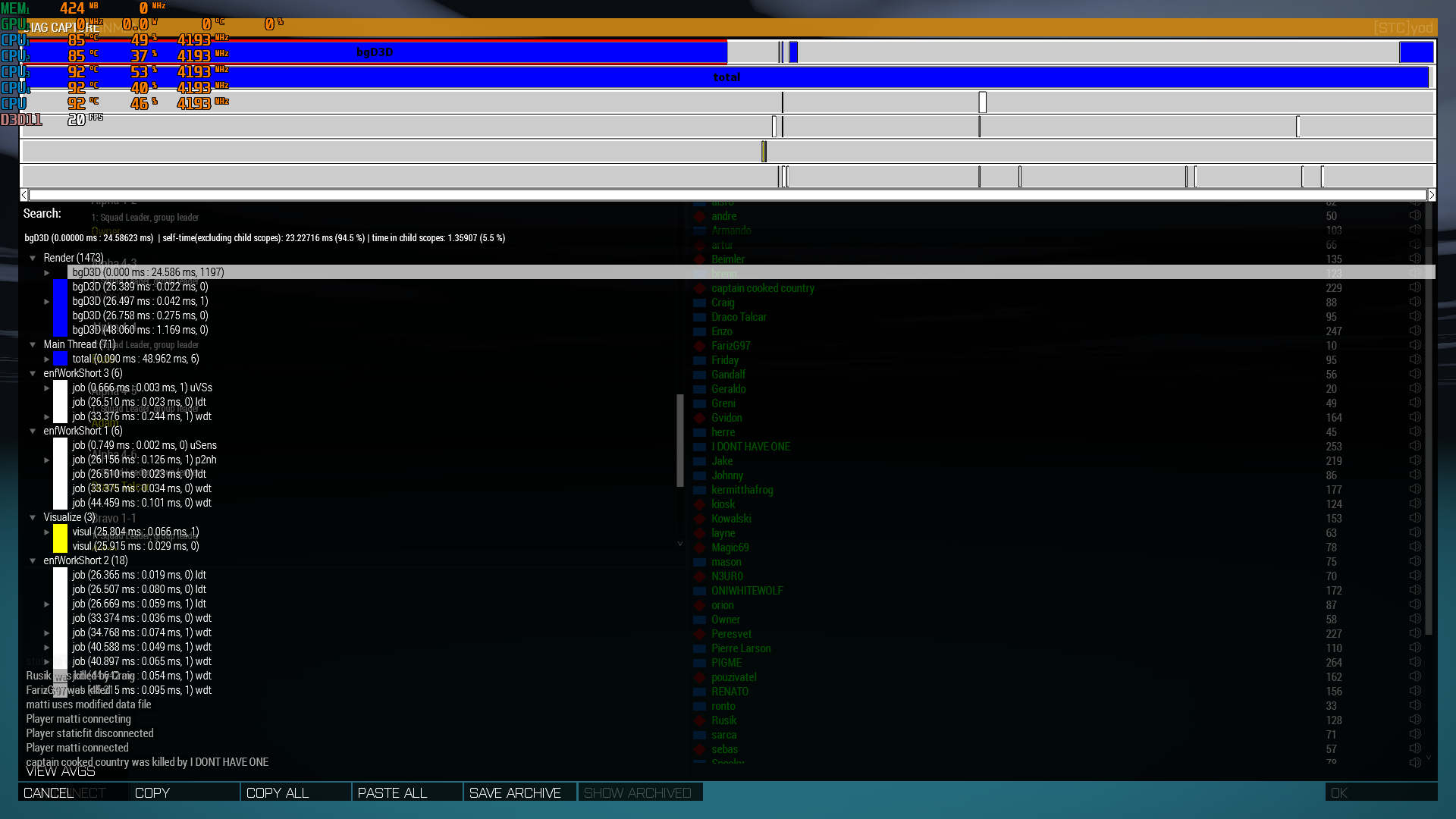 spiral pond
depends whats rendered in the background
is this from main menu, or from mission back to lobby?
spiral pond
what are your A3 startup parameters?
harsh grotto
-skipIntro -noSplash -name=[STC]yod -exThreads=7 -malloc=mimalloc_v214_lock_pages -hugePages -world=empty -debug -mod= -beservice
spiral pond
-world=VR -skipIntro should give you max fps there
hm interesting
next time drop the log from that capture here
harsh grotto
i can drop in DM
spiral pond
sure
harsh grotto
sent
spiral pond
there is no private/hardware/game info that log tho. so unless permissions dont allow dropping it in here, there is no harm. if permissions dont allow, just use some pastebin site and drop the link to that
harsh grotto
I know, Im just too lazy to upload to pastebin )
if you want, you can send it here if you see fit, i just dont have the rights to do it
spiral pond
not a very good FPS in the lobby
lesson learnt is that viewdistance setting matters also in menus. aka dont set too high [ie max 5k] (especially in MP where you dont need to [usually])
plain trout
Yes. Performance drops from around 10-12km. I mentioned that somewhere a few days ago. It’s on perf and vanilla. The fps is worse in the empty world of the menu compared to EDEN/ingame.
spiral pond
it seems to be caused by water rendering
maybe the dummy world has water somewhere or reaches infinite terrain - which can cause issues
lethal forum
Been playing around on the KOTH test server fps is way better then usual but i notice the same problem as in the regular branch when I get into town where the action is my gpu is running at 20% im on a 4090 so instead of running at stable 2800mhz it goes all the way down to 900mhz-1800mhz which brings down the frames.
quaint flame
lethal forum
Been playing around on the KOTH test server fps is way better then usual but i n...
That's because your CPU is the bottleneck. The card reducing its frequency is just normal behaviour.
 void vine
broken phoenix
Question for the people that run the LAMBs mods on the perf branch, has anyone e...
void vine
broken phoenix
Question for the people that run the LAMBs mods on the perf branch, has anyone e...
It's a visibility check issue
whole cloud
ashen helm
Dedmen please quit having fun and fix!!!
need repro
whole cloud
lethal forum
wow permonace is amazing im ona widescreen monitor dld Arma 3 again to test and ...
editing game FOV is not supported.
whole cloud
runic sigil
Encountered this issue recently
https://feedback.bistudio.com/T125049
Appears to...
Sorry? This is #perf_prof_branch ? Were you looking for #arma3_feedback_tracker ?
Here because this is the channel where current development on Arma 3 is mostly being discussed
No. This is the channel where #perf_prof_branch is being discussed.
whole cloud
broken phoenix
Question for the people that run the LAMBs mods on the perf branch, has anyone e...
post the full error?
broken phoenix
whole cloud
post the full error?
 2:56:33 Error: Mismatched Begin/EndContexts
note: Minidump has been generated into the file C:\Users\Admin\Documents\Faster\ArmA\Servers\_120972e1d4ff4c498906e50d3499ed8c\arma3server_x64_2024-11-17_23-34-47_BegEndContext.mdmp
 2:56:34 Error: Mismatched Begin/EndContexts
 2:56:34 Error: Mismatched Begin/EndContexts
 2:56:34 Error in expression < > 0.9} || {([objNull, "VIEW", objNull] checkVisibility [_eyePos, eyePos _enemy]>
 2:56:34   Error position: <checkVisibility [_eyePos, eyePos _enemy]>
 2:56:34   Error CSIEW:GNED stack size violation
 2:56:34 File /z/lambs/addons/main/functions/UnitAction/fnc_doFleeing.sqf..., line 69
 2:56:34 Error: Mismatched Begin/EndContexts
 2:56:34 Error: Mismatched Begin/EndContexts
 2:56:34 Error: Mismatched Begin/EndContexts
 2:56:34 Error in expression <n_currentTask", "Fleeing (enemy near)", lambs_main_debug_functions];
    _unit s>
 2:56:34   Error position: <lambs_main_debug_functions];
    _unit s>
 2:56:34   Error Local variable in global space
 2:56:34 File /z/lambs/addons/main/functions/UnitAction/fnc_doFleeing.sqf..., line 73
 2:56:34 Error: Mismatched Begin/EndContexts
 2:56:34 Error: Mismatched Begin/EndContexts
 2:56:34 Error: Mismatched Begin/EndContexts
 2:56:34 Error: Mismatched Begin/EndContexts
 2:56:34 Error: Mismatched Begin/EndContexts
 2:56:34 Error: Mismatched Begin/EndContexts
 2:56:34 Client: Object 37:185 (type Type_132) not found.
 2:56:34 Setting invalid pitch 0.0000 for O Bravo 4-5:1 REMOTE
=======================================================
-------------------------------------------------------
Exception code: C0000005 ACCESS_VIOLATION at FBD66E76```That was indeed already fixed, in 418, the last update
broken phoenix
whole cloud
That was indeed already fixed, in 418, the last update
Correct me if I am wrong as I am not the one who normally handles the arma updates on our server but this is the v9 build?
Version: 2.18.152413
inland dew
broken phoenix
Correct me if I am wrong as I am not the one who normally handles the arma updat...
418 is v9
broken phoenix
inland dew
418 is v9
Yikes, i have someone to yell at then for telling me we are on v9 😅 .
ashen helm
whole cloud
need repro
do you mean you want my profile files? You open the game difficulty, change Vision Aid to disabled, click OK and once you go back it's enabled again
whole cloud
broken phoenix
Yikes, i have someone to yell at then for telling me we are on v9 😅 .
413 was also v9, before we pushed a hotfix due to crashes replacing the first v9 release
whole cloud
ashen helm
do you mean you want my profile files? You open the game difficulty, change Visi...
But you said new profile fixed it, so its probably something specific to the profile files?
If its so easy to repro, then just ticket
broken phoenix
whole cloud
413 was also v9, before we pushed a hotfix due to crashes replacing the first v9...
Ok, thanks for the help Ill get us on the hotfix so this will stop👍 .
 molten berry
ashen helm
do you mean you want my profile files? You open the game difficulty, change Visi...
molten berry
ashen helm
do you mean you want my profile files? You open the game difficulty, change Visi...
hey i can confirm this issue but with Crosshair
i think there might be something with difficulty settings not applying immediately
empty goblet
so guess i'm the only one with one 418 server crash so far
molten berry
because after i restarted the game the setting was changed, but before restart it reverted as if it didnt save the setting
runic sigil
whole cloud
Sorry? This is <#105466848958513152> ? Were you looking for <#108187245529268224...
Argh
I overthought where to put it
I even started in the right channel
ashen helm
molten berry
hey i can confirm this issue but with Crosshair
do you happen to still have with this bug so you or I could send the profile files to Dedmen
I apparently fixed mine through chhanging difficulty to one of the presets and then making custom stuff again
molten berry
ashen helm
do you happen to still have with this bug so you or I could send the profile fil...
ill check
lethal forum
whole cloud
editing game FOV is not supported.
will it ever be?
silk pewter
most likely not
knotty wraith
silk pewter
most likely not
then take off your label in Bohemia
the list is big Bohemia.net and there is no use from you
silk pewter
knotty wraith
the list is big Bohemia.net and there is no use from you
that's nice honey, how was school - were you bullied again?
knotty wraith
silk pewter
*that's nice honey, how was school - were you bullied again?*
Uncle - I am very old
silk pewter
and I am BI, curious
fickle geyser
it's time for pills grandpa.
knotty wraith
If you can't fix anything, why are you writing?
analog acorn
Lou works on the documentation, not the code. His whole job is to write.
knotty wraith
fix the list bohemia.net and give those who have the opportunity to edit
otherwise it's just populism
whole cloud
lethal forum
will it ever be?
no
whole cloud
knotty wraith
If you can't fix anything, why are you writing?
I enthusiastically invite you to leave this channel. We don't need people like that in here. Thank you.
fickle geyser
lethal forum
will it ever be?
changing FOV can break too many UI related things unfortunately
 median belfry
knotty wraith
fix the list bohemia.net and give those who have the opportunity to edit
median belfry
knotty wraith
fix the list bohemia.net and give those who have the opportunity to edit
get well soon!
silk pewter
knotty wraith
otherwise it's just populism
soon you will ask me to apologise for being on the company game's Discord
take a seat, have a drink, kick back, relax, because we're not enemies here - unless you make it that way
vivid reef
https://media.discordapp.net/attachments/481382117910249483/1308111853276368916/image.png?ex=673cc199&is=673b7019&hm=6635ce5cac66cb902b5e473e5e5e88ca6cb1a65901652c70f8fd997efda0e1bd&
i tried the normal profiling and the profiling exe, i did expect a bit more of a difference
 ashen helm
Why would they be different?
vivid reef
dont they have different optimisations?
heavy vortex
No, profiling just has a tiny bit of overhead.
fickle geyser
10 fps is a lot tho
vivid reef
3 fps
fickle geyser
and you have a lot of FPSs already
vivid reef
138 is stable
fickle geyser
yeah, misread
performance and profiling have the same optimizations
profiling has a bit of an overhead... as it has instrumentation allowing to... profile the performance.
so it should be tiny bit less performant.
they're the same source code built with different flags.
vivid reef
so its fine what my results were
heavy vortex
I'd have hoped for more stable -> perf difference, but I'm not sure which of the optimizations are active atm.
Can you check the difference in CPU power consumption over the benchmark?
vivid reef
heavy vortex
I'd have hoped for more stable -> perf difference, but I'm not sure which of the...
the stable benchmark i did with 138 is some time ago already
vivid reef
heavy vortex
Can you check the difference in CPU power consumption over the benchmark?
maybe later, im in a game currently
62W is what i have as max right now, might be from ingame, might be from yaab
but from what i see, it wont be much difference, im still below 30% usage
fickle geyser
what cpu?
vivid reef
7800x3d, 6000mhz cl30, 4070ti
fickle geyser
nice, damn my 5900X pulling ~120+W and getting way less FPS ;D
vivid reef
its no secret the x3d perform very good in arma 
im thinking about swapping it to 9800x3d if i can get hands on without a scalped price
fickle geyser
I'm trying to retain myself from upgrading to it as frankly, everything but arma runs great/good enough and I'm thinking about holding to next gen CPUs.
vivid reef
my 7800 is just 1 year old, so 50% of the upgrade is paid 
fickle geyser
And the great work being done on Perf should make this CPU bit more viable for Arma, I need to find time to run some YAAB to see the difference.
inland dew
more stuff multi-threaded is always better, but still need best possible single core perf
knotty wraith
silk pewter
soon you will ask me to apologise for being on the company game's Discord
take a...
don't be offended, I love everyone
vivid reef
but some good thing, didnt had a crash since the last profiling update from dedmen
silk pewter
analog acorn
Lou works on the documentation, not the code. His whole job is to write.
. . . b-but I also write code for Reforger's environment generators and wiki extracts 😅 😄
I just don't code for A3 though, true 😉
analog acorn
Sorry, my mistake. I don't keep up with Reforger as closely so I missed that.
silk pewter
no worries, just kidding around! 🍻
vivid reef
heavy vortex
Can you check the difference in CPU power consumption over the benchmark?
what exactly u want to see?
heavy vortex
Just looking for a rough estimate really.
vivid reef
so a yaab with a power graph below?
heavy vortex
Well, that would be ideal. Would need a comparison to stable though.
vivid reef
ez
https://media.discordapp.net/attachments/933089236654129202/1308136604015005856/image.png?ex=673cd8a6&is=673b8726&hm=eb5785b436511070c9aec2b4b8d24f97c703c68ac1883b9db4028e83a9f42e62&=&format=webp&quality=lossless&width=989&height=655 thats profiling with my usual game graphic settings, not exceeding 50W


no diff in package power
 silk summit
Profiling has the same optimizations found on the dev branch?
fickle geyser
dev branch is usually a bit behind, it's not updated so frequently.
feral harness
silk summit
Profiling has the same optimizations found on the dev branch?
dev might have all the code that prof has and more but is not optimised at all
restive pilot
feral harness
dev might have all the code that prof has and more but is not optimised at all
According to my test they perform the same (at least in YAAB/SP)
 loud wind
Steam profiling branch (v09?) + Ampersand AVX512 malloc (https://github.com/GoldJohnKing/oneTBB/releases/tag/Arma-3-v2021.5.0-20211230) together gives me around 24% FPS boost on my 5800X3D
restive pilot
5800X3D doesn't even support AVX512
So it most likely doesn't do anything (just enabling AVX512 support by complier doesn't mean it'll generate code for it)
loud wind
That's weird - I thought it had but you're right. Oddly enough it still gives me a performance boost, running just the malloc alone gives a 10% perf increase over standard, more than the others I have tried
eternal kraken
loud wind
Steam profiling branch (v09?) + Ampersand AVX512 malloc (https://github.com/Gold...
i get the same performance improvements with this malloc like with mimalloc_lock_pages but with the GJK_Ampersand_malloc i have less RAM usage (mimalloc_lock_pages 20GB, GJK_Ampersand_malloc 16GB) -> https://steamuserimages-a.akamaihd.net/ugc/32182625622947600/455C7028E9631196ABB1E4286E307F96BB647FEF/
loud wind
eternal kraken
i get the same performance improvements with this malloc like with mimalloc_lock...
mimalloc didn't run as well for me, but I didn't try the lockpages version. All of GJK's malloc builds seem to run really well over standard, and on top of the perf branch enhancements I'm still getting surprised by this 11 year old game 😄
spiral pond
eternal kraken
i get the same performance improvements with this malloc like with mimalloc_lock...
did you try to capture the two dips yet with sframe cheat? (might not be low enough)
otherwise needs a mod to expose console in SP + diag_captureSlowFrame ["total", 0.025, 0, true, 100]; (below 40 fps + logToFile) [false for captureUI]
eternal kraken
not yet kju, but i will and report you
tawdry gazelle
eternal kraken
i get the same performance improvements with this malloc like with mimalloc_lock...
True. mimalloc-lock-pages will reserve and allocate continues 1GB pages. I suggest not using this unless it works really much more better than others.
eternal kraken
tawdry gazelle
True. mimalloc-lock-pages will reserve and allocate continues 1GB pages. I sugge...
i have 48GB DDR4 RAM and its the only malloc of the package which gives me an improvement, so no problem for me. but with the GJK_Ampersand_malloc i get the same improvements with less RAM usage. both mallocs (lock_pages & GJK_Ampersand) working for me. so thank you GJK for this 🙂
whole cloud
feral harness
dev might have all the code that prof has and more but is not optimised at all
dev branch is built the same as performance exe on profiling branch. But with increased version number, and having the changes that are not prof compatible
 misty flax
Guys, I have a question. After switching to profiling version on steam, I noticed I had both the arma3_x64.exe and arma3profiling_x64.exe binaries.
After launching the game through the a3 launcher, task manager said the process was arma3_x64.exe, not the profiling one.
So my question is, when switching to profiling, is arma3_x64.exe the performance build or is it the old one?
Do I need to replace the arma3_x64.exe with the profiling one by simply renaming the binaries to make the arma3 launcher use the profiling binary?
Or maybe I am just stupid and profiling!=performance, right?
and the performance binary is just the arma3_x64.exe
analog acorn
When on perf/prof branch, the default exe is perf, and the other one is prof.
They both have the same experimental changes, prof just has extra tools for logging and debugging, so if you don't need those tools you don't need to change anything
spice dirge
(said extra tools apparently making perfprof binary a tad bit slower as well)
whole cloud
spice dirge
(said extra tools apparently making ~~perf~~*prof* binary a tad bit slower as we...
prof* slower.
spice dirge
fixeded
whole cloud
arma3_x64.exe is basically "beta" version, having all the improvements that you came here for.
And "arma3profiling_x64.exe" is "beta" version WITH profiling on top. Making it a bit slower but giving you captureFrame tool.
📓 Couple finds from today
- Intercept causes crashes when running some script commands from a worker thread
- I broke the AI time limiting.
Old: ```sqf
_endTime = time + 7ms;
{
if (time > _endTime ) break;
simulate _x;
} forEach allGroups;
New: ```sqf
_endTime = time + 7ms;
{
  if (time > _endTime ) break;
  _groupsToSim pushBack _x;
} forEach allGroups;

{ simulatePart1 _x; } forEach _groupsToSim;
{ simulatePart2 _x; } forEach _groupsToSim;
{ simulatePart3 _x; } forEach _groupsToSim;
{ simulatePart4 _x; } forEach _groupsToSim;
Previously it would not start new AI groups after 7ms (Didn't help you much if one AI group was very heavy and exceeded the time limit anyway)
But with the new code, AI might even run to 20ms and still start new groups then, causing lag spikes.
Even after the fix it will be a bit worse because after groups have entered the first part of their simulation, they can't be stopped anymore. So if all groups start up, but then take so long that the time limit elapses, I still need to finish the groups that I've started. But they have multithreading in there, so they run a bit faster now so.. hopefully going to be good enough 🤞
Both will be fixed in v11
eternal kraken
spiral pond
did you try to capture the two dips yet with `sframe` cheat? (might not be low e...
i found a solution, i extracted the YAAB pbo, created a trigger in the INTRO part(where the yaab benchmark stuff is running) of the mission with diag_captureSlowFrame ["total", 0.08, 0, false, 5] and made a new pbo. Now i have my diag_captureSlowFrame in YAAB and here you get the Capture 🙂
 upper sierra
vivid reef
https://media.discordapp.net/attachments/933089236654129202/1308137785680728174/...
upper sierra
vivid reef
https://media.discordapp.net/attachments/933089236654129202/1308137785680728174/...
That's pretty insane FPS, what kind of rig you got?
vivid reef
upper sierra
That's pretty insane FPS, what kind of rig you got?
click my profile, its in my steam
upper sierra
Ahhh you have a 3D CPU damn, I guess it really does add a lot to FPS in a game like ArmA
misty flax
analog acorn
When on perf/prof branch, the default exe is perf, and the other one is prof.
Th...
Ok thank you for the clarification
feral harness
whole cloud
dev branch is built the same as performance exe on profiling branch. But with in...
Even from early days, dev was not performing as good as retail. Then recently I was comparing the improvements against legacy version so I had to generate retail exe because the legacy retail was beating dev hands down
whole cloud
dev is a retail build though, it shouldn't have any difference
whole cloud
whole cloud
📓 Couple finds from today
- Intercept causes crashes when running some script ...
And another bad one.
The AI sensors updating now has the time limit as it should have.
But, the time limit can be negative (apparently..) which makes it process zero sensors, so if FPS is low it will not process them, and keep piling up work, and the processing it does even if it doesn't process any, is probably going to keep FPS low still, that could be causing issues on servers.
Maybe thats related to the HC issues that were reported
feral harness
whole cloud
dev is a retail build though, it shouldn't have any difference
thought it was release built
whole cloud
that is the diag exe
feral harness
i was testing on release
whole cloud
2.18.152424 new PROFILING branch with PERFORMANCE binaries, v10, server and client, windows 64-bit, linux server 64-bit
- Added: Uniform textures are now stored on the uniform entity and persist in MP
- Added: FPS limit in the main menu with -world=empty and when windowed mode is unfocused
- Changed: Removed a few inventory related JIP messages (should reduce size of the JIP queue)
- Fixed: JIP players seeing a different uniform on a player for up to a minute (please test looting from dead bodies as this might have indirectly fixed a few bugs)
- Fixed: Unit insignia were sometimes being applied to the whole body - https://feedback.bistudio.com/T155459
- Fixed: Several crashes
If you don't want to use the Steam branch, the files are also available for alternative download here:
https://drive.google.com/drive/folders/15p9j7C2nHUt6NoVfChX4YFuqzFXzblJh
whole cloud
whole cloud
2.18.152424 new PROFILING branch with PERFORMANCE binaries, v10, server and clie...
Most of these features require perf branch on server side

 knotty wraith
https://youtu.be/PtmZf4WoaLA
v10 - HC AI
 runic sigil
Are more YAAB benchmarks with other hardware combinations useful?
Prof vs Stable was what I was thinking
whole cloud
knotty wraith
https://youtu.be/PtmZf4WoaLA
v10 - HC AI
looks like big lag spikes
Hard to see with #monitor so slow that it averages them out. Also #monitor is only the server, while the problem is on HC.
Most useful would be a capture slow frame from the HC. its probably running very low fps
knotty wraith
I understand, but I had to roll back to the stable version - it’s impossible to play. I'll try to do a more detailed analysis one of these days.
https://youtu.be/qaiGNsxyD5c
stable - for comparison
 spiral pond
knotty wraith
https://youtu.be/PtmZf4WoaLA
v10 - HC AI
spiral pond
knotty wraith
https://youtu.be/PtmZf4WoaLA
v10 - HC AI
next time use #monitor 1 and [diag_fps,diag_deltaTime,diag_fpsMin] for the HC (via CBA console with variable watching on remote HC)
knotty wraith
CBA console?
spiral pond
one moment
vivid reef
whole cloud
2.18.152424 new PROFILING branch with PERFORMANCE binaries, v10, server and clie...
crashdump in your dm
knotty wraith
I use this for myself
0 spawn {
ddd = true;
VAR_FPS_HC = 0;
_code = {
 VAR_FPS_HC = diag_fps;
 publicvariableserver "VAR_FPS_HC";
};
[_code] remoteExec ["call", HC];
//VAR_FPS_HC

while{ddd}do{
[_code] remoteExec ["call", HC];
sleep 0.7;
(str [round VAR_FPS_HC,round diag_fps, count allunits, count (vehicles select {count crew _x > 0})]) remoteExec ["systemchat", -2]

}}```as for slow capture: #captureSlowFrame total 0 (only for the DS itself) and for HC: diag_captureSlowFrame ["total", 0, 0, true]; executed via CBA console on HC for a single capture at this moment, or diag_captureSlowFrame ["sLoop", 0.1, 0, true, 10]; (to capture 10 situations with < 10 fps)

(means you need to load CBA on DS+HC+client, allow via bikey or disable signature check - plus allow in missions via https://community.bistudio.com/wiki/Description.ext#enableDebugConsole or load another mod alongside that enables console for all missions)
 carmine stump
not important, but in beta tab profiling should be one option and performance another. I see a lot of people get confused (as I once was) and I guess most just want the performance exe, not profiling.
whole cloud
Yes. Most just want performance, that's why everyone gets it as default and only the professionals needing profiling have to manually switch to it
empty goblet
whole cloud
2.18.152424 new PROFILING branch with PERFORMANCE binaries, v10, server and clie...
hmm, does this thave the missing scope fixes for captureFrame or must wait for v11 ?
empty goblet
whole cloud
but seems v11 is tomorrow already
to wait or not wait for servers 🤣 that's the question
whole cloud
Working on better JIP logging.
Server savegames, actually store the whole jip queue in the savegame file.
Looking at that, Lets say, which inventory item was removed from a unit:
 empty goblet
so tried to join with 424 to 418 server and got instant client crash hmm (after role selection), replicated 2nd time
whole cloud
whole cloud
Working on better JIP logging.
Server savegames, actually store the whole jip qu...
or public variables?
But you cannot see the contents of variables because its encoded there.
 empty goblet
so tried to join with 424 to 418 server and got instant client crash hmm (after ...
empty goblet
empty goblet
so tried to join with 424 to 418 server and got instant client crash hmm (after ...
dumps sent toward dedmen 
so i guess i'm not risking servers with v10 😦
whole cloud
ugh known crash in the uniform texture stuf
 pure dove
Hello, is there any reason why freeExtension command is only available in dev branch? While I often switch to dev branch for extra debug info, I just got curious
whole cloud
in every way unrelated to #perf_prof_branch
Because unsafe and security
pure dove
oh sorry about that, thanks anyway
vivid rune
V10: Animation stutter in the beginning. After some time whole Arma freezes in "Eastwind Campaign/Signal Lost" still present.
empty goblet
whole cloud
ugh known crash in the uniform texture stuf
v11 can't come fast enough 😁
 blissful pilot
hello, got told to come here
#arma3_troubleshooting message
is the profiling build causing crashes?
whole cloud
yes, but without mdmp unsure if its the same
Probably switch away from #perf_prof_branch
fix coming tomorrow
blissful pilot
whole cloud
yes, but without mdmp unsure if its the same
can i send one here?
whole cloud
or my DMs
 light geyser
Is anyone experiencing STATUS_APPLICATION_HANG error when you run Dynamic Recon Ops or other scenario?
whole cloud
⚠️ We know about crashes on prof. For technical reasons we cannot fix it until tomorrow.
Consider switching away from #perf_prof_branch 🫂
 indigo anvil
😦
empty goblet
or manually download v9 client from google drive
short hollow
carmine stump
not important, but in beta tab profiling should be one option and performance an...
To clarify, performance and profiling branches are essentially the same and casual users should default to performance?
ashen helm
casual user will download both after choosing the profiling beta in Steam and performance exe will be used by default
empty goblet
short hollow
To clarify, performance and profiling branches are essentially the same and casu...
performance binary is the default in profiling branch, the profiling binary is just more diagnostic stuff (lower fps)
short hollow
I see, thank you
naive osprey
whole cloud
2.18.152424 new PROFILING branch with PERFORMANCE binaries, v10, server and clie...
Does the uniform texture persistence also include backpack textures?
(backpackContainer player) setObjectTexture[0, ""]
silk pewter
naive osprey
Does the uniform texture persistence also include backpack textures?
`(backpackC...
isn't that already the case? I remember CTFs using backpacks as flags 🤔
oh, but it may be lost if put in a container…
naive osprey
silk pewter
isn't that already the case? I remember CTFs using backpacks as flags 🤔
Potentially? We had to make a workaround for a similar issue in 2021. It included uniform + backpack textures not persisting if the person is well outside the render distance. Maybe it was fixed previously, https://feedback.bistudio.com/T157449
If I could get rid of our workaround, I will die of happiness 
 rapid wing
keep crashing? is that something to do with prof branch ?
 dreamy yacht
whole cloud
⚠️ We know about crashes on prof. For technical reasons we cannot fix it until ...
dreamy yacht
whole cloud
⚠️ We know about crashes on prof. For technical reasons we cannot fix it until ...
^
harsh grotto
rapid wing
keep crashing? is that something to do with prof branch ?
download v9 or install main branch
feral harness
naive osprey
Does the uniform texture persistence also include backpack textures?
`(backpackC...
backpack has own textures you set on backpack for a long time and it is persistent. uniform texture was stored on player, now it is stored on uniform so you can set texture on it using uniformContainer as well as player
Also you need to use setObjectTextureGLOBAL if you want persistence
naive osprey
feral harness
Also you need to use setObjectTextureGLOBAL if you want persistence
Was just using an example, wasnt the exact script.
 spiral thicket
Yo! I noticed on performance branch that Arma would crash whenever trying to load certain textures (for me: any RHS ch47 / TF373 chinook, modded osprey)
naive osprey
spiral thicket
Yo! I noticed on performance branch that Arma would crash whenever trying to loa...
spiral thicket
Yeah I saw just naming some of the causes incase it helps correct it
feral harness
yes thats the reason for the crash dedmen explained
whole cloud
2.18.152431 new PROFILING branch with PERFORMANCE binaries, v11, server and client, windows 64-bit, linux server 64-bit
- Added: JIP queue export now also exports the queue's contents (Profiling binary with -debug parameter only)
- Changed: JIP queue export is now multithreaded and freezes the server for less time
- Fixed: AI simulation would not honor its time limit
- Fixed: AI visibility updates could get stuck not processing any updates
- Fixed: Crash when script commands are executed from extension threads
- Fixed: Crash when joining servers
- Fixed: Keybinding F16-F23 keys were displaying "UNEXPECTED_KEY_ID" instead of the key name - https://feedback.bistudio.com/T125049
If you don't want to use the Steam branch, the files are also available for alternative download here:
https://drive.google.com/drive/folders/15p9j7C2nHUt6NoVfChX4YFuqzFXzblJh
whole cloud
whole cloud
2.18.152431 new PROFILING branch with PERFORMANCE binaries, v11, server and clie...
spiral pond
diag_captureFrame 0; doesnt work - only starting with 1. I think to recall this was different earlier, was it not?
whole cloud
I think previously 0 would work same as 1.
It cannot capture the current frame, it can only capture the next frame or later. So the minimum that works is 1
Mh looking at code, I don't think 0 worked before
light geyser
The game still crashes when i open Dynamic Recon Ops
whole cloud
light geyser
The game still crashes when i open Dynamic Recon Ops
Send me crash report please
light geyser
whole cloud
Send me crash report please
Arma 3 Troubleshooting Report
Sorry for the inconvenience.
Please report this on Arma 3 Feedback Tracker (http://feedback.arma3.com). Thanks to you we may fix the issue faster.
Process exit
Exit code: 0xCFFFFFFF - STATUS_APPLICATION_HANG
Running time: 00:08:20.5196526
System information
Date: 2024-11-20 11:50:52 / 2024-11-20 12:50:52 +01
Current dir: C:\Program Files (x86)\Steam\steamapps\common\Arma 3
Command line: "C:\Program Files (x86)\Steam\steamapps\common\Arma 3\arma3launcher.exe"
CLR version: 4.0.30319.42000
OS Version: 10.0.22631.0 (Microsoft Windows NT 10.0.22631.0)
OS 64 bit: True
Process 64 bit: False
Culture: es-ES
UI Culture: es-ES
Last game report
not provided
whole cloud
I mean the report file, that the "Prepare report" button exports, the zip
This text tells me nothing besides that the game actually didn't crash but just hung.
feral harness
light geyser
The game still crashes when i open Dynamic Recon Ops
Multiplayer?
light geyser
feral harness
Multiplayer?
No, singleplayer
feral harness
try creating a new soldier profile
 vivid bear
Is the units flickering issue now fixed?
feral harness
light geyser
No, singleplayer
I just downloaded this scenario for Stratis, no hang or crash for me
light geyser
It freezes and crashes during the "Faction extraction data"
feral harness
Tried new profile, also no problem but some script errors
feral harness
light geyser
It freezes and crashes during the "Faction extraction data"
with new soldier profile?
are you on latest prof?
does it do this on current stable?
light geyser
whole cloud
I mean the report file, that the "Prepare report" button exports, the zip
This t...
You mean a carpet named "ArmaReport_Log_20241120T115052_" or something?
whole cloud
yes
light geyser
feral harness
with new soldier profile?
No
light geyser
whole cloud
yes
I don't know how i'll can send you, but i'll send you the Google Drive link
light geyser
whole cloud
yes
whole cloud
You also need to give everyone access to view it
light geyser
one moment
light geyser
feral harness
try creating a new soldier profile
I'm afraid of losing all loadouts and composition i created
feral harness
I can see you have a million of mods and custom start up params
light geyser
Is that a problem?
light geyser
feral harness
Could be in this case
I used the same mods before and the DRO didn't crash
whole cloud
Please get rid of these start parameters, they are nonsense
-cpuCount=7 -exThreads=7 -enableHT -malloc=tbb4malloc_bi_x64 -maxvram=2817 -noLand
And I don't think you want to have that maxmem one either. Unless you specifically want to limit the game
light geyser
Which file?
whole cloud
Start parameters, in the launcher
Its a bug in prof indeed.
Switch away from profiling branch for now
light geyser
whole cloud
Please get rid of these start parameters, they are nonsense
`-cpuCount=7 -exThre...
What does it mean enableHT ?
whole cloud
In your case, it does nothing because you set -cpuCount. So its just completely ignored.
If you don't know what it means, that means you shouldn't use it
light geyser
Sorry, my parameters are in Spanish, so i have some problems on find it to get rid of it 😅
whole cloud
I don't know spanish.
Just look through all things that are checked.
I would say just uncheck literally all of them
heavy galleon
btw for server, should I -enableHT or not? Two people told me two different things 
whole cloud
Test what performs better
heavy galleon
how would I test server? Just spam fuckton of AI? 
heavy galleon
where yaab for servers?
silk pewter
isn't it enabled by default? also, -enableHT is… an old setting that is good in autodetect, no?
whole cloud
enableHT is not enabled by default
heavy galleon
so, test -enableHT (will find a way I guess), stay away from -cpuCount all together and leave that for autodetect
(even on linux)
light geyser
whole cloud
Please get rid of these start parameters, they are nonsense
`-cpuCount=7 -exThre...
I got rid of those parameters and i still have the same problems when in run DRO. It freezes during loading Extracting Faction Data 😖
inland dew
heavy galleon
so, test -enableHT (will find a way I guess), stay away from -cpuCount all toget...
always -enableHT, unless you use -cpuCount
whole cloud
light geyser
I got rid of those parameters and i still have the same problems when in run DRO...
As I said above, #perf_prof_branch message
inland dew
inland dew
always -enableHT, unless you use -cpuCount
unless HT/SMT is for some reason disabled in the bios
heavy galleon
inland dew
unless HT/SMT is for some reason disabled in the bios
and switch off from profiling for stability this Sunday 
I assume there`s no “easy” way to simulate large pvp on a server, right?
AIs have fully different processing right?
 regal lance
Alo! I don`t want to disturb any of you, especially Dedmen. But the profiling branch is not working to us. It opens the Arma3 "terminal" but it gets stuck on Reading mission...
Rolled back to the stable build and working as intended. I can find those rtp if you want.
whole cloud
regal lance
Alo! I don`t want to disturb any of you, especially Dedmen. But the profiling br...
 empty goblet
whole cloud
https://discord.com/channels/105462288051380224/105466848958513152/1308775311164...
empty goblet
whole cloud
https://discord.com/channels/105462288051380224/105466848958513152/1308775311164...
sad noises ... waiting for v12 
whole cloud
v11.1
silk pewter
talking about DirectX?
light geyser
whole cloud
Please get rid of these start parameters, they are nonsense
`-cpuCount=7 -exThre...
I got rid of those parameters and switched away from profiling branch, now the game works when i run DRO on singleplayer. Thanks
empty goblet
silk pewter
_talking about DirectX?_
so sneaky jab ...
 deft pendant
yo anyone know how to fix this memory crashing problem am tryna host a server on antistasi or even in the vanilla game and aparrently its out of memory i
i was playing it couple months ago and it worked
silk pewter
deft pendant
yo anyone know how to fix this memory crashing problem am tryna host a server on...
Hiyo! #arma3_troubleshooting can help you 😊
heavy galleon
empty goblet
so sneaky jab ...
Vulcan confirmed?
 midnight oyster
heavy galleon
Vulcan confirmed?
midnight oyster
heavy galleon
Vulcan confirmed?
Anything to get rid of my VRAM memory leak.... please
ashen helm
just get more VRAM 
silk pewter
"just when it is about to reach the limit, download more VRAM"

 opal hound
me when the bleeding edge branch is bleeding edge
empty goblet
molten berry
https://tenor.com/bg4nl.gif
⏲️ ⌛ ⏳ 
 grim oriole
 whole cloud
molten berry
Me when dedmen doesnt fix a crash 10 minutes after it occurs
whole cloud
molten berry
Me when dedmen doesnt fix a crash 10 minutes after it occurs
The freeze made me go back to 2008 💀
about 90 minutes out, hopefully
Or like 3 hours, depending on how the builder feels today
I couldn't reproduce the freeze, even running DRO but the wrong thingy is fixed
heavy galleon
Send code, I'll build locally
harsh grotto

 glass lagoon
with proton steam's selection of performance_profile was crashing on joining mp on official servers, while dev was hanging on start showing arma3 logo - same settings, also under same exact settings performance profile yields less fps for me
the vram limit setting tooltip on max 8192Mb is maximum the game can utilize?
molten berry
glass lagoon
the vram limit setting tooltip on max 8192Mb is maximum the game can utilize?
Yeah I think 8gb is an engine limitation. Remember the game came out 11 years ago when most gpus had like 2gb of vram
glass lagoon
molten berry
Yeah I think 8gb is an engine limitation. Remember the game came out 11 years ag...
so in this sense it received no attention, is that what you're saying?
whole cloud
glass lagoon
the vram limit setting tooltip on max 8192Mb is maximum the game can utilize?
There is no vram limit.
The start parameter doesn't work
molten berry
whole cloud
There is no vram limit.
The start parameter doesn't work
lol thats awesome
glass lagoon
whole cloud
There is no vram limit.
The start parameter doesn't work
then why it is in the launcher and why doesn't it consume whole 20Gb of my vram presenting me with 30-60 fps
should i set ultra to offload more to gpu?
whole cloud
Because it used to be a parameter a decade ago, and no-one removed it
glass lagoon
oh
whole cloud
glass lagoon
then why it is in the launcher and why doesn't it consume whole 20Gb of my vram ...
It doesn't use more because it doesn't need more
glass lagoon
whole cloud
It doesn't use more because it doesn't need more
well it clearly does since bushes don't appear instantly when i ride my offroad really fast
or am i oversimplifying it? kek
whole cloud
glass lagoon
well it clearly does since bushes don't appear instantly when i ride my offroad ...
How fast bushes appear depends on your hard drive speed, not on how much memory your gpu has
glass lagoon
whole cloud
How fast bushes appear depends on your hard drive speed, not on how much memory ...
my hard drive read speed is 5Gb/s
whole cloud
That's not how hard drives work
glass lagoon
whole cloud
That's not how hard drives work
yes, any difference to nvme in context of what you're saying?
you know it just hangs on direct pci lane with underutilized cpu
bet it is dangling doing almost nothing to utilize its fancy iops rw capacity
molten berry
bro stop throwing out fancy words like you know what all of it means while still completely missing the point
glass lagoon
molten berry
bro stop throwing out fancy words like you know what all of it means while still...
i don't
molten berry
let me go with the analogy of internet. You have latency and you have flow.
glass lagoon
i play it for 4 days and i had 4 encounters of simultaneous kills with hand held auto weapons with enemies on official mp servers
ping <60
molten berry
your "ping" could be really high like 200ms while still being able to download 5gb/s
glass lagoon
molten berry
your "ping" could be really high like 200ms while still being able to download 5...
then shouldn't the in-game metrics be corrected?
allusions are not facts
molten berry
its a similar idea here with the disk loading. You need a lower latency disk in order for stuff to be loaded faster. It's why SSDs are better because a HDD needs to physically spin up and achieve the correct rpm and everything to start reading/writing. I might be oversimplyfing this explanation but the analogy to internet speed is the simplest i can think of
cause the game when youre moving is constantly swapping levels of detail of objects
glass lagoon
alright i see that this is not an applicable issue then
i don't have swap instead i got 4 banks of ram 32Gb each in 3600xmp
dual
molten berry

spiral pond
#360648487378878464 👮 needed
glass lagoon
spiral pond
<#360648487378878464> 👮 needed
why? could you please share the fps difference with stable vs performance profiling branches?
guys, did you know that linux kernel has more than 100k metrics for performance inside it? coincidentally there is a perf tool to read it out
have anyone tried that with proton?
how the "profiling" is happening
 burnt tartan
silk pewter
"just when it is about to reach the limit, download more VRAM"
burnt tartan
silk pewter
"just when it is about to reach the limit, download more VRAM"


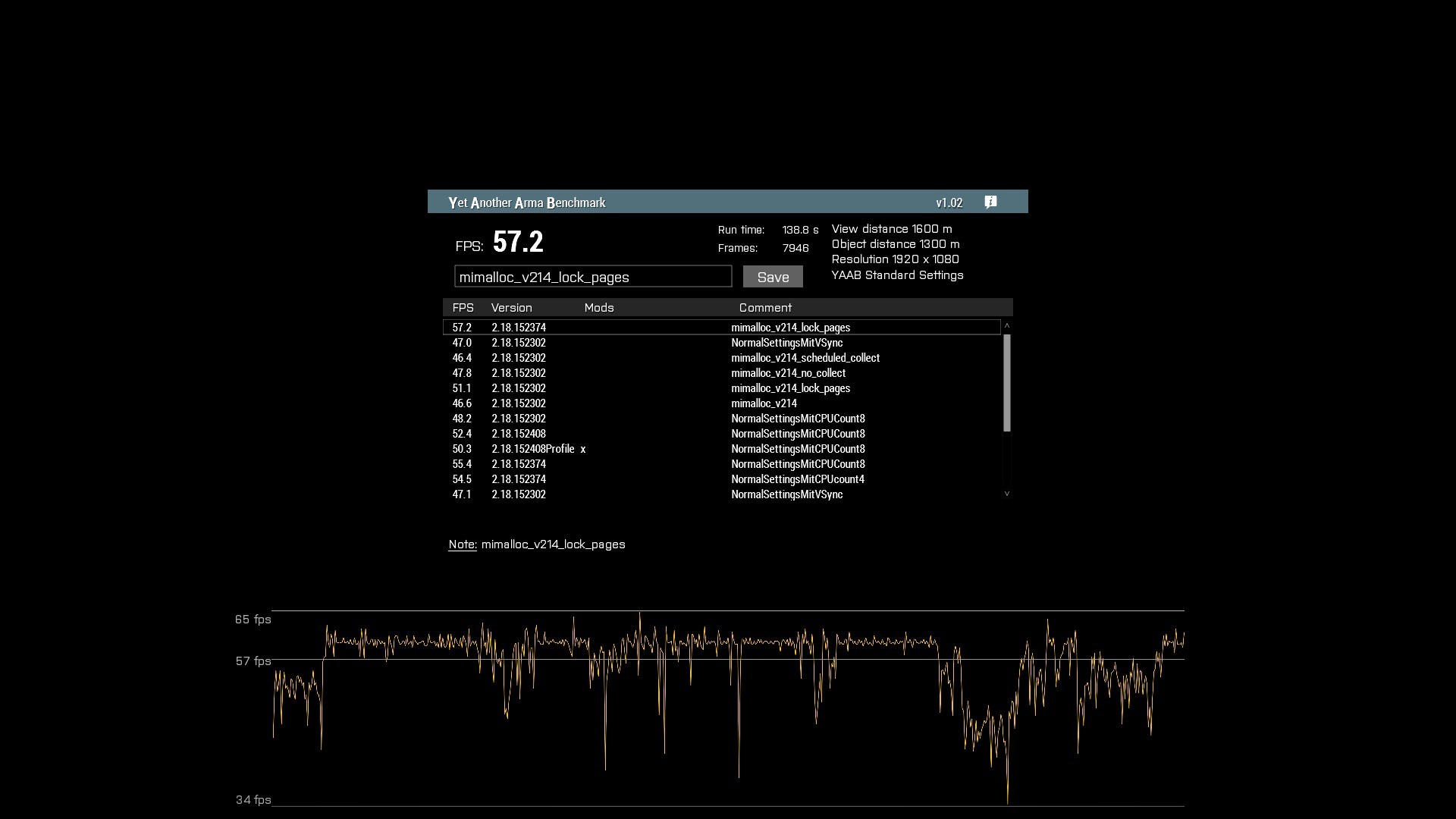


DownloadMoreRAM.com - CloudRAM 2.0
eternal kraken
i have a question about slowFrames and FPS. i observed that it happen that i achieve diag_fps > 50 but catching a slowFrame with diag_captureSlowFrame ["total", 0.06] (>60ms). vice versa can i get diag_fps < 38 but using diag_captureFrame 1 in this moment the MainThread totaltime is < 25ms or even if i run diag_captureSlowFrame ["total", 0.04] it is not triggered in this scenario with diag_fps < 38 (so the slowFrame/mainThread total time never last longer then 40ms). How are FPS and slowFrame connected to each other and how can it be that the Thrdad totaltime is < 40 ms but the FPS < 38.
vivid rune
v11 has still animation stutter and Arma freezes in the Eastwind campaign
#perf_prof_branch message
whole cloud
totaltime is < 40 ms but the FPS < 38
38 fps are 26ms
30fps are 33.3ms
So.. Thats how it can be that totalTime is less than 40ms and fps is less than 38
eternal kraken
whole cloud
> totaltime is < 40 ms but the FPS < 38
38 fps are 26ms
30fps are 33.3ms
So.. T...
what is the formula to calculate this, i didn't undertand it fully yet
whole cloud
frames per second.
Into time per frame
1 second / number of frames == time per frame
empty goblet
glass lagoon
i play it for 4 days and i had 4 encounters of simultaneous kills with hand held...
you do realize that's how physics work , if two shooter push trigger at same / similar moment with theirs weapons facing each other ... well ... there is two less shooters in the world