#perf_prof_branch
1 messages · Page 8 of 1
 analog acorn
no one has support outside of B2B these days, they just have a FAQ that tells you it's your problem and a chatbot that doesn't work
 heavy vortex
fair
 silk pewter
added! Cc @uncut linden
 stark falcon
format ["Items: %1%", []] // note weird extra %
Error in expression <format ["Items: %1%", []]>
 Error position: <format ["Items: %1%", []]>
 Error 1 elements provided, 0 expected
Only happens on recent profiling branch
heavy vortex
That never worked, right? It'd just ignore the extra % before.
The error logging is new.
 quaint flame
stark falcon
`format ["Items: %1%", []]` // note weird extra %
```
Error in expression <forma...
quaint flame
stark falcon
`format ["Items: %1%", []]` // note weird extra %
```
Error in expression <forma...
It's not a bug but a feature
% symbol can now be added directly without passing it as parameter
 whole cloud
stark falcon
`format ["Items: %1%", []]` // note weird extra %
```
Error in expression <forma...
whole cloud
stark falcon
`format ["Items: %1%", []]` // note weird extra %
```
Error in expression <forma...
Thank you. Forgot to filter the check to only print when index > 0. In that case the % is read as %0 which is invalid index too.
Fix tomorrow
Its still an error in the format string though, so maybe we should throw some error on it.
whole cloud
quaint flame
It's not a bug but a feature
It is a bug. To pass % symbol, you need to pass %%
quaint flame
whole cloud
It is a bug. To pass % symbol, you need to pass %%
Oh well...almost right I guess
heavy vortex
That's a new feature, right. Doesn't work in stable?
quaint flame
Not yet
 vale shoal
Dedmen, is there any chance that you will release the crash dump fix on profiling? We have a strange bug which crashes the client (profiling & stable), but no crash dump is created (client will crash with Application Hang).. it might can help to identify what crashes the client. The problem with that specific crash is, that it will crash all players within a specific range. And players are not really helpful in that regard..
 light cargo
vale shoal
Dedmen, is there any chance that you will release the crash dump fix on profilin...
light cargo
vale shoal
Dedmen, is there any chance that you will release the crash dump fix on profilin...
reproduce with a debugger and dump from there...?
vale shoal
light cargo
reproduce with a debugger and dump from there...?
I cannot reproduce it when I don't know what triggers it
light cargo
vale shoal
I cannot reproduce it when I don't know what triggers it
you could always run a debugger for a while until it happens then.
try enabling windows crash dumps just in case, also does the rpt help at all? additionally the game normally creates dumps when its frozen.
you could try the adplus utility found in the debugger folder of the windows sdk
vale shoal
light cargo
you could always run a debugger for a while until it happens then.
try enabling...
It never crashed for me, I also have no clue where to search. But letting a regular player doing this his brain would freeze. Also rpt isn't helpful. It just quits printing stuff the moment the client crashes. I collected some rpt from the players but there is nothing they have in common in the logs, sadly.
light cargo
well you could prepare a script for the player to run that launches the game attached to a debugger that will create dumps on any issue that arises
adplus can do such automated job
whole cloud
vale shoal
Dedmen, is there any chance that you will release the crash dump fix on profilin...
It comes today
But hang should be a freezedump, not a crashdump
whole cloud
2.16.152042 new PROFILING branch with PERFORMANCE binaries, v16, server and client, windows 64-bit, linux server 64-bit
- Fixed: Some cases where the game would not create a crash report on crashing
- Fixed: Vehicle door open states would not sync correctly in MP - https://feedback.bistudio.com/T182082
Known Issue: Doesn't work on Windows 7 or Windows Server 2008.
If you don't want to use the Steam branch, the files are also available for alternative download here:
https://drive.google.com/drive/folders/15p9j7C2nHUt6NoVfChX4YFuqzFXzblJh
Note: There are separate Dll files that also need to be placed into Game folder.
🦦
whole cloud
whole cloud
2.16.152042 new PROFILING branch with PERFORMANCE binaries, v16, server and clie...
 heavy galleon
Fuck I can't send images here
insert Bernie I am once again asking meme with "for Linux Addons support"

 autumn timber
whole cloud
https://tenor.com/view/angry-cat-sour-cat-cat-meme-cat-gif-4305398913986271634
autumn timber
whole cloud
https://tenor.com/view/angry-cat-sour-cat-cat-meme-cat-gif-4305398913986271634
Dedmen no angry. Dedmen pliz do

 knotty wraith
whole cloud
2.16.152042 new PROFILING branch with PERFORMANCE binaries, v16, server and clie...
knotty wraith
whole cloud
2.16.152042 new PROFILING branch with PERFORMANCE binaries, v16, server and clie...
my server is not starting - The entry point to the GetCurrentThreadStackLimits procedure was not found in the DLL KERNEL32.dll .
whole cloud
kernel32 is quite essential indeed
If kernel32 is not present, your windows isn't running
Ah. The important info.
What windows version are you on?
Minimum supported client Windows 8 [desktop apps | UWP apps]
Minimum supported server Windows Server 2012 [desktop apps | UWP apps]
Microsoft says that.
Fair, I overlooked that, and we need windows 7 support.
But are you really running a 12+ year old OS?
knotty wraith
whole cloud
Ah. The important info.
What windows version are you on?
Windows Server 2008 R2
autumn timber
That's vintage 😮
whole cloud
Well no profiling branch for you then until next week.
I'll not push a hotfix to make it work on 16 year old OS that is 4 years past its end of extended support
knotty wraith
Everything worked before that. There are license issues in our world.
whole cloud
Yeah and it'll work again (Because we have to support windows 7)
knotty wraith
whole cloud
Well no profiling branch for you then until next week.
I'll not push a hotfix to...
I just gave the information - no problem.
 silk pewter
added(men)
autumn timber
silk pewter
**added**(men)
I have finally managed to contribute something of value to the Arma community 
silk pewter
autumn timber
I have finally managed to contribute something of value to the Arma community <:...
that's why you're a veteran 😎
silk pewter
heavy galleon
now nudge him to make the Addons work in linux please
done
heavy galleon

whole cloud
😠
 light cargo
knotty wraith
my server is not starting - The entry point to the GetCurrentThreadStackLimits p...
light cargo
knotty wraith
my server is not starting - The entry point to the GetCurrentThreadStackLimits p...
workaround: revert to previous profiling by replacing files in your copy from google drive
silk pewter
https://feedback.bistudio.com/T183112 codePerformance issue known, right?
 spice dirge
partially matches https://feedback.bistudio.com/T182974 which i've also mentioned in https://feedback.bistudio.com/T182822 meta-ticket, but i don't remember getting any errors in .rpt
whole cloud
Its in R3vo's ticket, so known
 opaque ingot
hello, hello !
veteran linux owner here,
I face a strange issue when I try to use the latest perf build "arma3server_x64_performance_216_152042_v16_linux"
I take file from GDrive, update the server and validate the creatordlc.
I 'just' start the server, no mod, no mission (I remove the server profile too)
$ ./arma3server_x64 > ./server.log 2>&1
then I see that:
14:53:49 Updating base class Mod_Base->, by a3\data_f_destroyer\config.bin/CfgMods/Jets/ (original a3\data_f_jets\config.bin)
14:53:50 Error in expression <0x00050000 + 0>
14:53:50 Error position: <+ 0>
14:53:50 Error +: Type Number, expected
14:53:50 Error in expression <0x00050000 + 1>
14:53:50 Error position: <+ 1>
14:53:50 Error +: Type Number, expected
and few sec later
14:53:50 Error in expression <1.2 * ( ((safezoneW / safezoneH) min 1.2) / 40) + (Safezon>
14:53:50 Error position: </ safezoneH) min 1.2) / 40) + (Safezon>
14:53:50 Error /: Type Number, expected Config entry
14:53:50 Error in expression <17.2 *
there is something I miss, have you any clue ?
reverting to version 2.16.151618 solve the issue
I keep the start log if needed
whole cloud
This has happened before, but I fixed it in v10.
Mh I think I found a part of that that I overlooked, maybe its that.
But I tested v13 on my linux server and that one was fine 😕
Nvm that one was apparently not fine either. And noone noticed over the last month 😄
Thank you
opaque ingot
let's me know if you want another test
whole cloud
Searching for the issue 😄
opaque ingot
I know what you mean...
whole cloud
Pretty sure I know what it is
opaque ingot
a broken hpp ?
whole cloud
Initialization order is messed up.
The script command is registered, before the type it uses as argument is initialized
whole cloud
Just had to splatter some init_priority's around. now its working.
I don't know when we'll release it, I would try tomorrow but not sure if we can. Maybe only next wednesday.
I could send you a build tomorrow if you need it for something
heavy galleon
Dedmen when I start bothering him about fixing linux: breaks it even more
 rain moth
next perf build won't support loading mods at all on linux 
whole cloud
He wants support for "Addons" folder right?
So I'll just change the "addons" string to "Addons" to make it work
rain moth
then we can make another ticket to change Addons to AddOns
whole cloud
        copyToClipboard format
        [
            "Result:%1%%2 ms%1%1Cycles:%1%3/%4%1%1Code:%1%5",
            endl,
            _result,
            _actualCycles,
            _wantedCycles,
            _testCode
        ];
Wha.
%1%%2 ? Why would you do that. 😄
KK already fixed that one, it should be in dev branch from yesterday I'd think
 void badger
Were there still FSM issues on the docket? I was mucking about last night and LAMBS (dev) was throwing errors when engaged with explosive rounds
whole cloud
No. What kind of errors
opaque ingot
whole cloud
Just had to splatter some init_priority's around. now its working.
I don't know ...
no hurry, I'll test when you push it, thanks a lot!
void badger
Oh you know what, this might be the enum thing you were talking about
spice dirge
whole cloud
KK already fixed that one, it should be in dev branch from yesterday I'd think
can confirm with dev build 152041 on my machine. Thanks.
void badger
19:07:35 Error in expression <ambs_main_fnc_doAssaultSpeed; _unit setUnitPosWeak (["MIDDLE", "PRONE"] sele> 19:07:35 Error position: <setUnitPosWeak (["MIDDLE", "PRONE"] sele> 19:07:35 Error Foreign error: Unknown enum value: "PRONE" 19:07:35 File \/z/lambs/addons/danger/functions/fnc_brainForced.sqf..., line 279 19:07:35 ➥ Context: [] L1 () [] L272 (\/z/lambs/addons/danger/functions/fnc_brainForced.sqf) [] L280 (\/z/lambs/addons/danger/functions/fnc_brainForced.sqf)
heavy vortex
That looks like a Lambs bug? The documented value is DOWN, not PRONE.
autumn timber
rain moth
next perf build won't support loading mods at all on linux <a:sweating:585766325...
You can't have case-sensitivity issues for mods if you drop support for modding
 whole cloud
heavy vortex
That looks like a Lambs bug? The documented value is DOWN, not PRONE.
whole cloud
heavy vortex
That looks like a Lambs bug? The documented value is DOWN, not PRONE.
It is, they already fixed it internally.
We were not reporting that error before so it was missed all these years
void badger
Thanks guys 😁
 orchid mesa
not sure if it has been mentioned, but the current profiling build has massive lag when you open the player list inside the map
causes big frametime spikes every 1-2 seconds and drops below 10 fps
 tribal pasture
This is due to format strictness error messages
This is only in KotH btw
I moved my player icons from uiEx to ui and left other arguments intact for when uiEx will be patched (casing issues), but it does massive error spam now due to forced error strictness.
whole cloud
On dev branch it's already behind -debug.
But I'm leaving it enabled on Prof because I want to hear about all the issues, especially in vanilla scripts
heavy galleon
Question. Would this cause issues for port forwarded servers? Let's say a server hosting set up in someone's basement. Router has the public and is forwarded to the box.
Because we are experiencing this.
Although I've been told that "it's somewhat weird with the public IP on the ISPs side".
whole cloud
It shouldn't
your public IP in that case, is normally the same IP as the clients that are trying to connect to you are seeing
I don't know how Steam determines what public IP you have, they determine that somehow. I assume they are pinging their own service and seeing whatever outgoing adress it used
heavy galleon
Just got told that if you try to reach whatismyip from the box, you get a different one
And that's the ISP doing something weird af
heavy galleon
Now I am more intrigued to wtf is that iso doing 
whole cloud
I would've thought that steam already blocked that.
Like how does steam let you say "Hello, I am a server at IP Address A, please add me to your master list" when you send that from IP Address B.
heavy galleon
I don't know
I don't even understand how you can recieve responses from different IP
Or how it's setup on ISPs side
Are you planning on removing the feature next week or?
whole cloud
Its already off for next build
heavy galleon
Appreciated
 gritty wasp
Speaking about network stuff. Can someone explain why when I host multiplayer mission from Eden and launch another Arma instance on same machine in Servers list at LAN page I have somewhat about 6 server entries and to connect I need to make from one to infinity tries.
whole cloud
You probably have multiple network interfaces.
And Arma server listens on all of them
so if you try to see if there is a server, on each of your interfaces, each interface will find one. With a different IP for every interface
gritty wasp
Can I mitigate that by firewall rules?
whole cloud
probably
gritty wasp
Thank you. Will try.
heavy vortex
Usually all of them work :P
 empty goblet
gritty wasp
Can I mitigate that by firewall rules?
empty goblet
gritty wasp
Can I mitigate that by firewall rules?
q, did you start the server with -ip= to define the single interface ip ? https://community.bistudio.com/wiki/Arma_3:_Startup_Parameters#Server_Options
gritty wasp
empty goblet
q, did you start the server with `-ip=` to define the single interface ip ? http...
I'm taking not about server but full game client and multiplayer preview
empty goblet
ok, tho i do wonder if client can be started with the -ip= parameter to do the trick ...
heavy vortex
It's a fair question. I don't have enough IPs to be sure :P
heavy galleon
heavy vortex
It's a fair question. I don't have enough IPs to be sure :P
You only need one. 127.0.0.1 would be enough
I am willing to borrow it to you for testing 
gritty wasp
LOL it crash when another client trying to get servers list.
upd: it crashes when another client without -ip= launched. Works when both have -ip=127.0.0.1
upd2: servers list now have one entry but still requires unknown amount of connection attempts to join server. Can it be fixed?
vale shoal
whole cloud
It comes today
But hang should be a freezedump, not a crashdump
I talked with a couple of people using the latest profiling. The specific crash we're having (application hang) doesn't produce a crash or freeze dump file. According to someone, when he tried to create a dump file on the crash dump window it crashed the window too.
whole cloud
You can create a dump in task manager.
You mean it crashed task manager?
vale shoal
No, I mean when the game crashes it shows the reason for a crash. And you can just click to collect dump information. And then this window crashed too.
whole cloud
I don't know which window you mean
We have no window that creates a dump file or collects dump information
whole cloud
That doesn't create a dump or collect info. It just puts the files in appdata folder into a zip
Just grab the files out of appdata manually. But I assume there isn't a crashdump in there
vale shoal
whole cloud
Just grab the files out of appdata manually. But I assume there isn't a crashdum...
You are assuming right
whole cloud
You can manually create one in taskmanager details panel, while the game is frozen
Before it exits
vale shoal
whole cloud
You can manually create one in taskmanager details panel, while the game is froz...
it creates a empty .dmp file
light cargo
if you're eager about getting your hands dirty you could use adplus utility found in windows debugging tools as part of the windows sdk to record a dump when the game freezes or crashes
that should get the dump in a bit of a more direct manner
heavy galleon
light cargo
that should get the dump in a bit of a more direct manner
not if BE blocks you from reading any memory
light cargo
heavy galleon
not if BE blocks you from reading any memory
yeah im aware
light cargo
um is this normal?
22:11:58 Skipping mods and signatures due to overflow flag being set.
22:11:58 Skipping signatures due to overflow flag being set.```any clue on this during init?
_namespace setVariable [_objectType, _actions];
>
22:18:38   Error position: <setVariable [_objectType, _actions];
>
22:18:38   Error Reserved variable in expression
22:18:38 File z\ace\addons\interact_menu\functions\fnc_compileMenuSelfAction.sqf..., line 134
22:18:38 Error in expression <sCfg] call _recurseFnc
]
];
Is that where you have too many mods for the steam protocol packet size?
light cargo
also this
22:44:37 Error in expression <escriptionParams];};
_descriptionText = format ([_descriptionText] + _descriptio>
22:44:37   Error position: <format ([_descriptionText] + _descriptio>
22:44:37   Error 0 elements provided, 1 expected
22:44:37 File A3\ui_f\scripts\GUI\RscDisplayDebriefing.sqf..., line 45```Perf/prof branch has some sanity checks on format
The ACE one's something like compileMenuSelfAction being called on a null object. I don't know how that would happen.
autumn timber
heavy vortex
Is that where you have too many mods for the steam protocol packet size?
AFAIR yes, but not you. The server
empty goblet
q, was any extra logging added for Can't change owner from 0 to 2 ?
vale shoal
whole cloud
BattlEye enabled? Can't do it with BE
Yes, BE is enabled
vale shoal
whole cloud
You can manually create one in taskmanager details panel, while the game is froz...
I've got the dump. Where should I upload it? it's 18GB big 😄
 fast hornet
heavy galleon
And that's the ISP doing something weird af
fast hornet
heavy galleon
And that's the ISP doing something weird af
Sounds like you might be behind CGNAT. Basically your ISP is NATing you and then your Router is NATing you a second time, which makes hosting services basically impossible.
There is no good way around this, IPv4 addresses are exhausted. With some ISPs you can ask them (or pay) to still get a native IPv4 address if they normally use CGNAT.
heavy galleon
fast hornet
Sounds like you might be behind CGNAT. Basically your ISP is NATing you and then...
Well, I am certain that I am not behind NAT.
But I am irelevant, I am talking about the server in someone elses basement. The server hosting works and you can no problem connect to it. The public IP of it works no problem, many arma server, web, ts, others
BUT for some reason it looks like it's "sending answers" from a different IP. Almost like incoming traffic is happening on one and outgoing is being sent from other
fast hornet
multiple interfaces within the same l3 network?
heavy galleon
doubt, afaik it's barebone, but can send the question to the owner
eh no, there's single internet connection in the house
light cargo
@heavy galleon generally that means nat nesting, cgnat or not. check if anything p2p works for you at all. either torrenting or rockstar launcher/grand theft auto online
light cargo
heavy galleon
Well, I am certain that I am not behind NAT.
But I am irelevant, I am talking a...
thats a consequence of nesting networks, sounds like either the nat'ing is not done correctly or something else.
i have a vpn setup on a server somewhere else that gives me a static ip address and effectively bypasses cgnat entirely. this is done completely with nat techniques
ensuring the ip is the same in the chain is NAT stuff
what im trying to say is that your setup is wrongly configured and having the same ip across the chain of different internal networks is absolutely possible with nat techniques
contact your isp to fix it, nothing that can be really done here
fast hornet
as a sidenode, about 15 years ago i was hoping that ipv6 would finally kill NAT within 10 years and v4 would be dead. Instead it's even worse now for many users with that CGNAT crap. 😩
fast hornet
jup
fast hornet
true.. which is another major reason they use it. And most users don't even notice
light cargo
and then gamers wonder why they cant play grand theft auto online or use rockstar services at all xD
fast hornet
Did anyone experience crashes with v10 to v14 btw.? We have them about once per week rn and i'm starting to wonder if it's even really dedmens fault  or the intel 13900 in our dedi box..
Although the system itself is rock stable, just arma server is crashing when it happens.
vale shoal
fast hornet
Did anyone experience crashes with v10 to v14 btw.? We have them about once per ...
If you have mdmp and dmp files, send it to Dedmen so he can find the issue. I had only once crash on latest perf on the server but it was PhysX. I assume it happened when I connected to RDP.
fast hornet
yeah i always send them to him 🙂
last time he looked at them it was some AI going crazy, so probably arma after all.. that was on v11
 feral owl
heavy galleon
And that's the ISP doing something weird af
feral owl
heavy galleon
And that's the ISP doing something weird af
Ngrok
heavy galleon
Nope
empty goblet
{ note: this is new never than today's stable 1.54.133741 hotfix #2 }
1.54.133760 profiling & performance v4 server and client, windows, linux server too
- crash/issues/AI/UI/steam fixes, some tweaks and optimizing (for client too)
https://www.dropbox.com/sh/582opsto4mmr8d8/3BSy9PdRGm
 whole cloud
vale shoal
I've got the dump. Where should I upload it? it's 18GB big 😄
whole cloud
vale shoal
I've got the dump. Where should I upload it? it's 18GB big 😄
18GB of crashdump?
I am amazed that Arma uses so much ram, most of the time people complain about it using not enough memory


 full nova
i have 16GB ram, Sytem and Discord + Browser (firefox) ate 60% of it, and welp just barely enough for Arma
quaint flame
Ram is cheap. Get more
full nova
Downloading more RAM
light cargo
whole cloud
18GB of crashdump?
I am amazed that Arma uses so much ram, most of the time peo...
windows loves to page things from ram
whole cloud
And you are telling me that why? How is this relevant?
light cargo
not only that, it got compressed, people complain they dont have enough ram for arma yet they arent getting oom deaths because of os paging/swapping
sorry about that
idk, maybe people expect something different
main people complaints are like arma 3 not using enough cpu/gpu resources lol
light cargo
whole cloud
And you are telling me that why? How is this relevant?
my apologies, it seems that i've misread the message
empty goblet
full nova
*Downloading more RAM*
make sure you do some fast lossless compression ontop 😁
 woven loom
light cargo
not only that, it got compressed, people complain they dont have enough ram for ...
woven loom
light cargo
not only that, it got compressed, people complain they dont have enough ram for ...
That did happen to me at one point
whole cloud
2.16.152058 new PROFILING branch with PERFORMANCE binaries, v17, server and client, windows 64-bit, linux server 64-bit
- Fixed: Crash when providing some command-line parameters with an argument, but leaving the argument empty (-unit=) (thanks @graceful laurel )
- Fixed: Bogus script type errors on Linux servers (thanks @opaque ingot )
- Fixed: Launcher firing effects did not work for remote units - https://feedback.bistudio.com/T182166
- Fixed: Custom missionEnd was broken (thanks @spiral pond )
- Fixed: Game crash when trying to use #vote server command since v7 (thanks @dense veldt )
- Fixed: Compatibility with Windows 7/Windows Server 2008 (thanks @knotty wraith )
- Fixed: Memory corruption and random crashes when a House with Path LOD was outside of terrain bounds (thanks @tall iron )
If you don't want to use the Steam branch, the files are also available for alternative download here:
https://drive.google.com/drive/folders/15p9j7C2nHUt6NoVfChX4YFuqzFXzblJh
Note: There are separate Dll files that also need to be placed into Game folder.
🧑🍼
whole cloud
whole cloud
2.16.152058 new PROFILING branch with PERFORMANCE binaries, v17, server and clie...
heavy galleon
insert Bernie I am once again asking meme with "for Linux Addons support"
tribal pasture
- Fixed: Memory corruption and random crashes when a House with Path LOD was outside of terrain bounds (thanks @tall iron )
I was spawning piers outside of the map to put players there during their respawn/revive for years 😳
whole cloud
It's only when AI tries to pathfind somewhat near it.
I think
opaque ingot
@whole cloud the linux perf version is running fine, thx
 random isle
tribal pasture
> - Fixed: Memory corruption and random crashes when a House with Path LOD was ...
random isle
tribal pasture
> - Fixed: Memory corruption and random crashes when a House with Path LOD was ...
we do that still lol
void badger
Good old debug island
empty goblet
q, anyone noticed that some logs like -mpstatistics which needs to be active in commandline, are auto enabled in profiling (ie not active in commandline yet still producing the logs)
light cargo
empty goblet
q, anyone noticed that some logs like `-mpstatistics` which needs to be active i...
i think i have noticed that long ago in stable, i had txts about that in my appdata\local folder
random isle
on latest pref noticed ram usage super high, not sure good thing or bad lol so far 14gb for server and 16gb for HC
usually they both hover around 6-8gb
i been running mimalloc_v214_lock_pages.dll btw for probably 4 months
tribal pasture
20:50:52 Ref to nonnetwork object 1780898: <no shape>
20:50:52 Ref to nonnetwork object 1780898: <no shape>
20:50:52 Ref to nonnetwork object 1780898: <no shape>
20:50:52 Ref to nonnetwork object 1780898: <no shape>
20:50:52 Ref to nonnetwork object 1780898: <no shape>
20:50:52 Ref to nonnetwork object 1780898: <no shape>
20:50:52 Ref to nonnetwork object 1780898: <no shape>
20:50:52 Ref to nonnetwork object 1780898: <no shape>
20:50:52 Ref to nonnetwork object 1780898: <no shape>
20:50:52 Ref to nonnetwork object 1780898: <no shape>
20:50:52 Ref to nonnetwork object 1780898: <no shape>
20:50:52 Ref to nonnetwork object 1780898: <no shape>
20:50:52 Ref to nonnetwork object 1780898: <no shape>
20:50:52 Ref to nonnetwork object 1780898: <no shape>
20:50:52 Ref to nonnetwork object 1780898: <no shape>
20:50:52 Ref to nonnetwork object 1780898: <no shape>
20:50:52 Ref to nonnetwork object 1780898: <no shape>
20:50:52 Ref to nonnetwork object 1780898: <no shape>
20:50:52 Ref to nonnetwork object 1780898: <no shape>
20:50:52 Ref to nonnetwork object 1780898: <no shape>
20:50:52 Ref to nonnetwork object 1780898: <no shape>
20:50:52 Ref to nonnetwork object 1780898: <no shape>
20:50:52 Ref to nonnetwork object 1780898: <no shape>
20:50:52 Ref to nonnetwork object 1780898: <no shape>
20:50:52 Ref to nonnetwork object 1780898: <no shape>
20:50:52 Ref to nonnetwork object 1780898: <no shape>
20:50:52 Ref to nonnetwork object 1780898: <no shape>
```1000s of these lines on clientWish it also showed a class name so its easier to see what it is
Maybe this?
 spiral pond
can be FX/particles for example
-debug gives you somewhat of an idea usually where its coming from
see also: #arma3_scripting message
empty goblet
q, anyone has any crashes for me on 133760 ?
 tulip nimbus
format ["a %1 b %%2",true,false]
Returns "a true b %2"
Did https://feedback.bistudio.com/T81725 get put on perf? main branch seems fine (returning "a true b false")
["Arma 3","Arma3",216,152058,"Stable",true,"Windows","x64"]
 opal hound
That seems correct, doesn't the double % escape?
tulip nimbus
well is performance prof branch meant to have unreleased stuff not on main stable? the change says 2.18
analog acorn
Yes. If you look at the pinned messages in this channel, you can see the branch change notes.
This change was pushed to perf/prof on the 10th of July (#perf_prof_branch message)
tulip nimbus
On main the following works
format["scriptName '%3'; scopeName '%3'; private _thisScriptName = '%3'; %4%1line 1 ""%2 [%3]""%4%5", "#", "_filePath", "_functionName", endl] + "_filePath";
but on perf prof it brakes. Provided 4 expected 5. Am i missing something?
opal hound
Yeah, there's no 5th parameter
analog acorn
You're using %1 to %5, but you're only providing 4 arguments (i.e. %1 to %4). On main the command doesn't report this error, on perf it does.
tulip nimbus
analog acorn
You're using %1 to %5, but you're only providing 4 arguments (i.e. %1 to %4). On...
hmm interesting thanks
heavy vortex
tulip nimbus
well is performance prof branch meant to have unreleased stuff not on main stabl...
It frequently does, if it doesn't need data changes and maintains network compatibility with stable.
whole cloud
tribal pasture
Wish it also showed a class name so its easier to see what it is
The code that prints it doesn't know that the object even has a type, but looks like I can make it print a level higher, next week
 feral harness
whole cloud
The code that prints it doesn't know that the object even has a type, but looks ...
feral harness
whole cloud
The code that prints it doesn't know that the object even has a type, but looks ...
It's a template you will need to add the new method to every object type of modify GetDebugName which you probably shouldn't
whole cloud
I already did it, just needed to add it to one
whole cloud
2.16.152100 new PROFILING branch with PERFORMANCE binaries, v18, server and client, windows 64-bit, linux server 64-bit
- Tweaked: missionProfileNamespace is now saved on mission end (only if isMissionProfileNamespaceLoaded) - https://feedback.bistudio.com/T183037
- Tweaked: Chat channels which are not available will not appear in the UI channel selection - https://feedback.bistudio.com/T179942
- Tweaked: copyFromClipboard is now available in Eden Editor multiplayer mode
- Fixed: Non-leaders could talk in command chat - https://feedback.bistudio.com/T179942
- Fixed: Crash if a weapon magazine is removed during the "Reloaded" Event Handler (thanks @fast hornet )
- Fixed: "HandleHeal" EH ignored its returned boolean - https://feedback.bistudio.com/T182892
- Fixed: "HandleHeal" EH did not trigger on heal at a medical vehicle - https://feedback.bistudio.com/T183117
- Fixed: "HandleHeal" EH isMedic parameter was always false - https://feedback.bistudio.com/T71433
- Fixed: Tactical Ping was not placed correctly on a rotating mini map - https://feedback.bistudio.com/T165080#2645515
- Fixed: Unable to use compositions or unit/squad logos when the profile folder contains non-ASCII characters - https://feedback.bistudio.com/T148574
- Fixed: "InventoryOpened" event did not receive the ground weapon holder - https://feedback.bistudio.com/T170711
- Fixed: Extensions could not be loaded if the mod folder or game folder path contained non-ASCII characters
- Fixed: Explosive charges could cause very low or no damage at all, when detonated close to the center of mass of a building - https://feedback.bistudio.com/T183118
- Fixed: Performance issues and out-of-memory crash trying to draw a map on extremely large (>128km²) or broken (NaNs in heightmap) terrains - https://feedback.bistudio.com/T183162
- Fixed: sleep command would not work in persistent JIP scripts
- Fixed: Spamming map open/close could result in a permanent loss of sound (thanks @plucky glade )
- Fixed: "Put" Event Handler did not fire on containers - https://feedback.bistudio.com/T175428
- Fixed: Zeus map did not show polyline markers - https://feedback.bistudio.com/T175116
If you don't want to use the Steam branch, the files are also available for alternative download here:
https://drive.google.com/drive/folders/15p9j7C2nHUt6NoVfChX4YFuqzFXzblJh
Note: There are separate Dll files that also need to be placed into Game folder.
🩹
whole cloud
whole cloud
2.16.152100 new PROFILING branch with PERFORMANCE binaries, v18, server and clie...
 charred holly
I had just switched to dev to check out the HandleHeal changes 🤣
Nice to see they are included in profiling too!
light cargo
oh come on
 indigo anvil
you need to integrate crowdstrike endpoint protection as well 😄
light cargo
it was a genuine question
silk pewter
light cargo
it was a genuine question
hence the joke's effect, works better on non-joke questions 🙂 but the question remains, ofc
light cargo
also, any idea how old is the bug talked in T179942? is it just a user's feature wish or an actual issue? it has the feeling of being an ancient thing
feral harness
light cargo
also, any idea how old is the bug talked in T179942? is it just a user's feature...
ancient
there was no check neither in ui nor on server that the message/von is coming from a leader
light cargo
feral harness
ancient
is it from a1 days by chance?
light cargo
feral harness
there was no check neither in ui nor on server that the message/von is coming fr...
ah so that finally fixes everyone reading the commander channel?
feral harness
i think it predates dinosaurs
light cargo
ofp???
feral harness
actual dinosaurs
heavy galleon
Dedmen doing god's work 
Dedmen not supporting non lower case Addons on Linux 
silk pewter
see pinned message
heavy galleon
Sometimes we all have to face our fears. I have a "good job" sticker ready for the wonderful day that is yet to come
 hybrid cradle
i will pay dedmen to keep not supporting it
 worldly badge
I will pay for multiple Dedmens
indigo anvil
worldly badge
I will pay for multiple Dedmens
cloning Dedmen fo you
rain moth
worldly badge
I will pay for multiple Dedmens
he should add that as a tier on patreon
empty goblet
you can be sure after something found today there will be new profiling soonish 😁 
rain moth
nice, finally dx12 and vulkan renderer
empty goblet
rain moth
nice, finally dx12 and vulkan renderer
no, that definitely ain't it ... yet
heavy galleon
I love how dwarden would love to have new renderer aaaaand
empty goblet
well once upon time i was dreaming about Vulkan renderer for A3/AR/A4/DayZ ... but then someone shattered that dream
heavy galleon
Well, what prevents you from making dedmen to implement a vulcan renderer for A3 now?
empty goblet
heavy galleon
Well, what prevents you from making dedmen to implement a vulcan renderer for A3...
dedmen specialization ain't renderer/graphics related and there is limit of what superprogrammer can do 😁
heavy galleon
I bought vulcan course on udemy, let me at it!
empty goblet
also he would be one of many i tried to bribe but none of them took the bait 
heavy galleon
You did not provide enough beer and sausages in your bribe
autumn timber
heavy galleon
I bought vulcan course on udemy, let me at it! <:kappaPeek:638860167068385290>

Join our international family of Bohemians!
heavy galleon
autumn timber
Here: https://careers.bohemia.net/open-application 😉
🙂 gotta finish school first. Is what is what I was told
 restive pilot
I don't think adding a new renderer has any merit at this point. It's not just a matter of adding the renderer but also many parts of the rendering logic have to be rewritten to take advantage of it.
Also if a new renderer was to be added (which is unlikely) it should be dx12 because it's easier to adapt dx11 to dx12 than dx11 to vulkan
At this point it makes more sense to invest some time to improve the current dx11 implementation than invest a lot of time for a new renderer
e.g. I noticed that the game does some "things" on the CPU but I think they can be moved to the GPU
spiral pond
Did DayZ standalone run initially on the TOH renderer?
quaint flame
restive pilot
I don't think adding a new renderer has any merit at this point. It's not just a...
Dx11 dx12 dx9. Who cares. I want light that doesn't shine through objects : 😭
It's actually amazing that that was not a thing back in 2013
silk pewter
"remember the 'per square metre' terrain lighting with cars?"
autumn timber
I think you meant "per triangle metre"? ;P
rain moth
quaint flame
Dx11 dx12 dx9. Who cares. I want light that doesn't shine through objects : 😭
with better alpha? 😛
light cargo
quaint flame
Dx11 dx12 dx9. Who cares. I want light that doesn't shine through objects : 😭
source engine is older and is more realistic than arma lightning XD
heavy vortex
source engine is a corridor shooter :P
light cargo
heavy vortex
source engine is a corridor shooter :P
lol wdym
heavy vortex
Everything in the map is one giant structure, with pre-baked lighting. Open-world games like Arma need different techniques.
light cargo
heavy vortex
Everything in the map is one giant structure, with pre-baked lighting. Open-worl...
hmm, how does RAGE does it then? or gamebryo
elder's scrolls always used gamebryo, i believe?
whatever, the point in question is a comparison to similar/equivalent engines in terms of lack of implementations
silk pewter
that's the point
there are no similar engines
autumn timber
light cargo
hmm, how does RAGE does it then? or gamebryo
Rage was using id Tech 5, AFAIK
Or another id Tech engine, because I remember reading that Carmack wrote that huge texture support for that game, if my memory serves me well
heavy vortex
There are modern shadow-mapping techniques that work fine for open world games, but they're all much heavier on the GPU than A3 is.
light cargo
autumn timber
Rage was using id Tech 5, AFAIK
wrong, that's not idtech at all
light cargo
autumn timber
Or another id Tech engine, because I remember reading that Carmack wrote that hu...
the author contributing/implementing a feature to a different engine doesnt automatically mean its their signature engine
light cargo
autumn timber
Rage was using id Tech 5, AFAIK
im talking about rockstar engine not the game called rage
autumn timber
light cargo
im talking about rockstar engine not the game called rage
Oh! Okay 👍
Funnily enough, Rage's (the game) release date roughly matched Arma 3's release (2 years) so i thought that you meant the game
heavy vortex
GTA 5 engine is pretty neat tbh
heavy galleon
restive pilot
I don't think adding a new renderer has any merit at this point. It's not just a...
but what about (again) native linux support? 
rain moth
when Metal renderer for native macOS?
silk pewter
Workbench for ArmA please
silk pewter
at this point you're better off patching Linux to support case-insensitive paths 🤣
rain moth
silk pewter
at this point you're better off patching Linux to support case-insensitive paths...
that's already mentioned in the wiki page 😛
whole cloud
Excuse me people. This is #perf_prof_branch please.
You can put your feature dreams into #arma3_feedback_tracker or #offtopic_arma 
light cargo
gotcha
 sick arrow
restive pilot
I don't think adding a new renderer has any merit at this point. It's not just a...
sick arrow
restive pilot
I don't think adding a new renderer has any merit at this point. It's not just a...
Isnt dx12 lower level then dx11 so it still requires lot of work to implement regards? But i agree for this old game besideds future proofing and benefit to small part of AMD/Linux users there is no real need for new renderer.
light cargo
you can use dxvk if you want a vulkan renderer
empty goblet
1.54.133782 profiling & performance v5 server and client, windows, linux server too
- crash/issues/AI/UI/steam fixes, some tweaks and optimizing (for client too)
https://www.dropbox.com/sh/582opsto4mmr8d8/3BSy9PdRGm
restive pilot
sick arrow
Isnt dx12 lower level then dx11 so it still requires lot of work to implement re...
Yeah which is why I said you need to rework the rendering code to take advantage of it. Otherwise it's no different than dx11
empty goblet
light cargo
you can use dxvk if you want a vulkan renderer
yes, that works even on windows but the frametime gets massive increase
light cargo
oof
empty goblet
restive pilot
I don't think adding a new renderer has any merit at this point. It's not just a...
oh the original idea was to just take what's needed from the DX11v2 renderer which was slapped into DZSA ontop of TKOH engine after 2016Q4
empty goblet
quaint flame
Dx11 dx12 dx9. Who cares. I want light that doesn't shine through objects : 😭
ironically that was fixed in DZSA too and some shadows
analog acorn
empty goblet
ironically that was fixed in DZSA too and some shadows
Well, we've come full circle. Time to remake Arma as a mod of DayZ
quaint flame
empty goblet
ironically that was fixed in DZSA too and some shadows
Can someone please push that "Merge" button 😄
light cargo
lol
empty goblet
quaint flame
Can someone please push that "Merge" button 😄
that would be too much huge boon for Arma 3 players 🤣
 nocturne obsidian
crashed after 2 hours
 flat schooner
You might want to send dwarden a server log :3
 worn obsidian
23:26:17 SteamAPI initialization failed. Steam features wont's be accessible!
 solemn wyvern
whole cloud
2.16.152100 new PROFILING branch with PERFORMANCE binaries, v18, server and clie...
solemn wyvern
whole cloud
2.16.152100 new PROFILING branch with PERFORMANCE binaries, v18, server and clie...
Chat channels which are not available will not appear in the UI channel selection
does this remove Vehicle channel from the UI aswell? i kinda used that for removing telepathic map sharing from players along with Basic Map Sharing, i was wondering why yesterday i couldn't use the Vehicle channel, is it possible to add a option somewhere to actually enable it again?
quaint flame
empty goblet
that would be too much huge boon for Arma 3 players 🤣
So...you didn't say it's impossible. So who will be the brave person who presses the merge button?😄
light cargo
solemn wyvern
> Chat channels which are not available will not appear in the UI channel select...
get on a vehicle and you should be able to use it
solemn wyvern
light cargo
get on a vehicle and you should be able to use it
I'm aware but the idea was having it at all times to let players plan mid-mission and simulate as if they were first drawing on their map to then share it because when outside a vehicle you wouldn't automatically share to other players, we usually do Fast-rope incerts so we don't have vehicles nearby, but ngl it's easier just to use the default branch at this point, it only affected 2 of our players with me included, but if possible i would like to be able to re-enable at least the vehicle channel at all times, i don't want to be much of a bother to dedmen
light cargo
solemn wyvern
I'm aware but the idea was having it at all times to let players plan mid-missio...
you're taking advantage of a bug, maybe it could be possible to request moddable custom channels instead
solemn wyvern
it's a bug? i just thought dedmen made a QOL change, didn't knew it was intentional, but not gonna lie that second option would be interesting, and i think it would be easier to allow direct channel to create markers
whole cloud
@ killzone_kid will see your message when he has time
hybrid cradle
i thought we had custom map marker channels already?
whole cloud
We do
light cargo
solemn wyvern
it's a bug? i just thought dedmen made a QOL change, didn't knew it was intentio...
See the ticket the last perf/prof changelog references to, it been acknowledged as a really old bug
light cargo
hybrid cradle
i thought we had custom map marker channels already?
TIL, how do you implement them? is it simple?
light cargo
solemn wyvern
it's a bug? i just thought dedmen made a QOL change, didn't knew it was intentio...
sorry, as it was said i stand corrected, just look into implementing that which exists with a mod or whatever applicable to your case
 median belfry
quaint flame
So...you didn't say it's impossible. So who will be the brave person who presse...
median belfry
quaint flame
So...you didn't say it's impossible. So who will be the brave person who presse...
Please, we need a Arma glow up 🙏🏻
feral harness
solemn wyvern
> Chat channels which are not available will not appear in the UI channel select...
read it twice I cannot grasp the problem. even before tweak you would not be able to communicate on vehicle channel when not in vehicle, the server does the in vehicle check. the only thing that did not make sense why do you have channel in UI if you cant use it?
light cargo
feral harness
read it twice I cannot grasp the problem. even before tweak you would not be abl...
you could communicate with vehicle channels but it would be for yourself only unless it follows you wherever you board a vehicle and get off right ?
 plucky field
I think he means the map markers. Draw stuff on vehicle channel while on foot, which then gets shared when everyone is in the same vehicle. Now they can't access the channel at all when not in a vehicle.
light cargo
plucky field
I think he means the map markers. Draw stuff on vehicle channel while on foot, w...
yes, it's technically a bug according to bi, would the markers on vehicle channel follow the drawer user across vehicles when boarding and leaving? (and disappearing/showing up for people that are on the vehicle with the person)
plucky field
Not sure, never tried this myself. Just what I understood they were doing. But yes, it was a bug and I would go the extra channels route others suggested.
light cargo
plucky field
Not sure, never tried this myself. Just what I understood they were doing. But y...
yeah
 worn socket
quaint flame
So...you didn't say it's impossible. So who will be the brave person who presse...
worn socket
quaint flame
So...you didn't say it's impossible. So who will be the brave person who presse...
would that also solve the dynamic shadows issue?
feral harness
Well I just loaded legacy branch and tested.
- vehicle channel is not only for vehicle communication but for the same vehicle communication
- the server will not send message to anyone not in the same vehicle
- the server will not send message from anyone not in vehicle~
- markers follow the same rule for where they can be placed and seen
so you either do not remember it correctly or have been using it expecting something which it was never meant to do and in fact didnt do. This is why I am confused.
To save time, please make a repro so that I can verify
before: ....
after: ....
The tweak for the vehicle channel only disables UI vehicle channel availability when not in vehicle, the rest of the tweak more extensive was for command channel.
heavy galleon
feral harness
The tweak for the vehicle channel only disables UI vehicle channel availability ...
He used it as a "private" sort of channel just for himself.
If I understand that correctly. I sometimes did that too to track my own position on the map.
I know of an event where they don't want people putting markers on the map and they only left the vic channel available. (No idea why).
feral harness
Ok, I see. I have tested a little more, and the vehicle channel is weird. It has other problems, so I will revert the usage of the vehicle channel, because if I make it vehicle specific as it was meant to be I am afraid more people would complain. So next prof it will go back to be weird again
heavy galleon
feral harness
Ok, I see. I have tested a little more, and the vehicle channel is weird. It has...
Wait what?
I always thought that markers placed in vehicle channel will get broadcast to everyone in the same vehicle.
No "vehicle in progress" queue just who is in when placed, gets the marker.
Truth be told that updating the marker afterwards will get updated on everyone who has this marker, but that's something you have to live with and I don't see as a big problem
feral harness
the marker will be shared with whoever was in the same vehicle at the time, new people getting in will not see the marker, people who received it in vehicle will be able to see it after exiting the vehicle. the marker will be connected to the unit, so people leaving server will not destroy the marker and new people joining into the same unit will see it. it is weird.
Alternatively trying to make vehicle channel available on map only
no point having it out if vehicle as chat and voice wont go anywhere, map markers on the other hand would stay as before
heavy galleon
Wait. Chat and voice will work in vehicle even outside of map no?
feral harness
yeah only no one can see it or hear it
heavy galleon
Wat? When you're in a vehicle, and you speak/send message in the vehicle channel and there are other people in the vehicle channel, those should hear and see it, no?
feral harness
yeah only those already in the same vehicle
heavy galleon
Yeah, still useful for crew
feral harness
actually I wonder if someone is talking in vehicle and a new person enters, will they hear the speaker as they enter or will the speaker need to press the talk button again. I bet it is the latter
heavy galleon
Test it out
heavy galleon
Getting rid of veh channel outside of vehicle is ok in my opinion. But some people use it as a "private" markers option
feral harness
Revision: 152113
light cargo
@feral harness but the commander changes are good?
light cargo
feral harness
the marker will be shared with whoever was in the same vehicle at the time, new ...
worth changing it so its attached to the vehicle entity instead of linking it to the people that were present in the creation of the marker?
spiral pond
16:10:42 SQFC Code block string uses constant index instead of offset encoding. This is only supported with the main code block. Tried to use constant index: 2
16:10:42 Bytecode loading invalid instruction offset, offset 49 inside content that is only 37 long
16:10:42 ➥ Context: [] L147 (WW2\SPE_Missions_p\GameModesBI_p\SPE_Warlords\fn_SPE_WLVarsInit.sqf)
- seems the logging is now in perf branch
- not aware we do any SQFC conversion
so far seen it only for CBA functions
16:10:42 SQFC Code block string uses constant index instead of offset encoding. This is only supported with the main code block. Tried to use constant index: 0
without any filter ref
 empty plover
the new format argument check is giving me a lot of errors, is there anything that can be done about that?
analog acorn
I think the usual advice is to fix your code
feral harness
light cargo
<@643732735051169813> but the commander changes are good?
yes
feral harness
light cargo
worth changing it so its attached to the vehicle entity instead of linking it to...
in the other life maybe
empty plover
analog acorn
I think the usual advice is to fix your code
lots of code to "fix". I never expected something like this to become a problem
hmm RscDisplayDebriefing.sqf also reporting error , now I dont know if that's because me giving wrong argument or already known bug perhaps?
analog acorn
Known and fixed on dev. https://feedback.bistudio.com/T182822
empty plover
analog acorn
Known and fixed on dev. <https://feedback.bistudio.com/T182822>
cool 👍
analog acorn
empty plover
lots of code to "fix". I never expected something like this to become a problem
The code has always been wrong, the change is that the game now tells you it's wrong
empty plover
having not to worry about argument count i consider as feature 😉
restive pilot
analog acorn
The code has always been wrong, the change is that the game now tells you it's w...
Well if it didn't show errors before it shouldn't show errors now either
It's not always like the case with RscDisplayDebriefing where you have access to the script to fix it yourself. It could pop up in an old mission or mod
imo the error should go (tho I guess it's ok to show it with an option like -debug or something)
empty plover
^^^ lots of errors coming up with peoples missions
analog acorn
Error: waitUntil returned nil
restive pilot
That was 5 years ago iirc
The game was much more alive back then than it is now. (And the game was not EOL yet iirc)
light cargo
-showscripterrors brings all that in normal gameplay right? should i have it enabled or only let it be enabled automatically when editing/testing in eden?
spiral pond
DidJip(object) not called on server, this function only works correctly on server. Use DidJip() to get info about local client
is there any point to log that in !isMultiplayer ?
solemn wyvern
it is not a problem per se, in the last week build i could do it, i can do it right now on the default ArmA 3 build, we use it solely for drawing in map only, and use an other mod to share it to other people, this is mostly good so people don't just draw enemy positions on map when everybody is miles apart and still recieves the info, if it was meant to be like there's no reason for me to bother y'all,
I will try to find some documentation on map markers and channels, i want a channel that doesn't actually share the markers you make so we can use that mod that shares it instead, as it was said earlier we do have a "Custom map marker channel", if possible can you point me in the right direction?
i would link the message but i got mutted for linking the discord message is right above the message i answered
solemn wyvern
feral harness
read it twice I cannot grasp the problem. even before tweak you would not be abl...
i sent the previous message but forgot to re-send (after being mutted) with the reply tag, i was replying to this message here
feral harness
restive pilot
imo the error should go (tho I guess it's ok to show it with an option like -deb...
does it show errors on stable or only dev?
solemn wyvern
and if it's too much of a problem i just found a mod (still need to test) that does restrict markers, so you may not need to revert the changes just in case
feral harness
solemn wyvern
and if it's too much of a problem i just found a mod (still need to test) that d...
its reverted
solemn wyvern
oh ok, i just don't want to be a bother to you guys
feral harness
too late
solemn wyvern
i can't fathom being a game dev so i wouldn't want to create too many problems for y'all
anyways, appreciated
feral harness
its ok usually this means more people will be affected so best course of action is revert in this case
whole cloud
empty plover
the new format argument check is giving me a lot of errors, is there anything th...
Fix the errors if you can. Vanilla ones are all fixed next update. Mod errors should be fixed by mod authors
whole cloud
spiral pond
1) seems the logging is now in perf branch
Been for quite a while.
whole cloud
spiral pond
2) not aware we do any SQFC conversion
Well open your PBO and look?
These errors would only happen if you packed it with a bugged version of HEMTT
empty plover
whole cloud
Fix the errors if you can. Vanilla ones are all fixed next update. Mod errors sh...
I will fix them, its just that not all code is run in my mission immediately at start so these format errors will be popping up during gameplay. but yeah planning to fix them all
quaint flame
Only with debug parameter.
empty plover
quaint flame
Only with debug parameter.
its like that now?
spiral pond
whole cloud
Well open your PBO and look?
These errors would only happen if you packed it wit...
What if we dont use HEMTT? (only mikero tools + addon builder for some parts)
whole cloud
Mikero wouldn't pack sqfc
whole cloud
empty plover
its like that now?
it is on non-prof
 empty plover
whole cloud
it is on non-prof
empty plover
whole cloud
it is on non-prof
ok so stable (when it comes to that)
whole cloud
spiral pond
Maybe filePatching is on and it finds sqfc via that somehow?
L147 (WW2\SPE_Missions_p\GameModesBI_p\SPE_Warlords\fn_SPE_WLVarsInit.sqf)
What does that line do? call compileScript?
spiral pond
no compileScript
largely a3 vanilla function. just modded a bit to support "dynamic factions"
we have compileScript only in a few feature systems and two missions:
P:\ww2\SPE_Core_f\System_Artillery_f\Towing\Init.sqf
P:\ww2\SPE_Core_f\System_Common_f\Eventhandlers\fn_postInit.sqf
P:\ww2\SPE_Core_f\System_Common_f\Eventhandlers\fn_preinit.sqf
P:\ww2\SPE_Core_f\System_Functions_f\Fnc_init.sqf
P:\ww2\SPE_Core_f\System_Tank_Interface_f\Display_Interface.sqf
P:\ww2\SPE_Core_f\System_Tank_Interface_f\Display_Interface2.sqf
P:\ww2\SPE_Core_f\System_Tanks_f\ADS_Init.sqf
p:\ww2\SPE_missions_p\Campaigns_p\SPE_Operation_Cobra\Missions\SPE_M07_Liberation_of_Saint_Denis_le_Gast.SPE_Normandy\scripts\animatedBriefing.sqf
p:\ww2\SPE_missions_p\Scenarios_p\SPE_CO6_Panzerkampfwagen.SPE_Mortain\functions\mission\fn_generateFrontline.sqf
p:\ww2\SPE_missions_p\UtilityFunctions_f\params\fn_paramsSingleplayer.sqf
Only sqfc file in SPE:
p:\ww2\SPE_missions_p\Scenarios_p\SPE_CO6_Panzerkampfwagen.SPE_Mortain\scripts\frontline_data.sqfc
as mentioned before i only saw it mentioned in regards to CBA
whole cloud
The context doesn't indicate what file was compiled there, which caused the SQFC error.
It indicates which script file location, triggered the compilation of a bad SQFC file.
I don't know which file it is. I don't remember what was built with the broken hemtt version. GRAD Trenches and DUI, maybe CBA.
Maybe something there somehow triggers compile of a script from some of these mods
quaint flame
Does it show without any other mods?
whole cloud
SQFC loading code can only run
on Savegame load/save
on "compileScript" command
spiral pond
was probably on Savegame load/save
empty goblet
so, thanks to @tough stirrup we found out that that issue with MaxPacketSize
- if client joins server and gets stuck-hang on map screen initialization (sees join/leave/kick messages of other players even chat fine) ...
this is caused by low MTU / packet filtering/blocking by size on the client / ISP side / route
because the server side assume it can send larger packets to the client
probably lack of handshake fallback, solution could be if certain handshake packet fails to reach client and back then if larger than default used,
retry with default (1400) and if that fail use some slightly smaller packet size (1380 then 1300 then 1200)
or simple do -512 then try +256 +128 +64 +32 +16 +8, at size down from default (this will sort even maxmtu 1200 weirdness)
another headache of this problem, there is no error entry in RPT / UI about what's the problem at either side client / server
whole cloud
spiral pond
was probably on Savegame load/save
Then it would be the game itself. Savegame scripts get stored as bytecode.
Would need repro for it.
spiral pond
whole cloud
Then it would be the game itself. Savegame scripts get stored as bytecode.
Would...
with CBA running or without?
whole cloud
doesn't matter
empty goblet
note: koth server needs client to use #perf_prof_branch latest build of profling branch / performance binary
light cargo
why?
empty goblet
light cargo
why?
because of fix in profiling and what KOTH v17 introduced
woven loom
@ dedmen i will test and see if CTD with GM Force Recon on Cham map is resolved, thanks for the fix!
whole cloud
2.16.152136 new PROFILING branch with PERFORMANCE binaries, v19, server and client, windows 64-bit, linux server 64-bit
- Added: Server network anti-flood protections
- Changed: "EpeContactStart" event now triggers before collision damage is applied - https://feedback.bistudio.com/T177724
- Fixed: networkDiagInterval did not print stats for recently disconnected players
- Fixed: networkDiagInterval printed total counter numbers for messages, instead of the number since last print
- Fixed: Server could freeze when too many network messages were received
- Fixed: Waypoint, remoteExec, particle, init.sqf and action scheduled scripts were missing _thisScript variable - https://feedback.bistudio.com/T183544
- Fixed: setUnitLoadout would replace the Uniform/Vest/Backpack container even if nil was passed for them - https://feedback.bistudio.com/T180975
- Fixed: Game still considered shadow view distance (and rendered all objects within that distance) even if shadows are disabled - https://feedback.bistudio.com/T175612
If you don't want to use the Steam branch, the files are also available for alternative download here:
https://drive.google.com/drive/folders/15p9j7C2nHUt6NoVfChX4YFuqzFXzblJh
Note: There are separate Dll files that also need to be placed into Game folder.
🚰
whole cloud
whole cloud
2.16.152136 new PROFILING branch with PERFORMANCE binaries, v19, server and clie...
empty goblet
again , new profiling 2.16.152136 , same new build required on client on KOTH server
autumn timber
@heavy galleon it's your moment to shine, again 👆
heavy galleon
I am once again asking for case insensitive addons folder on Linux
At this point I am sure he's not doing it just to spite me
 heavy galleon
empty goblet
heavy galleon
Let me get an internship, I'll fix it and quit right after
that would be waste of fix chances ... there is so much to improve 🤣
heavy galleon
empty goblet
that would be waste of fix chances ... there is so much to improve 🤣
Priorities man, priorities
empty goblet
i still trying to get MinimalPixelSize (client) and keyFrames (simulWeather, server) to customizable via .cfg/description.ext
whole cloud
heavy galleon
Let me get an internship, I'll fix it and quit right after
How much C++ do you do?
empty goblet
... the Sentinel's gaze locked on the target ...
heavy galleon
Yes
 ashen helm
heavy galleon
Yes
ashen helm
heavy galleon
Yes
psst, you can always lock yourself in Edita and tell them you won't get out until your thing is fixed
silk pewter
ashen helm
psst, you can always lock yourself in Edita and tell them you won't get out unti...
not Edita please
heavy galleon
Mníšek is far
full nova
to Amsterdam Office where dedmen is
heavy galleon
I might be near Amsterdam in two weeks. A small detour to fix it
empty plover
it seems that Perf cant read hard links (says script x not found)
whole cloud
empty plover
it seems that Perf cant read hard links (says script x not found)
more details please. hard link to what?
filepatching with sqf file, and sqf file not present in pbo?
Hard link to pbo?
Just found out, dedicated server cannot load missions inside pbo
empty plover
-filePatching is on. for some reason stable loads my mission fine but Perf doesnt find the init.sqf thats inside mission folder (hard linked to there)
im running perf from command line so may not have exactly same command line arguments than stable does but I guess only -filePatching matters
whole cloud
where is the mission folder?
mpMissions/mission.Stratis/init.sqf ?
running dedicated server or game client?
empty plover
whole cloud
where is the mission folder?
mpMissions/mission.Stratis/init.sqf ?
its in mpmissions\FOW\fow.Malden I also tried with another fow map and same thing. just trying to run it from editor-MP
whole cloud
filePatching doesn't matter there
empty plover
ok..
but the funny thing is I think it worked before in previous Perf (just updated the exe today)
whole cloud
Yeah game updates sometimes break things
I was worried about this build, which is why I specifically test-ran it yesterday. But I only tested my own mission, without a init.sqf
empty plover
yeah i mean maybe someone just broke it
empty goblet
empty plover
it seems that Perf cant read hard links (says script x not found)
and 152136 fails to load \addons\ mission pbo with mission files, only \MPmissions\ mission files works, via mission cycle in server.cfg
empty plover
you guys want a test with previous Perf?
whole cloud
no
empty plover
ok
the one i used today is v19 . hope thats correct one?
and v18 is the previous one
whole cloud
v19 today got brokered, v18 before was fine
empty plover
ok just checking I had right version 😄
 empty goblet
😁 that's too funny typo
whole cloud
Don't know why that passed my test run yesterday 🤔
empty plover
good it was not hard link issue then
whole cloud
The init.sqf issue is separate.
That's fucking C++.
Programmer: Okey I'm giving you a reference to another function, that you should take and then execute
C++: Thank you, I'll happily take the boolean you are giving me
feral harness
sounds like Microsoft compiler vs GCC
whole cloud
Now I wonder if that works fine on linux 😄
But I won't test it
heavy galleon
whole cloud
The init.sqf issue is separate.
That's fucking C++.
Programmer: Okey I'm giving...


whole cloud
(╯°□°)╯︵ ┻━┻
the init.sqf thing is fixed, but loading missions from mod-pbo (including vanilla ones) is broken. Because I forgot to click the checkbox for the file with the ! fix
heavy galleon
What about the checkbox for the file that adds support for case insensitive "addons" folder on Linux?
empty goblet
whole cloud
the init.sqf thing is fixed, but loading missions from mod-pbo (including vanill...
oh lol this explains why i'm staring on failed load mission 😁
whole cloud
All fixed now 🐈⬛
indigo anvil
whole cloud
How much C++ do you do?
Depends on the flavour. C++11 or newer ?
whole cloud
20, but I asked ilbinek
heavy galleon
whole cloud
20, but I asked ilbinek
I did say "yes" 
Although I did stop keeping up really at 11
 fair ore
Is it a prof branch fix that setUnitLoadout properly fires the slotItemChanged event?
Some of my players are on main branch and I think that's causing a bug I can't repro on mine
whole cloud
I think there was some missing SlotItemChanged, but I'd think that was a while ago.
More details?
fair ore
I'm using cba setUnitLoadout in KP lib and I have a hud element that should activate if they have a particular backpack equipped
For me on prof, it works just fine
For some pals not on prof, it doesn't actually fire the event
whole cloud
So prof is correct in that case? So the future is good. So I don't need to do anything? 😄
hybrid cradle
yeah i also dont get the problem
its just retail ones so will be 2.18 fixed
(as long as you remember to merge it 😠)
fair ore
2.18 gonna be a banger
charred holly
whole cloud
So prof is correct in that case? So the future is good. So I don't need to do an...
https://feedback.bistudio.com/T180338 for reference, but already fixed
whole cloud
Yesterday we released the fix for all the mission/script loading issues. Steam should've updated and google drive files were replaced.
So everything should be good now?
empty plover
my mission works again
 real creek
It prompted me with an import thing, said it was gonna make a backup, but both mission.sqm files are now a few bytes  brb hopping into a time machine
heavy galleon
When you're back, ask dedmen to support case insensitive addons folder on Linux. If someone asks him when he was making the pbo names, maybe it will work out
hybrid cradle
dont do it its too funny

 azure jewel
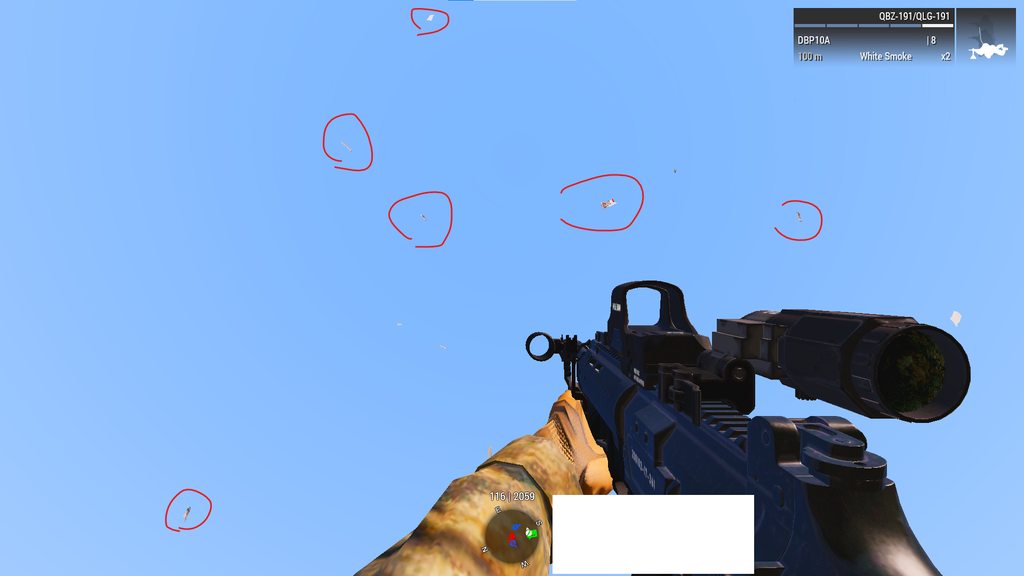
https://imgur.com/a/LzEwej4
does BUG like random zeus lightning and flying Leaflets is from the prof branch?
Peoples around me didnt see it so I guess its local
We are using same mod preset so it may not be mod's problem...?
 ashen helm
I haven't seen any of those
azure jewel
well maybe something else is wrong with me
hybrid cradle
test in just vanilla/prof
whole cloud
real creek
It prompted me with an import thing, said it was gonna make a backup, but both m...
Whatever prompted you wasn't Arma, because Arma doesn't make a backup for you. Find the mod and blame them
whole cloud
azure jewel
https://imgur.com/a/LzEwej4
does BUG like random zeus lightning and flying Leafl...
Can you send me RPT of affected client?
azure jewel
whole cloud
Can you send me RPT of affected client?
I'll send you next time cuz now im using -noLogs 🙂
vale shoal
Were there any changes regarding slingloading since V17?
vale shoal
The reason I ask is, that I see similar cases where the server freezes and the RPT would output stuff like
19:34:11 NetServer::finishDestroyPlayer(1038565839): DESTROY immediately after CREATE, both cancelled 19:34:11 BEServer::finishDestroyPlayer(1038565839): users.get failed
This was the same when the sling loading freeze happened. It first happened in Thursday again (after months) with V18 running. I first thought it was V19 (because there was a fix for it), but I just installed V19 later on Thursday.
empty goblet
1.54.133788 profiling & performance v6 server and client, windows, linux server too
- several more crash cases were fixed since v5
https://www.dropbox.com/sh/582opsto4mmr8d8/3BSy9PdRGm
whole cloud
no slingload related changes
 naive osprey
Anyone happen to know what the new "RQ" value represents with the #monitor MP server command? I can't see any documentation on it yet, and only see it with Profiling.
https://i.imgur.com/V4qIh3L.png
 empty goblet
naive osprey
Anyone happen to know what the new "RQ" value represents with the `#monitor` MP ...
empty goblet
naive osprey
Anyone happen to know what the new "RQ" value represents with the `#monitor` MP ...
it's recently new and related to changes we may need to improve ...
 hoary jolt
Does the default launcher actually launch the profile build from Steam? I dun see the profile launcher anymore even tho I have performance prof branch subbed.
stark falcon
look in the upper left corner of the launcher, it should be green
whole cloud
naive osprey
Anyone happen to know what the new "RQ" value represents with the `#monitor` MP ...
Request Queue.
Messages that came in to the server, but have not been processed yet. Should usually be zero, otherwise the server is backlogged
worn obsidian
hugly perf with perf5, i try v6
gritty wasp
Is it possible to get monitor data by extension? Would be nice to have some kind of Prometheus exporter.
heavy galleon
gritty wasp
Is it possible to get monitor data by extension? Would be nice to have some kind...
By monitor you mean the #monitor command for admin?
If so, you could use #monitords and then parse it from the DS console output
gritty wasp
As much as I now there is now way to parse screen output except setting camera and perform OCR. Sounds bizarre. Proper API for stats or even native exporter would be ideal. But not gonna happen 🥲 As well as case insensitive addons path
whole cloud
Don't know what you mean. You can make screenshots now in extensions. Still need OCR if you want to read text.
heavy galleon
gritty wasp
As much as I now there is now way to parse screen output except setting camera a...
You don't have to parse screen output no? I am not sure about windows, but Linux just goes to stdin. If you redirect or tee it into a file, you're golden. (I've been saying for year now wog should switch to Linux  )
)
As far as case insensitive paths, we are half way there. Just need to finish the rest
gritty wasp
heavy galleon
You don't have to parse screen output no? I am not sure about windows, but Linux...
Only couple years ago dedmen did fix linux multicore performance. For decade (from A2 era) windows arma server did perform much better than linux. That is why all 170+ PvP servers was on windows.
heavy galleon
gritty wasp
Only couple years ago dedmen did fix linux multicore performance. For decade (fr...
 I am not old enough to remember that
The future is now.
gritty wasp
future with case sensitive paths
autumn timber
heavy galleon
The future is now.
Arma 3 is Futura - I would even say 😏
(I wonder how many people will get it)
heavy galleon
gritty wasp
future with case sensitive paths
It's just me being busy with other stuff so I don't have my Linux server manager ready yet. Symlinks with correct casing are easy to do. I have an old shell script somewhere that does it.
heavy galleon
autumn timber
_Arma 3 is Futura_ - I would even say 😏
T-100 has entered the chat
gritty wasp
whole cloud
Don't know what you mean. You can make screenshots now in extensions. Still need...
I'm just dreaming about fancy Grafana dashboard that could show all useful stats of running arma server if there was an API to get values directly.
spiral pond
doesnt arma already pipe some things. i think to recall both logging and some stats. Ondra (Suma) also made a custom pipe in late a2:oa days for mod sync. sadly it wasnt merged to a3 (afaik)
(on windows)
heavy galleon
@whole cloud any work done on extensions lately? OCAP exporter does not load in both perf and dev
I see that dev has a "fix non ascii path" in there. It was reported that it worked on previous dev release
whole cloud
Yes quite a bit.
Does not load means what, can you specify?
heavy galleon
whole cloud
Yes quite a bit.
Does not load means what, can you specify?
Does not find the extension. Error in RPT
tried stable and works no problem
whole cloud
Send me some repro zip please
heavy galleon

spiral pond
ie you can/could use Sysinternals DebugView to monitor rpt output live
rain moth
gritty wasp
Is it possible to get monitor data by extension? Would be nice to have some kind...
yes, you can make your own exporter to prometheus etc using extensions, there are already projects for that on github
gritty wasp
Avarage fps and players count? Not very interesting
vale shoal
vale shoal
The reason I ask is, that I see similar cases where the server freezes and the R...
maybe a feedback to that issue.. after switching back to V16, it didn't happened anymore. I heard from others who have the same issue
woven loom
I'm getting these script errors on mission end:
16:07:28 Error in expression <criptionParams];};
        _descriptionText = format ([_descriptionText] + _descriptio>
16:07:28   Error position: <format ([_descriptionText] + _descriptio>
16:07:28   Error 0 elements provided, 1 expected
16:07:28 File \A3\Ui_f\scripts\GUI\RscDisplayDebriefing.sqf..., line 45
16:07:38 Error in expression <criptionParams];};
        _descriptionText = format ([_descriptionText] + _descriptio>
16:07:38   Error position: <format ([_descriptionText] + _descriptio>
16:07:38   Error 0 elements provided, 1 expected
16:07:38 File \A3\Ui_f\scripts\GUI\RscDisplayDebriefing.sqf..., line 45```Happens when the debrief window appears
This is from a force recon mission, but it happened in other missions as well, which did not previously show this error
whole cloud
known and fixed long ago, profiling just doesn't get new scripts, which is needed to fix this
woven loom
ah okay
I also got these errors while looking through some Western Sahara assets in the config viewer
23:20:32 Error in expression < else {
            call compile _lbData;
        };
        _configPath
    };

    case "textPath": {>
23:20:32   Error position: <_configPath
    };

    case "textPath": {>
23:20:32   Error Undefined variable in expression: _configpath
23:20:32 File /temp/bin/A3/Functions_F/Debug/fn_configviewer.sqf..., line 1025
23:20:32 Error in expression <bis_fnc_configviewer;
        _configValue = [_configPath,_lbData,""] call bis_fnc_ret>
23:20:32   Error position: <_configPath,_lbData,""] call bis_fnc_ret>
23:20:32   Error Undefined variable in expression: _configpath
23:20:32 File /temp/bin/A3/Functions_F/Debug/fn_configviewer.sqf..., line 873
Don't know what that is
woven loom
Hmm i just expanded a class config entry and was greeted with this, iirc
was last night
I haven't gone through config entries in a while though so don't know how new this is

Right after i double click the parent class
Yeah doesn't seem to happen on stable branch, happens on perf/profiling, untested on dev
restive pilot
Why does the path start with temp/bin? 
woven loom
the only things i had loaded were WS and RF 😅
restive pilot
You haven't extracted it have you?
woven loom
...extracted what? 😅 CDLCs? no
whole cloud
restive pilot
Why does the path start with temp/bin? <:thonk:1098612853579206656>
SQFC, a script compiler bug I've been meaning to fix for 3 or so years
restive pilot
woven loom
...extracted what? 😅 CDLCs? no
I meant "extracted the functions pbo" but nvm
woven loom
ahh no nothing like that
woven loom
but it's being junk just on profiling branch 😛
woven loom
damn advanced dev tools mod looks pretty dope
quaint flame
woven loom
but it's being junk just on profiling branch 😛
It also throws script errors on stable.
woven loom
Huh didn't when I tested, weird
quaint flame
It happens every now and then. Perhaps just specific entries idk
Anyway...no one should use it really, same as with the fnc viewer
heavy vortex
Yeah I had a lot of trouble convincing vanilla config viewer to display the deeper class trees (turrets, pylons) when Arma was under any load.
whole cloud
2.16.152172 new PROFILING branch with PERFORMANCE binaries, v20, server and client, windows 64-bit, linux server 64-bit
- Tweaked: Anti-flood default values (preventing false positives, and ignoring Headless Clients)
- Tweaked: Minor netcode performance improvements
- Fixed: Netcode related crash
- Fixed: Extensions could not be loaded from the game directory (as opposed to a mod directory, broken since v19)
If you don't want to use the Steam branch, the files are also available for alternative download here:
https://drive.google.com/drive/folders/15p9j7C2nHUt6NoVfChX4YFuqzFXzblJh
Note: There are separate Dll files that also need to be placed into Game folder.
🔥 🦊
whole cloud
whole cloud
2.16.152172 new PROFILING branch with PERFORMANCE binaries, v20, server and clie...
autumn timber
- Fixed: Extensions could not be loaded from the game directory (as opposed to a mod directory, broken since v19)
What are the current dll location requirements for:
- Extensions
- Dlls that those extensions depend on
Just wondering if the information in the wiki is up to date? Maybe the second point could be added to there as well, by the way? (https://community.bistudio.com/wiki/Extensions#Where_to_put_Extensions?)
whole cloud
extensions loaded from all loaded mods dir's, and game root
extra Dll's by default only working directory
autumn timber
...which could be literally anywhere on the filesystem? 🤔
whole cloud
could be
But game also needs some pbo's and dll's inside working directory, like the "dta" folder
autumn timber
Oh, so it will effectively usually be the game root, ok
rain moth
If you need same folder as loaded dll you can get that path internally and append to load path
heavy galleon
I am once again asking for case insensitive addons folder name support on Linux
autumn timber
rain moth
If you need same folder as loaded dll you can get that path internally and appen...
Yup, that's precisely what I have been doing, but because I needed to decide at runtime which dll with which bitness to use (because they used the same name and I had to put them in different directories).
But I asked nevertheless, because there are people coming to #arma3_tools and asking that question from time to time
indigo anvil
heavy galleon
I am once again asking for case insensitive addons folder name support on Linux
no such thing. linux is case sensitive. Geather the fact what kind of path(s) you need and create links that relfect the needed path.
autumn timber
indigo anvil
no such thing. linux *is* case sensitive. Geather the fact what kind of path(s) ...
Which would be doing the same thing that ilbinek is asking for, but manually and also over and over again, after each mod update
So it's much better to have Arma treat the addons files case-insensitively, because it's unreasonable to expect all the modders in the world to fix their paths or care about creating their paths correctly, in the first place
indigo anvil
yea if you are a modder you should be able to work out what kind of links are needed from gameroot for your own content to work.
autumn timber
Or another way to look at it: there is no real use-case to having case-sensitive paths for Arma, in general, let alone to having them case-sensitive in only one OS, but not the other
Some modders will just say "works on my machine", some will not even know there is an issue with their mods, since they never used linux, etc...
There also are regular people who are not modders and just want to setup an Arma server using other people's mods.
It's counter-productive to ask all these people to themselves fix potentially every mod they ever want to use if all of this can simply be made a non-issue.
stark falcon
Subskeleton index out of range. There seems to be a SubSkeleton index that is greater than the number of sub skeletons, this should not be happening. Please report it with reproduction steps/files.
Not sure if new? Saw when loading a unbinned p3d
heavy galleon
indigo anvil
no such thing. linux *is* case sensitive. Geather the fact what kind of path(s) ...
But we already have case insensitive pbo names. Until that was a thing, I would have not dared to ask for it
heavy galleon
autumn timber
Or another way to look at it: there is no real use-case to having case-sensitive...
Sadly from my understanding Arma has it's own FS stuff, as it uses virtual FS internally. And that is made in all lowercase.
whole cloud
stark falcon
> Subskeleton index out of range. There seems to be a SubSkeleton index that is ...
Uh interesting.
Yeah that message is new, but that was supposed to be in binarize exe
stark falcon
whole cloud
Uh interesting.
Yeah that message is new, but that was supposed to be in binariz...
ace master, just packed into pbos, put down m47 dragon. all kinds of warning about sum of weights and stuff that isn't unusual, just that one error msg seemed new, can post full rpt if helpful
whole cloud
The message was added because there was a crash caused by that, and I didn't see how it could happen or really if that is the actual issue.
Seems like it does happen
empty plover
this is just a small editor thing but everytime you click the markers button the editing mode changes from 3D to 2D. With the new 3D editor markers this is undesirable
whole cloud
I left it because I didn't want to fully commit to 3D markers.
maybe after we've let it run for a game version and know its working perfectly fine, we can change that
empty plover
ok
knotty wraith
there is not enough opportunity to set the height with a 3Dmarker in the editor
when copying from another map, they may be at an incomprehensible height and it is unclear how to lower them to the ground
quaint flame
3den Enhanced will have z value for marker with the next update.
Have you tried snapping them to the surface?
knotty wraith
it is often very high, yes, it is possible to lower them with the mouse somehow, but it is difficult
ashen helm
but have you tried using the snap to the surface option? No need for using mouse, you just right click and they go down to the ground level.
 glacial mortar
does this have any benefits fps wise for players? we changed arma3server64 exe with newest one and pasted dll file into arma 3 folder in our machine. should we expect any fps increases?
 inland dew
try and see
whole cloud
you can just run YAAB and test
improving server performance doesn't always equal better clientside performance though
 lilac hearth
glacial mortar
does this have any benefits fps wise for players? we changed arma3server64 exe w...
lilac hearth
glacial mortar
does this have any benefits fps wise for players? we changed arma3server64 exe w...
In my machine the gains are about 5% in synthetic test (YAAB tests | client + server performance files)
empty goblet
if anyone is at Windows 11 + new AMD (Zen 3/4/5) + recent Windows 11 update containing Zen predictor fixes KB5041587 , more gains #offtopic_hardware message
whole cloud

 light cargo
huh? :o
empty goblet
whole cloud
<:think_turtle:700311400094105672>
seeing it's all same version, just iteration on the magical surprise ? 
whole cloud
Only the best ethereal oils being used here
restive pilot
It's easy you just make diag_fps return 10 + actualFPS 
rain moth
vulkan would fit behind that red rectangle
silk pewter
DX12 render too
empty goblet
silk pewter
DX12 render too
vulkan ... that will allow native nix client 😁
silk pewter
empty goblet
vulkan ... that will allow native nix client 😁
is it "only" that that is holding penguins back or is there something else (beside .NET framework for the launcher)
heavy galleon
Given server supports extensions, I assume it would be no problem for native client
autumn timber
rain moth
vulkan would fit behind that red rectangle
There seems to be an "y" or similar, in the center of that rectangle, though -_-
rain moth
autumn timber
There seems to be an "y" or similar, in the center of that rectangle, though -_-
vylkan
autumn timber
You're right, he must have made a typo and it's definitely Vylcan 😄
empty goblet
silk pewter
is it "only" that that is holding penguins back or is there something else (besi...
linux always was lacking set similar to DirectX package ... i know there are several crossplatform libraries which are similar but afaik none done most of it and simple while well documented and just works
now over the years the just works on DX part is questionable and the way MS decided to not fix stuff to push new OSes didn't help either cough Xaudio 2, twice (or flat out crippling hw DX audio into software while Xbox does hardware acceleration all the time)
full nova
whole cloud
Only the best ethereal oils being used here
or the weather is colder than usual which helps lower the system temperature results in less throttle.
heavy galleon
Nah, it was a neutrino flipping the correct bit in memory that made it somehow skip number of calculations and made them correct anyway
woven loom
full nova
or the weather is colder than usual which helps lower the system temperature res...
Can't tell if serious but the system shouldn't be throttling due to thermal limits if it's been built correctly
light cargo
empty goblet
linux always was lacking set similar to DirectX package ... i know there are sev...
not even togl?
heavy vortex
Maybe it's just that win11 "branch prediction" update
Wouldn't even be the worst. Fortnite got >30%.
full nova
woven loom
Can't tell if serious but the system shouldn't be throttling due to thermal limi...
Laptop says otherwise
woven loom
full nova
Laptop says otherwise
yes true BI devs are definitely doing game dev work on a laptop
maybe if they put their laptop in the freezer, it will score another 10 fps in YAAB
ez optimization
silk pewter
woven loom
yes true BI devs are definitely doing game dev work on a laptop
I feel targeted
hybrid cradle
hey i do game dev work on a laptop and im not even a bi dev
well im bisexual does that count
whole cloud

 somber plank
 heavy galleon
2.19... It's not like we are gonna see it in the next year 
inland dew
whole cloud
<:meowsweats:707626030613135390>
720p
whole cloud
Resolution did not change between both runs
inland dew
but 1st run never counts, because of textures/objects loading, giving different FPS vs. the following runs
and need like at least 3-5-7 runs and average that, because of how random Arma is
few FPS is within margin of error
whole cloud
I'll leave the benchmarking to you. I already planned to ping you about it then
inland dew
dx12?
whole cloud

fair ore
whole cloud
<:meowsweats:707626030613135390>
What is he COOKING!
heavy galleon
hopefully joye
median belfry
light cargo
o.o
inland dew
finally GPUs will perform as they can, like in DayZ
whole cloud
Its baffling what you find sometimes.
In 2020 there was a freeze/crash issue on linux servers related to reading files.
The issue was with a lock not working properly.
But I just found out, that fix causes considerable lag spikes. In YAAB I see several 20+ms freezes because its waiting for a file load that is supposed to be async.
The fix should've been linux only but was applied on windows too.
light cargo
huh strange
whole cloud
Okey the bad "fix" was removing a piece of code that should've been there.
Turns out, the person who added that code in the first place, was me.
It was added because we saw a freeze on linux. But it didn't fix the underlying issue, and I later found a proper fix so I removed it again thinking it wasn't needed.
And today I see, for different reasons, that code was a amazing idea.
it looks like a good change, but I'm not 100% sure about this so to be safe we'll keep it disabled for now.
Ah good old 4 years ago dedmen
Now the lag spikes in YAAB, only happen on scene change when a new model appears on the screen for the first time and it needs to load it right now
Luckily it preloads some before benchmarking starts. But it would've been better if it collected all objects inside the benchmark, and threw them infront of your camera for a short time, so the game force loads all at the start. And won't keep spiking mid-benchmark.
But maybe that's also intentional to include that in the benchmark
Like shortly after benchmark start in the thermal vision, it spikes to load the rocket pods of the A-10
Then it zooms down, and spikes to load the wrecked tank model, and then a flying rocket model
inland dew
that's why 1st run shouldn't be concidered
whole cloud
YAABv2 when? 😄
silk pewter
add comment to said code 👀
inland dew
DX12 when?
whole cloud
There are now 3 comments on that code.
I had to put year numbers onto them to mark when that stuff happened 😄
inland dew
touching the artifacts...
knotty wraith
What is to be cannot be avoided
whole cloud
How annoying. Looking at the times at the bottom. The minimums and average are higher.
But the spike during the black screen is not as high, so the end result average shows as lower

 whole cloud
Both of them are 2nd run
inland dew
less or not all stuff loaded = higher fps, aka fake
whole cloud
Before all the changes - 2nd run
After all the changes - 2nd run
inland dew
min fps is what you should look at
min fps is 15% higher
that's a lot
the closer the min to the avg, the more consistent/smooth the game feels
if there is a very big gap between min and avg, and max, this means that fps fluctuates a lot, thus choppy game experience
are you just pressing S in YAAB or you really have selected standard preset in video settings?
whole cloud
S in yaab.
My video settings are messy, but the same for all runs
inland dew
benching with (some) settings lower than standard and benching at lower than 1080p, results in very very inconsistent results between runs
you really have to do standard preset in video settings (not S) and not lower than 1080p
otherwise it's so so messy that you can't even compare stuff
knotty wraith
Groove knows what it's saying
inland dew
do lower than standard and lower than 1080p and it will fluctuate 10+ FPS between runs, which is useless then
have discovered this behavior many many years ago
and if you do 1080p standard preset (no S), you have to mostly rely on avg numbers, because min and max still fluctuate a lot
already done more than 1000 runs yaab 🫠
inland dew
inland dew
and if you do 1080p standard preset (no S), you have to mostly rely on avg numbe...
but still important to pay attention to min fps particularly
woven loom
May i also suggest using something like CapFrameX or Intel PresentMon to capture the benchmark data, they'll give you better stats and stuff (e.g. 99th percentile etc)
inland dew
look at the sky or desert map and your max fps will be much higher, thus much higher avg, which doesn't mean anything, since min fps can still be crap
thus min fps is the most important
it's like Ryzen CPUs have better max, thus avg fps, but you better don't look at min fps...
knotty wraith
woven loom
May i also suggest using something like CapFrameX or Intel PresentMon to capture...
YAAB is a very strange tool - here I completely agre
woven loom
inland dew
look at the sky or desert map and your max fps will be much higher, thus much hi...
I think it does matter where the min is happening, if it's a random dip then it's not so noticeable, or it might be during one of the loading sequences
Really dedmen should make a custom benchmark 😛
official A3 benchmark scenario 😄
DedBench
whole cloud
I am looking at profiling data to see the performance, not at the yaab numbers.
But its good when YAAB numbers confirm what I see and expect
inland dew

do capframex add arma exe there, set capture time to 139 secs and set a button to press to start capture and it will end itsrlf after 139 secs
woven loom
BTW there are two other benchmarks @ dedmen that might be worth using as more "typical" loads -- Altis Bench and Stratis Bench
Stratis https://steamcommunity.com/sharedfiles/filedetails/?id=172475381
Altis https://steamcommunity.com/sharedfiles/filedetails/?id=173435011
They haven't been updated since 2013 but both work (stratis one shows an error but i haven't seen that affect anything obvious)
inland dew
inland dew
then you can compare several runs to each other
 whole cloud
Uh that looks easy. Neat, I'll give it a try
inland dew
capframex is german, i think
so you run yaab, but only to bench
you rely on what was captured by capframex
just set runtime to 139 secs and assign a button to press to start 139 secs capture
but you really have to do 1080p standard preset (no S)
otherwise impossible to compare
huge fluctuations between runs otherwise
analog acorn
Why do other resolutions cause such large differences between runs of the same resolution?
inland dew
Arma
even a 1050 ti or 1060 3 gb is enough to not impact 1080p standard preset (no S)
so be it a 4090 or a 1050 ti, as long as it's 1080p standard preset (no S), fps will be same
inland dew
inland dew
then you can compare several runs to each other
in the run in blue, frametime is lower (each next frame delivered/displayed faster) and less fluctuations, thus more stable/consistent fps = smoother gameplay feel, because of 128 MB cache of the good old i7-5775C, despite only 4/8 cores/threads, only 4.4 GHz and only DDR3 2400 MHz
inland dew
inland dew
then you can compare several runs to each other
also you can easily add like 20+ fps to these results, since fps increased by that since 2019, thanks to perf branch
knotty wraith
a very cool theme with HC - it can load 4 processor cores by 90%, but can you do something in principle with the game - parallel processes?
and finally make some kind of event that will track the player's life
where it would be possible to catch any moment of his actions
whole cloud
2nd run for each.
Green is "new"
its still 720p, I still didn't check my video settings.
But look how close and similar they are. Meh.


top is new

nice
 inland dew
well, do 1080p and standard preset (no S)
inland dew
whole cloud
2nd run for each.
Green is "new"
its still 720p, I still didn't check my video s...
green runs much smoother/more consistent/stable
but since 720p and non standard preset, can't really compare, because of fluctuations
what you're seeing, you can't know how much the improvements helped and how much of that were fluctuations, because of resolution and settings
whole cloud
But I know what actual improvements I've done. How much better they should in theory be. And it matches that data
inland dew
also 1 run per per build, even if it's the 2nd, doesn't paint the whole picture
3 runs is the bare minimum, or rather 4, since the 1st doesn't count, because of loading all the stuff
you can check yourself
ok then
inland dew
whole cloud
top is new
0.1% very close to min FPS, thus very smooth/consistent/stable
no huge dips
whole cloud
Does it have some way to count how many frames were longer than 20ms?
It looks to be like 2-3 but I'd like to see actual number
There it is. 48 below 45fps, and 6 below 30.
In the old one

in the new one. Only 28 below 60

I won't get the average much better, but maybe I can fix the minimums a bit more
whole cloud
I am too often playing Arma with averages of 30 or below 😄
inland dew
when it dips, at the wrong moment or often, you die, because it happend when you were touching down in a jet, or firing at enemy or you or enemy abruptly appeared from behind an obstacle and it dipped at that exact moment
severe dips when pressing the button to lock or cycle through targets in a jet/heli
maybe it has something to do with data link (when data link both ways (emit/receive)?) or number of targets with radards themselves, be it enemy or friendly
no idea
have msi afterburner running with on screen frametime graph and see what happens when you press lock/cycle
knotty wraith
the best feedback that reports on the feelings of a simple player
inland dew
inland dew
maybe it has something to do with data link (when data link both ways (emit/rece...
or is it because of the increasing number of players that the data has to be synced/distributed/updated or the more hours the server is online, the more it dips, when locking/cycling through targets (with radards themselves?)
heavy vortex
There was a known issue with radars where they'd have extremely poor performance if they scanned outside the map boundary.
Not sure if that was worked around.
Well, the workaround might be that it dips hard when you turn the radar on but recovers afterwards...
inland dew
whole cloud
I am too often playing Arma with averages of 30 or below 😄
crap avg is a result of crap min
heavy vortex
Not really. Often the frame rate is persistently crap even when nothing is being loaded.
whole cloud
well min is always below avg. So if avg is already crap, then min must be crappier 😄
inland dew
higher min = higher avg
heavy vortex
From a practical perspective I don't actually care much about the loading hitches, although ideally they go away.
But then I mostly play infantry where you're doing a lot less object loading.
inland dew
fly a jet 1000+ km/h low altitude high view distance 🫠
heavy vortex
yeah if I want to fly jets I don't play Arma :P
whole cloud
Annoying thing for hitches is, I need a repro to see it
heavy vortex
I did a frametime run on YAAB and it was actually a lot less spiky then I was expecting.
I figured there would be a bunch of ~100ms frames in there but it wasn't close.
analog acorn
inland dew
higher min = higher avg
Yes, but it's not always exceptional bad mins that are driving it. Sometimes the frame rate is a pretty flat line and it's some overall thing affecting all frames that's preventing the average from being higher, not spikes dragging it down
(urban combat)
inland dew
render, where gpu is cpu bound = crap frametimes
when cpu is waiting on something, gpu is also
main thread waiting on stuff from other threads
or stuff not done on other threads = queuing on main thread
woven loom
inland dew
who cares about "nice" avg, when min can be dogshit
Well rate of fire is tied to frame rate so... 😛
But more seriously, having Arma run at >60 fps with an X3D processor is great! The minimums i don't notice unless it's a big drop (sometimes on texture/object loading for example). Stuttering is of course not great but Arma usually either has those big drops or just slows down on average during regular gameplay (in my experience). There is microstuttering too at times though.
FOV zoom can cause stuttering on slower systems for example
whole cloud
One of the YAAB dips, is the missile hitting a house, and checking for visibility to calculate explosion damage to surrounding units/objects.
The red part is ONE missile exploding.
But the dip only goes to a frametime of 24ms.
Most of the time of AI processing here, is also spent in visibility checks (the yellow block on the right).
If only that could be better..
 heavy vortex
Well, if you can improve AI visibility check perf, I feel that'd solve a lot more practical issues than one YAAB frame :P
Is it doing raycasting checks to each explosion though? Because that sounds super bad.
woven loom
Also 24ms is a big dip 😅 (i guess it depends on baseline though)
heavy vortex
(think 20mm cannon fire)
whole cloud
heavy vortex
Is it doing raycasting checks to each explosion though? Because that sounds supe...
On explosion, it does raycast to every object in explosion radius. To check if the path is obscured, so things behind walls don't get damage
heavy vortex
Ah, not for auditory checks though?
whole cloud
don't know what that means
heavy vortex
I mean whether AIs can hear the explosion.
whole cloud
Ah thats something different, I don't think it checks if objects are in the way
heavy vortex
hopefully not.
whole cloud
I can optimize the visibility checks, 90% of it is checking objects, that are not actually in the way.
But there are the last 10%, where the object actually does go through an object, and it has to load the objects mesh, and animate it to exactly check if at their current animation state it would hit it. And there, IF it actually loads the model from disk because its not ready yet, the optimization would blow up.
Happens only in 0.001% of times. But that messes up the whole thing
hybrid cradle
0.001% of frames is still 1 in 1000
heavy vortex
Nah, that's one in 100,000
heavy vortex
I do recall one pretty annoying long-frame issue in Antistasi. Only happens in localhost. If you fire a mortar from the back of a truck for the first time, it'll sometimes nuke itself because a long frame causes excessive rotation from addForce recoil.
Because it only happens in localhost, I figured it's probably due to all the AIs checking if they can hear the mortar shot.
heavy vortex
I don't really have the tools to prove it, but I couldn't think of any other explanation that fitted the results.
It's fine if you don't have 100 AIs nearby or don't use the addForce on firing.
(or run DS rather than localhost)
 fickle geyser
whole cloud
On explosion, it does raycast to every object in explosion radius. To check if t...
fickle geyser
whole cloud
On explosion, it does raycast to every object in explosion radius. To check if t...
I feel like you could limit amount of objects it raycasts per frame
if the damage would be delayed a frame or 5 it shouldn't matter much but less spikes when stuff explodes
empty goblet
heavy vortex
It's fine if you don't have 100 AIs nearby or don't use the addForce on firing.
repro mission would be useful for that problem
fickle geyser
I still wasn't able to repro few missions where we had 16km sensors/radars on a helo/cup ship kill frames every few seconds
pretty sure that was related to raycasting too
whole cloud
fickle geyser
I feel like you could limit amount of objects it raycasts per frame
Splitting stuff over multiple frames is quite some effort. Then only thing that does something like that is AI pathfinding.
maybe. I'll atleast try to find some way to make that better
hybrid cradle
ive had some instances where AI being above ground/sea has just killed frames tons but could never repro
fickle geyser
whole cloud
Splitting stuff over multiple frames is quite some effort. Then only thing that ...
move to SQF, easy to do here 
heavy vortex
empty goblet
repro mission would be useful for that problem
I feel like it's gonna be an unfixable though, given that you're not gonna mess with PhysX internals.
Interesting part is "why is the frame so long", but long frames are never entirely avoidable.
We can probably just work around it by delaying the "recoil" for a frame or two.
woven loom
Dedmen if you're hunting for places where the FPS drops, maybe it's also good to use the ultra or extreme presets to force more intensive settings, but also use YAAB Standard viewdistance settings (press S) to limit the impact of far away objects and textures?
e.g. https://imgur.com/WeqHd6D
And fwiw i see regular excursions past 30ms, with some really big frametime spikes too
https://imgur.com/eWKDr2b
 analog acorn
fickle geyser
I still wasn't able to repro few missions where we had 16km sensors/radars on a ...
analog acorn
fickle geyser
I still wasn't able to repro few missions where we had 16km sensors/radars on a ...
Related history: #perf_prof_branch message
heavy vortex
Ok this really is a long frame:
18:05:05 "Frame time 0.016"
18:05:05 "Frame time 0.017"
18:05:05 "Frame time 0.797"
18:05:05 "Frame time 0.025"
18:05:05 "Frame time 0.016"
wow
heavy vortex
(plonk down ~100 redfor AI in approx 1km radius. Fire mortar)
I guess I'll put it on the FT. Seems kinda excessive :P
whole cloud
That number is in seconds right? Oof.
I don't care much for a spike for a mortar gunner when shooting. But over half a second is too much
Doesn't need FT yet, I'll take a quick look tomorrow. If I can't easily fix it, then maybe ft
heavy vortex
Didn't figure it'd be that much. You get so much visual effect distraction that it covers it pretty well.
heavy galleon
whole cloud
That number is in seconds right? Oof.
I don't care much for a spike for a morta...
I care, mortars are the best thing in this game.
(If you don't use the vanilla system that is)
heavy vortex
Ah wait, might be false report from debug console open/close.
whole cloud
Debug console opening also shouldn't freeze for half a second
heavy vortex
ADT does.
Actually worse on closing than opening. Not sure what it's doing there.
Yeah, I don't get anything detectable just from the mortar fire. Would need to be something else related.
heavy vortex
huh, I thought mortar shells were network objects:
18:39:02 Ref to nonnetwork object 1790554: shell.p3dSh_82mm_AMOS
restive pilot
heavy vortex
Actually worse on closing than opening. Not sure what it's doing there.
I think it's the profile saving thing
Also if you have a breakpoint it will recompile your file to insert the breakpoint in the code (since it's a SQF breakpoint not hardware/os bp)
restive pilot
heavy vortex
huh, I thought mortar shells were network objects:
`18:39:02 Ref to nonnetwork o...
I think all non-controllable projectiles are local (except for mines I think)
random isle
heavy vortex
huh, I thought mortar shells were network objects:
`18:39:02 Ref to nonnetwork o...
None are it’s all local
whole cloud
heavy vortex
(plonk down ~100 redfor AI in approx 1km radius. Fire mortar)
plonked down ~100 opfor AI, in 50 meter radius around blufor in a mortar, fired mortar. FPS didn't even drop below 50
silk pewter
I wonder: was it "fire mortar at them?"
woven loom
That's what I thought 🤔
inland dew
imagine firing at something with a Cheetah or Tigris AA cannons, so fast and so many particles...
or A-164 Wipeout cannon...
FPS drops easily, if you have HDR standard (not low), anti-aliasing and particles of good quality
or just look at water for FPS to drop
or use Zamak MLR or M5 Sandstorm or M4 Scorcher/2S9 Sochor with cluster ammo
mortar is nothing, compared to that
heavy vortex
Yeah, I figured there would need to be a frame rate drop for the addForce to nuke the vehicle, but I can't detect one in practice. Just a false positive on ADT. The original replication case stopped working for me anyway so I don't have anything to boil down.
random isle
inland dew
imagine firing at something with a Cheetah or Tigris AA cannons, so fast and so ...
Vulcan fire usually brings my game to its niece
hybrid cradle
i think you meant knees
random isle
Err voice to text failed
 cobalt spire
So, I have a question about the profiling branch. I never have used this before as an fyi, and ran into an issue earlier so, Are the profiling branch and the stable branch supposed to be compatible with one another? Like if server is running the profiling branch, are players who do not run said profiling branch supposed to be able to connect or not?
heavy vortex
Yes, although it doesn't always work out.
If you do have a clear compatibility issue then you should report it.
cobalt spire
Where do I report such an issue?
Because our server is running the profiling branch I think. (arma 3 version 2.16.152172) and clients with the stable branch (arma 3 version 2.16.151618) are unable to connect. Upon connecting the clients receive the following error: Bad version, server rejected connection. And I can only connect when switching the client to the profiling branch.
heavy vortex
Here is usually sufficient.
cobalt spire
is the information above sufficient or is there anything else needed for this?
heavy vortex
It's sufficient assuming that it's replicable.
heavy galleon
Arma 3 Console version 2.16.152172 x64 : port 2302
could connect with stable client, issue must be somewhere else
linux server*
(or steam didn't actually switch me to stable)
cobalt spire
standby, I will try to replicate the issue elsewhere.
For the server, I cannot say whether it is linux or windows as my server panel is a browser panel through TCA.
I do however have a windows machine (Windows Server 2019) available to me so I will try and replicate it on that.
heavy galleon
linux no issue
cobalt spire
Just tried to make sure on my Windows Server 2019, with server version 2.16.152172 and the client on 2.16.151618 I seem to connect. So I am unable to replicate the issue. I will continue to look at what I need to do to fix this.
heavy vortex
Do the server logs actually say 2.16.152172?
Because if that's Armahosts/opengroup then they don't update their perf/profiling version and it's probably ancient.
cobalt spire
heavy vortex
Do the server logs actually say 2.16.152172?
yes the log said 2.16.152172 however we have managed to get our server off the profiling branch and are now able to connect. It only took us 2 days to reach our server host hence why I started to explore different routes for solutions.
 kindred radish
cobalt spire
yes the log said 2.16.152172 however we have managed to get our server off the p...
kindred radish
cobalt spire
yes the log said 2.16.152172 however we have managed to get our server off the p...
Remove requiredBuild from server Cfg if it exists.
https://community.bistudio.com/wiki/Arma_3:_Server_Config_File
ashen helm
was there something done to the cursorObject return value? Now suddenly I get, for example, 3dae8f4b800# 3474161: vn_sign_fob_08.p3dvn_sign_fob_08 instead of 3dae8f4b800# 3474161: vn_sign_fob_08.p3d. Why does the file name show up twice?
whole cloud
Something was fixed for an object time that was missing it's reporting
empty goblet
1.54.133792 profiling & performance v7 server and client, windows, (linux server not yet)
- several more crash cases were fixed since v6
https://www.dropbox.com/sh/582opsto4mmr8d8/3BSy9PdRGm
 plain trout
we had an issue last Friday where every person in audible distance crashed while playing affecting only perf players (7 out of 50) multiple times. The issue disappeared once everyone switched to vanilla. Unfortunately I was running with -nologs. Can a memory dump help you?
whole cloud
For crashes I always need mdmp, not the rpt. so nologs doesn't matter


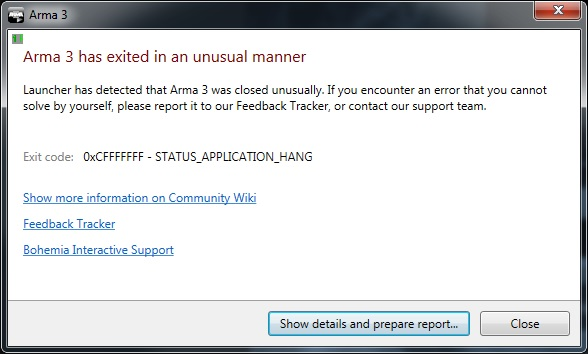


 night mulch

 hallow lantern
why fps are hidden?
whole cloud
To not tell people to expect +N fps, and then be disappointed when they don't get it, that's all preliminary still
hallow lantern
quite hard to evaluate the improvement, it's something about multithread improvements I suppose?
whole cloud
Multiple different improvements coming together
autumn timber
hallow lantern
quite hard to evaluate the improvement, it's something about multithread improve...
Need to figure out what happens at the 87th second in YAAB, since that's where the biggest change seems to be 😄
whole cloud
Black screen 😄
hallow lantern
autumn timber
Need to figure out what happens at the 87th second in YAAB, since that's where t...
was looking exactly at that time, it's the big difference but without numbers I can be looking at a 2-3 fps difference or 10-20 fps difference
whole cloud
whole cloud
Black screen 😄
Oh no that's 81.
Mh yeah don't actually know what specifically is there
autumn timber
whole cloud
Black screen 😄
2.18 Changelog
Changed:
- Improved empty screen rendering performance
- Improved soundless playback performance
- Improved no AI State Machine processing
 silk summit
autumn timber
# 2.18 Changelog
Changed:
- Improved empty screen rendering performance
- Improv...
silk summit
autumn timber
# 2.18 Changelog
Changed:
- Improved empty screen rendering performance
- Improv...
I believe those "heavier" optimizations are set for 2.20, like the 2x performance increase on the VR map, a 25% optimization for objects not placed on the scenario and a huge performance increase for shadows (when shadows are disabled) 😅 🤣
restive pilot
whole cloud
Oh no that's 81.
Mh yeah don't actually know what specifically is there
I think the benchmark pauses the game at that time (setAccTime 0) so probably a lot of simulation is suddenly skipping or something
Actually no that also makes no sense (the FPS drops again at the end) 😅
whole cloud
That could be the helicopter fly scene, where the camera is aimed mostly into the sky
restive pilot
Oh when you said black screen I thought it's near the end of the benchmark
heavy vortex
autumn timber
Need to figure out what happens at the 87th second in YAAB, since that's where t...
87 seconds is when the infantry truck appears. The rendering should be pretty thin because you're looking away from the town.
I guess there's still a fair amount of smoke from a couple of mortar rounds.
whole cloud
Some of the optimizations improve culling of objects that are around the camera, but not actually visible.
I assume that is having the big effect there.
inland dew
when do you think to do shadows faster like you said?
whatever it means
would also really be a thing
 pallid island
whole cloud
https://cdn.discordapp.com/emojis/635256471675994132.gif?size=128&quality=lossle...
pallid island
whole cloud
https://cdn.discordapp.com/emojis/635256471675994132.gif?size=128&quality=lossle...

whole cloud
inland dew
when do you think to do shadows faster like you said?
I think part of that is already done with what I have
I think my benchmarks are with shadows enabled
silk summit
But the big rocks optimizations still not in there right? That would help more with stutters than overall FPSs anyway but still a great fix to have for 2.20 😉
woven loom
whole cloud

woven loom
whole cloud
Some of the optimizations improve culling of objects that are around the camera,...
BTW, there's this thing when the object's main body isn't in the frame but some part (like a tank barrel) is, and the part will pop in and out of existence with small camera movements. can get very distracting.
Is there a way to avoid stuff like that?
inland dew
woven loom
BTW, there's this thing when the object's main body isn't in the frame but some ...
that's a very tricky one actually
 north glade
Hey guys can someone please tell me how do i get to the console logs of arma reforger?
analog acorn
north glade
Hey guys can someone please tell me how do i get to the console logs of arma ref...
This channel is for the Arma 3 Performance/Profiling branch. For Reforger, try channels in the Reforger category, like #reforger_questions or #reforger_troubleshooting . Make sure you have the right roles selected in #✔role-selection to see the channels you need.
restive pilot
silk summit
But the big rocks optimizations still not in there right? That would help more w...
I actually ran a test with roadway PhysX disabled and there was no significant improvement with that (at least not in YAAB)
It will only improve the stutters around those rocks
Anyway the fix is still not ready yet
north glade
analog acorn
This channel is for the Arma 3 Performance/Profiling branch. For Reforger, try c...
oh okay thanks
indigo anvil
This can be considered an edge case: wireless earbud ran out of power during a longer game and the audio device disconnectes. Result: arma crash. This happens every time. Any way to gracefully resolve this?
restive pilot
inland dew
that's a very tricky one actually
It's not really tricky without the shadows
With shadows it does get tricky
silk pewter
ye, bigger bounding box but to what extent with shadows…!
restive pilot
woven loom
BTW, there's this thing when the object's main body isn't in the frame but some ...
BTW out of curiosity, does this happen all the time or only when the barrel is pointing to the side (or anywhere except the original, unanimated position)? If the latter it's because of a bug in model binarization where LOD bounding boxes are too small because they don't account for animations (model bounding boxes are correct tho)
woven loom
Uhh when I noticed it at least, it was to the side
I've also noticed it on other things, although I can't remember specific examples. Wait, actually I remember one, the lighthouse's light beams also get culled when the source is out of the frame
Which I guess is a bit different because the light beam isn't a part of the lighthouse (?)
But yeah I've noticed it a few times with objects
restive pilot
woven loom
Which I guess is a bit different because the light beam isn't a part of the ligh...
I guess so yeah.
woven loom
I guess I'll report when I see it happen again, I just sorta ignored it assuming it was an engine limitation
autumn timber
silk summit
I believe those "heavier" optimizations are set for 2.20, like the 2x performanc...
and a huge performance increase for shadows (when shadows are disabled) 😅 🤣
Damn, the irony is: this would have fit my changelog perfectly, would have been an actual, real change, and yet I forgot to include it 🥲
light cargo
void badger
Good old debug island
which is that island? official bi terrain?
whole cloud
silk summit
But the big rocks optimizations still not in there right? That would help more w...
Big rocks are not a problem, they appear in none of my benchmarks. And in the kinds multiplayer missions I play, they also basically never appear.
So I'm not focusing on that.
I optimize the things I see. The things that affect the majority of situations.
whole cloud
woven loom
Is there a way to avoid stuff like that?
Make a proper ViewGeometry LOD in the model.
whole cloud
For a couple years now I've been hunting some lag spike caused by AI.
I got closer today. AI takes a long time updating its targets. Well if it has lots of targets thats normal, but that would really need to be hundreds of targets to be as bad as what I'm seeing.. What are these targets?
The targets are 1500 props. Shovels, tables, lampposts, fence's... What?
Turns out, this is used for a keybind (Weapons / Next Empty Target, and Next Empty Target (Vehicle)), that is by default not bound to any key (It has one assigned in the Arma 2 key preset).
If you press that key, it searches through these static-object targets. And if there is one there (Which is also lockable by your current weapon) then it locks onto it.
I can't find how to actually trigger it. I can trigger it to search for objects, but it only accepts an object that was detected by a vehicle sensor which.. is none, because there are no sensors that detect buildings?
A majority of AI processing time, is spent tracking stuff that 99% of players never use?
hybrid cradle
How much is a majority?
whole cloud
hybrid cradle
How much is a majority? <:meowsweats:707626030613135390>
There are only two cases where AI group processing time spikes higher than 0.2ms.
One is when it wants to start pathfinding and the grid is not ready yet.
And the other is this.
A group's 0.8ms update time, spending 0.75ms checking props around it.
Comments in code say this is for buildings that are pre-placed on the terrain.
But my sample has about 50 Land_Shovel_F in there. A shovel is not a building?
Why is every AI group, in this compound, keeping their own list of shovels :U
I can understand that you might want to know buildings nearby, you might want to target them for whatever.
But shovels, food cans, wooden tables, lampposts..
inland dew
so that's what could cause a good freeze/fps drop/frametime jump, when pressing the button, to cycle through targets, when in a jet/heli...
whole cloud
inland dew
so that's what could cause a good freeze/fps drop/frametime jump, when pressing ...
It would only check this huge list, when you press the special "Empty target" button
There are also a few other places that iterate over all targets. But then filter out all non-vehicles (all these buildings/props are not vehicles).
That could be it, checking many objects only to find out that 90+% of them are not vehicles, is probably not good
inland dew
well, i have it set so that it's same button for empty and not empty targets, because if a target is empty, i see no reason to not lock and destroy it or decide whether yes or no myself, but lock/show it anyway
whole cloud
It also tracks logics (modules placed in editor) even though you can never see or interact with them
whole cloud
inland dew
well, i have it set so that it's same button for empty and not empty targets, be...
That would do it then yeah
fair ore
whole cloud
For a couple years now I've been hunting some lag spike caused by AI.
I got clos...
Huh, is this related to how pressing the "next target" keybind causes a big frame drop a lot of the time?
whole cloud
fair ore
Huh, is this related to how pressing the "next target" keybind causes a big fram...
hybrid cradle
inland dew
so that's what could cause a good freeze/fps drop/frametime jump, when pressing ...
groove just said that jenna
whole cloud
I have not seen that frame drop yet. Didn't see a way to reproduce it?
Is there a simple way to repro that?
fair ore
I'm cute
fair ore
whole cloud
I have not seen that frame drop yet. Didn't see a way to reproduce it?
Is there ...
I find it happens a lot if I'm in a jet and there's a good number of targets, say ten or so, and it fails to actually grab one
hybrid cradle
I can try find a repro later
fair ore
See if I can get a vanilla repro when I get home
hybrid cradle
Whilst Jenna sends me that spp 😠
fair ore
I'm at WORK
inland dew
whole cloud
I have not seen that frame drop yet. Didn't see a way to reproduce it?
Is there ...
assign empty to same button as next, maybe?
hybrid cradle
LATER IDIOT
fair ore
There's also a distinct possibility I bound the empty one
inland dew

lol, empty can also be non-vehicle
i guess infantry and buildings
but all sort of small props shouldn't be...
whole cloud
"Empty Target" is only "static" objects.
Buildings and "Thing" type objects, and Logics.
Stuff that doesn't move, and doesn't get driven and generally also isn't "enemy" ever
whole cloud
I don't know of anything that can actually lock such a thing
But surely there must be something, or else this old feature (from Arma 2 or pre-Arma2) would not be here.
hybrid cradle
dont think its even possible with current sensor config
inland dew
can lock a building with a cannon of attack heli with ai gunner
whole cloud
Yeah I got it. So "Next Empty Target (Vehicle)" iterates the list, when sitting in a jet.
The normal "Next Target" and "Lock Target" buttons don't
hybrid cradle
whilst on the topic of radar stuff
is there any chance to get commands like addRadarTarget and removeRadarTarget or something?
whole cloud
hybrid cradle
whilst on the topic of radar stuff
is there any chance to get commands like `add...
dunno
fair ore
whole cloud
Yeah I got it. So "Next Empty Target (Vehicle)" iterates the list, when sitting ...
I suspect I just bound it when going through my stuff
inland dew
inland dew
can lock a building with a cannon of attack heli with ai gunner
but to lock a building, you can't simply cycle through dozens/hundreds of them, until finally ai is locked on a specific one
buildings are never in the targets list
you can lock a building only when directly/specifically looking at it and then locking/assigning it that way only
fair ore
Pebcak etc
whole cloud
And 3000 road cones are not causing a noticeable lag spike for me
fair ore
surely you will not regret purchasing 3000 road cones
inland dew
whole cloud
But surely there must be something, or else this old feature (from Arma 2 or pre...
in a2, you could lock onto any building by pressing reveal target (right mouse button)
works same in A3 (keyboard T), when looking at specific building
but in a2, when locking onto a building, you also had the square on the building, like on vehicles in A3 and the name of the building. so it was similar to a vehicle logic
whole cloud
with 3000 invisible road cones, my game runs at 192fps.
If AI were not trying to process them as targets, I'd be at 230fps. And that is only with my player placed down.
This effect would multiply for multiple AI groups each tracking the objects on their own.
whole cloud
inland dew
in a2, you could lock onto any building by pressing reveal target (right mouse b...
Oh..
Well. I cannot lock onto anything, because the thing needs to be "detected by sensor" which is a new feature that came with jets DLC.
And there is no sensor that detects a building..
That may have broken this feature.
inland dew
whole cloud
Oh..
Well. I cannot lock onto anything, because the thing needs to be "detected ...
well, spawn an attack heli, with ai gunner, select manual fire and select cannon, then freelook at a building and press T. ai gunner will lock onto the building, then you fire cannon at the building
whole cloud
Mh doesn't work for me.
When I spam T, in non-manual-fire, I see the crosshair target show up for a split second on the building, but AI gunner doesn't lock onto it
And in manual-fire mode, it doesn't seem to do anything
inland dew
i do this for buildings to destroy a specific one by just shooting, while ai aiming at it
or when i visually see enemy infantry and look at it and press T for ai to keep aim at it and me just shooting
woven loom
huh can't remember locking on to a building 🤔
is there a difference between map objects and placed buildings? because map objects are simple objects right?
whole cloud
ok I got something but its weird.
With laser marker enabled, I can switch to ASRAAM, and then with T move the laser marker.
And then when switching to cannon, the cannon will aim at the laser marker
But when I switch back to cannon, pressing T again does nothing
woven loom
yeah i think that happens with tanks as well (like the NATO tank destroyer, if you use the laser pointer it will aim at it)
inland dew
oh, yeah, forgot about laser
but when laser, weapon doesn't matter
whole cloud
It reliably puts the laser onto the building.
But that doesn't actually use this target list, it just checks whats under your cursor, it doesn't need to go through known targets.
And the "Next Target" button does nothing.
I think thats not it
inland dew
but targeting/revealing solo soldier, while looking at it and pressing T, no need for laser
whole cloud
But soldiers are dynamic targets. So thats something different
inland dew
well, buildings were never visible/selectable in targets list (press 2)
whole cloud
yeah that only shows dynamic targets.
Only engine use I can find is literally the "Next Empty target" keys, and I can't find any sensors that detect these, where these keys would work.
inland dew
to make ai aim at a building, one always have to look at a specific one and press T
otherwise no other way
it's similar to like when you command ai and tell it to run to a bush, tree or building by pressing button while looking at this bush, tree or building
so visual sensor only
median belfry
Are agents doing the same?
whole cloud
if they do targeting, yes
woven loom
whole cloud
Only engine use I can find is literally the "Next Empty target" keys, and I can...
Could it be for line of sight checks? Like sensors also check for LOS
whole cloud
no
whole cloud
Well it does check LOS to these static objects, thats why the perf hit is so shitty.
But it doesn't use these lists for that
inland dew
woven loom
Time to remove it and find out what breaks 😛
whole cloud
inland dew
Can you also do that with the "Next empty target" key in Arma2 ?
I suspect T simply grabs object under cursor, but "Next target" definitely would use that list
woven loom
I wonder if there was some planned feature that never got implemented and the sensor rework devs just forgot to remove the check 🤔
inland dew
whole cloud
I suspect T simply grabs object under cursor, but "Next target" definitely would...
there is no such thing in a2
there is only reveal/lock (RMB), so T in A3
and next target (Tab), so R in A3
 whole cloud
woven loom
Time to remove it and find out what breaks 😛
whole cloud
woven loom
Time to remove it and find out what breaks 😛
Yeah I'll probably completely remove these objects on profiling.
And on stable keep it at a "everything bigger than 3meters is allowed"
Actually testing it again now.. The next weird thing.
Buildings, like actual terrain buildings, aren't even in that list.
I have PowerPole's, StreetLamps, other Lamps, Navigation lights (Probably from stratis airfield) and the Airport Tower at stratis airfield.
But I don't have any of the other buildings 🤔
But all the comments in the code here say that this is for buildings. But there are basically no buildings in there.
But this code that adds the objects in the first place was rewritten some time in Arma 3. Maybe they forgot that buildings should be in there 🤔
It is quite literally only lamp posts and props. The Airport tower is probably in there, because it has lamps on it.
whole cloud
inland dew
there is no such thing in a2
there is only reveal/lock (RMB), so T in A3
and nex...
Ah maybe next target and next empty target was on one button back then
woven loom
Could it be to shoot out lights???
whole cloud
Ai doesn't do that
woven loom
Oh I know, but maybe they wanted it to? Isn't it a thing in Reforger? (Or is that just players)