#perf_prof_branch
1 messages · Page 4 of 1
 random isle
 plain trout
The newest one works fine
random isle
plain trout
The newest one works fine
ah shit! i was talking about old one
glad to hear it runs better than old
plain trout
Still overloads the vram and breaks it. We had a couple of missions with 30-40 and people keep crashing more then on any other map
 restive pilot
could be either or both. the game has gone thru a lot of changes so intercept is broken rn
 whole cloud
I implemented a fix but I.. wanted to publish it on last sunday :harold:
I'll push it today after work, hopefully
whole cloud
The problem was, vehicle stored effects inside the weapon, but multiple pylons actually share the same weapon (say, same weapon but multiple magazines loaded at once)
So the effects could only have one position per vehicle.
Needed quite a bit of rework but I got it now, will be in prof v15, I expect early next week.
Thank you
 bronze venture
whole cloud
The problem was, vehicle stored effects inside the weapon, but multiple pylons a...
bronze venture
whole cloud
The problem was, vehicle stored effects inside the weapon, but multiple pylons a...
 whole cloud
But this just made me find more issues with pylons
Shooting guns at night is supposed to emit light.
That works when you are shooting from a turret seat, but not when shooting from a non-turret (Like the orca pilot seat)
fuuun
 worldly badge
And the light is not from the right pos 😄
 whole cloud
So weird I just cannot repro in stable build, I get no lights at all.
 exotic sentinel
Sorry ! This all should have been done with Jets DLC but sadly got parked
Excellent to see this being sorted out at last - thank you 🙂
 unborn urchin
there's also another issue that I think has a ticket lemme see if i can find it
(sorry)
It was the issue of sounds overlapping when having more than one of the same pylon weapons
whole cloud
There are loooots of Todo's on the pylon code
whole cloud
unborn urchin
It was the issue of sounds overlapping when having more than one of the same pyl...
Yeah I remember, I think Laxeman told me about it
And I told him no because pylons oof. But I'll probably revisit it now
unborn urchin
Yeah - wasnt sure if he made a ticket about it or not
whole cloud
Ah it was to not play the sound at the exact same time.
Because two pylons would play the same sound at same position at same time twice
Well its back on my todo for next week now, we'll see
whole cloud
fixed 🤞
 cloud nacelle
whole cloud
fixed 🤞
cloud nacelle
whole cloud
fixed 🤞
Still crashing  , no change in RPT either. Fault code bytes remain unchanged
Fault address:  F0213C3E 01:00022C3Ell E:\SteamLibrary\steamapps\common\Arma 3\!Workshop\@Intercept Minimal Dev\intercept_x64.dll
file:
world:    Stratis
Prev. code bytes: 8B F9 33 C9 48 8B 47 08 48 85 C0 74 15 48 89 0A
Fault code bytes: 48 8B 00 48 85 C0 74 02 FF 00 48 89 02 E9 AF 00
 sinful smelt
@whole cloud - w/r/t the changes that broke custom sqf commands taking in custom intercept types >=v04 of perf/prof on 2.12, are those same changes coming to the engine with the release of 2.13/2.14? If so, that's still an issue for me, and would really throw a wrench in the works for us. I've tried just "figuring it out", but as of yet to no avail. For reference since it's been a while since we talked about this, between v02 and v04 on perf/prof, commands that take custom types as arguments started throwing Generic error in expression upon invocation.
I stopped working on it for a while since I could just stay on v02 of performance for the server, but if those changes are going to be in 2.14, then I'll have to get it resolved somehow
whole cloud
This isn't intercept discord.
Generally profiling branch changes most probably make their way into a future game update. Profiling branch afterall is just a early preview for the most part
 light cargo
what makes a given feature in profiling graduate to stable?
sorry i phrased that weird
basically, what are the requirements for a feature in profiling to be greenlit for stable?
whole cloud
That its considered stable
 analog acorn
Achieves its design goals, and doesn't break anything, cause crashes, or cause performance problems, one would assume
light cargo
Understood
 raven delta
analog acorn
Achieves its design goals, and doesn't break anything, cause crashes, or cause p...
raven delta
analog acorn
Achieves its design goals, and doesn't break anything, cause crashes, or cause p...
does anything Arma related meet this criteria? 
 stiff stone
raven delta
does anything Arma related meet this criteria? <a:popcat:943169425262121001>
stiff stone
raven delta
does anything Arma related meet this criteria? <a:popcat:943169425262121001>
Due to performance issues, Arma 3 will be removed from the Performance Branch.
 opal hull
Remaining stuff will have great performance.
 rose moth
light cargo
basically, what are the requirements for a feature in profiling to be greenlit f...
rose moth
light cargo
basically, what are the requirements for a feature in profiling to be greenlit f...
Prof branch has no smoke test performed; it's pushed directly. In parallel to testing the changes in the live environment (including on official servers), the specific tickets will typically undergo QA testing in-house. When this all goes well (no newly spotted issues, more crashes, drop in average performance), the changes get bundled into a full release. That release receives a full QA smoke test (playtesting the entire game thoroughly, which is quite a job these days). And of course most of these changes also arrive to Dev-Branch and RC-Branch ahead of full release. Prof branch is a tad risky, but we feel at this stage of the game, the benefits outweigh the risks.
whole cloud
light cargo
how do you define something being stable?
Case by case, we have no rules for that. If I think it's fine, then it's fine.
There are some things, like SimpleVM that seem to be stable, archive all it's goals. But still stay labeled as experimental only because I don't trust it enough.
I guess that's it, trust.
Most changes on profiling branch (99.9% really), come directly from dev branch.
Which go straight into the next stable build no questions asked (unless they need to be reverted).
But a handful of more risky changes, get a special "experimental" flag that excludes them from appearing in stable builds.
These are only active on profiling branch or dev branch builds.
That flag gets removed when I think it's ready.
light cargo
thank you both for the explanation!
whole cloud
2.12.150806 new PROFILING branch with PERFORMANCE binaries, v15, server and client, windows 32/64-bit, linux server 32/64-bit
- Tweaked: Pylon weapons now use their own memory point (instead of their parent vehicle's) for GunParticles effects
- Fixed: Headless Clients now do not block on "cache.ch" file anymore (was supposed to be done 2 years ago, but it was broken)
- Fixed: Pylon weapons did not emit light when firing
- Fixed: Game sometimes detecting mouse left-click input when returning after being tabbed out
If you don't want to use the Steam branch, the files are also available for alternative download here:
https://drive.google.com/drive/folders/15p9j7C2nHUt6NoVfChX4YFuqzFXzblJh
whole cloud
whole cloud
2.12.150806 new PROFILING branch with PERFORMANCE binaries, v15, server and clie...
 ashen agate
Thank you for all your hard work! Appreciate you!
ashen agate
15:29:12 Player headlessclient connecting.
15:29:12 headlessclient uses modified data file
15:29:12 Player headlessclient (2) connecting.
15:29:12 headlessclient uses modified data file
15:29:12 Player headlessclient (3) connecting.
15:29:12 Player headlessclient connected (id=HC194).
15:29:12 Player headlessclient (2) connected (id=HC196).
15:29:12 Player headlessclient (3) connected (id=HC195).```
Confirmed HC bug is fixed - instant joining now and no cache issue - ty ty ty! inland dew
whole cloud
2.12.150806 new PROFILING branch with PERFORMANCE binaries, v15, server and clie...
inland dew
whole cloud
2.12.150806 new PROFILING branch with PERFORMANCE binaries, v15, server and clie...
this pylons thing was like this already in Arma 2, if not Arma 1 or Arma CWR...
well done!!!
same goes for left mouse click when tabbing in again...
unbelievable!
whole cloud
pylons didn't exist in Arma 2, they are a new feature in A3 for Jets DLC
inland dew
I remember in A2 when firing from Mi-24, be it missiles or unguided rockets, visually all of this was appearing/starting from the exact same place
not like unguided when fired were starting visually from where they're located and same for missiles
whole cloud
Correct, that's because pylons didn't exist
It wasn't finished when pylons were added
inland dew
at least it's working like intended now.
better late than not at all
if only it was possible for rifles not to reset selected fire mode when you get inside a vehicle and then get out and it's again single instead of automatic mode while your convoy is being ambushed and you need to quickly dismount and react
same problem could be observed in Arma 2, if not even before
 pallid island
Ahaha finally. No more friendly fire at mission start 😂
 fickle geyser
🙏 could you look into the game receiving input when you alt tab during game startup?
whole cloud
I did, and failed to fix it.
Windows is telling us we are in focus
 weak panther
whole cloud
2.12.150806 new PROFILING branch with PERFORMANCE binaries, v15, server and clie...
weak panther
whole cloud
2.12.150806 new PROFILING branch with PERFORMANCE binaries, v15, server and clie...
AH-9 Pawnee miniguns still not emit light when firing
https://ibb.co/87JKfvg

Image Arm-A-3-Screenshot-2023-07-19-22-23-13-58 in Marat's images album
sinful smelt
I'm sure someone else is getting it and it'll get there before release, but quick reminder that I'm still getting the "Skipping sigchecks because overflow bit set" error when trying to join any server w/ sigchecks on the v14 and v15 clients.
Didn't play long, but things appear to be working nominally when playing w/o sigchecks though, no not quite sure what would do that. lmk what you need if you need info on it.
weak panther
weak panther
AH-9 Pawnee miniguns still not emit light when firing
https://ibb.co/87JKfvg
oh, this is not pylon weapon? no info about miniguns in pylons attribute
sinful smelt
I have to leave the sigchecks thing alone for a bit since I have real work, but the only notable thing I found was the folling "Error 5 reading file ''", which rings a bell from ages back with either BE or maybe case sensitive file systems? I'll try to remember, but it happens upon arriving @ the home screen, before any apparent issues, and only on problematic versions (currently: v14 and v15). strange, that since data hasn't changed to have something like that pop up if it actually is case-sensitive FS, so I'm thinking that's the wrong tree to be barking up, but thought I'd dump my findings before I dipped out for the day.
6:20:53 Reading cached action map data
 6:20:53 Warning: looped for animation: a3\anims_f_epa\data\anim\sdr\cts\hubcleaned\briefing\hubbriefing_loop.rtm differs (looped now 0)! MoveName: hubbriefing_ext
 6:20:53 Warning: looped for animation: a3\anims_f_epa\data\anim\sdr\cts\hubcleaned\spectator\hubspectator_stand.rtm differs (looped now 1)! MoveName: hubspectator_stand_contact
 6:20:53 MovesType CfgMovesMaleSdr load time 538.0 ms
 6:20:53 Error 5 reading file ''
Anyone test the new update and HCs? I went from 1 to 3 HCs as I am now able to with the cache fix. Everything works fine for about 30 minutes then everything gets weird and desyncs. AI stop moving and server needs to be hard restarted. I need to play around with it more but was wondering if anyone else noticed this with the newest update and fixes to HC. Gonna try with just 1 to see if I get the same issue.
 hushed seal
Might just be because of the additional HCs, you could try on the older version with multiple HCs if you specify different profiles directories for each
ashen agate
hushed seal
Might just be because of the additional HCs, you could try on the older version ...
Totally get that and appreciate the advice, but I was told that profiles were not needed or necessary and that the whole point of this HC fix was to enable more than 1 HC due to the cache issue - it really defeats the purpose of going back server versions and working with the dev it seemed at least it would be difficult to do the profiling with the environment I am using. If you have any advice, I am all ears - just wanted to see if this was reproducible to anyone as well.
ashen agate
Yeah - seems to be a bug with HC as going back to 1 HC on newest version of perf works fine again and causes no issues. Hoping we can get this solved or I can get proper guidance on how to set up profiles ❤️
 heavy vortex
3 HCs on the same version falls over?
whole cloud
weak panther
AH-9 Pawnee miniguns still not emit light when firing
https://ibb.co/87JKfvg
Are they pylons? I think not
ashen agate
heavy vortex
3 HCs on the same version falls over?
Yes sir - all on the same version all on the same machine locally.
Only running mikeforce so diddn't figure it would be an issue of addons/mods
My theory is anything more than 1 causes an error due to no profiling and they are fighting for control? But again I don't have much knowledge.
heavy vortex
That won't be the issue if they're fine for half an hour.
ashen agate
I wonder what's causing the server to freak out and not even respond to #missions to restart it - have to kill all the processes and start fresh.
Can't reproduce this with only 1 HC - server runs fine for days with constant playthrough sessions without any intervention needed. Not 1 restart either.
whole cloud
Do you have control over the servers to see whats happening when its broken?
Does it freeze at high cpu load? zero cpu load?
ashen agate
Yes I have full control. I noticed the fps output from the mikeforce performance - server fps tanked terribly - normally 900fps as I have the cap at 1000 and maybe drops to 4-500 with heavy stuff and a lot of players - it was showing the logs at 45 fps before I restarted it. I am pretty sure it produces network errors and that is when everything freaks out - I don't get these network errors with 1 HC. I will comb through the logs to see what I can find - I see CPU usage with a lot of users normally around 20-25 percent - I am using a 5800x ryzen with 64 gb of RAM - nothing else running on the machine except for ARMA.
whole cloud
So it doesn't freeze, just AI stop moving and desync, but the server continues running
Maybe one of the HC's is freezing, and that one's AI's thus also freeze?
ashen agate
That sounds correct - admin commands don't function anymore such as #missions to try and reset everything but the server is still up and users stay in the server.
I do see some CPU usage spike last night when I believe my users were testing the new server version and I have never seen it this high
whole cloud
weiird 🤔
ashen agate
Can't send photos here 😦
whole cloud
A memory dump during the time its frozen/broken might help.
You can do that in task manager in the details panel.
But it will be large and chances that it actually has useful info aren't high
ashen agate
Can this be done with Linux or not possible?
whole cloud
Can, but alot harder to analyze, I won't take that time
Windows is drag&drop, linux is a half hour ordeal
ashen agate
Absolutely understood. Would you say that HC's may not necessary be needed on a server with this kind of performance and to just rock it with 1 HC or maybe zero and just live with it?
whole cloud
If you have resources for 1 and it doesn't cause issues then you might aswell run it
ashen agate
Thank you Dedmen - really appreciate your input. If I find anything that may provide some use in the logs I will send it over.
random isle
The only issue I have with HC and that's not related to any version's of PREF is AI on HC.
When you hit HC AI with a car the car can fully stop and sometimes get bumped up in air like you hitting some kind of soft concrete barrier. I still see cases of HC AI running with invisible weapons and some of the gear missing (as soon as you shoot them the weapons and gear appear)
Both instances run on same box and separated to own physical cores
ashen agate
All I can find Dedmen but doubt this helps without a memory dump :(.
Server FPS is doing great
Error in expression <= ppEffectCreate ["FilmGrain", 1747];
Will then get these messages at a certain point while the game is being played.
Server: Network message 12d035 is pending T_135
Server: Network message 12d035 is pending T_164
Server: Network message 12d278 is pending T_124
Server: Network message 12d108 is pending T_108
Server: Network message 12d1b6 is pending T_112
Server: Network message 12d18e is pending T_112
Server: Network message 12d18e is pending T_470
Server: Network message 12d173 is pending T_112
Server: Network message 12d2ac is pending T_124
Server: Network message 12d28c is pending T_124
Server: Network message 12d615 is pending T_112
Server: Network message 12d635 is pending T_112
Server: Network message 12d635 is pending T_112
Server: Network message 12d3fa is pending T_108
Server: Network message 12d40f is pending T_124
Server: Network message 12d431 is pending T_108
Server: Network message 12d40f is pending T_108
Then server FPS tanks due to this.
No longer responds to commands such as #missions. Again - no issues with 1 HC - only occurs when using more than 1. Just wanted to provide some info in case it helps whatsoever. Thanks for all you guys do ❤️
random isle
@ashen agate i have a basic repo you can test your issue with
i built this for bohemia 7 years go for another issue but you can use it to see if you can replicate your freezing issue 😄
heavy vortex
@ashen agate Do you have your headless clients marked as local in the server.cfg?
ashen agate
heavy vortex
<@328677192508768259> Do you have your headless clients marked as local in the s...
Yes sir
ashen agate
random isle
<@328677192508768259> i have a basic repo you can test your issue with
Will give this a shot - tyvm.
ashen agate
random isle
<@328677192508768259> i have a basic repo you can test your issue with
100 percent this is the issue. Spawned units work fine - when deleting them with something like Zeus instantly causes network errors and server freaks out.
 paper jolt
Wait does your server completely freeze, yellow / red chain for players and start dropping them when this happens
Like, it looks like a network desync storm?
ashen agate
It looks like a desync storm in terms of network errors same as above with the pending messages - but it does not kick the players or show anything bad on the client side.
When using only 1 HC - spawning and deleting with zeus causes no issues
Multiple HC's - instant network errors and desync
paper jolt
How long does it last normally?
ashen agate
It won't stop - players get fed up and then will disconnect - I have to manually restart the entire process to bring the server back as no admin commands will work in game like #missions.
paper jolt
Yeah ok, I've found a way around this.
Basically same thing was happening to my community, rather than relying on zeuss to clean up, I've put a deletvehicle on kill event for everything that can be spawned in
ashen agate
That might explain the trash can in base with the cleanup option on mikeforce
I appreciate your insight greatly 🙂
paper jolt
It's still an issue, and happens with multiple hcs. We generally run 2. But since Ive put the kill cleanup in place, we've not had a recurrence
ashen agate
I just tested 2 and it did not cause an issue - going back to 3 to see if it screws up right away as I am just curious more than anything
and that was using zeus to cleanup
hushed seal
that sounds more like HC induced instability and less like changes to perf branches tbf
paper jolt
You need to have enough people on to induce the problem with cleanup
hushed seal
We're doing weekly 60+ player OPs with 2 HCs and haven't run into any cleanup issues/server yellow chaining etc. for the past yearish.
granted that's PvE and not script heavy like mike force and liberation, for the latter I know it's better to get the best CPU possible and avoid HCs at really high player counts because they clog up networking
paper jolt
Aye but if you add enough clients and AI you can hit it.
ashen agate
Really appreciate your input. Definitely agree I think it is purely an HC issue now and not the perf/profiling. Just got the issue again with 3 very quickly with only 1 player as they are testing it with zeus heavily for me - going back to 2 one last time to run the same tests but I think you may be right with 2 being the magic number.
hushed seal
that's why it would be interesting for SXon to test with 3 HCs with the previous perf release to see if it's actual code changes or more the amount of HCs that matter.
paper jolt
Side note, how does the HC currently talk to the server? Over the internal loopback or public nic?
I was going to try setting them on a virtual network and see if that released some of the traffic storm behaviour.
hushed seal
paper jolt
Side note, how does the HC currently talk to the server? Over the internal loopb...
I hope internal loopback if you're using the localhost IP to connect it, but from my experience the limiting factor is the networking thread on the arma server. It just has to send more information back and forth if you have a HC running.
Have it not running and all the AI on the server you'll spend more on AI but less on networking, I guess there's a some "sweet spot" where at certain playercounts HCs are bad because you need to free up every ms of execution time in networking.
paper jolt
That's what I was thinking about right. If there's any changes to the network thread, and if there's a way to help it in the perf branch
Imagine we could get shared memory access for hcs
hushed seal
I can really recommend running the profiling.exe instead of the normal perf.exe, having framecaptures and the ability to run Arma Script profiler (if it isn't the game :D) is really nice to diagnose issues.
Also shows you just how much time is spent in networking.
 heavy vortex
How many players is that?
hushed seal
Something between 60 and 70 I'd say, picture is older so I'd have to check which OP that was.
Also it's (server fps) obviously not always that low 😅 just showing that networking can take up a lot.
random isle
ashen agate
100 percent this is the issue. Spawned units work fine - when deleting them with...
make it crash and send logs to the man
random isle
Also if HC owned static gun dies while shooting the muzzle flash stays on
whole cloud
ashen agate
All I can find Dedmen but doubt this helps without a memory dump :(.
Server FPS...
"Server: Network message 12d40f is pending T_108"
I have seen server freezes, with that message spam, also without HC's and on stable branch
whole cloud
ashen agate
100 percent this is the issue. Spawned units work fine - when deleting them with...
Can you create a FT ticket for me?
whole cloud
hushed seal
I can really recommend running the profiling.exe instead of the normal perf.exe,...
Even if it is the game, ASP's engine profiling is neat to easily record many frames.
That is.. if that still works 
hushed seal
whole cloud
Even if it is the game, ASP's engine profiling is neat to easily record many fra...
ah lol, yeah I meant if it isn't crashing the game^^
whole cloud
paper jolt
Side note, how does the HC currently talk to the server? Over the internal loopb...
"Over the internal loopback or public nic?" depends what IP you give it to connect. If you tell server to connec to 127.0.0.1 it will go through loopback
whole cloud
paper jolt
That's what I was thinking about right. If there's any changes to the network th...
There were improvements in networking multithreading recently. I don't remember if that's perf branch only or also on stable
paper jolt
whole cloud
There were improvements in networking multithreading recently. I don't remember ...
Remind me, is the arma3server_x64 in the profiling branch, the perf application?
 marble mason
paper jolt
Remind me, is the arma3server_x64 in the profiling branch, the perf application?
marble mason
paper jolt
Remind me, is the arma3server_x64 in the profiling branch, the perf application?
Yes
 hot hollow
Something new in latest update? Havent seen this before no mod changes
17:14:45 A null object passed as a target to RemoteExec(Call) 'bis_fnc_objectvar'
17:14:45 A null object passed as a target to RemoteExec(Call) 'bis_fnc_objectvar'
17:14:45 A null object passed as a target to RemoteExec(Call) 'bis_fnc_objectvar'
17:14:45 A null object passed as a target to RemoteExec(Call) 'bis_fnc_objectvar'
17:14:45 A null object passed as a target to RemoteExec(Call) 'bis_fnc_objectvar'
17:14:45 A null object passed as a target to RemoteExec(Call) 'bis_fnc_objectvar'
17:14:45 A null object passed as a target to RemoteExec(Call) 'bis_fnc_objectvar'
17:14:45 A null object passed as a target to RemoteExec(Call) 'bis_fnc_objectvar'
17:14:45 A null object passed as a target to RemoteExec(Call) 'bis_fnc_objectvar'
17:14:45 A null object passed as a target to RemoteExec(Call) 'bis_fnc_objectvar'
17:14:45 A null object passed as a target to RemoteExec(Call) 'bis_fnc_objectvar'
17:14:45 A null object passed as a target to RemoteExec(Call) 'bis_fnc_objectvar'
17:14:45 A null object passed as a target to RemoteExec(Call) 'bis_fnc_objectvar'
17:14:46 A null object passed as a target to RemoteExec(Call) 'bis_fnc_objectvar'
17:14:47 A null object passed as a target to RemoteExec(Call) 'bis_fnc_objectvar'
17:14:47 A null object passed as a target to RemoteExec(Call) 'bis_fnc_objectvar'```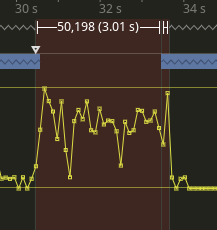 hushed seal
paper jolt
https://imgur.com/CBlqvie
hushed seal
paper jolt
https://imgur.com/CBlqvie
call in fire support via zen 😄
paper jolt
This is literally me pressing Y
Freezes the client for 3 seconds and the opens
I'm trying to figure out Why...
paper jolt
hushed seal
call in fire support via zen 😄
fire support is fine
hushed seal
paper jolt
fire support is fine
CAS module I mean, that also lags
hushed seal
paper jolt
I'm trying to figure out Why...
the big gap points towards in engine stuff 😄
paper jolt
hushed seal
CAS module I mean, that also lags
Na Gun run, Bomb Strike , Missile, they're all fine
paper jolt
hushed seal
the big gap points towards in engine stuff 😄
which sucks :/ thought there may be something I can do here
hushed seal
ah you're profiling the client
paper jolt
Yeah, had some complaints about the modpack and various load times
hushed seal
paper jolt
Na Gun run, Bomb Strike , Missile, they're all fine
e.g. that lags serverside
paper jolt
Ah right, yeah
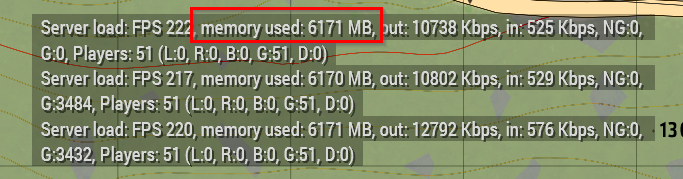
 tepid terrace
Our average has gone from about 3000 MB to 42-4300 MB a night. No complaints though xD
whole cloud
hushed seal
were there any changes on how RAM gets allocated? 😄
The file cache size was increased.
random isle
random isle
Also if HC owned static gun dies while shooting the muzzle flash stays on
i want to add to this: i think that causing cup to freak out as i have 100s of this lines
23:18:33 ["CUP_fnc_cannonAnimate","CUP\Vehicles\CUP_Vehicles_Core\scripts\cannonAnimate.sqf",true,10]
there script is waiting for anmiation to end but it never ends 😄
whole cloud
Animations cache sometimes gets broken and causes frozen animations, maybe its that
You can delete the AnimCache file to force it to regenerate
analog acorn
Muzzle flash getting stuck on HMGs that get destroyed while shooting is something we've seen before, albeit rarely. It's visible to everyone so I don't think it's broken animcache (that would be player-specific), but I haven't noticed it being exclusive to HC units in particular
 quaint flame
@whole cloud It seems the new command added with the mini update are not available on profiling, t hus breaking some of our cdlc features
Can you please check that?
whole cloud
prof update tomorrow
quaint flame
Roger
whole cloud
2.12.150831 new PROFILING branch with PERFORMANCE binaries, v16, server and client, windows 32/64-bit, linux server 32/64-bit
- Added: New script commands that were introduced in the 2.12 mini-update
- Tweaked: onHTMLLink on Structured Text controls now fires for all URLs (previously only specific protocols, like HTTP/HTTPS/...) - https://feedback.bistudio.com/T86333
- Tweaked: onHTMLLink on HTML controls now also fires for section links (starting with #) in Diary pages - https://feedback.bistudio.com/T86333
- Fixed: ctrlSetURLOverlayMode was ignored for StructuredText/HTML controls
- Fixed: Independent groups were ignoring the mod filter in Eden Editor - https://feedback.bistudio.com/T168263
- Fixed: Eden Editor group placement radius was ignored unless it was the last placed group - https://feedback.bistudio.com/T169079
If you don't want to use the Steam branch, the files are also available for alternative download here:
https://drive.google.com/drive/folders/15p9j7C2nHUt6NoVfChX4YFuqzFXzblJh
whole cloud
whole cloud
2.12.150831 new PROFILING branch with PERFORMANCE binaries, v16, server and clie...
5 hours ago, I just kept forgetting to post
whole cloud
2.12.150854 new PROFILING branch with PERFORMANCE binaries, v17, server and client, windows 32/64-bit, linux server 32/64-bit
- Added: Extra information to "The cloud file provider is not running." error message to speed up troubleshooting
- Added: Warning message on Linux when a non-lowercase PBO file is found (this may become useless if the below experiment works)
- Tweaked: Do not force lowercase PBO file names on Linux (just an experiment for now)
- Tweaked: remoteControl command locality is now forced to avoid potential misuse
- Fixed: Player could get stuck in MP when remote controlling a unit - https://feedback.bistudio.com/T128006
- Fixed: "Trying to send a too large non-guaranteed message" error message
- Fixed: deleteVehicle did not terminate remote control
If you don't want to use the Steam branch, the files are also available for alternative download here:
https://drive.google.com/drive/folders/15p9j7C2nHUt6NoVfChX4YFuqzFXzblJh
whole cloud
whole cloud
2.12.150854 new PROFILING branch with PERFORMANCE binaries, v17, server and clie...
 rain moth
time to test lots of non lower case pbo files then 😄
whole cloud
I didn't yet manage to test the linux lowercase thing.
if your pbo's are already lowercase (which they had to be) then nothing changes.
but uppercase names might work now
rain moth
I have a bunch of automated tests that currently need to rename PBOs for different mods due to them not fixing their filenames or sometimes fixing filenames in one release and then breaking them again in the next one 😄
 stark falcon
non-server player start to control a UAV can sometimes trigger
Tried to AccessTargetList for non-local AI group while non-local targeting was disabled! Engine will now enable non-local targeting which will hurt clientside performance.
analog acorn
Possibly related to this https://community.bistudio.com/wiki/disableRemoteSensors?
heavy vortex
I think on perf, remote sensors are disabled by default and re-enabled if used.
But the command doesn't do anything so you can't force it.
 empty goblet
1.52.133274 profiling & performance v10 server and client, windows, linux
+fix ragdoll issues on dedicated server vs positions vs scripting
- removed the antispam from 133187 due to stability issue, will return later
https://www.dropbox.com/sh/582opsto4mmr8d8/3BSy9PdRGm

 jagged hemlock
On our community server we got a problem with latest performance exe from Steam. When you try to connect to server, it says that some mods does not have correct keys. On Windows.
heavy vortex
And that problem goes away if you switch back to stable branch?
jagged hemlock
It looks like it could happen because server got an older perf exe. And yes if client goes to stable then everything goes ok.
heavy vortex
Is this Armahosts?
empty goblet
jagged hemlock
On our community server we got a problem with latest performance exe from Steam....
i suggest to increase steamProtocolMaxDataSize in server.cfg to value higher than 1024 (e.g. 1200,1280,1400,1440) , see https://community.bistudio.com/wiki/Arma_3:_Server_Config_File#Server_Options
 sturdy nacelle
Nice!
 bleak garden
Anyone tried loading uppercase PBOs in their linux server? I'm very excited to see the progress on this.
 alpine epoch
as in all uppercase or just containing uppercase. if you mean the latter then it's definitely possible
We have a bunch of missions on the server with uppercase letters. An example of one :
Are20we20the20baddies3fV1.Altis.pbo
rain moth
missions were doable before, latest update to perf/prof adds experimental loading of non lower case addon PBOs
 gritty wasp
jagged hemlock
It looks like it could happen because server got an older perf exe. And yes if c...
gritty wasp
jagged hemlock
It looks like it could happen because server got an older perf exe. And yes if c...
Updated to latest perf + steamProtocolMaxDataSize=1440;
did not help.
whole cloud
Can you send screenshot of the message
Also adding 300 bytes probably won't do that much
whole cloud
Got screenshot. Its actual signature error, not steam
Seems that using the uppercase pbo thing fix, on client breaks signatures 🤔 running v16 on client is fine
But there should be more people with that problem?
 kindred radish
The whole signature system is scuffed anyway, so many false kicks because of whatever reasons
Had one guy that got constantly kicked for wrong signatures (for random arma files and mod files / re-downloaded,verified multiple times).
Guy had a very bad connection but when i told him to delete his arma cache it stopped for while (AppData\Local\Arma 3) without changing anything else.
opal hull
Can the SoundPlayed event handler trigger for player foot steps sounds in the future? 👀
 nocturne obsidian
The ragdoll position fix, any more info?
Will clients need the update also for it to work?
I am hoping this fixes the server losing track of the player when they enter a ragdoll state :)
sinful smelt
whole cloud
Seems that using the uppercase pbo thing fix, on _client_ breaks signatures 🤔 r...
I've still been broken (join any server with sigchecks = just hang on join) since v...15? Whenever the first big sign change was.
I posted pretty lengthy info with video and logs before, but if yall need any more information, just let me know
opal hull
Many have made super cool effects with particles, but it is common for all this work to be compromised during gameplay due to the limitation of the amount of particles whatever the quality settings are (high setting is much worse than low).
Would it be possible to separate the particle quality setting into 2 (or maybe 3) settings? They are:
1 - Maximum amount of particles
2 - Density of particles
3 - Maximum distance multiplier (not important as 1 and 2)
I will definitely use minimum density and maximum amount. If possible allow a very large maximum amount.
 woven loom
Particles also seem to be very CPU performance intensive, having some optimization of their rendering would be great
 ashen helm
control over number of light sources displayed simultaneously would be useful too, on some maps even with mods that are somehow trying to raise the limit lights will flicker anyway or show up only if they are ~100m from player.
whole cloud
opal hull
Many have made super cool effects with particles, but it is common for all this ...
You're basically getting that with next game update.
Which increases the max number, without increasing the density
whole cloud
ashen helm
control over number of light sources displayed simultaneously would be useful to...
its just a config entry in the video options. you can control it yourself if you want.
And we already increased it
opal hull
On Eden Editor:
0 setOvercast x takes one hour to fully complete the change for any change size (0 to 1, 0 to 0.5, 0 to 0.25 or 0 to 0.1).
On a Dedicated Server (not on a client):
0 setOvercast x instantlly change the overcast to x.
This is supposed to be instant on the server (dedicated)?
After the server change instantly his overcast, the clients overcast start to slowly change its overcast in direction of the new server overcast.
But if a player join in the middle of the process i believe his overcast will sync with the server that is already fully changes, and other players will still be half the way to the final overcast. They will see things that can be really different.
If one can make the server overcast change goes gradually like in clients and Eden Editor, joining players will sync with the correct overcast, that is, the one players already on the server are seeing.
Onsqf _time setOvercast 1;_time is not the time the change will take, but the forecast of the change, this means, the change will START after _time seconds.
It's different from _time setFog 1 where _time is the time the change will take.
whole cloud
This is #perf_prof_branch, did you mix it up with #arma3_feedback_tracker ?
opal hull
Ooops, sorry.
quaint flame
digraph Addons {
    node [shape=box];
    "A3_3DEN" -> "A3_Data_F_Exp_B"
....
}
Has anyone tried that? It doesmt seem to work for me
 spice dirge
 spice dirge
viz.js:1 Uncaught Assertion: Cannot enlarge memory arrays. Either (1) compile with -s TOTAL_MEMORY=X with X higher than the current value ( 10485760), (2) compile with ALLOW_MEMORY_GROWTH which adjusts the size at runtime but prevents some optimizations, or (3) set Module.TOTAL_MEMORY before the program runs.
quaint flame
How did you get that?
spice dirge
browser console (F12 in Chrome)
quaint flame
I see
spice dirge
running graphviz locally works, but produces monstrocity https://cdn.discordapp.com/attachments/737175675818999898/1141047110108708936/monstrocity.svg
2+ megs in size, doesn't fit my screen on minimal zoom of MS Edge...
spice dirge
https://cdn.discordapp.com/attachments/737175675818999898/1141050408316457201/image.png different layout engine 🤣

 silk pewter
spice dirge
https://cdn.discordapp.com/attachments/737175675818999898/1141050408316457201/im...
silk pewter
spice dirge
https://cdn.discordapp.com/attachments/737175675818999898/1141050408316457201/im...
 spice dirge
on that picture you can clearly see the spear that pierces our collective sanity
 restive crag
whole cloud
quaint flame
But I am talking about 3850 dependencies
I manually edited the script in-browser to get rid of that memory limit
spice dirge
yeah, that's probably easier
empty goblet
yes it is fixing that
 swift hull
https://community.bistudio.com/wiki/Performance_Profiling Am I the only one that finds the phrasing of this a little vague? I thought that the Performance Profiling branch was supposed to have slightly better performance than the main branch.
Through the nature of a Profiling build they are not as performant as the normal release builds!
hushed seal
the normal server.exe on profiling branch is the performance one, basically including all kinds of improvements that aren't in main yet but are compatible with main.
the profiling.exe is performance + profiling stuff on top with a slight? performance penalty.
 patent dome
The performance EXE can have better performance, but the profiling EXE is slower because it adds a bunch of profiling that can be used to track how long each part of code takes.
hushed seal
That said I've been running the profiling.exe for some time now and haven't noticed much of an impact (apart from one HC crash...).
patent dome
It won't hurt you much, but there is not much reason to run it if you aren't trying to profile some performance issues.
hushed seal
patent dome
It won't hurt you much, but there is not much reason to run it if you aren't try...
Arma servers are basically always running into performance issues that appear once and can't be reproduced so I just run it all the time.
But what I meant was it won't be a 50% performance penalty (which is what you get with Arma script profiler and engine profiling enabled), more like 1-5%.
patent dome
Nowadays that statement is correct because the Performance exe doesn't improve as much because all the big changes are already in the stable branch.
hushed seal
Ah I was talking about the decreases performance in profiling EXE vs performance EXE, not how much it improves over main.
Obviously you have more insight into that, working there at all. Just my experience comparing idle FPS and running OPs on the profiling.exe
patent dome
Oh yea, but I'm trying to put your estimate into perspective to Tulsa's original question
hushed seal
Ah gotcha!
patent dome
I think Dedmen is the only one that truly knows how much better the performance is, since he is basically doing all the performance changes these days. I just try to interpret all his benchmarks 
whole cloud
patent dome
Nowadays that statement is correct because the Performance exe doesn't improve a...
Well currently besides Simple VM, which isn't in stable
And some of the AI experiments, which usually turn themselves off anyways
I didn't do any benchmarks on how much slower the prof build is
I just run the performance exe and do my profiling with vTune 😄 That gives alot more info for me. Haven't used the profiing profiling in a long time
quaint flame
Not sure if possible, but is there a chance to find out which IDCS inside an Eden Editor attribute control are somehow handled by engine?
whole cloud
No
I mean not for you
And also not really for me. We list IDCs in engine but not all are actually used
And some things may also depend on control type
quaint flame
Too bad. I ran into that issue quite often and always thought something is wrong with my code =/, just to have it work with different IDC
Well, I guess I will just use some higher numbers that are not used by Eden Editor.
 hybrid wasp
Hello I am using prof branch on server and "Deformer" map changes arent showing up. Is this a known issue that anyone is aware of?
*edit: cba had to be reinstalled on server. Disregard
 heavy galleon
hybrid wasp
Hello I am using prof branch on server and "Deformer" map changes arent showing ...
heavy galleon
hybrid wasp
Hello I am using prof branch on server and "Deformer" map changes arent showing ...
Deformer works ok on performance server binary (Linux)
BUT it's important to note that it seems that deformer get's broken if you run two missions that use it back to back.
Not sure if running mission without deformer between them will avoid this, but something to note
 spiral pond
the change of A3 taking more RAM
this is causing the game to take too much RAM for me as best as i can tell
meaning it will go up to 100%, which then either crashes A3 or other applications (ie chrome tabs, rustdesk, etc)
how to provide more info best on this, so it can be looked into?
and workaround would be to use -maxMem for now?
inland dew
spiral pond
this is causing the game to take too much RAM for me as best as i can tell
what's the value you're setting -maxFileCacheSize= to?
if you haven't used this parameter, it shouldn't go past 2 GB.
and -maxFileCacheSize= has nothing to do with -maxMem, as far as I know
spiral pond
no custom parameters set
spiral pond
what version number was this implemented? want to verify if its really that change
another option could still be a mem leak - however as it happens already at game start, that would be quite a massive one
inland dew
spiral pond
what version number was this implemented? want to verify if its really that chan...
perf 2.12.150383
spiral pond
i am on 150854
spiral pond
-maxmem=2048
this helped - no more crashing. however chrome was aleady complaining about to little RAM available 😬
heavy vortex
Is this just from starting Arma, or starting a mission or what?
spiral pond
the main thing seems to be loading the terrain (aka when it starts to want a lot more RAM)
so depends if cutscene in main menu is shown/if I load directly to Eden
inland dew
spiral pond
> -maxmem=2048
this helped - no more crashing. however chrome was aleady complai...
what is you RAM capacity?
spiral pond
16 GB
spiral pond
with -maxMem=2048 the game can grind to a halt in main main menu
other times the game crashes
(from 3den/missions)
heavy vortex
well yeah, Arma can't run on 2GB
Couldn't see much difference between stable vs perf here. 3.5GB vs 3.2GB but that might have been a different bit of map.
(editor Altis)
whole cloud
spiral pond
this is causing the game to take too much RAM for me as best as i can tell
No it won't. You have some other issue
empty goblet
which OS? 32 or 64 bit binary ? size of swap ?
heavy vortex
Detail & draw distance settings might also be a factor.
spiral pond
started from ~ 3GB

quick (scripted) camera flyover the terrain (Normandy)
if discord had its 1 GB, and chrome its ~1-2 GB the game would have crashed again

with another (different) [less fast] camera flyover
VD and ODD are at 500, all settings at lowest possible (sampling at 100%)
inland dew
spiral pond
started from ~ 3GB
have never seen it going past 3 GB in years.
even never reaches 3 GB.
although I'm just playing
spiral pond
the fast flyover is certain a special case
i would assume it stores all the SAT titles in RAM, plus other terrain and object data
heavy vortex
hmm. It does appear to leak (or something to that effect) if you keep flying around in the editor.
This is stable though :P
spiral pond
(crashed again here when trying to save a mission)
will try the same with Altis now
if anyone wants to join in 😛

has too much water 🙄
kindred radish
Never checked before, but i saw the server easily over 6GB before.
So not sure where the problem is when the client needs about the same amount.
Client (many mods)
https://gyazo.com/209861014749ab185d197f3162db2e65
 ashen helm
if you leave the editor for about ~1h running without any movement then it goes down to normal numbers up until you start doing stuff again. On daily basis it's using 6-10GB.
 heavy vortex
It culled itself here eventually. Oddly enough, below the level at which it loaded the map.
weird game.
whole cloud
spiral pond
if discord had its 1 GB, and chrome its ~1-2 GB the game would have crashed agai...
Crash reports on out of memory can be useful as they sometimes can show where that memory was needed
There is a known old bug on some modded terrains where when you fly over, you get 3fps bug (out of memory). That was reported a couple times but I could never reproduce it. It's probably that
spiral pond
alright. will see if i can reproduce it and in what circumstances after pc restart for latest win10 update
in regards to diag_captureSlowFrame "not working" on a DS (ref: https://feedback.bistudio.com/T171346) found this 👼
#server_linux message
This stuff is a mess
some additional comments with people not getting it to work, or suggesting that it should work on the server
#perf_prof_branch message
#perf_prof_branch message
#perf_prof_branch message
#community_wiki message
New #captureSlowFrame servercommand.
#captureSlowFrame threshold frameOffset section
ex
#captureSlowFrame 0.3 1 total
equal to
diag_captureSlowFrame ['total', 0.3]combined with diag_captureFrame 1 ( //capture the first frame after command execution) for the frameOffset.
And its a captureSlowFrameToFile (we have no script command for that)(not 100% if thats actually the right order of arguments, I'm goofy)
this seems was not documented in the wiki yet
will do some testing later in the week
hushed seal
thanks for bringing that gem to my attention 😄
woven loom
I have to remember to captureSlowFrame on the VRAM memory crash, but also have to think of the way of recording it for repro
hushed seal
Any chance of getting a stacktrace for
Ref to nonnetwork object 2f8f6f1d000# 561009: barels.p3d?
whole cloud
No, probably not
If that happens when network message is received, no
hushed seal
not sure if happens on received or send, sometimes I get the same message but with a REMOTE at the end
random isle
Ya I get them all the time slug.p3d
 feral harness
rev 150958 Some improvements and fixes to UAV teamplay. If you have a terminal you can connect to your team UAV even if it has no free control position, you can still receive the feed from pilot or gunner. When control position becomes available, you can take it as long as you have terminal connected. This means no more than 2 people can control UAV at any given time. If UAV gets destroyed, all controllers should now exit remote control screens properly. Same if someone disassembles UAV while it is on the ground but is already under remote control. Please test.
whole cloud
feral harness
rev 150958 Some improvements and fixes to UAV teamplay. If you have a terminal y...
I always wanted to have one player in driver control and another player in gunner control.
But it was as far as I know not possible before, if you had a driver then gunner could not connect.
Does that mean, with this that is now possible?
feral harness
yes
whole cloud
2.14.150962 new PROFILING branch with PERFORMANCE binaries, v0, server and client, windows 32/64-bit, linux server 32/64-bit
- Sync with 2.14 main branch update
- Previous Profiling branch exclusive improvements are still present
- Performance improvement for nular script commands
- Network synchronization performance improvements
- Trigger scanning is multithreaded
- Script commands allMissionObjects/nearestObjects/nearObjects/nearSupplies/nearRoads/nearestTerrainObjects are multithreaded
- Linux PBO filenames can be non-lowercase
- Processing audio in parallel to rendering on GPU (instead of sequential)
- Several general experimental performance improvements
If you don't want to use the Steam branch, the files are also available for alternative download here:
https://drive.google.com/drive/folders/15p9j7C2nHUt6NoVfChX4YFuqzFXzblJh
whole cloud
whole cloud
2.14.150962 new PROFILING branch with PERFORMANCE binaries, v0, server and clien...
hushed seal
- Network synchronization performance improvements
- Trigger scanning is multithreaded
- Script commands allMissionObjects/nearestObjects/nearObjects/nearSupplies/nearRoads/nearestTerrainObjects are multithreaded
that sounds awesome!
fickle geyser
2.12.150962
- Sync with 2.14 main branch update
 fickle geyser
setThreadCharacteristics and maxFileCacheSize do not have launcher parameter option 
pls add 🙏
patent dome
Prof branch doesn't contain a separate launcher, so we can't add prof branch specific options.
fickle geyser
please add maxFileCacheSize to main launcher, this one was added in 2.14 today 🙏
spiral pond
are CDLC branches also still to be updated or more likely tomorrow/later?
nvm - already happened 🙇♂️
fickle geyser
they use same depot for game data as stable branch IIRC
rain moth
fickle geyser
they use same depot for game data as stable branch IIRC
regular game app yes, server app branch for CDLCs needs to have main depot ref updated. was done ~30 min after main branch (public)
whole cloud
hushed seal
> - Network synchronization performance improvements
> - Trigger scanning ...
That's all not new.
Just re-listing what we already had
heavy galleon
Ehm, having trouble connect to my Linux server using latest perf-porf branch installed using steamcmd.
[S_API] SteamAPI_Init(): Loaded local 'steamclient.so' OK.
CApplicationManagerPopulateThread took 0 milliseconds to initialize (will have waited on CAppInfoCacheReadFromDiskThread)
CAppInfoCacheReadFromDiskThread took 14 milliseconds to initialize
RecordSteamInterfaceCreation (PID 1449328): SteamGameServer015 /
Missing interface adapter for SteamGameServer015
18:32:38 Initializing Steam server failed
RecordSteamInterfaceCreation (PID 1449328): SteamGameServer012 / GameServer
RecordSteamInterfaceCreation (PID 1449328): SteamUtils009 / Utils
RecordSteamInterfaceCreation (PID 1449328): SteamNetworking005 / Networking
RecordSteamInterfaceCreation (PID 1449328): SteamGameServerStats001 / GameServerStats
RecordSteamInterfaceCreation (PID 1449328): STEAMHTTP_INTERFACE_VERSION002 / HTTP
RecordSteamInterfaceCreation (PID 1449328): STEAMINVENTORY_INTERFACE_V002 / Inventory
RecordSteamInterfaceCreation (PID 1449328): STEAMUGC_INTERFACE_VERSION010 / UGC
RecordSteamInterfaceCreation (PID 1449328): STEAMAPPS_INTERFACE_VERSION008 / Apps
Arma 3 Console version 2.14.150962 x64 : port 2302
18:32:38 Host identity created.
After trying to join
18:36:23 Player [MOR] ilbinek connecting.
18:36:23 Player [MOR] ilbinek connected (id={steamID}).
18:36:23 Client: [MOR] ilbinek - Kicked off because of invalid ticket: Game mismatch - Ticket invalid
18:36:24 NetServer: cannot find channel #477472784, users.card=0
18:36:24 Message not sent - error 0, message ID = ffffffff, to 477472784 ([MOR] ilbinek)
18:36:24 Player [MOR] ilbinek disconnected.
While client shows
You were kicked off the game. Steam authentication failed.
Stable branch seems to work
whole cloud
"Game mismatch" sus
Check your steam_appid.txt, should be 107410? I think? Or delete that file nad redownload
Game mismatch generally means it somehow has the wrong appid
 fast hornet
I'm also getting "Steam authentication failed" on my client. Both stable and perf i think.
The Server rpt says "SteamAPI initialization failed. Steam features won't be accessible!" .. it worked fine before the update.
whole cloud
In your game directory there is a x64 folder I think with steam files inside
Try deleting and redownload ING that
fast hornet
i've replaced the whole new server folder including the profile with a backup of the 150854 installation.. and now that is throwing the same error. wtf. 2.14 must've corrupted something?
whole cloud
Well all official Servers are fine. And we did a big MP QA test that hasn't found issues
So yeah, something weird on your end but no idea
heavy galleon
I can confirm that stable works, perf shows the errors and kicks me.
About to try deleting linux64
||rm -rf /  ||
||
 stray prawn
i confirm same issue on stable version 2.14.150962, got 2 servers which run without issues on 2.14.150957 (windows)
heavy galleon
Deleting and redownloading linux64folder did not help
Keep in mind that it never shows Connected to Steam servers (or something similar) as it usually does, but stops at 19:15:08 Host identity created.
heavy galleon
stray prawn
i confirm same issue on stable version 2.14.150962, got 2 servers which run with...
I just tested the stable and worked no problem. But on Linux 
heavy galleon
the "just" means 10 minutes ago, pretty certain I had the newer one 
stray prawn
im getting on 2 servers with the newer build "You were kicked off the game. Steam authentication failed." and on other 2 i can connect without a issue.
heavy galleon
stray prawn
im getting on 2 servers with the newer build "You were kicked off the game. Stea...
Arma 3 Console version 2.14.150957 x64 : port 2302
19:19:05 Host identity created.
19:19:07 Connected to Steam servers
19:19:12 [MOR] ilbinek uses modified data file
19:19:12 Player [MOR] ilbinek connecting.
19:19:14 Player [MOR] ilbinek connected (id={steamID}).
just connected no problem on 2.14.150957 - linux - stable
oh, that's the one that works for you, damn
guess I can¨t get the newer one 
anyway, perf does not work
Is it possible the perf-prof branch is compiled against newer SteamWorks SDK while the stable was compiled against older one? Like v15 vs v14?
whole cloud
Stable and perf are on the same code now (or... should be...)
The only difference are the few things that are tagged as experimental, that are listed in v0 changelog
fast hornet
stray prawn
one works, the other doesnt.
are you also getting "SteamAPI initialization failed" in your server rpt?
heavy galleon
Ok, so... old steamclient.so in the prof branch?
whole cloud
It's possible.
But also I would expect the old steam libs to also work. At least I don't know about valve disabling or breaking them
Can you send me your steam libs on your server? Just via discord DM, I'll compare with what should be there
whole cloud
fast hornet
are you also getting "SteamAPI initialization failed" in your server rpt?
There were many times I also had that error but everything still worked fine. So that's not a good indicator
Does your server log also say it kicks for game mismatch?
heavy galleon
a2a702b1371f496985aae013020b8cc3  stamclient_perf.so
afa8139f2e2cee92542a1b204e26c064  stamclient.so
md5 sum
stray prawn
fast hornet
are you also getting "SteamAPI initialization failed" in your server rpt?
19:29:07 SteamAPI initialization failed. Steam features won't be accessible!
Client: eVo Nix - Kicked off because of invalid ticket: Game mismatch - Ticket invalid
silk pewter
heavy galleon
```
a2a702b1371f496985aae013020b8cc3 stamclient_perf.so
afa8139f2e2cee92542a1b2...
stamclient?
silk pewter
worst crack ever 😄
heavy galleon
replacing the perf .so with stable .so did not fix the issue 
they are different though
fast hornet
whole cloud
Does your server log also say it kicks for game mismatch?
jup Client kicked due to failed Steam checks: Game mismatch - Ticket invalid
But i guess that's just logical if the server can't connect to steam.
rain moth
steam_appid.txt must be 107410
if you've used steamcmd on same machine as you're running the game on you MUST restart steam client
fast hornet
the server also writes the SteamAPI initialization failed into the rpt if you just start the arma3server_x64.exe without any args
rain moth
that's expected, server doesn't need client apis
fast hornet
nope, the server is pure dedicated and the client is pure client. And both are set to 107410
the server only has steamcmd on it
stray prawn
i copied the files from build 2.14.150957 onto the 2 broken servers with 2.14.150962 and that solved it.
heavy galleon
Using public (stable) branch works. When you use the executable from the drive with it, it WORKS
@whole cloud
rain moth
steam manifest says steam libs are different between public and profiling branch
so something is messed up there
whole cloud
heavy galleon
```
a2a702b1371f496985aae013020b8cc3 stamclient_perf.so
afa8139f2e2cee92542a1b2...
@patent dome Good morning 
heavy galleon
rain moth
steam manifest says steam libs are different between public and profiling branch
using only the stable .so did not work though
whole cloud
heavy galleon
Using public (stable) branch works. When you use the executable from the drive w...
"executable from the drive" ?
heavy galleon
gdrive
rain moth
public
linux64/steamclient.so    f71885a258***8a31b0d2c4    35776840
steamclient.so    9537ead03b***be88382cf2    37302332
profiling
linux64/steamclient.so    2575b1d1e8***7224470064    29823647
steamclient.so    b70598e8c8***27bb8b1368    28911173
The perf exe from google drive works, but the one delivered on steam does not?
heavy galleon
Sec
I only tested Gdrive executable with stable branch
gonna test gdrive with perf branch
whole cloud
Can you do hash check?
They should be the exact same.. If they missmatch that's a big wuuut
heavy galleon
of exe
ea2e8ec3e99619b905d24ce44589e078  arma3server_x64 (perf gdrive)
ea2e8ec3e99619b905d24ce44589e078  arma3server_x64 (perf steamcmd)
same
rain moth
public
arma3server    756f5fd732***a42cf5c6d2    45493056
arma3server_x64    ba8edd7e83***4806675a84    41462952
profiling
arma3server    5fca5e415b***590a653dea    45554496
arma3server_x64    1f6f65d8d7***42c50433f9    41606312
arma3serverprofiling    8f5945e06e***da7f68f8d2    46013280
arma3serverprofiling_x64    7cf6cc9235***3b8ef37692    42044616
So there is something wrong in something else 
let me try again with the .so, might have fucked up
patent dome
whole cloud
<@185090894796554249> Good morning <:harold:901213722968731718>
I think I know why, it's something I had in mind when we discussed updating steamclient.so, and I completely forgot about it after then.
whole cloud
Its not morning yet 
patent dome
It's morning somewhere
fast hornet
what's really weird is... when i updated the live server i got 150962
I now completely removed steamcmd and the server dir and redownloaded everything and got 150957
whole cloud
57 is stable, 62 is profiling branch
heavy galleon
patent dome
It's morning somewhere
Best time to get drunk, as there's evening somewhere
heavy galleon
fast hornet
what's really weird is... when i updated the live server i got 150962
I now comp...
steamcmd loves to "remember" the branch, so make sure you switch to stable by using -beta public
heavy galleon
patent dome
I think I know why, it's something I had in mind when we discussed updating stea...
Only using stable .so with entire perf branch does not work
Tested two times now 
So there's got to be something more to it
whole cloud
There are two steam lib files I think?
patent dome
If you want to fix it for now, use the steamclient.so files from stable for now. Profiling still has an older version that overwrites it, which is leftover from an earlier steamclient.so update.
There should be a 32 bit and 64 bit version of steamclient.so
whole cloud
libsteam_api.so too
rain moth
whole cloud
There are two steam lib files I think?
profiling only has one steam lib per arch
patent dome
That is not overwritten by profiling. https://steamdb.info/depot/233785/

SteamDB
SteamDB record for depot Arma 3 Server - Profiler - LINUX Depot (DepotID or AppID: 233785)
whole cloud
maybe its missmatch between libsteam and steamclient
rain moth
yeah
 heavy galleon
gonna try all the .so
rain moth
or well, it's game -> libsteam_api -> steamclient
heavy galleon
there's only  5 of them
rain moth
as long as public works 😛
heavy galleon
F, should have done just md5sums 
rain moth
just use hashes from steam manifest 😛
heavy galleon
like I know how to use that, still didn't get to that 
perf
fc7774e9ac4099acbd3c8efb39d117a5  install/libsteam_api.so
6ff6e3b26c3cdd9f33ab500d0c2b8134  install/libsteam.so
b4b88c6c796b993243d8f65e511cd271  install/libtier0_s.so
82b9ac569dbd3661229e98f0950b2b18  install/libvstdlib_s.so
a2a702b1371f496985aae013020b8cc3  install/steamclient.so
stable
fc7774e9ac4099acbd3c8efb39d117a5  libsteam_api.so
6ff6e3b26c3cdd9f33ab500d0c2b8134  libsteam.so
b4b88c6c796b993243d8f65e511cd271  libtier0_s.so
82b9ac569dbd3661229e98f0950b2b18  libvstdlib_s.so
afa8139f2e2cee92542a1b204e26c064  steamclient.so
ehm
rain moth
as stated above, profiling only changes the steamclient.so
the rest are not overloaded by that depot
heavy galleon
whole cloud
libsteam_api.so too
same in both branches
whole cloud
¯_(ツ)_/¯
rain moth
Missing interface adapter for SteamGameServer015
Initializing Steam server failed
that sounds very sus
heavy galleon
damn, there's another steamclient.so in linux64/
heavy galleon
I can replace the steamclient.so all I want and nothing will change when I use x64...
Replacing both steamclient.so's results in the server being still broken though
rain moth
I do not get the missing interface adapter with public nor profiling branch. public steamclient.so
rain moth
I had no issues connecting with neither public nor profiling, battleye on or off, clean debian bookworm with ca-certificates installed, arma3server_x64, steamclient.so files from public
 median belfry
Steam authentication failed
Also getting that error on my pref build, stable works
hushed seal
Same issue on my prof/perf branch server. RPT says it's 2.14 but (stable) clients get a Steam auth error.
rain moth
steamclient.so from profiling triggers
Missing interface adapter for SteamGameServer015
Initializing Steam server failed
and
Client: Dahlgren - Kicked off because of invalid ticket: Game mismatch - Ticket invalid
so removing the two (overlay) steamclient.so files from profiler depot would fix it
heavy galleon
rain moth
so removing the two (overlay) steamclient.so files from profiler depot would fix...
It did not for me 
But it's possible I just got lost in my file gulash
rain moth
I had some issues were switching between branches left the previous so files in place
so had to manually verify hashes and delete as needed 😦
fast hornet
yeah.. seems the steam dll files that got pushed with the perf build are broken or something.. but when i changed back to stable steamcmd didn't replace them, even with the validate option
so i had to manually delete and reinstall everything basically and now the server is up again.. 2h wasted 🤬
whole cloud
Indeed, the prof branch files are broke
hushed seal
fast hornet
so i had to manually delete and reinstall everything basically and now the serve...
never trust steamcmd, always just delete and let it download the full 8GB 😄
whole cloud
heavy galleon
But it's possible I just got lost in my file gulash
Hey I got one more thing to try.
Just run stable branch and download binary from gdrive.
The only difference on perf branch is that one binary anyway (or supposed to be)
rain moth
that's the same as running profiling with steamclient.so from public 😛
heavy galleon
whole cloud
Hey I got one more thing to try.
Just run stable branch and download binary from...
Better tag me next time. I was away anyway, but still.
Anyway, I did try it and it did work. I actually tried it pretty long ago #perf_prof_branch message
Feel free to tag me tomorrow to test stuff, I should be available most of the day
random isle
updated the server using perf first no luck, switched perf off still no luck
no crash but unable to see in luncher
random isle
so far
14:25:22 BEServer: registering a new player #1589374590
14:25:26 Client: Mr.Bullat - Kicked off because of invalid ticket: Game mismatch - Ticket invalid
and
14:22:58 Initializing Steam server failed
but not sure if that last one is always been like that
 hushed river
We're also getting per branch issues
random isle
also all the players unable to use lunacher as soon as you try to connect with mods it crashes
will have to wait till bohemia crew wakes up 🙂 Push update and go to sleep i wish i could do that at work
hushed river
random isle
also all the players unable to use lunacher as soon as you try to connect with m...
Some of my players are also having this issue, if anyone knows what I should tell them please ping
whole cloud
random isle
also all the players unable to use lunacher as soon as you try to connect with m...
Hotfix is in #arma3_launcher
@hushed river
spice dirge
#arma3_launcher message this?
whole cloud
If you have launcher issues, it's recommended to check the launcher channel
whole cloud
linux steam libs should be fixed now
rain moth
I see that the (overlay) steam libs are removed from profiling branch, both windows and linux 👍
 golden pond
Is prof branch having issues for server side updating?
sinful smelt
whole cloud
can you confirm that v14 is fine?
I somehow didn't see the notification for this question at the time. biiiiiig 🪦 .
I have some pretty detailed notes for you going in a gist, especially now that this made it to live.
TL;DR though is that v14 is the build that broke it (I went back to legacy 2.12 branch today and bisected across the whole 2.12 lineup of performance branch binaries just to make sure all environmental variables were removed since previous testing was done across time.
Here's my current notes - https://gist.github.com/mcoffin/cbf2a7039503c38645bcaeb17c3d95d8

Gist
ArmA 3 2.12/2.14 Proton + BattlEye Regression Notes - 212-performance-bisection.md
And if this belongs elsewhere now that the issue made it out to live, just let me know where - there's so many channels in here I never really know where to put things. Hopefully it's a quick fix now that the exact build is known -- hopefully I can save some folks the frustration of thinking it originated in the 2.14 live release
whole cloud
Our game's name is Arma, not ArmA.
That's just the info I need, we do so many profiling builds to test things and get feedback when something breaks and make it easy to find out what broke. Just hearing that v14 broke BE is enough to single out one commit.
Looking through your messages, there was a BIG info that was never mentioned, that its only broken on Proton.
Which explains my confusion about "But there should be more people with that problem?".
And that also doesn't make it a surprise that we did a big multiplayer playtest during the RC phase and signature checks were working perfectly fine.
Also your report about "Skipping mods and signatures due to overflow flag being set" didn't ring any alarm bells, because that is "normal" when you have too many mods and steamProtocolMaxDataSize is too small.
It is actually not related to signature checks.
Those are the signatures that the Arma Launcher will load, and check inside the launcher before you start your game. They are not used by the game itself in the actual connection process. So all that log spam for signatures is irrelevant.
Question is what that Error 5 reading file '' is about.
But its a bit confusing why only on Proton, and why it would cause signature errors as that change didn't touch anything with signatures 😕
I still don't actually understand what the actual issue is.
Can you say it in just one clear line?
I think you mean "Proton players cannot join BattlEye enabled servers, and it broke since profiling v14" ?
You are not mentioning Proton above, you are also not talking about BattlEye, but your gist says BattlEye and Proton and I see BE conversation in #linux_mac_branch ?
Also the old conversations you listed talked about signatures. What is it now, Signatures or BattlEye? And Proton only or also windows clients affected?
@sinful smelt
whole cloud
Error 5 reading file ''
5 is access denied.
That's just something special in proton, because trying to read '' on windows, will return file not found (number 3).
Which the game will handle internally without printing an error. Proton giving a different answer there bypasses the game handling it by itself and instead prints the error.
So that issue may very well also happen on windows clients, it simply doesn't print error there because the game already handles file not found.
But I think the end result is the same (besides the RPT message) both file not found or access denied lead to the same "failed to open file" which should result in the same handling by the game.
Also other Proton user with same issue says he doesn't have that message.
So we can probably ignore that too, though will be interesting to see from where game tries to load that file.
Which leaves us with zero relevant RPT messages, which means we can probably ignore that signature verification idea completely
Actually, I found the empty file
When you start Arma with
arma3.exe -param -param "MyMission.Stratis"
It will auto load that mission at start up. If you don't provide that start parameter, it'll just be empty.
It checks if empty file exists, which tries to open file "" which on windows is file not found which is fine. But in specifically your Proton is access denied error instead.
So we can safely ignore that error. Also I'll silence it by skipping that exists check if the name is already empty
sinful smelt
whole cloud
`Error 5 reading file ''`
5 is access denied.
That's just something special in p...
Also other Proton user with same issue says he doesn't have that message.
You're correct! I wrote a lot of that prior to bisecting, and found that the log message I thought was related was only intermittent. I've never seen it present in a non-problem build, but it was only there ~30% of the time, so a total red herring.
Arma
😳 oops
And that also doesn't make it a surprise that we did a big multiplayer playtest during the RC phase and signature checks were working perfectly fine.
Yea, this is proton-specific, for sure, so without someone having a looksie on the reg easy to overlook, especialy since it's not "officially" supported (afaik)
Also your report about "Skipping mods and signatures due to overflow flag being set" didn't ring any alarm bells, because that is "normal" when you have too many mods and steamProtocolMaxDataSize is too small.
It is actually not related to signature checks.
Good to know... I only really ever have maybe... 4? mods loaded at a time, and none of them with sizable content aside from code, so that's strange, but that particular bit has also not been recurring, so safe to ignore.
I think you mean "Proton players cannot join BattlEye enabled servers, and it broke since profiling v14" ?
Yes, this exactly... sorry; I was so wrapped up in info-gathering I guess I didn't state the original problem
You are not mentioning Proton above, you are also not talking about BattlEye, but your gist says BattlEye and Proton and I see BE conversation in
<snip>
What is it now, Signatures or BattlEye?
This is probably a misconception I've had since it's a bit of a black box for good reason, but I thought BattlEye was responsible for the signature checks. If that's not the case, then that clears it up.
you are also not talking about BattlEye
Again, probably forgot to give a good background writeup. This issue is specific to both BattlEye and Proton. Disabling BattlEye will work, but since a bisect of arma revisions came back to it being introduced there, I hadn't been focusing on it.
--
So yes, Proton players aren't able to connect to any BattlEye-enabled server with anything higher than 2.12 v14 performance or higher. I (mistakenly, apparently), thought that when we were chatting you indicated that it was likely related to the signature checks, but that's the gist of it; the rest is likely noise if you have enough internal knowlege, but I was trying to dig and find a workaround myself, thus far to no avail
whole cloud
especialy since it's not "officially" supported (afaik)
Well yeah not "really" supported. But since we dropped the linux port we should put a bit more effort into that
Correct BattlEye does not do signature checks.
If its BattlEye that isolates one change, I don't understand how that causes issues but we'll try a bit in #linux_mac_branch
I don't know if we would do a main branch update for this. Proton users may have to all switch to profiling branch to get the fix once we have it
sinful smelt
I don't know if we would do a main branch update for this. Proton users may have to all switch to profiling branch to get the fix once we have it
Good thing I'm ususally already on profiling (like the heads up for updating intercept-related stuff).
I'll go confirm that with 2.14 that non-BattlEye play still works (last tried back in 2.12 era of the issue), but I saw others posting about being able to connect sans BattlEye in one of the 2.14 discussions, so I imagine result will be the same
golden pond
We can’t get our server to update to 2.14 using profiling branch. Is there some kind of issue going on with profiling and 2.14?
heavy vortex
So yes, Proton players aren't able to connect to any BattlEye-enabled server with anything higher than 2.12 v14 performance
You mean it works in v14 and it's broken in the next version? This didn't seem to match with the rest of the text.
@sinful smelt
whole cloud
v14 is already broken
sinful smelt
whole cloud
v14 is already broken
I meant that v14 is broken
 whole cloud
Are people still having some signature issues when using headless client?
I reverted some stuff from v15 because I think it might've caused issues, but as we found out that probably wasn't the case
 vivid rune
Hi, is there a solution to reduce the "LOD blending over" by zooming/"starring"? Maybe at least for the infantry as function on "Extreme" Detail Level?
So to say to increase the radius where the most detailed model is loaded. I would say this would also decrease CPU workload for the client on infantry level in case of zoom in/out for weapon and "starring" and the graphics does not so often "pop in" with another LOD.
whole cloud
The pain of missing both 150999 and 151000 build numbers 😢
 autumn timber
Next build: 151111
rain moth
Let`s just wait for 151515
silk pewter
151151 is ok
whole cloud
2.14.151005 new PROFILING branch with PERFORMANCE binaries, v1, server and client, windows 32/64-bit, linux server 32/64-bit
- Added: Script commands callExtension/getUserInfo/missionNamespace/uiNamespace/(set/get)Variable are now available in server-side scripts
- Added: "OnPlayerJoinAttempt" server event - https://feedback.bistudio.com/T173677
- Tweaked: Major rework of internal User Interface handling
- Tweaked: Various UAV interaction fixes including improved team play
- Fixed: Possible crash when deleting controls/displays from UI Event Handlers
- Fixed: Some display types would not fire Unload events
- Fixed: Possible crash when calling getPos on an entity that has no shape
- Fixed: Potentially printing file read error to RPT when launching the game client inside Proton
- Fixed: Players on Linux Proton not able to join some servers
- Fixed: Server not closing files in some cases (like server.cfg not being editable)
- Fixed: Bug/Crash where file reads could be mixed up and try to read the wrong file
Notes:
- To fix the UI Event Handler crashes, large parts of the engine's UI handling have been changed. This may lead to issues with engine-driven UI's. We think we found all of them but there might be undiscovered problems in rarely used/opened UI's. Please notify us if you are getting any crash while interacting with or opening a UI display.
- UAV can now be shared by a team; one player can be pilot, another gunner. Other team members, if connected, can only view the UAV feed until either pilot or gunner disconnects, after which they can take over.
If you don't want to use the Steam branch, the files are also available for alternative download here:
https://drive.google.com/drive/folders/15p9j7C2nHUt6NoVfChX4YFuqzFXzblJh
whole cloud
whole cloud
2.14.151005 new PROFILING branch with PERFORMANCE binaries, v1, server and clien...
 hybrid cradle
you couldnt setvar on server side script before? 
silk pewter
just to be clear, https://community.bistudio.com/wiki/Arma_3:_Server_Side_Scripting is not "sqf scripts running on server" 🙂 it's config-side scripting
hybrid cradle
oh guh didnt know that existed
 boreal wigeon
I wonder how the UAV stuff will work with a player on prof and one on stable 
whole cloud
silk pewter
just to be clear, https://community.bistudio.com/wiki/Arma_3:_Server_Side_Script...
Well it is SQF scripts on server. I would like to call it "Server Script Environment" as that best describes it. I think.
But the only way to set them is via config.
Might also add script commands to set them, thats possible.
whole cloud
boreal wigeon
I wonder how the UAV stuff will work with a player on prof and one on stable <:m...
There were no netcode changes so it will work. I don't know how but it will somehow 😄
You find out
vivid rune
Very interesting update. Is the UI handling "only" more stable or more efficient, too (like: there is no "slowing down" bugs anymore)?
quaint flame
16:37:21 Extreme texture size (1x1)
16:37:21 Texture init failed
Just wanna make sure that this it not new after the UI rework
Would actually help if the error would print the path of the file
rain moth
1x1 sounds like an extreme image 😛
whole cloud
vivid rune
Very interesting update. Is the UI handling "only" more stable or more efficient...
Its less efficient, technically.
But the UI stuff that was changed didn't have performance issues and this won't be noticable.
Do you have examples of slowing down bugs?
There were some issues with lots of text in textboxes, or lots of entries in listboxes but I fixed all I knew about
whole cloud
quaint flame
> 16:37:21 Extreme texture size (1x1)
> 16:37:21 Texture init failed
Just wanna ...
Unlikely. UI issues are more like UI elements missing or duplicated or game crash
I'll try to remember to check if I can add the filepath there
quaint flame
Only other slowdown I know of is adding icons to listboxes/tree views, but that was not related to UI but to how Arma handles textures, right?
whole cloud
Correct
kindred radish
Made a quick test with the onPlayerJoinAttempt (missionNamespace getVariable variant) with the ExileMod loaded and it works great 👍
Previously i had the client check serverTime after loading in and then kicking him again by setting a public variable.
params ["_playerId","_WaitTime"];
private _AllowJoining = "DELAY";
if(serverTime < 60) then
{
    _AllowJoining = "DELAY";
} else
{
    _AllowJoining = "ALLOW";
};
_AllowJoining
So you are delaying them to allow for the mission to load itself? Another thing I didn't think about, neat.
Do you think it would be a important feature to be able to send a chat message that will be displayed to the player?
I'm not sure if they show in loading screen. But I found it a bit annoying that you cannot communicate to the player about why you are delaying them.
If chat doesn't show there then I won't try anything else tho
quaint flame
Never understood why the default loading screen in Arma does not support a text display.
whole cloud
The worst part is getting chat messages telling you why you can't join the server. Then being popped back into server browser where chat doesn't show 😄
boreal wigeon
It would be cool if you could return some text. You could make a DayZ type joining queue. Not that I have use for it though 😅
quaint flame
whole cloud
The worst part is getting chat messages telling you why you can't join the serve...
Can we created UI controls there already?
rain moth
kindred radish
Made a quick test with the onPlayerJoinAttempt (missionNamespace getVariable var...
the first if block is redundant with the default assignment 😉
kindred radish
whole cloud
Do you think it would be a important feature to be able to send a chat message t...
Yes, this would make it easier to show information about being in the join Queue, being delayed or if people use it for reserved slots etc.
whole cloud
quaint flame
Can we created UI controls there already?
A OnLoad script in loading screen in a mod could.
You cannot remoteExec to the connecting client to send them anything
quaint flame
I see
fickle geyser
I guess the "DELAY"/"ALLOW" only influences the packet sent to the client?
what about something like ["DELAY", "Show this to tha user"]? would need new packet structure I guess?
whole cloud
Don't need to change any packets. Can send an extra packet
If you provide extra text (like with the REFUSE one) it can send a extra packet, chat message in that case
I don't like combining it with DELAY directly, because that would lead people to mass-spam users with chat messages.
I would add a new serverside scripting command that is just "send text message to userid"
Similar on how in.. DayZ some servers used it to send these Red "System" text messages to chat
whole cloud
Also please try to do that new server scripting stuff in #dev_rc_branch so we don't talk about the same in two places
whole cloud
2.14.151012 new PROFILING branch with PERFORMANCE binaries, v2, server and client, windows 32/64-bit, linux server 32/64-bit
- Added: Ability to create a "full" crash dump after a crash
- Fixed: Adding rows to table controls could crash (This also fixes the same crash happening in the first mission of Contact's campaign)
If you don't want to use the Steam branch, the files are also available for alternative download here:
https://drive.google.com/drive/folders/15p9j7C2nHUt6NoVfChX4YFuqzFXzblJh
whole cloud
whole cloud
2.14.151012 new PROFILING branch with PERFORMANCE binaries, v2, server and clien...
quaint flame
- Added: Ability to create a "full" crash dump after a crash
Works nicely.
whole cloud
Great. Because i didn't test it 🤣
 dark lodge
so @empty goblet when will this client performance update be pushed to everyone via steam?
 thin wyvern
hybrid cradle
thin wyvern
hybrid cradle
is there a confirm button for generating a full dump?
quaint flame
hybrid cradle
is there a confirm button for generating a full dump? <:meowsweats:7076260306131...
Yes, after the crash, a dialog box will pop up, explaining what to do and you have to confirm that you wanna generate it
hybrid cradle
ah thats good
 full nova
crashed 2x when playing on Warlords Redux EU#11 when using perf_branch, switched back to stable and no issue.
unfortunately didnt manage to get the crash dump due to urgen matters.
hybrid cradle
i had an atypical crash today too but couldnt reproduce
(just alt tabbed back in and crashed)
whole cloud
Throw dumps 🫂
Also the full dump thing is bad.
Because on a server it would prevent the game from exiting until someone clicks button. So for servers that have auto restart or smth it's not nice.
I'll add a 10 second timeout next week
 vast shore
First of all, proton players could connect with old 2.14 to servers, they just weren't able to play on the server. https://youtu.be/rEJlcmSfVzI ... As the player was a non entity or something idk..

Screencast from 2023 09 07 21 53 23
This is after joining multiplayer server, up untill that point everything seems to work fine.
Proton GE 8.14
Proton Experimental (Latest)
Same result.
patent dome
vast shore
First of all, proton players could connect with old 2.14 to servers, they just w...
Is this a new report, or are you repeating the current situation on Stable?
vast shore
patent dome
Is this a new report, or are you repeating the current situation on Stable?
did you even read what I said?
patent dome
Yes, and I'm asking for clarification as it is quite vague what the reason is for your post. Whether there is a post you are replying to, or if this is just a general statement. You also say "First of all" yet don't follow up with anything else, which is also confusing me a bit.
Also, if this is running the latest Prof update and not Stable, then it might need to be looked at again.
whole cloud
vast shore
First of all, proton players could connect with old 2.14 to servers, they just w...
I don't get it. You are just showing what we already fixed
Why show us that?
vast shore
Hey NeilZar and Dedmen,
Apologies for any confusion. My intention was to highlight a past issue with proton players connecting to servers using version 2.14. I referenced it because I thought it might be relevant to current discussions or issues.
@patent dome, I understand how my "First of all" might have been misleading without a follow-up. My bad. I was trying to emphasize the point about proton players, but I see how it came off as incomplete.
@Dedmen, I brought it up to ensure we're all on the same page and to clarify if the fix you mentioned is addressing the same issue I highlighted. If it's already been addressed, that's great! Just wanted to make sure.
Thanks for pointing out the gaps in my message. Let's keep the conversation constructive and focused on solutions. 😊
whole cloud
Since profiling v1 UAV terminals are broken in multiplayer. If you make a connection then players that don't have a Terminal might crash.
Fix is on the way, thanks to @thin wyvern for sending in crashdumps
whole cloud
2.14.151017 new PROFILING branch with PERFORMANCE binaries, v3, server and client, windows 32/64-bit, linux server 32/64-bit
- Fixed: Crash when connecting UAV Terminal in multiplayer
If you don't want to use the Steam branch, the files are also available for alternative download here:
https://drive.google.com/drive/folders/15p9j7C2nHUt6NoVfChX4YFuqzFXzblJh
whole cloud
whole cloud
2.14.151017 new PROFILING branch with PERFORMANCE binaries, v3, server and clien...
boreal wigeon
whole cloud
There were no netcode changes so it will work. I don't know how but it will some...
Can we put this on a wall in the Amsterdam office?
empty goblet
Fix aroundArma Find Out 😁
fast hornet
whole cloud
Also the full dump thing is bad.
Because on a server it would prevent the game f...
How about a launch parameter or config file entry to deactivate it completely?
Or maybe do it opt-in for the dedicated server?
Oh and would the dedi server still have open ports/sockets while that dump confirmation window is open?
restive pilot
whole cloud
2.14.151005 new PROFILING branch with PERFORMANCE binaries, v1, server and clien...
yeah got a crash while playing first contact. it crashes within the first few seconds
empty goblet
@dark lodge when it's ready, into upcoming stable
quaint flame
@whole cloud Not sure where to post that. But could you check what addon builder does with the files created int %TEMP%?
I had this weird issue where even if I remove all code from a file that after packing and launching the game, function viewer would show that the file is empty, but the function is still created.
After some digging, I noticed that in the temp folder, the .sqf file is empty, but the sqfc file is still there and it's a few days old.

Is it possible that addonBuilder doesn't know about sqfc yet and just doesn't clear these files?
The .sqfc files are regenerated on every build by me.
Now that I clean the temp folder, AddonBuilder doesn't move the files there anymore. Like wth is going on
Alright, seems that cleaning the temp files solved the issue.
Remove-Item -Force -Path "$env:TEMP\3denEnhanced" -Recurse -Verbose -errorAction SilentlyContinue
Is there an option for cli run server? On Linux for example
whole cloud
quaint flame
<@90532520101183488> Not sure where to post that. But could you check what addon...
Wrong channel? this is #perf_prof_branch
whole cloud
heavy galleon
Is there an option for cli run server? On Linux for example
mdmp's don't exist on linux
heavy galleon
Well, its core dumps, true
vast shore
whole cloud
mdmp's don't exist on linux
umm, well it certainly generates a dump... dunno if it's garbage then... "Arma3_x64_2023-09-16_19-27-47FullDump1.mdmp" 7GB of dump from V3 On Linux proton
v3 is super unstable
whole cloud
I meant on the linux binary. You are running windows binary
Well yes if you click "yes" on the message box that tells you that the fulldump is a very large file that is usually not needed" then you will get a very large file.
But you also have the smaller file
Can you send me the normal mdmp? not the large one?
And can you be more specific about "super unstable"? When does it crash?
boreal wigeon
Just did an 4 hour op, no issues client or server side.
fast hornet
don't you think that opting in for the memory dump with a config file entry or launch parameter would be a good idea? It will be useless for 99.99% of all normal players.. and also noone wants to manually click a button on a dedicated server except when you're trying to actively debug something
 balmy sable
can we get a check to suppress the "do you want to send crash report" notification? it's mildly annoying when I constantly edit something and needing to close one more window over a span of 50 "crashes"
or perhaps delay it so it can only appear after all the addons have loaded, since dumps from mods crashing is not something you probably want to log anyway
fickle geyser
Whatever you're doing it should not crash the game 50 times in the first place.
analog acorn
fickle geyser
Whatever you're doing it should not crash the game 50 times in the first place.
It sounds like it's bad config during mod development, which is a very easy way to cause several crashes-during-addon-loading in a row while you're trying to figure out where it's wrong
whole cloud
fast hornet
don't you think that opting in for the memory dump with a config file entry or l...
The intend is to make it easy to get a fulldump.
Game crashes are rare. Normal players shouldn't crash
whole cloud
balmy sable
can we get a check to suppress the "do you want to send crash report" notificati...
Why is your game crashing?
Could move that thing to only the profiling binary.
Because only few people who know what they're doing will use it
balmy sable
Like Nikko said, it's just my config throwing errors, I suppose I could juat switch back to normal branch as well
whole cloud
Configs throwing errors shouldn't crash the game. They might force-kill the game but shouldn't crash
Can you send one of the crashdumps from that?
pallid island
It asks me to generate a crash dump every time I close the game normally. I also can't see the cursor when it's over the dialog box so I have to guess where I'm clicking
restive pilot
pallid island
It asks me to generate a crash dump every time I close the game normally. I also...
You sure your game is not crashing right at the end?
Do you use any mods or extensions?
restive pilot
Well I know that intercept crashes when you close the game. So if you use that that's one
hybrid cradle
i get it sometimes when alt+f4'ing out
whole cloud
pallid island
It asks me to generate a crash dump every time I close the game normally. I also...
Just pressing SPACE should select "No"
vast shore
whole cloud
I meant on the linux binary. You are running windows binary
Oh the server
stark falcon
feels like there are a lot of longer pauses on some ui things on profiling, opening mission select in 3den sometimes takes 3+ sec
few lockups on alt-f4, rpt ends with Shutdown normally but none of the "lock count" stuff, no dumps or popup to dump
hushed seal
anyone having some really odd "desync" issues with current profiling?
members appearing in different spots for different players, some medical menus are not showing...
hushed seal
reverted to main branch on server, seems to have fixed it
vast shore
Nevermind, it's MESA that is messing everything up and segfaulting, I think. So probably not v3
whole cloud
I'll move the fulldump thing behind -debug parameter.
Thats still very easy to access (as it has Launcher integration) and should do the job
hybrid cradle
isnt crash when disconnecting bluetooth device meant to be fixed on prof
spice dirge
isn't it meant to be fixed in release?
Fixed: Memory corruption crash on mono audio output, also known as the "USB headset crash" - FT-T15952
whole cloud
hybrid cradle
isnt crash when disconnecting bluetooth device meant to be fixed on prof
no
whole cloud
spice dirge
> Fixed: Memory corruption crash on mono audio output, also known as the "USB he...
yes
plain trout
Is it intentional arma behavior that shadows in shaders are not affected if shadows are turned off? I could only turn them „off“ by reducing the shadow drawing distance to 5m. Noticed this on SaHatra so it might be a map/modded building related problem?
 fierce harness
@empty goblet So basically the latest/greatest client performance executable = the arma3.exe of v1.54?
empty goblet
nope
perf/prof gets only what is experimental yet can be compatible with existing stable
fierce harness
OK, I understand... but one (PERF executable) can be a basis for said (v1.54) executable?
empty goblet
yes, but only with what we happy as results, anyway 1.54 will have way more than 1.52 perf has
but 1.52 perf client/server has way more than 1.52 stable, yet it's compatible with 1.52 client/server
whole cloud
hybrid cradle
i assume you didnt read it being for BT then
I did. Its not about disconnect
whole cloud
plain trout
Is it intentional arma behavior that shadows in shaders are not affected if shad...
shadows in shader? you mean ambient occlusion?
plain trout
I mean shadows within textures, which is probably just shaders
whole cloud
2.14.151029 new PROFILING branch with PERFORMANCE binaries, v4, server and client, windows 32/64-bit, linux server 32/64-bit
- Added: Server-side scripting command sendChatMessage
- Tweaked: "Full dump" dialog only shows when the game is ran with -debug parameter
- Tweaked: allUsers command is now available in server-side scripting
- Tweaked: Chat is now displayed while in a server connection loading screen
- Fixed: Possible crash when being disconnected from a multiplayer server
If you don't want to use the Steam branch, the files are also available for alternative download here:
https://drive.google.com/drive/folders/15p9j7C2nHUt6NoVfChX4YFuqzFXzblJh
 pale mica
Can we use the onPlayerJoinAttempt + chat to troubleshoot users stuck on connecting?
woven loom
Does diag captureSlowFrame only work with profiling binary?
hushed seal
woven loom
Does diag captureSlowFrame only work with profiling binary?
afaik yes
woven loom
Okay thanks
woven loom
whole cloud
2.14.151029 new PROFILING branch with PERFORMANCE binaries, v4, server and clien...
Does the full dump save to %localappdata%/Arma 3? If yes then can we have an option to set the path?
Space on C: is precious
I just had 900MB left after writing a full one
woven loom
Also these dumps are a few gigabytes even when compressed...where should these be uploaded?
hot hollow
woven loom
Also these dumps are a few gigabytes even when compressed...where should these b...
could use something like pastebin or Gdrive link
woven loom
GDrive might be a bit tight, will see
whole cloud
pale mica
Can we use the onPlayerJoinAttempt + chat to troubleshoot users stuck on connect...
No.
Join attempt gets called AFTER steam authentication and units/squad.xml loading is done.
And usually they are stuck on these.
whole cloud
woven loom
Does the full dump save to `%localappdata%/Arma 3`? If yes then can we have an o...
Where all mdmps go.
No, unless there is some start parameter that lets you change the app data/logging path
whole cloud
woven loom
Also these dumps are a few gigabytes even when compressed...where should these b...
These in general should only be uploaded if needed. I don't want to download gigabytes of dump, when the 50mb small dump is sufficient to see the problem
woven loom
Okay
Well I have one big one that got generated from a crash on exit, access violation
Otherwise I have a bunch from trying to trigger the dx11 out of memory crash. I didn't get the same error but it did crash at 1 fps, and got a few crash logs
Plus a bunch of logs from diag captureSlowFrame
plain trout
whole cloud
shadows in shader? you mean ambient occlusion?
https://www.youtube.com/watch?v=ubiHf9x4Ceg here I made a video to show what I mean
 whole cloud
plain trout
https://www.youtube.com/watch?v=ubiHf9x4Ceg here I made a video to show what I m...
whole cloud
plain trout
https://www.youtube.com/watch?v=ubiHf9x4Ceg here I made a video to show what I m...
Ah got it. Wow neat 😄
Is there FT ticket for that yet? can you put it in one?
Something like "Turning off shadows doesn't disable shadow calculations" ?
fickle geyser
I guess it computes what is supposed to be shadowed but just does not send that to GPU? :D
plain trout
Oh and I forgot to show, that the HDR settings also don’t have any effect.
Although the upside of the bug is that it actually makes sense to use sunglasses with ACE when it’s bright.
empty goblet
plain trout
https://feedback.bistudio.com/T175612
question, did you try to check it vs disabled AO (ambient occlusion) ?
plain trout
I haven’t. Can do like in an hour
plain trout
empty goblet
question, did you try to check it vs disabled AO (ambient occlusion) ?
it makes the visual effect disappear but the fps don't increase on activating any AO setting or if they are turned off
empty goblet
funny, so something else ate all the FPS 😁
plain trout
I’ll try some more video options and how they are affected by shadow drawing distance tomorrow
heavy vortex
The one that surprised me is that non-local, hidden units and vehicles still have a substantial client-side simulation cost. Not sure if that's inherent to the engine or a missed optimization opportunity.
fickle geyser
Dead bodies also eat quite a lot of frames, unless you disable their simulation.
spice dirge
inb4 EH to swap dead bodies for decade-introduced memorials and combine the dropped equipment into some crate/container
fickle geyser
We have an addon exactly for that
It turns the bodies into body bags at distance
And unpacks them back into an unit once you're close
full nova
fickle geyser
It turns the bodies into body bags at distance
having a fun stuff happen with that mod, the deadbodies cameback ragdoled and make funny noises
fickle geyser
Also bags can collide with vehicles, probably should setMass 1 them.
silk pewter
inb4 Worms tombstones
spice dirge
exploding ones? Hell yeah
whole cloud
fickle geyser
Also bags can collide with vehicles, probably should setMass 1 them.
Sounds like we need a "disable physics" flag. That just completely ignores an object for physics collisions
analog acorn
disableCollisionWithEverything
unborn urchin
whole cloud
Sounds like we need a "disable physics" flag. That just completely ignores an ob...
that'd be cool, right now the only way I found to do so reliably was to use like Thing simulation instead of ThingX
whole cloud
I think objects just register themselves into physics "world". Should be easy to just turn that off
hybrid cradle
i assume theres still no chance of turning off gravity for some objects 🙈
pale mica
whole cloud
Sounds like we need a "disable physics" flag. That just completely ignores an ob...
that would make CSWs usable on difficult terrain
"Hello, admin? My dhskm flew into space"
so many cases
spiral pond
[BUG] Garbage collector and respective SQF commands are bugged
https://feedback.bistudio.com/T171981
if we are on that topic
@feral harness had asked me to make a ticket (and it contains even 3 issues demonstrated very easily by the demo mission), but then he didnt look at it 😭
 torpid river
whole cloud
Sounds like we need a "disable physics" flag. That just completely ignores an ob...
torpid river
whole cloud
Sounds like we need a "disable physics" flag. That just completely ignores an ob...
we absolutely need this, Thing/ThingX doesn't work all the time
whole cloud
spiral pond
if we are on that topic
As far as I can see we weren't on that topic.
analog acorn
It is the topic we got here from (#perf_prof_branch message)
gritty wasp
fickle geyser
Dead bodies also eat quite a lot of frames, unless you disable their simulation.
Disabled simulation will block inventory
spiral pond
whole cloud
As far as I can see we weren't on that topic.
Dead bodies also eat quite a lot of frames
no?
if garabage collector would work properly, less dead bodies to eat a lot of frames
whole cloud
That would still require people to use garbage collector
spiral pond
we do for SPE (in the hope the bugs still get fixed)
some other do too
and its active in MP by default, isnt it? https://community.bistudio.com/wiki/Description.ext#Corpse_.26_Wreck_Management
i can see most use a custom, scripted or let just Zeus deal with it.
still would be good to have it working properly
heavy vortex
The corpse perf hit is unavoidable in Antistasi because we have to leave the bodies for a while so that people can loot them.
I have seriously considered adding a client option to hide & disable sim on corpses >100m away.
plain trout
Other game modes copy their items into a box right at the body and changing the body into something less performance heavy.
Oi maybe you guys can add a static corpse with different camos to the base game
unborn urchin
heavy vortex
I have seriously considered adding a client option to hide & disable sim on corp...
wonder if you can leave simulation off for them and just use a ContainerOpened eventhandler to switch it back on
heavy vortex
Disabling simulation disables the actions, right
So I'm not sure how they'd end up firing ContainerOpened.
Similarly old versions of Antistasi have been broken since 2.06 because it'd only enable simulation on parked cars when you got into them.
empty goblet
q, anyone here runs profiling branch with server which has 100 or better 150+ players and using missionEnd count for auto-restart/auto-shutdown ?
 wanton thorn
https://feedback.bistudio.com/T175702
Game crashing/freezing after last update
pallid island
Anyone else having issues with seeing chat in the map screen before the start of a mission?
Perf client on stable server
whole cloud
I manipulated chat showing during server connection loading screen.
After you're connected (in role selection) it would reset back to previous value (thus hide chat again)
but then role selection opens which shows it again.
Are you somehow skipping role selection letting players join right through to briefing screen?
quaint flame
There is skipLobby parameter.
pallid island
Our group does not skip the role selection screen
We select our roles and start the mission after a certain amount of time. Then we wait again in the briefing/map screen before actually starting the mission, and that's when I can't see chat. I can still type in it though. Again, this was playing on a stable version of the server so I don't know if this is because of that
 plain sundial
Have the dump files been improved on linux? We're getting a NetSndMsg segfault on stable perf. I found old posts (from someone in my org actually lol) having the same like a year ago but it was reported the linux dumps werent useful.
Sep 24 16:49:45 novak kernel: [4732221.178014] Code: c7 47 10 00 00 00 00 48 c7 47 18 00 00 00 00 c3 8b 57 0c b8 ff ff ff ff 85 d2 0f 8e b0 00 00 00 41 55 41 54 55 53 48 83 ec 08 <0f> b6 16 4c 63 4f 08 84 d2 0f 84 b7 00 00 00 48 89 f1 31 c0 66 90```Can you check if chat works during role selection screen?
There is an age old bug where sometimes chat disappears ingame. Rarely.
whole cloud
plain sundial
Have the dump files been improved on linux? We're getting a NetSndMsg segfault o...
The dumps are basically the same as full dumps on windows. Useful but large and hard to analyze
pallid island
whole cloud
Can you check if chat works during role selection screen?
Yeah I had no problem with chat during then
pallid island
Oh interesting. Today's session I cannot see chat in the role selection screen and briefing screen
feral harness
do you have debug console available for multiplayer? it executes showChat false and sometimes doesn’t clear it up after you hide console
pallid island
I do not
whole cloud
2.14.151058 new PROFILING branch with PERFORMANCE binaries, v5, server and client, windows 32/64-bit, linux server 32/64-bit
- Added: "__A3_EXPERIMENTAL__" preprocessor definition that is set on Dev-Branch and Profiling branch builds
- Added: "__A3_PROFILING__" preprocessor definition that is set only on Profiling enabled builds
- Fixed: createHashmapObject passed a wrong value in the constructor's _self variable if called in a scheduled environment - https://feedback.bistudio.com/T175632
- Fixed: Possible crash - https://feedback.bistudio.com/T175703
- Fixed: Game freeze when changing unit group assignment inside Zeus when a unit is synced to a trigger - https://feedback.bistudio.com/T175342
- Fixed: Crash when trying to use "playTrigger" or "volume" expressions in CfgSoundSets on a SoundObject (thanks @delicate nymph )
- Fixed: Servers could get stuck in a state where every player is kicked due to BattlEye timeout
- Fixed: clientOwner of the server host would change after loading a multiplayer save (resulting in never-ending secondary tank explosions f.e.) - https://feedback.bistudio.com/T175731
- Fixed: Eden Editor search detected "mod" / "class" prefix even if it did not contain a whitespace - https://feedback.bistudio.com/T175748
If you don't want to use the Steam branch, the files are also available for alternative download here:
https://drive.google.com/drive/folders/15p9j7C2nHUt6NoVfChX4YFuqzFXzblJh
whole cloud
whole cloud
2.14.151058 new PROFILING branch with PERFORMANCE binaries, v5, server and clien...
quaint flame
- Fixed: Servers could get stuck in a state where every player is kicked due to BattlEye timeout
Yes!. Thanks alot 🙂
vivid rune
I would say thank you in general for all that bug fixing and stabilizing Arma 3. We played yesterday with the v4 with up to 10 clients and tons of ai for 8h on the same mission on a real potato server! The server holds up although we use things like terrain deformation by the "improved craters" mod, placing a lot of objects on the map or spawn ai waves consisting of lots of infantry and vehicles.
I'm excited for the future and what to see in the next release notes. My wish list is really shortened (for prio 1 stuff) over the last months.
🙂
opal hull
Nice. What is the machine processor?
vivid rune
Phenom II X6 1090T (I would say 3 core, 6 threads, without AVX) running with 32bit linux arma profiling.
whole cloud
full nova
is the minor performance boost from <#105466812870713344> also included?
That has been in for a long time
full nova
neat
 timid coyote
Is there any word on when we can expect 1.54? Like this week or next week or first week of december?
whole cloud
I successfully baited people into reacting to the pin message instead of the changelog message 😈
stark falcon
pallid island
Oh interesting. Today's session I cannot see chat in the role selection screen a...
still getting this on 2.14.151058
only happens when on slotting screen for the first time, loading into mission and back will restore chat
empty goblet
i want to ask some of the server owners running >64 players sized one, anyone of you experience lower average / down-spikes FPS wit the 151058 than the previous builds?
 vale shoal
Not 64 players, but in average 25 and I see a difference. Server FPS went from average 50 to 30, client not tested as I always use stable.
heavy galleon
We're running usually around 130-150 players and FPS holding high at around 300 always on latest perf build
No downspikes
silk pewter
sus
 uneven kernel
empty goblet
i want to ask some of the server owners running >64 players sized one, anyone of...
uneven kernel
empty goblet
i want to ask some of the server owners running >64 players sized one, anyone of...
70~ players with about 100-200 AI last night, no issues and no degredation in performance that we've noticed
opal hull
heavy galleon
We're running usually around 130-150 players and FPS holding high at around 300 ...
Can you share the CPU your server use?
heavy galleon
opal hull
Can you share the CPU your server use?
R9 5950x
empty goblet
keep testing the RC but fo that discussion is #dev_rc_branch channel , as usually it comes when we happy with it as being STABLE enough ;)
 fast jetty
Come on I've had scam calls more believable than this
 hardy tree
Is profiling branch still helping in increasing performance, I have been running it for a long time and didn't notice till now.. I have been having issues with small freezings every 5 minutes or and thought maybe the profiling branch could be the issue?
woven loom
Maybe, switch to stable and check
random isle
hardy tree
Is profiling branch still helping in increasing performance, I have been running...
check your addons, most addon makers dont know jack shit in mp network scripting
heavy galleon
Running into a weird issue regarding mod signing on performance. By that I mean that the server does not let me join, saing that some of my mods are not signed by a key accepted by the server.
Server is running the latest perf binary - Linux (the problem is also present on a Windows server)
Client is running latest perf binary.
Works no problem when on stable and let's me connect.
The problem shows just with some mods.
I can provide mod, bisign and public key, don't have access to the private one, but could possibly get it arranged. (It's a self signed mod)
random isle
I don’t have that issue on pref and windows
heavy galleon
Yeah, that's what the "shows with only some mods" part implies s bit. Guess you're a lucky man
whole cloud
Does DSVerifySignatures (the verify tool in A3Tools) say the signatures are fine?
whole cloud
There are some weird issues with signatures indeed.
I have a couple repro's on backlog of signatures that are invalid immediately after they were created.
heavy galleon
whole cloud
Does DSVerifySignatures (the verify tool in A3Tools) say the signatures are fine...
It says the bisigns are deprecated So is this an issue of perf actually working and stable being wrong?
whole cloud
huh, old v2 bisigns? What tool did you create them with.
They've been deprecated for years now
heavy galleon
not me, but I am 99% sure it's Mikero
I'll ask around and get back to you with that
whole cloud
2.14.151082 new PROFILING branch with PERFORMANCE binaries, v6, server and client, windows 32/64-bit, linux server 32/64-bit
- Fixed: HitPart Ammo eventhandler on Missiles did not trigger when hitting terrain
- Fixed: shotShell projectiles were creating many tiny explosions when passing through foliage - https://feedback.bistudio.com/T176022
- Fixed: UI Texture would not reload after being unloaded (out of VRAM or changing texture quality)
If you don't want to use the Steam branch, the files are also available for alternative download here:
https://drive.google.com/drive/folders/15p9j7C2nHUt6NoVfChX4YFuqzFXzblJh
whole cloud
whole cloud
2.14.151082 new PROFILING branch with PERFORMANCE binaries, v6, server and clien...
@brazen oyster I think that should do it 🤞 I'm pretty sure this handles any unloading that happens
heavy galleon
Ah, I get both deprecated and wrong
Warning: Signature C:\Program Files (x86)\Steam\steamapps\common\Arma 3\wog\@WOG_Mods\addons\FGN_FIA_Troops.pbo.wog_mods_1_51_4_v2.bisign is deprecated!
Signature C:\Program Files (x86)\Steam\steamapps\common\Arma 3\wog\@WOG_Mods\addons\FGN_FIA_Troops.pbo.wog_mods_1_51_4_v2.bisign is wrong
some are only deprecated though
4 out of ~130 are also wrong
whole cloud
Try resigning with the official tools (though I do know they are also sometimes not working right)
It can also fail if your PBO is packed incorrectly using bad tools (like PboManager). Our signing tools sadly don't notify you about that.. Is also on my todo list but.. eh
heavy galleon
I'll try to persuade them into resigning.
Any idea why stable has no problem though?
whole cloud
nop. Not aware of any signature related changes.
There was one for headless clients, but I disabled it because I thought it might have caused issues (pretty sure now that it didn't)
heavy galleon
Arma works in mysterious ways
I'll try to get as much info as possible and get back to you with that then
 brazen oyster
whole cloud
<@222054257153540096> I think that should do it 🤞 I'm pretty sure this handles ...
brazen oyster
whole cloud
<@222054257153540096> I think that should do it 🤞 I'm pretty sure this handles ...
Awesome! Ill do some testing, thankyou again
heavy galleon
whole cloud
huh, old v2 bisigns? What tool did you create them with.
They've been deprecated...
a3tools, the exe date is from 2019 from what I was told (probably install date? )
rain moth
time to update their tools 😄
vivid rune
whole cloud
Try resigning with the official tools (though I do know they are also sometimes ...
I would greatly appreciate improving the signing process. I have had so many discussions with mod makers about the broken keys. Sometimes the mods are no longer maintained after a certain time and then they are "lost" for servers with key check.
I think it would be really helpful for the mod makers to have a working indication if the keys are valid or not (for example the launcher makes a "real" check and not only say "there are some keys, so it is signed").
Best fix would be, that a server and the client would be capable to ensure through an alternative way to authenticate mods with broken keys/signing (but hey, Christmas is coming).
stark falcon
chat on role selection still broken on 2.14.151082
opal hull
PboManager is bad? 🤯
hybrid wasp
#arma3_troubleshooting message
Tested more and it only happens on profiling branch.
Please look into this thanks
Every turret will point at your last artillery computer designated target and freezes, you cant move it.
random isle
opal hull
PboManager is bad? 🤯
yes
silk pewter
opal hull
PboManager is bad? 🤯
from what I hear, it's bad for packing
from what I know, it's good for opening
heavy galleon
opal hull
PboManager is bad? 🤯
The new one, 3, fixed the issues though
 tawdry gazelle
silk pewter
from what I hear, it's bad for packing
from what I know, it's good for opening
tawdry gazelle
silk pewter
from what I hear, it's bad for packing
from what I know, it's good for opening
fair enough
whole cloud
hybrid wasp
https://discord.com/channels/105462288051380224/141866231362879488/1164418502057...
When did you first notice this? Can you narrow it down to a specific profiling branch version?
stiff stone
If this is legit, that could explain the issue I was having earlier this week.
whole cloud
I don't remember arty related changes.
Unless it appeared in V1 but isn't present in v0. Then it's something with the UI not closing properly.
whole cloud
Im sure latest is broken. But I wonder if v0 or V1 are too
They are downloadable via the link under the changelog posts
I can't test before Monday.
Also need some repro steps on what to do
heavy vortex
No mods, editor, place unit and mortar. Get in mortar, can turn fine. Select artillery computer. Exit (with esc or back). View direction now fixed.
Throw in a 50cal if you like but it's demonstrable with just the mortar.
stiff stone
I followed the instructions on the google drive readme, assuming I did everything right, it doesn't seem to occur on V0 but it does in V1.
All I had to do was open the artillery computer and select a point.
I did almost exactly what JJ did above.
heavy vortex
I didn't select a point on the second run, but it remembered the selection from the previous mission run. Which feels like a bug.
but yeah, you might need to select a point.
stiff stone
On one hand, I'll probably be avoiding artillery for a little bit. But i'm also kinda glad this issue isn't caused by what i though it might have been.
The start of this issue (at least for me) coincided with me messing with my turret controls, so I was a bit confused if I just bound something wrong.
fickle geyser
I just had a thought. @whole cloud is the perf helis not exploding on upside down merged into main branch for future update?
As it was missed last 2 patches 
whole cloud
Thank you, fix on tuesday probs
whole cloud
fickle geyser
I just had a thought. <@90532520101183488> is the perf helis not exploding on up...
I think so
plain trout
I thought the artillery change was a feature because you can now fire artillery/mortar manually in the right direction after you left the artillery computer
I first recognized it around October 6th
hybrid wasp
whole cloud
When did you first notice this? Can you narrow it down to a specific profiling b...
Yes it started happening approx 3 weeks ago
I was assuming it was a mod issue but it wasnt until last night that I tested it in vanilla and determined it wasnt mod related. I should have tested earlier sorry.
 bright latch
Anyone noticed this on perf https://imgur.com/a/u5BSQfv (ref the darker icon/UI)
Happens for scripted UI bits (DUI)
Tried setting the ACE nightvision effects to 0 on the fly and it didn't fix it.
brazen oyster
How long generally does it take for the updates on the profiling branch to be pushed to the main one?
restive pilot
next stable version, if it gets added at all
stable is updated roughly every 6 months currently
rarely you could see them in hotfixes too
brazen oyster
restive pilot
next stable version, if it gets added at all
stable is updated roughly every 6 m...
what might make something not be added? Im particularly interested in a bug fix for the uiOnTextures stuff that Dedmen added like last week
restive pilot
not being stable enough for stable branch 😅
 boreal wigeon
Is it possible to get a context trace for params errors?
The error is reported from the function where params is defined, would be useful to see where this function is called from.
 empty plover
boreal wigeon
Is it possible to get a context trace for params errors?
The error is reported f...
empty plover
boreal wigeon
Is it possible to get a context trace for params errors?
The error is reported f...
don't you have to use -debug parameter to get the call stack in .rpt file
boreal wigeon
empty plover
don't you have to use -debug parameter to get the call stack in .rpt file
Yes, but there is none for params errors.
brazen oyster
@whole cloud I don't believe the fixes to the uiOnTexture thing worked ,I'm still having them turn black on me
brazen oyster
Another thing with it, is it a issue or intended that if uiOnTexture is applied to an object that is far away, it will just be black once the player arrives at it, during early stage testing I found that it needed to be "onscreen" and couldnt have terrain blocking los in order for the displays to populate with textures
Along with a couple other things like the game has to be focussed in order for it to create. Just not sure if these are bugs or just limitations
whole cloud
boreal wigeon
Is it possible to get a context trace for params errors?
The error is reported f...
There is automatic context for every type error in script. And params sends type errors.. so should be there.
Can you maybe send repro of where it doesn't work
whole cloud
brazen oyster
Another thing with it, is it a issue or intended that if uiOnTexture is applied ...
The texture will only be created/initialized when it is visible on screen. Or rather, one frame after it had been visible.
So it will be black for about one frame, then it should be initialized.
Is that a repro? set texture way outside of players view, then walk towards it and it stays black and doesn't initialize?
boreal wigeon
whole cloud
There is automatic context for every type error in script. And params sends type...
Well I encountered it with the issue I had in #849384446616535071 message
But I can try to repro it later today with a basic function.
brazen oyster
whole cloud
The texture will only be created/initialized when it is visible on screen. Or ra...
I believe it is a repro, ill do some further testing today to confirm
whole cloud
I got the arty computer thing, exactly what I thought indeed. Good catch
After the UI is closed, it is actually staying open invisibly in background. And while its open it overwrites the targeting
fickle geyser
related to EH/pointer cleanup?
whole cloud
The Artillery display, has a map display, which stores a reference to its arty display parent (which it doesn't really need to as each display already knows its parent..) and that causes circular reference
brazen oyster
@whole cloud I have a repro for the uiOnTexture issue, can I dm you or post it here?
whole cloud
any
brazen oyster
sent a dm :)
plain trout
whole cloud
The Artillery display, has a map display, which stores a reference to its arty d...
Any chance of this becoming a feature? Being able to see the surroundings while I fired mortars/artillery was very pleasing.
whole cloud
unlikely
heavy vortex
Couldn't you just double-tap alt beforehand
whole cloud
2.14.151108 new PROFILING branch with PERFORMANCE binaries, v7, server and client, windows 32/64-bit, linux server 32/64-bit
- Added: New Eden Editor Event Handlers OnMissionAttributeChanged/OnEntityAttributeChanged/OnBeforeMissionPreview - https://feedback.bistudio.com/T175775
- Added: New Eden Editor Event Handlers OnEntityDragged/OnEditableEntityAdded/OnEditableEntityRemoved/OnEntityParentChanged - https://feedback.bistudio.com/T175775
- Tweaked: sendChatMessage server command now supports localized strings (prefixed with $)
- Tweaked: The magazine tooltip in the inventory now shows current ammo count as well as maximum capacity
- Fixed: Chat was hidden in the role-selection screen
- Fixed: -language= parameter did not work
- Fixed: Artillery computer targeting would get stuck after closing the display
- Fixed: add3DENEventHandler, ctrlAddEventHandler, displayAddEventHandler did not report enum errors when providing invalid event names
- Fixed: add3DENEventHandler, ctrlAddEventHandler, displayAddEventHandler always copied/recompiled event scripts instead of passing code directly
- Fixed: Listbox scrollbars were not always calculated correctly - https://feedback.bistudio.com/T176371
If you don't want to use the Steam branch, the files are also available for alternative download here:
https://drive.google.com/drive/folders/15p9j7C2nHUt6NoVfChX4YFuqzFXzblJh
whole cloud
whole cloud
2.14.151108 new PROFILING branch with PERFORMANCE binaries, v7, server and clien...
silk pewter
don't forget the bait
hot hollow
- Fixed: -language= parameter did not work
Is this Client only?
whole cloud
no
note language is case-sensitive.
It didn't work because game always forced it to lowercase, and then complained that it couldn't find "german" in ["English", "German", "French"] language list
hot hollow
whole cloud
note language is case-sensitive.
It didn't work because game always forced it to...
Will test again tomorrow as i couldn't seem to get it to work on start-up parameter
spiral pond
- Fixed: Chat was hidden in the role-selection screen
is this just a fix within non stable updates?
fickle geyser
yes, it was caused by earlier prof changes
median belfry
whole cloud
2.14.151108 new PROFILING branch with PERFORMANCE binaries, v7, server and clien...
for some reason since I replaced the server.exe today with the pref one password serverCommand "#shutdown"; does not work anymore
admin 2 returns 0 on sever , server is not an admin
feral harness
how do you execute the admin command and where does it return the result?
whole cloud
median belfry
for some reason since I replaced the server.exe today with the pref one ``` pass...
you weren't using profiling before right?
The last server code related change was in v5
median belfry
feral harness
how do you execute the admin command and where does it return the result?
on the server via server execution debug console
median belfry
whole cloud
you weren't using profiling before right?
The last server code related change wa...
I was, but just updated the exe yesterday via the drive and then after updating with steam cmd it seems to work, but I doubt the exe was causing the issue. I will try to setup a test server and then test
whole cloud
yeah I don't know any change that could cause that.
Just one somewhat nearby one
random isle
i dont have any issues with server command on pref
i use it for AFK kick script with remoetexec
    CTI_PVF_SRV_Kick = {
        params ["_player","_msg"];
        private _id = getPlayerUID _player;
        "passnotshown" serverCommand format ["#kick %1 %2",_id, _msg];
    };
My more-uneducated-than-educated-guess is that it's just an arbitrary value because, as a dev, you needed to set it to something, so they set it to 10x1024.
and the callExtension to get it from the store place just return an error
The way everyone has always been doing it was that you send back ~10KB of data and store the remaining data on the extension side and then query the extension from SQF by telling it "give me more of what remains of that last call" in a loop, possibly using some IDs to make sure you don't have race conditions.
so they set it to 10x1024.
AFAIR it was somewhere around 4096(?) earlier, but they raised that limit to 10240 because of reasons, at one point
Oh, and they needed to set to to some size because they preallocate the buffer in the engine and give it to you in the form of a pointer so that your extension can fill it.
As a result they need some size that they have to allocate.
 wooden wing
IIRC Dedmen has also previously mentioned that callbacks dont have this size limit as the buffer is allocated after so instead of polling you could use a callback
whole cloud
The buffer is stack memory and stack size is limited.
And making it non stack, meh.
Yes correct, extensionCallbacks have no limit
Also this is #perf_prof_branch. Extension talk is best in #arma3_tools
feral harness
wooden wing
IIRC Dedmen has also previously mentioned that callbacks dont have this size lim...
I swear this was on the wiki because it was an important difference, cant find it @silk pewter
Did you not read the replies? From wiki: The limit may or may not change in the future and is currently 10240 bytes
Callback method on the other hand has NO limit
The extension is literally telling you the limit: int outputSize
__declspec (dllexport) void __stdcall RVExtension(char *output, int outputSize, const char *function)
whole cloud
Ah that explains all the garbage spew
silk pewter
feral harness
I swear this was on the wiki because it was an important difference, cant find i...
I don't remember anything related to callbacks I'm afraid 😬
hybrid cradle
Yeah there's barely any info about callback on biki dedmen said no limit after I asked iirc
whole cloud
Id think no limit is implied if you know how it works. But people reading wiki probably don't know zhat
There is a limit, the max string length limit which is like.. 9mb or so? Maybe more?
analog acorn
The max string length is 9MB?
...I wonder how much of a mission I can encode in a single string
hybrid cradle
whole cloud
Id think no limit is implied if you know how it works. But people reading wiki p...
tbh for c# stuff biki isnt massively useful with extensions as most tools have changed ish
and AOT compilation is a pain in the ass
feral harness
analog acorn
The max string length is _9MB?_
...I wonder how much of a mission I can encode i...
Arma 3 (since v1.56)
Max length 9,999,999 to 10,000,000 (same as Array length)
Still there is no limit what you can pass via callback, as the buffer you allocate inside the extension, you just wont be able to make a string out of it inside arma if it exeeds string limits
heavy galleon
heavy galleon
a3tools, the exe date is from 2019 from what I was told (probably install date? ...
Resigned all addons with new evrsion of DSutils, fixed few some straight up broken addons (like missing prefixes, config.cpp or CfgPathes) and it all now works.
Kinda weird that stable had no problem with it, but it has been sorted
rain moth
that sounds like really broken PBOs
brazen oyster
brazen oyster
<@90532520101183488> I have a repro for the uiOnTexture issue, can I dm you or p...
@whole cloud Hey! Did you ever get a chance to try this?
whole cloud
Not yet. Maybe friday
whole cloud
2.14.151142 new PROFILING branch with PERFORMANCE binaries, v8, server and client, windows 32/64-bit, linux server 32/64-bit
- Tweaked: -bandwidthAlg=2 is now enabled by default on experimental builds
- Fixed: Possible desync during a change of the remote control while exiting a vehicle - https://feedback.bistudio.com/T171566
- Fixed: Eden Editor "OnHistoryChange" event did not trigger when placing a comment - https://feedback.bistudio.com/T176250
- Fixed: JIP players would see destroyed building destruction effects - https://feedback.bistudio.com/T176730
- Fixed: Building destruction effects were ignored when executed on the server - https://feedback.bistudio.com/T176730
- Fixed: playSound3d was not taking into account the speed of sound on remote clients - https://feedback.bistudio.com/T176809
If you don't want to use the Steam branch, the files are also available for alternative download here:
https://drive.google.com/drive/folders/15p9j7C2nHUt6NoVfChX4YFuqzFXzblJh
whole cloud
whole cloud
2.14.151142 new PROFILING branch with PERFORMANCE binaries, v8, server and clien...
spiral pond
experimental builds
are these all perf/prof builds?
whole cloud
Yes
 wanton notch
Hello all :
I have a big probleme :
if my inventory is full; I right click it won't enter because it's full
on the other hand if I move the object with the mouse in my inventory while it is full, the object disappears
quaint flame
@wanton notch Any mods?
wanton notch
Mods Exile
analog acorn
Is this happening specifically on perf/prof branch, or does it also happen on main branch?
feral harness
wanton notch
Hello all :
I have a big probleme :
if my inventory is full; I right click it ...
i seem to remember it was a bug allowing to drag item in but not right click, don’t remember it disappearing
wanton notch
When the inventory is full, if I check what is on the ground, and I right click, the item does not enter my inventory, because it is full.
But he stays on the ground.
On the other hand, if I take the object from the ground, and I slide it into my full inventory, it drops from the ground, and of course does not place itself in my full inventory
Seems like it's loot specific, there must be something missing that saves the item on the ground if your inventory is full.
hot hollow
@wanton notch as Nikko said
Is this happening specifically on perf/prof branch, or does it also happen on main branch?
wanton notch
what is perf/prof branch ?
worldly badge
Check the channel description
random isle
noticing high ammount of client crashes
 gleaming drift
Does downloading the profiling branch get rid of my mods
Please ping me when you answer
worldly badge
No
gleaming drift
Ok nice
patent dome
Maybe. As for the second question, the branch doesn't go through QA like the Dev branch, so it could break with any update.
gleaming drift
patent dome
Maybe. As for the second question, the branch doesn't go through QA like the Dev...
If it breaks, do I just uninstall it?
hushed seal
gleaming drift
If it breaks, do I just uninstall it?
you just swap back to stable
gleaming drift
hushed seal
you just swap back to stable
Yeah that's what I meant, thanks
plain trout
https://steamcommunity.com/sharedfiles/filedetails/?id=3085697583 would it be difficult to enable this through a startup parameter?
 whole cloud
No
worldly badge
Sounds like it is not difficult to do
Well it is not I would assume but I don't think you'll do either
whole cloud
Correct
3 solutions for broken mods.
- Don't use it.
- Pester the author to fix it.
- Fix it yourself
worldly badge
Or ignore the error
whole cloud
But community owners dont like that because they don't want their players to see errors.
Either you train your players to click them away (which frankly basically every Arma player already is) or you choose option 3
quaint flame
The only annoying thing about these messages (not sure if it is exactly that one) is, that they copy stuff secretly to the clipboard. That drives me insane sometimes.
whole cloud
Yes. Plus that Arma also does it at game start and constantly copies nothing into your clipboard when it launches in background
quaint flame
feral harness
probably safety feature since you can access clipboard from the game so it clears whatever is in it on launch
whole cloud
No it thinks you have the game focused, and error messages copy the error message into clipboard repeatedly (when in focus)
feral harness
« on launch »
fickle geyser
The game capturing input while it's in background is so frustrating while you multitask 🫠
- type someting in VSCode => stuff happens in editor
- ctrl+c => why TF do I have arma error in my clipboard
whole cloud
feral harness
« on launch »
yes
whole cloud
fickle geyser
The game capturing input while it's in background is so frustrating while you mu...
yes. I tried twice but nope
fickle geyser
ye I member. Wonder why other games do not have such issues
plain trout
-maxfilecachesize is only set correct if you input the value in bit size
vivid rune
plain trout
-maxfilecachesize is only set correct if you input the value in bit size
Really? Bit? What happen if you set it to for example to 999?
inland dew
plain trout
-maxfilecachesize is only set correct if you input the value in bit size
it's useless
alt+tab and it's gone. you can start from 0, since it resets/flushes...
plain trout
If you underscale the input by factor x8x1000 the whole parameter won’t do much
-maxFileCacheSize 21474836480
is what helped someone to increase performance
woven loom
×1000 or ×1024?
whole cloud
plain trout
-maxFileCacheSize 21474836480
is what helped someone to increase performance
The size is in megabytes.
plain trout
Yeah… sorry.
whole cloud
2.14.151193 new PROFILING branch with PERFORMANCE binaries, v9, server and client, windows 32/64-bit, linux server 32/64-bit
- Added: description.ext DifficultyOverride class
- Tweaked: Several memory allocation related optimizations
- Fixed: Player deselected on Eden Editor batch undo - https://feedback.bistudio.com/T176785
- Fixed: Non-JIP players would see undestroyed parts of destroyed building on Dedicated Servers - https://feedback.bistudio.com/T176730
- Fixed: damageEffects material swap did not consider hiddenSelection material changes (on hit points without visual selection) - https://feedback.bistudio.com/T173561
- Fixed: Several issues with new Eden Editor script commands/Event Handlers - https://feedback.bistudio.com/T175775
- Fixed: Player was desynced after hitting a rotor - https://feedback.bistudio.com/T126837
- Fixed: Various PhysX issues related to the vehicle suspension system
If you don't want to use the Steam branch, the files are also available for alternative download here:
https://drive.google.com/drive/folders/15p9j7C2nHUt6NoVfChX4YFuqzFXzblJh
whole cloud
whole cloud
2.14.151193 new PROFILING branch with PERFORMANCE binaries, v9, server and clien...
inland dew
whole cloud
2.14.151193 new PROFILING branch with PERFORMANCE binaries, v9, server and clien...
mimalloc being the default malloc from BI or what are the optimizations?
whole cloud
mimalloc? wha?
Optimizations: doing less allocations
inland dew
vRAM or RAM as well?
whole cloud
ram
whole cloud
Difficulties aren't working right, everything is disabled (3rd person, tactical ping, crosshair, ...)
Fix tomorrow
silk pewter
w/ other difficulty settings?
whole cloud
stark falcon
still getting this on `2.14.151058`
only happens when on slotting screen for the...
That is fixed by now right?
stark falcon
whole cloud
That is fixed by now right?
Yeah
vivid rune
- Fixed: Various PhysX issues related to the vehicle suspension system
On MP Server the driver simulate the car, right? So if the client that drives the car has the perf exe the fixes would apply to the car behavior on the server?
restive pilot
Yes, unless it suddenly changes locality to a computer without the fix, which might cause bad stuff happening...
but that's very unlikely
 mint lagoon
whole cloud
Difficulties aren't working right, everything is disabled (3rd person, tactical ...
mint lagoon
whole cloud
Difficulties aren't working right, everything is disabled (3rd person, tactical ...
I wish I saw this earlier, i started my game up and saw 3rd person and crosshair were missing verified my game and deleted documents and then last idea was change Branch. Luckly I didn't fully delete everything but probably redownloaded some stuff I deleted from some mods. But all Safe Really had me in a panic lol
whole cloud
2.14.151210 new PROFILING branch with PERFORMANCE binaries, v10, server and client, windows 32/64-bit, linux server 32/64-bit
- Added: SUPERFLUSH cheat
- Tweaked: Minor performance tweaks (terrain loading / animation loading)
- Fixed: Difficulty settings did not work in v9
- Fixed: FLUSH cheat did not work
- Fixed: Boat engine RPM would not go back to zero when the engine is turned off
If you don't want to use the Steam branch, the files are also available for alternative download here:
https://drive.google.com/drive/folders/15p9j7C2nHUt6NoVfChX4YFuqzFXzblJh
whole cloud
whole cloud
2.14.151210 new PROFILING branch with PERFORMANCE binaries, v10, server and clie...
brazen oyster
@whole cloud https://imgur.com/a/WLdXNDv
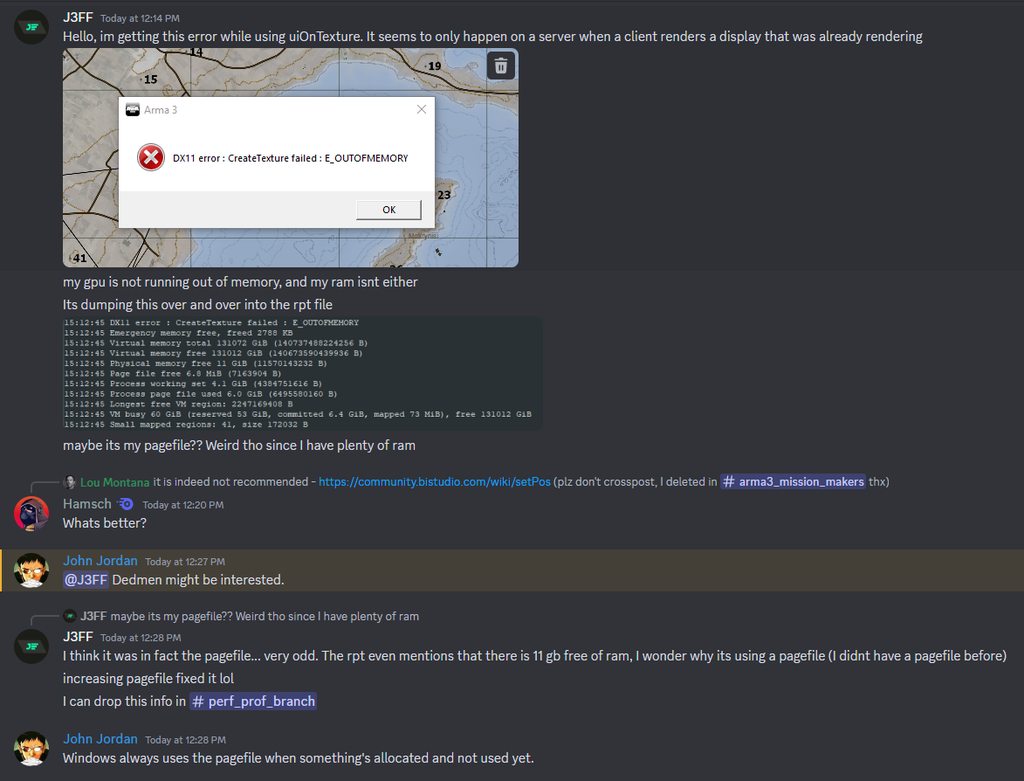


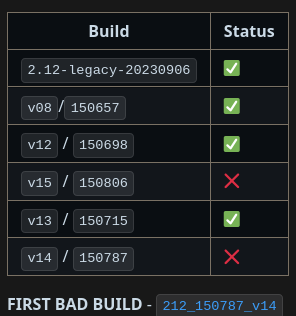 whole cloud
no
brazen oyster
What does no mean in this context 😂
 knotty moth
he’s not interested
heavy vortex
This did give me a thought. Arma doesn't free textures until it actually runs out of VRAM, right? But all those textures need to be backed by committed memory? What if Windows is defaulting to a ~16GB page file and it's really slow at allocating more of it...
Feels like people would notice that sort of thrashing, but maybe not with SSDs.
woven loom
I think the default isn't even 16GB but I'm not sure how windows dynamically handles that
But yeah i think part of the issue was that the texture freeing wasn't actually functional?
 plucky lichen
since v10 getting this client error
Warning Message: class 'bin\config.bin/RscDisplayInventory/controls/GroundContainer/DLCTemplate/Controls/' is not defined Warning Message: class 'bin\config.bin/RscDisplayInventory/controls/SlotPrimary/DLCTemplate/Controls/' is not defined
inland dew
same here
plucky lichen
Warning Message: No entry 'bin\config.bin/CfgMarkerColors.'.
whole cloud
^ That happens when somehow a marker was created without a color. Which you'd be doing by hand
whole cloud
plucky lichen
since v10 getting this client error
`Warning Message: class 'bin\config.bin/RscD...
no repro for me 🤔
Starting to main menu
inland dew
I noticed that FPS started to noticeably go down and very spikey frametime when vRAM was ~16 GB (out of 24 GB available on my 3090 Ti)
flushing resulted in going down from ~17 GB vRAM to like ~9 GB vRAM, but after few minutes it was already at ~11 GB, without me moving and looking at the ground
FPS and frametime, both are still crap
so flickering textures/objects, in addition to crap FPS and frametime, is only a matter of time, when FPS will be sub 20
so still need to restart the game to solve FPS and frametime issue...
inland dew
inland dew
I noticed that FPS started to noticeably go down and very spikey frametime when ...
so flush works now, but it doesn't help, at all
was playing on Altis, no mods
restive pilot
yes the flickering problem doesn't have anything to do with VRAM usage
restive pilot
well I think I found the problem. let's try the fix
restive pilot
nope that wasn't it
restive pilot
the fix didn't work, but I think I have found the problem. so it should only be a matter of time. I'll discuss it with Dedmen
inland dew
would be nice to know what's the problem at least
restive pilot
the game thinks it's out of memory but it isn't
inland dew
Arma is so Arma... as usual
this is the RAM / vRAM usage that I could observe with low FPS and high frametime + spikes (not that much of that on the screen 🤷♂️)

normally FPS should have been like 70+ and like flat frametime
oh! and when FPS started to be bad, RAM dropped from ~20 GB (out of 32 GB) to ~15 GB, like one can see on the screen, without me superflush-ing
also after superflush-ing, when vRAM was past 16 GB and bad FPS, used RAM was still at ~15 GB, although superflush should have cleaned some of it
here one can see, that my FPS is 70+, pretty flat frametime, RAM usage almost 19 GB after not even 1 h of playing at extreme settings, with 12K view distance 1440p
but vRAM is also not even at 10 GB, for the moment
this is how it should be

full server and like 200 AI, helis, jets, armor, arti
restive pilot
well in any case the problem was that the game detects the available memory incorrectly, so it goes into "aggressive flushing mode"
inland dew
restive pilot
the game thinks it's out of memory but it isn't
this, maybe, also would solve server FPS going down with no recovery over time, with only server restart restoring FPS, since you're saying it's not about vRAM and servers don't output any image
man! that would be a revolution!
heavy vortex
Well, you could always force a "5fps bug" on a server by setting maxMem to 3GB and running with 3CB for a bit.
but in that case I assume it's correct about running out of memory.
restive pilot
yeah but it doesn't detect "large memory" correctly
heavy vortex
How on earth do you make it use 16GB? :P
inland dew
if this will be solved, finally, it will change so much, for so many people
inland dew
heavy vortex
How on earth do you make it use 16GB? :P
video or RAM?
heavy vortex
RAM.
inland dew
it goes up to 20 GB actually
restive pilot
yeah I get the problem at 6 GB RAM usage 
inland dew
vRAM also reaches like 20 GB, on Altis, with no mods
with Arma and Steam being the only things running
heavy vortex
Well, with VRAM apparently it doesn't throw away unused textures until it runs out.
But that shouldn't be eating Arma-visible RAM. Probably.
inland dew
I'm fine with that
at least, no reloading of stuff, since it's already there, thus stable FPS and frametime = fast and smooth gameplay
because having to reload stuff + swapping from small (6-8-10-12 GB) vRAM to RAM and from only 8-16 GB RAM to paging file, doesn't contribute to smooth and fast gameplay