#headless_client
1 messages · Page 2 of 1
 languid shadow
 ruby wigeon
CPU priority doesn't do anything useful unless you're fighting against other applications, which you shouldn't be. You should absolutely not be running any application at realtime.
 balmy root
Is it practical/a good idea to have a headless client on the same machine as the server, if the machine can handle it?
ruby wigeon
Yes.
balmy root
Good to know. Thanks. 🙂
I've been having major issues with AI-induced lag (I had 2 FPS during an Antistasi session where I led a small army of insurgents to try and capture an airbase) whenever I'm playing, which had me wondering if a HC would solve that.
balmy root
I have 32 GB.
ruby wigeon
Were you running the 32-bit or 64-bit server exe?
ruby wigeon
Wait, you mean you had 2fps on client or server?
ruby wigeon
HC doesn't help with that at all.
2fps on client is usually bad mods like Bloodlust.
balmy root
I didn't realize Bloodlust did that.
Well, I'll turn that one off if that's the case.
ruby wigeon
Every time I've seen it lately it's been Bloodlust.
 idle granite
balmy root
I didn't realize Bloodlust did that.
idle granite
balmy root
I didn't realize Bloodlust did that.
Take it or don’t but 95% if steam mods are made by noobs who have 0 clue on how to write correctly for MP
 keen vault
 upper sail
i need support
upper sail
i need support
https://www.nohello.com/
(description so it conforms to the server rules: explains why it's more useful to state a problem right away, skipping the "Can I ask a question/I have a Problem" step.
upper sail
can you help me
 runic cobalt
perhaps if we know what you need help with we could provide it
 dry pollen
Alrighty so here is my issue. My headless client isn't connecting with my server. Currently, my community is running a Linux based version of Arma with a Pterodactyl Control Panel to access the dedicated server. Right now, I can click a box to enable a headless client on the server to launch instances of the Headless clients as well when I start the main server. I have changed the servers .cfg, coppied in the whole headless client connection stuff. My PBOs that have the mission attached have the HC modules and whatnot. If the server is creating instances for the headless client, and they are running off the same machine, wouldn't that bypass the need to connect and automatically show up in my list when I login as admin?
As of right now, they are showing up on the role select screen but my modules aren't actually connected.
runic cobalt
- I assume you allow headless clients to connect to your server, which is set in the server.cfg
headlessClients[] = { "127.0.0.1" };
localClient[] = { "127.0.0.1" };
-
I assume you have Headless Client entities in your mission (properly configured).
-
I assume you run the headless client properly from the command line
arma3server -client -connect=xxx.xxx.xxx.xxx -password=yourpass(after the server has started)
If that's the case; what do the error logs of both the server and HC say? Because they should tell you if a HC got connected, and if not what the reason is.
 turbid lodge
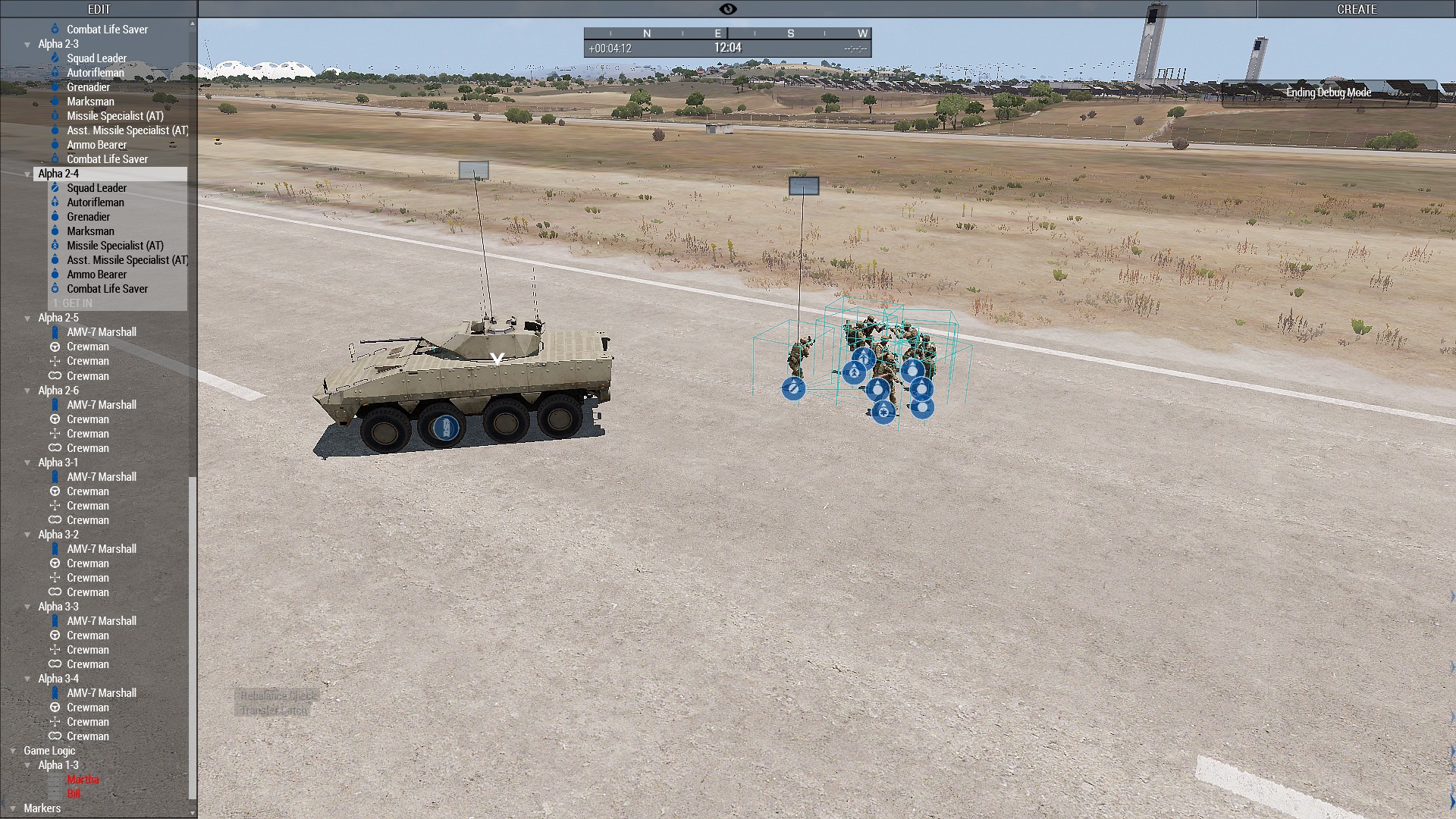
I found a bug. Sqauds that on HC, cannot enter other squad vehicle if they are not on the same HC.
If you order them to get in, they will group like on screenshot and run in circles - https://i.imgur.com/7HqzeP2.jpg
 dry pollen
runic cobalt
1) I assume you allow headless clients to connect to your server, which is set i...
dry pollen
runic cobalt
1) I assume you allow headless clients to connect to your server, which is set i...
I dont think I have been running the headless properly from the command line
@runic cobalt This is what I am currently dealing with.
ruby wigeon
You're going to need -client, -connect and -password at minimum.
It's possible that your host doesn't support headless clients.
dry pollen
ruby wigeon
You're going to need -client, -connect and -password at minimum.
Do I add that to the extra parameters area or in the "startup command" area?
ruby wigeon
Oh, there's more to the picture.
dry pollen
ruby wigeon
Oh, there's more to the picture.
yes
ruby wigeon
Looks like your host just does automatic HCs for you.
So you don't set them up specifically. You just pick a number and they do the rest.
dry pollen
ruby wigeon
So you don't set them up specifically. You just pick a number and they do the re...
Gotcha! Thank you!
ruby wigeon
huh, it says "be sure to set the HC connect password variable" but I don't see that anywhere.
Maybe none of these buttons actually work.
dry pollen
ruby wigeon
Maybe none of these buttons actually work.
that would be incredibly depressing
 woven rock
In simple terms can someone explain Arma 3 headless client? Is this something I should add to my server?
ruby wigeon
No
 normal frost
woven rock
In simple terms can someone explain Arma 3 headless client? Is this something I ...
normal frost
woven rock
In simple terms can someone explain Arma 3 headless client? Is this something I ...
It's a method to offload computation from main threads of server process (to improve performance and e.g. responsiveness of AI). Its drawback is that the mission you're running needs explicitly to support headless client(s).
woven rock
normal frost
It's a method to offload computation from main threads of server process (to imp...
ok cool thanks
 oak nexus
Hello Everyone quick question.
Im testing Zulu Headless Client and im noticing that on average I have less FPS on the server than if I ran it without a HC .
All AI is spawned in Eden and im just letting them walk around and follow some cycle waypoints.
The HC's have 45-47 FPS but the server floats around 25.
Without the HCs I have on average 40 fps on the server. Does anyone have any idea what I could be doing wrong?
ruby wigeon
how many players and AI are we talking?
oak nexus
ruby wigeon
how many players and AI are we talking?
One player, in this test im using 340 AI (Which is way above what id normally have in my missions).
ruby wigeon
Is ZHC moving half of them to the HC or what?
oak nexus
Looks like ZHC splits it evenly between 2 HC and Server
ruby wigeon
There are additional costs to HCs but I'm surprised it could be that bad, tbh.
oak nexus
Yeah im tweaking settings and seeing whats up, but thats a pretty bad trade off 😄
ruby wigeon
Maybe it over-spams networking on local clients.
oak nexus
It could be, im disabling the rebalancing. Maybe that many units is causing issues
ruby wigeon
If it's not beneficial with that many units then there's not gonna be any point in it at all.
oak nexus
Agreed, ill post an update if I find any concrete results
ruby wigeon
I guess ZHC might be thrashing. I thought that was supposed to be the better one though.
oak nexus
@ruby wigeon If you have server administration experience, do you know if people typically set affinity for the processes on the windows servers?
ruby wigeon
Nah, I've never run more than one server per box personally.
In theory that might make frame rates a bit more stable if you did.
ruby wigeon
or it might be hurting performance unnecessarily.
oak nexus
😄
ruby wigeon
Definitely try clamping the HCs at least.
oak nexus
For sure, will do
keen vault
oak nexus
<@194200392089862145> If you have server administration experience, do you know ...
windows is smart enough
just have enough threads for server and HCs
and what hardware are you running it on?
at really high player counts HCs start to hurt more then help because of their networking, but with one player..
oak nexus
oak nexus
keen vault
at really high player counts HCs start to hurt more then help because of their n...
What is "Really High"? On average we are pulling 40 players.
oak nexus
Ah yeah were not pulling that 😄
keen vault
We have a out 60 and run two HCs
oak nexus
May I ask what your using for the HCs? Are you also using Zulu Headless Client?
 cunning sage
oak nexus
Specs: https://i.gyazo.com/7a8e097126343971739ae8c09214b970.png
cunning sage
oak nexus
Specs: https://i.gyazo.com/7a8e097126343971739ae8c09214b970.png
that CPU is from 2014 based on Haswell arch so don't expect wonders
keen vault
Yup ZHC with rebalancing interval set to one hour
oak nexus
cunning sage
that CPU is from 2014 based on Haswell arch so don't expect wonders
We have been using this server for quite awhile.
May it be time for an upgrade?
oak nexus
keen vault
Yup ZHC with rebalancing interval set to one hour
Do you mind posting your cba_settings so I can compare/test? Its possible the default settings maybe arent the best
keen vault
oak nexus
Do you mind posting your cba_settings so I can compare/test? Its possible the de...
// ZHC Caching
force force zhc_dynsim_CycleDelay = 30;
force force zhc_dynsim_EmptyDist = 250;
force force zhc_dynsim_Enabled = false;
force force zhc_dynsim_GroupDist = 500;
force force zhc_dynsim_MoveMult = 1;
force force zhc_dynsim_Override = false;
force force zhc_dynsim_PropDist = 50;
force force zhc_dynsim_VehDist = 350;

// ZHC Settings
force force zhc_offload_badNames = "'ignore'";
force force zhc_offload_badTypes = "'rhsusf_m109d_usarmy','rhsusf_m109_usarmy','B_MBT_01_mlrs_F','B_MBT_01_arty_F','B_T_MBT_01_arty_F','B_T_MBT_01_mlrs_F'";
force force zhc_offload_CheckDelay = 5;
force force zhc_offload_CycleDelay = 10;
force force zhc_offload_debugGuids = "";
force force zhc_offload_DebugMode = 2;
force force zhc_offload_EmergencyOffloadDelay = 5;
force force zhc_offload_Enabled = true;
force force zhc_offload_EnableRebal = true;
force force zhc_offload_EnableZeusHolding = true;
force force zhc_offload_OffloadDelay = 10;
force force zhc_offload_RebalanceDelay = 3600;
force force zhc_offload_StartDelay = 30;
force force zhc_offload_StrtMsg = true;
force force zhc_offload_TransferLoadout = 1;
force force zhc_offload_Verbosity = 2;
force force zhc_stat_DebugRPT = false;
force force zhc_stat_DebugRPTForm = 0;
force force zhc_stat_EnableFPSCounter = true;
force force zhc_stat_MapFpsPos = 0;
force force zhc_stat_RPTFreq = 15;
Ty!
oak nexus
Okedoke after more testing this is my results so far.
Specs: https://i.gyazo.com/7a8e097126343971739ae8c09214b970.png
No HC test with one user, the server had 462 units at 21 FPS.
x2 HC test with one user are the following:
HC1: 233 at 40FPS
HC2: 224 at 40FPS
Server: 5 units at 13 fps
Using ZHC with the settings linked in #headless_client message
Tested with both the arma3serverprofiling_x64.exe and arma3server_x64.exe
Im at a bit of a loss, anyone have any idea on why HC seems to be bringing my main server core to its knees?
(And yes this is a rediculous amount of AI, but it seems to scale in the same direction even if I delete 90% of AI).
ruby wigeon
just for fun, can you try removing the HCs from the local IP range?
oak nexus
ruby wigeon
just for fun, can you try removing the HCs from the local IP range?
Do you mean have them running but never connect? And thank you for all the help so far
ruby wigeon
nah, the server.cfg param
localClient[]
The one that logically you'd be nuts not to have the HCs in :P
oak nexus
@ruby wigeon HC1: 233 at 46fps
HC2: 224 at 70fps
Server: 5 units at 9 fps
Here is the server settings incase this could be a factor btw https://i.gyazo.com/77c37c859c8f8ff23e958d7dfd32bd51.png
Reducing the AI to sane amounts results in
HC1: 68 Units at 91 FPS
HC2: 55 Units at 135 FPS
Server: 4 units at 35 FPS

 sonic vortex
Take a look at https://gist.github.com/MildlyInterested/5ecefd1ad75522eae1fa5e8f4b839fd3#network-settings

Your MaxMsgSend is probably way too high.
oak nexus
Hm I did this but it appears I never saved.....let me roll with another test
ruby wigeon
I guess Faster applies those settings to the HCs as well as the server?
ruby wigeon
Not sure. They're doing quite different things but that doesn't mean that the settings should be different :P
Like every packet from an HC is going to the server, but then it needs to send a lot more data than a normal client would.
hmm. I suppose there's not much point in an HC sending N packets per frame to the server if the server is only sending N/players packets per frame to each player.
oak nexus
For your setup is there any network differences between the Server/HC launching?
ruby wigeon
I don't think they're any different on Armahosts.
but I can see an argument for heavily constraining HC traffic.
see how it goes with both of them on maxMsgSend 64 first anyway.
oak nexus
Already doing it 🙂
I just have to wait for it to transfer the stupid amount of AI to the HC's 😄 It takes awhile
@ruby wigeon@sonic vortex
HC1: 233 at 40fps
HC2: 224 at 34fps
Server: 5 units at 9 fps
https://i.gyazo.com/71b0420ed9ed924eb5c3ce6ef3df1013.png
ruby wigeon
christ, what's going on here :P
oak nexus
😄 I have no idea either
cunning sage
Four physical cores are barely enough for server and two HCs
One HC is usually enough
 chilly orchid
i would be amazed if the underlying issue ISN'T network code. shouldn't be too difficult to find out with profiling branch, i guess
oak nexus
cunning sage
Four physical cores are barely enough for server and two HCs
Ill go ahead and run a test with one HC shortly.
oak nexus
HC1: 450 at 35fps
Server: 4 units at 19 FPS.
Im also going to try werthless and see if theres any noticable differences.
ruby wigeon
well, server does run twice as fast with one HC :P
oak nexus
😄 True
oak nexus
No noticable difference between Werthles/Zulu
cunning sage
I assume you have sufficient RAM for two Arma binaries, they can eat up a lot at peak
but even 4 cores does not leave a lot of room for a HC if the server (and HC) are busy with threaded work
oak nexus
Yeah thats what im thinking too
Thank you for all your help and helping me better understand this stuff everyone 🙂
ruby wigeon
I run client + server + HC sometimes on nearly the same CPU with half the RAM :P
It's a bit marginal on RAM but the server FPS doesn't particularly suffer.
oak nexus
Well it is worth mentioning when I bring it down to sane levels like 135 AI the server/HC are at 40+ FPS
450 active AI is what I imagine is extreme for the engine and no sane person would do that in a real scenario
ruby wigeon
I want to replicate this though. This is a pretty simple mission with just ZHC as mod?
oak nexus
It does use some custom assets, I can PM you the mod list so we arent spamming this channel if you like.
ruby wigeon
Server/HC running x64 stable or perf or what?
oak nexus
arma3serverprofiling_x64
ruby wigeon
hmm. You should get some profiling output from it then.
oak nexus
I tried both stable and profiling. Profiling I got better performance
ruby wigeon
Wait until the AIs are on the HCs, then run diag_captureFrameToFile as server. Should write something to the same folder as the RPTs.
oak nexus
Okedoke let me boot it up again 😄
In the meantime I do have a zulu question if you dont mind. For the zhc_offload_badNames the userconfig has 'ignore' as the default.
Does this mean it looks specifically for a unit named 'ignore' or is it a suffixed thing? Like anything named "Ignore_1","Ignore_2" etc are ignored by the HC?
ruby wigeon
Don't know, but I'd guess it's editor var names. Same thing as this:
https://community.bistudio.com/wiki/vehicleVarName
oak nexus
Okay ill do some testing and report back 🙂
cunning sage
ah, right, the screenshot showed 32GB RAM, that should be plentry
cunning sage
ruby wigeon
I run client + server + HC sometimes on nearly the same CPU with half the RAM :P
same as in similar xeon CPU or same gen i.e. Haswell?
ruby wigeon
Haswell with same specs.
client + server + HC is daft on it, but I need to test HC support.
cunning sage
that will for sure impact your performance
oak nexus
ruby wigeon
hmm. You should get some profiling output from it then.
Pastebin
Pastebin.com is the number one paste tool since 2002. Pastebin is a website where you can store text online for a set period of time.
ruby wigeon
What was the server frame rate there?
ruby wigeon
Ok you have some degenerate shit going on in CBA:
   siFEH; 9.75366; 15.08882;""
    MEventPrcs; 9.75416; 15.08797;""
     gsEva; 9.76148; 0.06169;"..."
     gsEva; 9.82605; 0.06851;"call cba_statemachine_fnc_clockwork"
     gsEva; 9.89556; 14.93280;"call cba_common_fnc_onFrame"
     gsEva; 24.83215; 0.00970;"call ace_frag_fnc_masterPFH"
That's a solid 15ms in cba_common_fnc_onFrame
keen vault
mod list? 😄
ruby wigeon
Actually really long and I don't recognise half of it.
oak nexus
Heavy hitters are your standard RHS,ACE,KAT,TFAR.
ruby wigeon
but yes, likely some mod in there is doing something daft that overstresses the server.
oak nexus
Ill go ahead and do the ol process of elimination
oak nexus
😄 Ya never know...
I will say that KAt medical if you use the biological stuff will bring the server to its knees.
ruby wigeon
I'd have expected it to break the cost down more, so maybe there are just so many timed events added that it's taking 15ms just to read through them all and check for expiry...
oak nexus
But could be a conflict
keen vault
ruby wigeon
I'd have expected it to break the cost down more, so maybe there are just so man...
probably need ASP to see more detail
oak nexus
Im unfamiliar with that
ruby wigeon
This is where ASP is like "yeah it's really just spending 15ms in onFrame" :P
but yeah, it's probably calling stuff and you just can't see it.
 oak nexus
Well time to do the 'ol disable half a mod list and see what happens 😄
Well that looks amazing...
ruby wigeon
If you get a .tracy log then we can peer at it.
keen vault
ruby wigeon
That's a solid 15ms in `cba_common_fnc_onFrame`
do you know where taht function is defined? all I can find is https://github.com/CBATeam/CBA_A3/blob/263286f95453697bfb296937cb1a896c7885e682/addons/common/XEH_postInit.sqf#L5
oak nexus
Is a .tracy from the ASP? Ill get that setup here in a little bit. Need to do a work thing first
ruby wigeon
@keen vault init_perFrameHandler
keen vault
that's weird, in the latest tracy file from you @ruby wigeon that shows up (costing basically no frame time), in my latest it doesn't exist
ruby wigeon
Oh, this isn't Antistasi.
oak nexus
No where near as impressive as antistasi 😄
keen vault
ruby wigeon
Oh, this isn't Antistasi.
yeah but were both running CBA, but I'll continue that in the correct channel^^
ruby wigeon
hmm. Must be tricking ASP somehow.
oak nexus
@ruby wigeon@keen vault Here is the tracy file, now this is hosted locally and not on the server. Having a few issues getting it working on the server atm. https://drive.google.com/file/d/1yQbFWYhz1a1Mp_KFA4it7ZaAjOEbzh2p/view?usp=drive_link
Google Docs
keen vault
oak nexus
<@194200392089862145><@435874279683260418> Here is the tracy file, now this is h...
looks fine to me, also no mention of the cba_common_onFrame which is weird
oak nexus
HC wasnt running, due to it being local. Maybe that has something to do with it?
ruby wigeon
Looks like ASP might not be picking up onFrame anyway.
keen vault
@heavy tiger Any idea as to why?
ruby wigeon
Code is just addMissionEventHandler ["EachFrame", {call FUNC(onFrame)}];
 heavy tiger
It does pick up CBA functions, and ones it calls
huh. weird... No idea.
I'm pretty sure on normal client/server it does work, so no reason it wouldn't on a HC
diwako_dui_radar_fnc_compassPFH is there, and thats a CBA PFH
 wind cargo
Hey so I never used Headless client, and the wiki is really confusing me, like really, everything looks gibberish to me, anyone has a good guide or a video tutorial how to set up an headless client? I am using Host Havoc if it matters
cunning sage
for the headless client to do anything either the mission must explicitly support it or you can use any of the headless clients managers like ACE (opt in, needs to be enabled), ZHC etc
 hybrid plaza
I can't get headless clients to work on my dedicated server which has Battleye disabled? With Battleye enabled it worked perfectly fine, but with BE disabled, do I need to remove battleyeLicense = 1; from the HC client profiles??
 devout wedge
hybrid plaza
I can't get headless clients to work on my dedicated server which has Battleye d...
devout wedge
hybrid plaza
I can't get headless clients to work on my dedicated server which has Battleye d...
Assuming you run it with a .bat file? if so here is a copy of my working headless client.bat. Make appropriate omissions and changes in terms of .exe path, hardware, mods, IP address and port.
start "Arma3 server" "C:\Program Files\SteamCMD\steamapps\common\Arma 3 Server\arma3server_x64.exe" -client -connect=127.0.0.1 -port=2302 -cpuCount=4 -exThreads=7 -hugePages -noLogs "-mod=@RHSAFRF;@RHSGREF;@RHSSAF;@RHSUSAF"
Client does not dictate battle eye requirement/need as it is dictated by the server in my server.cfg I have BattleEye= 0; (disabled)
ruby wigeon
Needs to be BattlEye = 0; Only one e in the middle.
devout wedge
Absolutely correct.....madly checked my server.cfg and I have BattlEye= 0;
devout wedge
This will be a journey for me as I have never done it. I would like to add an auto restart to my server .bat however I have three HC's connected to it on a second local server.
Should I be automating the restart of the HC's too? If the timing was off I assume the AI calculations would be done on the server till such time the HC's reconnected?
Without going too far off topic and into the weeds, any working auto restart .bat redirect would be greatly appreciated.
normal frost
devout wedge
This will be a journey for me as I have never done it. I would like to add an au...
I think HCs reconnect automatically, but just to make sure I've been running Arma servers and HCs as Windows service. https://nssm.cc/download <- pre-release version, gives you nice extra control of things and AFAIK services have kind of "increased" monitoring so that they can get restarted if the process hangs, which is something that batch scripts don't detect
devout wedge
normal frost
I think HCs reconnect automatically, but just to make sure I've been running Arm...
You are right, they reconnect but do they flush all the garbage data they accumulated while running?
normal frost
Not sure about that to be honest
devout wedge
normal frost
Not sure about that to be honest
Been using the 'baked in' Task Scheduler that comes with Windows Server to launch the server.bat and headless client.bat on different machines.
Works great if you have one headless client however automating the restart of multiple has been problem I have kicked down the road for a while now.
 timid tangle
Werthles' or ZHC
which is the better HC mod? almost all AI are zeus-spawned, sometimes zeus will remote control some AIs
 mellow bluff
timid tangle
Werthles' or ZHC
which is the better HC mod? almost all AI are zeus-spawned, so...
mellow bluff
timid tangle
Werthles' or ZHC
which is the better HC mod? almost all AI are zeus-spawned, so...
ZHC.
Used to use Werthless, which is great. Then saw ZHC and never looked back
timid tangle
mellow bluff
ZHC.
Used to use Werthless, which is great. Then saw ZHC and never looked back
thanks
 echo flower
If you use ace, it has this functionality build in
 shy merlin
Hi there. Does anybody know a script that shows how many units are on each HC as a debug info?
mellow bluff
shy merlin
Hi there. Does anybody know a script that shows how many units are on each HC as...
ZHC has this built in :)
 urban juniper
Anyone have any experience with setting up a headless client via LinuxGSM? I'm following the instructions here https://docs.linuxgsm.com/game-servers/arma-3#headless-client-overview but the client just never seems to connect in the end.
I get a message on the server "headlessclient connecting", but the headlessclient never seems to pop up in the list of players (I should be able to see it, since I am logged in as admin).
FYI: also running a dedicated server hosted with LinuxGSM on the same machine, just a second instance of a dedicated server. Using the same modstring for both the dedicated server and the headless client.
 urban juniper
Is it possible that my headlessclient successfully connected, but I just cannot see it in the player list for some strange reason? Why this might be possible:
After I get the headlessclient is connecting message on the GAME server, the client never pops up in the player list.
But if I shut down the server running the headless client, I will get a message on the GAME server that the headless client disconnected.
So, what's the deal here, any ideas? I'm starting to believe that I just can't see the headless client in the role selection screen. But that doesn't make much sense, since I am logged in as an admin and I am playing a mission that supports headless clients (Antistasi Ultimate).
keen vault
urban juniper
Is it possible that my headlessclient successfully connected, but I just cannot ...
you need to be logged in as admin on the arma server to be able to see HCs
urban juniper
I am logged in as admin.
(I can see the headless client slots in the role selection screen.)
ruby wigeon
What does it say in Antistasi's headless client info thing?
urban juniper
I don't know what that is, sorry. How can I access the Antistasi headless client info thing? x)
ruby wigeon
I think in community it's still called "AI Load Info", action on the map board.
urban juniper
Ahhh, ok. Thank you. I will try that out as soon as I'm home and ping you.
urban juniper
@ruby wigeon if I launch the mission and then walk up to the map board, the AI Load Info says No Headless Client detected.
urban juniper
Well, update. After messing around a bit, headless client now starts connecting, then connects. But is immediately kicked out due to a Steam authentification failure.
keen vault
have you whitelisted your localhost IP in the server.cfg?
urban juniper
the server.cfg has this:
headlessClients[] = {"ip_goes_here_with_quotation_marks"}; localClient[] = {"same_ip_goes_here_with_quotation_marks"};
That IP is the same IP used to connect to the dedicated server through the game browser.
ruby wigeon
Do you know what command line the headless client is starting with?
ruby wigeon
It does? :P
keen vault
I mean that's the IP the server is gonna see, no?
if you use the external IP it's gonna go to your router, get resolved back to your LAN adress (if the router has that feature I forgot the name of, it's called hairpin NAT) and the server will see it's LAN IP or something else as the origin IP and not the public one
ruby wigeon
I guess otherwise you have to be very careful
keen vault
It's just a waste because the traffic will actually have to go over the network and won't stay internal
urban juniper
HC is running on the same server. Not using 127.0.0.1 just because the instructions stated that we shouldn't use that for whatever reason.
Anyway, I didn't realise that could cause the authentication failure issue.
Client kicked due to failed Steam checks: Invalid ticket - Ticket invalid
Bit I'll try to fix it and see what happens.
ruby wigeon
If each server/HC is running on a different VPS on the same box then you wouldn't use 127.0.0.1.
I have no idea what causes steam auth failures though.
urban juniper
Nah, there's no virtual machine. It's just one old PC.
ruby wigeon
Can you just sanity-check that it's running the server exe for the HC?
urban juniper
Gotta do it tomorrow. Really have to go to bed now. Got work tomorrow. But I'm using a LinuxGSM install, so it has just two different instances and associated startup files. SO I'm fairly sure that it's running the HC one and not the one for the dedicated server, if that's what you mean.
Thanks for all of the help, though. I'll check back in tomorrow.
ruby wigeon
There is no separate exe for HCs. You just run the server exe with -client
keen vault
urban juniper
HC is running on the same server. Not using 127.0.0.1 just because the instructi...
What? Unless there's some Linux specific issue im unaware of the instructions are wrong.
urban juniper
ruby wigeon
There is no separate exe for HCs. You just run the server exe with -client
I think I just expressed myself wrong. You use the same .exe but with different startup "commands", I suppose? Not sure what the term is. And by that I mean that the headlessclient will be started with -client -connect and some other startup parameters. According to what I've read online, there are a few differences in these parameters.
urban juniper
keen vault
What? Unless there's some Linux specific issue im unaware of the instructions ar...
Regardless, I don't think the IP is the issue, as the headless client can connect. It just gets kicked out due to an authentication failure, as soon as it connects.
Is there maybe a way to disable Steam authentication on a server?
keen vault
urban juniper
Is there maybe a way to disable Steam authentication on a server?
That's exactly what that headless client IP config setting does
urban juniper
That must be causing the problem then.
keen vault
That's why I'm saying the IP you use to connect can be the issue
urban juniper
Makes sense, thank you very much.
keen vault
Linux GSM isn't docker based, is it? That's the only reason I can think of why they'd not use the localhost ip
urban juniper
I really don't think that it's docker-based..
Ok, lel. I think issue's just been fixed. Give me a few min to check.
Might as well then ask another qeustion right away - if a mission has 3 headless client slots, should I go ahead and fill all 3 up or is one headless client generally enough? (Assuming the server I am running things from can handle 3 headless clients).
have to go again be back to report later, thanks for the help, though.
keen vault
if your server has enough threads then the more the better, client FPS will probably drop before anything happens to the HCs 😄
urban juniper
Well, thanks to your hlep, everything seems to work. EXECPT ONE DAMN THING. When launching a specific mission - Antistasi Ultimate on Virolahti, the hc gets the error:
Warning Message: You cannot play/edit this mission; it is dependent on downloadable content that has been deleted.
CUP_Buildings_Config
Any idea why this error could happen? It only happens for this mission. Antistasi Ultimate on Altis works fine. I have the exact same mods installed on my client as I do on my server and on my hc.
Couldn't find much about CUP_Buildings_Config either.
And I uploaded Virolahti and cup terrains core directly from my PC to the server, just to make sure the mods were not somehow corrupt. Error persists, though.
ruby wigeon
Just paste the RPT from the headless client.
keen vault
urban juniper
Couldn't find much about CUP_Buildings_Config either.
it's part of CUP Core or CUP CWA, you need to lowercase all PBOs or try the performance branch where that isn't required anymore
timid tangle
is 2 HCs on always better than only 1?
how many AIs can 1 HC handle?
given ram is enough
 slate sail
no HC is actually the best, depends on the hardware where you host the HC but 100/150 ias can be handled with out problem
use HC fps as a guide
 timid lagoon
keen vault
Linux GSM isn't docker based, is it? That's the only reason I can think of why t...
timid lagoon
keen vault
Linux GSM isn't docker based, is it? That's the only reason I can think of why t...
They recently added docker for LinuxGSM https://hub.docker.com/r/gameservermanagers/gameserver
if i'm not mistaken; it's relatively new 
timid tangle
slate sail
no HC is actually the best, depends on the hardware where you host the HC but 10...
hc on the same hardware
we use ZHC atm for hc system
mellow bluff
Any reason for HCs being stuck in the "loading profile" state?
Worked fine for months and last few ops its been doing this - not sure why...
Using ZHC and not settings have changed
ruby wigeon
Linux or windows? Stable or perf? Different profile folder or same profile folder? Different profile names or not?
mellow bluff
Windows, Performance, different profile names, all within "C:\Users*username*\Documents\Arma Directory\Servers*serverIDstring*"
ruby wigeon
Check if stable has the same issue or not.
mellow bluff
Found the problem...
It is Tanoa.
Presumably the fact the Steam account the server is using does not own Apex?
Edit - yes confirmed, account used must own Apex to run HCs on Tanoa.
Likely the same for other DLCs?
heavy tiger
Linux HC doesn't need any steam account, I thought same for windows
mellow bluff
hmph, perhaps something to look into then.
Would you like me to run any more tests for you to diagnose it?
heavy tiger
no
mellow bluff
good answer
 lament knot
i need help with setting up my arma 3 nitrado server DM me
 mortal bison
would there be any issues transfering units from the zeus to headless through the aceheadless option? Or should i stick to spawning then via scripts?
mellow bluff
mortal bison
would there be any issues transfering units from the zeus to headless through th...
ACE Headless, enabled via the Addon Options works well.
However Zulu Headless Client is better, I’d suggest you try and add that to your modlist.
keen vault
mortal bison
would there be any issues transfering units from the zeus to headless through th...
If you can spawn them directly on the HC that's preferred but if that's to much hassle use ZHC like @mellow bluff said.
 dark needle
Hey, could please someone help me? I'm trying to setup an Antistasi LAN server with a HC, i've made the .bat file but it keeps getting kicked because "Steam authentication failed". All the solutions from the internet are about the server.cfg file, but since its a LAN game it doesn't have it. How can i fix this?
cunning sage
if you're not running the HC on the same machine you'll need to add the HC IP to the list of headless clients in the server config
 naive copper
Hello, I'm running Antistasi Plus with a headless client on the same host as the server. I can see the hc connected before I start the mission, but how can I know if it's actually working?
I tried spawning some AI and running into a town, then checking the AI section under the HQ map, but it always said HC 0 AI.
dry pollen
Currently having an issue where my headless client, which is on a separate instance is connecting to my main server, but isn't loading a profile to fill the VR Entity slot.
Any help is appreciated.
Server notes: Linux based, only have access to a panel because we dont have access to the box that host is providing. Would prefer a windows box with FASTER but such is life...
 cold trail
Three questions:
Do you have the slot marked as a playable (but not player) headless client?
Does the HC have the necessary mods loaded?
Do your logs report anything about it? Does it say the Headless user Connected (and not just connecting), or perhaps does it say the headless is missing required mods?
 analog charm
should I give the headless client seperate cores than the server application ?
analog charm
Im setting a headless client up right now and on a vanilla server it worked pefectly but on my modded server it always crashes after or mid the pre init
what can be the cause ?
ruby wigeon
Not loading the mods on the HC, or the mods are broken.
analog charm
I found the mod which is causing it ,its mine xd Now I have to find the error
 glad mason
Hello. Is there a way to connect a headless client to a regular multiplayer game without a dedicated server?
dry pollen
cold trail
Three questions:
Do you have the slot marked as a playable (but not play**er**) ...
Sorry for the late reply. To answer your questions:
1: Yes they are marked as playable
2: Let me double check, but yes I beleive that they are running the same mods
3: I will download the latest RPT and check but as far as I know, from what I have seen, the Headless Clients connect to the server, but just dont fill a slot.
Edit: The Headless Client is NOT running the same mods. Thanks for the lookout
 nocturne token
hey, how exactly do you set up a headless client? i own a dedicated server and i'm assuming the benefits of actually buying one is being able to have a headless client
ruby wigeon
Mostly it's just more things to go wrong.
But this is the general principle:
- Get a second server. Set it up like the first one, except with -client and -connect on the command line.
- Add the IP of the headless client to headlessClients[] in the server's server.cfg.
- Run a mission with headless client slots.
This won't provide any benefits on its own. The mission would need to move AIs onto the headless client, or you use a mod that moves them onto the HC, likely breaking some mission code in the process.
nocturne token
interesting, i didn’t realize you needed to own 2 servers for a headless client
also did not know it would break missions
thank you
keen vault
nocturne token
interesting, i didn’t realize you needed to own 2 servers for a headless client
you can (and should) run them on the same server if you have enough RAM/cores left over.
and you can check if missions support HCs, most big persistent game modes do
ruby wigeon
If you're zeusing with stock AI then a headless client transfer mod should work too. I don't know if any AI mods support having their AIs moved around.
keen vault
They don't like it but if you only move them once it's fine
ruby wigeon
I guess it's just a brain reset.
Like they're automatically searching for new local AIs anyway.
keen vault
ruby wigeon
I guess it's just a brain reset.
yeah short term memory is gone, and waypoints etc iirc.
I spawn them in, wait 10 seconds until they're on the HC and then order aroudn
ruby wigeon
Wait, even vanilla waypoints aren't preserved?
I figured they would be, as they're globally accessible.
keen vault
eeeh, they might. I use lambs stuff 99% of the time. I know garrision isn't preserved
cunning sage
ruby wigeon
Wait, even vanilla waypoints aren't preserved?
As long as they arent synchronized to triggers
 humble bay
Hey everyone!
So i am running Liberation server and i have restart script in the mission file.
The problem is, that after scripted restart HC isnt joining server, and after trying to start it manually it says that server is stopped.
Anyone have idea how to fix it?
humble bay
The script i am using
if (!isDedicated) exitWith {};

_serverDuration = (KP_liberation_restart * 60 * 60);

[format ["Restart Timer Set To %1", _serverDuration], "RESTART"] call KPLIB_fnc_log;

private _30minspassed = false;
private _15minspassed = false;
private _5minspassed = false;
private _60secondspassed = false;

private _timeStart = diag_tickTime;

private ["_timeSinceStart","_timeUntilRestart"];
while{true} do
{
    _timeSinceStart = diag_tickTime - _timeStart;
    _timeUntilRestart = _serverDuration - _timeSinceStart;

    switch true do
    {
        case ((_timeUntilRestart < (1 * 60)) && !_60secondspassed) :
        {
            ["lib_restart_60_s"] remoteExecCall ["BIS_fnc_showNotification"];
            ["60 seconds until server restart.", "RESTART"] call KPLIB_fnc_log;
            _60secondspassed = true;
            _5minspassed = true;
            _15minspassed = true;
            _30minspassed = true;
        };
        case ((_timeUntilRestart < (5 * 60)) && !_5minspassed) :
        {
            ["lib_restart_5_min"] remoteExecCall ["BIS_fnc_showNotification"];
            ["5 minutes until server restart.", "RESTART"] call KPLIB_fnc_log;
            _5minspassed = true;
            _15minspassed = true;
            _30minspassed = true;
        };
        case ((_timeUntilRestart < (15 * 60)) && !_15minspassed) :
        {
            ["lib_restart_15_min"] remoteExecCall ["BIS_fnc_showNotification"];
            ["15 minutes until server restart.", "RESTART"] call KPLIB_fnc_log;
            _15minspassed = true;
            _30minspassed = true;
        };
        case ((_timeUntilRestart < (30 * 60)) && !_30minspassed) :
        {
            ["lib_restart_30_min"] remoteExecCall ["BIS_fnc_showNotification"];
            ["30 minutes until server restart.", "RESTART"] call KPLIB_fnc_log;
            _30minspassed = true;
        };
    };

    if(_timeSinceStart > _serverDuration) then
    {
        ["Restart timeout elapsed, attempting server shutdown.", "RESTART"] call KPLIB_fnc_log;
        sleep 5;

        private _myPass = call compile preprocessFileLineNumbers "\userconfig\restart\myPass.hpp";
        private _shutdownSuccess = _myPass serverCommand (["#restart", "#restartserver"] select ((productVersion select 6) isEqualTo "Windows"));

        if(_shutdownSuccess) then
        {
            ["Shutting down server!", "RESTART"] call KPLIB_fnc_log;
        }
        else
        {
            ["Shutdown failed!", "RESTART"] call KPLIB_fnc_log;
        };
    };
    sleep 15;
};
after you're trying to start what? HCs should just launch regardless of what the server is doing
humble bay
keen vault
after you're trying to start what? HCs should just launch regardless of what the...
Start headless client
ruby wigeon
Obvious question: Is the server actually restarting correctly? Can you join it?
Also what UI is saying this: "after trying to start it manually it says that server is stopped."
humble bay
ruby wigeon
Obvious question: Is the server actually restarting correctly? Can you join it?
yes, i can join
humble bay
ruby wigeon
Also what UI is saying this: "after trying to start it manually it says that ser...
after i am trying to start HC manually
ruby wigeon
Where does it say that the server is stopped?
humble bay
can send an picture here
humble bay
ruby wigeon
Where does it say that the server is stopped?
can i dm u a screenshot?
I am starting HC manually via server panel
ruby wigeon
What panel?
humble bay
and the script saying
C:TCAFiles\Users\markl\5081>powershell start-hc
Server is not running...Exiting
The script has executed successfully. You may close this window.
Servers game panel
ruby wigeon
TCadmin, ok
Their scripts likely aren't compatible with an Arma-side server restart.
I doubt you can do anything about that.
humble bay
Ok, that's sad
 feral spire
i find that #shutdown does work with TCAdmin, or at least the modified version of TCAdmin im given, it just takes a bit to recognize that the game shut down before restarting the process
 regal venture
Anyone else experience issues with Werthles HC on a dedicated server where it will make/move preset waypoints to the bottom left corner of the map when viewing through Zeus? Testing the same mission without Werthles, the preset waypoints stay the same and are not moved to the bottom corner of the map.
Is this a known issue?
It is driving me mad because the AI will move to the waypoint regardless of deleting and remaking new waypoints.
regal venture
Tried Zulu HC and it will not transfer all units to HC. Turned balancing off and fooled around with the settings and I still get units with the "untransferred" on them. No matter what i do release them etc.. they will not be picked up by the HC Even groups starting off on the HC i have tried to release and move them back but they stay in the "untransferred" mode.
Is there a trick to get this to work or what am I doing wrong?
keen vault
regal venture
Tried Zulu HC and it will not transfer all units to HC. Turned balancing off and...
unless they're blacklisted they should be transferred eventually. Did you wait long enough?
regal venture
@keen vault Is 30 minutes long enough? Even Zeus spawned units do not transfer over and remain untransferred
Wethles works great but it breaks waypoints and eventually all units head to 0,0,0 even when you delete those waypoints they will be reinstated.
Trying o find a good balance for HC's.
I like the options Zulu offers and it doesn't seem to remap waypoints but its a no go for me if not all ai transfer to HCs
keen vault
regal venture
<@435874279683260418> Is 30 minutes long enough? Even Zeus spawned units do not ...
it works fine for me so I'm guessing it's something on your side. Do the server, players and HCs all RUN it?
not as in "I ticked a box in a web panel" but does the rpt say it's loaded and running?
regal venture
@keen vault Everyone runs it. According to the Map display, it says it is working but I still have over half the units running around saying untransferred so there must be a bug or issue somewhere in reporting
 shadow kraken
is there a a good reason to run HC via 32b exe?
ruby wigeon
There is however a bad reason
cold trail
I'm struggling with an issue, and at this point even my host is at a loss as to the problem.
I have a bare metal managed server with Hosthavoc which hosts an operations server and three headless clients. If I start 3 headless clients, exactly two of them will connect. Which of the 3 doesn't start will fluctuate at any given time - IE: Without changing any configuration, either A, or B, or C will fail to connect to the server. I've tried reinstalling and reprovisioning. If I have more instances (IE, 4), I can sometimes get three to work properly.
Does anyone have any idea what might fix this?
Operations server is on port 2302, headless clients claim to be on 2326, 2331, 2336
keen vault
what's a bare metal managed server?
try using a mission with known working HC slots, antistasi or liberation and go from there
cold trail
It's dedicated hardware (not VPS or Cloud), but still using the providers instance manager and control panel
I've tried it with a known good mission
keen vault
cold trail
It's dedicated hardware (not VPS or Cloud), but still using the providers instan...
Theeen I'd blame the provider control panel. Get the rpts of all HCs and server involved (including console logs) and you might find something.
ruby wigeon
I assume your mission does support three HCs...
cold trail
It does, and I've verified the three HC's work on another server with identical configuration
 inner fog
hi guys, ive got the problem that my Dedicated server shows only in LAN. i forwarded all ports in the router. my internet company limits the portrange, why i have to choose 7535 for example, which worked fine before. people could join, now only lan
is it necesarry to open the 7535 port then for UPD AND TCP?- because my horrible internet provider does not allow that now for some reason.....
ruby wigeon
7535 UDP to connect, 7536 UDP for other people to see the server in steam/launcher.
You might be on CGNAT anyway, in which case you'd have to deal with your ISP.
inner fog
thanks for the info! wow. yea i hate that fucking internet provider here
 lethal blaze
start /min "" "D:\SteamLibrary\steamapps\common\Arma 3\arma3_x64.exe" -client -connect=xx.xxx.x.x -password=xxxx "-profiles=C:\Users\todor\Documents\Arma 3 - Other Profiles\headlessclient" -nosound -port=2302 "-mod=@CUP_Terrains__Core;@CBA_A3;@3den_Enhanced;@3DEN_Attributes_Fast_Load;@ace;@ACRE2;@Enhanced_Movement;@Hatchet_Framework__Stable_Version;@Zeus_Enhanced;@ACRE_Persistence;@Advanced_Sling_Loading;@Animated_Grenade_Throwing;@Better_Inventory;@BWMod;@Enhanced_Movement_Rework;@Extended_Morale_System;@Gruppe_Adler_Trenches;@Hatchet_H_60_pack__Stable_Version;@Metis_Marker;@Perceptive_View_Distance_and_Audio_Levels_;@RHSUSAF;@ACE3_Arsenal_Extended__Core;@ACRE_Animations;@ADV_ACE_CPR_Pike_Edition_;@ACE3_Arsenal_Extended__RHS_All_in_One;@Aiming_Deadzone_Fix;@Animated_Recoil_coefficient_changer;@Freestyles_Crash_Landing;@MRB_Air_Visibility;@RHSAFRF;@MRB_Vehicle_Visibility;@POOK_Camonets;@POOK_SAM_PACK;@RR_Immersive_Maps_by_LAxemann_Fixed_;@VileHUD_Milsim_Edit;@FIR_AWS_AirWeaponSystem_;@Project_Tornado;@_WIP_Anti_Bounce_System_ABS_;@RHSSAF;@Remove_stamina;@Remove_stamina__ACE_3;@Advanced_Towing;@Swim_Faster;@Ladder_Tweak_Remastered;@GRAD_Sling_Helmet;@BackpackOnChest__Redux;@CUP_Weapons;@CUP_Units;@Axni_Heli_Pilot_Helmets;@Axni_german_helicopter_pilots;@Hellenic_Armed_Forces_Mod_HAFM__Helicopters_discontinued_;@Axni_german_EC_135__EC_635;@_AMZ_Improved_WS_Sounds_V7_7;@RHSTERRACORE;@Arma_Realistic_Map_Assets_V2;@Chernarus_2035;@CUP_Vehicles;@ACSTG_AI_Cannot_See_Through_Grass;@Bullets_Hit;@Real_Engine;@Zeus_Additions;@Crows_Zeus_Additions;@cTab_NSWDG_Edition;@Boeing_SOAR_MH_47E_Chinook;@VileHUD;@Unit_Voice_overs;@TPNVG__True_Panoramic_Night_Vision;@Tracer_Fires;@SSD_Death_Screams_2_1;@Prone_Launcher;@No_Idle_Standing_;@Limited_Gun_Movement;@goko_ballistic_impact;@CUP_ACE3_Compatibility_Addon__Terrains;@_AMZ_IWS__RHSUSAF_COMPAT;@_AMZ_IWS__RHSAFRF_COMPAT;@DynaSound_2;@Hatchet_H_60__No_Over_Torque;@Beketov;@MH;" -enableHT
When running:
You cannot play or edit mission, missing mods
basically it cannot find the mods to refer to, this is running from an actual different computer as a HC
Maybe i need to make referecne to where it can find the @ stuff?
Mods are downloaded for sure loaded mods 80, 80 on server, checks out when actually joining like a player even
Does it matter where i put the batch file? Does it need to be in root?
In root same issue
cunning sage
if you check the server and headless rpt files you can compare the mod tables with actual loaded mods to see if anything is missing on either of them
lethal blaze
Found out main problem was
A, Learned that it cannot access !Workshop
B, For some odd reason the naming scheme thing didnt match up, had to rename each mod manually
Now wondering if mklink would work instead of literally having a copy of workshop doubling the taken up storage, then maybe workout a method of making -mod copy paste thing through scripts because this is ungodly amount of manual input i had to endure
Atleast i learned, aknowledged, hopefully if problems come up anytime soon i might be able to fix it faster and more efficently
ruby wigeon
There's no auto-checking in !Workshop. When you use the launcher it actually appends !Workshop\ to every mod path.
mklink does also work.
cunning sage
if you want same behaviour as the launcher make sure to set the junction flag
lethal blaze
ruby wigeon
There's no auto-checking in !Workshop. When you use the launcher it actually app...
So if i would reference using -"mod=!Workshop@Example;"
Where example is a steam workshop mod found in A3 client, i wouldnt have to setup mklink?
I would want to learn about junction flag and its usage, on the bohemia wiki headless client page i havent seen it mentioned
Personally never worked with mklink
cunning sage
lethal blaze
Would i need to only set this to Workshop or for each mod folder thats used on the server?
cunning sage
either works
or you can use absolute path to your current workshop directory, then you don't need any extra links
lethal blaze
Thanks for clarifying things, will try it out once home, pretty neat feature
ruby wigeon
It's not really a feature. The mod list in the command line is just a list of folders relative to the executable you ran, so this will typically be correct:
"-mod=!Workshop\@Example;!Workshop\@Example2;"
cunning sage
absolute is also fine as long as you're not using linux server
 supple vapor
Hey guys - can't get Headless Clients to actually join the HC slot. I'm using FASTER to launch the server and HC's, and ACE to actually do the HC transfers.
I've removed all mods, save for CBA and ACE, and made a blank mission file with just a player slot and two "Headless Client" slots. They join server, but don't join those slots.
Any ideas?
To head off some potential questions:
- Yes, HC slots are marked playable (not player)
- Yes, HC has same mods loaded
- Yes, HC is fully connected (not "connecting")
I fixed it, leaving the fix here for future generations 🤣
I had set role descriptions for each of the HC slots, but HC slots require variable names as well. I named them hc1 and hc2, working now.
 pearl briar
alright right now I need some help making sure I setup the mission files correctly. I know there is the HC slot or something I need to put down but would like it if I could share my screen with someone and get some help with this
really just need to know is it as simple as placing down the HC module and then its good to go after I link the server with the HC or is there more I need to do.
Also mission files that I would be using only have slots and un crewed vics in them and maybe some objects no AI in the mission file (zeus adds them on the server when file is loaded)
ruby wigeon
According to Hawkins above, you also need to give the HC module a variable name for some reason.
pearl briar
yeah I gave it HC1 as the var name and also gave it below that in like the role name area HC1 @ Headless Client (minus the space)
sorry for the ping btw whoever I pinged didnt mean to
I was more just asking if there was anything aside from just the module really
im rn working on trying to get my HC to connect to my server but its being a bit weird and I am using two host havok servers so if anyone knows anything about them and setting that up would love some help with that
my group is doing an op rn but after I am going to be free to be able to test it out properly and see if its something stupid I was doing
ruby wigeon
If they're two servers with different IPs then you'd need to add the IP of the headless client to headlessClients in server's server.cfg.
pearl briar
yeah I know I haven't been able to fully work on it between irl stuff and mods taking a while to install
the HC when I start it keeps throwing out an error that might be unrelated
pearl briar
this is the error that shows in the console when I start the HC which idk if it related at all to the HC itself
18:43:39 MovesType CfgMovesMaleSdr load time 2389.0 ms
18:43:39 Global namespace not passed during: false
18:43:39 Global namespace not passed during: false
18:43:39 Error in expression <false>
18:43:39   Error position: <false>
18:43:39   Error Local variable in global space
18:43:39 Global namespace not passed during: false
18:43:39 Global namespace not passed during: false
18:43:39 Error in expression <false>
18:43:39   Error position: <false>
18:43:39   Error Local variable in global space
18:43:39 Global namespace not passed during: false
18:43:39 Global namespace not passed during: false
18:43:39 Error in expression <false>
18:43:39   Error position: <false>
18:43:39   Error Local variable in global space
18:43:39 Global namespace not passed during: false
18:43:39 Global namespace not passed during: false
18:43:39 Error in expression <false>
18:43:39   Error position: <false>
18:43:39   Error Local variable in global space
18:43:39 Global namespace not passed during: false
18:43:39 Global namespace not passed during: false
18:43:39 Error in expression <false>
18:43:39   Error position: <false>
18:43:39   Error Local variable in global space
18:43:39 Global namespace not passed during: false
18:43:39 Global namespace not passed during: false
18:43:39 Error in expression <false>
18:43:39   Error position: <false>
18:43:39   Error Local variable in global space
HC module is marked as playable not player, has both role and var set to hc1
ruby wigeon
Not sure those errors are related. Seen them before on working servers.
probably just a common mod doing something daft.
pearl briar
I know when working on this with another person they said that it could be due to slot not being setup right so yeah im not sure
but I can try to do another full modlist reinstall and see if that fixes it
pearl briar
so yeah found that the problem was nothing to do with the setup or anything but the server itself, even after 3 or 4 reinstalls the host network had to setup a whole new service to fix the issue so yeah
regardless thanks to anyone who helped me out trying to get this setup
 graceful fractal
First time trying to set up a headless client:
I have a headless client module with variable and lobby name "HC1" set as playable, and this as my init.sqf:
if (HC1Present && isMultiplayer) then {
 if (!isServer && !hasInterface) then {
  []execVM "init_HC.sqf";
 } else {};
} else {hint "Headless not initiated!"};```
with this as init_HC.sqf
```[getMarkerPos "marker_0", side player, (configFile >> "CfgGroups" >> "West" >> "BIS_US" >> "Armored" >> "US_MGSPlatoon")] call BIS_fnc_spawnGroup;```
My problem is, when I launch, i get the hint that the headless client is not initiated. How is the game not detecting HC1, or whatever is happening here? ThanksIs the headless client listed correctly in the lobby?
graceful fractal
For some reason I cant post images in this channel, but its in the virtual tab listed as Nobody and grayed out - I dont know if thats correct or not
 winter basin
graceful fractal
For some reason I cant post images in this channel, but its in the virtual tab l...
winter basin
graceful fractal
For some reason I cant post images in this channel, but its in the virtual tab l...
The HC should appear like a player in the slot with the variableName as it's "player name"
Make sure you have listed the headless client in the server config correctly
graceful fractal
winter basin
The HC should appear like a player in the slot with the variableName as it's "pl...
So headless clients cant be initiated in multiplayer games that are hosted in-game, and only can be initiated in dedicated servers?
graceful fractal
If true, I use FASTER to host and it still doesnt work there. I have FASTER set to create 1 HC, and when I start the server, a window for the headless client's initialization appears
winter basin
Does it connect to the server? Have you defined 127.0.0.1 to the local clients?
graceful fractal
winter basin
Does it connect to the server? Have you defined 127.0.0.1 to the local clients?
1: These are the messages from the server's window when i start the server
Player headlessclient connecting.
Player headlessclient connected (id=HC22420).```
And these are the messages from the HC's window
```Client connected: 127.0.0.1:2302
> Player headlessclient connecting
> Player headlessclient connected
Loading profile "HC1"```
So i dont know if that means its sucessfully connecting or not

2: I think so, because FASTER has that filled out in its field for Headless IPs, and I think it's doing its job because the server_config.cfg says
```headlessClients[] =  {
    "127.0.0.1"
};```I feel like im missing something crucial because i havent done this before :P
winter basin
what does your localClients say?
it should also have the 127.0.0.1 on order to connect local clients such as your headless
keen vault
graceful fractal
1: These are the messages from the server's window when i start the server
```he...
then it's connected
make sure the HC module you placed down in the editor has a variable name
graceful fractal
keen vault
make sure the HC module you placed down in the editor has a variable name
It does
graceful fractal
winter basin
what does your localClients say?
Ok this must be the crucial thing bc I don't know what that is 😭
keen vault
winter basin
what does your localClients say?
FASTER will have that all configured correctly, unless someone touched trying to "fix" it
graceful fractal
The headless client was connected.
AI weren't spawning from init_HC.sqf because (configFile >> "CfgGroups" >> "West" >> "BIS_US" >> "Armored" >> "US_MGSPlatoon") isn't a group, it's just some random code from the wiki that I pulled.

The ONE time i decided to be lazy with scripting and i payed the price lol
inner fog
hi guys, i have an issue:
for sure, ive got the same versions and mods installed on the server and client
no luck
urban juniper
The problem is the BE Filter needs to be written to allow the HC code to run. So it can be awkward to write secure filters that allow HC todo interesting stuff.
Really should be able to excempt HC Clients from BE Filters
ruby wigeon
- Not a headless client issue.
- Are you intentionally loading RHS SAF or not?
urban juniper
^^
 void saffron
Or have HC inits, that would help.
urban juniper
had chat GPT (this is probably the issue tbh...) make me a script that automatically assigns zeus-placed AI units to a headless client whos ID = HC1.
Console spits this:
2:39:00 Error in expression <tis\assignzeusaitohc.sqf" if (isServer) { addMissionEventHandler ["EntityCreated> 2:39:00 Error position: <{ addMissionEventHandler ["EntityCreated> 2:39:00 Error Missing ; 2:39:00 File mpmissions\__cur_mp.altis\assignzeusaitohc.sqf..., line 1 2:39:00 Error in expression <tis\assignzeusaitohc.sqf" if (isServer) { addMissionEventHandler ["EntityCreated> 2:39:00 Error position: <{ addMissionEventHandler ["EntityCreated> 2:39:00 Error Missing ; 2:39:00 File mpmissions\__cur_mp.altis\assignzeusaitohc.sqf..., line 1
Ive tried putting a semicolon there, same error except it doesnt want the semicolon, and without it spits that.
This is the script: https://pastebin.com/kYzWppqW
this is the initserver.sqf (which actually executes the mission script): https://pastebin.com/q5PY8m9x
Server details: ubuntu 20.04, using pteradactyl panel.
ruby wigeon
this is probably the issue tbh
Yes.
if (isServer) {
This is not SQF.
ChatGPT cannot write SQF. Don't bother.
urban juniper

timid tangle
does HC need to have DLC to work? for sog pf ops/maps
 slim lily
@timid tangle Yes, it needs the same files as the server requires.
 vital orchid
hey everyone, im trying to get my headlessclient to join in on our dedicated kp liberation server using FASTER
it's saying that the headless client connected at 127.0.0.1:2302, but then it says "player headlessclient connecting"
I also don't see the headless client in the dedicated headless client lobby role
(while in game)
does anyone know what im doing wrong?
i dont see this for example though (i pulled this from another user in this same thread) "Player headlessclient connected (id=HC22420)."
ruby wigeon
Are you administrator? You don't see the headless clients in role selection otherwise.
vital orchid
hey, you mean an administrator in the server?
yes i did log in
could it just take an extremely long time to fully connect?
we have 135 mods
hey
we're good
i restarted the server and it joined immediately
vital orchid
How hard is it to setup more headless clients on another pc to help with AI logic? What’s the process I would follow?
 tepid ridge
If I start a server using the in-game host server button how do I get that server to accept headless clients since I can't find a .cfg file for it?
ruby wigeon
I'm not sure you can. It's a pretty daft idea anyway, except maybe for testing.
The perf benefit from switching to DS+client is a lot higher than from adding an HC.
And if you can run an HC then you can run a DS.
tepid ridge
ruby wigeon
And if you can run an HC then you can run a DS.
Is there an easy way to do that without writing a config file with the, I'm assuming, 100s of lines needed for the every setting across the mods the server will have?
ruby wigeon
Mod settings are typically done internally.
If it's CBA-based (eg. ACE) then you copy-paste from the UI.
tepid ridge
Oh okay, thanks
vital orchid
How many cores do headless clients really use in ArmA 3?
ruby wigeon
About the same as a client does.
One core gets thrashed continually. Others get used occasionally.
vital orchid

that core? ^
ArmA does automatically reserve those different cores to the HCs and Dedicated server right
ruby wigeon
Nope.
Generally you just fire off threads and let the OS worry what to do with them.
vital orchid
Alright cool thanks for everything
heavy tiger
Arma*
ArmA didn't have headless client
 grim ibex
fire support CAS is quite laggy, is this normal?
In the ACE settings would lowering the delay between transfer help? I feel like there would be some lag issues doing so
ruby wigeon
I don't know what you think ACE settings have to do with the CAS module.
oh, ACE headless. Nah. That's for when units/vehicles are moved to the HC.
If you have a vehicle moving badly then it's probably already on the HC.
grim ibex
hmmm, gotcha
 deft hamlet
Does an account need to own the cdlc to be able to run as a HC for a server that runs a cdlc mission?
heavy tiger
no
just load the compat data is enough
Oh cdlc specific mission.. There should be an exclusion for HCs
yeah there is specific exclude for HC, so should work 🤞
 dull quartz
for HCs if I running HCs through dedicated server with ZHC (Zulu Headless Client) do i need to do anything for it run properly
except for putting HC Logic in the Mission
im running 3 HCs rn
deft hamlet
heavy tiger
just load the compat data is enough
what if its on cDLC terrain?
heavy tiger
no matter#
 wise rampart
heavy tiger
no matter#
wise rampart
heavy tiger
no matter#
Has this always been the case and I've been buying double the (c)DLC's or a somewhat more recent change?
wise rampart
Time to stop buying double (c)DLC's then 😂
heavy tiger
nooo
wise rampart
I'll buy it for a friend instead of the server don't worry.
 harsh panther
!purgeban @mystic loom 0 scam link spam
 fickle kelpBOT
harsh panther
!purgeban <@430158927938846721> 0 scam link spam
fickle kelpBOT
harsh panther
!purgeban <@430158927938846721> 0 scam link spam
*PewPewPew!!*
RIP @mystic loom
ryusniper10001#0000 now has 2 infractions.
 worldly canopy
I'm having some kind of bug? I'm really at a loss with this one. We're using zhc, though for some reason everytime it's initialized for long enough the units are split into several groups. I know this causes server strain/ cpu usage so I was wondering why this is happening
I'll get an rpt file here in a second
worldly canopy
worldly canopy
I'm having some kind of bug? I'm really at a loss with this one. We're using zhc...
zhc with dco soldier fsm, and no other ai mods
maybe there's an incompatibility?
dull quartz
worldly canopy
zhc with dco soldier fsm, and no other ai mods
Yeah u r using dco

DCO doesn't support headless by default
It does but it doesn't its weird
keen vault
It's HC support is fucked
worldly canopy
Thanks y’all!
 urban nymph
are HC worth using in most situations? which missions/mods benefit from HC?
ruby wigeon
Mostly when you have infantry players spread over a large area.
If players are closely grouped then you're typically client performance limited anyway.
 knotty jay
In Zeus missions, AI are local to the Zeus when placed down by them so all computation is done on their machine and communicated over network. In missions where you have pre placed units and a module to hand them over to the HC it makes more sense as it de-loads the server process/threads. Units local to HC can be difficult to use via Zeus.
urban nymph
most missions dont have hc slots, right?
urban nymph
is it better to have the hc in the server system or on a separate one?
ruby wigeon
Depends. If you're a server host and you're running multiple servers then it's probably better to split to even out the load, but I don't think anyone does that.
urban nymph
im running arma 3 dedicated server, arma 3 client connected to that server, is it worth running an hc on top of the already heavy load?
should the hc be in a separate computer?
or should the server run from another computer over a network drive?
does running the hc over a network drive hurt performance?
keen vault
urban nymph
does running the hc over a network drive hurt performance?
Over network drive? Yes
Or do you mean run the HC on a different computer altogether?
Regardless if you have enough cores and ram you can run hc, server and player on one machine
That said HCs are most useful if your server is under heavy load due to non Ai stuff (playercount or sth else), if it's just you chances are the HC might improve server fps but will do nothing for your client fps
urban nymph
keen vault
Or do you mean run the HC on a different computer altogether?
running it on a separate computer through a network drive path because of storage
 heavy narwhal
cant find an answer / dont know how to look it up, but do hc's running on the same machine with a multicore cpu like choose their own cores automatically ? or does it not matter? or do i have to set it up with something like process lasso?
as in i dont know if it matters which cores hc's use, if i have a 6 core cpu which ones will the dedicated server use, and which ones will the headless client use (and which ones if i had more than 1 hc?)
should i do something like
dedicated server - cores 1,2
hc1 - cores 3,4
hc2 - cores 5,6
?
because as far as i understand there is an advantage to "missions with a lot of ai, scripts and objects" to have a hc running on the same machine as the dedicated server
^ not running server on same machine as game (player) client btw
echo flower
heavy narwhal
cant find an answer / dont know how to look it up, but do hc's running on the sa...
Don’t force cpu cores except you know exactly what you are doing otherwise you will hurt your performance more then you’ll gain
The os knows best on what cores a program will run and moves it dynamically
Don’t overthink it
As long your cpu isn’t terrible maxed out you may try of adding another HC
But don’t try to be smarter then the OS
ruby wigeon
Yeah, for Arma, cores beyond the first are only occasional-use so you really don't want to force affinity.
urban nymph
does running an hc on the same system as the dedicated server and client improve ai performance over just hosting in the client?
urban nymph
ruby wigeon
Yeah, for Arma, cores beyond the first are only occasional-use so you really don...
wiki incorrectly encourages the use of affinity adjustments for headless clients in a3 dedicated server page
@echo flower ^
echo flower
urban nymph
does running an hc on the same system as the dedicated server and client improve...
only in the sense of below 20 fps ai performance drops. So offloading can keep them responsive even if the main arma instance is running a bit slower
ruby wigeon
DS+client is strongly beneficial. Adding in an HC is probably doing it wrong.
At least if you don't have 30 other players joining you on the server.
winter basin
What could cause HC's to not load in to a Tanoa mission? Identical setup on Altis works fine
They assign to correct roles in the lobby, but after mission start the entities are empty
winter basin
Also happens on other DLC maps, tested with SOG
ruby wigeon
Sanity check, is Malden fine?
winter basin
ruby wigeon
Sanity check, is Malden fine?
Just tested, Altis, Malden and Stratis work correctly, Tanoa and Livonia do not
ruby wigeon
So what's the setup here? I assume the HC does have the Apex/Contact data. What about steam account logins?
winter basin
I use FASTER to setup the server, Steam account with base Arma 3 is used to login and use SteamCMD. Apex and Contact data are present on the server installation
winter basin
heavy tiger
just load the compat data is enough
according to this it should work without the account owning said DLC's, but it doesn't for some reason
ruby wigeon
So I rigged up an HC on my second box with no steam logon at all, and that works fine.
I guess it's possible that being logged into a steam account with base A3 is worse than that.
I can't test that though.
ruby wigeon
Seems like a very Arma sort of bug to me :P
winter basin
Feature*
winter basin
heavy tiger
It may be bugged though 🤷
But the code ignoring it for HC always
could this be at fault? as i'm running the server data with -client to use headless clients it should work, right? i'm just wondering if there is any other solution than buy said dlc or just not use hc on said maps
ruby wigeon
"Don't log in to steam on that machine" seems to be a solution of sorts.
winter basin
Well, I'll see if FASTER can download mods with anonymous login
As without logging in to the management program the Steam downloads might not work as I have understood
ruby wigeon
Maybe you could convince it to log out before it actually runs the server.
Anonymous login is another case again, so I don't know if that would work better.
winter basin
Yeah
keen vault
winter basin
Well, I'll see if FASTER can download mods with anonymous login
you can't download mods without an account owning Arma
winter basin
yeahh, thought so
wise rampart
winter basin
Well, I'll see if FASTER can download mods with anonymous login
Other than dealing with mods and server files you can set FASTER to work with an anonymous account.
Just a pain to switch. Would be better to find a permanent fix
ruby wigeon
Is an anonymous account confirmed to work?
urban nymph
ruby wigeon
Is an anonymous account confirmed to work?
it only has access to the ds app, maybe downloading workshop works with anonymous, im not sure but i'd try with depotdownloader
cunning sage
Workshop access requires an account that owns arma 3, even with third party steam cdn clients
urban nymph
yeah that's what i thought
 torpid current
someone encountered some problems with zeus and HC?
If I let HCs join mission and start it, I cannot use zeus
If I start mission and after I let HCs join, I can use zeus
ruby wigeon
What are the assignment settings on zeus?
torpid current
adminlogged and nothing else
torpid current
Just since some weeks, I don’t remember the patch exactly, also I’m using perf
 sand heron
Hi, I use Faster as a server tool and the option of Faster's HC. My question is how can I see that the HC is taking over the KI units. He also logs into the server correctly, there are no problems. I just want to know which units he will take over or not?
mellow bluff
sand heron
Hi, I use Faster as a server tool and the option of Faster's HC. My question is ...
What mod are you using to manage Headless clients an AI offload?
I would reccomend Zulu Headless Client - you can display stats on the map (FPS and AI count per HC)
You can also enable debug to visually see what AI are on what HC
 abstract hollow
sand heron
Hi, I use Faster as a server tool and the option of Faster's HC. My question is ...
timid tangle
abstract hollow
sand heron
Hi, I use Faster as a server tool and the option of Faster's HC. My question is ...
timid tangle
hi, our ds has 64gb ram
cpu 5800x
how many HCs until we hit the diminishing return spot?
1000 AIs over the course of 2 hours
so around ~8 AIs/minute
50 players
cunning sage
if you only have 8 AI active per minute then there is little value. even one headless client is more than enough, probably not even needed for that load
timid tangle
cunning sage
if you only have 8 AI active per minute then there is little value. even one hea...
ah no my statement is wrong, that's just the average
around 100-200 Ais are spawned at one time
cunning sage
one is usually plenty, there are diminishing returns with more than one
but it can be mission specific, best to test your specific scenarios
 late basalt
Questions I have logged off arma for the night but will be looking for help tomorrow
Question if I run a HC with something like NR6 would it be affected in any way
 winter kraken
Does anyone here use werthles HC? I was able to load 2 HC on our dedicated server, but every unit i place down through zeus has 'player/ player-controlled Unit/ over their head in the debug. I've searched the forum and couldn't find a fix for this
late basalt
If I use a headless client
Will certainly module's stop working
Or is it only scripts that get effected
urban nymph
winter kraken
Does anyone here use werthles HC? I was able to load 2 HC on our dedicated serve...
yeah, zeus isn't covered by hcs
 pliant halo
how do you fix the “steam authentication” error that kicked the HC out? For context I’m on a live hosting LAN antistasi server using zerotier to host
ruby wigeon
I'm not sure you can connect a headless client to a local host at the moment.
Generally that's doing it wrong anyway. You should set up a dedicated server before you bother with a headless client.
Benefits are much greater.
urban nymph
pliant halo
how do you fix the “steam authentication” error that kicked the HC out? For cont...
mark the ip as a headless client
urban nymph
ruby wigeon
I'm not sure you can connect a headless client to a local host at the moment.
it needs to get flagged through the headlessclients array in the config
ruby wigeon
localhost ignores the server.cfg, doesn't it?
urban nymph
true, but you could work around it by adding everything that goes to the server.cfg to your profile instead
ruby wigeon
Are you sure that works?
urban nymph
no but im hopeful it does work
ruby wigeon
Still no point anyway. Don't bother :P
urban nymph
since the server.cfg is essentially similar to the profile
pliant halo
thanks guys for the help, sounds like it’s less of a pain to just do dedicated instead
ruby wigeon
headless client is basically the same resources and setup complexity as a DS, and the DS is better.
urban nymph
and the game settings is literally the same array for named custom difficulties
urban nymph
pliant halo
thanks guys for the help, sounds like it’s less of a pain to just do dedicated i...
you can run the dedicated server with all your modset all from within the official launcher, you have to enable the server parameter and make sure its pointing to a cfg and its running on its own dedicated game profile
you can use a existing one but it needs to be duplicated and renamed accordingly
pliant halo
awesome, I’ll give it a go later, thank you 🙏
urban nymph
you dont even need steamcmd and all that
your game installation already can be a dedidcated server
you could do the user data isolation stuff but that only wastes a little more disk space on your computer
since you already have everything you can just use the existing stuff just fine
it even works with battleye enabled
and signed mods do work for the most part...
i think
urban nymph
and to accept the battleye license you just can open up the server profile with the regular game and accept it that way lel
oh and if you plan to use a config file for bandwidth settings and stuff, i recommend pasting it in arma3.cfg its the same file, the command line argument for it changes the location of the Arma3.cfg file that is normally stored in the documents arma 3 folder
for the hc to to be able to connect to the server from anywhere, you put the ip that the hc is connecting from, the second one is to allow unlimited bandwidth and bypass restrictions, i strongly recommend leaving it to the loopback ip only for obvious reasons, its the only connection that is infinitely fast
headlessClients[] = {"127.0.0.1","0.0.0.0"};
localClient[] = {"127.0.0.1"};```0.0.0.0 is a wildcard to make it work with any ip, i have to check that again
yup
that does work as such
so basically just 0.0.0.0 will do
testing multiple HCs, it seems you can only have one at a time either remote or local otherwise its a kick fest likely due to kickDuplicate=1
ah i see, the HC id is the same, so its not the kickDuplicate setting that's preventing it, its itself, the old instance gets kicked because of Steam authentication failed when a new instance connects and so happens in a loop, with more than two i think it will be like next in line or more chaotic and random
so, for the HC to connect at all, you need to whitelist it either by doing all ips or limiting it to certain IPs.
you can only run one hc at a time otherwise it will endlessly do the cycle of kicking the old instance to make up space for the new instance and the old one will attempt to reconnect creating a loop
and it works the same way regardless of what exe you use to launch into the hc, note that using -client means it's going to work like the regular game client except its headless. what i mean is that all the locks regarding mods and stuff like that do happen with the hc
i have not tested if battleye or the loaded mod set affects things, especially ai mods
pliant halo
thanks for the thorough work, I'll put it into practice tomorrow 👍 👍
 final sierraBOT
Arma RPT
Arma generates a .rpt log file each time it's run, which contains a lot of information like the loaded mods, or any errors that appear, this log file can be very useful for troubleshooting problems.
To get to your RPT files press Windows+R and enter %localappdata%/Arma 3
Additionally see the wiki page for more info: https://community.bistudio.com/wiki/Crash_Files
To share an rpt log here, please use a website like https://sqfbin.com/ to upload the full log, that way the people helping you can take a look at it and try to figure out the problem you're having together with you.
Note: RPT logs can hold personal information relevant to your system, the game or others.
 lunar oasis
Hi, I have a question: are the HC clients still showing in the allPlayers array? For me seems to not be the case today.
Also HC is defined in the mission as:
class Item85
{
dataType="Logic";
class PositionInfo
{
position[]={10,10,1};
};
name="HC1";
isPlayable=1;
id=175;
type="HeadlessClient_F";
};
but entities "HeadlessClient_F" is equal to empty array
but RCON showing:
03:28 PM
Player #1 headlessclient (127.0.0.1:2316) connected
03:28 PM
Verified GUID () of player #1 headlessclient
03:28 PM
Player #1 headlessclient - Owner BE GUID: 8539e01...
 obtuse cosmos
urban nymph
so, for the HC to connect at all, you need to whitelist it either by doing all i...
obtuse cosmos
urban nymph
so, for the HC to connect at all, you need to whitelist it either by doing all i...
having this issue right now with FASTER. It was working fine with 1 HC, but when I bumped it up to 3 it kicked all of them due to steam authentication error. So am I hard locked to only using 1 HC or is there a way to get all 3 running?
Do I need to specify each HC with it's own loopback IP? I.e.,
headlessClients[] = {"127.0.0.1","127.0.0.2","127.0.0.3"};
localClient[] = {"127.0.0.1","127.0.0.2","127.0.0.3"};
urban nymph
obtuse cosmos
Do I need to specify each HC with it's own loopback IP? I.e.,
headlessClients[...
just one will do fine, the rest are just the same thing lol
obtuse cosmos
That's what I figured, just didn't know if there was some weird stuff going on in the background that was causing it to get confused
urban nymph
obtuse cosmos
having this issue right now with FASTER. It was working fine with 1 HC, but when...
i think you can only have one, i had the same issue of only one at a time working, maybe it's one per remote ip perhaps?
obtuse cosmos
Maybe? Idk, this is all local and following the FASTER guide it says:
"Turn them on, Headless IP should default to 127.0.0.1 if they run on the same mashine. (ideal case, avoid network delay!) Select Number of HCs. Save Profile, Run, Done."
So I assumed I could run mutliple for more performance boost.
ruby wigeon
It's definitely possible without FASTER because I just tried it.
Server doesn't seem to mind two HCs and a client all having the same UID.
(loopback disabled)
obtuse cosmos
Hmm, I'll have to dig around more and see what the root cause is
ruby wigeon
I do have kickDuplicate = 0 though.
obtuse cosmos
I'll try that
ruby wigeon
tested kickDuplate = 1, also seems fine.
keen vault
obtuse cosmos
Do I need to specify each HC with it's own loopback IP? I.e.,
headlessClients[...
no
ruby wigeon
Maybe check the FASTER command line for the HCs, see if it's doing something weird.
keen vault
and yeah all three should just work out of the box, is this running on the same machine as a full steam install?
keen vault
ruby wigeon
Maybe check the FASTER command line for the HCs, see if it's doing something wei...
if it wouldn't work I'd expect a lot more complaints so I'm erring on the side of ... arma fuckery or layer 8 issue
ruby wigeon
is this running on the same machine as a full steam install?
Possibly an important question anyway
I'm running the server, both HCs and the client on the same machine personally.
obtuse cosmos
keen vault
if it wouldn't work I'd expect a lot more complaints so I'm erring on the side o...
Haha 😂 layer 8.... Most likely the issue if I had to guess. Now that I think about it, I did just reboot that system and it might have logged into my normal steam account after the reboot, which does have steam guard enabled.
I'll test it when I get home tonight and report back
urban nymph
ruby wigeon
Server doesn't seem to mind two HCs and a client all having the same UID.
couldn't get it to work on two different computers with the same arma 3 game folder
ruby wigeon
What's running on which computer?
urban nymph
ruby wigeon
What's running on which computer?
running a3 ds in main and a hc there as well, and trying to run a hc on a separate computer using the same arma 3 installation but over a network drive does work, the issue is that it keeps kicking the HC instances all the time, no mission is selected through
obtuse cosmos
Managed to get all 3 HCs running. Exiting steam on the DS and disabling kick duplicates in the config did the trick. Not sure which one fixed it, but it worked!
dry pollen
Just a question for you Headless Client afficianados. I am using Armahosts (Open Group) and have a HC client with them. I have no issues with connecting the HC or anything like that. Just a general question. If I spawn things in via Zeus, do the AI calculations immediately transfer over to the HC's instance? Or is it only pre-placed units that have been synced up to the HC in Eden?
urban nymph
dry pollen
Just a question for you Headless Client afficianados. I am using Armahosts (Open...
think its the latter
keen vault
dry pollen
Just a question for you Headless Client afficianados. I am using Armahosts (Open...
if you don't use a mod or something to transfer AI to HCs they don't get moved of the server at all. Including preplaced AI, syncing them to the module might work but that's the first time I've heard of that.
 sturdy mica
Afaik HCs are not affected by BE-Filters
winter basin
Do headless clients require slots in the Header min/max players? I tried looking at the wiki page for HC but couldn't see a mention of it
heavy tiger
Don't think so
winter basin
Aight, thanks
 edgy holly
Can someone recommend a good setup for Headless clients. We previously used the ZHC mod on the workshop for our HCs. Recently we have noticed AI aren't been overloaded to the HCs. Does the ACE HC setup work well? Also if anyone has some good documenation, that would be useful.
timid tangle
ZHC works fine in our server
 nimble spade
edgy holly
Can someone recommend a good setup for Headless clients. We previously used the ...
nimble spade
edgy holly
Can someone recommend a good setup for Headless clients. We previously used the ...
Saw it too, so I enabled ACE offload to HC
 quick kettle
Anyone know if 3DEN will have better HC support in editor? As in assign AI in editor instead of having to script everything?
 indigo sand

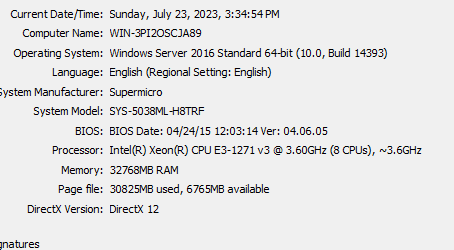
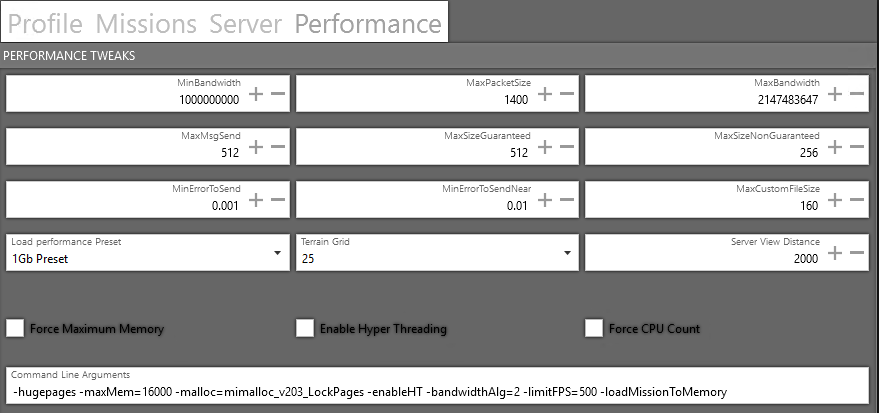
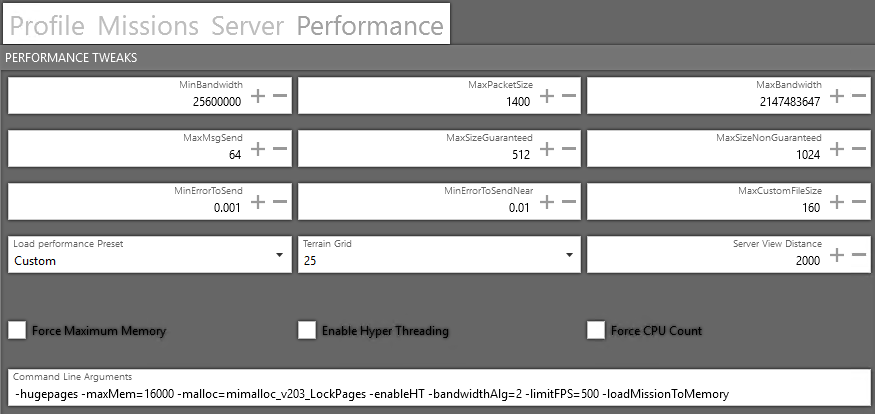
 vital hill
Trying to launch a headless client on lan and it get stuck at “player headless client connecting”
 grave crest
vital hill
Trying to launch a headless client on lan and it get stuck at “player headless c...
grave crest
vital hill
Trying to launch a headless client on lan and it get stuck at “player headless c...
same deal here....any word?
Do you need to add the port for the headlessclient[] array?
xxx.xxx.xxx.xxx:xxxx ???
heavy tiger
no
grave crest
mods on the HC need to match those on the server?
ruby wigeon
In general, yes. HC is just an Arma client.
vital hill
Mods match, tried with battleye on/off, configuring server.cfg, tried loading the hcs at briefing/mid-game, literally everything. Dunno why it only works on dedicated when it should also work on LAN. Couldn’t even get it working with Werthles’ headless mod.
 cedar basalt
So I'm currently setting up a couple of headless clients that are on the same box as the main server. I've managed to use absolute file paths to load a mod onto a client that is in the main servers directory.
Do I need to have the absolute file path in front of every mod in the command line or is there a way to just do it once?
ruby wigeon
Normally you use the server executable for the headless clients so if the mods are in that directory then you can just use relative paths.
You don't need a separate Arma install for HCs.
urban nymph
vital hill
Trying to launch a headless client on lan and it get stuck at “player headless c...
did you add the unrestricted bandwidth array to the hc? @grave crest
urban nymph
cedar basalt
So I'm currently setting up a couple of headless clients that are on the same bo...
you need to specify the absolute paths if the mods are located in a non-relative path but you can use relative paths to reach there for every mod. if its too long to type, use a par file
urban nymph
vital hill
Mods match, tried with battleye on/off, configuring server.cfg, tried loading th...
use a dedicated server with the relevant server.cfg stuff, the client host option is not customizable and you cant have no admins, the client host is always taking the admin slot
cedar basalt
ruby wigeon
You don't need a separate Arma install for HCs.
The box we've got has TCAdmin on it (not my choice)
I don't think I have the option to do it that way
grave crest
urban nymph
did you add the unrestricted bandwidth array to the hc? <@441440314050215946>
Is that the localclient[]?
We got one of the HCs to work but our second HC is now throwing an error “local variable in global space”
urban nymph
grave crest
Is that the localclient[]?
different array but needed
urban nymph
grave crest
We got one of the HCs to work but our second HC is now throwing an error “local ...
idk there sorry
i had issues with hcs getting constantly kicked
grave crest
Gotcha. I’ll take a closer look.
 civic glacier
Hi everyone, if anybody has good Arma2 OA headless client knowledge and has it in them to help out:
#end_of_life_arma message
I will shower you with riches 😛
 reef abyss
i think i'm having an issue with antistasi ultimate not detecting headless client
i already checked antistasi ultimate discord for issues with headless clients and the only post that has basically had any response on hc subject, was the one guy trying to get 10 hcs running, so thats why im asking here as well
its ran from the same machine
server.cfg:
headlessClients[]={127.0.0.1};
localClient[]={127.0.0.1};
start_hc.bat:
arma3server_x64.exe -client -connect=127.0.0.1 -port=2302 -password=xxxxxx -par=mods.file
this worked last time i used it so im not sure anymore
the hc is connected, but the mission says it doesnt detect hc clients
normal frost
reef abyss
i think i'm having an issue with antistasi ultimate not detecting headless clien...
I think the correct formatting in server.cfg is: headlessClients[]={"127.0.0.1"}; localClient[]={"127.0.0.1"};
Not sure if that fixes your issue, but worth a try I think
reef abyss
omg that could be it
ruby wigeon
Surprised it doesn't complain about that in the RPT.
reef abyss
nevermind, same issue, it slots in but doesnt get detected
reef abyss
ruby wigeon
Surprised it doesn't complain about that in the RPT.
actually surprised it slots in without issues
ruby wigeon
Slots in where?
reef abyss
in to the headless client slot in the mission
ruby wigeon
Then it's working. What makes you think it isn't?
reef abyss
played around for a bit, when there were quite a bit of ais fighting server nearly had an aunerysm, and seems like working HCs on antistasi will give you the number of ais which are on the hc
ruby wigeon
Perf doesn't mean a lot. Perf can be terrible with HCs too.
I don't know if Ultimate has an equivalent of the "AI load info" action somewhere.
reef abyss
it does have it on the map object
same as normal antistasi
i noticed server fps going way down with ais but it stabilises when everything's clear, ie. fast travelling somewhere else
ruby wigeon
well yes
reef abyss
update: tested it on other maps, seems like khe sanh is the only one refusing to detect hc for some reason or the hint telling you HC info is bugged
ruby wigeon
What does the HC info hint say?
reef abyss
no headless clients detected
ruby wigeon
I would guess that the HC is just being kicked out when the mission starts due to mod issues.
 urban adder
you could try using FASTER and seeing if possibly; that mod issue is the case. They have a pretty easy way of setting up the HC and ensuring mods are loaded for both Server and HC.

GitHub
Full rebuild of Flax's tool for installing and updating Arma 3 server with built in features for managing Steam Workshop mods. - GitHub - Foxlider/FASTER: Full rebuild of Flax's to...
reef abyss
both server and hc read mods from mods.file so i don't believe that's an issue
is this working now or not? i'm confused 😄
https://ibb.co/Z8KvRkD
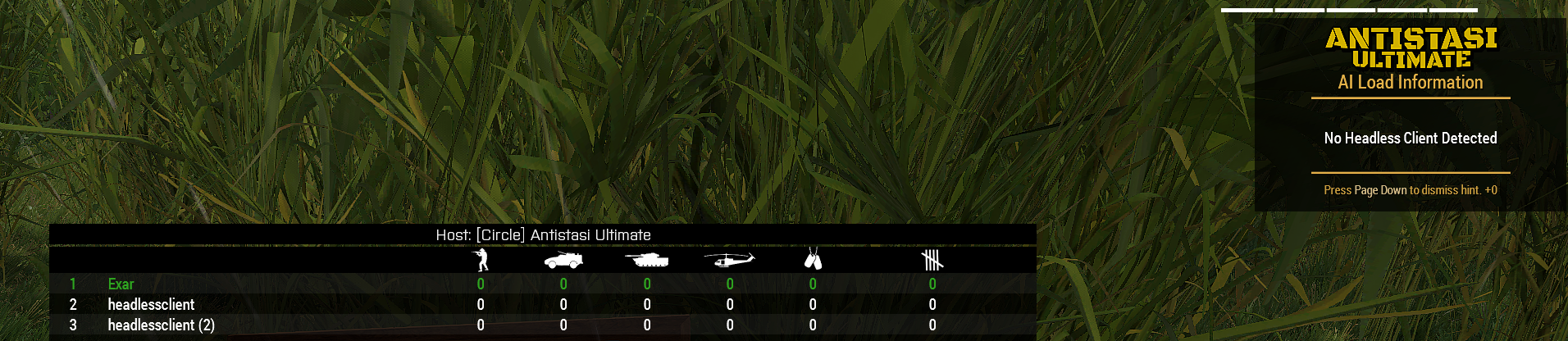 ruby wigeon
Not unless ultimate broke the message, which I doubt.
Check the RPT of the headless client.
reef abyss
Pastebin
Pastebin.com is the number one paste tool since 2002. Pastebin is a website where you can store text online for a set period of time.
aat this point i might be overlooking stuff
ruby wigeon
Well, it never runs initClient.
I don't know why not. Arma doesn't tell you anything.
Mods seem to be loading fine.
reef abyss
yeh i just noticed i should join first and let it load the mission, new rpt with initclient
https://pastebin.com/dr1KEJjm
Pastebin
Pastebin.com is the number one paste tool since 2002. Pastebin is a website where you can store text online for a set period of time.
ruby wigeon
You do also need to start or load a campaign.
reef abyss
yeah i forgot before posting that 1st rpt, but now it does init it, i see it on the map and in the lobby but the ai info is still giving no client detected
ruby wigeon
The RPT there hasn't finished. Should be the message "Server started, continuing with client init".
Otherwise it's still waiting for serverInitDone to be set.
reef abyss
thats for the headless client rpt?
ruby wigeon
Yes.
reef abyss
huh, it never does that line
ruby wigeon
Paste the server and client RPT for the same session.
reef abyss
should i close the session?
hc rpt
https://pastebin.com/FSc8KA2n
server rpt
https://pastebin.com/fAzVZ8GQ
Pastebin
Pastebin.com is the number one paste tool since 2002. Pastebin is a website where you can store text online for a set period of time.
Pastebin
Pastebin.com is the number one paste tool since 2002. Pastebin is a website where you can store text online for a set period of time.
ruby wigeon
I mean the normal client RPT, not the headless client.
ruby wigeon
Yours.
reef abyss
Pastebin
Pastebin.com is the number one paste tool since 2002. Pastebin is a website where you can store text online for a set period of time.
ruby wigeon
A3A_fnc_initClient | Server started continuing with client init
Yeah I don't know. The headless client is the same code up to that point. Maybe it's getting kicked for idling before that.
reef abyss
i just find it a bit weird it's gonna work on another map but not in sog dlc
ruby wigeon
Yeah, it doesn't look like a map specific issue because it's starting the client init fine.
It either never receives the serverInitDone (no plausible reason for that) or it gets kicked in the time that you're selecting the campaign.
I don't know why it'd get kicked in SOG maps but not non-SOG maps. I remember someone having a similar issue with Livonia though.
reef abyss
alright, thanks for your help understanding it 👍
reef abyss
well, update again, hcs are working on vanilla and mods, not cdlcs for some reason
fixed
ruby wigeon
Fixed how?
reef abyss
apparently i added arma licence to the hosting steam acc a long time ago, as i mostly hosted non dlc modded games and used that for hosting, symlinking workshop folder and having scripted the keys to copy to keys folder, forgot all about that
and since i ran it as a -client which didnt have cdlcs
 normal sigil
are there issues with headless clients breaking shit like drongos and liberation? I ask because my unit is having issues with those two types of missions players turn in to objects and can be moved by Zeus like any object, spawns don't work properly the list goes on, any ideas on what it may be or any thing at this point is a major help thank you.
ruby wigeon
Headless clients can certainly break missions, but that particular symptom doesn't seem likely. You can't change the locality of a player even if you wanted to.
normal sigil
What about with liberation not spawning opfor properly
Would that be a question for KP
ruby wigeon
I'm not sure what you mean by not spawning properly.
If a mission doesn't support headless clients then it'll spawn units on the server. Then at some point in the future. whatever headless client mod you have may change their locality, which will prevent some commands from working.
normal sigil
Okay
normal sigil
ruby wigeon
I'm not sure what you mean by not spawning properly.
it won't spawn the opfor zones once there are multiple zones loaded in
 whole grotto
normal sigil
it won't spawn the opfor zones once there are multiple zones loaded in
whole grotto
normal sigil
it won't spawn the opfor zones once there are multiple zones loaded in
thats just a parameter
it wont spawn anything if 5 zones are active by default
 stone steeple
I'm entirely new to this, my unit's server uses Faster and i've enabled headless client on a Hearts & minds mission, it's running at 14gb of ram (16 total), and 20~30% CPU, and i notice that when i run the server WITH the hc, the units spawned on the map are de-syncing, they rubber-band a-lot, any idea why
urban nymph
that usually means cpu high
i had like 30% cpu usage with a lot of desync without hc on the yaab multiplayer version that tests hc
ruby wigeon
14GB for server + HC out of 16GB physical?
stone steeple
ruby wigeon
14GB for server + HC out of 16GB physical?
yes, with a Heart & minds mission, H&M is a liberation like mission
ruby wigeon
That's too much. You don't want the server and HC to be fighting over the RAM. Set -maxmem on both to 5 or 6GB maybe.
stone steeple
I'm using Faster, would you know where i can do that? (for HC i mean)
ruby wigeon
I don't know how HCs work on Faster. Maybe they just use the same settings as the server.
"Force maximum memory" in the performance tab is probably the right one. Or just add -maxmem=5000 to the command line underneath.
Faster has a discord, IIRC. You could ask there.
stone steeple
k ty
urban nymph
ruby wigeon
That's too much. You don't want the server and HC to be fighting over the RAM. S...
alternatively, run the hc on a separate system lol
urban nymph
ruby wigeon
That's too much. You don't want the server and HC to be fighting over the RAM. S...
that wont really limit things because i've observed the game going over that, the limit is like a treshold but its going to go above if the data overflows that
ruby wigeon
IME it fights hard to stay below it, to the point of dumpstering the frame rate.
but it shouldn't be doing that at 5-6GB with most modsets. Just chucking out data that's not in current use.
urban nymph
well, in my experience it just didnt care and pushed past it
especially the client
didnt try hc that much
but it did well at staying at like 6gb max-ish
 hoary ocean
Hello Im just looking for general knowledge.
It was my understanding that headless clients were useful due to the lack of multi-threading, with the addition of that are headless clients still as useful?
ruby wigeon
Well, server performance improvements in general make headless clients less useful. And there were a lot of server performance improvements even before the recent spree.
The limiting factor in PvE scenarios is often client rather than server perf, and in that case there's little point in headless clients.
 tawdry ruin
I categorize it in "Not worth the hassle unless you intend on simultaneously simulating LOTS and LOTS of AI"
ruby wigeon
The thing is, there's a lot of load on clients from adding AIs.
And headless clients don't reduce that.
urban nymph
the idea/point of hc is for missions where high numbers of server/mission spawned ai is expected
it needs configuration and its meant to offload the server from ai calculations, note that this does not cover clients handling ai calcs
so, in most cases it's not relevant or it's useless because of the lack of setup
ruby wigeon
It's mostly useful in cases where players are sufficiently spread out that a single player is only within draw distance of a fraction of the AIs. Or when the server hardware sucks.
urban nymph
right
hoary ocean
Alright thank you
urban juniper
ppEffectCreate is bugged. It's supposed to return the pp effect ID and -1 if it fails.
But on a non dedi non interface machine it returns nothing.
 misty iris
hoary ocean
Alright thank you
misty iris
hoary ocean
Alright thank you
It's been extremely impactful for our exile server where there are hundreds of AI on the map at any given time but they're spread out throughout the map. It also does a good job of isolating load spikes and most impactfully can be restarted/updated on the fly if designed properly.
We run one headless client that handles the zombie spawn/cleanup/brains.
One that handles our mission system spawn/cleanup/brains.
And one that handles our patrolling AI spawn/cleanup/brains.
This helps isolate critical issues as well. For example, there was a rare crash in the mission system during development. Because the entire mission system was on the headless client, it didn't affect the rest of the server at all and only the mission headless client crashed (to be restarted a few minutes later without restarting the server or impacting the other two headless systems or the players). I think they're less valuable in tightly packed scenarios though since they can lead to some whacky quirks.
 urban stream
hmmm it's been a while since I've tried that.. are you using 127.0.0.1 as the IP? You are using dedi package to run the server (instead of 'arma3.exe -server')?
 junior grotto
Hey there, have a few questions in regards to the headless client, my headless client isn't pulling over any ai if I would just do this all via vanilla methods, but if I use any mods to pull over AI, like ace headless, zulu headless client, etc. it would be pulling over too many AI (every single AI actually). Any ideas on how to prevent this? Am I missing something?
ruby wigeon
Headless client mods should have settings for that.
Also, never run more than one of them.
junior grotto
I only ran 1 at a time, do you know of any headless client mods that do that? Tried ace headless, zulu headless client, and werthles headless, and they all just kept pulling all the ai onto the headless client
ruby wigeon
I'm pretty sure ZHC has settings? I don't use them though. Antistasi has its own headless client management.
urban nymph
junior grotto
I only ran 1 at a time, do you know of any headless client mods that do that? Tr...
that's expected, no?
junior grotto
urban nymph
that's expected, no?
Maybe I'm misunderstanding how the HC works, but I thought the HC is supposed to stop itself from pulling more AI over if it hits a certain limit
junior grotto
ruby wigeon
I'm pretty sure ZHC has settings? I don't use them though. Antistasi has its own...
I didn't see any kind of limiter or something like that unfortunately, I'll have to double check :/
urban nymph
junior grotto
Maybe I'm misunderstanding how the HC works, but I thought the HC is supposed to...
zeus entities puts it on server/ clients instead i think
junior grotto
urban nymph
zeus entities puts it on server/ clients instead i think
Yeah but then a mod, like Zulu Headless Client, or like the ACE Headless stuff could move it to the headless client
urban nymph
okay
 trim socket
commy2 make finally persistant account on Discord, anyway - you need to use hasInterface IF check
 zealous panther
oh no we have 8 commy2s 😄
timid tangle
ruby wigeon
Also, never run more than one of them.
hi, any reason for this? our dedicated server has 64gb ram so we use 2/3 headless on operations and lib
around 150-300 total ai spawn at a given time
ruby wigeon
I meant never run more than one headless client mod.
but for 150-300 total AI you likely won't benefit from more than one HC either.
 cloud comet
Do we have control on which HC instance our scripts will run? (I never considered running more than one sry)
slate sail
cloud comet
Do we have control on which HC instance our scripts will run? (I never considere...
scripting an HC is kinnda a mess
bc in case you run a script on where the unit is local, when its tranfered, the script will run on the original machine
So to chose where to execute that script, you will need to target an specific HC
afaik by default units are created and initializated on server, and the tranfered.
fixing that, maybe solve that issue
trim socket
nope, if you did all correctly for HC then atm no idea
 gusty acorn
one more time
Failed to update BattlEye Service. The master server is offline or unreachable
 ebon flax
Is anyone able to help with this scripting HC issue? I have two headless client slots in a mission, playable, the server is showing the headless client connecting and the HC is showing in its own window as connected too. But when i run on the server```sqf
_allplayers = allPlayers;
the array never contains the HC. But I thought it would based on this post??
https://community.bistudio.com/wiki/allPlayers
```sqf
        waitUntil {
            sleep 1;
            _allplayers = allPlayers;
            diag_log format ["All Players: %1", _allplayers];
            false;
        };```
I have set up a loop on the server but no HC ever populates the server? Any ideas?Do the HC slots have a variable name?
ebon flax
yea hc1 and hc2
ebon flax
ruby wigeon
They remain objNull?
thank you, made me retrace everything I did, turns out i didnt copy over the current mission PBO with the new HC var names. Silly mistake 😅
 tame glen
Do you know if the profile the HC is connecting with has battleLicense = 1; in it?
Actually I'm not sure if that is required anymore. Have you tried it without -profiles and -name?
 wintry herald
Is steam client required for HC?
tame glen
@wintry herald No, it should be fine with a steamcmd installation
wintry herald
I was just wondering as the only time I've seen steam ticket check failed is on regular clients and the work around is to run steam as admin
tame glen
Yeah it's likely an issue with permissions and downloading the correct version of BE
I can think of atleast 3 installations I've done with only steamcmd and headless clients
I don't remember having any issues with steam ticket check failed
tame glen
So this is happening on local host?
wintry herald
It sounds liek they've setup the HC wrong, steam ticket check isn't related to BE or sigs
as regular clients can re-open steam as admin and it will work fine
tame glen
Could you paste the server and headless client start parameters, as well as the server cfg?
You can pastebin it or PM it to me if you don't want to spam this channel
tame glen
Well localClient[] = {"127.0.0.1"}; should be localClient[]={127.0.0.1}; but I don't think that's your issue
So with that setup is the issue that the headless client is getting kicked for steam ticket check failed?
tame glen
Do you have the -par available in the start parameters?
tame glen
-par=<filename> Command to read startup parameters from a file. For more details see Startup parameters config file
I had an issue before when using -ip in the server's start parameters several months ago when trying to connect a HC
Try using your current server start parameters but change the headless client to the following .\arma3server.exe" "-par=whateveryourdrive\par.cfg"
And create a par.cfg with
-client -connect=1.2.3.4.5:2302
Where 1.2.3.4.5 is your IP and 2302 would be the same port you were using for -port=
tame glen
and by .\arma3server.exe" I meant whatever you used before 😛
timid tangle
is the 8KM range of Headless client still in effect?
i dont see it in the wiki
 sand abyss
I have people saying that Headlessclients are open to major security vulnerabilities for the computers running them, is this true? I believe it is a bit ridiculous.
ruby wigeon
They don't even open ports. Security risks should be the same as running Arma in general and connecting to the same servers.
sand abyss
That's what I was trying to explain to someone, but he left my group over us trying to implement headless clients
They said "Headless clients aren't secure and its a huge security vulnerability" but didn't provide any evidence of that haha.
But tons of servers use them and I've never heard of an issue over the 12 years I've been playing Arma 3.
misty iris
timid tangle
is the 8KM range of Headless client still in effect?
i dont see it in the wiki
Not sure about the 8km range anymore but the viewDistance settings on the headless definitely matter. AI are completely blind outside of the headless clients view distance and it also affects dynamicSimulation ranges
 open junco
Entry level guy, here.
Do headless clients serve any purpose on self hosted (local?) Servers.
Do they require any custom setup?
ruby wigeon
I think last time I tried, headless clients refused to connect to a localhost server.
In general you're better off running a local DS. Better performance, basically the same setup.
If HCs did connect then they'd have some benefit.
open junco
The problem with dedi's (afaik) is that I have a dynamic IP and it changes every month. Thus, it causes connection refusals and I generally cannot do anything about it
Xfinity does not offer statics and I cannot afford to switch providers
ruby wigeon
No different from localhost.
open junco
Separate machine dedi, or?
ruby wigeon
Same machine if you like. There's usually plenty of spare CPU on anything vaguely recent.
open junco
I have 12 cores I think I'm set, I think I just misunderstand lol
A local dedicated server is still gonna suffer from my dynamic ip
ruby wigeon
No more than anything else does. You just have to keep your friends updated with which IP you're on.
open junco
It is possible for me to setup a machine just for dedicated work, I have the spare parts and I can snag my old case and monitor. Its just my IP will screw me over every time
open junco
ruby wigeon
No more than anything else does. You just have to keep your friends updated with...
Aight. I might be making a mountain out of a molehill here, then
ruby wigeon
The dedicated server config doesn't know or care what your external IP is.
open junco
I swear its more trouble than its worth but I could just be thinking of something else
I might be thinking of DayZ. Self hosting for that game was a nightmare
ruby wigeon
Oh, I'm not saying it's easy to set up an Arma 3 DS. It's just mostly the same process as a headless client.
open junco
Ah
ruby wigeon
In fact it's by the far the hardest server setup I've seen :P
open junco
...bro 😭
Any good guides or videos?
Gonna pre-knowledge before I even get the pc together
 scarlet dune

GitHub
Full rebuild of Flax's tool for installing and updating Arma 3 server with built in features for managing Steam Workshop mods. - GitHub - Foxlider/FASTER: Full rebuild of Flax's to...
scarlet dune
open junco
Any good guides or videos?
Go to the wiki section on github if you are reading guy or you can search for videos on YouTube there are plenty. It literally takes 10 minutes with faster to set up a server with HCs and everything.
scarlet dune
open junco
The problem with dedi's (afaik) is that I have a dynamic IP and it changes every...
The cheapest domain names cost 3-5 dollars per year on cloudflare. At least you are not behind cgnat)
open junco
Sweet
 pseudo shale
yeah, I just used arma.<domainialreadyowned>.co.uk for arma/TS - works without issue and means if I ever move the dedi somewhere else it's a DNS record update
 thorny siren
 ornate bobcat
Hi, I run my own little local server on my machine. I don't know much about ArmA server stuff, so I went here in search for some help on using headless clients. I made a mission using ALiVE modules and as far as some forum posts lead me to believe, only CQB units can run on HCs. So I tested this by letting the module spawn a lot of CQB units which worked. Then I manually closed all my HCs so they would disconnect from the server. However, the units were still all there, so I could only assume they did not in fact run on the HCs. What can I do now or was this even a good method of checking whether the units ran on the HCs?
ruby wigeon
No, units are moved back to the server on disconnection.
ornate bobcat
ruby wigeon
No, units are moved back to the server on disconnection.
oh I see thank you
ruby wigeon
If you want to know where units are local, you can use the owner command on them from the server.
 compact vector
is there any reason to use a HeadlessClient if you only have 1 PC,
or em i thinking in the wrong way
ruby wigeon
You mean for solo play?
compact vector
well i guess i don't understand how a HC can Help
if you only have 1 PC
wouldnt the same PC still do all the work anyway
and solo play do you mean SP
is a HC like a spot a nother players PC can join and help in all the spawning work for the mission
im not sure
may be some one can give me a shot explanation
a HC to me seems like a sub folder or something like that
i know i must be incorrect
pseudo shale
HC's offload the AI processing to a separate process (taking the weight off the server process or the zeus PC) - they help even on one machine because it frees up the server to do server things
since modern machines typically have a lot of cores, there is still benefit to running them on a dedicated server where you want to run a lot more AI without grinding the server process into the ground
they do however come with some tradeoffs (more of an issue for mod authors or people who do heavily scripted zeus stuff) in that you have to be very careful about locality (where the AI is actually running, the Server, HC, Zeus PC) since some stuff requires it to be local to where it's actually running - ACE makes it more pleasant but it's still a bunch of gotcha's 🙂
ruby wigeon
The only reason HCs make any sense is that A3 struggles to multithread a lot of its workload.
 tough gyro
Hello There! I am having a wierd problem trying to setup an HC, when it tries to connect to my server, it gets rejected with steam authentication failed. I couldn't find any info about this on the wiki and the internet, so I am asking this here.
I am running FASTER on my dedicated server with this HC config:
// HEADLESS CLIENT
headlessClients[] =  {
    "127.0.0.1"
};
localClient[] =  {
    "127.0.0.1"
};```What command line does FASTER use for the HC startup?
tough gyro
ruby wigeon
What command line does FASTER use for the HC startup?
Uhh, honestly, I have no clue, is it something I can look up somewhere?
ruby wigeon
Top of the server RPT, if nowhere else.
tough gyro
ruby wigeon
Top of the server RPT, if nowhere else.
"G:\arma3\arma3serverprofiling_x64.exe" -port=2302 "-config=G:\arma3\Servers\42\server_config.cfg" "-cfg=G:\arma3\Servers\42\server_basic.cfg" "-profiles=G:\arma3\Servers\42" -name=TEST_MISSION_HC" -enableHT -netlog
If this is what you are asking for... I am not quite sure.
ruby wigeon
ah sorry, headless client RPT for this.
tough gyro
These seem to be the only RPT files I have in the server folder.
arma3serverprofiling_x64_[date].rpt
mpMessageDetailsServer-[date].txt
Couldn't send a screenshot here.
tough gyro
ruby wigeon
ah sorry, headless client RPT for this.
Oh! Found it nevermind.
It's a separate folder.
G:\arma3\arma3serverprofiling_x64.exe" -client -connect=127.0.0.1 -password=**** "-profiles=G:\arma3\Servers\42_hc1" -nosound -port=2302 "-mod=rf;ef;" -enableHT
1:07:32 SteamAPI initialization failed. Steam features won't be accessible!
ruby wigeon
I don't think that's an issue itself.
Are you using a mission with known-working headless client setup, or your own?
tough gyro
My own, I don't think I have a mission selected on the server right now.
Is that a problem?
ruby wigeon
Where do you see "steam authentication failed"?
tough gyro
ruby wigeon
Where do you see "steam authentication failed"?
In the dedicated server log window when the HC is trying to connect, and in the HC client window, after a failed connect attempt.
ruby wigeon
Hmm. What if you use the perf exe rather than profiling?
tough gyro
ruby wigeon
Hmm. What if you use the perf exe rather than profiling?
Sorry? What perf exe exactly?
ruby wigeon
It's using arma3serverprofiling_x64.exe rather than arma3server_x64
I can't replicate locally anyway, so it's probably not that. Although perf branch is missing some logging which is odd.
tough gyro
I can try to use the regular exe, just a moment.
ruby wigeon
With steam unloaded I get the SteamAPI initialization failed on both server and HC but it connects fine.
tough gyro
The thing is, I don't have Steam loaded, but the server is not getting the SteamAPI init failed, but the HC does?
I used the regular exe and it managed to connect??....
Wierd profiling branch shenanigans?
ruby wigeon
I dunno, works here.
The server exes are generally not supposed to care about steam authentication.
When you say "regular exe" do you mean stable branch or arma3server_x64 on the profiling branch?
tough gyro
Okay, sorry, I just ran a server update, should have thought of that earlier, and it started working on profiling as well.
Pretty sure steam just doesn't allow to connect to older versions.
tough gyro
ruby wigeon
When you say "regular exe" do you mean stable branch or arma3server_x64 on the p...
No, I have two instances of the server, one with the profiling branch, and the other with the regular branch, the regular was up to date whilst profiling was not...
I guess that was the problem.
Thank you for your help!
ruby wigeon
How out-of-date are we talking?
tough gyro
A week, maybe a few days.
ruby wigeon
I dunno, that seems super weird.
tough gyro
I think I last updated the profiling branch on april 17th?
Well it definately downloaded something though.
ruby wigeon
Mine's still on the one from April 10th.
tough gyro
Huh.
ruby wigeon
Generally you can swap 2.18 versions around fine. Some people are still running profiling from months back, because the recent ones are a bit bleeding-edge.
tough gyro
When I ran it it downloaded these:
Please don't quit this page or cancel the download
This might take a while...
Checking Shared Content...
Checking Executables...
Checking Arma 3 Server Creator DLC - RF...
Checking Arma 3 Server Creator DLC - EF...
Connected !

Fetching informations of app 233780, depot 233781 from Steam (1/5)...
OK.
Downloading 1007 files with total size of    4.86 GB...
Verifying Install...
Download completed
Progress 100.00%
Skipping Download...

Fetching informations of app 233780, depot 233782 from Steam (2/5)...
OK.
File verified : arma3server_x64.exe (  34.25 MB)
Downloading 34 files with total size of  167.04 MB...
Verifying Install...
File verified : steam_api64.dll ( 291.85 KB)
File verified : steamclient64.dll (  21.59 MB)
File verified : tier0_s64.dll ( 394.35 KB)
File verified : vstdlib_s64.dll ( 691.85 KB)
Verification completed, 5 files queued for download. (59963176 bytes)
Download completed
Progress 100.00%

Fetching informations of app 233780, depot 233784 from Steam (3/5)...
OK.
File verified : steamclient64.dll (  22.46 MB)
Downloading 6 files with total size of   85.24 MB...
Verifying Install...
File verified : arma3server_x64.exe (  30.53 MB)
File verified : vstdlib_s64.dll ( 458.09 KB)
File verified : steam_api64.dll ( 312.09 KB)
File verified : tier0_s64.dll ( 412.59 KB)
Verification completed, 5 files queued for download. (56771072 bytes)
Download completed
Progress 100.00%

Fetching informations of app 233780, depot 233799 from Steam (4/5)...
OK.
Downloading 36 files with total size of  435.25 MB...
Verifying Install...
Verification completed, 0 files queued for download. (0 bytes)
Download completed
Skipping Download...

Fetching informations of app 233780, depot 233798 from Steam (5/5)...
OK.
Downloading 70 files with total size of  301.31 MB...
Verifying Install...
Verification completed, 0 files queued for download. (0 bytes)
Download completed
Skipping Download...
Done in 0h 0m 56s 119ms
Maybe the SteamClient got corrupted or something?
ruby wigeon
That one looks like it's downloading two different exe versions from different depots.
Which is probably someone's screwup, but I'm not sure whose :P
 small gulch
Hey everyone! I just recently got a 2nd pc and want to get a headless client on my server that I rent. Is there an easy way to do this without needing a bunch of stuff? I have arma on my 2nd pc and all the mods downloaded
ruby wigeon
It's probably not a very good idea unless you have very low latency to your server.
But in general you can just make a command line like arma3server_x64.exe -client -connect=my.ser.ver.ip -port=2302 -profiles="C:\serverprofiles" -mod="mod1;mod2;mod3"
You can copy the mod part from the client RPT.
Server needs to have the headless client's external IP added to the server.cfg, which will be problematic if you don't have a static IP.
small gulch
Hmm okay Ill try it
small gulch
okay so I got the headless to join the server but now its saying I dont have the mods,
"D:\SteamLibrary\steamapps\common\Arma 3\arma3server.exe" -client -connect=69.10.49.19:2487 mod="@583496184;@1926513010;@450814997;@3020755032;@843577117;@843425103;@843632231;@843593391;@3407948300;@3407970596;@497660133;@639837898;@2565965887;@2257686620;@837729515;@825179978;@3460981677;@3346427969;@2231150238;@3333302397;@3157163173;@1779063631;@333310405;@1208517358;@667454606;
Thats the code I tried to use, so im unsure why it is doin this
 fickle girder
Missing a quote at the end of the mod list if you copied everything.
small gulch
Ohhhh shoot you’re right, thank you I’ll try it rn
small gulch
Still getting the same error in which its saying I still need CUP_Buildings_config
ruby wigeon
Also missing the - in -mod
And obviously we have no idea whether any of those folder names are valid.
small gulch
They come straight from the Arma server's mod file
and I put the - in after I got rid of the "
oh wait
small gulch
C:\Users\legoa>"D:\SteamLibrary\steamapps\common\Arma 3\arma3server.exe" -client -connect=69.10.49.19:2487 -mod="@583496184;@1926513010;@450814997;@3020755032;@843577117;@843425103;@843632231;@843593391;@3407948300;@3407970596;@497660133;@639837898;@2565965887;@2257686620;@837729515;@825179978;@3460981677;@3346427969;@2231150238;@3333302397;@3157163173;@1779063631;@333310405;@1208517358;@667454606;"
That is the exact code I put in now, should I be taking the mods from the server mod config and just paste them in like this?
ruby wigeon
You said the server wasn't on the same machine, so it won't necessarily have the same mod folders.
I said to take the mod folders from the client RPT.
 small pewter
Is running Headless Client worth it on a same machine where the server runs? Consider this machine to not be very powerful. Won't it have negative impact on the server?
pseudo shale
small pewter
Is running Headless Client worth it on a same machine where the server runs? Con...
generally yes if you have enough cores on the machine and those other cores aren't slammed doing something else - it's not just about raw processing power so much as offloading stuff from the core server but the only way to know if it'll work for your specific machine really is to try it 🙂
ruby wigeon
It's both a negative and positive impact. Can't say which is going to be stronger without more information.
small pewter
ruby wigeon
It's both a negative and positive impact. Can't say which is going to be stronge...
Running sometimes more than 400 AI (mostly agents, but some units, all of them zombies) with custom pathfinding and other logic scripts.
Currently we're offloading all that processing to clients who connect to the server, instead of running it on the server machine.
Will soon be switching server machine to this or similar: Intel Xeon E5-1650v2 - 6c/12t - 3.5GHz/3.9GHz, 32 gb ram
 sand timber
small pewter
Running sometimes more than 400 AI (mostly agents, but some units, all of them z...
sand timber
small pewter
Running sometimes more than 400 AI (mostly agents, but some units, all of them z...
Don't use Xeon for arma, use servers with desktop gaming CPU's
pseudo shale
sand timber
Don't use Xeon for arma, use servers with desktop gaming CPU's
agreed, I use a 13500 - it works very well (til the X3D's/latest Zens arma really liked Intel for the freq/IPC) - Hetzner do a 13500 (EX44) that is basically ideal for arma (64GB of RAM and dual nvme SSD's)
small pewter
Will try i7-7700K, not many threads but may just be enough for 1 dedi+HC
small pewter
pseudo shale
agreed, I use a 13500 - it works very well (til the X3D's/latest Zens arma reall...
i5-13500 is 2.5 ghz though, which is considered low for arma
pseudo shale
small pewter
i5-13500 is 2.5 ghz though, which is considered low for arma
that's the base freq, they boost to 4.8 on the cores that are busy
 supple pagoda
hey just to try and well confirm
how the heck am i ment to use a headless client
its just you make two slots for them let them join
and thats it right?
ruby wigeon
Uh, there are a few steps, but that is one of them. Plonk a couple of headless client logic objects in the mission. Giving them variable names is also required for some reason, IIRC.
supple pagoda
variable names? which one (im not the mission maker im just the host)
ruby wigeon
I don't think it matters. Just as long as they have a name.
supple pagoda
oki just making sure we are actually using them lol
some zues have started making alot bigger ops to run and just wanna make sure they wont lag my ryzen 9
ruby wigeon
Just because they're connected doesn't mean they're being used.
urban nymph
supple pagoda
oki just making sure we are actually using them lol
some zues have started makin...
hc doesn't cover zeus spawned units iirc
 proud fossil
urban nymph
hc doesn't cover zeus spawned units iirc
proud fossil
urban nymph
hc doesn't cover zeus spawned units iirc
Yes.
Unless you transfer locality after the units have been created, which can cause issues on its own, but there are multiple automated ways of doing it.
Or you spawn units indirectly such as using a zeus modules spawns in units directly on HC's, which saves you on having to transfer locality, but then you can't place those units normally anymore.
urban nymph
annoying, hopefully it could be looked at by dedmen or something
pseudo shale
supple pagoda
variable names? which one (im not the mission maker im just the host)
I use hc1, hc2, hc3 (and hc4 if needed)
If you use ace and enable it you can use it's headless handling logic - it works pretty well (and has a nice escape hatch for when you don't want to transfer locality) - I use that on my zeus stuff to transfer all civilians to the HC's and selectively transfer opfor units (some stuff it makes more sense to run on my machine as the zeus since my desktop is faster than our server) - it's pretty flexibile that in regard, if you don't want to use ace then werthless still works (and has a nice debug view to verify that things are getting transferred in an out as you expect)
runic cobalt
We use https://steamcommunity.com/sharedfiles/filedetails/?id=2450921295 which handles the AI offloading to the HC's pretty well (might need to play with the settings a bit), and seems to be more stable than the ACE variant
 fading ether
hello tested headless clients and made the server actually run worse
ruby wigeon
happens.
supple pagoda
arma moment
 elder sail
for headless clients to run apex, im guessing we will need to buy the exspansion for it
 quick yarrow
^good question
 subtle horizon
anyone here running profiling branch with FASTER having HC issues?
Worked fine last week buttt
Now it's giving issues between Steam Authen. fails and stuck on connecting
ruby wigeon
I'm running profiling branch without FASTER and headless clients connect fine. I am running the steam client on this machine as well though.
Just checked, works fine without steam running too.
cunning sage
subtle horizon
Now it's giving issues between Steam Authen. fails and stuck on connecting
if you installed arma 3 server via faster's steamcmd on your gaming pc you need to restart your steam client, steamcmd will kill the desktop client connection
subtle horizon
Oh nah I have it through a bare metal VPS
So now I’m wondering if maybe the machine as a whole needs a quick reboot which I can do from my phone thankfully
ruby wigeon
Do you have the RPT for the headless client, out of interest?