#arma3_scripting
1 messages · Page 179 of 1
 warm fern
Well I guess I am not understanding your suggestion? I am still not sure what I have done wrong, and why it is not being seen by all connected devices. Unless you are saying it is because I am not using an eventHandler that is causing it to fail but I don't see how that would be the case.
yes
 pallid palm
well it looks like your not exec it on the DED server
it seems to me that your exec it on the player
warm fern
Hmm okay that could def be a possibility
pallid palm
im not the best in here but ( i know a little about love ) he he
warm fern
If remoteExec was run on a Player's machine, would it not send that to all other machine as well, or only send it to the server?
 hallow mortar
warm fern
If `remoteExec` was run on a Player's machine, would it not send that to all oth...
hallow mortar
warm fern
If `remoteExec` was run on a Player's machine, would it not send that to all oth...
remoteExec broadcasts to all machines by default. It has a parameter to control which machines to target.
pallid palm
ahh yes
warm fern
Yeah I agree. I can see that would be the right thing to do, but as I am editing the KP-Lib mission, I am not sure which part is server versus player. They do have a file structure of scripts, which are listed as server,client, and shared. The portion of this code is under shared.
pallid palm
if (isDedicated) then {
    // run on dedicated server only
};
if (isServer) then {
    // run on dedicated server or player host
};
if (hasInterface) then {
    // run on all player clients incl player host
};
You probably don't want that true in your remoteExec because that is the JIP queue parameter. That controls whether the remoteExec'd command is added to a queue to be executed by any machine that joins in progress. Your systemChat messages only matter at the time they happen, so you don't want to make JIP clients display them all when they join.
warm fern
pallid palm
```sqf
if (isDedicated) then {
// run on dedicated server only
};
if (isServ...
file does have if (isServer) then {... at the top
warm fern
hallow mortar
You probably don't want that `true` in your `remoteExec` because that is the JIP...
Do you think that is the cause or just bad practice? I'll test it either way but, just curious
hallow mortar
warm fern
Do you think that is the cause or just bad practice? I'll test it either way but...
It wouldn't cause the messages to not be displayed on current clients. It would cause them to all be played at once for any client that joins later.
I don't
 south swan
wild guess would be: if that's the kill_manager.sqf script of KP-Liberation framework - it gets spawn-ed in the MPKilled event handler of a unit. And you have a code path that doesn't remoteExec ["systemChat" when side _unit is not equal to side _killer. And side _unit is highly likely to be CIV, because all dead bodies report that 
pallid palm
oh wow
hallow mortar
If this is an MPKilled EH then you shouldn't need remoteExec, because those already fire on every machine
Oh no wait, you have that isServer check
south swan
it's inside the if (isServer) then{ block
providing support on partial reports is fun 😄
pallid palm
lol
south swan
if that's the reported side problem - it can be circumvented by using side group _unit instead of straight side _unit sqf killed_Group = side group _unit; killer_group = side group _killer;
warm fern
south swan
wild guess would be: if that's the `kill_manager.sqf` script of KP-Liberation fr...
*It is infact the kill_manager.sqf of KP_LIB
hm maybe but when I tested on my client, i was running ace and it still reported me correctly when killed by enemy ai-opfor
I hope you understood what you said.
I suppose I could put a debug message in that section and see if thats the case.
Actually I've just remembered, I checked the log files and it DID report player kills correctly so, I think that means it should not be that?
pallid palm
oh boy omg
man was i off holy crap lol
i guess i better stick to Golf instead of sqf lol
warm fern
south swan
providing support on partial reports is fun 😄
Are you saying I did not provide enough info? I tried to be verbose as I can but I am ignorant to what people need to know lol. Am quite new to arma scripting.
Also please let me know if you read my last message, I (clearly) could be wrong but I believe that by way of the line [format ["Player: %1 killed by friendly Player: %2", name _unit, name _killer], "PLAYER"] call KPLIB_fnc_log; being executed correctly, that [format ["%1 was killed by %2", name _unit, name _killer]] remoteExec ["systemChat", 0, true]; shouldve been accessed as well.
pallid palm
artemoz has it
warm fern
Which part?
pallid palm
killed_Group = side group _unit;
killer_group = side group _killer;
warm fern
Hm okay and that is to ensure a player never gets reported as civ instead of Blu/Op?
Becuase their group should never become civ even if they are downed?
south swan
if that's the KPLIB_fnc_log call that got executed - then the remoteExec in the next line should be executed as well, yes
warm fern
south swan
if that's the KPLIB_fnc_log call that got executed - then the remoteExec in the ...
if that the case, then I changing it to
killed_Group = side group _unit;
killer_group = side group _killer;
would not help, correct?
I seems like it has to be an issue with how I am calling systemChat, then. :/
Thank you all for your input btw, I appreciate it. I am stumped. Let me know if you just want me to try a thing real quick and I can 🤷♂️ lol
south swan
{
_x addMPEventHandler ["MPKilled", {
if (!isServer) exitWith {};
[str _this] remoteExec ["systemChat", 0];
}];
} forEach allUnits;``` prints every time when i run on dedi I made the changes you and Nikko suggested and it seems to be working now lol

I can't say I perfectly understand why it was failing before but I will get there I suppose
Again, thank you for your guys' input 🫶
Or maybe not? It was working but now its not. 😬
I think I will step away from this problem for a bit 😆 😭
 stable dune
warm fern
I made the changes you and Nikko suggested and it *seems* to be working now lol
stable dune
warm fern
I made the changes you and Nikko suggested and it *seems* to be working now lol
On MPKilled eh?
you dont need use global vars.
// FROM wiki: Use objectParent instead of vehicle to get a soldier's vehicle. Apart from being faster it is also more reliable, as when used on dead crew, vehicle command may surprisingly return the unit itself.
if (!isNull objectParent _unit)  then {
    moveOut _unit
};
//Dont need use global vars
private _sideUnit = side group _unit;
private _sideKiller = side group _killed;
if (_sideUnit == _sideKiller) then {
  ...
..
how it doenst work? any error or just none result?
 iron arch
maybe BIS_fnc_moduleProjectile / BIS_fnc_moduleCreateProjectile ?
stable dune
Hola,
If I want to dig my object underground,
Is the only way to create a simple object of it?
If I just set position under ground, -x z value it pops back to ground lvl.
I know with a simple object it works but just thought if I could have some value/ event to disable behavior from non simple object
 dusk gust
Might be able to just disable simulation on the object
stable dune
I will try that, thanks 🙏
 buoyant hound
Do i can use keyframe animation to make a suicide attack?
Will triggers work as normally?
Like this and obj name in this list then set dammage vehicle?
I need it to capture intro
 dire crow
can someone help me
 winter rose
yes
dire crow
winter rose
yes
when i place down the ezm module in offical arma server it dosent work
winter rose
ok
 dusty steppe
dire crow
when i place down the ezm module in offical arma server it dosent work
dusty steppe
dire crow
when i place down the ezm module in offical arma server it dosent work
I don't think it works on all official zeus servers,
Only on the ones that allow all scripts, not certain where there is an up to date list of those
dire crow
dusty steppe
I don't think it works on all official zeus servers,
Only on the ones that allo...
even the ones that allow scripts it dont work on
other wise i wouldnt be able to place the module
dusty steppe
Hmm
Don't know then
dire crow
i place it and it dosent do anything
 open hollow
hello, someone did its own repawnTemplate?
i want to do one, but i dont know how to test it
( im ussing ace and CBA)
But i want to enter in a hosted mission from editor and use respawn and test it there.
But every time i do it is sends me back since all players died prompt pops
oh... i need to use the respaw ="base"; param in decription.ext
 halcyon creek
Having a weird one here, trying to get a sideChat conversation (that appears on all server players) within a trigger, but for whatever reason only one side of the conversation is working, the "van driver" isnt saying anything only the one side is
if (isServer) then {
null = [] spawn {
sleep 1;
vandriver sideChat "I wasnt expecting any fresh faces off the supply chopper";
sleep 5;
uksf1 sideChat "How so?";
sleep 1;
vandriver sideChat "You know with things heating up here, I didnt realise Antwerp was sending any more aid workers to the region";
sleep 3;
uksf1 sideChat "We must be the last ones in for a while then";
};    } forEach allPlayers;
 granite sky
Well, the syntax there is busted and the locality wouldn't work anyway.
but if you're getting one side of the conversation then that's probably not what you're executing.
halcyon creek
granite sky
Well, the syntax there is busted and the locality wouldn't work anyway.
How do you mean?
granite sky
The code is if (isServer) then { code } forEach allPlayers;
The forEach there doesn't do anything.
Apparently it doesn't throw a syntax error either, so I guess it might be what you're running.
If we reduce it to an SP test then the questions would be what uksf1 and vandriver are, where they are, and what sides they're on.
hallow mortar
And if they both have a radio item
warm fern
stable dune
how it doenst work? any error or just none result?
no error, it just initially was working (correctly printing messages to all clients) but then suddenly stopped 🤷♂️
 frigid oracle
Is it possible to detect type of object like B_Soldier_F. Like to run a function on all of that type.
 warm hedge
Detect as in?
frigid oracle
Mission startup, find all spawned B_Soldier_F, then run something on it
warm hedge
allMissionObjects
frigid oracle
Thx, havent scripted in a year, im a bity hazzy
 modest halo
Need a script if anyone is online rn
Guardhouse (w/ interior, ME) has 2 doors. A front door and a cell door that's supposed to be opened with a computer outside of the cell. An inmate I have keeps opening the door automatically up on starting the scenario. I'm trying to set up a Flash Drive as a key for Door 2 of the guardhouse so that only the player with the flash drive can open it. I found a script that does this but for some reason it wasn't working.
#arma3_editor message this person gave me the script for the door, but not the key.
 grizzled cliff
@queen cargo my point was a I am a teacher, so clearly I am the best coder in here harharhar 😄
only half joking
halcyon creek
hallow mortar
And if they both have a radio item
Now this could be it, they are IDAP so could just not have radios 🤦🏻♂️
halcyon creek
granite sky
If we reduce it to an SP test then the questions would be what uksf1 and vandriv...
Both are units, however one being civilian and one being Blue could be doing it, and as mentioned I think it could be the radio issue
halcyon creek
granite sky
The code is `if (isServer) then { code } forEach allPlayers;`
Does this mean it won’t be working as intended? Or could possibly still work as there’s no error?
warm hedge
modest halo
https://discord.com/channels/105462288051380224/115333379133669382/1339367547065...
https://community.bistudio.com/wiki/Arma_3:_Event_Handlers#Take
https://community.bistudio.com/wiki/Arma_3:_Event_Handlers#Put
Utilize the script into these event handlers
winter rose
halcyon creek
Does this mean it won’t be working as intended? Or could possibly still work as ...
not as intended
if (isServer) → results in an "if type"
then { code } → results in whatever that code returns
forEach allPlayers → normally takes code but will receive code's return value
a proper structure would be:
if (isServer) then
{
  { /* code */ } forEach allPlayers;
};
Not being on the same side would definitely also do it. As the name implies, sideChat is side-specific. It's only visible to the side of the speaking unit.
halcyon creek
That completely makes sense, I dont know why that never occured to me
halcyon creek
winter rose
`if (isServer)` → results in an "if type"
`then { code }` → results in whatever ...
The only hang up im having, as I had that previously, it wont let me use sleep _; it throws an error saying Susspending isnt allowed in that context
 faint burrow
Execute your code in scheduled environment: https://community.bistudio.com/wiki/Scheduler#Scheduled_Environment
halcyon creek
as an SQF rather than trigger Act?
faint burrow
Doesn't matter.
hallow mortar
It's all SQF.
You could make a script file that runs away from a trigger, or you could make a script file and spawn it from the trigger, or you could just use plain code in the trigger activation and simply use spawn to run it in a new scheduled thread.
halcyon creek
hallow mortar
It's all SQF.
You could make a script file that runs away from a trigger, or you...
isnt that how I had it?
if (isServer) then {
null = [] spawn {
sleep 1;
vandriver sideChat "I wasnt expecting any fresh faces off the supply chopper";
sleep 5;
uksf1 sideChat "How so?";
sleep 1;
vandriver sideChat "You know with things heating up here, I didnt realise Antwerp was sending any more aid workers to the region";
sleep 3;
uksf1 sideChat "We must be the last ones in for a while then";
};    } forEach allPlayers;
and as it would be multiplayer would it require remote execVM? or would the usual way of calling scripts with execVM also work?
faint burrow
If you get an error, then it isn't.
halcyon creek
faint burrow
If you get an error, then it isn't.
I didnt get an error with the above code, but was told it was wrong
hallow mortar
halcyon creek
isnt that how I had it?
```sqf
if (isServer) then {
null = [] spawn {
sleep 1;
v...
It is wrong because it does something, but not what you want
faint burrow
halcyon creek
I didnt get an error with the above code, but was told it was wrong
That's right.
hallow mortar
The use of spawn is correct in itself, but the use of forEach allPlayers is wrong
(though you don't need null =)
So if we simplify this a bit just to show what's going on:
if isServer then {
  [] spawn {
    // ...
  };
} forEach allPlayers;```
See how the `forEach allPlayers` is attached to the end of the `{ }` which actually belongs to the `if then` construct? You can't do that.
IF using `forEach allPlayers` was correct, then this would be the correct structure:
```sqf
if isServer then {
  {
    [] spawn {
      // ...
    };
  } forEach allPlayers;
};```
(see how the indentation helps show which `{ }` belong together)Why not
if (!isServer) exitWith { };
? 😁
hallow mortar
BUT forEach allPlayers is not what you want. forEach means "run this code once for every element in the provided array" (in this case the array is allPlayers). It doesn't inherently mean "send this code to each of these machines". So this code would just play your messages once per player - not on that player's machine, still on the server, just happening multiple times.
Can we focus on the underlying structural issues for a minute and not divert into minor differences
sideChat is a Local Effect command, which means the effect only happens on the machine where the command is executed. In this case, that's the server. So other machines won't see this unless we do something about it. forEach isn't the right solution - remoteExec is.
There are 2 ways to approach this.
The most optimal is to make a function that contains your set of sideChat, and remoteExec the entire function. This means only one network transmission, and lets the code be a bit cleaner.
The other way is to remoteExec every instance of sideChat as it happens. That's the "quick and dirty" method - less changes to your current code, don't need to learn how to make functions.
Your choice on which to use.
Here's how to make functions: https://community.bistudio.com/wiki/Arma_3:_Functions_Library
There's a pinned message in this channel explaining how to use remoteExec, plus its wiki page.
You also need to make sure all your units are on the same side and have radios. I dunno if you fixed that. (Using a different channel that isn't side-specific might be an alternate solution.)
halcyon creek
I shall have a read of that post, I believe im following how you have explained it thus far, for me the wiki only takes me so far, but its still a learning process
Thanks for taking the time
granite sky
halcyon creek
Does this mean it won’t be working as intended? Or could possibly still work as ...
It'll work in SP but not MP. sideChat is local-effect only, so you'd need to remoteExec the bulk of the code to all players.
Ah, looks like Nikko explained this in more detail.
halcyon creek
So uh how do I define who the sideChat is coming from via remoteExec? in the quick and dirty method, so far i can only seem to get it to come from "Broadway" rather than who I would like to say it
faint burrow
Just pass values in accordance with https://community.bistudio.com/wiki/remoteExec.
halcyon creek
[[blufor, "BLU"], "I wasnt expecting any fresh faces off the supply chopper"] remoteExec ["sideChat"]; ```
returns from "Broadway"
[vandriver, "I wasnt expecting any fresh faces off the supply chopper"] remoteExec ["sideChat"];
doesnt seem to work, I'm trying to play around with it in the debug consle, but it mostly returns an errorI dont quite follow?
I can read the page but an example would be helpful
faint burrow
halcyon creek
```
[[blufor, "BLU"], "I wasnt expecting any fresh faces off the supply chopper"...
Looks correct.
What errors do you get?
hallow mortar
Your example with vandriver is correct. It does still require that the unit has a radio and is on the same side as the listening unit, though.
halcyon creek
Strange, retyped it up and it now works in the debug, I must have missed it
Thanks Gents
 bold rivet
_LAVAD = this;

private _m134 = createSimpleObject ["a3\weapons_f\dynamicloadout\pylonpod_minigun_heli_light_02.p3d", position _LAVAD];
_m134 attachTo [_LAVAD, [-0.2, -0.13, 0.35] ,"OtocHlaven", true];
_m134 setDir 180;
_m134 enableSimulation false;
_m134 setObjectScale 2;

_LAVAD setVariable ["m134", _m134, true];


[_LAVAD, ["OpticsSwitch", {
    params ["_unit", "_isADS", "_vehicle"];

    private _m134 = _LAVAD getVariable ["m134", objNull];

    if (_isADS) then {
        [_m134, true] remoteExec ["hideObjectGlobal", 0];
        ["In gunner view"] remoteExec ["hint", 0];

    } else {
        [_m134, false] remoteExec ["hideObjectGlobal", 0];
        ["Not in gunner view"] remoteExec ["hint", 0];
    };
}]] remoteExec ["addEventHandler", 0, true];
Why does the event handler not work? i tried using hints to see if it works in the first place but that doesnt work either.
im using this on a marshall btw
winter rose
_LAVAD is not a known variable
bold rivet
_LAVAD = this;
?
winter rose
undefined in the event
variables starting with _ are local to the scope in which they are defined; an event is a totally new script
bold rivet
should _LAVAD also be set as a variable then? similar to the m134 ?
winter rose
private _m134 = _LAVAD getVariable ["m134", objNull];
↓
private _m134 = _unit getVariable ["m134", objNull];
bold rivet
ah ok, thanks, I will try.
should i also use
_unit setVariable ["m134", _m134, true]; ?
or can the _LAVAD setvariable stay?
winter rose
the variable is already set, no need to set it from a variable you actually got from it
bold rivet
Tried both, sadly hiding the m134 aswell as the hint do both not work
winter rose
btw… I assume this is an init field, correct?
winter rose
if so, don't remoteExec from it - the field is run on all machines, so X× X machines
bold rivet
The event handler?
winter rose
just try ```sqf
systemChat "before";
this addEventHandler ["OpticsSwitch", {
params ["", "_isADS"];
systemChat format ["IsADS: %1", _isADS];
}];
systemChat "after";
doesnt work too :/
bold rivet

thats what the event handler wiki says
i also tried this (inside the event handler and outside the eventhandler)
if (cameraView == "GUNNER") then {
    ["switches"] remoteExec ["hint", 0];
};
but with no results :/
winter rose
I mean, try having the event handler on the player unit
works in vehicle, not on vehicle is what tipped me
frigid oracle
Is there any performance concern with not cleaning up event handlers in mission scripting? Like a CBA per-frame handles? Or object hit detection but object is deleted. etc etc
 hazy temple
So i've tried to put in a custom video at the menu screen. It works. but.. when i start my mod with another mod having some kind of custom video too it goes over mine and makes it to not show. I was wondering if there where any way to make my mod video to i dont know.. maybe load first so it always showes in the menu instead of other mods content. Sorry for my bad english, i hope you understand my question! Here is my config.ccp = http://textuploader.com/5pody My initIntro.sqf = http://textuploader.com/5podi and my mission.sqm = http://textuploader.com/5pod8 😃
granite sky
I think dedmen once told me that event handlers added with addEventHandler are cleared up together with the object. They certainly should be, anyway.
CBA per-frame handlers are another matter.
I expect CBA just keeps calling them until you tell it not to.
 tulip ridge
frigid oracle
Is there any performance concern with not cleaning up event handlers in mission ...
tulip ridge
frigid oracle
Is there any performance concern with not cleaning up event handlers in mission ...
You should only keep PFHs running as long as they're relevant.
If they're no longer relevant, you should remove them.
[{
    params ["_args", "_handle"];
    // If condition fails, remove the PFH
    if !(_someCondition) exitWith {
        _handle call CBA_fnc_removePerFrameHandler;
    };
}, 1] call CBA_fnc_addPerFrameHandler;
 rich falcon
Any good way to give only one player access to a support that would run a script once called?
I've found a way with triggers (Through the radio alpha) but I believe that that one gives the permission for every player
warm hedge
player == somePlayerObject``` in conditionAnd this would work in mp, right?
warm hedge
That is the concept
rich falcon
Very well then, will have a try, thanks!
Right seems like that hasn't worked, even without the condition and just having it as this, there's no support available
Do I need to sync the module to something?
 warm hedge
No. Modules doesn't do anything with it
If you can select it, it is about your code you run, not the condition
rich falcon
The primary issue is that it doesn't even appear in the supports menu right now
warm hedge
Am I sure what you see is what I mean? Do you mean 0-0-2 right?
rich falcon
I mean this, the support menu is just empty, not sure what the keybind path would be
 warm hedge
It is 0-8 menu which is not related with trigger Radio Alpha - Radio Juliet
rich falcon
I see, how'd I access that through the tilde menu?
warm hedge
0-0-1 to 0-0-9
rich falcon
Is that at all accessible by pressing tilde then scroll wheel & spacebar?
Ace is messing with my keyboard numrow values so I never use those, but even then, if I press 0 nothing pops up
warm hedge
I do not really know what you talk about. It maybe just a keybind thing
rich falcon
This menu, is it possible to get to the radio supports through it
 warm hedge
No
rich falcon
Alright that'd do it, I'll have a look at how to actually get to the radio menu
warm hedge
0-0-1 to 0-0-9, as I said
rich falcon
Yeah, pressing either the numpad 0 or the numrow 0 brings up no menu, so there's some issue with keybinds probably
warm hedge
It is
 spiral temple
I have a question: What would be the best way to calculate the chance of 15%?
Currently I do it this way:
(random 100) < 15
I also saw it done this way:
(floor random 100) > (100 - 15)
It is basically the way but the other way around, or am I confused here? Or am I doing it completely wrong?
spiral temple
Then I might need to reduce the chance 😅 unlucky guy got it 10x in a row
winter rose
You can try that bit of code in the debug console ^^
spiral temple
Yeah I know 😄 I just wanted to make sure, that the calculation is actually fine. I felt like I did a mistake (math was never really my best, especially stochastic)
warm hedge
_satisfied = 0;
for "_i" from 1 to 100000 do {
if (random 100 < 15) then {
_satisfied = _satisfied + 1;
};
};
_satisfied```So you can verify broken pivot
Happy weekend everybody.
I feel ultra dumb... why isnt this working:
_sued_spawn1 = "rhs_msv_emr_rifleman" createUnit [[19407.299, 13226.158, 0], _suedEinheiten1];
_sued_spawn1 setDir 115.910;
He says "undefined var "_sued_spawn" - I can see the defining of var "_sued_spawn"
Ive always setDir in this way. Now it wont work...
 proven charm
that syntax of createUnit doesnt return anything
proven charm
check the primary syntax in https://community.bistudio.com/wiki/createUnit
broken pivot
Ouch, double checked and found the error
broken pivot
proven charm
check the primary syntax in https://community.bistudio.com/wiki/createUnit
Exactly thats open since hours 😄
But if I wouldve read the BIG fat red box... I couldve known this
 little raptor
spiral temple
I have a question: What would be the best way to calculate the chance of 15%?
C...
little raptor
spiral temple
I have a question: What would be the best way to calculate the chance of 15%?
C...
It depends on the distribution
Unless the game provides a uniform random distribution, that is not correct
little raptor
warm hedge
```sqf
_satisfied = 0;
for "_i" from 1 to 100000 do {
if (random 100 < 15) the...
But you can check like this as POLPOX said
 haughty sand
anyone know how to to make spawn points in the air? this is what I currently have
class Item117
{
dataType="Marker";
position[]={27721.064,81.358246,14555.388};
name="high_1";
type="Empty";
angle=308;
id=14573;
atlOffset=7.6293945e-06;
};
class Item118
{
dataType="Marker";
position[]={27728.787,81.343933,14573.491};
name="high_2";
type="Empty";
angle=274.99997;
id=14574;
};
Video example of what happens:
https://youtu.be/ueROjBQ441o
 stable dune
haughty sand
anyone know how to to make spawn points in the air? this is what I currently hav...
stable dune
haughty sand
anyone know how to to make spawn points in the air? this is what I currently hav...
You should provide code how do you get and set position of unit.
Because get marker pos return z = 0 if you don't use true value to get agl pos.
See https://community.bistudio.com/wiki/getMarkerPos
 tough abyss
How does one become "the best coder in the world"?
 tranquil nymph
@queen cargo & @cedar kindle: Sorry, I meant BIS_fnc_moduleProjectile
 lime rapids
if i want to log a value for a large number of objects am i best off performance wise using a hashmap?
stable dune
lime rapids
if i want to log a value for a large number of objects am i best off performance...
Once or more than
And what kind of data and you gonna use that or just log
Because if that is once/ one array of object I assume you don't have any performance difference between array or gashmap
lime rapids
just a single number that scales from 1 - 20 before it is "activated" and removed from array/hashmap
lime rapids
stable dune
Once or more than
as in the list of objects being made once? the list will be added to many times
south swan
if you don't need to access that data regularly you're likely worce off performance-wise if you use hasmap Hashing/organizing doesn't come totally free
and if you don't need to find one specific object of all stored in the list, i suppose 🤔
lime rapids
nvm i have a dumb solution that works for me i just have to use some randomisation to log stuff to keep values lower

 astral bone
hm
Not sure, I asked someone else to excute it on me mid mission, as a debug thing xP
Well, it works in singleplayer MP
local host server thingy
I wanted to add it to Webknight's melee mod.
tulip ridge
It works fine, I guarentee it's not being run on the server
tough abyss
I sneaked the cargo box filters into the upcoming ACE update. Don't tell anybody.
 nocturne bluff
IM GOING TO TELL
 mystic rain
I have a question. How do I make a trigger activated via radio visible only from a certain point in the mission and not from the very beginning? I tried to set the trigger conditions to "activateradiofoxtrot" after another trigger activated "activateradiofoxtrot = true;" but the "Radio Foxtrot" option is still visible from the very beginning of the mission.
warm hedge
You may need a activateradiofoxtrot = false; beforehand
mystic rain
warm hedge
You *may* need a `activateradiofoxtrot = false;` beforehand
still option radio foxtrot is visible via 0-0-6 command from mission begining
proven charm
try putting false in the condition
mystic rain
okay, after hours of looking for soution and testing deferent ideas i found simply command "6 setRadioMsg "NULL";" and its working
 torpid pewter
disableSerialization;
if (IsDedicated || !HasInterface) ExitWith {};
if (hasInterface) then { waitUntil {!isNull player};
_mapDisplay = findDisplay 12;
_mapControl = _mapDisplay displayCtrl 51;

_mapControl ctrlAddEventHandler ["MouseMoving", {
    TRN_var_mainMapMouseOverCustomMark = "customMark" in (ctrlMapMouseOver (_this select 0));
}];

 ["TRN", "onMapSingleClick", {
    if (_shift) then {
        TRN_var_customMarkLocation = _pos;
    };
}] call BIS_fnc_addStackedEventHandler;

_mapDisplay displayAddEventHandler ["KeyDown", {
    if (!isNil "TRN_var_mainMapMouseOverCustomMark" && {TRN_var_mainMapMouseOverCustomMark} && {(_this select 1) == 211}) then {
        TRN_var_customMarkLocation = nil;
    };
}];

addMissionEventHandler ["Draw3D", {
    if (!isNil "TRN_var_customMarkLocation") then {
        drawIcon3D ["\A3\ui_f\data\igui\cfg\cursors\waypointMark_ca.paa", [1,1,0,0.8], [TRN_var_customMarkLocation select 0, TRN_var_customMarkLocation select 1, (TRN_var_customMarkLocation select 2) + 2], 1.5, 1.5, 0, "", 1, 0, "TahomaB", "", true];
    };
}];
};
I've made a script here which overwrites the built in shift+left click marker on the map with a custom icon and it works well, however when you delete the icon on the map, the in game 3d icon remains.
How would I adjust this script so that the in game 3d icon is removed when I delete the 2d icon on the map?
proven charm
well you can store the draw3D event ID and use it in https://community.bistudio.com/wiki/removeMissionEventHandler to stop the rendering
hallow mortar
This seems like a very complicated approach. I think you could do all this in a single draw3D EH by using customWaypointPosition
 heavy perch
Is there a recommended way to simulate higher latency when testing addons locally?
hallow mortar
hallow mortar
This seems like a very complicated approach. I think you could do all this in a ...
Roughly:
addMissionEventHandler ["Draw3D", {
    private _pos = customWaypointPosition;
    if (_pos != []) then {
        // drawIcon3D using _pos
    };
}];```Also you can use vectorAdd to adjust the icon position, rather than selecting each element of the position array
torpid pewter
hallow mortar
This seems like a very complicated approach. I think you could do all this in a ...
This is a pretty old script and it was made long before the customwaypointposition command was implemented. It was made a lot of help from looking online. I've never been that great of a scripter myself.
torpid pewter
hallow mortar
Roughly:
```sqf
addMissionEventHandler ["Draw3D", {
private _pos = customWay...
Having some trouble with the draw icon 3d part, I can sorta see what you're doing with the position, but if I'm trying to replace the original line drawIcon3D ["\A3\ui_f\data\igui\cfg\cursors\waypointMark_ca.paa", [1,1,0,0.8], [TRN_var_customMarkLocation select 0, TRN_var_customMarkLocation select 1, (TRN_var_customMarkLocation select 2) + 2], 1.5, 1.5, 0, "", 1, 0, "TahomaB", "", true]; with that I'm having some trouble.
hallow mortar
drawIcon3D ["\A3\ui_f\data\igui\cfg\cursors\waypointMark_ca.paa", [1,1,0,0.8], _pos vectorAdd [0,0,2], 1.5, 1.5, 0, "", 1, 0, "TahomaB", "", true]```Hmm, when I try that I get an error 7:23:25 Error in expression <= customWaypointPosition; if (_pos != []) then { drawIcon3D ["\A3\> 7:23:25 Error position: <!= []) then { drawIcon3D ["\A3\> 7:23:25 Error !=: Type Array, expected Number,Bool,String,Namespace,Not a Number,Object,Side,Group,Text,Config entry,Display (dialog),Control,Network Object,Team member,Task,Diary record,Location
torpid pewter
Got it, that makes the script work now, however when I delete the mapmarker, it does delete the 3d icon that's on that place, however it places another 3d marker roughly southwest near the edge of the map
hallow mortar
torpid pewter
Got it, that makes the script work now, however when I delete the mapmarker, it ...
Well that's very interesting, because the logical structure of the code means it won't even try to create an icon if the waypoint doesn't exist
torpid pewter
It also has a 3d marker on the edge of the map by default it seems.
hallow mortar
Can you start a mission, DO NOT place a waypoint, do customWaypointPosition in the debug console and see what it reports?
torpid pewter
it reports []
hallow mortar
🤔
hallow mortar
It means it doesn't make sense and I'm trying to figure out what's happening
customWaypointPosition returns [] if the waypoint is not set. We use an if check, so that drawIcon3D only runs at all if the waypoint position is not []. So there should be no icon.
What's actually happening appears to be that that check is letting us pass when it shouldn't, so vectorAdd is receiving [] and adding [0,0,2] to it, resulting in a position near [0,0,0] (the southwest corner of the map).
But this doesn't make sense, because as is plainly obvious, [] is equal to [], so the check should return false and not do anything.
torpid pewter
Ok I'm an idiot, I'm sorry. when I was testing I was trying different values and put 0, and forgot to put it back to []
It works fine now
Thank you for your help, so the script I had originally packaged into a mod and there's a couple lines in there so it should only work on clients so it'll look like this.
disableSerialization;
if (IsDedicated || !HasInterface) ExitWith {};
if (hasInterface) then { waitUntil {!isNull player};


addMissionEventHandler ["Draw3D", {
    private _pos = customWaypointPosition;
    if (_pos isNotEqualTo []) then {
        drawIcon3D ["\A3\ui_f\data\igui\cfg\cursors\waypointMark_ca.paa", [1,1,0,0.8], _pos vectorAdd [0,0,2], 1.5, 1.5, 0, "", 1, 0, "TahomaB", "", true]
    };
}];
};```This should be fine right? It's basically the same script as before, just with your more efficient one
hallow mortar
You don't need a second hasInterface check, because the script has already exited if there is no interface
torpid pewter
I've seen that second line if (hasInterface) then { waitUntil {!isNull player}; in a lot of scripts. What exactly is that telling Arma to do?
hallow mortar
If the current machine has an interface (so it's a real player machine, not a dedicated server or headless client) then it waits until the player has selected a slot and their unit is properly created
You already have an if !hasInterface exitWith {}; before this, so you don't need to check whether there's an interface again (the script won't get here if there isn't).
The waitUntil is often relevant for scripts that actually care about whether the player is initialised, but in this case it doesn't matter - your script doesn't do anything until the player places a waypoint anyway.
torpid pewter
I see, makes a lot of sense. Would that mean that having IsDedicated II !HasInterface is also redundant? Wouldn't just having !HasInterface have the same effect?
hallow mortar
Yes
warm fern
@south swan @hallow mortar @stable dune @pallid palm @dim elk
Hey guys sorry for the ping, just wanted to let you know I found a solution to that death reporting script I was working on the other day an wanted to thank you guys for your help. I def did not give you guys enough info but your advice was helpful in the end.
Cheers!
 strange vigil
looking for a mod or script that is built for an ATC tower that a player can be as a role, where the helicopters and jets can be seen on the map by the ATC player only not all players in the server
 tardy osprey
So I found a script that creates cinematic borders around a players view without removing the ability to look around/move, and i wish to use this. However i'd like to spawn these cinematic borders when entering a trigger, not at the start of a mission. How do i do this?
script:
disableSerialization;
"blake_cinemaBorder" cutRsc ["RscCinemaBorder", "PLAIN"];
private _borderDialog = uiNamespace getVariable "RscCinemaBorder";
private _borderTop = _borderDialog displayCtrl 100001;
private _borderBottom = _borderDialog displayCtrl 100002;
private _height = 0.125 * safeZoneH;
private _offset = 0.1;
showHUD false;
_borderTop ctrlSetPosition [safeZoneX - _offset, safeZoneY - _height - _offset, safeZoneW + 2 * _offset, _height + _offset];
_borderBottom ctrlSetPosition [safeZoneX - _offset, safeZoneY + safeZoneH, safeZoneW + 2 * _offset, _height + _offset];
{_x ctrlCommit 0} forEach [_borderTop, _borderBottom]; //--- set position off screen
_borderTop ctrlSetPosition [safeZoneX - _offset, safeZoneY - _offset, safeZoneW + 2 * _offset, _height + _offset];
_borderBottom ctrlSetPosition [safeZoneX - _offset, safeZoneY + safeZoneH - _height, safeZoneW + 2 * _offset, _height + _offset];
{_x ctrlCommit 1.5} forEach [_borderTop, _borderBottom]; //--- move in 1.5 seconds in
waitUntil {
sleep 1;
ctrlCommitted _borderTop &&
ctrlCommitted _borderBottom
};
["Sample Text",.95,1.2,1.8,0.2,0,789] spawn BIS_fnc_dynamicText;
sleep 3; //--- just wait 3 seconds
_borderTop ctrlSetPosition [safeZoneX - _offset, safeZoneY - _height - _offset, safeZoneW + 2 * _offset, _height + _offset];
_borderBottom ctrlSetPosition [safeZoneX - _offset, safeZoneY + safeZoneH, safeZoneW + 2 * _offset, _height + _offset];
{_x ctrlCommit 1.5} forEach [_borderTop, _borderBottom]; //--- set position off screen and commit in 1.5 seconds
waitUntil {
sleep 1;
ctrlCommitted _borderTop &&
ctrlCommitted _borderBottom
};
"blake_cinemaBorder" cutText ["", "PLAIN"];
playSound "border_out";
showHUD true;
};``` edgy dune
quesiton with screenShot, the resulting png is a rather bit whitewashed in comparision to how it looks in game . I am guessing graphics setting problem but is there anythning scripts wise I gotta do first?

 tulip ridge
edgy dune
quesiton with `screenShot`, the resulting png is a rather bit whitewashed in com...
tulip ridge
edgy dune
quesiton with `screenShot`, the resulting png is a rather bit whitewashed in com...
Never messed with it personally, but this is what hemtt does to create picture icons for gear
https://github.com/BrettMayson/HEMTT/blob/main/bin/dist/profile/autotest/photoshoot.VR/functions/fnc_headgear.sqf
GitHub
Build System for Arma 3. Contribute to BrettMayson/HEMTT development by creating an account on GitHub.
edgy dune
tulip ridge
Never messed with it personally, but this is what hemtt does to create `picture`...
ah will this work for weapons? I have been editing one of I think polploxs scripts, this is how far I got 🙂
 tulip ridge
Not currently, hemtt's photoshoot command only currently works for helmets, uniforms, and editorPreviews
edgy dune

tulip ridge
All that's needed is setting up the positions though, so you could PR it if you find some values that work
tulip ridge
WIP iirc
edgy dune
but I dont have anything with hemtt setup 😦
so I dont think the call extention part will work
in anycase I ddid find a work around, just press F12 LOL
warm hedge
edgy dune
quesiton with `screenShot`, the resulting png is a rather bit whitewashed in com...
Darken the screen via video settings
warm hedge
It is actually unknown why it brightens
tulip ridge
Oh I remember that now
Right yeah I had to use a custom profile for making editorPreviews because it made everything so much brighter
warm hedge
My script and actually darken the screen for that purpose
edgy dune
oh cool ill make custom profile
but tbh, would it look any different to f12?
I gues its a downside that teh DUI radar is there but I could also just not load it
tulip ridge
edgy dune
oh cool ill make custom profile
I can send you the one I used before I switched to hemtt
tulip ridge
I designed it for previews, but here's a comparison


Was pretty close, I got tired of tweaking stuff to try and match 100%
tulip ridge
edgy dune
🫡
This is the whole preview, just drop the extracted folder in your Arma 3 - Other Profiles folder.
Included is also a mission set to a specific date/time
edgy dune
tulip ridge
This is the whole preview, just drop the extracted folder in your Arma 3 - Other...
🫡 ty
 ivory lake
I vaguely recall someone figuring out the real problem and it was like colour palette
I wish I could remember who it was
like very similar - or actually is to the whole HDR colour vs SDR
might be this post I was thinking of https://forums.bohemia.net/forums/topic/210930-images-produced-with-screenshot-script-command-are-overexposedblown-outlow-contrast/?do=findComment&comment=3410203 but I vaguely recall more information about it unfortunately discord search is bad
 placid trellis
Has anyone tried to use these commands: https://community.bistudio.com/wiki/findEditorObject https://community.bistudio.com/wiki/selectedEditorObjects ?
Do they even work?
 wooden robin
I'm trying my best to germinate an idea I've had for some time about a campaign I want to make, is there an easy way to implement dialogue with choices (sorta like a role-playing game) for NPCs?
 trail smelt
Hi, could anyone advise me what is the name of the squares in the main menu from SOG cDLC ? So I could remove them...
class CfgMainMenuSpotlight
{
   class RRQuickJoin
  {
    text = "$STR_MainServer";
    textIsQuote = 0;
    picture="\44rr_pictures\44rr_logo\44rr_menu.paa";
    video = "\44rr_spotlight\videos\spotlight_rr2.ogv";
    action="connectToServer ['***********', ****, '*****']";
    actionText = "$STR_CTS";
    condition = "true";
  };

  class RRQuickJoin2
  {
    text = "$STR_NamServer";
    textIsQuote = 0;
    picture="\44rr_pictures\44rr_logo\44rr_nam_menu.paa";
    video = "\44rr_spotlight\videos\spotlight_rr_nam.ogv";
    action="connectToServer ['***********', ****, '*****']";
    actionText = "$STR_CTSNAM";
    condition = "true";
  };

  delete ApexProtocol;
    delete BootCamp;
    delete EastWind;

    delete Orange_CampaignGerman;
    delete Orange_Showcase_IDAP;
    delete Orange_Showcase_LoW;
    delete Orange_Campaign;

    delete Showcase_TankDestroyers;

    delete Tacops_Campaign_03;
    delete Tacops_Campaign_02;
    delete Tacops_Campaign_01;

    delete Tanks_Campaign_01;

    delete OldMan;

    delete Contact_Campaign;

    delete gm_campaign_01;

    delete SP_FD14;

    delete AoW_Showcase_AoW;
    delete AoW_Showcase_Future;

};
 shadow merlin
Hello everyone, I'm new to Arma modding so I thought I'd stop by and ask for a bit of guidance.
I'm trying to make a mod that allows players to swap their uniform via ACE Self-Interact (ie: Uniform currently equipped is Multicam, after using self interaction it becomes Woodland camo), but I'm at a loss on how I could do that. Any advice?
Thanks in advance
tulip ridge
shadow merlin
Hello everyone, I'm new to Arma modding so I thought I'd stop by and ask for a b...
There's actually someone already working on that kind of feature and adding it to ace itself
shadow merlin
That's cool and all, but I still want to learn how to mod, and I thought I might as well try learning with something I'm gonna be using
I appreciate the work they're putting in, but I gots to learn somehow
tulip ridge
GitHub
WIP
When merged this pull request will:
New Addon: Wardrobe
Introduces a new system to modify currently worn gear.
For Example:
Roll up/down your sleeves.
Raise or lower the visor of helmets.
Mo...
Tl;Dr it just gets your loadout with CBA_fnc_getLoadout, replaces whatever item, and the sets the loadout
shadow merlin
I would love to use this, but I don't know how to. That's my issue
tulip ridge
It's not finished, that's why I explained the tldr of how it worked, and the code for you to look at and see how it works
Meow
shadow merlin
I'm trying to understand the code to see how it works, but I'm just...not getting it? Like, I wish I could be more specific, but I'm basically learning how to do all of this as I go.
I understand that it uses CBA_fnc_getLoadout, but I'm not sure how it replaces the item? I guess
hallow mortar
functions\fnc_replace_container.sqf line 42, uses set to modify the loadout array which was scanned from your current loadout, then applies it back to you
shadow merlin
Ok, better question. Is it worth for me to try and make this on my own, or should I just wait for this ACE Wardrobe thing to come out and learn that instead?
 formal stirrup
Is there a way to check if you are in the editor to prevent init scripts from running?
warm hedge
is3DEN
formal stirrup
awesome
tulip ridge
shadow merlin
Ok, better question. Is it worth for me to try and make this on my own, or shoul...
There are a edge cases you need to handle, like some mods using magazines to store data. E.g. ACE's intel items are magazines because magazines have their unique ids.
Setting a loadout will give you new magazines, so you'd need to update everything that uses tracked magazines to point to the new ids.
 slow fog
I am having trouble with setting up custom kits on respawn.
I have set the two folders that being
onPlayerKilled
which contains: P1 setVariable["Saved_Loadout_P1", getUnitLoadout P1];
onPlayerRespawn: P1 setUnitLoadout(P1 getVariable["Saved_Loadout",[]]);
The unit has its variable set to P1 but still refuses to keep the kit after death.
Any help would be appreciated.
warm hedge
You saved it into "Saved_Loadout_P1" but calling "Saved_Loadout"
slow fog
So change it to "Saved_Loadout_P1" yeah?
tulip ridge
slow fog
So change it to "Saved_Loadout_P1" yeah?
Why make the variable name specific to the unit anyway
slow fog
tulip ridge
Why make the variable name specific to the unit anyway
Different loadouts for different units
If theirs a better way I'm all ears!
tulip ridge
Okay, but doing:
P1 setVariable ["Saved_Loadout", ...];
P2 setVariable ["Saved_Loadout", ...];
Isn't going to modify the variable for the other unit
They're saved to the object itself, you don't need to make them unique to the object
tulip ridge
Also you need to prefix your global variables (yes variables saved to an object are global), just a unique string of letters before your actual variable name
E.g. all of ACE's stuff is prefixed with ACE_...
slow fog
Ok gotcha. So don't need to do P1 for first unit P2 for second ect?
tulip ridge
No
slow fog
That is awesome
warm hedge
setVariable basically is storing a var (in this case, loadout) with the certain label ("Saved_Loadout"), and certain storage (P1 P2 etc) and that basically is the biggest point to use them
 spark turret
using https://community.bistudio.com/wiki/doArtilleryFire
and commandArtilleryFire on my mortar boys.
using the AI gunner as the object parameter.
they do turn to face the direction the target is in, and i got them to fire once in all my tests
but they dont fire, no matter what i do. the target is 1-4km away, which is the range according to biki for the mk6
_this doArtilleryFire [[11515,6112.43,0.00144196] getPos [random 360, random 1000], "8Rnd_82mm_Mo_shells", random 5];
i can see an artillery target object being created in Zeus
hallow mortar
I'm pretty sure your getPos has the distance and bearing parameters reversed
It might be worth checking the group's behaviour settings. Being set to Force Hold Fire might (might) prevent them from doing artillery missions.
winter rose
hallow mortar
I'm pretty sure your `getPos` has the distance and bearing parameters reversed
origin getPos [wantedDistance, wantedHeading];

@spark turret ↑ ^^
it seems unnatural as well (pick a dir first, then a distance!), but "it is how it is"
 hushed turtle
I literally created function recently doing exactly that, not realizing getPos can do that 
south swan
i mean, not like private _angle = random 360; private _newPos = _origin vectorAdd [_distance * cos _angle, _distance * sin _angle]; is too hard on performance 😄
south swan
winter rose
it seems unnatural as well (pick a dir first, then a distance!), but "it is how ...
"ya go 'wenty paces North of a broken palm tree, lad, and start digging, yarr" ☠️
winter rose
south swan
"ya go 'wenty paces North of a broken palm tree, lad, and start digging, yarr" ☠...
exactly!!
hushed turtle
At least my function takes angle first 😂
/*
Parameter(s):
    0. _position: can be one of:
                  ARRAY  - Position 2D or 3D, height is ignored
                  OBJECT - Object to get position from, height is ignored
    1. _angle:    NUMBER - Angle in degree
    2. _distance: NUMBER - Distance
*/
i mean, not like there aren't any BIS functions that are literally a single command call inside 😄
winter rose
south swan
i mean, not like there aren't any BIS functions that are literally a single comm...
now
but back then in A2 they were more filled ^^
south swan
yep, backwards compatibility is a harsh mistress
winter rose
rawr
granite sky
@winter rose While you're here, you should document the Z coord behaviour for that getPos syntax :P
IIRC it just sets it to zero, which is kinda non-obvious.
winter rose
correct iirc
winter rose
granite sky
IIRC it just sets it to zero, which is kinda non-obvious.
ah no, it seems to return AGL! AGLS!
detail added, thanks 🙂
 wary hill
Is there any way to create unit with custom loadout ie "B_Soldier_F_custom" purely via mission file (smth like CustomGroups.inc but only for individual units) and later use this vehicle name in further down mission scripting?
south swan
i think https://community.bistudio.com/wiki/setUnitLoadout taking missionConfigFile-based class would be a closest thing for infantry
granite sky
winter rose
ah no, it seems to return ~~*AGL!*~~ AGLS!
[0,0,1000] getPos [1, 0]; => [0,1,0]
player setPosATL [0,0,1000];
player getPos [1,0];
=> [0,1,0
winter rose
granite sky
`[0,0,1000] getPos [1, 0];` => `[0,1,0]`
```
player setPosATL [0,0,1000];
player...
AGLS no?
granite sky
It's just zero?
winter rose
ah but try for objects
granite sky
second one is an object.
wary hill
south swan
i think <https://community.bistudio.com/wiki/setUnitLoadout> taking `missionConf...
Thought about that, but in my case this would mean executing setUnitLoadout over a 100 in a span of a mission which is not efficient i guess, idk real performance impact tho, but I think precompiled stuff would be better?
south swan
i've seen much worse things done to spawned units with no noticeable perf degradation
winter rose
granite sky
second one is an object.
try with an airplane 😄 player's Z is zero after all
wary hill
Hmm, aight then, thanks a lot!
granite sky
winter rose
try with an airplane 😄 player's Z is zero after all
It's not zero in that example. I literally killed myself to test this stupid language :P
Just checked with an airborne plane anyway in case it's even dafter than expected. Still zero.
south swan
anecdotal stuff: if server runs a servermod with custom changes to vehicle sensors and server creates a vehicle - changes get propagated to clients
winter rose
granite sky
It's not zero in that example. I literally killed myself to test this stupid lan...
welp, there goes my engine code reading then 😂
thanks, will describe it as zero
last chance: can you try over water please? :D
south swan
_origin position over water, _origin getPos [15, 180]; on the bottom of the sea
winter rose
someone please understand it for me 😂
winter rose
so it's AGL but not AGLS right?
granite sky
It returns the AGL value of the ground underneath the position.
winter rose
OOOK, that makes sense indeed
granite sky
Which is almost certainly not intentional.
winter rose
it is commented as "AGL" in the code… e_e
granite sky
So over water it returns a fixed negative value regardless of object Z position.
And over land it returns zero.
hushed turtle
Maybe creating that function wasn't waste after all, at least I know what it does
granite sky
Yeah this is often a good call :P
winter rose
yayyy?
 south swan
ATLToAGL [_x, _y, 0]  (if ATLToAGL existed)
winter rose
ASLToAGL ATLToASL exist no? 😁
Real Virtuality® 🤪
@still forum what about an ATLToAGL - doable?
south swan
i'd argue having full set of "AXLToAYL" for all 47 position formats isn't very practical, though 😄
granite sky
You could use this busted syntax to generate it if you really wanted to.
Although the terrible lack of a setZ command slows it down.
winter rose
AGL, ATL, ASL, AGLS, etc yeah 😅
south swan
mandatory XKCD phone charger standards joke
hushed turtle
Is that -271 height bellow water surface?
south swan
https://community.bistudio.com/wikidata/images/2/23/position.jpg below water surface with waves, it seems?
 hushed turtle
Why it just can't return 0 or height you sent in
winter rose
it's too late for me to try and figure it out 🤣 😅 I'm dying
south swan
because it worked alright on the land and who cares 😄
south swan
granite sky
Although the terrible lack of a `setZ` command slows it down.
inb4 nil-able components for setPos* commands. _object setPosASL [nil, nil, 69]; to not touch x/y 😄
winter rose
seems… accurate?
Cc @granite sky
 south swan
S part always makes me shiver
granite sky
I wouldn't put the S in there.
There is no actual surface processing involved. Otherwise it would be horribly slow.
tardy osprey
Asking again: How do i edit this script, so it only fires when i want it to? I want to enter a trigger to activate it.
    disableSerialization;
    "blake_cinemaBorder" cutRsc ["RscCinemaBorder", "PLAIN"];
    private _borderDialog = uiNamespace getVariable "RscCinemaBorder";
    private _borderTop = _borderDialog displayCtrl 100001;
    private _borderBottom = _borderDialog displayCtrl 100002;
    private _height = 0.125 * safeZoneH;
    private _offset = 0.1;
    showHUD false;

    _borderTop ctrlSetPosition [safeZoneX - _offset, safeZoneY - _height - _offset, safeZoneW + 2 * _offset, _height + _offset];
    _borderBottom ctrlSetPosition [safeZoneX - _offset, safeZoneY + safeZoneH, safeZoneW + 2 * _offset, _height + _offset];
    {_x ctrlCommit 0} forEach [_borderTop, _borderBottom]; //--- set position off screen

    _borderTop ctrlSetPosition [safeZoneX - _offset, safeZoneY - _offset, safeZoneW + 2 * _offset, _height + _offset];
    _borderBottom ctrlSetPosition [safeZoneX - _offset, safeZoneY + safeZoneH - _height, safeZoneW + 2 * _offset, _height + _offset];
    {_x ctrlCommit 1.5} forEach [_borderTop, _borderBottom]; //--- move in 1.5 seconds in

    waitUntil {
        sleep 1;
        ctrlCommitted _borderTop &&
        ctrlCommitted _borderBottom
    };

    ["Sample Text",.95,1.2,1.8,0.2,0,789] spawn BIS_fnc_dynamicText;

    sleep 3; //--- just wait 3 seconds

    _borderTop ctrlSetPosition [safeZoneX - _offset, safeZoneY - _height - _offset, safeZoneW + 2 * _offset, _height + _offset];
    _borderBottom ctrlSetPosition [safeZoneX - _offset, safeZoneY + safeZoneH, safeZoneW + 2 * _offset, _height + _offset];
    {_x ctrlCommit 1.5} forEach [_borderTop, _borderBottom]; //--- set position off screen and commit in 1.5 seconds

    waitUntil {
        sleep 1;
        ctrlCommitted _borderTop &&
        ctrlCommitted _borderBottom
    };

    "blake_cinemaBorder" cutText ["", "PLAIN"];
    playSound "border_out";
    showHUD true;
};```Just put it into a file and execVM that file from the trigger activation, or use CfgFunctions.
tardy osprey
granite sky
Just put it into a file and execVM that file from the trigger activation, or use...
would a simple "execVM "test.sqf";" suffice in the trigger? I wanna make sure it fires in Multiplayer, will it work? I'm not that good at scripting things that are new to me.
granite sky
It's UI code so you'd need to execute it on the client that you want to see it.
tardy osprey
granite sky
It's UI code so you'd need to execute it on the client that you want to see it.
Well multiple clients then. I'm hosting a mission. Or can i execute it server-wide so everyone sees it?
granite sky
Is this an Eden editor trigger or a scripted one?
tardy osprey
granite sky
Is this an Eden editor trigger or a scripted one?
Hm, i'm confused by the question. Just using a regular editor trigger from the F3 menu?
granite sky
Editor trigger then.
They're not fully documented, but the activation code probably runs everywhere if you don't set the trigger as server only.
So you wouldn't need to do anything extra for MP in your case.
As long as you want everyone to use the same condition and run the same code on activation.
tardy osprey
granite sky
As long as you want everyone to use the same condition and run the same code on ...
So, right now i've set the trigger as Blufor activates when present. I've put the above execvm with the sqf, and it seems to be working. I wont need to do anything else to make it work for all clients in MP?
I can test it out with a friend sometime tommorow i think, thats the easiest way to find out if it works
however im surprised all it took was an execVM...
 meager granite
Sometimes I wish there was a way to set a flag to a hashmap to automatically lowercase all string keys, would've been extremely useful
_hm = createHashMap;
_hm toLower true;
_hm set ["kEy", 123];
_hm get "KeY"; // 123
Alt:
_hm = createHashMapLowerKeys;
_hm set ["kEy", 123];
_hm get "KeY"; // 123
```to not affect base hashmaps performance.I would add an extra param to createHashMap, (un)setting of which would say that keys should not be case-sensitive.
meager granite
I guess a flag is not that bug of a deal or performance breaker for hashmap operations
Here is how I see it:
HASHMAP = HASHMAP toLower BOOL
Usage:
private _hm1 = createHashmap toLower true;
private _hm2 = createHashmapFromArray [...] toLower true;
private _hm3 = createHashmap;
_hm3 set ["Key", 123];
_hm3 get "key"; // nil
_hm3 toLower true;
_hm3 get "key"; // 123
_hm3 toLower false;
_hm3 get "key"; // 123
```Setting toLower true later in hashmap life changes keys to become lowercase, possible duplicates removed finite bone
How do you verify if an intel (vanilla/ace intel) has been found which can then be referenced to execute another script?
 atomic niche
finite bone
How do you verify if an intel (vanilla/ace intel) has been found which can then ...
atomic niche
finite bone
How do you verify if an intel (vanilla/ace intel) has been found which can then ...
for Vanilla if the intel object has been set up with BIS_fnc_initIntelObject then you can use the IntelObjectFound scripted EVH
https://community.bistudio.com/wiki/BIS_fnc_initIntelObject
https://community.bistudio.com/wiki/Arma_3:_Scripted_Event_Handlers#BIS_fnc_initIntelObject
finite bone
Oh yea, I saw the vanilla BIS_fnc_initIntelObject part, I was more sortof looking at ACE's method though, apologies 😅
tulip ridge
finite bone
Oh yea, I saw the vanilla BIS_fnc_initIntelObject part, I was more sortof lookin...
You can just check if the placed object exists
E.g. giving it a variable name in Eden of like Intel1 and then in a script / trigger / etc. checking:
!alive Intel1, which returns true when the object is destroyed, deleted, etc.
faint burrow
But Intel1 in this case is a weapon holder, containing an intel, not the intel itself. And if I get the intel and put, for example, a handgun, your condition won't fire.
 still forum
Ugh. If you make a ticket maybe.
inside building is determined by the step sound, of the floor below you having a "int_" prefix
Or whether the sound feature "building_interior" is active on the object that is below your feet, probably an issue if you're standing on a roof :/
Its a mess. It really is only checking it for sound purposes
 finite sail
Thanks. There was an existing ticket I added to
I've got working function that does it, but it's quite heavy. A command would be very useful.
still forum
winter rose
<@90532520101183488> what about an `ATLToAGL` - doable?
😠 To save you one command? for a rare usecase? no
still forum
meager granite
Alt:
```sqf
_hm = createHashMapLowerKeys;
_hm set ["kEy", 123];
_hm get "KeY"; /...
it still affects performance. Because the check for the flag, and whether the key is even a string, and the copying the string and lowercasing it would need to be done in all set/get/getDefault/deleteAt/call/in/isNil/insert/...... NO.
still forum
finite sail
Thanks. There was an existing ticket I added to
I probably won't find old tickets, I always look at most recently created 🙂
I should probably be looking at most recently updated instead 🤔
finite sail
still forum
I probably won't find old tickets, I always look at most recently created 🙂
I ...
I didn't want to create a duplicate
still forum
yes thats the proper way, but probably sometime in future send link as reminder in #arma3_feedback_tracker 😄
finite sail
Will do. Thanks again.
tulip ridge
faint burrow
But `Intel1` in this case is a weapon holder, containing an intel, not the intel...
You can't take the item out of the holder for ACE intel items, the only way to pick them up is via ACE interact
Which deletes the holder
 gray hull
This is gonna sound insane and I'm sure a few people might giggle at me, but, I'm just wondering if it's remotely possible via ppEffects to intentionally create an effect similar to NaN/Null propogation ( see below gif as an example of what the hell I'm talking about)
 still forum
No
 charred monolith
Hi ! I have a quick question, is there really no way to pass Local Argument to onEachFrame ? Not even a work around ?
granite sky
Use the addMissionEventHandler with EachFrame instead.
south swan
still no params, though
hallow mortar
You can pass custom arguments to any mission EH with _thisArgs autogenerated variable
granite sky
third parameter allows you to pass in arguments.
There are always workarounds for getting data into event handlers anyway, but onEachFrame shouldn't be used except for test code, and addMissionEventHandler actually has a good mechanism for it.
charred monolith
oh yeah, completely forgot of the MEH "EachFrame". I'll look into it ! Thanks !
 worldly granite
So i dont know what i did wrong but when ever somone enters the trigger zone every player not in a vic teleports and thats not the intention. I feel like my goof is simple but im oblivious to it
 hallow mortar
The trigger is not set to server only, so it exists and can activate on every machine. Every machine sees "some player has entered the trigger" and executes the activation code, teleporting their own local player.
You can change the condition to only look for the local player, instead of any player.
Leave the dropdowns as "Any Player", but change the condition code to player in thisList.
worldly granite
so ?
 hallow mortar
No, don't set it to server only. What we're doing is taking advantage of it running on every machine.
Each machine checks if their local player is in the trigger, instead of looking for literally any player. If it's set to server only, it can't do that.
worldly granite
Ah
 crimson lion
Is there any known issues with bis_fnc_pip spitting out a zero divisor error the 2nd time you try to initialize a PIP screen?
 blissful current
Is there an issue with how I've written this? I am getting an error code about "error type: expected bool, code". I recently learned that you need to use getvariable as a condition to avoid errors when they are used as a condition. So I wrote it like this. But that was in the condition of a trigger field. Perhaps in an if statement condition this does not apply?
if (missionNamespace getVariable ["AllPriTasksComplete", false] && missionNamespace getVariable ["AllSecTasksComplete", false])  then {
//stuff
};
if (missionNamespace getVariable ["AllPriTasksComplete", false] && missionNamespace getVariable ["SomeSecTasksComplete", false])  then {
//stuff
};
Are you trying to test whether those variables exist or not?
warm hedge
crimson lion
Is there any known issues with bis_fnc_pip spitting out a zero divisor error the...
Post your code
crimson lion
warm hedge
Post your code
init.sqf: https://pastebin.com/4KnkA2a0
object with screen to view pip: https://pastebin.com/05QtN43E
It works without error the 1st time, then the 2nd time and further on, it then spits out a bis_fnc_pip zero divisor error on line 79
warm hedge
And which part of it is throwing the error?
crimson lion
The error is in bis_fnc_pip allegedly, but I am giving it appropriate params
warm hedge
I am asking which BIS_fnc_PiP, or which line
crimson lion
warm hedge
I am asking which BIS_fnc_PiP, or which line
In the rpt, this is the output: https://pastebin.com/KGLM1PBd
 warm hedge
Okay, I mean which BIS_fnc_PiP you use is causing the error, not that
Line 13? 14? Or both?
crimson lion
Sorry, it happens with both. I have tested removing one and still the same issue- the 2nd execution of it throws the error
what's weird is it still works as intended
warm hedge
Second what?
crimson lion
Like, if I removed line 14
warm hedge
If you mean Line 14 is throwing the error, _playerPIP2 is not defined, and this is my best wild guess right now
crimson lion
My code is what works, there is no error in the RPT. Bis_fnc_PIP is broken, thats what I was wondering first
warm hedge
Well okay, why do you think so? What you remove? What you got? Or which does it without the error? They're unclear to me
crimson lion
I unfortunately dont know enough about sqf in general to speculate why. I was wondering if anyoen else has run itno this- although it is a very niche case I guess
warm hedge
Speculation is not the question. The fact you face is
What makes you to believe it's not your code's fault?
I'll try your code in a bit
warm hedge
Okay, now I get what do you mean by second execution
It actually seems the passed argument you made is wrong, the vehicle out there seems to be not an optional but required parameter
stable dune
_pCam_2 = [_playerPIP2,_pipCam2] call BIS_fnc_PIP;
You haven't defined _playerPIP2
Oh, poplox said that already
hallow mortar
blissful current
Is there an issue with how I've written this? I am getting an error code about "...
The exact error, please. It will indicate the command involved, and what the unexpected type it received actually was (e.g. "type Number, expected Bool").
I think the problem is just order of operations; rather than comparing the results of the getVariable, the game is reading things in literal sequence and doing ... && missionNamespace or something. Try using ( ) to force the correct order of operations, e.g.
if ((missionNamespace getVariable ["...", false]) && (missionNamespace getVariable ["...", false])) then {```
Doing your `getVariables` first, saving the result to local variables, and then using those local variables in the condition would also work and is tidier if you have a lot of things to check.
But knowing the exact error would be really helpful for working out if this is what the problem actually is. cloud cargo
I want to edit a script in a mod from the workshop with permission, but when I repack it I get 'missing file' errors that don't make sense, anyone point me in the direction of some tuts on making equipment mods?
south swan
hallow mortar
The exact error, please. It will indicate the command involved, and what the une...
well, kind of necropost already, but https://community.bistudio.com/wiki/Order_of_Precedence claims binary operators (like getVariable) do happen before && 🤔 And testing with if (missionNamespace getVariable ["muh", true ] && missionNamespace getVariable ["test", false]) then {123} does work as intended with no extra brackets. I'd assume that in this case to error out this && you'd need to fill the variable with some non-bool value
south swan
blissful current
Is there an issue with how I've written this? I am getting an error code about "...
oi, how do you set those "AllPriTasksComplete"/"AllSecTasksComplete" variables? With what values?
proven charm
cloud cargo
I want to edit a script in a mod from the workshop with permission, but when I r...
best just to post the stuff you are working on
 indigo wolf
How do I reference a specific slot in initPlayerLocal.sqf? Like I want 2 specific slots (variable named Controller_1 and Controller_2) in my mission to spawn in entirely different location
tulip ridge
indigo wolf
How do I reference a specific slot in ``initPlayerLocal.sqf``? Like I want 2 spe...
You'd just use the variable names
south swan
or vehicleVarName _unit
or just place them where you need them to spawn in the first place and don't force respawn
indigo wolf
I want them to respawn at different locations always hence why
south swan
vehicleVarName should work then
or maybe you can do some https://community.bistudio.com/wiki/BIS_fnc_addRespawnPosition shenanigans with selectively adding respawn positions
blissful current
hallow mortar
The exact error, please. It will indicate the command involved, and what the une...
@granite sky Here is the error, ya'll. So what I'm trying to make is about 10 if statements that will check what triggers the player activated during the mission. Each trigger will activate its own setVariable. At the end of the mission, I can have a subtitle dialogue play out that will make sense contextually based on what the player achieved during their mission.
 blissful current
south swan
oi, how do you set those `"AllPriTasksComplete"`/`"AllSecTasksComplete"` variabl...
blissful current
south swan
oi, how do you set those `"AllPriTasksComplete"`/`"AllSecTasksComplete"` variabl...
see above.
granite sky
apparently you have an object stored in AllPriTasksComplete, which doesn't make a ton of sense given the name.
blissful current
The trigger activation field has:
missionNamespace setVariable ["AllPriTasksComplete", true, true];
initPlayerLocal: addAction:
if (missionNamespace getVariable ["AllPriTasksComplete", false] && missionNamespace getVariable ["AllSecTasksComplete", false])  then {
//stuff
};

if (missionNamespace getVariable ["AllPriTasksComplete", false] && missionNamespace getVariable ["SomeSecTasksComplete", false])  then {
//stuff
};```Is that every instance of AllPriTasksComplete in the project?
blissful current
It should be, though it's hard because i got a million triggers and can't ctrl+f in the edenEditor to search through them.
granite sky
And you don't have a #define false objNull anywhere :P
Ah whatever, check the values of those variables in the debug console when you get the error.
Or log them.
If you get an error that doesn't seem to make sense then you've just got to log more.
blissful current
Okay some of that went over my head. I do have advanced developer tools installed. How do I check the value of the variable?
granite sky
Just put AllPriTasksComplete into the debug console and execute it.
The value will be displayed in the bar at the bottom.
blissful current
Server execution button be fine for that?
granite sky
Uh, depends where the variable is supposed to be. But the debug console does forward the result.
blissful current
It has a green squiggly underline, which I think means it has no value.
blissful current
hallow mortar
The exact error, please. It will indicate the command involved, and what the une...
Same error with the added ()
blissful current
SomeSecTasksComplete show's at the bottom near the check mark as SomeSecTasksComplete
granite sky
...uh oh
blissful current
It means its been asigned a value at mission start already?
blissful current
typename: object and typeof: emptydetector
hallow mortar
SomeSecTasksComplete is the variable name of one of your triggers
Editor object variable names are missionNamespace variables that cannot be overwritten. You can't use the same name for any other variable.
blissful current
hallow mortar
SomeSecTasksComplete is the variable name of one of your triggers
Indeed this is the case. I have now renamed and will try again. Can you please expand on how to make this if statement more readable? I'm unfamiliar with how you explain it previously. One idea I had was to just go ahead and setVariable them in initServer but I need some of them to be nil in the condition of the if statements so this wouldn't work right?
For instance here is how I had it previously AllPriTasksCokmplete && SomeSecTasksCokmplete && isnil "AllSecTasksComplete".
hallow mortar
There's no reason you need them to be nil. You can design your condition to accept true, false, or nil using getVariable, or even use more complex if checks to interpret other types. But that's not what I meant. I was talking about within this context, storing the current value into a local variable, solely for the purpose of making things tidy. As I said, it's only really useful if you have a lot of checks - stuffing many getVariable into a condition makes it long and hard to read.
private _condition1 = missionnamespace getVariable ["someVarname",false];
private _condition2 = missionNamespace getVariable ["someVarname2",true];
if (_condition1 && _condition2) then {```Okay I think I understand. So... does this look correct?
private _allPrimary = missionnamespace getVariable ["AllPriTasksComplete",false];
private _allSecondary = missionnamespace getVariable ["AllSecTasksComplete",false];
private _someSecondary = missionNamespace getVariable ["SomeSecTasksComplete",false];

if (_allPrimary && _allSecondary) then {
hint "first";
};
if (_allPrimary && _someSecondary && isNil "_allSecondary") then {
hint "second";
};
if (_allPrimary && isNil "_allSecondary" && isnil "SomeSecTasksComplete") then {
hint "third";
};
Oh wait this wont work. The getVariable assigns _allSecondary to false. So that if condition will never resolve as true. Edit: updated above
hallow mortar
Because you are using getVariable, which provides a default value if the specified variable is nil, you **do not need isNil **
blissful current
Okay I've updated what should be like the first 3 of 10 if statements. I don't think it will work for my purposes to assign a variable nil because I need to see if the players completed a trigger. If the variable is nil when it checks that means the players did not complete the trigger.
My brain hurts.
 winter wagon
hey guys can someone help me make a mod that adjusts RHS russian's zis23 firerate? i have absolutely no idea how to make and nor do i have addon creator
blissful current
Oh! I should also mention that the goal is to ONLY HAVE ONE of these if statements resolve. If more than one resolve it will break what I'm trying to do.
hallow mortar
blissful current
Okay I've updated what should be like the first 3 of 10 if statements. I don't t...
If it's a Boolean variable (when it's defined) and will be set true when the trigger is activated, then using getVariable with a default false value means it will be treated as false if it's undefined. This allows you to use the return from getVariable directly in logic, without needing the extra steps of isNil.
So when using getVariable this way, that variable is effectively false, until the trigger defines it as true.
Remember you can use ! or not to invert booleans (return false if the bool is true, and vice versa), and you can also use triggerActivated to directly check if a trigger is activated.
hallow mortar
blissful current
Okay I *think* I understand. So... does this look correct?
```sqf
private _allPr...
If we take this code here (DON'T edit it again) then your third if will never be satisfied, because _allSecondary will never be nil. The getVariable provides a default value false if that global var is nil.
But if we change that third condition to this:
(_allPrimary && !_allSecondary && !_someSecondary)```
then it will activate if ONLY `_allPrimary` is `true` and all the others are undefined or `false`.Crap sorry I edited it while you were typing.
hallow mortar
Please stop editing old messages to change their meaning, it makes it really hard to refer back to them :U
blissful current
The current edit I tested and I don't have multiple if statements going at once. Which is what I wanted. I will now read your messages.
blissful current
hallow mortar
If we take this code here (DON'T edit it again) then your third if will never be...
Okay this might be the answer that I'm looking for. It's making my brain hurt a little but I will rewrite it this way a see if I can make myself understand it.
Does !_allSecondary change this variable to false or is it saying if "_allSecondary" hasn't been defined as true already?
Or maybe I read it as "not true".
(_allPrimary && !_allSecondary && !_someSecondary)
So would it be correct if my brain reads this as "If _allPrimary is true and _allSecondary is not true and _someSecondary is not true"?
hallow mortar
! is not getVariable. If _allSecondary was undefined at that point, there would be a script error. But we used getVariable earlier to make sure _allSecondary can't be undefined. It is always either true or false. And !, which is the same as not, simply inverts whatever bool you give it.
hallow mortar
blissful current
`(_allPrimary && !_allSecondary && !_someSecondary)`
So would it be correct if m...
Yes. Note that "not true" includes "the original global var was undefined", because we used getVariable earlier to return false into the local variables if that happened.
Also, safety reminder, keep your original global variables in the correct type. nil (undefined), true, or false are acceptable states, but if you accidentally introduce any other value into the variables used for this logic, you'll break it. We're working purely with booleans here and all the checks are assuming that.
blissful current
Ahhh Okay it's clicking now. Previously I used !triggerActivated for all these conditions. But it wouldnt work since my triggers are server only. That's why I switched to setVariable. I'm simply using !_variable in the same way. Thanks so much for the tutelage!
broken pivot
Hey people, happy weekend at first.
Im into learining how to fully create missions by script.
At first Ive tried to spawn buildings by their cords with script. The problem is that this method
isnt acurate enough to spawn whole complexes and city parts. Buildings didnt spawn exact at their
dedicated positions altough Ive used their exact cords and placed them in grids.
At second happened the same to the infantry that Ive tried to createUnit and addWaypoint. The waypoint didnt
spawned at the exact unit position so that they have always changed their direction/position after spawning
and didnt remain in the building I wanted them to stay inside.
My third try is to build the buildings/units in eden editor and hide/unhide them. The problem: They still shoot and move...
# My questions:
Does anybody know a solution how to spawn and remain AI on the exact spot I want them to be?
Does anybody know a solution how to really freeze the AI that they become invisible and inactive?
proven charm
to disable AI https://community.bistudio.com/wiki/disableAI
broken pivot
WoW haha Ill do it now
proven charm
which code you used to position the buildings?
broken pivot
The first try:
//------------------------------------------------------------------------------------------------------------//
//---------------------------------------------------Objekte------------------------------------EBER----------//
//------------------------------------------------------------------------------------------------------------//
_haus1 = createVehicle ["Land_GarageRow_01_small_F", [19317.75, 16328, 0]];
_haus1 setDir 90;
_haus2 = createVehicle ["Land_i_House_small_02_V3_F", [19316, 16327.5, 6.65]];
_haus2 setDir 270;
_haus3 = createVehicle ["Land_i_House_Big_01_V3_F", [19303.5, 16331, 3]];
_haus3 setDir 90;
_haus4 = createVehicle ["Land_i_shop_01_V3_F", [19306.75, 16331, 3]];
_haus4 setDir 90;
_haus5 = createVehicle ["Land_i_addon_03mid_v1_F", [19305.75, 16349.5, -0.6]];
_haus5 setDir 270;
_haus6 = createVehicle ["Land_u_Addon_01_V1_F", [19328.5, 16346.25, 0]];
_haus6 setDir 270;
_haus7 = createVehicle ["Land_i_House_Small_02_v1_F", [19325.5, 16359, 2.6]];
_haus7 setDir 245;
_haus7 = createVehicle ["Land_i_House_Big_01_v1_F", [19297, 16376.75, -3.5]];
_haus7 setDir 270;
_haus7 = createVehicle ["Land_TTowerBig_2_F", [19309.5, 16364.25, 1.4]];
_haus7 setDir 0;
Is disabling AI what you REALLY want to do?
broken pivot
Original I wanted to spawn the buildings and AI with code so only the prepared area is there in normal case
 proven charm
ok you could try "CAN_COLLIDE" in the createVehicle if that doesnt help use setposATL at the same coords again
broken pivot
I dont know if Ive also tried with the buildings. But Ive did with the infantry:
//------------------------------------------------------------------------------------------------------------//
//-------------------------------------------------Einheiten------------------------------------EBER----------//
//------------------------------------------------------------------------------------------------------------//
// Erstellung Gruppe
_eingang1 = createGroup east;
_eingang2 = createGroup east;
_eingang3 = createGroup east;
_eingang4 = createGroup east;
_eingang5 = createGroup east;


//Erstellung Einheiten
_eingang1_grp = _eingang1 createUnit ["rhs_vmf_flora_sergeant", [19295, 16366, 0], [], 0, "CAN_COLLIDE"];
_eingang1_grp setDir 225;

_eingang2_grp = _eingang2 createUnit ["rhs_vmf_flora_officer", [19291.25, 16361.5, 0], [], 0, "CAN_COLLIDE"];
_eingang2_grp setDir 230;

_eingang3_grp = _eingang3 createUnit ["rhs_vmf_flora_efreitor", [19290.5, 16364.75, 0], [], 0, "CAN_COLLIDE"];
_eingang3_grp setDir 275;

_eingang4_grp = _eingang4 createUnit ["rhs_vmf_flora_grenadier", [19291, 16367, 0], [], 0, "CAN_COLLIDE"];
_eingang4_grp setDir 265;

_eingang5_grp = _eingang5 createUnit ["rhs_vmf_flora_rifleman", [19290.834, 16370.487, 0], [], 0, "CAN_COLLIDE"];
_eingang5_grp setDir 285;
you can use setposATL to force the position
broken pivot
Ive also tried on the infantry like:
_eingang1_grp = _eingang1 createUnit ["rhs_vmf_flora_sergeant", setPosATL [19295, 16366, 0], [], 0, "CAN_COLLIDE"];
ok
that's not how setPosATL works
_eingang1_grp = _eingang1 createUnit ["rhs_vmf_flora_sergeant", [19295, 16366, 0], [], 0, "CAN_COLLIDE"];
_eingang1_grp setPosATL [19295, 16366, 0];
``` like that ^At first Ill have to fix the diableAI part. Then we can create a little test area like a camp site for everything
broken pivot
proven charm
```sqf
_eingang1_grp = _eingang1 createUnit ["rhs_vmf_flora_sergeant", [19295, 1...
Ouuuuuu ahhhhh. Ive to work faster to get to this point. Im back in a sec
hushed turtle
addWaypoint command has spawn radius, which you can set to -1 to force exact location
Leader of group will generally stay where WP is, but to force all units to stay on spot you gonna need disableAI
broken pivot
proven charm
to disable AI https://community.bistudio.com/wiki/disableAI
Worked. But some of them got retarted and wont stop walking in one direction.
Also Ill need to combine it with hideObjectGlobal because they are visible.
And Ill need to set them into no clip so players can move in the area after captureing
broken pivot
hushed turtle
`addWaypoint` command has spawn radius, which you can set to `-1` to force exact...
Thats a good learning. So if I want to clip the waypoint to the AI, this is the way to go.
Did Ive got you right?
proven charm
disableAI "ALL" should fix the walking
 hushed turtle
Well, that's a lot of typing
proven charm
but are those AIs created yet? i thought you use createUnit for that
broken pivot
proven charm
but are those AIs created yet? i thought you use createUnit for that
*I wanted and failed.
We will create a test area for that method in the current operation. But because I need to make it playable we used another method on already existing things so I can safe some time.
 exotic gyro
Can even synch it to a trigger and use synchronizedObjects thisTrigger to do it
Grab all of those hundred bajillion named guys
hushed turtle
You can just loop though those units like this
for "_i" from 1 to 48 do
{
  private _unit = missionNamespace getVariable ("radopoli_rt_inf_" + str _i);
  _unit disableAI "ALL";
};
 flint topaz
It’s an XY problem at the moment though
broken pivot
So something like that: @flint topaz
disableAI "ALL" forEach [rodopoli_rt_inf_1, rodopoli_rt_inf_2, rodopoli_rt_inf_3...]
Your solution isn’t really a good way of the solving the problem
I’d recommend a different way that would allow respawning aswell one moment
broken pivot
Lets create the test enviroment for that. Lets build a little camp in the outside area
flint topaz
I’m on my phone, so I’ll explain the theory
broken pivot
flint topaz
It’s an XY problem at the moment though
I also guesed so. Thats why Ive turned on the grids on placing down the object to return the cords
flint topaz
You can grab all your “spawn locations” which can just be in a mission later named as such using this command
private _spawnLocs = (getMissionLayerEntities "SpawnLocations1") select 0;
// Then you can iterate through these and spawn your enemies at these locations
{
private _pos = getPosASL _x;
// your enemy spawn code using _pos as your location
} forEach _spawnLocs;
There more to this but now I want you to start typing rather than me
I’ll guide you
broken pivot
Im looking into https://community.bistudio.com/wiki/getMissionLayerEntities
They are telling from "mission layers" Ive never heared about it. Thats a new learning layer for me haha
flint topaz
You can see me use it above it’s incredibly powerful for activities like this
Note: only the server can use the command, not any client
broken pivot
getMissionLayerEntities "SpawnLocations1"
-> how to define "SpawnLocations1" ?
flint topaz
On the left side in your Eden of the mission
It’s the name of a mission layer (aka folder)
broken pivot
That one?
 flint topaz
Yes
broken pivot
Copy confirm. Lets go to work
flint topaz
The name is arbitrary, just use some kind of convention you can change it if you want
broken pivot
Would you recommend to use the grids to place the objects?
 flint topaz
Up to you it’s not required
Makes building faster sometimes, but makes it harder to get precise
broken pivot
Ouu I thought it leads into better results because the cords become cleaner numbers
flint topaz
Nope just your spawn code had a flaw
broken pivot
...wow
How do I add an object to the layers? (feel like a fresh spawn atm haha)
flint topaz
Drag them
broken pivot
Ohhh maaa gawd
broken pivot
Got it. This is game changing
flint topaz
Can shift click to move more than one at a time
And can disable transformation of the layer to not accidentally move them when working with them later example you don’t want to move the building you placed while placing decorations in it
broken pivot
flint topaz
You can grab all your “spawn locations” which can just be in a mission later nam...
I now got some first objects to transform into script.
I want to learn the new method before scaling into final size
 flint topaz
Well the script doesn’t change regardless of quantity of objects which is nice
broken pivot
private _spawnLocsKamilsMansion = (getMissionLayerEntities "KamilsMansion") select 0;
{private _pos = getPosASL _x;} forEach _spawnLocsKamilsMansion;
The power of for loops
So what are you trying to do just have these objects show up at times and not at other times?
Cause what I was thinking is a more powerful variant for spawning ais
But you can have both just want to be sure before we proceed
broken pivot
flint topaz
So what are you trying to do just have these objects show up at times and not at...
Correct. Because we are playing in Liberation I want to leave everything until the sector gets activated
flint topaz
Fair enough, I use similar tech for progressives (massive custom built interiors) to spawn them in sections like games have done for decades
A lot of the tech Ive worked on is performance optimisations game engines have used for a long time for linear styled world rendering
flint topaz
The only blocker was knowledge
How fun is that
Anyway simple way is just use hideObject
Probably your best option aswell
broken pivot
Thats the 50% way
flint topaz
So I’ll tell you what you need but not how to put it together
See if you can piece it together
broken pivot
Exciting...
flint topaz
You may even want a param passed to your script to control whether to hide or show
So you only have one script that can process both
But don’t worry about that for now if that confuses you. That can be an expansion challenge
hallow mortar
proven charm
disableAI "ALL" should fix the walking
disableAI "ALL" will stop them walking and also doing anything else. They won't be able to turn, shoot, change stance, or even play idle animations.
If you only want to stop them walking around, use disableAI "PATH".
proven charm
i understood that the AI shouldnt do anything so ALL would work best
flint topaz
It’s fine, we will be using a different approach now. gen your approach would have worked though
flint topaz
broken pivot
Exciting...
You made any progress or you lost?
winter rose
the game
broken pivot
flint topaz
You made any progress or you lost?
Im into it.
private _spawnLocsKamilsMansion = (getMissionLayerEntities "KamilsMansion") select 0;
{private _pos = getPosASL _x;} forEach _spawnLocsKamilsMansion;
{private _pos = getDir _x;} forEach _spawnLocsKamilsMansion;
I wont get a return...
flint topaz
Well you aren’t actually doing anything
broken pivot
Tell me something new. Maybe what am I doing here?
Ive got the cords and the direction from the objects. (But Im not able to return and use this values)
Now I need the classnames of them so I can replicate and spawn them at
the cords and direction Ive got before
And how do I manage to spawn the right object at the right cords...
is this even possible or am I wasting my time?
stable dune
broken pivot
Tell me something new. Maybe what am I doing here?
Ive got the cords and the dir...
Yes it is.
What you want to get?
Every object dir and pos and classname.
And use values in some other content?
You can create a new array from your data with apply.
https://community.bistudio.com/wiki/apply
And if you want a log you can use systemchat to debug ,
Or diag_log to log content in RPT file.
private _spawnLocsKamilsMansion = (getMissionLayerEntities "KamilsMansion") select 0;
private _locsData = _spawnLocsKamilsMansion apply {[typeOf _x, getPosATL _x, getDir _x]};
diag_log _locsData; //[["B_Soldier_A_F",[1700.1,4926.39,0.00104332],0],["B_Soldier_TL_F",[1711.91,4929.22,0.00136471],0],...
{
    _x params ["_type", "_pos", "_dir"];
    diag_log [_type, _pos,_dir]; // will log in rpt file own line 1st element ["B_Soldier_A_F",[1700.1,4926.39,0.00104332],0] , 2nd ["B_Soldier_TL_F",[1711.91,4929.22,0.00136471],0]..
} forEach _locsData;
What I want to do at all:
I want to detect placed objects so I can easy convert them into script.
Then I want to delete the objects in editor so everything is spawning
by one command.
flint topaz
Sorry I am getting ready for work
private _spawnLocsKamilsMansion = (getMissionLayerEntities "KamilsMansion") select 0;
{_x; hideObjectGlobal true;} forEach _spawnLocsKamilsMansion;
Was what I was trying to get out of you. Because forEach can iterate over each “object” in your spawn list and do something in this case hide each of the objects does that make sense?
@broken pivot
broken pivot
Im here
I guesed that method. But I want to spawn them. Like creating something where nothing was original#
flint topaz
I really recommend not doing that, the performance benefit would not be work it for props
A hidden object is pretty much zero performance cost
And allows you to quickly show it again without much processing
broken pivot
This is the question that can change everything:
Is it better to spawn on mission start
Or
Is it better to spawn the things with code during the mission?
I just guesed that its better for performance to load part by part
proven charm
yes part
broken pivot
Why does this:

gets into this:

if I create it with this code:

Even the fences are placed down correctly and are connected to each other. Why does the buildings do this freestyle?
(Ive copied the cords by right clicking the object -> record -> copy cords)
What am I doing wrong? Am I to dumb now to use cords or what...
broken pivot
stable dune
Yes it is.
What you want to get?
Every object dir and pos and classname.
And use...
Thats too big for now. But I will come back on this topic if things arent that stressed out
 chrome coral
broken pivot
Why does this:
hushed turtle
chrome coral
broken pivot
Why does this:
hushed turtle
Would try to use setPosATL, maybe that would force those buldings in exact positions?
broken pivot
chrome coral
check https://community.bistudio.com/wiki/setVectorUp
Ive did and dont know how this helps me
chrome coral
what actuly wrong with the building they dont allign corretly?
hushed turtle
Look closely, they are placed little bit off
broken pivot
chrome coral
what actuly wrong with the building they dont allign corretly?
Yes. They spawn at diffrent location.
Photo1 = Editor Placement where Ive got my cords from
Photo2 = Placed objects with code from Photo3
chrome coral
try _newObject = createVehicle ['Land_GalleryInterior_01_East_F', [4082.99,4174.56,0], [], 0, 'CAN_COLLIDE']; _newObject setPosWorld [4082.56,4172.02,7.31446]; [_newObject, [[0,1,0], [0,0,1]]] remoteExecCall ["setVectorDirAndUp", 0, _newObject]; _newObject enableSimulationGlobal true;
ofc u need to replace with ur stuff
hushed turtle
@broken pivot Consider to use vscode with this extension, it would give you code highlighting. Whatever you're using there does not look pleasing https://marketplace.visualstudio.com/items?itemName=blackfisch.sqf-language

Extension for Visual Studio Code - Full SQF Language support for VS Code. Forked and updated from https://github.com/Armitxes/VSCode_SQF
chrome coral
u coud use achilles to export ur composition used that before and was working realy well
broken pivot
hushed turtle
Would try to use `setPosATL`, maybe that would force those buldings in exact pos...
_komplex1_obj1 = createVehicle ["Land_WoodenWall_05_m_d_4m_F", [setPosATL 19357.6,16077.8,0], [], 0, "CAN_COLLIDE"];
_komplex1_obj1 setDir 315;
How to make it run?
hushed turtle
_komplex1_obj1 = createVehicle ["Land_WoodenWall_05_m_d_4m_F", [19357.6,16077.8,0], [], 0, "CAN_COLLIDE"];
_komplex1_obj1 setPosATL [19357.6,16077.8,0]; // new line
_komplex1_obj1 setDir 315;
There was nothing wrong with code you've send regarding createVehicle
I've never created static objects in A3 using createVehicle. Use of setPosATL was just idea, don't know for sure if it works
broken pivot
waw haha
I remembered that there is a way to implement it straight into code. But this works for testing
Bro the fuck. Why no one noticed that theres still the same var for EVERYTHING hahahahaha omg
hushed turtle
Does it matter?
broken pivot
I dont know. I just change and try.
hushed turtle
It depends, if you gonna need to use it later
And I would push those objects into an array, if you need to do stuff on it later. Rather than using separate variable for each object
stable dune
broken pivot
```sqf
_komplex1_obj1 = createVehicle ["Land_WoodenWall_05_m_d_4m_F", [setPosATL...
You can store all ja re adjust those.
private _dir = getDir _obj;
private _vectorDir = vectorDir _obj;
private _vectorUp = vectorUp _obj;
private _vectorDirAndUp = [_vectorDir,_vectorUp];
private _pos = getPosATL _obj;
/// In code
_obj setDir _dir;
_obj setVectorDirAndUp _vectorDirAndUp;
_obj setPosATL _pos;
Let me know if setPosATL does the job
broken pivot
hushed turtle
Let me know if `setPosATL` does the job
It does. Im planing to do things like this since 7 years ...
Look at this [foto]graph


 hushed turtle
Amazing, you're not connected to TeamSpeak  🔈
🔈
broken pivot
(and my windows isnt activated)
Now Ive to bring in the units to the building @plush blade helped me today and teached me some stuff about pathing.
Lets do this! (after smoking a lil amount of weed)
 thin pine
They seem restricted.... To the editor
 grizzled lagoon
Hi, is it possible for a headless to have its own extensions like extdb3 ?
proven charm
well if headless can run scripts and call https://community.bistudio.com/wiki/callExtension then i see why not
grizzled lagoon
Yes, but since the headless is loaded like a regular client, the extensions must be validated by BE... ?
proven charm
hmm arent all extensions like that
theres also https://discord.com/channels/105462288051380224/107123316912844800 channel where you might get your answer
grizzled lagoon
I don't want to whitelist a DLL file, but I want to use extensions like ExtDB3 on the headless side
proven charm
if ExtDB3 is popular it might already be whitelisted
grizzled lagoon
Ok, I think you didn't understand what I want to do. I want to use an extension on my headless that is not a client extension
dusk gust
Headless client is a client and is bound by the same Battleye extension whitelist rules as every other client. If the extension is not whitelisted by Battleye, the HC will either not launch, or get kicked/crash
Iirc, HC cannot use EXTDB3, and it will get kicked.
grizzled lagoon
Is there no way to make a headless client that follows the same rules as the server ?
dusk gust
Not as far as I am aware.
grizzled lagoon
Too bad, thanks for the information
 abstract bay
Can someone help how to make this script work not only for the player but also for specific units that are controlled in Zeus?
 inland iris
abstract bay
Can someone help how to make this script work not only for the player but also f...
inland iris
abstract bay
Can someone help how to make this script work not only for the player but also f...
Do you have pre existing units?
Unless your units are pre existing within the mission file, this way of using the script will only work for the editor placed units
If you wanna apply it to a new units as you put them down you'll need to use the logic on there init after you place them
Basically double click on the unit after you place them
abstract bay
inland iris
Do you have pre existing units?
Unless your units are pre existing within the mi...
Both, pre existing and new units but mostly on new units that spawn
inland iris
abstract bay
Both, pre existing and new units but mostly on new units that spawn
new units as you put them down you'll need to use the logic on there init after you place them. Basically double click on the unit after you place them
abstract bay
inland iris
> new units as you put them down you'll need to use the logic on there init afte...
How do I put this logic into the init field of units spawned in Zeus?
frigid oracle
Are we able to manipulate body ragdolls? Such as like giving it twitches
iron arch
how do you guys generally test complicated scripts/missions/mods? does anyone go so far as to write test plans or unit tests for SQF?
 round hazel
Hey folks, is there any easy way of mass spawning objects? I'm looking to create an effect similar to RubixRaptor's 'CIA Time Paradox' (https://youtu.be/74o1qqPzdb4?si=vutVs49LpxEig313) in which, on a trigger, a large quantity of different objects with predefined locations are spawned. I figured I'd either have to copy the object id, position and rotation to a file and spawn all the objects in that file with a bit of script. Alternatively, the objects could be saved as a composition if there was a way to spawn that. Those were my ideas, but any pointers?
Edit: Remarkably, despite prior research leading nowhere, I stumbled upon this after posting: (https://www.reddit.com/r/armadev/comments/alkycw/how_to_spawn_in_compositions_an_updatetutorial/?utm_source=share&utm_medium=web3x&utm_name=web3xcss&utm_term=1&utm_content=share_button sorry for the long link!), it isn't ideal as there's a bit of fandangaling to get the positioning right. If anyone has a better solution please ping me!
blissful current
Can you wrap if statements within an if else? I have like 10 if statements that run in an addAction. I think I've covered my bases but if none of them resolve, I guess I need a catch all that would resolve if the other's didnt.
tulip ridge
blissful current
Can you wrap `if statements` within an `if else`? I have like 10 if statements t...
You mean like?
if (true) then {
    if (true) then {
        // ...
    };
} else {
};
Yeah you can
tardy osprey
Does anyone perhaps happen to know how to combat this error on a dedicated server? It's preventing the server from booting up properly. Just keeps being stuck in a "Setting up - Creating" loop when viewed in game.
3:52:21 soldier[rhsgref_ins_grenadier_rpg]:Some of magazines weren't stored in soldier Vest or Uniform?
3:52:21 soldier[rhsgref_ins_grenadier_rpg]:Some of magazines weren't stored in soldier Vest or Uniform?
3:52:22 soldier[rhsgref_ins_sniper]:Some of magazines weren't stored in soldier Vest or Uniform?
3:52:22 soldier[rhsgref_ins_sniper]:Some of magazines weren't stored in soldier Vest or Uniform?
3:52:22 soldier[rhsgref_ins_sniper]:Some of magazines weren't stored in soldier Vest or Uniform?
3:52:22 soldier[rhsgref_ins_sniper]:Some of magazines weren't stored in soldier Vest or Uniform?
3:52:22 soldier[rhsgref_ins_grenadier_rpg]:Some of magazines weren't stored in soldier Vest or Uniform?
3:52:22 soldier[rhsgref_ins_grenadier_rpg]:Some of magazines weren't stored in soldier Vest or Uniform?
3:52:22 soldier[rhsgref_ins_grenadier_rpg]:Some of magazines weren't stored in soldier Vest or Uniform?
3:52:22 soldier[rhsgref_ins_grenadier_rpg]:Some of magazines weren't stored in soldier Vest or Uniform?
3:52:22 soldier[rhsgref_ins_grenadier_rpg]:Some of magazines weren't stored in soldier Vest or Uniform?
3:52:22 soldier[rhsgref_ins_grenadier_rpg]:Some of magazines weren't stored in soldier Vest or Uniform?
3:52:22 soldier[rhsgref_ins_grenadier_rpg]:Some of magazines weren't stored in soldier Vest or Uniform?
3:52:22 soldier[rhsgref_ins_grenadier_rpg]:Some of magazines weren't stored in soldier Vest or Uniform?
granite sky
That's probably not what's stopping it from booting.
Unfortunately Arma is missing most of the logging that would tell you what the problem is.
tulip ridge
tardy osprey
Does anyone perhaps happen to know how to combat this error on a dedicated serve...
Those warnings are because RHS gave their units more inventory than they could store
E.g. their uniform can hold 100 units of storage but they have 110 units of magazines in their loadout from config.
Like John said though, it won't stop a server from booting
blissful current
tulip ridge
You mean like?
```sqf
if (true) then {
if (true) then {
// ...
}...
Yes but it would be like 10 if statements nested under one if statement.
tulip ridge
You can do that
There's probably a faster way to do that though
tardy osprey
Well it's preventing anyone from joining if you absolutely need to get technical
And i figured this is what causes the server to not fully boot, because it always loop once those errors are given
tulip ridge
You can remove the units causing the warnings and see if it works
tardy osprey
yeh i was working on that, gonna see if i get anymore warnings now
yeah no, that doesnt fix it. This is the current log where it starts looping
4:27:54 "Starting sync loop"
4:27:54 EPE manager release (0|74|0)
4:27:55 Mission Red%20Star%20Rising.cup_chernarus_A3 read from bank.
4:27:55 File mpmissions__cur_mp.cup_chernarus_A3\description.ext, line 36: '/CfgORBAT/hig.size': Missing ';' at the end of line
4:27:55 Mission Red%20Star%20Rising.cup_chernarus_A3: Missing 'description.ext::Header'
4:27:56 Roles assigned.
4:27:56 Reading mission ...
4:27:56 Starting mission:
4:27:56 Mission file: Red%20Star%20Rising (__cur_mp)
4:27:56 Mission world: cup_chernarus_A3
4:27:56 Mission directory: mpmissions__cur_mp.cup_chernarus_A3
4:27:57 [CBA] (xeh) INFO: [26239,95.35,0] PreInit started. v3.18.1.241014
4:27:57 [CBA] (settings) INFO: Reading settings from settings file.
4:27:57 [CBA] (settings) INFO: Finished reading settings from settings file.
4:27:57 [MTS] (markers) INFO: Metis Marker version: 1.8.2.241124.
4:27:57 String STR_RHS_FAC_VDV_45 not found
4:27:57 String STR_RHS_FAC_VDV_45 not found
4:27:57 [ACE] (common) INFO: Parsed Settings Configs [1.0 ms]
4:27:57 [CBA] (xeh) WARNING: One or more children of class Car do not support Extended Event Handlers. Fall back to loop.
4:27:58 [CBA] (xeh) INFO: [26239,96.052,0] PreInit finished.
4:27:58 Warning Message: No entry 'bin\config.bin/CfgPatches.ce_main'
4:27:58 Warning Message: No entry '.units'
4:28:06 No entry 'bin\config.bin/CfgPatches.ce_main'
4:28:06 "Starting sync loop"
4:28:06 EPE manager release (0|74|0)
4:28:07 Mission Red%20Star%20Rising.cup_chernarus_A3 read from bank.
4:28:08 File mpmissions__cur_mp.cup_chernarus_A3\description.ext, line 36: '/CfgORBAT/hig.size': Missing ';' at the end of line
4:28:08 Mission Red%20Star%20Rising.cup_chernarus_A3: Missing 'description.ext::Header'
4:28:08 Roles assigned.
hallow mortar
I am almost certain those errors [the overloaded units ones] are a coincidence and not the cause. They will often appear during mission loading as any Editor-placed or script-spawned units are initialised, which is about the same time as many other kinds of issues also appear.
There are plenty of vanilla units that also cause this kind of error, and they don't crash servers.
granite sky
Well, this one is more concerning: No entry 'bin\config.bin/CfgPatches.ce_main'
Maybe not automatically a bailout. Depends what's looking for it.
hallow mortar
The missing ; in description.ext could also cause you some problems
granite sky
You'd think that Arma would tell you why a mission exited, but it doesn't. The reason may not be related to anything in the RPT.
tardy osprey
granite sky
Maybe not automatically a bailout. Depends what's looking for it.
Hm, it's a dependency for Blastcore Murr. I thought that was already enabled.
tardy osprey
hallow mortar
The missing `;` in description.ext could also cause you some problems
the interesting thing is, the script i used, worked just fine without that semicolon.
granite sky
That's quite common. Config parsing is quite tolerant of missing semicolons.
You should still fix it though, in case it's misinterpreting something.
tardy osprey
granite sky
You should still fix it though, in case it's misinterpreting something.
Yup, i fixed that and the dependency
the server runs now
it's kinda silly cause i removed the opfor units that caused the issue, and i replaced blufor players that didn't have the vest issue for no reason
but now everyone in the hangar is in their undies 😆
frigid oracle
blissful current
Yes but it would be like 10 if statements nested under one if statement.
Use 'switch' if applicable.
https://community.bistudio.com/wiki/switch
Sometimes you have to use nested ifs. But it all depends on the purpose of your script.
if (condition) then {
    switch (true) do
    {
        case (_boolVar): { someCode };
        case (unit1 distance unit2 > 5): { someCode };
    };
};
call/exitWith is nicer if your conditions aren't simple values:
call {
  if (condition1) exitWith { //code1 };
  if (condition2) exitWith { //code2 };
  //default code
};
reversed if masterace
winter rose
fi?
 open fractal
bash moment
 shut basin
I have a little question about the engine. Is it possible to have any kind of flow simulation? What interests me specifically is, if some kind of 3d vector simulation of wind is something actually feasible or possible in A3.
Probably the wrong channel, but i didnt find any, that really fits
winter rose
shut basin
I have a little question about the engine. Is it possible to have any kind of fl...
the engine itself will not evolve much more, we can eventually have more commands or fixes, but no game-changing or brand new feature
still forum
grizzled lagoon
Yes, but since the headless is loaded like a regular client, the extensions must...
but since the headless is loaded like a regular client
It's not, its a server exectuable
still forum
dusk gust
Headless client is a client and is bound by the same Battleye extension whitelis...
No it is not.
dusk gust
Thats strange. I've tried to run server exe as HC, but won't load any extensions and will always automatically close if I try to load them.
I guess I can try again?
still forum
shut basin
I have a little question about the engine. Is it possible to have any kind of fl...
There is already localized wind emitters like helicopter rotors if you mean that?
shut basin
still forum
There is already localized wind emitters like helicopter rotors if you mean that...
Nah, i was more going into the direction of wind being a more true to life thing in Arma, not just that 2d vector with direction and magnitude.
Not like you could do everything with all kinds of turbulences, but something like a laminar flow, that is dependent on the terrain would go kinda wild with helis and other things, that have to do with wind.
 limpid cape
Is it odd when I script for the Orbat marker and then it works. But then I try again on a different mission and I get a error? (I do the same steps btw)
hallow mortar
still forum
There is already localized wind emitters like helicopter rotors if you mean that...
Would it be possible to get localised wind emitters as spawnable (adjustable?) objects, like lightpoints?
still forum
hallow mortar
Would it be possible to get localised wind emitters as spawnable (adjustable?) o...
yeah
tough abyss
release it and read the complaints
obviously
 silk hill
^lol
 gleaming rivet
I throw people at it until is breaks normally. Then I read the issue list on github.
 tepid notch
Does anyone know if there is a command in B.E.C. "Battleye Extended Controls" to check if players are on the server & restart if no players are on?
If not any python rcon programs that would do a player count check every 15 minutes & restart if no players are on?
frigid oracle
is call compileScript ok for a CBA post init handle?
warm hedge
Why not
 tender fossil
tepid notch
Does anyone know if there is a command in B.E.C. "Battleye Extended Controls" to...
tender fossil
tepid notch
Does anyone know if there is a command in B.E.C. "Battleye Extended Controls" to...
I think you would have to make an extension yourself. (On the other hand, you probably aren't the only one who has had the same issue, so a solution might exist already. I'm just not aware of such thing)
(Also, is it you, the aussie? Still miss the CLR days  )
)
 cedar kindle
@iron arch CBA has some tests
tepid notch
tender fossil
I think you would have to make an extension yourself. (On the other hand, you pr...
Hey, not the same aussie 🍻 I run Salty Dog Arma3 servers. Thanks for your help. Ended up making a batch file to run bercon-cli: https://github.com/WoozyMasta/bercon-cli

GitHub
bercon-cli — cross-platform go command line utility and package for BattlEye RCON - WoozyMasta/bercon-cli
here is the batch file for those that need it:
player_check_restart.bat
@echo off
setlocal enabledelayedexpansion

:: Configuration - EDIT THESE VALUES ::
set "BERCON_PATH=D:\SteamLibrary\steamapps\common\Arma3_restart\Server2_BallteRoyale\bercon_cli\bercon-cli.exe"
set "SERVER_IP=insert_your_ip"
set "RCON_PORT=2306"
set "RCON_PASSWORD=your_password"
set "SHUTDOWN_CMD=D:\SteamLibrary\steamapps\common\Arma3_restart\Server2_BallteRoyale\stopserver.bat"


:: Check interval (900 seconds = 15 minutes)
set INTERVAL=900

:: Initial delay to prevent immediate check
echo Initial %INTERVAL% second delay...
timeout /t %INTERVAL% >nul

:main-loop
echo [%time%] Checking players...

:: Attempt player check
"%BERCON_PATH%" -i %SERVER_IP% -p %RCON_PORT% -P %RCON_PASSWORD% -j players 2>nul > players.json

if %errorlevel% equ 0 (
    :: Successful connection - check for players
    findstr /I /C:"[]" players.json >nul
    if %errorlevel% equ 0 (
        echo No players detected. Running shutdown command...
        call "%SHUTDOWN_CMD%"
        echo Shutdown completed. Waiting full interval...
        timeout /t %INTERVAL% >nul
    ) else (
        echo Players detected. Skipping shutdown.
        del players.json >nul 2>&1
        timeout /t %INTERVAL% >nul
    )
) else (
    echo Server unreachable. Waiting full interval...
    timeout /t %INTERVAL% >nul
)

goto main-loop
Radius of addWaypoint command seems to be weird. From my experience it was spawning waypoint either close to the center or right on center and making radius larger didn't seem to do much.
I ended up using position based on random direction and distance, which I then used in addWaypoint with 0 radius. That gave me way better results. Groups are now searching randomly and evenly within the radius.
 sharp torrent
Hey. Is it possible to select a "first" Headless Client via script? I want to experiment and move a medium / heavy duty script to Headless Client [HC1 - name can be different] from a dedicated server...
Let's say I have a server with 2 HCs and I want to burden one HC a bit more.
in order to lessen strain on server
proven charm
sharp torrent
Hey. Is it possible to select a "first" Headless Client via script? I want to ex...
from https://community.bistudio.com/wiki/allPlayers basically its ```sqf
entities "HeadlessClient_F" select 0;
though idk how you give the HC more burden, havent used HC
inland iris
can I move the Strintable.xml to some other folder instead of the root directory with the misisons.sqm?
is there a way to reference it from lets say a src folder that is not the same folder as the misisons.sqm folder
the biki says must be located in the root of the mission folder, but I would like a way to move it to a diffrent folder
They are used in addons, missions, and scripts, and are located in the root of the mission or addon folders.
proven charm
inland iris
can I move the Strintable.xml to some other folder instead of the root directory...
dont know what your goal is but you maybe able to put the stringtable to arma root dir and enable -filepatching to load it from there
inland iris
i have two diffrent scenario files that uses the same stringtable.xml
the config between those two scenarios are dynamic so lets say
Scenario one has other core files that also includes the stringtable.xml
now scenario two has certain things changed for the misison file but most of the things including the stringtable.xml is the same for both
i would like a way for them to be sharing the core files that also includes the stringtable.xml
proven charm
use hardlink, then you edit one file and both references are the same
tender fossil
inland iris
i have two diffrent scenario files that uses the same stringtable.xml
the confi...
Could also write a batch script to compile the mission files from source files
tulip ridge
frigid oracle
is `call compileScript` ok for a CBA post init handle?
It is, that's what ACE and CBA use themselves
 lunar goblet
Using the orbat system for the first time in an armaverse mission and I can't figure out why this doesn't work :(


 charred monolith
Hi ! I have a question regarding Agent and the EH "PathCalculated" with the setDestination command.
I want an Agent to go somewhere only on the roads but the Agent seems to cut corners.
Is there a way to only follow road for the agents ?

There is my code
params["_startPos", "_destinationPos"];

private _agent = createAgent [typeOf player, _startPos, [], 0, "NONE"];
private _car = "B_Quadbike_01_F" createVehicle position player;
_agent moveInDriver _car;
if(isNil "_agent") exitWith {};
_agent addEventHandler["PathCalculated", {
    {
        private _marker = createMarker ["marker" + str _forEachIndex, _x];
        _marker setMarkerType "mil_dot";
        _marker setMarkerText str _forEachIndex;
    }
    forEach (_this select 1);
}];
_agent setDestination [_destinationPos, "LEADER PLANNED", true];
A3 calculates path in parts
If you try to find a path to a distant point, you only get the actual path close to the start. It keeps getting less and less accurate with distance (because the path grids are larger at a distance)
In your case using forceFollowRoad might help tho
idk if the game keeps using the road network if the path is on a road (and thus ignoring the grid)
charred monolith
I've tried using forceFollowRoad, sadly nothing changed.
When I move the destination further away it still follow the road until some point where it goes off road
 little raptor
Might be the grid thing then
In your image it looks as if it's always using the road tho 
hallow mortar
It goes off at Agia Marina. There's no coast road north of that, it would have to go east to the Kill Farm to follow the road.
charred monolith
little raptor
In your image it looks as if it's always using the road tho <:thonk:109861285357...
Yeah for like 99% of the path
 little raptor
Oh right 😅
granite sky
Yeah, that's normal-for-Arma stuff.
hallow mortar
Don't forget you can use calculatePath if you don't need the agent for anything else, rather than manually spawning it
granite sky
To work around that you have to write your own pathfinding architecture.
charred monolith
But for some place it follow the road without going off road like going to the Kamino Firing range
 charred monolith
granite sky
To work around that you have to write your own pathfinding architecture.
charred monolith
granite sky
To work around that you have to write your own pathfinding architecture.
yeah that's what I wanted to avoid. I was thinking why rewriting a PathFinding algorithm when arma has one ? 😅
granite sky
It's because staying on the road isn't that much closer in that case.
charred monolith
hallow mortar
Don't forget you can use `calculatePath` if you don't need the agent for anythin...
You're right. I should use that.
granite sky
Arma has a hidden off-road weighting factor that you can't touch.
hallow mortar
Using calculatePath also gives you an opportunity to set the agent's behaviour type (i.e. safe/combat), which does affect whether they will try to go offroad
charred monolith
Well maybe i'm onto something. With Car and every type of behavior calculatePath was just the same path as the other.
But if I calculate it with a wheeled_APC it seems to do the trick


The path is a bit weird in some spot but hey it's arma at least it works.
I'm gonna go with this.
Thanks to all of you for your help !
little raptor
If you only want to use the road, writing a path finding for it is actually very easy
Tho how well it performs in SQF is another story 😅
tender fossil
little raptor
If you only want to use the road, writing a path finding for it is actually very...
Wouldn't it be essentially implementing A* algorithm based on the road data? I'm curious now
charred monolith
little raptor
If you only want to use the road, writing a path finding for it is actually very...
I definitely don't have the skills for this 😅 Even less the skills in sqf so that is performs "well" for arma standards
 trail shale
Anyone knows why my player sinks into the ground when i execute the script to play the animation to lean on a table ? How can i prevent this ? My current script is this:
params ["_player", "_table"];
if (isNil "_player" || isNil "_table") exitWith { hint "Error: Player or Table is nil"; };
if (_table getVariable ["occupied", false]) exitWith { hint "Table is already occupied"; };
_table setVariable ["occupied", true, true];
private _tableHeight = getPosATL _table select 2;
private _dir = getDir _table;
private _pos = _table getRelPos [0.6, _dir + 180];
_player attachTo [_table, [0, 0.6, 0]];
_player setDir (_dir + 180);
_player enableSimulation false;
_player disableAI "MOVE";
_player disableAI "ANIM";
sleep 0.2;
[_player, "LEAN_ON_TABLE"] call BIS_fnc_ambientAnim;
_player setVariable ["attachedTable", _table, true];
_actionID = _player addAction ["Leave Table", {[_this select 0] execVM 'leaveTable.sqf';}, [], 1.5, true, true, "", "true"];
_player setVariable ["leaveTableActionID", _actionID, true];
Script SQF executes with add action on table.
 novel mountain
Hi guys, got two questions.
-
What are dimensions of image.jpg to PAA ? I want to use them in Tasks, Briefing & White Board image / Ratio
-
Upon using enemy AI tank crews i dont wish them do dismmount upon being detracked - what script & where to use
Kinda lost atm googling forums that are 10+years old...
hallow mortar
Second one is https://community.bistudio.com/wiki/allowCrewInImmobile
tulip ridge
novel mountain
Hi guys, got two questions.
1. What are dimensions of image.jpg to PAA ? I want...
PAA resolutions have to be powers of 2
E.g. 64x32, 512x1024, etc. etc.
novel mountain
tulip ridge
PAA resolutions have to be powers of 2
E.g. 64x32, 512x1024, etc. etc.
I might be handicaped but I keep failing to conver the file.
 trail shale
Has anyone got a script on how i can activate a trigger when a certain percentage of the enemy forces (eg. 80%) is killed. The enemy is OPFOR btw.
 trail rose
release it and read the complaints
obviously
This
hallow mortar
novel mountain
I might be handicaped but I keep failing to conver the file.
Try making sure it isn't open in any other programs before converting it
trail rose
Also I noticed what you did @tough abyss
granite sky
tender fossil
Wouldn't it be essentially implementing A* algorithm based on the road data? I'm...
More or less. What we do is pre-filter the road data down to junctions and ~300m spaced nav points, and then A* over that for the actual navigation. You also need a monitor function for the vehicles that deletes the current waypoint before you get too close to it.
If you used setDestination instead of waypoints then you might be able to skip the latter, although IME setDestination has severe corner cutting issues and needs some unknown manipulation.
novel mountain
hallow mortar
Try making sure it isn't open in any other programs before converting it
Figured it was JPG format. Converted it to PNG then it worked.... man, Arma 3
open hollow
is this behavior expected? or its a bug?
_messages = ["Msj1", "msj2", "msj3"];

_this = ["_1", "_2", "_3","_4"];
_exit = [];
{
    _params_copy = _this;
    _params_copy set [3, _x];
    _exit pushBack _params_copy;
} foreach _messages;

_exit
//[["_1","_2","_3","msj3"],["_1","_2","_3","msj3"],["_1","_2","_3","msj3"]]
mi intended result is
[["_1","_2","_3","msj1"],["_1","_2","_3","msj2"],["_1","_2","_3","msj3"]]
Yes, _this has been overwritten three times
You sure _params_copy is _this, is what you intended?
open hollow
warm hedge
You sure `_params_copy` is `_this`, is what you intended?
im using addMissionEventHandler ["HandleChatMessage", to make a chat history in pause menu.
But when when the string has more than 60 chars, it goes off scren.
so i wanted to do diferent messages to make it multi line ( its listbox)
messages is an array with just [_timespamp, _this];
so to do it multiline, just wanted to modify _this only in the text part, and store diferent messages
hallow mortar
https://community.bistudio.com/wiki/Operators#Array_Operators
Use array copy to avoid modifying the original array
open hollow
hallow mortar
<https://community.bistudio.com/wiki/Operators#Array_Operators>
Use array copy t...
it used like this?
_params_copy = +_this;
hallow mortar
Alternatively, you could do this:
_messages = [ ... ];
_exit = _messages apply { ["_1", "_2", "_3", _x] };```this is bc its an array? or it happens always?
i mean
_var = 1;
_var2 = _var;
_var2 = _var2 + 1;
will end with _Var = 2 ?
hallow mortar
open hollow
```
_var = 1;
_var2 = _var;
_var2 = _var2 + 1;
```
will end with `_Var = 2` ?
No
open hollow
ohh its bc the set
hallow mortar
Personally I'd favour the apply method above, simply because it's several lines shorter to write
open hollow
hallow mortar
Personally I'd favour the `apply` method above, simply because it's several line...
The code im using is different, i resume this to ask here
broken pivot
Good evening people 😄
Can someone explain me what to do with the function viewer?
How can I use it?
And is it possible to paste every module with it and configure it in detail?
Like in Photo1 its a HideTerrainObject module.
My big question is:
Can I edit the the modules atributes with the stuff from the function viewer [PHOTO1]
like in the module itself [PHOTO2].
Because thats what Im looking for. Placing and editing every module in every atribute.

 tulip ridge
broken pivot
Good evening people 😄
Can someone explain me what to do with the function viewe...
tulip ridge
broken pivot
Good evening people 😄
Can someone explain me what to do with the function viewe...
The function viewer is just that, a way to view functions in the game. You can't modify anything directly with it.
BIS functions cannot be recompiled, it's intended behvaior
broken pivot
https://community.bistudio.com/wiki/Modules Im into study this
If I got it right I need to copy the text from the function viewer to edit its atributes. Idk so far
tulip ridge
Are you trying to set a module's attributes from the function it calls?
broken pivot
Im at the beginning of learning in that. I tried and failed multiple times in that.
I want to understand how to create a module with script and edit the atribute
Also I want to be able to do it with every module
tulip ridge
What are you trying to do exactly, are you trying to make a new module or are you trying to edit existing modules?
broken pivot
For the beninging I want to only edit existing modules to clean up everything and decide when the server needs the performance

I think I search for somethink like that. But the post isnt filled
https://community.bistudio.com/wiki/BIS_fnc_moduleHideTerrainObjects
Do you or someone elso know something about it?
tulip ridge
broken pivot
For the beninging I want to only edit existing modules to clean up everything an...
What do you mean by "clean up everything"
If you mean deleting the objects, then that wouldn't involve editing the modules themselves at all
broken pivot
For example You see the hide terrain object modules. I want to translate them into code.
For the future I would like to also be able to create tasks by this method and all other available "vanilla" modules
 thin fox
broken pivot
For the beninging I want to only edit existing modules to clean up everything an...
thin fox
broken pivot
For the beninging I want to only edit existing modules to clean up everything an...
what do you want to do? is it liberation?
broken pivot
Bro it doesent matter if this is liberation or antistasi because I need this skill for all coming missions
I want to translate the modules into script (btw it is liberation)
tulip ridge
broken pivot
I want to translate the modules into script *(btw it is liberation)*
You can create modules with createUnit
I don't see why you'd need to re-implement a module as just a script
broken pivot
Do you need to understand why to explain me how?
tulip ridge
Because you'd be wasting your time and you wouldn't really learn anything
Which is why you said you wanted to do it
If you need to dynamically use modules, just create / delete them with createUnit and deleteVehicle
broken pivot
And how do I edit them? Like the color of a smoke module Thats my question
dusk gust
broken pivot
And how do I edit them? Like the color of a smoke module **Thats my question**
You can't edit modules. You would have to copy the function itself and then manually modify that code. The functions viewer will let you see the code of the functions you want.
You probably don't want to edit the modules either way, just have a script to modify the end result of said module.
tulip ridge
broken pivot
And how do I edit them? Like the color of a smoke module **Thats my question**
They're separate modules, that you create with createUnit
broken pivot
Dart Im not dumb. I even sent you the link of Modules so you know that I could know it. And yes I know that Ive to create the sideLogic group
tulip ridge
Nevermind, was thinking of something else
broken pivot
;D
broken pivot
dusk gust
You can't edit modules. You would have to copy the function itself and then manu...
Thats exactly what I want to do
broken pivot
broken pivot
Good evening people 😄
Can someone explain me what to do with the function viewe...
On my understanding Ive to copy the code from the function viewer and create a "new" module where Ive to edit the atributes itself.
Is that correct so far or totally shit?
tulip ridge
broken pivot
Dart Im not dumb. I even sent you the link of Modules so you know that I could k...
They're just variables saved to the module object
So just get/set them with getVariable and setVariable
tulip ridge
broken pivot
On my understanding Ive to copy the code from the function viewer and create a "...
Why would you need to create a new module to edit the attributes of an existing one?
broken pivot
Because I dont know how to use it
tulip ridge
And making a new one would show you how to use the old one?
broken pivot
Btw, are we talking about the same?
I want to place a module

And edit the shown points
With script only
broken pivot
So thats the variable of the module?

Thats what Im calling atribute all the time. Maybe we misunderstand
tulip ridge
That value is saved to a variable on the module
broken pivot
Yeah got you so far
tulip ridge
That's it
broken pivot
Where to paste it
tulip ridge
Into whatever script you're wanting to change it from
broken pivot
tulip ridge
That's it
I knew all of this so far

Thats what Ive ment with "creating a new module"
But maybe I just explained wrong. I ment "new" insight of the standart settings it comes with if I just spawn it with createUnit
tulip ridge
You can make an event handler for when an entity is created in Eden and modify the attributes there
broken pivot
So:
I copy the module code.
I need to understand it.
I go and adjust the "blanks"
I save it as .sqf file an execVM or call it when needed by trigger or somehow
Is this the way to go?
tulip ridge
No, you don't copy the module's code at all
broken pivot
Im confused. But its late
trail shale
Has anyone got a script on how i can activate a trigger when a certain percentage of the enemy forces (eg. 80%) is killed. The enemy is OPFOR.
I used this :
(count (allUnits select {side _x == east && alive _x}) / max(1, count (allUnits select {side _x == east}))) < 0.2
But it didn't seem to activate the trigger even though i killed nearly every enemy. Tried multiple times
broken pivot
One last question. Can someone fill my knowledge gap before I go to sleep?
 granite sky
Objects can be rotated along the X and Y axes too. I'm not sure which order they're evaluated in for the editor though.
granite sky
trail shale
Has anyone got a script on how i can activate a trigger when a certain percentag...
Doesn't work because when units are dead they become civilian side
Unless you store the original side of the unit on spawn there isn't a nice method. The group side doesn't last for long either IIRC.
Well, or count the units at the start and store that in a variable.
trail shale
granite sky
Doesn't work because when units are dead they become civilian side
Yeah, i did not remember that 🤦
Thanks
I will see what i can do
hushed turtle
trail shale
Has anyone got a script on how i can activate a trigger when a certain percentag...
As already mentioned you gonna need to count those units and store that in variable. You can use count units opfor it's easier to read than that allUnits thing people are seem to be using 🙂
iron arch
interesting @tough abyss, how exactly do you dev live with people on the server? file patching?
i started writing a test plan for a mission i'm making but realised it'll probably take just as long to write a decent test plan as it would to just finish the mod and have other people test it for me ala commy's technique
tough abyss
I was kidding btw.
 mystic fjord
could somebody suggest how to print the ingame time in a titleText? Prefererably in 24 hr time (2400hrs) but that doesn't matter too much. Thanks
warm hedge
Current ingame time?
warm hedge
Use format to format
mystic fjord
right
 tribal crane
Test plans are reasonably rare in commercial software development, why would you apply them to little game missions?
tough abyss
I usually just mess around with it. I was always good at breaking stuff...
For networks stuff, you can locally host a game, start another instance and then connect to the "LAN" game.
There are unit tests in CBA, but those can't really be used for a lot of stuff.
buoyant hound
how to remove stones and trees?

game logic with:
call{{ _x hideObjectGlobal true } foreach (nearestTerrainObjects [this,[],200])}
not work on this part.
note : deformer mod applyed
little raptor
Those other objects were placed by yourself?
buoyant hound
little raptor
Those other objects were placed by yourself?
yes
little raptor
buoyant hound
game logic with:
```sqf
call{{ _x hideObjectGlobal true } foreach (nearestTerrai...
Where do you run the code?
I mean is it dedicated?
little raptor
Try using 2D mode with nearestTerrainObjs.
Like this
{ _x hideObjectGlobal true } foreach (nearestTerrainObjects [this, [], 200, false, true])
more explain pls
little raptor
Edited
buoyant hound
little raptor
Edited
checking..
little raptor
Also you don't need hideObjectGlobal. Just hideObject will suffice (the init gets executed for every player that joins)
 little raptor
Are those objects actually within 200m of the logic?

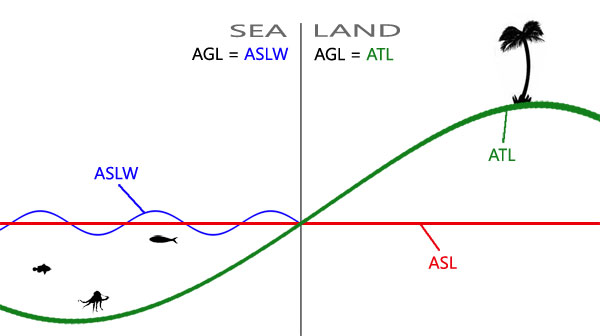
 little raptor
buoyant hound
10m
little raptor
buoyant hound
10m
Try increasing the radius to, say 1000m
If it still doesn't work try some delay:
this spawn {
{ _x hideObject true } foreach (nearestTerrainObjects [_this, [], 1000, false, true])
}
Just try that code first
pallid palm
if you want to get rid of this Erra - { Some magazines weren't stored in soldier Vest or Uniform? } just use { o_soldier_unarmed_f } or any of the {same type} then add your loadouts} But i dont know about ACE and all that CBA stuff: Exsample ```sqf
"O_soldier_unarmed_F" createUnit [_spawnPos, _grp, "_handler = this execVM 'loadouts\CSAT_OfficerAK.sqf';", 0.0, "COLONEL"];
still there
 broken pivot
Hey there 😄 I want to learn if causes since years. Can someone send me an example or
explain it with the code Ive tried to create:
//------------------------------------------------------------------------------------------------------------//
//-----------------------Sascha--------------------Trigger--------------------------------------EBER----------//
//------------------------------------------------------------------------------------------------------------//
_hinterhalt_sascha_tgr = createTrigger ["EmptyDetector", [18471.7,14284.1,0], true];
_hinterhalt_sascha_tgr setTriggerArea [25,25,0, false, 15];
_hinterhalt_sascha_tgr setTriggerActivation ["ANYPLAYER", "PRESENT", false];

//------------------------------------------------------------------------------------------------------------//
//-----------------------Sascha------------------If causes--------------------------------------EBER----------//
//------------------------------------------------------------------------------------------------------------//
if (_hinterhalt_sascha_tgr) true then {hint Works};
if takes a true or false bool value, _hinterhalt_sascha_tgr is an object
also, hint takes a string, e.g hint "works";
proper code would be
if (not isNull _hinterhalt_sascha_tgr) then
{
  hint "_hinterhalt_sascha_tgr created!";
};
Time to study
broken pivot
winter rose
`if` takes a true or false bool value, `_hinterhalt_sascha_tgr` is an object
als...
1. new cmd:
Love not command. https://community.bistudio.com/wiki/not
I dont know for sure but I think to remember that !true = false so that ! turns the value as well
Would !isNull do the same?
2. "new" cmd:
Im not sure about the translation of "null" because its also a
german word meaning "zero -> 0"
If I google it the results say something like "invalid/false" so my learning
is that "isNull" does something like "isFalse" in and "extendet" way
learning row1:
You say something like "If _hinterhalt_sascha_tgr is not "false/empty/invalid" (translation chaos haha)
then {
code
};
**If Im correct we are only checking in first instance if the trigger is existing. Not if its active, right? **
btw Im really sorry for being that late in learning all that and that its annoying to explain the same sh!t over and over again

 open hollow
You can think null as 0 too, not the number but the “nothing” part
Then is Nil, that’s is nothing too, but different lol.
Nil usually is when something is not defined
If use use create vehicle, and for some reason it fails, it will return you a nullObject
But if you “ask” for a variable that isn’t defined, it’s nil not null
broken pivot
Crazy complicated with nil and null
hallow mortar
broken pivot
*1. new cmd:*
Love **not** command. https://community.bistudio.com/wiki/not
I do...
In Arma 3, a Null is a special data entity which can be used as a fallback or default. There is a Null for most data types; objNull, scriptNull, grpNull, etc. A Null "exists", so it doesn't cause a script error if it's used, but it isn't "in play", so targeting it has no effect. It's often used to trigger special behaviour. For example, using a Null as an argument can mean "skip this argument", or for setMissileTarget, setting the target to objNull causes the missile to cancel its targeting.
little raptor
buoyant hound
still there
It makes no sense to me then
The code is correct
And nearestTerrainObjects does return those objs
You're probably doing something wrong yourself
Have you enables script errors? Check the rpt. Maybe your script has an error
broken pivot
But Ive got some results and questions to show:
//------------------------------------------------------------------------------------------------------------//
//-----------------------Sascha--------------------Trigger--------------------------------------EBER----------//
//------------------------------------------------------------------------------------------------------------//
_hinterhalt_sascha_tgr = createTrigger ["EmptyDetector", [18471.7,14284.1,0], true];
_hinterhalt_sascha_tgr setTriggerArea [25,25,0, false, 15];
_hinterhalt_sascha_tgr setTriggerActivation ["ANYPLAYER", "PRESENT", false];

//------------------------------------------------------------------------------------------------------------//
//-----------------------Sascha------------------If causes--------------------------------------EBER----------//
//------------------------------------------------------------------------------------------------------------//
if (!isNull _hinterhalt_sascha_tgr) then                     //Invented by "Lou Montana"
    {                                                        //Invented by "Lou Montana"
    hint "Trigger created";                                    //Invented by "Lou Montana"
};

if (triggerActivated _hinterhalt_sascha_tgr) then
    {
    hint "Someones there!";
};
Im not getting the hint "Someones there!" so far. But I also dont know if Im using the
soft brackets from the second if cause in the correct way.
Do I understand this right:
I always have to use boolean return in the first soft bracket.
If yes it uses the "then" otherwhise it uses "else" code from the
curved brackets {hint "Someones there!"};
Is my learning correct?
lol please look at the example...
The only diffrence I see is that Ive used the _underline to do
the var in local mode for the script.
Or did Ive understand something wrong in the past
This is also a question:
_localVar = is only available in the same document
globalVar = is available in all enviroments of the mission (if executed)
Correct?
 pallid palm
correct
broken pivot
So its needed to create the trigger in a global way to be able to work with it?
hushed turtle
Why there was no Discord back in the day when I was learning to code 😀
pallid palm
same document or the same scope
hushed turtle
nil means undefined
pallid palm
you can be out side the scope and still be in the same document
broken pivot
Copy guys. Thanks a lot since here. Your really nice to me and help me 😄
Thanks thanks thanks ❤️ Lets continue
broken pivot
I also have to become 100% sure about the scope topic
I always explain it "Its like a aim scope your zooming in diffrent level"
pallid palm
all i know is what iv been told by others
broken pivot
Same here. And I try to understand other things. But I was active in Eden Editor not in Eden Scripting
But I always wanted to learn it. Now Im in. Preparing for mental breakdown if Digital Reality4 isnt modern anymore hahaha
pallid palm
lol
hushed turtle
In other words any variable not yet defined will return nil. Command isNil can be used to check if variable is defined.
_number; // returns nil, not defined yet
_number = 5; // defined here
_number; // returns 5
_number = nil; // to undefine variale, it's like removing variable
Any variable of values objNull or grpNull or whatever null are defined variables. For example if variable is objNull then it is variable of type object, but it contains no object(nothing object).
broken pivot
Now Im getting the note of "created" but not "activated". Did Ive something wrong with the "setTriggerActivation" part?
Ive only changed the local var into a global var and tested it
//------------------------------------------------------------------------------------------------------------//
//-----------------------Sascha--------------------Trigger--------------------------------------EBER----------//
//------------------------------------------------------------------------------------------------------------//
hinterhalt_sascha_tgr = createTrigger ["EmptyDetector", [18471.7,14284.1,0], true];
hinterhalt_sascha_tgr setTriggerArea [25,25,0, false, 15];
hinterhalt_sascha_tgr setTriggerActivation ["ANYPLAYER", "PRESENT", false];

//------------------------------------------------------------------------------------------------------------//
//-----------------------Sascha------------------If causes--------------------------------------EBER----------//
//------------------------------------------------------------------------------------------------------------//
if (!isNull hinterhalt_sascha_tgr) then                     //Invented by "Lou Montana"
    {                                                        //Invented by "Lou Montana"
    hint "Trigger created";                                    //Invented by "Lou Montana"
};

if (triggerActivated hinterhalt_sascha_tgr) then
    {
    hint "Someones there!";
};