#arma3_scripting
1 messages · Page 17 of 1
 south swan
 hallow mortar
Is the helicopter locked? moveOut respects lock state so try unlocking it first if it is locked
 coarse dragon
it isnt locked
its modded helo tho and modded squad, if that would matter
the pilot isnt part of the squad either
 little raptor
what is _ship?
also you're not supposed to throw out the whole crew 😬
only passengers
coarse dragon
the name of the helo its single crewed
little raptor
if you're putting that in a waypoint then it's not defined
coarse dragon
even he doesnt moveOut
little raptor
like I said your var is wrong
if you're putting that in a move waypoint, try this:
{ moveOut _x } forEach crew vehicle this;
how would i do that for the passengers?
little raptor
{ moveOut (_x#0) } forEach fullCrew [vehicle this, "cargo"];
that works
{ unassignVehicle _x } forEach fullcrew [vehiclenNme this, "catgo"];
how wrong is that
little raptor
vehiclenNme is not a command
 stable dune
"catgo"
 winter rose
🐈➡️
coarse dragon
{ unassignVehicle (_x#0) } forEach fullcrew [this, "cargo"];
like that?
winter rose
NO!
winter rose
coarse dragon
```sqf
{ unassignVehicle (_x#0) } forEach fullcrew [this, "cargo"];
```
like tha...
https://community.bistudio.com/wiki/unassignVehicle
Unassigns individual unit from a vehicle, usually previously assigned with assignAsXXX command, i.e removes assignedVehicleRole of the unit. If the unit is currently in that vehicle, the group leader will issue an order to disembark.
south swan
well, unassigning should prevent a unit from trying to follow the heli and get back inside, isn't it?
coarse dragon
thats what i was thinking
little raptor
coarse dragon
```sqf
{ unassignVehicle (_x#0) } forEach fullcrew [this, "cargo"];
```
like tha...
use vehicle this instead of this
coarse dragon
doesnt do anyhting 😦
little raptor
what did you expect it to do?
coarse dragon
stop the group from trying to mount the heli
little raptor
what is the full code?
coarse dragon
{ unassignVehicle _x } forEach fullcrew [vehicle this, "cargo"];
stable dune
coarse dragon
{ unassignVehicle (_x#0) } forEach fullcrew [vehicle this, "cargo"];
Do have random units in cargo or are all of them in same group?
stable dune
Yeah, that was posting
{
_x leaveVehicle vehicle this;
} forEach [group1, group2,...]
{ moveOut (_x#0) } forEach fullCrew [vehicle this, "cargo"];
grp leaveVehicle vehicle this;
ship flyInHeightASL [30,30,30];
all that into the pilots move waypoint
winter rose
aaand?
winter rose
coarse dragon
```sqf
{ moveOut (_x#0) } forEach fullCrew [vehicle this, "cargo"];
grp leaveVeh...
IDK what you meant with it, raising an issue or just stating
coarse dragon
was saying to prisoner
 pulsar sierra
Hello, I wanted to ask how I can convert the script below to where instead of it executing based on the group leader (xy1), it executes based on the groups variable name instead. Basically the issue is once the group leader (xy1) dies and respawns, the code stops looping (since when the unit(xy1) respawns, he isn't the leader anymore). I want it to where the code loops based on the group's variable name instead if it's possible. Thanks!
[] spawn {while {true} do {sleep 2; {_x setFace "MYCUSTOMFACE";} forEach (units (group xy1)); };};
winter rose
pulsar sierra
Hello, I wanted to ask how I can convert the script below to where instead of it...
replace (group xy1) by grpVariable
winter rose
coarse dragon
was saying to prisoner
mb, wasn't in the flow ✋
 compact maple
Hey, I wrote some scripts in my debug console days ago.
I would like to retrieve it, do you know where this cache is stored on my pc?
I cant retrieve it in game because I wrote too many cmd after
(I use CBA for extended console btw)
little raptor
compact maple
Hey, I wrote some scripts in my debug console days ago.
I would like to retrieve...
it's stored in the profileNamespace
and with CBA console you retrieve it via the previous/next code or whatever buttons
if it's not there, it's gone
pulsar sierra
winter rose
replace `(group xy1)` by `grpVariable`
Thank you so much, Lou!
compact maple
little raptor
and with CBA console you retrieve it via the previous/next code or whatever butt...
Thanks I found it in C:\Users\x\Documents\Arma 3 - Other Profiles\xxx
winter rose
compact maple
Hey, I wrote some scripts in my debug console days ago.
I would like to retrieve...
if you cannot find it with page up/page down it's lost indeed
compact maple
winter rose
if you cannot find it with page up/page down it's lost indeed
Alright thanks 🙂
winter rose
it's 9 commands iirc in vanilla, does CBA extend the range?
compact maple
Let me check
little raptor
winter rose
it's 9 commands iirc in vanilla, does CBA extend the range?
yeah. 50 iirc
winter rose
ouh noice
compact maple
what does iirc stand for?
little raptor
my mod goes up to 500 
little raptor
compact maple
what does iirc stand for?
if I recall correctly
compact maple
ty
little raptor
little raptor
my mod goes up to 500 <:meowsweats:707626030613135390>
oh wait I extended it to 1000...
compact maple
what's your mod? did you published it?
maybe it is Advanced developer tools? I used it
hallow mortar
It is
compact maple
oh that's it
 unborn bramble
fnc_Guitar_play = {
params ["_unit"];

_guitarList = ["lvl0_1","lvl0_2"];

while {true} do {
_guitar_track = _guitarList call BIS_fnc_selectRandom;
switch (_guitar_track) do {
case "lvl0_1": {_sleeptimeGuitar = 22;[_unit, [_guitar_track,35,1]] call CBA_fnc_globalSay3d; [_unit, 'gitaraPlay'] remoteExec ['switchMove', 0]};
case "lvl0_2": {_sleeptimeGuitar = 50;[_unit, [_guitar_track,35,1]] call CBA_fnc_globalSay3d; [_unit, 'gitaraPlay'] remoteExec ['switchMove', 0]};
}; sleep _sleeptimeGuitar; // Error: _sleeptimeGuitar undefined
};
};
How to pass _sleeptimeGuitar correctly out of switch scope?
little raptor
unborn bramble
```sqf
fnc_Guitar_play = {
params ["_unit"];
_guitarList = ["lvl0_1","lvl0_2"];...
either by declaring it outside, or returning it
private "_sleeptimeGuitar"; // or private _sleeptimeGuitar = defaultValue;
switch(..) do {
  case (...): {_sleeptimeGuitar = _value};
  ...
};
or
_sleeptimeGuitar = switch(..) do {
  case (...): {_value};
  ...
};
right now your switch doesn't handle all possible cases, so I recommend the private _sleeptimeGuitar = defaultValue; approach
unborn bramble
little raptor
```sqf
private "_sleeptimeGuitar"; // or private _sleeptimeGuitar = defaultValue...
Thank you!
stable dune
coarse dragon
was saying to prisoner
good morning, I had a little sleep in between. and yes, to the waypoint where you want them to leave the vehicle. If it doesn't work, you should change this vehicle to the variable name of your vehicle
 warm hedge
In where?
 meager granite
CfgVehicles
    class WindAnomaly: All {
        displayName = "Wind anomaly";
        simulation = "windAnomaly";
        innerRadius = 1;
        outerRadius = 20;
        windStrength = -20;
        windRotation = 0;
        windWaveTimeCoef = 5;
        windWaveOuterAmplitudeCoef = 0.3;
        windWaveInnerAmplitudeCoef = 0.02;
    };
Hmm
warm hedge
Maybe sakra.mp4 related? IDK...
meager granite
🤔
Yeah, looks like some leftover\unimplemented feature
no matches found in arma3.exe either, so probably no code for it?
 tough abyss
How could I go about checking the intersection of garbage with object and making sure the area is clear as well as aligning objects to the terrain normal?
meager granite
tough abyss
And to spawn an object then calculate it's relative offset in parallel to the other object?
meager granite
With a combination of these, depending on what you need
tough abyss
Basically a trash spawner that checks roads and other positions to make cities more "war zone like"
Barricades made of garbage etc.
meager granite
Calculate offsets with https://community.bistudio.com/wiki/vectorDiff
tough abyss
Would vector addition be suitable?
meager granite
You can get roads with https://community.bistudio.com/wiki/nearRoads
tough abyss
I thought the negative of the vector is the invert of it's positive? Is that not what vectorDiff is?
Could vectorAdd not be used as well?
meager granite
vectorDiff is just substraction, if that's what you meant by relative offset
meager granite
tough abyss
Could vectorAdd not be used as well?
Depending on your task. The commands are all there, you just need to envision the logic for your script and implement it.
tough abyss
When I say that I mean if I spawn an object say 180* on a road I need to calculate the position offset from that position.
Directly parallel to it.
Both are colinear.
meager granite
tough abyss
Might have to experiment a bit.
meager granite
Is there a reliable way to find which "WeaponHolderSimulated" belong to which dead body?
I know they trigger Put EH when unit dies, but what about after the fact?
meager granite
Made a ticket: https://feedback.bistudio.com/T167380
 unique sundial
meager granite
`CfgVehicles`
unique sundial
meager granite
`CfgVehicles`
A vortex?
meager granite
unique sundial
A vortex?
No idea, doesn't seem to be anything else in the game apart from class definition
 tough umbra
how to make objects/ bodies float in mid air like the contact DLC?
 open fractal
do bodies float in contact?
winter rose
warm hedge
`setPos` each frame
Leopard screams in the distance
warm hedge
B-but that's the idea basically
open fractal

setPosASL
 cyan dust
Just create simple object or disable simulation, such objects would not fall down, if that's the goal
unique sundial
tough umbra
how to make objects/ bodies float in mid air like the contact DLC?
setVelocityTransformation
 ionic talon
Hi there,
Could someone help me on the creation of an ACE function (script + config) which will allow to rebuild the objects of mappings which fall following a collision.
The principle would be simple, menu ace on the object in question (a wall, a barrier,...) and there there would be a "rebuilt" option, we go on it and the object goes back to its place as on the base mapping of the mission.sqm.
Thanks in advance !
open fractal
ionic talon
Hi there,
Could someone help me on the creation of an ACE function (script + co...
like return to its original position?
 limber panther
Hello everyone!
Can i ask for a little help with a script? I created this one some time ago and it is supposed to give players a chance to spawn a plane, lock/unlock it and when flying alert them about terrain proximity to avoid collision. And it all works fine. But if the player manages to crash the plane anyways, i would like to minimise the load on the server and therefore stop the running script once the plane is destroyed (i think i have this in the script as well) and i would also like to delete objects that got created with the plane (spheres). So is there a way to get them deleted, once the plane is destroyed? Some kind of event handler or something? Thank you.
https://www.sqfbin.com/alitosurequpupukukas
open fractal
limber panther
Hello everyone!
Can i ask for a little help with a script? I created this one so...
You can make an array of all the objects and set a variable to the vehicle and retrieved in an event handler
_vehicle setVariable ["frank_attachedObjs",[_ahead1,_ahead2,_ahead3,_below1,_below2]];
_vehicle addEventHandler ["Deleted", {
    params ["_unit"];
        _deleteArr = _unit getVariable ["frank_attachedObjs",[]];
        { deleteVehicle _x } forEach _deleteArr;
}];
your alive check will fail when the vehicle is deleted, ending your script
limber panther
open fractal
```sqf
_vehicle setVariable ["frank_attachedObjs",[_ahead1,_ahead2,_ahead3,_belo...
thank you, that looks interesting, i'll see what i can do with this
limber panther
open fractal
your `alive` check will fail when the vehicle is deleted, ending your script
and that's good or bad thing?
open fractal
good thing
limber panther
ah ok, thank you @open fractal ❤️
open fractal
actually I can do you one better
compact maple
Hi, the nearestObjects function can return bots, but not real player, right?
limber panther
open fractal
actually I can do you one better
there is also a better way?
open fractal
_vehicle addEventHandler ["Deleted", {
    params ["_unit"];
    { deleteVehicle _x } forEach attachedObjects _unit;
}];
the contingency here is the code isn't going to run if the handler is installed locally and the player disconnects before the vehicle is deleted
limber panther
open fractal
the contingency here is the code isn't going to run if the handler is installed ...
well now i'm lost
little raptor
compact maple
Hi, the `nearestObjects` function can return bots, but not real player, right?
It returns the objects. It doesn't care if they are "bots" or players
limber panther
open fractal
the contingency here is the code isn't going to run if the handler is installed ...
can you explain more in detail please?
compact maple
little raptor
It returns the objects. It doesn't care if they are "bots" or players
Alright thanks
open fractal
limber panther
can you explain more in detail please?
your addAction script functions locally, so the script is running on the machine of the player who spawned the vehicle. When the player disconnects, though, the event handler will cease to exist unless you install it on the server instead
which you can just write a function to do that, it'll just make it slightly more complicated than slapping the event handler in the script
or maybe just remoteExec addEventHandler
limber panther
fair enough, but my primary aim is to get that deleted when the plane is destroyed, because for a destroyed vehicle it is unnecessary to have them, later after some time the garbage collector takes care of the wreck and deletes it, there is no zeus intervention
open fractal
I don't know how kosher installing event handlers via remoteExec is but here goes
[_vehicle, ["Killed", { { deleteVehicle _x } forEach attachedObjects (_this#0)}]] remoteExec ["addEventHandler", 2];
this will tell the server to delete the attached objects along with the vehicle
hypothetically
limber panther
allright but this deletes those objects when the vehicle is deleted, am i right?
open fractal
yeah this doesnt delete the vehicle just deletes the attached objects whenever the engine tags it for deletion
i don't know how that works on the engine's side so you may need to test deleting it on the server vs from the client
limber panther
ok but that's not what i need 😅 i need to delete those objects when the plane is destroyed, not deleted
limber panther
i'm talking about it all the time
open fractal
i simply do not read
limber panther
open fractal
```sqf
_vehicle setVariable ["frank_attachedObjs",[_ahead1,_ahead2,_ahead3,_belo...
and this one you sent first is also going to work, with just a catch that it won't work if the player disconnects?
open fractal
open fractal
I don't know how kosher installing event handlers via remoteExec is but here goe...
I edited this one to cover that but yeah
little raptor
limber panther
Hello everyone!
Can i ask for a little help with a script? I created this one so...
You're doing something very slow and pointless
open fractal
attachedObjects is the better method
little raptor
There's no need to attach anything
Just use modelToWorldWorld
You're attaching them to get some positions, but you can get them directly without costing the game 100x more performance
limber panther
little raptor
You're attaching them to get some positions, but you can get them directly witho...
well you know i'm a poor scripter, this is the best setup i was able to come up with
limber panther
i'll have a look
limber panther
little raptor
attachTo ruins the performance
on this script is based my entire mission file, almost everything is done using this 😅
little raptor
if (terrainIntersectASL [_plane modelToWorldWorld [0, 1000, 0], _plane modelToWorldWorld [0, 2000, 0]]) then {
Here's an example
No need for spheres or attachTo
limber panther
little raptor
No need for spheres or attachTo
and therefore no need to delete them after destruction
limber panther
allright, i'll see what i can do, thank you @little raptor and @open fractal
ionic talon
open fractal
like return to its original position?
Yes exactly
open fractal
ionic talon
Hi there,
Could someone help me on the creation of an ACE function (script + co...
//init
_obj setVariable ["tag_resetParams", [damage _obj, getPosWorld _obj, [vectorDir _obj, vectorUp _obj]]];

//activation
(_obj getVariable "tag_resetParams") params ["_damage","_posWorld","_DirAndUp"];
_obj setDamage _damage;
_obj setPosWorld _posWorld;
_obj setVectorDirAndUp _DirAndUp;
``` something like this? ace has a discord if you're looking for help with their documentationthe //init line would be run at mission start and the //activation would be the script in the ace configuration
ionic talon
Thanks, i'll try it !
There is no config to add ?
open fractal
no I just don't know how to do that, you need to consult ace documentation
 vocal valley
Is Grimes Revive Script no longer working?
I hate dealing with scripts so freaking much.
 open hollow
vocal valley
Is Grimes Revive Script no longer working?
open hollow
vocal valley
Is Grimes Revive Script no longer working?
every update adds things, but not change or delete comands... so is quite posible that you are doing something wrong
open hollow
vocal valley
I hate dealing with scripts so freaking much.
well... dont use them then... mods are made for plug and play, but script needs a little of knowledge to deal with them, so if you hate deal with scripts... well, why bother
 merry stone
Is it possible to add custom animations to unitCapture? Let's say I download a mod like alternative running, can this animation be added to unitCapture script?
merry stone
open fractal
does unitcapture work with running at all?
It works.
merry stone
open fractal
does unitcapture work with running at all?
As an example, I used it in this video https://youtu.be/AvZOknC1EXs
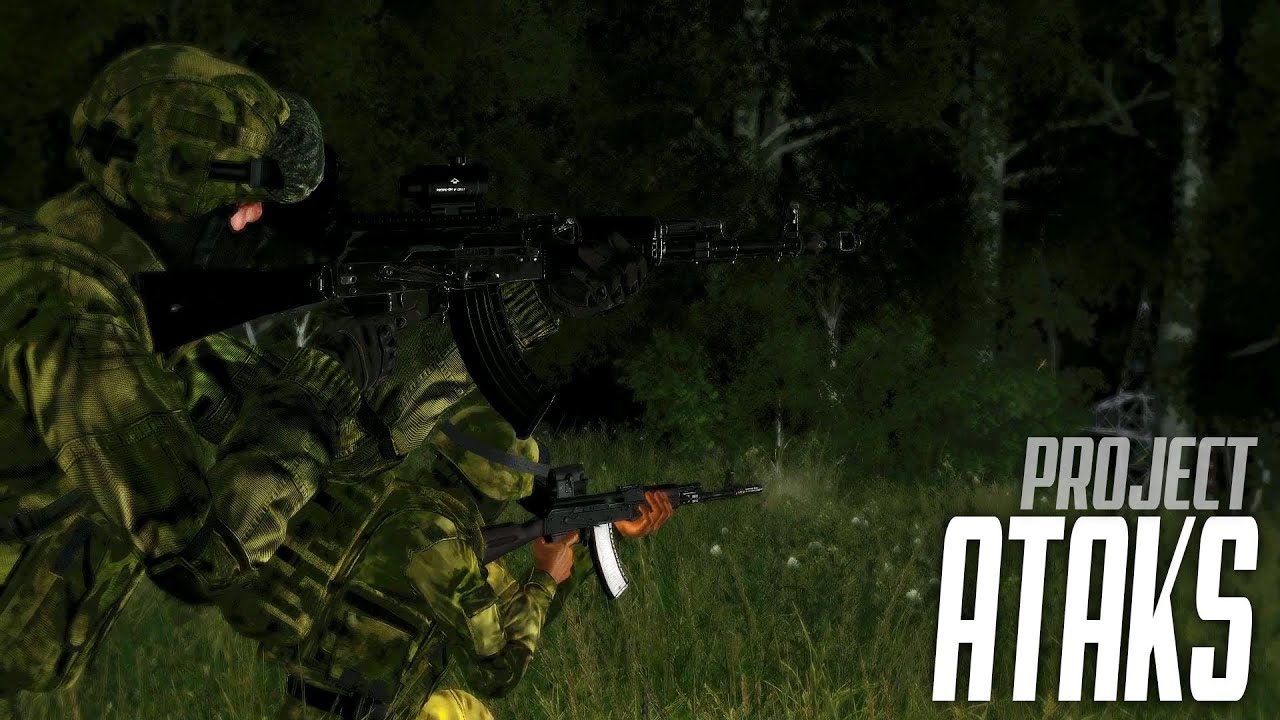
Ataks Re-texture Project
This mod adds a retexture to the equipment from the 'RHS' mod in the 'Ataks' camouflage.
Retexture only for equipment used by the Russian army. The mod will be updated depending on the desire and free time of the author. Users can leave their suggestions for updating in the comments.
Quote: H3ynnzX
RHS Ataks Re-Text...
little raptor
merry stone
It works.
no. unitCapture doesn't record animations
_capturedData = _capturedData + [[(_timeCur + _timeOffset), (getPosASL _unit), vectorDir _unit, vectorUp _unit, velocity _unit]]; //This line is saving captured data to some string variable
Do you mean custom animations?
little raptor
it doesn't record any animations
little raptor
little raptor
```sqf
_capturedData = _capturedData + [[(_timeCur + _timeOffset), (getPosASL _u...
the code is right there
if it did you'd see animationState in it
merry stone
little raptor
the code is right there
Fair enough. Well I have been using another custom unitcapture code then, which includes animations, like walk, running, shooting, side stepping etc. I thought it was vanilla.
little raptor
nope
anyway if you want it to play custom animations for you you have to edit it and change the playMove/playMoveNow/switchMove lines
merry stone
Not sure how you can say nope, when I have used it and recorded the above video plus others. Playing back my recorded infantry data.
hallow mortar
Presumably "nope" as in "nope, it's not vanilla"
little raptor
merry stone
Not sure how you can say nope, when I have used it and recorded the above video ...
nope was answer to "I thought it was vanilla. "
merry stone
little raptor
nope was answer to "I thought it was vanilla. "
Oh, my apologies.
I might have to have a deeper look into the unitCapture script I use then. Thanks.
 dreamy kestrel
Strange looking issue... I have a config function which I am fairly certain is correct, and the code is there waiting to be compiled. But in the runtime, I am finding MY_fnc_module_preInit = {}. By contrast, apparently the postInit is being found, compiled, and executes as expected.
class module {
class module_preInit { preInit = 1; };
class module_postInit { postInit = 1; };
};
I am finding the postInit reflected in the logs. But I see nothing for preInit, which is consistent with {} but I do not know why it is not being compiled.
little raptor
dreamy kestrel
Strange looking issue... I have a config function which I am fairly certain is c...
incorrect code that fails to compile is my first bet, such as unclosed } which (used to?) fails silently
unless you get an error saying file blabla was not found
dreamy kestrel
it's possible... I will scan for closing syntax. thanks...
otherwise not finding any errors in the log indicating anything else
dreamy kestrel
little raptor
incorrect code that fails to compile is my first bet, such as unclosed `}` which...
got it sorted. apparently A3 does not respond well to unknown preprocessor commands, i.e. #defines. odd though that it would go silently; only indication is my {} for a compiled function.
 winter zephyr
I'm trying to output as a hint the number of remaining vehicles of a certain type. I have the hint displaying the formatted text I want, but I don't know how to properly get the integer I need into the hint:
hint format ["There are %1! SCUDs left.", ?];
little raptor
winter zephyr
I'm trying to output as a hint the number of remaining vehicles of a certain typ...
hint format ["There are %1! SCUDs left.", {typeOf _x == "ClassNameHere"} count vehicles];
Brilliant. Works perfect. Vehicles as the object was the component I didn't have yet.
 somber radish
Anyone know if there is a way to check ingame which bi-keys are being used?
I am asking because I'd like to stop people from copying my whole mod and present it as their own
btw I do not mind people taking individual functions and other stuff they find usefull
but copying all of it is kinda shitty
little raptor
winter zephyr
Brilliant. Works perfect. Vehicles as the object was the component I didn't have...
vehicles returns an array of objects
somber radish
without giving creds
little raptor
somber radish
I am asking because I'd like to stop people from copying my whole mod and presen...
they can resign your mod tho
somber radish
I know.. they have
I don't think you understand the question (since ur sweating)
I'll try to refrase it
little raptor
?
little raptor
somber radish
I don't think you understand the question (since ur sweating)
my "sweating" means "wtf" in that context
somber radish
I know
little raptor
anyway what I don't understand is let's say you can get "which bi-keys are being used"
what are you trying to do with it?
somber radish
Check the name and compare it to the name of my Keys
If it is not the same, then do something
little raptor
but if they resign it the key is different
somber radish
Exactly
So I'll be able to deactivate the mod ingame, or give a link to the original
little raptor
you can't do that in the game. you can use an extension though
but they can easily remove the extension 
little raptor
whatever way I think of they can get around it
but if they copy your mod exactly and at most just modify the keys there are ways to detect it
if you can obfuscate your mod things are easier
somber radish
little raptor
if you can obfuscate your mod things are easier
Got any good sources I could read up on?
little raptor
afaik mikero's tools does have an obfuscator tool
apart from that idk
you can search on google
little raptor
somber radish
Ait, perfect
btw you need the paid version
little raptor
somber radish
thnx!
np
tough abyss
Obfuscation doesn't always work. Especially if they are a motivated thief.
little raptor
well yeah. I said things are easier
because at least those petty thieves can't steal it anymore. but a pro one can still steal your mod
tough abyss
Trying to stop copying is pretty much impossible I mean even KoTH got leaked...
Write your code well, make it look perfect, then you know they'll never be capable of understanding it only ripping it. I make those sorts of comments in my code.
There isn't a whole lot "clever" unlike C++ that can be obfuscated.
The international obfuscated C code competition can give you an idea about how clever you can get with C and C++
Most of the obfuscation you do with ArmA 3 code is replacing variables with arcane and obtuse naming.
tough abyss
Like remapping commands to preprocessor directives?
little raptor
and decrypt it when you compile it
at least they can't read the raw function anymore...
tough abyss
Isn't there a cost in that action?
little raptor
yes
slower loading time
tough abyss
SQF is slow enough as it is....
I've always wondered why is the SQF scripting engine limited to single thread?
Being able to offload jobs to separate cores would be nice would it not?
little raptor
well for one thing the scripting engine is pretty much the same as it was 20 years ago
when CPUs were single threaded
tough abyss
Is there not a way to give other cores jobs?
little raptor
no
tough abyss
I think I tinkered with that idea, using HC's to offload processing.
It did work surprisingly to some extent. Instead of just using it for AI processing.
Still was unfortunately subject to the issue of the main-thread getting bogged down and the entire performance tanking.
But it was possible to send a job to the HC tell it to do something then send the result back to the server.
little raptor
well if you have enough resources to launch multiple game instances that is one way
but if you want true multithreading you can use intercept
tho calling sqf commands should still take place in the main thread
tough abyss
I still also tossed around the idea of water droplets from roofs it's doable just need to find the edge of roof spawn "drips" then on the ground spawn splashes, doesn't have to do repeated collision checks then.
Some what believable, but cheaty.
Also when you say encryption we talking stream ciphers? or block ciphers?
@somber radish There is there this.
Bohemia Interactive Forums
SQF Crypt Script Version 1.0 By Naught Download: http://pastebin.com/iH1uF3Vh (all of the documentation is included in the file) Hello all! So Ive been playing around with binary in SQF, and Ive managed to develop a really neat encryption script completely in SQF. Currently it only employs the RC...
somber radish
tough abyss
https://forums.bohemia.net/forums/topic/168087-encryption-in-sqf-sqf-crypt-scrip...
UUUH! Sweet!
little raptor
they can still decrypt it easily tho 😅
because you still write the key in your own mod...
little raptor
little raptor
at least they can't read the raw function anymore...
but for this purpose it's good
little raptor
it is compiled to bytecode, yes
but unlike C# and Java the "runtime" doesn't use JIT compiler to give native machine code
 copper raven
little raptor
because you still write the key in your own mod... <:meowsweats:7076260306131353...
copper raven
little raptor
because you still write the key in your own mod... <:meowsweats:7076260306131353...
literally this
stable dune
Hey Is there a way to calculate the time for a mortar to go from A to B if I have a group of mortars and want to "sleep" the time from the shot to when it hits the target?
unique sundial
calculate? no. get calculated value? yes https://community.bistudio.com/wiki/getArtilleryETA
stable dune
unique sundial
calculate? no. get calculated value? yes https://community.bistudio.com/wiki/get...
Yeah, this was what I meant. It's great that you understand even if you have to read between the lines. Thanks a lot
 kind cedar
How would I make a helicopter or any vehicle have infinite fuel?
unique sundial
Use Fuel EH and setFuel 1 when run out of fuel https://community.bistudio.com/wiki/Arma_3:_Event_Handlers#Fuel
 solemn helm
Hi, i try to test the setTerrainHeight, seems to work on Eden editor but don't seem to work on dedicated, there something i don't understand ? Someone have use it on this environment ?
 distant egret
solemn helm
Hi, i try to test the setTerrainHeight, seems to work on Eden editor but don't s...
distant egret
solemn helm
Hi, i try to test the setTerrainHeight, seems to work on Eden editor but don't s...
Are you executing it from the Server?
If you are executing it via a client it can't be done.
stable dune
unique sundial
calculate? no. get calculated value? yes https://community.bistudio.com/wiki/get...
You have commented here to use setPos or position and from what I have read the discussion here on Channel so modelToWorld is better, but in this case I should use position or setPos?
solemn helm
@distant egret i use the example on the page and with CBA i use Cible exec on the serv, for me it should be good to be considered to be executing from the serv no ?
 slim spire
I was looking at setBehaviour and apparently there's setBehaviourStrong. What use case would you want to set the behavior of all units but not the group, or vice versa?
See comparison table on the wiki https://community.bistudio.com/wiki/setBehaviour
distant egret
solemn helm
<@109313073516392448> i use the example on the page and with CBA i use Cible exe...
What CBA function?
Or you mean CBA remote exec?
In the debug Console
solemn helm
yep with the debug windows
distant egret
Uhm yea if you are remote executing it, it should work.
Are there any remote exec restrictions on your server?
solemn helm
For me too it shoudl work but it doesn't thats why im here :).
Normally no
It's a new function so maybe it doesn't function on dedicated but its a bit strange 😒
distant egret
Well it should... Id suspect someone tested it there. I'll have a try in a bit on my server though. What are you exactly putting in the console?
 granite sky
slim spire
I was looking at setBehaviour and apparently there's setBehaviourStrong. What us...
granite sky
slim spire
I was looking at setBehaviour and apparently there's setBehaviourStrong. What us...
setCombatBehaviour
solemn helm
I use exactly the example provided, work in eden solo and multi but not in dedicated
By the way how i can responde with the quote of the personne like John jordan ?
granite sky
Don't do it normally, it pings people :P
solemn helm
Oh okay :p
granite sky
solemn helm
Oh okay :p
Mouseover the text, reply button on right. Remember to toggle the ping button on the right if you don't want to ping.
granite sky
stable dune
You have commented here to use setPos or position and from what I have read the ...
If the command says it takes AGLS then you'd need to feed it with getPos or position, although that's very odd. ATL would be good enough in most cases. ASL would be bad.
stable dune
Thanks, good to know
distant egret
solemn helm
https://community.bistudio.com/wiki/setTerrainHeight
No I mean what are you trying to execute.
slim spire
granite sky
setCombatBehaviour
??? This doesn't answer my question
granite sky
Oh, use case
I'm not even sure if the behaviour of the group is used for anything. Maybe new units joining the group or something like that. IME some things depend on unit behaviour (eg combat stance) and others depend on group leader behaviour (like navigation choices).
I did try setting weird combos like units -> combat and group -> careless, with no apparent effects for the group behaviour.
But we're just poking a black box full of spaghetti here.
unique sundial
stable dune
You have commented here to use setPos or position and from what I have read the ...
leave me alone
 slim spire
granite sky
I'm not even sure if the behaviour of the group is used for anything. Maybe new ...
slim spire
granite sky
I'm not even sure if the behaviour of the group is used for anything. Maybe new ...
Hmm ok. Thanks
distant egret
solemn helm
https://community.bistudio.com/wiki/setTerrainHeight
Works fine for me
solemn helm
distant egret
No I mean what are you trying to execute.
I'm not sure to understand what you mean, i try to replicate the example provided by the wiki in a dedicated environment.
It work in Eden solo and multi and dont work in Dedi...
distant egret
I just did this setTerrainHeight [[[16899.5,11971.9,35]]] and works fine
solemn helm
distant egret
Works fine for me
You have tested in a dedi ?
distant egret
yea
["Arma 3","Arma3",210,149855,"Stable",true,"Linux","x64"]
So what did you put in as parameters with the command?
solemn helm
Oh god i have tried too and it worked, what a moron...
 still forum
may your terrain rise formidably
distant egret
I just set the height to 100 and fell to my death 😛
solemn helm
distant egret
So what did you put in as parameters with the command?
I just tested setTerrainHeight [[[7911.74,10591.4,40]]] on cible exec and it work...
I feel a bit idiot now...I have tried a lot of things but not the simple command...
distant egret
"cible exec" whats that?
solemn helm
distant egret
"cible exec" whats that?
From the CBA console debug, how do you exec your command ?
solemn helm
distant egret
while selecting the server on the right (Target Watch)
Oh yes its the same its just im french so "target" is "cible" for us...
I have forgotten it was localised 😒
solemn helm
distant egret
What terrain/map/island are you trying to do it on?
Malden, but it's all good now, thanks for your help 🙂
distant egret
ah ok 👍, have fun breaking the game. I just managed to do that with that command 😅 .
still forum
no breaky, breaky forbidden
distant egret
I wanted to see what the limit was.
stable dune
unique sundial
leave me alone
Sorry my Bad 🤕
 cobalt path
I am looking for a way to same people loadout close to the end of the mission, and load it during the beginning of the next one. (looter campaign)
i saw someone post codes like this online:
profileNamespace setVariable ["my_loadout_key", (getUnitLoadout player)];
saveProfileNamespace;
and
_playerLoadout = profileNamespace getVariable ["my_loadout_key", []];
if ((count _playerLoadout) > 0) then {
    player setUnitLoadout _playerLoadout;
};
But I am not sure where to put this etc
cobalt path
Okay so I tested this code, and it works in zeus in "execute code", however my question, where does this code "store" players loadouts
hallow mortar
It is stored in the player's profileNamespace as a variable called my_loadout_key.
south swan
Badically, in their main savegame 🤷♂️
 winter briar
https://community.bistudio.com/wiki/preprocessFile command is locked for only read sqf files? or u can read any type of file ?
south swan
winter briar
https://community.bistudio.com/wiki/preprocessFile command is locked for only re...
 simple trout
yeah use loadFile if you need to, remember that you can only loadFile in the mission directory or it will not load
winter briar
so loadfile only works if the path is on the mission right?
if its on a servermod it doesnt
cobalt path
hallow mortar
It is stored in the player's profileNamespace as a variable called `my_loadout_k...
"It is stored in the player's profileNamespace" players who execute the command or each players in the server individually etc?
south swan
on the machine the code is executed on. You execute it on server - it gets stored on server. You execute it on client - it gets executed on that client. You execute that on all clients - every client saves the value in his save file
kind cedar
unique sundial
Use Fuel EH and setFuel 1 when run out of fuel https://community.bistudio.com/wi...
I apologize, new to scripting... so would it be like:
    params ["_Transport1_1", "_setFuel1"];
}]; ```

Is this the correct way to use the setFuel 1 with a fuel EH?? to make infinite fuel."Transport1_1" is the variable name to the helicopter
 wind hedge
kind cedar
I apologize, new to scripting... so would it be like:
``` this addEventHandler ...
wind hedge
kind cedar
I apologize, new to scripting... so would it be like:
``` this addEventHandler ...
More like sqf Transport1_1 addEventHandler ["Fuel", { params ["_vehicle", "_hasFuel"]; if !(_hasFuel) then {_vehicle setFuel 1;}; }];
kind cedar
Oh yeah I was way off... thank you! i'll give this a try.
winter briar
is possible to diag_log full string or a specific part of it?, bc when u diag_log a large string, it only log half of the string
open fractal
winter briar
is possible to diag_log full string or a specific part of it?, bc when u diag_lo...
break it into 1044 character chunks and loop diag_log i'd say
hallow mortar
wind hedge
More like ```sqf
Transport1_1 addEventHandler ["Fuel", {
params ["_vehicle",...
Remember to watch out for locality since setFuel is LA
open fractal
[_vehicle, 1] remoteExec ["setFuel", _vehicle];
I don't think that is necessary because the EH was supposed to be added where the vehicle was local in the first place. (And therefore runs where the vehicle is local everytime)
But I could be wrong
winter briar
open fractal
break it into 1044 character chunks and loop diag_log i'd say
u have a example of how to split it ?
open fractal
vehicle locality changes dynamically
if someone else drives the vehicle it will change
wind hedge
open fractal
if someone else drives the vehicle it will change
Ohhh I see... And the EH handler doesn't change locality automatically with the vehicle?
Because if that is not the case I see lots of EH breaking in MP
granite sky
lots of EH do break in MP :P
open fractal
i love MP scripting I love MP scripting
open fractal
winter briar
u have a example of how to split it ?
winter briar
open fractal
https://community.bistudio.com/wiki/select syntax 4
ok ty
hallow mortar
wind hedge
Ohhh I see... And the EH handler doesn't change locality automatically with the ...
I believe the usual defense against locality switching is to add the EH for everyone and use a local check to make sure it only runs on one machine (if it's an EH that can trigger for non-local events anyway, some will only trigger if they're local where the object is local)
kind cedar
open fractal
```sqf
[_vehicle, 1] remoteExec ["setFuel", _vehicle];
```
So would this be what I use to make it global? rather than local?
simple trout
yes every execVM recomplies
open fractal
kind cedar
So would this be what I use to make it global? rather than local?
it will send the command to the client that owns the vehicle so it actually works
kind cedar
What if an AI is flying the helicopter? Would it still refuel it?
hallow mortar
Yes
simple trout
check if it's strings
kind cedar
[_vehicle, 1] remoteExec ["setFuel", _vehicle];
How would this be if this name of the Helicopter is "Transport1_1.... sorry still confusing to me lol
simple trout
replace _vehicle
hallow mortar
Just replace _vehicle with Transport1_1
kind cedar
Okay thats what I figured but didn't know for sure
granite sky
It's in an EH, so the vehicle gets passed in as a local parameter anyway.
kind cedar
[Transport1_1, 1] remoteExec ["setFuel", Transport1_1];
Like this?
simple trout
wait is "Transport1_1" a string or the object?
simple trout
that works then
hallow mortar
kind cedar
```[Transport1_1, 1] remoteExec ["setFuel", Transport1_1];```
Like this?
Yes, but as JJ said it's inside an event handler, and the EH passes a reference to the vehicle it's attached to, which you then refer to as _vehicle
kind cedar
Ohhh okay so not in the init of the object
simple trout
if Transport1_1 is global it's fine
open fractal
private _strArray = [];
for "_i" from 0 to 100 do {
    private _length = 1044;
    private _segment = _yourLongString select [(_length * _i), _length];
    if (_segment == "") exitWith {};
    _strArray pushBack _segment;
};
{ diag_log _x } forEach _strArray;
@winter briar I think this will work
granite sky
Changing it from _vehicle -> Transport1_1 will work but it's unnecessary and makes your code harder to change later.
simple trout
Transport1_1 addEventHandler ["Fuel", {
    params ["_vehicle", "_hasFuel"];
  if !(_hasFuel) then {[_vehicle, 1] remoteExec ["setFuel", _vehicle];};
}];
What do you mean global?
ISnt any object placed global?
simple trout
if it has a variable name, yes
kind cedar
granite sky
Changing it from _vehicle -> Transport1_1 will work but it's unnecessary and mak...
If I do this will "_vehicle" apply to every vehicle?
granite sky
Inside the EH, _vehicle is whatever vehicle the EH was attached to.
hallow mortar
You're only adding the event handler to Transport1_1. This means the EH only triggers for Transport1_1's fuel state, and when it triggers, it only passes the object it was attached to as _vehicle. No other vehicles.
kind cedar
Okay, now if I put a variable name on the helicopter it is now global, do I have to change the _vehicle in the EH or nah?
kind cedar
Okay, but also another question.... where do I place an event handler on Eden Editor.. xD
I cant find it
simple trout
under init
winter briar
open fractal
```sqf
private _strArray = [];
for "_i" from 0 to 100 do {
private _length =...
it works it need to do more than 100 loop for read all but works fine ty
hallow mortar
The code creates the event handler. You can place the code in the object's init or in the mission init (init.sqf or the init field in the mission attributes)
kind cedar
Okay.. well earlier you guys said it'll work to the vehicle its attached to, does this mean I put it in the vehicles init?
simple trout
...
kind cedar
Sorry..
hallow mortar
Look at the code. Where it says Transport1_1 addEventHandler ... is where it determines which object it's attached to.
Here's the syntax for addEventHandler so you can see: https://community.bistudio.com/wiki/addEventHandler
kind cedar
I see, now if I leave it at "_vehicle" instead of Transport 1_1, do I just copy and paste it into other vehicle init's to apply to those to?
simple trout
leave it
just copy and paste
if want it to work on other vehicles
change Transport1_1 to _this
hallow mortar
If you want to use it in object inits like that, change the Transport1_1 at the very beginning to this, and leave every other _vehicle as _vehicle
kind cedar
So I could just do this:
    params ["_vehicle", "_hasFuel"];
  if !(_hasFuel) then {[_vehicle, 1] remoteExec ["setFuel", _vehicle];};
}]; ```

and copy and paste onto the vehicles I want it to apply to
this addEventHandler ["Fuel", {
    params ["_vehicle", "_hasFuel"];
  if !(_hasFuel) then {[_vehicle, 1] remoteExec ["setFuel", _vehicle];};
}];
yes
hallow mortar
this not _this for Editor inits
kind cedar
Whats the difference from this and _this?
simple trout
now you're confusing him
kind cedar
Ahhh well that was a dumbed down version that made me understand somewhat
lmao
Thank you guys
hallow mortar
You don't have to worry about what the difference is at the moment (though you should learn at some point), but it is important to use the right one, because the wrong one won't work.
kind cedar
Just to verify....... There HAS to be a variable name on the vehicle in order for it to be Global
simple trout
okay, if you place the code in the vehicles init box, don't worry about global stuff
just use "this"
hallow mortar
There has to be a vehicle named Transport1_1 in order for Transport1_1 to be a global variable that you can refer to anywhere. I'm not sure why that was brought up to be completely honest, it didn't seem like it was going to be a problem in this case.
kind cedar
So if I leave the variable name blank, and use this code:
    params ["_vehicle", "_hasFuel"];
  if !(_hasFuel) then {[_vehicle, 1] remoteExec ["setFuel", _vehicle];};
}]; ```

Then it wont be an issue for AI and other players using the vehicle?yes
kind cedar
Okay sweet, thanks guys!
simple trout
good luck
kind cedar
Wait a min
Just out of curiosity that'll make it easier in the long run if its possible..
Using a Trigger on Eden Editor as a refuel point, so when ANY vehicle, helicopter, boat etc. enter that space for the trigger, then the trigger will activate and refuel the object to full, how would this be done?
simple trout
at this point just place down a refuel vehicle
you automatic start refueling near them
kind cedar
Yeah but how close does the AI have to land to this refuel vehicle
open fractal
set a server-only trigger to pull the vehicle from thisList, set it to _vehicle, and execute the above code
minus the event handler ofc
kind cedar
open fractal
set a server-only trigger to pull the vehicle from `thisList`, set it to `_vehic...
I apologize, let me try to write it out and post it and see if I did it right
Okay.. how would I write out the trigger pulling from thislist lmao
Do I just put thisList
kind cedar
Scripting is another language isnt it
kind cedar
Well I apologize, would you be able to write out that script for the trigger quick for me... xD
open fractal
not sure exactly how it would work (I don't use many triggers), but you can try ```sqf
_vehicle = vehicle (thisList#0);
that may* get the vehicle of the first element in the list
kind cedar
See I can read through all the descriptions and such on that website but what im struggling with is the correct way of writing it all out
Alright well I believe im just going to do infinite fuel.. xD
simple trout
Don't worry about that, sqf is..... well special
simple trout
Just wait until you need/want a gui
simple trout
You'd have better luck using Intercept and dll inject imgui
if you want REASONABLE gui stuff
kind cedar
At what point will it refuel the helicopter? when its empty or?
Im just asking because im watching the fuel go down in percent, see when it'll refuel it
granite sky
When it's empty. If you want to keep it continually topped up then you'd need a spawn loop.
kind cedar
Okay so when it does go empty and refuels it, will this require the heli to start up its engine again during flight if this were to happen?
granite sky
I don't know. You could test by setting fuel low.
kind cedar
True true
granite sky
I'd use the spawn loop tbh. Don't trust what mods would do when fuel runs out, and the remoteExec isn't instant.
kind cedar
Also another question for scripting..
Arma has an issue when you have an AI land the heli they wont turn off the engine, the fix I found for this is putting this in the init:
Transport1_1 land "land";```

But the heli will not lift off and continue to the next LZ until a player/ai gets in it.

I have this Heli flying an endless loop to an LZ and back to an outpost, while waiting 180 seconds on each landed to lift off again, but it wont lift off until someone gets in it, so when it goes and drops off at the LZ it wont leave the LZ until I or an ai jumps in and jumps back out after the 180 seconds is done and the next waypoint generates.Unless you want 100 helis with infinite fuel it's not much of an overhead :P
kind cedar
Nah just 1 heli needs the infinite fuel and maybe a handful more later on if I want
granite sky
wiki doesn't even document doStop _vehicle :P
you could try using doFollow after the timeout.
that's the usual behaviour-resume command.
kind cedar
Yeah idk, some guy off youtube do that script lmao and it worked so i've stuck with it xD
Well good news is the Heli did not stop the engine
It refueled and the heli did not act up when the fuel ran out in mid flight
And let me try the doFollow one quick
Another thing i've been curious about lmao is it possible to set a speed limit on specific waypoints? Like restrict top speed, Reason why I ask is to create a easier landing for ai pilots because they go top speed towards a landing waypoint even if I put a waypoint before the landing one it doesn't help.
kind cedar
granite sky
you could try using doFollow after the timeout.
How would I write that in the init?
doFollow ????;
I cant give the waypoint a specific name
granite sky
I don't know. Test what works in the editor + zeus + debug console first.
You're already outside the very limited boundaries of the wiki. AI code takes a lot of experimentation.
but logically if doStop vehicle works than doFollow vehicle also works.
(so it probably doesn't)
I would guess that it's just passing through to the pilot/driver.
kind cedar
Well im messing around with it, but doFollow only works if your going to follow another unit or person, BUT doMove is what im attempting to use, testing it out now
wind hedge
Any idea of why this isn't working:
_enemyInRadius = {[allGroups] findIf {alive leader _x && ((side _x getFriend (WEST)) < 0.6) && (side _x != CIVILIAN) && ((leader _x distance2d (getPosWorld Player)) < 300)} isEqualTo -1}; ```How would I get this to work for my heli... because it keeps saying error.
_gas = fuel heli;
heli setFuel 0;
sleep 0.01;
heli setFuel _gas;```Trying to empty fuel when it lands so it'll turn off
 ocean folio
where is the error happening? also why are you sleeping for 0.01 of a second?
@kind cedar
kind cedar
Oh idk I copied and pasted it but now its:
_gas = fuel heli;
heli setFuel 0;```

It's not giving an error message anymore, but the heli is not empty eitherwhat is heli
kind cedar
I also have this in a waypoint init
ocean folio
if I had to guess, heli is the issue
kind cedar
So it should look like this?
_gas = fuel Transport1_1;
Transport1_1 setFuel 0;```Thats the variable name for the heli
ocean folio
is this an sqf you are executing?
little raptor
wind hedge
```sqf
_enemyInRadius = {[allGroups] findIf {alive leader _x && ((side _x getFri...
allGroups already gives you an array
and you've wrapped it again in your own array
kind cedar
Nah I just got this from https://community.bistudio.com/wiki/engineOn to put in a init field on the waypoint
It says it at the bottom
hallow mortar
If Transport1_1 is the helo you want to affect, then yes, replace heli with that. If there's nothing in the mission with the variable name heli, the game has no idea what you mean by that.
You can't just use arbitrary names and expect the game to understand if you haven't defined them
kind cedar
Makes sense
_gas = fuel Transport1_1;
Transport1_1 setFuel 0;```

Placed this in the Init of a "Land" waypoint, and the Heli [Transport 1_1] is still full on fuel, what am I doing wrong?might be private "_gas"; I've never seen it with quotes, not sure if that will cause it to break
ocean folio
let me test it before I speak lol
hallow mortar
It's functionally fine but sort of pointless, you're saving the existing fuel state and then not doing anything with it
kind cedar
Let me explain what im trying to do..
Heli comes in for landing, turns off, waits a set amount of time, then turns on and goes to next waypoint.
south swan
"blinking the fuel to 0 to force the engine off, then restoring it" seems to be he intent
ocean folio
oh, no need to save the fuel then really
unless you explicitly want to save the fuel state
kind cedar
No, I just want it to turn off and back on to continue the mission
How could I make this happen?
little raptor
kind cedar
Heli comes in for landing, turns off, waits a set amount of time, then turns on ...
ah you asked it before in #arma3_editor
so anyway, I asked there too, how do you do the landing part?
waypoint?
hallow mortar
engineOn should do it
ocean folio
could you just use the timer on the waypoint?
hallow mortar
No need to worry about turning it on again later, the AI will automatically turn it on when they receive a new move order
kind cedar
ocean folio
could you just use the timer on the waypoint?
I do use a timer, I have the timing and waypoints all good to go, its just when the heli lands it keeps it running until timer runs out and then takes off
So like this?
if (!isEngineOn Transport1_1) then { Transport1_1 engineOn false; };
kind cedar
Oh
ocean folio
no reason to check if its on
little raptor
kind cedar
Heli comes in for landing, turns off, waits a set amount of time, then turns on ...
I recommend doing it this way (it's not the best but easier for new comers)
- in the land waypoint's activation statement, add this:
[vehicle this] spawn {
  params ["_heli"];
  waitUntil {sleep 1; isTouchingGround _heli || !alive _heli};
  _heli engineOn false;
  sleep 20;
  dood_heliTakeOff = true;
  _heli engineOn true;
};
- place a fake move waypoint immediately after the land waypoint in the landing area. add this in its condition:
this && {!isNil "dood_heliTakeOff"}
it should make the heli wait 20s before taking off
kind cedar
I looked way to far into it lmao
Heres what I did to fix this
Set a waypoint for "Land" attached to the helipad, In the init I put "Transport1_1 engineOn false;" and then put move waypoint next to the land and put 180 seconds on the timer inputs, then put a move waypoint where it needed to go next.
This worked perfect lol
I didn't know I could've just put this "Transport1_1 engineOn false;", I was making it way more complicated
I asked earlier but anyone know a way to set a speedlimit on a specific waypoint? On the editor you can set a speedlimit on the heli itself but I would rather it slows down towards a landing, not slowed down the entire flight
hallow mortar
The waypoint's attributes should have a selector for speed mode
If you want a more specific speed you can use https://community.bistudio.com/wiki/limitSpeed
kind cedar
Oh wait do those speed modes apply to vehicle speed to?
I didn't even think about that
hallow mortar
Note that AI helicopters aren't exactly "high speed low drag" pilots and will tend to conduct extreme braking maneuvers to change speed, resulting in an altitude gain. It won't be as smooth as a player pilot properly controlling their speed and altitude.
kind cedar
Yeah, the ai pilots already gain high altitude on the land waypoint
unique sundial
wind hedge
But I could be wrong
not wrong, it has to be added in init in editor
little raptor
no it's not related to this channel. ask in #arma3_config
I had asked this question under Arma 3 questions
cross posting is against the #rules . remove the other messages
tough abyss
Apologies.
hallow mortar
Surely asking somewhere else after waiting several days with no answer isn't that serious of a crime
little raptor
tough abyss
Apologies.
I didn't notice the "a few days ago" part. it doesn't count as cross posting
 kind cedar
waypoint setWaypointCompletionRadius 10
Does not seem to be doing its job as the heli completes the waypoint many meters away.
Any ideas on how to get a more precise waypoint completion?
little raptor
kind cedar
```waypoint setWaypointCompletionRadius 10```
Does not seem to be doing its job...
every vehicle has a minimum built-in completion radius
you can't reduce it
kind cedar
Awe
little raptor
only increase it
kind cedar
Well that sucks
hallow mortar
It seems like the waypoint completion radius just doesn't work anyway: https://feedback.bistudio.com/T167056
kind cedar
Well darn
little raptor
kind cedar
Any ideas on how to get a more precise waypoint completion?
put the waypoint ~150m further ahead
 cerulean cloak
So I'm trying to use setObjectTexture to apply the texture from a the LDF desert mod to a base game vehicle. The texture if kinda only half applying though? Not sure what's going wrong.
https://imgur.com/a/rULMS1T
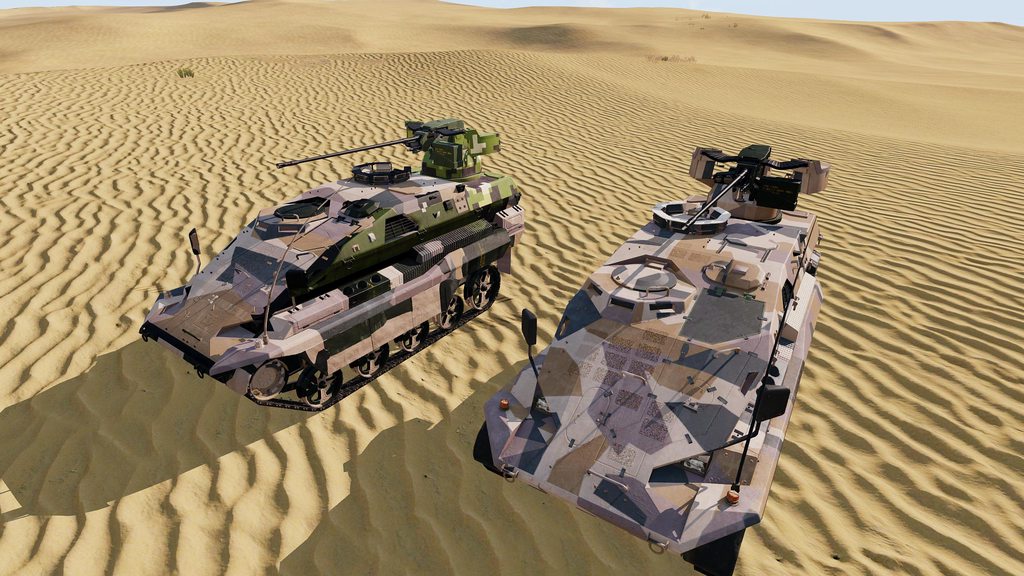 cerulean cloak
The right one is the modded one, left is base game. From what I can tell they are the same model

That's it in the default texture, they look the same to me
little raptor
are you applying all textures?
cerulean cloak
I'll double check, I thought it would just be one texture file for the whole vehicle
cerulean cloak
Ok, so there does appear to be another texture file that goes with this. How do I change what part if gets applied to?
little raptor
just use the right hand object as a reference
_textures = getObjectTextures rightObj;
{
  leftObj setObjectTexture [_forEachIndex, _x]
} forEach _textures
Thanks, got it sorted.
ocean folio
is there a way that I can convert a string into a side?
I suppose I could always just do it with a switch case
granite sky
Or hashmap, if you're doing it a lot. Is there a good reason why it's a string in the first place?
little raptor
ocean folio
is there a way that I can convert a string into a side?
call compile "west"
ocean folio
you can do that???
ocean folio
it will only happen once so, not really important
little raptor
tho probably faster than your "switch-case"
ocean folio
😅
little raptor
ocean folio
you can do that???
also note that it'll only work if the string actually contains a valid code
e.g. this will fail: call compile "west or east"
the hashmap/array approach is safer for a module
ocean folio
though invalid options shouldnt be possible right?
little raptor
idk. do you give them a textbox or combo box?
ocean folio
combo box
little raptor
then it's fine
ocean folio
but I do see your point about it being unsafe in some cases
limber panther
Hi, i'm trying to understand to this script, can someone explain this to me line by line please? Thank you. (This script is located in initPlayerLocal.sqf) ```sqf
#include "\a3\ui_f\hpp\definedikcodes.inc"
waitUntil {!isNull findDisplay 46};
if (findDisplay 46 getVariable ["MY_EH", -1] < 0) then {
private _EH = findDisplay 46 displayAddEventHandler ["KeyDown", {
params ["_disp", "_key", "_shift", "_ctrl", "_alt"];
if (_key == DIK_RCONTROL && {vehicle player != player}) then {
createDialog (["", "policevan1", "policevan2", "policevan3", "policequadbike1", "policequadbike2", "policebmw1", "policebmw2", "policeoffroad1", "policeoffroad2", "univrz", "univrz", "univrz", "coastguardboat1", "coastguardboat2", "coastguardboat3", "coastguardboat4", "zzsvan1", "zzsvan2", "zzsvan3", "idapvan1", "idapvan2", "policevb1", "policevb2", "zzsvb1", "zzsvb2", "zzsvb3", "zzsvb4"] select ([van, van2, van3, sir3, sir4, sir1, sir2, offroad, offroad3, offroad4, sir15, sir16, sir7, sir8, sir9, sir10, van4, van5, van6, van7, van8, sir5, sir6, sir11, sir12, sir13, sir14] find vehicle player) + 1)
};
false;
}];
findDisplay 46 setVariable ["MY_EH", _EH ];
};
The first line introduces a set of pre-defined codes for keyboard keys to the mission file.
Second line holds the script until the player sees the environment around him. I guess it basically waits until the player is fully loaded into the game.
And third line is a condition `if` something is true `then` do something. But here i'm getting lost about what does the condition check for.It's just preventing it from installing the EH more than once.
little raptor
limber panther
Hi, i'm trying to understand to this script, can someone explain this to me line...
Second line holds the script until the player sees the environment around him. I guess it basically waits until the player is fully loaded into the game.
second line is waiting for mission display (46) to initialize
granite sky
The include is just for DIK_RCONTROL.
The empty string and +1 in the select are there to ensure that if the player is in a vehicle that isn't in that list, it'll quietly do nothing.
limber panther
can you take it from the beginning please? you started somewhere in the middle, i would like to understand it so i know what happens in each line and what does it mean for all the following lines
limber panther
little raptor
> Second line holds the script until the player sees the environment around him....
so not player but mission itself? it is waiting until the "game is fully loaded"?
little raptor
not the game. the display
limber panther
little raptor
not the game. the display
yeah right but you get the view on the display after you're behind loading screen and standing in the game
little raptor
in that sense, sure
limber panther
ok, nice, so what does the condition in the if do?
if (findDisplay 46 getVariable ["MY_EH", -1] < 0) then {
#include "\a3\ui_f\hpp\definedikcodes.inc" // this header has DIK_RCONTROL, which is just a number
waitUntil {!isNull findDisplay 46}; // wait for mission display to initialize
if (findDisplay 46 getVariable ["MY_EH", -1] < 0) then { // check if MY_EH, a variable, has been added to display#46 (if not added, use the default value of -1, which is < 0, which tells the if to go ahead and add it)
  private _EH = findDisplay 46 displayAddEventHandler ["KeyDown", { //adds a keyDown EH and saves the EH ID into _EH
    params ["_disp", "_key", "_shift", "_ctrl", "_alt"];
   if (_key == DIK_RCONTROL && {vehicle player != player}) then { //if right ctrl is pressed and player is in a vehicle
  createDialog (["", "policevan1", "policevan2", "policevan3", "policequadbike1", "policequadbike2", "policebmw1", "policebmw2", "policeoffroad1", "policeoffroad2", "univrz", "univrz", "univrz", "coastguardboat1", "coastguardboat2", "coastguardboat3", "coastguardboat4", "zzsvan1", "zzsvan2", "zzsvan3", "idapvan1", "idapvan2", "policevb1", "policevb2", "zzsvb1", "zzsvb2", "zzsvb3", "zzsvb4"] select ([van, van2, van3, sir3, sir4, sir1, sir2, offroad, offroad3, offroad4, sir15, sir16, sir7, sir8, sir9, sir10, van4, van5, van6, van7, van8, sir5, sir6, sir11, sir12, sir13, sir14] find vehicle player) + 1) // find which vehicle the player is in, and map it to a dialog
};
    false; // always return false at the end of keyDown EH
  }];
  findDisplay 46 setVariable ["MY_EH", _EH ]; // save a variable named MY_EH with a value of _EH into display#46. _EH is a number and it's always >= 0. this variable is checked in the if to prevent duplication
};
thank you @little raptor so let my clarify it: ```sqf
if (findDisplay 46 getVariable ["MY_EH", -1] < 0) then {
continues?
limber panther
like goes to the next line of the script
little raptor
it basically prevents duplicating the EH
limber panther
ok, and how exactly does the +1 inside the createdialog work?
i see that there is an empty "" on the beginning
little raptor
if vehicle doesn't exist in the array find returns -1
but you want the script to still work
but select needs >= 0 indices
so you just shift it by 1
and add an empty value at the beginning of the other array (which is like you've shifted the elements down, i.e + 1)
you could also use param instead of select and there would be no need for shifting:
_arr1 param [_arr2 find _value, ""];
ah ok so the +1 is responsible for "not doing anything" if player sits in an unlisted vehicle but also prevents the script from resulting into error?
little raptor
yes
instead of thinking it that way try to understand how the mapping mechanism is working
limber panther
little raptor
instead of thinking it that way try to understand how the mapping mechanism is w...
i made this script (with a help) a long time ago and now i would like to create something new that uses these features so i would like to understand how i did it so that i can create something new from gained skills, with this script it's easier for me to understand it because i know what it actually does in the game, i just need to know how/why it's happening so that i can create something new out of this
by the way this script does work only if the player is blufor side, other sides are not able to use this, i assume that condition checking for player side is elsewhere and not here, am i right?
little raptor
yes
limber panther
oh and by the way @little raptor , your idea to replace those spherical signs with just a script yesterday was genius, i used it and it works! i like it much more that way 🙂
To make my script universal i need to just replace the create dialog with something else - that way anyone pressing right ctrl while sitting in any car can trigger any action, is that correct?
#include "\a3\ui_f\hpp\definedikcodes.inc" // this header has DIK_RCONTROL, which is just a number
waitUntil {!isNull findDisplay 46}; // wait for mission display to initialize
if (findDisplay 46 getVariable ["MY_EH", -1] < 0) then { // check if MY_EH, a variable, has been added to display#46 (if not added, use the default value of -1, which is < 0, which tells the if to go ahead and add it)
  private _EH = findDisplay 46 displayAddEventHandler ["KeyDown", { //adds a keyDown EH and saves the EH ID into _EH
    params ["_disp", "_key", "_shift", "_ctrl", "_alt"];
   if (_key == DIK_RCONTROL && {vehicle player != player}) then { //if right ctrl is pressed and player is in a vehicle
  ***any code that is supposed to be executed after pressing the button goes here***
};
    false; // always return false at the end of keyDown EH
  }];
  findDisplay 46 setVariable ["MY_EH", _EH ]; // save a variable named MY_EH with a value of _EH into display#46. _EH is a number and it's always >= 0. this variable is checked in the if to prevent duplication
};
yes
limber panther
nice nice, and if i would like to keep the old script + add a new one like this, for the second one i have to rename MY_EH to for example MY_EH1 and _EH to _EH1 is that correct?
little raptor
_EH is a private variable. it doesn't matter what you name it
 exotic arrow
Is there a way to put a building with broken glass using createSimpleObject?
little raptor
exotic arrow
Is there a way to put a building with broken glass using createSimpleObject?
yes. animate the glass damage animations
limber panther
little raptor
_EH is a private variable. it doesn't matter what you name it
so i can literally duplicate the whole script, not changing any variable, and it will still work?
limber panther
so i have to change the MY_EH correct?
little raptor
yes
limber panther
ok great, i think i understand it now, thank you for your time @little raptor 🙂 hopefully i'll be able to create a new function now
 harsh vine
BIS we have problem so if you use BIS_fnc_WLSmoothText or ctrlCreate ["RscStructuredText", 1]; and restart while the text is being display , whenever you load back in the game the text/display will still be there on the screen ... how do i go about fixing this? pls note this single player
open fractal
How can I set a velocity to an object using the return of eyeDirection as the direction?
little raptor
open fractal
How can I set a velocity to an object using the return of `eyeDirection` as the ...
vectorMultiply
little raptor
harsh vine
BIS we have problem so if you use **BIS_fnc_WLSmoothText or ctrlCreate ["Rsc...
if it stores it into a variable, you can use the loaded event handler and delete the control
open fractal
little raptor
vectorMultiply
i have overthought this is appears, thanks
meager granite
It seems that ROADWAY LOD only works if specified in LOD1 but not LOD2 in lineIntersectsSurfaces 🤔
 inner swallow
So... if I add a "fired" event handler to a vehicle that's driven by players, and the command is run on the server, it should add it correctly right?
Since addEventHandler takes a global argument per wiki.
But wiki also says "local effect"... i'm unsure what that means in this case. Does the handler only get added on the server, even if the target vehicle is remote? Will it still fire on the server for a remote client controlled vehicle?
https://community.bistudio.com/wiki/addEventHandler
"Fired" EH apparently takes global argument (which arguments are these?) but has the following special message:
Special multiplayer behaviour: When added to a remote unit or vehicle, this EH will only fire if said entity is within range of the camera. That range is determined by the fired ammo's highest visibleFire and audibleFire config value. In case of units, muzzle attachment coefficients are applied too.
Does this matter if the EH is only triggering on the server?
https://community.bistudio.com/wiki/Arma_3:_Event_Handlers#Fired
meager granite
If I remember it corrently:
Server: It fires everywhere, both listen and dedi
Client: Only fires if entity with EH is close to camera
If I remember correctly its also different depending on fired projectile type
If its fast stuff like bullets, then only close to camera, if its slow stuff like missiles, then everywhere
"Fired" EH apparently takes global argument (which arguments are these?)
Means that entity you're attaching EH to can be of any locality, local or remote, thus argument is global
Some EHs fire only if entity is local to your client, this one fires regardless of locality but with some BUTs
inner swallow
okay
So idea is to attach it to a player controlled artillery piece, and run a script when the gun/rocket artillery is fired
addEventHandler gets run from the server
actually no i'm also attaching it to a AI controlled artillery unit
meager granite
You should be fine then, if I remember it right server fires it everywhere
inner swallow
But will the clients also fire it?
meager granite
This camera distance thing only applies when you add EH on clients to remote entities
Only if you add the EH there as well
inner swallow
By that, do you mean, if i run addEventHandler on the client machine?
meager granite
Yes
addMPEventHandler adds the EH everywhere, addEventHandler only where you executed the code
inner swallow
Great, thanks a lot!
little raptor
meager granite
It seems that `ROADWAY` LOD only works if specified in LOD1 but not LOD2 in `lin...
LOD2 is always ignored if LOD1 exists
meager granite
🤔
little raptor
pretty sure wiki said that too
only a single LOD is checked for intersection. LOD2 will only be checked if LOD1 is unavailable.
meager granite
So it does two ray casts, first for LOD1 and then LOD2, and if there are any matches for LOD1, command returns and no check for LOD2 is done at all?
meager granite
Seems so, expected it to return first closest collision of either LOD, gonna adjust for this then
unique sundial
meager granite
It seems that `ROADWAY` LOD only works if specified in LOD1 but not LOD2 in `lin...
example? what is lod1 when road lod is 2?
meager granite
"VIEW", "ROADWAY" => intersects with the ground
"ROADWAY", "VIEW" => intersects with sidewalk above the ground
unique sundial
little raptor
LOD2 is always ignored if LOD1 exists
bullsh*t
 unique sundial
if it finds intersection in lod1 lod2 is not checked
lod 2 only looked up if lod1 comes out empty handed
unique sundial
little raptor
you wrote that yourself
show me
little raptor
I already did
little raptor
little raptor
> only a single LOD is checked for intersection. LOD2 will only be checked if LO...
here
unique sundial
so?
little raptor
so it's exactly the same as what I said
LOD2 will only be checked if LOD1 is unavailable.
LOD2 is always ignored if LOD1 exists
they mean the exact same thing
unique sundial
you said if lod1 exists. it can exist alright but if it has no intersection lod2 will be checked
little raptor
I just paraphrased what wiki said
unique sundial
that’s how civilisations collapse
 quiet gazelle
Does sqf make any difference between integers and floats?
quiet gazelle
Ok thanks
warm hedge
https://community.bistudio.com/wiki/Number
For more info see this
 past plaza
is it possible to block post-processing effects from "GeForce Experience" and "Radeon Pro" using mods or server settings?
warm hedge
You wanted everyone to be fair in a multiplayer game?
stable dune
Hi,
Is there action to force close opened container?
I mean if i do EH "take" and if player take specific item from container it closes container from player.
warm hedge
You can probably do it by closing the inventory display
stable dune
I will try that, thanks
warm hedge
I will try that as well
 fluid wolf
        switch {typeOf _unit} do {
        case "B_Soldier_F": {
        hint "Very weird."
        };
        case "B_HeavyGunner_F": {
        hint "fired correctly!";
        };
        default {
        if ((typeOf _unit) == "B_HeavyGunner_F") then {hint "What the fuck?";}
        };
    };```
...can anyone explain to me why this is giving me "What the Fuck?" As an answer? How can it fail the case statement but succeed the If statement??Yeah (findDisplay 602) closeDisplay 0 does that
stable dune
You are faster than me, thanks alot 🙏
warm hedge
fluid wolf
```sqf
switch {typeOf _unit} do {
case "B_Soldier_F": {
...
Tried switch {typeOf _unit} do { -> switch (typeOf _unit) do {?
fluid wolf
facedesk
I'm sure thats it. That makes so much sense.
I've been losing my mind for over two hours on that, thank you
On a similar note, is there an eventhandler for everytime an AI unit speaks? When they're doing callouts and such
little raptor
It depends where you execute it
Yes
If it's dedicated then player is objNull
idk what exactly you mean, but anyway, you should remoteExec the code
If it's being done at init you can use initPlayerLocal.sqf. no need for remoteExec
Spawnfile?
No. How'd it be different than just executing the code there?!
You should remoteExec it like I said
copper raven
see pinned messages
 glass ginkgo
Hi All, I'm looking for a little help. I'm trying to find the display IDD for the briefing map. So not the ingame map (IDD_MAIN_MAP), which is 12, but the pregame briefing screen map.
 willow hound
I had this lying around:
/*
Briefing display IDDs from https://community.bistudio.com/wiki/Arma_3:_IDD_List:
    Singleplayer:
        IDD_INTEL_GETREADY:        37
    Multiplayer:
        IDD_SERVER_GET_READY:    52
        IDD_CLIENT_GET_READY:    53
*/
Thank you, much appreciated!
 smoky rune
How to get positionWorld from position?
 proven charm
position is a world pos
smoky rune
looks like nevermind, I found the solution
I have a position I found with findEmptyPosition
I want to spawn simple object there
BIS_fnc_createSimpleObject requires positionASL, so I want to convert it
looks like that AGLToASL does the job
hallow mortar
proven charm
position is a world pos
positionWorld doesn't mean "in world coordinate space" - it's specifically a special kind of ASL that's measured from the object's model coordinate centre rather than its bounding centre or land contact. It is in the world coordinate space but it's a specific kind of measurement, not just any world position
proven charm
hallow mortar
`positionWorld` doesn't mean "in world coordinate space" - it's specifically a s...
yeah i meant the x & y are world coords
and z is in world coord too in sense
hallow mortar
Yes, it is in world coordinate space as I said, but while "position is a world position" is true, that doesn't really have any bearing on converting it to positionWorld, because positionWorld refers to something more specific which position is not. It's like if someone asked how to convert positionAGL to positionASL and got "positionAGL is a world pos". True, but not very useful.
proven charm
hallow mortar
Yes, it is in world coordinate space as I said, but while "`position` is a world...
yeah that's true, I just thought it would be good to state the facts at the beginning. in case there was a mix up between model coords and world coords
warm hedge
So yeah, which aircraft you mean?
 prisma oar
So it's a modded aircraft, the AT-6B

Here's the mod if you need it
Basically the TGP has no gimbal locking function
So I was wondering if there was a script to enable it again
warm hedge
Let me see
prisma oar
Again sorry if I'm not explaining myself clearly or getting things wrong this is not something I'm experienced with
warm hedge
Na it's fine, if there's something I need to know I would ask
Hmm I think it is not possible? Probably the config is not ready for the command
south swan
well, both pilot camera and turrets can locked onto a target from a script, if you're willing to just force things 🤷♂️
warm hedge
Yeah, I don't really have a good experience with enableDirectionStabilization but seems like so
 hallow mortar
warm hedge
Yeah, I don't really have a good experience with `enableDirectionStabilization` ...
hallow mortar
warm hedge
Yeah, I don't really have a good experience with `enableDirectionStabilization` ...
It can only work with what's already there, if the turret doesn't have the config entry for stabilisation then the command doesn't do anything.
You could probably script a manual version with lockCameraTo though.
warm hedge
Yeah lockCameraTo is something I could think up, but I don't expect something he can use from my 1am brain 😛
prisma oar
hallow mortar
It can only work with what's already there, if the turret doesn't have the confi...
Would you be able to add a config entry? I know this is venturing back towards #arma3_config again but still
hallow mortar
You could make a mod that adds the entry to the config. But yes, that goes in config makers.
warm hedge
Yeah it is possible to add as an alternative/additional Mod
prisma oar
I just really want a capable turboprop CAS platform 😂
quiet gazelle
is there a better way of adding unique elements of one array to another than this:
{
    _arrayA pushBackUnique _x;
} foreach _arrayB;```_arrayB = _arrayB arrayIntersect _arrayB;
_arrayA append _arrayB;```?I don't know if it is faster than your solution
quiet gazelle
it does look more beautiful tho
warm hedge
Not tested and not sure if it would do
quiet gazelle
except one of them needs to be _arrayA in the first line
hallow mortar
I don't think that's right, neither of the arrayIntersect syntaxes produce the same results as pushBackUnique
south swan
except if any element from _arrayB already present in _arrayA you still get double 🤷♂️
warm hedge
https://community.bistudio.com/wiki/arrayIntersect
Didn't Example 2 says so? Or just my 1am brain?
south swan
_array = _array arrayIntersect _array is just a bit of magic to get rid of dupes. And yes, all 3 of those are the same array
willow hound
You can also make a deep copy of your array using https://community.bistudio.com/wiki/%2B#Syntax_5.
quiet gazelle
warm hedge
```sqf
_arrayB = _arrayB arrayIntersect _arrayB;
_arrayA append _arrayB;```?
this wouldnt do what i wanna do, but i think this would
_arrayA append _arrayB;```If the arrays are large then it's faster to abuse hashmaps for the merge.
hallow mortar
I think you should test it because I really don't think that will have the same effect as pushBackUnique
quiet gazelle
warm hedge
```sqf
_arrayB = _arrayB arrayIntersect _arrayB;
_arrayA append _arrayB;```?
btw how did you do the colours?
warm hedge
!code
 wicked roostBOT
How to use SQF syntax highlighting in Discord
```sqf
// your code here
hint "good!";
```
↓
// your code here
hint "good!";
neat
warm hedge
Yup. Somehow Discord supports sqf syntax
south swan
it totally wouldn't 🤷♂️ "Take arrayB, only leave in it the elements that are also present in arrayA, and then shove them into the back of arrayA again". ArrayA would have double the common elements, no new ones.
quiet gazelle
youre right
granite sky
You'd need to do that the other way around. append, then arrayIntersect.
quiet gazelle
yep
south swan
_arrayB = _arrayB arrayIntersect _arrayB; //to get rid of in-B dupes
_arrayB = _arrayB - _arrayA; // to get rid of A-to-B dupes
_arrayA append _arrayB```or something like this
_arrayA = ((_arrayA + _arrayB) arrayIntersect (_arrayA + _arrayB));
_arrayA append _arrayB;
_arrayA = _arrayA arrayIntersect _arrayA```So how large are these arrays?
south swan
hallow mortar
```sqf
_arrayA append _arrayB;
_arrayA = _arrayA arrayIntersect _arrayA```
removes the dupes from _arrayA if there are any
hallow mortar
Yes, and that's the expected result, since the original format we're trying to replace was pushBackUnique
quiet gazelle
granite sky
So how large are these arrays?
i dont actually know but i assume around 10 to 50 elements with the elements being positionASLs
south swan
uhm, no? The original form didn't change the original contents of _arrayA
hallow mortar
_arrayA append _arrayB;
_arrayC = _arrayA arrayIntersect _arrayA;```wdym?
it didnt change the original contents of arrayB if anything
south swan
original form would preserve doubles that are already in _arrayA
quiet gazelle
oh right i see what you mean
south swan
[1,1,1,2,3] whatever [3,4,5,5,5] would produce [1,1,1,2,3,4,5]
granite sky
Reasonable assumption is that arrayA was already unique, but not stated.
Seems pretty odd to add unique elements to a non-unique array :P
quiet gazelle
i think arrayA is supposed to already be unique in my context
sorry for not stating that earlier
south swan
well, that's just me digging into unneeded details. NikkoJT's solution is the way then
granite sky
Also not clear whether order preservation matters, but I suspect not.
quiet gazelle
it does not
granite sky
For 10-50 then append + intersect is fine. If it's more like 100-1000 then the hashmap method is much quicker.
quiet gazelle
what's the hashmap method? i might need it later
granite sky
Turn both arrays into hashmaps as keys, merge them and convert back to array.
south swan
_hashmap = createHashmap;
{_hashmap set [_x, ""];} forEach (_arrayA + _arrayB);
_arrayA = keys _hashmap;
```or something to this effectnah, you have to use the alternative createHashMapFromArray syntax, like _arrayA createHashMapFromArray []
Size of keys and size of values arrays do not need to be equal.
This is very useful :P
quiet gazelle
thanks for the help
winter rose
warm hedge
Yup. Somehow Discord supports sqf syntax
Partially only now, given all the new methods 😄
little raptor
Methods? 
winter rose
little raptor
Methods? <:thonk:700311400152825906>
SCRIPTING COMMANDS
quiet gazelle
speaking of syntax highlighting, does anyone know if an updated version of this exists? https://github.com/Beefheart/NPP-SQF

GitHub
SQF-Language for Notepad++ for Solarized (dark) theme - GitHub - Beefheart/NPP-SQF: SQF-Language for Notepad++ for Solarized (dark) theme
little raptor
quiet gazelle
speaking of syntax highlighting, does anyone know if an updated version of this ...
Not that particular one
But another one does
On the forums
Google "arma npp sqf syntax highlighting janez"
Looks like google is a bit re-tarded
notepad++ sqf plugin janez that one works
Bohemia Interactive Forums
34 minutes ago, Janez said: 1. Did you find any other command bugging out? I still havent written any actual code. I just tested the addonfiles from before and just happened to test player. addonfiles was definitely out of order (it was below some other command like addonOwner or som...
quiet gazelle
thanks
 past wagon
class DuelHUD {
    idd = 1000;
    duration = 1e+6;
    fadeIn = 0;
    fadeOut = 0;
    onLoad = "uiNamespace setVariable ['DuelHUD', _this#0]";
    onUnload = "";
    class ControlsBackground {
            /* ... */
    };
};```
```sqf
disableSerialization;

[("TRI_duelHUD" call BIS_fnc_rscLayer), ["DuelHUD", "PLAIN"]] remoteExec ["CutRsc", _duelers];

private _duelHUD = (uiNamespace getVariable "DuelHUD");

{
    [_duelHUD displayCtrl 1003, parseText "<t align='left' size='1.5' font='PuristaBold'>0"] remoteExec ["ctrlSetStructuredText", _x];
    [_duelHUD displayCtrl 1004, parseText "<t align='right' size='1.5' font='PuristaBold'>0"] remoteExec ["ctrlSetStructuredText", _x];
    [_duelHUD displayCtrl 1005, parseText "<t align='left' size='1.5'>You"] remoteExec ["ctrlSetStructuredText", _x];
    [_duelHUD displayCtrl 1006, parseText (format ["<t align='right' size='1.5'>%1", name ((_duelers - [_x])#0)])] remoteExec ["ctrlSetStructuredText", _x];
    _x setVariable ["TRI_duelScore", 0];
} forEach _duelers;
I am getting Error: Undefined variable in expression: _duelHUD, but it should be defined from what I can tell. The HUD is opening properly. What might the error be?
open fractal
rpt?
willow hound
You can't send UI elements across the network.
past wagon
willow hound
You can't send UI elements across the network.
so do I remoteExec a call?
granite sky
You make a function for all that stuff and run that on the client. Anything else is madness :P
unique sundial
 cosmic lichen
What does this error mean?
cosmic lichen
What does this error mean?
what did you do?
unique sundial
past wagon
so do I `remoteExec` a `call`?
whaaaaaaat? why do you need remote exec?
past wagon
unique sundial
whaaaaaaat? why do you need remote exec?
I need to update the GUI for multiple players
but I'm just going to make a function for it and remoteExec that...
unique sundial
function or not function displays/controls are local, you cannot transfer them over network.
cosmic lichen
unique sundial
what did you do?
I forgot a ] in a script file. Never seen that error before.
winter rose
cosmic lichen
What does this error mean?
hah! triggered it before you, too slow!
cosmic lichen
Ask you do document it.
winter rose
oh sh—
unique sundial
cosmic lichen
I forgot a ] in a script file. Never seen that error before.
can you show repro?
it means parsing failed but did not get detected
winter rose
try [player, nil] spawn BIS_fnc_unitPlay?
yeah no forget it
the fnc will most likely fill it
cosmic lichen
unique sundial
can you show repro?
I will try to repro it and send it to you. Can't post in public.
winter rose
it happened when someone did a ```sqf
parseSimpleArray "`[0,1,2]";
ok pm me
unique sundial
winter rose
it happened when someone did a ```sqf
parseSimpleArray "`[0,1,2]";
```
i will check tomo, can you pm me too so i won’t forget please
winter rose
sure thing
winter rose
unique sundial
i will check tomo, can you pm me too so i won’t forget please
PS: Slack allows you to /remind me to check blabla tomorrow at 10am
/lifehack
unique sundial
pm please
winter rose
gr
cosmic lichen
winter rose
gr
Since you will remind KK, remind me too 😄
 cosmic lichen
Thanks 💋
 boreal parcel
if I change a line in the config.cpp in a local mod do I need to restart arma to update that?
granite sky
As far as I know, yes.
If you need to do a lot of that, you might want to get the diagnostic exe which supports diag_mergeConfigFile. Only supports SP.
boreal parcel
ok thanks
granite sky
Checkbox w/h inheritance is working fine in my stuff, although I'm not using RscCheckbox.
oh wait, ctrlSetPosition takes w/h anyway, so maybe not.
tough abyss
@short anchor #arma3_gui
stable dune
Good morning,
Is there way get only 1 line from this
this addEventHandler ['ContainerOpened', {
    params ['_container', '_unit'];
    _unit setVariable
['container',_container];
    _unit addEventHandler ['Take', {
        params ['_unit', '_container', '_item'];
        private _blockItem = ['ACE_Banana', 'itemMap', 'ACE_morphine','ACE_EarPlug
s'];
        if (_item in _blockItems  && _container == (_unit getVariable 'container')) then {
            systemChat format ["Player %1 %2 %3",name _unit , 'you are unable to loot',
_item];
            _unit removeItem _item;
            _container addItemCargo [_item,1];;
            _unit removeEventHandler [_thisEvent, _thisEventHandler];
            (findDisplay 602)
closeDisplay 0;
        };
    }];
}];
Because if in container have more than one of item, eh does multiple lines and adds in container multiple items.
I mean if there is 4,
Back to container addItem adds 4 more.
tough abyss
hi
warm hedge
What do you mean by line?
granite sky
I'm guessing that he means that if you pick up a stack of four bananas it prints four systemchats.
warm hedge
Ah, that line
stable dune
warm hedge
What do you mean by *line*?
Yeah thanks Jordan
granite sky
you can just setVariable a timeout on the player or container and check that before firing the systemchat.
stable dune
And i take 1 out of containu, it adds four bananas back to container,
tough abyss
is it possible
granite sky
oh, now that's more fun :P
stable dune
granite sky
oh, now that's more fun :P
Yep
granite sky
Can you repeat that with clarification? If you move only one banana from a 4-stack, it fires that Take EH four times and the container ends up with +3 bananas?
stable dune
Yeah, after that there is 7 bananas in container
granite sky
Arma really is a special flower
hmm. You do remove the Take EH somewhere else, right?
otherwise every time you open the container it's gonna add another one.
ah never mind, it's correct.
Are you testing this in SP?
granite sky
hopefully none but the EH descriptions are a bit ambiguous.
open fractal
tough abyss
could anyone explain how one could per say create a disease
You can write a function with "symptoms" and another for "transmission". You'll have to break it down into specific pieces of what exactly you want if you want help.
 pulsar osprey
Alright, I need some vector math help.
https://cdn.discordapp.com/attachments/387003070191501324/1016212329941180487/unknown.png
https://cdn.discordapp.com/attachments/387003070191501324/1016212330381594675/unknown.png
I need to attach a laser to the barrel of a gun. As far as I'm aware, it's impossible to fetch the actual muzzle position, so here is the meat of my script.


_aimingLaserHandler = addMissionEventHandler ["Draw3D",
    {
        _firingUnit = _thisArgs select 0;
        private _offset = [0, 0.43, 0.1];
        private _wepDir = _firingUnit weaponDirection (currentWeapon _firingUnit);
        drawLaser [
            [_firingUnit, _offset] call OPAEX_fnc_GetCurrentWeaponPosition, //Starting position
            _wepDir, //Orientation of laser
            [1000, 0, 0], //RGB colour of the beam.  Also functions as emisivity, so they are not 0-1 ranged.
            [], //Impact dot colour, which when empty uses beam colour.
            5, //Dot size.
            5, //Beam thickness.
            -1, //Beam maximum length.
            false //Infared only bool.
        ];
    },
    [_firingUnit] //Arguments to pass to the handler.
];
As you can see from the images attached, it's not quite at the barrel due to the proxy being the center of the gun.


 ivory lake
I saw a method of getting memorypoints etc from weapons awhile back - which should let you get the muzzle
basically you would create a simple object of the weapon somewhere - and use selectionPosition etc on it as per normal, save the offsets and delete it. then you can use the offsets with the units weapon proxy
open fractal
pulsar osprey
Alright, I need some vector math help.
https://cdn.discordapp.com/attachments/38...
pulsar osprey
PERFECT That's rather clever.
ivory lake
open fractal
https://discord.com/channels/105462288051380224/105462984087728128/9232446028472...
yeah there we go that's the one
little raptor
tough abyss
how long would it take to learn
do you have any experience with other programming languages?
winter rose
cosmic lichen
What does this error mean?
@unique sundial
 short anchor
tough abyss
<@110169963058196480> <#616327617725071373>
short anchor
tough abyss
<@110169963058196480> <#616327617725071373>
Ah, thank you. Wasn't sure if this channel was relevant since I was doing it programmatically.
But then again, I could have read the channel description for gui_modding.
meager granite
Wish there was something like selectMaxIndex which would return index of a maximum value in the array
["a","b","c"] select selectMaxIndex [1,3,2] => "b"
or name it getMaxIndex
Anybody else sees this useful?
south swan
to go through linked data structures? Maybe
meager granite
Also though about form like this:
[["a", 1], ["b", 3], ["c", 2]] selectMax {_x select 1} => ["b", 3]
But I'd prefer first one as it should be much fast if you prepare your data as two parallel arrays.
Can be done with select CODE and apply CODE now, but I'm looking for performance
_arr = [["a", 1], ["b", 3], ["c", 2]];
_max = selectMax (_arr apply {_x select 1});
_arr select {_x select 1 == _max} select 0;
When it could be
["a","b","c"] select selectMaxIndex [1,3,2]
```if you form two arrays in parallel_a = ["a", "b", "c"];
_b = [1, 3, 2];
_a select (_b find (selectMax _b))```is the currently available version, ya?Yeah, this will work for parallel arrays
_arr = [["a", 1], ["b", 3], ["c", 2]];
_nums = _arr apply {_x select 1};
_arr select (_nums find selectMax _nums) select 0;
```for subarraysit sounds like you meant findMaxIndex or something like that
because you're not "selecting" anything
meager granite
Yeah, this name fits better
south swan
selectMax/findMax for value/index maybe?
although likely to create a confusion point
and then someone asks for parallelSort that takes an array of (parallel) arrays and index and sorts all of (parallel) arrays according to the indexed one :3
little raptor
I'd say just getMaxValue and getMaxIndex
meager granite
Speaking of returning array indexes, I always had a need for selectRandomWeightedIndex which would accept array of weights and return index of the weight that was chosen
In probably all my selectRandomWeighted usage cases I needed the index, not value so I had to create another array with indexes to supply to the command
 delicate lotus
I am currently attempting to make a helicopter fly to a specific point, paradrop a bunch of units and then return to its spawn position and delete itself with waypoints.
It does correctly fly to the first waypoint and paradrop its units, but then it only sometimes flies to the second waypoint (its spawn location).
Usually it just seems to hover in place around the first waypoint, sometimes it even lands.
How can I fix this?
I have already verified that the waypoints are actually set and in the right order with zeus.
This is my current code:
private _spawnPosition = selectRandom RI_var_waveSpawnAir;
private _heli = createVehicle ["O_Heli_Light_02_dynamicLoadout_F", _spawnPosition, [], 100, "FLY"];
_heli engineOn true;
_heli flyInHeight 200;

private _heliGroup = createVehicleCrew _heli;
_heliGroup setCombatMode "RED";
_heliGroup setBehaviour "CARELESS";

private _paradropGroup = createGroup [east, true];
for "_i" from 1 to 4 do {
    _paradropGroup createUnit ["O_soldier_PG_F", [0, 0, 0], [], 0, "NONE"];
};

{
    _x moveInCargo _heli;
} forEach (units _paradropGroup);

_heli setVariable ["RI_var_paradropGroup", _paradropGroup];
private _targetPos = (selectRandom RI_var_waveTransportAir) vectorAdd [0, 0, 200];

private _waypoint = _heliGroup addWaypoint [_targetPos, -1];
_waypoint setWaypointCompletionRadius 50;
_waypoint setWaypointStatements ["true", "{ moveOut _x; } forEach units ((vehicle this) getVariable ['RI_var_paradropGroup', grpNull]);"];

_waypoint = _heliGroup addWaypoint [_spawnPosition, -1];
_waypoint setWaypointCompletionRadius 50;
_waypoint setWaypointStatements ["true", "deleteVehicleCrew (vehicle this); deleteVehicle (vehicle this);"];
remove setWaypointCompletionRadius
also as far as I see your _spawnPosition is not ASL, and I guess the same goes for _targetPos
delicate lotus
Yep, its just a markerPos / a markerPos with a offset of 200 for the _targetPos.
Could that also influence the heli just randomly landing instead of proceeding to the next waypoint immediately?
delicate lotus
How would I convert a markerPos (2D) to an ASL position?
little raptor
_markerPos set [2, 200];
_markerPos = AGLtoASL _markerPos;
would I have to clone / copy the array first before doing the set? Since other scripts might want to use the original markerPos?
delicate lotus
If I just convert the 2d pos to ASL with AGLtoASL without changing the z at all, it will be directly on the ground right?
I just tried it with the changes you suggested (ASL position, no usage of setWaypointCompletionRadius) and the helicopters still sometimes attempt to land near the first waypoint before actually moving to the second. Sometimes they even ignoring the second waypoint all together, as if the first waypoint is not completed correctly.
Could it be due to the usage of setWaypointStatements?
little raptor
no
I just noticed that you never unassign the heli from the paratroopers' group
so they might be requesting a pickup
little raptor
I guess
delicate lotus
oh... I think I know why.
moveOut says in its documentation: "AI unit gets back in - unless is under player command or combined with other sqf commands (orderGetIn false, allowGetIn false or leaveVehicle)". So it is probably requesting to be picked up again!
a combination of unassignVehicle, leaveVehicle and allowGetIn did the trick. Thanks a lot for the tip @little raptor.
still forum
granite sky
If the arrays are large then it's faster to abuse hashmaps for the merge.
insert command in unique mode lets you set the unique parameter to 2 to enable multithreaded duplicate checking for large arrays.
Are you sure hashmaps are faster?
still forum
warm hedge
Yup. Somehow Discord supports sqf syntax
highlight.js supports it, and discord just uses that
little raptor
still forum
`insert` command in unique mode lets you set the unique parameter to `2` to enab...
this is not documented
still forum
btw everyone can update the highlight.js thing via pull request on their github, but it takes quite a long time till discord updates it
still forum
pulsar osprey
Alright, I need some vector math help.
https://cdn.discordapp.com/attachments/38...
little raptor
still forum
`insert` command in unique mode lets you set the unique parameter to `2` to enab...
you mean:
onlyIfUnique: Boolean
should be:
onlyIfUnique: Boolean or Number
?
still forum
little raptor
this is not documented <:meowsweats:707626030613135390>
yush somewhat intentional, its a easter egg and it only rarely works well, the arrays need to be really large
 pulsar bluff
delicate lotus
Could it be due to the usage of `setWaypointStatements`?
pulsar bluff
delicate lotus
Could it be due to the usage of `setWaypointStatements`?
speaking of "setWaypointStatements", a local variant would be cool, without that bit of global execution
    "true",
    "hint 'hello'; hint 'goodbye'",
    _isLocal
];```however the group event "waypointcomplete" does a pretty good job at that
@still forum with translation, localization. i am doing some implementation now, however im anticipating issues where the "localize" is executed on the server prior to message send over network
still forum
server has its own language, no you cannot select it in script
pulsar bluff
my guess is the client (unknown language speaker), will be getting the servers translation
so something like this would not give the desired result?
(format ['%1',localize "STR_TAG_myText"]) remoteExec ['systemChat',-2];```yes
pulsar bluff
what is the correct way to go about that sort of messaging
still forum
let the localize be done by script on client
pulsar bluff
giant case switch on client and send over a message key?
still forum
hashmap
pulsar bluff
hmm'
still forum
(format ['%1',localize "STR_TAG_myText"]) remoteExec ['systemChat',-2];
just turn that into a script function you can remoteExec, where you just pass in "STR_TAG_myText"
pulsar bluff
hmmmm