#arma3_scripting
1 messages · Page 1 of 1 (latest)
 little raptor
 warm hedge
If Coldwar2 is a string, yes
warm hedge
Then Coldwar2 is not a valid variable not a string - do you know what string is?
 coarse dragon
sqf boo
``sqf
class CfgSounds
{
class Coldwar2
{
  name = "Coldwar2";
  sound[] = {"sounds\Coldwar2.ogg", 1,1};
  titles[] = {0,""};
};
class Othersound
{
  name = "flyby";
  sound[] = {"sounds\flybyogg.ogg", 1,1};
  titles[] = {0,""};
};
};
``
warm hedge
do you know what string is?
A string is"Coldwar2"notColdwar2
 tough abyss
little raptor
drawing should happen each frame
tough abyss
little raptor
drawing should happen each frame
Fair point, though I probably should've just recommended using a draw EH
coarse dragon
Anyone know of a wave to or know of a module that would respawn AI wave attacks?
 spiral zealot
west setFriend [civilian, 1];
this will make civilians not afraid of the WEST faction right? if so, where do I put this line of code for it to work.
 hallow mortar
Any place that is executed on the server at the time you want it to become true. For example, initServer.sqf would make it happen at the start of the mission.
Civilians are already friendly to BLUFOR in the default setup. They will be afraid of gunfire regardless of friendliness but they aren't automatically scared of BLUFOR units.
Does getPosATLVisual work on a dedicated server, given that the server doesn't render things and may not have a render time scope?
 granite sky
I would guess that it returns the same thing as getPosATL on DS, but I haven't checked.
coarse dragon
How would one delete a group of 4 soilders via a trigger?
 winter rose
coarse dragon
How would one delete a group of 4 soilders via a trigger?
winter rose
coarse dragon
How would one delete a group of 4 soilders via a trigger?
the same as a group of 10 soldiers 😛
coarse dragon

winter rose
{ deleteVehicle _x } forEach units _theGroup;
deleteGroup _theGroup;
```ezpzof course, check the locality and all that
also, if they are on foot or on vehicle, etc
little raptor
coarse dragon
Rename the Group to variable name?
yes
coarse dragon
The units would be thier individual variable names?
coarse dragon
It doesn't work then
little raptor
coarse dragon
It doesn't work then
what do you have?
hallow mortar
When you do sqf formatting, don't put a space between the first set of ` and the "sqf"
 hallow mortar
Also you have to use ```, not just a single `, for multi-line blocks
coarse dragon
{ deleteVehicle _x } forEach units _b;
deleteGroup _b;
```sqfthank you ❤️
{ deleteVehicle _x } forEach units b;
deleteGroup b;
is that how it should be?
hallow mortar
granite sky
I would guess that it returns the same thing as getPosATL on DS, but I haven't c...
I'm very cautious of unchecked guesses when the alternative is that it just fails completely
hallow mortar
coarse dragon
is that how it should be?
Yes
coarse dragon
still not working 😦
little raptor
coarse dragon
still not working 😦
are you putting the variable name of the group?
or its callsign?
hallow mortar
While it isn't technically a problem (the code will work), it would be sensible to get in the habit of using more descriptive variable names. b doesn't tell you anything about what the variable contains, and if all your variables are like this it's easy to forget which ones you've already used somewhere and accidentally overwrite something.
winter rose
yeah Leo, you should know that!! 😎 (:D)
coarse dragon
i do it as i go, then have a note of which ive used. its just the alphabet type system
hallow mortar
You may know now, but good variable names help your code remain readable later when you revisit it (or share it with someone else).
winter rose
*grumbles something about the Code Optimisation wiki page*
coarse dragon
Unusual process exit 😦
could a mod conflict or something cause that? or a ton of triggers?
hallow mortar
"Unusual process exit" is not terribly specific. There are a lot of things it could be.
coarse dragon
My one didn't have any additional info
little raptor
@coarse dragon it could be because your "custom sound" is invalid
coarse dragon
little raptor
<@409737351141654529> it could be because your "custom sound" is invalid
Hmm it works and all
little raptor
how do you play it?
coarse dragon
Trigger
little raptor
trigger itself? or via code?
little raptor
what's the code then?
coarse dragon
Playground "coldwar2";
little raptor
you mean playSound?
little raptor
what if you try a vanilla sound?
does it still crash?
e.g. try playSound "Alarm" instead, see if it still crashes
coarse dragon
It's not crashing like mad. I tried putting a AI in the trigger with it set to anybody and repeatable clicked and it was a instant crash when loading.
But then I stopped that and was able to return to editor 6 or 8 times
Play test. Return to editor
Sounds didn't crash while I was in the trigger ect
 marsh trench
how can i send a sideChat message from a unit to every client?
[unit, "This is a message"] remoteExec ["sideChat"];
i've tried the above but it says "this is a message" 5 times in sideChat. if i do sideChat normally, it just shows it to one person. (sideChat is used inside a holdActions complete argument)
coarse dragon
Globalchat
 copper raven
marsh trench
how can i send a sideChat message from a unit to every client?
```sqf
[unit, "Th...
copper raven
marsh trench
how can i send a sideChat message from a unit to every client?
```sqf
[unit, "Th...
it should only fire the onCompleted code once on the client locally, i'm not sure why would it print the message 5 different times
can you send the code of where you call the holdActionAdd?
marsh trench
add_action_talk = {
    params ["_unit"];
    [
        _unit,
        "Get Briefing",
        "\a3\missions_f_oldman\data\img\holdactions\holdAction_talk_ca.paa",
        "\a3\missions_f_oldman\data\img\holdactions\holdAction_talk_ca.paa",
        "true",
        "true",
        {
        [_target, format ["%1, are you here for the SBB Convoy?", name _caller]] remoteExec ["sideChat"];
        },
        {},
        {
         [_target, _actionId] remoteExec ["BIS_fnc_holdActionRemove"];
         [_caller, "Yes Sir."] remoteExec ["sideChat"];
         [_target, "scripts\adamsSpeak1.sqf"] remoteExec ["execVM"]; // here it calls to another script which i think is the problem
         sleep 5;
         [_target] call add_action_rtb;
        },
        {
           [_caller, "No, Sir."] remoteExec ["sideChat"];
           sleep 2;
           [_target, "Then don't waste my time, fuck rookie."] remoteExec ["sideChat"];
        },
        [],
        5
    ] remoteExec ["BIS_fnc_holdActionAdd"];
};

[_adams] call add_action_talk;
adamsSpeak1.sqf is a script file containing [_target, "message"] remoteExec ["sideChat"]; codes.
copper raven
well the issue is you're remote execing the execVM which remote execs the sideChat
marsh trench
execVM remote execs?
copper raven
so you get a message on every client for every client, i.e., if 2 clients are connected, you'd get 2messages showing on the two clients
marsh trench
marsh trench
execVM remote execs?
or you meant the remoteExec that im using in the script thats getting excuted by execVM
copper raven
[_target, "scripts\adamsSpeak1.sqf"] remoteExec ["execVM"]; // here it calls to another script which i think is the problem
adamsSpeak1.sqf is a script file containing [_target, "message"] remoteExec ["sideChat"]; codes.
marsh trench
understood, now i see the problem
copper raven
you make every client run that script, and that script makes every client sideChat a message
marsh trench
so basically turning [unit, msg] remoteExec ["sideChat"] to unit sideChat msg fixes the problem

 slender olive
Hey guys. I'm trying to make a mission with a hostage. It's being zeused and we're using ace for the hostage option. I need to know if there's anything wrong with this trigger (assuming captive1 is the hostage):
Condition: captive1 getVariable ["ENH_isHostage", false];
On Activation: captive1 setCaptive false; captive1 enableAI "Move";```

I'm trying to make the AI capable of movement upon being freed, and make it so OPFOR doesn't shoot at them (BLUFOR) until they're freed, hence the setCaptive ordeal. Upon them getting freed, a cozeus will remote control them and deal with that so there's no need dealing with making him part of the player's groupAlso, I get no error when I free them or when the mission starts, it just doesn't seem to work
 open fractal
slender olive
Also, I get no error when I free them or when the mission starts, it just doesn'...
open fractal
slender olive
Also, I get no error when I free them or when the mission starts, it just doesn'...
setCaptive is a vanilla command to make ai not shoot them, you want the ace function
check their docs
slender olive
Ok
Actually, the hostage is using the vanilla "setCaptive" function on, not the ace one
this setCaptive true; is in their init
open fractal
that's not the vanilla behavior for setcaptive
slender olive
I believe that the game isn't checking whether or not the hostage is not a hostage anymore properly
Because I set a hint to be activated once he's freed and it didn't come up anywhere
slender olive
I have ACE "make hostage" checked under their attributes, which the game tells me can be checked with the exact script I have under the condition
open fractal
that's not ace that's eden enhanced
slender olive
Oh
Well I'm not making them handcuffed separately from them being hostage.
They're hostage from Eden Enhanced which handcuffs them automatically
To free them I just hold space
That makes it being called "ENH" make much more sense lol
I realized most of the problem lol
I was putting "ENH_isHostage" instead of 'ENH_isHostage'
At least it's giving me an error now, it's telling me it expects two elements instead of one
slender olive
I got it
Thx for ur help, real
{captive1 getVariable ["ENH_isHostage", true]}count [captive1] == 0; needed to be in the condition
little raptor
slender olive
`{captive1 getVariable ["ENH_isHostage", true]}count [captive1] == 0;` needed to...
what's the point of that count?
slender olive
little raptor
what's the point of that count?
No clue but it's working, that's all I care about lol
little raptor
just use:
!(captive1 getVariable ["ENH_isHostage", true])
Say I wanted to run a script that removed all the destroyed vehicles and solar farms from atlis.
What kind of script would I need 😬
 past wagon
will the code for player addEventHandler ["Killed", {}]; run locally for the player?
granite sky
yes.
Generally addEventHandler always runs the code where you installed the handler. What varies (depending on target locality) is whether it runs at all.
little raptor
coarse dragon
Say I wanted to run a script that removed all the destroyed vehicles and solar f...
why would you want to do that? 
anyway, you can't remove terrain objects
you can only hide them
you can grab the objects usingnearestObjects
and hide them using hideObject
you can also do that using the hide terrain object module
past wagon
is there a command or function I can use to turn this:
_array1 = [1, 2, 3, 4, 5];
_array2 = ["A", "B", "C", "D", "E"];
```into this:
```sqf
_array3 = [1, "A", 2, "B", 3, "C", 4, "D", 5, "E"];
```?no
you have to do it yourself
if it was:
[[1, "A"], [2, "B"]] you could use flatten
winter rose
past wagon
is there a command or function I can use to turn this:
```sqf
_array1 = [1, 2, 3...
params [
  ["_array1", [], [[]]],
  ["_array2", [], [[]]]
];

if (count _array1 != count _array2) exitWith { [] };

private _result = [];
for "_i" from 0 to count _array1 -1 do
{
  _result pushBack (_array1 select _i);
  _result pushBack (_array2 select _i);
};
_result;
thanks
little raptor
winter rose
```sqf
params [
["_array1", [], [[]]],
["_array2", [], [[]]]
];
if (count _...
forEach...
also what you wrote is off by 1
winter rose
no (not anymore :^p)
coarse dragon
Hmm any tips on keeping a sound playing none stop?
coarse dragon
Ita that custom sounds I needed help with earlier
little raptor
coarse dragon
Ita that custom sounds I needed help with earlier
was it a UI sound?
yea it was
if you wanted a 3D sound it would be very easy
all you needed was creating a sound controller
coarse dragon
No not 3d
little raptor
yeah I know
coarse dragon
Just so it plays none stop. It's a custom battle sounds
little raptor
do this:
playSound "sound" spawn {
  _sound = _this;
  while {true} do {
    if (isNull _sound) then {_sound = playSound "sound"};
    sleep 1;
  };
};
In the trigger?
little raptor
if you don't want any pause reduce the sleep period
yes
replace "sound" with your own sound
coarse dragon
And the _ 😆
coarse dragon
 violet mist
I'm scripting a scenario and have been having issues with delays (Ex. Creating a unit and assigning it's name) as well as potentially server/client relationships (There's not much information I could find). Most of my scripts are using call addAction triggers and I've gotten my scenario to the point where it works great for me when I'm testing in singleplayer, but when I join multiplayer weird things start happening. For instance, I create a squad/group and name it to MySquad. This only replicates on my client (Another timing thing, I presume). The squad exists on other clients (presumably their clients created it when the unit spawned) but is named the default Alpha 1-4.
Any resources / general information on this kind of stuff would be greatly appreciated. Again, I couldn't find much via my own searching.
winter rose
violet mist
I'm scripting a scenario and have been having issues with delays (Ex. Creating a...
hi, how do you rename the group?
violet mist
Here's a snippet:
} else {  // Found it!
        _pat1 = _patientGroup createUnit [_unitType, _currentMarkerPos, [], 0, "CAN_COLLIDE"];  // Spawn the unit at that marker
        sleep 0.1;
        dostop _pat1;  // Stop the unit from running around and caring about things.
        _pat1 setCombatBehaviour "CARELESS";
        _pat1 setName _currentMarkerName;
    };
use ```sqf
violet mist
I found without the sleep it would even fail sometimes in singleplayer.
winter rose
https://community.bistudio.com/wiki/setName has a local effect indeed
violet mist
Is there another method you would recommend?
little raptor
violet mist
Is there another method you would recommend?
anyway the solution to your problem is remoteExec
violet mist
So I take it call addAction is running on the client that scrolled on it then?
little raptor
call addAction?
if you mean addAction, yes
violet mist
little raptor
https://community.bistudio.com/wiki/Multiplayer_Scripting
Exactly the resource I was having difficulty finding.
little raptor
little raptor
https://community.bistudio.com/wiki/Multiplayer_Scripting
@winter rose plz add that to your pinned links message
violet mist
So createUnit (even when run client-side) attempts to replicate the unit to the other clients anyways. Should I remoteExec only the naming or should I remoteExec that entire code block that handles spawning and initializing the unit?
little raptor
violet mist
So createUnit (even when run client-side) attempts to replicate the unit to the ...
you should remoteExec anything that doesn't have Global Effect, Global Args, or is Server Exec
all of which are shown on the wiki page for each command
coarse dragon
@winter rose @little raptor
It's OK if I credit you in my description on the steamwork shop
little raptor
sure 👍
winter rose
only if it is in a positive light 😄
violet mist
little raptor
you should remoteExec anything that doesn't have Global Effect, Global Args, or ...
Alright, thanks for the assistance. :)
little raptor
violet mist
Alright, thanks for the assistance. :)
sometimes you just want the result to be local. ofc in that case remoteExec is not needed.
e.g. you can hide an object locally for one client without affecting other clients
violet mist
Or when you're doing data processing on the client before passing the result on to the server.
 rough summit
Sup guys. Today im try create a script, which randomly generate minefields on specific areas automatically. (Forests and some roads). So, after ~30 mins of google i didn't find any way, how can i get forests positions on map. Anyone have any ideas?
little raptor
rough summit
Sup guys. Today im try create a script, which randomly generate minefields on sp...
that helps you find the random positions
for roads you can use nearRoads
as for creating the mines, use createMine
rough summit
little raptor
https://community.bistudio.com/wiki/selectBestPlaces
So yeah, i check that, but after executing my game crash 😄
rough summit
Radius is 10 (:
[] spawn {
    private ["_apFields", "_forests"];

    private _blockedZones = [];
    private _radius = 10;
    private _chance = 10;

    for "_i" from 0 to worldSize step worldSize / _chance do {
        _forests = selectBestPlaces [[_i, _i], _radius, "forest", 1, 1];

        uiSleep 1;

    };
};
might be because it's off the map 
rough summit
So, "chance" is not a "chance" just step
little raptor
I know
anyway the command was recently updated
something was probably broken
let me test
no it doesn't crash
rough summit
rough summit
```sqf
[] spawn {
private ["_apFields", "_forests"];
private _blockedZo...
Just so laggy, if u set aprox 50, it crash the game
little raptor
set what?
rough summit
radius
rough summit
little raptor
I just tried 1000 and works fine
Lol, uiSleep drop my fps from 80 to 12
Without uisleep all fine
rough summit
in SP
past wagon
if (allVariables profileNamespace isEqualTo []) then {
    profileNamespace setVariable ["TRI_allKills", 0, true];
    profileNamespace setVariable ["TRI_allDeaths", 0, true];
    profileNamespace setVariable ["TRI_allWins", 0, true];
    saveProfileNamespace;
};
```If this code is in my `initPlayerLocal`, then why am I getting undefined variable errors and `[]` when I run `allVariables profileNamespace` locally in the debug console?well your game shouldn't "freeze" then
anyway what you wrote is wrong
just use:
selectBestPlaces [[worldSize/2, worldSize/2], worldSize / sqrt 2, "forest", 50, 100];
no need for for
after you get the result from that you can narrow down the search further using each random pos
rough summit
Thanks for help
tough abyss
@past wagon Don't set setVariable to do global/JIP execution for local code
past wagon
what should I do instead?
tough abyss
Get rid of the true parameter in the setVariables
tough abyss
Yup
past wagon
I'm still having this problem... allVariables profileNamespace is returning []
I got this error: https://imgur.com/a/2TNmtAZ
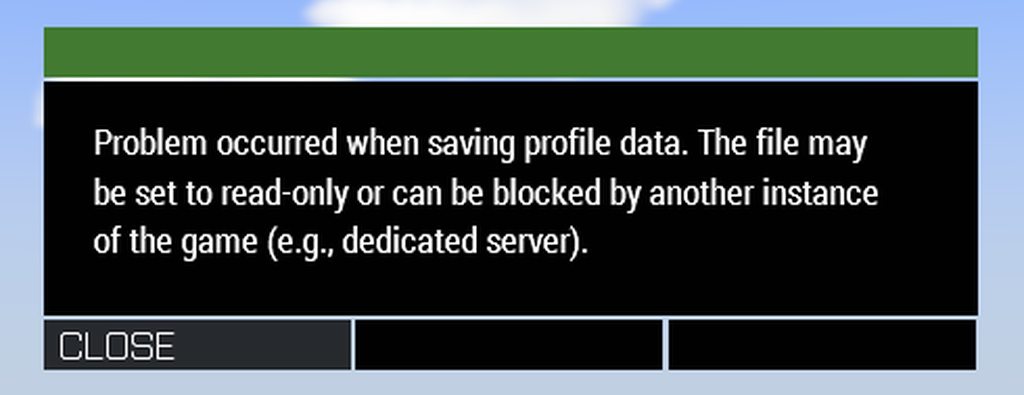
How can I fix this? I'm not on a dedicated server, just hosting it.
 storm arch
I currently have two addactions, one inside another. The first outer addaction has a local variable _example, but is undefined inside the second addaction. Is there a way to pull the local variable into the second one so you don't get a error or do you need to make it a global variable etc?
@ me if you can help
little raptor
storm arch
I currently have two addactions, one inside another. The first outer addaction h...
pass it as the action arg
winter rose
past wagon
How can I fix this? I'm not on a dedicated server, just hosting it.
#server_admins is more appropriate
storm arch
little raptor
pass it as the action arg
Action arg? Im unfamiliar with that?
little raptor
storm arch
Action arg? Im unfamiliar with that?
 storm arch
Bless! Thanks
 smoky verge
if I create a simple object locally
will JIP players see the object?
 agile cargo
I'm trying to attachTo a camera object to a vehicle. It works fine in singleplayer, but in MP the camera remains in place
how can I handle this? I think the issue is because the camera is local to the player, but the vehicle is "global"?
little raptor
smoky verge
if I create a simple object locally
will JIP players see the object?
local objects are only visible to the client that owns them
smoky verge
little raptor
local objects are only visible to the client that owns them
what if the code is executed globally? everyone should see it right?
I'm trying to mass create simple objects without network traffic
little raptor
agile cargo
how can I handle this? I think the issue is because the camera is local to the p...
yes, cams are local
little raptor
smoky verge
what if the code is executed globally? everyone should see it right?
I'm trying ...
if executed globally with JIP flag on yes
smoky verge
how can I JIP flag?
little raptor
remoteExec
just make 1 function that's responsible for creating all your local objects
and remoteExec that function
smoky verge
little raptor
remoteExec
mhm
https://steamcommunity.com/sharedfiles/filedetails/?id=2797300092&searchtext=simple+object
I'm using a modified version of this code, only addition is I've set the locality boolean to true
if (isServer) then {
 private _objects = [];
 if (((count getMissionLayerEntities "Simple Objects") > 0) && isNil "ART_layerConverted") then {
  _objects = (getMissionLayerEntities "Simple Objects") select 0;
  ART_layerConverted = true;
 };
 _objects = _objects + (synchronizedObjects this);
 {
  private _obj = _x;
  if !(isSimpleObject _obj) then {
   private _path = (getModelInfo _obj) # 1;
   private _vector = [vectorDir _obj, vectorUp _obj];
   private _simpleObject = createSimpleObject [_path, getPosWorld _obj, true];
   _simpleObject setVectorDirAndUp _vector;
   deleteVehicle _obj;
  }
 } forEach _objects;
};
whan dumped into a logic entity it should apply it on all synced objects or objects in that named layer
I guess this is not JIP compatible then?
little raptor
no
it's not even "MP compatible"
it just creates the objects locally for the server
essentially it just works in SP (= 1P local hosted MP)
smoky verge
oh sweet
little raptor
smoky verge
mhm
https://steamcommunity.com/sharedfiles/filedetails/?id=2797300092&searchtext...
I wrote almost exactly the same thing for someone else here:
#arma3_editor message
which is also JIP compatible
little raptor
init.sqf
but you can also do your logic thing there
but if you want to put it in object init make sure you remove the comments
oh it doesn't have any
so just wrap it in if (isServer) then { }
smoky verge
so to clarify this will delete all objects and place simple objects in its stead, locally
so only network traffic would be from deleting the objects?
little raptor
- remoteExec
and broadcasting that function
but that network traffic is a one time thing ofc
tho if you have many objects it'll be bad I guess
if you're making the mission yourself, the best way is just "caching" all the object positions locally in a file
and just execute that file
0 network traffic
ah if you had this it would be even easier:
https://community.bistudio.com/wiki/loadConfig
but it's not out yet
with that you could make your own mission editor 😅
smoky verge
oh nice another reason to be hyped for 2.10
how would that work?
little raptor
you would just read mission.sqm
smoky verge
oh wait it loads sqm aswell?
smoky verge
how would that work?
does it merge them together or load a new mission?
little raptor
how would what work?
if you mean the idea, on the server you just delete those objects
and locally you just read the object data from the .sqm file and recreate them as simple objects
little raptor
smoky verge
so to clarify this will delete all objects and place simple objects in its stead...
and you would have this:
so only network traffic would be from deleting the objects?
smoky verge
mhm
I guess the best method for max efficiency would be to do something similar to 3den export mission to sqf
but instead of using createVehicle it uses createSimpleObject
wonder how hard that would be to code
 winter panther
Is there a way to equip an existing backpack on a unit directly? I tried action "AddBag" but I don't want the "grab object" animation, and also sometimes it doesn't work and the backpack is lost.
 opal zephyr
Not sure if this is the right place to ask, but is there any documentation on how the blood effect is applied to a character when they are injured? Or anything else that goes along with visual indicators of injury
warm hedge
What's your intention?
opal zephyr
I stumbled upon some old gore mod clips from Arma 2 and early Arma 3 and wanted to mess with it a little
violet mist
I'm converting a lot of my client-only code to work in multiplayer, but I've hit a snag. I effectively want to create a unit and assign it a few properties (on server side), triggered from the client. I then need a reference to that created unit on the client. Unfortunately, the remoteExec function only returns strings, meaning I'm having a hard time retrieving a reference to the unit I just created. Any suggestions on methods for doing this?
Here's a snippet from the client-only version to prove as an example.
// Local version
private _pat1 = _patientGroup createUnit [_unitType, _currentMarkerPos, [], 0, "CAN_COLLIDE"];  // Spawn the unit at that marker
sleep 0.1;
dostop _pat1;
_pat1 setCombatBehaviour "CARELESS";
_pat1 setName _currentMarkerName;
// .. later on in this script I do other stuff with the _pat1 reference.
Here's what I'd like to do in an ideal circumstance, but I think my head is in the wrong place.
private _pat = [_patientGroup, _unitType, _currentMarkerPos, _currentMarkerName] remoteExec ["Scripts\SPAWN_UNIT.sqf", 0];
remoteExec only returns a JIP ID. Doesn't have anything to do with whatever function or command you called remotely.
It also returns that value immediately, well before the remote function is called.
violet mist
Yeah, but hopefully it shows you what I'm attempting to do here.
granite sky
I don't see what you're trying to return or why.
violet mist
It's because I do other things to that unit reference later in the local script.
granite sky
Why not do all of them where you create the unit?
violet mist
I have a few scroll-wheel triggered scripts and they all do slightly different things to that unit. I'd have to have the script for the scroll-wheel action as well as an accompanying "do this specific thing to this unit" script.
I'd be drowning in scripts if that makes any sense.
I believe the scroll-wheel triggers (addAction) have params they can pass. I can have them all call the same script and pass params depending on what needs to be done. Then I can have a specific server-script depending on what needs to be done to the unit.
granite sky
Your unit creation function should itself remoteExec an addAction-installing function on the client.
violet mist
violet mist
I believe the scroll-wheel triggers (addAction) have params they can pass. I can...
Then it'd be like:
Scroll call 1 --> Intermediary processing script on client --> Spawn and do thing 1 to unit
Scroll call 2 --> Intermediary processing script on client --> Spawn and do thing 2 to unit
Rather than how it is now:
Scroll call 1 --> Client script that does everything #1
Scroll call 2 --> Client script that does everything #2
granite sky
Potentially. It depends what these functions need to do to the unit.
If it's local-argument commands then you don't have a choice. addAction has to run on the client, and some commands must be run where the unit is local.
violet mist
So are you recommending circumventing the client altogether and just trying to run everything on the server?
granite sky
No, addActions have to run on the client.
violet mist
Okay. Thanks for bouncing ideas. I think I've got a direction to go in now.
 leaden spade
Is there a way to script/make a mod that reduces specific vehicle damage taken for this example humvees since rhs ones can be taken out by a few 9mm shots even if they are armored
little raptor
leaden spade
Is there a way to script/make a mod that reduces specific vehicle damage taken ...
If you use mods like ACE you need to load the RHS compatibility mods too
If you don't use ACE, you can report the problem on the RHS feedback tracker
But if you don't want to, you can either increase the armor using a config patch, or write a script that lowers the received damage using handleDamage event handler
 carmine belfry
is there any documentation on arma script compiler tool? im trying to edit values in antistasi plus, it doesnt change them , i asked the creator for help he said use this tool
GitHub
Contribute to dedmen/ArmaScriptCompiler development by creating an account on GitHub.
like where do i start? can i make a sqf into a sqfc? how so?
little raptor
carmine belfry
is there any documentation on arma script compiler tool? im trying to edit value...
carmine belfry
little raptor
https://community.bistudio.com/wiki/SQF_Bytecode
im already lost on step 1, is there a guide or a youtube video for this?
little raptor
¯_(ツ)_/¯
little raptor
what are you even trying to do with that?
carmine belfry
main goal is recompiling a .sqf file
little raptor
im trying to edit values in antistasi plus
what does that have to do with the script compiler?
carmine belfry
conversation between me and creator:
what file do i have to edit to change bm vehicle cost values? i tried editing them in fn_initVarServer.sqf but that doesnt change
It’s likely that you need to recompile .sqfc files to make price changes take effect.
how do i recompile the sqfc? deleting it makes the mission completely not start on dedicated server
Use Arma Script Compiler from Github.
carmine belfry
yeah did it
little raptor
it has an option to set up the P drive
little raptor
now make a folder in there
and put the scripts you want to compile into the folder
carmine belfry
specific name for the folder?
carmine belfry
little raptor
and put the scripts you want to compile into the folder
did it
little raptor
follow the rest from the tutorial
carmine belfry
okay
coarse dragon
So I have set up 3 waves of attacks each in thier own layer and hide/show.
Is it possible to set up the triggers when opf isn't present aka. All dead in the 1st one then 2nd and 3rd?
Or does Alive check work with multiple squads?
 frigid oracle
how can I tell a specific player to run code and not the whole server globally.
EX. Player 1 uses an action on Player 2; creating local text on screen for player 2 and nobody else.
 exotic flax
run globally, but have an if statement to check if it the code should run for the specific player or not
frigid oracle
exotic flax
run globally, but have an `if` statement to check if it the code should run for ...
You sure? That doesn't seem right exactly for some reason (in like a messy way), there is no better way?
little raptor
frigid oracle
how can I tell a specific player to run code and not the whole server globally.
...
remoteExec
frigid oracle
I am using that, but it just doesn't want to work in this case. oops should have mentioned that
_clientID = owner _target;
[_target, _player, "CC_RadAway"] remoteExecCall  ["CC_Fnc_RadMedications_Networking", _clientID];
here is what im trying to do, should have posted this, i typed the original message on my phone.
exotic flax
with CBA you can use CBA_fnc_targetEvent, which uses publicVariableClient (to set a var to another client), which in it's turn executes a script the moment something it added
frigid oracle
I'll take a look at that, thank you for the pointer
What does the CBA docu mean by "Type of event..."? Something from an event handler or a custom fnc like CC_fnc_Test?
exotic flax
it's just a name for yourself to know what is being done
eg. "killByScript" or "doSomethingStrangeEvent"
because at the client you'll need to catch those events by name
CBA_fnc_addPlayerEventHandler to listen to sent events
frigid oracle
Oh lord, last time I tried anything with event handlers it didn't work or do anything. Im just not sure how to use them. I understand what you are saying in theory though.
so for the docu of addPlayerEventHandler I assume where it says
Event handler type.
is the event it's waiting for like your example of "killByScript"
exotic flax
yup
frigid oracle
hmm
ok I think I understand it better now.
Do CBA targetEvent params need to be in wrapped in quotations like in the given example? or can they be unwrapped. nvm
little raptor
frigid oracle
```sqf
_clientID = owner _target;
[_target, _player, "CC_RadAway"] remoteExecCal...
owner is only usable on the server
and you don't need the "clientID" for remoteExec
little raptor
coarse dragon
Or does Alive check work with multiple squads?
it can
but I don't recommend doing it that way
anyway, this is how you check alive for multiple groups:
[group1, group2] findIf {
  units _x findIf {
    alive _x
  } >= 0
} < 0
What way do you suggest?
little raptor
that check means all units in those groups are dead
little raptor
coarse dragon
What way do you suggest?
well I personally would say use event handlers
but you don't know how to use those...
little raptor
coarse dragon
What way do you suggest?
what do you want to happen exactly?
coarse dragon
1st wave to be killed off. Then the 2nd wave spawns
little raptor
how many groups does each wave have?
coarse dragon
6 then 8
little raptor
little raptor
anyway, this is how you check alive for multiple groups:
```sqf
[group1, group2]...
I suppose you could use this then
it won't be too slow
coarse dragon
Interesting thanks
coarse dragon
Is there a script that would destroy a turret when the gunner is killed?
frigid oracle
little raptor
and you don't need the "clientID" for remoteExec
I see thank you for the info. like I said I wanted only one person to get the command, thats why i was trying to find a clientid of sorts. Im trying the CBA options Grez mentioned
little raptor
frigid oracle
I see thank you for the info. like I said I wanted only one person to get the co...
you could just do:
[_target, _player, "CC_RadAway"] remoteExecCall ["CC_Fnc_RadMedications_Networking", _target];
if CC_Fnc_RadMedications_Networking is defined on _target's machine
slender olive
Hey, I'm trying to make a shoothouse camera display ordeal following Vestarr's tutorial on youtube. I have two .sqf files: initCameras.sqf and createShoothouseCameras .sqf
In initCameras.sqf, I have the following (livecamera'#' are game logics I'm using as the viewpoints)
['livecamera2', CAMERASOURCE_2] execVM 'createShoothouseCamera.sqf';
['livecamera3', CAMERASOURCE_3] execVM 'createShoothouseCamera.sqf';
['livecamera4', CAMERASOURCE_4] execVM 'createShoothouseCamera.sqf';```

In createShoothouseCamera.sqf, I have this set to run for each camera:
```params ['_pipTarget', '_source'];

_cameraObject = 'camera' camCreate [0,0,0];
_dir = vectorDir _source;
_cameraObject setVectorDir _dir;
_cameraObject cameraEffect ["Internal", "Back", _pipTarget];
_cameraObject camSetFov 1;

_cameraObject setPosATL (getPosATL _source);```

It's telling me that "_source" in the line ``_dir = vectorDir _source;`` is an undefined variable. Could someone help me out with this?Using single quotes for some strings and double quotes for others is fantastically annoying but not the problem :U
The params appears to be correct, so that suggests that one of your original CAMERASOURCE_x variables isn't defined
frigid oracle
little raptor
you could just do:
```sqf
[_target, _player, "CC_RadAway"] remoteExecCall ["CC_...
ill test that if the CBA event is not working, didnt know you could just point remoteexec on the player itself like that.
slender olive
hallow mortar
Using single quotes for some strings and double quotes for others is fantastical...
I hear that from someone else too but in the video it doesn't look like he's defining it anywhere
And with the strings, I just followed his exact script lol
livecamerax is a game logic, and I'm using them as perspective points for the camera, so what would I place for the CameraSource
hallow mortar
I have no idea. If you're following a tutorial then it should explain what the CAMERASOURCE is supposed to be. It seems like it should be an object that's used as a reference point so you can easily place it in the Editor, but that's just a guess. This is really something the tutorial should tell you because it does seem to be critical to the script.
spiral zealot
is there a script i can paste into a box ini so that its not lootable? so players just cant open it?
i just want a decoration box with its inventory unavailable.
hallow mortar
Just make it a Simple Object in the Special States section of its attributes window
spiral zealot
hallow mortar
Just make it a Simple Object in the Special States section of its attributes win...
but we need to make it explode with its ammo cook off, will that still work?
little raptor
spiral zealot
is there a script i can paste into a box ini so that its not lootable? so player...
it's called init box...
spiral zealot
my bad my bad 
little raptor
spiral zealot
but we need to make it explode with its ammo cook off, will that still work?
no
hallow mortar
slender olive
But that's what livecamera*x* is
I haven't looked at the tutorial but I'm looking at the wiki page for camCreate right now. I think you have it backwards. livecamerax is supposed to be the surface that the camera picture is rendered on (e.g. a screen), and CAMERASOURCE_x is supposed to be the reference object for the position of the camera.
little raptor
spiral zealot
but we need to make it explode with its ammo cook off, will that still work?
you could try disabling its simulation
and add a killed EH to reenable sim once its dead
spiral zealot
no script to just lock the box?
i found this
vehicle player lockInventory true;
but sadly no worky
turn it into
box lockInventory true;
lol
hallow mortar
In an init field you can use this as a reference to the object the init field belongs to
little raptor
spiral zealot
> this lockInventory true;
yes
 still forum
carmine belfry
It’s likely that you need to recompile .sqfc files to make price changes take ef...
still forum
carmine belfry
It’s likely that you need to recompile .sqfc files to make price changes take ef...
It’s likely that you need to recompile .sqfc files to make price changes take effect.
You don't, just deleting them would be enough
carmine belfry
still forum
> It’s likely that you need to recompile .sqfc files to make price changes take ...
i did recompile alraedy, but i tested before, deleting .sqfc makes the server not start copletely
 compact maple
Hi, I would like to pick a random building where there is no player near by, what's the best way to do it?
little raptor
compact maple
Hi, I would like to pick a random building where there is no player near by, wha...
well there are many ways to do it
the easiest way is probably using this to find a "safe pos":
https://community.bistudio.com/wiki/BIS_fnc_findSafePos
then searching in the safe pos for buildings.
but iterative methods like that may have a chance of failure, or being slow
 versed belfry
Question, is there a way to have a trigger execute a script only on the person who entered the trigger?
hallow mortar
Depends on the trigger condition. If it's a non-server-only trigger and the condition is e.g. player in thisList, the trigger will only activate on the machines of people who enter it, so you can then reference player in the script and be assured the reference is to someone who entered the trigger.
versed belfry
hallow mortar
Depends on the trigger condition. If it's a non-server-only trigger and the cond...
Yea, I put it in the activation where the whole script is enveloped by a if (player in thisList) {}; statement
Cheers tho :D
 fading veldt
is there a way to teleport players relatively? I'm trying to make an endless hallway kinda thing where they're teleported back 50m while still being in roughly the right side of the halway (so if 3 of them are abreast, they don't end up all teleporting on top of eachother or mixed up)
little raptor
fading veldt
is there a way to teleport players relatively? I'm trying to make an endless hal...
you can use modelToWorld to get a relative pos
and then use setVehiclePosition to prevent units ending up into each other after teleport
 scenic shard
Hi I need some help with a script to remove all magazines from enemy AI upon death, except a few. I have tried several iterations and managed to get them to work then testing locally.
But on out Dedi server + HC it does not seem to remove the mags correctly:
this is the latest attempt (in init.sqf):
if(!hasInterface) then
{
    ["CAManBase", "Killed", {
        params ["_unit"];
        if (!isPlayer _unit) then
        {
            //dont run this for ammo bearer
            if (typeOf _unit == "O_R_Soldier_A_F") exitWith {};

            private _primaryMags = primaryWeaponMagazine _unit;
            if (count _primaryMags > 0) then
            {
                private _mag = _primaryMags select 0;
                [_unit, _mag] remoteExec ["removeMagazines", _unit];

                [_unit, _mag] spawn {
                    params ["_unit", "_mag"];
                    sleep 2;
                    private _newMagCount = floor (random 3) + 1;
                    for "_i" from 0 to _newMagCount do
                    {
                        _unit addMagazineGlobal _mag;
                    };
                };
            };
        };
    }, true, [], true] call CBA_fnc_addClassEventHandler;
};```killed event handler fires locally
so it never fires for your player on another machine
scenic shard
locally as in the killer? or owner of AI so server/HC?
little raptor
so owner of AI is the server/HC?
if so it should work
did you test to see if the EH even triggers?
scenic shard
it should be, isnt it that automatically with a dedi/hc setup?
little raptor
yes
little raptor
little raptor
did you test to see if the EH even triggers?
but did you even test to make sure?
as far as I see here the problem could be that EH never fires at all
the rest of the code looks correct to me
scenic shard
no, not on the dedi setup, can remote exec a hint to test i guess?
it works as intended in eden
little raptor
scenic shard
no, not on the dedi setup, can remote exec a hint to test i guess?
it works as ...
you can diag_log
and read the server/HC's rpt
but hint (or systemChat) works too
private _newMagCount = floor (random 3) + 1; for "_i" from 0 to _newMagCount do
also a note here: you're adding 1 more than you want
scenic shard
little raptor
you can diag_log
I am getting a response from the server rpt
frigid oracle
little raptor
you could just do:
```sqf
[_target, _player, "CC_RadAway"] remoteExecCall ["CC_...
Both the CBA event handler and remoteExec did not work and i am at a loss.
past wagon
can I put a hyperlink in a diary record?
https://community.bistudio.com/wiki/createDiaryRecord
I've tried this, and it doesn't seem to work:
"<a href='MY LINK'>TEXT</a>"
 brazen lagoon
hey question, how do you ensure that a function is available for JIP players (remoteExec)?
like, when you pass true as the 3rd arg to remoteExec it'll execute on JIP players, right? How would you ensure that whatever function you're calling is there before that gets popped off the JIP queue and executed?
little raptor
frigid oracle
Both the CBA event handler and remoteExec did not work and i am at a loss.
maybe you've blocked remoteExec on your server
you should post the whole code
little raptor
brazen lagoon
like, when you pass true as the 3rd arg to remoteExec it'll execute on JIP playe...
either by defining the function in the config, or broadcasting the function variable from the same remoteExec owner
needless to say the former is the best way
brazen lagoon
yeah figured
god this is dumb
(not my code)
guess ill just have to rewrite all of it. again. lmao
frigid oracle
little raptor
maybe you've blocked remoteExec on your server
Here is the ace action
_CC_ExternalRadAwayAction = ['External RadAway Action','Inject RadAway','\CC_RadiationSystem_indev\Textures\ACE\CC_RadAway_ca.paa',{
[_target, _player, "External_Interact", "CC_RadAway"] call CC_Fnc_RadMedications
},{true}] call ace_interact_menu_fnc_createAction;
"External_Interact", "CC_RadAway" are for switch statements.
everything works, hints and all until it hits this point
[_player, "CC_RadAway"] remoteExecCall ["CC_Fnc_RadMedications_Networking", _target];
the receiving player does not display any hints or anything set in that fnc atm. Its like its not being sent at all. I know remoteExec is not blocked as my other scripts that rely on it work fine.
other actions that pull the _target for a name or their vars work fine.
maybe ace addaction does not support remoteexec? Either way I have zero clue as to why its not working. even remoteexecing a hint is not working.
oops fixed what I copied to be correct actions
little raptor
[_player, "CC_RadAway"] remoteExecCall ["CC_Fnc_RadMedications_Networking", _target];
where does that go?
frigid oracle
which part?
little raptor
that entire line of code
frigid oracle
a location lower in the file? oh I think I may realize the problem, I dont think the script is aware CC_Fnc_RadMedications_Networking exists yet. Is that correct?
fml if thats the case this whole time.
little raptor
frigid oracle
a location lower in the file? oh I think I may realize the problem, I dont think...
CC_Fnc_RadMedications_Networking needs to exist on the client
not wherever you're executing that
frigid oracle
it does. I know that for a fact
CC_Fnc_RadMedications and CC_Fnc_RadMedications_Networking are in the same file being call compile'd at startup
little raptor
being call compile'd at startup
don't make functions like that
frigid oracle
wdym?
little raptor
just use the functions library
little raptor
frigid oracle
`CC_Fnc_RadMedications` and `CC_Fnc_RadMedications_Networking` are in the same f...
anyway if you say CC_Fnc_RadMedications is definitely defined and you're absolutely sure that's also the case for the other client, then my guess is that CC_Fnc_RadMedications_Networking is failing to compile
frigid oracle
little raptor
anyway if you say `CC_Fnc_RadMedications` is definitely defined and you're absol...
yeah that's what I ment by the order in the file.
I think networking needs to be first in line in a sense
little raptor
I don't even understand what you mean because you never showed the full code 
anyway just use the functions lib like I said
frigid oracle
have to edit it to fit in discord message cleanly. but basically
CC_Fnc_RadMedications is on line 142
KPP_Fnc_RadMedications_Networking is on line 400
frigid oracle
ill look into functions lib after I can at least jerry rig this shit to work in it's current state.
But I think lines do matter as its a order of defining in a sense. I think i remember having a problem like this before where I fixed it by moving a networking call fnc before the normal fnc in line order. just totally forgot about that till now.
little raptor
frigid oracle
ill look into functions lib after I can at least jerry rig this shit to work in ...
all you have to do is define those functions in the config instead of compiling them in your script which is way too error prone.
https://community.bistudio.com/wiki/CfgFunctions
frigid oracle
Got it, the layers of learning continue. Do forgive me as im stepping up from just only mission scripting.
scenic shard
@little raptor I now tried to rewrite the same thing just another way. same result tho, works fine in eden MP, but mags are not removed on dedicated server
if(isServer || !hasInterface) then
{
    ["CAManBase", "Killed", {
        params ["_unit"];

        if (!isPlayer _unit) then {
            if (typeOf _unit == "O_R_Soldier_A_F") exitWith {};

            private _allMags = magazines _unit;
            private _primaryMag = (primaryWeaponMagazine _unit) select 0;
            {
                if(_x == _primaryMag) then
                {
                    _unit removeMagazineGlobal _x;
                };
            } forEach _allMags;


            [_unit, _primaryMag] spawn {
                params ["_unit", "_mag"];
                sleep 2;
                private _newMagCount = floor (random 3) + 1;
                for "_i" from 0 to _newMagCount do
                {
                    _unit addMagazineGlobal _mag;
                };
            };
        };
    }, true, [], true] call CBA_fnc_addClassEventHandler;
};```First of all "3den MP" is no different than single player
Second of all I still didn't get the answer I was looking for
Does the EH even get called?
scenic shard
yes, i get the log thing to show up in the rpt
the servers log
Been sitting with this the entire day and can't figure out why it's not working :/
little raptor
scenic shard
Been sitting with this the entire day and can't figure out why it's not working ...
I don't see the why either.
My guess is that the mag does get updated on the server but the clients never see it
So one thing you can try is spawning that whole code and adding a short sleep before it runs
You can remove the inner spawn
Or just move that spawn and its sleep below the exitWith line and update the args
scenic shard
Ok, will see if adding the sleep works
storm arch
@little raptor concerning the question I had yesterday about arguments on addactions. I am trying to pass the local variable _truck into it but I have had no luck. I keep getting _truck undefined. Is there an example you could show? I have been stuck on this for a while :I
open fractal
you should post your code if you're going to tag people
rough summit
Hey guys, have trouble with VLS targeting. So, im want create a script, which allow call cruise missile support (for MP scenario), but VLS don't want shoot in target, idk why.
If im exec this code globally (via debug console) this works fine. But if im separate it on functions all breaks down.
private _pos = screenToWorld [0.5, 0.5];
[_pos] remoteExec ["vlsOpenFire", 0];

vlsOpenFire = {
    params ["_pos"];

    private _laser = createVehicle ["LaserTargetE", _pos, [], 0, "CAN_COLLIDE"];

    waitUntil {!isNull _laser};

    WEST reportRemoteTarget [_laser, 300];
    _laser confirmSensorTarget [WEST, true];
    VLS fireAtTarget [_laser, "weapon_vls_01"];
};
So, after....SOME time im have a answer.
private _pos = screenToWorld [0.5, 0.5];
private _laser = createVehicle ["LaserTargetE", _pos, [], 0, "CAN_COLLIDE"];

waitUntil {!isNull _laser};

WEST reportRemoteTarget [_laser, 300];
_laser confirmSensorTarget [WEST, true];

[_laser] remoteExec ["vlsOpenFire", 2];

vlsOpenFire = {
    params ["_laser"];

    VLS fireAtTarget [_laser, "weapon_vls_01"];
};
Serious question why do we always use exitWith{} instead of defining a scope then breaking to that scope instead?
e.g
if (_someCondition) then {
  breakOut "end";
}

scopeName "end";
That seems neater and more intuitive than say exitWith {}
scenic shard
i dont want to work tabbed in as much as possible. so makes sense if you want to exit early
tough abyss
I've never liked ArmA 3's convention with exitWith {}
warm hedge
You can prefer either of them
tough abyss
Does breakOut work within EH's unlike exitWith ?
scenic shard
i see it as the equivalent to:
if(condition)
return;```

from other stuff like c#exitWith does work in EH
 obtuse lichen
undefined variable in expression: dwp
while {true} do {dwp setWaypointPosition [getPosASL player -1]; sleep 1;}
any idea what's wrong here?
tough abyss
breakWith is more inutitive to exitWith
warm hedge
Self explanatory, dwp is not defined
tough abyss
obtuse lichen
warm hedge
Self explanatory, `dwp` is not defined
how do i define it
warm hedge
Use dwp = (whatever)
obtuse lichen
alright
i'm trying to get a destroy waypoint to go to the position of a unit every second
scenic shard
ok so I still haven't been able to fix my script from yesterday. I just want to remove and add some magazines when AI is killed.
if(isServer || !hasInterface) then
{
    ["CAManBase", "Killed", {
        params ["_unit"];
        [_unit] spawn
        {
            params ["_unit"];
            private _allMags = magazines _unit;
            private _primaryMag = (primaryWeaponMagazine _unit) select 0;
            private _handgunMag = (handgunMagazine _unit) select 0;

            diag_log _allMags;
            diag_log _primaryMag;
            diag_log _handgunMag;

            sleep 4;

            if (!isPlayer _unit) then
            {
                if (typeOf _unit == "O_R_Soldier_A_F") exitWith {};

                {
                    if(_x == _primaryMag || _x == _handgunMag) then
                    {
                        _unit removeMagazineGlobal _x;
                    };
                } forEach _allMags;

                sleep 2;

                private _newMagCount = floor (random 3) + 1;
                diag_log _newMagCount;
                for "_i" from 0 to _newMagCount do
                {
                    _unit addMagazineGlobal _primaryMag;
                };

                private _newMagCount2 = floor (random 2) + 1;
                diag_log _newMagCount2;
                for "_i" from 0 to _newMagCount2 do
                {
                    _unit addMagazineGlobal _handgunMag;
                };
            };
        };
    }, true, [], true] call CBA_fnc_addClassEventHandler;
};```the diag_log is giving this on the server:
"CUP_30Rnd_545x39_AK_M"
"CUP_8Rnd_9x18_Makarov_M"
2
1``` willow hound
obtuse lichen
i'm trying to get a destroy waypoint to go to the position of a unit every secon...
willow hound
obtuse lichen
i'm trying to get a destroy waypoint to go to the position of a unit every secon...
Do you create the unit and the waypoint via script or have you placed both in the Editor?
rough summit
rough summit
So, after....SOME time im have a answer.
```sqf
private _pos = screenToWorld [0....
I found bug, or something, idk.
If you don't take control as a gunner, then all missiles fired by the script will not be aimed at the target.
Anyone know how can i fix it?
At the same time, if you disconnect from vls, then it will continue to normally direct missiles at the target.
copper raven
tough abyss
That seems neater and more intuitive than say exitWith {}
how is that? cluttering extra two commands instead of a single exitWith?
little raptor
tough abyss
Does breakOut work within EH's unlike exitWith ?
No
little raptor
tough abyss
I've never liked ArmA 3's convention with exitWith {}
idk how that looks more intuitive to you
also what you wrote is wrong. The scopeName is not set when you do breakOut. so it'll be even less "intuitive" than you think
 modern meteor
sqf player call BIS_fnc_tasksUnit;
This is returning an array. How could I check if the array is empty?
granite sky
@scenic shard What's the problem?
 tight cloak
quick question for best approach to this as im not familiar with all the potential methods / ways of doing this that may be quicker and better.
i have a location array. xyz. now i want to just add say -10 to whatever the y is. modifying it to be whatever the y originally was but reduced by 10 and back in its xyz format
winter rose
modern meteor
``sqf
player call BIS_fnc_tasksUnit;``
This is returning an array. How could I ...
isEqualTo []
winter rose
tight cloak
quick question for best approach to this as im not familiar with all the potenti...
vectorAdd?
tight cloak
many thanks lou. sorry for it being a simple question, not familiar with all the syntax and best practises
modern meteor
winter rose
`isEqualTo []`
Thank you. Sorry for the basic question but how do I refer to the array? Eg. what is the full command?
little raptor
modern meteor
Thank you. Sorry for the basic question but how do I refer to the array? Eg. wha...
_array isEqualTo []
alternatively:
count _array == 0
 dusk shadow
Anyone know if there's any docs on how the engine estimates the spread of artillery? I'm refering to the spread value shown in the Artillery Computer.
Using zero-drag kinematics I can get the ETA and elevation to match close enough. But I can't for the life of me figure out how the weapon dispersion and artilleryDispersion stuff from the configs factor in to the spread.
modern meteor
Thank you guys
little raptor
dusk shadow
Anyone know if there's any docs on how the engine estimates the spread of artill...
artilleryDispersion is a flag isn't it?
dusk shadow
Yeah but what I dont how is does it factor in to the calculation
little raptor
and even non-shell ammo have it
little raptor
dusk shadow
Yeah but what I dont how is does it factor in to the calculation
it's related to the weapon I guess
like other weapons
or are you referring to the entry in weapon config?
dusk shadow
So what I'm trying to is to estimate the parameters of the shot before an AI fires an artillery shot using doArtilleryFire.
My kinematic calculation of the ETA matches the ETA provided by the game so I know my math on the arc is good enough.
What I've done to estimate the spread is to assume that the dispersion value in the config (expermenting with both weapon >> "dispersion" and "artilleryDispersion" from weapon, firemode and ammo configs) is a deviation at the barrel.
So I calculate the impact points with elevation + dispertion and elevation - dispersion and average the error distance relative to the desired target to get the spread
and it gives me values that are quite off
now I've tried reading the dispersion value as both radians and degrees as well apply dispersion * artilleryDispersion
little raptor
well afaik dispersion is angular dispersion coefficient
which is added randomly
dusk shadow
but still nothing seems to get close...
little raptor
so it's not elevation + dispertion
my guess is that it should be elevation * (1 + random [-dispersion, 0, dispersion])
not sure what artilleryDispersion does
dusk shadow
I think its a factor
little raptor
maybe another multiplier
dusk shadow
yea
so to get max values would be elevation + elevation * dispersion
or you reckon it's some kind of mean or average?
little raptor
little raptor
my guess is that it should be `elevation * (1 + random [-dispersion, 0, dispersi...
I would try with this I guess
little raptor
dusk shadow
I think its a factor
you could try like that too (disp *= artilleryDisp)
tho not sure what artilleryCharge is
seems to control the max radius in artillery computer
dusk shadow
charge is related to initial speed of the projectile
so v0 in your kinematics
etc is initSpeed * artilleryCharge
tight cloak
            _loadoutClass = getPylonMagazines _asset;
            _pylonCount = count getAllPylonsInfo _asset;
            from _i to _pylonCount do {

            }
            //or
            {


            } forEach array;
            _loadoutDisplay = getText (configFile >> "CfgMagazines" >> _loadoutClass >> "displayName");
            systemChat format ["%1", _loadoutDisplay];
            _loadoutMarkPos = (getMarkerPos _markername) vectorAdd [0,-100,0];
            _loadout = createMarker [_loadoutMark, _loadoutMarkPos, 1]; // put it just under the Asset
            _loadout setMarkerColor "ColorBlue";
            _loadout setMarkerShape "ICON";
            _loadout setMarkerType "hd_dot";
            _loadout setMarkerText _loadoutDisplay;
im trying to make a script that posts the vehicle and its loadout on the map at a specific coord. now ive got most of it down but im trying to make individual markers for each pylon saying whats on each. which is better, from _i or foreach? considering im trying to get spacing between each pylons marker on the map i need to count how many pylons to increase the spacing from the heading marker of the asset by a certain amount. hope i explained it properly. (for visual reference of what im trying to do)
- ASSET // NAME OF PLAYER
-pylon 1
-pylon 2
-pylon 3
-pylon 4
little raptor
tight cloak
```sqf
_loadoutClass = getPylonMagazines _asset;
_pylonC...
forEach
willow hound
Both work (you can access the index inside the forEach-loop with _forEachIndex), use what you prefer.
tight cloak
i did not know that was a thing, thankyou
frigid oracle
little raptor
all you have to do is define those functions in the config instead of compiling ...
I'm very sorry to keep bothering you on this subject.
I converted the functions to Cfg
I converted ace addactions to Cfg
Everything works fine until the remoteexec.
when I use the action on another player, it display text on my screen confirming I am doing something. The other player has nothing happen. At this point i think im losing my mind.
little raptor
frigid oracle
I'm very sorry to keep bothering you on this subject.
I converted the functions ...
can you just DM me the whole code?
or put it on pastebin.com if you don't mind posting it here
tight cloak
            {
                _incr = (-10 * _forEachIndex);
                _loadoutDisplay = getText (configFile >> "CfgMagazines" >> _x >> "displayName");
                systemChat format ["%1", _loadoutDisplay];
                _loadoutMarkPos = (getMarkerPos _markername) vectorAdd [0,_incr,0];
                _loadout = createMarker [_loadoutMark, _loadoutMarkPos, 1]; // put it just under the Asset
                _loadout setMarkerColor "ColorBlue";
                _loadout setMarkerShape "ICON";
                _loadout setMarkerType "hd_dot";
                _loadout setMarkerText _loadoutDisplay;

            } forEach _loadoutClass;
does it for each pylon, the error however is in multiplying the -10 by the index and applying that to modifying location of the next one, it currently spawns it ontop of the old marker. i assume im making an obvious mistake but i cant see it / dont know what to try to fix it
scenic shard
granite sky
<@246337812511588355> What's the problem?
_unit removeMagazineGlobal _x;
does not remove magazines
tight cloak
oh im a mong, disregard my question
index goes down to 0, therefore its multiplying by 0
little raptor
scenic shard
_unit removeMagazineGlobal _x;
does not remove magazines
did you try with sleep?
scenic shard
that one has sleep, or did you mean somewhere else?
little raptor
scenic shard
that one has sleep, or did you mean somewhere else?
yeah that one. I didn't see the code
actually the unit is already dead
he has no primary weapon anymore
that's why it doesn't work (I guess)
scenic shard
i grab the info before the sleep, and logging gives the correct strings back for all variables
little raptor
you're doing that in the next frame after the unit is killed
scenic shard
ok, but i get the expected results when logging :/
little raptor
scenic shard
_unit removeMagazineGlobal _x;
does not remove magazines
are you sure it doesn't? you're adding the magazines all over again later in the code
also which branch of the game are you trying that on?
if stable, switch to profiling
there was some bug with containers iirc that's been fixed
winter panther
I have a script that when executed displays a GUI, with a couple lists of items. I want to save the lists of items selected by the user, so when he opens the GUI again (from anywhere), the same items are preselected. What would be the best way to save this? Should I use setVariable on the player?
rough summit
rough summit
I found bug, or something, idk.
If you don't take control as a gunner, then all ...
I still don't know what the problem is and tried a lot of options, but nothing works 😦
willow hound
winter panther
I have a script that when executed displays a GUI, with a couple lists of items....
I recommend using a boring global variable 🙃
 stable dune
winter panther
I have a script that when executed displays a GUI, with a couple lists of items....
stable dune
winter panther
I have a script that when executed displays a GUI, with a couple lists of items....
Not giving answer. Maybe. Asking myself from ppl who knows more. How much is difference to setVarible local to player and get this. Or do variable like on GUI.
Like
And when you open GUI
If (mySelectedItem != "") then {
on gui select mySelectedItem
} Else {
mySelectedItem = GUI select item;
};
Or get these same from getVariable
willow hound
1️⃣ TAG_selectedItem = 42 (same as missionNamespace setVariable ["TAG_selectedItem", 42]): The variable lives until the end of the mission. In multiplayer, different clients have separate instances of the variable.
2️⃣ _myCtrl setVariable ["TAG_selectedItem", 42]: The variable lives as long as the control _myCtrl; once the GUI is closed, the variable is destroyed.
3️⃣ player setVariable ["TAG_selectedItem", 42]: The variable lives until the player object is deleted (same for any other object). However, the A3 respawn system takes care of copying all variables from the old player object's namespace to the new player object's namespace when respawning. This option is useful in multiplayer if the variable needs to be known to multiple clients (e.g. player setVariable ["TAG_selectedItem", 42, true]).
See https://community.bistudio.com/wiki/Namespace for some background information.
tough abyss
^
generally I'd say a setVariable on the player is cleaner than making a dedicated global var for the value
only broadcast if necessary, though
willow hound
I prefer the global variable as long as it does not interfere with multiplayer. It's just too much of a hassle to write player getVariable "A11_someVar" and (even worse) player setVariable ["A11_someVar", ...] everywhere instead of just using A11_someVar.
stable dune
Thanks for good answer 👍
little raptor
willow hound
I recommend using a boring global variable 🙃
namespace vars are better
little raptor
willow hound
1️⃣ `TAG_selectedItem = 42` (same as `missionNamespace setVariable ["TAG_selecte...
2 (ofc as long as the lifetime is fine with you)
winter panther
willow hound
I recommend using a boring global variable 🙃
can you declar a global variable that's specific to each player? I need each player to have their own list of preselected items, and the server doesn't need to have this information
I'm still a bit new with networking stuff
tough abyss
Global vars are automatically local unless broadcast with publicVariable
copper raven
winter panther
can you declar a global variable that's specific to each player? I need each pla...
use setVariable
winter panther
ah ok, so just by declaring a global variable in the script should be enough, each player will have their own version of it, right?
tough abyss
^ that will broadcast the value to all clients
if you make a global variable and don't broadcast it, it will be local everywhere
stable dune
So if i want "save" things when using GUI and only need those when GUI is opened and doenst need those after i close GUI. I should use ansin11's 2️⃣
little raptor
winter panther
ah ok, so just by declaring a global variable in the script should be enough, ea...
each client will
the player object can change
tough abyss
Basically if you want each client to have their own version, just doing a global variable or setVariable without broadcasting will do the trick
whether you do a global or a setVariable is up to you, though the latter is preferable
winter panther
Ok, thanks ppl 😬
 ocean folio
I'm trying to chase down this issue with my sqf not being found
private _markerType = _x call compile preprocessFileLineNumbers "myTag_fnc_getDebugMarkerType.sqf"; //This cant be found, I'm probably doing it wrong
is that what the file is called?
granite sky
you're definitely doing it wrong anyway :P
ocean folio
lmfao yeah I think I see what's up now
granite sky
Set up a CfgFunctions and then just call the function directly.
ocean folio
I do have it in CfgFunctions
granite sky
private _markerType = _x call myTag_fnc_getDebugMarkerType;
you should have an actual tag too
whoops
ocean folio
lol I havent really figured out how the tag thing works. I only just got to changing the name of the file and still having the module show up in editor
granite sky
CfgFunctions first level class is the tag. Second level is the (default) folder name, and the third level is the filename of the function.
ocean folio
I dont exactly understand CfgFunctions either yet. I just copied the format from the module example on the wiki
class CfgFunctions
{
    class myTag
    {
        class Effects
        {
            file = "\AJ_Cache2\functions";
            class main{};
            class getDebugMarkerType{};
        }
    }
}
main works, the debugmarker one doesnt
copper raven
ocean folio
lol I havent really figured out how the tag thing works. I only *just* got to ch...
for tags see https://community.bistudio.com/wiki/OFPEC_tags
ocean folio
is there any level of automation in that? like it putting the tag in front of some things like functions?
copper raven
the toplevel class in cfgFunctions in your case class myTag prefixes the functions with that tag
ocean folio
the thing that has me confused is I can call my main function with myTag_fnc_main but the file is named fn_main
ahhh
so if I were to just replace every instance of myTag with something like AJ it would be fine?
well, the wiki says 3 letters, but yeah that idea
copper raven
3-5 characters are preferred but yeah something like that
you can also explicitly declare the tag with tag = "MYTAG"; see https://community.bistudio.com/wiki/Arma_3:_Functions_Library#Tag
ocean folio
what's the use of that compared to just doing it with the class TAG?
just a different way of accomplishing the same task?
idk why you would want 2 identically named functions in your mod
copper raven
if you have multiple classes in cfgfunctions, you can then use tag to specify it, also if the classname is something descriptive and not just a tag
ocean folio
interesting, alright!
tight cloak
        case true: {
            _className = getDescription _asset;
            _className = _className select 0;
            _displayName = getText (configFile >> "CfgVehicles" >> _className >> "displayName");
            _listing = createMarker [_markername, [200,200], 1]; // AO posting
            _listing setMarkerColor "ColorBlue";
            _listing setMarkerShape "ICON";
            _listing setMarkerType "RedCrystal";
            _listing setMarkerText _displayName + "//" + str _names;
            _loadoutClass = getPylonMagazines _asset;
            {
                _indexCount = str _forEachIndex;
                _loadoutMark = ["_loadoutMark", "_indexCount"] joinString "";
                _loadout = ["_loadout", "_indexCount"] joinString "";
                _indexMod = _forEachIndex + 1;
                _incr = -100 * _indexMod;
                _loadoutDisplay = getText (configFile >> "CfgMagazines" >> _x >> "displayName");
                systemChat format ["%1", _loadoutDisplay];
                _loadoutMarkPos = (getMarkerPos _markername) vectorAdd [0,_incr,0];
                _loadout = createMarker [_loadoutMark, _loadoutMarkPos, 1]; // put it just under the Asset
                _loadout setMarkerColor "ColorBlue";
                _loadout setMarkerShape "ICON";
                _loadout setMarkerType "hd_dot";
                _loadout setMarkerText _loadoutDisplay;
                _pylonMarkers = [_loadoutMark];
            } forEach _loadoutClass;
so: i got this working just before my compute shut off accidentally and i lost some progress. now i cant figure out what i did to make it work, essentially i need each of the pylons to have a seperate marker, yet it only makes one. any help? also as to why i have the join strings is because i need each to have a seperate name to delete them afterwards, but i think its also the cause of the issue i solved. probably an error in the way i labbelled them per index
for some extra info: the systemchat output dumps all the pylons so the error isnt there
scenic shard
little raptor
are you sure it doesn't? you're adding the magazines all over again later in the...
it is on profiling already, the unit starts with 5 mags, and when killed i can see the extra mags get added correctly. but none gets removed so they end up with 7+ mags on death
storm arch
_car = createVehicle ["B_CargoNet_01_ammo_F", [14761.1,16475.1,100]];
  if (side player == WEST) then {
    _car addAction ["delete vehicle", {
      deleteVehicle _car;
    }];

};}]; ```How do I get _car in the second addaction to be recognized? I know its through arguements but not sure how to do that?
scenic shard
params ["_target", "_caller", "_actionId", "_arguments"];
little raptor
storm arch
``` player addAction ["ex1", {
_car = createVehicle ["B_CargoNet_01_ammo_F", [14...
you don't need the args for that.
_car is just the _target
_car addAction ["delete vehicle", {
      params ["_car"];
      deleteVehicle _car;
}];
use arguments for other stuff
_car addAction ["delete vehicle", {
      params ["_car", "", "", "_args"];
      _args params ["_var1", "_var2"];

}, [_var1, _var2]];
I have script which removes all magazine from player and you can add mags what you prefer Back. I didn't find your earlier message what you are trying to get done.
You want delete all mags and add 1-3 mags Back or how?
scenic shard
yea that is pretty much it, mine does not work on the dedicated server setup
little raptor
scenic shard
it is on profiling already, the unit starts with 5 mags, and when killed i can s...
well for one thing, your code has an off by 1 error like I told you before
private _newMagCount = floor (random 3) + 1;
                diag_log _newMagCount;
                for "_i" from 0 to _newMagCount do
                {
                    _unit addMagazineGlobal _primaryMag;
                };
e.g. if _newMagCount is 3, you get 4 mags
but if it's much more than that then I have no idea what's the problem anymore
it could be a game bug
another problem could be that you're adding that EH on multiple clients, and it triggers for all
scenic shard
yea it is more than that. some have 9+ mags even
little raptor
since addMagazineGlobal is global, you're duplicating things
e.g. if an HC and server both fire, and you want 3 mags, you get 6 8 instead (due to the off by 1 error)
to make sure that's not the case, remove the add part
just keep remove
see if the unit ends up with no mags
if he does then what I said is correct
scenic shard
that could be a thing, but I first only had it on server and later added HC as well during testing. I though the killed EH only triggered where the unit was local?
little raptor
it should but I'm not sure how CBA's thing works
it might broadcast the event to all clients that added the same EH
scenic shard
will give that a try and see
tight cloak
whats the best way to rename variables in a loop? - only reason i need to do this is to give markers a unique name in the loop and to put each new name in an array
little raptor
rename variables?
you don't need to rename vars in loops
unless you mean the marker name
tight cloak
yes ^ that
little raptor
just use format:
private _offset = missionNamespace getVariable ["countMarkers", 0];
for "_i" from 0 to _n - 1 do {
  private _markerName = format ["my_marker_%1", _i + _offset];
  ...
};
countMarkers = _offset + _n
P.S: countMarkers should only be used by 1 function ^
and it shouldn't be spawned multiple times together, or you'll get data race
tight cloak
what do you mean?
little raptor
I mean countMarkers is updated at the end of the loop
tight cloak
i assume data race is stuff on the stack / unscheduled overlapping in execution
tight cloak
how does that happen in a scheduled environment then?
little raptor
let's say you spawn that function twice
and you want to add 100 markers in one, and 200 in other
both will read countMarkers as 0 at the start
now depending on which one finishes last, you either end up with 100 or 200
and both are wrong here
because you have 300 markers
tight cloak
i see
little raptor
you could add the count at the start
private _offset = 0;
isNil {
  _offset = missionNamespace getVariable ["countMarkers", 0];
  countMarkers = _offset + _n;
};
it's now safe from data race
tight cloak
i apologise for being slow at following this explanation, but is countmarkers tracking how many markers are made in the loop?
little raptor
how many added in total
tight cloak
and is it just counting how many or putting them in an array
little raptor
counts
tight cloak
okay, not exactly what im looking for in this script as i need an array of the markers in name form as im going to be deleting them later in a simple foreach delete _x
little raptor
well you can use an array instead of countMarkers
tight cloak
tight cloak
```sqf
case true: {
_className = getDescription _asset;
...
heres the code snippet im working on, just trying to weave in unique marker names and an array of the created marker names to be put into a subarray for better reference as to what im doing
so: use format, add the index to the name of it then send that to the name of the marker, then also add the name of the marker to the array at the end all in all
little raptor
if you intend to do that for multiple objects (or whatever that code does, I didn't follow it all) it won't be that simple
and the last line here is not doing anything useful:
_pylonMarkers = [_loadoutMark];
since I don't see your full code nor understand the purpose of all that I'm just gonna give you some general pointers:
- marker names must be unique. duplicate markers fail to create. you can use the counter method to generate unique marker names
- to add elements to arrays you should use
pushBack:
private _markers = [];
for "_i" from 0 to _n - 1do {
  private _markerName = format ["my_marker_%1", _i];
  _markers pushBack _markerName;
};
ofc if you don't want to keep adding unique markers, you can delete the old markers and reuse their names
tight cloak
little raptor
since I don't see your full code nor understand the purpose of all that I'm just...
would it be easier if i post the entire code?
little raptor
it would but I'm not in the mood right now
you can post it nonetheless. maybe someone else comes along to help
tight cloak
thats okay, thanks for the help you gave me tho. it did help and pointed me in the right direction
past wagon
is there a good way to check if a player has pressed a button within the last couple seconds? Like inputAction but with a larger time interval?
violet mist
Okay boys, I'm back. I've done another rework of my codebase. I've got everything running on a dedicated server so I can debug MP, but I've got one bug I've been slamming my head into. When I call a remoteExec from the client, nothing happens. The old client-only implementation (practically identical) works perfectly fine so I'm either using remoteExec incorrectly or I don't know where to look for the errors on my dedicated server. (I've been looking in the console/logfile). Here are my two snippets (appropriately labelled in the commenting).
// Old client script snippet (working)
private _pat1 = _patientGroup createUnit [_unitType, _currentMarkerPos, [], 0, "CAN_COLLIDE"];  // Spawn the unit at that marker
sleep 0.1;
dostop _pat1;
_pat1 setCombatBehaviour "CARELESS";
_pat1 setName _currentMarkerName;
// MP implementation snippet (Client works, server does nothing and doesn't throw any errors)

// Client script:
[_patientGroup, _unitType, _currentMarkerPos, _currentMarkerName] remoteExec ["Scripts\MedicalScenarios\Advanced\ADV_LARGE_EXPLOSION.sqf", 0, true];

// Server script:
params ["_patientGroup", "_unitType", "_currentMarkerPos", "_currentMarkerName"];  // Incoming params
private _pat1 = _patientGroup createUnit [_unitType, _currentMarkerPos, [], 0, "CAN_COLLIDE"];  // Spawn the unit at that marker
sleep 0.1;
dostop _pat1;
_pat1 setCombatBehaviour "CARELESS";
_pat1 setName _currentMarkerName;
you have to do that yourself using event handlers
little raptor
tight cloak
thats okay, thanks for the help you gave me tho. it did help and pointed me in t...
if you're still here I have like 10 minutes
little raptor
violet mist
```sqf
// MP implementation snippet (Client works, server does nothing and doesn...
you can't remoteExec scripts
only commands/functions
violet mist
little raptor
you can't remoteExec scripts
What would you recommend as the proper way to execute multiple lines from client->server then?
little raptor
there are many ways to do it
if it's executed multiple times -> use functions
if it's executed once and being scheduled is ok -> you can remoteExec execVM
if you don't have a script and didn't make a function -> you can remoteExec call/spawn
violet mist
little raptor
if it's executed multiple times -> use functions
if it's executed once and being...
I wasn't able to locate much material about having server-side functions that I can call from the client. Are you able to direct me towards something?
little raptor
violet mist
I wasn't able to locate much material about having server-side functions that I ...
what are you working on right now?
mod? mission?
violet mist
Mission.
little raptor
just define your functions in description.ext:
https://community.bistudio.com/wiki/CfgFunctions
they'll be automatically defined for everyone
violet mist
When I call them from the client will they run on server-side?
Or, I remoteExec them?
little raptor
they run wherever you want them to
little raptor
violet mist
Or, I remoteExec them?
yes
violet mist
Awesome. Exactly what I needed to know. Many thanks.
past wagon
params ["_vehicle", "_caller", "_actionID"];

_caller setVariable ["repairing", true];

private _repairDistance = _caller distance _vehicle;

[_vehicle, _caller, _repairDistance] spawn {
    params ["_vehicle", "_caller", "_repairDistance"];
    waitUntil { !(_caller getVariable "repairing") || _caller distance _vehicle > (_repairDistance + 2) || _caller distance _vehicle > 3.5 /*|#|*/|| inputAction "ingamePause" > 0 }; //ERROR HERE
    _caller setVariable ["repairing", false];
};
```Anyone know why I'm getting `Error: waituntil returned nil`?is it possible to delete a nvm found spawn?terminate
tight cloak
little raptor
if you're still here I have like 10 minutes
just missed ya it seems
tough abyss
@past wagon try
waitUntil { (!(_caller getVariable "repairing") || {_caller distance _vehicle > (_repairDistance + 2) || {_caller distance _vehicle > 3.5 || {inputAction "ingamePause" > 0 }}}) };
Is it possible to detect when a user closes the zeus interface? The idea is to add an action to an object that will create a limited curator and assign it to the interacting player. When the player closes the interface, the player is unassigned and the curator object is detroyed.
tough abyss
Can detect the curatorInterface inputAction
otherwise you'll probably have to detect the zeus gui elements via ID
which would probably be better than just checking for that input
winter panther

tough abyss
Ah yep here we go
Zeus' display id is 312
So all you'd need is something like this to run after the action is selected
[] spawn {
  // Give player zeus access here
  // Wait for player to open zeus display
  waitUntil { !isNull findDisplay 312 };
  // Wait for player to close zeus display
  waitUntil { isNull findDisplay 312 };
  // Remove player's zeus access here
};
it would be the code for the action
winter panther
when the display is null, he closed the UI
tough abyss
yes
past wagon
tough abyss
<@453017735706836992> try
```sqf
waitUntil { (!(_caller getVariable "repairing")...
works, thanks
tough abyss
I'm not an expert with GUI stuff in this game though, so you'll want to test it
tough abyss
past wagon
works, thanks
no problem
winter panther
that's easier than I expected, thanks!
tough abyss
no problem, lmk if it doesn't work and I'll see what I can do
winter panther
I wonder what happens if you assign two curators to the same player 🤔
tough abyss
I imagine the second one overrides the first
winter panther
I'll test that. If that's the case, I may need to save the previous curator, so I don't accidentaly remove a full zeus curator
tough abyss
Probably just check if a player's a curator beforehand and do nothing if they are
but don't know if that fits what you're trying to do
winter panther
I'm trying to make some sort of base building script, using a limited curator that activates when interacting with an object. If the user is a curator already, I still want to give him the limited curator, so I may need to reassign the previous curator after que closes the UI
tough abyss
Ah, very well. Though I will say I'm only guessing when I say it would override the first, so definitely test before you worry about it.
winter panther
Ok I just tested it. If you try to assign a curator to a player that already has a curator assigned, it will fail silently. The code will continue, but the player remains assigned to the previous curator. So yeah, I'll need to store it temporarily.
tough abyss
Ah well, should be only a small inconvenience
stable dune
tough abyss
<@453017735706836992> try
```sqf
waitUntil { (!(_caller getVariable "repairing")...
Hey. out of interest, I would like to ask if a waituntil like this is less heavy on the server than a whileloop with 0.5 second sleep.
Like
waitUntil;{ sleep 0.5; !(myObject nearEntities ["man", 10] isEqual []) && isPlayer ((myObject nearEntities ["man",25]) #0)};
or does this error if there is no entities at my myObject.
tough abyss
waitUntil essentially runs every frame (or longer, depending on computational load) unless you put a sleep in it
so it would be less intensive to do a 0.5 second loop if that meets your needs (or just a waitUntil with a 0.5 second sleep)
but that code is invalid because you can't use waitUntil like that
the syntax is waitUntil { code }
stable dune
I thought so
Yeah, wroted wrong my thought
Edited that one
Mostly i use whileloop with 0.5 sleep (If there is no eventHandler avaible to My needs) and waitUntil on like waitUntil {findDisplay _display};
tough abyss
either is fine but a waitUntil with a sleep will work just as well
stable dune
Okey
Good to know
how do i find out how long my code takes to execute. seen a lot of models on the wiki where you can see like // 0.0078ms
tough abyss
I mean you can time code w/ debug console but you can also do it from within your code like so
private _startTime = diag_tickTime;
// code runs here
systemChat format ["Code took %1s to run", diag_tickTime - _startTime];
obviously if it runs on the server you'll need to remoteExec the systemChat
stable dune
Yeah. Nice.
Thanks alot.
tough abyss
no problem
alternatively if you want it in ms you can do this for the print
systemChat format ["Code took %1ms to run", (diag_tickTime - _startTime)/0.001];
Do you want to be hired or hire?
tough abyss
Better to put that in #creators_recruiting probably
 winged hemlock
warm hedge
Do you want to be hired or hire?
winged hemlock
warm hedge
Do you want to be hired or hire?
Hire
Thanks ^
 rancid lance
i require aid!
||hint "grunt birthday party is now activated!"; sound = { if (side _x == east) then { _x addEventHandler ["killed", { _killer = _this select 1; if (_killer in (units (group player))) then { _sounds = ["grunt"]; playSound "grunt"; }; } ]; }; } forEach allUnits; player removeAction GBP; BGPO = player addAction ["Disable grunt birthdayparty!", { hint "no more noise!"; player removeAction BGPO; sleep 15; GBP = player addAction ["Enable grunt birthdayParty?", { hint"grunt birthday party enabled!...again"; grunt = []execVM "shit.sqf"; terminate grunt; }]; }];||
thought that would make it smaller
anyway, i effectively made the grunt birthday skull in my mission and have an option to enable it, and one to disable it BUT for some reason it will not disable, even though it does terminate the script! it removes the add action section x-x but doesnt take away the sound!
its like it just sets the constant, how do i remove that rule after setting it so it stops ;A;
past wagon
(findDisplay 46) displayAddEventHandler ["KeyDown", {
        params ["", "_key", "_shift"];
    if (_key == 47 && _shift) then {
        if ((stance player == "CROUCH" || (vehicle player == player && isTouchingGround player && stance player == "STAND")) && speed player > 10 && !(animationState player in [
            "AovrPercMrunSrasWrflDf",
            "amovpercmstpsnonwnondnon_amovpknlmstpsnonwnondnon",
            "ainvpknlmstpslaywnondnon_medicin",
            "ainvpknlmstpslaywnondnon_medic"
        ])) exitWith {
            private _height = (1.8 - (load player)) max 3.5;
            private _velocity = velocity player;
            private _direction = getDir player;
            player setVelocity [(_velocity select 0) + (sin _direction * 0.4), (_velocity select 1) + (cos _direction * 0.4), ((_velocity select 2) * 0.4) + _height];
            if (currentWeapon player == "") then {
                player switchMove "AovrPercMrunSrasWrflDf";
                player playMoveNow "AovrPercMrunSrasWrflDf";
            } else {
                player switchMove "AovrPercMrunSrasWrflDf";
            };
            true
        };
    };
}];
```Does anyone know why this EH is still having players do the `"GetOver"` action, even though it is supposed to be overridden?hint "grunt birthday party is now activated!";
sound =
{
if (side _x == east) then {
_x addEventHandler ["killed", {
_killer = _this select 1;
if (_killer in (units (group player))) then {
_sounds = ["grunt"];
playSound "grunt";
};
}];
};
} forEach allUnits;
player removeAction GBP;
BGPO = player addAction ["Disable grunt birthdayparty!", {
hint "no more noise!";
player removeAction BGPO;
sleep 15;
GBP = player addAction ["Enable grunt birthdayParty?", {
hint "grunt birthday party enabled!...again";
grunt = [] execVM "shit.sqf";
terminate grunt;
}];
}];
```Could you show me the rest of your code?its all where i pasted it, but how are you making it look like that when you paste it?
past wagon
!code
 wicked roostBOT
How to use SQF syntax highlighting in Discord
```sqf
// your code here
hint "good!";
```
↓
// your code here
hint "good!";
'''sqf
Bravo getVariable "owner" == independent;
''''
past wagon
past wagon
```sqf
hint "grunt birthday party is now activated!";
sound =
{
if (side _x ...
is this shit.sqf?
rancid lance
;A;
past wagon
rancid lance
'''sqf
Bravo getVariable "owner" == independent;
''''
` not '
open fractal
past wagon
```sqf
(findDisplay 46) displayAddEventHandler ["KeyDown", {
params ["",...
have you made sure your exitWith {} code is executing
past wagon
open fractal
have you made sure your exitWith {} code is executing
yes, it's definitely executing
rancid lance
hint "grunt birthday party is now activated!";

sound = {
    if (side _x == east) then {
        _x addEventHandler ["killed", {
            _killer = _this select 1;
            if (_killer in (units (group player))) then {
                _sounds = ["grunt"];

                playSound "grunt";
            };
        }
    ];
};
} forEach allUnits;
player removeAction GBP;

BGPO = player addAction ["Disable grunt birthdayparty!", {
    hint "no more noise!";

    player removeAction BGPO;
    removeEventHandler ["killed"];
    sleep 15;
    GBP = player addAction ["Enable grunt birthdayParty?", {
        hint"grunt birthday party enabled!...again";
        grunt = []execVM "shit.sqf";
    }];
}];
yay
thats it, "Shit.sqf" just restarts the script
past wagon
ok
well you are only removing the event handler from the player executing that script
actually
rancid lance
so i gotta remote exec
past wagon
yes
rancid lance
i just gotta get it working then ill change the syntax for mp
past wagon
but you actually aren't removing the EH from anyone, it's a binary command
target removeEventHandler [type, index]
tough abyss
No, it refers to the local player
warm hedge
It refers to the player, on the machine, so a player only suggest an object not entire of them
You're executing it globally
tough abyss
If the code is running on every machine then player will affect all players
but it only means the local player in code
open fractal
            if (currentWeapon player == "") then {
                player switchMove "AovrPercMrunSrasWrflDf";
                player playMoveNow "AovrPercMrunSrasWrflDf";
            } else {
                player switchMove "AovrPercMrunSrasWrflDf";
            };
``` trioxide can we talk about this[player, "Killed"] remoteExec ["removeAllEventHandlers"];
why would you remove all of them
open fractal
removeAllEventHandlers should be avoided
rancid lance
hell yea lmao its the only one i got
past wagon
ok
rancid lance
but wym returned when i made the handler?
tough abyss
you could very well break some of your mods if you remove all of them
rancid lance
oof true
open fractal
you can store the event handler idx in a global variable
past wagon
rancid lance
but wym returned when i made the handler?
sometimes code has a return value. if you put a variable = in front of the code, the value is saved to the variable for later
tough abyss
KILLED_EVT_INDEX = _x addEventHandler ["killed", ...
or store it on the player with setVariable
rather than using a global var
rancid lance
so
    if (side _x == east) then {
        weeny = _x addEventHandler ["killed", {
            _killer = _this select 1;
            if (_killer in (units (group player))) then {
                _sounds = ["grunt"];

                playSound "grunt";
            };
        }
    ];
};```that would be valid yes
rancid lance
eyyy
tough abyss
however you're running that on multiple units, yes?
past wagon
then, later:
[player, ["Killed", weeny] remoteExec ["removeAllEventHandlers"];
BGPO = player addAction ["Disable grunt birthdayparty!", {
    hint "no more noise!";

    player removeAction BGPO;
    removeEventHandler ["weeny"];
    sleep 15;
    GBP = player addAction ["Enable grunt birthdayParty?", {
        hint"grunt birthday party enabled!...again";
        grunt = []execVM "shit.sqf";
    }];
}];
in which case you'll need to store all of the indices generated by every unit
so you can remove them all later
rancid lance
its only run on one thing, and applies to all east units
i have it this way bc i have procedural spawns
tough abyss
I see a } forEach allUnits; wrapping that event handler add
rancid lance
ye]
tough abyss
so it doesn't appear to only run on one thing
rancid lance
well every east unit has the handler applied to them
except elites for some reason but one problem at a time
tough abyss
yes and each time you add the handler you are getting a separate index you need to remove
they won't all be under a single EH
rancid lance
since im not manually placing these boys, like you just pick up a skull and select "activate grunt birthday party""
and any east unit when killed plays the sound
tough abyss
I get what you're trying to do
also I'm not sure why you're doing sound = {} forEach allUnits;
forEach doesn't return anything anything useful
open fractal
forEach returns good vibes
past wagon
open fractal
```sqf
if (currentWeapon player == "") then {
player...
player switchMove "AovrPercMrunSrasWrflDf";
if (currentWeapon player == "") then {
    player playMoveNow "AovrPercMrunSrasWrflDf";
};
``` lolwell you are taking the return value of the forEach code and saving it to the variable sound
rancid lance
i cry every time
hallow mortar
https://community.bistudio.com/wiki/forEach
Have a look at this. It describes how the syntax for forEach actually works. Unfortunately, guessing doesn't often yield good results.
rancid lance
so i dont even need it i can just put "allUnits"?
past wagon
past wagon
well you are taking the return value of the `forEach` code and saving it to the ...
and then you are doing nothing with that variable, so there's no point
tough abyss
hint "grunt birthday party is now activated!";

private _groupUnits = units (group player);
GRUNT_KILLED_INDICES = [];
{
    if (side _x == east) then {
        GRUNT_KILLED_INDICES pushBack [_x, _x addEventHandler ["killed", {
            _killer = _this select 1;
            if (_killer in _groupUnits) then {
                playSound "grunt";
            };
      }]];
  };
} forEach allUnits;
player removeAction GBP;
BGPO = player addAction ["Disable grunt birthdayparty!", {
    hint "no more noise!";
    player removeAction BGPO;
    {
      (_x select 0) removeEventHandler ["killed", _x select 1];
    } forEach GRUNT_KILLED_INDICES;
    sleep 15;
    GBP = player addAction ["Enable grunt birthdayParty?", {
        hint"grunt birthday party enabled!...again";
        grunt = [] execVM "shit.sqf";
    }];
}];
this will actually remove all of the killed events properly
tough abyss
You need it to play when any unit dies yes?
tough abyss
Yes because now I'm setting it up to remove all of the event handlers properly
by storing each unit and their respective index in GRUNT_KILLED_INDICES
which is then cleaned up by
{
      (_x select 0) removeEventHandler ["killed", _x select 1];
} forEach GRUNT_KILLED_INDICES;
which removes all of the EHs
tough abyss
though actually one more thing
replace ```sqf
if (isNil "GRUNT_KILLED_INDICES") then {
GRUNT_KILLED_INDICES = [];
};
with just
```sqf
GRUNT_KILLED_INDICES = [];
what's the errors?
tough abyss
what's the exact code look like right now? that shouldn't be an issue
rancid lance
got the error to go away but it doesnt play any sound
tough abyss
ah yeah one moment I forgot something
rancid lance
hint "grunt birthday party is now activated!";
private _groupUnits = units (group player);
GRUNT_KILLED_INDICES = [];
{
if (side _x == east) then {
GRUNT_KILLED_INDICES pushBack [_x, _x addEventHandler ["killed", {
_killer = _this select 1;
if (_killer in _groupUnits) then {
            playSound "grunt";
        };
    }]];
};
} forEach allUnits;
player removeAction GBP;
BGPO = player addAction ["Disable grunt birthdayparty!", {
hint "no more noise!";
player removeAction BGPO;
{
(_x select 0) removeEventHandler ["killed", _x select 1];
} forEach GRUNT_KILLED_INDICES;
sleep 15;
GBP = player addAction ["Enable grunt birthdayParty?", {
hint"grunt birthday party enabled!...again";
grunt = [] execVM "shit.sqf";
}];
}];
tough abyss
hint "grunt birthday party is now activated!";

GRUNT_KILLED_INDICES = [];
{
    if (side _x == east) then {
        GRUNT_KILLED_INDICES pushBack [_x, _x addEventHandler ["killed", {
            _killer = _this select 1;
            if (_killer in units (group player)) then {
                playSound "grunt";
            };
      }]];
  };
} forEach allUnits;
player removeAction GBP;
BGPO = player addAction ["Disable grunt birthdayparty!", {
    hint "no more noise!";
    player removeAction BGPO;
    {
      (_x select 0) removeEventHandler ["killed", _x select 1];
    } forEach GRUNT_KILLED_INDICES;
    sleep 15;
    GBP = player addAction ["Enable grunt birthdayParty?", {
        hint"grunt birthday party enabled!...again";
        grunt = [] execVM "shit.sqf";
    }];
}];
there
my attempt at cleanup was actually causing an issue

 tough abyss
there ya go
rancid lance
Bruh i've been putting off working on that for a week bc i just couldnt figure it out. thank you so much
tough abyss
no problem, keep practicing and this will seem like an easy problem in no time
rancid lance
question, what got you into all this knowledge? :0
tough abyss
lots of practice/experience mixed with prior programming experience
rancid lance
i see!
i will keep it up and hopefully be able to return the favor one day!
tough abyss
Good! :)
Helps to remember that it's the tough problems that help you learn things
best to not shy away from a challenge
rancid lance
o wo7
past wagon
👍
stable dune
I like your style of dealing with other people's problems, you don't just write a solution, you tell why things have to be done in a certain way and why
tough abyss
I appreciate your appreciation, I aim to teach instead of just fix :)
past wagon
(findDisplay 46) displayAddEventHandler ["KeyDown", {
    params ["", "_key", "_shift"];
    if (_key == 47 && _shift) then {
        if (speed player > 8 && (stance player == "CROUCH" || (isTouchingGround player && stance player == "STAND"))) exitWith {
            private _velocity = velocity player;
            private _direction = getDir player;
            player setVelocity [
                   (_velocity select 0) + (sin _direction * 0.4),
                   (_velocity select 1) + (cos _direction * 0.4),
                   ((_velocity select 2) * 0.4) + 3.5
            ];
            player switchMove "AovrPercMrunSrasWrflDf";
            if (currentWeapon player == "") then {
                player playMoveNow "AovrPercMrunSrasWrflDf";
            };
            true //this line isn't working?
        };
    };
}];
``` so yeah now that we are done with the grunt birthday party script does anyone see what might be the problem with my code here? The EH doesn't seem to be properly overriding the `"GetOver"` default user action...hm
past wagon
everything is working, the only problem is that the player is still doing the "GetOver" action after the forced animation
tough abyss
your if statement currently looks the way it looks above?
past wagon
yup
tough abyss
have you verified that the code within is running at all?
past wagon
yes
the jump animation works great
it just makes the player do the default "GetOver" animation once the jump is done
tough abyss
hm
perhaps leave the inner if-statement as a normal statement and change the end line to exitWith {true}
shouldn't need to, but who knows
past wagon
ok...
past wagon
tough abyss
perhaps leave the inner if-statement as a normal statement and change the end li...
wait, sorry, what exactly do you mean?
past wagon
I dont think you can do exitWith without an if statement tho, can you?
tough abyss
yup you can
past wagon
hmm
tough abyss
I did too up until now, huh
that could explain some things...
regardless, still no clue why this isn't working
past wagon
well, this is the code I used as a reference, and it works perfectly..
init.sqf:
if (!hasInterface) exitWith {};

SL_jumpBaseHeight = 1.80;
SL_jumpMaxHeight = 3.50;
SL_jumpBaseSpeed = 0.40;
SL_jumpAnimation = "AovrPercMrunSrasWrflDf";

"SL_fn_jumpOverAnim" addPublicVariableEventHandler {
    (_this select 1) spawn SL_fn_doAnim;
};

SL_fn_doAnim =
{
    params ["_unit","_velocity","_direction","_speed","_height","_anim"];
    _unit setVelocity [(_velocity select 0) + (sin _direction * _speed), (_velocity select 1) + (cos _direction * _speed), ((_velocity select 2) * _speed) + _height];
    _unit switchMove _anim;
};

SL_fn_jumpOver = {
    params ["_displayCode","_keyCode","_isShift","_isCtrl","_isAlt"];
    _handled = false;
    if ((_keyCode in actionKeys "GetOver" && _isShift) && (animationState player != SL_jumpAnimation)) then {
        private ["_height","_velocity","_direction","_speed"];
        if ((player == vehicle player) && (isTouchingGround player) && ((stance player == "STAND") || (stance player == "CROUCH"))) exitWith
        {
            _height = (SL_jumpBaseHeight - (load player)) max SL_jumpMaxHeight;
            _velocity = velocity player;
            _direction = direction player;
            _speed = SL_jumpBaseSpeed;
            player setVelocity [(_velocity select 0) + (sin _direction * _speed), (_velocity select 1) + (cos _direction * _speed), ((_velocity select 2) * _speed) + _height];
            SL_fn_jumpOverAnim = [player,_velocity,_direction,_speed,_height,SL_jumpAnimation];
            publicVariable "SL_fn_jumpOverAnim";
            if (currentWeapon player == "") then // half working buggy 'fix' for having no weapon in hands (no animation available for it... BIS!!)
            {
                player switchMove SL_jumpAnimation;
                player playMoveNow SL_jumpAnimation;
            }
            else
            {
                player switchMove SL_jumpAnimation;
            };
            _handled = true;
        };
    };
    _handled
};

waituntil {!(isNull (findDisplay 46))};
(findDisplay 46) displayAddEventHandler ["KeyDown", "_this call SL_fn_jumpOver;"];
it's a complete mess for some reason, honestly have no clue why it was done like this lmao
tough abyss
it's possible that the true is not being carried out to the topmost scope for whatever reason, though you'd think exitWith would fix that
how about we try this
past wagon
actually exitWith only leaves the current scope
tough abyss
(findDisplay 46) displayAddEventHandler ["KeyDown", {
    params ["", "_key", "_shift"];
    private _override = false;
    if (_key == 47 && _shift) then {
        if (speed player > 8 && (stance player == "CROUCH" || (isTouchingGround player && stance player == "STAND"))) {
            private _velocity = velocity player;
            private _direction = getDir player;
            player setVelocity [
                   (_velocity select 0) + (sin _direction * 0.4),
                   (_velocity select 1) + (cos _direction * 0.4),
                   ((_velocity select 2) * 0.4) + 3.5
            ];
            player switchMove "AovrPercMrunSrasWrflDf";
            if (currentWeapon player == "") then {
                player playMoveNow "AovrPercMrunSrasWrflDf";
            };
            _override = true;
        };
    };
  _override;
}];
try that out
past wagon
ok
tough abyss
yes, actually thinking about it now that would make sense, seeing as if statements don't actually return a value *without an else block* and thus won't carry it up scopes
tough abyss
no problem, seems we both learned something
stable dune
If that Works i got solution on my keyDown EH.
Because,
I have (had) the same problem when using an If condition in an event handler, and if I don't have any of my conditions, and I set true, this doesn't work at home.
without if signs, just If (key) then { true } Works.
I believe ```_override = true;
};
};
_override;
was a part that was missing from my own EH.Yeah, forgot that if statements don't return anything unless an else block is provided
stable dune
Good to know
tough abyss
if (condition) then {
  // do stuff for true condition
  // return true
  true
} else {
  // don't do stuff
  // return false
  false
}
^ would work
but without an else if returns nil
warm hedge
if (smth) then {true} else {false} == smth
stable dune
What.
Didn't get this one. 😩
warm hedge
if takes a boolean. smth in this case is already a boolean. This converts boolean to boolean, so this is nonsense, can be simplified just to smth
tough abyss
it was an example of returning, not actual code
warm hedge
Well, true
stable dune
👍
tough abyss
there, edited for clarity
stable dune
Thanks.
rough summit
{
    unassignVehicle _x;
    doGetOut _x;
    uiSleep 0.25;

} forEach _aliveSoldiers;

_landSoldiersGroup leaveVehicle _aircraft;
Nothing of that don't work with units in plane.
moveOut works, but if im execute that plane land in nearest airport (idk why, because crew and paratroopers in different groups).
winter rose
rough summit
```sqf
{
unassignVehicle _x;
doGetOut _x;
uiSleep 0.25;
} forEach _...
yep, expected
try using _x action ["eject", _aircraft];?