#arma3_model
1 messages · Page 180 of 1
 sage stag
 marble wyvern
importing cars with 70k faces, i see other models with 100k+ faces and they are loading way faster, is it my addon builder that doesnt properly binarize it or?
sage stag
how's the lods?
 quick terrace
marble wyvern
importing cars with 70k faces, i see other models with 100k+ faces and they are ...
quick terrace
marble wyvern
importing cars with 70k faces, i see other models with 100k+ faces and they are ...
importing what from where?
marble wyvern
from blender why does it matter?
sage stag
so 70k is your highest view lod, what's the lowest?
quick terrace
marble wyvern
from blender why does it matter?
you said cars. who made these cars
sage stag
that is between you and hum3d, governed by the license under which they sold it to you. presumably the answer is yes.
 marble ravine
Fire From Vehicles, anyone have a sample or document I can look at to base my work of off? The arma samples are...lacking for FFV.
Nm, look at the "Test_Heli_01" in the samples for a FFV implementation!
 bitter kite
Probably aint binarized
 wicked kite
Pretty sure, in Blender I have two extra LODs with custom distances ranging from 1 (original model), 2 (decimated by 50%), and 3 (decimated 75%). They all three transfer over to OB too
 desert notch
Hi. I have a question about grenades.
- Which LOD do grenades use for collision? According to wiki it's the PhysX lod. But what if there's no PhysX LOD? Does it use geom or fire?
- How should the LODs be set up for grenades to go through them? (e.g. windows with glasses)
 white jay
Quick question, would it be possible to port Viper’s model from Titanfall 2 and turn it into armor and a helmet for Arma 3?
 lyric harbor
I have an object builder error
When i load my model it says
Unable to load file. Load error
marble ravine
white jay
Quick question, would it be possible to port Viper’s model from Titanfall 2 and ...
As you do not have the rights to that model that isn't allowed.
marble ravine
lyric harbor
I have an object builder error
Is the p3d binarized? If it is, you can't open it in OB
lyric harbor
No
I just exported it from blender and tried to open it in obj builder
I made the model
marble ravine
good good. Is the blender toolbox properly setup? Is it pointed to the 02script.exe?
marble ravine
desert notch
Hi. I have a question about grenades.
1. Which LOD do grenades use for collision...
1: iirc its fire geom
2: If you just define a Physx LOD and don't model the windows a grenade can phase through them. But won't damage them either. This is how BI models their buildings. (See samples test_house).
Unless its for a vehicle in which case I wouldn't know.
desert notch
marble ravine
1: iirc its fire geom
2: If you just define a Physx LOD and don't model the wind...
If you just define a Physx LOD and don't model the windows a grenade can phase through the window. But won't damage it. This is how BI models their buildings. (See samples test_house).
you sure? I've seen them take damage
marble ravine
hmmm
marble ravine
I don't think I've seen grenades do damage...
desert notch
yeah they don't 😅
desert notch
marble ravine
1: iirc its fire geom
2: If you just define a Physx LOD and don't model the wind...
1: iirc its fire geom
so I guess fallback becomes:
PhysX > fire > view > geom
right?
marble ravine
I think, Maybe test in OB? Could be that grenades don't follow the same collision fallback as bullets and just not collide if their isn't a physx or fire lod
desert notch
maybe 
will do
thanks
 rose beacon
So have a model in blender wont let me port said model as a P3D as the P3D file is empty only way to do it is via export as OBJ and then import the OBJ into OB find myself losing bits of the vest i imagine i am doing something wrong any help?
version 2.93.1 of blender
desert notch
rose beacon
So have a model in blender wont let me port said model as a P3D as the P3D file ...
blender wont let me port said model as a P3D
what's the error?
rose beacon
desert notch
> blender wont let me port said model as a P3D
what's the error?
i get the unable to load file error
desert notch
load file? in blender?
rose beacon
no in OB
 stuck oyster
white jay
Quick question, would it be possible to port Viper’s model from Titanfall 2 and ...
stuck oyster
white jay
Quick question, would it be possible to port Viper’s model from Titanfall 2 and ...
No ripping models is not allowed
stuck oyster
rose beacon
So have a model in blender wont let me port said model as a P3D as the P3D file ...
You have not set your object with Arma properties (tool tab in blender) so the exporter has nothing to export
rose beacon
stuck oyster
You have not set your object with Arma properties (tool tab in blender) so the e...
thx i shall have a look
marble ravine
Trying to position proxies in a vehicle for FFV. Any better way then just eyeballing it in OB with bulldozer rendering the proxy for me, then adjusting till it fits perfectly? Getting a little tired of my carpal tunnel rn.
 charred bolt
No better way really
marble ravine

stuck oyster
Creating proxy object from Arma sample man by loading the used animation and removing other frames so the pose becomes static on it and using that object as reference in blender
marble ravine
I thought about this, but i couldn't get deRTM to properly debin the RTM for me.
stuck oyster
It should work just fine
marble ravine
hmm
marble ravine
stuck oyster
It should work just fine
~~using an RTM from cargoposes_f_heli with the ofp3 skeleton from deRTM https://ibb.co/mS99jYk~~
Nm, Fully reinstalled the toolset and it works now. Thanks for the reminder
white jay
Heyyo, any tips on how to do a thermal imaging map without the resulting thermal signature looking too bright white and more closer to standard? i've been playing around with using the ambient occlusion map as a base for the TI map and i've had varied results.
 leaden sun
use a dark grey to near black base for parts that you want to have to have little heat and a lighter grey for areas that you do.
the values of each channel will raise and effect one another too so make certain you only have the parts for heat desired, if something particular should not heat up from one of the channels then leave it black or nearly black.
 rapid tree
just a question which sections are for the tail rotor ? i have the mala osa memory section correct placed and the tail rotor, tail rotor static and tail rotor blur named but somehow my tail rotor blur is not on the axis where it should be...
leaden sun
have to share polycount.com's april fools joke, have fun reading.
https://polycount.com/discussion/56014/how-the-f-do-i-model-this-reply-for-help-with-specific-shapes-post-attempt-before-asking/p164
The longer you go the worse it gets, a great resource for modeling btw so in general its good to browse this thread
stuck oyster
rapid tree
just a question which sections are for the tail rotor ? i have the mala osa memo...
Something somewhere (P3d or modelcfg) has a typo
 polar fiber
rapid tree
just a question which sections are for the tail rotor ? i have the mala osa memo...
polar fiber
rapid tree
just a question which sections are for the tail rotor ? i have the mala osa memo...
Are you using a proxy for the tail rotor blur? Does the p3d the proxy points to have a geometry LOD with autocenter 0?
rapid tree
polar fiber
Are you using a proxy for the tail rotor blur? Does the p3d the proxy points to ...
Im using the sample tail rotor and it does not have a geo lod
stuck oyster
If you use proxies, proxies always need geometry lod and autocenter 0
rapid tree
stuck oyster
If you use proxies, proxies always need geometry lod and autocenter 0
So in the geometry lod i should add autocenter 0 as selection ?
stuck oyster
Named parameter. It is a different list I the UI. Might need to enable it in the window menu
rapid tree
So i should add a geo lod to the tail rotor proxy and in the geo lod add the autocenter ?
Very stupid question but does the proxy position in the heli model (not tail rotor) matter ?
stuck oyster
Yes
The 90 degree corner of the proxy triangle is the position of the proxy object
And the autocenter 0 in the proxy model makes sure the object stays in right position in the model where it is used as proxy
sage stag
is there a use case for faces with texture and no material assignment?
stuck oyster
rarely Id suppose but sure if you want that kind of visual then it can be used.
perhaps on some very simple distance lods
it still defaults to some basic shader Im sure
 ebon orchid
do you have to use a older version of blender to use Arma toolbox or may i be doing something wrong?
marble ravine
ebon orchid
do you have to use a older version of blender to use Arma toolbox or may i be do...
have you set the o2script.exe in the prefrences of the toolbox addon?
Arma Toolbox works with both main stream blender versions. 2.79 and 2.9
ebon orchid
how i thought you just have to install the zip?
marble ravine
then in the same tab where you install the zip you can set a path to o2script.exe
ebon orchid
yeah but no that is the thing i installed the toolbox by clicking install and selecting the zip but nothing happens other then a notifications of modules being installed from zip into blender but i cant find it anywhere in the addons
 shrewd jay
Are you using the right version? There are two versions, one for 2.79 an dearlier and one for 2.80 and later
https://github.com/AlwarrenSidh/ArmAToolbox/releases
Here is the latest version(s)

GitHub
Arma Toolbox for Blender. Contribute to AlwarrenSidh/ArmAToolbox development by creating an account on GitHub.
ebon orchid
yeah i got that i think, i used this
https://github.com/AlwarrenSidh/ArmAToolbox
shrewd jay
Try Windows -> Toggle System Console and see if there is any error messages
ebon orchid
oh wait the one i had is a different one just installed the one you linked and it worked, the one i found was toolbox master and the one you had was just toolbox, if that even matters, oh well it works now
marble ravine
Don't download git repositories as ZIPs. Always go to the releases tab!
shrewd jay
If you download the master branch you need to install it manually. There is an ArmaToolbox folder in that Armatoolbox-master.zip that you need to copy manually.
ebon orchid
ah ha ok, thx for the help
shrewd jay
👍
 livid kelp
Today i spend some time adding a "Open with Blender" option to .p3d files, maybe someone here is interested in it.
I maybe post it later in the a3 forum.
Open With Blender Option on p3d files
Save this as openp3d.bat in your Blender folder
@ECHO OFF
setlocal enableDelayedExpansion
@REM ! CHANGE this path to your blender.exe !
set Blender="E:\Programm\Blender3.0\blender.exe"
ECHO "Starting Blender..."
ECHO "Don't close this window until your done in Blender"

set PythonExpr=^
import bpy, sys;^
bpy.ops.object.select_all(action='SELECT');^
bpy.ops.object.delete(use_global=False);^
bpy.ops.armatoolbox.import_p3d(filepath=sys.argv[-1]);

for %%f in (%*) do (
    set str="%%f"
    set str=!str:p3d=blend!
    echo !str!
    %Blender% !str! --python-expr "%PythonExpr%" -- %%f
)
CHANGE line 4 to to your blender.exe path !
Use the Default Programs Editor tool to edit the context menu of .p3d files.
you can download the tool here https://defaultprogramseditor.com/
Add a new context menu item and name it Open With Blender by following this steps:
- Select File Type Settings
- Select Context Menu
- Search ".p3d" select it and click next
- Click Add
- Command name: "Open With Blender"
- Program path: `"pathTo.bat" "%1"` eg: `"E:\Programm\Blender3.0\openp3d\openp3d.bat" "%1"`
  ( You can use the Browse... function )
- Item Icon: Blender.exe icon found in your blender Install directory.
- Click Next
- Save Context Menu and you are done.
Now you can right click Open With Blender .p3d files
stuck oyster
livid kelp
> Open With Blender Option on p3d files
Save this as `openp3d.bat` in your Blen...
Very cool! 🥇 
stuck oyster
livid kelp
Today i spend some time adding a "Open with Blender" option to .p3d files, maybe...
@turbid cove could we get a pin of the above post
sage stag
while sharp edges may be useful for editing, they are ignored during binarisation are they not? oxygen even seems to produce invalid sharp edges sometimes
stuck oyster
should not be? they affect how the model looks
sage stag
vertex normals affect how the model looks
 turbid cove
livid kelp
> Open With Blender Option on p3d files
Save this as `openp3d.bat` in your Blen...
turbid cove
stuck oyster
<@137855151120711680> could we get a pin of the above post
turbid cove
livid kelp
> Open With Blender Option on p3d files
Save this as `openp3d.bat` in your Blen...
turbid cove
stuck oyster
<@137855151120711680> could we get a pin of the above post
never!
rapid tree
Hello Community, so i managed to get my heli working etc, i even modelled a custom wreck but there is always an crater created on crashing. Is there a way to remove that ? The Vanilla helos dont have it
stuck oyster
rapid tree
Hello Community, so i managed to get my heli working etc, i even modelled a cust...
its something in your config doing that
rapid tree
stuck oyster
its something in your config doing that
any tips like a name or something like that ?
bitter kite
hey just out of curiosity but would something like this vehicle be possible in arma? https://defbrief.com/wp-content/uploads/2021/06/Dutch-Marines-begin-search-for-successor-to-BV206D-BvS10-vehicles.jpg im not too sure where to ask this(but asking here since kinda model related i guess)
stuck oyster
channel is good
but unfortunately answer is no, not really
2 segments/trailers dont quite work out
@bitter kite
bitter kite
aaah that sucks ill just pray that it will be in arma 4 then thanks for the answer
wicked kite
Once again no clue how I fixed this but I went back into Blender and simply made the LODs again from scratch and now it works. I even checked the before and after and everything appeared to be exactly the same before and after the "fix".
stuck oyster
perhaps one of the lods had bad/missing weighting and instead of showing at the head it bobbed back into the 0 level between the feet
wicked kite
stuck oyster
perhaps one of the lods had bad/missing weighting and instead of showing at the ...
Possibly, not like I was able to get close and check lol
bitter kite
wicked kite
Once again no clue how I fixed this but I went back into Blender and simply made...
And your sure you have your lods and such set up?
If you have more than one res lod maybe you didnt apply rotation/scale to it making it go somewhere else at a distance
 lament oxide
I don't know what channel to ask this in, are there any sources to learn how to texture and model uniforms in ARMA 3?
wicked kite
bitter kite
If you have more than one res lod maybe you didnt apply rotation/scale to it mak...
Ah another thing I might have over looked. This seams like the most likely cause for what was happening. Now I know to be more careful. Time to make a second helmet. Do I need two separate configs? I plan for all these uniforms and equipment to be part of two different factions
wicked kite
When building more complicated objects like uniforms do you guys use the sculpting tools?
stuck oyster
lament oxide
I don't know what channel to ask this in, are there any sources to learn how to ...
It uses pretty standard procedures of modeling, uv mapping etc so what you need is to "just" learn how 3d modeling and texturing works in general with the programs you have. The Arma specifics fall into place pretty easily after you know the basics
quick terrace
wicked kite
When building more complicated objects like uniforms do you guys use the sculpti...
yes
 bitter ermine
does anyone know where i could find information about error codes for mikero's tools?
getting an error 20 on reading a model
 gloomy hemlock
maybe you can just ask him
bitter ermine
oh duh
@sturdy parcel sorry to bug you with a ping, i've run into an issue that i can't find any solutions to online
 sturdy parcel
sharpedges are not present in a binarised model. Whether bis binarise simply ignores them, or, massages some other data because of them, i cannot answer.
 tulip gyro
What’s an optimal poly count for a vest?
shrewd jay
Should probably stay within, say, 5-5.5k triangles
tulip gyro
Well, I’ve bought a vest model and I realized that it has 120k polygons. Any easy way to decrease that?
shrewd jay
Not really. You can try decimate in Blender, but that can only go so far. You will probably have to retopo the thing and bake the highres model to lowres.
 hot hornet
tulip gyro
Well, I’ve bought a vest model and I realized that it has 120k polygons. Any eas...
hot hornet
tulip gyro
Well, I’ve bought a vest model and I realized that it has 120k polygons. Any eas...
Nah you need to retopo the model. You can use the free version of retopoflow for blender.
 bright echo
stuck oyster
rarely there is something completely game ready sold
bright echo
stuck oyster
rarely there is something completely game ready sold
and if they are 'game ready' they're not 'arma ready' in the slightest 😛
 teal cargo
Hello, I have a few questions I need answered. I recently made a full runway model in pieces and added it my terrain and there are 2 problems I'm having that I need to know the fix for
#1 Grass is going through the runway - https://prnt.sc/nSHVsLf7eVE7
#2 I do I get the runways to have the outline on the map like this https://prnt.sc/Pnpn6Z80nTw3
stuck oyster
To remove grass, the P3d needs a roadway mesh surface.
The lines are from the config
teal cargo
ok and how would I go about the lines? I'm unable to find any refs unless I'm looking in the wrong place
marble ravine
teal cargo
ok and how would I go about the lines? I'm unable to find any refs unless I'm lo...
better to ask in #arma3_terrain but I assume you just define it in the CFgWorlds as a location? https://community.bistudio.com/wiki/Arma_3:_CfgWorlds_Config_Reference
stuck oyster
indeed
well not as location but airfield
pmcwiki terrain section might have tutorial
or BI forums
marble ravine
stuck oyster
well not as location but airfield
Locations have a type Airfield. but idk, first time I ever looked at the config. 
stuck oyster
its just for the name marker. airfields usually have their own designated font size etc
the actual airfield(s) is different part of the terrains config
marble ravine
Ah yes, its just the dynamic airport config but in CfgWorlds instead. I read it wrong the first time
teal cargo
so what would I search for getting this done. still kinda confused on how to do this
marble ravine
teal cargo
so what would I search for getting this done. still kinda confused on how to do ...
Just look at the go to basic for terrain making https://pmc.editing.wiki/doku.php?id=arma3:terrain:ultimate-terrain-tutorial
This explains airports in arma a little better https://community.bistudio.com/wiki/Arma_3:_Dynamic_Airport_Configuration
 open cobalt
Hi guys, just trying my luck here as well ... "We are looking for technical artist to join our art team in Prague to support art pipeline for our proprietary Enfusion Engine with Blender (and Python)." https://careers.bohemia.net/position/technical-artist-with-blender-and-python

Join our international family of Bohemians!
ebon orchid
got a interesting question here, is it possible to have a static model animated and loop said animation?
stuck oyster
ebon orchid
got a interesting question here, is it possible to have a static model animated ...
like say a windmill?
ebon orchid
i guess yeah same concept but im looking to make some glitchy looking animations
stuck oyster
yes it is possible, depending on the complexity of your animation
(usually its easiest to provide answers if there is less beating around the bush)
ebon orchid
ye i get it, but that takes in account me knowing at all how to do any of it which i dont but im prepared to learn it all, good thing im a quick learner 😉
stuck oyster
you only need to know what you would like to make
with that its usually pretty easy to answer if it is possible
after that comes the "how is it possible"
ebon orchid
yeaahhh are there some class wikis on it? for example a animation class a timer class or something
stuck oyster
there are the model.cfg and "how to animate a model" wiki pages
there is a list of animationSources in there
for indefinetly looping things (like windmill) you would use likely "time" as the source
it just ticks forward
then there are couple different types of animation sourceAddress types
thats the thing that makes it loop
theres clamp that is the default mode
theres "loop" and theres "mirror"
ebon orchid
ok good, sounds like my next challenge then, after i understand bounding boxes
stuck oyster
bounds of an object are the extends of all lods combined
but also again. if you just say simply what you want to make I can usually tell if it is possible within the engines limits
ebon orchid
eh not much really im just looking to make a bunch of static objects with bounding boxes so you dont walk true all of them and some fancy static objects with an animation like i said
stuck oyster
bounding box is a bit different term
what you want is collision
which is controlled by the geometry lod
bounding box is the overall size of the model
ebon orchid
oh ah ok
stuck oyster
which can be larger than collision area
ebon orchid
then about the collision boxes can you make several in one object like a cluster of rocks with every rock being a collision?
stuck oyster
yes. you have probably played the game and seen buildings and rock formations with that kind of collision
ebon orchid
ah ye i guess so, and how would one make lods or should i just search the depths of the internet on how?
stuck oyster
internet probably can get you answers
the arma wiki does have pagea about lods that explains their use and requirements
 civic stratus
I'm going through the namedproperties wiki and attemping to understand when to use "class = man" for my uniform p3d
stuck oyster
never really I suppose or well your uniform/character model hopefully is based on the sample character and copies its geometry lod where it is set by default @civic stratus
ebon orchid
ight thanks for as much help you could have given then
stuck oyster
ebon orchid
ight thanks for as much help you could have given then
you probably could find the answer on this channels chat history too with right search words.
but there are some model tutorials for Arma stuff that should go through most of that
ebon orchid
ok ye prob, i know enough to teach myself more again at least
civic stratus
what would cause my buldozer to not show textures or proxies?
stuck oyster
wrong P drive setup maybe
white jay
Hi all, I'm really new to mod making & I've tried making some equipment for myself.
Anyone got any good tutorials to share with me or is there people in the Arma community who do paid work?
stuck oyster
learning modeling takes time and practice.
there are a lot of different kinds of tutorials for all the commonly used 3D software that can be helpful
white jay
Ah okay!
stuck oyster
there are people who do commission work too but some caution should be had when hiring people. There are also scammers out there
white jay
stuck oyster
there are people who do commission work too but some caution should be had when ...
So - I should keep a look out and ask for previous work/experience etc.
stuck oyster
yeh that can help.
Also good to have some form of written contract or agreement on what should be delivered and on what cost etc
white jay
stuck oyster
Also good to have some form of written contract or agreement on what should be d...
Yeah, sounds good.
I'm really new to creating models etc. I tried to do stuff with Arma 3 tools and still getting the hang of it
stuck oyster
👍
it can take some time to get used to but in the end it is very rewarding to make your own stuff
white jay
I'm in a unit at the moment and I want some custom kit for myself hahaha
 timber night
Can someone direct me to the correct place to make a working model?
Preferably helicopters and planes
civic stratus
stuck oyster
wrong P drive setup maybe
my object builder shows all my p drive paths as valid, so I don't think this is the issue
paths show as valid in both the resource library window and the mass texture/material renaming window
EDIT: Fixed by reinstalling buldozer, I thought running the configurator tool would fix but I was wrong
stuck oyster
timber night
Can someone direct me to the correct place to make a working model?
You will first need to learn 3d modeling. There are really no 0 to hero guides on how to make Arma models. You need to start from generic tutorials on how to model in your choice of a 3d program
leaden sun
and remember that while there are tons of tutorials out there now, and it's great to follow along, experimentation is the key to cementing that knowledge and getting a better understanding of it all
 grim trail
Need some advice, I have a model that already has a working turret, Ive set up a second turret and everything works except when in 1st person view it is created inside the middle of the model instead of from the gunner. What am I missing?
ebon orchid
are all models in arma free use (and if so where can i find them)? im hoping to just pick of models and throw them together to make a large model that is a car crash in a rock
 ruby lion
Does someone know how to not disable grassgrow on a street?
So I want to have some grass growing out of the street
 woeful viper
ebon orchid
are all models in arma free use (and if so where can i find them)? im hoping to ...
woeful viper
ebon orchid
are all models in arma free use (and if so where can i find them)? im hoping to ...
no, its the opposite. Its forbidden. So no kitbashing unfortunately.
rapid tree
Hello Guys, so i did a few helicopters now and there was something that i noticed. When you have a heli (MH6) for example and have only Cargo Turrets (FFV Positions) Arma 3's AI will not get in with a Load -> getIn waypoint.. however if i set the "transportSoldier" to atleast 1 the AI gets in but it creates a non visual seat. Is there any way to just have FFV Seats and still get the AI to get in via Load -> getIn Waypoints ?
ebon orchid
woeful viper
no, its the opposite. Its forbidden. So no kitbashing unfortunately.
ah too bad but not surprised, otherwise there would be nothing left of arma's licencing 😁
marble ravine
ebon orchid
ah too bad but not surprised, otherwise there would be nothing left of arma's li...
If you don't really care about what the car is, you could always look at the A2 licensed data packs. IFAIK you are allowed to kitbash with them all you want. Just keep it in arma and don't monetize it.
https://www.bohemia.net/community/licenses/licensed-data-packages You'd want the sample models pack.
ebon orchid
hm we'll yeah that might be something at least
tulip gyro
I've ported my vest into the game, and I'm seeing large artifacts on it
the shadow that is
https://pasteboard.co/sTAWsndUbkkK.png here's an image
bitter kite
cant just copy and paste your lod 1 onto your shadow lod it needs work
your model needs to be closed
tulip gyro
bitter kite
your model needs to be closed
Well, the model I've bought isn't closed
what do I do
bitter kite
well thats why you gotta do work to close it
id just remake the model but way simpler
tulip gyro
yea, I've already spent too much time on fixing it
bitter kite
there is no way around it you will have to either fix it or make a new shadow lod model(which is the best option by far)
you will also need to do it for your other lods if it needs it for example fire geometry
tulip gyro
How do I fix my vest being at the pelvis? It's not the model.cfg, as the vest sticks to the player
sage stag
i don't know for sure, but i assume vests need to be skinned
hot hornet
tulip gyro
How do I fix my vest being at the pelvis? It's not the model.cfg, as the vest st...
add the following named property to your geometry autocenter 0
tulip gyro
How do I add a named property?
hot hornet
tulip gyro
How do I add a named property?
right click in the "named property" window and select "new"
in object builder
if you can't see the window > https://i.gyazo.com/1006021935d65161ba344cbcf827b72e.png
tulip gyro
TYSM
hot hornet
You don't need the other named property
civic stratus
Why do uniforms need proxies for backpack, glasses, headgear, hmd, launcher, pistol, weapon etc?
civic stratus
And is there a workflow for exporting mesh with weights attributed from object builder to blender? I'm trying to apply a decimate mesh modifier to make some additional resolution lods but I don't want to weight paint each new lod
stuck oyster
civic stratus
Why do uniforms need proxies for backpack, glasses, headgear, hmd, launcher, pis...
The define where engine loads stuff you wear etc
stuck oyster
civic stratus
And is there a workflow for exporting mesh with weights attributed from object b...
Arma toolbox addonP3d import
civic stratus
Does anyone have the link for the arma3toolbox?
I was trying to get the links from https://www.youtube.com/watch?v=RxdLKuGFJoA but all the links seem to be dead. what is ArmaRig was created by Macser : ?
shrewd jay
@civic stratus https://github.com/AlwarrenSidh/ArmAToolbox
GitHub
Arma Toolbox for Blender. Contribute to AlwarrenSidh/ArmAToolbox development by creating an account on GitHub.
civic stratus
Is this only compatable with blender 2.92?
shrewd jay
No, check the releases page, there ais one legacy version for 2.79 and earlier. All others are 2.80 or later.
civic stratus
Thanks for the info
civic stratus
Does anyone have the ArmaRig mentioned in the video?
shrewd jay
Bohemia Interactive Forums
A constrained Ik rig built in Blender.Aimed at A2/A3. Intended for use with Alwarrens Arma toolbox. Static and hand anims can be exported direct to PBO. Dynamic animations like walk/run cycles can be also be exported directly with some extra work. Im not an expert on the internal workings of Blen...
civic stratus
Thank you again
stuck oyster
you may want to put few skill points on google-fu when you level up next time 😉
civic stratus
So, I can import my fbx over the character reference, shrink wrap it to the reference, and inherit the weights from the character reference right?
I can't seem to retain the selection names when exporting to blender using FBX, aside from two
bitter kite
Try exporting as p3d and then merging the p3d’s?
stuck oyster
civic stratus
So, I can import my fbx over the character reference, shrink wrap it to the refe...
no
that would ruin your model
you can however use the transfer weights tool in weight paint mode
and then tweak the weights manually where needed
stuck oyster
civic stratus
I can't seem to retain the selection names when exporting to blender using FBX, ...
and why do you export as fbx.. you export as p3d for arma
stuck oyster
bitter kite
Try exporting as p3d and then merging the p3d’s?
one should not need to merge p3ds if one has all necessary lods in blender and they are all exported as 1 p3d
civic stratus
I do not, I am creating them
civic stratus
I was able to copy the weights from the character reference, now I'm trying to get the animation data from the rig. How do I link the animation from the rig like the character reference does?
stuck oyster
what is it that you try to do?
as in, rig is not needed for character to work in game
rig is only needed for making new animations
civic stratus
so, as long as the weights are applied, all the animations will work?
stuck oyster
yes
civic stratus
The p3d export is exporting a 0kb file. I'm using arma toolbox 3.0.4 Update with blender 2.83
 errant garden
So this channel can apply to custom unit models?
I know I'm probably going to get laughed at but I'm attempting to make a Vroid model to p3d if that's what they use, using Blender.
stuck oyster
civic stratus
The p3d export is exporting a 0kb file. I'm using arma toolbox 3.0.4 Update with...
your objects are not defined as arma objects (arma toolbox thing) so exporter has nothing to export
civic stratus
ah alright, I'll get that sorted
stuck oyster
errant garden
I know I'm probably going to get laughed at but I'm attempting to make a Vroid m...
no idea what a vroid is but if you do your own work then this channel is the place to ask and show stuff
errant garden
Yeah it's in that category
I'm not planning to upload the model on the workshop regardless. Just use it for screenshots.
stuck oyster
in case vroid is what google shows to be anime girlies then you will need to take into account that wihout custom animations set you will need to make it arma man size and dimensions for animations to work
errant garden
So scaling the model to the default Arma models is recommended
errant garden
Got no plans to use custom animations so yeah.
Does the ArmaToolbox which is pinned here work with the latest Blender version?
stuck oyster
Latest version of it yes
shrewd jay
I usually upgrade Blende rmyself every time an update is released, so I keep the Toolbox compatible with the latest version
civic stratus
will down scaling the rig down to .01 break any animations in the model?
stuck oyster
rig is not exported out
but yes dont go altering it if you want things to work
what is it you try to do?
civic stratus
I was experimenting with stuff and exported an fbx instead of a p3d and noticed the scale was 100x larger
stuck oyster
Yeaht that wont work
youll have to export and import it in correct scale
but for the love of all that is holy. use the p3d export xD
civic stratus
I intend on doing that, was just experimenting
I'm looking at the character example in the Samples, and there's a proxy for bysta (which I assume is the head, but the p3d doesn't exist)
stuck oyster
there is another folder in samples with bysta.p3d
or bust
in case you want to experiment with your own heads
civic stratus
I can't seem to locate the folder. What's the path?
stuck oyster
in this situation you just look into each of them
 sudden bridge
Hi,
I'm looking for complete uniform creators (not skins, but complete 3D models). Please contact me by PM 🙂
stuck oyster
sudden bridge
Hi,
I'm looking for complete uniform creators (not skins, but complete 3D models...
wrong channel. #creators_recruiting also if you really want to attract makers do lay out what you want properly in detail and what you are offering. dont make people chase you
sudden bridge
Okay, thanks!
civic stratus
What's the process for making my object an arma object before I export the p3d?
I set the resolution to 1 and added a namedproperty so far
timber night
Can someone help me with an error on object builder?
says import failed parse error in obj file extra characters on line more verticies on face than supported four
Tris count is 4,148
stuck oyster
It's not triangulated
stuck oyster
civic stratus
What's the process for making my object an arma object before I export the p3d?
Ticking the Arma properties tick box
stuck oyster
Then it's Arma object and can be exported
civic stratus
Traceback (most recent call last):
  File "D:\Games\Steam\steamapps\common\Blender\2.83\scripts\addons\ArmaToolbox\__init__.py", line 223, in execute
    exportMDL(self, filePtr, self.selectionOnly);
  File "D:\Games\Steam\steamapps\common\Blender\2.83\scripts\addons\ArmaToolbox\..\ArmaToolbox\MDLexporter.py", line 511, in exportMDL
    export_lod(filePtr, obj, wm, idx)
  File "D:\Games\Steam\steamapps\common\Blender\2.83\scripts\addons\ArmaToolbox\..\ArmaToolbox\MDLexporter.py", line 432, in export_lod
    writeNamedSelections(filePtr, obj, mesh)
  File "D:\Games\Steam\steamapps\common\Blender\2.83\scripts\addons\ArmaToolbox\..\ArmaToolbox\MDLexporter.py", line 222, in writeNamedSelections
    name = obj.vertex_groups[group.group].name
IndexError: bpy_prop_collection[index]: index 66 out of range, size 66

location: <unknown location>:-1
I re ommend exporting only selected. Also triangulation can be useful (modifier leaves source intact)
civic stratus
That's what I've done. I'll try triangulation
stuck oyster
You have some invalid vertex group
The error message does not really pinpoint it further
civic stratus
I agree
It managed to spit out a file with a size other than 0, but still can't open it. I'll keep messing around with it
stuck oyster
As long as there is erreo in export the resulting file will be broken
But also export error can lock the file in windows file system so sometimes blender restart or deleting the broken file is necessary
timber night
I triangulated my object and it still wont import
stuck oyster
Why do you use obj¿
timber night
Because im still learning is FBX better?
stuck oyster
Yes. But what program you make models with?
timber night
Blender
stuck oyster
You will also want to get the Arma toolbox addon and export directly to p3d
timber night
I have it already
stuck oyster
:/
timber night
Thank you tho
FBX worked but its massive
Not sure how to fix that
awww this makes me sad the object I imported looks horrible

 remote abyss
Hey, it's been few months I do my RVMATs manually and somehow achieve correct results. It's not as good as bohemia, CDLCs or famous mods, so I wanted to know how y'all create your materials ?
maybe this goes to #arma3_texture , let me know
shrewd jay
civic stratus
```
Traceback (most recent call last):
File "D:\Games\Steam\steamapps\common\B...
If you have a Geometry LOD, make sure you assign mass to it, even if the mass is 0
civic stratus
I haven't made the geometry lod yet
I made a cylinder, assigned it as a geometry lod and created geometry components. The p3d export still throws errors and the p3d can't be opened.
stuck oyster
civic stratus
I made a cylinder, assigned it as a geometry lod and created geometry components...
When doing a character/uniform, you will want to copy the technical lods from the sample character. (geometry and memory lods)
civic stratus
I figured that would be best, just trying to get my res lods to export. I made a geometry lod in blender and did the set mass on selected under mass tools but the export error still occurs
stuck oyster
Make a simple cube and try to export that
Just to see it exports out
Then try a copy of your model but remove materials from it.
civic stratus
I can't even export this cylinder (geometry lod) using the "selected only" option
I'm about to give up on this for tonight and go to bed
stuck oyster
Try in a clean blend
Make a cube, set it to Arma properties and export selected
No need to add anything else
Just to test it
civic stratus
yeah, the clean blend (ArmaRig_V6_4) from a3 samples worked
I copied a res lod from the other blender project to the working clean one and the export failed so the problem lies within the uniform model
I'll check in on this tomorrow though. Thanks for the help thus far
stuck oyster
remove vertex groups from it and try to export
that should confirm there is some funky group that does not work
 silver zenith
does the viewpilot LOD of an helmet only appear in 1st person?
or also in 3rd?
bright echo
only 1st
silver zenith
oh nice
civic stratus
I noticed I could only export a p3d without errors if I clicked the "tesselate all non-quads" button first
only problem is the orientation and position of the model in the p3d. I have to rotate the mesh -90 on x and move it manually
civic stratus
EDIT: Also, the material data isn't being exported. Nothing is mapped
Do I need to configure the "Arma Relocation Tools" and the "Arma Material Relocation"?
stuck oyster
civic stratus
only problem is the orientation and position of the model in the p3d. I have to ...
you have likely moved and rotated your objects in object mode and those transformations do not apply to the export. you will need to apply the rotations and position back to 0
stuck oyster
civic stratus
Do I need to configure the "Arma Relocation Tools" and the "Arma Material Reloca...
no you need to set arma texture and material paths in each materials settings
civic stratus
stuck oyster
you have likely moved and rotated your objects in object mode and those transfor...
I haven't changed the orientation in object mode or edit mode
you will need to apply the rotations and position back to 0 how can I do this?
the item tab shows x rotation at 90, location is all set to 0
its in the exact same position and orientation as the character reference, visually speaking, but the character reference is showing x rotation at 0. It seems the green color that the character reference is showing for those values indicates that the data is being controlled by keyframes
stuck oyster
you need to apply transformations
ctrl A or something like that
its also in the object menu somewhere
civic stratus
applying all transforms works, thanks
any suggestions for fixing my missing materials on export?
civic stratus
sorry,, missed that
civic stratus
@stuck oyster Thank you so much for your help, I think its almost about good to go
stuck oyster
👍
civic stratus
I'm just having issues with one more thing. I've made a custom uniform patch and want to "join" it with the uniform mesh, but when I do, I lose the material and uvs for the patch
this happens when there's a mismatch somewhere right?
stuck oyster
possibly 2 different named uvsets
civic stratus
I forget where the uvsets are fiound
stuck oyster
and you will need to define the patch materials arma properties too
stuck oyster
civic stratus
I forget where the uvsets are fiound
same menu tab as vertex groups
civic stratus
Found it and resolved the issue, thank you.
civic stratus
packing with pboproject and seeing errors like these in the binlog:
0:12:04: Warning: gplt_uniforms\models\gen3_fs_mex.p3d:shadow(1001), too many bones (more than 4) on vertex 1145, removed righthandpinky1
civic stratus
Is there a toolbox setting to prevent errors like the one above?
stuck oyster
no
you need to fix/limit/normalize bone weights on your own
no automation can know what are the correct weights
 lunar trench
I hope this is the right place to ask this question, but here goes. I am trying to bring a certain tank into the game and so far it has been going pretty well. I have pretty much everything working except for a few things.
The one thing that does bug me is how long it takes to load into the editor. When i spawn the vehicle in Eden for the first time it takes a few seconds to load which is concerning to me. If someone was to spawn this in multiplayer via Zeus it would probably result in a lag spike for everyone.
I don't feel like it has excessive geometry, but i am new at this and what i think is reasonable might not be what the game thinks it is. 😂
Can someone shed some light on what could be causing this heavy load?
Edit:
Here are the stats of the object.
Vertices: 41,757
Edges: 110,002
Faces: 69,584
Triangles: 69,584
 marsh canyon
You need to binarize the model. Most of time it is done automatically in the packing process so, let me guess, do you use PBO Manager to pack?
lunar trench
marsh canyon
You need to binarize the model. Most of time it is done automatically in the pac...
Indeed, so if i use Addon builder and binarize the file it will load better?
marsh canyon
Yes and yes
lunar trench
Interesting, thank you so much!
marsh canyon
More like don't use PBO Manager
lunar trench
I usually only use it when testing things but use addon builder when publishing to the workshop
I didn't know it could have this adverse effect!
This worked like a charm, you are my hero @marsh canyon 😆
civic stratus
In the character template, why is the body missing in shadow lod res 0?
I was also reading the named properties wiki and came across:
This property will force the engine to skip given LODs with this property set to 1, while calculating model shadows.

You can use it to force the shadow to be cast only by the selected LOD. Use it in any LOD with 300+ faces, as they will NOT cast shadow in game anyway (this will speed things up a bit).
but the shadow lod i mentioned above exceeds 300 faces
stuck oyster
civic stratus
In the character template, why is the body missing in shadow lod res 0?
you have probably deleted it

lodNoShadow is put on resolution lods, not shadow lods
civic stratus
Sorry, I mistook that to mean shadow volumes with more than 300 faces wouldn't work. I have been putting lodnoshadow on res lods only
Is there a suggested face count for shadow volume 0's?
stuck oyster
around 1000 is usually enough
but depends on the complexity of the model
less you can make it the better
 bleak heart
When I add the _smdi file, the gun shines a lot in the game, no matter what I do, I couldn't solve it, can you help?
bleak heart
bleak heart
https://www.toptal.com/developers/hastebin/siseyabuya.yaml
rvmat code
polar fiber
https://community.bistudio.com/wikidata/images/b/b1/MaterialSettings.jpg see the specular power diagram. It's shiny because you have a low specular power value in rvmat and it's made even lower by your blue channel in the smdi being almost black - creates big, wide highlights on the model surface that appear mirror-like
 bleak heart
polar fiber
https://community.bistudio.com/wikidata/images/b/b1/MaterialSettings.jpg see the...
bleak heart
polar fiber
https://community.bistudio.com/wikidata/images/b/b1/MaterialSettings.jpg see the...
what do i need to change?
civic stratus
stuck oyster
less you can make it the better
I remember having to sharpen something when I did shadowlods years ago, what did I need to sharpen again?
marble ravine
civic stratus
I remember having to sharpen something when I did shadowlods years ago, what did...
Shadow LODs need sharp edges if that what you are asking with sharpen.
Select All > Mark Sharp in blender 2.79
civic stratus
I couldn't find mark sharp so I just did mesh > shading > sharp edges instead
what's the blender equivilent of closing non-closed topology?
marble ravine
civic stratus
I couldn't find mark sharp so I just did mesh > shading > sharp edges instead
Sorry, I use blender 2.79, might be different. Nope, still mark sharp. But sharp edges does the same thing.
civic stratus
Shouldn't my head reference have a jaw bone? Face_Hub, Face_Jawbone?
stuck oyster
The bust. P3d should have it
 inland pawn
I have working ERA on a vehicle, but the ERA wont disappear after being shot. But does in buldozer
Is this a case of, it's in another animated bit?
Because, it's apart of a camo selection atm
stuck oyster
hiddenselections dont count on that
it would need to be part of another animated bone selection
but you might have typo in your hitpoint config so the damage does not connect with the animation
inland pawn
class HitERA_Left_1
            {
                simulation="Armor_ERA_Light";
                armorComponent="era_l";
                name="ERA_L_1_point";
                armor=-100;
                minimalHit=1;
                radius=0.30000001;
                passThrough=0;
                visual="-";
                explosionShielding=2;
                class DestructionEffects
                {
                    ammoExplosionEffect="";
                    effectRadius=1;
                    ignoreFuel=1;
                    class Explo
                    {
                        simulation="particles";
                        type="MineExplosionParticles";
                        position="era_F_pos";
                        lifeTime=0.0099999998;
                        interval=1;
                        intensity=0.0099999998;
                    };
                    class Smoke: Explo
                    {
                        type="ERASmoke";
                        lifeTime=0.050000001;
                    };
                    class Sound: Explo
                    {
                        simulation="sound";
                        type="ERA_Explosion";
                        lifeTime=1;
                    };
                };
};```bad animation/too many bones would also break in buldozer
inland pawn
So, I need to add something in visual for it to work?
stuck oyster
if Im remembering it right
ah no. visual swaps the texture
soo using the hitpoint name should perhaps work
@inland pawn
inland pawn
Can ERA be apart of other selections? Or can it be only by itself and in HS?
stuck oyster
if you want it to animate right with damage it cant be part of other animated selections
to move with other parts you have to make the skeleton hierarchy correct
for example ERA on turret
bones:
"turret", "",
"ERA","turrret"
and so on
inland pawn
It's on the side of the hull
stuck oyster
just skeleton
inland pawn
"L_ERA_1", ""```sections is for texture swapping things
inland pawn
This correct?
stuck oyster
looks alright
inland pawn
Then this,
class damage_era_left_1_hide
            {
                type="hide";
                source="hitera_left_1_src";
                selection="L_ERA_1";
                sourceAddress="clamp";
                minPhase=0;
                maxPhase=1;
                minValue=0;
                maxValue=1;
                memory=0;
                hideValue=1;
                unHideValue=-1;
};```though
ERA_L_1_point though this is what you used as name for that hitpont
so these need to match
inland pawn
Where would the hitpoint need to line up with
 rough idol
What was said above ERA is incorrect. Hiding of ERA blocks is done via AnimationSources
it has nothing to do with "name" in hitpoint class
inland pawn
class HitERA_Left_1_src
            {
                source="Hit";
                hitpoint="L_ERA_1";
                raw=1;
};```This is it in the animation source
It works
Just refuses to hide
rough idol
hitpoint needs to match hitpoint class name
so I guess in your case it will be hitpoint = "HitERA_Left_1"
inland pawn
I'll try that
Once I figure this out, I can finally add working ERA to this vic
Could use some extra protection tbh
stuck oyster
oh. the wiki could use some cleaning up 😅
inland pawn
I was going off that as well and couldnt figure it out a while ago either
stuck oyster
thanks @rough idol for clearing that up
inland pawn
Had ERA for a tank but couldnt get that working
Now I'm trying with this IFV i've dealt with for like
2-3 months it feels like
Nope
FFS
Nothing works
Animation Source: C++ class HitERA_Left_1_src { source="Hit"; hitpoint="L_ERA_1"; raw=1; };
Hitpoint: C++ class L_ERA_1: HitERA_Front { name="L_ERA_1"; armorComponent="L_ERA_1"; class DestructionEffects { ammoExplosionEffect=""; effectRadius=1; ignoreFuel=1; class Explo { simulation="particles"; type="MineExplosionParticles"; position="era_L_1_pos"; lifeTime=0.0099999998; interval=1; intensity=0.0099999998; }; class Smoke: Explo { type="ERASmoke"; lifeTime=0.050000001; }; class Sound: Explo { simulation="sound"; type="ERA_Explosion"; lifeTime=1; }; }; };
Tried naming them the same and no dice. Works in buldozer but not in game. So, It can't be anything with the model. No way at this point
Though, it's apart of the armor selection and camo1 selection
Could the armor selection be causing it
rough idol
are you sure hitpoint is working?
like, can you damage it?
do you know what is armorComponent ?
inland pawn
rough idol
like, can you damage it?
It works in game. It defeats the rocket. Just the stupid panel wont disappear in game
But it will in buldozer
rough idol
no, I mean if you can verify if hitpoint is being destroyed
and do you know how armorComponent should be used?
inland pawn
I've been following the BI wiki so, I got it from there, armorComponent - name of the selection in FireGeometry LOD, used for calculation of penetration.
The part it's using, has the armour.rvmat on it
rough idol
just try to destroy that hitpoint with setHitpointDamage script command
you can also enable "Hitpoints" diag in diag exe if you are using it
otherwise, you can fetch hitpoint damage via script
inland pawn
I know code, just not scripting/SQF. How'd I setHitpointDamage here?
inland pawn
Thx
@rough idol It is working
It destroys it
Could the armor value be too high?
Or is it material related
rough idol
yes, it can be related to armor value
or simulation
other than that, it could be still error in model, i.e. wrong armorComponent (check selection in fire geometry if they match armor component)
inland pawn
rough idol
other than that, it could be still error in model, i.e. wrong armorComponent (ch...
Double checked, everything lines up
At, least, I'm 99.9% sure
The vehicles armor is 600 atm
I'm trying lowering it to 480
inland pawn
@rough idol Trying to check it in arma diag. How'd I go about adding a local mod?
I tried what's on the wiki and that didnt work
inland pawn
rough idol
you can use -mod= in shortcut
I did that. It wont show up
Is it by mod name or pbo
shrewd jay
The folder name
shrewd jay
Where is that folder located? If it isn't in a standard place, you need to specify the full path
inland pawn
It's on my p drive
shrewd jay
Do you have an AddOns folder in @OPTRE2?
inland pawn
Yes
shrewd jay
P-Drive is not normally searched for, so you need to add -mod=P:@OPTRE2 to the command line
shrewd jay
👍
rough idol
what do you mean?
inland pawn
It works properly when run in diag
But not base arma
That makes 0 sense
Any clue as to why
rough idol
Are you sure your addon is properly packed? Do you see some errors in Rpt maybe?
rough idol
can you share rpt?
inland pawn
rough idol
can you share rpt?
That's the bin log for pbo project
Lemme get the rpt
https://pastebin.com/DcSrMDgx @rough idol
RPT
rough idol
there is a lot of errors in the log
around 1.5k (1500) regarding hitpoints
 5:34:57 Warning Message: No entry 'bin\config.bin/CfgVehicles/hitturret.soundWaterCrashes'.
 5:34:57 Warning Message: Size: '/' not an array
5:34:57 Warning Message: Size: '/' not an array``` you should try to fix those errors first - it might break hitpoints in your vehicles{
class HitTurrest;
};``` something like that is not allowed - class HitTurret doesn't exist in CfgVehicles - it is part of class inside CfgVehiclesthere is also a lot of Updating base class errors - those are also affecting all addons basically
inland pawn
rough idol
```class CfgVehicles
{
class HitTurrest;
};``` something like that is not allow...
Where was this one found?
inland pawn
I’m out of what could be causing it at this point
Everything is fine
It works in diag
Just not base ARMA
rough idol
because in diag you are most likely not running hundreds of other mods ?
inland pawn
The only thing I can think of, is that it’s also in another selection on the model. But, it’s not listed in the model.cfg or anywhere else besides just for texturing purposes
inland pawn
rough idol
because in diag you are most likely not running hundreds of other mods ?
I run dependencies only. So, my local mod and CBA
rough idol
also in diag exe?
inland pawn
Yes
rough idol
can you show rpt from diag exe?
inland pawn
@rough idol https://pastebin.com/gPmDYnaZ
rough idol
previous rpt had bit longer list of addons
== "C:\Program Files (x86)\Steam\steamapps\common\Arma 3\Arma3_x64.exe" "-mod=C:\Program Files (x86)\Steam\steamapps\common\Arma 3\!Workshop\@CBA_A3;C:\Program Files (x86)\Steam\steamapps\common\Arma 3\!Workshop\@ace;P:\@OPTRE2;C:\Program Files (x86)\Steam\steamapps\common\Arma 3\!Workshop\@Remove stamina;C:\Program Files (x86)\Steam\steamapps\common\Arma 3\!Workshop\@Zeus Enhanced;C:\Program Files (x86)\Steam\steamapps\common\Arma 3\!Workshop\@Remove stamina - ACE 3;C:\Program Files (x86)\Steam\steamapps\common\Arma 3\!Workshop\@Zeus Enhanced - ACE3 Compatibility;C:\Program Files (x86)\Steam\steamapps\common\Arma 3\!Workshop\@Rismarck's Static Animations;C:\Program Files (x86)\Steam\steamapps\common\Arma 3\!Workshop\@POLPOX's Base Functions;C:\Program Files (x86)\Steam\steamapps\common\Arma 3\!Workshop\@POLPOX's Artwork Supporter;C:\Program Files (x86)\Steam\steamapps\common\Arma 3\!Workshop\@3den Enhanced" -beservice
inland pawn
I left my picture taking mods on….
Shit
But, I’m not sure any of those would cause this issue
rough idol
in any case, it seems errors are also present with only optre and cba mods so I guess somewhere in optre there are some broken configs
inland pawn
Yeah, a lot of the stuff is ancient and needs a whole rewrite. But no dev has any time to take that all on atm
 vivid zinc
New to model making ect so sorry if this is the wrong chat ect... i want to make a customised offroad (like add a GPMG to the roof as a gunner instead of the .50 ect) can anyone guide me in the right direction?
marsh canyon
You can't
vivid zinc
:/ darn, thanks anyways
 inner fjord
marsh canyon
You can't
inner fjord
marsh canyon
You can't
AttachTo? 😂
rough idol
inland pawn
Yeah, a lot of the stuff is ancient and needs a whole rewrite. But no dev has an...
ah, one more thing. ACE does some funky changes to the damage so it might be also the culprit
inland pawn
rough idol
ah, one more thing. ACE does some funky changes to the damage so it might be als...
Any idea how ACE handles era?
rough idol
ACE handles whole damage, best to test without it
inland pawn
@rough idol I turned Ace off and that fixed it
stuck oyster
it indicates your configs may alter base configs in bad way
and then caused some weird conflict with ace
civic stratus
My helmet is stuck in my character's chest despite being weighed to "head". I'm using the skeleton from the sample model cfg
Anything else I need to be checking for?
stuck oyster
autocenter named property in geometry lod
civic stratus
I don't need any mesh in my geo lod,, correct?
stuck oyster
correct
teal cargo
Is it possible to up the render distance for my models? I have my render distance cranked and my runways I created aren't loading in as far as I want them too
and fix for this>
inland pawn
teal cargo
Is it possible to up the render distance for my models? I have my render distanc...
You make them? Or from a mod
teal cargo
inland pawn
You make them? Or from a mod
Made them? Confused wym by from a mod
inland pawn
Are you using a mod for the runway
teal cargo
No
inland pawn
So you made them custom?
inland pawn
Go into the p3d then
teal cargo
Ok
inland pawn
#-## are your resolution LODs and go by distance
teal cargo
Yes
inland pawn
The higher the resolution, the lower detailed the model should be
teal cargo
Ya? But how does that change the distance I see the model
teal cargo
And I only have one since it’s a plane there isn’t a point in having more when it’s just a rectangle
inland pawn
Then it’ll use the same resolution for the entire view distance
teal cargo
That’s fine when it’s a square lol
This still doesn’t make sense. I have one lod do I need more for the distance to be able to viewed to be greater?
stuck oyster
inland pawn
Res LODs correlate to distance….
They do not increase rendering distance though
stuck oyster
teal cargo
Ya? But how does that change the distance I see the model
Are they made as decals?
 rare rose
Anyone know an SU-25T mod with a realistic hud?
 strong plaza
teal cargo
Is it possible to up the render distance for my models? I have my render distanc...
strong plaza
teal cargo
Is it possible to up the render distance for my models? I have my render distanc...
in the geo lod, put a single vert like 200m above the model, this should trick the engine to think the model is huge and render it out to max 12km
oh wait, yea maybe this won't work for decals
 runic plover
teal cargo
Is it possible to up the render distance for my models? I have my render distanc...
runic plover
teal cargo
Is it possible to up the render distance for my models? I have my render distanc...
Add this into your config (cfgVehicles)
FeatureType = 2;
Should fix it
Integer: Default 0. 1 means the object is always visible within object view distance, 2 means always visible within terrain view distance. Same as setFeatureType.

featureType = 2;```Why I asked if its a decal is that decal class objects are drawn with roads at their own draw distance. Which is significantly lower than other objects.
If one wants long drawn decals, the object has to be other than class land_decal type and there is a named property for geometry lod to make them draw at longer distance
runic plover
stuck oyster
If one wants long drawn decals, the object has to be other than class land_decal...
Didnt know that option there is also a geo property you could add 
Maybe the featuretype will solve it
stuck oyster
as far as I've seen I dont think the feature type property works on land_decal type objects (road draw)
runic plover
I dont know, i only know it works for land_structures/land_objects.. never used it for any kind of decal stuff 
rough idol
not sure how large is that decal, but if there multiple of them, then don't forget there is total limit of 500 objects with featureType = 2
(or something like that)
teal cargo
I’ll give the feature a shot and I couldn’t tell you if it’s a decal I don’t know what that entails
teal cargo
I presume that decals are let’s say a model that is added like a road? And if that is the case no it’s not a decal the whole airport runway/taxis are pieces
stuck oyster
how were they made? do they have geometry lod with a class = something named property?
teal cargo
I have a geo lod but nothing in it. was going off the BI runway and its blank and I have memory with the corner points in it
tulip gyro
my vest model is stuck to the ground. Model.cfg is fine
stuck oyster
missing autocenter 0 in geometry lod
or model,cfg is not in fact fiine.
or model vertex weighting is broke
tulip gyro
stuck oyster
or model vertex weighting is broke
this might be it
It's like it's missing a model.cfg
 viral pulsar
Is it possible to convert a .p3d file to an .obj file?
stuck oyster
@viral pulsar once binazired no. arma 3 p3ds or mod p3ds are not editable
making new stuff = gut-gut-gut
taking other peoples stuff = bad bad bad
viral pulsar
Are .p3ds not editable at all?
viral pulsar
I’m quite new to modelling in blender so I want to see if I can modify something that’s already been created
stuck oyster
no you can not
rough idol
You can modify MLODs - there is quite huge pack of sample models which you can play with - https://www.bohemia.net/community/licenses/licensed-data-packages

Bohemia Interactive
Bohemia Interactive is an independent game development studio, known for the Arma series, DayZ, Take On Mars, Ylands, and more.
 molten fractal
Is there a way to use a different model for when a pistol is holstered? Or do I have to animate the parts that extend when removed from the holster?
polar fiber
Have to model the gun in the stowed position and use isSelected animation source to animate it into the firing configuration
civic stratus
does arma3 use different meshes for the heads?
I'm using the head reference to shrinkwrap a cheek/chinstrap for my helmet model, and it looks fine in blender, but in-game, the strap clips on the left cheek
hot hornet
civic stratus
does arma3 use different meshes for the heads?
Yes
civic stratus
So then I assume there is no solution to my problem, other than to make my straps fit the widest face model?
 terse sail
@shrewd jay belated response to subject, but 2 weeks later from initial question, issue was just LOD, scaling and quad faces used, not tri polys,not too mention way too many faces used, for the model
Not a modeller, so yeah
#arma3_model message
original question;
#arma3_model message
molten fractal
polar fiber
Have to model the gun in the stowed position and use *isSelected* animation sour...
I figured. Is there a way to get exact measurements from a program like blender and convert them to the values in the model.cfg?
 spice ravine
looking for someone to help me retexture and configure some new sns uniforms i've got the textures for them but idk how to set them up
please DM me if you can help
civic stratus
I have the \a3\characters_f\heads\bysta proxy in my shadowvolume - view pilot lod but there isn't a head visible.
stuck oyster
Shadow lod should not need proxies anymore if I remember right
civic stratus
was there an engine update for that feature?
civic stratus
also, if that's true, then how do I use the shadow from the head in my shadow volumes?
Rmoving the proxies from all my shadowvolume lods broke the character rig. (hands stretched into the ground)
civic stratus
I'll just make my own head shadow from the head ref. Can shadowvolumes be non-convex? I selected the mesh in the p3d and tried to "make convex" but it just deleted everything.
civic stratus
I flattened faces, and sharpened edges and verts as well
 gleaming anchor
Are there any mods that feature animated visors or faceguards for helmets? Would such a mod be able to use the NVG slot and have a raised and lowered position that you could flick better at the cost of losing your ability to wear NVG's?
polar fiber
Nvg slot model switching doesn’t work unless the item actually has an nvg or thermal vision mode
stuck oyster
civic stratus
Rmoving the proxies from all my shadowvolume lods broke the character rig. (hand...
Something else happened there. And no don't make your own shadow, at least like that xO
And yes there was engine update
 drifting nova
gleaming anchor
Are there any mods that feature animated visors or faceguards for helmets? Would...
drifting nova
gleaming anchor
Are there any mods that feature animated visors or faceguards for helmets? Would...
you could do that, however you'd need to set an action in the menu to switch between 2 models. Firwill does that with his jet pilot helmets. Cant be too hard to make the equipment take a nvg slot instead of the eyewear one
as of any mods that add that, they probably exist somewhere, but I dont know of any
 hoary magnet
Hi I was wondering if anyone could help me out. I'm trying to get into modding and modeling for armor 3. But every video I watch and everything I read requires Arma 3 tools for blunder and as far as I can tell the tools are no longer supported. I have reached a dead end so any help at all would be very appreciated.
 tired cargo
hoary magnet
Hi I was wondering if anyone could help me out. I'm trying to get into modding ...
tired cargo
hoary magnet
Hi I was wondering if anyone could help me out. I'm trying to get into modding ...
Try checking the pins
stuck oyster
armatoolbox git page has the latest version (master, not release)
you will not need the toolbox for quite some time when you are learning though
just learn the tools and how modeling and texturing works before you worry about what arma specifically needs
hoary magnet
@stuck oyster thanks I got the model done I just need to texture it. I downloaded the GitHub zip file then tried installing it on blender it says it works but I can't find it in my add-ons any ideas?
stuck oyster
yes git adds a folder to the zip so you have to either install it manually or make new zip with 1 less folder
hoary magnet
@stuck oyster thansk again I'll try doing that now.
@stuck oyster thanks you so much doing it manually worked. I've been trying to get this to work for the past 8 hours. I'm so happy rn.
 pale valley
so I'm trying to get a rudder to work on a helicopter, as far as I can tell everything is as it should be, config and model.. do rudders simply not work on heli's or am I missing something again?
stuck oyster
does not work how?
pale valley
doesn't work, doesn't animate, I've again copied it from the sample test_plane so it should be all be tied to the model the same yet it doesn't
pale valley
not yet, but i will now
stuck oyster
and you copied it from test plane but you are making a helicopter?
pale valley
yes, the test helicopter has no moving rudders, as do no heli's in arma which made me think that its not coded to be possible
stuck oyster
that is indeed quite likely
in a helicopter you have a bit different set of engine defined animation sources
you might find some other that can be made to work in similar way
rudder indeed seems to be planes and missiles only

https://community.bistudio.com/wiki/Model_Config#Animation_sources <- resource to bookmark
pale valley
ah, yeah thats probably it then, the animation works fine in bulldozer
poo, any work arounds you could think of? changing the input or something similar?
also as a secondary question I'm having an issue with rotorHdive, similarly it works in bulldozer but in game it doesn't animate as it should based on the amount of pitch I input, it just picks [presumably a % of the range of angles I picked] and stays like that..
stuck oyster
unfortunately im all out of solutions for tonigt. time to get some sleep 💤
pale valley
fairs, thanks for the help!
teal cargo
I got 1 questions.
#1 Removing grass clipping through the model (I have a roadway in place)
civic stratus
bysta,headgear,hmd and glasses proxies should all be a part of the head selection correct?
stuck oyster
you simply need to copy proxies from the sample character
they will have correct setup.
dont go messing around with them
civic stratus
I'm just trying to wrap my head around the setup. it seems hmd is a head selection but headgear and glasses are not
hmd is a part of some injury selections as well which is also strange
not to mention the Head selection in the sample isn't even correct. The skeleton refers to head (lowercase)
polar fiber
it all ends up lowercase when binarised AFAIK
stuck oyster
civic stratus
I'm just trying to wrap my head around the setup. it seems `hmd` is a head selec...
the mesh inside those proxies is weighted to the selections
the proxy is not
HMD is only thing weighted to head because its not a character item but it still needs to move with the head
there isnt really anything to figure out, that is how they work and that cant be changed
 placid ermine
What's the polycount a weapon model should have? I'm in the middle of modelling an assault rifle and have roughly 23k verts and 24k faces. I'm not sure how much arma can handle. I expect it to be around 50-55k verts at the end
stuck oyster
placid ermine
What's the polycount a weapon model should have? I'm in the middle of modelling ...
Arma can handle a lot, but typically rifles are less than 20k
even less than 10k in many cases
triangles that is
as everything is triangulated in the end
weapons can be more than "normal" but at some point that starts to eat up game performance
or the engine agressively uses the lower detail lods more often
placid ermine
stuck oyster
Arma can handle a lot, but typically rifles are less than 20k
Good to know. There is plenty of things i can remove like inner mechanisms of the weapon. For example just recoil spring is around 8k verts at the moment
But the picattiny rail is a huge problem as it requires a lot of geometry
stuck oyster
anything that is never visible should be removed
also the first person view model can be different from the 0 level lod
so you can have more eye/view area details there that are not on the 0 level
placid ermine
I know, but this exact rifle has most of the barrel visible through m-lok slots on the handguard so I had to model it
stuck oyster
sure
placid ermine
stuck oyster
also the first person view model can be different from the 0 level lod
that's a nice feature
 static tinsel
Does anyone know the process behind modding? I know a guy that knows how to make 3d modules and texture things but i’m not sure how to make 3d modules work with Arma and all that
stuck oyster
static tinsel
Does anyone know the process behind modding? I know a guy that knows how to mak...
you will need to be a bit more specifc. Like I said many people know it but what of it?
static tinsel
Like uniforms - so if I could make the model for custom vests, helmets and all that stuff what would I have to do to make sure all that works in Arma?
stuck oyster
they would have to be correct shape, correct size, correctly weighted for animations, correctly textured to work in Armas materials
then they would need the config work to make them playable things in game
static tinsel
And that would be done via scripts correct?
static tinsel
Ok - how do I know that my model runs with Arma properly?
civic stratus
stuck oyster
also the first person view model can be different from the 0 level lod
the view pilot lod SHOULD be different from res 0 in most cases. Either to add or remove geometry depending on use scenario (This is an extension of the statement, not a correction)
civic stratus
How can I visualize where the first person camera point is in the view pilot lod? Is it just kind of autocentered to the head selection?
It seems the head bone moves with the camera only within a certain range of movement, which is kind of annoying if you want to put a helmet mesh inside the view pilot lod. Its fine up until you turn the camera too far. The problem becomes worse when the camera isn't attached to any of the idle head movement animations
civic stratus
Is there anything else other than class class StageTI in rvmat and
        htMin = 60;          // Minimum half-cooling time (in seconds)
        htMax = 1800;        // Maximum half-cooling time (in seconds)
        afMax = 30;          // Maximum temperature in case the model is alive (in celsius)
        mfMax = 0;           // Maximum temperature when the model is moving (in celsius)
        mFact = 1;           // Metabolism factor - number from interval <0, 1> (0 - metabolism has no influence, 1 - metabolism has full influence (no other temperature source will be considered)).
        tBody = 37;  // Metabolism temperature of the model (in celsius)
``` in model.cfg responsible for Thermal "hotness"?you generally dont want any mesh elements in the first person view
the camera view is not made to work with that
if you really need to obscure view you can script a drawn overlay on the view
its been said that they are not used from there but I kinda still think they are since they are not defined anywhere else
civic stratus
stuck oyster
if you really need to obscure view you can script a drawn overlay on the view
I wasn't really looking to obscure view, I just wanted a couple elements visible
civic stratus
I have already deleted the mesh from the lod
hoary magnet
Hi I was wondering if anyone could help me out. I have my model all done and in the game but the textures wont woke its just white. if you have any ideas or tips I would be very appreciative.
stuck oyster
likely a pathing problem/not correct P drive setup
hoary magnet
should i remount my p drive?
stuck oyster
I dunno. are you packing your pbo from it?
or perhaps more importantly. what are you packing with?
hoary magnet
im packing with pboProject
stuck oyster
👍 it should throw errors if your paths are wrong
then perhaps the question becomes, are your textures being packed into the pbo
and does Arma throw any errors on startup/when you place down the unit
hoary magnet
one sec it does say something.
stuck oyster
also if you use pboPrefix that can mess up things
hoary magnet
i dont know what pboPrefix is so i dont think so.
stuck oyster
are the textures in the same folder you are packing the pbo from?
or in its subfolder
config.cpp is where packing starts
so it is possible to have textures in a place the packing does not reach
hoary magnet
it says addon TIOW_Tau_Headgear requires addon A3_Charactera_F
stuck oyster
sounds like your vanilla game installation is pooped
or TIOW has some serious errors
hoary magnet
i have it subfolder
class cfgPatches
{
class TIOW_Tau_Headgear
{
weapons[] = {"TIOW_Red_phat"};
requiredVersion = 0.1;
requiredAddons[] = {"A3_Charactera_F"};
};
};
stuck oyster
oh tiow_tau_headgear is your mod then?
so this likely means A3_characters_F is not valid cfgpatches class
as in pbo name does not always correspond to the cfgpatches class that needs to be used in the required addons list
hoary magnet
its just a simple propeller hat that my unit wanted. the video i was looking at did it that way.
that would make sense when i was looking through the code i saw no mention of A3_characters_F
stuck oyster
then your arma does not run correctly or does not have that pbo
verify your gamefiles on steam
a
you have typo in it
if this is direct copy paste
fix typo that part starts to work
and other errors might be revealed
hoary magnet
ok ill try that right now thanks.
stuck oyster
theres a_F should be s_F
hoary magnet
ok done should i keep the textures subfolder?
hoary magnet
yeah there .paa
stuck oyster
check the contents of the pbo perhaps
and that the unpacked folder structure matches your paths
hoary magnet
the error was fix but still no textures im trying to put every thing into one folder right now.
hoary magnet
class Stage4
{
texture="Hat\phat\data\Propeller_hat_Roughness.paa";
uvSource="tex";
class uvTransform
{
aside[]={1,0,0};
up[]={0,1,0};
dir[]={0,0,0};
pos[]={0,0,0};
};
};
stuck oyster
maybe I need to see the rest of the rvmat..
hoary magnet
class StageTI
{
texture="#(argb,8,8,3)color(0,0,0,0)";
};
ambient[]={1,1,1,1};
diffuse[]={1,1,1,1};
forcedDiffuse[]={0,0,0,0};
emmisive[]={0,0,0,1};
specular[]={1,1,1,1};
specularPower=100;
PixelShaderID="Super";
VertexShaderID="Super";
class Stage1
{
texture="Hat\phat\data\Propeller_hat_Normal.paa";
uvSource="tex";
class uvTransform
{
aside[]={1,0,0};
up[]={0,1,0};
dir[]={0,0,0};
pos[]={0,0,0};
};
};
class Stage2
{
texture="#(argb,8,8,3)color(0.5,0.5,0.5,1,DT)";
uvSource="tex";
class uvTransform
{
aside[]={1,0,0};
up[]={0,1,0};
dir[]={0,0,0};
pos[]={0,0,0};
};
};
class Stage3
{
texture="#(argb,8,8,3)color(0,0,0,0,MC)";
uvSource="tex";
class uvTransform
{
aside[]={1,0,0};
up[]={0,1,0};
dir[]={0,0,0};
pos[]={0,0,0};
};
};
class Stage4
{
texture="Hat\phat\data\Propeller_hat_Roughness.paa";
uvSource="tex";
class uvTransform
{
aside[]={1,0,0};
up[]={0,1,0};
dir[]={0,0,0};
pos[]={0,0,0};
};
};
class Stage5
{
texture="Hat\phat\data\Propeller_hat_BaseColor.paa";
uvSource="tex";
class uvTransform
{
aside[]={1,0,0};
up[]={0,1,0};
dir[]={0,0,0};
pos[]={0,0,0};
};
};
class Stage6
{
texture="#(ai,64,64,1)fresnel(1,0.7)";
uvSource="none";
};
class Stage7
{
texture="a3\data_f\env_co.paa";
useWorldEnvMap="true";
uvSource="tex";
class uvTransform
{
aside[]={1,0,0};
up[]={0,1,0};
dir[]={0,0,0};
pos[]={0,0,0};
};
};
stuck oyster
I assume the folderstructure on P: is P:\Hat\phat\and so on
hoary magnet
yes
stuck oyster
so your textures are lacking correct suffixes _CO _NOHQ etc
that does not mean they become white but it means they dont convert to paa right
aaadn Im gonna guess they might not all be Arma compatible since arma does not use "roughness" or "baseColor"
also have you assigned the color texture on the model itself?
and have you tested that the textures work in buldozer?
hoary magnet
i believe i assigned it but i did not test it
stuck oyster
also make sure you have only 1 uvset on the model
how determined are you to make a meme I guess becomes a valid question at this point
hoary magnet
i really just wanted to learn how to do this so pretty determined
the hat was just something my friends wanted but i was going to do this regardless.
stuck oyster
👍
 granite nexus
Okay, so how does the Environment map work in the super shader? It's almost like the engine thinks the faces are facing a different direction and the reflection is inverted (reflection of what should be the ground appears like the sky) https://imgur.com/a/lIzGyrf
It's also slightly diagonal, just a bit weird
granite nexus
Ok, so I tried to manipulate the UV map, changing the size of the points did nothing as well as shifting it up towards the sky (I thought it would fix the looking at ground issue)
I'm not certain whether having two rvmats on the same object is causing the issue
stuck oyster
Should not. Models with more work just fine
Does your model or rvmat use multiple uvsets
granite nexus
Just the one
In that Imgur album I've added more screenshots
{
  texture = "HAHO\gear\HAHO\data\env_land_co.paa";
  useWorldEnvMap = "true";
  uvSource = "tex";
  class uvTransform
  {
    aside[] = {1,0,0};
    up[] = {0,1,0};
    dir[] = {0,0,0};
    pos[] = {0,0,0};
  };
};```Having one material use 2048^2 px textures and the other use 512^2 textures shouldn't cause issues either right?
What does the uvTransform do to the UV, could that be of some use?
stuck oyster
they can alter the position and scale of the mapping
but the defaults shoild work normally
civic stratus
how does one reset their object builder settings? I somehow messed up the viewport and I can't resize it again
stuck oyster
window - 4 views
stuck oyster
did you try it?
I dont quite undrstand what you mean tho
pos pic link
there isnt really any good solution for OB ui manipulation
its saved in registry
civic stratus
I'm just experimenting with moving the elements around rn


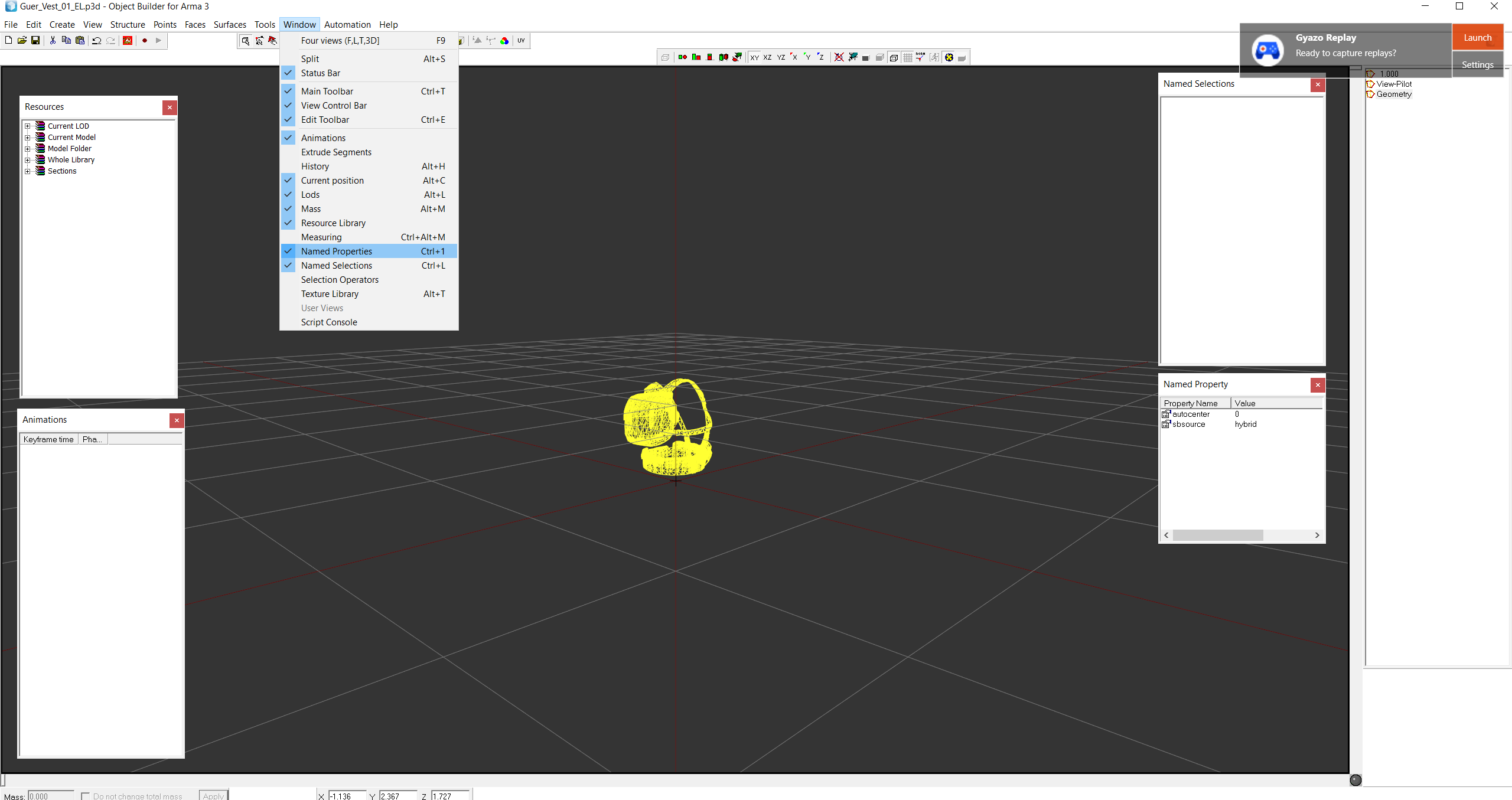


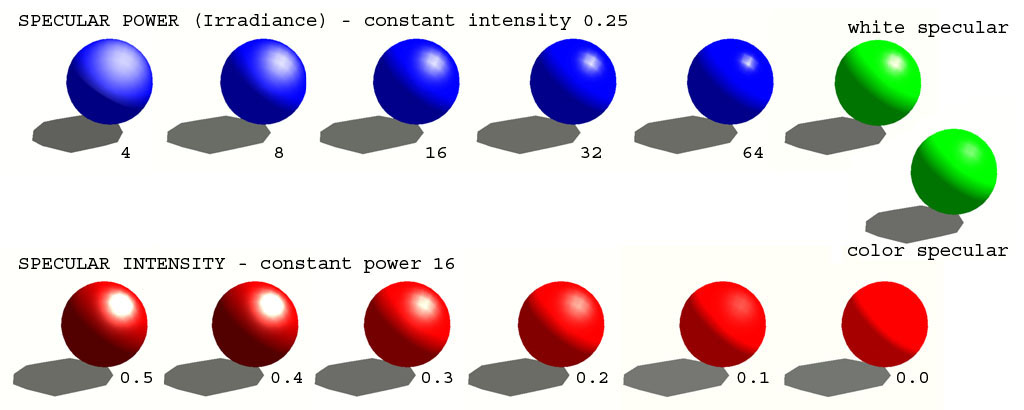
 granite nexus
stuck oyster
but the defaults shoild work normally
granite nexus
stuck oyster
but the defaults shoild work normally
I wish 😆
 dapper hound
Hey there, I'm new to modding and I don't know wtf I'm doing. I'm trying to find out how to add new plate carriers as a mod, I have the models in fbx/blend format, but I don't know where to go from there, nor do I know how to correctly rig it. Is there a tutorial or video I can follow? Or if someone could politely help me :)
stuck oyster
for rigging you should first learn how rigging works on your chosen 3d program through its own tutorials (non arma)
dapper hound
I know how to rig/do the bone stuff in blender
stuck oyster
then you can use the arma 3 sample character as reference model for weights
you can use the blender weight tools to transfer weights from the sample man
and then tweak them to work out
dapper hound
while I've rigged plate carriers to other skeletons, I don't know where to get this arma 3 sample character, could you perhaps direct me where that is?
stuck oyster
steam arma 3 samples
 kind pebble
@inland pawn #ip_rights_violations message
how high can I go?
My first shot at making gear/ uniforms etc., but ive been told i cant succeed 50000 polygons
and all the stuff I've seen yet doesnt
i do think there is one, just not for everything perhaps
stuck oyster
kind pebble
i do think there is one, just not for everything perhaps
You can but you definitely should not
50000 tris you are looking at a tank with open interiors
Uniform maybe max 10k if it's super detailed. Vest 5k helmet 2k
Just ballpark figures though
kind pebble
10k? lol
stuck oyster
Yes
kind pebble
i barely got down to 50
stuck oyster
You got way too much stuff imo
kind pebble
well i do want to make it detailed
stuck oyster
Well. Like I said you can
You will just either nearly never see the most detailed lod or you take immense hit on performance
(as in you will need very good distance lods) to balance it out
What you want to do does not always go hand in hand with what you should do.
There is always a price.
kind pebble
Although i have one thing
i am trying to bake my high poly now, basically put a subdivision on the low poly one and thats what i bake on that
but it always leaves artifacts
any experience on how to deal with that?
woeful viper
need more info... what program, what render settings, cage or no, how does cage look, triangulated mesh y/n , etc etc.
molten fractal
kind pebble
i am trying to bake my high poly now, basically put a subdivision on the low pol...
Just applying a subdivision on a low poly to use as a high won't do you much good when baking.
All you're doing is multiplying the poly count/making it look smoother without adding any actual detail that you'd want baked onto a normal.
 bright flax
How do I prevent rain from being seen inside my building?
https://i.gyazo.com/6f2d3242b72baf749f206260c47b2fbf.jpg
 kind pebble
molten fractal
All you're doing is multiplying the poly count/making it look smoother without a...
kind pebble
molten fractal
All you're doing is multiplying the poly count/making it look smoother without a...
Fair, but thats kinda what I wan
kind pebble
woeful viper
need more info... what program, what render settings, cage or no, how does cage ...
Blender
And i got quads
molten fractal
You should always triangulate before exporting to another program. A program like Substance calculates tris in a different way from Blender if it isn't triangulated already, which could cause shading issues.
 broken glade
Is it possible to give the cargo an own View LOD? Have done a first View Pilot but shaped it only for the driver. The cargo should see the normal RES1 Lod but switched also to the view pilot :/
woeful viper
yes you can do that. You just have to specify it in the config which LOD to use
cargo should default to ViewCargo if LOD is available
LODDriverTurnedOut = 1100;
LODDriverTurnedin = 1100;
LODDriverOpticsIn = 1100;
LODDriverOpticsOut = 1100;
//1000=Gunnerview; 1100=Pilotview; 1200=Cargoview 0.0; -1 = default LOD ;  0 - 10 res lods; Lods 1201-1299 are custom ones that can be defined as res lod
idk the cargo properties, you have to check it your own in the base game config classes if you dont find another vehicle to copy it from
teal cargo
hello, I'm having grass clip through my models and I was told to add a roadway in the models but still having grass go through
remote abyss
teal cargo
hello, I'm having grass clip through my models and I was told to add a roadway i...
Add rvmat to it
 small heart
Is there a way to convert .p3d to blender file?
trying to edit some of the base game models a bit
marsh canyon
You can't
tired cargo
This could be of use (though its from blender > arma and not the other way round) - https://forums.bohemia.net/forums/topic/207631-from-blender-to-arma-3-complete-process-tutorial/
quick terrace
small heart
trying to edit some of the base game models a bit
not possible and not allowed
quick terrace
tired cargo
This *could* be of use (though its from blender > arma and not the other way rou...
it isn't
??
kind pebble
small heart
Is there a way to convert .p3d to blender file?
Im not saying you should do that with the base game files, but arma toolbox lets you import p3d into blender
 quartz prism
I get this error when I import an p3d to blender. Can anyone help me? https://i.imgur.com/yPmDHno.png
 marsh canyon
Most likely you're trying to import a binarized p3d which you can't
small heart
kind pebble
Im not saying you should do that with the base game files, but arma toolbox lets...
naah, i keep hearing ill be beat by the bohemia devs
XD
i-im good
civic stratus
can someone kind of give me a brief explanation on how res lods are changed out? I'm seeing my res 3 lod visible > 5m. I have 6 res lods in total
stuck oyster
there is no exact distances for that
the engine tries to optmize the scene
it depends on what else is in view
white jay
Depends on graphics settings, object size, verticies and generally the complexity of a scene... among other factors
Generally in you're in a high poly complex scene the lods start dropping fast
Also I noticed a small object like a soda can will drop lods way faster than a big building
Also having tons of lods will encourage dropping lod 1 very close
Generally my small objects maintain reasonable detail up to lod 2-3 if I have like 5-6 lods
Vs a house, I'll quickly drop little details at lod 2 and it's practically a box at 3-4
teal cargo
remote abyss
Add rvmat to it
It has one????
stuck oyster
what kind of a model?
remote abyss
teal cargo
It has one????
Does it ?
teal cargo
In general I have a runway PAPI I made, glide tower and still grass going through
stuck oyster
small things might not be able to cut the grass under them
do they have valid geometry lod also?
civic stratus
isn't there named properties required to cut grass?
stuck oyster
no
civic stratus
just throwing out ideas, good to know
I copied the proxies from the view pilot lod of the character example into the view pilot lod of my model and added my character mesh from 0 lod, but my 1st person camera is inside my character's waist
civic stratus
the geometry lod, yes
yes to both actually
oh, there's a camera point between his knees?
why is the camera between the example character's knees lol
civic stratus
well, my memory points were copied straight from the example
I am a little confused as to why the example skeleton has head, neck, neck1 as lowercase, but the models all use upper case
changing my selections to use head and neck to match the skeleton didn't fix the camera either
Camera is listed as a bone in the example skeleton, but the example model uses memory point camera. Does case sensitivity not matter with these names?
stuck oyster
camera has nothing to do with those. you are perhaps missing some lod?
or something did not copy over
forget the camera bone
there is a memorypoint near the eyes that is the first person view
aimpoint or pilot or something like that
stuck oyster
mayhaps something broke in packing?
civic stratus
I've packed it several times, deleting temp folder data each time
teal cargo
stuck oyster
do they have valid geometry lod also?
All the lods are good. And the glide tower is big so that still doesn’t explain grass going through it
stuck oyster
perhaps provide pictures of what you mean
civic stratus
I just redid my lods and got the view thing working
not sure what had changed to verify
 warm jackal
Hi guys. I'm trying to make PIP display on monitor like in vanilla APC, and used texture #(argb,512,512,1)r2t(rendertarget0,1) on display face, but it was upside down, then I tried to use #(argb,256,512,1)r2t(rendertargetx,1.0) and now image is mirrored. Could someone help me please to find correct solution. Thanks.
polar fiber
Your UV mapping is upside down then
warm jackal
polar fiber
Your UV mapping is upside down then
How to change UV mapping?
polar fiber
How's you learn to model without knowing how to apply a UV map?
warm jackal
polar fiber
How's you learn to model without knowing how to apply a UV map?
How you trying to help without trying to help? 🙂
It will be more useful to guide or send some tutorial instead of telling why I don't know that. If I knew how to do it I won't asked for help right?
marsh canyon
Actually we don't know how to help you if you don't say which software you use to make your model
Did you ever made an UV map? Or not?
warm jackal
I'm using object builder. The model is imported from fbx to p3d. All that left for my model is to setup PIP display. And now it's showing PIP from memory points that I made, but it's displayed upside down. So do I need to choose selection and change rotation in UV editor?
marsh canyon
OB is not a modeling software, though
IIRC PiP is defined in 3 memory points, and you most likely put it in a wrong order
warm jackal
I got only two, it's pip0_pos and pip0_dir. Which the 3rd one?
marsh canyon
And do you know how to UV 101? It's really strange you don't know, at all
warm jackal
Ok... we going on circle right now. Is this possible to change in OB?
marsh canyon
Possible, but never recommended. It's straightforward in Blender
warm jackal
Ok, so then I need to take a look how to do it. Thanks.
marsh canyon
Select the face for PiP, and U to unwrap the UV. Use UV Editor to edit UV, and if it doesn't solve the flipped UV, select the UV and scale -1 in Y axis
warm jackal
thanks, will try!
warm jackal
marsh canyon
Select the face for PiP, and U to unwrap the UV. Use UV Editor to edit UV, and i...
Ok, I rotated Y axis and mirrored UV by X and it's worked! Thanks mate. It you ever visit Kyiv will buy you a coffee 😉
civic stratus
Its kind of sad to see how hostile people can be in here when others come to ask for help
remote abyss
Hello, I having issues with the lighting of my model, I don't really know how to fix it, I tried to recalculate normals and to sharpen the edges, didn't fix it :
https://media.discordapp.net/attachments/830567214791786497/965417008491544596/unknown.png
 civic stratus
did you press F5 with your model selected?
I believe you want smooth edges and verticies
sharp edges and verticies is mainly for shadow lods as far as I'm aware
remote abyss
civic stratus
did you press F5 with your model selected?
what F5 will do ?
civic stratus
refreshes the lighting in the viewports
remote abyss
let me try
civic stratus
recalculates normals
remote abyss
I already did it