#arma3_model
1 messages · Page 171 of 1
 stuck oyster
 white jay
The shadow is working but I have some dark shaded spots ingame on my object. The Shadow LOD is triangulated, closed and sharp edges. What could it be? Tried to scale the Shadow LOD down but it will destroy the whole shadow 😛
stuck oyster
if its shadow lod bleeding over the mesh then you have to make a better shadow lod
if its not shadowlod then you have problems with your textures/materials
 charred bolt
@halcyon ore Component count in the Geometry LOD's is probably important in the following order:
(very simple) PhysX/Buoyancy < View Geometry < Geometry < Fire Geometry (most complex)
 halcyon ore
charred bolt
<@!721595573647704126> Component count in the Geometry LOD's is probably importa...
halcyon ore
charred bolt
<@!721595573647704126> Component count in the Geometry LOD's is probably importa...
Good to know that. Thanks.
 severe plover
I’m conſidering making an attempt at modular buildings, but given that no one ſeems to have really done this before, I’m curious : Is there a reaſon ſuch a thing is not done ?
white jay
stuck oyster
if its not shadowlod then you have problems with your textures/materials
At this point I do not have textures or materials applied. :/ Just tried to scale the LOD down but that destroys everything
white jay
ok just moved some verticies to the right spot. it is now working 😄
 frosty rain
severe plover
I’m conſidering making an attempt at modular buildings, but given that no one ſe...
frosty rain
severe plover
I’m conſidering making an attempt at modular buildings, but given that no one ſe...
I’ve seen modular buildings in arma, they usually look pretty good
severe plover
Oh, intereſting—I’ve only ever ſeen that laboratory one, the Extended Fortifications one, and that attempt ſomeone did with a few wooden pieces ; I think it was iBuild. Oh, and PLP Materials.
 analog mason
I seem to have an issue when exporting a model from blender as a .p3d where the decimate modifier isnt applied to the lods so when I open it in OB I am looking at several lods with no change in verts. Is there a setting or step I have missed?
stuck oyster
you have to apply modifiers and scale and rotations before you export
or use latest blender and latest toolbox version and apply modifiers on export
analog mason
I had done the modifiers before I exported, in Blender I can see the changes the modifiers made.
stuck oyster

 polar fiber
But did you apply them or are they still in the modifier stack?
analog mason
is there a specific button to apply? I pressed enter
frosty rain
Dropdown and apply
If it gets applied it’ll get “deleted” from the modifier stack since it’ll be applied onto the model
analog mason
frosty rain
Dropdown and apply
That's it! thank you!
 sharp field
anyone mind helping teach me how to do a little weapon edit? I want to swap the buttstock from the left model to the right. https://cdn.discordapp.com/attachments/684328990886068288/863174063101837323/unknown.png
 bold flare
Do you have the source models and permission to edit them by whoever is the author?
sharp field
nope, just want to do it for fun for myself without sharing them
just have them installed in my game
sharp field
hwhack
bold flare
you can try asking the author(s) to give that stuff to you
 woeful viper
dont count on it though...
sharp field
yeah seems not possible
 molten fractal
How do I change where an item is physically located when placed on the ground? Currently, if I drop the backpack I made, it floats about a meter off the ground while the interaction zone is located around ground level.
woeful viper
dedicated ground model
molten fractal
How does that work?
stuck oyster
create a model that is used when the object is on ground and path it to correct config parameter
woeful viper
@stuck oyster in SOG you wrote "basically cleaned up fire and view geometry lods to be simpler so they perform better and adjusted the assigned penetration materials and viewgeometery foliage materials"
what materials did you use/ whats different in those compared to their old materials?
stuck oyster
some of the older trees/foliage dont have the visibility materials from vegetation_exp data. They allow partial AI visibility through a blob of visibility geometry
for penetration materials we used just the normal ones from Data_F\penetration
stuck oyster
no magic, just simplification to optimize performance and adding some missing materials here and there
molten fractal
stuck oyster
create a model that is used when the object is on ground and path it to correct ...
Which one would that be? I couldn't find anything in the Biki.
 runic plover
molten fractal
How does that work?
runic plover
molten fractal
How does that work?
I can show you how it works, you can write me a PM if you still need help with it.
 orchid spruce
animation(s) used for passengers
 bleak heart
I guess it is needed to increase the number of seats. that's all i know.
bleak heart
orchid spruce
animation(s) used for passengers
cargoAction[]=
{
"passenger_MRAP_01_front",
"passenger_MRAP_01_back",
"passenger_generic01_foldhands"
};
What should I do to increase the number of seats here?
stuck oyster
if you want each seat to have different sitting animation then yes you define them in there
orchid spruce
you need more proxies if you want more seats
bleak heart
yes i put
orchid spruce
the amount of animations in that array should match the amount of cargo proxies you have
bleak heart
"passenger_MRAP_01_back2", will it work if i do?
stuck oyster
you need the cargo proxies in the p3d
bleak heart
I put them in the config do I need to do something?
bleak heart
ok thanks i added more proxies i guess it works.
stuck oyster
you need the actions too
bleak heart
When you press the brakes in the car, the back of the car lifts.
I did a mass change, it doesn't work without multiplying the numbers.
 hexed condor
Currently working on a bullpup weapon model that will have an additional GL model, putting together most of it in Blender with ArmA toolbox before taking it into Object Builder. Right now my knowledge of it is :
Resolution LODs determine the resolution of the weapon over distance
Shadow LODs are pretty obvious
Geometry & Buoyancy LODs determine how the object interacts with the environment, and Fire Geometry is essentially the hitbox for the weapon
Proxies need to be applied to the resolution and shadow LODS, these determine weapon attachments and the like
Memory LOD is used for animating things like camera/viewpoint position, shell casing ejection, etc.
Beyond these I'm struggling to digest tutorials and the wiki articles so if anyone has a comprehensive workflow of how to properly put a weapon model into ArmA 3 that'd be greatly appreciated since all I can find is a four year old one on a WW2 weapon and a google Doc that doesn't utilise Blender for it.
woeful viper
did you check links in pinned messages?
hexed condor
I did, hence why I pointed out I'm struggling to digest the wiki articles : there's a lot of information in there that I can't find any relevancy for the process of just taking a weapon model that has all the proxies, memory points etc organised and where to go from that point in OB.
woeful viper
did you look at the A3 sample weapon ?
you need a config for ingame implementation and a model.cfg for animation, and then pack it as mod
hexed condor
So, assuming I have the proxies, resolution LODs etc, after all that has been set up on the model that's all I need to do, animations and the like in the model.cfg?
stuck oyster
sounds like it
woeful viper
yes, if you didnt do any errors (which would be a miracle on first try...)
severe plover
Importing a weapon does ſeem a bit troubleſome and tedious. It makes it difficult to want to try it being unſure whether it would work. I am curious how exactly the hand animations work.
stuck oyster
hand animations work in relation to the weapon bone location in the underlying character pose
and only the hand and finger bones are used
all the rest comes from blending with the holding pose
severe plover
So, if you wanted to make a one-handed piſtol animation, you’d only animate the one hand, and let the other to the ſide ?
stuck oyster
well you could try that
but one hand animations in Arma dont really work well
due to the underlying poses always using 2 hands
and moving the other hand away does not really blend well
severe plover
nodnod That makes ſenſe. Thank you. I muſt ſay, I admire your helping everyone with queſtions like this—you ſeem to always give good advice.
stuck oyster
I try to give back
severe plover
I have a few other queſtions regarding weapons, if I may : With the magazine, is it beſt to have it as a ſeparate model from the weapon, or connected to the main weapon ? With bullets that are to be ejected, muſt they be modelled, or is including the Nabojnicestart and Nabojniceend memory points enough, and Arma will ſimply add in its own bullet models ?
woeful viper
shells are ejected (not bullets) - its an effect and you can use existing ones if they are good enough for your use case
severe plover
You’re right—I miſſpoke, thank you for pointing that out.
stuck oyster
magazines are also proxied now
so different type of magazines can be used on same weapon
severe plover
I did read that on the Wiki. So it’s, then, beſt to leave out the magazine from the main weapon model and let it be ſeparate. Thank you.
sharp field
Does anyone want to help me build a realistic, modular shoot house?
frosty rain
Well most of us are busy with our own creations, but you can ask for help on specific things
Do you already know how to model and texture?
 red charm
I have tweaked the buoyancy LOD and now the vehicle behaves much better in a water. Thank you guys for your help @polar fiber @woeful viper @stuck oyster
white jay
What have you tweaked? Im on a boat, all is working fine but it is turning really really slow, just thinking something with buoyancy lod is wrong 
red charm
I've made a simple box for my truck vehicle and tweaked its size and position. My issue was, that my truck could not sink in a water.
 undone pine
Hi, does anyone know how to make custom flags that are smaller than the vanilla one ?
hexed condor
If anyone is versed enough in the workflow of importing weapon models to A3 I'd really appreciate a bit-by-bit walkthrough on how to go about it, right now my main issue is that I'm finding it difficult to "translate" the stuff from the sample model.cfg to information that's digestible and makes sense, and in general this is the first time I've done anything other than basic facewear models like the A2 shemagh so I'd appreciate any help I can get in the way of being told stage-by-stage how to actually get this kind of stuff done without having to hop between the wiki pages for every line of code.
stuck oyster
model.cfg is basically same for all types of objects
though characters utilize it a lot less
the learning part on your own is quite crucial to get hang of though since you cant always rely on someone to walk you through the next obstacle. Model.cfg is very well documented in the wiki too so what you need to start with is with just 1 simple moving part
and then progress from there
hexed condor
Weapons are pretty much the hardest thing I'm doing right now, I'm familiar with character weightpainting and retextures and the like, weapons are completely new to me and it's, yeah, scary to be doing for the first time to say the least. I tend to learn a lot better when I've got some sort of tutoring going on.
stuck oyster
most people learn better with tutoring, its just may not be realistic to be available
white jay
Is it possible to get a 3d object to deform to a terrain similar to a decal while preserving it's 3d appearance for things like small stone clusters?
I've got this cluster of ice bits
https://cdn.discordapp.com/attachments/566060230824165383/864309735607762964/ice_bits_render.PNG
stuck oyster
there is slope landcontact that walls and stuff like that use
it does not completely preserve the shape though, its somewhat skewed
white jay
is it something you'd find in the shift E menu in object builder?
stuck oyster
placement = slope was better working if I recall right
slopelandcontact might have had some bug in it
maybe
runic plover
@white jay
In config you can also add KeepHorizontal = 0;
white jay
hmm that makes me curious
I'm assuming KeepHorizontal = 1; will place to flat to sea level
so I could probably use that for my street signs
runic plover
With 0 it also looks out for the terrain surface, with 1 its just keeping it horizontal
As example trees on hills grow straight up too and dont grow like the terrain's surface is formed, so trees have a 1 to keep it straight up.
white jay
nice
anyone got any advice for monolithic scale models? Specifically how to make them render further out and keep them visible when you look away from the center of them?
https://cdn.discordapp.com/attachments/511405848086446092/864361637548916816/20210713002408_1.jpg
it would be nice to force them to be visible at any distance since they're so big yet so low poly
 strong plaza
you can with featuretype or featuresize, I don't remember how it works exactly, but I'm sure you can google it, as for the disappearing in the peripheral I think the only solution is to cut it up into chunks with a smaller diameter than the terrains land grid size I believe
white jay
trying this at the moment
https://pmc.editing.wiki/doku.php?id=arma3:modeling&s[]=draw&s[]=distance#building_object_draw_distance
I might make the parts smaller
that immediately increased the draw distance
strong plaza
with featuretype/featuresize I think you're only limited to 500 static objects per map too if I recall correctly
strong plaza
you can force regular objects to render out to a max of 12 km if you make a huge geo lod, one trick is to just put a vert in the geo lod like 100m over the model
500 at all
white jay
oh
strong plaza
pretty lame
strong plaza
neat
white jay
so when you say 500 static objects that includes objects that don't reference Land_spp_Tower_F... like normal rocks, trees and buildings
strong plaza
it should only apply to those models with that property
strong plaza
Added: A new "featureType" config parameter replacing "featureSize" Added: A new setFeatureType script command (parameters: 0 - disable, 1 - object is always visible to object view distance, 2 - object is visible to terrain view distance, the limit is 500 for terrain / static objects and 200 for dynamic objects including config features and auto features (flying helicopters, airplanes))
 merry gorge
max object length/height is 50m right?
 marsh canyon
No height limit IIRC. And 50m is a approx value
merry gorge
would the geometry not work at all? or would it stop working at the limit point?
I have a building where the geometry works up until a certain point/length
but cant see any issues with the geometry itself
building is like 72m width btw
I'm pretty sure the size is the issue either way, it's the only logical explanation since everything else is fine
runic plover
➣ Width / Length is around 50m - 65m limited
➣ Height is so far unlimited but can cause visual bugs like if you turn your view to the right or left it can just disappear
Also sometimes it depends where you place your object on the map, sometimes the geometries etc work, sometimes not. A very old bug since Operation Flashpoint times
merry gorge
thanks
stuck oyster
It's the size yeah. It just stops working when it's reached.
white jay
I think roadway has a limit of like 70m
bleak heart
https://www.youtube.com/watch?v=t2B5Ae_4QYQ the wheels do not move, what should I do?
stuck oyster
make sure their source is right in the animation class
bleak heart
https://pastebin.ubuntu.com/p/XjktZTYppz/ I've checked a few times, can you please do it too?
axis name: wheel_1_1_damage - wheel_1_1_damper - wheel_1_1_hide - wheel_1_1_steering - wheel_1_1_unhide
stuck oyster
if they dont move you probably have them in 2 animated selections
you must have moving part only in 1 animated selection
bleak heart
stuck oyster
if they dont move you probably have them in 2 animated selections
I will try this. thank you
 silver zenith
https://i.imgur.com/6ftrG0w.png
getting this error message on export
what does it mean?
stuck oyster
perhaps no compponent names in geometry lod?
somethin about there being no vertex groups to write
silver zenith
that was my initial though
but redid geometry components and still gave me the error
stuck oyster
or no objects with arma properties?
silver zenith
nope
stuck oyster
or objects wihout arma properties trying to be exported
try export only selected objects
silver zenith
everything has properties and correct lod
geometry exports fine
resolution and roadway give me the error
and since roadway came from the resolution I guess there is something wrong with it
silver zenith
it was just bugged I guess
gave the res lod a few vertex groups and then removed them to fix it
stuck oyster
¯_(ツ)_/¯
molten fractal
Back again with more issues. I have a tube part in my model, which looks fine in Blender. When I export it to OB, the bottom of it disappears. How do I pinpoint the cause of this issue?
https://media.discordapp.net/attachments/729057016588271707/864603284144128040/unknown.png
https://media.discordapp.net/attachments/729057016588271707/864602506452795432/unknown.png
molten fractal
Hmm possibly? I thought I had recalculated them all.
https://media.discordapp.net/attachments/729057016588271707/864604724593557524/unknown.png
stuck oyster
id wager wrong way face normal yeh
best to turn on backface culling in Blender
saves from many suprises
polar fiber
Yes, there are scaling tools
Work best if you press shift+C to activate the pin at the grid origin though
 kindred goblet
I created a backpack model and was able to get it in game. but is shows up in the crotch region. Any ideas on what I messed up or missed?
 vast juniper
kindred goblet
I created a backpack model and was able to get it in game. but is shows up in th...
vast juniper
kindred goblet
I created a backpack model and was able to get it in game. but is shows up in th...
Is it weighted to the skeleton and have you applied the autocenter property in the geo LOD?
kindred goblet
I added autocenter to my geo LOD and it fixed it thank you!
white jay
Anyone know a good way to easily transition from swimming to walking on an object?
I've got a sea ice object and about 60-80% of the time you go into the falling animation when you touch the walkable surface
https://cdn.discordapp.com/attachments/511405848086446092/864951376156688414/20210714152423_1.jpg
I feel like a shallower angle would help
stuck oyster
shallow angle is pretty much only way
and long enough ramp so character can get under water
same rules as with terrain/beach/water transition
molten fractal
is it possible to change the position of the object/light in Bulldozer?
frosty rain
You should be able to rotate the object/light i think
stuck oyster
right click+drag rotates object, F2 toggles free look fly camera
time of day cant be changed
frosty rain
my glass texture disappears when looked at from certain angles, already moved top, any ideas?
frosty rain
stuck oyster
and big glass piece
yes
frosty rain
stuck oyster
what shader does it have?
supershader
stuck oyster
how big?
frosty rain
stuck oyster
and is it just the glass that disapears?
frosty rain
stuck oyster
how big?
not extremely big, but like 3-5 meters
frosty rain
stuck oyster
and is it just the glass that disapears?
yep
stuck oyster
I suppose you could try assigning it just normal solid texture to test if the transparency is the problem
for some reason
then perhaps splitting it up in half or into 3 segments to see if that affects anything
frosty rain
texture is not the problem, disappears with a random texture i assigned too
 vital geyser
without an rvmat it disappears?
frosty rain
testing now
stuck oyster
at what angle does it dissapear?
and in what angle/direction relative to the objects center?
better yet.. Pictures?
frosty rain
so, without rvmat it doesn't disappear, i'll get some pics now
vital geyser
frosty rain
so, without rvmat it doesn't disappear, i'll get some pics now
try this rvmat
https://pastebin.com/3ThR7J00
frosty rain
testing now with your rvmat, this is what i recorded before asking https://youtu.be/hBfX0s26fWk
problem started after i separated the entire building into different parts due to geo, etc, it was all 1 p3d before while testing and it worked fine
vital geyser
is the building below the glass a separate object?
frosty rain
yep
stuck oyster
it does sound like it would be rvmat problem
vital geyser
why separate vertically?
frosty rain
don't want people on a 5th floor etc be loading stuff on first floor
might have to combine lobby and 1st floor in this case tho
frosty rain
😂
stuck oyster
Try Johns rvmat and try the default super shader rvmat
vital geyser
strange
stuck oyster
its likely the reflection
and in yours the the reflection/specularity its so fudged it makes it dissappear in certain angles
you just need to tweak it untill it works
frosty rain
i'll try the default supershader rvmat, if that doesn't work i might try making that glass a part of the lobby p3d, if that doesn't work prob just combine them both
vital geyser
if you lower the 1st floor s bit but keep it in the same position does it still happen?
frosty rain
yep
runic plover
@frosty rain maybe remove env map
frosty rain
runic plover
<@762700926183145472> maybe remove env map
with global env map it just makes the transparency fucked instead of disappearing
ill just combine both objects and hopefully it fixes itself since it was fine before separating
runic plover
@frosty rain what happens if you set specular to 1000 or more
Somewhere i had such issue too in my mod, i think it was in the tiberium refinery, tiberium storage tank
frosty rain
i just ended up combining both p3ds and it's fixed, thanks a lot everyone for the help 
merry gorge
question, how does a pathlod actually work? Imean, I know how it works but how to the AI perceive it? Does the mesh need to be a certain shape? I know they look for the entrance/end points and then navigate from there, are they just locked to the pathLod mesh when moving? do they just go from vert to vert?
stuck oyster
They move along the edges, so vertex to vertex. In practical sense they are locked to the path track since they can not navigate object surface. If ai perceives it falls off the track it will likely fall back to clipping out of the object
merry gorge
I see a lot of tris in pathlods but sometimes I see a plane joining in/end points
mesh shape doesn't matter then I guess?
I think I understand anyway, starting to picture it
 acoustic fractal
not sure if this is the right channel to ask but are there any QoL tools/tricks I should know about related to making buildings and collision lods and such since most of the posts I find online are quite a few years old and themselves reference really old OFP guides
frosty rain
acoustic fractal
not sure if this is the right channel to ask but are there any QoL tools/tricks ...
my workflow is usually just remake the building off cubes
can't ever go wrong with primitives
stuck oyster
no automagics for that
frosty rain
any documentation about the insect sound on bushes with mem point? https://forums.bohemia.net/forums/topic/207565-brief-overview-on-new-audio-tech-for-terrain-objects-cfgenvspatialsounds/
acoustic fractal
thats kinda what I was thinking just make the main mesh then make increasingly reductionist versions
stuck oyster
I like to go the other way
I make the primitive version first so I can test it works
then make the detailed version
acoustic fractal
ah yeah
well my plan was to remake from scratch some of the sahrani buildings so I already a bit of a base of what its suppose to look like
acoustic fractal
oh whats the newest version of the blender tools?
since before I got them from armaholic
and uh thats kinda dead
oh found their github there we go
stuck oyster
thats the one
 elder heath
getting back into arma mod making, and trying to work out how to export a door animation from blender? It works perfectly in blender just need to know how to export it so i can trigger it in game etc.
stuck oyster
You will need to learn to understand model.cfg animating for that. Wiki has good pages on that.
elder heath
right ok, its jsut its a roller door which looking at the samples theres no examples of anything like that?
and i've seen it being done by other mod makers
stuck oyster
ah that is somewhat more tricky to do I suppose.
there are couple of model.cfg exporters too but you will still need to understand model.cfg to use them. And roller door might be simples to be made enclosed so you dont have to worry about the rolling part
 round bloom
Does anyone know if there is any equivalent of the Move to Top function that OB has in Blender?
stuck oyster
there is no equivalent as far as I know
round bloom

stuck oyster
what you can do is set up vertex groups and run those in correct order in OB
round bloom
I do it in OB based of the relevant glass texture just would have been nice to be able to do it in Blender instead as I usually forget lol
 elder fulcrum
Don't know if this is the best place to ask, but i'm working on making a static object explodable (artillery semi-fixed projectile), but it doesn't explode when shot. I've set up a damage property and everything on my model, and i've setup the config properly, but nothing really happens. Here is what my config looks like and here is what happens in-game.
class CfgVehicles {

    class Items_base_F;    // External class reference
    class M1_HE_PD_shell: Items_base_F
    {
        author = "Coldfront15";
        mapSize = 0.44;
        scope = 2;
        armor = 2;
        scopeCurator = 2;
        editorCategory = "101st_obj";
        editorSubcategory = "105_how_ammo";
        displayName = "105 HE, M1 PD";
        model = "\101_objects\objects\105_M1_HE_PD_Shell.p3d";
        cost = 200;
        icon = "iconObject_1x2";
        placement = "vertical";
        class SimpleObject
        {
            eden = 1;
            animate[] = {};
            hide[] = {};
            verticalOffset = 0.105;
            verticalOffsetWorld = 0;
            init = "''";
        };
        class DestructionEffects
        {
            class HouseDestr
            {
                intensity = 1;
                interval = 1;
                lifeTime = 0.1;
                position = "";
                simulation = "destroy";
                type = "DelayedDestructionAmmoBox";
            };
        };
        class HitPoints{};
        class Damage
        {
            tex[] = {};
            mat[] = {};
        };
        class AnimationSources{};
        class UserActions{};
    };
};```items dont have such effects
it would have to inherit from house/or some other such class
elder fulcrum
Ouch, well I want my item to be interactable and not completely static. Will it keep its properties as users interact with it?
stuck oyster
no
elder fulcrum
Damn, is there a workaround for this? Maybe making an eventhandler for when damaged to spawn an explosion effect? https://forums.bohemia.net/forums/topic/225827-exploding-objects/
This mod seems to replicate what I wish but without the constraints of using a house as a the inheriting class, in fact it uses Item_base_f for its fuel container.
stuck oyster
Dont know, maybe
elder fulcrum
Maybe its utilization of transportFuel allows this to happen?
Definitely intersting. I appreciate the clarification though dude, really helps :).
 cosmic mantle
has anyone here ever worked with SOF uniforms?
stuck oyster
what is SOF uniforms?
cosmic mantle
uniform pack with very nice G3s
white jay
is there a way I can dissolve edges in object builder like blender where it deletes the edge but doesn't break the UV's?
orchid spruce
I think you're asking a bit too much out of object builder
stuck oyster
Yup. Don't recall OB having such feature
white jay
I figured as much
 summer elm
Selection X needs a section. The shadow volume may not work well.
Anyone know what this means? And how would I go about fixing it?
frosty rain
found this but the link is dead http://www.armastack.info/index.php/98/how-to-fix-selection-needs-a-section-warnings D:
summer elm
I can't even reach that sight seems broken 😦
summer elm
Thanks for looking tho
frosty rain
link was posted by pufu so he may be able to help
kindred goblet
anyone have any idea on why my uniform I made shows up on my solider I spawn down ,but when you click the uniform in the arsenal it is invisible?
soldier
stuck oyster
explanation hard to follow. Pictures might help?
kindred goblet
It wont let me post pictures in the chat can I PM them to you?
stuck oyster
you can link them here
kindred goblet
kindred goblet
so should it be linked to B_Soldier_base_F or Union_Soldier
kindred goblet
Okay I understand. Thank you!
molten fractal
Is overlaying UV islands on top of each other if theyre extremely similar parts a good idea?
white jay
Yes
If you have some basic concrete or metal texture you can pile islands over eachother
Just make sure the seems arent too noticeable and keep the resolution consistent
frosty rain
molten fractal
Is overlaying UV islands on top of each other if theyre extremely similar parts ...
definitely
saves texel density, just keep in mind how tiling it'll look
frosty rain
Oh also if lightmapping/baking ao you’ll most likely want to use a second uvset for that
molten fractal
Hmm?
Overlapping UVs seems to be a bit messy when the objects aren't flat. I can see the triangles in SP so I'll just redo the Uv.
 dusky grotto
Hey guys, quick question, in Object Builder i turned on Autoconvert GIF & TGA textures. When i start bulldozer a window is showing that tells me:Converting resources, please wait ----------- but its not converting them. I changed the path for imagetopaa in the binmarksRules.txt but it still dosent work. Any ideas whats wrong? It working the past
polar fiber
Do you accidentally click the debug window that comes up? Sometimes I do that when buldozer starts and it just seems to halt the conversion process until I run it again
 rough idol
you can click enter to continue
dusky grotto
no i did not, its never working
stuck oyster
if you have a lot of textures or use 4K it will take a looooooong time
preferably you would convert them yourself
for example with imageToPaa
dusky grotto
before it told me what it dose. Like it told me what texture its converting atm. But not i get just --------------------------
stuck oyster
that way you can also spot if there are problems
like wrong resolutions or wrong formats that the process cant handle
dusky grotto
as far as i know the autoconverter is using imagetopaa and dose spot wrong textures
the cool thing about it was that i knew what image was changed and it did not just convert all images in the folder. This way it was very fast to work with
polar fiber
Autoconvertion uses the system behind imagetopaa (pal2pace), not imagetopaa itself
Error reporting might be different
dusky grotto
i would still like it to work again. Dose it work for you?
maybe an update of the tools destroyed the function?
stuck oyster
I recall it works on my end when I forget to convert my textures. It just takes some time
dusky grotto
hmm than its on my end 🙄
 hybrid frigate
I am building a large Type 75 Landing Helicopter Dock.
Are there any tutorials on how to allow multiple objects to be placed with a single eden entry?
Think how the CUP LHD places. Something like that.
frosty rain
hybrid frigate
I am building a large Type 75 Landing Helicopter Dock.
Are there any tutorials...
You could proxy stuff on the main object
but keep in mind if you're trying to get around the geometry/roadway limitations that won't work
hybrid frigate
What does proxy mean?
Is there some way to run the attachto function on separate models?
The ship is intended to be a static, not sailable
frosty rain
hybrid frigate
What does proxy mean?
Is there some way to run the attachto function on separ...
a proxy is a way to put a separate p3d into another p3d
so like the pilot of a helicopter is a proxy if that makes sense
but if your structure is going to be bigger than the roadway/geo limit you'll have to divide them into individual p3ds, proxy won't work
white jay
he's got multiple p3ds
frosty rain
well i never found a solution for placing multiple p3ds at the same time so i usually just take my time in placing them manually, save the sqm and send it to the map developer to put in terrain or whatever
white jay
I know the uss freedom has some work around
hybrid frigate
What country said
stuck oyster
you will have to look into how the Freedom carrier is configured in the vanilla configs to find example
no tutorials about that
stuck oyster
frosty rain
well i never found a solution for placing multiple p3ds at the same time so i us...
there is a system to place all the parts together as static objects
frosty rain
stuck oyster
there is a system to place all the parts together as static objects
will look into it, definitely would make my life 1000x easier
any idea in what folder those configs would be?
frosty rain
only mission?
stuck oyster
its just for editor placement for things like the Aircraft carrier
stuck oyster
frosty rain
only mission?
yes
frosty rain
that should be fine, i'll just leave it on mission
silver zenith
hey I'm starting to thinker with headgear for the first time
figured a mask was a good starting point since it has no moving parts
question is how do I rig it so that it follows the character head?
never done anything like this so forgive my basic terms
 inland pawn
You’ll need to attach it to the head part of the ARMA skeleton/weight it to it
silver zenith
yeah thats the part I'm confused about
is there something I have to do model wise? or is it just config/model.cfg?
silver zenith
oh nice
molten fractal
Would 10k faces be considered to many faces for a backpack?
silver zenith
likely
hybrid frigate
stuck oyster
its just for editor placement for things like the Aircraft carrier
editor placement
frosty rain
molten fractal
Would 10k faces be considered to many faces for a backpack?
If it’s very detailed i think it’s fine, but obviously try to aim lower
Be smart about what you model and what you can put in textures
molten fractal
im going to see if i can bake the ribbed part on the antenna to the a low poly
https://cdn.discordapp.com/attachments/851239697568759829/867241032952053780/blender_eBbR690pwh.png
frosty rain
would definitely help with polycount
silver zenith
so something you can do is remove these highlighted edges since they have no purpose other than I guess give a less rigid feel to the model, but that can be achieved through ambient occlusion and other texture means
let me get an imgur link
you can keep a few to mantain that fabric feel but some aren't very necessary
but I'd wager baking the antenna pieces will reduce it drastically yeah
molten fractal
The link doesnt seem to be working
molten fractal
go ahead
silver zenith
this question has probably been asked several times
but why is my helmet in the correct position but does not follow my head if I rotate/move it?
runic plover
silver zenith
this question has probably been asked several times
but why is my helmet in the ...
Needs head selection
Needs model.cfg fitted to it
runic plover
frosty rain
any idea in what folder those configs would be?
Inherit it also from that ship class
Its something with compartement you need to add
As far as i know, it doesnt work with class House_F.. or I did something wrong 😅
frosty rain
runic plover
Inherit it also from that ship class
Its something with compartement you need to...
i think i found it, was called multistructure parts
runic plover
Could be yes, its some month ago i tried it 😅
silver zenith
runic plover
Needs __head__ selection
Needs __model.cfg__ fitted to it
I did that, in fact my heet is at head level, but doesnt move along the odel it just stays there
what should I o with the model.cfg maybe I did something wrong
stuck oyster
have you modeled the helmet on the head of the sample character?
silver zenith
yeah
and I gave it the head named selection
then I used a default model.cfg
I probably messed with the model cfg but unsure how
stuck oyster
did you add a class that classname of the cfgmodels class matches the p3d name
frosty rain
Autocenter=0 on geo lod @silver zenith
silver zenith
that worked thanks
how can I decide how ground decal objects react to each other?
trying to have one object appear always on top of another
is it alpha sorting?
frosty rain
Alpha sorting is deciding which faces go on top of others on the same object i believe
But since they’re decals they deform with terrain no? Not sure if there would be a way to do what you’re trying to do unless you can somehow specify a very small offset for that specific decal
silver zenith
yeah tried offsetting the model downards the 0,0,0
but to no avail
I don't understand what decides what goes on top and below
stuck oyster
with decal type objects possibly the size
you can make decal objects that are house/building type too which you can use object height in TB to arrange them
decal types are problematic
silver zenith
I may have fixed it by using the "below ground" option
 bleak plume
Hello, I am making a building model in Blender and when I export as a P3D it shows my file is 0 kb, is there something I need to do? I modeled the building and exported, not sure if I need to do anything extra.
stuck oyster
yes. you need to enable Arma properties for the objects and set appropriate lod types for appropriate objects
bleak plume
is there a video for that?
stuck oyster
it might be shown in El Tyranos Blender To Arma series
the Blender version used in that is older, but principle is the same
bleak plume
I saw that video it was just very confusing
 jade harness
how many tris should a weapon model have?
stuck oyster
depends a bit on the weapon, but around 5k
jade harness
just an assault rifle thanks for the information
inland pawn
bleak plume
I saw that video it was just very confusing
You’ll see a tab called ARMA 3 on your right side by your list of objects you have. It’s in there
bleak plume
let me look
 subtle bison
the wiki about view geo for plants says: Their "viewDensity" values are hardcoded...they can be overridden only by material used on Apex bushes called foliage_sparse and foliage_dens does that mean only exactly these materials can be used for that or can i still make a copy of them and tweak the values?
subtle bison
ok, i finally got it to work. jeez, what a pain. so it seems you can make your own files like that. no need to rely on existing stuff.
stuck oyster
@candid pilot #creators_recruiting is the correct channel. And honestly if you want someone to get interested write down what is it you are after instead make someone chase you.
 candid pilot
Thank you
stuck oyster
feel free to do so! be the change you want to see
marsh canyon
Be the someone. It happens. Ez!
 small heart
marsh canyon
Be the someone. It happens. Ez!
small heart
marsh canyon
Be the someone. It happens. Ez!
i would but i A. dont know how to model, nor mod XD
guess its time to learn tho
stuck oyster
never better time than now!
 small heart

woeful viper
 frosty rain
D:
stuck oyster
😅
small heart
god help me
white jay
Search Blender guru donut tutorial on YouTube @small heart
white jay
He hits all the most important points on modeling and texturing
 pale veldt
For render. 90000 face donut not so great for games.
frosty rain
pale veldt
For render. 90000 face donut not so great for games.
First you learn how to model, then you learn how to model for games
white jay
90000 face or 90 face, it still teaches the basics of modeling and texturing
And with a 90k face model you can retopologize over it and bake the details
woeful viper
ive seen some tutorials of his and imo hes not that good of a teacher... there are a plethora of other tutorials out there
 median bough
what about "guru of wank"? 😄
 quick terrace
thats the bloke
silver zenith
I don't hate the guy but honestly I've started with the donut tutorial and in retrospective I don't think I learned anything useful
maybe how to use a modifier but thats about it
I guess its good for very basic stuff
molten fractal
i learned some of the keybinds
 sullen depot
is there seriously no t-62 mod
 foggy finch
We were waiting for you to model it.
molten fractal
Does my base model have to be triangulated or just the shadow LOD?
frosty rain
preferably yes
im sure goat or any of the more knowledgeable guys here can go in more detail but in layman's terms the engine only sees triangles, so i assume its easier on the engine to just feed it triangles instead of leaving the quad-tri conversion up to rv4
molten fractal
man, i hate doing rvmats 
molten fractal
theyre annoying to make, all the paths and values to edit
especially if you have like 4 of them
frosty rain
molten fractal
Alright, I'm stuck.
https://media.discordapp.net/attachments/729057016588271707/868758531812233216/unknown.png?width=967&height=676
This is my shadowlod, and pboproject keeps saying it is way too detailed.
 0:35:15: </model>```
wat do?No shadow when I wear it (it's a bag), but it does have one when I put it on the ground
frosty rain
lodnoshadow=1 on res lods @molten fractal
molten fractal
is that a named property?
frosty rain
yep
molten fractal
awesome
frosty rain
but
molten fractal
thanks
molten fractal
yeah, it's a cube with just extrusions
frosty rain
did it work? @molten fractal
also shadow lod needs sharp edges on the entire thing too
molten fractal
I'm off my computer now but I will let you know tomorrow.
white jay
molten fractal
Does my base model have to be triangulated or just the shadow LOD?
You can use quads for res lods, makes life easier if you need to go back and edit something
polar fiber
If you're working in other 3D software though, you should triangulate your mesh before exporting it as .fbx. Baking etc. should be done on a triangulated mesh too. It makes for more consistent orientation of vertex normals and UV placement across different software
frosty rain
And you can always just quadrangulate the mesh if you need to edit it
polar fiber
Yeah, especially if you haven't done resLODs yet
frosty rain
Well yes, I mean like if you lose the backup/don’t have a quad mesh you could quadrangulate
woeful viper
"lose the backup"... if you lose a backup you dont have enough backup of the backup
stuck oyster
its not even backup
you make a secondary copy of the mesh when you export and triangulate that etc
with blender and latest toolbox you can even put on a triangulate modifier on the export object and let the export function apply that
and turn it off if you need to edit stuff
frosty rain
woeful viper
"lose the backup"... if you lose a backup you dont have enough backup of the bac...
Agree lol
Personally since I’m not baking high to low rn I used to just use the triangulate modifier on export, but for some reason if there’s multiple glass/transparent objects behind each other it gives me problems while triangulated even after I sorted the alphas/moved top. So I just have a copy of my quad 1.0 in the blend and triangulate everything but transparent textures when exporting
molten fractal
Yeah, I have like 3 files with the same model in case I bork one. I have the one I export to p3d, one before I sculpted deformation, and one with the base arma man for positioning.
I put it in game last night
https://cdn.discordapp.com/attachments/729057016588271707/868762568813051934/unknown.png
frosty rain
molten fractal
I put it in game last night
https://cdn.discordapp.com/attachments/729057016588...
Looks very cool

molten fractal
Thanks! Workshop release coming soon ™️
 molten fractal
DIY
median bough
and that's what many here use too
stuck oyster
Blender is just fine for making just about anything
median bough
if you use the arma 3 toolbox for blender by alwarren, sure
median bough
that you'd have to learn.

GitHub
This update improves import and export speed significantly:
Export: Test scene in the old version took 1 minute 30 second to export, now it takes 11 second.
Import: Test scene import in the old ver...
median bough
Bohemia Interactive Forums
Hello, As I had many requests, I did this all-in-one tutorial I am sharing today. I hope it will be helpful to you. All important stages are available in videos description. I will try to make more tutorials in the future, so dont hesitate to guide me to parts of the videos that were not explaine...
median bough
stuck oyster
a model in Blender may not be game ready
very true
inland pawn
@sullen depot Vehicles are relatively hard to do when just starting config. If you’re just learning, start simpler with like....a static object
Then maybe, a weapon

 dusty dove
Anyone know how the editorCategory and editorSubCategory in the config.cpp works? How do I give my mod a title in editor?
silver zenith
editorCategory and editorSubCategory are the dropdown "folders" in your editor list
stuck oyster
categories got a wiki page
silver zenith
the "title" is the displayName
or you mean the master name for the mod
in that case it would be editorCategory
dusty dove
mapSize = 0.25;
scope = 1;
scopeCurator = 0;
icon = "iconObject_2x3";
editorCategory = "?????????";
editorSubCategory = "????????????";
destrType = "DestructTree";
model = "\A3\Weapons_F\empty.p3d";
cost = 100;
I created a mod of billboards.
silver zenith
I guess in its current state you can't even find it in the editor
stuck oyster
do you want a custom category for them or do you want them to go to the default location
silver zenith
since it has no displayname
dusty dove
It is listed in editor, but with no title.
Should I just add a displayname?
I have a total of 14 billboards, which works fine.
Just no title on the category.
 crystal zodiac
https://community.bistudio.com/wiki/Eden_Editor:_Object_Categorization
I think it will be good for you to read this.
dusty dove
Would like to do a custom category.
stuck oyster
instructions are in above link
dusty dove
Thank you.
silver zenith
so in the case of "Ski Mod"
you'd need to create them outside of the cfgvehicles
you'll have to create this
class CfgEditorCategories
    {
        class SKI_Mod_main  //<---- master class
        {
            displayName = "Billboards mod";
        };
    };
class CfgEditorSubcategories
{
    class SKI_Mod_billboards   //  <----sub class
    {
        displayName="billboards";
    };
};
then in the class of your first billboard you use the master class and sub class
editorCategory = "SKI_Mod_main ";
editorSubCategory = "SKI_Mod_billboards";
and to give the billboard a recognizable name you use
displayName = "first billboard";
dusty dove
Super helpful, thank you.
dusty dove
Worked perfectly, thank you!
molten fractal
molten fractal
stuck oyster
maybe camo selection slipped in or textures
am i supposed to have lodnoshadow=1 on my res lods?
stuck oyster
you can. does not hurt
molten fractal
would that also go on view-pilot?
Could it be a texture or rvmat issue in any way? the shadow itself is fine now, it still has the broken shading on the model itself now
stuck oyster
broken shading?
molten fractal
From what I can tell, there does not seem to be anything wrong with the uv maps or texture assigning
molten fractal
Ah, damn. That seems to have worked.
What could have possibly caused them to break? I have not touched the model itself, only named properties.
molten fractal
Yes, my model. I exported it using the blender arma toolbox.
 small olive
when I put "!Workshop\Zeus Enhanced" into the target in arma3diag using -filePatching -mod, it's only taking Zeus, because of the space between words, what should I do to load Zeus Enhanced mod into the arma3diag?
stuck oyster
@molten fractal your toolbox settings likely dont have path to o2Script set up
small olive
it's working, now life is easier when testing mods, thanks Dedmen
polar fiber
Have seen models with normals all facing downwards a couple of times when exporting from Blender toolbox. Think if you open the .p3d in object builder and save it again they usually reset
stuck oyster
thats when the o2Script path is not set up
molten fractal
I'll check that out. I don't recall doing that when I first set it up but it also didn't give me thst issue.
polar fiber
indeed. mine's no longer set since reinstalling everything. So it's probably that
small olive
When I put an unit or vehicle in Zeus Editor on Arma3Diag version, my game is closing suddenly, any ideas?
stuck oyster
you probably have some modded stuff going on that break it
small olive
I just tried with no mods and it's still same
 compact turret
Hello folks! I really need your help.
Shortly: want to make 3d models for arma and have unusual error . If I tries to build pbo, inside ARMA 3 I will get error |cant open // / .p3d
But if friend of mine just build this - it works. He changed nothing.
Here some pictures of configs, setups
https://cdn.discordapp.com/attachments/782937277248176138/869323827925114950/WhatHaveDone.jpg
median bough
what tools did you use to pack it?
compact turret
ARMA 3 Addon Builder
median bough
meh... that's your issue
use pboProject (mikero's tools)
it will tell you where you effed up
(better error checking)
compact turret
I will try it right now. Thank you
compact turret
@median bough I tried to build with Mikero's PboProject and get error
https://media.discordapp.net/attachments/608990866572443659/869332805417590824/unknown.png
https://media.discordapp.net/attachments/608990866572443659/869332959713460256/unknown.png
https://media.discordapp.net/attachments/608990866572443659/869333354053529631/unknown.png
What can be wrong here?
stuck oyster
your P drive setup is wrong
compact turret
@stuck oyster please help me to fix it


 compact turret
Good... now I go to realise another error from model.cfg ) So I think he eated this p3d ) Thank you
Halleluja!
frosty rain

small olive
small olive
When I put an unit or vehicle in Zeus Editor on Arma3Diag version, my game is cl...
additional info, it's only happening when I put a single unit, I can put the same unit as a group like fireteam but it's not working when only itself
dusty dove
I created my billboard model, when I place it in editor and run scenario, it is stuck in a loop, rises about 5 meters then resets, keeps doing it. Any ideas?
molten fractal
is there a poly count limit for shadow lods?
dusty dove
No idea. Where do I find that?
Not sure how I messed that up.
class CfgVehicles
{
class ThingX;
class House;
class House_F: House
{
class DestructionEffects;
};
class Ruins_F;
class Land_bmg_billboards_base: ThingX
{
mapSize = 0.25;
scope = 1;
scopeCurator = 0;
icon = "iconObject_2x3";
displayName = "BMG Billboards";
editorCategory = "BMG_Mods";
editorSubCategory = "BMG_Mod_billboards";
destrType = "DestructTree";
model = "\A3\Weapons_F\empty.p3d";
cost = 100;
Think this has anything to do with it?
frosty rain
molten fractal
is there a poly count limit for shadow lods?
No but keep it as low as possible
The lod biki page has info about it
 fierce dagger
hopefully someone can give me some advice here, I'm getting my feet wet in model config/creation by porting an A2 vest with Blender/Arma 3 Toolbox.
TL;DR: export was completing just fine before, then I went back through and started correctly configuring each LOD's named properties and now the export fails to finish and I get this from Blender: https://i.gyazo.com/23b003817ef972ca272427afcb503961.png
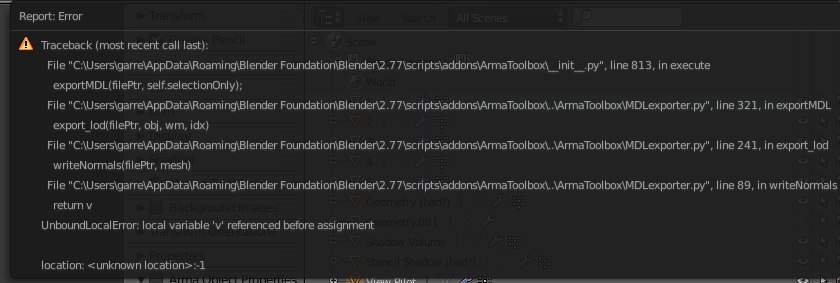
It does export a .p3d that I can open in O2, but initially the Shadow Volume, Geometry, and View Pilot LODs were missing. I started copying the A3 sample vest LODs over directly and removed the View Pilot from export (it is not present in the A3 Sample Vest), and I still get an error on export but now O2 has a 0.000 LOD (which is the geometry) and a ShadowVolume 0.000 (which I assume to be the correct naming scheme).
Anyone have an idea what I might have wrong on the Blender end? Or what I can do to fix this via O2 if necessary?
molten fractal
frosty rain
No but keep it as low as possible
Thanks. Do you know where the O2 script that I have to put in the arma toolbox for blender is?
fierce dagger
molten fractal
Thanks. Do you know where the O2 script that I have to put in the arma toolbox f...
Steam\steamapps\common\Arma 3 Tools\ObjectBuilder\O2Script.exe
molten fractal
thanks
fierce dagger
fierce dagger
hopefully someone can give me some advice here, I'm getting my feet wet in model...
well I've narrowed down my issue to the geometry LOD, but I can't quite figure out what the issue with it is
fierce dagger
ended up just pasting my other LODs into the vest template via O2 and it worked (yay)
current problem is with texture paths
I initially used the Blender Arma Tools to set the paths of all the required textures by browsing to their location and getting this result:
tmtm\pack\addons\vests\data\*.paa
tmtm\pack\addons\vests\data\*.rvmat
which give me an untextured model in bulldozer, and "cannot load texture" in game
if I use the A3 Blender tools again to browse and set the path now I get
//data\*.paa
//data\*.rvmat
which doesnt look right lol
it is 1:40 am my time and my brain is fried, if anyone sees what I don't or has advice, please @ me
quick terrace
molten fractal
is there a poly count limit for shadow lods?
3k verts
stuck oyster
dusty dove
Think this has anything to do with it?
Yeah you can't use thingX on terrain objects
 desert notch
Do weapon models always point to [-1,0,0]? (negative X axis)
or can it be changed via config, etc.?
 proven nacelle
When making a face mask or anything for arma, what do I need need to look out for, or remember
stuck oyster
@desert notch in what sense? on vehicles? on characters?
desert notch
characters
desert notch
I mean the weapon model itself
stuck oyster
that too
desert notch
when you make it, where does it have to point?
as you can see, when I spawn a weapon model, the muzzle is always pointing to [-1,0,0]:
 stuck oyster
umm wherever thee sample weapon points?
well game world space does not really matter
its the models own space that matters
when modeling
if you elaborate on what you are trying to do, perhaps I can give better answers
desert notch
I'm just trying to calculate the muzzle end when a weapon is in a unit's hand (using scripting)
also in Object Builder it does point to [-1,0,0]
stuck oyster
muzzle end in world space?
desert notch
yeah
just want to make sure that all weapon models point to [-1,0,0] (in other words, the muzzle end points to [-1,0,0] in model space)
I tried many models
and they all did
but not sure if that's a universal thing
stuck oyster
yes all hand held weapons are made the same way
assuming the maker wants them to shoot straight
desert notch
oh, ok. thanks for confirming!
rough idol
you can have weapons with muzzles in different dir if you want
there is muzzle pos & dir memory point so you shouldn't have to worry about model orientation
desert notch
rough idol
there is muzzle pos & dir memory point so you shouldn't have to worry about mode...
I only see muzzlePos and muzzleEnd
rough idol
thats pos & dir
desert notch
you mean: dir = pos - end? (vector from end to pos)
rough idol
yes
silver zenith
https://i.imgur.com/5Z4Y8VE.jpg
any idea why the ifrit has a longer bounding box than its model?
 woeful viper
memorypoints most likely
silver zenith
why would it need mem points over there?
dusty dove
stuck oyster
Yeah you can't use thingX on terrain objects
What should I be using?
silver zenith
makes sense
most vehicles have that space
stuck oyster
headlight proxy is pretty safe bet
dusty dove
class Headlight; ?
dusty dove
Sorry, thought you were.
stuck oyster
buut likely you need to check what vanilla signs use
terrain objects dont even need classes if you dont need to place them in editor
dusty dove
I used House, that seems to have fixed it.
stuck oyster
that works
if you use 3den to place them its alright
but when you finalize the map, it would be better if they dont have class
that way they are simpler objects and perfromance is better
round bloom
If you use a hide animation on part of a p3d does it still technically load the whole thing and have the same performance impact or not?
stuck oyster
Id suppose it migth reduce the load on gpu a little
you wont really notice such though
unless you are hiding millions of polygons
polar fiber
Perhaps if the engine is able to determine that it should not do anything with zero-area polygons. Hide anim collapses verts to 0,0,0 position in model space, so polygons then have no area
woeful viper
hiding does result in the hidden faces not being rendered. Extremely noticeably when you have troop transports full of people, and then hide the proxies + interior on closing the cargo ramp
hidden proxies also means way less draw calls (the amount of draw calls per infantry unit are kind of extreme... 1 per item on the body at least, if not more)
polar fiber
Does shooting them inside the vehicle (penetrating shots) still work if those proxies in the fireGeo aren't part of the bone that's hiding in the resLOD?
stuck oyster
they should
just like if you position proxies differently in visual and fire geometry lod, the fire geometry lods position dictates where it takes hit
 delicate holly
hey there, I'm trying to export a texture set for a custom model I made for arma but I'm very confused by all the different texture maps, does anyone know how to setup the map export preset in substance painter?
woeful viper
search texture makers channel or google that, its frequently asked
delicate holly
oh my bad, I didn't notice that channel
 slender yew
hey! im trying to get into modeling/texturing for arma- is there a specific discord hub centered around that somewhere?
median bough
this discord, the channels in the "creative editing" category in special
slender yew
gotcha, thanks!
 crimson cypress
Can you proxy weapon mounts?
e.g have a blackhawk with proxies for either minigun or m240's?
Or will each variant require it's own p3d and model.cfg?
stuck oyster
all moving parts would need to be separate P3Ds
woeful viper
except pylon proxies? them gunpods have muzzleflashes iirc
crimson cypress
stuck oyster
all moving parts would need to be separate P3Ds
Well that solves it,
Thanks
woeful viper
you dont need proxies to be able to switch between m240 and minigun weapon models visually, if that is what you where after. But it increases amount of necessary bones and animations in the model (of which you have only a limited number). On my tanks in swap secondary and tertiary weapons by hiding the unneeded ones.
crimson cypress
Visually and literally, both guns would need to function as intended.
Okay, thanks, I'm not the modelling guy, so I'll have to find out what the limfac is.
Theoretically could you then switch out the doorguns with the pylon settings? or is that asking too much
woeful viper
idk, if it did, it would make it a lot more complicated to achieve. You can swap it with scripts, or by just having 2 different helo classes ingame (but still using the same model file)
depends on how unique the doorgunner has to be. If he needs to use other animations, other weapon optics, etc, then you need another class. If its just visual swap with other weapon/magazine item and nothing else you can hide/unhide on the fly with scripts.
crimson cypress
Yeah that makes sense, could you have separate anims for the different guns within the one model? Would you need to create two seats on the same point with different anims?
I'm starting to think why someone said we need to duplicate the p3d
woeful viper
yes you can have different animations. Its just a question of how many animations/bones you have spare until you hit the limit of 255 - which can happen if you have really detailed interior (dials etc) and lots of other stuff
duplicating p3d is the most ... shall we say ... primitive way to do it. Double Memory imprint, double model maintenance efford, ...
it works, as long as you only have very limited options (2-3). one of my tanks has 3 options for secondary weapon and 5 for tertiary plus other options ... so i would have to use 15 different p3d's, which is ridiculous
crimson cypress
We have a fully interactive interior with plenty of switches animating, so I dare say we're nearing or at the cap.
There's also a variant with a GAU mounted in the cargo area already.
Plus, give or take 5 different exterior customisations
Anyway, I appreciate your insight, I'll have to pass it on to our new modelling guy and see what he can do
stuck oyster
bone limit is 255 so it does come up fast
if the mounts are vastly different then id recommend 2 separate vehicles
if they are same mount but different gun, then it might work
 finite beacon
Hello All,
I get the following error message in the binlogs of Mikeros:
18:03:26: Warning: Test_l\h18.p3d:1, vertex: 836, sum of weights is 50, should be 100
18:03:26: Warning: Test_l\h18.p3d:1, vertex: 836, sum of weights is 50, should be 100
What exactly is wrong? I already googled but did not find anything explicit.
Could someone possibly help me with this?
stuck oyster
it says it in the error
crimson cypress
Also I have a weird issue with animSources in the garage not hiding/showing. I'm fairly certain they've been configured properly, I even went back and followed the example on the wiki
Could anything other than my shitty config be the cause of this? It works if I script the animSource to show it
stuck oyster
you have weighted selections that dont add up to 100
crimson cypress
stuck oyster
if they are same mount but different gun, then it might work
There's a chunk different, ammo can and other stuff. I think a new p3d is the best way to go
stuck oyster
its likely config issue
crimson cypress
Thanks. I'll completely strip it down and start at one
stuck oyster
new p3d will make it easier to make
woeful viper
depends on how much stuff you run into that you want to fix/change/add later
crimson cypress
true.
woeful viper
just count amount of animations / bones you need for the 2nd set of doorguns and then check if you are inside limit
finite beacon
stuck oyster
you have weighted selections that dont add up to 100
where can I weight the selection at all?
I have only made my model "merge near".
Could you explain where I can find the setting?
woeful viper
whats the model and how did you make it?
polar fiber
crimson cypress
Also I have a weird issue with animSources in the garage not hiding/showing. I'm...
One of the animations using that source needs to have an animation class with the same name as the source.
crimson cypress
as in
            {
                type = "hide";
                source = "Skis_Show";
                selection = "skis";
                minValue = 0;
                maxValue = 1;
                hideValue = 0;
                unhideValue = 0.5;
            };```
This wouldn't work because the class is named differently?even if you are using the useSource flag in the config for the source to make garage use animateSource rather than animate command
Yeah you either need to call the source skis, or call the animation class Skis_Show
It isn't important for making the anim actually work, just the garage/customisation interface
woeful viper
who had that idea? Seems like a bad practice to me...
selection, animationname and source named the same - 101 on how to make it confusing...
polar fiber
Karel I guess
crimson cypress
My gitkraken recently fucked out, so I don't actually know what I tried.
I think in the garage section i used skis_show. So that would then most definitely be the reason it doesn't work in the garage but, then I can use _this animateSource ["skis_show", 1];? Have I understood that correctly?
polar fiber
Initially the garage only used the animate command. I think they had to add the useSource flag for multi-part animations in a later patch. Before that you had to add a script onPhaseChanged
You shouldn't need to use that command in the onPhaseChange now. There's a simple bool for it which will tell the garage to use animateSource instead of animate
            {
                AUTHOR_MACRO
                displayName    = "hide CIP";
                source        = "user";
                useSource    = 1;
                animPeriod    = 0.00001;
                initPhase    = 0;
};```oh f me.
Okay, it's that easy.
So that fixes the discrepancy between the class name and the actual animation name?
polar fiber
No, it just means you can use the same garage option to trigger more than one animation. You still need at least one of those anims to match the source name
crimson cypress
Okay sorry, spell it out for me,
Should I rename the classes to be the same?
cfgAnimationSources
    {
            source="user";
            animPeriod=0.2;
            useSource = 1;
            initPhase=0;
    };```
animations in model.cfg
```            class Skis
            {
                type = "hide";
                source = "Skis_Show";
                selection = "skis";
                minValue = 0;
                maxValue = 1;
                hideValue = 0;
                unhideValue = 0.5;
};```Still either you'd need to do class Skis_Show { type = "hide"; source = "Skis_Show"; selection = "skis"; minValue = 0; maxValue = 1; hideValue = 0; unhideValue = 0.5; };
or class Skis_Show { source = "Skis_Show"; }; class Skis: Skis_Show { type = "hide"; selection = "skis"; minValue = 0; maxValue = 1; hideValue = 0; unhideValue = 0.5; };
I can only assume what ever commands apply the animation from the garage use animationPhase to check whether it needs to add an animation to the unit, rather than checking animationSourcePhase
crimson cypress
Rgr,
Thanks a bunch
 fleet nacelle
Can anybody please point me toward a good tutorial for making a vehicle mod in Arma? Ive got some experience with weapons and uniforms, but vehicles are a new frontier for me
median bough
@fleet nacelle
https://forums.bohemia.net/forums/topic/207631-from-blender-to-arma-3-complete-process-tutorial/
Bohemia Interactive Forums
Hello, As I had many requests, I did this all-in-one tutorial I am sharing today. I hope it will be helpful to you. All important stages are available in videos description. I will try to make more tutorials in the future, so dont hesitate to guide me to parts of the videos that were not explaine...
bleak heart
my wheels is spinning too much. How can I fix it spinning?
Should I edit config or model.cfg?
if i am going to fix them where should i do it?
 small olive
@bleak heart try to decrease the value of the angle at your steering animation in model.cfg
stuck oyster
wheelCircumference config parameter affects that too
it should be set to same size as your wheel
bleak heart
https://pastebin.ubuntu.com/p/RwXQqGmk5Z/ i did as much as i could
but it still spins the same.
small olive
@stuck oyster actually he is meaning the rotation not spinning
stuck oyster
angles are easier to put down with angle = rad(degree value) like rad(180)
and if you change it you need to restart buldozer
 fervent hornet
Is there anything that needs to be done within a model or its model.cfg to allow rvmats to be assigned via hiddenSelectionsMaterials? I have several rvmats that work perfectly when assigned within the model but their textures won't load using hidden selections. Changes made to spectacularity do reflect when the asset is loaded however. "hiddenSelectionsTextures" works as it should using the same selections.
 small temple
Is there a tool to get pictures of assets and their classnames?
or rather a tool to make a picture based on the classname
and save it with the classname
stuck oyster
fervent hornet
Is there anything that needs to be done within a model or its model.cfg to allow...
The model needs to have those rvmats on it somewhere so that they get linked to it and cam be swapped. For example different lods could be set for different rvmats
quick terrace
stuck oyster
The model needs to have those rvmats on it somewhere so that they get linked to ...
do you mean that some part of the p3d to actually have these rvmats that you wanna swap to applied?
stuck oyster
yeh I recall that worked
polar fiber
Test it with setObjectMaterial and if it works can use VhC/BIS_fnc_initVehicle with materials[] defined instead. If setObjectMaterials doesn't work I think it's a problem loading the paths from the .rvmat
fervent hornet
@stuck oyster Thank you! I've got it working now. I've been beating my head against this one as have several people on the BI forums. I'll update my posts there and get back to work actually creating.
molten fractal
stuck oyster
The model needs to have those rvmats on it somewhere so that they get linked to ...
Is there any reason to have different rvmats/face textures on different LOSs?
woeful viper
stuck oyster
@molten fractal if you want different rvmats to be usable with hiddenSelectionMaterials
most of the time its not really an issue as 1 rvmat works for different colors
but if you wanted for example swap matte painted surface to high polished surface you would need to have both rvmats present in the p3d in order for them to be swapable. Or use the system da12thMonkey posted above
 junior saddle
This is dumb on my part, but I've had to reconstruct a lot of my mod infrastructure due to getting a new rig. I've gotten a lot of my assets back in shape, but there is one major problem. The wheels on each of my tanks are all spinning around a central axis instead of their individual axes. Also, the overall behavior seems like there isn't enough mass. It has been about 9 months since I've edited one of my tank configs; has something changed? If not, then there might be a file path issue, or... I've extracted an incomplete model.cfg, perhaps. Anyone ever have such an issue?
To clarify, all the other components of the tanks seem to be working properly, such as hatches, turrets, and main guns.
woeful viper
no there was no update in the last months that affected physx
junior saddle
Okay, thanks. That eliminates a good chunk.
junior saddle
I think I see what happened. Eliteness seems to add or change the axis name, and then puts //*probably*. This forces an axis that doesn't exist, so the extracted model.cfg isn't as effective as the original. sigh
woeful viper
why do you work of of binarized models?
median bough
in OB, how can i zoom in in smaller steps and not huge jumps (scroll wheel)?
stuck oyster
alt+both mouse buttons+drag
median bough
thx
is it possible to move selections with arrow keys and not having it to move it with right-mouse+move?
median bough
ok, thx
 stone merlin
Would anyone have any idea what would cause a tank's geometry to only mostly work? Sometimes units you run over just go through the tank, you can't walk through it most of the time but you can "step over" into it and that lets you clip trough the rest of the vehicles geometry. Components are convex, all have mass, none are huge cause it's just a tank, there's only around 15 of them, tried triangulated and non triangulated. Sorta running out of ideas. Doesn't even seem to be one component in particular as you can do it from pretty much any part of the vehicle.
 frosty kraken
Should Object Builder retain an object's rotation that has been rotated in Blender and then imported into OB? It seems that it does not but I might be missing something somewhere.
fervent hornet
Are you resetting your rotation in Blender before export? @frosty kraken
frosty kraken
fervent hornet
Are you resetting your rotation in Blender before export? <@134201450904420352>
At least not intentionally. Where could I check that if I am or not?
edit, was not because of this: Ahh, there's a "Apply Modifies" check box in the export screen. I have that unchecked so might that be the reason then
fervent hornet
In Blender, whenever you rotate, scale, or move an object you need to reset the object. Ctrl-A and reset all
With the object selected
frosty kraken
fervent hornet
In Blender, whenever you rotate, scale, or move an object you need to reset the ...
But that seems to reset the object's rotation to some default in Blender. What I was looking to solve that should the rotations done in Blender translate into OB.. or do I need to rotate objects everytime I load one in OB after exporting from Blender
polar fiber
You have to apply transforms before exporting
round bloom
What is the usual cause of an RPT spitting out Cannot intersect with test\test.p3d - missing skeleton bones? It's a fairly basic model for a static object but the person who did it didn't leave a model cfg, would that be the cause?
stuck oyster
possibly
 obtuse rain
Any best practices for modeling stairs so AI can use them? I've set up a gentle stair angle, the geometry LOD is a ramp, the roadway is slightly elevated above the geometry, and I've got pathway LODs above that, but the AI refuses to follow waypoints to the top of the stairs.
woeful viper
is your stair a seperate object? Or is it part of a bigger model?
obtuse rain
Part of a larger model. It's a cubic room with a stair leading up to an elevated landing.
woeful viper
So if i understand right, the AI is already inside the building (on building pathway LOD) but doesnt want to go to the elevated part that is also part of the same building and pathway?
obtuse rain
Yes that's correct.
woeful viper
whats the buildings size? how high above is the elevated platform over the "ground level"? under the platform, is there also roadway level below that ?
a pic says more than a thousand words... just saying
obtuse rain
I can't upload screenshots directly to this channel so here's what I'm working with so far: https://imgur.com/a/S14xCKS
woeful viper
that looks like a large building? whats the max width and depth?
see https://community.bistudio.com/wiki/LOD#Roadway , there is a size limit. But that is not a "fixed" value. It depends on the details of the terrain (terrain mesh density or something like that).
If you path points lie outside of that size limit, AI cant access them
obtuse rain
The whole room is about 42m x 30m and 15m high. 2614 triangles.
At max the furthest point is less than the ~36m away from the object origin. But I can try shrinking the building and see if it helps.
woeful viper
.just for testing it might be a good idea. Idk the grid sizes of the terrains by heart, but maybe try on a different map. Tanoa should have quite good detail i think? Malden is the worst...
Shuffle the path points around a bit more (even more height above roadway)
Also make sure your roadway / building is placed so that it sits significantly higher than the terrain height. Otherwise the AI might actually not even walk on the path of the building but just on the terrain beneath it, so it has no idea there is a path...
If they are running, then they are definitely not on a path, but on terrain. When on pathways AI will always walk
maybe also read the convo here for future
#arma3_terrain message
pathway is... tricky (i'm struggling with it myself)
obtuse rain
I'm testing these objects on the VR map to start. Are you saying that depending on the grid size of the base map, AI pathing will behave differently all other things being equal?
woeful viper
the maximum roadway size on malden is smaller than some vanilla buildings are big (e.g. the big construction site building -> AI cant reliably walk up the stairs because of that). At least thats my interpretation.
obtuse rain
Okay, wow that's a revelation. I'll have to keep that in mind.
I've elevated my entire room object significantly above the ground and it seems to be behaving better. I suppose the workaround then is to raise the foundation of ground objects above the terrain height level.
woeful viper
yeah. The waypoint inside the building (when unit is standing on terrain) must be a certain distance above the terrain, for it to even recognize that it needs to enter the building/pathway. Same is the case for when you place a walkable object with pathway ontop of another building.
- caveat - all according to what i witnessed in the few tests i had done for my own buildings so far... I havent done a gigantic testseries to scientifically confirm everything i say...
obtuse rain
I've had some success with getting AI to path up and down ramped corridors, but only if the entire object is a closed circuit. If the any part of the corridor is open to terrain, the AI will exit the object and go around it altogether.
stuck oyster
I put path 10-20cm above the roadway, and roadway should always be few cm above geometry.
For ramps that connect to ground you will need multiple different height entry point (refer to sample house in the steams Arma 3 Samples) so that when the ramp sinks in at different depths, there. Is at least 1 entry point above ground and at accessible height
 steep plinth
i'm trying to create an object with object builder and it work but i want to change the uv so i want to open the uv editor but it doens't work i don't see the window. The window is open but i don't see anything.
polar fiber
It does that fairly often. Gets stuck offscreen
right-click the window that shows for it from the taskbar, and press "maximise"
steep plinth
polar fiber
It does that fairly often. Gets stuck offscreen
yeah i have found this alone but thx a lot because it's very annoying
white jay
@steep plinth best bet is to do as much as you can in blender or your choice of 3d software and export to object builder
round bloom
Blender with Arma toolbox is OP
steep plinth
how can i add slingload memory point in my object in "object builder" ? in which lod ?
frosty rain
steep plinth
how can i add slingload memory point in my object in "object builder" ? in which...
Memory lod
Everything would be much easier to do in blender or any other 3d software
steep plinth
frosty rain
Memory lod
ok and can i know the "name" pattern ?
frosty rain
steep plinth
ok and can i know the "name" pattern ?
Not really sure as I haven’t done that, your best bet is looking at the samples and googling it
Or ctrl+f in this chat
polar fiber
Max poly count wouldn't be optimal 😄
 timber night
Lower poly the better right?
I want to have a baseline
For my vehicle.
I don't know poly averages for arma vehicles.
polar fiber
Depends what it is really. 90k vertices for a vehicle with lots of sub-components is about the top limit so far as BI's content goes I think
Other vehicles might be as low as 20k
quick terrace
@timber night if you are gonna tell what sort of vehicle you're doing, you might get a more precise answer
 polar fiber
Stryker we have is 70k verts without the tyre tread
quick terrace
i was about to say 60-80k, depending on the details for the interior lod
so exterior + interior, about that sum ^^
marshal is 50-60k irc
but has less stuff going on the exterior
polar fiber
With the tyre treads it's another 8*4300 (~35k) verts so total is ~105k. Tread is proxied on so they disappear separately to the rest of the vehicle detail
I think the Tanks DLC Rhino is the highest poly BI asset and that's around 90k if I remember what reyhard told us
timber night
Does models need to be rigged
or animated?
What is the requirement for model creation.
polar fiber
Vehicles aren't rigged as such. You make named selections (vertex groups) and set pairs of vertices to act as an animation axis and then write a skeleton and animations in a model.cfg text file
woeful viper
polar fiber
Vehicles aren't rigged as such. You make named selections (vertex groups) and se...
one could argue that that's also a rig... just less handy to edit in 3d editor
stuck oyster
timber night
with poly counts?
nope
steep plinth
can i know how can i add "HiddenSelectionTextures" in my model ? what i need to do ?
stuck oyster
youll need selections on the model for the parts you want the HST to apply to. those selections need to be added into the model.cfg Sections array and in the config.cpp hiddenSelections[] array
sample models have these set up so you can see how they are
steep plinth
oh ok thx i will check
stuck oyster
vanilla models usually use "camo" selections
steep plinth
yeah but i mean "camo"
stuck oyster
you can use the same name
steep plinth
ok
stuck oyster
but you will need to create such group on your model
bleak heart
What is the code needed to open a new slot in the editor?
stuck oyster
new slot?
bleak heart
example: Amazon Cars
it will only be my car model
I will post a visual in 1 minute so I can be more understandable.
bleak heart
thank you
 austere ermine
does user actions work when the object is proxied?
e.g. add sit user actions to a chair and I proxy it into a building will the sit come up
stuck oyster
no
median bough
i got a weird issue...
i have a heli with 10 cargo seats:
cargoProxyIndexes[]={1,2,3,4,5,6,7,8,9,10};
getInProxyOrder[]={1,2,3,4,5,6,7,8,9,10};```
the model also has proxies numbered from 1-10
but for some odd reason, seat/proxy 9 is skipped
i still have the option to command the last remaining unit to board, but he refuses to to
what could be the cause for that?proxies 1-10 or 0-9?
median bough
 median bough
select it where?
median bough
yes, it's there
stuck oyster
though when you say 9 does skipped is 10 filled?
stuck oyster
and 9 is in all lods? firegeom and viewgeom too?
median bough
model has no firegeo, but it's in viewgeo
also in LOD1-5, view-cargo, shadowvol amd shadowvol - view cargo
stuck oyster
have you tried deleting it and making new one with same index?
deleteing the proxy mesh part and clearing the proxy selection just in case
stuck oyster
do you have separate cargo actions array defined for them
median bough
        {
            "passenger_bench_1",
            "chopperMedium_C_01_H",
            "chopperMedium_C_01_H",
            "chopperMedium_C_01_H",
            "chopperMedium_C_01_H",
            "chopperMedium_C_01_H",
            "chopperMedium_C_01_H",
            "chopperMedium_C_01_H",
            "chopperMedium_C_01_H,",
            "passenger_bench_1"
        };
cargoGetInAction[]=
        {
            "ChopperMedium_C_Lin_H",
            "ChopperMedium_C_Rin_H",
            "ChopperMedium_C_Lin_H",
            "ChopperMedium_C_Rin_H",
            "ChopperMedium_C_Lin_H",
            "ChopperMedium_C_Rin_H",
            "ChopperMedium_C_Lin_H",
            "ChopperMedium_C_Rin_H",
            "ChopperMedium_C_Lin_H",
            "ChopperMedium_C_Rin_H"
        };
        cargoGetOutAction[]=
        {
            "ChopperMedium_C_Lout_H",
            "ChopperMedium_C_Rout_H",
            "ChopperMedium_C_Lout_H",
            "ChopperMedium_C_Rout_H",
            "ChopperMedium_C_Lout_H",
            "ChopperMedium_C_Rout_H",
            "ChopperMedium_C_Lout_H",
            "ChopperMedium_C_Rout_H",
            "ChopperMedium_C_Lout_H",
            "ChopperMedium_C_Rout_H"
};```AAAAAAAH
saw it with posting it here
a comma too much
testing....
median bough
yep, that was the issue. thx for the lead
stuck oyster
😅 Might have been on that boat before myself too
 fluid hound
Is there any list and explanation of warnings and errors for binarize?
I forgot the meaning and importance of most of them.
Right now i am a bit struggling with:
Warning: CfgVehicles missing in PreloadConfig - may slow down vehicle creationWarning: Unsupported UVSet 2Warning: Unsupported UVSet 3(and so on)
median bough
post the full error list on pastebin.com
fluid hound
there isn't really anything else relevant, its just these three warnings that i need to know the meaning of.
median bough
as for warning 2 and 3 it's pretty clear. you have more than one UV set and that's not supported
CfgVehicles missing in PreloadConfig looks like a config issue
post your config.cpp on pastebin.com
fluid hound
median bough
``CfgVehicles missing in PreloadConfig`` looks like a config issue
the config is fine, there aren't even any vehicles in it.
These are some typical binarize shenanigans.
i could be wrong but i think i vaguely remeber the PreloadConfig message had to do something with some data missing on the P drive or not getting copied/converted into the temp folder.
The P drive should be fine (assuming the BI Tools process of creating the P drive for you can be trusted).
So, maybe i forgot to set some dependency.
Or, this could be really just a quirk of the binarize, its pretty quirky crappy tool (no offense, that's just how it is).
Is there really no list of these warnings and reports?
I do remember reading about this crap somewhere, but maybe those were some BI internal sources back then and it never got published.
Any tools/config guys from BI around who might know the answers?
 bright echo
Anybody have experience with muzzle memorypoints?
I'm working on wing mounted cannons on planes and set it up so the muzzle memorypoint points inwards so the shots converge, it works fine... but i'm worried it might mess with AI ?
stuck oyster
@fluid hound tools P drive setup is a bit unreliable. From your text I gather you don't use mikeros pbo project to pack?
fluid hound
stuck oyster
<@395320115035373570> tools P drive setup is a bit unreliable. From your text I ...
nope, i use the command line programs that come with BI Tools
Sorry, i mean Arma 3 Tools
Ah, sorry, it took me a while to realize what your point is...
So, the "mikeros pbo project" will prepare P drive or its equivalent in a more reliable way?
Well, there is no harm trying i guess....
Aha... looking at the downloads, i think i remember why i never tried these tools before - because i despise installers - you never know what are they doing, and they almost never clean up after themselves properly.
Not saying thats the case here, but probably is 🙂 just... eew, installers.
fluid hound
And of course it crashes when i try to install - yep, whats not to like about installers.
stuck oyster
That is quite uncommon for it. Which installer did you run?
fluid hound
DePbo.7.97.0.25.Installer.exe
...but it seems that despite the crash its working without any problems.
apparently it happened after it copied over all the important stuff
.
Anyway, i think i will stick with the official A3 Tools, its the devil i know (or maybe i should say knew).
I mean even Mikero tools still need the official tools like Binarize, right? at least i can't find anything that would indicate otherwise.
btw. I did let the Mikero tools create a P drive though, and i didn't see any important difference compared to how it was setup by the A3 Tools, except for some addons not being unpacked by the A3 Tools (but i don't need any of those files for my project anyway).
stuck oyster
Mikeros tools have a lot more debug before stuff is fed to binarize so you can catch many errors without having to go into game
 balmy bloom
hi, i am coming from assetto corsa modding, and I want to try out doing some models for Arma
i am planning on modeling an A-6 intruder from scratch, but before I begin, i want to ask if there is a basic pipeline or somebody who would down to explain arma guidelines
cheers
woeful viper
balmy bloom
hi, i am coming from assetto corsa modding, and I want to try out doing some mod...
check pins in this channel
unless you have very good references (up to dimension technical drawings) that you can copy from, it pays off to bring a very basic model into the game as early as possible to check dimensions an other stuff.
While modelling, occasionally update the ingame model and test it, as you work in your 3d tool of choice (blender?)
balmy bloom
3Ds max is my software
I’m planning on modeling from some blueprints
I know that they aren’t accurate, but anything is better than the current a-6 ingame
stuck oyster
modeling wise there is not anything speacial really. typical lowpoly game object modeling
texturing wise Arma uses Spec/Gloss shaders, so no PBR metalness/rough workflow
woeful viper
"current A-6" uhm, i dont have in my game A-6 😄
balmy bloom
stuck oyster
modeling wise there is not anything speacial really. typical lowpoly game object...
Whats the target polycount on a plane around?
balmy bloom
woeful viper
"current A-6" uhm, i dont have in my game A-6 😄
Unsung has one i meant that
balmy bloom
stuck oyster
texturing wise Arma uses Spec/Gloss shaders, so no PBR metalness/rough workflow
Can i prebake AO?
stuck oyster
Id recommend checking out supershader wiki page
balmy bloom
Alright thanks so far
Later on i’ll try implementing cockpit features and stuff but thats further away haha
stuck oyster
and possibly looking into the games vanilla vehicle textures for reference
balmy bloom
so just please tell me a polycount
balmy bloom
stuck oyster
and possibly looking into the games vanilla vehicle textures for reference
I’ll look into it alright
woeful viper
stuck oyster
Id recommend checking out supershader wiki page
tbf its a bit... wobbly jobbly that page. Not suuper helpfull
stuck oyster
its a starting point
woeful viper
yeah, same applies to rvmat page too
balmy bloom
also i can make anims in 3ds right?
stuck oyster
no
balmy bloom
It’s made with the “game editor?”
stuck oyster
no
woeful viper
no, with notepad 😄
balmy bloom
Set pivot point then
Script the rotation and stuff
ah alright
will check that out thank
S
stuck oyster
theres a procedural config file called model.cfg for animations
woeful viper
https://community.bistudio.com/wiki/Model_Config is the most important
stuck oyster
the page explains it pretty well
stuck oyster
as for polycount, most complex vanilla vehicle model clocks around 90k tris (interior+exterior) If II recall right. it is at the higher end of recommended though.
rule of thumb is that make it least amount that looks good
woeful viper
Btw - if you are serious about this and have some experience and portfolio under your belt ... SOG might be interested. The part of integration into arma (esp. for aircraft) can be a bit of a brick wall that takes some time to smash through if you are alone. #sog_prairie_fire message
@balmy bloom ^
balmy bloom
thanks
i think i'll see what can I do and yea 🙂
if later on anyone wants to help with scripting, and others ill be happy to collab
now its my time to do the thing
 upbeat wraith
Can someone please remind me of the key to reverse points in object builder? My model is inside out
I cant remember the hotkey and cant find my results online
stuck oyster
W
upbeat wraith
Thank you! I should remember that 😄
bleak heart
is there a wiki for car lights?
stuck oyster
probably not specifically that but there are "cfgVehicles config reference" and "cars config guidelines" pages that might be of use. Also the Sample car config in Arma 3 samples contain working example
woeful viper
theres got to be 5 million questions on how to add light bars on "questionably aquired" vehicle models already...
upbeat wraith
does anyone mind explaining the difference between resolutions to me in LOD's? For example, does it matter if the model is at Res 0 and the Geometry Res 1? or is there a specific order
woeful viper
upbeat wraith
does anyone mind explaining the difference between resolutions to me in LOD's? F...
read the pinned lod page for the answer https://community.bistudio.com/wiki/LOD#.3Cresolution.3E
bleak heart
There are car parts belonging to viem-gunner and viem-pilotto mrap, how do I destroy it?
 stuck oyster
you have put those into your model somehow?
 craggy solar
https://forums.bohemia.net/forums/topic/188101-smooth-problem/ anyone know a fix for this
polar fiber
Select the affected faces and lock their normals immediately after importing so that they don't get recalculated when the .p3d is saved
Shift+E brings up the vertex properties menu. Fixed/locked normals check is in the bottom-right
craggy solar
THANK YOU
polar fiber
If you need to do it on an already saved file, you would have to set the pin to the grid centre (Shift+C) use the scale points tool to make that part bigger (like 10x), smooth the edged then, lock the normals then scale it back down (0.1 etc.)
upbeat wraith
Does anyone know what mass I should give to my geometry LOD? I tried 1, and well, it didnt seem to even move. I could have just got the LOD wrong, but as far as i understood, it had to be non-convex, closed, with mass, and be roughly the same size as the object - which is about 20cm tall and 6.5cm wide. I used a cuboid for my LOD, with a resolution of zero and and the LOD on the right set to geometry, is there somewhere in the config I have to define things aside from in the P3D or should it do that automatically?
stuck oyster
10+
and not non-convex
has to be convex, closed, mass and componentXXX names
and what type of object is it
where do you expect it to move?
as in is it a physics object at all
upbeat wraith
Its an IED made from a water bottle for an upcoming campaign we're doing, my apologies, its convex not non convex 😄
I'm using ace framework to make it explode, and that's all working, but when i try and arm it with ACE, it floats in mid air.