#arma3_model
1 messages · Page 167 of 1
 stuck oyster
 fierce rain
i will have a look on that. thank you so much ❤️
oh btw i found this lod in the Objektbuilder https://prnt.sc/11r6uak
is that the shadow lod?
stuck oyster
one of them yes
that resolution for it is not correct for this type of object though
you also may want to alter your OB UI to be more clear

makes it easier to use when its clean
fierce rain
stuck oyster
you also may want to alter your OB UI to be more clear
should i make it 10000
im in this thread now
fierce rain
so i have to set it 0?
fierce rain
ok will try it
 warm spindle
hello i would like some help please i created my first helmet model but it appears on the chest of the unit instead of the helmet , any idea about how to fix it ?
 small olive
warm spindle
hello i would like some help please i created my first helmet model but it appea...
small olive
warm spindle
hello i would like some help please i created my first helmet model but it appea...
your helmet needs to have selections like head, neck etc. to tell the game which parts belongs to which body parts and move with them. also you need to create a empty geometry lod and add a autocenter named propertie with value=0: https://prnt.sc/11razy1
and you need to copy model.cfg from the arma 3 samples characters folder to same folder with your p3d and define your model down below: https://prnt.sc/11rb6t0 (name must be same with the p3d object)
warm spindle
ahh thanks i found the problem , i wrote autocenter wrong
 strong plaza
@fierce rain visualex does not look good on buildings as flat surfaces get shadow banding
stuck oyster
Maybe it gets a fix sometime
strong plaza
it was supposed to have been fixed, but it's still an issue
 wary dome
Hi everybody.
I've a problem with my animation.
So my animation work but it is instatanly no transition ...
model.cfg
class garage1
            {
                type="rotationZ";
                source="garage1";
                memory=1;
                selection="Gate_1";
                axis="gate_1_axis";
                animPeriod=1;
                minPhase=0;
                maxPhase=1;
                minValue="0.0";
                maxValue="1.0";
                angle0="0";
                angle1="1.6";
            };
and here my config :
class open_garage1
                    {
                        displayName = "Ouvrir la porte";
                        displayNameDefault = "<img image='\A3\Ui_f\data\IGUI\Cfg\Actions\arrow_up_gs.paa' size='2.5' />";
                        position = "porte_01_action";
                        radius=2;
                        onlyForplayer = "true";
                        condition = "((this animationPhase 'garage1') < 0.5)";
                        statement = "this animate [""garage1"", 1]";
                    };
                class close_garage1
                    {
                        displayName = "fermer la porte";
                        displayNameDefault = "<img image='\A3\Ui_f\data\IGUI\Cfg\Actions\arrow_down_gs.paa' size='2.5' />";
                        position = "porte_01_action";
                        radius=2;
                        onlyForplayer = "true";
                        condition = "((this animationPhase 'garage1') > 0.5)";
                        statement = "this animate [""garage1"", 0]";
                    };
Do you know why ?
stuck oyster
have you defined the garage1 in config.cpp class animationSources
 frosty rain
@wary dome as goat said I don't think you have defined it in animationSources, the thing that determines how many seconds the animation takes is animPeriod
Would there be any difference in loading time if I have two buildings in a pbo and i split each building in its own pbo?
wary dome
thx 😄
wary dome
frosty rain
Would there be any difference in loading time if I have two buildings in a pbo a...
Normaly, arma take more time for loading two pbo than one 😄
frosty rain
Does it really affect if the overall size of the pbos didn’t change? Like if i split a 200mb pbo into two 100mb pbos
stuck oyster
some hefty buildings...
frosty rain
yeah, it's from when i was learning and used 4k textures and supershaders for everything 😬
stuck oyster
🙈
frosty rain
stuck oyster
🙈
Anyways, do you know if the loading time would be different? I am thinking of splitting it since if I update building_1.p3d I don't want the person to have to download building_1.p3d and building_2.p3d since they'd be in the same pbo
stuck oyster
probably not any meaningful difference
frosty rain
Alrighty, thanks!
stuck oyster
but pls make them use multimaterial xD
frosty rain
Hahaha I've since converted into the ways of using multimats for any walls, etc. Don't worry 😂
stuck oyster
👌
 runic plover
frosty rain
Hahaha I've since converted into the ways of using multimats for any walls, etc....
runic plover
frosty rain
Hahaha I've since converted into the ways of using multimats for any walls, etc....
Do not use 4K textures..safe these for the future like Arma 4
Id rather to go with 2K textures, more perfomance friendly in loading ingame.
frosty rain
runic plover
Do not use 4K textures..safe these for the future like Arma 4
Id rather to go ...
Yeah I don't use 4k textures anymore, it was mostly compensating for bad texel density
 olive rampart
how can i make my buldozer show full screen?
olive rampart
why wouldnt i? i have 3 monitors and like to USE them
you cant scale the buldozer window


 olive rampart
99.9% sure i dont get the option to scale at any spot on my buldozer window, which would be why i asked.
stuck oyster
if its active you cant
but if you have some other window active you can take hold of the edges
 robust cosmos
My friend I have I quick question please!!
It is possible to increase a poly count for a model ?
Is the model will be more detailed
Thank you very much
stuck oyster
there is no magic automation for that
stuck oyster
lets start from what model are you talking about
robust cosmos
Okay let me explain
 inland pawn
robust cosmos
It is possible to increase a poly count for a model ?
inland pawn
robust cosmos
It is possible to increase a poly count for a model ?
You have to manually add more detail. There is no way to automatically increase poly count
robust cosmos
@inland pawn I understand
inland pawn
If it’s your model, by all means add as much detail as you want. If it’s someone else’s, don’t touch it
robust cosmos
@stuck oyster there is a dude was contributing his models once before in Bohemia discussion
It’s old post
And I like to work with ot
It
I’ll provide the link for you
robust cosmos
@stuck oyster I’m saying so
stuck oyster
using old models is messy
robust cosmos
Coz I’m having problems with rv mats
stuck oyster
well you just have to learn how they work
using old files is not the best way for that though
runic plover
@robust cosmos in OB you can try with Points / Merge Near "detect or do own values" but it might cause bugs and you need to repair sometimes.. it can be used to make resolution lods.
But the better way is like said above, do the models new.. its a faster progress to reduce polycount.
The other way works if you need to add more poly of a low poly model
robust cosmos
@runic plover appreciate that I’ll give it try then 👍🏻👍🏻
 carmine ether
Find an airplane maker
 quick terrace
carmine ether
Find an airplane maker
quick terrace
carmine ether
Find an airplane maker
lol what?
 ocean patio
So I made a couple of helmets and facewear, but for some reason when in first person/piloting the character, the facewear and helmets cover up the camera. Of course, I was easily able to fix this on my uniforms by removing the headgear and facewear proxies from them, but the issue persists on base game uniforms and other mods'. What can I do to make the facewear and headgear not appear in first person?
 rough idol
ocean patio
So I made a couple of helmets and facewear, but for some reason when in first pe...
rough idol
ocean patio
So I made a couple of helmets and facewear, but for some reason when in first pe...
create empty pilot view lod
 uneven vigil
how can I use direction sources in character model?
https://prnt.sc/11w72rv
uneven vigil
uneven vigil
how can I use direction sources in character model?
https://prnt.sc/11w72rv
for Compass
stuck oyster
you cant
or well I never got modelc.cfg animations work on characters at least.
so at least educated guess is you cant
which is why you have the compass item
uneven vigil
The watch with a compass is very cool 😄
stuck oyster
yes but you cant make it work on the characters wrist
you are not the first one to try
olive rampart
What are arma poly limits? I know dayz was around 30k
frosty rain
The modelgeometry in each LOD needs to be below a "maximum polygoncount". This "maximum polygoncount" varies depending on how your model looks. The actual limit is based off vertex normals. The total amount of triangles you can use therefore depends on the Smoothing splits and UV splits in your model. According to some tests and documentation of DirectX9 the limit appears to be 2^15 = 32768 vertex normals in ArmA, Arma 2 and early Arma 3 (where DirectX9 is used). In a recent (Q1/2016) update, the .p3d format in Arma 3 was updated to version 70 and now has a higher limit (above 2^16 vertex normals). If you exceed the vertex normal limit, loading your model may crash the game or it simply won't display it. You can check it in Objectbuilder by loading up Bulldozer - if the LOD is not displayed, you are above the limit. Modern 3D modelling tools also offer native or user created tools to check the amount of vertex normals. Please remember that this is the absolute maximum you can use - this does not mean you should fully utilize it on every object.
ocean patio
Does the distance between the direction hlavne determine ballistic barrel length?
 polar fiber
No there’s no simulation of internal ballistics in Arma other than being able to adjust config initspeed
The memory points are mostly for generating particle effects in the right place
And forming the axis of the weapon bore
 iron oriole
Can anyone point me to info about a model workflow without OB? I haven't been able to find anything other than the ancient blender plugins. Just started getting the camera problem so OB is pretty much unusable now.
Edit: Got it, didn't realize Arma toolbox was updated
 sour fulcrum
Hey model makers! What's a good poly count for a vehicle? I've got a model I want to import, but it's waaaaaaay too high of a poly count for the engine to handle. Trying to work out how much I need to shave off this thing?
polar fiber
Depends on the vehicle. Whether it has an interior etc.
70k verts for something with multiple weapon stations, or lots of wheels wouldn't be unusual
I would aim around 90k for say a tank with appliqué armour. But on the other hand something with a fairly simple, smooth monocoque body like a car or plane might be as low as 30k
stuck oyster
frosty rain
```The modelgeometry in each LOD needs to be below a "maximum polygoncount". Thi...
this is actually old info, theoretical limits are now in millions (was updated some years back)
but you should never ever aim to reach that limit
what is good performance friendly target depends on size and detail level of an object
but also a good object has multiple resolution lods that makes its draw more performance friendly at different distances
 jovial solar
Hi I need some help getting simple objects into Arma all the tutorials Ive seen(thanks H.G.) need LODs or are inventory objects any help appreciated DMs welcome
stuck oyster
explain what kind of a problem you are having and perhaps solutions can be found
It is better to do help in public as too many times the private chat helping is never passed forward and gets lost in the DMs
jovial solar
to be honest Im still trying to understand it at all, I dont even know what LODs are but they seem to be required for interaction with bullets etc, but I just need walkable simple 3d structures placed in editor
this is the easiest tutorial I have "understood" but I still dont get it
he seems to make an inventory object but I dont know if its something you could walk on, or how I would find it as an asset in the editor menu
stuck oyster
no inventory item is not what you want to do
you could look into the El Tyranos tutorial series.
jovial solar
thanks again for that one, I found Gattington easier to understand. I suppose there is not easy method/tutorial for such a complex subject. I would just love to know how to add customized obstacles into the game
If anyone does know how to do this, lets make a video together.
frosty rain
I mean most people here know, doesn't mean we have the time to make tutorials lol
as goat said this is probably one of the best tutorials to learn about lods and stuff https://www.youtube.com/watch?v=GxGIgurkzW4&t=1759s&pp=qAMBugMGCgJlcxAB
jovial solar
I know they know, but I figured a tutorial for beginners would help the community, I dont want to disrespect that guy for his tutorial, but it is extremely difficult to bear his mic (personally) and I strongly suspect it could be much shorter. again I dont mean disrespect, I just want to help the Arma community by making a simple to understand video about this subject
Video idea: make a cube in Arma, and climb on it
stuck oyster
@jovial solar please no video. Video is not good format for this kind of complex stuff
jovial solar
I don't understand. Video is the only way some of us can access this kind of information. I would like to simplify it to help the Arma community grow both in size and intellect. Some of us need a hand holding, help me provide it.
stuck oyster
why is written tutorial not accessible?
frosty rain
I think goat means text is a better format for explaining this
stuck oyster
well text and images
jovial solar
It is accessible just not useful for some.
We all learn differently, help me understand so I can relay that info to others in a way I know they will get
Im coming from and early childhood education perspective, there are very effective teaching methods that can be used here
Just need to simplify it
stuck oyster
there isnt that much you can do to simplify this stuff.
there are lot of parts, lot of programs lot of things that need to be right
jovial solar
Cube video would be simple
Good microphone would be effective
Short video with key points indicated would be extremely effective
stuck oyster
but its not short
frosty rain
Honestly the El Tyranos tutorial is already very simplified
stuck oyster
there are lot of things
jovial solar
a cube video would be short(er)
stuck oyster
even for a simple cube
 median bough
the main problem with videos vs text is, changes can not be applied "on the fly"
frosty rain
jovial solar
a cube video would be short(er)
Wouldn't really be that much shorter
jovial solar
Im just talkiing about the intro to modeling
frosty rain
All the concepts in El Tyranos tutorial apply to a cube
stuck oyster
modeling intros there are many
frosty rain
Oh if you're learning to model straight for arma you're starting on the wrong foot
stuck oyster
for each commonly used program
median bough
jovial solar
Im just talkiing about the intro to modeling
there are already thousands of hours of videos for entry level modeling available
jovial solar
Ok, I just wanted to help.
median bough
your intentions are good, just the chosen medium (video) is not
stuck oyster
from basics to advanced "how to"s too
ok so
there is "general modeling"
which is making model in a program you select
and then there are general how to make textures how to make uvmapping in any given program
those are starting steps for modeling
jovial solar
I think I could prove it, if I could watch any of you make a cube and ask questions
frosty rain
Making a cube is 2 clicks on blender
frosty rain
ah true lol
stuck oyster
then along with the genral stuff that applies to everything
there is the Arma specific things
jovial solar
ok lets see it, DM me and I'll watch you add that to Arma, then make a video that is short, for the community to learn from
stuck oyster
but to understand those, one must first grasp the general basics
jovial solar
this is how some of us will grasp it, please help me help others like me
stuck oyster
jovial solar
ok lets see it, DM me and I'll watch you add that to Arma, then make a video tha...
now that gets us to the problem of time
which most of us have sparingly
frosty rain
#arma3_model message @jovial solar
stuck oyster
@jovial solar do you have a 3d modeling program you want to learn?
jovial solar
respectfully @stuck oyster, I see you helping people all the time here. What I am asking will help exponentially
median bough

Let me tell you all the ways that a virtual donut will satisfy you.
Follow me:
Twitter: https://twitter.com/andrewpprice
Instagram: http://instagram.com/andrewpprice
Facebook: http://facebook.com/blenderguru
ArtStation: http://artstation.com/artist/andrewprice
Blender Guru: https://www.blender...
stuck oyster
that is a decent introduction to blender yes
jovial solar
its adding to arma, not making blender stuff that is the hope here
median bough
but, as with every video tutorial: blender has changed since then......
stuck oyster
@jovial solar yes but do you already have the basic understanding of for example Blender
frosty rain
jovial solar
its adding to arma, not making blender stuff that is the hope here
so you want to eventually buy models and import them instead of creating i assume
jovial solar
simple cube + LODS + pack + try in editor
stuck oyster
well I have no time for that
to make an efficient video out for such it would require hours of preparation
jovial solar
@frosty rain no, and please dont assume BS about me... the honest answer is that I want to import giant letters of the alphabet to write fun stuff with stuff like NAM in giant letters in the mist... since I cant figure it out from the tutorials I have found, I thought I should get someone who knows to help me.
as far as time to help people goes, video would make you helping people exponentially effectve (@H.G.)
frosty rain
Well for that you still need to learn the basics of blender
jovial solar
@stuck oyster
frosty rain
jovial solar
I have objects already(@frosty rain)
stuck oyster
I dont like to be pressured into things either. Good luck with the letters though.
frosty rain
jovial solar
I have objects already(<@762700926183145472>)
so do you know how to create text in blender and transform it into a mesh?
jovial solar
yes
@stuck oyster I think I placed my @ at the wrong time and he replied faster... it might have looked like I meant I had 3Dobjects for YOU, I didnt mean that
frosty rain
i'll do a video just for you, won't have audio or anything so you'll have to see it very carefully
jovial solar
@frosty rain if you can do it, please join me in a DM to watch, than I can make a video for everyone
frosty rain
uploading now
jovial solar
ok great, thank you!
frosty rain
keep in mind the normals/direction of the faces are backwards but i cant be arsed to fix it
to fix this in blender alt+n and recalculate outside
https://www.mediafire.com/file/8cbjpzgdavpdvtx/Myke_Client5.rar/file this is the mod if you want to experiment with it
stuck oyster
Dont take this the wrong way @frosty rain but this video is not really helpful in the long run.
frosty rain
jovial solar
wow that was so fast!
keep in mind this is absolutely the worst way to learn
jovial solar
I would live to talk with you while you do it, thats the best way to learn
Why is that? @stuck oyster
frosty rain
stuck oyster
Dont take this the wrong way <@!762700926183145472> but this video is not really...
yeah, it was just something fast so misconduct can possibly import his letters lol
frosty rain
jovial solar
Why is that? <@!150949769953411072>
because it doesn't explain lods, how to do configs from scratch, how to texture, etc, etc, etc
stuck oyster
@jovial solar it lacks the resons why things are as they are and why they work as they work
jovial solar
Ok, but that dosnt mean that the medium is incorrect , its just missing some information
stuck oyster
Im sure I cant convince you otherwise so I'll get back to my work.
jovial solar
We could make a tutorial that teaches with concepts the beginner can comprehend, and also have a clear mic, English primary (for my purposes)
stuck oyster
thats the part that takes hours
which people rarely have
as they like to spend the few free hours working on their own stuff
jovial solar
I apprectiate you pointing me to El Tyranos but his tutorial could be better for newbies, I realise takes time, as does video editing, but its worth it for the community to grow
stuck oyster
¯_(ツ)_/¯
frosty rain
jovial solar
I apprectiate you pointing me to El Tyranos but his tutorial could be better for...
its not better in any way for newbies, el tyranos explains most of the stuff of why it works
stuck oyster
he does leave stuff out too
frosty rain
the best way I can compare it is el tyranos is a tutorial on the basics of how to play guitar, mine is a tutorial on how to play a specific song lol
frosty rain
lmfao
stuck oyster
playing the guitar is just 1 small part of it
jovial solar
@frosty rain music teachers do teach beginners just a song, so they can learn from the thing they already like and understand
stuck oyster
if we go there, we start by how computers and windows work
because a lot of "basic modding" expects that knowledge to be already ready
jovial solar
Anyway I will try my best to make a video from that you showed us. But I could use a voice to learn from
stuck oyster
what does the voice add?
stuck oyster
possibly so. if we were in business of actual real life teaching
that however is unreasonable task to ask
in my opinion
from people who like to do modding for a hobby
jovial solar
I could prove it, if anyone would be the instructor.
frosty rain
I might eventually do a full video with audio and stuff when I have time, keep in mind it will assume you have basic modelling and texturing knowledge, I only do life stuff in arma though so it won't teach you stuff like the paths lod and stuff that AI needs
El Tyranos does teach the AI stuff tho
jovial solar
I really dont want to disrepect anyone for their efforts, but the mic quality alone is enough to deter a newcomer. Concise video editing and visuals can explain any concept better than text found on BI forums or from a teacher with great intentions, who has a broken medium
I will try to make something fun with what you showed me @frosty rain, if you are going to make a tutorial, allow me to help you by asking the questions that a newcomer would ask
stuck oyster
I am certain a well written text with images is still better medium. Answers on the forums are not in any way a good comparison point
and you cant properly search video for certain information or key phrases
and if you want a good on point video
it has to be scripted
so you actually have to write it all down first
if you wing it, it will have minutes of silence or misclicks or going off point explaining something else
jovial solar
@stuck oyster with respect, you and I learn in completely different ways. I can teach what I know, and I can learn from seeing live, and interacting
stuck oyster
yes well
you cant interact with video either
having a live tutor is a totally different thing altogether
jovial solar
I will prove it when I find someone willing to speak about modeling in voice, with video interaction
stuck oyster
and yes, when I've learnt these things, there were 90% less stuff written down
and basically no videos
stuck oyster
well I have not really been able to help you since there are no such resources that I could point you to.
jovial solar
ok, thanks for your input then.
olive rampart
new to arma model.cfg's....i took one from an example i found and altered to what i thought was correct for my weapon. but when i pack with mikeros, i keep getting this error cfgModels: There is no 'Weapon' in cfgSkeletons to inherit from
stuck oyster
you are trying to inherit from "class weapon"(yourclass : weapon) in cfgskeletons or you are trying to use "weapon" in one of the inheritance parameters without it existing
olive rampart
Yeah, because the arma samples are shit
The model cfg has a weapon class. Whether it’s set up correctly idk
And no, I wasn’t inheriting from weapon, it’s just in model.cfg as the sample showed it
stuck oyster
well the samples are not designed for the rigorious checks pboProject makes
olive rampart
so im at a loss then on a model.cfg for an assault rifle. because the sample is all i had to go off. lol
stuck oyster
the sample is fine. you just need to understand the parts so you can write your own

all you need is 1 class for skeleton and 1 class for the weapon in cfgModels
the classes before test_weapon in the sample are just example of how inheritance can be structured
in the example basic weapon functionality is defined in the class weapon
then common rifle stuff is added on it in the class rifle
and then those are passed on to weaponbase where some specifics for that weapon family are added
and finally the weapon itself
it is not mandatory to make it like this though
it is just one way of organizing it
it can be useful if you have many same type weapons in same model.cfg
so that you can have the shared parts in one class
for single weapon.p3d a single class weaponp3dname is enough
olive rampart
lol, so basically i can set it up exactly how i did my dayz model.cfg's and not have a problem. awesome
all that confusion for nothing lol
ty
olive rampart
so the model works in game. but the hand placement is off, and if i try to aim down sights its off to the side of the gun, if i attach a DMS scope, long range part works, but if i go to the holo im looking at the buttstock
 frosty kraken
I did a quick search of this channel and some suggest to keep the object's scale in Blender 1:1:1. Could be that but how does one keep the scale in those? No matter what I try the scale seems to change even if I'm supposedly only trying to change the proportions of the object~~~
Live,learn edit: better to do the object proportion editing in Blender's *Modeling* mode. That seems to keep the scaling intactYes that is correct @frosty kraken
@tranquil coyote yes you can load P3d into Blender with weighting
olive rampart
how can i change the holding animation of the gun im making? or a list of which ones can be used or something?finger is on the trigger correct, but it holds the gun like its trying to get to an underbarrel GL and thats not correct.
stuck oyster
there is a config entry for handanimation
for a custom weapon you will likely want to make a custom animation
Its rare that any ready animation fits
 kind lion
how am i supposed to use hard vs soft edges? i dont normally do HP bakes, but it seems that baking from a high poly with hard edges creates some nasty artifacts, while having everything smooth bakes correctly
hard

smooth

is the shading in game calculated from the normal map and therefore soft edges get ignored?
polar fiber
Baking hard edges requires splitting the UV along the hard edge and having a couple of pixels between the now-split edges, to pad
So really you should only have a hard edge where the borders of the UV shell are
kind lion
hmmm but do i need the hard edges if i am baking from a high poly still? the shading there looks right
or is that going to cause a mess in game? 🤔
or as a rule i should use hard edges only on texture seams?🥴
polar fiber
I would keep the hard edges you deem necessary for the untextured mesh lighting to look good
kind lion
ok thanks
olive rampart
crap, i have NO idea how to go about making a custom animation. is there any guide/sample?
 woeful viper
@kind lion watch this, it should clear things up https://www.youtube.com/watch?v=ciXTyOOnBZQ (its the same for every 3D tool)
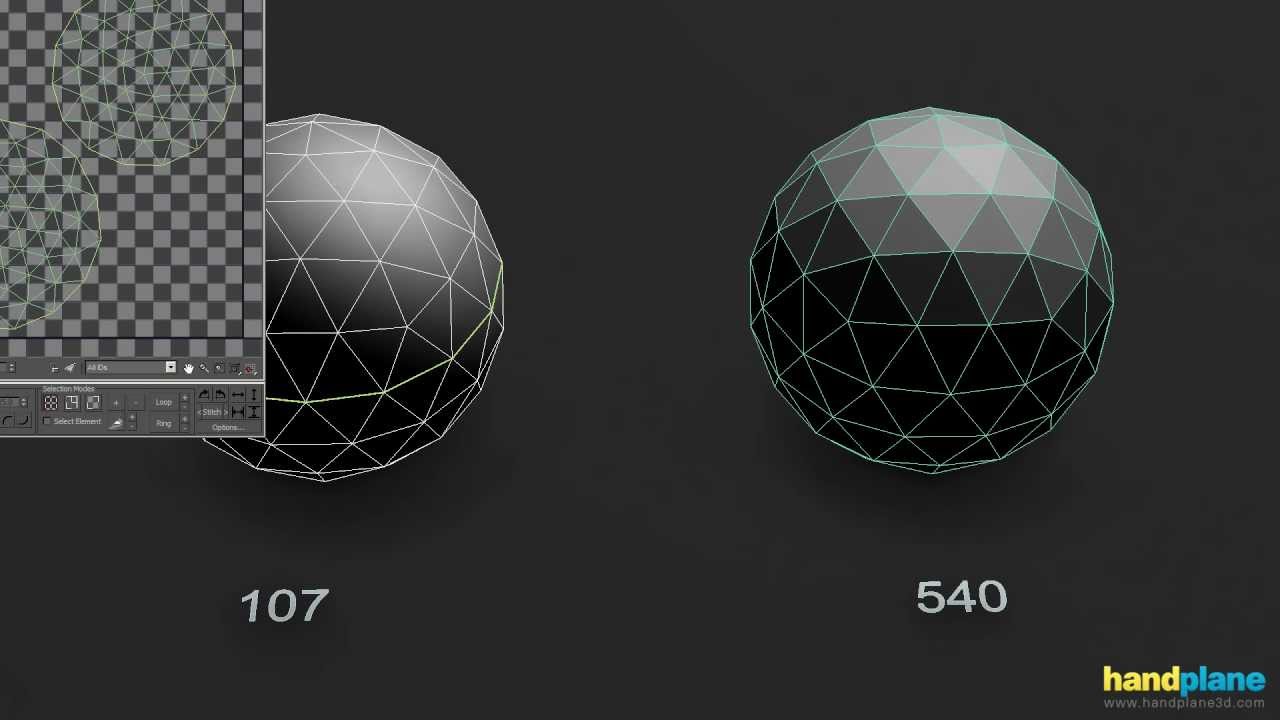
www.handplane3d.com
Using splits and supporting geometry to control shading behavior
stuck oyster
@olive rampart #arma3_animation pinned messages
olive rampart
ty
kind lion
thanks!
stuck oyster
fbx export to work it needs to have a skeleton/armature with corresponding bones exported with it
polar fiber
Use the Blender Arma toolbox and import and export directly in .p3d format if you want to import weights without much fuss
stuck oyster
he wants to get the file out of blender to some other program though
frosty kraken
Can object texturing be done exclusively in Blender so that it'll be game-ready or is it necessary do the texturing in ObjectBuilder?
frosty rain
frosty kraken
Can object texturing be done exclusively in Blender so that it'll be game-ready ...
You can’t texture in object builder afaik, you texture in other programs (usually photoshop/mari/substance painter) and then assign the textures in OB (or in blender with the arma toolbox plugin) with rvmats
frosty kraken
frosty rain
~~You can’t texture in object builder afaik~~, you texture in other programs (us...
It's possible to texture objects in OB, since I'm sort of currently (while still learning here) doing just that. In OB you assign a texture to a face of an object and by that texture paths are set correctly and so on. I was just thinking that if it would be possible to do the texturing part in Blender.. and maybe if it would be possible to assign texture paths correctly in Blender
frosty rain
frosty kraken
It's possible to texture objects in OB, since I'm sort of currently (while still...
I thought you meant like actually painting it in OB lol, yes you can assign it in blender
runic plover
frosty rain
~~You can’t texture in object builder afaik~~, you texture in other programs (us...
you can texture in OB
frosty rain
@frosty kraken https://www.armaholic.com/page.php?id=20519
you use that to assign the textures in blender
frosty rain
runic plover
you can texture in OB
corrected, thanks!
frosty kraken
frosty rain
you use that to assign the textures in blender
Hmm, thanks for the idea so to say! I already have Alwarren's Arma Toolbox configured in Blender. I guess I haven't yet gotten that far to figure out how to assign textures with the help of it 🙂
frosty rain
frosty kraken
Hmm, thanks for the idea so to say! I already have Alwarren's Arma Toolbox confi...
https://imgur.com/a/wn12ILZ Basically what you need to do is select the material you want to assign the texture to, scroll down and there should be the Arma Toolbox Material Settings
You can select either a texture, a color or custom
frosty kraken
Do PAA-files work with Blender (with Arma Toolbox)?
frosty rain
frosty kraken
Do PAA-files work with Blender (with Arma Toolbox)?
You won't be able to see the textures, you're only assigning their paths
polar fiber
stuck oyster
he wants to get the file out of blender to some other program though
Ah right, well in that case I'd probably keep a copy of the weighed one and try my luck with weight transfer tools in blender to restore them on the adjusted model
 white jay
is there someone that can teach me to make models for arma?
frosty rain
white jay
is there someone that can teach me to make models for arma?
youtube
is your best bet
#arma3_model message @white jay
white jay
thanks
median bough
@white jay
https://www.youtube.com/user/AndrewPPrice

YouTube
Blender Guru creates tutorials and videos for the free 3D software: Blender. The host is Andrew Price, who lives in Brisbane Australia.
frosty kraken
In Blender I have applied a material ("Material.003") to a object I'm testing with, then in that material a TGA texture with Arma Toolbox Material Settings. Should the texture display immediately in the object after it has been selected or do I need to press some magic key for the texture to show up?
stuck oyster
frosty kraken
In Blender I have applied a material ("Material.003") to a object I'm testing wi...
The Arma toolbox material and texture are just for the export. For Blender internal use you have to set up a normal blender material
frosty kraken
stuck oyster
The Arma toolbox material and texture are just for the export. For Blender inter...
Ahh, copy that, thank you 🙏🏽
stuck oyster
👍
warm spindle
hello how many vertices are there typically for a helmet, say an M1 Helmet
polar fiber
Above 5k verts would be excessive I think. Would probably aim closer to 2k
warm spindle
thanks
quick terrace
median bough
<@456226577798135808>
https://www.youtube.com/user/AndrewPPrice
no mate, blender self entitled guru tuts are not game oriented
stuck oyster
but its a start into how blender works
stuck oyster
looks alright too 👍
 jade quest
Hey peeps sorry if this isnt the right chat, what could lead to an objects bounding box changing when its being moved by a zeus?
stuck oyster
❔❔  ❔❔
❔❔
❔❔ 😆 ❔❔
🤚 Animations? ✋
 stuck oyster
was waiting for TB to save.
but depends on how Zeus view calculates the bounding box
id wager its done in runtime and affected by animated parts
kind lion
after your replies from yesterday i cleaned up the hard edges and unwrap and finally it baked correctly, thanks guys

 silver zenith
been trying to replicate an decal object but it just doesn't seem to work, I don't see any difference from the vanilla helipad both p3d and config wise
the rvmat is correct aswell
stuck oyster
did you put the land_decal in the geometry lods named properties?
 tender radish
hey it's me again 😄
Is there some "rules" to respect for the view geometry lod ?
or is it just like the geometry lod
frosty rain
tender radish
or is it just like the geometry lod
Should be the same as the geometry lod requirements I believe
Closed, convex, components, etc
tender radish
ok thanks 👌
stuck oyster
yes same as geometry but no mass
tender radish
ok so now i have another problem xD
if i have a vehicle inside my building and the sun light is on the vehicle, the textures of the vehicle goes blank
i know it's the same problem (about the occlusion) but my view geometry lods seems good
here a video that show what i explained:
https://i.gyazo.com/a6a9f742e5e6b3b1a9f90394bbb5ea8d.mp4
stuck oyster
do your textures use correct suffixes? _CO/_CA etc?
and does your car have non alphachannel rgb _CO texture on it?
and this is more alpha sorting issue
silver zenith
I had a similar issue recently and I think it was an alpha sorting problem
 plush forge
Anyone had a P3D: Bad header before when packing?
stuck oyster
sounds familiar
plush forge
I've not come across it before.
median bough
i had it once and i think i solved it by loading and resaving it in OB
plush forge
🤔
white jay
any idea what's causing this weird lighting bug?
at some angles the model appears completely shadowed and sitting normally the top appears shadowed
stuck oyster
bad shadowlod perhaps
white jay
Should I add one? all I have are the visual LODs, geometry, land contact, geometry phys and fire geometry
stuck oyster
depends how you want to cast your shadows
white jay
Arma's default lighting seems to work pretty good normally, I feel like there's something weird with the geometry
the other LODs look good
normals are facing the right way
could this have something to do with it?
https://cdn.discordapp.com/attachments/566060230824165383/836068375166976030/shadow_settings.PNG
stuck oyster
nope
probably just your lack of shadow lod
or you could try sbsource = visualex named proeprty
or perhaps you have used some odd rvmat shader
white jay
that was it, the rvmat was causing issues
warm spindle
hello does anyone know BIs policy on porting and/or modifying models from Arma 1,2 ?
median bough
arma 2 data pack:
https://community.bistudio.com/wiki/Arma_Licensed_Data_Pack
arma ADPL text:
https://www.bohemia.net/community/licenses/arma-and-dayz-public-license-share-alike-adpl-sa
more info on Public Data
https://community.bistudio.com/wiki/Category:Public_Data
even more:
https://www.bohemia.net/community/licenses
@warm spindle
warm spindle
ahh thanks , just to make sure i understand this correctly only the files at the first link can be adapted for arma 3
?
stuck oyster
different packages come with different licenes
but yes these are the released files
there are also sample models that are in editable format
kind lion
the license only allows you to port models to other arma games
in case thats what you were wondering
warm spindle
Naturally ,i only want to port the models to arma 3 and perhaps modify a few
stuck oyster
might be worthwhile to mention that the texture and model quality is quite a bit lower in the old models than in A3
so it could be far simpler to make new models instead of fighting with the old ones
 idle bronze
helloo there model makers, just want to know how detailed concepts need to be in order for someone like ur selves to turn the concepts to models?
frosty rain
idle bronze
helloo there model makers, just want to know how detailed concepts need to be in...
Honestly, the higher quality reference you get the better, also if it's higher quality you don't need to figure out as much stuff yourself
but also depends on what you're making
idle bronze
frosty rain
Honestly, the higher quality reference you get the better, also if it's higher q...
hmm thank you, would u be able to take a look at one in dms and see if they are workable?
frosty rain
idle bronze
hmm thank you, would u be able to take a look at one in dms and see if they are ...
for sure, feel free
 shrewd jay
Okay maybe someone here knows an answer... I have a View Cargo 2.0 LOD and associated Shadow Volume - View Cargo 2.0.. in Dev my interior is appropriately shadowed, but when I try in current stable or RC, it is fully lit and there is no shadow whatsoever. I've been tearing the last bits of my hair over this and I cannot figure out why..
 stuck oyster
shrewd jay
Okay maybe someone here knows an answer... I have a View Cargo 2.0 LOD and assoc...
stuck oyster
shrewd jay
Okay maybe someone here knows an answer... I have a View Cargo 2.0 LOD and assoc...
This may need input from @bold flare or @rough idol and if there are known differences in shadow volume behaviour between dev and stable
it kinda sounds like its loading some other lod instead of the one you want to use
shrewd jay
That's what I thought as well, but literally everything but the shadow lods have a lodnoshadow=1, even the memory, hitpoints and land_contact
I actually have two View Cargo lods, one for the driver (LOD 1) and one for the turret crew (LOD 2), the driver works, the turret doesn't.
driving me insane
stuck oyster
are you using any config parameters to assign the lods on specific seats?
shrewd jay
Scratch that, I just notice the driver'S view cargo shadow doesn't work correctly either, it's just not that obvious
Yeah, the commander, loader and gunner are specifically assigned to that LOD. They do see it correctly, too
 robust lark
hey, is there any guides for getting started on making models for A3? In specific structures/buildings is what I'm interested in. Total starter but I'd like to have everything I can so I can look at it when I get to it without asking here over and over. From modelling, to texturing (and having it sort of match the in-game standards or lighting/colours) to importing it into the game / giving doors functionality at most. I know it's hard but if there's guides or links out there I'd like to have them so I can read them when I have time. I'd like to start making my own models for my terrains and I know nothing about 3D modelling but from what I've observed a lot of A3 models are very square-ish shapes and get away with it very well. I know some stuff about configs and overall Arma editing basics (and anything making a terrain requires) but not about Objects in specific. Any directions/guidance is appreciated!
stuck oyster
modeling basics and generic program of choice use should be taken care of first
only after that can one start looking into what Arma specific things are
robust lark
that too! I appreciate any good tutorials you could recommend on 3D modelling programs, or if there's general concepts to apply that works too. I'd preffer a free program since I can't afford a paid one or a subscription (unless it has very generous regional pricing).
stuck oyster
but also no there are not much in the way of A3 modeling tutorials
Blender is good and free and has community made addons that handle A3 file formats
the path to modeling starts from just learning how the program works and the concepts of mesh, UV mapping, texturing etc
there were few tutorials mentioned not long ago too that could be helpful to get started
Blender has a lot of tutorials though so googling will help
robust lark
I'd appreciate that. I just want to do generic houses or structures so nothing too crazy. Is there any sort of concepts, sizes/ratios or design choices I should keep in mind if I want to model something that will eventually be for Arma?
stuck oyster
when you understand how the things work in general, the requirements for Arma should open up quite easily
houses are already a lot more complex things than you think
"just house" is very misleading idea
robust lark
sorry, I'm ignorant - I just consider (from my ignorance) that making stuff such as vehicles or weapons would be more complex in terms of modelling, but I don't know, I'm just assuming
stuck oyster
concepts sizes etc are not yet of concern at all
in terms of modeling, its all the same
model is made out of same elements
no matter the subject
there are of course some specifics in things like textures and materials etc
but you dont need to concern yourself with that yet
robust lark
So how did you get started? Or what sources of information do you consider to be good to look into? Tutorials and information can be misleading or have bad habits and I don't know trustable sources for that to guarantee I pick up the right things or learn the proper way
stuck oyster
I started so long ago that those sources are not really available anymore
so cant really name any specific thing to start with
check out the ones mentioned on the channel earlier
also look up the Blender community discord(s)
and for starters dont do anything specific, just explore how the tools work
and when you start with something specific, start with something small
box
barrel
door
or even doorknob
and those dont need to be for Arma. just general practice
robust lark
mhm I'm aware it's knowledge that applies beyond Arma in the end
are these the tutorials you mentioned being mentioned earlier?
https://discordapp.com/channels/105462288051380224/105462541215358976/835639034067681300
stuck oyster
yeh that and the Arrimus one Pufu mentions bit later
robust lark
thank you, I'll look into it
stuck oyster
Just start slow and steady so you dont burn yourself up
quick terrace
that ^ buildings are not simple
warm spindle
hello , i created a helmet model for arma with a camo pattern , but when i try to use the hiddenselection texture to add a new helmet texture in the config file it doesnt work , any way to fix it ?
frosty rain
warm spindle
hello , i created a helmet model for arma with a camo pattern , but when i try ...
Did you define it on your model.cfg?
rough idol
shrewd jay
Okay maybe someone here knows an answer... I have a View Cargo 2.0 LOD and assoc...
uh, are you sure that your file is correctly packed? Maybe you have file patching enabled in dev env?
shrewd jay
rough idol
uh, are you sure that your file is correctly packed? Maybe you have file patchin...
Yeah I am sure. And since I normally launch my dev branch from a batch file, I copied the file over to my regular Arma stable install, change the binary name, and run it there. Result is the same, shadow volume works in Dev but the whole interior is lit up in stable and RC
If I disable file patching in dev, it still works as expected
 shadow cape
sorry if this is wrong place to ask but I am looking for static model of soldier that can be used as marker. hope that makes sense
I saw that somewhere but I don't know if it was vanilla arma model or custom
jade quest
shadow cape
sorry if this is wrong place to ask but I am looking for static model of soldier...
Sorry, what do you mean as a marker? as a map marker or?
jade quest
do you mean an object that you can just put somewhere without it doing anything?
shadow cape
yes
jade quest
Try disabling a units simulation in their attributes
Not exactly the same as the arrow, but might be enough for what you want
shadow cape
I would prefer simplified model that soldier model has lot of detail
I would also want it to be similar color (one color) like the arrows
does that make sense?
stuck oyster
I dont think there is such a thing in arma
you could perhaps make use of the VR character
but yes its more a #arma3_scenario thing isnt it
shadow cape
stuck oyster
you could perhaps make use of the VR character
yeah was thinking that but it's not ideal..
shadow cape
stuck oyster
but yes its more a <#105463244310728704> thing isnt it
i guess
 tawdry tree
Do any of you know if it is possible to change a model upon injury of the NPC/Player? I know you can add blood to a texture based on injured state, but I was wondering if there was a way to do that with a model. Perhaps through event handles? (Not sure if this should go here, or in #arma3_scripting).
silver zenith
do helipad objects have a vertex limit?
silver zenith
I still can't manage to create one
so I though it was because the object wasn't a square
stuck oyster
shape should not matter
just the class inheritance from the base helipad class
but also tall helipad might not be understood by the engine
silver zenith
its still a 2d shape I haven't made it 3D.
I just modeled in the shape of the object so I wouldn't have to make a CA texture for it and use a color generator
not that it is something I can't do I just didn't want to increase filesize with a texture containing a single color
currently its a 50x50
so size shouldn't break anything I guess
stuck oyster
is it supposed to be a helipad?
silver zenith
just the properties of an helipad
so snapping to the ground
silver zenith
its the first example that came to mind when it came to inheritance
I guess there are also roads
and those dirt things
stuck oyster
cfgVehicles class has nothing to do with it
silver zenith
then where does the magic come from?
stuck oyster
what have you done so far?
and wheres that page about them
well cant find the one with the fancier explanations
but its this

that makes verticles hug ground
silver zenith
oh... it was that easy?
were it not for the rules of this land I would have said bad words
stuck oyster
class land_decal makes it draw with roads and other decals and makes its simulation simpler
shift+e brings up that menu
silver zenith
yeah I know where that is
thanks
stuck oyster
also if its not land_Decal type it does not overlap nicely with other decals
silver zenith
I should learn the UI better
lots of stuff I just auto ignore
I guess that decal check on the right also helps?
stuck oyster
no
that is deprecated if I remember right
well does not hurt to try what it does
but might be unexpected behaviour
silver zenith
I'll keep it simple
silver zenith
seems to be working
also apparently decals take longer to load than just plain 2D textures
 blissful spire
why is geo/fire geo work so hard. ObjBuilder keeps telling me my stuff is non-convex, so ive convex'd my firegeo and it doesnt actually do so. im not sure what im doing wrong here
convexing just makes it worse and leaves an open section. Geo lod works fine for collisions though.
frosty rain
I suggest using only cubes, i’ve never had problems with only cube primitives
Usually OB will recognize something as non convex when it is convex tho, but just using convex component hull makes it go away
blissful spire
I've done that and it doesn't help any. I'll try the cube method.
Just the tank ive done works out fine with its fire geo and it's non-cube
 orchid spruce
OB looks at how a mesh is triangulated to decide if it's convex or not too, that's usually the part that becomes a pain in the ass
most modeling programs will have something that will be able to generate a convex hull out of any object, I usually use that as a guide for how each component should be triangulated to be fully convex
stuck oyster
OB does not like verticles in middle of flat planes either
runic plover
Make geometry simple as possible and keep the mesh's shape
And
Structure / convex / component convex hull
Then, check for nonconvex stuff
And check for nonclosed
And please add in firegeometry or if you only do geometry LOD some penetration like if you hit metal, wood, pavement, concrete or glass.. most people dont do that and i think (my opinion) if you add such it makes your work more interesting and finished.
Same for roadways
stuck oyster
I dont quite understand the problem, but might be related to decals being drawn in different pass from other models
or some such
silver zenith
its not really a problem
just something to note
the same object takes longer to be loaded by the game if its in decal form
stuck oyster
like how roads are drawn last
blissful spire
runic plover
Make geometry simple as possible and keep the mesh's shape
And
Structure / co...
Making this fire geo lod was for the purpose of penetration rvmats. Just a matter of actually getting it to work
 bitter kite
https://streamable.com/ex2wko anyone know what can cause this? Rotors only showing when there is another heli nearby
stuck oyster
maybe faulty shadowlods
bitter kite
https://imgur.com/gallery/0LD7ySy hmm thats weird this is what they currently look like the only thing i see that is different from the rear rotors is those double faces
stuck oyster
does it have multiple shadow lod levels?
bitter kite
yea 2
stuck oyster
quite possible you are seeing the 1 when you have just 1 helo and the 2 when you have 2 as it simplifies the scene
bitter kite
but both of the lods have the rotors in them
stuck oyster
try with just the first shadow lod
are they animated to hide for example
perhaps you have faulty animation hiding them
try with just 1 lod
bitter kite
alright thanks ill try it now
hmm even with just 1 shadow lod the rotors only show up when a second heli is nearby
stuck oyster
that was quite fast pack
you sure it updated? 😄
also does the same happen in game?
live
bitter kite
the rotors only showing up when theres another heli?
stuck oyster
or not showing if only 1 is at the scene
also does the rotors show if you put the second one very far away?
bitter kite
yea they only show up when the second heli is within like 50m
stuck oyster
and does they show if you put something else to the scene
stuck oyster
quite likely that you have some issue in the shadow lod then
did you try with just the other shadow lod?
bitter kite
ill try that now
quick terrace
@rare stump mind if i PM you about dis - https://forums.bohemia.net/forums/topic/231377-tier-1-weapons
Bohemia Interactive Forums
Tier 1 Weapons - A mod by Fingolfin Description This mod adds several weapons used by US SOCOM units in different setups and color variants. It is based on the RHS framework and should work fine with ACE. Content Weapons: • SR16s with 11.5 and 14.5inch barrels, URX4 rails, various stocks in diffe...
 rare stump
quick terrace
<@!402940215817142293> mind if i PM you about dis - https://forums.bohemia.net/f...
rare stump
quick terrace
<@!402940215817142293> mind if i PM you about dis - https://forums.bohemia.net/f...
Sure, no problem.
polar fiber
What selections names do the rotors have in the shadow LOD?
bitter kite
rotordive
blissful spire
runic plover
Make geometry simple as possible and keep the mesh's shape
And
Structure / co...
so, i went back and redid the whole fire geo with pretty much squares that had triangulated faces via blender. its a closed and comvex shape using ObjBuilder, saved as, and reopened in obj builder to make sure the rvmat is saved. packed using addon builder and its still doing the dirt effect
runic plover
Use pboProject
In arma 3 samples you can find some penetration examples in different caregories like test_house etc
woeful viper
dirt effects just means your rvmat paths are incorrect or missing in fire geo...
blissful spire
i know where pen examples are from the a3 files in my P drive
and the paths are correct
runic plover
Copy path here
blissful spire
a3\data_f\penetration\armour_plate_30mm.rvmat
idk why everyone wants me to use pboproject. considering i dont use it. ive had no issues with addonbuilder to do what i need to do.
blissful spire
to use packer i have to move my whole work folder to my P drive. which I really don't see why I have to.
stuck oyster
well you do you if it works for you
but it does mean its near impossible to debug your problems
since you dont work in the same way as others
so others have no idea how to help you
except the generic "maybe you have wrong pathing"
the other workflows work
blissful spire
I mean. I'll test it using packer to double check.
stuck oyster
until they dont
blissful spire
none of my normal paths are going to work since its decided to split the folder they were in into individual PBOs
stuck oyster
what decided?
for a folder to pack you need a valid config file in it
but if you have some custom setup you wont be able to use pboProject with it
blissful spire
my root folder is DSA_Armor with two subfolders. apc and tank. it made apc and tank into its own pbos
rather then just making 1 pbo as DSA_Armor
stuck oyster
well do you have config in DSA_Armor?
blissful spire
No. Because I've never needed one to pack it.
stuck oyster
then best you forget pboProject
blissful spire
That kind of defeats the whole purpose then.
stuck oyster
MultiPass?
 warm spindle
hello, for some reason the shadows of my models are wrong , what could be causing this ?
nevermind, i found the problem , terns out i plased the wrong NOHQ file!
strong plaza
@stuck oyster you making progress implementing wamen?
stuck oyster
maybe
strong plaza
👍
 radiant cairn
Why do Helmet and Vest models sit between a persons legs whenever you attempt to import them into Arma?
polar fiber
Because you're missing a fundamental step like creating a correct model.cfg file or weighing the vertices to the correct named selections
radiant cairn
gotcha!
 obtuse kindle
so I've had this Idea of making a mod that has a stealth bomber drone that, can dropes nukes and other weapons. I've make a rough model of the drone I blender. the one thing that is stopping me from me making the mod is the simple fact that I have no cule on how to mod or code. so I ask to those people who can mod and code, would you like to make this with me?
 marsh canyon
#creators_recruiting is the place to ask someone like that
obtuse kindle
ok, is there a way?
stuck oyster
you can link the image from elsewhere
like imgur or gyazo or even steam
@obtuse kindle
 broken abyss
I've got a problem with a tank interior i'm working on. In buldozer the textures look fine. Base layers, MC layers all ok but when loaded ingame only one of the texture set looks correct and all of the others are black as night. You can see a faint texture when a face is turned towards the sun. Is there a limit to how many texture sets you can have on a lod?
If you have any idea please ping me as I am going to bed after hours of f*cking about with this with no luck 😄
oh and the rvmats for all texture sets are identical
 stone cargo
Quick question
where can I find the base character mesh and uniform models to use for reference when making models around it
stone cargo
thanks bud
stuck oyster
@broken abyss mayhaps bad path in rvmat
broken abyss
A bad path would be visible in buldozer
and the textures are there, its just that they are very dark
stuck oyster
gib pictures
stuck oyster
ShAMe
broken abyss

stuck oyster
👍
stone cargo
Quick question, are we allowed to redesign the arma 3 base character mesh (sample one) for skin tight uniforms?
I heard it was open source and I'm wondering if the eula allows for this
stuck oyster
For arma use only yes.
also the reference hands and feet are usually good to be used on new character where ever there is skin visible
that way they skin parts work with the vanilla identity textures
 old gulch
So, having a weird doohickey with exporting from Blender for some reason. The sharps aren't preserved, I think?
stuck oyster
How are you export from Blender? Link pictures of the problem
And in case it's the toolbox addon, set the path to O2script.exe in the toolbox settings correctly
old gulch
Exporting with Arma Toolbox for Blender, and I just reinstalled that addon, so let me just set that again.
Huh
Checked it in Bulldozer and it looks fine...
warm spindle
hey are 5000 vertices okay for a uniform ?
stuck oyster
Sure
warm spindle
awesome thanks
olive rampart
any examples for storage type items? items with inventory space and proxies?
 boreal breach
aayyy is there any recent arma3 modding tutorials with 2.9 blender i dont understand the older versions
stuck oyster
No. The procedure is the same though. Ui has changed a little. It will be important to be able to figure this out since there is a lot of things that are not written in clear "this is how you do it" tutorials
orchid spruce
I just saw the thing about updated character fire geometries, they do seem much more detailed now but how much of a change is it? is it worth updating any custom uniforms I have with them or is the actual practical difference very small?
also I'm assuming that the "update" would just mean copy pasting the new ones into my firegeo lod? is that all the script does?
rough idol
I would say it doesn't hurt to update your character fire geo as it's really easy to implement
those new fire geometries are solving some minor edge cases + allows you to use much more precise armorComponent configuration https://community.bistudio.com/wiki/Arma_3:_Damage_Enhancement
It's not used in vanilla data since quite a lot of community creations are used vanilla classes as base for their creations and assets without those components would be partially broken
but if you have your own mod & you don't have to worry about derivatives then you can safely utilize it - keep in mind though that passThrough values has to be tweaked since armorComponent is more precise when it comes to damage calculation
Another nice thing that is possible is ability to use armorSim classes once you have armorComponents utilized
 vocal shard
how do i make my pbr maps ready for arma 3, or convert them to rvmat?
 dapper tangle
vocal shard
how do i make my pbr maps ready for arma 3, or convert them to rvmat?
dapper tangle
vocal shard
how do i make my pbr maps ready for arma 3, or convert them to rvmat?
You need to convert your textures into a .paa format using Tex View 2 and linking them all together in a rvmat which inside you can change the file path
You then assign the texture and rvmat to the model inside object viewer or inside blender if you’re using Arma 3 Tools for blender
 desert notch
Hey guys.
I had a question for those of you who are familiar with making vehicles
Is it possible for units in cargo seats to have variable animations? kinda like "turn in/out" for turrets?
I just want to know if it's possible, not how.
stuck oyster
@vocal shard Also Arma shaders do not use PBR
so you will have to convert your PBR textures to Specular/Gloss workflow
@desert notch they dont have turn in/out but they can have unique cargo turrets
and each cargoAction (normal sitting pose) can also be different
desert notch
you mean each cargo seat right?
stuck oyster
yes
desert notch
but a single seat cannot have different animations? (it's always static?)
stuck oyster
how would they change?
desert notch
isn't that how turn in/out works?
just change the animation?
or is it a different seat?
stuck oyster
like I said, they dont have turn in/out
except if the "turn out" to cargo turret mode
desert notch
stuck oyster
like I said, they dont have turn in/out
I don't actually mean turn in/out.
any way of changing their animation. (I can't think of anything except turn in/out that does this, so that's why I mentioned that example)
oh, I sorta understand what you mean now 
thanks
rough idol
well, you can play any animation that you want on cargo seat
desert notch
well I hope no one does that! 😄
anyway, another question:
do each cargo seat have their own class in the config? (like turrets)
I can't seem to find it
or let me ask my question this way:
is it possible to find where each unit will be seated in a vehicle, using some config value?
do they have a memory point or something?
rough idol
Look for cargo proxy and their indexes
desert notch
oh! thanks!
boreal breach
how to assign vertex groups in blender every video i watch is outdated or not helpfull
frosty rain
boreal breach
how to assign vertex groups in blender every video i watch is outdated or not he...
boreal breach
thanks that actually help a ton, but say i wanted to make a static turret, i cant seem to find anything on how one would do that in blender 2.9
stuck oyster
there is nothing specifc you need to do in blender for static turret
its same modeling and same vertex group making that depends on what named animated parts you want to use
olive rampart
where can i find the files for helicopters? like the p3d's and what not so i can look at them with eliteness?
marsh canyon
Arma 3 Samples has one
olive rampart
yeah, not quite wha tim looking for
not the same as the one im doing. wanted to look at something a bit closer for comparison. but i cant find any p3d's in the unpacked files on my p drive
marsh canyon
Why compare?
olive rampart
look, im just asking where to find the files....
marsh canyon
You can't open binarized p3ds whatsoever. It's in air_f things though
olive rampart
im aware of what i cant do with them. as i stated in my question, i would like to open them with eliteness to check a few things.
olive rampart
use eliteness to check selections/model.cfg's
olive rampart
wasnt trying to start anything, or tell anyone anything. has been deleted
stuck oyster
thanks.
olive rampart
Bohemia ever gonna update the samples? Open any of the helis in elite ness and it’s twice as many selections
stuck oyster
Id wager its unlikely to happen
the samples are not really meant as full blown "do it like this" things
they show how things work together
and you can add on that whatever parts you want
because there are so many different things you can make, its important to understand how things work and be able to put them together
olive rampart
oh i know that. but alot of the things in eliteness are actually quite useful using new game files
like controls....
stuck oyster
but its impossible to make an example of everything
stuck oyster
they all adhere to same animation rules
olive rampart
im not talking all the extra attachments...but the valid game pieces would be nice
stuck oyster
and the animation sources available are listed on the wiki
olive rampart
like the weapons...no magazine persay...its attached to gun. no magwell config
they update the game, update the samples
stuck oyster

olive rampart
🤷♂️
stuck oyster
well you can either accept they dont and carry on as best as you can or stop
frosty rain
olive rampart
they update the game, update the samples
I highly doubt samples would get an update, maybe the Arma 4 samples will be more detailed 
olive rampart
if its ever released 🤣
stuck oyster
now you jinxed it
olive rampart
well, matter of WHEN
stuck oyster
if there ever is A4, theres just a folder full of potatoes as sample
olive rampart
would make sense
stuck oyster
and we can thank @frosty rain
olive rampart
good old american redneck fun right there
its a potato gun...its pipe and a lighter, we got this
frosty rain
I can see arma 4 releasing april 1st with arma 2 samples
stuck oyster


 boreal breach
Python: Traceback (most recent call last):
File "C:\Users\helms\AppData\Roaming\Blender Foundation\Blender\2.92\scripts\addons\ArmaToolbox_init_.py", line 223, in execute
exportMDL(self, filePtr, self.selectionOnly);
File "C:\Users\helms\AppData\Roaming\Blender Foundation\Blender\2.92\scripts\addons\ArmaToolbox..\ArmaToolbox\MDLexporter.py", line 511, in exportMDL
export_lod(filePtr, obj, wm, idx)
File "C:\Users\helms\AppData\Roaming\Blender Foundation\Blender\2.92\scripts\addons\ArmaToolbox..\ArmaToolbox\MDLexporter.py", line 441, in export_lod
writeMass(filePtr, obj, mesh)
File "C:\Users\helms\AppData\Roaming\Blender Foundation\Blender\2.92\scripts\addons\ArmaToolbox..\ArmaToolbox\MDLexporter.py", line 320, in writeMass
weight_layer = bm.verts.layers.float['FHQWeights']
KeyError: 'BMLayerCollection[key]: key "FHQWeights" not found'
location: <unknown location>:-1
what the hell does this mean
marsh canyon
What are you trying to do
boreal breach
honestly im so lost i dont even know anymore i was hoping that was an ez fix
marsh canyon
stuck oyster
your geometry lod does not have mass
boreal breach
how does one fix that, is it an ez fix cuz i kinda just recycled the whole project to start from the beginning
stuck oyster
add mass/weight to the geometry lod components
 alpine arch
👋 Question on memory points
Do I have to use the czech names? I.E I have a launcher with memory points in English such as;
barrel_start
barrel_end
        shotPos = "barrel_end";
        shotEnd = "barrel_start";
But I'm getting the following in my RPT;
12:08:10 Bad muzzle direction in RW_Launch_ASM:'usti hlavne'-'konec hlavne' 12:08:10 Bad muzzle direction in RW_Launch_ASM:'usti hlavne'-'konec hlavne' 12:08:10 Bad camera direction in RW_Launch_ASM:'eye'
marsh canyon
Is that your own launcher? Original p3d?
alpine arch
Yeah
However I'm using the base game NLAW as a config ref so maybe I've just inherited something I shouldn't have
marsh canyon
Then use the name you named. If you named it barrel_start, put barrel_start there
stuck oyster
You can define your names but the config and P3d must match
Also this check quite possibly means your weapon is pointing to rear and not front
alpine arch
They match up 🙂
Also this check quite possibly means your weapon is pointing to rear and not front
I did have this problem initially which was quite a cool feature
Now it's in-game, it is firing in the right direction and I'm still getting those errors despite having them matching up in the config and p3d
 charred bolt
@alpine arch
Perhaps you are inheriting:
muzzleEnd = "konec hlavne";```
so try redefining them in the correct place in CfgWeapons {} (order depending on positioning in your p3d)
```muzzlePos = "barrel_end";
muzzleEnd = "barrel_start";```so im importing to Object builder and its not loading my full model, like ill get only one part of my model insted of the entire thing
stuck oyster
How did you make the model and get it to OB
boreal breach
i export it from blender as a P3d, although i suspect its a problem with the vert count as its super high but i dont know if that matters in object builder
frosty rain
boreal breach
i export it from blender as a P3d, although i suspect its a problem with the ver...
Did you join all the objects into one?
boreal breach
no
frosty rain
You have to do that
boreal breach
okay is there a way to get rid of vertices without deforming my model? i know about dissolving
frosty rain
Well it really depends on how the model was made, but you can try things as Mesh - Clean Up - Delete Loose
And then depending on the model merge by distance
Also deleting unecessary edge loops
Can also try the decimate modifier
But if you mean importing a high poly model into arma you’ll probably have to retopo it
That should give you better results than just using a decimate modifier to lower the poly count for example
boreal breach
it has 897,126 verts
frosty rain
Jesus
boreal breach
lol
frosty rain
Yeah retopo is the way lol
Sometimes you can get away with just using merge by distance to clean up but it really depends on the model, but since your model is so high poly your only chance at importing it will probably be retopologizing it
boreal breach
allright thanks cuz i dont wana make it myself i suck with blender
runic plover
boreal breach
it has 897,126 verts
To many 🙈 visuals for such "gun?"
1/100 + 2000 or 3000 of what you have should be fine
alpine arch
charred bolt
<@!333599934207229953>
Perhaps you are inheriting:
```muzzlePos = "usti hlavne"...
Thanks - I'll have a gander
alpine arch
charred bolt
<@!333599934207229953>
Perhaps you are inheriting:
```muzzlePos = "usti hlavne"...
That was it 👍
 livid kelp
on my vehicles cargo slot the head pos is set to the centerof the object, can someone tell me how to change the view pos of the cargo slots ?
stuck oyster
boreal breach
allright thanks cuz i dont wana make it myself i suck with blender
This is something you just have to either learn or give up whatever you are doing.
Since you did not make the model, there is also it's licence to consider. Is it even allowed to be used in a game etc.
But honestly. You want to put things into game, you have to learn modeling too.
stuck oyster
livid kelp
on my vehicles cargo slot the head pos is set to the centerof the object, can s...
You need cargo proxy for each cargo passenger
livid kelp
a question on the cargo proxy, dose it need to be named cargo.p3d ?
polar fiber
Yes
But that’s all it needs to be called. Animation etc comes from the config so you may as well use generic proxies from the Arma 3 data
livid kelp
okay, i can now enter the cargo slot but my first person view is not on the head instead its on the center of the object
stuck oyster
If proxy is made to look like the used animation, it is helpful for placing it correctly.
But like @polar fiber said, any proxy named cargo works
@livid kelp is it using custom cargo animation?
It is cargo seat, not gunner or pilot
livid kelp
im not sure what you mean with animation...
im using the a cargo boat proxy
and
cargoAction[]=
{
"passenger_boat_holdleft",
"passenger_boat_holdleft",
"passenger_boat_holdright",
"passenger_boat_holdright"
};
charred bolt
@livid kelp You may need to set in config:
cargoProxyIndexes[] = {1, 2, 3, 4};```tested it, still the same issue
charred bolt
Do you have a Cargo LOD in the p3d? In 3rd person view do you see the cargo passengers in the correct place?
 unborn bane
Hey, Question, Are there any online guides or videos to get started in making my own model's and stuff?
stuck oyster
there are a lot of tutorials for all the popular 3D modeling programs
for Arma specific things not as much
unborn bane
Ive been googling it and all im getting is retexturing guides
stuck oyster
and actually quite little
if you dont know any modeling then you dont need anything Arma specific
you just need general "how to use X program tutorials"
once you understand how modeling and texturing works
the arma specific things open up almost on their own
stuck oyster
Well Blender is great program and free
and in arma context it has very good compatibility with Arma via community made plugins
but you dont have to worry about that stuff for a while yet
olive rampart
is there anyone who could help me figure out why the SKIDS on my helicopter are dropping down when i take off, and coming back up when i land. almost like they are "suspension" or landing gear. supposed to be solid skids.
stuck oyster
are they part of a selection that animates them
as that is the only thing that can make them do so
olive rampart
i do not believe so. i mean, my czech is not very good. but the only place my skids are even their own selection are the geo lods as far as i can see
stuck oyster
there is nothing that can alter their shape unless they are part of a damper animation selection
olive rampart
they arent. i meant memory points
olive rampart
yeah i've started changing them over as i learn what they are
stuck oyster
👍
olive rampart
now to figure out why my character wont show inside the heli lol.
stuck oyster
no proxy in correct lod?
olive rampart
i think its a matter of figuring out WHAT proxy to use?
thinking i used the wrong one
\a3\data_f\proxies\heli_light_01\pilot
is what i had
stuck oyster
pilot proxy is for pilot position yes
gunner positions would require gunner proxy and cargo positions cargo proxy
the proxy however only defines the position of the character
olive rampart
i know. my character wasnt showing when i got in. and the cargo proxies were showing constantly no matter what
stuck oyster
the config defined "seatType"Action define the animation used
Id recommend you remake the proxies if they show as triangles in game
they are not supposed to do that and are usually result of copy pasting gone bad
stuck oyster
only thing that matters for passenger proxy is the name
pilot, gunner, cargo
and the index of the proxy
as the name and the index tie it to config
olive rampart
basically it looks liek this in game
https://prnt.sc/12mnzin
stuck oyster
this is in buldozer though
stuck oyster
in dozer it loads the proxy because in dozer there is no connection with config. if in game it shows the proxies then yes they are not set up right and they just show the proxy object like any other proxy
and they are not connected with the config and passenger system
olive rampart
yes, which is why im trying to figure out where i went wrong setting them up
stuck oyster
if you get into the vehicle does your view go into correct place?
olive rampart
first person in pilot yes. passenger...no lol
stuck oyster
and did you copy the proxies from somwhere or did you create them via the proxy creation tool?
olive rampart
via creation tool using the paths from the sample
repacking all my new changes. will check in editor
pilot shows....passenger doesnt.
view is WAY off when in cargo position too.
olive rampart
only have the pilot and copilot proxies in right now. i do not have any selections for either other than the proxies themselves
that could be why.
olive rampart
yes it is cargo
olive rampart
\cargo01.001
olive rampart
\a3\data_f\proxies\heli_light_01\cargo01
olive rampart
cargo01, gunner, and pilot are the only proxies in that folder
stuck oyster
cargo01.p3d?
olive rampart
yes
stuck oyster
looks like that name is indeed not valid
olive rampart
thats teh folder im using the pilot proxy from as well
stuck oyster
it should be just cargo
you can for example load the cargo.p3d from heli_light_02
what the proxy looks like in buldozer is irrelevant to its in game look
the action animation is what dictates what pose the character takes
usually proxy is just made to look like the animation so that it is easier to align to correct position
but in this case you can just use any cargo.p3d to test it out
olive rampart
ok
using cargo proxy from heli02 has the same effect. copilot is not showing. im assuming im missing some sort of selection.
stuck oyster
does your config define cargoAction?
something like cargoAction[] = {"actionName"};
olive rampart
            passenger_apc_narrow_generic03,
            passenger_apc_generic02,
            passenger_apc_narrow_generic01,
            passenger_apc_generic04,
            passenger_apc_narrow_generic02,
            passenger_generic01_leanright,
            passenger_generic01_leanleft,
            passenger_generic01_foldhands
};```alright so it has a lot of other cargo too
do all these other passengers have cargo proxy?
olive rampart
config from sample
olive rampart
there is no other cargo proxys right now. i only have the pilot and "copilot"
yeah, im trying to learn off the sample
olive rampart
how would i make THIS cargo be a copilot though? heli can be flown from either front seat.
stuck oyster
humm thats different thing from just cargo
olive rampart
i see this
cargoIsCoDriver[] = {0, 0};
but not sure how to use it, and i think that may make ALL cargo become pilots
olive rampart
that is, ty
olive rampart
 crew = "Test_Soldier_F";```

this has me lost now. does it matter what faction i choose? and if so, is there specific crew for that faction? test soldier obviously errors out from the sample.it matters for editor categories and such
olive rampart
but doesnt effect players getting in and out?
that was my only concern. is that i needed a certain faction and crew type to let normal players use it.
inland pawn
No, faction has nothing over that. Just makes it fall under what group
As goat said
Editor categories
olive rampart
thank you
 outer condor
how to adjust the quality and rendering settings for BD?
stuck oyster
in the BD config file I recall. The actual video settings menu is a bit lacking
olive rampart
ok, im still having the issue of cargo passengers not showing up in my helicopter. and first person view for them is all messed up.
olive rampart
in 0.00, view pilot, and view cargo
stuck oyster
fire geometry lod perhaps
olive rampart
i have them in fire geo too. and view. still wont show my passengers. only pilot
ah ha. well thats something
if i get in back....it shows my passenger in front seat.
olive rampart
yeah, not sure whats going on at this point. the only proxies that show are pilot and one cargo in the rear. no copilot or the other 2 cargo. could use some assistance if anyones willing to help.
inland pawn
Weird thing, re did the geo and geo phys onto another tank and with practically the same setup, it won’t move at all
charred bolt
Chubby's issue with proxies showing fixed in DM's (config related).
olive rampart
ty sir
inland pawn
https://imgur.com/8tYn4hE Could the geo phys be incorrect?
charred bolt
No geo phys is probably ok. The problem with doing vehicle physx is that there are so many interlocking parts. Memory points in the Mem LOD are critical, overall mass and distribution in the Geometry LOD, tied in to the config.cpp entries (class Wheels {} etc), gear box and torque curves, then once the vehicle moves, get all the visual animations synchronised with model.cfg.
inland pawn
I’m basically creating a T72 copy. Using the test tank stuff as a placeholder until I can alter it
So, physX is the same
Only thing I can think of is either physX or config, but I doubt it’s config
Each wheel is assigned in physX. Just like the other one I did
When I’m back at my computer I’ll take a pic of my memory lod
Wheels rotate fine. Everything works besides movement
charred bolt
In class Wheels {}, experiment with reducing values for dampingRate and dampingRateInAir (make same value).
olive rampart
ok so my problem wasnt exactly solved. can not get into heli as copilot...only pilot, or in back as cargo
inland pawn
Either your indexes are indexed incorrectly or your model is screwy
Be sure that proxyIndex corresponds to the correct #
runic plover
@inland pawn set the GeometryPhys a bit higher.
I mean this what hits the ground at bottom
inland pawn
runic plover
<@266493686940958720> set the GeometryPhys a bit higher.
I mean this what hits...
It's set accurately with the model atm. Raise it?
runic plover
The Geophys should not hit the surface, make it higher (only track part)
inland pawn
runic plover
Nothing of the GeoPhys should hit surface
runic plover
Middle part also a bit higher
runic plover
Do the wheels work in the bulldozer viewer? Left and right?
inland pawn
Yes
runic plover
Dampers also?
inland pawn
Yeah
Everything works
Just wont move
https://imgur.com/Sdcizqz This geo phys works fine
From a different tank
Could it be physX
runic plover
Looks like Halo tank
runic plover
Tracks are also named?
inland pawn
Yeah, though, they're named PasOffsetP/L and in geo phys
olive rampart
this is how apollo had my copilot seat set??
https://prnt.sc/12no268
cant get into copilot seat.
this is how the cargo is
https://prnt.sc/12no3ok