#arma3_model
1 messages · Page 63 of 1
 crimson temple
 stuck oyster
crimson temple
So it’s just not even allowed if I’m doing it on my own PC and not distributing
stuck oyster
crimson temple
So it’s just not even allowed if I’m doing it on my own PC and not distributing
we wont help with such here no matter where you do it
 bold flare
crimson temple
So it’s just not even allowed if I’m doing it on my own PC and not distributing
bold flare
crimson temple
So it’s just not even allowed if I’m doing it on my own PC and not distributing
You literally posted a screenshot of the illegal stolen content on this Discord, publicly for everyone to see.
You are not even doing it privately.
crimson temple
bold flare
You literally posted a screenshot of the illegal stolen content on this Discord,...
Not what I meant when I said privately I just said I wasn’t gonna share the files with anyone but I get the point now
 pseudo knot
can I find somewhere a list of "hidden" (not avaliable in 3den) objects and path to their p3d?
 marsh canyon
addonFiles command?
 unkempt token
Another option is to unpack arma 3 lol, I use voidtools' Everything to search it instantly

 cunning temple
pseudo knot
can I find somewhere a list of "hidden" (not avaliable in 3den) objects and path...
cunning temple
pseudo knot
can I find somewhere a list of "hidden" (not avaliable in 3den) objects and path...
Are you wanting to add missing stuff to Eden? As there is loads of mods that do that #arma3_terrain message
pseudo knot
cunning temple
Are you wanting to add missing stuff to Eden? As there is loads of mods that do ...
Im trying to do it with this mod
https://steamcommunity.com/sharedfiles/filedetails/?id=3577820319
with it I can create missions without dependencies

 proper sonnet
Is there anyone here who could make this working piece in arma 3? Is there anyone who does the 3CB stuff? Because someone from that team could probably use their stuff and just re-skin it easily. I don't want to break any rules. Just wishing to get this model i got into the game..
 stuck oyster
proper sonnet
Is there anyone here who could make this working piece in arma 3? Is there anyon...
stuck oyster
proper sonnet
Is there anyone here who could make this working piece in arma 3? Is there anyon...
Where is the model from?
proper sonnet
stuck oyster
Where is the model from?
I bought it on Fiver.
I really liked a youtube video by administrative results (3 years old video) and wanted it on arma. Made an order on Fiver and got that model.
proper sonnet
I mean the person there made it for me.
Or did i misunderstand.. Sorry
What i meant... It shouldn't be possible to be stolen. Since it was my order.
stuck oyster
well unfortunately chances are 50/50 unless design is completely unique
that one could be one like that though
proper sonnet
Well it's based on youtube video.
stuck oyster
proper sonnet
Well it's based on youtube video.
then sounds like should be on the safe side 👍
 oblique vapor
Are proBoolean okay for curving things into objects ?
 ivory shuttle
Does anyone know how to copy a resolution LOD to then edit into another layer? I am in Blender and keep receiving an error about duplicate LODs. I have tried duplicating it, and changed the naming and poly count. No luck after quite a few tries.
 indigo mountain
ivory shuttle
Does anyone know how to copy a resolution LOD to then edit into another layer? I...
indigo mountain
ivory shuttle
Does anyone know how to copy a resolution LOD to then edit into another layer? I...
You probably didn't change the index
 ivory shuttle
indigo mountain
You probably didn't change the index
ivory shuttle
indigo mountain
You probably didn't change the index
Thanks I will try that. Is that under the Arma addon?
 ivory shuttle
indigo mountain
ivory shuttle
indigo mountain
Wow, don't know how I missed that, many thanks.
ivory shuttle
indigo mountain
It's in the data tab, same place you set that it's a p3d lod and the type
Working! Exact problem.
 dusky onyx
Does anyone know how to flip a mirror?

 tacit karma
No, use Bend or FFD modifiers
stuck oyster
dusky onyx
Does anyone know how to flip a mirror?
Uv mapping of the surface
dusky onyx
stuck oyster
Uv mapping of the surface
Thanks, it worked. I thought the problem was in the memory points.
crimson temple
When I try and view my model in the external view I get the error "Cannot load texture project\uniforms\data\top_corporal_co.paa"
The project folder is literally in the root of my P: drive and this is how it looks in Blender before exporting

I'm using Mr Clocks Arma 3 Object Builder plugin btw
 pallid cape
what are you packing with
P:\ shouldn't be included in the path
root of that path should be name of the pbo, but depends on what you pack with and pbo prefix
crimson temple
pallid cape
root of that path should be name of the pbo, but depends on what you pack with a...
I havnt packed yet, im just testing within object builder to view my model
And with relative paths enabled in the export shouldn’t it just cut of the P:\ anyway?
pallid cape
Is your path to textures configured in OB? File > Options > Path to textures
crimson temple
pallid cape
Is your path to textures configured in OB? File > Options > Path to textures
Yes it’s set to P:\
crimson temple
Is it case sensitive or smth?
Does it not allow uppercase in the path because it says the path all in low caps
"project\uniforms\data\top_corporal_co.paa"
stuck oyster
crimson temple
Does it not allow uppercase in the path because it says the path all in low caps
No it's not case sensitive
stuck oyster
pallid cape
`P:\` shouldn't be included in the path
The p3d export in the plugin should cut p: from the path
stuck oyster
crimson temple
Yes it’s set to P:\
Check for typos?
cunning temple
crimson temple
I havnt packed yet, im just testing within object builder to view my model
Check paths in OB
 crimson temple
cunning temple
Check paths in OB
crimson temple
cunning temple
Check paths in OB
the paths are there
except theyre all in lowercase
it shows both my vmat and co.paa in there
crimson temple
stuck oyster
Check for typos?
there shouldnt be any i checked extensively
cunning temple
Bad P drive? Use mikero's arma3p to extract files and not Arma Tools
copy the path from OB and paste it into windows address bar. Sometimes a typo can be looking right at you, an you just can't see it 😄
crimson temple
cunning temple
copy the path from OB and paste it into windows address bar. Sometimes a typo ca...
Yeah I tried that and it worked fine
I'll try using Mikeros tools
stuck oyster
Ah yeah if you set up P with Arma tools launcher it might bug
crimson temple
How do I remove it so I can make it with Mikeros?
cunning temple
You don't, just run arma3p an it does it all for you.
It will ask where to extract, press P for P drive.
Then it asks to extract dubbing and missions, press N since you don't need them and it just wastes space
crimson temple
Alright thank you
cunning temple
@crimson temple Do you have his tools installed? Just grab Mikero_AiO_Installer_Stable_v1.2.1.74.exe from his site https://mikero.bytex.digital/Downloads that has all the tools it needs to work. Otherwise arma3p will complain bits are missing
crimson temple
cunning temple
<@1370941999947186259> Do you have his tools installed? Just grab `Mikero_AiO_In...
Yep I used that. And I just run arma3p and type in any drive letter E to Z?
And how do I setup bulldozer with it
cunning temple
You do P since you want to extract to your P drive.
For buldozer you just use object builder like normal
 stuck oyster
crimson temple
prolly SMDI
stuck oyster
crimson temple
prolly SMDI
Yes
cunning temple
The hit point cloud thing, do you just do that for all the outside walls? Or do you just cover a couple
stuck oyster
cunning temple
The hit point cloud thing, do you just do that for all the outside walls? Or do ...
I've preferred to use the newer hit component system but if you do hitpoint could the. It's good to have it inside too if shot flies through window or there's shooting inside.
Buildings can also make use of larger hitpoints as accuracy often does not need to be as detailed
Although if it's closed building the. Outsides should be enough
cunning temple
what new hit component? lol
 gentle merlin
cunning temple
what new hit component? lol
gentle merlin
cunning temple
what new hit component? lol
Think hes talking about the tanks dlc armor components
Theyre a bit more indepth simulated than vanilla hit clouds
cunning temple
I'll have a look, but if it's more tedious it can get stuffed
indigo mountain
It's just adding a vertex group in the fire geo really
It's more of something that runs on top of the standard hitpoint stuff
Ballistics use armor components, explosives still use hitpoints
stuck oyster
cunning temple
I'll have a look, but if it's more tedious it can get stuffed
IMO it's simpler. Need just 1 hitpoint in hitpoint lod for explosive damage
Or few if you want to control where explosives make damage
cunning temple
Is there an example anywhere to look at?
crimson temple
I have a roughness map for my model since I used it in a unity project before, how would I convert it to SMDI?
Is it better to be used as an inverted gloss or specular map? Or do I invert it at all
 warped mural
crimson temple
I have a roughness map for my model since I used it in a unity project before, h...
warped mural
crimson temple
I have a roughness map for my model since I used it in a unity project before, h...
https://github.com/MoonieFR/SubstanceToArma/wiki
this helped me with that issue
 crimson temple
warped mural
https://github.com/MoonieFR/SubstanceToArma/wiki
this helped me with that issue
crimson temple
warped mural
https://github.com/MoonieFR/SubstanceToArma/wiki
this helped me with that issue
Why is it so difficult to convert my maps from a metal workflow to SMDI : ㅤ SMDI maps are composed of: 🟥 = White 🟩 = Specular map 🟦 = Glossiness map
While Glossiness maps can be replaced by Roughness maps (because you can actually invert a glossiness map), metallic maps are not equivalent to specular maps. This is because the shading method is totally different.
Metallic maps are in grayscale (black and white) 0 = ⬛ Black = Non-metallic 1 = ⬜ White = Fully metallic
Specular maps are based on RGB values that dictate how the reflection should work. They are RGB, they don't work in the same way and can't be interchanged.
It says this, so what does it exactly mean?
ivory shuttle
What is causing these lines coming from the vehicle? They seem anchored into the ground, and remain as you move around.
 ivory shuttle
What is causing these lines coming from the vehicle? They seem anchored into the...
ivory shuttle
ivory shuttle
What is causing these lines coming from the vehicle? They seem anchored into the...
I also cannot find those two shadow circles on my shadow layers.
warped mural
crimson temple
Why is it so difficult to convert my maps from a metal workflow to SMDI : ㅤ SMDI...
the way i did it for one of my projects was to put the metalness as the green channel, roughness as the blue channel and compose the smdi that way
i am not sure 100% that that is the appropriate way, but the result looks very similar to vanilla smdi's
 pallid nexus
crimson temple
Why is it so difficult to convert my maps from a metal workflow to SMDI : ㅤ SMDI...
pallid nexus
crimson temple
Why is it so difficult to convert my maps from a metal workflow to SMDI : ㅤ SMDI...
SMDI maps are basically 3 channels combined as one image
Red channel is filled with constant 1, (diffuse is calculated, so this channel is constant)
Green channel contains the specular map
Blue channel contains the glossiness map (inverse of roughness map as I understand)
The problem arises not from the differences in the channels in the images used for the maps, that can be solved easily enough with image editing
But with the fundamentally different shading methods (PBR vs Specular/glossy shaders)
Conversion from metallic to specular maps is possible, the export preset there is supposed to work fairly well
If you don't have substance painter, then it's either trial and error, or take the time to work out a conversion method that's good enough
(Loggiemans's method is about the fastest)
This will probably help, especially the section on specular https://community.bistudio.com/wiki/RVMAT_basics
I use GIMP to combine the SMDI channels
Or combine it in nodes for baking in Blender if I had made a material there
 sour bough
ivory shuttle
What is causing these lines coming from the vehicle? They seem anchored into the...
sour bough
ivory shuttle
What is causing these lines coming from the vehicle? They seem anchored into the...
broken shadow lod
ivory shuttle
sour bough
broken shadow lod
Thanks for the heads up. Any idea what I should look for? This is my first proper mod with enough LODs etc.
sour bough
ivory shuttle
Thanks for the heads up. Any idea what I should look for? This is my first prope...
anywhere that doesn't conform to the LOD requirements can cause that, so look for non-manifold bits
ivory shuttle
sour bough
anywhere that doesn't conform to the LOD requirements can cause that, so look fo...
Many thanks!
sour bough
ivory shuttle
Many thanks!
o7 tell your dog i said hi
crimson temple
pallid nexus
SMDI maps are basically 3 channels combined as one image
Red channel is filled w...
What it if I only have a roughness map?
Do I invert it to get gloss
That’s the only one I know how to get
pallid nexus
crimson temple
What it if I only have a roughness map?
Yeah, invert for the glossy
If you don't have the metallic map, then try just filling that channel with whatever seems about right for the material, or edit the roughness map to get something closer (curves and levels in image editor should work)
The other maps you ideally would have are the AO (ambient occlusion, changes the amount of light effect on the model), and the NOHQ (normal map, really only needed if there's any additional detail in it, otherwise it can just be filled in the rvmat with the default normal value)
Both are usually baked from the model, AO from how light hits the model, and NOHQ from a high-poly to a low- or mid-poly model
crimson temple
pallid nexus
Yeah, invert for the glossy
If you don't have the metallic map, then try just fi...
I can get the ambient occlusion from baking correct?
I have a normal map but doesn’t unity use OpenGL and arma uses DirectX?
pallid nexus
Yeah, should be guides online for baking ambient occlusion. I don't do it often enough to remember, and I've really only used Blender
Converting from the openGL to the directX is just flipping the y-axis (green channel)
crimson temple
pallid nexus
Yeah, should be guides online for baking ambient occlusion. I don't do it often ...
If I just switch the project normal map type to direct x in substance painter it should automatically convert?
pallid nexus
crimson temple
If I just switch the project normal map type to direct x in substance painter it...
I don't see why it wouldn't
Since you've got substance painter and the model setup in it, I'd suggest just using MoonieFR's export presets from here https://github.com/MoonieFR/SubstanceToArma, rather than doing it the hard way
crimson temple
pallid nexus
I don't see why it wouldn't
Since you've got substance painter and the model set...
Thanks. I already got one but it’s from like 7 years ago so if this one is newer then I’ll use it
 stuck oyster
crimson temple
What it if I only have a roughness map?
stuck oyster
crimson temple
What it if I only have a roughness map?
You'll need to study game material theory and difference of spec gloss shaders compared to PBR shaders
They don't convert directly. They work differently
 lone robin
crimson temple
Do I invert it to get gloss
lone robin
crimson temple
Do I invert it to get gloss
If you’re willing to spend a little bit of money, Shader Map 4 does a pretty good job of creating specular and glossiness maps.
crimson temple
lone robin
If you’re willing to spend a little bit of money, Shader Map 4 does a pretty goo...
Using what maps?
lone robin
crimson temple
Using what maps?
Just using your diffuse or base color, it allows you to edit values in the maps so you have full control of how your spec/gloss maps come out. There’s a bunch of different features to mess with on it.
 woeful viper
@oblique vapor only if you clean up the geometry afterwards. Boolean can create alot of extra vertices that are unnecessary
 lone iron
I'm currently having issues with my faces being... this. What's weirding me out is that when watching via HEMTT's VSCode extension, they look perfectly fine.


This is what I see via HEMTT's VSCode extension

I use Blender's Arma Toolbox, and when viewing the PNG version of my textures in Blender's Texture Paint tab, the face seems to look fine too. What can possibly be the problem here? 🤔
Am I perhaps trying to apply a texture on top of the model's current one?
        class B_female_01: Default
        {
            author="Iceman";
            displayname="Carter";
            head="female_01";
            texture="\z\SKY_female_heads\addons\main\female_01\xxx_co.paa";
            material="\z\SKY_female_heads\addons\main\female_01\f_white.rvmat";

            materialWounded1="\z\SKY_female_heads\addons\main\female_01\f_white.rvmat";
            materialWounded2="\z\SKY_female_heads\addons\main\female_01\f_white.rvmat";
            ////////////////////////////////////////////////////////////////////////////////////////
            textureHL="\z\SKY_female_heads\addons\main\female_01\F_HL_co.paa";
            materialHL="\z\SKY_female_heads\addons\main\female_01\F_HL_white.rvmat";

            textureHL2="\z\SKY_female_heads\addons\main\female_01\F_HL_co.paa";
            materialHL2="\z\SKY_female_heads\addons\main\female_01\F_HL_white.rvmat";
        };
what does it look like in Object Builder Bulldozer preview?
lone iron
Doesn't seem to have the textures that I applied, \z\SKY_female_heads\addons\main\female_01\xxx_co.paa. Just the model itself

My z folder is a shortcut to my main game's folder's z folder created by HEMTT
 stuck oyster
lone iron
Doesn't seem to have the textures that I applied, `\z\SKY_female_heads\addons\ma...
stuck oyster
lone iron
Doesn't seem to have the textures that I applied, `\z\SKY_female_heads\addons\ma...
this likely means your P drive does not fully connect with Buldozer
that often is the case if you mounted P drive via the Arma Tools launcher
lone iron
Hm. What's the alternative way?
lone iron
Fuck it, into the main Arma installation directory it goes.
lone iron
stuck oyster
what does it look like in Object Builder Bulldozer preview?

Notice how it's different and not fucked up :P
stuck oyster
do you have hiddenselections defined in the shadowlod?
lone iron
Is it the volume 0 one?
 stuck oyster
lone iron
Is it the volume 0 one?
stuck oyster
lone iron
Is it the volume 0 one?
yes
you also dont need separate viewpilot shadow made
lone iron
It's not my model so I'm learning as I go, apologies. :P I'll keep that in mind for when this is done. I don't believe I'm setting hiddenSelections anywhere? Not seeing anything related to it anywhere in my model or config
stuck oyster
then youll want to check your cfgHeads head and cfgFaces classes to make sure you apply the right rvmats everywhere
lone iron
Thanks, will look around
 dusky dragon
@woeful viper May i Rest in Peace
woeful viper
in peaces, yes 😛
dusky dragon
Haja
lone iron
Am I supposed to apply a texture to the shadow LOD?
stuck oyster
lone iron
Am I supposed to apply a texture to the shadow LOD?
no
stuck oyster
no I think something in your setup is applying the man face on there
lone iron
I can send my project files here if that helps?
Going through my config right now and nothing really stands out.
class CfgHeads
{
    class Default_A3{};
    class DefaultHead_A3: Default_A3{};
    class Hladas: DefaultHead_A3{};
    class female_01: Hladas
    {
        model="\z\SKY_female_heads\addons\main\Models\female_head_1.p3d";
        selectionHeadWound="injury_head";
        selectionPersonality="personality";
    };
    // Same things for female_02 and female_03 classes with different p3d's.
};
youll need this too
 lone iron
Ye. One of them is:
class CfgFaces
{
    class Default;
    class Man_A3: Default
    {
        class Default;
        class B_female_01: Default
        {
            author="Iceman";
            displayname="Carter";
            head="female_01";
            texture="\z\SKY_female_heads\addons\main\female_01\xxx_co.paa";
            material="\z\SKY_female_heads\addons\main\female_01\f_white.rvmat";

            materialWounded1="\z\SKY_female_heads\addons\main\female_01\f_white.rvmat";
            materialWounded2="\z\SKY_female_heads\addons\main\female_01\f_white.rvmat";
            ////////////////////////////////////////////////////////////////////////////////////////
            textureHL="\z\SKY_female_heads\addons\main\female_01\F_HL_co.paa";
            materialHL="\z\SKY_female_heads\addons\main\female_01\F_HL_white.rvmat";

            textureHL2="\z\SKY_female_heads\addons\main\female_01\F_HL_co.paa";
            materialHL2="\z\SKY_female_heads\addons\main\female_01\F_HL_white.rvmat";
        };
        // More for other faces.
    };
};
Prefix your classes
stuck oyster
lone iron
Ye. One of them is:
```hpp
class CfgFaces
{
class Default;
class Man_A3:...
this is solid advice too for the long run
and your face should not be insider man_a3 class
look up the different individual face classes like kerry or dwarden
they are separate
lone iron
indigo mountain
Prefix your classes
Good point, will do
lone iron
stuck oyster
this is solid advice too for the long run
and your face should not be insider m...
Where should it be? Right under CfgFaces or under WomanHead?
lone iron
stuck oyster
look up the different individual face classes like kerry or dwarden
Will do
stuck oyster
lone iron
Where should it be? Right under CfgFaces or under WomanHead?
youll want to grab all in one config dump file you can easily search through
or leopards advanced developer tools for better ingame config viewer
lone iron
Yup, good idea
lone iron
Uh. I can't select the face in 3den if it's not under Man_A3?
23:34:28 Error: Error during SetFace - class CfgFaces.Man_A3.SKY_B_female_01 not found
23:34:28 Error: Error during SetFace - class CfgFaces.Man_A3.SKY_B_female_02 not found
23:34:28 Error: Error during SetFace - class CfgFaces.Man_A3.SKY_B_female_03 not found
23:34:28 Error: Error during SetFace - class CfgFaces.Man_A3.SKY_B_female_04 not found
Though, concerning warnings in my RPT:
23:37:58 Warning: z\sky_female_heads\addons\main\models\female_head_1.p3d:1, too many bones (more than 4) on vertex 135, removed head
23:37:58 Warning: z\sky_female_heads\addons\main\models\female_head_1.p3d:1, too many bones (more than 4) on vertex 1032, removed head
Going to look around MrClock's Blender plugin docs
stuck oyster
youll need to setup identityType too
cfgHeads cfgIdentities cfgFaces the "Dwarden" unit in cfgVehiclse and its IdentityTypes array


 indigo mountain
CfgIdentities is separate from identityTypes
lone iron
I don't intend to use these faces on AI, do I still need to make identities for them?
indigo mountain
CfgIdentities is for https://community.bistudio.com/wiki/setIdentity, which is basically just shorthand for setting a face, glasses, and voice. identityTypes is just for the face/glasses/voice randomization
lone iron
Neato
indigo mountain
lone iron
I don't intend to use these faces on AI, do I still need to make identities for ...
You don't then, identity types is for randomization on units. For players the one set in the profile menu overrides it
lone iron
Splendid. I'll keep it in mind for the future still, thanks you two
indigo mountain
FWIW it's literally just setting identityTypes[] = {"Sky_..."}, there's no other config to set up so people can use it for AI
Identity types basically just adds the given face/voice/glasses to the given "pool(s)"
lone iron
Makes sense
indigo mountain
// face config
identityTypes[] = {"Sky_Head_NATO_women", "Sky_Head_Euro_women"}; // based on vanilla ones

// unit config
identityTypes[] = {"LanguageENG_F", "Sky_Head_NATO_women", "G_NATO_default"};
Okay, well, I've handled my "too many bones" issue, but I'm struggling to figure out my warnings with vertices:
 5:50:25 Warning: z\sky_female_heads\addons\main\models\female_head_1.p3d:1, vertex: 0, sum of weights is 43, should be 100
 5:50:25 Warning: z\sky_female_heads\addons\main\models\female_head_1.p3d:1, vertex: 1, sum of weights is 36, should be 100
 5:50:25 Warning: z\sky_female_heads\addons\main\models\female_head_1.p3d:1, vertex: 2, sum of weights is 37, should be 100
 5:50:25 Warning: z\sky_female_heads\addons\main\models\female_head_1.p3d:1, vertex: 3, sum of weights is 42, should be 100
 5:50:25 Warning: z\sky_female_heads\addons\main\models\female_head_1.p3d:1, vertex: 4, sum of weights is 34, should be 100
 5:50:25 Warning: z\sky_female_heads\addons\main\models\female_head_1.p3d:1, vertex: 5, sum of weights is 44, should be 100
 5:50:25 Warning: z\sky_female_heads\addons\main\models\female_head_1.p3d:1, vertex: 6, sum of weights is 48, should be 100
 5:50:25 Warning: z\sky_female_heads\addons\main\models\female_head_1.p3d:1, vertex: 7, sum of weights is 60, should be 100
 5:50:25 Warning: z\sky_female_heads\addons\main\models\female_head_1.p3d:1, vertex: 8, sum of weights is 59, should be 100
 5:50:25 Warning: z\sky_female_heads\addons\main\models\female_head_1.p3d:1, vertex: 9, sum of weights is 59, should be 100
and this goes on for all of my vertices basically. I've tried recalculating normals both through the Arma Toolbox addon for Blender and Object Builder as well as normalizing the weights in Blender, but no dice. What am I doing wrong for this?
With Blender 5.1.1, I select Resolution 1 LOD object, go into Edit Mode, then run through Mesh -> Weights -> Normalize All. Shouldn't that be all I'm technically supposed to do to help it?
I'm willing to send the p3d if it helps, I'm just completely new to modelling and all I wanted to do is remove buns from 3 models.
Actually, here it is
Not asking to be spoonfed or have it done for me, just for clarification. Just need some ELI5 guidance at this point because the obvious stuff didn't work and Google isn't being very helpful either. Hell, at this point I've also tried seeing what Claude spits out just to see if it might be of any use (hint: helped me understand how to limit my totall weights to 4, that's about it). Discord searches through this server were not very helpful either.
indigo mountain
lone iron
Okay, well, I've handled my "too many bones" issue, but I'm struggling to figure...
They're not weighted fully
You should be able to use the cleanup weights tool from Clock's tools to fix it
May need some tweaks after that though, depending on what it does
lone iron
Oh boy, manual labor when I have zero experience touching models past setting different texture paths?
indigo mountain
You can just do the cleanup weights, export, test in-game
If it's still moves fine then you're food
lone iron
Time to pray it gets me somewhere. Thanks. Next I guess will be actually addressing the possible overlap with faces... somehow
crimson temple
How come only 1 material appears on my model at a time? I have a joined model and each UV is separate and each material is assigned to specific parts of the models corresponding with the UVs. Inside object builder preview only the RVMAT pants part shows up correctly as textures and the other parts being the armbands and top show up as black textures

 indigo mountain
crimson temple
How come only 1 material appears on my model at a time? I have a joined model an...
indigo mountain
crimson temple
How come only 1 material appears on my model at a time? I have a joined model an...
You should only have a single uv set
Multiple uvs are done by overlapping the uvs on the same uv set but with different materials
gentle merlin
quick interrogative - does the insignia selection apply to slots other than uniform?
gentle merlin
ah ok yeah if it's just setting selection texture with sqf it makes sense why it wouldnt
thanks 👍
indigo mountain
Yeah
Technically could work for backpacks if edited, which could be cool
gentle merlin
Indeed
Also i just realized i already asked about the insignia thing... my brain is melting from looking at configs and sqf all day 
crimson temple
indigo mountain
You should only have a single uv set
So just merge them together and it’ll work fine?
indigo mountain
Need to try it and see
crimson temple
Ok it did awesome thanks
stuck oyster
lone iron
Oh boy, manual labor when I have zero experience touching models past setting di...
Bringing different head into the game is not a trivial task. Needs all the skills.
lone iron
Yeah, figures
cunning temple
So my Door1 opens and closes, door2-4 opens but won't close 
 north sundial
Share your config?
gentle merlin
anyone know what could cause a face to be purple like this? odd part is it only happens to some people and seemingly randomly (one time it could be fine, the next it's like this, and sometimes even dependant on simply re-setting the face)

im wondering if it's the normal map being overlayed over the color channel but i dont see how that could possibly happen inconsistently
(happened with varying settings too, so shouldnt be a mipmap/lod thing or anything)
marsh canyon
I would make sure it's an RVMAT being funky via using just a Super RVMAT
gentle merlin
marsh canyon
I would make sure it's an RVMAT being funky via using just a Super RVMAT
Ah, good point yeah im using the skin one, wanted that subsurf scatterring, but ill check if i havent broken it compared to the vanilla one
Would prefer it but if it keeps causing issues ill switch back to super
cunning temple
Sorted my door issue! Me being a dozy sod used ([this, 'Door_2_rot'] call BIS_fnc_DoorNoHandleOpen); on the class CloseDoor_2 😅
oblique vapor
I'm a total noob, and got away with this: https://i.gyazo.com/27268f6e3df2242a41ead87b238b6db8.png
ivory shuttle
I am modeling a jet pack, and I have my pilot animation ready. I know how to make the mod with one exception. I am not sure how to make the pack on the ground with land points, and the pilot's feet with them when wearing it. Is this a config thing, animation, script?
 livid canyon
Could try animating geo/physx lods
 magic delta
1
indigo mountain
2?
magic delta
3

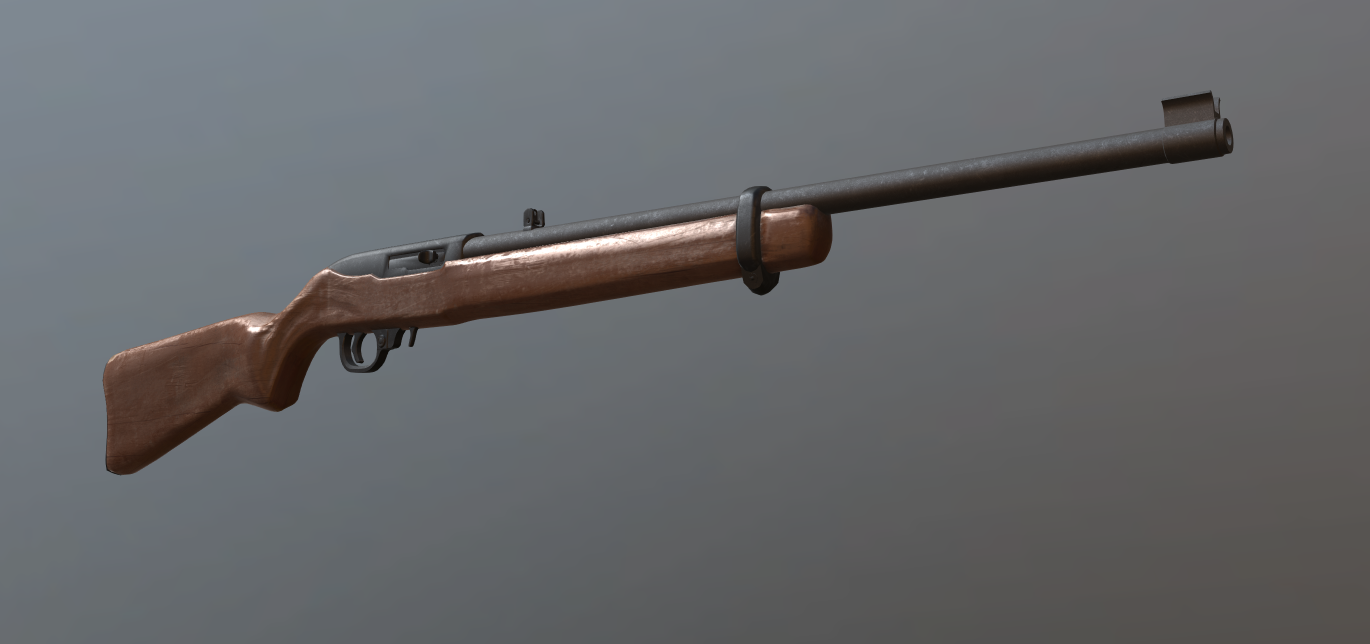 oblique vapor
FCK I forgot the mag
 elfin bone
Is there a way to change the radius of a cargo item so you can't loot it far away?
It's on the other side of a wall and you can loot through the wall.
 rapid tree
Guys something strange occuring with my vehicle.
In my big mod the CH46 gets placed instantly in eden but for my Standalone CH46 Mod the Vehicle have a delay upon placing in eden.
This doesnt make any sense since its the same model
Can someone give me a push in the right direction ?
rapid tree
ivory shuttle
I am modeling a jet pack, and I have my pilot animation ready. I know how to mak...
Copy paste the sample character in your jetpack and set the land contact points on its feet
Does your Jetpack act like a Helicopter ?
 orchid spruce
am I misunderstanding how the cameraDir and discreteDistanceCameraPoint properties with the memory points in the weapon? I thought the cameraDir point would be used as the point to always be at the center of the screen and the discreteDistanceCameraPoint would move the camera to those points to always be looking at the cameraDir point, but when I set that up, the point that ends up being the center of the screen and the camera pivots around when zeroing is obviously not the cameraDir point because the camera center moves off from that point when it moves with the zeroing
 wispy orchid
newbie question for blender: I use the knife tool (k c z) to split an object in different parts. The tool marks the vertices, but even after double click or return, I stay in knife mode. Anything I need to do to 'apply' the cuts?
 flat moss
Spacebar
gentle merlin
so i recently found out the water_surface mempoint is responsible for dictating the point at which a unit switches to swimming mode - would it cause any issues if i put this mempoint insanely high to get achieve the effect of being able to just walk on the bottom of the ocean? by high i mean probably a kilometre or something (to account even for deepest water areas in arma)?
 last spindle
weekends WIP coming to a close....... http://i.imgur.com/oDL7qX7.png
 stuck oyster
gentle merlin
so i recently found out the water_surface mempoint is responsible for dictating ...
stuck oyster
gentle merlin
so i recently found out the water_surface mempoint is responsible for dictating ...
that could increase the computational size of the unit increasing its simulation footprint
having no swimming actions could also work
gentle merlin
stuck oyster
having no swimming actions could also work
Unfortunately no, the moment you reach that point the unit freezes with no swim actions
And with them the unit movement is swimming based so that doesnt work well either
oblique vapor
Is it possible to change the model of a magazine displayed on the weapon ? Like a different model for a different magazine, when some are bigger than others, etc. ?
 carmine gull
In DayZ I understand that to be the case but not (yet) in Arma 3, no known ETA on such a change 😦
oblique vapor
Well, I'm kinda f*cked.
 past canopy
no proxies for that in RV4 (arma 3) engine
dayz has hybrid engine which allows for it
more than likely it requires a lot of work to change otherwise it would have happened in A3 already
oblique vapor
So if my weapon can use tiny magazines and larger ones, what should I do then ?
 polar fiber
either put up with it like everyone else or get creative with some scripting
oblique vapor
I'm asking like what you think is the best solution ? Go to place the larger magazine in the model or just don't do it
polar fiber
thaat sounded harsh, I didn't mean it like that
oblique vapor
yeah lol
polar fiber
I meant that in general people just seem to have accepted it as a limitation and just have whatever magazine model looks nice on the weapon
oblique vapor
I'm into that problem because I never encountered this issue before
polar fiber
well it effects the MX in the default game since you can load the larger capacity magazines from the MXM in to the standard MX but the models look no different
oblique vapor
Yes, that's correct
polar fiber
really we would all love to run around with C-mags and magpuls and all manner of crap dangling from the multitude of different AR-15 addons
but alas, nowt we can really do about it
 civic stratus
can someone tell me what the specific purpose of the animationsources class in the config.cpp is? I'm not entirely sure when its necessary to use it
 sharp gulch
do hiddenselections have to be called "camo", "camo1" etc or can they be called anything?
stuck oyster
sharp gulch
do hiddenselections have to be called "camo", "camo1" etc or can they be called ...
can be called anything
the name just has to match between the p3d, model.cfg sections[] and config.cpp hiddenselections[]
 surreal cloud
It's for defining Animation Sources, which are what controls animations defined in model.cfg files.
tacit karma
If you want to control them via userAction for example.
surreal cloud
You can set them with https://community.bistudio.com/wiki/animate
They're also used for hiding/showing parts of vehicles (ie backpacks/doors on offroads)
tacit karma


 civic stratus
my friend was telling me he hid some parts of his model without animationsources in the config.cpp using the animate command
tacit karma
Yup
 tiny canyon
Hello everyone, I was wondering if anyone had any tutorials or videos for porting a pistol or gun into arma 3. Thank you!
bold flare
"porting" or "making"? If porting then from where and what files do you have?
tiny canyon
Yeah sorry should have been more descriptive, I have a pistol in blender and I am trying to put it in Arma 3. I understand the object builder, geometry for autocentering, view pilot, and texturing process. But I do not understand the memory point or the proxy or how the "bullet" leaves the gun, or the magazine reloading process.
ivory shuttle
I have a fully functioning ffv seat. The only issue is that it does not show the unit on external or interrnal resolutions. However playing as the character I can see myself. The proxies are all assigned to the vertex groups needed, and proxy paths are correct. Someone please tell me what I am missing.
pallid cape
ivory shuttle
I have a fully functioning ffv seat. The only issue is that it does not show the...
ivory shuttle
pallid cape
maybe this? https://community.bistudio.com/wiki/Turret_Config_Reference#viewGunn...
Already covered that! I have tried copying my working cargo layer to the other resolution LODS, just to double check. Provided is my config. 324ish is where my turret begins. From the view of the character it is correctly sitting on the vehicle with legs hanging out, and can use weapons, just missing from external views.
livid canyon
ivory shuttle
Already covered that! I have tried copying my working cargo layer to the other r...
as a check, do you become visible if you run focusOn action ["TurnOut", cameraOn];
ivory shuttle
Is that in the debug?
livid canyon
yeah
ivory shuttle
livid canyon
yeah
cool will try it now
ivory shuttle
livid canyon
yeah
no change, it does have the hex unit icon, so it knows the character is there for sure.
livid canyon
does gunner cast shadow/ can be shot?
ivory shuttle
livid canyon
does gunner cast shadow/ can be shot?
shadow and damage working. it did show the character slumped during the death screen after I let the AI shoot me
livid canyon
ivory shuttle
shadow and damage working. it did show the character slumped during the death sc...
have you tried isPersonTurret=2; ?
ivory shuttle
livid canyon
have you tried `isPersonTurret=2;` ?
no I will try that now.
ivory shuttle
livid canyon
have you tried `isPersonTurret=2;` ?
no change
I just doublechecked my proxies, the naming, numbering, paths, and vertex group. positions should be correct because it is from the working cargo layer.
Earlier, I tired CPGunner like Goat recommended the other day, and the unit showed from exterior, but was stuck in a levitating A pose, however in the correct space and facing the correct direction. I have since redone my proxies, so I will save a duplicate and try that again.
stuck oyster
ivory shuttle
stuck oyster
<:meowsweats:707626030613135390>
Oh my. I have no clue what I am doing. Cargo layer works as CPCargo, nothing works as Gunner.
stuck oyster
do the default cpgunner and gunner proxy
thats the starting point
do not deviate from the default setup 
ivory shuttle
I have tried that, and now reverted to it. Why does the seat cease to work?
stuck oyster
dont know. dont really have the energy for debugging it atm.
ivory shuttle
stuck oyster
dont know. dont really have the energy for debugging it atm.
No worries, I will get to it eventually.
stuck oyster
ivory shuttle
No worries, I will get to it eventually.
try copypastin one of the vanilla cargoTurret classes
ivory shuttle
stuck oyster
try copypastin one of the vanilla cargoTurret classes
I used one from the AIO and one from the Samples. The cargo layer was working all but external visual the other way, so it must be config related. Don't burn yourself out, it can be handled another time.
 loud wadi
That looks very nice phoenix
although I would say for practicality purposes.. doesnt seem like enough tape to me. Bottom one would move around too much 😛
loud wadi
http://41.media.tumblr.com/bffa3772387ddf0a9b88390fcf0767c6/tumblr_mrim2zDHLq1s57vgxo2_400.jpg

Thats not gonna wobble around
http://www.imfdb.org/images/thumb/c/c5/TLTH5.jpg/600px-TLTH5.jpg
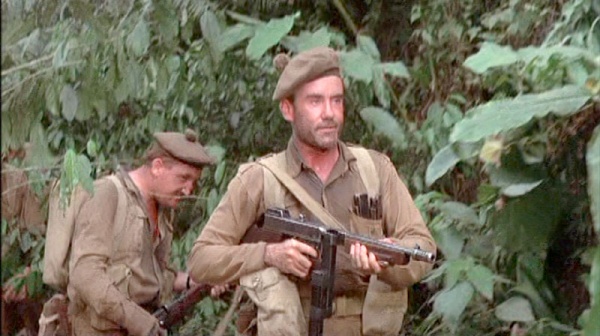
Or a different style/method with less tape but on top and bottom to prevent wobbling.
oblique vapor
That's neat Phoenix
tacit karma
@loud wadi Thanks for the pics. Was trying to find the pic I had again, but wasn't able to
I will probably copy and rotate it so that I have two times tape
loud wadi
😉
 jaunty leaf
Question - how are things like missile trails and flares added to missile models?
Via proxy?
carmine gull
If I recall correctly yes; you get a separate model for when the missile is in flight vs. when it's under unfired/mounted (i.e. proxied onto a hardpoint) and the former has the trail proxied onto it
past canopy
@tacit karma I would just do upper and lower tape
like the second pic
the huge amount of tape takes away from the model
tacit karma
that was my plan 😛
 thorn spire
Testin mah' crappy trenches http://i.imgur.com/HuE36WQ.jpg

 visual thicket
hey guys, don't know if it's me but I made a flat plane and added a texture to it but for some reason when i view it ingame it's transparent.
civic stratus
Can someone help me with an addon action radius issue? I set the radius to 1, but if my distance exceeds that, I can still see the action
last spindle
How bad we talking? Because +-1m is alright in my book, but 10m well.....
oblique vapor
@visual thicket Try to flip the face of your plane, turn it upside down
civic stratus
@PINGA between 1-2m
last spindle
That seems OK too me, consider that it is likely calculating distance using a bounding box, unless you specify a memory point, u have distances of 1.5m working for interactions with my howitzer
 white jay
Some more work on my SEM 52 SL: https://i.imgur.com/eKTfZYh.png
 wispy orchid
what's the best way to cut a door/window in an existing mesh in object builder?
oblique vapor
Export it to a modeling program and do your thing
 oblique vapor
fap
tacit karma
I wish I could bake the m3a1, but my packing program refuses to pack the mesh :/
 native garnet
This is for the Westwall one right? If so you should really post in that thread, it would be good if people see a nice WW2 mod is getting made and perhaps you can get some extra support
 halcyon wren
WW2 Mod? I've been derping around with a P.38 over the last weeks. I'd be happy to contribute that model: http://i.imgur.com/yj3k674.png
Please PM/DM me if interested. 😃
 native garnet
I think they just started, but it would be very nice if some WW2 model makers could join up or share stuff among them. The pacific guys got a lot of american stuff they might want to share with western front guys, and eastern front mod makers might hav e german stuff they want to share
It's really time we get a good altenrative for IF
halcyon wren
If only thats how the community would cooperate. I always noticed a lot of turfing and bickering. 😦 But that was many years ago and is totally off topic. :I
native garnet
Yeah for sure.
halcyon wren
Thx for the link, I'll contact the folks.
native garnet
I know some people that still work on IF from time to time and gave them a heads up as well.
 solemn canopy
Sorry for asking but could someone help me with models and their memory point at which the model has a storage point? Someone made a model for me and added memory points for me to use but sadly I dont know how to assign actual containers people can use to store items in to those memory points ^^
oblique vapor
You mean, like a vehicle inventory ?
solemn canopy
Yep
I got it somehow working by assigning a memory point to memoryPointSupply but that only did half the work. The inventory is now accessible from everywhere where you're close to the model rather than only close to the memory point
solemn canopy
Man Im really desperate ^^
woeful viper
someone made a vehicle for you and did also the memory points... SUUURE
my money is on ripped model... and or p3d
solemn canopy
http://i.imgur.com/KRWLm2n.jpg
If you can find me the model and prove that its ripped I'll believe you... other than that, that comment wasn't really needed.
 woeful viper
you said vehicle inventory...
solemn canopy
Nah I said "like a vehicle inventory"
 fervent steppe
@solemn canopy ...in x3kjs defense every time someone says "someone made a model for me"...it does tend to end up being ripped. This doesn't seem to be the case but more often then not it does.
solemn canopy
I can imagine
fervent steppe
I think for buildings tho it has to be entirely scripted
I made a building with ammo containers and in the memory lod added a mem point in each container for people to use
And in the release notes let people know what the mem points were
solemn canopy
Now that sounds interesting
My model already has 3 memory points for each container in inside the building sadly those containers are with the building itself one model so I had difficulties getting it to work
I decided to only work with one of them now though
solemn canopy
I know how I would have to do that since it only requires to animate one part and make an addaction at that specific memory point
But when it comes to giving specific memory points the option to open an inventory I honestly dont know where to start as I cannot find any code or whatsoever in the model.cfg or config.cpp
A friend suggested making weaponholders at the memory points positions but I felt that would be a dirty workaround
fervent steppe
Yea I'm not sure. I just added the mem point and figured I'd let the scripters to the rest 😄
solemn canopy
Origins models inherit from Land_A_Tent, Ill guess Ill have a look at that class then and see what the buildings inherit from it
It has to be something within the config.cpp, I just cannot imagine it can only be solved through SQF code
fervent steppe
Oh yea you know what. I didn't even think about that. Yea good idea!
Look at the tent class and see
 wraith tendon
@solemn canopy There was a specific config.cpp entry for it, to define a "Cargo access Position"... currently searching for it
memoryPointSupply = "NameOfMemPoint";
-
supplyRadius = X; //X = 0-100000000.....
 jaunty rune
bandi cam hype!
white jay
Model is finished, basic materials are done. https://i.imgur.com/QIMkFnz.png Now comes the horrible part. Wear and tear.

 celest arch
why horrible?
halcyon wren
Looks very clean. 😄
tacit karma
Final bake, after a couple of rebake and lots of manual fixing:
http://abload.de/img/2016-02-2311_24_22-3dejua5.jpg
http://abload.de/img/2016-02-2311_24_29-3dw2us8.jpg
http://abload.de/img/2016-02-2311_24_48-3dl9utb.jpg


 frozen stirrup
@white jay Is that SEM 52SL for a specific mod?
oblique vapor
Looks cool 😄
white jay
@frozen stirrup nope, I plan to release it standalone for TFAR. Maybe for ACRE if I can figure out how to use their API. Is it even possible?
 west summit
@Raspu - re:ACRE it is possible. The 'API' for radio implementation isnt too well documented but it exists. If you are interested hit me up and I can walk you through the process.
white jay
About Acre2 I just have a quick question. Do someone knows a script, or something that I can use to Retransmit the signal of ACRE2 Radios in Arma 3? For the Antenna or something.
west summit
Re-trans isn't in ACRE2 at present (afaik)
white jay
Thanks @west summit I'll certainly keep that in mind when I got that thing in TFAR. I'll talk to you then!
wispy orchid
what might be the reason that a model shows a different texture in bulldozer than in game? In bulldozer I get the texture as it stored and in the game the floor is very blue, the ceiling keeps the original color? The newbiesh attempt at modelling at texturing: http://tetet.de/arma/arma3/nimitz/experimental/hangar_7.p3d
oblique vapor
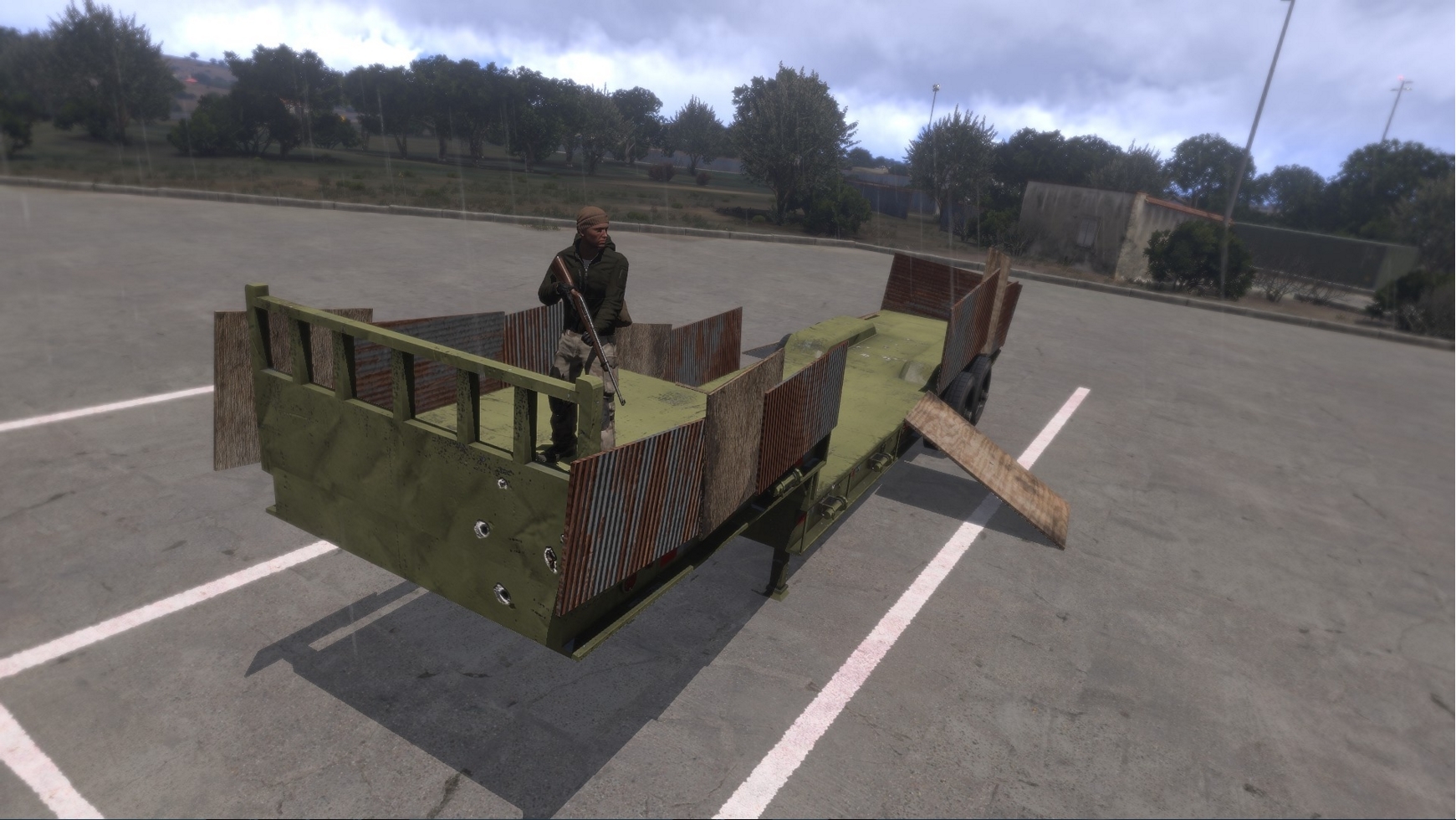 visual thicket
lul xD
civic stratus
how do I go assign a certain surface sound for my building model?
halcyon wren
Nope.
surface textures in roadway LOD.
Use the ones in data_f\surfaces, as they are already preconfigured to work.
wraith tendon
@oblique vapor Nice trailer 😄
civic stratus
thanks Jules!
oblique vapor
Thanks eagle !
thorn spire
Need Cargo ship with containers for those African horn missions 😄
oblique vapor
Do you know where are the Roadways RVMATs located ? I need to change the sound emitted from a surface on my model when we walk on it. Also, how can we define the material of our object ? For exemple I have a metallic surface, and when I shoot on it, it emmits dirt particles effects..
wispy orchid
Sam_, I think the dust effect comes from the rvmat applied to it in the fire geo lod
oblique vapor
Which RVMAT do I need to use in order to have the proper effect ?
Ok got it, .bisurf stuff located in data_f/penetration
tacit karma
And there we are, M3A1 done.
http://abload.de/img/2016-02-2500_16_21-mo10ooz.jpg
http://abload.de/img/2016-02-2500_16_51-mo55rpn.jpg

 frozen stirrup
@white jay Yes it is, I'm currently working on realistic Russian radios for ACRE (also to complement my upcoming East-German mod)
tacit karma
@loud wadi Next weapon is the Garand family 😃
tacit karma
yup. Btw, here's the link to my Artstation, where you can zip around in marmoset viewer (including compressed normals and shitty looking textures) https://www.artstation.com/artwork/ZdvER
 terse elm
u making a ww2 mod?
tacit karma
yes
jaunty rune
@tacit karma thats really sexy, nice work
tacit karma
Thanks
loud wadi
Garand family 😉 good choice I miss mine. Had to leave in the US.. I hope you post your progress here like you did with the grease gun
fervent steppe
loud wadi
lookin pretty awesome!
 obtuse rain
Not too many windows to make them all breakable, I hope? 😉
native garnet
That's damn cool... That taskbar though
white jay
Started to "chip" some paint away https://i.imgur.com/zalc3AU.png Those things can get pretty beaten down.
 fervent steppe
@obtuse rain there's never too many windows haha
halcyon wren
Ohh, enterable CA structures. reminds me of the project to make the Nogova structures enterable. 😃
fervent steppe
Hehe. I made a lot of them enterable. The goal is to get them all enterable. And upgraded
 light star
how should i model a windscreen into a car, should it be just a face or thin box?
and separate or linked to the mesh
fervent steppe
Windshield?
It's a double sided face or two faces in opposite directions really close would work to I'm sure
light star
should it have textures (included in uv) or just named vertex group
tacit karma
if you want to do it propper, make it a double sided faces with its own uv space
 tepid ruin
hey guys was hoping to get some info here if possible...
i'm trying to export a .blend from blender as a .p3d but the arma plugin spits out an empty file
i'm running 2.76
anyone got a fix possibly ? 😄
halcyon wren
Temp fix: go through FBX
 gilded ibex
Hey, I have made several low models (GOKarts) I can not find a driver proxy that suits. The arma 3 kart proxy shows up as blank? Anyone ran into this problem
celest arch
vencaslac you have to assign each layer a LOD
in the viewport properties side panel, towards the bottom
the blender arma toolbox will put only layers with a lod configured in the p3d
obtuse rain
Mmmm, magic UV packing: http://store.steampowered.com/app/363020/
last spindle
I tried the demo, and threw up at the thought of paying for it..... UVLayout is still king
tacit karma
I use it, and happy that I am. Super fast packing, and with upcoming GPU packing even faster.
When it was in Early Access it was much cheaper. There are a couple of features coming I am really waiting for
woeful viper
reminds me of the junk tool that you can buy on steam for 20 or 30 bucks that lets you set process affinity... which you could also do manually, or by using the dozen free tools that exist for this.
last spindle
People like too make money, reason there were so many clones of a unity asset store FPS template trying too get greenlit on steam
and one of them did...
tacit karma
Well, if you want to squeeze the last out of your UVmap while retaining the padding, and want to save a hour handpacking it - I dont think there is no reason not to buy it. I dont regret it (even tho I bought it in the early alpha phase for half the price and got the commercial upgrade for free)
The tool also is regularly on steam sale.
woeful viper
i prefer logical uv's where you can actually go and fix stuff in 2D rather then having shit scattered all over the place
oblique vapor
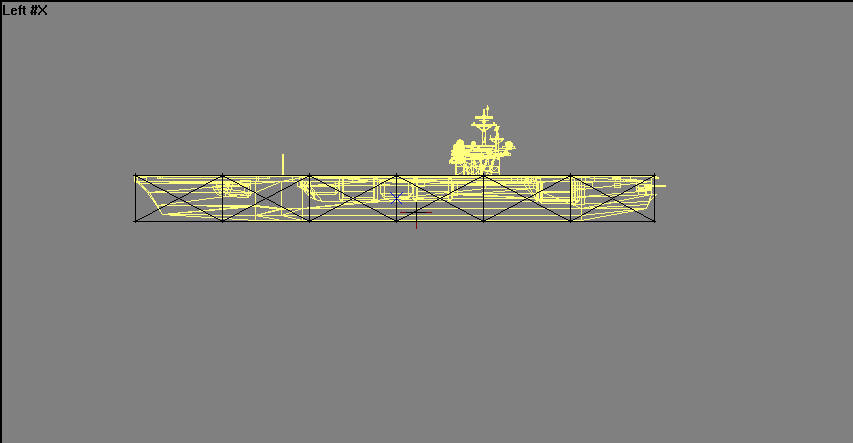
Hey, I have this Aircraft Carrier Wreck. And the geometry LOD, well, isn't working. I tried with even a simple box, components named, triangulated convex and added mass. But I can walk thru it and it doesn't act as normal. Tips ?
 quick terrace
size of the mesh?
oblique vapor
Damn huge
quick terrace
well, that's the reason right there
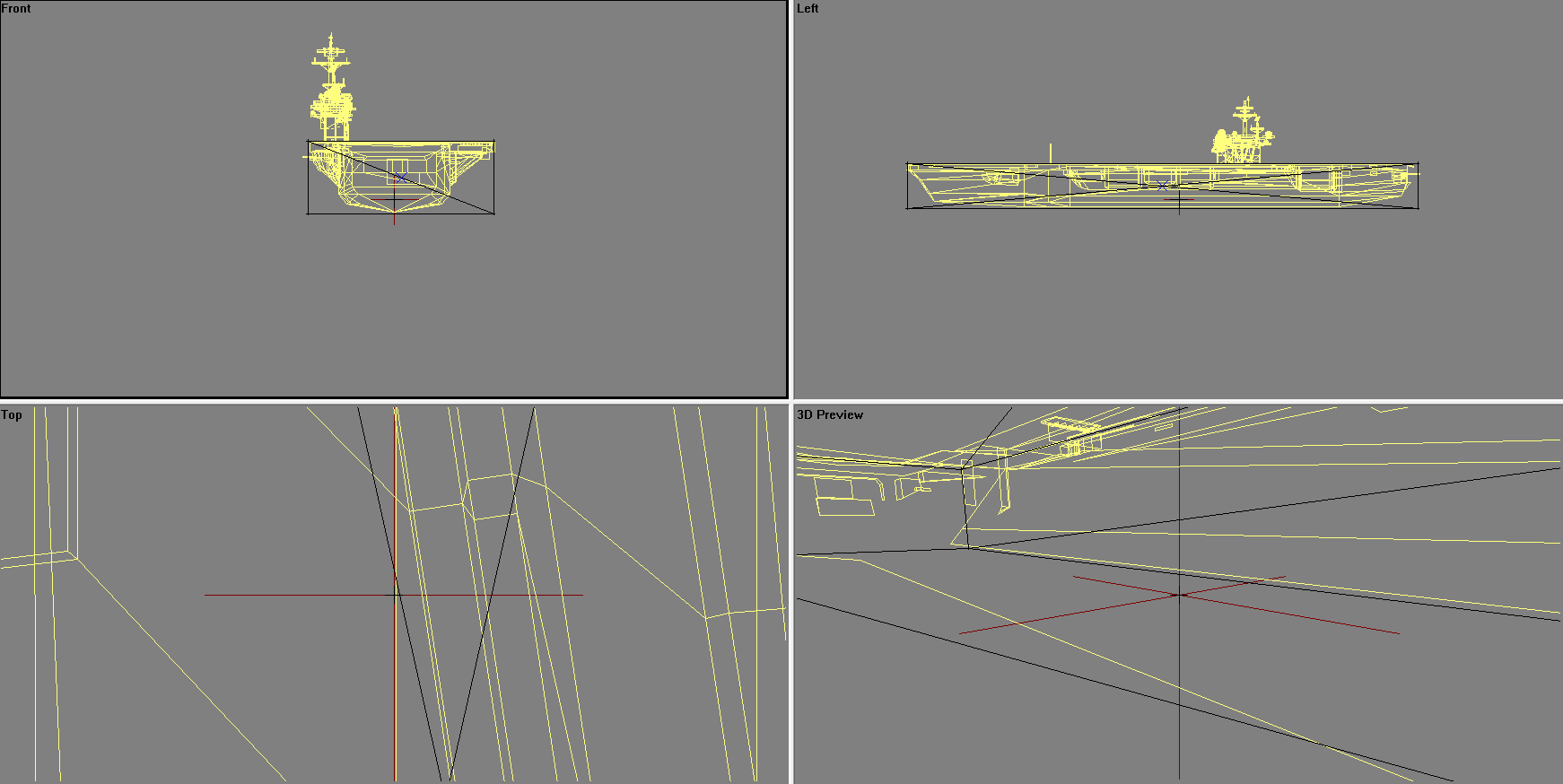 quick terrace
the same way A2 carrier was done
the same way it was ported to A3
limitation for geo is around 50m
should be smaller
so below the 50m mark
oblique vapor
So I have to do something similar to this ? : https://i.gyazo.com/7047bceacbe9f73e8c1a68c54445c97d.png
 woeful viper
oblique vapor
woeful viper
oblique vapor
That... will take a long time..
wraith tendon
@oblique vapor Each GeoLod has a max range of (about) 100m | Means: Split that 1 Model into x seperate parts -> Done.
gilded ibex
How do i load a RTM into a OB?
obtuse rain
The geo size limit should be map specific unless something changed recently. It could be as low as 30m (smaller is possible but maps shouldn't really grids substantially smaller than 40m).
light star
map? please explain I don't understand
tacit karma
@woeful viper You can always do that afterwards. There's nothing preventing you doing that stuff after you packed. My workflow is usually:
Unwrap, import into ipackthat, let it pack the first time. Import back into max, check everything, add or delete stuff, eca, then repack.
obtuse rain
Explain the map/collision thing? Arma puts a bunch of things into "terrain/texture grid" buckets, which are typically 40-50m (in OFP it was locked to 50m, in later games the .wrp has the size). It differs per map, though, and if the map maker does things incorrectly it could be smaller than the recommended ~40m minimum.
Objects are put into the buckets for (among other things) collision detection. There's a BIS page somewhere that says that the game only checks for collisions of objects that are in the same bucket as you, or in adjacent buckets.
Which is where the 50m recommendation comes from; the worst case is that an object is right on the edge of a 50m grid square, and therefore will only work for collisions out to the 50m of the adjacent grid square.
But a more conservative choice would be something like 30m, so that 40m cell maps and those that are slightly smaller still work.
With all that said, I haven't checked the latest A3 to see if the above is still the case (but roads and static map objects are definitely still sorted into those grids/buckets, because recent TB's give errors that reference them if you fill them up or go out of bounds).
light star
interesting
would it be possible to make an object with proxy that refrences to the object itself, meaning there would be infinite chain of those objects ingame?
obtuse rain
Might be interesting to test it to see at what point exactly it fails to work. 😉
light star
it would be very suprising if it actually worked and viewdistance would prevent any hit on performance
white jay
I think proxy on proxy is not possible in arma. At least it wasn't some time ago.
But what would intrest me:
Allmost all sources point out that the max size only aplies to X and Y but not Z axis, now whait if you lay down a 100m tower to its side, would it have working geometry on its farest point?
past canopy
@X3kj you can edit in 2D
The example of the AK is really bad because of how split up it is, but even with the uvpacker shit you still have to go and set seams and shit if you want a good UV
just with this program it organizes it on the UV plane for you
It's no different than if you organized it by hand except that it is extremely fast and can be much more precise than you can
It's good for saving space and what not
 abstract mirage
Is there any difference in server performance when you attach two different models together, as apposed to making one model that includes both things?
woeful viper
@past canopy i know what a packing tool does... it just gives shit about logic (so that pieces of one part are distributed all over the place for the sake of "space saving") and good orientation for texturing
past canopy
You can organize it in the orientation you like in a uv editor and then set the program to not rotate them
My friend Gerard packed the entire OpsCore UV set by hand and did a really fantastic job.
Red ran the UV through the ipackthat and it spit out the same result but you know with a few parts in different areas and the main portions rotated at 90 degrees in another direction
So you can do it by hand like he did and have it be really good, this just saves time
And if you paint or texture in a 3D program like substance or quixel you tend to have less issues with UV things
I don't mean any offense by anything I said by the way. Just to clarify.
oblique vapor
@quick terrace So I have to create proxies ? Or is this ok ? ( https://i.gyazo.com/7047bceacbe9f73e8c1a68c54445c97d.png )
 fast topaz
I got a weird glitch in my model that makes the gun catching shadows from its own shadow lod
fast topaz
any ideas what causes this?
polar fiber
They're supposed to catch shadows from their own shadow LOD. If the shadows look bad for some reason, you need to adjust the shadow model
woeful viper
i never manage to get it perfect... there is always something that looks odd
why is this red??
oblique vapor
The shadow model needs to be slightly smaller than the Res LOD. Like, I always make my shadow model don't overlap the Res LOD
woeful viper
thats obvious
polar fiber
some geometries it also helps to invert the faces in the shadow LOD to change the way they project on the res LOD surface
woeful viper
problem comes from having small parts added (like a rear sight or mounting rail)
polar fiber
but yeah, Arma's shadow rendering isn't exactly great anyway
fast topaz
thank you 😄 maybe I shouldn't use two cubes for my shadow lod lol
polar fiber
The shadow LOD should be pretty simple anyway, you don't want lots of small details in them like surface holes
but it should match the silhouette as close as you can make it
woeful viper
i'm talking about self-shadowing specifically
polar fiber
I know. But sometimes the self-shadowing looks better if you omit some complex details
oblique vapor
Here is an exemple of what you should do : https://i.gyazo.com/8d6ad74475ab13edce7dea5f9eed3e5e.png
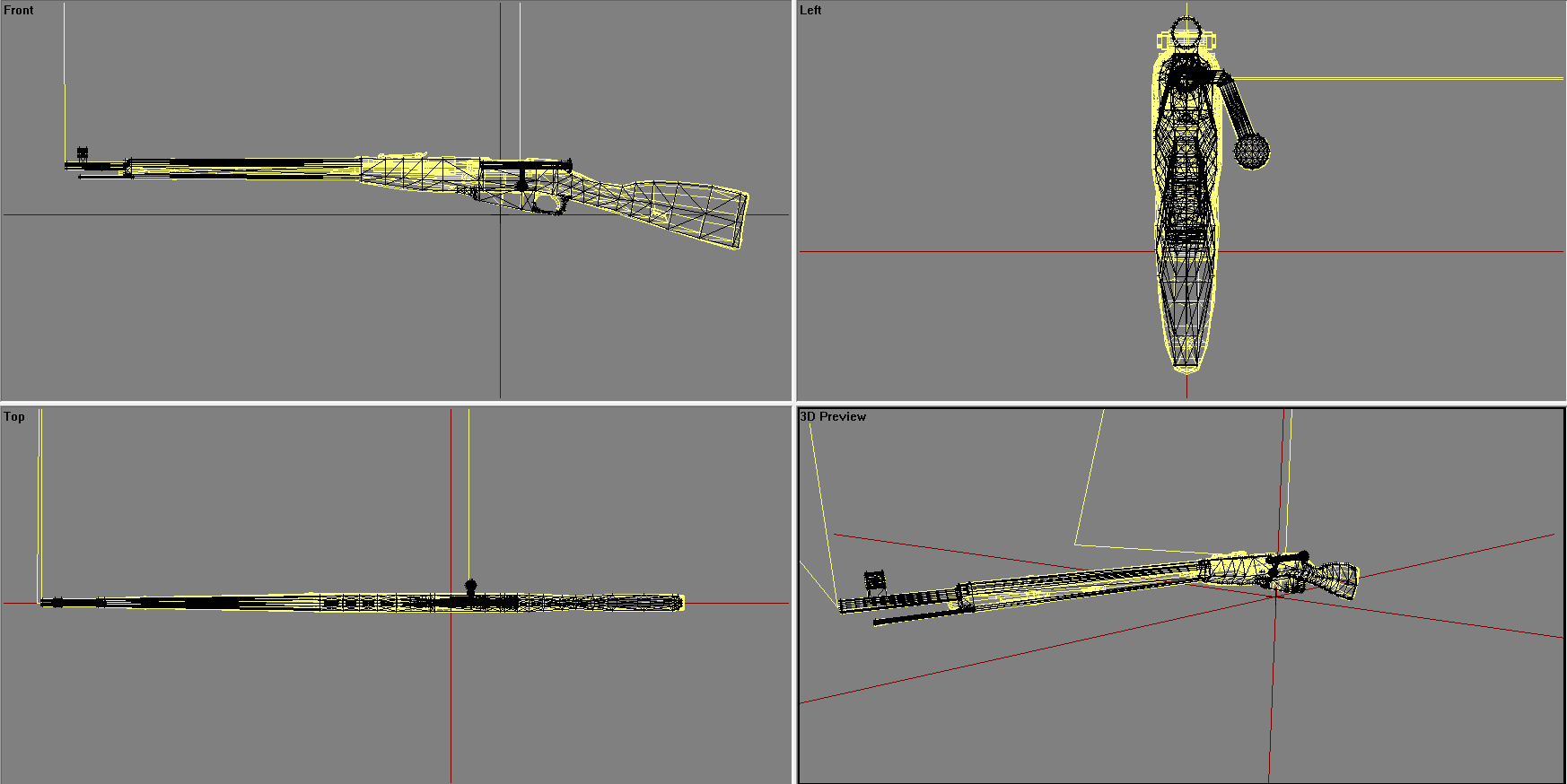
To get decent results I mean
 night void
using the NATO Replacement HQ addon, when i preview a level in the editor, it does not load.
it instead gives me a "no entry 'model" message
i have also noticed one i remove everyone from the unit other than me it works fine, weapons and all.
so not only should you give it a try, you should also watch out for that tiny bug.
i'm still trying to find out what unit is causing this bug, when i find it i'll let you guys kno
white jay
is the new shadow tech already introduced or will it be part of apex?
could not find the info right now
woeful viper
@polar fiber https://youtu.be/6ncdTb_yGkg the walls left and right of the sight are not complex however. It seems to fail to self shadow in non-convex situations (see the gap?). Doesnt matter if inverted or not
obtuse rain
@white jay I'd be pretty certain laying down a 100m high object will cause the geometry to break, the terrain grid squares will be the highest level index used to limit the number of bounding box intersection tests the game has to do.
tacit karma
@past canopy Well, the more little objects you have, the more convienant and better is the packing.
If you only have like, let's say, 10 islands, theres not really something there to pack.
white jay
@obtuse rain yea sadly that makes sense...
light star
@woeful viper maybe better to leave the sights completely without shadow geo, or do you mean thats the way it is now?
woeful viper
if youve checked the vid, you see that the "walls" are part of the body - leaving them out would look wrong for the shadow on the ground
oblique vapor
I'm making a camouflage net, but yeah, for the shadow, I have absolutely no idea how to make that. Any tips ?
I see the results on the A3 Vanilla camo netting, but no idea how they are made
polar fiber
IIRC it's to do with a property in the model where you set shadows to "hybrid"
Old thread, but relevant: https://forums.bistudio.com/topic/104643-camo-net-shadow-lod-problems/
oblique vapor
Actually it's more complicated, it doesn't have alpha, it's basically a cloth wrap over some structure, like here: https://i.gyazo.com/090020f9d2b5f1b6a0c62717857d385d.png
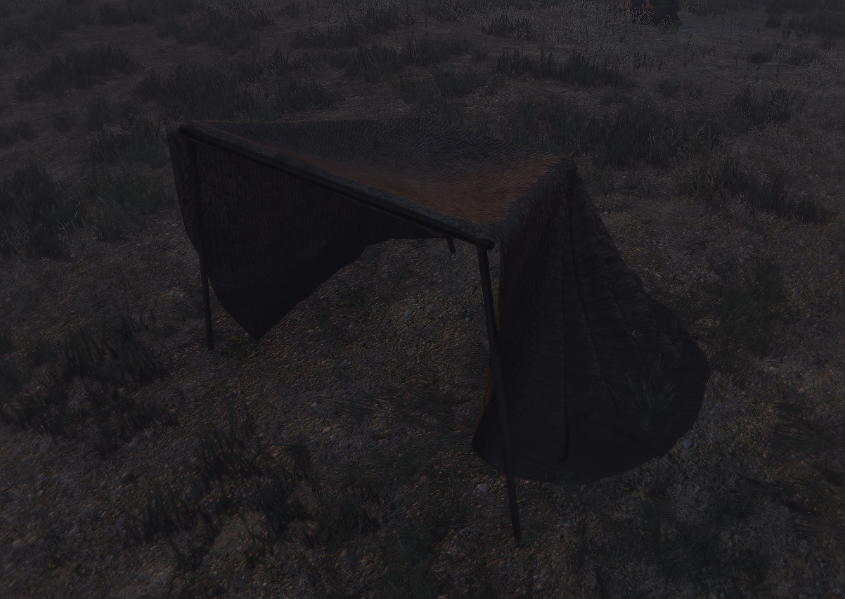
And I don't know how to make a correct shadow for this one
oblique vapor
Thanks Monkey !
 woeful tartan
tools update too https://dev.arma3.com/post/techrep-00027
 light star
@woeful viper the fact is that almost no-one would notice it ingame
woeful viper
@light star It's a systematic problem first and foremost. Also, i notice it. I don't care about anyone else, if i'm not happy with the endresult the whole process of making a model is wasted time.
light star
We all have our reasons but I have learned that as a modeler it is impossible to add the level of detail I would want and i have to balance it just enough to make the impression of enough immersion
woeful viper
the detail is already there, it just doesnt work properly and that's what this case demonstrates.
light star
detail is pointless if it doesn't work
woeful viper
well forget it
terse elm
question for anyone who makes guns, if i were to make an m1 garand would it be possible to to add the ping sound when u finish a clip?
last spindle
There are multiple ways to try and achieve that result, not sure if any would reliably work
tacit karma
Yup it is
jaunty rune
my first iidea would bne to use a synthesizer to add it into the reload sound its self, audacity is free
sorry read that wrong
white jay
iirc the pling happens after the last bullet left the chamber, so unless there is a animsource for a empty magazine you need to have a fired EH that counts the rounds in your magazine and triggers the pling when there is 0 bulltes left.
could be that there is some other way i don't know of..
native garnet
That's the main way. I can send you a sample script I had for a repack script for iron front. Should be ez to adjust
I'm pretty sure iron front already itself did it as well, but haven't looked into how. Knowing iron front it's probably somewhat broken though
Redphoenix, weren't you already making new Garand?
white jay
lol @terse elm and @tacit karma garand model battle? 😛
terse elm
No battle lol mr red has far higher skills than me
Mr red may pick ur brains on how to achieve it when the time comes
tacit karma
@native garnet Not yet, I'm on vacation.
@terse elm I would probably do it as @white jay said. Easiest way.
native garnet
something like this should pretty much do it: http://pastebin.com/C4ZY8SEH
white jay
yea calling that in a fired EH should work
native garnet
Ideally speaking you'd bitch at BIS to add a fired EH for weapons though, which means you don't have to run this shit on every single weapon you fire the entire mission.
Alternatively you can remove/add it with event-styled thing that detects weapon changes (Much like ACE uses for a bunch of things)
white jay
i think you can add a fired EH to the weapon config?
native garnet
Can you? I thought that only worked for vehicles
white jay
not sure but i would assume..
at least in vbs it works, couldn't find any source for arma 3
native garnet
I'm 90% sure you can't. I don't know the ins and outs of configs, but I looked into it for some similar stuff and then quickly realized it wasn't possible.
terse elm
@native garnet yes please!
woeful viper
anyone useing max 2016? just "upgraded" and in ortho view the viewport jumps after changing view orientation, which is pretty annoying
tacit karma
what you mean with !"viewport jumps after changing view orientation"?
last spindle
im using 2016, there were a few issues when i first started, but not that particular one that i remember
probably because i rarely use ortho
woeful viper
@tacit karma when i rotate the view in orthographic view and finish rotating and want to continue doing stuff, the viewport jumps (as in the view moves) to another position
last spindle
anything to do with snap mode enabled?
oblique vapor
Cameras ? "Scale" of your scene maybe ?
woeful viper
neither of those.
wraith tendon
What could be the reason, that the Hitpoints don't react to Penetration?! feeling a bit dumb atm -.-
(model.cfg + config.cpp -> should be fine)
wraith tendon
"" setHitPointDamage ["HitPoint1",1]; "" <- Works, he just ignores the bullets/grenades/almost everything.
Type: House.
wraith tendon
found it -.- " armor = 2000; " ... ... ...
fast topaz
for some reason the scope attachments i attach to my weapon are not showing even though I have a proxy on it
any ideas why?
fast topaz
if it's a scope the viewpoint of the scope is in the middle of the model
no rpt errors....replacing the proxy doesn't help either
oblique vapor
Hi guys. I have a weird alpha thingy clipping issue on my scope. It worked great a few weeks ago, didn't change anything. This is what I'm talking about: http://image.noelshack.com/fichiers/2016/09/1457193462-2016-03-05-00001.jpg http://image.noelshack.com/fichiers/2016/09/1457193462-2016-03-05-00002.jpg


Here is a screenshot of my scope with its properties, the RVMAT is correct. https://i.gyazo.com/dfd97e0853b5edd4ae21750054dbdfef.png
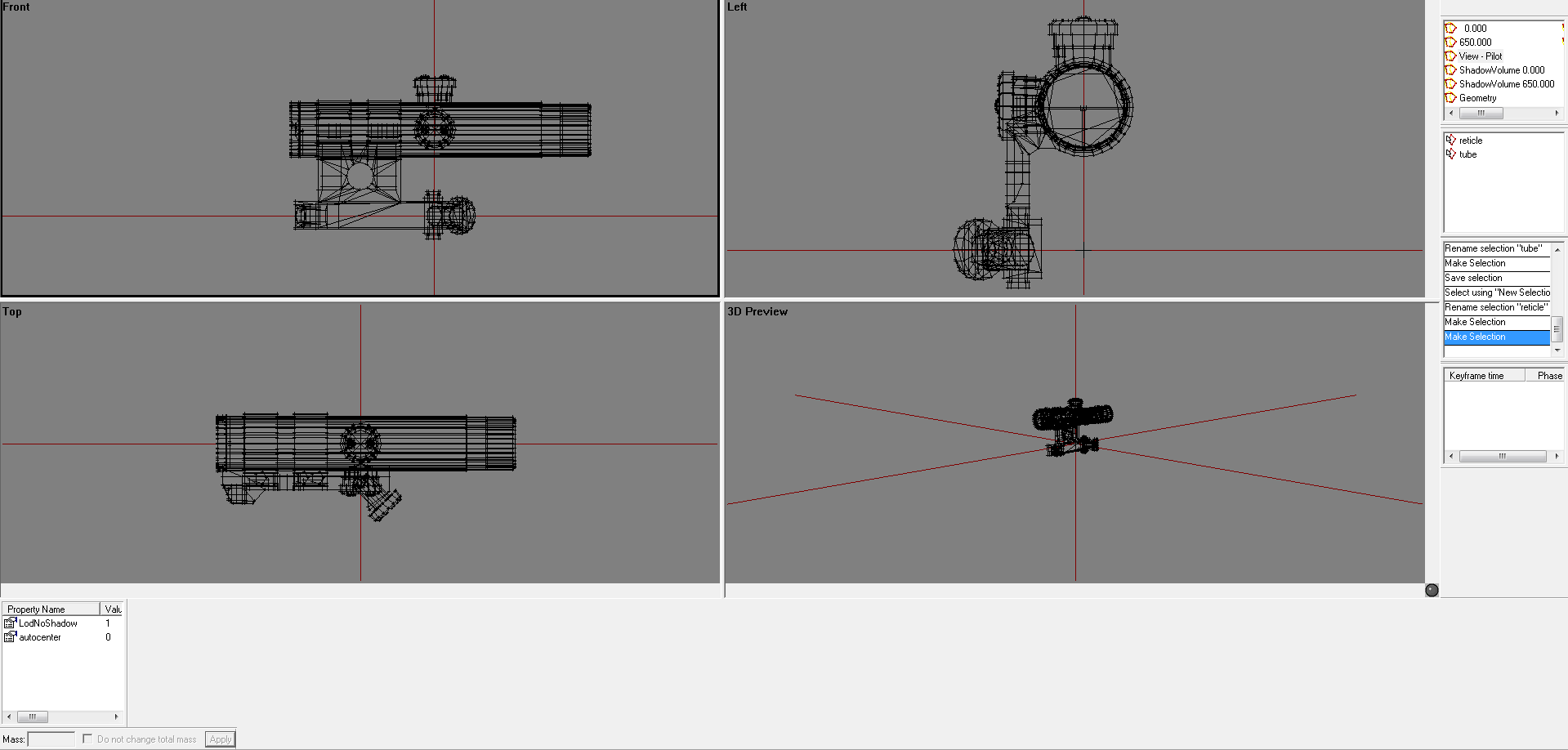 polar fiber
@oblique vapor you need a named property "forceNotAlpha = 1" in the geometry LOD
oblique vapor
Alright, will try that. The question is: I have other accessories that works great. Why do I need to write it down just now ? Why didn't it happen before ?
polar fiber
Do you have a procedural alpha texture somewhere in the model?
oblique vapor
Like a _ca ? Yes, for the lens glass.
But I have other accessories that use the same texture, even others _ca, where it works great.
polar fiber
I meant like a "#(argb,8,8,3)color(0,0,0,0.001,CA)" type one
oblique vapor
Oh
Well, yes, but this is not alpha, it's just pitch black. #(argb,8,8,3)color(0,0,0,1.0,co)
polar fiber
Used to with the old tube method of doing parallax-free optics https://community.bistudio.com/wiki/Arma_3_Weapon_Collimator_Sights if you didn't include the forceNotAlpha property. I assumed it was because of the low-opacity procedural texture, but all procedurals may cause it I guess
only happens if the model is a proxy in the pilot LOD, which weapon attachments obviously are
oblique vapor
Yay, works good ! Thanks !
polar fiber
Don't suppose anyone on here owns, or has experience using a EOTech 552 and can tell me which of these coloured parts (numbered 1 to 4) are metal, and which are plastic? http://i.imgur.com/ufzd2rK.png

 polar fiber
That was my thinking, but I'm not 100% on 3
polar fiber
I always thought the finish on 3 looked different on the metal on 2 and the orange bit that grabs the rail. I have one pic of the sight without the shroud (2), and the finish starts to look more like the battery cover (1) http://i.imgur.com/cnF7TkS.jpg
 past canopy
@polar fiber 1= plastic, 2 = metal, 3 = plastic, 4 = plastic
is that the 552 Kiory was working on 😃
polar fiber
No, all mine
still need to stick it through quixel suite to do some normal map markings and then the other materials, hence why I wanted to try and be sure what was what
polar fiber
I thought there were a couple of XPSs around already?
oblique vapor
FHQ maybe ?
polar fiber
Alwarren's (FHQ author) is an Eotech 553. There's an EXPS in BWMod, and SMA have one as well I think (it's either an EXPS or an XPS, and they also have a 552 similar to mine)
One of the blokes that contributes to RHS also made an XPS but dunno if he's putting it ingame. https://www.artstation.com/artwork/n0ZlE
 wise coral
anyone here use E76_roads in xcam?
woeful viper
sigh seems like max 2016 hasn't been long enough in the oven. I even get a crash when trying to reset the keyboard shortcuts
 pallid oasis
reference the Eotech 552, the battery housing and inner shroud are plastic, the back face is plastic, the outer shroud and the battery lever are metal, I have one with me in Iraq right now, battered and painted, if you need reference pictures let me know
jaunty rune
I havn't had a crash since I updated to 2016 although i never really mess with macros
polar fiber
@pallid oasis Thanks. I was already done with it in Quixel Suite, but at least now I know I don't need to do any major adjustments to the base materials: http://i.imgur.com/B6TcbAh.png (pic from Buldozer)

Going to do a version with Coyote Brown paint over the top as well. Will probably paint the battery lever, battery cover and the metal outer shroud and leave the rest unpainted.
pallid oasis
very nice mate
if you want/need reference pictures of a painted one, let me know and I can take all angles for you
woeful viper
OH FFS! for some reason max now associated itself as a program to open psd, now it pops up as first entry in "open with". This deal is getting worse all the time!
wise coral
what would cause a model to be seethrough when driven over grass and such. about 70% opacity
i can see grass and the wheels on the other side
polar fiber
Having the wrong alpha texture setup
All parts that you want to be transparent should be on a separate texture to your main texture. Save this as a file called something_ca.tga, and save the main body texture that you don't want to be transparent, as something_co.tga
the _co and _ca names are very important for when it comes to converting them to .paa format
wise coral
thanks ill look at that
last spindle
Is it like proper see-thru? or just like a black AO mask that you can see?
The most common cause of the black AO mask visible through opaque surfaces is a rogue alpha channel in either NOHQ or SMDI
 eager folio
hello, is it possible to make an Objetct (e.g. Shooting Target) constantly visible on Thermanl and NVG View?
 icy mauve
How do you define the center (point where an object rotates around) in object builder?
Im trying to google but I don't think my english is good enough to find the proper translation
flat moss
'Move pin' in the toolbar I think. And then select 'relative to pin' when doing a rotation. (FYI, this is just what I could find just now, I obviously never actually use OB 😛 )
polar fiber
I personally find it faster to centre the pin based on your current vertex selections with the C key rather than trying to place the pin manually
icy mauve
ty
past canopy
@da12thmonkey it turns out _co is actually best for transparency
_ca doesn't work with shadows, transparent PNGs can load into _co textures just fine
polar fiber
_co only has support for 1-bit alpha (black and white) though, so it's no good if you need smoother edges on the alpha or you're making something semi-transparent (like a car window)
_ca is the format that supports 8-bit alpha
but as you say, it's not going to work with shadows
woeful viper
is the "unlimited vertices" stuff deployed now or is it still in the works?
wraith tendon
Its planed? oO
tacit karma
@wraith tendon It was announced in one of the dev changelogs or something.
oblique vapor
@woeful viper Do you mean that my wildest dream will come to life ?
wraith tendon
wildest Dream is walking in/on moving Vehicles...
obtuse rain
X3KJ: Binarized .p3d's have everything they need, unbinarized .p3d's haven't changed.
My guess is the game fully supports it but O2 doesn't.
Unbinarized .p3d's support 2^16 vertices though, one test someone could try is binarizing/loading one with 60k verts.
woeful viper
i'm just asking, i haven't tried yet - i want to wait with updating tools etc until this thing is deployed and stable
wraith tendon
But will it also load in A3?
30k Faces / Points = Loads in Bulldozer || 45k = Nope
30.000 seems to be the max for Bulldozer.
obtuse rain
Is your buldozer the latest Arma though? Because 70k verts/faces seems to binarize.
obtuse rain
Also, I've been wrong about unbinarized .p3d's not supporting unlimited vertices, I was looking at my code for binarized faces.
Works in Buldozer for me.
It's.. uh.. not fast to transfer though. 😉
wraith tendon
i canceled loading after 15s
polar fiber
The limit is the number of vertex normals (32k IIRC). Does it still load if you sharpen everything?
wraith tendon
testing
Points: 30.004 || Faces: 30.000 | Soft Edge (" I "): Works | Hard Edge (" U "): Works
Does it load in Arma @obtuse rain ?
obtuse rain
Haven't tried.
wraith tendon
More then 30k -> Bulldozer won't load it for me.
obtuse rain
Are they all in the same section?
obtuse rain
DX 9 had a low limit (2^15 or 2^16 IIRC?) for geometry lists, so it might still have a small limit per section still being checked.
I took the test house (29 segments in one) and made enough copies to get 70k verts and about the same for faces.
wise coral
does specularPower have the possibility to make my body see through?
wise coral
oblique vapor
This is a bug related to Forza Cars models
Does anyone know a good tip to properly and correctly rigging a model (selections) ? Like for exemple a backpack, assigning vertices to bones. Do we have to do it vertex per vertex, or are there any documentation / tools / tuts about it anywhere ?
wise coral
a bug related to forza models lol
last spindle
I told you above what it is....Alpha channel in a texture that should not have an alpha channel.....NOHQ, SMDI, CO etc
Result in the scenery AO not being occluded properly
wise coral
i dont have any nohq or smdi textures
maybe thats the problem
using a typical rvmat and none of the other cars have the issue
last spindle
Have you used the right procedural textures?
last spindle
I will also note that a model i could previously not load in OB or the game engine now works fine, i essentially moved all 90K verts of my bushmaster and its random proxy parts into one p3d, and worked fine both editor and in game (all on dev branch)
tacit karma
interesting
last spindle
havent tried binarized yet, probably going to ride the high and not try because it will probably crash and burn
quick terrace
hmmm, is it on dev tools?
white jay
i think @obtuse rain said yesterday that he binarized a 60k model or something like that fine
last spindle
yeah Dev everything, i could not get it too work on Dev Tools + Stable Game,
wraith tendon
@last spindle Didn't the Ghosthawk had about 115k Polys? (made with Proxys)
last spindle
no idea, most BI vehicles have a large amount, with proxies included, also, if you look at things with Elitness, that is more like Vertex Normals, not the same as Vertex count in Max / Maya
wraith tendon
Man.. i wish i could remember where i'd get that info
past canopy
@wise coral cool car, you model that yourself?
@da12th ah okay that makes much more sense as to why it exists then.... Shame _co doesn't work haha
I noticed some vanilla files for bushes are in _ca, yet they work in shadows, and also some others are in _can?
quick terrace
@wise coral - you do have a thick one, don't you...
wise coral
@past canopy no, the person that did couldnt figure out why it was seethrough
so im trying to fix it with little modelling knowledge
quick terrace
DUDE, do not ask for help for shit that is ripped from other game, it only seems like fucking common sense, doesn't it..
past canopy
PuFu has no chill
wise coral
calm down. Arma is a sandbox
damn
hope you got written clearance for those Bradley tanks that you ripped from the military.
tacit karma
lol
pallid oasis
A3 is full of ripped models
and it's also full of logos that are protected under copyright laws too
wraith tendon
rly Road Runner?
Just because a LOGO is under Copyright, doesn't mean you cannot use it. As long as you don't "damage" the company or make profit with its name -> No Prob.
tacit karma
Most companys like the additional ad they get when using their logo.
pallid oasis
Dscha have you read these copyright laws? I've read some, and that's why the likes of BF4 and COD stopped using such logos, and names, several state that their Logos cannot be reproduced. Several Mods were recently killed off due to such copyright laws, personally I don't care, and if someone wants to use ripped models for their own use, and doesn't release them and pass them off as their own, who exactly are we to judge?
quick terrace
@wise coral - arma is a sandbox, where people like yourself get kicked in the teeth for stealing/ripping content from other games because life servers
or should be in any case
@pallid oasis - ignorance is bliss: COD and BF4 are commercial products
pallid oasis
It's not different that going to sites like Kickass to download movies
wise coral
I'm not stealing.
quick terrace
that's why i go to cinema, and i pay for netflix
pallid oasis
mods are the property of those that make them surely?
wise coral
Microsoft's site distinctly States the licensing I'm not selling anything
But I didn't make it anyways
quick terrace
@woeful tartan - can you please get rid of those 2 wankers
wise coral
I'm a map builder not a model artist
quick terrace
@pallid oasis = mods are the property of the original artist indeed
pallid oasis
???? so someone who makes a comment not to your liking is a wanker ?
wise coral
Just trying to learn what is broke
quick terrace
the brand they represent are not
wise coral
Mods are the property of Bohemia
quick terrace
dude, 1. talking about ripped content in arma community will NOT bring you any good luck charms
@wise coral - lloooo say WHAT?
mods are the property of whoever fucking made that particular mod
wise coral
Once it's in pbo it's bohemias
quick terrace
good grief...no, it isn't
pallid oasis
Jesus, you really need to lighten up PUFU, you're throwing out some serious accusations here, nobody is talking about ripping models to use in the game
quick terrace
otherwise i wouldn't be able to DMCA and cease and desist all the fucking wankers that are braking my/RHS eula...
@pallid oasis - the orgo bloke did above
pallid oasis
People will rip addons people will rip games, it happens, but there's absolutley no need to call people wankers
quick terrace
i am well aware that a lot of people are using ripped content, that doesn't mean it is ok
pallid oasis
no it doesn;t make it okay at all
quick terrace
@pallid oasis - i know it happens, but those that do are indeed wankers
especially when most of the said wankers
are doing it for profit anyways
see all the mushroom like life servers
i have nothing against the type of game in itself
pallid oasis
but you specifically called for dwarden to get rid of these two wankers, the only two disussing this were myself and Orgo Andy
quick terrace
but i have yet to see one which has all the content in original form
@pallid oasis : talking about ripped content is prohibited
pallid oasis
I don't agree with things like Altis Life as it's fucking full of ported gear
pallid oasis
you missed the point altogether especially the one I was making is that A3 is full of such content
wise coral
Take forza for instance they publicly stated that people can use their models in other games as long as they're not selling them or changing their names. So if they allow it it's not stealing.
pallid oasis
no, but you getting on your high horse and calling people wankers for pointiong something out is bang out of order
quick terrace
doesn't mean that i shouldn't slap the shit of the next bloke that asks a question about ways to solve some issues with some of that ripped content
wise coral
Maybe find a better way to approach people than to spout off like an unprofessional prick
quick terrace
@wise coral - did they release the source files themselves then? if so, can you link me to it
pallid oasis
I get you, I really do, but that's still no excuse to lose your cool and call people wankers
quick terrace
@wise coral - i am not here for some popularity contest
wise coral
I came here for help on a texture not some religious intervention on your view of modeling
quick terrace
i am a professional 3d artist, part of what i do for a living is this.
wise coral
I make maps for a sandbox
pallid oasis
I see dead people
wise coral
Same as Garry's mod
quick terrace
so i really do get offended when people rip shit apart
pallid oasis
like I said, I get you and where you're coming from
wise coral
I get offended when people rip my name off my map and put theirs on it but that's not what I'm doing
quick terrace
that being said, again, i don't know you, and i don't care much about what you do with your time
i do fucking find it fantastic you have the nerve to ask about ripped shit
wise coral
And I don't care about your view on things either. So we're even.
You have an opinion
Doesn't mean either of us are wankers
quick terrace
again, were the forza models released by the game developer?
pallid oasis
correct!! Orgo
wise coral
Need a link to Microsoft's press release?
pallid oasis
I can call people names too, but that's childish
quick terrace
do you have such a link?
wise coral
Sure just a moment
quick terrace
if i'm wrong i will simply admit by wrong doing, simple as that, as well as send my sincere apology to whoever i stepped on...
pallid oasis
you're better than that, calling for people to be kicked and calling them wankers is pretty lame really
quick terrace
@pallid oasis - do i know you, do you know me?
how would you know i am better than that or not?
pallid oasis
what an arrogant man you appear to be
 pallid oasis
LOL
quick terrace
i am still waiting for that press release...because my google search turned out nothing
pallid oasis
PUFU, you have a good reputation within the moddeling community, I've been around these forums for many years, thats why I said you're better than calling people wankers
quick terrace
but a bunch of ru sites that have the ripped content available
@pallid oasis - in this particular case, it is NOT about arrogance, it is about me being pissed off
pallid oasis
no shit sherlock, but being pissed off at people pointing out shit that's out there, and calling them wankers and calling for them to be booted is fucking out of order
quick terrace
you're intervention was a weird one, out of place and unnecesary
also, just like orgo's ignorant one regarding both the IP rights within ArmA and the fact that logo goes under the same copyright as content
here's a sample:
Dscha have you read these copyright laws? I've read some, and that's why the likes of BF4 and COD stopped using such logos, and names, several state that their Logos cannot be reproduced. Several Mods were recently killed off due to such copyright laws, personally I don't care, and if someone wants to use ripped models for their own use, and doesn't release them and pass them off as their own, who exactly are we to judge?
pallid oasis
intervention? so makling a comment on an open forum is an intevention? I guess you see the world differently that what I do
quick terrace
the fact that you don't care is really up to you
pallid oasis
that's right, it IS UP TO ME, it's not up to you, what people chose to do on their own is their choice, something you can't seem to grasp, does it make it right? that's down to that individual
quick terrace
i do feel entitled to judge though: because stealing a mesh is still stealing
well, it is up to you
then next time don't use we when you wanna talk about your own self
wise coral
all the links im clicking are blocked here at work
so its going to have to wait until i get home from the office
quick terrace
yeah i have a distinctive feeling that i am simply wasting my time here.
wise coral
got a link to your license agreement with the United States Air Force? I see your mod uses those names on their mod.
as soon as i get home ill get you a link for mine
quick terrace
yeah...this is futile indeed....^
 icy dirge
Calm down boys 😦
pallid oasis
still doesn't excuse you calling for people to be booted and call them wankers
quick terrace
how the fuck can you compare the 2 and then say that all files belong to BI once these are in pbo is really incredible...
wise coral
still waiting sir
does the united states air force not need an agreement for using their name?
quick terrace
@wise coral of course it doesn't
wise coral
i mean its piracy in your eyes
quick terrace
dude, do you actually think that every fucking article, photograph or movie made about a particular item
or military unit
needs a damn permission?
quick terrace
what have you been smocking...
you are allowed to do you porsche fucking model
not one contests that
and actually use the logo as long as you don't use it commercially
but you are not making your own fucking one
wise coral
thats what im doing
quick terrace
you are using a mesh that is done by SOMEONE ELSE!
wise coral
not using it commercially
quick terrace
see the difference?
from #ip_rights_violations
aid: hiphip got approved for Monetization today hiphiphooray
really?
quick terrace
i know these rules by heart
wise coral
I would have gathered you'd know such a thing
quick terrace
i am taking down 2 servers on a bad week
wise coral
then why would you bring that up it has nothing to do with this broken car model lol
you just look like a grumpy human at this point wagging your finger at people with curse words
quick terrace
did microsoft actually release these files? like the stalker francise developers did, like BI did?
wise coral
you're still pointing at the wrong person
quick terrace
ok, you said it twice now
pallid oasis
someone needs to actuallt start smoking something to chill the fuck out
wise coral
im trying to move from map building and learn modelling and troubleshooting problems is how i learn
quick terrace
and what is stopping you to do that?
wise coral
instead of i got some hour long high horse talk about thievery
you started cursing at me calling me a wanker asking Dwarden to ban me from the channel
quick terrace
usually people here have some respect for other people's work...
or that is how it used to be
no matter if the work was done by someone in this community
bi
bi sim
pallid oasis
usually people have respect for other peoples opinions
quick terrace
or some other developer
thorn spire
Im curious about the Microsoft link also
wise coral
ill get it when i get home
thorn spire
But just to break break here... Ripping somebody else model and not making profit with it... Its still not ok
wise coral
ok by opinion or not ok by law?
quick terrace
it is NOT ok to rip shit
pallid oasis
nobody is disputing that Annddy
quick terrace
even less so if you are using these for commercial purpose..
@pallid oasis - well, @wise coral is disputing it
but i'm sorry, i should indeed respect other people's opinions
wise coral
im not disputing anything
pallid oasis
you do undeestand that people are sometimes ignorant of stuff being ripped from other games
quick terrace
dude, please read above
wise coral
im offended at your unprofessionalism as a so-called top tier modding organization
quick terrace
what the fuck do you want me to be professional with you about?
you asked about a ripped content
wise coral
how about im from the air force and that name is trademarked and youre using it to develope your mod without consent. wtf is the difference
id love to hear it. Movies get consent so thats a bad comparison
quick terrace
here we go again...are you simply slow on purpose, or you simply can't grasp what i wrote you
wise coral
Are you an asshole on purpose or is that just a born trait? You're probably the most offensive person ive met yet.
quick terrace
on purpose
wise coral
you've proved my point so ill figure it out on my own.
hope no one comes in here with ripped mp3s on their hard drive. PuFu is gonna tear you a new one.
quick terrace
is this you, right? https://www.orgobyte.com/forum/
OrgoByte Gaming Community
or more precisely - removed
quick terrace
oh no, i have no personal beef you you lad, no worries
if you consider everything is simply fine with these files of yours, you don't mind me notifing BI about it
do you now?
wise coral
notifying them of what?
they already have access to my server and files
your personal threat is enough for me
id appreciate if you remove my profile from the chat
quick terrace
there is no personal threat whatsoever
wise coral
again id appreciate if you removed my personal profile from the chat
quick terrace
why would i do that?
wise coral
because i didnt post that information here in discord
quick terrace
and?
pallid oasis
I need to get a wider screen, not enough room for all these egos
quick terrace
i do recommend a 21:9, i recently got a u3415w, very happy with it
pallid oasis
sounds good!! decent price range? 😄
pallid oasis
seriously, I'll look into that, thanks
quick terrace
no worries
pallid oasis
fuck me, I just googled that, what a beast!!!
quick terrace
best piece of hardware i spent money on recently
pallid oasis
Tanoa will look awesome on that bad boy!!
quick terrace
tanoa does look awesome on it yes 😉
quick terrace
cheeky..cannot comment on that
pallid oasis
hahahaha no worries anyway, look forwards to the next release of RHS stuff time for bed for me, take it easy and thanks for the monitor plug 😉
tacit karma
@wise coral Because the USAF is a public service (Yes, it is!) you can use logos eca. w/o any allowance....
wise coral
Hmm I just read the website and thats not the case. But I can't ignore this channel anymore so please don't tag me anymore.
The U.S. Air Force Symbol is a registered trademark. The Army Air Corps symbol (Hap Arnold Wings) and Air Force Emblem are two of many Air Force trademarks. Permission to use them for commercial use, in marketing materials, in advertising (free or paid), or by any non-federal organization/activity, including non-profit organizations, is required. The use of these trademarks for commercial purposes, including reproduction on merchandise, is expressly prohibited unless the producer completes a license agreement with the Air Force. Use is governed by the terms of the agreement.
woeful viper
@wise coral where is microsofts statement?
wise coral
i cant go to the link because it involves games
woeful viper
well just send the link here
wise coral
I'm at the office
I can't find the wording or which link it was
so I said I would find it.
I'm at work right now
oblique vapor
God, what have I started
last spindle
The link* will probably be something.ru .....
tacit karma
yeah
terse elm
Thought this was the model makers channel? i must of stumbled into the unessesary dr(arma) channel
by mistake
woeful viper
it's model drama
oblique vapor
lmao
Does anyone know a good tip to properly and correctly rigging a model (selections) ? Like for exemple a backpack, assigning vertices to bones. Do we have to do it vertex per vertex, or are there any documentation / tools / tuts about it anywhere ?
woeful viper
it's called weightpainting
if you are a masochist and want to do it in OB there is a thread about it (should be findable on google)
quick terrace
there is a tut on BIForums made by StalkerGB
best thing you'll find on the subject
polar fiber
Alwarren had a video on weighing units in Blender as well
I'll have a look if I can find it
oblique vapor
Thanks guys, reading StalkerGB's post
quick terrace
yeah you can find info about weighting outside of O2, for max, blender whatever
it doesn't necesary need to be for Arma characters
it can be for any other just as well
oblique vapor
Hmm I see
So you paint the vertices you want, then add it to the proper selection ?
polar fiber
~38-39 mins in: https://www.youtube.com/watch?v=anToxwlLtFY
@quick terrace - bit OT, but RHS aren't planning on altering the M240's ballistics any time soon are you?
quick terrace
not that i know of
polar fiber
okay, good
Was using it to calibrate the XR308 reticle on my EOTech is all
works with other 7.62mm weapons addons out to about 900m, but the 1.2km hash is where it starts to have some discrepancies depending on what addon you fit it to
quick terrace
😛 glad to hear that
yeah, well, there is future plan
to change some of the bullets values
but more in terms of penetration than anything else

 quick terrace
@polar fiber naise
real naise!
@terse elm if no one dares to ask a question i can only assume it is because of some ripped content rather than bespoke
quick terrace
always available for vetting
terse elm
iv noticed lol
past canopy
@wise coral I'm just absolutely dead hahahaha thank you to everyone who was involved that was quite the read.
last spindle
Do we get a badge or logo or something we can use to display that we have been vetted?
jaunty rune
+1 @last spindle
last spindle
and I didn't even ask about the fee involved, probably not cheap
oblique vapor
what's vetted ?
past canopy
Hello greetings @quick terrace I am wondering if it is possible to help me with problem. I have ripped AS VAL from RHS RUSSIAN MILITARY and am using on my donator slot for severs (25$ month is good deal for you if wanting to play) yes but .paa textures not showing inside Arma? Please help
last spindle
Dear ZEUS.....help us
pallid oasis
He's joking !! 😉
tacit karma
You sure? ( ͡° ͜ʖ ͡°)
tacit karma
😄
quick terrace
@past canopy that is fine of course i can help 😉
quick terrace
related the the drArmA of yesterday, of course the bloke never linked here the permission Microsoft supposedly released regarding the Forza meshes
white jay
Don't make me go grab my popcorn again @quick terrace 😛
halcyon wren
Oh wow, that was indeed some drama. 😮 I found that actually releasing your work on some model-file-shop like Turbosquid or Unity Vault helps with establishing that you are the original author of a mesh in disputes. But it sucks if someone else uploads your stuff first and you can't prove the model creation process. It's a sad topic and super annoying that the original creator is usually having to provide the proof of ownership instead of the malcontents having to do that. It's very tiresome and I know of some people who stopped releasing content to the community purely because of this.
quick terrace
@halcyon wren - LOL what? everyone i know in the 3d modelling world can provide proof that the work is his. It is actually pretty simple to do so, simply because the original author has all the raw original files (i actually have the entire modelling process saved, since i save incrementally anyhow...)
halcyon wren
Sure, but putting it up for 10000€ on TS is a nice shortcut. 😄
However what would be nice topic is the legitimacy of your own IP if it was created with unlicensed/cracked software.
tacit karma
since i save incrementally anyhow
It would be purely stupid not to do so 😄
halcyon wren
Incremental saves on a 8gb satmap .psb files however are less than fun. 😦
quick terrace
yeah well, that leads to me buying at least a new additional HDD every year...;)
halcyon wren
External?
quick terrace
yeah i am talking about meshes not textures....although
most are externals yes, but some are also raid internals
halcyon wren
Running through true-/veracrypt?
quick terrace
?
halcyon wren
I'm using multiple Truecrypt containers that I mount as P:. Saves me the subst shenanegans and allows me to have separate but easy to access P-drives for A2, A3 and VBS.
Only flaw is that you need to remember the passwords. 😄
Even makes backups rather fast as you're just copying over one single large file instead of bazillion individual files.