#arma3_model
1 messages · Page 45 of 1
 prisma mulch
Ah yeah so then for fire geometry you can break it up like Tklama showed and make the shapes around the hatch.
 cedar jacinth
Yeah did not get the idea of breaking them up 😄
 south badge
cedar jacinth
Yeah did not get the idea of breaking them up 😄
south badge
cedar jacinth
Yeah did not get the idea of breaking them up 😄
Don´t worry, it took me way longer to understand it when I was at this point for the first time

 sour bough
Is there a particular "trick" to getting stadiametric range finders to work in scopes?
 stuck oyster
 woeful sluice
I just don't know about UAV and how to turn it into a game.
woeful sluice
I just don't know about UAV and how to turn it into a game.
youll need to learn about 3d modeling to be able to make all the game needed changes
stuck oyster
sour bough
Is there a particular "trick" to getting stadiametric range finders to work in s...
guesswork Im afraid
woeful sluice
stuck oyster
youll need to learn about 3d modeling to be able to make all the game needed cha...
So is there anyone who can do 3D modeling for us?
stuck oyster
woeful sluice
So is there anyone who can do 3D modeling for us?
you can try #creators_recruiting Id suppose
sour bough
stuck oyster
guesswork Im afraid
horrifying lmao
time to just use that vanilla one lmao
stuck oyster
I guess with real scope reticle you might get close. but I dont thing the optics and viewmodel is real enough to be 1:1
sour bough
I'm Pretty sure 6x zoom isn't actual 6x zoom anyway because fov
So the math may work differently
cedar jacinth
This is my hull now. i have 44 components assigned. now my question: Some of the components are overlapping - is this a big deal??
I would assume yes since it might add double the armor value?

 stuck oyster
cedar jacinth
This is my hull now. i have 44 components assigned. now my question: Some of the...
stuck oyster
cedar jacinth
This is my hull now. i have 44 components assigned. now my question: Some of the...
yeah the component shapes should not overlap
that can cause problems
cedar jacinth
damn..... have not yet figured out how to seemlessly combine them :/
stuck oyster
in stuff like buildings its not as important since there no much special hitpoints or crew
stuck oyster
cedar jacinth
damn..... have not yet figured out how to seemlessly combine them :/
cut them?
cedar jacinth
cut? never heard about that
stuck oyster
 cedar jacinth
yeah that is what i was looking for.. its just called "cut" yes?
cedar jacinth
😄 well im asking since ill have to watch a video about it ^^
stuck oyster
or you can slide the corner vertex along the edge
theres no specific name for this Id guess
its just modeling and the same result can be achieved with many tools
cedar jacinth
stuck oyster
or you can slide the corner vertex along the edge
That will then break the extrusion i made, that is bad :/
stuck oyster
all depends on the shapes you got I suppose
 tough surge
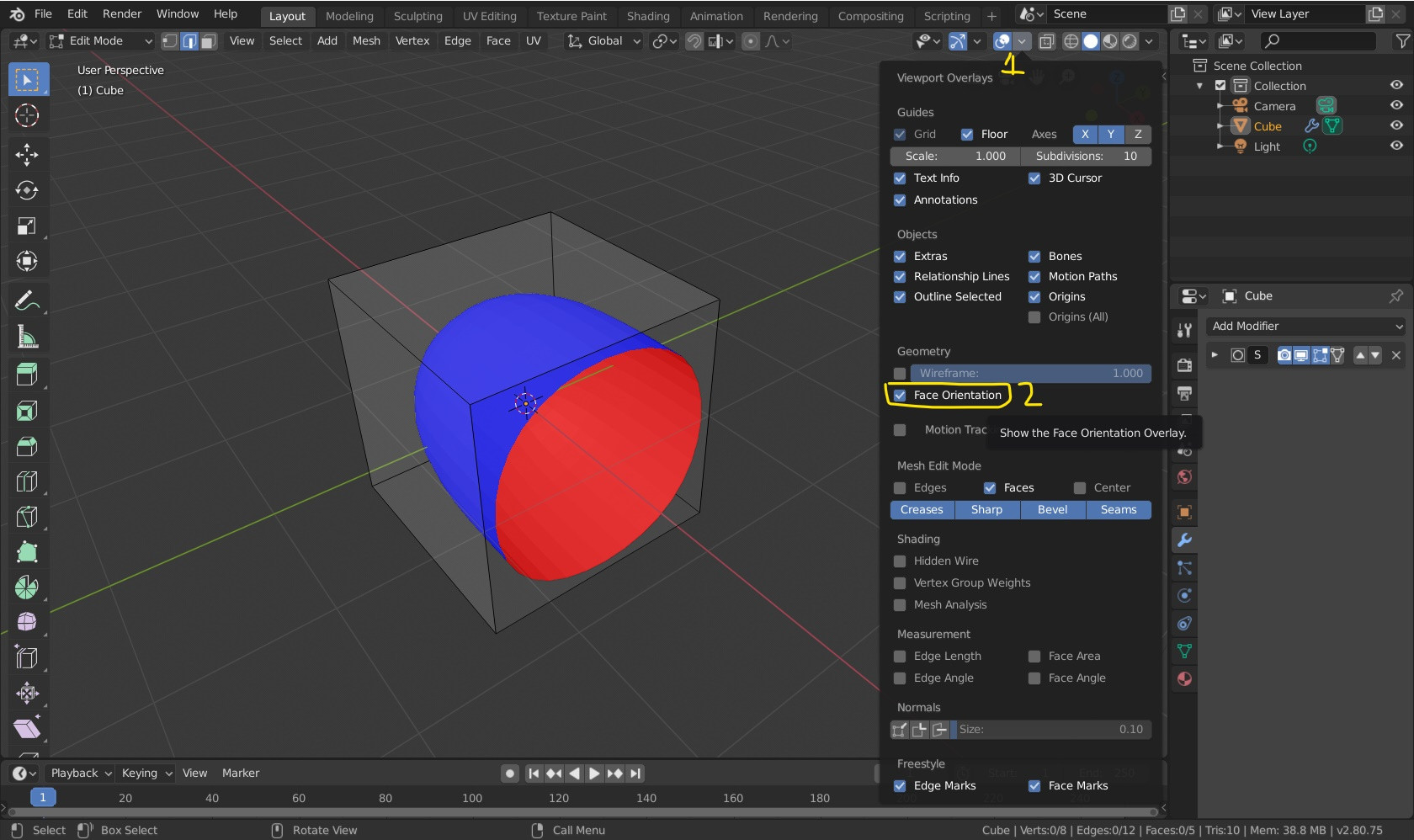
hello, any1 know why these specific faces are "brighter" than the others?
 stuck oyster
could be separated part
or backside and frontsides
or different assigned material
 marsh canyon
Or misaligned Normal
tough surge
stuck oyster
could be separated part
how can i unseparate the parts?
maybe its this
that*
they have no material
or basically no material modifications i believe i have not touched materials in blender ever
stuck oyster
merge vertices
tough surge
tough surge
the backsides are all correct
i mean as in
backface culling is correct
i used face orientations to know which normals
should be outside or inside
could it be the separation part but as in face separation?
marsh canyon
Face orientation does not equal to normal
tough surge
you can separate them by pressing Y i believe its Y
tough surge
marsh canyon
Face orientation does not equal to normal
oh
how could I fix the orientation?
marsh canyon
Alt+N and recalculate
tough surge
marsh canyon
Alt+N and recalculate
but that just brings up the same
recalculate normals stuff
i already did it
Alt + N = recalculate inside/outside
and it does the same
marsh canyon
Then something else is doing it
tough surge
hmmm
i mergeded vertices already
merged*
they have no material modifications
the normals are fine
marsh canyon
Please don't spam Enter so frequently but write in longer post. Also you have a way to edit your post, no need to correct in a post
tough surge
marsh canyon
Please don't spam Enter so frequently but write in longer post. Also you have a ...
oh I'm sorry, my bad I will not flood the channel from now on
 visual thicket
Maybe no shadow at all will be ok
tough surge
tough surge
hello, any1 know why these specific faces are "brighter" than the others?
anyone that may have a solution? normals are correct, vertices have been merged, and no material stuff has been modified
south badge
tough surge
anyone that may have a solution? normals are correct, vertices have been merged,...
That´s just because of shading
 polar fiber
Yeah it's just because you have hard edges
stuck oyster
woeful sluice
Can anyone make the 3D ready model suitable for Arma 3
This is not a request channel. I belive I pointed you to the right channel
 mystic glade
is arma3objectbuilder the current proper alternative to armatoolbox? i noticed the updates on the former are more frequent + armatoolbox threw up an error about an import module when i tried using it on the current version of blender. (i'll be looking into this later, but was curious)
stuck oyster
mystic glade
is arma3objectbuilder the current proper alternative to armatoolbox? i noticed t...
what did you try to import?
both work
so probably issue in what you tried to do
mystic glade
ah i meant this

when i point blender towards the zip file of the addon
arma3objectbuilder imported just fine, so yeah 
stuck oyster
mystic glade
when i point blender towards the zip file of the addon
you may have had wrong version of the armatoolbox
or the zip you had contained double folders
which happens if you download it from the main code instead of release
you can use either though thats fine
they have some differences so if you come up with problems remember to say which addon you use
mystic glade
oh yeah i double checked that, i made sure to not download it as a "zip" from the main repo and instead from the releases aka this

i'm fine with the alternative working (just more familiar with armatoolbox) but yeah
stuck oyster
its also possible its not yet updated to latest blender too
mystic glade
yeah that's my likely thought at the moment
 plucky depot
mystic glade
is arma3objectbuilder the current proper alternative to armatoolbox? i noticed t...
plucky depot
mystic glade
is arma3objectbuilder the current proper alternative to armatoolbox? i noticed t...
Afaik yes
tough surge
south badge
That´s just because of shading
It doesn't matter?
Basically it wouldn't like affect the final product
south badge
tough surge
It doesn't matter?
It doesnt matter at this stage
You'll deal with shading during the uv unwrap
prisma mulch
tough surge
hello, any1 know why these specific faces are "brighter" than the others?
Just to check, are those faces are extruded out of the model slightly?
tough surge
prisma mulch
Just to check, are those faces are extruded out of the model slightly?
its like a face ontop of a face
something along those lines i think
 hazy shell
Hi, So im having a problem when packing my mod when it reaches the P3D it throws an error ModelInfo.MemSphere is not a float, im not sure where its pulling this from
 bold flare
Your mikeros tools might be outdated
 woven solstice
Is there a step by step guide to using the arma3 tools stuff?
My models are almost done
stuck oyster
woven solstice
Is there a step by step guide to using the arma3 tools stuff?
My models are alm...
not exact step by step tutorials.
But you can likely get some ideas from some of the youtube tutorials like ones from El Tyranos and Sokolonko and Battlestad
woven solstice
stuck oyster
not exact step by step tutorials.
But you can likely get some ideas from some o...
Thank ya kindly I'll watch those through and through
 vital hare
I've tried several times to make it invisible with an empty texture but it doesn't work, it's never really invisible.
stuck oyster

 quick widget
Has anyone made a mod restoring this thing? Because it's very neat and I want it. 

I have no idea where it is from. Some friends say it's from some mobile RTS Bohemia did.
stuck oyster
quick widget
I have no idea where it is from. Some friends say it's from some mobile RTS Bohe...
cant say ive ever seen any
the game models cant be edited anyway so completely new one would need to be made
quick widget

I can only imagine this model was built off some kind of long forgotten cut content. I believe this model got added years ago with Malden.
Well if anyone in Bohemia has any long dormant memories sparked back to consciousness by this query, GIMME.  (Please. It's neat.)
 pale valley
Looking at doing my first character - could somebody give me a quick synopsis, how do I make it match the bones - If I make a character and match his pose to the one in the the examples folder, as long as everything is named correctly, would everything be tied to the bones correctly?
 halcyon rampart
Hello there does anybody that know vehicle and PhysX know why a custom vehicle would not slow down slowly when letting go of your controls, i have a vehicle ive been working on and from what ive found my config and PhysX should be fine but my vehicle sharp turns and maintains its speed, my theory is its not pulling my PhysX info.
stuck oyster
halcyon rampart
Hello there does anybody that know vehicle and PhysX know why a custom vehicle w...
tank or car?
have you given it mass in geometry lod?
Have you used the sample vehicles as base reference?
halcyon rampart
stuck oyster
tank or car?
have you given it mass in geometry lod?
Have you used the sample ve...
Tank
Yes i gave it a mass of 41000
Yes i used test tank sample
stuck oyster
halcyon rampart
Tank
Yes i gave it a mass of 41000
Yes i used test tank sample
is it actual tank or something else using tank simulation/not shaped like a tank
halcyon rampart
It's a deimos predator tank using the test tank physX/model config
stuck oyster
k actual tank then.
halcyon rampart
stuck oyster
k actual tank then.
Yes my issue is the idle decrease in speed
stuck oyster
halcyon rampart
Yes my issue is the idle decrease in speed
can you brake/reverse with it?
halcyon rampart
stuck oyster
can you brake/reverse with it?
Yes i can do all movement forwards backwards, brake and turning
halcyon rampart
@stuck oyster if your free in half a hour I can show you in VC
stuck oyster
halcyon rampart
<@150949769953411072> if your free in half a hour I can show you in VC
sorry I got some stuff to do, I'll let you know if I have any tips I can come up with.
Your answers here might give others ideas too.
What you could try is to make your physX settings and the geometry mass of your tank the same the sample tank has
but if you have different amount of wheels youll need to take that into account
halcyon rampart
stuck oyster
but if you have different amount of wheels youll need to take that into account
Gotcha as for my wheels I have 5 and 1 track per a side, my animations are fine, my theory is my physX isn't being pulled but I'm unsure about this
stuck oyster
the sample tank does have different number of wheels I believe so that does need mathing to adjust the values
of course sure you could have other problems with the config too that causes your wanted values to not apply
but usually that manifests pretty strongly
halcyon rampart
Gotcha
stuck oyster
el tyranos might have something close to that
at least for basic steps
no guide covers every small detail you can do
 lone robin
I’m thinking about making some trees, primarily dead or very little foliage, for my terrain and am curious as to what causes the CUP trees to essentially turn white when you’re seeing the distance LODs, I’m just trying to avoid this on my own trees
stuck oyster
lone robin
I’m thinking about making some trees, primarily dead or very little foliage, for...
if they are fully white that indicates missing texture
cant recall ever hearing that happening though
so maybe corrupt download?
lone robin
stuck oyster
so maybe corrupt download?
I haven’t considered that, the past few maps I’ve seen use the dead plants from CUP they are almost a glowing white at a distance
stuck oyster
could be file error or could be rvmat probelm
 reef gate
lone robin
I haven’t considered that, the past few maps I’ve seen use the dead plants from ...
reef gate
lone robin
I haven’t considered that, the past few maps I’ve seen use the dead plants from ...
I have that too, no idea what causes it
reef gate
What's the difference between a pathway and a roadway LOD
 pallid island
Roadway = "Where can i stand"
Path = "Here're rails for AI to move on"
reef gate
can I make the path similar to the roadway or does it have to be narrow
for example I've made this for the roadway

would the path be the same or shrunk down?
pallid island
check the building sample for, well, sample
i assume that edges are the literal rails there
stuck oyster
ai basically walks on the edges yes
edges of the triangles of the path mesh
and path mesh has to face up
and roadway mesh needs to be slightly above geometry mesh
reef gate
How much higher? I’ve done it enough that none of the geometry mesh clips though
Also how would I make the roof?
I have made the roadway LOD for it
Do I need to make a path?
stuck oyster
if you want ai to walk on the roof
reef gate
It has ladders leading up to it
stuck oyster
do you want ai to path on the roof
if yes = need path lod on the roof
everywhere you want ai to be able to walk on, you need path
reef gate
will there be any issues with me copying the roadway LOD for the bits i want the AI to walk on
reef gate
in a big room would the path LOD be one big plane or would it be a path from door to door

is it like this

or this?
 sour bough
What do the "roll" bones in the Arma man skeleton do? Like, what part of the body should that correspond to, I guess
 unkempt token
reef gate
in a big room would the path LOD be one big plane or would it be a path from doo...
unkempt token
reef gate
in a big room would the path LOD be one big plane or would it be a path from doo...
The Arma 3 samples house has a good example of a vanilla Path LOD. It's really just a couple vertices connected by triangles. It looks rather nightmarish, but honestly it's not too bad. The pain in the butt is doing the namedSelections for pos1, pos2, etc. and the fanned geometry for entryways
For the airport structure I made for Korsac here's what the pathway LOD looks like:
 stuck oyster
sour bough
What do the "roll" bones in the Arma man skeleton do? Like, what part of the bod...
stuck oyster
sour bough
What do the "roll" bones in the Arma man skeleton do? Like, what part of the bod...
have you checked what weight groups the roll bones affect on arma man?
they handle the roll of the limb
along its own axis
like when you turn/roll your wrist your elbow dont move
sour bough
So they should be assigned more or less along the limb?
stuck oyster
as it is on the arma man
sour bough
I'll check mister Arma man in a sec yeah
stuck oyster
forearm handles the elbow
forearm roll handles the wrist basically
in that regard the community rigs are made wrong imo
since both arm/arm_roll bones overlap
instead of being after each other
the animating results are basically same
but the bone hierarchy is little bit lost

Ive made mine to keep up the hierarchy
sour bough
Is yours uploaded anywhere?
stuck oyster
no
Ive got some other stuff there too that might not work for everyones tastest 😅
edits like this are not very complex though
I also got all the bones connected via non exporting structural bones to keep them in line for rtm import

the import dont work well on non connected bones most of the time
reef gate
unkempt token
For the airport structure I made for Korsac here's what the pathway LOD looks li...
Why have i gotta make a central nervous system 😭
unkempt token
Real Virtuality™
reef gate
Do I need to make a fire geometry for the building?
stuck oyster
reef gate
Do I need to make a fire geometry for the building?
typically firegeometry might contain some smaller elements that geometry lod might not need
it can be beneficial to have it
reef gate
Wdym? Like do have to create a fire geometry for specific bits for the penetration to function properly?
stuck oyster
reef gate
Wdym? Like do have to create a fire geometry for specific bits for the penetrati...
well yes if you want it to be accurate
depends entirley on what you want to do
for collsions (geometry lod) a wall might be one big block
prisma mulch
unkempt token
The Arma 3 samples house has a good example of a vanilla Path LOD. It's really j...
What is the reason for the entry fan shapes?
stuck oyster
for hit geometry you might want to have different thickness or material parts for it
stuck oyster
prisma mulch
What is the reason for the entry fan shapes?
as far as I know it helps to connect with ground on uneven surfaces and heights
unkempt token
prisma mulch
What is the reason for the entry fan shapes?
No idea, that's just how they did it in the vanilla models so I did as the Romans do
 white jay
can u change the flag patch on the military fatigues in ArmA 3?
like on the MTP Combat Fatigues, it displays the american flag on the arm patches
prisma mulch
If I wanted a breakable window is there a reason to use hit-points over the convex section in the fire geometry?
In a building that is
stuck oyster
prisma mulch
In a building that is
no dont think so
prisma mulch
Thanks
stuck oyster
prisma mulch
Thanks
one thing you can test is if it needs a hitpoint to get explosive damage
but that might be solved with just singular hitpoint per window
prisma mulch
stuck oyster
one thing you can test is if it needs a hitpoint to get explosive damage
I'll have to try that out once I've sorted out the config
 sand night
anybody able to help lil ol me with a uniform mod for a3? Repacked it after repathing some texture stuff and it isn't working at all lmao. Any help would be appreciated
It’s just invisible in game so maybe I pathed it wrong?
marsh canyon
You're doing a Mod in a very wrong way. That is not how it is even supposed to be done
stuck oyster
sand night
It’s just invisible in game so maybe I pathed it wrong?
yeaah you need to look up how retextures are done with hiddenselections. you dont repack mods
thats forbidden
 gleaming tusk
what would cause a shadow lod to only show the entire shadow when another object of the same type is placed?
when the object is alone, it shows some of the shadow
when i put down another it shows every selection, even ones that are meant to be hidden
stuck oyster
gleaming tusk
what would cause a shadow lod to only show the entire shadow when another object...
hiddenselections mistakenly added to shadowlod
you dont hide stuff with hiddenselections

if you need variants
you make separate p3ds
if you need 100s of variants
you go see doctor
cuz thas just craycray
gleaming tusk
stuck oyster
hiddenselections mistakenly added to shadowlod
good lord ill die
good to know 
stuck oyster

need variant p3ds applies to weapons,wearable equipment, and units/uniforms as they dont have model.cfg driven "at will" hide animations to hide the parts
 white oak
stuck oyster
if you need 100s of variants
white oak
stuck oyster
if you need 100s of variants
But muh customizable m4s
stuck oyster
other vehicles (cars, tanks etc) can use hide animations to toggle various cosmetics
 sour bough
Yeah I mean, it goes against the old wisdom but it runs better than RHS
So shrug?
It's not like render time is actually a big part of Arma frame time these days
stuck oyster
stuck oyster
variant madness is a thing 
sour bough
kjw had to regex the several million variants yes
or like, a million
I forget the actual number
It's madness
stuck oyster
probably a lot though 😄 thats all that matters
it sounds great
but in the end its not really needed
sour bough
it's not like, a performance fuckery these days
But also, it's absolute madness to maintain
stuck oyster
few variants can be nice and manageable
sour bough
The "new" way they're doing it is letting it be configured and then letting the mixing and matching be an exercise to the aux modder
I say this as if Siege will come out of his coma and publish the update they're cooking
stuck oyster
theres just always the border cases such practices may cause Id suppose
which personally Id like to avoid
sour bough
I don't currently have a need for five hundred bajillion variants but I do have a kjw to regex it if I ever do
pallid island
there are over 17,750,000 different variations of weapons in Borderlands
 sour bough
that's also a lie lol
 white folio
Hello, I have a problem with my car, everything works perfectly via bulldozer but once in Eden Editor my games crash here are my logs
sour bough
Is it car simulation
 cloud zealot
If i want to create my own grass, i just make a resolution lod and it's ok ? How do i define how the grass will be affected by wind ? What if it's a tree ? I don't want the trunk to move
white oak
cloud zealot
If i want to create my own grass, i just make a resolution lod and it's ok ? How...
Yup just add the named properties to the res lod
cloud zealot
white oak
Yup just add the named properties to the res lod
which named properties ?
white oak
class is the main one you're looking for
cloud zealot
white oak
class is the main one you're looking for
oh thanks !
stuck oyster
cloud zealot
If i want to create my own grass, i just make a resolution lod and it's ok ? How...
grass shader rvmat
cloud zealot
stuck oyster
grass shader rvmat
thanks 🙂
Is it the rvmap that makes grass polygon double-sided ?
stuck oyster
cloud zealot
Is it the rvmap that makes grass polygon double-sided ?
no that needs duplicate and flipped mesh
cloud zealot
stuck oyster
no that needs duplicate and flipped mesh
hmm i see, thanks !
 spring moat
Hey Guys need help
stuck oyster
spring moat
Hey Guys need help
youll just need to ask the question, if someone knows answers they usually write back when they see it
spring moat
i need help understanding arma tools
bc ive got some awsome ideas for a mod but cant make sence of tools
stuck oyster
spring moat
i need help understanding arma tools
since you are on this channel Id assume you are looking to make 3D models?
do you already know how to do that part?
spring moat
not really I'm trying to make custom characters but i cant figure out how to load up a 3d editor or something and or to find templets to edit current models?
stuck oyster
spring moat
not really I'm trying to make custom characters but i cant figure out how to loa...
you cant edit models
but to be able to do 3d models youll have to start from basics
choose a 3d modeling program
like Blender for example
and start learning that
forget Arma for now
those things are far easier to approach once you understand the basics of 3d modeling
and texturing and stuff like that
stuck oyster
👍
spring moat
i just wish i could work with someone who could teach me im a visual learner
stuck oyster
there are a lot of 3d tutorial videos out there
youll just have to invest the time to learning the stuff
(and it may take some time)
but also it can be very rewarding way to create things
and when I say time, its likely going to be weeks or months even not gonna lie
people do go to school for this stuff too
but it is also learnable on your own if you keep at it
spring moat
ok
stuck oyster
repeating practise and studying the tools and tutorials is the way to get better
 plain star
Im not sure if this falls under models or animation
Help please
Model.cfg:
class rotor_blade_1_droop
{
type="rotation";
angle0="rad -12";
angle1="rad -5";
axis="rotor_blade_1_flap_axis";
memory=1;
minValue=0;
maxValue=1;
minPhase=0;
maxPhase=1;
source="engineRPM";
sourceAddress="clamp";
selection="rotor_blade_1";
};
Config.cpp:
class AnimationSources: AnimationSources
{
class engineRPM
{
source="rpm";
minValue=0;
maxValue=1;
animPeriod=10;
initPhase=0;
};
The problem is that the moment rpm is not 0, the blade goes from -12 to -5 within a second
It should be a gradual increase
 charred bolt
plain star
Im not sure if this falls under models or animation
Help please
Model.cfg:
clas...
charred bolt
plain star
Im not sure if this falls under models or animation
Help please
Model.cfg:
clas...
Use rpm source directly in the model.cfg with a suitable maxValue. I'm using translation to bend the Chinook blades (weighted vertices to achieve a drooped curve), but similar effect.
 plain star
charred bolt
Use rpm source directly in the model.cfg with a suitable maxValue. I'm using tra...
plain star
charred bolt
Use rpm source directly in the model.cfg with a suitable maxValue. I'm using tra...
Ohhhh.... Okay, ill try that
i think my blades droop looks good even without a curved droop, but i'm not opposed to having a curved droop either. If i do add, it will a very small curve

It looks like its has a corved droop even though it doesn't
reef gate
do i need a physx geometry for a building or can i get away with only a geometry LOD
stuck oyster
reef gate
do i need a physx geometry for a building or can i get away with only a geometry...
geometry lod can be enough
but sometimes it can reduce physx calculation if the physX lod is done separate and in simpler manner
for example a building you cant drive into might not need the interior geometry for physX collision
grenades collided with regular geometry lod I recall 🤔
charred bolt
stuck oyster
grenades collided with regular geometry lod I recall 🤔
Grenades with physx. People with regular Geo.
stuck oyster
oh grenades were with physx then 😄 well then may not be good to simplify the inerior too much
reef gate
it says i need to simplify the physx compared to the geo, how would i do this?

this is my geo
charred bolt
Reduce the number of objects to 10. Or at least less than 30.
charred bolt
How many sides does a box with no openings have?
 charred bolt
An example building made of 12 objects.

 stuck oyster
reef gate
it says i need to simplify the physx compared to the geo, how would i do this?
stuck oyster
reef gate
it says i need to simplify the physx compared to the geo, how would i do this?
what says?
reef gate
 stuck oyster
if possible
with interiors and since those are needed for grenades it may not be possible
reef gate
i do wanna make it so players can throw nades through this

it added a couple of objects to work around it but i think it'll be ok
 stuck oyster
with the pipes it may be basically impossible to get a throw through 😅
but sure you can have the openings in the geometry
something like this

 stuck oyster
👍
reef gate
 stuck oyster
couple simple components probably wont make much difference
but it is good practice to try to be as efficient with them as you can 👍
reef gate
also for the ladder is it one cube or does each rung have its own collission?
stuck oyster
reef gate
also for the ladder is it one cube or does each rung have its own collission?
how accurate you want it to be
for collision a box is usually enough
if you want grenades go through then for physX you need all rungs separate
but that may not really be needed detail
reef gate
what's it like for the vanilla buildings?
unkempt token
reef gate
what's it like for the vanilla buildings?
In my experience, I usually ask "how likely is a grenade gonna go here for an average player" and almost always it would lead me to do no collision for something that players don't need to be able to run into cause it's more fluid feeling
I don't do separate physx LODs though so grain of salt
stuck oyster
reef gate
what's it like for the vanilla buildings?
its probably just a single box
cant say I remeber trying to throw through ladder
if it was a ladder in an open space then I would have it separate and accurate
if its against the wall it can be just a box
 stuck oyster
reef gate
stuck oyster
reef gate
yes
id maybe have a connection to here

or remove the middle fully
main challenge with pathlods is that when AI is on them it ignores objects placed on there
so if you want to give people possibility to add obstacles/furniture you need to leave space
it might be good idea to have the path lod visualized in the first lod via a toggleable animation too
thats far from standard practice
but Imo would be super useful for mission making
reef gate
 stuck oyster
yeh this probably works alright
I personally have preferred to use the BIs "standard" of triangles, instead of the quads
but I'ves seen both work
reef gate
stuck oyster
I personally have preferred to use the BIs "standard" of triangles, instead of t...
wdym by that
they are triangles
stuck oyster
 reef gate
will be there any difference to me doing it one way over the other
reef gate
stuck oyster
which one is BI?
stuck oyster
left is their commonly used one
 stuck oyster
ive seen both used in modded content
reef gate
what bits do the AI walk on?
stuck oyster
the edges as far as I know
as in from point to point
but its not really 100% accurate, theres some interpolation fuzziness to it too
like AI can decide 10cm off the point that its close enough
reef gate

would something like this work or is it too close to the edge
i wanted to have the one triangle be a position so AI can hold that corner
stuck oyster
if you set the end to be a nubmered "pos" selection yes AI can be ordered there
stuff like this

 stuck oyster
AI can use ladders
for example A3 chimney (SOGPF version)

the se are the paths on different levels

the ladder memorypoints

compared to the paths


 young dust
reef gate
i feel like I've done something wrong
young dust
reef gate
i feel like I've done something wrong
Welcome to Arma 3 
south badge
The first thing he did wrong was installing the game 
 stuck oyster
reef gate
stuck oyster
reef gate
the help connect the entry "in" point to ground on sloped /uneven terrain or when building is sunken down or raised
south badge
Does the toolbox not preserve vertex group information when copying a proxy from one lod to another one?
pretty annoying
stuck oyster
if using automation then probably not
Id wager its not a direct copy but a programmatically created new one
south badge
In case I have a vehicle like this, with 4 launchers in a single weapon, can I somehow make the firing effects spawn at the correct tube based on which one of the four is fired?
Do I need some sort of an EH for this?
 pallid island
inb4 moving proxies/mempoints for effects with revolving or something
sour bough
If it's for just the particles, you can do it with the gun config
If it's for zasleh, you can define the zasleh in the gun I think
And then in animationsources
pallid island
although vanilla "B_APC_Tracked_01_AA_F" does have some code in Fired EH 
sour bough
I think I had to move the proxy and stuff for my tank with alternating guns
marsh canyon
fired = "[_this select 0,_this select 6,'missile_move','MissileBase'] call BIS_fnc_missileLaunchPositionFix; _this call (uinamespace getvariable 'BIS_fnc_effectFired');";```Nyx AA literally have thisBIS_fnc_missileLaunchPositionFix moves the projectile
BIS_fnc_effectFired spawns the effect listed in config of fired ammo
marsh canyon
tldr: script it so you'll see the effect from the right pos
sour bough
iirc I used the missile fix for mine and it caused inaccuracy because it doesn't change the direction of the projectile
So I moved the memory points instead
pallid island
marsh canyon
tldr: script it so you'll see the effect from the right pos
well, it also defines a custom animation source in configfile >> "CfgVehicles" >> "I_LT_01_AA_F" >> "AnimationSources" >> "Missiles_revolving" for back-reference from model.cfg. Yaay for circular dependencies!
south badge
marsh canyon
tldr: script it so you'll see the effect from the right pos
The answer I expected to hear, but did not want to hear 
white jay
In the collar, it just goes trhough it to the base mesh... Collar is extruded from the shirt
marsh canyon
What do you expect on modding scene of Arma 3 then
south badge
I shall outsource this to the correct person immediately!
charred bolt
south badge
In case I have a vehicle like this, with 4 launchers in a single weapon, can I s...
#arma3_config message
For missiles/bullets/rockets it's possible. Use the EH, animate the memory points for firing and effects, manually animate the muzzle flash. But doesn't seem to work as well for cannon - at least no one bothered to try helping me when I asked.
sour bough
I remember having to swap to bullet sim so yeah
south badge
charred bolt
https://discord.com/channels/105462288051380224/122121444703338496/1329208540266...
That´s what happens when a master is asking for help from his padawans
 alpine matrix
is there like a tutorial on geometry/mass? my LAV no longer thinks its a vehicle it became a rock lol
stuck oyster
alpine matrix
is there like a tutorial on geometry/mass? my LAV no longer thinks its a vehicl...
No, but explain in more detail how the problem manifests.
alpine matrix
stuck oyster
No, but explain in more detail how the problem manifests.
i made each component and gave it all mass separately
but when i spawn the vehicle it just floats and doesnt move
everythings animated still proper but the vehicle just wont move
stuck oyster
alpine matrix
i made each component and gave it all mass separately
How much is the total mass?
alpine matrix
10572.748
stuck oyster
Are the wheels and dampers set up?
 stuck oyster
And when you say floats, does that mean it does not fall down at all if you spawn it up in air?
alpine matrix
yes
correct
it also doesnt fall in the water proper it just sits on the water level with the wheels
stuck oyster
Then it's either broken simulation in config or you have not actually packed the mass applied version into your pbo
Most likely anyway
alpine matrix
its just CarX for simulation
and i made sure i packed the mass applied version
i had the mass working originally but i wanted to remake it because it wobbled far too much around turns
stuck oyster
Basically there are 2 reasons why physx object don't fall.
No mass in geometry lod
Not physx type simulation.
stuck oyster
alpine matrix
for simulation you do just mean "***simulation = "carX"***;
Yes
Typos can happen, non unique class names might break by other mods using same name, broken inheritance might mean object isn't what it's supposed to be.
Stuff like those can happen on config side.
stuck oyster
Did you check if the mass is there in object builder
alpine matrix
yeah several times
its there
uh
well i pasted in my old geo
and it still doesnt work
something is very broken and i dont know what it is
stuck oyster
Try delete the geo lod
alpine matrix
stuck oyster
Try delete the geo lod
delete it and pack with no geo lod?
stuck oyster
alpine matrix
delete it and pack with no geo lod?
Delete and add new one
alpine matrix
could it be my Geo Buoyancy too?
stuck oyster
For water floating sure.
 bright echo
do you have valid component selections
stuck oyster
stuck oyster
Then add then new empty geolod
Add simple cube and add mass to that and component selection
alpine matrix
bright echo
do you have valid component selections
yeah i've re-made them several times in OB
bright echo
cuz if theyre not named the game just ignores them
alpine matrix
stuck oyster
Add simple cube and add mass to that and component selection
just a cube with a mass of what like 20000?
i cleared temp files on my PBO project too
had issues in the past with that
but im packing it now with just the new geo and the cube
@stuck oyster did not work
white jay
I have atm a huge prob with the Muzzleflash , i have smoke and light effects but no mZflash texture.. can somebody help me out with that prob?
charred bolt
Make sure all your Geometry LOD's are validated as Kerc says - closed, convex and with each component named "ComponentNN", and each component in the Geometry LOD has mass.
Perhaps show us screen shots of your Geometry LOD and Geometry Phys LOD's.
Remove all LOD properties from ALL LOD's except for lodnoshadow as a test.
alpine matrix
charred bolt
Make sure all your Geometry LOD's are validated as Kerc says - closed, convex an...
the Geo lod was prior A2
as its a LAV from there
not sure if that does much
but it worked for me earlier today
then stopped
i changed 1 number in the mass
charred bolt
Not really sure why you're asking for help when you ignore suggestions and just keep saying it worked and now it doesn't. Simple answer then would seem to be to go back to what you had before, cut and paste from your previous source if you don't understand how to make new geo lod's.
alpine matrix
i apologize, i am actively trying what youre all saying
but im just trying to back track and figure out why it may have broken thats all.
apologies if it came off wrong, its just flabbergasting that one number broke core functionality lol
charred bolt
One number didn't break it ... something else did.
alpine matrix
fair enough
charred bolt
Try to answer all these questions...
- Geo LOD is convex?
- Geo LOD is closed?
- Geo LOD components have named selections "ComponentNN"?
- Geo LOD components all have mass?
- You have removed all LOD PROPERTIES from ALL LOD's?
- You have checked, using the in-game config viewer, that simulation = "carx";?
alpine matrix
can do, give me 1 mike
1: Yes all convexed 2: Yes all closed 3: Yes everything has corresponding selection names 4: Yes, all has mass 5: Yes all properties from EVERY lod is removed 6: yes simulation is carX @charred bolt
charred bolt
Can you repeat the symptoms of the problem - what you see in-game that seems wrong - exactly how you are testing
alpine matrix
for comparison i have 2 other variations of this vehicle(with different components/models for testing)
i test everything in ACE Arsenal, i create zeus, i spawn the vehicle and it floats and is unable to be driven and its unable to be moved BUT everything is animated still; turret moves, gun shoots, muzzle flash works etc.
this is my geo lod

i managed to fix it
lord
so essentially, the Geo Physx lod was broken all i did was repeat what Horrible goat mentioned doing for the geo lod
(delete, save re open p3d file, make new lod)
thank you guys very much for the insight and i apologize for the confusion
charred bolt
alpine matrix
so essentially, the Geo Physx lod was broken all i did was repeat what Horrible ...
What was "broken" about the LOD which wasn't covered by the questions we asked/answered earlier?
alpine matrix
charred bolt
What was "broken" about the LOD which wasn't covered by the questions we asked/a...
I dunno
Everything was proper
Components were marked everything was closed and conceded
I genuinely have zero clue
lone robin
I’m missing some clarity on the shadow volume LODs for trees, more specifically the materials assigned to them. I see in samples that there is material assigned to the SV LODs but SV1 isnt UV unwrapped. Should I assign materials to SV LODs without unwrap or should they technically have a UV Set ?
stuck oyster
lone robin
I’m missing some clarity on the shadow volume LODs for trees, more specifically ...
Leaves should be unwrapped so they can cast shadow from the leaf texture
The trunk does not really matter if it is unwrapped or textured. But the special case of hybrid shadow is the leaves
lone robin
stuck oyster
The trunk does not really matter if it is unwrapped or textured. But the special...
Will SV10 be unwrapped as well for the polyplanes ?
stuck oyster
Yes.
Can't use texture without wrapping
Can't remember at what state the sample tree is in. It's possible it has some issues in it if this was not apparent from it.
 keen lotus
Hey, so I don’t know if this is the right place to ask. But commissioned a model to import into the game (I’d have done it myself but so far I’ve only made 3 donuts and struggled with that LOL). The model is finished but I have no idea how to import it. Would anyone be willing to help? If so, could you send me a DM, don’t want to spam this chat since, like I said, I actually have no idea what I’m doing right now LMAO.
 mortal pelican
anyone know what this issue comes from when importing an .obj

 pallid nexus
Probably one of the faces in the .obj is an n-gon
One way to remove n-gons would be to load in blender, and select by edges of face, then split or triangulate the offending faces
stuck oyster
mortal pelican
anyone know what this issue comes from when importing an .obj
Where's the obj from?
stuck oyster
keen lotus
Hey, so I don’t know if this is the right place to ask. But commissioned a model...
It may not be possible to get anyone gold your hand with this. We do try to answer questions but what you want could be hours or even days of hand holding to get you through all that. So you'll most likely have to try to learn the how to.
Usually it starts from setting up the modding tools and P drive development environment.
You can find simple tutorial on that and miner tools setup on PMCwiki.
white oak
Mostly unrelated but this is the best place to put this
having moved mostly to reforger for making models the thing I miss the most is having HG's support at the obscure bits
doubly so with how reforgers documentation is for buildings
stuck oyster
It's quite different
 rapid ibex
When I press F, the weapon mode button goes down. It works normally in Object Builder.

 mortal pelican
solved forgot ab the naming structure....
south badge
Can someone explain this bit to me? If this armor.rvmat is applied to a firegeometry "blob", what is the actual thickness of this going to be?
 bright echo
the size of the blob
armour.rvmat means the engine will use the physical thickness of the component
south badge
size = thickness?
So its basically terrible to model an IFV / APC FG this way, right?
because it is too thick for a vehicle that is supposed to have thin armour
bright echo
yes its a bad idea to do that
 lyric field
anyone know how to fix error "cannot find object at aligngoober.p3d" -? ive re exported the model checked config and am not binarizing when putting it ingame afaik my config doesnt have any issues
 round bloom
Anyone know what would cause this issue when shooting in-game (shows in .rpt) 20:53:30 Warning: an_glock17\glock17.p3d:0 Error while trying to generate ST for points: 856, 857, 859
20:53:30 Warning: an_glock17\glock17.p3d:0 Error while trying to generate ST for points: 878, 921, 913
20:53:30 Warning: an_glock17\glock17.p3d:1 Error while trying to generate ST for points: 562, 565, 563
20:53:30 Warning: an_glock17\glock17.p3d:2 Error while trying to generate ST for points: 205, 204, 207
20:53:30 Warning: an_glock17\glock17.p3d:VIEW_PILOT Error while trying to generate ST for points: 856, 857, 859
20:53:30 Warning: an_glock17\glock17.p3d:VIEW_PILOT Error while trying to generate ST for points: 878, 921, 913
20:53:30 Warnings in an_glock17\glock17.p3d:shadow(1000)
I assume it is an OB issue
stuck oyster
lyric field
anyone know how to fix error "cannot find object at aligngoober.p3d" -? ive re e...
Probably path is not right.
lyric field
stuck oyster
Probably path is not right.
ive tried adding pboname\aliengoober.p3d to it and same error any idea?
ive also tried fucking up the path intentionally and gave different error being unable to find the object
stuck oyster
lyric field
ive tried adding pboname\aliengoober.p3d to it and same error any idea?
Sound like you may not be doing things in way I can really help with.
Do you use p drive? Is your project in it?
What do you pack pbo with?
lyric field
stuck oyster
Sound like you may not be doing things in way I can really help with.
Do you us...
1 yes i use a p drive and my project is contained entirely inside it
2 arma 3 tools addon builder
its a weird error tbh ive checked multiple things and nothing seems to work
 magic otter
Is there a way to extract 3d model file from an arma 3 dlc? what im trying to do is create a custom LAV and was think if i could use a already made LAV from a DLC (CSLA Iron Curtain) and export the files into e.g blender
 woeful viper
binarization will get rid of ST error
lyric field
magic otter
Is there a way to extract 3d model file from an arma 3 dlc? what im trying to do...
you will have to make a content usage request at the bi email at the top of#ip_rights_violations though if you just wish to reuuse an asset from an existing bi dlc than it is extremly likely to be denied
charred bolt
lyric field
its a weird error tbh ive checked multiple things and nothing seems to work
Try packing with mikero's pboProject instead. You'll likely get a more understandable error message that helps to pinpoint the problem.
lyric field
 ok ill use mikeros
magic otter
I cant seem to find the email?
lyric field
magic otter
Thank youu!!
round bloom
It is binarized...
 foggy finch
Cannot Generate ST Coords: This error comes from a face that was planar-mapped perpendicular to the normal, also known as "stretching". It should be avoided as much as possible, learn how to UV map correctly to avoid this, but isn't a critical problem to fix.
from bisim wiki
in short you have uvmap issues
round bloom
But the problem is it is a pre-mapped model straight from A2 so kek
 carmine gull
You're using the BI MLODs?
It's not impossible that Bohemia's artists at the time missed a spot
stuck oyster
magic otter
Is there a way to extract 3d model file from an arma 3 dlc? what im trying to do...
BI can't give you permission to cdlc files. And no it won't be possible.
 young marten
Anyone knows how can i activate arma toolbox for blender? I deleted the addon by accident and now i cant reactivate it
 stuck oyster
young marten
Anyone knows how can i activate arma toolbox for blender? I deleted the addon by...
stuck oyster
young marten
Anyone knows how can i activate arma toolbox for blender? I deleted the addon by...
Possibly wrong version
young marten
stuck oyster
Possibly wrong version
its not
hazy shell
Anyone know of any guides on how to do shadow lods for models, tried to find some but none seem to be helpful for me to understand
stuck oyster
hazy shell
Anyone know of any guides on how to do shadow lods for models, tried to find som...
Did you make the original model?
hazy shell
A friend made it, and sort of gave up on the model
stuck oyster
hazy shell
A friend made it, and sort of gave up on the model
Then you need to learn modeling.
Just in general
hazy shell
and has given me permission to Try and carry on and i am trying lol
foggy finch
yep ^
stuck oyster
Its same as making anything.
hazy shell
Okay
 broken glade
If I want to use a p3d as a proxy from a dlc, how do I do that? is it even possible? PBO Project always gives me error messages "missing files" and points me to the proxies which came from the dlc.
stuck oyster
broken glade
If I want to use a p3d as a proxy from a dlc, how do I do that? is it even possi...
Building things from proxies is often poor idea. They got bad render distance and they might not position correct Or they might be desig8for animations which won't work.
So what kind of a thing are you trying to make
broken glade
just tried to add some items to the cockpit of my boat (view pilot lod). cigarettes from the sog pf dlc. if its a bad idea I will let it out
 north sundial
Trying to get some blinking lights like on the portable server
"P:\a3\props_f_enoch\Military\Equipment\PortableServer_01_F.p3d"
Any idea what i could be doing wrong? they don't hide at all
            class blinker_blue_1_hide
            {
                type="hide";
                source="timeRndOffset";
                selection="blinker_blue_1";
                sourceAddress = mirror;
                minValue = 0.0;
                maxValue = 1.0;
                hideValue = 0.95;
                unhideValue = 0;
            };
In cases like this, you need to find out whether it's a problem with the model.cfg animation, or in fact something like the light is included in a hiddenSelection or other engine-driven texture swap.
So initially copy the light to a blank LOD and check what named selections are with it.
Then check you have blinker_blue_1 as a bone in the skeleton.
Then change the hide animation to a translation and make sure you can see it moving.
If all that works, you'll be investigating why your specific hide animation is not working properly.
mortal pelican
alr gang i am back!
how do i get floors that are not buggy?
everytime im make a floor using geometry its like supper glitchy when stepping on it in game
mortal pelican
its roadway isnt it
mortal pelican
is road way just very buggy?

anyreason something like this wouldnt work?
i seem to fall threw the bottom part no matter what
north sundial
charred bolt
In cases like this, you need to find out whether it's a problem with the model.c...
Hi there, thank you for the tips I ended up fixing it because it was part of one of the camo selections and I also had an extra } in the model cfg (rookie mistake I know)
 mortal pelican
north sundial
Are your faces reversed?
mortal pelican
north sundial
Are your faces reversed?
no it just seemed like the collision was in the middle, not sure why it was giving me aids
north sundial
Raise it up by like 0.001
mortal pelican
i did
it works now
now im dealing w trying to make an rvmat file
little bit lost
lyric field
mortal pelican
now im dealing w trying to make an rvmat file
best off using jd tools and grad to mass convert to paas
stuck oyster
mortal pelican
now im dealing w trying to make an rvmat file
Rvmat is a text file basically
There are wiki pages that explain it's basics
And default rvmats can be looked at in p:\a3\data_f
Typically things use supershader type rvmat
mortal pelican
Yep just trying to make a glass rvmat
stuck oyster
mortal pelican
Yep just trying to make a glass rvmat
You can check out vanilla glass rvmats as reference.
Many of them might in fact use supershader too.
The transparency is done by alpha channel in the texture
And texture needs to be named with correct suffix (_CA) to keep alpha channel in conversion to paa
Pinned messages here and at #arma3_texture may be helpful
 split lily
I got a quick question:
Is there a guide on what i need to make for a model which i can rig in the Object builder, like LODs, animations and so on and also how to properly rig them up
Also is there a any info on how to optimize models and all, since i want a smooth running game
marsh canyon
Depends on the model you make. What kind of
split lily
In my case: IFV
But im curious about tanks, helicopters and planes
 fallen compass
Hello, could someone help me animate a gun magazine in the reloading animation?
 umbral shuttle
Is there any samples for plane or tank mfds?
stuck oyster
umbral shuttle
Is there any samples for plane or tank mfds?
sample in what way?
the mfd model wise is just the corner memorypoints
umbral shuttle
stuck oyster
sample in what way?
the 2d artifical horizon on blackwasp or for merkava the areas where it has the fuel guage/ammo counter/tank damage on components
stuck oyster
Id suppose you can read their mfd configs
some of that could also be mesh stuff animated via model.cfg
perhpas
umbral shuttle
Okay will peep model cfg 🫡
mfd config is very long tho 😦
stuck oyster
umbral shuttle
Okay will peep model cfg 🫡
mfd config is very long tho 😦
complex mfd can get pretty big yeah
 tawdry vale
Is there a way I can re-path the whole model textures in Object builder, instead of doing one by one?
stuck oyster
tawdry vale
Is there a way I can re-path the whole model textures in Object builder, instead...
the mass texture & material renaming tool accepts wildcard
some\path\1*
other\path\2\*
 elfin bone
Anyone know why my rvmat is making my shovel black? http://puu.sh/miCjX/274f5e8727.png
woeful viper
supershader has 7 stages, not 2
copy a rvmat with supershader form a vanilla object and modify that
also your paths are still wrong...
mortal pelican
you guys see any reasons why this part of the geometry just isnt working?

 runic plover
mortal pelican
you guys see any reasons why this part of the geometry just isnt working?
runic plover
mortal pelican
you guys see any reasons why this part of the geometry just isnt working?
Maybe inverted faces?
mortal pelican
would it matter? im not sure how to change the faces
runic plover
Yes it matters, just select and press W
mortal pelican
in blender ir in ob
runic plover
You can also select all and Structure/Convexity/Structure Convex All
Then it also adds Component01 etc all itself
And to be sure if all works, do the Find Non Closed
And in the 3D View, do the filled view + DX
runic plover
mortal pelican
in blender ir in ob
OB
mortal pelican
its says reverse but nothing visually changes
runic plover
mortal pelican
its says reverse but nothing visually changes
Try to fullfill and + DX in the 3D view then you see what happens

 runic plover
Hmm doesnt look wrong to me looks good so far
mortal pelican
it works, i think its bc i reversed it as u told me initially
thank you for the help bro!
runic plover
Alright 👍
mortal pelican
is there button for convex all to make them automatically named componenet01-xx
charred bolt
mortal pelican
is there button for convex all to make them automatically named componenet01-xx
Structure>Topology>Find Components
 analog garden
chat
anyone tried this? im wondering if it would help to throw on props and stuff that get placed down a lot

i see some messages from about 7 years ago here saying that the wiki needs to be updated 😭
stuck oyster
analog garden
chat
anyone tried this? im wondering if it would help to throw on props and stuf...
BI uses it in some models yes
how much it affects performance, there isnt really any data I think
probably wont hurt
analog garden
is it a probably that's reasonable enough to put the property into a large mod and hope it doesnt break

elfin bone
I am using a 7 stage rvmat and it's red now http://puu.sh/miESK/df43961ec6.png
and black when I move the smdi to any other stage
woeful viper
read the 2nd reply again and do that...
visual thicket
elfin bone
reef gate
Is it possible for me to export a model into arma without mounting a p drive?
I’ve made all of the LOD’s
reef gate
How much storage does the P drive take up?
stuck oyster
reef gate
How much storage does the P drive take up?
well technically 0 but with A3 data unpacked about 38gb
and whatever your own project takes
unpacking a3 data is basically for file reference checks
reef gate
I’m still a bit unclear on what a project drive is, I’ve tried to read up on it but I’m still unsure
stuck oyster
reef gate
I’m still a bit unclear on what a project drive is, I’ve tried to read up on it ...
it represents the game engines internal file structure
so path on P;\some\path in game is root\some\path
or some\path
since root is just a concept, not used in paths
so when you build your project in P drive with right folder structure you can easily know what the file paths will be
and the Arma Tools are built around this system
and sure it can be bypassed with right methods, but that requires more expertise
south badge
Could someone perhaps tell me what I am doing incorrectly?
I am trying to set up the muzzleImpulseFactor for the magazines, but no matter what I do, if I make the recoil more or less adequate when firing forwards, the moment I start firing sideways the recoil is way too high, and it sends the vehicle sliding to the side.
If I make the recoil adequate for sideways firing, it becomes completely unnoticable when firing forwards.
On the whole the recoil also feels quite unnatural, it only seems to move the vehicle in a certain direction. For example if I am firing sideways I would expect the opposite side track to take most of the force, and have the vehicle tilt slightly instead of sliding away.
But perhaps I am missing something? I couldn´t find anything about how is muzzleImpulseFactor linked to the vehicle´s skeleton.
south badge
good question!
let me take a look
Hm, actually, how do I get that information quickly? The components have different mass, I can´t really rely on Blender
As I presume the origin in Blender and the center of mass are two different things
ah apparently getCenterOfMass exists, one sec
stuck oyster
there was a thing for that in Clocks ArmaToolbox I recall
I've just used Object Builder in the past
if you just distribute mass evenly the gravity center usually becomes very high
south badge
Hm, I´d need to somehow visualize these coordiantes

The track components have about 468 mass each, while the rest of the components only have about 8-12 each

so it ought to be pretty low
stuck oyster
🤔
south badge
 stuck oyster
maybe
south badge
I could try lifting it to see what gives
stuck oyster
its probably not related to the recoil though
south badge
Regarding recoil I do not really understand how exactly the forces get applied and to what bones of the model. Maybe it´s just very basic.
As I reckon it ought to interact somehow with suspension, no?
stuck oyster
south badge
Regarding recoil I do not really understand how exactly the forces get applied a...
as far as I know its quite basic yeah
stuck oyster
south badge
As I reckon it ought to interact somehow with suspension, no?
yes
I would however compare with vanilla vehicles
and possibly try vanilla gun on it
south badge
Yeah I´ll take a look. Up until now I always handled recoil via an animation instead
stuck oyster
or vanilla recoil on your gun
stuck oyster
south badge
Yeah I´ll take a look. Up until now I always handled recoil via an animation ins...
that works on things like shaking a mountend MG
but wont work on full frame
south badge
Yeah I have only done statics up until now
south badge
cheers, I will look into it
 empty fable
Can't believe we don't have a single quality AK-12 mod, literally the standard issue russian rifle
stuck oyster
empty fable
Can't believe we don't have a single quality AK-12 mod, literally the standard i...
Ok..
I guess its your turn to make it
https://armedassault.fandom.com/wiki/AK-12_series there is this though

Armed Assault Wiki
The AK-12 is a modern assault rifle designed to replace the legendary AK-74 as the general issue weapon for the Russian army. The weapon introduces many improvements over its predecessors: better...
south badge
empty fable
Can't believe we don't have a single quality AK-12 mod, literally the standard i...
I can´t believe we don´t have a single quality free mod for the Czechoslovak forces in a game made by a Czechoslovak company 
lyric field
i still cant believe we dont a single high quality pike mod pikes were used by so many nations for century's
fallen compass
Hello, could someone explain to me some index or reference of what I have to do so that the magazine inserts itself into the weapon or in this case pistol, I already have all the memories including proxies but it reloads and the hand looks empty
cloud zealot
How do i make a helipad ? I mean i can open blender and add a plane and make a p3d but the plane will not be bended when i place it on the ground. When i place a helipad on the ground, it follows the shape of the ground. How do i do this ?
stuck oyster
cloud zealot
How do i make a helipad ? I mean i can open blender and add a plane and make a p...
it is called decal
theres 2 ways
theres a menu in object builder that can assign vertex flag on the mesh that makes it follow ground surface
or you can use class land_decal named property
as to get it to work as helipad, youll need to inherit the class from the vanilla helipad
split lily
Is there a tutorial on how to rig up an IFV in the Object Builder ?
cloud zealot
stuck oyster
or you can use class land_decal named property
Hmm i see, so the helipad needs to be made of multiple vertex in order to be bended ?
stuck oyster
cloud zealot
Hmm i see, so the helipad needs to be made of multiple vertex in order to be ben...
no it shuold drape the whole face on the ground
most of the time anyway
cloud zealot
stuck oyster
no it shuold drape the whole face on the ground
nice, thanks 🙂
stuck oyster
4 vertex, 2 face square should work just fine
if you want it to cut clutter, youll need also a roadway mesh with same treatment
that can be more complex if you want to manage the shape it cuts
cloud zealot
i see
stuck oyster
class land_decal type is drawn with roads so it has little limited draw distance
the older mesh flag type might have some shading issues with certain shader types
fallen compass
fallen compass
Hello, could someone explain to me some index or reference of what I have to do ...
.


 analog garden

 nova river
Any good guides or resources for importing vehicles into Arma 3?
Ill also need to make some animations for it as well, and not sure where to figure that out
stuck oyster
nova river
Any good guides or resources for importing vehicles into Arma 3?
Ill also need t...
there are some resources on youtube. like tutorials from El Tyranos, Sokolonko and Battlestad that can get you started
there are also the Arma3 Samples on Steam you can study (though some things on them have not been updated)
then there is the BI wiki with all kinds of info
for animating youll want to read the model.cfg and how to animate a model pages on the wiki to begin with
nova river
Ok, thank you!
 rapid tree
hello, how can i export sharp and smooth edges with the p3d export in blender ? in Blender my model looks like it should
rapid tree
empty fable
Can't believe we don't have a single quality AK-12 mod, literally the standard i...
CUP
pallid nexus
rapid tree
hello, how can i export sharp and smooth edges with the p3d export in blender ? ...
With the object builder addon, it was just export p3d, and the sharp and smooth edges were already set
rapid tree
pallid nexus
With the object builder addon, it was just export p3d, and the sharp and smooth ...
but somehow they dont export
it works as fbx
pallid nexus
Don't know
It's been a couple of months since I did anything with the modeling
First one I did wasn't smoothed, second one was smoothed. I think I just smoothed the relevant LOD in blender, and then exported the .p3d
rapid tree
the thing is i had that happen sometimes but i could always fix it with auto smooth, but for this model it dont work
pallid nexus
You could try recalculating normals
Smooth or sharp edges can be set manually, but that's tedious
Applying the smooth by angle node group before exporting might also work
rapid tree
pallid nexus
Applying the smooth by angle node group before exporting might also work
this is what i do, it fixed it for my recent models but not for this particular :/
pallid nexus
Try copying over the stuff into a new blend file?
Seems odd that one particular model wouldn't work
There might be something in the logs in the console window that could help track down the issue
I'm mostly making guesses at this point, since it just seems strange that one model wouldn't behave nicely while others work fine
woeful viper
south badge
Could someone perhaps tell me what I am doing incorrectly?
I am trying to set u...
My personal feeling is that most vehicles in arma (including vanilla) have way too much damping. When your vehicle damping is too high, it's not possible to tilt -> the force has to be caught at the track<->ground connection. (where on top of weird damping, weird friction behaviour of arma physics might come into play... or your settings for the wheels longitudinal/horizontal stiffness).
the suggestion of having perfect damping (you might have seen the formula to calculate damping rate in sample configs and elsewhere online in documentation) is way too much damping to give realistic looking vehicles.
south badge
woeful viper
so it's a combination of circumstances, is my guess. Some you might be able to fix (with some pain) and some that are just due to weird arma mechanics in physics that are not well configure engine side (like friction...)
having such a low center of mass is not helping of course...
south badge
I will tinker around with it, but it is by no means a critical issue
south badge
Is there any trick on how to make a static weapon accessible from any direction? No matter how I place the entry and direction points, the angle for entry is quite narrow.
 twilit seal
Have you tried:
-
Changing the getInOut mode:
https://community.bistudio.com/wiki/CfgVehicles_Config_Reference#...preciseGetInOut -
using named selections instead
https://community.bistudio.com/wiki/CfgVehicles_Config_Reference#getIn....ActionNamedSel
I've been able to do the first but haven't ever tried the second
stuck oyster
the actionNamedSel is not used anywhere in vanilla at least
so it might be deprecated
charred bolt
south badge
Is there any trick on how to make a static weapon accessible from any direction?...
Multiple get-in/out pairs of points, placed along all four sides.
south badge
ohhhhh 
white jay
you should set up you object builder to have P:\ as default for textures, then you do not have problems when packing it to a pbo because you can't P:\my\path\to\something within a packed pbo it should be then my\path\to\something
south badge
I am not sure if this was ever figured out and I am just dumb and stupid, but it seems that if I place the Blender material that has the _ca texture assigned to it all the way to the bottom of the Blender material list, once the P3D gets exported out of Blender the _ca texture will be at the top of the list automatically.
So there is no need to re-sort it every time in OB after exporting from Blender due to some model update
charred bolt
Multiple faces can have the same _ca texture - example, inside and outside glass faces on a windscreen; in such cases you need to individually sort the inner and outer faces and not so easily selected just by texture or material.
 dawn vessel
I’m trying to make a “vehice” which has one gunner seat, where the player will use their normal gun (if possible allow all guns types to be equipped, primary, pistol and launcher) but I don’t know how to setup proxies on a model, so any good guides or advice would be greatly appreciated. This “vehicle” doesn’t need to be drive able, so the best approach for this if you know I’d appreciate your input on this. I am very new to modelling, so break it down as much as possible please and bare with me.
charred bolt
dawn vessel
I’m trying to make a “vehice” which has one gunner seat, where the player will u...
You can base your asset on the StaticWeapon vanilla class.
Your p3d of the asset will have a single Gunner proxy for the player position.
In the config, you'll set the gunnerAction inside the turret class to an FFV animation type and alter the config to remove any (vehicle) weapons and the ability to fire them.
dawn vessel
charred bolt
You can base your asset on the `StaticWeapon` vanilla class.
Your p3d of the ass...
Thanks, how do I setup the Gunner proxies? If there is a guide or wiki that would be amazing
charred bolt
What do you mean by "setup"?
dawn vessel
Do I need to put that in the p3d? Or is that a modelCfg thing?
How does it know where the “player” should be
charred bolt
Your p3d of the asset will have a single Gunner proxy for the player position.
dawn vessel
I may seem stupid, that is likely true, but I don’t know how to do that
charred bolt
So I know what base we're at, have you done any work with p3d's before? Do you have a p: drive set-up and have you built a mod before into game?
dawn vessel
I’ve made a very simple p3d before, it was just a simple box for a hitbox, but assume I’m completely new is the best idea
I used the blender arma 3 tools, and then just duplicated my LOD for all the ones I needed FireGeo, Geo, Phys, etc
I have lots of experience in coding/scripting if that helps at all
charred bolt
Here is a p3d showing a machine gun. The yellow triangle is a proxy for the gunner which purely determines the players position.
The green one is a proxy for the muzzle flash, and there's another for a searchlight volumetric cone.

The gunner proxy has an ID of 001.
Inside the config.cpp code file which describes what the asset is, you'll have a Turret class for the gunner which says what the gunner can do, and it will reference the gunner proxy 001.
dawn vessel
Awesome what software is that, my use case is simple (I hope), the player should just be essentially standing and using their own guns (not a static) I just need my “hitbox” to have a gunner proxy at the [0,0,0] reference in model space
charred bolt
Your project will be made up of a model (p3d), config (config.cpp) and model animations (model.cfg), along with some data files such as textures and materials.
dawn vessel
Config I’m familiar with it’s the p3d that is where I need help
charred bolt
So what is different between "your" player and a normal player in game?
dawn vessel
That’s kind of the point wait one
I’ll show you a video to explain better
This is my update to you guys regarding the zero gravity script and it's progress. You can hopefully see the further improvements since last time
https://www.youtube.com/watch?v=dXO_vM-euW0
Again if you view the description of the video you can see what things I want help with, so any help in that regard would be greatly appreciated
Also this is my next major problem I want to resolve so any ideas how to solve this would be appreciated
How can I adjust a player’s (weaponDirection) aka up/down (pitch) aim direction in Arma 3 while they are attached to an object, so that only their torso rotates—just like normal free-aim—without moving their feet or the entire character model?
Currently, when a player is attached to an object, their aim direction is “locked in,” and using commands like setDirAndUp rotates the entire body (including the feet). I’m looking for a way to replicate the natural behaviour where only the torso rotates up and down, while the player remains attached to the object and their feet stay planted.

DISCLAIMER: The music used in this video is not owned by me. This is a non-commercial usage, and all rights remain with Bungie
Song Used: Deep Stone Crypt Lullaby - Bungie. All rights reserved.
Advanced Zero Gravity Script Development for Arma 3
I am currently developing an advanced zero-gravity script for the game Arma 3. While this project ...
charred bolt
Most models are made in something like blender or 3ds, being finally exported using a plugin toolbox to p3d format, where they're imported to Arma's Object Builder (what you see in my screenshot).
dawn vessel
The wording might be a bit strange as this is a copy paste from a scripting approach
But I’ve investigated and feel faking the players position by having them “in the hitbox vehicle” should remedy my main issue
Basically this project has expanded beyond my knowledge hence my request for helping learn models you might have a better idea and I’m all ears
charred bolt
If you want to place the player "inside" a vehicle, you'll need to choose the most appropriate vanilla vehicle type to inherit for the purpose.
dawn vessel
I was thinking about a similar system to a gunner position in a car, think the base game jeep. Where you can use your guns while standing on the seat
I want to try to emulate that, but with a custom “vehicle”
charred bolt
So a jeep is using a physx car simulation. It will have wheels, an engine, a driver etc and then your gunner position.
dawn vessel
Yeah so I don’t need lots of that stuff, just it being a PhysX object and a gunner position, but unsure if arma modelling would like that or not
charred bolt
A static however, uses a simpler physx simulation, and is designed just for a gunner and a weapon - that weapon can be omitted, leaving the gunner with just FFV.
dawn vessel
So this being more your domain, do you think marking it as a “static” would be the best idea?
charred bolt
You can base your asset on the StaticWeapon vanilla class. 😉
Sometimes the answers are already there 😉
dawn vessel
Thank you if you wouldn’t mind I’d love to pick your brain more about this, as you can likely tell I’m well beyond my current knowledge in this field
that is what I was thinking, but it’s nice to have it reaffirmed by someone who knows modelling more than me
I understand you are likely busy so if you have guides you know about that could help me that would also be appreciated
charred bolt
Quite a bit of info in the pinned messages. Here we can help you with specific questions.
dawn vessel
Alright thanks for your input so far do appreciate it. I’ll come back to you when I’m stuck again
charred bolt
Good luck with it 
white jay
Hey guys, hoping 4 help... we have an Muzzleflash wich is statich (all time visible) exept the supressor in on the weap... were not able to get this thing done // (its the BI GM6 mzflash)
 copper scarab
Is there a guide/process to using 3DS Max instead of blender for A3? I've been trying but so far whenever i import a weighted fbx into OB there's no mesh.
stuck oyster
copper scarab
Is there a guide/process to using 3DS Max instead of blender for A3? I've been t...
no or at least nothing recent.
(then again the fbx import process has not changed in what 15+ years for Object Builder so even old guide would work)
copper scarab
Thanks, i'll dig for older guides
sour bough
stuck oyster
(then again the fbx import process has not changed in what 15+ years for Object ...
Hasn't fbx import been broken for forever? I seem to recall it killing sharps in OB
stuck oyster
sour bough
Hasn't fbx import been broken for forever? I seem to recall it killing sharps in...
FBX needs smoothing groups set up
there may be some tricks requried to get that work right
probably depends also on the what program is used to export the fbx
its not quite as universal format as it wants to be
copper scarab
I've resigned myself to Model in 3ds > setup in blender > OB > done
charred bolt
copper scarab
I've resigned myself to Model in 3ds > setup in blender > OB > done
Most of our (SOG:PF DLC) artists use, or have transitioned to, Blender without issue, so you can be assured it IS possible to use successfully.
copper scarab
oh no doubt i'm just not involved in any major projects so there's no need for me to make that switch
stuck oyster
copper scarab
oh no doubt i'm just not involved in any major projects so there's no need for m...
Blender is also free.
south badge
Can I, in any way, create the possibility of picking different camouflages for distinct parts of the model?
For example, I would like to have different camo variants for the vehicle only, and below them different camo variants for the turret only.
So I can have, for example, a green or desert or whatever vehicle, and on top of it I can select a black / white / whatever turret. For now I can obviosuly only achieve a situation, where the camo of the entire model (vehicle + turret) gets changed.


something like that
pallid island
i'm pretty sure the Garage looks for class TextureSources that only operates on full sets of textures[]= lists, so no nice UI
So only scripting or creating alternative config classes, i suppose? 
umbral shuttle
is it possible to proxy in firegeo/geo for walls of building? Like lets say a simple 4 walled house and proxy out each side.
cloud zealot
Is there any reason a texture is showing up perfectly in object builder but is glitching ingame ?
This is what i see in object builder

And this is whyat i see ingame

The texture is supposed to be displayed on the way OB shows it
i have absolutely no idea where these little white polygons come from. When i look at the texture, there is no white anywhere near these polygons
I tried to modify the texture and the nohq but it doesn't change anything
I think this is a new issue for the feedback tracker
dawn vessel
I'm trying to make this hitbox be a gunner seat, like you are sitting in a vehicle with a gun and able to use your gun, but it just makes the player invisible when they are put into the vehicle I'm very new to this field, so if you have any questions feel free to ask this is my first time trying to setup proxies
https://pastebin.com/RLsZ8Hiu
Pastebin
Pastebin.com is the number one paste tool since 2002. Pastebin is a website where you can store text online for a set period of time.
Currently the hitbox is showing up that's fine but I think my proxy is wrong
charred bolt
dawn vessel
Currently the hitbox is showing up that's fine but I think my proxy is wrong
Put the proxy you added to the Fire Geometry into the resolution LOD 1, and you might also need a View Cargo LOD, which can be a duplicate of LOD 1.
runic plover
cloud zealot
I tried to modify the texture and the nohq but it doesn't change anything
Weightpaint problem of this white thing.. you need correct weightening to fix this
cloud zealot
runic plover
Weightpaint problem of this white thing.. you need correct weightening to fix th...
What do you mean ? How can weight painting have something to do with this ?
stuck oyster
cloud zealot
What do you mean ? How can weight painting have something to do with this ?
its deforming the mesh and possibly pulling out white bits from underneath the black bits
cloud zealot
stuck oyster
its deforming the mesh and possibly pulling out white bits from underneath the b...
Seems pretty much unlikely, texture is properly displayed in Blender and OB, there is no white vertices anywhere near this area
I've send the blend file to you, check your MPs
stuck oyster
cloud zealot
Seems pretty much unlikely, texture is properly displayed in Blender and OB, the...
Are there any textureless mesh?
cloud zealot
stuck oyster
Are there any textureless mesh?
None
As you can see in OB picture, everything displays properly
I've tried everything since yerterday but it doesn't want to work properly
charred bolt
cloud zealot
I've tried everything since yerterday but it doesn't want to work properly
Can you show your config.cpp? (use pastebin.com)
cloud zealot
charred bolt
Can you show your config.cpp? (use pastebin.com)
Pastebin
Pastebin.com is the number one paste tool since 2002. Pastebin is a website where you can store text online for a set period of time.
charred bolt
cloud zealot
https://pastebin.com/r83aYL6m
Not sure you should have the hiddenSelections entries in CfgWeapons.
business_shoes.paa texture is missing it's suffix (_co or _ca)
cloud zealot
charred bolt
Not sure you should have the `hiddenSelections` entries in CfgWeapons.
`business...
indeed i can remove it
i can rename this texture but it won't change anything
charred bolt
cloud zealot
i can rename this texture but it won't change anything
You can do it right or wrong, completely your choice, yes.
runic plover
cloud zealot
As you can see in OB picture, everything displays properly
OB / blender = not ingame with animations
cloud zealot
runic plover
OB / blender = not ingame with animations
The thing is i checked and rechecked the model, it even works fine when i play animation in object builder. It works fine with Armarig too
charred bolt
Usually when it's ok in buldozer, but broken in game, it's because of the config, which is not taken into consideration in the former.
Have you removed that incorrect hiddenSelection yet and tested?
cloud zealot
charred bolt
Usually when it's ok in buldozer, but broken in game, it's because of the config...
Just tested now its still not working
charred bolt
Do you have the original model p3d? Can you check it has the hiddenSelection selection names you think it does?
cloud zealot
charred bolt
Do you have the original model p3d? Can you check it has the hiddenSelection sel...
yes, the hiddelselection names exists in the p3d
cloud zealot
charred bolt
Do you have the original model p3d? Can you check it has the hiddenSelection sel...
If you want to check by yourself, you'll find here a download link to the mod
charred bolt
No, more than enough to do of my own work...
Do the white triangles change colour when you use setObjectTexture on the 3 hiddenSelections with procedural colours?
cloud zealot
charred bolt
Do the white triangles change colour when you use setObjectTexture on the 3 hidd...
No, they stay white
charred bolt
That indicates those triangles are not included in the hiddenSelections then
cloud zealot
charred bolt
That indicates those triangles are not included in the hiddenSelections then
but they are in the p3d
charred bolt
or they're not uv'd
cloud zealot
charred bolt
or they're not uv'd
When i check these polygons on OB, they have a texture. I can't check if they are uv'd in OB but they are in Blender
charred bolt
cloud zealot
When i check these polygons on OB, they have a texture. I can't check if they ar...
Why can't you? OB has a UV editor
cloud zealot
charred bolt
Why can't you? OB has a UV editor
But when i select a face, i don't see it selected in the uv editor
charred bolt
That doesn't make sense. You select a face that you can't see?
Select the face in OB. Open the UV editor. Use the tool to highlight the area on the UV where that face is.
If nothing is highlighted, it probably doesn't have a UV mapping.
cloud zealot
charred bolt
That doesn't make sense. You select a face that you can't see?
i mean when i select a face i don't see it selected in the uv editor, i cannot check if the uv is properly made in OB like in Blender
charred bolt
Cut and paste the offending triangle faces to a new empty LOD. Check the UV. If nothing there, that's the issue.
cloud zealot
charred bolt
Cut and paste the offending triangle faces to a new empty LOD. Check the UV. If ...
when i cut and paste these triangles in a new lod, their uv shows up properly
But if it wasn't the case, i would see it in buldozer
charred bolt
cloud zealot
when i cut and paste these triangles in a new lod, their uv shows up properly
In that case you are mistaken that you can't see their UV's before you cut and paste them out
cloud zealot
charred bolt
In that case you are mistaken that you can't see their UV's before you cut and p...
No, i could see their uvs before, i was just saying there is no highlighting system on the uvs when you select a face to make sure the uv is right where you expect it to be
When i created the new lod, now i could see the uvs was properly where it's supposed to be
I really think that's an engine related issue
charred bolt
Well I gave in and looked at your p3d...
you have mixed up the buttons and camo selections - those white triangles have both selections
cloud zealot
charred bolt
you have mixed up the buttons and camo selections - those white triangles have b...
what ??? really ?!
Ooooh my god !
Thanks a lot for wasting your time on such pointless issue....
should have seen it earlier
round bloom
Do you need to add a memory point for a bipod on a weapon or not?
cloud zealot
That only happened on the first lod, that weird...
stuck oyster
👍
carmine gull
Yep, if only to set where the weapon pivots around when the bipod is deployed: https://community.bistudio.com/wiki/Arma_3_Weapon_Config_Guidelines#.23Bipods
 blazing fox
hey is there a police car p3d that open for changes ?
i want to take a model and change the logo to a different logo
stuck oyster
blazing fox
hey is there a police car p3d that open for changes ?
Don't think so.
Properly set up mod would have retexturing capability
cloud zealot
What does this error means ?
 south badge
What am I doing wrong with the shadow LODs? Thy seem to completely disappear when I zoom out far enough, which is not necessarily an issue when it comes to vehicle exterior, but it makes the interiors extremely bright, which is a problem.
Am I missing some additional LOD?
stuck oyster
south badge
What am I doing wrong with the shadow LODs? Thy seem to completely disappear whe...
shadow draw distance is short
south badge
so is it not skill issue? 
stuck oyster
ambiet occlusions/ambient shadow texture typed ADS/ADS_HQ has one of the channels focused on distance shadowing that can mimic shadow lod cast at distance. not sure if it would work in this or even be necessary.
as to the close up darkness, is your shadowlod a box or have you modeled all the walls to it?
south badge
It originally was a box and I just modelled it out properly, that´s when I noticed the issue for the first time
Since the other vehicles are closed off mostly and I did not notice it
stuck oyster
for closed off things it dont matter
but if you want to see correct shadows in interior youll need all the walls and doors included so they cast shadow properly

south badge
Sounds like something I would rather not do!
stuck oyster
cloud zealot
What does this error means ?
is your addon binarized?
and do you use macros?
cloud zealot
stuck oyster
is your addon binarized?
yes it is, using pboproject
no i don't use macro
stuck oyster
what does config line 85 look like
that is basically the clue to look at
something wrong there that the game cant read
cloud zealot
stuck oyster
what does config line 85 look like
here is the config https://pastebin.com/raNXEg2s
line 85 is
author = "IARTS Studio";
The weirdest thing is the texture is displayed properly
Pastebin
Pastebin.com is the number one paste tool since 2002. Pastebin is a website where you can store text online for a set period of time.
but the game says the is an error line 85 in the texture
here is the texture
stuck oyster
cloud zealot
but the game says the is an error line 85 in the texture
how did you make the paa?
cloud zealot
stuck oyster
how did you make the paa?
using texView and respecting _co thing
the jpg was made with photoshop
stuck oyster
never use jpg as texture format
cloud zealot
stuck oyster
never use jpg as texture format
i'll try with png
stuck oyster
tga or png yeah
jpg compression messes up the textures
probably not related to the issue but as a quality thing
cloud zealot
stuck oyster
probably not related to the issue but as a quality thing
Hmm usually i use jpg because it looks like texview cannot read some png formats
The error is still there, only the line number changed
 sour bough
How are you packing this?
stuck oyster
cloud zealot
Hmm usually i use jpg because it looks like texview cannot read some png formats
normal 8bit per channel rgba png should work
some programs may be saving higher bith depths that png cant use
uncompressed tga is the other option
sour bough
I mean the pbo
stuck oyster
pboProject id assume 😅
charred bolt
cloud zealot
Hmm usually i use jpg because it looks like texview cannot read some png formats
Trailing comma in arrays, line 90 and 108. May not be the problem but is an error.
cloud zealot
charred bolt
Trailing comma in arrays, line 90 and 108. May not be *the* problem but is an er...
thanks
cloud zealot
but the error is still present
stuck oyster
cloud zealot
but the error is still present
just to make sure. its texview from arma3 tools and not texview from arma 2 tools you use
cloud zealot
stuck oyster
just to make sure. its texview from arma3 tools and not texview from arma 2 tool...
Its Arma 3 tools, i'm sure, Arma 2 is not installed on my computer
stuck oyster
cloud zealot
Its Arma 3 tools, i'm sure, Arma 2 is not installed on my computer
just making sure. I guess you could try deleting the file from P temp and maybe even using different name to see if for some reason that particular file does not convert/pack to pbo correctly
or use that file but say 2k resolution version
cloud zealot
stuck oyster
just making sure. I guess you could try deleting the file from P temp and maybe ...
i tried with a 2k resolution and a different name its generating the same error at the same line