#arma3_model
1 messages · Page 25 of 1
 marsh canyon
 iron tundra
It's already installed
 bright jungle
Yeah
 inland pawn
If you are Anu, you can take over for me
inland pawn
iron tundra
It's already installed
ARMA 도구를 열고 예제 유니폼 p3d를 검색하세요.
marsh canyon
(Keep it mind we want to keep the language English for various reasons; if you need a foreign language to talk best to leave English along with your language please)
iron tundra
Which of these is it?
 iron tundra
Okay, installing.
inland pawn
👍
Inside you should see an addons folder
Inside that should be a folder that contains an example vest and uniform
You can import the uniform into blender and copy everything over to your uniform
iron tundra
inland pawn
You can import the uniform into blender and copy everything over to your uniform
Is it possible to DM?
marsh canyon
Basically: Samples have example human body model that can be imported into Blender or such. Fit your cloth, get proper weight, tweak if necessary, export as P3D, use it as an uniform using some config works
inland pawn
iron tundra
Is it possible to DM?
Sure. Though I don’t natively speak Korean. I think @bright jungle might be a better option here
iron tundra
marsh canyon
Basically: Samples have example human body model that can be imported into Blend...
I don't know how to do configuration work
marsh canyon
Alternatively we can either speak easier English or translation-proofed English here so better knowledges can be gathered
inland pawn
Is there a command for the ARMA toolbox link?
marsh canyon
Pinned
inland pawn
https://github.com/AlwarrenSidh/ArmAToolbox @iron tundra make sure you have this installed for your blender

GitHub
Arma Toolbox for Blender. Contribute to AlwarrenSidh/ArmAToolbox development by creating an account on GitHub.
iron tundra
inland pawn
https://github.com/AlwarrenSidh/ArmAToolbox <@792451600090005515> make sure you ...
already i have installed it
inland pawn
Ok, good. Then you can import the sample uniform and your uniform into the same instance. Then data transfer the stuff over from the sample to yours

 iron tundra
Is there a naked man character here?
 inland pawn
iron tundra
Is there a naked man character here?
inland pawn
iron tundra
Is there a naked man character here?
Grab the character example or template
I think example would work best
iron tundra
inland pawn
I think example would work best
Are you opening the p3d file in Blender?


opened
iron tundra
inland pawn
I forget which
How many of these can I delete?
I can't see the character
inland pawn
You shouldn’t need that one. Theres a uniform only one in there
 inland pawn
Uniforms are one piece in a3
There isn’t a pants and top option
Unless you do it through hiddenSelections
iron tundra
okay
I would like to add the pants and top body armor and helmet separately.
inland pawn
Pants and top body are required to be one piece
They’re set on the body by selections
Unless you make separate p3ds with and without
iron tundra
inland pawn
Unless you make separate p3ds with and without
I see. Is it easy to transform pants or tops into P3D?
inland pawn
iron tundra
I see. Is it easy to transform pants or tops into P3D?
Once you have your uniform setup, you should be able to export as p3d with ARMA toolbox
iron tundra
inland pawn
Once you have your uniform setup, you should be able to export as p3d with ARMA ...
Is there any specific work to be done on the uniforms before exporting them to P3D?
inland pawn
iron tundra
Is there any specific work to be done on the uniforms before exporting them to P...
Be sure you’ve moved the selections from the sample uniform to yours so everything will adjust to the ARMA man body
iron tundra
inland pawn
Be sure you’ve moved the selections from the sample uniform to yours so everythi...
Is there a video on how to do that?
iron tundra
I don't know what to do here
 marsh canyon
Move/rotate and propotional editing
iron tundra
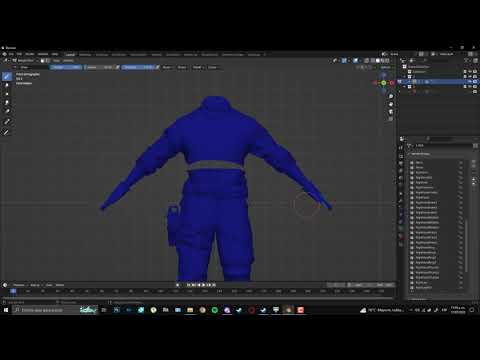
Hello everyone. I hope this quick tutorial helps you.
Twitter: https://twitter.com/Elfishori19
Instagram: https://www.instagram.com/1arma3_artw...
.
.
.
.
.
.
#arma3 #blender #blender
I watched this video and followed it
But I don't know what to do next

 still trail
anyone know if there is a light limit for a model? Got 18 lights on the frigate and i'm getting a CTD
 hollow fulcrum
yes, i think i mentioned that before :P
 west haven
the textures and rvmat seem to line up so I don't think it's that. I got all of that correct this time around
hollow fulcrum
dynamic lights are limited. but if you have 18, they must have increased the limit. which does make me happy on the inside.
west haven
fixed, UV issue
 cyan nebula
Hi guys, do you know how to write model.CFG when you have many helmets of the same type? I thought that each p3d needed its own model.CFG, but looking at the structure of other mods, I realized that this was not the case. In Config.CPP I entered two helmets, but one of them stuck to my ass. How do I make sure that both helmets are on my head? Thank you in advance.


 iron tundra
Where can I get this skeleton?
 west haven
cyan nebula
Hi guys, do you know how to write model.CFG when you have many helmets of the sa...
west haven
cyan nebula
Hi guys, do you know how to write model.CFG when you have many helmets of the sa...
oh for that one i'd suggest like, for the model cfg for the other model of it just go like class Airframe_Tactical3: Airframe_Tactical2 or whatever it inherits from {};
hollow fulcrum
too many will result in CTD's.
still trail
yeah 18 is too many :)
cyan nebula
west haven
oh for that one i'd suggest like, for the model cfg for the other model of it ju...
I'm sorry, I don't understand. I have a ready-made model.CFG for airframe_tactical3.p3d and it works well, but the second version (airframe_tactical2.p3d) is not on my head due to the lack of model.CFG. If you make a separate model.CFG for airframe_tactical2.p3d, then you need to move them to another folder, maybe? Or is it possible to somehow embed several helmets into one model.CFG?
 still trail
another reason to cut up the model
cyan nebula
If it helps, here is the config file
hollow fulcrum
the limit is/was 12/13 i can't recall exactly. one short of what i needed for the MkV, that I do know.
still trail
lol
west haven
cyan nebula
I'm sorry, I don't understand. I have a ready-made model.CFG for airframe_tactic...
okay so what you would do here is after the class airframe_tactical3 you add a class airframe_tactical2 and have it inherit from the 3
still trail
is it per LOD
cyan nebula
west haven
okay so what you would do here is after the class airframe_tactical3 you add a c...
amm... like that?
 west haven
Yeah, it's what i did for my rifles and it seems to have worked fine since they shared everything
might be different for helped but give it a shot and see what happens
cyan nebula
west haven
Yeah, it's what i did for my rifles and it seems to have worked fine since they ...
Oh, I get it, thanks. But I can't do it because of some mistake. I'll try to figure out the pboproject log
west haven
ye
cyan nebula
west haven
ye
omg, it worked, thanks a lot, you really saved me. Once again, thank you very much! 💖 💖 💖

 west haven
ur welcome bro
 stuck oyster


 stuck oyster
west haven
oh god and i figured out how the audio works
oh
oh no
i turned the binarizing off
the sounds work but now
what in the fuck
 stuck oyster
west haven
i turned the binarizing off
stuck oyster
west haven
i turned the binarizing off
result of this 😄
stuck oyster
no no
west haven
and if i don't i get fucked animations and sound
stuck oyster
if you binarize and fix whatever breaks sounds it works
west haven
Hmm
west haven
Yeah
stuck oyster
what file format did you use?
west haven
I talked to a friend who also does modding and he said don't binarize it
stuck oyster
 west haven
stuck oyster
what file format did you use?
west haven
stuck oyster
what file format did you use?
I tried wav and wss, I had LAxemann helping me out
stuck oyster
hes good with sound stuff but Im gonna insist not binarizing sound pbo cant be the answer
 stuck oyster
sure that works
Im fairly sure you should be able to binarize sounds too though
but if it works then it works
west haven
personally i find this funnier so it stays
 celest arch
anybody using quixel2 now?
 cursive sleet
If anyone is using quixel can they stream it? just wanna see how the nr2 is
celest arch
I have a problem with it, loaded an obj and it's just one layer in Blender. Although, quixel sees it as 2 texture sets and splits it
it's adding half of the model as "defaultobject"
 last spindle
you need to apply the same material to the entire object in Blender i would guess
celest arch
ah crap materials is what I use for the ID map
I try unchecking "write materials" in obj export settings
yup that works, thanks
mmm still have some problems with 3DO
Blender: http://i.imgur.com/TwZkpXN.png
any ideas?
last spindle
OBJ? the export settings, make sure it is on triangles, and probably other things, but mainly triangles
celest arch
well mesh is triangulated in Blender
west haven
Oh yeah, as a curiosity when doing a red dot sight like the Aimpoint ACRO, would there be three flat surfaces (one for the rear of the sight and two for the front) to simulate a window looking in, or would there just be two?
 stuck oyster
Id guess typically you would have just 1 surface for each direction
using more can perhaps work too but overlapping transparent surfacea are always more performance heavy
last spindle
hmm i was thinking those triangle were missing, it seems that the edges were lost, it will be something in the OBJ settings, but no diea what blenders settings even look like
west haven
understandable
I was thinking about trying to emulate the blue tint that red dots have
 umbral shuttle
for this, is there a setting in object builder to allow a 4th digit after decimal?
 stuck oyster
umbral shuttle
for this, is there a setting in object builder to allow a 4th digit after decima...
stuck oyster
umbral shuttle
for this, is there a setting in object builder to allow a 4th digit after decima...
what are you doing exactly? 😅
and why in that menu
and no theres no option for that
Id recommend doing whatever you try to do in source model
last spindle
ok, that is weird then
umbral shuttle
stuck oyster
what are you doing exactly? 😅
u know how for grenade launchers u need to make the memory points for each zeroing cause shell simulation doenst auto adjust for angle.
stuck oyster
yeh?
hollow fulcrum
i was about to say just that. why not try import blend file ;)
umbral shuttle
well that is why I wanted the 4th digit so I could maybe try and do some math to calculate where the memory points would have to be
but well that idea kinda feel apart since I am unsure how to calculate what angle is needed given muzzle velocity of the shell and how far it should go
hollow fulcrum
3DO2 does not like models with UV issues (just FYI), creates similar visual effects or nothing at all.
or lacking UV's..
stuck oyster
I recall once doing a shoot test in live game with script calculating at what angle was I looking up
and then using those angles as starting points for eyeposition angling
or you can just give some angles and run it in game, see if it fall short or long and adjust the positions a bit
umbral shuttle
stuck oyster
or you can just give some angles and run it in game, see if it fall short or lon...
that is where I am at, and ooooof its kinda tedious 
hollow fulcrum
is known, being fixed for the 'lacking uvs' bit. might already be..
celest arch
fairly sure UV is fine on this
I don't see any major problems in the AO bake image I linked before
hollow fulcrum
i can try it if you want, so far everything i have has been fine. bar 'known' issues, and a couple im trying to repro now.
celest arch
yeah sure!
 grizzled halo
west haven
I talked to a friend who also does modding and he said don't binarize it
grizzled halo
west haven
I talked to a friend who also does modding and he said don't binarize it
bad friend
grizzled halo
west haven
I was thinking about trying to emulate the blue tint that red dots have
adjusting your rvmat specular will help you with partially transparent textures if thats what you are tying to do
west haven
hmm, I'll do my best to remember that
currently working on the handgun itself before i go wild with optics
 twin cipher
anyone know if no-cull is possible on models / textures?
please ping when u respond 😄
 real crow
Hey peeps, i have to port an aa system like the s-75, and i was wondering how should i proceed with it? I thought to make it work just like a rocket launcher which has its mag as proxy, since the rocket should be visible in its static position and then when firing the "fly model" will take the place. Of course i need to switch the weapon, magazine and ammo class to the missile ones. Am i on the right track?
stuck oyster
twin cipher
anyone know if no-cull is possible on models / textures?
what does no cull mean?
twin cipher
objects always draw on the camera
stuck oyster
when is it not drawn on camera?
twin cipher
when its hidden behind another object 😄
stuck oyster
yes for that there are named properties that can be used
occlusion is the term used in arma context
twin cipher
hey, thanks!
west haven
oh also potentially silly question but how are tritium pistol sights etc done? is it from the SMDI or is there another property
stuck oyster
west haven
oh also potentially silly question but how are tritium pistol sights etc done? i...
emmissive property of rvmat
the dots need to be given their own rvmat for that
west haven
oh wew
I suppose that isn't so bad
I might approach it more when it's time to handle that part, im currently more hot on the heels of doing up my pair of handguns
 stuck oyster
there are also ready glowy materials you can use straightaway in a3\data_f\lights

like these
west haven
Hmm, I was considering these being part of the NOHQ but- oh shit

I think I'll cross that bridge when i get to it tho, but big cheers for letting me kno- ohhh would it be like
a little flat face or something that is only the light?
stuck oyster
yeah that works
iron tundra
I don't know how to transform the fbx outfit into the Arma outfit. Is there anyone who can guide me from start to finish?
west haven
Use the ArmaforBlender
 mossy mulch
pins
 main jasper
Good morning everyone.
Having an issue with my selector switch animations. When checking them in the Object Builder, they appear to work perfectly fine, however in game, the selector switch appears to rotate around an axis that is on the floor and not actually in the weapon.
It is like the axis in the memory LOD doesn't actually move with the weapon and is glitched into the ground or something. Any ideas?
class safety_mode_rot
            {
                type="rotation";
                source="weaponmode";
                selection="Selector";
                axis="selector_axis";
                sourceAddress = clamp;
                minValue = 0.0;
                maxValue = 0.25;
                angle1=rad 90;
                angle0=0;
                animPeriod = 0.0;
                initPhase = 0.0;
            };
            class safety_mode_safe_rot
            {
                type="rotation";
                source="weaponmuzzle";
                selection="Selector";
                axis="selector_axis";
                sourceAddress = clamp;
                minValue = 0.99;
                maxValue = 1.0;
                angle0 = 0.0;
                angle1=rad -90;
                animPeriod = 0.0;
                initPhase = 0.0;
            };


 white oak
main jasper
Good morning everyone.
Having an issue with my selector switch animations. When...
white oak
main jasper
Good morning everyone.
Having an issue with my selector switch animations. When...
Could try defining the axis as a bone and attaching it to something
Or use rotx/y/z w/o an axis
stuck oyster
does the weapon model have autocenter 0 property?
is the skeleton isDiscreet 1 or 0 ?
@main jasper
 short marsh
I had issues with the M4 style selector switch. Maybe it was just noobness or the game didn't like it, but I abandoned it. Though it should rotate around the axis as normal.
west haven
quick question regarding magazines
what other LODs do they need apart from the usual?
like, do they need geometry etc?
west haven
cheers bro
short marsh
Also for giggles, you can dreate a Ground model (I think I messed up here, just waking up), but the ground model I just uploaded. I'm not doing too hot this morning
Haven't had any caffeine so I'm a bit sluggish. But the first model is the ground model (as laying on the ground), and the second model is the actual model for the weapon
Where do I install the Arma Toolbox files in Blender?
white oak
short marsh
Where do I install the Arma Toolbox files in Blender?
Settings > addons > install from zip
short marsh
Thanks
west haven
that explains a lot i was wondering why
west haven
what does this one mean?

got it while trying to export my magazine
nvm figured it out
do i need a model.cfg for the rifle magazine if nothing in it is animated?
west haven
yeah i think i need a model.cfg, but what does one for a magazine look like?
 stuck oyster
west haven
yeah i think i need a model.cfg, but what does one for a magazine look like?
stuck oyster
west haven
yeah i think i need a model.cfg, but what does one for a magazine look like?
pretty much same basics as weapon has
skeleton for parts that move
inside the magazine
west haven
Not gonna have any moving parts
stuck oyster
section for camo selection
thats about it
If you dont have hiddenselectiontextures(camo etc) or moving parts I dont think you need one
you can animate the proxy to move with the guns animations
magazine might have animations to hide bullets when its empty and stuff like that
 west haven
so keep that blank>
west haven
is there a default magazine or nah

 bright echo
https://community.bistudio.com/wiki/Arma_3:_Magazine_Proxies theres some at the bottom of this page
west haven
the google drive ones? Huh, I didn't see this before
cheers man i didn't scroll down far enough on that one to see it since i thought it was the proper config stuff
huh, for some reason the textures still aren't applying. The model is working though at least

SO BACK
stuck oyster
bright echo
https://community.bistudio.com/wiki/Arma_3:_Magazine_Proxies theres some at the ...
fantastic!
stuck oyster
bright echo
https://community.bistudio.com/wiki/Arma_3:_Magazine_Proxies theres some at the ...
 potent locust
Hello everyone, can someone explain how it's possible that my model in the object builder looks normal with textures when I viewed in buldozer, but in the game I get a model without textures? Changing the texture doesn't seem to affect the display in the game... hm
 waxen moon
Been experimenting a bit.I have made up some runway pieces using the Arma 2 pieces as a base to work from.I have been tinkering around for years trying to find a way to mod arma to adjust the runway/taxiways to be visible from further away.But i havnt found any classes or code to do it.Looked thru the core data files and no luck.What ive done this time is tried not using the class road inside the runway pieces.Works great.The runway pieces go by the object LoD's.But..The pieces dont reflect/refract light correctly even when baked into the terrain.Anybody know of a different class i can use iin the p3d to enable the correct lighting effects.Note, during day time everything is great.Its only when vehicle headlights are moving across them do the runway pieces without class roadway have this issue.Any ideas welcome.:)
Thanks!
waxen moon
 inland pawn
potent locust
Hello everyone, can someone explain how it's possible that my model in the objec...
inland pawn
potent locust
Hello everyone, can someone explain how it's possible that my model in the objec...
Does your model have hiddenSelections setup?
stuck oyster
potent locust
Hello everyone, can someone explain how it's possible that my model in the objec...
Do you get error message in game?
Missing texture usually indicates path to texture does not match folder structure inside the pbo
 neat iris
Hiya, im trying to use an already existing model to import into arma.
Ive found a decent tutorial for all that,
but as im a complete newbie to blender, is there a blender guide on how do i split the model into vertex groups for animating
white oak
neat iris
Hiya, im trying to use an already existing model to import into arma.
Ive found...
Blender's own vertex groups tutorial in yt
Toolbox also has a thing for creating vertex groups but thats more useful for creating groups of similar faces ie. Windows_1/2/3 etc
neat iris
Oh damn didnt even think about that,thanks!
Trying to split a gun so not many similiar faces
 main jasper
stuck oyster
is the skeleton isDiscreet 1 or 0 ?
main jasper
stuck oyster
is the skeleton isDiscreet 1 or 0 ?
isDiscrete = 1;
 icy dirge
Why do i keep having this error ? Store_f\texHeaders.bin
1 File(s) copied
1 file(s) copied.
1 file(s) copied.
1 file(s) copied.
1 file(s) copied.
potent locust
inland pawn
Does your model have hiddenSelections setup?
Nope, it doesn't have
potent locust
stuck oyster
Do you get error message in game?
Missing texture usually indicates path to tex...
No, there are no error messages in-game. As I mentioned it looks fine in Buldozer, which indicates that all texture paths are correct 🤔
And pbo archive was packed using mikero
 plush forge
Anyone ever had buldozer stop providing you with the missing texture warnings when appropriate?
 charred bolt
plush forge
Anyone ever had buldozer *stop* providing you with the missing texture warnings ...
charred bolt
plush forge
Anyone ever had buldozer *stop* providing you with the missing texture warnings ...
This?
 plush forge
Huh. Never paid proper attention to that menu before. It was unticked for me. And I was mucking about with my P drive/Arma 3 Tools yesterday. Maybe that will do it.
Doesn't appear to be it sadly. Very weird. It's the path/to/my/cool/texture.paa can't be loaded message, that doesn't seem to want to pop up anymore even when a texture can't be loaded/is missing.
stuck oyster
now that you meantion it, I have not seen that error for quite some time either even with bad paths
 turbid pollen
Anyone have good resources for developing a mod that adds a rifle? I bought a model of a KAC KS1 (The new L403A1), and I wanna make an Arma mod that adds it
stuck oyster
turbid pollen
Anyone have good resources for developing a mod that adds a rifle? I bought a mo...
there are the Arma 3 samples on Steam you can use as reference
and tutorial series from El Tyranos, Sokolonko and Battlestad that can give you some starting points
turbid pollen
stuck oyster
and tutorial series from El Tyranos, Sokolonko and Battlestad that can give you ...
Do you have links to those? 🙂
stuck oyster
no
inland pawn
turbid pollen
Do you have links to those? 🙂
As long as you own ARMA 3, it’s in your library
neat iris
anyone know in arma 2 samples where to find the backpack models? looking to port them for my own use
marsh canyon
Weapons_E\AmmoBoxes and such
turbid pollen
inland pawn
As long as you own ARMA 3, it’s in your library
was mainly meaning about the tutorials
but im struggling a bit here. im trying to follow this tutorial but a lot of the stuff being said is just going over my head lol
 civic stratus
can someone do an animation like this one? http://imgur.com/gallery/1g0fVuh
turbid pollen
If I'm trying to make my model for the KS1 using Arma Toolbox in Blender, is there any official documentation or anything anywhere?
Basically, I'm struggling to find any way to add selection sets because the model isn't one big model, but a collection of smaller objects in Blender
 marsh canyon
Do you mean you need to merge into one?
turbid pollen
Ah, new issue. Getting this when trying to export all my LODs as one P3D
 stuck oyster
turbid pollen
If I'm trying to make my model for the KS1 using Arma Toolbox in Blender, is the...
stuck oyster
turbid pollen
If I'm trying to make my model for the KS1 using Arma Toolbox in Blender, is the...
You need to add vertex groups. Separated objects don't matter, the exported can combine them into single lod on export as long as all objects are marked to be same lod.
But also no there is not much documentation
stuck oyster
turbid pollen
Ah, new issue. Getting this when trying to export all my LODs as one P3D
As for this, well, it does not really say my unfortunately
hollow fulcrum
ermmm dunno.. but the "That's some Beijing levels of draw distance." comment i found funny.
supposing you could if you really wanted to.
neat iris
Anyone willing to import a model into basically .p3d ready mode from blender? I can pay a small amount if needed(DM)
stuck oyster
neat iris
Anyone willing to import a model into basically .p3d ready mode from blender? I ...
The importing part as in using ArmaTools can't be paid for as those tools are non commercial use only
You can use #creators_recruiting to ask. The template is in the pinned messages there
neat iris
cheers, didnt see that channel
 kind yacht
Hello,
I'm having a problem that my object texture is not loading in when close to the object, from a distance it looks like the texture is loading. When i view it in the object builder its shows the texture with no problems.
Screenshots and config for reference.


 marsh canyon
Well it's too obvious to point but are you sure your model shares same selection name?
stuck oyster
kind yacht
Hello,
I'm having a problem that my object texture is not loading in when close...
Does it have multiple resolution lod levels?
marsh canyon
The OB screen says so
stuck oyster
Ah didn't click the pic. Mobile shows it so small
Thanks @marsh canyon
Then most likely the 2nd lod does not have the texture assigned or the selection camo is not present like polpox mentioned
The model should have a default texture and material assigned.
kind yacht
Is that different from this screenshot of blender?
I did assign the textures in there.
I must add that this is the first time for me so im not known to all the ins ans outs of modeling 😛
 marsh canyon
Hidden Selection Maker actually, does nothing (at the moment, also AFAIK)
So, make sure your Vertex Groups are all correct
kind yacht
For the different LODs i copied the first and decimated the model to have les verts.
Also im not sure if it is needed, but because i wanted to animate the lid i have 2 extra vertex groups for only the body and the lid. Could that cause issues?
marsh canyon
No but camo Vertex Group should cover all of the polys you want to retex
As long as the Vertex Group (in Blender)/Selection (in Arma 3) are not included in your Skeleton (model.cfg) it shouldn't be a concern
kind yacht
Oke the model has the camo and camo_signs vertex group with all the polys.
however, my model.cfg has the camo and camo_signs included. If i understand it right that could be an issue?
marsh canyon
Well the thing is relevant with CfgSkeletons not CfgModels
kind yacht
oh right, i was looking at cfgModels. My bad
marsh canyon
Oh wait you've already posted CfgModels 🤔 anyways
So the thing is, your closest LOD has the issue, right? I think I want to do these to make sure what can be the issue:
- Make a simple box/some polys in visual LOD(s), without having any texture/materials in your closest LOD, so you know the LOD itself is showing properly
- Make sure every visual LODs have the same name (probably you need to make sure upper/lower cases too, can't recall if it is case sensitive) for the texturable parts
last spindle
imagine going to the trouble of doing that, and then realising the magazine is empty.......great reload, but you got no ammo
hollow fulcrum
lol i also noticed this. did a decent job of giving a weapon some character though, the last few seconds was good.
grizzled halo
multimats require different vertex groups/selections right? Or can it be used to assign multiple materials to a single selection that requires different rvs?
marsh canyon
A polygon can only have one texture/material, if you mean that is the question
stuck oyster
grizzled halo
multimats require different vertex groups/selections right? Or can it be used to...
Selections play no part in what texture, material is assigned on a mesh
Selection might affect a part of mesh and it's texture through hiddenselectionsTexture setup though.
But that is different from what is assigned on a mesh
grizzled halo
marsh canyon
A polygon can only have one texture/material, if you mean that is the question
yeah, pretty much this. thanks
 obtuse rain
Looks like https://www.youtube.com/user/HyperMetal101 's work.
Which is similar acid-trip level as deanosbeano's YouTube channel.
 crude knot
Struggling figuring out hidden selections. I know how to make a vertex group but don’t know what the bones are or wether I can bind something to one and name the vertex group differently (as I’ve seen some mods do), how to make separate selections for the same object, or how to get multiple textures to work for one object
stuck oyster
crude knot
Struggling figuring out hidden selections. I know how to make a vertex group but...
hiddenselections related are separate thing from bones called sections
And typically a hiddenselection vertex group covers all of what a single texture covers
That selection can incorporate multiple animated selections stied to different bones
crude knot
stuck oyster
And typically a hiddenselection vertex group covers all of what a single texture...
Oh ok. So would I just duplicate the model but with different selections in the same p3d to make another hidden selection?
stuck oyster
crude knot
Oh ok. So would I just duplicate the model but with different selections in the ...
No
Nothing is duplicated
You can check out Arma3 samples and the sample character for reference
crude knot
I think I’m starting to maybe understand. So, in the model, I would include the bones as vertex groups but I would keep the model under its own vertex group, and can path multiple textures/rvmats to the same vertex group? Sorry to keep bothering you, relatively new to all this
stuck oyster
crude knot
I think I’m starting to maybe understand. So, in the model, I would include the ...
Sure the whole model can be one vertex group that is used for hiddenselections purpose
crude knot
Ok. And if I wanted to make another selection, I would make a new vertex group including the stuff I want in that selection?
stuck oyster
Yes.
crude knot
Thanks a ton for the help, really saved me a headache
stuck oyster
But hiddenselections groups must not overlap with each other
crude knot
stuck oyster
But hiddenselections groups must not overlap with each other
What do you mean?
stuck oyster
Can't have same parts of mesh in multiple hiddenselections groups
crude knot
Ah
 white jay
ran into this issue where the selection tab (not sure what its really called) is gone by accident

ie i accidentally removed that one tab where you can select either a single vertice of entire mesh
again i dunno whats its called
is there a way to bring it back?
stuck oyster
white jay
is there a way to bring it back?
Toolbar and menu boxes can be toggled in the top bar window menu
Some do have keyboard shortcuts to toggle them
Which is why they might get lost sometimes
white jay
fixed it thank you!
neat iris
whats the best tutorial for one looking to export a weapon model from blender to arma? as in-depth as possible
what ive found so far is either misses a lot of info, is outdated or the accent of the person is half the time hard to understand
stuck oyster
neat iris
whats the best tutorial for one looking to export a weapon model from blender to...
I think that is what we got I'm afraid.
neat iris
ah shit, guess ill have to try and figure it out with those
neat iris
the model needs to be correctly sized/aligned in blender, right?
real crow
neat iris
the model needs to be correctly sized/aligned in blender, right?
You can use the arma samples to check the position
stuck oyster
neat iris
the model needs to be correctly sized/aligned in blender, right?
Yes.
stuck oyster
real crow
You can use the arma samples to check the position
The sample is pretty good starting point but depending on what kind of stock a gun has the model may need some moving around in its model
After that alignment is done, the weapon animation can be made for it
neat iris
neat! time to try and figure out how to add animations
stuck oyster
neat iris
neat! time to try and figure out how to add animations
I recall there is a simple guide in #arma3_animation pins
neat iris
damn, thats an old video, but eh ill propably stick to using vanilla arma animations if i can rather than making my own
stuck oyster
neat iris
damn, thats an old video, but eh ill propably stick to using vanilla arma animat...
Arma is old game.
Video age does not really change the technique
Only thing that may change is location of some buttons in programs (blender update)
But the buttons are not really hidden.
Even some OFP time tutorials are still valid
neat iris
yeah the blender ui is the only confusing thing but ill find my wau
main jasper
main jasper
isDiscrete = 1;
Any ideas my guy? @stuck oyster
stuck oyster
main jasper
Any ideas my guy? <@150949769953411072>
what was this again 😅
main jasper
main jasper
Good morning everyone.
Having an issue with my selector switch animations. When...
@stuck oyster
real crow
Hey peeps, how can i make my custom rocket to revolve around its own axis when launched? Is out there any example i can look for?
charred bolt
real crow
Hey peeps, how can i make my custom rocket to revolve around its own axis when l...
.
class rocket_rotate
{
source = "thrustTime";
type = "rotation";
selection = "rocket";
axis = "rocket_axis";
minValue = 1;
maxValue = 65;
angle0 = "rad 0";
angle1 = "rad 36000";
};
real crow
charred bolt
.
class rocket_rotate
{
source = "thrustTime";
type = "rotation";
se...
Thanks 🙏🏻
stuck oyster
main jasper
<@150949769953411072>
do you have soft weighting selections to need isDiscreet 1?
if not (all weighted selections are 100%) then you need to use isDiscrete 0
main jasper
No, all of them are weighted
charred bolt
main jasper
No, all of them are weighted
Remind us what your autocenter property is set to?
stuck oyster
that too is solid question
charred bolt
You already asked it, but I didn't see an answer
charred bolt
and could explain why it works in buldozer and not in game
stuck oyster
starting to have its own gravitation field
charred bolt
When you have an Arma question and the only answer you can find by searching back is from yourself, you know you're doing something right/in big trouble/beyond hope
main jasper
Yeah forgot to put in the autocenter = 0 property. Doing so now and I'll check and get back to you
charred bolt
Taking bets for a fix message in 5...4....
main jasper

 charred bolt
Confirming once again that HG is the GOAT
main jasper
Goat energy for sure
 west haven
Also just curious, Headgear/Facewear needs a modelled skeleton to work properly right
marsh canyon
Headgears and facewears uses pretty much same skeleton with regular characters
west haven
Ah, is that in the Samples?
white oak
west haven
Kinda wanted to model my favourite set of earphones since they cute
Comtacs with cat ears
grizzled halo
just remember to weight them to the head selection and use autoCenter = 0 to avoid crotch head pieces
 woeful viper
with sounds its even better^^
 pallid cape
Do position proxies need to be included in the ViewGeometry lod?
I noticed in the Samples it is missing in the tank one but included in boat and car. Does this affect AI targeting them?
stuck oyster
pallid cape
Do position proxies need to be included in the ViewGeometry lod?
I would say yes they should be in view geometry too
grizzled halo
hey guys,
Wiki mentions that shadowvolume lods has to be smaller than the main model to not occlude itself, but how small is small?
95% from original size is OK?
Also, how detailed can it go compared to lod 0 for example?
 subtle bison
just small enough to not stick out over your vis lods
technically you can go as detailed as you want, but ... more polys = more performance impact, of course. also, many of those small details you won't really see later anyways
and then there is the occasional shadow bug, so you'd want to delete some elements anyways
i guess the tl;dr is -- slod should be as low poly as possible without missing out on major details
charred bolt
If you are using discrete = 1 in the model, then you also can benefit from bullet strike marks, but only if the shadow LOD surfaces are close to the first res LOD; increasing distance reduces bullet mark size until they are not visible (iirc).
So this is another reason to use an accurate SV0, particularly across large surface areas that is perhaps at around 98-99% of size, but doesn't poke through, and simultaneously is much lower poly. It's a difficult task to do well.
turbid pollen
This seems to be broken but I can't tell why
I've tried rotating the model 90deg, it just doesn't want to sit straight in the grip

The fact attachments & mags aren't working is something I'll fix over time
Any ideas why this might be stuck sideways?
stuck oyster
turbid pollen
This seems to be broken but I can't tell why
I've tried rotating the model 90deg...
you probably have not applied the transformation done in object mode
export is by default discards any object mode transformations
turbid pollen
ah
how do I tell it to apply?
wait no

I've been exporting with apply all transforms
stuck oyster
then maybe you didnt make it point the right direction afterall
compare with the sample weapon perhaps
turbid pollen
I've rotated it to face every direction
And when I open it in Object Builder it shows up correctly vs the sample weapon

left is mine, right is sample
turbid pollen
haven't got that far yet, is that necessary for orientation?
stuck oyster
I do believe so
the geometry lod acts as sort of an root of an object in many cases
and contains named properties like autocenter that needs to be set correctly for things to work
stuck oyster
yes
turbid pollen
giving it another go 🤞
Unfortunately not fixed, also firing upwards 😦

all looked good in object builder
turbid pollen
i'm using hemtt to build the mod, so it cleans and repacks on each run
just running hemtt launch
stuck oyster
where did you add the geometry lod at?
turbid pollen
ill manually clear it and try again...
turbid pollen
stuck oyster
where did you add the geometry lod at?
wdym? as in which tool did i add it with?
stuck oyster
yes
stuck oyster
did you add the named property autocenter with value 0?
stuck oyster
also add a box for geometry collision and give it proper vertex group name (ComponentXX) and mass
turbid pollen
give it proper name
as in a vertex group called likeComponent01?
stuck oyster
turbid pollen
> give it proper name
as in a vertex group called like `Component01`?
yes
turbid pollen
(blender side)
cool
just trying to minimize my time in object builder as much as humanly possible lol
and mass
how do i do that? or are you on about the mass in the CfgWeapons entry?
turbid pollen
stuck oyster
also add a box for geometry collision and give it proper vertex group name (Comp...
it didn't work, still sideways unfortunately
charred bolt
If you temporarily remove the muzzle break from the model and rebuild, does it show as missing?
turbid pollen
charred bolt
If you temporarily remove the muzzle break from the model and rebuild, does it s...
two secs..
stuck oyster
also mass in blender is set here

maybe I'll have to do some sort of tutorial about these things in the future 
turbid pollen
stuck oyster
also mass in blender is set here
what would be a good weight guide here?
this isn't something ive looked at until now, so i dont know what the scale is
charred bolt
actual weight in kg
charred bolt
So what that tells us is that your new pbo is not being loaded...
turbid pollen
which is weird, because i'm wiping my dev output before relaunching
charred bolt
you're possibly building it to the wrong location, or launching with the wrong folder
turbid pollen
i'm using hemtt launch
charred bolt
it's a thing that happens to every modder at some point!
turbid pollen
hm. so how do i fix this? ive wiped the addon folder it builds to now and ill try relaunching but if that fails...
charred bolt
so go to where you think the new pbo should be created and verify it's date time stamp
turbid pollen
PS P:\z\pmcs> hemtt launch
 INFO Config loaded for PMC Sentinel 0.3.0.1-88b52992
 INFO Creating `dev` version
 INFO Rapified 6 addon configs
 INFO Built 6 PBOs
 INFO Copied 5 files
 INFO You can now use the dev folder at `.hemttout/dev` to test your mod with file-patching.
 INFO Launching "D:\\SteamLibrary\\steamapps\\common\\Arma 3" with: "-skipIntro -noSplash -showScriptErrors -debug -filePatching -mod=\"P:\\z\\pmcs\\.hemttout/dev;D:\\SteamLibrary\\steamapps\\workshop\\content\\107410\\450814997;D:\\SteamLibrary\\steamapps\\workshop\\content\\107410\\823636749;D:\\SteamLibrary\\steamapps\\workshop\\content\\107410\\2461160363;D:\\SteamLibrary\\steamapps\\workshop\\content\\107410\\463939057;D:\\SteamLibrary\\steamapps\\workshop\\content\\107410\\1661066023;D:\\SteamLibrary\\steamapps\\workshop\\content\\107410\\843577117;D:\\SteamLibrary\\steamapps\\workshop\\content\\107410\\1875281645;D:\\SteamLibrary\\steamapps\\workshop\\content\\107410\\894678801;D:\\SteamLibrary\\steamapps\\workshop\\content\\107410\\2941986336;D:\\SteamLibrary\\steamapps\\workshop\\content\\107410\\1745501605\""
unfortunately I got 0 experience with HEMTT so cant really comment on its behavior
the output here doesnt really say much anything
charred bolt
same, pboProject user here
turbid pollen
I didn't wanna use pboProject because of the way it handles dependencies
hemtt is also what ACE and CBA use, and I've used it in the past for purely config-driven mods
(namedropping them mainly to show "it's used by big mod teams so it's fairly well-maintained" moreso than "they did it so i did too")
turbid pollen
does arma cache PBOs anywhere?
stuck oyster
no
turbid pollen
hrm
stuck oyster
you are starting the game with filepatching on which could be a problem if you have different files loaded through that
stuck oyster
HEMTT is good as far as I know, but to me it feels like poweruser tool
turbid pollen
im a software dev by job, so using hemtt made it feel more familiar to me
stuck oyster

turbid pollen
oh ffs
bad test
apparently disabling that part of the model in blender didnt remove it, because i forgot to disable the reslod on it
charred bolt
I would check the p3d in OB to make doubly sure.
turbid pollen
okay, right
ive double checked the p3d
now the muzzlebreak is gone, but still appears in game
charred bolt
Check your RPT and look for the list of PBO's being loaded
turbid pollen
21:27:48 P:\z\pmcs_dev\.hemttout\dev\addons\pmcs_ks1.pbo - 0.3.0.1-88b52992
...
21:27:49                                       PMC Sentinel |        .hemttout/dev |      false |      false |             GAME DIR | e80fe8cc57935c217f91e17fe76c131a7db40af9 |  13da49db | P:\z\pmcs_dev\.hemttout\dev
and check the date/time stamp on that exact pbo (double checking path)
turbid pollen
looks correct to me
 charred bolt
it's possible to have a pbo in dev\ and also dev\addons\ and be writing to the wrong one
turbid pollen
nothing in dev
 charred bolt
If you go mad and totally delete pmcs_ks1.pbo, does the game load and still show the weapon?
charred bolt
It still shows the weapon? And the rpt doesn't show the pbo loaded? So can the weapon be inside another pbo?
turbid pollen
though with no texture and correctly oriented
 turbid pollen
charred bolt
It still shows the weapon? And the rpt doesn't show the pbo loaded? So can the w...
turbid pollen
charred bolt
It still shows the weapon? And the rpt doesn't show the pbo loaded? So can the w...
it's loaded a completely different pbo
right, retrying
found the issue in the launcher, ignore the different pbo thing
gave it an old path
okay right
now ive removed the pbo, it doesn't show up in the arsenal @charred bolt
charred bolt
was the muzzle break missing from the one with no texture and correctly oriented?
charred bolt
but you were launching the new and the old (now removed) one all this time?
turbid pollen
no so
- HEMTT builds my addon to a local dir
- It uses that dir when it runs
arma3_x64.exewith the-modargs - The dir I was using when trying to run it manually having deleted the PBO was an old version of the mod. Different directory altogether.
- HEMTT was launching with the correct dir, it was a personal skill issue on my part
- I am now running it in the dir with the PBO deleted, hence the model disappears
Looking at how HEMTT was running Arma, I know it was using the right dir (i.e. not the old one)
charred bolt
Yet when you made a large visual change to the model (muzzle break) you didn't see it change in game?
turbid pollen
no. but i do in the P3D
charred bolt
Try changing the display name. You just need to verify that the pbo being built is actually being loaded and I'm not sure you're there yet.
turbid pollen
The display name of the CfgWeapons entry?
charred bolt
Just for an experiment use the Steam A3 launcher?
charred bolt
If you go to the in-game config viewer (recommend Leopard's Advanced Developer Tools) and find the weapon class name, does the "Addons" match with the expected pbo name?
 turbid pollen
addons doesn't show up, lemme grab my normal command

@charred bolt
I checked my file, there are semicolons in all the right places
charred bolt
typo in command? sconfig...
charred bolt
Do you have anything overwriting the rifle config in a later loaded addon?
turbid pollen
Not that I'm aware of
charred bolt
does pmcs_ks1.pbo have any requiredAddons?
If you want to zip up the files and dm them to me, I could have a look in parallel
charred bolt
Issue potentially due to p3d errors and faulty set-up of HEMMT, as now working using pboProject to build.
- added missing Pilot LOD
- fixed missing textures/rvmats
- fixed non-convex Geo LOD and added mass
- fixed bad path to proxy
- added missing requiredAddons
 granite berry
What is the point of "Land_" prefix? Does it do something?
I remember someone saying something about it being needed or doors and other animations wont work.
 foggy finch
yes correct
any bulding that is animated - doors / ladders / ruins / has proxies will not work, also will fail pbopro's land_xx class check
granite berry
Alrighty. That does explain.. things : )
foggy finch
any building you have that you require a config entry for - editor placment for example, just use class Building; class myobject:Building {usual stuff goes here]
and anything with a class=house in the geolod requires a land_xx class
xx = p3d model name
granite berry
Yup I've got some working buildings I've made in past, I can use for reference. Just didn't remember to use the land_ prefix this time and anims didn't work.
foggy finch
ah well info is up there for anyone else wondering :D
grizzled halo
For people who have done nvgs, how have you overcome the problem of mounts?
Would you change the model depending if the unit wears a helmet with mounts like Rhino or any other rails?
Or people just do "universal" styles nvg items?
Perhaps is there a proxy somewhere to use with nvgs?
stuck oyster
grizzled halo
For people who have done nvgs, how have you overcome the problem of mounts?
Wou...
its crap is what it is
xD
there is a mount reference base in the samples though
but yeah its not great
 tribal rain
so im making a gasmask style face wear is there anyway to have it so when the characters mouth moves it doesnt warp and freak out the mask like this?
aka so his chin stays inside the confines of the mask
 stuck oyster
tribal rain
so im making a gasmask style face wear is there anyway to have it so when the ch...
stuck oyster
tribal rain
so im making a gasmask style face wear is there anyway to have it so when the ch...
no dont think there is
tribal rain
stuck oyster
no dont think there is
understood amigo a shame but it is what it is
stuck oyster
the mask should be made so that it can fit that in or move with it
tribal rain
stuck oyster
the mask should be made so that it can fit that in or move with it
in other words i need to make the chin segment bigger to fit the chin in it?
stuck oyster
Id do that yeah
tribal rain
copy that amigo thanks for the help!
also your help the other day with the glass texture really helped it looks much much better now!


 quartz prism
Is it possible to use proxys for buildings, which are placed on to the terrain?
stuck oyster
quartz prism
Is it possible to use proxys for buildings, which are placed on to the terrain?
it is
but what would you want to proxy in?
quartz prism
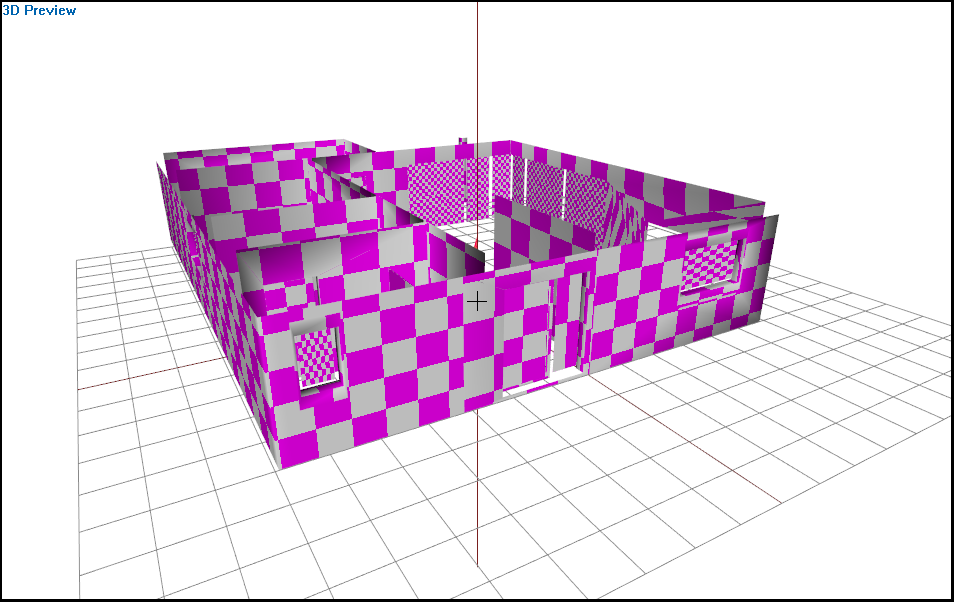
Thats the Building and the rest should be proxys, but I have the problem that the proxy doesn't load, when it's placed on to the terrain
stuck oyster
what is the rest?
quartz prism
 quartz prism
https://i.imgur.com/dVDRD5u.png
quartz prism
quartz prism
https://i.imgur.com/dVDRD5u.png
because I have different color patterns for this one
stuck oyster
then you would just use different materials on the object
proxies have less visibility range too so it might pop out of view
its not the right way to make buildings
you might proxy in furniture
quartz prism
ok thx, it would be much easier, but then I have to paste them manually
 alpine charm
Is there any common cause for the normal map not doing anything on the object? Or why is the texture detail much worse than on the CO image
stuck oyster
wrongly set up rvmat maybe
alpine charm
But the AS file is loading, i can see the shadows
stuck oyster
what texture suffix are your normalmap using?
prior converting to paa
and what file format you use?
stuck oyster
on the source texture
alpine charm
Png
stuck oyster
and whats the resolution?
alpine charm
2048
stuck oyster
what is your texture quality video setting
stuck oyster
yes
stuck oyster
👍
rvmat could still have some issue.
what are you expecting to see and what do you actually see?
alpine charm
i will try to show you
stuck oyster
if you complete verification at #✔role-selection you should be able to post images here
alpine charm
i just realised i am using 4096 textures, could that be too much?
this is 1024 for a water tank

this in game, looks terrible
 stuck oyster
well your normalmap looks bit weird. its all just fuzzy
how many plies is that object?
and yea 4K for object like this is a bitt excessive
marsh canyon
Typo of poly I assume
 stuck oyster
what surface is it supposed to be?
 stuck oyster
buildings really should be done using multimaterial
and repeating texture surfaces
large surfaces like that just cant be done look good with single textures
alpine charm
ok, looks great in blender though
stuck oyster
doesnt matter
alpine charm
but for small objects like the water tank 1024 and super shader should be enough?
stuck oyster
perhaps
alpine charm
i have the feeling that the rvmat is not loading the textures though
thanks anyway. modelling is really hard, I have a lot of respect for the pros
stuck oyster
alpine charm
thanks anyway. modelling is really hard, I have a lot of respect for the pros
👍 keep at it! Its a lot to learn for sure

 stuck oyster
white jay
How do I get player collision working?
stuck oyster
white jay
How do I get player collision working?
needs valid geometry lod
white jay
Im slow where/how do i do that
 stuck oyster
white jay
Im slow where/how do i do that
stuck oyster
white jay
Im slow where/how do i do that
check pinned messages for my explanation of geomtery lod requirements
 dim mica
http://pastebin.com/wGKGSgP3 could i get some help why isnt my ruin model working with my model?
obtuse rain
Saigon: If an object class name doesn't start with Land_ then when the .wrp is binarized it doesn't store the class name; it only stores the path to the .p3d and the map position/rotation/skew.
Which means anything remotely config related won't work on it.
 junior ibex
Okay, preference question
Is 32 faces on a weapon reciever tube overkill?
For example, let's say I was modelling a Sten

Would using a 32 sided cylinder be unecessary detailing? Or is that the minimum
west haven
you can probably afford to do it given how simple a Sten is
I had 16s for my rifle barrels and such but it;s a much more complex model
turbid pollen
Started working on some personal reference stuff for working with weapons in A3 seeing as I've had all these issues with it, and realised it might be useful once I've fleshed it out more...
https://kuraudo.notion.site/Arma-3-Weapon-Modding-fc561538cd7c47f38a17b3977605c390
Could someone give me a read-through and point out any bits that are glaringly wrong or that I'm misunderstanding?

Kuraudo.io on Notion
So I’ve been working on Arma 3 weapon mods and they suck. Absolute bitch to work with. This doc will hopefully help me when I (unfortunately but inevitably) end up needing/wanting to tackle them again.
turbid pollen
junior ibex
Would using a 32 sided cylinder be unecessary detailing? Or is that the minimum
You have multiple resolution LODs you can do, so you could have a really high-poly one when you're really up close with the model, but you could then have LODs for varying distances to optimize how many polys you need loaded for people who're further away
stuck oyster
turbid pollen
Started working on some personal reference stuff for working with weapons in A3 ...
view pilot lod can be set up in Blender.
but it does not contain the eye selection, that goes into memory lod.
 turbid pollen
stuck oyster
view pilot lod can be set up in Blender.
but it does not contain the eye select...
turbid pollen
stuck oyster
view pilot lod can be set up in Blender.
but it does not contain the eye select...
Yeah, it can be done in Blender, but it requires having two identical models if you don't need to change between reslod 1 and view pilot lod
stuck oyster
one can use linked duplicates in such case
turbid pollen
The thing I was mentioning in there is basically "don't duplicate the model in blender, do it in the P3D so you don't clutter your workspace"
turbid pollen
stuck oyster
one can use linked duplicates in such case
Oooh, would appreciate pointing in the right direction for that, would remove me needing to flick back and forth between OB and Blender
stuck oyster
but also the pilot lod can be optimized for nicer details near the eye
turbid pollen
stuck oyster
view pilot lod can be set up in Blender.
but it does not contain the eye select...
Thanks, I'll move that info over to the memory lod section...
stuck oyster
could add something like this to explain how the proxy triangle works to position/align a proxy
 turbid pollen
stuck oyster
could add something like this to explain how the proxy triangle works to positio...
turbid pollen
stuck oyster
could add something like this to explain how the proxy triangle works to positio...
👍 I'll update that
stuck oyster
though depending on what direction the model that is proxied is made in the required direction might change
as weapons are created "sideways" and vehicles and characters are created facing "back" (-Y being the forward direction in Arma engine)
😄
fun times
so weapon proxies align like this


because why make it all too simple right 😄
turbid pollen
Yeah, because rotation of the vertex can't be read ;-;
Is this better @stuck oyster ?

correction: "the Z axis of the proxy object will be negative in game"
need to redo that sentence
stuck oyster
turbid pollen
Is this better <@150949769953411072> ?
the red proxy is not exactly incorrect either
it just faces different direction
turbid pollen
For weapon attachments it is in most cases
stuck oyster
sure yea for that
turbid pollen
This section is mainly talking about accessory proxies

 turbid pollen
Yeah, I'll sort that, 99% of this doc is just pulled from memory from yesterday tbf lol
I'm not at my PC rn
 turbid pollen
memory points, rog
stuck oyster
bones are selections that are animated through model.cfg
turbid pollen
Ah, like trigger_axis
stuck oyster
trigger_axis would be the memorypoint selection that defines the animated parts translation direction
but the bone would likely be called "trigger"
and the mesh part that the bone/animation moves would also be in selection called "trigger"
marsh canyon
Memories are usually to define hey you use this point to do X eg ironsight pos, casing drop place and of course, axes
turbid pollen
And the bone would exist in the memory LOD too? Or would it exist in the reslods?
stuck oyster
turbid pollen
And the bone would exist in the memory LOD too? Or would it exist in the reslods...
if some memorypoint would need to be moved by that animation yes the bone selection can be in memorylod
but it does not always need to be
memorypoints of child bones follow the parent bone animations if I remember right
turbid pollen
Okay, I think bones might just need to be something I revisit then tbh
in a few hours once i finish work
(i have nothing to do rn hence starting this doc lol)
stuck oyster
always nice to see people writing stuff up
turbid pollen
Basically, until asking around in here, I've been bashing my head against rocks trying to figure out how shit fits together because of lack of (or just sparse) official or community documentation
So this is my attempt at fixing that problem
stuck oyster
which reminds me
turbid pollen
marsh canyon
Writing a 101 document is actually a skill 😅
It 100% is, it's probably helpful that 99% of the time if there's documentation at work, it's because I wrote it lol
stuck oyster
HorribleTip of the Day:
INSTALLING BLENDER ARMA TOOLBOX ADDON
Tutorial to set up Arma Toolbox for Blender V1.0
stuck oyster
stuck oyster
HorribleTip of the Day:
# INSTALLING BLENDER ARMA TOOLBOX ADDON
Tutorial to set...
turbid pollen
stuck oyster
HorribleTip of the Day:
# INSTALLING BLENDER ARMA TOOLBOX ADDON
Tutorial to set...

stuck oyster
I made one too just rececntly
turbid pollen
I'm probably gonna do something similar, but GitHub is cool and lets you just slap /releases/latest on the end to go straight to the release page instead of the repo page
Kills people's ability to do a whoopsie and download the whole repo as a zip
stuck oyster
if I end up doing more I might do something like that
turbid pollen

GitHub
New Minor Release 4.0.4
New Features:
Mesh Collectors list now show a warning icon in the title if an object reference has become invalid. Also, the icon of the invalid mesh in the list will be ch...
yep
straight to the most recent release
neat iris
how does one assign hiddenselections/correct textures in blender with armatoolbox?
stuck oyster
neat iris
how does one assign hiddenselections/correct textures in blender with armatoolbo...
you just make vertex groups for the parts that hiddenselections need to affect
turbid pollen
^
hiddenSelections are just named selections that might get retextured and/or re-material'ed
stuck oyster
and assign default materials throught he material tab
a model should always have some texture and material assigned by default
even if variants use hiddeneselections to change it
turbid pollen
i was literally just writing "for my KS1 model I'm probably gonna remove the default texture"- lmao
nevermind that idea lol
stuck oyster
🚫
neat iris
so do those vertex groups then get named like "camo" and "camo1" or something along those lines
stuck oyster
yes
camo camo1 etc are commonly used selection names
but it can be whatever you want as long as it matches beween model and configs
turbid pollen
im going with camo_body, camo_handguard, camo_stock, and camo_grip for mine because each of those are textured individually on my model
neat iris
ah, now its starting to make a bit more sense
stuck oyster
turbid pollen
im going with `camo_body`, `camo_handguard`, `camo_stock`, and `camo_grip` for m...
that can be easier to understand for someone making a new variants and looking at config for which selection to change
turbid pollen
i tried making a 'megatexture' for the normal, metallic and normal, but i fucked up the UVs somehow
turbid pollen
stuck oyster
that can be easier to understand for someone making a new variants and looking a...
yeah, that's what i was thinking with it too
stuck oyster
you would need 2 uvsets
turbid pollen
stuck oyster
you would need 2 uvsets
they're all individual objects so i was just changing the UV set to a different segment of the texture for each object
stuck oyster
as long as each object has 2 uvsets with matching names those would combine into 2 uvsets
when the thing is joined into single thing on export
turbid pollen
there's only one uv set currently
neat iris
thanks, i managed to maybe make it right for now
stuck oyster
if you want to use different uvmappings for different textures then you would need 2 uv sets

but typically thats not done
junior ibex
Does anyone here use 3DSMax?
stuck oyster
there are some who do im sure
junior ibex
I need a file converted to something more universal, I got it off Gamebanana, but it only comes in .MAX format, which Blender can't open
So I need it converted to .obj or .fbx
turbid pollen
@marsh canyon @stuck oyster ❤️
 stuck oyster
turbid pollen
junior ibex
I need a file converted to something more universal, I got it off Gamebanana, bu...
There are plugins to open 3DS Max files in Blender btw
They won't be 1:1 but they'll get you the majority of the way there
junior ibex
I haven't been able to find any, got any recomendations?
turbid pollen
Failing that I'm sure there's a converter somewhere out there to convert MAX -> FBX
stuck oyster
junior ibex
I need a file converted to something more universal, I got it off Gamebanana, bu...
gamebanana 
what model is it?
junior ibex
I'm pretty sure this isn't stolen, if that's what you're asking https://gamebanana.com/models/2431
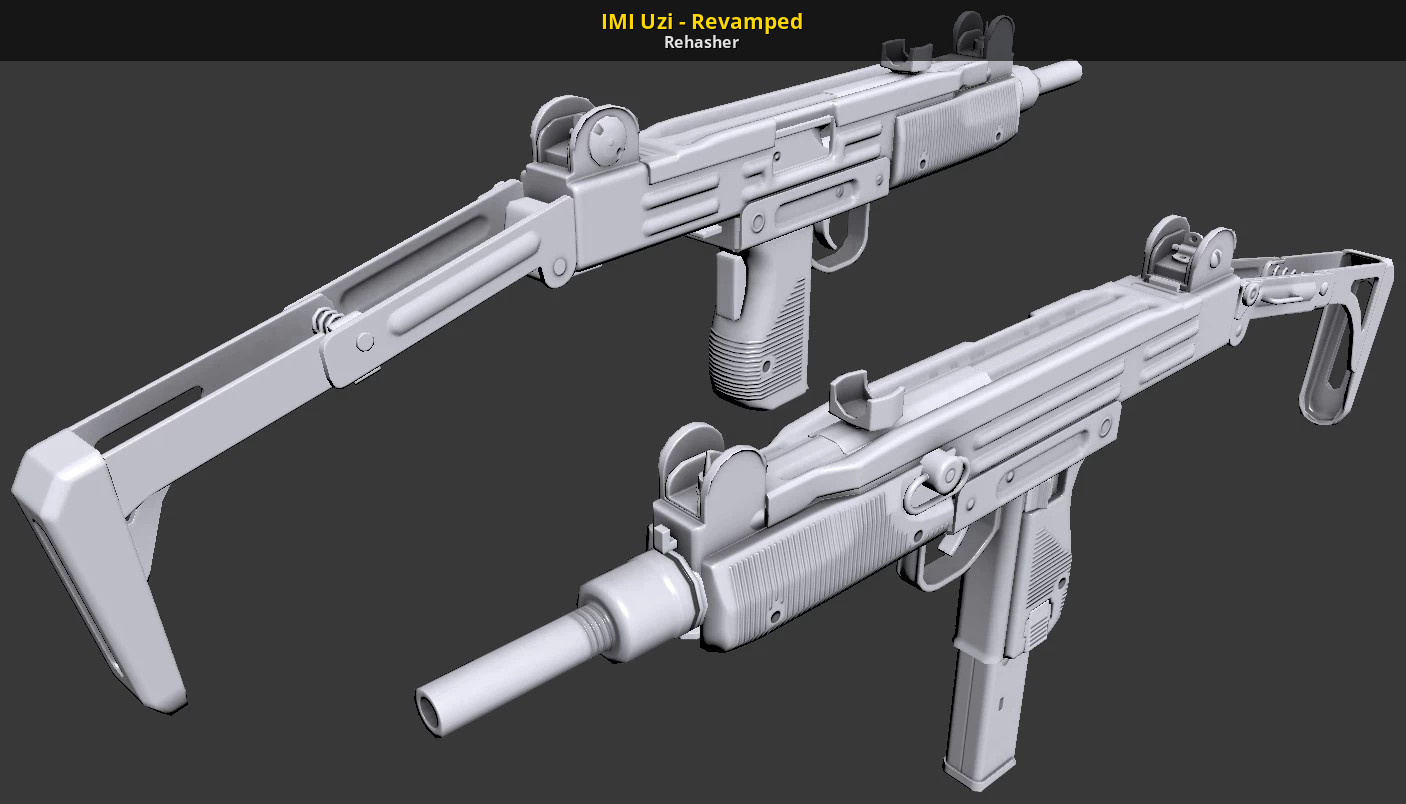
GameBanana
Next-Gen IMI Uzi model... A 3D Model in the Submachine Guns category, submitted by Rehasher
turbid pollen
Believe anyconv.com can do max -> fbx conversions but ive not tested it
junior ibex
turbid pollen
Believe anyconv.com can do max -> fbx conversions but ive not tested it
Nope, gets stuck
stuck oyster
junior ibex
Nope, gets stuck
it may be easier to find new model (or even make new one) at this point
turbid pollen
im at my pc now
junior ibex
stuck oyster
it may be easier to find new model (or even make new one) at this point
Maybe, by the looks of some comments, I might just have to leave it converting on the site for a while
turbid pollen
@stuck oyster what's the memory point for using pip optics?
stuck oyster
there arent any. pip is done by different means
turbid pollen
well... eye works for ADS with iron sights but puts my camera in the barrel when optics are mounted
stuck oyster
vanilla optics?
 stuck oyster
do you have the sight proxy in the view pilot lod?
turbid pollen
oh, do i need to put all the accessories in the view pilot as well as the memory...?
turbid pollen
ah yeah im dumb, need to be on the normal lod
ok
my bad then, think i just messed my lods up a bit
charred bolt
View Pilot is what the player sees in first person.
turbid pollen
also @stuck oyster you mentioned something about linked duplicate lods?
in blender
stuck oyster
turbid pollen
also <@150949769953411072> you mentioned something about linked duplicate lods?
Yef?
turbid pollen
How do I set those up for duplicating my first reslod to the pilot lod?
also, progress
 turbid pollen
okay, so
my uv map for the metallic and normal maps are wrong currently... is there an easy way of fixing this?
 stuck oyster
turbid pollen
How do I set those up for duplicating my first reslod to the pilot lod?
stuck oyster
turbid pollen
How do I set those up for duplicating my first reslod to the pilot lod?
well I mean, its just making duplicate linked objecst and setting the second objects arma property to be view pilot
turbid pollen
stuck oyster
well I mean, its just making duplicate linked objecst and setting the second obj...
oh, yeah, that's just what im trying to avoid doing lol
stuck oyster
arma does not use metallic/roughness
so metal rough textures are of very little use
turbid pollen
what's the SMDI?
stuck oyster
it was just discussed on the #arma3_texture
stuck oyster
turbid pollen
oh, yeah, that's just what im trying to avoid doing lol
linked duplicate means any edits will apply to all linked objects
so if you need to change something it will apply to the other lod too
turbid pollen
should i just drop the smdi texture in the rvmat then?
stuck oyster
but even if they were not linked it would be simple to re make the duplicate if you change something
turbid pollen
because otherwise i dont know how to make this not look crap lol
stuck oyster
well it kinda looks like your uvmapping is not right there
turbid pollen
turbid pollen
okay, so
my uv map for the metallic and normal maps are wrong currently... is th...
.
turbid pollen
i am as far as i know
stuck oyster
maybe you set wrong material for wrong texture?
turbid pollen
that uvSource="tex" line -- what does that mean?
stuck oyster
determines which uvset is used
you dont need to change that
as you dont gain anything from shared normalmap
since the parts are split into separate sections anyway
grizzled halo
stuck oyster
even if variants use hiddeneselections to change it
speaking of, Ive noticed that some of my selections in a model lose their normals once I create a secondary version with retextured hiddenSelections. Is there a reason for this? Its almost as if they had lost their materials
stuck oyster
grizzled halo
speaking of, Ive noticed that some of my selections in a model lose their normal...
do you have default textures and materials set on the model
grizzled halo
stuck oyster
do you have default textures and materials set on the model
yep
stuck oyster
do you change materials via hiddenselectionsmaterials in config?
grizzled halo
stuck oyster
do you change materials via hiddenselectionsmaterials in config?
no, that I do not do, only replacing the CO
should I be doing it?
stuck oyster
no should not be required if the original on the p3d is supposed to be used
grizzled halo
yeah, its weird since it only happens on that model
i have another hiddenSelections on other p3d that work just fine
stuck oyster
off the top of my head cant think of anything specific that would do that
Id suppose you could try adding the hiddenSelectionsMaterials list to force the original
and see if that makes a change
grizzled halo
got it
 teal vale
I'm trying to port a new character head into the game to no avail, I grabbed an existing mod to use it as a basis, unbinarized all of the files, rename all of them to use the new mod name, changed the model on Blender and it still shows invisible in-game. I also tried just grabbing an exisiting mod head and adding it to the mod and it still just show invisible event thought I went throught every possible file and made sure it's pointing to the correct textures and materials files
stuck oyster
teal vale
I'm trying to port a new character head into the game to no avail, I grabbed an ...
unbidnarizing someone elses work as base is not the right way to go about stuff
and well it is stricktly forbidden thing to do
teal vale
even if it is for personal use?
stuck oyster
even so
teal vale
how else I am supposed to figure out how to do it? there isn't any guides
stuck oyster
no, I wont. but you have a chance to redeem yourself by starting properly from 0
and never take someones stuff again
grizzled halo
what a colorful person
neat iris
wouldnt it be easier to use the sample models for that anyway?
stuck oyster
the samples dont provide full example on adding a new head.
but it follows same rules as adding anything else
copying someone elses work however does not really teach the logic on how to understand configs and how they play together with models
 visual thicket
sup guys, Just wondering if their is a snapping tool for UV map edititing in 3ds max ?
stuck oyster
ind addition people do quite a lot of bad practices one should not copy
visual thicket
The grid snap helps but vertex snaping could help alot more.
woeful viper
yes you can do grid snapping
go to preferences in UV editor there should be some snap area setting there
also enable snapping and the vertex snapping in model view... iirc
dont have it open atm...
hollow fulcrum
there are for sure buttons in those places that will allow such functions. ☕
stuck oyster
ask in #arma3_scripting this channel is for makin 3d models
 next ferry
Oh shit my bad thanks
stuck oyster
Your base class you inherit from does not contain define for this

no
since you are trying to inherit also pylon2 there below
you need to setup your iheritance properly
not guess remove stuff
same issue
youll need to fix inheritances
visual thicket
Thank you X3KJ =)
 finite stump
Is a spot lights light beam a modeled cone or is it a scripting thing?
marsh canyon
Depends on the scripting in this context mean
finite stump
like the spotlights in game you can setup or like a light house light
marsh canyon
a3\data_f\VolumeLight.p3d and some equivalents in the same folder are used in vanilla lights
neat iris
using object builder, how you get for example "named selections" window as a popup? currently it is like this, but a video im watching has it as a separate window?
 marsh canyon
Just drag and drop to somewhere on your screen
neat iris
doesnt work, cant drag it at all
huh
nevermind, it was buggy
onwards to next question; the test_weapon.p3d doesnt have bipod memory point, following a tutorial that uses it? is it named something else in this
marsh canyon
a3\data_f_mark\Proxies\Weapon_Slots\UNDERBARREL.p3d
neat iris
i cant open that in object builder so i cant copy it for memory(lod?)
neat iris
proxy? im not trying to place a proxy, im trying to make bipod selection (point?) for the weapons memorylod
neat iris
hah, it happens
neat iris
oh, huh, thanks
marsh canyon
And note that the weapon defined pivot will be overwritten by bipod's pivot bipod memory if your weapon has one
neat iris
it doesnt have one, but thats good to know thanks
neat iris
is there a good guide to model.cfg?
keep getting this error and i dont understand at all what i should do to fix it

nvm im a dummy
grizzled halo
stuck oyster
Id suppose you could try adding the hiddenSelectionsMaterials list to force the ...
I observed with a bit more of awareness the items in my mod that use hiddenSelections and now that I see them closely, ALL of them, are losing the rest of their maps beside their COs.
grizzled halo
stuck oyster
there is a mount reference base in the samples though
there is indeed, sat down and watched how vanilla does it, its basically just clever positioning and hoping people dont notice the mount going through the helmet hahaha
stuck oyster
grizzled halo
I observed with a bit more of awareness the items in my mod that use hiddenSelec...
is the pbo binarized?
grizzled halo
stuck oyster
is the pbo binarized?
that is correct
stuck oyster
check in game configviewer if there are some inherited hiddenSelectionMaterial parameters
also try what the https://community.bistudio.com/wiki/getObjectMaterials command outputs
neat iris
"eye" is i guess the position of the "eyes "when aiming down sights?
stuck oyster
if its named that in the config too, then yes
"eye" is likely the default name in vanilla configs
neat iris
yeah, it is default name for that
grizzled halo
stuck oyster
also try what the https://community.bistudio.com/wiki/getObjectMaterials command...
I will, ill let you know whats up later today
turbid pollen
Okay, I have gotten most things working on my KS1 now
Two things I have left that I can't figure out:
- The UV mapping issue with my non-colour textures (SMDI, Normal)
- How to make my iron sights fold
grizzled halo
turbid pollen
Okay, I have gotten _most_ things working on my KS1 now
Two things I have left t...
iron sights folding are achieved using model.cfg and animationSources
turbid pollen
grizzled halo
iron sights folding are achieved using model.cfg and animationSources
Ah, you got a wiki link or anything for me to find how to set those up?
grizzled halo
turbid pollen
Ah, you got a wiki link or anything for me to find how to set those up?
https://community.bistudio.com/wiki/Model_Config
both can be checked here. Basically, an animationSource is an engine derived action that triggers simple animations, like translation and rotation, it could be a wheel, a door, a trigger, sights, etc.
 bleak heart
When I add the Pylon code, the main rockets are invisible in the game. When I delete the Pylon code, it appears. What should I do? This code; https://hastebin.com/share/azigizowiq.kotlin || "4Rnd_UMTAS_AT" special rockets


Hastebin is a free web-based pastebin service for storing and sharing text and code snippets with anyone. Get started now.
Rockets connected by proxy
turbid pollen
grizzled halo
https://community.bistudio.com/wiki/Model_Config
both can be checked here. Basi...
much appreciated 🙂
stuck oyster
bleak heart
When I add the Pylon code, the main rockets are invisible in the game. When I de...
if you use pylons you only have pylon proxies in the config
then the pylon payload proxy is inside the pylon
turbid pollen
@stuck oyster do you reckon i should just ditch my smdi stage in the shader?
im having trouble with figuring out why the UV isn't applying in the correct orientation
stuck oyster
turbid pollen
<@150949769953411072> do you reckon i should just ditch my smdi stage in the sha...
well if you want shiny and matt parts then no
stuck oyster
turbid pollen
im having trouble with figuring out why the UV isn't applying in the correct ori...
show UV editor in Object builder
show UVset list in Blender
turbid pollen
How do I get to the UV editor in OB?
stuck oyster
press the uv button in the top toolbar
turbid pollen
Blender:

object builder

...looks incredibly messy...
for context, this is the equivalent in blender
 stuck oyster
turbid pollen
for context, this is the equivalent in blender
stuck oyster
turbid pollen
for context, this is the equivalent in blender
how many textures do you have?
this uvmapping seems rather empty
turbid pollen
three for each individually-textured component, that list being:
- body (incl. sights, charge handle, dust cover, bolt carrier, trigger, fire selector, stock arm)
- stock
- handguard
- muzzle
- grip
the three i have are colour, smdi and normal for each of those
so 15 textures all in all
bleak heart
stuck oyster
if you use pylons you only have pylon proxies in the config
Can't I put my own rocket in the pylon?
turbid pollen
it shouldnt affect the way the UV unwraps, surely?
stuck oyster
no but like its very bad design
turbid pollen
im gonna look at optimising textures later on, the uvs not aligning is the bigger issue for me atm
turbid pollen
stuck oyster
no but like its very bad design
for A3, sure
not for most other games anymore
turbid pollen
yes, this model wasn't bought for A3
turbid pollen
stuck oyster
its bad for all games
eh. most newer games can handle it i find
stuck oyster
A3 can handle it
but itll eat performance
it eats performance in the other games too
turbid pollen
regardless, this isn't something i consciously did, im just trying to make it work atm
ill optimize later, like i said
stuck oyster
how did you build the rvmats?
turbid pollen
mostly a copy/paste job from the a3 wiki
ambient[]={1,1,1,1};
diffuse[]={1,1,1,1};
forcedDiffuse[]={0,0,0,0};
emmisive[]={0,0,0,1};
specular[]={0.7,0.7,0.7,1};
specularPower=180;
PixelShaderID="Super";
VertexShaderID="Super";

class Stage1 {
    texture="z\pmcs\addons\ks1\data\ks1_body_nohq.paa";
    uvSource="tex";
};

class Stage2 {
    texture="#(argb,8,8,3)color(0.5,0.5,0.5,0)";
    uvSource="tex";
};

class Stage3 {
    texture="#(argb,8,8,3)color(0,0,0,0)";
    uvSource="tex";
};

class Stage4 {
    texture="#(argb,8,8,3)color(0,1,1,1)";
    uvSource="tex";
};

class Stage5 {
    texture="z\pmcs\addons\ks1\data\ks1_body_fde_smdi.paa";
    uvSource="tex";
};

class Stage6 {
    texture="#(ai,64,64,1)fresnel(1.3,7)";
    uvSource="none";
};

class Stage7 {
    texture="a3\data_f\env_co.paa";
    uvSource="none";
};
what does the smdi texture look like when applied in blender?
turbid pollen
how do you want me to show it?
stuck oyster
add a texture node with the smdi and preview it
turbid pollen

this is how it all applies
but i also have like roughness maps and such on the model
stuck oyster
I want o see only the SMDI as color


 stuck oyster
Well SMDI is not really same as metallness mapping
turbid pollen
i mean the problem here isnt that my gun is too shiny or anything
it's that the uv seems to apply tilted
turbid pollen
do i need that? Thought there were default values for all of those
turbid pollen
if anything, that seems to have made it worse
 stuck oyster
maybe you got wrong smdi assigned in the rvmat
turbid pollen
i don't
if you look at the receiver, you'll spot the UV for the dust cover appears on the receiver itself just next to it
so they're the right textures
but they're applying wrong
stuck oyster
Apply the smdi as the color texture
to see how it maps there
in game or OB buldozer
turbid pollen
 stuck oyster
well that is not good
turbid pollen
the confusing thing to me now is that the colour texture is fine