#arma3_model
1 messages · Page 10 of 1
 amber swift
 marsh canyon
It is defined in both mem point and config
amber swift
are the default memory points usti hlavne and konec hlavne or is there another for the smoke?
marsh canyon
Can't remember Czech rn, but you can check them in the Samples
Also middle of the vehicle you mean is the default pos (aka 0,0,0) of it, because it is defined nowhere
amber swift
oh ok, so theres probably a missing mem point or no reference in config
marsh canyon
That's the typical reason
amber swift
in the config, is it this line that creates the smoke animations : selectionFireAnim =
marsh canyon
Can't tell rn but you can check this?
https://community.bistudio.com/wiki/CfgWeapons_Config_Reference
Or CfgVehicles equivalent article
amber swift
ok thanks
 white jay
Some one has a tip for this part because a dont know how to duplicate then and put into the base


 kind nacelle
white jay
Some one has a tip for this part because a dont know how to duplicate then and p...
kind nacelle
white jay
Some one has a tip for this part because a dont know how to duplicate then and p...


 white jay
I dont really understand
kind nacelle
work on the main shape first
also i think i misunderstood your problem
so i would just add a loopcut down the middle first
copy and separate that
convert to curve
normalise the curve handles
then do the ribbing as an array and use a curve modifier to array it along the grip
white jay
kind nacelle
also i think i misunderstood your problem
im ssry. What i mean is how can i do this thing and duplicate then in the base of the grip

 kind nacelle
id start with some more tutorials then
also this is stuff you can just google "blender loopcut"
white jay
ok, thanks for the help
 warm blade
@white jay https://youtu.be/FLnvwgoH8RA

How to Make a Glass With a Curve in Blender 3.4.I hope you will enjoy it.
your Malikose.
#shorts
#tutorial
#blender
i think this could help
white jay
warm blade
<@456226577798135808> https://youtu.be/FLnvwgoH8RA
thank you
 last spindle
Replying to the first new message and ignoring the many that followed, some CG porn .......
http://i.imgur.com/AlT5137.png
Took about 10minutes............. and obv in Unity5
This is 10 minutes to convert and import the Revit model..............many many hours spent creating the Revit Model :p
last spindle
it is just a sample not something i could release, developing tools to quickly convert Revit exported models to Max files with Substance based PBR materials
white jay
i havent done graphics in years. im a coder myself, nice to see what the comunity is making though
 hollow fulcrum
@last spindle 👍 nice building there. you should chop that up and put it in RV. :D
last spindle
hmmmm 300,000 atm lots of chopping
hollow fulcrum
oof, yeah that might be felt in an urban environment.
last spindle
it could be made to be like 100k easily, just have to remove all the slab penetrations and above ceiling crap, and then probably reduced to 30k if everything except the exterior was removed
hollow fulcrum
that would work.
always wanted to do a small map with a large shopping mall or something. just for CQB foo.
last spindle
hmmmmm, it is actually a Primary School :p but interior could be modified to make what ever you want i guess
but im going to stick to my Artillery Assets for the moment, not starting something that big with so much other big things in the works
hollow fulcrum
lol
hollow fulcrum
ha, nice!
last spindle
need the Platform Integration Kit (PIK) aswell so you can set the GPS fuze on the guided rounds, would be nice to have a custom ropeX between the two, but dont think that is possible????
i think you mentioned once that it might be possible to have custom models for ropes? or was i dreaming?
hollow fulcrum
ermm.. you can actually model another rope.. but you are still limited to the technical details..
might be easier to draw lines.. not sure.
i have a thicker rope model for a fast roping rig i was building. that was a couple versions back. but i doubt anything has changed.
hollow fulcrum
not sure actually, i was just straight replacing the default rope model while tinkering.
so it worked just fine.
last spindle
yeah so, if you did sling loading though, then you would get the massive rope for that aswell
 shy kernel
i have an issue exporting a model into .p3d
 muted tapir
what's the issue?
 last spindle
i don't think you can define a custom rope, it would be super nice if you could for lots of things
muted tapir
do you have faces with more than 4 corners?
shy kernel
this is the model im trying to export

 muted tapir
can you show the wireframe?
muted tapir
 shy kernel
 muted tapir
did you enable the arma properties?
 stuck oyster
you have not set it with arma object properties
muted tapir
 shy kernel
stuck oyster
you have not set it with arma object properties
shy kernel
stuck oyster
you have not set it with arma object properties
thanks
stuck oyster
without this the exporter does not know it something you want to export
hollow fulcrum
we could do a lot with the ropes if we could define more and had control over the properties for sure..
 muted tapir
did you apply transforms before exporting?
shy kernel
i only enabled the arma object properties before exporting
hollow fulcrum
could even sub that for a ball joint honestly. wouldn't be perfect, but it would be pretty damn good.
muted tapir
do ctrl+a
all transforms
last spindle
yes, obv, just have a rope that has no elasticity and massive breaking strength
but this would be even better.... for that https://resources.bisimulations.com/wiki/createJointExt
hollow fulcrum
yeah a physx ball joint would be great....
 ripe fiber
Yet another thing VBS has?
hollow fulcrum
that is effectively all it is.. VBS has had that for a long time.
it's stupid simple to do a great number of things with those connectors.
technically 'joints'...
shy kernel
how can i import the model into game? as like a suppressor for example
 inland pawn
shy kernel
how can i import the model into game? as like a suppressor for example
inland pawn
shy kernel
how can i import the model into game? as like a suppressor for example

Download ArmA toolbox here: https://github.com/AlwarrenSidh/ArmAToolbox
inland pawn
shy kernel
he wasnt specific when he got to the object builder part
He? That’s literally me
inland pawn
Yes, as a quick thing for people getting into custom p3ds
But, what do you mean specific?
shy kernel
ok thanks
muted tapir
@shy kernel do you know how to build a mod?
shy kernel
lol yes
muted tapir
make a folder, put a file named config.cpp into it
into that file write a cfgPatches https://community.bistudio.com/wiki/CfgPatches
shy kernel
thanks
muted tapir
if you just wanna see your model ingame that's all you need, you can just dump the p3d next to that file and build the mod
shy kernel
thanks
muted tapir
then once you've built and loaded the mod you can spawn your model with https://community.bistudio.com/wiki/createSimpleObject
shy kernel
muted tapir
make a folder, put a file named `config.cpp` into it
should it look like this?

 shy kernel
done
muted tapir
now open the addon builder
set the source directory to the folder that stuff is inside of
shy kernel
then pack?
muted tapir
no
make a folder where you want your mod to go in
inside that make a folder addons
set that as the destination
shy kernel
ok
muted tapir
klick options
check if list of files to copy contains *.p3d
set path to project folder to the same path as your source directory
shy kernel
ok
shy kernel
i dont think so
muted tapir
in the launcher press this
 shy kernel
thanks
muted tapir
here select the folder above the one named addons
once you've launced arma you should see it in the bottom row of the main menu as a loaded mod

@shy kernel how is it going?
 muted tapir
huh
shy kernel
its supposed to be like this right
 muted tapir
put the addons folder into a seperate folder
muted tapir
is there a .pbo file in the addons folder?
shy kernel
no its empty
muted tapir
in that case, build your mod again.
remember to set the correct destination folder
shy kernel
ok
muted tapir
does it say build successful when you pack the mod?
shy kernel
muted tapir
put the addons folder into a seperate folder
i make another folder then put the addons folder into it?
muted tapir
yes
shy kernel
do i have to put something in the destination directory or leave it empty?
muted tapir
the folder named addons goes in there
shy kernel
oh ok
muted tapir
if you're still having trouble now send me ascreenshot of the addon builder with the options page open
shy kernel
 shy kernel
muted tapir
if you're still having trouble now send me ascreenshot of the addon builder with...
shy kernel
muted tapir
if you're still having trouble now send me ascreenshot of the addon builder with...
k wait
shy kernel
muted tapir
if you're still having trouble now send me ascreenshot of the addon builder with...
i have a question
i leave the temp folder as it is right
muted tapir
yes
shy kernel
muted tapir
if you're still having trouble now send me ascreenshot of the addon builder with...
ill send it to the dms if you are ok with it
muted tapir
sure
 wraith tendon
lalalalalala don`t wanna hear whats possible in VBS lalalalalalalala
Its so depressing :(
muted tapir
can a Paths LOD be animated using single vertex animation?
stuck oyster
muted tapir
can a Paths LOD be animated using single vertex animation?
have not tried it myself and dont remember anyone else reporting on that so 50/50 maybe
stuck oyster
I have some ideas where I could use that myself too but just have not had a chance to try it out
muted tapir
is it possible to make an object that has 2 textures blending into each other?
but without manually blending them, like assigning 2 textures and one half ends up in the first texture and the second half in a different texture with the border being a smooth transition like this:

 pallid island
stuck oyster
pallid island
stuck oyster
multimaterial is for that yeh
 alpine matrix
anyone have any idea how i'd fix this first person shadow issue?
 stuck oyster
alpine matrix
anyone have any idea how i'd fix this first person shadow issue?
stuck oyster
alpine matrix
anyone have any idea how i'd fix this first person shadow issue?
make proper shadowlod
alpine matrix
i've only got ShadowVolume LODS at a basic level, theyre not even made around the uniform
 stuck oyster
character should not have 1000 and 1010
0 and 10 should be enough
and you can copy those from the sample character
if you are unsure on making them
alpine matrix
ah, i see. Thank you my friend.
amber swift
guys how can i fix wheels floating above ground in a vehicle? I've checked wheel circumference value, memory points, land contact nothing seems to fix it

oh i have also checked geometry lod
stuck oyster
have you tried the physX settings?
amber swift
its fixed, it was the max droop value
amber swift
i have another problem now, the thing cant go offroad, it just becomes too slow and in some areas like sand it just stops
warm blade
@amber swift trying playing with terrainCoef
amber swift
yes! that fixed it.Thanks man
stuck oyster
@white jay you may stay but Id also like to hear a genuine "sorry"
also any even remotely forbidden smelling stuff and youre out.
white jay
i’m sorry
stuck oyster
Alrighto. We make stuff here dont take stuff.
Pinned messages on #arma3_terrain have links to tutorials
 desert notch
hey I have a quick question. what is the significance of proxy index? is index just some arbitrary number?
or do different indices do special things and stuff?
stuck oyster
for example gunner and cargo proxy index connects that proxy to config index
desert notch
yep but can I just set it to anything? (in both config and model)
stuck oyster
well if they match in both config and model they should work
buut there is no data on if the engine expects them to be in sequential order
desert notch
yeah I didn't think so either. thanks!
amber swift
any tips on making a turn out animation for the driver? i cant get it to work, there's very little information on the web.
amber swift
well i managed to make the other ones work, like the cargo ramp. In my mind it should work the same right? its just rotation or the hatch selection followed by translation on y of the driver proxy
stuck oyster
well that can work yes though it will still keep the driver in same pose
amber swift
should i use UserActions for this or is there another way?
stuck oyster
turnout is a engine feature so you would use the turnout source for the animations
but also there are some config parameters that enable/disable the turnout feature
amber swift
what should i do to enable it?
stuck oyster
dont remember off the top of my head. related config parameters have turnout or turnin in them if I remmeber right
 charred bolt
amber swift
what should i do to enable it?
charred bolt
amber swift
what should i do to enable it?
driverInAction = ```
```class Turrets
{
class MyTurret: NewTurret
{
...
gunnerAction =
gunnerInAction =
...
};
};``` still folio
JCOVE then?
white jay
so if i have my model and textures how do i get that into game?
blender model
is there a video for that
 spice narwhal
how do i export just my selection for the UV
white jay
is arma 3 tools for blender illegal @stuck oyster?
stuck oyster
no if you mean the arma toolbox addon
white jay
yeah
so i exported my model to p3d
but it says ' Unale to load file. Load error. '
when i put it in OB
its used to be an fbx file
marsh canyon
It is because you try to load binarized p3d
marsh canyon
Why you think so?
stuck oyster
you have not se the objcet(s) with arma properties
so exporter dont know what to export
white jay
how do i do that
stuck oyster
find the arma3 tool tab and click arma properties checkbox
 stuck oyster
white jay
it is next to the x/y/z compass
stuck oyster
white jay
it is next to the x/y/z compass
yes those are the toolbar tabs
stuck oyster
white jay
this?
also in this view you will need to set up th o2script.exe path
you can use this channels search history for more info
white jay
yeah idk what i did wron
i did the o2script path
i checked off arma 3 object properties
white jay
any fixes?
stuck oyster
delete the old file first
and you may need to close and reopen blender
failed exeport usually locks the p3d file so further exports wont write
white jay
so delete the .FBX model once i export it as a .P3D?
stuck oyster
the fbx and p3d are not related in any way
white jay
wait so what am i deleting once i make my model a P3D?
hold up
gimme a second
might have fixed
@stuck oyster Could this be the reason why it's not working?
 stuck oyster
yes
white jay
do i reinstall armatoolbox
stuck oyster
it says your model has n-gons which Arma cant use
white jay
what are n gons
stuck oyster
so you need to triangulate it
you can google it up.
the modeling basics stuff is up to you to learn on your own
white jay
ok i see
i cant find the properties panel
wtf
do i select keep normals?
for traingulate?
 white oak
select all faces in edit mode and hit ctrl+T
white jay
i did
now it won't export at all
no errors tho
i think

the p3d is red tho
so
i fixed it
how do i path it properly to my vest in OB
stuck oyster
wheres the vest from
stuck oyster
@fluid copper problem?
 fluid copper
No I think the events with this person are funny
stuck oyster
Im not particularly happy.
@white jay honestly I gave you a chance yesterday
dont go pulling any crap now
fluid copper
I don't blame you, I was going to ask them to open the vertex selections tab earlier when I saw the image
stuck oyster
also that BIS CORE Folder makes me thing dude has pirated VBS
white jay
idk what vbs is
what's BIS CORE supposed to be?
i opened it and it has arma3.cfg
and my BI profiel

 white jay
fluid copper
I don't blame you, I was going to ask them to open the vertex selections tab ear...
white jay
fluid copper
I don't blame you, I was going to ask them to open the vertex selections tab ear...
where would vertex selections be
white jay
stuck oyster
dont go pulling any crap now
i am not doing anything
fluid copper
white jay
where would vertex selections be
 fluid copper
I was just curious if there are any values in it, like Spine1, 2, 3, etc
 plucky patrol
Hi all I am trying to apply a damage texture to a surface, I have defined the fire geometry, hit points lods , I have the animation made , applied a texture in OB for the surface a default rvmat for glass for that surface and defined in config.cpp the class damage with that 3 rvmats and class hitPoints as it is explained in documentation. But the material texture of the glass does not change. It only change with a dark texture but the cracks from rvmats does not appear. Any Ideeas ?
white jay
fluid copper
I was just curious if there are any values in it, like Spine1, 2, 3, etc
i have 0 clie
i’ll take a look when i’m home
 still trail
VBS kinda sucks from a performance and graphics perspective.
stuck oyster
you'll have to start learning modeling from the basics so you understand the tools, terminology and methods
 primal sail
hi, i'm trying to learn how to create mods, where i can start to learn about it?
stuck oyster
primal sail
hi, i'm trying to learn how to create mods, where i can start to learn about it?
what kind of mods do you want to make?
primal sail
i want to create a mod that add the cryptids from cod ghost (a 4 legged alien species). i know it's to much for a person that just started so now i'm trying to add a dog made of blocks so i can try to code it
stuck oyster
primal sail
i want to create a mod that add the cryptids from cod ghost (a 4 legged alien sp...
youll need to start simpler. custom characters are one of the most complex (and undocumented things) which practically requires you to learn everything there is
inland pawn
primal sail
i want to create a mod that add the cryptids from cod ghost (a 4 legged alien sp...
Animation and skeletons are one of the hardest things to do
Not the best starting point
Start with a crate
primal sail
inland pawn
Animation and skeletons are one of the hardest things to do
i'm not going to add animations to start with it because i know it's a thing for it's own. I'm trying to export a model i create from blender to arma 3 to make it a custom character that is a box. at least i want to know where i can start with creating a box or something basic
inland pawn
primal sail
i'm not going to add animations to start with it because i know it's a thing for...
Look into making a storage crate or something
 peak isle
howdy gents what would be causing this?
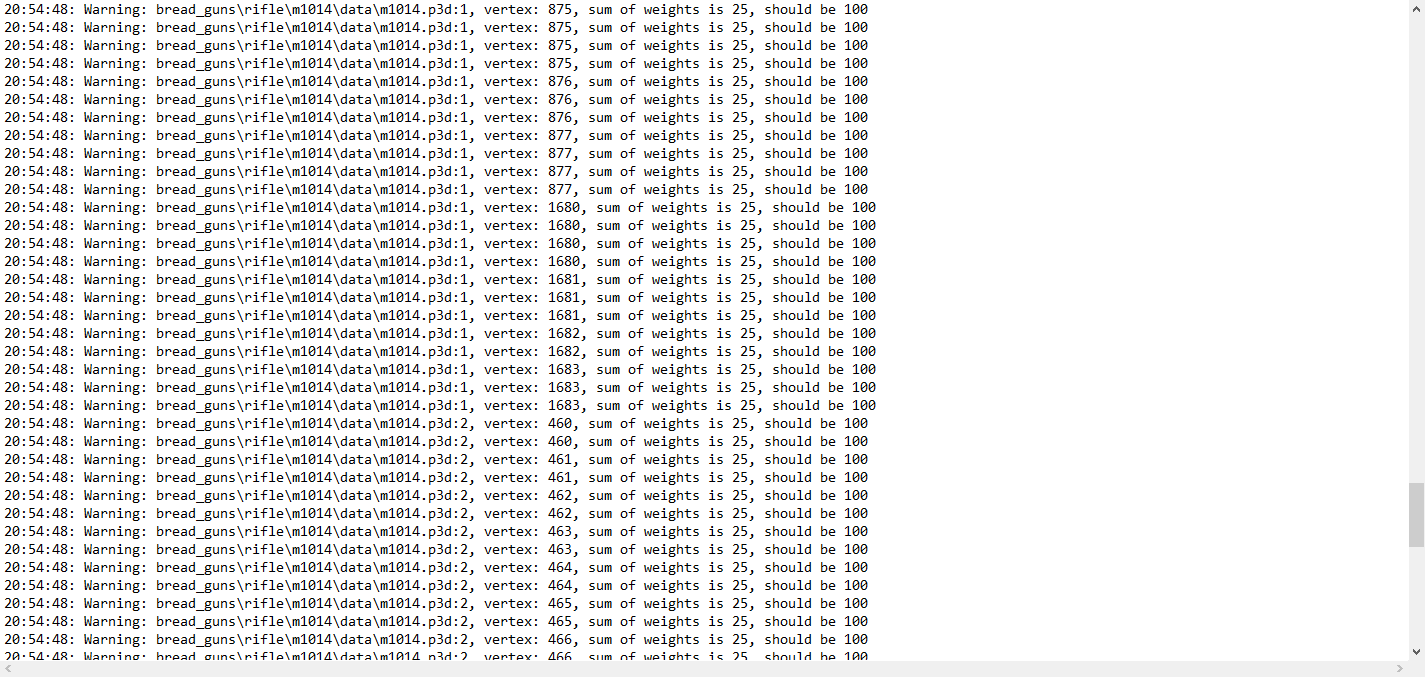
like what is wrong? sum of weights? i dont even know what that is lol
inland pawn
That’s a warning, you can usually ignore those. Unless it’s causing an issue to where the asset doesn’t work as intended
charred bolt
peak isle
like what is wrong? sum of weights? i dont even know what that is lol
You have some mesh that is in more than one named selection, that are also bones in the skeleton.
In this case, either:
-
remove one of the named selections which is assigned incorrectly.
Example: the trigger is intriggerand also incorrectly inotochlaven, so remove it from otochlaven -
if you intend for the part to be animated with weighting (that is, it moves in relation to two bones), then the sum of the weights on each vertex should equal 100%.
Example: cloth mesh attached to a recoiling barrel and also top optical sight, needs to "stretch" as they move
for each vertex,barrel_recoil% +sight% = 100%
The % value tells that vertex how much to move in relation to the bone specified, with 0 being no movement and 100 being "follow the bone exactly".
In my opinion, you should not ignore these warnings, but fix them, otherwise you are likely to experience unexpected animation behaviour.
white jay
Out of interest, those who use Quixel which export profile preset do you prefer for textures? (E.G Unity, PBR, UE4 etc)
hollow fulcrum
☕ PBR (GGX Spec) generally.. but thats very much a personal preference thing. Metalness workflows are still the preferred route for most studios right now.
 hoary knoll
what do you guys use to create simplified lods for range?
amber swift
the quick way to do that would be to use a decimate modifier if you are using blender. Other programs probably have smt similar, im just not familiarised with them.
amber swift
guys how can i make a set of objects an option in the vehicle garage?
desert notch
amber swift
guys how can i make a set of objects an option in the vehicle garage?
They're either animation sources or texture sources
amber swift
ive already made the hide animations for the components but i dont know how do i define them as options in the virtual garage
charred bolt
amber swift
ive already made the hide animations for the components but i dont know how do i...
Add displayName = "My Animation"; to the animationSource sub-class.
amber swift
charred bolt
Add `displayName = "My Animation";` to the animationSource sub-class.
that worked, thanks!
 dry thicket
Anyone know why the follower is randomly sticking out of the side of the mag? Its is lined up in OB but is way off to side in game.
 peak isle
charred bolt
You have some mesh that is in more than one named selection, that are also bones...
peak isle
charred bolt
You have some mesh that is in more than one named selection, that are also bones...
Thank you for this I’ll look into it, I was to tried to respond when you sent it but I’ll let you know if it works thank you
 woeful viper
oh well... seems like my pen tablet finally bit the bullet. Hope it was just temporary, but apparently not. Served me well for 6 years, RIP
inland pawn
dry thicket
Anyone know why the follower is randomly sticking out of the side of the mag? It...
Are you using the origin for measuring?
Or some other point
wraith tendon
Wich one?
hollow fulcrum
🙅
woeful viper
wacom bamboo, so nothing too expensive :)
 hot hornet
hoary knoll
what do you guys use to create simplified lods for range?
hot hornet
hoary knoll
what do you guys use to create simplified lods for range?
Decimation in blender
wraith tendon
At least :D
dry thicket
inland pawn
Are you using the origin for measuring?
Was able to fix thanks
 hollow fulcrum
@woeful viper well, 6yrs is a pretty good life. Mine never seem to last that long. I blame ArmA.
white jay
@hollow fulcrum I like Metalness for renders and such but ARMA not so much
woeful viper
yeah 6 years is pretty good
hollow fulcrum
@white jay aye, it's a real issue for sure. but pretty much regardless of how you do it, you have to tweak things for RV. (i keep a lib of mats just for RV these days..)
maybe they'll update the shaders in Apex............
woeful viper
for RV it doesnt really matter what you use, because you have to use custom materials eitherway (at least if you wanna keep things consistant with vanilla and without elaborative fumbling with rvmat values)
hollow fulcrum
speaking more directly about the lack of intuitive use of common tools, due to lack of specular color.
woeful viper
i somehow doubt that they will introduce new standard shaders to RV now ... i would assume that past the expansion A3 will be at the end of it's lifecycle
hollow fulcrum
yerp. that is what the current scheme seems to be.
white jay
Maybe for ARMA 4 but not A3 I imagine
hollow fulcrum
A4 will be at least 3-4yrs out i think, if ever. At least last I heard the 'plan' is to do a massive overhaul on the engine. in an attempt to make it marketable. i could see a DLC or two in there perhaps as they progress. also would not be surprised if that didn't happen.
 celest arch
Hello gentlemen, I'm venturing into my first weapon attachment after buildings and structures
made the model, config inherits from the 9mm silencer muzzle_snds_L
do I need anything else eg on the handgun config to "link" the attachment to the weapon?
because right now, I can't attach it
(noob alert, of course)
woeful viper
yes that sounds likely hatchet. Some smaller content DLC for a little bit of intermediary cash injection. Unless they have another smaller title in the pipes (like carrier command or ToM)
white jay
@celest arch are you by chance using ASDJ joint rails?
hollow fulcrum
@celest arch i have things relative, but not on that machine. there are a couple pieces needed. let me see if i can grab one of the silencer configs off the big rig.
celest arch
@white jay nope
 kind lion
does anyone have any idea why this happens? http://bugs.cup-arma3.org/view.php?id=82
celest arch
thanks @hollow fulcrum
hollow fulcrum
and also, i dont remember if we put our Muzzle stuff in ASDG_JR or not. we do have things for this.
kind lion
it doesn't seem to have anything out of the ordinary from any regular vehicle we make
hollow fulcrum
which is proper.
celest arch
at the end of the a3 pistol config I see this: class hgun_P07_snds_F: hgun_P07_F
{
author = "$STR_A3_Bohemia_Interactive";
_generalMacro = "hgun_P07_snds_F";
class LinkedItems
{
class LinkedItemsMuzzle
{
slot = "MuzzleSlot";
item = "muzzle_snds_L";
};
};
};
maybe thats the missing bit
wraith tendon
@kind lion Model centered?
woeful viper
you need to define attacheable elements in the weapon config, so that it knows which are compatible
hollow fulcrum
^^
celest arch
alright so if I define that in the attachment config, with the relative inheritances? should work?
kind lion
@wraith tendon i never do that yet other vehicles blow up and sit on the ground just fine, is that required?
woeful viper
linked items is just that stuff that comes already attached when you spawn it
no, you need to define the attachements the weapon can use in the specific weapon config of the gun
celest arch
ah ok
class WeaponSlotsInfo: WeaponSlotsInfo
{
mass = 20;
class CowsSlot{};
class MuzzleSlot: MuzzleSlot
{
linkProxy = "\A3\data_f\proxies\weapon_slots\MUZZLE";
compatibleItems[] = {"muzzle_snds_L"};
iconPosition[] = {0.24,0.35};
iconScale = 0.2;
};
};
?
wraith tendon
@kind lion Since the models will be simply exchanged, they should be on the same level (I didn't ment the namedProperty thingy there!!)
kind lion
there is no wreck model, it's the same one with destruct rvmat and a bunch of stuff hidden
wraith tendon
Ah, missunderstood then.
woeful viper
yes compatibleItems[] is it
celest arch
so if I got it right, if I want to assign some custom attachments to vanilla a3 handguns, I need to make additional configs for them?
or use asdg right?
kind lion
probably you also need to add proxies to the handgun model, i don't think all models are compatible with certain types of attachments
something that you can't do if it's vanilla stuff...
hollow fulcrum
yeah i can't access my other box atm, so i'm useless currently. really not sure if we put the Muzzle stuff in JR or not..
celest arch
hgun_P07_F should have the proxies I need
hollow fulcrum
it is the same concept/issue though.
celest arch
what if
woeful viper
does anyone know of a proper config dump script, that dumps everything of one class including inherited stuff?
celest arch
give me one sec and I'll show you my idea, so you can laugh at it :P
amber swift
charred bolt
Add `displayName = "My Animation";` to the animationSource sub-class.
well it seems it only works to a degree, the option is there but when i select it nothing happens. Is it related to the values in the model.cfg?
class camonet_hide
{
type="Hide";
selection="camonet";
sourceAddress="clamp";
source="camonet_hide";
minValue = -1;
maxValue = 0;
hideValue = "0.2";
};
inland pawn
amber swift
class camonet_hide
{
type="Hide";
se...
Let me get you my code that confirmed works
One moment
inland pawn
amber swift
class camonet_hide
{
type="Hide";
se...
class showcamonethull
            {
                type="hide";
                source="showcamonethull";
                selection="attach_net_hull";
                sourceAddress="clamp";
                minPhase=0;
                maxPhase=1;
                minValue=0;
                maxValue=1;
                memory=0;
                hideValue=0;
                unHideValue=1;
};```Then source= correlates to an animation source with the same name
amber swift
thanks a lot, i will try it out
amber swift
damn, it worked, thanks again
hollow fulcrum
yeah that will work. the compatibility with other mods is more what we address in JR/Muzzles.
celest arch
well thanks for helping
I got my first attachment in!!
now I need to model the actual model, not a cylinder :P
white jay
That's usually the important part lol
wraith tendon
^^
celest arch
it's done already, just need to p3d it
do you remember the walking dead flashlight makeshift suppressor? that
wraith tendon
" the walking dead flashlight makeshift suppressor" dat word :D
I wan't that in the Description :D
celest arch
 celest arch
thats me!
woeful viper
that looks more like a soundamplifier to me...
white jay
^^
 past mesa
Any idea why my textures are flat? for example the grey in this image is supposed to be concrete. http://snag.gy/aO9r7.jpg
wraith tendon
wwwhhooaattt! Yoou a sayin dat murican hallywoott is lying to uuss an is unriieeelll
white jay
@past mesa do you have an RVmat?
hollow fulcrum
@past mesa going to assume lack of proper textures.
ie.. you need a normal map tied into the .rvmat i gave you yesterday. check the wiki for relative 'stage' info.
white jay
Yeh looks like a lack of Normal Map in the RVMat
past mesa
thanks guys will look into that, it was working previously though
@hollow fulcrum thanks again for the help yesterday
past mesa
initially no and the texture appeared fine.
I dont have a normal map for the texture so thats probably my issue
hollow fulcrum
indeed, that would account for things.
if you need a normal map generated for your diffuse, there are many options out there.
i might have CB on this machine, you can send me diffuse and i can send you a normal back quick. (as im just sitting here twiddling my thumbs anyway..)
white jay
Heck there's even concrete textures out there that come with Normals and Specs
past mesa
@hollow fulcrum im using the same textures in the model I sent you yesterday
hollow fulcrum
ah, k. i'll send you the missing pieces and a corrected .rvmat*. ;)
then it will all make sense.
past mesa
Ah great thanks man
 tulip gyro
how do I go about making a lamp object?
stuck oyster
tulip gyro
how do I go about making a lamp object?
there is a sample lamp post you could use as reference in the samples
tulip gyro
Thanks!
amber swift
how do tank tracks work in arma? they look like an animated texture. how can i make some for my custom vehicle?
stuck oyster
amber swift
how do tank tracks work in arma? they look like an animated texture. how can i m...
you can find example in the arma 3 samples on how the tracks are modeled and uvmapped
amber swift
i cant find it, is it in the test_tank_01 folder?
stuck oyster
amber swift
i cant find it, is it in the test_tank_01 folder?
yes
amber swift
is it the p3d that contains that information?
stuck oyster
yes that is the arma 3d model format
amber swift
oh ok i though there would be like an texture example, thanks
stuck oyster
amber swift
oh ok i though there would be like an texture example, thanks
you can unpack textures from the games pbos for refrence
white jay
can someone maybe send me a dm with help to get all i need to have to start doing models and animations
stuck oyster
white jay
can someone maybe send me a dm with help to get all i need to have to start doin...
white jay
thats all i need?
stuck oyster
no, but its what you need to first focus on
white jay
what i need more tell me
stuck oyster
"All" would be going to school for this stuff or spending the necessary time to learn everything needed
stuck oyster
white jay
what i need more tell me
get the program, start doing tutorials on youtube
spend next few months practising and learning how modeling is done and how animating is done
inland pawn
amber swift
oh ok i though there would be like an texture example, thanks
You texture the tracks normally and then name the left track PasOffsetL and the right track PasOffsetP
inland pawn
It’s a shrimple as that
amber swift
Cool, thanks for the help!
 lusty wharf
Hey,
got some problems with my Modding bridges.
can spawn 'em on my Mission but if i drive on 'em with any Vehicle it's like driving on ice.
Is there any way to chance the Surface on my Object?
stuck oyster
lusty wharf
Hey,
got some problems with my Modding bridges.
can spawn 'em on my Mission but ...
yes by adding a roadway lod and giving it appropriate surface type
lusty wharf
so i have to make a "roadway" lod and put my drive on strip in it. i get it but how to set the Surface than? only in config.cpp or by model.cfg?
stuck oyster
they are textures from P:\A3\data_F\Surfaces\
lusty wharf
so only mapping the flat in "roadway" lod with a texture from P:\A3\data_F\Surfaces\ to get a better driving on my bridge ? Oo
 final kayak
I'm having a bit of difficulty with getting a skinned mesh to be animated along with the rest of the clothing.
I think I've set it up correctly in blender, but the gloves just aren't being animated.
Any advice?


The config looks like this if it helps.
{
    class TNC_GEAR
    {
        units[] = {};
        weapons[] = {"TNC_NVG_NitrileGloves_Blue"};
        requiredVersion = 0.1;
        requiredAddons[] = {"simc_uaf_67","simc_uaf_69"};
    };
};
class CfgWeapons
{
    class NVGoggles;
    class TNC_NVG_NitrileGloves_Blue: NVGoggles
    {
        scope = 2;
        author = "Tyen";
        displayName = "Nitrile Gloves (Blue)";
        descriptionShort = "Glove, Nitrile";
        model = "\TNC\tnc_gear\data\nitrile_gloves.p3d";
        picture = "\simc_uaf_67\icons\nomex_ca";
        modelOptics = "\A3\Weapons_F\empty";
        visionMode[] = {"Normal","Normal"};
        class ItemInfo
        {
            type = 616;
            hmdType = 0;
            uniformModel = "\TNC\tnc_gear\data\nitrile_gloves.p3d";
            modelOff = "\TNC\tnc_gear\data\nitrile_gloves.p3d";
            mass = 5;
        };
    };
};```Can you show us your model.cfg ?
final kayak
I think that's where I've gone wrong. I don't have one 🙃
I think you've put me back on the right path!
lusty wharf
stuck oyster
they are textures from P:\A3\data_F\Surfaces\
thx mate got it ❤️
final kayak
hot hornet
Can you show us your model.cfg ?
Here's the model.cfg I've set up just now.
I've also adjusted the folder structure so it's now like the attached screenshot. I'm using Aegis' git repo as an example of how to set it up.
 final kayak
Turns out the model config class needs to use the name of the p3d, rather than the class name of the object 🙃

Why they're offset, I do not yet know.
marsh canyon
ArmaToolbox doesn't take the object placement usually but only mesh's
Make sure to select the object and Ctrl+A to apply all transformations
final kayak
I've been sure to apply the transforms in Blender before exporting. Is that what you mean?

It lines up nicely with the armarig sample
 final kayak
Also a Glasses option. It's a cosmetic option.
marsh canyon
Then probably the origin pos of the model is different than uniform itself
pallid island
head origin? 🤣
marsh canyon
Ye
final kayak
When comparing it to the official sample NVG and opensource Aegis example I can see that all of their origins are set to be at the world origin. Perhaps my weight transfer didn't work as I expected it to.
Looks fine in blender.
 final kayak
It seems to be worse than just being offset. The fingers are getting stretched in odd ways.
I've cleaned up the vertex groups and deleted unused weights but it's had no effect. I'm at a bit of a loss.
 final kayak
Turns out I needed to add a named property to a geometry model as per this documentation.
https://community.bistudio.com/wiki/Arma_3:_Modding_Characters
Geometry LOD has to be present, even if it is empty, and has to have "autocenter = 0" set in Named Properties window.

 delicate holly
Hello! Could someone help me figure out how to let bullets pass through a glass firegeometry?
In essence, I have a window with only a visLOD and Firegeo
I only need firegeo to add a glass material for the corresponding sound effect, but I would like to have bullet penetration.
At the moment there is no bullet penetration. Grenades can pass through as there is no physX lod (not an issue)
I'm not sure what defines whether a bullet can penetrate or not
 pallid island
firegeo's assigned rvmat
delicate holly
got it, so that means I'd have to duplicate and tweak the glass rvmat then
pallid island
iirc, penetrability/thickness are the needed rvmat properties, lemme check
 pallid island
correction, in A3 it seems to be defined in linked .bisurf, bulletPenetrability and whatever else 
and Thickness
delicate holly
yeah I looked into that file
Density=2800;
rough=0;
dust=0;
bulletPenetrability=69;
soundEnviron="Empty";
isWater="false";
friction=0.1;
restitution=0.1;
impact="hitGlass";
soundHit="Glass";
deflection=0.30000001;
unit of bulletPenetrability is millimeters of penetration you get with bullet that has 1000 m/s velocity and caliber=1; in CfgAmmo entry
and unit of Thickness seems to be a millimeter 
delicate holly
oddly there is no thickness in this bisurf
pallid island
it takes firegeo's thickness then
delicate holly
pallid island
unit of `bulletPenetrability` is millimeters of penetration you get with bullet ...
so in this case higher values are what I need, I assume
pallid island
Thickness in bisurf is there to override the real model thickness for thin "panel" material (https://community.bistudio.com/wiki/Arma_3:_Damage_Description#Fire_Geometry_Placement recommend using it for components thinner than 10mm). As in: have like 20mm thick model and Thickness=5; in bisurf on 5mm panel to avoid simulation problems or something.
delicate holly
gotcha, thanks for pasting the correct code syntax too
so that means I'd have to make a local version of the bisurf and rvmat in my project folder with the tweaks, or is it not that simple?
pallid island
yes, you can do that
iirc you can even make them mission-local for .p3d directly spawned with createSimpleObject without defining a class
although what you have on the video doesn't look nearly thick enough to stop the bullet 🤔 Are there any overlapping firegeos? Or is glass component thicker than, ~50mm of glass penetration MX should have for sure at this range?
delicate holly
I can get you the numbers in a sec
it's a 7.8cm thick window

essentially a giant rectangular cuboid acting as a single window
pallid island
78 mm is way bigger than MX can penetrate, it has caliber=1;, initSpeed of 800 or 820 (too lazy to check), so it should penetrate like 55-56 mm thick glass (bulletPenetrability=69;) geometry at point blank. So both reducing the geo thickness and making a custom bisurf with Thickness under 50 would work.
delicate holly
delicate holly
so that means I'd have to make a local version of the bisurf and rvmat in my pro...
So I tried making a local copy of both adapted the rvmat's filepath so it picks up the bisurf, and assigned it to the corresponding firegeo. The mod built without issue, and when loaded ingame, it gives me a default dirt effect on hit, but there are no error messages
delicate holly
pallid island
78 mm is way bigger than MX can penetrate, it has `caliber=1;`, `initSpeed` of 8...
will try that, a super thin firegeo might just be what I need
pallid island
if you're building with Bohemia's Addon Builder you may need to change its settings to include rvmat and bisurf files.
pallid island
 delicate holly
ahhh I read you
yep, the material effects work now
however, the bullet pen is nil, despite having added the thickness override in the bisurf
pallid island

delicate holly

I'll try updating the firegeo with thinner meshes to see if that changes anything
well slap me silly because that worked
 delicate holly
pallid island
78 mm is way bigger than MX can penetrate, it has `caliber=1;`, `initSpeed` of 8...
delicate holly
pallid island
78 mm is way bigger than MX can penetrate, it has `caliber=1;`, `initSpeed` of 8...
thank you for that, it's the solution I needed all I along. You're a lifesaver 
celest arch
one more question guys, in my silencer, what should I assign the named selection "zasleh2" to?
woeful viper
thats the muzzle flash proxy for the silenced shot
celest arch
ah the proxy itself?
 wet goblet
hello everyone, I recently have been learning how to get models into the game. I finally was able to get my p3d exported and have gotten to the object builder portion. Does anyone have a recommended guide for that? The model i am trying to get into the game is a weapon, not a uniform
 old gulch
If you're working in Blender, you don't really need to use Object Builder.
wet goblet
so the model I got was somebodies who gave it free to the public, he gave simple directions to us on how to import it into arma. I did the LOD stuff and the shadow stuff in blender. I am unsure what I have to do next though.
stuck oyster
there are few good tutorials on youtube about that. And a lot of answered questions on BI forums
and the sample mods on Steam arma 3 samples
wet goblet
stuck oyster
there are few good tutorials on youtube about that. And a lot of answered questi...
any videos that you recommend? I appreciate your response
stuck oyster
ones from El Tyranos and Sokolonko have been good
no tutorial ever goes through all the things you can do but should get you in the right direction
hollow fulcrum
geezus man, did you move the island next to the sun? haha, looks functional enough to me though. 👍
stuck oyster
but since somebody gave you models. Id recommend double and then triple checking those models are actually something you can use, as in made by the person giving them out. Bought models rarely have such license that they can be just give out for free since that would eat all business from the orginal maker and ripped models from other games are also always no no.
You are always responsible for what you put into the game and share
celest arch
:P
wet goblet
i gotcha thank you
hollow fulcrum
what to do while role-playing ... obviously carve scary faces into flashlights. ;)
celest arch
forgot to set ultra settings on textures
 icy dirge
Anybody know why i cant throw grenades in my custom building lol
hollow fulcrum
physx lod.
hollow fulcrum
if it is not there or does not represent the geometry properly, nades will fail.
 slate epoch
celest arch
slate epoch
celest arch
yup
icy dirge
@hollow fulcrum gonna check if i can fix it
hollow fulcrum
@icy dirge if your geoLOD is valid, just copy it over, tris it, make components if needed. probably mostly solved.
copy over to geoPhysxLOD..
icy dirge
Copy that. Thanks
 jaunty rune
@last spindle when you finish the tool could you hook me up? been wanting to do somemore thing sin revit and import them to max
 fading sequoia
What software does everyone use to make ArmA 3 clothes?
 urban geode
Blender and Substance painter
last spindle
You can open revit files directly in 3DSMax, the issues are the textures, what I'm doing is creating a max script that will read the revit texture ID and replace it with a sbsar and do a few other things to make a PBR ready visualisation. You can the link .max files directly into unity5 or autodesks new game engine
hot hornet
fading sequoia
What software does everyone use to make ArmA 3 clothes?
My workflow: marvelous designer for the garments > zbrush for the details > blender for the low poly models and UVs and Substance Painter for the textures
woeful viper
autodesk does a game engine now?
urban geode
What am I doing wrong here? My textures for my model aren't showing up. How do I fix that? I thought it's an rvmat issue. But idk how because it calls them there

forgot to add the hiddenselections in item info but that still didn't fix it
 bright echo
I vaguely recall hiddenselctions not working on NVGs, but I heard that got fixed
I never tested it myself tho
urban geode
How do people get their models working then?
bright echo
oh are the textures just flat out not working or just the hiddenselection ones?
urban geode
They flat out aren't working
bright echo
well that's somehting else entirely then sorry
urban geode
You think it's the rvmat?
urban geode
Figured it out it was the rvmat
warm blade
I cant kill the driver inside of my vehicle, I noticed i don't have damagehide on any of the driver or cargo seats could that be the issue?
bright echo
does the proxy exist in firegeo
bright echo
thatd be why
warm blade
cheers mate
bright echo
np
jaunty rune
thought it was just to make making tools easier
and i am awear that you can import revit into max
 fallen solar
hello, i'm trying to learn (basic) vehicle modelling. I'm mostly interested in how to properly setup subdivision and bevel modifiers, does anyone know of a decent guide for this? 🙂
stuck oyster
fallen solar
hello, i'm trying to learn (basic) vehicle modelling. I'm mostly interested in h...
Since you are new to blender I'd recommend also joining one of the blender community discords so you can tap onto the general blenderer populace knowledge more directly
For any tutorials on tools best way to find them is to use just the tool or technique name +tutorial/guide in your Google search so you dont try to search something too specific
warm blade
any idea whats going on here, its only on the boot and bonnet of my model? ive tried moving faces to top, ive tried changing the colour of the texture, ive tried deleting all my proxies, ive checked the faces, and im lost to what else it could be

its the blue/lightish bit thats bothering me, not the black bits
also its part of the same selection as the bonnet, and also has the rvmat/texture as the bonnet
 neon harness
What should I look at if my cannon keep flipping after it fires even though it has mass in the 10 digits?
Make the mass in the 20 digits.
Or is it an issue with something else. (Shell colliding with geometry because the first shell you fire doesn't actually spawn or something)
muted tapir
is it possible to switch out the materials of hiddenselections in the config?
charred bolt
neon harness
What should I look at if my cannon keep flipping after it fires even though it h...
Have a look at the muzzleImpulseFactor[] for the weapon's magazine.
https://community.bistudio.com/wiki/CfgMagazines_Config_Reference#muzzleImpulseFactor.5B.5D.3D.7B1.0.2C1.0.7D
charred bolt
muted tapir
is it possible to switch out the materials of hiddenselections in the config?
Yes, hiddenSelectionsMaterials[] =
muted tapir
charred bolt
Yes, `hiddenSelectionsMaterials[] = `
thanks, i assumed it would be that but i couldn't find any reference to it on the wiki
last spindle
It has PBR so it is ahead of RV4 there, it ain't going to compete with unity or unreal first but eventually assume it might
muted tapir
are there any wiki pages or tutorials or anything other than the LOD wiki and the house sample that could help me gain a better understanding of how Paths LODs and AI pathfinding works?
muted tapir
do objects that are a flat surface require a path lod?
i've found that the ai are capable of navigating on a flat surface without one present, but they refuse to get on the surface unless i teleport them
same thing goes for getting off the surface
stuck oyster
muted tapir
do objects that are a flat surface require a path lod?
yes all surfaces require path lod for reliable navigation. AI can walk off a surface just fine without it but they take shortest route "out of the object"
muted tapir
i see
stuck oyster
and no there are no tutorials really about that specifically
but it is rather simple
there are 2 kinds of points
IN and POS
IN points are entry/exit points and POS points are building positions AI can path to on the object
the mesh between these points must be over a roadway and a valid geometry to work right
and the path needs to connect to terrain mesh
(so fully floating platforms wont work without faked path connection to ground by some way)
muted tapir
does the roadway and geo lod need to belong to the same object?
stuck oyster
for path to be valid in all cases, yes
muted tapir
i see
how good is the ai at going from one object to another without touching terrain inbetween?
stuck oyster
it should work
muted tapir
do you think giving all the concrete-colored objects a path lod is a viable way of making ai capable of pathfinding over them
 stuck oyster
is this a single object?
muted tapir
every triangle is an individual object
muted tapir
it's the geo lod part of them
stuck oyster
it might work
or you could have separate path lod objects that are visually invisble that you build a bit simpler paths out of
if you had path on every pieces the pathing might become too complex
this is a little bit unknown waters
muted tapir
stuck oyster
or you could have separate path lod objects that are visually invisble that you ...
then they'd have to have their own geo and roadway lods, right?
stuck oyster
no they would have their own simple geoblock and roadway too
muted tapir
that's what i meant
stuck oyster
a yes sorry 😵💫
muted tapir
np
stuck oyster
read that as wouldnt have

and possible couple of memorypoints you can use to clulate its position and direction so sinks just little bit into your ground cover
muted tapir
looks good
i assume the ai will manage transfer between seperate blocks as long as the IN funnels overlap?
stuck oyster
yes
muted tapir
that's great
stuck oyster
you will want a few different heights of the in funnels on both ends so it works at different elewations and angles
but not too many
the in points also needs to stay above ground
and a in-point adjaced edge needs to go through ground
at least as far as I've observed it
muted tapir
stuck oyster
the in points also needs to stay above ground
makes sense
didnt mean that as a reply to that message, sorry
muted tapir
so if i have one of those path blocks without contact to the terrain, how would i make it have ground contact so that it works?
muted tapir
That's good
stuck oyster
 muted tapir
I guess using setObjecttScale to scale an object with a path lod down to 1/50 of its original size would break the funnels, right?
muted tapir
stuck oyster
If that works most of my concerns are gone
stuck oyster
in theory it should
muted tapir
Imma have to go to sleep now.
Thank you very much for your help!
urban geode
Just wanted to get your guys opinions on my first full model uniform/armor


I haven't weight painted it fully, having some trouble.
last spindle
@hollow fulcrum I thought fk it, lets make that building work in ARMA :p starting to clean it up, down to 190k
muted tapir
Imo it looks nice. It's the armor clones wear during training, right?
muted tapir
That giant visor is quite recognizable
muted tapir
stuck oyster
Would there be any problems if the surface under the path was an edge instead of a plane?
Kinda like this?
 stuck oyster
no problem
muted tapir
Great
 quartz prism
Hi does anyone have an idea how I can manipulate the order of the road decales? I want that the one road is always on top:
https://i.imgur.com/TvseZgo.jpeg
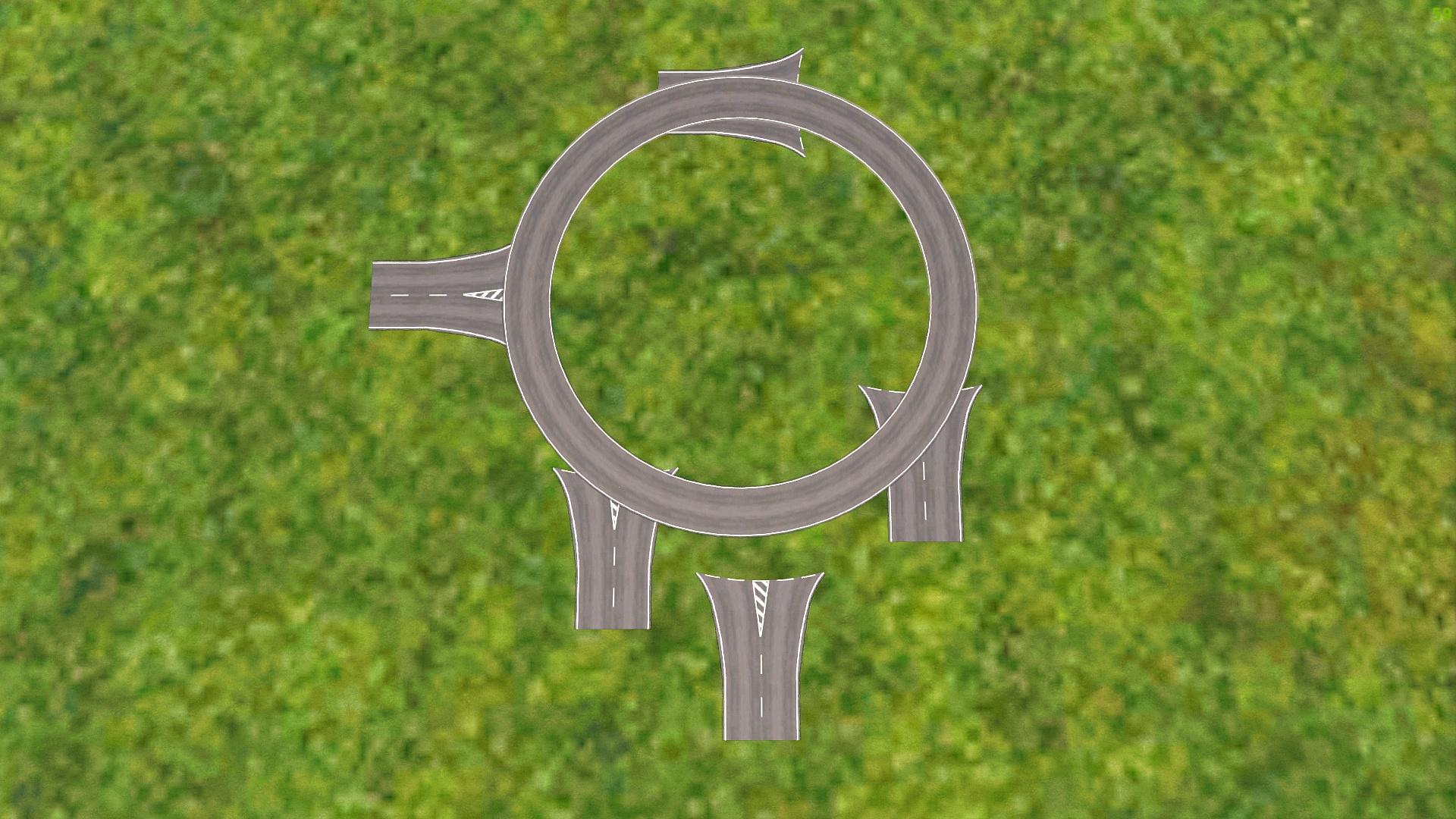
 limpid obsidian
I am currently making my first uniform model and I have a question about the hands. Do I have to texture the hands or will arma color them in since I believe the game changes the hand color depending on the solider?
inland pawn
limpid obsidian
I am currently making my first uniform model and I have a question about the han...
You’ll need to either model gloves with it. Or no gloves
stuck oyster
limpid obsidian
I am currently making my first uniform model and I have a question about the han...
if they are not covered you will want to copy the hands from the sample character so you get the uv mapping and weighting and identity selections correctly
stuck oyster
quartz prism
Hi does anyone have an idea how I can manipulate the order of the road decales? ...
decal objects?
 errant pumice
Has anyone made a cable car for A3 and why not? 🙂
 tribal finch
yeah I think ATS trains has some if I'm not wrong ^
Not sure if this is the right place but having some trouble with missile setup, can't find any documentation on it.
A: when firing, a second missile spawns that flies( as it should ) but the original missile still stays on the rails
B: I'm not sure how to define the particle effect position on the model, what do I name the proxy and I guess this is more config related but how would I point the config to that helper
 carmine minnow
errant pumice
Has anyone made a cable car for A3 and why not? 🙂
carmine minnow
errant pumice
Has anyone made a cable car for A3 and why not? 🙂
Don’t know if anyone has done it, but now i am going to bother @white oak to have him make one. Sorry, not sorry Ken. Thanks for the brilliant idea
white oak
😦
stuck oyster
errant pumice
Has anyone made a cable car for A3 and why not? 🙂
Difficulties on making them move and have collision due to object size limits.
 livid canyon
Is there a way to find what model position a vertex will be after autocenter takes place?
white oak
stuck oyster
Difficulties on making them move and have collision due to object size limits.
I think they'd be quite nice map objects
but having moving ones would indeed be too much work for something that would see very limited usage
A3Life people would be the main users I'm guessing
stuck oyster
livid canyon
Is there a way to find what model position a vertex will be after autocenter tak...
Live or while editing/making the thing?
livid canyon
While editing. trying to find snap points for cup terrains stuff based on A2 samples models xD
like these points.
Here's my super-scuffed method for live-finding simple 90-degree intersections. https://www.youtube.com/watch?v=p6ZfttEUaN4
 livid canyon
Turns out it was pretty easy to bring them in game.
 quartz prism
stuck oyster
decal objects?
quartz prism
stuck oyster
decal objects?
Its just a normal object that is placed via xCam and is always attached to the ground
quartz prism
and in the p3d?
stuck oyster
if its a class land_decal the not in there either if I remember right
 quick terrace
@last spindle - instead of making a game engine no one will use, they should have done PBR RT viewports for both max and maya
quartz prism
So they are alway randomly ordered?
last spindle
Its not like they diverted resources from developing Max and Maya to make a game engine, they acquired a company that already had a game engine and adapted it into a autodesk product
quick terrace
i am also aware of that, i phrase the above wrong - they should also focus on the things that are going to be industry standards - from shaders (GGX support is not there in any autodesk software natively) to proper Real Time viewports.
PBR is industry standard today, and most game engines and render engines will be alligning by the end of 2016
tulip gyro
How do I properly implement insignia support on uniforms?
marsh canyon
https://community.bistudio.com/wiki/Arma_3:_Unit_Insignia
Basically this
tulip gyro
I've tried adding an "insignia" selection thinking that It'd act the same way as an HL selection
 tulip gyro
marsh canyon
https://community.bistudio.com/wiki/Arma_3:_Unit_Insignia
Basically this
tulip gyro
marsh canyon
https://community.bistudio.com/wiki/Arma_3:_Unit_Insignia
Basically this
yeah
marsh canyon
An insignia selection is just done with the same way with vehicle retextures
Not with how the skin part (hl)
tulip gyro
According to the wiki page you've linked I should just make it a transparent material and I should be good to go?
marsh canyon
And it should have the proper weights (apparently) and basically it's done
 tribal rain
question for yall
so ive got a model im trying to make and im pretty sure the vertices are off
but i dont know which vertices im meant to assign them too?
this i for a little fun goof mod im doing
thats how its meant to be
supposed to be for a dark elf fantasy mod im doing but i cannot for the life of me figure out why its not working as it should.
So what id like is for the collar to sit around the neck and not freak out just sit there nicely. right now when the player moves the collar derps.
and the cuffs to go around the wrists
stuck oyster
your sample character you are using as reference is too high up
tribal rain
stuck oyster
your sample character you are using as reference is too high up
good shout
stuck oyster
 tribal rain
stuck oyster
tribal rain
stuck oyster
yeah you were right
i tested it by chucking in a helmet i know that works
stuck oyster
it is possible to export p3d without applying the transforms though so you could export the uniform from anywhere in blender world space as long as the uniform objects origin corresponds to the sample character objects origin (as long as that has not been altered from its original position)
tribal rain
and low and behold it was way off
stuck oyster

these all would export correctly since the object origins are in right position and the mesh in object space is right
as long as the transforms are not applied
tribal rain
stuck oyster
it is possible to export p3d without applying the transforms though so you could...
next question though,
Are these vert groups right?

 stuck oyster
yes
tribal rain
alright bet ill give it a go
 worthy kite
Anyone have any resources/tutorials for absolute beginners? I'm looking to get into model making and have found a few tutorials but it seems people have different ways of doing things or different software they like.
stuck oyster
worthy kite
Anyone have any resources/tutorials for absolute beginners? I'm looking to get ...
there are multiple ways of doing things yes. As an "absolute beginner" you will want to choose a program (Blender for example is widely used and free) and start by doing basic non arma related tutorials on it to start learning how modeling works and then move onwards to texturing and such related things
there is nothing that will show you everything at one sitting and you will likely spend at least a few weeks learning basic workflow stuff
worthy kite
stuck oyster
there are multiple ways of doing things yes. As an "absolute beginner" you will ...
Thank you I downloaded blender as that seemed to he the one that was used most. Any tutorials you would recommend to start with?
stuck oyster
for such recommendations Id suggest joining the Blender community discord. Im not really up to speed on which ones are best today. Been quite a few years since I've started
muted tapir
worthy kite
Thank you I downloaded blender as that seemed to he the one that was used most. ...
the donut tutorial is nice https://www.youtube.com/playlist?list=PLjEaoINr3zgFX8ZsChQVQsuDSjEqdWMAD
i don't think you really need anything past part 9 for doing models for arma

YouTube
Learn the fundamentals of Blender while making your very own donut. You'll learn the UI, modelling, sculpting, texturing, shading, geometry nodes, lighting, ...
worthy kite
muted tapir
the donut tutorial is nice https://www.youtube.com/playlist?list=PLjEaoINr3zgFX8...
Thank you
stuck oyster
it is good to understand the tools in depth though
the more you know the more easier it is to do things
tulip gyro
Hello, I've encountered a lighting issue in object builder


are there any fixes to it?
it's not caused by ambient occlusion or normal maps
I've checked
stuck oyster
youll want to put sharp edge there
that is shading from smooth edge as it tries to shade the surface round
@tulip gyro
 umbral shuttle
when a weapon is not selected ,like say my primary weapon on my back, will the fire geo still be active. My idea is to make a riot shield and when its on back it would still protect the back
muted tapir
will putting the points on the uv outside of the texture make the texture loop in arma the same way it does in blender?
 stuck oyster
muted tapir
will putting the points on the uv outside of the texture make the texture loop i...
stuck oyster
muted tapir
will putting the points on the uv outside of the texture make the texture loop i...
Yes
 terse elm
Its Friday........get ur WIP's out for the channel!!!!!
celest arch
:)
terse elm
heres mine http://i.imgur.com/PPGFbiZ.png
new Tyre for my ford raptor
come on folks dont be shy :-P
umbral shuttle
so the autocenter property, https://community.bistudio.com/wiki/Arma_3:_Named_Properties
having autocenter to 1 would move the model so its object center is at (0,0,0)?
muted tapir
umbral shuttle
so the autocenter property, https://community.bistudio.com/wiki/Arma_3:_Named_Pr...
that's indeed what it does iirc
can a vertex be part of multiple hiddenSelections?
stuck oyster
muted tapir
can a vertex be part of multiple hiddenSelections?
vertex should be able to be part of multiple selections yes
its the face that has the texture
muted tapir
great
https://community.bistudio.com/wiki/Model_Config
maybe there should be a hint on this page stating which characters are legal in classnames
stuck oyster
muted tapir
https://community.bistudio.com/wiki/Model_Config
maybe there should be a hint on...
typically in computer stuff letters and numbers are safe.
special characters are for special use only
muted tapir
- in my filenames broke my model.cfg which i was not expecting
muted tapir
it happens when you try to add coordinates with decimals into your model names and realize . and , won't work
otherwise i wouldn't have tried that either
quick terrace
 stuck oyster
😅
 north sundial
Ooohhh pretty, what is it?
wraith tendon
I bet, its a Sandwichmaker.
 ember heart
lol close
north sundial
baby cannon?
wraith tendon
uuhhh, firing little crying babys at your enemys! Yeaahhh!
north sundial
Well not only the babies, they come with extra "Chemical weapons" http://s3.amazonaws.com/theoatmeal-img/comics/kids/kids.png
wraith tendon
yyeeeaaaahhhhh
quick terrace
good grief lads...let's see if this makes more sense...http://i.imgur.com/iRbYqkg.png?1
 wraith tendon
Its a lamp!
 rotund ocean
a potato smasher?
rotund ocean
pepper mill?
 bold flare
A Magazine with something on top
north sundial
One of those electic bolt screwer things that they use in F1? :D


 ember heart
the force is weak with these ones :P
quick terrace
it is...
rotund ocean
a funny looking bat
quick terrace
@north sundial - don't wanna know what you do with you butt and free time thank you
wraith tendon
Okay: That thing reminds me on the SD Version of the AK
north sundial
Haha
wraith tendon
(from OFP i believe)
 tired bramble
AS VAL
wraith tendon
Correct
tired bramble
SHOVAL
quick terrace
@north sundial not everything that is pink fits a butt lad...
wraith tendon
Answering for Kenny: "Challenge accepted"
quick terrace
because otherwise...https://s-media-cache-ak0.pinimg.com/originals/04/c7/59/04c759642ff34614dd013ca7cdabeb79.jpg

 wraith tendon
XD
north sundial
Just be brave!
tired bramble
Well, considering those things usually have those little nutsacks attached to the back.
It's clearly made to be put in ones butt.
north sundial
The pickup truck? :P
quick terrace
other experience worth sharing @tired bramble ?
wraith tendon
http://a57.foxnews.com/global.fncstatic.com/static/managed/img/U.S./876/493/blurredcar.gif?ve=1&tl=1
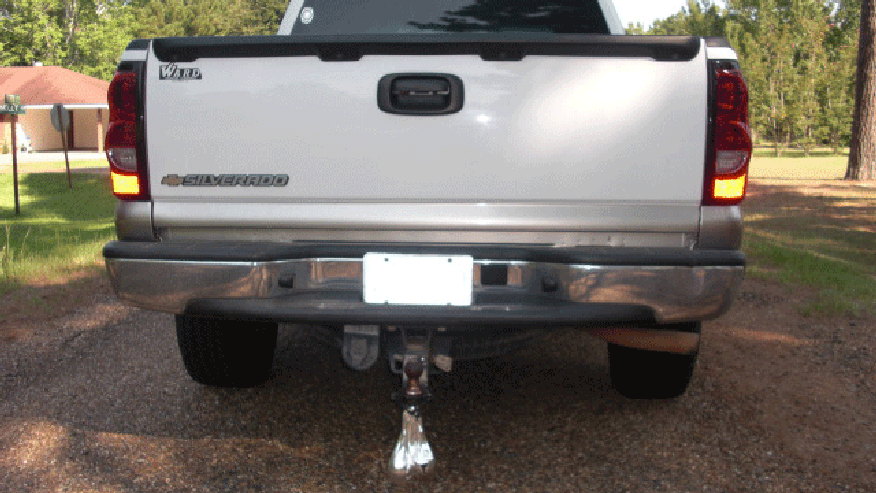
 north sundial
Omg haha
tired bramble
@quick terrace Yes, when I click on pictures, and drag them around, the camera doesn't move.
quick terrace
:) damn hoax
 past canopy
really cool ak47 @quick terrace ;)
quick terrace
good christ lads, not even funny anymore :P
wraith tendon
XXDD
past canopy
DId you post videos about making that HP?
quick terrace
neah, i model when i have some spare time, at the office or at home
when at office it would be weird to talk to my monitor, when at home, i usually have a chat with the misses while i model...so yeah
white oak
Somehow I managed to lose all the windows and doors on the building
 stuck oyster

white oak
Blender doesn't export them
nor does it throw an error
odd
stuck oyster
Are they separate objects?
white oak
Yup
They are marked them as arma objects however
Other buildings that I made with the same obj structure exports correctly
might just merge them, see what happens
 plush trail
hello I'm starting my first attempt with model making and utilizing. I'm using a model of a sepecat jaguar with CC with attribution from sketchfab. So far I have painted it and seperated flaps, breaks , guns, fins, canopy, landing gear (each) and their panels (each)
do I need to do rigging before even thinking of going to the object maker?
stuck oyster
plush trail
do I need to do rigging before even thinking of going to the object maker?
well rigging does not really transfer, but can be very helpful in setting up the vertex groups that you want to animate and for creating the memorypoint axis pairs. There isnt really anything you really need to do in OB expect try out the animations in buldozer
plush trail
oh
Also the plane has the guns like this

it's the marked area
is there a way to put the flashes in front of each barrel
I'll make it fire two shots each time you pull the trigger to simulate them firing. I'm decent at coding but modelling is new to me
 lean furnace
Where can if find a Paid Arma mod tutorial ?
plush trail
for what?
there are videos for tanks, guns, and helicopters on youtube for the modelling
lean furnace
Yeah true, but not many Videos are out there, I need hands-on tutorials and intimacy with the Craft.
plush trail
stuck oyster
well rigging does not really transfer, but can be very helpful in setting up the...
So the animations are made in OB, buldozer or blender?
I can try to make vertexes
stuck oyster
plush trail
So the animations are made in OB, buldozer or blender?
model.cfg by procedural code
but the modeling the necessary components is best done in blender
what you should do is go back a step and make something simple like a box with a lid
and then get that lid animated
what you got now is very very very complex to practice with
plush trail
oh ok
stuck oyster
you can find model.cfg explained on the wiki and the sample models also contain example model.cfg
but it is better to start from simple so you learn how to write it
instead of copy pasting
plush trail
I see
I'll do that. I started with a plane cause the first modelling guide I saw was about the RB-22 chopper
stuck oyster
guides unfortunately are all little bit incomplete and dont start from the very basics. so there can be a lot of confusion in watching them
celest arch
quick question: do we still have the 99 components limit in the geolod?
plush trail
yea
The model I used is CC with attribution ,is that ok? As long as I attribute the original maker in sketchfab. I will pull the text sketchfab gave me
stuck oyster
sounds like it could be ok.
plush trail
yea as long as the man that made the model didn't steal it from somewhere we shall be fine I think
celest arch
no? k
hollow fulcrum
@last spindle haha, you can not resist! (i bet it would ok at pretty high counts if the numbers are inside)
celest arch
I think im a bit over it (in the 120ish range) for this: http://i.imgur.com/9iB5OLk.png could also split it up
 hollow fulcrum
you people and ortho views.. meh.. if it's needed it's needed. you could also proxy it out if concerned. /shrug
when you start getting into the hundreds of components, like the Mk.V (400 odd), then you can actually start to see performance issues.
quick terrace
@hollow fulcrum cheers lad, only added internsls and cut seams since last tome you've seen it
reg ortho view-i never get how you can use it...
hollow fulcrum
i use it only when clipping becomes annoying honestly.. but thats just me. :D
hollow fulcrum
mm, bar the larger stuff. and yeah cm.. suprises me how often i run across people who lack knowledge of things like, zooming with ctrl+alt+middle** mouse... (learn to use the viewing tools!)
quick terrace
if my typing is shit, it's my mobile, my dyslexia isnt that bad
hollow fulcrum
hahaha
quick terrace
alt both buttons
 humble wraith
So getting into mod making and just wanted to share one of my first projects. This is going to be the Cerbrus dogs from Resident Evil. I'm really excited about it! animations are the only things that are really going to be a pain in the butt, but it'll be well worth it! I'm working on texturing right now, gotta make sure the ribs and stuff show. Lol.
 stuck oyster
👍
quick terrace
neither is mine, my custom keys + scripts (pro viewport) are one of the most safeguarded files
hollow fulcrum
^^^^^^^^^^^^^^^^^^
anywho, catch you later. i'm going to allow @woeful tartan to distract me today with some Elite|Dangerous sidelining. (assuming i can hide from work successfully..)
wraith tendon
waits
hollow fulcrum
-.-
wraith tendon
^^
celest arch
REPENT! http://i.imgur.com/1IrzJGW.jpg
 wraith tendon
The is
End Now
woeful viper
pink blood? somebody played with red food color again?
 wise coral
your monitor is color blind
white oak
Are there any blender plugins to open paa files?
 stiff dagger
Can use texview and save it as a .tga if that helps.
white oak
stiff dagger
Can use texview and save it as a .tga if that helps.
well yes
but I'm more looking for a quality of life plugin
so I can just open the paa file while UV mapping rather than having 2 copies of every texture and go digging for them
delicate holly
Does anyone know if it is possible to perform a batch rename for vertex selections within object builder?
stuck oyster
white oak
Are there any blender plugins to open paa files?
Nope
stuck oyster
delicate holly
Does anyone know if it is possible to perform a batch rename for vertex selectio...
There isn't any inbuilt rename tool but there are addons that have such advanced search and renaming functions
delicate holly
thanks for confirming that o7
lean furnace
Is there a Quick way to retopology this mesh for Arma 3 ?
 past mesa
lol
stuck oyster
lean furnace
Is there a Quick way to retopology this mesh for Arma 3 ?
No.
lean furnace
Is their retopology Plugin for Software like blender ?
stuck oyster
Sure. The best ones just cost.
But you asked for quick way to do it for Arma. Which there isn't even with plugins since the retopo model would need some adjustment manually anyway.
To make it fit the Arma man's joints and weighting.
north sundial
Maybe make the blood abit more brown shultz because it would be dry
Looks awesome though :)
white jay
hey so if I downloaded a mod and the door animations don't work am I allowed to fix it myself?
fluid copper
white jay
hey so if I downloaded a mod and the door animations don't work am I allowed to ...
Part of the door anims stuff is in the model.cfg file, in order to create a new one for the building model you would have to have an unbinarized version of the model, which likely isnt included in the mods pbo. You could check the config file and see if theres something that can be fixed in that, or contact the developer to see if they can help. Worth looking at the license as well, since most prohibit the re-publishing of the mod to the workshop
white jay
ok i just looked at the config and found this for the door stuff, i don't plan on republishing i just wanted to fix it so i can do CQB with it on SP
this is what the door animations say in the config
i have to send it as a text doc
fluid copper
I'm not knowledgeable enough in anims to tell if there is an error in that, you could see if anyone in #arma3_config or #arma3_animation can assist
white jay
thank you
limpid obsidian
How would one go about adding a pistol proxy in blender to a vest so the weapon will show while holstered?
inland pawn
limpid obsidian
How would one go about adding a pistol proxy in blender to a vest so the weapon ...
Add the proxy in the p3d. If you own it
 wind niche
Hey, I'm learning Blender to make a simple weapon model for arma, I'm wondering if I can use Blender modifiers for my arma models or not?
I'm trying to add a bevel modifier for a hilt I'm making, and a boolean modifier for a cutout
stuck oyster
wind niche
Hey, I'm learning Blender to make a simple weapon model for arma, I'm wondering ...
you can use all the tools you can find. the end product you export will just have all of those applied to make them "real"
but you will want to be careful not to make things too highpoly.
Id recommend looking into highpoly-lowpoly texture baking workflow
wind niche
Oh it's not very high poly, just around 250 vertices for the weapon I'm making, but I plan to make a very dumbed down version without bevels and things for far away LOD's
 stuck oyster
👍
modifiers can just sometimes "get out of hand"
but like said, you can use any modeling techniques/tools you want
the process between 0 and ready model dont export
only the end result
wind niche
Alright cool, thanks for answering so quickly
urban geode
Any reason this could be happening?
 woeful viper
yes, completely dried blood kinda looks like ironrust colorwise
(even smells like iron... at least my does xD)
stuck oyster
urban geode
Any reason this could be happening?
Yes you have assigned material to proxies which break them
stuck oyster
That could work
muted tapir
what does this hidden selection maker actually do?

if i change the parameter in there, it changes for all materials
stuck oyster
You can make hiddenselections vertex groups manually
 safe walrus
Hello, what file type does a tank model need to be in order to work in arma 3? (for example an imported 3d model that I want to use for artwork)
Would .obj work?
marsh canyon
You just want a prop?
inland pawn
safe walrus
Hello, what file type does a tank model need to be in order to work in arma 3? (...
P3D
safe walrus
marsh canyon
You just want a prop?
yes
white oak
Doors, how do they work
seriously though, do I need to make an animation rtm, or do I just reference a memory point
stuck oyster
white oak
Doors, how do they work
seriously though, do I need to make an animation rtm, or...
what doors?
white oak
building doors
trying to get them to open
but making a mistake with the memory vertices I'm guessing
can't see it on the interaction menu
stuck oyster
have you checked the sample house model?
it has working doors setup
selections in p3d, memorypoints, model,cfg, configcpp
white oak
Yup trying to replicate that
door is in a vertex group in LOD1
Interaction and Axis vertices are also grouped in Memory LOD
more or less copied over the modelcfg and configcpp to the letter (with the needed changes)
Do I have to copy functions aswell or can I use the ingame functions?
Even removed the interaction conditions to make sure they display first
still nothing
stuck oyster
do you have the geometry lods?
white oak
not yet