#arma3_model
1 messages · Page 8 of 1
 civic stratus
I guess not
just read this response from gnat: "Turns out its the "balance" of points in the MEMORY LOD. (yeh, not logical right! )
Just added a bunch of unnamed points forward of the nose ..... bingo, now sits normal on the ground."
but ill add your driveoncomponent
 wispy orchid
hmm, is that an arma3 observation? Gnat been inactive for quite a while now
civic stratus
well he used driveOnComponent, which I'm assuming is for arma3 (havnt seen it before)
is that for planes only?
my car's still a little lopsided
 jaunty rune
direct, what kinda of map is it?
wispy orchid
not sure if it makes sense in a car, I didn't find a reference to it in the car config guidelines, https://community.bistudio.com/wiki/Arma_3_Cars_Config_Guidelines
civic stratus
i didnt see it in there either, i dont think it makes sense either lol
 pastel fern
It 100% will cost performance, depending on the amount of rocks nearby.
I know from personal experience on maps like Esseker and one other one I can't remember right now, there were these "cave" / "mountain" sections that put you from 100 FPS to roughly 2. Later we confirmed it to be the rocks and nothing else by further testing
wispy orchid
while it's from another airplane thread, are your wheels in the geo lod and have mass applied to them?
 woeful viper
using thousands of individual objects for making large land features will do that, yes. That's why you are not supposed to do that 😛
 pseudo elbow
Still I wonder if these rocks are fixable without being performance killing. They're such a headache, they look walkable but they bump you away and if you step into them with V you're in a lot of trouble.
I can make a script to find places with largest amount of these rocks around so its possible to measure FPS without them fixed and with them fixed
Teleport player to set of predefined positions and orientations to first measure FPS there, then same with fixed rocks
 stuck oyster
pseudo elbow
Still I wonder if these rocks are fixable without being performance killing. The...
stuck oyster
pseudo elbow
Still I wonder if these rocks are fixable without being performance killing. The...
might be more effort than the current A3 improvement team has to put into it. but as community effort when A3 Datapack releases I see why not
civic stratus
also, on an unrelated note, I'm trying to accomplish the same thing this guy is: http://www.armaholic.com/forums.php?m=posts&q=10579 I was hoping someone had experience with using clockHour as a source for hide animations
 plucky patrol
Hello, I am trying to make an example object to put it in game but when it is in game it seems that the object does not remains on the ground, it is a little inside the ground. https://imgur.com/QmGD7wH and https://imgur.com/EUU157A I do not know what the issue is, any help please ?


 runic plover
plucky patrol
Hello, I am trying to make an example object to put it in game but when it is in...
runic plover
plucky patrol
Hello, I am trying to make an example object to put it in game but when it is in...
Do you have a pic in OjectBuilder or Blender? Looks for me like you dont have it at 0 line.
Also as little help, you might do smooth edges and make some conture lines sharp edges only
plucky patrol
runic plover
Do you have a pic in OjectBuilder or Blender? Looks for me like you dont have it...
First pic si from object builder
stuck oyster
Raise it up a little or make the bottom thicker.
plucky patrol
stuck oyster
Raise it up a little or make the bottom thicker.
I was thinking at this to
plucky patrol
stuck oyster
Raise it up a little or make the bottom thicker.
It worked ! 🙂 Thanks for the tip https://imgur.com/L4uALU4 So this is my real soup plate 😄
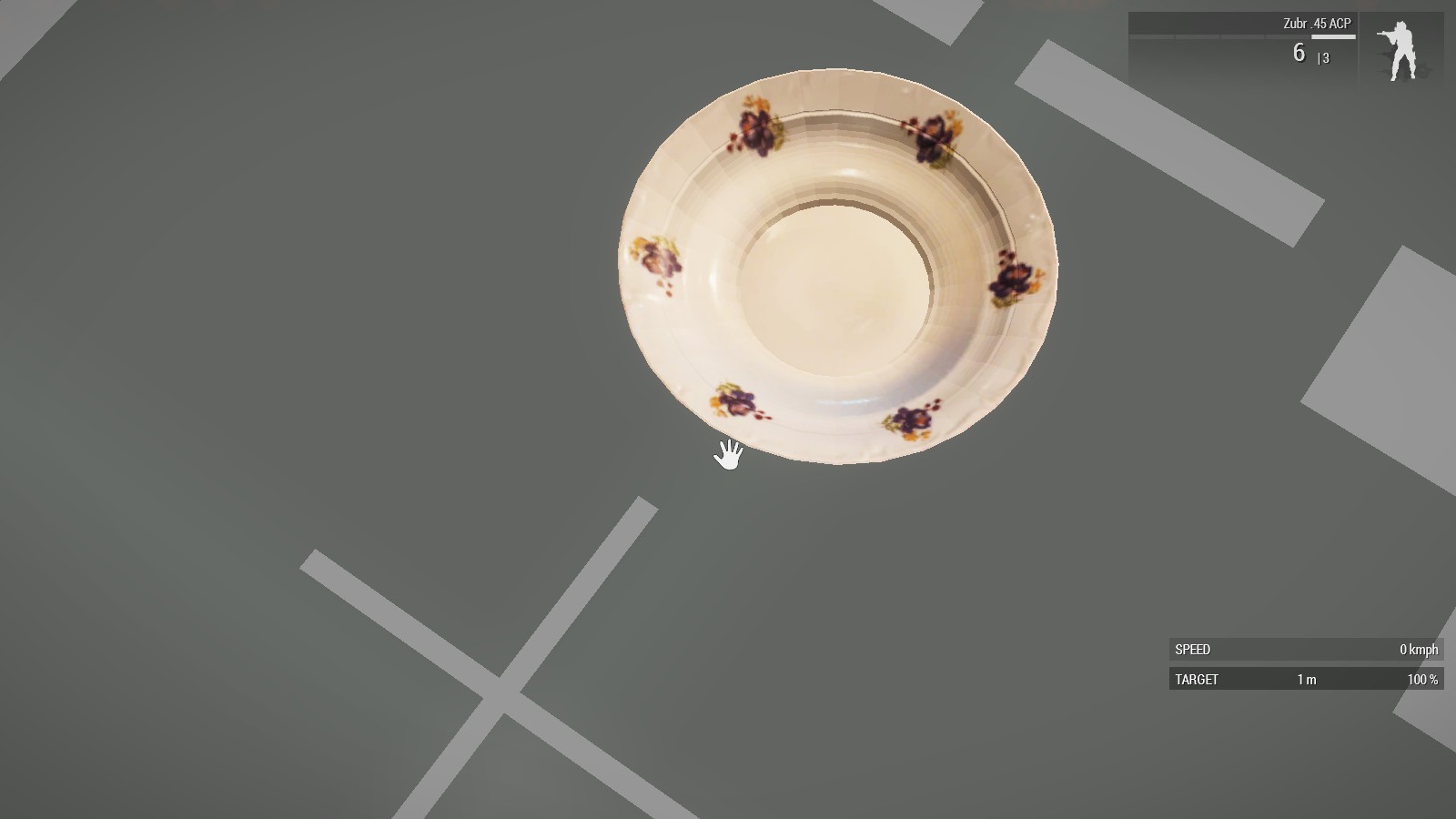
Now I i have it in Arma to 🙂
stuck oyster
👌👌
plucky patrol
runic plover
Do you have a pic in OjectBuilder or Blender? Looks for me like you dont have it...
And this is with smooth edges https://imgur.com/v23v5Om
 jaunty rune
if i am only doing a interior for a building as to hide the outside under rocks or something should i bother deleting exetior geometry?
runic plover
plucky patrol
And this is with smooth edges https://imgur.com/v23v5Om
Better
Now make the real edges sharp, just select one row of vertices and make sharp (do not select faces)
As example, this was all smooth

Made the vertices sharp of the "hole" part

 south thorn
@still trail That cruise missile video is awesome, thanks for sharing :)
 errant pumice
hey guys, please help. How do I make _as texture less saturated, so the rooms are not so dark during daylight?
In RL rooms are very dark, but A3 shading is crap and characters can be easily spotted in them (way too bright, they dont get proper shades thrown on them):

so I need to avoid these dark rooms because engine cant handle them
errant pumice
slowly getting there 😉

 rose breach
Hey yall quick question, seeming to have issue with this proxy appearing. There is no texture applied when I check under the object builder so I'm not sure how to get rid of it. Any ideas?

 charred bolt
rose breach
Hey yall quick question, seeming to have issue with this proxy appearing. There ...
charred bolt
rose breach
Hey yall quick question, seeming to have issue with this proxy appearing. There ...
In Object Builder, copy and paste the proxy into a new empty LOD.
Check what name selections it has.
Often "camo" type selections can be the issue.
rose breach
charred bolt
In Object Builder, copy and paste the proxy into a new empty LOD.
Check what nam...
I'm just getting Pelvis and Proxy pathed to the default a3 holstered pistol
 tacit shard
errant pumice
hey guys, please help. How do I make _as texture less saturated, so the rooms ar...
tacit shard
errant pumice
hey guys, please help. How do I make _as texture less saturated, so the rooms ar...
Looks like you figured it out but just in-case you want some more info.
Adjusting green channel in Photoshop using the levels tool is the easiest way, however ideally you want it to be reflected in your bake so its not a destructive work flow so that really depends on your baking tool,
I tend to bake buildings in Substance Painter and the value you're looking for in there is 'Max Occluder Distance' under the Ambient Occlusion options. You want this value to be quite low I normally go for something around the 0.1 mark but you can go higher/lower depending on how much AO you like / looks good.
If you have this value to high it will basically occlude the entire interior of the mesh making everything inside dark and thats what gives the effect of everything else being too bright as the objects / players are only as dark as they would be in the normal shadow of the building outside.
If your baking in something else like Marmoset, Blender, or X-Normal you will need to find whatever that setting is called in that program
errant pumice
Thanks Jack
yeah I bake in Blender as I cant afford SP right now
with TexTools
i set the levels to 50-200 in TGA so that fixed too dark rooms
 tacit shard
From a quick google it looks like the parameter is called Ray Distance in TexTools and can be found under the preview texture panel but not 100% sure if thats the right one as I'm not familiar with it, I would try lowering / increasing it and seeing what it does ideally your AO should look something like this.

Thats a lovely looking building though great work with it


 old gulch
Nice
tacit shard
It’s a damn good recreation of it though looks brilliant.
Feel free to send me a message if you ever need anymore help with building related things I’ve got quite a lot of experience with them in ARMA
 livid canyon
Trying to see why my vehicle animations seem to work well in Model viewer, but not at all in game, with animationNames _vehicle >> []. Which possibilities should I be checking first, short of dumping model.cfg and cfgvehicles here?
 tranquil spire
can I have multiple cartridge exit points?
nabojnicestart, nabojniceend
unsure if its more of a model question or config
ok I've found my answer, for posterity...
create a new effect under CfgCloudlets, with particleShape = cartridge model, assign moveVelocity[] for each axis * negative coefficient
reference that new effect on a new GunParticles, position and directionName are your memory points in the model
 deep basalt
Hey there, sorry if this is the wrong place to ask, but I am looking for someone who might be interested in doing some model comissions, specifically backpacks for an unannounced mod, would anyone here be interested in such a thing?
old gulch
I believe you're looking for #creators_recruiting
 thin wigeon
goat_sacrifice++... I'm going crazy, or a senior moment, what the heck forces a model to be placed vertically in ed3n, e.g. PowLines_Transformer_F? I tried adding the
class SimpleObject
{
eden = 0;
animate[] = {};
hide[] = {};
verticalOffset = 9.022;
verticalOffsetWorld = 0;
init = "''";
};```
which I thought forced it with all those verticals.. no joy 😦"vertical" is a poor description for arbitrary model shapes in 3D space , with 6 degrees of freedom...
describe what you actually want (X,Y,Z, translation, rotation)
thin wigeon
wow, ok, let's try non-conforming to ground , and perpendicular to sea level. "vertical" being the classic definition of the word, one in which an object is not tilting in a translated kind of way relative to its original orientation when placed upon a surface, regardless of the surface's orientation. how many other definitions of vertical are there, out of interest?
In this case, I'm making a new power pylon but unlike the stock one, mine is conforming to the terrain regardless of the overrides in eden.
 thin wigeon
no, that's the behaviour I'm getting - it's always conforming to the surface regardless of the snap settings, I want the thing to be always pointing up true (like if you got a spirit level on it) so it's not doing that - like RL pylons in fact.. in my geolod I've got placement=vertical which I thought just did that - or are you saying that does what your picture shows?
I also have a landcontact and I just realised that's (one of )my problem(s) isn't it. I just removed that LOD and now I can get it to reset back to vertical after placement by raising it above the surface after placing it. So still not quite right but better than I had. I haven't done any modelling like this before so pardon my obivous ignorance, there's still something the vanilla one is doing that I'm not though.
woeful viper
https://community.bistudio.com/wiki/Arma_3:_Named_Properties#placement
thats what i know of. Not sure how/ if eden placed objects abide to this.
thin wigeon
I think I might be getting confused with what "vertical" does with placement. I'm just taking it out and trying again - it's very light on the detail (added for RADAR - wtf?) in the wiki which is why I'm asking stupid questions here 🙂 But it looks like all those other options are to do with conforming to the gound. So maybe vertical doesn't mean vertical.
stuck oyster
thin wigeon
I think I might be getting confused with what "vertical" does with placement. I'...
disable the ground follow placement in the toolbar
try these
 thin wigeon
Mr Goat, I did that, but when I initially place my model it's ALWAYS tilty, if I ALT-drag it up it suddently gets the idea and goes properly vertical. But the in-game items like PowLines_Transformer_F just "work" first time. I must have dones something really stupid, just can't seem to find what it is. But I am guessing that any reference to placement=vertical doesn't do what I thought it did?
nope, just took out placement=vertical and it's still behaving the same. In my geolod I now have:
forceNotAlpha = 1
map = power lines
damage = house
class = house
I removed the landcontact LOD and other than that I have 4 view LODs, a geom, and a roadway so far. Is it all going wrong becuase I havent made the view/fire LODs yet? I didn't think that mattered too much?
woeful viper
you should, because if you just have a skinny power pole where nobody can hide behide, you should have an empty view Geo Lod
but its unrelated to placement
thin wigeon
Yes, absolutely agree, sorry, didn't phrase my question right, I meant of course to this placement issue.
OK, I'll create an empty view geolod, I'll see if that makes the magic happen.. I just feel I must be doign something so stupid that all you guys wouldn't even think of it
woeful viper
back "in my days" i would have checked what named properties the geoLOD of the vanilla pole had (using eliteness from mikero)
 thin wigeon
oh, ok, so placement = vertical gets a look in there, although it didn't seem to do anything for me - and the wiki helpfully says it's something to do with RADAR! ok, I'll try anything at this point - I'll make my p3d identical to a table lamp. Before I do that, one more wildcard - the model is 61m high, but vertical isn't an issue, is it?
stuck oyster
radar bein always placed vertical for X reason
height should not matter
you can try packaging the sample lamp too
and see how it behaces in comparison
thin wigeon
makes sense.. I want one of those, so back in my placement = vertical goes. stand by.. this is going to be such an anticlimax when I find out finally what's going on
good idea on the lamp packaging - it would rule out any shenanigans, I think I'm up to date with mikero tools free but you never know.
stuck oyster
when put in P:\sample_f,.. the samples should package fine
well there may be some inheritances in model.cfg and such that may need correcting if memory serves
thin wigeon
I never thought of actually compiling them, how strange.
stuck oyster
😄
thin wigeon
good bit of lateral thinking - test_lamp behaves the same way as my pylon if I just drop in the p3d in place of it. So it's something weird going on in my config, not the p3d. There's not that much of it - but just to rule out some wierdness in my system I'll now package the whole arma samples... stand by...
stuck oyster
there may be a config value for the placement too now that I think of it
what class do you inherit form?
/what simulation type is your pylon
thin wigeon
I put it in my buildings class, so it's inheriting from HouseBase, I'm sure this worked for my other buildings but now I'm not so sure
I just realised the examples use House so that's next on the list
I'm not even sure where this HouseBase came from
well paint me red and strike me down, I changed the inheritance from
class House_F: HouseBase
to
class House_F: House and guess what, it all works. This has just corrected something I fumbled about with back in 2014-ish when I had even less of a clue than I have now. It appears every other mod I made was using the correct inheritance. Good call with the lamp, Mr. Goat. Sometimes some basic fault finding goes a long way, but I really couldn't see the wood for the trees this time!
goat_sacrifice++; 🙂
stuck oyster
thin wigeon
well paint me red and strike me down, I changed the inheritance from
` class Ho...
keepHorizontalPlacement=1; in configs
thin wigeon
oooh, ok, I'll add it in too for good measure. Just configs and not geolod?
stuck oyster
geolod properties are mainly for TerrainBuilder
config parameters are for mission editor/live in game placement
thin wigeon
aaah, never realised the difference, so if you want to cover all bases then duplicate the properties in both?
stuck oyster
thin wigeon
aaah, never realised the difference, so if you want to cover all bases then dupl...
well they are a bit different on each but yes
 cloud zealot
How do we make a handgun holding animation ? For a rifle, i understand i attach my rifle model to the weapon bone and just place the hands on the correct position around the weapon bone. But for a handgun, there is no handgun bone, which bone am i supposed to use ?
stuck oyster
handgun proxy
 thorn spire
If ill.make lets say camo.net
Which is basically just a shaped plane, can I just create the small grid.hole texture with Alpha
Or should I cut the.mesh
livid canyon
Animations work in Model Viewer but in game animationNames _veh returns [] and no animations happen.
I've cut everything except 2 animations from model.cfg and still can't seem to get it to work. Any suggestions?
https://pastebin.com/AccAm4rv
https://cdn.discordapp.com/attachments/1080854001265954828/1081040900081336360/image.png
Fixed by not using tools from over a year ago...
-.(\
cloud zealot
stuck oyster
handgun proxy
Are the proxies in Blender the same as those in Object Builder ? Can i make the animation using only ArmaRig or do i have to use object builder ?
stuck oyster
cloud zealot
Are the proxies in Blender the same as those in Object Builder ? Can i make the ...
the arma rig can be used to make the animation
it just does not have the pistol proxy present in the rig. You can take the sample character and see the pistol proxy on it tied to the right hand bone and project your pistol object on it
its a bit difficult process I admit but it is possible
stuck oyster
livid canyon
Animations work in Model Viewer but in game `animationNames _veh` returns `[]` a...
😅
 rough idol
 still trail
Did Mankyle ever release his LCS-2 as an MLOD?
 last spindle
@white jay You should use an alpha texture, the amount of holes in a camo net will not make for a performance friendly object if you cut holes in the mesh, you could of course, but best to stick with a alpha texture
The tactical ladder is done with segments that extend out via custom animation sources, i would think the best approach for a bangalore is to just have a single object, memory points at both ends, and then attach them together by a script
 versed rune
New to the modeling part of arma. Exporting my model from blender in scene units that fit with the height being ~18cm. But when imported into O2 and put down ingame, its like a a factor 10 bigger. I can "just" scale it down by factor 10, but I would really like to understand the relationship between units from blender to O2 first, instead of just "winging" it.
I don't know how to check the scale of it in O2.
Images from blender, O2 and Ingame. I know the texture are also fucked in some way, but thought that I would get scale correct first, then see whats going on with the textures! 🙂
https://imgur.com/a/nx98nIy
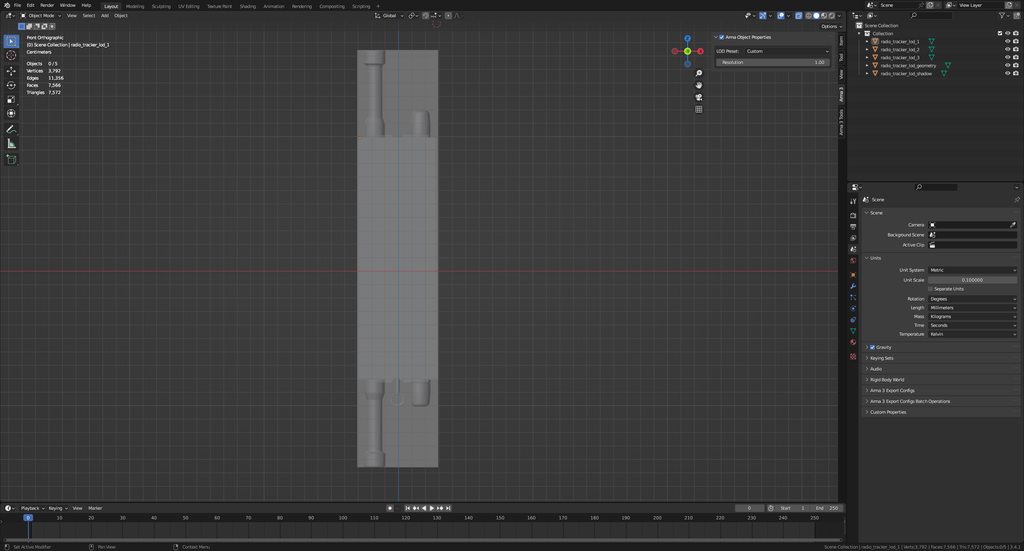 tranquil spire
versed rune
New to the modeling part of arma. Exporting my model from blender in scene units...
tranquil spire
versed rune
New to the modeling part of arma. Exporting my model from blender in scene units...
I'd recommend you use the MeasureIt addon within Blender to make sure its correct, afaik the dimensions are 1:1
versed rune
Thanks! Did not know that existed. Just enabled it in addons. Gonna google to see how to use it.
stuck oyster
versed rune
Thanks! Did not know that existed. Just enabled it in addons. Gonna google to se...
should not need any addon for measurements. Just make sure the objects scale is 1,1,1 when you export AND use the armatoolbox addon (pinned messages) to export directly to P3d
tranquil spire
I suggested it because I didn't know how they were measuring before
stuck oyster
1 blender unit equals 1 unit in OB = 1 meter
versed rune
I am using the arma toolbox for direct export to p3d. That part works well.
stuck oyster
versed rune
I am using the arma toolbox for direct export to p3d. That part works well.
then your object mode scale is not applied
versed rune
Hmm. Can it be because I changed the unit scale under scene, instead of actually scaling the object physically. Not quite sure how the unit scale in "scene properties" applies to the export, if it does at all.
stuck oyster
yes that would likely cause it
such settings dont apply on export
use edit mode to scale and edit the model
versed rune
ahh, that could explain it. So I should keep the unit scale on 1:1, and just scale the model so it fits within that scale.
I'll try that
stuck oyster
keep object mode in 1.1.1 (at least at export)
versed rune
another stupid question. Is z down when exporting models? Noticed that when my model "stand up" in O2, then it lies flat in the world in arma. But if I rotate it 90, so it "lies down" in O2, then it stands up ingame. So a tad confused about the orientation coordinate system in O2.
stuck oyster
what type of model did you make?
versed rune
equipment. Think of it as a radio model
stuck oyster
and Blender UP is also OB up
stuck oyster
versed rune
equipment. Think of it as a radio model
just as a reference, best help is given when information is exact. But so item
so do you mean its sideways when you drop it?
versed rune
fair point. New to the modelling part. Was unsure what info that would make sense. Its a handheld "misc" item that is about the size of a tfar radio.
So trying to figure out the relationship between the O2 orientation and how an item is placed on the ground, when dropped.
An orientation where it "stands up" like this in O2, makes it lie down ingame.
If I rotated it in O2, so it looked like the last image, then when dropped ingame, it would "stand up" instead of lie down. Feels like the ground-plane in O2, is a plane that is vertical, instead of horizontal. If that makes sense?
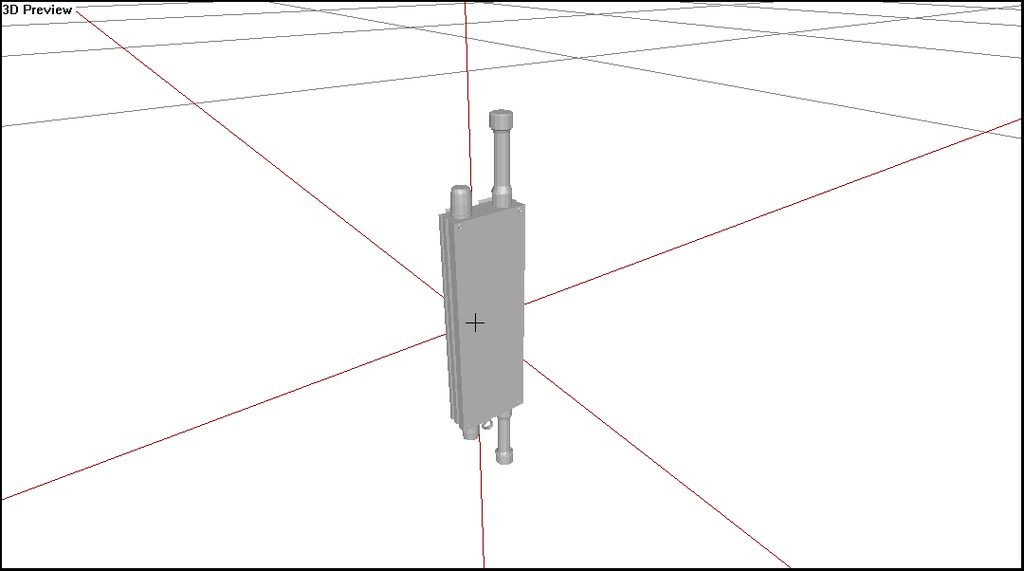 stuck oyster
versed rune
fair point. New to the modelling part. Was unsure what info that would make sens...
stuck oyster
versed rune
fair point. New to the modelling part. Was unsure what info that would make sens...
well there isnt really hand held misc item type thing
but itmes work different on ground as they are placed inside a ground holder object as proxies
and sually things are placed sideways there
due to well, thats how things usually lie down
versed rune
okay. Not sure how to describe it then. xD
ohhh okay. That would explain it
stuck oyster
versed rune
okay. Not sure how to describe it then. xD
ohhh okay. That would explain it
basically if you want something to show in hands it needs to be a weapon
versed rune
Yeah, that is fair. Was just confused if my understanding of O2 coordinate system was off, but makes sense that arma would let items lie down, as that is how they would usually work.
Can confirm. Scaling the actual object down instead of the scene units did the trick for that. Cheers for the help!
Now I just gotta figure out why my textures are not mapped correctly onto it. 😅
stuck oyster
arma toolbox adds a separate dialogs for the blender material where you can add texture and material paths that then get written on the model on export
and Arma supports only 2 UVsets and mainly uses only the first one
versed rune
I used Substance painter for the texture after UV unwrapping it in blender. The texture do show up, just not the right things on the right parts. I think something might have gone wrong in the mapping somewhere.
I did add the texture and material paths through the arma-toolbox plugin. (Very nice plugin btw!)
stuck oyster
we can all give thanks to mr Alwarren for the boon granted to us
likely it means you have somehow mismatching uvmapping yeah
versed rune
yeah. Refreshed the mesh, and its also off in substaince painter now. Gonna redo it.
stuck oyster
if you check UV editor in Object Builder how many UVsets does your model have?
versed rune
only 1, from how I read it. With everything on object selected it just gives me one uv map on the uv-map screen. I think something might have gone wrong with my colour_map from blender.
wait a minute. When I exported the FBX file its set to "-z forward, and Y up".... That doesn't seem right.
stuck oyster
mesh orientation does not matter for uv export
versed rune
ah. Because its still mapping specific parts of the uv-map to faces, so as long as that mapping is correct it doesn't matter how its oriented?
tacit shard
IIRC Y is up axis in Object Builder while Z is up in a lot of modelling programs so it’s just converting it.
versed rune
yeah. Used to z-up in inventor iirc
versed rune
Seemed like an updated p3d with new uv-mapped texture did the trick. Works as a charm now! Cheers for the help to get the workflow understood!
stuck oyster

cloud zealot
stuck oyster
its a bit difficult process I admit but it is possible
i will try that
Why does an animation defined with CfgMovesMaleSdr stops at the last frame ? Why doesn't the character return to stand position ?
stuck oyster
how is the animation played?
cloud zealot
stuck oyster
how is the animation played?
using switchMove, the animatio is not looped
stuck oyster
thats the nature of switchmove I suppose
cloud zealot
stuck oyster
thats the nature of switchmove I suppose
hmm, i'll use the gestures then
But when i use
player switchMove "AmovPercMstpSnonWnonDnon_EaseIn";
the player doesn't stay on ease position, he automatically switch back to normal position at the end of the animation. Why ?
stuck oyster
cloud zealot
But when i use
```SQF
player switchMove "AmovPercMstpSnonWnonDnon_EaseIn";
```
t...
first off #arma3_animation 😅
and in there, please explain what exactly are you trying to do
cloud zealot
Oh my bad, i thought i was on the right channel
thorn spire
@last spindle right, I would like to have it like in irl, like u would be shoving it in
Im not.sure what you mean by attaching the men points together
You.mean by script
That the mesh extends from mem point if I did understand
livid canyon
What could be causing a collision here? I've deleted the wings from Geometry, Geometry Phys, and even Fire Geometry and Hit-Points LODs. https://www.youtube.com/watch?v=PTCSnxF6BAg
charred bolt
livid canyon
What could be causing a collision here? I've deleted the wings from Geometry, Ge...
Try config.cpp:
mainBladeCenter =
mainBladeRadius =
tailBladeCenter =
tailBladeRadius =
As per cars, where physx interaction of wheels on ground is handled purely by physx config code, probably same with helicopter blades.
livid canyon
mainBladeCenter = "Rotors_center";
mainBladeRadius = 13;
tailBladeCenter = "Rotors_center";
tailBladeRadius = 13;

omg. spelling doesn't match
stuck oyster
Ornithopter?
livid canyon
Yeah!
woeful viper
you have a lot of tiny components in physx... consider if they are really necessary. Not everything needs perfect representation. Normaly physx lod should only consist of 1-3 components, not 20
livid canyon
Will cut down that stuff for sure.
charred bolt
woeful viper
you have a lot of tiny components in physx... consider if they are really necess...
True that you should keep it as simple as possible particularly in regard to small components, however, check out a lot of BI vehicles and you'll see many have more than 20 components, often 30 or more. Things have changed since early A3 days I suspect when initial models and guidance was written. The physx LOD needs detail to best represent collisions not only with other physx objects but also thrown items such as grenades, so making it too simple is also not desirable.
woeful viper
you need holes in windows if you want grenades to go trhough, yes, but that's the only use case, and that doesnt seem to be the case for his model
 pulsar mortar
short memo for model makers
dont neglect roadway lods
examples...
do:
dont:
jaunty rune
what is that?
pulsar mortar
compairsion
objects lacking roadway lods and objects WITH roadway lods
no roadway lods = teleports you into glitch nirvana
roadway lods = natural colission control as it is supposed to be in fps
jaunty rune
ok im just slightly confused why everyone is floating
 tired bramble
Because there are no roadway LODs. :P
jaunty rune
i got that now just never seen that before
pulsar mortar
because usually you arent even supposed to move up things
its called realism
in reality you cant move up things
so BI decided not to bother with roadway lods, and the community often addapts the design standard
ohh wait
i double checked
im standing on my table right now
forget why i said, its actually possible to climb things, therefore things should have roadway lods
ingame too
:)
tired bramble
I'm not sure if I'm remembering correctly, but weren't there cases where roadway LODs on vehicles caused severe performance impacts? I seem to remember @hollow fulcrum demonstrating it with one of his boats.
pulsar mortar
they conflict with chopper rotors afaik
but thats neglectable
for gameplay, though it matters if you are able to climb on a table or a car
(given you want to use a movement mod that allows you to)
tired bramble
Yeah, I'm aware, just figured the reason was more than just neglect. :P
pulsar mortar
hmmm
thats a good question
however, many mod teams do add roadway lods deliberately
to wheeled/tracked vehicles and buildings
if it does really have a negative impact on performance
it would be very sad
tired bramble
Yep. On the other hand BI specifically avoided it on their choppers.
And if I remember correctly 2 boats with roadways coming close to eachother tanked FPS.
 wraith tendon
Yep, i remember that Video from.... insertNameHere
pulsar mortar
imgo choppers are not really of concerne, unless someone bothers to create a proper "get chopped into slices" animation for copper climbers :)
jaunty rune
anyone have a reccomendation for my previus question?
pulsar mortar
ah ok, it would be nice to know exactly what causes fps drops in that department and what does not
do you have a link to the video?
tired bramble

A not so quick look at a current issue within ArmA 3 utilizing roadways on shipx class vehicles. All vehicles featured are RES0 only for testing purposes. Vo...
 tired bramble
Collision detection in RV was always bad. It's a shame the "hovering" anims were introduced so sloppily.
pulsar mortar
its so shortsighted
pulsar mortar
:P
 jagged tusk
my biggest annoyance is that when you rotate in place you rotate around a point slightly in front of your feet
tired bramble
They're slowly unfucking that.
jagged tusk
so it's possible to stand stock still and rotate yourself off of the geometry
tired bramble
Even tho most people warned against that, it's being reversed and even improved slowly @jagged tusk .
jagged tusk
yay, I guess
pulsar mortar
btw the status of the ship phsx this is "need more info"
tired bramble
^_^
pulsar mortar
funny how that status after athe most possibly detailed video
i understand that there are mayne construction sites
tired bramble
The QA is focused on problems caused by BI stuff, hence when no repro case can be made with default addons, QA often puts lower emphasis on it.
pulsar mortar
but there are related problems with movement and animation and fatigue/stamina, if one get tackled it should be an all area assault and then be be checked on the to do list
i see
tired bramble
I had to put immense emphasis on why the damn Arsenal <empty> for launcher attachments not working should be fixed, after their reasoning that no default launchers have attachments.
pulsar mortar
btw i wished there where a arsenal button in the eden interface finally
tired bramble
I haven't checked the state of that on dev recently, but they plan to do that AFAIK. Anyway, it's OT here. :P
pulsar mortar
jep
anyway, regarding roadway lods, it shouldnt affect buildings and wheeled/tracked vehicles
 fierce breach
does anyone know why there is blue texture instead of green
 pulsar mortar
and once a vehicle is released without roadway lods, chances are generally slim that they will be added afterwards, so it should be a consideration for anybody with regarding projects
 marsh canyon
Blue? Green?
runic plover
I think you mean purple/pink instead of blue
 vast tulip
is this a model or texture issue?

my theory is either my double sided "flat" planes have messed up or my AS isn't working
as its only in shadows
if anyone knows feel free to ping me
thorn spire
I still wonder the.idea.o having linear charge, since I think explosions in arma work differently
Is it memory point(s)?
Been looking for.config but cant find.any, so I got no.idea. How to create satchel for.example
 ember heart
perhaps that question is not for modeling channel
thorn spire
silly me
 fluid copper
@vast tulip Remove the rvmat and see if it fixes it, then you'll know
 quick terrace
is there a config channel?
@white jay - you mean all new building models or anything else
pulsar mortar
hm?
i just generally wanted to raise awareness that things should be walkable in prionciple
unless it breaks the game
like in case of choppers
and boats apparently
 plush rune

I've been fixing it for 4 hours straight
I'd be appreciate if someone can help me
Btw I'm using Blender, Substance painter, Object Builder for model
stuck oyster
HorribleTip of the Day:
HEADGEAR BASIC REQUIREMENTS
Helmet to work it needs:
#1 Weighting to "head" selection (vertex group/named selection)
#2 Autocenter 0, named property in geometry lod (and other correct lods [refer to Arma 3 samples on steam])
#3 model.cfg connection in class cfgModels in form of class nameOfP3dFile myCoolHelmet_01.pd3 -> class myCoolHelnet_01 AND correct character skeleton defined in cfgSkeletons and connected to the helmet class (again, Arma 3 Samples for reference)
stuck oyster
stuck oyster
HorribleTip of the Day:
# HEADGEAR BASIC REQUIREMENTS
Helmet to work it needs:
...
pulsar mortar
though thats a bit uncertain to what it applies and generally it should be fixed engine side because boats need to be walkable too obviously
plush rune
It worked, thank you so much for the help

The helmet is too shiny though, how can I reduce the glossiness?
stuck oyster
adjust the rvmat values
 lean furnace
I just created this in marvelous designer, Just wonder how can i Import this into Arma 3 ?

 lean furnace
Then Retopology?
 hot hornet
Sculpt and make a detailed High poly if needed > Manually retopo everything
Or use Zremesher (if you have zbrush) to make your topo but you need to be familiar with the software to have good results
stuck oyster
Id recoomend manual work to get the joints right
hot hornet
Remesh your garments in MD before exporting and work with quads only
stuck oyster
and the shoulder areas might be problematic with a lot of overlapping layers
plush rune
I just noticed that my helmet has no shadow, how can I make helmet cast a shadow?
Detailed explanation would be gladly appreciated
stuck oyster
plush rune
I just noticed that my helmet has no shadow, how can I make helmet cast a shadow...
Model a shadow lod for it
plush rune
stuck oyster
Model a shadow lod for it
could you explain?
vast tulip

Hello friends, that's a live-stream of full asset creation with some guidelines for people looking forward to start Arma 3 Modding. Also some mistakes were made so by watching me fixing them you can learn how to avoid them!
Before you start, you should already have:
- Your P drive set up: https://www.youtube.com/watch?v=Lgbp-gYK8ls
- Have some ...
plush rune
Thanks for all helps, its working now

shadow strenched like spaghetti though
I believe this non-closed is what causing the problem, however I dont know how to close it
 stuck oyster
plush rune
I believe this non-closed is what causing the problem, however I dont know how t...
stuck oyster
plush rune
I believe this non-closed is what causing the problem, however I dont know how t...
best done in whatever program you used to model the helmet
closed mesh means there are no holes in it
and shadow mesh is the kind that usually needs some reworking as usually people dont model with shadow in mind
and preferably it is as simple as possible
plush rune

 white oak
Is there somewhere that I can read about doing multiple signs with a single texture file
like town signs, billboards etc?
stuck oyster
white oak
Is there somewhere that I can read about doing multiple signs with a single text...
well if you have a texture with multiple different signs on it you just need correct uv mapping to make different signs use different parts of said texture
white oak
Sounds simple enough
but what happens with the case of city signs
where you'd need quite a lot of them
just busy work or is there a way to automate it
stuck oyster
there probably are ways to automate it but in scale like this its probably faster to make them by hand than to go deep end into the automation creation
depends of course how much you would use such skills in the future
woeful viper
@civic stratus tanks have driveOnComponent and a slide component. (to prevent obstacles "falling through" the wheel gap). Cars dont really need it
not sure if it is implemented technically for cars at all...
@white jay go into missioneditor 2D, then look for config viewer icon. Lets you view all configs there are in the game...
alternatively go into arma3/addons/ whatever-pbo-sounds-most-fitting and check for configs there
thorn spire
@woeful viper thanks didnt remember the viewer
 umbral shuttle
so I have a infantry weapon that I wanted to have two muzzle flash proxies. With one it works fine, but adding a second one (that I placed a centimeters above the working one just to try out) results in neither showing. Both are part of the zasleh selection, one is id 1 and other is id 2, just adding the 2nd proxy breaks. Are infantry weapons able to show 2 muzzle flash at the same time?
if any of this makes sense
 alpine matrix
umbral shuttle
*if any of this makes sense*
alpine matrix
umbral shuttle
*if any of this makes sense*
are you making a Under barrel weapon of some sort?
someone got any idea what would do this? i believe its just land contact lod issue. (believe i found it and its just memory)
 runic plover
alpine matrix
someone got any idea what would do this? i believe its just land contact lod iss...
runic plover
alpine matrix
someone got any idea what would do this? i believe its just land contact lod iss...
Memory points damper /bounding and tracks need podkoloP and podkoloL selections to each wheel
Landcontact needs such also so the tracks orient to its landcontact and its behaviour.
umbral shuttle
alpine matrix
are you making a Under barrel weapon of some sort?
ah no, not a underbarrel thing, its just that I am two existing proxies to make the muzzle flash. while I dont see this mentioned really anywhere I guess its an arma thing where multiple proxies cant be used for infantry weapons. so what I did is I combined the two proxies into 1 p3d and just use that. I thought multiple proxies for a single fire anim would work since it did for vehicle weapons but I guess not
 compact zenith
my pistol is very inaccurate. How do I change the position where the bullet is coming from?
 sage stag
What's the purpose of all the 1a, 1c selections in a character geometry LOD?
stuck oyster
Blending between different geometry shapes used by different animations
sage stag
Can you elaborate on how that works?
stuck oyster
No, don't really know the internal mechanics. Never heard anything more about it.
sage stag
I wonder if the character geometry LOD even gets used at all, since animation states specify overriding geometries... 🤔
stuck oyster
I think it's still used as a base.
sage stag
Alright.
white oak
Do I need the phys LODS for a static object ie a sign
or is the geo and fire lods enough?
stuck oyster
white oak
Do I need the phys LODS for a static object ie a sign
or is the geo and fire lod...
If you think you could set up even simpler physx lod than your geometry is then it can be useful to ease physx collision calculations
Otherwise, no buildings rarely have separated physx lod
white oak
so physx lods more for stuff that gets moved / tossed around got it
stuck oyster
It's for interaction between physx simulation
Like vehicle collisions and grenade throwing
But with that said sometimes it can be good to have separate physx lod for vehicle collisions
white oak
I see
Planning to stick to static stuff to use in terrains for the foreseeable future
So I guess its fine for the moment
stuck oyster
Very likely
white oak
Rather often find myself saying
"Wish I had x to put here"
stuck oyster
white oak
Rather often find myself saying
"Wish I had x to put here"
This is indeed how the time sink that is Arma modding expands 🤣
white oak
Funny enough, my first thought was to put the "Blender Donut" into arma
kind of a zero to donut experience sounded good on paper to learn both workflows
went well with the donut and all
up until the moment when OB said 27k faces
white oak
stuck oyster
This is indeed how the time sink that is Arma modding expands 🤣
Can I make this into a sign/poster and put it in a terrain please
stuck oyster
😝
 south badge
Is there any good resource I could read up on regarding partially transparent textures? I need to make some wire mesh objects but I am not sure how to proceed, and I couldn't find any reference among the samples
 pallid island
inb4 "physx lod is for scaring away tank drivers"
as for transparency - just having an alpha channel in the texture should be enough 🤔
south badge
I see, thanks
pallid island
"P:\a3\structures_f_exp\data\alpha\grid_02_ca.paa" for the example wire fence texture from vanilla(-ish) game, if you have the P-drive set up
south badge
yep, I do. Thanks a lot!
 muted tapir
what do i do to set the origin of model space on a model?
stuck oyster
muted tapir
what do i do to set the origin of model space on a model?
in blender?
oor somewhere else?
muted tapir
i'm using blender
stuck oyster
there is "set origin" tool in object mode
with various different targets
if you want some specifc point you can use the 3d cursor
pallid island
or you can enter Edit Mode and move all the vertices. That doesn't touch the origin.
stuck oyster
well that too
but i find it easier to set the actual origin to some point I want it to be 😄
muted tapir
right now i have it so that i get different positions from getpos _object and _object modeltoworld [0,0,0], will doing that affect the latter too?
muted tapir
stuck oyster
there is "set origin" tool in object mode
will i have to set the origin of all lods?
muted tapir
makes sense
pallid island
"understandable, have a nice day" (c)
muted tapir
so that let me shift the position that the getpos command returns
how do i change the spot on the model that modeltoworld [0,0,0] returns?
stuck oyster
you cant?
its always the origin
since you are asking where this models [0,0,0] is from the game
the 0,0,0 is always 0,0,0 in the model space
muted tapir
then why does it not line up with the origin of the model in blender?
stuck oyster
perhaps if you explain the actual thing you try to make
it should
well autocentering of terrain object might change it
pallid island
wasn't there some autocenter config property or something to screw with that?
stuck oyster
if you are trying to read it from a terrain object
so please explain what you are actually doing 😅
muted tapir
that could be it
pallid island
and terrain contact lod. And who knows (not i) what else
muted tapir
i think i inherit my config from a rock
stuck oyster
config should not affect the centering
muted tapir
the point is not coming from my land contact lod, it's too low for that
stuck oyster
lets start from the beginning and what you try to do
pallid island
muted tapir
yep, autocenter is true in my config
stuck oyster
I suppose you can try turning that to 0. Never have had to change it myself
muted tapir
that fixed it
probably my fault cause i chose a terrain object to inherit my config from
thanks for the help
pallid island
whoa, i was actually useful? That's kinda unexpected 🤣
stuck oyster
https://community.bistudio.com/wiki/modelToWorldVisual could also try the other modelToWorld commands
white oak
Quick question
does the named properties tab in a3toolbox work
if so is there a specific way to do it?
stuck oyster
white oak
Quick question
does the named properties tab in a3toolbox work
if so is there a ...
it works yes
you create new property
name it
and give it a value
white oak
Guess I'm doing something wrong then, can't get it to work
To create a geometry LOD I
- added a new mesh
- made sure its convex and closed
- ticked Arma obj prop box
- added named properties and entered values (Did it case-sensitive)
- exported as p3d
pallid island
which named properties? And are the visible/numbered LODs present?
white oak
mass
sbsource
aicovers
armor
damage
numbered lods?
Only have the obj and the Geometry meshes in blender
stuck oyster
mass is not named property
its separate dialog in OB and toolbox
its set per per geometry lod vertex
white oak
So do I select the object mesh and hit "Create Geometry Components" then?
pallid island
stuck oyster
its set per per geometry lod vertex
excuse me for actually intervening, but does that ("mass...set per geometry lod vertex") mean that p3d/whatever models still need an Oxygen open/save cycle between Blender and game to be usable?
stuck oyster
I think it should be all good to go to game with that
but component convexity can always be bit iffy so I prefer to check that in OB myself
which is related to OB and Blender using different coordination systems and different triangulation and convex calculation
civic stratus
can someone help me better understand sections and bones in the model.cfg?
in terms of vehicles, from my understanding, the only difference is bones move and can be connected to other parts
is that it or am I missing something? I'm basically asking when I should include something in the sections.
 white jay
bones are solely used for animations that are defined in the model.cfg.
for sections you can imagine them as special selections
wraith tendon
"Part1","",
"Part2","Part1"
That means: If Part1 is moving, Part2 moves with Part1.
white jay
you list selections in the sections list that can have changing textures or are treated in a special way by the engine
like tank tracks, clan signs, reflectors etc.
so if a selection is not animated, you dont need to list it as a bone
 empty aurora
hi,
Where do I define hiddenselections (do not even know is this correct value), of model. If i have let's say model of wire . And i have 5 different colors for it.
So
class CfgVehicles {
    class static;
    class mySuperWireRed:Static
    {
        scope = 2;
        displayName = "IED Wire (Red)";
        model = "\IED\IED_Wire_Test.p3d";
        faction = "Empty";
        vehicleClass = "Small_items";
    };
    class mySuperWireGreen: mySuperWireRed
    {
        displayName = "IED Wire (Green)";
        // here something which change color ??
    };
};
Is there any documentation on armatoolbox that I can read into?
white oak
stuck oyster
which is related to OB and Blender using different coordination systems and diff...
On this line here btw
Why is triangulation needed (just curious)
Also is it done on the object or the LODs?
stuck oyster
white oak
On this line here btw
Why is triangulation needed (just curious)
Also is it done...
So that the faces look as expected. Everything gets triangulated in game anyway and a quad can triangulate 2 ways and if uv mapping is done one way and in game it goes the other way funky texturing happens. And if mesh is expected to be round, opposite triangulation might make a dent on it.
white oak
I see
so triangulation is done on the object & before UV mapping then
stuck oyster
Preferably yes.
Or at least before texturing. But triangulation can affect how uv islands form
white oak
Is there any documentation on armatoolbox that I can read into?
Anything on this?
stuck oyster
Not really.
white oak
aww 😦
stuck oyster
You can search the channel history.
And some questions are answered in the toolbox BI forum thread
woeful viper
sections = for things you need to texture via hidden selections mostly. Not sure what they are used for apart from that
wraith tendon
animations?
woeful viper
sections. not seLEctions
wraith tendon
Yep
white jay
you dont need to define animated selections as sections
woeful viper
yes
wraith tendon
hide, unhide, rotation
erm, i had to add that to the models oO
hmm, wait a sec^^
charred bolt
empty aurora
hi,
Where do I define hiddenselections (do not even know is this correct value)...
    class static;
    class mySuperWireRed:Static
    {
        scope = 2;
        displayName = "IED Wire (Red)";
        model = "\IED\IED_Wire_Test.p3d";
        faction = "Empty";
        vehicleClass = "Small_items";
        hiddenSelections[] =
        {
            "camo1"
        };
        hiddenSelectionsTextures[] =
        {
            "\IED\data\IED_Wire_Red_co.paa"
        };
    };
    class mySuperWireGreen: mySuperWireRed
    {
        scope = 2;
        displayName = "IED Wire (Green)";
        hiddenSelectionsTextures[] =
        {
            "\IED\data\IED_Wire_Green_co.paa"
        };
    };
};```
```class CfgModels
{
    class IED_Wire_Test
    {
        skeletonName = "IED_Wire_Test_skeleton";
        sectionsInherit = "";
        sections[] =
        {
            "camo1"
        };
    };
};```

Apply the selection name `camo1` to all of your wire in the resolution LOD's.
Add `camo1` to the sections[] in model.cfg.Fixed and formatted better.
You can get more complex by using TextureSources and the vehicle customisation features to give randomised or set-probability colouring
https://community.bistudio.com/wiki/Arma_3:_Vehicle_Customization
empty aurora
Good to know.
I will start working on that.
Thanks 👍🙏
white oak
yay, after many crashes of blender I made a "Working" Object
and now know just a smidge more about the toolbox
plucky patrol
Hi all, I am trying to find a very basic tutorial on how to make a simple car model in blender and insert it in arma3 is there a step by step video tutorial or documentation on how to do it ?
white oak
I have asked similar question about a month ago
knowing ever slightly more than I did then, let me ask first
Do you know your way around blender or are you looking for more of a zero to something type of guide
 plucky patrol
white oak
I have asked similar question about a month ago
knowing ever slightly more than ...
plucky patrol
white oak
I have asked similar question about a month ago
knowing ever slightly more than ...
I know something about blender , not at expert level but a little more above begginer
I zero level tutorial will be great also
I know how to make a car shape in blender , what i do not know is how to configure the wheels animations, how to make a player get in the car or how to make the car drive
basicaly is how to write the config files to be conected to p3d model
white oak
well if you do have a model to start with I believe Egil Ballestad's tank tutorial is a good place to start for vehicles.
More experienced peeps can correct me on this but one might suggest starting with static objects to learn the ins-and-outs of Objects in arma, as the process isn't documented well and the information out there is quite fragmented
stuck oyster
there are some tutorials collected at BI forums editing section too that you might find useful
however there will not be any that explain everything 100%
 kind nacelle
is there a quick way to merge doubled geometry without breaking the vertex groups and selections?
would merging by distance in blender mess things up?
 peak isle
howdy im trying to learn to import a gun from arma2 to arma3 and following a tutorial.
basically, when i download these there are no PAA's for the models so no textures just wondering if im downloading the wrong one.
sorry if this is the wrong spot for this question
kind nacelle
peak isle
howdy im trying to learn to import a gun from arma2 to arma3 and following a tut...
pretty sure textures are not part of the LDP for some reason
peak isle
ah shit so how would i go about getting them even if i have to retexture it idc. or is that a no no?
kind nacelle
🤷
stuck oyster
peak isle
ah shit so how would i go about getting them even if i have to retexture it idc....
you need to oown arma 2
peak isle
is there a arm 2 tools lol
peak isle
would i just need arma 2 for that or any dlc?
stuck oyster
depends what textures you are after
peak isle
scar texture
stuck oyster
youll have to figure out where it comes from I suppose
kind nacelle
It's operation arrowhead
alpine matrix
anyone got any guesses as to why, my gunner Optic is misaligned with the vanilla crosshair(for tank aswell) and why my tank wont move
stuck oyster
alpine matrix
anyone got any guesses as to why, my gunner Optic is misaligned with the vanilla...
Some memory points involved are not in straight line is usually the case.
Not moving usually means issues in physx config.
 desert notch
is this page correct?
https://community.bistudio.com/wiki/Arma_3:_Animations#config.cpp
I've never seen UserActions in model.cfg 
afaik models don't have any actions
 white oak
Is there a rule of thumb type of approach to how many faces a building should have?
Ie 5-6k faces per floor?
stuck oyster
white oak
Is there a rule of thumb type of approach to how many faces a building should ha...
That's a lot of faces.
But no it depends on the look and size
If you make houses with furniture it might be good idea to make those with proxies.
stuck oyster
Oh I though the 5-6k per floor was for enterable one
white oak
oh
that's not good
stuck oyster
Simple unenterable one can probably be under 2k easily
Of course bigger you go the more you need
From design point of view the question is how do I make this with as few polies as possible
Not how many polies I can use
white oak
which is given I'd suppose
don't have too many references tho
Also I'm also trying to see if I can get generated buildings into arma
so working at two fronts here
stuck oyster
There are buildings with over 40k tris with full enterability and multiple levels
But I would not put many of those in same scene
stuck oyster
white oak
Also I'm also trying to see if I can get generated buildings into arma
so workin...
Good lodding is important
The lesser lods at distance can be highly reduced, even to simple boxes with baked on texture
It's definitely possible to generate buildings no doubt.
But key is also to not have too many unique objects
pallid island
And then you go CUP way and make an entire story of 4-5 story building a proxy to save on draw calls... And it unexpectedly doesn't match collision/fire geometry at places ☠️
stuck oyster
I dont think that saves drawcalls
pallid island
Memory then. Or whatever they intend to save
stuck oyster
copy paste work perhaps
charred bolt
A proxy is only one tri... don't give away all our developer secrets to get within poly spec (joke) 😉
stuck oyster
charred bolt
A proxy is only one tri... don't give away all our developer secrets to get with...

desert notch
I have a question about direct animation type in model.cfg (as in rotation, translation, hide). is that used by the game at all? I haven't found anything on how it's supposed to be used
stuck oyster
desert notch
I have a question about `direct` animation type in `model.cfg` (as in `rotation`...
no dont think so
though "direct" should be a source not a type I think
no wait true its both
so like it says in the wiki it dos not use axis memorypoints from model so it likely rotates around the selection center
cant really think of anything in vanilla that would benefit from it
desert notch
yeah I haven't been able to get it to work 
stuck oyster
what is it you try to do?
pseudo elbow
What dictates that polygons can be rendered with transparency or not in the model?
Tried finding the answer myself by looking at shaders and RVMat documentation but didn't get it
stuck oyster
if it has transparent texture on binarization
pseudo elbow
Trying to make vehicle go transparent but simply having a transparent texture is not enough
 pseudo elbow
stuck oyster
if it has transparent texture on binarization
pseudo elbow
stuck oyster
if it has transparent texture on binarization
Oh so it takes model recompilation then?
stuck oyster
yes
most things/surfaces are not flagged as transparent
it may also cause ambient shadow bleed and other visual glitches
pseudo elbow
🤔
Not that I NEED a feature to control this through script, but I thought I could make cool procedural C&C cloaking script that works with any vehicle.
stuck oyster
pseudo elbow
Not that I _NEED_ a feature to control this through script, but I thought I coul...
been there 😅
tranquil spire
Not sure if this fits more #arma3_config or here but
I'm working on this model, missile launcher.
What would be the best way to hide the missiles as they are fired?
Using model.cfg to hide each selection/missile?

could I create a separate p3d for the missile and proxy it in the missile launcher model? any benefits to that?
 charred bolt
tranquil spire
Not sure if this fits more <#122121444703338496> or here but
I'm working on thi...
charred bolt
tranquil spire
Not sure if this fits more <#122121444703338496> or here but
I'm working on thi...
Yes, create a separate missile p3d, proxy it in multiple places to the launcher and use model.cfg to hide missiles and move the firing memory points.
It's quite tricky to set-up, but there are a number of MLRS examples around (SOG, 3CB, RHS + others) so someone should be able to help with details if you get stuck later on with the config.
tranquil spire
oh did not even think about moving the firing memory points
good idea, thanks for the answer, will have a look around
charred bolt
There's also firing / missile effects, and reload sequences that you might need to consider, but it's all been done before.
 bright echo
depending how you plan on using it you can also use the pylon stuff that typically for jets for them
which is iirc how the grads/rocket artillery in RHS work
tranquil spire
well it will be for a character not a vehicle
bright echo
ah, that sorta limits it yeah you're gonna have to do model.cfg like apollo said
tranquil spire
yep atm digging through mods to check a working example
bright echo
https://forums.bohemia.net/forums/topic/199973-solved-cannot-get-a-proxy-missile-working/ this is for a vehicle but you could use the same technique in the second post, but im unsure if it'll work for a character weapon
Bohemia Interactive Forums
Hi guys, Im nearly 2 weeks trying to figure out how get a proxy missile to spawn (maverick simulation) in its station. It always spawn from the memoryPointMissile[], but I dont want it, I want use proxy maverick simulation. The issue is that Im using a BIS weapon (Missile_AA_04_F) so no extra con...
but atleast shows how to do the moving memorypoints
tranquil spire
bright echo
https://forums.bohemia.net/forums/topic/199973-solved-cannot-get-a-proxy-missile...
cheers, will have a look into that
 bold flare
pseudo elbow
Not that I _NEED_ a feature to control this through script, but I thought I coul...
bold flare
pseudo elbow
Not that I _NEED_ a feature to control this through script, but I thought I coul...
you can use surfaceTexture to get terrain under vehicle maybe
pseudo elbow
bold flare
you can use surfaceTexture to get terrain under vehicle maybe
Had a thought about pointing PIP camera to the ground and use that instead of transparency
But its not an option due to PIP being optional, plus will still look pretty bad
runic plover
pseudo elbow
But its not an option due to PIP being optional, plus will still look pretty bad
I havent added and experimented with this new feature yet since last patch of Arma 3, but i did my Stealthtank atm without a idle animation effect like you did in the video.
I did on my one a hideanimation only to make it stealth (100% stealth cause cloaked is for me cloaked and should not be visible for enemy).
You can also PM me, you have joined already Tiberian Genesis Discord and you asked there something about that but you have deleted it so i didnt care about 
pseudo elbow
runic plover
I havent added and experimented with this new feature yet since last patch of Ar...
To hide the vehicle with animate you'll need to make sure it has animation that hides everything first
Though on the other hand my approach needs hidden selection textures to be defined as well
I asked if anybody had C&C Renegade unpacked for stank cloak texture, but then just went and got it myself
Sadly my idea to make universal cloaking script hit the hard reality of Arma
runic plover
Im sure im able to find a solution if i would care about it more, but what i did with my stank was just 5min of work 😂
Ill do more when i get to the Mobile Stealth Generator and Stealth Generator (Structure), cause there i have to go universal and side specific. Cloaking structures would be hard then to orient if they have interior etc so it needs to be cloaked side specific aswell.
Its not a easy way to go at all with effects and functionality
pseudo elbow
setObjectTexture has an upside of being local so you can have various degrees of cloaking per side
animate on the other hand is global
You can also completely hide the texture with setObjectTexture [0, ""], sadly no half-transparency
runic plover
pseudo elbow
To hide the vehicle with `animate` you'll need to make sure it has animation tha...
You need more
So if it fires it has to uncloak for some seconds and recloak auto after some seconds
If it has reached some damage value it shouldnt be able to recloak again. I did all that stuff
pseudo elbow
Its not hard to make, including having it MP-compatible
I just hate that I can't make it semi-transparent like cloaked vehicles are in C&C Renegade.
I just did that test, saw that it turns texture black instead of transparent and gave up 😦
pseudo elbow
Gonna require making additional models for each vehicle, lotsa work, won't support vanilla vehicles and other addons
runic plover
Yep
pseudo elbow
I'm almost 0 at modelling to even ask relevant questions to make what I want to make possible
runic plover
Wait lets talk over PM, i might have something you could have interest at
pseudo elbow
I guess faces have some kind of Alpha enabled/disabled flags on them? Can we in theory have a scripted flag that makes whole model temporarily render with transparency or something?
Something like ENTITY forceAlphaRendering BOOL
runic plover
SetObjectTexture makes also such bad stuff with the Sky & Terrain, not sure if you noticed it already

 pseudo elbow
🤔
runic plover
Was a test like 2 years ago
pseudo elbow
What texture is that? Fully transparent one?
Tried "#(argb,8,8,3)color(0,0,0,0)", works fine
runic plover
Maybe today it works, like i said i did tests 2 years ago
And didnt touch it since then
pseudo elbow
Setting empty texture, leaves some details since they're not covered by hidden selection textures

So even if my dream command existed, it still wouldn't look complete
"#(argb,8,8,3)color(0,0,0,0)" applied to all selections
 runic plover
Yes for that command you need access to the model to make selections
pseudo elbow
No issues vs sky
runic plover
Maybe this has been fixed 🤷♂️
You can also use hideObject but for some reason ive moved to the hideAnimation, not sure if hideObject was good to go
pseudo elbow
hideObject doesn't let vehicle operate properly
pseudo elbow
runic plover
Maybe this has been fixed 🤷♂️
Likely some properties of your model
So far preparing the model to be fully hide-able with empty "" texture seems like the only way to have invisible but operational vehicle
runic plover
hideAnimation works also cause my stank works pretty well now (patch is not out yet) but current version is also playable
pseudo elbow
Since you know Arma modelling, what exactly makes some faces work with transparency and some not? I opened Oxygen 2, clicked around with face properties but couldn't find anything relevant.
runic plover
But atm not side specific, so each faction cant see it if cloaked
Not sure if it depends like HorribleGoat already mentioned of binarization, also if prefix is _CO.paa at least (alpha needs _CA.paa)
Model itself doesnt care about such
pseudo elbow
 runic plover
Whats the original texture of this "cage"?
Looks like the original one has textured holes (alpha) so its a _CA one and the rails are _CO
pseudo elbow
runic plover
Whats the original texture of this "cage"?
Looks like the original one has tex...
Cage - APC_Wheeled_03_Ext_alpha_CO.paa
Other external textures also have _CO postfix: APC_Wheeled_03_Ext_CO.paa
runic plover
Yeah it has alpha channel
pseudo elbow
So simply matching _alpha_ in the texture file name during binarization marks these faces support transparency? 
runic plover
Texture itself has alpha channel in it
Not sure if _alpha also takes a role itself as prefix
pseudo elbow
runic plover
Texture itself has alpha channel in it
"#(argb,8,8,3)color(0,0,0,0)" has alpha channel in it as well
If you display it say on UI it will be transparent
My video also shows output textures in hint, they're also semi-transparent there
runic plover
Some argb lines like that use at least _co or _ca you may test that too
pseudo elbow
runic plover
Some argb lines like that use at least _co or _ca you may test that too
Did that, tried all texture types, no difference
Setting that APC_Wheeled_03_Ext_alpha_INDP_CO.paa texture everywhere of course doesn't make it transparent either
 runic plover
What rvmat is the ext_alpha using, same like the normal ext?
pseudo elbow
Same thing, setting that cage material to other selections doesn't work either
Its some face property in the p3d itself, I don't even know what its called and how exactly it is configured
runic plover
Ill do some tests when im back home of work like in 2.5 hours. As far as i know, the model itself doesnt care about such. I know, alpha based textures (example windows) are single seperated meshes and not welded /merged together with the non-alpha textured parts
So probably, as how it looks, this cage should be just a single double faced mesh
bold flare
pseudo elbow
Since you know Arma modelling, what exactly makes some faces work with transpare...
at binarization it checks if the texture has alpha, if yes it sets alpha flag on the face
The cage has a texture that has some transparency, thus all faces with the texture get alpha flag and support transparency
runic plover
Makes sense now 😆 thanks for clarification
pseudo elbow
bold flare
at binarization it checks if the texture has alpha, if yes it sets alpha flag on...
Yeah, guessed as much. I wonder if having some kind of flag to make all faces (or chosen selections) support transparency is possible in the engine?
bold flare
no
pseudo elbow
At least its not texture file name check to have _alpha_ in it 😬
pseudo elbow
bold flare
no
RIP ui2texture stanks then
pseudo elbow
Gonna have to prepare each model to have all textures with transparent pixel so all faces support transparency when you'll swap the textures, so only possible for mods
runic plover
Only possible for source i think
pseudo elbow
bold flare
texture suffix sets format
That's why I thought about it also checking for alpha in the name
runic plover
pseudo elbow
RIP ui2texture stanks then
Not at all, i could go that way with my stank and all the other stuff 😁
pseudo elbow
Yeah, possible with mods if all models are prepared to support cloaking
runic plover
If you want we can sit together on that
pseudo elbow
Not possible for vanilla assets as I wanted to have it universal
pseudo elbow
runic plover
If you want we can sit together on that
Sure, I can share my ui2texture approach
runic plover
Alright 👍👍
desert notch
stuck oyster
what is it you try to do?
nothing, I was just trying to see if it works at all by making my own model 😅
I had tried other types before but the direct one was new to me
civic stratus
is the ambient parameter what gives an rvmat its glow?
empty aurora
Thanks Apollo, my models are working. Now for part two. Is it possible to add an animation to an object, if it is destroyed it will take a new form. first it is intact, when cut it is a wire which is in two parts. So do I need 2 models. 1st intact and another where current wire is in two parts?
charred bolt
empty aurora
Thanks Apollo, my models are working. Now for part two. Is it possible to add ...
You can either do that with hiding/unhiding damaged/undamaged model, or if it's relatively simple change then it's more efficient to use translation/rotation animations to change the object (such as a door coming off it's hinges with a simple rotation applied on destruction, or in your case, model the wire in two parts and translate them apart when damaged).
 astral lantern
Trying to add a character model using the sample files, the uniform shows up correctly on the unit in the editor but when in game/arsenal the unit goes back to default underwear? any idea why?
woeful viper
check rpt if you see anything
marsh canyon
Also
- Try with no other Mods
- Post the config
astral lantern
marsh canyon
Also
1. Try with no other Mods
2. Post the config
Pastebin
Pastebin.com is the number one paste tool since 2002. Pastebin is a website where you can store text online for a set period of time.
astral lantern
woeful viper
check rpt if you see anything
 2:36:31 Warnings in test_character_01\a3_character_example.p3d:shadow(1000)
 2:36:31 Warnings in test_character_01\a3_character_example.p3d:shadow(1000)
 2:36:31 Warning Message: No entry '.model'.
 2:36:31 Warning Message: '/' is not a value
 2:36:31 Warning Message: No entry '.model'.
 2:36:31 Warning Message: '/' is not a value
 2:36:31 Warning Message: No entry '.model'.
 2:36:31 Warning Message: '/' is not a value
 2:36:31 Warning Message: No entry '.model'.
 2:36:31 Warning Message: '/' is not a value
 2:36:31 Warning Message: No entry '.model'.
 2:36:31 Warning Message: '/' is not a value
 2:36:31 Warning Message: No entry '.model'.
 2:36:31 Warning Message: '/' is not a value
 2:36:31 Warning Message: No entry '.model'.
 2:36:31 Warning Message: '/' is not a value
2:36:31 In class "U_Test_uniform" is abstract config class "Test_Soldier_base_F" and can't be used with uniform.```also: 2:36:31 Vertex Buffer too small (132204<16384)
model too high poly?
stuck oyster
astral lantern
also: ```2:36:31 Vertex Buffer too small (132204<16384)```
model too high poly?
youve packed it from wrong place
it needs to be in P:\samples_F\rest of the folders
or you have broken the config since it warns from no entry for many necessary things
do you have P drive set up?
what do you use to pack the pbo?
 past canopy
white oak
past canopy
white oak
Having a slight lighting issue with these
they're supposed to be a solid color
I know its an issue in the rvmat, but no idea which stage
 pallid island
"solid color" as in "disable lighting"?
stuck oyster
white oak
Having a slight lighting issue with these
they're supposed to be a solid color
I...
Try changing ambient values maybe. Or give them slight emmisivity
white oak
best description I can come up with is that shadows act weird
the lit up face stays same as the objects rotated
the face only changes with the time of day
could it be because I used too few faces?
that "cylinder" is just 6 sides/faces
stuck oyster
I am not sure what you mean
can you give an example of what you would expect it to look like?
@white oak
 fierce dagger
for a copilot, is there a separate view LOD for them, or do they use the pilot LOD?
I assume it would be the gunner LOD
charred bolt
fierce dagger
for a copilot, is there a separate view LOD for them, or do they use the pilot L...
The general answer that's most often correct, is that they will use the Cargo 0 LOD.
Unless they are told by config to use another LOD which can often be the case inside Turrets.
white oak
stuck oyster
<@230387775315116036>
So this is a solid color object
Time is noon, first pic makes sense, Topside lit up and bottom is shaded
but when I flip the object, lighting of the object stays same

 kind nacelle
Flipped normals?
white oak
using a flat normal
stuck oyster
white oak
using a flat normal
do you have sharp edges at the ends?
what type of shader do you use in rvmat?
are all stages the shader needs present?
have you tried using on of the default ones in P:\A3\data_F\
white oak
Using the default shader setup found in the wiki
Sharp edges?
stuck oyster
white oak
Using the default shader setup found in the wiki
Sharp edges?
P3D works with smooth and sharp edges that define how that edge shades

smooth edge on sharp corner can make things shade weird
white oak
that looks awfully like the problem I'm having
is there an attribute to set up?
or is it more the angle of faces on the object
stuck oyster
in OB there is tool to set sharp and smooth edge yes
and in blender the p3d exporter also exports Blender set sharp edges
and if I recall right autosmooth sharp edges too
white oak
That was indeed the problem
couldn't find the setting in blender for the life of me though
stuck oyster


its called mark sharp
but by default created object uses full sharp shading instead of smooth shading so you wont see it
but since the edges are not marked sharp they wont export as sharp

autosmooth also makes automatic sharp edges by angle
but marked sharp edges override it

like here it does not make the 90 degree angles sharp due to the larger than 90 detection value
but the marked sharps are still sharp
white oak
Ah, okay
It's all coming together now
thanks
stuck oyster
blender 101
 tribal finch
Might be getting ahead of myself here but does anyone know if its possible to make destructible components on aircraft?
Looking to have wings be detachable as a damage model, aircraft still flies but loses the appropriate controls depending on what wing is ripped off.
Doesn't have to be the "correct" method aslong as it achieves A: Wings being removed/replaced with broken model and B: Aircraft rolling to the destroyed side
stuck oyster
you can hide parts and with some extra work make separate pieces you can spawn as falling off gibs
the flight model changes I dont think happen
tribal finch
could that be done through script? adding some roll to the aircraft depending on whats hit
even if its every frame 😄
bright echo
Yeah even in the vanilla flight damage model control surfaces can be destroyed but all that does is causes them to stop functioning iirc, i think animation wise they get stuck in their current position but whether or not that actually does anything idk
stuck oyster
everyframe you can do whatever but it stops being playable
in theory you could maybe animate the whole plane to tilt on damage
it would be mostly visual thing but there is a slight chance that animating the geometry components might alter the mass distribution live
tribal finch
interesting, Will take a look around the configs and see what I can find. Guess glass is destructible, its unoptimised but I could have the broken wing model inside of the actual wing
tribal finch
what about glass 🙂
stuck oyster
well for hiding parts on damage yes, but the rest is more theoretical and not exactly made anywhere
tribal finch
yeah fair
stuck oyster
so you will have to do some piecing together
tribal finch
I don't wanna get too ambitious here, can barely make my own aircraft
stuck oyster
and yeah you could hide half the wing and at the same unhide damaged mesh
tribal finch
only concern would be collision I think
stuck oyster
tribal finch
I don't wanna get too ambitious here, can barely make my own aircraft
its ok to have ambition with this stuff but yeah wont be easiest thing and basically requires you to learn quite a bit of stuff to be able to do the more unconventional things
stuck oyster
tribal finch
only concern would be collision I think
collision pieces can be hidden too
tribal finch
sweet!
had the same thing with cryengine 2-3 years ago, wanted to do everything, knew nothing. then again 3 years later I've managed to pick up 90% of the things, but if I wasn't so jumpy with projects could've probably cut that time way down
gotta pace myself 😄
appreciate the info here, I think I'll look further into it when I'm configuring the model.cfg or whatever.
 bright echo
can also shift the center of mass with setMass scripting
idk if it'd actually affect the flight model tho
it might make it fly slightly worse but not as much as... missing a wing would.. lol
white oak
The more I look into making objects the more I feel as if BI doesn't want us to
stuck oyster
any game with anything more advanced than static features have its quirks so its not really any easier in other games
Arma has a lot more stuff available natively
white oak
Which is fair, and credit where its due BI does offer quite the toolset to create stuff
On the other hand it feels as if the information out there is highly obscured, almost as if they're tools intended for internal use only and such the documentation to how to use them is actively being hidden
stuck oyster
white oak
Which is fair, and credit where its due BI does offer quite the toolset to creat...
its not actively being hidden. its just not written down
at least not in single coherent place
white oak
Sorry forgot a "Feels as if" There
stuck oyster
since many of us who done this for 10 years must have learned the stuff from somewhere
its not impossible
Im sorry to say but new guys are always in such a hurry 😅
white oak
Not in a hurry myself
it's just sometimes discouraging having to go digging through 5-10+ year old threads only to find that the answer in the thread is no longer valid as stuff got updated
I'd LOVE to be told to RTFM, as I've been done many times both here and at other places
But rant over, I'm just gonna get my head down and keep working, see where it goes
stuck oyster
white oak
Not in a hurry myself
it's just sometimes discouraging having to go digging thro...
What kind of stuff have you found to be not valid anymore?
just out of interest
white oak
Mostly configs/tool usage
as those two are the topics that I've read just enough/had answers from you to figure out what is correct/wrong
But forget all that
we straight up tell people to NOT use arma tools
stuck oyster
well there is that
but its been like that ever since Mikero brought over his toolset with better debug info 😅
the vanilla tools work
but only if you feed them 100% gold
white oak
And there's my entire point
I'm more than willing to put in the time and effort to feed it the gold, I'd wager more people than we see here are too
yet it often doesn't even tell how to do so or at worst not even what the gold even is
I've started out with vanilla tools, stuff didn't work, came here and got told about mikero's tools
-What if mikero's tools didn't exist?
I'm working with a number of friends who are lot better than designing terrains than me, yet they can't make terrains w/o me at the moment as they're not as willing as me to go through the undocumented stuff. What's to say similar stuff doesn't happen for models/anims/etc.
stuck oyster
white oak
And there's my entire point
I'm more than willing to put in the time and effort ...
mod quality would be far worse than it is
mind you not everyone use mikeros toolset
and its possible to pack a addon that does run in game with just teh vanilla tools
its just that it lets through all kinds of mistakes that are not apparent for long time
but usually deteriorate performance
now the what ifs is pointless to ponder on though
since this is what we got
none of the extra tools are mandatory but they do speed things up
white oak
stuck oyster
mod quality would be far worse than it is
mod quality would be far worse than it is
would start off far worse than it is
There is/would be a deluge of low quality/abandoned mods regardless
having a more gradual learning curve discourages less of the people that are talented but not as technical
stuck oyster
no it would be far worse since there would be a lot less information available.
but anyway
without direct all encompassing documentation we all just stumble in the dark together
white oak
how would there be less info if it's was well documented
and even if it is wouldn't that info be more accessible and correct and centralized
stuck oyster
its not well documented
there are pieces
I've lost the point of this so I'll get back to my things
white oak
and here we are back to my rant/point
the community is missing out on good amount of creators due to lack of documentation
wasn't trying to prove anything/pull a gotcha
Just a frustrated yell at the void after banging my head on OB for the past 10hrs
stuck oyster
feel free to write down everything you learn.
I contemplate on doing tutorials from time to time
but I just cant be bothered to put my very limited free time into that
plucky patrol
Hi all, does anyone know why the p3d file axis exported from blender does not match the model.cfg animation rotationX ? If I change it to rotationZ it works but I thing this is not normal
 inland pawn
ARMA axes are different
plucky patrol
then, is there a program good for modeling objects specific for Arma3 ? where axes are the same ?
 ocean patio
Friendly reminder that if your object's Geometry and Geometry PhysX lods have 0 mass in Object Builder, your collisions won't work (if environment object), or it'll bounce around and fly away (if vehicle)
Just in case anyone else searches this channel for that issue :D I just spent the past like 5 days trying to figure it out on my own before I searched here and found a mention of mass, hopefully this'll help others in similar situations
Funnily enough I already encountered this issue a year ago when making my own emplacements/static weapons and just completely forgot about mass
stuck oyster
plucky patrol
Hi all, does anyone know why the p3d file axis exported from blender does not ma...
rotationX does not use axis
it uses modelspace X axis
you need to use type rotation to use defined axis
stuck oyster
ocean patio
Funnily enough I already encountered this issue a year ago when making my own em...
got to pump up those numbers xD
plucky patrol
stuck oyster
it uses modelspace X axis
Hi, thanks for the info , I changed the rotation axes in blender for the vertex points to match the rotationX in model.cfg and now works ! 🙂
the rotation axes were not aligned correctly in blender
stuck oyster
plucky patrol
Hi, thanks for the info , I changed the rotation axes in blender for the vertex ...
That's not what I meant.. You can use type = rotation instead of rotationX and have memorypoint axis in any dieec2you like
pseudo elbow
So there IS a way to affect render flags of the vehicle through rvmat.

This is a result of
renderFlags[]={"AlphaTest32"};
ambient[] = {1,1,1,0.5};
diffuse[] = {1,1,1,0.5};
```added to the materialNot a proper transparency but at least something
Sadly no way to pass proper transparency flag, only this one that's apparently for clutter
@bold flare Possible to have new rvmat flag to pass proper flag transparency to the renderer?
white oak
are we allowed to use textures/rvmats from the game on our own models?
woeful viper
yes, on the condition you dont "package" those textures into your mod, but instead use the original game installation paths
Although i think if you modify the texture a bit it is still accepted (thinking of retextures). This only applies to textures however, not to other stuff (e.g. you are not allowed to do the same with models). RVMAT you can use, no problem - it's just a text file containing texture paths and some render settings
plucky patrol
Hi, something I am missing. I manage to make wheels steering according to drivewheel, wheels animations is working in object builder, car engine starts in game but the car does not move forward 😦 any help ?
the physx.hpp is included in config
skeleton bones names in model.cpp and physx.hpp are according to the p3d model objects
stuck oyster
either missing something in the model or something wrong in the config
maybe missing the wheel position memory points
compare yours to the sample car in arma 3 samples
plucky patrol
the positions , axis anbd memory points are OK
what i do not have is physx lod
it is required ?
from arma3 samples i took the physx file and from there i try to undestand the basic structure
stuck oyster
physx lod is required yes
the sample car has all the required components present
memorypoints for the physX wheel positions and size
the physX lod itself
and about how it should look
geometry lod and how it should look
(including that it needs mass set to it)
and component naming
white oak
On Z axis does roadways have to be above geometry
and does it have textures?
stuck oyster
white oak
On Z axis does roadways have to be above geometry
and does it have textures?
yeas roadway needs to float above geometry, 1cm works
it can have a surface texture from p:\a3\data_f\surfaces that defines walking sounds on it
white oak
is the texture visible in game or just the walking sounds?
stuck oyster
just walking sounds
plucky patrol
stuck oyster
physx lod is required yes
i have added the physx lod but when i play in eden editor the car jumps and carashes on a a side the contact land memory points are outside of any object any ideas ?
old gulch
Hmm, so a model of mine works, and has some selections I can hide in order to allow multiple to connect together, however the collision components in those spots aren't hidden when I do this, desptie having correct selection names in the geometry LODs. I feel like I'm missing a step here?
stuck oyster
plucky patrol
i have added the physx lod but when i play in eden editor the car jumps and car...
its not as simple as just adding a lod like that
stuck oyster
old gulch
Hmm, so a model of mine works, and has some selections I can hide in order to al...
hide them how?
old gulch
I was hiding them via hidden selections.
As I just want to use the one model as opposed to multiple.
stuck oyster
old gulch
As I just want to use the one model as opposed to multiple.
this is not good for performance
old gulch
I see.
stuck oyster
most of the time, if its not done in vanilla, its not recommendable 😅
some things like vehicle accessories can be included but Im sensing you got a lot more than that
and such accessories are done by hide animations anyway
hiddenselection is just for swapping textures
old gulch
I getcha. So, if I want to do this, I need to set up hide animations. I can just set these animations to specific states in config as well, right?
stuck oyster
old gulch
I getcha. So, if I want to do this, I need to set up hide animations. I can just...
yes
old gulch
Do I need to set up a skeleton with the sections in order to hide them, or can I forgo that step?
inland pawn
I think the way my hiddenSelections worked for my vehicle at least, was, to create a bone in the skeleton and have it inherit off nothing. Then have the ERA sections in the fire geo inherit off attach_era and then do an animation source to hide it
old gulch
Fair enough.
stuck oyster
old gulch
Do I need to set up a skeleton with the sections in order to hide them, or can I...
sections is for hiddenselections and few other engine features. mainly they relate to texture changing
animation selections dont typically go there
old gulch
Gotcha.
plucky patrol
@stuck oyster I have manage to make it work ! The problem it was that there were no mass set on the wheels and on the floor of my demo car and yes the pshyx lod must be present
thank you again for the support
livid canyon
What are the some considerations for choosing between sbsource=visualex vs shadowvolumeLODs? Couldn't really find an existing discussion.
stuck oyster
livid canyon
What are the some considerations for choosing between sbsource=visualex vs shado...
sbsource visualex is said to be better performing but does not work quite right with vehicle interiors or characters
good for buildings
livid canyon
ah I did notice vehicle glass didn't seem to get light through. is that the main thing?
stuck oyster
I think it did not work with internal views
transparent things cut off shadow at some transparency level
maybe 50%
no smooth transition
livid canyon
tyvm!
charred bolt
stuck oyster
I think it did not work with internal views
Confirming this is the reason visualex can't be used on crewed vehicles, as it doesn't work in Pilot/Cargo/Gunner views. Otherwise it's a much nicer soft shadow and has none of the problems associated with making Shadow LOD's and keeping them contained inside res LOD's.
empty aurora
Hey,
If my models are too bright,
Can I reduce the brightness of the models through the settings (config) or do they need to be edited in blender?
fluid copper
What do you mean its too bright? That sounds like a texture or material issue
stuck oyster
empty aurora
Hey,
If my models are too bright,
Can I reduce the brightness of the models ...
edit the texture(s)
empty aurora
fluid copper
What do you mean its too bright? That sounds like a texture or material issue
Those look too new 😁
I want the colors to look more worn/older
fluid copper
empty aurora
Those look too new 😁
I want the colors to look more worn/older
You'll have to make your textures darker and more worn looking then
empty aurora
Yeh, I will start there .
Thanks again.
umbral shuttle
when binning happens, do the edit lods go away? I have a few and I dont want it to casue the p3d file to get too big once binned
umbral shuttle
oh and also, wats the importance of view geometry? cant find anything talking about it on wiki
stuck oyster
umbral shuttle
oh and also, wats the importance of view geometry? cant find anything talking ab...
its mainly used for AI view calculations and optimizing it can make AI view processing perform better
some player "look at thing" features might also use it
umbral shuttle
stuck oyster
its mainly used for AI view calculations and optimizing it can make AI view proc...
oh so something like, can AI see through this fence, or inbetween areas
stuck oyster
yes
umbral shuttle
cool
also

🤦 I was searching for "view gemoetry"
idk why its one word on that page lol
umbral shuttle
bit of an odd question, but I have a mortar and I have hte muzzle flash all set up correctly (named zasleh in res lod, model cfg has zasleh in selections, selectionfireanim in config and all that) yet it doesnt show. Are mortar weapons not meant to have muzzle flashes? I figured they would since the arty tank has a muzzle flash so mortar should too
 tender hemlock
Hello, there was a problem transferring the car to the game.
My problem is the car starts but doesn't go back and forth, it stays in place. why is this happening?
stuck oyster
tender hemlock
Hello, there was a problem transferring the car to the game.
My problem is the c...
You are missing some part or made some part wrong
My suggestion is that you pack the sample car and see if that works
Then start replacing parts from it with your new parts
tender hemlock
the model.cfg is working,There are Geometry,Geometry Phys and LandContact. But still the car stays still and doesn't move like a joke!
stuck oyster
Usually it means wheels don't touch the ground
If you put it in the air in 3den,does it drop down fast?
tender hemlock
omg it stays in the air 😯
tender hemlock
stuck oyster
If you put it in the air in 3den,does it drop down fast?
What's the problem with this?
stuck oyster
You have not set mass in the geometry lod with the mass tool
tender hemlock
 stuck oyster
Are the components convex and named componentXXX


 stuck oyster
Looks alright.
tender hemlock
🥲
stuck oyster
 pure lagoon
Where can u go get help
pure lagoon
Where can u go get help
for arma related things #arma3_troubleshooting or #reforger_troubleshooting, but yours was not really Arma related but computer hardware problem and you may need to either google that error or consult a local computer technician
pure lagoon
Thank you
 wintry swift
anyone got a alien weapon model?
stuck oyster
halo mods have some
wintry swift
like free to use?
stuck oyster
well use when you load the mod
wintry swift
 wanna try and make a weapon but need a head start
stuck oyster
wintry swift
<:notlikemeow:700311897937018890> wanna try and make a weapon but need a head s...
arma 3 samples on steam have example
there isnt really anything different when making an alien weapon, just that it might look "alien"
the technical side is all the same
wintry swift
blue rounds and custom sounds will be the tricky bit id imagine
stuck oyster
well the sample weapon and vanilla configs really contain all you need for that. the learning to read the configs is the key part which cant be avoided
but thats all more a #arma3_config thing, this channel is meant more for model making related stuff
wintry swift
i dont even know how to open the sample up on blender 😦
kind nacelle
wintry swift
i dont even know how to open the sample up on blender 😦
Internet is your friend, plenty of tutorials
You have to install the Arma 3 toolbox Al made
Link your O2 scripts
Then go to import p3d and import the sample
stuck oyster
Have to start from the basics yeah. There are no shortcuts
kind nacelle
And yeah, learn the blender ui
It's not as hard as people claim (at least post 2.79) but it's somewhat of a learning curve
wintry swift
i think this is abit above my head tbh . thanks for the help tho
kind nacelle
Nothing ventured nothing gained
stuck oyster
I'm fairly sure you can do it if you invest the time. But it will not be a fast thing
wintry swift
aint much of that
plucky patrol
Well I am not able to manage to spin the wheels when car moves, I have managed to make the car move, steering , turn in any direction, lights go on, exhausts effect it is OK, memory points OK are aligned as it is in sample car , damper, wheel rotation and sterring animations are OK in object builder, view geometry, geometry, and physx lod are OK physx.hpp is included in config. I am starting to go crazy really I have no idea why the wheels does not spin when car moves
the car moves but the wheels are fixed , all sections - bone names are matching the objects
the wheels have mass
stuck oyster
Do you have animations for the wheels in model.cfg
stuck oyster
Are the wheels part of other animated selection in the model. You can only have 1 animated selection
stuck oyster
But are they selection in the model
plucky patrol
This is 1 wheel anim config
lass wheelAnim {
type = "rotation";
source = "wheel";
memory = "1";
angle0 = "0";
angle1 = "rad -360";
maxValue = "1";
minValue = "0";
selection = "";
sourceAddress = "loop";
axis="";
};
class FrontWheelRight : wheelAnim
{
selection = "wheel_1_1";
plucky patrol
in the p3d model is the same object
stuck oyster
Is the wheel part of the model in many animated selections
plucky patrol
the wheel is part in the model only in 1 LOD if i understand correclty
plucky patrol
yes there are 2 names vertex group names for the object wheel
stuck oyster
You must only have 1
For each wheel
You can not have 2 bone name selections on same mesh
They break each other
plucky patrol
yes it is like that but I mean that one wheel object has in two lods different names
stuck oyster
Sorry I don't know how to explain this any better
plucky patrol
😦
livid canyon
the steering selection has to be different from the rolling selection. tire is the selection that moves with rolling, the tire-rolling-axis-mempts should be the selection that moves with steering.
 steep plinth
Hi, is it possible to change a vanilla game model ? I mean the binarized models because i want to change the "container" model to be able to lift it with an helicopter. I already made a system where i addrope directly to the container and it's good but i want to be able to do this directly so is it possible ? Because in the dlc like "Western Sahara", they made some new vehicles with vanilla vehicles.
stuck oyster
steep plinth
Hi, is it possible to change a vanilla game model ? I mean the binarized models ...
no
DLCs can have special access
so they can do things mods cant do
plucky patrol
livid canyon
the steering selection has to be different from the rolling selection. tire is t...
Hmm yes I have it wrong in my p3d, I think this is the problem
memory points and selection name in model.cfg
stuck oyster
this is the place I answer modding related questions, I dont really do private help
wintry swift
stuck oyster
this is the place I answer modding related questions, I dont really do private h...
needed to tell you something important
 drowsy sail
Was thinking, when it comes to creating something like a vest, is it possible to create magazine pouches as their own object with something like https://community.bistudio.com/wiki/CfgNonAIVehicles_Config_Reference and then attach them to said vest via the use of proxies? Just figured that it reduces the total work since each vest would be simpler and I could then reuse the created pouches in whatever configuration I liked?
Is there is any reason why that wouldn't work? Or where it might be inefficient from a computational PoV?
stuck oyster
drowsy sail
Was thinking, when it comes to creating something like a vest, is it possible to...
in a way yes, but they could not be retextured and they could not have individual shading or shaping
the work of placement is same as it would be when making the actual mesh so you dont really save anything with it
stuck oyster
they would clip a lot more yes and some poses might look more weird than normal
there is a fine line in how many variants are really needed
the kind of put pouch anywhere modularity would have to come from engine to be sensible
muted tapir
if i don't have a physXgeometry lod, will it just use the normal geometry lod instead for vehicle collisions?
stuck oyster
it should default to that yes but that is usually bad thing
muted tapir
Thanks
white oak
stuck oyster
it should default to that yes but that is usually bad thing
Just copy pasting the geo lod should be fine though right
on simple objects at least
stuck oyster
on simple things the separate physX geolod is not required
buildings typically dont have it separated either but sometimes it can make vehicle collision better
with vehicles its pretty important to have separate and made to fit the vehicle
charred bolt
Especially don't put wheels on the ground in the Geo Phys LOD for carx/tankx, as they're handled by code.
old gulch
Quick question for the Paths LOD. Does it specifically have to be point to point like this first screenshot, or can it be like the second?


It's just an example, but I thought it best to ask.
white oak
So not sure how but I've done the LODs backwards?
Details/Textures appear as I get further away from the object
turns into a black blob when I get close
inland pawn
white oak
So not sure how but I've done the LODs backwards?
Details/Textures appear as I g...
Are 0 and 1 your most detailed LODs? And you’ve put the textures on them?
white oak
don't have 0 but yes
have 1,5,20
on that note what do the numbers signify exactly
stuck oyster
old gulch
Quick question for the Paths LOD. Does it specifically have to be point to point...
both should work but the right one might cause more calculation since it has more options
stuck oyster
white oak
don't have 0 but yes
have 1,5,20
on that note what do the numbers signify exactl...
they indicate the order of lod loading, smaller number loads first
(no relation to distance)
old gulch
stuck oyster
both should work but the right one might cause more calculation since it has mor...
Hmm, okay. So ideally every point should have an individual path to each point that I want it to connect to, but it's okay to do that if you only have a few points? Second question then, is it okay to overlap the paths?
stuck oyster
well in my experience the single point junction has worked better