#arma3_model
1 messages · Page 3 of 1
 stuck oyster
Id also recommend setting up P drive with the PMC wiki or Armadocs Terrain guide P drive setup steps (along with Mikeros Arma toolset)
links on the terrain channels pinned messages
I probably should also pin them here at some point. 🤔
 deft wolf
alrighty
im following this vid atm https://www.youtube.com/watch?v=BfS9fBOE7Gw

Hello friends, that's a live-stream of full asset creation with some guidelines for people looking forward to start Arma 3 Modding. Also some mistakes were made so by watching me fixing them you can learn how to avoid them!
Before you start, you should already have:
- Your P drive set up: https://www.youtube.com/watch?v=Lgbp-gYK8ls
- Have some ...
and now that i have all of the proper tools is gonna be easier\
thanks for the help
 tribal rain
howdy yall im following the amazing sokolonko's tutorial as well ive managed to get my headgear in game but its embedded in the characters chest?
ive scoured the cfg, the model cfg ive checked the blender settings (0,0,0) across all LODS.
the helmet is following the characters head movements but its like a foot and a half too low
stuck oyster
model.cfg not set up right/and or no autocenter 0 named property in geometry lod
tribal rain
Ok how would i even go about doing the autocenter property in geometry LOD
bearing in mind this is my first attempt at this
im using blenders arma 3 tools
and i can see minimal options on my LOD's
 gaunt wigeon
so now what should I do?
 mossy mulch
gaunt wigeon
so now what should I do?
mossy mulch
gaunt wigeon
so now what should I do?
read the wiki
gaunt wigeon
in the next line do I put vests[] = {"tfa_cpc_communicationsbelt_coy_patch"} and then the name of the specific vest? I dont have much applicable knowledge for this
 blissful spire
Howdy folks, any idea on what would cause a proxy to show in OBJ but not in game? particularly related to vehicle crew. Proxies are in LOD 1, so they should be showing as they should. I'm at a loss on why its not working
 charred bolt
blissful spire
Howdy folks, any idea on what would cause a proxy to show in OBJ but not in game...
charred bolt
blissful spire
Howdy folks, any idea on what would cause a proxy to show in OBJ but not in game...
cargoProxyIndexes[] = {1, 2};```Id still need both entries for driver/copilot proxies? I was under the impression those were only used for actual passengers, rather then all crew proxies
stuck oyster
tribal rain
Ok how would i even go about doing the autocenter property in geometry LOD

tis 👆
 thorny venture
Is it possible to hire a modder? I have a type of plate carrier I want made with various version of it for different roles (Team Leader, Assaulter, Machine Gunner, Sniper, ETC) and I have basically no clue on how to model, I am willing to learn but have no idea how to start
stuck oyster
@thorny ventureuse #creators_recruiting
charred bolt
blissful spire
Id still need both entries for driver/copilot proxies? I was under the impressio...
You asked what could cause a proxy not to show in game. Setting the incorrect transportSoldier and cargoProxyIndexes is one way.
If you want to narrow it down further, provide more detail on your vehicle. How many proxies are there? What type of proxy is each one? What does your config look like?
blissful spire
charred bolt
You asked what could cause a proxy not to show in game. Setting the incorrect tr...
Ill take a look. Vehicle has 2 proxies. One for driver one for a navigator that sits as the front cab passenger. Your most likely correct about the missing entires being the cause.
charred bolt
So for the driver, you have a driver proxy? Is that one missing?
And your navigator is set-up inside a turret? Is that one missing?
Try to give detailed information if you want more help.
 upbeat vigil
hey I am working on a weapon heat mod for the games vanilla weapons and I ran across a problem where I cant open the arma 3 .p3d files into the object builder, does anyone know why this is happening?
i found the issue dont worry
 inland pawn
upbeat vigil
hey I am working on a weapon heat mod for the games vanilla weapons and I ran ac...
inland pawn
upbeat vigil
hey I am working on a weapon heat mod for the games vanilla weapons and I ran ac...
Are you opening vanilla ARMA 3 files?
upbeat vigil
inland pawn
Are you opening vanilla ARMA 3 files?
yes I was trying to open vanilla arma files, I done some research and yeah they are binarized, what I was trying to do was add a heat distortion effect on the barrels and suppressors of guns
inland pawn
upbeat vigil
yes I was trying to open vanilla arma files, I done some research and yeah they ...
Opening binarized A3 files is against the EULA and will get you banned from here and other possible ramifications
 marsh canyon
Slightly wrong, you cannot open binarized p3d. It is not a violation, but un-binarize it is
upbeat vigil
inland pawn
Opening binarized A3 files is against the EULA and will get you banned from here...
yep that's the part said that I couldn't so just calm down karen, and I was actually trying on the p-90, which was originally a mod for the game.
inland pawn
upbeat vigil
yep that's the part said that I couldn't so just calm down karen, and I was actu...
-_-. I'm gonna just not
marsh canyon
And I said "unbinarize binarized p3d" not "unbinarize A3 files"
Which means, you can't regardless the source
upbeat vigil
marsh canyon
And I said "unbinarize binarized p3d" not "unbinarize A3 files"
yep thanks for the tip, i started downloading the samples instead to see what i could find, would you have any idea on how i would make barrel heat effects?
marsh canyon
You mean that you've mentioned, "the haze" effect?
Or, make the barrel red/orange as it gets heat by mag dumping?
upbeat vigil
marsh canyon
Or, make the barrel red/orange as it gets heat by mag dumping?
the haze effect was what i was going for is there an existing mod?
marsh canyon
So former of what I say?
It's no model relevant thing, but rather config. I'm not available at my PC right now so can't say which to look
But there're some Mods that do (for their own assets, not A3 assets)
upbeat vigil
marsh canyon
It's no model relevant thing, but rather config. I'm not available at my PC righ...
interesting, I thought it would be a particle sort of effect, sorry I just came from enfusion so I am not to familiar with arma 3 tools
marsh canyon
Yeah, it is particle indeed but is not model thing
Also, I do not know if there is a Mod that adds haze effect to official weapons, but only Modded weapons, that was I meant
It certainly is possible to implement easily though
upbeat vigil
marsh canyon
It certainly is possible to implement easily though
ok thanks for the info
stuck oyster
upbeat vigil
yep that's the part said that I couldn't so just calm down karen, and I was actu...
We take these things seriously here so don't go calling people Karen.
 halcyon bluff
I actually found out that i can fix the weird shadering in Bulldozer by selecting the entire mesh and applying the smooth edges operation in Object Builder. Now it seems to me that everything seems to work. What does that mean? Can i prevent this Error from happening in Blender?
stuck oyster
Yes. There should not be no need to fiddle with that stuff after export.
It is likely the o2script path missing
halcyon bluff
I did put in the O2 scripts path. F:\SteamLibrary\steamapps\common\Arma 3 Tools\ObjectBuilder\O2Scripts This looks correct to me. Or do i have to point it to some other subfolder?
stuck oyster
👌👍
 civic stratus
I'm not getting very good results transferring weights from the character reference to clothing models. Is there a trick to making the clothes look more "rigid" (less weight) during the transfer process?
stuck oyster
civic stratus
I'm not getting very good results transferring weights from the character refere...
youll need to do manual cleanup
pretty much always
weight transfer can just give you a better starting point
also if your joints are not modeled same way then youll have to adjust for that
inland pawn
stuck oyster
It needs to point to the o2script.exe
I have mine pointing to the o2 script exe and it still comes out with weird shading from Blender
stuck oyster
pics?
blissful spire
charred bolt
You asked what could cause a proxy not to show in game. Setting the incorrect tr...
okay did some work and double checked things. My vehicle is a truck. Front cab has both a driver and cargo proxy for a passenger. Both proxies show the pose in OB. Added the transportSoldier entry and looked at the configs for the HEMTT Truck_01_base_F configs. Passenger proxy works (shows the soldier in the cab, can get in/out of the cab etc), however the driver proxy does not work.
edit 1 - Driver proxy works. somewhat. Pose doesnt work, nor does getting into the actual driver seat.
 marsh jewel
Yo bros how do u properly create the displays in a vehicle?
Like for example ghost hawk has display that shows radar, altitude, fuel etc
charred bolt
marsh jewel
Yo bros how do u properly create the displays in a vehicle?
Do you mean the analogue ones? Or the digital HUD's?
charred bolt
yeah
marsh jewel
Yeah its PiTa lol
charred bolt
You probably want to check out class MFD in configs.
marsh jewel
Ok will do
charred bolt
multi-function displays
marsh jewel
Last time i checked the ghost hawk mfd class and it was empty tho
Havent checked the other ones
charred bolt
I'm going in game now, will have a look. You might be talking about something else
marsh jewel
Thank you
charred bolt
These digital displays are:
- a screen background texture consisting of the non moving parts, with emissive rvmats
- needles modelled in the p3d, with selection names, and animated in model.cfg

@marsh jewel ^
marsh jewel
Ooooofff
So if i want to use those displays in my vehicle i have to make my own model of the needles?
charred bolt
Yes, but needles are easy to make and not that hard to animate.
Rather than use the BI texture for the background, make your own too, something unique?
marsh jewel
charred bolt
Rather than use the BI texture for the background, make your own too, something ...

we'll see
thanks for the help :)
deft wolf
sooo ijust got my first Crash trying to mod Arma 3 :D

i was following this series

Hi I'm tox I'm brand new to the modding community I just wanted to make a series to try helping new people like me. I'm probably going to get stuff wrong and if I do please let me know so I can fix it. Take care and stay safe out there.
mikero tools: https://mikero.bytex.digital/Downloads
special thanks to sokolonko : https://www.youtube.com/u...
here is how the mod is set up

here is the content inside the pbo

anyone can help me?
stuck oyster
well model.cfg problem is pretty obvious and says what and even whereabouts the problem is. But for clothing Id recommend just recopying the sample character model.cfg to avoid mistakes like that and altering only the last p3dname classes
also you really will want to remove all spaces in your file and folder names
use _ instead
deft wolf
understood!
here is the model and texture i created https://media.discordapp.net/attachments/1026630011115024424/1026631890393890826/Screenshot_2022-10-03_110417.png?width=497&height=680

i got inspiration from the Protective Balaclava used in MGS5
 blissful spire
okay did some work and double checked things. My vehicle is a truck. Front cab h...
blissful spire
blissful spire
okay did some work and double checked things. My vehicle is a truck. Front cab h...
been mucking about with this issue still. Unable to get into driver seat now and idk why. Even taking a copy of the HEMTT configs still has the issue. So im assuming its a proxy issue, but idk why as it does show the driver if viewDriverInExternal = 1;, proxytype = "CPDriver"; and proxyIndex = 1; are added to the config, but the character is just standing straight up without a pose.
charred bolt
The driver pose is taken from an animation file (rtm) defined in CfgMovesBasic/CfgMovesMaleSdr and referenced in the vehicle config:
driverInAction = "my_driver.rtm";```I have driverAction in the config if this is directed at me
blissful spire
blissful spire
I have `driverAction` in the config if this is directed at me
IDK what i did before to let it not work, but its working now with adding driverInAction. go figure. Arma modding nonsense
charred bolt
Understanding when players are turned-in or out is important for vehicles and it's not always obvious. So before you missed setting the animation for your driver, because he's turned-in and you were only using driverAction.
blissful spire
idk why the vanilla vehicles dont have it. or at least, the hemtt config i was looking at doenst

charred bolt
probably because you've done something else with a turret config, but hard to know when we can't see all of it
blissful spire
i dont have any turrets on my custom truck and the hemtt config is the one straight from the base game
afaik
anyrate, ty for the help
 elder fulcrum
Has anyone here got experience with importing planes to ArmA 3? I have access to the samples and by the looks of others it is doable, but after a long google search I can't find much about planes. Most information I came across was helicopter related.
stuck oyster
the process is pretty much same
the finetuning parts are different but all configs work the same way in principle
elder fulcrum
Okay, I am not familiar with the process. Are there any official or community-accepted tutorials out there ?
stuck oyster
Official no, but there are pretty decent series from El Tyranos on youtube. And at least one or two from Sokolonko that are prerty good. (not planes but in general how the process goes)
plane is pretty complex to start with though
so it may be easier to start from something very simple
like a box
(any static object)
and work up from there
 stuck oyster
deft wolf
https://media.discordapp.net/attachments/861752258353037333/1027778965433233428/...
stuck oyster
deft wolf
https://media.discordapp.net/attachments/861752258353037333/1027778965433233428/...
Very cool!
deft wolf
Thanks!
stuck oyster
if only the vanilla NVG rig was separated from the actual NVG so one could have the option to have the straps or not
as the straps never fit with anything
 tulip portal
im trying to add a helmet but in game it just floats between the eyes, do i need to add a selection or cfg entry?
stuck oyster
yes and yes
tulip portal
is there a cfg and model example somewere i can look at
 white jay
if anyone wants a hardsurface model done
I'll volunteer
however
it will look silly
and don't expect it to be done
 small olive
tulip portal
is there a cfg and model example somewere i can look at
small olive
tulip portal
is there a cfg and model example somewere i can look at
checkout Arma 3 Samples
white jay
I am looking to create custom weapons, vehicles, and character models for arma3. How do i get started.
stuck oyster
white jay
I am looking to create custom weapons, vehicles, and character models for arma3....
do you have any 3D modeling experience?
stuck oyster
then that would be a simplest starting point to learn mesh modeling and texturing (just in general)
white jay
And something tells me making a tank in solidworks or autodesk and porting it to arma is not ideal
white jay
Exactly😂
stuck oyster
there is quite a lot in between solidworks -> quite a lot -> Arma
white jay
After I learn 3d max or blender, model a gun or tank, what do I do next?
How do i put it in vr arsenal
white jay
Also how do i make sure my model in blender is to scale with arma3's models? Like the guns aren't enormous or the tank doesn't end up tiny
inland pawn
white jay
Also how do i make sure my model in blender is to scale with arma3's models? Lik...
You can use ARMA man and scale off that
It’s around here somewhere
white jay
white jay
After I learn 3d max or blender, model a gun or tank, what do I do next?
B
You should worry about these later
Later as in
Weeks later
My advice for you is to focus on learning object alignment before everything
And buy hardops if you go blender route before even installing blender
And set shortcuts
P
white jay
white jay
My advice for you is to focus on learning object alignment before everything
An...
Will do, thanks
white jay
white jay
Will do, thanks
You're welcome
Your homework for today is to memorize this video and write down the shortcuts
Welcome to this CG Cookie ( http://bit.ly/cgc-learn-blender ) modeling Blender tutorial. In this video, we're going to learn how to model like a professional, even with those pesky awkward angles in the viewport.
We'll cover how to use custom transform orientations, normals, and navigation hotkeys to quickly make any shape at any angle in Blen...
Take it seriously and you'll go a long way
For more juice
DM
stuck oyster
white jay
Also how do i make sure my model in blender is to scale with arma3's models? Lik...
also Blender and Arma uses basically same units. 1 unit in Blender is 1 meter when set to metric and is also 1 unit and 1 meter in Arma
and like pointed out here already you dont need to worry about the implementation part yet.
one thing at a time makes it easier
white jay
Thank you very much everyone
tulip portal
small olive
checkout Arma 3 Samples
thanks, btw what on earth is autocenter trying to do its always failing me
stuck oyster
Autocenter when on recenters the model by its combined bounds from all lods
When off the model 0,0,0 origin is the center
Problem with autocenter when on is that if model is changed so that the bounds change, it shifts everywhere where it is placed down as the center changes.
 lime quest
if your weapon modelling for realzies i recommend picking up zbrush after 1yr of experience
most weapon artists actually dont use subsurf for most of their model
they automate their highpoly by making the model with live booleans and throwing it into zbrush and using polish
this is something that most dedicated weapon artists working in outsourcing studios do

polycount
This is a process for creating hardsurface game assets, automating the highpoly and lowpoly stages as much as possible.
this is not exclusive to 3dsmax.
lime quest
any reason a model appears unrigged/at crotch with autocenter 0 and all vertex groups assigned correctly with correct weights painted?
its rigged perfectly in blender, bends with each corresponding bone.
autocenter is 0
dunno why its appearing at crotch
transforms are reset as well.
 thick kestrel
I ran into the same issue recently, fixed with the model.cfg from the Arma 3 Samples
lime quest
thick kestrel
I ran into the same issue recently, fixed with the model.cfg from the Arma 3 Sam...
Fixed tysm 🙂
 cloud zealot
is there a on-fire event usable in cfgWeapon ?
stuck oyster
yes, check the eventhandler wiki page
cloud zealot
stuck oyster
yes, check the eventhandler wiki page
hmmm what i'm trying to do is to modify a fire hose (declared as a weapon) so when the player fires the hose it creates a particle source at the end of the canon. Will it work if i use the event "fired" ?
cloud zealot
stuck oyster
id use just the ammo for that
i don't have any idea about how to do that
if i send the pbo to you could you give me some indications ?
stuck oyster
no sorry, I dont have that kind of time.
cloud zealot
no problem
 plucky ginkgo
Is there somekind of config change that would stop rain coming through an object?
Or is it purely model related?
cloud zealot
plucky ginkgo
Is there somekind of config change that would stop rain coming through an object...
the rain is not supposed to come through objects. When you're inside a building or a car, the rain doesn't go through. I guess something is wrong with the geometry lod of your object
charred bolt
plucky ginkgo
Or is it purely model related?
No, it's model related.
One of the Geometry LOD's is responsible, but I forget which - View Geometry possibly.
Make sure all your Geometry LOD's are closed, convex and have ComponentXX selection names.
If your object is huge that can also be an issue.
 steep scroll
question what would cause a player uniform to be T posed and waist height into the ground? i cant find any similar issues. the head is in the correct spot and moving correctly but from the neck down its t posed and in the ground
stuck oyster
not weighted correctly, not setup with correct model.cfg, somehow messed up cfgvehicles units class that breaks used animation set
 magic nymph
is there a resource somewhere that states what LODs are required, and what LODs are reccomended for different types of objects. i.e what LODs are required for a static building object? i.e a simple wall?
i've read the LOD's wiki page and it mentions what each lod does, and i can make some assumptions like PhysX probably isn't needed for a static object but I can't find any comprehensive "these are all the LODs you need for x type of object"
stuck oyster
there is not such list but mikeros toolset eliteness can show such debug data on vanilla p3ds
and the sample models on Arma3 samples on steam can give some indications
geometry lod is used as subtitute for the other geometry lods (fire view physx) if specific ones dont exist
shadow lods are needed if you dont use sbSource visualex named property that enables shadow casting from resolution lods
white jay
lime quest
https://polycount.com/discussion/168610/3ds-max-zbrush-proboolean-dynamesh-hards...

this model was made entirely in zbruh
tho his zbrush ui looks like a fucking airplane cockpit
very advanced stuff
lime quest
yea it saves alot of time when you dont need edge variation on noncomplex forms. I still recommend the subsurf knowledge first since its still a modelling fundamental
 I love having a 3D art career
white jay
p
cloud zealot
I'm trying to add an item to Arma 3, anyone have an idea about why i can see the object in the editor but when i start the game it disappears ?
 west parcel
so weird question does anyone know what causes custom buildings to have this weird unnatural glow?

pic for reference (not my screenshot seen it on the workshop and used it as an example)
stuck oyster
Bad rvmat and textures
west parcel
fair enough
seen it with so many mods that have custom buildings or like modern cars
stuck oyster
Typical fo life mod stuff 😅
west parcel
will have to keep that in mind once im actually getting into moddeling
white jay
is there a way to force lods to drop faster? I have a strawberry farm and every time I look at it the I get bad frame drops, I've halved the textures, added empty lods (populated lods up to 5, 6 has a single vertex and 7 is empty), I've lowered the geometry for fire geometry, collision and roadway. Rvmats are only applied to the first lod and and lod after has rvmats removed.
https://media.discordapp.net/attachments/566060230824165383/1029512817444929606/20221011175603_1.jpg?width=2427&height=1365
 stuck oyster
thats a lot of transparency layering
that is most likely the issue here
what rvmat shader type do you try to use?
check the model how many sections it has (what OB info panel at bottom left reports for res lods)
white jay
stuck oyster
check the model how many sections it has (what OB info panel at bottom left repo...
21 sections
stuck oyster
that is incredibly bad
stuck oyster
object like that should have like 2
how many different textures/materials does it use?
white jay
3 transparent materials, X Y and Z facing textures
stuck oyster
object like that should have 1
white jay
each 2d plane is duplicated to have normals facing both ways
stuck oyster
this is very badly optimized model right now
white jay
https://cdn.discordapp.com/attachments/566060230824165383/1029515098491990116/strawberries_x_lores_CA.png
https://cdn.discordapp.com/attachments/566060230824165383/1029515098869469234/strawberries_y_lores_CA.png
https://cdn.discordapp.com/attachments/566060230824165383/1029515099242770493/strawberries_z2_lores_CA.png


 stuck oyster
yeah these should all be on same texture sheet
white jay
I could probably reuse the same image for X and Y
okay
so combine them into one texture?
white jay
they're also 256px
stuck oyster
why so low res 😅
white jay
to try to improve frames
stuck oyster
going wrong way
white jay
I started with 1024
stuck oyster
sorry
single 1024 would be a good starting point
but plants also usually are on single 2k sheet
white jay
alright I'll combine them, any other suggestions?
stuck oyster
well lets see how much that cuts down the section count
there are some buggy mesh stuff that can also cause extra sections
dont know the cause but usually fix is to copy each lod to a new empty p3d on second OB instance
also make sure you only have 1 uvset
charred bolt
I wouldn't recommend using empty LOD's. The game engine expects roughly a 50% poly count reduction per LOD and is optimised to work that way, so give it what it needs.
charred bolt
stuck oyster
dont know the cause but usually fix is to copy each lod to a new empty p3d on se...
You can just copy, cut, paste the duplicated sections, that almost always fixes it.
Unless they have z-bias or face sorting.
stuck oyster
I usually have just copied to new project just in case
but worth a shot to try just cut paste too
charred bolt
yeah no need, I do it loads of times each day 🙂
stuck oyster
would be faster
white jay
 charred bolt
anyway, I'll back out, HG's the vegetation expert 🌴
white jay
significantly better frame rates, still a little slow but bearable
stuck oyster
is each plant single object?
white jay
3 plants and the dirt mound are all one object
I have 6 doors, door 1-3 are glass push doors that don't have handles
door 4-6 have rotating handles
should I start naming the door handles as Door_Handle_1 - Door_Handle_3 or should I name them Door_Handle_4 - Door_Handle_6?
https://cdn.discordapp.com/attachments/566060230824165383/1029611364307701811/unknown.png
 charred bolt
You can use whatever you like, there's no hard coded rule, but for your sanity try this, which is more expandable:
door_nn
door_nn_handle
door_nn_otherSubObject
So to answer your question specifically, I'd recommend:
door_04 and door_04_handle
marsh jewel
yo bros what determines the direction of an axis in the memory lod?
 bold flare
stuck oyster
bold flare
stuck oyster
axis is usually defined by pair of verticles
I dont remember which first or last vertex defines the direction
marsh jewel
stuck oyster
I dont remember which first or last vertex defines the direction
i see so the first or last selected when u make the selection yes?
stuck oyster
as far as I rememeber yes
marsh jewel
thank you 
stuck oyster
axis point can be single point too but that has no direction
stuck oyster
#arma3_config most likely the best place to ask
 final spear
ok ty
tulip portal
is there a way to configure or specify the position for nvgs on a helmet, or adjust them also to ask them to not use the mount that comes with the nvg model
stuck oyster
nvgs are complete objects so no
you would need to create alternate ones
which is boop
but cant be changed
tulip portal
i cant evan ofset them
stuck oyster
no
tulip portal
damn
stuck oyster
I know.
tulip portal
so its a hope pray and slight adjustmant so the majority light up, well fuck me
stuck oyster
there is a sample NVG p3d in the arma 3 samples that has the mount in it
that matches with the vanilla nvgs and can be used as position refrence
tulip portal
il give that a go
 lone jewel
are there any guides how to make scopes for arma ? either 2d or 3d
stuck oyster
Don't recall any specifically for Scopes but there are example one in the Arma3 samples
 maiden latch
Struggling with getting the Arma toolbox Installed Properly.
First Downloaded the First Pinned Message "Arma Blender Toolbox Experimental 3.1.1"
Kept it in the Zipped file and Went to blender and hit "Install an Addon" Click the Zipped Folder, Installed.
Addon appear but was Un checked.
Tried to check it to Enable it.
Got hit with an Error
  File "C:\Program Files\Blender Foundation\Blender 2.82\2.82\scripts\modules\addon_utils.py", line 382, in enable
    mod.register()
  File "C:\Users\sgtgh\AppData\Roaming\Blender Foundation\Blender\2.82\scripts\addons\ArmaToolbox\__init__.py", line 584, in register
    properties.register()
  File "C:\Users\sgtgh\AppData\Roaming\Blender Foundation\Blender\2.82\scripts\addons\ArmaToolbox\properties.py", line 514, in register
    register_class(cls)
ValueError: register_class(...): already registered as a subclass 'ArmaToolboxExportConfigObjectProperty'
Tried to go to the Github and Install the ToolboxMaster that was Also pinned.
When I hit install and clicked on the Zipped file.
The Addon never showed up in the Addons even to enable.
Anyone have an Idea on where Im going wrong?
stuck oyster
maiden latch
Struggling with getting the Arma toolbox Installed Properly.
First Downloaded th...
what version of blender you have in use?
maiden latch
Mb its v2.82.7
stuck oyster
you need to upgrade
probably
and you may have some old install of toolbox messing it too 🤔
the github zip contains one additional folder in the zip structure
so you need to rezip it without the first folder
maiden latch
Ill try that the Rezip thing
I sperated the File out, so removed the "Deploy.bat" etc just so its the one file. Still didnt work. Gonna try updating
maiden latch
stuck oyster
you need to upgrade
Cheers works now, on 3.3.1
 somber pagoda
not sure if its a model question or not, but 3d patches like the one in the img below, Do they have to be put on a certain model through 3d editing of said model or can they be slapped on any uniform through config editing?

Image unknown hosted in IM.GE - Free Image Hosting - Upload Image & Share
stuck oyster
would need model edits
unless the model is made to support them
which most probably are not
its not a 3d patch per say either. it looks to be just a secondary mesh on top of the front of the cap that can be assigned patch texture
somber pagoda
stuck oyster
its not a 3d patch per say either. it looks to be just a secondary mesh on top o...
So could I use the same mesh and or create a mesh myself and slap it on any uniform/cap/helmet?
cloud zealot
i've created an object and set hiddenSelections in the config on order to swwitch texture ingame. Why is the selection displaying a black box instead of displaying my texture when i use setObjectTextureGlobal ?
The selections are correctry declared in the section array
 dark shore
Hello, I'm trying to make a hidden selection textures function for my model and I wanted to ask if anyone has any good advice or a tutorial
 turbid cove
not before you state your issue
 sharp valley
turbid cove
not before you state your issue
sharp valley
turbid cove
not before you state your issue
i dont know how to explain it
can i show you in stream
turbid cove
no
you said your models were white
stuck oyster
white means there is no textures assigned
cloud zealot
stuck oyster
possibly in rvmat
there is no rvmat in the object and i didn't use any texture. The pbo is juste made of simple colors and here is the config
class uarts_french_plate: House_F
{
model="\IARTS_PlateNumber\iarts_french_plate.p3d";
icon="iconObject_2x1";
author="IARTS Studio";
mapSize=0.2;
editorPreview="\A3\EditorPreviews_F_oldman\Data\CfgVehicles\Land_MoneyBills_01_bunch_F.jpg";
_generalMacro="uarts_french_plate";
scope=2;
scopeCurator=0;
displayName="French Plate";
hiddenSelections[] = {"char1","char2","char3","char4","char5","char6","char7"};
hiddenSelectionsMaterials[] = {};
};
class CfgSkeletons
{
class Default
{
isDiscrete = 1;
skeletonInherit = "";
skeletonBones[] = {};
};
class iarts_french_plate_skeleton: Default
{
    skeletonInherit = "Default";
    skeletonBones[] =
    {

    };
};
};
class CfgModels
{
class Default
{
sectionsInherit = "";
sections[] = {};
skeletonName = "";
};
class iarts_french_plate: Default
{
    skeletonName = "iarts_french_platenumber_skeleton";
    sections[] =
    {
        "char1",
        "char2",
        "char3",
        "char4",
        "char5",
        "char6",
        "char7"
    };
    sectionsInherit = "";
    class Animations
    {
    };
};
};
i don't understand why the game won't display the texture with setObjectTexture
stuck oyster
you need rvmat and proper texture on the p3d
cloud zealot
stuck oyster
you need rvmat and proper texture on the p3d
problem solved. Apparently it cannot display a texture with transparency
stuck oyster
for surface to be able to show transparency it has to have a transparent texture on the main model
cloud zealot
stuck oyster
for surface to be able to show transparency it has to have a transparent texture...
thanks for the information
 silver zenith
hey I was wondering
do pathway Lods have a size limit?
was making a multiple pieces building and while the rest can be cut up in pieces would I be able to just make a single pathway for the whole thing?
stuck oyster
yes it is limited
there is no way around splitting large structures
if there were it would be documented
silver zenith
I guess it would have the same size limit of roadway lods
stuck oyster
it needs roadway and geometry to work right yeh
silver zenith
it would be less annoying if there was an easier way to name the points
silver zenith
anywhere I can read about using said scripts?
 silver zenith
stuck oyster
silver zenith
stuck oyster
ah thats easier than I though
cloud zealot
is there any way to modify the sound reduction when inside the vehicle ?
maiden latch
Anyone know of a Video or something that can walk me through getting the Most basic model from blender to Ingame.
Trying to just get something to work so I can go from there, not sure what is a Must have and what is optional.
i.e Bump maps/textures etc
Exporting as a p3d File to object viewer,
"Unable to load file. Load error"
Tried watching some videos but they are extremely outdated
cloud zealot
cloud zealot
is there any way to modify the sound reduction when inside the vehicle ?
i think it has something to do with sound attenuation in the config but i cant figure out how to define how will the sound be attenuated
stuck oyster
cloud zealot
i think it has something to do with sound attenuation in the config but i cant f...
perhaps compare how the different attenuation classes are set up?
stuck oyster
maiden latch
Anyone know of a Video or something that can walk me through getting the Most ba...
the UI might be old but the concepts are same
I dont think there are videos made with the new UI
those are what is available
maiden latch
Hmm, the arma toolbox also looks very different aswell. Any wikis or something that outline the steps?
cloud zealot
stuck oyster
perhaps compare how the different attenuation classes are set up?
found it
 crude knot
Would anyone know where the empty tab is?
Ik it’s a noob question, just got into this
charred bolt
crude knot
Ik it’s a noob question, just got into this
Provide some more context or detail for your question.
stuck oyster
In what program? @crude knot
cloud zealot
What determines where should the origin point be in:
Example in cfgVehicles class for ship base
multiStructureParts[] = {
{"Land_Destroyer_01_hull_01_F","pos_hull_1"},
{"Land_Destroyer_01_hull_02_F","pos_hull_2"},
{"Land_Destroyer_01_hull_03_F","pos_hull_3"},
{"Land_Destroyer_01_hull_04_F","pos_hull_4"},
{"Land_Destroyer_01_hull_05_F","pos_hull_5"},
{"Land_Destroyer_01_interior_02_F","pos_hull_2"},
{"Land_Destroyer_01_interior_03_F","pos_hull_3"},
{"Land_Destroyer_01_interior_04_F","pos_hull_4"},
{"Land_HelipadEmpty_F","pos_heliPad"},
{"ShipFlag_US_F","pos_Flag"}
};
How does this works ? How do i determines where the each origin point should be ?
The center of mass ?
stuck oyster
usually if autocenter is enabled, its the middle of all lods combined and if autocenter is disabled its the model 0,0,0 origin
cloud zealot
the center of all lods combined ? hmm i'll try that
cloud zealot
stuck oyster
usually if autocenter is enabled, its the middle of all lods combined and if aut...
how do i know if autocenter is enabled ?
inland pawn
cloud zealot
how do i know if autocenter is enabled ?
Object builder properties window
cloud zealot
inland pawn
Object builder properties window
so i have to create a property named autocenter and set it to 1 ?
cloud zealot
alright
stuck oyster
things used as proxies should have it disabled
cloud zealot
i don't use proxies, i don't even know what does it means in Arma
inland pawn
A3 uses proxies to determine things like crew position, muzzle flashes, etc
cloud zealot
inland pawn
A3 uses proxies to determine things like crew position, muzzle flashes, etc
thanks for the information
i think i'll have to spawn my building from parts in the editor, i can't figure out how to make multistructureparts work
stuck oyster
is the building going to be used solely in editor or is it going on a terrain?
if it goes on terrain the multistructure thing does not work
cloud zealot
the building is going to be used solely in the editor
cloud zealot
i just figured out bohemia's script is not mean to be used with other building, only them know how to place the reference point
i can mke my own script
stuck oyster
no it should work just fine when configured right
however It does lack a bit of documentation
crude knot
stuck oyster
In what program? <@795387109958484050>
In ArmA 3, isn’t there supposed to be an “empty” tab after you place a character?
marsh canyon
What empty? What part of Arma 3?
stuck oyster
crude knot
In ArmA 3, isn’t there supposed to be an “empty” tab after you place a character...
None of this make sense and does not seem to be 3d modeling related. Please use #arma3_questions and explain properly what you try to do.
cloud zealot
How can i stop the fire of a burning vehicle ?
stuck oyster
cloud zealot
How can i stop the fire of a burning vehicle ?
context? when? why? where?
cloud zealot
stuck oyster
context? when? why? where?
when a vehicle gets destroyed it explodes and a fire starts. I would like to stop or take control ofthis fire
stuck oyster
its not really modelling question
cloud zealot
more a config matter, i would like to have the vehicle burning longer
stuck oyster
yes it would be config related
tribal rain
what is the process of making custom identities?
ive found a tutorial online but it only covers making custom faces for the player, id like to make custom identities for units that i can then mod into the game.
ive got a texture and everything set to go just need to know what do i need to do config wise and or do i need to do anything in blender? vertex groups etc
stuck oyster
@tribal rain #arma3_config
tribal rain
stuck oyster
<@815180273398448138> <#122121444703338496>
my thanks wasnt sure what to put where as there was some overlap with the topic
stuck oyster
mostly config related stuff if your head is already working in game
you can also check the bust.p3d in sample models
tribal rain
stuck oyster
mostly config related stuff if your head is already working in game
does that cover all the vert groups needed etc?
stuck oyster
dont remember but it might
marsh canyon
Custom face texture or head model?
Oh well, I skipped some word to read, I think I get your q
tribal rain
marsh canyon
Custom face texture or head model?
bit of both
basically
ive made an elf
want to put him in game so hes got the standard bust just with pointier ears
texture and all is UV wrapped in blender and is ready to go but i dont know what groups i have to define or whatever
id guess "head" would be a start
marsh canyon
Then what HG said, you can check bust.p3d
tribal rain
marsh canyon
Then what HG said, you can check bust.p3d
wilco also there an example model.cfg there too?
marsh canyon
There should be
cloud zealot
Is there anyway to reset the view in object builder ?
 unkempt token
Heyo. I've done a destruction model previously on a model successfully, but for my new more complex building, it's not disappearing the old building when destroyed. https://i.imgur.com/P6KAM1E.jpeg
I've prefaced all the classnames with Land_ as appropriate and the destrtype = "DestructBuilding", do I have to do something for the model.cfg in order to make it work? The previous model that worked did not have a model.cfg as it had no skeleton/doors needed.
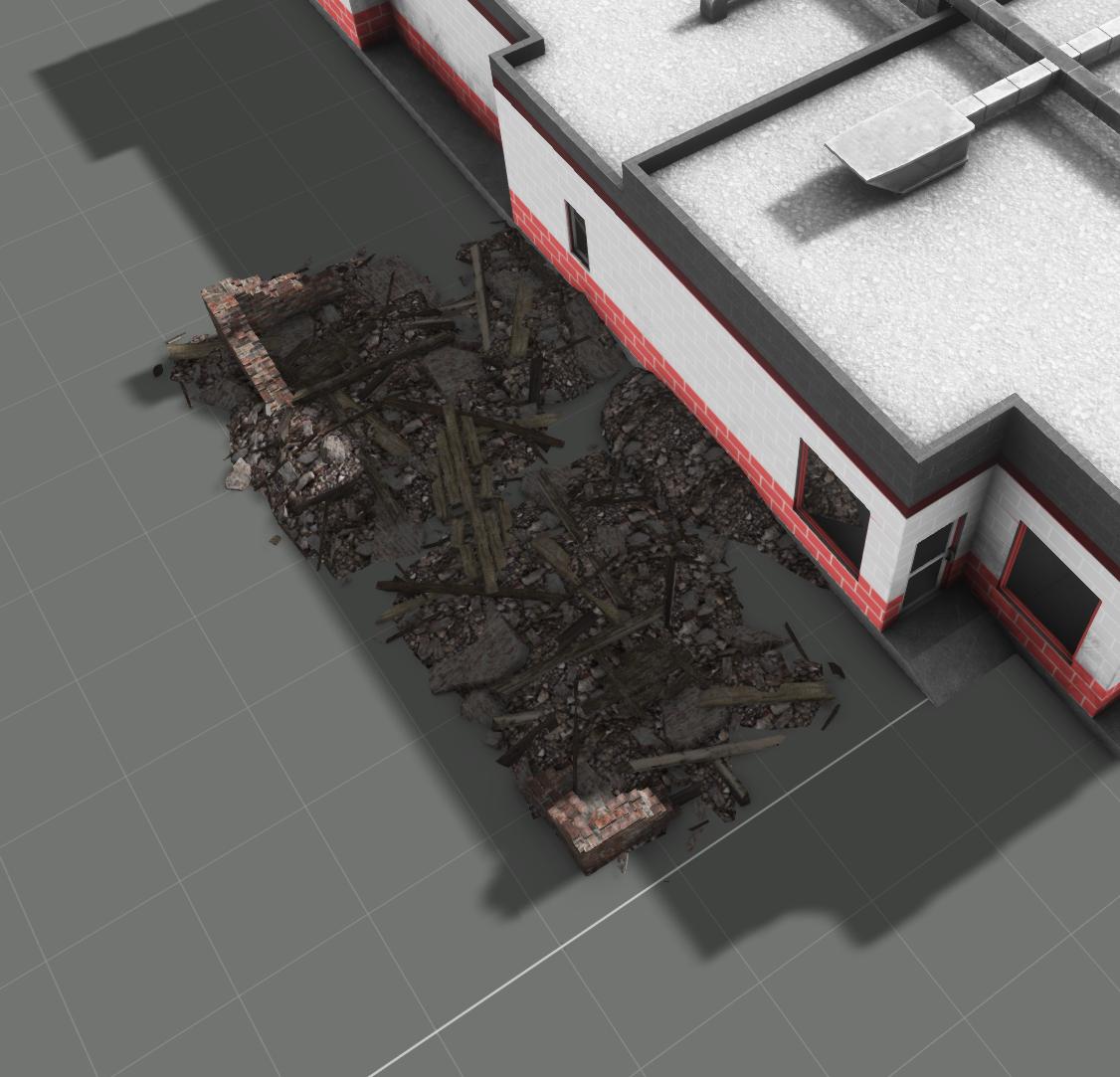
Here's the class for destructioneffects that is a subclass of the building itself:
        {
            class Ruin867530900011
            {
                simulation = "ruin";
                type = a3\structures_f_enoch\industrial\garages\garagerow_01_large_ruins_f;
                position = "";
                intensity = 1;
                interval = 1;
                lifeTime = 1;
            };
};```the destruction effects are likely not inheriting right
from where the defaults are defined
unkempt token
stuck oyster
from where the defaults are defined
Top of my cfg vehicles:
{
    class Ruins;
    class NonStrategic;
    class HouseBase;
    class House_f : HouseBase
    {
        class DestructionEffects;
    };
Aaah I found it. You were onto something, I had acccidentally defined DestructionEffects{}; in my building class, bad habit from old methods.
Thanks!!
 marsh fox
Is there an easy way to generate icons for eden and player inventory?
stuck oyster
unkempt token
Aaah I found it. You were onto something, I had acccidentally defined Destructio...
been there and had that exact issue 😉
silver zenith
hey how can I see the o2script button in OB?
I assume I need to give OB the o2script path
I put that path in the user script path but it didn't do anything
stuck oyster
silver zenith
hey how can I see the o2script button in OB?
I assume I need to give OB the o2sc...
whats 02script button?
silver zenith
stuck oyster
the one you showed me a while ago here
silver zenith
yeah its not there
weird
stuck oyster
ah
then manage sripts tool
and browse the 02scrips folder to it
automation - scripts- managescripst- browse folder
silver zenith
stuck oyster
automation - scripts- managescripst- browse folder
it doesn't select folders
and if I try to select the pathing script it gives me "incorrect argument"
stuck oyster
 unkempt token
Trying to troubleshoot why, when I make my own bisurf and rvmats, I get effects and penetration as designed, but even with the P:\ drive mounted and everything in its right place, I'm still getting the generic dirt/no-pen impact effects with this configuration: https://i.imgur.com/UMP8EJT.png
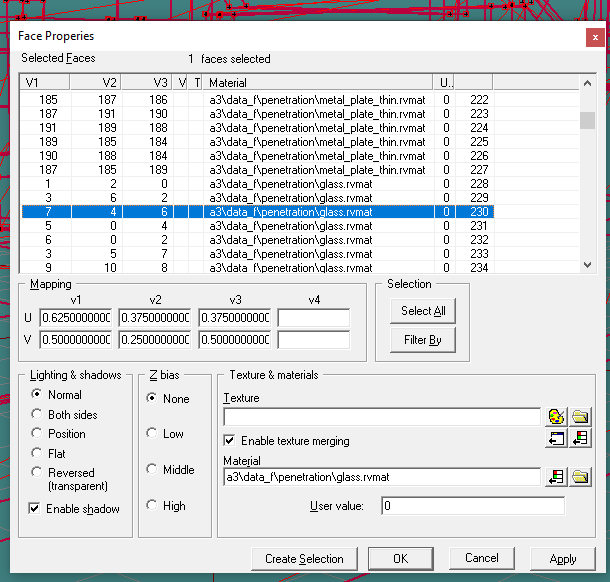
This is in the fire geom lod
inland pawn
unkempt token
Trying to troubleshoot why, when I make my own bisurf and rvmats, I get effects ...
Where is this located?
Geo?
Fire geo?
unkempt token
Fire geom
inland pawn
unkempt token
Fire geom
What’s your fire geo look like?
unkempt token
Functional. https://i.imgur.com/15y6Ynh.png

I think somehow, addon builder or something isn't actually getting to the a3\data_f\penetration folders and since it cant get that data,its just going "???" and then applying no material.
inland pawn
unkempt token
I think somehow, addon builder or something isn't actually getting to the a3\dat...
Did you unpack a3?
Do the files exist in your p drive
Hmm
This is odd
unkempt token
Yes and yes
unkempt token
Affirmative
I tried adding a \ to the beginning of the filepath for each mat but no dice, hmm.
stuck oyster
addon builder does not really check or test paths it would write whatever you feed it
is you project on P drive?
is the glass rvmat applied to whole component?
are the components valid and separated?
unkempt token
stuck oyster
is you project on P drive?
This is what it was.
This system is such a meme  Thank you
stuck oyster
well it expects proper setup so tools can work right...
😅
people use many creative ways to make mods and wonder why things dont quite work right
unkempt token
Yes, by the BI bible it looks that way, but it's just a weird requirement to abide by. Ultimately though, it's working now, so it's back to normal lol
white jay
@crystal zodiac I see thanks, well since apparently its hard, since I know a mod that has the beret above, so in this case its easier to just like ask permission from him to use it.
 stone bison
Anyone had any issues before with models texturing fine in 3rd person but in 1st person your own kit is missing textures or has the wrong textures?
stuck oyster
stone bison
Anyone had any issues before with models texturing fine in 3rd person but in 1st...
3rd person and first person views use different lods so it means your first person lod is not set up right
stone bison
stuck oyster
3rd person and first person views use different lods so it means your first pers...
Cheers do you know what the LOD names are so I can search for them? And on one of the uniforms I have 3rd person it’s RG and then 1st person it’s MC, would they LOD cause that as well?
stuck oyster
RG? MC? First person lod is called View pilot. Compare to the sample models to see what you need to have
stone bison
stuck oyster
RG? MC? First person lod is called View pilot. Compare to the sample models to s...
Ranger green and multicam, in 3rd person the uniform is showing as the dark green I want, but then in first person it shows as a multicam texture even tho it shouldn’t be on it
stuck oyster
Well it sounds like you have not applied same stuff on the lods 
stone bison
stuck oyster
Well it sounds like you have not applied same stuff on the lods <:blobdoggoshrug...
Cheers for the help
cloud zealot
I have an object and i need the surface of this object to produce light. What rvmat do i need in order to do this ?
stuck oyster
Surfaces can't cast light
stuck oyster
cloud zealot
I have an object and i need the surface of this object to produce light. What rv...
But they can glow. (glow does not affect surrounding, just the surface) and the emissive property in any rvmat handles that
cloud zealot
stuck oyster
But they can glow. (glow does not affect surrounding, just the surface) and the ...
then how do we make a lamp ?
stuck oyster
It's a combination of memorypoints and config entries
And correct type of object simulation that's supports lights (class house)
cloud zealot
thanks for your answers
 hardy scaffold
Unsure which would be the right channel for this, but I'm having trouble wrapping my head around how baked-in paths in p3d's work.
I'm refactoring ctab and I'm getting an error message
Cannot load texture ctab\data\itemandroid_co.paa
when loading into a mission with the item.
I'm just confused why it cannot find it.
The original folder structure was
cTab\@cTab\addons\cTab\data\
the new one is
ctab\addons\ctab\data\
In each there are both the p3d and the respective .paa file.
Original was built with the addon builder, I assume, and I'm building with hemtt. Not sure if that makes a difference.
Where is it actually looking for that file?
 unkempt kernel
I would simplify your file structure more:
ctab\data\textures\itemandroid.paa
ctab\data\models\model.p3d
Only if I can change the baked-in paths in the p3D file, I fear
And I wouldn't know how
unkempt kernel
You can repath via OBJ builder
hardy scaffold
Is there a newbie guide to that?
I opened it with the object builder and was instantly overwhelmed
unkempt kernel
DM and I’ll try to assist?
hardy scaffold
sure
cloud zealot
What are the required selection names to make a new rope model ?
 fresh mason
why delete, why warn
stuck oyster
fresh mason
why delete, why warn
youve spammed the same on multiple channels recently. if you have further questions related to moderation you can use #discord_server
 modern nacelle
Which template in Arma 3 samples are you supposed to use as a template when modeling gear to be an appropriate size on the Arma 3 man? The only ones I can find in the arma 3 templates folder in the same folder as 'bust' looks like the michelin man, is this the right one, I'm seeing tutorials online where people are making gear on much higher poly mannequins but I can't seem to figure out where it is
 honest valve
if you're looking in the Arma 3 samples, you will need to look under test_character_01 for the templates and examples
modern nacelle
Word
 pine acorn
Anyone familiar with baking in blender whom can explain why the edges of every face of the low poly are visible from certain angles after applying the normal-map?
stuck oyster
you probably dont have the shader set up right
pine acorn
huh, yeah - if I set the specular value to 0 they're no longer visible
stuck oyster
id recommend checking out some shader editor tutorilas on how to setup normalmap nodes
 pastel oyster
Is there any guide on how to use animation type = direct?
All the examples available only use rotations & translations, but I want to try out direct as it seems to be able to give a lot more freedom of movement
stuck oyster
dont think there is.
 near tundra
Not sure if this belongs here or not but is there a limit to how many garrison points can be in a model I also have had some issues with garrisoning in buildings that are baked into the map
stuck oyster
Never hear of building position limit but sure there might be one
 empty vigil
is there anyone willing to help here ? i have an issue with my weapon models and their model.cfg
inland pawn
empty vigil
is there anyone willing to help here ? i have an issue with my weapon models and...
#arma3_config But, what kind of issue? Just saying I have a problem doesn't help us help you
empty vigil
inland pawn
<#122121444703338496> But, what kind of issue? Just saying I have a problem does...
i expected that after doing an other brainstorming on the model, so i managed to fix some stuff by myself, here's the following errors and their fix :
- shadow issue : turn out i used the wrong LOD number and the other shadow LOD that was being used had its topology not closed properly, i just replaced the model with the other one that was working correctly
- weird hand position glitch : completely forget that if you use custom reload and hand animations you have to place a model.cfg file in their respective folder so it doesn't bug out, model.cfg created and placed issue is now fixed
last issue, a small non game breaking one :
- magazine proxy won't work for some reason, maybe it's the proxy name ? i don't know
i'll check on that later and ask on the config channel instead, since apparently it's more about that than 3D model
inland pawn
empty vigil
i expected that after doing an other brainstorming on the model, so i managed t...
You have the a3 mag proxy?
empty vigil
inland pawn
You have the a3 mag proxy?
yes, this one is it ? \A3\data_f\proxies\weapon_slots\MAGAZINESLOT
inland pawn
@empty vigil To get your mag proxy working, you need this
class CfgNonAIVehicles
{
  class ProxyWeapon;
  class ProxyMagazine: ProxyWeapon
  {
    model        = "\OPTRE_Weapons\SRM77\SRM77_10rnd_Mag.p3d";
    simulation    = "magazine";
  };
};```it work for my other gun model, but for the new one it isn't
inland pawn
modelSpecial           = "\OPTRE_Weapons\SRM77\SRM77_10rnd_Mag.p3d";
modelSpecialIsProxy = 1;```i don't use custom model
inland pawn
What model is your gun
empty vigil
ofc with proxy and CBA code the magwell is compatible with other mods
CZ 805 A1
the other one i've made is Daewoo K2, also use STANAG, same code and proxy, somehow it work but not with CZ
inland pawn
Ok, then you need those lines of config I posted. Replace with the appropriate pathing
empty vigil
got it working, no other code required
maybe i've mixed something in the model proxy name
 shrewd locust
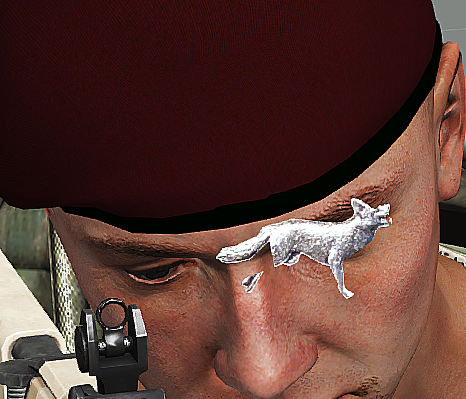
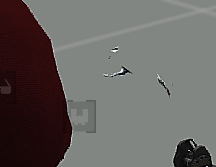
These parts are only visible trough one side but not the other and i have no clue why

Could it have something to do with the way i filled in the spaces?
Tried it in different ways, copy pasted the same thing into itself and flipped the normals of one of them yet still the same
 pallid island
ngl, it kinda looks like a one-sided model with some polygons flipped. try to enable "Face orientaton" in the Blender and check https://cdn.discordapp.com/attachments/737175675818999898/1036355539313115146/unknown.png
After you make them all point to one side - you should get a full one-sided model. Cloning/duping it and flipping the copy may be the way to make it two-sided then.
 shrewd locust
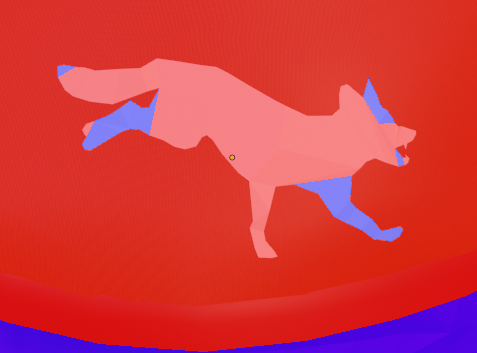
Managed to fix it
@pallid island Thank you so much, I have spent at least 4 hours today trying to unf**k this
You are a braincell saver ❤️
stuck oyster
👍
 mild ledge
so I've slowly come all the way to the point of fully modelling, texturing, rigging, converting, and coding my uniform model, but for some reason it doesn't show up in the virtual arsenal, would anybody be willing to help me figure out what's wrong with it? The 2 areas I assume the problem might be coming from is, most likely, one of the configs, but it could also be the .p3d with the proxies and all cause the guide i followed seemed quite vague on that
i'm aware there is guides for this, but i have alot of experience with modding video games like gmod, and in my experience these types of things can take 3 minutes or 3 months dpending on if someone if kind enough to help me or if im forced to scour the internet and such
here's my configs if it helps:
oh, btw,
stuck oyster
pastebin.com or sqfbin.com for configs
mild ledge
ah, thanks ill check that out
i originally payed a dude almost 40$ on fiverr to port this for me since he already knew all that needed to be done, but he ghosted me and i possibly just lost 40$ for nothing. He said i wouldn't need to make an entirely new unit for each faction's version of my model, rigged to the OpTre spartan II skeleton, and could instead simply port the large model as a uniform coded to use the spartan skeleton on a normal human, and the anims would work n all
is that true?
stuck oyster
no
mild ledge
i got all the unbinarized spartan ii stuff from the optre devs themselves and pasted the skeleton text into my config
stuck oyster
oof
mild ledge
😅
stuck oyster
this is not quite beginner stuff
mild ledge
yeah
stuck oyster
its not really copypastable very easily
mild ledge
you sure?
they liteally just gave my what looked like a pasteable text
ill show you
mild ledge
hm
so, just to clarify for certain, it is not possible to rig a uniform to a larger sized skeleton, and have that uniform with larger proportions be compatible with a normal sized human?
stuck oyster
no
mild ledge
darn
thanks!
could that be why it doesn't show up then? or would it simply float below the player's feet motionlessly like the other spartan II outfits put on a normal character?
stuck oyster
lot of stuff can go wrong with custom characters
mild ledge
well, while im here, how do i add the proxies to a larger humanoid in blender or whatever?
like, do i stretch the memory points and hitpoints to match the larger body or leave em as is?
oh, i cant post pictures
oh well
stuck oyster
they would need to match the animations
so if you are going to use the spartan animations the proxies need to be where spartan has them
pallid island
uploading the pictures elsewhere (i.e. direct messages with some annoying bot) and posting links here would give previews
mild ledge
pallid island
uploading the pictures elsewhere (i.e. direct messages with some annoying bot) a...
thanks
mild ledge
stuck oyster
so if you are going to use the spartan animations the proxies need to be where s...
huh, do they need to be added in the model or is this something added later in the game like the animations?
stuck oyster
pallid island
uploading the pictures elsewhere (i.e. direct messages with some annoying bot) a...
that sounds evil
🤣
stuck oyster
mild ledge
huh, do they need to be added in the model or is this something added later in t...
no they need to be on the model
mild ledge
stuck oyster
no they need to be on the model
ah. thanks.
stuck oyster
but basically for them to move correctly they need to be where they are set up on the character the animations are made for
mild ledge
so, maybe one last question then. If i can't just slap on the larger models a uniform for a normal soldier, will i need to make a seperate version of my character for every single faction, only being able to play as them in singleplayer mission by editing the config of the mission decompiled?
like, an opfor and blufor copy of the same guy so the chinese dont shoot at me for being the wrong unit?
stuck oyster
character side can be changed live too if needed
stuck oyster
scripting can be used to join any side
stuck oyster
but yeah you wont be able to use the normal gear on the unit at all
mild ledge
well actually, for the record for future modders, you can but it's extremely glitchy
i tried it before with the optre spartan
the normal human gear floats down at his feet motionlessly
but technically you can still equip it, store things in it, and if it's night-vision you can still see through it, but the armor obviously doesn't cover or protect your body as a mismatched unit model
stuck oyster
yes well I call that not usable
easiest way to employ spartan animations would be using the spartan as config parent to inherit from and the have the mod its in as required addon
so you dont have to define everything again
mild ledge
stuck oyster
easiest way to employ spartan animations would be using the spartan as config pa...
thanks
white jay
Thoughts on using custom skeletons to make extra tall soldiers and how I would accomplish that?
stuck oyster
white jay
Thoughts on using custom skeletons to make extra tall soldiers and how I would a...
Great deal of work. new animations, new gear/character models (old gear does not work). Not a beginner friendly project but doable if one is patient enough.
there are couple of mods that have done this
white jay
stuck oyster
Great deal of work. new animations, new gear/character models (old gear does not...
Will old guns work or only new ones you design for the soldier?
stuck oyster
Depends a bit on the dimensions. Guns may work or need new set of holding and reload animations
mild ledge
white jay
Thoughts on using custom skeletons to make extra tall soldiers and how I would a...
that's what i've been trying to do
from what i've studied, either you can ask the OpTre devs on their discord for the unbinarized fbx of their spartan II skeleton config n stuff, or you can somehow get all the unbinarized copies of the base arma 3 human anims then retarget them, as the opTre devs did themselves (look up retargetting animations for blender or 3ds max)
which reminds me
mild ledge
stuck oyster
Depends a bit on the dimensions. Guns may work or need new set of holding and re...
where did you get the unbinarized human rtms from arma 3 to retarget for your space marines n stuff?
i tried to retarget them myself but i couldn't find them in the samples
@white jay theoretically, you may also be able to do something like the proprtion trick in Garry's Mod where they use a program to calculate a corrective animation to add as a delta over every animation that plays on your character, but that probably won't work in arma 3 as apparently moving entities like the human models would require their anims updated every single frame, which would drope the frame-rate IMMENSELY
white jay
mild ledge
<@456226577798135808> theoretically, you may also be able to do something like t...
@mild ledge could I let's say make a character's skin red, give them horns and a tail without changing the skeleton? While keeping gear compatible? I don't mind the helmet clipping or anything like that I just need a character that looks like the devil, height is a smaller factor.
mild ledge
Regardless of how your character looks, his body will contort in the exact spots a normal human would if overlayed onto him, so if your character is 8 feet tall, he will bend not his knees when he runs, but his shins (ouch 😆)
a tail would probably be fine but it'd clip, and would likely stay motionless
horns would be easy-peasy
they don't need to move and they're attached directly to the skull, which also doesn't move
and im sure you already know this, but the red skin would just be a retexture
white jay
mild ledge
and im sure you already know this, but the red skin would just be a retexture
Yes
mild ledge
anything else i can help you with maybe?
inland pawn
white jay
<@236325061668241409> could I let's say make a character's skin red, give them h...
You can make a new character with the same proportions as the ARMA man. That’ll work fine
mild ledge
this
white jay
But will a human sized devil be able to wear a plate carrier fine
inland pawn
white jay
But will a human sized devil be able to wear a plate carrier fine
As long as they match the ARMA man proportions, you can put all vanilla gear on them just fine
mild ledge
if he's got a small or large chest though it may float in place or clip though
mild ledge
good luck m8!
white jay
Thanks!
mild ledge
arma 3 needs more character variety
white jay
And that character would be selected by selecting a "face" in the loadout menu
mild ledge
oh cool
white jay
How would I select a custom character?
Man I know nothing about modding in this game, I've worked on other games but this I have no experience modifying.
mild ledge
im not entirely sure sadly, but for reference underlying bodies and clothing are both just different body models swapped out on the fly
it's probably something signaled in the config file
white jay
A body model is to me of little use unless it can be equipped.
mild ledge
oh really?
white jay
Or an npc can use it
mild ledge
oh yeah yeah i see then
yeah i would assume it's just a uniform set as like, the base body or something in a unit's config maybe? but i don't know for sure yet
i'd post some screenshots of my configs for my project that could maybe help but i cant post pictures
class CfgWeapons
{
class UniformItem;
class Saloshai_playermodel : Uniform_Base
{
    author = "Brownpill";
    scope = 2;
    displayName = "Saloshai playermodel";
    picture = "\A3\characters_f\data\ui\icon_u_b_soldier_new_ca.paa";
    model = "projects\Arma3_Saloshai_playermodel\data\Saloshai.p3d";
    hiddenSelections[] = {"camo"};
    hiddenSelectionsTextures[] = {"\A3\Characters_F_New\BLUFOR\Data\b_soldier_new.paa"};

    class ItemInfo : UniformItem
    {
        uniformModel = "\A3\Characters_F\Common\Suitpacks\suitpack_blufor_diver";
        uniformClass = Saloshai_playermodel;
        containerClass = Supply50;
        mass = 1;
    };
};
};
white jay
mild ledge
i'd post some screenshots of my configs for my project that could maybe help but...
Feel free to dm the screenshots
mild ledge
ah! good idea i wasn't thinkin 😅
check yo friend requests
cant send it until you friend me apparently
white jay
Accepted
stuck oyster
Yes config defines what "naked" model base model a character uses. However that is changed to whatever uniform is worn and the vest and test of the gear is shown on top.
mild ledge
stuck oyster
Yes config defines what "naked" model base model a character uses. However that ...
Thanks I wasn't sure
 muted tapir
how come the image doesn't embed?
stuck oyster
pine acorn
I'm trying to implement a helmet but it's set way to low due to unknown reasons
A wrong positioning
B wrong/no weighting
C no model.cfg connection
D no autocenter 0 named parameter
Why = one of the or combination of above.
stuck oyster
muted tapir
how come the image doesn't embed?
he has not done the verification procedure
muted tapir
positioning matches the sample headgears, and a model.cfg connection is there judging by the fact that it moves with the head.
how does one do weighting?
stuck oyster
vertex weighting to correctly named selection/group
you can likely find generic "how to do weighting" tutorials for any commonly used 3D software
pine acorn
How do you also make the helmet invisible in first-person view?
inland pawn
pine acorn
How do you also make the helmet invisible in first-person view?
Remove it from view pilot LOD
pine acorn
It worked, thanks!
pine acorn
https://cdn.discordapp.com/attachments/709901326825553981/1037171914524860488/20221102021018_1.jpg
trying to apply stencil shadow LOD, possible causes for this too?
Mesh is a simple flat disk, triangulated & with sharp edges
 stuck oyster
pine acorn
https://cdn.discordapp.com/attachments/709901326825553981/1037171914524860488/20...
stuck oyster
pine acorn
https://cdn.discordapp.com/attachments/709901326825553981/1037171914524860488/20...
just 1 sided flat disk?
as that would not be closed shape
and the shadow sill also need the same weighting
 hallow steeple
a model needs to be added via an addon right? You can't make a model for a single mission?
hallow steeple
A birthday hat, heh-
marsh canyon
A hat, which is a headgear slot item?
hallow steeple
oh right-
new question. Can you make a model and a head gear item outside an addon? xD
marsh canyon
No
hallow steeple
aw :P
What about just a cone? I could maybe do some scripting magic to make it stick to the head
marsh canyon
Yeah, if you just want to make a p3d and put into the mission, and spawn it and attach it... it is possible, yes
hallow steeple
Texture or no?
marsh canyon
It can have one
hallow steeple
horray :3
 grim trail
Is there a max weight for a model ingame? To be more specific is there a weight threshold where physx becomes unstable in regards to wheels?
stuck oyster
grim trail
Is there a max weight for a model ingame? To be more specific is there a weight ...
dont recall anyone ever reporting such. since its maths there probably is
but if you have something in reasonably realistic weights and "normal" size it likely should work
as long as your wheel spring setup is also corresponding to the weight and can handle it
 peak lava
Can Blender be used to make models for ARMA 3?
cloud zealot
Can i make a seaplane using the canFloat parameter on a plane ?
white jay
How big can I make a vehicle maximum without issues? I am thinking about a 200 meter long flying machine
inland pawn
white jay
How big can I make a vehicle maximum without issues? I am thinking about a 200 m...
Geometry has I believe a 50 x 50 x 50 limit
marsh canyon
I don't think it has limit in height (Y) but yes, it is said that geometry has 50m or 100m limit
white jay
marsh canyon
I don't think it has limit in height (Y) but yes, it is said that geometry has 5...
So could I make the model flipped up, then have a script flip it the other way ingame?
marsh canyon
Well, even if you do such it will break any part of it since it is somehow scripted solution
inland pawn
marsh canyon
I don't think it has limit in height (Y) but yes, it is said that geometry has 5...
Yeah, geo can be as high as you need it. Otherwise, skyscrapers wouldn’t work. But, anything longer than 50m won’t work
marsh canyon
You can probably get the idea if you have Contact DLC and know its biggest Alien ship
white jay
Seems like an enormous airship battle won't be possible
inland pawn
What you could do
marsh canyon
Yeah unfortunately. If you want probably you'll need to get into Enfusion
inland pawn
Is cut it into 50x50 chunks
And stitch it together
That’s basically how we got our frigate working
white jay
Will that be possible if it has to move around?
white jay
inland pawn
That’s basically how we got our frigate working
Halo mod?
inland pawn
white jay
Halo mod?
Yes, except it isn’t movable
white jay
That's unfortunate
inland pawn
white jay
Will that be possible if it has to move around?
I’ve never dealt with anything bigger than a longsword so I can’t really say. I know the 50x50 chunks thing works because that’s how the a3 ship is made. But that isn’t movable by normal means
Could attempt it
See if it works
white jay
Thanks for the advice
stuck oyster
Well big moving plane can work but it it can be wonky. A bit. And walking on it won't be possible
stuck oyster
white jay
Thanks for the advice

Testing out the new turrets attached in their sockets on the battleship.
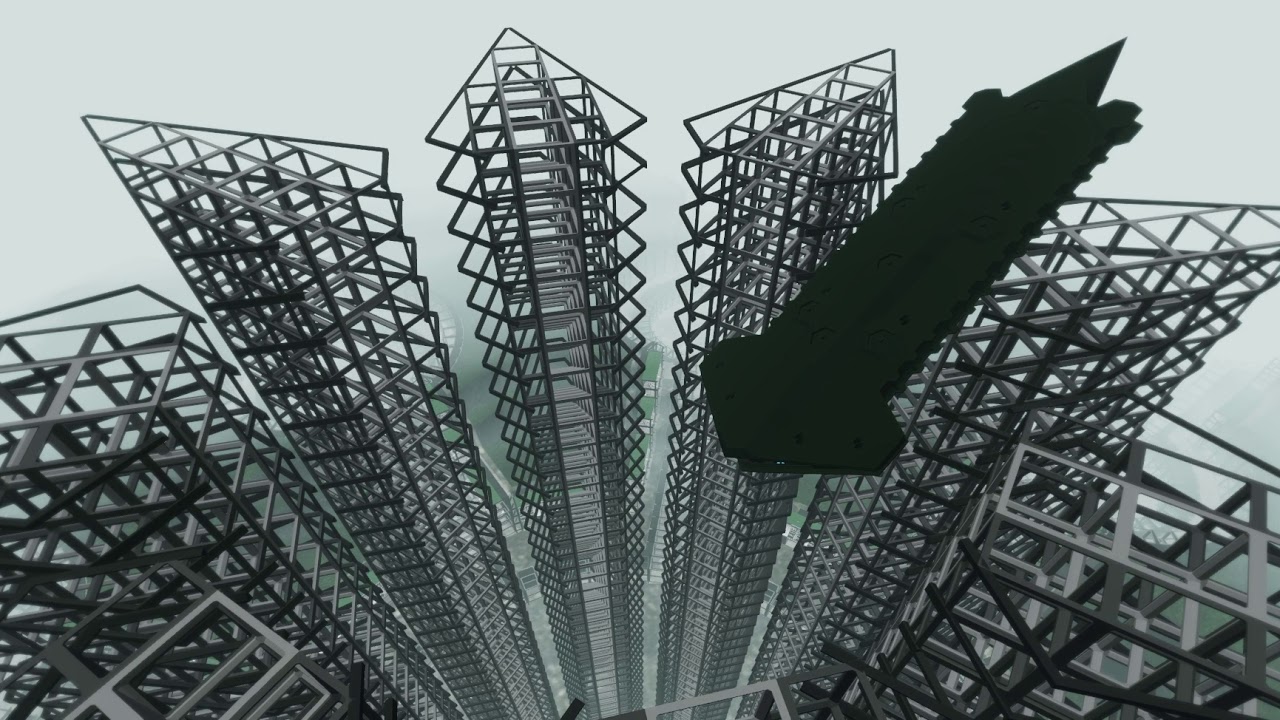
Since the Battleship is rather large vehicle in Arma standards there was a bit of worry that the collision might not work right on it.
So far test have been very positive though.
 tawny atlas
Object builder: can mass texture rename do a find of replace and all strings?
I.e addon1\path1\blah becomes addon2\path2\blah via find and replace of addon1\path1 for all paths?
stuck oyster
it supports some wildcarding
addon1\path1*
addont2\path2* could work
dont remember the details off the top of my head
@tawny atlas
tawny atlas
stuck oyster
addon1\path1\*
addont2\path2\* could work
that worked great 👍
tawny atlas
New problem:
I've got a model (wasn't made by me) with defined hidden selections. However, in-game the hidden selection textures show up as blank white.
The hidden selections are defined in the model and in the config (as far as I can see), and my paths are definitely correct.
The textures paths that are not defined by hidden selection but are in the model work fine.
What could be causing this?
stuck oyster
are you trying to do transparency on a thing that does not have transparency?
tawny atlas
nope, the textures have no alpha.
stuck oyster
white/black usually indicates some sort of path/texture not found issue
tawny atlas
yeah, but I can view the texture by clicking on it from the config viewer so it's a valid apth
and there are no rpt errors
stuck oyster
if you put down the original thingy in editor and use setTexture commands on (some color is enough for test) does that work?
is your hiddenselection config only altering texture or material too?
tawny atlas
it's a vest so I'm not sure I can use setTexture
tawny atlas
hiddenSelection only alters texture, and the materials look alright (hard to tell with the borked texture)
it seems like it'd be a path (or corrupt texture) issue
i could try converting the textures to png and back I guess
stuck oyster
what resolution is the texture?
stuck oyster
can you assign that texture to something else with setTexture command in game?
just to test it
tawny atlas
yeah not a bad idea
will try that now
yeah the path works on other objects.
so selection definition/model issue
stuck oyster
is it a modded vest?
tawny atlas
yeah
tawny atlas
The model faces don't have any texture applied in the model itself if they're supposed to be defined in the hidden selections - would this cause an issue?
inland pawn
Which vest are you retexturing
tawny atlas
https://steamcommunity.com/workshop/filedetails/?id=2499478882 this one, I have the source .p3d though.
 tawny atlas
ok yeah, defining the texture path of the faces seems to have fixed it
not sure if I can then retexture it
white jay
inland pawn
Geometry has I believe a 50 x 50 x 50 limit
In theory, if your ship was made of several attached models to get around that limit, could you make it so when someone shoots at one part of your ship, one of the models is replaced with a damaged one where the shot hit. You could make a space ship that can be destroyed through the course of a battle by the enemy.
And let's say there is an interior you could walk around, sort of like the one inside one of the big rhs planes.
You could have a player man the weapons station, another helm, and several do damage control.
If there was a way to move such a craft made of multiple models.
And if an intuitive solution could be found for the problem of walking around inside while the craft moves.
inland pawn
white jay
In theory, if your ship was made of several attached models to get around that l...
You could probably do wreck models for each piece
But, a3 doesn’t support dynamic wreckage like reforger
inland pawn
white jay
And let's say there is an interior you could walk around, sort of like the one i...
You’ll need a roadway LOD as well
white jay
inland pawn
You could probably do wreck models for each piece
That is what I'm thinking
This could be genius, bring star trek like ship to ship combat to arma3
Thanks
inland pawn
Though, it does sound like desync central
white jay
inland pawn
Though, it does sound like desync central
I'll worry about that if I get there 😂
stuck oyster
the moving inside it wont work
it will always be janky and buggy unfortunately
flying and sitting in it is doable
the ship in my videos above is 300 meters long
white jay
What bugs occur
stuck oyster
white jay
What bugs occur
peopel die and fall off.
basically it is very unlikely to work so that you can move the ship and walk in it
and there might be better things to make first before sinking time into that
white jay
stuck oyster
basically it is very unlikely to work so that you can move the ship and walk in ...
What about walk in it while it is still and sit at the stations while it moves?
stuck oyster
solid maybe
white jay
stuck oyster
peopel die and fall off.
Any clue why this happens?
stuck oyster
engine does not support walking on moving vehicles
so there is no suitable collision simulation and multiplayer desync on top of that causes thigs to go ded
 floral wagon
anybody can recommend a checklist to work through in regards to getting a uniform to work? ive run out of errors to fix and still have nothing :) thanks
unkempt token
Is there anything special required in order to make AI open doors when pathing through it? I set up paths inside a structure, added actionbegin1 and actionend1 on the door in, but they just walk through instead of taking any action on it
stuck oyster
memorypoints that correspond with the action and user action that the AI triggers when passing that point
the sample house should have the whole setup done
unkempt token
I have the doors working with memory points, door01_trigger, door01_axis, etc. This is what I'm seeing in the sample house memory LOD too
I removed the "onlyforplayer = 1;" flag from my door in config.cpp too

 unkempt token
Ah! Config! That's what I might be missing then, okay. Let me try that out, thanks for the pointer!
stuck oyster
basically this means when AI crosses the path point it triggers this action that is listed in the config
the action itself could do number of things
white jay
unkempt token
Is there anything special required in order to make AI open doors when pathing t...
This sounds interesting, what mod are you working on?
unkempt token
stuck oyster
This was the fix, I didn't have those lines in my config. Again thank you
unkempt token
white jay
This sounds interesting, what mod are you working on?
A structure for Project America
unkempt token
Also, if a door is named Door01 and not Door_01, would this explain why the Lock functionality is not working on it? Tested, this is not the source of the issue.
stuck oyster
some doors related functionality may need the animationSource be door for that part
or was that for vehicle doors only
charred bolt
You're thinking of vehicle turrets gunnerDoor and turn out with enabledByAnimationSource.
stuck oyster
👌
white jay
@stuck oyster you're working on lost dragons mod right?
stuck oyster
white jay
<@150949769953411072> you're working on lost dragons mod right?
yes that is my project
 potent locust
Hi everyone! I have a question about adding different objects to the character model, how can I do this? Is this done through "merge" or something else? When trying to merge a character model and a new object in the game I get a broken character geometry that allows me to walk through walls
Also the object that I tried to add just flies in the air next to the character
I have some experience with vests and guns, but I can’t figure out how to work with a character model
Oh yes, I use the standard tool - Object Builder
stuck oyster
potent locust
Hi everyone! I have a question about adding different objects to the character m...
what character models do you try to use?
basically character models have same requirements as vests
for modeling new things Id really recommend other tools than Object builder since its modeling tools are pretty old
potent locust
stuck oyster
what character models do you try to use?
I have a test character model from open sourced mod
model seems like ported from arma 2 but im not sure
potent locust
stuck oyster
basically character models have same requirements as vests
Perhaps I don’t understand the process of merging the object with the main model, where can I learn more about it?
For example, I want to attach the object of the knife on my leg, how do I do that? 🤔
potent locust
stuck oyster
for modeling new things Id really recommend other tools than Object builder sinc...
My tasks are rather minimal, i thought I could do without 3ds max 😅
ps. tbh i'm not familiar with the procedure of import/export models to 3ds max and back to arma 3
white jay
stuck oyster
yes that is my project
Very cool project
The textures just seem a bit, flat
But overall I am excited to see it when it is finished
Aside from halo mod and scion conflict, not much sci fi in arma
stuck oyster
white jay
The textures just seem a bit, flat
its not really reached texturing phase
We have considered making it in that sort of minimalistic way but its more likely that we texture stuff fully once the designs are good enough
stuck oyster
bit poorly
pine acorn
How does one assign armor values for gear (say a helmet), such as; armor level, ballistic protection, explosive protection etc...
I'm assuming it's done in the config.cpp? So far I've only put armor = 6 and passTrough to 0.5 but I have no clue what that does exactly. Is 6 & 0.5 a high or low value, what is standard and so on
pallid island
if my notes are correct, vanilla has something like this: ```
Helmet class 1: head(/face), armor 4-2(/4), passthrough 0.5-0.8
Helmet class 2: head(/face), armor 6(/4), passthrough 0.5
Helmet class 3: head(/face), armor 8-7-6-10(/4), passthrough 0.5
Helmet class 4: head, armor 10, passthrough 0.5
Helmet class 5: head(/face), armor 12(/8), passthrough 0.5
so your values should correspond to class 2 (or really bad class 3)
pine acorn
aight gotcha, thanks
pine acorn
A follow-up: any clue as to why the armor-values aren't applying? The mass (/weight) values are
https://cdn.discordapp.com/attachments/615983518882725912/1039270320097476738/20221107210714_1.jpg

 pallid island
don't you have a typo? Vanilla seems to have class HitpointsProtectionInfo, you have class HitpointsProtectInfo
white jay
Would arma3 devs allow someone to make a modification that adds explosives to go carts in karts dlc? The idea would be for it to require karts as dependency
 woeful viper
why not? As long as original models are not modified, and the DLC is a proper steam dependency ( as opposed to "including the dlc in the mod") there is no problem whatsoever. This can be done with scripts and config alone
white jay
woeful viper
why not? As long as original models are not modified, and the DLC is a proper st...
Thanks
cloud zealot
Is it possible to modelise children is Arma 3 ?
marsh canyon
If you can, you can
stuck oyster
cloud zealot
Is it possible to modelise children is Arma 3 ?
With custom skeleton and animation set sure
 subtle bison
but better dont, it would probably get shot down fast 😄
 stuck oyster
white jay
https://tenor.com/view/cursed-troll-face-troll-face-cursed-gif-24151453
stuck oyster
white jay
https://tenor.com/view/cursed-troll-face-troll-face-cursed-gif-24151453
bit creepy there mate.
white jay
)
Can you tell me how to write a model.cfg for an existing technique that I want to redo? I have a part of the file pulled out using mikero
stuck oyster
I dont quite understand what you mean
but model.cfg can be written in just text editor. you just need to put stuff in right order and in right places
the arma3 samples have pretty good example on the model.cfg structure
and wiki explains some of the inner workings
white jay
Is it easier to write it with 0 than to try to extract it?
stuck oyster
yes
but what exactly are you trying to do
model.cfg and animations are very model specifc
so extracting it and trying to use it on a different model usually mean you basically need to rewrite it completely to fit your model anyway
 analog prism
What was the quick key to join objects together again?
I know it's something J lmfao
stuck oyster
analog prism
What was the quick key to join objects together again?
in where?
stuck oyster
ctrl J
stuck oyster
analog prism
My bad this was the wrong channel I meant to use the enfusion channels lol
There are plenty of Blender users here too 😅
analog prism
Shoot help me make arma reforger mods we need you boys bad lmfaooooo
stuck oyster
but as a general tip, always say what program your question invovles. even if you have recently talked about it
stuck oyster
analog prism
Shoot help me make arma reforger mods we need you boys bad lmfaooooo
most people who make stuff are already engaged with their own projects
 shy hamlet
The question is how to replace the model after the destruction of equipment.
As I was able to understand there in p3d in the section wreck put a proxy and in it specified the path to the model and then more prescribed this model in cfgvehicles as a normal prop under the class Wreck_base_F. All such has done. But the technique still does not change
pallid island
there's also https://community.bistudio.com/wiki/Config_Properties_Megalist#destrType property in CfgVehicles. Is yours set to "DestructWreck"?
pallid island
like here the left is stock T-140, the right is modified to have destrType = “DestructEngine”; with no other changes
oops, forgot the link. Here's the screenshot https://cdn.discordapp.com/attachments/737175675818999898/1040552983244574773/image.png
 shy hamlet
Inserted this parameter and it still does not want to work
pallid island
🤷♂️ i literally import a sample car model into blender, add a cube, assign it to "Wreck" LOD with \A3\Props_F_Tank\Military\Wrecks\Wreck_MBT_04_F, export my model, binarize it with A3 Tools, make a config.cpp like below, merge config into diag with diag_mergeConfigFile ["P:\memes\carMeme\config.cpp"], spawn the "a_meme" vehicle, destroy it and get a tank wreck ```hpp
class CfgPatches
{
class Meme_Preset
{
author="Local memer";
name="Memer preset for moduleCivilianPresence";
url="https://www.arma3.com";
requiredAddons[]=
{
};
requiredVersion=0.1;
units[]={};
weapons[]={};
};
};
class CfgVehicles {
class C_Offroad_02_unarmed_F;
class a_meme: C_Offroad_02_unarmed_F
{
displayName = "!meme";
destrType = "DestructWreck";
model = "P:\memes\carMeme\bin\untitled2.p3d";
};
class a_meme2: C_Offroad_02_unarmed_F
{
displayName = "!meme2";
model = "P:\memes\carMeme\bin\untitled.p3d";
};
};```
"a_meme2" vehicle doesn't spawn a wreck and just burns
elder fulcrum
Anyone here has experience with baking and texturing structures? (I use Blender and Marmoset 3) I've been referencing the sample house model, and I have my UV unwrapped and I have things like glass for my windows in separate vertex groups similar to how it is there. My confusion derives from the actual baking process with my _hp and _lp. My confusion derives from two main questions:
- Would I actually bake with the window glass, and how would that work out if I needed to?
- What do I do with my AO/curves/normals with multi-mats and different UV sets? (I am used to simple objects like boxes.) There are a lot of extra things and it's confusing even with the sparse documentation I've come across.
stuck oyster
elder fulcrum
Anyone here has experience with baking and texturing structures? (I use Blender ...
typically buildings are not textured same way as other models (baking from HP to LP) since normally that results in very poor quality textures on large objects and if multiple textures/materials are used that ramps up section count and that hits performance.
Instead, buildings use multimaterial
which is a material type that uses color mask (Black Red Green Blue) and through the mask and 2 uvsets it projects tiling textures on the building surfaces
this is what you see on nearly all buildings in Arma
and its the most performance friendly way to texture buildings
Glass on buildings is separate material/texture. often an atlas of different shaped windows that the building has
elder fulcrum
Thank you.
unkempt token
I'm working on getting some breakable glass moving with a sliding door, and everything operates as intended- except that the hidden named selections (incl. geometry) are moving to this seemingly random point upon breaking. https://cdn.discordapp.com/attachments/864153482431823912/1041045308202831944/image.png
 unkempt token
Fixed it, my named selection for the non-glass part of the doors actually included the glass too, which it was not supposed to. Redefined Door01 to NOT have any glass, and its good now
stuck oyster
👍 👍 👍
white jay
stuck oyster
typically buildings are not textured same way as other models (baking from HP to...
How do you texture space craft in your mod?
Like planes or buildings?
stuck oyster
multimaterial
hallow steeple
So, am new to models. Uh- What's a skeleton? 😅 Besides the ones in science class
Aka: Do I need to worry about skeletons if I just want a simple static object like a sign or a rock
hallow steeple
Ok. Now, any tutorials on making a simple sign? I can only find stuff for vehicles, cars.
Do I need a config for the model? I assume yes.
I also dunno how to do rvmat 😅
oh samples!
how does it know what textures to use
stuck oyster
Uv mapping and assigned texture and material per surface
stuck oyster
Workflow depends a bit on what programs you use to model with.
There are few tutorials on BI forums for getting a model from blender to Arma
stuck oyster
You may not be using compatible file format. Or you might not have the mod development tools/environment set up right.
hallow steeple
TGA files can be used?
stuck oyster
Yes. But only uncompressed
hallow steeple
i am so confused-
hallow steeple
what do I put for face texture in oxygen 2?
\<Addon>\texture.paa?
oh!
no..
normals are inverted and the texture still wont work. It appears in the oxygen 2, but not in game
stuck oyster
Arma uses Y- normals and most programs by default produce Y+ normals so often the green channel needs to be inverted
white jay
@stuck oyster how are you doing the interiors for spaceships in lost dragons mod?
hallow steeple
what bout textures?
how do they work btw.
they are embeded into the p3d file with their location?
stuck oyster
white jay
<@150949769953411072> how are you doing the interiors for spaceships in lost dra...
can you be more specific?
stuck oyster
hallow steeple
they are embeded into the p3d file with their location?
yes
and you should have properly set up P drive and addon file structure for your mod
so that stuff is all packed correctly and the game can reference the files
hallow steeple
Wait- P drive? That needs to be a drive, I can't change it to an existing spot?
white jay
stuck oyster
can you be more specific?
Like when you enter the vehicle, can you walk around or do you automatically get a seat such as gunner, pilot,
hallow steeple
there we go
stuck oyster
hallow steeple
Wait- P drive? That needs to be a drive, I can't change it to an existing spot?
all the tools and workflows and proper tutorials are build around the P drive development environment
typically it is a virtual drive
the P:\ (or can be anything, just default is P) acts as the game engines file structure root
so a path P:\folder\other\texture.paa becomes in game (and configs) \folder\other\texture.paa
you CAN make mods without. but honestly its stupid and painful if you dont know exactly what you are doing
hallow steeple
 stuck oyster
Object buidler has a setting that then adds the P:\ to the paths inside it
what tools are you using?
hallow steeple
stuck oyster
Object buidler has a setting that then adds the P:\ to the paths inside it
that's what I refer to
stuck oyster
Arma 2?

 hallow steeple
stuck oyster
hallow steeple
stuck oyster
and then the file in the face properties is "<addon>\paa" or "<addon>"?
oh wait
"\addon\paa" or "addon\paa"
I bet it's without the one at the start?
stuck oyster
if you browse ro the file it should set it up rught
hallow steeple
I had to set the P drive. I originally had it as 'P:' with the texture bieng "\<addon>\paa"
so I think that's my mistake. Backslash in the wrong position
could be wrong tho
and then I still need to invert the normals xD
"make not avaiable requested by <texture file>"
stuck oyster
lot of parts in this process


 stuck oyster

hallow steeple
oh no, ima have to worry about collisions xD
i will worry about that in a sec. I think I made good progress considering my irl situation xD
white jay
@hallow steeple have you ever made a vehicle mod?
Trying to get advice from as many people as possible
Before I begin
stuck oyster
white jay
Like when you enter the vehicle, can you walk around or do you automatically get...
it depends on the size of the ship. The ones that are flyable are intended to work so that you can walk into them when they are stationary and then if it lifts off the characters are glued to their place and get option to move into empty seats
Im gonna take a guess ratchet is not much further than you are @white jay 😅
if you sum up what you would like to make I can usually tell how possible it is @white jay
white jay
stuck oyster
if you sum up what you would like to make I can usually tell how possible it is ...
So I want to make a 200 meter ish long space craft, with an armoury room, a few turrets, a bridge with a large main viewer, commander's chair, stations for turrets, and a room at the back where soldiers can sit before they are deployed and maybe a hangar with 2 smaller jet-like craft.
stuck oyster
does it need to fly?
white jay
Yes
stuck oyster
pretty big challenge
white jay
If the hanger is not possible no problem there
stuck oyster
all of it is pretty challenging due to you wanting it to fly
white jay
You did do a long spaceship that flies so I wonder how you got that to work
stuck oyster
https://www.youtube.com/watch?v=FWCOut4Q1M0 this is one of our early tests

Opfor Corporate dropship in action! This is what the opfor corporate salvagers roam the stars in their quest for lost technology.
Moving parts work pretty well now, but the flight model is on loan from a brick. Need to do some config tweaking still.
The elevator is cool though.. All ingame physics.
If I remember right this craft version was within the normal working limits of geometry and roadway so when it was stationary walking on it worked just fine
making bigger things may require solutions to create extra walkable surfaces attached to the craft if one wants to keep them walkable overall
and basically everything needs to be solidly attached to the craft when it moves. otherwise collisions will bug and things go boom.
white jay
stuck oyster
https://www.youtube.com/watch?v=FWCOut4Q1M0 this is one of our early tests
This is very similar to what I want my craft to do
That one is 50 meters by 50 meters?
stuck oyster
I'll check if I can find that version lying around somewhere