#LAN/LocalServer Help
1 messages · Page 1 of 1 (latest)
 wheat urchin
From @onyx pivot
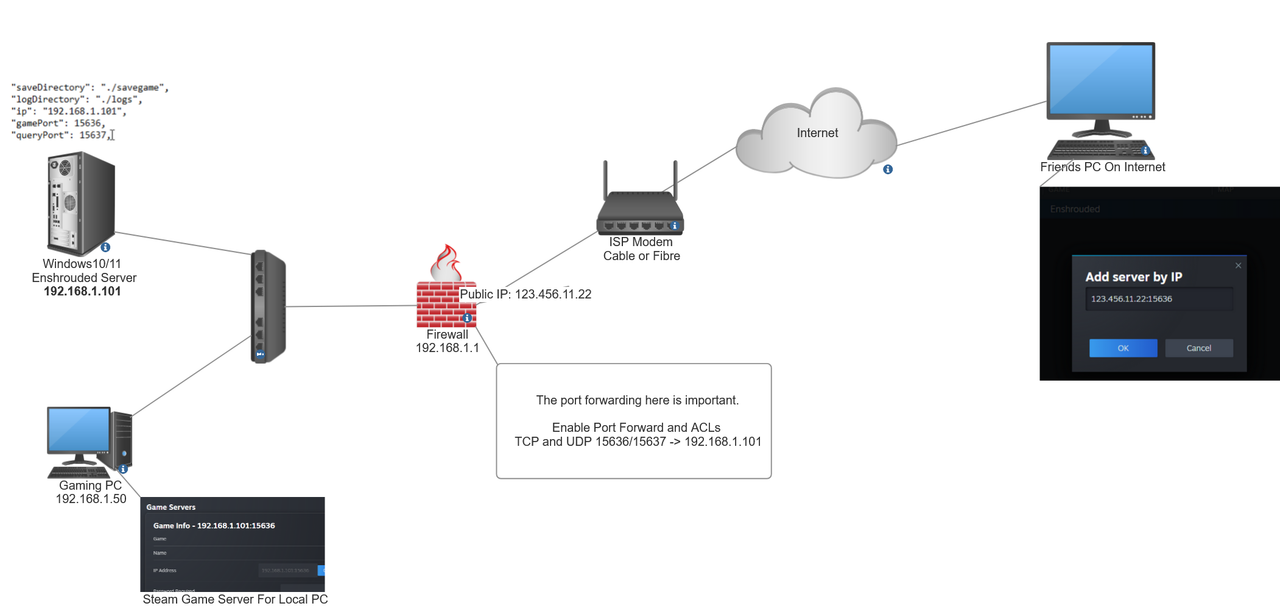
Hi everyone, I just wanted to let you know what I did to get the server showing up in game for myself and a friend. I am hosting this server on a Windows 10 VM in my home, behind a Fortigate firewall. These are the steps
Follow the steps here: https://www.reddit.com/r/Enshrouded/comments/19eqwdp/dedicated_server_setup_windows_steamcmd/
Make sure in the .json file, you put your servers internal IP address (like 192.168.1.100) if you plan to connect to it from your home network.
Make sure your home firewall has inbound ports 15636 and 15637 TCP and UDP forwarded to your Windows PC (the one running the server)
Open the Steam Game Servers Browser, click favorites and add a new server
Have them use your public ip address : 15636 (x.x.x.x:15636)
Remember, your friends will use the public IP address with port, and you (the one on the same network as your server) will use the internal IP address with port.
Once its added in the Favorites, it should show up in-game.
 inland storm
Any reason why trying to connect across VLANs should be a problem if each VLAN has acces to each other?
 onyx pivot
inland storm
Any reason why trying to connect across VLANs should be a problem if each VLAN h...
onyx pivot
inland storm
Any reason why trying to connect across VLANs should be a problem if each VLAN h...
Hi zorak, INTER-Vlan communication should not be an issue so as long as your firewall rules permit that traffic. As an example
Local Enshrouded Server (VLAN1 - 192.168.1.101)
You Local PC that you play the game from (VLAN2 - 192.168.2.101)
When traffic from your pc is destined to the Server, it will go up to the firewall, the firewall would need ACLs or Policies to permit that traffic (Source: 192.168.2.0/24) -- Destination 192.168.1.0/24) source port ANY Destination Ports (UDP and TCP 15636).
The above rules should permit your local PC on VLAN2 to access the server on VLAN1 on those server ports.
Hope this helps.
 grim raptor
How are people working around running dedicated server and client on 2 different PCs with the same Steam account?
Keeps telling me I can't run both at the same time
This is also on the same LAN, btw
onyx pivot
grim raptor
Keeps telling me I can't run both at the same time
Try running your dedicated server using steamCMD (it doesnt need the client) instead of from the steam client. Check out this link: #1200093005902778469 message
Once that is done, you need to change the ports for each server in the ,json file.
Be careful with the port changing though because I tried and when I did, the server wouldn't start. I'm not sure if that's a bug but if you change the server ports, it just flashes on my screen. I could only get it working with the 15636.
grim raptor
onyx pivot
Try running your dedicated server using steamCMD (it doesnt need the client) ins...
Ok, will try SteamCMD, thanks
onyx pivot
No problem, I made diagram here to reference for 1 server behind a firewall. Could help someone. https://i.postimg.cc/fyLP0jqr/Untitled.png
 teal locust
Hello! I'm trying to host a dedicated server on a machine here at home, but when I create it, my friends and I can't see it.
This is what I've tried so far:
- I followed exactly the guide in this first link in the thread: https://www.reddit.com/r/Enshrouded/comments/19eqwdp/dedicated_server_setup_windows_steamcmd/
The server downloaded normally and I was able to run the executable, open the json and configure it
I left the ports at default, I tried with the ip 0.0.0.0 and with the ip of my machine (which I got by accessing cmd -> ipconfig -> IPv4 Address) - I opened the two ports through my router (an HG8145V5) following a tutorial on the internet (although I did it before for a Valheim server and it worked) by going to Foward Rules -> Port Mapping Configuration, creating a new one, choosing the IP from my machine (same as the IPv4 mentioned above), choosing the TCP/UDP protocol and making a configuration for each of the ports (15636 and 15637), etc...
- I have configured two inbound rules on my firewall (one for TCP and one for UDP) with the port range (15636-15637)
The server opens normally and with the messages that were spoken in this chat ([Session] 'HostOnline' (up)!
[Session] finished transition from 'Lobby' to 'Host_Online' (current='Host_Online')!)
But neither me nor my friends can see the server through the game
We also tried to add to Steam favorites using my external IP + port (I tried with both Query and Game) and I only got the error: Failure
Did not find any servers at the address
Through a website indicated in the chat (https://southnode.net/steam-query-tool) I can see my server, but I also receive an error when I try to enter it.
Could I have done something wrong or somehow is my provider blocking access even though I have configured the ports?
I tried to detail the process I did as much as possible, but if you need any more details, please let me know.
onyx pivot
Hi @teal locust quick question, from your local Gaming PC (the one your going to play the game on -- not host the server) can you open up your Steam Game Servers and add the server with its Internal IP? (192.168.x.x:15636) ? Does it work for at least you?
teal locust
I'll try this, just a sec
 obtuse edge
onyx pivot
Hi <@187658948139024384> quick question, from your local Gaming PC (the one your...
obtuse edge
onyx pivot
Hi <@187658948139024384> quick question, from your local Gaming PC (the one your...
Hey sorry to bother you,
I've got a server up and running, and working. but I'm the only one who can't see it.
My friend can see it and join it. and for me to join it I have to join my friends session off of steam.
the server is ran on my LAN that my gaming PC is connected to just on a separate PC. I tried adding the IP of the other PC in the server JSON but it still doesn't show up.
I just saw your message about Steam Game Servers. is this a tool or something? I'm trying to find it on my gaming PC.
teal locust
onyx pivot
Hi <@187658948139024384> quick question, from your local Gaming PC (the one your...
Sorry for the delay, I was doing other tests. Not with GamePort (15636), but with Query Port it added the server to favorites...
onyx pivot
obtuse edge
Hey sorry to bother you,
I've got a server up and running, and working. but I'm ...
In steam, click View \ Game Servers and you can load it there. For you, put in the local IP and port of the server and see if it detects it.
Here is a diagram of a setup probably like yours
https://i.postimg.cc/fyLP0jqr/Untitled.png
obtuse edge
Beaauuuuuutiful. works fantastically. Just needed to add it on that Steam Game Server list.
You might throw that as a note somewhere:
"If you're joining a server on your own LAN and it doesn't show up in game, add it as a Favorite Server on Steam Game Server."
Appreciate your help a ton! now I don't need my friend online to join.
onyx pivot
Will do! Thanks man
 acoustic rover
teal locust
Hello! I'm trying to host a dedicated server on a machine here at home, but when...
acoustic rover
teal locust
Hello! I'm trying to host a dedicated server on a machine here at home, but when...
Hey @teal locust -
There does seem to be quite a few issues with the Server Browser in-game at the moment. Sounds like maybe you have setup everything correctly.
One thing that we can try is... Add your IP:QueryPort as a Favorite Game in your Steam Server Brower, and it should show up as a favorite in-game once you do that.
For clarity, I'm not sure how that is done exactly, but it seems like others have figured it out.
Also sorry for the delay.. @forest frost mentioned your issues to me when I woke up this morning, and then I got distracted.
 forest frost
acoustic rover
Also sorry for the delay.. <@180800697455869954> mentioned your issues to me whe...
forest frost
acoustic rover
Also sorry for the delay.. <@180800697455869954> mentioned your issues to me whe...
All good, no worries.
Someone just linked this to me on #troubleshooting
Something about adding 15 to game ports, I haven't checked yet, nor have we tried as a potential fix.
Maybe it's something you want to be aware about:
https://www.youtube.com/watch?v=RGG4kKY6MKE&ab_channel=Dayr
wheat urchin
forest frost
All good, no worries.
Someone just linked this to me on <#1060216335684087878>
...
Dude, thank you so much for linking this. I’ve had to point so many people in this direction. It looks like the port configuration on a popular Host may be incorrect.
acoustic rover
adding 15 to game ports?
wheat urchin
Yes.
forest frost
acoustic rover
adding 15 to game ports?
Internet magic if you ask me 🤷🏻♂️
wheat urchin
Like if they say 16000 go to 16015
forest frost
wheat urchin
Dude, thank you so much for linking this. I’ve had to point so many people in th...
Thank you for all the incredible help around here. You are a freaking legend
wheat urchin
@acoustic rover I’ll find a link I have a bookmarked
acoustic rover
right. but that must just be specific to a host?
that's not the actual game, right?
acoustic rover
what's funny is.. I have a GPortal.. and I had no issues with my group connecting to it.
I was actually really impressed with how well 8 folks worked on a 8 slot Gportal server last night.
wheat urchin
I don’t know how widespread this is but I’ve seen multiple people make comments on it today, so I just wanted to share it
It could be a specific node that’s misconfigured
forest frost
@wheat urchin @acoustic rover @onyx pivot Just letting you know that we figured out a way.
@teal locust managed to add the dedicated server he hosted to his favorite servers through Steam. He did IPv4:QuerryPort
Then he got into the server and invited the rest of us through Steam Friends. Now we can always get in, as long as he or someone else on our friends list is on the server.
It's still not ideal, but better than no dedicated server at all.
acoustic rover
Yeah, we also added this to the FAQ
wheat urchin
Thanks for the hand in troubleshooting ABF.
acoustic rover
wheat urchin
Thanks for the hand in troubleshooting ABF.
Dude thank you, for all YOUR help!
wheat urchin
acoustic rover
Dude thank you, for all YOUR help!
Of course 🫡
inland storm
Should the game port appear open or how do the server internals work? It opens when someone connects?
nmap -sU -p 15636 <my-lan-ip>
Starting Nmap 7.94 ( https://nmap.org ) at 2024-01-25 17:28 MST
Nmap scan report for <my lan ip>
Host is up (0.11s latency).

PORT      STATE  SERVICE
15636/udp closed unknown

Nmap done: 1 IP address (1 host up) scanned in 0.20 seconds
15637 is open
acoustic rover
The query port should be what's accepting connections. Then once connected, the game will establish the connection on the game port. The query port though is the important bit.
 dusky tangle
wheat urchin
From <@579802466103721985>
> Hi everyone, I just wanted to let you know what I ...
dusky tangle
wheat urchin
From <@579802466103721985>
> Hi everyone, I just wanted to let you know what I ...
ok so this has all been completed. and it works for me to favorite the server on my end. but no one else can favorite from the public IPv4 address
in fact, no one can join my server at all until I log on to the server initially
but weirdly enough, once theyre in, i can log out
but then once my connection to the server is gone, no one else can rejoin
 amber dagger
Anyone know WHERE the server json locally is saved xD
acoustic rover
amber dagger
Anyone know WHERE the server json locally is saved xD
right next to the exe
 amber dagger
acoustic rover
right next to the exe
amber dagger
acoustic rover
right next to the exe
Sorry I should have said for locally hosted games lol ive been fighing nitrado and Enshrouded and it FINALLY let me make a local game, cause that wasnt working either so now Im trying to put the local game server into the dedicated. I did something roughly like this for Palworld but the way Enshrouded is saved as files makes me want to rip my organs out in the middle of an intersection lmao
acoustic rover
amber dagger
Sorry I should have said for locally hosted games lol ive been fighing nitrado a...
locally hosted there is none
well. for saved files..
amber dagger
acoustic rover
locally hosted there is none
acoustic rover
amber dagger
https://tenor.com/view/the-amazing-world-of-gumball-gumball-intense-sobbing-sobb...
You want to view this: #server-faq message
amber dagger
acoustic rover
You want to view this: https://discord.com/channels/1046840540550942720/11953853...
Yea I managed that part well enough was just trying to hope I was missing something because this stuff isnt working .w. I'll just go bang on the doors of the Nitrado people now thanks