#PBRFusion 2 (Legacy)
2919 messages · Page 3 of 3 (latest)
 burnt oyster

 olive cedar
drivers don't even support it


 primal olive
I'm gonna be honest that upscale looks like absolute dick ass
Definitely was not worth it lol
burnt oyster
olive cedar
drivers don't even support it
They don't have support for a perfectly made one, this one has been through ai like 9 times so a lot of the pixels are being created through other methods, it's very low quality, it wouldn't display at 64k, but it would be if you had a 64k monitor
primal olive
No that's not true
burnt oyster
primal olive
I'm gonna be honest that upscale looks like absolute dick ass
It went through Nvidias upscaling ai twice
and its upscailing one for remix is ass
primal olive
It doesn't matter how the pixels are created, pixels are pixels
primal olive
burnt oyster
and its upscailing one for remix is ass
Yeahhh lol
Also a 64K monitor physically isn't possible on existing hardware
primal olive
You'd need more display output cables than any single card can support, and if you got multiple cards they'd each have to drive a different chunk of the screen. I think Windows would instantly crash trying to force that kind of resolution
primal olive
burnt oyster
I feel like the coulda made it on the los angels sphere or smth
The LA Sphere is 16K
burnt oyster
if you go up close to it the pixles are like 3 feet apart
primal olive
Yeah bc the thing is massive lol
burnt oyster
so if they upgraded it a bit and brought them as close together as a monitor it'd be 64k
It might explain why my hardware stalled at 16k and then crashed when I attempted to bring it to 64k
cause there was no driver
it was almost done when it crashed
primal olive
That's... Not really how it works lol
Also opening a 16K image would be significantly easier than driving a 16K display to my knowledge
Not that it's very easy to begin with
burnt oyster
cdm told me it was 16k
primal olive
What's a cdm
burnt oyster
mb cmd
 mental geyser
Oh yeh I forgot lol
It resizes back to 2k if it's above lmao
So the 16k is gone
Oof
burnt oyster
maybe
olive cedar
burnt oyster
They don't have support for a perfectly made one, this one has been through ai l...
incorrect, the texture if stored as .dds would if streamed in at full resolution exceed your GPUs VRAM and crash your driver.
mental geyser
burnt oyster
don't explain how a 2k image crashed the whole PC
It processed it and then resized it back
burnt oyster
mental geyser
It processed it and then resized it back
So there technically was a point it was 16k
burnt oyster
olive cedar
incorrect, the texture if stored as .dds would if streamed in at full resolution...
👍
burnt oyster
It’s a lot faster to generate in 2k over 16k
olive cedar
obviously, there is no point in generating such huge textures
primal olive
Imagine having a single texture that's 4x the res of your non existent 8k display
burnt oyster
olive cedar
obviously, there is no point in generating such huge textures
It passed the time, there was a point
burnt oyster
primal olive
Imagine having a single texture that's 4x the res of your non existent 8k displa...
It was worth it
olive cedar
I do not understand what you're trying to say.
primal olive
He was emotionally invested
 neon tulip
Would higher numbers on the guidance scale mean the upscaler would "imagine" more with the textures?
mental geyser
yes
neon tulip
Sweet, gunna experiment with a batch today 
primal olive
Batch is far too slow for me to experiment 
mental geyser
40s per image upscale and pbr is too slow?
neon tulip
Did you adjust the latent_tiled_size to around 512 Auto?
primal olive
mental geyser
40s per image upscale and pbr is too slow?
40s per would be great
mental geyser
Isn't that what you're getting ish skurtty?
primal olive
That's roughly what I get with 256x256 inputs
neon tulip
Yeah, about 48-54 seconds for me, they're COOKING out, all 512x512ish size
 mental geyser
That's with higher guidance too so it's slower then guidance scale 1
Hmmm what is wrong with autos
Maybe we go back to default node.py and use latent tile size 512?
neon tulip
Yeah, 48 I think was my average with guidence scale 1. I have it set to 12 right now, that might explain the few extra seconds. Did u select 40 series on Depth Anything Tensorrt? 
mental geyser
Wait skurtty if you choose 30 series does it work?
neon tulip
Not sure, but it looks like it might, it sounded like this guy did lol #1263287747905327236 message
I'd test now, but I have a batch running 🙂
 neon tulip
LMAOOOOOOO
mental geyser
No
Way
@rustic talon
This is crazy
The 4090 will run a 30 series compiled tensorrt engine file
Just slowly
Wait so how slow was that step auto?
 rustic talon
that's very weird
like this makes 0 sense to me lol
i'm gonna ask that TRT dude what's going on
neon tulip
 mental geyser
I wonder if this is a thing where yeh it works for all of 30 series but it'd be faster if you compile for your card
neon tulip
It has a great imagination, 12 guidence looks SICK
Can't wait to see it with all the PBR on it
mental geyser
 I see the name
 mental geyser
hmm actually p suprising
primal olive
neon tulip
It has a great imagination, 12 guidence looks SICK <a:BLANKIES:10491736748313928...
I will be trying 12 after manually pulling out textures to limit what's upscaled
neon tulip
I wonder what 24 looks like 
primal olive
ok ive slimmed my batch down to below 150
let's see
okay I know for a fact I'm getting fucked here

there is not a single 4096x texture in that batch
@mental geyser

care to explain
mental geyser
It says prompt executed in 33s
primal olive
mental geyser
It says prompt executed in 33s
the last one
it's frozen
it's like it's upscaling the upscale or something

manually cancelling doesn't work
I think it had issues with this texture last time too, gonna remove it
mental geyser
Cancel will not work during the seesr step
Yeh it seems to think that's a large texture
primal olive
now the browser interface isn't opening lol

it goes to this and says press any key to continue
think I got it nvm
idek
mental geyser
That's saying another cmds already open running comfy lol
 mental geyser
👀
neon tulip
How can you tell when your gpu driver crashes? 
 pale field
Bsoda
rustic talon
neon tulip
How can you tell when your gpu driver crashes? <:hmm:447091979524767745>
you can see it in event viewer
under System
neon tulip
Ahhh event viewer, I I forgot about that. The PTSD from my old 14900k crashing and having to send those logs in 
pale field
Holy moly, are all 14900k just toast?
pale field
Oh damn!
neon tulip
Yeah pretty much, every CPU prior to around 8/8 when the new bios came out were getting zapped with some kinda vcore limit over 1.55v
rustic talon
pale field
Holy moly, are all 14900k just toast?
and once they're crashing or degraded, they're pretty much toast. you need to RMA it
rustic talon
neon tulip
Yeah pretty much, every CPU prior to around 8/8 when the new bios came out were ...
it was most likely the ring bus actually
pale field
Nah no. My GPU is crying to be used at all
neon tulip
Yeah, it made me never want to get Intel again  My new cpu's only ever seen the new bios and so far so good
pale field
Intel CPUs were okay, the jump from 10-11th to 12th was substantial
Performance was good
primal olive
neon tulip
How can you tell when your gpu driver crashes? <:hmm:447091979524767745>
both monitors went fucky, when it came back GPU accelerated programs like discord had frozen blank screens
neon tulip
I can't remember, was there a setting that set a max size limit? Or some kind of setting that prevented it from doing crazy large math? Most my textures are 512x512 - but there are some 1024x1024 size textures, I think it's hiccupping on these textures. They're upscaling, but with the 2k output, it's like it's trying to do math all for nothing and ends up slowing the queue lol
Or could a 64x64 texture also make it hiccup for being so small?
 gritty dew
rustic talon
you can see it in event viewer
gritty dew
rustic talon
you can see it in event viewer
I think this is what was happening with @zealous plank's old laptop to the point where you couldn't even turn it on
 zealous plank
gritty dew
I think this is what was happening with <@882485814842503188>'s old laptop to th...
zealous plank
gritty dew
I think this is what was happening with <@882485814842503188>'s old laptop to th...
that is true
gritty dew
rustic talon
pretty much, unless you want a 12th gen intel CPU
good to know my laptops i9 won't be dying any time soon
gritty dew
neon tulip
Or could a 64x64 texture also make it hiccup for being so small? <:monkaHmm:8979...
Well I don't really get a usable result with 64x64
neon tulip
Yeah, most times I just point the input folder to the textures in the captures folder - not looking for miracles with that tiny of a size, it's just what's in there 🙂
mental geyser
i could add in a check for if <256 skip it, and also do a 2x for 1024x
or just a option to set your own ignore scale
 mental geyser
haha
2x upscale for 1024x1024 texture to 2k (by proxy it may be faster lol)
and if an image is below 256x256 then skip it
neon tulip
Ahhhh, yes yes please 
gritty dew
yeah that'd help a lot with barnyard
rustic talon
mental geyser
haha
2x upscale for 1024x1024 texture to 2k (by proxy it may be faster lol)
an...
skip as in not upscale at all?
that'd skip probably 1/3 of Barnyard lol
gritty dew
Yeah, it is unfortunate but atleast all the main ones are 256x256
mental geyser
results wouldn't be usable anyways
gritty dew
They really aren't
mental geyser
 ill make it box threshold you set
gritty dew
Here is an example of how bad they get
 rustic talon
my DAT2 model can usually salvage 128x128 textures
64x64 is a lost cause though
especially with SPAN
or is that also using SeeSR
gritty dew
SeeSR is used
neon tulip
Wait I'm confused - this texture took a long time to process, but it was the same size as the face comparison texture that I did earlier. It's doing another 1024x1024 now, and it's taking a few minutes to process, but not hours - I wonder what happened

 gritty dew
hours?
neon tulip
Maybe it was the 12 guidance scale?

Or maybe 512 latent_tiled_size was too much for a 1024x1024

I'll have to experiment more when it's all done 


 jade lake
Can't imagine how uncomfortable that suit is
primal olive
Damn that ain't half had
rustic talon
primal olive
Damn that ain't half had
but what about now?
burnt oyster
rustic talon
but what about now?
Think he means “half bad” over “half had”
mental geyser
half life had bad
no 3
ok starting a finetune for sd2 hopefully seesr sees an improvement with it
burnt oyster
mental geyser
half life had bad
That’s the name of half life 3 now, we are going to storm valve together to make that the name
mental geyser
 Small Update 2.0.1
-
Added option to choose threshold of resolution of images to skip (For example if set to 256, it will skip images of < 256x256 resolution not <= so will still process 256x256 images)
-
Added logic for if image is base >= 1024x1024 SeeSR node will only do a 2x upscale
Note:
If skip threshold is activated you will get an error message, but batch will still keep running fine. Otherwise i would have to return the original image (you can just close error box)
Example Error:

just extract to root folder (run_nvidia_gpu.bat folder) and hit yes to replace
you should see new option on seesr node called skip_smaller_than
neon tulip
YIPPEEEEEE! Nice job NightRaven 
I just tried the ComfyUI PBRFusion Remix integration click and go thing - it's so easy
burnt oyster
mental geyser
<:ThisIsFine:863109156172333108> Small Update 2.0.1 <:ThisIsFine:8631091561723...
Nice
rustic talon
mental geyser
<:ThisIsFine:863109156172333108> Small Update 2.0.1 <:ThisIsFine:8631091561723...
mental geyser
jesus, to train on flux they recommend 80GB vram
mental geyser
sd2 finetune is giving better creativity and adherence at same steps and guidance scale as normal


yes much more stable
im gonna let it train more an see what happens
gritty dew
mental geyser
jesus, to train on flux they recommend<a:peepoMadrage:757304232717058088> 80GB ...
Time to buy 4x4090s
or a couple quadros
mental geyser
A80 is probs the one
neon tulip
I KNEW I FORGOT SOMETHING, I was going to test running the 30 series engine on my 40. It looks like the diffuse went through, but it wouldn't generate the PBR


 mental geyser
@neon tulip I had a thought, your problem with the batch apply to remix script problem, I haven't had time to check but its possible syntax in the mod.usda files changed
I can look at it tn
neon tulip
MY HEROOOO!! I would very much appreciate that, it's been a mystery to me 

 mental geyser
neon tulip
MY HEROOOO!! I would very much appreciate that, it's been a mystery to me <a:Fee...
mental geyser
neon tulip
MY HEROOOO!! I would very much appreciate that, it's been a mystery to me <a:Fee...
ok i didnt see any syntax change just ordering, so maybe that is what was breaking but no guarantee, this is copying a manual made files syntax in newest version of toolkit
neon tulip
mental geyser
ok i didnt see any syntax change just ordering, so maybe that is what was breaki...
THANK YOU! I'll test it out ASAP If it doesn't work that's alright - now that I can 1 click +PBR/Upscale/Ingest/Replace I'll totally be alright with that new workflow - or getting the "Assign Textures Set" thing down
 burnt oyster
jade lake
Can't imagine how uncomfortable that suit is
burnt oyster
jade lake
Can't imagine how uncomfortable that suit is
unless it got some kinda protective layer on the inside
burnt oyster
wild
 burnt oyster
It don’t cut off on one side
It’s just the original is on the left and the new is on the right
If you thought I was talking about an issue
mental geyser
nah i got it, thanks for calrification tho 🙂
burnt oyster
👍🏼
burnt oyster
omg i just realized I didn't get a screen shot of the error
but i keep getting this half way through

heres the error
It happens right around when it goes to color matching
mental geyser
That should only appear when it starts pbr generation
If you have a 40 series GPU you have to change red box to 40series file
burnt oyster
Yeah I swear I had it on 40 series idk what happened
mental geyser
All good could of defaulted to original workflow 🙂
burnt oyster
I did actually
and that didn't fix it
for some reason I had to change it myself
which was odd
mental geyser
I'm saying the original file is set to 30series
So it defaulted back to wrong one for you
mental geyser


 silent socket
god damn
 mental geyser
u can disable cuda malloc in run_nvidia_gpu.bat if its giving problems
with
--disable-cuda-malloc
neon tulip
Is there a way to set the guidance scale when using the PBRFusionRTXRemix.json with Remix? 
mental geyser
The same seesr node is in the workflow, travel 👇
mental geyser
It is quite a large workflow lol all good
burnt oyster

question
I can't find this texture anywhereeven in the file path, If I screenshot what its showing me on the left would that work right as the texture?
neon tulip
Hmm. It's odd because it'll do 25-35 textures at it's normal speed for me, and then there's a texture that stops the line and takes 45-1hr to process The largest texture in the batch is 1024x1024, I wonder if it somehow thinks a 4096x4096 texture was loaded 
neon tulip
primal olive
it's frozen
Sorta looks like I'm experiencing what Auto was having, but I'm waiting for it to go through all the way 
mental geyser
If you scroll down a tiny bit
In the gir for looper node
It should be outputting an index number
What is that number at rn
O wait you pan over it
Ok it's at 454
neon tulip
This one? 
 mental geyser
Luckily you caught it on the video
What is the 454th texture (sorted by name) in the folder
Wait it's index 0
So the 455th texture
neon tulip
Looks like it's 222902302EA244A5.dds
mental geyser
Can you send it here and what is the res?
And that's with file explorer sorted by name right?
neon tulip
Ahh oh wait I lied, it's this one Looks like it's 256x256
I organized it like this lol
 mental geyser
Thanks I'll look into it
Yeh it should never show processing at 4096
Shouldn't even be possible with way it's coded
Highest that should say is 2048
neon tulip
Yeah 2048 sounds right Veryyy interesting, I wonder where it's getting that number from. Lemme know if you need anything from me, I'll see if I can investigate while I learn about comfyui 
neon tulip
Nah it processed, but now it's stuck on another one  It was able to process 1 other one at normal speed though in between
 neon tulip
Si!
mental geyser
🙂👍
mental geyser
Flux control net training in diffusers seems to be almost done, will be fun to mess around with https://github.com/huggingface/diffusers/pull/9324
mental geyser
so i dont see anything odd about the textures
which means it a me doing bad job at coding probs lol

 mental geyser
Flux control net training in diffusers seems to be almost done, will be fun to m...
mental geyser
mental geyser
Flux control net training in diffusers seems to be almost done, will be fun to m...
66gb to train 
neon tulip
Very interesting, it looks like keeping the latent_tiled_size is actually much faster than the 512 - perhaps there's a sweet spot in between the 128-512. But with 128, even when it's 4096x4096 it still works very well
 mighty cedar
Is it just me or the earlier versions of PBR Fusion (I think version 1) took more liberties with upscaling and "recreated" textures while the new one leaves a lot more artifacting and looks more like ESRGEN or Topaz upscales
jade lake
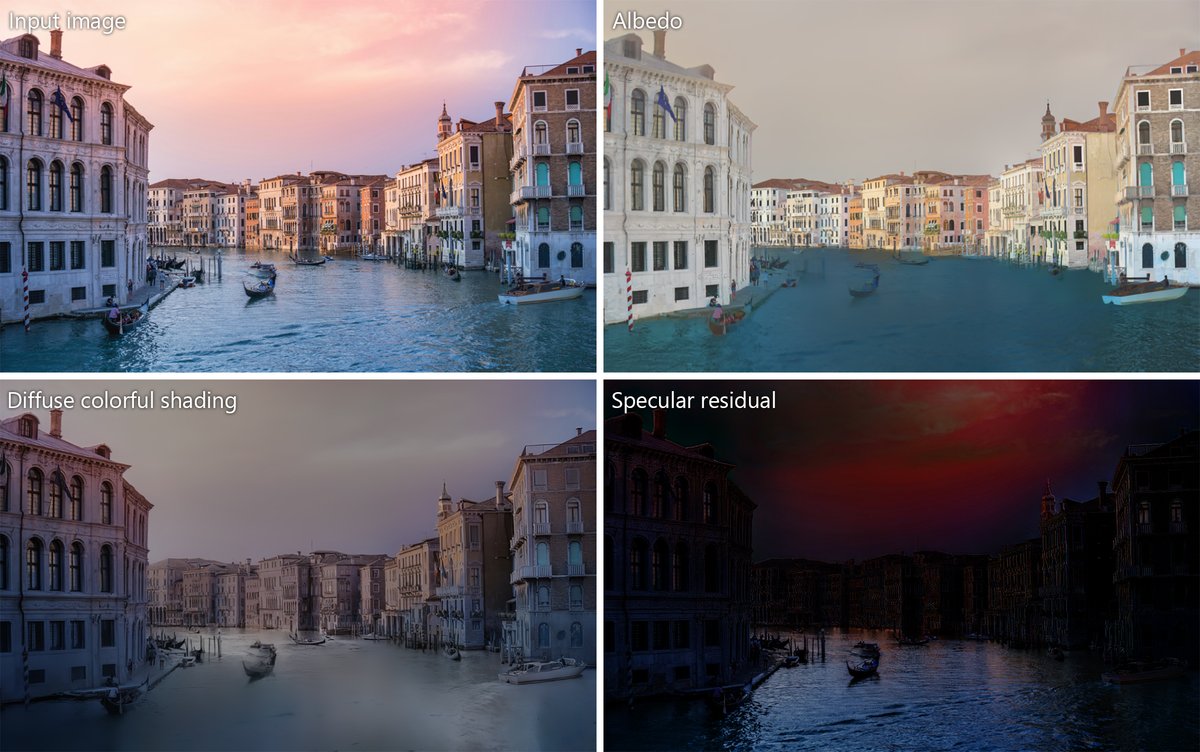
Colorful Diffuse Intrinsic Image Decomposition in the Wild
discuss: https://huggingface.co/papers/2409.13690
Intrinsic image decomposition aims to separate the surface reflectance and the effects from the illumination given a single photograph. Due to the complexity of the problem, most prior works assume a single-color illumination and a Lamb...
I think this is pretty interesting
mental geyser
mighty cedar
Is it just me or the earlier versions of PBR Fusion (I think version 1) took mor...
You are correct previous version does have a lot more liberty, new version was made to be more of a traditional upscaler, on the seesr node you can change the guidance scale to 10 for it to be more creative,
Or if you prefer I left the download for old version on the page
mental geyser
jade lake
https://fixupx.com/_akhaliq/status/1838064766725579031?t=v1x4bC3YbkU4iaDROJ5kzg&...
This looks like a build upon intrinsic lora, I have tried that before biggest problem is most of diffusion is made for real-world images in mind,
And starts to fail on flat textures, my new dataset is almost done, and about to start training, hopefully getting a real albedo conversion model. Along with better PBR and more training for seesr
jade lake
Mmmm
mental geyser
jade lake
Mmmm
Oh and they don't have training code so I can't even try to train my own 😦
rustic talon
@mental geyser you should update your readme on hf
 abstract ingot
Seemed pretty straight forward...... SEEMED.


Was using the RTXRemix json and only thing I changed was the 30/40 setting.
mental geyser
yeh it defaults to 1 displacement
primal olive
abstract ingot
Seemed pretty straight forward...... SEEMED.
set height to 0.01 to 0.05 at the absolute max
abstract ingot
Ah that makes sense lol
neon tulip
@mental geyser Kim helped me cook There was a potential for the aiupscale_texture layer created from the Remix workflow of PBRFusion to be deleted because the default Remix Comfyui had the Delete Layer node enabled.
#1216200397497045002 message Kim adjusted the workflow to remove the delete node and either have it create aiupscale_texture, or add on top of that layer if it already exists. I adjusted PBRFusion's to match that new workflow
I believeeeeeeeee it's correct, I've tested it on a project and it appears to be working, I just haven't had it reviewed by anyone smarter on comfyui than me
 neon tulip
@mental geyser I noticed this node turned red (idk if it's always been like that) but the console gave me this message, wasn't sure what it meant with BAE, Midas and standard
 neon tulip
I'VE COOKED! (i think lol), it looks like on the SeeSR Upscale node, the default value for upscale was 4, but with PBRFusion our default output for upscales+pbr is 2048x2048, 4 was giving us the 4096x4096 we weren't sure was coming from.

This has DRAMATICALLY increased speed for me, the hiccups look like they're cured
@primal olive iffffff you were thinking about trying again now auto, my lil fix above will prevent u from getting that 4096x4096 thingy/freeze 
pale field
Do you guys have support for GLI DDS textures?
mental geyser
neon tulip
<@255043112936669185> I noticed this node turned red (idk if it's always been li...
If you're still getting a normal put out should be fine weird I'll look at it
mental geyser
neon tulip
I'VE COOKED! (i think lol), it looks like on the SeeSR Upscale node, the default...
This means the node is only upscaling 2x every time, which can be very bad for below 1024
The 4096 problem is likely on my side I still need to look into to
mental geyser
pale field
Do you guys have support for GLI DDS textures?
If you send one I can test it 🙂
pale field
mental geyser
If you send one I can test it 🙂
here's a random one from MM2
it has the GLI header
rustic talon
pale field
Do you guys have support for GLI DDS textures?
there's a script Nukem made that converts it
#game-compatibility message
python.exe convert-gli-r5g6b5-header.py 24082A17F065691A.dds my_fixed_output_image.dds
i'm going to mirror your GLI script in #1095534398134300682 if that's okay @split raft
neon tulip
mental geyser
This means the node is only upscaling 2x every time, which can be very bad for b...
Ahh gotcha, rats, I thought I cracked the main-frame 
 split raft
rustic talon
i'm going to mirror your GLI script in <#1095534398134300682> if that's okay <@2...
split raft
rustic talon
i'm going to mirror your GLI script in <#1095534398134300682> if that's okay <@2...
That’s fine. Do note it covers that one single format, not every GLI type in existence. Should be enough for d3d9 games.
 burnt oyster
primal olive
is there any displacement for the bricks
burnt oyster
primal olive
is there any displacement for the bricks
Wdym
primal olive
burnt oyster
Wdym
I thought PBRFusion generates a heightmap
which would make the bricks look more 3D
 burnt oyster
primal olive
I thought PBRFusion generates a heightmap
burnt oyster
primal olive
I thought PBRFusion generates a heightmap
It’s a personal issue
Idk how to properly lay height maps on RTX remix
It still looks good though
If you know, I’d appreciate telling me
mental geyser
the _height file it generates you ingest as displacement like other maps, in toolkit near bottom theres a dropdown for displacement you put in height file you ingested and change slider to 0.01
primal olive
burnt oyster
Idk how to properly lay height maps on RTX remix
displacement is in a separate section at the bottom\
burnt oyster
mental geyser
the _height file it generates you ingest as displacement like other maps, in too...
Yeah I mean I just don’t know what to put it in
Like roughness
Or smth else
primal olive
burnt oyster
Yeah I mean I just don’t know what to put it in
DISPLACEMENT
IS AT
A SEPARATE SECTION
AT THE BOTTOM
NOT WITH THE OTHER TEXTURES
SCROLL DOWN
burnt oyster
Thanks for telling me
primal olive

 mental geyser
lmao
primal olive
it gives a buff to the words
burnt oyster
primal olive
NOT WITH THE OTHER TEXTURES
0/10 crash out
burnt oyster
burnt oyster
PBRFusion is the greatest descovery I have ever made on this server
The guy who said “try this” is like the hand of god reaching out to help me
 mental geyser
@neon tulip this is likely how its breaking out into 4k
V2.0.2
- Fix Typo and add Skurttys Remix Workflow fix for layers,
Install: drag contents of zip into directory next to "run_nvidia_gpu"
neon tulip
mental geyser
<@894151488601980949> this is likely how its breaking out into 4k
YOU ARE THE MAN RAVEN 
Testing right when I get home 
 rustic talon
about how long does it take per texture?
neon tulip
45-50 seconds each
ZERO hiccups, this is amazing This is going to dramatically reduce batch upscaling times, and give an accurate ETA when everything will be done
mental geyser
@primal olive The problem you were seeing is now fixed 😮
primal olive

neon tulip
ooooooo, does pbrfusion have text to image nodes?
 mental geyser
The controlnets are trained on text to image models, so yes every map is going through text 2 image models, prompting doesn't change much tho for these
neon tulip
Very cool Got any recommendations for a tutorial series on comfyui if you used any?
mental geyser
hmm, not really ive maybe watched a total of like 20 min worth of comfyui videos lol, mostly trial and error and exploring others workflows
neon tulip
Yeah I'm noticing it's less hard than I thought it'd be, some pretty impressive stuff
mental geyser
@dusty whale feel free to ask any questions here,
 dusty whale
mental geyser
<@456226577798135808> feel free to ask any questions here,
dusty whale
mental geyser
<@456226577798135808> feel free to ask any questions here,
im clearing room on my pc to install it first lol but im sure there will be questions
 glacial gale
mental geyser
<@456226577798135808> feel free to ask any questions here,
glacial gale
mental geyser
<@456226577798135808> feel free to ask any questions here,
i need help deciding to use pbrfusion or comfy ui.
mental geyser
glacial gale
i need help deciding to use pbrfusion or comfy ui.
pbrfusion uses comfyui
glacial gale
thank you
dusty whale
mental geyser
<@456226577798135808> feel free to ask any questions here,
well my first question is how do make it load an image to make into pbr
mental geyser
put the image into any folder
left of green box input path to that folder

assuming you loaded the workflow first
dusty whale
well no

 dusty whale
mental geyser
dusty whale
mental geyser
alright done, but it has every texture as a dds
mental geyser
thats fine it can take those
dusty whale
then what?
mental geyser
step 5
or for 1 image just hit queue prompt on right
when its done results will be in PBRFusionPortablerootdir/ComfyUI/output
what gpu do you have btw?
dusty whale
4070 laptop
mental geyser
mental geyser
ok below the red box change that dropdown to 40 series
 mental geyser
yeh the one below lol
dusty whale
where is the queue prompt
mental geyser
right side of the screen
mental geyser
for one image yeh
dusty whale
so id do it based on how many images i have in the folder?
mental geyser
yes ma'am
mental geyser
lmao
dusty whale

 dusty whale
iont got photoshop but oh well
 dusty whale
mental geyser
replace this new run_nvidia_gpu with one in root dir, and run comfy again
dusty whale
mental geyser
replace this new run_nvidia_gpu with one in root dir, and run comfy again
same error
 dusty whale
its no longer giving me that error

its taking a bit at this modual but no errors so far
mental geyser
upscaling does take a lil bit and will seem stuck on that bar, its processing, it just isnt reflected in that loading bar
dusty whale
figures lol I didnt think it was breaking in any way
 mental geyser
maybe i will speed up a bit if you change latent tiled size to 96
circled in blue

then node is on bottom left of workflow
mental geyser
it wont affect accuracy, its just faster with higher value with more vram
dusty whale
right so like blender rendering tiles
mental geyser
mmmmm no not exactly
there will be an affect, but not necessarily worse, or even noticeable
dusty whale
I meant in the sort of way that it renders images in squares at a time, unless that too is wrong
mental geyser
it is proccesing in a smaller tile, whether or not thats affecting things is trivial
in my tests you dont see a difference
dusty whale
it finished hooray


 dusty whale
yea
dusty whale
mental geyser
😦 why is it scratchy
I think its because the origional had some pre baked sheen on some bricks
mental geyser
ah
I am working on debake model being trained soon, well see if that helps
well its also cuz im cheating a lil bit i add some fine details back in, if i didnt itd be smooth, usually this helps alot, this is an exception\
dusty whale
 still looks aight
 dusty whale
I mean its roblox
mental geyser
ohhhhhh
dusty whale
and this+3 other textures control the entirety of the game

altho im confused what the white textures do, they only say diffuse
mental geyser
diffuse should be the brown color one
should be diffuse , roughness, height, normal
dusty whale
thisl pop out
 primal olive
that looks surprisingly clean
primal olive
dusty whale
altho im confused what the white textures do, they only say diffuse
this isn't diffuse. It's probably roughness

 dusty whale
mental geyser
its probs height 👀
dusty whale
mental geyser
its probs height 👀
It's weirdly labeled as diffuse for most
primal olive
dusty whale

mental geyser
dusty whale
<:ch_bingus_confused:786761338856669235>
you can see the pattern in normal from height
like i said it struggles with flat depth
does it not say _roughness or _height on filename
dusty whale
dusty whale
and this+3 other textures control the entirety of the game
So this is roughness?
dusty whale
mental geyser
does it not say _roughness or _height on filename
It says _diffuse
dusty whale
Wait lemme check again
The metallic was from the nvidia one maybe? Idk 
Anyways I'll see abt finishing Allis later I have work to attend
burnt oyster
primal olive
displacement is in a separate section at the bottom\
Works pretty well on most things thanks
primal olive
burnt oyster
Works pretty well on most things thanks
the value should be 0.01 to 0.05 btw, no higher or you're gonna run into big issues
burnt oyster
Yeah that’s what it is on most things, only one looks better at 0.13
neon tulip
Do you remember how you got the DirectX output? I'm only seeing Normal, BAE and MiDas 
 mental geyser
I added my own code 😛
feel free to take the node file from pbrfusion
i need to do a pull request on his repo
which node pack is it again?
neon tulip
Thanks! You're a genius
It's the Image-Filters node, https://comfy.icu/node/ConvertNormals
Share and Run ComfyUI workflows in the cloud
burnt oyster
trying to install it again cause I re set my PC and getting a not found 404 error message
mental geyser
burnt oyster
trying to install it again cause I re set my PC and getting a not found 404 erro...
sorry it was linked to directly to a file that dont exist anymore lol
burnt oyster
Should probaly Pin that
burnt oyster
mental geyser
sorry it was linked to directly to a file that dont exist anymore lol
Thanks
abstract ingot
Thinking about doing a huge batch but uhh... how do I save the images?
neon tulip
All the upscales(and PBR if selected) will be in \PBRFusionPortable2.0\ComfyUI\output
abstract ingot
Thanks
abstract ingot
So I gave this a try and it's honestly really good.
But one thing I've noticed is that the data set really obviously has no singular items in it. Like a single rock. So every file with any opacity has unupscaled pixels surrounding it.
I've pretty much had to trash every low res plant sample and numerous other things.
Otherwise it's pretty insane seeing what is pretty much a 8x4 brick turn into a proper brick with a hole in it near a slightly darker pixel.
mental geyser
Thanks for the feedback 🙂 Can you send a problem file you had with opacity?
abstract ingot
I've tossed the vast majority of them but really it's every object with opacity. It's most noticable on low res objects though.


The plant is a really great example.
rustic talon
that's most likely an issue with not upscaling the alpha layer
it should be easily fixed. @mental geyser you can just use my span model to upscale the alpha alongside the main model
here's an example comparing alpha layer handling
left is the alpha layer simply resized with a normal resizing filter
right is alpha upscaled with an AI model


i'd tell you how to fix it right now puma but i'm not sure how. nightraven will have to do it
 grim umbra
i just make my own black and white version of the original image and upscale that
its like a shitty version of a alpha layer
mental geyser
@here Newest Version I'm working on and its a lot lighter (Using an actual depth model this time)
Beta available here you can run for free on Huggingface no acct needed
https://huggingface.co/spaces/NightRaven109/PBRGeneration
Still sometimes has some weird shifting artifacts or is very blurry in details that should be present, but color bias is alot less and overall alot better 
(Beta cuz this is more of a rough draft model trying to fix above problems)
Any feedback is appreciated
 neon tulip
YIPPEEEE!!! Can't wait to run a batch, nice work NightRaven!
rustic talon
mental geyser
@here Newest Version I'm working on and its a lot lighter (Using an actual depth...
awesome work
pale field
mental geyser
@here Newest Version I'm working on and its a lot lighter (Using an actual depth...
Yes
Finally

 primal olive
Wow that is an excellent height map

 mental geyser
not perfect

yet... 🙂
could probs do more post processing and normalizing


hmmm i wonder if instead of point cloud, put it in the world of gaussian splatting and take advantage of the tech in that space
rustic talon
is that based on the height map?
mental geyser
yup
rustic talon
wow
well, shows how accurate the height map is now. what arch are you using for that?
mental geyser
Depth AnythingV2


 pale field
How much load does it put on the GPU for one image result. And how can I batch pbr them using capture
mental geyser
for the model in the huggingface space not much at all really maybe 3gb of vram, and can even run on cpu within 8 seconds
as for batching i dont have it available for batching yet, huggingface space is only release till i do a better model (which is training rn)
for this image to 3d thing, it outputs a 1gb obj file which is def overkill over a min of processing, can def get that down
rustic talon
so you're training a custom model on the depthanythingv2 arch?
mental geyser
ye
starting with there base model as pretrain but i think itd be fine from scratch too
i lied above depth model + normal map processing is 15 seconds on cpu. ig i dont know how long on gpu lol, thought i was using gpu (this is doing a 2k image)
pale field
mental geyser
for this image to 3d thing, it outputs a 1gb obj file which is def overkill over...
Probably best to bake an .exr displacement map from it
pale field
mental geyser
for the model in the huggingface space not much at all really maybe 3gb of vram,...
That's not that bad. Bet it could finish in mere seconds using a 4090 for inference
Could there be a way to get AI roughness maps using prompt and another mask layer for a more refined control on the final output. Same for metallic map
mental geyser
I'll test GPU inference times tomorrow
mental geyser
pale field
Could there be a way to get AI roughness maps using prompt and another mask laye...
Haha, I'll never say never but
When I began exploring this rabbit hole I thought that roughness would be the easiest of maps
So far it's been the hardest
And I have no clue how metallic would be done
Automatically at least
rustic talon
if anyone gets metallic working without guidance, my mind will be blown
it seems impossible
mental geyser
Instamat has a cool way of doing it
rustic talon
using something like segmentanything and using it to generate a mask for metallic elements (hand picked) could work
mental geyser
I just feel like There'd be so many false positives
rustic talon
without any guidance, absolutely
rustic talon
rustic talon
using something like segmentanything and using it to generate a mask for metalli...
with this i meant the user would just click on the areas of the texture meant to be metallic, and segmentanything would automatically add it to the mask
then the mask could be used for a metallic map model in some way
mental geyser
Ah, thats kinda what instamat does but with less control
You choose a pixel color range in image
And it makes mask
mental geyser
rustic talon
then the mask could be used for a metallic map model in some way
I'm saying, even with a good dataset
I don't see a model working well consistently
rustic talon
with the mask, all it would need to do is determine how shiny an area should be. that should be at least somewhat doable imo
mental geyser
Maybe, it would be the last thing id work on if I was done with all my other ideas lol
Plus I kinda see it as the easiest to make manually, sparsely used maps
Well how is it procedurally generated?
pale field
I kinda want to know how exactly do you specify parts of the image for upscaling and possibly marking areas for roughness, maybe something akin to ContolNet and Llama for automatic prompting
mental geyser
pale field
That's not that bad. Bet it could finish in mere seconds using a 4090 for infere...
inference time .32 seconds

 small cliff
Neat
mental geyser
This new train is def better so far
and got rid of most of that oddness i was seeing
huggingface space has been updated to it
mental geyser
oh uhh color bias is back rn on newest model, hopefully more training will bring it back out
abstract ingot
Is the alpha layer issue fixed with that version?
mental geyser
will be
 mental geyser
 fast nova
As I understand, the reason of this - vram
fast nova
As I understand, the reason of this - vram
You can try decreasing blue circle value
 gritty dew
Does the depth anything work on 20 series?
 mental geyser
nahhhhhhh
zealous plank
mental geyser

zealous plank
burnt oyster
4.65 Tb/ 1 tb
Just a wee bit over
 distant gate
mental geyser
distant gate
mental geyser
Using deductive reasoning one can assume the red indicates used, the blue indicates open. So by my calculations, you have still have roughly 30% of your 1TB left of which you have so far used only 465% of
mental geyser
Facts
zealous plank
distant gate
Using deductive reasoning one can assume the red indicates used, the blue indica...
Perfect-
 mental geyser
Going to do another train on each of the models before releasing them but here's a sneak peek at its current state, this is with Kim's pbrify dataset https://huggingface.co/spaces/NightRaven109/TextureUpscaleBeta

Also the other space https://huggingface.co/spaces/NightRaven109/Diffuse2PBR
Has been updated without using the depth anything pretrain so it's now an ethical model

So id like to do more testing research and training, the texture upscale isn't ethical cuz it's using sd 2.1. I don't have high hopes we can get similar results without it. Once I'm happy with both it will be released with full comfy UI stuff, batch processing
neon tulip
EEEEEEE we're getting a new PBRFusion for christmas chattt 
mental geyser
neon tulip
EEEEEEE we're getting a new PBRFusion for christmas chattt <a:Catpls:10835126146...
Woah woah my deadlines in 2 days 
rustic talon
mental geyser
Going to do another train on each of the models before releasing them but here's...
by far the best upscale of this texture i've seen

 neon tulip
@velvet orbit you put your directory of images you want to upscale in the select directory, if there's multiple in the folder put how many under extra options like this, and then queue prompt

After they're one they'll be in ComfyUI\output
 velvet orbit
@neon tulip I got this error window. What does that mean? there's nothing in the output folder
 neon tulip
velvet orbit
<@894151488601980949> I got this error window. What does that mean? there's noth...
neon tulip
velvet orbit
<@894151488601980949> I got this error window. What does that mean? there's noth...
Ahh, here in the middle you'll specify your GPU - I thiiiiiiink it only supports 30's and 40's series, I personally haven't tried 20 series cards yet
 velvet orbit
neon tulip
Ahh, here in the middle you'll specify your GPU - I thiiiiiiink it only supports...
velvet orbit
neon tulip
Ahh, here in the middle you'll specify your GPU - I thiiiiiiink it only supports...
I made sure it was set to 30 series when I tried it
mental geyser
wrong version thats 1.6.8, dunno why it wouldnt work but its legacy
idk if a 3050 can run seesr in 2.0 tho
mental geyser

Lmao it was way below 351 at least 75% of those are failed runs
But I've learned alot I didn't regret a single hour it's been fun
🙂
neon tulip
NightRaven the absolute goat for help making AI upscalers prime tools for Remix 

 neon lark
hey i'm trying to upscale a 256x256 texture with RTX3080 card and it's taking a few hours, using the rremix json. is this normal?
hmm then this message came up:
VAEDecodeTiled_TiledDiffusion
Expected all tensors to be on the same device, but found at least two devices, cpu and cuda:0! (when checking argument for argument weight in method wrapper_CUDA___slow_conv2d_forward)
mental geyser
Hmm can you pastebin your CMD log?
mental geyser
mental geyser
Going to do another train on each of the models before releasing them but here's...
Also if you are just needing a few upscales this is better ^
neon lark
im guessing its because the remix program running in the background uses too much vram
mental geyser
Ah that would do it
 snow acorn
так, я тупой
 mental geyser
did you load the json PBRFusionV2.0.2BatchLoader.json (its in same folder as run_nvidia_gpu.exe) workflow first?
and no you are not stupid 🙂
or alternatively you can checkout the huggingface spaces for easy access if just curious#1263287747905327236 message
snow acorn
mental geyser
did you load the json PBRFusionV2.0.2BatchLoader.json (its in same folder as run...
I've done this before.
nothing happens when loading this file.
mental geyser
you may have to zoom out a bit to find the workflow to the left
snow acorn
oh fu...

Do you have a step-by-step video tutorial?
I am not a native English speaker, it is difficult for me to understand the interface.
snow acorn
@mental geyser
is it possible to run "TextureUpscaleBeta" on Google Colab?
"huggingface.co " limits the number of generation attempts and frequently interrupts processing
mental geyser
The weights in the huggingface spaces are not publicly available yet, I would make a tutorial for PBRFusion but am out of town for a wedding so I have no time this weekend
snow acorn
👀
neon tulip
chatgpt found pbrfusion!
 mental geyser
Ayo?
snow acorn

distant gate
neon tulip
chatgpt found pbrfusion! <a:BLANKIES:1049173674831392829>
chatgpt found skurtyy!!
 neon tulip
chatgpt getting so smart 
mental geyser
@neon tulip and anyone else who would like to help you can help with prompting a dataset here, Please be pretty verbose, but not to the point of making up info. If not sure on a description you can skip
Tip: I included filename to help on top
Please do prompts with , between features as seen in image below

and thanks if you help out 🙂

 mental geyser
could be useful sometimes
just want it to be as clean as possible as well so cant auto it 🙂
neon tulip
mental geyser
<@894151488601980949> and anyone else who would like to help you can help with p...
YOOOOOO SICKKK! Thanks for setting this up, shall be diving in
 neon tulip
Pro tip, it displays the original texture name, helps identify what we're looking at - I thought this was the night sky lmaoo
 silent socket
wtf is this
 mental geyser
Lmao
mental geyser
wait i may just be dumb
all these come with a json file that has descriptve tags i can just parse out lol
 neon tulip
HUGEEEE
lol it felt like I was tagging for 2 hours yesterday and I didn’t even get to 100 💀
mental geyser
you a real one g
 forest mountain
what folder should i be upscaling for remix?
i might be stupid
this is new to mees
burnt oyster
once you have the texture you want to upscale, put it in any EMPTY folder and then put the file path in the green box
it's been a minute since I used this so if there's a step that changed/I'm wrong somebody please correct me
neon tulip
forest mountain
this is new to mees
You can set this to be rtx-remix/captures/textures which will upscale the entire captures folder, or you could point it to whatever folder really. The folder that has the stuff you want upscaled 

When it's done they'll be in ComfyUI_PBRFusion_Portable\ComfyUI\output
forest mountain
neon tulip
You can set this to be rtx-remix/captures/textures which will upscale the entire...
yummy ty
forest mountain
neon tulip
You can set this to be rtx-remix/captures/textures which will upscale the entire...
any idea how i put them back in the game easily?
nvm
shit will not upscale
sonic adventure dds files are broken asf
they dont even open
neon tulip
forest mountain
any idea how i put them back in the game easily?
make a new layer in your project, and then open this, and for the directory path make it the folder where your textures got ingested. Then where the generateusdafromingestedDDS.py is located type cmd in the file address bar and type python GenerateUSDAFromIngestedDDSwithhhm.py

 neon tulip
hmm that's weird, does it give you an error message at all? you wouldn't happen to be on a 20 series card would you :3
forest mountain
im on a 30
neon tulip
Oh yeah that should be fine. wut da heck
neon tulip
 arrr naurrr, try to send a few of them here and I'll see if I get the same error
 damn, that's craaaaaazy
 neon tulip
 curious for the answer if u find it
forest mountain
neon tulip
<a:kit_plink:1120566683858391090> curious for the answer if u find it

ive been stuck on this for like a solid 3 mins
neon tulip
Still stuck? 👀
forest mountain
neon tulip
Still stuck? 👀
si senor
i'm in bed now since i got shit to do
air force air force air force all the way hey!!!
mental geyser
What GPU?
forest mountain
3060 ti
mental geyser
What is blue currently set too, you can try decreasing it
 forest mountain
mental geyser
What is blue currently set too, you can try decreasing it
forest mountain
mental geyser
What is blue currently set too, you can try decreasing it
i'll try when i get home ty
forest mountain
mental geyser
What is blue currently set too, you can try decreasing it


i lowk just might be missing something
mental geyser
Try 96, and what res are you trying to upscale?
 mental geyser
Oh..
forest mountain
the bigger ones are 128-128
mental geyser
idk why it isn't working, but not sure how well it'd do even if it did work lol
Try this
mental geyser
not atm
forest mountain
bummer
mental geyser
Either this beta
Or
Kim's pbrify does better on smaller res then 256x256.
PBRFusion struggles upscale below 512x512

 mental geyser
beta output
 mental geyser
aww how nice they gave me more storage
 small cliff
Upscale Seems to work pretty excellent for 128 it's just compression that kills it
mental geyser
https://huggingface.co/spaces/NightRaven109/PBRGeneration
Updated model, is much much better 🙂
having trouble on text-to-img finetune for some reason but will start it 
snow acorn
mental geyser
https://huggingface.co/spaces/NightRaven109/PBRGeneration
Updated model, is muc...
generated vs original


diffuse
 mental geyser
could try out new outward pom as well
snow acorn
This is a texture from Divinity II
RTX Remix doesn't work in it
mental geyser
AH
neon tulip

A PBRFUSION DROP 
do we replace the diffuser on pbrfusion2.0 with the depthanythingv2?
snow acorn
👀
 mental geyser
neon tulip
do we replace the diffuser on pbrfusion2.0 with the depthanythingv2? <:Looking:1...
mental geyser
neon tulip
do we replace the diffuser on pbrfusion2.0 with the depthanythingv2? <:Looking:1...
Lol that was me saving training code
snow acorn
TextureUpscaleBeta | deep-image ai | bilinear

TextureUpscaleBeta has a lot of noise patterns


 rustic talon
awesome results so far though
snow acorn
I'm wondering why there are Prompt and Negative Prompt items in the TextureUpscaleBeta interface.
No matter what I put in there, the result didn't change.
mental geyser
4x mode or 8x?
snow acorn
4
 rustic talon
could you please share with me all of the input images you used there lol
neon tulip
Yeah! I used the default that was on the Spaces page for the beta
 rustic talon
oh okay lol
@mental geyser you might want to incorporate some halos into your LRs
i'm gonna be training a model to remove halos. it'll be a lightweight model. you could probably pass images through it before upscaling without any issue if you wanted
mental geyser

neon tulip
 chat what's a halo texture, google keeps showing me halo the videogame lmaoo
rustic talon
it's not a texture type, it's an artifact from oversharpening or similar processes

it's on the first input image
neon tulip
Ahhhhhh gotcha, good eye
rustic talon
some of the artifacts from it were retained in the upscale as well, which is why i suggested night add some more halos into the training dataset 🙂

it'd help prevent this
rustic talon
neon tulip
Ahhhhhh gotcha, good eye <a:kit_yes:1140645344091312158>


here's an example
neon tulip
Ahhhh yeah, it does have an effect it looks like
rustic talon
my model is so much worse with that though lol

it's probably an issue with my dataset. not sure if that's what night is still using or not
but yeah
mental geyser
your dataset is included + mine
burnt oyster

was trying out the new version, when I start I get this error
nvrm
it just worked all the sudden
mental geyser
there is no new version lol
mental geyser
neon tulip
Yeah the model's great so far <a:Catpls:1083512614665060442> https://imgsli.com/...
I updated space to output in png instead of jpg can you retry the images and see if theres a big difference between jpg and png
ik img sli will put it back into jpg but im curios
rustic talon
Slowpoke Pics image comparison service
this site keeps it in png
has a slider comparison mode too
mental geyser
😮

 mental geyser
🙂
neon tulip
Yeah that's great!
Fiddle sticks, it wanted me to join pro before upscaling the 2nd one again, but here's the that first pics png comparison! https://slow.pics/s/murGO9Bd?image-fit=contain
Slowpoke Pics image comparison service
burnt oyster
mental geyser
there is no new version lol
most recent I suppose, I haven't used it since the 2.0 so 2.02 I think it is
rustic talon


it'll get clearer as it trains, this is early on
but that's how about that image should look. new model will do that 🙂
it's SPAN too so it'll be quick to run
rustic talon
rustic talon
my model is so much worse with that though lol
new output with the dehalo model ran first
 small cliff
Well at least the texture's good 


I used a seperate compression artifact removal tool and did some light color replacing to fix a bleeding issue at the bottom, and then I upscaled both parts seperately and recombined them, then used the normal tool.

 forest mountain
small cliff
Well at least the texture's good <:mmcDUDUDU:907516396487987230>
forest mountain
small cliff
Well at least the texture's good <:mmcDUDUDU:907516396487987230>
SA2???
small cliff
SADX
forest mountain
the hands really looked like sa2 for some reason
mental geyser
output of pbr gen space is much better now as it outputs full png quality
 quiet delta


 mental geyser
megascan maps vs new pbrfusion made maps (no outward pom cant get it to show up lol)
 neon tulip
NICEEEEE WORKK! That's crazy good
 stray barn
outward displacement doesnt show in the toolkit (currently), only in runtime
burnt oyster
stray barn
outward displacement doesnt show in the toolkit (currently), only in runtime

?
burnt oyster
mental geyser
https://imgsli.com/MzQ4Mzc4
megascan maps vs new pbrfusion made maps (no outwar...
That's weird
mental geyser
Oh lol I got it to work 🙂
mental geyser
stray barn
outward displacement doesnt show in the toolkit (currently), only in runtime
This is not true, I had to old of runtime running
stray barn
@burnt oyster
I should have been clearer, For the v.2024.5.1 (i dont have those manualy updated files for the toolkit)
Outward displacement doesnt show in the PREVIEW/RENDER window in the toolkit (ofc it shows as an option, how can you see et in the runtime if you dont set it in the toolkit... )
thats my experience anyway... then i go ingame and i facepalm at some outward displacements
mental geyser
stray barn
<@1103484427738284032>
I should have been clearer, For the v.2024.5.1 (i dont h...
with latest runtime build, toolkit build, and a new capture. outward displacement is also live showing now in toolkit for me
 burnt oyster
stray barn
<@1103484427738284032>
I should have been clearer, For the v.2024.5.1 (i dont h...
burnt oyster
stray barn
<@1103484427738284032>
I should have been clearer, For the v.2024.5.1 (i dont h...
gotcha

 small cliff
What the hell lol
#1263287747905327236 message
Could I ask what the objective is here + what "megascans" is in comparison? It's not super clear to me.
mental geyser
small cliff
https://discord.com/channels/1028444667789967381/1263287747905327236/13391009835...
Quixels asset library

Quixel
Discover a world of unbounded creativity. Explore a massive asset library, and Quixel’s powerful tools, plus free in-depth tutorials and resources.
small cliff
No no I mean like what's the specific thing we're comparing here, was there a special process for the "megascans" thing?
The reaction implies that "megascans" looks worse and I don't think I could exactly back that part at least
mental geyser
small cliff
No no I mean like what's the specific thing we're comparing here, was there a sp...
A comparison of the PBR maps of the asset made by hand, and PBRFusion generated PBR just based off of albedo
I guess goal would be to be able to get as as good of PBR as a megascan asset or close to it
 mental geyser
well i cant guarantee itll be perfect every time lol. PLus i may have a way to allievate in comfyui
what was orignal picture?
snow acorn
 snow acorn
<@255043112936669185>💀
snow acorn
snow acorn
<@255043112936669185>💀
 mental geyser
i mean this looks p seamless to me
 snow acorn
bruh
 mental geyser
technically the normal maps are wrong on the space rn, but im gonna need a little more then "bruh"
 mental geyser
ahh i see
 quick zenith
mental geyser
ahh i see
quick zenith
mental geyser
ahh i see
The way you could fix it is during inference you could add circular padding around the texture and crop it back afterwards. May not be perfect but it should help at least a little bit
mental geyser
quick zenith
The way you could fix it is during inference you could add circular padding arou...
good idea! thanks 🙂
neon lark
might be interesting for you:
https://github.com/trashgraphicard/Albedo-Sampler-for-ComfyUI
GitHub
2 ComfyUI custom nodes that deal with albedo textures - trashgraphicard/Albedo-Sampler-for-ComfyUI
neon lark
not amazing actually but maybe useful somewhere
mental geyser
@snow acorn try out this normal map, this is output full comfy release will have, should be much better
 snow acorn
mental geyser
<@1190744632213123144> try out this normal map, this is output full comfy releas...
snow acorn
mental geyser
<@1190744632213123144> try out this normal map, this is output full comfy releas...
👏
 mental geyser
thanks for pointing that out 
snow acorn
and please add a seamless texture feature to the checkbox.
this method may not be suitable for all textures.

 snow acorn
if you are dealing with baked textures, there may be errors.
quick zenith
mental geyser
If you don't mind me asking, what ended up fixing your issue in the end ? 😛
mental geyser
padding didnt end up helping a ton 😦
tried a couple methods, blending, bluring, smearing
ended up with Fourier Transform
ai helped with that implementation 🙂
 quick zenith
mental geyser
padding didnt end up helping a ton 😦
tried a couple methods, blending, bluring...
quick zenith
mental geyser
padding didnt end up helping a ton 😦
tried a couple methods, blending, bluring...
Awsome!
mental geyser
These new models are close to a release state everything is changed from different sr model to custom depth model, should I just call the new iteration PBRFusion 3?
rustic talon
ya
 mental geyser
Isn't life odd I never head of Fourier before yesterday and today I'm scrolling through Reddit and it's in a meme lol

The algorithm is always watching
mental geyser
will be only 22gb 😮
