#PBRify - Fast, Ethical Upscaler & PBR Generator!
1 messages · Page 2 of 1
 quaint shale
 vagrant moon
it's possible that the normal and roughness maps are causing the bad appearance
quaint shale
Appears so
vagrant moon
oh also, the newest model i'm working on is a lot sharper overall. it may be more to your liking
it'll be released within the next week (hopefully)
quaint shale
and by flat texture I mean it's just a single uniform color
and the texture does seem to be a single instance for a whole wall segment
vagrant moon
ah yeah, that'll look horrible 😦
quaint shale
The whole wall is fine, except for the flat metal strip that runs across the middle
 sweet dagger
PBRify mentioned in this article!  https://www.dsogaming.com/mods/lego-island-2-rtx-remix-path-tracing-mod-available-for-download/
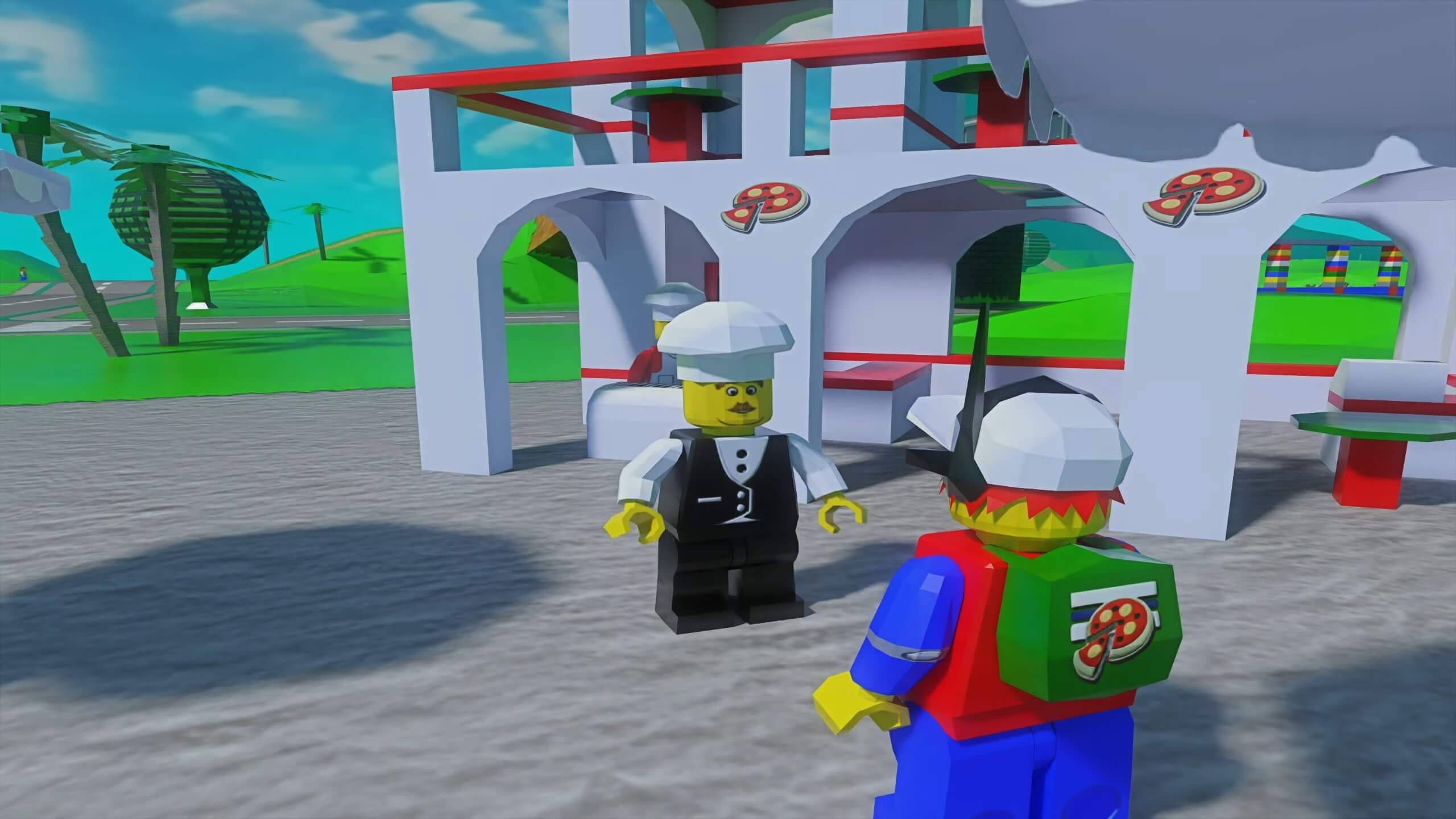
Modder 'skurtyyskirts' has just released an RTX Remix Mod for Lego Island 2 that adds full Ray Tracing/Path Tracing support.
 sterile burrow
@vagrant moon sorry for the ping but I'm currently having some issues with pbrify. for some reason it makes the alpha part of the texture a much lighter colour and also changes the color grading of the textures
just wondering if there was some kind of fix or smth to fix it
vagrant moon
no worries
if you're using the model directly, yes it has issues with color accuracy. the chain i supply with PBRify has wavelet color fix nodes to handle this
you just wanted to upscale the albedo textures, right? no PBR?
sterile burrow
yeah thats right
vagrant moon
just download the new chain and disable the PBR nodes on the right side (click the toggle in the bottom left of the node), then run the chain. it'll upscale the albedo only and save it in the specified folder
sterile burrow
alright ill try that, thanks
 whole shadow
whats the difference with SIR-M and Latest Span?
i could understand about span but i lack the info of SIR-M
 warm fable
SIR = SwinIR, the -M is a configuration
vagrant moon
whole shadow
whats the difference with SIR-M and Latest Span?
the SwinIR-M model is slower but produces better results. SPAN is a lot faster but the results are noticeably worse (less realistic detail, more generic noise)
 whole shadow
What will be cons for that?
vagrant moon
whole shadow
it uses 6gb (+500-700mb shared memory)
vagrant moon
whole shadow
What will be cons for that?
i adjusted the tile size. when it upscales, it splits the image into smaller parts to reduce VRAM load
i had it set at 512, which is too much for your GPU. so i lowered it to 256
it'll make it even slower on GPUs with more VRAM, which is why the default is 512 instead
vagrant moon
vagrant moon
this one should work okay for you
whole shadow
im not sure if it will create consequences with the normal one im using
vagrant moon
not sure what you mean
whole shadow
i mean
The normal one (unmodified 512 tile size) uses fully VRAM and i said if there will be any consequences with it
 flint slate
vagrant moon
i adjusted the tile size. when it upscales, it splits the image into smaller par...
flint slate
vagrant moon
i adjusted the tile size. when it upscales, it splits the image into smaller par...
Is it like the blender tiling system?
vagrant moon
whole shadow
The normal one (unmodified 512 tile size) uses fully VRAM and i said if there wi...
having it too full will cause it to be unnecessarily slow, and can lead to your GPU driver crashing
vagrant moon
flint slate
Is it like the blender tiling system?
i'm not familiar with that
whole shadow
vagrant moon
having it too full will cause it to be unnecessarily slow, and can lead to your ...
Well damn
flint slate
vagrant moon
i'm not familiar with that
Where instead of just rendering the whole thing in cycles it takes small portions to render at a time based on tiles
vagrant moon
it's kinda like that
vagrant moon
whole shadow
Well damn
for the SPAN model, the old chain is fine. for SwinIR, you'll want the new one i just sent for sure
 vagrant moon
you're 100% sure that's the new chain?
flint slate
4gb vram
whole shadow
vagrant moon
you're 100% sure that's the new chain?
yes
it reduced to 300 mb physical memory share tho
vagrant moon
on my end it's using under 3 GB VRAM with that setting
vagrant moon
actually only 2 GB VRAM
whole shadow
how much vram does use on normal one
vagrant moon
4.7 GB
vagrant moon
make sure in chaiNNer's settings that FP16 is on
 whole shadow
its already on
vagrant moon
then i have no idea why it'd be maxing out your VRAM
check the utilization in task manager as well
whole shadow
vagrant moon
4.7 GB
are you using with sir-m
vagrant moon
yes
whole shadow
vagrant moon
check the utilization in task manager as well
i checked earlier and it has like 0 vram usage
vagrant moon
vagrant moon
make sure in chaiNNer's settings that FP16 is on
did you adjust the memory budget limit here?
vagrant moon
whole shadow
are you using with sir-m
actually, i was using an even more intensive model by mistake. the default (512) uses only 3.6 GB VRAM, and the new one (256) uses only 1.5 GB
vagrant moon
whole shadow
i checked earlier and it has like 0 vram usage
if task manager is showing almost none, then something's wrong with chaiNNer
 vagrant moon
is it using your iGPU?
vagrant moon
which GPU is being utilized though?
whole shadow
most of upscaling efforts are from physical gpu vram (rtx 3060)

 vagrant moon
okay
then i have no idea what's wrong. i guess you can just ignore chaiNNer's incorrect VRAM reading
so you could probably use the default chain again without issue
@warm fable seems like chaiNNer may have a conflict with iGPUs for VRAM readings?
whole shadow
igpu vram was always used even before upscaling
warm fable
vagrant moon
<@66238401078112256> seems like chaiNNer may have a conflict with iGPUs for VRAM...
that shouldnt be possible because vram readings are taken from CUDA stuff, which iGPUs dont have
vagrant moon
well, something's definitely wrong
vagrant moon
whole shadow
chaiNNer reports high VRAM utilization, while task manager shows almost none
warm fable
thats really odd
whole shadow
vagrant moon
chaiNNer reports high VRAM utilization, while task manager shows almost none
well it does
warm fable
right now there may be a slight issue in how chaiNNer estimates tile sizes, so if you're running into issues maybe try setting a manual smaller one
vagrant moon
we did. the problem is that chaiNNer was reporting full VRAM utilization despite that not being the case
so it turns out the original chain was fine
vagrant moon
whole shadow
well it does
but i'm not sure what you mean by this. to be honest you're not very clear in what you're trying to say
the 3060 is all that matters, ignore the Intel iGPU. when you're upscaling, does the VRAM on the 3060 match what chaiNNer is reporting?
 vagrant moon
yes, that helps a lot
so there's no bug then
but i have no idea why it'd be so VRAM intensive
whole shadow
strange
 vagrant moon
that's from the tiling
whole shadow
makes sense
gotta use 256 tile pbrify for now just hopefully the gpu driver wont give me a middle finger for having vram full usage
whole shadow
vram did somehow reduced the usage in middle of upscaling process
it reduced to %88.6
whole shadow
Thank god upscaling with 6gb vram full usage for hours didnt do anything
 pastel temple
pov : you just reduced ur gpu lifetime by 2 years
whole shadow
God knows how long it will power up
vagrant moon
V1.7.0 Update
Download
You need the latest chaiNNer build!
Changelog:
- New upscaling model! This is a drastic improvement over the previous model (which was already a huge improvement). However, it does come with the downside of being more intensive.
- The default chain requires at least 8 GB VRAM to run properly
- I added a custom 6 GB VRAM chain to the new Extras folder for users with lower VRAM GPUs
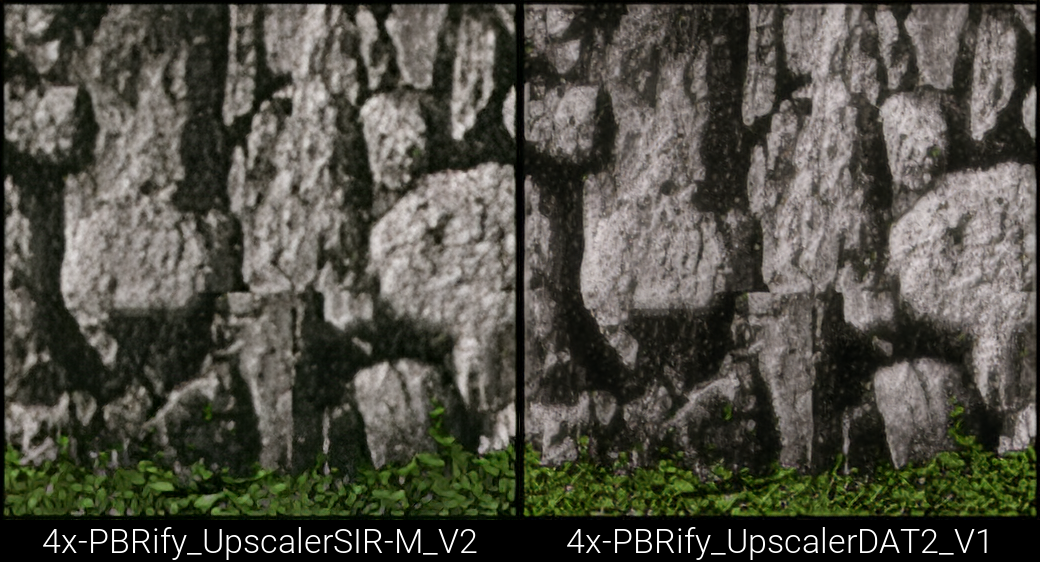
Here are some comparisons: https://slow.pics/c/DCjlXPGb
https://github.com/Kim2091/PBRify_Remix/assets/62084776/4d7a6236-be09-41be-a87d-30954d06bf84
🚀 If you like my work, please support me on Ko-fi! 🚀
 vagrant moon
yeah, sorry if that wasn't clear enough
the chain is meant to be used with the newest DAT2 model. it should be okay for 6 GB VRAM cards based on my testing
quaint shale
vagrant moon
**V1.7.0 Update**
[Download](<https://github.com/Kim2091/PBRify_Remix/releases/d...

 proud yew
What does this error mean?
 vagrant moon
an image is corrupted
warm fable
proud yew
What does this error mean?
I'm guessing that's a DDS? if so that whatever type of DDS it is isn't supported
sterile burrow
if ur using dds i reccomend using xnconvert to convert it to png -> upscale it -> convert back to dds(or if ur using upkexplorer use the tool created for it called png to dds)
https://www.xnview.com/en/xnconvert/

XnView Software
vagrant moon
don't convert it back to DDS using XNConvert. it lacks a lot of important settings
chaiNNer supports almost every common DDS format and compression type, so i usually use that. you can also use this: https://forums.dolphin-emu.org/Thread-custom-texture-tool-ps-v52-5
but yeah preconverting to PNG should help a lot. i'll add that as a tip in the readme. thanks
 peak dagger
proud yew
How do I use a height map?
peak dagger
proud yew
How do I use a height map?
Set the texture in the Displacement section of your material in the Toolkit
proud yew
vagrant moon
**V1.7.0 Update**
[Download](<https://github.com/Kim2091/PBRify_Remix/releases/d...
I mean with channier. Not sure if the nodes are attached?
sterile burrow
they should be...it could be that the node is just disabled
make sure you turn this button on
 proud yew
Ok thanks 👍
sterile burrow
no worries 🙂
vagrant moon
only turn it on if you want it to potentially look very bad 😛
but yeah, as long as you set up chaiNNer properly it'll all be connected already
quaint shale
the height maps are hilarious
you gotta edit them manually if you want anything good
 limpid flame
vagrant moon
limpid flame
Shameless plug https://discord.com/channels/1028444667789967381/1240463585277251...
limpid flame
vagrant moon
limpid flame
Shameless plug https://discord.com/channels/1028444667789967381/1240463585277251...
you'll be happy to know that's in the main post here now 🙂
limpid flame
😮💙
 rare burrow
for some reason every texture is 512 even tho i set tiling to 1024
 quaint jungle
rare burrow
for some reason every texture is 512 even tho i set tiling to 1024
quaint jungle
rare burrow
for some reason every texture is 512 even tho i set tiling to 1024
PBRify is a 4X upscaler. 512x512 textures become 2048x2048. What resolution are you starting at
rare burrow
quaint jungle
PBRify is a 4X upscaler. 512x512 textures become 2048x2048. What resolution are ...
ohhh oh ohhh ok
ah it turns out the game's textures were 128x128 originally and i just thought that the upscaler wasn't working lol
quaint jungle
Lol that's surprisingly low res!
 somber isle
I have a little question, if my original texture have normal map (256x256), can i upscaler it and help to generator higher quality PBR ?
quaint shale
Depends on if the model can recognize and upscale the normal map to match the original texture. Better to just upscale the diffuse and generate the PBR materials after that.
Which is literally what this tool does.
And remix ignores non diffuse textures from games in the capture anyway.
@somber isle
limpid flame
somber isle
I have a little question, if my original texture have normal map (256x256), can ...
don't want to use a traditional upscale on normal maps
warm fable
There are some models made specifically for upscaling normal maps
https://openmodeldb.info/models/4x-Normal-RG0 this one for example

It just expects the blue channel to be zero'd out and then recomputed (which can be done via the normalize normal map node in chaiNNer)
There are alternate versions of that model for the compression type of the textures, if they're compressed at all
vagrant moon
https://github.com/Kim2091/PBRify_Remix/raw/main/Extras/Alternate_Models/4x-PBRify_UpscalerSPAN_Neutral.pth
this model also works good for upscaling normal maps (someone i talked with testing it said they actually preferred it to the one above)
somber isle
oh, thanks
sterile burrow
somber isle
I have a little question, if my original texture have normal map (256x256), can ...
yeah u probably can, I've used it to upscale some normal maps for games and imo it works pretty well
somber isle
it's work, original is specular/gloss pbr (512x512) game, i upscale basecolor and spec/glo , use SD convert it to metallic/roughness and separate upscale normal map.


upscaled and converted to PBR while preserving the original style
vagrant moon
I just wanted to let you guys know: for the foreseeable future, PBRify development will be stalled
My life is pretty chaotic right now and I need to focus on other things, but also the whole donation program I set up didn't really go as planned & I was counting on that. I just can't contribute any more time to it as a result
The state it's in currently is very good imo, possibly the best it can be right now without being miserably slow and unusable on lower end hardware. Hopefully the current models will be sufficient for you guys. At the very least, it's significantly faster & better than the models provided in the toolkit
The only exception to development being halted is that I will look into making a ComfyUI chain to allow PBRify to function with the REST API that'll be added to the toolkit soon
warm fable
FYI in comfyui they're called "workflows" not chains
Also, hope your life stuff works out
vagrant moon
there is one more thing i'd appreciate help with in the meantime:
i need some help making a script for Blender or Omniverse Create to automate the following:
- load texture with PBR maps from a folder
- add a light at a random angle to cast shadows
- render
- save
this will allow PBRify to "delight" textures (remove all shadows and lighting from a texture). this should drastically improve output quality, and a lot of textures will look more natural in Remix
limpid flame
I already have a script mostly built for that I'll pull it up in a bit
limpid flame
vagrant moon
there is one more thing i'd appreciate help with in the meantime:
i need some h...
Windows start command in cmd
.\blender.exe --background --python "script path" -- "Source Folder Path"
you can change render res at bottom and sunlight intensity is commented, can also change sun direction if desired
This will walk into every folder in source folder and take in the Diffuse, Normal, Height and Roughness, of which can be renamed in script to fit your file names
will place render.png next to other maps it just processed
Default dataset format it expects (mat folders can be named anything)
SourceFolder
|
|-----mat1
| |---diffuse.png
| |---normal.png
| |---roughness.png
| |---height.png
|
|-----mat2
| |---diffuse.png
| |---normal.png
| |---roughness.png
| |---height.png
vagrant moon
awesome, thank you
limpid flame
np 🙂
vagrant moon
i'll see if i can do that today
it'll take a long time to do 1600 textures, but it'll be worth it 😛
limpid flame
What res are you rendering at
vagrant moon
i'll likely do 512x512, same as you
limpid flame
It goes by pretty fast actually less then a couple hrs
vagrant moon
i'm using Claude to modify a bunch of things right now:
- added logging
- added randomized sun direction within 145 degrees of the "top"
- changed the way loading is done
hopefully this won't slow things too much
limpid flame
Ah, hopefully not, currently it doesn't recreate a scene every time and just replaces brdf on the plane, no idea how much changing sun and stuff takes lol
vagrant moon
i just keep getting this 😢
Blender 4.2.0 Alpha (hash b9d136496a94 built 2024-04-23 06:08:34)
Unregistered library

Bforartists quit```i'll try with base blender now just in case
vagrant moon
limpid flame
Ah, hopefully not, currently it doesn't recreate a scene every time and just rep...
what blender version are you using?
with blender 4.1, and using your default script... it just doesn't do anything 😢
Blender 4.1.1 (hash e1743a0317bc built 2024-04-15 23:33:30)

Blender quit```

the test folder:
ohh i see. adding a subdirectory lets it run
limpid flame
I redownloaded it last night to test so most recent version
Oh
It's by default at least maps need to be in another subfolder under render
Unless you changed that
Wow that was the worst sentence I've constructed ever
vagrant moon
lol it's okay
i got it working
there is an unfortunate issue with rendering at 512x512: there's very bad moire patterns on most of them
so i might just have to do 4096, or maybe 2048
limpid flame
Oh boi I hope you're ready for 7 days
vagrant moon
yeah...
4090 with OptiX renderer speeds things up a lot, but it's still quite slow
at 4096 it takes about 3 minutes per texture

 vagrant moon
limpid flame
4090 is a beast my 3080 would be crying
vagrant moon
limpid flame
4090 is a beast my 3080 would be crying
it sure is. i'm so grateful to have one
btw here's my modification of your script
instead of requiring file names to be exactly diffuse.png, etc. it'll look for _diffuse.png
additionally here's a script to automatically create subdirectories for the texture sets
limpid flame
Nice! Glad its working well
vagrant moon
thank you a ton for the base script
vagrant moon
vagrant moon
diffuse | render
i am concerned if any current SR arch can handle the differences present here. it's pretty drastic
i suppose the best thing to do would be to do two renders of each texture
one with the sun completely flat on it, no shadows being cast
and a second one with the random sun angles
that way it'd only be removing shadows. there's no way it can handle accurately removing all of the normal, roughness, height, etc. info
in that case: i'll render to 2048 and let it process all of my textures, then i'll do it again with random angles
looks like i'm gonna have to go through the results one by one lol


this render is somehow very very bad
mm a lot of them are like this 😢
limpid flame
What were original set of maps for that


 limpid flame
Hmmm where is that pattern coming from lol
vagrant moon
i think it's the roughness
it's too glossy or something
considering i can't figure out how to load it in blender manually... lol. can't tell
 vagrant moon
hm, doesn't seem to. at least i couldn't get it to
could've messed something up
i did get all of the maps loaded manually & tried to recreate all of the settings by hand, but it's not reproducing the issue
lol i'm so confused. i got it to open the scene & manually selected the textures (it failed to automatically load them for whatever reason)

this is the render?
@limpid flame sorry, i'm stupid. i think i mistakenly typed strength 100 for the sun which caused that lmao
here it is at 2

and at 10

i'll stick with 2 🙂
it's so intensive lol

😢 something's still wrong

i'll troubleshoot it more later
this is the diffuse for that lol
 limpid flame
Maybe the height is too aggressive
displacement_node.inputs['Scale'].default_value = 0.1  # Adjust the scale value as needed
        displacement_node.inputs['Midlevel'].default_value = 0.5  # Adjust the midlevel value as needed
that could be
i also noticed that blender loads normal maps in OGL format by default, but mine are DX
that's not good
do you know if Blender has a built in setting for this? or do i need to convert them all by hand
manually converting to OGL fixed a good portion of the issues, however it's still ridiculously reflective

implementing your displacement fix did help a lot

for reference, this is how it's supposed to look

setting normal map strength to 0.5 seems to have done it

                    normal_map = nodes.new('ShaderNodeNormalMap')
                    normal_map.location = -200, 200
                    material.node_tree.links.new(tex_image.outputs['Color'], normal_map.inputs['Color'])

                    # Control the strength of the normal map
                    normal_strength = 0.5  # Set your desired strength here
                    normal_map.inputs['Strength'].default_value = normal_strength

material.node_tree.links.new(normal_map.outputs['Normal'], shader.inputs['Normal'])```yep that seems to be working properly 🙂
vagrant moon
still isn't working right
limpid flame
:/

 vagrant moon
wish i knew lol
limpid flame
Maybe sun is not the way to go, maybe just a point light, I'll look at it after work
peak dagger
Can't you simply try to modify the exposure of the output to match the average exposure of the input? Just need the output to be somewhat close and the increase or decrease the exposure
vagrant moon
peak dagger
Can't you simply try to modify the exposure of the output to match the average e...
the problem is that there's a lot of lost detail unfortunately

 peak dagger
Yeah in your render the texture is super overblown but if it's at least close that would work
peak dagger
vagrant moon
manually converting to OGL fixed a good portion of the issues, however it's stil...
Like this for example
vagrant moon
there's also something else very wrong here


(i forgot to fix the normal maps, hang on)
peak dagger
if you have a single light source you'll end up with pitch black areas, you probably want a fill light
vagrant moon
oh, right. right now we're using a sun placed directly above the plane that the texture is mapped onto
i'll try a fill light 🙂
changing the normal map to OGL fixed the black splotches

i need to adjust the light source now
peak dagger
You probably want to try something like this, directional light (sun) + sphere light for fill (weaker than sun & opposite direction)
 vagrant moon
why not something maniacal like this, 4 fill lights from each angle?

it turns out this texture is just particularly terrible though. even ambientCG's own website shows it looking like this

right now the goal is to have as flat of a render as possible, with little shadows cast
after that's rendered, i'll be making a version that intentionally has shadows cast
switching to the fill light did help a ton
fill | sun


this looks solid enough that i should be able to use it for the HRs 🙂
limpid flame
Whats the script now with new and improved settings
vagrant moon
this one doesn't have the randomized sun angles or anything, but it works for the flat rendering
i also enabled both OptiX acceleration & denoising
vagrant moon
the difference between albedo and the render is pretty drastic


(the brightness difference doesn't matter with the way i'll be doing this)
vagrant moon
limpid flame
Whats the script now with new and improved settings
800 textures processed in about 5 hours
OptiX nearly doubled the speed
also i'm largely CPU bound here
limpid flame
Nice!
vagrant moon
it took a total of about 9 hours to finish 🙂
all done now. need to make a script to sort it
vagrant moon
hmm
something occurred to me
i've been training my upscaler model on albedo textures, no lighting. most textures that'll be upscaled are diffuse though, with baked lighting
so the upscaler itself may benefit from this as well
also, many of these textures were totally useless with just the albedo, but now that they've been rendered they look like they could be useful for the model
limpid flame
That's a good point
What would you make workflow though
Upscale first then delight?
Or should you delight then use current upscale
vagrant moon
delight first
also in #asset-creation, we just worked out that all of that rendering time was wasted 😛
because height maps were being applied incorrectly with the default node settings, and so were some of the other PBR maps
left is the original render from last night, right is the new one

 limpid flame
oh boy my default script had quite a few kinks
well please share new one when its ready haha
vagrant moon
- the renderer needs to be changed to experimental
- the plane needs to be subdivided with adaptive subdivision
- height and roughness maps are not being assigned properly
- they need to be loaded as non-color
- height needs to be set to "Displacement and Bump"
- Transparent Shadows needs to be disabled
- all PBR maps need to be assigned from the Color layer, not Alpha
- height map scale needs to be set to 0 for midlevel and 0.05 for scale
this is the full list of what was wrong
limpid flame
oh.. wow, i can help
vagrant moon
i believe i have it working correctly now. if it's not though, i would definitely like some help 😛
limpid flame
alright 🙂
vagrant moon
the one thing that is broken for sure is enabling adaptive subdivision
it requires the renderer to be set to experimental first
 scarlet spear
vagrant moon
the one thing that is broken for sure is enabling adaptive subdivision
scarlet spear
vagrant moon
the one thing that is broken for sure is enabling adaptive subdivision
You could try adding a subdivision surface modifier using a script, or pre-load the subdivided mesh before baking the textures.
vagrant moon
i'll be able to post the script in a second. fixing something first
vagrant moon
scarlet spear
You could try adding a subdivision surface modifier using a script, or pre-load ...
yeah, i was considering the latter
default subdivision does this lmao

@limpid flame
the height map appears to be working though
limpid flame
so the only thing youre havign trouble with is the subdivision surface?
scarlet spear
vagrant moon
yeah, i was considering the latter
You can change to subdivision method to Simple.
 vagrant moon
and the sun randomization:
- it needs to be randomized on the top half of the plane
- Z axis needs to be contained within a range of 2-5
- it needs to be pointed at the center of the plane
limpid flame
||goes and looks up what the heck a subdivision modifier is||
vagrant moon
scarlet spear
You can change to subdivision method to **Simple**.
simple wasn't working well enough
Burrito recommended Adaptive, with the experimental renderer
limpid flame
@vagrant moon I invited as colab on github project to make this a bit easier
the script is not running for me
nvm
im dumb
but i did just run a test render and got
 vagrant moon
it looks for files like this:
  - texturefolder
   - {name}_diffuse
   - (name)_roughness
   - {name}_normal
   - (name)_metalness
- {name}_height``` vagrant moon
lemme send you a sample pack just to be sure. that's very odd
gonna take a bit to upload
vagrant moon
limpid flame
but i did just run a test render and got
"C:\Program Files\Blender Foundation\Blender 4.1\blender.exe" --background --python C:\Users\Kim\Projects\Render\render.py -- I:\Dataset\PBR\New_ambientCG\textures
this is the command i'm using
limpid flame
yup same command
.\blender.exe --background --python "F:\render_randomized_angle.py" -- "F:\n"
i'll upload my full set of files to that repo
i have a file that lets us preview it in the scene, though it's not fully up to date with the main script
added comments at the top of each one explaining them
@limpid flame https://cloud.kim2091.art/index.php/s/2MRRdFZBYeHHnaF

other than the broken subdivision and sun placement, this script appears to be working properly for height maps

the original render
 limpid flame
hmm im getting same image on your set
i even redownlaoded script its the same one you posted
:/
vagrant moon
try running the random_view script i uploaded (change file path in the script)
it'll open the scene in blender
omit --background from the command
limpid flame
hmm that brings me to default cube
limpid flame
PS C:\Program Files\Blender Foundation\Blender 4.1> .\blender.exe --python "F:\render_randomized_angle_view.py" -- "F:\n"
TBBmalloc: skip allocation functions replacement in ucrtbase.dll: unknown prologue for function _msize
Read prefs: "C:\Users\Ben\AppData\Roaming\Blender Foundation\Blender\4.1\config\userpref.blend"
Traceback (most recent call last):
  File "F:\render_randomized_angle_view.py", line 14, in <module>
    for folder_name in os.listdir(source_folder):
                       ^^^^^^^^^^^^^^^^^^^^^^^^^
FileNotFoundError: [WinError 3] The system cannot find the path specified: 'C:\\Users\\Kim\\Projects\\Render\\test'
yeah you need to change the directory in the script itself
i dunno why it's set up like that. sorry
it's at the very top
limpid flame
ah i was like i dont see //i was looking at other script
vagrant moon
if you get another error, remove these lines:
        # Point the sun light towards the center of the plane
        sun.rotation_euler = (theta, phi, 0)
sun.data.node_tree.nodes["Emission"].inputs["Strength"].default_value = 2```i meant to remove them
it's from testing
limpid flame
it opend but just blank plane
vagrant moon
yes
there should also be an area light and a sun
or just an area light
if you go to the render tab at the top, the texture should preview? hopefully
 limpid flame
all good
blank plane again
vagrant moon
if you click on it and go to the Material settings on the right (orange button), does it have any textures assigned?
limpid flame
 vagrant moon
yeah, so it's not loading the textures properly on your PC 😦
limpid flame
:////
vagrant moon
but it did set the scene up properly
even without the textures, you should be able to help with the two things i mentioned. specifically the sun randomization. that'd go a long way
i spent about 30 mins trying to get that working
blender's python API documentation is giving me a headache 😦
limpid flame
ok i will try
vagrant moon
i get the feeling that adaptive subdivision cannot be enabled through the script at all
i can't find any info in their documentation, and it's still experimental
vagrant moon
😢
limpid flame
i did just push a new simple subdivision to test
vagrant moon
okay
limpid flame
oh boi i havent done trig in awhile
ya know this weird render i get is oddly helpful for making sun random
maybe it was meant to be
also i have an idea
since from what i read is Adaptive subdiv is mostly displacement will be more pronounced on closer surfaces.
MAYBE
we could make that effect
vagrant moon
wouldn't just having a plane with a looot of tris work?
limpid flame
dunno i aint a 3d artist im talking out my bum here haha
I just pushed another update for sun
hopefully thats good
vagrant moon
limpid flame
dunno i aint a 3d artist im talking out my bum here haha
lmao same here. i'm a Blender noob
we're just struggling together i guess. it's a lot easier working together 🙂
limpid flame
we can die in this valley of wrong together 🫡
vagrant moon
are you proficient enough with python to have this one script work in dual mode?
if --background is omitted from the command, that it'd open the scene in the GUI instead of batch rendering?
i tried to set that up but failed miserably
limpid flame
easiest way to do it is make it an arg and paste in both blocks of code
you want to just use the current one that opens or youre trying to update it
vagrant moon
the script we've been collaborating on. it'd be good to allow GUI and batch rendering, but separately. it'd make troubleshooting a ton easier, instead of just maintaining two separate scripts
i'm trying to do that right now
limpid flame
ok just update current one to open blender, and ill try combining them in
vagrant moon
limpid flame
ok just update current one to open blender, and ill try combining them in
it added two subdivisions for whatever reason
fixed
limpid flame
👍
limpid flame
was it working in most recent commit?
cuz i dont see that you changed anyhting in this that would affect
as name states dont use new branch lol
vagrant moon
it seems to have only broken for a specific texture set
something's very wrong and i've got a migraine now
ugh
vagrant moon
i'll keep doing things and improving things. i'll make a new branch just for testing my stuff so it doesn't break anything just in case
i just fixed roughness maps loading in the wrong way for example
limpid flame
ok 🙂
vagrant moon
if i manage to fix anything else i'll post here. thank you a bunch for the help
limpid flame
ofc!
vagrant moon
okay so
adaptive is 100% necessary for this to work apparently
adaptive

no adaptive

lol
vagrant moon
that's exaggerated for effect btw
but yeah it's not gonna look right without adaptive 😦
doing two layers of subdivision actually works


increasing it to 4 on the second one is perfect
no artifacts
limpid flame
Viewport 4
Render2
Or
viewport 3
Render4
vagrant moon
6/6 then 4/4
limpid flame
ok i possibly added 2 passes
vagrant moon
i didn't see that in time 😛
i ended up fixing mine and pushing the changes into my branch
limpid flame
👍🙂
vagrant moon
so no matter what i do, i can't enable displacement + bump by default
here's the documentation for it
i probably just implemented it wrong
that's the last thing preventing this from working, i think
other than the texture loading issue
🙂

 limpid flame
it does!
vagrant moon
the original for comparison lol. from last night
 vagrant moon
limpid flame
i pushed it into your branch
vagrant moon
limpid flame
i pushed it into your branch
  File "C:\Users\Kim\Projects\Render\night\render_randomized_angle_view.py", line 80, in <module>
    displacement.inputs['Displacement'].default_value = 'BOTH'
    ~~~~~~~~~~~~~~~~~~~^^^^^^^^^^^^^^^^
KeyError: 'bpy_prop_collection[key]: key "Displacement" not found'```it's okay 😛
it's from chatgpt though, right? or similar
because it gave me that exact thing before and it didn't work
limpid flame
That should work
limpid flame
vagrant moon
it's from chatgpt though, right? or similar
yeh well Gemini is my fav they were def trained on older docs
new push should do it
vagrant moon
nope 😦
Traceback (most recent call last):
File "C:\Users\Kim\Projects\Render\night\render_randomized_angle_view.py", line 80, in <module>
displacement.method = 'BOTH'
^^^^^^^^^^^^^^^^^^^
AttributeError: 'ShaderNodeDisplacement' object has no attribute 'method'
i did fix the typo btw
limpid flame
it doesnt error on that for me
odd
something must be severly fd about my blender haha i will reinstall tomorrow
vagrant moon
what version are you on again?
limpid flame
4.1
vagrant moon
i think i got it
material.displacement_method = 'BOTH'
yep that worked!
i fixed Optix denoising as well
now it's about 3x faster!
you know the annoying thing though? Blender keeps changing OptiX acceleration devices to include my CPU, which is why it's so CPU intensive
vagrant moon
it's also like 5x slower than it has to be because of it
so annoying
looks perfect though!

shadows are working properly
limpid flame
is sun doing what you want?
vagrant moon
mostly. it's a little bit out of range. it goes down too far and doesn't properly illuminate the texture
if it could be a little bit narrower of a range that'd be good
i'm going to try to fix that
i'm also going to test other texture sets to ensure that works properly now
limpid flame
yeh thats just
sun_distance = random.uniform(2, 5)
ya
setting it to 3.5 minimum seems to have worked
with OptiX enabled for denoising + acceleration, it takes only 12 seconds for 2048x2048
vagrant moon
vagrant moon
setting it to 3.5 minimum seems to have worked
never mind 😦
 vagrant moon
it doesn't seem to be actually limiting the range
i set it to 4, and Z was still under 4
😦

the way the sun randomization works is a bit over my head unfortunately
i tested batch with other textures, it's working properly on my end
so the only thing stopping me from running this now is the sun being too low, and normal maps still being DX format instead of OGL
if you could take one more look at the sun issue that'd be amazing. otherwise it's good to go
fixed the normal map issue 🙂
scarlet spear
@vagrant moon I've looked at your code, and all the texture map color spaces should be set to "Non-Color", except for the diffuse texture, which should use the default "sRGB" color space.
The Normal Map is a color texture, but it still needs to be set to "Non Color" to make it look correct, according to the official reference:
https://docs.blender.org/manual/en/latest/render/shader_nodes/vector/normal_map.html
limpid flame
vagrant moon
so the only thing stopping me from running this now is the sun being too low, an...
FYI Im not ignoring you I just go to bed early these days, when I get to the office I can look at it in a bit
vagrant moon
oh, no worries. i didn't think that was the case 🙂
limpid flame
pushed update added min z value
limpid flame
🙂 yay!
vagrant moon
okay
with the OptiX denoiser, it's actually about 1.35x as fast overall for the complete render 🙂
that's pretty great
i believe i started the render at about 2 PM, and it's 8:30 PM now where i'm at. it's 4/5ths done
limpid flame
hey kim when you run it do you get this as first return line?
TBBmalloc: skip allocation functions replacement in ucrtbase.dll: unknown prologue for function _msize
and are you on windows 10 or 11

also this seems odd
i just installed all vc redists that didnt work
ig i try new gpu drivers now
even tho im only like .5 behind
that wasnt it either
:/
vagrant moon
limpid flame
hey kim when you run it do you get this as first return line?
```
TBBmalloc: sk...
Blender 4.1.1 (hash e1743a0317bc built 2024-04-15 23:33:30)
Read prefs: "C:\Users\Kim\AppData\Roaming\Blender Foundation\Blender\4.1\config\userpref.blend"
Fra:1 Mem:213.10M (Peak 215.31M) | Time:00:00.26 | Mem:0.00M, Peak:0.00M | Scene, ViewLayer | Synchronizing object | Plane
Fra:1 Mem:539.23M (Peak 635.23M) | Time:00:00.73 | Mem:0.00M, Peak:0.00M | Scene, ViewLayer | Initializing```doesn't seem like it
vagrant moon
left = flat render with only a strong area light
right = randomized sun render with weak area light


thoughts?
vagrant moon
the alternative is a sun placed directly above the center of the plane, but that casts shadows on the corners
limpid flame
Left seems more like what I would see from an old game
scarlet spear
Old games typically used real world photos to create textures. So I think having the sun's light cast shadows from top to bottom is better.
vagrant moon
limpid flame
Left seems more like what I would see from an old game
really? i more often see textures like on the right
hm
vagrant moon
scarlet spear
Old games typically used real world photos to create textures. So I think having...
the direction shouldn't matter for the model actually (it needs to learn for all directions), but that's very good to know. thanks
limpid flame
I've only worked with like renegades and m&b my opinion is probably not the one to take
vagrant moon
@limpid flame there's one last issue with the script... it's accumulating the cameras lol

haha it's a ton faster now that that's fixed
i'll push the changes soon
limpid flame
😮
Haha
... That would make sense
ya know programs are great in the sense they do what you tell it, but also
they DO what you tell it
vagrant moon
example pair 🙂

 vagrant moon
limpid flame
they DO what you tell it
vagrant moon
limpid flame
they DO what you tell it
yeah... lol. i really hope to learn more python to prevent oversights like this
i realized it's probably also adding a new area light each loop as well
and it sure does slow down over the duration of the script
trying to fix that now
limpid flame
Wow it makes so much more sense now when I ran through the original script on a lot of textures it would start crawling half way through
vagrant moon
for reasons i don't understand, with only the area light it only needs 64 samples to look good
i guess there's less shadows? or maybe area lights don't cast shadows?
vagrant moon
limpid flame
Wow it makes so much more sense now when I ran through the original script on a ...
yeah. i wonder how much faster the randomized sun script would be with this
obviously the sun needs to be in the loop, but the weak area light and camera not so much
i'm not getting the immense slowdown anymore with this fix
i'll push it to the repo
limpid flame
Does that mean the random sun was also being redone
vagrant moon
it was, but that needs to happen afaik. it was removing the old one each time too so that was fine
aw. the slowdown is happening again
limpid flame
Ohh gotcha nah I meant like multiple random suns
vagrant moon
2 seconds per texture to 11 seconds 😦
vagrant moon
limpid flame
Ohh gotcha nah I meant like multiple random suns
thankfully no 😛
i wonder if there's a memory leak or something going on
okay there's a lot of issues...
it was also doing this in each loop:
- re-adding the plane
- re-defining render settings
- making a new material each time
limpid flame
oh no not our flawless python script
vagrant moon
Claude AI released a new model btw, and it's amazing
it just rewrote and optimized the whole script. we'll see how it works
limpid flame
I have seen it it's p cool
Zero shot coding is better then gpt4
And that is the mid tier model
P impressive
vagrant moon
so the new script mostly works, but there's an issue with lighting
this is the output

changing intensity of the area light doesn't do anything
but it's twice as fast as the original script. and i'm betting it won't slow down after processing about 50 textures
only 1 second per 2048x2048 render
limpid flame
vagrant moon
so the new script mostly works, but there's an issue with lighting
The plane was being returned but not the fill light and it wasn't deleting the original light. And as such they weren't being initialized in scene.
So intensity didn't work because the light wasn't there, and it was just default light I believe
New test branch has changes
I can't test it tho but that is the main reason
limpid flame
Hmmm
Maybe remove .data from
fill_light = bpy.context.object.data
Other initializations only have
bpy.context.object
Well no that's in other scripts and worked

I am not one with the blender force today
OH
kim
It initializes light
Then deletes all lights
:/
Need to move deletion above creation of light
 vagrant moon
it just does this

stupidly, i think the default cube is in the scene still
but it should be removed by that code block
it's fixed now
limpid flame
What was it
vagrant moon
another arrangement issue 😛
so this script is anywhere between 1.15x and 1.85x as fast as the original one
i pushed the change to the test branch
 limpid flame
Oh lol u really just did Ctrl a delete to everything
vagrant moon
yeah lol
limpid flame
I love it
vagrant moon
it's good too, there's been an extra useless camera in the scene 😛
so it's all good now
i'll try to adapt the randomized sun code to this rewrite to improve the speed
limpid flame
Good luck, glad its fixed again with new speed
vagrant moon
i think it's working!
and since this is entirely overhauled, it might work on your system now too
limpid flame
🙂 hopefully
vagrant moon
i'll push changes in a sec
results look correct 🙂
i already have the random sun angles rendered, so now i'll do the plain renders again
thank you for all the help. would you mind if i clean up the main branch and make a simple readme for this?
vagrant moon
limpid flame
Good luck, glad its fixed again with new speed
agh sadly it still slows down after like 50 textures
my guess is that it's an issue with blender at this point
limpid flame
Thats the other weird thing in task manager nothing is full so idk
vagrant moon
for me it goes nuts with CPU usage when it's like this
lol

that could be why
it has a memory leak

thanks blender
i noticed before that it would report uncleared memory. guess it's happening on every texture now
claude fixed it
just from processing 6 textures before, lol

it's on the main branch now. i did an experimental fix for the randomized sun script as well. will test soon
after the fix

working 100% good. low CPU usage, fast rendering
very happy with this
limpid flame
Thanks Claude!
limpid flame
🥳
vagrant moon
🎉
limpid flame
Is the current name for repo good or should it be sum else
I didn't put much thought into it
vagrant moon
i'm not sure. PBR batch isn't quite accurate, as the main goal is for generating albedo and diffuse pairs
but i can't think of a better name
limpid flame

whole shadow
sounds nice
limpid flame
The original script I gave still works so I'm gonna cross reference those and see
limpid flame
@vagrant moon i still cant figure this but have an idea could you upload your
%APPDATA%\Blender Foundation\Blender\4.1\config
userperf file
vagrant moon
limpid flame
still no lol
vagrant moon
😦
limpid flame
ok i went line by line for 30 min
and found the error
that change fixed it for me
i dont know why it works for you
oh
because
i was still doing my dataset and only changing the
    texture_types = {
        "Base Color": "_diffuse.png",
        "Normal": "_normal.png",
        "Roughness": "_roughness.png",
        "Metallic": "_metalness.png",
        "Height": "_height.png"
    }
To
    texture_types = {
        "Base Color": "diffuse.png",
        "Normal": "normal.png",
        "Roughness": "roughness.png",
        "Metallic": "metalness.png",
        "Height": "height.png"
    }
but that part was hard coded to look for the suffix
thus it wouldnt find the file and attach nothing
lmao
vagrant moon
i did give an example to demonstrate this change like 2 days ago btw 😛
limpid flame
yeh yeh im stubborn
limpid flame
it works great
 craggy sparrow
vagrant moon
it has a memory leak
craggy sparrow
vagrant moon
it has a memory leak
4090?
vagrant moon
yes
PBRify doesn't have a memory leak to be clear. that was a blender script (which has since been fixed)
craggy sparrow
vagrant moon
yes
Happy NVIDIA User
vagrant moon
if anyone wanted additional info about PBRify, i made a document for it: https://github.com/Kim2091/PBRify_Remix/blob/main/EXTRA_INFO.md
 naive ravine
Hey, whenever I try to run this on my textures from my Remix project, I keep getting the error "Unimplemented pixel format b'GLI1' ", do you know how to fix this?
vagrant moon
that happens either from an unsupported DDS texture, or from a corrupted texture
you could try preconverting your images to PNG with XNConvert. that might help resolve it
naive ravine
Okay, ill try that, thank you
So i've just tried to use XNConvert & using a different upscaler model and it doesn't seem to work with ~ 6 thousand out of 8 thousand textures, acting as though they are corrupted, but I haven't touched those textures at all, they're straight from remix with no other software messing with them
vagrant moon
yeah... none of my usual tools can open this. very odd
what game was it dumped from?
vagrant moon
wish i had some advice
they seem actually corrupted
your best bet might be to dump them manually from the game and replace them one by one 😦
probably not worth it
 robust flame
Vanilla SADX PC textures were reconverted and therefore have a billion compression artifacts, so you should be using the GameCube versions as a base anyways.

Or Dreamcast lol
vagrant moon
funny, i was just using that info about this game's port as a base for another project
naive ravine
robust flame
Vanilla SADX PC textures were reconverted and therefore have a billion compressi...
I know the DX version is awful, that's why I'm using the "Dreamcast Conversion" mod for my project
robust flame
Wonder if the Mod Loader's replacement function isn't doing something weird with the extracted textures
naive ravine
Possibly, I'm going to try and re-capture some textures and see if they come out corrupted again
naive ravine
Deleted textures folder, then captured, and it just spits out mostly corrupted files, I'll have to find another way, thank you for your help though
vagrant moon
yeah the loader is almost certainly causing that. very interesting
sorry it doesn't work 😦
 severe lichen
naive ravine
Here's a broken one, I can send a working one as well
severe lichen
naive ravine
Here's a broken one, I can send a working one as well
your .dds file is in GLI format and it's esoteric/ancient enough that almost nothing supports it. I'm willing to bet the file is not actually corrupted
severe lichen
"Unimplemented pixel format b'GLI1' "
I checked in hxd anyways
dxvk-remix has reference code for reading gli files. converting them back to a standard dds is a bit more involved
vagrant moon
imagemagick supposedly has support for it
(or maybe i misread)
yeah, misread. oops
vagrant moon
severe lichen
dxvk-remix has reference code for reading gli files. converting them back to a s...
Mark said it was inherited from the original dxvk. we tried at a few points now to convert it but failed. mostly because no one really pursued it
i'm going to re-post my update to try to improve visibility. i can't move forward with PBRify until i receive some donations to fund the updated dataset. please no more messages in this channel after this. we can continue this discussion in #game-compatibility
Update:
I've hopefully found a way to improve PBRify by retraining the PBR generation models on a new architecture that just released. However, I need a new dataset to do this. I'd like to support the original creators of the textures I'll use for this (and in doing so, I can bulk download them).
This dataset can also be used to improve the main upscaler later on 🙂
If you guys could please donate to my Ko-fi page, I will use the funds to purchase sets of textures from sites like CGBookcase and support other costs related to training (such as the electric bill)
🚀 Ko-fi
limpid flame
Easiest route may be using chainner cli and just wrapping it into comfy

GitHub
A node-based image processing GUI aimed at making chaining image processing tasks easy and customizable. Born as an AI upscaling application, chaiNNer has grown into an extremely flexible and power...
So really just override input and catch outputs
vagrant moon
interesting concept. hadn't considered that
limpid flame
@vagrant moon i have made headway in this
limpid flame

gotta figure out how i want to catch the outputs but it is working well
after that itd be ready for the RestAPI implementation i believe
 vagrant moon
it shouldn't be. it's a very lightweight setup
what GPU do you have, and what resolution textures are you trying to upscale?
vagrant moon
6 or 12 GB?
 still kelp
 vagrant moon
don't set custom scale. it just resizes the upscale after doing the full 4x
does the VRAM indicator in the top right look like it's full?
 vagrant moon
okay
change tile size from 512 to 256
stop the chain then run it again
it'll work fine after that
still kelp
vagrant moon
don't set custom scale. it just resizes the upscale after doing the full 4x
thats i what i want
im trying to use it on source engine
specifically in a mod not RTX Remix
Source doesnt like 8096x8096
vagrant moon
alright
vagrant moon
you restarted processing?
still kelp
yes
still kelp
nope

it's CPU now instead
shouldnt it be using the GPU lol
CPU mode is disabled
vagrant moon
it's because it's having to split the input texture up into a bunch of smaller images. it's heavy on CPU
haven't really seen this be problematic on lower end hardware before. wonder what the issue is
still kelp
wonder if its because its .tga
vagrant moon
if you want it to process faster but are willing to lose a bit of quality, you can use the SPAN V4 upscaler model instead of the DAT2 model
it's in the Old Models folder under Extras
that one can do 512 tile size without issue as well
vagrant moon
cool
also you should 100% close intensive programs like photoshop while this is going. they allocate extra VRAM that the upscaler could be using
that might be why the DAT2 model had issues
 vagrant moon
there's a txt file that explains all of the models
or .md rather
it's best for upscaling existing PBR maps, instead of generating new ones
so if whatever game you're working on already has normal maps, you can upscale them with that model instead. it'll usually look better than the custom generated ones
vagrant moon
🙂
that's something i made sure of
it actually splits the alpha and RGB portions and upscales them separately to ensure they're correct, then merges them again
i may be able to optimize that though without harming quality. will do so in my next release
still kelp
i would appreciate 2x model if that would be possible
using custom scale of 2 just gives an error
vagrant moon
sorry, but making a new scale model on top of the original one is just too much. 2x is also not really requested much. i think you're the first person to ask for it
if more people ask i'll consider it
vagrant moon
still kelp
using custom scale of 2 just gives an error
what error?
i'm betting you only turned on custom scale for the RGB upscale and not the alpha upscale
still kelp
 still kelp
ah sneeky
vagrant moon
this will be simplified in the next release with just a single upscale image node for it
still kelp
what confuses me it generates two types of files sometimes

or i must've screwd up something
vagrant moon
the output of the chain is PNG by default
still kelp
yea i changed it to .TGA
vagrant moon
still kelp
it's upscaling normal maps as if they were normal albedo or diffuse textures, then is generating new PBR maps for those
you have PBR maps in your input folder most likely
vagrant moon
still kelp
yea i changed it to .TGA
why?
still kelp
alpha channel
vagrant moon
PNG supports alpha as well
still kelp
ah
can i post results of what the original looks like and the new one
it's amazing lol
vagrant moon
sure 🙂

 vagrant moon
it is 🙂
still kelp
still weirded out why doesnt the default model work
whole shadow
i feel like i should use pbrify again
still kelp
i see the log
"UserWarning: torch.meshgrid: in an upcoming release, it will be required to pass the indexing argument."
huh
vagrant moon
still kelp
still weirded out why doesnt the default model work
try again but close photoshop this time
photoshop usually hogs VRAM
peak dagger
still kelp
"UserWarning: torch.meshgrid: in an upcoming release, it will be required to pas...
Just a warning, should not affect the performance 😛
vagrant moon
forgot to update here. for some reason they ran into this error from Pytorch's side:
[2024-07-31 19:33:56 +0200] [23328] [ERROR] [Worker] return _VF.meshgrid(tensors, **kwargs) # type: ignore[attr-defined]
neither Joey or myself could figure it out
it only happens with the DAT2 model, not the SPAN V4 model
peak dagger
vagrant moon
forgot to update here. for some reason they ran into this error from Pytorch's s...
The underlying model probably calls torch.meshgrid(y_coordinates, x_coordinates) and not torch.meshgrid(y_coordinates, x_coordinates, indexing="ij")?
vagrant moon
that's interesting. this is beyond my expertise unfortunately. maybe @warm fable could use that information (sorry to ping you)
peak dagger
still kelp
"UserWarning: torch.meshgrid: in an upcoming release, it will be required to pas...
To be clear that's the cause for this warning here, I don't know if your worker error is just reporting that warning or not 😛
warm fable
I didn't write the model architecture code so I have no idea what to do to fix that, sorry
vagrant moon
it's very odd that it's only occurring on their system
warm fable
Yeah sounds like it's not an issue with anything on our side tbh
peak dagger
That specific error is related to the PyTorch version they're using
warm fable
Assuming they set up everything normally in chaiNNer the pytotch version should be the same one the rest of us are using

 viral thistle
Kim you're famous!
 vagrant moon
that's awesome. they set up a whole chain for it! i somehow missed that lol
limpid flame
#general-remix message
vagrant moon
wow
limpid flame
I wasn't able to get your DAT upscaler to go although that may have been the vram issue since now we're using two vram hog apps at the same time
vagrant moon
most likely 😦
@peak dagger if you could pass on thanks for whoever set this up, that'd be great. if you did it, thank you 😛
limpid flame
I did put in a feature request to hopefully alleviate this problem for our tools tho
GitHub
Contact Details (Optional) No response What is the context of the feature/improvement? The New ComfyUI nodes for rest api were just released But im having a problem with its practicality with my to...
peak dagger
vagrant moon
<@1053029837650018417> if you could pass on thanks for whoever set this up, that...
I linked Ashley to your models but she built the actual workflows 😋
vagrant moon
PBRify - Fast, Ethical Upscaler & PBR Generator!
vagrant moon
the PBRify models? sure
just please credit me as the author of them 🙂
 fickle pebble
@vagrant moon How can I select what textures I want to use with comfyui in the toolkit?
vagrant moon
i'm sorry, i have no idea. i haven't had time to test out the comfyui implementation. Nvidia set that up themselves, so i'm not familiar with it
hopefully tomorrow i can take a look
fickle pebble
ok 👍
vagrant moon
@limpid flame there's an issue with the workflow for PBRify apparently. for some reason, they didn't use the upscaler and instead configured it to resize with nearest neighbor to 1024x1024
i'm fixing it now
buut i wonder how many people tried it and ran into that
ah...
i think they're still using diffusion for the upscaling. i'm so lost in comfyui lmao
yeah never mind. i see what happened. it errored the first time and previews got messed up as a result lol
the only issue now is that transparency doesn't work at all, so textures being upscaled that have transparency are now just solid black in the transparent areas
limpid flame
They didn't use your upscaler in any example workflow.
Alpha has to be stripped, upscaled and readded manually like in chainner
Idr if merging alpha is in vanilla comfy
vagrant moon
limpid flame
They didn't use your upscaler in any example workflow.
Alpha has to be strippe...
yeah. i've added it into the PBRify workflow and will make a PR for it
but i need to fix alpha first
 vagrant moon
limpid flame
vagrant moon
limpid flame
mm. the "Get Textures" node doesn't have a mask output
ah well it's going to image anyway
is Image Resize there a custom node?
 vagrant moon
limpid flame
vagrant moon
limpid flame
what's the point of the image resize here?
vagrant moon
ah, the mask output from the load image node is the alpha layer?
limpid flame
yeh 🙂
limpid flame
dw it took me 30 min to find that out too
vagrant moon
but it won't work here anyway 😦
i'm trying to do it with this, which does not output the alpha layer

i'm not sure if this even sends the textures to comfy with the alpha
limpid flame
hmm lemme look at the codeeeeee
vagrant moon
nope

😢
so alpha just isn't possible unless you do a hacky workaround for solid black colors
limpid flame
they do not grab the alpha
i will attempt a fix rq taking code from load image node
limpid flame
@vagrant moon i have fixed

GitHub
Convert Image to RGBA instead of RGB and split into textures and mask return type for alpha support
added a mask output
vagrant moon
awesome, thank you
so i'll make the PR to fix PBRify's upscaler for now, then add this later
limpid flame

vagrant moon
it only does json for me
limpid flame
i dont see the button in new versions of comfy is what im sayin
vagrant moon
yeah, i understand
i can't find a way to do it 😦
soo i guess i'll just have to do the json version instead?
limpid flame
yeh im super confused. no ones brought it up online either...
vagrant moon
i don't even have 2.0 btw. i'm on a version from like 2-3 months ago
where's that button normally at?

 vagrant moon
my older version doesn't even have that
you're sure that's not from an extension or something?
limpid flame
mmm didnt think so
ah
it is...

GitHub
Enhancements & experiments for ComfyUI, mostly focusing on UI features - pythongosssss/ComfyUI-Custom-Scripts
vagrant moon
Here's the fixed PBRify workflow for use with the toolkit + ComfyUI
 vagrant moon
limpid flame
https://github.com/pythongosssss/ComfyUI-Custom-Scripts
vagrant moon
limpid flame
https://github.com/pythongosssss/ComfyUI-Custom-Scripts
thank ya
vagrant moon
@fickle pebble sorry it took me so long to get back to you
basically you want to select a texture in the toolkit, then simply switch to comfyui and press "queue prompt". it'll upscale it automatically and put it back in there
vagrant moon
vagrant moon
Here's the fixed PBRify workflow for use with the toolkit + ComfyUI
use this workflow though. the default one provided in their repository is incorrect
quaint jungle
In laymen's terms does this mean PBRify is now being used more directly with Remix
Vs before where it was entirely standalone
limpid flame
quaint jungle
In laymen's terms does this mean PBRify is now being used more directly with Rem...
She integrated the full PBRify workflow into one click toolkit thing, via comfyui remix rest API nodes
#general-remix message
 harsh kettle
vagrant moon
😢
harsh kettle
vagrant moon
😢
I think I've gotten around this by using a control net in my flow
limpid flame
A controlnet? Only way I can think of is layer diffusion or rembg. But doesn't matter much cuz we have the original alpha
peak dagger
limpid flame
https://github.com/NVIDIAGameWorks/ComfyUI-RTX-Remix/pull/3
Just pinged internally to try and get those to be merged 🙂 Thanks for the contribution!!!
vagrant moon
after that's merged, i'll do a second PR for adding alpha support to the PBRify workflow
quaint jungle
when this is easy let me know because I wanna try it 👍
sweet dagger
How exciting
vagrant moon
just waiting for it to be merged
@quaint jungle it is usable right now btw. just need to use the workflow i pinned here instead of the one on their repo
that's the only change
transparency/alpha is the only thing missing now
vagrant moon
limpid flame
i didn't need to do a resize operation at all here, since the alpha is (almost always) the same size as the color portion
limpid flame
I'm confused, how are you using say a 512 alpha on a 2k image
vagrant moon
i'm actually just upscaling the alpha again lol. using the original alpha on a higher res image can cause a shit ton of issues
i really highly recommend against doing that
at least upscale it with a lightweight model
and thankfully i can report your modification of the node works
 limpid flame
Like with a non algorithmic model?
vagrant moon
limpid flame
Like with a non algorithmic model?
i'm not sure what you mean by that. but i mean using at least a compact or SPAN model to produce a higher res texture with smoother edges, while not being computationally heavy
limpid flame
Like not just using bilinear or nearest
quaint jungle
vagrant moon
<@877718466398932992> it is usable right now btw. just need to use the workflow ...
How do I steal the template
vagrant moon
it's all merged now actually
just follow the directions in the official repository
after you install the nodes per their instructions, follow mine for using PBRify: https://github.com/Kim2091/PBRify_Remix?tab=readme-ov-file#comfyui
once you figure it out, it's really quick to use 🙂
this one allows alpha layers to work without issue though

so at the step to load the workflow, just download this image instead and load it
hooray

looked like this before lol
 limpid flame
Yay!
vagrant moon
so i want to use my span v4 model to upscale alphas, but this creates an annoying issue with the way i have my steps set up
i tell the user to just copy the contents of the Models folder from my pbrify zip file to comfyui's upscale_models folder
but the SPAN model is in another folder in the zip
i guess i'll just add an extra step
limpid flame
could tell them to copy into root comfy folder and have full paths set up
limpid flame
where does span go?
vagrant moon
the span model is in the Extras\Old_Models folder
limpid flame
ohhhh, so i mean change the zip to
root of zip would be drag into comfyUI folder so
ComfyUI > models > upscalemodels
so that it drags into corect dir by itself
did i explain that badly
vagrant moon
sorry but yeah lol. i can't understand it
do you just mean that i should set up a separate zip just for comfy?
limpid flame
yes
limpid flame
ig then yeh copy all into upscale models, i was going a step further by saying start root at comfyui folder and have them drag contents there so they wouldnt have to hunt thought the path
but you only need the one folder so
 vagrant moon
ya