#Garry's Mod
1 messages · Page 79 of 1
 lament quartz
 subtle bison
the best way to "fix" this is what i did for one level in the portal2 rtx project
re-render all static elements of a map with remix instead
and then disable engine rendering to re-coop the performance
lament quartz
So like
 modern quest
ZLUDA was doing that for a while. hopefully they can get back to the point they were at
lament quartz
lament quartz
So like
Export them as some sorta model for remix to import and then disable the rendering for entities in engine?
subtle bison
modern quest
ZLUDA was doing that for a while. hopefully they can get back to the point they ...
i have yet to find a single app that works with it
subtle bison
lament quartz
Export them as some sorta model for remix to import and then disable the renderi...
yeah
#1289195427119501424 message (flashing warning in the beginning)
modern quest
the current version was forced to reset, because AMD stopped funding the project and said they couldn't use any code that was developed with them
 compact blaze
modern quest
ZLUDA was doing that for a while. hopefully they can get back to the point they ...
compact blaze
modern quest
ZLUDA was doing that for a while. hopefully they can get back to the point they ...
ya ik, i mean more like to the point of neural rendering and such
compact blaze
modern quest
the current version was forced to reset, because AMD stopped funding the project...
and ya this was insane too
idk why like
ughhhhhh
ik theres prob some legal mumbo jumbo there on why it cant happen behind the scenes
modern quest
compact blaze
ya ik, i mean more like to the point of neural rendering and such
i think it's possible to get there
compact blaze
it just hurts ugh
modern quest
compact blaze
ik theres prob some legal mumbo jumbo there on why it cant happen behind the sce...
yup. sucks though
lament quartz
subtle bison
yeah
https://discord.com/channels/1028444667789967381/1289195427119501424/137738...
Do you think its possible to do that with your blender adding or
subtle bison
that was done with it 
i rexported a map capture that had all dynamic entities disabled
 upbeat jewel
the sad thing was that AMD was supporting him on it until they realized there is very little business case in running CUDA on their GPUs, cause they need to set aside some funds for the inevitable lawsuit
AMD should spend the time making ROCm a good product instead imo
and OpenCL
but developers dont want that
subtle bison
upbeat jewel
AMD should spend the time making ROCm a good product instead imo
still waiting for RDNA4 support for rcom on windows...
its been almost 2 months
upbeat jewel
💀
modern quest
upbeat jewel
AMD should spend the time making ROCm a good product instead imo
i really, really, really do not think ROCm in its current form will ever be good for consumers
subtle bison
its awful
upbeat jewel
yeah me neither
modern quest
maybe if they throw on some of the cores from Xilinx and use their codebase instead, it'd be useful
it has support for wrapping pytorch and tensorflow
upbeat jewel
thats true, the tech they get from Xilinx is so ahead of the curve, but its a completely different market
that was a good purchase tho
modern quest
it's included on their mobile chips of all things
but no desktop chips or GPUs
hopefully they do more with it
upbeat jewel
there's a lot of non-surface level tech they will bring over, especially in silicon design
memory controllers, etc
but xilinx is very much non-graphics and all interconnect and software oriented
compact blaze
modern quest
i think it's possible to get there
from what i understand the mystery backer just wants it to get to a point where it can do gen ai and stuff so idk
modern quest
AI data scientists stay in their familiar framework environments, such as PyTorch or TensorFlow, and call pre-built ML overlays by way of Vitis AI without having to directly program the AI Engines.
https://www.amd.com/en/products/adaptive-socs-and-fpgas/technologies/ai-engine.html#developers
compact blaze
like just an excuse not to buy nvidia chips it seems
modern quest
sure would be nice to have this on desktop
modern quest
compact blaze
from what i understand the mystery backer just wants it to get to a point where ...
well, maybe someone else would take over past that point
it's had 3 different sources of funding so far lol
seems like a 4th one isn't unlikely
upbeat jewel
Im surprised some AI startup hasn't finished it, if it would net access to GPUs which can do those types of workloads for cheaper
but unless you can do that, hard to justify
especially when the problem doesn't solve a bottom level issue which is that AMD doesn't really have high VRAM cards outside of instinct (Mi350x, etc)
so even if you make it work on GenAI, wheres the memory?
you'd need external memory
 winter radish
upbeat jewel
especially when the problem doesn't solve a bottom level issue which is that AMD...
winter radish
upbeat jewel
especially when the problem doesn't solve a bottom level issue which is that AMD...
 upbeat jewel
32GB aint really that much when some of these models need 96GB, but yes, an improvement
subtle bison
winter radish
i would buy this immediately if it wouldnt get scalped on day 1
upbeat jewel
is the scalping really that bad for AMD stuff like it is NVIDIA too?
subtle bison
i paid $150 markup for my RX 9070 😦
upbeat jewel
oof
winter radish
upbeat jewel
is the scalping really that bad for AMD stuff like it is NVIDIA too?
Very
winter radish
subtle bison
i would buy this immediately if it wouldnt get scalped on day 1
We both know it is

MSRP isn’t real anymore
subtle bison
a mystical value
winter radish
The Intel B580 has never been $250
It’s always been $300+
winter radish
subtle bison
a mystical value
It would have been real if AMD still made reference cards 😭
upbeat jewel
Mystical Sandollar Roleplay (MSRP)
winter radish
At this point, when a company lists MSRP for a GPU, just add $100-$200 to that value
Then you’ll get the real price 
upbeat jewel
shit that frustrates me is NVIDIA still lists 4xxx series GPUs on their site with the full pricing info knowing full well they aint selling that shit no more
basically laughing at how hard you are getting screwed now
😂

yeah okay
winter radish
subtle bison
this is why i dont get brand loyalty
“I had a bad driver experience with AMD 10 years ago”
subtle bison
💀
winter radish

And then you just barely hear about Intel, it’s always NVIDIA vs AMD that gets the most coverage
 wispy crest
bc intel is relatively new to the game
none of the 4070 desktops have under 12gb vram
upbeat jewel
that new Intel Dual GPU looks cool, too bad it don't play games
clearly they can cook tho
compact blaze
wispy crest
none of the 4070 desktops have under 12gb vram
nvm im an idiot im on 4060 ti
wispy crest
compact blaze
nvm im an idiot im on 4060 ti
theres a 16gb 4060ti as well lol
compact blaze
wispy crest
theres a 16gb 4060ti as well lol
stop rubbing in my face 💔
 lament quartz
subtle bison
yeah
https://discord.com/channels/1028444667789967381/1289195427119501424/137738...
lament quartz
subtle bison
yeah
https://discord.com/channels/1028444667789967381/1289195427119501424/137738...
am i stupid
 subtle bison
its hidden by default
turn off enhancements
you can also get the exact location of it with rtx_marker_list
 compact blaze
subtle bison
automating the painful hl2rtx mount experience
compact blaze
subtle bison
automating the painful hl2rtx mount experience
WE LOVE THESE WINS
subtle bison

 wispy crest
will this fix the gray textures, or is it just automatic mounting
subtle bison
everything completely automated, tested on a brand new install
feel free to skip through most of the vid lol, most of the time is just extracting and copying.
I created a new repo that stores the USDA fixes for broken references, so we can update this in the future, didnt want it hardcoded in the launcher lol
https://github.com/sambow23/rtx-usda-fixes
GitHub
A collection of USDA files that fix broken references in RTX Remix games. - sambow23/rtx-usda-fixes

 weak ermine

 turbid barn
subtle bison
everything completely automated, tested on a brand new install
feel free to skip...
turbid barn
subtle bison
everything completely automated, tested on a brand new install
feel free to skip...
only 32MB total?
weak ermine
turbid barn
only 32MB total?
are u serious my brother
turbid barn
weak ermine
are u serious my brother
no, just joking, дамбасс
Ik that's code only
the question is
weak ermine
turbid barn
no, just joking, дамбасс
домбасс
turbid barn
why when extracting assets via rtxio you needed to wait several minutes to extract everything manually
and everything was fine
but now we get fixed usda for just gray textures?
that's the only fix? or that means there is no need for extract manually ?
cuz you've said everything completely automated,
subtle bison
its does everything needed to get hl2rtx textures and models working out of the box
- it extracts the assets from the .pkg files
- it moves the assets to the mod directory
- it deletes the .pkg files to save space
- it downloads and applies my fix for broken references (the gray textures)
- mounts the game to gmod rtx
so 0 user intervention
its all done for you
subtle bison
fixed a bunch of models turning invisible, the hl2rtx demo assets should no longer break anything

about to push the launcher update
subtle bison
ok so there is some small issues where the legacy asset is overlapped with the new one, it only happens if the mesh uses 2 vertex groups/layers like some foliage and fences. I have to manually fix this, but ill do it later since its pretty minor


i only noticed this on a small amount of assets

GitHub
RTX Launcher v1.0.13
What's New:
Automate the mounting process for Half-Life 2: RTX
Full Changelog: v1.0.12...v1.0.13
🥳
weak ermine
1 map 2 vibes
winter radish
weak ermine
1 map 2 vibes
Kinda looks like Roblox
subtle bison
240p video will do that ☺️
 jade surge
an issue I'm having in RR is some spots GI is abnormally dark until I turn it off and back on, it happens mainly with ReSTIR and the NRC, and can be actively recreated in real time using the NRC "reset history" button
seems RR is taking what it assumes are fireflies and ditching them leaving not enough data for ReSTIR and the NRC to properly sample GI
jade surge
welp I found a solution
if you go to the denoising settings for RR, set the preset to default

"ReSTIR finetuned" causes the issue
well direct light becomes kinda noisy in certain conditions so maybe not, maybe we're just better off ditching all the AI stuff for now
 jade surge
wait that noise is half my fault for another setting (transformer model D) I forgot to disable, its still got some in motion, but it seems a good chunk of issues I've had with RR otherwise are mainly the cause of that "finetuned" preset
weak ermine
winter radish
Kinda looks like Roblox
the fuck u talking about lol
how the fuck its looks like roblox
weak ermine
subtle bison
240p video will do that ☺️
u want 4k video on 4060?
ill show u 4k video on 4060
turbid barn
weak ermine
u want 4k video on 4060?
skill issue
weak ermine
turbid barn
skill issue

 lapis delta
turbid barn
skill issue
lapis delta
turbid barn
skill issue
fucking skill fucking issue
weak ermine
fucking issue with fucking skill
 keen rivet
subtle bison
🙂
keen rivet
subtle bison
🙂
Can it just also do the mount normally like old way if you chose so? Also incorrect button height lmao
keen rivet
Oh maybe high dpi fooling me
Should be 72 wide 21 tall or something
Lol I'm being picky it's not that important
Feel free to ignore
subtle bison
keen rivet
Can it just also do the mount normally like old way if you chose so? Also incorr...
yea I can, right now it will only prompt you for .pkg extraction if you haven't done it already. If you havent or the game doesn't use .pkg files, it uses the old method
but ill add a toggle or something to let the user choose
keen rivet
I just use the rtx io on method to save space lol
subtle bison
i dont personally mind the 15 extra gb of space but yea it makes sense for other folks
idk what the actual compression ratio is for rtxio tho, but the mounter does remove the .pkg files when it's done
subtle bison
weak ermine
u want 4k video on 4060?
1080p at least 😭
if my old 2080 could do it, so can your 4060
weak ermine
subtle bison
1080p at least 😭
on 720p its suffering lol
weak ermine
subtle bison
if my old 2080 could do it, so can your 4060
top gpu vs budget
skill issue
and idk why but after i record video blurred or why this is so low res
maybe really skill issues
depressed
sad barb simpsos gif
but why this is looks like roblox wtf
where's rob
and blox
in this videos
 subtle bison
weak ermine
top gpu vs budget
subtle bison
weak ermine
top gpu vs budget
they shouldn't be that different
same vram, much newer architecture
lapis delta
weak ermine
top gpu vs budget
bro is "smart"
weak ermine
lapis delta
bro is "smart"
?
lapis delta
"top gpu" rtx 2080💔💔
winter radish
subtle bison
same vram, much newer architecture
It's not the same VRAM tho? 11GBs vs 8GBs
2080Ti has more headroom in that regard
oh wait, 2080
my bad

 meager oar
😅 i checked the benchmarks and wasnt expecting the 4060 to be 7 fps behind the 2080 bruh
 weak ermine
who the fuck in the world will say that 2080 is top gpu IN 2025 YEAR
bro u think im really that stupid?
lapis delta
хм, дай подумать
weak ermine
stfu🥀
lapis delta
 weak ermine
💔
lapis delta
💔🥀
subtle bison
weak ermine
who the fuck in the world will say that 2080 is top gpu IN 2025 YEAR
whar
 near tartan
lapis delta
хм, дай подумать
near tartan
lapis delta
хм, дай подумать
даже не было таким уж оскорблением 😭
subtle bison
subtle bison
yea I can, right now it will only prompt you for .pkg extraction if you haven't ...


 subtle bison
gotta add whatever source engine rtx games that exist 🤓
subtle bison
 lapis delta
is that gmod?
 earnest yew
subtle bison
earnest yew
subtle bison
is this the last of us part 2
subtle bison
yes
its the l4d2 mansion map or whatever its called
did a reference mode bake
looks delicious 🤤
earnest yew
a what what what
subtle bison
denoiser reference mode + accumulation. its like cycles for remix
set a sample count and let it render
earnest yew
is dlss set on quality
subtle bison
full resolution
earnest yew
yummay
subtle bison
I'd do 4K but im game streaming it so that's why its 1080p
earnest yew
game streaming?
subtle bison
yea im streaming my pc at home from work
earnest yew
gay
weak ermine
earnest yew
gay
bruh
keen rivet
subtle bison
What are the usda fixes?
I reckon if they are what I think they are they could still be applied
subtle bison
hl2rtx demo has a lot of references to assets that dont exist, causing invisible models and grey textures
subtle bison
keen rivet
I reckon if they are what I think they are they could still be applied
ye i undid this
keen rivet
Yeah
subtle bison
had a brainfart
keen rivet
Lol

 willow fog
subtle bison
this was a huge pain, i dont even know if it works yet
willow fog
subtle bison
this was a huge pain, i dont even know if it works yet
Make a test scene NOW
@kind kraken Get your ass in here. We have an emergency
willow fog
The mother fucking a g x
lament quartz
agx?
 lament quartz
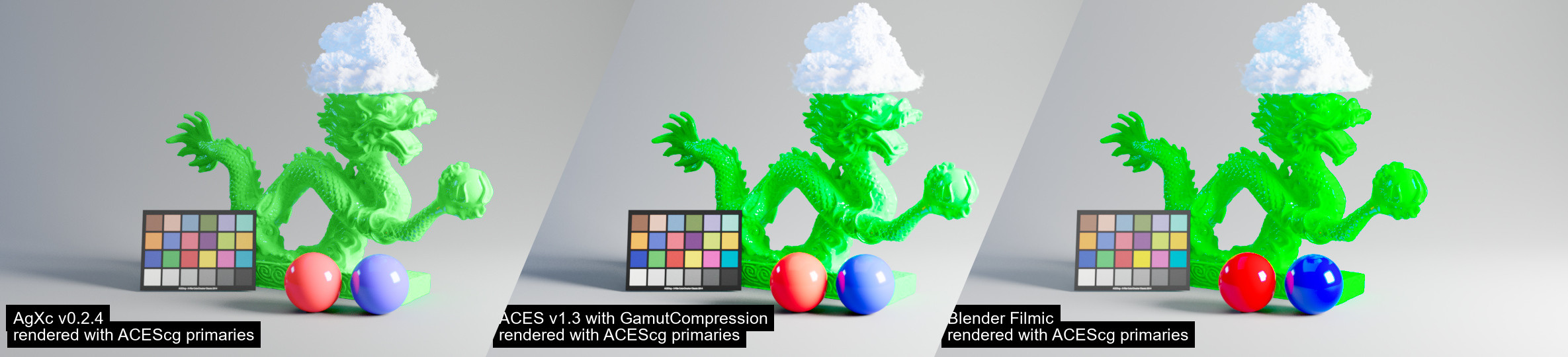
what does agx look like in comparison to the other models
willow fog

 lament quartz
what does AGX do normally
willow fog
Look good
subtle bison
GitHub
Fork of Troy.S AgX, a display rendering transform available via OCIO and more - MrLixm/AgXc
its way better at handling highlights
subtle bison
yea agx is gonna be a fuckin pain
it handles exposure inputs a lot differently
why did i explore this, its too late to stop 😭
willow fog
subtle bison
why did i explore this, its too late to stop 😭
Finish the job, child
-Your father
I asked him
subtle bison
 lament quartz
subtle bison
<@456226577798135808>
https://github.com/MrLixm/AgXc/raw/main/doc/images/dragon...
lament quartz
subtle bison
<@456226577798135808>
https://github.com/MrLixm/AgXc/raw/main/doc/images/dragon...
huh
subtle bison
wow that was fast
doesnt look half bad, obviously it has to be tweaked per game, but wow
subtle bison
im not really done with it but sure lol
 kind kraken
o
kind kraken
what is it missing
willow fog
subtle bison
<@877275530813128724> have fun
What
subtle bison
some other adjustments, also the implementation is a little simple, i wanna base it off the AgXc repo i posted earlier
its much fancier
willow fog
subtle bison
some other adjustments, also the implementation is a little simple, i wanna base...
But does it actually work?
subtle bison
yea look at the video above
#1116089843479498782 message
just needed some agx-specific gamma and exposure adjustments
kind kraken
i see a saturation slider <3
subtle bison
so i added them as seperate controls for the user
tweaked agx (left) vs ACES (right)


🤤
 subtle bison
im just glad i dont have to do this shit in reshade anymore

agx (left) vs aces (right)


you can really see the difference here
here is an imgsli
https://imgsli.com/Mzg1MTI2
 subtle bison
🙂
willow fog
subtle bison
🙂
I wonder what the agx presets are. Stuff like punchy and different contrast levels
kind kraken
subtle bison
does this go in the .trex folder
subtle bison
ye
kind kraken
before - AgX - AgX tweaked


 willow fog
Peak
kind kraken
ACES vs tweaked AgX
huge difference with my flashlight. The gun is no longer blasted into exposure hell
@willow fog we're so back
willow fog
Holy shit
 willow fog
kind kraken
huge difference with my flashlight. The gun is no longer blasted into exposure h...
willow fog
kind kraken
huge difference with my flashlight. The gun is no longer blasted into exposure h...
It actually looks natural now
subtle bison
yea AgX just casually transforming entire maps in gmod rtx
it looks less video-gamey
willow fog
We're so back, chat
kind kraken
the flashlight alone is a game changer visually. It was a big deal implementing it in my project since it was planned for the original but cut. But it always was in the back of my head how annoying the gun being blindingly bright was. Now, God has blessed us and his name is CR
kind kraken
who said that
kind kraken

 subtle bison
I plan to add some extra controls so we can tweak it further
since every game might need a specific "look"
kind kraken
with some overall exposure tweaks


@subtle bison what's the difference between the exposure below and the one for AgX
subtle bison

 willow fog
subtle bison
willow fog
subtle bison
Can looks be implemented?
 subtle bison
kind kraken
<@326199486550376451> what's the difference between the exposure below and the o...
subtle bison
kind kraken
<@326199486550376451> what's the difference between the exposure below and the o...
one controls global exposure, one is the offset for agx itself
subtle bison
subtle bison
one controls global exposure, one is the offset for agx itself
i should probably unify them
subtle bison
willow fog
Can looks be implemented?
should be able to? hopefully the presets can be directly applied to my implementation
willow fog
yeah
subtle bison
no guarantees though
willow fog
Would be epic fr
like
super cool and stuff
Like y'know
@subtle bison doesn't seem to be properly implemented tho. This bright light should become pretty desaturated

Aces does it right

kinda
subtle bison
the ver i sent is fairly basic, and the default settings may not be correct for your game
so you'll have to adjust AgX a bit for it to work correctly

 subtle bison
aces colors always look like ass
subtle bison
😦
subtle bison
how
willow fog
ACES AGX


mmmmmmmm
That ain't right
AGX shouldn't create those messed up highlights
subtle bison
the issue is that you're directly comparing the two without changing anything i assume
willow fog
No I am
subtle bison
i said it like 3 times you will have to manually adjust stuff to make it look correct
 subtle bison
also auto wasnt having any issues after tweaking theirs to fit lol
willow fog
It's not that it LOOKS wrong
It may look fine
But it sure ain't doing the one thing it's best at
Handling saturated highlights
subtle bison
but it is for me 💀
either way, ill make it more consistent lol
its still early
just chill
subtle bison
ACES vs AgX with the settings i posted


 subtle bison
uncle burrito when inconvenience:
willow fog
subtle bison
uncle burrito when inconvenience:

Okay uh
@subtle bison do you have legacy aces disabled in your comparisons?
subtle bison
yes
willow fog
Yeah legacy aces gives me similar crunching
 subtle bison
i dont have the checkbox but im pretty sure i set it in my rtx.conf
willow fog
subtle bison
i dont have the checkbox but im pretty sure i set it in my rtx.conf
Double check pls
 willow fog
subtle bison
willow fog
subtle bison
i eep for tn, ill continue working on it sometime tomorrow. Ideally i want to fully implement AgXc
its way nicer 🤤
willow fog
Legacy ACES VS AGX


Right now it seems to not be working correctly
Hopefully cr can do what cr does
kind kraken
subtle bison
i eep for tn, ill continue working on it sometime tomorrow. Ideally i want to fu...
looking forward to it boss. Glad any attempt is being made
meager oar
How does skybox look with agx, is it still washed out?
willow fog
Should be, yes
 copper dagger
this is what it looks for me with AgX Tonemap (left) vs ACES (right)

 modern quest
all of the screenshots i've seen so far with AgX, it looks very washed out
copper dagger
modern quest
all of the screenshots i've seen so far with AgX, it looks very washed out
what you mean by washed out?
modern quest
it's too bright in areas that really shouldn't be. black levels are not black, they're gray
ACES was too heavy with it, but AgX is too light
copper dagger
you know you can tweak that in AgX do you?
modern quest
yes. i just find it curious that everyone is comparing tuned ACES with untuned AgX
it just looks kinda... bad without it
copper dagger
aces looks bad
modern quest
and so does AgX here imo
willow fog
modern quest
all of the screenshots i've seen so far with AgX, it looks very washed out
It's pretty much broken rn
Wait for cr to cook


 willow fog
Yes but
copper dagger
i rather use no tonemap
modern quest
i get that you hate ACES but AgX here is 100% not working right lol
willow fog
#1116089843479498782 message
fixed aces vs current agx. You can see severe color crushing
copper dagger
with aces
 willow fog
copper dagger
with aces
willow fog
copper dagger
with aces
No, you have to enable the fixed aces in the conf
copper dagger
oh, you mean legacy?

 copper dagger
and which config?
willow fog
Same settings
willow fog
copper dagger
and which config?
rtx.conf
rtx.useLegacyACES = False
copper dagger
just adding that line right?
willow fog
yes
 copper dagger
hmm... didnt do anything
 copper dagger
willow fog
rtx.conf
`rtx.useLegacyACES = False`
copper dagger
willow fog
rtx.conf
`rtx.useLegacyACES = False`
gets deleted from remix
so it doesnt work
copper dagger
when remix itself deletes it?
copper dagger
it could be caused by the remix version i use. i use latest from dxvk-remix fork
weak ermine
 hasty sonnet
<@326199486550376451> how does gmod rtx fail to load like this
hasty sonnet
<@326199486550376451> how does gmod rtx fail to load like this
gmod without rtx


 subtle bison
slowmode is back yay
also yall chill with the agx stuff, many people have told me its not implemented correctly so i wouldn't compare anything atm
wispy crest
we are punished with slow mode when we discuss
hasty sonnet
modern quest
you guys do some cursed shit here
i would like not to speak in paragraphs
modern quest
5 seconds does not lead to a paragraph lol
hasty sonnet
modern quest
5 seconds does not lead to a paragraph lol
nuh uh
 onyx ridge
deltarune... tomorrow
meager oar

kind kraken
modern quest
yes. i just find it curious that everyone is comparing tuned ACES with untuned A...
I'll have you know my comparisons did have AgX tweaked
modern quest
i didn't see yours at all
kind kraken
kind kraken
before - AgX - AgX tweaked
@modern quest I get it, you just hate me ik
I took a handful of shots and even if AgX is broke in some way there are clear improvements over ACES
modern quest
i know properly implemented AgX can be good. this implementation definitely still has some issues though
it's muting colors that really shouldn't be muted
yours at least doesn't mess with black levels as much
kind kraken
Stock AgX is typically less contrasty with color out of the box. That's why you always see comparisons with variants like "punchy AgX" where it's tuned to be more like ACES but with the superior representations of color and lack of blown out highlights
modern quest
i've never been a fan of AgX tbh, but when tuned properly i do like it more than ACES
but all of the pics of the current version in remix don't look good to me at all
willow fog
modern quest
i know properly implemented AgX can be good. this implementation definitely stil...
Nah, even when tweaked, it's simply not working. Saturated highlights get blown out in all cases
modern quest
ik CR is working on it still. not judging his work
willow fog
They should desaturate
modern quest
willow fog
Nah, even when tweaked, it's simply not working. Saturated highlights get blown ...
that's what i was saying
willow fog
yeah exactly
modern quest
welllll why'd you repeat it then lol
willow fog
Yes, it's working, but auto's scenes lack any saturated brights
willow fog
modern quest
welllll why'd you repeat it then lol
This was for auto mostly
But I'm stupid so I pinged you instead
dw about it
willow fog

meager oar
kind kraken
Stock AgX is typically less contrasty with color out of the box. That's why you ...
Punchy Agx 😍 tats what i use in space engine, its very good better then normal agx for me
subtle bison
so even if i improve the implementation, would yall prefer the defaults to be punchy? @kind kraken @modern quest @willow fog
willow fog
subtle bison
so even if i improve the implementation, would yall prefer the defaults to be pu...
Leave it at base tbh
Because well. It's the base
modern quest
i'd like them not to be totally neutral like it currently is
because it's just not really good to use it that way
just config it for good defaults and let people adjust it if necessary
willow fog
Yep
subtle bison
got it
subtle bison
started work on implementing AgXc, added some new UI elements too
cant validate if its any better yet as im gamestreaming this to a laptop with a shitty TN display
 kind kraken
subtle bison
started work on implementing AgXc, added some new UI elements too
cant validate ...
kind kraken
subtle bison
started work on implementing AgXc, added some new UI elements too
cant validate ...
If you do printscreen could you upload it to discord on the side of the remote PC lmao
modern quest
i think the issue is moreso the display lol
kind kraken
modern quest
i think the issue is moreso the display lol
We could be the judges  my phone is OLED
modern quest
okay
subtle bison
nah i dont wanna play a game of cat and mouse for 6 hours lol
ill keep adding some features and then judge when i get home to my oled lol
modern quest
we appreciate your effort and suffering
subtle bison
any other adjustments yall can think of?
i really wanna give tonemapper adjustments a glowup
i got burritos AgX Look options
this is a rather extreme example but I think we're getting closer to the intended result?


can somone with a decent screen verify my screenshots lmao
modern quest
definitely a lot better
subtle bison
they look like two different shades of red for me
it looks better on my phone tho
@willow fog
modern quest
the red is different, but it's also blending with the light properly
subtle bison


 willow fog
subtle bison
<@877275530813128724>
willow fog
subtle bison
<@877275530813128724>
Oh yeah
subtle bison
punchy look seems to get it a lot closer to default ACES
willow fog
That looks right. Based on tons of experience with agx in blender. That's the expected result
subtle bison
❤️
direct comparisons should be possible now since you can pretty much adjust AgX independently from ACES to get the desired look
would i be moving goalposts if I wanted to add native HDR support?
🙂


 willow fog
subtle bison
would i be moving goalposts if I wanted to add native HDR support?
willow fog
subtle bison
would i be moving goalposts if I wanted to add native HDR support?
By a long shot, yes
modern quest
subtle bison
massive improvement, i'd def use it now
subtle bison
that last comparison really shows AgX's strengths, all of the highlight detail is preserved but still looks decently punchy (compared to ACES and standard)
im in love 🤤
(left: aces, right: agx)
good lawd HDRIs really take advantage of it too

 willow fog
subtle bison
(left: aces, right: agx)
good lawd HDRIs really take advantage of it too
willow fog
subtle bison
(left: aces, right: agx)
good lawd HDRIs really take advantage of it too
Do it with the fixed aces?
subtle bison
isnt fixed aces just tuned for hl2rtx tho
ill test it tho
agx vs new aces vs standard
(left, middle, right)


new aces is better but it has a weird tint
agx still looks more natural to me
meager oar
subtle bison
so even if i improve the implementation, would yall prefer the defaults to be pu...
will u show the values of punchy later so i can adjust the settings to that?
willow fog
subtle bison
agx vs new aces vs standard
(left, middle, right)
Standard should be ignored imo. Pretty sure it's just direct srgb mapping
subtle bison
meager oar
will u show the values of punchy later so i can adjust the settings to that?
it actually transforms the agx lookup so there isnt any values that can be input into the UI

i mean it probably could but these are meant to be presets for a reason
you can always tweak the agx values with the preset selected as well
meager oar
subtle bison
damn punchy looks great 😍
subtle bison
willow fog
Standard should be ignored imo. Pretty sure it's just direct srgb mapping
thoughts on agx vs new aces?
or have we reached peak
willow fog
subtle bison
or have we reached peak
Nah. I'm sure agx needs some backend tweaking.
subtle bison
like?
subtle bison
idk i think its quite decent already. I still need to add the actual blender Look presets, but otherwise im happy
willow fog
But you know what would be epic? Implementing reshade directly into dxvk remix. Like some other apps do. With the full precision color buffer access.
I know this is some heavy goalpost flinging but
willow fog
subtle bison
that doesnt sound too hard? in theory at least
I don't think so. I've seen plenty of apps add reshade as a built-in feature
compact blaze
subtle bison
(left: aces, right: agx)
good lawd HDRIs really take advantage of it too
I do feel agx makes things a bit over saturated if that makes sense?
willow fog
Because I've never seen reshade being able to access the full high dynamic range image. Post-tonemap
subtle bison
compact blaze
I do feel agx makes things a bit over saturated if that makes sense?
you can adjust that, but AgX generally has a different tone
compact blaze
subtle bison
you can adjust that, but AgX generally has a different tone
Do you think it’d just be a per game type basis?
subtle bison
the idea is to give artists more control over it, so im going to leave in punchy defaults, but you can adjust it however you want
hell i even added a monochrome look
 willow fog
subtle bison
hell i even added a monochrome look
willow fog
subtle bison
hell i even added a monochrome look
Just add all of them why not
subtle bison
willow fog
Because I've never seen reshade being able to access the full high dynamic range...
ye if i can figure that out, ill add it as a checkbox that disables any post-process and just expose the full raw framebuffer or something
willow fog
Yeah. It would be epic. I've been crying for a good pp setup for remix
wispy crest
pp
subtle bison
says you of all people
willow fog
Tonight. In her bedroom.
subtle bison

 subtle bison
sure ig
lemme set the defaults to what it was in the gmod screenshots
the defaults were made on a shitty TN display so uhh ymmv
heavily recommend adjusting it to your preference
also dont forget to remove the old agx settings in your rtx.conf
wispy crest
veerus
subtle bison
btw this remix build doesnt have any of the gmod-specific fixes so also ymmv
willow fog
subtle bison
the gmod branch of dxvk-remix is stupidly out of date so i gotta re-do that fork
subtle bison
sleep bro
willow fog
I'm fucking dead.
wispy crest
where do you even put this lol
willow fog
subtle bison
sleep bro
Nah. One more
subtle bison
wispy crest
where do you even put this lol
for 32-bit gmod: GarrysMod/bin/.trex
for 64-bit gmod (expect issues): GarrysMod/bin/win64
willow fog
 weak ermine
subtle bison
the defaults were made on a shitty TN display so uhh ymmv
weak ermine
subtle bison
the defaults were made on a shitty TN display so uhh ymmv
what is it
subtle bison
what is what
willow fog
I feel sleep tugging at me, my eyes half lidded as my breathing gets even.
weak ermine
subtle bison
what is what
 subtle bison
@willow fog
I added them

note sure if its obvious, but blender uses OCIO for the AgX Looks presets. Remix does not support OCIO at all so I have chosen to emulate the looks
so there is a greater than 50% chance they dont match blender at all lmao

 kind kraken
mfw you could use HDR sharpening filters now ez
for a bunch of games I use shaders from a repo called illium's hdr shaders iirc. Basically it uses the HDR framebuffer as its source for applying CAS or RCAS. Looks more natural to me than just using those filters straight up
subtle bison
i also plan to send depth data to reshade so i can use some dof effects 🤤
subtle bison
you will get lots of lovely viruses ❤️
kind kraken
subtle bison
you will get lots of lovely viruses ❤️
if I have look set to none, is that the standard AgX setup?

 subtle bison
yeah, but it still has some punchy default settings itself
its meant to mirror the legacy ACES look
subtle bison
nah non-fixed
kind kraken
then wouldn't I expect these two shots to look almost identical
subtle bison
well if you've tweaked ACES in a different way than I did, it might look different (or not)
kind kraken
subtle bison
well if you've tweaked ACES in a different way than I did, it might look differe...
I touched nothing at all, just turned off punchy look
every single tonemapping setting is untouched
subtle bison
yea, in that case, just start messing with it until you find desirable settings
subtle bison
you'll notice a bigger difference with highlights this time around
kind kraken
kind kraken
I mean I think "none" already looks pretty slick lol
not a fan of punchy though. You weren't kidding when you said it needs adjusting to fit each game. You said this looks good on gmod right?

@sleek mountain yo pete, if I take a capture using a modified runtime would his implementation of a new tonemapper be reflected in the toolkit 
if not, are there some files I need to replace within the toolkit's file structure to match the behaviors
subtle bison
kind kraken
<@1053029837650018417> yo pete, if I take a capture using a modified runtime wou...
no
the toolkit uses its own remix runtime
kind kraken
subtle bison
the toolkit uses its own remix runtime
so I could swap out the files on that? 
subtle bison
i forgot the specific file location, but you can just replace the d3d9 file in the folder that contains the runtime
idk if it will inheret the settings though
subtle bison
kind kraken
not a fan of punchy though. You weren't kidding when you said it needs adjusting...
yeah but gmod uses HL2 RTX's existing tonemapping settings, so even for us its customized
kind kraken
subtle bison
idk if it will inheret the settings though
it's supposed to inherit the rtx conf on a per capture basis
subtle bison
it may work then
subtle bison
kind kraken
so I could swap out the files on that? <a:pepe_hmm:1144178862293520384>
found it, replace the d3d9.dll there
 kind kraken
someone needs to make a github request for updating all captures to use the latest version of the rtx conf because retaking every capture is pain
 sleek mountain
kind kraken
<@1053029837650018417> yo pete, if I take a capture using a modified runtime wou...
sleek mountain
kind kraken
<@1053029837650018417> yo pete, if I take a capture using a modified runtime wou...
if the runtime writes to the capture metadata and/or uses the existing metadata and then you'll need to replace the runtime the toolkit uses
keen rivet
Good afternoon gmod rtx chat
willow fog
keen rivet
Good afternoon gmod rtx chat
Good afternoon Xenthio from gmod rtx chat
keen rivet
willow fog
Good afternoon Xenthio from gmod rtx chat
hi
onyx ridge
subtle bison
😉
is this gmod specific or are you planning to pr this to mainline remix
hasty sonnet
subtle bison
<@877275530813128724>
I added them
i need tonemappers
subtle bison
onyx ridge
is this gmod specific or are you planning to pr this to mainline remix
i plan to PR it, but its probably gonna go to a fork first, not gmod specific tho
subtle bison
sorry chat i will be gone for the foreseeable future 🤓
 modern quest
see ya in a few years
wispy crest
its over
wispy crest
gmod rtx cancelled
subtle bison
deltarune rtx when
lapis delta

 steel lark
weak ermine
lol 25$ for 2d game
steel lark
weak ermine
lol 25$ for 2d game
real
bro just watch the undertale + deltarune movie instead smh
 lament quartz
why it suddenly look like cm2013
subtle bison
lament quartz
why it suddenly look like cm2013
raw output before tonemapping
the intention is to let reshade do reverse or normal tonemapping so you have full precision for effects
subtle bison
 steel lark
do you guys play with ray reconstruction? i think it consumes way too much fps so i just disable it
perfect
 kind kraken

steel lark
restir? what's that??]
importance sampled (important)
who needs indirect lighting am i right?
 faint sapphire
subtle bison
early HDR tests 👀
faint sapphire
subtle bison
early HDR tests 👀
Pumbo on the HDR Den discord server is / also intends to work on HDR for Remix. Get in touch with him
He works on Prey Luma mod, DXVK HDR, ReShade AutoHDR, RenoDX and a bunch of other things
willow fog
faint sapphire
He works on Prey Luma mod, DXVK HDR, ReShade AutoHDR, RenoDX and a bunch of othe...
Completely different thing
kind kraken
willow fog
Completely different thing
I'd be shocked if there wasn't overlap
weak ermine
steel lark
perfect
hasty sonnet
steel lark
perfect
im tweaking
faint sapphire
willow fog
They're working on different things
Is it really not the same thing? I’m sure both are the same except for the last part of how to tone map to the display
willow fog
faint sapphire
Is it really not the same thing? I’m sure both are the same except for the last ...
No, what cr is trying to do is give reshade access to the full frame buffer before tonemapping so that it can work with all the colors. Really really useful for working with colors.
Outputting an HDR image for display after tonemapping is something completely different.
And I'm pretty sure HDR images are still clamped. So instead of going 0-1, they might go 0-2. (I'm not 100% sure)
The full frame buffer on the other hand is basically unclamped. Brightness values can go from zero to as high as the camera receives.
faint sapphire
Yeah but remastering an exisiting game with a HDR mod like RenoDX or Luma does the same thing so you can get more color info other than 8-bit BT.709 SRGB just that RenoDX also is able to tonemap to your display with several options
compact blaze
steel lark
who needs indirect lighting am i right?
You can disable indirect lighting in the settings directly iirc
subtle bison
gm gmod chat
willow fog
subtle bison
gm gmod chat
Gm CR from gmod rtx chat
lament quartz
gm cr
subtle bison
 willow fog
So real
winter radish
steel lark
do you guys play with ray reconstruction? i think it consumes way too much fps s...
I find it boosts fps
Remix has a pretty good RR implementation unlike Cyberpunk
I despise RR in Cyberpunk
 meager oar
willow fog
meager oar
willow fog
AHHHHHHHHH
kind kraken
Hey CR time to get back to work
earnest yew
how about that new fortnite season eh
subtle bison
willow fog

weak ermine
earnest yew
how about that new fortnite season eh

 weak ermine


 weak ermine
 livid rapids
why is the awp black
livid rapids
why is the awp black
dear valve, why u instead of fixing old 2012 materials, broke them
weak ermine
i just ingest cs2 materials for old models
i dont change anything
its valve idea to change awp color
weak ermine
old vs new model


mp9 have same model but different material lol
ent_fire weapon_* setbodygroup body,1 for old models body,0 to new
hmm maybe ingest and gloves materials
they looks peak
 livid rapids
weak ermine
its valve idea to change awp color
livid rapids
weak ermine
its valve idea to change awp color
I guess since you can't see them normally they didn't bother applying a tint
weak ermine
who knows
livid rapids
unless its really compressed you should leave the diffuse maps as is
also old models don't have pbr AFAIK
they still use phong/envmap
 weak ermine
phong in source 2
livid rapids
I don't know if they ported skins to rough/metal but I don't see why they would do it for models that you don't see
weak ermine
old models have roughness, normal, metalness and albedo maps, the fuck u talking about brooo
livid rapids
I recall exporting the karambit materials from cs2 and it had the envmap texture
weak ermine
livid rapids
I recall exporting the karambit materials from cs2 and it had the envmap texture
nuh
livid rapids
quick! send the talon knife's roughness map
livid rapids
no rush bro
 livid rapids
this makes sense, they didn't change the model, only had to make the roughness texture
but I'm fairly certain the firearms' old models do not have proper pbr
since you don't see those, you can only see them through skins and those surely have pbr mats
anyways I may be wrong so I'm going to check for myself


 weak ermine
hmm maybe ingest and gloves materials
weak ermine
weak ermine
hmm maybe ingest and gloves materials
I can't find a normal texture atlas for gloves
livid rapids
mind sending the dualies?
weak ermine
livid rapids
mind sending the dualies?
huh?
livid rapids
the elites
livid rapids
cs2 elite, roughness on left, metallic on right
 weak ermine
livid rapids
cs2 elite, roughness on left, metallic on right
weak ermine
weak ermine
livid rapids
cs2 elite, roughness on left, metallic on right
new model
livid rapids
yes
weak ermine
unfortunately some cs2 models just don't load in gmod rtx
livid rapids
"weapons/models/elite/materials/weapon_pist_elite.vmat" is new model, "materials/models/weapons/v_models/pist_elite/m9a1.vmat" is old model
oh
well I was wrong
 livid rapids
I thought it was inverted envmap because of the very diffuse looking reflections but I guess valve just doesn't like shiny stuff anymore
weak ermine
yeh old deagle model just black
livid rapids
weak ermine
unfortunately some cs2 models just don't load in gmod rtx
Well if you want to see how they look there's a cs2 pistol pack for mw base
 weak ermine
 livid rapids
I've done it but never uploaded it because to be honest they're not that good for showcasing (not much specularity)
weak ermine

 weak ermine
 weak ermine
 livid rapids
these are my first ports, I didn't use the original materials but instead the pseudo-pbr ones from the addons, but in some cases they produce similar results
some were very over the top, that elite was shiny asf
I MAY have a screenshot with the correctly ported materials
weak ermine
hm what if i port css materials
livid rapids
here, not very shiny
 weak ermine
i dont want ai bullshit staff
 haughty goblet
@subtle bison if you’re still tweaking with tonemapping feel free to steal my tonemapper impls, I got a bunch including my own. I also got a parametric ACES version, it might be able to give aces a more fair shot.
weak ermine
livid rapids
well I was wrong
funny how they just bosted brightness in photoshop
 weak ermine
livid rapids
man
weak ermine
livid rapids
man
holly fuck looks good
wispy crest
doing pbr is sort of tricky, if you want it to look good and accurate, you can't really like, automate it
willow fog
Man I gotta finish my mwbase pack
wispy crest
like, throwing it into an ai thing
willow fog
IF I COULD FIND THE RIGHT FUCKING TEXTURES THAT IS
AND THE GAME IS STILL LIKE 50 DOLLARS

subtle bison
one day we will get a pack 😭
willow fog
Buy me the game, I'll finish it. I can't make the pack without the assets
subtle bison

willow fog
subtle bison
<:piratekot:1222577497368039466>
Can't
I tried that route.
Such versions are older than the latest retail so the asset softwares just refuse to work
weak ermine
noob
⠀⠀⢠⠁⠀⠀⠀⠀⠀⢀⣾⣿⣿⣿⣿⣿⣿⣿⣿⠀⠀⠀⠀⠀⠀⠀⠀⠀⠠⣯
⠀⠘⠁⠀⠀⠀⠀⠶⠠⣾⣽⡻⣽⣿⣿⣿⡿⣞⣯⣆⠀⠀⠠⠀⠀⠄⡀⠀⡄⣿
⠄⢰⠆⠀⠀⢠⢏⢀⣠⣈⠛⢿⣿⡿⣿⢧⢟⣿⡟⠁⠀⠀⠀⠀⠀⠀⠀⠠⠐⣿
⢴⡄⡆⠀⠀⠠⠀⠙⠀⢀⠀⠀⠛⠂⠉⠆⠉⠉⠀⢀⠀⠀⠀⠨⠀⠀⠀⠀⢸⣷
⠲⡝⠌⠀⠀⢨⠂⠀⠀⠈⠀⠁⠀⠀⢩⣥⠀⠀⠀⠁⠁⣀⢠⢔⡀⠀⢀⣑⣾⣿
⢡⢄⠄⠀⠀⠀⠀⢐⣳⣶⣤⡶⠂⠠⢿⡔⠀⠩⢶⣸⣶⣧⡹⡃⠀⢀⢺⣿⢿⣿
⢻⡭⠀⠀⢀⠀⠀⠀⠹⠿⢉⣄⠸⢰⣿⣿⡷⠗⠠⣙⠻⣿⣿⠀⠀⡄⠹⡫⠀⣻
⢙⣷⣾⡦⠀⠂⠀⠀⠀⠘⠯⣶⣶⣄⡛⣋⣠⣾⣿⣿⠄⠀⠈⡀⠈⡚⡃⠏⠉⠋
⢿⡙⣻⠉⢆⠐⠁⠰⣠⠀⠀⠀⡀⠀⠁⠀⠁⠀⠀⠀⠀⠀⠎⢀⠚⢑⠯⡀⡀⣹
⠈⠡⠧⣇⢒⠄⠐⠂⡔⠈⠄⠀⠀⢚⠃⡛⠈⡡⠀⢀⡓⠠⠂⠘⢾⢼⡁⣠⢴⣿
⠀⠀⡀⠈⠉⠀⠌⠠⡴⡅⠂⠀⠀⢩⡁⡁⡬⠀⠀⡚⣠⠇⠀⠀⠸⠍⡮⣗⡥⣿
⡧⠀⠀⠄⠀⠐⠀⠀⠁⡁⠀⢿⡗⠦⠶⠶⠶⣖⣽⣠⠋⠀⠘⠀⠈⠂⠛⣶⣻⣿
⡗⠂⠀⠀⠀⠀⠀⠀⠀⠀⠀⠘⢯⣶⡒⣠⣶⣿⡿⡗⠂⠀⠀⠀⠀⠀⠈⢥⣿⣿
⠑⠀⠀⠀⠀⠀⠀⠀⠀⠀⠀⢦⢺⢯⣿⣿⣿⡿⡿⠁⠀⠀⠀⠀⠀⠀⠀⢈⢯⠟
turbid barn
willow fog
Such versions are older than the latest retail so the asset softwares just refus...
cordycep / husky?
willow fog
turbid barn
cordycep / husky?
Nope. Not unless you have the latest version
turbid barn
both are not working with 1.38/1.44?
have tried on uncracked 1.65?
just asking
why does retail is so important so cracked vers and not supported?


 wispy crest
willow fog
Buy me the game, I'll finish it. I can't make the pack without the assets
wispy crest
willow fog
Buy me the game, I'll finish it. I can't make the pack without the assets
gamepass
willow fog
Not
weak ermine
wispy crest
gamepass
gaypass
wispy crest
willow fog
Not
then pay 60 dollars idk what to tell u
subtle bison
willow fog
Not
 turbid barn
@willow fog i've talker to cod cracker


1.38 (full cracked build) is on S4 Cold War
1.44 (WZ only) is on S6 Cold War
subtle bison
i wish cold war wasnt so broken, i cant even play the campaign 😭
turbid barn
subtle bison
i wish cold war wasnt so broken, i cant even play the campaign 😭
1.38 and 1.44 are MW2019 builds. He was asking for assets for MW2019 weapons
turbid barn
subtle bison
i wish cold war wasnt so broken, i cant even play the campaign 😭
i've tried to play CW cracked on my old 1050ti
ts was 1fps on main menu
while MW2019 was running ~60 fps on medium
subtle bison
all the scripted sequences would desync on my machine, stuttered like no tomorrow, and my keyboard inputs would frequently get stuck
wish i could refund it
compact blaze
livid rapids
man
Was this like a live screenshot or did u pause the game to get a clear image, since in my experience translucent stuff like that is really grainy and not good lookin in motion
turbid barn
T9 engine is ass
IW9 is too. But it's way better than T9
im happy that BO6 was made on normal engine, not treyarch'es one
subtle bison
compact blaze
Was this like a live screenshot or did u pause the game to get a clear image, si...
prob the latter
r_drawvgui 0 is peak
turbid barn
subtle bison
buggy af engine
b-b-b-b-ut it has ray tracing 👉👈
compact blaze
turbid barn
T9 engine is ass
IW9 is too. But it's way better than T9
im happy that BO6 was m...
Honestly I enjoy the T9 engine a lot mainly for how it does it’s lighting/baked global illumination
subtle bison
turbid barn
b-b-b-b-ut it has ray tracing 👉👈
too bad i cant enjoy it
compact blaze
Like the neon colours there were beyond amazing
subtle bison
idk if my issues are just rdna4 exclusive, but even vkd3d couldnt save me
compact blaze
Never seen IW able to replicate it
subtle bison
i would run it on linux but i think the game requires online to play single player, so i would get banned immediately
turbid barn
compact blaze
Honestly I enjoy the T9 engine a lot mainly for how it does it’s lighting/baked ...
i think it's more map designers credit
compact blaze
turbid barn
i think it's more map designers credit
I remember for Cold War they installed a special tech for GI to the engine so I sorta credit that too
turbid barn
the reason why Nuketown in BO6 looks like 2010
because it was taken from 2010 game
while Nuketown in Cold War looks sick
compact blaze
Also idk why but
The new IW engine gets sooooo grainy
From the screen space GI and especially the screen space reflections
turbid barn
compact blaze
From the screen space GI and *especially* the screen space reflections
i've found that DLAA makes best quality for reflections
but ye, it's grainy for all
compact blaze
compact blaze
From the screen space GI and *especially* the screen space reflections
And the bloom they use just, looks ugly in bo6
Tho it’s more a bo6 thing I think, the bloom in mw2 looked great Imo
Do u think for cod 2026 the engine will get a real time path tracing update?
turbid barn
compact blaze
Do u think for cod 2026 the engine will get a real time path tracing update?
I don't think so
but im happy they will finally stop bringing their games to old asf consoles
releasing a game in 2025 for PS4 and Xbox One is hillarius
and that means IW10 Engine w/CoD2026 would get a big graphics step forward
compact blaze
turbid barn
but im happy they will finally stop bringing their games to old asf consoles
Personally I never got the argument they’re held back by old consoles cause like, in its current state there’s not really much they can do
compact blaze
turbid barn
releasing a game in 2025 for PS4 and Xbox One is hillarius
It’s still that same engine from 2019, 2016 and 2013, I never really saw the issue of them keeping those games on last gen cause it’s still a huge market and still possible
I don’t really feel bad for Sony’s bottom line that people keep using ps4 instead of upgrading
turbid barn
compact blaze
It’s still that same engine from 2019, 2016 and 2013, I never really saw the iss...
huge? I don't think there is too many people still have PS4 nowadays
compact blaze
turbid barn
huge? I don't think there is too many people still have PS4 nowadays
Well it has to be if they’re still in that last gen market
lapis delta
subtle bison
https://tenor.com/view/job-jumpscare-job-application-job-meme-job-jumpscare-gif-...
FUCK YOU
subtle bison
subtle bison
all the scripted sequences would desync on my machine, stuttered like no tomorro...
i just bought bo6 and it has all 3 problems still what the fuck
turbid barn
upbeat jewel
get a d3d error after like 2 games
that's the 576 driver issue
upbeat jewel
yes, I know
turbid barn
it's on 40** too
downgrade to 572 or wait few monts untils these multi billion $ ratords will fix this issue
upbeat jewel
turbid barn
that's the 576 driver issue
I have to use the driver tho because it fixes other games I play 😭
turbid barn
upbeat jewel
I have to use the driver tho because it fixes other games I play 😭
you will play CoD or normal games. You choose
 upbeat jewel
heh, yeah basically
modern quest
turbid barn
downgrade to 572 or wait few monts untils these multi billion $ ratords will fix...
come on dude. your insult was blocked so you just circumvent it like that?
turbid barn
sorry
weak ermine
turbid barn
sorry
надо было на русском написать, никтобы не понял
⠀⠀⢠⠁⠀⠀⠀⠀⠀⢀⣾⣿⣿⣿⣿⣿⣿⣿⣿⠀⠀⠀⠀⠀⠀⠀⠀⠀⠠⣯
⠀⠘⠁⠀⠀⠀⠀⠶⠠⣾⣽⡻⣽⣿⣿⣿⡿⣞⣯⣆⠀⠀⠠⠀⠀⠄⡀⠀⡄⣿
⠄⢰⠆⠀⠀⢠⢏⢀⣠⣈⠛⢿⣿⡿⣿⢧⢟⣿⡟⠁⠀⠀⠀⠀⠀⠀⠀⠠⠐⣿
⢴⡄⡆⠀⠀⠠⠀⠙⠀⢀⠀⠀⠛⠂⠉⠆⠉⠉⠀⢀⠀⠀⠀⠨⠀⠀⠀⠀⢸⣷
⠲⡝⠌⠀⠀⢨⠂⠀⠀⠈⠀⠁⠀⠀⢩⣥⠀⠀⠀⠁⠁⣀⢠⢔⡀⠀⢀⣑⣾⣿
⢡⢄⠄⠀⠀⠀⠀⢐⣳⣶⣤⡶⠂⠠⢿⡔⠀⠩⢶⣸⣶⣧⡹⡃⠀⢀⢺⣿⢿⣿
⢻⡭⠀⠀⢀⠀⠀⠀⠹⠿⢉⣄⠸⢰⣿⣿⡷⠗⠠⣙⠻⣿⣿⠀⠀⡄⠹⡫⠀⣻
⢙⣷⣾⡦⠀⠂⠀⠀⠀⠘⠯⣶⣶⣄⡛⣋⣠⣾⣿⣿⠄⠀⠈⡀⠈⡚⡃⠏⠉⠋
⢿⡙⣻⠉⢆⠐⠁⠰⣠⠀⠀⠀⡀⠀⠁⠀⠁⠀⠀⠀⠀⠀⠎⢀⠚⢑⠯⡀⡀⣹
⠈⠡⠧⣇⢒⠄⠐⠂⡔⠈⠄⠀⠀⢚⠃⡛⠈⡡⠀⢀⡓⠠⠂⠘⢾⢼⡁⣠⢴⣿
⠀⠀⡀⠈⠉⠀⠌⠠⡴⡅⠂⠀⠀⢩⡁⡁⡬⠀⠀⡚⣠⠇⠀⠀⠸⠍⡮⣗⡥⣿
⡧⠀⠀⠄⠀⠐⠀⠀⠁⡁⠀⢿⡗⠦⠶⠶⠶⣖⣽⣠⠋⠀⠘⠀⠈⠂⠛⣶⣻⣿
⡗⠂⠀⠀⠀⠀⠀⠀⠀⠀⠀⠘⢯⣶⡒⣠⣶⣿⡿⡗⠂⠀⠀⠀⠀⠀⠈⢥⣿⣿
⠑⠀⠀⠀⠀⠀⠀⠀⠀⠀⠀⢦⢺⢯⣿⣿⣿⡿⡿⠁⠀⠀⠀⠀⠀⠀⠀⢈⢯⠟
livid rapids
willow fog
AND THE GAME IS STILL LIKE 50 DOLLARS
mw2019 is 20 bucks rn
willow fog
livid rapids
mw2019 is 20 bucks rn
I have 2 bucks in my steam wallet and enough cash to feed me for the week
livid rapids
🫡
subtle bison
 copper dagger
willow fog
I have 2 bucks in my steam wallet and enough cash to feed me for the week
copper dagger
willow fog
I have 2 bucks in my steam wallet and enough cash to feed me for the week
damn
weak ermine
subtle bison
https://tenor.com/view/ar2-cat-gif-66781403647090075
LMAOOO
subtle bison
by far the coolest tool i have made
i have been thinking about this for months
it destroys engine performance very quickly tho lmao
there is a reason why i didnt spawn it on the grass
 wispy crest
free plants
 subtle bison
works with lights too
lament quartz
subtle bison
works with lights too
Rtx light comeback???
subtle bison
nah just one i added in the asset replacement lol

i tried to bring rtx lights back a few days ago but its still unstable for reasons beyond my knowledge
compact blaze
subtle bison
by far the coolest tool i have made
what are those boxes?
lament quartz
compact blaze
what are those boxes?
Anchor meshes iirc
 viscid ocean


 wispy crest
is that construct remastered or whatever
i can never get that map to work
what pbr pack are you using
 runic gale
wispy crest
is that construct remastered or whatever
runic gale
wispy crest
is that construct remastered or whatever
yeah but still glitchies
runic gale
wispy crest
what pbr pack are you using
My own
subtle bison
wispy crest
i can never get that map to work
you have to enable map fixes in the rtx spawnmenu
after that its fine
runic gale
yea
runic gale
subtle bison
you have to enable map fixes in the rtx spawnmenu
i meant it's doing culling issues
subtle bison
guh there is no culling issues
unless you're using an older ver without culling patches
runic gale
 subtle bison
yes enable map fixes
its not a culling issue
its a engine bug when a map has too many faces
subtle bison

 subtle bison
runic gale
subtle bison
runic gale
huh you do have some culling issues in your video
runic gale

 runic gale
subtle bison
huh you do have some culling issues in your video
runic gale
subtle bison
huh you do have some culling issues in your video
the culling on the shadows?
 subtle bison
0:58, light is leaking into the hallway
subtle bison
runic gale
and that
subtle bison
odd, i dont get that at all
might be worth re-doing the binary patches
ok dont follow that actually
weak ermine
lol nrc sucks bigest balls in the world
subtle bison
?
 weak ermine
subtle bison
?
weak ermine
subtle bison
?
this shit breaks reflections, performance, and sometimes lighting
 weak ermine
subtle bison
ye but their issue looks like broken culling patches
weak ermine
subtle bison
ye but their issue looks like broken culling patches
nrc pool 44 fps
restir 66
runic gale
subtle bison
<@258542470772555776>
tryingn ow
subtle bison
back up your rtx.conf
runic gale
 subtle bison
so fixed?
subtle bison
ur gonna
runic gale
 willow fog
after so long
subtle bison
runic gale
this one is weird lol, i dont even know if this is culling related, im assuming you're using the HDRI mod to light the map?
im about to see if i have the same issue
runic gale
subtle bison
ye so far it looks fixed to me
runic gale
subtle bison
this one is weird lol, i dont even know if this is culling related, im assuming ...
Yeah HDRI skybox


 willow fog
For those who ask why agx instead of aces
It handles bright lights very well
AGX vs ACES

 subtle bison
burrito can u send the tux dog for me
willow fog