#Horizontal Server List x Better Folder
1 messages · Page 1 of 1 (latest)
 faint fractal
 blazing thicket
great if ur screen is sideways
blazing thicket
great if ur screen is sideways
it was just an annoyance I faced because I always had to close and open another folder, so hopefully it solves other people's problems 
midnight, the current theme i use, doesnt really like this and makes it off-centered, so I guess I have to find another way to keep t nice and tidy
 faint fractal
Okayyy so based in the emotes, yall hate this, makes sense because I hate it as well 
 zinc gale
a lot of people just dont like horizontal server list (i disagree its so much better for side monitors)
faint fractal
i honestly really liked it as well, the extra chat space is really nice
 sand sapphire
I actually really like it a lot, my monitor is not that big and that helps regain some space width-wise if I'm multitasking
sand sapphire
Ok, it doesn't seem to play well with the "Pin page switcher to bottom of search results" css snippet (#🎨-css-snippets message) for whatever reason 
Horizontal Server list by itself works fine with it, but this css snippet for the compatibility with better folder sidebar somehow makes the page switcher go sideways...

 faint fractal
sand sapphire
Ok, it doesn't seem to play well with the "Pin page switcher to bottom of search...
faint fractal
sand sapphire
Ok, it doesn't seem to play well with the "Pin page switcher to bottom of search...
yeah i saw that as well, need to see what happened lol
attribute selectors are definitely tweaking
sand sapphire
also sorry for the bother, but do you happen to know if there's any way to put the notification dots at the bottom (touching the border) instead of floating at the top like that?
 faint fractal
sand sapphire
also sorry for the bother, but do you happen to know if there's any way to put t...
faint fractal
sand sapphire
also sorry for the bother, but do you happen to know if there's any way to put t...
ill need to see, kinda busy atm and no time to snippet
@sand sapphire fixed it with another :has selector
sand sapphire
faint fractal
<@86455665840619520> fixed it with another `:has` selector <:blobcatcozy:1026533...
it works! Thank you so much
faint fractal
sand sapphire
also sorry for the bother, but do you happen to know if there's any way to put t...
[class*="guilds_"] [class*=pill] {
    position: absolute !important;
    transform: rotate(90deg) translateX(calc(var(--HSL-server-icon-size) + 16px)) translateY(-50%) !important;
    span {
        border-radius: 4px 0 0 4px !important;
    }
}
thank you so much! But it didn't quite work... 
 faint fractal
sand sapphire
thank you so much! But it didn't quite work... <:aha_sweats:1140951084223963216>
faint fractal
sand sapphire
thank you so much! But it didn't quite work... <:aha_sweats:1140951084223963216>
 sand sapphire
faint fractal
https://media.discordapp.net/stickers/1081623589981274203.png?size=160&name=work...
sand sapphire
faint fractal
https://media.discordapp.net/stickers/1081623589981274203.png?size=160&name=work...

I just tried disabling all the custom css I have except for Horizontal Server List, HSL x BetterFolders and the new snippet, and it still doesn't work. I will try disabling the addons to see if that's the issue 
sand sapphire
faint fractal
that issue should have been fixed by the rotate(90deg) thing
oddly enough, modifying that parameter does nothing for me
I tried to change it to -90deg and 180deg to see if it would do something, but nope. I even tried to delete it, no change.
faint fractal
sand sapphire
oddly enough, modifying that parameter does nothing for me
I tried to change it ...
with !important?
it literally works on my machine
 sand sapphire
faint fractal
with !important?
sand sapphire
faint fractal
with !important?
you mean by adding another !important at some point? Because I didn't touch any of the rest of the code, simply tried to change 90deg to other numbers (without any result)
faint fractal
thats so weird
sand sapphire
do you have visual refresh, perhaps?
faint fractal
set to control
sand sapphire
I don't have visual refresh so it's the only thing I can think of that could make the difference
sand sapphire
understood
then I really have no idea
I don't even use a custom theme...
faint fractal
wait where did you add the theme into? quickcss or a seperate file?
sand sapphire
quickcss
faint fractal
i also added it there 
sand sapphire

faint fractal
can maybe use devtools and check what is going on with the pill and its outer container?
sand sapphire
just to be extra sure, this is the css snippet that I have for Horizontal Server List:
@import url("https://discordstyles.github.io/HorizontalServerList/dist/HorizontalServerList.css");
Is yours the same?
faint fractal

GitHub
Repository of the themes I use and have modified. Contribute to NSPC911/vc-themes development by creating an account on GitHub.
sand sapphire
faint fractal
can maybe use devtools and check what is going on with the pill and its outer co...
not sure if I selected/screenshotted the correct thing:


AH
found the issue
sand sapphire
sand sapphire
just to be extra sure, this is the css snippet that I have for Horizontal Server...
mine was this specific css, without any settings under it
sand sapphire
yes
faint fractal
so you added horizontal server list to quickcss as well?
sand sapphire
sand sapphire
just to be extra sure, this is the css snippet that I have for Horizontal Server...
yeah I added this one originally
then I switched the part in the parentheses with the raw of the one you sent
faint fractal
wouldn't recommend that honestly
sand sapphire
so I should add horizontal server list as a separate file in themes?
faint fractal
i usually have non-snippets in their own files so actual snippets can overwrite them in quickcss
sand sapphire
ohhh okok
faint fractal
sand sapphire
so I should add horizontal server list as a separate file in themes?
try to
faint fractal
@sand sapphire if you are interested, i have an updated one that just halves the server list, so one half is the main servers and the other half is server folders
[class*=container]:has(> [aria-label="Servers sidebar"]) {
    /* adjusts sidebar length */
    &:has(> div > nav) [class^=itemsContainer] {
        height: 54% !important;
    }
    /* doesnt show that extended thing when open folder */
    [class^=folderEndWrapper] {
        display: none;
    }
    /* disable seperator between favorites + dms and servers */
    [class^=listItem]:has([class^=guildSeparator]) {
        display: none;
    }
    /* the folder sidebar */
    > div > nav {
        bottom: 100px;
        transform: rotate(-90deg) translateY(50%) !important;
        z-index: 200;
        /* the actual folder sidebar */
        [class^=itemsContainer] {
            height: 49% !important;
            border-radius: 25%;
        }
    }
}
Ohhh understood. I have a server list that has a very specific order (folders included) so I'll pass, but I'm sure it will be useful to others
faint fractal
I have updated my theme for Visual Refresh, youu can get the updated version from https://nspc911.github.io/themes/vencord/HorizontalServerList.theme.css instead
sand sapphire
faint fractal
I have updated my theme for Visual Refresh, youu can get the updated version fro...
would it work even if I disabled the visual refresh from experiments? Cause currently with the visual refresh disabled in experiments there is a bug with the Horizontal Server List x Better Folders css I have
When I open a folder this happens:
 faint fractal
sand sapphire
would it work even if I disabled the visual refresh from experiments? Cause curr...
faint fractal
sand sapphire
would it work even if I disabled the visual refresh from experiments? Cause curr...
are you using the one from the link? if so yea, it wouldnt work, you have to use the snippet that i sent here at the top
sand sapphire
faint fractal
are you using the one from the link? if so yea, it wouldnt work, you have to use...
nope, the snippet at the top
/* Horizontal Server List x Better Folder Sidebar */
:root {
    --bfhsl-make-folder-hover: 0 /* set to 1 if you want it to hover */
}

[class*=container]:has(> [aria-label="Servers sidebar"]) {
    [class^=listItem]:has([class^=guildSeparator]) {
        display: none;
    }
    [class^=folderEndWrapper] {
        display: none;
    }
> div > nav {
        bottom: 100px;
        transform: rotate(-90deg) translateX(-55px) !important;
        z-index: 200;
        box-shadow: calc(-10px * (0 + var(--bfhsl-make-folder-hover))) 0px calc(10px * (0 + var(--bfhsl-make-folder-hover))) 0 black;
    }
    &:has(> div > nav) > [class^=base] {
        margin-top: calc(50px * (1 - var(--bfhsl-make-folder-hover))) !important;
    }
}
have you tried this?
sand sapphire
faint fractal
have you tried this?
no because of the reasons I mentioned before
sand sapphire
sand sapphire
Ohhh understood. I have a server list that has a very specific order (folders in...
^these
having the server folders completely separated from the main servers would actually be a problem for me, because I keep the server folder with my own private servers (that I use for emotes and as archives) at the very top of everything
faint fractal
ic
sand sapphire
sand sapphire
would it work even if I disabled the visual refresh from experiments? Cause curr...
this problem specifically started happening when I got the visual refresh update and then I disabled it in the way it was explained in this server (with the experiments extension etc.)
faint fractal
well i dont have the old version of HSL, so you have to send it here for me to tinker around a bit
sand sapphire
sure!
faint fractal
sand sapphire
would it work even if I disabled the visual refresh from experiments? Cause curr...
wait you arent even using HSL though
sand sapphire
faint fractal
wait you arent even using HSL though
I am, as a theme
sand sapphire
oh wtf you're right why it's not active
(I just woke up sorry)
I'll check one sec in themes
 sand sapphire
damn
faint fractal
he nuked it
 faint fractal
thats why im forced to use visual refresh
sand sapphire
faint fractal
thats why im forced to use visual refresh
oh
does the new one ONLY use visual refresh?
faint fractal
faint fractal
I have updated my theme for Visual Refresh, youu can get the updated version fro...
you can use mine
faint fractal
sand sapphire
does the new one ONLY use visual refresh?
yes
sand sapphire
faint fractal
you can use mine
oooh thank you
but wait, don't I have to enable visual refresh again for that?
I was trying to avoid it for as long as I could
faint fractal
same here
sand sapphire

sand sapphire
faint fractal
I have updated my theme for Visual Refresh, youu can get the updated version fro...
ok I turned visual refresh back on and added this
question: is there a way to make it compatible with the compact visual refresh titlebar snippet?
#🎨-css-snippets message
faint fractal
sand sapphire
ok I turned visual refresh back on and added this
question: is there a way to ma...
yep also instantly saw that issue, not possible due to the way how HSL works
sand sapphire
damn... I understand, thanks
faint fractal
https://discord.com/channels/1015060230222131221/1354203100872835123 they asked for HSL
all hope might not be lost
faint fractal
@sand sapphire im working on compact titlebar for myself, for you, do you want the folder sidebar to stack like how you preferred? and if so, do you want it to cover the channel top bar?
faint fractal
@sand sapphire would you use this?
 sand sapphire
faint fractal
<@86455665840619520> would you use this?
sand sapphire
faint fractal
<@86455665840619520> would you use this?
Are all folders at the top and all non-foldered channels on the sidebar, or is it the opened folder on the sidebar? If it's the 2nd case, yeah. If it's the 1st case, nope.
(Sorry I just woke up and my brain is still mush)
Also are you planning to remove the titlebar and move the inbox + window buttons (minimize, windowed, close) next to the channel list? Or would that be the final result?
faint fractal
sand sapphire
Are all folders at the top and all non-foldered channels on the sidebar, or is i...
opened folder at sidebar, non folder at top
i nuked the inbox and moved the window buttons to match how it looked like pre refresh
sand sapphire
That would be almost perfect, but I do use the inbox button
Also where would the search bar go?
faint fractal
search bar remains where it is at, it just didnt appear in my screenshot because of favourites server
sand sapphire
Oooh then yeah, that would be definitely better than how it is right now. I wish there was a way to make the buttons (thread, notification, pin, users, quickcss) more close together so that there's more space for the rest, and a way to completely remove the titlebar and merge the window buttons with the servers topbar, but as it is it's already miles better than the default, thank you! 
faint fractal
:root {
    --HSL-server-scale: 1;
    /* Scale of the server icons, decimals allowed. | DEFAULT: 1 */
    --HSL-server-direction: column;
    /* Direction of the server list. | OPTIONS: column, column-reverse | DEFAULT: column */
    --HSL-server-alignment: flex-start;
    /* Alignment of the server list. | OPTIONS: flex-start, center, flex-end | DEFAULT: flex-start */
    --__server-container: calc(var(--custom-guild-list-width) * var(--HSL-server-scale));
    --__server-y-padding: 10px;
}

.content_c48ade {
    margin-top: var(--__server-container);
    overflow: visible;
}

#app-mount {
    .sidebar_c48ade {
        border-radius: 0;
        overflow: visible;
    }
    .guilds_c48ade {
        transform-origin: top left;
        rotate: -90deg;
        scale: var(--HSL-server-scale);
        bottom: unset;
        position: absolute !important;
        left: 0;
    }
    .xtree_ef3116 {
        padding-top: var(--__server-y-padding);
        padding-bottom: var(--__server-y-padding);
    }
    .wrapper_cc5dd2 { rotate: 90deg }
    .itemsContainer_ef3116,
    .stack_dbd263 {
        flex-direction: var(--HSL-server-direction);
        justify-content: var(--HSL-server-alignment);
    }
}

.container_c48ade>div:not(.base_c48ade) {
    position: absolute;
    z-index: 101;
    transform: translateY(48px);
    margin-top: -21px;
    /* for compact title bar */
    >nav { height: max-content !important }
    .wrapper_cc5dd2,
    .guilds_c48ade { rotate: 0deg !important }
    &+.base_c48ade {
        .wrapper_ef3116.guilds_c48ade .stack_dbd263 .stack_dbd263 {
            height: calc(55vh - (var(--bf-sidebar-show-extra-buttons)) * 10.5vh);
            overflow-y: scroll;
            overflow-x: hidden;
            &::-webkit-scrollbar { display: none }
        }
        .content_c48ade { margin-left: 72px }
    }
}
.base_c48ade { margin-top: 0 !important }
.bar_c38106 {
    transform: translateY(-8px);
    height: 16px;
    .title_c38106 {
        justify-content: left;
        margin-left: 6px;
        margin-top: 6px;
        height: 24px;
    }
    .recentsIcon_c99c29,
    .anchor_edefb8 { display: none !important }
    .trailing_c38106>.winButtons_c38106 {
        >.winButton_c38106 {
            width: 24px;
            height: 24px;
        }
        &::before { display: none !important }
    }
}

.content_c48ade { margin-top: 56px }
you wanna see if this works for you?
sand sapphire
Yeah, give me a minute to feed the cats and turn on the pc and I'll try
faint fractal
send catto pic
sand sapphire
(not from today but yeah)

 sand sapphire
He's an ungrateful little dipshit but I care about him a lot
Only approaches me for food
faint fractal
lol
sand sapphire
ok I'm gonna test the snippet
sand sapphire
faint fractal
```css
:root {
--HSL-server-scale: 1;
/* Scale of the server icons, deci...
do I need to enable the horizontal serverlist theme too?
ok yeah from reading the code yes
faint fractal
no i dont think so ?
sand sapphire
oh ok
works almost like a charm!
There is a very very small visual glitch, the folder icon is slightly not centered

but aside from that it seems to work well
faint fractal
yeah im also pissed
sand sapphire
oh and
the titlebar text is not centered either

somehow both titlebar and dms icon are extremely close to the edge
 faint fractal
if you dont want the corner title bar, remove the justify-content inside .title_c38106
sand sapphire
yeah better, but still extremely close to the border, the dms button too

oh that also kinda breaks another snippet I was using, Align Chat Box With User Panel
 faint fractal
use my seamless chat bar
sand sapphire
ok
faint fractal
:root {
    --HSL-server-scale: 1;
    --HSL-server-direction: column;
    --HSL-server-alignment: flex-start;
    --__server-container: calc(var(--custom-guild-list-width) * var(--HSL-server-scale));
    --__server-y-padding: 10px;
}

.content_c48ade {
    margin-top: var(--__server-container);
    overflow: visible;
}

#app-mount {
    .sidebar_c48ade {
        border-radius: 0;
        overflow: visible;
    }
    .guilds_c48ade {
        transform-origin: top left;
        rotate: -90deg;
        scale: var(--HSL-server-scale);
        position: absolute !important;
    }
    .xtree_ef3116 {
        padding-top: var(--__server-y-padding);
        padding-bottom: var(--__server-y-padding);
    }
    .wrapper_cc5dd2 { rotate: 90deg }
    .itemsContainer_ef3116,
    .stack_dbd263 {
        flex-direction: var(--HSL-server-direction);
        justify-content: var(--HSL-server-alignment);
    }
}

.container_c48ade>div:not(.base_c48ade) {
    position: absolute;
    z-index: 101;
    transform: translateY(48px);
    margin-top: -12px;
    >nav { height: max-content !important }
    .wrapper_cc5dd2,
    .guilds_c48ade { rotate: 0deg !important }
    &+.base_c48ade {
        .wrapper_ef3116.guilds_c48ade .stack_dbd263 .stack_dbd263 {
            height: calc(55vh - (var(--bf-sidebar-show-extra-buttons)) * 10.5vh);
            overflow-y: scroll;
            overflow-x: hidden;
            &::-webkit-scrollbar { display: none }
        }
        .guilds_c48ade {
            left: 16px;
        }
        .content_c48ade { margin-left: 72px }
    }
}
.base_c48ade { margin-top: 0 !important }
.bar_c38106 {
    transform: translateY(-8px);
    height: 16px;
    .title_c38106 {
        justify-content: left;
        margin-left: 6px;
        margin-top: 6px;
        height: 24px;
    }
    .recentsIcon_c99c29,
    .anchor_edefb8 { display: none !important }
    .trailing_c38106>.winButtons_c38106 {
        >.winButton_c38106 {
            width: 24px;
            height: 24px;
        }
        &::before { display: none !important }
    }
}

.content_c48ade { margin-top: 56px }
^ try this
sand sapphire
sand sapphire
oh that also kinda breaks another snippet I was using, Align Chat Box With User ...
oh wait I'm stupid, it didn't break align chatbox, but it broke the "Move the user panel over to where it used to be"
sand sapphire
faint fractal
```css
:root {
--HSL-server-scale: 1;
--HSL-server-direction: column;
...
I don't think that changed anything at all 
What was it supposed to change?
sand sapphire
faint fractal
it uses manual margins
ohhh understood
faint fractal
sand sapphire
I don't think that changed anything at all <:OllieThink:785658909028909086>
Wha...
the top corner
 faint fractal
:root {
    --HSL-server-scale: 1;
    --HSL-server-direction: column;
    --HSL-server-alignment: flex-start;
    --__server-container: calc(var(--custom-guild-list-width) * var(--HSL-server-scale));
    --__server-y-padding: 10px;
}

.content_c48ade {
    margin-top: var(--__server-container);
    overflow: visible;
}

#app-mount {
    .sidebar_c48ade {
        border-radius: 0;
        overflow: visible;
    }
    .guilds_c48ade {
        transform-origin: top left;
        rotate: -90deg;
        scale: var(--HSL-server-scale);
        position: absolute !important;
    }
    .xtree_ef3116 {
        padding-top: var(--__server-y-padding);
        padding-bottom: var(--__server-y-padding);
    }
    .wrapper_cc5dd2 { rotate: 90deg }
    .itemsContainer_ef3116,
    .stack_dbd263 {
        flex-direction: var(--HSL-server-direction);
        justify-content: var(--HSL-server-alignment);
    }
}

.guilds_c48ade {
    left: 16px;
}

.container_c48ade>div:not(.base_c48ade) {
    position: absolute;
    z-index: 101;
    transform: translateY(48px);
    margin-top: -12px;
    >nav { height: max-content !important }
    .wrapper_cc5dd2,
    .guilds_c48ade { rotate: 0deg !important }
    &+.base_c48ade {
        .wrapper_ef3116.guilds_c48ade .stack_dbd263 .stack_dbd263 {
            height: calc(55vh - (var(--bf-sidebar-show-extra-buttons)) * 10.5vh);
            overflow-y: scroll;
            overflow-x: hidden;
            &::-webkit-scrollbar { display: none }
        }
        .guilds_c48ade {
            left: 0;
        }
        .content_c48ade { margin-left: 72px }
    }
}
.base_c48ade { margin-top: 0 !important }
.bar_c38106 {
    transform: translateY(-8px);
    height: 16px;
    .title_c38106 {
        justify-content: left;
        margin-left: 6px;
        margin-top: 6px;
        height: 24px;
    }
    .recentsIcon_c99c29,
    .anchor_edefb8 { display: none !important }
    .trailing_c38106>.winButtons_c38106 {
        >.winButton_c38106 {
            width: 24px;
            height: 24px;
        }
        &::before { display: none !important }
    }
}

.content_c48ade { margin-top: 56px }
 faint fractal
bruh
 faint fractal
vh hell
 tough cloakBOT
faint fractal
vh hell
tough cloakBOT
faint fractal
vh hell
Command hell not found.
faint fractal
vertical height hell
:root {
    --HSL-server-scale: 1;
    --HSL-server-direction: column;
    --HSL-server-alignment: flex-start;
    --__server-container: calc(var(--custom-guild-list-width) * var(--HSL-server-scale));
    --__server-y-padding: 10px;
}

.content_c48ade {
    margin-top: var(--__server-container);
    overflow: visible;
}

#app-mount {
    .sidebar_c48ade {
        border-radius: 0;
        overflow: visible;
    }
    .guilds_c48ade {
        transform-origin: top left;
        rotate: -90deg;
        scale: var(--HSL-server-scale);
        position: absolute !important;
    }
    .xtree_ef3116 {
        padding-top: var(--__server-y-padding);
        padding-bottom: var(--__server-y-padding);
    }
    .wrapper_cc5dd2 { rotate: 90deg }
    .itemsContainer_ef3116,
    .stack_dbd263 {
        flex-direction: var(--HSL-server-direction);
        justify-content: var(--HSL-server-alignment);
    }
}

.base_c48ade .guilds_c48ade {
    left: 16px;
}

.container_c48ade > div:not(.base_c48ade) {
    position: absolute;
    z-index: 101;
    transform: translateY(48px);
    margin-top: -12px;
    >nav { height: max-content !important }
    .wrapper_cc5dd2,
    .guilds_c48ade { rotate: 0deg !important }
    &+.base_c48ade {
        .wrapper_ef3116.guilds_c48ade .stack_dbd263 .stack_dbd263 {
            height: 50%;
            overflow-y: scroll;
            overflow-x: hidden;
            &::-webkit-scrollbar { display: none }
        }
        .guilds_c48ade {
            left: 0;
        }
        .content_c48ade { margin-left: 72px }
    }
}
.base_c48ade { margin-top: 0 !important }
.bar_c38106 {
    transform: translateY(-4px);
    height: 16px;
    .title_c38106 {
        justify-content: left;
        margin-left: 4px;
        margin-top: 6px;
        height: 24px;
    }
    .recentsIcon_c99c29,
    .anchor_edefb8 { display: none !important }
    .trailing_c38106>.winButtons_c38106 {
        >.winButton_c38106 {
            width: 24px;
            height: 24px;
        }
        &::before { display: none !important }
    }
}

.content_c48ade { margin-top: 60px }

 faint fractal
it isnt supposed to, im not even sure why it is even there
sand sapphire
oooh okok
I wonder if there is any way to make the titlebar even shorter and the title + window icons closer to the top serverbar
Which would also make the titlebar look more centered vertically
 faint fractal
sand sapphire
I wonder if there is any way to make the titlebar even shorter and the title + w...
faint fractal
sand sapphire
I wonder if there is any way to make the titlebar even shorter and the title + w...
ive made it as small as possible, if i decrease it further, the icon can get cut off by the server bar
sand sapphire
oooh understood, thanks!
faint fractal
its really as much as i could do
sand sapphire
it's already a lot, thanks again!
oh wait
it's still missing the inbox icon, is there any way I can bring it back? Because I do use it
faint fractal
remove the line .recentsIcon_c99c29, and add a new line with css .recentsIcon_c99c29 > div { width: 24px !important; height: 24px !important; }
so basically
-    .recentsIcon_c99c29,
+    .recentsIcon_c99c29 > div {
+        width: 24px !important;
+        height: 24px !important;
+    }
perfect, thanks again!
faint fractal
fussy like your cats bruh
 gaunt onyx
sand sapphire
ok much better
gaunt onyx
sand sapphire
ok much better
I just searched up "horizontal" in here to see if there's a way to get a clean horizontal server list and I think this looks great, but I am pretty much a big idiot so I have no clue how to make it work, didn't get Vencord until like 2 days ago
I imported some of the code sent in here into quickcss and got a horizontal server list but I am unable to scroll through it, and the folders don't open at the sidebar, I assume there's a few steps I missed along the way while I was trying to figure it out while scrolling thru this thread
sand sapphire
oh shit you're right, it doesn't scroll
I didn't notice because mine was way shorter than the window size I had
gaunt onyx
Yeah I basically just use 1 big ass folder for a ton of servers
faint fractal
weird, i did set overflow-y to scroll
gaunt onyx
my stuff is messy I should clean it up
sand sapphire
neither the sidebar folder nor the topbar serverlist scroll, I just tested
faint fractal
wanna set back the height like i said before?
sand sapphire
ohhh that height 50%?
gaunt onyx
but that chat icon in that screenshot and the sidebar showing opened folder seems really cool and fits with my setup
faint fractal
sand sapphire
ohhh that height 50%?
yeah
faint fractal
kinda wonky eh, wait ill see
crap i dont have a server folder that long
found out why
@gaunt onyx @sand sapphire
:root {
    --HSL-server-scale: 1;
    --HSL-server-direction: column;
    --HSL-server-alignment: flex-start;
    --__server-container: calc(var(--custom-guild-list-width) * var(--HSL-server-scale));
    --__server-y-padding: 10px;
}

.content_c48ade {
    margin-top: var(--__server-container);
    overflow: visible;
}

#app-mount {
    .sidebar_c48ade {
        border-radius: 0;
        overflow: visible;
    }

    .guilds_c48ade {
        transform-origin: top left;
        rotate: -90deg;
        scale: var(--HSL-server-scale);
        position: absolute !important;
    }

    .xtree_ef3116 {
        padding-top: var(--__server-y-padding);
        padding-bottom: var(--__server-y-padding);
    }

    .wrapper_cc5dd2 {
        rotate: 90deg
    }

    .itemsContainer_ef3116,
    .stack_dbd263 {
        flex-direction: var(--HSL-server-direction);
        justify-content: var(--HSL-server-alignment);
    }
}

.base_c48ade .guilds_c48ade {
    left: 16px;
}

.container_c48ade>div:not(.base_c48ade) {
    position: absolute;
    z-index: 101;
    transform: translateY(52px);
    margin-top: -12px;

    >nav {
        height: calc(100vh - 52px) !important;
        overflow-y: scroll;

        &::-webkit-scrollbar {
            display: none
        }
    }

    .wrapper_cc5dd2,
    .guilds_c48ade {
        rotate: 0deg !important
    }

    &+.base_c48ade {
        .wrapper_ef3116.guilds_c48ade .stack_dbd263 .stack_dbd263 {
            overflow-y: scroll;
            overflow-x: hidden;

            &::-webkit-scrollbar {
                display: none
            }
        }

        .guilds_c48ade {
            left: 0;
        }

        .content_c48ade {
            margin-left: 72px
        }
    }
}

.base_c48ade {
    margin-top: 0 !important
}

.bar_c38106 {
    transform: translateY(-4px);
    height: 16px;

    .title_c38106 {
        justify-content: left;
        margin-left: 4px;
        margin-top: 6px;
        height: 24px;
    }

    .recentsIcon_c99c29>div {
        width: 24px !important;
        height: 24px !important;
    }

    .anchor_edefb8 {
        display: none !important
    }

    .trailing_c38106>.winButtons_c38106 {
        >.winButton_c38106 {
            width: 24px;
            height: 24px;
        }

        &::before {
            display: none !important
        }
    }
}

.content_c48ade {
    margin-top: 60px
}
ok yeah that works, thanks!
I edited some things to make the titlebar name and windows buttons look more centered (?):
For the window buttons I changed this:
.trailing_c38106>.winButtons_c38106 {
    >.winButton_c38106 {
        width: 24px;
        height: 24px;
    }
to this:
.trailing_c38106>.winButtons_c38106 {
    >.winButton_c38106 {
        width: 24px;
        height: 24px;
        margin-right: 4px;
    }
And for the title I changed this:
.title_c38106 {
    justify-content: left;
    margin-left: 4px;
    margin-top: 6px;
    height: 24px;
}
to this:
.title_c38106 {
    margin-left: 4px;
    margin-top: 10px;
    height: 24px;
}

 jolly dock
faint fractal
<@147914503588282368> <@86455665840619520>
```css
:root {
--HSL-server-sca...
jolly dock
faint fractal
<@147914503588282368> <@86455665840619520>
```css
:root {
--HSL-server-sca...
i somehow have made weirdness that i love but doesnt work fully using the code snippet upthere but without horizontal serverbar actually fully enabled. creates this where better folders stays on the left but the top bar doesnt scroll.

oh adding height:200%
        transform-origin: top left;
        rotate: -90deg;
        scale: var(--HSL-server-scale);
        position: absolute !important;
        height:200%
    }```
fixes it and now i have the weirdest discord...but i love it gaunt onyx
faint fractal
<@147914503588282368> <@86455665840619520>
```css
:root {
--HSL-server-sca...
gaunt onyx
faint fractal
<@147914503588282368> <@86455665840619520>
```css
:root {
--HSL-server-sca...
This still does not scroll for me
I also don't have the sidebar at all
gaunt onyx
Nevermind, I made it work! Realized I didn't have the BetterFolders plugin enabled. Thanks for all this, very cool!
gaunt onyx
faint fractal
<@147914503588282368> <@86455665840619520>
```css
:root {
--HSL-server-sca...
Okay, I have another issue. After enabling the BetterFolders plugin, and updating the HorizontalServerList to this, my Discord doesn't seem to display any links? Picture I sent here is screenshot of a message with hyperlinks in it and none of them are showing. Disabling both the BetterFolders plugin and the HorizontalServerList theme makes it work again

Here is the actual message from the screenshot

It is the same issue even if they are not hyperlinks
faint fractal
gaunt onyx
Okay, I have another issue. After enabling the BetterFolders plugin, and updatin...
what the hell i have no idea it doesnt touch hyperlinks at all
gaunt onyx
It's all links and not just hyperlinks, very strange
gaunt onyx
gaunt onyx
Here is the actual message from the screenshot
This is with horizontalserverlist theme disabled
faint fractal
but better folders enabled?
gaunt onyx
Yeah, enabling BetterFolders it works as normal
It's toggling HSL that makes them not show apparently
faint fractal
weird bruh
have you tried checking which class in the themes is causing that issue?
gaunt onyx
Hmm no I haven't looked much into the css on the HSL file but I can probably mess around with it a little to see
faint fractal
i can't get my laptop for a while (going to go out) so will need to wait for like 3 hours
gaunt onyx
yeah that's no problem
faint fractal
im using the exact snippet, but it seems to work, are you sure you dont have any other plugins?
or themes?
gaunt onyx
.title_c38106 { justify-content: left; margin-left: 4px; margin-top: 6px; height: 24px; } }
it was this
removing that in the .css file and saving made it work
faint fractal
gaunt onyx
``.title_c38106 {
justify-content: left;
margin-left: 4px;
margin-to...
but i dont face that issue
- im using the same class + hash not attribute selector
its also inside the title class anyways
gaunt onyx
I only have the seambless chat bar + HSL enabled
and BetterFolders
its this .bar_c38106 { transform: translateY(-4px); height: 16px; actually
the last } i removed was tied to the { in that so assume when i removed the } it made this not work and fixed it
okay now i'm just confused idk, i remove a small section of the code with the c38106 and then save and sometimes it bricks and sometimes it works, so i'll just stop messing with it now that i made it work
could be my discord being bad, but i don't have any other plugins enabled (turned them all off to make sure they weren't causing it)
faint fractal
i have RSCB with some other themes from my repo
have you tried inspecting the message with the link and search for the class within it?
gaunt onyx
on the browser? yeah but i'm too stupid to find anything
faint fractal
like [class*=message] [class*=title] or smth
faint fractal
gaunt onyx
on the browser? yeah but i'm too stupid to find anything
have you tried on dekstop?
gaunt onyx
how do you inspect on desktop app?
faint fractal
ctrl + shift + i opens dev tools
then you select any element inside the dom
then press ctrl + f
faint fractal
faint fractal
like `[class*=message] [class*=title]` or smth
then put this inside that search bar
gaunt onyx
faint fractal
then put this inside that search bar
does this tell you anything
 faint fractal
gaunt onyx
does this tell you anything
faint fractal
gaunt onyx
does this tell you anything
show the expanded part in devtools
gaunt onyx
faint fractal
show the expanded part in devtools
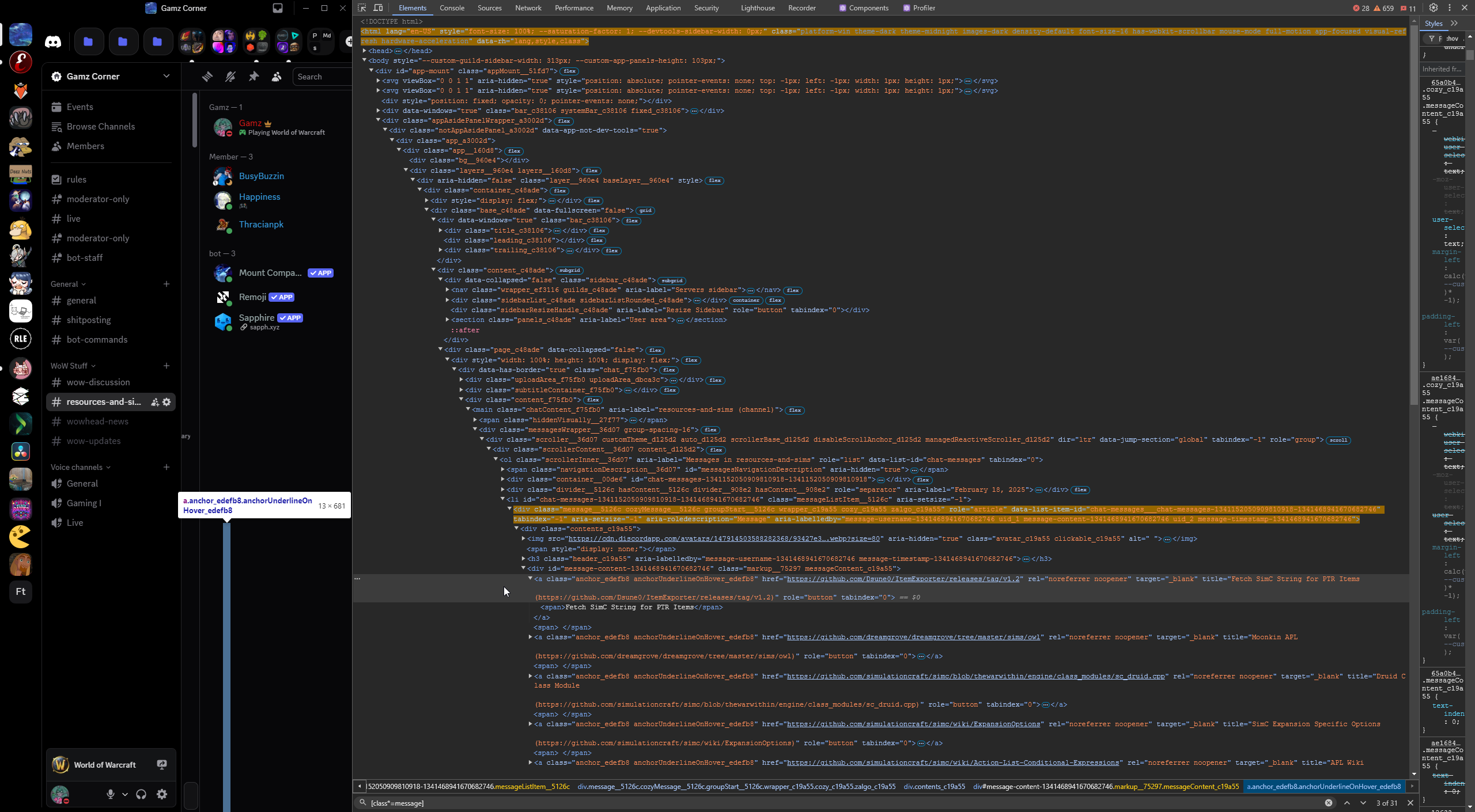
idk what to show so here's the entire window
 faint fractal
lovely pixels
gaunt onyx
yellow part higlights that specific hyperlink
faint fractal
 gaunt onyx
huh
 gaunt onyx
okay my bad
faint fractal
there literally is nothing that can cause that issue wtf
gaunt onyx
it affected all links and embeds at least
i don't have the issue after i deleted some lines from the css file but it's weird that it happened at all
faint fractal
i never got that issue so i have no idea how to fix it
can you send the exact message here?
faint fractal
yeah
ill see what i can do when i go back home
quick check, you still cant see that right?
gaunt onyx
correct

Have notepad up with the .css and removing the } and saving then re-adding it toggles the issue basically
faint fractal
gaunt onyx
send that file, it doesn't seem like the one i sent
gaunt onyx
faint fractal
send that file, it doesn't seem like the one i sent
I can imagine there's probably some stuff different, I was reading through the messages in here and added or removed and followed steps that saw posted that worked for them. Very much not educated in css so mostly flying blind, but it's fun to doodle with
faint fractal
 faint fractal
gaunt onyx
faint fractal
gaunt onyx
syntax error at line 133
it isnt the same as the one i sent
hslbf.css is #1326506110345023538 message
horizontal server list theme css is #1326506110345023538 message
*** hslbf.css   2025-03-29 08:44:31.315948517 +0800
--- HorizontalServerList.theme.css      2025-03-29 08:45:39.235948491 +0800
***************
*** 1,3 ****
--- 1,13 ----
+ /**
+  * @name Horizontal Server List
+  * @author Gibbu#1211
+  * @version 2.1.0
+  * @invite ZHthyCw
+  * @description Moves the server list from the left to the top of Discord. Compatible with Server Folders and most basic transparent themes
+  * @source https://github.com/DiscordStyles/HorizontalServerList
+  * @website https://www.gibbu.me
+ */
+
  :root {
    --HSL-server-scale: 1;
    --HSL-server-direction: column;
***************
*** 114,127 ****
      > .winButton_c38106 {
        width: 24px;
        height: 24px;
      }

!     &::before {
!       display: none !important;
!     }
    }
  }

  .content_c48ade {
    margin-top: 60px;
  }
--- 124,145 ----
      > .winButton_c38106 {
        width: 24px;
        height: 24px;
+       margin-right: 4px;
      }
+   }

!   &::before {
!     display: none !important;
    }
  }

  .content_c48ade {
    margin-top: 60px;
  }
+ .guilds_c48ade {
+   transform-origin: top left;
+   rotate: -90deg;
+   scale: var(--HSL-server-scale);
+   position: absolute !important;
+   height: 200%;
+ }
Okay, I understand what I did wrong now, I looked at the changes Crowles said they made and tried to make the same ones, but messed up the syntax around the part I changed and it ended up bricking all links
That's what I get for trying to edit it in notepad instead of opening it in vscode, would have seen the red outline on the error
faint fractal
gaunt onyx
That's what I get for trying to edit it in notepad instead of opening it in vsco...
notepad++ exists btw
nano as well
(n)vim
faint fractal
@sand sapphire
.expandedFolderBackground__48112 + .listItem__650eb > .folderIcon__48112 {
    margin-bottom: 0 !important;
}
here is your snippet to fix that stupid padding/margin on the right side of expanded folder icons
jolly dock
i love moving from vencord to better discord because now i have infinitely new issues to solve, but infinitely more possibilities
sand sapphire
faint fractal
<@86455665840619520>
```css
.expandedFolderBackground__48112 + .listItem__650eb...
works like a charm, thanks
 forest perch
Sorry if this has been talked about in here, is there a version of this that puts the server list at the bottom of the window rather than the top?
faint fractal
forest perch
Sorry if this has been talked about in here, is there a version of this that put...
probably not, will take a while, but i will NOT do it
forest perch
Alright I was just curious :)
sand sapphire
faint fractal
<@147914503588282368> <@86455665840619520>
```css
:root {
--HSL-server-sca...
welp the new update seems to have broken this 
opening a folder results in this:
 faint fractal
wait i check
faint fractal
sand sapphire
opening a folder results in this:
i think vencord update, thats why
i havent updated discord to receive the change in better folders
sand sapphire
Might it be because they fixed BetterFolders?
ok yeah
that's what I was suspecting
because I remember that Betterfolders was opening on the wrong side (left of the serverlist) before, now they probably fixed it to the right side and that somehow might have broken your snippet. At least that's what I suspected
faint fractal
yeah its the better folders fix, looking into it, it should also have broken my original snippet
sand sapphire
thanks in advance 
faint fractal
:root { --HSL-server-scale: 1; --HSL-server-direction: column; --HSL-server-alignment: flex-start; --HSL-extra-folder-width: 64px; --__server-container: calc(var(--custom-guild-list-width) * var(--HSL-server-scale)); --__server-y-padding: 10px; } .content_c48ade { margin-top: var(--__server-container); overflow: visible; } #app-mount { .sidebar_c48ade { border-radius: 0; overflow: visible; } .guilds_c48ade { transform-origin: top left; rotate: -90deg; scale: var(--HSL-server-scale); position: absolute !important; } .xtree_ef3116 { padding-top: var(--__server-y-padding); padding-bottom: var(--__server-y-padding); } .wrapper_cc5dd2 { rotate: 90deg } .itemsContainer_ef3116, .stack_dbd263 { flex-direction: var(--HSL-server-direction); justify-content: var(--HSL-server-alignment); } } .content_c48ade:has(> .sidebar_c48ade > [style$="betterFoldersSidebar;"]) { margin-left: var(--HSL-extra-folder-width); > .sidebar_c48ade > .guilds_c48ade { left: 16px } } .sidebar_c48ade > [style$="betterFoldersSidebar;"] > nav { position: fixed !important; rotate: 0deg !important; top: calc(8px - var(--HSL-extra-folder-width)) !important; left: calc(0px - var(--HSL-extra-folder-width)) !important; height: calc(100vh - 48px) !important; overflow-y: scroll; &::-webkit-scrollbar { display: none !important } .wrapper_cc5dd2 { rotate: 0deg !important } }
@gaunt onyx @sand sapphire your updated snippet
ill have to use it as well until i fix mine
nevermind, it was a much easier fix than this absolute monstrosity
sand sapphire
faint fractal
nevermind, it was a much easier fix than this absolute monstrosity
Did you re-edit the one right above or should we wait for the new one?
faint fractal
use the new one above
sand sapphire
ok thanks!
faint fractal
the one in my repo using the double folders in a single sidebar is the one that was easier to modify for reasons beyond my comprehension
sand sapphire
faint fractal
use the new one above
uhhhh
 gaunt onyx
it removed the BetterFolders sidebar completely for me
but I also did not have a problem with the previous version so maybe I'm an update behind or something
sand sapphire
sand sapphire
uhhhh
funnily enough the left sidebar (the opened folder) is scrollable
it just cuts at 2 servers and half
on top of yeeting everything that's inside servers (channel list, chat etc.) out of the window
faint fractal
sand sapphire
uhhhh
for every issue you raise up, ill be rich by now
what themes are you using other than this abomination

 faint fractal
gaunt onyx
but I also did not have a problem with the previous version so maybe I'm an upda...
faint fractal
gaunt onyx
but I also did not have a problem with the previous version so maybe I'm an upda...
yes, you are behind an update
faint fractal
sand sapphire
only settingsicon
i dont even think settings icon is working
i dont see any icons there
sand sapphire
shit you're right lmao
faint fractal
^ needs caffeine
sand sapphire
aaand same issue without it
lemme try removing all the other snippets
to see if something is interfering
nope!
same issue even when removing all the other snippets
faint fractal
works on my machine
try the snippet from my repo which uses the 'atrocious layout'
https://nspc911.github.io/themes/vencord/HorizontalServerList.theme.css
sand sapphire
faint fractal
try the snippet from my repo which uses the 'atrocious layout'
https://nspc911.g...

oh hold on
forgot a ;

I'm assuming it's not the intended result because I can't scroll past the folder
as in: there are other closed folders after the opened one but I can't reach them unless I close that folder
 faint fractal
sand sapphire
faint fractal
sand sapphire
you cant scroll the extra sidebar or normal sidebar?
are you unable to scroll in the main sidebar?
sand sapphire
I can't scroll the serverlist when the folder is open
I can only scroll the opened folder
faint fractal
weird bruh
sand sapphire
the only other thing I can think of is if any other plugin is interfering
cause I have... a lot of them


 faint fractal
@sand sapphire try the linked snippet?
sand sapphire
faint fractal
try the snippet from my repo which uses the 'atrocious layout'
https://nspc911.g...
I was using this one
sand sapphire
ok
nnope doesn't work


it completely yeets off the window all the servers after it
faint fractal
sand sapphire
can you scroll the main server folder tho
faint fractal
thats it im committing warcrimes
just please dont use hsl if it doesnt work for you, im done tweaking it to oblivion
sand sapphire
ok
faint fractal
like really sorry if it came out mean, but really im tired of coming back to the same snippet to help you
sand sapphire
dw it's ok, thanks for trying
 wind cypress
Hey, got some small snippets I made if you use both ReadAllNotificationsButton and ServerListIndicators plugins.
They will look wierd unless you use both. If you only want to use one of them change the top and left variables at will.
Keep in mind I am completely new to this stuff and there is probably better ways.
This one is for ReadAllNotificationsButton:
    position: relative;
    rotate: 90deg;
    top: 21px;
    left: -10px;
    margin-bottom: 1.1em;
}
And these ones for ServerListIndicators:
Only show friend count:
    position: relative;
    rotate: 90deg;
    top: -20px;
    left: 10px;
}
Show both friends and servers:
    position: relative;
    rotate: 90deg;
    top: -20px;
    left: 18px;
}

#vc-guildcount {
  position: relative;
  rotate: 90deg;
  top: -36px;
  left: 6px;
}
Only show servercount:
  position: relative;
  rotate: 90deg;
  top: -36px;
  left: 6px;
}
If you get issues relating to these ping me and not @faint fractal 👍
wind cypress
This is how these look


 faint fractal
wind cypress
Hey, got some small snippets I made if you use both ReadAllNotificationsButton a...
faint fractal
wind cypress
Hey, got some small snippets I made if you use both ReadAllNotificationsButton a...
i personally never found a use to the plugins, so if it works for you, sure I guess
 ruby marten
I dont know if its related to this snippet or not, please excuse if not but is there a way to get rid of this? "the Find or start conv. button is such an eyesore
 faint fractal
ruby marten
I dont know if its related to this snippet or not, please excuse if not but is t...
faint fractal
ruby marten
I dont know if its related to this snippet or not, please excuse if not but is t...
not related i think
 dark cloak
faint fractal
<@86455665840619520> would you use this?
dark cloak
faint fractal
<@86455665840619520> would you use this?
how did you get the title bar to look like that
dark cloak
faint fractal
```css
:root {
--HSL-server-scale: 1;
/* Scale of the server icons, deci...
`.base_c48ade { margin-top: 0 !important }
.bar_c38106 {
transform: translateY(-8px);
height: 16px;
.title_c38106 {
justify-content: left;
margin-left: 6px;
margin-top: 6px;
height: 24px;
}
.recentsIcon_c99c29,
.anchor_edefb8 { display: none !important }
.trailing_c38106>.winButtons_c38106 {
>.winButton_c38106 {
width: 24px;
height: 24px;
}
&::before { display: none !important }
}
}
.content_c48ade { margin-top: 0px }`
how would i use tihs but make the bar itself smaller so its like old discord

 worn holly
lol