#🏥-vencord-support-🏥
1 messages · Page 10 of 1
 shell veldt
in this folder
mv app.asar _app.asar
mv app app.asar```then it'll work
you're sure you're using discord stable?
so they updated electron to 17
cool
not really
for developers yes
the main improvement is the fact that it fixes buggy devtools
 broken tiger
audio in screenshare when
shell veldt

no I think he pushed it on accident
cause unrelated commit message
oh god they implementing vencordnative in C++ https://github.com/maltejur/discord-screenaudio/commit/100f9bf58e9beb4d9ed3a15adf8ecad7714d78a3#diff-830b0d19e652b6cefab5d093c1e86987de065b8fd9a1da142b90e4306edb6210
fun
 placid surge
OH MY GOD NO WAY
shell veldt
curious why they don't just use the web implementation
would be way easier
wtf is this https://github.com/maltejur/discord-screenaudio/blob/master/assets/userscript.js#L78-L224

GitHub
A custom discord client that supports streaming with audio on Linux. - discord-screenaudio/userscript.js at master · maltejur/discord-screenaudio
 rough saffron
shell veldt
oh god they implementing vencordnative in C++ https://github.com/maltejur/discor...
rough saffron
shell veldt
oh god they implementing vencordnative in C++ https://github.com/maltejur/discor...
pog
rough saffron
shell veldt
wtf is this https://github.com/maltejur/discord-screenaudio/blob/master/assets/u...
NOT POG
this is like
betterdiscord plugin coding
 feral crystal
my discord client has just updated to 17th electron and vencord stopped working, i tried building and injecting it again but discord just overwrites the files on reload, wtf
im on windows
shell veldt
use the canary install method
feral crystal
huh ok i'll use the GUI installer
if there is one
i don't really care, i used the old installation because i had it long ago
BRUH it bricked my discord installation, the app-1.0.9009 folder is now empty and it doesn't launch anymore
feral crystal
i did, but discord isn't launching anymore
rough saffron
try reinstalling discord first then 
feral crystal
great
rough saffron
the app-1.0.9009 being empty would be caused by discord, not vencord
feral crystal
I've found a lot of discord processes running in the bg, bruh
finally vencord has loaded, thanks
rough saffron
lmao np
feral crystal
lmfao why is it electron 13 now what the fuck, I've just fresh installed discord
comedy
rough saffron
discord moment
 vestal shell
Hmm, I think vencord may not work with the new discord 0.0.23
Platform: Linux, Discord ver.: 0.0.23, install method: Installer
rough saffron
can you open the devtools and run navigator.userAgent and send the output?
vestal shell
I re-downloaded and re-patched
vestal shell
rough saffron
can you open the devtools and run `navigator.userAgent` and send the output?
Mozilla/5.0 (X11; Linux x86_64) AppleWebKit/537.36 (KHTML, like Gecko) discord/0.0.23 Chrome/98.0.4758.141 Electron/17.4.9 Safari/537.36
didn't need to
worked anyway
thanks I feel so stupid now lol
I'll stick around in this server anyway
rough saffron
np
 wanton glen
shell veldt
```sh
mv app.asar _app.asar
mv app app.asar```
wanton glen
shell veldt
```sh
mv app.asar _app.asar
mv app app.asar```
mine updated and that worked, thanks
 civic storm
trying to install vencord, getting a failed to patch error on arch
Unpatching /usr/lib64/discord-canary...
Detected as System Electron Install
Deleting /usr/lib64/discord-canary/app.asar
Renaming /usr/lib64/discord-canary/_app.asar to /usr/lib64/discord-canary/app.asar
rename /usr/lib64/discord-canary/_app.asar /usr/lib64/discord-canary/app.asar: no such file or directory
Renaming /usr/lib64/discord-canary/_app.asar.unpacked to /usr/lib64/discord-canary/app.asar.unpacked
rename /usr/lib64/discord-canary/_app.asar.unpacked /usr/lib64/discord-canary/app.asar.unpacked: file exists```patcher is saying the install is already patched but I haven't patched it before
I've already done a sudo pacman -Rns and deleted the config files under .config but not sure what other files I need to delete
also happens on stable discord
 untold path
Vencord updated on Arch, and now it's borked... I did a get pull, pnpm build, pnpm inject, even did pnpm uninject, and then reinstall the whole thing. It doesn't work. Note that I might not respond, because I'm studying for my GED exams tomr. I'm just letting you guys know.
shell veldt
the node based installer is no longer maintained and now outdated
use the new gui installer
@untold path
untold path
Oh, ok..
shell veldt
if you don't want to modify the source code that's your best bet
otherwise I am working on updating the pnpm scripts to use the gui installer https://github.com/Vendicated/Vencord/pull/407, so easiest to just wait for that
 glad fiber
ah, verywell
shell veldt
shell veldt
```sh
mv app.asar _app.asar
mv app app.asar```
or just do this in discord resources folder
 raven granite
Hi, what is the label value in ChoicesOption? I couldn't find label in the api docs: https://discord.com/developers/docs/interactions/application-commands#application-command-object-application-command-option-choice-structure

 prisma mica
raven granite
Hi, what is the `label` value in `ChoicesOption`? I couldn't find label in the a...
prisma mica
raven granite
Hi, what is the `label` value in `ChoicesOption`? I couldn't find label in the a...
it was required before and no have one updated it since, also havent actually seen anyone use it
 spring terrace
Bruh

 fresh plover
can anyone help ive uninstaled discord 3-4 times deleted the discord stuff in roaming and local and dk what to do
 rough saffron
go into C:\ProgramData\<username> and check if there's a discord folder in there
you should delete it
shell veldt
ye
curious that reinstalling doesn't remove that for you
maybe I should just straight up make it delete it for u
 twilit oriole
why is there so many updates?
untold path
spring terrace
Bruh
Yeah, I got it this morning lol. Vencord still borked. Tried manual patching, still doesn't work. 😦
spring terrace
untold path
Yeah, I got it this morning lol. Vencord still borked. Tried manual patching, st...
I just can't even enter in discord
untold path
spring terrace
I just can't even enter in discord
What distro are you using?
Arch based? RHEL? Debian?
 pseudo wadi

untold path
pseudo wadi
I assume they're still getting this
Yaeh, we do. Like wtf, why lol xD
pseudo wadi
Discord updated the package guh
On arch just do pacman -Sy and install discord 
(I forgor if you can do pacman -Sy package)
untold path
Just do pacman -Syu discord, and you're fine, unless you're one of the manual installer like me, Vencord pnpm is now no longer maintained.
pseudo wadi

shell veldt
don't actually do -Sy
untold path
why tho?
shell veldt
-Sy is very dangerous
untold path
-Syu?
shell veldt
yes
shell veldt
-Sy updates your package database without updating your packages. every package depends on exactly the version of that package that's shipped alongside it
let's say systemd depends on new glibc and you update systemd via -Sy without updating glibc
now if you restart your system will fail to boot
shell veldt
you should never -Sy unless you have a very good reason to, and in that case you should -Syu every time
pseudo wadi
Most cases its fine
shell veldt
pseudo wadi
As if discord will do that
that's not the point, the point is that if you -Sy then install any package without first updating your system you run risk of bricking your system
pseudo wadi
shell veldt
that's not the point, the point is that if you -Sy then install any package with...
Not hard to unbrick even if it happens
shell veldt
imagine -Sy like this: you manually build vencord from source and instead of updating the entire mod you only update one plugin
it might work fine or it might just crash your discord
pseudo wadi
Yes, you should keep everything up to date but if you want to test quickly just update that 1 package with Sy
untold path
pseudo wadi
Yes, you should keep everything up to date but if you want to test quickly just ...
I mean, it's easy to un-brick if the drive is not encrypted, and that you're using Ethernet.
pseudo wadi
And if people run arch, I'd hope they know how to chroot and fix it
pseudo wadi
untold path
I mean, it's easy to un-brick if the drive is not encrypted, and that you're usi...
Imagine not using Ethernet
untold path
pseudo wadi
Imagine not using Ethernet<:bleh:1023801826136559686>
Me, a noob Arch user on laptop lol.
 untold path
it has Ethernet tho
untold path
pseudo wadi
WiFi isnt that hard to get working either
WiFi worked out of the box for me.
ok, I think it's now off topic...
pseudo wadi
Yop
Tldr just pacman -Syu
Or pacman -Sy discord and wait till your system breaks and then fix it
placid surge
pseudo wadi
Or pacman -Sy discord and wait till your system breaks and then fix it
as an arch user this hurts my bones
pseudo wadi

spring terrace
untold path
Just do `pacman -Syu discord`, and you're fine, unless you're one of the manual...
what is this?
 rocky lark
arch package manager ?
broken tiger
ey guys i am using the fakenitro plugin and emojis just need a bit long to post, is this normal. first it shows the link for like half a second then it will show the emoji
 hazy breach
discord issue, can't do anything about it
broken tiger
pseudo wadi
Or pacman -Sy discord and wait till your system breaks and then fix it
do not the -Sy
pseudo wadi
Do the -Sy
 wooden barn
am discord on firefox, all the themes error

how do I find why a network request is being blocked?
 shell veldt
CSP
for some reason csp bypass is inconsistent on firefox
solely to blame on Firefox
works fine on firefox
but also make sure youre using the ext and not userscript
broken tiger
works fine on firefox but not Firefox
shell veldt
shell veldt
otherwise I am working on updating the pnpm scripts to use the gui installer htt...
merged!
wooden barn
shell veldt
but also make sure youre using the ext and not userscript
was already on the extentsion
 ashen atlas
my ven broke yesterday, i tried reinstalling but now it says that my discord install is broken. ive reinstalled discord like 6 times now but it keeps saying it
i also tried deleting the folders in appdata local and roaming idk if that messed anything up
using the windows gui installer btw
rough saffron
ashen atlas
my ven broke yesterday, i tried reinstalling but now it says that my discord ins...
check if there's a folder in C:\ProgramData\<username>\Discord
if there is, you should delete it
ashen atlas
rough saffron
check if there's a folder in `C:\ProgramData\<username>\Discord`
fixed, but now openasar is saying it cant find the directory specified 
ill try using nightly release maybe
alright i had to do some dumb shit but its all fixed now
thank you
 tall lagoon
ashen atlas
alright i had to do some dumb shit but its all fixed now
tall lagoon
ashen atlas
alright i had to do some dumb shit but its all fixed now
how u fix it 😭 having the same issue
tall lagoon
is there any way to direct which user discord installs to?
 mortal pecan
ashen atlas
my ven broke yesterday, i tried reinstalling but now it says that my discord ins...
mortal pecan
ashen atlas
my ven broke yesterday, i tried reinstalling but now it says that my discord ins...
same thing happening to me
never happened before
worked perfectly before
fresh install of discord

seems like its only broken on canary or something
installed fine on normal
 charred nebula
STOP USING CANARY
mortal pecan
installed and worked fine before ig new update borked it maybe
mortal pecan
issue fixed, uninstalled canary, unpatched it, works fine now
 desert dagger
Hey, I've been using Vencord for a while without any issues, I woke up in the morning, turned on my pc, and waited for Discord to launch, at the moment Discord (Vencord) got launched, that's the first thing I saw... I'm using Discord Canary, I tried unpatching Vencord and them it works as intended, tried to patch again and saw this screen... can someone help me fix that? thanks

 mystic gale
mortal pecan
seems like its only broken on canary or something
mystic gale
mortal pecan
seems like its only broken on canary or something
Discord updated canary and now it brokey, just use stable at the moment @desert dagger
desert dagger
mystic gale
Discord updated canary and now it brokey, just use stable at the moment <@220573...
Oh alright, thanks!
shell veldt
mortal pecan
fresh install of discord
interesting to see that so many people have scuffed discord installs
discord moment
 earnest kiln
shell veldt
interesting to see that so many people have scuffed discord installs
earnest kiln
shell veldt
interesting to see that so many people have scuffed discord installs
Ptb today afternoon it will break
shell veldt
wha
rough saffron
earnest kiln
Ptb today afternoon it will break
for vencord, a "scuffed discord install" means it installed to ProgramData instead of AppData
earnest kiln
I see
shell veldt
I added that error thinking it was a very niche issue but seems a lot of people have it
the solution is so go to C:\ProgramData\YOUR_USERNAME\ and delete the Discord and Squirrel folders. if these were the only folders there (highly likely), also delete the YOUR_USERNAME folder
mortal pecan
mystic gale
Discord updated canary and now it brokey, just use stable at the moment <@220573...
working fine for me on canary rn
mystic gale
mortal pecan
working fine for me on canary rn
oh that's nice then
so it is just discord moment
tall lagoon
shell veldt
interesting to see that so many people have scuffed discord installs
discord try to make a working program challenge (impossible)
 winged fractal
Question about ShowHiddenChannels plugin — these are all hidden text channels, except the first which is a forum (yes I can open it but not read/write).
Is it normal they have a 🔊 icon?
 rough saffron
known issue
opened an issue for it https://github.com/Vendicated/Vencord/issues/415

GitHub
Mentioned a number of times in Discord but nobody seems to have picked it up yet.
winged fractal
Thank you all
 broken tiger
Thank you very much, I will try but if it works?
 strange stratus
hey my themes stopped working on browser
the extension is active i can see vencord on settings but the themes wont work
another extension i had also broke is it because my browser updated?
 rough saffron
if you don't know, you should use the GUI installer.
broken tiger
rough saffron
if you don't know, you should use the GUI installer.
send me the link

 rough saffron
np
 rich tide
brazil strikes again
 rough saffron
don't run as admin
broken tiger
im not tho
 rough saffron

RTFM
if you're following the power-user guide, follow it.

just use the normal install method if you don't know what you're doing
untold path
I think you ran the pnpm inject on an admin CMD, and then it installs the installer as an admin. Not sure tho, I switched from Windows to Linux for 4 years now. Just use the simple installer for normal use, or if you want to develop a plugin, I highly recommend setting up a Linux VM, but whatever floats your boat, just use that. If it works, it works.
shell veldt
we need to make dev stuff less accessible
forcing people to solve a math problem to access developer instructions
untold path
It's not really that hard tho, but I think it's a good idea to have a little challenge for the new devs like I am, so that they will learn and truly understand how Discord actually works under the hood, thus filtering the script kiddies (me, rn) and the real devs, so that we will have quality plugins made by quality devs 😄
rough saffron
we should move the link to the git install guide to the bottom below the invite links
shell veldt
just remove it
if someone can't figure out how to run pnpm script they probably shouldn't do it
 willow hatch
using the console way of reinjecting vencord after discord update broke it

but after doing neccesary steps,its showing this error when doing pnpm inject
PS:i did git reset hard and my pc doesn't support gui installer as it don't have opengl 3
shell veldt
why don't you have opengl
willow hatch
shell veldt
why don't you have opengl
i have opengl 2
plus the pc is from 2009 without any graphics card dedicated
willow hatch
its a pentium pc so normal
willow hatch
shell veldt
patch manually
ok,will try
shell veldt
the script just runs the gui installer
willow hatch
shell veldt
the script just runs the gui installer
oh,damn
 neat bay
you can try manually injecting it tho
neat bay
usually by having an outdated installation the patches from some plugins could interfer. it is better to use discord-screenaudio only when you share your screen, and use the stock discord for the rest
 floral moat
i there any way i can prioritise quickcss over the theme css files?
because it seems like the theme css files are just overriding my own quickcss
 torn lagoon
!important
floral moat
doesn't work
 prisma apex
viewraw after this update i think it was has stopped working and is no longer show up.
shell veldt
floral moat
because it seems like the theme css files are just overriding my own quickcss
hmm, maybe it gets added before themes
I'll see and if that's the case push it to the very end so it always overrides
shell veldt
prisma apex
viewraw after this update i think it was has stopped working and is no longer sh...
yes, needs an update
don't use canary if you want a better experience
prisma apex
i mainly use ptb
floral moat
shell veldt
hmm, maybe it gets added before themes
just cross-check it, i am not sure if that's the actual case or i am just being silly
 frank meadow
https://gyazo.com/2597992c08833362820a5f4c9db3f952
How do I resolve this?

holup may be my firewall
shell veldt
if it is, why is ur firewall blocking github
frank meadow
prob isn't blocking github, just the process from accessing github
def not firewall
just disabled it
tried redownloading the exe, doesn't fix it (not that I thought it would), so I truely have no idea what it is. May or may not try the source install later.
 wheat prism
My gangatron what does this mean? I even reinstalled
 shell veldt
can you access this url https://github.com/Vendicated/Vencord/releases/download/devbuild/patcher.js @frank meadow
frank meadow
shell veldt
can you access this url https://github.com/Vendicated/Vencord/releases/download/...
bet I'll do that now
wheat prism
I have no folder of my username 😦
frank meadow
hopefull restart fixed some stuff
frank meadow
shell veldt
can you access this url https://github.com/Vendicated/Vencord/releases/download/...
yes
just realized that was a question
I got the js file
frank meadow
shii
shell veldt
Well it's failing on https://api.github.com/repos/Vendicated/Vencord/releases/latest
try if you can access that
frank meadow
I can
wheat prism
wheat prism
I have no folder of my username 😦
Nvm It was named "games" 😭
shell veldt
why is that ur username
wheat prism
I have no clue honestly
frank meadow
shell veldt
why is that ur username
yo rq, I'm just gonna attempt to do the source install. I got MinGW and the go compiler, but wtf do I run and where?
I mean, it says run go build, but like where, how, and how will this target the install zip? I have by no means any clue of what I am doing.
shell veldt
that just builds the installer
it probably won't change anything since it still has to download the files
you can build Vencord itself from source which will avoid github api call
frank meadow
how do I do that?
frank meadow
shell veldt
you can build Vencord itself from source which will avoid github api call
do I just clone the repo and then build it? but like I have no idea how to do that
shell veldt
yes
frank meadow
shell veldt
yes
how do I build it? Open the file in a terminal and then go build?
I just get this error when i do that.
https://gyazo.com/23937b7aba10fc2aa14ab771fd209881

file path is C:\Users\My name here\Desktop\Vencord-devbuild
it's just the source zip
 frank meadow
 shell veldt
just read doc lol
frank meadow
what docs??? I mean, the only docs I found on Vencord werre the source install using go build .
I got it I think
I got it. Essentially I had to go back to previous versions and download their installer. That would then error saying that another process is accessing a path it needs, blah blah blah, and I just had to then click update-install, uninstall, and then install. That then worked.
The original reason the go build wouldn't work was because I was using the dev build or something. That didn't have any of the .go files. I changed to another version of the source install, and that would error with: https://gyazo.com/9564b145d7b6a23a05362a62eddd67e5

I didn't feel like installing all of that, so I skipped it and just used a previous version installer. That had errors, but worked.
shell veldt
wha

 scenic grove
but keep https://upl.vanillyn.tk

vanillyn's upload server
scenic grove
rough saffron
gyazo's embeds arent that obnoxious
yeah but why
i dont want an embed
rough saffron
real
scenic grove
and gyazo itself is just kinda sketchy
like theyre locking the most basic ass features behind a paywall
and somehow it takes up more memory and space than sharex
sharex, something with 5x more features for free
its just shitty bloatware
even if youre on linux
now bless sharex
sharex is one of the greatest software ive ever used
i cant recommend it more for windows users
it basically replaces half of the shitty window bloatware with a lightweight customizable open source platform
but like they should still be able to get it onto linux
sorry im just
really sensitive when it comes to screenshotting and recording
 frank meadow
scenic grove
and gyazo itself is just kinda sketchy
frank meadow
scenic grove
and gyazo itself is just kinda sketchy
This is true. Paywall thing too. you can crop and that's it for free
ima snag sharex rn
frank meadow
I FUCKING LOVE SHAREX
rough saffron
lol
frank meadow
ITS SO GOOOOOOOOOOOOOOOOD
neat bay
wish there was sharex for linux, but it was made with win tech :c
shell veldt
flameshot
 mild drift
do shiki code blocks not work for files?
frank meadow
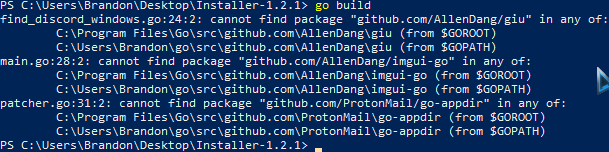
I'm back, but with the same problem as before. tryna screw with some plugins this time. I've got the installer-1.2.1 zip from https://github.com/Vencord/Installer/releases , and I get this error: https://i.imgur.com/rOAFbOu.png
unfortunately, I have absolutely no Idea what to do. I've visited their respective repos, and there either isn't an install guide, or when I do try to build it, it gives me more of the same errors, saying the github repos cannot be found in $GOPATH or $GOROOT.
Am I literally just missing that many repos or what???
GitHub
A cross platform gui app for installing Vencord. Contribute to Vencord/Installer development by creating an account on GitHub.
 shell veldt
you need to go mod tidy
frank meadow
okay that worked... but now I'm just sitting here after 5 minutes of running go build and nothing has happened. I mean, my pc is by no means slow... and powershell isn't using any resources, so is there something I did wrong?
it just closed lmfao
shell veldt
it takes a while yeah
bear in mind you're bundling opengl stuff from source
github actions takes 5 minutes to build on Windows
frank meadow
true.
Just anothe rq question
well that was interesting. I just accidentally hit uninstall on the .exe and it removed all of my %appdata% discord files. I literally had to reinstall discord entirely to get it to work
either way, my question was how do I compile the plugin? I mean, how do I get it to function inside of discord? Do I have to uninstall and reinstall? or is it automatic? Running pnpm inject pops up a new installer, so I assume I would just press install, right?
untold path
frank meadow
either way, my question was how do I compile the plugin? I mean, how do I get it...
You need to run pnpm build and then pnpm inject.
frank meadow
yeah I did that... it then pops up an installer. My question is if I have to then uninstall and reinstall every time or it auto updates
by installer I mean the .exe popup
untold path
If you want to update, just go into update tab in the settings on Discord itself.
If you want to modify the code, run pnpm watch
frank meadow
alr
untold path
Or if you want to manually update, you can run git pull, and then pnpm build
For sticky situations.
frank meadow
bet
floral moat
i found a bug in the "fake nitro" plugin which is responsible for making the locked emojis available, but when you open the emoji menu for reacting to a message it still unlocks those unavailable emojis which will just not work if you click on it
shell veldt
real
 vestal verge
Hey
was wondering why this view-raw plugin is not working for me!
Not working as in i can't seem to see it anymore not sure why even tho Its enabled

 placid surge
same for invis-chat 
hazy breach
vestal verge
Hey
was wondering why this `view-raw` plugin is not working for me!
Not working ...
don't use canary
(unless it's now broken on stable too i didnt check)
untold path
hazy breach
(unless it's now broken on stable too i didnt check)
Nope, it's working fine on stable
People using alpha software, and then complain unstable. Arch users probably xD /s
vestal verge
hazy breach
don't use canary
Ah i see,
It's working on stable, just on canary so thought its broken due to their new changes had to cross-check ;)
Thank you
 past cairn
the installer doesnt open :(
broken tiger
did you chmod it?
shell veldt
vsupport more info
 mighty ravenBOT
shell veldt
vsupport more info
mighty ravenBOT
shell veldt
vsupport more info
"doesn't work" or similar are not very helpful.
You can make our lives easier by providing the following information:
- What platform are you on? Windows, Mac, Linux?
- What client are you using? Discord Desktop, Discord Web, Armcord...?
- What branch are you on? Stable, Canary, PTB...? If not on stable, does it work on stable?
- Are you fully up to date? You can check by going to the Updater settings tab. If you cannot access that page, use the installer. If no, update and try again
- Are there any errors? Open the console (Ctrl+Shift+I) and check the console tab. If there are any errors (red text), please provide them.
- Does this issue persistently happen, or only sometimes?
- Please provide steps to reproduce this issue. Screenshots or videos are also helpful.
shell veldt
(not all of these steps apply)
you need to provide more info than that
Anyway it not working likely means you're on an ancient version of your Operating System or don't have basic opengl support (Update your graphics driver)
@past cairn
past cairn
shell veldt
Anyway it not working likely means you're on an ancient version of your Operatin...
oh i did actually just reinistall windows
alr one sec
its downloading rn
this means it works right? ignore folder names
 shell veldt
I'm sure you're being really productive
floral moat
shell veldt
I'm sure you're being really productive
are you sure that homework directory contains study material or
shell veldt
lol yeah noone who doesn't want you to point out the folder would mention it two times
 violet trail
@shell veldt fart
mild drift
can I ignore a dir from the build?
I made my userplugins dir a git repo and it worked fine yesterday but now it's causing the build to fail
 orchid moon
i dont know what i did but i cant see my enabled plugins, only required ones.. and many plugins dont work xd
can someone help me pls
reinstall dont work
shell veldt
show a screenshot please @orchid moon
 pure flume
 neat bay
broken tiger
Do I pack an extension or load unpacked?
neat bay
broken tiger
Do I pack an extension or load unpacked?
load unpacked, whatever you tried to say
orchid moon
shell veldt
show a screenshot please <@514181162542039049>
look DM
 faint tangle
Hello, is it possible to auto update Vencord without to click on "update"?
rough saffron
nop
shell veldt
orchid moon
look DM

 broken tiger
yo g
help me
restarted discrd n all

he still be showing edited bot messages
its annoying as shit
shell veldt
the ignores are actually only implemented for deletes rn
open a feature request to implement them for edits as well
broken tiger
shell veldt
open a feature request to implement them for edits as well
can u do it for me im lazy
 barren nymph
oh
barren nymph
shell veldt
open a feature request to implement them for edits as well
How long do they take?
Cause I also had the same issue
shell veldt
how ever long til someone makes it
 trim kiln
there could be an option to be able to copy stickers using EmoteCloner
 zenith panther
Hmmm, installed, worked great, restarted PC, now when I click the discord in my pin bar it flashes, and just doesn't open the program. Task Manager shows a task pop into the list, and immediately cancels.
Going to have to search here for that issue.
broken tiger
on the windows stable branch, it seems like i cant open attachments and upload them directly
like i can drag and drop but i can't directly upload for some reason
i tried this with betteruploadbutton both turned on and off
shell veldt
works on my machine
what os are u using? @broken tiger
also show video please
oh windows
show video tho
frank meadow
ultra common windows L
 muted marsh
i was about to call you stupid ven
shell veldt
lol when i open the file picker (on windows too), it freezes for a few seconds and my fan goes hyper
muted marsh
windows file explorer so bad
shell veldt
100% cpu usage
untold path
muted marsh
windows file explorer so bad
Wait til you learn that the desktop that you see is actually just a file explorer
muted marsh
i know
rough saffron
broken tiger
on the windows stable branch, it seems like i cant open attachments and upload t...
discord bug. not vencord
 lean turret
The installer fails to fetch from github with a 403
shell veldt
lean turret
The installer fails to fetch from github with a 403
when doing what
 placid canyon
Do I need to use a diffrent branch do install custom plugins? or where do I put them
placid canyon
yea I'm dumb I saw it mb
lean turret
shell veldt
when doing what
launching the installer
shell veldt
lean turret
launching the installer
show screenshot?
broken tiger
CustomRPC not working?
rough saffron
vsupport more info
mighty ravenBOT
rough saffron
vsupport more info
"doesn't work" or similar are not very helpful.
You can make our lives easier by providing the following information:
- What platform are you on? Windows, Mac, Linux?
- What client are you using? Discord Desktop, Discord Web, Armcord...?
- What branch are you on? Stable, Canary, PTB...? If not on stable, does it work on stable?
- Are you fully up to date? You can check by going to the Updater settings tab. If you cannot access that page, use the installer. If no, update and try again
- Are there any errors? Open the console (Ctrl+Shift+I) and check the console tab. If there are any errors (red text), please provide them.
- Does this issue persistently happen, or only sometimes?
- Please provide steps to reproduce this issue. Screenshots or videos are also helpful.
broken tiger
Stable 168576 (8bbe26c) Vencord C4d2b4a (Web) Chrome OS Version 109.0.5414.94 64-Bit
I have errors in red (error 403) that can make it not work?


 broken tiger
Stable 168576 (8bbe26c) Vencord C4d2b4a (Web) Chrome OS Version 109.0.5414.94 64...
broken tiger
broken tiger
Stable 168576 (8bbe26c) Vencord C4d2b4a (Web) Chrome OS Version 109.0.5414.94 64...
The two yellow errors in the top right corner of the console are
StorageType.persistent is deprecated. Please use the normalized version navigator.storage instead. Affected resource
invisible.js?ts=1674129600:1 et
window.webkitStorageInfo is deprecated. Please use the normalized version navigator.storage instead. Affected resource
invisible.js?ts=1674129600:1
 mystic gale
 lapis gate
what does this channel title say
rough saffron
go into C:\ProgramData\<username> and delete any discord folders from there
mystic gale
lapis gate
you could just tagged me there
how do you want me to ping you in a faq channel


it is in #faq
broken tiger
broken tiger
Stable 168576 (8bbe26c) Vencord C4d2b4a (Web) Chrome OS Version 109.0.5414.94 64...
So I use tempermonkey (a browser extension to run userscript code) to run Vencord, I can try to put the code back in tempermonkey
if i got this, do i have vencord?

I am on Discord Browser
rough saffron
broken tiger
if i got this, do i have vencord?
if you have vencord itll be in settings
 rough saffron
then it didnt work
close discord completely, use the gui installer, restart discord
broken tiger
rough saffron
just normal install
 lapis gate
broken tiger
lapis gate
broken tiger
close the discord and click install
rough saffron
broken tiger
means discord is still open
broken tiger
broken tiger
Stable 168576 (8bbe26c) Vencord C4d2b4a (Web) Chrome OS Version 109.0.5414.94 64...
I don't understand what the problem is. CustomRPC does not work no matter what.
rough saffron
they're on dnd
 umbral cipher
I tried downloading Vencord and I did it exactly like in the video but now If I try to open discord it says some kind of error and I also can’t delete windows🫠
hazy breach
umbral cipher
I tried downloading Vencord and I did it exactly like in the video but now If I ...
GitHub
A cross platform gui/cli app for installing Vencord - GitHub - Vencord/Installer: A cross platform gui/cli app for installing Vencord
umbral cipher
Thank you :)
 umbral cipher
bruh my bad i dont know why i wrote windows lmao
meant discord
i need help again lmao i dont know if its my fault or if its vencord´s fault but people in voice chats cant hear me but i can see the input move in windows and in voice meter
 bright chasm
umbral cipher
i need help again lmao i dont know if its my fault or if its vencord´s fault but...
bright chasm
umbral cipher
i need help again lmao i dont know if its my fault or if its vencord´s fault but...
Check your discord audio settings
Input anx output
broken tiger
is there a way to make the installer install a diff fork
ill assume you need to rebuild with a new link
cuz pnpm inject is aids now (it doesnt work for shit)
shell veldt
no but pnpm inject installs ur local builds lol
broken tiger
shell veldt
no but pnpm inject installs ur local builds lol
It just doesn't work
file:///C:/Vencord/scripts/runInstaller.mjs:61
    const res = await fetch(BASE_URL + filename, {
                ^

ReferenceError: fetch is not defined
    at ensureBinary (file:///C:/Vencord/scripts/runInstaller.mjs:61:17)
    at file:///C:/Vencord/scripts/runInstaller.mjs:115:28
    at ModuleJob.run (node:internal/modules/esm/module_job:193:25)
    at async Promise.all (index 0)
    at async ESMLoader.import (node:internal/modules/esm/loader:533:24)
    at async loadESM (node:internal/process/esm_loader:91:5)
    at async handleMainPromise (node:internal/mod

 vale quiver
hi discord is refusing to start after i injected vencord, is there something i could do to fix this?
hazy breach
vale quiver
hi discord is refusing to start after i injected vencord, is there something i c...
what error
rough saffron
if you used the openasar option, uninstall it and use the normal install option
vale quiver
tried it before but it works now for some reason, thanks!!!!!!!!!!!!!!!!!!
vestal shell
I've noticed that with a lot of BD themes, the "on" setting is always missing proper color
 shell veldt
vestal shell
I've noticed that with a lot of BD themes, the "on" setting is always missing pr...
shell veldt
vestal shell
I've noticed that with a lot of BD themes, the "on" setting is always missing pr...
why are you reporting that here? use a better theme or complain to the theme author
vestal shell
shell veldt
why are you reporting that here? use a better theme or complain to the theme aut...
I've seen it in more than one theme
shell veldt
no idea why that would happen. Is your /tmp mounted as noexec? The script is just for convenience but if it doesn't work, you can download the installer binary manually, make it executable and run it with sudo
vestal shell
just curious to see if the BD theme engine has any issues
vestal shell
shell veldt
it's just css
something's wrong with the CSS then I guess, but it's just interesting
nothing important
broken tiger
shell veldt
no idea why that would happen. Is your /tmp mounted as noexec? The script is jus...
it could also be a missing shared library, it gives that error too
 misty hill
hi, i installed it, but it doesn't do anything. f1 still works
shell veldt
misty hill
hi, i installed it, but it doesn't do anything. f1 still works
have you enabled the no f1 plugin
misty hill
shell veldt
have you enabled the no f1 plugin
how do I do that? (no, I have not)
shell veldt
settings
misty hill
it is grayed out
 rough saffron
is that the userscript
misty hill
ff addon
broken tiger
@broken tiger can you run this (it'll check for the libraries that the installer needs)
for i in libpthread.so.0 libGL.so.1 libwayland-client.so.0 libdl.so.2 libstdc++.so.6 libm.so.6 libgcc_s.so.1 libc.so.6; do [ -f /usr/lib/$i ] || echo "$i not found"; done
ohhhhhh!
nvm!!!
got it
I'm dumb
nowhere did it say to check discord settings. I just thought to check ff settings
rough saffron
lol
 shell veldt
is it just in a different location?
 cosmic tartan
View icon plugin not working
misty hill
I installed MoreKaomoji, but how do I get them?
rough saffron
they're slash commands
misty hill
<( ̄︶ ̄)>
broken tiger
if you have kde running those should be installed
yea
I meant these are expected to be there
I really wonder where are all of these since not even libc is found
does /usr/lib even exist
broken tiger
nixos so strange
scenic grove
@placid surge do i have to disable arrpc on armcord to use custom rpc?
or maybe its one of the things that only work on windows (i can not find an alternative for arrpc idk why)
broken tiger
I don't think you'd need to
rough saffron
we had someone come in and make an insanely messy PR for nix support for some reason a while ago
(it got rejected)
scenic grove
nixos is confuse\
broken tiger
bedrock linux my beloved
rough saffron
bedrock minecraft
broken tiger
minecraft bedrock edition my beloathed
rough saffron
bedrock had the chance to be so good
i mean
it is good
but all the microsoft shit ruins it
and the shitty UI
in app purchases
etc
its so much more performant than java ed.
broken tiger
yop
scenic grove
i thought you were talking about bedrock linux
tho
why can i do the not customrpc
wait webrichpresence is on
rough saffron
meguminpresence
scenic grove
ok so turns out
customrpc does work after turning off armcord and vencord arrpc
but only for a little while
broken tiger
why did you have both armcord and vencord arrpc
scenic grove
i would debug if the fucking WRAH
 scenic grove
broken tiger
why did you have both armcord and vencord arrpc
scenic grove
broken tiger
why did you have both armcord and vencord arrpc
i imported a config from web that had it on
forgot to turn it off
placid surge
scenic grove
<@347366054806159360> do i have to disable arrpc on armcord to use custom rpc?
o...
Idk
scenic grove
yeah uh
its just not working after a while
theres no errors or warnings in console it just stops
are you sure theres no timeout
 obtuse anchor
my discord crashed and is now looping on update failed
 obtuse anchor
no,
but i uninstalled vencord, opened discord then installed vencord again and that worked
shell veldt
cool

 shell veldt
 echo marsh
ok weird issue
echo marsh
ok weird issue
firefox issue
echo marsh
shell veldt
firefox issue
I tried using the latest XPI build from the builds repo and it worked fine
idk why the extension from the addons store doesn't work (for themes)
plugins are still fine
here's with the latest xpi build
 untold path
obtuse anchor
my discord crashed and is now looping on update failed
untold path
obtuse anchor
my discord crashed and is now looping on update failed
Still wrong server, but nvm. You can try add "SKIP_HOST_UPDATE": true to the discord config location of your OS (just search it up), as a temporary fix.
Or try to launch discord through terminal and dump the output here.
echo marsh
now I see why

same applies for pronoundb

figured out why
Ublock origin was doing the blocking
because I have it set to medium mode
which blocks 3rd party scripts and frames by default
enabling 3rd party scripts works
that would also explain why stylus wasn't working (even with patchign csp enabled)
shell veldt
wait what ublock does that??
echo marsh
shell veldt
wait what ublock does that??
not by default
but yeah it can do that
ublock origin can do a lot of things actually
like cleaning urls, or blocking connections
Here's the docs on blocking modes: https://github.com/gorhill/uBlock/wiki/Blocking-mode
GitHub
uBlock Origin - An efficient blocker for Chromium and Firefox. Fast and lean. - Blocking mode · gorhill/uBlock Wiki
after all, it's just a general blocker
so it can be used abused

 summer monolith
message tags can't be disabled and it will spam the / command menu is there a way to force remove it or disable it?

 thick ore
summer monolith
thick ore
summer monolith
this doesnt seem like it would happen unless you have MessageTags enabled
summer monolith
yes it didn't want to disable in the settings
i eventually restarted and it disabled
 bold ice
Hi, i just joined a server with a welcome screen (guild welcome screen) and it won't disappear or do anything - browser version and mobile works perfect, but vencord application doesn't let me through, is there anything i can do? 
 wooden flare
https://transfer.sh/Cs8J6z/electron_Tj4AKoaMjM9.png
wooden flare
wooden flare
https://transfer.sh/Cs8J6z/electron_Tj4AKoaMjM9.png
pls
 mossy lagoon


 silk zealot
When i updated Vencord this morning the update failed and i had to uninstall discord, i did that and now it says my discord install is broken. I tried removing all discord files and vencord files and reinstalled both but i still get this
 wooden flare
shell veldt
<#1027235873990901780>
shell veldt
wooden flare
shell veldt
<#1027235873990901780>
shell veldt
I should elaborate on that warning in installer
I didn't because I thought there weren't many affected people (since hardly anyone ever complained)
but there are way more than expected
 wise dagger

if u scroll past a certain point it bugs out and replaces every built in command with those three
shell veldt
then don't scroll past that point
wise dagger
all the morekaomoji ones are at the bottom :sobbing:
shell veldt
that plugin uses sub commands which I haven't tested properly when I implemented them ages ago
it's probably some bug in there
for now you can try disabling the plugin or typing start of the command
wise dagger
yeah ive disabled it for now
 alpine valley
I think the NoBlockedMessages doesn't work under these circumstances? https://i.imgur.com/CyXki9Q.png
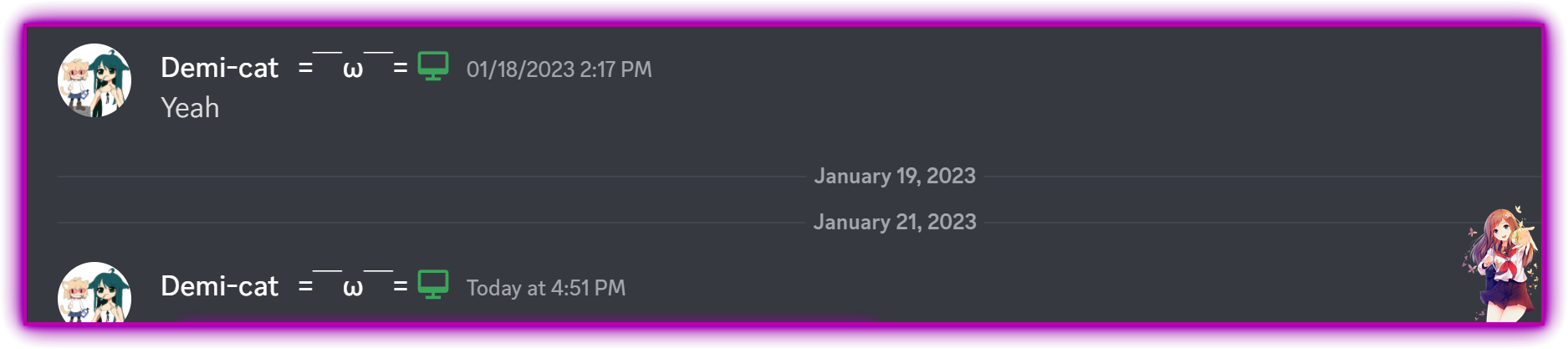
Is that a bug or is that intentional?
I'm asking since I don't wanna deal with devilgay memory usage :D
shell veldt
do you really care tho
alpine valley
ngl I do
shell veldt
cause that's a small niche case
alpine valley
I mean, I could create a small plugin to fix that, but eh, not very familiar with your patching system
alpine valley
I have it installed, but no
alpine valley
shell veldt
if so you can fix it with pure css
Could I use OpenAsar for that?
shell veldt
no
alpine valley
Awe :(
shell veldt
you can do it with a css feature that's only on electron 21+
shell veldt
I haven't written it sooo no
alpine valley
Okay, no worries!
shell veldt
but it's a combination of the :has and the + (has next sibling)
alpine valley
It's fine, I'll just ignore it
or deep dive into devilbro's code and port it to vencord somehow
shell veldt
.class-of-the-day-divider:has(+ .class-of-the-day-divider) { display: none; }
 boreal mason
Hi my discord is stuck in a update loop. I assume this is what the message in #faq was regarding. But i don't know how to fix it since I'm on a manual build. (This might be a dumb question but I'm high)
shell veldt
shell veldt
.class-of-the-day-divider:has(+ .class-of-the-day-divider) { display: none; }
basidally this but using the actual class of the element
alpine valley
boreal mason
Hi my discord is stuck in a update loop. I assume this is what the message in <#...
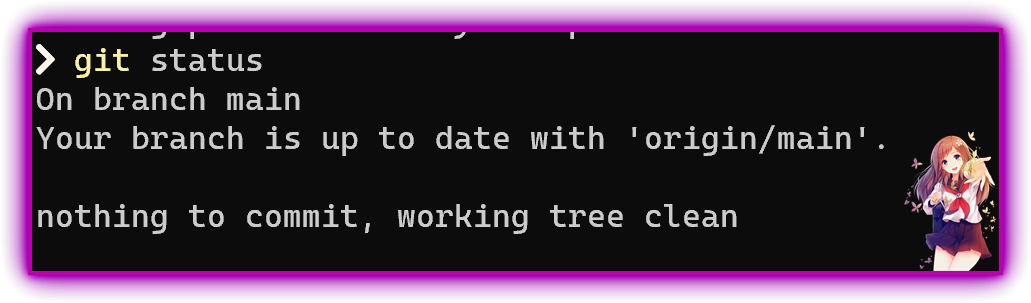
I'm on manual build and it works fine, did you check git status
boreal mason
Do I just download the installer and fix it from the gui? Like I don't know what I'm supposed to do.
alpine valley
alpine valley
I'm on manual build and it works fine, did you check `git status`
should say this https://i.imgur.com/9c7teYx.png
 alpine valley
uhhh, never encountered that, can't help, sorry
boreal mason
alpine valley
should say this https://i.imgur.com/9c7teYx.png
Also I'd just like to add, that's a sick screenshot overlay!
boreal mason
alpine valley
uhhh, never encountered that, can't help, sorry
Alright thanks anyway
shell veldt
if you're stuck updating try unpatching and repatching after the update
boreal mason
and how exactly would I do that?
boreal mason
sorry, I'm just making sure. I do that inside cd vencord right?
alpine valley
user submitted plugins

But yeah, I don't recommend manual install either unless you know git and how electron works
alpine valley
shell veldt
.class-of-the-day-divider:has(+ .class-of-the-day-divider) { display: none; }
smth like this? 
.divider-IqmEqJ:has(+.divider-IqmEqJ)
{
    display: none;
}
actually nvm, I don't even see armcord loading it
okay it's loaded, it just does not work for me, not sure what I'm doing wrong
alpine valley
nope, still there
shell veldt
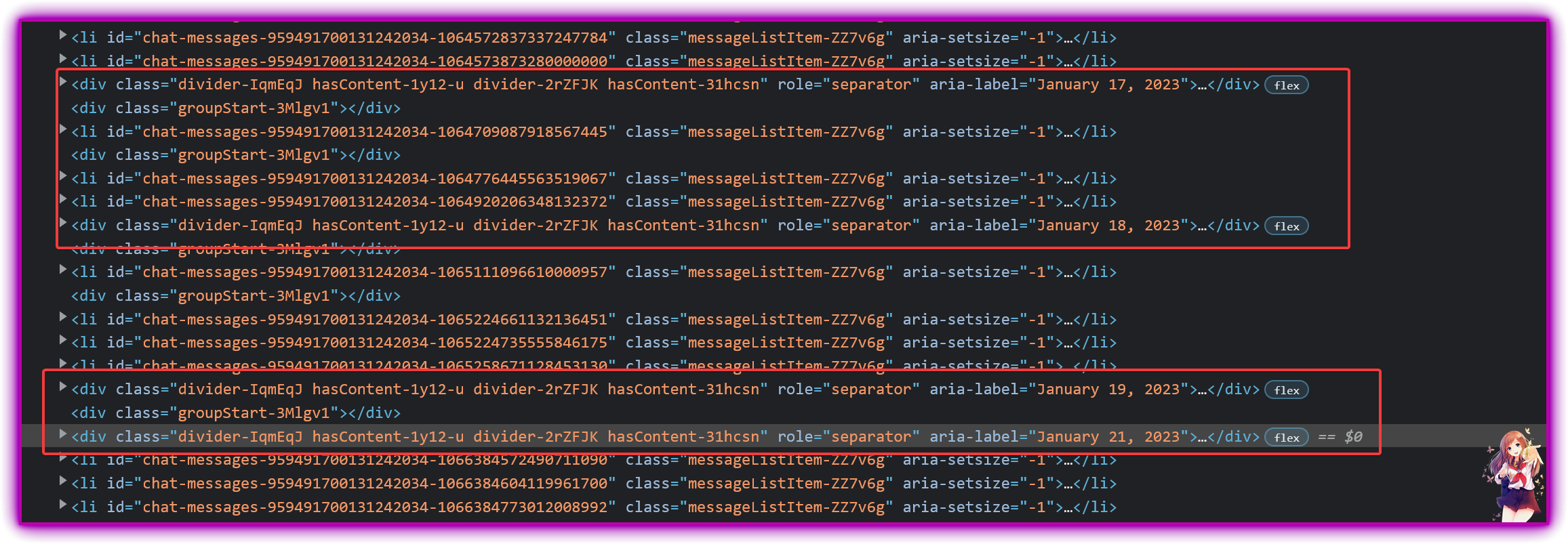
can u show a screenshot of the element tree around it
alpine valley
 shell veldt
ah yeah
alpine valley
yeah that won't work
shell veldt
there's a groupStart in between
alpine valley
since it's always followed by that
shell veldt
can you show one that does have content beneath?
 shell veldt
try css .divider-blah:has(+ .groupStart-blah + .divider-blah)
alpine valley
Yep, that fixed it!
Thank you very much!!! ❤️ 
Here it is for everyone if someone wants (author is Vendicated cuz... yes)
shell veldt
zip 
alpine valley
you think people would understand zpaq file?
alpine valley
Armcord wants manifest as well
Without it, it wouldn't load
and vencord doesn't support css, only github links(?)
boreal mason
regarding what you guys said about manual installs. You guys are of course 100% correct, but I'm using this as a opportunity to learn about git and electron. Tho it's not optimal when encountering problems while not sober 
rough saffron
we support css
you can paste it into quickcss
in vencord settings there's a button to open it
boreal mason
But I managed to fix it and I'm grateful for the help!
alpine valley
rough saffron
we support css
you can paste it into quickcss
in vencord settings there's a but...
o shit you're right
I think that's a bug

<br> shouldn't be in style 
rough saffron
lol
shell veldt
(it doesn't matter)
that was also fixed ages ago
you're like a month outdated
wait nvm
GitHub
The cutest Discord client mod. Contribute to Vendicated/Vencord development by creating an account on GitHub.
 warm birchBOT
shell veldt
https://github.com/Vendicated/Vencord/blob/main/src/utils/quickCss.ts#L32-L33
warm birchBOT
shell veldt
https://github.com/Vendicated/Vencord/blob/main/src/utils/quickCss.ts#L32-L33
**quickCss.ts: **Lines 32-33
VencordNative.ipc.on(IpcEvents.QUICK_CSS_UPDATE, (_, css: string) => style.innerText = css);
style.textContent = await VencordNative.ipc.invoke(IpcEvents.GET_QUICK_CSS);
I fixed it in the initial assign but not inside the update handler
innerText bad bad
rough saffron
lol

 shell veldt
doesn't yeah
echo marsh
I think firefox is being weird then
Because if I add something random to quickcss and then close the browser, the content remains after reopening the browser
even though I'm using the userscript this time
shell veldt
the reason is that Discord uses a content security policy (browser feature) to block loading scripts from third party sites. Because the css Editor is fairly large, but also for simplicity, it's loaded from cdn on demand which is blocked by this policy. The desktop install and browser extensions intercept requests to remove the content security policy but this isn't possible from the userscript
shell veldt
echo marsh
Because if I add something random to quickcss and then close the browser, the co...
that's normal
the userscript does support custom css, you just can't open the editor
echo marsh
but... it let me open the editor
echo marsh
echo marsh
ok Firefox csp is weird
as shown here
shell veldt
then you either have some other extension removing the content security policy or Firefox bug
echo marsh
I'm on Arch so that might be part of it
though idk which extensions I have would modify csp other than userscripts (I disabled ublock origin when debugging this issue)
 crystal epoch
C:\Users\Blu\Downloads\Vencord>pnpm inject

> vencord@1.0.1 inject C:\Users\Blu\Downloads\Vencord
> node scripts/runInstaller.mjs

Downloading VencordInstaller.exe
(node:13760) ExperimentalWarning: The Fetch API is an experimental feature. This feature could change at any time
(Use `node --trace-warnings ...` to show where the warning was created)
Finished downloading!
Now running Installer...
node:internal/errors:863
  const err = new Error(message);
              ^

Error: Command failed: C:\Users\Blu\Downloads\Vencord\dist\Installer\VencordInstaller.exe
    at checkExecSyncError (node:child_process:871:11)
    at execFileSync (node:child_process:907:15)
    at file:///C:/Users/Blu/Downloads/Vencord/scripts/runInstaller.mjs:119:1
    at process.processTicksAndRejections (node:internal/process/task_queues:95:5) {
  status: 2,
  signal: null,
  output: [ null, null, null ],
  pid: 5572,
  stdout: null,
  stderr: null
}

Node.js v18.12.1
 ELIFECYCLE  Command failed with exit code 1.

C:\Users\Blu\Downloads\Vencord>```
error while trying to install vencordany idea?
bold ice
Hi, i just joined a server with a welcome screen (guild welcome screen) and it won't disappear or do anything - default discord browser version and discord mobile works perfect, but vencord application doesn't let me through, is there anything i can do to figure out what happened?
rough saffron
if you disable all plugins and it still happens, then it's not a problem with vencord
crystal epoch
rough saffron
if you disable all plugins and it still happens, then it's not a problem with ve...
yo
any idea
with the vencord installer error?
i just can't install
rough saffron
what's in the dist/Installer folder
crystal epoch
rough saffron
what's in the dist/Installer folder
Mode LastWriteTime Length Name
-a---- 21/01/2023 17:26 19 etag.txt
-a---- 21/01/2023 17:26 10041856 VencordInstaller.exe
rough saffron
are you able to just run vencordinstaller.exe
crystal epoch
rough saffron
are you able to just run vencordinstaller.exe
nothing happens when i try to run it
rough saffron
delete it and download from github
rough saffron

crystal epoch
rough saffron
<a:a_raised_eyebrow:900850670440177735>
really
rough saffron
so absolutely nothing in the terminal
crystal epoch
PS C:\Users\Blu\Downloads> .\VencordInstaller.exe
PS C:\Users\Blu\Downloads>
that's all
rough saffron
crystal epoch
PS C:\Users\Blu\Downloads> .\VencordInstaller.exe
PS C:\Users\Blu\Downloads>
& .\VencordInstaller.exe | Write-Host
run that
it'll print output to terminal
crystal epoch
PS C:\Users\Blu\Downloads> & .\VencordInstaller.exe | Write-Host
Using UserConfig
Checking if C:\Users\Blu\AppData\Roaming\Vencord\dist exists: Yes
Is Dev Install: false
Fetching https://api.github.com/repos/Vendicated/Vencord/releases/latest
Checking if C:\Users\Blu\AppData\Local\Discord\app-1.0.9010\resources exists: Yes
Checking if C:\Users\Blu\AppData\Local\Discord\app-1.0.9010\resources\app exists: No
Checking if C:\Users\Blu\AppData\Local\Discord\app-1.0.9010\resources\app.asar is directory: No
Found Discord install at C:\Users\Blu\AppData\Local\Discord
rough saffron
and then the app just closes?
crystal epoch
yep
rough saffron
bruh
crystal epoch
nothing happens
rough saffron
wtf lol
shell veldt
does manually downloading the installer work? @crystal epoch
crystal epoch
shell veldt
does manually downloading the installer work? <@757738778633961592>
that's the manually
shell veldt
has it worked before
crystal epoch
shell veldt
*has it worked before*
yes
only with pnpm inject
but now nothing works
shell veldt
are u on 32 bit
crystal epoch
no
shell veldt
or have ancient gpu from 2003
shell veldt
I am sorry, but all processors that included the Intel HD Graphics 3000 engine were discontinued quite some time ago and are no longer supported. Intel does not provide any Windows 10 drivers for this engine at all. The final drivers produced for Windows 8.1 include DirectX 10.1 and OpenGL 3.1 support
shell veldt
?
you should get a more recent gpu
anyway you can use the cli https://github.com/Vencord/Installer/releases/download/v1.2.3/VencordInstallerCli-amd64.exe
crystal epoch
shell veldt
you should get a more recent gpu
i was using vencord until yesterday but today discord started giving update error and i had to uninstall and install again and only now the installation is giving this error
after trying the cli 4 times now vencord just has install again with the powers of greyskull
 vale cedar
my vencord went away after discord update + I tried repatching + restarting discord but no result
rough saffron
fully close discord from your taskbar
download the latest gui installer from github
reinstall
should fix
¯_(ツ)_/¯
shell veldt
u love a lot of people using ancient installer
i should add installer update checks to updater

vale cedar
rough saffron
should fix
thank you!
bright chasm
I love how with every discord update, the installer doesn't work, and then I have to reinstall discord..
shell veldt
cool
 hushed glacier
can you get pinged in a channel you dont have access to (hidden)?
shell veldt
yes but u don't see
bright chasm
Is there a way to fix it
rough saffron
get discord to stop updating
bright chasm
but why should I have to reinstall discord each time, just for discord to get properly patched
rough saffron
what
you dont have to reinstall discord
you should just need to run the vencord installer again
lol
hushed glacier
shell veldt
yes but u don't see
but if I have the showhiddenchannels plugin, do i get a message that i have something unread?
rough saffron
no
it only shows the hidden channels. you can't get messages in them because you don't have perms to do so
hushed glacier
damn then i have no clue why do i get that notification on that server all the time everyday
rough saffron
ghost ping?
¯_(ツ)_/¯
protip: when you get the notification, lock your pc and the notif should appear on your phone with whoever sent it
hushed glacier
how could i fix it? i have the Read all button plugin too and pressing it doesnt fix
rough saffron
idk
 faint storm
my vencord uninject himself how do i inject it back
hushed glacier
further debugging, marking to not show muted channels makes the notif disappear
but the channels i have muted bellow the hidden ones are accesibles by me, and i have no notifications 🫠
this is one of the weirdest things i have seen
rough saffron
oh
i mean
it can pull the latest message id
so if that updates ig its a "new message"
hushed glacier
i muted every hidden channel
and it disappeared
they were sub channels and admins channels
rough saffron
does this not work?
 hushed glacier
how do i get to that window?
rough saffron
its in the plugin settings...
rough saffron
rip
hushed glacier
idk why i get notifications on admin records channel
but i guess they got an eye on me 👁️
actually its happening in other discord too wtf
the hide unreads is enabled but not working
as i mute hidden channels, i get the msg to scroll the view to a lower hidden channel
hushed glacier
nop no forums in this server
btw right clicking the gear for quick context menu shows the options but clicking doesnt work
for any vencord option
hushed glacier
is there any way I could troubleshoot myself the showhiddenchannels option not working?
nah definitelly something weird happening, i disabled everything. Enabled showhiddenchannels with the Hide unreads option Enabled. Didnt work. Enabled read all button plugin, restart, press the button, still the unread msg

import settings isnt turning on the plugins i had i wanna die
shell veldt
hushed glacier
btw right clicking the gear for quick context menu shows the options but clickin...
heres why

discord uses that object to look up the key
idk why
Discord dumb
also Epic discord code
hushed glacier
and what about the import export settings feature
i enabled all the plugins, tried to import again, didnt work, you pinged me in that msg, i came here and saw it, and the windows bar icon still has the (1) red ball

okay fixed it
idk how the fck, i closed discord completely (control R is useless) and opened it up, went straight to import and it worked
still getting the show unread notif but i can live with it i guess 🙄 if you leave me a msg on how to troubleshoot that i can give it a try
shell veldt
pushed so if u update you can use them
wooden barn
updated discord, vencord no longer mounts, pnpm inject gives weird error:

why in gods name is fetch not defined

 rich tide
you need to use a node version that supports native fetch
 silent breach


 hushed glacier
shell veldt
i fixed it
hushed glacier
shell veldt
i fixed it
the change is only in the canary version??
 lone merlin
how can i download themes?
rocky lark
go to https://betterdiscord.app/themes and find a theme

BetterDiscord
BetterDiscord extends the functionality of DiscordApp by enhancing it with new features.
then click source on the right
find a file that’s like name.theme.css
click the file
click raw
and copy the url into vencord themes tab
scenic grove
 next folio
install vencord on system32
rough saffron
do not
 untold kelp
hello
can someone help me install vencord?
i dont know how to do it
i watched a tutorial but it looks different to him
so idk what to do
crystal epoch
which platform you are using?
untold kelp
windows
crystal epoch
come to dm my good man
untold kelp
okayy
rough saffron
untold kelp
can someone help me install vencord?
scenic grove
fine ill be useful in support
crystal epoch
@rough saffron @untold kelp is having problems
the cli and the vencord installer didn't worked
untold kelp
yep
rich tide
why didn't you tell him how to install here?
rich tide
no, he did on dm
rich tide
we have no idea what didn't work
rough saffron
vsupport more info
mighty ravenBOT
rough saffron
vsupport more info
"doesn't work" or similar are not very helpful.
You can make our lives easier by providing the following information:
- What platform are you on? Windows, Mac, Linux?
- What client are you using? Discord Desktop, Discord Web, Armcord...?
- What branch are you on? Stable, Canary, PTB...? If not on stable, does it work on stable?
- Are you fully up to date? You can check by going to the Updater settings tab. If you cannot access that page, use the installer. If no, update and try again
- Are there any errors? Open the console (Ctrl+Shift+I) and check the console tab. If there are any errors (red text), please provide them.
- Does this issue persistently happen, or only sometimes?
- Please provide steps to reproduce this issue. Screenshots or videos are also helpful.
untold kelp
im on windows
discord desktop
idk what the branch im on
i just downloaded vencord so im pretty sure im up to date
crystal epoch
rough saffron
vsupport more info
all tools he used are up to date
he is using stable