#technology-discussion
1 messages · Page 359 of 1
 deep sapphire
which is likely why it was set so high
pretty stupid though because you can change it in the menu
but it did nothing
 dull garnet
Well
They would have just changed one of the many roms
Guess the US one had the value locked vs other regions
deep sapphire
weird lmao

 tall crag
hello friends might i get some help with graphics settings thanks #questions-and-help message
 modest moss
what actual hardware are you running?
modest moss
tall crag
hello friends might i get some help with graphics settings thanks https://discor...
^
tall crag
ryzen 5600x and rx460 2gb
modest moss
what happens if you try running on high?
tall crag
oh took me a while to find it, it drops from 60 to 35-40 and i can feel it...
modest moss
what resolution are you playing at?
modest moss
could try dropping to 720p with high settings
also may be worth trying borderless windowed if you're on fullscreen
tall crag
modest moss
also may be worth trying borderless windowed if you're on fullscreen
i was. but now i'm being forced to exclusive fullscreen or windowed to change my OS resolution
modest moss
unfortunately your gpu is a potato
tall crag
wait there are GPUs that let you change the game resolution on borderless windowed??
modest moss
no I just mean in general
tall crag
I'm tempted to play 720p windowed on high settings but my UI is all messed up rn and i can't scale it down
modest moss
maybe some other nerd in here will have a better idea
modest moss
click his first link, it's super dark
dull garnet
I see
Lighting setting?
Also did they try another map, I think that one place has large shadows in places
tall crag
dull garnet
Lighting setting?
it only happened 3 times during a cinematic when it was nighttime outside >_<
vram is fine.... i think....
 tall crag
yes, for now i will cope with low framerate
 sly elk

I enjoy this kinda post so much XD
that machine apparently has a k6-2. those came out in 1998
by 2000 the pentium 3 was already old news
today 2 years feels like nothing in tech haha
 snow cypress
So I decided to switch pc cases but now im not getting any display. The pc turns on but nothing pops up
 latent grotto
So... are you plugged into the mobo or the gpu@snow cypress
snow cypress
The gpu
latent grotto
Are you seeing fans spin on the gpu
snow cypress
No the only fans spinning are the case fan and the fans from the liquid cooler
latent grotto
The gpu fans aren't spinning?
snow cypress
No but it’s lighting up
modest moss
did you plug in the gpu power cables right?
snow cypress
Probably not
sly elk
take a picture?
latent grotto
I'd check connections and make sure its seated
modest moss
make sure theyre clicked in
snow cypress

 wide hill
probably the gpu is even so cool that they don't spin till hit certain temperature
latent grotto
It might have a zero rpm mode
wide hill
and or check bios if you can set the fan speed
latent grotto
But I wouldn't know
I dont suppose your mobo has a led display for errors or something?
wide hill
boot codes?
snow cypress
Unfortunately no
sly elk
do you have gpu power plugged in?

(the plugs might look different but should be in a similar location on the front/outer edge)
snow cypress
Yea
 wide hill
try checking if your hdmi cable is connected to the gpu
and or, if that isn't connected, try the motherboard hdmi
sly elk
that looks good
wide hill
if that doesn't work, try removing the cmos battery to reset the bios
sly elk
what kinda motherboard?
modest moss
may want to remove and reseat the gpu
sly elk
we can check if it has any status LEDs
latent grotto
May just need a restart
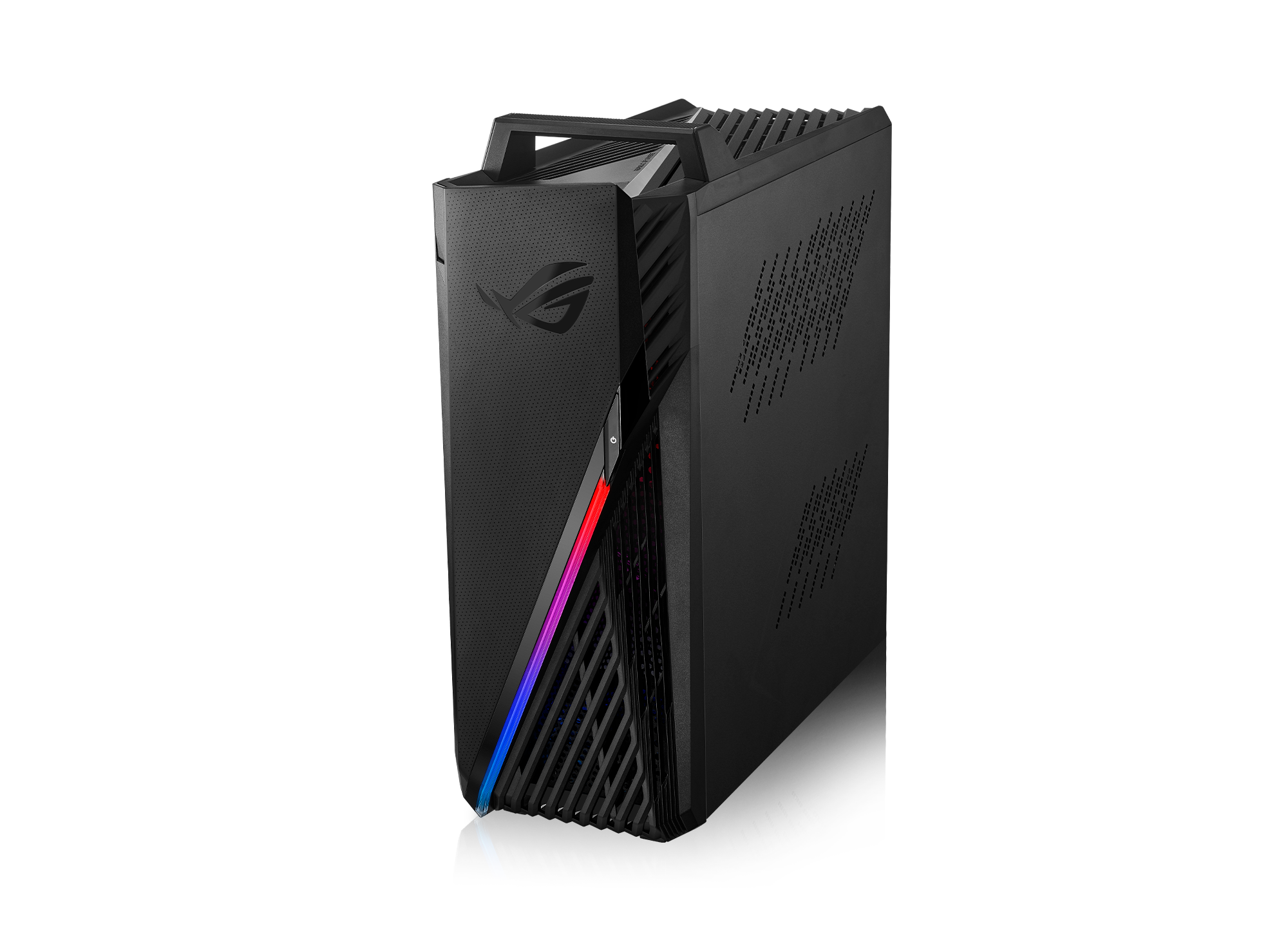 latent grotto
I've had it happen with my old gpu where it wouldn't display a picture if I turned it on immediately after plugging in power and had to be restarted
wide hill
👀 spec doesnt say what motherboard it has
modest moss
snow cypress
G15dk
my dude are you the guy they made install an AIO and then superglue your power button?
modest moss
@deep sapphire @hard drift get in here and redeem yourselves
sly elk

 latent grotto
Wow hank
snow cypress
Got tired of doing the whole screwdriver on the motherboard to turn it on so decided to try and switch cases
modest moss
the guy who you told to superglue his power button, he tried to change case and now his gpu won't work
redeem thyself
latent grotto
Are you using the same psu in the new case?
deep sapphire
not my fault, not my problem
snow cypress
Yea
modest moss
deep sapphire
not my fault, not my problem
yikes
deep sapphire
🙂
latent grotto
Can you take a photo of all the connections on your mobo@snow cypress
sly elk
trying to find some info
I love that they put a sticker over the board model number

does that mobo look like yours?
 modern iris
hello, im really confused why I have these weird blinking white things on my screen whenever im panning the camera around. I have a geforce rtx 3060 and play on Direct 11. Is this a sign my gpu is dying D: or is this easily fixable
snow cypress
Yes nearly identical
deep sapphire
modern iris
hello, im really confused why I have these weird blinking white things on my scr...
that is an asset in the background/texture that isnt loading fast enough for the camera pan
you could probably fix it by disabling LOD
 jaunty light
 modern iris
i did try that , i should have mentioned b4 hand I turned on LOD but that didnt work
and then turning it off didnt work either
 snow cypress
latent grotto
Can you take a photo of all the connections on your mobo<@310777537913421834>
snow cypress
latent grotto
Can you take a photo of all the connections on your mobo<@310777537913421834>


 deep sapphire
if you already tried updating your graphics card drivers probably not much more you can do, as long as it isnt occurring everywhere I wouldnt worry about it
it seems to be happening because of the fast camera panning
modest moss
could decrease draw distance?
modern iris
that might be it: when i was trying to recreate the effect to record so you guys know what im on about it was only when i moved it real fast that it happened
deep sapphire
game engines load and unload assets to save memory and if the camera pans too quick it could be that the asset didnt load fast enough
modern iris
lemme go test it more :o
But yes I have updated my drivers; i checked a few mins ago and I was up to date
sly elk
snow cypress
the ram is in the [][x][][x] slots?
looks correct to me
the plugs look like they're all in the right places
snow cypress
sly elk
the plugs look like they're all in the right places
Could it be this?
 snow cypress
Yea
deep sapphire
modern iris
But yes I have updated my drivers; i checked a few mins ago and I was up to date
It’s more of an issue if you get assets doing this frequently as that could be a sign of bad drivers or fault GPU memory
sly elk
I don't think the way you have things connected would lead to you getting no video
wide hill
have you tried connecting the hdmi to the different ports in your pc?
there are 2 hdmi ports you have, which one is plugged in?
sly elk
so I'm looking at this goofy video

Asus ROG Strix G15DK Pre-Built PC Unboxing ! keep in mind i will do a follow up video:)
Specs... also here's a follow up video after some changes i made to this rig to make it better for me https://www.youtube.com/watch?v=CXvGYLLdoV0&t=3s
My End Result and also a lot of question answer over on this video: https://www.youtube.com/watch?v=4esLLln2...

what happened to the heatsink to the left of the cpu? 😄
snow cypress
wide hill
there are 2 hdmi ports you have, which one is plugged in?
Yea I tried the motherboard and the other
wide hill
and both doesn't show anything?
snow cypress
wide hill
and both doesn't show anything?
Nope
latent grotto
think the cpu is a 5600x so mobo wouldn't have any picture anyway
snow cypress
Nope
deep sapphire
does your monitor get a signal
snow cypress
Nope
deep sapphire
do your GPU fans turn on
latent grotto
they're not spinning
snow cypress
No, just lights up
latent grotto
we're not sure if it has a zero rpm mode or not
wait does it spin at all when you first turn it on
cuz they should still spin at the beginning
and then stop
deep sapphire
yeah, thats part of the boot up checksum
wide hill
reset bios time
deep sapphire
MOST of the time this is related to memory, its likely either not installed correctly, or it went bad
modest moss
leaning towards removing cmos battery for 10 mins, I had to do that
deep sapphire
CMOS battery being dead will usually still boot after a certain duration of time but I guess I wouldnt rule it out
regardless, yes I didnt read up but from what I gathered this PC was put into a new case correct?
latent grotto
yea put into new case
wide hill
i meant for the cmos to be removed so we get a new bios configuration
deep sapphire
did you remove all the components from the board before you installed the new board
and did you properly ground yourself before touching the board
 modest moss
wide hill
i meant for the cmos to be removed so we get a new bios configuration
modest moss
wide hill
i meant for the cmos to be removed so we get a new bios configuration
right, I've had to do that when a gpu upgrade was being a tool, I was getting no video signal
@snow cypress do you have a spare old pcie gpu?
wide hill
i just noticed, its a 5600x, ofcourse the motherboard hdmi port aint gonna work
snow cypress
modest moss
<@!310777537913421834> do you have a spare old pcie gpu?
Unfortunately no
modest moss
should have just had a local tech guy replace the power button instead of buying a new case tbh
latent grotto
what if they wanted more airflow
modest moss
too soon
tall crag
i assume it worked fine until you decided to switch just the case?
snow cypress
Yea
wide hill
have you tried removing the cmos??
snow cypress
Removed it for like 1 minute
wide hill
and plugged off the power brick?
snow cypress
Yea
latent grotto
time to go check all the connections and reseat the gpu while the psu is unplugged again
did you feel a click for everything you plugged in?
wide hill
its weird for the gpu to light up and still isn't seated correctly 
snow cypress
Yea on the gpu and some of the cords
modern iris
ty for the help earlier ^^ for some reason its not happening anymore after lowering settings and restarting the game, and nah it wasnt frequent b4, it only just started very infrequently today :p
latent grotto
what do you mean some
modern iris
my gpu is new so id have been very mad if it was already dying xD
latent grotto
unless its the I/O connectors or usb 3 there should have a click for all the connectors
snow cypress
This big one and this corner one clicked when plugged in

 deep sapphire
modern iris
my gpu is new so id have been very mad if it was already dying xD
deep sapphire
modern iris
my gpu is new so id have been very mad if it was already dying xD
yeah I feel ya it would be frustrating, like I said if its infrequent I wouldnt worry about it all that much
snow cypress
Yea those and the ones in the power supply clicked too
deep sapphire
when you installed the board
modest moss
the gpu clicked itself when putting it in right?
 deep sapphire
yes I am
latent grotto

deep sapphire
and for some reason not every case already has them screwed in
modest moss
I built a pc without mobo risers many years ago
I was lucky, all it did was a reboot loop and didn't fry anything
deep sapphire
these work as a ground, so its very easy to fuck your PC up haha
this is how I fried that CPU fan controller
I was a dumb kid

modest moss
I kinda suspect the gpu might not be fully seated, you sometimes have to push scarily hard
snow cypress
So i powered it on and the gpu fans did start spinning before stopping
deep sapphire
well that means your system is likely booting properly
if it wasnt the fans would keep spinning
are you seeing the HDD activity light blinking
latent grotto
sure would be nice if we had a mobo with boot codes 
wide hill
it is a new gpu right?
snow cypress
deep sapphire
are you seeing the HDD activity light blinking
The what lights?
deep sapphire
this could easily just be the cable is bad/not inserted or the monitor did automatically detect the signal and needs to be manually set
latent grotto
same gpu that came with their prebuilt
deep sapphire
the ||| icon on the front of the PC
assuming you put the case headers in
the little connectors that go in bottom right corner of the board
deep sapphire
why wouldnt it
wide hill
budget
deep sapphire
imagine buying a case that doesnt even come with a drive indicator light
snow cypress
These?

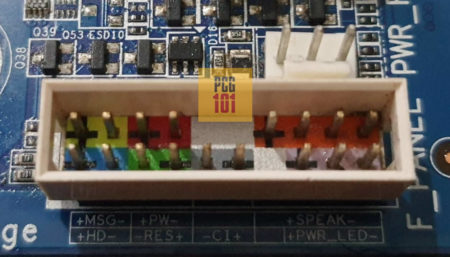 snow cypress
Nope dont see those
deep sapphire
what is your mobo
it has to
or you wouldnt even have a power button
or any front IO
 snow cypress
Yup
deep sapphire
so you dont see any blinking light on the front of your PC?
the only time it doesnt blink is if its off or your system hard crashed (or it didnt post)
snow cypress

 deep sapphire
no
snow cypress
Nzxt h510
modest moss
that's an odd looking case
deep sapphire
but he would still see the BIOS splash screen
latent grotto
may want to try a different hdmi port on the gpu or monitor or something
deep sapphire
supposedly there is another LED in the center of that
modest moss
how many times have you put the gpu in the pcie slot on the mobo? just the initial once?
deep sapphire
that works as the HDD LED
wide hill
there is only 1 hdmi port he can use on the gpu
snow cypress
modest moss
how many times have you put the gpu in the pcie slot on the mobo? just the initi...
Yea
latent grotto
i'm surprised theres only 1
modest moss
you need to take it out, put it back in the pcie x16 slot and make sure it clicks in
latent grotto
i'd expect at least 2
wide hill
there are 3 displayport ports
modest moss
gpu hasn't been reseated yet
latent grotto
ah 
modest moss
this must be the next step
 latent grotto
just send it to hank
modest moss
Levant is paying
deep sapphire
300 dollar DHL repair
snow cypress
Tried all 3


 void dove
if everything is normal, then reseat gpu, reseat ram
deep sapphire
so no HDD light, RAM and GPU were reseated
modest moss
seriously though, the gpu could behave like this if it's not fully in the pcie slot
deep sapphire
did you look at the stand off screws
void dove
also if cpu support video out without gpu, try without gpu first
to make sure everything else works fine before gpu
modest moss
void dove
also if cpu support video out without gpu, try without gpu first
5600x
modest moss
it's not
void dove
if it worked before, then scratch that idea
latent grotto
yea lets just reseat it
snow cypress
Gotta try and take out the gpu and put back to see if that works
latent grotto
it was mentioned earlier but idk why we didn't do it yet
deep sapphire
did you reseat your ram too
void dove
does the mobo have post codes?
deep sapphire
it was mentioned before
void dove
error codes/beeps?
latent grotto
void dove
does the mobo have post codes?
no
modest moss
it's an asus rog prebuilt with a broken power button on the case so he's decided to put it in a different case instead of getting a guy to replace it
latent grotto
if it had post codes this convo would be over like 20 minutes ago
modest moss
wide hill
0 post codes are hell
void dove
see, i have an old PC speaker i ripped out of an ancient computer i use for this stuff
wide hill
no beep noise, and no number
void dove
its literally a tiny speaker on a 5cm cable with a header
plug it in, beep codes, remove when PC fixed,
handy for cheap Pcs
sly elk
or leave it plugged in, if you like your computer to beep when it turns on
void dove
yeah actually i think i left it plugged in last time
deep sapphire
yeah could probably buy one on amazon for 3 bucks
void dove
my Mobo will give beeep codes if the fans aren't running on boot
deep sapphire
cheap boards usually dont include diagnostic LEDs
im assuming this thing has a B550 ASUS Prime mobo
void dove
if you can get ur hands on an old dead office computer, you cna prob rip the speaker out of it
deep sapphire
ASUS USA
ASUS Prime series is expertly engineered to unleash the full potential of AMD and Intel processors. Boasting a robust power design, comprehensive cooling solutions and intelligent tuning options, Prime series motherboards provide daily users and DIY PC builders a range of performance tuning options via intuitive software and firmware features.
anyways this chat is getting bloated im just going to make a list of things should be attempted
1.) reseat graphics card and monitor display cable
2.) reseat the memory, if still no video signal remove all ram and install 1 ram stick in the first slot (far left) and test
3.) check monitor to see if it could be on the wrong output (DVI instead of Auto/HDMI etc.)
void dove
also make sure the mobo power is plugged in properly, including the CPU power cable
deep sapphire
if all 3 of those things failed, you either have something else loose in there most likely power cords
or you fried something by not grounding yourself properly
modest moss
check for the mobo risers too
void dove
without beep codes, literally reseat and re-plug everything
oh yea, are you using a rizer cable?
some are bad for newer PCIe4.0 cards
try plug directly without the rizer if you do have one
deep sapphire
in any case, use that list, if it still doesnt work we can provide suggestions but at this point I think you just need to give it to a professional
modest moss
honestly didn't need a new case, needed a new power button installed by a pro tech who'd take like 10 mins and charge less than the case probably
deep sapphire
I have no comment on any of the stated above lol
modest moss
literally cried at this btw
latent grotto
rip shue
latent grotto
modest moss
much hurt, very tears


 odd sand
Now children, play nice! /s
 deep sapphire
uwu
deep sapphire
Seems alright so far
Sound kinda lags a tad but not that annoying
I honestly had no idea project 64 still existed haha thanks for the heads up
I remember looking a couple years ago and 1.6 was still the only one that was free
1.7 you had to donate to get access I think
modest moss
it was the top result on google for n64 emulator lol
deep sapphire
I don’t really use emulators much but I was watching some paper Mario videos earlier and kinda wanted to play it again lol
modest moss
I'm too lazy for emulators
snow cypress
Unplugged the gpu and put it back and now I got too this screen
 tall crag
whoa, so it was not properly sunk on the pci slot
happens to me i have to try like 5 times to put it right
latent grotto
snow cypress
Unplugged the gpu and put it back and now I got too this screen
thats good
press f1 and just follow the prompts
snow cypress
@modest moss @deep sapphire @latent grotto Thanks for the help and tips
deep sapphire
np
snow cypress
And from now on if I break something just look up a tech expert and take it to them

 sly elk
can you just have it above that cover panel?
modest moss
is this more evidence that rgb is a foolish trend that should die?
 umbral moss
RGB sells, and it's a markup feature
so it's here to stay unfortunately
people love blingy bullshit
modest moss
nice of you to be MIA when your AIO victim was needing help Bidori
modest moss

 hard drift
modest moss
https://tenor.com/view/shame-on-you-patricia-harlem-be-embarrassed-youre-embarra...
hard drift
modest moss
https://tenor.com/view/shame-on-you-patricia-harlem-be-embarrassed-youre-embarra...
🤷♂️
tall crag
huh my monitor is not glaring anymore after switching graphics to high
modest moss
what fps are you getting?
tall crag
modest moss
what fps are you getting?
45 after killing some settings
void dove
snow cypress
Unplugged the gpu and put it back and now I got too this screen
the fact that says "the VGA card is not supported by the UEFI driver" tells me you should update the mobo BIOS/UEFI, and probably is why you had so many issues
well and re-seating probably as well 😛
if it works it works, but should update anyway, if bios doesn't support the card, then you can have issues where bios wont appear on certain video outputs
rgbeeeeeeeeeeeeeeeeee overload
hard drift
awful....
modest moss
tall crag
45 after killing some settings
not bad, will tank in limsa but should be playable
tall crag
whoa buddy what do you do with 2x GPUs
modest moss
void dove
if it works it works, but should update anyway, if bios doesn't support the card...
I'd assume it IS supported by the bios, just needed a settings change, it's an Asus prebuilt lol
void dove
it literally says it isn't supported, dunno what else to tell you
tall crag
modest moss
not bad, will tank in limsa but should be playable
as long as it doesn't crash on dungeons...
void dove
the UEFI driver would be falling back to some generic method to display out during BIOS/UEFI screens
sly elk
maybe I should put a clicky switch under my enter key 😄
void dove
that doesn't affect the OS thou, so Windows is different
modest moss
I am happy to assume Asus don't ship incompatible hardware
hard drift
🤨
void dove
modest moss
I am happy to assume Asus don't ship incompatible hardware
ahahahahahah, you sweet summer child
you assume wrong
system builders are incompetent as fuck
hard drift
you could literally get away with a 3080/ti/3090
void dove
my ASUS motherboard, brand new, didn't support my 3070 out of the box
void dove
i had to bios update it to get it to not show a black screen
modest moss
dude he literally had the asus prebuilt running fine for several months, it just had a broken power button
 your thought process baffles me
tall crag
void dove
my ASUS motherboard, brand new, didn't support my 3070 out of the box
your thought process baffles me
tall crag
void dove
my ASUS motherboard, brand new, didn't support my 3070 out of the box
huh idk if other brands do it but my mobo came with a button so you just plug an usb with the new bios and it would load in 10min
void dove
tall crag
huh idk if other brands do it but my mobo came with a button so you just plug an...
only high end boards have that feature
hard drift
tall crag
huh idk if other brands do it but my mobo came with a button so you just plug an...
bios flashback isn't always good from some companies/boards
modest moss
no
hard drift
void dove
only high end boards have that feature
not true, my board was 150 and it has it
tall crag
void dove
only high end boards have that feature
hmm it was a msi b550 gaming edge
void dove
hard drift
not true, my board was 150 and it has it
ok so you've got the cheap version of bios flashback then
which requires the CPU to be supported
hard drift
i still wouldn't trust bios flashback
 potent arrow
void dove
only high end boards have that feature
potent arrow
void dove
only high end boards have that feature
Nah qflash is on most boards now
hard drift
even on a high end board
potent arrow
It's because you had a prebuilt with an OEM special that you didn't have it or the prebuilt company used an older revision of motherboard. Which also explains why it didn't support the 3070
Hi shue <3
void dove
when Zen 3 cpus came out, BIOSes needed to be updated
some people bought mobos which support zen 3, however ASUS and other vendors, were shipping boards with old BIOSses which didn't support Zen3
and becasue they had the cheaper version of bios flashbaack which needed a working CPU, and well their CPU didn't work
the bios flashback was useless
you only get, full, non-cpu dependent bios flashback on the expensive boards
deep sapphire

hard drift
deep sapphire
<:iseeyou:590986368533135390>

void dove
potent arrow
It's because you had a prebuilt with an OEM special that you didn't have it or t...
my parts were all bought individually, brand new, 6 months after 30 series came out
for a mobo to not have support for the cards, is stupid
thank god, the Mobo could support the zen 3 CPU i bought
potent arrow
You know what forget I even spoke
potent arrow
deep sapphire
<:iseeyou:590986368533135390>
Go back to bed wanker
void dove
otherwise i would have had to try and find one, or ask AMD to ship me one to just do teh update
which they can do
just costs shipping, and you need to send it back
tall crag
the bios flashback was useless
i can't stop laughing 😂
void dove
a APU CPU that is, an older gen which will allow booting
they ship you something like a 2700G
 tall crag
void dove
when Zen 3 cpus came out, BIOSes needed to be updated
some people bought mobos w...
tall crag
void dove
when Zen 3 cpus came out, BIOSes needed to be updated
some people bought mobos w...
wait please tell me this was for the 400 mobos and not for the 500 ones please
hard drift
you couldn't justify that even to me, you're talking there is 0 reason for it even at msrp literally overkill/waste of power
void dove
modest moss
dude he literally had the asus prebuilt running fine for several months, it just...
yeah , and i said, that the BIOS message doesn't affect the OS/Windows
i said, that it should be updated because it may cause issues with UEFI/BIOS screens appearing
it is appearing because the UEFI/BIOS is falling back to a generic display method
but likely some of the video out ports, will not work in BIOS because of this
fine if its working, but may not be good if things get relocated again, and use a different video out, and can't see the bios to see what the issue is if it doesn't boot
Additionally, there are a number of BIOS/UEFI security vulnerabilities which have been fixed by a lot of vendors in the last few months, as a bunch of BIOS hacks were exposed a while ago
void dove
tall crag
wait please tell me this was for the 400 mobos and not for the 500 ones please
i believe 400 and 500 were both affected, ill check
yup, both were affected, because 500 series chipsets, like x570, came out in 2019
zen3 was released on 2020, soo support had to be added to bios updates later
tall crag
x570 omg i can't 🤣
void dove
you should get a mobo with updated bios nowadays, but if you are unlucky, you could get some really old stock which has been sitting in a warehouse for ages
and your fancy new 5600x, wont boot in it
tall crag
void dove
and your fancy new 5600x, wont boot in it
right, but MSI shipped me a functional flashback 😍
it lacked the sticker on the box saying ready for 5xxx :(
void dove
as long as it isn't a cpu-dependent flashback, then yes
modest moss
void dove
yeah , and i said, that the BIOS message doesn't affect the OS/Windows
i said, t...
don't @ me again please, you are not somebody I wish to interact with
 void dove
modest moss
don't @ me again please, you are not somebody I wish to interact with
void dove
modest moss
don't @ me again please, you are not somebody I wish to interact with
why, im only stating facts based on my own experience, sorry if you took that as me patronising you, it wasn't supposed to be taken seriously
tall crag
potent arrow
hey they are both salty and loaded with msg
void dove
apparently i can't be fun and serious in a single message because it maybe misinterpreted
modest moss
void dove
why, im only stating facts based on my own experience, sorry if you took that as...
#technology-discussion message is patronising af, I don't fucking know you to have you speak to me like that
tall crag
NA or whoever was it already ruined sushi with cream cheese anyways
potent arrow
 hard drift
tall crag
NA or whoever was it already ruined sushi with cream cheese anyways
hard drift
tall crag
NA or whoever was it already ruined sushi with cream cheese anyways
😔 i love sushi and don't mind these but there's for sure better ones without cream cheese
tall crag
yeah well cream cheese is delicious and sushi doesn't fill me anyways but still
void dove
mmm salty
want me some sushi actually
lol, 3090 is just for the ppl with too much money and little sense
or people who do 3d graphics, because vram
jaunty light
sly elk
can you just have it above that cover panel?
there's unfortunately nowhere for the cable to go in that case
void dove
and in today's news, inexperienced PC builder, buys cooler too tall for his case, so he bends it to fit
 umbral moss
big brain strategy
void dove
yuup, person is a friend of a friend
he's such an idiot sometimes
i have that same cooler and told him he should have checked the measurements when he bought it
he didn't of course
because that cooler is absolutely massive, doesn't fit a lot of cases
void dove
yes it is, yeah that case looks like something cheap
sly elk
jaunty light
there's unfortunately nowhere for the cable to go in that case
there's another trick you can do 😄
but it may require more cable than you have
or get another cable extension
so that you have the fancy cable extension going almost straight out, and then the other one behind it coming back around
sly elk
void dove
and in today's news, inexperienced PC builder, buys cooler too tall for his case...
oh god how'd i miss that
void dove
sly elk
oh god how'd i miss that
lol, yeah its horrible, but he said it works fine
sly elk
it's a fan taco!

 uneven pier
As long as the heat pipes aren't damaged it'll function fine
Well
Probably should stick another fan on the other section
void dove
depending on which you buy, it does come with a 2nd fan
mine did, i guess he got the slightly cheaper one
jaunty light
sly elk
there's another trick you can do 😄
I can take out the cover but seems a bit naked and weird wo
sly elk
nah I mean

like that
just run your regular cable behind the strimer cable
tricky part is holding it up >>
thta, or take a dremel to the panel hahaha

wish I had something there to hold the free end up
if only I had a 3d printer 😄
I have no idea how I'm going to run the gpu cable
also the 'naked' part of the gpu cable is a lot longer
 deft sphinx
so I can’t wait but save the moeny and buy a new high end pc, what I have now is shit 750 ti + FX-8320 >.> so what ai though I will do is get the basic of the basic, I will wait for the i3 12 gen from intel to see the price of the CPU and MB them just buy some ddr4 16 gb of ram and an case and that’s all oh an gtx 1650 cuz moeny :/ , I can still get an SSD that can still be used once I have truly enough moeny for an huge upgrade, that will be able to also stream and tho the whole 3d vtuber stick that I wanna really try, untill then i will just learn 3d modeling with that pc that won’t be so bad for an total 3d beginner like me XD and ofc play FFXIV
jaunty light

void dove
deft sphinx
so I can’t wait but save the moeny and buy a new high end pc, what I have now is...
wall of text, reeeee
not sure if copypasta or not
deft sphinx
void dove
wall of text, reeeee

void dove
on PC, use Shift+enter, to get a newline in a single message
deft sphinx
I know XD
void dove
so
you
can
do
stuff
like
this
😛


 odd sand
void dove
because that cooler is absolutely massive, doesn't fit a lot of cases
odd sand
void dove
because that cooler is absolutely massive, doesn't fit a lot of cases
If you want a Hyper212Evo, I have an extra from a similar misjudgment (too tall for my server horizontal profile case by like 10mm)
Assuming that case can fit the height of the 212 even heh. I think it's 135mm but I'd have to look
void dove
ahh hyper 212, oldie but a goodie, i used to run one on my old PC, had that cooler for like 12 years or something insane
because i was able to re-use it from an older PC
had it since the Core2 Quad days
odd sand
They've continued to update it slightly as the years have gone on but yeah, if it aint broke dont fix it
The one I have came with 2 fans for the push/pull
void dove
yeah definitely, its just good
though i wouldn't run it for a high TDP CPU nowadays
just not good enough
but for midrange, its perfect
void dove
was nice of intel back in the day, to use the same mounting layout for newer CPUs 😄
odd sand
Speaking of 12900: That 12900KS pre-binned for 5.5ghz turbo is a spicy meatball
The Thermaltake Blue Orb is still my fav cooler design
void dove
so i went from a core2 quad q9300, which was a LGA775 socket, to a i7-3770, which was a LGA1155, and the 212 supported it because of same layout, though i think i had to change the backets to one of the others that came in the box,
personally im still a bit wary of the 12series Intels, becasue its new architecture and that usually has issues for a couple years until the rest of the industry adapts
similar to when skylake and then Zen1 came out, all new archs have issues
then agian like 90% of ppl dont see those issues, but im a power user, if its gonna have problems it will probably affect me in some way
umbral moss
odd sand
Speaking of 12900: That 12900KS pre-binned for 5.5ghz turbo is a spicy meatball
including the 450W TDP to run it
silicon doesn't like to run that fast
void dove
umbral moss
including the 450W TDP to run it <:haha:240841245239410688>
oh yeah. that, biiig OOF on the power draw
void dove
they maybe doing well in performance, but damn, is efficiency thrown out the window at the high-end
 dreamy chasm
"high performance" these days involves needing to turn your room into a fridge if you want it to not be hot as shot

umbral moss
void dove
they maybe doing well in performance, but damn, is efficiency thrown out the win...
that's because switching frequency is the dying gasp of an architecture
void dove
im more than happy with my 5900X, so no buyers remorse
umbral moss
silicon's switching losses become untenable above 5GHz without exotic cooling
intel ran into this problem with the netburst uarch too, they thought they could bring prescott up to 7GHz
until physics was like "nah"
void dove
now, im hoping the high TDP, is because its the first iteration of the new architecture, and that 13 or 14th gen, will improve efficiencies
void dove
there was talk a while back about new type of interconnects which would help with switching
but that takes many years to actually be usable
umbral moss
450W is inevitable when you want to run so many tiny transistors at such a high clockspeed
void dove
can't recall how long they'd been working on it
void dove
and a new process is needed if we wanna push further in terms of transistor density and power
 umbral moss
probably similar
dreamy chasm
we'll see
umbral moss
they have similar transistor counts and even with a node advantage it's still a dumb amount of heat being generated
silicon doesn't like to run so high
void dove
ah yes, its the copper
copper interconnects started hitting limits back in 20mn chips, and we've kinda pushed them to breaking point
they are looking at new generation interconnect technologies to get us to 2nm and below with them being reliable
https://semiengineering.com/breaking-the-2nm-barrier/ nerdy article on it
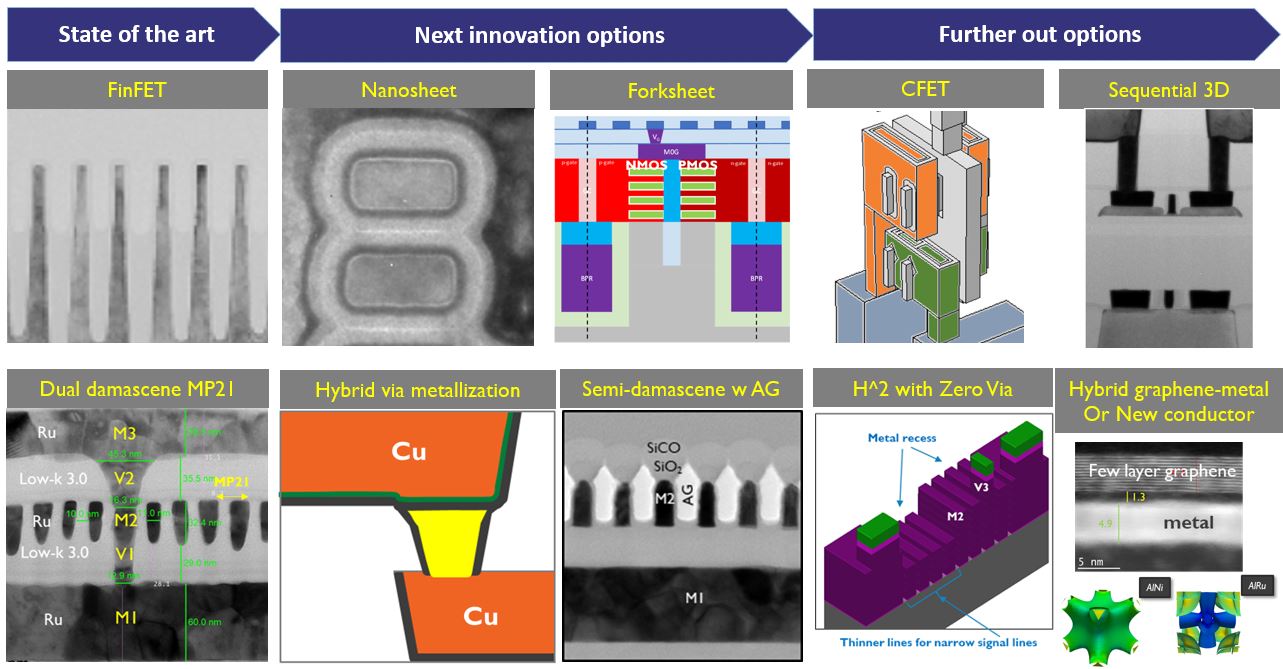
New interconnects and processes will be required to reach the next process nodes.
umbral moss
I mean, also consider that at some point you're switching to some other weird regime like spintronics
when your transistors are just one silicon atom
void dove
and thats without TAU, i think, didn't it hit 400+ at one point?
or do Alder lake not have TAU, i can't remember
eh, doesn't matter, still double
deft sphinx
will an i5-10400f be enough with an 2060 gpu + 16 gb ram for an two pc in one case streaming?? the other pc I will have to save moeny before I can even think of buying it
dreamy chasm
yes
deep sapphire
no
jaunty light
Maybe
dreamy chasm
depends on the games
deft sphinx
but this will be the best case scenario instead of buying an cheep i3 and what not and then thrwo it away after a year
deep sapphire
no
deft sphinx
dreamy chasm
depends on the games
it will be an two pc in one case, the i5 and the 2060 will not play games but just stream
I juat wanna get this part now and the second one once I have more moeny
dreamy chasm
you dont need a 2060 to encode if you're using it as a secondary system
deft sphinx
from what ai know people that use either two pc or two pc in one case, use the weak streaming pc to juat be the streaming pc, the other pc will be the games that play, I don’t know yest how the first pc captures the gameplay on the second on so that way you won’t have to worry the game interfearing with the streaming and vice versa
this is what I know about using such an sistem
I just don’t wanna waste moeny if I were to buy something now and not use it in 2 years
odd sand
They make dedicated capture cards still and external capture dongles as well
deft sphinx
or I migh just do that if the two pc in one case doesn’t work
odd sand
Yeah but they weren't trying to capture playing 4K 120fps ;)
IMHO I always try to have at least 100fps regardless of resolution. Would rather 1080p @ 120 than 4K @ 60
deft sphinx
thing is if the game crushes it can take the whole stream, with two pc using for streaming the stream can still go on or so I heard as an advantage
ugh any way I guess we advance that far
still such an set up won’t be good for streaming much any way
jaunty light
@sly elk may honestly just build the o11 with how much cables are in the rear now tbh. vertical holder or something for GPU, then I can be that much closer to saying burn money and doing a loop too 
sly elk
i wonder if the o11 has a hole for that cable specifically
i don't think I'm going to get rid of my ridiculous case any time soon
void dove
you probably need to get partnered or something to be able to use 4k
i doubt they would just let you straight away
id assume the same goes for twitch
 vestal crane
Why are you even trying to stream in 4k?
 pine kettle
There's really no need for 4k streaming
dreamy chasm
nobody's going to watch your stream if you're doing 4k native with no downscaling on your platform, either way
i.e twitch unpartnered
pine kettle
^ without partner yeah, it kinda sucks that it's not an option :(
pine kettle
xD
void dove
the difference in cost, in terms of bandwidth, re-encoding to lower qualities, etc
is not worth letting ppl do it for free
pine kettle
Oh yeah I see why they don't ^.^
dreamy chasm
id watch if i wasnt on data
odd sand
Majority stream in 1080p60
void dove
think i had a CRT that ran at that rez actually
sly elk
and that was a nice improvement over 800x600
I had a crappy ctx at one point that mostly wanted to do 640x480 I think 75hz
it'd do 800x600 at like 50hz
ye gods that was awful
void dove
my 2nd laptop was 1280x800, then my first monitor was a 19 inch, 1440x900
sly elk
i meant to scan a picture of my old beige rig
void dove
actually that monitor, i only just got rid of it, its prob 12 years old
sly elk
but the picture got shuffled away before I could get to it haha
void dove
haha, same
i have an old pic of our old win XP computer
when it finally died
but not our original Pentium 1
beige box champ
i do have the specs list somewhere though
with hand written notes, from the computer shop we bought it from
and i still have the hard drive
its a 4GB hard drive
and still works, last i tested it
sly elk
here we go
there is a lot of retro in that pic haha
and yet none of it looks as old as it is
void dove
old school i liek
sly elk
the 3 towers on the right
void dove
ok found the specs list
sly elk
i think one was a celeron 900, one was a p166mmx, the other was .. shit I dunno, a 166mhz pentium non mmx i think
void dove
id post it, but it has personally identifiable stuff on it 😦
sly elk
i paitned it silver/black to make it look modern
the g4 was like a year old >> thing was a spaceship
it's really hilarious, that
void dove
PC was a Pentium MMX, 233Mhz
32MB EDO RAM
4GB IBM HDD
4MB S3 VIRGE 3d graphics card
sly elk
that 17" beige monitor next to the lava lamp
i got that maybe 2 years before the LCD screen on the left
void dove
15 inch xga crt
sly elk
that's how fast tech changed back then
void dove
xga is 1024x768, lol, thats teh one
sly elk
technically the 22" cinema display existed around the time I got the beige monitor 😄
but it was a $5000 monitor
void dove
wow, our whole setup also came wiht a bunch of software and games
sly elk
when I got mine 2 years later it had drastically come down in price to $2500
which was still a lot X_X
void dove
and was 3300$
void dove
they were OK
we still have some of the CDs somewhere
mostly collections, like 10 games in one
sly elk
i liked ms' madness games
sly elk
hehe when computers sold at stores came with tons of stuff and a few games
and an encyclopedia on a cd
void dove
later on we got the computer updated to Windows 98, and started buying games ourselves with money we earned doing chores
sly elk
and usually shitty offiec sofwtare like ms works
void dove
ah, lol, the spec sheet, is just a webpage printout, so it has the date on it
from november 1997
found the hard drive 😄

4gb of glorious space
too bad the old drives dont have manufacturing dates on them
void dove
sly elk
and an encyclopedia on a cd
oh yes, forgot about that, ours did get bundled with Encarta 98 😄
i used that soooo much for school projects
and then dad got a dodgy copy of Encyclopedia Britannica i think it was called? from some other computer store
he also got a printer and scanner, not fucking cheap
the printer was 350$, scanner was 250$
which is insane because we didn't have a lot of money back then
but he mainly bought all of it for the kids, so he went all in
odd sand
void dove
Could be the 9810 number along the bottom. OCT98 sounds like a date 4GB drives would have still been made.
Also wtf do you still have that drive lying around lol
 keen hearth
Can I use this channel for asking for help with some issues that I’m having with my game? I know this channel is non final fantasy related and all that
void dove
lol, it doesn't take much room, soo ive just not thrown it away
maybe i should donate it to some tech museum, it still works last i checked
void dove
keen hearth
Can I use this channel for asking for help with some issues that I’m having with...
go ahead, it doesn't say you can't do ff14 related tech questions 🙂
they sometimes direct ppl here with game tech issues anyway
odd sand
I remember I got a 6.4gb drive around that time and was like wow I'll never fill this! ... And proceeded to fill it via filesharing in like 2 weeks after a couple ppl gave me generous access to a bunch of anime at the time
keen hearth
My game keeps crashing, or is running extremely choppy and slow and I’m not sure why. The issues started after I updated to endwalker, or at least in the last couple of days. Which is when I installed endwalker
My audio will cut out randomly (most likely due to the game being insanely slow) the game will slow down and lag, my emotes will lag and take 5-10 seconds to happen, other people and npcs take a long time to appear in cities etc. I’ve had times where I’ve gotten stuck outside an area, because its taking so long to render. right now I’m stuck in New Gridania because my camera is stuck under the ground and I’m unable to act.
I can still use the chat and minimap but it almost feels like the game is being throttled extremely hard. I’ve had a couple of dx11 crashes in the past, but didn’t think much of them.
My pc has blue screened once; My whole pc ends up slowing down because of the game struggling to run is probably also a detail to mention.
I’ve tried repairing the patch, capping the fps to 90, changing some settings around in nvidia control panel, updating windows, updating my GPU drivers and disabling full screen optimisations. And I uninstalled gshade for good measure, issues are still occurring.
I’m currently doing a clean install of the game, but if it doesn’t fix the problems, any ideas? Or has anyone experienced anything similar?
Apologies for the long message ^
void dove
hmm, ive heard of audio stuttering issues
but not something along the lines of what you are saying
it sounds like a potential issue with the graphics card but hard to say
can you play other games without issues?
keen hearth
I actually thought it was my headset at first, but I realised that Spotify will also cut out for a couple of seconds, so it seems more of a pc issue.
I actually need to check that, I’ve been playing nothing bur final fantasy 14 for last month or so 😅
void dove
also, you say the game is choppy and slow, but you tried capping the fps
what IS the game actually running at, fps wise
you can see the FPS counter in the system config screen i think
yeah top right of the system config screen
keen hearth
Once my game reinstalls, I’ll send a pic of what im seeing, im kinda just stuck in the ground and can’t move, but if I open the minimap, I can see my icon moving around the city.
Well my game was running at 85-90 fps in cities when the frame rate was uncapped. Outside of the cities, im not too sure. But I had it set to 144 max and never had many issues with frame drop in any areas except cities
I have a 2080 super and Ryzen 5 3600x and my built is quite new, only about a year and a bit old. so shouldn’t have any issues at all. Also never had any issues with any game except this one, and Warzone, but I just chalked that up to Warzone
void dove
ok yeah certainly a strange one there
so if im understanding correctly, the camera is stuck, but it sounds like the character can still move
keen hearth
Temps are all good as well, was thinking maybe a part kicked the bucket. But I actually finished dusting out my pc last week and it’s running about 5-10 degrees cooler
Yep, basically that; it’s incredibly strange, again I’ll get a pic when the game reinstalls
I don’t know how else to describe it other than my camera is stuck facing the ground
And I can’t do anything
void dove
there is a hotkey to reset the camera position
not sure if ive changed mine to a different keybind
but its the End key on mine
you cna check under keybinds > Movement, they are near the bottom of the list
Home also toggles 1st person mode, maybe worth a try to see if you can see where ur char is
 wide terrace
If spotify also cuts out, it’s unlikely that it’s your GPU
void dove
ctrl+shift+end, resets camera to default
keen hearth
Hmm, might try and see if that changes anything. Game will take a while to install since my internet isn’t the fastest
Also want to add these issues only happen when ffxiv is open, when it’s closed, everything is ok iirc
void dove
id also be interested in seeing the CPU and GPU load while its happening
task manager > performance tab
CPU is easy, GPU is a bit lower down usually, assuming your on windows 10
keen hearth
I’ll take a look at that too, when I tab out to ask manager, CPU was at about 60% load of I remember correctly, not sure about GPU
But my GPU should in no way be struggling whatsoever
void dove
rememer that by default, it will reduce gpu load when ur tabbed out

limit fps when client is inactive
will do that
i have also seen that setting bug out
and reverse the behaviour
so you could try turning it off
though id advise restarting the game when doing that
keen hearth
I’ll try that too
void dove
if this is caused by some broken game setting, then reinstalling the game wont help, as i believe it doesn't delete your settings
you could also try wiping settings to see if its that
all local settings are in C:\Users<username>\Documents\My Games\FINAL FANTASY XIV - A Realm Reborn
this includes character data, like hotbars and macros
keen hearth
Was wanting to rule out any issues with the install, doesn’t really affect me since I’m working most of today so just doing it in the background.
Hmm, yeah I might try that, I’ve exported my UI, I can import that back in right?
void dove
though you could try just deleting the FFXIV.cfg file in that directory, it looks like that has all the system settings in it, which are most likely to be the issue
void dove
keen hearth
Was wanting to rule out any issues with the install, doesn’t really affect me si...
yeah id think you could reimport
take a copy of the folder first
then you can just put it back after
keen hearth
Thanks for the help, will try all the above advice and fixes when it reinstalls and let you know if anything helps, and I’ll also try to grab a pick of my screen when I log in facing the ground
void dove
np
void dove
ah, something thats come to mind, with the camera anyway, if you have a controller plugged in, or some kind of virtual controller device, disable it, could be causing the camera to keep pushing in one direction
doesn't explain the performance issues thou
keen hearth
Nah, no virtual controller and no controller, only mouse and keyboard
 bitter tendon
I just got a new computer and I want to start playing ffxiv again. On my old computer, I have the free trial downloaded, but since the servers are full I cannot download the free trial on my new computer. The game files are too big for me to transfer via a flashdrive but would I be able to transfer the installer and if so what files would I have to transfer?
vestal crane
!faq download
 opal pantherBOT

Download FFXIV
vestal crane
Does this not work?
 sharp star
Nah that works
Probably won’t hurt to ask if someone has the exe of the free trial client
idk
bitter tendon
Yeah
sharp star
If you have the exe for the free trial client then copy it
Yeah it’s not gonna let you
download
vestal crane
Wow they really don't want free trial players playing
sharp star
So the only way is to ask someone who has the free trial exe
Keep circulating the tapes, etc.
bitter tendon
Oh so since I have already downloaded it I shouldn't have the .exe file?
sharp star
No the exe downloads the free trial client
vestal crane
You need the installer not the client
sharp star
right that’s what I mean
You need the free trial installer which you… have to ask around for.
vestal crane
You could try linking both computers with an ethernet cable and transferring it that way
sharp star
Actually
Gimme a sec. I might have it somewhere.
Wait holy shit lmao
I was able to download the free trial client from Amazon JP. It was from that free trial thing they did in JP when they updated it
It’s likely the global client but I’ll double-check
bitter tendon
ayo
sharp star
Yes it’s the global free trial client installer
I think I might’ve saved your ass but I gotta make sure it’s good with the mods
sharp star
It prompted me to select a language between NA EN, EU EN, FR, DE, and JP
It defaulted to NA EN
So yeah it’s the global client installer
bitter tendon
how do i find it thru amazon jp
sharp star
You need to have downloaded it prior.
bitter tendon
so search for it on my old computer>
sharp star
Nah they don’t let you register it to an Amazon Japan account since they cut off the free trial access. But once it’s there it’s downloadable
I managed to register it to my account on like… August 13 of 2020
So it likely got cut off when they went nuclear
bitter tendon
Oh got it
sharp star
@vestal crane this should be fine right? nothing rule-breaking and all
vestal crane
You're all good
sharp star
Alright I’ll send the client installer
Lemme know if you run into any problems with the installer
opal pantherBOT
Official Launcher Giving you Trouble on Updates?
sharp star
that doesn't unless they have the actual client installed
potent arrow
It should, shouldn't it?
I've never installed the actual client
I thought it handles game file downloads, as well as use pre-existing ones
keen hearth
Ok so, I may have found the problem, if anyone read my above post about ffxiv destroying my pc

When I load up the game, my HDD jumps to 100%
close it, goes back to normal
modest moss
have you tried doing an integrity check with the alternative launcher?
keen hearth
Nope, not tried that yet
modest moss
couldn't hurt
 lost python
keen hearth
When I load up the game, my HDD jumps to 100%
lost python
keen hearth
When I load up the game, my HDD jumps to 100%
That's like completely normal though? It's loading game files and especially an old ass HDD will be under strong load.
Do you only have an HDD?
umbral moss
I'd be concerned if it's 100% load the entire time XIV is running
that's like denuvo-style drive wear
lost python
An older heavily fragmented HDD could do that especially in towns due to having to constantly load stuff
keen hearth
So, it doesnt spike to 100% to just load things, it sticks there and eventually buckles under the weight of itself, windows has crashed before due to it, no sound, entire pc is sluggish. HDD is only about a a year and a half old. Entire rig is quite new
lost python
Does it happen with any other game or just xiv? Have you tried moving xiv to your C drive?
 teal fable
rgb looks fun, i thought
 lost python
Looks like my patchroom at work
umbral moss
IT closets are the worst
odd sand
IT closets are like your closet or under the bed as a kid: Shove it under there and forget about it
lost python
And just like with the bed it looks good on one side and the other, in that case below the bed, is chaos.
potent arrow
teal fable
rgb looks fun, i thought
Is that you lmfao
sly elk
RGB is fine
I mean most good cases have a good amount of space behind the wall the motherboard hangs on
that's where you put all your wiring. a few bits of velcro and some double sided tape and you're good to go.
teal fable
potent arrow
Is that you lmfao
yah having a true battle
sly elk
42lbs
and it looks like it has no good place to pick it up by
that's always fun
lol
-looks at his giant case- I understand the feeling
when I buy a new computer part where i need to move it to a table to install the part or whatever
it's like "SWEET IT ARRIVED!" -2 hours later- "ugh I gotta move this thing again"
potent arrow
My sff case is the best for moving
sly elk
yep
potent arrow
One handed lil box
sly elk
can'
can't argue that
I look at those tiny things with envy sometimes xD
but the giant fish tank is fun to look at
I dunno that's what I find amusing abou them
I've seen sff builds that had everything my comp had
probably more
potent arrow
I mean my case can have a glass sidepanel
sly elk
ey but then you wanna upgrade something
potent arrow
But I chose not too
potent arrow
Upgrading in a sff is no sweat unless you want to change the Mobo
sly elk
oh ok
yeeeaaah
I think the o11d is hard to argue against
I still can't bring myself to buy one lol
potent arrow
Not mine but @sly elk
 potent arrow
Maybe when I settle and own property I'll go full size
I really badly need blow out the dust on my pc
Something about my CPU being at 98 and gpu at 101 ish is not goof
modest moss
are you levant in disguise?
potent arrow
modest moss
are you levant in disguise?
I'm busy working xD
 pale knoll
hello, i just now downloaded the game for pc, been palying on ps4. it doesnt recognize my shoulder buttons. is that a common problem?
i connected my ps4 controller to my pc. i can play other games without a problem
latent grotto
try recalibrating
modest moss
if it continues to be a dickhead, use steam controller support bit
latent grotto
it did something similar to me where it didn't have my touchpad assigned to any command for some reason
modest moss
when I used DS4 I had to use steam to get rumble to work
added XIV as non-steam game
pale knoll
it worked, thanks guys!
latent grotto
👍
 gusty stump
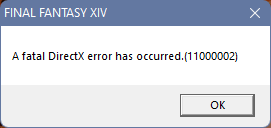
 teal fable
Got everything but the ram synced
modest moss
deep sapphire
Tired
hydrate
he has covid
well, untested but his roomie has it and he has symptoms
potent arrow
Covid chevy
 dapper nymph
first time seeing this, what's a 10105
 modest moss
google says it's either ddos or simply server load is too high and keep trying, sounds like it's not a you problem
hard drift
according to SE mods on forums for 10105
 latent grotto
i wouldn't be concerned about it unless it happens frequently

sometimes the game connection just drops
modest moss
unlikely they need to change any port forwarding considering they're a regular player
hard drift
yeah 🤷♂️ i'm just relaying what SE says though just incase they did anything
modest moss
I got the impression they were curious rather than needing actual help, but I'm not always right
hard drift
never know when people come here 😔
deep sapphire
 robust vessel
Omw with soup for my baby boy
robust vessel
Omw with soup for my baby boy
Thx bb
modest moss
Hi!
Anyone having a very annoying popping audio issue since Endwalker dropped? In the link below you can hear the problem yourself. (WARNING: CONTAINS 5 SECONDS OF FIRST DUNGEON SPOILERS)
If you don't wanna see the video, the quick rundown is: Randomly, anywhere or at any time, the audio will "pop" at a very...
SE have found the audio issue apparently
so no point people trying to fix it themselves, just wait for an FFXIV update
@deep sapphire babe, can you pin things?
deep sapphire
modest moss
https://forum.square-enix.com/ffxiv/threads/447557-Audio-popping-issue?p=5797835...
deep sapphire
modest moss
so no point people trying to fix it themselves, just wait for an FFXIV update
I gotchu

modest moss
stud
 lethal dune
These two images, have been making my brain hurt for the past two hours


Please help, I try everything
I dont know the fuck is going on
Yup
this thing is making my head hurt
I dont know wtf is going?????
jhgdsbjhgferdsbgf
but the fact it keeps saying I dont have enough space is making me malding due to I can see there's plenty of fucking space
sigh
Looks like me have to re-download the game
This is what I saw in Inventory X
 latent grotto
Its probably some weird apple thinks more storage is being used than there actually is
Which I've seen on iPhones occasionally
lethal dune
All I want is to play the game 😭
I need to go and do blind raiding on Saturday Night
Please help, I'm actually at my ends limit
now I need to find where the heck you download the client thing for mac cause I forgot where it is 
latent grotto
My guess would be try deleting cache and rebooting into safe mode to see if that gets the storage to show correctly 🤷
or just get a windows
modest moss

FINAL FANTASY XIV
Users interested in installing the Mac version of FINAL FANTASY XIV can download it here.
google is your friend
latent grotto
insert "But it just works" meme here
modest moss
I'd be surprised if a simple reinstall works anyway, it's going to throw an error until you resolve the free space reported
latent grotto
What if we just unplugged the power cord assuming its not a laptop
lethal dune
I had to delete everything from my FFXIV File due to storage stuff
lethal dune
latent grotto
What if we just unplugged the power cord assuming its not a laptop
I play on a Macbook Pro

modest moss
this is what you get for playing on cactuar
latent grotto
But yea try clearing cache and boot into safe mode
modest moss
you would be best off finding a mac support discord or forum rather than an ffxiv one I think
lethal dune
gotta do it once I download the game client btw
latent grotto
Thats what we did when I worked as an apple contractor a few years back
modest moss
that looks like an OS issue and not an FFXIV one
lethal dune
latent grotto
Thats what we did when I worked as an apple contractor a few years back <:oldris...

wut
latent grotto
or we could just wipe the entire drive

Delete mac
The m1 macs look good
Price is a bit high but I suppose it's what you pay to work in that ecosystem and apps
latent grotto
Inb4 they included a little update that throttles the system to "improve battery life" by making it run like a snail





 modest moss
looks like it's some bullshit about time machine snapshots and purgeable data
latent grotto
Real talk tho. Why'd you get a laptop with 64GB of ram
ik I did the same thing with my pc so dont @ me
modest moss
idk if this is safe or will work
but
Open Terminal, paste the following command, and type your password at the prompt:
sudo mdutil -E /
and then reboot
says it'll reindex the drive
lethal dune
latent grotto
Real talk tho. Why'd you get a laptop with 64GB of ram
It's a gift from my parents
modest moss
ask your parents why they hate you and didn't buy you a windows machine
lethal dune
It's for video editing
latent grotto
modest moss
and then reboot
This is what I found about it? https://superuser.com/questions/967071/understanding-mac-os-x-indexing-using-mdutil-e-i-off

Super User
Two questions about mdutil and indexing:
What is the -E option? It seems to me that it means something like "reindex" however the following bash command does not make sense to me mdutil -E -i off...