#technology-discussion
1 messages · Page 336 of 1
 deep sapphire
 umbral moss
I use my ratchet driver all the time, fix pot handles and shit
deep sapphire
yeah they're great
cant really help you with this sorry, I dont know much about multi tools like this
if you needed hand tools or something I could be more helpful
 hard drift
😔
 modest moss
I use my victorinox Swiss army knife quite often
deep sapphire
hold on, I know what shue needs
deep sapphire

The Home Depot
The Milwaukee 37.8 in. x 61 in. x 23.9 in. Steel 11-Drawer Mobile Workbench in Red is a practical tool storage system. With a portable design, this professional mobile workbench can be moved around for
there ya go buddy
hard drift
modest moss
Leatherman are like 5x the price
My dads had his leatherman for years, it’s worth it
modest moss
I can't load that url
modest moss
Looks cool af from thumbnail though
umbral moss
big cabinet 
modest moss
Maybe I'll just get another tactical walking stick
deep sapphire
there you go
also whats up with harbor freight, you see that bullshit they are pushing with the new us general carts and tool chests
600 bucks
like ???
these are supposed to be budget tier tool chests
deep sapphire
thats an alright game
modest moss
I find chevrolet disgusting
deep sapphire
OH SHIT MILWAUKEE ON SALE
SHUE GET ON THAT
GET THE 1" HIGH TORQUE IMPACT WRENCH
hi @potent arrow

modest moss
I do not need a 1300 tool
deep sapphire

oh god that is cringe
on an AMG too
that impact would break our wrists lets be honest
the 1/2" fuel at work is pretty brutal as it is, cant even imagine how heavy that fucker would be

TikTok
#shitbox #ratrod #ohno #problems #classic #obs #chassisswap #projectcar #chevy #chevytrucks #460 #ford #shitboxproblems #build #builtnotbought
 idle basin
 magic rock
Hi - is there any solution to the launcher claiming your password is incorrect - even when it is not? (I know for a fact my details are not incorrect, would appreciate if nobody suggests that it still is)
I know there is a solution I've used in the past, but I've forgotten it
 soft swift
ok so I got ID and password incorrect trying to login to launcher
but I can login to mogstation just fine
wtf?
hard drift
soft swift
ok so I got ID and password incorrect trying to login to launcher
there's a known issue with the launcher they're working on it
should be up though now 
hard drift
you tried quicklauncher?
 shut quarry
Anyone elase unable to login at all?
shut quarry
do you get booted to your desktop with no errors or anything?
soft swift
yep, and then ask to reset my password
only for the launcher to not recognize my new password
soft swift
still cannot login
 regal radish
Gentlemen, uhh...
Are there any Superlux HD681 drivers I should/need to install? This static is becoming annoying as fuck.
 lilac shale
well i can use my launcher its just i have like 30 MB left to update the game but the speed is turned into 0.01 MBps and then got error
 rigid star
My sound 😦
 gusty stump
has there been a solution to the dx11 crashes yet?
https://www.reddit.com/r/ffxiv/comments/gc0iti/comment/fsxs09c/?utm_source=share&utm_medium=web2x&context=3
Saw this post for over a year ago but I've been scrolling through but none addressing this issue

reddit
53 votes and 68 comments so far on Reddit
 south mantle
@gusty stump im wondering about this alsop when IOs start the game on dx11 its giving me crackle sounds
dx9 is fine tho
gusty stump
dx9 is fine for me as well for the most part
but dx11 is tons of crashes
This problem has persisted for many years, there has to be a fix
south mantle
yeha im not crashing per say just audio is really bad when opening up the game
deep sapphire
south mantle
yeha im not crashing per say just audio is really bad when opening up the game
I’ve had a similar issue and it turned out to be graphics drivers for some reason, try updating them and see if it still occurs
south mantle
deep sapphire
I’ve had a similar issue and it turned out to be graphics drivers for some reaso...
yeah I did that a few hours ago too. nothing
deep sapphire
Are you using multiple monitors
south mantle
just one
south mantle
yeah apparently it looks like a fair amount
 quaint spear
I have an ironic question....
first of all, i'm in my forties with no children.
Those of you from my generation concerned that your kids are being too plugged in or too cyber?
 empty orchid
having a weird issue with dx11 client since my initial lobby kick the client no longer responds and simply crashes. dx9 version works fine but there are frame drops in areas with ungodly amount of people.
is there a way to reset the resolution setting or something without having to launch the dx11 client?
umbral moss
“When I saw Tim Cook was saying he’s worth nearly a billion dollars and he plans to give all of that away before he dies, I thought, ‘Well shit, he could start with us in AppleCare,’” a current employee says.
if a CEO gave his money to his employees, he wouldn't be able to get a tax deduction though
 zealous musk
Just me who gets lobby error everytime im tryna log in? Like is it my computer/wifi or is there something else?
hard drift
zealous musk
Just me who gets lobby error everytime im tryna log in? Like is it my computer/w...
it's normal right now, it's going to be that way during peak times
modest moss
quaint spear
Those of you from my generation concerned that your kids are being too plugged i...
no
south mantle
empty orchid
having a weird issue with dx11 client since my initial lobby kick the client no ...
does your cliant audio sound weird when opening up dx11 version?
 sly elk
besides, smart money is you donate all your money to charities
... charities that your relatives run and take a large cut for administration of 😄
south mantle
This is how the audio sounds in dx11
 modest moss
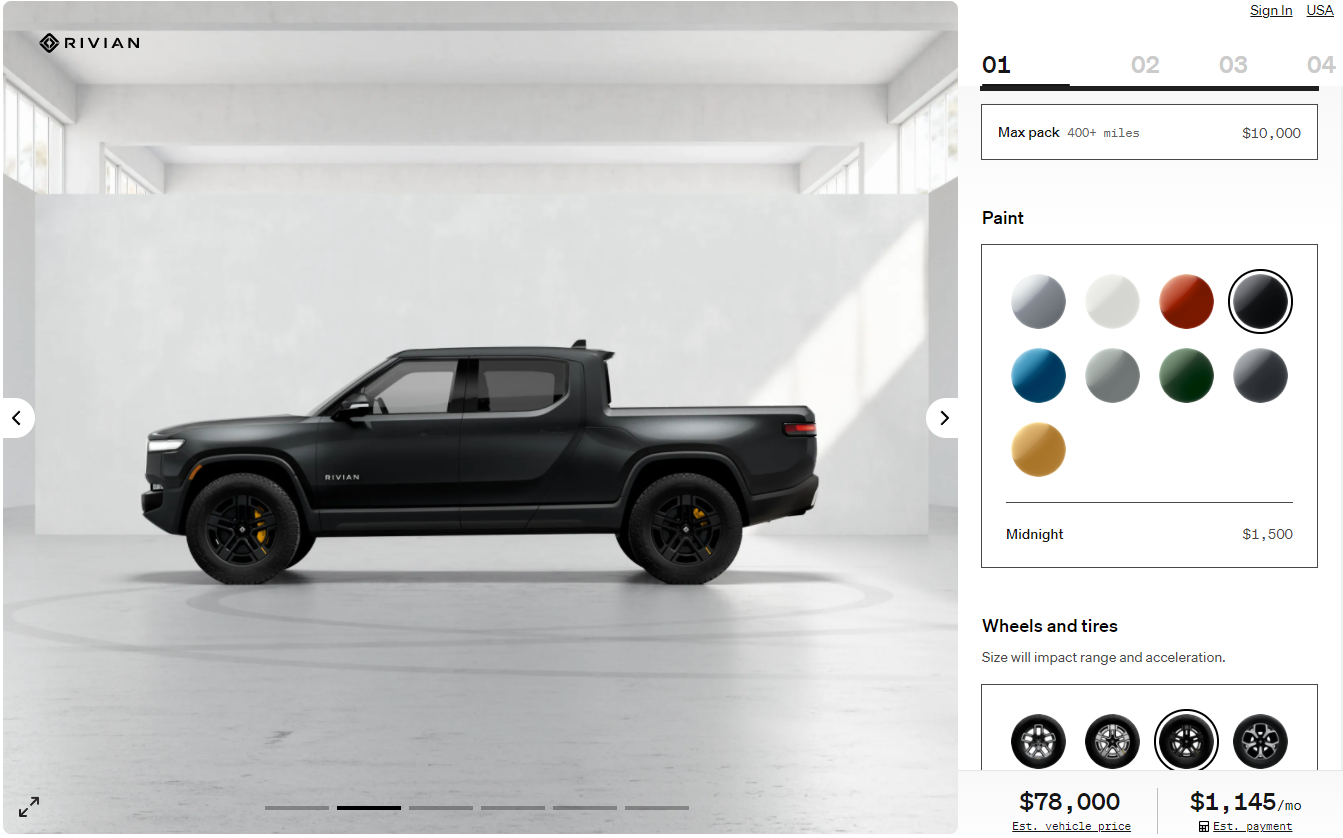
doesn't come in pink, pass
 modest moss
matte black with hot pink pearlescent, obvs
deep sapphire
I hate how automakers are making you pay for paint colors that should be free
How the fuck is black 1500 lol
 zealous kite
"cuz"
deep sapphire
EVs be like YOU GET WHITE
modest moss
just don't buy it
 modern iris
hello, after the update my DS4 won't work at all, anyone having this issue ?
i tried everything from steam to the in-game settings
hard drift
did you try uninstalling the driver/device in device manager and then replugging it in
sly elk
somehow this year they made pink wranglers
-barbie girl song plays-

I might not be buying pink cars myself, but I applaud the choice. The only other factory pink I know of is that porsche taycan pink
which is kinda hard to describe as a pink... but it's just like pink mary kay cars

 late basalt
I feel like that’s more of a uh... pale fuschia rather than a pink. But yea, odd color choice to be sure
 earnest sedge
Hello guys, I need some help
So for some reason I am having fps drops in some ffxiv cutscenes even tho I never had that before.
Fps drops to like 50-55 but its capped at 63 fps.
Never had that issue before.
Could it be related to the high amount of people today?
hard drift
yes, also that's not a substantial drop so don't worry about it too much 
 vernal crown
There a reason my FPS will go from like 45 to 30 then from 30 down to 9 then back up at random intervals? My GPU isn't running warm it's average temp. My CPU is running fine too and my RAM is fine as well yet the game won't hold a stable FPS especially in Trials and dungeons.
I also turned everything down as low as it can go and that hasn't improved it at all. Before now I could run at 45-60 FPS with just minor drops to 35-30 every now and then but this is a bit of an extreme drop imo
hard drift
you doing EW?
hard drift
hmmm idk then
would say it's the fps bug i keep getting but mine doesn't fluctuate like that
vernal crown
It's got me stumped honestly. I've tried everything I can think of and it still just randomly dips down to 9 then back to about 30-45 FPS.
hard drift
try turning the graphics up clicking apply, then low and apply those
vernal crown
I did that before I went to work, didn't do anything.
vernal crown
Fuck, is that something they can fix with a patch or a hotfix? Or is it gonna just be an annoyance now?
vernal crown
Of course, might just wait a bit then. The constant FPS drops are annoying as fuck especially in the middle of a dungeon.
hard drift
🤷♂️ up to you
south mantle
I'm more annoyed at thr scratch crakle sound when I start ffxiv with dx11
vernal crown
I haven't had that
deep sapphire
just went out and bought a new modem, I forgot I had an issue where anytime I loaded into an instance the game would DC and I kept getting packet loss, fuck arris
empty orchid
south mantle
does your cliant audio sound weird when opening up dx11 version?
no but got it working updated the Nvidia driver and it worked
deep sapphire
ran a winMTR with the new motorola modem, much better
hour and a half in queue only to DC and have to do it all over again
too much fun
hard drift
the pain a lot are suffering now
south mantle
empty orchid
no but got it working updated the Nvidia driver and it worked
yeah updated my card also but nothing worked
deep sapphire
are you using WHQL driver or beta
WHQL (Game Ready)
in any case gonna go have dinner with my old man, knowing it'll probably be 2 hours stuck in queue anyway
hard drift
have fun
 modest moss
My queue: 4,170
 dull garnet
sadge
modest moss
Apparently inn room cutscenes don't keep you logged in now
modest moss
Wonder if crafting still works
hard drift
I mean more than likely but i can see them force dcing people
dull garnet
this may just be hyperbole but does it feel smoother for anyone else?
hard drift
You want to afk using a craft you obviously don’t care about the mats Atleast that’s probably the thought process
hard drift
dull garnet
this may just be hyperbole but does it feel smoother for anyone else?
In what sense
hard drift
Oh, nah it’s worse there’s a bug for alt tabbing or whatever so it feels worse to me
modest moss
hard drift
You want to afk using a craft you obviously don’t care about the mats Atleast th...
I can handle losing an iron ingot
dull garnet
hard drift
Oh, nah it’s worse there’s a bug for alt tabbing or whatever so it feels worse t...
what bug is that? i'm alt tabbed rn
hard drift
modest moss
I can handle losing an iron ingot
Yeah I’m just talking the thought process, not that people would care
modest moss
Alt and tab was fine for me but I think I'm on borderless windowed
hard drift
dull garnet
what bug is that? i'm alt tabbed rn
As in when you alt tab back framerate may not be restored fully
dull garnet
i see
hard drift
Mine wasn’t working fully
modest moss
Probably just radeon shit innit
dull garnet
oh i use borderless windowed actually
hard drift
Would sometimes cap in the 40s then i alt tab back again and it goes up to 144
hard drift
modest moss
Probably just radeon shit innit
It didn’t do it before EW
I did
Haven’t had it on
Hmm I’ll try and see if the setting is glitched like my camera mode does
modest moss
I only got 82 so far :/
dull garnet
getting my war to 80 first
hard drift
80 or 90?
dull garnet
80
hard drift
Just making sure I’ve messed up levels lol
dull garnet
didn't quite make it before maint
hard drift
Ah damn
dull garnet
was gonna do msq as drk but I think i'll go war now
hard drift
I mean you could do two jobs with the msq for a bit
dull garnet
true
hard drift
80-81ish area lasts a while
The msq is long could probably split between 2 jobs almost completely
It’s fun and annoying at the same time
hard drift
modest moss
Over 45 mins later and still 1767
Yeah it’s peak time…
dull garnet
oof
modest moss
Bidori stating the obvious
hard drift
Loser server?
modest moss
Insight
dull garnet
ouf
 inland mauve
has anyone tried that special sound gamepack yet?
does it really make a difference?
deep sapphire
Canadian internet in a nutshell
deep sapphire
hard drift
Is that good or bad?
What do you think 😛
hard drift
I mean idk what they pay for lol it could be good
deep sapphire
Most people in urbanized regions in the states get 600 mbps or more
God I remember sharing a connection with 4 people on 1.5 DSL
that was pain
hard drift
I remember the days where my speed was shit… max download speed was 500kilobytes per secone
deep sapphire
thats the server im on!
dull garnet
Its midnight, sleep time 
deep sapphire
and I dc'd
modest moss
my 4170 queue took like 75 mins
it should save spot in queue when it crashes, mine crashed 3-4 times
 latent grotto
when the servers first opened it dc'd me like 7 times before i could log in lol
hard drift
modest moss
it should save spot in queue when it crashes, mine crashed 3-4 times
supposedly if you're quick enough it saves although idk about the validity of that
deep sapphire
it'd be great if the game didnt kick you out from a lobby error
im just glad quick launcher exists, I remember having to retype my pass every fuckin time
hard drift
damn, guess i'm not playing error 2002
latent grotto
hard drift
supposedly if you're quick enough it saves although idk about the validity of th...
too bad its rng on if you can even back into queue

hard drift
latent grotto
too bad its rng on if you can even back into queue
True
My luck is dead
umbral moss

Learn more about the 2021 Toyota Hot Hatch. Want a rally-ready Yaris available in your neighborhood? Sign up and get the latest GR Hot Hatch news and updates.
the yaris GR is coming
I'm so excited even though it only comes in ICE versions
there's also apparently a corolla version that puts down 370hp
 thin geode
 odd sand
Yaris sports car...
 umbral moss
odd sand
>Yaris sports car... <:namazuconcern:685268305275256852>
umbral moss
odd sand
>Yaris sports car... <:namazuconcern:685268305275256852>
I wonder who kicked toyota in the ass to make fun cars again
odd sand
And we don't even get the meme car in the US bah
umbral moss
probably decent since it's a turbo 3
it's also a rally car so it's probably got some enduro baked in
odd sand
I suppose it can get away with that bc it looks like it weighs as much as a go-kart
 modest moss
 drifting sail
Idk what to do
drifting sail
Idk what to do
GitHub
Custom launcher for Final Fantasy XIV. Contribute to goatcorp/FFXIVQuickLauncher development by creating an account on GitHub.
umbral moss
odd sand
I suppose it can get away with that bc it looks like it weighs as much as a go-k...
toyota thinks the 3 cylinder is a more robust design for this because it lowers engine weight
they're using the same engine in the GR corolla variant too
drifting sail
modest moss
https://github.com/goatcorp/FFXIVQuickLauncher/releases
My disk was full
modest moss
oof
 kindred brook
I installed a NVME drive SSD on my ps5 without a heatsink; the systems detected read speed is significantly lower than whats advertised
should I just return it?
max is 5500
PS5 says
3600-3800
max is 5600*
READ
odd sand
What did you buy
Also you should be able to fit a slim heatsink on it still, just not the big chonker ones that are like a quarter inch thick
kindred brook

Best Buy
Shop PNY XLR8 CS3040 2TB M.2 NVMe PCle Gen 4 x4 Internal Solid State Drive at Best Buy. Find low everyday prices and buy online for delivery or in-store pick-up. Price Match Guarantee.
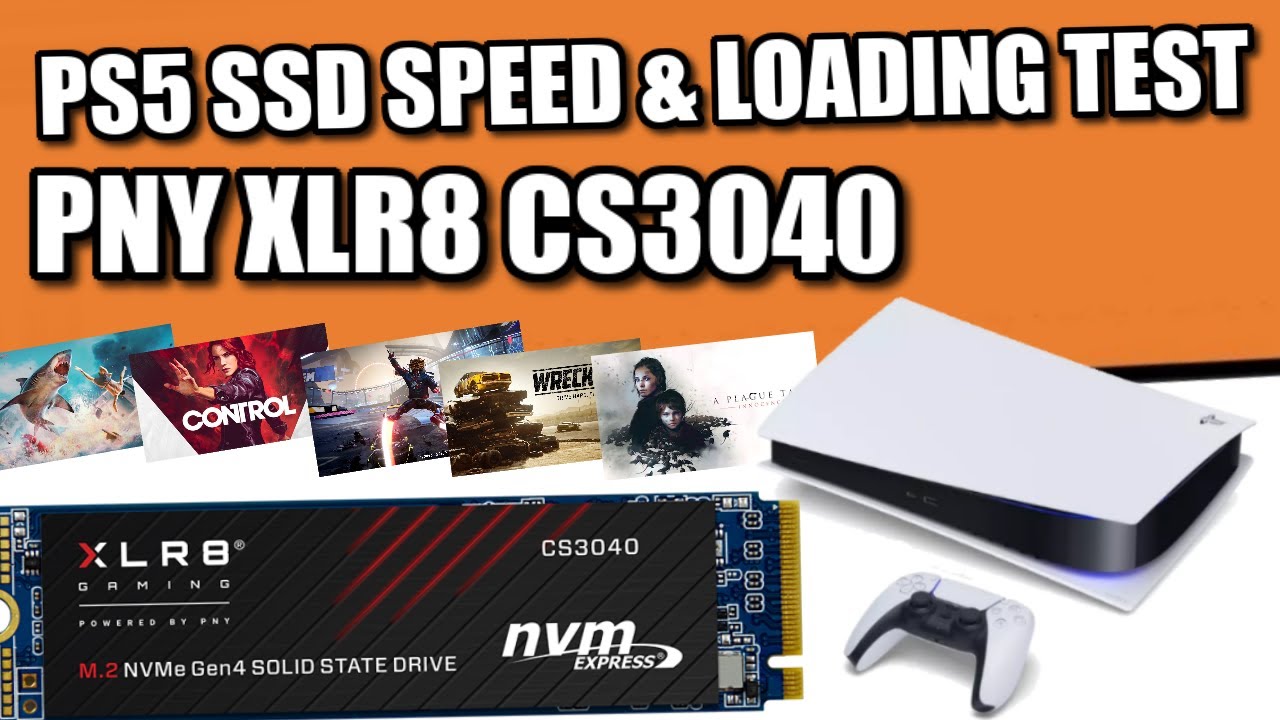
UPDATED - Recommended PS5 Compatibile SSDs & Heatsinks - https://nascompares.com/2021/08/03/recommended-ps5-compatibile-ssds-heatsinks-updated/
Latest Drives Added
PNY XLR8 CS3040 - https://amzn.to/3lyF054
Patriot Viper VP4300 - https://amzn.to/3fxHf4N
Inland Performance Plus - https://amzn.to/3AaPCuP
TeamGroup T-Force Cardea A440 - https://...
this person was able to get it running at 5600
dunno if its one off
odd sand
PNY
I don't trust their stuff as far as I can throw it. They've always been a low-end quality vendor
You shouldn't run into thermal throttling just on the initial test though I would think
umbral moss
PNY sucks
odd sand
I suppose you could try blowing a fan at it without the case and see if that changes the results
I went the opposite direction for now and used an old HDD for external storage of PS4 games and archived PS5 I'm not playing atm
 gritty crescent
Has there been a fix for the sound issues yet? Only thing I can hear in game since Maint is bgm and system sounds
deep sapphire
PNY for awhile was one of the best vendors, they were also the only 3rd party vendor that could sell Quadro cards but I have no clue about now days
go back to bed
deep sapphire
https://vm.tiktok.com/ZM8WYMwSu/ @potent arrow

TikTok
“Commercial Free” #construction #hvac #electrician #apprentice #milwaukeetools #plumbing #journeyman #fypシ
Hahahaha
 sinful lantern
not sure where to ask but
what is up with gamepass on PC? i got like a hundred XVD drives in device manager
its making things slightly difficult, to say the least. keeps freezing controller inputs
 sinful lantern
yes
my input freezes coincide with the XVD drive being removed or inserted, which triggers a device manager refresh
drive/s
wonder if it goes away if i delete the gamepass games 
hard drift
each one is a virtual drive for just that game
https://www.reddit.com/r/Windows10/comments/djex2r/have_2_xvd_drives_that_appeared_in_my_device/ atleast going based on this thread
reddit
13 votes and 11 comments so far on Reddit
sinful lantern
hmm. only have forza and like two more games
hard drift
they said to disable them but idk 🤷♂️
 hard drift
well if you have 3 games from gamepass that makes sense
sinful lantern
oh that is true
hard drift
each one is a different drive
sinful lantern
gonna try deleting them
hard drift
lol okay
sinful lantern
nearly got me killed in a dungeon 
sinful lantern
appreciate the input 👍
 warm mesa
hard drift
warm mesa
hard drift
sleep is for the weak

 magic rock
crossposting from qnh, maybe possible to get an answer here
Hi. I am struggling with an issue right now - When I attempt to take a screenshot, I am given a Screenshot Failed error.
The screenshot folder reverts to Read-Only as soon as it is altered
Adding the game folder AND screenshot folder AND game process as exceptions in AV is not working.
Does anyone know the solution to this problem?
modest moss
magic rock
crossposting from qnh, maybe possible to get an answer here
Hi. I am struggling...
onedrive possibly
magic rock
sorry, i neglected to mention - the issue was fixed by me reinputting the directory. Not sure why, but we take those, I guess
south mantle
you guys think they'll do a patch for dx11?
 dusty violet
Anyone here whos like a pc genius ? I wanna buy a new pc the next few weeks and dunno anything about that stuff lol
modest moss
dx11 fine here
dull garnet
i have had no dx11 crashes also
hard drift
yeah, i mean mine is my own fault lol so it's just you
modest moss
south mantle
you guys think they'll do a patch for dx11?
do you have an obscure or niche hardware configuration?
dull garnet
inb4 5700 XT
hard drift
dull garnet
inb4 5700 XT
😔
deep sapphire

hard drift
the dark age
latent grotto

deep sapphire
5700XT!?
modest moss
dusty violet
Anyone here whos like a pc genius ? I wanna buy a new pc the next few weeks and ...
there are no geniuses here, but there are some nerds who know a bit
latent grotto

modest moss
if you know nothing, buy a prebuilt
deep sapphire
hi shue
modest moss
aside: this endwalker shit is epic af
dull garnet
buy a prebuilt and then install an AIO
deep sapphire
its alright, the constant 10 minute long cutscenes are getting old
hard drift
modest moss
aside: this endwalker shit is epic af
truth
dull garnet
modest moss
aside: this endwalker shit is epic af
spoilers
deep sapphire
is this a sega cd game
latent grotto
Buy a prebuilt and put rgb everywhere
modest moss
I mean, this IS the game
deep sapphire
this discord channel? I agree
hard drift
worst cs was the unskippable one towards the end that was super boring
hard drift
deep sapphire
how are you already at the end
i watch the story after lol
hard drift
nah, i prefer watching it all together
 south mantle
modest moss
do you have an obscure or niche hardware configuration?
south mantle
modest moss
do you have an obscure or niche hardware configuration?
I mean its on the loadstone forms theres quite a fair amount of people with dx11 issues. My issue is when loading up the game..there's audio crackle as soon as the game opens. This never happened before 6.0
south mantle
south mantle
This is how the audio sounds in dx11
this is an example here
modest moss
I mean, stick to there then if you don't want to answer basic questions
hard drift
south mantle
This is how the audio sounds in dx11
it has to be your drivers because i haven't encountered any of these issues
south mantle
I had a few people help me, tried everything for like over 10 hours. drivers updated. reinstalled the game, bios updated. video card updated..I switched usb ports..I tried different speakers
dx9 works fine but dx11 something is up
modest moss
so you don't actually want help
south mantle
unless I need a chipset or something
modest moss
k
dull garnet
you have a chipset
south mantle
what? I do want help? I never said I didnt
dull garnet
we all do
south mantle
uhh sec
ASUS ROG Crosshair VIII Hero (Socket AM4) USB-C Gen2 AMD Motherboard
amd Radeon xt 6700
hard drift
dull garnet
radeonnnnnn
leave it alone 😭
modest moss
you won't enjoy the replies you're about to get
latent grotto
I mean I have an amd gpu too
south mantle
...jesus im looking for help not slander?
latent grotto

south mantle
okay, and everything worked fine before? theres people that have amd and game works fine? besides that trying to figure out what maybe the issue here also. I also tried voice meter, audio switch nothing
modest moss
real talk, AMD support is your best bet
latent grotto
have we tried shutting down and turning off the psu for a minute
modest moss
they will never fix drivers unless they get hassled enough
latent grotto
modest moss
they will never fix drivers unless they get hassled enough
True 
Same for nvidia though tbh
modest moss
people need to bug SE and AMD, directly
deep sapphire
hard drift
leave it alone 😭
jesus
hard drift
deep sapphire
jesus
take the wheel?
latent grotto
You know Jesus can't drive right
deep sapphire
 latent grotto

hard drift
deep sapphire
https://imageproxy.ifunny.co/crop:x-20,resize:640x,quality:90x75/images/dadb1aeb...
lol wtf
deep sapphire
its an old meme, I think someone made abunch of these pictures for loved ones that passed away and some asshole just wrote text over them hahahaha
hard drift
damn
south mantle
some other tec dudes told me could be se fucked up because they did something new with the audio this expansion, could be windows bug idk
deep sapphire
they added spatial audio
modest moss
@south mantle the unfortunate reality is that Nvidia has roughly 4x the market share of AMD, but in this channel we see the literal opposite in terms of problems, EASILY 4x as many AMD problems as Nvidia
would never recommend AMD for FFXIV, it's fine for some people but the issues are disproportionate
south mantle
besides talking about nvidia and amd, like this is the only place thats comparing, dont know why? because likke I mentioned everything worked fine before, trying to resolve the issue because im not the only one
south mantle
okay you're really stuck on amd
modest moss
well yes, it's a hardware and drivers issue
hard drift
south mantle
okay you're really stuck on amd
it's an honest thing 🤨
and i am using amd
dull garnet
you knew better and yet
hard drift
it is not without ground that they say what they say lol
hard drift
dull garnet
you knew better *and yet*
well i have had very few problems with my current gpu lol
and the problems i do have are my own fault
modest moss
and here's the thing, we compare because we've seen literally hundreds of people come here for help over recent months
we see trends
latent grotto
Which is mostly "amd be kinda sus with ffxiv"
modest moss
right
south mantle
okay I have a question if you can help
deep sapphire
hi whats your question
south mantle
could you tell me which device is the chipset driver? or maybe I dont have one?
 hard drift
you said crosshair viii right?
south mantle
yeah crosshair viii hero
deep sapphire
yeah this doesnt really help, go to asus' website and grab the chipset drivers
I would go to ASUS directly
hard drift
i mean either works
south mantle
oh no no im there its just that..this is what it says heree
AMD Chipset driver V3.10.22.706 for Windows 10 64-bit, Windows 11 64-bit.(WHQL)
NOTICE:
Due to the different structure for drivers, suggest you remove the old driver first before install this version driver.
modest moss
I would use Asus ones yeah
south mantle
I was wondering since it said remove the old driver but im not sure if I have an old driover or not
deep sapphire
oh okay use that
hard drift
dull garnet
ah yes i am going to dl an exe directly from discord
yeah yeah
latent grotto

dull garnet
did you use DDU when changing video drivers too? that may help
deep sapphire
never had to do that for intel and nvidia
hard drift
deep sapphire
~~never had to do that for intel and nvidia~~
yeah but atleast for our cpus it doesn't run like the sun to get its specs 
 hard drift
lol
south mantle
oh no I havent done any of this, so my question okay I have the .exe now..and im downloading the asus driver chipset..but I herd it can conflict with each other the audio from asus and amd or?
what do I do first?
hard drift
south mantle
oh no I havent done any of this, so my question okay I have the .exe now..and im...
chipset
deep sapphire
AMD doesnt make audio drivers
the chipset will use Realtek
in 95 percent of the case
hard drift
deep sapphire
AMD doesnt make audio drivers
they don't but the drivers do have a driver it installs lol
dull garnet
the video card does audio
deep sapphire
both packages will have the same audio driver
video card only does if you use HDMI out
dull garnet
wrong
dull garnet
DP
deep sapphire
IT WILL BE INSTALLED
dull garnet
do we even know if they're using video card audio or motherboard audio
deep sapphire
no
dull garnet
do they know?
deep sapphire
I dunno
dull garnet

hard drift
does the audio know
deep sapphire
no
dull garnet
i don't need to imagine
south mantle
okay so dont run the cleanup just run the chipset driver V3
latent grotto
Imagine having speakers
dull garnet
i'm doing that right now
hard drift
south mantle
okay so dont run the cleanup just run the chipset driver V3
the cleanup removes any drivers
latent grotto
deep sapphire
how am I supposed to watch hentai
"Hey guys"
deep sapphire
open the windows
dull garnet
why yes I am watching hentai
hard drift
blast it on your surround
south mantle
hard drift
the cleanup removes any drivers
oah okay, so just wondering run the chipset and after instal see if the problem continues with dx11?
deep sapphire
I'VE HAD A ROUGH WEEK AT WORK AND MY GF IS HANGING OUT WITH HER FRIEND JEFF AGAIN
hard drift
south mantle
oah okay, so just wondering run the chipset and after instal see if the problem ...
yes
deep sapphire
hard drift
yes
yes 
south mantle
I guess leave everything the way it is right? I just wanna make sure
 south mantle
okay thanks
 deep sapphire
at that point I would just go play something else
dull garnet
that's what you get for buying AMD
dull garnet
ouf
hard drift
dull garnet
that's what you get for buying AMD
it isn't that lol
deep sapphire
at 418 now
hard drift
i'm just playing other games while it does the queue
dull garnet
hard drift
it isn't that lol
 hard drift
dull garnet
https://tenor.com/view/girl-sure-jan-sarcastic-brady-bunch-gif-11590179
hard drift
dull garnet
https://tenor.com/view/girl-sure-jan-sarcastic-brady-bunch-gif-11590179
lmao fuck you
deep sapphire
dull garnet
that's what you get for buying AMD
hard drift
you evil bastard
dull garnet
deep sapphire
south mantle
oh ncie it failed anyway lol
 deep sapphire
hard drift
south mantle
oh ncie it failed anyway lol
wtf
dull garnet
uh that isn't good
south mantle
it said something about already installed
hard drift
i have never had chipset fail to install 🤨
hard drift
south mantle
it said something about already installed
did you do the cleanup utility first...
deep sapphire
^
south mantle
no you said chipset first
 south mantle
but okay ill do the cleanup..and then what after?
hard drift
cleanup -> chipset -> audio/gpu
modest moss
you literally told us it said uninstall first...
south mantle
okay
deep sapphire
268 NOW
hard drift
this queue is going to take forever lol
deep sapphire
I dont even wanna play
hard drift
time for lunch
south mantle
ohh I need to do this in safe mode
hard drift
south mantle
ohh I need to do this in safe mode
no you don't
dull garnet
ideally you would
latent grotto
The amd cleanup utility needs safe mode
hard drift
just disable windows updates 😎
dull garnet
or the driver will be loaded
latent grotto
hard drift
i never do <:deeeeeeeeeeeeeeeeeeeeeeeeeeeeerp:703663073109737515>
It did when I did it
hard drift
hmm idk
deep sapphire
this sure sounds like a lot of work
hard drift
deep sapphire
this sure sounds like a lot of work
that's just owning a pc in general lol
latent grotto
Literally told me "hey to finish uninstalling ima put your pc in safe mode so prepare your ass"
deep sapphire
some PC's
hard drift
latent grotto
Literally told me "hey to finish uninstalling ima put your pc in safe mode so pr...
lmao
modest moss
I have never had this kind of stress updating a driver
hard drift
deep sapphire
I wonder what we share in common
-.-
modest moss
I couldn't even begin to guess
hard drift
deep sapphire
I wonder what we share in common
you're supposed to be helpful mr tech mentor
latent grotto
Hank is a duck
deep sapphire
my PC has worked flawless for the last 5-6 years now
my prior AMD configurations always needed dumb shit done to get things to work
JUST MY 2 CENTS
IM OLD NOW
I DONT HAVE TIME TO FIX SHIT
WELL EXCEPT AT WORK CAUSE THATS MY JOB
BUT THATS BESIDE THE POINT
hard drift
my old nvidia 1060 had more problems than what i currently have so nah
latent grotto
had a amd driver crash 10 minutes after installing when I did a clean windows install
deep sapphire
my 1070 has worked great, well aside from evga's terrible cooling fuck up that fried my first card
hard drift
bruh, nobody cares about fortnite
 latent grotto
Oh hey performance improvements for halo infinite
hard drift
latent grotto
Oh hey performance improvements for halo infinite
yeah
hard drift
same lol
modest moss
people definitely do care about fortnite
hard drift
it's awful and the gunplay is shit
modest moss
fortnite event in 3hrs
hard drift
...
latent grotto
Shue its only cuz your kids play it
modest moss
and my wife
hard drift
the known issues seems good
latent grotto
Fortnite family?
hard drift
the same issue that's been there since the feature release lmao
 modest moss
let's be real, you're absolutely deluded if you think fortnite isn't still massively popular
modest moss
game is so accessible
dull garnet
that's cus you're old
hard drift
i personally hate they direction fortnite has gone lol
deep sapphire
When I got my XS Max years ago
hard drift
not just their ceo
deep sapphire
I tried fort nite
hard drift
tim sweeney 🤢
deep sapphire
Had no clue wtf I was doing
And I somehow got first place and I literally ran around lost the entire game
deep sapphire
LMAO
modest moss
fortnite is more popular than ever tbf
hard drift
deep sapphire
And I somehow got first place and I literally ran around lost the entire game
first game is a bot game
hard drift
modest moss
fortnite is more popular than ever tbf
idk about that most of the games i played had too many bots to enjoy
south mantle
okay clean up is done..amd software is gone and all that. now is when I do the chipset..and then after install the latest graphics card driver right?
modest moss

Fortnite refers to a videogame series, set in a post-apocalyptic, zombie-infested world. It is produced by Epic Games, and uses the company’s signature Unreal Engine. At present, there are two games that fall under the Fortnite umbrella: a team-based survival shooter called Fortnite: Save the World and Fortnite: Battle Royale, which as the name ...
Fortnite users
Year Users
2017 20 million
2018 125 million
2019 250 million
2020 300 million
2021 350 million
dull garnet
how dare you come in here with your references and statistics
hyperbole is the language of the internet!
modest moss
I'd say they're ticking over quite nicely
dull garnet
personal opinion!
latent grotto
Best game is space cadet pinball
modest moss
sure they lost the ios players, but they're still making absolute fortunes
hard drift
modest moss
Fortnite users
Year Users
2017 20 million
2018 125 million
2019 ...
tbf this is registered not active
south mantle
hmm chipset installation failed still..after cleanup
hard drift
looking at their source it's roughly 80m monthly
hard drift
south mantle
hmm chipset installation failed still..after cleanup
wtf did you manage to do
did it say why it failed?
south mantle
idk what you told me..clean up and run chipset unless I have the wrong setup?
hmm
 modest moss

View the Live Fortnite Player Count on PlayerCounter and see how many people are playing Fortnite right now all over the world in real-time.
2,874,373 Players Online
that's pretty popular
modest moss
and discounts your "bruh, nobody cares about fortnite"
hard drift
it got some of it atleast
hard drift
modest moss
and discounts your "bruh, nobody cares about fortnite"
you don't even care about amd so you've had fortnite support shush
modest moss
what
south mantle
should I download the latest amd software first?
hard drift
fortnite support has been in nvidia forever lol, plus dlss/rtx
dull garnet
i'm confused
modest moss
you don't half talk some bollocks lol
hard drift
south mantle
should I download the latest amd software first?
what one were using?
dull garnet
the audio on your board is realtek and divorced from the chipset and the chipset driver isn't appropriate for the gpu
south mantle
you mean my video card? the 6700
dull garnet

modest moss
baseless claim
gets proved wrong
strawman
hard drift
modest moss
you don't half talk some bollocks lol
i still find it weird for the stats given this

but i mean it's possible 🤷♂️
hard drift
south mantle
you mean my video card? the 6700
modest moss
Dreww are you using audio from your GPU or from the motherboard jacks?
south mantle
GPU I believe
modest moss
try audio from motherboard
hard drift
modest moss
>baseless claim
>gets proved wrong
>strawman
here is why i don't believe your source but i could believe that there are still a lot playing

 modest moss
Bidori shut up, you're just looking silly, help the person
hard drift
-.-
south mantle
actually im sorry my bose speakers connect through usb and its on the motherboard yeah, but I also tried my soundbar which is connected through my tv through hdmi cable on the video card and same audio problem
south mantle
yeah
hard drift
to the latest?
south mantle
yep did it about.. 5 days ago or so
south mantle
yeah everything works fine. its just the moment dx11 version of ffxiv opens it gives me that audio crackle. I tested it with other games like genshin, I ran video playbacks..dx9 works fine too
modest moss
I would suggest unplugging bose usb speakers, and the hdmi soundbar, and testing basic 3.5mm audio from mobo
dull garnet
okay boomer
south mantle
wonder if my spakers has that plug
hard drift
south mantle
wonder if my spakers has that plug
try it with headphones
modest moss
just use a pair of heaphpones?
dull garnet
does this sound issue happen elsewhere too?
south mantle
oh yeah I used a logitec headphones and the crackle sound is still there
hard drift
if it's crackling it should be doing it for other devices as well otherwise it could be just that speaker
south mantle
for dx11
south mantle
usb wireless
hard drift
try wired 3.5
because it could be usb that is the problem since amd had issues at one point with usb
south mantle
I dont think I have one I gotta fine my old one lol but ill try that
hard drift
south mantle
the radeon software version I see an optinal and recommended I guess ill just do the recommended verison
hard drift
worth a shot 🤷♂️
south mantle
just curious did something even install;; with the chipset? from the previous picture I posted
hard drift
yes
south mantle
okay
hard drift
the powerplan failed which really doesn't matter much
and another thing failed that might be more important 🤷♂️ but lets go with what we have for now
south mantle
okay, downloaded the software now and assuming I gotta reboot, and ill try ffxiv dx11 again
hard drift
yeah
south mantle
@hard driftyep..dx11 still has the crackle sounds. tried wired headset and still there. changed my audio to my TV and changed the 48hz to the 44hz and crackle distortion sound still there.
south mantle
yeah theres mutiple fourm post about dx11 audio issue as well
on the loadstone and reddit
hard drift
guess just stalk the forums and wait for a mod to say how to fix or acknowledge it's an issue
 topaz timber
Yeah, I have the same issue. It's just something we gotta deal with until they fix it or we see something new.
hard drift
can't help much aside from what we tried since i don't/haven't had the issue
 viscid cove
yeah it is an issue. heres hoping SE has it on deck for fixing sometime this weekend 🙏
but i am sure there are other fires too
topaz timber
At the very least it's still playable
hard drift
viscid cove
yeah it is an issue. heres hoping SE has it on deck for fixing sometime this wee...
hotfixes will probably be in a week or two
i expect earliest is tuesday but they still have family and such for holidays so might be later
topaz timber
Plus it might not be super high on their priority list
There are definitely worse bugs to have
south mantle
@hard driftdudeeeeeeeeeeeeee
no fucking way
look at this
Sound settings>Advanced sound options>App volume and device preferences, (with game open). Alternatively "Sound mixer options" typed up from the start menu
The "Outpout" box i have circled was blank. i changed it to my headset.
This may not work for everyone. i hope this helps somebody. If it works for you please...
its fixed
topaz timber
oh hell yeah, I'll try it lol
hard drift
south mantle
https://forum.square-enix.com/ffxiv/threads/447799-Sound-fix-with-dx11
lmao like i said, stalk the forums
 torpid bluff
this is interesting ive been trying to figure this out too, ill give it a try when i get back ingame
topaz timber
From what I've noticed lots of fixes work different for everyone
hard drift
south mantle
I cant believe I spent a whole day on thsi shit
did it work?
torpid bluff
yesterday changing the equalizer settings around worked (mostly), but today it isnt so ive been trying literally anything else i could think of LOL hopefully this does something
south mantle
yeah it worked
hard drift
lol
hard drift
shit happens 🤷♂️
south mantle
WOWWW
torpid bluff
thank you for linking this maybe itll work for me and if it does i owe you my life LOL
 balmy plinth
Hello, I'm trying to find out if i already preordered latest expansion. I have the game on steam. But can't figure out where to look to see if i already purchased it.
south mantle
LET PEOPLE KNOW THIS IS SOLVED
viscid cove
good find @south mantle. your our hero
hard drift
@deep sapphire want to pin that for now?
south mantle
viscid cove
good find <@!109436567747067904>. your our hero
thanks to the fourms but yeah people need to know this here too
the dx11 audio issue theres a lot of people having my problem too
viscid cove
I was going to wait cause the audio noise was unbearable but that does definitely fix it
south mantle
omg im so happy
deep sapphire
hard drift
<@!54695380410966016> want to pin that for now?
pin what
hard drift
Sound settings>Advanced sound options>App volume and device preferences, (with game open). Alternatively "Sound mixer options" typed up from the start menu
The "Outpout" box i have circled was blank. i changed it to my headset.
This may not work for everyone. i hope this helps somebody. If it works for you please...
that
hard drift
ty
deep sapphire

hard drift
just so we can direct people for now
hard drift
did you delete it at first lmao
deep sapphire
no I pinned your message asking to pin it
deep sapphire

viscid cove
lol
dull garnet
that's funny
south mantle
no idea why that did that on dx11 what a simple..few click issue...and here I re installed everything...drivers..all that shit..im so upset but happy
hard drift
south mantle
no idea why that did that on dx11 what a simple..few click issue...and here I re...
i mean maybe you fixed other issues
deep sapphire
south mantle
no idea why that did that on dx11 what a simple..few click issue...and here I re...
that'll learn you to come down to #technology-discussion
right guys!?
hard drift
deep sapphire
right guys!?
you just want out of a job already shush lol
deep sapphire
NO


 deep sapphire
latent grotto
hank just doing a bad job so he can get fired smh
modest moss
they won't replace him anyway
hard drift
As long as I don’t get mentor
modest moss
I'm sure you won't
hard drift
Rude 😭
hard drift
i heard things die even quicker
hard drift
modest moss
I'm in prae
i'm in a constant state of pain queue
 torpid quiver
hi guys, is it possible for the PS5 to reach 120 hz for FFXIV?
hard drift
possibly but depends on resolution and congestion
torpid quiver
cuz a friend of mine has a monitor that goes up to 200hz at least, and ps5 can go up to 120 hz. Though his game still capped at 60hz
latent grotto
Think you also need hdmi 2.1
hard drift
torpid quiver
cuz a friend of mine has a monitor that goes up to 200hz at least, and ps5 can g...
what resolution
dull garnet
latent grotto
Think you also need hdmi 2.1
you do yeah
unless the monitor is very new i doubt it will have that
hard drift
doesn't the game also have to support it for ps5?
hard drift
yeah same thing i was just reading
torpid quiver
hard drift
what resolution
1080p
hard drift
ffxiv doesn't have support for it seems plus i doubt it has 2.1
 trail zealot
Anyone have issues with sound cutting out in large scale battles. Specifically PC combat sounds. I just did the first trial and my timing on roatation was all over the place because of lack of audio queues
hard drift
Sound settings>Advanced sound options>App volume and device preferences, (with game open). Alternatively "Sound mixer options" typed up from the start menu
The "Outpout" box i have circled was blank. i changed it to my headset.
This may not work for everyone. i hope this helps somebody. If it works for you please...
hard drift
no idea if it's the same but might help
trail zealot
Its fine most the time, but in large fights like Bozja they cut short. Did the first EW trial and its the first trial in the game to cut my audio like Bozja
ill try it anyway, thanks
torpid quiver
awesome, ill relay the information u guys provided me thanks!
torpid bluff
for the record, unfortunately this fix didnt fix this issue for me - still experiencing bad audio stuttering during big fights. at this point i think itll just be something to report and hope they address soon LOL
hard drift
yeah, only other thing we can say is check forums and see if someone has a fix
topaz timber
Yeah. I'm checking forums as much as I can, I'll let you know if I see anything
modest moss
good place to keep a snack

I have a duck in my freezer actually
it's part of my xmas dinner maybe
sly elk
awwww so cute XD
sly elk
hiii
dull garnet

For pictures of my dog Toaster and additional footage, follow me on Instagram: @kevinrose.
gusty stump
gusty stump
https://www.reddit.com/r/ffxiv/comments/gc0iti/comment/fsxs09c/?utm_source=share...
Any new info on this?
modest moss
gusty stump
Any new info on this?
Sound settings>Advanced sound options>App volume and device preferences, (with game open). Alternatively "Sound mixer options" typed up from the start menu
The "Outpout" box i have circled was blank. i changed it to my headset.
This may not work for everyone. i hope this helps somebody. If it works for you please...
gusty stump
omg
let me read
But that seems like a sound fix?
The problem is the general instability of DX11 and the crashes
just checking in if any solution has been found
modest moss
gusty stump
The problem is the general instability of DX11 and the crashes
AMD GPU? 5600/5700xt?
gusty stump
No, Nividia
modest moss
you're just in an unlucky minority then, it's usually AMD users with directx crashes
gusty stump
On the forums and reddit the majority of post are both AMD and Nividia
I still haven't found a source that it's a majority of AMD having that problem.
Do you have one?
modest moss
the people who come in here asking for help
gusty stump
Ah okay.
modest moss
Nvidia has 4x the market share, but I'd say it's easily the inverse of people coming in here with directx crashes, far more AMD users
gusty stump
Yes, but the Dx11 crashes are both AMD and Nividia, i'll come back tomorrow and see
Vega?
modest moss
you are extremely unlikely to get a solution in here by tomorrow, we've been seeing this for many months and your mostly likely solution is to hassle both SE and nvidia
gusty stump
I'm fully aware, I've been having this problem for months also
And i've asked several times
but what else can i do?
this problem has persisted for YEARS
modest moss
for directx issues we can literally only parrot the same advice, update drivers, turn off audio enhancements, reinstall windows, etc
gusty stump
and SE wont make any sort of announcement
or recognize it even
I've done all of that + all of the stuff in the reddit post
modest moss
we're literally just players, you need to hassle the people you're paying money to
coming in here daily won't achieve shit, harsh reality
gusty stump
It doesn't harm to put a message here once ever other day does it?
Who knows
someone might have found something
sly elk
this is group therapy lol
modest moss
you know this is not an official support channel or anything, right?
umbral moss
actually, my dad's uncle's cousin is lead systems engineer at square-enix, he's fixing this problem right now
your posts have made a difference
modest moss
we're helping out of the goodness of our hearts
people come in here with weird expectations like we're getting paid for this or something
gusty stump
It's not like we are asking you specifically
I'm just putting up a post in case someone knows of a fix
doesn't have to be you.
modest moss
Keep on at SE support and Nvidia and Microsoft
you know, the people who can actually fix it
gusty stump
well duh
modest moss
the people you have paid money to
umbral moss
modest moss
people come in here with weird expectations like we're getting paid for this or ...
more like coming in here and complaining like we're SE employees and have direct source code access to fix whatever problem
modest moss
and giving us attitude like 'well duh' is really not going to be well received
umbral moss
who knows why DX11 mode shits the bed occasionally, I bet SE's engineers don't either
if they knew they would have fixed it
probably lmao
hitting some kind of power limit or something and crashing the driver
modest moss
it's an SE spaghetti code issue
and you can stick your passive aggressive ?'s too, Merineth
you get no more help from me, that's for sure
umbral moss
I'm just here to talk about cars lmao
why can't SE just make the lobby server bigger 6head
gusty stump
Ah what a shame, it was such good "help"
umbral moss
aiyo, I wanted to talk to hankku about the GR yaris anyway
I don't offer help because I'm one of those people where everything Just Works like 99.999% of the time so I don't know any of the issues people have or the workarounds
my interest in playing google meta-fixer is actually an infinitesimal value
modest moss
it's all good, I'll just carry on playing FFXIV crash free and laugh at entitled people who can't
umbral moss
honestly, you couldn't pay me to do tech support anymore
modest moss
expansion is great btw
 neon kayak
i actually quit my job recently... i wasn't even tech support, but a network engineer, but i got tired of people using me as their techsupport to do their jobs because they suck and don't know how to google lol
i mean... these were other network "engineers"... 
i didn't mind so much at first, but it became way too frequent 😦
neon kayak
yup... it's like you are their crack...
umbral moss
damn, no hankku though
I wanted to talk to someone about cars even though hank only wants to hump his 83 chevy truck
neon kayak
lol
south mantle
anyone know any programs or widget that makes it so where your icons disappear on your desktop with just a double click? Im not sure if rocketdock or rainmeter does that or not.
dull garnet
 south mantle
not that, when I double click the desktop my icons disapear and doubleclick icons come back.
just forgot which program I used for that
found it
 hard drift
https://videocardz.com/newz/amd-and-intel-announce-their-january-4th-ces-2022-press-conferences  hopefully this means i can upgrade cpu soon
 olive steppe
Hey guys question. I did something and now my chat does not change its speaking channel i.e. (say,tell,party, etc.) with Tab instead it pulls up this thing with (language, greetings, roles) how do I go back.
 indigo lark
Why is it I can hear music only but no dialog,fighting sounds etc in the game
deep sapphire
indigo lark
Why is it I can hear music only but no dialog,fighting sounds etc in the game
are you using virtual surround or windows spatial audio
sly elk
https://arstechnica.com/gaming/2021/12/valve-shows-off-final-packaging-carrying-case-for-the-steam-deck/
I really dig their choice of packaging

Ars Technica
"Design validation" hardware prototype will only see "minor changes" from this point.
indigo lark
deep sapphire
are you using virtual surround or windows spatial audio
Just windows spatial I think
sly elk
i love it when the protective packaging is a reusable case instead of a useless disposable hunk of plastic
indigo lark
deep sapphire
are you using virtual surround or windows spatial audio
Wait im wrong I just using speakers no headphones
Everything was working last night and when I finally get into the game the vocal and attack sounds and such stopped working but music is playing
deep sapphire
indigo lark
Everything was working last night and when I finally get into the game the vocal...
Check the pinned comments someone posted a forum post that can fix some weird sound issues that’s been happening
Otherwise if you have the wrong sound channel set for your speakers you’ll have audio playing in speakers that don’t exist
indigo lark
ok I will check into it ty for the advice
deep sapphire
np hope you can resolve it 😄
 glass wadi
odd sand
glass wadi
odd sand
When are the Steam Deck sales starting then?
odd sand
Ah, the article mentions Feb 2022 at the earliest. Can't say I'm surprised the date got bumped.
I can't remember if I reserved in time for the first month or the 2nd month
dull garnet
https://na.finalfantasyxiv.com/lodestone/news/detail/1c59de837cc84285ad1cdb4c9a9cad782363f25b 7 days game time as compensation

FINAL FANTASY XIV, The Lodestone
Regarding the Ongoing Congestion Situation and Compensation
based
 pseudo frigate
sly elk
https://arstechnica.com/gaming/2021/12/valve-shows-off-final-packaging-carrying-...
pseudo frigate
sly elk
https://arstechnica.com/gaming/2021/12/valve-shows-off-final-packaging-carrying-...
cant wait to play ffxiv on this thing
dull garnet
🔥
 lost python
 dull garnet
Yooo
hard drift
nice
modest moss
Bidori stole mom's credit card and bought nitro
modest moss
tell mom I said thanks
hard drift
no