#✨|sdxl
1 messages · Page 85 of 1
 meager canopy
 crisp owl
1.5 has a lot of utility built around it, and can pump out good quality images quickly. More than enough for casual users.
SDXL will far exceed what 1.5 can do, but doesn't mean 1.5 is gone
and the fact that the more popular platform, a1111, cannot even fully support SDXL yet
 upbeat summit
yeah it's amazing what the latest 1.5 models can do. fidelity, coherence - on a very high level
 hardy cipher
that's not really the point. "better" is relative. I prefer xl, but doesn't mean I think 1.5 is suddenly useless now
people still play nintendo
crisp owl
damn right
hardy cipher
people still buy vintage crt televisions
 hardy cipher
and 1.5 still has it's strengths. uses fewer resources. versatile, etc
 thorny frost
Well, thats true. I still have my vinyls.
upbeat summit
hardy cipher
people still buy vintage crt televisions
how else should I play retro games?
I need my real scanlines
meager canopy
thorny frost
Well, thats true. I still have my vinyls.
Trousers?
hardy cipher
sony trinitonics still sell for quite a bit actually
thorny frost
But u think SDxl images are consistently better in the same conditions. (Not Controlnet and such)
hardy cipher
they have a higher win rate
upbeat summit
hardy cipher
sony trinitonics still sell for quite a bit actually
because they were the pinnacle of CRT TV tech - just the best
thorny frost
meager canopy
Trousers?
Both. LoL
hardy cipher
with all the tools and accessories surrounding 1.5 I just don't see it going away. if anything I could see it being more integrated into workflows with sdxl as time goes on
upbeat summit
yeah. multi-model processing is definitely the way to go imo
I've seen some SDXL upscale workflows using SD 1.5 models - it works quite good
hardy cipher
1.5 can create quick rough drafts
meager canopy
upbeat summit
I've seen some SDXL upscale workflows using SD 1.5 models - it works quite good
The SDXL workflow includes wildcards, base+refiner stages, Ultimate SD Upscaler (using a 1.5 refined model) and a switchable face detailer. Now wit...
upbeat summit
meager canopy
Like this one? 😄
https://civitai.com/models/119257/gtm-comfyui-workflows-includ...
Exactly 😄
hardy cipher
everyone into those low contrast images though. not my preference
crisp owl
I love contrasty images, those are my jam
hardy cipher
yes, hdr is all good. but when the high and low are so close, that's what I'm not a big fan of
and also that highly blurred background thing
cinematic
not really my thing. it has it's place. but I like everything to pop
meager canopy
 crisp owl
yeah sdxl pushes the bokeh pretty strong if you let it
hardy cipher
people think it's stuck in bokeh just don't know how to prompt though

 hardy cipher
you have to tell it what to do
crisp owl
yup for sure
meager canopy
It's still so disappointing at hands though 😦
 ionic dragon
yep
hardy cipher
so if it decides the random noise needs 7 fingers, then you get 7 fingers
 upbeat summit
meager canopy
Strange how light always shines through belly buttons 😄
upbeat summit
meager canopy
Strange how light always shines through belly buttons 😄
it's just a broken pixel on the latent space cam sensor
meager canopy
meager canopy
This image too
crisp owl
Probably just a bellybutton ring shining 😆
hardy cipher
I find people's acclimation to the incredibly quick progression of text-to-image AI almost as impressive as the progression of the technology itself.
stable diffusion hasn't even been out for a year, lol
15 months ago text to image was weird, uncanny horrors
crisp owl
just a bunch of daydream images, or super janky dogs and cats
hardy cipher
man, I started on deepdream, lol
and then image on image. you had to earn your wins back then
crisp owl
I tried using it, but wasn't a fan of the outputs, so just abandoned trying anything further really.
 molten gull
is there a way to send a request to my locally running comfyUI server to check if it's still processing something or not ?
 clever verge
Check if the queue is empty?
meager canopy
I started using MJ about 13 months ago and then switched to SD the day it became available. Been prompting pretty much every day since!
hardy cipher
molten gull
is there a way to send a request to my locally running comfyUI server to check i...
you mean if you're not home?
I just have my outputs folder synced with google drive
 high skiff
Great job civit
 molten gull
no, i m starting the thing via my python script, but it returns immediately (asynchronous)
and i want to create a second image once the first is done
but i want to wait until the first is done
but i dont know how to figure out if its done
meager canopy
My very first AI image, created on MJ.

an epic battle between heaven and hell, cinematic
meager canopy
molten gull
grats for making your first image galaxy 🙂
That was 13 months ago 😄
 bitter swallow
Does anyone know what kind of settings do the bots on this discord run?
meager canopy
The same prompt from SDXL
 hardy cipher
let me see what my first ai image was. it was a real winner I'm sure
 meager canopy
 molten gull
anybody got an idea regarding my comfyUI problem ? 🙂
upbeat summit
 unreal plover
i did this +1year ago with disco diffusion
unreal plover
i did this +1year ago with disco diffusion
yeah. still blows my mind. from 30 minutes for an image, down to a few seconds locally. there aren't a lot of advancements like that
crisp owl
Not a clue
 meager canopy
Gone a bit nuts with the upscaler denoise there! 😄
hardy cipher
that was like 2 and a half years ago
 jovial flower
That looks like something straight up out of an Escher painting.
 vocal rapids
Definitely! lol
meager canopy
 hardy cipher
molten gull
but i dont know how to figure out if its done
hardy cipher
molten gull
but i dont know how to figure out if its done
how long are these images taking?
my cats and colored pencil scribbles. the image on image was better than deepdream by a lot, but still a chore
 meager canopy
Some of my old MJ prompts are amazing in SDXL!

 molten gull
images take a different amount of time, depending on size for example, the last ones like 28sec
meager canopy
 molten gull
mount doom?:)
ionic dragon
which one?

 molten gull
neither
hardy cipher
malicor, so what is the situation exactly?
meager canopy
molten gull
mount doom?:)
Supposed to be a Phoenix hovering over an erupting volcano
molten gull
i call "python runme.py", which will then call the comfyui server and generate an image
that all works fine
but the "python runme.py" exits immediately (it seems to send the call to the comfyUI server asyncronously)
now i want to do a loop and generate 5 images
but i want to do the second call once the first image is finished processing
question: how do i figure out when the first image is finished processing?
ionic dragon
ionic dragon
which one?
@hardy cipher
meager canopy
ionic dragon
which one?
The first one, because 2nd has slightly distorted eye...but base SDXL creates better versions 😄
 hardy cipher
I've determined it's not worthwhile to even try loading checkpoints off my external hard drive
 heady vale
molten gull
now i want to do a loop and generate 5 images
heady vale
molten gull
now i want to do a loop and generate 5 images
why not request a batch size of 5, then all 5 complete at once
 ionic dragon
molten gull
ionic dragon
molten gull
prompt pls
ionic dragon
meager canopy
The first one, because 2nd has slightly distorted eye...but base SDXL creates be...
no, sdxl base isnt creating selena gomez's face
 formal jasper
 hardy cipher
how many images of ms. gomez ae you using, qwerty?
ionic dragon
you think this is great?
she doesnt even look like selena
ionic dragon
hardy cipher
how many images of ms. gomez ae you using, qwerty?
for training?
hardy cipher
are you using them for other things as well?
yeah, just curious how many you're using
molten gull
i can look for the prompt later, it's somewhere deep within the code and a pretty complex workflow
and i dont want all images to be sent to the comfyserver at one time, since it could potentially be hundreds
heady vale

 inland vessel
me and my friends generating this in 2020 for like 4 hours and thinking the result was cool af
 hardy cipher
it's not bad for 2020. I actually didn't see your comment at first and thought it's something someone just made, lol
inland vessel
this was the best we could get out of shrek prompt

and we were truly thinking this was amazing (in a funny way)
meager canopy
Anyone tried this? It's really easy to setup and use, great for beginners and MJ fans:
https://github.com/lllyasviel/Fooocus

GitHub
Focus on prompting and generating. Contribute to lllyasviel/Fooocus development by creating an account on GitHub.
hardy cipher
well that's what I'm saying. any of our random generations now would have taken some serious skills even a year ago
inland vessel
also the fact that it took hours to create
meager canopy
Just created these using Fooocus


 upbeat summit
These are beautiful!
upbeat summit
meager canopy
Just created these using Fooocus
So Fooocus uses some post processing stuff in the background
meager canopy
Yes, it's listed at the bottom of the readme/main page in the repo
Does something different with samplers
upbeat summit
the negative ADM guidance sounds interesting
ionic dragon
hardy cipher
yeah, just curious how many you're using
160
hardy cipher
dang, son. did you tag all of them?
hardy cipher
upbeat summit
the negative ADM guidance sounds interesting
I'm looking at the code. not really understanding what they're doing though 
upbeat summit
and how can I go back to such a minimal interface now that I'm working "under the hood" in ComfyUI 
hardy cipher
nodes satisfy me
upbeat summit
hardy cipher
I'm looking at the code. not really understanding what they're doing though <:ca...
I mean it sounds like that they have some ideas, so let's see
hardy cipher
 upbeat summit
nice hologram star map table 👌
hardy cipher
yeah, just doing my normal thing
 vagrant wasp
is it possible to create a json data of difference traits of images generated
proly some python coding
would be nice to have a node for it
hardy cipher
testing out same parameters with different last layer
 hardy cipher
vagrant wasp
is it possible to create a json data of difference traits of images generated
hardy cipher
vagrant wasp
is it possible to create a json data of difference traits of images generated
that does sound reasonably useful
 unreal plover

 late marsh
 hardy cipher
nice t23
unreal plover
SDX is really good at low poly
 hardy cipher
unreal plover
SDX is really good at low poly
hardy cipher
unreal plover
SDX is really good at low poly
you should try this out https://civitai.com/models/118536/voxel-xl
Voxel XL Lora Hello, here is my first Lora for SDXL. I tryed to enchance the voxel style of the original Model. I hope you enjoy. Trigger words is ...
unreal plover
Look the name of the autor of this lora
hardy cipher
oh nice
well good job
I use that one too
that's pretty awesome,l ol
how do you train something like that? I'm curious
ionic dragon
hardy cipher
dang, son. did you tag all of them?
yeah
unreal plover
I make voxel stuff with magicavoxel, so i generated some images and trained on them
hardy cipher
how many images did you use?
I'm just curious. doesn't have to be exact numbers
just want to start making things in that realm
unreal plover
late marsh
Come, i am ready
 ionic dragon
how is this?
 hardy cipher
but not sure if I need to tag them, or what methods to use
mostly just did loras of people in the past
late marsh
unreal plover
Come, i am ready
Coming!
 hardy cipher
that's good
 unreal plover
hardy cipher
I'm just curious. doesn't have to be exact numbers
unreal plover
hardy cipher
I'm just curious. doesn't have to be exact numbers
I used not many images, the important thing is variation, 2 cars, 2 buildings, 2 persons, 2 animals...
hardy cipher
that makes sense
unreal plover
But if i found Voxel artists who like AI (here is not many) we can surely make a way better lora working together
unreal plover
magicavoxel
hardy cipher
cool
unreal plover
but i also have an UE4 voxel project for landscape
using voxel plugin to generate procedural landscape
hardy cipher
now how do we make a magicavoxel node?
late marsh
unreal plover
Lets go
I'll catch you 😛
 hardy cipher
this is a whole new realm for me. didn't even realize it was a thing. just thought that lora looked cool
unreal plover
What ? Magicavoxel is an app to make voxel asset, and then you can render it
 hardy cipher
well yeah, didn't mean it'd literally be the fully functioning program in a node
upbeat summit
 hardy cipher
Sylvester stallone and robert downey jr's love child?
meager canopy
I see Tom Hanks in there
upbeat summit
hardy cipher
Sylvester stallone and robert downey jr's love child?
extremely art deco a hyperrealism photo portrait of a (upset:1.25) pilot played by a person looking like Tom Hanks waiting for someone at midnight during pre-winter, power auras, sigils, (dark and gritty:1.35), face symmetry, intricate accurate details, cinematic color grading, cinematic, artstation, 8K
using the upcoming NightVision XL model
hardy cipher
please make image of wholesome hollywood actor
late marsh
@unreal plover Cought ya
 heady vale
 hardy cipher
 unreal plover
late marsh
I'll catch you 😛
unreal plover
late marsh
I'll catch you 😛
Are you sure ? You can't beat me, little wolf
 hardy cipher
I should try out another seed. I just get so attached to them sometimes. and it's not likely we'll meet again by chance
late marsh
unreal plover
Are you sure ? You can't beat me, little wolf
How about silver bullets?
 hardy cipher
decent
late marsh
Or lasers! 😂
 unreal plover
i like your prompt style
hardy cipher
 meager canopy
hardy cipher
please make image of wholesome hollywood actor
meager canopy
hardy cipher
please make image of wholesome hollywood actor


 late marsh
unreal plover
i like your prompt style
late marsh
unreal plover
i like your prompt style
Mostly they are just ready made styles or combinations of them. Nothing special 🤷♂️

 late marsh
 ionic dragon
@late marsh do you train loras?
late marsh
ionic dragon
<@639045383330332702> do you train loras?
Nope. I know nothing of training this stuff
unreal plover
 late marsh


 hardy cipher
 late marsh
meager canopy
late marsh
meager canopy
Few days ago
 ionic dragon
 upbeat summit
ionic dragon
upbeat summit
ionic dragon
the likeness is pretty good here
unreal plover
hands are always the final boss

 soft zealot
meager canopy
Anyone tried this? It's really easy to setup and use, great for beginners and MJ...
soft zealot
meager canopy
Anyone tried this? It's really easy to setup and use, great for beginners and MJ...
I started looking last night and got annoyed with it (and in the poocess may have annoyed others)
Having come back to it this morning.
Pros:
Its a clean simple interface with very few options even in advanced mode
Cons:
Its a clean simple interface with very few options even in advanced mode
Feedback:
Should make it clear in big letters at the start of the page that this is locked to one model only Should also ideally ask during the install if it's ok to download specific files rather than force downloading them. (NB have added an apology on the issue I riased regarding that point https://github.com/lllyasviel/Fooocus/issues/31)
**Summary:
**Produces nice images and almost gives an MJ like experience running locally , which is fine if thats what you 're after
EDIT Added 11:30::
It does allow use of additional models which makes the forced download of specific models even more annoying however given the target demographic.....
upbeat summit
soft zealot
I started looking last night and got annoyed with it (and in the poocess may hav...
Thanks for the review, Winston!
meager canopy
soft zealot
I started looking last night and got annoyed with it (and in the poocess may hav...
Is it locked to one model? In advanced mode you can choose other models.
soft zealot
meager canopy
Is it locked to one model? In advanced mode you can choose other models.
TBH f that is the case then I am even more annoyed that it foces you to download a specific model to start with.
meager canopy
You can copy models into the directory before you start it, like it says in the readme, and then it doesn't download them.
soft zealot
meager canopy
You can copy models into the directory before you start it, like it says in the ...
you have tpo copy the specific models they list, if those models arent there thenm it force downloads them
meager canopy
Oh, ok. Easy workaround with some empty files with the same names...but you shouldn't have to. I think they're just making it easy for beginners, which it does a good job of.
soft zealot
meager canopy
Oh, ok. Easy workaround with some empty files with the same names...but you shou...
see pros & cons and summary
 meager canopy
 ionic dragon
soft zealot
I started looking last night and got annoyed with it (and in the poocess may hav...
ionic dragon
soft zealot
I started looking last night and got annoyed with it (and in the poocess may hav...
was that finetuned on SD and MJ images?

 soft zealot
ionic dragon
was that finetuned on SD and MJ images?
soft zealot
ionic dragon
was that finetuned on SD and MJ images?
eh??
Its a UI that uses the base SDXL1 with 0.9 VAE model by default.
THe question seems "odd"
ionic dragon
 ionic dragon
soft zealot
eh??
Its a UI that uses the base SDXL1 with 0.9 VAE model by default.
THe quest...
ionic dragon
soft zealot
eh??
Its a UI that uses the base SDXL1 with 0.9 VAE model by default.
THe quest...
oh, then how is it generating MJ quality images?
soft zealot
ionic dragon
oh, then how is it generating MJ quality images?
Iss it ??
Who says it is ?
Wasnt me
 meager canopy
ionic dragon
oh, then how is it generating MJ quality images?
meager canopy
ionic dragon
oh, then how is it generating MJ quality images?
The experience of using it isn't the same as the quality of the images.
ionic dragon
soft zealot
Iss it ??
Who says it is ?
Wasnt me
mb
 vale eagle
Tried and I think it is just a custom workflow of models with selectable style and aspect ratio.
soft zealot
vale eagle
Tried and I think it is just a custom workflow of models with selectable style a...
hence the "hidden tricks"

which is all stuff the authir has hard coded as it is their opinion these are the optimal settinsgs.
Which is fine if you want the MJ like experience of having little control ;o)
and in case anyone thinks I'm dumping on it i@m not.
This could be the perfect solution to point newcomers at that want to dip their toes in the water of generating images Locally rather then being forced into an online only environment..
 west breach
I've put this what I hope to be a fairly straightforward workflow together using some custom nodes I made. The sampler does a base -> refiner -> upscale -> base process. There's also a tiled version of the sampler which does the 'hires fix' using a tiled approach
 soft zealot
west breach
I've put this what I hope to be a fairly straightforward workflow together using...
soft zealot
west breach
I've put this what I hope to be a fairly straightforward workflow together using...
Its a real shame you cant define multiple colours in one node (or can you?) then you could colour the Prompt With Style say Grey witht he Positive Prompt Input area Green and the Negative Input area Red
west breach
soft zealot
Its a real shame you cant define multiple colours in one node (or can you?) then...
That would be cool
soft zealot
west breach
That would be cool
actually thats a thought. Can Widgets not be given Titles that display above them?
west breach
soft zealot
actually thats a thought. Can Widgets not be given Titles that display above the...
I think the text input is the only widget without a label
ionic dragon
 unreal plover
west breach
I've put this what I hope to be a fairly straightforward workflow together using...
unreal plover
west breach
I've put this what I hope to be a fairly straightforward workflow together using...
very clean
west breach
unreal plover
very clean
thanks
vale eagle
Does anyone try using different prompt for base and refiner?
ionic dragon

 keen nimbus


 iron sonnet



 heady vale
Neanderthal chicken man 😆
 vagrant wasp
which sampler and scheduler recomended
for mixing
why does my layer turns to cartoon
 heady vale
vagrant wasp
why does my layer turns to cartoon
heady vale
vagrant wasp
why does my layer turns to cartoon
add negatives so it cant do cartoon
soft zealot
any ancestral based sampler will chnage more than a non ancestral based sampler
vagrant wasp
heady vale
add negatives so it cant do cartoon
did
soft zealot
try using (as a test cos at the end of the day its down to personal preference) DDIM & DDIM-Uniform
vagrant wasp
same seed problem ?
heady vale
what are you trying to achieve at the end of the sequence? maybe its too high denoise
soft zealot


 upbeat summit
soft zealot
upbeat summit
soft zealot
betrayed by discord's auto gallery crop
 dense chasm
sdxl controlnet canny is good

 soft zealot
upbeat summit
betrayed by discord's auto gallery crop
soft zealot
upbeat summit
betrayed by discord's auto gallery crop
you get the ides o f the sequence though lol
upbeat summit
soft zealot
you get the ides o f the sequence though lol
hehe yep - good sequence 👌
soft zealot
upbeat summit
hehe yep - good sequence 👌
I'll be honest, it wasnt planned and that wasnt the order they got generated in but I'll take happy accidents 🙂
heady vale
 upbeat summit
soft zealot
I'll be honest, it wasnt planned and that wasnt the order they got generated in ...
upbeat summit
soft zealot
I'll be honest, it wasnt planned and that wasnt the order they got generated in ...
well a film isn't shot in order as well, but you still try to tell a coherent story 🙂 it's great


 autumn forum
That’s a lot of buckets lol. More buckets you have the more vram is used. But I haven’t experimented with that many before.
 queen adder
autumn forum
That’s a lot of buckets lol. More buckets you have the more vram is used. But I ...
queen adder
autumn forum
That’s a lot of buckets lol. More buckets you have the more vram is used. But I ...
from the tutorial i was following it said you don't need to crop or adjust the resolution because it self sorts into buckets automatically.
but is the issue that the resolution is too high? or that there are too many different resolution ratios?
 tribal jackal
bruh
 heady vale
tribal jackal
bruh
heady vale
tribal jackal
bruh
price and name check out
tribal jackal
WIld though. 48GB VRAM is three 4080's plus it's DDR6.
heady vale
30% faster vram than a 4090... I guess that will go into the rtx 5000 cards
tribal jackal
It'd also come out to $2,200 per 4080 to get them in one pcie slot
thorny frost
was trying some experiments using SDXL fine tuned as base and SD1 fine tuned as refiner. thehive takes it as midjourney always
 tribal jackal
Well, per 16GB VRAM
thorny frost
I think that leaves little room for doubts about how midjourney works
or people is training with images from midjiourney. 
tribal jackal
MJ simply can't provide the flexibility of an open source project no matter what they do, so they supplement with convenience.
dense chasm
sdxl controlnet make a shock on architecture

 thorny frost
tribal jackal
MJ simply can't provide the flexibility of an open source project no matter what...
thorny frost
tribal jackal
MJ simply can't provide the flexibility of an open source project no matter what...
midjourny has zero interest for me.
tribal jackal
It was fun when it was the new kid on the block, but I knew then I wasn't going to keep paying them a monthly fee for limited generation speed and rush hour congestion on requests.
thorny frost
dense chasm
sdxl controlnet make a shock on architecture
Wow didnt know has been released. Downloadaing...
tribal jackal
Cries in GPU RMA
 dusk mica
MJ prompting is much easier imo
vagrant wasp
heady vale
what are you trying to achieve at the end of the sequence? maybe its too high de...
youtube guy doing western to asian face
heady vale
ahh Olivio. I see
queen adder
tribal jackal
bruh
aside from training, why would you need this much VRAM?
tribal jackal
commercial uses
dense chasm
so cool

 tribal jackal
dense chasm
so cool
tribal jackal
dense chasm
so cool
I like the detail it managed to pull from the eye despite the shaded feathering
dense chasm
LoRA with controlnet,then upscaling with refine model,compete with midjourney
queen adder
is SDXL refiner model still not working properly in A1111?
autumn forum
queen adder
from the tutorial i was following it said you don't need to crop or adjust the r...
the resolutions are fine. the amount of buckets will cause a slowdown. are you training a full model im guessing? also could just be the amount of images lol. it takes me 1 hour for about 1500 steps or a little more.
for lora training that is. with adafactor.
queen adder
autumn forum
the resolutions are fine. the amount of buckets will cause a slowdown. are you t...
i'm dreambooth training using SDXL as the base model. 750 images because it's a style and not a single character, otherwise Lora probably would have worked. adafactor as the optimizer
autumn forum
queen adder
i'm dreambooth training using SDXL as the base model. 750 images because it's a ...
tbh, styles are very easily done with loras and you could merge that with a model that is close to it. or sdxl base. but straight dreambooth training may make better results. but i havent done a full dreambooth train before. just loras. you have sooo many pics so im guessing 5 repeats? whats is your batch size?
queen adder
autumn forum
tbh, styles are very easily done with loras and you could merge that with a mode...
batch size: 5
training images repeats: 3
regularisation image repeats: 1
epoch: 1
dense chasm
autumn forum
queen adder
batch size: 5
training images repeats: 3
regularisation image repeats: 1
epoch: ...
okay maybe its the batch size then? i do max 3 so i can still use my computer. lol. anything more and it maxes out vram and takes forever lol. i hope you can figure it out! im sorry im not much help
queen adder
autumn forum
okay maybe its the batch size then? i do max 3 so i can still use my computer. l...
thanks
thorny frost
queen adder
is SDXL refiner model still not working properly in A1111?
Nope. There is an extension though. Doesnt support controlnet either. A1111 must rise its game or is going to be eaten alive by ComfyUI
i mean sdxl controlnet
queen adder
thorny frost
Nope. There is an extension though. Doesnt support controlnet either. A1111 must...
yes im thinking of learning comfyUI. i wonder if the Loras trained on SDXL you are still expected to use the refiner model with it?
thorny frost
No problem with sdxl loras afaik
 rustic garnet
queen adder
yes im thinking of learning comfyUI. i wonder if the Loras trained on SDXL you a...
rustic garnet
queen adder
yes im thinking of learning comfyUI. i wonder if the Loras trained on SDXL you a...
usually not.
autumn forum
queen adder
yes im thinking of learning comfyUI. i wonder if the Loras trained on SDXL you a...
The refiner is kind of hit or miss. Never expected to use but you can. Works great with base sdxl but sometimes not so much with custom models
queen adder
autumn forum
The refiner is kind of hit or miss. Never expected to use but you can. Works gre...
i'm dreambooth training on SDXL model now. from my understanding it will still retain the previous characteristics of the model and wont be a completely new model from scratch?
the reason i ask is because the images i'm training are of people. so if i want to generate a car or a house that will still be possible?
 clever lintel
It just seems incredible!
I've just updated the models, and this particular model continues to astonish me. (it is used by +700k people)
 Twitter
·
autumn forum
queen adder
i'm dreambooth training on SDXL model now. from my understanding it will still r...
Twitter
·
autumn forum
queen adder
i'm dreambooth training on SDXL model now. from my understanding it will still r...
Yes it will still retain characteristics of the model. Your basically just continuing the training I believe. Like adding onto it
Looks anime ish to me, but just not enough steps so it’s a bit noisy
 half ivy
I am here
I can ask questions
HMU 🤙
hardy cipher
what kind of questions?
 indigo carbon
 late marsh
indigo carbon
late marsh
indigo carbon
Nice
upbeat summit
@indigo carbon btw launching ComfyUI using --gpu-only and AIT the LORA lag is gone - instant generation. but after a couple of minutes the performance when using --gpu-only totally breaks down on my computer - like 1 step every 5 seconds with GPU at 100%.
but this also happens without AIT. I need to restart ComfyUI to fix it.
upbeat summit
if you use a LORA in your chain and AIT it takes up to 4 secs for the generation process to start
every time
rustic garnet
queen adder
i'm dreambooth training on SDXL model now. from my understanding it will still r...
the refiner is like an img2img pass with another model. So if you fine-tune the base model and apply the refiner, you might lise details the base model was trained on
upbeat summit
and it adds up if you chain multiple loras together
hardy cipher
I was saying last night, it's not even worthwhile for me to load checkpoints from my big external drive. I've started to transfer models over to my primary drive and then load them
I wonder if it's an issue of where you have them stored? or maybe I'm totally off base
vocal rapids
canny model for SDXL is so creative, lol
 indigo carbon
upbeat summit
<@418848098316451863> btw launching ComfyUI using `--gpu-only` and AIT the LOR...
indigo carbon
upbeat summit
<@418848098316451863> btw launching ComfyUI using `--gpu-only` and AIT the LOR...
my best guess is it's likely because ComfyUI likes to keep LoRA in CPU RAM, --GPU-only forces it to place the LoRA in VRAM, which AIT modules are kept there in an efficient way which the LoRA isn't, so it's likely we need to compile modules for LoRA as well
upbeat summit
indigo carbon
my best guess is it's likely because ComfyUI likes to keep LoRA in CPU RAM, --GP...
yeah. just wanted to let you know that --gpu-only fixes it. other people are not having the "performance breakdown" problem as I have.
 bold osprey
upbeat summit
<@418848098316451863> btw launching ComfyUI using `--gpu-only` and AIT the LOR...
bold osprey
upbeat summit
<@418848098316451863> btw launching ComfyUI using `--gpu-only` and AIT the LOR...
I'm going to try that out because the lag is very noticable
hardy cipher
the one place my 64gb of ram actually helps, lol
upbeat summit
bold osprey
I'm going to try that out because the lag is very noticable
it's 100% gone for me but I can't leave it running :(. be aware there might be other side effects when you use --gpu-only. I had a Out of Memory message when I switched to many models. looks like with the option more stuff is kept in vram
upbeat summit
hardy cipher
I was saying last night, it's not even worthwhile for me to load checkpoints fro...
was that a reply to me, pictures?
hardy cipher
yeah
bold osprey
upbeat summit
it's 100% gone for me but I can't leave it running :(. be aware there might be o...
does it ever clear the gpu cache?
upbeat summit
bold osprey
does it ever clear the gpu cache?
good question
hardy cipher
but sounds like it might be a ram thing then?
upbeat summit
hardy cipher
yeah
I have all my AI stuff on a nvme. so it's not a loading problem I suppose
it's a processing thing especially with AIT
without AIT Loras are much faster
vagrant wasp
comfyUI image previews not updating
indigo carbon
upbeat summit
without AIT Loras are much faster
likely because AIT doesn't support LoRAs yet.. this personally doesn't effect me because I don't use LoRAs
upbeat summit
indigo carbon
likely because AIT doesn't support LoRAs yet.. this personally doesn't effect me...
yeah I do lots of testing for other fine-tuners and I guess it is really needed for the scene 😉
indigo carbon
hardy cipher
why would a person not use loras?
I'm generating stuff like this in 18-ish seconds without LoRA, I'm happy with the quality of my images, and I never use LoRAs
 hardy cipher
is speed the deciding factor with this stuff though? are you needing 100s or thousands of images like that?
I mean, not knocking your images. they're pretty on point
vagrant wasp
finally it works.. layering
 hardy cipher
just saying. for me it's not all about speed. maybe when figuring out my approach speed matters more
indigo carbon
hardy cipher
is speed the deciding factor with this stuff though? are you needing 100s or tho...
yes, and the details are already amazing. LoRAs don't improve that much when you use a proper workflow..
upbeat summit
hardy cipher
just saying. for me it's not all about speed. maybe when figuring out my approac...
no it's not all about speed. I want image fidelity. but having 200% speed is great too 😉
indigo carbon
@hardy cipher, however, if you're so arrogant about needing LoRAs you can just wait until we compile AIT modules for SDXL LoRA.
hardy cipher
arrogant? lol
you're the one acting like your workflow is top notch, and you post the same 3 images over and over
just saying
I didn't say anything negative about you. I was just curious
but if you want to be rude
meager canopy
Settle down guys/gals, we're all just her to have fun. Just stop and post some pics 😄
indigo carbon
hardy cipher
you're the one acting like your workflow is top notch, and you post the same 3 i...
this is just not true. I never claimed my workflow is "top notch", but speeds are factual; aesthetics are opinional..
hardy cipher
yeah, please post super soaker and see through gelatin cube things
half ivy
hardy cipher
what kind of questions?
ahh, heres an example, if you que say 20 imgs
and just before teh 2nd image initiates, you change settings, does it change to the new settings on the 2nd img?
hardy cipher
I could render 6 step images in a couple seconds
meager canopy
half ivy
ahh, heres an example, if you que say 20 imgs
and just before teh 2nd image ini...
No, once it is queued it has all of the settings and prompt determined already.
indigo carbon
hardy cipher
I could render 6 step images in a couple seconds
and I can generate 111 steps upscaled images in the same amount of time..
hardy cipher
but no loras because speed?
half ivy
meager canopy
No, once it is queued it has all of the settings and prompt determined already.
thats what i thought, i have moar btw
hardy cipher
anyway, I really don't care. I just wanted to hear your reasoning, but seems I've offended you, lol
so forget I asked
indigo carbon
hardy cipher
but no loras because speed?
no, it's just we haven't compiled LoRA AIT modules yet. will be soon though.
LoRAs won't effect speed after AIT supports it..
half ivy
gonna roll one, but im here for q's if ya'll need
hardy cipher
I don't think loras have much of an impact on speed anyway
at least not for me
maybe a few percent slower if I'm running several
they take almost no time to load initially
indigo carbon
actually, know what? I'm going to compile LoRA AIT modules rn, the compile script is universal anyways atm, so yeah
hardy cipher
right on. well go ahead and do that so you can start using loras
hardy cipher
canny
half ivy
eww
hardy cipher
my workflows are mostly trash, not gonna lie
hardy cipher
I'm sure someone somewhere has something else going. but I haven't heard about it
hardy cipher
this one was interesting
 upbeat summit
indigo carbon
actually, know what? I'm going to compile LoRA AIT modules rn, the compile scrip...
upbeat summit
indigo carbon
actually, know what? I'm going to compile LoRA AIT modules rn, the compile scrip...
if you are able to do that - AIT speed boost for loras. that would be awesome! 🙂 there are different methods how loras are used. some are loading them in the prompt field and comfyui's default method is using the lora loader and chaining it after the main model.
I tried:
base model > AITemplate Loader > Lora > Lora > Lora... > Sampler
base model > Lora > Lora > Lora... > AITemplate Loader > Sampler
but it didn't made a difference
Not sure if every Lora would needs its own AITemplate Loader?!
hardy cipher
half ivy
ive been afkbut yr a fav

 glad fulcrum
my training on faces don't get good resemblance OR get overtrained. How can avoid this?
meager canopy
 hardy cipher
i was trying to get it to render subatomic particles, lol
queen adder
for captioning images, is there a clean UI setup where you automatically have the image and caption prompt side by side? im tired of having to open the image, then the txt file, and line them up side by side.
hardy cipher
that is tedious
half ivy
hardy cipher
i was trying to get it to render subatomic particles, lol
tbh ive tried that prompt alot and whatever model that was did guud i think
hardy cipher
prompt, model, a couple styles, juggling loras, skipped a few layers, proper noise offset. it's always a bit more than I can really handle
I just try to make things I've never seen before
btw, if you ever want to see any of my goofy workflows they're normally attached to my images in here
upbeat summit
meager canopy
what is your workflow, GTM? so good
hardy cipher
almost all of them these days
hardy cipher
upbeat summit
what is your workflow, GTM? so good
I just noticed the blue guy in the background
meager canopy
hardy cipher
I just noticed the blue guy in the background
Supes 🤷🏻♂️
meager canopy
upbeat summit
what is your workflow, GTM? so good
I'm using the one here https://civitai.com/models/119257/gtm-comfyui-workflows-including-sdxl-and-sd15

The SDXL workflow includes wildcards, base+refiner stages, Ultimate SD Upscaler (using a 1.5 refined model) and a switchable face detailer. Now wit...
upbeat summit
hey I know that person 😄
hardy cipher
awesome
meager canopy
upbeat summit
what is your workflow, GTM? so good
a scene from "The Boys" netflix series, an angry looking Erin Moriarty as blonde starlight in her white superhero outfit. __location__
Wildcard location at the end there
upbeat summit
meager canopy
I'm using the one here https://civitai.com/models/119257/gtm-comfyui-workflows-i...
I'm so stupid - sorry. You have posted it many times :D. It's just too many stuff going on.
hardy cipher
did you see last night/this morning when I suggested this lora to fictiverse? https://civitai.com/models/118536/voxel-xl
Voxel XL Lora Hello, here is my first Lora for SDXL. I tryed to enchance the voxel style of the original Model. I hope you enjoy. Trigger words is ...
LOL
anyway, then noticed this
 upbeat summit
I'll bet he loved it
hardy cipher
yeah, I'm glad. it's quality. and it opened up a whole new world to me as I didn't really know what voxel even was
at least not by name
I think anyone that creates these sorts of things should be proud of themselves. whether 5 people like it or 50,000 people use. it. I support anyone putting themselves out there like that
indigo carbon
@upbeat summit I looked into it, AIT uses the same modules for base on LoRA, and it works! it's same architecture, so no need to compile for LoRA xD
idk about the delay you mentioned though, didn't experience that
hardy cipher
even if it's not my thing, still support it. that's one of the reasons I've stopped looking into the stable diffusion subreddit. so many people hating on others that are putting things out for free
upbeat summit
indigo carbon
<@987533001590186015> I looked into it, AIT uses the same modules for base on Lo...
did you read my info here #✨|sdxl message
hardy cipher
I need to read up on the ait thing. I only vaguely know what it is
indigo carbon
I can make a LoRA version of my AIT workflow if you guys want, it's very simple to do
upbeat summit
indigo carbon
idk about the delay you mentioned though, didn't experience that
I talked to a couple of people who experience the delay...
- you start a queue
- than it loads the AIT module (shows the module guid in the console)
- it hangs for exactly 4 seconds
- than it starts to generate
this is on every image
it doesn't do it if you use comfy with --gpu-only
than it's instant
indigo carbon
upbeat summit
I talked to a couple of people who experience the delay...
- you start a queue
...
odd. this sounds like an issue with ComfyUI itself
you can open an issue on the AIT PR though
you will get answered very quickly

back to some gens =]
 eternal fog
upbeat summit
I talked to a couple of people who experience the delay...
- you start a queue
...
eternal fog
upbeat summit
I talked to a couple of people who experience the delay...
- you start a queue
...
Yeah I don't think that's AIT, it does it normally as well. For me the first time I load up a LoRA its so bad it tries to freeze my PC, but once I've done it once it seems like it's alright. It looks like it tries to load up RAM the first time, hits the maximum and pages. And then next time it doesn't do that for some reason.
hardy cipher
so is it maybe a ram issue?
eternal fog
I did discover though with AIT you can't blend prompts, like have 1 prompt for 5 steps and then another prompt for the remaining 20.
It just errors if you try that
hardy cipher
fancy
eternal fog
hardy cipher
so is it maybe a ram issue?
Maybe, I have 16GB RAM and pretty much all the issues I ever have with SDXL are because it runs out of RAM
upbeat summit
eternal fog
Yeah I don't think that's AIT, it does it normally as well. For me the first tim...
I see. for me it's with every gen. every time before the diffusion process
eternal fog
AIT seems good if you have a simple setup and you want more speed. But if you are trying anything fancy, it just causes issues.
hardy cipher
I just upgraded from 16 to 64 because it was really a nominal cost difference
32 vs 64
eternal fog
upbeat summit
I see. for me it's with every gen. every time before the diffusion process
How were you loading the LoRA, I was doing Model into LoRA into AITemplate
indigo carbon
 indigo carbon
eternal fog
How were you loading the LoRA, I was doing Model into LoRA into AITemplate
indigo carbon
eternal fog
How were you loading the LoRA, I was doing Model into LoRA into AITemplate
that's how I did it, works just fine =\
eternal fog
It does freeze on lower RAM setups, but so does regular LoRA, so it's expected.
I'd get more RAM but it feels annoying to buy more DDR4, when I'll probably upgrade at some point and then need to get DDR5 anyway
hardy cipher
I just like to be able to run ram hog programs like photoshop and still be able to do other things without my computer slowing down
upbeat summit
eternal fog
How were you loading the LoRA, I was doing Model into LoRA into AITemplate
I tried both and it didn't make a difference
base model > AITemplate Loader > Lora > Lora > Lora... > Sampler
base model > Lora > Lora > Lora... > AITemplate Loader > Sampler
although comfy honestly does a lot of the things I do in photoshop in a more efficient way
eternal fog
upbeat summit
I tried both and it didn't make a difference
```
base model > AITemplate Loader...
Are you always using multiple LoRAs? Have you tried just 1?
hardy cipher
blending and things
upbeat summit
eternal fog
Are you always using multiple LoRAs? Have you tried just 1?
of course - same thing 🙂
eternal fog
Let me double check what my setup does
vale eagle
I also encounter issue using AIT. After a serval gens, I need to restart comfyui to let it work again.
upbeat summit
eternal fog
Are you always using multiple LoRAs? Have you tried just 1?
when I was doing SD2 images I used up to 8 - 10 TI embeds in one image and I'm sure I will do the same with Loras at some point
eternal fog
Oh yeah a major issue I have with AIT, it's the actual Comfy Module. If it ever crashes, it doesn't unload the model. So then I run out of VRAM if I try render again without restarting.
hardy cipher
8-10? that's impressive
 strong field
eternal fog
AIT seems good if you have a simple setup and you want more speed. But if you ar...
strong field
eternal fog
AIT seems good if you have a simple setup and you want more speed. But if you ar...
I manage to get AIT working with Sytans workflow
upbeat summit
hardy cipher
8-10? that's impressive
yeah. TI embeds were to me like ingredients and I mixed them in the latent space
eternal fog
strong field
I manage to get AIT working with Sytans workflow
Yeah, it's not difficult to do that. I have a workflow that I made that's very similar to his and it works fine.
It sometimes goes a bit strange on img2img
strong field
Steps and denoise are very important AIT
hardy cipher
upbeat summit
yeah. TI embeds were to me like ingredients and I mixed them in the latent space
yeah, my issue with the LoRAs after a point is it seems to get exponentially more complicated to get them to all work together properly
indigo carbon
strong field
Steps and denoise are very important AIT
yeah, in the workflow I made it's already set on very nice settings.
 hardy cipher
I also forget what's what with them since they're all named random nonsense
strong field
eternal fog
It sometimes goes a bit strange on img2img
I’ll do more testing with img2img, it’s not typically part of my workflow atm
strong field
indigo carbon
yeah, in the workflow I made it's already set on very nice settings.
For sure but I’ve managed to improve it :p
eternal fog
So yeah @upbeat summit first run with a LoRA, it maxes out RAM and takes ages
Prompt executed in 76.39 seconds
But if I run it again after
Prompt executed in 17.10 seconds
Slower than without a LoRA, but it doesn't take "ages"
upbeat summit
hardy cipher
8-10? that's impressive
some of my SD2 stuff - all raw txt2img outputs using TI embeds and prompt magic 😉 (a1111 metadata is included)


 hardy cipher
yeah, those are good
strong field
Wow those are great
eternal fog
eternal fog
So yeah <@987533001590186015> first run with a LoRA, it maxes out RAM and takes ...
Without a LoRA it's Prompt executed in 9.28 seconds
hardy cipher
very diverse
upbeat summit
Thank you 🙂
upbeat summit
eternal fog
So yeah <@987533001590186015> first run with a LoRA, it maxes out RAM and takes ...
hmm interesting. as said it hangs 4 seconds on every gen for me.
eternal fog
upbeat summit
hmm interesting. as said it hangs 4 seconds on every gen for me.
Yeah does seem like it's a little slower with a LoRA.
Ran it again without AITemplate with the LoRA and it's 3 seconds faster
Prompt executed in 14.05 seconds
upbeat summit
eternal fog
Yeah does seem like it's a little slower with a LoRA.
Ran it again without AITe...
my image gen is not slower with or without lora. it's on the startup of the gen. when it says Using c102dk095kjmfoi29834... in the console / the AIT module guid than it hangs for 4 seconds. after 4 seconds the image is generated and it does it every time
hardy cipher
 eternal fog
upbeat summit
my image gen is not slower with or without lora. it's on the startup of the gen....
eternal fog
upbeat summit
my image gen is not slower with or without lora. it's on the startup of the gen....
Yeah, I mean that accounts for the entire process with AITemplate and a LoRA taking 4 seconds longer.
indigo carbon
 strong field
upbeat summit
my image gen is not slower with or without lora. it's on the startup of the gen....
strong field
upbeat summit
my image gen is not slower with or without lora. it's on the startup of the gen....
Are you talking about first green load into ram?
upbeat summit
eternal fog
Yeah, I mean that accounts for the entire process with AITemplate and a LoRA tak...
ah I see. if I bypass the Loras there is no delay.
strong field
Hmm interesting
upbeat summit
strong field
Are you talking about first green load into ram?
nah it's on every run for me
if loras are in the chain it takes an extra 4 seconds for the image gen to start
as said before if I start ComfyUI with --gpu-only the delay is gone when using LORAs, but in this mode ComfyUI doesn't run stable for me
as Tdg8uU said I will debug this a little more and open an issue on github
strong field
My current workflow has Loras, two of them in chain but I haven’t noticed slow downs
eternal fog
upbeat summit
as said before if I start ComfyUI with `--gpu-only` the delay is gone when using...
Sounds like maybe the delay is it moving the LoRA from VRAM to RAM or RAM to VRAM
upbeat summit
It's hard to say which factors play a role here. could be my hardware, maybe the python version, maybe a node in my workflow
upbeat summit
eternal fog
Sounds like maybe the delay is it moving the LoRA from VRAM to RAM or RAM to VRA...
yeah, but moving a 200mb file from ram to vram wouldn't take 4 seconds? well I don't know the process really
also running ComfyUI with --gpu-only gives me almost 2 it/s more when using AIT. that is super great, but it's not stable
indigo carbon
upbeat summit
also running ComfyUI with `--gpu-only` gives me almost 2 it/s more when using AI...
you mean 2it/s more than AIT without --gpu-only?
indigo carbon
upbeat summit
5.08 it/s vs 6.76 it/s
those numbers are half of what you should be getting when using the AIT workflow
upbeat summit
It's in my workflow. I can try with yours
but --gpu-only fills the vram at some point and it almost freezes for me after a couple of minutes - so not sure what's happening
indigo carbon
upbeat summit
but `--gpu-only` fills the vram at some point and it almost freezes for me after...
sounds like memory leaks, I thought ComfyUI didn't have memory leaks issues?
upbeat summit
I talked to others having the same GPU and they didn't have the problem with the slow down, but also Out of Memory errors when using --gpu-only
indigo carbon
very odd. this sounds like an issue with ComfyUI rather than AIT, I suppose you should make an issue on ComfyUI repo?
upbeat summit
yeah that issue is ComfyUI or related to my setup, because it does happen with or without AIT
the lora thing is AIT related
indigo carbon
upbeat summit
the lora thing is AIT related
It appears that there is an issue with LoRAs using AIT- the fix for it being --gpu-only .to fix --gpu-only I suppose you could open an issue on the Comfy repo.
 wet nacelle
Canny is out for 1.0
upbeat summit
indigo carbon
very odd. this sounds like an issue with ComfyUI rather than AIT, I suppose you ...
just used your workflow, with the water gun. base model looks normal I guess but the refiner runs at 1.33 it/s ?!
base 67/67 [00:05<00:00, 11.75it/s]
refiner 44/44 [00:33<00:00,  1.33it/s]
Prompt executed in 49.45 seconds
guess I do a reboot next 😉
hardy cipher
I should see if sdxl canny would even run on my computer
indigo carbon
upbeat summit
just used your workflow, with the water gun. base model looks normal I guess but...
wtf, that doesn't sound right. try to release VRAM
upbeat summit
why only the refiner is slow - I don't understand
wet nacelle
I'm trying to find the person that made the workflow I'm using to politely ask them to add it in.
indigo carbon
upbeat summit
why only the refiner is slow - I don't understand
close ComfyUI completely, then try again. my bet is this is caused by memory leaks
indigo carbon
upbeat summit
just used your workflow, with the water gun. base model looks normal I guess but...
OH WAIT
hardy cipher
wet nacelle
I'm trying to find the person that made the workflow I'm using to politely ask t...
which workflow?
indigo carbon
is this --gpu-only @upbeat summit
 wet nacelle
@mossy canopy hey do you think you can at some point add the new official canny to your workflow?
strong field
indigo carbon
is this --gpu-only <@987533001590186015>
On average I think refiner is slower for me, not as slow as @upbeat summit Do you experience this too?
Maybe 1-2it shower
indigo carbon
strong field
On average I think refiner is slower for me, not as slow as <@987533001590186015...
by how much, that's a vague question
how long does it take to execute prompt? @strong field
strong field
4096 in 20s
indigo carbon
strong field
4096 in 20s
and on my unaltered workflow?
indigo carbon
strong field
For your resolution or for 4096?
load this
 wet nacelle
<@545872762623885313> hey do you think you can at some point add the new officia...
wet nacelle
wet nacelle
<@545872762623885313> hey do you think you can at some point add the new officia...
This might be a good place to start for understanding a workflow idea. https://youtu.be/_f0qrHQs0jk
@mossy canopy

Introducing ControlNET Canny Support for SDXL 1.0, especially invaluable for architectural design! Dive into this tutorial where I'll guide you on harnessing ControlNet to craft AI images via SDXL 1.0 within ComfyUI. ControlNet empowers you to use an input image, directing the pose, composition, and other facets of the resulting Stable Diffusion...
hardy cipher
shouldn't be too tough
upbeat summit
indigo carbon
is this --gpu-only <@987533001590186015>
ok apologies for the confusion. without --gpu-only and your water gun workflow
base  67/67 [00:05<00:00, 11.78it/s]
refiner  44/44 [00:04<00:00, 10.99it/s]
Prompt executed in 14.37 seconds
4090, Windows 11
yeah, this looks right
strong field
Yeah that looks right
indigo carbon
it's so awesome we got to a point where we make stuff like this in less than 15 seconds
 strong field
Pioneering
wet nacelle
hardy cipher
shouldn't be too tough
I have a small brain and also currently literally sick.
I need others to help me so that I can have fun.
hardy cipher
oh, I'm not knocking you
wet nacelle
I get that
hardy cipher
I didn't mean to make it sound like that
wet nacelle
I'm joking with you.
I am sick though.
hardy cipher
I'm looking at it now. I'll see if I can get it to work for myself. if I do and you're still around I'll see if I can maybe help out
bummer you're sick 🫤
wet nacelle
hardy cipher
I'm looking at it now. I'll see if I can get it to work for myself. if I do and ...
I'll send you the other UI I'm using by the other user to see if you want to try and fanagle it into that one as well.
hardy cipher
that works. no promises, I'm not the best at this stuff but I'm persistent so should be able to figure it out
as long as my hardware allows it. might be pushing it a bit but we'll see
wet nacelle
hardy cipher
as long as my hardware allows it. might be pushing it a bit but we'll see
When I do send it just unwire the upscaler nodes and find a way to route the nodes to it.
The upscaler can take up to a minute plus just due to how he has it set up. Not at all hardware intensive for that portion from what I understand.
I'll send it in soon.
hardy cipher
cool, I'll check it out
strong field
indigo carbon
load this
something seems off for me

thats using your workflow
pretty sure it used to be faster
i have some ideas
 spring fulcrum
What scheduler should be used with euler_ancestral?
strong field
normal or karras work well
spring fulcrum
Does anyone have a workflow they are willing to share that works well that uses all the different components? Such as model, refiner, lora, and upscaler?
strong field
spring fulcrum
Does anyone have a workflow they are willing to share that works well that uses ...
do you know how to install custom nodes using comfy manager?
strong field
spring fulcrum
In other words making my own workflow with an advanced configuration still elludes me
wet nacelle
@hardy cipherHere it is.
hardy cipher
wet nacelle
<@1051282294293414031>Here it is.
thanks. might be a minute. we'll see. I'll let you know if I figure it out. or if I don't, lol
wet nacelle
hardy cipher
thanks. might be a minute. we'll see. I'll let you know if I figure it out. or ...
I get ya.
 ionic gulch
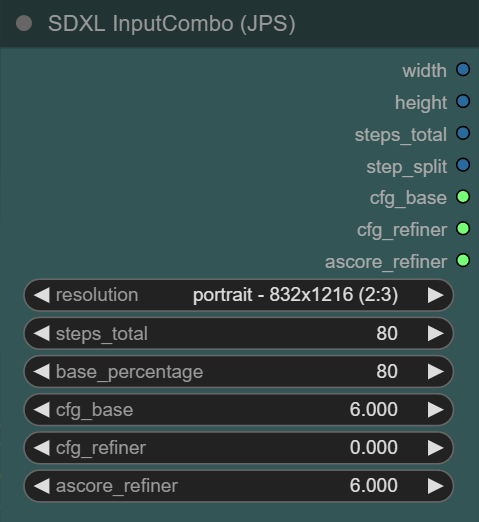
any idea what i could add to my new node? (things that are always required for SDXL TXT2IMG)
https://i.imgur.com/jlj0vVo.png
(the node calculates end_step, start_step by the percentage value and sets cfg_refiner to cfg_base if "0" is selected), also offers all recommended resolutions for SDXL)
 hardy cipher
seed number?
ionic gulch
@hardy cipher will have a look if this is possible with my limited skills :)
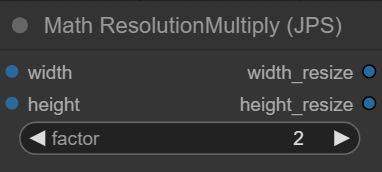
another nice node will be able to multiply resolution by a factor (without the int to float and float to int nodes required with available solutions):
https://i.imgur.com/TtJDspZ.png
 hardy cipher
well I think if you'd got this far you can do it 
I need to learn how it all works so I can make a node that it seems no one else is really interested in, lol
ionic gulch
@hardy cipher depends if it needs some includes from comfyui base (haven't figured that one out)
 fresh path
guys I had a dream where my comfyui went to 200 it/s
hardy cipher
whoa
ionic gulch
next step will be to find out how to make it available on github and comfyui manager
hardy cipher
do you have a github account?
wet nacelle
I had a dream where I met Kanye and talked about movie ideas with him.
ionic gulch
hardy cipher
do you have a github account?
i have one, but never used it for own projects.
hardy cipher
wet nacelle
I had a dream where I met Kanye and talked about movie ideas with him.
I wonder what he'd be like in person. he's obviously has some mental health issues, but might be alright in person
or maybe a huge scumbag
ionic gulch
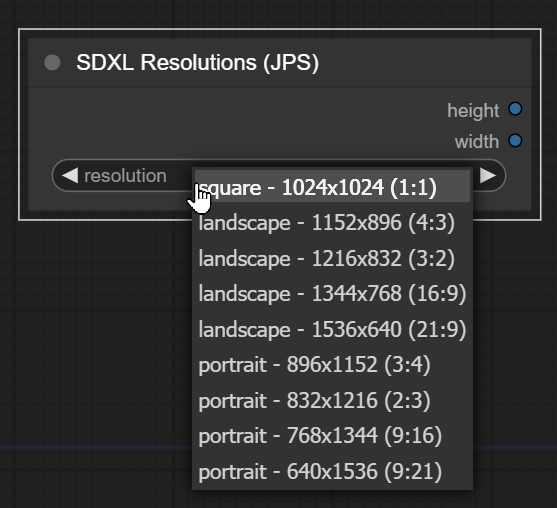
also have a node for just the resolution (it's similar to some existing nodes but doesn't have manual inputs, as basic variation, that takes less space in my ui:
https://i.imgur.com/uaYgBxK.png
cobined with the math node it gives you height, width, height x2, width x2 - the only things you need most of the time
 ionic dragon
 hardy cipher
if you would like to be pedantic, to keep the same exact number of pixels as 1024x1024 at 4x3 the dimensions would be 4*(512/(sqrt(3))) X 3*(512/(sqrt(3)))
wet nacelle
hardy cipher
or maybe a huge scumbag
He's literally someone that is lost in regards to thinking that they need to have a larger than life goal that can barely be met.
hardy cipher
it's unfortunate his mom died when she did. I think she probably kept him in check in that regard
wet nacelle
hardy cipher
it's unfortunate his mom died when she did. I think she probably kept him in che...
That's what most people think too.
indigo carbon
strong field
that's not right. I remember you showing it being faster?
strong field
That’s what I thought too
hardy cipher
wet nacelle
That's what most people think too.
I need to experiment a bit with this. I have it running, but can't tell if it's having any impact on output
indigo carbon
strong field
That’s what I thought too
try to reset comfy entirely, you might have messed something up. or even restart PC.
hardy cipher
never actually tried to use controlnet in comfy, lol
glad fulcrum
ionic gulch
also have a node for just the resolution (it's similar to some existing nodes bu...
this node is default or extension node?
ionic gulch
glad fulcrum
this node is default or extension node?
it's a new node i'm working on. just have to make some final adjustments to some other node and find out how to share it on github and comfyui manager.
strong field
indigo carbon
try to reset comfy entirely, you might have messed something up. or even restart...
Yeah been trouble shooting
I think I got it back to normal lol
indigo carbon
strong field
I think I got it back to normal lol
is the speed back to 15 seconds/gen?
strong field
Does it look right for your workflow at 20s. I forgot which card you have
I had done the nodes.py tweak and I think I screwed something up
Reverted the file

 torpid garnet
I'm using ComfyUI with SDXL 1.0 and It is creating black images. I tried using --xformers but that doesn't seem to work with comfyui... Does anyone else know of a fix for this?
strong field
torpid garnet
I'm using ComfyUI with SDXL 1.0 and It is creating black images. I tried using -...
What’s your resolution settings
torpid garnet
768w x 1024h
strong field
indigo carbon
is the speed back to 15 seconds/gen?
Not quite but I’m back to 6.9it/s
indigo carbon
strong field
Not quite but I’m back to 6.9it/s
how long in total?
strong field
torpid garnet
I'm using ComfyUI with SDXL 1.0 and It is creating black images. I tried using -...
Can you screen shot your workflow real quick
strong field
indigo carbon
how long in total?
20s
torpid garnet
Its the one you sent scorp
indigo carbon
strong field
20s
GPU? that's the exact speed I get on my 4070ti
vagrant wasp
why pixeleted when zoom
 strong field
OH FLICKITY F*
strong field
indigo carbon
GPU? that's the exact speed I get on my 4070ti
I’m running my undervolt profile
 uncut steeple
vagrant wasp
why pixeleted when zoom
uncut steeple
vagrant wasp
why pixeleted when zoom
Low resolution?
strong field
strong field
torpid garnet
Its the one you sent scorp
You have any issues downloading the modules
?
X formers works fine with comfy
vagrant wasp
uncut steeple
Low resolution?
1024
uncut steeple
vagrant wasp
1024
You are 193% zoomed in, obviously it will be pixelated
strong field
indigo carbon
GPU? that's the exact speed I get on my 4070ti
Now it all makes sense, I’m ok sacrificing a little speed for the power reduction but I forgot I had it on lol
torpid garnet
strong field
You have any issues downloading the modules
No and it was working before. Then I used the searge 3.4 workflow you sent scorp now I get black images
indigo carbon
strong field
Now it all makes sense, I’m ok sacrificing a little speed for the power reductio...
try it without lower power, I think it should get faster?
strong field
indigo carbon
try it without lower power, I think it should get faster?
Yeah definitely, I’ll double check what my max is
strong field
torpid garnet
No and it was working before. Then I used the searge 3.4 workflow you sent scorp...
Are you getting errors when you run it or just black images
wet nacelle
hardy cipher
I need to experiment a bit with this. I have it running, but can't tell if it's ...
I understand.
hardy cipher
it's weird. it seems to be changing things but not in the way I'd expect
wet nacelle
hardy cipher
it's weird. it seems to be changing things but not in the way I'd expect
Is it overhauling the image more than it should?
hardy cipher
not exactly. just creating seemingly random things. can't really say exactly what's going on. I'll let you know if/when I figure it out. just trying to troubleshoot it atm. I'd like to get it working for myself sa well. it'd help a lot with keeping complicated workflows cohesive
wet nacelle
hardy cipher
not exactly. just creating seemingly random things. can't really say exactly wha...
Makes sense.
strong field
indigo carbon
try it without lower power, I think it should get faster?
Eh it’s only like 1-2 seconds faster. Not consistent either
So my others issues were workflow
indigo carbon
strong field
Eh it’s only like 1-2 seconds faster. Not consistent either
huh. at least it's still incredibly fast
strong field
Seems right now
Great optimization on your workflow, I keep having to come back to it when I break it
8k in 25s is about my best benchmark
 coarse hull
Hi there, I'm pretty new to the party and having great fun with comfyui and the Searge SDXL v3.4 workflow.
I'm not really understanding too much of it tbh, but so far, I got it running. I still get deformations on hands and sometimes faces, any noob-proof tips?
torpid garnet
I'm not sure how to fix this does anyone have any suggestions?
 torpid garnet
strong field
Are you getting errors when you run it or just black images
torpid garnet
strong field
Are you getting errors when you run it or just black images
I was getting just black images but not I cant even run comfy 😦
wet nacelle
coarse hull
Hi there, I'm pretty new to the party and having great fun with comfyui and the ...
You could just use this too. https://github.com/lllyasviel/Fooocus

GitHub
Focus on prompting and generating. Contribute to lllyasviel/Fooocus development by creating an account on GitHub.
ionic gulch
hardy cipher
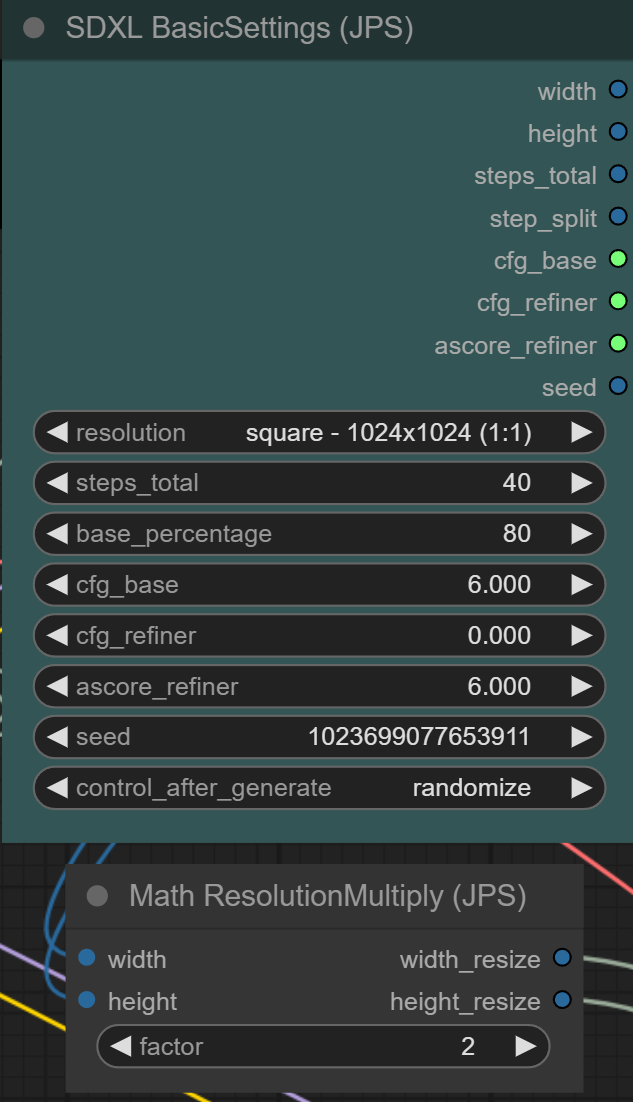
seed number?
seed number was easier than expected:
https://i.imgur.com/AdhD1DP.png
 hardy cipher
nice work!
I really don't understand what aitemplate has to do with controlnet or why it's causing errors. ugh
strong field
torpid garnet
I'm not sure how to fix this does anyone have any suggestions?
What gpu do you have and which PyTorch version
torpid garnet
3080ti and currently reinstalling cuda and torch
strong field
Yes those are next steps, un install torch and install 118 whl
torpid garnet
does this process change if I used venv in my .bat file?
strong field
Yeah that venv needs to be redone. Will most likely have a different configuration of requirements
torpid garnet
so how do I do that I'm really new to using venv all together
strong field
Did it automatically generate the venv last time, if so you can just delete and when you run it will redo
torpid garnet
so just delete the venv folder
strong field
Are you running windows portable comfy
torpid garnet
yes
strong field
Yes delete venv
wet nacelle
hardy cipher
I really don't understand what aitemplate has to do with controlnet or why it's ...
Do you think that you should watch the end part of the video where he goes back and shows the node set up from start to end?
You could possibly deconstruct it and.
Introducing ControlNET Canny Support for SDXL 1.0, especially invaluable for architectural design! Dive into this tutorial where I'll guide you on harnessing ControlNet to craft AI images via SDXL 1.0 within ComfyUI. ControlNet empowers you to use an input image, directing the pose, composition, and other facets of the resulting Stable Diffusion...
strong field
It will rebuild when you run comfy
soft zealot
 hardy cipher
wet nacelle
Do you think that you should watch the end part of the video where he goes back ...
hardy cipher
wet nacelle
Do you think that you should watch the end part of the video where he goes back ...
maybe, I don't know if it's a memory issue or what. works fine when I switch to 1.5 models. I realize they're different things, but seems like it's the same concept
torpid garnet
still getting
raise AssertionError("Torch not compiled with CUDA enabled")
AssertionError: Torch not compiled with CUDA enabled
hardy cipher
what's weird is I guess 1.5 controlnet models kind of sort of work with xl?
wet nacelle
hardy cipher
maybe, I don't know if it's a memory issue or what. works fine when I switch to ...
In a way I think that's true.
hardy cipher
never tried it, but they're giving me the general shape of the canny input
wet nacelle
It was proven a while back that 1.5 net was working with very specific workflows in 0.9
hardy cipher
not sure if it'd make anything pretty, but definitely works
 dense lichen
what i wanted to upscale vs what i got😂
 wet nacelle
hardy cipher
not sure if it'd make anything pretty, but definitely works
wet nacelle
hardy cipher
not sure if it'd make anything pretty, but definitely works
I'll take a look through the base setup he made.
dense lichen
dense lichen
what i wanted to upscale vs what i got😂
using the 4x-ultrasharp method
strong field
torpid garnet
still getting
raise AssertionError("Torch not compiled with CUDA enabled")
As...
run python interpreter on windows ( windows search: python 3.10 app)
import torch
torch.zeros(1).cuda()
then run those two commands, what do you get back?
 arctic bloom
dense lichen
what i wanted to upscale vs what i got😂
arctic bloom
dense lichen
what i wanted to upscale vs what i got😂
more lens the better!
dense lichen
arctic bloom
more lens the better!
sure😂
wet nacelle
arctic bloom
more lens the better!
More Asian woman the better too.
hardy cipher
dense lichen
what i wanted to upscale vs what i got😂
are you using tiled upscale?
dense lichen
hardy cipher
are you using tiled upscale?
yes
hardy cipher
that's it
dense lichen
hardy cipher
that's it
what it
hardy cipher
in my experience does weird things with xl. like it renders each tile differently
dense lichen
hardy cipher
in my experience does weird things with xl. like it renders each tile differentl...
its the normal sd1.5 actually
hardy cipher
ahh, well I don't know
strong field
hardy cipher
in my experience does weird things with xl. like it renders each tile differentl...
deonoise is very sensitive
arctic bloom
wet nacelle
More Asian woman the better too.
More anime woman the best!
dense lichen
i think that ive done something wrong
strong field
torpid garnet
3080ti and currently reinstalling cuda and torch
so using SeargeSDXL broke comfyui? That is strange to say the least
hardy cipher
wet nacelle
Do you think that you should watch the end part of the video where he goes back ...
I'll go over that video. I think I'm just the only person on the internet that prefers to just read this sort of stuff. but everyone making videos so I have to click through hoping to catch a glimpse of the workflow,lol
strong field
hardy cipher
I'll go over that video. I think I'm just the only person on the internet that p...
nah, your not the only
just wish someone would put a picture of their workflow instead of talk about something something for 5 minutes, subscribe this, like that
hardy cipher
subscribe to my patreon to see unblurred images of my workflow
 native knot
 dense lichen
strong field
just wish someone would put a picture of their workflow instead of talk about so...
dense lichen
strong field
just wish someone would put a picture of their workflow instead of talk about so...
some people prefer to watch a video u know
hardy cipher
you know who makes good videos? dudes that show you how to fix cars. they barely know how to video themselves a lot of times. no creepy uncanny weird face thumbnails. they don't spend 10 minutes explaining a minute worth of things
strong field
hardy cipher
you know who makes good videos? dudes that show you how to fix cars. they barely...
no doubt
strong field
dense lichen
some people prefer to watch a video u know
im not knocking the format, to each their own
hardy cipher
and those videos are legit worth watching because it's hard to visualize a lot of that stuff
or to understand it from an image
"imagine"
dense lichen
hardy cipher
and those videos are legit worth watching because it's hard to visualize a lot o...
u mean like when they show u an almost naked women?
vagrant wasp
what is up ? it becoming cartoon image
 strong field
vagrant wasp
what is up ? it becoming cartoon image
strong field
vagrant wasp
what is up ? it becoming cartoon image
Resolution?
hardy cipher
can't tell you much without seeing the actual workflow
vagrant wasp
hardy cipher
can't tell you much without seeing the actual workflow
it was working fine earlier
maybe needed restart ?
hardy cipher
I guess
vagrant wasp
hardy cipher
I guess
something not right

 vital ermine
 hardy cipher
wet nacelle
I'll take a look through the base setup he made.
hardy cipher
wet nacelle
I'll take a look through the base setup he made.
I'll have to come back to it later. Have other things to do now. Hopefully you find a solution before I do 
 hard fractal
working on a crazy new controlnet 👀
 hardy cipher
wat?
hardy cipher
huh. that's impressive. I can't even conceptualize how you'd train for that
vital ermine
 hard fractal
oooo
hardy cipher
 strong field
vagrant wasp
something not right
strong field
vagrant wasp
something not right
What model?
If sdxl is trained at 1024 so 512 will break a lot
 urban fjord
hard fractal
working on a crazy new controlnet 👀
urban fjord
hard fractal
working on a crazy new controlnet 👀
Is this the new more efficient controlnet that were discussed previously?
autumn forum
hard fractal
working on a crazy new controlnet 👀
im curious what the use case of this would be lmao.
urban fjord
I guess not everything must have a clear cut usecase at first, but imagine if you had a v2 of this where you used coloured text to colour the different part in the final output.
autumn forum
then youd have to make a picture with colored text and what not lmao, that just seems ummm time consuming. but im sure thats not the only use case, maybe its like a 1 size fits all kind of control net.
idk just speculating
urban fjord
With a good workflow that's not really an issue.
hardy cipher
could maybe be combined with unclip models?
urban fjord
Unclip is just a worse version of reference_only "controlnet".

 pure hazel
Speaking of SDXL does anyone have a good IMG2IMG/refine workflow especially interested in adding detail/fixing faces for SDXL in ComfyUI
strong field
pure hazel
Speaking of SDXL does anyone have a good IMG2IMG/refine workflow especially inte...

SDXL 1.0 ComfyUI ULTIMATE Workflow Everything you need to generate amazing images! Packed full of useful features that you can enable and disable o...
Maybe this?
Dang discord full-size that’s why don’t you
 inner wyvern
weird, I could hardly run SDVN6-RealXL with A1111. I ran out of memory before it even started with 12gb of GPU and 16gb of RAM. But with ComfyUI it runs like any other model
arctic bloom
weird indeed
soft zealot
wonder how many of these colour names Stable Diffusion "recognises" ;o)
queen adder
when training SDXL on your own dataset images there is no need to bother grabbing 2k images as the max resolution is 1024,1024 right?
I have a bunch of 1280x720 images and i could get their 1920x1080 but im assuming that would slow down the training with no upside?
 abstract blaze
what is the best workflow in order to generate high resolution images with A1111 on SDXL? I mean above 2400 pixels
urban fjord
Start with 1024x1024 images and then upscale your favourites to 2400x2400 afterwards as this saves you a lot of time by not having to upscale everything.
 hasty smelt
Hi guys! With just 16 GB of RAM, I've installed SDXL and ComfyUI on my system. During the VAE pass, memory usage hits 99%, causing minor stuttering. I'm wondering if it's possible to limit memory usage to around 90%, even if it slightly extends rendering time. If not feasible, I'm considering using Google Colab, as I have an unused premium account there.
Also, I'd like to know if working on Google Colab is a good idea given my current setup.
My current setup features a 2070 Super FTW3 with 8 GB VRAM, a 5700x processor, 16 GB of RAM, and a 1 TB Kingston SSD 7300mb.
Thank you for your assistance.
autumn forum
hasty smelt
Hi guys! With just 16 GB of RAM, I've installed SDXL and ComfyUI on my system. D...
thought about using tiled vae?
 mellow tendon
Or buying more RAM...
abstract blaze
urban fjord
Start with 1024x1024 images and then upscale your favourites to 2400x2400 afterw...
I want to replace my Hires workflow but in SDXL, so I need the native image resolution above 2K because end result should be above 16Mpixel (I use other AI tool for 2x upscale in an additional step)
hasty smelt
autumn forum
thought about using tiled vae?
I do not know how to do it
autumn forum
hasty smelt
I do not know how to do it
VAEDecodeTiled is the node name. maybe it will help? takes longer tho
hasty smelt
autumn forum
VAEDecodeTiled is the node name. maybe it will help? takes longer tho
oh, I'll look into that right away, thank you very much. I'll try to find a video explaining how to use it. Thanks buddy
autumn forum
hasty smelt
oh, I'll look into that right away, thank you very much. I'll try to find a vide...
hope it helps! i dont usually use it so i dont know the implications exactly but it may work
hasty smelt
autumn forum
hope it helps! i dont usually use it so i dont know the implications exactly but...
If it reduces ram usage by 10% or something like that it will help a lot with stuterings.
@autumn forum I found it, but I'm not sure where to place it. Could you assist me? Sorry if this seems simple, I'm new to ComfyUI.

 hollow halo
 autumn forum
hasty smelt
<@497282742380265495> I found it, but I'm not sure where to place it. Could you ...
autumn forum
hasty smelt
<@497282742380265495> I found it, but I'm not sure where to place it. Could you ...
so youll need to open the vae decode at the top of that first save image node by clicking the left grey dot, then replace the connections on that with the new vae decode tiled
hope that makes sense
native knot
 hasty smelt
autumn forum
so youll need to open the vae decode at the top of that first save image node b...
hasty smelt
autumn forum
so youll need to open the vae decode at the top of that first save image node b...
It seems to have worked, I just need to organize things now.
 autumn forum
nice! below 90% ?
autumn forum
are you using the upscaler? if not maybe try changing out the other ones too
hasty smelt
autumn forum
are you using the upscaler? if not maybe try changing out the other ones too
yes, I will try to organize everything. Should I also do the same in Upscale?
autumn forum
hasty smelt
yes, I will try to organize everything. Should I also do the same in Upscale?
wouldnt hurt hah
hasty smelt
Thanks for the support Via
hollow halo
 autumn forum
not a problem.
hollow halo

 native knot
 autumn forum
me over here trying to find the best upscaling method with the least artifacting and contrast issues. smahing my head against the wall but i feel im close.
 west breach
autumn forum
me over here trying to find the best upscaling method with the least artifacting...
west breach
autumn forum
me over here trying to find the best upscaling method with the least artifacting...
Just ask the operator to patch you through to the best method 🙂
native knot
 hasty smelt
@autumn forum I managed to reserve 1GB with the adjustments, in addition to VAE decode (Tiled), I also replaced VAE encode (Tiled). Before this, memory was consuming the entire system, and there is no more system stuttering. Thank you very much for the valuable tip.
 autumn forum
hasty smelt
<@497282742380265495> I managed to reserve 1GB with the adjustments, in addition...
autumn forum
hasty smelt
<@497282742380265495> I managed to reserve 1GB with the adjustments, in addition...
nice! glad to see it.
heady vale
 wet nacelle
Can someone link me the guide that explains each official node in detail?
hasty smelt
wet nacelle
Can someone link me the guide that explains each official node in detail?
that would be good
wet nacelle
hasty smelt
that would be good
I think it's a real thing is the issue.
heady vale
I havent seen one
hasty smelt
wet nacelle
<@824919846570819584><@742646197721890866>It's always the Japanese that do this ...
Thanks
wet nacelle
hasty smelt
Thanks
 heady vale
the info on the page is just expanding the node title slightly it doesnt really say what they might be used with
strong field
heady vale
Stock dynavision?
heady vale
strong field
Stock dynavision?
yep
wet nacelle
heady vale
the info on the page is just expanding the node title slightly it doesnt really ...
I am disappointed now. I just clicked a link and thought "YIPPIE!"
heady vale
gonna need a translator
wet nacelle
heady vale
gonna need a translator
What are you using for a browser?
heady vale
FF
hasty smelt
if you click on it you can see an explanation, we'll need a beer to translate that
wet nacelle
heady vale
FF
Same here. Do I maybe have an extension? https://addons.mozilla.org/en-US/firefox/addon/traduzir-paginas-web/

Download TWP - Translate Web Pages for Firefox. Translate your page in real time using Google or Yandex.
It is not necessary to open new tabs.
Now works with the NoScript Extension.
wet nacelle
strong field
This has some info. https://blenderneko.github.io/ComfyUI-docs/Core%20Nodes/Adva...
This seems good too actually.
hasty smelt
bing have translator, I like
 wet nacelle
hasty smelt
bing have translator, I like
wet nacelle
hasty smelt
bing have translator, I like
That's rad actually.
wet nacelle
hasty smelt
bing have translator, I like
Did you mean Edge?
hasty smelt
wet nacelle
Did you mean Edge?
I don't know, where I'm browsing, microsoft always changes things, until today I don't know if it's bing or edge
heady vale
bing is a search engine like google but I guess both their own translate page abilities
I never use edge or bing
wet nacelle
heady vale
I never use edge or bing
I LOOOOOOOOOOOOOOOVE EDGE!!!!!!
I will never use it unless I want to try experimental sites.


 native knot
 torpid garnet
When I generate I get black images and this is what is says...

 steady grove
sourdough
 steady grove
heady vale
I never use edge or bing
steady grove
heady vale
I never use edge or bing
i use edge for video streaming since its the only one that is usually fully compatible


 indigo carbon
Does anyone know some kind of node that allows batch count to create a grid like A1111 does? I kinda miss that feature
wet nacelle
indigo carbon
Does anyone know some kind of node that allows batch count to create a grid like...
Have you tried searching for a node like that?
 indigo carbon
yes, couldn't find anything
wet nacelle
indigo carbon
yes, couldn't find anything
Can you tell me the places you looked? I might know another site if you tell me the sites you searched on already.
indigo carbon
wet nacelle
Can you tell me the places you looked? I might know another site if you tell me ...
HF, Reddit, here, CivitAI, Tensors,
heady vale
Efficiency nodes has an XY plot, but Ive never used it
wet nacelle
 indigo carbon
I'm looking for a feature that behaves like how A1111 behaved when doing batch count, the batch size on the other hand does make that grid, is there any way to have batch count make a grid like that?
wet nacelle
 strong field
torpid garnet
When I generate I get black images and this is what is says...
strong field
torpid garnet
When I generate I get black images and this is what is says...
Wait, which version of searge did you download? And from where. There is an issue with nodes that are updated with in old workflows. You need to make sure you are using the workflow that came with whatever you downloaded
heady vale
dynavision + voxel lora
 native knot

 shy kelp
anyone know if there's a token limit when running sdxl on local machine?
strong field
indigo carbon
Does anyone know some kind of node that allows batch count to create a grid like...
Efficiency XY plot is the only thing I know
heady vale
 ionic gulch
can someone help me with the code of a simple custom node?
code:
https://i.imgur.com/BdcR5vK.png
results in:
https://i.imgur.com/GAtVRCP.png
why does it show "I"," N","T" as return values?
i did much more complex nodes without problems, also tried to build it again from scratch, with the same result
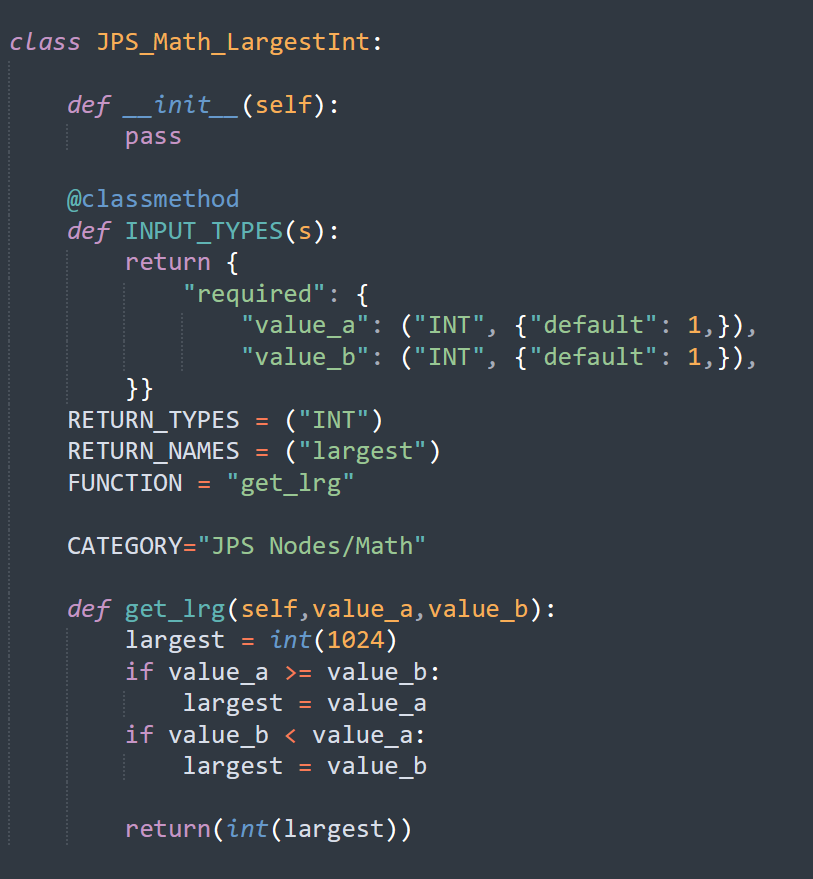
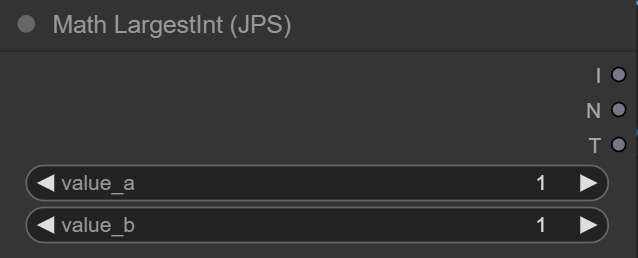 native knot

 elfin flare

 fresh path
wet nacelle
fresh path
wet nacelle
HORROR
 hardy cipher
ionic gulch
can someone help me with the code of a simple custom node?
code:
https://i.imgur...
hardy cipher
ionic gulch
can someone help me with the code of a simple custom node?
code:
https://i.imgur...
have you tried connecting anything to the outputs? if I were that's what I'd do first. drag from the node output and then let go in empty space. it should list the most common? nodes it can connect to, then you can click "search" to see everything it would connect to

 native knot
 hasty smelt
OK, I like this. I confess that now, after 24 hours of using SDXL, it is countless times better than the previous options. I'm loving it!


 fresh path
yeah if you want to make berries
native knot
Or kickass pixel art of kaiju alien tech
 hasty smelt
fresh path
yeah if you want to make berries
hasty smelt
fresh path
yeah if you want to make berries
I have to start somewhere, don't I? 😎
 azure oxide
native knot
Or kickass pixel art of kaiju alien tech
azure oxide
native knot
Or kickass pixel art of kaiju alien tech
curious, did you have kaiju in the prompt? i did it with an animal and it didn't seem to work but i wonder if sdxl knows it with other subjects
native knot
azure oxide
curious, did you have kaiju in the prompt? i did it with an animal and it didn't...
No. But I'm actually trying some iterations of that since I thought of that word when responding.
azure oxide
hah gotcha
native knot
 wet nacelle
 fresh path
hasty smelt
I have to start somewhere, don't I? 😎
fresh path
hasty smelt
I have to start somewhere, don't I? 😎
Imagine the berry fine tuning

 ionic gulch
i solved the node problem (imo that's a bug in comfyui) in a way that doesn't need the additional node.
workflow v13 is working fine in my first tests (img2img and txt2img):
https://i.imgur.com/WJOwCgJ.jpg
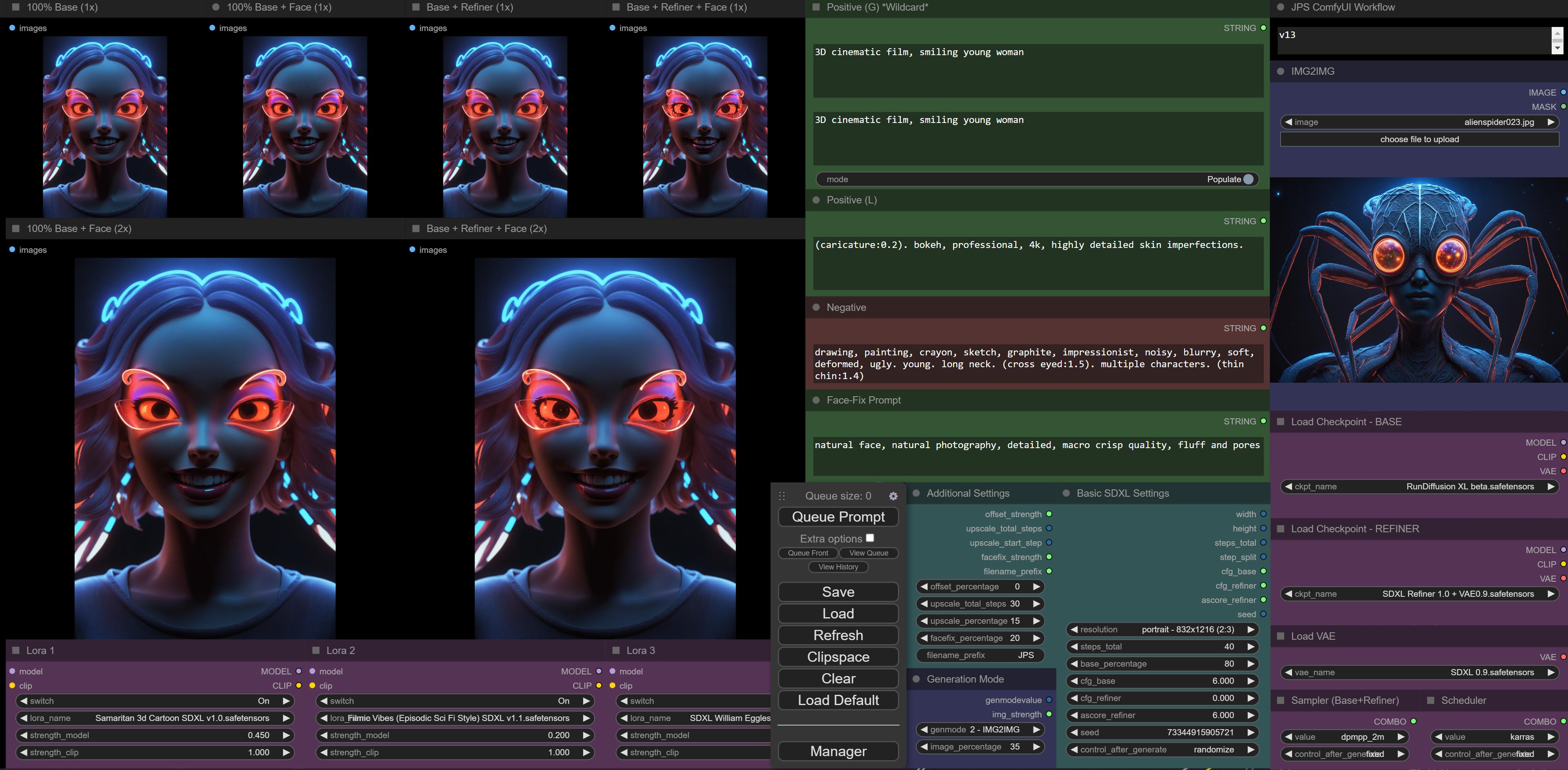


 wet nacelle

 lilac raven
I had this idea of having pages that had a "prompt" and images would be generated and the pages would be endless galleries, but I had to give up

 fresh path
u could do a scale and resize with no filtering to get actual pixel art
hasty smelt
wet nacelle
Mack, can you send me this prompt? I love vintage art and would like to try something with it.
wet nacelle
hasty smelt
Mack, can you send me this prompt? I love vintage art and would like to try some...
gothic (demented:1.8) smear dry vintage illustration of knight in bone armor holding spear
hasty smelt
wet nacelle
gothic (demented:1.8) smear dry vintage illustration of knight in bone armor hol...
Thanks buddy
wet nacelle
yea
fresh path
and dont forget ur negative embeddings
idk if theres any on sdxl actually
it looks fine
native knot
fresh path
u could do a scale and resize with no filtering to get actual pixel art
That doesn't "just work" for everything. Pixel art tends to be drawn in certain ways with limited palettes and specific styles.
Lots of things lose important details when you try just scaling/resizing, like eyes, etc.
wet nacelle
 fresh path
native knot
That doesn't "just work" for everything. Pixel art tends to be drawn in certain...
fresh path
native knot
That doesn't "just work" for everything. Pixel art tends to be drawn in certain...
I meant as a fix to the model not getting pixels correctly square
but yeah you are right
because the model doesnt exactly put the pixels on a grid
native knot
fresh path
because the model doesnt exactly put the pixels on a grid
Ah...yes. Actually, I am using that trick. The final step in my workflow is a nearest-neighbor resize.
It corrects the exact problem you're describing.
fresh path
yeah thats what I meant
but when you upsize it, you need to use no filtering or else it looks blurry
unless the res is just rly low
native knot
Final res is 640x360.
lilac raven
On ComfyUI, what is the difference between latent and LATENT?
native knot
fresh path
but when you upsize it, you need to use no filtering or else it looks blurry
It's not blurry, tho.
wet nacelle
 fresh path
native knot
Final res is 640x360.
fresh path
native knot
Final res is 640x360.
oh must be my browser


 lilac raven
How do img2img works on Comfy? I have a LoadImage and then a VAEEncode, but I didn't get how do I set the strength, it seems to change everything
fresh path
lilac raven
How do img2img works on Comfy? I have a LoadImage and then a VAEEncode, but I di...
look at the example
I think you are looking for denoise in ksampler
lilac raven
So it's not usable with the other ksampler that has the end_at_step for the refiner? Because the ksampler with the denoise parameter don't seem to have the end_at_step
 ionic gulch
lilac raven
How do img2img works on Comfy? I have a LoadImage and then a VAEEncode, but I di...
ionic gulch
lilac raven
How do img2img works on Comfy? I have a LoadImage and then a VAEEncode, but I di...
you can use steps and start_step for sdxl for img 2 img - the higher the start_step for base, the more of the img will be kept
wet nacelle
 native knot


 lilac raven
ionic gulch
you can use steps and start_step for sdxl for img 2 img - the higher the start_s...
lilac raven
ionic gulch
you can use steps and start_step for sdxl for img 2 img - the higher the start_s...
I think this is working, let me test a little more
ionic gulch
lilac raven
I think this is working, let me test a little more
should work without problems - here i start base steps at 35% for example:
https://i.imgur.com/WJOwCgJ.jpg
(right side is the original - left the result)
lilac raven
ionic gulch
should work without problems - here i start base steps at 35% for example:
https...
Can confirm it works, thank you
hardy cipher
JPS, could you tell me what the deal was with that I N T thing? I'm really curious. I looked into it a bit and couldn't figure out what was going on. t
 hardy cipher
obviously it spelled INT, but then I could be integer? N number? T ???
strong field
hardy cipher
JPS, could you tell me what the deal was with that I N T thing? I'm really curio...
yeah me too, i looked over the code for like 10 minutes an couldnt figure
hardy cipher
I actually have no idea, lol
 vast galleon
ionic gulch
can someone help me with the code of a simple custom node?
code:
https://i.imgur...
vast galleon
ionic gulch
can someone help me with the code of a simple custom node?
code:
https://i.imgur...
you want to do
return(int(largest), )
bruh was it just the comma?!
ionic gulch
hardy cipher
JPS, could you tell me what the deal was with that I N T thing? I'm really curio...
for some reason it didn't show the name as it worked for all other custom nodes i made and showed multiple outputs instead of one / also it didn't calculate the values and always gave me the default value - don't understand why, as much more complicated calculations work fine in other nodes i made.
vast galleon
strong field
bruh was it just the comma?!
looks like it
strong field
vast galleon
looks like it
i checked and double checked all the brackets lol
i was thinking it had to be syntax related but damn, a comma
ionic gulch
the comma doesn't make a difference. i tried with and without commas on multiple places - if there is nothing after the comma it just gets ignored
wet nacelle
 hardy cipher
I was trying to figure out if those letters actually meant something, but I barely know enough about python to fix little errors that pop up. that was a bit beyond me
vast galleon
ionic gulch
the comma doesn't make a difference. i tried with and without commas on multiple...
you still need it where i had it so it must be another issue.
ionic gulch
ok, let me try again
hardy cipher
well it had to have a reason to think each of those letters was an output. I want the flawed node so I can see what the outputs would connect to
I guess I could just use that code
ionic gulch
so this should work?
https://i.imgur.com/kLtKFeW.png
 hardy cipher
I hope this isn't a dumb question, but with the fine tuned sdxl models, should I still use the 0.9 vae, or would I be able to use the vae output from the checkpoint loader?
ionic gulch
you can copy the code:
lass JPS_Math_LargestInt:
def __init__(self):
    pass

@classmethod
def INPUT_TYPES(s):
    return {
        "required": {
            "value_a": ("INT", {"default": 1,}),
            "value_b": ("INT", {"default": 1,}),
    }}
RETURN_TYPES = ("INT")
RETURN_NAMES = ("largest")
FUNCTION = "get_lrg"

CATEGORY="JPS Nodes/Math"

def get_lrg(self,value_a,value_b):
    largest = int(1024)
    if value_a >= value_b:
        largest = value_a
    if value_b < value_a:
        largest = value_b

    return(int(largest),)
I've been using the 0.9 vae, but I don't know if that's correct
strong field
think my new prompt generator is smarter than i am now

 hardy cipher
nice
I've been making some cool comic book stuff
you should download the ussr propaganda lora
vast galleon
ionic gulch
you can copy the code:
lass JPS_Math_LargestInt:
def __init__(self):
...
also try def INPUT_TYPES(cls): instead of def INPUT_TYPES(s):
hardy cipher
it adds flair
ionic gulch
here is the result with comma:
https://i.imgur.com/kLtKFeW.png
https://i.imgur.com/jDfZfNl.png
for some reason it takes each letter of the "RETURN_NAMES" and creates outputs for the first three letters
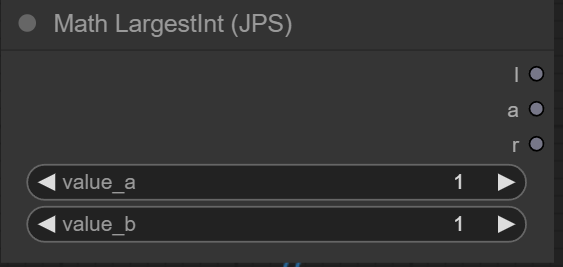


 strong field
hardy cipher
I've been using the 0.9 vae, but I don't know if that's correct
strong field
hardy cipher
I've been using the 0.9 vae, but I don't know if that's correct
they officially released one with .9 so i think you are good
 hardy cipher
well I'm using dreamshaper, and I've been testing out using the vae output from the checkpoint vs the vae loader
not even sure which is better, they're different though
native knot


 hardy cipher
I've been doing fine just using the regular vae though so I'll stick to that
strong field
hardy cipher
I've been doing fine just using the regular vae though so I'll stick to that
if it aint broke.
vast galleon
ionic gulch
here is the result with comma:
https://i.imgur.com/kLtKFeW.png
https://i.imgur.c...
also try:
largest = int(largest)
return(largest,)
hardy cipher
btw, I don't just ask these questions when they pop in my head. it's just hard to find this information online
like trying to find a definitive explanation on how to construct the refiner prompt
strong field
hardy cipher
like trying to find a definitive explanation on how to construct the refiner pro...
scott detweiler is laughing at his cocktail party righ tnow