#✨|sdxl
1 messages · Page 63 of 1
 hardy cipher
 fresh path
can anyone share their workflow to upscale sd1.5 images with sdxl
hardy cipher
like this is almost on point I think? but I don't know, kind of feels like it could come together better

 upbeat summit
hardy cipher
like this is almost on point I think? but I don't know, kind of feels like it co...
upbeat summit
hardy cipher
like this is almost on point I think? but I don't know, kind of feels like it co...
nice layers of fluidity


 trim orbit
differences are to subtle to determine a winner really
one has better contrast and one has better details
hardy cipher
upbeat summit
nice layers of fluidity
Hmm. I'm not completely familiar with that term, but I really put a lot of effort into making things look proper. which is of course subjective
 thorny frost
Many cats and so few dogs. What injustice. 😦
hardy cipher
if in doubt just take the pixel value of the two images and then blend it back into one of them with dodge or burn or something
*pixel value difference
upbeat summit
hardy cipher
Hmm. I'm not completely familiar with that term, but I really put a lot of effor...
yes, you've been posting some very interesting and unique creations. very exciting! I was talking about the fluidity of the paint and colors, how the layers of paint / different colors have merged together and feel three dimensional because of the lighting and shadows.
hardy cipher
thanks! I like to experiment a lot with prompts. they get a bit wordy but they make cool things
upbeat summit
yep 🙂 same
hardy cipher
I've read tutorials that say that people should keep the prompts concise. but I respectfully disagree, lol. well at least with what I'm making
might not want a huge prompt if you're trying to make other things
thorny frost
hardy cipher
might not want a huge prompt if you're trying to make other things
I think that is for 1.5. with SDXL the longer the better
upbeat summit
hardy cipher
I've read tutorials that say that people should keep the prompts concise. but I ...
yeah. having a sleek prompt build is also nice, but I tend to layer concepts, art styles, weighting and mixing tokens in my adventures to explore the latent space 😉
hardy cipher
well I don't start off with a big prompt. when starting something new it'll normally be a couple words
then I build on it
upbeat summit

 crystal forge
prompt length also depends a little bit on the goal, sometimes you want something loose to explore different things (shorter prompt better), sometimes you want someting very specific and only have small details change (longer prompt generally better)
hardy cipher
and these days I have different things I'll recycle just to see what happens. totally unrelated concepts, lol. but they work
upbeat summit
crystal forge
prompt length also depends a little bit on the goal, sometimes you want somethin...
yeah absolutely
hardy cipher
wow, that's the kind of style I go for there
upbeat summit
hardy cipher
and these days I have different things I'll recycle just to see what happens. to...
for me it's one of the most exciting aspects of it. using different styles, concepts, loras, fine-tunings in general and use them like droplets / ingredients to create something interesting
 crisp owl
I once got criticised for having a "disjointed" prompt. I just laughed and asked what a proper prompt looks like
hardy cipher
I need to et back on this workflow. kind of got bored with it but has potential I think.

never really felt like they were finished though
 jolly creek
 hardy cipher
well I think a lot of people are focused on making or mimicking things that already exist, but I could just look at those things. I want to make new things that no one has ever seen.
crisp owl
Yup, that's exactly what I did and he said he liked the image, but still criticised the prompt. I said go ahead and then replicate the image and tell me my prompt is wrong.
upbeat summit
crisp owl
I once got criticised for having a "disjointed" prompt. I just laughed and aske...
yeah. I have some really long and convoluted prompt builds that probably only confuses and overwhelms the model's text encoder.
"don't do this"
but if you like the output nobody can tell you what is right or wrong with this. if it makes you happy you can use any technique you want.
hardy cipher
meh, I won't criticize anyone's prompt unless they're looking for critiques. I don't know the right way to do any of it. I don't know that there is a right way
I just focus on putting the important stuff first
so frame the basics of the image structure at the outset. then get weirder as it goes on
and not for the sake of being weird exactly. but it adds layers of complexity to the image
 soft zealot
 crisp owl
If someone says their way is the right way, they're wrong hahaha
Perhaps to get to their result, but that's the nuts thing with all this, just how many damn variables there are. Move one thing accidentally and get 100% different results, or different styles with the same theme, etc etc.
 static prawn
i dont like the horror pics in sdxl, they always look exactly the same xD
jolly creek
crisp owl
If someone says their way is the right way, they're wrong hahaha
Perhaps to get ...
Like even commas and periods can affect the output
hardy cipher
static prawn
i dont like the horror pics in sdxl, they always look exactly the same xD
do they?
crisp owl
I was messing with this accidentally yesterday, realized I had the wrong prompt connected to clip L than I thought, so I corrected it, but then didn't like the results anymore hahaha


 static prawn
i always get those white, bone like characters
hardy cipher
lol


 soft zealot
static prawn
i always get those white, bone like characters
soft zealot
static prawn
i always get those white, bone like characters
they're called skeletons ;o)

 static prawn
oh crazy, never was able to generate those
for me it always tend to white bone like stuff
hardy cipher
Uncanny children with shiny cracking porcelain skin, like that of an antique doll, living in an alternate universe that is nothing but beans. They stare through you with dead eyes. The thousand yard stare. They've fallen through a wormhole into another dimension. And there is nothing but beans. They're buried in beans. They're eating the beans like ravenous animals. No love, no parents, no hopes no dreams. No home, no shelter, Just a perpetual living nightmare as the singular component of this dimension is beans. In this existential nightmare they ravenously eat the beans, but it's not as though they need to. They don't need to sleep or eat, they never get full. They spend their perpetual neverending bean nightmare, every moment agony, trying to fill a void that can never be filled. With beans. Only beans. Just beans
 jolly creek
 crisp owl
at least he's trying to eat healthy ^
hardy cipher
children of the bean
jolly creek
so yea my point is that variety is doable
hardy cipher
 static prawn
probably have to work more with prompts, i still dont get how to get better results, my images always look generic
hardy cipher

I like the comic. really illustrates it well

but I got beaned out so no more existential bean nightmare images for a while
jolly creek
working double shifts gets you tired
 hardy cipher
 crisp owl
is that mark zuk?
crisp owl
Damn, so the theories were true
hardy cipher

 fleet harness

 hot rover
Still tinkering with this process. I love Sytan's workflow, it just works. What I didn't like was allowing the latent space to change things or guess as much. I thought eyes and facial details always came out blurry, cooked or warped in my tests. I added a face refiner group of nodes and a sharpening node before the upscale does it's thing and I think helps the "Upscale Mixed Diff" node work just a tiny bit more predictably because it introduces more "good" detail to work with. My example images had some of the levels adjusted to compensate for some contrast, but overall it seems to work as expected and it works for weird faces too (zombies, ghouls etc.)
 hardy cipher
 jolly creek
 hardy cipher
 jolly creek
 trim orbit
https://research.nvidia.com/labs/par/Perfusion/ if i knew how to code ML stuff i'd do something about this paper just sitting here, looking at me
Key-Locked Rank One Editing for Text-to-Image Personalization
 urban fjord
The promises there is what you find in every paper since textual-inversion.
trim orbit
this one seems more demonstratable. google's got their new method too which is waiting on code
 cedar tusk
Question about SDXL lora training: I have a set of captioned images I used to train a 1.5 lora previously. Many of these are likely not at 1024^2 resolution (or any of the SDXL resolutions), and some might be 512 on the short side. Will those still work for SDXL lora training or is that a bad idea?
 zealous horizon
For your OCD Cable management.
I call them microdots. They allow you to lay your cables as you desire.
works with default reroute nodes
It helps me understand what goes where on complex workfows

 upbeat summit
zealous horizon
For your OCD Cable management.
I call them microdots. They allow you to lay your...
upbeat summit
zealous horizon
For your OCD Cable management.
I call them microdots. They allow you to lay your...
So your nodes extensions are now a must have for my workflows. Thank you for making these QoL features. Really awesome and keep up the great work!
zealous horizon
upbeat summit
So your ~~nodes~~ extensions are now a must have for my workflows. Thank you for...
they are just extensions of the UI, "not custom nodes". so far I was able to just do that with the default reroutes. Therefore is is compatible to any workflow with reroutes.
upbeat summit
zealous horizon
they are just extensions of the UI, "not custom nodes". so far I was able to jus...
that is what I meant 😄
yeah the microdots sound really interesting. I will try them out shortly
 mellow tendon
 zealous horizon
upbeat summit
yeah the microdots sound really interesting. I will try them out shortly
zealous horizon
upbeat summit
yeah the microdots sound really interesting. I will try them out shortly
there are 3 modes

 boreal bough
I'm assuming your were using an ancestral sampler?
 indigo carbon

 ionic gulch
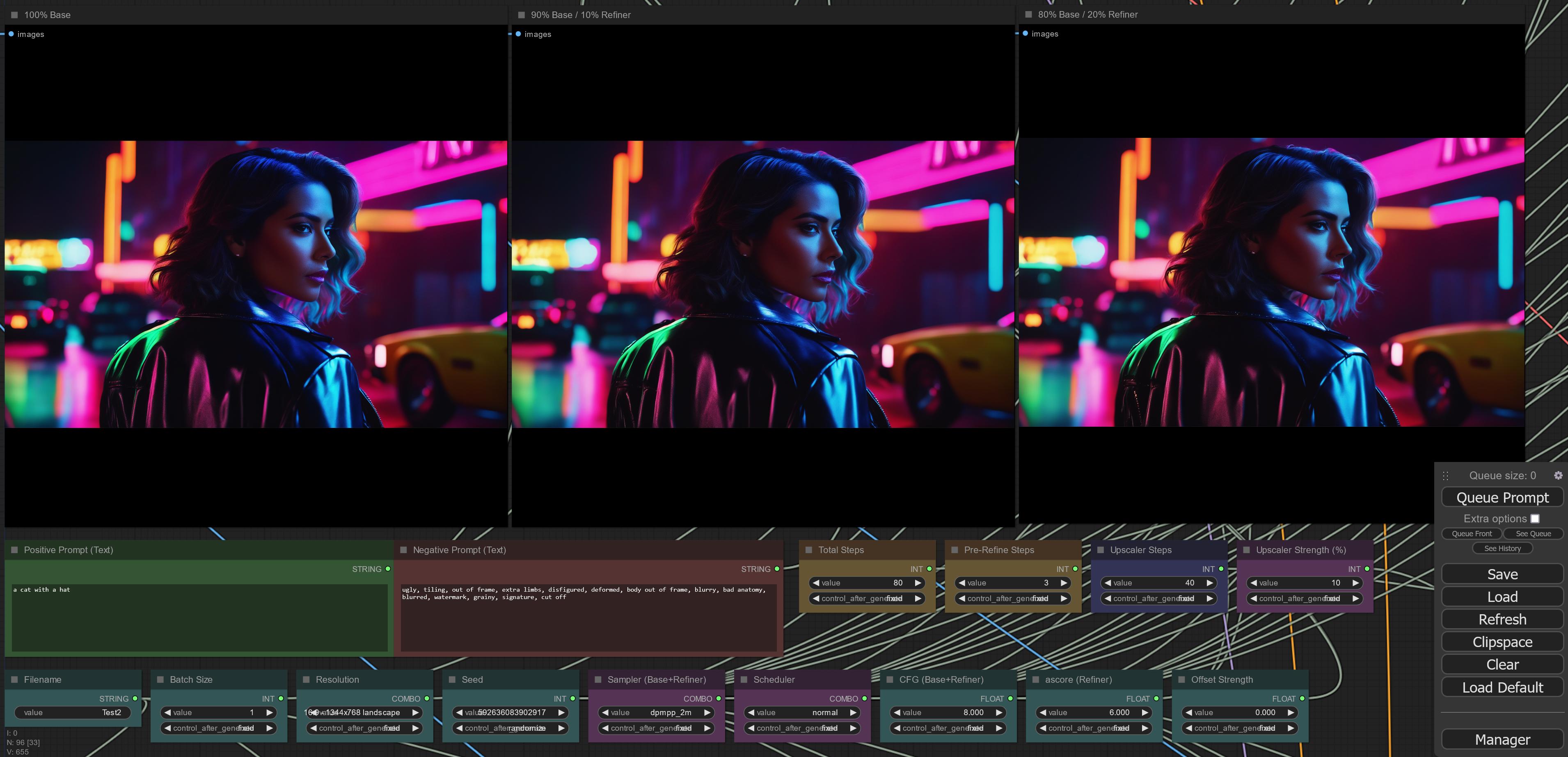
results with refiner steps and upscaler steps are so different, i think i have to build a workflow that generates 6 variants of an image to compare and pick the best one. this one for example is refiner 10% instead of 20% - much better than 100% base or 20% refiner:
https://i.imgur.com/MZsWjaj.jpg
 indigo carbon

 alpine pine
its the relative amount of steps the refiner vs base do
ionic gulch
@vernal ravine calculating the end_step for base = start_step for refiner. so i can enter 80%, 90%, etc. - my new workflow will drop that and create 80%, 90% and 100% base every time - same for the upscaler - that one needs at least two different strengths to compare - so i get 6 results. and if you do it in in a way that uses previous results you don't have to wait 6x longer, but still 2-3x longer than one variant.
jolly creek
 indigo carbon
 upbeat summit
zealous horizon
there are 3 modes
upbeat summit
zealous horizon
there are 3 modes
looks like a great way to organize the links in more complex workflows.
so if someone doesn't have the web extension installed and opens a workflow that used them, do the links follow the normal flow?
and when it is saved again on a comfyui installation that doesn't have the microdot extension, will the settings be lost? or is it a global setting like your other extensions?
zealous horizon
upbeat summit
looks like a great way to organize the links in more complex workflows.
so if s...
I add metadata to the properties (that info is saved in the file),
Without extension the reroutes are just default. (because they have a weird resize force in them)
You can see that if you try to resize a reroute. It will always jump back to it's original size. I hacked that part when dot or microdot are active.
If someone saves the file without the extension, the logic will remain unless a reroute is deleted (obviously)
upbeat summit
zealous horizon
I add metadata to the properties (that info is saved in the file),
Without exte...
nice - great solution 🙂
 echo pine
are the best settings/workflows that are found with the bot open sourced?
upbeat summit
zealous horizon
I add metadata to the properties (that info is saved in the file),
Without exte...
There is one thing I think would be a great QoL addition. Do you think there is a way to increase the resistance of the snapping? So it takes a bit more resistance when pulling something out of a snapped grid position.
I know that is a very delicate thing to tweak but coming from other applications and from doing UX/UI design it is something I think could improve the overall user experience.
zealous horizon
upbeat summit
There is one thing I think would be a great QoL addition. Do you think there is ...
threshold? yeah, I can check if the movement can be overwritten.
upbeat summit
Maybe there is a parameter in ComfyUI's source code I haven't found
upbeat summit
zealous horizon
threshold? yeah, I can check if the movement can be overwritten.
yeah, exactly
I mean maybe I'm the only one that feels this way, but in other applications the threshold is mostly higher so the snapping is more obvious.
Also elements are snapping more obvious closer to snap positions - magnetic like. I know they are couple of parameters that play into it.
I'm not 100% sure how it would feel in ComfyUI though without seeing how it affects it.
 unkempt fractal
so what we saying, sdxl + hires fix + refiner or without hires fix
indigo carbon
unkempt fractal
so what we saying, sdxl + hires fix + refiner or without hires fix
me personally; SDXL->last few first pass steps with refiner UNET->hiresfix->last few hiresfix steps with refiner unet
there is an A1111 extension that allows you to implement this in a very efficient way.
by far my favorite way to use SDXL
 unkempt fractal
UNET < ?
upbeat summit
Hi. I'm sorry I have not yet got a good upscaling workflow going for myself, so I don't know what makes most sense. but you can look at the ComfyUI workflow from Sytan. He recently released a new version (1.0) that includes an upscaling pipeline:
https://github.com/SytanSD/Sytan-SDXL-ComfyUI
For my upscale tests I mostly use Topaz Photo AI
 sonic furnace
since they moved back to 0.9 vae im noticing the red squares on images alot more 👀
 indigo carbon
unkempt fractal
UNET < ?
indigo carbon
unkempt fractal
UNET < ?
the UNET is the crucial part of the refiner. by swapping just the UNET you can have a massive performance gain without having to unload and reload the base and refiner after every gen. the extension allows you to keep both base UNET and refiner UNET in CPU RAM, and when it's time for the refiner parts or the workflow, it's swaps the UNET's using the ones it keeps in CPU RAM with the ones it keeps in VRAM. this way you use the refiner efficiently without effecting performance.
indigo carbon
yeah, that's the extension that allows this efficient workflow.
 heady vale

 west breach
morning 
heady vale
morning
indigo carbon
'morn
 upbeat summit
greetings .)
west breach
Had my PC running gens all night with this upscale workflow and prompts from sandbit's file. Interesting to see what it's strengths and weaknesses are. Can't wait for a tile controlnet to help the with upscaling!

 west breach


 heady vale
 vital ermine
you got XL working?
vital ermine
yes, but I can't do 1024 sq I oom
vital ermine
heady vale
you got XL working?
ddim no workie in XL in auto either
heady vale
yeah I remember ddim not working in A1111. COmfy is so much better in almost everything though
vital ermine
I can't stand comfy's ui as I tried it and just no way
especially how I work it is far too cumbersome
upbeat summit
look who's here 🙂
heady vale
pretty sure you wouldnt OOM with tiled vae in comfy
 lean garden
sdxl with no refiner in auto1111, can't see the point of using the refiner when you can already get details like this without it.
 vital ermine
yeah, that 32 bit float VAE does me in
heady vale
with Sytans workflow and tiled vae nodes I did 8k on a 3080
upbeat summit
lean garden
sdxl with no refiner in auto1111, can't see the point of using the refiner when ...
the refiner isn't necessary for all images, styles and settings. it really depends.
 lilac raven
I installed the refiner extension on a1111. It uses double the memory but it's possible to generate 2 images at once
(by the way, how do I know if the refiner is working on a1111?)
 lean garden
upbeat summit
the refiner isn't necessary for all images, styles and settings. it really depen...
lean garden
upbeat summit
the refiner isn't necessary for all images, styles and settings. it really depen...
That's what i was thinking. I haven't generated anything yet where i thought i was missing something.
vital ermine
Well, comfy isn't going to work out for me as the reverse mouse wheel, the lack of a sider, and when you use 4-6 loras, hypernetworks, etc... per prompt you begin to feel the issues
lean garden
lilac raven
I installed the refiner extension on a1111. It uses double the memory but it's p...
I'd just not bother with it altogether
upbeat summit
vital ermine
Well, comfy isn't going to work out for me as the reverse mouse wheel, the lack ...
Hey there 🙂 Long time no talk. There are couple of custom nodes that allow you to insert loras in a prompt editing a1111 way.
It's all experimental and new but it will work eventually
west breach
Maybe someone will make an extension to use comfy as the backend?
vital ermine
upbeat summit
Hey there 🙂 Long time no talk. There are couple of custom nodes that allow you ...
Heyas, I saw you in here but my card I never tried XL. Getting used to it as I plan on getting a 7900XTX end of Aug.
upbeat summit
vital ermine
Heyas, I saw you in here but my card I never tried XL. Getting used to it as I ...
nice!
heady vale

 trim vigil
 vital ermine
@upbeat summit the two big ones for me in comfy is how I can't just open up a menu to get to my embeddings, loras, etc... and the reverse mouse wheel (that I complained to comfy on day 1) never had the option to allow me to reverse it really is bad.
 untold totem
Hiya. I'm using vlad's automatic for SDXL, and all seems good. Except the Variation Seed doesn't seem to work? Is that a known problem, or should it be working?
lilac raven
The refiner does influence something, I don't know if I want that or not (time to img2img to get proper crossed arms)
vital ermine
without vs with refine 0.4 denoise


 pallid path
zombies
 west breach
vital ermine
without vs with refine 0.4 denoise
west breach
vital ermine
without vs with refine 0.4 denoise
Try using refiner only at 512x or 768x resolutions. I get the feeling it's a 512 model based on being able to compose images best at lower resolutions
 static temple
Any moderator in here?
pallid path
infally, drip pope francis, but open source

 vast narwhal
There's a way to discover the exact seed of an image when doing batch generation? All pictures seems to have the same metadata
vital ermine
west breach
Try using refiner only at 512x or 768x resolutions. I get the feeling it's a 512...
I can't actually go larger than 960x536 anyway
static temple
vast narwhal
There's a way to discover the exact seed of an image when doing batch generation...
i think in xyz plot seed> 1,1,1,1,1,1,1,
then find the image and press same seed
vast narwhal
static temple
i think in xyz plot seed> 1,1,1,1,1,1,1,
I will try. ty
pallid path
 static temple
vital ermine
I can't actually go larger than 960x536 anyway
static temple
vital ermine
I can't actually go larger than 960x536 anyway
free upscaler and does a good job and you can do batch images all at once https://www.upscayl.org/

Upscayl
Free and Open Source AI Image Upscaler for Linux, MacOS and Windows
 hard fractal
Is this person in here? https://civitai.com/models/120763/filmic-vibes-episodic-sci-fi-style-or-sdxl
This is an early lora based on stills from sci fi episodics. Currently, it works well at fixing 21:9 double characters and adding fog/edge to every...
Doesn't seem like it
 autumn forum
damn someone beat me to uploading 😦 sad
hard fractal
They're definitely not passing in the right conditions 
autumn forum
maybe mine will be better
hard fractal
They're probably doing 4096x4096
vital ermine
static temple
free upscaler and does a good job and you can do batch images all at once https:...
Thank you
hard fractal
Cause SDXL doesn't make doubles at widescreen.
upbeat summit
vast narwhal
There's a way to discover the exact seed of an image when doing batch generation...
I've used nodes to build my own metadata text file generator right inside ComfyUI using a Save as Text node. It grabs the seed of the current image, prompts (even populated dynamic prompts) etc.
It creates a .txt file with the same name as the image. So you have all the metadata you need for that specific image. And the image itself includes the rest of the ComfyUI workflow that you need to recreate the image.
I guess we need some custom nodes that saves the seed and populated dynamic prompt in the workflow. I got some ideas 🙂
hard fractal
@high skiff fix your workflow 😝
 high skiff
ping
pallid path
harry got the new drip 👀
 high skiff
I've already put enough work into it
I tested latent size conditioning and got a very remarkable almost no difference
But I need to test some other things more
 hard fractal
high skiff
I tested latent size conditioning and got a very remarkable almost no difference...
hard fractal
high skiff
I tested latent size conditioning and got a very remarkable almost no difference...
but you only tested square is what I'm betting
This is gonna break everything non-square:
 high skiff
hard fractal
but you only tested square is what I'm betting
high skiff
hard fractal
but you only tested square is what I'm betting
no, I tested from 21:9 to 9:21
and so have some other people I worked with. we have all deduced there is not much of a difference, so I am not sure what to say
Tho I will say, if you go below a 1024^2, it gets really weird
I have tested it before, and i will run more tests soon
high skiff
I am busy with other things right now, I don't have the time
pallid path
Billy Butcher if he didn't join the boys
 hard fractal
okay 🙂
boreal bough
hard fractal
but you only tested square is what I'm betting
I did the 4:1 apsect ratios because I can XD all worked out
 cinder aspen
I think i should lower the width and lenght (not the target ones) from 4096x4096 to 2048x2048. My laptop had a hard time for at least 10 seconds lol
high skiff
it affect gen times none
cinder aspen
Also some other thingd
boreal bough
oh wait, yeah I manually adjust those when I change aspect ratio
cinder aspen
things*
upbeat summit
In the beginning I was adjusting the sizes according to my aspect ratio. Than I read in the chat?! that 4096x4096 makes sense for all resolutions and aspect ratios.
So I've been doing it right and the last few weeks wrong? Do the target sizes have to be adjusted to the aspect ratio? like 4096x2048 for 2:1?
hard fractal
boreal bough
oh wait, yeah I manually adjust those when I change aspect ratio
yeah, you have to
west breach
does any comfy node dev know how to get the image size from the conditioning object?
hard fractal
upbeat summit
In the beginning I was adjusting the sizes according to my aspect ratio. Than I ...
yeah, they do
make a very tall image.
you'll see.
boreal bough
hard fractal
This is gonna break everything non-square:
can confirm. changing these to fit your new aspect ratio makes them work. without adjustment you get the 'crop' or outpaint effect. usually not what you want
upbeat summit
yeah I was getting duplication and I thought - okay these are the limits of the model (or my bad prompting)
hard fractal
upbeat summit
yeah I was getting duplication and I thought - okay these are the limits of the ...
nope
the model doesn't make duplicates
upbeat summit
Ok I feel stupid now. I should have just followed my first hunch 😄
cinder aspen
I blindly applied the setup of a youtuber without considering his PC specs and mine
upbeat summit
but 4096 should be the maximum internal length for either width or height, right? depending on your ratio
cinder aspen
I might have opened the portal to hell
boreal bough
hard fractal
we're testing it now
but have you tested my finetune settings? cause the community members that have tested it, made it work 🙂
vital ermine
 upbeat summit
so do we adjust the target_width and width to the same values?
high skiff
general awareness, in the SDXL chat? :O
cinder aspen
high skiff
general awareness, in the SDXL chat? :O
Just when I said i might have opened the portal to hell...he appears
Hmmm
vital ermine
LOL, wth?!?
cinder aspen
Fast! Bring the holy water!
vital ermine
I will be getting a better card so just playing with it now as 1024 gives me OOM
upbeat summit
ok so I'm now going to build a math node setup that calculates the "latent reference" values depending on my image resolutions
pallid path
last drip for today
 high skiff
my 3090 gets here tomorrow
cinder aspen
What is OOM and what VRAM do you have
vital ermine
Oh, nice
pallid path
high skiff
my 3090 gets here tomorrow
hopefully not broken this time 😔
hard fractal
careful with your conditions! SDXL is pretty good at not making tall people, or duplicates when wide:

 hard fractal
careful with your conditions! SDXL is pretty good at ***not*** making tall peopl...
vital ermine
pallid path
hopefully not broken this time 😔
hard fractal
hard fractal
careful with your conditions! SDXL is pretty good at ***not*** making tall peopl...
vital ermine
pallid path
hopefully not broken this time 😔
shhhhh
 spring fulcrum
 heady vale
wiiiide
 vital ermine
OOM is Out Of Memory and I have a 6GB 1060.
 pallid path
cyberpunk?
upbeat summit
why I have been using SDXL all wrong  (when I used it right in the beginning)
pallid path
I thought you had a 3060
vital ermine
no, that was Sytan
upbeat summit
ok. let's fix it with math :D. I don't want to update this manually because I change resolutions so much
spring fulcrum
 vast narwhal
upbeat summit
I've used nodes to build my own metadata text file generator right inside ComfyU...
vast narwhal
upbeat summit
I've used nodes to build my own metadata text file generator right inside ComfyU...
Ty my friend.
upbeat summit
hard fractal
<@987533001590186015> – because you're trying out community workflows
but I build my own workflow in the beginning using the correct method - and than I adapted something I shouldn't have 😄
hard fractal
hard fractal
careful with your conditions! SDXL is pretty good at ***not*** making tall peopl...
this is same seed
4096x4096 <> correct conditioning

 pallid path
excellent
echo pine
upbeat summit
but I build my own workflow in the beginning using the correct method - and than...
the 4096 setting kind of adds more detail, sometimes its good but sometimes it might add some stuff that shouldn't be there
high skiff
@hard fractalI do see some differences with res conditioning, but nothing... Major, from my tests
just different images, nothing really better or worse
upbeat summit
echo pine
the 4096 setting kind of adds more detail, sometimes its good but sometimes it m...
yup time to adapt and improve 😄
cinder aspen
So if i lower my width and lenght from 4096x4096 to 2048x2048 (target 1024x1024) i might have less issues with my specs?
west breach
@hard fractal create a ML model that outputs the best sampler settings for a given prompt based on the bot data

 hard fractal
high skiff
this is 1024x1024x conditioning
hard fractal
high skiff
this is 1024x1024x conditioning
That's a too-wide tiger
Yeah
There ya go
 candid walrus
phat
boreal bough
high skiff
<@691634595627794433>I do see some differences with res conditioning, but nothin...
chonker tiger 🤣
candid walrus
don't be so jugdy llooll
upbeat summit
16:9 works great with the "wrong" setting 😉
autumn forum
🅰️ | 🅱️ | 🇨 | 🇩 ???


 high skiff
Like, I do see a difference, but its not as big as I think its being made to seem
cinder aspen
Mr. Emaaad...we saw you typing 😉 😛
hard fractal
high skiff
Like, I do see a difference, but its not as big as I think its being made to see...
echo pine
high skiff
this is 1700x600 conditioning
try 3400x1200 conditioning, does it add more detail? or maybe double or quadruple the conditioning for the upscale?
vital ermine
 high skiff
hard fractal
https://discord.com/channels/1002292111942635562/1089974139927920741/11361023524...
high skiff
hard fractal
https://discord.com/channels/1002292111942635562/1089974139927920741/11361023524...
I am only going off of things I can repeat myself, personally
hard fractal
high skiff
I am only going off of things I can repeat myself, personally
Try 9:21
like I said, there are several things that are incorrect about your workflow from a technical perspective
alpine pine
hard fractal
Is this person in here? https://civitai.com/models/120763/filmic-vibes-episodic-...
Looks like OP updated the description and is here
high skiff
hard fractal
like I said, there are several things that are incorrect about your workflow fro...
feel free to share the info rather than just expecting me to figure it out, if thats the case. I am open to construstive criticism
oh lord
 hard fractal
Your conditioning is wrong for anything but square.
ddim-u is the least-preferred schedule.
 shy kelp
 hard fractal
high skiff
oh lord
hard fractal
high skiff
oh lord
Now, trying conditioning it with the correct size
high skiff
hard fractal
Now, trying conditioning it with the correct size
that is conditioning lol
hard fractal
What size?
high skiff
600x1700
autumn forum
well i guess no one cares enough to vote on my post cuz im a nobody. lol. yall couldve just said they are all shit😂
candid walrus
here's some phat tigers...
 hard fractal
high skiff
600x1700
hard fractal
high skiff
600x1700
that's not 1MP
high skiff
this is not conditioned
 ionic gulch
part 1 of my multi-workflow is done:
https://i.imgur.com/oI0w6PH.jpg
 hard fractal
high skiff
this is not conditioned
hard fractal
high skiff
this is not conditioned
they're all conditioned. it just matters what size.
640x1536
that's the right 9:21 size
upbeat summit
I think this looks correct 
 high skiff
hard fractal
that's not 1MP
high skiff
hard fractal
that's not 1MP
its 0.98MPX, its close enough
lmfao
also, thats not 1MPX
 hard fractal
can you share me your workflow?
high skiff
thats further off than mine is
boreal bough
high skiff
Like, I do see a difference, but its not as big as I think its being made to see...
sketch, a drawing of the town from shaun of the dead
+sketch LoRA
4096x4096 | 2048x512 | 512x2048
(all on seed 2)


 hard fractal
what's your tiger prompt?
echo pine
high skiff
oh lord
try doubling the condition size from image size, does that help?
high skiff
its the stock prompt in my workflow
shy kelp
 boreal bough
results vary I guess? in this case 4096x4096 actually won XD
hard fractal
high skiff
its the stock prompt in my workflow
which is, hwat?

 hard fractal
okay hold up
high skiff
both look rough tho
hard fractal
let's get the terminology straight
those are both conditioned
one is conditioned at 4096x4096
the other, at what?
candid walrus
workflow be like...
 high skiff
one is at 1024x1024, the other at your res
cedar tusk
Question about SDXL lora training: I have a set of captioned images I used to train a 1.5 lora previously. Many of these are likely not at 1024^2 resolution (or any of the SDXL resolutions), and some might be 512 on the short side. Will those still work for SDXL lora training or is that a bad idea?
high skiff
one is aspect conditioned, the other is not
cedar tusk
Basically, can SDXL LoRAs be trained with images that are below the standard resolutions of SDXL images
ionic gulch
using 4096x4096 or something like that gets problematic if aspect ratio is not 1:1 from my experience. results often get stretched in that case
boreal bough
sketch, a girl walking down the street
2048x512 | 4096x4096

 upbeat summit
are you really telling me that my "wide shoulder and head trauma" is because of my wrong settings? omg
high skiff
ionic gulch
using 4096x4096 or something like that gets problematic if aspect ratio is not 1...
I see that sometimes as well, but I also see that conditioning at the aspect ratio also has the same issue, just on different seeds
boreal bough
4096 only works if you don't mind the 'outpainting' effect
good for towns, forests, landscapes. bad for anything where quantity of objects matter
candid walrus
cedar tusk
Basically, can SDXL LoRAs be trained with images that are below the standard res...
it's been done, you can give it a go and then try to compare, i seen some people have success in civitai, though i'm sure it'd be better if it was 1mp
cedar tusk
How should the base clip and target res be related? Same ratio but scaled (e.g. 4096 and 2048)? Should target res match generation res?
upbeat summit
boreal bough
`sketch, a girl walking down the street`
2048x512 | 4096x4096
that minimalism is amazing! when can I play with it? 😄
boreal bough
especially on closeup of a person, where multiple noses may be a bad thing
echo pine
cedar tusk
Question about SDXL lora training: I have a set of captioned images I used to tr...
it will work, I'm training on a dataset with like 40 large images and over 300 pretty small images, it does work but the images do look pretty lo-fi, the training images are pretty lo-fi too tho so it's not a great test, I think it's better to have high quality images if you can find them though
 high skiff
oh my lol
cedar tusk
@candid walrus @echo pine Good to know, thanks. I'll see if I can even train locally first with my 2080 haha
boreal bough
upbeat summit
that minimalism is amazing! when can I play with it? 😄
will be a while till it's online, since I'll post them at the same time the guide goes up. will take a while as I'm essentially posting 14 loras + full walkthrough on how to make all of them, as well as how not to make them
but I don't mind sharing them ^^

 upbeat summit
boreal bough
will be a while till it's online, since I'll post them at the same time the guid...
upbeat summit
boreal bough
will be a while till it's online, since I'll post them at the same time the guid...
wow - thank you so much. I've been following your really helpful tips in #🔧|finetune because I'm a noob with training and want to get started 🙂 thank you!
candid walrus
boreal bough
will be a while till it's online, since I'll post them at the same time the guid...
i'm really looking forward to your guide
upbeat summit
hard fractal
no chonkers
high skiff
hard fractal
I do see differences, for sure, I just don't think its as big of a deal as some may think
hard fractal
high skiff
I do see differences, for sure, I just don't think its as big of a deal as some ...
okay!
it's totally up to you
alpine pine
- res * 2
- 4096
- 1024
The side view on the lora breaks regardless of latent size


 candid walrus
to be honest, i would rather have the left outcome any day of the week
hard fractal
that's what's fun about this – some people love the gritty kind of look... some people don't mind stretchy tigers.
etc
high skiff
I can't implement it into my workflow in a math based way anyways unfortunately
alpine pine
alpine pine
1. res * 2
2. 4096
3. 1024
The side view on the lora breaks regardless of late...
Res * 2 seems to be the most distorted, so should latent stay square?
hard fractal
why not?
high skiff
if I was able to, I would
west breach
are we supposed to multiply the dimensions by 4 for the base? I thought it was only for the refiner
high skiff
hard fractal
why not?
no stock nodes to do the math with
hard fractal
high skiff
no stock nodes to do the math with
ah, true.
candid walrus
i get the vibe of dumping tons of energy into the workflow and releasing it tho, and looking at it one more moment would be the end of me
autumn forum
hard fractal
why not?
get comfy to add em lmao
upbeat summit
I don't want deformed stuff if it's not part of the aesthetic
high skiff
if there were stock nodes, I would implemenet it cause I don't see why not
but as of now, i can't
hot rover
hard fractal
that's what's fun about this – some people love the gritty kind of look... some ...
I mean, can we see your workflow? 😛
echo pine
alpine pine
1. res * 2
2. 4096
3. 1024
The side view on the lora breaks regardless of late...
maybe do a test with image resolution for conditioning for base
and then image resolution * 2 for conditioning for refiner
and then image resolution * 4 for conditioning for refiner upscale?
candid walrus
yeah comfy is so cool with how you can 'nearly program' with nodes, but its a labor almost more deep than programing if you don't have the right nodes/plugins
alpine pine
echo pine
maybe do a test with image resolution for conditioning for base
and then image ...
the exact image res looks to produce better than the 2x res
high skiff
I wish it had built in math nodes, that would make my work for the community much easier
echo pine
alpine pine
the exact image res looks to produce better than the 2x res
yeah but I mean exact same res in base and 2x res in refiner or did u try that
high skiff
there is not
tho I did pitch a switch node to comfy
but the poor guy is run so thin
hard fractal
careful with your conditions!

 candid walrus
right
alpine pine
echo pine
yeah but I mean exact same res in base and 2x res in refiner or did u try that
ah! I am not using refiner atm, but the upscale res def needs to be 2x as it distorts then
upbeat summit
hard fractal
careful with your conditions! SDXL is pretty good at ***not*** making tall peopl...
on the 2nd image - the fixed one - is it correct that the negative target sizes are not adjusted like the positive ones, @hard fractal?
hard fractal
hard fractal
careful with your conditions!
high skiff
hard fractal
careful with your conditions!
these look a little more impactful
weird that the post processing is very different
echo pine
alpine pine
ah! I am not using refiner atm, but the upscale res def needs to be 2x as it dis...
okay i'll try it tomorrow when my lora finishes training
candid walrus
hard fractal
careful with your conditions!
can you be detailed on the math? i'm guessing there is some type if input latent space that needs to conform to the output aspect respectfully?
west breach
are we supposed to multiply the dimensions by 4 for the base conditioner? I thought it was only for the refiner
hard fractal
candid walrus
can you be detailed on the math? i'm guessing there is some type if input latent...
you're telling the model to make a specific image of a specific size
that's why the default comfy node just does it
now
you can trick it
1024x1024 is one kind of image.
4096x4096 is another type
and the latter looks better.
this is an active field of research for us
so, would love all your input!
boreal bough
fyi, if anyones not using refiner, move over to swarmui with comfy in the background. it's by far the best non-refiner experience you can get.
(it does do refiner as well - but if you go no refiner, it's just the best option)
candid walrus
yes, but can you maybe post your full workflow and highlight the areas that respectfully need to change
hard fractal
all are valid.
hard fractal
candid walrus
yes, but can you maybe post your full workflow and highlight the areas that resp...
I was doing Sytan
high skiff
screw it, I am gonna make myself an aspect conditioned workflow
hard fractal
that workflow
candid walrus
i think it would all a better understanding of what you're getting at
 astral jay
Hi 😄


 hard fractal
high skiff
screw it, I am gonna make myself an aspect conditioned workflow
hard fractal
high skiff
screw it, I am gonna make myself an aspect conditioned workflow
so, that's just switching to the default nodes

these
west breach
what's the difference between width and target_width?
 echo pine
hard fractal
maybe 2x framesize is best... maybe 4x...
echo pine
hard fractal
maybe 2x framesize is best... maybe 4x...
I noticed it adds a lot of detail when increasing the framesize with my tests from a couple days ago, that's why I suggested putting it on the refiner and upscaler, maybe that will keep the original image undistorted but add a lot of detail
high skiff
hard fractal
so, that's just switching to the default nodes
I am not looking to give up any granularity/functionality, so i will just make my own personal workflow with the math nodes and such for myself
 gloomy barn
I cant get a handle on how sdxl treats tokens, the prompt...I completely remove something, but it still generates that aspect
hard fractal
sure! that's why I can't share mine
there are nodes we're not ready to release yet
because they're being tested on the bot
et al
candid walrus
ah
boreal bough
hard fractal
so, that's just switching to the default nodes
being able to separate the two clips genuinely gives a lot of room for improvement. please dont take clip_l from me ❤️
high skiff
I think its time for me to work on some SDXL things for myself for once haha
hard fractal
west breach
what's the difference between width and target_width?
width/height is the size of the original images as they were being trained.
target w/h is the sie of the bucket
upbeat summit
@hard fractal can you please clarify if in your image the negative target values are correct and should not be equal to the positive target values? or does it not matter?
https://cdn.discordapp.com/attachments/1089974139927920741/1136101501224353914/cond2.png
 high skiff
ok, is there not a way to keep --listen on with oobabooga. This is pretty annoying
I am just trying to setup a LLM form some prompt mods
hard fractal
upbeat summit
<@691634595627794433> can you please clarify if in your image the negative targe...
oh, I messed up one target there. oops. should've matched.
we think
that's also being tested 😄
upbeat summit
gotcha 🙂 thank you
hard fractal
good catch, mass
astral jay
Also these


 hard fractal
try 0,0 on the negative for really funky stuff.
upbeat summit
let's just compress space and time and see what it does
cinder aspen
Enough of things i cant comprehend right now xD Time for reading a few pages of comic and then sleep xD Good night everyone 😄
 spark bear
trying out some upscalers with ultimate upscale, NMKD supercscale on left , siax 200k on right..close, I think ultimate a bit better detail and contrast.
 boreal bough
upbeat summit
let's just compress space and time and see what it does
boreal bough
upbeat summit
let's just compress space and time and see what it does
just don't start dividing by 0
upbeat summit
boreal bough
just don't start dividing by 0

 azure oxide
what if ai actually helps us figure out how to do so tho
candid walrus
then we don't know what nothing is
hard fractal
boreal bough
just don't start dividing by 0
it can even go negative.
so can CFG.
-7 CFG
is literally the opposite of what you asked for
candid walrus
meh, just give me some pixels
azure oxide
have y'all messed around with that?
astral jay
I think i'm getting unprecedented results :v
 west breach
@hard fractal so this would be the recommended config for a 1024x1024 image?
 azure oxide
i remember someone messing around with negative values for controlnet weights, results inconclusive
upbeat summit
astral jay
I think i'm getting unprecedented results :v
how much processing goes into this if I may ask? loras, 1.5 model diffusion to fix stuff? I mean it looks really good 🙂 nice work
astral jay
upbeat summit
how much processing goes into this if I may ask? loras, 1.5 model diffusion to f...
Straight up just SDXL and upscale, no 1.5
boreal bough
astral jay
I think i'm getting unprecedented results :v
part of me thinks its a picture and I am being trolled
astral jay
And the Lora is trained on sdxl as well
boreal bough
so I'd say yeah. good result XD
upbeat summit
astral jay
Straight up just SDXL and upscale, no 1.5
but hands how... did you find some magic prompt tokens I've been hunting for weeks? 😄
astral jay
boreal bough
so I'd say yeah. good result XD
Thank you! 😄
I was amazed honestly
T'is not me, T'is the magic of SDXL
 barren bluff


 high skiff
astral jay
I think i'm getting unprecedented results :v
high skiff
astral jay
I think i'm getting unprecedented results :v
I agree, although i do still feel like these images look like just basic 1.5 models, personally. They have that sort of fake/plastic look to them to me
but I will say, it is very clear that you were able to make a LoRA that changes the way SDXL looks, which is cool on its own

 boreal bough
high skiff
I agree, although i do still feel like these images look like just basic 1.5 mod...
boreal bough
high skiff
I agree, although i do still feel like these images look like just basic 1.5 mod...
having done enough photography. I can say this is what photos taken at conventions genuinely look like 🤣
upbeat summit
this explains a lot
astral jay
high skiff
I agree, although i do still feel like these images look like just basic 1.5 mod...
Even this?

 hard fractal
 high skiff
boreal bough
having done enough photography. I can say this is what photos taken at conventio...
high skiff
boreal bough
having done enough photography. I can say this is what photos taken at conventio...
I have done photography for years as well, and I truly believe that they look like flat out 1.5 gens, personally
high skiff
astral jay
Even this?
especially the left
upbeat summit
glad that my 2:3 and 4:3 images weren't that effect by it:d
astral jay
Zoom in if youd like
high skiff
I did
hard fractal
@astral jay super high quality stuff! I'm a fan.
the eyes especially:

@high skiff – please be kind
high skiff
astral jay
Even this?
I feel like its basically the same as this 1.5 model, personally
Something in teh tones and textures for me
 candid walrus
i think they are better than 1.5 but i wouldn't be able to say by how much, they are not photos, but they are better than 1.5, the eyes being round is a testament for sure if they are coming out that way consistently
astral jay
It's probably due to the dataset using makeup, I do agree, there could be more texture
high skiff
I am not being unkind. I am respectfully stating my opinions on what they did. Not everything from me is a dig, Joe
 crystal lily
time to start the wait until someone makes a fork that supports AMD 
azure oxide
that was a dig
astral jay
More blemishes, more imperfections
high skiff
I'm not saying it's not impressive, and I'm not saying that it's poorly done, I'm just saying that I feel it mimics the style of 1.5
boreal bough
real photo XD

 vale eagle
with lora
 upbeat summit
astral jay
Zoom in if youd like
upbeat summit
astral jay
Zoom in if youd like
you are doing a latent hires fix like upscale? because the eyes are really good and I've been making portraits the last few weeks with SDXL and it's a hit or miss
astral jay
I appreciate it, without criticism there's no way to get closer to perfection... one day
spark bear
 astral jay
upbeat summit
you are doing a latent hires fix like upscale? because the eyes are really good ...
astral jay
upbeat summit
you are doing a latent hires fix like upscale? because the eyes are really good ...
Yep, upscale using NMKD4x
candid walrus
a real photo has the ablity to like be out of focus and in focus on a very minute level to me, something i'm not sure that sd knows how to do yet
barren bluff
high skiff
oh look, sexualized anime girls. how original
That's what I do with SD mostly lol
astral jay
But interestingly, with this last Lora I've been getting surprisingly good results with just txt2img
candid walrus
with faces at least
astral jay
Not nearly as realistic but decent
upbeat summit
astral jay
Yep, upscale using NMKD4x
hmm... so you figured out a real nice workflow. without me knowing I would definitely say there are a couple of other ingredients beside just base SDXL. congrats :D. really cool
astral jay
It's all thanks to @hard fractal
high skiff
barren bluff
That's what I do with SD mostly lol
That's what a lot of people do haha
west breach
high skiff
I feel like its basically the same as this 1.5 model, personally
Something in t...
My sparkling lora was trained on outputs from a 1.5 model, so it does get 'that face' if you don't be more specific with the prompt. You know the face from a lot of the 1.5 fine tunes like azovya etc
astral jay
And his help, couldn't have done it without him
boreal bough
spark bear
good boi snek ❤️
high skiff
west breach
My sparkling lora was trained on outputs from a 1.5 model, so it does get 'that ...
Yeah, they all look the same haha
astral jay
upbeat summit
hmm... so you figured out a real nice workflow. without me knowing I would defin...
The key was real regularization images
high skiff
It's for sure a type
spark bear
surprised it can do snakes well, I dont want to know how mangled that would come out on base 1.5
vast narwhal
The condition should match the image size or should be larger but with the same ratio?
upbeat summit
west breach
My sparkling lora was trained on outputs from a 1.5 model, so it does get 'that ...
the Sparkling lora is really nice 😉
 west breach
but SDXL has it's own type too, high cheek bones and square jaw look
high skiff
vast narwhal
The condition should match the image size or should be larger but with the same ...
Seems like that info is being researched still
hard fractal
vast narwhal
The condition should match the image size or should be larger but with the same ...
that info is being researched still
candid walrus
that's the wording i was looking for ^
boreal bough
upbeat summit
that minimalism is amazing! when can I play with it? 😄
forgot to mention this earlier. it obviously has effects, regardless of setting - but this is the originally envisioned setting

base only
astral jay
Also very decent flexibility
 upbeat summit
astral jay
The key was real regularization images
upbeat summit
astral jay
The key was real regularization images
I only know regularization images from training. do you mean an init image for you generation? or am I misunderstanding?
vast narwhal
🤣
 astral jay
upbeat summit
I only know regularization images from training. do you mean an init image for y...
astral jay
upbeat summit
I only know regularization images from training. do you mean an init image for y...
For training the Lora, I use real images
Instead of generated
All of it being UHD
upbeat summit
vast narwhal
🤣
my metadata .txt file "component" build with just nodes
 astral jay
And the dataset was carefully and painstakingly prepared using Photoshop Beta with the help of creative fill
upbeat summit
astral jay
For training the Lora, I use real images
so you are using a lora
astral jay
upbeat summit
so you are using a lora
Yup
upbeat summit
sorry, I didn't catch it
this explains a lot 😄
I thought you were just using the base model without anything else
fine-tunings etc
and my prompting skills are just bad
astral jay
Imperfect skin is possible, just difficult
 hard fractal
hm hm
 upbeat summit
astral jay
Imperfect skin is possible, just difficult
upbeat summit
astral jay
Imperfect skin is possible, just difficult
the quality your lora adds is really good - eyes, overall look. SDXL is amazing.
hard fractal
❤️
spark bear
sdxl does macro photography really well
 urban fjord
I hope 3D scenes won't be too far away.
high skiff
Same here
boreal bough
spark bear
sketch, friendly snake swimming in a lake of lotus flowers
 hard fractal
Super glad the community has adopted SDXL
candid walrus
so much potential
boreal bough
tiny derp ❤️
 candid walrus
it's hard to look away
high skiff
I am excited to see the increased quality we will have when people who know better how to train it release models
astral jay
I have this idea, of training SDXL on stereoscopic images... when Dreambooth supports sdxl
hard fractal
astral jay
I have this idea, of training SDXL on stereoscopic images... when Dreambooth sup...
I love that idea!
feels doable.
urban fjord
I thought there was dreambooth support for SDXL..
spark bear
boreal bough
tiny derp ❤️
love his expression of anger and confusion
high skiff
Who knows, maybe when my 3090 gets here, I'll make some big LoRA's
astral jay
In theory, it would be more like emulating human eyes, not a camera
high skiff
astral jay
I have this idea, of training SDXL on stereoscopic images... when Dreambooth sup...
I'm pretty sure you could achieve that with just a single stereo processor post-processing script
astral jay
Thus, better realism
high skiff
All it needs is a depth, segmentation and then to shift over the image very slightly
hard fractal
Gonna go watch Harry Potter with my son – but thank you all!
urban fjord
Are you sure you don't mean Controlnet?
high skiff
I do parallel photography all the time, you really only need about two to five inches of shift to get the effect
hard fractal
Excited to see your tests with resolution conditioning!
astral jay
Well, not for perfection. You need real stereoscopic images
high skiff
urban fjord
Are you sure you don't mean Controlnet?
A control nut could likely do it, but I think it would be way faster and more efficient to just generate one image and then run a simple Python script to segment it and offset it.
It should be a lot faster and a lot more reliable
urban fjord
Can't you use steroscopic ones generated from a 3D-engine?
astral jay
Sure, but in my head, if you want real train real
high skiff
I have lots of stereographic pairs I've made on my DSLR, I could potentially contribute images to anybody who wants to try and find tune that
*finetune
astral jay
My plan is to get my hands on 3d movies and extract like mad
urban fjord
SDXL should be able to generalize so you can supplement real data with synthetic data.
high skiff
I still think a simple depth processor with a slight airlines effect would achieve just as good results but faster, but I'm interested to see what the community comes up with
candid walrus
^ yeah it's just a math calc to sdxl
candid walrus
it really have to be stable for 'video' frames
astral jay
high skiff
I still think a simple depth processor with a slight airlines effect would achie...
How about object occlusion?
high skiff
I don't think that will be a major issue, there are already scripts that can do that
astral jay
No, I mean, real 3d can hide certain details in one frame to the next one
So any script wont be able to just add detail that doesn't exist
high skiff
Typically, they will separate the subject and foreground, then crop in a little bit to where there is additional wiggle room in the background from the miss alignment of the scaled down background, so even if they shift over the background, and still displaying information generated image
astral jay
Sounds like a good way of training a green-screen like effect into the model
But hey, who knows
maybe I'm wrong
Anywho, cheers and g'night.
urban fjord
A steroscopic effect is just a gimmick and far from being able to create actual 3D scenes.
high skiff
Yeah, I just think that people were looking to achieve some level of stereoscopic effect
astral jay
No
urban fjord
I thought that were possible a long time ago.
high skiff
I take stereoscopic images all the time, and they are very fun to look at if you're capable of aligning your eyes parallel
urban fjord
I'm not able to allign my eyes like that at all.
astral jay
I don't wanna create the effect, if you were to train stereo into the model, correctly, you would be able to achieve unparalleled realism.
 urban fjord
Not actually.
hard fractal
urban fjord
Not actually.
the condition isn't 4096x4096
astral jay
First two are incredible
hard fractal
literally just this:
 astral jay
Widescreen? Full on training movies now
hard fractal

 astral jay
😮
heady vale
nice
astral jay
Only A list celebs get to be in both hollywood and sdxl 😎
cedar tusk
Anyone know the syntax for Comfy nodes such that you have a string input but without a text box by default?
cedar tusk
hard fractal
do these make sense now?
Is that a batch of 4 or one image that looks like 4?
urban fjord
Sorry, I just don't get what you're trying to show off. I think widescreen has been much of a problem for me.
upbeat summit
boreal bough
forgot to mention this earlier. it obviously has effects, regardless of setting ...
some images made with Sketch - an upcoming LORA by @boreal bough
sketch, the cookie monster buying cookies in the supermarket


 urban fjord
But yeah SDXL can create some nice wide images.
This was with img2img to give it a bit of a push, but managed most of the composition itself. Though probably need a upscaler step to get the quality up to par.

1904 x 392 isn't exactly the supported resulution of SDXL.
high skiff
Sometime soon, I should be able to share a collection of high quality stereographic images from my trip to Hawaii
They were taking on a DSLR with an f 1.8 lens, so they have extremely strong depth fall off, so I'm not sure if that will be ideal for the types of stereographic image training the community wants to do
urban fjord
It is at least a proof of concept.
 chrome flicker
high skiff
They were taking on a DSLR with an f 1.8 lens, so they have extremely strong dep...
chrome flicker
high skiff
They were taking on a DSLR with an f 1.8 lens, so they have extremely strong dep...
now sdxl can use input image as reference like midjourney? Midjourney can use input image and generate many creativate img related to input like style, constructure, object.
autumn forum
i uploaded my lora. might be ass but ya know whatever lmao https://civitai.com/models/120845
Movie Still XL V1 Movie Still XL is made for SDXL and its intended purpose was to add variety and coherence on the already great film and movie sti...
urban fjord
I guess I should try it.
chrome flicker
hard fractal
Excited to see your tests with resolution conditioning!
We need a way to use input image in sdxl like the same way in midjourney, I think sdxl'strong performance can do the same thing but don't know how to achieve that.
boreal bough
autumn forum
i uploaded my lora. might be ass but ya know whatever lmao https://civitai.com/m...
time to upvote and get you that 4090! ❤️
autumn forum
boreal bough
time to upvote and get you that 4090! ❤️
4090 would be fantastic. a100 would be even better tho lmao. but nobody aint got money for that
barren bluff


 high skiff
boreal bough
time to upvote and get you that 4090! ❤️
high skiff
boreal bough
time to upvote and get you that 4090! ❤️
I would love to try and create some loras for the competition when my 3090 gets here, however I do feel as though going from a 3090 to a 4090 is a little bit of a strange move haha
 visual glade
for inference the 4090 is a way better choice unless you don't care at all about price
urban fjord
I don't think this was the right prompt for your LoRA.
 heady vale
 autumn forum
urban fjord
I don't think this was the right prompt for your LoRA.
autumn forum
urban fjord
I don't think this was the right prompt for your LoRA.
i mean it was trained on specifically people lol.
 tribal jackal
Retrained my LoRA! Size reduced from 1.7GB to just 19MB!


 boreal bough
autumn forum
i uploaded my lora. might be ass but ya know whatever lmao https://civitai.com/m...
boreal bough
autumn forum
i uploaded my lora. might be ass but ya know whatever lmao https://civitai.com/m...
😂
 autumn forum
boreal bough
😂
autumn forum
boreal bough
😂
snek
urban fjord
You need more creepy puppet scenes in your training data 😄
 vast narwhal
Anyone that uses this node knows what is that? wasn't there yesterday. Isn't in the github page.
 tribal jackal
Also, I don't think Discord strips metadata... y'all should drag one of my pics into ComfyUI if you want to sample LoRA's with 6 prompts at once (no upscale for expediency)
 sudden cliff
can anyone tell me why this particular image is so ultrascuffed?

(pipeline included)
autumn forum
urban fjord
You need more creepy puppet scenes in your training data 😄
those arnt creepy enough?? they look pretty terrifying to me.
maybe i should add some stills from the muppets show. hmm
upbeat summit
heady vale
some portrait images made with Sketch - an upcoming LORA by @boreal bough


 heady vale
upbeat summit
some portrait images made with **Sketch** - an upcoming LORA by <@21108968965288...
heady vale
upbeat summit
some portrait images made with **Sketch** - an upcoming LORA by <@21108968965288...
looks great
urban fjord
autumn forum
those arnt creepy enough?? they look pretty terrifying to me.
The right one is without the LoRA.
Do you have any with and without LoRA grid for your model?
upbeat summit
heady vale
looks great
yeah - Caith did a great job with the Lora 🙂
heady vale
I havent tried Loras in XL yet
autumn forum
urban fjord
The right one is without the LoRA.
Do you have any with and without LoRA grid fo...
i do not, im not sure how to make a grid in comfui yet. or at least i dont have one setup
boreal bough
without/with lora
(went all out on prompting)


 autumn forum
ive also noticed just attaching the lora to the pipeline changes the output so i have to do 2 seperate ones.
urban fjord
Having comparison images are important when creating a LoRA so you know that it is the LoRA creating the results and not the base itself, I've tricked myself on that before.
autumn forum
everytime i generate a image i do a base gen and a lora gen to see the difference.
ionic gulch
vast narwhal
Anyone that uses this node knows what is that? wasn't there yesterday. Isn't in ...
i guess it runs a few refiner steps in front of the base steps, as some workflows do manually with separate nodes.
autumn forum
urban fjord
Having comparison images are important when creating a LoRA so you know that it ...
but yes i agree, if i could do grids like the ones you posted i would!.
urban fjord
I'm trying more prompts but I do feel like they are blurrier than base output.
I should look for a dataset of weird puppets. There is two that comes to mind...
vast narwhal
ionic gulch
i guess it runs a few refiner steps in front of the base steps, as some workflow...
It's possible
boreal bough
@autumn forum did you include any anatomy words in your dataset?
feels like anatomy got touched, which is causing the typical issues
autumn forum
urban fjord
I should look for a dataset of weird puppets. There is two that comes to mind...
if you get me the names of some movies ill add em!. i found a better website for movie stills so ill definitely be adding higher quality pics in the future.
boreal bough
without/with
(Movie Still:1.2), in sweet November a girl falls in love under the the setting sun as her life is also about to set

 autumn forum
boreal bough
<@497282742380265495> did you include any anatomy words in your dataset?
feels l...
autumn forum
boreal bough
<@497282742380265495> did you include any anatomy words in your dataset?
feels l...
no. should i ? if so how so? like head, shoulder, mid shot, waist?
urban fjord
Not sure if I can find high res version, sorry.
boreal bough
autumn forum
no. should i ? if so how so? like head, shoulder, mid shot, waist?
no the opposite, those words are considered taboo unless you're specifically aiming to train them
"face", "body", "waist", "legs" <- words like those
positions/angles/poses are all fine
autumn forum
boreal bough
"face", "body", "waist", "legs" <- words like those
ohhh okay
urban fjord
movie still of Tom Cruise as Captain America
(XasY is my own, blank is no LoRA)
Yeah this is sadly not working for me.
 autumn forum
thats okay! thanks for the feedback.
upbeat summit
 autumn forum
i clearly need to work on my lora skills
tribal jackal


 boreal bough
the effect is strong and good though
aesthetic of 90s movies peeks through on about half my prompts
maybe go all in on that?
upbeat summit
tribal jackal
your dog has so many adventures!
autumn forum
boreal bough
the effect is strong and good though
aesthetic of 90s movies peeks through on ab...
thanks! and maybe i should stick with a particular style of movie instead of a broad range. maybe that would help with the consistancy.
 pliant vigil
Im... kinda lots on where to start as far as downloading, like I have the huggingface website, but I can't find where to download from there .....
upbeat summit
autumn forum
thanks! and maybe i should stick with a particular style of movie instead of a b...
or just a couple of concepts
pliant vigil
can someone point me in the right direction?
boreal bough
autumn forum
thanks! and maybe i should stick with a particular style of movie instead of a b...
broad also definitely works - you just need to watch that no particular style accidentally trumps the rest
autumn forum
without and with

 tribal jackal
upbeat summit
your dog has so many adventures!
tribal jackal
upbeat summit
your dog has so many adventures!
He really didn't want to leave the pixel art land
boreal bough
but you can do one style first with 200~400 images. then scale and add more styles, each with 200 more images
 lean granite
pliant vigil
can someone point me in the right direction?
lean granite
pliant vigil
can someone point me in the right direction?
What are you looking for exactly?
 sharp robin
 pliant vigil
I have stable diffusion, trying to get xl, i have xl's huggingface website but Im not sure where to go from there?
Maybe a good video about instalation of stable diffusion XL?
autumn forum
boreal bough
but you can do one style first with 200~400 images. then scale and add more styl...
gotcha, okay i will do that. thanks for the help!
urban fjord
You are training at 1024x1024 with training images with the right resulution right?
autumn forum
urban fjord
You are training at 1024x1024 with training images with the right resulution rig...
i trained them on 1344x768 all images were that
urban fjord
Alright, so I should really test that resolution.
sharp robin
pliant vigil
I have stable diffusion, trying to get xl, i have xl's huggingface website but I...
under files and versions
lean granite
pliant vigil
I have stable diffusion, trying to get xl, i have xl's huggingface website but I...
You gotta pick between getting a1111 which is a "simple" ui or comfy ui Which is node based
You'll need either to run the models
 soft bone
astral jay
It's all thanks to <@691634595627794433>
soft bone
astral jay
It's all thanks to <@691634595627794433>
i'd love to hear more. can you send your training config perhaps?
boreal bough
autumn forum
i trained them on 1344x768 all images were that
changed from hit & miss, to 100% success rate with that resolution
did add blur XD

but it works!
lean granite
I'm not sure if xl runs well on a1111, unless they fixed it 🤔
autumn forum
boreal bough
changed from hit & miss, to 100% success rate with that resolution
yyeah the blur is definitely an issue lmao
urban fjord
What prompts are you running Caith...
boreal bough
yep. the resolution got baked in
umm, I mean aspect ratio
essentially it only does that aspect ratio well now
(which is fine for a movie still lora)
boreal bough
urban fjord
What prompts are you running Caith...
Movie Still, in sweet November a girl falls in love under the the setting sun as her life is also about to set
clip_l: movie still, bittersweet, strong colors
Negative I use pseudos
urban fjord
I've no idea what he uses.
lean granite
Do we know if controlnet is out for sdxl yet in comfy?
autumn forum
to be fair this is my second lora ever made sooo im happy with. "it works" 😂 i will and can always improve in the future with more testing and time.
this is actually a really pretty picture
 urban fjord
Keeping it more focused always help.
upbeat summit
some portrait images made with Sketch - an upcoming LORA by @boreal bough


 boreal bough
kay. got his permission
polymorphic, washed-out low-contrast (deep fried) watermark, cropped, out-of-frame, low quality, low res, poorly drawn, (mutated hands and fingers:1.4), mutation, mutated, ugly, disgusting, blurry, amputation
is by far the best negative prompt that currently exists
credit goes to pseudoterminalx whos not on this server XD
autumn forum
boreal bough
kay. got his permission
```
polymorphic, washed-out low-contrast (deep fried) wa...
yes, i use this religiously
upbeat summit
yeah why did pseudoterminalx leave. he was here daily 2 weeks ago
boreal bough
upbeat summit
some portrait images made with Sketch - an upcoming LORA by <@211089689652887552...
add that negative to the sketches, and see what happens 😄
high skiff
upbeat summit
yeah why did pseudoterminalx leave. he was here daily 2 weeks ago
For various different reasons. He is part of my research group tho
lilac raven
I think it's better than before. Crossed arms + pixel art was a bit of a challenge
 high skiff
I talk with him daily, he is very smart, and knows a lot more about SD/SDXL than most
sharp robin
 candid walrus
that's awesome
chrome flicker
lilac raven
I think it's better than before. Crossed arms + pixel art was a bit of a challen...
pixel art anime looks good, but anime image is really bad in sdxl
upbeat summit
boreal bough
add that negative to the sketches, and see what happens 😄
thanks for sharing it! I'll check it out. I was building negative prompt stacks intensely for SD 2. SDXL works of course differently and needs way less negative prompting or even none at all.
I did some studies into what each negative prompt token does in SD2 and it revealed a couple of interesting behaviors to push the fidelity of images.
autumn forum
i wonder what would happen if i trained a lora on the entirety of a single move like pulp fiction. lol
boreal bough
not sure what I was expecting, but hey! this is what happens when you use my sketch lora with -1 strength 🤣
with/without lora


drawing in sweet November a girl falls in love under the the setting sun as her life is also about to set
movie still, bittersweet, strong colors
lilac raven
 urban fjord
autumn forum
i wonder what would happen if i trained a lora on the entirety of a single move ...
urban fjord
autumn forum
i wonder what would happen if i trained a lora on the entirety of a single move ...
Testing is the only way to figure stuff out. I guess every person will be replaced with Samuel L. Jackson
hardy cipher
these are quality images, guys. very clean


 vital ermine
 tribal jackal
vital ermine
tribal jackal
vital ermine
ooh I really liike this. A little less contrast, blur, and red curve and it'd be stellar
sharp robin
 hardy cipher
does anyone actually know what pos_g, pos_l, and pos_r actually mean or what impact they each have? the searge prompt encoder uses them and I really don't know what to put where. even moreso with neg_g, l, r
vital ermine
tribal jackal
ooh I really liike this. A little less contrast, blur, and red curve and it'd be...
I know and that is base XL so not sure what happened?
boreal bough
autumn forum
i wonder what would happen if i trained a lora on the entirety of a single move ...
for science, I can tell you that my LoRA trained on 'the entirety' of the turbo killer music video was a huge failure 🤣
turns out dataset size does matter
 autumn forum
boreal bough
for science, I can tell you that my LoRA trained on 'the entirety' of the turbo ...
autumn forum
boreal bough
for science, I can tell you that my LoRA trained on 'the entirety' of the turbo ...
okay lmao thanks for the knowledge, i probably shouldnt do that lmao. but i wanna
vital ermine
 hardy cipher
I mean, how would I even split the negative prompt into 3 parts? lol. just seems like a lot. it's not like I have 3 distinct categories of negative words
vital ermine
I wonder if I could tone down the red with a neg?
vital ermine
which word(s)?
hardy cipher
I'll put things like "excessively red" in the negative
then adjust weight accordingly
boreal bough
autumn forum
okay lmao thanks for the knowledge, i probably shouldnt do that lmao. but i wann...
movie will definitely work XD was just joking that a 3 minute music video isn't enough
vital ermine
let me try that
boreal bough
but I wished it would
alpine pine
autumn forum
i wonder what would happen if i trained a lora on the entirety of a single move ...
The filmic lord from earlier is based on a single episode of Andor
It gives a decent result based on the small dataset. Tho andor has a very muted and real color range.
sharp robin
hardy cipher
does anyone actually know what pos_g, pos_l, and pos_r actually mean or what imp...
g is a new clip, its more stronger, l is like old clip, SDXL uses both, g for foreground and l for background -ish
hardy cipher
sharp robin
g is a new clip, its more stronger, l is like old clip, SDXL uses both, g for fo...
ahh, thank you. and then r is refiner I guess?
autumn forum
alpine pine
The filmic lord from earlier is based on a single episode of Andor
It gives a d...
hmm interesting.
vital ermine
dang :/
 alpine pine
autumn forum
hmm interesting.
alpine pine
autumn forum
hmm interesting.
https://civitai.com/models/120763?modelVersionId=131346
Only Issue I have found is that you end up getting the motion blur and compression artifacts in the generations. Which I personally love, but many dont

This is an early lora based on stills from sci fi episodics. Currently, it works well at fixing 21:9 double characters and adding fog/edge to every...
autumn forum
boreal bough
movie will definitely work XD was just joking that a 3 minute music video isn't ...
so quick question. for captioning, is it best to run vit-h and leaf it with all of its words, or manually caption would be wayy better?
hardy cipher
something weird going on here
 tribal jackal
I still can't get over reducing my lora from 1.7GB to 19MB
urban fjord
3 minute of video sounds like a ton of training images.
tribal jackal
urban fjord
3 minute of video sounds like a ton of training images.
nahhhh 144fps 5120x1440 that shit
urban fjord
Davonair: Yeah using a high dim is not necessary for SDXL.
hardy cipher
 autumn forum
alpine pine
https://civitai.com/models/120763?modelVersionId=131346
Only Issue I have found...
autumn forum
alpine pine
https://civitai.com/models/120763?modelVersionId=131346
Only Issue I have found...
oh yeah i saw that earlier. i thought damn someone beat me to it. but im kinda going for a more early 80's realistic movie approach. ill have to try it out
vital ermine
Trying my 2,1 neg minus my embeddings
tribal jackal
urban fjord
Davonair: Yeah using a high dim is not necessary for SDXL.
Not sure what a dim even is yet but I'll read up. Further improvements always welcome.
heady vale
 hardy cipher
I still haven't figured out what models and/or loras I like. they take sooo long to load on my computer, lol. so when I start using one I feel committed and haven't done a lot of direct comparisons
boreal bough
autumn forum
so quick question. for captioning, is it best to run vit-h and leaf it with all ...
might be better to use the lazy method.
no captions at all, only 1 or 2 words on the folder
it won't train the concepts of the movie, but it will capture the feeling (and the colors/contrast)

not recommended for many types of lora, but in this case, it should work well
autumn forum
boreal bough
might be better to use the lazy method.
no captions at all, only 1 or 2 words on...
hmmm ill try both. just to see. it only takes an hour to train. sooo ill give it a shot

 boreal bough
autumn forum
hmmm ill try both. just to see. it only takes an hour to train. sooo ill give it...
boreal bough
autumn forum
hmmm ill try both. just to see. it only takes an hour to train. sooo ill give it...
for no captions, expect it to train for a whole lot longer - as overfitting doesn't happen till way way later
I usually go x5
vital ermine
 alpine pine
boreal bough
for no captions, expect it to train for a whole lot longer - as overfitting does...
alpine pine
boreal bough
for no captions, expect it to train for a whole lot longer - as overfitting does...
How do you know when it over fits?
urban fjord
You test it.
vital ermine
I killed auto1111
 tribal jackal
urban fjord
Davonair: Yeah using a high dim is not necessary for SDXL.
tribal jackal
urban fjord
Davonair: Yeah using a high dim is not necessary for SDXL.
oh "dim" short for "dimension rank"
Yeah I trained a model at rank 8, but the quality suffered so much compared to the 1.7GB model I just scrapped it and went a different route.
boreal bough
alpine pine
How do you know when it over fits?
way way overfit = "cat" turns into woman that resembles a woman in your dataset XD
mild overfit = it generally only does the same poses/background/compositions as those found in your dataset
bigger datasets cause this to happen much much slower
vital ermine
pagefile is 20gb
boreal bough
(there are rare cases where you want overfitting to occur, so for those you use 50 images or less.)
or even 1~4 images if you're a madman like @urban fjord
urban fjord
I have success with ridiculous datasets.
vital ermine
I can't train XL due to its bulk.
boreal bough
urban fjord
I have success with ridiculous datasets.
'success' is putting it mildly when you improve the whole damn sdxl model with 1 image 🤣
everyone should try this model from Diodotos
https://civitai.com/models/119388?modelVersionId=129692
This model is intended to make more consistent white backgrounds. Adjust the LoRA weight as needed. All you need to do to use this model is to add ...
it's a miracly this lora is even possible
urban fjord
You can do LoRA with 8 GB VRAM I think. But yeah if you have less than that you need to train in the cloud.
vital ermine
Colab I can barely do BS2 with 2.1
XL 1024 would be forget it without checkpointing and that doubles the time
upbeat summit
@boreal bough's Sketch Lora + a drop of Beksiński


 urban fjord
You can get decent results in less than 100 steps so time isn't that big of an issue.
 gritty breach
anyone else feel like the previews of the generated image always look better than the final product?
urban fjord
I'm not using previews as it slows down generations.
gritty breach
ah. i just like to see its progress so ive kept it on.
heady vale
vital ermine
inspired by the theme
 boreal bough
wth sdxl XD I appreciate your improvement. but this is not 'the thing'


 vale eagle
boreal bough
everyone should try this model from Diodotos
https://civitai.com/models/119388?m...
vale eagle
boreal bough
everyone should try this model from Diodotos
https://civitai.com/models/119388?m...
wow, @urban fjord you should also make blue background and green background.
vital ermine
This is weird but I am getting a lot of stuff like this from base, or no heads at all
 urban fjord
What's your prompt + parameters?
vital ermine
parameters does't matter as I have changed them all around. I wonder if it is the 16:9 aspect ratio?
urban fjord
vale eagle
wow, <@285845461464776705> you should also make blue background and green backg...
I can't create a LoRA for every colour sadly. It would take 127 years on a decent GPU to train a LoRA for all 16 million RBG colours.
vale eagle
urban fjord
I can't create a LoRA for every colour sadly. It would take 127 years on a decen...
I mean blue and green used to be background removing tech for further processing in video or image. That the thing when I saw the white background
urban fjord
With a clean background it should be a lot easier to do background removal and then you can just replace your white with whatever you want.
upbeat summit
interesting lora, @urban fjord 🙂 nice
vital ermine
should work
OH, I see where the pc mem leak is coming from when you switch the models back and forth
 queen basalt
Sorry to bother you guys with this but I get a runtime error when I try to load the base model on automatic1111. It's on an rtx 4090, 64 GB of ram, I7-13700K. Refiner model works (still figuring it out) but base model will act like it's loading, fail, and then revert to whatever model I was using last.

I'm too dumb to intuitively understand what's going wrong.
vital ermine
redownload the base model it is corrupt
make sure to get the one on hugging face
I dunno this XL is being very weird

 viscid pelican
queen basalt
Sorry to bother you guys with this but I get a runtime error when I try to load ...
viscid pelican
queen basalt
Sorry to bother you guys with this but I get a runtime error when I try to load ...
sd_xl_base_1.0_0.9vae.safetensors IS the stable diffusion model, it goes in the stable-diffusion folder, not the VAE folder
vital ermine
everything seems to be overcooked
viscid pelican
The fixed vae is baked in.
urban fjord
Unless you share your prompt + parameters it is hard to give you any feedback.
Are you using the refiner btw?
vital ermine
that is what I am telling you it could be a dog running down a street or a cat getting some tang on a fence top it doesn't matter what I prompt
everything has been opver cooked
*over
heady vale
vital ermine
that is what I am telling you it could be a dog running down a street or a cat g...
close auto and use comfy
queen basalt
There's no prompt, I can't even load the model. I redownloaded it (from hugging face) and even did a fresh install of auto1111 (no extensions)
Yeah comfyui may be the only answer for us lost ones
urban fjord
When you refuse to give your prompt + parameters we cannot help you at all.
vital ermine
heady vale
close auto and use comfy
nope, can't do it I tried but it is too little for what I need it for AND it doesn't work with IA3 or DyLoRA
heady vale
 lilac raven
vital ermine
that is what I am telling you it could be a dog running down a street or a cat g...
lilac raven
vital ermine
that is what I am telling you it could be a dog running down a street or a cat g...
Did you try generating a 1024x1024 picture to check if the same problem happens? Smaller pictures than 1024x1024 had a lot of problems to me
vital ermine
lilac raven
Did you try generating a 1024x1024 picture to check if the same problem happens?...
I can't I run out of video ram
queen basalt
Well did you try xformers or medvram arguments?
lilac raven
vital ermine
I can't I run out of video ram
How much do you have? I'm being able to use SDXL on 4 GB VRAM
vital ermine
I have 6gb of video ram and use --medvram and xformers since 1.4 was released.
urban fjord
There is no need to run higher than batch size 1 if that's what you're doing.
lilac raven
You could try using --lowvram
urban fjord
Try the fp16 vae.
vital ermine
heady vale
I see the overcooked in that one too
vital ermine
urban fjord
Try the fp16 vae.
do you have a link as all I found was fp16 1.0 and it refused to load it was for [diffusers]
heady vale
vital ermine
I see the overcooked in that one too
yeah some subjects are like that I found with XL, using the same cfg across all images. I will try lowering it
tribal jackal
 heady vale
that was 6 cfg
vital ermine
heady vale
yeah some subjects are like that I found with XL, using the same cfg across all ...
ahhhh, I thought so. Thank you
urban fjord
Is that base or a LoRa to create giant dogs?
tribal jackal
urban fjord
Is that base or a LoRa to create giant dogs?
Just a LoRA of my dog that happens to sometimes have happy little accidents with scaling because I'm new lol
lilac raven
The white background LoRA is so useful. I suffered so much to remove backgrounds in the past (past is like yesterday)
And now I'm not sure I can go back to 1.5
urban fjord
I'm happy some people find it useful.
boreal bough
lilac raven
The white background LoRA is so useful. I suffered so much to remove backgrounds...
post an image (as a review) to civitai if you wanna support him! XD gets him entered into the competition if enough people post
upbeat summit
urban fjord
It takes longer to generate test images for my blue LoRA model than I used to train it...
hardy cipher
lol
queen basalt
viscid pelican
sd_xl_base_1.0_0.9vae.safetensors IS the stable diffusion model, it goes in the ...
So I reread what you said more carefully. You mentioned the "vae" model going in stable-diffusion and not the vae folder. But I'm still having the same problem even after doing that.
The model will not load. It gives me that error about missing keys in state_dict
 hoary saddle
SDXL with image2image is a gamechanger
tribal jackal
 hoary saddle


 hoary saddle
excited to see the loras and finetunes
lilac raven
I was generating something on the laptop but I forgot to actually copy the LoRA. 5 minutes wasted 
urban fjord
vale eagle
I mean blue and green used to be background removing tech for further processing...
Here is the results, not as clean as the white LoRA sadly.
 upbeat summit
only 16,699,998 colors to go
hardy cipher
what is the deal with comfyui on colab? I copy paste that ip address/password that I'm told to enter, and I always get this
"Error: endpoint IP is not correct. Please try again or contact whoever gave you this link for the correct public IP."
echo pine
@high skiff some stuff I did for testing the conditioning sizing

just drag it into comfy
hard fractal
echo pine
<@296720689468145664> some stuff I did for testing the conditioning sizing
That's looking great!
spark bear
thats some extreme background blur even for a connesour of shallow dof that is sdxl
 hardy cipher
I mean, it doesn't have to be blurry
gloomy barn
Controlnet for SDXL is under development? https://www.reddit.com/r/StableDiffusion/comments/158n1td/controlnet_sdxl_10/
 hardy cipher
nice
 vocal rapids
pencil art lora is good , https://civitai.com/models/119771

trigger word : jsbw style recommended checkpoint : sdxl 1.0 recommended lora strength : 0.55 the main highlight of lora is characters- mostly girls...
hardy cipher
I guess I just can't use comfy on colab, lol. this is silly. I don't understand why it just gives me a bad password every time
hard fractal
gloomy barn
Controlnet for SDXL is under development? https://www.reddit.com/r/StableDiffusi...
Working on it, yeah
vital ermine
Any comfyui people know what this is all about?

 peak dove
What is "resolution conditioning"?
hard fractal
urban fjord
Here is the results, not as clean as the white LoRA sadly.
Is that for XL?
urban fjord
hard fractal
Is that for XL?
Yes, but it's not working well enough atm. With and without LoRA barely makes a difference.
peak dove
vital ermine
Any comfyui people know what this is all about?
Yeah, u can safely ignore it
vital ermine
peak dove
Yeah, u can safely ignore it
ty
visual glade
vital ermine
Any comfyui people know what this is all about?
something that's not in code I can fix
astral jay
 visual glade
it's a harmless warning
vital ermine
It produced this so something is wrong though
 urban fjord
vocal rapids
pencil art lora is good , https://civitai.com/models/119771
urban fjord
vocal rapids
pencil art lora is good , https://civitai.com/models/119771
SDXL can do decent pencil drawing out of the box.

 hardy cipher
comfy! could you offer any insight on why I keep getting this when I try to load the ui in colab?
"Error: endpoint IP is not correct. Please try again or contact whoever gave you this link for the correct public IP."
peak dove
vital ermine
It produced this so something is wrong though
Looks like too high cfg?
hard fractal
vital ermine
It produced this so something is wrong though
Looks like a sampler issue
hardy cipher
it's a persistent thing and I can't figure out what the issue is
vital ermine
 hard fractal
ye
hardy cipher
mine looked like that when I accidentally used a 1.5 lora with xl
hard fractal
try ddim as a test
urban fjord
Wait, can you actually use 1.5 LoRA with XL?
visual glade
vital ermine
_2m needs exponential or karras to be happy
 thin nova
urban fjord
SDXL can do decent pencil drawing out of the box.
thin nova
urban fjord
SDXL can do decent pencil drawing out of the box.
Though, loras can help make prompting easier, like a TI
vital ermine
I was using the same one that auto has only his doesn't say gpu
hardy cipher
thin nova
Though, loras can help make prompting easier, like a TI
in comfy. it's not something that really should be done though, lol
vital ermine
oh, good catch
Is there any single way to not save an image until I manually save it? I had to do that in auto last year.
visual glade
hardy cipher
what is the deal with comfyui on colab? I copy paste that ip address/password th...
I ran it just to make sure and it worked
34.87.2.137
that's what the "password" should look like
echo pine
hard fractal
That's looking great!
yeah, still have to do some testing for how many steps I put the first pass of the base model with normal res conditioning and second pass with higher res conditioning and if the conditioning of the refiner is that important
vital ermine
using karras so I lost the man and got that
 vocal rapids
urban fjord
SDXL can do decent pencil drawing out of the box.
vocal rapids
urban fjord
SDXL can do decent pencil drawing out of the box.
yup SDXL reli unleash the power of that....
vital ermine
Using exponential instead of karras
 hardy cipher
visual glade
34.87.2.137
hardy cipher
visual glade
34.87.2.137
hmm. thanks. I'll restart it and see what happens. what's weird is it worked when I tried it on my phone. only problem is I really couldn't do anything, lol
 elfin flare
Man, LORAS make SDXL nuts.
hardy cipher
just want to run these sdxl models quicker. they take their time on my computer
elfin flare
 urban fjord
Wait what, how does ComfyUI manage to use SDXL LoRA on 1.5?
 visual glade
it's only going to apply the lora weights where the shapes match
vital ermine
how do I do the refiner in comfy in one go?
vocal rapids
any sample of using img2img in ComfyUI with lora? I wanna change the style of input image using lora..
hardy cipher
urban fjord
Wait what, how does ComfyUI manage to use SDXL LoRA on 1.5?
I don't know how it actually works. but there's a lora loader and a checkpoint loader. and you can load 1.5 or xl or whatever in them
visual glade
elfin flare
 hardy cipher
alright, here's the real question, how to get 90 degree angles and straight lines in comfy?
I get so OCD about the paths going under nodes, lol
vital ermine
visual glade
https://comfyanonymous.github.io/ComfyUI_examples/sdxl/
Ugh, this seems very complicated. What happens if I have 6-10 loras+embeddings that I use and swap in and out etc... per prompt?
vital ermine
No idea what that is
hardy cipher
well, it's on the internet. I can show you
vital ermine
please
hardy cipher
you can also find it in the manager
astral jay
Obvious inspiration for this widescreen
 vital ermine
wait, there is a manager?
hardy cipher

GitHub
A collection of ComfyUI custom nodes. Contribute to LucianoCirino/efficiency-nodes-comfyui development by creating an account on GitHub.
astral jay
Can't for the life of me get a filter so I cheated and color corrected in PS
heady vale
vital ermine
wait, there is a manager?

GitHub
Contribute to ltdrdata/ComfyUI-Manager development by creating an account on GitHub.
vital ermine

I book marked both of those and will grab them for sure as they look tight
Thank you both
 vital ermine
there are two things that are driving me away from comfy. The lack of a scroll that I can tell to go the opposite way that it does now (customization is a very good thing) and the lack of prompt editing.
hardy cipher
you can change the scroll direction
vital ermine
let me guess an extension?
hardy cipher
and there are all sorts of different nopdes for prompt editting
man, if you don't like it don't use it
I'm just trying to help you
lilac raven
The last time I use Comfy on mobile it was unusable, not sure if it has improved since then
visual glade
it works enough to generate images on mobile but it's not a good mobile experience
vital ermine
hardy cipher
I'm just trying to help you
What? No, I was saying it appears everything is an extension when such things like this should have been in a settings option.
hard fractal
vital ermine
What? No, I was saying it appears everything is an extension when such things l...
Wouldn't that bloat it?
I feel it's a bit similar to a Linux distro
hardy cipher
well tbh I don't really know what sort of prompt editting options you'd like. I guess I'm out of the loop on what the options are. I just type prompts in
vital ermine
hard fractal
Wouldn't that bloat it?
Settings should never bloat anything tbh.
hard fractal
You can get the barebones, but you can also get the managers and the packages
vital ermine
a simple config file so no bloat
hard fractal
General, give SwarmUI a try maybe
hardy cipher
be mindful of what you install. I really goofed my install buy willy nilly clicking all the nodepacks
visual glade
what's wrong with the scroll direction?
hardy cipher
comfy, it's backwards from what I'm accustomed to, but only takes a few minutes to acclimate. it's like inverting up and down in a first person shooter
vital ermine
or in a flight sim
hard fractal
visual glade
what's wrong with the scroll direction?
My trackball, it's backwards from what I'd expect
astral jay
Gotta say, I love widescreen
heady vale
I scroll up to zoom in. I prefer it that way
visual glade
right now it's like on google maps
vital ermine
I am talking about on menu selecting like models
hard fractal
usually clockwise zoom in, anti-clockwise zoom out for me
 brazen patrol
It is not actually a scroll IMHO. THat is the menu going up or down
hard fractal
Oo, and most node programs, it's middle click to pan around
alpine pine
visual glade
right now it's like on google maps
I believe Unreal’s node editor also uses the same scroll direction. Or atleast I’ve switching between the two without thinking…
vital ermine
Middle mouse button scroll wheel
alpine pine
(With rmb to pan)
hard fractal
nice that there's an extension to reverse zoom
visual glade
yeah I think litegraph is inspired from unreal
vital ermine
hard fractal
nice that there's an extension to reverse zoom
is there one for the menus too?
vital ermine
 hard fractal
Ah, thought that had the drop-down there
astral jay
visual glade
yeah I think litegraph is inspired from unreal
Is the comfy name at all related to LilyPichu?
visual glade
astral jay
Is the comfy name at all related to LilyPichu?
no I don't know what that is
astral jay
Damn
hard fractal
something to consider adding. would be nice to make a persistent prompt text box always on the bottom
fleet harness

 ionic dragon
Do these 3rd party controlnet work with xl?
https://huggingface.co/TencentARC


 vital ermine
I am talking about when you click the model to select a new model it is backwards scrolling and no scroll bar either
upbeat summit
he's going to fix all your UI problems
