
#✨|sdxl
1 messages · Page 54 of 1

 trim orbit
i hate making even tiny changes to comfyui layouts . it's always this kind of stuff. mb
 timid sonnet

 soft zealot
trim orbit
i hate making even tiny changes to comfyui layouts . it's always this kind of s...
soft zealot
trim orbit
i hate making even tiny changes to comfyui layouts . it's always this kind of s...
Well it won’t break break it.(I don’t think) just means the seed won’t get written to the file named or into the prompts txt
timid sonnet
 trim orbit
i've got a lot to learn about comfy yet. think i want simpler and sexier layouts. efficiency nodes seem to be my jam
 untold crescent
comfy would benefit from "collapse" setup where you could just make new functions out of bunch of nodes
timid sonnet

 fast vector
untold crescent
comfy would benefit from "collapse" setup where you could just make new function...
fast vector
untold crescent
comfy would benefit from "collapse" setup where you could just make new function...
GitHub
Adds a feature to ComfyUI that lets you nest nodes under a new node for better organization and simplification of repetitive patterns in workflows. - GitHub - ssitu/ComfyUI_NestedNodeBuilder: Adds ...
untold crescent
ohh
trim orbit
yes i know it's saturday. saving money requires compromises. also, living on an island makes it easier.
yo we'll see you all late.r i got a work thing called my job to get to. good luck generating generators!
timid sonnet

 peak dove
SDXL makes my 8Gb RTX2070 look underpowered when using A1111
 normal bridge
peak dove
SDXL makes my 8Gb RTX2070 look underpowered when using A1111
normal bridge
peak dove
SDXL makes my 8Gb RTX2070 look underpowered when using A1111
Yeah i noticed vram usage is quite insane, even for my 4080 i get it filled quite often 😂😂
peak dove
Anybody using Dettweiler's triple refiner-base-refiner setup in ComfyUI?
soft zealot
peak dove
Anybody using Dettweiler's triple refiner-base-refiner setup in ComfyUI?
I e tried it But hit and miss Depends a lot on what you’re generating
peak dove
soft zealot
I e tried it But hit and miss Depends a lot on what you’re generating
I learnt a lot about the workings of ComfyUI, its an interesting insight
 ionic dragon
What does it mean that SAI made finetuning easier on SDXL?
 slender raft
What comfy nodes are people using for XY graphs?
fast vector
slender raft
What comfy nodes are people using for XY graphs?
GitHub
A collection of ComfyUI custom nodes. Contribute to LucianoCirino/efficiency-nodes-comfyui development by creating an account on GitHub.
timid sonnet
 soft zealot
peak dove
Anybody using Dettweiler's triple refiner-base-refiner setup in ComfyUI?
soft zealot
peak dove
Anybody using Dettweiler's triple refiner-base-refiner setup in ComfyUI?
same prompt & seed, one with pre conditiong and one without (see file name).

 soft zealot
same prompt & seed, one with pre conditiong and one without (see file name).
soft zealot
soft zealot
same prompt & seed, one with pre conditiong and one without (see file name).
drat forgot to take the 3 out f the no preconditioned
peak dove
Yes, its a good setting off point for experimentation
timid sonnet

 shy kelp
Anti AI people want to ban AI images on this sub. i need your vote https://www.reddit.com/r/Avatar/comments/156x3cf/poll_should_this_sub_remove_all_ai_art/
soft zealot
soft zealot
same prompt & seed, one with pre conditiong and one without (see file name).
this is what I should have added as the Non Preconditiooned however first time I left the start step in First Pass as 3 rather than resetting to 0

 peak dove

timid sonnet

 agile quarry
peak dove
Anybody using Dettweiler's triple refiner-base-refiner setup in ComfyUI?
agile quarry
peak dove
Anybody using Dettweiler's triple refiner-base-refiner setup in ComfyUI?
is it something he posted or from a YouTube video of his?
fast vector
yes
peak dove

Since we have released stable diffusion SDXL to the world, I might as well show you how to get the most from the models as this is the same workflow I use on a daily basis at stability.ai. In this video I show you some of the basics on how to get the model from the models to generate your best AI artwork from our models. You will need some of ...
timid sonnet
 soft zealot
peak dove
https://youtu.be/2Xe79Nl_6jA
soft zealot
peak dove
https://youtu.be/2Xe79Nl_6jA
Interestingly for these videos hes not using the triple prompt input method, maybe he's going to bring that in in a future video with an explanation of why/how it works
 late marsh


 fast vector
soft zealot
Interestingly for these videos hes not using the triple prompt input method, may...
fast vector
soft zealot
Interestingly for these videos hes not using the triple prompt input method, may...
Example one also doesn't use triple input.
peak dove
soft zealot
Interestingly for these videos hes not using the triple prompt input method, may...
The video I posted above, he adds a 3 step refiner to the normal base/refiner setup almost at the very end of the video. 3 step refiner; then base step 3 to 12; then refiner again step 12 to 20...
soft zealot
peak dove
The video I posted above, he adds a 3 step refiner to the normal base/refiner se...
I wasnt referring to that, I was reffering to the fact hes just using a simpple Postive & Negative prompt rather than Linguistic Positive, Supporting Terms & Fundamental Negative
 pure hazel
Hmm weird, keep getting refiner out of memory errors in 1111 :/
peak dove
I'm not sure if it does anything valuable, but it certainly opens up possibilities in the use of ComfyUI ...
peak dove
soft zealot
I wasnt referring to that, I was reffering to the fact hes just using a simpple ...
OK, I understand 🙂
L8r
soft zealot
Another example of "Non PreConditioned" (on the Left) and "PreConditioned" for the same Prompt & Seed

 shy kelp
what does this mean? base model genning at 128x128?

 woeful patio
is there a reason why comfy has bad hands all the time and a1111 doesn't?
 autumn forum
shy kelp
what does this mean? base model genning at 128x128?
autumn forum
shy kelp
what does this mean? base model genning at 128x128?
no, latent images are kind of a different thing. it still generates at 1024.
shy kelp
autumn forum
no, latent images are kind of a different thing. it still generates at 1024.
i see lol
 wet rock
sorry for asking elementary questions but how does one "train" the ai?
autumn forum
shy kelp
i see lol
i believe if you were to pixilate a latent image it would theoretically look like 128x128 random colored pixels. if you were to do a 1024x1024 latent it would either take forever or oom instantly lol
autumn forum
wet rock
sorry for asking elementary questions but how does one "train" the ai?
you can train it by training the whole model itself or making a lora. Lora's are great because you dont have to have that many images 10-1000+. most people use Kohya GUI to train loras.
ionic dragon
@wicked frigate what do you mean that training has been easier on SDXL?
 craggy valve
autumn forum
i believe if you were to pixilate a latent image it would theoretically look lik...
craggy valve
autumn forum
i believe if you were to pixilate a latent image it would theoretically look lik...
wait the latent is 128x128?
thought sd 1.5 had a latent 256x256x4
woeful patio
does anyone have a link to the sdxl 1 with the 0.9 vae inbedded?
 vast galleon

 woeful patio
thanks m8
autumn forum
craggy valve
thought sd 1.5 had a latent 256x256x4
it looks like sd1.5 may use 4x64x64 latent space
but im not sure im still learning about this stuff.
 spark bear
pretty sure latent is 8x smaller vs base res so 64 for 512 model and 128 for 1024
craggy valve
that is impressive
wet rock
autumn forum
you can train it by training the whole model itself or making a lora. Lora's are...
thank you, question about the training. if i feed it images, does it go to a cloud? or will my model remain local?
woeful patio
there has to be a way to make pictures come out more rugged, right know the generations look to perfect and I kinda hate it ngl
spark bear
yep, probably why sdxl isnt that much better than 1.5 with small details and far away faces, has much higher latent res but vae pretty much same as 1.5 just trained more
 static prawn
can u give me advice for more complex prompts?
autumn forum
wet rock
thank you, question about the training. if i feed it images, does it go to a clo...
kohya_ss is all local on your computer. given if you have a decent gpu with sufficent vram id say 16gb vram is good enough for lora training. yes the files stay on your computer and its up to you to set parameters and such. i would suggest watching a couple youtube videos to get a better idea
static prawn
i wanna generate a dragon which skin (body) is out of thousand eyes
but i cant figure out how to do it
wet rock
autumn forum
kohya_ss is all local on your computer. given if you have a decent gpu with suff...
thanks friend. i will definitely watch some videos. i appecriate you.
autumn forum
wet rock
thanks friend. i will definitely watch some videos. i appecriate you.
no problem hope i helped a bit!
autumn forum
static prawn
i wanna generate a dragon which skin (body) is out of thousand eyes
yeah i can see that being difficult. ima give it a shot by trying to weight the eyes part higher than the dragon
wet rock
hey @autumn forum what UI are you using? Im currently using auto1111 but i see a lot of people here using comfyui.
vast galleon
The refiner prompt helps in allowing hires fix for odd resolutions.
autumn forum
wet rock
hey <@497282742380265495> what UI are you using? Im currently using auto1111 bu...
comfy, i tried using a1111 but seems lackluster with how well comfy speeds up using sdxl. very low vram usage comparitive to a1111.
vast galleon
 wet rock
i will make the transition to comfy. thank you!
woeful patio
nodes just keep adding up huh
 zealous horizon
better extension for "link render mode" (shape of the cables)
Now you can change it when you need it (saved to storage)
drop into ComfyUI/web/extensions
https://gist.github.com/pixelass/0518d56d62d7b8ad19281eb032bde330


 vast galleon
woeful patio
nodes just keep adding up huh
vast galleon
woeful patio
nodes just keep adding up huh
yup
static prawn
autumn forum
yeah i can see that being difficult. ima give it a shot by trying to weight the ...
feel like its super hard generating complex stuff with sdxl, doing basic prompts way better but when u wanna add a lot and doing fine editing its hard
woeful patio
did the refiner have the vae problem too?
spark bear
using 42 inch oled as monitor is a godsend for comfy, gotta have the extra screen realestate
 half ivy
vast galleon
half ivy
vast galleon
🔥
autumn forum
static prawn
feel like its super hard generating complex stuff with sdxl, doing basic prompts...
im getting.. somewhere? lmao
 static prawn
i want more like a full shot
woeful patio
spark bear
using 42 inch oled as monitor is a godsend for comfy, gotta have the extra scree...
95 inch projector next lol
static prawn
hope u know what i mean, like the body (tail) skin where comes a lot of eyes out 😄
but yeah its getting in a direction 😄
autumn forum
static prawn
i want more like a full shot
i know man its so hard haha. maybe there will be a model for more artistic outlandish concepts one day
spark bear
woeful patio
95 inch projector next lol
hehe depends on how crazy your workflow is, the comfy wall in your computer room/office
 solemn scroll
Would you have any idea on how I can replace my ksamplers by advanced one in order to have my first 20 steps with base and the last 5 with refiner? I can't figure out how to gen img2img with this technique, only txt2img. How do I add a certain amount of noise on the original, for example?
 half ivy
autumn forum
im getting.. somewhere? lmao
half ivy
autumn forum
im getting.. somewhere? lmao
mee...tooo?
 autumn forum
static prawn
hope u know what i mean, like the body (tail) skin where comes a lot of eyes out...
autumn forum
static prawn
hope u know what i mean, like the body (tail) skin where comes a lot of eyes out...
i give up lmao. its difficult haha
soft zealot
solemn scroll
Would you have any idea on how I can replace my ksamplers by advanced one in ord...
Personally I would start with @high skiff 's work and extrapolate your won workflows from there.
Its what Ive done and then added in pinches frm wherever else I need too
fast vector
solemn scroll
Would you have any idea on how I can replace my ksamplers by advanced one in ord...
use ksampler advanced. For example you can set steps to 25 in your refined one and start from step 20
solemn scroll
soft zealot
Personally I would start with <@296720689468145664> 's work and extrapolate your...
Yup, It's the one I'm using for txt2img, but I don't get how I could set the denoise for the original image
static prawn
autumn forum
i give up lmao. its difficult haha
🥲
soft zealot
solemn scroll
Yup, It's the one I'm using for txt2img, but I don't get how I could set the den...
it uses latent to latent rather than img2img or are you wanting to add an img2img step after?
autumn forum
static prawn
🥲
yet it can do a dragon made of sparkly gems lmao
 static prawn
🤣
solemn scroll
soft zealot
it uses latent to latent rather than img2img or are you wanting to add an img2im...
Yes sorry, it's latent to latent you're right. My objective would be VAE encode -> advanced ksampler with a denoise of 0.5 for the 20 fists -> Another one with no denoise for the 5 lasts one -> VAE decode. Maybe there's a node to add "denoise"?
 wicked frigate
ionic dragon
<@105458332365504512> what do you mean that training has been easier on SDXL?
wicked frigate
ionic dragon
<@105458332365504512> what do you mean that training has been easier on SDXL?
wha
autumn forum
static prawn
🤣
ugh.

 brazen patrol
spark bear
using 42 inch oled as monitor is a godsend for comfy, gotta have the extra scree...
brazen patrol
spark bear
using 42 inch oled as monitor is a godsend for comfy, gotta have the extra scree...
I use my 65-inch TV
solemn scroll
solemn scroll
Yes sorry, it's latent to latent you're right. My objective would be VAE encode ...
Maybe those two?
 spark bear
 static prawn
what are the best res for sdxl?
 south horizon
Is there a spot people are sharing Comfy templates/workflows?
brazen patrol
soft zealot
Personally I would start with <@296720689468145664> 's work and extrapolate your...
I'll be honest, I think Comfy's workflow is far superior
autumn forum
1:1 [1024x1024 square] | 8:5 [1216x768 landscape]
4:3 [1152x896 landscape] | 3:2 [1216x832 landscape]
7:5 [1176x840 landscape] | 16:9 [1344x768 landscape]
21:9 [1536x640 landscape] | 19:9 [1472x704 landscape]
3:4 [896x1152 portrait] | 2:3 [832x1216 portrait]
5:7 [840x1176 portrait] | 9:16 [768x1344 portrait]
9:21 [640x1536 portrait] | 5:8 [768x1216 portrait]
9:19 [704x1472 portrait]`
brazen patrol
at least in terms of result
autumn forum
static prawn
1024x1024
warning, lots of eyes, i can give you this prompt if you want to try it out. using no negatives.
 soft zealot
brazen patrol
I'll be honest, I think Comfy's workflow is far superior
soft zealot
brazen patrol
I'll be honest, I think Comfy's workflow is far superior
I did say it was like a tyre or oil thread lol
static prawn
autumn forum
warning, lots of eyes, i can give you this prompt if you want to try it out. usi...
yeah would like that and maybe try to work with that 😄
brazen patrol
soft zealot
I did say it was like a tyre or oil thread lol
I mean, for using the combination of Base and Refiner I find the results better
I hate the endless panning and moving about to render and make changes, but I cannot argue with the results
autumn forum
static prawn
yeah would like that and maybe try to work with that 😄
(dragon made of eyeballs:1.3), realistic eyeballs, full body
static prawn
ty
soft zealot
brazen patrol
I hate the endless panning and moving about to render and make changes, but I ca...
No Panning around needed here on a daily driver basis
Everything comfortably in one place

admittedly if I want to delve under th hood its different lol
 autumn forum
soft zealot
No Panning around needed here on a daily driver basis
Everything comfortably in...
autumn forum
soft zealot
No Panning around needed here on a daily driver basis
Everything comfortably in...
your workflows itches a good spot in my brain. love it winston!!
soft zealot
autumn forum
your workflows itches a good spot in my brain. love it winston!!
I will happily acknowledg that I wouldnt want to try and reverse engineer from it if I was anyone else lol
solemn scroll
solemn scroll
Would you have any idea on how I can replace my ksamplers by advanced one in ord...
For curious people, here's what I'm trying. Hopefully it'll work.
 autumn forum
soft zealot
I will happily acknowledg that I wouldnt want to try and reverse engineer from i...
autumn forum
soft zealot
I will happily acknowledg that I wouldnt want to try and reverse engineer from i...
so you use the refiner for the first few steps? have you noticed a benefit to that at all?
soft zealot
autumn forum
so you use the refiner for the first few steps? have you noticed a benefit to th...
its very much a case of YMMV
For more abstract ones such as #✨|sdxl message IMHO the preconditioned output is much better.
When it comes to photorealism.................... hmm jury is out.
This is Stable Diffusion, This is the way
 noble shoal

 south frigate
Can I just download SDXL and use it as a normal model? Or I need some cfg to A111?
soft zealot
@autumn forum another example Of Non PreCondtioned (LHS) v PreCOnditioned (RHS) for same prompt/seed

 vast galleon
 autumn forum
soft zealot
<@497282742380265495> another example Of Non PreCondtioned (LHS) v PreCOnditione...
autumn forum
soft zealot
<@497282742380265495> another example Of Non PreCondtioned (LHS) v PreCOnditione...
hmm interesting ill have to try that out
 thorny terrace
anyone knows if you could fuse characters in stable diffusion??
 tight cairn
Hey, is this discord about the sdxl version on clipdrop?
thorny terrace
tight cairn
Hey, is this discord about the sdxl version on clipdrop?
I think its a general sdxl channel
spark bear
soft zealot
<@497282742380265495> another example Of Non PreCondtioned (LHS) v PreCOnditione...
preconditioning is pretty interesting, might even be worth while to try finetuning some models just for pre conditioning, maybe pre condition with a line art or monochrome vector art model to get cleaner lines , and finish with a color model, probably need to toy around with the right amount of initial steps
soft zealot
autumn forum
hmm interesting ill have to try that out
Non Preconditioned LH Image, Preconditioned RH Image , same prompt & seed

 vast galleon
soft zealot
Non Preconditioned LH Image, Preconditioned RH Image , same prompt & seed
vast galleon
soft zealot
Non Preconditioned LH Image, Preconditioned RH Image , same prompt & seed
how many steps do you use for it? I've found anything over 4 kinda blows it up
autumn forum
soft zealot
Non Preconditioned LH Image, Preconditioned RH Image , same prompt & seed
thats a clear difference!
soft zealot
vast galleon
how many steps do you use for it? I've found anything over 4 kinda blows it up
Scott in his vide said to keep it to 3 for the PreConditioning step so I am (and hes a QA guy at SAI so who am I to argue lol)
vast galleon
soft zealot
Scott in his vide said to keep it to 3 for the PreConditioning step so I am (and...
makes sense. it seems 3 is the sweet spot
 spark bear
thats where comfy really shines, just making weird model daisy chains, especially if you start finetuning custome models for it
vast galleon
spark bear
thats where comfy really shines, just making weird model daisy chains, especiall...
thats an interesting idea
soft zealot
spark bear
thats where comfy really shines, just making weird model daisy chains, especiall...
In Principle COmy also allows you to merge models on the fly to use in your flow
 rich coral
spark bear
thats where comfy really shines, just making weird model daisy chains, especiall...
rich coral
spark bear
thats where comfy really shines, just making weird model daisy chains, especiall...
Hmmm, I wonder if in Comfy on my 3090 (system has 32 gigs) if I could have a 1.5 model/SDXL base/SDXL refiner all loaded at the same time and just pipe from one to the other etc without having to load/switch models...?
soft zealot
soft zealot
In Principle COmy also allows you to merge models on the fly to use in your flo...
 tight cairn
Can you fave your generations and prompts in Clipdrop so you can use them later again?
soft zealot
rich coral
Hmmm, I wonder if in Comfy on my 3090 (system has 32 gigs) if I could have a 1.5...
cant see why not, previously on my 1080ti 11Gb I was piping srom SDXL to SD1.5 Img2Img
spark bear
soft zealot
hmm thats actually interesting for cooking up model merges..Comfy's kitchen
rich coral
soft zealot
cant see why not, previously on my 1080ti 11Gb I was piping srom SDXL to SD1.5 I...
I guess I will have to give comfy a try. Feeling cramped in A1111
soft zealot
(nb I also have 64Gb system RAM)
soft zealot
rich coral
I guess I will have to give comfy a try. Feeling cramped in A1111
Comy offloads from VRAM as soon as it can to System RAM so it does increae System Ram usage but then again RAM is cheap and upgadeable unlike VRAM
rich coral
soft zealot
Comy offloads from VRAM as soon as it can to System RAM so it does increae Syst...
yah, but this is a work machine and it is a pain, lol, wish I could just go buy 100$ of ram and toss it in but nope
soft zealot
rich coral
yah, but this is a work machine and it is a pain, lol, wish I could just go buy ...
Reqyuest extra RAM for work, say you need it in order to manipulate large Excel documents more efficiently
vast galleon
 rich coral
soft zealot
Reqyuest extra RAM for work, say you need it in order to manipulate large Excel ...
rich coral
soft zealot
Reqyuest extra RAM for work, say you need it in order to manipulate large Excel ...
haha, oh my job is AI cool so no worries there. but yah I guess I will request a 32g drop soon
I asked for more and they upped me from 16-32... dont think they get it heh
stuff is so damn cheap but many mouths to feed and art is not a high priority
soft zealot
Another comparison this time with a more photo feel
Non Pre COnditioned on LH, PreConditioned on RH


 gloomy barn
anyone have a saved inpainting flow I can use to try to fix bad hands - like load an image and a mask, have it pain only over the masked area inpaint without me having to set up all the nodes? I see images of such a workflow, but can't tell where everything connects
pure hazel
It's too bad SDXL is still piss poor at multiple conceps/characters
rich coral
great, that gives me a few months to save for retirement
vast galleon
gloomy barn
anyone have a saved inpainting flow I can use to try to fix bad hands - like loa...
same. I wanna know how I can fix these hands

 tender timber
soft zealot
No Panning around needed here on a daily driver basis
Everything comfortably in...
tender timber
soft zealot
No Panning around needed here on a daily driver basis
Everything comfortably in...
OOH! Someone who gets that filenames can be have dates and folder locations can be different! Is this the workflow in your PNG images? I tried dragging this image into Comfy but it didn't do anything
gloomy barn
tender timber
OOH! Someone who gets that filenames can be have dates and folder locations can...
The image in the post you replied to looks like a screenshot of the comfy window.
rich coral
soft zealot
No Panning around needed here on a daily driver basis
Everything comfortably in...
wow, i get the feeling that comfy is a pain on 1080p
vast galleon
 woeful patio
zombie vampire?
 stray warren
does anyone know if there's a node for saving the prompt (in the filename) in comfy?
 vocal rapids
no lora used but it really look like lora already.....


 tender timber
gloomy barn
The image in the post you replied to looks like a screenshot of the comfy window...
tender timber
gloomy barn
The image in the post you replied to looks like a screenshot of the comfy window...
Really? On my system, this the default it loads (left) and the SDXL one from the example page on the right

 vast galleon
woeful patio
zombie vampire?
vast galleon
woeful patio
zombie vampire?
I added "crooked teeth"
gloomy barn
tender timber
Really? On my system, this the default it loads (left) and the SDXL one from th...
Wow, I thought it was just a screenshot
 mellow jay
vocal rapids
no lora used but it really look like lora already.....
mellow jay
vocal rapids
no lora used but it really look like lora already.....
Bro , which platform are you using to run xdxl ?
vocal rapids
colab only with comfyui
tender timber
gloomy barn
Wow, I thought it was just a screenshot
Ha, all good 🙂 Doesn't matter anyway, I got the workflow from one of the PNG he posted, but even using the workflow manager still results in many missing nodes, so I'm gonna hunt them down

 pallid lintel
tender timber
Ha, all good 🙂 Doesn't matter anyway, I got the workflow from one of the PNG ...
pallid lintel
tender timber
Ha, all good 🙂 Doesn't matter anyway, I got the workflow from one of the PNG ...
Those are all WAS Suite nodes
 craggy basalt
Negative prompts are still very important in sdxl.


Left is with and right is without
tender timber
pallid lintel
Those are all WAS Suite nodes
Yeah, it goofs on installing 😦
 pallid lintel
tender timber
Yeah, it goofs on installing 😦
pallid lintel
tender timber
Yeah, it goofs on installing 😦
You are using comfy portable I guess? What OS?
tender timber
Windows 10, so now following the instructions on WAS page instead of going through the install manager
autumn forum
tender timber
Yeah, it goofs on installing 😦
i had to give my pc requirements and did somethig with --user idk
tender timber
autumn forum
i had to give my pc requirements and did somethig with --user idk
I have full admin rights on the PC, but I'll keep that in mind
autumn forum
tender timber
I have full admin rights on the PC, but I'll keep that in mind
i do too... sooo yeah lmao, i thought the same thing but still had to do it for whatever reason. but that error doesnt look like the one i had so maybe its fine
soft zealot
rich coral
wow, i get the feeling that comfy is a pain on 1080p
Yup si I used it as an excuse to add a 32" 1440P monitor to my dual 22" 1080p set up lol
 autumn forum
soft zealot
Yup si I used it as an excuse to add a 32" 1440P monitor to my dual 22" 1080p se...
autumn forum
soft zealot
Yup si I used it as an excuse to add a 32" 1440P monitor to my dual 22" 1080p se...
may bring out the ol 4k for workflows.. lmao. i use a 1440 for daily and a side 1080 for discord. maybe i should add a 4k uptop hmm
gloomy barn
soft zealot
Yup si I used it as an excuse to add a 32" 1440P monitor to my dual 22" 1080p se...

"Loooking Good" - Chico and the Man - Freddy Prinze with Jack Albertson.
soft zealot
stray warren
does anyone know if there's a node for saving the prompt (in the filename) in co...
I have seen one but cant remeber where.
My approach is to write to a text file in the same directory

 craggy basalt
 autumn forum
craggy basalt
autumn forum
craggy basalt
liminal space vibes
craggy basalt
autumn forum
liminal space vibes
Indeed
Imagine how much better it could be with a liminal dreambooth model.
spark bear
now winston got me playing with preconditioning...odd results from preconditioning with the same base model, alot of change from just 4 extra initial steps. pre conditioned on the right with 4 steps of base model , same seed
 stray warren
soft zealot
I have seen one but cant remeber where.
My approach is to write to a text file ...
stray warren
soft zealot
I have seen one but cant remeber where.
My approach is to write to a text file ...
i think it can be done with a primitive node, i will try it like this and see what happens:
- convert filename_prefix to input,
- link it to a primitive node
- copy the prompt text into the value field like this
 still dove
I am missing LahMysteriousSDXL v10
tender timber
autumn forum
i do too... sooo yeah lmao, i thought the same thing but still had to do it for ...
Gah. I tried all three methods (recommended, legacy,and install bat) and still get an error. Oh well, I'll figure out another way to add partial prompt names and dates to the file and output it to a UNC path
 autumn forum
tender timber
Gah. I tried all three methods (recommended, legacy,and install bat) and still ...
autumn forum
tender timber
Gah. I tried all three methods (recommended, legacy,and install bat) and still ...
has comfy responded to you yet?
normal bridge
having installed comfy just now as a total noob to it, what is a good point to start off?
tender timber
autumn forum
has comfy responded to you yet?
No, it's not the Comfy workflow, nor does the WAS suite belong to Comfy, so nothing to respond to
shy kelp
i feel like xl still isnt quite there. idk i was impressed more with the bots and clipdrop than everything ive done or seen post its actual release. feels like a step up from 2.0 era but still not really a game changer idk, wont be a popular opinion here im sure
autumn forum
tender timber
No, it's not the Comfy workflow, nor does the WAS suite belong to Comfy, so noth...
ah okay
 azure oxide
normal bridge
having installed comfy just now as a total noob to it, what is a good point to s...
azure oxide
normal bridge
having installed comfy just now as a total noob to it, what is a good point to s...
If it's sdxl you're wanting to use them you can just load this workflow and prompt from there https://github.com/SytanSD/Sytan-SDXL-ComfyUI
GitHub
A hub dedicated to development and upkeep of the Sytan SDXL workflow for ComfyUI - GitHub - SytanSD/Sytan-SDXL-ComfyUI: A hub dedicated to development and upkeep of the Sytan SDXL workflow for ComfyUI
stray warren
like this (i took the sdxl example workflow to illustrate) @soft zealot
nah, that doesn't make it easier. i hoped i would get a bigger input field, but it's the same as the prefix
 tender timber
shy kelp
i feel like xl still isnt quite there. idk i was impressed more with the bots an...
tender timber
shy kelp
i feel like xl still isnt quite there. idk i was impressed more with the bots an...
Different strokes for different folks I guess. I can get these quite adequate results from a local install


 azure oxide
shy kelp
i feel like xl still isnt quite there. idk i was impressed more with the bots an...
azure oxide
shy kelp
i feel like xl still isnt quite there. idk i was impressed more with the bots an...
As a base model it's by far better than 1.5's. I'd wait for fine-tuning for actual polished content.
 strange mist
I'm getting this weird SyntaxError: Unexpected token '<', " in comfyui
I'm using the simple example workflow given in github
shy kelp
nice biff
normal bridge
azure oxide
If it's sdxl you're wanting to use them you can just load this workflow and prom...
do I understand that correctly that I have to adjust start and end steps on the passes if I adjust my overall steps node?
tender timber
shy kelp
nice biff
Thank you, what kind of output quality issues do you get on your local install?
shy kelp
tender timber
Thank you, what kind of output quality issues do you get on your local install?
its decent, it just doesnt wow me as much as I thought it would. i thought itd be like on MJ level at least with how much some of the stable people were shit talking MJ but I find it pretty weak comparatively
but we'll see how things look in a few months or whatever with some fine tunes, 1.5 base aint all that either
azure oxide
normal bridge
do I understand that correctly that I have to adjust start and end steps on the ...
Yep it's fairly straightforward enough to use. If you have any issues that pop up then just ask here about them.
normal bridge
thanks man appreciate it
brazen patrol
normal bridge
brazen patrol
https://comfyanonymous.github.io/ComfyUI_examples/
favourited ^^
tender timber
shy kelp
but we'll see how things look in a few months or whatever with some fine tunes, ...
Yes, people forget how poor SD 1.3, 1.4, and 1.5 could be at the beggining
tender timber
normal bridge
favourited ^^
This is a good one too... https://github.com/wyrde/wyrde-comfyui-workflows/tree/main
GitHub
some wyrde workflows for comfyUI. Contribute to wyrde/wyrde-comfyui-workflows development by creating an account on GitHub.
brazen patrol
and also

GitHub
Examples of ComfyUI workflows. Contribute to comfyanonymous/ComfyUI_examples development by creating an account on GitHub.
The second is the one I use for great effect
the second workflow
 ionic gulch
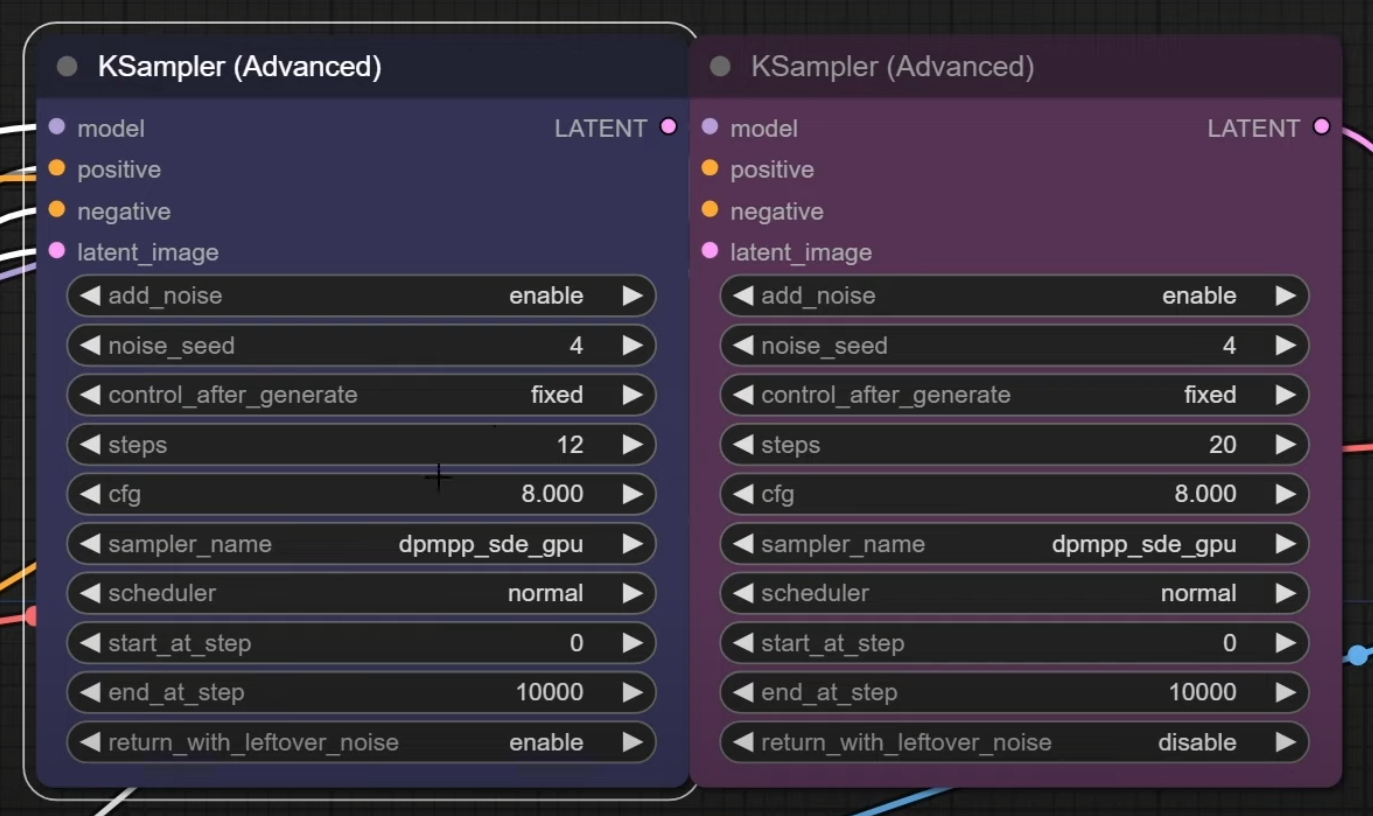
Why is Scott Detweiler not using the "end_at_step" parameter in his ComfyUI workflow? Doesn't that result in removal of all noise, making the "return_with_leftover_noise" option useless, which would go against SDXL documentation?
https://i.imgur.com/Pkk0uZ7.png
(Source: https://youtu.be/2Xe79Nl_6jA)
Since we have released stable diffusion SDXL to the world, I might as well show you how to get the most from the models as this is the same workflow I use on a daily basis at stability.ai. In this video I show you some of the basics on how to get the model from the models to generate your best AI artwork from our models. You will need some of ...
spark bear
it will end at 20 steps of whatever you set the steps to
pallid lintel
@tender timber @autumn forum You might want to ask here: https://github.com/WASasquatch/was-node-suite-comfyui/issues?q=is%3Aissue+is%3Aopen+sort%3Aupdated-desc
I just asked WAS it's not a known issue yet at least apparently
tender timber
pallid lintel
<@611381240292966409> <@497282742380265495> You might want to ask here: https://...
Thanks, will do!
ionic gulch
spark bear
it will end at 20 steps of whatever you set the steps to
he sets steps to 12 for base, which from my understanding would result in 12/12 steps with no remaining noise. after that he adds new noise and does another 20 steps with refiner.
all that is not how sdxl should be used by documentations i've seen. refiner should be less steps than base and carry over the noise from base instead of creating new noise.
soft zealot
ionic gulch
Why is Scott Detweiler not using the "end_at_step" parameter in his ComfyUI work...
I also wonder why he isnt usng the Positive, supporting, negative triple prompt method however..............
.................I wonder (base don his last 3 videos) if hes going to introduce those other elements.
Ie is he doing this in a building blocks method rather than a one shor wham bam thank you ma'am
brazen patrol
ionic gulch
he sets steps to 12 for base, which from my understanding would result in 12/12 ...
Unless I am not undrestanding, I see it say enable noise at end of the 12 steps, i.e. return with leftover noise
ionic gulch
@brazen patrol if you don't use end_at_step, there is no noise left, as shown by the preview image he does from the base result. that's why his refiner node needs to add new noise. that's not required if you use end_at_step.
i would understand that as simplified solution or his personal way, but he says that they use that workflow internally at stability ai.
craggy basalt

 pallid grove
anyone know where I can get a copy of NKMD upscalers? the links dead ?
brazen patrol
ionic gulch
<@446706866081366027> if you don't use end_at_step, there is no noise left, as s...
This is the standard ComfyUI workflow for SDXL:

There is no end at step for Base
There is no option for it even
Mind you, this is not my workflow design. It is Comfy's
ionic gulch
your screenshot doesn't show where end_at_step is coming from. at least it seems to be not kept at 10000 as in the video i've linked above.
do you have a link to the complete workflow?
 midnight path
is there any information anywhere about prompt weighting? I recently heard that you can use a picture of a ((red)) (((cat))) to add weights? or something?
brazen patrol
GitHub
Examples of ComfyUI workflows. Contribute to comfyanonymous/ComfyUI_examples development by creating an account on GitHub.
ionic gulch
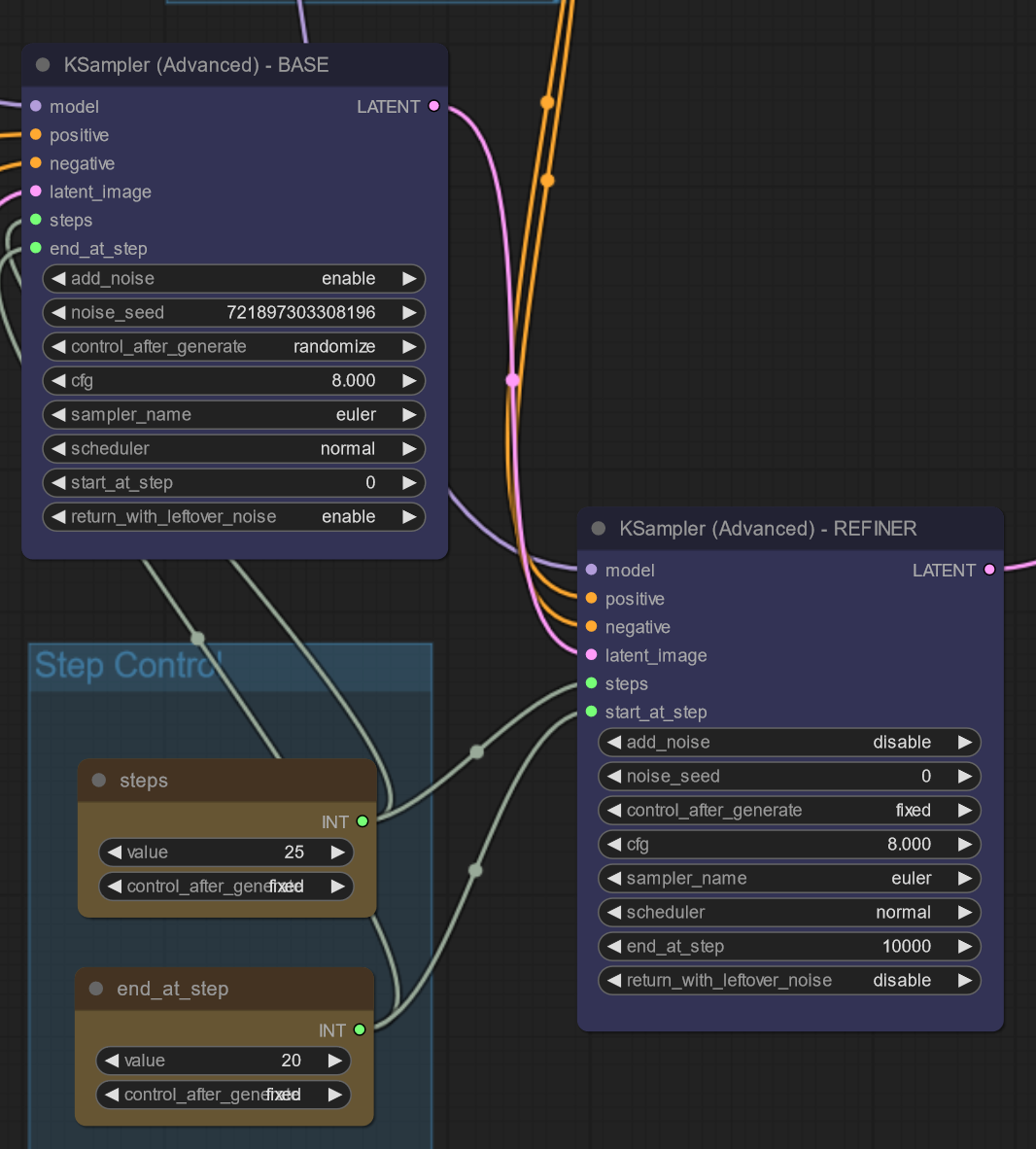
@brazen patrol thanks for the link. that makes much more sense. they use end_at_step in that example and end at 20 of 25 steps and do the remaining 5 steps with refiner:
https://i.imgur.com/gFcfPKg.png
refiner is used for step 20-25.
so why does Scott Detweiler tell us they use his (totally different) workflow internally as default base sdxl workflow at stability ai?
 stray warren
@soft zealot so it works, but it's the same as pasting the prompt in thestandard prefix field. no need to use the extra node
soft zealot
stray warren
<@828725267937493012> so it works, but it's the same as pasting the prompt in th...
so this just gives you a stupidly long fine name ?
brazen patrol
ionic gulch
<@446706866081366027> thanks for the link. that makes much more sense. they use ...
Yes, sorry if my shot was not clear. I reorgnaized the panes to keep it ll in one screen
stray warren
soft zealot
so this just gives you a stupidly long fine name ?
well i pasted the prompt in the field and that;s what i got
brazen patrol
More precisely, I organzied them so the ones I typically modify are all there.
soft zealot
stray warren
well i pasted the prompt in the field and that;s what i got
are you referring to this?
So each time you write a new prompt you need to copy & paste it over to the primitive to include it in the filename?
My method of writng a matching prompt .txt file automates it and adds everything from my orompt inputs automatically
 ionic gulch
@brazen patrol i do the same on my workflow. would be great to have a way to create a real user interface and hide the nodes in the background.
stray warren
soft zealot
are you referring to this?
So each time you write a new prompt you need to copy...
how?
soft zealot
stray warren
how?
using a series for text manipulation boxes as shown in the screenshot in this post
brazen patrol
ionic gulch
<@446706866081366027> i do the same on my workflow. would be great to have a way...
Agreed, but for now:
 stray warren
soft zealot
using a series for text manipulation boxes as shown in the screenshot in this po...
stray warren
soft zealot
using a series for text manipulation boxes as shown in the screenshot in this po...
stupid me, i overlooked it thanks! 😅 ❤️
soft zealot
stray warren
stupid me, i overlooked it thanks! 😅 ❤️
I'm also using WASNodes Suite Image Save rather than the default

 clever verge
Anyone tried ✨ as a prompt? Like ✨Isometric✨
stray warren
i tried was nodes, but i got an error
not sure though if it was WAS, i installed a lot at the same time so i'll try it again
i'm using a very simple setup right now
would be nice just to add that one @soft zealot
clever verge
Seems to be working, guess it's not a fluke that ✨ is the icon for the channel. 😉
rich coral
does comfy have support for post processing a step, like being able to sharpen ala photoshop between an img2img step?
 elder niche
Unicycling Giraffe was difficult in 1.5, but SDXL seems to grasp the absurdity of things and make better inferences. *A giraffe riding a unicycle, giraffe, ((unicycle)) *


 lethal tusk
help.
 soft zealot
rich coral
does comfy have support for post processing a step, like being able to sharpen a...
soft zealot
rich coral
does comfy have support for post processing a step, like being able to sharpen a...
look under image of the right click context menu oer just dbl click any where on the canvas to bring up the search box and satrt typing

 rich coral
soft zealot
look under image of the right click context menu oer just dbl click any where on...
rich coral
soft zealot
look under image of the right click context menu oer just dbl click any where on...
Ahh sweet, all right, I have run out of excuses... will install it today hehe, much thanks!
 civic forge
lethal tusk
help.
civic forge
lethal tusk
help.
I think refiner model shouldn't be used for generating in a1111
soft zealot
stray warren
i tried was nodes, but i got an error
not sure though if it was WAS, i installe...
apologies but my workflow is wrtten for my personal use, have no intention of adding to it for other people.
Its in all the images I post if people want to use/adapt it but its not an "offical" supported thing and subject to chnages on a whim
stray warren
soft zealot
apologies but my workflow is wrtten for my personal use, have no intention of ad...
no it wasn't your workflow, i just downloaded a lot of those custom nodes and tried them on sdxl 0.9 (not recently)
lethal tusk
civic forge
I think refiner model shouldn't be used for generating in a1111
I changed to base model and its still broken
 woeful patio
lethal tusk
I changed to base model and its still broken
woeful patio
lethal tusk
I changed to base model and its still broken
do you have the latest version of a1111
lethal tusk
woeful patio
do you have the latest version of a1111
yeah i think so, i use a launcher that automatically updates it
 high skiff
Ok, back to the SDXL 1.0 release workflow grind
woeful patio
lethal tusk
yeah i think so, i use a launcher that automatically updates it
1.5.1? and maybe set the canvas size to 1024x 1024
lethal tusk
woeful patio
1.5.1? and maybe set the canvas size to 1024x 1024
still kinda broken

could these be the issue?
 woeful patio
lethal tusk
could these be the issue?
woeful patio
lethal tusk
could these be the issue?
Maybe, try launching with the xformers check turned off?
 upbeat tundra
Can you use sdxl model in auto1111 img2img to upscale?
woeful patio
upbeat tundra
Can you use sdxl model in auto1111 img2img to upscale?
yes, ultimate sd upscale extention works as well
upbeat tundra
woeful patio
yes, ultimate sd upscale extention works as well
Nice! Do you get higher res results?
 winged tree
still dove
I am missing LahMysteriousSDXL v10
winged tree
still dove
I am missing LahMysteriousSDXL v10
Just the model, check around, its up on the civai...or however you spell it
woeful patio
upbeat tundra
Nice! Do you get higher res results?
yeah definitely some tweaking to get it to work but it works well
upbeat tundra
woeful patio
yeah definitely some tweaking to get it to work but it works well
Cool adding it to auto now...we'll see. Upscale 1.5 gens with the new model seems it would be the way to go until the new model is fine tuned
woeful patio
upbeat tundra
Cool adding it to auto now...we'll see. Upscale 1.5 gens with the new model seem...
yeah models are pretty crap right now, we just have to be patient. SDXl is going to be great in a couple months
 tawdry oxide
are there good tutorials for fine tuning SDXL?
 bold osprey
lethal tusk
I changed to base model and its still broken
bold osprey
lethal tusk
I changed to base model and its still broken
manually pick the VAE instead of usingthe automatic
woeful patio
lethal tusk
could these be the issue?
on further inspection I think it might be your torch version not working properly, try putting --reinstall-torch here
 lethal tusk
I reinstalled torch and xformers and picked the VAE and while its generating it looks fine but it fucks it up at the end result

 woeful patio
I think you're torch version should be above 2.0.0, that's what I can think of.
lethal tusk
woeful patio
I think you're torch version should be above 2.0.0, that's what I can think of.
 stray warren
soft zealot
apologies but my workflow is wrtten for my personal use, have no intention of ad...
stray warren
soft zealot
apologies but my workflow is wrtten for my personal use, have no intention of ad...
found it, it's in mikey nodes
you just convert the pos en neg prompt to input and then link them to the text node outputs
 bleak garden
does anyone know of a way to adjust refiner settings in sdnext? i'm getting pretty good results with dreamshaperxl10+adetailer+refiner

 onyx spear
So I got SDXL running on the webui and I can generate images, but everytime I try to use the refiner model I run out of VRAM, I'm already using xformers and lowvram, does the img2img just use way more vram or am I doing something wrong?
sorry probably wrong channel
 sleek relic
did someone tried this depth controlnet model already? https://huggingface.co/SargeZT/controlnet-v1e-sdxl-depth
 bleak garden
try settings to unload model to ram when switching between base and refiner
 leaden marlin
onyx spear
So I got SDXL running on the webui and I can generate images, but everytime I tr...
leaden marlin
onyx spear
So I got SDXL running on the webui and I can generate images, but everytime I tr...
I have the same issue and I’ve seen other people also mention this. Sdxl doesn’t work in automatic 1111 very well right now so many people moved to comfy which it work so much better on.
fast vector
onyx spear
So I got SDXL running on the webui and I can generate images, but everytime I tr...
Honestly, you're not. A1111 is quite memory inefficient.
brazen patrol
I tried running 0.9 but keep getting a black image.
bleak garden
i moved to sdnext. it's closer to a1111
brazen patrol
Can anyone tell me what I am probably doing wrong?
woeful patio
brazen patrol
Can anyone tell me what I am probably doing wrong?
what are you running? a1111 comfy?
brazen patrol
Comfy
onyx spear
leaden marlin
I have the same issue and I’ve seen other people also mention this. Sdxl doesn’t...
thanks and also thanks @fast vector, I'll setup comfyUI I guess, doesnt seem too cumbersome
woeful patio
brazen patrol
Comfy
can you make a screenshot of your comfy ui?
 lilac wren

 visual glade
brazen patrol
I tried running 0.9 but keep getting a black image.
visual glade
brazen patrol
I tried running 0.9 but keep getting a black image.
are you running it with any options?
brazen patrol
I am using your Pytorch build
THough with 3.10.9
since 3.11 was slow as molasses
bleak garden
love me some alicia vikander...
 real lagoon
Best parameters were tested with the bots here right? Were the results ever released?
brazen patrol
However, the UI and nodes are pure Comfy SDXL refiner setup
woeful patio
lethal tusk
why does it take almost 3 mins for an image with 20 steps? what gpu are you running?
real lagoon
Or the ideal parameters, if not the full results?
lethal tusk
woeful patio
why does it take almost 3 mins for an image with 20 steps? what gpu are you runn...
RTX 3070 8GB VRAM
woeful patio
lethal tusk
RTX 3070 8GB VRAM
yeah I have the same one, that shouldn;t take 3 mins but tabout 25 seconds. so something is really wrong there.
I would try to reinstall a1111 in a seperate folder to see if that solves it. Or does it give something in the command prompt on generation?
brazen patrol

 digital shoal
would anyone here happen to know why my primitive nodes in comfyui doesn't save the custom size I've applied to them? when loading the workflow they just go back to default size
brazen patrol
If I swithc to plain 0.9 I get a black pic. If I use the 1.0 it works fine. I have tried wit a separate VAE model and not
fast vector
why would you use 0.9?
fast vector
I mean have you tried both refiner and base? Or just one?
tender timber
pallid lintel
<@611381240292966409> <@497282742380265495> You might want to ask here: https://...
I am now 99% of the way there after a clean install... just missing one node. I"ll see if I? can grab it manually somehow
 fast vector
tender timber
I am now 99% of the way there after a clean install... just missing one node. ...
fast vector
tender timber
I am now 99% of the way there after a clean install... just missing one node. ...
mind sharing json?
tender timber
fast vector
mind sharing json?
I can't take credit, it's from @soft zealot and is available from any one of his PNG output files
 upbeat summit
tender timber
I am now 99% of the way there after a clean install... just missing one node. ...
upbeat summit
tender timber
I am now 99% of the way there after a clean install... just missing one node. ...
it's this. save the raw file to your /custom_nodes/ directory:
https://gist.github.com/alkemann/7361b8eb966f29c8238fd323409efb68
make sure its name is .py and not py.txt
solemn scroll
Hi, do you think it's worth re-downloading the model to get the 0.9 baked VAE?
 tender timber
upbeat summit
it's this. save the raw file to your `/custom_nodes/` directory:
<https://gist.g...
tender timber
upbeat summit
it's this. save the raw file to your `/custom_nodes/` directory:
<https://gist.g...
Thank you sir/ma'am!
fast vector
ah, I see
upbeat summit
greetings all 🙂
tender timber
fast vector
ah, I see
https://cdn.discordapp.com/attachments/1089974139927920741/1134917403856347217/SDXL_20230729193500_318187109389229_000001.png should have it within the PNG
 woeful patio

 tender timber
upbeat summit
greetings all 🙂
tender timber
upbeat summit
greetings all 🙂
My cousin's been in Texas for a decade, she now says "all y'all" without irony 🙂
soft zealot
tender timber
I am now 99% of the way there after a clean install... just missing one node. ...
That’s seed to text. Link in the credit and notes of mine
upbeat summit
soft zealot
That’s seed to text. Link in the credit and notes of mine
yeah just pointed him to it 😉
high skiff
We are nearing completion for release :p

Syan's 1.0 SDXL workflow with built in 2048x upscaling
high skiff
Just have to check some more things, should be able to submit it to the comfu UI wiki later today after I cut out the upscale nodes (the upscale version will be available on my github)
soft zealot
high skiff
We are nearing completion for release :p
wot no "Pre Conditioning" ;o)
high skiff
brazen patrol
Sounds excessive. I mean I don't really need 2M x 2M pixels
har har har
high skiff
soft zealot
wot no "Pre Conditioning" ;o)
oh wait
fast vector
Just disconnect the node that goes to upscaling
upbeat summit
half a day away and civit is flooded with SDXL content
 void loom
Hey, are bracketed weights and :1.3 etc style weights still working with SDXL? i've been trying but don't think they are working, what about prompt timing, is this meant to function as like with old SD or is there a new format? thanks
high skiff
I forgot to look into that @soft zealot Would you be willing to help me with that in DM's? Maybe I could include it in the workflow
soft zealot
fast vector
Just disconnect the node that goes to upscaling
or use a jumper ;o)
 brazen patrol
I usually upscale with Topaz, so this sort of thing was never on my list anyhow
upbeat summit
soft zealot
or use a jumper ;o)
the jumper idea is a good workaround for not having options or settings
high skiff
I have a jumper for the workflow

but Comfy prefers I upload a version with no third party nodes, so I will do that with a link to my github for the one WITH the upscaler
tender timber
upbeat summit
it's this. save the raw file to your `/custom_nodes/` directory:
<https://gist.g...
Success! Thanks!
upbeat summit
Winston is building LHC level machines in comfyui 😉
upbeat summit
tender timber
Success! Thanks!
have fun!
solemn scroll
Hi, is the 0.9 VAE model worth it?
tender timber
All I really wanted was custom file names and folder paths, but many of the other nodes are lacking or buggy. Will tootle around with this one and maybe grab bits and bobs to make my own Frankenstein version
zealous horizon
Small update to my linksRenderMode extension: Just select the mode you need. (saved in browser storage)
For installation guide see comment below the gist
What does this do? It toggles the render mode of the cables/lines mode (straight, slight curve, curve)
https://gist.github.com/pixelass/0518d56d62d7b8ad19281eb032bde330
 azure oxide
high skiff
I forgot to look into that <@828725267937493012> Would you be willing to help me...
azure oxide
high skiff
I forgot to look into that <@828725267937493012> Would you be willing to help me...
Woah woah help each other out here so everyone else gets to learn, I want in on this too
fast vector
put this one into custom nodes?
 civic sigil
@visual glade Are you still planning on releasing a reference_only node with img2img support? If not I will start trying to hack it in myself but I'm not sure if I will be able to
lethal tusk
woeful patio
I would try to reinstall a1111 in a seperate folder to see if that solves it. O...
I reinstalled A1111, eta is still like 2-3 mins, waiting on the result
normal bridge
Is there a simple way to have flexible workflows in comfy where I can enable disable certain parts with one click?
lethal tusk
woeful patio
I would try to reinstall a1111 in a seperate folder to see if that solves it. O...
images seem to turn out correctly now but it still takes like 2 minutes
brazen patrol
So I tested it, and it is the Base 0.9 that doens't work. If I ask it to run the refiner only I get a picture. So I will redownload the Base in case it got corrupted somehow
woeful patio
lethal tusk
images seem to turn out correctly now but it still takes like 2 minutes
Yeah I’m not quite sure what to make of that, definitely taking to long. You should put your sampling steps around 40/45. Are your drivers of the gpu updated?
lethal tusk
woeful patio
Yeah I’m not quite sure what to make of that, definitely taking to long. You sho...
drivers are updated yeah
woeful patio
lethal tusk
drivers are updated yeah
Do you get any type of error in your command prompt?
azure oxide
normal bridge
Is there a simple way to have flexible workflows in comfy where I can enable dis...
Ctrl m mutes selected nodes is all I can suggest
 polar epoch
Hoi, just a questionary as i'm curious if i should continue using comfy as a AIO click, or manually got fetch, install requirements and such, as a few extensions is missing modules, and i can't even install the modules as it's not cmd'd into it's venv, so it's stuck at missing modules lol
1: Stick to 1 click?
2: All manual, and can effectively add modules :P
woeful patio


 lethal tusk
woeful patio
Do you get any type of error in your command prompt?
lethal tusk
woeful patio
Do you get any type of error in your command prompt?
nope
woeful patio
lethal tusk
nope
Settings > System > Disable memmapping for loading .safetensors files. (fixes very slow loading speed in some cases), Maybe turn this on?
or maybe enable low vram, I heard not enabling that can cause issues
lethal tusk
woeful patio
or maybe enable low vram, I heard not enabling that can cause issues
how can i enable that
woeful patio
during startup of a1111 you can check it
high skiff
azure oxide
Woah woah help each other out here so everyone else gets to learn, I want in on ...
I am messing with it right now to see if it has any place in my workflow or not
Its veryyyy weird lol
woeful patio
@lethal tusk
 lethal tusk
woeful patio
<@391208677937512448>
lethal tusk
woeful patio
<@391208677937512448>
LETS GO THAT FIXED IT
Thank you so much for helping me
Someone promote this guy
 void skiff
I hope I ask in right place now, after a stroke I forgot somethings, bur I have the "sd_xl_base_1.0" model and Img2Img I want to use a old 256x256 image and upscale it to 1024x1024, but i get a long error and I hope some can say what I do wrong.
"NansException: A tensor with all NaNs was produced in Unet. This could be either because there's not enough precision to represent the picture, or because your video card does not support half type. Try setting the "Upcast cross attention layer to float32" option in Settings > Stable Diffusion or using the --no-half commandline argument to fix this. Use --disable-nan-check commandline argument to disable this check."
I have a Nvidia 3090 that was a gift and I think it will be okay, but do I need to change something in the settings to get this to work or have I just missed some step?
 hasty smelt
Hi everyone, I want to know if my GPU RTX 2070 Super FTW3 with 8GB of VRAM is capable of running the SDXL model. Complete setup includes 16GB RAM at 3200MHz, AMD Ryzen 5700X, and NVMe Kingston with 7500MB/s read and 6000MB/s write speeds.
woeful patio
lethal tusk
LETS GO THAT FIXED IT
😃 Awesome, always enable low vram, makes life a lot easier
woeful patio
void skiff
I hope I ask in right place now, after a stroke I forgot somethings, bur I have ...
I had the same error happening to me, I restarted a1111 and after a couple times it worked. If you're using the ultimate sd upscaler make sure to leave the tile width on 512.
 fresh path
hasty smelt
Hi everyone, I want to know if my GPU RTX 2070 Super FTW3 with 8GB of VRAM is ca...
fresh path
hasty smelt
Hi everyone, I want to know if my GPU RTX 2070 Super FTW3 with 8GB of VRAM is ca...
yes should be able to, you need -medvram option
lethal tusk
i always forget to switch between base and refiner lmao
autumn forum
so many character loras are showing up in civit cuz of contest lmao
void skiff
woeful patio
I had the same error happening to me, I restarted a1111 and after a couple times...
Just now I am in a episode where my brain skip logick, I removed all scripts for many did not work with SDXL that I mainly want to use, so I just dropped a 256x256 image in the image tab, added a description and pressed generate and hoped it would give me an image based on the smaller image.
I will look into that script and test it... when I find it 😄
My brain do racover but it work slowly.
hasty smelt
fresh path
yes should be able to, you need -medvram option
Thank you, can I set up the low GPU through Automatic1111 & ComfyUI?
woeful patio
void skiff
Just now I am in a episode where my brain skip logick, I removed all scripts for...
I understand, You wanna go to extensions and click available then on the load from button, You want to look for ultimate-upscale-for-automatic1111 and click install. click on installed and then apply and restart ui. after that within img2img under script it should now say ultimate sd upscale. you have the settings for that as follows
@void skiff
 void skiff
Ty. That is what I needed, I feel a bit stupid when miss simple things like that, ty again.
woeful patio
void skiff
Ty. That is what I needed, I feel a bit stupid when miss simple things like that...
You just have to know where to find it :), It could be you still get the error after I'm not really sure what that means but for me it just started working after a couple of restarts
leaden marlin
onyx spear
thanks and also thanks <@1019385228109815919>, I'll setup comfyUI I guess, doesn...
Btw I was able to use just the refiner alone in auto 1111 for both processes
brazen patrol
@visual glade @fast vector So just an update: I narrowed the issue down to th SDXL 0.9 base, and redownloaded it on the long shot it had somehow been corrupted. Long shot was a short shot: the new download fixed it.
onyx spear
leaden marlin
Btw I was able to use just the refiner alone in auto 1111 for both processes
with 8GB vram?
leaden marlin
I have 16 gb but I have xformers and medvram
 keen moon
void skiff
woeful patio
You just have to know where to find it :), It could be you still get the error a...
keen moon
void skiff
woeful patio
You just have to know where to find it :), It could be you still get the error a...
Stroke is odd, I wanted to say something, I typed, forgot what and.... BUNNIES!
 somber hill
what are the prompts for these
woeful patio
void skiff
Stroke is odd, I wanted to say something, I typed, forgot what and.... BUNNIES!
That sucks man I can only imagine being good at something and then just forgetting it, Take it one step at a time man.
 tropic turret
It takes my RX 6800 XT roughly 3 minutes per image generated by SDXL 1.0 in 1024x1024 on the official workflow for SDXL 1.0 in ComfyUI. Is that decent?
bold osprey
So I noticed that loading one of the latest Loras for SDXL take much longer to be processed in the sampler
brazen patrol
tropic turret
It takes my RX 6800 XT roughly 3 minutes per image generated by SDXL 1.0 in 1024...
How many steps?
fresh path
tropic turret
It takes my RX 6800 XT roughly 3 minutes per image generated by SDXL 1.0 in 1024...
yes for windows
 brazen patrol
Is that a very slow card?
fresh path
no its just amd perf
brazen patrol
or old? I dont know AMD
tropic turret
Feels like it lol
fresh path
I have 6900xt and get about same speed
tropic turret
I wish I had a better GPU and more ram for this :c
fresh path
6800xt beats 3070 in raw perf
but windows amd has no rocm, so you need directml, which is like 5-10x slower
brazen patrol
Is that the 'simple example?
polar epoch
huh.. extension needs bitsandbytes, i install it, but then cuda suddely doesn't exist  ,
,
 tropic turret
brazen patrol
Is that the 'simple example?
tropic turret
brazen patrol
Is that the 'simple example?
yes I think
 low pasture
Hi, I'm using Comfy with SD XL 1.0, and I'd like to know how to see the seed of an image, knowing that I've generated 4 here.
But most of the time I generate 20 images, and in that case I'd like to see the seed of the selected image, in my example among the 4, how can I do that please?
 fast vector
click on one and save it. That should do the trick
low pasture
 fast vector
try clicking on one of the images
low pasture
I see, however I upscale my images and I'd like to avoid having to download an image that interests me and that I want to upscale, and then go looking in its metadata to find out its Seed.
Isn't there a simple solution on the interface to view the Seed?
woeful patio
is there any new news on controlnet?
brazen patrol
tropic turret
yes I think
So I ran it on my laptop here (which is my daily driver anyhow) with a 2080 Super and got 25 seconds
tropic turret
😩
I bet the 4090 is blazing fast for Stable Diffusion
reddit
18 votes and 27 comments so far on Reddit
brazen patrol
I have no doubt. 🙂 I bought this for a varety of things, but SD was not one. as it did not exist yet
 gentle mirage
Idk what to think of that I can make batch 12 at the same time 896x1152 images on 2070. Literally how :D
polar epoch
So annoying that the reroute can only go left, or down 
 digital shoal
is there any custom node/plugin for comfy where you can load loras in the prompt? I think I saw it a few days ago but completely forgot what it was called
fast vector
digital shoal
is there any custom node/plugin for comfy where you can load loras in the prompt...
GitHub
A collection of ComfyUI custom nodes. Contribute to LucianoCirino/efficiency-nodes-comfyui development by creating an account on GitHub.
 gilded plinth
Hey guys, i can manage txt2img, img2img and loras in the same Workflow?
polar epoch
I saw the cool superhero looking "drugs" by midjourney, attempted badly at making one for my adhd meds, i ended up with paracetamol instead 
 polar epoch
gilded plinth
Hey guys, i can manage txt2img, img2img and loras in the same Workflow?
polar epoch
gilded plinth
Hey guys, i can manage txt2img, img2img and loras in the same Workflow?
Img2img is simply just one ksampler shipping it further to a second one. Or of you wanna upscale, upscale base image, then resample it with more details
 tropic turret
Does anyone have a workflow for any of these two images, but with the use of Efficiency nodes instead? - https://comfyanonymous.github.io/ComfyUI_examples/sdxl/
brazen patrol

 empty grail
does anyone know what causes this to happen?
Using dreamshaperXL 1.0 on a111 with a 12gb 3060 and 16gbs of ram

am i just runnning out of vram?
gilded plinth
Is 1024x1024?
empty grail
ya
polar epoch
gilded plinth
Hey guys, i can manage txt2img, img2img and loras in the same Workflow?
I need to test with other lora's, but seems to work fine. This was with base, refiner and 4x upscale with ariel lora
 tropic turret
Does anyone have a workflow for any of these two images, but with the use of Eff...
tropic turret
tropic turret
Does anyone have a workflow for any of these two images, but with the use of Eff...
Or even with the vae enabled
woeful patio
empty grail
ya
enable low vram check when starting a1111, it has a big issue with vram and sdxl
polar epoch
empty grail
ya
What's denoise and steps at?
gilded plinth
polar epoch
I need to test with other lora's, but seems to work fine. This was with base, re...
Oh amazing
polar epoch
Lemme try ichigo and see how that goes :P
empty grail
polar epoch
What's denoise and steps at?

 past raptor
How do ya'll get the right angle wires in ComfyUI?
gilded plinth
Is not 1024
polar epoch
Or no. This one, one of my favorite characters in it. Gonna try one with and one without lora
 somber hill
tropic turret
https://www.reddit.com/r/StableDiffusion/comments/13hyn0c/selfreported_gpus_and_...
somber hill
tropic turret
https://www.reddit.com/r/StableDiffusion/comments/13hyn0c/selfreported_gpus_and_...
numbers are totally undependable
empty grail
ill try with low vram
polar epoch
empty grail
both end up like the image
You want base being 1024 if you use SDXL
woeful patio
empty grail
both end up like the image
low vram will fix the issue bro someone else came in here with the exact same problem today
static prawn
how i can set the steps on sytan workflow?
polar epoch
Is there a node to simply turn off/siderail process if i wanna do before and after images without having to replug node threads all the time?
brazen patrol
Someone said Ctrl-M
Back in SD 1.4 and 1.5 I asked it to make me a new logo for my channel on YT based on Chess and tech. I was not stuck on perfection, but I couldn't get anything remotely usable. Logos were a dead end, and anything with chess gave me pure gibberish
Now? I first asked it a very offbeat idea:
beautiful company logo of (chess and circuit board), AI, court of Louis XIV, intricate, sophisticated, extremely detailed, 4k
and it gave me:
 boreal bough
tropic turret
I bet the 4090 is blazing fast for Stable Diffusion
boreal bough
tropic turret
I bet the 4090 is blazing fast for Stable Diffusion
I run a 4090.
Comfyui -> batch 3 is max for vram
takes about 8~14 seconds per image depending on your steps & settings for base+refiner+vae (running in batch cuts time down by around 30%)
Training: batch 10~12 is theoretical max. 8 is good if you still want to use your pc.
If you run an optimzed workflow, training a lora with a dataset of 30~100 images needs about 14 minutes to reach its ideal state. (though I usually go 50~100% over the ideal, so I have more options to choose from after I finish training)
Is it the best value?
No 3090 wins every time in money/performance ratio.
If all you do is inference, or occasional training. 16gb vram will give you access to everything that sdxl has to offer.
(In case you're wondering about finetuning - it's a complicated topic, but even if 24gb vram can do it, you should just do a LoRA instead. If you plan to make something on the level of waifudiffusion XL, rent a proper 8stack A100 on runpod)
civic sigil
Used 3090s are cool for now, I will buy new when there's a > 24gb Vram card
 plain maple
anyone got a 3090? how many it/s do you get with the base model?
brazen patrol
 autumn forum
plain maple
anyone got a 3090? how many it/s do you get with the base model?
autumn forum
plain maple
anyone got a 3090? how many it/s do you get with the base model?
i get about 3 it/s to 7 it/s
soft zealot
I do rather like this 🙂
 brazen patrol
WHich was kind of cool and well themed with gold Lousi XIV ideas. but I added the word FLAT to get something less picturesque and it again delivered
plain maple
hmm I get only 2.3 with base and 4 with refiner 
brazen patrol

 autumn forum
plain maple
hmm I get only 2.3 with base and 4 with refiner <:dece:961151828685381642>
autumn forum
plain maple
hmm I get only 2.3 with base and 4 with refiner <:dece:961151828685381642>
it starts out 2.6 then climbs to 7 with my setup. what ui? comfy?
brazen patrol
Super impressed
plain maple
yep, comfy
soft zealot
soft zealot
I do rather like this 🙂
and "neonpunk" ified

 autumn forum
plain maple
with this setup
autumn forum
plain maple
with this setup
yeah sounds about right. i heard you can use --bf16 or something to speed it up. or --gpu-only or something. but im also doing 1024x1024. but i also 16:9 ratios as well
plain maple
with 1024x1024 I'm at 1.8  damn
damn
tropic turret
boreal bough
I run a 4090.
Comfyui -> batch 3 is max for vram
takes about 8~14 seconds per im...
These are all handy tips, but I don't even know how to train a lora or make my own custom model (I'm also not sure if the two are the same). You could leave your message up for others though, as it may help. I'm very new to SD.
boreal bough
autumn forum
yeah sounds about right. i heard you can use --bf16 or something to speed it up....
bf16 is in theory out-of-date, due to the automatic fp16 support now
only relevant if you're working with 0.9
autumn forum
ah okay.
autumn forum
plain maple
with 1024x1024 I'm at 1.8 <:PES_Cry:493359762432327691> damn
okay just did a test, 2.75 it/s base, 2.45 it/s refiner. dpmpp_2m_sde karras
plain maple
hmm
boreal bough
autumn forum
okay just did a test, 2.75 it/s base, 2.45 it/s refiner. dpmpp_2m_sde karras
2m sde still working for you in 1.0? O:
I had to switch to standard 2m, as the results were otherwise less than ideal in my tests
 nocturne dove
Yeah it's important to specify the sampler. Although some of samplers take fewer iterations for a good image.
autumn forum
boreal bough
2m sde still working for you in 1.0? O:
I had to switch to standard 2m, as the r...
doesnt do to bad. should i change to standard 2m? lol

 inner ruin
When training faces in 1.5, the model usually extrapolated the body form fairly well. For XL it doesn't do so as much. Have you found a solution for that yet? Wonder if you @boreal bough know
boreal bough
autumn forum
doesnt do to bad. should i change to standard 2m? lol
I'm using the timestep hack. But so far this gives me a hell of a lot more detail on faces again, and reduces the background blur a bit, that's baked into some of the prompts

 primal vault
It is finally ready! The latest update for my SDXL 1.0 Comfy workflows and extension: https://civitai.com/models/111463
Now with text2image, image2image, and inpainting workflows. All of them using base + refiner!


Searge SDXL Reborn v2.0 Version 2.0 is here - improved text to image workflows, the image to image workflow is back and completely overhauled, and ...
autumn forum
boreal bough
I'm using the timestep hack. But so far this gives me a hell of a lot more detai...
do using that many steps help with faces and eyes? im usiung 34 max on both. seems to be doing fine
plain maple
switched to dpmpp_2m and I'm at 3.3 now. I guess the dpm ancestral was slowing it down
zealous horizon
Small collection of ComfyUI extensions: https://github.com/failfa-st/comfyui-extensions
I hope these are helpful. Enjoy.

 autumn forum
plain maple
switched to dpmpp_2m and I'm at 3.3 now. I guess the dpm ancestral was slowing i...
autumn forum
plain maple
switched to dpmpp_2m and I'm at 3.3 now. I guess the dpm ancestral was slowing i...
yeah samplers make a big difference
boreal bough
inner ruin
When training faces in 1.5, the model usually extrapolated the body form fairly ...
sadly none of the big fixes I was hoping for, happened in 1.0 😦
faces got the smallest bit easier to train now - but nothing that I would call "easy"
Still trying different methods to find one that is both easy to explain, and doesn't take an eternity to train
inner ruin
boreal bough
sadly none of the big fixes I was hoping for, happened in 1.0 😦
faces got the s...
yeah those 256 dim LoRAs are bullshit haha
autumn forum
zealous horizon
Small collection of ComfyUI extensions: https://github.com/failfa-st/comfyui-ex...
404
inner ruin
like 2gb for a LoRA??!!
upbeat summit
zealous horizon
Small collection of ComfyUI extensions: https://github.com/failfa-st/comfyui-ex...
page not found
boreal bough
inner ruin
yeah those 256 dim LoRAs are bullshit haha
might end up making a 'community training data' which is pretrained on a 5k dataset, which you then put into kohya as an unfinished training thingie, and continue from there. Essentially a pre-existing offset. That way I can stick to 43mb + default sdxl base
still hoping I dont have to resolve to that though T.T
autumn forum
boreal bough
might end up making a 'community training data' which is pretrained on a 5k data...
thats a good idea!
zealous horizon
autumn forum
404
try again (forgot to publish)
inner ruin
boreal bough
might end up making a 'community training data' which is pretrained on a 5k data...
I'm willing to help. Is the idea to train on 5K images of faces? What's your hypothesis?
polar epoch
Sub SDXL loras does not work great lol. Trying to generate this guy's lora lol

 upbeat summit
zealous horizon
try again (forgot to publish)
upbeat summit
zealous horizon
try again (forgot to publish)
perfect and thank you for sharing it 🙂
upbeat summit
zealous horizon
try again (forgot to publish)
the screenshots still give a AccessDenied
boreal bough
so I'll prob need to do one folder all cropped, one folder all uncropped
that or block weight training - just that I haven't tested which blocks now occupy face data, as its a lot more than before
zealous horizon
upbeat summit
the screenshots still give a AccessDenied
fixed.
boreal bough
inner ruin
I'm willing to help. Is the idea to train on 5K images of faces? What's your hyp...
an additional thing that may end up working as an 'easy' solution, is TI for refiner only.
Essentially unet lora for base + TI for refiner.
Haven't tested it yet, but in theory it should work\
inner ruin
boreal bough
an additional thing that may end up working as an 'easy' solution, is TI for ref...
and you can't do a TI for base? Because of the 2 text encoders?
I think TI was what understood the body based on the face if I had to guess
for the 1.5
upbeat summit
zealous horizon
Small collection of ComfyUI extensions: https://github.com/failfa-st/comfyui-ex...
nice QoL features 🙂 thank you. much appreciated
 indigo carbon
should I downgrade to WIN10 from WIN11? I'm getting compatibility issues sometimes
boreal bough
TI for base works - but from tests from others, it usually does too much damage to the clip model to be worth it
inner ruin
boreal bough
TI for base works - but from tests from others, it usually does too much damage ...
hmm I wonder why
plain maple
for upscaling the image, should I use the base model or the refiner for the second pass?
nocturne dove
Well I hope something for the refiner works out. Is there any problem with training a lora for the refiner? Because it's annoying to train a lora for a likeness and have the refiner change lip/nose/eye shapes and ruin the base model's work.
 midnight shuttle
indigo carbon
should I downgrade to WIN10 from WIN11? I'm getting compatibility issues sometim...
midnight shuttle
indigo carbon
should I downgrade to WIN10 from WIN11? I'm getting compatibility issues sometim...
No it's basically the same OS just with some different appearance. Win11 works properly.
boreal bough
inner ruin
hmm I wonder why
clip was trained in a very specific way - unless we perfectly duplicate it, we essentially have to train it for a fair amount of steps to stop it from self destructing. But this inevitably causes overfitting.
indigo carbon
midnight shuttle
No it's basically the same OS just with some different appearance. Win11 works p...
I am getting compatibility issues I didn't have on WIN10
midnight shuttle
indigo carbon
I am getting compatibility issues I didn't have on WIN10
What issues exactly?
indigo carbon
midnight shuttle
What issues exactly?
environment variables
they don't function the same way as in 10
midnight shuttle
indigo carbon
environment variables
Environment variables have existed since Windows 1.0. Windows 11 is not causing that issue.
Yes they do.
So you need to explain your problem exactly so someone can help you.
indigo carbon
midnight shuttle
Yes they do.
they don't. it works with a naming system, programs just assume it's a blank name- which doesn't exist in win11
indigo carbon
midnight shuttle
Give an example. Exact example.
when I run programs dependent on environment variables- it doesn't see the library. each time I use a library located in the system's environment variables I have to manually insert the directory, which wasn't an issue with win10
midnight shuttle
I can assure you that environment variable behavior is unchanged between Windows 10 and Windows 11. Also Windows 8, 7, Vista, XP, 2000...Something else is causing your problem. You need to give the exact example with exact names.
 heady vale
 static prawn
i really feel like auto 1111 is handling my prompts for sdxl better than comy, the usage of refiner is kinda useless in auto and anything else is better in comfy aswell
but i feel like in auto i get most of the time more what i want
midnight shuttle
static prawn
but i feel like in auto i get most of the time more what i want
Are you using the same sampler, same scheduler, same resolution, same steps?
Also same seed for testing.
static prawn
yes
oh i didnt test yet with same seeds
i just generated a lot of images
and overall it felt like
midnight shuttle
Be sure to use CPU for seeds not GPU so you can be more reproducible. Results should be the same.
indigo carbon
midnight shuttle
I can assure you that environment variable behavior is unchanged between Windows...
no. in win10 you didn't have to specify the library's name, in 11 you need to do so. programs assume it's just in PATH without any titling. for instance- I ran Nvidia's code that converts checkpoints to TRT, that program relies on environment variables. it didn't see the library. I have set it up on the correct directory.
 sweet bane
 static prawn
especially humans are always super deformed in sdxl for me, dunno why
midnight shuttle
indigo carbon
no. in win10 you didn't have to specify the library's name, in 11 you need to do...
If you want to downgrade to Windows 10, you do you. And if you keep asking someone will eventually tell you to do that. But I'm telling you that something else is causing your problem. I can't really understand your sentences so I can't help beyond that. Good luck.
midnight shuttle
static prawn
especially humans are always super deformed in sdxl for me, dunno why
Are you using same CFG?
autumn forum
another picture of my moviestill lora!
 static prawn
midnight shuttle
Are you using same CFG?
static prawn
midnight shuttle
Are you using same CFG?
yes
upbeat summit
autumn forum
another picture of my moviestill lora!
that lora looks like something I totally have to try!
indigo carbon
midnight shuttle
If you want to downgrade to Windows 10, you do you. And if you keep asking someo...
basic English? what's wrong with that?
static prawn
dunno i just feel i need all those extra nodes to get really good results, and thats hella overwhelming for me
midnight shuttle
Very strange. Everyone else seems to think that Comfy is better than A1111. You probably need to show screenshots of your Comfy workflow and your A1111 settings.
static prawn
i really hope sdxl will be better implemented in auto 1111. especially the refiner
autumn forum
upbeat summit
that lora looks like something I totally *have* to try!
its hit or miss, lmao, ive realised that 1.0 does a good job already but this adds a special ✨ touch ✨ lol
boreal bough
static prawn
especially humans are always super deformed in sdxl for me, dunno why
this is default behavior if you go too small in resolution.
You sure your resolution isnt off by 64, and accidentally 'defaulting' to like a 300px small in the background due to that
midnight shuttle
static prawn
i really hope sdxl will be better implemented in auto 1111. especially the refin...
Have you tried SD.Next? It's supposed to be like A1111 but supports SDXL better. I haven't tried it yet but I might try it soon.
upbeat summit
autumn forum
its hit or miss, lmao, ive realised that 1.0 does a good job already but this ad...
is it yours or can I test it somewhere?
indigo carbon
static prawn
i really hope sdxl will be better implemented in auto 1111. especially the refin...
AUTOMATIC said he doesn't know when he will do that.
static prawn
boreal bough
this is default behavior if you go too small in resolution.
You sure your resolu...
which resolutions u recommend
autumn forum
upbeat summit
is it yours or can I test it somewhere?
its mine. ill be uploading it to civit when i think its good enough. im close. with this round. may try a couple more trainings with different settings
static prawn
i feel like 1024x1024 is not the best
indigo carbon
indigo carbon
AUTOMATIC said he doesn't know when he will do that.
he currently doesn't seem to work on anything
autumn forum
@upbeat summit heres another pic
 upbeat summit
autumn forum
its mine. ill be uploading it to civit when i think its good enough. im close. w...
upbeat summit
autumn forum
its mine. ill be uploading it to civit when i think its good enough. im close. w...
nice! I'm looking very forward to it! If you need testers let me know 😉
boreal bough
static prawn
which resolutions u recommend
try 1024x1024 just to make sure that things are okay. if people disfigure here there's a problem somewhere else. If this resolution does work, then at the same time you know that your resolution was at fault
autumn forum
upbeat summit
nice! I'm looking very forward to it! If you need testers let me know 😉
will do i may take you up on that offer!
midnight shuttle
indigo carbon
he currently doesn't seem to work on anything
It will be difficult for him to adapt his code for a new workflow. His code is not maintainable.
static prawn
boreal bough
try 1024x1024 just to make sure that things are okay. if people disfigure here t...
this is the res i always use, but people tend to have 3 arms, no fingers etc.
indigo carbon
midnight shuttle
It will be difficult for him to adapt his code for a new workflow. His code is n...
yeah, and Vladmandic's UI is just kind of unstable.
midnight shuttle
static prawn
i feel like 1024x1024 is not the best
SDXL is made for 1024x1024. You should use that or one of the other supported resolutions. Any other resolutions will give bad results.
 golden quarry
@boreal bough I just pushed an update (a few actually) to the UI, to add support for full bf16, and do a bit more error handling
keep in mind full bf16 isn't possible on windows
boreal bough
static prawn
this is the res i always use, but people tend to have 3 arms, no fingers etc.
ddim 50 steps, cfg 6
(not ideal, but great for testing if the error was in your sampler/step choice)
golden quarry
because bitsandbytes 0.35.0 doesn't work
and any newer version on windows causes issues
boreal bough
golden quarry
keep in mind full bf16 isn't possible on windows
❤️
also fp16 is now working again - since 1.0
working and recommended
 austere ferry
I put together a basic beginners guide for both sdxl and comfy ui Incase anyone is interested.
I am still learning myself so I compiled my recent learnings into a guide. If I’m terribly wrong at anything please also let me know.

Huggingface links for models:
https://huggingface.co/stabilityai
Comfy UI configuration file:
https://drive.google.com/file/d/1ksztHBWDSXYzCF3pwJKApfR536w9dBZb/view?usp=sharing
Patreon:
https://www.patreon.com/EndangeredAI
This video is a begginer friendly guide to the new SDXL model for Automatic 1111 and Comfy In this video, we'll show you ...
indigo carbon
midnight shuttle
It will be difficult for him to adapt his code for a new workflow. His code is n...
that's also very disappointing. many people are used to his UI so switching to ComfyUI is not going to be easy.
boreal bough
indigo carbon
that's also very disappointing. many people are used to his UI so switching to C...
isn't vlads close enough to make the jump?
cause diffusers are long term supportable
static prawn
i feel like i did way to complex stuff in the past for sdxl, thats why i probably need more trained models and kinda disappointed
indigo carbon
boreal bough
isn't vlads close enough to make the jump?
Vladmandic's UI is unstable- memory leaks all over it
midnight shuttle
ComfyUI is a fundamentally different system and is better for some workflows but much worse for others. It is not really a replacement for A1111 or vice versa. It is like saying that Notepad is a replacement for Word. It's two different things.
boreal bough
ah. oh well 😦
midnight shuttle
Or saying that Elden Ring and CoD are the same because they are both video games.
boreal bough
midnight shuttle
ComfyUI is a fundamentally different system and is better for some workflows but...
StableStudio is the A1111 equivalent, which while running comfy in the background, saves you the trouble of actually interacting with it.
Same goes for StableSwarmUI - which just needs a bit more styling, but is functionally already better than any alternative
midnight shuttle
My workflows fit well with A1111 and don't fit well with Comfy. I understand Comfy and I know how to use it but it's not efficient for my workflows. Some other people it might be very efficient.
indigo carbon
boreal bough
cause diffusers are long term supportable
however, if there would be an A1111 extension that replaces all checkpoint instances to Diffusers, then there is hope for A1111 to live on.
upbeat summit
autumn forum
will do i may take you up on that offer!
mostly seed luck (not stable yet) but I'm always experimenting on film and video prompt builds 😉


 indigo carbon
in other words- if vlad's ui would be stable, it will be the replacement
 vast narwhal
Any inpainting method that works? This one doesn't
 indigo carbon
in other words- if vlad's ui would be stable, it will be the replacement
indigo carbon
indigo carbon
in other words- if vlad's ui would be stable, it will be the replacement
also the way that it handles prompts.. not even close to A1111.
or A1111 would make a switch to diffusers, IDK
boreal bough
vast narwhal
Any inpainting method that works? This one doesn't
ummm... comfy talked about it recently. its already well supported XD but no one wants to go through the trouble of building it, and writing a mini guide for the keyboard + mouse shortcuts that are needed to make (quick and low effort) use of it
boreal bough
vast narwhal
Any inpainting method that works? This one doesn't
StableStudio will also add proper inpainting support on top of comfy in the 'near' future. But obviously not a solution right now
midnight shuttle
vast narwhal
Any inpainting method that works? This one doesn't
The nodes look right. I've tried a similar workflow and it worked but didn't give good results due to not having SDXL inpainting model yet. If you want a cat face on the woman, just specify that and don't include any other background info in the prompt.
autumn forum
@upbeat summit heres a nice before and after, same seed, same prompt

 upbeat summit
autumn forum
<@987533001590186015> heres a nice before and after, same seed, same prompt
upbeat summit
autumn forum
<@987533001590186015> heres a nice before and after, same seed, same prompt
nice hehe. the hair improved 😄
indigo carbon
this just looks like the death of A1111 webui, unless he pulls something off
half ivy
 boreal bough
indigo carbon
this just looks like the death of A1111 webui, unless he pulls something off
boreal bough
indigo carbon
this just looks like the death of A1111 webui, unless he pulls something off
everyone knew that the programming debt would catch up eventually.
upbeat summit
autumn forum
<@987533001590186015> heres a nice before and after, same seed, same prompt
instant 78/80s film vibes
boreal bough
was just a matter of when
midnight shuttle
indigo carbon
this just looks like the death of A1111 webui, unless he pulls something off
He will need to do a lot of work to make the code work with the new models. And also VRAM usage is inefficient.
upbeat summit
boreal bough
everyone knew that the programming debt would catch up eventually.
yeah. we had those talks when SD2 came out and had the same conclusions
indigo carbon
indigo carbon
this just looks like the death of A1111 webui, unless he pulls something off
as much as I hate using ComfyUI, it pretty much is the only way. I personally prefer A1111 over ComfyUI, but it seems AUTOMATIC is slowly starting to abandon it, sadly.
midnight shuttle
I am looking at the code in another window and I still can't make very much sense of it.
heady vale
 half ivy
how to make 1 subject o0
zealous horizon
indigo carbon
as much as I hate using ComfyUI, it pretty much is the only way. I personally pr...
I was very hesitant to use Comfy but went from 90% Auto1111 to 98% Comfy within 2 days
static prawn
 boreal bough
indigo carbon
as much as I hate using ComfyUI, it pretty much is the only way. I personally pr...
boreal bough
indigo carbon
as much as I hate using ComfyUI, it pretty much is the only way. I personally pr...
his commits are insane. He's definitely working full time on it though. even had the 1.5 release recently, which fixed a lot of old issues that hadn't been addressed.
 midnight shuttle
I think he's working on it but it will be a lot of work.
I hope he doesn't give up.
boreal bough
yeah. it's not a realistic task for a one? man operation
zealous horizon
boreal bough
his commits are insane. He's definitely working full time on it though. even had...
Auto should be moved to an org with a larger number of core devs. With the current userbase and number of issues that's the smartest thing to do.
boreal bough
zealous horizon
Auto should be moved to an org with a larger number of core devs. With the curre...
comfy, mcmonkey and multiple solo devs joined SAI. I say that the lack of A1111 says more than anything else.
indigo carbon
boreal bough
his commits are insane. He's definitely working full time on it though. even had...
I don't understand what his priorities are. SDXL has been available for over a month for people like A1111, and still acts like the refiner or diffusers or any new breakthroughs exist.
 pallid sail
Even though I don't use either comfy or automatic1111, I think I would pick comfy from the fact that the workflows are deterministic and shareable. Don't you have to bounce an image through multiple pages to tweak it in automatic? I would forget everything in about 10 minutes
soft zealot

 pallid sail
I also love node networks so I'm biased
plain maple
anyone got any success with latent upscaling?
sweet bane
 boreal bough
pallid sail
Even though I don't use either comfy or automatic1111, I think I would pick comf...
boreal bough
pallid sail
Even though I don't use either comfy or automatic1111, I think I would pick comf...
it was always intended as a backend solution.
And now with the first frontend iterations produced, it shows just how much that payed off
midnight shuttle
pallid sail
Even though I don't use either comfy or automatic1111, I think I would pick comf...
Comfy workflow is better for creating a workflow to generate one image or one type of image based mainly on prompting. A1111 is better for iterative workflows such as geneting a bunch of images, picking the best, sending to inpaint, and then inpainting small areas many times to fix details.
zealous horizon
pallid sail
Even though I don't use either comfy or automatic1111, I think I would pick comf...
sure, everything has to be done manually in auto, but it's buttons, simple buttons to click. People love buttons. Clicky clicky
Gotta respect those hard clickers
indigo carbon
like, I feel like if A1111 would accept to switch to diffusers all of his struggles with trying to load multiple checkpoints and making the VRAM want to kill itself- the WebUI might return to its former glory.
for now using comfy as a backend and swarm or something like that as a frontend seems to be the way.
timid sonnet
 boreal bough
timid sonnet
boreal bough
timid sonnet
congrats! that one would pass for a genuine photo XD
no background blur either
autumn forum
timid sonnet
thats a good photo. but i wish sd could do better on wheels lol
polar epoch
I relaly need to mark down what prompts i need for X thing. As i pretty much only use prompt info from civitA.I and generate SDXL from there lol. don't know squat of artstyles, cameras, techniques or anything lol
 timid sonnet
autumn forum
thats a good photo. but i wish sd could do better on wheels lol
timid sonnet
autumn forum
thats a good photo. but i wish sd could do better on wheels lol
There are loras for 2.1 that do wheels well
heady vale
 autumn forum
timid sonnet
There are loras for 2.1 that do wheels well
autumn forum
timid sonnet
There are loras for 2.1 that do wheels well
oooo.
midnight shuttle
I have finally found the actual code that runs the txt2img process in A1111. Trying to figure out why it uses so much VRAM.
timid sonnet
Offroad Corvette
 soft zealot
midnight shuttle
I have finally found the actual code that runs the txt2img process in A1111. Try...
soft zealot
midnight shuttle
I have finally found the actual code that runs the txt2img process in A1111. Try...
part of the issues is(unlike comfy) it doesnt release anything from VRAM after its used it
pallid sail
Trying to load LoRAs in diffusers but getting key errors atm :/
midnight shuttle
soft zealot
part of the issues is(unlike comfy) it doesnt release anything from VRAM after i...
The issue I've seen is more related to peak VRAM usage. Especially with the SDXL VAE. SDXL 1024 generation uses only about 9.9 GB but this goes up to 14.3 GB during VAE.
pallid sail
soft zealot
part of the issues is(unlike comfy) it doesnt release anything from VRAM after i...
Are there any instances of torch.cuda.empty_cache() in the code?
visual glade
a1111 has always had issues with memory all SDXL did is make them more apparent
soft zealot
midnight shuttle
The issue I've seen is more related to peak VRAM usage. Especially with the SDXL...
and that , it does like to spike at the end during image save
midnight shuttle
visual glade
a1111 has always had issues with memory all SDXL did is make them more apparent
The code is giving me a major headache. I might give up on this project.
soft zealot
pallid sail
Are there any instances of `torch.cuda.empty_cache()` in the code?
no idea, not looked
midnight shuttle
soft zealot
and that , it does like to spike at the end during image save
It spikes during the VAE step. I just don't know why or if it is normal.
visual glade
of course the code is bad, if it was good someone would have fixed it already
soft zealot
midnight shuttle
It spikes during the VAE step. I just don't know why or if it is normal.
you get a spike in the VAE step with comfy as well, its just better managed
primal vault
vast narwhal
Any inpainting method that works? This one doesn't
you could try my inpainting workflow: https://civitai.com/models/111463
pallid sail
soft zealot
no idea, not looked
That's what I use in my Unreal script to make sure that I've flushed the model before I init a new one. I let diffusers handle loading/offloading the individual model components to and from CPU as needed and I never run out of VRAM, it'll just slow down
midnight shuttle
soft zealot
you get a spike in the VAE step with comfy as well, its just better managed
A spike makes sense since it's using another model. I just wanted to see if there was a reasonably simple explanation for the difference (a detailed technical explanation, not just "one code is better").
static prawn
i feel like every zombie horror stuff got those white lines in sdxl 😄
white canals
dunno how to describe 😄

i still like it
but im trying to get rid of it 😄
 drowsy coral
How do you feel about SDXL 1.0? High contrast? High saturation? Is the age settings of the character too high?
hasty smelt
Hey everyone, is there any website or document to get the best prompts and appropriate resolutions?
soft zealot
@visual glade Question:
Is this pale blue box supposed to indicate where ComfyUI will open up at ?
 visual glade
yes
civic sigil
Is it possible to use diffusers controlnets in comfyui?
civic sigil
I think one I downloaded is glitched then
soft zealot
visual glade
yes
hmm If ive managed to create everything completely outside of it is there an easy way to find it cos if I zoom out its so fine and pale I cant see it lol
soft zealot
soft zealot
hmm If ive managed to create everything completely outside of it is there an eas...
ok found it
visual glade
civic sigil
I think one I downloaded is glitched then
it's something I added recently so make sure you are updated
static prawn

this is like in every horror picture xD
dunno what sdxl likes about those white canals
😄
same here
 civic sigil
visual glade
it's something I added recently so make sure you are updated
civic sigil
visual glade
it's something I added recently so make sure you are updated
I think that worked, seems to be running 👍
soft zealot
static prawn
but im trying to get rid of it 😄
fixed that (ok maybe a bit too aggresively lol
 polar epoch
static prawn
same here
polar epoch
static prawn
same here
Add "in focus, hyper detailed" to it, wanna see if it makes your more detailed :P
static prawn
could give u like 10 horror pictures, every of them has those white sceleton
canals
i really love this one here 😄

what is the best rez for a full body portrait picture?
1024x1280?
vast narwhal
I need a reroute node that does that
 civic sigil
vast narwhal
I need a reroute node that does that
civic sigil
vast narwhal
I need a reroute node that does that
 Branching is illegal sir
upbeat summit
vast narwhal
I need a reroute node that does that
hey great SDXL output  . yeah that would be good
static prawn
easy eat stuff directly right in your tummy? just get a zombie with a extra mouth


 midnight shuttle
Looking at the A1111 code at least showed me how --medvram works and I realized it would speed up SDXL on my 12 GB card by getting stuff out of VRAM to make room for the VAE. 1024 generations went from about 40 seconds to about 25 seconds (20 steps).
past raptor
@soft zealot How did you get the 90 degree corners on your wires?
hasty smelt
Someone posted a document with a list of model prompts for XL, but I can't find it. Can someone repost it? Thanks.
the model have styles pressets
 cedar tusk
Any guidance on what the height/width and target height/width for the base and refiner clips should be in Comfy SDXL? Should I match the ratio of the target image? Is there a best ratio between the height/width and target height/width for the base clip? Does it matter?
upbeat summit
hasty smelt
Someone posted a document with a list of model prompts for XL, but I can't find ...
you mean this? #✨|sdxl message
hasty smelt
upbeat summit
you mean this? https://discord.com/channels/1002292111942635562/1089974139927920...
oh Thank you buddy
cedar tusk
soft zealot
fixed that (ok maybe a bit too aggresively lol
Wait hold up how do you route the paths to perpendicular bends??? My workflow looks like a bad day in an Italian kitchen
autumn forum
cedar tusk
Wait hold up how do you route the paths to perpendicular bends??? My workflow l...
put this in comfyui/web/extensions folder
cedar tusk
Thanks
 glad fulcrum
Is there a guide to train lora on kohya ? I have 12GB of VRAM and it says it can do it.
But I don't even have it installed. I would love a tutorial for training sdxl Lora
heady vale
autumn forum
put this in comfyui/web/extensions folder
that really cleans up the spagetttt. nice one!
 hardy cipher
man, I sometimes make some really wacky iflows as far as editting and finetuning the image between renderings. it's pretty much impossible to make it look good. lol. well as far as I know
cedar tusk
Should the height/width for the SDXL CLIP be a square ratio?
autumn forum
yes
width and height refiner and base i have at 4096. the target width and height i have set to 1024
cedar tusk
what about for the refiner? nevermind, misread what you wrote
autumn forum
lol
hasty smelt
Guys, my 8GB RTX 2070 Super wasn't able to run the SDXL model. There are freezes when loading the model, and even the minimum resolution of 1024 takes 29 minutes to render a single image. Fortunately, it works very quickly with other models. Let me know what the ideal Vram is to run the XL model.
cedar tusk
hasty smelt
Guys, my 8GB RTX 2070 Super wasn't able to run the SDXL model. There are freezes...
Mine works on Comfy but not on Auto1111.
midnight shuttle
hasty smelt
Guys, my 8GB RTX 2070 Super wasn't able to run the SDXL model. There are freezes...
For A1111 at least 16 GB. But try --medvram or --lowvram.
cedar tusk
autumn forum
width and height refiner and base i have at 4096. the target width and height i ...
Is there ever a reason to change it from those?
midnight shuttle
I have determined by reading code and by testing that --medvram increases SDXL generation speed by 25-35% on A1111 due to less swapping to system RAM during VAE step.
autumn forum
cedar tusk
Is there ever a reason to change it from those?
ive never had a reason. even when changin the resolution of the image.
midnight shuttle
Without --medvram 40 seconds, with --medvram 30 seconds per generation.
hasty smelt
I think I'll stick with other models until I upgrade my GPU someday. I don't have the patience to wait for long minutes, but what bothers me the most is that the model freezes my GPU for a few seconds during the load. I believe there's not enough memory left for the rest of the system during those moments. It's better to wait for a future upgrade. For now, I'll work with other models.
civic sigil
hasty smelt
I think I'll stick with other models until I upgrade my GPU someday. I don't hav...
How much normal Ram do you have??
hasty smelt
I have 8 gb in total 2070 Super
autumn forum
hasty smelt
I think I'll stick with other models until I upgrade my GPU someday. I don't hav...
if you want the best possible chance of using sdxl. use comfyui and do a simple node setup with just the base
civic sigil
hasty smelt
I have 8 gb in total 2070 Super
How much system ram
hasty smelt
civic sigil
How much system ram
16 gb
midnight shuttle
I wonder of ComfyUI unloads more things or moves more things to CPU when not in use compared with A1111. Maybe that's why it uses VRAM better.
civic sigil
Yeah Comfy should be able to handle those specs, idk about A1111
heady vale
looks like it mostly sits in system RAM then is queued to the GPU when needed. Ive noticed it unloads VRAM after its done. A1111 would just keep it in VRAM
midnight shuttle
That could explain it. A1111 moves stuff around more with --medvram and that makes SDXL faster on 12 GB card even though it seems like it would be slower.
Due to less RAM swapping during inference.
static prawn
i went from 20 minutes to 2 minutes with -medvram
midnight shuttle
I didn't think it would help until I read the code and then it made sense.
The reason for speedup made sense I mean. Not the A1111 code. A1111 code makes no sense!
heady vale
 tropic turret
autumn forum
put this in comfyui/web/extensions folder
tropic turret
autumn forum
put this in comfyui/web/extensions folder
Nice!
 cedar tusk
So, how do you stop the refiner pass in Comfy from taking the work a LoRA is doing and hucking it in the trash?
autumn forum
glad fulcrum
well I pressed 1
i believe thats what you do, if it doesnt work try the others lmao
autumn forum
cedar tusk
So, how do you stop the refiner pass in Comfy from taking the work a LoRA is doi...
i dont think anyone knows yet. if we could train the lora for both that would be awesome but i dont think anyone has found out how to train refiner yet
cedar tusk
Hmm
boreal bough
cedar tusk
So, how do you stop the refiner pass in Comfy from taking the work a LoRA is doi...
you dont
cedar tusk
boreal bough
you dont
*queue Invincible meme*
boreal bough
A.) dont use refiner
B.) give refiner different prompt, to not touch some areas
C.) research for more options that we haven't discovered yet. (lora training refiner is currently not possible)
cedar tusk
I was able to 'cheat' it by basically giving the refiner 2 steps only and then set denoising to a very low number (modified the KSamplerAdvanced to make that visible)
boreal bough
if its a face lora, then A is your only option
 deft coral
D - sell caith to me
boreal bough
deft coral
D - sell caith to me
🤣
I'm currently writing a comprehensive guide to lora training - after that I can simply link it everytime 😄
 west breach
has someone tried training the refiner on 512x resolution?
 lean knot
Do we have any recommendation for Lora training that isn't faces?
boreal bough
deft coral
i can't wait for full checkpoint training
'full'. pruned, right? cause we officially dont have access to the full 1.0 weights
lean knot
boreal bough
?
Just asking if there's already a few examples/guides on the optimizer, LR, and such
the most popular ones are for faces right now
deft coral
ya the pruned model like 2.1 and 1.5 etc
cedar tusk
boreal bough
I'm currently writing a comprehensive guide to lora training - after that I can ...
With an 8GB 2070 super, will I be able to do LoRA training for SDXL 1.0? I keep seeing recommendations for 12GB, but some have said 8GB...
boreal bough
deft coral
will they ever get released
is what I'm wondering as well. even when pinged, sai staff ignores that question for now. might be a legal thing as well - essentially we just dont know, and they have no obligation to provide us with knowledge. might show up randomly in the following weeks, might be partner program only 🤷♂️
boreal bough
cedar tusk
With an 8GB 2070 super, will I be able to do LoRA training for SDXL 1.0? I keep ...
12 is the lowest we got working with 0.9 - which wasn't optimized.
in theory, 8gb should barely be possible now -but will definitely take a lot of tinkering.
I'd rather recommend google colab + kohya, as that will work without any issues, nor do you need any weird hacks that may impact final quality
ionic dragon
wicked frigate
wha
SAI said that training on SDXL is easier. So in what terms is it easy?
 west breach
I've had pretty good results from just 1 epoch when looking at the sample images
for a lora
boreal bough
ionic dragon
SAI said that training on SDXL is easier. So in what terms is it easy?
to answer in his place - yes its become a lot easier.
just a very few aspects became like 10 times harder, but in return 90% of loras are now 10 times easier
heady vale
ionic dragon
SAI said that training on SDXL is easier. So in what terms is it easy?
I think they meant you dont need to fight the model to get results
boreal bough
the fact that faces are one of those aspects is just unlucky XD
style loras are essentially fool proof to train now - even bad datasets + bad captioning + bad training settings will give an average quality lora - when compared to what 1.5 loras provided in terms of results
deft coral
@boreal bough wanna see a cursed image
boreal bough
concept loras are a lot easier to train now - only captioning stays equally important - so if you mess that up, its still a garbage lora
deft coral
 lean knot
From examples on CivitAI, there are already some pretty good loras for faces though
glad to know styles are doing better, as that's what interests me
west breach
I'm going to try a style lora. Just taking a while to get decent images from the 1.5 model I'm using to create the training data
boreal bough
faces/anatomy lora got 10x harder. definitely doable if you have a lot of experience, but dont do this as a first lora.
^ while its easy to 'get results' with sdxl, you are essentially damaging the model significantly if you make it badly. Many tutorials going around that do just that sadly.
deft coral
 boreal bough
lean knot
From examples on CivitAI, there are already some pretty good loras for faces tho...
boreal bough
lean knot
From examples on CivitAI, there are already some pretty good loras for faces tho...
overfitting is how most do it - it's also the only option I'll include in my guide for now - as its beginner friendly. but as you see in the picture above, that is the cost of doing it this way\
autumn forum
deft coral
that donut looks good. fruit loops donut yummm
static prawn
i still dont get how u all get so great results, my results are "ok"
 boreal bough
static prawn
i still dont get how u all get so great results, my results are "ok"
boreal bough
static prawn
i still dont get how u all get so great results, my results are "ok"
try way longer prompts, but written with natural language
lean knot
boreal bough
overfitting is how most do it - it's also the only option I'll include in my gui...
Fair enough. I feel that we had to take that overfitting with a lot of character/styles loras of 1.5 too
boreal bough
less commas = good for generally good images, even if not very accurate to the prompt
deft coral

lean knot
still hoping to get a good anime finetune
deft coral
 lean knot
but I want to start trying to train anyways
midnight shuttle
boreal bough
faces/anatomy lora got 10x harder. definitely doable if you have a lot of experi...
Many tutorials going around that do just that sadly.
That's true about much more than SDXL training. Too much Dunning-Kruger in the world of tutorials.
west breach
here are some pics from my 'grumpy style' lora, it makes people grumpy 😄


 boreal bough
never gets boring seeing the grumpy faces
 west breach
needs more lens flare 😄
deft coral
this is cursed
static prawn
boreal bough
try way longer prompts, but written with natural language
i mean the concept was ok, im just missing details, hard to describe them in natural language 😄
eyes look generally kinda bad
autumn forum
yall look at the bottom right hand corner haha
 glad fulcrum
Now its asking me again:


 heady vale
 glad fulcrum
should I do any optional steps?
midnight shuttle
glad fulcrum
Now its asking me again:
Uh, 5?
Looks like it already did those steps just from the small logs you showed.
glad fulcrum
3 and 4 not necesary?
midnight shuttle
Look in logs and see what it already did.
deft coral
elon and mark
glad fulcrum
oh yes you are right

 deft coral
why am i not getting photo realistic images
high skiff
@visual glade So sorry to bother, just wanted to ask if you could help me with something.
I am wondering how to remove images that have been uploaded to the image load node, cause its getting really full of things
found the folder, nevermind!
azure oxide
pinged then found it literally 2 seconds later 😅
high skiff
yup, thats how I roll lol
when typing out questions, it can help to figure out solutions lol
 nimble heart
high skiff
found the folder, nevermind!
nimble heart
high skiff
found the folder, nevermind!
where
 dapper current
nm sorry misread
nimble heart
be cool if there was a --dont-copy-inputs or something
boreal bough
nimble heart
be cool if there was a --dont-copy-inputs or something
ummm... I think there was?\
something soemthing right click + keyboard shortcut
someone ask comfy when he's on again
ionic dragon
boreal bough
to answer in his place - yes its become a lot easier.
just a very few aspects be...
Which aspects?
SDXL better understands a subject?
 serene sleet
- is it possible to train on 10GB of vram?
- what batch size is possible on a 4090?
serene sleet
deft coral
with a 4090
did you change anything to achieve that? my 4090 doesnt go above 1 batch without ooming
boreal bough
ionic dragon
Which aspects?
SDXL better understands a subject?
training a car for example, now takes around 14~21 min to get a damn good lora
serene sleet
deft coral
it should do more if your lora training
I tried both LETS and bmaltais kohya, both oom above that, are you using the studio drivers or game ready?
deft coral
game
ionic dragon
boreal bough
training a car for example, now takes around 14~21 min to get a damn good lora
So it takes less time to train too?
But the min vram is 24 😢
 rose vigil
What does conditioning the noise do? (as described in https://youtu.be/2Xe79Nl_6jA )
Since we have released stable diffusion SDXL to the world, I might as well show you how to get the most from the models as this is the same workflow I use on a daily basis at stability.ai. In this video I show you some of the basics on how to get the model from the models to generate your best AI artwork from our models. You will need some of ...
 serene sleet
deft coral
serene sleet
deft coral
I mean lora training, not generation
deft coral
i have't trained lora for SDXL
serene sleet
fair enough, sorry forgot to mention it haha
boreal bough
ionic dragon
So it takes less time to train too?
But the min vram is 24 😢
16gb vram for super quick training
12gb vram for no-compromise training
below that should be possible now thanks to fp16 support - but haven't had the time to test it out yet
deft coral
it should handel more than 1 tho
ionic dragon
boreal bough
16gb vram for super quick training
12gb vram for no-compromise training
below t...
Oh ok
boreal bough
training at lower resolution is possible - but don't. it does more damage than good if you train anything that isn't a style lora
 high skiff
rose vigil
What does conditioning the noise do? (as described in https://youtu.be/2Xe79Nl_6...
high skiff
rose vigil
What does conditioning the noise do? (as described in https://youtu.be/2Xe79Nl_6...
been messing with this for potential release alongside my 1.0 workflow drop, but I found its extremely unreliable and leads to tons of issues
ionic dragon
boreal bough
training at lower resolution is possible - but don't. it does more damage than g...
Yeah, we would need 1024x1024 images or atleast the dimensions specified
The supported res
rose vigil
high skiff
been messing with this for potential release alongside my 1.0 workflow drop, but...
What’s it supposed to achieve?
high skiff
for example, on one seed it looks like this
 nimble heart
☠️
 high skiff
on another it looks like this

its unreliable and often leads to some very messy and artifact filled results
@soft zealot and I were messing with it in DM's
deft coral

 rose vigil
high skiff
<@828725267937493012> and I were messing with it in DM's
rose vigil
high skiff
<@828725267937493012> and I were messing with it in DM's
Thanks!
boreal bough
ionic dragon
Yeah, we would need 1024x1024 images or atleast the dimensions specified
supported res is built in. just use bucket 512 ~ 2048 (same file "resolution" as 1024x1024, just other aspect ratios)
nimble heart
deft coral
<:Dead:1053797032537632820>
what res/batch is using 20 gigs?
deft coral
4090
boreal bough
deft coral
8
yeah, but that's pre vae decode XD
nimble heart
huh. you have --high-vram?
deft coral
yep
nimble heart
Ah.
ionic dragon
boreal bough
supported res is built in. just use bucket 512 ~ 2048 (same file "resolution" as...
Is multi res supported?
For 1.5 and 2.1 supports multi-res through EveryDream2
boreal bough
assuming you ignore vae decode, you can go up to batch 49 on the rtx4090
nimble heart
boreal bough
assuming you ignore vae decode, you can go up to batch 49 on the rtx4090
for 1024?
boreal bough
nimble heart
for 1024?
yep
nimble heart
damn
deft coral
how can i ignore vae decode
boreal bough
doesnt help you though, since vae gonna get stuck
nimble heart
I'm @ like 18 gigs batch 9 using base+refiner on my 7900 XTX
boreal bough
deft coral
how can i ignore vae decode
tiled vae - but you do so at cost of color accuracy
ionic dragon
@high skiff any more key aspects to make outputs better?
nimble heart
took 90 seconds for 30 steps, so 10 secs an image
high skiff
nimble heart
I'm @ like 18 gigs batch 9 using base+refiner on my 7900 XTX
jesus the VRAM usage on AMD is high
boreal bough
Original Post:
So how efficient are batch sizes? using @nimble heart .json
Here's the table that absolutely no one asked for! 😄
RTX4090 running full model + tiled vae + cli argument --dont-upcast-attention

batch  1 = 10.9s per image
batch  2 = 7.7s per image | 09.6 GB vram + overhead |  15.44s
batch  3 = 7.2s per image | 10.0 GB vram + overhead |  21.50s
batch  4 = 6.9s per image | 10.4 GB vram + overhead |  27.39s
batch  8 = 6.3s per image | 11.9 GB vram + overhead |  50.41s
batch 16 = 5.9s per image | 12.0 GB vram + overhead |  95.32s
batch 25 = 6.0s per image | 14.9 GB vram + overhead | 151.00s
batch 32 = 6.0s per image | 17.4 GB vram + overhead | 192.95s
batch 36 = 6.0s per image | 19.9 GB vram + overhead | 215.71s
batch 49 = x.xs per image | 22.1 GB vram + overhead | xxx.xxs
squared numbers provide peak efficiency - but I also included some off-peak examples for science!
(I just barely ran out of memory for 49, since I have too much overhead on my win11 machine)
nimble heart
batch 1 is 13 secs/image for the same settings
boreal bough
just saw, I even did it with the workflow you posted 🤣
nimble heart
high skiff
jesus the VRAM usage on AMD is high
yup. don't think it unloaded anything though
deft coral

nimble heart
if you unload base/refiner when you're not using them it'd probably go down

 high skiff
what in the hell did you mess up lol
nimble heart
boreal bough
Original Post:
----------------------
So how efficient are batch sizes? using <@...
which .json
high skiff
he would have had to do a lot more than that
nimble heart
i've got like a dozen floating around now
high skiff
BS8 with SDXL runs fine on my 10GB 3080
boreal bough
nimble heart
which .json
I think it was the first one you ever posted
nimble heart
The one you used for your 2b lora?
boreal bough
not that it's a relevant test - I just wanted to see number go up
boreal bough
nimble heart
The one you used for your 2b lora?
yep!
nimble heart
imma try 16 see if my DE crashes
gonna take a hot minute for the kernel to compile a 16k square lol
nimble heart
fp16 on the attention or the vae
boreal bough
nimble heart
fp16 on the attention or the vae
since both are pruned, both? I think that's by default now though - if you use the 1.0 model
 queen ether
Sdxl loras don't use the text file??? For training??
boreal bough
if you're using the 0.9 vae, not the 0.9 built in, then use the 0.9vae with the community fp16 fix
boreal bough
queen ether
Sdxl loras don't use the text file??? For training??
bad tutorials. yes they do, and caption files are very important
nimble heart
seems stable @ 20 gigs batch 16. I saw it hit 23.9 before dropping so it might've unloaded the refiner model while it's doing the base pass
 nimble heart
boreal bough
since both are pruned, both? I think that's by default now though - if you use t...
nimble heart
boreal bough
since both are pruned, both? I think that's by default now though - if you use t...
both pruned? officially?
boreal bough
nimble heart
both pruned? officially?
it's why the new 1.0 checkpoints are so much smaller, and use less vram
nimble heart
is that new? I'm still using the 1.0's from first release day
boreal bough
as a downside, it's why 'full' finetuning is kinda not possible XD
boreal bough
nimble heart
is that new? I'm still using the 1.0's from first release day
check size. they're not 13gb, right?
boreal bough
nimble heart
is that new? I'm still using the 1.0's from first release day
also get the new one, with the vae fix embedded. then you dont have to load the (big) vae separately
 glad flint
I went to bed with my generation time optimized down to 30secs (which was fun)
I woke up and it's 170 secs again, hanging at the vae decode and before starting on the first steps with the k-sampler
same settings, same comfyui w/ nightly pytorch, and even less RAM used by system than yesterday
AHHHHHH
for reasons I don't know it seems to be getting RAM lockup again and I've spent hours trying to figure it out, I've even tested crazy small things to try and replicate the smoothness of how it was running yesterday.
nimble heart
boreal bough
check size. they're not 13gb, right?
base 6.5gb refiner 5.7gb
0.9 vae 320mb
so guess im gucci
boreal bough
glad flint
I went to bed with my generation time optimized down to 30secs (which was fun)
I...
dont forget windows uses vram too. every additional monitor uses vram, chrome uses vram if hardware acceleration is on, adobe apps use vram
glad flint
boreal bough
dont forget windows uses vram too. every additional monitor uses vram, chrome us...
yeah i signed out of steam and I'm using a tiny monitor and I close chrome when I'm generating
my windows desktop has gone on a whole diet 😂
boreal bough
glad flint
yeah i signed out of steam and I'm using a tiny monitor and I close chrome when ...
rip ❤️
nimble heart
high skiff
jesus the VRAM usage on AMD is high
On rocm 5.5 I was running out of vram decoding a 1536^2 image.
5.6 reduced it enough I can at least do that lol. Still gotta tile for 2048 tho
indigo carbon


 vale eagle
@boreal bough I trained a character lora but when I used the workflow like base+lora->refiner, the refiner made the output less similar to the lora. Do you have any idea to avoid this? I could only use base+lora but it kinda makes the refiner useless.

 wicked frigate
boreal bough
wicked frigate
boreal bough
that's close enough
boreal bough
vale eagle
<@211089689652887552> I trained a character lora but when I used the workflow li...
yes. exactly
wicked frigate
it figured out ratchet&clank too tho which is kinda impressive


 boreal bough
wicked frigate
it figured out ratchet&clank too tho which is kinda impressive
boreal bough
wicked frigate
it figured out ratchet&clank too tho which is kinda impressive
its from the flavor chain. It might figure out rivet as well if I add a custom flavor chain
wicked frigate
the what
boreal bough
only first sentence counts, as that is from Vit-H directly
nimble heart
batch 16 in 152 seconds, < 10 secs an image now for 26 base and 4 refiner steps.
maybe when the winter rocm release comes and my gpu is "officially" supported I'll finally beat those 3090 bois 🔪
 boreal bough
wicked frigate
the what
boreal bough
wicked frigate
the what
the first part, comes from Vit-H - which is the caption that reads like normal text.
Remaining tags come from a custom text file called 'flavor' - where it compares all words, and sees which 'fit' the image best.
But interrogator in A1111 comes presupplied with a custom flavor text of questionable quality.
If you add your own flavor text, then it uses the words that you yourself supply
heady vale
nimble heart
batch 16 in 152 seconds, < 10 secs an image now for 26 base and 4 refiner steps....
what do those images look like? Id rather have a bit more quality over the fastest gen
nimble heart
heady vale
what do those images look like? Id rather have a bit more quality over the faste...
just using my principled sdxl node's default settings

I like the extra quality of 30 total steps over 20
I have a fast enough gpu it doesn't matter too much until you get to like 3 megapixels
glad fulcrum
does anyone got a 1024 regularization images of woman?
west breach
For some reason the interrogator extension in A1111 was ignoring my settings not to put artists in the caption
boreal bough
west breach
For some reason the interrogator extension in A1111 was ignoring my settings not...
artist comes from flavor chain - which is 1 single txt file, so it 'can't' tell them apart from all the other captions
west breach
boreal bough
artist comes from flavor chain - which is 1 single txt file, so it 'can't' tell ...
it seems to separate them properly on the analyze tab
nimble heart
heady vale
what do those images look like? Id rather have a bit more quality over the faste...
I've found somewhere around 30-40 is the "safe" zone where a lot images start to become somewhat convergent. 20 -> 30 steps over half of your images get like major composition changes
west breach
training a new lora now, fingers crossed 🤞