#🤝|tech-support
1 messages · Page 124 of 1
 formal field
 ornate elk
formal field
was running musinc in the background but stopped as it turns to noise
ornate elk
formal field
was running musinc in the background but stopped as it turns to noise
How much ram do you have?
If you use flux that would explain your freezing issue
 chrome rampart
Evening all. Anybody know if/how you can use flux controlnet options like pose/reference in Forge?
 stone coral
does someone know how i can fix this issue? trying to install searge llm plugin on comfy

try fix has not helped
or if there is any way to manually install it?
ornate elk
formal field
i use sd 3.5
how large is the model file?
 primal pendant
@ornate elkhey i'
back
so any ideas since last night
i did some googling last night after u went offline seems alot had that issue around 14th dec
ornate elk
primal pendant
i did some googling last night after u went offline seems alot had that issue ar...
ah okay, have you tried installing auto1111 ? to see if that works?
primal pendant
yeah doing it now
not been in for long

huh
i deleted venv and ,zluda letting it try again
or was that config issue ?
formal field
ornate elk
how large is the model file?
tried several between i think 11g and 3 or so
ornate elk
primal pendant
or was that config issue ?
would need to see the full cmd log
ornate elk
formal field
tried several between i think 11g and 3 or so
does normal sdxl models work?
3.5 and flux are likely to much for your gpu.
So maybe only nf4 or Q8-Q4 ggufs can work

 ornate elk
primal pendant
ornate elk
primal pendant
looks okay and should work, but this line could be the indicator why forge wont work:
 primal pendant
 ornate elk
something is wrong with the paths to rocm
primal pendant
huh how ?

 primal pendant
how do i extend it so shows?
ornate elk
?
primal pendant

 primal pendant
 ornate elk
looks okay
 ornate elk
primal pendant
ok so what to check for next ?
ornate elk
primal pendant
ok so what to check for next ?
delete the venv folder and relaunch again
 ornate elk
you said you installed auto clean, but you have very old extensions in there??
lycoris is outdated for over a year
primal pendant
hmmmm
i will remove again
i'm just gonna delete everythign to do with any evrsion of sd now then
as i had them all
ornate elk
primal pendant
i'm just gonna delete everythign to do with any evrsion of sd now then
save your stuff before
like models, outputs, loras etc
primal pendant
to late just deleted all
i didn't have much
like only 3 checkpoints and about 10 lora
as i had already deleted lots of crap before space is precious
 formal field
ornate elk
does normal sdxl models work?
3.5 and flux are likely to much for your gpu.
So m...
formal field
ornate elk
does normal sdxl models work?
3.5 and flux are likely to much for your gpu.
So m...
i'm grabbing fp8 cp to see if flux runs
ornate elk
formal field
i'm grabbing fp8 cp to see if flux runs
also use the t5_fp8 text encoder
not the fp16
formal field
ornate elk
also use the t5_fp8 text encoder
flux dev runs like a chrm, lools betetr too apparently lol
just trying to get sd3.5 to spell a word right was painful
 ornate elk
a rocm hip sdk reinstall maybe fixes it
but you would also need to replace the library files again, so better copy the library folders and the library.dll
primal pendant
ok can i just install over current one ?
ornate elk
primal pendant
ok can i just install over current one ?
no better uninstall and then reboot and then install it again replace the library files again and then reboot again
 ornate elk
primal pendant
ok guess i will give ita try
ornate elk
primal pendant
ok guess i will give ita try
yep save these
 proud terrace
will try this, thank you!
ornate elk
primal pendant
now what
now you can delete the .zluda folder and the venv and relaunch

 ornate elk
primal pendant
ornate elk
primal pendant
here everything looks correct
primal pendant
even with rocm runtime not found ?
ornate elk
no but i dont see that in the first screenshot
ornate elk
need the full cmd log after a relaunch
 ornate elk
yep
primal pendant
who the hell uses sd in 2025 lol
ornate elk
so i dont know why your rocm path is broken. as i never saw anyone with that issue.
But the webui should still work as the dev made it so it uses the base rocm path
primal pendant
ok so it's good now then ?
primal pendant
we compiling
ornate elk
what you then can try is to install forge webui later too if auto1111 works
primal pendant
primal pendant
hahaha yeah maybe if that help me run xl
ornate elk
primal pendant
hahaha yeah maybe if that help me run xl
what was your gpu?
primal pendant
6700 xt
ornate elk
yep that can run it
primal pendant
any tweak needed ?
ornate elk
you have 32gb ram right?
ornate elk
if sdxl is slow you can add --medvram-sdxl to the args
thats all
and for upscaling tiled vae extension is needed
primal pendant
oh i have to have that ?
ornate elk
yep you can install it later trough the extensions tab
but first try to generate the first image
as the compiling takes a while
primal pendant
yeah i will get rid of the sd afterwards
ornate elk
yea the 1.5 checkpoint can be deletet after that xD
primal pendant
so u reckon the 6.2 about 20% better than 5.3 or 5.2 can't remember what i had now
yeah gonna be long time yet lol


that wasn't to long compared to before
ornate elk
primal pendant
so u reckon the 6.2 about 20% better than 5.3 or 5.2 can't remember what i had n...
6.1 and 6.2 are more stable than 5.7
and longer supported
primal pendant

GitHub
Tiled Diffusion and VAE optimize, licensed under CC BY-NC-SA 4.0 - pkuliyi2015/multidiffusion-upscaler-for-automatic1111
is this the one ?
ornate elk
primal pendant
is this the one ?
yes
 ornate elk
boorutag autocompletion is very handy for anime /pony/illustrious) models
and adetailer is a must have
primal pendant

GitHub
Booru style tag autocompletion for AUTOMATIC1111's Stable Diffusion web UI - DominikDoom/a1111-sd-webui-tagcomplete
this
oh i still need adetailer for xl's ?
ornate elk
Can help yes
ornate elk
Its always an improvement so doesn't hurt to have it if needed
primal pendant
ok cool so now with any luck i can run xl
🙏
ok got this as my chekpoint good ?


😭
ornate elk
primal pendant
Can you show the full cmd log pls
Also the settings you used like resolution steps etx
primal pendant
full log now as for what i tried it was very basic
lora:Lucy_Heartfilia_-_FairyTail1stSeason_-_IllustriousXL:1lucy_heartfilia(ft), 1girl, blonde hair, cleavage, solo, large breasts, dress, open mouth, pointy ears, closed eyes, side ponytail, purple dress, bare shoulders, ribbon, red dress, choker, couch
worst quality, early, low quality, lowres, signature, username, logo, bad hands, mutated hands, jpeg artifacts, furry, ambiguous form, feral, zoom layer, clone,twin,multiple heads, sound effects, selfcest, sketch

it was the basic promt that was already there
i will try another
ornate elk
primal pendant
worst quality, early, low quality, lowres, signature, username, logo, bad hands...
Can you relaunch the webui and then try sdxl without a lora?
primal pendant
ok
ornate elk
You forgot to restart the webui after you installed the extensions
Thats always needed
 ornate elk
Perfect, no problem 🙂
primal pendant
now do i dare use forge again lol
ornate elk
You can try set it up
primal pendant
maybe tomorrow
 untold mauve
hi i have rocm 6.1, should i update to 6.2.4 and update zluda? there are better performance or same? thanks ❤️
primal pendant
for me it really was yeah but i wasn't 6.1 i was 5 something
 ashen gate
oh i have controlnet models for sdxl loaded
proud terrace
hello.
I am a bit confused... I am running Stable Diffusions "WebUI" but now everybody is talking about Forge.
But when I google tutorials it looks like WebUI and has the same installation routine.
Can I use models like Flux Schnell now on WebUI? or do I somehow update to this "Forge WebUI"?
 ruby yoke
proud terrace
hello.
I am a bit confused... I am running Stable Diffusions "WebUI" but now eve...
ruby yoke
proud terrace
hello.
I am a bit confused... I am running Stable Diffusions "WebUI" but now eve...
forge and auto1111/webui are two different products. and you'd probably be happier running ComfyUI inside Swarm
proud terrace
ruby yoke
forge and auto1111/webui are two different products. and you'd probably be happi...
ok, then I ll spare me the trouble and try ComfyUI. thank you
ruby yoke
proud terrace
ok, then I ll spare me the trouble and try ComfyUI. thank you
you're welcome. consider grabbing a copy of Swarm and letting it do the techical stuff. we have a #🐝|swarm-ui channel, for help if you get stuck
proud terrace
ruby yoke
you're welcome. consider grabbing a copy of Swarm and letting it do the techical...
will do
ornate elk
ashen gate
oh i have controlnet models for sdxl loaded
Feel free so screenshot the whole webui when you get the issue
ornate elk
proud terrace
hello.
I am a bit confused... I am running Stable Diffusions "WebUI" but now eve...
Forge can run flux, yep.
If your GPU has low vram then forge can increase the speed.
If you have 12gb or more vram then you can try out flux on it.
 little bough
HI, any idea how to resolve this?

 flat yarrow
This is tying me up in knots as I can't seem to work it out, but I think am halfway there. Am using ComfyUI and the Impact Pack and Face Detailer, when I generate may main image the face features are OK but when I pass it to the Face Detailer node the face gets scubbed out (messed up) and also added painted lines like hand drawn. I think its something to do with the Checkpoints as when I use a Checkpoint with a VAE it works fine, when when I use one without a VAE and use the standard SDXL VAE that's when things get messed up, I've tried various settings but I think if it works on some checkpoint and not others. My logic it must be an issue around the Checkpoint and VAE. Does any one know of this issue and what I can do to get the other Checkpoints to work, any guidance would be great Thank You!
 warm turret
@ornate elk ı got issue while installing rocm in ubuntu
ornate elk
warm turret
<@161910921269084160> ı got issue while installing rocm in ubuntu
Oh your on Linux?
warm turret
no
windows
using linux subsysten
m
ım getting several errors all time

now this
warm turret
ornate elk
Why not just following my guide xD
ı was following
wait
how to check rocm is installed
ornate elk
If you see it installed in the system control
Or just reinstall it and then its installed
What's your GPU?
warm turret
6700xt
warm turret

its installing some stuff now
but ı got this error ZLUDA device failed to pass basic operation test: index=None, device_name=AMD Radeon RX 6700 XT [ZLUDA]
@ornate elk
warm turret
ı have installed stable difusion
but got this issue RuntimeError: Expected all tensors to be on the same device, but found at least two devices, cuda:0 and cpu!
when loading the model
 midnight roost
hi i have found out if i restart my pc or disable/enable gpu the generation speeds doesn't slow down, so that must mean its a vram issue is there a way to clear it with stable diffusion?
ornate elk
warm turret
Can you show the full cmd log?
Have you replaced the correct library files for your GPU (gfx1031) ?
warm turret
Stable diffusion model failed to load
ornate elk
midnight roost
hi i have found out if i restart my pc or disable/enable gpu the generation spee...
Not in Auto1111 or Forge but in Comfyui there is a node for that
warm turret
its still using the cpu
@ornate elk
File "C:\Users\user\SD-Zluda\stable-diffusion-webui-amdgpu\venv\lib\site-packages\torch\nn\modules\module.py", line 1532, in _wrapped_call_impl
return self._call_impl(*args, **kwargs)
File "C:\Users\user\SD-Zluda\stable-diffusion-webui-amdgpu\venv\lib\site-packages\torch\nn\modules\module.py", line 1541, in _call_impl
return forward_call(*args, **kwargs)
File "C:\Users\user\SD-Zluda\stable-diffusion-webui-amdgpu\venv\lib\site-packages\torch\nn\modules\sparse.py", line 163, in forward
return F.embedding(
File "C:\Users\user\SD-Zluda\stable-diffusion-webui-amdgpu\venv\lib\site-packages\torch\nn\functional.py", line 2264, in embedding
return torch.embedding(weight, input, padding_idx, scale_grad_by_freq, sparse)
RuntimeError: Expected all tensors to be on the same device, but found at least two devices, cuda:0 and cpu! (when checking argument for argument index in method wrapper_CUDA__index_select)
ornate elk
warm turret
File "C:\Users\user\SD-Zluda\stable-diffusion-webui-amdgpu\venv\lib\site-package...
Show me the full cmd log
Restart the PC.
Then delete the venv and the .zluda folder and relaunch.
warm turret
ornate elk
Show me the full cmd log
 regal mason
I'm trying to write captions for some images for LoRA training.
What is the best way to describe an image of a person whose face is at an angle? Like not a side profile, but not a front portrait either. Somewhere in between?
Like this angle:
 ornate elk
warm turret
ornate elk
warm turret
Looks okay. Relaunch the webui-user.bat
And then try to generate an image with an 1.5 based model
 shut geyser
launched fooocus after a while yes i disabled the fooocus v2 thingy
and it still crashes
upon generation
 ornate elk
warm turret
RuntimeError: invalid argument to memory_allocated
ornate elk
warm turret
RuntimeError: invalid argument to memory_allocated
how much ram do you have?
warm turret
16
there was an issue with cuda and pytorch version
ım fixing it now
then ı ll try again
ornate elk
warm turret
16
then you need to increase the windows pagefile. set it to 16000min and 24000max for the C drive.
ANd disable it for any other drive. then restart the PC.
Here is a guide: https://www.tomshardware.com/news/how-to-manage-virtual-memory-pagefile-windows-10,36929.html
 knotty turret
what should i do i really want to use comfyui
 tawny saddle
warm turret
ornate elk
then you need to increase the windows pagefile. set it to 16000min and 24000max ...
tawny saddle
warm turret
ornate elk
then you need to increase the windows pagefile. set it to 16000min and 24000max ...
done
still same error RuntimeError: invalid argument to memory_allocated
import torch
print(torch.cuda.is_available())
False
print(torch.cuda.device_count())
0
ornate elk
warm turret
still same error RuntimeError: invalid argument to memory_allocated
can you relaunch and try to generate a 512x512 image with an 1.5 (2gb) model?
then send me the cmd log
warm turret
ornate elk
can you relaunch and try to generate a 512x512 image with an 1.5 (2gb) model?
th...
@ornate elk
ornate elk
warm turret
<@161910921269084160>
It can't load the model properly
What's the model you try to use?
ornate elk
Delete the default one and try this:
https://civitai.com/models/4384/dreamshaper
Thats the 1.5 variant
warm turret
le "C:\Users\user\SD-Zluda\stable-diffusion-webui-amdgpu\venv\lib\site-packages\torch\nn\functional.py", line 2264, in embedding
return torch.embedding(weight, input, padding_idx, scale_grad_by_freq, sparse)
RuntimeError: Expected all tensors to be on the same device, but found at least two devices, cuda:0 and cpu! (when checking argument for argument index in method wrapper_CUDA__index_select)
this error appearing
knotty turret
knotty turret
.
@ornate elk idk if u can u help me now i just ping you to remember
ornate elk
Also make sure your GPU driver is updated
warm turret
it is
model loaded
RuntimeError: invalid argument to memory_allocated
this error still appears
CS1o
on Jul 4, 2024
Hey, your missing the steps where you have to replace the rocm library files with custom ones.
Follow my AMD Automatic1111 with Zluda install guide from here:
https:/github.com/CS1o/Stable-Diffusion-Info/wiki/Installation-Guides
can u tutorial this step
ornate elk
warm turret
can u tutorial this step
Its the step where you Download the correct gfx library files for your gpu
ornate elk
So it works?
warm turret
generating rn
Failed to create model quickly; will retry using slow method.
Running on local URL: http://127.0.0.1:7860
To create a public link, set share=True in launch().
Startup time: 150.8s (prepare environment: 13.1s, initialize shared: 140.8s, other imports: 0.4s, load scripts: 0.5s, create ui: 0.7s, gradio launch: 0.3s).
Applying attention optimization: Doggettx... done.
Compilation is in progress. Please wait...
Compilation is in progress. Please wait...
Compilation is in progress. Please wait...
warm turret
installing gfx1031
ım trying to install this stable difusion stuff for 2 days
really tiring
0%| | 0/20 [00:00<?, ?it/s]Compilation is in progress. Please wait...
Compilation is in progress. Please wait...
is this the one gonna take 15 20 minutes
ornate elk
warm turret
really tiring
Yep but I asked about the gfx step a few hours ago and you didnt answered my question xD
ornate elk
warm turret
is this the one gonna take 15 20 minutes
The compiling to launch is shorter than the image gen.
So if the webui opens in browser you just have to type
Cute Cat into the prompt and hit generate.
Then it will compile again.
And this compilation can take 15-40 mins.
But mostly its shorter
Then just wait until you get the image
warm turret
is in progress. Please wait...
100%|██████████████████████████████████████████████████████████████████████████████████| 20/20 [02:43<00:00, 8.20s/it]
Compilation is in progress. Please wait...██████████████████████████████████████▍ | 18/20 [00:00<00:00, 20.95it/s]
Total progress: 100%|██████████████████████████████████████████████████████████████████| 20/20 [00:17<00:00, 20.95it/s]
finally it used the gpu at 99 percent
got the image
warm turret
yes
creating something in 20 sampling step and 512 to 512 takes 3 or 5 seconds
it still long tho
thank u btw
ornate elk
1.5 is a bit bugged in the display of how long it takes
You can try sdxl models too now.
warm turret
which sampling method should ı use on dreamshaper xl
to create some portrait or realistic visuals
ornate elk
DPM++ 2m or Euler a are good overall
For realism I would use juggernaut XL or realvisxl
warm turret
btw ı have installed linux subsystem docker and other unrelated stuff to download these
ı really dont understand software things not even surface level
thats something horribly boring
ornate elk
warm turret
btw ı have installed linux subsystem docker and other unrelated stuff to downloa...
You can uninstall that stuff.
To do it correctly check this:
https://itsfoss.com/uninstall-wsl/
warm turret
much appreciated bro
ornate elk
No problem
You only need to have:
Python 3.10.11
Git
HIP SDK (ROCm)
For the webui to work
warm turret
no need to cuda right
ı have installed that also as chatgpt told me
and do u have command line argument recommendation for optimization
ornate elk
warm turret
and do u have command line argument recommendation for optimization
If sdxl is to slow you can try add --medvram-sdxl
and --opt-sub-quad-attention
warm turret
thx
ornate elk
No problem.
And if you want to upscale images with hires fix.
Make sure to First install the Tiled Diffusion Extension
And then only enable Tiled VAE
 ornate elk
Perfect, no problem 🙂
primal pendant
should i keep on normal for 12 gb ?
ornate elk
Yep
primal pendant
it took about 3 mins for one xl
knotty turret
primal pendant
it took about 3 mins for one xl
mine takes that time too
primal pendant
6700 xt ?
ornate elk
Which resolution?
knotty turret
primal pendant
6700 xt ?
6600
ornate elk
And steps and sampler
primal pendant
well default then
ornate elk
Okay
primal pendant
dpm 2m
ornate elk
DPM++ 2M and Euler a are should be preferred.
DPM++ SDE can take double the time
primal pendant
ok will try euler a
ornate elk
You can also try 768x1024 as resolution
Thats faster for sure. Good for portrait and landscape if switched
primal pendant
ok thanks will do i'm just happy it's working
all that pain and suffering paid off
knotty turret
make forge work was easy to work comfyui that not helping me
ornate elk
knotty turret
make forge work was easy to work comfyui that not helping me
We can take a look at it again
Are you on rocm 6.1 or 6.2 ?
 knotty turret
ornate elk
Are you on rocm 6.1 or 6.2 ?
knotty turret
ornate elk
Are you on rocm 6.1 or 6.2 ?
6.1.2
ornate elk
knotty turret
.
And you also redownloaded my comfyui start bat?
Just to be sure its not an old version
knotty turret
ornate elk
And you also redownloaded my comfyui start bat?
i dont remember
i can try it now
ornate elk
Yep, delete the venv before you relaunch it with the new bat
knotty turret
ok
knotty turret
ornate elk
Yep, delete the venv before you relaunch it with the new bat
nothing new
The cmd just install the things
and then close
ornate elk
knotty turret
and then close
It closes itself?
knotty turret
ornate elk
It closes itself?
yeah
dont need do nothing
it just close
wanna see record?
ornate elk
knotty turret
wanna see record?
Maybe you can see what the console shows before it closes?
 ornate elk
knotty turret
ornate elk
knotty turret
Hmm.
What's your python version?
 midnight kiln
I really need some guidance on where to go in terms of GUI interface. I made myself familiar with automatic1111 first - but it seems like Forge and reForge both are more advanced in various ways. I am thoroughly confused about which to focus on though. Forged seems to be the only one supporting Flux so far - which just seems too good to ignore after trying it.
I have both working in stability matrix - but the main problem comes from all 3 GUIs linking to the same extension library, and apparently very little guidance on what is and isn't compatible.
Or should I be jumping straight to comfy? Halp plox!
knotty turret
ornate elk
Hmm.
What's your python version?
 ornate elk
knotty turret
ornate elk
knotty turret
It reminds me of this error that I couldn't get fixed:
https://github.com/CS1o/Stable-Diffusion-Info/issues/15

GitHub
I have to be going nuts. I used your guide to install AUTO1111 for directml and ZLUDA so im quite familiar with your guides but now im trying to get out from under my rock and use ComfyUI but i kee...
ornate elk
midnight kiln
I really need some guidance on where to go in terms of GUI interface. I made mys...
Hey, Forge development is currently really slow and Auto1111 too.
Auto1111 supports the most extensions. And reforge should work with the same ones too.
Forge works with less extensions but has some own good ones.
If you want new features and active development you should try reforge.
I think it has flux support too but I'm not sure
midnight kiln
Your opinion means a lot to me - thanks. Maybe I was wrong about reforge and flux support. I will delve a little deeper.
knotty turret
ornate elk
It reminds me of this error that I couldn't get fixed:
https://github.com/CS1o/S...

but the cmd different from mine
 noble idol
hey did you ever get your UI to interrupt faster
midnight kiln
Anyone know where to source VAE / CLIP / txt encoder for Flux models? I can't understand why this isn't even mentioned anywhere on the models themselves
ruby yoke
midnight kiln
Anyone know where to source VAE / CLIP / txt encoder for Flux models? I can't un...
 meager quiver
Sometimes when I'm generating images in Forge my laptop freezes for like 30 minutes before it unfreeze, not sure why is it using too much CPU?
midnight kiln
Thanks wiz. I think I actually got all 3 into Forge now. I can just baaaarely squeeze it in on 11GB on some lower resolutions 😄
midnight kiln
meager quiver
Sometimes when I'm generating images in Forge my laptop freezes for like 30 minu...
VRAM overflow? If you're swapping tons of data between VRAM and RAM it can east up a lot of CPU and hog resources
ruby yoke
midnight kiln
Thanks wiz. I think I actually got all 3 into Forge now. I can just baaaarely sq...
ouch. have you thought of using the ggufs?
 midnight kiln
I have tested two - and yea - they work much better. I am mostly just testing right now
but damn... Flux is pretty impressive
ruby yoke
midnight kiln
I have tested two - and yea - they work much better. I am mostly just testing ri...
they're going to work much better in that small amount of vram you have.
midnight kiln
Can flux actually not handle 512x512? too low?
ruby yoke
midnight kiln
Can flux actually not handle 512x512? too low?
it was trained on 1024x1024 - so why would you do 512x512?
midnight kiln
well that's why I asked - I didn't know 🙂 just used to falling back to it as a "safemode" for testing
but here it clearly didnt like that
wish there were more NF4's available. They measure up damn well considering the size difference
 thorny iron
Is Forge still okay to use? It officially turned 1 years old since three days ago. ';d
I'm wondering if during that time major leaps and bounds have been made to AI.
I want to use a good solid interface, but Comfy looks too difficult for me.
Or is Forge literally just a UI and that's it, and all the important things that I'm hoping to not miss out of actually lives under the hood? Assuming that's what the 3GB something file is when first setting up?

.. and which would I download? ':<
ruby yoke
thorny iron
Or is Forge literally just a UI and that's it, and all the important things that...
forge, auto1111, and comfyUI are literally just interfaces
ruby yoke
thorny iron
Which one would be the one I want to download? :<
i suggest that you start by watching this set of tutorials https://www.youtube.com/watch?v=AbB33AxrcZo&list=PLIF38owJLhR1EGDY4kOnsEnMyolZgza1x
Today we cover the basics on how to use ComfyUI to create AI Art using stable diffusion models. This node based editor is an ideal workflow tool to leave how AI art is generated, but also how you can really mess with the internal elements much more than you can with any other AI Art interface out there today. #comfyUI #stablediffusion
Install ...
thorny iron
Oh no not Comfy :'c
 tawny bramble
hey yall, is there any way i can speed up my its? im using sd forge amd, on a 5700xt, flux1-dev-q4 and im getting 70s/it. any help would be appreciated!
ruby yoke
thorny iron
Oh no not Comfy :'c
other than the fact that it works better than auto1111 or forge, and has support for everything, including all the new stuff, where they don't - why don't you like comfy?
noble idol
same reason most people dont like comfy
its daunting, a lot of work, very confusing, especially to new users, even with guides
it is good tho, i like it, i just dont use it much, i still prefer forge's layout
ruby yoke
noble idol
its daunting, a lot of work, very confusing, especially to new users, even with ...
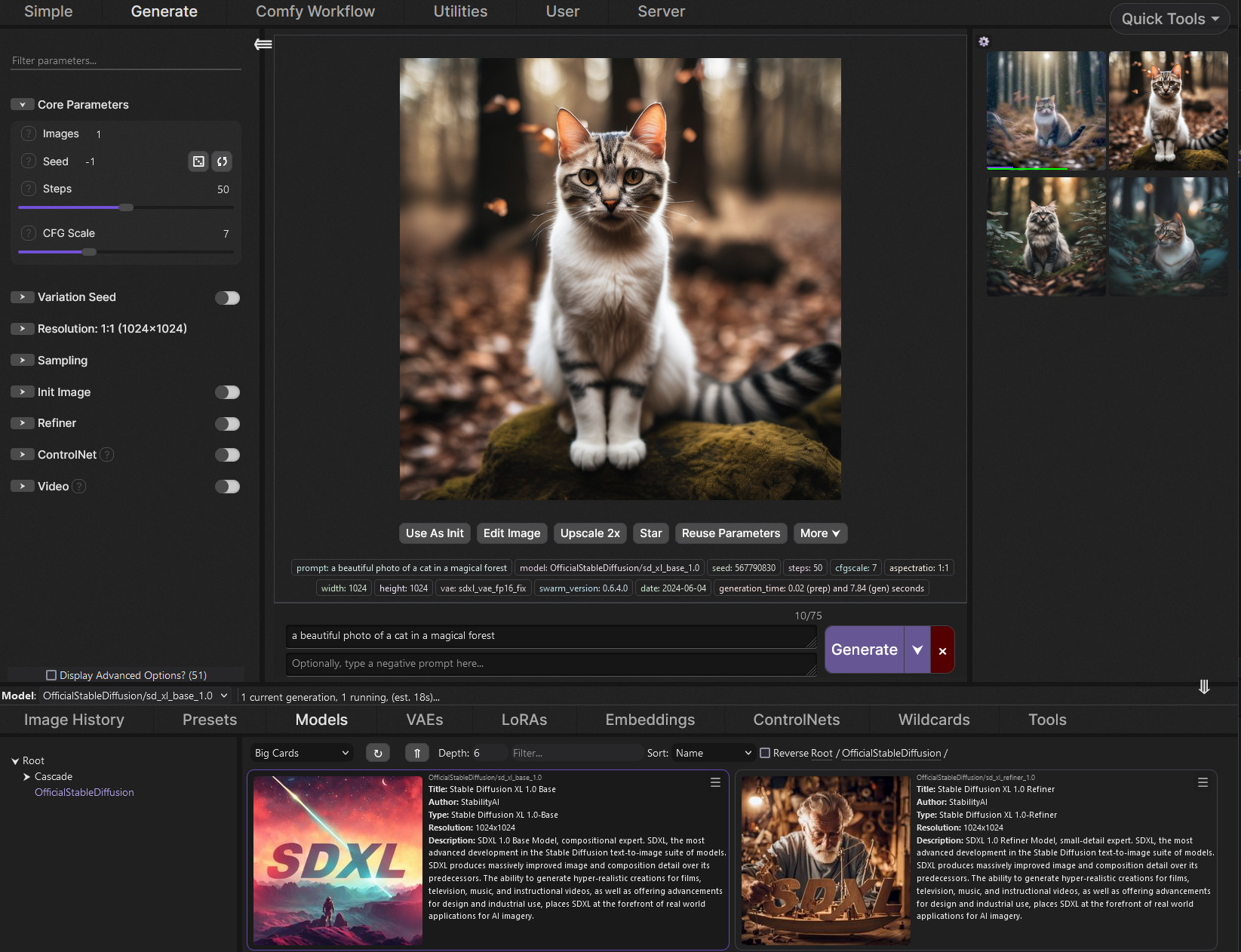
everything is easy once you know what you're doing. everythign is hard when you first encounter it. just install @jagged plover 's really good program, Swarm https://github.com/mcmonkeyprojects/SwarmUI and let it do all the technical stuff. it runs comfy for you
GitHub
SwarmUI (formerly StableSwarmUI), A Modular Stable Diffusion Web-User-Interface, with an emphasis on making powertools easily accessible, high performance, and extensibility. - mcmonkeyprojects/Swa...
ornate elk
noble idol
hey did you ever get your UI to interrupt faster
Double click the interrupt button.
If you want it even faster enable never oom for tiled VAE.
ornate elk
thorny iron
.. and which would I download? ':<
The middle one
ornate elk
tawny bramble
hey yall, is there any way i can speed up my its? im using sd forge amd, on a 57...
Do you use zluda or directml?
tawny bramble
ornate elk
Do you use zluda or directml?
zluda
ornate elk
Okay. Make sure you also use the t5_q8 Text Encoder.
And if you only have 16gb of RAM then you need to increase the Windows Pagefile
noble idol
ornate elk
Double click the interrupt button.
If you want it even faster enable never oom f...
i just use this setting
 tawny bramble
ornate elk
Okay. Make sure you also use the t5_q8 Text Encoder.
And if you only have 16gb o...
tawny bramble
ornate elk
Okay. Make sure you also use the t5_q8 Text Encoder.
And if you only have 16gb o...
yaya already using q8 and i have 48 gigs of ram, i researched a bit and im guessing there arent many ways to speed it up further
ornate elk
tawny bramble
yaya already using q8 and i have 48 gigs of ram, i researched a bit and im guess...
Nope. Then your out of luck.
But its not worth using it on that card.
You should focus on SDXL based stuff
tawny bramble
ornate elk
Nope. Then your out of luck.
But its not worth using it on that card.
You should...
alr ty for the help anyway!
ornate elk
Np!
midnight kiln
tawny bramble
alr ty for the help anyway!
I'm testing out Flux NF4 models now (the smallest type of Flux), and I can say it works well inside of 11GB on my 1080Ti - but only barely at a reasonable resolution.
So sadly, I don't think that GPU can do it. You will need 11-12GB minimum to get any sort of speed - or otherwise be running it so much in RAM that 70sec/it doesn't seem like it would be abnormal. RAM is easily an order of magnitude slower than VRAM
 cursive wren
Stable diffusion 2.1 simply stopped working out of nowhere giving this error, help!

 lucid yoke
cursive wren
Stable diffusion 2.1 simply stopped working out of nowhere giving this error, he...
lucid yoke
cursive wren
Stable diffusion 2.1 simply stopped working out of nowhere giving this error, he...
Probably on their end, most you could personally do is clearing your cache/cookies
cursive wren
Thanks but its still not working
I like this AI cause it gives that imperfect look, also i cant afford paid AI's, for my work being imperfect its actually good
midnight kiln
Is there any queuing extension that works for Forge? my usual webui agent scheduler just errors out on Forge. I wish I had some small idea of which ones actually works with Forge and reForge short of just trying everything
chrome rampart
Hello all. Any idea why my comfy suddenly does not start anymore? I start run_nvidia_gpu.bat and console opens for moment runs some lines and poof closes again without starting comfy
ruby yoke
chrome rampart
Hello all. Any idea why my comfy suddenly does not start anymore? I start run_nv...
when did you reboot last and how much space is on your system drive?
chrome rampart
i started this afternnon and worked. When i retried let say hour ago I had issue. I also restarted entire PC just to be sure. Space on drive free is 174GB
ruby yoke
chrome rampart
i started this afternnon and worked. When i retried let say hour ago I had issue...
on the sytem drive? are you on windows or mac?
chrome rampart
I use windows on (system drive c: 40 gb free and on install drive comfy (f) 174GB free
ruby yoke
chrome rampart
I use windows on (system drive c: 40 gb free and on install drive comfy (f) 174G...
40 gig free on your system drive isn't enough - that's going to cause you problems with all sorts of things
you also might need to clear your python cache
chrome rampart
ruby yoke
you also might need to clear your python cache
how do i clear python cache ?
ruby yoke
chrome rampart
how do i clear python cache ?
#💬|general-chat message follow @ornate elk instructions and also #💬|general-chat message
chrome rampart
ruby yoke
https://discord.com/channels/1002292111942635562/1002292112739549196/12036522650...
ok i will check thks
it says 0 files in cache but will do steps again to be sure> thks
 safe inlet
but thats not a steam link, its to a different site you just obfuscated it, how is that possible, maybe you made a typo
 tidal thunder
Hello all! I need some help please, can't fix by running run.bat (stable diffusion forge)
getting this error:
Already up to date.
Python 3.10.6 (tags/v3.10.6:9c7b4bd, Aug 1 2022, 21:53:49) [MSC v.1932 64 bit (AMD64)]
Version: f2.0.1v1.10.1-previous-642-gf3672ffb
Commit hash: f3672ffbbe181bd95033283562598574fb377dcd
Traceback (most recent call last):
File "D:\textnewforge\webui\launch.py", line 54, in <module>
main()
File "D:\textnewforge\webui\launch.py", line 42, in main
prepare_environment()
File "D:\textnewforge\webui\modules\launch_utils.py", line 434, in prepare_environment
raise RuntimeError(
RuntimeError: Your device does not support the current version of Torch/CUDA! Consider download another version:
https://github.com/lllyasviel/stable-diffusion-webui-forge/releases/tag/latest
Для продолжения нажмите любую клавишу . . .
I have installed MSVC v143 build tools but this didn't help too
 ornate elk
tidal thunder
Hello all! I need some help please, can't fix by running run.bat (stable diffusi...
ornate elk
tidal thunder
Hello all! I need some help please, can't fix by running run.bat (stable diffusi...
Hey, what's your GPU?
tidal thunder
ornate elk
Hey, what's your GPU?
RTX 2070 super 8 gb
ornate elk
And which version of forge did you downloaded,?

 ornate elk
No thats the recommended one and should work
But you need to update your nvidia driver
tidal thunder
it's 572.16 (latest)
ornate elk
Hmm okay
tidal thunder
previously i ran stable diffusion forge thru the webui-user.bat but now i realize i did all this time wrong
so i want to run it thru run.bat
ornate elk
Does it work if you launch it trough the webui-user.bat?
Because then you can ignore the run.bat
tidal thunder
ornate elk
Does it work if you launch it trough the webui-user.bat?
Yes, it start's to download all packages
tidal thunder
ornate elk
Because then you can ignore the run.bat
it seems to be not calling enviroments so that could be bad?
when running webui-user.bat
ornate elk
Have you launched update.bat before running run.bat?
tidal thunder
Yes
ornate elk
Do you have a specific cuda Version installed?
 ornate elk
tidal thunder
ornate elk
tidal thunder
You can uninstall that and then reboot the PC.
Then update your python to 3.10.11 64bit
Then delete the venv folder inside the webui folder and relaunch the run.bat
tidal thunder
ornate elk
You can uninstall that and then reboot the PC.
Then update your python to 3.10.1...
i'll try rn, thanks
chrome rampart
ruby yoke
https://discord.com/channels/1002292111942635562/1002292112739549196/12036522650...
After calling to the gods several times (lol) trying to find issue i decided to do full re-install and now it works again. Thank for helping yesterday🫂
tidal thunder
ornate elk
You can uninstall that and then reboot the PC.
Then update your python to 3.10.1...
didn't help
ornate elk
tidal thunder
didn't help
Still the same error?
tidal thunder
ornate elk
Still the same error?
yes
ornate elk
tidal thunder
yes
What's in side your webui-user.bat?
tidal thunder
ornate elk
What's in side your webui-user.bat?
@echo off
set CUDA_VISIBLE_DEVICES=0
set PYTHON=
set GIT=
set VENV_DIR=
set COMMANDLINE_ARGS=--xformers --cuda-stream --lowvram --cuda-malloc --always-offload-from-vram --opt-sub-quad-attention --opt-sdp-attention --theme dark --device-id 0
set SAFETENSORS_FAST_GPU=1
git pull
call webui.bat
ornate elk
Are you on a laptop?
tidal thunder
no, pc
the main problem is in environment.bat, when i'm add it to webui-user.bat it produces error
ornate elk
OK then remove --device-id0, --lowvram --always-offload-from-vram --opt-sub-quad-attention --opt-sdp-attention
Then save and relaunch
ornate elk
tidal thunder
the main problem is in environment.bat, when i'm add it to webui-user.bat it pro...
Yea that bat won't work
Is not needed
tidal thunder
so is that fine to load just webui-user.bat instead or run.bat? it won't call an enviroment (i can set in manually) so is that would be okay?
ornate elk
tidal thunder
so is that fine to load just webui-user.bat instead or run.bat? it won't call an...
Yep and you dont need to set in manually.
If you have a venv folder inside the webui folder your fine
tidal thunder
okay, thanks for the help!
ornate elk
And dont forget to remove the args I mentioned
Also you can try ReForge if you want a more stable version.
As forge doesn't get updated lately
 steady thistle
"ufunc_add_CUDA" not implemented for 'Float8_e4m3fn' Error... hmm
 amber prairie
Yo if anyone can tell me the BEST possible way to make this type of background visuals, it would be greatly appreciated.
I've spent WEEKS trying to use comfyui and several different ai models, following youtube videos and shit, and bc its my first time, I don't really understand much but I have slowly gotten to grasps with the different nodes and models.
So these three are the best 3 videos out of the dozen that I've prompted and they were made with "HunyuanGGUF" which took like 15/20 minutes a clip. I don't got time for that if and its not even that technical/complicated.
i've tried other stuff like nvidia cosmos, took 50 minutes to generate an "ethereal" looking style which i did not want, ltx didnt work, I used the huggingface for EasyAnimate which made a more sketched style which looked nice but it took like 20 minutes queue to even process it.
lucid yoke
amber prairie
Yo if anyone can tell me the BEST possible way to make this type of background v...
HunyuanGGUF is the best one for now 👍
LTX gives lesser quality but with the benefit of image2video
and is faster
and if it didnt work (witch it did on my 3070TI) is probably a workflow fault
regal mason
How do I remove glasses from a face?
I tried Lama object remover but it keeps giving me errors.
Anyone got a simple/minimal workflow for this?
warm turret
ı havent installed anything for optimizations
just models
--use-zluda --medvram-sdxl --opt-sub-quad-attention
commandlines
ornate elk
Screenshot your webui when you get the error
With resolution and model and if you have hires fix enabled

 ornate elk
warm turret
ornate elk
warm turret
Set the resolution to 768x1024
And then enable never oom but only for tiled vae
And set your GPU weight slider to 11500
warm turret
crashed
warm turret
ornate elk
Set the resolution to 768x1024
And then enable never oom but only for tiled vae
x = block(x, context=context[i], transformer_options=transformer_options)
File "C:\Users\user\SD - Zluda\stable-diffusion-webui-amdgpu-forge\venv\lib\site-packages\torch\nn\modules\module.py", line 1532, in _wrapped_call_impl
return self._call_impl(*args, **kwargs)
File "C:\Users\user\SD - Zluda\stable-diffusion-webui-amdgpu-forge\venv\lib\site-packages\torch\nn\modules\module.py", line 1541, in _call_impl
return forward_call(*args, **kwargs)
File "C:\Users\user\SD - Zluda\stable-diffusion-webui-amdgpu-forge\backend\nn\unet.py", line 181, in forward
return checkpoint(self._forward, (x, context, transformer_options), None, self.checkpoint)
File "C:\Users\user\SD - Zluda\stable-diffusion-webui-amdgpu-forge\backend\nn\unet.py", line 12, in checkpoint
return f(*args)
File "C:\Users\user\SD - Zluda\stable-diffusion-webui-amdgpu-forge\backend\nn\unet.py", line 235, in _forward
n = self.attn1(n, context=context_attn1, value=value_attn1, transformer_options=extra_options)
File "C:\Users\user\SD - Zluda\stable-diffusion-webui-amdgpu-forge\venv\lib\site-packages\torch\nn\modules\module.py", line 1532, in _wrapped_call_impl
return self._call_impl(*args, **kwargs)
File "C:\Users\user\SD - Zluda\stable-diffusion-webui-amdgpu-forge\venv\lib\site-packages\torch\nn\modules\module.py", line 1541, in _call_impl
return forward_call(*args, **kwargs)
File "C:\Users\user\SD - Zluda\stable-diffusion-webui-amdgpu-forge\backend\nn\unet.py", line 154, in forward
out = attention_function(q, k, v, self.heads, mask)
File "C:\Users\user\SD - Zluda\stable-diffusion-webui-amdgpu-forge\backend\attention.py", line 335, in attention_pytorch
out = torch.nn.functional.scaled_dot_product_attention(q, k, v, attn_mask=mask, dropout_p=0.0, is_causal=False)
torch.cuda.OutOfMemoryError: CUDA out of memory. Tried to allocate 5.62 GiB. GPU
CUDA out of memory. Tried to allocate 5.62 GiB. GPU
ornate elk
warm turret
x = block(x, context=context[i], transformer_options=transformer_options)
File...
Restart the webui and make sure the GPU weight is at 11500
Then try again
And dont have anything open in the background like games or Wallpaper engine
warm turret
do u recommend flux
warm turret
ornate elk
Then try again
out = torch.nn.functional.scaled_dot_product_attention(q, k, v, attn_mask=mask, dropout_p=0.0, is_causal=False)
torch.cuda.OutOfMemoryError: CUDA out of memory. Tried to allocate 5.62 GiB. GPU
CUDA out of memory. Tried to allocate 5.62 GiB. GPU
[Low GPU VRAM Warning] Your current GPU free memory is 831.04 MB for this diffusion iteration.
warm turret
warm turret
[Low GPU VRAM Warning] Your current GPU free memory is 831.04 MB for this diffus...
get this on the first step of generating
ı turned off hires fix
generating took 10 or 15 seconds
seems fixed
ı guess its not good to use hires fix on realvisxl
ornate elk
Hires fix is very resource hungry but with 768x1024 and 10 hires steps + never oom for tiled VAE it should work.
warm turret
ornate elk
Hires fix is very resource hungry but with 768x1024 and 10 hires steps + never o...
ı turned off just upscaling
now
ornate elk
Ok
warm turret
generating took long again
can u recommend upsclaer
good as esrgan4x maybe less but more optimized
ornate elk
The upscalers aren't much different in performance
For realism 4x UltraSharp is good
Can be found here:
https://openmodeldb.info/
The .PTH file has to go into models/ESRGAN folder
warm turret
image got cooked when ı just turned off upscaler
 sand pasture
helo
 cold junco
 lucid yoke
cold junco
lucid yoke
cold junco
Are you on a laptop?
cold junco
yes
lucid yoke
No worries, ill compare it sec
cold junco
 lucid yoke
To be completely honest im not sure if you can run it locally
lucid yoke
Well if you insist on trying its going to be very slow or run out of memory while loading it
cold junco
yea it cost nothing to try
lucid yoke
im looking at the specifics for a AMD card but zluda is not supported for your gpu and DirectML could but it would use a lot of vram
cold junco
okay so its not possible
ruby yoke
cold junco
okay so its not possible
you need to actually read through the AMD GPU guides that @ornate elk wrote and which are in messages pinned in this channel
and then ask him if you get stuck once he's back online
lucid yoke
not with directML or zluda since they really want 8gb minimum but i recommend civitAI for online generation
ruby yoke
lucid yoke
not with directML or zluda since they really want 8gb minimum but i recommend ci...
mage.space is a lot better than civit...
lucid yoke
ruby yoke
you need to actually read through the AMD GPU guides that <@161910921269084160> ...
he has less then 500mb on his gpu
lucid yoke
ruby yoke
mage.space is a lot better than civit...
ah didnt know that one yet. checking it out for future recommendations
ruby yoke
lucid yoke
he has less then 500mb on his gpu
he probably wants to rent gpus on vast.ai or runpod then
cold junco
ruby yoke
you need to actually read through the AMD GPU guides that <@161910921269084160> ...
okay thanks
lucid yoke
 zenith seal
can you try fixing this one? launch.py: error: unrecognized arguments: --skip-ort
zenith seal
lucid yoke
can you try fixing this one? launch.py: error: unrecognized arguments: --skip-or...
the ui lauched but i got this issue when genning
also i don't see the zluda folder
lucid yoke
im not too familliar with zluda issues. sorry.
zenith seal
lucid yoke
im not too familliar with zluda issues. sorry.
alright it's okey thanks tho
cold junco
ruby yoke
you need to actually read through the AMD GPU guides that <@161910921269084160> ...
Bruh it rebooted my computer
Ok I think my computer doesn't want to generate images 😂
ruby yoke
cold junco
Ok I think my computer doesn't want to generate images 😂
if you only have 500meg of vram, like he said, no - your computer cant' do this work. you can rent gpus from vast.ai or runpod though
zenith seal
maybe the issue is from zluda
 ornate elk
cold junco
how can I try?
ornate elk
cold junco
how can I try?
You can only use the very slow CPU mode on this laptop
ornate elk
zenith seal
maybe the issue is from zluda
Yep thats an issue
Your missing the path to hip rocm in environment variable's
cold junco
ornate elk
You can only use the very slow CPU mode on this laptop
Is it on your GitHub profile?
ornate elk
cold junco
Is it on your GitHub profile?
Nope but you can follow the one for Automatic1111 on Nvidia.
And then use --use-cpu all --precision full --no-half --opt-sub-quad-attention
As commandline_args instead of the one for nvidia
cold junco
Okay thanks I'll try that tomorrow
zenith seal
ornate elk
Yep thats an issue
Your missing the path to hip rocm in environment variable's
but i have the path
 ornate elk
zenith seal
but i have the path
ornate elk
zenith seal
but i have the path
Which guide did you followed?
It seems like you installed the webui version from likelovewant.
Would advise deleting it and following my install guide instead.
Its linked in the pinned messages of this channel
sand pasture
How would you train a lora for a character with a 3d model?
in comfyui
is there some set up/json I could use for this?
sand pasture
nvm I found something
 hazy pumice
Hello~
I have been attempting to install and run SD Auto1111 for the past 24 hours and I have tried everything and checked all kinds of other forums and even asked GPT for help. Nothing has worked and I'm about to pull my hair out. Can anyone help me understand what is going wrong?
Please and thank you~
ruby yoke
hazy pumice
Hello~
I have been attempting to install and run SD Auto1111 for the past 24 hou...
what sort of hardware are you trying to install on?
hazy pumice
ruby yoke
what sort of hardware are you trying to install on?
Nvidia 3070 Laptop GPU
I have not
ruby yoke
hazy pumice
I have not
try that or try installing SwarmUI and let it deal with the technical stuff
hazy pumice
ruby yoke
try that or try installing SwarmUI and let it deal with the technical stuff
okay let me go check SwarmUI, be back soon
ruby yoke
hazy pumice
okay let me go check SwarmUI, be back soon
there's a #🐝|swarm-ui channel here if you get stuck
hazy pumice
so I just run the code in cmd in the folder?
ruby yoke
hazy pumice
so I just run the code in cmd in the folder?
no. here:
https://github.com/mcmonkeyprojects/SwarmUI go there, scroll down below all the code and folders, and read through the instructions
GitHub
SwarmUI (formerly StableSwarmUI), A Modular Stable Diffusion Web-User-Interface, with an emphasis on making powertools easily accessible, high performance, and extensibility. - mcmonkeyprojects/Swa...
hazy pumice
or download zip and then extract to where?
hazy pumice
ruby yoke
https://github.com/mcmonkeyprojects/SwarmUI go there, scroll down below all th...
alright let me go read~
ruby yoke
there's a one click installer you download
hazy pumice
it says I shouldn't install it under program files, what would be the ideal folder?
 keen gorge
guy why does my genrate looks low quality how to improve it

ping me if you know how to help me
hazy pumice
I'm back again...I started from scratch trying to install and run the Automatic1111 webui. Can anyone help me understand and resolve the following errors below? It seems to be a connection issue? My internet isn't the best but it's not that bad either
error: RPC failed; curl 92 HTTP/2 stream 5 was not closed cleanly: CANCEL (err 8)
error: 6925 bytes of body are still expected
fetch-pack: unexpected disconnect while reading sideband packet
fatal: early EOF
fatal: fetch-pack: invalid index-pack output
ruby yoke
hazy pumice
I'm back again...I started from scratch trying to install and run the Automatic1...
how much disk space did you say you had?
hazy pumice
ruby yoke
how much disk space did you say you had?
8GB GPU and my HD is 500GB
Simple laptop~
ruby yoke
hazy pumice
8GB GPU and my HD is 500GB
but how much of that 500gig is empty?
lucid yoke
My swarmUI uses around 260gb (most of it are models tho) be sure you have enough space
ruby yoke
hazy pumice
8GB GPU and my HD is 500GB
okay, found this on that error https://github.com/AUTOMATIC1111/stable-diffusion-webui/issues/9074
GitHub
Is there an existing issue for this? I have searched the existing issues and checked the recent builds/commits What happened? This is my first time making a report on github, so I might miss a few ...
make sure you're using the latest level of auto1111, that's from 2023
the suggested fix is: export COMMANDLINE_ARGS="--no-gradio-queue"
to add that to your config file
lucid yoke
Wait i remember something about that, didnt a older branch link to now no longer maintained gits?
Or no longer existing*
ruby yoke
lucid yoke
Wait i remember something about that, didnt a older branch link to now no longer...
i dunno. possibly. auto1111 isn't all that well maintained any more
ruby yoke
also - turn off any anti-virus applications yoiu might have running
ruby yoke
lucid yoke
Especially with sdxl
on a laptop with that little bit of sytem resources?
lucid yoke
ruby yoke
on a laptop with that little bit of sytem resources?
8gb vram, why not . Might take a bit longer
My 3070ti handles it like a champ. (Desktop)
ruby yoke
i'm gonna suspect there's some sort of anti-virus - norton, kaspersky, something - running on that machine and killing the process
hazy pumice
ruby yoke
i'm gonna suspect there's some sort of anti-virus - norton, kaspersky, something...
I do have Norton installed and running, maybe thats killing it. I'll try shutting it off
hazy pumice
ruby yoke
but how much of that 500gig is empty?
Not sure exactly but should be wayyyy more than enough. I barely have any programs/music/games etc installed
hazy pumice
ruby yoke
okay, found this on that error https://github.com/AUTOMATIC1111/stable-diffusion...
I'll check it out thank you!
ornate elk
keen gorge
guy why does my genrate looks low quality how to improve it
Which model did you used?
ornate elk
hazy pumice
I'll check it out thank you!
Checkout my Auto1111 install guide for nvidia.
Its on the first link in the pinned messages of this channel
And yes better disable Norton for the process
 waxen pasture
Hey guys, how the heck do you use control net properly?
im struggling to give a face back realistic texture on InstructP2P, the eyes have different sizes, and i cant get it to generate a hecking smile
i also got some blurry hair accidentally in the result im using currently, any prompt i can do to fix it?
also, should i stick to 512 resolution or go higher?
ornate elk
waxen pasture
Hey guys, how the heck do you use control net properly?
im struggling to give a ...
Hey, can you show an example of what you try?
Instructp2p is not great for changing stuff
ornate elk
You can load up multiple Controlnet models at the same time
waxen pasture
is that any useful?
ornate elk
So for example change the pose in unit 1 with a openpose model and then in unit 2 use IP-Adapter to change the style
waxen pasture
ooo
what sort of language should i use?
should i use action verbs or just describe features?
waxen pasture
img2img
im trying to use this thing as a quicker photoshop, but its taking ages!
i want to learn how to change features so i can use ai for work
im using realism engine
ornate elk
waxen pasture
im trying to use this thing as a quicker photoshop, but its taking ages!
What's your GPU and did you used inpaint?
ornate elk
Graphics card
ornate elk
Depending on what's your GPU. You have to adjust the webui to get the best speed
waxen pasture
wont that affect the results?
ornate elk
Nope
ornate elk
First check how much vram your GPU has
In the taskmanager
Also do you use Automatic1111 Webui or Forge Webui?
waxen pasture
ornate elk
Also do you use Automatic1111 Webui or Forge Webui?
err, i think AUTOMATIC1111

GitHub
Stable Diffusion web UI. Contribute to AUTOMATIC1111/stable-diffusion-webui development by creating an account on GitHub.
hazy pumice
ornate elk
Checkout my Auto1111 install guide for nvidia.
Its on the first link in the pinn...
I appreciate it, actually this is the exact guide I have been following. Thank you for posting it. I honestly can't figure out why I keep getting errors but im gonna turn off Norton when I get home and try again
ornate elk
waxen pasture
of gpu
Then you only have to edit the webui-user.bat and at the line commandline_args=
You add --xformers
Then save and relaunch
waxen pasture
do i have to do that everytime?
ornate elk
And when you use Inpaint always
At the setting "Inpaint Mode" set it to Masked only
ornate elk
waxen pasture
do i have to do that everytime?
No only one time
waxen pasture
where is the webui-user bat?
you mean webui batch file?
its downloading something
Installing collected packages: mpmath, urllib3, typing-extensions, sympy, pillow, numpy, networkx, MarkupSafe, idna, fsspec, filelock, charset-normalizer, certifi, requests, jinja2, torch, torchvision
it wont open
webui-user.bat
nevermind
did it on the notepad
oh i think i have been forgetting to enable the control net unit..

i cant be spared
i wasted so much life on this idiocy
ornate elk
Oh xD
waxen pasture
ornate elk
Oh xD
its not particulary faster, maybe i did it wrong? maybe its taking longer because this time i did enable the controlnet
ornate elk
Yep with controlnet it takes more time
But on your GPU it should be still really fast
waxen pasture
thank you :D
ornate elk
No problem 🙂
waxen pasture
ornate elk
No problem 🙂
wait one more, so how do you prompt this asshole computer?
with orders: "Change this and that, you useless animal"
or: "Feature A, feature B, feature C"
ruby yoke
waxen pasture
wait one more, so how do you prompt this asshole computer?
with orders: "Change ...
you mask the area you want to change, and then you just type out what you want to see there.
waxen pasture
photorealistic, brown hair, high detail masked area
would this do?
ruby yoke
waxen pasture
photorealistic, brown hair, high detail masked area
would this do?
you have gen fill in photoshop, right? if you want to change something in it, you select an area and then just type what you want in that area in the prompt box. it's the same idea, but instead of a dotted line around the area you selected, you'll see it covered with a color
and you want to be specific about what to put in that area. if you select someone's glasses, and you want a VR mask, you would type VR mask
or if you select the blonde hair, you would type brown hair, curly
waxen pasture
ruby yoke
you have gen fill in photoshop, right? if you want to change something in it, yo...
i just want to see if i can do it in stable diffusion
waxen pasture
ruby yoke
or if you select the blonde hair, you would type brown hair, curly
ooooh
ok, do i take off the photorealistic?
im selecting only the hair
ruby yoke
waxen pasture
i just want to see if i can do it in stable diffusion
that IS what you'd do in stable diffusion. what you're doing with genfill in photoshop, is the same thing you do in stable. it's just that in photoshop you;re going to see the marching ants around the area and in stable you will see the area covered in a color
waxen pasture
im using cany since changecolor didnt work
waxen pasture
ruby yoke
that IS what you'd do in stable diffusion. what you're doing with genfill in pho...
i see
ruby yoke
waxen pasture
ok, do i take off the photorealistic?
the terms: photoreal, photorealistic, photorealism - are painting terms. they are used to describe paintings that look like photos. but the AI's all know they are associated with paintings and will give you painted looks. don't use them. use photo, photograph, or photographic
waxen pasture
ooooo
ruby yoke
and, personally, i'd be using photoshop. it's faster, it's got a much better way of selecting, and it's designed for what you want to do. stable diffusion is klunky
plus photoshop has all the other tools you might need to use such as the clone tool - and you're not doing that with stable
waxen pasture
ruby yoke
and, personally, i'd be using photoshop. it's faster, it's got a much better way...
i dont got photoshop
its a paid service.
waxen pasture
anyway, i just want to see if i can do it
it might come handy in the future
i also want to experiment changing face features
ruby yoke
waxen pasture
anyway, i just want to see if i can do it
yeah, why don't you try krita?
it's free, it functions as a very good photomanipulation program, a paint program, and it runs stable diffusion inside it
waxen pasture
ruby yoke
it's free, it functions as a very good photomanipulation program, a paint progra...
would it generate assets like stable diffusion?
ruby yoke
https://krita.org/en/ that's where you can get the main program
Krita
Krita is a professional FREE and open source painting program. It is made by artists that want to see affordable art tools for everyone.
waxen pasture
im trying to use it for photorealism also
ruby yoke
waxen pasture
would it generate assets like stable diffusion?
grab krita and krita-ai-diffusion and play around with them
waxen pasture
why not
idve rathered to learn to use stable diffusion though, i'll see
If you haven't yet, go and install Krita! Required version: 5.2.0 or newer
Download the plugin.
Start Krita and install the plugin via Tools ▸ Scripts ▸ Import Python Plugin from File...
Point it to the ZIP archive you downloaded in the previous step.
⚠ This will delete any previous install of the plugin. If you are updating from 1.14 or older please read updating to a new version.
Check Krita's official documentation for more options.
Restart Krita and create a new document or open an existing image.
To show the plugin docker: Settings ‣ Dockers ‣ AI Image Generation.
In the plugin docker, click "Configure" to start local server installation or connect.
cant find it in the dockers
em dockers are blocked
oh need a picture for that
doesnt appear in the docker still
Enable the Plugin Docker from the Menu bar: Settings ▸ Dockers ▸ 🗹 AI Image Generation
ruby yoke
waxen pasture
idve rathered to learn to use stable diffusion though, i'll see
kritia-ai-diffusion IS stable diffusion. i'ts just a version that'll work inside kritia
 ruby yoke
waxen pasture
aint appearing in dockers
ruby yoke
waxen pasture
aint appearing in dockers
go to youtube and search on "how to use stable diffusion in kirita" - there are a lot of tutorials
waxen pasture

got it to work
this seems like a bunch of garbage, honestly
its asking me to connect to some comfyui thing
ornate elk
Comfyui is a webui like Automatic1111.
Its the Backend for krita ai stuff
waxen pasture
ornate elk
Comfyui is a webui like Automatic1111.
Its the Backend for krita ai stuff
wont it give me generic results?
ornate elk
waxen pasture
wont it give me generic results?
Why?
waxen pasture
its comfortable, must be bad
anyway another question, regional text prompt is for the context or to see what you want changed?
ornate elk
waxen pasture
anyway another question, regional text prompt is for the context or to see what ...
The extension?
waxen pasture
in krita ai yes
waxen pasture
damnit, i knew i shouldnt have listened to that guy
 main rune
@ornate elk I've decided to try Docker and run comfy inside it, any advice?
ornate elk
main rune
<@161910921269084160> I've decided to try Docker and run comfy inside it, any ad...
Are you on windows or Linux?
main rune
Windows
ornate elk
Okay, why docker?
Or do you try WSL?
main rune
WSL
waxen pasture
ruby yoke
go to youtube and search on "how to use stable diffusion in kirita" - there are ...
hate to admit
but this will do the trick. Thanks.
shut geyser
where is clip name 2 folder in comfyui?
 ornate elk
main rune
WSL
ornate elk
main rune
WSL
Ah okay, i tried WSL ones but got nothing to run xD so I can't help much
shut geyser
shut geyser
where is clip name 2 folder in comfyui?
clip and clip vision arent the folder since it still says its not there
 ornate elk
shut geyser
clip and clip vision arent the folder since it still says its not there
ornate elk
shut geyser
clip and clip vision arent the folder since it still says its not there
Have you reselected the clip checkpoints in the node?
main rune
I'm just starting (again) so I was fishing for things that might be missed, but it's ok.
Got a guide open right now just hoping for the best.
If it fails it's not like the one I have on my windows suddenly stops working
ornate elk
main rune
I'm just starting (again) so I was fishing for things that might be missed, but ...
You can also install comfyui with zluda from my guide.
main rune
I did!
ornate elk
Ah okay
main rune
It's the best guide as far as I'm concerned
I'm just trying stuff
-# and hoping it wouldn't cause my pc to explode
keen gorge
ornate elk
Which model did you used?
Default and with Lora
shut geyser
 shut geyser
can i somehow see whats colliding with what in the error log?
ornate elk
keen gorge
Default and with Lora
Then you need an other model because the default one is bad
hazy pumice
Okay so I gave up on Automatic1111 and went to clone SwarmUI instead. I got this error:
error: RPC failed; curl 92 HTTP/2 stream 5 was not closed cleanly: CANCEL (err 8)
error: 7901 bytes of body are still expected
fetch-pack: unexpected disconnect while reading sideband packet
fatal: early EOF
fatal: fetch-pack: invalid index-pack output
Is my LAPTOP just too shitty to install and run this? Should I give up?
ornate elk
shut geyser
can i somehow see whats colliding with what in the error log?
Idk what you try but mat shape error is a conflict of 2 files when they are not compatible.
Like sdxl with an 1.5 lora
Or controlnet 1.5 with an sdxl model
ornate elk
hazy pumice
Okay so I gave up on Automatic1111 and went to clone SwarmUI instead. I got this...
Are you on WiFi?
hazy pumice
ornate elk
Are you on WiFi?
yes
ornate elk
How stable is the connection?
hazy pumice
I have never had any problems with it as far as I know
but it's not google fiber or anything
shut geyser
ornate elk
Idk what you try but mat shape error is a conflict of 2 files when they are not ...
sampler custom advanced gives an error


 hazy pumice
@ornate elk I love your PFP by the way. One Piece is my life, been watching it since 2001
shut geyser
this is the whole workflow
 shut geyser
hazy pumice
<@161910921269084160> I love your PFP by the way. One Piece is my life, been wat...
shut geyser
hazy pumice
<@161910921269084160> I love your PFP by the way. One Piece is my life, been wat...
luffy moment
hazy pumice
shut geyser
luffy moment
Don't F#$% with Luffy bruh lol
shut geyser
(never seen one piece)
shut geyser
hazy pumice
*BANNED*
U CANT BLAME ME
too many episodes but
i guess it can be fun
:D
hazy pumice
shut geyser
U CANT BLAME ME
bro listen, all the episodes have already been released. You don't have to wait until every Saturday like I did
so you can watch it QUICK
20+ years I have been grinding this show, but it's already laid out for you ya know?
shut geyser
hazy pumice
20+ years I have been grinding this show, but it's already laid out for you ya k...
20 YEARS?
hazy pumice
shut geyser
20 YEARS?
atleast
shut geyser
dedicated..
hazy pumice
yeah bro
it's that good though
people don't know
they think it's just some goofy anime about pirates....nah
its DEEP
there is a website
onepace
it cuts out all the filler and nonsense
so its a lot shorter
you can watch it faster without the unneccesary stuff
anyway, I just wanna get my SD up and running....if my wifi is too crappy then I guess I give up? I dunno
ornate elk
hazy pumice
I have never had any problems with it as far as I know
Any proxy or VPN or antivirus?
Can't wait for the break to end in April for OP
hazy pumice
ornate elk
Any proxy or VPN or antivirus?
negative. I had Norton guarding me but I handcuffed him to the radiator in the basement and stuff his mouth with an old T-shirt
hazy pumice
ornate elk
Can't wait for the break to end in April for OP
I know FR. Longest 6 months of MY LIFE
Okay so basically, all I want is to get this installed and start designing some tattoo ideas I have for my next ink, but I keep hitting errors and it's making me want to cry
ornate elk
hazy pumice
Okay so basically, all I want is to get this installed and start designing some ...
The error is network related.
Did you uninstalled Norton completly?
hazy pumice
ornate elk
The error is network related.
Did you uninstalled Norton completly?
Yes I did actually completely remove it
ornate elk
Also open up a cmd as admin and run:
sfc /scannow
hazy pumice
okay
ornate elk
And your not located in asia, Russia or Iran?
hazy pumice
lol....uhhh
I am in ASIA actually....is that bad?
Beginning system scan. This process will take some time.
Beginning verification phase of system scan.
Verification 100% complete.
Windows Resource Protection did not find any integrity violations.
ornate elk
These locations mostly need a VPN for the initial install or DNS change
hazy pumice
ornate elk
These locations mostly need a VPN for the initial install or DNS change
oh crap...okay
any recommendation for a free VPN?
ornate elk
Proton vpn
hazy pumice
brb
 gray inlet
Hello, I was trying this workflow https://openart.ai/workflows/beaver_absolute_68/flux-lora-upscaler/Mk8Yz49ROXjkQObezVMp but I’m having an out of memory error during the upscaling.
I have a RTX 4080 with 16gb vram. I tried with « —low-vram » but in this cause my linux system to freeze 🥲 (likely ram issue even if I have 32gb).
Note my linux system is using intel graphic card not my gpu.
Is anyone able to run the worflow?
 hazy pumice
gray inlet
Hello, I was trying this workflow https://openart.ai/workflows/beaver_absolute_6...
hazy pumice
gray inlet
Hello, I was trying this workflow https://openart.ai/workflows/beaver_absolute_6...
That's ALOT of Diddy oil...dang bro
ornate elk
gray inlet
Hello, I was trying this workflow https://openart.ai/workflows/beaver_absolute_6...
How big is your flux model file?
gray inlet
I tried with Flux schnell Q4 and Q8. In both case I can generate the image but not upscale it.
I have noticed in the upscale group that flux dev is in a load checkpoint node . I don't have such model ... Should'nt have an error ? 🤔
 ornate elk
gray inlet
I have noticed in the upscale group that flux dev is in a load checkpoint node ....
ornate elk
gray inlet
I have noticed in the upscale group that flux dev is in a load checkpoint node ....
You need the gguf loader
But I doubt it will work
Upscaling flux causes my PC to freeze with 24gb AMD
gray inlet
Stack trace: model weight dtype torch.bfloat16, manual cast: None
model_type FLOW
Requested to load FluxClipModel_
loaded completely 14491.2375 4778.66259765625 True
Token indices sequence length is longer than the specified maximum sequence length for this model (203 > 77). Running this sequence through the model will result in indexing errors
Requested to load Flux
loaded completely 9638.449814605712 7288.3731689453125 True
100%|███████████████████████████████████████████| 20/20 [00:17<00:00, 1.13it/s]
Requested to load AutoencodingEngine
loaded completely 2468.0729110717775 159.87335777282715 True
cache_dir: /tmp
ckpts_dir: /home/sellum/Documents/projets/ai/ai-misc/ComfyUI/custom_nodes/comfyui_controlnet_aux/ckpts
use_symlinks: False
model_path is /home/sellum/Documents/projets/ai/ai-misc/ComfyUI/custom_nodes/comfyui_controlnet_aux/ckpts/lllyasviel/Annotators/sk_model.pth
cache_dir: /tmp
ckpts_dir: /home/sellum/Documents/projets/ai/ai-misc/ComfyUI/custom_nodes/comfyui_controlnet_aux/ckpts
use_symlinks: False
model_path is /home/sellum/Documents/projets/ai/ai-misc/ComfyUI/custom_nodes/comfyui_controlnet_aux/ckpts/lllyasviel/Annotators/sk_model2.pth
!!! Exception during processing !!! Allocation on device
ornate elk
What could work is to use the SD upscale script node
It uses tiling for upscaling
And then use tiled VAE node at the end
gray inlet
I will give it a try thank you 🙂
By the way I'm trying to produce similar video than this : https://civitai.com/models/832683/flux-pro-11-style-lora-extreme-detailer-for-flux1-dev . I'm able to produce images with the LORA without issues. I can see that for the examples they are using "Kling AI". Do you have any workflow to suggest to do the same kind of image to video locally ?
 ornate elk
gray inlet
By the way I'm trying to produce similar video than this : https://civitai.com/m...
ornate elk
gray inlet
By the way I'm trying to produce similar video than this : https://civitai.com/m...
For video generation locally, you would need to use ltx video or hunyuan
Both can to txt2img and img2img
But hunyuan is very resources intensive
gray inlet
Ok I will try both. Thank you for your help !
ornate elk
hazy pumice
brb
Did you got it working with the VPN?
hazy pumice
ornate elk
Did you got it working with the VPN?
It seems to be working. I am going for Swarm UI instead of Auto1111 and I haven't had any problems yet. It's just a little slow because of my internet
shut geyser
can someone tell which models here do not play into eachother?
i get the mat1 and mat 2 shapes cannot be multiplied error


 ornate elk
shut geyser
can someone tell which models here do not play into eachother?
i get the mat1 a...
ornate elk
shut geyser
can someone tell which models here do not play into eachother?
i get the mat1 a...
maybe on of the loras
but the vae for sure is not flux compatible
flux needs the ae.safetensors
shut geyser
ornate elk
maybe on of the loras
changed it still gives the same error on samplercustomadvanced
shut geyser
ornate elk
but the vae for sure is not flux compatible
so i skipped all the loras, connected it to the main thing
it still errored the same way
 terse hull
in the tutorial for installing a1111 for amd on directml, it says this

i have a rx 580 series
do i need the --no-half arg?
terse hull
wtf happened here (my prompt was kanye west goes crashout😭)

i used the illustrious xl model from civitai
ruby yoke
terse hull
wtf happened here (my prompt was kanye west goes crashout😭)
you seem to have used either the wrong VAE - or the wrong sampler/scheduler
terse hull
ruby yoke
you seem to have used either the wrong VAE - or the wrong sampler/scheduler
idk what any of these are i just followed the tutorial for my gpu
ruby yoke
terse hull
idk what any of these are i just followed the tutorial for my gpu
the VAE is the VAriable auto encoder. it has to be trained for the model you're using. you're using illustriousXL so you need to use a VAE that works with it.
ornate elk
terse hull
i used the illustrious xl model from civitai
Illustrous needs a 1024x1024 resolution or 768x768
Also don't use a v-pred model
terse hull
ornate elk
Illustrous needs a 1024x1024 resolution or 768x768
not sure if my gpu can handle that
ruby yoke
terse hull
not sure if my gpu can handle that
what hardware do you have?
ornate elk
terse hull
not sure if my gpu can handle that
If you install the zluda variant it could work
Directml won't work likely
With directml you can use SD 1.5 based models (2gb)
Maybe xl if you add --lowvram to the webui-user.bat
terse hull
ruby yoke
what hardware do you have?
my gpu is an amd rx580 series and my cpu is amd ryzen 5 i think
12 core
if that matters
terse hull
ornate elk
If you install the zluda variant it could work
i dont really have to use this particular model, i just found it. i wanna have like a nickelodeon, 2d animated comic style
ruby yoke
terse hull
my gpu is an amd rx580 series and my cpu is amd ryzen 5 i think
i would take @ornate elk 's advice then. read his AMD gpu guides which are pinned in this channel, install zluda, use it. and perhaps use something other than illustrious
terse hull
ruby yoke
i would take <@161910921269084160> 's advice then. read his AMD gpu guides which...
okay ill try it
do i have to delete my stable diffusion folder i just installed?
ruby yoke
terse hull
do i have to delete my stable diffusion folder i just installed?
are you on mac or windows?
terse hull
windows
ruby yoke
and this is your first time using comfy, correct?
 brittle lantern
Is there any Auto1111 or ComfyUI tutorial for ROCm on Linux (Fedora)?
terse hull
ruby yoke
and this is your first time using comfy, correct?
i use a1111
ruby yoke
terse hull
i use a1111
okay, i wouldn't delete anything just yet. just read his guides and install zluda
terse hull
ruby yoke
okay, i wouldn't delete anything just yet. just read his guides and install zlud...
okay ill let u know if it works
terse hull
is this a problem? (running on zluda) No ROCm runtime is found, using ROCM_HOME='C:\Program Files\AMD\ROCm\5.7'
ornate elk
terse hull
is this a problem? (running on zluda) `No ROCm runtime is found, using ROCM_HOME...
Should work
terse hull
ornate elk
Should work
RuntimeError: Expected all tensors to be on the same device, but found at least two devices, cpu and cuda:0! (when checking argument for argument index in method wrapper_CUDA__index_select)
ornate elk
terse hull
`RuntimeError: Expected all tensors to be on the same device, but found at least...
can you share the full cmd log?
terse hull
its really really long
i get a huge amount of errors
but ill send it wait
its still compiling something but thats it so far:
ornate elk
terse hull
its still compiling something but thats it so far:
looks good
compiling means it works
you now have to wait until it opens
terse hull
okay
ornate elk
then try to generate 1 image with default settings
it will compile again 15-40 mins
then its doen and you can generate image much faster (like a few seconds)
ornate elk
no problem 🙂
ornate elk
terse hull
i started it again and this happened
just restart it a few times aftert it crashes. Its a bug for RX580 users. As the compiling crashes. But after 10-15 times of relaunching it should work
terse hull
okay ill try it
brittle lantern
@ornate elk u have a ROCm Linux auto1111 tut for Fedora?
ornate elk
brittle lantern
<@161910921269084160> u have a ROCm Linux auto1111 tut for Fedora?
hey, nope sorry :/
brittle lantern
ornate elk
hey, nope sorry :/
Yk where to find one that updated or updated enough?
ornate elk
hmm nope but on the Shark AMD Server are some linux users
Link to the discord is at the bottom:
https://github.com/nod-ai/SHARK-Studio?tab=readme-ov-file#communication-channels
sand pasture
so i am looking to train a lora based off of screenshots of a 3d model character I want,
would it help to have a character in different poses or is a t pose with many screenshots is sufficient
 ornate elk
shut geyser
how to put --medvram
ornate elk
shut geyser
how to put --medvram
Comfyui doesn't have a --medvram. It does have --normalvram
You can put it behind the --auto-launch at the bottom
ashen gate
ornate elk
Comfyui doesn't have a --medvram. It does have --normalvram
Why do I always end up with faces like this? Her eyes...


 ashen gate
noble idol
i got scared ngl
ashen gate
noble idol
i got scared ngl
why
noble idol
i think you should go look at some other people's metadata and see how they prompt and use loras
ashen gate
noble idol
i think you should go look at some other people's metadata and see how they prom...
ive tried standard formatting and it still does that
ashen gate
noble idol
well youre also using the lora weight on 1
roger roger
noble idol
dont weight so many things so high either, i dont think thats a good idea 
ashen gate
noble idol
dont weight so many things so high either, i dont think thats a good idea <:Abig...
Yeah, so formatting it vanilla did nothing
 noble idol
can you give me the lora?
i dont see anything else wrong but im not a pro 
ah maybe try making the image dimensions 1024x1024 instead of 768x768? that might just help in general
ashen gate
noble idol
<:AbigailThink:675382124152356866>
https://civitai.com/models/556442/eda-clawthorne-the-owl-house-commission
Just don't scroll down to the images. LOL
ashen gate
noble idol
LOL fair enough
Resizing to 1024x1024 did not help either. It's a pony lora for pony checkpoints.
noble idol
if it does you can just use my image's metadata and compare them and change stuff until it works
noble idol
ashen gate
Resizing to 1024x1024 did not help either. It's a pony lora for pony checkpoints...
have you considered using a more popular model, like autismmix?
its a good model
ashen gate
noble idol
have you considered using a more popular model, like autismmix?
From what I see it's majorly cartoony and I wanted a checkpoint that can make things a bit more real. MY problem persisted throughout 3 different Pony checkpoints so I don't think this will work, but I'll try it.
noble idol
hmm, ive never tried making a cartoon character 3d before
wonder if its hard
im going to download a pony model, ill dm/ping you when im done, itll take a while. Hopefully someone solves your problem in the meantime
im not great at thsi myself either but i wanna see if i cant help
ashen gate
noble idol
hmm, ive never tried making a cartoon character 3d before <:AbigailThink:6753821...
USed AutismMix and not much better:

 ashen gate
noble idol
i got this-
ashen gate
noble idol
i got this-
So am i wat the hell
Also yours has no metadata. I need a PNG with metadata or I can't get similar results.
noble idol
ah right thats my bad, i just copy and paste usually instead of saving images- which means theres no metadata
let me grab it with metadata
ill send it in dms so we dont clog up this channel
 vapid stream
hey everyone, If i have a error message is this the right place to try to get it fixed ?
lucid yoke
vapid stream
hey everyone, If i have a error message is this the right place to try to get it...
Yes, if someone has the time they can help
vapid stream
awesome, if someone has time, ive been getting an error while generating or trying to generate an image. The error message is NansException: A tensor with NaNs was produced in Unet. This could be either because there's not enough precision to represent the picture, or because your video card does not support half type. Try setting the "Upcast cross attention layer to float32" option in Settings > Stable Diffusion or using the --no-half commandline argument to fix this. Use --disable-nan-check commandline argument to disable this check.
lucid yoke
vapid stream
awesome, if someone has time, ive been getting an error while generating or tryi...
There's a solution in the error i think. Have you tried that?
vapid stream
yep i turned on the upcast cross attention lauer to float32 and nada. I still get this message 😦
i also tried googling this error and no luck there either
noble idol
wait and pray CS1o sees your message 🙏
lucid yoke
vapid stream
im getting a green box now, Any help?
Please include more details as its very vague
ruby yoke
noble idol
wait and pray CS1o sees your message 🙏
@ornate elk is more likely to see if it he's pinged
noble idol
yeah but being pinged is annoying
ornate elk
vapid stream
awesome, if someone has time, ive been getting an error while generating or tryi...
What's your GPU?
 deft hemlock
any idea why my images look different even with the same settings ?
only difference is the seed and web ui


no im not using it for porn
firsts one is forge and the other is a1111
images look different now, same checkpoints and prompts
flat yarrow
My workflow is using SDXL checkpoints switching between these juggernautXL_juggXI, realismEngineSDXL_v30VA, cyberrealisticXL_v4, photopediaXL_45, when I run the workflow my images are giving the subject elongated arms like an Orangutan. I'm aiming for 9:16 and using 768 x 1344 in SDXL, am sure this is my problem as I can see duplications and it looks to me that I'm on the edge of what SDXL 1024 can do. So the only way I can see is making the image smaller keeping the 9:16 ratio but then that's in SD1.5 @ around 512 and the loss of detail with the latent and decoded pixels. Can anyone help with a solution for this, I have low VRAM @ 8GB on a 4060. Thanks...
shut geyser
ornate elk
Comfyui doesn't have a --medvram. It does have --normalvram
i put it there and it still uses all of the vram
 ornate elk
shut geyser
i put it there and it still uses all of the vram
ornate elk
shut geyser
i put it there and it still uses all of the vram
Yep you can't limit it with the commands
But you can try add --reserve-vram 2
ornate elk
flat yarrow
My workflow is using SDXL checkpoints switching between these juggernautXL_juggX...
Sdxl models are trained on 1024x1024 so you need to generate at lower res and then Upscale them to get Wallpaper sizes
ornate elk
deft hemlock
images look different now, same checkpoints and prompts
You used a different model and lora on them
I checked the meta data
deft hemlock
ornate elk
You used a different model and lora on them
those are examples
not exact
but i get a similar result
let me generate new ones
deft hemlock
New issue
Sadly
When I change the checkpoints A1111 is super laggy
My entire pc slows down like hell
I had lowvram in the startup
My specs are rtx 2050 laptop version with 4gb of vram
I Should just delete the venv folder and it would be fine right?
Idk if this detail helps but like changing the checkpoint takes a really really long time
And when it reaches 95% the entire pc slows down, so much so that if I have anything else happening in the background
Like switching tabs or opening notes or discord
The pc just crashes and turns off (not blue screen)
From the replies I've read I should just delete venv and I'll be okay
Right?
And tiled vae
But idk how to use it
flat yarrow
@ornate elk I'm aware of that and I'm also aware that you can work slightly outside of 1024, but my size inside the 1024 is 576 x 1024, but the width is closer to SD1.5 and the potential loss of detail. I need to maintain the 9:16 ratio and I'm upscaling anyway, but my train of thought (maybe wrong) is that I need more detail than SD1.5 even though I'm using SDXL model. As per my original post I'm trying to get my head around when and where I can work in the fringes, but since am upscaling anyway should I be worried about the detail in the latent space keeping within the 1024 boundries. Sorry about this am new and I've only being using Sd for a few months now, so I still need to get my head around a few things.
ornate elk
flat yarrow
<@161910921269084160> I'm aware of that and I'm also aware that you can work sli...
I don't get the question sry
You shouldn't go down to 512 with sdxl models because that can break the image too
Your initial resolution with 768x1344 seems okay but maybe your denois value was to high when you upscaled it
ornate elk
deft hemlock
My entire pc slows down like hell
You need to increase the windows pagefile then. If you only have 16gb of RAM and use sdxl models that causes the lag
zenith seal
Hello!
I have a small question
is it possible the set this setting in auto when starting the ui ?
 flat yarrow
@ornate elk I'm after as much detail as possible in SDXL, so keeping @ 1024 and maintaining 9:16 ratio my new image size would be 576 x 1024, I'm just a little concerned that I won't benefit from SDXL and the extra detail that SDXL provides compared to SD1.5. On the otherhand I'm upscaling anyway so should I be worried about the inital generated image and the detail in it. I just think crap in - crap out. That's why I'm using the image size larger than it should be to have extra detail with 768 x 1344 but do I need to be worried about that. It's really about what I'll get after the upscale. This deform is happening in the 1st KSampler before anything else. I do know to keep within the 1024, what I don't know and have lack of experiance is the quality of the images produced before the upscale and if it matters and if it does how to get the best detail.
deft hemlock
ornate elk
You used a different model and lora on them

 deft hemlock
ornate elk
You need to increase the windows pagefile then. If you only have 16gb of RAM and...
deft hemlock
ornate elk
You need to increase the windows pagefile then. If you only have 16gb of RAM and...
i got 12 gb, do i still increase the pagefile?