#🤝|tech-support
1 messages · Page 109 of 1
 ornate elk
 willow rapids
is it pinned?
willow rapids
is it pinned?
The first link
 paper crag
ok... so i ran cmd in my sd-webui folder, typed git pull, didnt work
ornate elk
willow rapids
which is the most optimised? and can run flawlessly
Forge will work good for you
willow rapids
ornate elk
Forge will work good for you
<3 thansk!
ornate elk
paper crag
ok... so i ran cmd in my sd-webui folder, typed git pull, didnt work
Yea the log from your screenshot shows that you have unsaved changes in the requirements_versions.txt
So you have to delete that file.
Then run git pull.
Then delete the venv folder and relaunch the webui-user.bat
Also you need to disable your AMD CPUs integrated GPU called Radeon TM Graphics.
Before relaunching it
paper crag
ornate elk
Yea the log from your screenshot shows that you have unsaved changes in the requ...
and we're back in business, thanks!
 primal pendant
why would this suddenly start happening
OutOfMemoryError: CUDA out of memory. Tried to allocate 21.80 GiB. GPU
why trying to use so much
it don't matter what i try to create
ornate elk
primal pendant
it don't matter what i try to create
Which settings do you use?
 ornate elk
primal pendant
for what ?
ornate elk
primal pendant
for what ?
For the generation
When you get the error
Like resolution etc
How much vram do you have?
primal pendant
i have 6700 xt so 12 gb
i mean i use to be just fine not used ina while went to use tonight and had never seen this before
i'm installing another
that was forge ui
hmmm seems forge broken automatic1111 works fine so weird
 ornate elk
primal pendant
hmmm seems forge broken automatic1111 works fine so weird
ornate elk
primal pendant
hmmm seems forge broken automatic1111 works fine so weird
Hmm okay, forge worked for me too
But maybe its just a setting
primal pendant
well i used forge before been fine so it's bugged out using way more vram no idea how to solve it
i alread deleted and rebuilt the venv didn't help
i got no idea why it would suddenly double up on usage liek i can't create even a simple image
i guess i need to remove it fully and start over
as automatic works perfectly fine
 ornate elk
primal pendant
i got no idea why it would suddenly double up on usage liek i can't create even ...
ornate elk
primal pendant
i got no idea why it would suddenly double up on usage liek i can't create even ...
Which txt2img settings did you used in forge?
primal pendant
it don't matter anything even putting a cat makes it use that amount
it's just using way more vram than it should
i removed forge now
ornate elk
ah okay
primal pendant
and automatic is handling with ease just like forge use to it's just weird why it would bug out like that
ornate elk
Yea sounds weird
 timber plank
Has anyone had an issue trying to load the t5 text encoder gguf files?
I've placed it in clip, clip_gguf, t5, and none of them are detecting the q8 t5 text encoder.
I've opened the proper nodes as well, dualcliploader (GGUF)

It doesn't seem to be detecting it at all.
 golden fern
Is there a solution to reduce my computer performance while generating images? My computer always freezes when generating images it hink that because SD takes 100% of my memory. I hope to limit my computer power, I don't mind if it takes longer to generate images.
timber plank
You can use --reservevram and the amount of memory you want to reserve for comfyui to prevent that from occuring
when launching comfyui*
Nevermind, a git issue has it here.

GitHub
After the Commit ee8abf0 comfyanonymous/ComfyUI@ee8abf0 GGUF Clip loaders can't find any .gguf text encoders
 ruby yoke
 honest quail
anybody know where I can get euler a
honest quail
anybody know where I can get euler a
are you running comfy?
honest quail
yep
ruby yoke
honest quail
yep
unload comfy and kill the commandline. then go into /comfyui/update and run the update.py batch file. cause it comes with comfy and if it's not there, something's wrong with your install
also- it's called euler_ancestral, not euler-a
ruby yoke
that's what the a stands for. in all of them. ancestral
honest quail
well dang
ruby yoke
honest quail
nobody mentioned that on reddit lmao
link to post?
honest quail
I gotta get used to the terms
I've just looked through a lot of posts on recommened samplers
ruby yoke
honest quail
I gotta get used to the terms
in the ones that use pp it usually stands for plus plus - which is what ++ also stands for
honest quail
makes sense
what scheduler would you recommend
oh right since I found this server I wanted to mention an issue I've had running img2vid, but I'll quickly try and do that again first
ruby yoke
honest quail
what scheduler would you recommend
wellllll that depends on a whole lot of other things. first, i'm going to give you a link https://huggingface.co/docs/diffusers/en/api/schedulers/overview welcome to the world of math you probalby never wanted to enter. read through all the schedulers there on that page. there's an index on the left sidebar
 ruby yoke
honest quail
ruby yoke
honest quail
there should be errors in the console log
 formal patrol
i have two gpu's one with vram 12 gb on with 16 gb. is there any possibility to run stable diffusion video using these two. its would be a great help. i am new learner .
 hallow latch
I am going to try and use the ComfyUI .. Do I need to install ComfyUI first and then SwarmUI ?
 tall geyser
I am trying to create images like the following, but they always come out blurry. I don't have any problems with other images with all the same settings. I also sometimes get blurriness with photos of white sand beaches. Is it the brightness? What is it about this prompt? "flat white background, 3D Unreal Engine render of an old green wooden chair"

 ornate elk
hallow latch
I am going to try and use the ComfyUI .. Do I need to install ComfyUI first and ...
ornate elk
hallow latch
I am going to try and use the ComfyUI .. Do I need to install ComfyUI first and ...
SwarmUI is Comfyui with a simpler interface.
You can either install Swarm and it will install comfyui. Or you can install just Comfyui
ornate elk
formal patrol
i have two gpu's one with vram 12 gb on with 16 gb. is there any possibility to ...
You can't combine their vram
Each GPU can only use their own instance
hallow latch
ornate elk
SwarmUI is Comfyui with a simpler interface.
You can either install Swarm and it...
What would you recommend? 🙂
ornate elk
hallow latch
What would you recommend? 🙂
Idk, but as you have also a comfyui tab in swarm I would use swarm
hallow latch
Should be enough to just install the SDK right?

 median geode
Hello! May I ask if running AI tasks for a long time puts special demands on GPU cooling? Should I choose a graphics card with better cooling performance? Also, is 32GB of RAM enough, or would I need to upgrade to 64GB?
 fervent shoal
Was anyone already able to train SD 3.5 on KohyaSS ?
He released a new repo named 3-3.5-FLUX ?
Anyone ?
ornate elk
hallow latch
Should be enough to just install the SDK right?
Yes only the SDK is needed
 rotund granite
Hi, I would make an anime version of a picture of myself and use that as my profile picture. I'm new here and am a little overwhelmed with all the models. Which one would you recommend to me?
hallow latch
ornate elk
Yes only the SDK is needed
Okay nice :3
 hallow latch
Hmm, any settings to turn off within SwarmUI to make it better?
They turn out like this .. with VAE "anything" I know there is some settings in auto 1111 to turn on / off but not in swarmUI xD

 iron lantern
Are there any models like pony that will run in sd 1.5
 twin solstice
Hi! I'm attempting to call pix2pix through an API using Python requests. The response I'm getting is ['{"status":"failed","id":"","messege":"Failed, Try Again","output":"","tip":"Get 20x faster image generation using enterprise plan. Click here : https:\\/\\/stablediffusionapi.com\\/enterprise"}']. Does anyone know how to fix it? The FAQ at ModelsLab hasn't been very helpful so far.
hallow latch
Any reason why this happens with SwarmUI?
 ornate elk
hallow latch
Any reason why this happens with SwarmUI?
ornate elk
hallow latch
Any reason why this happens with SwarmUI?
xl model + 1.5 vae = this image
hallow latch
ornate elk
xl model + 1.5 vae = this image
Okay that is understable, what about 😄
 hallow latch
Auto 1111 compated to SwarmUI ( Auto 1111 ) -> ( SwarmUi ) They have same prompts, same vae and same negative and same Steps, model etc 😛


 true sphinx
hey so ive been trying to install controlnet on automatic 1111 it seems to have installed correctly the folders r where they are supposed to be
but there is no box showing up on the generation tab


I do have the mikubill version so that is not it
ornate elk
true sphinx
Can you show the cmd log?
true sphinx
let me do a restart so its not clogged by 3 reloads


For somereason even with a basically fresh install im getting all these errors
around batch hijack and such
the errors are spooky lol
iron lantern
what gpu do i need to make pony models ?
 vital void
can anyone help me fix this error? is it a gpu problem?
 ornate elk
vital void
can anyone help me fix this error? is it a gpu problem?
ornate elk
vital void
can anyone help me fix this error? is it a gpu problem?
What's your GPU?
vital void
ornate elk
What's your GPU?
gtx 1660ti
ornate elk
vital void
gtx 1660ti
Then you need to have --xformers --medvram --no-half in your webui-user.bat
ornate elk
iron lantern
what gpu do i need to make pony models ?
To use or to make?
Pony models need at least 6gb vram but better is more
ornate elk
true sphinx
Hmm Controlnet and mishaiou assistant get mentioned in the error
You could try disable mishoau assistant, apply, and then delete the venv folder and relaunch the webui-user.bat
true sphinx
thats really odd lol
 drifting tundra
Does anyone know what causes this using facedetailer with SD 1.5 model for an image made from SDXL?
 true sphinx
ok
true sphinx
ornate elk
Hmm Controlnet and mishaiou assistant get mentioned in the error
ok so disabling assistant worked
wtf
vital void
ornate elk
Then you need to have --xformers --medvram --no-half in your webui-user.bat
I did add those but now every time I do anything my pc is about to explode plus everything takes forever to load I let a image generate for 10 mins💀
ornate elk
vital void
I did add those but now every time I do anything my pc is about to explode plus ...
can you show me the txt2img settings you used?
ruby yoke
drifting tundra
Does anyone know what causes this using facedetailer with SD 1.5 model for an im...
you're trying to use 2 different base models.
drifting tundra
as long as I use 2 SD 1.5 models
or SDXL models
it will work
if I use 1.5 SD for generating and SDXL for the detailer or vice versa it will not work
ruby yoke
drifting tundra
or SDXL models
yea. that's what that error is telling you. you're using two different base models. you can not do that
generate an image with one, and then run that image into the workflow for the other
drifting tundra
something like image2image?
ruby yoke
not really, because with image 2 image, you're using the image as a prompt. but you're trying to use sdxl more as a refiner. however the way you have the workflow set up, you're asking it to do something it can't do
drifting tundra
Do you have a workflow for this refining?
I always used only 1 model for generating an image
like 1 sampler
I thought I read somewhere that refiners are no longer required?
ruby yoke
drifting tundra
Do you have a workflow for this refining?
i don't have one, but you might ping @limber pier in the #🆕|sd3 or in #💬|general-chat and see what he has
drifting tundra
Thank you 🙂
 ornate elk
vital void
ornate elk
vital void
hmm looks normal
are you trying to use an sdxl or pony model?
and how much ram do you have
ornate elk
vital void
I have 16gigs
okay, then you need to increase the windows pagefile
Instructions here: https://www.tomshardware.com/news/how-to-manage-virtual-memory-pagefile-windows-10,36929.html
Enable it only for the C drive and disable it for any other drive.
Set it to customized: 16000 min and 24000max.
Then restart the PC and try to load the model again.
vital void
ornate elk
Instructions here: https://www.tomshardware.com/news/how-to-manage-virtual-memor...
I downloaded mine on my second drive is it the same?
ornate elk
vital void
I downloaded mine on my second drive is it the same?
best is to have the webui on an ssd
but the pagefile should always be on C as its the fastes drive normaly
vital void
ornate elk
best is to have the webui on an ssd
my 2nd drive is also an ssd faster even
ornate elk
vital void
my 2nd drive is also an ssd faster even
then you could also set the pagefile to be on that drive
only set the pagefile to be on one drive
vital void
ornate elk
then you could also set the pagefile to be on that drive
I did that it took me 15mins to generate an image and as it was about to get rendered it crashed💀
ornate elk
vital void
I did that it took me 15mins to generate an image and as it was about to get ren...
thats very strange, have you restared the PC before?
also make sure your not running any gpu heavy stuff like games or wallpaper engine
vital void
ornate elk
thats very strange, have you restared the PC before?
also make sure your not run...
I don't have anything on I am going to restart again can my gpu even handle image generation?
ornate elk
vital void
I don't have anything on I am going to restart again can my gpu even handle imag...
with 6gb vram it could. but sdxl nad pony are heavy
maybe you could try forge webui as its a bit more efficient than auto for low and midrange gpus
vital void
ornate elk
with 6gb vram it could. but sdxl nad pony are heavy
I set the resolution to 200 x 200 it went much faster but it again crashed at the end
ornate elk
vital void
I set the resolution to 200 x 200 it went much faster but it again crashed at th...
okay then you should try forge
vital void
ornate elk
okay then you should try forge
I think forge was it I runs well for now
many thanks
ornate elk
nice no problem 👍
 distant narwhal
Hello, Whenever I am using the Euler sampling method, my pictures always look decent through the steps, but then on the last one it gets blurry like this, almost like a horror movie lol, I am relatively new to this but I have looked and havnt found a proper answer to this

 onyx solar
distant narwhal
Hello, Whenever I am using the Euler sampling method, my pictures always look de...
onyx solar
distant narwhal
Hello, Whenever I am using the Euler sampling method, my pictures always look de...
Some model types will not work properly with some sampler/scheduler combinations.
distant narwhal
oh alr, lemme try it with a different model then!
ruby yoke
distant narwhal
Hello, Whenever I am using the Euler sampling method, my pictures always look de...
what model are you using?
onyx solar
distant narwhal
oh alr, lemme try it with a different model then!
Note I'm specifically referring to model versions, not variations of the same version.
distant narwhal
i tried it initially with anything v3, then I just tried it with anylora
distant narwhal
distant narwhal
i tried it initially with anything v3, then I just tried it with anylora
and it did the same thing at the end
ruby yoke
what model, not what lora
sd 1.5, sdxl, sd3, pony, something else?
are you generating at home or on a website?
ruby yoke
that's a checkpoint. what's the base model it's for
onyx solar
Anything V3 looks like a 1.5 model, from what I see.
distant narwhal
idk how to check that sorry, like i said, im new.
ruby yoke
onyx solar
Anything V3 looks like a 1.5 model, from what I see.
it probably is but i can't remember for sure
onyx solar
distant narwhal
idk how to check that sorry, like i said, im new.
When you downloaded it, did you pick it up from CivitAI?
distant narwhal
onyx solar
When you downloaded it, did you pick it up from CivitAI?
yeah
ruby yoke
distant narwhal
idk how to check that sorry, like i said, im new.
if you downloaded that from CivitAI - on the page you downloaded it from, on the right side, is a box with all that information in it
distant narwhal
it is SD 1.5
onyx solar
 ruby yoke
distant narwhal
it is SD 1.5
ruby yoke
distant narwhal
it is SD 1.5
okay, for sd1.5 use Euler for the sampler and normal for the scheduler
and make sure you've got the right VAE for 1.5 as well
distant narwhal
how would Ik i have the right vae?
ruby yoke
distant narwhal
how would Ik i have the right vae?
usually, if it doesn't have the VAE baked in, it'll tell you on that information box and tell you which one to get
distant narwhal
i dont see anything saying it so I believe it has a VAE baked in then?
ruby yoke
probably.
 ruby yoke
distant narwhal
looks like this
ruby yoke
distant narwhal
looks like this
wow. that's - that would actually make a realy cool window
distant narwhal
ruby yoke
wow. that's - that would actually make a realy cool window
lol true, doesnt help im tryna make it work for a person
and from what ive seen, it only blurs this stuff with the Euler sampling methods
not the DPM++ 2M one
ruby yoke
distant narwhal
lol true, doesnt help im tryna make it work for a person
i know you didn't say you're using comfyUI, but what are you using to run stable inside of?
distant narwhal
distant narwhal
not the DPM++ 2M one
nvm now its doing it with this one too
distant narwhal
ruby yoke
i know you didn't say you're using comfyUI, but what are you using to run stable...
May I ask how I check that?
unless u mean what im starting it with
ruby yoke
yes. what are you starting it with?
distant narwhal
just the webui-user Bat file
onyx solar
Automatic1111
ruby yoke
okay. something seems set up wrong - but i don't use auto1111 so i'm not sure what settings to adjust
 ruby yoke
@onyx solar do you use auto1111?
onyx solar
No, I'm a ComfyUI guy.
ruby yoke
me too
distant narwhal
okay, is comfyUi better or smth?
ruby yoke
um - in my opinion it is
distant narwhal
should I delete then install that or something?
fyi, i am using am amd gpu if that will affect anything
ruby yoke
actually, why don't you wait till the A1111 guys log on and see what they have to say
onyx solar
That's subjective. Better for some things, sure. Automatic1111 is good for a lot of beginners and people that don't want to get into node-based workflows.
distant narwhal
ruby yoke
actually, why don't you wait till the A1111 guys log on and see what they have t...
alr
ruby yoke
distant narwhal
fyi, i am using am amd gpu if that will affect anything
and you need to read through all the pinned posts in this channel for AMD stuff
distant narwhal
ykw, Ill just try installing the stuff from pinned messages, i installed this version using a yt video so Ill just try this and see if it works better
ruby yoke
you might want to clean it up and reboot first
distant narwhal
ye I will, thx
i didnt realize it was this easy for the stuff
I spent an hour yesterday tracking for a simple line of code to allow my gpu to be used
it sucked.
ruby yoke
distant narwhal
i didnt realize it was this easy for the stuff
if you wnat it to be really easy, then install swarmUI and let it deal with all the technical stuff - and just run comfyUI inside it
it'll auto detect your GPU, install what you need, and so on
distant narwhal
is there any downsides to that? or no?
ruby yoke
distant narwhal
is there any downsides to that? or no?
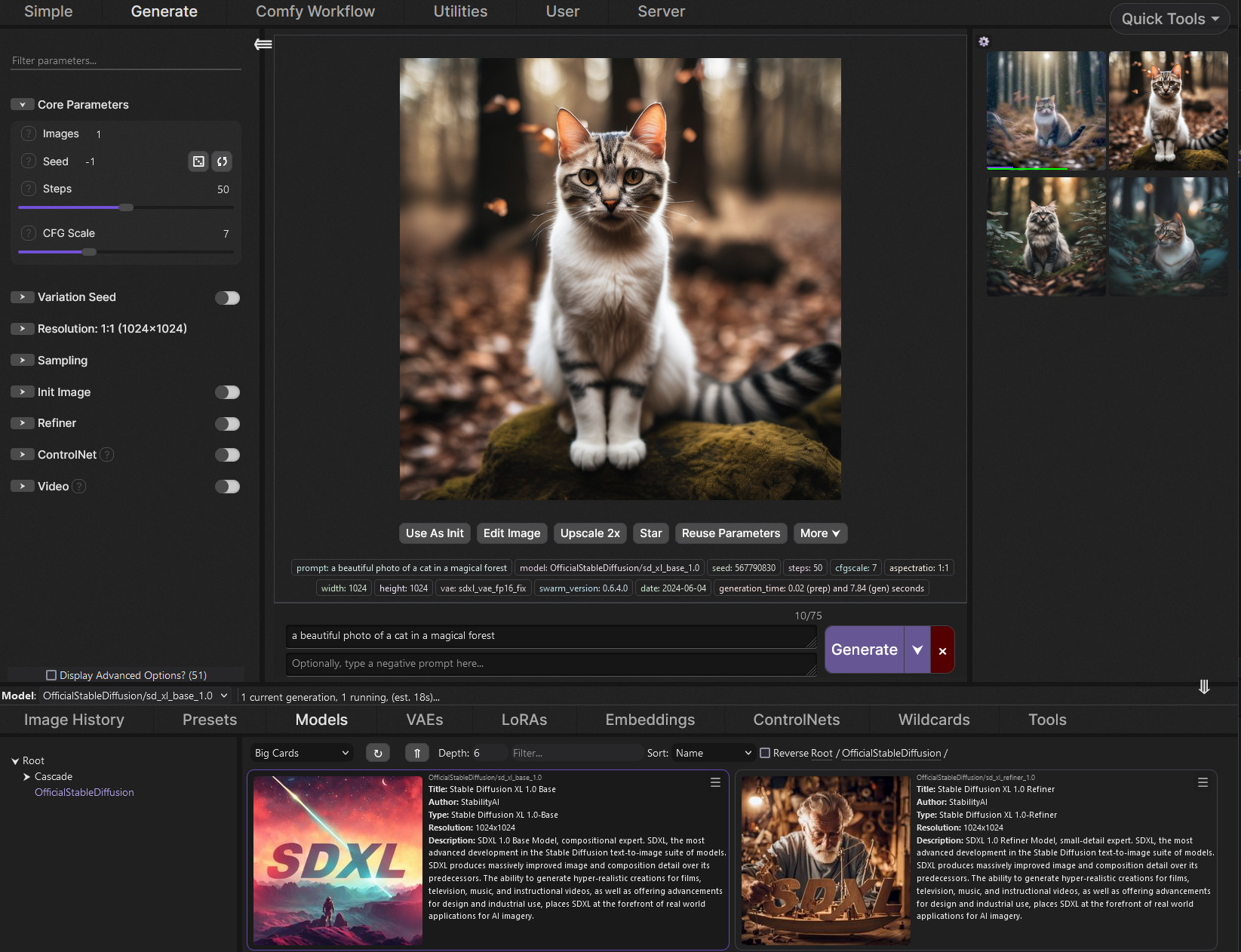
GitHub
SwarmUI (formerly StableSwarmUI), A Modular Stable Diffusion Web-User-Interface, with an emphasis on making powertools easily accessible, high performance, and extensibility. - mcmonkeyprojects/Swa...
ruby yoke
distant narwhal
is there any downsides to that? or no?
well sure - if you really like battling with code and computer command line stuff, you don't get to do that
distant narwhal
ruby yoke
well sure - if you really like battling with code and computer command line stuf...
thank god
ruby yoke
are you on windows?
ruby yoke
then go to that page, scroll down till you see the Installing on windows header, and follow instructions
if you get stuck, they have a discord
distant narwhal
Alrighty, sounds good
do I have to do anything specific to uninstall the stuff or no?
ruby yoke
distant narwhal
do I have to do anything specific to uninstall the stuff or no?
i don't know. again, you should wait for the auto1111 guys and ask them - you might
how much space do you have on C:
distant narwhal
i use my D drive for Stable diffusion, they both are 1tb ssd's
ruby yoke
distant narwhal
i use my D drive for Stable diffusion, they both are 1tb ssd's
you need space on C: - certain files will need to go there no matter what AND that's where your swap space is.
how much do you have?
distant narwhal
368gb free on my C
ruby yoke
okay, that's plenty
you should be able to go ahead and install swarm and get stuff configured, and then ask them later about uninstalling auto1111 if you still want to. though i think swarm might run it as well as comfy
it does a lot of things
very useful things
distant narwhal
alright sounds good, and swarm is still like beginner friendly u would say right?
well swarm, then comfy inside of swarm
ruby yoke
distant narwhal
alright sounds good, and swarm is still like beginner friendly u would say right...
yes. swarm is extremely friendly. and if you get stuck, we have a #🐝|swarm-ui channel, and the dev has a discord. and is there a lot of the time
distant narwhal
alright then, thank you!
distant narwhal
Sorry quick thing, it says to click No when installing swarm in the github, but it has an amd specific version, so which one should I click for Zluda?


im just confused on the "No for default installation (not amd)" Like does this mean click no if I dont have amd? or click no even if I have amd
ruby yoke
distant narwhal
im just confused on the "No for default installation (not amd)" Like does this m...
the default installation is for non-amd gpus. if you have an amd gpu then say 'no, you don't want the default'
and as far as the rest of the question goes, that's a question for the #🐝|swarm-ui channel
distant narwhal
ruby yoke
the default installation is for non-amd gpus. if you have an amd gpu then say 'n...
so then click yes to install the amd version?
 primal wigeon
Hi, I'm new here. Should I install ComfyUI using the portable standalone build for Windows or install it manually?
primal wigeon
Also, should I run on a gpu or a cpu?
ornate elk
distant narwhal
fyi, i am using am amd gpu if that will affect anything
What's your GPU?
distant narwhal
ornate elk
What's your GPU?
7900GRE
ornate elk
Ah nice, then I would recommend starting first with getting the Automatic1111 with ZLUDA version installed.
If that runs well you can always install comfyui/Swarmui, forge, with my guides too
ornate elk
distant narwhal
Thank you!!
Np, im on a 7900xtx and I made the AMD Guides from here:
https://github.com/CS1o/Stable-Diffusion-Info/wiki/Webui-Installation-Guides
If you have any questions feel free to ask me.
distant narwhal
Will do!!
 untold flame
Please for the love of god, does anybody know how to merge a LoRA into a transformers format model and save the output? I cannot find anything at all on how to do this. My project cannot advance until I find a solution
ruby yoke
untold flame
Please for the love of god, does anybody know how to merge a LoRA into a transfo...
um why?
untold flame
ruby yoke
um why?
for training in AIT. It requires models to be in diffusers format, which is a pain in the ass, but it trains much better than the others I have used. I need to be able to train a lora, merge said LoRA back into the model, and then train from that model after. In order to do that, I need to be able to merge in a LoRA and save it somehow
ruby yoke
untold flame
for training in AIT. It requires models to be in diffusers format, which is a pa...
why does it sound like you're doing this
 untold flame
ruby yoke
why does it sound like you're doing this
untold flame
ruby yoke
why does it sound like you're doing this
I mean, its a pretty straight forward issue, with a pretty straight forward explaination
Train LoRA in AIT, merge LoRA into model, train new LoRA on merged model in AIT
ruby yoke
can't you just make several loras and merge them?
ruby yoke
what format is your lora in?
untold flame
I am honestly not sure, it just outputs as a single safetensor file. Its whatever AIt outputs in, but I can't find any information on that as of now
ruby yoke
untold flame
I am honestly not sure, it just outputs as a single safetensor file. Its whateve...
i think the developers you really want to talk to are over on the banadoco server
untold flame
I figured I would try here first, since there are usually a lot of smart people here. Its a very simple problem, but unfortunately diffusers never does anything in a straight forward or logical way 😅
Its why I try to stay away from it as much as possible
ruby yoke
untold flame
I figured I would try here first, since there are usually a lot of smart people ...
you could start by asking @limber pier and @fair oxide
untold flame
If either of you two lovely people happen to know, I would be GREATLY appreciative
 limber pier
no idea, it would probably take a couple hours of digging through code to sort that out
haven't touched diffusers in a long itme
untold flame
it continues to perplex me why people still use diffusers when its such a messy pain in the ass 😭
limber pier
everything sucks tbh
untold flame
Yeah, thats fair honestly
limber pier
diffusers is at least documented
comfy's code has zero documentation whatsoever
and types aren't declared anywhere but wherever the object is created
so if you want to figure out wtf blah_object_name.sample() is actually doing or calling, you gotta debug
ruby yoke
i.e. standard coding practices
limber pier
so diffusers does have its advantages... they have actual fn documentation
it's pretty annoying to have to reverse engineer open source stuff at runtime
ruby yoke
limber pier
it's pretty annoying to have to reverse engineer open source stuff at runtime
better than having to reverse engineer your own stuff cause you forgot what you were doing
limber pier
lol
untold flame
Yeah, I do agree with that. It just seems any time I need to od something with diffusers, its impressive how little documentation there actually is lmao
limber pier
yea it's really just flavors of problems
everything's a mess
the field is moving so fast no one has time to stop and clean shit up
cuz it's onto the next thing
ruby yoke
it's slowed down some. there've been several tsunamis in the last couple years where advances were coming so fast that papers were just tweets on twitter with a release
untold flame
not being able to fix this is what is holding me back from being able to make a way better flux/lite tune so I can train SD3.5 off of it
I am potentially teaming up with a few friends to make a hopefully fantastic larger scale tune of 3.5
ruby yoke
untold flame
not being able to fix this is what is holding me back from being able to make a ...
well you PLEASE not do that? you're going to destroy all the work we put into 3.5 just to try to turn it into flux
flux is MASSIVELY overfit for several things
that's why you get the pretty pictures otu of it
it's a bloody LORA itself
untold flame
Said friend already has hands down the best Flux tune I have seen which gives SD3.5 a huge run for its money in creative/artistic stuff, but its not commercially viable, so we wanna try on SD3.5 medium/large and see what we can do
ruby yoke
flux is such a horrible joke it should be taken out, shot, and buried. do not mess 3.5 up with it
you want 3.5 to do what flux does, exactly like flux does then 1. scrape midjourney 2. over fit your data set with women, dogs, fantasy image,s and anime cat girls, and then after you train it on that, freeze it with DPO
untold flame
That's your opinion, and I respect it. I am still trying to do what I want however. Its not meant to be a tune to turn 3.5 into flux at all. Its just meant to help supplement gaps in data that we can't find for photographic subjects, which it does very good
ruby yoke
then it'll make really nice women in a very narrow range
ruby yoke
untold flame
That's your opinion, and I respect it. I am still trying to do what I want howev...
it's not my 'opinion' - it's based on hundreds of hours of reserch digging through flux one token at a time AND information from people that know wht was done
untold flame
ok man, again, I am not trying to get into this. You aren't even listening to me saying thats expressly not what I am trying to do 😭
ruby yoke
untold flame
ok man, again, I am not trying to get into this. You aren't even listening to me...
well that's what you're going to wind up doing.
untold flame
I don't want SD3.5 to be flux, I should have made that even clearer
ruby yoke
untold flame
I don't want SD3.5 to be flux, I should have made that even clearer
then don't train it on flux
untold flame
ruby yoke
well that's what you're going to wind up doing.
by having a few hundred supplemental flux gens mixed in with 10's of thousands of real photos? Thats gonna destroy the model?
ruby yoke
untold flame
by having a few hundred supplemental flux gens mixed in with 10's of thousands o...
you don't need to train anything on flux for taht. just make images and put a data set together and train a normal lora
untold flame
this is something i am trying to do before we decide if we are gonna do a huge scale tune or not. I can't really work on the project until then
ruby yoke
and go geneate
better yet, hire a photographer, shoot real people, and train a lora on that
untold flame
I am a photographer, and not all things can be easily photographed, especially not things that don't exist, which is the problem I am trying to supplement
anyways, our goal is to make a general SD3.5 tune that can do photographic realism and also creative art stuff like this
 ruby yoke
untold flame
anyways, our goal is to make a general SD3.5 tune that can do photographic reali...
ruby yoke
untold flame
anyways, our goal is to make a general SD3.5 tune that can do photographic reali...
3.5 does that just fine without being tuned
untold flame
We were gonna od it on flux, but then we remembered we can't make money off of it, which is unfortunate, but not the biggest deal, so we are gonna dup much more compute into medium/large
ruby yoke
you should actually look at the nodes @limber pier has been creating - what he's got going might be more along what you're after
untold flame
My friend already made a flux tune that handily outclasses SD3.5 in artistic and photographic stuff from what I have seen, and he wants to see if he can do even better on SD3.5 given my help an dsome huge compute from a friend of mine. The goal is to do just that, if we can logistically figure a way out to do so
ruby yoke
untold flame
My friend already made a flux tune that handily outclasses SD3.5 in artistic and...
we need to move this out of this channel and back into #🆕|sd3
untold flame
oh yeah, good point
 misty dagger
Hi everyone! I'm working with Fooocus on Google Colab, and I'm trying to replace one LoRA model with another, but I'm having trouble getting it to show up correctly in the Gradio interface. Could anyone give me a hand with this?
 visual bane
I want to sent api request to automatic1111 from other private network but when i use --listen it is taking alot of gpu ram which stop generation can anyone tell other way ?
misty dagger
@visual bane To avoid using --listen (which consumes GPU RAM), you can set up a reverse proxy with Nginx to make the Automatic1111 interface accessible externally without increasing GPU usage. Here’s how:
Run Automatic1111 on the default local address (without --listen), just using 127.0.0.1:7860.
Install and configure Nginx on the server to route external requests to the local interface:
server {
listen 80;
server_name YOUR_IP_OR_DOMAIN;
location / {
    proxy_pass http://127.0.0.1:7860;
    proxy_set_header Host $host;
    proxy_set_header X-Real-IP $remote_addr;
    proxy_set_header X-Forwarded-For $proxy_add_x_forwarded_for;
    proxy_set_header X-Forwarded-Proto $scheme;
}
}
Restart Nginx to apply the changes (sudo systemctl restart nginx).
Now you’ll be able to access the interface at http://YOUR_IP_OR_DOMAIN with minimal impact on GPU RAM.
visual bane
Thank you so much for your help @misty dagger ! Your suggestion really helped me out a lot.
misty dagger
Happy for u !
 serene basin
I got really comfortable with the generation and inpainting, settings, features etc in Automatic1111, but I've switched from Colab Pro to a local machine and so now it's back to the usual Automatic1111 python dependency nightmares. Is there anything worth trying for SD on Windows other than ComfyUI and Invoke? I'd much rather use A41 but I can't grow old trying to fix this thing all the time.
hallow latch
This is not an issue but question about VAE Extenstion
I know it was a person in here who said for me to run with 1536 x 96 on it.. and the default is 2048 x 128 but I don't know why I should run it with the first mentioned number. Is there a reason ?
 quartz musk
is there a guide somewhere i can follow to upgrade to diffusion 3.5 as a stand alone?
all I get is this with 3.5 at the moment .. someone mentioned this webui doesnt handle 2.5 or something? its all totally new to me
 hallow latch
quartz musk
all I get is this with 3.5 at the moment .. someone mentioned this webui doesnt ...
hallow latch
quartz musk
all I get is this with 3.5 at the moment .. someone mentioned this webui doesnt ...
I heard that this was because you are using a VAE that is for SD1.5 or other way around. A vae that is not suited for the same checkpoint.
Alright, then you are getting some help 🙂
 neon patio
I’m running into a problem getting my app to work on devices outside my local computer, to use the API key it has to run through localhost port 5000 right?
ornate elk
quartz musk
is there a guide somewhere i can follow to upgrade to diffusion 3.5 as a stand a...
Currently only comfyui supports sd3.5
primal pendant

hmmmmmmm
why would my gtx 1080 handle this but my 6700 xt won't same image
where do i reduce size? in comfy?
it's a sd 1.5
 ornate ruin
@ornate elk
What's up
I know you have enough of me by now, I get that
But I figured I'd share something with you. - I finally made IP Face Adapter work.
We forgot that there must be the Face IP Lora inserted into the positive prompts 😭 well. It's working now.
ornate elk
primal pendant
where do i reduce size? in comfy?
What's your workflow?
quartz musk
scammers
 primal pendant
i deleted comfyui now as that's ridiclious how my less vram card does with ease and yet 12gb vram won't create same image wanting more vram is nvidia really that much better where 8gb is better than 12gb exact same work load image
quartz musk
scammer
 ornate ruin
primal pendant
i deleted comfyui now as that's ridiclious how my less vram card does with ease ...
ornate ruin
primal pendant
i deleted comfyui now as that's ridiclious how my less vram card does with ease ...
My 4060 with 8GB works fine but it's slow. Takes about a minute, likely 2 minutes for a decent looking hires fixed image
primal pendant
yeah but what i'm saying is why is my gtx 1080 better than my 6700 xt lol
8 vs 12
and comfy wnated to use more than the 12 gb like leeching 18gb
and yet same exact workload works fine on the 1080 used just 8 no issue
 steady thistle
Anybody want to help me with my OmniGen install? I got this error saying no available GPU
I used this web page, but I used a venv to install it. https://github.com/VectorSpaceLab/OmniGen
steady thistle
oh, got it. I had to do pip install torch torchvision --index-url https://download.pytorch.org/whl/cu118
 loud pond
Can the negative embeddings for SD1.5 be used on Pony?
onyx solar
More info in case you want the really long answer:
https://civitai.com/articles/4859/the-incompatibility-of-sd-15-embeds-with-sdxlpdxl
ruby yoke
loud pond
Can the negative embeddings for SD1.5 be used on Pony?
pony effectivly destroied the embeddings - it is its own animal
loud pond
ruby yoke
pony effectivly destroied the embeddings - it is its own animal
so what should i use instead of embeddings? just normal lora?
loud pond
onyx solar
More info in case you want the really long answer:
https://civitai.com/articles/...
thank you!
ornate elk
primal pendant
i deleted comfyui now as that's ridiclious how my less vram card does with ease ...
Did you installed comfyui with ZLUDA ?
ruby yoke
loud pond
so what should i use instead of embeddings? just normal lora?
are you training something to use with pony? then train whatever it is on pony. if you want to use pony as your base model, or a fine tuned version of it, then your loras must be trained for pony
your embeddings are numbers. they represent points in space. think of a map. if you want to go somewhere in Las Vegas, and i give you a map of new york, are you going to get where you're going?
Think of embeddings like map coordinates. If you want to find a location in Las Vegas, a New York map won't help. Similarly, AI models need the right 'map' (embeddings) to generate accurate images or understand text.
primal pendant
@ornate elkyeah ofc all is with zluda except the old pc with gtx 1080
ornate elk
primal pendant
<@161910921269084160>yeah ofc all is with zluda except the old pc with gtx 1080
Okay, idk what your workflow was, but comfyui is not as good as auto1111 or forge with ZLUDA.
It requires a lot more vram.
Also, did you used my comfyui zluda guide or the other repo ?
primal pendant
it was all your guides for all amd installs but as for nvidia that was something called Stability matrix and i was using comfyui and it used only the 8gb vram without issue but exact same workflow on amd setup and it wants to use more and does the error running out of vram on last part @ornate elk
loud pond
ruby yoke
are you training something to use with pony? then train whatever it is on pony. ...
im using the negative embeddings to improve my image generations
thats what they r used for right?
ruby yoke
loud pond
thats what they r used for right?
um, maybe? they're used to tell the AI what you don't want drawn. whether that improves it or not is a matter of opinion
loud pond
ruby yoke
um, maybe? they're used to tell the AI what you don't want drawn. whether that i...
yeah, so i thought i could just use the embeddings in the negative section like easynegative, badhands etc..
but i couldnt find any for pony
and you explained how it doesnt work for pony if its from SD
ruby yoke
loud pond
yeah, so i thought i could just use the embeddings in the negative section like ...
- the AI has to have seen those labels attached to images and learned what they meant before it can do anything with them. how many images in its data training set do you think have the label "badhands"
- if you put something in the negative, it'll affect the entire image, not just part of it
loud pond
right ok, so should i just use a lora?
but eitherway thanks, ill just avoid the embeddings i think then
ruby yoke
loud pond
right ok, so should i just use a lora?
you can't use a lora without also using a model. a lora is just a sheet of instructions to the ai to update, add, or change information it has
loud pond
ruby yoke
you can't use a lora without also using a model. a lora is just a sheet of instr...
👍 , ill just use pony as my model
ruby yoke
ok
loud pond
again thank you!
 ruby yoke
 maiden stream
When I run webui-user.bat I get this error, anyone know the solution?
maiden stream
When I run webui-user.bat I get this error, anyone know the solution?
have you already got it running in another commandline window?
maiden stream
no
ruby yoke
how much diskspace on your system drive?
maiden stream
528 GB
ruby yoke
go into the c:\Stable_Diffusion\stable-diffusion-webui\venv\Scripts directory and see if you have a file called activate.bat
 ruby yoke
do you normally run in a virtual environment?
maiden stream
I literally just followed a tutorial to download stable diffusion today so my knowledge of it is low. I merely followed a youtube tutorial and redid the entire process and got the same outcome.
maiden stream
ruby yoke
do you normally run in a virtual environment?
Not sure what you mean
ruby yoke
oh. i missed that you were just now installing it. can i suggest maybe that webui isn't really the launcher you want to use to run stable diffusion and talk you into installing SwarmUI instead?
maiden stream
I suppose, if you think it is easier/better
ruby yoke
maiden stream
I suppose, if you think it is easier/better
it's much eaiser. you can get it here https://github.com/mcmonkeyprojects/SwarmUI are you on windows or linux or...?
GitHub
SwarmUI (formerly StableSwarmUI), A Modular Stable Diffusion Web-User-Interface, with an emphasis on making powertools easily accessible, high performance, and extensibility. - mcmonkeyprojects/Swa...
maiden stream
windows
ruby yoke
GitHub
SwarmUI (formerly StableSwarmUI), A Modular Stable Diffusion Web-User-Interface, with an emphasis on making powertools easily accessible, high performance, and extensibility. - mcmonkeyprojects/Swa...
install instuctions are on that page but farther down
it will take care of all the technical stuff for you and if you get stuck, we have a #🐝|swarm-ui channel
 steep gate
A1111 does save clip skip info in PNG files but PNG info doesn't show it or copy it to txt2img. Is there a setting that enables this?
iron lantern
does this mean my pony model worked

 blissful imp
Hi I've been trying this for hours and hours and would be super grateful for ur help. I basically have an image of mickey mouse in img2img inpaint. I inpaint the area of the hand I want regenerated, enable controlnet and upload a close up photo of a good mickey mouse hand. I run canny, select controlnet more important, and adjusted every setting possible but the new inpaint area doesn't seem to follow the controlnet (i.e. the good drawing of the hand). What do I do??
ruby yoke
blissful imp
Hi I've been trying this for hours and hours and would be super grateful for ur ...
if you're thinking that the AI is going to make a copy of the hand onto whatever you're inpainting, that's not how it works. what you're really wanting to do is composite the hand over the image - and that's photoshop
 worldly vine
Whatsup guys, do you guys know how to implement webui_forge into my current Stable Diffusion
ornate elk
worldly vine
Whatsup guys, do you guys know how to implement webui_forge into my current Stab...
Forge is a seperate webui
You can either install it and link your models or you can switch the branches of Auto1111 to Forge
serene basin
ornate elk
Forge is a seperate webui
Where do you rank Forge? Better than A41/Comfy/Invoke?
distant narwhal
hey quick question, when downloading comfyui for amd with zluda, on this step it says to not check the pro driver, but the only download I see for the needed version is a pro driver, and this is using the link it directed me to, so does this mean i do install it? i dont install it? or what?

 ruby yoke
distant narwhal
hey quick question, when downloading comfyui for amd with zluda, on this step it...
ruby yoke
distant narwhal
hey quick question, when downloading comfyui for amd with zluda, on this step it...
did you read the pinned guides in this channel, yet?
distant narwhal
ruby yoke
did you read the pinned guides in this channel, yet?
Im using the github link for the installation guides rn, thats where thats located.
its for Zluda aswell, not directML.
ruby yoke
distant narwhal
Im using the github link for the installation guides rn, thats where thats locat...
i know AMD pulled out of zluda, i wonder if that means they removed the drivers you need from their website
distant narwhal
ruby yoke
i know AMD pulled out of zluda, i wonder if that means they removed the drivers ...
it sends me to the link, its just the version that is being downloaded is forcefully a pro driver.
 ruby yoke
distant narwhal
it sends me to the link, its just the version that is being downloaded is forcef...
ruby yoke
distant narwhal
it sends me to the link, its just the version that is being downloaded is forcef...
i would stop where you are and wait till @ornate elk is back online, and discuss thsi with him
distant narwhal
Alright then, thanks
ruby yoke
welcome
iron lantern
Cs1o is the God I just wanna give a massive shout out they helped me so much and got me making nsfw pony models as they where not working on my laptop with python they advised me to try forgeui and from what I understand I got it working loaded in a prompt before heading out today from the cmd data I sent them they said it worked the excitement to head back home and see the final image 😀
ornate elk
distant narwhal
hey quick question, when downloading comfyui for amd with zluda, on this step it...
You have to install the driver thats linked but in the install dont tick the pro driver option at the bottom
AMD named the install file pro, but its hip sdk
distant narwhal
ok, so after clicking on it, i dont see the pro driver option


is it on the next page then?
i just dont wanna mess up

cuz it doesnt say next for a second page, just install
 ruby yoke
distant narwhal
is it on the next page then?
ruby yoke
distant narwhal
is it on the next page then?
if you don't click the install button, you won't have messed up. check and see what is on the next page
distant narwhal
ruby yoke
if you don't click the install button, you won't have messed up. check and see w...
i thought there was another page but it says install below, i dont see a second page
here is what it looks like

wait i may be dumb
Okay no, its just stupid amd is like this
i assume its this

i had to click Deselect all for it to say the pro driver name
before it just said the version of it :I
ornate elk
Np, now I'm at home, if you have more questions I can answer faster xD
distant narwhal
Sounds good!! I probably will have more questions but hopefully not lol
ornate elk
serene basin
Where do you rank Forge? Better than A41/Comfy/Invoke?
For me its over comfyui but behind Auto1111
 agile vector
Hey I'm trying to figure out a workflow from a post made on civit, using ponyxl. As far as I can tell, everything comes in ok, I have all the nodes, and the same checkpoints and loras, but the only output I seem to be getting is stuff like this. I'm not sure what could be going on?

I assumed vae, but as far as I can tell I'm on the same VAE as the post
onyx solar
First thing would be your clip skip setting being wrong. Pony looks for a value of 2, not 1.
Second is that you should be using the SDXL VAE.
agile vector
believe thats at -1, it shouldn't be? Never had to touch that in the past
onyx solar
Same same. -1 = 1
agile vector
this is the vae i'm on, its worked for most things
 agile vector
Damn, i was trying on some specifically xl vae's from civit and wasn't getting anything else than that. https://huggingface.co/stabilityai/sdxl-vae
 onyx solar
Third is that your Princess XL LoRA would need to be the Pony version, not the v2 version.
onyx solar
agile vector
Damn, i was trying on some specifically xl vae's from civit and wasn't getting a...
The Pony model page has the VAE on it linked in the sidebar.
agile vector
Oh im a fool then, lol ty much
I think I had assumed importing the workflow would flag those differences if they were missing like it does for Loras etc
onyx solar
I'm not familiar with that expressive whatever LoRA, but I'd imagine that's not a Pony LoRA either.
So pretty much this whole workflow is fucked. 😄
But you now know what you need to do.
agile vector
Thats odd, again i just pulled it from a picture on civit so i guess it worked for somebody tho
agile vector
Am I misunderstanding how comfy imports workflows then?
onyx solar
Depends on the file.
Bottom line is that the workflow in your image that you posted would not work. Period.
Not with those values.
agile vector
I'm not doubting that, I'm just trying to understand better how that could be, if the metdata is based on the generation of the image shouldnt it just import the workflow the image was generated with?
onyx solar
Not knowing how you got to where you were exactly, I can't tell you what occurred. Assuming an honest image with the actual workflow embedded that was used to generate it, Comfy should pick that right up. But do you trust everything you download? Embedded workflows are just text and are terribly simple to manipulate.
agile vector
I didn't think that would be common practice honestly, i get this on most of this person's images, it seemed more likely to be on my end
onyx solar
It very much could be something you did on your end...even accidentally. But again, not knowing what you did exactly makes that difficult. Either way, if you fix a few things in that workflow, you'd get images.
agile vector
I could post the original post, but its nsfw
onyx solar
Doesn't really matter...I've given you the stuff to fix above.
It does explain your output, though.
agile vector
Fair enough I was just kinda hoping to figure out where a workflow import could go wrong like that
onyx solar
I'm not saying it was the import, only that it could've been.
agile vector
I know, thats kinda what I'm trying to dig into, been my primary way of figuring out comfyui so if theres something I'm missing about it, would be pretty helpful
onyx solar
I suggest reimporting the original source image and before doing a single thing, look at the values in each of the model/LoRA/vae fields to see if those values are the ones you think or not.
agile vector
No I have been, thats where my confusion came from, the image I put in here was generated before messing with anything
onyx solar
You think so, but again, without re-importing the image you used the first time to refresh the workflow with that, you can't guarantee it.
agile vector
Ive done that a few times though, I even re-imported before making the tweaks you suggested
onyx solar
Did you run it after making changes?
agile vector
I did, i don't think I can post the result here, but it was definitely not similar or acceptable
onyx solar
Well, no matter what, your output will not be the same as the image on civit.
agile vector
it probably shouldn't be a bunch of vaguely nsfw blobs though
onyx solar
Depends...sometimes there are bad seeds.
But also, not seeing the new values in the workflow doesn't really help.
agile vector
I can post it spoilered? don't know whats against the rules
ruby yoke
agile vector
I can post it spoilered? don't know whats against the rules
you could dm it to him
agile vector
sure, let me get one together that I've been having more issues with, I got one of the pony ones working just now
I didn't want to assume he was cool with that
ruby yoke
agile vector
sure, let me get one together that I've been having more issues with, I got one ...
for pony, you have to use only the models that are out for it, so make sure your vae, loras, etc are all for pony
onyx solar
It's fine.
onyx solar
agile vector
I didn't want to assume he was cool with that
The LoRA chain on this is longer than what you had posted above. But even so, they're mixing standard XL with Pony LoRAs, which means that some of those LoRAs will not have any or very little effect on the outcome...at least in the way they were hoping for.
Also, this is not made in Comfy, so Comfy is just translating what it sees into a workflow.
agile vector
I didn't know that was possible, i thought comfy would only import if the specific metadata was there
onyx solar
This was probably made in A1111.
It is importing the metadata, but it then turns that into a workflow.
agile vector
Damn I had pinpointed this since it was tagged as comfyui on civit, but I guess you can set that to whatever
onyx solar
Yup
Never trust what you see on civit as being the full data used to create the image. Period.
Images on there should generally just be used to get an idea behind a model/LoRA/etc.
agile vector
Damn, i was kinda using it to get a feel for how others were setting up workflows since its pretty overwhelming
 karmic crown
onyx solar
Never trust what you see on civit as being the full data used to create the imag...
karmic crown
onyx solar
Never trust what you see on civit as being the full data used to create the imag...
i would just add that and even if everything correct and you are not have the same card, it might look different (nvidia vs others)
onyx solar
Yes, that too.
Basically, any single variance can change the output, even if just slightly.
karmic crown
onyx solar
Basically, any single variance can change the output, even if just slightly.
even a space or comma
@onyx solar i know you know all this better than me, i am just adding to your answers so they know what i am talking about 🙂
agile vector
Ya i get it, just up till now dragging something in and hitting run got me something other than blobs, wasn't thinking about bad metadata
distant narwhal
@ornate elk I have a quick question
it says I have to add the paths, I have it open, but how would I add the two to the variables?

it shows a wikihow link but im still confused on this
karmic crown
@distant narwhal https://www.computerhope.com/issues/ch000549.htm
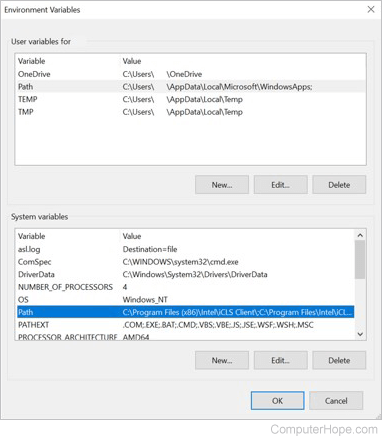
Information on how to set the path and environment variables in Windows 2000, Windows XP, Windows Vista, and Windows 7.
hope this will help
just find your windows version
distant narwhal
okay yes, but i cant find the %hip_path%bin
ornate elk
distant narwhal
okay yes, but i cant find the %hip_path%bin
you have to add it, you dont need to find it
distant narwhal
so then like this?
 ornate elk
no dont
distant narwhal
ok
ornate elk
distant narwhal
ok so like this then?
 ornate elk
yes
ornate elk
no need to, thats the step i get asked the most to
distant narwhal
so now I make the copy of the files, and then just put them back in the same folder?
it seems thats what it says but im just double checking

I assume that
ornate elk
distant narwhal
so now I make the copy of the files, and then just put them back in the same fol...
yep
and then rename these copys
distant narwhal
- Copy the files needed, then repaste them
- Rename those copies, copy them again and put them into the folder and replace them
ornate elk
thats how it should look like then
 ornate elk
copy, paste, rename
distant narwhal
Okie
ornate elk
so you have a cublas.dll, and make a copy of that and then rename this copy to cublas64_11.dll
 noble goblet
Hello everyone, I'm trying to use controlnet, but I must have made a mistake somewhere, in model I always have none, so I can't put canny... Moreover when I ask to generate the image , it gives me an image that has nothing to do with it... Some advice please
 distant narwhal
 ornate elk
noble goblet
Hello everyone, I'm trying to use controlnet, but I must have made a mistake som...
ornate elk
noble goblet
Hello everyone, I'm trying to use controlnet, but I must have made a mistake som...
hey, did you downloaded the controlnet models ?
karmic crown

you need to select correct model here
but as CS1o said, you need to download them first
noble goblet
ornate elk
hey, did you downloaded the controlnet models ?
probably not good... when I put the canny links directly in stable diffusion, it tells me that I already have it. But maybe I'm forgetting something
karmic crown
controlent models needs to be in proper folder
not in the same folder with normal models
ornate elk
noble goblet
probably not good... when I put the canny links directly in stable diffusion, it...
you need to download the canny model first to use it:
https://civitai.com/models/38784?modelVersionId=44716
karmic crown
 ornate elk
goes into models/controlnet
noble goblet
karmic crown
not in the same folder with normal models
Thanks guys for your responsiveness, I'll try 😉
noble goblet
ornate elk
you need to download the canny model first to use it:
https://civitai.com/models...
Thanks guys for your responsiveness, I'll try 😉
distant narwhal
Hey so, I did the rest of the steps, but its not launching in the browser, it opens cmd for a second then just closes the window @ornate elk
 remote nebula
hey guys, i just got done with installing comfyui with zluda on my PC, and im generating my first image. I saw that it can take up to 40 mins for the first one, but wanted to make sure that it's not stuck. the percentage means that it is generating the image, correct?
 ornate elk
remote nebula
hey guys, i just got done with installing comfyui with zluda on my PC, and im ge...
ornate elk
remote nebula
hey guys, i just got done with installing comfyui with zluda on my PC, and im ge...
yep, also you can check the cmd of comfyui
distant narwhal
distant narwhal
Hey so, I did the rest of the steps, but its not launching in the browser, it op...
should I still just put this in the Swarmui backend folder? or no?
ornate elk
distant narwhal
Hey so, I did the rest of the steps, but its not launching in the browser, it op...
which webui are you trying to install ?
distant narwhal
ornate elk
which webui are you trying to install ?
I installed swarm, and I needed this as the backend
comfyui specifically
remote nebula
ornate elk
yep, also you can check the cmd of comfyui
thanks a lot! 😄 this is what i got in CMD, does the torch entry mean anything bad? apologies for the dumb questions, ive only experimented with automatic1111's webUI so far
 ornate elk
remote nebula
thanks a lot! 😄 this is what i got in CMD, does the torch entry mean anything b...
ornate elk
remote nebula
thanks a lot! 😄 this is what i got in CMD, does the torch entry mean anything b...
nope looks good so far. that warning can be ignored
remote nebula
ornate elk
nope looks good so far. that warning can be ignored
great, thank you! its up to 57% so far, so its def doing something 😄
ornate elk
distant narwhal
I installed swarm, and I needed this as the backend
i guess you didnt setup auto1111 yesterday as i recommended to do first xD
did you downloaded my comfyui-zluda bat ?
distant narwhal
ornate elk
i guess you didnt setup auto1111 yesterday as i recommended to do first xD
i may be dumb, okay, is it bad i did all this first?
ornate elk
distant narwhal
i may be dumb, okay, is it bad i did all this first?
no but its harder to get it working first try and more difficult for me to trace back errors
but we can fix comfyui
have you replaced the torch files?
distant narwhal
The ones that had to be pasted into the torch/lib folder?
cuz yes, I did
all 3 asked to be replaced and i replaced them as prompted
ornate elk
distant narwhal
all 3 asked to be replaced and i replaced them as prompted
what is your gpu?
distant narwhal
7900GRE
ornate elk
ah okay, have you restarted the PC after installing hip sdk?
ornate elk
yep
distant narwhal
okie, uno momento
ornate elk
its needed
ornate elk
remote nebula
great, thank you! its up to 57% so far, so its def doing something 😄
whats your gpu btw? just curious
ornate elk
distant narwhal
should I try opening it again?
yea but i dont think it will launch
distant narwhal
correct lol
ornate elk
you have to try delete the venv folder and then relaunch the start-comfyui bat
distant narwhal
alr
btw this is the closest i can get to

for a pic
it immediatly closes after that
distant narwhal
ornate elk
you have to try delete the venv folder and then relaunch the start-comfyui bat
doing that rn
alr, it finished, it closed the cmd promt
ornate elk
remote nebula
With 12gigs of vram
nice card!
it will work in comfyui, but keep your expectations and workflows normal.
In case of upscaling your far better with auto1111 or forge than with comfyui.
remote nebula
ornate elk
nice card!
Thanks! I already got automatic installed, but wanted to give comfyui a try, might check out forge too, I heard good things about it
distant narwhal
@ornate elk so after redownloading venv, it doesnt close the cmd promt right away anymore, it does a few lines of code then closes, doesnt open the webui still tho
ornate elk
remote nebula
Thanks! I already got automatic installed, but wanted to give comfyui a try, mig...
no problem, if you need some basic workflow for comfyui let me know, (sdxl, 1.5, flux)
forge is nice because you can use flux there too. (idk if it will work on 12gb vram, but maybe with a smaller gguf version of flux)
distant narwhal
This is what is says then closes

im assuming now its looking for the torch files?
ornate elk
distant narwhal
This is what is says then closes
looks okay, you need to replace the 3 files in torch again
distant narwhal
sick lemme try that now
remote nebula
ornate elk
no problem, if you need some basic workflow for comfyui let me know, (sdxl, 1.5,...
Will do, thanks a lot, and thanks for the great guide! Comfyui seems pretty confusing at the start, ngl 🤣
ornate elk
remote nebula
Will do, thanks a lot, and thanks for the great guide! Comfyui seems pretty conf...
yea its not as comfy as auto haha 😄
ornate elk
distant narwhal
after I pasted them in
did you used the renamed files or the normal ones?
distant narwhal
ornate elk
did you used the renamed files or the normal ones?
the renamed ones
ornate elk
okay
best would be to setup auto1111 first and if that works, comfyui will work too, thats also how Wayne did it rn.
ornate elk
nope
you can also skip the zluda steps
you only need to git clone the auto1111 amd fork
and do the first steps of the guide
 distant narwhal
Sd is the first Stable diffusion i tried to install
from a video a bit ago
but it wasnt working properly
so then I went here
ornate elk
ah okay
distant narwhal
sdzuda is the swarmUI
distant narwhal
SwamUI is from your guide, then it told me to download comfyUi, which i was doing
ornate elk
ahh okay
ornate elk
you can delete SD and SD-Zluda
distant narwhal
okay, so the swarm and SD?
ornate elk
the thing is my guides always start with create a SD-Zluda folder so you can place all of the webuis in there if you want to
i like having all in one place
distant narwhal
alr, so now I should just rename comfyui to SD-Zluda then?
ornate elk
nope
distant narwhal
i mean like the first foldr
ornate elk
dont rename any folder after you git cloned a webui

 ornate elk
ahh okay
you can do that
then you can git clone auto1111 in SD-Zluda too
so you have both in one folder
 ornate elk
WD black is nice
distant narwhal
i appreciate the help
distant narwhal
ornate elk
WD black is nice
Ikr, this pc is beautiful lmao
im smart enough to build my own pc, but cant organize my folders properly
its creating the venv folder rn
@ornate elk okay, so it launched now

the auto1111
what should I do next?
ornate elk
distant narwhal
<@161910921269084160> okay, so it launched now
put a model into the models/stable-diffusion folder
and then try to generate an image
distant narwhal
alr
ornate elk
it can take 15-40 minutes (sometimes longer), for the first image as it needs to compile stuff
 ornate elk
distant narwhal
this is ok right?
ornate elk
distant narwhal
this is ok right?
yep looks okay
distant narwhal
alr bet, Ill just wait a while and then ill lyk what happens
ornate elk
distant narwhal
alr bet, Ill just wait a while and then ill lyk what happens
if after 40 minutes its still compiling, just close it and relaunch the webui-user.bat and try to generate an image again
then it should work
ornate elk
distant narwhal
<@161910921269084160> it created the image
okay good so everything is setup correct
 ornate elk
distant narwhal
now, what should I do about comfyui?
ornate elk
distant narwhal
now, what should I do about comfyui?
make sure you downloaded the start-comfyui.bat and not the comfyui-directml bat
distant narwhal
yeah, it says start-comfyui.bat

should I maybe try just redownloading the whole thing?
like the comfyui stuff?
since I already installed Zluda, and it seemed to work well on Auto1111, it shouldnt be too complicated
or if u have any ideas ill be happy to try them
ornate elk
distant narwhal
since I already installed Zluda, and it seemed to work well on Auto1111, it shou...
yea could be the best option
distant narwhal
alr, ill try redownloading it
@ornate elk its doing the same thing again
I redownloaded it and copy and pasted the renamed folders into the file and replaced the destinations
I did everything properly
atleast i believe I did
 fair oxide
Heyy, someone know how to solve this error :
{error: 'cannot identify image file <_io.BytesIO object at 0x7fa4140879a0>'}
primal wigeon
Where can I find a good tutorial for comfyUI and generation in general
I have next door to zero experience with this stuff
ornate elk
distant narwhal
I did everything properly
Can you recheck the path settings of zluda?
karmic crown
primal wigeon
Where can I find a good tutorial for comfyUI and generation in general
in that case i would recommend to temporary switch to automatic1111, and then when you understand what is what, to try comfy again
a1111 is much easier to use
distant narwhal
ornate elk
Can you recheck the path settings of zluda?
sure
karmic crown
but if you are familiar with some other node based tool (blender for example), its fine to start with comfy
primal wigeon
karmic crown
in that case i would recommend to temporary switch to automatic1111, and then wh...
I heard, I figured if I just used the more advanced tools I'd eventually catch up
karmic crown
when you understand a1111, its easy to apply the same tings to comfy
primal wigeon
Plus a1111 doesn't support pony iirc
karmic crown
primal wigeon
Plus a1111 doesn't support pony iirc
i do not use it, but i am pretty sure it suports everything except 3.5
so that includes pony

 karmic crown
i am using lightning mostly
since they require 8 steps only
less steps = "faster" generation
actually each steps takes the same
but since i use 5 times less steps, i get image 5 times faster then with 40 steps
primal wigeon
i'm ignorant, what is a step exactly
karmic crown

Stable Diffusion WebUI (AUTOMATIC1111 or A1111 for short) is the de facto GUI for advanced users. Thanks to the passionate community, most new features come
start here, basic staff aplies to comfy too
primal wigeon
ty
karmic crown

ComfyUI is a node-based GUI for Stable Diffusion. This tutorial is for someone who hasn't used ComfyUI before. I will covers
also this
ornate elk
distant narwhal
Okay looks correct
But there is a space in the folder path
To mitigate any point of failures you should move the zluda folder into an other directory without a space in the folder name
And then edit the path entry too
distant narwhal
ornate elk
To mitigate any point of failures you should move the zluda folder into an other...
okay so move this folder somewhere else?

alr
ornate elk
Wait
distant narwhal
?
ornate elk
Where are the cublas64_11 and the other renamed files?
distant narwhal
cublas64_11.dll
cusparse64_11.dll
nvrtc64_112_0.dll
ornate elk
Yea keep a copy of them in the zluda folder
 ornate elk
distant narwhal
so like this?
ornate elk
distant narwhal
so like this?
Yep
distant narwhal
should I also just move it to a folder without a space?
distant narwhal
that should work for that right?
 ornate elk
Then delete the venv folder of comfyui and relaunch and show me the cmd log
After its done and before replacing the torch files
distant narwhal
alr
ill see if it works, because ut usually closes itself after its done
like ill try and send it to u, if it doesnt close itself
 distant narwhal
ornate elk
After its done and before replacing the torch files
distant narwhal
ornate elk
After its done and before replacing the torch files
Oh i see mb
Im dumb, ur asking to see if before I replce the files, mb xD
it closed itself
distant narwhal
distant narwhal
but there is what it says mostly
ornate elk
That doesn't help me
I need the end of the log without the replaced torch files
So delete the venv again and relaunch please
distant narwhal
ok, but like i said once it finishes it automatically closes the cmd prompt
ill relaunch it again
ornate elk
Oh okay thats strange
Can you try git clone comfyui into a folder without a space too?
I remember people with the same problem and I guess it was related to the install path
distant narwhal
alr sure, once this finishes ill try again and put it in a path with no space aswell
ornate elk
And dont move it just git cloned it again
distant narwhal
kk
k, I cloned it to just the D drive
should I just do the same steps but without replacing the torch files?
ornate elk
Launch it, then after its done replace the 3 torch files and relaunch
distant narwhal
alright
ornate elk
And if that won't work we have to troubleshoot tomorrow because its 00:30 here for me😴
distant narwhal
oof sorry for keeping u up late
ornate elk
Np your not the first with that comfyui issue (closing cmd after launch)
But its so rare, always a bit of troubleshooting steps needed to get it working
You can also try to record the cmd and pause the video to see where it failed. That can give us a hint
distant narwhal
sure
btw should I keep this in the zluda folder or just move it to the lib file?

ik im supposed to move it
ornate elk
Keep it and copy it to the torch lib

 distant narwhal
so what does that mean?
ornate elk
It means something is wrong with the replaced files
Or it can't find the replaced files
 ornate elk
Have you downloaded the zluda files for Rocm 6 or 5 ?
distant narwhal
Rocm6
i also reinstalled the zip earlier


Those are the three renamed files
not cublaslt sorry

Thats the renamed file
ornate elk
distant narwhal
Thats the renamed file
Okay
Can you open up a cmd and type
Pip cache purge
And then delete the venv folder again?
 ornate elk
Open up a CMD and type
Python --Version
 ornate elk
Okay good
distant narwhal
alr it finished installing
now what
put the torch files back in again I presume?
ornate elk
distant narwhal
put the torch files back in again I presume?
Yep
Also can you open up a CMD and run
Where Python
distant narwhal
 distant narwhal
i think thats because i tried it for ther old SD to work
lemme try uninstalling that
distant narwhal
should I just uninstall all 3 of these?
 ornate elk
distant narwhal
should I just uninstall all 3 of these?
ornate elk
distant narwhal
should I just uninstall all 3 of these?
Yes
And then use the normal python 3.10.11 64bit installer
distant narwhal
alr
ornate elk
Also check "add Python to path" if available
distant narwhal
this?
 ornate elk
Install now
ornate elk
Open up a CMD and run
Where Python
And
Python --version
Now it should show the correct path to appdata
distant narwhal

 ornate elk
Not needed but uninstall everything related to Python
distant narwhal
alr, so same thing in Add or remove programs right?
ornate elk
And then reboot the PC
distant narwhal
alr
ornate elk
After the reboot download this file:
https://www.python.org/ftp/python/3.10.11/python-3.10.11-amd64.exe
And before installing run
Where python
In a CMD again
It shouldn't show a path
 ornate elk
Okay nope
Install the python with the file you downloaded
The 3.10.11 64bit exe installer

 distant narwhal
should i allow it to bypass the wherepath limit or no?
 ornate elk
Ah disable
distant narwhal
so yes? disable it?
ornate elk
Helps too
distant narwhal
 ornate elk
Okay good
So now you delete the venv folder of comfyui and relaunch. Let it install and after its done copy the 3 files into torch lib again
distant narwhal
kk
ornate elk
I'm 85% sure it will work now xD
 ornate elk
And if this works I will ad a big warning to my comfyui guide so that people don't have MS Store Python installed before trying
But I need sleep now fr xD
 ornate elk
Okay. Also if auto1111 webui doesn't launch you also need to delete the venv folder one time.
 ornate elk
Nice GG
ornate elk
Don't forget to install the Comfyui Manager
ornate elk
distant narwhal
Thank you SI MUYCH
No problem, thanks for the patience and help to finally get the solution to this error
ornate elk
I'm off cya tomorrow 🙂 🫡

 jovial summit
So I'm on webui reForge and this is my first time trying out controlnet. I'm using PonyXL and xinsir's Union promax for the controlnet model
but it seems no matter what I do I can't get openpose to work right. What's bizzare is that the openpose skeleton just got passed through the final image without being recognized as a skeleton by the controlnet or something 😅

Anyone have any idea what I'm doing wrong? Sorry I'm a complete beginner to all of this
(previous attempt)

 silent stream
Whenever I try to run Kohya-ss to train SDXL lora, I get hit by returned non-zero exit status 1
primal wigeon
are people still using a1111 or have they moved onto forge
 hardy blaze
Paint a picture of sunset and lone ducks flying, autumn water together in the sky
ruby yoke
primal wigeon
are people still using a1111 or have they moved onto forge
plenty still using it
ruby yoke
hardy blaze
Paint a picture of sunset and lone ducks flying, autumn water together in the sk...
stop posting this in every single channel
 chilly frigate
Hey, got a question related to CUDA, haven't updated from a some time and I'm getting this issue
`2024-11-05 22:46:54.4124535 [E:onnxruntime:Default, provider_bridge_ort.cc:1548 onnxruntime::TryGetProviderInfo_CUDA] D:\a_work\1\s\onnxruntime\core\session\provider_bridge_ort.cc:1209 onnxruntime::ProviderLibrary::Get [ONNXRuntimeError] : 1 : FAIL : LoadLibrary failed with error 126 "" when trying to load "G:\Projects\AI Image\stable-diffusion-webui\venv\lib\site-packages\onnxruntime\capi\onnxruntime_providers_cuda.dll"
*************** EP Error ***************
EP Error D:\a_work\1\s\onnxruntime\python\onnxruntime_pybind_state.cc:857 onnxruntime::python::CreateExecutionProviderInstance CUDA_PATH is set but CUDA wasnt able to be loaded. Please install the correct version of CUDA andcuDNN as mentioned in the GPU requirements page (https://onnxruntime.ai/docs/execution-providers/CUDA-ExecutionProvider.html#requirements), make sure they're in the PATH, and that your GPU is supported.
when using ['CUDAExecutionProvider', 'CPUExecutionProvider']
Falling back to ['CUDAExecutionProvider', 'CPUExecutionProvider'] and retrying.`
I already updated my drivers and installed CUDA 12.6(For some reason webui-user file says it still uses 12.1), I'm not sure if I'm still using forge but according to git, it is using the main branch from the stable-diffusion-webui
Everything works smootly, however. I wonder if I fix that issue it might improve my generation time hehe.
 umbral bramble
Question: I want to resolve a problem regarding downloading stuff from objaverse for my dataset, but it seems like most of the data i want to download(from github) isn't being cloned and thingiverse is not allowing us to download anything through the script provided. So far, i'm trying to collect human-like video game cahracters such as villagers of animal crossing and etc.I appreciate any guidance. Please let me know if i'm asking at the right place.
ruby yoke
umbral bramble
Question: I want to resolve a problem regarding downloading stuff from objaverse...
what are objaverse and thingiverse?
umbral bramble
ruby yoke
what are objaverse and thingiverse?
Objaverse is a dataset where SV3D was trained on. and Thingiverse is one of the websites that objaverse subscribes from to download 3d models?
ruby yoke
umbral bramble
Objaverse is a dataset where SV3D was trained on. and Thingiverse is one of the ...
okay well, um, not sure you're going to find anyone here that uses that. but maybe in a few hours when people log back on.
umbral bramble
Understood. I'll wait patiently. Thank you very much!
ruby yoke
welcome. i hope someone can help
umbral bramble
Thank you!
 autumn stag
Hello Is this possible to run cogvideoX-5b on a rtx 3060 12gb, when i try the inference take an eternity (10mn/it ) is this normal ?
ornate elk
autumn stag
Hello Is this possible to run cogvideoX-5b on a rtx 3060 12gb, when i try the in...
Sounds normal as Cogvideo is made for 4090, A100 and H100
I guess it can work on smaller cards but will take significantly longer
 deft hemlock
activating extra network lora with arguments [<modules.extra_networks.ExtraNetworkParams object at 0x000001C0AF1E1F00>]: ValueError
Traceback (most recent call last):
File "F:\ai\sd.webui\webui\modules\extra_networks.py", line 135, in activate
extra_network.activate(p, extra_network_args)
File "F:\ai\sd.webui\webui\extensions-builtin\Lora\extra_networks_lora.py", line 32, in activate
te_multiplier = float(params.positional[1]) if len(params.positional) > 1 else 1.0
ValueError: could not convert string to float: ''
i think this doesnt allow me to use loras
ok sd now crashed
ornate elk
deft hemlock
activating extra network lora with arguments [<modules.extra_networks.ExtraNetwo...
Can you show your extensions?
deft hemlock
ornate elk
Can you show your extensions?
 ornate elk
deft hemlock
ornate elk
deft hemlock
Is your webui updated?
 normal tartan
does anyone knows how to fix this error when running stable diffusion webui-user?
 ruby yoke
normal tartan
does anyone knows how to fix this error when running stable diffusion webui-user...
ruby yoke
normal tartan
does anyone knows how to fix this error when running stable diffusion webui-user...
what gpu do you have?
what model are you using?
iron lantern
any one know why this is happening ???
 karmic crown
iron lantern
any one know why this is happening ???
karmic crown
iron lantern
any one know why this is happening ???
wrong vae or too high cfg
iron lantern
how do i fix it ?
ruby yoke
iron lantern
how do i fix it ?
use the correct VAE
karmic crown
iron lantern
how do i fix it ?
as i already told you, you need to use model and lora of same type. the same applies for vae
since you mentioned pony models and loras
if i remember correctly
iron lantern
just want to clean up the models so the colour looks better
karmic crown
you need to use compatible things
generate an image and send this part below generated image


 karmic crown
normal tartan
Model is VAE
karmic crown
normal tartan
Model is VAE
vae is vae, model is model, you cant use vae as model
ruby yoke
normal tartan
Model is VAE
VAE stands for Variational AutoEncoder. your model has to use it, but your model is not it.
ornate elk
normal tartan
gpu is intel iris Xe Graphics
How much vram ?
normal tartan
ornate elk
How much vram ?
16gb of ram
ruby yoke
ornate elk
How much vram ?
none. i just went over this with ikku. they're on a laptop with integrated gpu
ruby yoke
yes
 dapper creek
on stability.ai /stable-image/generate endpoints - is there a progress update somewhere? (It's pretty fast already, just looking for per-second approx % updates)
if not I'll just fake it heh
current time usage is ~15 secs in ultra
real    0m15.729s
user    0m5.227s
sys    0m0.147s
thing is, I'm running approx 40+ in parallel and it would be great to know approximate ETA
distant narwhal
I keep getting this error, my gpu has more then enough vram to generate it, can anyone help?

 formal trout
when trying to load a model
hi, I'm agetting this error on Automatic1111

weird, I reinstalled Ubuntu to solve this but it is still there
ruby yoke
formal trout
weird, I reinstalled Ubuntu to solve this but it is still there
any errors before this?
formal trout
ruby yoke
any errors before this?
no that I notice
formal trout
ruby yoke
any errors before this?
but it is really strange, I though something was broken so reinstalling the whole system, rocm, pytorch, etc would solve it
ruby yoke
formal trout
but it is really strange, I though something was broken so reinstalling the whol...
changing setting sd_model_checkpoint to v1-5-pruned-emaonly.safetensors: NotImplimentedError
that's the first error in this. what is cauing that
formal trout
ruby yoke
that's the first error in this. what is cauing that
no idea!
formal trout
ruby yoke
that's the first error in this. what is cauing that
As I said I though it was something that was broken from software but after a full reinstall I don't know what's going on
deft hemlock
ornate elk
Is your webui updated?
Ye
formal trout
formal trout
when trying to load a model
using Automatic venv for Comfy gets me a similar error

I've uninstalled torch and torchaudio and installed this instead as before


well I just used the torch it came with Automatic and now it is working (at least SD 1.5)
formal trout
ruby yoke
any errors before this?
well I just used the torch it came with Automatic and now it is working, it seems
distant narwhal
distant narwhal
I keep getting this error, my gpu has more then enough vram to generate it, can ...
can anyone answer this please?
ruby yoke
distant narwhal
can anyone answer this please?
i think you might want to wait for @ornate elk to log back on
formal trout
Any idea about this error?
 ruby yoke
formal trout
Any idea about this error?
ruby yoke
formal trout
Any idea about this error?
what's in the console log?
 balmy shore
does anyone use the ux ui and tried the "spaces" tab or know what they are