#🤝|tech-support
1 messages · Page 99 of 1
 proper swallow

I have tried to use export COMMANDLINE_ARGS="--no-gradio-queue" according to this thread: https://github.com/AUTOMATIC1111/stable-diffusion-webui/issues/9074
GitHub
Is there an existing issue for this? I have searched the existing issues and checked the recent builds/commits What happened? This is my first time making a report on github, so I might miss a few ...
(!) This solved it, Make sure to reboot PC after the change: https://github.com/lllyasviel/Fooocus/blob/main/troubleshoot.md
GitHub
Focus on prompting and generating. Contribute to lllyasviel/Fooocus development by creating an account on GitHub.
 ornate elk
Your following an old guide. Checkout the first link of the pinned messages for a better AMD Guide
You need to adjust the path
Idk where you want to store the models so I put in an example
 solemn atlas
I copy paste the models folder in my ssd and delated the original folder from my webui
I did what was done in the youtube tutorial
Now I want to do what is in the tutorial https://www.youtube.com/watch?v=9UU3EuZDDVg It's 2:09
but it doesn't work. It doesn't create that "folder" in my webui
It says: You do not have sufficient permissions to perform this operation.
 hybrid kindle
which guide should i stick to? i have rx6600 so i need zluda, but which guide is more relevant
 proper swallow
Anyone have a good way to upscale in img2img,
using Forge UI, stable diffusion? In old stable diffusion I used latent upscaler, which I cant find in Forge UI.
hybrid kindle
ornate elk
Your following an old guide. Checkout the first link of the pinned messages for ...
ok now this is what im getting
 ornate elk
hybrid kindle
which guide should i stick to? i have rx6600 so i need zluda, but which guide is...
ornate elk
hybrid kindle
which guide should i stick to? i have rx6600 so i need zluda, but which guide is...
Automatic1111 with ZLUDA
 ornate elk
hybrid kindle
ok now this is what im getting
ornate elk
hybrid kindle
ok now this is what im getting
Internet connection error
Delete the venv folder and relaunch the webui-user.bat


 potent oyster
trying to do some inpainting in comfy, wth is happening here
potent oyster
potent oyster
trying to do some inpainting in comfy, wth is happening here
(on the right is the image processed using lama cleaner, left inpainted) trying to use the cleaned image with controlnet to guide the inpainting
hybrid kindle
ornate elk
Internet connection error
idk im keep getting same error every time
i'll keep searching for solution
ornate elk
hybrid kindle
idk im keep getting same error every time
You may need to change your DNS server then
Or sometimes a VPN can help
 zenith seal
Hello ! well im here cause today my auto01 isn't responding anymore
like it was working prefectly yesterday
also when im in the ui prompt is not recognised it always show 0 /75

also can't press on the gen
my full cmdd


 viscid badge
I tried to render something but it render me these kind of weird and bad image everytime for no reason

When I render a picture with my PC it take 15/20 second by image but here it take only 2 seconds and gave me this
and it happen with all the model I have
 onyx solar
viscid badge
I tried to render something but it render me these kind of weird and bad image e...
onyx solar
viscid badge
I tried to render something but it render me these kind of weird and bad image e...
You are using an XL model, but are only set to 512x512. Change to 1024x1024.
 ruby yoke
Did you get the problem solved?
 craggy epoch
Anyone have a good systemd script so I can launch SD on reboot. Linux Mint 24, everything is in it's own directory (/ai/automatic1111 or /ai/comfyui or /ai/forge) I know I'd need a script for each, and the examples I keep seeing are running into their own issues. I can create a user specific for each instance of SD I want to run, if that helps.
It's on a headless (well, unless I plug a monitor in) machine with an nvidia card. I have it running without issue if I ssh to the box and start it with the --listen --enable-insecure-extension-access switches (baked into webui-user.sh)
 violet stump
Hello. Whener I try to use another model other than the default one "v1-5-pruned-emaonly", it generates gray images. I already deleted venv and ran it again but it keeps doing this

 shadow thicket
 hasty orbit
violet stump
Hello. Whener I try to use another model other than the default one "v1-5-pruned...
hasty orbit
violet stump
Hello. Whener I try to use another model other than the default one "v1-5-pruned...
Is it a Pony model? Cause I had something similar where if you don't give it scores (i.e. score 9, score 8, score 7, etc.) like how it's supposed to be used it will generate blank images like that
violet stump
hasty orbit
Is it a Pony model? Cause I had something similar where if you don't give it sco...
it's a Lora
shadow thicket
Hello, I'm currently planning to build a server for image generation. I'm not sure which graphics card would be more suitable, the RTX A4500 or the RTX 4090. Is there a significant performance difference between these two cards?
zenith seal
i have this when instaling auto
 ornate elk
violet stump
it's a Lora
ornate elk
violet stump
it's a Lora
Loras goe into the models/lora folder
ornate elk
zenith seal
i have this when instaling auto
What python version did you installed?
violet stump
ornate elk
Loras goe into the models/lora folder
but there is no Lora folder here

oh nvm you are right
it's in models/Lora
but i can't find my lora models

 pale salmon
1 — Go to the "Settings" menu.
2 — Click on the sub-menu "Extra Networks".
3 — Scroll down and click on the option "Always show all networks on the Lora page".
4 — Click on the "Apply Settings" button (at the top of the page).
5 — Go to your Extra Network tab, click the "Refresh" button
try this
ornate elk
violet stump
but i can't find my lora models
Loras are not models
Loras ar on the lora tab in txt2img
Loras cant generate images on their own
They need a model
zenith seal
ornate elk
What python version did you installed?
the 3.10.6
hasty orbit
How do I stop Stable Diffusion from naming files via the full prompt? I have the "Max prompt words" scale set to 1 but still generating files with the long names
 violet stump
pale salmon
1 — Go to the "Settings" menu.
2 — Click on the sub-menu "Extra Networks".
3 — S...
violet stump
pale salmon
1 — Go to the "Settings" menu.
2 — Click on the sub-menu "Extra Networks".
3 — S...
i can't find my lora yet

 violet stump
nothing appears
pale salmon
did u put something in ur lora local folders ?
pale salmon
u put it here ?

 ornate elk
zenith seal
the 3.10.6
ornate elk
zenith seal
the 3.10.6
can you show me the full cmd log?
violet stump
pale salmon
u put it here ?
yes
ornate elk
violet stump
yes, the lora i downloaded
they only show up when a compatible model is selected
pale salmon
violet stump
yes
which model is ur lora for
ornate elk
so if you download loras for SDXL, you also need to use and SDXL model
same for every other base model
violet stump
pale salmon
which model is ur lora for
i'm using v1-5-pruned-emaonly as my model rn
should i use another one?
violet stump
it's a nsfw lora lol
ornate elk
violet stump
it's a nsfw lora lol
check the civitai site of each lora you download to see what its compatible with
 hasty orbit
How do I stop Stable Diffusion from naming files via the full prompt? I have the...
hasty orbit
hasty orbit
How do I stop Stable Diffusion from naming files via the full prompt? I have the...
Found the fix
 pale salmon
what is urs
violet stump
pale salmon
i do nsfw its not a problem lol
i'm using this one a "Raven Shadbase" lora
violet stump
yes
pale salmon
a
sd 1.5 too
weird
maybe ur model is sd1.5 too, but sometime it doesnt match
check on github
ornate elk
zenith seal
my full cmdd
whats your gpu btw? this log looks normal. when do you get the errors?
violet stump
i'm gonna try using Counterfeit-V3.0
violet stump
let me try
violet stump
nvm i did do that but i think it's the model i'm using
 umbral compass
Don't remember if this been mention or posted, but should Forge | Weight of GPU be lower by 500 MB? | In my case 23,539 to 23,039?
 ornate elk
umbral compass
Don't remember if this been mention or posted, but should Forge | Weight of GPU ...
ornate elk
umbral compass
Don't remember if this been mention or posted, but should Forge | Weight of GPU ...
if your using flux you can try lowering it down by like 2gb
but yea dont use max vram
umbral compass
ornate elk
if your using flux you can try lowering it down by like 2gb
Okay, I been running generation and testing it with Flux, I had to get the Prun version because using Checkpoints the one with 20GB freezes my computer and lags, I guess that's probably why.
violet stump
pale salmon
try with counterfeit
it is "working"
 ornate elk
umbral compass
Okay, I been running generation and testing it with Flux, I had to get the Prun ...
ornate elk
umbral compass
Okay, I been running generation and testing it with Flux, I had to get the Prun ...
Yea but its not recommend to use the 23gb model anyway ^^ better use the fp8 16gb one or the nf4 flux
zenith seal
ornate elk
whats your gpu btw? this log looks normal. when do you get the errors?
im on a 6800xt
i just did a full reinstall
now i have this

when loading a model
ornate elk
zenith seal
im on a 6800xt
Oh and you use the directml Backend
Not recommended but works
If you want to get a much better performance checkout my AMD install guides from the link in the pinned messages
ornate elk
zenith seal
now i have this
Thats one time only
umbral compass
ornate elk
Yea but its not recommend to use the 23gb model anyway ^^ better use the fp8 16g...
Another question I have is when I first started using Flux on forge it didn't work even with the fp8 16gb model with (29be1da) -
But when I updated Forge it works, do you know why Flux doesn't work with F0017.7z (f92be1da) unless it updated?
Also, is the a difference in running the Run.bat file and "webui-user" in the webui folder?
 ornate elk
umbral compass
Another question I have is when I first started using Flux on forge it didn't wo...
ornate elk
umbral compass
Another question I have is when I first started using Flux on forge it didn't wo...
because the old forge has no flux support
its a version from february
always start the webui-user.bat
umbral compass
ornate elk
always start the webui-user.bat
Thank you, I was following this direction and other on youtube to do "Run.bat"
Should I do Run.bat first then webui-user.bat?

 thorn sage
How can I tell if I'm using SD3?
version: v1.10.1 • python: 3.10.6 • torch: 2.1.2+cu121 • xformers: 0.0.23.post1 • gradio: 3.41.2
ornate elk
umbral compass
Thank you, I was following this direction and other on youtube to do "Run.bat"
...
oh sry, for forge you can run the run.bat as it directs to the webui-user.bat anyway
ornate elk
thorn sage
How can I tell if I'm using SD3?
version: v1.10.1 • python: 3.10.6 • torch:...
SD3 is a model (checkpoint). Your programm is a so called Stable Diffusion Webui, its on Version 1.10.1
they are different things.
For SD3 you would need to download the SD3 model and put it into the models/stable-diffusion folder and then select it in the webui
thorn sage
ornate elk
SD3 is a model (checkpoint). Your programm is a so called Stable Diffusion Webui...
Gotcha, I was trying to use the update BAT assumed that would work. Thanks!
Is this it?
ornate elk
thorn sage
Is this it?
yes
thorn sage
ornate elk
yes
Sorry should I go with the smallest one? or biggest
 ornate elk
thorn sage
Sorry should I go with the smallest one? or biggest
ornate elk
thorn sage
Sorry should I go with the smallest one? or biggest
the 10.9gb one
if you have a 4080 or 4090 you can also use the big one
 urban girder
does anybody know how to install stable diffusion? I'm trying to find the right website.
thorn sage
ornate elk
if you have a 4080 or 4090 you can also use the big one
What if I have a 4060 Ti? 16gb
I appreciate you
 brittle lantern
guys i went to open my auto1111 and its really slow on my 6600xt out of nowhere on SDXL models how could i fix this it was not this slow with zluda
thorn sage
urban girder
does anybody know how to install stable diffusion? I'm trying to find the right ...
I used this guide, https://stable-diffusion-art.com/install-windows/

We will go through how to download and install the popular Stable Diffusion software AUTOMATIC1111 on Windows step-by-step.
brittle lantern
possibly found the issue
 ornate elk
brittle lantern
guys i went to open my auto1111 and its really slow on my 6600xt out of nowhere ...
ornate elk
brittle lantern
guys i went to open my auto1111 and its really slow on my 6600xt out of nowhere ...
can you show the settings you tried to use in txt2img=?
ornate elk
brittle lantern
possibly found the issue
you need to launch the webui-user.bat
brittle lantern
ah ok
brittle lantern
ah got it
much faster ty
should i do a zluda update
idk if that increases speed?
ornate elk
urban girder
does anybody know how to install stable diffusion? I'm trying to find the right ...
checkout my Guides:
https://github.com/CS1o/Stable-Diffusion-Info/wiki/Webui-Installation-Guides
ornate elk
brittle lantern
idk if that increases speed?
i would say not by much, maybe a bit better cuda support was added
but doesnt hurt to update them
brittle lantern
ornate elk
i would say not by much, maybe a bit better cuda support was added
i see how would i update it without messing up anything
ornate elk
brittle lantern
i see how would i update it without messing up anything
download the latest Zluda release build for either rocm5 or rocm6 depending if you installed hip sdk 5.7 or 6.1
Then replace all files in C:\Zluda and delete the old cusparse64_11 and cublas64_11 dll and then make new copies with the new files
brittle lantern
ornate elk
download the latest Zluda release build for either rocm5 or rocm6 depending if y...
so if i have sdk 5.7 i need rocm5 build?
ornate elk
brittle lantern
so if i have sdk 5.7 i need rocm5 build?
yep
also make sure your webui is updated
brittle lantern
ornate elk
yep
should i do a 6.1 update also or stick with rocm5 build?
ornate elk
brittle lantern
should i do a 6.1 update also or stick with rocm5 build?
you can do that if you want. as 5.7 will be not supported in the future. (but nobody knows when)
but for the switch you also need compatible rocm files for your card.
these can be downloaded here:
https://github.com/likelovewant/ROCmLibs-for-gfx1103-AMD780M-APU/releases/download/v0.6.1.2/rocm.gfx1032.for.hip.sdk.6.1.2.7z
you then also need to uninstall hip sdk 5.7 and install 6.1
and then also downloading the rocm6 zluda files instead of rocm5
brittle lantern
ok so i uninstall 5 then i download rocm6 sdk from AMD then whats after?
ornate elk
brittle lantern
ok so i uninstall 5 then i download rocm6 sdk from AMD then whats after?
then you can follow my guide again at zluda setup Step 3 but with the rocm libs i linked you
brittle lantern
ok
ornate elk
the rest is the same just that you have to do it for 6.1 instead of 5.7
after all you also need to delete the .zluda folder inseide the stable-diffusion.webui folder
 steel garden
Hi I'm trying to face swap a photo which has used a lora to create the facial expression. Every time I use Reactor to face swap it overwrites the lora and the facial expression is just bland. Does anybody know how to fix this?
ornate elk
steel garden
Hi I'm trying to face swap a photo which has used a lora to create the facial ex...
hey, you would need to use controlnet + IP-Adapter Face to get expressions + faceswap working
what you still can try is to reduce the codeformer strenght in reactor first to test
steel garden
So it is possible to do it then?
zenith seal
yep so i did follow the steps for zluda and now i have this
 ornate elk
zenith seal
yep so i did follow the steps for zluda and now i have this
ornate elk
zenith seal
yep so i did follow the steps for zluda and now i have this
can you show me the full cmd log?
zenith seal
 zenith seal
steel garden
ornate elk
what you still can try is to reduce the codeformer strenght in reactor first to ...
zenith seal
steel garden
ornate elk
what you still can try is to reduce the codeformer strenght in reactor first to ...
I have increased and decreased the strength and still not working
ornate elk
zenith seal
do you have a model in models/stable-diffusion?
if not place there a model
zenith seal
yes
ornate elk
zenith seal
yes
have you installed hip sdk 6.1 ?
and how do your environment path settings look ?
 zenith seal
doing this rn
 zenith seal
ornate elk
have you restarted the PC one time after installing hip sdk?
zenith seal
ornate elk
have you restarted the PC one time after installing hip sdk?
i instaled hip 1 week ago
ornate elk
zenith seal
doing this rn
okay then wait ^^
ornate elk
zenith seal
cause it was already installed
thats okay
then just wait until the cmd shows something new
the zluda process part can sometimes take 15-40 minutes
on time only
ornate elk
zenith seal
anyway i will send a screen when finished
alright 👍
ornate elk
steel garden
I have increased and decreased the strength and still not working
yea then i would go the IP-Adapter route maybe
steel garden
ornate elk
yea then i would go the IP-Adapter route maybe
Okay, Do you know of any guides that would be able to help me set it up?
ornate elk
steel garden
Okay, Do you know of any guides that would be able to help me set it up?
maybe this:
https://www.youtube.com/watch?v=_A7PraBHyg0
steel garden
ornate elk
maybe this:
https://www.youtube.com/watch?v=_A7PraBHyg0
I'll give it a try thank you
thorn sage
Will Flux models work with SD A1111?
ornate elk
thorn sage
Will Flux models work with SD A1111?
currently not, but in future i guess
Flux works in Webui Forge and ComfyUI and sdNext
thorn sage
ornate elk
Flux works in Webui Forge and ComfyUI and sdNext
Which one do you personally use? Not just with Flux
ornate elk
thorn sage
Which one do you personally use? Not just with Flux
I primarily use Auto1111
Best Extension support
brittle lantern
cmd is showing compiling in progress when generating thats fine correct
ornate elk
yep
brittle lantern
this does once or?
ornate elk
brittle lantern
this does once or?
yep only one time and it can hapen again after a torch reinstall or gpu driver update
brittle lantern
ok so this is the 45 min first gen thing?
ornate elk
run this inside a cmd in the stable-diffusion-webui folder
venv\Scripts\activate.bat
you dont need to use cd
go into the stable-diffusion-webui folder.
Click into the file explorer bar and type cmd.
Then hit enter and in the cmd run the command
ohh okay
but the command should be the same only the you need to activate the activate.sh
instead of bat
you only have to run activate.sh in the scripts folder
brittle lantern
@ornate elk i have 4 to 5 it/s now on rocm6
ornate elk
brittle lantern
<@161910921269084160> i have 4 to 5 it/s now on rocm6
ouh nice, what you got before?
brittle lantern
ornate elk
ouh nice, what you got before?
2 to 3
ornate elk
wow okay
seems like i will update my guide for 6.1 for older cards then too
just type
activate.sh or try
sh activate.sh
zenith seal
ornate elk
alright 👍
it's a bit long no?
 ornate elk
for mac stuff i can refer to @karmic crown, he knows everything about mac and SD
ornate elk
zenith seal
it's a bit long no?
yea it should have launched by now
try close and relaunch the webui-user.bat
zenith seal
okey nice
 zenith seal
ornate elk
let me know what happens then
zenith seal
ornate elk
let me know what happens then
i will
ornate elk
sry for the wating time but it could be another 15-35mins
after that an image takes seconds 🙂
zenith seal
ornate elk
after that an image takes seconds 🙂
thats would be dope ahah
img to img also?
ornate elk
yep
zenith seal
and more stable them next
ornate elk
it always depends on model, resolution etc, but everything should be much much faster
and yea better useable than next xD
 ornate elk
zenith seal
this is normal right
ornate elk
zenith seal
this is normal right
Is the generate button still grayed out?
And shows interrupt

 ornate elk
zenith seal
yep
ornate elk
zenith seal
yep
Looks good
zenith seal
ornate elk
Looks good
well it's working but during the img to img my mouse was no moving :/
ornate elk
zenith seal
well it's working but during the img to img my mouse was no moving :/
Make sure you don't run any games and Also not Wallpaper engine in the background
 ornate elk
zenith seal
thats maybe why
ornate elk
zenith seal
thats maybe why
Probably. Right click and Exit it. Pause it won't help
zenith seal
ornate elk
Probably. Right click and Exit it. Pause it won't help
yeah it did exit
buut didn't know that this is causing the frezze
ornate elk
Wallpaper engine and SD dont like each other xD together they can even crash the PC
zenith seal
ornate elk
Wallpaper engine and SD dont like each other xD together they can even crash the...
that whats just happen lol
working like a charms now i think
ornate elk
Perfect, no problem
 ornate elk
What did you tried to do
 ornate elk
zenith seal
but it crash when i go at 90%
ornate elk
zenith seal
but it crash when i go at 90%
Resize by takes up a lot of vram and ia not the recommended way to upscale an image
zenith seal
ornate elk
Resize by takes up a lot of vram and ia not the recommended way to upscale an im...
whatss the best way
ornate elk
In img2img you can use the SD upscale script at the bottom.
Then set the "resize to" resolution to either 512x512 or 1024x1024 depending if you use 1.5 or sdxl model.
(Its not the end resolution).
Then set the denois slider below 0.3 and select an upscaler at the bottom
violet stump
how can i use xl models if i have 8gb of vram but it still crashes?
i tried setting my setting to medvram like this guide says https://rentry.co/2rq2n#-running-on-4gb-and-under-
https://rentry.org/voldy
He who shall not be named
The definitive Stable Diffusion experience ™
(Special thanks to all anons who contributed)
---FEATURE SHOWCASE & HOWTO---
Notable: GUI, Inpainting/Outpainting, Live generation preview, Tiling, Upscaling, <4gb VRAM support, Negative prompts...
ornate elk
violet stump
i tried setting my setting to medvram like this guide says https://rentry.co/2rq...
What's in your webui-user.bat?
You only should use:
--xformers --medvram-sdxl --no-half-vae
And nothing more in the commandline_args=
Then sdxl models should work.
Also if you only have 16gb system memory you need to increase your Windows Pagefile
 ornate elk
Yea then same thing add only the three commands I mentioned there
Then save and relaunch
violet stump
got it, let's hope it helps 🙏
ornate elk
violet stump
got it, let's hope it helps 🙏
Linux and SD need a big swap file for sdxl (32gb)
ornate elk
zenith seal
tysm your are the best ❤️
Thx, no problem 🙂
violet stump
ornate elk
Linux and SD need a big swap file for sdxl (32gb)
yes, i'm noticing my swap file is around 4gb
how can i make it bigger
ornate elk
Idk sry
violet stump
it's all good
ornate elk
I'm off for now gn
 quaint idol
Hi Im getting an error with cuda 11.6 im using visual studio 2022 and an RTX 2080ti im new to using cuda so am I using the correct version 11.6 for SD or should I use 12.0?
2024-09-22 16:04:58.1913869 [E:onnxruntime:Default, provider_bridge_ort.cc:1992 onnxruntime::TryGetProviderInfo_CUDA] D:\a_work\1\s\onnxruntime\core\session\provider_bridge_ort.cc:1637 onnxruntime::ProviderLibrary::Get [ONNXRuntimeError] : 1 : FAIL : LoadLibrary failed with error 126 "" when trying to load "C:\Users\Shaun\Desktop\AI Program\stable-diffusion-webui\venv\lib\site-packages\onnxruntime\capi\onnxruntime_providers_cuda.dll"
I tried putting a set path to the dlls to the cuda toolkit but webui says python cant load
quaint idol
...is pytorch needed for cuda on win 10?
ornate elk
quaint idol
Hi Im getting an error with cuda 11.6 im using visual studio 2022 and an RTX 208...
Hey you need python 3.10.11 64bit and cuda 11.6 is to old.
At least 11.8 is needed. But you don't need any manual cuda installation. The webui will install the right pytorch version with the cuda version compatible with your GPU driver.
So make sure that's updated too
steel garden
Hi I'm having issues face swapping two people using Reactor. I have set the source image as 0, 1 and target as 0, 1 but Reactor always says ReActor - STATUS - Swapping Source into Target
08:34:43 - ReActor - STATUS - Detecting Source Face, Index = 1
08:34:43 - ReActor - ERROR - Age Detection: No face with index = 1 was found
08:34:43 - ReActor - ERROR - Gender Detection: No face with index = 1 was found
 charred rover
Hi! I have a 2080ti. How much more inference speed would I get with 2x 2080ti (nvlink)? how much with 4x 2080ti (2x nvlink)?
ornate elk
charred rover
Hi! I have a 2080ti. How much more inference speed would I get with 2x 2080ti (n...
Stable Diffusion doesn't support nvlink
charred rover
ornate elk
Stable Diffusion doesn't support nvlink
then why they recommend it on forums
ornate elk
Where and who?
charred rover
I can give many links and chatbots also say so
ornate elk
Didnt found anyone that got nvlink working with stable diffusion
And a chatbot isnt a prove for aynthing
What you can use are two instances of a webui.
For each card one instance to generate images simultaneously
And LLMs work with nvlink. What also doesn't mean stable diffusion works with it
charred rover
ornate elk
And LLMs work with nvlink. What also doesn't mean stable diffusion works with it
'You can use swarmUI and queue up a second generation with the other gpu at the same time'
charred rover
ornate elk
Yea that's not nvlink
sorry, so it is reasonable to buy 4x 2080ti right?
ornate elk
Swarm can use multiple backends and is good for multi GPU systems
ornate elk
charred rover
sorry, so it is reasonable to buy 4x 2080ti right?
As a 2080ti only has 11gb vram and Vram is the most important stuff I dont see a benefit here
charred rover
ornate elk
As a 2080ti only has 11gb vram and Vram is the most important stuff I dont see a...
I dont see how vram is so important. this is two times vram difference (inference speed - puget systems)
 ornate elk
Vram is the most important stuff when it comes to ai tasks.
For example run a 23gb Flux model with a 24gb 3090 or a 10gb 3080 and it will outperform it by a lot
More vram = bigger models work faster
charred rover
ornate elk
Vram is the most important stuff when it comes to ai tasks.
For example run a 23...
but thats for flux, I dont use it
ornate elk
Yea that was just an example
An other thing is that more vram can create higher native resolution
Or upscaling too
charred rover
ornate elk
Yea that was just an example
so for sdxl I think I can do better resolution? but it ll still take more time right so..
I can just upscale it on 11gb right
ornate elk
Yes you can upscale on 11gb
ornate elk
Depends on your use case. Why do sou want 4x 2080ti ?
charred rover
to have 4 images generated in time of 1
ornate elk
You would need to test how long a specific image takes on a 2080ti because with more vram you can also use batch size which means "generate images at the same time"
charred rover
ornate elk
You would need to test how long a specific image takes on a 2080ti because with ...
just like swarm?
ornate elk
Swarm can do that too
charred rover
ornate elk
You would need to test how long a specific image takes on a 2080ti because with ...
it s 2.15 it\s for me currently
but I want to install tensorRT
ornate elk
charred rover
but I want to install tensorRT
That can improve the performance a lot but also limits the extension compatibility
charred rover
ornate elk
That can improve the performance a lot but also limits the extension compatibili...
can you explain a bit please
ornate elk
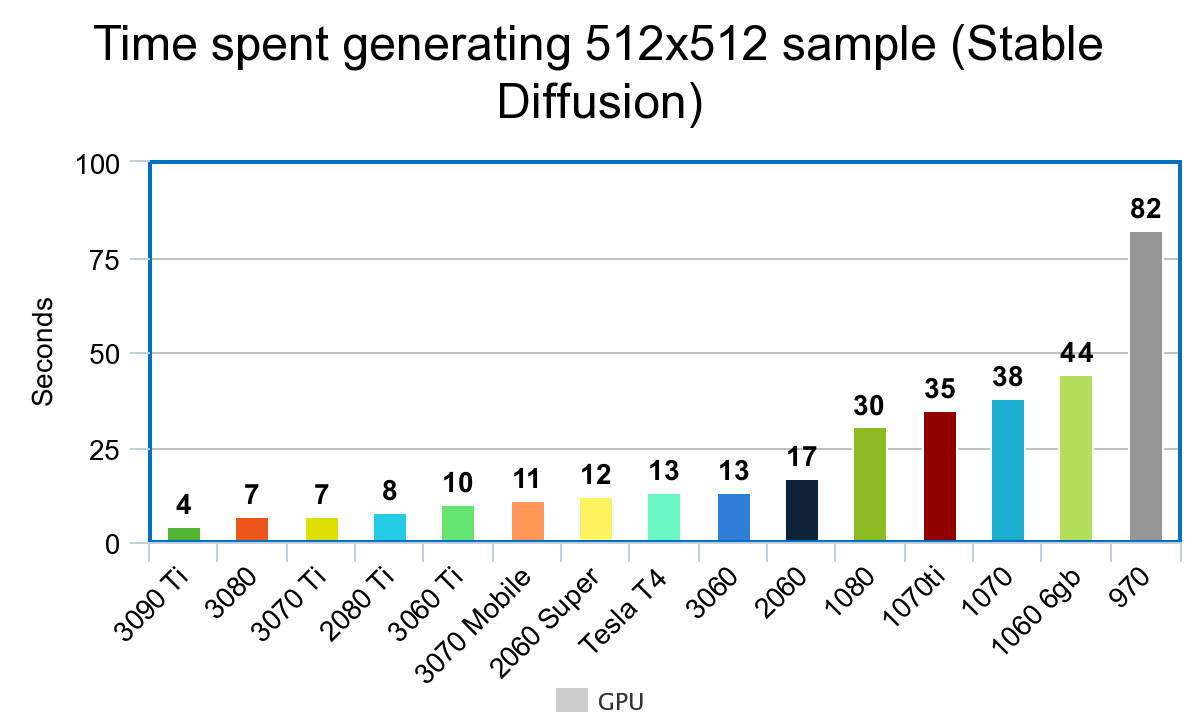
Here is also a benchmark for 1.5:
 ornate elk
charred rover
can you explain a bit please
ornate elk
charred rover
can you explain a bit please
Some Custom Nodes may not work when using TensorRT as they are coded for the base cuda stuff.
Also TensorRT needs manual model conversion
charred rover
ornate elk
Some Custom Nodes may not work when using TensorRT as they are coded for the bas...
I see thank you. maybe I ll consider 4070ti 16 gb instead of 2080ti
oh no they are expensive nvm
ornate elk
Yea 4070ti is crazy expensive
 karmic crown
if you still have issues let me know, but i need to go to the hospital tomorrow, so i will probably not be able to answer in the next 2 days
 mystic heath
who is a good python developer svlbto
charred rover
ornate elk
Yea 4070ti is crazy expensive
I dont get it, is it a solution? https://github.com/comfyanonymous/ComfyUI/issues/162#issuecomment-2241298064 what you think?
ornate elk
charred rover
I dont get it, is it a solution? https://github.com/comfyanonymous/ComfyUI/issue...
Its a barebone code to make it work. It would need to be implemented in comfyui first to make it compatible with nodes too
charred rover
ornate elk
Its a barebone code to make it work. It would need to be implemented in comfyui ...
I see thank you so much
charred rover
ornate elk
Its a barebone code to make it work. It would need to be implemented in comfyui ...
I ll also need to switch intel to amd for more lanes. comfy does work with amd efficiently right?
ornate elk
Yep works flawlessly
 thorny dragon
is 6gb vram enough for sdxl? 🙃
 uncut totem
any tips for hanging, takes a very long time to start gen when I switch model then after first gen they fly
ornate elk
thorny dragon
is 6gb vram enough for sdxl? 🙃
Yes, can work
ornate elk
uncut totem
any tips for hanging, takes a very long time to start gen when I switch model th...
What's your GPU and what's inside your webui-user.bat?
uncut totem
4090 Trio X
@echo off
set PYTHON=
set GIT=
set VENV_DIR=
set COMMANDLINE_ARGS=
@REM Uncomment following code to reference an existing A1111 checkout.
@REM set A1111_HOME=Your A1111 checkout dir
@REM
@REM set VENV_DIR=%A1111_HOME%/venv
@REM set COMMANDLINE_ARGS=%COMMANDLINE_ARGS% ^
@REM --ckpt-dir %A1111_HOME%/models/Stable-diffusion ^
@REM --hypernetwork-dir %A1111_HOME%/models/hypernetworks ^
@REM --embeddings-dir %A1111_HOME%/embeddings ^
@REM --lora-dir %A1111_HOME%/models/Lora
call webui.bat
Im using forge if that makes a diff
thorny dragon
ornate elk
Yes, can work
i am getting 9.14s/it speed on sdxl....is this normal? it took 4mins to gen a 1024x1024 img..i see ppl saying that it only takes them 30 secs for a img like that...
ornate elk
thorny dragon
i am getting 9.14s/it speed on sdxl....is this normal? it took 4mins to gen a 10...
What's in your webui-user.bat?
uncut totem
 ornate elk
uncut totem
ornate elk
uncut totem
And it hangs after the generation is done or only when switching models?
thorny dragon
ornate elk
What's in your webui-user.bat?
i am currently using invoke ai via stability matrix...so i dont know how to access my webui file in here...i tried a1111 before but it was slow like this too....
ornate elk
thorny dragon
i am currently using invoke ai via stability matrix...so i dont know how to acce...
Can't help much with invoke but with 6gb vram you should use Auto1111 or Forge webui
In Auto1111 I can give you some tips to improve the performance
thorny dragon
forge works quite fine...but it has issues with some extensions...thats why i was looking for any other option...gotta stick with forge i guess....
ornate elk
thorny dragon
forge works quite fine...but it has issues with some extensions...thats why i wa...
Check if you can enable fp8 mode for sdxl in the settings
ornate elk
uncut totem
when switching
How much ram and which model do you use?
ornate elk
Okay and the model you tried?
uncut totem
flux1-dev-bnb-nf4
ornate elk
uncut totem
Looks like it doesn't trys to store models in the RAM, instead it loads them directly into the vram
ornate elk
Also make sure the models are on an SSD
uncut totem
should I have to install this every time I start??
Legacy Preprocessor init warning: Unable to install insightface automatically. Please try run pip install insightface manually.
hybrid kindle
how much time it will take? already like an hour
 ornate elk
uncut totem
should I have to install this every time I start??
Legacy Preprocessor init war...
ornate elk
uncut totem
should I have to install this every time I start??
Legacy Preprocessor init war...
if you want to use faceswap stuff only
then oyu need to install it one time
ornate elk
hybrid kindle
how much time it will take? already like an hour
relaunch and then try to generate again
uncut totem
Everything i launch it tells me that
hybrid kindle
without deleting venv folder?
ornate elk
yea dont delete the venv
ornate elk
uncut totem
Everything i launch it tells me that
yea because its not installed
if you install it one time into the venv correctly, it wont complain anymore
uncut totem
Ok I install in terminal says successful then asks every launch I'll try to see if it's just installing to the container instance or something
ornate elk
uncut totem
Ok I install in terminal says successful then asks every launch I'll try to see ...
you need to activate the venv and then install it
 fair oxide
what is this slowdown in iopaint? It seems that if I close it and reopen, time per iteration drops from 10 ~ 11 sec to 2s
uncut totem
ornate elk
you need to activate the venv and then install it
kk ill try that ty
hybrid kindle
 and i think it started compiling endlessly
OSError: None is not a local folder and is not a valid model identifier listed on 'https://huggingface.co/models'
FutureWarning: clean_up_tokenization_spaces was not set. It will be set to True by default. This behavior will be depracted in transformers v4.45, and will be then set to False by default.
i tried to generate something and it repeats Compiling in progress. Please wait...

 edgy dust
how do i fix it?
 ornate elk
hybrid kindle
<:guh:1287525618270867577> and i think it started compiling endlessly
`OSError:...
ornate elk
hybrid kindle
<:guh:1287525618270867577> and i think it started compiling endlessly
`OSError:...
that can be ignored
ornate elk
edgy dust
how do i fix it?
switch to a compatible model so they will show up
uncut totem
should I add the pip install insightface to my webbat?
uncut totem
sorry kinda a noob
ornate elk
your using forge right
uncut totem
I have everything in one place
ornate elk
on linux or windows?
ornate elk
okay wouldnt recommend that for nvidia stuff but okay ^^
then you have to run pip install insightface in your dockers terminal for the forge instance
hybrid kindle
hybrid kindle
<:guh:1287525618270867577> and i think it started compiling endlessly
`OSError:...
what if i try use any other model? i have no clue what to do about infinite and repeating compiling, ill keep searching
ornate elk
hybrid kindle
what if i try use any other model? i have no clue what to do about infinite and ...
whats your gpu?
hybrid kindle
rx6600
ornate elk
hybrid kindle
rx6600
is it still compiling?
hybrid kindle

it repeats every time i click soomething in webui
if i try generate it sends me this
ornate elk
you have to generate one image first and dont click on other stuff meanwhile
so if the generate button is grayed out and showing interrupt, its fine, let it load

 edgy dust
ornate elk
switch to a compatible model so they will show up
edgy dust
ornate elk
switch to a compatible model so they will show up
where do i change the model
sorry i'm a beginner
I got it here
I had to restart
thankyou
uncut totem
can forge spaces be integrated into the windows version?
hybrid kindle
omg it worked
 ornate elk
hybrid kindle
omg it worked
ornate elk
hybrid kindle
omg it worked
Perfect 🙂
hybrid kindle
i just downloaded diffrent model and noticed lag spikes because of my ramn usage is 16gb out of 16
ornate elk
hybrid kindle
i just downloaded diffrent model and noticed lag spikes because of my ramn usage...
If you use sdxl models you need to increase your Windows Pagefile
hybrid kindle
wait can you tell me how do i know what im using rn, sdxl, sd3 or something else
ornate elk
hybrid kindle
wait can you tell me how do i know what im using rn, sdxl, sd3 or something else
Always check the models info box in Civitai.com
But you can also tell it at the file size.
2-4gb is mostly 1.5
6gb is sdxl/pony
hybrid kindle
so this one i downloaded is most probably sdxl
edgy dust
I need to create about 20 images for 1 that I like 
hybrid kindle
it takes a looot of time to generate pic, i think my pc is too weak for that 
hybrid kindle
ornate elk
Always check the models info box in Civitai.com
But you can also tell it at the...
what will happen if i add --medvram or --lowvram in the line?
 ornate elk
hybrid kindle
it takes a looot of time to generate pic, i think my pc is too weak for that <:h...
ornate elk
hybrid kindle
it takes a looot of time to generate pic, i think my pc is too weak for that <:h...
can you shwo the txt2img settings you tried?
hybrid kindle
 ornate elk
hybrid kindle
what will happen if i add --medvram or --lowvram in the line?
ornate elk
hybrid kindle
what will happen if i add --medvram or --lowvram in the line?
you can try add --medvram-sdxl
it speeds up the sdxl models
dont add --medvram, its for 6gb or less
ornate elk
hybrid kindle
maybe lower resolutions
yea dont go to high, better generate a bit lower and then use upscaling to get a higher resolution
but first add --medvram-sdxl to the webui-user.bat
hybrid kindle
almost at 95% !!
 ornate elk
Yea to high native resolution
ornate elk
hybrid kindle
almost at 95% !!
If you increase the windows pagefile, it also would be faster
ornate elk
No problem!
 stone orchid
any python devs here want top help me with adding control net to to my script
ruby yoke
stone orchid
any python devs here want top help me with adding control net to to my script
probably find better help in #🧣|comfy-ui channel than here
 thorny iron
Is there a way to identify a model
So I can find the actual model file and make my own pictures.
ornate elk
zenith seal
well idk why but all my first gen are blurry
do you have an example?


 ornate elk
zenith seal
ornate elk
zenith seal
looks like you used a latent upscaler with a denois above 0.5
zenith seal
ornate elk
looks like you used a latent upscaler with a denois above 0.5
oh thats maybe why
let me try without
zenith seal
ornate elk
try esrgan4x-anime6b with a 0.5 denois
in high res fix or imgg to img?
ornate elk
zenith seal
in high res fix or imgg to img?
in highres fix. but if your in img2img then just lower the denois below 0.3 and selecet Esrgan4x Anime6b as upscaler


 ornate elk
looks good
zenith seal
ornate elk
looks good
thanks for the help
ornate elk
no problem
 lethal sorrel
Hello I am new with the stable diffusion. Trying to make "inpaint" for a product so I followed a tutorial. For inpaint people suggested foooocus so Im using that. For the outputs there is pixel changes on the area I drew at the inpaint tab but the product is not there. Tried to increase the weight but no visible change. Anyone has an idea ?


I dont even know what Im trying to do is feasible or not tbh
 azure magnet
An help with comfyui

 granite flare
bet
Tech support
I need help finishing the download. I got to run but it keeps failing . Its like it will go all the way then boom can't do nothing. UI is up and all but doesn't want to work
I will send a few screen shots of the code
My system is amd
 balmy lily
on the comfyui package i cant seem to use flux. while im using this exact workflow with all the models and nodes installed and everything, it just crashes when it reaches the load diffusion model node when i have a flux model in there
this seems to be the only thing that the console has to say from the time i click queue prompt to when it crashes
Using pytorch attention in VAE
Using pytorch attention in VAE


 loud pond
lethal sorrel
Hello I am new with the stable diffusion. Trying to make "inpaint" for a product...
loud pond
lethal sorrel
Hello I am new with the stable diffusion. Trying to make "inpaint" for a product...
Did you manage to solve it?
im having the same issue icl
 loud pond
loud pond
loud pond
anyone know how to fix this? the inpaint keeps giving me a weird result, i wanted the person to have a big toothy smile but instead their mouth is yellow?
these are the settings im using
 urban girder
is there any chance somebody could get on voice chat and help me with installing stable diffusion? I'm trying to download it but there's so many codes and steps and so many different websites that I am lost and call me a dumbass but I really need someone to walk me through the download procedure cause I am lost as fuck.
 bleak mirage
@ornate elk Sorry for the long wait but here is my issue 🙂 if more is needed I will get it 🙂

 rugged latch
urban girder
is there any chance somebody could get on voice chat and help me with installin...
rugged latch
urban girder
is there any chance somebody could get on voice chat and help me with installin...
boop
i got a video i can send that helped me
basically its prety straight forward tho
u type, git and then the stable diff repository into cmd, (provided u have git installed first)
then u just let it clone into C:, or whereever, once its done, u go to that directory, double click the file called "webui-user.bat" and then let it finish downloading dependencies, if u dont already, u will also want to install python
specifically python 3.10.6
i believe any higher than that and it wont run
and thats pretty much it =3
i forget what u have to do for AMD cpus, but, i think its relatively the same setup
urban girder
rugged latch
i forget what u have to do for AMD cpus, but, i think its relatively the same se...
I'm sorry but I am too dumb to grt all that
rugged latch
D;
ornate elk
urban girder
is there any chance somebody could get on voice chat and help me with installin...
Hey, check the pinned messages for install instructions
ornate elk
bleak mirage
<@161910921269084160> Sorry for the long wait but here is my issue 🙂 if more is...
Try delete the venv folder and relaunch the webui-user.bat
ornate elk
loud pond
anyone know how to fix this? the inpaint keeps giving me a weird result, i wante...
What was your GPU? Nvidia or AMD?
ornate elk
granite flare
You followed an old tutorial it seams.
For the AMD setup please follow my install Guide from the first link of the pinned messages.
hybrid kindle
i can move my stable diffusion folder to somewhere else without any problem?
i want to move it on another ssd, do i need to move it with zluda folder or only stable diffusion folder
ornate elk
hybrid kindle
i can move my stable diffusion folder to somewhere else without any problem?
You can only move the models folder and then link it in the webui-user.bat by adding --models-dir "D:\ExamplePathToAnyhwere\models"
 bleak mirage
ornate elk
Try delete the venv folder and relaunch the webui-user.bat
bleak mirage
ornate elk
Try delete the venv folder and relaunch the webui-user.bat
Thanks a bunch that fixed it. Though I have a new problem involving Aria2. It won't start properly. its tied to an addon I have called "CivitAIbrowser-plus" with my A1111😬
ornate elk
bleak mirage
Thanks a bunch that fixed it. Though I have a new problem involving Aria2. It wo...
Try updating your extensions
bleak mirage
ornate elk
Try updating your extensions
I checked for updates but nothing changed. Could I just delete the extension and reinstall it 🤔
 high smelt
on civitai i saw there are clip skip for the img, what extension do i need to download to add that to my ui?
and guidance is cfg right?
loud pond
ornate elk
What was your GPU? Nvidia or AMD?
AMD
ornate elk
bleak mirage
I checked for updates but nothing changed. Could I just delete the extension and...
Sure
ornate elk
high smelt
on civitai i saw there are clip skip for the img, what extension do i need to do...
No need for an extension.
Go into the settings, User interface, Quicksettings, there add Clip_stop_at_last_layers
Then hit apply and relaunch
ornate elk
loud pond
AMD
Your using directml then?
If so you have to add --no-half to the webui-user.bat to fix the Inpainting.
lethal sorrel
lethal sorrel
Hello I am new with the stable diffusion. Trying to make "inpaint" for a product...
Anybody have an idea for this ?
ornate elk
lethal sorrel
Anybody have an idea for this ?
Thats not how it works and its really difficult to do that
 median geode
i need help i tag "git pull" to update my webui, and then something get wrong. it can run well before that.


 warm jackal
Hello! I need some help here. I am trying to change the location of both the Checkpoint and lora files, but whenever I use the command we are supposed to use, it only loads one or the other, Not both. What am I doing wrong here?
 loud pond
ornate elk
Your using directml then?
loud pond
ornate elk
Your using directml then?
Not sure, I followed ur pinned link on how to install for AMD tho
loud pond
ornate elk
If so you have to add --no-half to the webui-user.bat to fix the Inpainting.
Pretty sure I did already, ill check again tho
 vocal burrow
median geode
i need help<:sadcat:1130568570712109176> i tag "git pull" to update my webui, an...
vocal burrow
median geode
i need help<:sadcat:1130568570712109176> i tag "git pull" to update my webui, an...
you ve modified launch.py, you re not supposed to do that. Revert its modification by running git checkout --theirs launch.py from sdwebui folder
vocal burrow
warm jackal
Hello! I need some help here. I am trying to change the location of both the Che...
what does the log says ?
warm jackal
where are the logs?
 vocal burrow
warm jackal
it just says
vocal burrow
warm jackal
it just says
try --ckpt-dir "c:/AI/Models" --lora-dir "C:/AI/Loras"
median geode
i downloaded webui 1.10.0 , double clicked webui user.bat, and it says like this. it took so much time to download pytorch and then failed to make it. whats wrong with it? can anybody help me?

 warm jackal
same
 median geode
mine have lots of red words. looks like so many errors occurred.
ornate elk
median geode
i downloaded webui 1.10.0 , double clicked webui user.bat, and it says like this...
Follow my install guide from the pinned messages
Idk where you downloaded the webui from. But you have to Git clone it
median geode
from automatic111
ornate elk
median geode
from automatic111
Okay, if your in Asia you need a VPN for the first install
median geode
ornate elk
Follow my install guide from the pinned messages
yeah im using VPN now, but still don't work
ornate elk
median geode
yeah im using VPN now, but still don't work
Did the git clone worked without any errors?
ornate elk
warm jackal
same
How do the folders look like?
median geode
ornate elk
Okay, if your in Asia you need a VPN for the first install
yes it works
warm jackal
ornate elk
How do the folders look like?
What do you mean? they are just normal directores
ornate elk
warm jackal
What do you mean? they are just normal directores
Do they have the same name as shown in the log?
aiLoras ?
Because in your webui-user.bat is ai\loras

 warm jackal
and there is nothing in those folders presently, yet when I get into SD all of the checkints are there, but the loras are gone
median geode
ornate elk
Change the first c to C
did i make anything wrong with the edit?
 ornate elk
median geode
did i make anything wrong with the edit?
ornate elk
median geode
did i make anything wrong with the edit?
Looks fine
median geode
ok i'll try again
warm jackal
I was just using what someone posted, didnt look to see it was wrong
ornate elk
median geode
ok i'll try again
Try open up the cmd and type
Pip cache purge
Then delete the venv folder and relaunch the webui-user.bat
warm jackal
the lora folder wont load, its stuck in a loop
 ornate elk
warm jackal
the lora folder wont load, its stuck in a loop
ornate elk
warm jackal
the lora folder wont load, its stuck in a loop
Whitelist the webui in any browser adblocker
Lora list sometimes gets blocked
median geode
ornate elk
Try open up the cmd and type
Pip cache purge
Then delete the venv folder and rel...
sorry for disturbing, but what does the "At the line COMMANDLINE_ARGS= You add: --xformers --no-half-vae" work for? i didn't added it because i didn't see it in github

just curious
ornate elk
median geode
sorry for disturbing, but what does the "At the line COMMANDLINE_ARGS= You add: ...
Its for performance and compatibility
Xformers boosts performance and needs less vram.
And no half vae is for VAE compatibility
warm jackal
Lora works, but the checkpoint folder does not switch
ornate elk
warm jackal
Lora works, but the checkpoint folder does not switch
do you see them in the dropdown or not?
warm jackal
yes, but i shouldnt, because the directoy i told it to look in has nothing in it, so the list should be empty
ornate elk
warm jackal
yes, but i shouldnt, because the directoy i told it to look in has nothing in it...
and where does it get the models from?
where are they located?
warm jackal
the models that are showing in the list are in the old Sd directory. the inital one
ornate elk
ah okay
but you need put at least 1 model into the new directory
or you wont see if it works or not
 warm jackal
well, its actually already got 1
ornate elk
warm jackal
well, its actually already got 1
and does it show up after a relaunch?
loud pond
amd
ornate elk
loud pond
amd
i mean the exact name
loud pond
oh 1 sec
ornate elk
loud pond
i added no-half-vae already
inpaint with directml works only with --no-half, not with --no-half-vae
loud pond
radeon 480
warm jackal
So its showing both directories, which is annoying, but ok
ornate elk
warm jackal
So its showing both directories, which is annoying, but ok
it will always show the default one, if there is a model in it
loud pond
ornate elk
inpaint with directml works only with --no-half, not with --no-half-vae
oh so delete '--no-half-vae' and add '--no-half'?
loud pond
loud pond
oh so delete '--no-half-vae' and add '--no-half'?
ok will delete that and add the other
ornate elk
loud pond
oh so delete '--no-half-vae' and add '--no-half'?
yes then it will work, but also that increases the VRAM usage, so maybe make two different bats one with --no-half and one with --no-half-vae
median geode
ornate elk
Its for performance and compatibility
thank you so much btw, what if i don't add anything besides "--xformers --no-half-vae" , even though my card is GTX 16XX and 4GB? will anything get wrong?
 loud pond
ornate elk
yes then it will work, but also that increases the VRAM usage, so maybe make two...
loud pond
ornate elk
yes then it will work, but also that increases the VRAM usage, so maybe make two...
oh alright so how do i create two different bats?
ornate elk
loud pond
oh alright so how do i create two different bats?
copy the webui-user.bat, then rename it for example to Inpaint-webui.bat and there use the --no-half
and for the other keep --no-half-vae
ornate elk
median geode
thank you so much<:waow:1017853838516035725> btw, what if i don't add anything b...
a GTX16XX always needs --no-half or it wil get problems with some models
also it needs --medvram as it only has 4gb vram
then your ready
loud pond
ornate elk
copy the webui-user.bat, then rename it for example to Inpaint-webui.bat and the...
alright done ill give it a try and see how it goes, thanks!
median geode
ornate elk
a GTX16XX always needs --no-half or it wil get problems with some models
also it...
what if my webui is already launched without modifying it? should i add them and relaunch webui?
ornate elk
median geode
what if my webui is already launched without modifying it? should i add them and...
you can do that after its done installing and opened
median geode
ornate elk
you can do that after its done installing and opened
thank you sooo much
for staying up so late and help solving my problem
 raw maple
For some reason my WebUI won't load. I get a "Invalid HTTP request received" in console, and ERR_SSL something in my browser. Has anyone else experienced this? Tried running it on different ports etc..
ComfyUI works fine?
vocal burrow
warm jackal
same
what are inside those folders ?
(commuting back from work, gonna be a while till I answer)
loud pond
loud pond
alright done ill give it a try and see how it goes, thanks!
hey so the images are now a lot better its giving me images which are no longer yellow, but the out put is still clunky any way i can sort this out?
median geode
ornate elk
you can do that after its done installing and opened
OMG
still don't work

another error
vocal burrow
median geode
still don't work
I didn't follow everything, but if you're from china you might have to use a vpn.
Also cleaning pip cache might work (run pip cache purge)
median geode
vocal burrow
I didn't follow everything, but if you're from china you might have to use a vpn...
run pip cache purge in where?🥲 webui folder cmd?sry i don't know that much about coding.
vocal burrow
median geode
run pip cache purge in where?🥲 webui folder cmd?sry i don't know that much abou...
doesn't matter, open cmd and run it
it's gonna clean pip's cache globally
median geode
cmd in webui folder or just cmd
vocal burrow
doesn't matter
median geode
done. trying installing again.
solemn atlas
Hey guys, where do i find my Stable Diffusion install folder?? I had some problems back then and i delated everything and installed it again but i feel stupid because i dont know what is meant by that.
this is what i want to do

I copy&paste my models folder to my ssd
now i need to make this command so my webui still can use my models folder. BUT I'm stupid,. i just don't know how
median geode
what's the problem? you can't find your Stable Diffusion folder?
vocal burrow
solemn atlas
Hey guys, where do i find my Stable Diffusion install folder?? I had some proble...
it should be wherever you ran the git clone etcetcetc command
vocal burrow
raw maple
For some reason my WebUI won't load. I get a "Invalid HTTP request received" in ...
what's the full log ?
solemn atlas
vocal burrow
it should be wherever you ran the `git clone etcetcetc` command
I don't know where that was
solemn atlas
median geode
what's the problem? you can't find your Stable Diffusion folder?
yeah, the install folder
solemn atlas
i mean i have that one but i dont think it is this
 vocal burrow
solemn atlas
i mean i have that one but i dont think it is this
vocal burrow
solemn atlas
i mean i have that one but i dont think it is this
looks like it
median geode
solemn atlas
i mean i have that one but i dont think it is this
looks like no model folder
vocal burrow
cause they moved it
 median geode
solemn atlas
I moved it to my ssd
median geode
solemn atlas
I moved it to my ssd
why not just move back😂
solemn atlas
You do not have sufficient permissions to perform this operation.
 solemn atlas
median geode
why not just move back😂
solemn atlas
median geode
why not just move back😂
because its over 500GB and I have no space left?
vocal burrow
need to run cmd as admin
ruby yoke
solemn atlas
You do not have sufficient permissions to perform this operation.
try running that command as administrator
open your command line window as admin, then you'll be admin
vocal burrow
search for cmd in start menu, right click "run as admin"
solemn atlas
Thats what I also tried to do. I copy&paste it and this is what I got:
C:\Windows\System32>D:\Users\moonshine\stable-diffusion-webui>mklink /D models "C:\Stable diffusion"
The command "D:\Users\moonshine\stable-diffusion-webui" is either misspelled or
could not be found.
 ruby yoke
solemn atlas
Thats what I also tried to do. I copy&paste it and this is what I got:
C:\Wind...
ruby yoke
solemn atlas
Thats what I also tried to do. I copy&paste it and this is what I got:
C:\Wind...
cd into that directory and see if it exists
vocal burrow
solemn atlas
Thats what I also tried to do. I copy&paste it and this is what I got:
C:\Wind...
because there is no "models" folder in your current directory (c:\windows\system32)
also you're trying to run "d:\users\moonshine\stable-diffusion-webui>mklink"
instead of just mklink
solemn atlas
the models folder is now in C
 solemn atlas
ruby yoke
cd into that directory and see if it exists
solemn atlas
ruby yoke
cd into that directory and see if it exists
mklink /D models "C:\Stable diffusion"
where to put that cd?
ruby yoke
solemn atlas
mklink /D models "C:\Stable diffusion"
where to put that cd?
cd is the command for change directories. you don't put it with the mklink command. when i said cd into that directory, what i was saying was for you to try to be in the directory and see the files in it
vocal burrow
solemn atlas
mklink /D models "C:\Stable diffusion"
where to put that cd?
mklink /D x:\whatever\someLinkToSomething x:\TheSource\OfThelink
ruby yoke
do not copy and paste that, btw - that's just an example of how you write the command
you need to use your actual directories, not the x:\whatever... text
vocal burrow
lol I doubt they'd have enough drives to add up to x: and not know how to use cmd. But fair enough I guess.
solemn atlas
ruby yoke
do not copy and paste that, btw - that's just an example of how you write the co...
Yeah I got that one haha,. I'm trying to find out what to put there,.
solemn atlas
vocal burrow
lol I doubt they'd have enough drives to add up to x: and not know how to use cm...
i swear,. i have no clue what to do.. I don't understand anything of these things haha
ruby yoke
solemn atlas
i swear,. i have no clue what to do.. I don't understand anything of these thing...
okay. what you are doing is creating what is basically an instruction to your system. you're telling it "when something wants you to make or read files here, they will actually be there" - iyou are creating what is called a 'symbolic link' from one place to the other
to do that, you use the make link command which is mklink
and then you tell it 'this is where you think they are, but this is where they really are'
IF you are using comfyUI - you can just add a statement in the extra path's file for where the models are
IF you are doing something else, or using something else, obviously that option is not avaiable
solemn atlas
I use automatic 1111
ornate elk
solemn atlas
this is what i want to do
you just need to add --models-dir "Path to models folder" into the webui-user.bat
nothing more
solemn atlas
will there also be created a symbolic folder?
ornate elk
maybe i dont get what you are trying to do, but the command links the models folder (no symlink) but it will work normaly
ruby yoke
solemn atlas
will there also be created a symbolic folder?
no. go into your auto1111 filder and find the webui-user.bat file
edit it
add the line:
--models-dir <where yoru models are>
solemn atlas
in this?
 ruby yoke
and replace <where your models are> with the actual directory like d:\models\mymodels
ornate elk
solemn atlas
in this?
yes there
solemn atlas
C:\Stable diffusion
in my C drive
i created a new folder in my new ssd and put the models folder there
solemn atlas
no, only one,. i dont know what happend when i tried to move my whole C drive,. somehow c and d got switched up. 😅
ornate elk
D is your new drive i guess then. maybe you need to move your models first xD
solemn atlas
I moved them haha, thats why its now gone from D to C. at least its not red anymore
 ornate elk
solemn atlas
I moved them haha, thats why its now gone from D to C. at least its not red anym...
ornate elk
solemn atlas
I moved them haha, thats why its now gone from D to C. at least its not red anym...
and your webui is on C too or D ?
solemn atlas
No i installed windows on D
but when I tried to move my whole stuff to my ssd everything went there expect for stable diffusion,. what i actually wanted to move.. i have no clue what i did
ornate elk
solemn atlas
No i installed windows on D
but when I tried to move my whole stuff to my ssd e...
the windows logo says , Windows is currently on C

really strange what you have done xD
but its not that great
solemn atlas
and the letters also got switched up. C was D and D was C when I bought my ssd.
Yes windows also moved to my ssd when I tried to move everything to my new ssd which was actually (D:)
Now it's (C:) i dont know why.
median geode
😂 complex situation
solemn atlas
ornate elk
but its not that great
really why? I used a program to move everything. (dont remeber which one it was) Everything moved expect for stable diffusion. that was why i bought my ssd in first place..
solemn atlas
median geode
😂 complex situation
i swear, i don't know what I did,... but I know something is not ok with my computer,. it's slower since i moved everything to my ssd and generating with SD also got very slow ....
ornate elk
solemn atlas
really why? I used a program to move everything. (dont remeber which one it was)...
because the best case is to have Windows installed on the smallest SSD drive on the system and use the big drives to store data.
The Drive where Windows gets installed is used more frequently and does more read/write cycles than any other drive, which wears the drives health out over the time.
Also for easy reinstalling its easier to wipe the whole windows drive than haveing to fear losing 2tb additional data on it
solemn atlas
can't i just move windows to my, now, (D:) drive?
ornate elk
solemn atlas
i swear, i don't know what I did,... but I know something is not ok with my comp...
is your new drive an M2 SSd or a Sata SSD? because there is a huge speed difference between them
solemn atlas
uhm wait
i bought this one https://www.amazon.de/dp/B0CY37V52M?ref=ppx_yo2ov_dt_b_fed_asin_title

Erweitern Sie Ihren Laptop oder Desktop-Computer mit der Crucial BX500 SSD, der einfachsten Möglichkeit die Geschwindigkeit wie bei einem neuen Computer zu einem erschwinglichen Preis zu erhalten. Beschleunigen Sie alles und speichern Sie bis zu 4 TB Ihrer unersetzlichen Dateien mit einer Crucial...
it says Sata SSD
ornate elk
solemn atlas
i bought this one https://www.amazon.de/dp/B0CY37V52M?ref=ppx_yo2ov_dt_b_fed_asi...
yea thats a sata ssd, good for storing files and games
but slow for windows and big games
ornate elk
solemn atlas
can't i just move windows to my, now, (D:) drive?
you said you used a tool at first. but idk if you just could move it again.
solemn atlas
maybe thats why my windows got slower after moving it. Can't i just move my windows back to my (D:)?
Whats also weird is, that (D:) was my SSD
and (C:) was my computer drive
solemn atlas
ornate elk
you said you used a tool at first. but idk if you just could move it again.
it needed over 1 full day to move everything.
ruby yoke
solemn atlas
and the letters also got switched up. C was D and D was C when I bought my ssd.
...
did you turn the machine off, move the drives around, and then turn it back on?
solemn atlas
If i rememer right, I used aomei backupper
solemn atlas
ruby yoke
did you turn the machine off, move the drives around, and then turn it back on?
the program did it. it started moving everything to my ssd and it needed over 1 full day
ruby yoke
solemn atlas
the program did it. it started moving everything to my ssd and it needed over 1 ...
you need to start by putting everything back on C:
solemn atlas
i still have it on my computer so it was def. that
 solemn atlas
ruby yoke
you need to start by putting everything back on C:
solemn atlas
ruby yoke
you need to start by putting everything back on C:
but how? my models folder has already over 500GB. I dont think that will work or can i left that out?
ruby yoke
and then juist make a directory on your SSD and hand copy the model files over to it
ruby yoke
solemn atlas
but how? my models folder has already over 500GB. I dont think that will work or...
i dunno. can your backup software be told NOT to back up some directories?
ornate elk
solemn atlas
maybe thats why my windows got slower after moving it. Can't i just move my wind...
yea your windows is now slower on the sata ssd.
What i would do is the following:
Check whats on your D drive and move everything over to C in a BACKUP folder.
Then you can Shutdown the PC.
Unplug the new Sata SSD (C drive) and keep it unpluged.
Then reinstall Windows on your old SSD with an USB Stick.
Then replug the Sata SSD and then you may need to give the drive a new Drive Letter (dont format it)
or Backup everything on an external drive if you have one. then reinstall windows
ruby yoke
windows should automatically give it a new drive letter if C: is in use with system files on it
solemn atlas
ruby yoke
i dunno. can your backup software be told NOT to back up some directories?
I really don't know. Actually I'm afraid using tha again. back then i used it and my whole computer is slow now. I want to do that but thats how this looks. I would like to change the language to show you,. but there is no option to change
 ruby yoke
but yeah, that's what I would do so. just shut down, remove that sata drive, reinstall windows. you have a reall mess there.
and do NOT use that backup software - ever again
backup software isn't desgined to just move folders and files around, anyway, which is what you needed to do with the models to move them from C: to D:
solemn atlas
ornate elk
yea your windows is now slower on the sata ssd.
What i would do is the following...
The problem is, i never plugged it in., my brother did that for me,.
and its inside of my computer,. I need to completely remove the ssd?
ornate elk
solemn atlas
The problem is, i never plugged it in., my brother did that for me,.
and its in...
you dont need to remove it but if you want to be 100% sure you dont accidently format the drive (and lose all data) when reinstalling windows, then yes better remove it
solemn atlas
oh,. that will be a mess,. since I don't even know where he put that in my pc...
i mean i try to do that but... it's a lot of stuff to do.
i need to buy a usb stick first..😅
ornate elk
solemn atlas
oh,. that will be a mess,. since I don't even know where he put that in my pc...
maybe ask him for help when you do it
ruby yoke
solemn atlas
oh,. that will be a mess,. since I don't even know where he put that in my pc...
get him to help you. was that backup software his idea too?
solemn atlas
he won't. he lives in another city now.
he only put my ssd in my computer.
ornate elk
ah okay, then write him and ask where he put it in xD
solemn atlas
ornate elk
ah okay, then write him and ask where he put it in xD
that's not the problem haha,
i need to find someone who can help me do all of that since i'm afraid i could loose everything
but thank you all for your help. I think i have a bigger problem thatn just moving my models folder 😅
and about that.. should i just delate it?
 ornate elk
solemn atlas
but thank you all for your help. I think i have a bigger problem thatn just movi...
ornate elk
solemn atlas
but thank you all for your help. I think i have a bigger problem thatn just movi...
yea definitly get some help then ^^ and no problem, also feel free to ask us if you have any questions when your doing it
ornate elk
solemn atlas
and about that.. should i just delate it?
you still can use it but you need to change the path to "C:/Stable diffusion/models"
without < or >
solemn atlas
on cmd?
 solemn atlas
like this

okay I try to open SD if it works
sadly it didnt worked, it states
The command "--models-dir" is either misspelled or could not be found.
loud pond
loud pond
hey so the images are now a lot better its giving me images which are no longer ...
any advice?
the outlined area's colour is different to the actual skin colour of the image
ornate elk
solemn atlas
sadly it didnt worked, it states
The command "--models-dir" is either misspelle...
that could mean your webui is outdated
loud pond
loud pond
the outlined area's colour is different to the actual skin colour of the image
its a visible line where the inpaint was used
solemn atlas
ornate elk
that could mean your webui is outdated
is there a way to update it?
ornate elk
because the command is pretty new
ornate elk
solemn atlas
is there a way to update it?
yea with git pull
solemn atlas
wait thats weird,. now i have this folder but the models are not in it . odes it have something to do with --models-dir
 solemn atlas
ornate elk
yea with git pull
solemn atlas
ornate elk
yea with git pull
i just use git pull on my cmd on webui right
ornate elk
solemn atlas
wait thats weird,. now i have this folder but the models are not in it . odes it...
it gets rebuild but is empty
solemn atlas
so i used git pull and it did some updates. now i tried to open webui again but it says the same thing.
The command "--models-dir" is either misspelled or could not be found.
ruby yoke
loud pond
the outlined area's colour is different to the actual skin colour of the image
can you post a couple of the images so we can see them?
loud pond
ruby yoke
can you post a couple of the images so we can see them?
alright lemme make somenew ones tho cuz i deleted the error ones
ornate elk
solemn atlas
so i used git pull and it did some updates. now i tried to open webui again but ...
what does the cmd shows when you git pulled
or share the whole cmd log when launching the webui-user.bat
so we can see the version
solemn atlas
ornate elk
what does the cmd shows when you git pulled
it says: Already up to date.
 ornate elk
solemn atlas
ornate elk
solemn atlas
looks updated. try edit the webui-user.bat again and move the --models-dir + path before the --xformers
make sure all is seperated by one space
solemn atlas
ornate elk
looks updated. try edit the webui-user.bat again and move the --models-dir + pat...
like this?

now it worked,. i also tried to generate something,. its very slow,. if i generate something,. i cant do anything else expect to wait for it to finish because nothing works
 ornate elk
solemn atlas
now it worked,. i also tried to generate something,. its very slow,. if i genera...
ornate elk
solemn atlas
now it worked,. i also tried to generate something,. its very slow,. if i genera...
yea mostly because windows and the pagefile are on the slower drive
 solemn atlas
ornate elk
yea mostly because windows and the pagefile are on the slower drive
solemn atlas
ornate elk
yea mostly because windows and the pagefile are on the slower drive
Yes thats the reason,. i need to somehow move everything back
ornate elk
loud pond
set the inpaint area to "mask only" and the resolution to 768x768 (better for lower vram)
also dont use a realism model to inpaint an anime image. best use the same model as uses for the image
loud pond
ornate elk
set the inpaint area to "mask only" and the resolution to 768x768 (better for lo...
alright
ruby yoke
loud pond
alright
yes. always use the model you generated with to inpaint with - or you'll get very unpredictable results
loud pond
ornate elk
set the inpaint area to "mask only" and the resolution to 768x768 (better for lo...
what if the image isnt generated and is a stock image?
that image above is a stock image
ornate elk
loud pond
that image above is a stock image
thenm ist more difficult. best is to use an inpaint model then
but its hard to not get the outlines
ruby yoke
loud pond
what if the image isnt generated and is a stock image?
if it's a stock image, then try to find a model that will produce a look that's fairly close to it - you'd want a model that did good photographic images to use to inpaint a stock photo. or a model that did good cartooning images for a vector cartoon, etc
loud pond
oh ok thanks then, is there anyway i can just use the head as a reference and then generate a new image from that?
urban girder
ornate elk
Hey, check the pinned messages for install instructions
I'm sorry dude I know I sound annoying but I checked the pinned message for installed instructions and I went to the webpage and I am overwhelmed as shit like there's so many steps and code words that I do not know of.
ornate elk
urban girder
I'm sorry dude I know I sound annoying but I checked the pinned message for inst...
oh now problem, so at which step your stuck?
For an easy install guide use the Automatic1111 one
urban girder
ornate elk
oh now problem, so at which step your stuck?
I installed python and git but then when I go to the automatic1111 step it's telling me to create a new file and create a new code then go to another website that shows at least a billion automatic1111 files and next thing I know I'm like "Wait what the fuck there's more than one? Which one is the right one??"
ornate elk
urban girder
I installed python and git but then when I go to the automatic1111 step it's tel...
oh so your at step 3?
urban girder
ornate elk
oh so your at step 3?
In a sense yes
ornate elk
yea thats not a link to go to
you have to create a new folder first+
on C drive or any other drive
call it AI for example
C:\AI\
urban girder
Would OC (C:) count?
 ornate elk
urban girder
Would OC (C:) count?
ornate elk
urban girder
Would OC (C:) count?
yes
go into the folder where your windows folder is
there create a new folder
urban girder
Ok so created the new folder and labeled it AI
ornate elk
Then go into the folder you created in this case Ai, then click in the File Explorer bar (not searchbar) and type cmd then press enter.


 loud pond
ornate elk
set the inpaint area to "mask only" and the resolution to 768x768 (better for lo...
loud pond
ornate elk
set the inpaint area to "mask only" and the resolution to 768x768 (better for lo...
also the 'mask only' tip worked thank you a ton, its now only focusing on that area and its giving a better result!
 ornate elk
loud pond
also the 'mask only' tip worked thank you a ton, its now only focusing on that a...
ornate elk
loud pond
also the 'mask only' tip worked thank you a ton, its now only focusing on that a...
no problem, yea mask only is very important for inpainting and is faster
ornate elk
urban girder
ok so I don't see a file explorer bar yet.
at the top
where you see the path
This PC - C - Ai
there click
 ornate elk
now copy the command from the guide or here:
git clone https://github.com/AUTOMATIC1111/stable-diffusion-webui.git
and paste it into the cmd
then hit enter
urban girder
all of it or just where it starts at https?
ornate elk
urban girder
all of it or just where it starts at https?
all
urban girder
ornate elk
all
What now?
 urban girder
ok so hitting the x button now
urban girder
ornate elk
Close the cmd
how do I launch the run_nvidia_gpu.bat?
urban girder
oh.....ok then I gotta scroll down some more
urban girder
oop, sorry. Ok I'm there and it's saying to edit the web user, do I go back to files?
ornate elk
urban girder
oop, sorry. Ok I'm there and it's saying to edit the web user, do I go back to f...
Yea edit the webui-user.bat
ornate elk
urban girder
or that the folder is empty
go into the ai folder
is there a stable-diffusion-webui folder?
ornate elk
urban girder
ok so with this do I change the name of that?
no right click and edit it
urban girder
ornate elk
no right click and edit it
ok so I did a right click and it's showing me these options. Now just wanna confirm with you do i click the button that says open?
 ornate elk
urban girder
ok so I did a right click and it's showing me these options. Now just wanna conf...
ornate elk
urban girder
ok so I did a right click and it's showing me these options. Now just wanna conf...
nope
click show more options
vocal burrow
Show more options
ornate elk
then click edit
urban girder
This is what it's showing me so far I don't see a button that says edit
 ornate elk
urban girder
This is what it's showing me so far I don't see a button that says edit
ornate elk
urban girder
This is what it's showing me so far I don't see a button that says edit
not the folder
go into the folder
and scroll down
to the webui-user.bat
then right click that file
hit show mor options
then edit
urban girder
ok so i click on the stabl-diffusion-webui folder then scroll down the list till I find the webui-user.bat?
ok is this it?
 ornate elk
thats it
 vocal burrow
you're not clicking on the file
ornate elk
you havent selectetd it
urban girder
ok I'm not clicking on the file instead I'm selecting it? Like click hold left and drag the blue box towards it?
vocal burrow
no. We mean, in the last screenshot you are not clicking the file
urban girder
?
urban girder
ok right clicked
ornate elk
click "show more options", then "edit"
urban girder
I thought I clicked right the first time, guess not.

ok so I'm on the editing part of it, do i type COMMANDLINE_ARGS= under or above webui?
 azure magnet
An help please
 urban girder
vocal burrow
urban girder
vocal burrow
like right after the equal sign?
urban girder
ornate elk
How much vram does your GPU has?
I dunno, lets see.
so I type the code in and hit enter?
vocal burrow
azure magnet
An help please
context please
ornate elk
urban girder
so I type the code in and hit enter?
First check the GPU vram. Because you may need to add an additional command
urban girder
ornate elk
First check the GPU vram. Because you may need to add an additional command
how do I do that?
ornate elk
Open the taskmanager, click on the performance tab and then on the GPU
There you see "dedicated memory"
azure magnet
vocal burrow
context please
Generation with comfyui
 vocal burrow
azure magnet
Generation with comfyui
vocal burrow
azure magnet
Generation with comfyui
probably gonna need to see the workflow then, but if I had to take a blind shot I'd say you're missmatching lora version and model version (eg : lora sd 1.5 with some stable diffusion xl model)
vocal burrow
urban girder
click here
 urban girder
ok so it says i have 6 gb of dedicated gpu memory storage.
azure magnet
vocal burrow
probably gonna need to see the workflow then, but if I had to take a blind shot ...
Probabily you have right. Where can i see in comfyui if a model is made for 1.5 or XL?
vocal burrow
azure magnet
Probabily you have right. Where can i see in comfyui if a model is made for 1.5 ...
a model is either 1.5, 2.1, xl, 3.0, etc.
a lora is made for a certain type of (sd) model.
And sadly you can't really tell what a lora is for, you have to be organized and name or sort them correctly. So make sure to read lora's descriptions when downloading them.
ruby yoke
loud pond
oh ok thanks then, is there anyway i can just use the head as a reference and th...
probably not, but you could generate an image and then do a face swap from the head to the face of the generated image
azure magnet
vocal burrow
a model is either 1.5, 2.1, xl, 3.0, etc.
a lora is made for a certain type of (...
Fuck i dowloaded a bunch of lora
loud pond
ruby yoke
probably not, but you could generate an image and then do a face swap from the h...
ah ok thanks anyways
urban girder
vocal burrow
click here
is 6 gb good enough?
ruby yoke
azure magnet
Fuck i dowloaded a bunch of lora
just make sure you have all the base models and then you can use those loras - just sort them out so you know what base model they are each for
ornate elk
urban girder
ok so it says i have 6 gb of dedicated gpu memory storage.
You you need --medvram in the webui-user.bat too
Then save the file
urban girder
ornate elk
You you need --medvram in the webui-user.bat too
Wait do I backtrack?
ornate elk
?
urban girder
I'm confused on what you mean I need medvam
azure magnet
vocal burrow
a model is either 1.5, 2.1, xl, 3.0, etc.
a lora is made for a certain type of (...
Last question how could i enable tiled decoding
vocal burrow
there's a specific node for that "VAE Decode Tiled" I think
urban girder
ornate elk
?
like how do I get medvram on the webui? Cause I didn't know what that is
ornate elk
urban girder
like how do I get medvram on the webui? Cause I didn't know what that is
You have to edit the file again
Like you did before with xformers
urban girder
ornate elk
Like you did before with xformers
Edit? Wait I don't understand where am I supposed to edit it?
urban girder
Ok so I type --medvram in the webui-user first?
vocal burrow
And if your gpu is a GTX16xxxxxx something you also need to put --no-half in there, that's also why I asked for a screenshot of your GPU info in task manager
 vocal burrow
urban girder
vocal burrow
urban girder
Ok so in the webui-user.bat file, you find the set COMMANDLINE_ARGS= line and turn it into a set COMMANDLINE_ARGS=--xformers --no-half --medvram
(--no-half includes the functionalities of--no-half-vae so there's no need for both)
urban girder
vocal burrow
Ok so in the webui-user.bat file, you find the `set COMMANDLINE_ARGS=` line and ...
--no-half includes the functionalities of --no-half-? arent those the same thing?
urban girder
oh......ok so I don't need to type the one that says vae.
vocal burrow
not the same things
vocal burrow
urban girder
oh......ok so I don't need to type the one that says vae.
yes, cause it's included with --no-half
 granite flare
welp time fix this mess I made
urban girder
ok so, wait double click it? double click the code I just pasted in?
urban girder
wait double click it in files?
vocal burrow
urban girder
double click this
urban girder
ok I did and then it showed the black screen for a sec then exited out.
vocal burrow
urban girder
go back there, insert a new line at the end saying pause .
Then try to run it again
urban girder
under set COMMANDLINE_ARGS=--xformers --no-half --medvram?
vocal burrow
no, at the very end
urban girder
Like this?
 urban girder
do I exit out of it now?
vocal burrow
save and run it again yes
urban girder
 urban girder
 vocal burrow
urban girder
vocal burrow
urban girder
that's the result view of your search for it
I want to see what's next to this file
urban girder
is it possible to hop onto voice chat to screen share?
vocal burrow
not right now, I'm just about to go to sleep.
urban girder
ok so you wanna see what's next to this file, like above, below, right, left? cause I don't know what you mean by next to this file.
vocal burrow
urban girder
as in "what's in the same folder"
urban girder
there's just the one thing in the folder
vocal burrow
there should be a bunch of stuf (can't screenshot everything)
 urban girder
 vocal burrow
ok it's probably windows being windows then.
run the second last one. It will be the same file as the one you edited. But running it outside of this weird "search result" context should work fine.

 urban girder
like stable diffusion? The software? Like the actual one where everyone can type in their prompts to generate an image?
vocal burrow
stable-diffusion-webui the sofware written by Automatic1111 used to generate images using stable-diffusion models
so tldr, yes
and with that I'm off, bye
urban girder
vocal burrow
and with that I'm off, bye
thank you so much, I'm no tech wizard so you saved my ass bigtime
ornate elk
urban girder
like stable diffusion? The software? Like the actual one where everyone can type...
To start the software you always have to run the webui-user.bat.
It will also start much faster after this first install process
The webui then opens in your default browser
urban girder
ok so stable diffusion is called webui
vocal burrow
different things.
your car run on gasoline (or diesel, whatever)
same situation here
urban girder
?
vocal burrow
you're using stable-diffusion-webui (you car) which is using stable diffusion models (gasoline)
urban girder
ahhhhhhh
ornate elk
The webui is the interface to control everything


 ornate elk
urban girder
Ok I think I'm in
ornate elk
urban girder
Ok I think I'm in
You need to update your nvidia graphics driver probably
ornate elk
Nope
You only need to restart the PC and the webui-user.bat
But first download the latest driver from Nvidia for your gpu
urban girder
ok so I should head to the Nvidia website or do I have to go through a third party website?
ornate elk
You have a GTX 1660 ti
No please only use nvidias official site
Like here:
https://www.nvidia.com/en-us/drivers/

NVIDIA
Download the latest official NVIDIA drivers to enhance your PC gaming experience and run apps faster.
urban girder
Which one?
 ornate elk
The geforce experience
urban girder
alright it's downloaded, do I open the file now?
ornate elk
Yea install it
urban girder
ok so I installed it, now what?
ornate elk
Restart the PC and then relaunch the webui-user.bat
 steady thistle
I don't think this is hurting anything but there's an error somewhere and I'd like to clear it up. Can you tell me where this issue is found to be repaired? :
To see the GUI go to: http://127.0.0.1:8188
FETCH DATA from: D:\Ai\ComfyUI_windows_portable\ComfyUI\custom_nodes\ComfyUI-Manager\extension-node-map.json [DONE]
[ERROR] An error occurred while retrieving information for the 'Florence2ModelLoader' node.
Traceback (most recent call last):
File "D:\Ai\ComfyUI_windows_portable\ComfyUI\server.py", line 564, in get_object_info
out[x] = node_info(x)
File "D:\Ai\ComfyUI_windows_portable\ComfyUI\server.py", line 531, in node_info
info['input'] = obj_class.INPUT_TYPES()
File "D:\Ai\ComfyUI_windows_portable\ComfyUI\custom_nodes\ComfyUI-Florence2\nodes.py", line 148, in INPUT_TYPES
"model": ([item.name for item in Path(folder_paths.models_dir, "LLM").iterdir() if item.is_dir()], {"tooltip": "models are expected to be in Comfyui/models/LLM folder"}),
File "D:\Ai\ComfyUI_windows_portable\ComfyUI\custom_nodes\ComfyUI-Florence2\nodes.py", line 148, in <listcomp>
"model": ([item.name for item in Path(folder_paths.models_dir, "LLM").iterdir() if item.is_dir()], {"tooltip": "models are expected to be in Comfyui/models/LLM folder"}),
File "C:\Users\alton\AppData\Local\Programs\Python\Python310\lib\pathlib.py", line 1017, in iterdir
for name in self._accessor.listdir(self):
FileNotFoundError: [WinError 3] The system cannot find the path specified: 'D:\Ai\ComfyUI_windows_portable\ComfyUI\models\LLM'
urban girder
ornate elk
Restart the PC and then relaunch the webui-user.bat
Ok doing that and it says this

and fuck me sideways it actually works.
ornate elk
Nice ^^