#🤝|tech-support
1 messages · Page 96 of 1
 steady thistle
I found the codeformer file but don't know where to put that or to get this: NOTE: To use this node, you need to download the face restoration model and face detection model from the 'Install models' menu.
Oh, I think I got it. Sorry, super new with comfy
 ornate elk
steady thistle
I've been searching but can't figure how to install it
ornate elk
steady thistle
I've been searching but can't figure how to install it
If you use the reactor node then you dont need to install it
Just select Codeformer in the reactor Node
steady thistle
It didn't show up in the reactor node, I was only given gfpgan, but I'm downloading it through the models now, hopefully
ornate elk
steady thistle
It didn't show up in the reactor node, I was only given gfpgan, but I'm download...
And you clicked on the little arrow?
steady thistle
Yeah, but adding the model put it in the pull down menu. Before that, I just had gfpgan or none.
steady thistle
Thanks! It does work now. GN
 vocal sundial
updating forge is just regrets
everything breaks
managed to go back to old forge
 upper basin
I ran a stable diffusion XL checkpoint on a Macbook Air M3 with 8GB memory. At first it work fine with images (512x768) generating within 45 seconds, but suddenly when I restart it, it requires up to 7 minutes just to load the models and 15 minutes to generate an image with the same size. Any thought on it about why is it suddenly that slow?
 tidal thunder
Hello all, i need some help, i want to enable or add a pipe.enable_vae_slicing() but i don't know where i need to write that (https://huggingface.co/blog/simple_sdxl_optimizations#:~:text=So if you run SDXL,memory and take 72.2 seconds!&text=This isn't very practical,generating more than 4 images.)

 ornate elk
What's your GPU?
 solemn moon
ornate elk
What's your GPU?
solemn moon
ornate elk
What's your GPU?
1660ti
i was trying to repath the control net folder to D drive
ornate elk
This is how mine looks like:
`@echo off
set PYTHON=
set GIT=
set VENV_DIR=
set COMMANDLINE_ARGS=
@REM Uncomment following code to reference an existing A1111 checkout.
set A1111_HOME=C:/AI/stable-diffusion-webui
@REM
@REM set VENV_DIR=%A1111_HOME%/venv
set COMMANDLINE_ARGS=%COMMANDLINE_ARGS% ^
--ckpt-dir %A1111_HOME%/models/Stable-diffusion ^
--hypernetwork-dir %A1111_HOME%/models/hypernetworks ^
--embeddings-dir %A1111_HOME%/embeddings ^
--vae-dir %A1111_HOME%/models/vae ^
--controlnet-dir %A1111_HOME%/models/controlnet ^
--lora-dir %A1111_HOME%/models/Lora
call webui.bat`
solemn moon
@echo off
set PYTHON= "C:\Users\o0\AppData\Local\Programs\Python\Python310\python.exe"
set GIT=
set VENV_DIR=
set COMMANDLINE_ARGS=--xformers --precision full --no-half --lowvram --opt-split-attention --always-batch-cond-uncond --api
@REM Uncomment following code to reference an existing A1111 checkout.
@REM set A1111_HOME=Your A1111 checkout dir
@REM
@REM set VENV_DIR=%A1111_HOME%/venv
--ckpt-dir %D:/stable-diffusion-webui-master%/models ^
@REM --hypernetwork-dir %A1111_HOME%/models/hypernetworks ^
@REM --embeddings-dir %A1111_HOME%/embeddings ^
@REM --lora-dir %A1111_HOME%/models/Lora
--controlnet-dir %D:/stable-diffusion-webui-master%/models/Stable-diffusion ^
git pull
call webui.bat
sorry i didnt copy all
Ive deleted my C Drive Auto folder but have the models for control net stored on a backup D drive Auto folder
ornate elk
Better move everything together in an Auto1111 webui and then only link that folder
solemn moon
k lemme try that
ornate elk
You see in my example how it should look like. So you only have to change the A1111_Home path to the Auto1111 webui folder
solemn moon
ornate elk
You see in my example how it should look like. So you only have to change the A1...
yup think its working now, and i learnt summin with setting a folder then calling for it with %%
 oak jay
Hi all, I just installed and updated Forge for the first time, I've got it running with SD1.5 and XL models, but can't get it to work with FLUX, I keep getting this error - AssertionError: You do not have CLIP state dict! What am I doing wrong?
ornate elk
oak jay
Hi all, I just installed and updated Forge for the first time, I've got it runni...
hey, do you use the nf4 flux dev model?
solemn moon
omg that was a rabbit hole, i think im generating but very slow, also no preview, is this normal for forge?
 solemn moon
oak jay
Hi all, I just installed and updated Forge for the first time, I've got it runni...
solemn moon
oak jay
Hi all, I just installed and updated Forge for the first time, I've got it runni...
you need to instal clip into /sd/text encoders (i think)
and 1 of the t5's
solemn moon
solemn moon
you need to instal clip into /sd/text encoders (i think)
and place them here
 open wharf
trying to install auromatic 111 according tot he instruction i need to go to the file explorer and type CMD, how am i opening the CMD from the file explorer bar?
 floral crow
anyone else getting issues using Input Audio on https://www.stableaudio.com/generate ?
if i generate with an audio input, the generation is permanently stuck on pending and i can't generate new songs
Make original music and sound effects using artificial intelligence, whether you’re a beginner or a pro.
ornate elk
open wharf
trying to install auromatic 111 according tot he instruction i need to go to the...
By clicking into the file explorer bar and type cmd
open wharf
ornate elk
By clicking into the file explorer bar and type cmd
ok got it
another question: that line right here --xformers --no-half-vae its should go after the set COMMANDLINE_ARGS= right?
also as for the Vram comend, i have arround 64GB of ram.
as for i understand i dont need to edit anything f or it.
after i added the --xformers --no-half-vae am i correct here?
ornate elk
open wharf
also as for the Vram comend, i have arround 64GB of ram.
as for i understand i d...
Vram is not RAM
Vram is GPU memory
open wharf
ohh
wait a sec then
10GB Vram
in that case, i will be needing to add that line: --medvram
were should i place it?
jus to cope paste it or does it need to be added to one of the exsisting lines?
open wharf
ornate elk
And xformers and no half vae
if understood correctly it should be like this: set COMMANDLINE_ARGS=--xformers --no-half-vae
open wharf
ornate elk
Then you need --medvram-sdxl
were do i place that one in the file tough?
tidal thunder
Hello all, i have a problem with photomaker (space) in forge, may someone help me please? on github no one answer's me : (
https://github.com/TencentARC/PhotoMaker/issues/186

GitHub
When trying to start processing i get error: Updating 668e87f9..c3366a76 error: Your local changes to the following files would be overwritten by merge: style.css Please commit your changes or stas...
ornate elk
open wharf
were do i place that one in the file tough?
In the same line with --xformers
ornate elk
open wharf
`` COMMANDLINE_ARGS=--xformers --no-half-vae --medvram-sdxl `` so like this?
Yep
ornate elk
No problem!
open wharf
i installed Python 3.10.11 but that what im getting when luinching webui-user.bat

any idea how to solve it?
 onyx solar
open wharf
any idea how to solve it?
onyx solar
open wharf
any idea how to solve it?
When you went through the install, at the beginning there was a checkbox to add python to your path. Did you check that? If not, probably the easiest way if you're not tech savvy is to uninstall/reinstall and ensure you choose the box for that. If you did choose it, you may need to reboot.
open wharf
onyx solar
When you went through the install, at the beginning there was a checkbox to add ...
this probebly it
solemn moon
solemn moon
true sad atory

 fair oxide
what alternatives to the functionality of pytorch are out there?
Anything C/C++ ideally, I'm looking for the building blocks so I can finally ditch python/pip
ornate elk
open wharf
any idea how to solve it?
Run the python installer again, click modify, next, and then check "add python to environment variable's"
 autumn osprey
Any help with flux training?

 true snow
hey guys any help with "FileNotFoundError: No checkpoints found. When searching for checkpoints, " when using web11111
ornate elk
true snow
hey guys any help with "FileNotFoundError: No checkpoints found. When searching ...
Hey, you need to download one model (checkpoint) from Civitai.com and move it into the models/stable-diffusion folder
 steady thistle
My AnimateDiff images are not linked together, they're not one image animated but a series of totally different images. I used the ComfyUI workflow and got motion models, but I can't see how mine is different from the sample
 charred bramble
yo can someone help me, it feels like whatever my prompt is it like 30% of the time tries to create a face? just a second ago it had a blue box around something COMPLETELY unrelated to a human/face and said face0,6
steady thistle
This is what I mean, the images aren't related...

 ruby yoke
steady thistle
My AnimateDiff images are not linked together, they're not one image animated bu...
ruby yoke
steady thistle
My AnimateDiff images are not linked together, they're not one image animated bu...
which comfy worflow did you use?
steady thistle
ruby yoke
which comfy worflow did you use?
I've used 3 different ones.

Introduction AnimateDiff in ComfyUI is an amazing way to generate AI Videos. In this Guide I will try to help you with starting out using this and ...
I used #3 from this site, but got the same issue.
I used both mm_sd_v14.ckpt and v3_sd15_mm.ckpt, thinking the motion module was the issue.
solemn moon
does forge have a working flux control net?
solemn moon
tried looking but not finding it o0
 marsh veldt
hi guys, whenever i tried to use GPU/directml (using the --use-directml arg) and generate an image, i got the bsod VIDEO_MEMORY_MANAGEMENT_INTERNAL
this happened to both a1111 and sdnext
Ryzen 5 7600x + 7900xt
i've updated the driver to the latest one if that matters
its working well with the CPU although its very slow
anyone can help please?

 ornate elk
marsh veldt
hi guys, whenever i tried to use GPU/directml (using the --use-directml arg) and...
ornate elk
marsh veldt
hi guys, whenever i tried to use GPU/directml (using the --use-directml arg) and...
Hey, you should follow my AMD Automatic1111 with ZLUDA Install Guide.
Its on the first Link of the pinned messages
That should work much better than directml
Hey, that means the lora isnt compatible with the selected checkpoint
The lora and the model need the same base type.
Like 1.5 or sdxl
You can use the filter on civitai.com
marsh veldt
ornate elk
Hey, you should follow my AMD Automatic1111 with ZLUDA Install Guide.
Its on the...
i tried to use zluda before but for some reason it uses CPU instead of GPU
but i'll follow you instruction and let you know
ornate elk
Feel free to ask if any step isnt clear
ornate elk
In the positive prompt you write everything they ai should try to generate in the image.
In the negative you write everything you don't want to see
For example you can type
A man wearing a shirt.
Then in the negative you type Yellow
And then the ai will generate the man with a shirt that is not yellow
marsh veldt
ornate elk
Feel free to ask if any step isnt clear
works like a charm! wondering how to optimize the generate speed? i got like 3-4s/it at the moment
ornate elk
marsh veldt
works like a charm! wondering how to optimize the generate speed? i got like 3-4...
Can you show me an example with the cmd
You should get it/s not s/it
You wouldn't get anything yellow than too.
 ornate elk
marsh veldt
sometimes its it/s
ornate elk
marsh veldt
sometimes its it/s
Oh did you enabled hires fix ?
marsh veldt
ornate elk
Oh did you enabled hires fix ?
nope
ornate elk
Hmm
marsh veldt
is that slower than it supposed to be?
ornate elk
If your using an sdxl model 3 it/s is good
If your using an 1.5 model then not
Also better use 30 steps
Thats enough most of the time
marsh veldt
i use sdxl, only got 1.5it/s though
ornate elk
And which model did you used for the 3 it/s ?
What resolution did you used ?
Screenshot the txt2img settings
marsh veldt
i never get the 3it/s, it was 3s/it in the image
ornate elk
Oh true
Can you still show the txt2img settings you used ?
Like resolution sampler etc
And model
 ornate elk
Yep
ornate elk
marsh veldt
To benchmark the max speed you have to try the following:
Resolution: 1024x1024
Sampler: DPM++ 2M
Scheduler: Automatic
CFG: 7
Steps: 30
Prompt: Cat,
Negative prompt: Blurry,
 ornate elk
That looks about right.
Also make sure to not run any Games or Wallpaper engine in the background
What reduces the it/s is:
Higher resolution,
bigger prompt (more tokens)
Using loras, embeddings,
Upscaling
ornate elk
Yes only use batch count
Batch size is "generating multiple images at once"
Batch count is "one after one"
ornate elk
marsh veldt
thanks a lot!
No problem, what I also recommend is using the fp16 VAE for sdxl and to install the Tiled VAE extension.
Both can speed up upscaling and lower the vram amount of the VAE step
marsh veldt
ornate elk
No problem, what I also recommend is using the fp16 VAE for sdxl and to install ...
how do you do that?
ornate elk
marsh veldt
how do you do that?
For the sdxl VAE:
Download the sdxl.vae.safetensor from here:
https://huggingface.co/madebyollin/sdxl-vae-fp16-fix/tree/main
go into the Settings - User interface - Quicksettings
There add sd_vae
And then hit apply and reload ui.
Then you can select it in the dropdown menu
For the tiled VAE extension go to the extensions tab, click on Available, then on "Load from"
There search for Tiled VAE and install.
Then relaunch the webui-user.bat
 hoary warren
i can't seem to use loras in comfyui, i tried different lora loaders and they simply don't do anything, when the exact loras work on forgeui. I even downloaded the xlabs nodes for the lora and they give me "list index out of range error". Is there anyone who is using gguf flux dev and is able to use loras in comfy ui ?
 unreal lagoon
this comes up as the only search result for skeletal animation 😄 , i'm looking to generate body parts correctly for a cartoon 2d game, to animate them in spine, i found plugins called Misto Line and Anyline on huggingface but cannot make it work correctly to understand body parts on same image, have anyone tried something like this? maybe you saw it and could share?
 wet flame
unreal lagoon
this comes up as the only search result for skeletal animation 😄 , i'm looking ...
wet flame
unreal lagoon
this comes up as the only search result for skeletal animation 😄 , i'm looking ...
idk i would love to know it too
i hate making characters but i need them in my game
i got those hand painted look in my environment
those nice cool stylized 2D envrionment
but i can't find nice characters to fit them
i saw something but i forgot now
@unreal lagoon i can't dm you maybe check this
https://civitai.com/models/429580?modelVersionId=478616

Spine骨骼动画的组合和拆分好的零件,出图尺寸1024*512 底模只推荐Anylora
I need to train a model or make lora based on my art but my pc can't handle it for some reason
unreal lagoon
wow how did i miss it on civitai, was searching those terms and it didn't show up anything 😮
wet flame
is flux really good will work on 16 gb vram gpu?
i have not been using AI for a while
lot of press button not getting the result i want
so been doing manually most of it
unreal lagoon
wet flame
but i can't find nice characters to fit them
the best way is mistoline, check them out, some preprocessor to use for exact match to sketch and can use for pose as well, if combined with openpose and controlnet stuff possibly will give good results, but only humanoid and dog shaped quadruples are available in openpose at the moment, cannot do dinosaurs or dragons etc, and my game will have things like fish walking on 2 hands 😅
wet flame
i need side scroller characters
I prompt character walking to the left on a white background in mid journey
I basically need the character in part so i can rig them
unreal lagoon
wet flame
I prompt character walking to the left on a white background in mid journey
you make a sprite sheet, not for skeletal animation correct? yeah i saw on youtube that sprite sheet consistency is possible
 azure magnet
Hi, Is there a way for make comfyui upgrade before the start like automatic1111?
 thorn badge
is there a way in forge img2img to turn anime/cartoon images into realistic ones with flux?
marsh veldt
ornate elk
For the sdxl VAE:
Download the sdxl.vae.safetensor from here:
https://huggingfac...
hi, do you know what causes this issue in a1111?
 ornate elk
marsh veldt
hi, do you know what causes this issue in a1111?
ornate elk
marsh veldt
hi, do you know what causes this issue in a1111?
hey, would need to see your txt2img settings again
marsh veldt
ornate elk
hey, would need to see your txt2img settings again
i managed to get it working by restarting the terminal 🫡
 ornate elk
marsh veldt
i managed to get it working by restarting the terminal 🫡
ornate elk
marsh veldt
i managed to get it working by restarting the terminal 🫡
alright, when it happens again show the values you used
 fierce hollow
Why don't I have models displayed ?
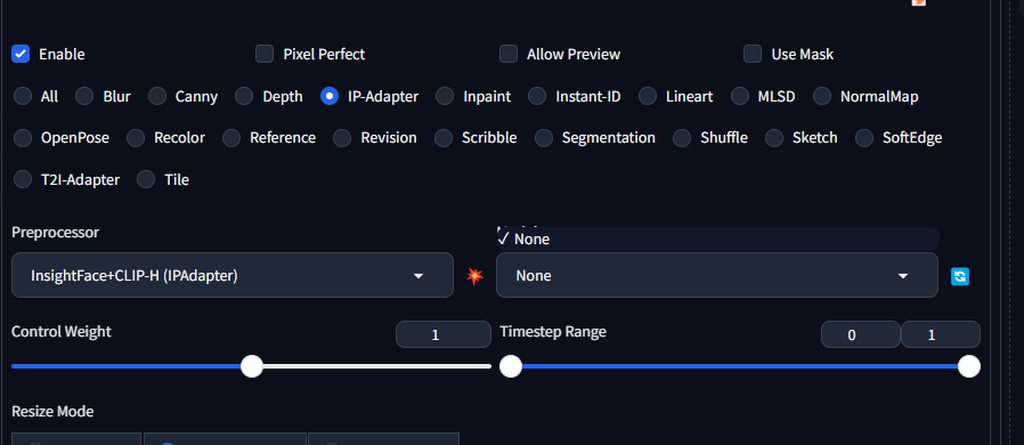 solemn moon
fierce hollow
Why don't I have models displayed ?
https://imgur.com/a/yUhzh0H
solemn moon
fierce hollow
Why don't I have models displayed ?
https://imgur.com/a/yUhzh0H
What UI is this?
fierce hollow
solemn moon
What UI is this?
That's all there is to Forge....
solemn moon
fierce hollow
That's all there is to Forge....
Did you change your .bat file by setting the home folder?
fierce hollow
solemn moon
Did you change your .bat file by setting the home folder?
Sorry, I'm not a neural network expert like you, which file with .bat resolution are you talking about ? The one I turn on to use the neural network?
solemn moon
fierce hollow
Sorry, I'm not a neural network expert like you, which file with .bat resolution...
I’m no expert, you have to download models and put them into the models folder
fierce hollow
solemn moon
I’m no expert, you have to download models and put them into the models folder
Check out the link - I did, there are two images in the link.....
solemn moon
fierce hollow
Check out the link - I did, there are two images in the link.....
I missed that 😅
Maybe copy pasta your log from the command prompt so people can better see what’s going on 🫶
fierce hollow
solemn moon
I missed that 😅
Maybe copy pasta your log from the command prompt so people can...
How do I do that? You mean this?
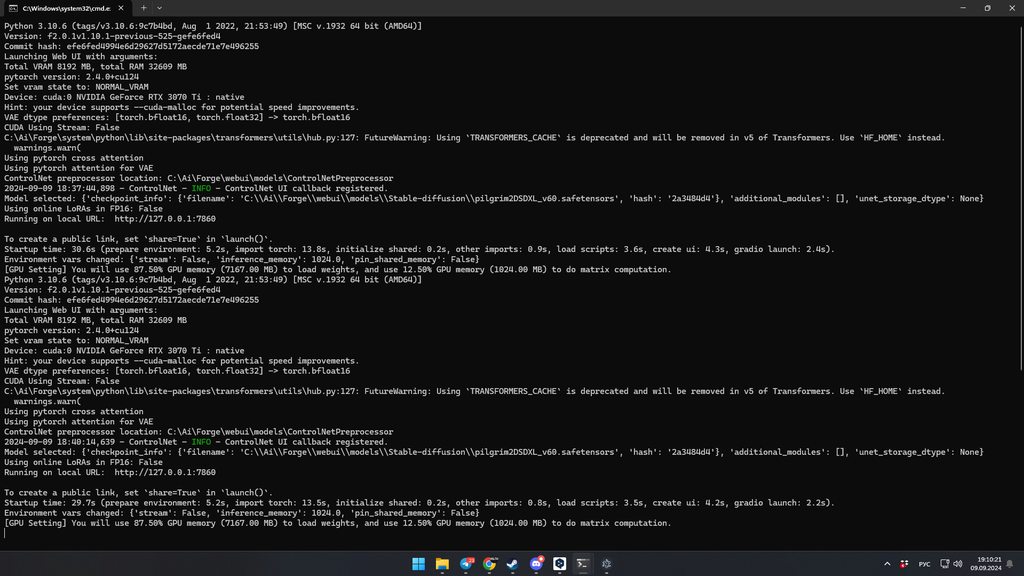 solemn moon
Yea copy all of that and post it here
fierce hollow
Python 3.10.6 (tags/v3.10.6:9c7b4bd, Aug  1 2022, 21:53:49) [MSC v.1932 64 bit (AMD64)]
Version: f2.0.1v1.10.1-previous-525-gefe6fed4
Commit hash: efe6fed4994e6d29627d5172aecde71e7e496255
Launching Web UI with arguments:
Total VRAM 8192 MB, total RAM 32609 MB
pytorch version: 2.4.0+cu124
Set vram state to: NORMAL_VRAM
Device: cuda:0 NVIDIA GeForce RTX 3070 Ti : native
Hint: your device supports --cuda-malloc for potential speed improvements.
VAE dtype preferences: [torch.bfloat16, torch.float32] -> torch.bfloat16
CUDA Using Stream: False
C:\Ai\Forge\system\python\lib\site-packages\transformers\utils\hub.py:127: FutureWarning: Using `TRANSFORMERS_CACHE` is deprecated and will be removed in v5 of Transformers. Use `HF_HOME` instead.
  warnings.warn(
Using pytorch cross attention
Using pytorch attention for VAE
ControlNet preprocessor location: C:\Ai\Forge\webui\models\ControlNetPreprocessor
2024-09-09 18:37:44,898 - ControlNet - INFO - ControlNet UI callback registered.
Model selected: {'checkpoint_info': {'filename': 'C:\\Ai\\Forge\\webui\\models\\Stable-diffusion\\pilgrim2DSDXL_v60.safetensors', 'hash': '2a3484d4'}, 'additional_modules': [], 'unet_storage_dtype': None}
Using online LoRAs in FP16: False
Running on local URL:  http://127.0.0.1:7860
To create a public link, set `share=True` in `launch()`.
Startup time: 30.6s (prepare environment: 5.2s, import torch: 13.8s, initialize shared: 0.2s, other imports: 0.9s, load scripts: 3.6s, create ui: 4.3s, gradio launch: 2.4s).
Environment vars changed: {'stream': False, 'inference_memory': 1024.0, 'pin_shared_memory': False}
[GPU Setting] You will use 87.50% GPU memory (7167.00 MB) to load weights, and use 12.50% GPU memory (1024.00 MB) to do matrix computation.
Python 3.10.6 (tags/v3.10.6:9c7b4bd, Aug  1 2022, 21:53:49) [MSC v.1932 64 bit (AMD64)]
Version: f2.0.1v1.10.1-previous-525-gefe6fed4
Commit hash: efe6fed4994e6d29627d5172aecde71e7e496255
Launching Web UI with arguments:
Total VRAM 8192 MB, total RAM 32609 MB
pytorch version: 2.4.0+cu124
Set vram state to: NORMAL_VRAM
Device: cuda:0 NVIDIA GeForce RTX 3070 Ti : native
Hint: your device supports --cuda-malloc for potential speed improvements.
VAE dtype preferences: [torch.bfloat16, torch.float32] -> torch.bfloat16
CUDA Using Stream: False
C:\Ai\Forge\system\python\lib\site-packages\transformers\utils\hub.py:127: FutureWarning: Using `TRANSFORMERS_CACHE` is deprecated and will be removed in v5 of Transformers. Use `HF_HOME` instead.
  warnings.warn(
Using pytorch cross attention
Using pytorch attention for VAE
ControlNet preprocessor location: C:\Ai\Forge\webui\models\ControlNetPreprocessor
2024-09-09 18:40:14,639 - ControlNet - INFO - ControlNet UI callback registered.
Model selected: {'checkpoint_info': {'filename': 'C:\\Ai\\Forge\\webui\\models\\Stable-diffusion\\pilgrim2DSDXL_v60.safetensors', 'hash': '2a3484d4'}, 'additional_modules': [], 'unet_storage_dtype': None}
Using online LoRAs in FP16: False
Running on local URL:  http://127.0.0.1:7860 ```
To create a public link, set `share=True` in `launch()`.
Startup time: 29.7s (prepare environment: 5.2s, import torch: 13.5s, initialize shared: 0.2s, other imports: 0.8s, load scripts: 3.5s, create ui: 4.2s, gradio launch: 2.2s).
Environment vars changed: {'stream': False, 'inference_memory': 1024.0, 'pin_shared_memory': False}
[GPU Setting] You will use 87.50% GPU memory (7167.00 MB) to load weights, and use 12.50% GPU memory (1024.00 MB) to do matrix computation.```@fierce hollow did you restart since you put the models in the folder?
fierce hollow
solemn moon
<@353846821036228610> did you restart since you put the models in the folder?
Yes
solemn moon
I’m new to forge, and I’m not sure what’s what just yet, hopefully someone can help 🫶
 loud pond
how do i make a lora?
 lament fog
wet flame
is flux really good will work on 16 gb vram gpu?
lament fog
wet flame
is flux really good will work on 16 gb vram gpu?
yes, I had a 16g card and even the full 16bit dev model worked for me, but there are other options if you want to reduce your vram. there's fp8 models, NF4 models and gguf models now that can run on even less vram. you can research these to see what is the best fit for you, but the main point is yes, you'll have no trouble running flux.
ruby yoke
loud pond
how do i make a lora?
simple answer - you assemble a collection of images, assign captions to each one, then use a lora trainer to create with. longer answer - you should probalby watch some youtube videos on how to create loras as it's a somewhat complicated process when you're first getting started
loud pond
ruby yoke
simple answer - you assemble a collection of images, assign captions to each one...
Alright, got any suggestions of vids to watch?
ruby yoke
loud pond
Alright, got any suggestions of vids to watch?
olivio has a couple on his channel, along with a lot of other good tutorials https://www.youtube.com/@OlivioSarikas/videos

YouTube
Olivio Sarikas, an AI Expert and passionate Artist, invites you to explore the exciting world of AI art. Join live streams to turn your creative visions into reality. Let's create together! 🎨🤖🚀
Olivio Sarikas is a professional Designer from Vienna Austria, a passionate Artist for over 26 years. He studied at the University for Fine Arts in Vien...
loud pond
ruby yoke
olivio has a couple on his channel, along with a lot of other good tutorials htt...
thanks ill give it watch
fierce hollow
I want to do face replacement in cartoon style using ContolNet, installed a clean version of SD, threw a few models.
What could be the problem, please help
P.S, open the link there are a lot of pictures.
https://imgur.com/a/m2UGpAa
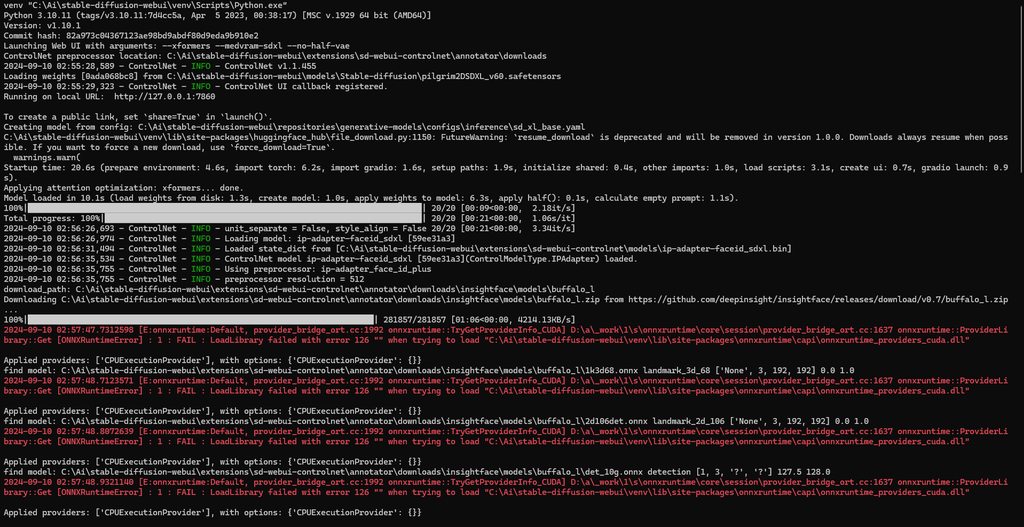
 spare wigeon
Hello, there's a problem im currently facing. Yesterday and the day before, I could generate a picture rather quickly (about 30s). But today, it's been 10 minutes and it's still saying [99% ETA:5s] and the time keeps going up. And when it gets stuck at 99%, my computer is slowed down like hell 😦
ornate elk
spare wigeon
Hello, there's a problem im currently facing. Yesterday and the day before, I co...
Hey, what txt2img settings do you use?
 buoyant sierra
Recently I've used this service and impressed by AI engine.
https://www.nterview.me/
https://www.youtube.com/watch?v=AfDn_Esqgg8
All for Your Interviews: Generation, Preparation, Assistance and Feedback

Not for interviewers, but interviewees. Your hidden AI copilot for a dream job.
spare wigeon
ornate elk
Hey, what txt2img settings do you use?
teps: 40, Sampler: Euler a, Schedule type: Automatic, CFG scale: 7, Seed: 883947904, Size: 768x1152, Denoising strength: 0.4, Clip skip: 2, Hires upscale: 2, Hires upscaler
ornate elk
spare wigeon
teps: 40, Sampler: Euler a, Schedule type: Automatic, CFG scale: 7, Seed: 883947...
Ah you used hires fix.
Always keep the hires steps at 10 or Max 15 or you will get that freez.
Because hires steps on 0 = the amount of normal steps on top.
spare wigeon
ornate elk
Ah you used hires fix.
Always keep the hires steps at 10 or Max 15 or you will g...
Thanks! So this -> Hires upscale: 10?
fair oxide
im using forge all of the images are being put in temp gradio how do i stop it from doing that? i just want it to go in my temp folder not in to gradio
ornate elk
spare wigeon
Thanks! So this -> Hires upscale: 10?
Hires Steps: 10
Hires Upscale by 2x
 vague surge
how do I fix this I alreeady did the upcast setting
 ornate elk
vague surge
how do I fix this I alreeady did the upcast setting
ornate elk
vague surge
how do I fix this I alreeady did the upcast setting
What's your model?
 vocal burrow
and gpu ?
 thorn pendant
i tried fix hand with impainting but smh it not work, anyone can help?
 ornate elk
thorn pendant
i tried fix hand with impainting but smh it not work, anyone can help?
ornate elk
thorn pendant
i tried fix hand with impainting but smh it not work, anyone can help?
What's your denois?
thorn pendant
denois?
ornate elk
thorn pendant
og img have 0.45
Try lower it
 hazy wigeon
getting this error at the Apply Controlnet (Advanced) node

 thorn pendant
ornate elk
Try lower it
thorn pendant
ornate elk
Try lower it
i/m ussing controlnet too, is that ok sir?
ornate elk
thorn pendant
i/m ussing controlnet too, is that ok sir?
for inpainting?
thorn pendant
yes sir
ornate elk
only if you use the inpaint controlnet model
hazy wigeon
hazy wigeon
getting this error at the Apply Controlnet (Advanced) node
here's the log
 thorn pendant
ornate elk
only if you use the inpaint controlnet model
thorn pendant
ornate elk
only if you use the inpaint controlnet model
is that right sir
 ornate elk
thorn pendant
is that right sir
ornate elk
thorn pendant
is that right sir
i thought you wanted to use inpaint
you have to disable controlnet to use inpaint when you mask here hands
thorn pendant
i i just don't know what to do 😢
thorn pendant
ornate elk
i thought you wanted to use inpaint
omg i didn't know that
ornate elk
thorn pendant
omg i didn't know that
ypi have to mask her hands, then set inpaint area to "mask only"
then prompt for hands, perfect hands, etc
start with denois 0.5 and adjust if its not good
thorn pendant
ornate elk
ypi have to mask her hands, then set inpaint area to "mask only"
do i must use adetailer?
ornate elk
thorn pendant
do i must use adetailer?
no
thorn pendant
ornate elk
no
ty sir, it's better now ❤️
thorn pendant
ornate elk
no
so i can use impainting or controlnet right? and iff yes then what's better sir?
solemn moon
inpaint is painting in, control net is controlling what to paint, then you get a controlnet inpaint model..
omg so confused
thorn pendant
solemn moon
inpaint is painting in, control net is controlling what to paint, then you get a...
so i can use one of them to make better hand?
solemn moon
i use img to img w/ inpaint and control
thorn pendant
solemn moon
i use img to img w/ inpaint and control
both at same time?
 alpine wasp
Hello everyone, I'm having quite some trouble here figuring out what's wrong, so i'm using automatic1111 and webui for it, and when i try to switch to a model i recently downloaded it switches back to the old model and the console gives me this
 ornate elk
alpine wasp
Hello everyone, I'm having quite some trouble here figuring out what's wrong, so...
ornate elk
alpine wasp
Hello everyone, I'm having quite some trouble here figuring out what's wrong, so...
Hey, What's the model and what's your GPU?
solemn moon
thorn pendant
both at same time?
Yea but I’m talking 1.5
hazy wigeon
Hi I'm getting an error at the Apply Contronet (Advanced) node. Here's the logs, I'm also using PonyXL checkpoint with controlnetxlCNXL_bdsqlszLineart


 proud lion
This is preventing me from generating images in the browser, it doesn't allow me to generate any images
 ornate elk
proud lion
This is preventing me from generating images in the browser, it doesn't allow me...
ornate elk
proud lion
This is preventing me from generating images in the browser, it doesn't allow me...
Hey, you need to download a checkpoint from civitai.com
Then place it into models/stable-diffusion
proud lion
ornate elk
Hey, you need to download a checkpoint from civitai.com
I'll try soon, thx
 little bough
Hi, does anyone know the route cause of this controlnet error, it won't load anymore for me in a1111, forge or reforge, in the forges it won't stay in enabled in ext settings but it is enabled in a1111 and the error remains. ControlNet preprocessor location: C:\A1111\stable-diffusion-webui\extensions\sd-webui-controlnet\annotator\downloads
*** Error loading script: controlnet.py
Traceback (most recent call last):
File "C:\A1111\stable-diffusion-webui\modules\scripts.py", line 515, in load_scripts
script_module = script_loading.load_module(scriptfile.path)
File "C:\A1111\stable-diffusion-webui\modules\script_loading.py", line 13, in load_module
module_spec.loader.exec_module(module)
File "<frozen importlib._bootstrap_external>", line 883, in exec_module
File "<frozen importlib._bootstrap>", line 241, in _call_with_frames_removed
File "C:\A1111\stable-diffusion-webui\extensions\sd-webui-controlnet\scripts\controlnet.py", line 101, in <module>
global_state.update_cn_models()
File "C:\A1111\stable-diffusion-webui\extensions\sd-webui-controlnet\scripts\global_state.py", line 76, in update_cn_models
found = get_all_models(sort_by, filter_by, path)
File "C:\A1111\stable-diffusion-webui\extensions\sd-webui-controlnet\scripts\global_state.py", line 43, in get_all_models
fileinfos = traverse_all_files(path, [])
File "C:\A1111\stable-diffusion-webui\extensions\sd-webui-controlnet\scripts\global_state.py", line 27, in traverse_all_files
f_list = [
File "C:\A1111\stable-diffusion-webui\extensions\sd-webui-controlnet\scripts\global_state.py", line 28, in <listcomp>
(os.path.join(curr_path, entry.name), entry.stat())
FileNotFoundError: [WinError 3] The system cannot find the path specified: 'C:\A1111\stable-diffusion-webui\models\ControlNet\control_v11e_sd15_ip2p.pth'
Not sure what's going on, it started not working in the forges last month after I updated them to try flux and i hadn't updated a1111 in a good while where it worked before and it isn't working either
 vast pulsar
ornate elk
Hey, you need to download a checkpoint from civitai.com
vast pulsar
ornate elk
Hey, you need to download a checkpoint from civitai.com
bro, pllls tell me wtf denoising does, i've been always using that on 0,55 cuz... just following examples lol
ornate elk
vast pulsar
bro, pllls tell me wtf denoising does, i've been always using that on 0,55 cuz.....
Denois means "how much should the output change from the input"
Its important for upscaling to not set it to high
Mostly between 0.35 and 0.5 is good, depending on the upscaler
 tulip violet
people i become mad... i got currently on ksampler and also ultimate sd upscaler the error " ComfyUI Error Report
Error Details
Node Type: UltimateSDUpscale
Exception Type: AttributeError
Exception Message: 'NoneType' object has no attribute 'model_options'
Stack Trace" and i cant find anything about that error in the hole internet... can anybody help?
ornate elk
tulip violet
people i become mad... i got currently on ksampler and also ultimate sd upscaler...
Best would be to ask on #🧣|comfy-ui too
ornate elk
little bough
Not sure what's going on, it started not working in the forges last month after ...
Have you updated controlnet extension too after updated auto ?
tulip violet
maybe not 🙂 i will try thx
but it is a flux workflow without controllnet

Flux NF4 Upscale tutorial guide https://www.patreon.com/posts/110081967
Chat with me in our community discord: https://discord.gg/dFB7zuXyFY
Stable Diffusion for Beginners Playlist https://www.youtube.com/playlist?list=PLXS4AwfYDUi5sbsxZmDQWxOQTml9Uqyd2
My Weekly AI Art Challenges https://www.youtube.com/playlist?list=PLXS4AwfYDUi7RvFm4K6lKBH_...
 serene basin
How do people train Loras with multiple people's faces and actually have it generate different unique faces instead of basically one "averaged" face over and over? Do I have to caption each feature of each person's face?
ruby yoke
serene basin
How do people train Loras with multiple people's faces and actually have it gene...
i didn't. i didn't even caption the ones I created, I just let the trainer i was using do that.
serene basin
Oh with an auto captioner? I manually caption all of mine but if I wanted to train a "handsome man", and one guy had a big nose, one a small, one a square jaw, one narrow eyes, etc, what I'd be able to generate would be basically one face that looked like an average of all of them. Driving me nuts, really don't want to have to caption every lasat feature.
which i would think would erase the qualities of the face anyway. I've tried just captioning "handsome face" for example, but it makes no difference
I'm assuming you mean something like BLIP. My Loras got much better when I switched to manual caps
little bough
ornate elk
Have you updated controlnet extension too after updated auto ?
yup, updated on all of them same error.. A google search for the error brought me this but it's talking about FastSD from thelastben...
Is it possible this command could save me? the issue is I enter it into command prompt in the venv folder and the command is invalid, I feel like I'm missing something.. any ideas?
Thanks

I've just tried disabling all other extensions other than controlnet and it still doesn't work, I thought maybe there was a clash
steady thistle
Ack, I just tried to install ComfyUI-AnimateAnyone-Evolved through the Manager and now ComfyUI fails to launch. I restarted but no good.
ornate elk
little bough
I've just tried disabling all other extensions other than controlnet and it stil...
You can try to reinstall Controlnet
ornate elk
steady thistle
Ack, I just tried to install ComfyUI-AnimateAnyone-Evolved through the Manager a...
Comfyui is so easy to break because it doesn't use a venv
steady thistle
ornate elk
Comfyui is so easy to break because it doesn't use a venv
Hmm, dang. Perhaps I can backtrack by removing whatever was installed with animateanyone
ornate elk
steady thistle
Hmm, dang. Perhaps I can backtrack by removing whatever was installed with anima...
Or you can use my Comfyui start bat, modify it and then youll get a venv
steady thistle
ornate elk
Or you can use my Comfyui start bat, modify it and then youll get a venv
Oh, yeah, that would be great. I can find that .bat in the install guide?
ornate elk
steady thistle
Oh, yeah, that would be great. I can find that .bat in the install guide?
You can define which torch version it should use in the bat.
Default is 2.3.0
steady thistle
Should I use that as the default startup?
ornate elk
Yep, put that into the comfyui folder
And then it will create a venv
So if anything breaks you can easily delete it and relaunch
Like with auto1111
steady thistle
Okay, the root folder where the "run_nvidia_gpu.bat" is I take it
steady thistle
Okay, I have the comyui_windows_portable folder and a Comfyui folder below that. I'm starting with the top one, but I'll just fix if that's wrong
ornate elk
steady thistle
Okay, I have the comyui_windows_portable folder and a Comfyui folder below that....
Then it goes into the second folder
That only is called comfyui
steady thistle
Oh, oops. After download I'll drag it down one, or do I need to restart?
ornate elk
Drag it down
steady thistle
Cool
ornate elk
And then launch
steady thistle
Yep, will do! Crossing fingers but I was really surprised at this.
ornate elk
Delete the old venv if it has created one in the top folder before
steady thistle
This is my first venv with ComfyUI.
Random question tho, is Flux worth the 20+ gig download if one likes realism?
ornate elk
steady thistle
Random question tho, is Flux worth the 20+ gig download if one likes realism?
Go for the nf4 model or the fp8 dev model. These are 12gb
steady thistle
Okay, I've seen those. I have a 4070 Ti Super with 16 vram and 32 onboard ram
ornate elk
I think flux is good with realism
ornate elk
steady thistle
Okay, I've seen those. I have a 4070 Ti Super with 16 vram and 32 onboard ram
Should work good
steady thistle
And I want the best results I can get, I don't mind the big DL if it's worth it
ruby yoke
steady thistle
Random question tho, is Flux worth the 20+ gig download if one likes realism?
it was for me - i'm using the fp16 model downloaded from bfl's hugging face
steady thistle
Good, I'm excited about that
ornate elk
steady thistle
And I want the best results I can get, I don't mind the big DL if it's worth it
I think its not worth using the 23gb model over the nf4 or the 12gb version. You can still use the clip t5 fp16 text encoder if you want
steady thistle
Is there any install guide for it? I thought it was pretty straightforward but wasn't sure
ornate elk
steady thistle
Is there any install guide for it? I thought it was pretty straightforward but w...
Here is a good info:
https://comfyanonymous.github.io/ComfyUI_examples/flux/
steady thistle
Thanks!
Gah, that didn't work. I moved venv down a level and ran the startup bat again and it just went poof too fast to read.
Activating virtual environment...
Running main.py with --auto-launch argument...
[START] Security scan
[DONE] Security scan
ComfyUI-Manager: installing dependencies done.
** ComfyUI startup time: 2024-09-11 16:03:44.519863
** Platform: Windows
** Python version: 3.10.11 (tags/v3.10.11:7d4cc5a, Apr 5 2023, 00:38:17) [MSC v.1929 64 bit (AMD64)]
** Python executable: C:\Users\alton\AppData\Local\Programs\Python\Python310\python.exe
** ComfyUI Path: D:\Ai\ComfyUI_windows_portable\ComfyUI
** Log path: D:\Ai\ComfyUI_windows_portable\ComfyUI\comfyui.log
Prestartup times for custom nodes:
0.5 seconds: D:\Ai\ComfyUI_windows_portable\ComfyUI\custom_nodes\ComfyUI-Manager
Traceback (most recent call last):
File "D:\Ai\ComfyUI_windows_portable\ComfyUI\main.py", line 88, in <module>
import comfy.utils
File "D:\Ai\ComfyUI_windows_portable\ComfyUI\comfy\utils.py", line 20, in <module>
import torch
ModuleNotFoundError: No module named 'torch'
Deactivating virtual environment...
'deactivate' is not recognized as an internal or external command,
operable program or batch file.
Press any key to continue . . .
I added 'pause' and this is what I got
ornate elk
steady thistle
Gah, that didn't work. I moved venv down a level and ran the startup bat again a...
Delete the venv as I said before
Then relaunch
steady thistle
Oh sorry, thought you meant from the upper folder
ornate elk
It searches for the requirements text file that is only in the comfyui folder
little bough
ornate elk
You can try to reinstall Controlnet
tried, still doesn't work, same error lol. very bizarre, found a few people having the issue on the controlnet github so will have to wait for an official response, only some seem to have this issue, do you think it could be a torch/python issue?
ornate elk
little bough
tried, still doesn't work, same error lol. very bizarre, found a few people havi...
What's your torch and python version?
little bough
ornate elk
What's your torch and python version?
how can i check what version of torch? python is 3.10.9
ornate elk
little bough
how can i check what version of torch? python is 3.10.9
It should show at the bottom of the webui in browser
little bough
ornate elk
It should show at the bottom of the webui in browser
ah nice for a1111 its

nothing out of the ordinary, right?
ornate elk
thats an old torch version
little bough
oh
ornate elk
little bough
oh
Open up a CMD.
Type
Pip cache purge
Then delete the venv folder
Then relaunch the webui-user.bat
little bough
all a1111, forge, reforge assuming i am installing them all seperately as i do, dont interact with each other at all, right? (aside from sharing the same overall version of python that i am using? ) so if i updated forge for example it shouldn't have messed with my a1111 and reforge, right?
steady thistle
ornate elk
It searches for the requirements text file that is only in the comfyui folder
It started up again, so that did work. Previously working nodes are now red as if not installed. I'll restart my PC and see if that takes care of it and otherwise I'll try to uninstall and reinstall the nodes. After that, we'll just go from there.
ornate elk
steady thistle
It started up again, so that did work. Previously working nodes are now red as i...
Alright 👍
Yea it could be that the nodes need a reinstall
If they place stuff into the venv
ornate elk
little bough
all a1111, forge, reforge assuming i am installing them all seperately as i do, ...
Yes. They use their own venv
So only python is shared, but that doesn't mess up
little bough
ornate elk
So only python is shared, but that doesn't mess up
ok thats what i thought, just checking.. i am installing again but notice when its downloading, isn't this the same version of torch it is downloading?
 ornate elk
little bough
ok thats what i thought, just checking.. i am installing again but notice when i...
ornate elk
little bough
ok thats what i thought, just checking.. i am installing again but notice when i...
Yep that's the old version lol
That shouldn't happen
little bough
lol damn
maybe ill try a fresh install of a1111 then?
not sure if that will make any difference though
ornate elk
Could help yes. But then run the pip cache purge command again before doing it
That ensures nothing old stays in the python cache
little bough
ok, when wiping the python cache is that the python cache globally or just for that install that i run it in
ornate elk
Globaly
If you want you can also update your python to 3.10.11
Thats the latest 3.10 python version
little bough
ye i was thinking maybe its time to update.. wasn't there a reason to not update to .11 before?
ornate elk
Nope
little bough
i think last year at least, something didn't work with it and it wasn't recommend to update
hmm ok
little bough
yeah thats it
so can i safely just install 3.10.11 and it it will override 3.10.09 or are there any caveats? i dont want to break anything more lol
ornate elk
little bough
so can i safely just install 3.10.11 and it it will override 3.10.09 or are ther...
Yep its just an overwrite
Like a small update
little bough
ok thanks
ornate elk
No problem
steady thistle
ornate elk
Alright 👍
Okay, I tried to redo some nodes and I think it included AnimateAnything, and it's crashing again immediately, however, the bat screen vanishes too fast to read and I don't know where to put the 'pause' command
ornate elk
steady thistle
Okay, I tried to redo some nodes and I think it included AnimateAnything, and it...
Then you can delete the node and the venv folder and it should work again
Without downloading because its cached
steady thistle
Okay, going to delete the node, but I need to delete venv as well? Does that mean I go back to the other bat?
ornate elk
steady thistle
Okay, going to delete the node, but I need to delete venv as well? Does that mea...
You can try run the "run nvidia bat" but I dont know if it will work again.
steady thistle
Nope, didn't work. Deleting venv and then it'll rebuild venv again, right?
ornate elk
Yes
steady thistle
Got it
ornate elk
Thats the trick if something breaks
steady thistle
Ah, yeah, rebuild the venv without the culprit
Okay, that got me back into ComfyUI! Walking away from AnimateAnything and see if AnimateDiff with some controlnet will work for me.
ornate elk
Alright 👍 maybe animate anything just needs some fixes xD
 mighty mortar
hey can anyone help me using stable diffusion for the first time? im on a macbook pro 14" 2022 model with 16gb of ram. i have python installed and my application is image to video. when i go to hugging face, i cant find a model to download. do i need to download another model and then install this as an add on? if someone knows of the best resoucrces and videos to help me with broader subjects, please let me know! thanks!
ruby yoke
mighty mortar
hey can anyone help me using stable diffusion for the first time? im on a macboo...
where on huggingface are you going? what model are you wanting to use?
 rain vessel
Hi, I've subscribed to the standard plan, but still unable to use Stable Assistant:

when subscirbing, I've used my current email (@yahoo) but, I might have used a @gmail account in the past to log into Stable Ai.
- when going into the account details under stable assistant I see the yahoo (good) account
- when I click and use the Feedback form on the website, it shows me the gmail (bad) account when submitting my message
I have the feeling, dispite showing yahoo as the account for the standard subscription, Stable Ai still having my old gmail under the hood somewhere
Could anyone please help me? Thanks!
little bough
ornate elk
Yep its just an overwrite
hi, so i created a new install for a1111 using stability matrix and the same controlnet error occurs, same old version of torch too but i forget to wipe the cache again.. Stability Matrix has a way to see and modify python packages, so I can update torch from the list I think, what version of torch should I go for? Thanks
 ornate elk
little bough
hi, so i created a new install for a1111 using stability matrix and the same con...
ornate elk
little bough
hi, so i created a new install for a1111 using stability matrix and the same con...
Hey, torch 2.3.1 is good to go for
little bough
ornate elk
Hey, torch 2.3.1 is good to go for
ok... i selected 2.3.1 but for some reason it installed 2.4.1, i then downgraded to 2.3.1 and loaded it up now i get

any ideas? lol nightmare
ornate elk
little bough
any ideas? lol nightmare
Hmm strange
Make sure your GPU driver is updated
Then maybe delete the venv folder and relaunch
little bough
ornate elk
Make sure your GPU driver is updated
ye just updated that earlier today and i just deleted the venv and tried reinstalling, it immediately tries to install torch 2.1.2 again lmao
I guess it is the A1111 dev i should ask
thanks for your help anyway, much appreciated
ornate elk
little bough
ye just updated that earlier today and i just deleted the venv and tried reinsta...
Thats really strange. What GPU do you use?
 obtuse drift
Is 65,9s/it fast enough for a AMD 6700xt with 12gb combined with a i5-14600? Could i improve the speed with some tweaks?
 little bough
ornate elk
Thats really strange. What GPU do you use?
little bough
ornate elk
Thats really strange. What GPU do you use?
3070ti
ornate elk
little bough
3070ti
That should be supported by any new torch version.
What you could try is to install the webui not with stability but with my guide from the pinned messages
But you need to do a
Pip cache purge
In a CMD before
obtuse drift
that are my my settings ...
 ornate elk
obtuse drift
Is 65,9s/it fast enough for a AMD 6700xt with 12gb combined with a i5-14600? Cou...
ornate elk
obtuse drift
Is 65,9s/it fast enough for a AMD 6700xt with 12gb combined with a i5-14600? Cou...
Hey, your not using your GPU power with this setup.
For AMD you need a specific version of the webui, compatible with AMD.
Checkout my AMD Guides for the setup with the best performance/usage on windows:
AMD Automatic1111 with ZLUDA:
https://github.com/CS1o/Stable-Diffusion-Info/wiki/Installation-Guides
You should then get 2-3 (or 3-4) it/s and not s/it
For any questions feel free to ask me 🙂
obtuse drift
wow and thx. I will check 🙂
 tulip field
Hiring someone that can reduce the AI detection % of some AI photos by using several techniques


 ornate elk
obtuse drift
Is this right? i am unsure ...
ornate elk
obtuse drift
Is this right? i am unsure ...
Nope thats wrong
Delete that entry
You have to click on the Path entry and then Edit
Also not on HIP_Path.
Only "Path" is the right one
obtuse drift
this ok?

 obtuse drift
perhaps i accidently deleted some windows standart settings?
 ornate elk
obtuse drift
perhaps i accidently deleted some windows standart settings?
ornate elk
obtuse drift
perhaps i accidently deleted some windows standart settings?
You may did
You should put these 4 variables at the top again

Only the 4 top ones starting with %
And then the zluda folder and the hip path
obtuse drift
thanks for your help, windows restart as usual ... and i needed to reinstall phyton and git
 ornate elk
Alright good
You now need to download a checkpoint, because the webui doesn't ship the 1.5 model anymore
I need to update my guide on that, but you can just download for example Dreamshaper v8 and put it into the models/stable-diffusion folder.
https://civitai.com/models/4384/dreamshaper
Or any other model you like. It just needs to be at least 2gb in size
obtuse drift
ok, thx i downloaded
than it say i have two tensor devices ... How to select AMD GPU and not INTEL onboardGPU?

or could i use both together?
i try to put wrapper_CUDA__index_select into arguments
How to put in this argument for selecting my AMD gpu?
set COMMANDLINE_ARGS= --use-zluda --update-check --skip-ort --wrapper_CUDA__index_select
ornate elk
obtuse drift
How to put in this argument for selecting my AMD gpu?
set COMMANDLINE_ARGS= --...
You don't need that argument
Try deleting the venv folder and relaunch the webui-user.bat
If you still get an error, copy the full cmd log in here
obtuse drift
kk
another question about where to put Optimised_ROCmLibs_gfx1031.7z, in 5.7 or 6.1 Folder?
 ornate elk
obtuse drift
another question about where to put Optimised_ROCmLibs_gfx1031.7z, in 5.7 or 6.1...
ornate elk
obtuse drift
another question about where to put Optimised_ROCmLibs_gfx1031.7z, in 5.7 or 6.1...
In the 5.7 folder
obtuse drift
ok
ornate elk
If you installed hip SDK 5.7
obtuse drift
i installed both
obtuse drift
okok i see %)
ornate elk
So you can uninstall 6.1
But I will update my guide in a few days for older GPUs to work with 6.1 too
obtuse drift
thanks for your effor 💝
ornate elk
No problem
obtuse drift
i think i need to redo everything from beginning. .. %)
ornate elk
Oh okay
obtuse drift
it dont want to work ...

 ornate elk
Thats ok
Read the last line of the guide
First image will take 15-40 minutes
Only for the first time
After that its fast
obtuse drift
ok, i was irritated because there are no messages in the gui or cmd that say it is working ....
ok thx
ornate elk
obtuse drift
ok, i was irritated because there are no messages in the gui or cmd that say it ...
Yea it will load and then it will show something in the next 15-40 minutes
If the generate button is grayed out and the last line in cmd is the dogetexx, its working.
obtuse drift
ok thx, i wait than 🙂
ornate elk
No problem, let me know if it worked 🙂
obtuse drift
its working now 🥳
ornate elk
Perfect 🙂
 steady robin
hi i am struggling to generate images on dreamstudio
it's unworkably slow, any idea what's going on
 south vigil
Hey everyone! Is there a way to automate a list of character names through a specific part of a prompt in ComfyUI? To clarify, I have 20 characters, and I want to generate one pose for each. Since I'll be frequently changing the poses, I'm wondering if there's a way to automate inserting the character names into the text prompt node, rather than manually typing them each time. Any tips or workflows to streamline this process?
 obsidian carbon
Hiya
I trained a PONY lora and used some settings and when I try generating any epochs or weights, i am getting ONLY black images - any one ever have this?
 brittle lantern
forge with AMD i get this error i need fix
 ornate elk
brittle lantern
forge with AMD i get this error i need fix
ornate elk
brittle lantern
forge with AMD i get this error i need fix
you need to use the non gguf model
brittle lantern
ornate elk
you need to use the non gguf model
How? u downloaded the one of ur guide so i don't know how many diff versions there are
ornate elk
ornate elk
brittle lantern
How? u downloaded the one of ur guide so i don't know how many diff versions the...
my guide doesnt list any flux model
oh wait
brittle lantern
ornate elk
my guide doesnt list any flux model
So I have to download flux to get into the UI?
ornate elk
you get that error when launhcing ?
brittle lantern
ornate elk
you get that error when launhcing ?
Yes
brittle lantern
Ok
ornate elk
yep gettting the same error after updating
brittle lantern
ornate elk
yep gettting the same error after updating
Ah ok
I just kinda installed it just now
And got it so ill assume it's installed recent update
ornate elk
brittle lantern
And got it so ill assume it's installed recent update
i fixed it by going into forges folder. then clicking into the explorer bar
type cmd and hit enter
then run the following two commands one by one:
venv\Scripts\activate.bat
pip install gguf
brittle lantern
Done I now open it?
I also did the linking my stable diffusion folder for the models and nothing shows up now
In forge UI
ornate elk
brittle lantern
I also did the linking my stable diffusion folder for the models and nothing sho...
can you show me your webui-user.bat ?
brittle lantern
ornate elk
can you show me your webui-user.bat ?
 ornate elk
brittle lantern
ornate elk
brittle lantern
yea thats not correct, you have to remove the @worthy smelt
brittle lantern
ornate elk
can you show me your webui-user.bat ?
Ok
 brittle lantern
ornate elk
only remove the ones i did, not all
brittle lantern
ornate elk
only remove the ones i did, not all
It still doesn't show in models in forge
ornate elk
brittle lantern
It still doesn't show in models in forge
can you show it again? and did you relaunched?
brittle lantern
ornate elk
can you show it again? and did you relaunched?
i did relaunched
 ornate elk
brittle lantern
i did relaunched
ornate elk
brittle lantern
i did relaunched
you have to change the \ to / at your main path
obtuse drift
While rendering under windows my mouse curser hangs every ~12 seconds. Is there a tweak against?
ornate elk
obtuse drift
While rendering under windows my mouse curser hangs every ~12 seconds. Is there ...
make sure you dont run any games or heavy programms like wallpaper engine in the background
brittle lantern
ornate elk
you have to change the \ to / at your main path
like "D:/" instead of "D:\ "?
 fallen saddle
Hi there, does anyone have a good effective tutorial/guide link on how to improve performance on webui forge? Sorry if this is not the right place to ask, I'm new at this 😅
ornate elk
@obtuse drift if you still get lags you need to show me your txt2img settings
ornate elk
fallen saddle
Hi there, does anyone have a good effective tutorial/guide link on how to improv...
What's your GPU ?
And hey
fallen saddle
ornate elk
What's your GPU ?
NVIDIA GeForce GTX 1050 ti
obtuse drift
ornate elk
<@266630790803226624> if you still get lags you need to show me your txt2img set...
 ornate elk
obtuse drift
ornate elk
obtuse drift
Ohhh
You used batch size
Dont do that with sdxl
Only use batch count
obtuse drift
kk
ornate elk
Batch size means = generating images at the same time (needing a lot of vram)
Batch count means = generate one by one (no problem)
obtuse drift
ah, good to know, thx 👍
ornate elk
Np!
ornate elk
fallen saddle
NVIDIA GeForce GTX 1050 ti
Try enabling fp8 mode when using sdxl models.
and in the webui-user.bat add this at the commandline args: --cuda-malloc --cuda-stream --pin-shared-memory
that could help
 unreal anchor
did this but still got FileNotFoundError: No checkpoints found. When searching for checkpoints, looked at: - file "------------------------------------------------------------- - directory--------------------------------------------------diffusionCan't run without a checkpoint. Find and place a .ckpt or .safetensors file into any of those locations.
ornate elk
unreal anchor
did this but still got FileNotFoundError: No checkpoints found. When searching f...
can you show your webui-user.bat?
also try putting one model into models/stable-diffusion
unreal anchor
ornate elk
can you show your webui-user.bat?
@echo off

set PYTHON=C:\Users\Atanok\AppData\Local\Programs\Python\Python310\python.exe
set GIT=
set VENV_DIR=
set COMMANDLINE_ARGS=--xformers --no-half-vae --api
--models-dir "F:\Stable Diffusion Output Backup\models"

call webui.bat```It has to be in the same line with xformers to work
Not in a seperate row
ruby yoke
no hard line breaks in your bat file between command line arguments
unreal anchor
ornate elk
It has to be in the same line with xformers to work
Ohh
 burnt coyote
Hi folks, question: is there a "best practices" way to completely wipe everything to do with Stable Diffusion? A1111, ComfyUI, all the python, everything but the models? I've been doing this a long time relatively speaking, and my installs are increasingly messy and redundant, consuming a huge amount of drive space, and getting less and less stable and more prone to errors. I'm looking to start fresh.
ruby yoke
burnt coyote
Hi folks, question: is there a "best practices" way to completely wipe everythin...
you could do what purz does - install to a virtual environment, then just nuke that when you want a fresh install
burnt coyote
ruby yoke
you could do what purz does - install to a virtual environment, then just nuke t...
This is definitely what I want to do on the reinstall. Right now though I'm just trying to clean this up without nuking the drive itself, which is not an option.
ruby yoke
burnt coyote
This is definitely what I want to do on the reinstall. Right now though I'm just...
what I did was move my models to a different drive, uninstall python/cuda/etc - and just delete the folder that comfy is in
you don't have to worry about windows registry or anything
burnt coyote
Do python, cuda, etc uninstall cleanly? Or does it turn into a scavenger hunt across the hard drive for rogue files?
I've just discovered that I have no fewer than eight copies of diffusion_pytorch_model.bin, for example
ruby yoke
burnt coyote
I've just discovered that I have no fewer than *eight* copies of diffusion_pytor...
thats intresting. comfy uses an embedded version of python. not sure why you've got that many copies of it - maybe you've got other things that use their own embedded version
burnt coyote
Yeah, it turns out that doing this for this long, without starting with the knowledge of how to keep everything neat and tidy, leads to a lot of redundancy
Until quite recently I was under the impression that everything would share dependencies, realize that, for example, torch was installed and just... use it
instead of grabbing its own copy
But that is quite evidently not the case!
ornate elk
burnt coyote
Until quite recently I was under the impression that everything would share depe...
Open up a CMD and type
Pip cache purge
To get 5-10gb back.
That deletes the temp packages for stable diffusion installations.
ruby yoke
now if you knew how to switch the google drive cache file to a different drive other than C and specify how large IT should be ...
 young cipher
hey not sure if this is the right place but any ideas why this is happening? when i generate and image it goes from this during it, then the colours go weird?

 ruby yoke
young cipher
hey not sure if this is the right place but any ideas why this is happening? whe...
ruby yoke
young cipher
hey not sure if this is the right place but any ideas why this is happening? whe...
please explain what yo umean by the colors go wierd
young cipher
ruby yoke
please explain what yo umean by the colors go wierd
look at how the colours change
ruby yoke
young cipher
look at how the colours change
sure. the first one is a sketch, the last one is the refined verison.
young cipher
ruby yoke
sure. the first one is a sketch, the last one is the refined verison.
yeah im asking how to stop the colour change
ruby yoke
young cipher
yeah im asking how to stop the colour change
what nodes are in your workflow?
ornate elk
young cipher
hey not sure if this is the right place but any ideas why this is happening? whe...
Thats an VAE issue
You need to use a custom vae:
For example this:
https://civitai.com/models/23906/kl-f8-anime2-vae

I FINALLY UPDATE THE FILE! This file is VAE, it's one of the best so use it if you like! Many models here at Civitai use kl-f8-anime2.ckpt I upload...
 opaque viper
Question. I'm trying to use the fp8 flux-dev for the first time on Forge. And I got this error: linear(): argument 'weight' (position 2) must be Tensor, not NoneType
Any idea what's happening? I've previously used gguf no problem
ornate elk
opaque viper
Question. I'm trying to use the fp8 flux-dev for the first time on Forge. And I ...
Where did you used gguf?
opaque viper
On Forge
ornate elk
opaque viper
On Forge
And now which model gets the error?
 raw vessel
So looking for some help. I had SD on my PC for a long time. All the way up to 2.1 (or was it 2.2?) I used AUTO111 to run it. Well my drive died and its been a few months and I finally reinstalled everything. I got the SD3.0 checkpoint added...etc.
Problem is the only sampler that seems to work is the Heun (Heurn) one for generating anything. All the other samplers, no matter the size, CFG, steps...etc just give me super blurry colored blotches, sometimes ROUGHLY in the shape of what I asked.
Any idea what I did wrong? I even followed the directions here: https://github.com/AUTOMATIC1111/stable-diffusion-webui
I'm at a loss. I know LONG ago when SD first went public, like 0.5 version maybe? I had black squares at that tiem until someone helped me.
opaque viper
ornate elk
And now which model gets the error?
Sorry I'm so sporadic in respnding. The one giving me the error is the fp8 model
 karmic crown
raw vessel
So looking for some help. I had SD on my PC for a long time. All the way up to 2...
karmic crown
raw vessel
So looking for some help. I had SD on my PC for a long time. All the way up to 2...
find the guide for your GPU here
https://github.com/CS1o/Stable-Diffusion-Info/wiki/Installation-Guides
ornate elk
raw vessel
So looking for some help. I had SD on my PC for a long time. All the way up to 2...
Better use SDXL instead of SD3.
SD3 is not that good supported by auto1111
 last tide
Why did it fail to load ZLUDA?

And the model failed to load for some reason?

Clicked the button next to the Stable Diffusion checkpoint but sends a error aswell "Error completing request"
karmic crown
last tide
Why did it fail to load ZLUDA?

do you have rocm 6.1 installed and does that file exists?
karmic crown
open program files, then amd, than rcom.... and check if file is there
 karmic crown
go to bin
last tide
checking now
karmic crown
and see if you have that file, looks good so far

 last tide
correct
karmic crown
your installation is fine, something else is the problem
last tide
Yes thats the one i followed
"[AMD] Automatic1111 with ZLUDA"
i have a 7900 gre if that might be a problem
karmic crown
Add the C:\ZLUDA folder and %HIP_PATH%bin to your PATH in the System Variables.
last tide
I did
karmic crown
pleace check if you have it 2 times
last tide

 last tide
hmm, weird that it shows like that.
karmic crown
if it does not work, manualy edit to be correct, with one bin
 karmic crown
just meke it have one bin at the end 🙂
last tide
Looking good
 karmic crown
i would just remove venv
and let a1111 create it again
to be sure you have correct files there
karmic crown
it is posible that it alrady instaleld wrong torch (cpu only) and similar things
do you have any models already or this is your first install?
last tide
First install, just saw i had to download some models
karmic crown
ok
the default model that was downloaded was removed from huggingface
so, you will need to download some model manually
for example from civitai
Explore thousands of high-quality Stable Diffusion models, share your AI-generated art, and engage with a vibrant community of creators
for example https://civitai.com/models/4201

Recommendations for using the Hyper model: Sampler = DPM SDE++ Karras or another / 4-6+ steps CFG Scale = 1.5-2.0 ( the lower the value, the more m...
last tide
Anything worth knowing as of names or tags?
karmic crown
just be sure to foloow the instrauction of the author, which samplers to use
and check what they used in examples
last tide
Alright

 last tide
How long does it usually take for the webui to start?
karmic crown
show me what you have
last tide
 karmic crown
it probably downloading required python modules
hmm
have you stoped it, remove venv and rerun it?
last tide
yes i did
karmic crown
since i do not see any installation after run of venv
last tide
ill do it again, might fix it
karmic crown
close cmd completely
last tide
yep
karmic crown
CS1o any other thoughts?
last tide
Will do it in system variables
 last tide
Oh i see
ornate elk
There create the 2 new entrys
 karmic crown
and remove from the other place (i guess)
last tide
Already did :)
karmic crown
@ornate elk I hope you have seen this https://github.com/AUTOMATIC1111/stable-diffusion-webui/pull/16460
last tide
Its installing again so ill just wait untill something happens
ornate elk
karmic crown
<@161910921269084160> I hope you have seen this https://github.com/AUTOMATIC1111...
Yep
Thats good xD
karmic crown
so you are aware about the default model problem 🙂
no defult model - no bad images? 🙂
ornate elk
True xD
karmic crown
hahahaha
ornate elk
No more questions why the first image looks so bad
karmic crown
thats why forge does not use that one 🙂
oak jay
I finally managed to get Flux working using Forge, but, it's painfully slow, anything I can do to speed it up? I have a RTX 4080 GPU so shouldn't have an issue, and I don't with 1.5 and XL models.
ornate elk
oak jay
I finally managed to get Flux working using Forge, but, it's painfully slow, any...
You need to use the nf4 flux model
Thats the fastest you can get
ornate elk
last tide
Its installing again so ill just wait untill something happens
Let me know if it works
last tide
Will do!
oak jay
ornate elk
You need to use the nf4 flux model
Thanks, I'll try that, but, is there anything I can do in the settings to speed up the other models?
last tide
Looks like its working, gonna upload a model now and restart the ai
Can i find a place with the differences between each model? (codeformer, karlo, Lora, VAE, etc)
ornate elk
oak jay
Thanks, I'll try that, but, is there anything I can do in the settings to speed ...
Try enabling fp8 mode when using sdxl models.
and in the webui-user.bat add this at the commandline args: --cuda-malloc --cuda-stream --pin-shared-memory
that could help
oak jay
SDXL models are fine, I can create pictures really quickly, it's just on Flux models it's taking forever
ornate elk
oak jay
SDXL models are fine, I can create pictures really quickly, it's just on Flux mo...
Which checkpoint do you use?
How big is the size of it
karmic crown
last tide
Can i find a place with the differences between each model? (codeformer, karlo, ...
ask ChatGPT, i am not joking
4.o mini is good enough for things like this
but read this when you have time
https://stable-diffusion-art.com/lora/

LoRA models are small Stable Diffusion models that apply tiny changes to standard checkpoint models. They are usually 10 to 100 times smaller than checkpoint
oak jay
ornate elk
Which checkpoint do you use?
I've used flux_dev, fluxunchained-dev-q8-0, fuxCapacityNSFWFluxBaseModel, the bf16 and fp8 versions and jibmixflux_v10, all are taking about 20 mins for one image!
last tide
Also it looks like there are 99/100 anime models xDD
karmic crown
you can check https://stable-diffusion-art.com/ for some explanations, but as i said for a quick reference, just ask my friend chatgpt 🙂
last tide
Will do, reading it rn, looks interesting
ornate elk
oak jay
I've used flux_dev, fluxunchained-dev-q8-0, fuxCapacityNSFWFluxBaseModel, the bf...
thats definitly not normal
oak jay
ornate elk
thats definitly not normal
Yeah!
oak jay
ornate elk
thats definitly not normal
And, I'm getting this error at times too!!
last tide
Just curious, what are the regular times with a 4080?
ornate elk
oak jay
I've used flux_dev, fluxunchained-dev-q8-0, fuxCapacityNSFWFluxBaseModel, the bf...
can you show me the settings when using the flux fp8 16gb model?
oak jay
ornate elk
can you show me the settings when using the flux fp8 16gb model?
Is this what you mean?
 ornate elk
oak jay
Is this what you mean?
ornate elk
oak jay
Is this what you mean?
yes
ornate elk
oak jay
Is this what you mean?
when using any flux model above 12gb you dont need to use clip or vae and text encoder that will slow down
and then choose a resolution of 1024x1024 or smaller or a variant like 860x1200
oak jay
ornate elk
when using any flux model above 12gb you dont need to use clip or vae and text e...
Ok, I'll try and let you know
oak jay
ornate elk
when using any flux model above 12gb you dont need to use clip or vae and text e...
So, if I remove the clip, vae and text encoder, I get this error, 'AssertionError: You do not have CLIP state dict!'
ornate elk
oak jay
So, if I remove the clip, vae and text encoder, I get this error, 'AssertionErro...
hmmm have you used flux fp8 dev (16gb) ?
oak jay
ornate elk
hmmm have you used flux fp8 dev (16gb) ?
I used this one, 'fuxCapacityNSFWFluxBaseModel_v03Fp8Un.' No matter what model I use, if I do so without clip, vae and text encoder, I get a version of that error
oak jay
ornate elk
i will test my flux model again
Ok, thanks
last tide
Uhm, is this normal? tried different prompts but all look so pixelated as a 2011 meme template
 ornate elk
last tide
Uhm, is this normal? tried different prompts but all look so pixelated as a 2011...
ornate elk
last tide
Uhm, is this normal? tried different prompts but all look so pixelated as a 2011...
yes thats normal for SD3, you should use any other model
or use SD3 with a specific sampler. but its not worth
last tide
Any recommended model for random stuff (simple logos like chatgpt or something)
Gonna give juggernaut XL a shot
ornate elk
last tide
Any recommended model for random stuff (simple logos like chatgpt or something)
this for example is an allrounder:
https://civitai.com/models/84040?modelVersionId=395107
but yea juggernaut xl is recommended for realism stuff
if you use sdxl, you need to use a resolution of 1024x1024
last tide
Understood
karmic crown
ornate elk
if you use sdxl, you need to use a resolution of 1024x1024
or 768x1024
1024x768
just do not use strange values like 941x987
oak jay
ornate elk
i will test my flux model again
Did you come up with any suggestions?
ornate elk
oak jay
Did you come up with any suggestions?
hmm you can try set your gpu weight limit to 14500mb
because right now its on 12gb
 acoustic sky
--use-zluda --debug --autolaunch
oak jay
ornate elk
hmm you can try set your gpu weight limit to 14500mb
Seems the max I can do is 12281. I assume I just use the slider in the setting at the top?
ornate elk
the first image can take 15-40 minutes
if its not working, you should follow my Zluda guides for Auto1111
oak jay
ornate elk
hmm you can try set your gpu weight limit to 14500mb
Ok, so I set it to the max and I get these warnings '[Low VRAM Warning] You just set Forge to use 100% GPU memory (12281.00 MB) to load model weights.
[Low VRAM Warning] This means you will have 0% GPU memory (0.00 MB) to do matrix computation. Computations may fallback to CPU or go Out of Memory.
[Low VRAM Warning] In many cases, image generation will be 10x slower.
[Low VRAM Warning] To solve the problem, you can set the 'GPU Weights' (on the top of page) to a lower value.
[Low VRAM Warning] If you cannot find 'GPU Weights', you can click the 'all' option in the 'UI' area on the left-top corner of the webpage.
[Low VRAM Warning] Make sure that you know what you are testing.'
last tide
acoustic sky
i will wait for 20 mins more if it doesnt work then i will
Just watch a serie or a movie, thats what i did xD
ornate elk
oak jay
Ok, so I set it to the max and I get these warnings '[Low VRAM Warning] You just...
hmm but you said you have a 4080 (16gb) why does forge thinks it only has 13gb ?
oak jay
ornate elk
hmm but you said you have a 4080 (16gb) why does forge thinks it only has 13gb ?
I don't know, this is what is says in 'settings' - Name NVIDIA GeForce RTX 4080 Laptop GPU
ornate elk
oak jay
I don't know, this is what is says in 'settings' - Name NVIDIA GeForce RTX 4...
ohhh laptop gpu
oak jay
ornate elk
ohhh laptop gpu
Oh, is that an issue?
oak jay
ornate elk
can you try the nf4 flux model?
Oh, I didn't know that! That's annoying! I'll give it a try, just waiting for the last generation to finish
oak jay
ornate elk
can you try the nf4 flux model?
Oh, the nf4 download failed, I've started again, but for some reason, downloads of Flux models are being really slow
ornate elk
oak jay
Oh, the nf4 download failed, I've started again, but for some reason, downloads ...
you neeed the v2:
https://huggingface.co/lllyasviel/flux1-dev-bnb-nf4/tree/main
oak jay
ornate elk
you neeed the v2:
https://huggingface.co/lllyasviel/flux1-dev-bnb-nf4/tree/main
Ok, thanks. It's downloading now
oak jay
ornate elk
you neeed the v2:
https://huggingface.co/lllyasviel/flux1-dev-bnb-nf4/tree/main
Oh, should I reduce the GPU weight limit or leave it at the max?
ornate elk
oak jay
Oh, should I reduce the GPU weight limit or leave it at the max?
dont leave it at max
make sure you have like 500mb at least free
little bough
has anyone had this error in forge trying to use flux(edit i think it's all models in general, same issue when swithching to sdxl)? been getting it for the past few days after an update a few days ago, i've keep it updated but it has not resolved itself, not sure what is going on, sampler is euler and throws the error no matter what sample i use. I t happens after clicking generate and ofc nothing generates, just the error
 oak jay
ornate elk
dont leave it at max
oak jay
ornate elk
dont leave it at max
Hey, now I'm just getting black images. Haven't tried using the model you suggested as it's still downloading!
ornate elk
oak jay
Hey, now I'm just getting black images. Haven't tried using the model you sugges...
with vae and clip or without them?
oak jay
ornate elk
with vae and clip or without them?
With
ornate elk
then remove them and try again
oak jay
ornate elk
then remove them and try again
That worked, thank you
ornate elk
No problem
acoustic sky
is there any way to change the ".cache" folder of python? i dont have any spaces in my ssd
oak jay
ornate elk
No problem
I've discovered that if I change the 'Diffusion in Low Bits' to 'Automatic (fp16 LoRA)' it speeds things up a bit.
ornate elk
acoustic sky
is there any way to change the ".cache" folder of python? i dont have any spaces...
With ugly registry hacks maybe. That could break something. So better leave it there. But after the installation of SD open up a CMD and run
Pip cache purge
To get 5-10 GB back
acoustic sky
ornate elk
With ugly registry hacks maybe. That could break something. So better leave it t...
i have 14gb storage and its still not enough (120 gb ssd)
karmic crown
acoustic sky
i have 14gb storage and its still not enough (120 gb ssd)
i would move models to other drive (if you have it)
oak jay
@ornate elk finally downloaded the nf4-v2 model, and no longer need to use any VAE/Text Encoder, but, it's still taking 3-4 mins to generate an image, any ideas on how to improve that? I can do in image in about 30 seconds using 1.5 and XL models
acoustic sky
karmic crown
i would move models to other drive (if you have it)
i dont and it doesnt work anyway
karmic crown
acoustic sky
i dont and it doesnt work anyway
if you do not have other drive, forget my comment
ornate elk
oak jay
<@161910921269084160> finally downloaded the nf4-v2 model, and no longer need to...
how much RAM do you have?
if you only have 16gb you can speed up by increasing the windows pagefile
oak jay
ornate elk
how much RAM do you have?
I have 32gb
@ornate elk so I'm pretty much stuck with the current speed?
ornate elk
oak jay
<@161910921269084160> so I'm pretty much stuck with the current speed?
How long does it take with nf4 ?
Without loras
1024x1024
oak jay
ornate elk
How long does it take with nf4 ?
So, with the parameters you said and sampling steps set at 20 it took 4-5 mins
oak jay
ornate elk
It seems to long for me
Well, that's what I was thinking, especially as I get about 30-40 seconds for 1.5 and XL. I thought Flux was supposed to be quick too!
Actually, weirdly, without changing anything, I ran it again and it says it took 45.6 seconds
ornate elk
oak jay
Well, that's what I was thinking, especially as I get about 30-40 seconds for 1....
No flux is really slow
In comparison to sdxl and 1.5
oak jay
ornate elk
No flux is really slow
I knew that, but I didn't think it was THAT much slower
Well, thank you anyway, you seem to have improved it somewhat, I'm now getting 1 min 14 sec when adding LoRA back in
ornate elk
NP, thats a good time
raw vessel
So I installed SD again according to advice on here. When I went to generate something it says "
RuntimeError: "LayerNormKernelImpl" not implemented for 'Half'"
 hot spindle
ornate elk
No flux is really slow
hot spindle
ornate elk
No flux is really slow
Depends on expectations, Schnell is pretty fast, but I personally dont fancy the results
It resolves ok in 4 steps
ornate elk
raw vessel
So I installed SD again according to advice on here. When I went to generate som...
Hey, what's your GPU?
raw vessel
ornate elk
Hey, what's your GPU?
2070 Super. I know I can still run my old SDXL for some reason.
ornate elk
raw vessel
2070 Super. I know I can still run my old SDXL for some reason.
Make sure you have --xformers --medvram-sdxl --no-half-vae in the webui-user.bat
Ans then make sure you don't load a lora as model by accident. Check the file size
raw vessel
I see. I have this in my bat:
@echo off
COMMANDLINE_ARGS=--xformers --no-half-vae --medvram-sdxl --precision full
if exist webui.settings.bat (
call webui.settings.bat
)
if not defined PYTHON (set PYTHON=python)
if defined GIT (set "GIT_PYTHON_GIT_EXECUTABLE=%GIT%")
if not defined VENV_DIR (set "VENV_DIR=%~dp0%venv")
Oh, how do you know if its a lora ot not? I think it was something like 6.75gigs.
Ah wait it says "sd3_medium_incl_clips.safetensors"
ornate elk
raw vessel
I see. I have this in my bat:
@echo off
COMMANDLINE_ARGS=--xformers --no-half-v...
Remove --precision full
ornate elk
raw vessel
Ah wait it says "sd3_medium_incl_clips.safetensors"
Everything above 2gb is a model
raw vessel
ornate elk
Everything above 2gb is a model
Ah ok cool. I'll try it again
steady thistle
@ornate elk You helped me before with the venv because something crashed and wouldn't run anything. I'm using your startup bat. I tried loading an upscaler, RealESRGAN_x4, and it crashes again. I removed that file, but it still crashes. Can I try using that file (I need an upscaler) and then go through another venv install?
raw vessel
On a side note, is there some reason you can't launch webui.bat as a admin? Not sure if that even amtters or not
ornate elk
steady thistle
<@161910921269084160> You helped me before with the venv because something crash...
What does the cmd shows ? When it crashes
steady thistle
ornate elk
What does the cmd shows ? When it crashes
It goes off too quickly to say. I will add a pause
ornate elk
raw vessel
On a side note, is there some reason you can't launch webui.bat as a admin? Not ...
You shouldn't launch the webui.bat at all. Only launch the webui-user.bat
To avoid permission errors its not recommended to Start it as admin
steady thistle
I can't add a pause
I ran the run_nvidia bat and got this
but that was using the old bat
ornate elk
steady thistle
but that was using the old bat
and when you use the upscaler it crashes ?
steady thistle
ornate elk
and when you use the upscaler it crashes ?
I can't start up comfyui at all. It crashed after installing the upscaler with manager and restarting from then, and hasn't restarted since
ornate elk
steady thistle
I can't start up comfyui at all. It crashed after installing the upscaler with m...
A node or the upscaler model?
steady thistle
ornate elk
A node or the upscaler model?
ComfyUi simply won't start at all. I can't even get in to just uninstall the model.
I didn't get far enough to even add it to a node
steady thistle
Well, the Manager loaded it. I'll try to remember the actual folder it got put in
It went into the 'upscale_models' folder under 'models'
last tide
So i am having a new problem, few hours ago it worked fine but now i am getting a tensors error:
 steady thistle
I kept the upscaler in the upscale_models folder and deleted venv and am redoing it now. Crossing fingers, it'll work. If not, I'll try something else.
ornate elk
last tide
So i am having a new problem, few hours ago it worked fine but now i am getting ...
when do you get that error
what are your txt2img settings
last tide
When generating a txt2img

Ill head to sleep now, might be fixed tomorrow just by restarting the pc
last tide
last tide
So i am having a new problem, few hours ago it worked fine but now i am getting ...
Might be related, idk
 last tide
Works after restarting now
steady thistle
ornate elk
The PTH file
I deleted the update, it did not work. I tried to leave realesrgan in the upscale_models folder and I hit "restart" on Manager and ComfyUI crashed. Trying to restart the .bat just resulted in a shutdown too quick to see, and the 'pause' in the bat didn't work.
ornate elk
last tide
nope
this cpu has an igpu
you may need to deactivate it
in the device manager
AMD Radeon TM Graphics
ornate elk
steady thistle
I deleted the update, it did not work. I tried to leave realesrgan in the upscal...
idk why it happens for you :/ maybe to much custom nodes?
last tide
ornate elk
this cpu has an igpu
amd says that it doesnt
 steady thistle
ornate elk
idk why it happens for you :/ maybe to much custom nodes?
steady thistle
ornate elk
idk why it happens for you :/ maybe to much custom nodes?
I have no idea. I didn't realize there might be an upper limit, but I'm only installing nodes that various workflows require. There's a new Nvidia driver that I'm going to get, but I'm really bewildered.
ornate elk
last tide
amd says that it doesnt
oh okay i thought it has one
make sure your gpu driver is updated then
steady thistle
Okay, 'numpy' is messing up I think. I deleted the upscaler and reinstalled the venv again. Got into ComfyUI and loaded the default workflow. Removed the save node and put a preview node, got a 'numpy' error and then ComfyUI died and won't restart.
This is really insane. I may reinstall comfyui, saving all the big downloads like models and loras and controlnets, and then see if it was something weird. Do you have anything better I should do? I am so confused at this. I thought using the Manager was reasonably safe.
last tide
Is there a vram limit? My pc crashed 2 times today because of generating pictures.
ornate elk
last tide
Is there a vram limit? My pc crashed 2 times today because of generating picture...
There is no limit. What's your GPU?
last tide
7900 gre
ornate elk
Make sure you dont run Wallpaper engine in the background
last tide
i dont have that
ornate elk
Did you used upscaling?
last tide
nope
steady thistle
@ornate elk Please review this, I got this by using "run_cpu.bat" and it did pause so I can see the error. It's so tough getting this going.
karmic crown
PyTorch 2.4.0+cu121 with CUDA 1201 (you have 2.4.0+cpu) <- this is the problem
why do you use --cpu?
you need different torch for cpu
 calm cairn
Hello all, last time I was here I got a recommendation for a Pony XL model that was pretty nice. Right now I'm looking for an XL model that is good at inpainting (cartoon/anime)
My experience is that XL models are pretty bad at inpainting, so if there's a good one, please let me know, thanks in advance 🙂
steady thistle
Is there something wrong with my Desktop?
karmic crown
steady thistle
Is there something wrong with my Desktop?
i am not sure why you want to use CPU instead of GPU
--cpu flag in ComfyUI specifies that the application should use the CPU instead of a GPU
xFormers and Torch are not in sync, one want to use cuda, the other wants to use cpu
steady thistle
karmic crown
i am not sure why you want to use CPU instead of GPU
I was using the CS1o bat, but that crashed so fast I couldn't see the error. I went to the run_nvidia_gpu.bat but that also crashed too fast to find the error, then only the run_cpu.bat lasted long enough to find at least one error.
karmic crown
do you use venv or not?
if you do activate venv and do
pip uninstall torch
pip uninstall torchvision
pip uninstall xformers
otherwise just run the commands
and install them again
steady thistle
karmic crown
do you use venv or not?
I do. I used the venv after this happened a few days back. Then today I deleted venv and reinstalled it with CS1o's bat with the upscaler I wanted in it. That crashed immediately, then I removed the upscaler and reloaded the venv from scratch yet again. Then I ran ComfyUI long enough to go to the default workflow. Ran that once and it gave an error about 'numpy' and crashed again and won't restart.
But I'll try that. I run those in the root folder, I take it?
karmic crown
pip install torch torchvision torchaudio --index-url https://download.pytorch.org/whl/cu121
pip install xformers
as long as you activate venv corectly it should be fine
steady thistle
Alright.. I'll run those 5 commands in the root folder of ComfyUI.
steady thistle
karmic crown
venv\Scripts\activate
I haven't done this. Should I try that first?
karmic crown
yes
otherwise it will install things globaly later
and it will not remove conflicting versions
steady thistle
Gotcha. I'm in that environment.
I got to xformers and it was not installed
Continuing
karmic crown
show me what you have on screen now
steady thistle
Right now it's collecting torch, I have slow internet, but here...
Microsoft Windows [Version 10.0.22631.4169]
(c) Microsoft Corporation. All rights reserved.
D:\Ai\ComfyUI_windows_portable\ComfyUI>venv\Scripts\activate
(venv) D:\Ai\ComfyUI_windows_portable\ComfyUI>pip uninstall torch
Found existing installation: torch 2.4.1
Uninstalling torch-2.4.1:
Would remove:
d:\ai\comfyui_windows_portable\comfyui\venv\lib\site-packages\functorch*
d:\ai\comfyui_windows_portable\comfyui\venv\lib\site-packages\torch-2.4.1.dist-info*
d:\ai\comfyui_windows_portable\comfyui\venv\lib\site-packages\torch*
d:\ai\comfyui_windows_portable\comfyui\venv\lib\site-packages\torchgen*
d:\ai\comfyui_windows_portable\comfyui\venv\scripts\convert-caffe2-to-onnx.exe
d:\ai\comfyui_windows_portable\comfyui\venv\scripts\convert-onnx-to-caffe2.exe
d:\ai\comfyui_windows_portable\comfyui\venv\scripts\torchrun.exe
Proceed (Y/n)? y
Successfully uninstalled torch-2.4.1
(venv) D:\Ai\ComfyUI_windows_portable\ComfyUI>pip uninstall torchvision
Found existing installation: torchvision 0.18.0+cu118
Uninstalling torchvision-0.18.0+cu118:
Would remove:
d:\ai\comfyui_windows_portable\comfyui\venv\lib\site-packages\torchvision-0.18.0+cu118.dist-info*
d:\ai\comfyui_windows_portable\comfyui\venv\lib\site-packages\torchvision*
Proceed (Y/n)? y
Successfully uninstalled torchvision-0.18.0+cu118
(venv) D:\Ai\ComfyUI_windows_portable\ComfyUI>pip uninstall xformers
WARNING: Skipping xformers as it is not installed.
(venv) D:\Ai\ComfyUI_windows_portable\ComfyUI>pip install torch torchvision torchaudio --index-url https://download.pytorch.org/whl/cu121
Looking in indexes: https://download.pytorch.org/whl/cu121
Collecting torch
Downloading https://download.pytorch.org/whl/cu121/torch-2.4.1%2Bcu121-cp310-cp310-win_amd64.whl (2444.9 MB)
━━━━╸━━━━━━━━━━━━━━━━━━━━━━━━━━━━━━━━━━━ 0.3/2.4 GB 5.5 MB/s eta 0:06:27
Completed. Going to pip install xformers next
Got an error at the end there.
karmic crown
i hate those OSError: [Errno 2]
do you have some 3rd party antivirus installed? mcafee for example?
steady thistle
I deleted the bundled mcafee that came installed
steady thistle
Should I try to regedit and put that change for long path support?
steady thistle
karmic crown
try again, if it fails do it
I got this. Should I do a reboot and then try xformers again?
steady thistle
I have no idea, this is a new PC and I haven't done anything crazy on it.
or try... conda install pytorch-cpu torchvision-cpu -c pytorch ?
steady thistle
I got it off a website, sorry, I'm no good at this
that's the wrong one for me
Forget I said that.
steady thistle
No, not there.
steady thistle
Ok
karmic crown
and then try
pip install xformers again
steady thistle
1895 files removed
karmic crown
try
but do not forget to activate venv again after that
before installing xformers
karmic crown
try this
pip install -U xformers --index-url https://download.pytorch.org/whl/cu121
steady thistle
It's trying. a 2.4 gb download started
karmic crown
ok, that should work (hopefully)
karmic crown
Successfully installed torch-2.4.0+cu121 xformers-0.0.27.post2
close cmd and try to rerun (normal version - not cpu)
steady thistle
Slowly going, no errors yet
ComfyUI is up and running. At the basic workflow and going to test the image
Got an image. Going to restart via manager
Yay! Restarted successfully. This is fantastic
So the issue was xformers not installing properly?
karmic crown
xformers and torch were not in sync
 sinful marlin
How do I use Stable Diffusion with multiple GPU's?
Currently Stable Diffusion is only running with one
karmic crown
sinful marlin
How do I use Stable Diffusion with multiple GPU's?
you can use only one, but you can choose which one
sinful marlin
karmic crown
you can use only one, but you can choose which one
Welp, looks like I just wasted $200
ornate elk
sinful marlin
Welp, looks like I just wasted $200
You can run stable diffusion on each card at the same time. But not together
You need two installations of a stable diffusion webui for that
sinful marlin
ornate elk
You can run stable diffusion on each card at the same time. But not together
You...
So my idea was to use both video cards together to have a combined 16gb instance
karmic crown
sorry, but no
calm cairn
ornate elk
You can run stable diffusion on each card at the same time. But not together
You...
this looks like my error, maybe I should ask about this
how do I tell if Stable Diffusion is using my onboard graphics at the same time as the GPU? Asking because I get CUDA errors, I'd love to specify only to use the card
 steady thistle
@karmic crown Thank you again for all your help, I really appreciate it.
karmic crown
calm cairn
this looks like my error, maybe I should ask about this
how do I tell if Stable ...
i just wrote that 🙂
calm cairn
what file do I add that to? the batch?
karmic crown
let me double check how it should be used
looks like it might need 2 parts
open webui-user.bat
and add --device-id 0 (for the first one)
or --device-id 1
for the second one
but there is a note:
"select the default CUDA device to use (export CUDA_VISIBLE_DEVICES=0,1 etc might be needed before)."
so try like that first
if it not work we will add CUDA_VISIBLE_DEVICES
calm cairn
so like this?
@echo off
call environment.bat
--device-id 0
cd %~dp0webui
call webui-user.bat
karmic crown
if that does not work
you might need to add
set CUDA_VISIBLE_DEVICES=0
or
set CUDA_VISIBLE_DEVICES=1
before that line with params
calm cairn
alright lemme check rn, ill message soon
also, how do I know if I just told it to use only the GPU, or if I just told it to use only the CPU or the onboard graphics?
OK first test failed, will add set CUDA_VISIBLE_DEVICES=0
--device-id is not recognized as a command
karmic crown
show me your webui-user.bat
calm cairn
@echo off
call environment.bat
--device-id 0
set CUDA_VISIBLE_DEVICES=0
cd %~dp0webui
call webui-user.bat
calm cairn
its forge not 1111
steady thistle
I'm trying to use a Prompt Generator node and it has a model input, but is there some way of finding what folder it's trying to find it? I have a model for it but no idea where to put it.
karmic crown
that file calles webu-user.bat
calm cairn
oh ok, i got it then
@echo off
set PYTHON=
set GIT=
set VENV_DIR=
set COMMANDLINE_ARGS=--theme=dark --ckpt-dir "E:/Life/Projects/ART/Stable_Diffusion/Models/" --lora-dir "E:/Life/Projects/ART/Stable_Diffusion/LoRA/"
@REM Uncomment following code to reference an existing A1111 checkout.
@REM set A1111_HOME=Your A1111 checkout dir
@REM
@REM set VENV_DIR=%A1111_HOME%/venv
@REM set COMMANDLINE_ARGS=%COMMANDLINE_ARGS%^
@REM --ckpt-dir %A1111_HOME%/models/Stable-diffusion^
@REM --hypernetwork-dir %A1111_HOME%/models/hypernetworks^
@REM --embeddings-dir %A1111_HOME%/models/embeddings^
@REM --lora-dir %A1111_HOME%/models/Lora
call webui.bat
steady thistle
Thank you
karmic crown
that one
remove
--device-id 0
set CUDA_VISIBLE_DEVICES=0
for the previous file
set COMMANDLINE_ARGS=--theme=dark --ckpt-dir "E:/Life/Projects/ART/Stable_Diffusion/Models/" --lora-dir "E:/Life/Projects/ART/Stable_Diffusion/LoRA/" --device-id 0
add it here
@echo off

set PYTHON=
set GIT=
set VENV_DIR=
set CUDA_VISIBLE_DEVICES=0
set COMMANDLINE_ARGS=--theme=dark --ckpt-dir "E:/Life/Projects/ART/Stable_Diffusion/Models/" --lora-dir "E:/Life/Projects/ART/Stable_Diffusion/LoRA/" --device-id 0

@REM Uncomment following code to reference an existing A1111 checkout.
@REM set A1111_HOME=Your A1111 checkout dir
@REM
@REM set VENV_DIR=%A1111_HOME%/venv
@REM set COMMANDLINE_ARGS=%COMMANDLINE_ARGS%^
@REM  --ckpt-dir %A1111_HOME%/models/Stable-diffusion^
@REM  --hypernetwork-dir %A1111_HOME%/models/hypernetworks^
@REM  --embeddings-dir %A1111_HOME%/models/embeddings^
@REM  --lora-dir %A1111_HOME%/models/Lora

call webui.bat
sorry, i have no answer to that
calm cairn
testing now
karmic crown
if that is the wrong card try with 1
calm cairn
tested, got the same error, let me check to make sure I have it in there exactly like you have it
ah i was missing a line
karmic crown
set CUDA_VISIBLE_DEVICES=1
set COMMANDLINE_ARGS=--theme=dark --ckpt-dir "E:/Life/Projects/ART/Stable_Diffusion/Models/" --lora-dir "E:/Life/Projects/ART/Stable_Diffusion/LoRA/" --device-id 1
and be sure that all this is ONE LINE
set COMMANDLINE_ARGS=--theme=dark --ckpt-dir "E:/Life/Projects/ART/Stable_Diffusion/Models/" --lora-dir "E:/Life/Projects/ART/Stable_Diffusion/LoRA/" --device-id 1
you can save this as cuda-test.py in your forge folder
activate venv and run it
python cuda-test.py
it should show you which card is which
calm cairn
i got the same error, let me check the thing you just posted
karmic crown
i am on Mac so i am getting "CUDA is not available." 🙂
otherwise i would show you the result
i just asked chatgpt to give me example output
Number of CUDA devices: 2
Device 0: NVIDIA GeForce RTX 3090
Device 1: NVIDIA GeForce GTX 1080 Ti
so it should look like this
calm cairn
karmic crown
you can save this as cuda-test.py in your forge folder
i appreciate the direction but I really don't know anything about python, how do I create the virtual environment and run this? "git bash here"? cmd?
karmic crown
do you know how to use cmd?
open cmd
and go to folder with forge
better open cmd at that folder
venv\Scripts\activate
should activate venv
it should look like this #🤝|tech-support message
than just try python filename.py
calm cairn
the system cannot find the path specified, let me see if im messing something up
calm cairn
ah sorry to keep you up, I will just put it on hold until someone else can help, get some rest
karmic crown
but even without that
you can try both combinations
with 0 and 0
and 1 and 1
one should work
calm cairn
ok thanks, I'll see if that's enough to eradicate this error, it's been a pain for a couple weeks
karmic crown
you can try to disable the one that you do not need
calm cairn
wow, "runtime error"
torch is not able to use gpu
karmic crown
than you will not need to mess with this
calm cairn
that was on device 1
karmic crown
i am sorry but i need to go
calm cairn
i think maybe we could keep giong all night though, it's OK for you to go sleep
karmic crown
good night
 lost dagger