#🤝|tech-support
1 messages · Page 54 of 1
 dreamy lodge
 ornate elk
dreamy lodge
Are SDXL models more performance heavy?
ornate elk
dreamy lodge
Are SDXL models more performance heavy?
Yes pretty heavy, not that good for 4gb vram gpu
But with fp8 mode you can lower the vram usage of these models
 rich garden
hello, i watched this video https://youtu.be/onmqbI5XPH8?si=wW20BWH7zj-x3fB- on how to use stable diffusion to try and make some AI generated images like the ones posted on this twitter account for example https://twitter.com/RiasfanpageAi?s=21&t=pAoApEMSC1lC35feeFSzfw but the results i got weren't even related to the anime character i typed in the prompt. idk what i might be doing wrong as i'm still new to AI so hope someone can help me plz
In this step-by-step tutorial, learn how to download and run Stable Diffusion to generate images from text descriptions.
📚 RESOURCES
- Stable Diffusion web demo: https://huggingface.co/spaces/stabilityai/stable-diffusion
- Install Git: https://git-scm.com/download/win
- Install Python: https://www.python.org/downloads/release/python-3106/
- Sta...
We're the Busty AI Beauties, programmed to charm and delight, with looks that seem out of this world, we'll keep you up all night.
 Twitter
dreamy lodge
Twitter
dreamy lodge
Its because most models arent based on a single character or have knowledge of who that character is. Do some research on using Loras for the characters you want.
rich garden
whats loras?
ornate elk
rich garden
hello, i watched this video https://youtu.be/onmqbI5XPH8?si=wW20BWH7zj-x3fB- on ...
Hey, you need to use other models.
You find them on Civitai.com
These have better quality and there are a lot for anime
dreamy lodge
In the simplest way i can think to explain, loras are sub-models that can be trained off a certain character or other stuff. And yeah use other models than the base SD model
ornate elk
rich garden
this? https://civitai.com/models
Yep
Good anime models can be
Sudachi, or divineanimemix
rich garden
dreamy lodge
In the simplest way i can think to explain, loras are sub-models that can be tra...
i think the model i used was "wd-1-4-anime_e1.ckpt"
ornate elk
rich garden
i think the model i used was "wd-1-4-anime_e1.ckpt"
That's old and not good anymore
dreamy lodge
Paint and Nothing by dddokter
rich garden
ornate elk
That's old and not good anymore
ok ty ty
rich garden
ornate elk
Good anime models can be
Sudachi, or divineanimemix
do i just type those in the search bar?
ornate elk
@rich garden
You also used an old install guide. Better compare it with my guide from the Pinned messages.
You may need some adjustments for the best performance
 rich garden
if you see this please ping me when u reply back
ornate elk
rich garden
did i type this right?
You need a space before --medvram
rich garden
ornate elk
You need a space before --medvram
Ok cool thx
And everything else is good?
Should I also remove “git pull”?
how's this?
 ornate elk
rich garden
how's this?
ornate elk
rich garden
how's this?
Yes looks good.
You can leave git pull in there for auto updates of the webui.
But this can also break the webui if a bug is in the latest update
rich garden
how can i manually update if it breaks?
ornate elk
rich garden
how can i manually update if it breaks?
If it breaks trough an update you need to wait for a fix and then just run the webui-user.bat again
rich garden
oh ok cool
ornate elk
rich garden
oh ok cool
But you can also manually update by adding git pull one time and then removing it after that.
Adding
--update-check
Will leave a message at the start if there is a new version available
rich garden
under what line do i put --update-check ?
ornate elk
rich garden
under what line do i put --update-check ?
Same as --medvram
rich garden
ok
like this?

ok imma try sudachi real quick
or do i need to do something else first?
ornate elk
Nope for anime images that will work
ornate elk
If you want a specific character and the model don't know it, you would need to download a lora of the character to help the model knowing it
rich garden
uhh.. how can i do that? 😅
ornate elk
The more famous the character the more likely it can be created by the model
ornate elk
rich garden
uhh.. how can i do that? 😅
Lora's can be found on civitai.com
They are small files that go into the models/lora folder.
ornate elk
Here is also a quick guide for Loras:
#🤝|tech-support message
rich garden
ty
it's better but not 100%

just the face i mean
doesn't 100% look like rias gremory
ornate elk
Yea then you need a lora of Rias
rich garden
ok
same results for devineanimemix

also do u maybe know what model this twitter account uses for their AI art? https://twitter.com/riasfanpageai?s=21&t=pAoApEMSC1lC35feeFSzfw
We're the Busty AI Beauties, programmed to charm and delight, with looks that seem out of this world, we'll keep you up all night.
Twitter
 elder turtle
rich garden
same results for devineanimemix
elder turtle
rich garden
same results for devineanimemix
Tone it down with the bikini pics, this is a SFW server
rich garden
elder turtle
Tone it down with the bikini pics, this is a SFW server
oh oof 😅
elder turtle
If people would read the rules theyd know 
ornate elk
rich garden
also do u maybe know what model this twitter account uses for their AI art? http...
Any semi realistic model
rich garden
ornate elk
Any semi realistic model
guessing that they also used a lora for it?
ornate elk
rich garden
guessing that they also used a lora for it?
For sure
rich garden
alright and thx for ur help btw
ornate elk
No problem
rich garden

 near acorn
Howdy howdy, i was wondering if i wanted to generate the same face, in different emotions how would i go about that

A small sample of what i mean
elder turtle
near acorn
Have a lora trained on that face or try IPAdapter or FaceID 
 solemn atlas
Hii, I have again two errors
 ornate elk
near acorn
Howdy howdy, i was wondering if i wanted to generate the same face, in different...
ornate elk
near acorn
Howdy howdy, i was wondering if i wanted to generate the same face, in different...
Ip-adapter or inpainting
near acorn
ty ty
ornate elk
solemn atlas
Hii, I have again two errors
You need a .pth file as upscaler
 solemn atlas
okay
so i dont need to download that upscaler?
and is there a reason why its very slow generating?
ornate elk
solemn atlas
and is there a reason why its very slow generating?
What settings did you used?
ornate elk
solemn atlas
so i dont need to download that upscaler?
You have 2 version of ultrasharp in that folder. And one of them is broken (the .pt one)
solemn atlas
 ornate elk
solemn atlas
ornate elk
solemn atlas
Looks okay.
What's your gpu?
solemn atlas
Nvidia Geforce rtx4070
ornate elk
solemn atlas
Nvidia Geforce rtx4070
Okay, make sure you have --xformers in the webui-user.bat for the best performance.
Also if you use sdxl models these are slower
solemn atlas
 ornate elk
solemn atlas
ornate elk
solemn atlas
Make also sure to only launch the webui-user.bat and not the webui.bat
 ruby needle
Hi. I am new here, and running stable diffusion on amd on windows 10 was reason why I came. I have already tried 2 different directml implementations but failed for different torch-related errors. I read somewhere that requirement is to have wddm driver model at 2.9 but mine is at 2.7 with latest radeon drivers and am wondering if anyone got this to run on windows 10 (it seems I have to update to 11 to get the wddm to 2.9 but I don't want to because of wmr portal not working properly there). If no one knows if it works on w10, I will try ZLUDA today and report back
 distant warren
I figured it out, after i turn off the proxy, it work normally
ornate elk
ruby needle
Hi. I am new here, and running stable diffusion on amd on windows 10 was reason ...
I'm using Stable Diffusion with AMD on Windows 10 since last year.
Wddm driver has nothing to do with torch errors.
I'm using zluda rn but used directml the months before zluda was released.
For any questions and errors feel free to ask or send some screenshots here.
ruby needle
ornate elk
I'm using Stable Diffusion with AMD on Windows 10 since last year.
Wddm driver h...
thank you, I tried directly, in conda and in wsl... is there "recommended" way?
ornate elk
ruby needle
thank you, I tried directly, in conda and in wsl... is there "recommended" way?
Wsl is not supported. What's your gpu ?
ruby needle
6950xt
ornate elk
ruby needle
6950xt
Then following my zluda install guide is the recommended way
ruby needle
ornate elk
Wsl is not supported. What's your gpu ?
ok my resource that said that wddm 2.9 is needed was for wsl
thanks, I'll try it now
ornate elk
ruby needle
thanks, I'll try it now
No problem, feel free to ask if any step isnt clear
 vast apex
how can you inpaint in comfyui/stabilitymatrix?
ornate elk
vast apex
how can you inpaint in comfyui/stabilitymatrix?
I think you get the fastest answer for that in #🧣|comfy-ui
vast apex
ornate elk
I think you get the fastest answer for that in <#1204675216773619752>
asked like 2-3 times in the past few hrs :,)
ornate elk
Ohh okay
ornate elk
vast apex
how can you inpaint in comfyui/stabilitymatrix?
Maybe with these nodes:
https://github.com/Acly/comfyui-inpaint-nodes

GitHub
Nodes for better inpainting with ComfyUI: Fooocus inpaint model for SDXL, LaMa, MAT, and various other tools for pre-filling inpaint & outpaint areas. - Acly/comfyui-inpaint-nodes
@vast apex and here is the guide from the comfyui github:
https://comfyanonymous.github.io/ComfyUI_examples/inpaint/
vast apex
ornate elk
Maybe with these nodes:
https://github.com/Acly/comfyui-inpaint-nodes
i dont have the node tree due to having installed the "simple" version, you got any idea how to get to the node based one :,)
ornate elk
vast apex
i dont have the node tree due to having installed the "simple" version, you got ...
Installing comfyui trough the github. There is a download.
https://github.com/comfyanonymous/ComfyUI?tab=readme-ov-file#installing

GitHub
The most powerful and modular stable diffusion GUI, api and backend with a graph/nodes interface. - comfyanonymous/ComfyUI
vast apex
ornate elk
Installing comfyui trough the github. There is a download.
https://github.com/co...
i wanted to avoid redownloading but alr ima try
ruby needle
Ok I tried now... having same issue I had with other directml implementations
2 questions
- I am using --medvram-sdxl on 16gb card?
Dont check the Pro Driver.- there is no option to check anything on hip download page... I see it is in setup. Did not select but I already have radeon pro drivers installed (will change to normal adrenalin if needed).
the error is
...
SD-Zluda\stable-diffusion-webui-directml\venv\Scripts\python.exe" -m torch==2.2.1 torchvision --index-url https://download.pytorch.org/whl/cu118
Error code: 1```I think the video card detection makes a wrong turn somewhere
ok maybe not detection, I have python 3.10.6 installed for this, probably need different version... I read that 3.10.6 is last one in which torch works
 vast crest
hello
RuntimeError: CUDA error: device-side assert triggered
CUDA kernel errors might be asynchronously reported at some other API call, so the stacktrace below might be incorrect.
For debugging consider passing CUDA_LAUNCH_BLOCKING=1.
Compile with TORCH_USE_CUDA_DSA to enable device-side assertions.
I really can't use animatediff which always gives me strange errors 😦
ornate elk
ruby needle
Ok I tried now... having same issue I had with other directml implementations
2 ...
Hey, yes --mesvram-sdxl is needed, (even for my 24gb 7900xtx)
Idk if it will work with the Pro driver but you can try after the fix. If not switch to normal Adrenalin.
The error you have is a known issue since yesterday.
To fix it you need to navigate into the stable-diffusion-webui-directml\venv\scripts folder.
There launch a CMD via the explorer.
Then run the activate.bat inside the CMD.
Then copy and paste this command:
pip install torch==2.2.1 torchvision --index-url https://download.pytorch.org/whl/cu118
 tame carbon
Hi, i downloaded comfyui as extension for my sd. but my models from sd are not linked to comfyui extension. Can i somehow specify the path to all of them? I dont really want to make my sd folder have twice bigger size by copying everything xd
ruby needle
ornate elk
Hey, yes --mesvram-sdxl is needed, (even for my 24gb 7900xtx)
Idk if it will wor...
since yesterday... when I decided to set this up 😂
ok many thanks
I manually installed pip torch wheel in other folder (different repo) but it worked on my cpu... that was only one that worked 😄
looks like this will work now
ornate elk
tame carbon
Hi, i downloaded comfyui as extension for my sd. but my models from sd are not l...
Hey, yes that's possible and pretty easy.
In the comfyui folder there is a
File called "extra_model_paths.yaml.example"
Rename it to "extra_model_paths.yaml"
Then edit it and only change the entry where you set the path to your auto1111 install folder.
ornate elk
ruby needle
since yesterday... when I decided to set this up 😂
ok many thanks
The worst timing haha xD
I will make a github issue on the directml repo so that the dev can fix it fast
tame carbon
ornate elk
Hey, yes that's possible and pretty easy.
In the comfyui folder there is a
File...
big thanks bro
ruby needle
  Downloading https://download.pytorch.org/whl/cu118/torchvision-0.17.2%2Bcu118-cp310-cp310-win_amd64.whl (4.9 MB)
     ---------------------------------------- 4.9/4.9 MB 11.2 MB/s eta 0:00:00
  Downloading https://download.pytorch.org/whl/cu118/torchvision-0.17.1%2Bcu118-cp310-cp310-win_amd64.whl (4.9 MB)
     ---------------------------------------- 4.9/4.9 MB 10.8 MB/s eta 0:00:00
Requirement already satisfied: pillow!=8.3.*,>=5.3.0 in c:\users\goran\appdata\local\programs\python\python310\lib\site-packages (from torchvision) (9.5.0)
Requirement already satisfied: MarkupSafe>=2.0 in c:\users\goran\appdata\local\programs\python\python310\lib\site-packages (from jinja2->torch==2.2.1) (2.1.5)
Requirement already satisfied: mpmath>=0.19 in c:\users\goran\appdata\local\programs\python\python310\lib\site-packages (from sympy->torch==2.2.1) (1.3.0)
Installing collected packages: torch, torchvision
  Attempting uninstall: torch
    Found existing installation: torch 2.1.2+cu121
    Uninstalling torch-2.1.2+cu121:
      Successfully uninstalled torch-2.1.2+cu121
  Attempting uninstall: torchvision
    Found existing installation: torchvision 0.16.2+cu121
    Uninstalling torchvision-0.16.2+cu121:
      Successfully uninstalled torchvision-0.16.2+cu121
Successfully installed torch-2.2.1+cu118 torchvision-0.17.1+cu118```

this was done but still can't start, same errorcan i add previews to my loras somehow? some of them have strange names and sometimes its hard to get which one i need
 vast crest
tame carbon
can i add previews to my loras somehow? some of them have strange names and some...
vast crest
tame carbon
can i add previews to my loras somehow? some of them have strange names and some...
Hi

first click on the small icon shaped like tools
tame carbon
yeah when i press replace preview and press replace preview it says there are no images in gallery for some reason
vast crest
then a window will appear, go down to the bottom and you will find this

Go to botton: replace preview
And Save
tame carbon
i get this error
 vast crest
close everything by pressing on the X at the top right

then you have to press the arrow icon to reload the Lora
and magically the preview will appear
of course before doing this procedure, you must first create a photo 🙂
tame carbon
ah, i thought i can put any photo there
vast crest
each Lora would be a different character.try it and let me know
ornate elk
ruby needle
```Collecting torchvision
Downloading https://download.pytorch.org/whl/cu118/t...
Have you run it inside the venv?
ruby needle
inside the folder yes, I did not first activate environment
ornate elk
In the CMD should be
(venv) after running the activate.bat
If there is no (venv) in the front it's wrong
ornate elk
tame carbon
ah, i thought i can put any photo there
You can by renaming any image to the Lora's name and put it in the same folder
tame carbon
ornate elk
You can by renaming any image to the Lora's name and put it in the same folder
thanks, thats easier than creating a pic for each lora
 azure nimbus
Is stability imploding right now? I'm getting lots of errors through the API that has been working until now.
tame carbon
azure nimbus
Is stability imploding right now? I'm getting lots of errors through the API tha...
i cant get any extensions rn for some reason too
 azure nimbus
The platform website doesn't load either
 ornate elk
tame carbon
i cant get any extensions rn for some reason too
ornate elk
tame carbon
i cant get any extensions rn for some reason too
Can you translate the error?
tame carbon
URLError: <urlopen error [WinError 10060] An attempt to establish a connection was unsuccessful because the required response was not received from another computer in the required time, or an already established connection was broken due to an incorrect response from an already connected computer>.
idk why it says another pc
ornate elk
tame carbon
idk why it says another pc
Okay, something is blocking your connection, like an browser adblocker
Make sure to whitelist the webui in it
Also you may need to use a VPN OE change the DNS server
azure nimbus
Stability seems to be working again...
 violet inlet
guys, i'm trying to weight merge 2 models 1.5 with comfy, but i need a clip model to do it.
someone know what model i need to use and where to find it?
ruby needle
ornate elk
Yea that won't work
ok I am back to old error... shall I add --skip-torch-cuda-test ?
ornate elk
ruby needle
ok I am back to old error... shall I add --skip-torch-cuda-test ?
No that would use cpu.
Can you screenshot the full CMD output?
vast crest
tame carbon
URLError: <urlopen error [WinError 10060] An attempt to establish a connection w...
try to see if this article can help you - https://github.com/tgalal/yowsup/issues/319
GitHub
Command I tried is python yowsup-cli --requestcode voice -c D:\Official\Work\RTB\CEM\RTB\yowsup-master\yowsup-master\src/yowsup-cli.conf Getting Following error while connecting. Request for the he...
 ruby needle
the one for zluda points to the folder where zluda is
moment

is there cmdline for zluda that I can check if it works with my driver?
vast apex
whats meant with "Dont use the same Folder where your DirectML webui is" ? what is directml and why would it be there
ornate elk
vast apex
whats meant with "Dont use the same Folder where your DirectML webui is" ? what ...
Its an the directml version of automatic1111.
So in your case don't install it in the same folder as stability matrix
vast apex
uhh ok
ornate elk
ruby needle
is there cmdline for zluda that I can check if it works with my driver?
nope, which zluda version did you downloaded?
ruby needle
latest
ornate elk
ruby needle
latest
stable ?
ruby needle
I don't know I will check
ornate elk
3.7 or 3.8pre ?
ornate elk
ruby needle
3.7
okay then do this:
go into the C:\ZLUDA\ Folder.
There copy the cublas.dll and the cusparse.dll and paste them inside it again.
Rename the copys to cublas64_11.dll and cusparse64_11.dll
Copy these two files to stable-diffusion-webui\venv\Lib\site-packages\torch\lib, and overwrite if asked.
then relaunch the webui-user.bat
vast apex
umm in step 3, "getting ZLUDA to run" segment.
i just copied the ZLUDA folder directory in my explorer
but im not sure what exactly im supposed to put for the amd driver thingy, copy what you wrote or find the folder and copy it myself in explorer?
ornate elk
vast apex
umm in step 3, "getting ZLUDA to run" segment.
i just copied the ZLUDA folder di...
you have to edit the system variables of windows and there make 2 new entry for zluda and HIP
at step 3 there is a link to a guide on how to edit the Path
vast apex
i got ZLUDA as you see

but as said im not sure about how im supposed to add HIP
just copy the %HIP_PATH%bin in there?
or do i gotta find the bin folder myself
and add directory
 valid pumice
Dysfunktionel konstrktion
ruby needle
ornate elk
okay then do this:
go into the C:\ZLUDA\ Folder.
There copy the cublas.dll and t...
lol that is a lot of dead code... but it did not help still can't use gpu

I copied into torch/lib not the torch with version

ah the version is not lib just info
vast apex
ruby needle
lol that is a lot of dead code... but it did not help still can't use gpu
ayo can you help me rq :,) do you just add the "%HIP_PATH%bin" to the variable entry? like just copy paste "%HIP_PATH%bin"
ornate elk
vast apex
i got ZLUDA as you see
dont place it in downloads please
and yes for the other entry just add
%HIP_PATH%bin
vast apex
ornate elk
dont place it in downloads please
and yes for the other entry just add
`%HIP_PAT...
ah mb im stoopid
vast apex
ornate elk
dont place it in downloads please
and yes for the other entry just add
`%HIP_PAT...
gud?
 ornate elk
ruby needle
lol that is a lot of dead code... but it did not help still can't use gpu
ornate elk
ruby needle
lol that is a lot of dead code... but it did not help still can't use gpu
what error do you get?
i think you might need to switch to the normal Adrenalin version
ruby needle
ornate elk
i think you might need to switch to the normal Adrenalin version
I'll do that first
Thanks
 rough nebula
Hi I am trying to access the profile to manage my subscription (I want to cancel) but the page does not load
vast apex
ornate elk
dont place it in downloads please
and yes for the other entry just add
`%HIP_PAT...
uhh i thought i did everything but this comes up :,)
 ornate elk
vast apex
uhh i thought i did everything but this comes up :,)
ornate elk
vast apex
uhh i thought i did everything but this comes up :,)
yea thats the bug i was talking about before. to fix it do the following:
Navigate inside the stable-diffusion-webui-directml/venv/scripts folder.
Open up a cmd by clicking into the Explorer bar (not searchbar) and type cmd and hit enter.
Type: activate.bat and hit enter.
Now copy and paste this line and hit enter:
pip install torch==2.2.1 torchvision --index-url https://download.pytorch.org/whl/cu118
vast apex
ornate elk
yea thats the bug i was talking about before. to fix it do the following:
Naviga...
wait, is that in ZLUDA or my old comfyui folders
ornate elk
vast apex
wait, is that in ZLUDA or my old comfyui folders
its in the SD-Zluda folder
ornate elk
ruby needle
mine started now
perfect, remember the first gen will take 15-40 mins
ruby needle
webui doesn't work but something is happening
ornate elk
ruby needle
webui doesn't work but something is happening
probably installing stuff
vast apex
the activate bat didnt have a reaction, is that normal?
ornate elk
vast apex
the activate bat didnt have a reaction, is that normal?
no, dont click on it
 vast apex
ok ty
ruby needle
ERR_CONNECTION_REFUSED in browser and in cmdline last message is Launching Web UI with arguments: --use-zluda --medvram-sdxl --update-check --skip-ort
ornate elk
ruby needle
ERR_CONNECTION_REFUSED in browser and in cmdline last message is Launching Web U...
show me the cmd output
 ornate elk
ruby needle
ornate elk
ruby needle
looks normal
vast apex
can i close or is it done?
 ornate elk
ruby needle
and check if server is available from lan
ornate elk
ruby needle
and check if server is available from lan
from lan only if you add --listen
later to the webui-user.bat
vast apex
ayo wth
 ornate elk
vast apex
ayo wth
ornate elk
vast apex
ayo wth
thats okay, as you didnt installed python 3.10.11 even if my guide said so xD
ornate elk
ruby needle
ok will leave it to generate something
dont interrupt it, if the generate button is grayed out, and no error in cmd, then let it run, it will take its time, even if nothing is showing up in cmd
vast apex
ornate elk
thats okay, as you didnt installed python 3.10.11 even if my guide said so xD
wai, so do i need that python version or should i leave it be
ornate elk
vast apex
wai, so do i need that python version or should i leave it be
you can leave it be
vast apex
okeh :o
ornate elk
vast apex
okeh :o
make sure you do step 4 correctly
vast apex
ornate elk
make sure you do step 4 correctly
i thought once again i did it correctly
but the generation simply stops as soon as it starts
ornate elk
vast apex
but the generation simply stops as soon as it starts
Any error in the CMD?
vast apex
 vast apex
ornate elk
Any error in the CMD?
vast apex
ornate elk
Any error in the CMD?
odd
ruby needle
ornate elk
dont interrupt it, if the generate button is grayed out, and no error in cmd, th...
thank you... sadge that without you internet wouldn't be a place where I could get this to work...
 vast apex
ornate elk
Latest amd driver?
vast apex
ornate elk
Latest amd driver?
same error after new drivers and restarting pc
ornate elk
vast apex
same error after new drivers and restarting pc
Which zluda files did you downloaded?
ornate elk
ruby needle
thank you... sadge that without you internet wouldn't be a place where I could g...
No problem 🙂
vast apex
ornate elk
Which zluda files did you downloaded?
ehh wdym?
vast apex
ornate elk
Did you downloaded version 3.7 or 3.8
you mean the amd thingy or like really zluda? i just used the command "git clone https://github.com/lshqqytiger/stable-diffusion-webui-directml && cd stable-diffusion-webui-directml && git submodule init && git submodule update"
GitHub
Stable Diffusion web UI. Contribute to lshqqytiger/stable-diffusion-webui-directml development by creating an account on GitHub.
ruby needle
is there issue with resolutions above certain? (default model that got downloaded automatically)
I tried to upscale a pic and it got corrupted, and another i tried to generate with higher res was similar
 ornate elk
vast apex
you mean the amd thingy or like really zluda? i just used the command "git clone...
ornate elk
vast apex
you mean the amd thingy or like really zluda? i just used the command "git clone...
No I mean the zluda files
ornate elk
ruby needle
is there issue with resolutions above certain? (default model that got downloade...
1.5 models are trained on 512x512 resolution.
Sdxl models are trained on 1024x1024
Also you get the models on civitai
vast apex
ornate elk
No I mean the zluda files
uh i downloaded that, i thought its the most recent
 ruby needle
ah so you have to use resolution that is same like training set...
ornate elk
vast apex
uh i downloaded that, i thought its the most recent
3.7 yes
ornate elk
ruby needle
ah so you have to use resolution that is same like training set...
Not exactly but near to it
Or using upscaling
vast apex
ye i downloaded that
vast apex
ornate elk
3.7 yes
should be 3.7 so idk
ornate elk
vast apex
should be 3.7 so idk
Okay
ornate elk
vast apex
should be 3.7 so idk
Have you downloaded the library folder and replaced it ?
vast apex
ornate elk
Have you downloaded the library folder and replaced it ?
ive renamed the original library folder and imported the new one
ornate elk
vast apex
ive renamed the original library folder and imported the new one
Okay good
In afk, can help later
vast apex
okay :o
ornate elk
But I have one fix you can try
ornate elk
vast apex
okay :o
go into the C:\ZLUDA\ Folder.
There copy the cublas.dll and the cusparse.dll and paste them inside it again.
Rename the copys to cublas64_11.dll and cusparse64_11.dll
Copy these two files to stable-diffusion-webui\venv\Lib\site-packages\torch\lib, and overwrite if asked.
then relaunch the webui-user.bat
vast apex
ornate elk
go into the C:\ZLUDA\ Folder.
There copy the cublas.dll and the cusparse.dll and...
btw its fine if the zludas thingies are on different drives right?
ornate elk
vast apex
btw its fine if the zludas thingies are on different drives right?
Yea should work
vast apex
ornate elk
Yea should work

 keen summit
my images keep being generated with this weird glitch/ blur effect.

uhm, any help would be appreciated
ornate elk
keen summit
my images keep being generated with this weird glitch/ blur effect.
whats the model and the vae?
any lora used?
keen summit
https://huggingface.co/KBlueLeaf/Kohaku-XL-Delta
https://civitai.com/models/296576/sdxl-vae
And no lora


Office Stability SDXL-VAE Original file on Huggingface.
image generates fine, and gets distorted in the finished product, if that information helps.

(probably not)
ornate elk
keen summit
https://huggingface.co/KBlueLeaf/Kohaku-XL-Delta
https://civitai.com/models/2965...
what sampler, any upscaler used?
keen summit
DPM++ 2M SDE Heun, upscalers didn't change the outcome
ornate elk
keen summit
DPM++ 2M SDE Heun, upscalers didn't change the outcome
can you try DPM++ 2M Karras?
ornate elk
keen summit
image generates fine, and gets distorted in the finished product, if that inform...
also whats your gpu?
keen summit
GTX 1070ti
ornate elk
keen summit
GTX 1070ti
okay make sure you --xformers --medvram-sdxl --no-half-vae
in your webui-user.bat
keen summit
ornate elk
can you try DPM++ 2M Karras?
this seemed to be the answer I suppose
I appreciate the support man
ornate elk
keen summit
I appreciate the support man
no problem, still add the commands to the bat file for faster generation time ^^
keen summit
Already had xformers, medvram but I'll add the others in right now
ornate elk
keen summit
Already had xformers, medvram but I'll add the others in right now
change --medvram to --medvram-sdxl
keen summit
got it
ornate elk
so every model will work as fast as it can (1.5 and sdxl)
sdxl should take much less time then before
keen summit
huh, was wondering why it took like 30 minutes when 1.5 took 3 or so.
ornate elk
keen summit
huh, was wondering why it took like 30 minutes when 1.5 took 3 or so.
xD yea thats when not using --medvram-sdxl on 8gb vram cards
but also with dpm++ 2m karras it should took less time
and then use 25-30 steps and your good to go
also hires fix will add much more time to a generation
vast apex
ornate elk
Have you restarted the PC?
yup
vast apex
i copied them and pasted/replaced them in the goal folder
 obsidian carbon
Hiya! I may need quite a lot of help
Is SDXL possible to use with 8GB Vram on A1111?
ornate elk
obsidian carbon
Hiya! I may need quite a lot of help
Hey, with what task?
obsidian carbon
ornate elk
Hey, with what task?
Well, its kinda similar to the previous person - except worse -- My sdxl is kinda slow, by kinda, its a lot
ornate elk
@vast apex Okay good, can you show me your zluda folder path?
obsidian carbon
Like, I may need to screen share and explain ://
obsidian carbon
ornate elk
<@333904299610341381> Okay good, can you show me your zluda folder path?
Im a noob - whats that?
ornate elk
obsidian carbon
Like, I may need to screen share and explain ://
What's your GPU and what's inside your webui-user.bat?
obsidian carbon
ornate elk
What's your GPU and what's inside your webui-user.bat?
GTX 1070ti and cmd args are: --xformers --theme dark --autolaunch --medvram-sdxl --no-half-vae
ornate elk
obsidian carbon
GTX 1070ti and cmd args are: --xformers --theme dark --autolaunch --medvram-sdxl...
That's good, and what settings did you used?
Like resolution, steps etc
obsidian carbon
lemme send image

That’s the settings
Like, when I use A1111 for SDXL, I turn everything else off to allow as much usage as possible
obsidian carbon
Oh, okay, may I ask, when would one need one?
ornate elk
Also use batch count 4 instead of batch size
obsidian carbon
Alright, I will try those, and report back
obsidian carbon
ornate elk
Also use batch count 4 instead of batch size
What’s the difference between size and count ? I’m still learning this.
ornate elk
obsidian carbon
Oh, okay, may I ask, when would one need one?
Mostly never xD
obsidian carbon
ornate elk
Mostly never xD
Fair enough 💀 I’m used to using it back in sdxl which may be also a huge reason why my pc was slow cause of it 😭😭
SD 1.5 not xl
ornate elk
obsidian carbon
What’s the difference between size and count ? I’m still learning this.
Batch count: "generate each image after image"
Batch size: "generate x amount of images at the same time"
That needs a lot more vram an is not recommended for sdxl models.
obsidian carbon
Oh my okay, i understand . You explained that better than the yt videos I’ve been seeing then 😭😭💀
ornate elk
obsidian carbon
Oh my okay, i understand . You explained that better than the yt videos I’ve bee...
No problem 🙂
obsidian carbon
Just for reference, the way i do things is i do it in a small amount of steps in Euler A and then go to img 2 Img with a different model and add like 4 to 6 steps to get it too look better . That’s what i did in sd 1.5, is that necessary in xl?
ornate elk
obsidian carbon
Just for reference, the way i do things is i do it in a small amount of steps in...
Euler a and DPM++ 2m Karras are the recommended samplers.
For 1.5 you should use 20-30 steps for a good image.
With your card you can also use hires fix for upscaling the image to get better quality.
For sdxl you also should use 30 steps. If the sdxl model is a turbo or LCM model you need less steps.
You can also upscale in img2img with the SD upscale script to get a better quality and higher resolution.
obsidian carbon
ornate elk
Euler a and DPM++ 2m Karras are the recommended samplers.
For 1.5 you should us...
Okay, I’ll keep that in mind.
Wow
obsidian carbon
ornate elk
Euler a and DPM++ 2m Karras are the recommended samplers.
For 1.5 you should us...

You’re actually a god send
ornate elk
vast apex
i copied them and pasted/replaced them in the goal folder
can you show me your zluda folder path and folder?
 half onyx
Hey I am setting up stable diffusion using webui and every guide I look up says I should have a section under the train tab callled preprocess images. It is not there for me. I am runing v1.8.0. Is this a known issue and is there a solution?
 subtle quarry
I'm getting an error when trying to run controlnet, and I don't know why it's doing so
*** Error running process: C:\Users\Quinn\Desktop\sd.webui\webui\extensions\sd-webui-controlnet\scripts\controlnet.py
oh i figured it out. i had the preprocessor turned on
 harsh saffron
Hey, i got a question, what is a better model to make stencils for tattoos? Or just some random black and white drawing?
 neon swallow
Website of Dream Studio is facing some issues. Help please!
CC @north cedar

 north cedar
neon swallow
Website of Dream Studio is facing some issues. Help please!
CC <@3439340445364...
north cedar
neon swallow
Website of Dream Studio is facing some issues. Help please!
CC <@3439340445364...
 🙏🏼
🙏🏼
harsh saffron
harsh saffron
Hey, i got a question, what is a better model to make stencils for tattoos? Or j...
Anybody?🤣
 jolly gorge
any images i make using faceswap lab in img-to-timg in automatic1111 dont save, anyone know how to fix this?
ornate elk
jolly gorge
any images i make using faceswap lab in img-to-timg in automatic1111 dont save, ...
If your using Img2img Batch, don't set an output directory and it could work.
But faceswaplab is abandoned and you should use Reactor instead
 marble snow
New to ComfyUI. I can't get SD Turbo to work on it. This it the workflow I copied and it seems to be working for others, but not for me.
WHat could be going wrong her?

Faced no problems with Automatic1111 with SD Turbo

The reason for using ComfyUI was to test out real time generation as that is very finiicky in Automatic1111 and to set up workflows which involved multiple post processing steps
 gloomy pivot
Hey All! I've got a quick question - does anyone know how to setup any image generation model in a way where we can generate very similar characters in different scenarios?
let's say a knight and a princess, which could be used in 10 different scenes doing random stuff (running, fighting, dancing etc.) - the details don't have to be 100%, but at least somewhat similar
( I'm willing to pay for some consultations as well)
marble snow
gloomy pivot
Hey All! I've got a quick question - does anyone know how to setup any image gen...
2 common ways are Lora and Textual Inversion (not sure what it's called now)
LORA is very computationally expensive to train but gives great quality.
If you want something quick and reatively easier, then look into Textual Inversion.
If you're trying a specific face, then you can always simply use a FaceSwap. https://github.com/Gourieff/sd-webui-reactor
You can create face swap models for any face with as low as 1 image really, but it works great if you have say 10 ish images and can save a mean model of those 10 images for best results.
Super quick to create swaps and each face model file is like 4kb lol
 buoyant lotus
the connect errors out
 ornate elk
buoyant lotus
the connect errors out
ornate elk
buoyant lotus
the connect errors out
whats the model? any furry, yiffy mix? if so, these can cause issues
buoyant lotus
none of that
ornate elk
buoyant lotus
none of that
do other models work?
buoyant lotus
no
ornate elk
buoyant lotus
no
okay, then i would suggest you to install the webui the correct way, by following my install guide from the Pinned Messages of this channel
Direct linked here: #🤝|tech-support message
if you then still get errors, feel free to share some information, like model size, gpu device etc
 warm gull
different scenes doing random stuff (running, fighting
 marble flax
turbo or LCM model you need less steps
elder turtle
neon swallow
Website of Dream Studio is facing some issues. Help please!
CC <@3439340445364...
If youre running into issues, please conntact their support
near acorn
anyone knwo why my iamges come otu a bit bleak?
while its loading it looks fine but when its finished it seems bleakish
just seems to do it wit hanythign v3 for most part
ornate elk
near acorn
while its loading it looks fine but when its finished it seems bleakish
You need to use a VAE file for color correction
near acorn
it prolyl didnt like the vae i was usign then
ornate elk
near acorn
it prolyl didnt like the vae i was usign then
Kl-f8-anime2 is the best for anime
ornate elk
Nope its a vae
 near acorn
ornate elk
Nope its a vae
near acorn
ornate elk
Nope its a vae
a bit confused when i go to the site to download it onyl seee uhm, cpkt files
no idea what the yare do they work ?
 haughty zodiac
Do you know if it's possible to train a lora directly on automatic1111 ui ?
I see that I can use khoya but would prefer to stick to one tool for now
ornate elk
near acorn
a bit confused when i go to the site to download it onyl seee uhm, cpkt files
They work the same as safetensor
Drop the VAE inside the models/VAE folder
ornate elk
haughty zodiac
Do you know if it's possible to train a lora directly on automatic1111 ui ?
Nope, you better use kohya
haughty zodiac
it's strange because the setup.bat doesn't work
near acorn
ty
haughty zodiac
it says that I don't have "No module named 'pkg_resources'"
even though setuptools is correctly installed
i'm trying with dreambooth extension on automatic1111 instead but it's not very clear
ornate elk
haughty zodiac
i'm trying with dreambooth extension on automatic1111 instead but it's not very...
Don't use dreambooth
Its not for lora training
haughty zodiac
this?
 ornate elk
haughty zodiac
this?
ornate elk
haughty zodiac
this?
Yes that's dreambooth
haughty zodiac
okay saw tutorials using dreambooth
but my issue with khoya is that the bat files doesn't run
ornate elk
Installing dreambooth only causes trouble for the webui
haughty zodiac
okay i'll uninstall
ornate elk
I never recommend it
haughty zodiac
but what can I do with khoya?
ornate elk
haughty zodiac
okay i'll uninstall
You also need to delete the venv folder after deleting the dreambooth extension
ornate elk
haughty zodiac
but what can I do with khoya?
Make sure you have python 3.10.11 64bit installed and checked "add to path"
haughty zodiac
it is
ornate elk
Also you need an nvidia GPU for using kohya
haughty zodiac
3.12.1
haughty zodiac
ornate elk
Also you need an nvidia GPU for using kohya
alreday installed both cuda and cudnn
ornate elk
haughty zodiac
3.12.1
That's not supported by the webui and Kohya and will cause issues
ornate elk
haughty zodiac
I need the latest version
You can still install 3.10.11 64bit
But then you also need to edit the webui-user.bat to set the path to the right python version
haughty zodiac
okay
ornate elk
For Kohya I can check if there is also a setting later
 vocal burrow
worse case they can use py --3.xx to swap python version
( cf https://docs.python.org/3/using/windows.html#customization )
haughty zodiac
i have installed 3.10 and created a venv directing to 3.10 and not 3.12
i'm still getting this issue

i don't understand at all
 chilly knot
oh so many sd 1.5 base models dont work for me
A tensor with all NaNs was produced in Unet. This could be either because there's not enough precision to represent the picture, or because your video card does not support half type
i try add no halfe
but get memory error
😭
haughty zodiac
ornate elk
For Kohya I can check if there is also a setting later
do you know why it keeps blocking on the setup.bat?
i have latest version on github
ornate elk
chilly knot
oh so many sd 1.5 base models dont work for me
What's your GPU again?
chilly knot
1050 ti
ornate elk
haughty zodiac
do you know why it keeps blocking on the setup.bat?
Idk, if you made a venv with 3.10 it normaly should work
chilly knot
is strange i try all solution
ornate elk
chilly knot
1050 ti
You only need --xformers --medvram --no-half-vae
And then check the model file sizes
chilly knot
ornate elk
You only need --xformers --medvram --no-half-vae
And then check the model file s...
now i have it
haughty zodiac
ornate elk
Idk, if you made a venv with 3.10 it normaly should work
Oh just saw that it's already creating a venv in the setup bat
Maybe it's that
It's creating a venv but for the wrong version
 sweet hearth
hi I have a question. I have stable diffusion and it works on my laptop, but i heard Forge is a better option if you got an older laptop. Somehow I was able to skip this error when using the normal a1111 stable diffusion, but I forgot how to fix it. and now Forge doesn't work. what should I do?

the normal stable diffusion still works btw
ornate elk
sweet hearth
hi I have a question. I have stable diffusion and it works on my laptop, but i h...
What's your gpu?
sweet hearth
Nvidea Quadro K3100M. I've tried updating it, but I also get an error message there
(nice luffy pf btw mate)
ornate elk
sweet hearth
Nvidea Quadro K3100M. I've tried updating it, but I also get an error message th...
You get an error by updating the driver?
sweet hearth
this one

I downloaded the right driver update
If I open the normale stable diffusion. this is what I see in the cmd

somehow i disabled the check I think
ornate elk
sweet hearth
this one
Okay I would to the following:
Make all windows updates and optional updates (don't upgrade to win11)
Enable the checkbox for updates for other drivers on windows.
(Its under windows updates, Advanced Options, first checkbox)
Then make them too. Reboot. Search for updates again until no updates are found.
Then open up a CMD as admin and run
Sfc /scannow
That will check for system file corruption's.
If it found something and repaired it. Reboot.
Then try update the driver again.
If that fails you should get the tool DDU (Display Driver Uninstaller)
To remove the old driver and then install the new one.
sweet hearth
thank you I will give it a shot. I will give you a heads up if it did or didn't work
ornate elk
sweet hearth
thank you I will give it a shot. I will give you a heads up if it did or didn't ...
Sure 🙂 hope it helps
sweet hearth
ornate elk
Okay I would to the following:
Make all windows updates and optional updates (do...
which of the old drivers should I uninstall? the GPU 1 Nivdea quadro k3100m?
haughty zodiac
finally it works! Should I train a custom dreambooth model or a LORA?
 haughty zodiac
please can someone help me step by step? I can share my screen, the training crashes at beginning, i'm following tutorials but it's not working
ornate elk
sweet hearth
which of the old drivers should I uninstall? the GPU 1 Nivdea quadro k3100m?
Do you have multiple?
sweet hearth
ornate elk
Do you have multiple?
apparently, but those are gone now. only got the new one left
 dusty parcel
Hey all, I was using the webUI, but let's say I want a more featured UI/programmable interface Is there a better one?
haughty zodiac
how is it possible that every notebook or tools i'm finding have dependency versions issue
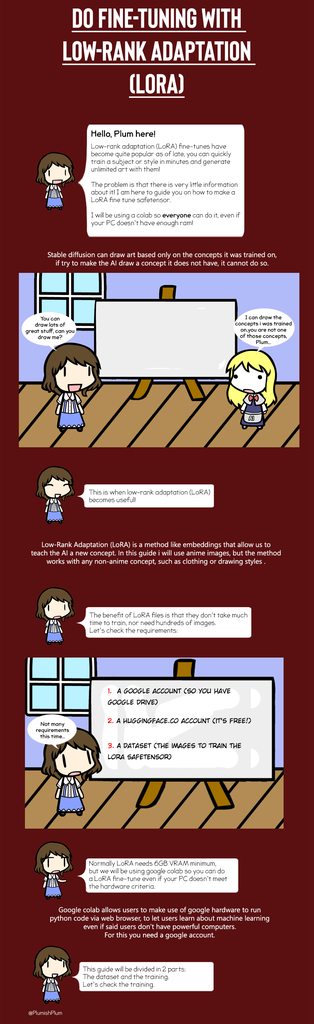
i'm using this khoya colab notebook to train a LORA and still getting these issues
i don't understand i'm following every step religiously
omg i had to check every dependencies to put them at the right version
 hollow ledge

Had the pleassure of working alongside @maxcoopermax on his latest project, called “Seme”.
He asked me to experiment around the concept of renaissance era, giving life to a set of AI intervened custom-recordings [ft. @chinalabaig], experimental oscilloscopes [tbr, hopefully soon], and @touchdesigner systems, for his shows last week in collabor...
Likes
186

 Instagram
 sinful halo
no module 'xformers' message on cmd is normal ? (im using zluda)
 oak berry
Has anyone ever been able to get the batch folder under control net to work? I have tried several times but it only creates images with the first pose in the folder and ignores all other poses.
solemn atlas
hey guys how can i activate the "SD XL" checkpoint and lora? it does not show in my sd
 fair oxide
i am having a problem with my Lenovo Legion 5 3070 RTX Laptop, which i suspect may be related to running Stable Diffusion. About a month ago I started using SD heavily, and after about a week of this started to notice a major performance problem, namely frequent but brief (usually less than a second) freezing. Most noticeable when playing games but seemed to even be happening on the desktop.
I tried many things to fix it and even thought it might be a hardware problem. At one point I freed up a bunch of hard drive space because my SSD was almost full (95% full on a 4TB drive). I freed up about 500 gigs and that seemed to help some, but i moved on to trying other things because I assumed 500mb free HAD to be enough for virtual memory or whatever else.
After trying everything else I went back to freeing up more hard drive space. After freeing up a total of over a terabyte, the problem disappeared. It's been fine for about a week, I have continued using SD heavily and now i can see the same problem starting to come back again. And I still have over a TB free.
Has anyone else encountered this issue?
ornate elk
sinful halo
no module 'xformers' message on cmd is normal ? (im using zluda)
Yes, xformers is nvidia only
ornate elk
fair oxide
i am having a problem with my Lenovo Legion 5 3070 RTX Laptop, which i suspect m...
Hey, what's in your webui-user.bat?
fair oxide
ill check
@echo off
set PYTHON=
set GIT=
set VENV_DIR=
set COMMANDLINE_ARGS=
@REM Uncomment following code to reference an existing A1111 checkout.
@REM set A1111_HOME=Your A1111 checkout dir
@REM
@REM set VENV_DIR=%A1111_HOME%/venv
@REM set COMMANDLINE_ARGS=%COMMANDLINE_ARGS% ^
@REM --ckpt-dir %A1111_HOME%/models/Stable-diffusion ^
@REM --hypernetwork-dir %A1111_HOME%/models/hypernetworks ^
@REM --embeddings-dir %A1111_HOME%/embeddings ^
@REM --lora-dir %A1111_HOME%/models/Lora
call webui.bat
fair oxide
ornate elk
Hey, what's in your webui-user.bat?
do you have some idea what might be causing this and/or have you seen anything like it before?
ornate elk
fair oxide
@echo off
set PYTHON=
set GIT=
set VENV_DIR=
set COMMANDLINE_ARGS=
@REM Uncomm...
Your using forge?
ornate elk
fair oxide
also played with comfy lately but mainly been using forge
Okay, how much ram do you have?
fair oxide
64 gb
ornate elk
fair oxide
64 gb
Oh okay that should be enough xD
fair oxide
yeah
and 1tb hard drive free should be enough
500gb should be engouh
based on what i read 150 gb should be more than enough
for page file
i think they said ramx2
at the most
ornate elk
Also make sure to have enough free space on C drive (15-20gb)
fair oxide
thats what im talking about
theres only one drive on the thing that i see
shit is wack yo thought it was fixed then i was playing elden ring and all of a sudden it started to stutter again. noticed it started to happen right away this time
i was like
😐
ornate elk
And you run the latest nvidia driver?
fair oxide
yep
like i said i tried everything short of a full reinstall or having lenovo send a guy to my house
ornate elk
What you can try is to open up a CMD as admin
And run
Sfc /scannow
fair oxide
freeing up HD space fixed it but i had to free up a totally unreasonable amount and theres STILL over a TB free now
ok
Windows Resource Protection found corrupt files but was unable to fix some of them.
For online repairs, details are included in the CBS log file located at
windir\Logs\CBS\CBS.log. For example C:\Windows\Logs\CBS\CBS.log. For offline
repairs, details are included in the log file provided by the /OFFLOGFILE flag.
ornate elk
fair oxide
Windows Resource Protection found corrupt files but was unable to fix some of th...
Oh rip
Broken system files
dreamy lodge
RuntimeError: CUDA error: out of memory
CUDA kernel errors might be asynchronously reported at some other API call, so the stacktrace below might be incorrect.
For debugging consider passing CUDA_LAUNCH_BLOCKING=1.
sorry if im impeding on the conversation
But how do i fix this
fair oxide
ornate elk
Broken system files
does this explain what's been happening then
fair oxide
dreamy lodge
RuntimeError: CUDA error: out of memory
CUDA kernel errors might be asynchronous...
youre not i think its just how it works here. come in and yell out your issue to whoever wants to help
ornate elk
fair oxide
does this explain what's been happening then
Yes, a system error that can't be fixed needs a OS reinstall
ornate elk
dreamy lodge
RuntimeError: CUDA error: out of memory
CUDA kernel errors might be asynchronous...
What's in your webui-user.bat?
fair oxide
this machine didnt come with any reinstall thumbdrive or anything is it built in somehow? is that what we do now
dreamy lodge
--xformers --medvram --no-half-vae
ornate elk
fair oxide
this machine didnt come with any reinstall thumbdrive or anything is it built in...
You need a thumbstick with 8gb and then use the windows media creation tool
dreamy lodge
just what you told me the other day
fair oxide
ill figure it out thanks for your help
ornate elk
fair oxide
ill figure it out thanks for your help
No problem, I guess the reinstall could fix your issue
 graceful girder
hello I have a problem with stable diffusion I would like to do outpainting as well as inpainting I don't understand why but it seems that it doesn't work at all as much if I use OpenOutpaint or controlenet nothing works for in the case of openoutpaint I have black or glitch and for clear control an error
(screen of my openoutpainting and it same with control net but him he crash all m stable diffusion x))
 ornate elk
graceful girder
hello I have a problem with stable diffusion I would like to do outpainting as w...
ornate elk
graceful girder
hello I have a problem with stable diffusion I would like to do outpainting as w...
Hey, What's your gpu and what's inside your webui-user.bat?
graceful girder
ornate elk
Hey, What's your gpu and what's inside your webui-user.bat?
my GPU is an AMD precisely an AMD 6750 XT and in my there is webui-user.bat set COMMANDLINE_ARGS= --use-directml --lowvram --opt-sub-quad-attention --opt-split-attention-v1 --no-half-vae --upcast-sampling
ornate elk
graceful girder
my GPU is an AMD precisely an AMD 6750 XT and in my there is webui-user.bat ```s...
For openoutpaint its required to have --api
In the webui-user.bat
For inpainting on AMD directml you need --no-half aswell
But you should not use directml with that GPU.
You should use the zluda Backend for better performance and best compatibility
graceful girder
what does --no-half do ?
oh ? i need reintall an other stable diffusion for inpainting and better perf ?
ornate elk
graceful girder
what does --no-half do ?
It loads models as fp32, so inpainting will work with directml but it requires a lot more vram.
So its not good to use it for generating images.
ornate elk
graceful girder
oh ? i need reintall an other stable diffusion for inpainting and better perf ?
Yes you need to follow my zluda AMD guide from the Pinned Messages of this channel
Its much faster and works better
graceful girder
ok I will do that if I have any problems I will turn to you
ornate elk
graceful girder
ok I will do that if I have any problems I will turn to you
Sure! Let me know if something isn't clear
graceful girder
while I believe that it installs correctly (I have not yet received an error message) will the ZLUDA version be compatible with inpainting and outpainting despite the graphics card ?
okay i thinks i have an error look the error occurs when I change models

and on launch I have Warning: Failed to install handrefinerportable. Some processors will not work.
I don't know if this is really serious but I'll point it out.
graceful girder
graceful girder
okay i thinks i have an error look the error occurs when I change models
(it's not for all model)
but idk why when i try to generate an img the generation don't work lmao
 ornate elk
graceful girder
but idk why when i try to generate an img the generation don't work lmao
ornate elk
graceful girder
but idk why when i try to generate an img the generation don't work lmao
Let it load
First time will take 15-40 mins
ornate elk
If the generate button is Gray and and no error in CMD let It load
ornate elk
graceful girder
okay i thinks i have an error look the error occurs when I change models
This is just the wrong lora for the model
ornate elk
graceful girder
while I believe that it installs correctly (I have not yet received an error mes...
Yes outpatient and inpainting will work
graceful girder
ornate elk
Yes outpatient and inpainting will work
nice
graceful girder
ornate elk
This is just the wrong lora for the model
ohhh okayyy
graceful girder
ornate elk
If the generate button is Gray and and no error in CMD let It load
okay
ornate elk
graceful girder
okay
Did it worked?
graceful girder
i thinks for gen yes i try other now
subtle quarry
Is there a reason why a Lora isn't working when I use controlnet?
Trying to use the deer antlers Lora and it's worked before, it's just struggling now

I think I figured it out, I had to I crease the weight of the trigger word
Increase*
graceful girder
ornate elk
Did it worked?
for outpainting when i use openoutpaint idk why but my image as something wrong look
 ornate elk
graceful girder
for outpainting when i use openoutpaint idk why but my image as something wrong ...
ornate elk
graceful girder
for outpainting when i use openoutpaint idk why but my image as something wrong ...
Hmm maybe change the model at the top also to the inpainting model
Also you can try using a VAE file
graceful girder
it is a model which is made for normally

and idk why too my control net make me an error befor make me an image lmao look
 graceful girder
ornate elk
Also you can try using a VAE file
graceful girder
ornate elk
Also you can try using a VAE file
and what is a VAE file?
ornate elk
graceful girder
and idk why too my control net make me an error befor make me an image lmao look
What control net model and preprocessor is that?
ornate elk
graceful girder
and what is a VAE file?
A file for color correction
graceful girder
ornate elk
A file for color correction
how i can try to fix ?
graceful girder
ornate elk
What control net model and preprocessor is that?
this means what net and preprocessor
graceful girder
ornate elk
What control net model and preprocessor is that?
i thinks screen is better no ? x)

 ornate elk
graceful girder
i thinks screen is better no ? x)
ornate elk
graceful girder
i thinks screen is better no ? x)
Oh yea you definitly need a VAE file
graceful girder
ornate elk
Oh yea you definitly need a VAE file
like u say x)
ornate elk
graceful girder
i thinks screen is better no ? x)
Switch the preprocessor to inpainting only or inpainting global harmonious, the lama one won't work
graceful girder
oh lama don't work ?
ornate elk
graceful girder
like u say x)
Here is the anime VAE.
Download it and put it into the models/VAE folder
https://civitai.com/models/23906/kl-f8-anime2-vae

I FINALLY UPDATE THE FILE! This file is VAE, it's one of the best so use it if you like! Many models here at Civitai use kl-f8-anime2.ckpt I upload...
Then go into Settings, User Interface, Quicksettings and there add sd_vae
Then hit apply and reload ui.
Then select the VAE in the new dropdown
 ornate elk
graceful girder
like that ?
ornate elk
graceful girder
like that ?
Yes, you can also add there
Clips_stop_at_last_layer
To get Clip Skip
Some anime models work better with clip skip 2
Normal models need clip skip 1
 ornate elk
Then scroll up and hit apply and reload ui
graceful girder
okay i do that
okay now i try
okay for openoutpaint i thinks is now better no ?
 ornate elk
graceful girder
okay for openoutpaint i thinks is now better no ?
ornate elk
graceful girder
okay for openoutpaint i thinks is now better no ?
Much better
graceful girder
i thinks too okay now i try control net
okay when i use controle net i don't now what he doing x)

my control net is good no ?
 ornate elk
graceful girder
my control net is good no ?
ornate elk
graceful girder
my control net is good no ?
They are okay
But You need to be in txt2img or img2img, not inpaint tab
graceful girder
i m on img2img
 ornate elk
graceful girder
i m on img2img
ornate elk
graceful girder
i m on img2img
Then you need to use a non inpainting model.
Only use the inpainting model when the inpainted mode is selected
graceful girder
oh ok i try
while I try to generate the extension of my image what is the use of the skip clip?
graceful girder
ornate elk
Then you need to use a non inpainting model.
Only use the inpainting model when ...
ok so the result, I'm not convinced, could you tell me how to adjust the poorly melted rating?

maybe i expand to much x)
ornate elk
graceful girder
ok so the result, I'm not convinced, could you tell me how to adjust the poorly ...
For that you need control net inpaint
Then check resize and fill for the control net mode
graceful girder
okay i do that thanks
 dense flint
I recently updated SDWebUI Forge and the "Apply and restartUI" on the extension tab has changed to "Apply and quit". Is there any way to change it back?
buoyant lotus
werfault.exe had a pop-up and then it died

 azure ivy
hey guys does anyone knows how to fix
Error: The 'insightface==0.7.3' distribution was not found and is required by the application
subtle quarry
I don't know what this means, I was trying to use img2img ultimate sd upscale
RuntimeError: Input type (torch.cuda.FloatTensor) and weight type (torch.FloatTensor) should be the same
So when I transfered the image over via the button under the generated image, it spat out the error. However, manually putting it in doesn't spit out the error
Issue seems to have fixed itself somehow
 heady pine
Could someone please help me with this, When I try and generate an image this message pops up, what do I do to fix this?

 grim iron
I get this error can someone help? TypeError: 'in <string>' requires string as left operand, not int
vocal burrow
heady pine
Could someone please help me with this, When I try and generate an image this me...
 vocal burrow
grim iron
I get this error can someone help? `TypeError: 'in <string>' requires string as ...
vocal burrow
grim iron
I get this error can someone help? `TypeError: 'in <string>' requires string as ...
need full log
heady pine
I have fully reinstalled everything since nothing seemed to work, but I am still getting the same messages. Everything was working fine today until I closed and reopened Automatic1111 so I could refresh it. I'm guessing since I have git pull in my wordpad, it must have updated upon reopening the client. Could someone also please tell me how to get rid of this schedule type and what I should do to always have this downcast aphas enabled so it doesn't keep popping up in the override settings when looking back at my images since it never did before?

 marble flax
this means what net and preprocessor
 normal silo
What control net model and preprocessor is that?
heady pine
@marble flax & @normal silo

I also got this failed to install notice when installing ControlNet, so I'm unsure what to do to fix this. This is the folder it's talking about; am I supposed to have something that I don't?
I don't think I received this message when I installed Automatic1111 in the past.

 normal silo
What control net model and preprocessor is that?
heady pine
I'm sorry @normal silo, is this the information you are after?

 nova ermine
I downloaded thid model: https://civitai.com/models/23842/djz-robot-wars
and got this error. Any idea on what's happening?


djz Season 2 ! produces images from the Robot Wars THESE MODELS ARE DESIGNED FOR MERGING WITH OTHER MODELS, STACKING MANY LORAS ON TOP. thx ;)
ornate elk
heady pine
I have fully reinstalled everything since nothing seemed to work, but I am still...
In the settings is an option for the alpha_cumprod
 drifting kiln
Hello, ive been using automatic1111 and when I try to generate anything about 540x x 540x, I get low vram error?, my GPU got 16gbvram, this only a amd issue? I've got the low-vram setting on my commands
ornate elk
drifting kiln
Hello, ive been using automatic1111 and when I try to generate anything about 54...
Hey, what's your gpu?
drifting kiln
6950xt
ornate elk
drifting kiln
6950xt
Then you installed the directml webui without optimisations settings.
What you need is to follow my AMD Zluda guide.
Its in the pinned messages of this channel.
With that you won't have any vram problems and much better performance
drifting kiln
so should i delete?
my current one?
i use stabilty matrix if your familiar with it
drifting kiln
Make a new Folder on your Drive (not on Desktop, Downloads, Documents, Programms, Onedrive) and name it SD-Zluda.
then where should i?
google drive?
heady pine
ornate elk
In the settings is an option for the alpha_cumprod
I appreciate your help with this issue, if possible, when you are next free, could you please help me resolve my other issues.
azure ivy
ornate elk
Yes stability matrix doesn't support zluda
do you where i can ask about Reactor extenstion not working , i get insightface errors and i did everything i could find to fix the error but it didnt got fixed
ornate elk
drifting kiln
u here
Yes
ornate elk
drifting kiln
hmm i made it work somehow
Pls don't install it in any google drive or cloud
ornate elk
drifting kiln
its currently running the cmd without any errors so
Okay, where did you installed it into?
ornate elk
If you managed to start the webui and pressed generate and the button is gray now and no errors in CMD. Let it load. First gen will take up to 15-40 mins
ornate elk
azure ivy
do you where i can ask about Reactor extenstion not working , i get insightface ...
Did you followed the steps on reactor github ?
drifting kiln
Launching Web UI with arguments: --use-zluda --medvram-sdxl --update-check --skip-ort
azure ivy
yes precisely
azure ivy
i installed , visual studio and everything it asked
ornate elk
azure ivy
i installed , visual studio and everything it asked
Can you screenshot the error you get In the CMD?
azure ivy
when i open up the software
also my recator tab does not show up

this is a new pc i am working with , i installed stable diffusion recently
ornate elk
heady pine
I appreciate your help with this issue, if possible, when you are next free, cou...
For the other issues please restart the webui and show me the CMD output
 ornate elk
heady pine
ornate elk
heady pine
okay, can you try delete the venv folder and relaunch the webui-user.bat?
ornate elk
azure ivy
when i open up the software
update python to 3.10.11 and delete the venv folder after that, then relaunch
 vestal plank
How to solve it?
'NoneType' object has no attribute 'lower'

  File "f:\AI\ComfyUI_windows_portable\ComfyUI\execution.py", line 153, in recursive_execute
    output_data, output_ui = get_output_data(obj, input_data_all)
  File "f:\AI\ComfyUI_windows_portable\ComfyUI\execution.py", line 83, in get_output_data
    return_values = map_node_over_list(obj, input_data_all, obj.FUNCTION, allow_interrupt=True)
  File "f:\AI\ComfyUI_windows_portable\ComfyUI\execution.py", line 76, in map_node_over_list
    results.append(getattr(obj, func)(**slice_dict(input_data_all, i)))
  File "F:\AI\ComfyUI_windows_portable\ComfyUI\custom_nodes\efficiency-nodes-comfyui\efficiency_nodes.py", line 236, in efficientloaderSDXL
    return super().efficientloader(base_ckpt_name, vae_name, clip_skip, lora_name, lora_model_strength, lora_clip_strength,
  File "F:\AI\ComfyUI_windows_portable\ComfyUI\custom_nodes\efficiency-nodes-comfyui\efficiency_nodes.py", line 151, in efficientloader
    model, clip = load_lora(lora_params, ckpt_name, my_unique_id, cache=lora_cache, ckpt_cache=ckpt_cache, cache_overwrite=True)
  File "F:\AI\ComfyUI_windows_portable\ComfyUI\custom_nodes\efficiency-nodes-comfyui\tsc_utils.py", line 372, in load_lora
    lora_model, lora_clip = recursive_load_lora(lora_params, ckpt, clip, id, ckpt_cache, cache_overwrite, folder_paths)
  File "F:\AI\ComfyUI_windows_portable\ComfyUI\custom_nodes\efficiency-nodes-comfyui\tsc_utils.py", line 363, in recursive_load_lora
    lora_model, lora_clip = comfy.sd.load_lora_for_models(ckpt, clip, comfy.utils.load_torch_file(lora_path), strength_model, strength_clip)
  File "f:\AI\ComfyUI_windows_portable\ComfyUI\comfy\utils.py", line 12, in load_torch_file
if ckpt.lower().endswith(".safetensors"):``` heady pine
Sorry about all the images @ornate elk, I have forgotten how to screen record.


 ornate elk
heady pine
Sorry about all the images <@161910921269084160>, I have forgotten how to screen...
ornate elk
heady pine
Sorry about all the images <@161910921269084160>, I have forgotten how to screen...
okay, what extensions do you have installed?
are they updated?
heady pine
I only have Adetailer and ControlNet, this extension is new as of today, (I'm pretty sure), so I don't know if this is what is causing the messages.
 azure ivy
ornate elk
update python to 3.10.11 and delete the venv folder after that, then relaunch
azure ivy
ornate elk
update python to 3.10.11 and delete the venv folder after that, then relaunch
i did that , no difference
ornate elk
heady pine
I only have Adetailer and ControlNet, this extension is new as of today, (I'm pr...
i dont think so, i think the extensions need an update for the new version maybe, as 1.9.0 is out for only 8 hours
heady pine
ornate elk
i dont think so, i think the extensions need an update for the new version maybe...
My bad then I thought it was new, I tried unticking that extension and generating another image, but I'm still getting the same messages, I'm a bit lost on what to do now
azure ivy
Download and put prebuilt Insightface package(https://github.com/Gourieff/sd-webui-reactor/raw/main/example/insightface-0.7.3-cp310-cp310-win_amd64.whl) into the stable-diffusion-webui (or SD.Next) root folder where you have "webui-user.bat" file or (A1111 Portable) "run.bat"
From stable-diffusion-webui (or SD.Next) root folder run CMD and .\venv\Scripts\activate
OR
(A1111 Portable) Run CMD
Then update your PIP: python -m pip install -U pip
OR
(A1111 Portable)system\python\python.exe -m pip install -U pip
Then install Insightface: pip install insightface-0.7.3-cp310-cp310-win_amd64.whl
OR
(A1111 Portable)system\python\python.exe -m pip install insightface-0.7.3-cp310-cp310-win_amd64.whl
Enjoy!
i found this in reddit and i did this]
its seems to work now but i am testing
ornate elk
heady pine
My bad then I thought it was new, I tried unticking that extension and generatin...
you have a wierd error in your cmd "No image data blocks found"
ornate elk
azure ivy
i found this in reddit and i did this]
thats also on the github of reactor, and is the simplest way to install it manually
azure ivy
i swear i did this before but i did not work
ornate elk
azure ivy
i swear i did this before but i did not work
maybe you werent in the venv, because it wont work just using cmd alone
azure ivy
maybe because i needed python or venv yeah
vestal plank
How to solve it?
'NoneType' object has no attribute 'lower'

  File "f:\AI\ComfyUI_windows_portable\ComfyUI\execution.py", line 153, in recursive_execute
    output_data, output_ui = get_output_data(obj, input_data_all)
  File "f:\AI\ComfyUI_windows_portable\ComfyUI\execution.py", line 83, in get_output_data
    return_values = map_node_over_list(obj, input_data_all, obj.FUNCTION, allow_interrupt=True)
  File "f:\AI\ComfyUI_windows_portable\ComfyUI\execution.py", line 76, in map_node_over_list
    results.append(getattr(obj, func)(**slice_dict(input_data_all, i)))
  File "F:\AI\ComfyUI_windows_portable\ComfyUI\custom_nodes\efficiency-nodes-comfyui\efficiency_nodes.py", line 236, in efficientloaderSDXL
    return super().efficientloader(base_ckpt_name, vae_name, clip_skip, lora_name, lora_model_strength, lora_clip_strength,
  File "F:\AI\ComfyUI_windows_portable\ComfyUI\custom_nodes\efficiency-nodes-comfyui\efficiency_nodes.py", line 151, in efficientloader
    model, clip = load_lora(lora_params, ckpt_name, my_unique_id, cache=lora_cache, ckpt_cache=ckpt_cache, cache_overwrite=True)
  File "F:\AI\ComfyUI_windows_portable\ComfyUI\custom_nodes\efficiency-nodes-comfyui\tsc_utils.py", line 372, in load_lora
    lora_model, lora_clip = recursive_load_lora(lora_params, ckpt, clip, id, ckpt_cache, cache_overwrite, folder_paths)
  File "F:\AI\ComfyUI_windows_portable\ComfyUI\custom_nodes\efficiency-nodes-comfyui\tsc_utils.py", line 363, in recursive_load_lora
    lora_model, lora_clip = comfy.sd.load_lora_for_models(ckpt, clip, comfy.utils.load_torch_file(lora_path), strength_model, strength_clip)
  File "f:\AI\ComfyUI_windows_portable\ComfyUI\comfy\utils.py", line 12, in load_torch_file
    if ckpt.lower().endswith(".safetensors"):
NansException: A tensor with all NaNs was produced in Unet. This could be either because there's not enough precision to represent the picture, or because your video card does not support half type. Try setting the "Upcast cross attention layer to float32" option in Settings > Stable Diffusion or using the --no-half commandline argument to fix this. Use --disable-nan-check commandline argument to disable this check.
@ornate elk
should i do as it says?
ornate elk
drifting kiln
NansException: A tensor with all NaNs was produced in Unet. This could be either...
what was the model you tried to use?
how bis is the model file?
drifting kiln
epicphotogasm
ornate elk
never add --skip-torch-cuda-test
drifting kiln
2gigs
drifting kiln
@echo off
set PYTHON=
set GIT=
set VENV_DIR=
set COMMANDLINE_ARGS= --use-zluda --medvram-sdxl --update-check --skip-ort
call webui.bat
ornate elk
drifting kiln
@echo off
set PYTHON=
set GIT=
set VENV_DIR=
set COMMANDLINE_ARGS= --use-zluda ...
strange, you shouldnt get that error then, what settings did oyu used?
drifting kiln

thats it
i waited 20 mins for the first pic, then added loras and models to my files then resttared
and now it wouldnt generate
i added --no-half
lets see
looks like it worked
YOOOO ITS SOOO FAST
ornate elk
drifting kiln
i added --no-half
--no-half is normaly not needed
ornate elk
no problem, should be still faster as directml ^^
heady pine
Is there no way you can think of to remove these messages? I am able to generate images with the messages still popping up, but I think with so many messages popping up, the client might crash without me knowing that it has. @ornate elk
ornate elk
heady pine
Is there no way you can think of to remove these messages? I am able to generate...
what you can try is a complete reinstall by following my guide in the pinned messages of this channel.
heady pine
As of your first reply to me, I had done a full reinstallation of everything. So I'm unsure what I could do.
Git/Python everything apart from loras and the such
ornate elk
heady pine
Git/Python everything apart from loras and the such
you can try update python to 3.10.11
then delete the venv folder again
heady pine
Same problem @ornate elk
 onyx solar
Inbound: All the people with issues after upgrading A1111 to 1.9
 solemn moon
Oh no
drifting kiln
@ornate elk sorry for bothering, but does the thing i just did alter the output?
ornate elk
drifting kiln
<@161910921269084160> sorry for bothering, but does the thing i just did alter t...
Nope, it will just use more vram and slow down the generation time
drifting kiln
alr my badf
tame carbon
Hi, i just downloaded a lora and it doesn't appear in lora list. It weighs 1.7gb but this model's page on civitai tells that it's a lora. I think a cant drop a link here cuz its a nsfw lora
 zealous merlin
what's this error I'm getting on automatic1111 colab at the last step: ModuleNotFoundError: No module named 'diskcache'
Also, the colab notebook I was using before for invokeai isn't working either... the models don't seem to be downloading or something
chilly knot
drifting kiln
NansException: A tensor with all NaNs was produced in Unet. This could be either...
i have this error on many model but epicphotogasm work for me very good
 sullen hound
I am getting these weird distortions on an img2img i am trying. I was using, juggernaught lightning 4 step to make janitor batman look realistic and would get the distortions most of the time if the denoise was low, i set the denoise higher and they seem to go away but i want the image to be the cartoon but realistic. What might cause this? The vae?


 willow river
please help, after update i got TypeError: 'bool' object is not iterable in img2img tab after pressing generate
chilly knot
animdiff error
NansException: A tensor with all NaNs was produced in Unet. This could be either because there's not enough precision to represent the picture, or because your video card does not support half type. Try setting the "Upcast cross attention layer to float32" option in Settings > Stable Diffusion or using the --no-half commandline argument to fix this. Use --
 gloomy bolt
i've been runing into this error ever since the 1.9 update

although i don't see any visible errors with the text2img whenever i use it
ok it looks like it's for ad-detailer, whenever it's being used this message pops up, but it looks like ad-detailer is still doing it's job?
oh and it looks like img2img is also suffering, the images turn out to blurry no matter what i do

 chilly knot
animatediff error
EinopsError: Error while processing rearrange-reduction pattern "(b f) d c -> (b d) f c". Input tensor shape: torch.Size([2, 4096, 320]). Additional info: {'f': 16}. Shape mismatch, can't divide axis of length 2 in chunks of 16
chilly knot
if i change batch size new error
NansException: A tensor with all NaNs was produced in Une
 loud marlin
Hello. I discovered the world of AI generators a few days ago learning about it. I chose to got with the stable diffusion route even though i don't have a GPU. I know it will be painstakingly slow without GPU and maybe I won't get far but wanted to delve into this world that I am VERY interested in. If I am able to compute with this stuff I would invest the $ to get the proper hardware. With that all being said I am in need of help for a new beginner. I can't seem to get the stable-diffusion-webui.git to install the necessary files as I get a return error of https: is not recognized as an internal or external command.. I am the proper folder \Automatic1111> and copied that line in and this is where I am stuck. Thank you for your kindness and understanding of my struggle with it. I was following a YT video verbatim and there doesn't seem to be any rhyme or reason for my not being able to move forward. Thank You.
ornate elk
loud marlin
Hello. I discovered the world of AI generators a few days ago learning about i...
Hey, what's your CPU?
The webui can also work on AMD CPUs Integrated GPU
@loud marlin If you have an Intel CPU, you should follow my install guide from here:
#🤝|tech-support message
When your at Step 5. you only need these args: --skip-torch-cuda-test --use-cpu all --opt-sub-quad-attention --no-half
loud marlin
Hey. Yeah I have an AMD CPU. After further looking into my laptop I guess I do have a GPU but it doesn't show VRAM or I don't know where to look. Its a NVIDIA GeForce RTX 3070. I think this is a dedicated Graphics card but unsure due to not seeing the VRAM. Does your guide not work for AMD? I followed a specific set of instructions from a YT video and it doesn't do anything but give me that error code. Thank you for your help!!
ornate elk
loud marlin
Hey. Yeah I have an AMD CPU. After further looking into my laptop I guess I do...
Oh so you have a gpu
A 3070 will work good for stable diffusion
My guides cover nvidia and amd
Follow exactly these steps and it should work: #🤝|tech-support message
For any questions feel free to ask 🙂
ornate elk
loud marlin
Hey. Yeah I have an AMD CPU. After further looking into my laptop I guess I do...
And yes a 3070 is a dedicated GPU with 8gb of vram.
normal silo

 proud cargo
anyone having this error on animatediff? video_length = mm_animatediff.ad_params.batch_size
AttributeError: 'NoneType' object has no attribute 'batch_size'
 proud zealot
"size mismatch for model" can not change the checkpoiont, anyone know how to fix it
loud marlin
ornate elk
Oh so you have a gpu
Thank you! Look forward to trying that out tomorrow.
 merry locust
Hi Everyone. Not sure if this is the right channel for this. I'm looking for a stable diffusion / MidJourney professional who can assist with a project on digitally altering images of socks. I have PNG images and 3D files of the socks. The goal is to take these images, keep the socks unchanged, and completely transform the model and background to a design of my choice. I would also love to learn this process. If anyone is skilled in these techniques and is open to collaboration and teaching, please DM me. I've attached an example of the final result we want. Thanks!


 native iris
I didn't check this server for quite a few months and I can't find the channels to generate images anymore (or it's just the wrong server)
Where to use the art ai
 limber pier
native iris
Where to use the art ai
limber pier
native iris
Where to use the art ai
Request images in #🏞|general-with-images
native iris
I just saw the bot status channel and it said all bot channels are downed
I guess that's the reason I can't find them
limber pier
Go ahead and just post a prompt in #🏞|general-with-images
grim iron
vocal burrow
need full log
I fixed it with a reload thanks though
sinful halo
@ornate elk man, i split my pc into 2 for my gf but now i have only 16gb of ram, i was trying to render a image in a resolution that i already had done before but i got this error;
torch.cuda.OutOfMemoryError: CUDA out of memory. Tried to allocate 7.43 GiB. GPU 0 has a total capacity of 7.98 GiB of which 0 bytes is free. Of the allocated memory 2.26 GiB is allocated by PyTorch, and 6.79 GiB is reserved by PyTorch but unallocated. If reserved but unallocated memory is large try setting PYTORCH_CUDA_ALLOC_CONF=expandable_segments:True to avoid fragmentation. See documentation for Memory Management (https://pytorch.org/docs/stable/notes/cuda.html#environment-variables)
is it bcs of my memory ram ? orcould be something else ?
limber pier
sinful halo
<@161910921269084160> man, i split my pc into 2 for my gf but now i have only 16...
that's vram... your gpu
not ram
if you were able to do it before and can't now it usually means it's right at the limit of what you have on your system
try closing everything except SD and trying again
sinful halo
limber pier
that's vram... your gpu
everything is the same, i only split my ram in half an i noticed my ram gets to 100% when generating the image
and i noticed that it is rendering slowly than before
i remember one more thing, everytime i got max vram error before, this >>> GPU 0 has a total capacity of 7.98 GiB of which >>>0<<< bytes is free was never zero. was aways 2gbs free or something
i formatted my pc and now i have windows 11,
before it was half these numbers
100%|██████████████████████████████████████████████████████████████████████████████████| 35/35 [06:15<00:00, 10.74s/it]
tiled upscale: 100%|███████████████████████████████████████████████████████████████████| 40/40 [00:14<00:00, 2.80it/s]
100%|██████████████████████████████████████████████████████████████████████████████████| 13/13 [04:23<00:00, 20.25s/it]
*** Error completing request | 48/5000 [13:39<25:12:53, 18.33s/it]
limber pier
how are you splitting your ram in half btw? virtual machines?
sinful halo
sorry, my english is bad, i literally took half my ram out of my pc to make another one
im using zluda btw, rx 5700 xt
limber pier
oh damn
sinful halo
idk if its really my ram or something to do with the new windows, driver etc, i have no idea
i have the latest amd adrenalin drivers
im using a sdxl model
limber pier
it's not your ram
sinful halo
okook
limber pier
you're prolly using stuff that has pushed vram use up just a little bit
close literally everything on your comp including file explorer windows and try again
restart the program too
even just having a few images open will cost you vram
anything that does graphics costs vram
sinful halo
hmm, any chance windoes 11 use smore vram than windoes 10 ? is the major change ive made
ornate elk
sinful halo
everything is the same, i only split my ram in half an i noticed my ram gets to ...
You need to increase your windows pagefile.
But the error comes from the vram.
Make sure wallpaper engine or any other Programm is closed.
You also should install the tiled diffusion extension and then enabled only Tiled VAE.
That can help.
Also enable FP8 mode for sdxl in the settings could help
 tiny garden
uhm... Can I sort my LoRA's in different folders in order to have a better overview of what I have?
ornate elk
tiny garden
uhm... Can I sort my LoRA's in different folders in order to have a better overv...
Yes subfolders work
tiny garden
cool 
I'm kind of losing track of what I have when scrolling through my LoRAs and although I have it all organized in spreadsheets, I still lack some organization in that 
ornate elk
tiny garden
I'm kind of losing track of what I have when scrolling through my LoRAs and alth...
I made lora folders based on styles, characters, clothing, and then also an sdxl folder
Helps alot, also in the latest webui update we can have the good lora overview option back
tiny garden
ornate elk
I made lora folders based on styles, characters, clothing, and then also an sdxl...
you're giving me an idea there
I just sorted after characters, outfits, and stuff... might establish the same sorting for sdxl
heady pine
Is there a way to download an older version of adetailer?
sinful halo
ornate elk
You need to increase your windows pagefile.
But the error comes from the vram.
M...
i think pagefiles and fp8 mode fixed it, i think ill buy an nvme (using sata ssd now) and set a lot of pagefiles for it, more ram will help too i think
oh no, the speed is normal again but i gor out of vram error. the tiled vae makes my cmd (webui) stop working
ornate elk
sinful halo
i think pagefiles and fp8 mode fixed it, i think ill buy an nvme (using sata ssd...
For sdxl more ram will help yes, set the page file for C to 24gb Max and disable it for other drives
Tiled VAE shouldn't be a problem. Also make sure to use the sdxl fp16 VAE file
sinful halo
ok, thanks so much
ornate elk
sinful halo
oh no, the speed is normal again but i gor out of vram error. the tiled vae make...
Make sure you restarted the webui after installing the tiled VAE and set the fp8mode
Also you get the sdxl fp 16 VAE from here:
https://huggingface.co/madebyollin/sdxl-vae-fp16-fix/tree/main
 sleek zephyr
Hi everyone, no support received in the past few days. Stability AI has generated some inappropriate images that I would like to delete from my profile, or close the profile if this is not possible. Would it be possible to receive support? Do you know how to do it? I sent several emails but never received any replies thank you all
 wet ferry
why doesn't torch download nvidia ?


amd is doing a torch download according to the integrated graphics profit of the processor, and I can't stop it... or maybe I'm getting it wrong and he's uploading the right one... My mind went blank. can you help me?
grim iron
is it a laptop?
wet ferry
wet ferry
why doesn't torch download nvidia ?
...
 wet ferry
grim iron
is it a laptop?
wet ferry
grim iron
is it a laptop?
desktop

stable diffusion was using the 4060ti graphics driver yesterday, but today it is seeing the integrated graphics driver of the amd processor.
It was fixed by uninstalling the AMD integrated graphics driver before turning on stable diffusion.
But I have to do the same process every time I restart the computer. I hope I don't encounter the same problem in the future... If a problem occurs, I will write here again.
wet ferry
again...
 ornate elk
wet ferry
It was fixed by uninstalling the AMD integrated graphics driver before turning o...
ornate elk
wet ferry
It was fixed by uninstalling the AMD integrated graphics driver before turning o...
Disable the integrated AMD GPU in the Device Manager
 civic mirage
i got a question, if i want to use pony xl, do i download the sdxl vae and put it into vae and the pony file into models?
onyx solar
civic mirage
i got a question, if i want to use pony xl, do i download the sdxl vae and put i...
 wet ferry
ornate elk
Disable the integrated AMD GPU in the Device Manager
wet ferry
ornate elk
Disable the integrated AMD GPU in the Device Manager
I disabled it but the problem continues.
 pale echo
I updated my Automatic1111 to the newest version (1.9.0), but now it just randomly stops generating. No Error message or anything, it just does nothing. Any idea how to fix it?
chilly knot
animatediff error
[3:49]
EinopsError: Error while processing rearrange-reduction pattern "(b f) d c -> (b d) f c". Input tensor shape: torch.Size([2, 4096, 320]). Additional info: {'f': 16}. Shape mismatch, can't divide axis of length 2 in chunks of 16
ornate elk
wet ferry
I disabled it but the problem continues.
What's in your webui-user.bat?
And also are you running the latest nvidia driver?
ornate elk
pale echo
I updated my Automatic1111 to the newest version (1.9.0), but now it just random...
Can you make a screenshot of how it looks when is stops?
pale echo
automatic tab or console?
ornate elk
pale echo
automatic tab or console?
Both
pale echo
@ornate elk seems like i found the culprit, tho i dont get why. if i dont use Hires.fix it just works fine, but with it active it freezes. never had that happen before with other versions
ornate elk
pale echo
<@161910921269084160> seems like i found the culprit, tho i dont get why. if i d...
Make sure to set hires steps to 10.
Also what's your GPU and what's inside your webui-user.bat?
You might need some performance adjustments
pale echo
@ornate elk had steps normaly around 15. did they changed it?
my gpu is (sadly) a rx 6700 xt
--use-directml --no-half --no-half-vae --opt-sub-quad-attention --precision full
ornate elk
pale echo
<@161910921269084160> had steps normaly around 15. did they changed it?
my gpu i...
ohhh, then your using the old webui version (the slow directml one)
you should checkout my AMD zluda Guide in the Pinned Messages of this channel.
if you install that, it will perform much much better (in speed and vram usage)
drifting kiln
my auto1111 just stopped working
i restarted it
it wont generate nothing
or load loras, or anything
ornate elk
drifting kiln
my auto1111 just stopped working
What does the CMD shows?
drifting kiln
Applying attention optimization: Doggettx... done.
Model loaded in 5.0s (load weights from disk: 0.5s, create model: 0.5s, apply weights to model: 2.0s, apply float(): 0.3s, load textual inversion embeddings: 1.0s, calculate empty prompt: 0.5s).
it wont do anything else
i have a prompt
ornate elk
drifting kiln
it wont do anything else
Is the generate button grayed out?
drifting kiln
nope
ornate elk
drifting kiln
nope
And what happens when you press it?
drifting kiln
interrupt/skip and then it just resets after a while
ornate elk
drifting kiln
interrupt/skip and then it just resets after a while
And the CMD shows nothing?
drifting kiln
no it doesnt register anything
ornate elk
drifting kiln
no it doesnt register anything
Okay then make sure to whitelist the webui in any browser adblocker.
Also if using opera or brave, try an other browser
 crimson summit
😭
drifting kiln
was it that obvious?
ornate elk
drifting kiln
was it that obvious?
Yea ^^ because when the CMD doesn't get any input something between browser and CMD is blocking it.
Could be the browser or an adblocker
We had such cases before
tame carbon
pls help. i used sd 1.5 checkpoints before and tried to download a sdxl one https://civitai.com/models/133005?modelVersionId=348913
but when i tried to load it i got this error


For business inquires, commercial licensing, custom models, and consultation contact me under juggernaut@rundiffusion.com Join Juggernaut now on X/...
my user-webui file settings
gpu is gtx1660 6gb

 unique bluff
I’ve been having an issue with stable diffusion (V1.5 on Mac intel). It goes as following when trying to generate an image: AttributeError: ‘NoneType’ object has no attribute ‘lowvram’
In the command I use to open stable diffusion it reads: File "/Users/nameofuser/stable-diffusion-webui/modules/sd_models.py", line 662, in send_model_to_cpu
if m.lowvram:
AttributeError: 'NoneType' object has no attribute 'lowvram'
I also cannot use a different checkpoint than the one that already comes in stable diffusion, despite it being on the list (I’m not sure I used the proper term, I’m referring to the files you can add on the models folder)
(Also, I’m at all not good with python and coding and etc. I also couldn’t find an answer elsewhere online)
ornate elk
tame carbon
pls help. i used sd 1.5 checkpoints before and tried to download a sdxl one http...
whats your torch and xformers version?
you can check it at the bottom of the webui in browser
unique bluff
Would there be any way to reinstall stable diffusion?
vocal burrow
simply delete it and reinstall it
check the pinned messages for a mac sd install tutorial
 tardy crow
Hello! Quick Question! Is there a limit to concurrent calls to Stability API Service? Did a 'ctrl-f' on the documentation page for "concurrent" and "same" (for same time) and nothing came up.
 warped hemlock
Can I run 2 instances of StableDiffusion on the same computer? I mean, I've done it. And it seems to work. I'm just curious if there's any drawbacks or important things I should know. Can I load 2 different models? One in each instance of SD? Can I use Deforum in one and render stuff while using txt2img in the other? Stuff like that is what I'd like to know. Running ASUS ROG STRIX B450-F MB, AMD Ryzen 7 2700X CPU, 32 GB Ram, GeForce RTX 4090
civic mirage
quick question, comfyui wont allow me to pick neither a checkpoint nr a vae, what am i doing wrong?
unique bluff
Okay, I installed stable diffusion and the problem persists. Is there any way to fix that?
Because I’m not able to generate any images at all
 signal sigil
I have install Ella in ComfyUI. I have the Ella Model, in the Ella folder,
and i have downloaded all the files for (flan-t5-xl-encoder-only-bf16)
When i go to run the workflow, it just gives me this huge error.
Has anyone ran into a simular issue?
ornate elk
warped hemlock
Can I run 2 instances of StableDiffusion on the same computer? I mean, I've done...
Yes you can do that without problems. You just should also have enough RAM for both instances
warped hemlock
ornate elk
Yes you can do that without problems. You just should also have enough RAM for b...
Thanks!
warped hemlock
civic mirage
quick question, comfyui wont allow me to pick neither a checkpoint nr a vae, wha...
What checkpoint loader are you using? If you try the SimpleCheckpointLoader and click on the down arrow, do you see any models?
civic mirage
warped hemlock
What checkpoint loader are you using? If you try the SimpleCheckpointLoader and ...
well yeah i figured that i had to put the checkpoint and vae files into the comfy folder and now i can chose them but the images coming out are terrible
warped hemlock
civic mirage
well yeah i figured that i had to put the checkpoint and vae files into the comf...
I've found that bad images are usually a problem with the VAE. If the VAE is baked into the model, loading an external VAE sometimes helps. If you're already using an external VAE, try a different one. I've had that same problem and I know I fixed it by experimenting with the VAE. Good luck. Hope this helps.
 vernal robin
https://www.youtube.com/watch?v=rHOOJIV9JiY&t=3135s hey guys, im trying to get this up and running, and it seems like the models are being loaded by custom nodes, I'm still new to comfy for animation. I've downloaded the models and loras, but they dont seem to load in when I refresh, is there a special way to manually re-hook them in?

This is the 3.28.24 VOD of the Civitai AI Video & Animation Stream!
During this stream, Tyler explores fun usage of the Newley updated IPAdapter Nodes in ComfyUI!
Updated version of the workflow used in VOD can be found below (Not the TILED IPadapter workflow yet).
https://civitai.com/models/350524/jboogx-and-the-machine-learners-animatelcm-s...
here's the link to the civit page to download the workflow: https://civitai.com/models/350524?modelVersionId=411119

This is an evolution of my AnimateLCM workflow. Cut down and put together for ease of use. This workflow should at MOST require 12-14GB of VRAM mak...
pale echo
@ornate elk can i just copy the text which i need to add to the PATH?
%HIP_PATH%bin i mean
ornate elk
pale echo
<@161910921269084160> can i just copy the text which i need to add to the PATH?
...
Yes
pale echo
@ornate elk and which sd i start then? from the SD-Zluda or from the SD.Next Folder? or did i did something wrong there?
 tawny flint
hi. I'm trying to do multi face swap on an image with Reactor and I getting an error. If you have time please point me in the right direction
No source face(s) in the provided Index
[ReActor] 14:35:40 - STATUS - Working: source face index [0], target face index [0]
[ReActor] 14:35:40 - STATUS - Analyzing Source Image...
[ReActor] 14:35:41 - STATUS - Analyzing Target Image...
[ReActor] 14:35:42 - STATUS - Trying to halve 'det_size' parameter
[ReActor] 14:35:43 - STATUS - Swapping...
[ReActor] 14:35:43 - STATUS - --Done!--
[ReActor] 14:35:43 - STATUS - Restoring with GFPGANv1.4.pth
[ReActor] 14:35:44 - STATUS - Working: source face index [1], target face index [1]
[ReActor] 14:35:44 - STATUS - Analyzing Source Image...
[ReActor] 14:35:45 - STATUS - Analyzing Target Image...
[ReActor] 14:35:46 - STATUS - No source face(s) in the provided Index
the image has two faces
nm. i figured it out
ornate elk
pale echo
<@161910921269084160> and which sd i start then? from the SD-Zluda or from the S...
Don't install SD next
Its written in the guide.
You only need to do the rocm library folder replace
And after that reboot the PC.
Then launch the webui-user.bat
If everything is done correctly, you don't have any errors in the CMD and when generating the first image it will take a while.

 pale echo
ornate elk
Don't install SD next
pale echo
ornate elk
Don't install SD next
i really didnt saw that, now i feel dumb ^^
testing it again, wish me luck. oh btw,do i keep the " " for the models commands?
 nova wren
having an issue trying to generate using tensorRT and control net, i get an error about expending all tensors to be on the same device
ornate elk
pale echo
i really didnt saw that, now i feel dumb ^^
testing it again, wish me luck. oh b...
If you added the custom paths for the model folder then yes
 balmy rivet
Guys! I have RYZEN 5 5600H, 16GB RAM, Nvidia GTX 1650 4GB VRAM LAPTOP, can I run Stable Diffusion on it?
 drowsy creek

how do I do this on arch?
pacman doesn't have that specific package, and it's not in the AUR
still somewhat new to linux, only switched like a month ago
 olive birch
Is anyone using the Stability AI Developer Platform? How is your experience?
drowsy creek
drowsy creek
found python3.10 in the AUR (it was called python310), but it isn't python3.10-venv
what do I do?
ornate elk
balmy rivet
Guys! I have RYZEN 5 5600H, 16GB RAM, Nvidia GTX 1650 4GB VRAM LAPTOP, can I run...
Yes you can. Follow the install guide for Nvidia in the pinned messages of this channel
sinful halo
ornate elk
Make sure you restarted the webui after installing the tiled VAE and set the fp8...
Man, tiled var is that option alone ? Or is the control net tiled vae ? I activate it with hi res at the same time ? I'm not finding the right answer on Google
Bcs when I checked only the tiled vae option alone (the one slight above control net) it didn't nothing
vocal burrow
 severe sand
<:chefKiss:897509066761465896>
severe sand
<:chefKiss:897509066761465896>
what are your settings for this one ? (screenshot the whole webpage)
 dapper basin
trying to install stable diffusion using this method and running into error below

any idea what's wrong and how i can fixx it
???
ornate elk
sinful halo
Bcs when I checked only the tiled vae option alone (the one slight above control...
Only tiled VAE. Then check the CMD
ornate elk
dapper basin
trying to install stable diffusion using this method and running into error belo...
Network error. Retry when you have a stable connection
drowsy creek
is there an install guide for AMD arch?
the package the standard linux guide requires doesn't exist on arch
though, I guess I am just out of luck and going to have to use the huggingface space
since if I keep asking it's "begging" and I'm ignored, but if I don't my question gets buried
I just can't find any tutorials at all specifically for how to install SD on arch
vocal burrow
Because arch is for edgy users / those who like to live on the bleeding edge of technology. Which does not play nice with SD which use """"old"""" versions of python and stuff.
arch is designed for advanced linux users.
vocal burrow
drowsy creek
"edgy users"?
it s a joke.
drowsy creek
or are you calling me an edgelord
drowsy creek
vocal burrow
it s a joke.
ah, ok np
vocal burrow
edgy user / bleeding edge
but yeah I would definitely not recommend arch for sd
As it will require you to compile a bunch of "outdated" (by arch standard) packages and make them live along with your other system packages
it s possible but it s definitely for advanced linux users.
drowsy creek
so there is no feasible way to run SD locally then?
since I don't wanna dual boot just to use one program
vocal burrow
btw since you have an AMD GPU, https://github.com/AUTOMATIC1111/stable-diffusion-webui/wiki/Install-and-Run-on-AMD-GPUs#install-on-amd-and-arch-linux
@drowsy creek
sinful halo
ornate elk
Only tiled VAE. Then check the CMD
i think it did it but its stuck when finishing (saving ?) the image, i dont see anything being used on task manager


oh shit, i did it with latent upscaler
ornate elk
sinful halo
i think it did it but its stuck when finishing (saving ?) the image, i dont see ...
Make sure you whitelist the webui in any browser adblocker (would recommend to delete that adblocker and install ublock origin, as its safer and better)
Your resolution is also a bit high for upscaling
sinful halo
thanks man, youre even helping me outside the "stable diffusion box" can i buy you a coffee ? i appreciate it.
sinful halo
ornate elk
Your resolution is also a bit high for upscaling
my native resolution ? 1344 ?
what should i do ? render in a lower one ? even if thats an sdxl model ?
ornate elk
sinful halo
what should i do ? render in a lower one ? even if thats an sdxl model ?
No just lower the upscale to 1.5 or 1.3
sinful halo
ok
ornate elk
Test if that works, then you can go higher
dapper basin
ornate elk
Network error. Retry when you have a stable connection
ok
sinful halo
any hint about the encoder and decoder tile size ? i put 1344 and 128 respectively
i seached about this but didnt find any information from someone with 8gb vram as well
ornate elk
sinful halo
any hint about the encoder and decoder tile size ? i put 1344 and 128 respective...
Let them default. If you get an out of vram error then lower the encoder size
ornate elk
Nope didn't set it up, but I wanted to
sinful halo
when you do it ill be the first xD
i think a lot of people will buy it, im sure everyone appreciate you helping here
ornate elk
Thanks! 🙂
sinful halo
np man
 karmic nova
my im2img images get red spots in certain spots, even though my source material has no highlights or overexposed parts (especially not in those areas). Is this a common issue?

It's almost always in that upper left corner of the forehead, if that helps... sometimes at the point where the neck meets the collar, as well, and often ears.
dapper basin
omg
now what's wrong?

@echo off
set PYTHON=
set GIT=
set VENV_DIR=
set COMMANDLINE_ARGS=--xformers --no-half-vae --medvram-sdxl
call webui.bat
did I edit this wrong or something?
pale echo
@ornate elk works great so far i would say. no freezes and i even can use hires.fix freely (tested it with upscale by 2, normaly i had to use like 1.3). but my Additional Networks doesnt shows any usable loras. or is it not compatible?
 uncut jewel
Hey guys! I dont really know where to ask that but let's do it there 🙂
I'm using ComfyUI to generate imagery and benchmarking different upscaler methods. Since a long time ago when i'm using the SD Ultimate Upscaler node i get this tiles issues appearing on my output ( kind of a grid on the final image where there's subbtle colors difference delimited by squares in the images which looks quite bad ). I tried to change the settings on the node to get rid of that issue but still have this tiling appearing at some point?
Anyone know how i could upscaler with that node without having the grid/tiles appearing on the output ?
ornate elk
pale echo
<@161910921269084160> works great so far i would say. no freezes and i even can ...
Great to hear, The additional networks are compatible, they should show up.
Did you used the --lora-path option in the webui-user.bat or did you moved the Lora's manually?
pale echo
ornate elk
Great to hear, The additional networks are compatible, they should show up.
Did ...
--lora-path option. to be honest, i dont even have a lora folder in my zluda model folder.
ornate elk
dapper basin
omg
now what's wrong?
Hey, can you post the full CMD error log?
ornate elk
pale echo
--lora-path option. to be honest, i dont even have a lora folder in my zluda mod...
Then recheck if the path is correct. In my guide is just a placeholder.
Also Lora's only show up when a compatible model is selected.
Meaning 1.5 Lora's work only when using an 1.5 model and sdxl Lora's only when using sdxl
dapper basin
ornate elk
Hey, can you post the full CMD error log?
sorry i closed
wait i'll run it again if it shows the same i'll post
meanwhile can you check my .bat file if it's alright or not
ornate elk
dapper basin
sorry i closed
wait i'll run it again if it shows the same i'll post
meanwhile c...
The bat is correct 🙂
dapper basin
I have rtx 4060 8gigs
dapper basin
ornate elk
The bat is correct 🙂
thanks
pale echo
ornate elk
Then recheck if the path is correct. In my guide is just a placeholder.
Also Lor...
the strange thing is, i can use loras in my prompts just normaly. and they showing up under the Lora Tab aswell. Only my Additional Networks cant see them
ornate elk
pale echo
the strange thing is, i can use loras in my prompts just normaly. and they showi...
Do you mean the additional network extension?
pale echo
ornate elk
Do you mean the additional network extension?
yes.
ornate elk
pale echo
yes.
That thing is outdated since a year :/ so isnt supported anymore
Or maybe it only detects if the Lora's are in the lora folder of the zluda webui version
@pale echo something you could try, make a Lora folder in the models folder and place a lora in there
pale echo
ornate elk
<@239511288433082368> something you could try, make a Lora folder in the models ...
tryed that, but then sd itself cant find the lora anymore. guess its really just the extension which isnt compatible anymore^^
dapper basin
ornate elk
The bat is correct 🙂
so this time it happened right off the bat
ornate elk
@pale echo Okay, then no chance. Also there is no active fork of that extension
ornate elk
dapper basin
so this time it happened right off the bat
Seems like the default model wasn't correctly downloaded (maybe cause of a network error).
What to do know:
Go into stable-diffusion-webui/models/stable-diffusion folder
There delete the 1.5 ema pruned safetensor file.
Then download for example the Dreamshaper v8 model from here:
(Its a good starter model) and place it in the same folder where you deletet the other file. Then relaunch the webui-user.bat
https://civitai.com/models/4384/dreamshaper

DreamShaper - V∞! Please check out my other base models , including SDXL ones! Check the version description below (bottom right) for more info and...
dapper basin
roger that!
 gilded canyon
Hey, I'm trying to use SDXL for the first time on Web Ui. I've tried just regular a1111 and web ui forge, but loading in my SDXL checkpoint seems to never work due to timing out or some ram error. I have a 3060 12GB, so I don't think vram is an issue.
any configurations or launch args I should be using for this specific GPU?
ornate elk
gilded canyon
Hey, I'm trying to use SDXL for the first time on Web Ui. I've tried just regula...
In auto1111 you need to add --xformers --no-half-vae to your webui-user.bat
Also what's the CMD error you get?
gilded canyon
not on my computer right now but ill try those arguments tomorrow and ask again with the error if I run into it, thanks for the speedy reply tho 💙
also, should i upgrade my RAM (not VRAM). I have 16gb, but idk if that affects a1111 or using SDXL
ornate elk
gilded canyon
also, should i upgrade my RAM (not VRAM). I have 16gb, but idk if that affects a...
It affects sdxl. But depends on the error you get.
You may need to adjust your windows page file if the error is caused by RAM and not Vram
gilded canyon
ohh okay, thank u
dapper basin
ornate elk
Seems like the default model wasn't correctly downloaded (maybe cause of a netwo...
is it done?
 ornate elk
dapper basin
is it done?
ornate elk
dapper basin
is it done?
Yes, it should have opened a new browser tab
 ornate elk
dapper basin
thanks again CS1o
ornate elk
dapper basin
thanks again CS1o
No problem 🙂
ornate elk
dapper basin
shit this was fast
If the image looks unsaturated, you need to use a VAE.
Download the one from here and put it into the models/VAE folder.
Then go into Settings >User Interface >Quicksettings and there add sd_vae
Then hit apply and reload ui. Then select the VAE in the new dropdown.
https://civitai.com/models/276082/vae-ft-mse-840000-ema-pruned-or-840000-or-840k-sd15-vae

vae-ft-mse-840000-ema-pruned This is an upload of StabilityAI's vae-ft-mse-840000-ema-pruned/840000/840k SD1.5 VAE because the existing ones do not...
severe sand
vocal burrow
what are your settings for this one ? (screenshot the whole webpage)
Not home rn will get to it later
 silver wren
I just sent in a support ticket, but I figured I'd drop a message in here too. It seems that on the v1 API, when a prompt fails the moderation check, the system returns a "{"artifacts":[]}" instead of the proper error message.
tardy crow
does anyone know if stability's web service has a concurrent calls per user limit?? couldn't find any doc to that on their page.
haughty zodiac
Hello i'm training a LORA but my s/it is way too high
I run on a 3080 10g VRAM
Here are my settings
 haughty zodiac
please help me, I'm desperate right now