#🤝|tech-support
1 messages · Page 4 of 1
 ornate elk
 rich lynx
i click on the webui in the folder but after that i just get that error. i cant get it to load in browser anymore
ornate elk
rich lynx
i click on the webui in the folder but after that i just get that error. i cant ...
oh okay, when did you installed SD?
ornate elk
rich lynx
about 6-8 months ago
okay do you have git pull in your webui-user.bat?
rich lynx
not sure what that means. i have ran that command in the cmd terminal or whatever its called though, and it says its up to date
not sure if im even making sense. using the cmd terminal and other command prompts is new to me btw
i get this if i run git pull. C:\Users\kironess\Downloads\SD\stable-diffusion-webui>git pull
remote: Enumerating objects: 105, done.
remote: Counting objects: 100% (65/65), done.
remote: Compressing objects: 100% (20/20), done.
remote: Total 105 (delta 50), reused 56 (delta 45), pack-reused 40
Receiving objects: 100% (105/105), 71.88 KiB | 1.94 MiB/s, done.
Resolving deltas: 100% (65/65), completed with 22 local objects.
From https://github.com/AUTOMATIC1111/stable-diffusion-webui
- [new branch] add-option-Live-preview-in-full-page-image-viewer -> origin/add-option-Live-preview-in-full-page-image-viewer
334298d4..f92d6149 dev -> origin/dev
b8040e4a..57428361 gradio4 -> origin/gradio4
5ef669de..120a84bd release_candidate -> origin/release_candidate
9a15ae2a..39ebd568 test-fp8 -> origin/test-fp8 - [new tag] v1.6.1 -> v1.6.1
- [new tag] v1.7.0-RC -> v1.7.0-RC
Already up to date.
C:\Users\kironess\Downloads\SD\stable-diffusion-webui>
GitHub
Stable Diffusion web UI. Contribute to AUTOMATIC1111/stable-diffusion-webui development by creating an account on GitHub.
ornate elk
rich lynx
i get this if i run git pull. C:\Users\kironess\Downloads\SD\stable-diffusion-we...
okay good now run
pip cache purge
then delete the venv folder
rich lynx
allright it looks like it deleted some things. im now removing the venv folder. i can try and reload after now?
and thank you btw. this problem has been driving me crazy.
ornate elk
rich lynx
allright it looks like it deleted some things. im now removing the venv folder. ...
yep
no problem, if it doesnt work youll need a quick reinstall of SD but i can guide you
rich lynx
this is strange , i have to webui files btw i dunno if that could be a prob
one shows this past month the other august
ornate elk
rich lynx
this is strange , i have to webui files btw i dunno if that could be a prob
always run the webui-user.bat
rich lynx
ok got it
i got the same problem :(. RuntimeError:
CUDA Setup failed despite GPU being available. Please run the following command to get more information:
    python -m bitsandbytes

    Inspect the output of the command and see if you can locate CUDA libraries. You might need to add them
    to your LD_LIBRARY_PATH.
frustrating, one minute its working and im getting into it, really liking doing my gif art and now busted :(. I guess if ur free and can guide me to doing a fresh install i would appreciate it very much. otherwise ill youtube it later or something. i dont like to bother ppl too much.
 fading fable
what do i do when it says not enough gpu video memory available?
 crimson leaf
why does it try to install 1.6.1 even tho i used the 1.2.1 one?


alr i found out that it created in that folder another instance of sd
 twin pawn
@jagged plover Hey there. I was asking about multi GPU on SwarmUI on Reddit. Would love to pick your brain when you get a sec. Thanks!
 jagged plover
twin pawn
<@105458332365504512> Hey there. I was asking about multi GPU on SwarmUI on Redd...
jagged plover
twin pawn
<@105458332365504512> Hey there. I was asking about multi GPU on SwarmUI on Redd...
ohhai
twin pawn
Hallooo
So yeah. I just think i have everything set up correctly and my times aren't improving and now task manager isn't even showing activity like before.


Here are my debug logs
Pastebin
Pastebin.com is the number one paste tool since 2002. Pastebin is a website where you can store text online for a set period of time.
And I'm just running the first example on this page with a batch size of 9
ornate elk
fading fable
what do i do when it says not enough gpu video memory available?
whats your gpu?
 leaden night
Hello! I am having issues installing stable-diffusion webui
more specifically, i cant run the webui-user batch file. Error code 128
 plucky marsh
Good evening guys, I have a problem with stable diffusion and i dont know how to solve it. I downloaded fooocus and im running it locally on my laptop just fine, but whenever i go to the online version on https://colab.research.google.com/github/lllyasviel/Fooocus/blob/main/fooocus_colab.ipynb i can't run it cause it says ''runtimeerror: found no nvidia driver on your system''. I tried reinstalling nvidia drivers from scratch 3 times on my laptop so that didn't help 😦 IDK what I can do, everything was running fine yesterday, I remember running fooocus on my laptop locally and then i ran the one online simultaneously, im not sure if i broke it somehow in that way?
 ornate elk
leaden night
Hello! I am having issues installing stable-diffusion webui
more specifically, i...
ornate elk
leaden night
Hello! I am having issues installing stable-diffusion webui
more specifically, i...
do you have a screenshot of the whole cmd log?
leaden night
Sure! gimme a min
plucky marsh
if i may phrase my question differently: can i add a command line to detect my gpu in slot 0 here? !pip install pygit2==1.12.2
%cd /content
!git clone https://github.com/lllyasviel/Fooocus.git
%cd /content/Fooocus
!python entry_with_update.py --share
GitHub
Focus on prompting and generating. Contribute to lllyasviel/Fooocus development by creating an account on GitHub.
jagged plover
twin pawn
https://pastebin.com/PDE7zZCp
that log looks like swarm was freshly started and you just did the first generation
the speedup from multigpu only comes into play after it's all booted and every backend has loaded the model you're using and then you queue up several images to generate
 kind hound
i have installed this version "lshqqytiger/stable-diffusion-webui-directml" of stable diffusion with olive. now my question is can i install the d8ahazard /sd_dreambooth_extension on this version too? because i see only people use that with automatic1111. Some infos i use a amd gpu and the first version dont cause a memory leak.
 elfin dirge
can anyone help me my extensions are not showing up even tho they are installedI have webuireactor downloaded and adetailer but only adetalier shows up


 plucky marsh
does anyone know why am i suddenly getting an error ''RuntimeError: Found no NVIDIA driver on your system.'' when running fooocus_colab in a browser?
 placid edge
I am running Automatic 1111 and my prompts seem to get "stuck" at 98% but in the terminal it says it's going to 100%. Also the final processed image is not in my output folder. I did notice that this started happening since I downloaded controlnet, is this a known issue with controlnet and automatic 1111?
ornate elk
placid edge
I am running Automatic 1111 and my prompts seem to get "stuck" at 98% but in the...
Make sure your webui is whitelisted in any browser adblocker
ornate elk
kind hound
i have installed this version "lshqqytiger/stable-diffusion-webui-directml" of ...
No you can't use it with olive or directml
 wet hull
I have a question: Am I able to combine multiple LoRAs?
For an example... Let's say I have a Spongebob LoRA and a Patrick LoRA. am I able to use both to have an image of both Spongebob and Patrick?
ornate elk
wet hull
I have a question: Am I able to combine multiple LoRAs?
For an example... Let's...
Yes you can use both together but it would mix them up.
So you need an extension for prompt control like Tiled Diffusion or Regional Prompt Control
wet hull
I see, so without extensions it would be like if Spongebob and Patrick would be mixed into a blender.
Time to search the internet
Actually, while I'm here, are there any extension you reccommend me getting?
(and how would I install them to stable diffusion?)
ornate elk
wet hull
Actually, while I'm here, are there any extension you reccommend me getting?
(a...
Yes, the boorutag autocomplete extension is very handy
and for the two Lora get the Tiled Diffusion Extension
In the webui go on the extensions Tab. There click on available. Then on "Load from"
Now you have a big list. And a search bar
After installing go on the Installed Tab and click restart webui
 daring jasper
hi! ) I'm still noob in coding, so may I ask for help with this) How can I fix it?)) How can install ffmpeg and what's wrong with a scripts.sam module? 2023-12-08 11:18:39,891 - ControlNetFastload - INFO - Load Controlnet Fastload Filter on isRemote=None and accessLevel=2
[FACEFUSION.CORE] FFMpeg is not installed
*** Error executing callback ui_tabs_callback for E:\Stable Diffusion and AI\stable-diffusion-webui\extensions\sd-webui-replacer\scripts\replacer_main_ui.py
Traceback (most recent call last):
File "E:\Stable Diffusion and AI\stable-diffusion-webui\modules\script_callbacks.py", line 166, in ui_tabs_callback
res += c.callback() or []
File "E:\Stable Diffusion and AI\stable-diffusion-webui\extensions\sd-webui-replacer\scripts\replacer_main_ui.py", line 141, in on_ui_tabs
from scripts.sam import sam_model_list, refresh_sam_models
ModuleNotFoundError: No module named 'scripts.sam'
full log
 mental locust
Really sorry to ask such a basic question... is there a good tutorial for installing stable diffusion locally?
The youtube tutorial by matt wolfe worked for me back in May but then stopped being useful due to changes in python, or something. The FAQ and resources in here don't have install tutorials...
 karmic crown
mental locust
Really sorry to ask such a basic question... is there a good tutorial for instal...
karmic crown
mental locust
Really sorry to ask such a basic question... is there a good tutorial for instal...
GPU and OS?
mental locust
karmic crown
GPU and OS?
4090, Win11
mental locust
karmic crown
how much VRAM? 24 or less?
24GB
karmic crown
than just add --xformers to command line parameters
@echo off

set PYTHON=
set GIT=
set VENV_DIR=
set COMMANDLINE_ARGS=--xformers

call webui.bat
That wasn't the question sorry. I want to install Stable Diffusion locally. It was easy and flawless when I did it in May, and used through until August without issue. After a break I tried reinstalling recently and had some kind of issue that I didn't understand. I might be being an idiot, but I was hoping for either a text or video tutorial I could follow along to ensure I install A1111 and everything correctly
Thanks for helping
karmic crown
i sent you a link #🤝|tech-support message
just click on it, and you will get a windows guide for nvidia
mental locust
karmic crown
just click on it, and you will get a windows guide for nvidia
Epic, I am immortalised as the newbie. Thanks I shall do this now 🙂
karmic crown
if your python and git are already correctly set up (as in that guide), skip that
if they are working, just remove venv folder inside your stable diffusion
do git pull (that will do the update)
venv will be recreated on run, and that is what you want, to get all the latest versions of pyhton components
 austere needle
I would like to know any post about making need check point for Stable Diffusion ? ,I have study about how to make new LORA to support create need image. but Still dont know how to make need check point file .safetensors
karmic crown
you can convert .ckpt to .safetensors
GitHub
Convert your Stable Diffusion checkpoints quickly and easily. - GitHub - diStyApps/Safe-and-Stable-Ckpt2Safetensors-Conversion-Tool-GUI: Convert your Stable Diffusion checkpoints quickly and easily.
if that is your only problem
lora trining tutorial is here

Go to the Train Lora cell. Review the username and password. You will need them after starting the GUI.
or this
In this quick tutorial we will show you exactly how to train your very own Stable Diffusion LoRA models in a few short steps, using only Kohya GUI! Not only is this process relatively quick and simple, but it also can be done on most GPUs, with even less than 8 GB of VRAM. Let's
austere needle
karmic crown
you can convert .ckpt to .safetensors
i train up a lora model and change it to check point ?? is this a seperate program of SD?
karmic crown
if you already has a ckpt, just use this tool to convert to safetensors https://github.com/diStyApps/Safe-and-Stable-Ckpt2Safetensors-Conversion-Tool-GUI
GitHub
Convert your Stable Diffusion checkpoints quickly and easily. - GitHub - diStyApps/Safe-and-Stable-Ckpt2Safetensors-Conversion-Tool-GUI: Convert your Stable Diffusion checkpoints quickly and easily.
i am not sure if you can save it as safetensors directly, since i have never trained a lora myself
austere needle
I will like to do more detai of Leg / shoes Area. because much of them a focus on the top half body and face
austere needle
karmic crown
if you already has a ckpt, just use this tool to convert to safetensors https://...
.safetensors in Lora and . safetensors apply for main check point is that the same? this is the point which i dont know.
karmic crown
.safetensors is just a format
as far as i know, you use a base model and you train your lora using that model, when you finish, lora goes to lora folder, models are always in stabele-diffusion folder
than you use your lora as any other lora from civitai or liblib
and you can use it with different models, not just the one you used when trained lora
 random pagoda
after generating images i get this error
RuntimeError: min(): Expected reduction dim to be specified for input.numel() == 0. Specify the reduction dim with the 'dim' argument.
any advice?
 mellow finch
hi, I'm new here! I'm facing difficulty installing SD on my mac. I got stalled at the first step of installing homebrew. Is this the right community to come to for help?
karmic crown
mellow finch
hi, I'm new here! I'm facing difficulty installing SD on my mac. I got stalled a...
hello, i can help with mac
you can follow my guide from https://github.com/AUTOMATIC1111/stable-diffusion-webui/discussions/5461#discussioncomment-7738578
GitHub
Mac users: Please provide feedback on if these instructions do or don't work for you, and if anything is unclear or you are otherwise still having problems with your install that are not curren...
let me know if you have some problems
 spice nova
Hi, I saw in the research paper about Stable Video Diffusion that motion loras can be applied. Are there any official weights for motions loras?
spice nova
mellow finch
hi, I'm new here! I'm facing difficulty installing SD on my mac. I got stalled a...
/bin/bash -c "$(curl -fsSL https://raw.githubusercontent.com/Homebrew/install/HEAD/install.sh)" this is the command you in to put in your terminal. If you get errors attach screenshot
 ruby lotus
Hi anyone know anything about LORA training? I have some newbie question about how to train for EYES only
I have trained with 100 full faces with specific eyes, but when using it, it only seem to use the faces it has been trained with. I want to apply my lora to any type of person. Should i only include crops of the eyes in the training data or what is the best practice for training on specific subjects
mellow finch
spice nova
/bin/bash -c "$(curl -fsSL https://raw.githubusercontent.com/Homebrew/install/HE...
Hi, thanks for your reply. I tried your command and still got failure:
mellow finch
spice nova
/bin/bash -c "$(curl -fsSL https://raw.githubusercontent.com/Homebrew/install/HE...
 karmic crown
@mellow finch what is your mac? intel?
and, have you ever installed brew before?
if that is silicon, do not use rosetta
mellow finch
yea intel mac 2020
mellow finch
karmic crown
and, have you ever installed brew before?

running mac os sonoma 14.1
i tried installing brew today a couple of times
i also tried the .pkg installer but somewhere alongtheway i got errors
 rotund lava
sorry but you cant generate anything on a UHD 630
that thing has the same performance as a GTX 260
mellow finch
oh no ok
rotund lava
but since you have an i9 you could probably run it on cpu through openvino
karmic crown
@mellow finch uninstall it first /bin/bash -c "$(curl -fsSL https://raw.githubusercontent.com/Homebrew/install/HEAD/uninstall.sh)"
i guess you had some messed up install
probably half-installed
karmic crown
when you finish install it again with /bin/bash -c "$(curl -fsSL https://raw.githubusercontent.com/Homebrew/install/HEAD/install.sh)"
mellow finch
karmic crown
when you finish install it again with `/bin/bash -c "$(curl -fsSL https://raw.gi...

is this ok? can i try reinstalling now?
karmic crown
wait
remove those folders
this one /usr/local/Homebrew
remove it from finder
and those

all of them
Why do I have a feeling that you had run brew install with sudo at some point in time?
mellow finch
what's sudo?
karmic crown
command that should not be run unless is absolutelly necesary
have you removed those folders?
karmic crown
ok, try like this than
rm -rf /usr/local/Caskroom
can it remove it or not? if there is a an error we will try "stronger" command
 sand trail
why is that this controlnet model isn't working with my checkpoint

 mellow finch
karmic crown
`rm -rf /usr/local/Caskroom`
mellow finch
karmic crown
`rm -rf /usr/local/Caskroom`
that command does nothing
karmic crown
if there was no error that it is fine
mellow finch
 karmic crown
ok
repet with other folders like this
rm -rf /usr/local/Cellar
rm -rf /Users/aseem/Libary/Caches/Homebrew
rm -rf /usr/local/Homebrew
mentioned folders are now removed
now try to install it again
when you finish install it again with /bin/bash -c "$(curl -fsSL https://raw.githubusercontent.com/Homebrew/install/HEAD/install.sh)"
mellow finch
karmic crown
mentioned folders are now removed
 karmic crown
ok
mellow finch
karmic crown
when you finish install it again with `/bin/bash -c "$(curl -fsSL https://raw.gi...
should i continue with this now?
karmic crown
wait
sudo rm -rf /usr/local/Homebrew it will ask for password
you will not see any response (like when you installing brew)
but, you can also try to find folder in finder
and to remove it from there
mellow finch
karmic crown
`sudo rm -rf /usr/local/Homebrew` it will ask for password
i have done this
karmic crown
try again
it should report nothing
if there is a permission denied you still have a problematic folder (with wrong user privilges)
sand trail
sand trail
why is that this controlnet model isn't working with my checkpoint
error message

 mellow finch
karmic crown
it hopefully should work
mellow finch
karmic crown
it hopefully should work
i think its succesful this time right?
 karmic crown
yes, run those

when it finish, close terminal and open it again
and type brew doctor
it is a 1 second process
brew doctor should give you this
❯ brew doctor
Your system is ready to brew.
after that, you can follow my guide from here https://github.com/AUTOMATIC1111/stable-diffusion-webui/discussions/5461#discussioncomment-7738578

GitHub
Mac users: Please provide feedback on if these instructions do or don't work for you, and if anything is unclear or you are otherwise still having problems with your install that are not curren...
if you already have stable-diffusion-webui folder, remove it first
karmic crown
skip 1st step obviously
you just installed that
you will probably need to modify command line params, but that is not an issue at this moment
ornate elk
sand trail
error message
You can't use controlnet 1.5 models for sdxl
You need sdxl controlnet models
mellow finch
mellow finch
is this 64 bit intel cpu?
mellow finch
 karmic crown
give me a second
mellow finch
ok
mellow finch
 karmic crown
great
mellow finch
:))
 karmic crown
i will be here, let me know if it works
mellow finch
ill try your guide a bit later
karmic crown
your graphics card is potato, but... we will make it work 🙂
mellow finch
hahaha
karmic crown
you will probably need to use cpu only
karmic crown
imac with radeon will work better
mellow finch
oh is it
karmic crown
if it is 2017 or 2019 5k with radeon with 8 GB
mellow finch
2019
karmic crown
you can try on both
mellow finch
ill check and get back to you

 gray oyster
not SD related but AI related:
Does anybody know what's causing this when using a trained U-Net?
I suspect it might overmatch certain weights so im just gonna add a mechanism that will punish the model for emphasizing the same weights over and over again and i will also try to complicate my synthetic dataset creator

though weirdly it looks like a pattern
 sand trail
ornate elk
You can't use controlnet 1.5 models for sdxl
sand trail
ornate elk
You can't use controlnet 1.5 models for sdxl
tried that but it got this
 gray oyster
sand trail
tried that but it got this
gray oyster
sand trail
tried that but it got this
try adding set CUDA_VISIBLE_DEVICES=0

below your cmd line args

accidentally posted the wrong screenshot
now this is correct
hope that helps
by the way do you have a dual-gpu setup?
i had similar issues with language models when running a dual-gpu setup with two different gpus so they couldnt act like one unit
crimson leaf
does it make difference when using sd on ubuntu or windows?
ornate elk
crimson leaf
does it make difference when using sd on ubuntu or windows?
If your on AMD then yes
ornate elk
Not much
gray oyster
i heard the linux drivers might be a bit shitty for Nvidia
crimson leaf
gray oyster
i heard the linux drivers might be a bit shitty for Nvidia
what way, incompatibility or optimization?
gray oyster
both kind of
i guess they are a little bit more outdated
since nvidia is mostly focusing on windows drivers
AMD is a little bit more active on linux
hence AMD cards run SD better on linux than nvidia
afaik
crimson leaf
hm, then i should also test sd on windows.. Thanks for the information
gray oyster
no problem
also yea on windows it should run better, atleast in theory
therefore of course you got higher ram usage unfortunately
would be cool if there is like a developer oriented windows version which is basically lightweight windows without any of the propriatary software like edge, cortana, microsoft store, auto updates, etc.
crimson leaf
That's not a problem, i was just annoyed by the gnome bugs on ubuntu.. Also the mass error..
gnome crashed sometimes when generating at full load
gray oyster
also if you want to free up a lot of ram on windows you want to right click the task bar and disable weather and news
crimson leaf
thanks for the information tho
ornate elk
gray oyster
would be cool if there is like a developer oriented windows version which is bas...
That is available and is called Windows Amorilate
gray oyster
ooooo
crimson leaf
ornate elk
That is available and is called Windows Amorilate
never heard of
interesting
gray oyster
crimson leaf
never heard of
same
cant find anything on google either for the short time i looked for it
crimson leaf
lmao me too
ornate elk
gray oyster
cant find anything on google either for the short time i looked for it
Sry, I didn't knowd the exact name but here it is:
https://ameliorated.io/

Completely transform your computer in minutes. Simply download a verified Playbook, or use your own, and run it in AME Wizard.
Its for ISO Customisation
gray oyster
ah alright, thanks
crimson leaf
ornate elk
Sry, I didn't knowd the exact name but here it is:
https://ameliorated.io/
thanks
 swift vigil
hi, is there a way to auto launch sd on a different browser ie. not the default browser?
 unique urchin
I'm trying to delete the stable diffusion folder so i can do a full fresh install, but its not letting me delete it, saying i require permission. But i have admin rights
 crimson leaf
Is it true that on rocm you get slightly different results as on cuda?
i can't seem to generate the exact picture anymore
ornate elk
unique urchin
I'm trying to delete the stable diffusion folder so i can do a full fresh instal...
Restart the PC then delete
ornate elk
crimson leaf
i can't seem to generate the exact picture anymore
Yes
crimson leaf
and does --opt-sub-quad-attention --opt-split-attention-v1 decrease performance on nvidia
ornate elk
crimson leaf
and does `--opt-sub-quad-attention --opt-split-attention-v1 ` decrease performan...
I wouldn't use it for nvidia
 rich haven
unique urchin
I'm trying to delete the stable diffusion folder so i can do a full fresh instal...
rich haven
unique urchin
I'm trying to delete the stable diffusion folder so i can do a full fresh instal...
Your account should be a member of the Everyone group. Try to use File Explorer (Hmm, I only know Windows stuff) to give yourself full rights to the directory, or take ownership of the directory.
https://youtu.be/QoVH8cMQ9Ns?si=SD2UcnLALS_l44y0

This article shows how you can take full ownership of files and folders in Windows 10/8/7. After introducing the User Account Control in Windows Vista, Microsoft increased the security of its core system files by hardening its Effective Permissions. Most of the time, to replace a System file, rename a System folder or a folder under the root C ...
crimson leaf
rich haven
Your account should be a member of the Everyone group. Try to use File Explorer...
i hate that issue, it is an extremely annoying issue on windows. Dam traumatized by this
Trying to delete microsoft trash
rich haven
How can I get support from stability.AI? I need a password reset, but it is not sending the password reset to my email address. The website had no problems subscribing this address to their newsletter. It seems to be just the password reset request that is not working.
gray oyster
ornate elk
I wouldn't use it for nvidia
honestly the performance cost atleast for me is negligable, literally no difference except that xformers uses a little less vram
 cedar depot
Is there a way to fix the "Not enough memory" issue for AMD? I got 24gb VRAM but it's like it wont utilise it
ornate elk
cedar depot
Is there a way to fix the "Not enough memory" issue for AMD? I got 24gb VRAM but...
yes, you need to edit the webui-user.bat
at the line COMMANDLINE_ARGS=
you add: --medvram --opt-sub-quad-attention --opt-split-attention-v1 --no-half --upcast-sampling
Then your able to use 512x768 and hires fix upscale by 2. (10 hires steps)
Then you need to get the Tiled Diffusion Extension and there activate the Tiled Vae option if you go for Full HD image like
540x960 upscaled by 2
 cunning badger
hey everyone! tile_resample pre-processor seems to be missing for me in controlnet, any idea why this might be, or how to fix it?
i have control_v11f1e_sd15_tile.pth in the controlnet models folder
cedar depot
ornate elk
yes, you need to edit the webui-user.bat
at the line COMMANDLINE_ARGS=
you add: ...
Ah okay so I take it I cant go up to 32:9 res ?
 ornate elk
cedar depot
Ah okay so I take it I cant go up to 32:9 res ?
ornate elk
cedar depot
Ah okay so I take it I cant go up to 32:9 res ?
Yep not native, first use hires fix for better quality
But with img2img upscale script
crimson leaf
cedar depot
Is there a way to fix the "Not enough memory" issue for AMD? I got 24gb VRAM but...
tf, that's weird, i generated with my rx580 8gb 2048x2048 images (--medvram)
ornate elk
cedar depot
Are blurred outputs also an issue with AMD?
Nope
cedar depot
Bruh tf be going on then
cedar depot
crimson leaf
tf, that's weird, i generated with my rx580 8gb 2048x2048 images (--medvram)
I tried --medvram and the outputs were super low quality 
crimson leaf
cedar depot
I tried --medvram and the outputs were super low quality <:hmmge:905854728691417...
Wrong inputs ig
at 2048x2048 you won't get something logical, for me it was just some random fading colors or sth
the models ain't trained for that
May you share prompt and settings?
cedar depot
I'm using dreamshaper 8, prompts are:
(masterpiece), (extremely intricate:1.3), (realistic), portrait of a girl, the most beautiful in the world, (medieval armor), metal reflections, upper body, outdoors, intense sunlight, far away castle, professional photograph of a stunning woman detailed, sharp focus, dramatic, award winning, cinematic lighting, octane render unreal engine, volumetrics dtx, (film grain, blurry background, blurry foreground, bokeh, depth of field, sunset, motion blur:1.3), chainmail
Negative: BadDream, (UnrealisticDream:1.3)
I am just testing out with an already made output from someone who used these
Output just comes out blurred no matter what
Lemme post the full size

Oh ffsd
ornate elk
cedar depot
Thats normal for an 512x512 when the face is this smal
cedar depot
You cant really see it, but the edges are blurry around the armour and such, easier seen when I enlarge the picture on SD
ornate elk
Try 512x768 and go for portrait tag
ornate elk
cedar depot
I'm using dreamshaper 8, prompts are:
(masterpiece), (extremely intricate:1.3),...
Dont use motion blur:1.3
That will blur
Use bokeh
Or depth of field
cedar depot
I mean its the same with or without tbh
swift vigil
what command args should i be using for nvidia 3080 10gb vram?
ornate elk
swift vigil
what command args should i be using for nvidia 3080 10gb vram?
--xformers --no-half-vae and if an sdxl image takes longer than a minute add --medvram-sdxl
swift vigil
ty sir
ornate elk
Np
wet hull
I have a question: Does 'Draw full canvas background' affect the image generation by any means? I tested out Tiled Diffussion and I kept getting the different prompts in these weird picture frames, even though I want it all to be one connected image.
ornate elk
cedar depot
I mean its the same with or without tbh
For better quality try hires fix
I have amd and no problems
ornate elk
wet hull
I have a question: Does 'Draw full canvas background' affect the image generatio...
You first need to select the resolution. Then press draw full canvas. Then start adding your squares
wet hull
Here is an example of what's going on. It's not supposed to be like this, it's supposed to be a normal jungle background.
 ornate elk
What's your setting?
wet hull
Here, I'll use a better example:
-Without Draw Full Canvas Background (Image was four colors)

-With Draw Full Canvas Background (Image was fully white I think)
ik these are both awful generations
 ornate elk
How does your regional prompt control looks ?
wet hull
It looks like this
There are 5 squares. The fifth one covers the entire image and is in the background.
 ornate elk
wet hull
It looks like this
There are 5 squares. The fifth one covers the entire image a...
ornate elk
wet hull
It looks like this
There are 5 squares. The fifth one covers the entire image a...
Ans what's the resolution ?
wet hull
ornate elk
Ans what's the resolution ?
640x360
ornate elk
wet hull
640x360
okay thats pretty smal
wet hull
ornate elk
okay thats pretty smal
I do small resolutions since i don't have a strong PC
Actually I think this extension optimizes that, right?
So, what's the issue?
ornate elk
Try only with two squares
wet hull
ight, I'll reduce the amount to two. I'll generate an image with these settings.

Here is the two square image. It looks a lot better, even with some weird lighting issues.
 ornate elk
Also try lowering the lora strength
jagged plover
twin pawn
And I'm just running the first example on this page with a batch size of 9
oh my god this is delayed but i went back and checked to see if you replied and just noticed this comment -- if you're using the Comfy tab that's not multigpu out of the box, especially batching, wherein the point of batching is doing several on one GPU. You'll want to use the Generate tab to do one workflow repeatedly across several GPUs. (You can do a multiended workflow on the Workflow Editor tab across several GPUs but that's more complex to set up)
ps should use #🐝|swarm-ui so conversation doesn't get lost in this endless channel
 mossy folio
What models and nodes do I need to run IP Adapter in comfy and where do I put the models
wet hull
ornate elk
Also try lowering the lora strength
Here is an image with Monika's LoRA strength at 0.75. If that's still too much then give me a good value to test out.
 ornate elk
wet hull
Here is an image with Monika's LoRA strength at 0.75. If that's still too much t...
ornate elk
wet hull
Here is an image with Monika's LoRA strength at 0.75. If that's still too much t...
i think the resolution is still the problem too
 sharp lichen
Is there a controlnet model that can pickup on color data?
or anyway for me to use controlnet and also get color data from the input image, other than img2img
wet hull
ornate elk
i think the resolution is still the problem too
I can't do a bigger resolution, my 4 GB graphics card can't handle it.
 hardy canopy
Is there a commandline arg for setting a custom path for ControlNet models? I've tried --controlnet-dir to no avail
jagged plover
wet hull
I can't do a bigger resolution, my 4 GB graphics card can't handle it.
Presuming you're on an SDv1 image, changing to exactly 512x512 might better but still fit your VRAM.
Also lowering CFG Scale might help (or using Dynamic Thresholding)
jagged plover
hardy canopy
Is there a commandline arg for setting a custom path for ControlNet models? I've...
Depends what UI you're using - in Swarm it's right next to all the other model settings, in comfy there's a paths file if you want, in auto controlnet isn't native it's an extension so probably on the Settings tab -- when in doubt though everything always supports symlinks. Symlinks are the magic trick to redirect any folder any time for any program
jagged plover
sharp lichen
or anyway for me to use controlnet and also get color data from the input image,...
img2img with very high denoise/creativity (eg 0.95 or higher even) will usually copy colors and nothing else
plucky marsh
hey guys, i have created an image of a girl with a yellow tshirt and the butterfly image on her shirt, how can i transfer that butterfly image onto second picture of a girl wearing the same yellow tshirt but in a different pose?
or if that's not possible, how do i remove the butterfly / text from the shirts so just that it stays a regular yellow tshirt with no symbols / images on them?

 hollow pike
Photoshop
 stuck knot
Hey has anyone got advice on this problem with SDNext the branch of Automatic 1111, I have installed SDNext from fresh two times, and I kept the Default settings, these are my System specs:
OS: Windows 11 Pro,
CPU: 13th Gen Intel Core i9-13900K,
Graphics Card GPU: NVIDIA GeForce RTX 4080, 16GB,
Memory: 32 GB ram
SD 1.5, and SD 2.1 work perfectly but I can't run SDXL 1.0 models I just keep getting errors, what could I be doing wrong?
ornate elk
stuck knot
Hey has anyone got advice on this problem with SDNext the branch of Automatic 11...
Do you get any error on the cmd ?
 vapid sluice
Why can’t I load SDXL base model and SDXL VAE

No errors displayed, just “press any key to continue
Should I reinstall the webui for the 15th time ?
I use nvidia geforce 3060
ornate elk
vapid sluice
Why can’t I load SDXL base model and SDXL VAE
You installed your webui in a onedrive synced folder. That can cause issues
vapid sluice
ornate elk
You installed your webui in a onedrive synced folder. That can cause issues
Idk why it moved automatically to one drive. I hate onedrive
How to fix ?
Idk how to move out of the onedrive
ornate elk
vapid sluice
Idk how to move out of the onedrive
first you need to make a new folder on the C: drive and name it Ai (not on desktop, downloads, documents)
then you move the stable-diffusion-webui folder to that new folder.
After you moved your webui you won't be able to update it anymore.
To fix this go into the stable-diffusion-webui folder and click in the File Explorer bar and type cmd and hit enter.
Then use the following commands:
git init git remote add origin https://github.com/AUTOMATIC1111/stable-diffusion-webui.git git fetch --all git reset --hard origin/master git branch --set-upstream-to=origin/master master git pull
After that relaunch the webui-user.bat
vapid sluice
Thanks a lot
ornate elk
no problem 🙂
 chrome rampart
cs1 is the best
 chilly sandal
Hi! I've been trying to download the "MixTape /// Blues" model from Civitai, but it does not seem to work... I place both the checkpoint and VAE in their respective folders, but I cannot load any of them, whenever I click them, it loads for a few secs and then comes back to the old model.
I am not sure what error to look for in cmd, cause it's a mess there from what I've seen. Anyone else had this issue or any idea what to do?
(also, if I reinstall SD from scratch, do I have to backup everything before? the models, loras, outputs, etc?)
Ty for any scratch of help! 😄
ornate elk
chilly sandal
Hi! I've been trying to download the "MixTape /// Blues" model from Civitai, but...
hey, do you have an screenshot of the cmd with the errors?
and yes if your reinstall you need to save the outputs folder and the models folder
karmic crown
I have an extremely stupid question - if I use a1111 API, will the generated image be available in txt2img-images on the "server" machine as well? and if I use a different model than the one currently selected in UI, will it also be changed in UI?
stuck knot
ornate elk
Do you get any error on the cmd ?
This is the error I am getting in SDNext:
Error: model not loaded
Time: 7.05s|
GPU active 2 MB reserved 0 | used 1350 MB free 15026 MB total 16376 MB | retries 0 oom 0
 ornate elk
stuck knot
This is the error I am getting in SDNext:
*Error: model not loaded
Time: 7.05s| ...
ornate elk
stuck knot
This is the error I am getting in SDNext:
*Error: model not loaded
Time: 7.05s| ...
hmm thats strange, is sd next updated?
stuck knot
ornate elk
hmm thats strange, is sd next updated?
Yes to the latest version build
karmic crown
wait, i think i saw a similar problem when changing models from xl to 1.5 while xl vae was still active. try to switch vae to automatic, and then change the model. if it sitll doesnt work, try to restart the whole A1111. it might sound stupid, but that actually helped
cedar depot
ornate elk
For better quality try hires fix
Tried with and without, same issue
Could it be the lack of prompts that make it blurry/
Seems like setting Hires,fix to none makes it more detailed but still blurred. I am really not sure whats going on
 spiral comet
Why when I exceed the number of prompt 75 the SD shows the number of prompt in red and when I exceed it again in white?
ornate elk
cedar depot
Tried with and without, same issue
i have the same gpu, so download this image and put it into the png info tab, then click on Send to txt2img. then generate.I used dreamshaper v8 and 84000-mse-vae.
You should get nearly the same image.
 ornate elk
spiral comet
Why when I exceed the number of prompt 75 the SD shows the number of prompt in r...
ornate elk
spiral comet
Why when I exceed the number of prompt 75 the SD shows the number of prompt in r...
if it stays red that means there is an open ( that hasnt been closed by )
karmic crown
@ornate elk do you know the anser to those questions? for some reason it points to somone elses message when i click the link
spiral comet
ornate elk
if it stays red that means there is an open ( that hasnt been closed by )
but also why there is 73/75? why is the number 75 important what happens after 75?
 jagged plover
karmic crown
I have an extremely stupid question - if I use a1111 API, will the generated ima...
jagged plover
karmic crown
I have an extremely stupid question - if I use a1111 API, will the generated ima...
these are both questions that you can find the answer to by just trying it
but - no it doesn't save the image by default, and yes the model change is shared by default
karmic crown
thanks alex
jagged plover
spiral comet
but also why there is 73/75? why is the number 75 important what happens after 7...
that's token count, SD's input is in batches of 75 tokens. Once you exceed that it has to use a larger batch size (ie slightly more VRAM and it will interpret the prompting a bit differently)
a "token" is approximately 1 word, though uncommon words sometimes take 2 or more tokens
(if you're curious about token details, use Swarm, there's a tokenizer under Utilities that will show you how your tokens break down)
spiral comet
if I have a GF 4080 I can not worry about it, does it matter because above 75 for example the results are much worse?
cedar depot
ornate elk
i have the same gpu, so download this image and put it into the png info tab, th...
Does the VAE get automatically triggered or ?
ornate elk
cedar depot
Does the VAE get automatically triggered or ?
Nope it has to be selectet.
Best is to go into Settings. User Interface, Quicksettings and there add SD_vae
Then hit apply and reload ui
Then select the VAE at the dropdown

 spare swallow
How is it possible that SDXL models are so much inferior in anime or NSFW style? I know 1.5 has been around a lot longer but SDXL has also been around a while and still there are no models to match the visuals of 1.5. Why? SDXL is not suitable for anime or NSFW? I used a lot of promps and models, still not even close to 1.5.
ornate elk
cedar depot
Looks good
vapid sluice
ornate elk
first you need to make a new folder on the C: drive and name it Ai (not on deskt...
I’ve actually reinstalled the whole thing into my d drive cuz onedrive wouldn’t let me move the folder cuz there was “no space left”
And again, the same error
Very strange
ornate elk
vapid sluice
I’ve actually reinstalled the whole thing into my d drive cuz onedrive wouldn’t ...
do you use xformers?
ornate elk
vapid sluice
Yes
okay, how much RAM do you have?
make also sure to have at least 15gb free space on C
vapid sluice
ornate elk
make also sure to have at least 15gb free space on C
Oh I don’t have
vapid sluice
ornate elk
make also sure to have at least 15gb free space on C
Why tho ?
vapid sluice
ornate elk
okay, how much RAM do you have?
You mean VRAM ?
ornate elk
vapid sluice
Why tho ?
because your PC has something called a Pagefile. That offloads data (cache) when the RAM gets to full. this file is hidden and located on C. its dynamicly managed by windows and can be larger or smaller. if you dont have any space left on C you block this file to get bigger. SDXL needs more RAM to load so the pagefile needs also be a bit bigger.
vapid sluice
ornate elk
because your PC has something called a Pagefile. That offloads data (cache) when...
Oh i see
vapid sluice
ornate elk
because your PC has something called a Pagefile. That offloads data (cache) when...
Sorry, how to block the Pagefile?
vapid sluice
ornate elk
make also sure to have at least 15gb free space on C
Wait i have
But it still doesn’t seem to work
ornate elk
vapid sluice
Wait i have
how much RAM do you have?
 ornate elk
vapid sluice
16gb
ornate elk
vapid sluice
16gb
okay then check the following:
for changing the pagefile
launch sysdm.cpl from the Start menu search or run box (Win+R) and navigate to Advanced –> Settings –> Advanced –> Modify
Set it to "system managed" for c: and turn it off for other disks
Then restart the PC
 brisk heath
is it normal to have multiple instances of this process? it started with only one, but automatic1111 extension tab's "Check for updates" button caused it to multiply/added 6 more (coincidentelly i have 6 extensions installed)
 ornate elk
vapid sluice
Thanks a lot
ornate elk
vapid sluice
Thanks a lot
perfect, no problem 🙂
ornate elk
brisk heath
is it normal to have multiple instances of this process? it started with only on...
no you only should have one
brisk heath
okay, do you have a clue on how i can fix this?
here's how it looks like on the top process (in task manager)
 ornate elk
brisk heath
is it normal to have multiple instances of this process? it started with only on...
ornate elk
brisk heath
is it normal to have multiple instances of this process? it started with only on...
i testet this rn with check for updates. and yes then you get multiple git tasks but they vanish after the check is done
if they dont stay then its okay
brisk heath
oh mine stays, weird...but i guess it's not a big deal eh
ornate elk
brisk heath
oh mine stays, weird...but i guess it's not a big deal eh
if they found an extension update you have to click apply and restart. maybe then they vanish
brisk heath
nah it just says everything was 'latest' and that's it, but i will try later on when i finish the current prompt i'm doing
thanks
and also do you know if everything here is necessary? can i do without any of them?
 ornate elk
brisk heath
and also do you know if everything here is necessary? can i do without any of th...
ornate elk
brisk heath
and also do you know if everything here is necessary? can i do without any of th...
they are not necessary if you dont use the features they provide.
but for the best experience i wouldnt deactivate them
brisk heath
thank you 👍
ornate elk
no problem 🙂
 faint moss
my ipadapter doesnt seem to work anymore...
the model loader can't find the model files - anyone had this with last updates?
 sleek birch
Hi guys,
totally new to stable diffusion(and generally ai). Just installed it yesterday but since then I couldn't get past this error. I tried fixing it with the no half command line etc but just couldn't get it to work. Looking through the internet I found that it isn't that uncommon, hope someone can give me some tips.
thanks in advance
I'm working on a MacBook Air 2020(M1 Processor) if that's relevant.

 cosmic raptor
is it possible to use controlnet outpainting with different modules like depth? I tried to do it, but because of depth image sd filling blank space with... textured blank space
karmic crown
sleek birch
Hi guys,
totally new to stable diffusion(and generally ai). Just installed it ye...
do not use --no-half, I posted instructions here They were tested on both Silicon and Intel Macs

GitHub
Mac users: Please provide feedback on if these instructions do or don't work for you, and if anything is unclear or you are otherwise still having problems with your install that are not curren...
start from "existing install" and go to the end
let me know if you have any problems
sleek birch
karmic crown
let me know if you have any problems
I tried now with the yaml file but now I get a different error. I have had this one before but after restarting it normally went back to the "NansException" error. Now It keeps saying connection errored out
 karmic crown
show me the console
also, which broser is that? do you have adblocker?
in your console you should have this
Python 3.10.13 (main, Aug 24 2023, 12:59:26) [Clang 15.0.0 (clang-1500.0.40.1)]
Version: v1.6.1
Commit hash: 4afaaf8a020c1df457bcf7250cb1c7f609699fa7
Launching Web UI with arguments: --skip-torch-cuda-test --opt-sub-quad-attention --upcast-sampling --no-half-vae --medvram-sdxl
also this Running on local URL: http://127.0.0.1:7860
sleek birch
this is what i got
 karmic crown
please send your webui-user.sh
sleek birch
karmic crown
you had to change it

you didnt do all the steps
start with existing install, and go through the end
but do not skip any steps
do not miss this part

you need development version of torch, for some things in my command line params
sleek birch
karmic crown
Am I blind or are these steps not in the link you sent? This is what it says under "Existing Install"

 sleek birch
ah that's why😅. sorry
karmic crown
just follow the steps and it should be fine
i am using sdxl models without any issue (except speed) 🙂
Loading weights [a88bfb6ffa] from /Users/viking/stable-diffusion-webui/models/Stable-diffusion/hephaistosNextgenxlLCM_v10LCMBF16.safetensors
Creating model from config: /Users/viking/stable-diffusion-webui/repositories/generative-models/configs/inference/sd_xl_base.yaml
Applying attention optimization: sub-quadratic... done.
Model loaded in 18.9s (create model: 0.6s, apply weights to model: 11.3s, apply half(): 4.1s, apply dtype to VAE: 0.2s, calculate empty prompt: 2.6s).
i just removed the sentence with a link to the original post, since it might be a little misleading
sleek birch
I managed to get to here. But I'm unsure wheter the "sed -i..." fix worked. I just copy pasted it into my terminal. is that correct?
 karmic crown
it is a simple command that just replace text in one file, there is no output
sleek birch
so technically my sd should work now?
sleek birch
in the stable-diffusion-webui folder?
sleek birch
wait that's german haha. can you see what you need to?
karmic crown
from step 7
sleek birch
karmic crown
have you done other sed command?
no
sleek birch
ok done
wet hull
Hey I'm having an issue. The thing's crashing my graphics card and is saying that it can't collect the query data.
 karmic crown
and finally, do this to check if first sed was done properly
grep functional venv/lib/python3.10/site-packages/basicsr/data/degradations.py
sleek birch
karmic crown
do git status again
 karmic crown
it should return this
from torchvision.transforms.functional import rgb_to_grayscale
then just run ./webui.sh
sleek birch
karmic crown
it should return this
`from torchvision.transforms.functional import rgb_to_gray...
it did return this yes
karmic crown
does it work now?
sleek birch
I got the process bar for the first time so i guess!
omg yes it did! thank you so much definitely would have not been able to solve that without you!
karmic crown
sleek birch
omg yes it did! thank you so much definitely would have not been able to solve t...
du bist willkommen 🙂
i can only understand some basic german 🙂
sleek birch
love it😁
karmic crown
now, go to https://civitai.com/ and find some nice models
Explore thousands of high-quality Stable Diffusion models, share your AI-generated art, and engage with a vibrant community of creators
and learn more about loras and other stuff
this model is nice realistic 1.5 model, that should work at a decent speed on your mac
https://civitai.com/models/84728/photon
Photon aims to generate photorealistic and visually appealing images effortlessly. Recommendation for generating the first image with Photon: Promp...
sdxl models will work, but it will be painfully slow
ornate elk
wet hull
Hey I'm having an issue. The thing's crashing my graphics card and is saying tha...
what did you changed?
wet hull
ornate elk
what did you changed?
I'm not sure, it just started suddenly. I'm trying to use 512x512 instead of 640x360
ornate elk
wet hull
I'm not sure, it just started suddenly. I'm trying to use 512x512 instead of 640...
does it work after a PC restart?
wet hull
No
ornate elk
wet hull
No
whats your GPU again?
wet hull
ornate elk
whats your GPU again?
Radeon RX 560 Series AMD GPU
ornate elk
wet hull
Radeon RX 560 Series AMD GPU
is your gpu driver uptodate?
ornate elk
wet hull
Radeon RX 560 Series AMD GPU
if your gpu is dusty that error can appear too
 somber bison
does someone know what exit code:1 no module named pip mean or how to fix it?
karmic crown
full log please, you should not get that error in normal enviroment
somber bison
how to do that
karmic crown
screenshot or copy paste the text with error
somber bison
 somber bison
 karmic crown
have you check add to path when you installed python?
somber bison
yes
karmic crown
as far as i see that is amd gpu
check this tutorial
if you run pip --version what do you get? unknow command?
this looks like some kind of script, better follow that tutorial and do all manually
i cant help you more, since i am on mac
 somber bison
still not working
karmic crown
check again later, some of windows guys will help you for sure
somber bison
alright thank you
karmic crown
i can help with macs and linux servers without gpu, but not too much for pcs 🤷🏻♂️
somber bison
no problems its all good
karmic crown
python3 --version
works, right?
somber bison
nope
ornate elk
somber bison
nope
Install python 3.10.9 or 3.10.11
Then delete the venv folder if there is one
That looks indeed like an install script
ornate elk
somber bison
how do i check for venv
Look for a folder with that name in the stable-diffusion-webui folder
If there is none, launch the webui-user.bat
 hardy gulch
can somebody help me with preview images not displaying for my extra networks? i have the images in the same folder as the model and is named the same thing.

it shows a tiny missing image in the top left and clicking on it shows
{"detail":"Not Found"}
 ornate elk
somber bison
ornate elk
somber bison
If your from Asia you need a VPN for the install
somber bison
im from europe
ornate elk
Okay then check that you have a stable internet connection
ornate elk
somber bison
Because the error could be due unstable connection or something blocking it like a proxy, VPN, etc
hardy gulch
hardy gulch
it shows a tiny missing image in the top left and clicking on it shows
```{"deta...
the link when i open the tiny missing image has the correct path and name for the stored image. this happens for all my loras too.
im running with --xformers --autolaunch --update-check --share --api
clicking the info icon also shows "there was an error getting metadata"
 rough locust
is there any video to guide me to create perfect settings for my prompts
karmic crown
hardy gulch
try to rename lora to something without brackets
ornate elk
somber bison
the connection is good
Then try the git clone again
hardy gulch
karmic crown
try to rename lora to something without brackets
ok ill try. it happens on my loras that dont have any brackets or special characters too, though, so i dont think that will fix it.
karmic crown
hardy gulch
ok ill try. it happens on my loras that dont have any brackets or special charac...
i just remembered something. 1.5 loras are not visible if xl model is selected
only compatible loras are visible
hardy gulch
i dont have an xl model selected, and no matter what model i have selected, preview images for all loras are never displayed.
karmic crown
loras work, but you do not have images?
hardy gulch
i do not have the preview images. i can generate the images perfectly fine.
karmic crown


 karmic crown
copy paste and remove .preview
ghibli_style_offset.png
i am using civitai browser plus to download models and model organizer to set preview images and similar stuff
hardy gulch
i use civitai browser plus aswell and all the models i download dont have the preview images
i did this and refreshed the lora page and i still dont see the previews
 rough locust
hardy gulch
i use civitai browser plus aswell and all the models i download dont have the pr...
rough locust
hardy gulch
i use civitai browser plus aswell and all the models i download dont have the pr...
which model do u prefer
hardy gulch
rough locust
which model do u prefer
meinamix
karmic crown
hardy gulch
i did this and refreshed the lora page and i still dont see the previews
it shoud work now

try to refresh
hardy gulch
should i refresh my whole webui?
rough locust
hardy gulch
meinamix
is it good for hyper realistic
hardy gulch
rough locust
is it good for hyper realistic
no
karmic crown
hardy gulch
should i refresh my whole webui?
refresh button inside lora shoud do it
rough locust
then ishould check civitai
hardy gulch
karmic crown
refresh button inside lora shoud do it
it did not work
somber bison
ornate elk
Then try the git clone again
i tried 3 times still the same result
i unisntalled and installed again
 hardy gulch
ok ill install that extension
karmic crown
 rough locust
karmic crown
rough locust
karmic crown
how your ui is like that
karmic crown
also in browser plus, you have same images
 karmic crown
rough locust
how your ui is like that
karmic crown
rough locust
how your ui is like that
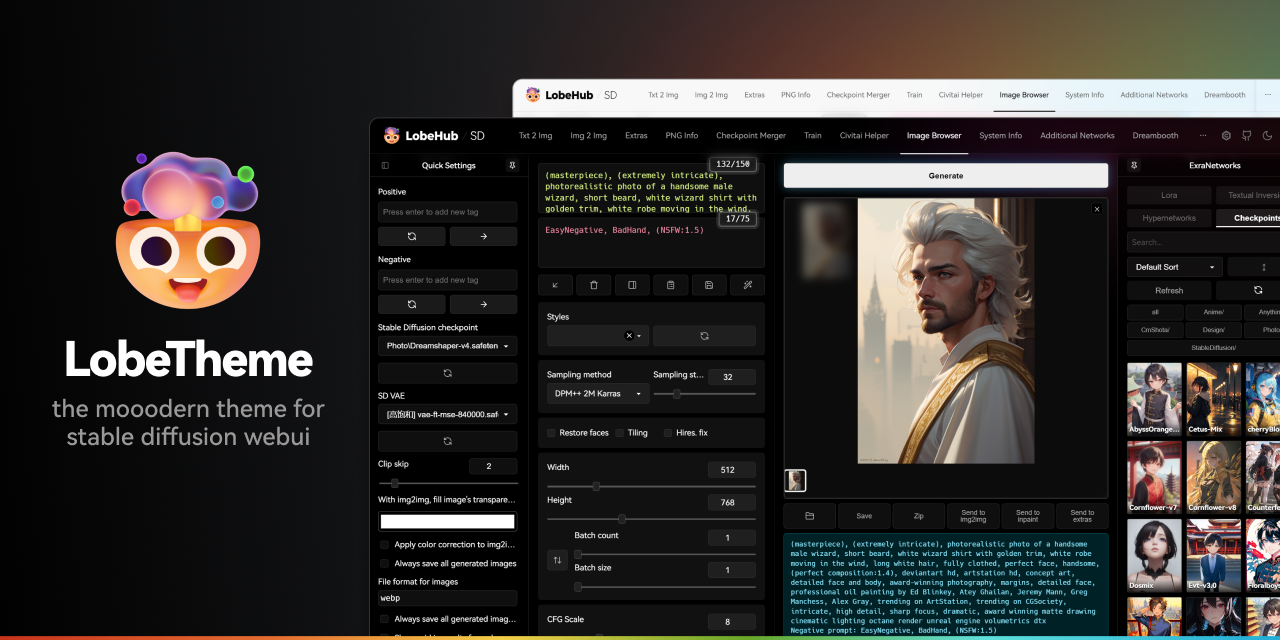
GitHub
🤯 Lobe theme - The modern theme for stable diffusion webui, exquisite interface design, highly customizable UI, and efficiency boosting features. - GitHub - lobehub/sd-webui-lobe-theme: 🤯 Lobe them...
karmic crown
rough locust
wow looks so hot
 ornate elk
hardy gulch
i did this and refreshed the lora page and i still dont see the previews
ornate elk
hardy gulch
i did this and refreshed the lora page and i still dont see the previews
For Lora's the .preview is not needed
Loraname.png is all you need
rough locust
karmic crown
whats controlnet i checked their website but didn't get anything
karmic crown
rough locust
whats controlnet i checked their website but didn't get anything
you can change the pose of your subject
 somber bison
it says the same thing no module named pip
rough locust
ahh for that i was using open pose editor
hardy gulch
ornate elk
For Lora's the .preview is not needed
Loraname.png is all you need
ok i tried removing those ones and refreshed like so and refreshing still has no effect on the preview images not displaying.
 karmic crown
rough locust
ahh for that i was using open pose editor
karmic crown
rough locust
ahh for that i was using open pose editor
i am using this https://civitai.com/models/140117/latent-layer-cameras mostly
First, please take the time to watch the video, you wont regret it. This is a very large project and these cameras have many capabilities and speci...
ornate elk
hardy gulch
ok i tried removing those ones and refreshed like so and refreshing still has no...
Okay, is your webui updated?
rough locust
karmic crown
you can change the pose of your subject
ah you can rotate face for me its not allowed
hardy gulch
ornate elk
Okay, is your webui updated?
yes
karmic crown
this refresh button
 rough locust
karmic crown
this refresh button
rough locust
karmic crown
this refresh button
can u simply explain what is lora and checkpoints
hardy gulch
ornate elk
Okay, is your webui updated?
when i open the missing image, i get this link: https://c1a06631808eed0247.gradio.live/sd_extra_networks/thumb?filename=C%3A/Users/jeffs/Desktop/homework/stable-diffusion-webui/models/Lora/Ghibli_v6.png&mtime=1700772052.2240708
rough locust
i know them as
checkpoint: create car
lora: edit car
karmic crown
rough locust
i know them as
checkpoint: create car
lora: edit car
model - used for creating pictures
lora - used to style a picture (like a specific face or cloth)
clear enough?
rough locust
which means, first i have to create model
then i have to edit with image to image with lora ?
karmic crown
you can use both at the same time
karmic crown
for example realistic model + specific person face lora
rough locust
oh okay
ornate elk
hardy gulch
when i open the missing image, i get this link: ```https://c1a06631808eed0247.gr...
Make sure the webui is whitelisted in any browser adblocker
karmic crown
karmic crown
for example realistic model + specific person face lora
Photon aims to generate photorealistic and visually appealing images effortlessly. Recommendation for generating the first image with Photon: Promp...
Description by chatGPT :-) Jennifer Lopez is a famous singer, actress, and dancer who has achieved widespread success in both the music and film in...
hardy gulch
ornate elk
Make sure the webui is whitelisted in any browser adblocker
Ok I disabled all of my adblockers in my browser and refreshed the lora page and the webpage and still cannot see the preview images.
hardy gulch
ornate elk
Make sure the webui is whitelisted in any browser adblocker
this happens on all of my different browsers too and on different devices aswell
karmic crown
can you send an image
any of them so i can try to use it with some of my loras
but copy paste from your folder
hardy gulch
yeah ofc
hardy gulch
karmic crown
but copy paste from your folder
 hardy gulch
how are they converted to webp?
karmic crown
discord converted an image
hardy gulch
ohh nvm then
karmic crown
maybe if you zip it?
karmic crown
@hardy gulch as i suspected
❯ file ghibli_style_offset.png
ghibli_style_offset.png: JPEG image data, JFIF standard 1.01, resolution (DPI), density 96x96, segment length 16, Exif Standard: [TIFF image data, little-endian, direntries=1], baseline, precision 8, 920x1376, components 3
that is JPG
rename it to jpg and it will work
somber bison
@ornate elk I checked there is no venv file and it says the same thing
ornate elk
somber bison
<@161910921269084160> I checked there is no venv file and it says the same thin...
Yea the promplem is the connection from your PC to the github where the webui is hosted
somber bison
so its beacuse of the internet connection?
hardy gulch
karmic crown
rename it to jpg and it will work
tried it with both jpg and jpeg, and it still did not work
 karmic crown
hardy gulch
tried it with both jpg and jpeg, and it still did not work
karmic crown
hardy gulch
tried it with both jpg and jpeg, and it still did not work
the image you sent me is jpg, named .png
ornate elk
somber bison
so its beacuse of the internet connection?
Yes or maybe something blocking it.
Try restart your PC for example then open up a cmd and type
Pip cache purge
Then make a new folder and git clone again
hardy gulch
karmic crown
the image you sent me is jpg, named .png
im seeing it as a png. maybe the rar compressed it or something? idk honestly

 somber bison
ornate elk
Yes or maybe something blocking it.
Try restart your PC for example then open up...
somber bison
ornate elk
Yes or maybe something blocking it.
Try restart your PC for example then open up...
When i typed that in the cmd it says Pip' is not recognized as an internal or external command
hardy gulch
now i think my issue is something other than the name of the file. maybe a flag i have set or something?
karmic crown
somber bison
When i typed that in the cmd it says Pip' is not recognized as an internal or ex...
do you get an error like this one?
> pip
> Traceback (most recent call last):
>   File "<stdin>", line 1, in <module>
> NameError: name 'pip' is not defined. Did you mean: 'zip'?
or maybe something in my webui settings
somber bison
karmic crown
do you get an error like this one?
```
> pip
> Traceback (most recent call last)...
yes
somber bison
I did
it says
pip' is not recognized as an internal or external command,
operable program or batch file.
when i typed Pip cache purge
karmic crown

How-To Geek
There is a way to launch Command Prompt for any occasion.
somber bison
yes this is what i launched
karmic crown
when you lauch it, all of those are required to work
run them one by one and post a result screenshot
python3 --version
pip --version
git --version
i disabled share, and i still cant see the previews. my launch flags is only --xformers now
karmic crown
what is your browser?
hardy gulch
opera gx, but it doesnt work on any browser
karmic crown
try with edge or chrome in incognito
hardy gulch
karmic crown
try with edge or chrome in incognito

this is in chrome incognito, still does not work
here is my cmd window when i run it
 karmic crown
even after you click refresh here
 somber bison
 hardy gulch
karmic crown
even after you click refresh here
hardy gulch
karmic crown
even after you click refresh here
yes
ornate elk
somber bison
When i typed that in the cmd it says Pip' is not recognized as an internal or ex...
That means your python installation is broken too
karmic crown
somber bison
username with strange characters can cause many problems if you installed python just for yourself, and not for all users
i would suggest to make a new windows user with engish letters only, and to install both for all users
karmic crown
be sure to add to path
somber bison
I did
karmic crown
somber bison
It is english letters
you edit the image, i see now
i show it was something else
my screen is small (13")
somber bison
 karmic crown
git is correctly installed
ornate elk
Python is not installed correctly
karmic crown
but python is not added to path
ornate elk
somber bison
So do i reinstall?
Run the python installer again, click modify and then "add to system variables"
rough locust
torch.cuda.OutOfMemoryError: CUDA out of memory. Tried to allocate 14.00 MiB (GPU 0; 5.79 GiB total capacity; 5.46 GiB already allocated; 13.81 MiB free; 5.65 GiB reserved in total by PyTorch) If reserved memory is >> allocated memory try setting max_split_size_mb to avoid fragmentation. See documentation for Memory Management and PYTORCH_CUDA_ALLOC_CONF
its happening when i try to change model
but i can change models in foocus etc.
karmic crown
your command paramteres are not correct
rough locust
how
somber bison
ornate elk
Run the python installer again, click modify and then "add to system variables"
Where
 karmic crown
rough locust
how
karmic crown
rough locust
how
which gpu do you have?
karmic crown
VRAM?
rough locust
6
karmic crown
what are your command line parameters?
rough locust
just ./webui.sh
karmic crown
rough locust
just ./webui.sh
you need to edit ./webui-user.sh and to add parameters for your card
rough locust
can u guide me or do you have link or do you have parameters already in your sh and can u share
hardy gulch
should i give up and just reinstall a1111?
karmic crown
rough locust
can u guide me or do you have link or do you have parameters already in your sh ...
@ornate elk is nvidia master, he will tell you, i am mac guy 🙂
rough locust
karmic crown
<@161910921269084160> is nvidia master, he will tell you, i am mac guy 🙂
ahh okay i hope he will see this ping
ornate elk
rough locust
ahh okay i hope he will see this ping
--medvram --xformers --no-half-vae
somber bison
I did it
rough locust
ornate elk
--medvram --xformers --no-half-vae
i'll try
 karmic crown
rough locust
i'll try
karmic crown
rough locust
i'll try
like this
set COMMANDLINE_ARGS=--medvram --xformers --no-half-vae
in webui-user.bat
than run that one
hardy gulch
ornate elk
--medvram --xformers --no-half-vae
i have a 4070ti, should i use --no-half-vae?
karmic crown
hardy gulch
i have a 4070ti, should i use --no-half-vae?
VRAM size?
ornate elk
hardy gulch
i have a 4070ti, should i use --no-half-vae?
If you use sdxl models or anime vae files then yes
karmic crown
somber bison
<@916007004823257198>
this looks good, and it should work, relaunch cmd and try pyton3 --version again
somber bison
still the same
 somber bison
 ornate elk
somber bison
ornate elk
somber bison
Your on windows 32 bit ????
karmic crown
somehow he ended inside python shell
karmic crown
python3 --version
you need to see this
c:\
and the rest
and then type python3 --version
does if finally work?
somber bison
still dont work

 safe inlet
run from CMD, not clicking a python shortcut or not from start menu
somber bison
 karmic crown
if you see this
 karmic crown
somber bison
karmic crown
somber bison
that is the right window
somber bison
but it still doesnt work
karmic crown
does python --version works?
somber bison
yes
karmic crown
and pip --version?
somber bison
nope
karmic crown
how about python -m pip --version
somber bison
karmic crown
how about python -m pip --version
It said no module named pip
karmic crown
what pyton --version retuns? 3.10.11 ?
somber bison
yes
karmic crown
and if you do this
python -m ensurepip --upgrade
does it install pip and does pip now works?

 somber bison
so theres a virus?
karmic crown
do you use some antivirus program?
somber bison
yes
karmic crown
it looks like it stops python to work correctly
you need to resolve that problem with their support first
we cant help you here until you have all 3 working python, pip and git
somber bison
so if i unisntall the anti virus it will work?
karmic crown
better ask them for help
what av is that?
maybe there is something somewhere rearding that problem
somber bison
I think its McAfee
karmic crown
i cannot find a solution to that problem 🤷🏻♂️
you can ask mcafee support for help or disable it (which i would not advise)
ornate elk
somber bison
I think its McAfee
Wow I wouldn't use that, Windows defender is better
karmic crown
have you restarted pc after uninstall?
somber bison
yeah
karmic crown
when i see this i am glad that i use windows like 10 times a year


 lost crescent
WAS Node conflict - anyone any idea how to resolve? Conflicted Nodes:Image Save [ymc-node-suite-comfyui], Save Text File [ymc-node-suite-comfyui]
 quaint leaf
Hey i have a question
Is It possibile to run SD on a PC with 4gb vram without using the lowram option?
Cause its very slow 😦
 ornate elk
 solar scarab
just did it again, same error
solar scarab
just did it again, same error
Uninstall python 3.12
Then delete the venv again
ornate elk
solar scarab
thanks <@161910921269084160> 👍
no problem 🙂
quaint leaf
quaint leaf
Is It possibile to run SD on a PC with 4gb vram without using the lowram option?
Is this the right Place for this question?
ornate elk
quaint leaf
Is It possibile to run SD on a PC with 4gb vram without using the lowram option?
yes its possible
whats your gpu?
ornate elk
quaint leaf
Nvidia 1050 ti
you need --medvram --xformers --no-half-vae
safe inlet
--normalvram --force-fp32 and xformers should launch default i think, i like --auto-launch also

 safe inlet
you might be working in to big a resolution also, work small, figure out how to upscale separately
 safe inlet
i saw SDXL in the screenshot somewhere, if you are using that 504x504 might not be good for it, google SDXL resolutions
quaint leaf
And what should i use
safe inlet
i dunno its trained on 1024x1024 so any variation of that listed from your google search
safe inlet
yes thats what i would try as thats what its good at
quaint leaf
But its strange that he puts me in lowram without telling me that there Is an error or something like that
safe inlet
probably can see it happening in the console, and its trying to help you 🙂
quaint leaf
What browser do u suggest?
safe inlet
shouldnt really matter if the page works, not gonna fix anything else
quaint leaf
I tryed but its still in lowram


 safe inlet
can ctrl-alt-del/task manager see if anything is using GPU, shut them off if possible, can somehow shut off photo preview in comfy to lower vram use also, beyond that i cant really add anything, tapped out my knowledge
quaint leaf
Ok now ill see
safe inlet
i dont really know how diffrent models affect vram usage, maybe there is something there, i run off a 2080ti /shrug

 safe inlet
click on processes tab, far right colum sort by GPU use, see if there is anything like a normal program you can shut off, might just be normal windows stuff
ornate elk
quaint leaf
Look
windows and pytorch
unique urchin
I'm getting this everytime i try to install an extension, how do i fix this to stop it from happening in the future

 modest pier
Hi yall, I am trying to install comfyui-reactor-node but keep getting an error. I have tried updating my python, reverting to 3.10.0, and git cloning the files. Kinda lost for what to do next. Here is the error info too.
 spark tusk
Hey everyne,, im prob not in the right place for this but I ws wondering if there ws anyone tht might be able to help me finish setting up my SD,. Im hving problemsetting up -venv drives so I cn hve more then 1 verson of Python nd not interfer with the others?
 fair oxide
hello guys im back with another error
please help

 formal trout
hi, any guide on how to run img2vid on Automatic1111? I had switched to the last branch candidate
I'm downloading one of these models https://huggingface.co/stabilityai/stable-video-diffusion-img2vid/tree/main

 solid lion
Hello, running into the following issue of "Python was not found; run without arguments to install from the Microsoft Store, or disable this shortcut from Settings > Manage App Execution Aliases." when trying to set up virtual environment. I have installed 3.10.6 Python and also added path to the environment variable but still running into the same issue. Any suggestions? Thanks!

 karmic crown
 arctic zinc
I am having problems after I upgraded to Mac Sonoma
arctic zinc
I am having problems after I upgraded to Mac Sonoma
i posted updated instructions for Mac here you should start from "Existing install" part. Please follow my instructions and not the ones from the original post. Let me know if you encounter any problems

GitHub
Mac users: Please provide feedback on if these instructions do or don't work for you, and if anything is unclear or you are otherwise still having problems with your install that are not curren...
karmic crown
unique urchin
I'm getting this everytime i try to install an extension, how do i fix this to s...
remove the folder tmp inside your stable-diffusion-webui
lost crescent
unique urchin
I'm getting this everytime i try to install an extension, how do i fix this to s...
Sounds like (as it says) the target directory/folder already exists and is a full folder. Rename the troublesome folder, and try again
lost crescent
fair oxide
hello guys im back with another error
please help

Stack Overflow
I am getting an error message that says
AttributeError: 'NoneType' object has no attribute 'something'
How can I understand this message?
What general scenarios might cause such an AttributeError,...
lost crescent
solid lion
Hello, running into the following issue of "Python was not found; run without ar...
Type where python
karmic crown
lost crescent
https://stackoverflow.com/questions/8949252/why-do-i-get-attributeerror-nonetype...
that is totally irrelevant. it just explains what can cause that error in your python code. since he is just a user of a1111, it is not helping at all
karmic crown
fair oxide
hello guys im back with another error
please help
even i am not sure what all those parameters are, i noticed that you have 500, 500 for some of them. if those are dimensions they should be 512, 512 as above
ornate elk
spark tusk
Hey everyne,, im prob not in the right place for this but I ws wondering if ther...
Right click and edit the webui-user.bat
In the line Python=,
you add the path to the 3.10.x python.exe
Then delete the venv folder
ornate elk
solid lion
Hello, running into the following issue of "Python was not found; run without ar...
Hey, what you try to install ?
 idle fable
Hello Gs when running my ksampler I got this error, does anyone know why is that?
Error occurred when executing KSamplerAdvanced:
free_upper_bound + pytorch_used_bytes[device] <= device_total INTERNAL ASSERT FAILED at "..\c10\cuda\CUDAMallocAsyncAllocator.cpp":540, please report a bug to PyTorch.
 fair oxide
lost crescent
https://stackoverflow.com/questions/8949252/why-do-i-get-attributeerror-nonetype...
fair oxide
lost crescent
https://stackoverflow.com/questions/8949252/why-do-i-get-attributeerror-nonetype...
thanks, i dont get it
 lyric vector
Got a problem with multidiffusion-upscaler-for-automatic1111 When I click generate I'm getting this error "RuntimeError: The size of tensor a (111) must match the size of tensor b (256) at non-singleton dimension 3" when ever I enable Noise inversion it gives me this error but if I uncheck it it works, Im doing this inside img2img
 stuck knot
formal trout
I'm downloading one of these models https://huggingface.co/stabilityai/stable-vi...
stuck knot
formal trout
I'm downloading one of these models https://huggingface.co/stabilityai/stable-vi...
Same, I'm looking for Stable Video guide for Automatic 1111 to!
lost crescent
Where can I find Kandinsky Channel?
fair oxide
karmic crown
that is totally irrelevant. it just explains what can cause that error in your p...
yea your right, i dont understand a single thing there
cedar depot
Got a weird thing going on, when opening SD, I have prompts saved from a few days ago that I used for testing and they always appear when re-opening SD. They arent the prompts I used like yesterday for example. Is there a way to change this?
 hallow latch
How can I get a better way to Scale up images?
fair oxide
fair oxide
hello guys im back with another error
please help
so uhh how do i fix this?
fair oxide
Hello, I would like to do a garment transfer with Stable diffusion. Has anyone done it before? I think a mix between Inpaint + Openpose would be a good solution, what do you think?

 feral mango
hi everonbe. I need help with anaconda and autoamtic. Anaconda only offers me this options
Please the question is around if 3.10.13 is as comaptible as 3.10.6 not if I should jsut install python and not use ANACONDA. I am using ananconda because i need to have different versiosn of python.
Should I install just 3.10.6 from command line anaconda... or can i use 3.10.13?
 karmic crown
feral mango
hi everonbe. I need help with anaconda and autoamtic. Anaconda only offers me th...
karmic crown
feral mango
hi everonbe. I need help with anaconda and autoamtic. Anaconda only offers me th...
a1111 uses venv, so you will basically use 2 different virtual environments. i recommend installing 3.10.6 outside of conda. but yes, 3.10.13 should work (i use that one on mac)
karmic crown
fair oxide
so uhh how do i fix this?
as I already wrote, I am not sure what you are doing, but I noticed that you have two parameters with a value of 500. Start by checking if you have dimensions 500x500 anywhere and change that to 512x512. if that is not a height and width, i have no other ideas for now 🤷🏻♂️

those two
fair oxide
karmic crown
as I already wrote, I am not sure what you are doing, but I noticed that you hav...
oh sorry... i was training a hypernetwork, image size is 512x512 by default for me and i do not change that
fair oxide
karmic crown
these two must be the 500 you were talking about
 karmic crown
so, those are not related to size, in that case forget what i wrote

GitHub
Is there an existing issue for this? I have searched the existing issues and checked the recent builds/commits What happened? I was prompting in Anything V3, but tried to change it to another model...
 halcyon tiger
where can I ask a question about hardware...?
 thorny horizon
can anyone tell me how to install playground v2 on Foocus UI ?, on the huggingface page i find many files other thatn the main safetensor files
solid lion
ornate elk
Hey, what you try to install ?
I am trying to generate images using the code so to do that I am trying to set up virtual environment so then I can install required libraries.
chilly sandal
ornate elk
hey, do you have an screenshot of the cmd with the errors?
Sorry for the very late reply, heres the ss of the cmd. As a reminder of my issu, I cant load a model (mixtapeBlues). It basically just sais it fails...
 ornate elk
chilly sandal
Sorry for the very late reply, heres the ss of the cmd. As a reminder of my issu...
ornate elk
chilly sandal
Sorry for the very late reply, heres the ss of the cmd. As a reminder of my issu...
Is your webui updated?
chilly sandal
yep, updated it last night
ornate elk
chilly sandal
yep, updated it last night
okay, do other models work?
chilly sandal
yeap, yeap, I've been working with a few other models, this is the forst one to cause issues
ornate elk
chilly sandal
yeap, yeap, I've been working with a few other models, this is the forst one to ...
Have you tried redownloading it?
Also what's your torch and xformers version?
You can check it at the bottom in browser
chilly sandal
ornate elk
Also what's your torch and xformers version?
You can check it at the bottom in b...
and yea, tried to redownload the model like 4 times

is the fact that versiom is 1.6.1 and the model is for SD 1.5 a problem?.... didnt notice that before
(the others I used are for 1.5 usually too I think... Im still a newbie at this, sorry)
ornate elk
chilly sandal
and yea, tried to redownload the model like 4 times
No that's fine. The webui version isn't the model version
formal trout
ornate elk
Hey, what you try to install ?
Really don't know 😅 what are people actually using for SD video? It's seems there are several approaches, don't know which is best. It seems there is a model for img2vid, but also AnimateDiff, Deforum, I don't know if they combine those or what models they use or what.
ornate elk
formal trout
Really don't know 😅 what are people actually using for SD video? It's seems the...
It depends what you want to create
They are for different purposes 😄
@odd fractal
Here is a quick Guide to install Automatic1111 Webui (Stable Diffusion)
You need to install Git 64bit: https://git-scm.com/download/win
and Python 3.10.11, 64bit: (any python above or 3.10.6) No 3.11, 3.12 https://www.python.org/downloads/release/python-31011/
And check "add python to path" when installing Python.
- Make a new Folder on your drive (not on Desktop, downloads, documents, Programms, Onedrive) and name it Ai for example:
C:\Ai\ - You go into the folder you created in this case Ai, then click in the File Explorer bar (not searchbar) and type
cmdthen press enter. - Then you copy and paste this command:
git clone https://github.com/AUTOMATIC1111/stable-diffusion-webui.git - Press enter and after its done you can close the cmd and launch the webui-user.bat inside the stable-diffusion-webui folder.
After the Installation that can take a while. Youll get an URL http://127.0.0.1:7860
Thats the webui you open in Browser.
 formal trout
ornate elk
It depends what you want to create
formal trout
ornate elk
It depends what you want to create
just some video 
It seems they are various methods and Comfy workflows but I want to do it on Automatic1111
hey also what about ControlNet, it is very tedious that at certain point after some error it stops working all along, I have to restart SD
or after hooking two IP-Adapters it stop working
sharp lichen
what is a good desnoising strength for latent upscale?
 proper pike
Can anyone help me figure out why a 420 frame animatediff / sdxl takes over an hour and a half to render?
https://youtu.be/KgskT-98vww

 subtle quarry
Hey does anyone know why this is happening?

workflow in case someone needs it

plugging in a vae and seeing if that does anything...
I had the same lora twice, sorry folks im a dumbass
 fluid canyon
hello guys!
is there a way to get from a Photo A to Photo B in Deforum ?
 odd fractal
ornate elk
<@364439255872831488>
**Here is a quick Guide to install Automatic1111 Webui (S...
odd fractal
ornate elk
<@364439255872831488>
**Here is a quick Guide to install Automatic1111 Webui (S...
what does it mean when its just stuck on this


arctic zinc
@karmic crown thank you so much I spent days trying to look for solutions and I'm very greatful. I know Mac generally takes longer to generate compared to windows. Is there anything that could help with speed?
formal trout
Hi, I 'm trying to inpaint in Automatic1111 with an IP-Adapter ControlNet Unit, loaded with an independent control image, but it doesn't work well.
I noticed it delivers this after, so for some reason it is cropping/zooming the reference image. I tried "pixel perfect" and other pre processor resolution but it is always the same.

With "Reference" it deliver the processed image full, but it doesn't seem to help inpainting what I want
With "Revision", same as IP adapter, zoomed
I discoverd that it works inpainting "Whole picture", and the processed image is delivered in the right size, ,but I want to inpaint "only masked"
For some reason the image resolution affects the processed reference image, here I inpainted (only masked) in 16:9 and it delivered this
 ornate elk
odd fractal
ornate elk
odd fractal
Hey, you need to have "add python to path" selected when installing python
You can run the python installer again, click modify, next, and then select "add python to system variables"
formal trout
oh I found someone with the same problem, maybe he describes it better, no answer xD https://www.reddit.com/r/StableDiffusion/comments/1740b61/prevent_controlnet_image_from_being_zoomed_in_and/
Reddit
Explore this post and more from the StableDiffusion community
I tried manually cropping the image but now the inpaint seems to be broken, and my head hurts
ornate elk
formal trout
For some reason the image resolution affects the processed reference image, here...
Your on AMD right? If you use inpaint in img2img then you need --no-half
But inpaint with controlnet should work without
 graceful loom
why am i getting this error Error: 'invalid literal for int() with base 10: ' 3000.5''. Before reporting, please check your schedules/ init values. Full error message is in your terminal/ cli.

pls help
formal trout
ornate elk
Your on AMD right? If you use inpaint in img2img then you need --no-half
ohh I'll try that, with my old amd GPU I think I have to use that. But inpainting works without it, but I'll try it anyway
formal trout
ornate elk
But inpaint with controlnet should work without
well the problem is this https://www.reddit.com/r/StableDiffusion/comments/1740b61/prevent_controlnet_image_from_being_zoomed_in_and/
Reddit
Explore this post and more from the StableDiffusion community
exactly
formal trout
ornate elk
But inpaint with controlnet should work without
It actually work inpainting with whole picture, but the inpaint is awfull as it needs more zoom. With "only masked" it do what the reddit post says
BTW I keep trying to run this on Automatic1111 https://huggingface.co/runwayml/stable-diffusion-inpainting

no dice
I read someone in civit.ai claiming that it works now on Automatic1111.
So I tried and it gave me out of memory, tried a lower resolution and it gave me "use --no-half", and then Nans problems etc
karmic crown
arctic zinc
<@916007004823257198> thank you so much I spent days trying to look for solution...
that is the fastest you can get with A1111 and your hardware. the command line i posted is actually optimized as much as possible for macs
mellow finch
@karmic crown i tried the steps for running web UI on macOS
while running git clone https://github.com/AUTOMATIC1111/stable-diffusion-webui there were errors
GitHub
Stable Diffusion web UI. Contribute to AUTOMATIC1111/stable-diffusion-webui development by creating an account on GitHub.
@karmic crown can you help?
@karmic crown

can anyone help ⏫ ??
 vocal burrow
network error during the process
you probably got disconnected or something
try again with a proper connection (no wifi for instance)
 summer tinsel
Hi guys, we are using your API and for some presets, when selecting 2 or for images to be generated at a same time, those images are mostly blurred. The output looks like this: https://prnt.sc/SZTiuCm_wihl
Here is the used prompt: red haired slim woman on Starboard carbon paddle board in rough sea, lightning in the sky, foam tipped wave around
Prompts like "Photo of a giant steampunk mecha fighting cthulhu in the ruins of a city. The city is half submerged in murky water." work with no issues.
"style_preset" is not selected.
Could you let me know hwat is causing this and how to fix it? Thank you.
 fair oxide
karmic crown
check this https://github.com/AUTOMATIC1111/stable-diffusion-webui/issues/5490
fair oxide
karmic crown
check this https://github.com/AUTOMATIC1111/stable-diffusion-webui/issues/5490
thank you
i just had to run
git clone https://github.com/deforum-art/sd-webui-deforum extensions/deforum
GitHub
Deforum extension for AUTOMATIC1111's Stable Diffusion webui - GitHub - deforum-art/sd-webui-deforum: Deforum extension for AUTOMATIC1111's Stable Diffusion webui
vocal burrow
summer tinsel
Hi guys, we are using your API and for some presets, when selecting 2 or for ima...
might be some NSFW filtering, try something less likely to trigger nude to confirm
mellow finch
vocal burrow
try again with a proper connection (no wifi for instance)
thanks a lot
the install has worked
SD is up and running now
but i'm getting a different error
mellow finch
vocal burrow
might be some NSFW filtering, try something less likely to trigger nude to confi...
Can you help with this error: NansException: A tensor with all NaNs was produced in Unet. This could be either because there's not enough precision to represent the picture, or because your video card does not support half type. Try setting the "Upcast cross attention layer to float32" option in Settings > Stable Diffusion or using the --no-half commandline argument to fix this. Use --disable-nan-check commandline argument to disable this check.
ok i just fixed it in settings
but results are terrible
 craggy tusk
hello I have done this tutorial many times ( https://www.youtube.com/watch?v=Hmk2lYPK_Bc ) without any problem.. I just recredited my account and I got this error " RuntimeError: Expected all tensors to be on the same device, but found at least two devices, cpu and cuda:0! (when checking argument for argument mat1 in method wrapper_CUDA_addmm) " I don't understand.. can you help me?

Tools used:
Stable Diffusion with diffusionhub - https://diffusionhub.io/?fpr=marc14
Controlnet Model Link: https://civitai.com/models/111006/qr-code-monster (make sure to use this and not GitHub or Huggingface when installing in diffusionhub - rightlick on download, copy adress, paste into install section).
In this tutorial i show you how to ...
vocal burrow
craggy tusk
hello I have done this tutorial many times ( https://www.youtube.com/watch?v=Hm...
are you using a laptop ?
Regardless you can force auto1111 to use a specific hardware with the --device-id xxx (x being your gpu id, you ll find it in task manager) flag
problem happens because part of the pipeline seems to be working on the cpu while another part is on the gpu
craggy tusk
vocal burrow
Regardless you can force auto1111 to use a specific hardware with the `--device-...
thank you for the answer I don't use it locally but on https://diffusionhub.io/
vocal burrow
craggy tusk
thank you for the answer I don't use it locally but on https://diffusionhub.io/
same answer then
use the --device-id xxx command line argument and see if it helps (with xxx being 0 or 1 most likely)
craggy tusk
vocal burrow
use the `--device-id xxx` command line argument and see if it helps (with xxx be...
ok I try this thank you ..I am a beginner where do I type? the argument line
vocal burrow
Command line arguments explained like I'm five :
- First off, golden rule; .bat files are for windows, .sh for linux/mac, do NOT modify webui.bat/webui.sh. The only file you should be modifying ever is webui-user.bat/sh
- What is a command line argument/arg ? Those are words you use when launching a program to specify how it should work/trigger a specific behavior. They can look like this
--xxxor--xxx y(y being a specific value associated with the -xxx command line argument) - How do I set those ? Edit (with notepad or whatever text editor you want) your webui-user.bat/sh file and then :
- for windows users : find the following line
set COMMANDLINE_ARGS=and set whatever command line arguments (and its associated value) on the same line after the=. (eg :set COMMANDLINE_ARGS=--xformers --no-half-vae --medvram-sdxl) - for mac/linux users : find
#export COMMANDLINE_ARGS="", remove the # to uncomment it and then do the same as windows users
- Is there a list explaining what those arguments do ? What values I should use with such and such argument ? Check it here https://github.com/AUTOMATIC1111/stable-diffusion-webui/wiki/Command-Line-Arguments-and-Settings#all-command-line-arguments
but because you re using someone else`s computer you ll have to find a way to modify their webui-user.bat/sh on your own
(wow they didn t even setup proper licensing / about us / troubleshooting / etc page on their website.... it goes straight up to "here s a the service" page with little to no details. And I m guessing the "here s how much it costs" page goes up the moment you give them your google account)
craggy tusk
vocal burrow
(wow they didn t even setup proper licensing / about us / troubleshooting / etc ...
Yes no contact on the site page.. I will try to contact them by email because I do not see how to interact on the site itself to carry out manipulations since it is a collaboration.. thank you for your help
vocal burrow
craggy tusk
Yes no contact on the site page.. I will try to contact them by email because I ...
I see they have a discord link in the footer
might be faster to get information that way
That s the problem with "All in one/Ready to use solution" most of the time you don t actually own anything nor have proper access to things. Good luck.
craggy tusk
vocal burrow
That s the problem with "All in one/Ready to use solution" most of the time you ...
thank you for your time buddy
karmic crown
mellow finch
<@916007004823257198>
those are unexpected connection problems, try again
daring jasper
Hi!!! I have stoopid question) Well I tried to used Extras with deoldify option ) and it shows me this: TypeError: 'NoneType' object is not subscriptable
Time taken: 2 min. 47.7 sec.
A: 4.31 GB, R: 5.05 GB, Sys: 3.0/3 GB (100.0%)
 lilac cobalt
I'm trying to download stable diffusion but I don't know how to do it.
karmic crown
lilac cobalt
I'm trying to download stable diffusion but I don't know how to do it.
what OS are you using and what is your GPU?
lilac cobalt
karmic crown
what OS are you using and what is your GPU?
SO: windows 10 GPU: Intel(R) UHD Graphics
karmic crown
lilac cobalt
SO: windows 10 GPU: Intel(R) UHD Graphics
you can follow this guide -> #🤝|tech-support message
 karmic crown
lilac cobalt
karmic crown
lilac cobalt
you need to fix your command line parameters, give me a second
karmic crown
 fallen nymph
i use amd just sayin
fallen nymph
i use amd just sayin
if you have radeon, you need another guide
karmic crown
fallen nymph
i use amd just sayin
this one is for you -> #🤝|tech-support message
fallen nymph
karmic crown
if you have radeon, you need another guide
amd rx 6700xt is what i got
ya but i get this

okay nvm, for some reasom my terminal doesn't work but cmd does 💀
karmic crown
you can actually do one by one (without combining them with &&), but yes cmd will work 🙂