#Move thumbnails folder to a share in cache [UNRAID]

1 messages · Page 1 of 1 (latest)

hollow barn
#

Let me start by saying that Immich is a great and fundamental app for someone like me who is trying to ditch Google services for good.
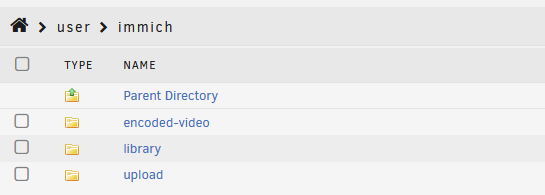
For the past couple of days I have been running an Immich docker image in my Unraid system, but I would like to move my thumbs folder into my cache (SSD). I believe this would decrease the amount of access that my array suffers for the thumbnails. The remainig folders (encoded-video,library and upload) would continue to be in the array.

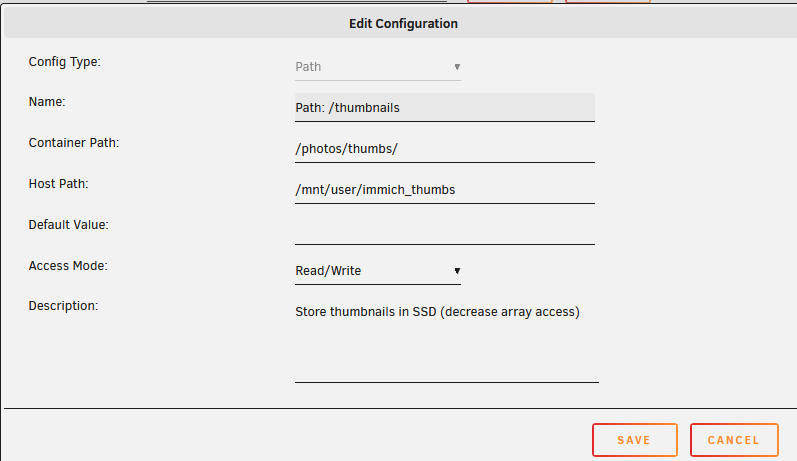
For that I have edited the docker configuration with the following setup:

/photos/encoded-video/ -> /mnt/user/immich/encoded-video/
/photos/library/ -> /mnt/user/immich/library/
/photos/upload/ -> /mnt/user/immich/upload/
/photos/thumbs/ -> /mnt/user/immich_thumbs/ (This is a cache share)

Afterwards I simply kept all the other folders in the same cache and just moved the folder "thumbs" to my new share. However, Immich isn't recognizing any of the paths as no photos and thumbs are being fetched.

Does anyone had this problem before?

humble sableBOT
#

:wave: Hey @hollow barn,

Thanks for reaching out to us. Please follow the recommended actions below; this will help us be more effective in our support effort and leave more time for building Immich immich.

References

Checklist

  1. :ballot_box_with_check: I have verified I'm on the latest release(note that mobile app releases may take some time).
  2. :ballot_box_with_check: I have read applicable release notes.
  3. :ballot_box_with_check: I have reviewed the FAQs for known issues.
  4. :ballot_box_with_check: I have reviewed Github for known issues.
  5. :ballot_box_with_check: I have tried accessing Immich via local ip (without a custom reverse proxy).
  6. :ballot_box_with_check: I have uploaded the relevant logs, docker compose, and .env files using the buttons below or the /upload command.
  7. :ballot_box_with_check: I have tried an incognito window, disabled extensions, cleared mobile app cache, logged out and back in, different browsers, etc. as applicable

(an item can be marked as "complete" by reacting with the appropriate number)

If this ticket can be closed you can use the /close command, and re-open it later if needed.

hollow barn
#

I have full access to my Immich as I an running it on a local level (and I continue to do so even though my photos appear blurred due to the missing thumbs)

humble sableBOT
peak cobalt
#

Did you manually move the thumbnail folder ?

hollow barn
#

The problem is that now that I have created the new paths in Unraid, it seems that immich simply doesn't connect to them

peak cobalt
#

Can you see the thumbnails when you ssh in the container ?

hollow barn
#

Sorry for the question, but what would be the command that I could enter in the console of the docker to see that?

peak cobalt
#

docker exec -it Immich bash

hollow barn
#

uhm nothing appears when I run that command ...

peak cobalt
#

Replace Immich by the name of your immich container or its ID

#

Once you’re in the container execute ls /photos/thumbs

hollow barn
#

now we're talking, thank you!

#

Yeah when I run the command "ls /photos/thumbs" it responds "thumbs"

#

and if I list just "ls /photos" then it shows me the following in a blueyish color

#

encoded-video library upload

#

and the thumbs name appears with a green highlight

peak cobalt
#

Can you see thumbnails in the thumbs directory ?

#

Or is it empty ?

hollow barn
#

immich is no longer creating me a "thumbs" folder in the default path

peak cobalt
#

🤨

#

Sounds like you have an issue with your docker volumes

hollow barn
#

here are my volume mappings

#

previously I just had the default one (/photos/-> /mnt/user/immich)

#

but since I wanted the thumbnails to be on a separate share, hence why I segmented the mappings

#

ever since I did that mapping, Immich doesn't fetch the already existing folders nor the thumb folders (that have been moved)

#

perhaps the unraid docker instance doesn't support multiple paths to /photos?

peak cobalt
#

It does

#

Just be sure to have the right permissions

hollow barn
#

I've searched around the Immich docker and within the docker I didn't find any configuration for paths

#

So I'm assuming that I have to do that in the docker mapping volumes, outside of the container

hollow barn
peak cobalt
#

Make sure all folders have the same permissions

#

Should be nobody:users by default

hollow barn
#

I suppose the permissions are correct in this case

peak cobalt
#

Yep it’s fine

#

Did you restart the container ?

hollow barn
#

Yup

peak cobalt
#

Nothing in the container logs ?

hollow barn
#

whenever I try to open an image I get the usual error

#

Error: ENOENT: no such file or directory, access '/p

#

[Nest] 549 - 03/29/2024, 1:24:32 PM ERROR [ExceptionsHandler] ENOENT: no such file or directory, access '/photos/thumbs/...

#

This is the thumbs new path that I had to add in the cointainer

#

I removed the original path 'Path:/data'

#

I initially tried removing the path within the 'path:/data', but then I couldn't save the new path aditions

#

So I had to remove that field

hollow barn
#

Ah!

#

I managed to find one of the culprits

#

I went ahead with forcing a new rescan of the thumbnails

#

and within this folder

#

/photos/thumbs/ -> /mnt/user/immich_thumbs/

#

immich created a folder with random characters

#

but I moved the folder "thumbs" to here (/photos/thumbs/ -> /mnt/user/immich_thumbs/)

#

But Immich was looking for the folder with random characters, which as inside the thumbs folder (/photos/thumbs/ -> /mnt/user/immich_thumbs/thumbs/folder with random characters)

#

I basically moved the folder with random characters one directory up (so it's like - /photos/thumbs/ -> /mnt/user/immich_thumbs/folder with random characters)

#

and now the thumbnails are being grabbed

peak cobalt
#

Oh wait you had /mnt/user/immich_thumbs/thumbs ?

hollow barn
#

yeah

peak cobalt
#

lol that’s bad yeah

hollow barn
#

And I also have /mnt/user/immich/upload

peak cobalt
#

Docker translates your path so, you should only have the subdirectories

hollow barn
#

oh ok ... But in this way I will loose the separation right?

#

for example whenever I want to go to the folder for encoded videos, now I can go to immich->encoded-video->files

#

that way I will just have immich->random character folder->files

#

I will not know what will be the folders for encoded-video, library and upload

#

Will I have to create a separate share for each (immich_encoded-video, immich_library, immich_upload)?

#

Or you don't see a benefit in having this organization?

peak cobalt
#

I don’t understand your issue

peak cobalt
#

The issue you had is that you had /mnt/user/immich_thumbs/thumbs instead of /mnt/user/immich_thumbs

hollow barn
#

I didn't changed the mapping in the docker configuration

#

all I did is that I deleted the thumbs folder in the folder structure

#

so that now the folder structure is just "/mnt/user/immich_thumbs/"

#

oh wait

peak cobalt
#

Yeah sounds good to me

#

Why do you say you will loose the separation ?

#

Do you use a storage template ?

hollow barn
#

Sorry, I was thinking bad on my case

#

the volume mapping are correct, I was making a stupid confusion

#

just to make sure that everything is OK I will try to upload an image

#

to see if both the thumbnail and picture is stored corretnyl

#

*correctly

#

all is good martabal

#

My stupidity is inmesurable

#

as soon as I corrected the thumbs folder

#

all the others linked themselves

peak cobalt
#

Nice !

#

But IIRC, if you don’t use a storage template, all assets are kept in the upload folder

hollow barn
#

yeah, my library folder is blank indeed

#

bear in mind that mas uploaded photos from my takeout files

#

so I suppose they are correct in being stored in "upload" folder?

peak cobalt
#

Yep

#

If you have a storage template and run the migration job, it should populate your library folder

#

(It moves your files from /photos/upload/whatever/photo.jpg to /photos/library/your_template/photo.jpg)

hollow barn
#

oh ok

#

It's like "now that I have my photos uploaded, let me organize them in the way I want"

peak cobalt
#

Yep exactly

hollow barn
#

oh ok!

#

The migration doesn't run automatically correct?

#

I have to go to JOBS and manually run it?

#

oh just saw in the notes section

#

it aplies to new assets as well

peak cobalt
#

Yep when you upload an asset, immich automatically moves it

#

You just need to trigger it when you change the template

hollow barn
#

Thank you for the help martabal. If I change the storage template in the future, does Immich retroactively apply the changes?

peak cobalt
#

You’re welcome

#

Yep, but you have to trigger the migration job

hollow barn
#

Oh thats great!

#

Thank you so much for the help martabal! Is ther any way I can classify the support ticket as finished?

peak cobalt
#

It was my pleasure

#

I think you can close it with « /close » 😉

hollow barn
#

Thank you once again martabal!

#

/close