
#Cultivation in Virtual Machine?
75 messages · Page 1 of 1 (latest)
 solemn grail
 strong pulsar
First replace mhypbase.dll in your game folder with the patch, so take version.dll from C:\Program Files\Cultivation and copy it into your game folder, then delete mhypbase.dll, then rename version.dll to mhypbase.dll
Then in Cultivation, check the setting for "run the game non-elevated" and then try again
solemn grail
I mentioned in my last message I was unzipping 4.0, after doing that I cannot set the executable in Cultivation to the GenshinImpact.exe. Is there something else I need to do as well? I can't test what you said to try because of this.
solemn grail
When I select the executable in the settings menu, it seems to work. But when I close out the menu and open it again, the field is blank. When I try to launch, it simply shows this.
 strong pulsar
Ok can you go ahead and confirm for me the setting you're using in Cultivation (to be sure), your Cultivation version, and a screenshot of your game folder?
solemn grail
Of course, attached an image of the setting I'm trying to use. Attached a screenshot of the top of the window where it says Cultivation version 1.2.0 in the window, and also attached a screenshot of my game folder.


 strong pulsar
Ok go ahead and close Cultivation, go open configuration.json in %appdata%\cultivation, and set the game install path in it to C:\Program Files\Genshin Impact\GenshinImpact.exe save and start Cultivation again
Or just restart Cultivation and use the settings menu again
solemn grail
Just tried the config edit, it didn't work. Gave me this message at the top of the window right when I started. Also just tried using settings menu again, didn't work either.
 strong pulsar
Cultivation removes the game path if you have it set to an invalid location is why
Give me a minute and I'll make you a version without it
solemn grail
Thank you!
strong pulsar
solemn grail
Should I delete the original install, or just install this on top of it?
solemn grail
Thank you, that worked in making it start to launch, but then it gives me the Virtual Machine error code still

 night shadow
solemn grail
Thank you, that worked in making it start to launch, but then it gives me the Vi...
night shadow
solemn grail
Thank you, that worked in making it start to launch, but then it gives me the Vi...
if you followed the guide and still got this warning, you either reinstall the vm or give up
it's too late
reinstall the vm and follow each step again
solemn grail
Oh, thats a bit tragic :( would it work if I copied the game files from the old VM to the new VM instead of redownloading the entire thing again? Already redownloaded it 3 times and it always takes forever.
night shadow
I'm not sure, if you still have the vm can you try to move "GenshinImpact.exe" to desktop and try to launch it? Does it still give you the vm error?
solemn grail
Yes, it does. I'm just gonna restart fully scratch like you said then.
Just to make sure I download the right thing, to get 4.0 to run it on should I go to this: https://github.com/MAnggiarMustofa/GI-Download-Library/blob/main/GenshinImpact/Client/4.0.0.md and download the "Client | 4.0.0" link?

GitHub
Library of a certain Anime Game's Release, Beta and Audio files - MAnggiarMustofa/GI-Download-Library
strong pulsar
Yes you need the client
night shadow
solemn grail
Yes, it does. I'm just gonna restart fully scratch like you said then.
wait
if it does, then instead of redownloading genshin again, if you're not sure the vm is fully completed, you might just want to keep that exe file and test on it until you don't get the vm error anymore, you should get something like unity player is missing
solemn grail
Sorry, I already deleted that VM and the new ones setting up 😭
night shadow
do you have genshin in your local pc? you can also use that one
solemn grail
I do, but I'm a bit paranoid about messing it up, even if its a small chance. Also, iirc cultivation needs 4.0 or lower, and my local pc is 4.1
night shadow
just copy only "GenshinImpact.exe" to another folder and then use on the vm to test it, doesn't matter which version is, what you're trying is to see if it detects the vm and gives the error while launching 👍
strong pulsar
solemn grail
I do, but I'm a bit paranoid about messing it up, even if its a small chance. Al...
Not Cultivation that needs it, Grasscutter only supports 4.0 and earlier
Cultivation can run any version of the game you want
Are you only trying to run this on a vm in the first place due to paranoia about bans or something?
solemn grail
strong pulsar
Not Cultivation that needs it, Grasscutter only supports 4.0 and earlier
Ohhh, I didn't realize that, thanks!
solemn grail
night shadow
just copy only "GenshinImpact.exe" to another folder and then use on the vm to t...
Alright, the VM is setting up right now, should I do that after I do the program that blocks registry reading for Genshin?
solemn grail
strong pulsar
Are you only trying to run this on a vm in the first place due to paranoia about...
Partially, it's for that, which I know is unlikely, but still. Also, because I thought it had to be 4.0 and didn't want to get my game versions mixed up.
strong pulsar
Sad to see so much effort put in for no reason is all
There's no risk whether you use vm or not
night shadow
solemn grail
Alright, the VM is setting up right now, should I do that after I do the program...
from personal experience, you can skip that because doesn't really do that much it was just for more privacy
strong pulsar
And just keep the folders separated like Genshin4.0 in your downloads folder or something, it would be very hard to mix them up
night shadow
strong pulsar
Are you only trying to run this on a vm in the first place due to paranoia about...
i played with the vm for about 3 months for the same reason, until i realized that it doesn't really matter but having a vm that runs genshin is still nice tho
it's more like a "fuck you" to mhy for blocking genshin with thermida
solemn grail
night shadow
just copy only "GenshinImpact.exe" to another folder and then use on the vm to t...
Alright, I put the .exe into the VM and tried to start, gave this message.
 strong pulsar
Means the exe successfully ran, but errored because you only have the exe and not the rest of it
solemn grail
Does that mean I'm past the "cannot run under Virtual Machine" error then? I didn't do the XMS edit yet or anything though (I forget what the 3 letters are, but there are 3 of them!)
strong pulsar
Probably
night shadow
you should be fine now
solemn grail
It finally finished unzipping, and I guess not :(

Should I add that VMX code line and then try again?
I added the lines to the VMX file and its starting now!!! :)
That was without Cultivation though, haven't installed that. Just wanted to make sure the base game started first. Will try with Cultivation, but I assume it'll work!
I'm sorry, I know I keep appearing with errors and stuff 😭 I'm hoping this is the last issue I run into, but how do I fix this?
 strong pulsar
Graphics driver issue on your vm
solemn grail
How would I fix that?
strong pulsar
That's up to your vm and it's settings, you'd have better luck googling about your vm
solemn grail
Alright, thank you for your help!
strong pulsar
No problem
night shadow
solemn grail
I'm sorry, I know I keep appearing with errors and stuff 😭 I'm hoping this is t...
delete "globalgamemanagers.assets.resS" inside the folder "GenshinImpact_Data"
solemn grail
night shadow
delete "globalgamemanagers.assets.resS" inside the folder "GenshinImpact_Data"
Just tried that, they're still glowing :(

 soft mist
solemn grail
Just tried that, they're still glowing :(
soft mist
solemn grail
Just tried that, they're still glowing :(
just play on your main pc omg
 soft mist
whats the problem with it
solemn grail
solemn grail
I do, but I'm a bit paranoid about messing it up, even if its a small chance. Al...
This, I know it's unlikely but I'd prefer to use a VM. (also learned the second part is irrelevant). If you think its unnecessary, that's fine, you don't have to help or deal with it.
soft mist
solemn grail
This, I know it's unlikely but I'd prefer to use a VM. (also learned the second ...
there's literally no way u get banned unless u hack on official servers or something
or u go everywhere telling that u use private servers (while the others knowing your uid)
theres no way u g et banned unless u do something like that
night shadow
solemn grail
Just tried that, they're still glowing :(
mine was even worse, that was the only fix i knew
i think it's a vm issue
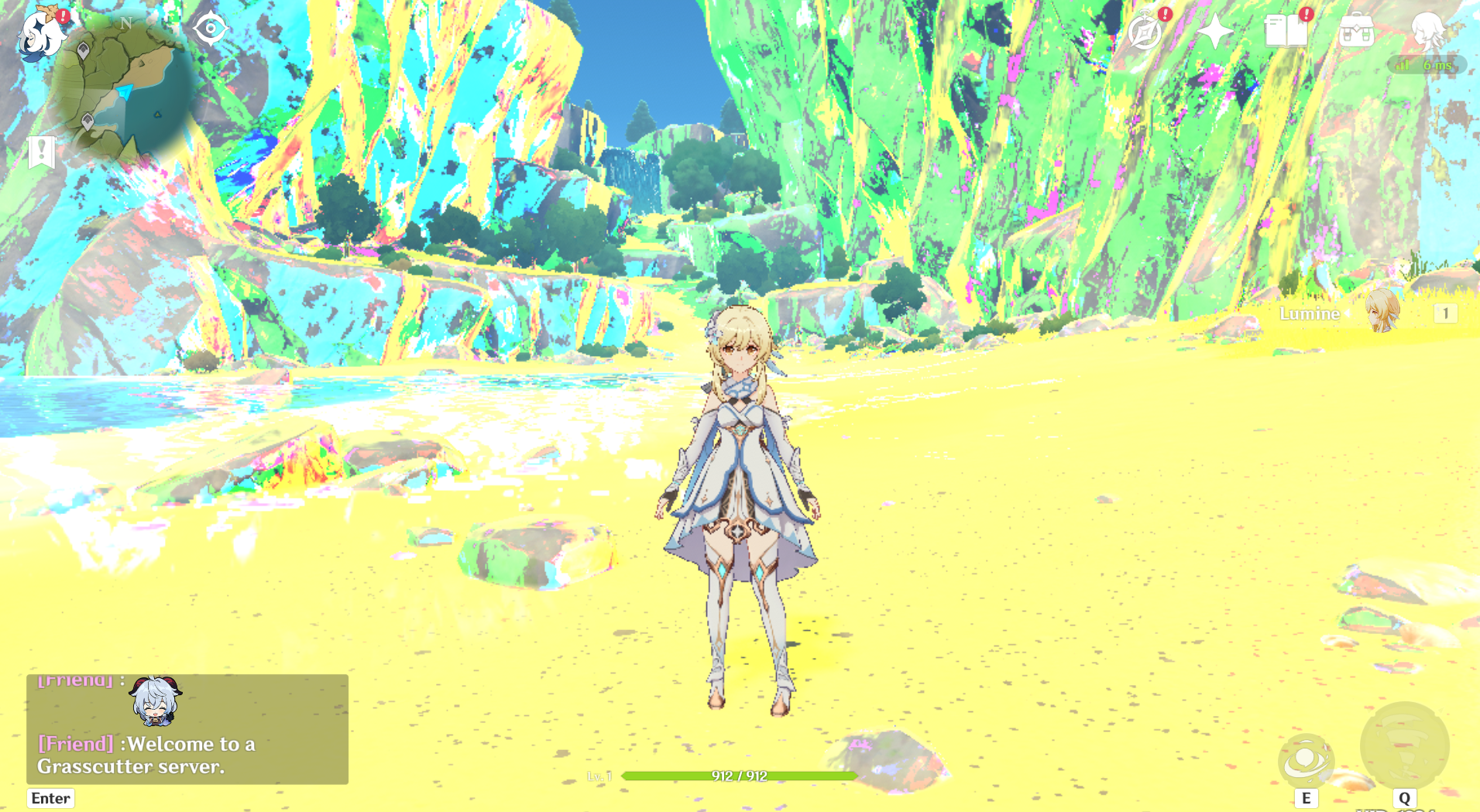
try to turn off bloom too