#First time printing with a prusa
94 messages · Page 1 of 1 (latest)
 edgy flame
 atomic quarry
that seems very odd, if you set the first layer, and your code is not altered to have the z offset be higher, then it should just work. can you put your start code here and some photos of the toolhead?
edgy flame
I agree that this is very odd. I got the Prusa slicer and sliced a stl that I had. I only changed a few setting like Temps bc I'm familiar with the filament I have.
How would I get the code hypothetically?
 sleek bolt
whats your z offset set to right now?
edgy flame

 sleek bolt
also i really should readjust my probe bc my mk3 is set to -2.05mm z offset haha
sleek bolt
edgy flame
straige. whats your z offset set to right now?
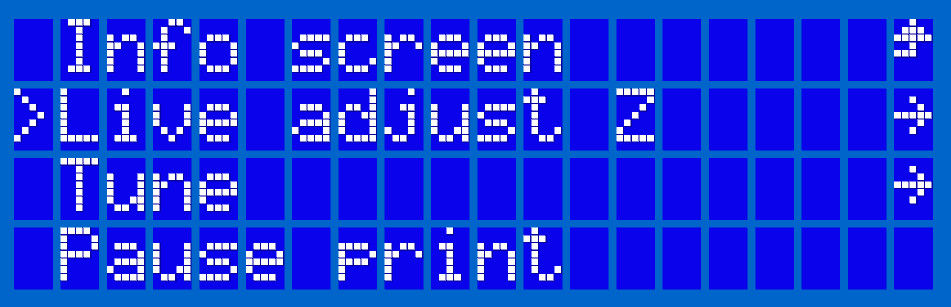
if u click off int he first few layers it should let you "live adjust z"
edgy flame
sleek bolt
also i really should readjust my probe bc my mk3 is set to -2.05mm z offset haha
Ah, lmfao. That's cute. Alr
edgy flame
sleek bolt
if u click off int he first few layers it should let you "live adjust z"
Should I do that or just reslice the gcode
sleek bolt
edgy flame
I have done all of the calibration and setup for the Presa mk3 that I just got a...
the mk3(s+ i think ur using) uses an inductive probe so the nozzle temp shouldn't affect it as much but the bed temp does
sleek bolt
edgy flame
Ah, lmfao. That's cute. Alr
what is the offset on ur mk3 set to right now
edgy flame
sleek bolt
the mk3(s+ i think ur using) uses an inductive probe so the nozzle temp shouldn'...
The issue is that given the hotend is hot, it melts the filament and it oozes out when it's doing that so it thinks that where the end of the nozzle is
sleek bolt
edgy flame
The issue is that given the hotend is hot, it melts the filament and it oozes ou...
it probes with the pinda on the side
not with the nozzle
edgy flame
sleek bolt
what is the offset on ur mk3 set to right now
Erm, stock? I'll check
sleek bolt
so that shouldn't affect it
sleek bolt
edgy flame
Erm, stock? I'll check
stock is going to be 0mm so maybe you should adjust that? i suppose?
idk
edgy flame
What is the z offset under for the slicer?
sleek bolt
edgy flame
What is the z offset under for the slicer?
its not set in slicer
its set on the printer
at least thats how its been with my prusa for the last 3 years so... i hope i didn't mess up all this time
edgy flame
Ah, mk. Where would I go in the printer to adjust that setting then
sleek bolt
if its during a print, you should see a live adjust setting
like if you click off the info screen with temps and stuff
above "Tune" you should see "Live Adjust Z"
edgy flame
Ah, I found that. Would I have to do that for every print then?
sleek bolt
otherwise i think its under calibration and then there should be something for like first layer calibration?
sleek bolt
edgy flame
Ah, I found that. Would I have to do that for every print then?
i think it should save to eeprom
 chilly tree
edgy flame
Ah, I found that. Would I have to do that for every print then?
chilly tree
edgy flame
Ah, I found that. Would I have to do that for every print then?
Every FFF (Fused Filament Fabrication) printer requires a First…
sleek bolt
i don't remember this one because i keep forgetting to turn off my printer and when i do i don't keep track haha
sleek bolt
chilly tree
https://help.prusa3d.com/article/live-adjust-z_112427
yesyes
edgy flame
sleek bolt
otherwise i think its under calibration and then there should be something for l...
Ah, yeah. That's the weird part. I was working on the printer yesterday and it did the calibration perfectly and the first layer calibration thing was perfect too
sleek bolt
edgy flame
Ah, yeah. That's the weird part. I was working on the printer yesterday and it d...
huh
chilly tree
You should only have the do it every so often in theory.
However, if you have first layer issues it will need readjusting
edgy flame
chilly tree
You should only have the do it every so often in theory.
However, if you have ...
Thank you
chilly tree
That’s why you can manually adjust the Z “live”.
edgy flame
sleek bolt
huh
I had just built it and was doing the calibration and it did the bed adhesion calibration or whatever fine so ik it prints lol
sleek bolt
i see
chilly tree
Doing a full calibration will set the offset back to zero iirc.
sleek bolt
chilly tree
Doing a full calibration will set the offset back to zero iirc.
you can select whether its start from current value or start at 0
at least for first layer cal
edgy flame
This will work! Thank you both very much!!!
chilly tree
sleek bolt
you can select whether its start from current value or start at 0
That may be. It’s been a little while since I’ve used a prusa.
sleek bolt
chilly tree
That may be. It’s been a little while since I’ve used a prusa.
i see. my prusa is my daily driver although right now im having like hotend issues (e3d revo) and extruder issues
like i get random slipping
could be filament also not too sure
nozzles is definitely partially clogged but i kinda broke all my acupuncture needle after unclogging it for like the 20th time
2nd nozzle also haha
but thats me going on a side tangent
edgy flame
I finally got the z offset working?
edgy flame
sleek bolt
if its during a print, you should see a live adjust setting
This worked well and I printed a 20mm cube to make sure everything was working and this was my result. Any clue of what's happening here?

 sleek bolt
is that the top layer?
i see like charred bits
im not exactly sure whats happening though
edgy flame
sleek bolt
is that the top layer?
yes, its the top
edgy flame
sleek bolt
im not exactly sure whats happening though
i did another cube b4 this one which had similar articacting on the top but not as bad. the interesting thing to me was that there was a blob of slightly chard blob on the side in the middle of hight of the print
and i don't get why it's so bad because it's only being printed at like 200-209 C
edgy flame
sleek bolt
is this PLA btw?
Yes, its pla
edgy flame
sleek bolt
are your settings just stock prusa settings also?
When I go into the slicer it's always at abs so I change that to pla but then I have to go and change the temps so I set the hotend to like 205 I believe and the bed to 60
sleek bolt
i think you can select the filament
but i doubt ABS has different settings other than that with stock prusaslicer profiles
to me it looks like theres a layer shift
but under that im not too sure
have you checked your fan settings?
you might not be printing with fan on
at all
edgy flame
I checked the pruseslicer for the fan the first time and it was automatically on. I was a little concerned to not see the percent like I'm used to for cura but the fans are on during the print, I can kinda hear them
sleek bolt
edgy flame
I checked the pruseslicer for the fan the first time and it was automatically on...
oh what theres no percentage?
are you in expert mode for prusa slicer?
heres what it looks like for petg but this is what you should see
 edgy flame
sleek bolt
oh what theres no percentage?
edgy flame
sleek bolt
oh what theres no percentage?
yea, i was confused too, there was only a on of off button
edgy flame
sleek bolt
are you in expert mode for prusa slicer?
yes, im in expert mode
 sleek bolt
edgy flame
yea, i was confused too, there was only a on of off button
sleek bolt
edgy flame
yea, i was confused too, there was only a on of off button
strange
can i see a screenshot
edgy flame
sleek bolt
heres what it looks like for petg but this is what you should see
Hm, that makes sense
sleek bolt
because also in advanced mode these settings do not show up
edgy flame
sleek bolt
yea, thats what i see
sleek bolt
but in expert mode they do
edgy flame
hmm
sleek bolt
 sleek bolt
edgy flame
I checked the pruseslicer for the fan the first time and it was automatically on...
sleek bolt
edgy flame
I checked the pruseslicer for the fan the first time and it was automatically on...
afaik prusaslicer uses 20% fan for ABS
ok 15-25%
 edgy flame
sleek bolt
can i see a screenshot
edgy flame
sleek bolt
can i see a screenshot
i would. I tried to do another print today but the sd card wasn't being found on my laptop so I went to the tech department. They tried restarting my computer and there seemed to be no life in it anymore, like full black screen lmao. I will be able to see better once i get the computer back though
edgy flame
sleek bolt
afaik prusaslicer uses 20% fan for ABS
Ah, so with expert mode i should crank that up to 100 then right?
sleek bolt
edgy flame
Ah, so with expert mode i should crank that up to 100 then right?
i think 100% will work for PLA yeah
i usually print PLA (depending on geometry) between like 60-100%
edgy flame
sleek bolt
i think 100% will work for PLA yeah
ok, solid, thanks for helping me out with that! I look forward to getting my computer back and trying that out!
sleek bolt
edgy flame
ok, solid, thanks for helping me out with that! I look forward to getting my com...
alright. if it doesn't work then im kinda stumped for now also lol