#tech-support
1 messages · Page 34 of 1
 waxen breach
 toxic atlas
Huh, speaking of benchmarking, I don't believe I ever tried benchmarking the GPU after swapping it a few months ago
I really should
 rocky yacht
ill run it now and check which
 storm cairn
im twerking reading this
 remote kite
So here is the settings

Should i undervolt it?
I really wish amd could release a driver for endfield issues
rocky yacht
bruh
remote kite
I have been sending them my crash logs xD
rocky yacht
worked day 1, killed my pc for a week straight then works again when u guys offer help
thanks sm i guess 🙏
storm cairn
remote kite
Should i undervolt it?
idk if theres is even a gpu undervolting. my clock curve is literally a straight line
waxen breach
rocky yacht
worked day 1, killed my pc for a week straight then works again when u guys offe...
what Motherboard you have ? name and model ?
storm cairn
we havent even understand the problem...
toxic atlas
remote kite
I really wish amd could release a driver for endfield issues
Just curious
Besides the GPU drivers, are you also keeping the others updated? Like the chipset etc
rocky yacht
waxen breach
what Motherboard you have ? name and model ?
dw i can play it opened this time
remote kite
Yes, all are updated to the latest ver except the gpu
waxen breach
rocky yacht
dw i can play it opened this time
ok
remote kite
26.1.1 is ass lmao
waxen breach
remote kite
Yes, all are updated to the latest ver except the gpu
set it to auto
waxen breach
storm cairn
anyhow does any1 know why my backlight is flickering under load?
from the monitor ?
storm cairn
waxen breach
from the monitor ?
its a laptop tho...
waxen breach
yea it has a monitor 😄
storm cairn
i doubt it could be the controller
waxen breach
if it is flickering it can be driver problems or resolution problems
storm cairn
cause it only doing this under load
waxen breach
wait under load
storm cairn
just backlight u know
waxen breach
it can be vram issue
storm cairn
just the backlight. not the whole panel
toxic atlas
storm cairn
anyhow does any1 know why my backlight is flickering under load?
Uneven power distribution by the motherboard
waxen breach
backlight mean the light on the back of the Laptop (if it has led) or from the display itself ?
storm cairn
waxen breach
backlight mean the light on the back of the Laptop (if it has led) or from the d...
the display itself. a lcd panrl
panel
 young quiver
doesvegetation density from high to low make that much of a difference in visuals anyways
waxen breach
if it is the display then this is a good indicator that your display is close from dying
storm cairn
toxic atlas
Uneven power distribution by the motherboard
why now tho...
toxic atlas
storm cairn
why now tho...
Try limiting the CPU power in the laptop's control app
Or drop the power profile in windows from high-performance to balanced
storm cairn
ill try with throttlestop
waxen breach
storm cairn
why now tho...
Because it is tech, it can break every time even when it is 1 day old
then more modern tech become then more problems it can cause
toxic atlas
waxen breach
then more modern tech become then more problems it can cause
The more manufacturers cheap out on proper power delivery and components
waxen breach
toxic atlas
The more manufacturers cheap out on proper power delivery and components
then buy AMD
amd pcbs are way higher in quality then nvidia
and this is not a secret
waxen breach
damn that was a big upgrade
toxic atlas
waxen breach
damn that was a big upgrade
Before the 1660s I was using an R7-360
that was a big upgrade
 iron umbra
My game occasionally crashes my pc when I load it up. Not sure why
waxen breach
iron umbra
My game occasionally crashes my pc when I load it up. Not sure why
maybe update from the game
game crashing on me too
iron umbra
It's done multiple times on non-patch days. Happens before loading into the world.
 prime shale

 waxen breach
iron umbra
It's done multiple times on non-patch days. Happens before loading into the worl...
waxen breach
iron umbra
It's done multiple times on non-patch days. Happens before loading into the worl...
strange, clear your Sharder
maybe this will help
iron umbra
Hm, how would I go about that?
waxen breach
are you on amd or nvidia ?
iron umbra
nvidia
Initially I thought it might be an overload on processing since I have a lot of browser tabs in the back ground, but it's happened without too
waxen breach
google " clear Nvidia Shader Cache"
to be honest, the game is not tanking hardware
just google what i told you and follow it step by step
dunno why Nvidia has such bad drivers for decades
that cant handle simple cache clearing ... but it is what it is
 slow wasp
hey guys, my friend kept on getting download error after finish all the download, could anyone tell me how to help him ? (he have enough disk)
toxic atlas
slow wasp
hey guys, my friend kept on getting download error after finish all the download...
Check my answer in #off-topic
 swift geyser
i don't know if it's the right channel to ask but am i experiencing a bug? i can't deliver and the quest doesn't show up and i can't take any other job.


 olive finch
Hi, I started playing the game and this is my third day. As time passes the screen right side starts showing these flickering lines and it only ONLY happens with Arknights Enfield (from launcher tried the directX11 game lunch yet still same problem), forcing me to shut down my laptop then turning it again to be fixed! I really enjoy the game but this issue makes the journey of playing feels bad to point where i’m thinking of quitting…


 broken swift
olive finch
Hi, I started playing the game and this is my third day. As time passes the scre...
broken swift
olive finch
Hi, I started playing the game and this is my third day. As time passes the scre...
Have you tried reinstall driver with ddu ?
 gleaming shore
am I the only one getting game crashes now? only happened since the last update
olive finch
broken swift
Have you tried reinstall driver with ddu ?
which driver? and what do you mean by ddu? 😅
broken swift
olive finch
which driver? and what do you mean by ddu? 😅
Display driver uninstaller, and use the latest
 zinc spindle
is 82 temp for gpu okay while playing 🥀
 broken swift
zinc spindle
is 82 temp for gpu okay while playing 🥀
broken swift
zinc spindle
is 82 temp for gpu okay while playing 🥀
Which gpu?
 orchid pulsar
how long does this usually last, it was fine and quick before patch update
reinstalled, same issue 🙃
 zinc spindle
broken swift
Which gpu?
zinc spindle
broken swift
Which gpu?
rx 580 2048sp 8gb
broken swift
Well it's normal
zinc spindle
orchid pulsar
same gpu, normally temps below 70 for me
what settings are u on rn?
olive finch
broken swift
Display driver uninstaller, and use the latest
I see! thank you will try it now
remote kite
hi, apparently turning off volumetric fog makes my game not crash anymore
orchid pulsar
zinc spindle
what settings are u on rn?
high graphic
zinc spindle

 remote kite
have all my settings to very high at 120fps and it does not crash during the teamfight
zinc spindle
orchid pulsar
high graphic
are u overclocked or something? i wanna get high settings too
orchid pulsar
zinc spindle
i dont overclock
zinc spindle
im on i7 3770 rx 580 8gb
orchid pulsar
zinc spindle
whats ur driver settings?
oo i dont use amd settings to change gpu power

also control the fans
it helps
i only change power use to 20+
 broken swift
zinc spindle
broken swift
zinc spindle
1 thing i learned from my 6700xt is that amd gpus should always be undervolted (better temp better fps)
zinc spindle
broken swift
1 thing i learned from my 6700xt is that amd gpus should always be undervolted (...
ill try doing that 🙏
broken swift
zinc spindle
ill try doing that 🙏
Usually 1100mV is the sweet spot
orchid pulsar
zinc spindle
yea i have the same but urs looks diff
i use this uh ui skin

thats why it looks different
:p
zinc spindle
oh damn i didnt know they had that feature
orchid pulsar
try avoid overclock
zinc spindle
broken swift
Usually 1100mV is the sweet spot
its possible to control voltage? or just power lim
 broken swift
zinc spindle
its possible to control voltage? or just power lim
broken swift
zinc spindle
its possible to control voltage? or just power lim
Yes? You can adjust the voltage on almost any gpus
broken swift
zinc spindle
its possible to control voltage? or just power lim
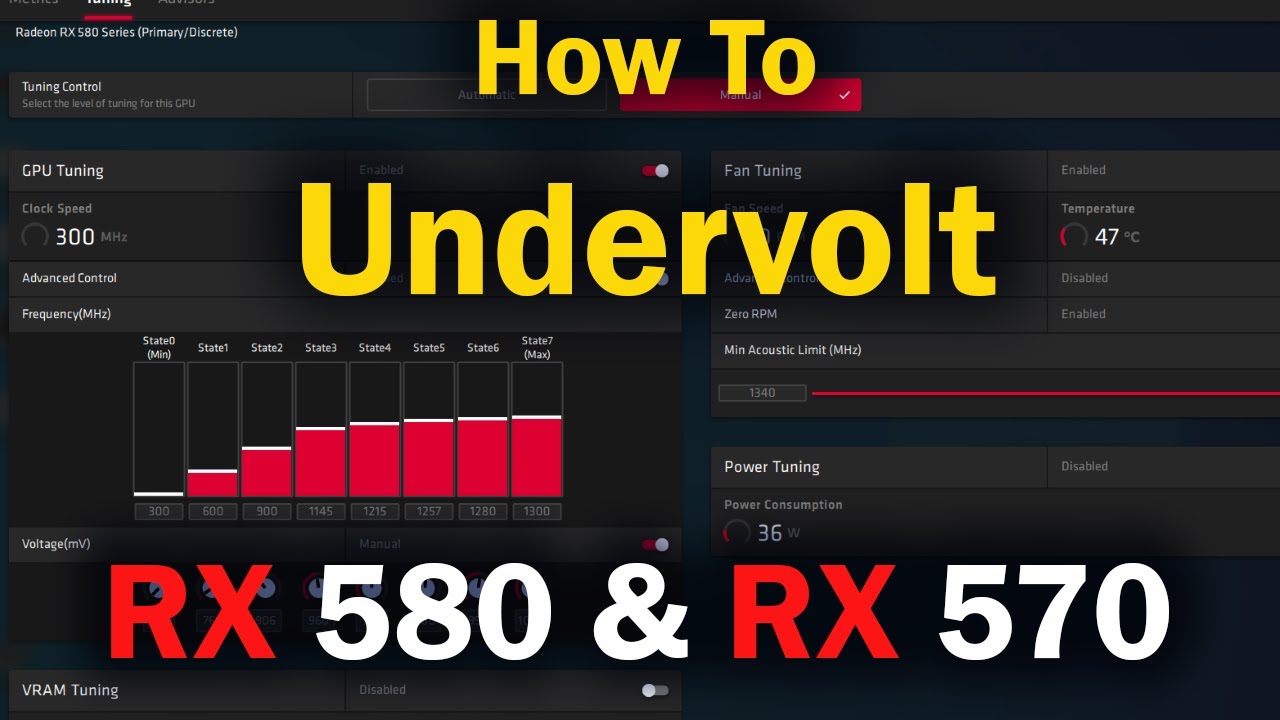
This is a longer tutorial about why you should undervolt your Video card.
The basics are to lower you State 7 Core voltage to one that is just high enough that the system does not crash and runs stable in games.
The reason we undervolt out video card is because the default voltages that AMD set for their video cards in most cases are much higher...
orchid pulsar
orchid pulsar
how long does this usually last, it was fine and quick before patch update
reins...
also im still stuck for like 10 mins now 😭
broken swift
orchid pulsar
almost every amd gpu gets good when undervolt
Well for Nvidia overclock is better but for amd undervolt is better. The default voltage of amd is ridiculously high (1200mv)
zinc spindle
orchid pulsar
ok i copied it looks good enough
 zinc spindle
orchid pulsar
how long does this usually last, it was fine and quick before patch update
reins...
zinc spindle
orchid pulsar
how long does this usually last, it was fine and quick before patch update
reins...
usually depends on internet or if thats not the case might be the drive?
check if your drive got more than enough
broken swift
orchid pulsar
how long does this usually last, it was fine and quick before patch update
reins...
Tried turn dx11 on and off?
orchid pulsar
my internet already good enough 1gbps...
still alot more storage
did a recheck file from launcher itself
 zinc spindle
orchid pulsar
my internet already good enough 1gbps...
still alot more storage
did a recheck f...
zinc spindle
orchid pulsar
my internet already good enough 1gbps...
still alot more storage
did a recheck f...
try dx11 then back to normal
orchid pulsar
but this time i did, still same issue
zinc spindle
hmm did ur device shut down while downloading? mightve corrupted the files or something
zinc spindle
i would suggest downloading freshly
 proven sundial
zinc spindle
is 82 temp for gpu okay while playing 🥀
proven sundial
zinc spindle
is 82 temp for gpu okay while playing 🥀
Good to know it's up and running again
orchid pulsar
if this still doesnt fix, imma crashout
i dont want to play endfield on mobile man 😭
hot hot
zinc spindle
proven sundial
Good to know it's up and running again
yup there were lots of dusts and two screws hidden laying around in my psu i guess that was the problem 😭
broken swift
orchid pulsar
i just reinstalled again trying to see it fix
Have you tried using ddu to clean shaders cache. If it doesn't work use ddu to reinstall driver
 orchid pulsar
broken swift
Have you tried using ddu to clean shaders cache. If it doesn't work use ddu to r...
orchid pulsar
broken swift
Have you tried using ddu to clean shaders cache. If it doesn't work use ddu to r...
will do, must be alot of unnecessary chunks shader being left behind
remote kite
wow wuling region is demanding

 final mantle
My Gryphlink launcher broke, anyone knows how to fix? I know I could start game directly, but game surely need to update at one point
 remote kite
never saw that my cpu is at 80c TvT
proven sundial
remote kite
wow wuling region is demanding
Welcome to particle hell
remote kite
final mantle
My Gryphlink launcher broke, anyone knows how to fix? I know I could start game...
backup the games folder
final mantle
in games folder is nothing, because it was installed somewhere else
final mantle
the launcher? redownload from homepage?
remote kite
try to launch the uninstall the launcher first
proven sundial
it's kinda crazy these launcher do not include a repair exe next to it
would be so much easier
 obtuse cypress
I kept getting frame drops, anyone knows how to solve this?
final mantle
dont know how it happend in the first place. it got duplicated exe in root and 1.0.0 folder. and it broke by itself, didnt do anything. yesterday it still worked
proven sundial
obtuse cypress
I kept getting frame drops, anyone knows how to solve this?
are you getting it everywhere in the game or just in a certain region ?
 static jungle
@summer pagoda I received my SSD and mounted it; it's like day and night. Thanks for your help
final mantle
So launcher works after reinstallation, but it lost the path to where game is and asks me to download. Launcher deinstallation probably removed the config and I did not backup that file 
proven sundial
final mantle
So launcher works after reinstallation, but it lost the path to where game is an...
that's alright you can re-assign the file path via the launcher
final mantle
where/how?
proven sundial
final mantle
where/how?
 obtuse cypress
proven sundial
are you getting it everywhere in the game or just in a certain region ?
obtuse cypress
proven sundial
are you getting it everywhere in the game or just in a certain region ?
Everywhere, usually during fights, but tbf my gpu is approaching overload
proven sundial
obtuse cypress
Everywhere, usually during fights, but tbf my gpu is approaching overload
is it at max usage ? or just Vram being at the edge ?
particles and screen space reflections do make a big difference
final mantle
proven sundial
I'm back ingame, thanks for the help
proven sundial
final mantle
I'm back ingame, thanks for the help
you're welcome have a nice day regardless ❤️
 copper harbor
obtuse cypress
Everywhere, usually during fights, but tbf my gpu is approaching overload
copper harbor
obtuse cypress
Everywhere, usually during fights, but tbf my gpu is approaching overload
have you tried using low settings ?
obtuse cypress
copper harbor
have you tried using low settings ?
Its the lowest i can get, except for 60fps
obtuse cypress
copper harbor
have you tried using low settings ?
Its the lowest i can get, except for 60fps
copper harbor
obtuse cypress
Its the lowest i can get, except for 60fps
specs ?
 crimson shale
is DLSS making the backgrounds 144p
 obtuse cypress
copper harbor
specs ?
obtuse cypress
copper harbor
specs ?
Amd ryzen 7 5800h
8gb ram
obtuse cypress
obtuse cypress
Amd ryzen 7 5800h
8gb ram
Or should I say it's the old nitro 5 laptop with some upgrades
 sage acorn
is there something going on with the string or cuz its the same code
its a post by Asahi for buck capsule
both is copied from different place 1 from post another is replied message by OP
also sometimes if you double click to copy wont work
copper harbor
obtuse cypress
Amd ryzen 7 5800h
8gb ram
igpu ??
proven sundial
crimson shale
is DLSS making the backgrounds 144p
it's a Depth of field issue
toxic atlas
obtuse cypress
Amd ryzen 7 5800h
8gb ram
Game really needs that 16gb of RAM it asks for, especially on iGPU setups
crimson shale
proven sundial
it's a Depth of field issue
is it gonna be fixed in the future
 modern coral
proven sundial
are you getting it everywhere in the game or just in a certain region ?
modern coral
proven sundial
are you getting it everywhere in the game or just in a certain region ?
I get them every so often whilst moving even tho everything is low or off 💔 💔
toxic atlas
copper harbor
igpu ??
Even though the game runs fine on integrated graphics, it really needs the RAM
proven sundial
crimson shale
is it gonna be fixed in the future
it will get fixed they know about it
copper harbor
toxic atlas
Even though the game runs fine on integrated graphics, it _really_ needs the RAM
indeed
modern coral
toxic atlas
Game really needs that 16gb of RAM it asks for, especially on iGPU setups
Ive got 16gb and I still suffer with stutters every now and then im thinking about just dealing with it and playing
toxic atlas
modern coral
Ive got 16gb and I still suffer with stutters every now and then im thinking abo...
We have Steam Deck players, your problem is Windows 
modern coral
💔 💔
obtuse cypress
copper harbor
igpu ??
Uhhh radeon graphics?
copper harbor
obtuse cypress
Uhhh radeon graphics?
yeah the game needs 16 gb ram minimum
toxic atlas
Like, needs needs it
proven sundial
toxic atlas
Like, _needs_ _needs_ it
btw i found the issue for the memory leak
 toxic atlas
proven sundial
btw i found the issue for the memory leak
toxic atlas
proven sundial
btw i found the issue for the memory leak
There are multiple
Which one?
 spark junco
Real question : am I allowed to play Arknights Endfield on Steam Deck? I mean, does that comply with the terms of use? I don’t want to get banned.
proven sundial
the one that happens without DLSS both vulkan and dx11
toxic atlas
spark junco
Real question : am I allowed to play Arknights Endfield on Steam Deck? I mean, d...
Grey area, but we have plenty of Deck and Linux players and discord mods are fine with it
No one got banned for it
obtuse cypress
copper harbor
yeah the game needs 16 gb ram minimum
I see, welp there goes my money this month, I still have 1 slot of ram to upgrade, what's ur suggestion?
spark junco
toxic atlas
Grey area, but we have plenty of Deck and Linux players and discord mods are fin...
Thanks for the reply, I'll give it a try.
 stray spindle
Does G-Sync (on), Reduce the FPS in game? (Changing display from iGPU to dGPU with G-sync cause my FPS to drop from 200 FPS to roughly 140 FPS, but have GPU temperature lower by 5-6 Celsius which is the only pro...)
toxic atlas
spark junco
Thanks for the reply, I'll give it a try.
My DMs are open if you need assistance with installing it
proven sundial
stray spindle
Does G-Sync (on), Reduce the FPS in game? (Changing display from iGPU to dGPU wi...
that makes no sense at all g-sync should not affect fps
stray spindle
proven sundial
that makes no sense at all g-sync should not affect fps
Yea....i have no idea tbh...
copper harbor
obtuse cypress
I see, welp there goes my money this month, I still have 1 slot of ram to upgrad...
well probably buy a 8gb momery ram when you get the money for it, but during the ai rush probably not
proven sundial
stray spindle
Yea....i have no idea tbh...
you're on a laptop right ?
stray spindle
Yes. I maintain all setting in game. Asus tuf gaming a16 (2025), RTX5050, AMD Ryzen 7 260w/Radeon 780M
toxic atlas
obtuse cypress
I see, welp there goes my money this month, I still have 1 slot of ram to upgrad...
If you can find the same kind of RAM that's already in your laptop, 2nd hand or new, grab it
If not, it's not the end of the world, you can mix'n'match different RAM sticks, though you lose out on a bit of extra performance
proven sundial
stray spindle
Yes. I maintain all setting in game. Asus tuf gaming a16 (2025), RTX5050, AMD Ry...
it's on cable power right?
stray spindle
Plug in, yes
proven sundial
alright then seems good how are temperatures otherwise with the dedicated gpu ?
toxic atlas
obtuse cypress
I see, welp there goes my money this month, I still have 1 slot of ram to upgrad...
I recommend you look for something at 3200MT, with a low CL rating if you can't find the exact model that you already have
copper harbor
toxic atlas
If you can find the same kind of RAM that's already in your laptop, 2nd hand or ...
he is using a laptop
toxic atlas
copper harbor
he is using a laptop
He said he has a SODIMM slot free
stray spindle
Temperature 63 Celsius GPU usage 93% for dGPU
copper harbor
toxic atlas
He said he has a SODIMM slot free
wait can you add more ram slot on laptop ?
toxic atlas
copper harbor
wait can you add more ram slot on laptop ?
If it's not the soldered kind without slots, yes
proven sundial
stray spindle
Temperature 63 Celsius GPU usage 93% for dGPU
Sounds alright well you can always assign your gpu to the game via the control panel it should stabilize fps
toxic atlas
Gaming laptops and the sorts usually also have upgradeable RAM
obtuse cypress
toxic atlas
He said he has a SODIMM slot free
Yesss i have this
stray spindle
proven sundial
Sounds alright well you can always assign your gpu to the game via the control p...
May I know how? like inside the Nvidia Control Panel what do I change
obtuse cypress
toxic atlas
I recommend you look for something at 3200MT, with a low CL rating if you can't ...
I think I've seen those in my city
toxic atlas
obtuse cypress
Yesss i have this
You can confirm it in task manager, performance tab, memory
If you can drop a screenshot from that page
proven sundial
stray spindle
May I know how? like inside the Nvidia Control Panel what do I change

you should see something like this
but then go for the second tab
and you can then choose endfield as needed
 full spire
I have problem with lagging and frezzing
toxic atlas
proven sundial
but then go for the second tab
The control panel is mostly for Cuda now
copper harbor
full spire
I have problem with lagging and frezzing
specs ?
obtuse cypress
toxic atlas
You can confirm it in task manager, performance tab, memory
If you can drop a sc...
 toxic atlas
https://www.asus.com/support/faq/1044213/
Follow this article instead to change GPUs
Official Support | ASUS Global
copper harbor
obtuse cypress

full spire
i have high fps
copper harbor
obtuse cypress
wait two gpus ?
toxic atlas
obtuse cypress
Yup, you can get another 8gb DDR4 SODIMM 3200MT stick
Though you can't know the exact model to look for unless you open up the laptop
proven sundial
toxic atlas
The control panel is mostly for Cuda now
i know but it still works better than windows assigning it honestly
copper harbor
full spire
but when like unlock new zone
oh yeah the second map is more demanding
storm cairn
toxic atlas
Yup, you can get another 8gb DDR4 SODIMM 3200MT stick
Though you can't know the ...
cpu z can spit out the name
toxic atlas
copper harbor
wait two gpus ?
Integrated (in-CPU, aka iGPU) and dedicated cards (dGPU)
full spire
copper harbor
oh yeah the second map is more demanding
i mean for any new zone on map
where i didnt unlock
copper harbor
toxic atlas
Integrated (in-CPU, aka iGPU) and dedicated cards (dGPU)
oh yeah
storm cairn
CL rating too
copper harbor
full spire
i mean for any new zone on map
the second map only have 2 zones
full spire
copper harbor
the second map only have 2 zones
when i explore the map any new place
storm cairn
full spire
and how i can fix that
can u give us ur specs?
copper harbor
full spire
.
have you tried using low settings ?
copper harbor
the second map have funky fog that wrecks performance
storm cairn
wdym its lagging when u unlocking a new zone here?
copper harbor
storm cairn
wdym its lagging when u unlocking a new zone here?
i think he is talking about the first zone of the second map
storm cairn
idk wanna be clear what he meant
copper harbor
full spire
I mean any new place in game which i didnt saw already
have you reached the city ?
full spire
Ye
copper harbor
full spire
Ye
its still lagging hard ?
stray spindle
proven sundial
Sounds alright well you can always assign your gpu to the game via the control p...
What if I don't see Endfield in the programs lists?
 proven sundial
stray spindle
What if I don't see Endfield in the programs lists?
proven sundial
stray spindle
What if I don't see Endfield in the programs lists?
just add the exe from the game folder then it should run the dgpu all the time
copper harbor
full spire
Ye
try check on task manager how much ram the game is using
full spire
copper harbor
its still lagging hard ?
yes
storm cairn
full spire
I mean any new place in game which i didnt saw already
meant its lagging all the time then?
copper harbor
full spire
yes
might be memory leak
full spire
storm cairn
meant its lagging all the time then?
not all time
full spire
can be my internet?
copper harbor
full spire
can be my internet?
nope
full spire
i dont have so good
storm cairn
no internet have nothing to do with this
copper harbor
full spire
i dont have so good
your cpu is a i5 but from which gen ?
full spire
12 gen
storm cairn
i5 12400h i bet my balls
full spire
no
storm cairn
🥀
 carmine vigil
Sorry if this doesn't go in this channel, but does this mean that I'm in the Endfield's space program? I didn't make any account before the official release of the game on Google Play as far as I know
 full spire
storm cairn
🥀
full spire
storm cairn
🥀
What with that cpu?
copper harbor
full spire
What with that cpu?
laptop cpu
storm cairn
carmine vigil
Sorry if this doesn't go in this channel, but does this mean that I'm in the End...
yes. you now have an uid but no username tho?
full spire
copper harbor
laptop cpu
ik i have laptop but not that cpu
storm cairn
do y know whats ur fps is?
copper harbor
full spire
i already does that
i5-1235U ?
copper harbor
storm cairn
thats like the 15 gen
nope 12 gen
carmine vigil
storm cairn
yes. you now have an uid but no username tho?
I used Google to login and my name is there like this
 storm cairn
thats the 12 gen refresh lol
copper harbor
then your cpu is fine
full spire
copper harbor
then your cpu is fine
So what can be
copper harbor
but you need to check on task manager how much the game is taking from your laptop
storm cairn
carmine vigil
I used Google to login and my name is there like this
thats account id a different thing. your username is supposed to be choosen inside the game
full spire
copper harbor
but you need to check on task manager how much the game is taking from your lapt...
3200mb memory taking endfield
copper harbor
full spire
3200mb memory taking endfield
thats normal
full spire
copper harbor
thats normal
ye
copper harbor
full spire
3200mb memory taking endfield
what about the gpu ?
full spire
7%
copper harbor
full spire
7%
 thats odd
storm cairn
do you know how much fps ur getting?
full spire
not rly ig i have 120fps locked
copper harbor
full spire
7%
are you on wullin now ?
storm cairn
🥀🥀🥀
full spire
copper harbor
are you on wullin now ?
wullin?
 shy lava
My quest bug..? can't complete
 storm cairn
try to update your gpu driver
 slender mantle
12500h has igpu iirc
full spire
storm cairn
try to update your gpu driver
i already does
copper harbor
full spire
wullin?
its the name of the second map
storm cairn
shy lava
My quest bug..? can't complete
no idea
full spire
copper harbor
its the name of the second map
i am not ig
copper harbor
full spire
i am not ig
oh
slender mantle
make sure your game is running on 4060, not igpu
storm cairn
then can you check on your power plan?
full spire
slender mantle
make sure your game is running on 4060, not igpu
i put on 4060
storm cairn
like nitro sense stuffs like that
remote kite
oh yea, what are your guys's configs for amd radeon tuning
storm cairn
make sure its on performance mode
copper harbor
full spire
like on start
then game might be using your igpu instead of the dedicated one
remote kite
i would love to try yours
full spire
storm cairn
make sure its on performance mode
its on performance
storm cairn
remote kite
i would love to try yours
no idea i havent touched a amd before
mainly cause im broke
carmine vigil
storm cairn
thats account id a different thing. your username is supposed to be choosen insi...
Oh I already have one in the game if this is what you're talking about
 copper harbor
thats really odd for the game to lag right on the menu intro
storm cairn
carmine vigil
Oh I already have one in the game if this is what you're talking about
lel then ur in the program yes
carmine vigil
storm cairn
lel then ur in the program yes
Thanks. I want my name to go into space
storm cairn
copper harbor
thats really odd for the game to lag right on the menu intro
he has no info on usage. no info on power usage not even fps🥀
can u download MSI Afterburner to monitor ur game?
copper harbor
full spire
ye
open the game and see the usage rate of things
storm cairn
then maybe we can help u figure out
full spire
copper harbor
open the game and see the usage rate of things
u mean device load and GPU memory usage
 copper harbor
full spire
u mean device load and GPU memory usage
copper harbor
full spire
u mean device load and GPU memory usage
yes
slender mantle
since you have 4060, pretty sure you can turn on hardware monitoring by alt + r
obtuse cypress
toxic atlas
Yup, you can get another 8gb DDR4 SODIMM 3200MT stick
Though you can't know the ...
I got it now, I have the same ddr4 and it's from the brand micron
full spire
slender mantle
since you have 4060, pretty sure you can turn on hardware monitoring by alt + r
fps n/a
saying
storm cairn
can u send us ur task manager screen got while the game is opening?
full spire
35% gpu, CPU 20%
storm cairn
obtuse cypress
I got it now, I have the same ddr4 and it's from the brand micron
gl finding a micron's ram stick🥀
copper harbor
full spire
35% gpu, CPU 20%
on menu ?
full spire
 full spire
copper harbor
on menu ?
full spire
copper harbor
on menu ?
no
copper harbor
full spire
no
are you on the second map ?
full spire
i am on The Hub
copper harbor
full spire
i am on The Hub
try going to the second map
full spire
storm cairn
try SDI-origin
what is that
storm cairn
a tool will help u with outdated drivers
full spire
i dont have outdated
storm cairn
might be the chipset driver
slender mantle
full spire
fps n/a is kinda weird
full spire
ye
stray spindle
proven sundial
just add the exe from the game folder then it should run the dgpu all the time
Tried to add Endfield exe to it, it's not helping...Not only FPS drop from 200+ to around 140, it causes shuttering too with G-sync
proven sundial
stray spindle
Tried to add Endfield exe to it, it's not helping...Not only FPS drop from 200+ ...
very weird
storm cairn
stray spindle
Tried to add Endfield exe to it, it's not helping...Not only FPS drop from 200+ ...
whats the problem i might ask?
proven sundial
storm cairn
whats the problem i might ask?
the dgpu is producing less fps than the igpu
storm cairn
is he using a laptop?
copper harbor
full spire
ye
are you on the second map now ?
full spire
copper harbor
are you on the second map now ?
no
copper harbor
storm cairn
is he using a laptop?
yes
storm cairn
not him
copper harbor
full spire
no
go there
full spire
copper harbor
go there
how
stray spindle
storm cairn
whats the problem i might ask?
Oh, So I have 200 FPS (almost no shuttering). but when I turn on G-Sync (display mode change from iGPU to dGPU, the frame drop by a large margin and cause shuttering sometimes), laptop
proven sundial
storm cairn
is he using a laptop?
yup but temps should be alright
copper harbor
full spire
how
have you unlocked the second map yet ?
storm cairn
copper harbor
go there
he havent unlocked the area yet
copper harbor
full spire
no
then which zone of the first one are you lagging ?
stray spindle
proven sundial
yup but temps should be alright
Temperature is around 71 Celsius something (dGPU temperature's) when G-sync is OFF
copper harbor
full spire
on reddit
ok
proven sundial
stray spindle
Temperature is around 71 Celsius something (dGPU temperature's) when G-sync is O...
no idea honestly unless there is a g-sync module in that laptop fps should be better on the dgpu
copper harbor
full spire
can i send here link?
have you found the link ?
stray spindle
proven sundial
no idea honestly unless there is a g-sync module in that laptop fps should be be...
Maybe need to reinstall NVIDIA app?
proven sundial
stray spindle
Maybe need to reinstall NVIDIA app?
a clean driver install could help
perhaps use DDU
 little fossil
looking at my default settings here to see what makes my game get stuck after an hour or so of gameplay, any help on what i need to turn off/ put at the lowest to fix this?
It's incredible how the Ram usage from the login screen is already at 8gigs and jumps to 10 when i'm in the game
pc specs
2 8GB sticks of DDR4 ram
GPU: AMD RX7600
CPU: AMD RYZEN 5 5600


 full spire
copper harbor
have you found the link ?
full spire
copper harbor
have you found the link ?

Reddit
Explore this post and more from the ArknightsEndfield community
I dont have massive
stray spindle
proven sundial
a clean driver install could help
Used to have around 180 FPS on my Wuthering Wave (game) too, then drop to around 140-150 FPS too... Suspecting either corrupted file in Nvidia or maybe Nvidia is conflicting with others like Armoury Crate and AMD Adrenaline software
storm cairn
stray spindle
Oh, So I have 200 FPS (almost no shuttering). but when I turn on G-Sync (display...
um can you double check the optimus option if its auto?
stray spindle
Ya
full spire
copper harbor
have you found the link ?
did u check
 sharp lake
stray spindle
Used to have around 180 FPS on my Wuthering Wave (game) too, then drop to around...
sharp lake
stray spindle
Used to have around 180 FPS on my Wuthering Wave (game) too, then drop to around...
Get driver uninstaller and uninstall all drivers if you had other brand gpus
Then install them back
stray spindle
Man ... it's odd...I tried switching to iGPU and now I'm having same 140 range FPS range....guess must be something off about driver
sharp lake
Igpu and 140 fps in wuwa? What graphics
proven sundial
stray spindle
Used to have around 180 FPS on my Wuthering Wave (game) too, then drop to around...
i know the amd gpu and nvidia gpu driver can conflict on laptops but it does not happen too much
storm cairn
stray spindle
Ya
change it completely to dgpu only. auto mode in amoury crate is dumb dumb
 rain aspen
I installed Arknights 1 through Google Play Games and now I get this trying to boot up Endfield. Wish I was joking
 slender mantle
full spire
https://www.reddit.com/r/ArknightsEndfield/comments/1ql2nfc/massive_stuttering_f...
slender mantle
full spire
https://www.reddit.com/r/ArknightsEndfield/comments/1ql2nfc/massive_stuttering_f...
scrolled down and found this
 full spire
slender mantle
scrolled down and found this
full spire
slender mantle
scrolled down and found this
i am on w10
sharp lake
rain aspen
I installed Arknights 1 through Google Play Games and now I get this trying to b...
If the site download doesnt work bluestacks exists
stray spindle
sharp lake
Igpu and 140 fps in wuwa? What graphics
AMD Ryzen 7 260w/Radeon 780M as iGPU and RTX5050 as dGPU. And ya, Wuwa was 180 FPS, now drop to 140
sharp lake
But it will be a mobile version of The game
sharp lake
stray spindle
AMD Ryzen 7 260w/Radeon 780M as iGPU and RTX5050 as dGPU. And ya, Wuwa was 180 F...
Same area?
stray spindle
Yes
rain aspen
sharp lake
If the site download doesnt work bluestacks exists
The downloads worked fine, it's just that Endfield doesn't like when the Google Play Games PC service is running for some reason. Closing it on the task manager let me boot Endfield again thankfully
full spire
rain aspen
The downloads worked fine, it's just that Endfield doesn't like when the Google ...
U can try to download via launcher or epicgames
proven sundial
stray spindle
AMD Ryzen 7 260w/Radeon 780M as iGPU and RTX5050 as dGPU. And ya, Wuwa was 180 F...
i would try the following just ddu for now and install nvidia drivers first then amd drivers so priority is switched around
stray spindle
Only pro is temperature greatly drop from 70-73 to 63-67Celsius (same GPU usage range, close to 100%)
sharp lake
stray spindle
Only pro is temperature greatly drop from 70-73 to 63-67Celsius (same GPU usage ...
So have you done a system reset lately? Any overclocking beforehand
Or undervolting
stray spindle
sharp lake
Power settings,laptop not connected with cable
Plug in all the time. Power setting is same, silent mode all the time
 sharp mason
hello i am not sure what happened i do not have any thing like cheats on and i got this message when i booted up endfield after a network error can someone help me i dont wanna get banned for no reason
 proven sundial
sharp mason
hello i am not sure what happened i do not have any thing like cheats on and i g...
proven sundial
sharp mason
hello i am not sure what happened i do not have any thing like cheats on and i g...
on pc ?
sharp mason
proven sundial
on pc ?
ye
storm cairn
sharp mason
hello i am not sure what happened i do not have any thing like cheats on and i g...
do u have vanguard opened?
stray spindle
sharp lake
So have you done a system reset lately? Any overclocking beforehand
I did automatic tuning through Nvidia app once , like 3 days ago(but I switched it off like after 30mins) and never do it again
storm cairn
dw
toxic atlas
KLACs fucking with each other
storm cairn
do u have anti viruses other than windows defender?
toxic atlas
Also @storm cairn @proven sundial confirmed with someone else as well
Kaspersky fucks with the game execution pipeline
Needs to be disabled while playing
storm cairn
stray spindle
I did automatic tuning through Nvidia app once , like 3 days ago(but I switched ...
ngl but from what i heard gsync is quite awful
sharp mason
storm cairn
do u have anti viruses other than windows defender?
i have mcafee it came with my pc but i have booted up the game sucessfully always even when it was in the hidden icons place minimized
proven sundial
toxic atlas
Needs to be disabled while playing
great another factor
storm cairn
LMAO
storm cairn
sharp mason
i have mcafee it came with my pc but i have booted up the game sucessfully alway...
can u uninstall McAfee for a test?
proven sundial
China and russia fighting eachothers software 😂
storm cairn
might work ngl
sharp mason
storm cairn
can u uninstall McAfee for a test?
uhh no lmao if i unisntall it the free mcafee subscription thing wont come back lmao
storm cairn
🥀🥀🥀
sharp mason
should i try relauching ?
storm cairn
im assuring you thats its not worth it
can you totally disable McAfee before the pc boot then?
that could work
sharp mason
storm cairn
can you totally disable McAfee before the pc boot then?
sure that works
 storm cairn
oh
scan the place
there should be something on the desk thats need to be retrieve first to open the door
same goes with the other doors upfront
 tacit kettle
damn so strange . KNow the name of the quest?
storm cairn
no i dont. should be the one helping a guy retrieve his data
tacit kettle
for some reason it doesnt say in my files that it is an important quest
sharp mason
did it now do i start it
storm cairn
its a blue quest
storm cairn
sharp mason
did it now do i start it
u need to reboot tho
my bad do a complete shutdown and turn it back on
sharp mason
uhh
storm cairn
without the av turning on
sharp mason
okay
little fossil
annnnd it got stuck again locked even with the settings on the lowest and with directx11 turned on as the recommendation on the launcher told if i was going through issues
i'm one step away from quitting this game at this point
full spire
little fossil
annnnd it got stuck again locked even with the settings on the lowest and with d...
Which problem u got?
storm cairn
little fossil
annnnd it got stuck again locked even with the settings on the lowest and with d...
do u mind tell me the problem again?
little fossil
The game freezes and freezes my PC with it
full spire
little fossil
The game freezes and freezes my PC with it
so u have kinda same problem like me
little fossil
anywhere from 30 minutes to one hour of gameplay
full spire
sluttering and freezing
slender mantle
little fossil
The game freezes and freezes my PC with it
maybe you are having the same problem
storm cairn
little fossil
anywhere from 30 minutes to one hour of gameplay
can u tell me ur specs?
sounds like that memory leak one
little fossil
CPU: AMD Ryzen 5 5600
CPU COOLER: DeepCool High Performance AK400
GPU: AMD Radeon RX 7600
RAM: 16 GB (2x8GB) DDR4 3200MHz
storm cairn
js saw ur on the thread. sorry but if u have gone that far i cannot help you out
little fossil
pain, just pain
broken swift
little fossil
The game freezes and freezes my PC with it
The whole pc?
storm cairn
im pretty mad that theres no announcement to notice plsyer that they are acknolegde of the problem
proven sundial
Honestly i think them self publishing for the first time is a nightmare in itself 😅
storm cairn
yeah its their first time for a 3d game like this
broken swift
storm cairn
more info on his case tho
Oh he used linux? I have no clue then lol
storm cairn
but cmon no announcement is crazy
little fossil
I'm a day 1 player and had no troubles with the game for the first 3 days
broken swift
broken swift
Oh he used linux? I have no clue then lol
The 2 possible reasons i can think of are:
- Undervolting/overclocking cause this
- Bad psu
little fossil
it was only after the 4th day patch that the freezing began
storm cairn
little fossil
it was only after the 4th day patch that the freezing began
not with me tho. the patch did overwork my gpu
proven sundial
storm cairn
but cmon no announcement is crazy
They need to get their shit together 👀
storm cairn
but the temp problem only start from tday
slender mantle
I also have cpu util problem lol
storm cairn
its using 10w more than normal
broken swift
little fossil
it was only after the 4th day patch that the freezing began
For me the patch only push my cpu from 55c to 65c (25% to 45%/90w to 130w)
storm cairn
util will shoot up to 70% after sometimes. then come the vram overflow and i have to restart the whole thing
it was stable under 40%. 50% atmost
proven sundial
Well i can tell you my cpu usage went from 120 watts to 180
 hallow pollen
guys my wuling kinda self combust when i move past this area (should be right outside the border of the section to the right of Wuling city's base


how fix
hallow pollen
when in doubt blame adarshir
 maiden harbor
there is a way to open this gate with out making mile of elettric cable?
 broken swift
storm cairn
util will shoot up to 70% after sometimes. then come the vram overflow and i hav...
broken swift
storm cairn
util will shoot up to 70% after sometimes. then come the vram overflow and i hav...
I noticed something in Endfield, the later the region/areas the more vram hungry it is
+3 beginning areas uses 9-9,5gb
+Power plateau and the park uses 10,5gb
toxic atlas
proven sundial
Well i can tell you my cpu usage went from 120 watts to 180
Mine stays at 120, with some spikes to 135
hallow pollen
maiden harbor
there is a way to open this gate with out making mile of elettric cable?
no unfort
proven sundial
toxic atlas
Mine stays at 120, with some spikes to 135
Right that is on 16 cores right ?
hallow pollen
drag your cable out from infra is the only way i fear
it's not that big of an issue just annoying as shit
storm cairn
broken swift
I noticed something in Endfield, the later the region/areas the more vram hungry...
they dont use a conventional loading screen. i damn sure there is one in every tunnel leading to one another region
broken swift
hallow pollen
it's not that big of an issue just annoying as shit
Well later on when you play as "delivery guy" it's a life saver with Ziplines and pylons
storm cairn
maybe they dont even clean up the resources after player left
little fossil

toxic atlas
proven sundial
Right that is on 16 cores right ?
Yeah, 16c
broken swift
storm cairn
they dont use a conventional loading screen. i damn sure there is one in every t...
I did notice a slight stutter everytime i go through those tunnels
proven sundial
toxic atlas
Yeah, 16c
Hmm fair enough then 180 watts on 24 cores should be okay
toxic atlas
Sounds about right, with the additional core load
 fallow fjord
Anyone with a solution to this? Been lagging cus of the memory thingy (I’m broke to buy a new gpu sooo)
 toxic atlas
fallow fjord
Anyone with a solution to this? Been lagging cus of the memory thingy (I’m broke...
toxic atlas
fallow fjord
Anyone with a solution to this? Been lagging cus of the memory thingy (I’m broke...
Set the screen reflections at the bottom to off
 viscid roost
Does anyone here know how to solve this?

 toxic atlas
viscid roost
Does anyone here know how to solve this?
toxic atlas
viscid roost
Does anyone here know how to solve this?
Click the button again
If that doesn't work, go in the game folder and unzip the files yourself
In Program Files, GRYPHLINK, games, Arknights Endfield, there's a folder tmp-something
It'll have the downloaded archive in it
viscid roost
Is this possibly because my C drive is running out of space?
toxic atlas
Shouldn't be, if the game is installed on the other drive
 delicate mica
Anyone having an issue after unlocking depot for hub in wuling where it stays stuck on the 'unlocked!' screen?
proven sundial
fallow fjord
Anyone with a solution to this? Been lagging cus of the memory thingy (I’m broke...
What setup are you using anyway ?
storm cairn
delicate mica
Anyone having an issue after unlocking depot for hub in wuling where it stays st...
srry u on the wrong channel
remote kite
little fossil
looking at my default settings here to see what makes my game get stuck after an...
volumetric fog = off
contact shadows = off
that made my game a bit stable
 wooden grail
little fossil
anywhere from 30 minutes to one hour of gameplay
wooden grail
little fossil
anywhere from 30 minutes to one hour of gameplay
sorry just jumping into this, are you on linux?
because I had the same issue last night
toxic atlas
wooden grail
sorry just jumping into this, are you on linux?
If you're on Linux, make sure your DWP is up2date
There's been an update just last night, 10.0-16
wooden grail
Yeah I did that last night and havent had any issues. Was going to report on it saying it was fine but I seen their problem and was wondering if it was the same
full spire
I have problem with stuttering
I did all but no work
Ig game need to be more optimized
storm cairn
dawg u dont even have ur fps
use MSI afterburner
nvidia overlay just sometimes dont work
full spire
But i have good fps
storm cairn
yet nvidia overlay doesnt hook up?
try a clean gpu driver install yet?
DDU and stuffs?
full spire
This is list of stuff which i does:
- installed new drivers
- put everything on very low
- playing in windowed
- put on high performance (set on dgpu)
- from TAUU to Nvidia dls
- run as admin, disable full screen optimization, windows compatibility w8
- rr pc
- from vulkan to drx
Only on 30fps when i put game work without stuttering
slender mantle
what's nvidia driver version are you using
full spire
If i remember is 591.74v
slender mantle
does nvidia app recognise your game?
full spire
Yes
 abstract galleon
where can i find my game screenshots on pc :( someone told me its in pictures but i dont have the folder for it
storm cairn
abstract galleon
where can i find my game screenshots on pc :( someone told me its in pictures bu...
should be in pictures/ENDFIELD
not there?
abstract galleon
i dont have the ENDFIELD folder
storm cairn
u have to save the picture u got for the folder to be created tho
toxic atlas
abstract galleon
where can i find my game screenshots on pc :( someone told me its in pictures bu...
C:\Users\{your username}\Pictures\Endfield\ ?
Not here?
abstract galleon
yes
slender mantle
full spire
Yes
you have stuttering after like 30mins - 1 hour of gameplay or immediately after the game start?
abstract galleon
toxic atlas
Not here?
nope 😭
full spire
slender mantle
you have stuttering after like 30mins - 1 hour of gameplay or immediately after ...
No i have like randomly
abstract galleon
storm cairn
the camera ingame
yes to this i mean
storm cairn
slender mantle
you have stuttering after like 30mins - 1 hour of gameplay or immediately after ...
he also got weirdly low gpu and cpu usage
abt 30 in gpu and 17 in cpu
full spire
I dont know what problem is
slender mantle
full spire
No i have like randomly
do you plug charger to your lap while playing this game
proven sundial
Bruh
proven sundial
I think his laptop could be stuck in lp mode
You don't experience this in other games right Lija
?
storm cairn
abstract galleon
nope 😭
crazy can u check ur own screenshot folder, should be inside pictures too
oh and
check if u got onedrive
that thing loves to yoink your files over
slender mantle
full spire
Like god of war ragnarok and others work very good
these games are installed on same hard drive with endfield ?
full spire
Yes ofc
abstract galleon
storm cairn
crazy can u check ur own screenshot folder, should be inside pictures too
my screenshot folder doesnt have it and i dont have one drive 😭 😭
case of the missing screenshot folder 
 obtuse flax
I am up to "Lost in the Marsh, Chapter II - Process I." After the cutscene with tangtang, the "arrival at wuling" quest does not complete and move to "stumbling into the qingbo stockade" quest, I can't re-trigger the quest mode party after the quest with meeting TangTang cutscene. I am now unable to progress as the bridge is not crossable. I tried bringing bottles from my factory but I cannot fill them at the waterpump bridge. I tried restarting, leaving the zone, I watched how the quest is supposed to happen.
slender mantle
full spire
Yes ofc
how much vram do you have (dedicated gpu memory in task manager)
full spire
slender mantle
how much vram do you have (dedicated gpu memory in task manager)
My graphic card is rtx 4060 8gb
proven sundial
obtuse flax
I am up to "Lost in the Marsh, Chapter II - Process I." After the cutscene with ...
Best to report the issue buddy to customer service
full spire
But everything is normal on task manager
storm cairn
obtuse flax
I am up to "Lost in the Marsh, Chapter II - Process I." After the cutscene with ...
sorry we cant help with quest related problems
obtuse flax
proven sundial
Best to report the issue buddy to customer service
Is there a report bug in game or do i have to go to their website?
proven sundial
obtuse flax
Is there a report bug in game or do i have to go to their website?
Best to email here endfield_cs@gryphline.com
slender mantle
full spire
But everything is normal on task manager
how about the ram speed (mt/s speed on memory tab)
 vocal sky
Hello everyone! Does somebodys connection ping jump from very low to very high numbers frequently? I tried multiple graphics settings, repaired game files, launched in dx11 as well as vulkan, reinstalled drivers, but nothing fixes this. My pc doesn't have temperature problems or very high usage of the cpu if anything. I just have that annoying connection thing going on. No other games have that problem for me.
full spire
slender mantle
how about the ram speed (mt/s speed on memory tab)
Everything is good about that, i have 16gb ram
full spire
vocal sky
Hello everyone! Does somebodys connection ping jump from very low to very high n...
U have lags, stuttering
storm cairn
vocal sky
Hello everyone! Does somebodys connection ping jump from very low to very high n...
u can try cloudflare warp
vocal sky
full spire
U have lags, stuttering
no not at all. The game runs very solid. Honestly very impressive.
storm cairn
full spire
Everything is good about that, i have 16gb ram
can you show us your task manager screenshot of all the components? it will be easier for us
full spire
storm cairn
can you show us your task manager screenshot of all the components? it will be e...
Ya sure wait me to run game
storm cairn
vocal sky
no not at all. The game runs very solid. Honestly very impressive.
ppl are frustrating with the game performance rn lol
storm cairn
full spire
Ya sure wait me to run game
alr
ay
closing the launcher entirely help my cpu?
can s1 test it too?
im in a cutscene so the test is quite reliable
vocal sky
storm cairn
ppl are frustrating with the game performance rn lol
I can see that, yes. I was figuring it would be something with my performance as well, but from what I can see through diagnostics (and ingame) there is nothing going on being overdone or anything
storm cairn
thats 20% cpu usage reduced
vocal sky
okay so far there is no change at all.
proven sundial
storm cairn
thats 20% cpu usage reduced
Wait what does the launcher give that much cpu load
 storm cairn
proven sundial
Wait what does the launcher give that much cpu load
storm cairn
proven sundial
Wait what does the launcher give that much cpu load
but i do got a lower cpu load in the cutscene
thats 4 runs
full spire
storm cairn
can you do it like this?
yes
storm cairn
not much im lazy
full spire
i have one question
storm cairn
is the game on ur c drive or d drive?
full spire
why my gpu is low %
full spire
storm cairn
is the game on ur c drive or d drive?
on external with usb 3.2
slender mantle
bruh
storm cairn
full spire
on external with usb 3.2
change the game to C drive
3.2 or not we are not meant to play games on a usb stick
full spire
storm cairn
change the game to C drive
did i need to reinstall game or i can do on some other way
slender mantle
storm cairn
3.2 or not we are not meant to play games on a usb stick
ye
vocal sky
storm cairn
it doesnt help?
sadly no. I may try to change some ethernet components on my end
full spire
storm cairn
3.2 or not we are not meant to play games on a usb stick
i am playing forza horizon 5, god of war ragnarok on that
without problem
storm cairn
js copy paste the EndField Game file over
go in the launcher and change the game dir
slender mantle
full spire
i am playing forza horizon 5, god of war ragnarok on that
not recommended
 kindred rune
With gtx 1660 super do I need to run on vulkan or dx ?
Experiencing stutter and hell long loading time haha
full spire
slender mantle
not recommended
not recommended but work perfectly on external
storm cairn
vocal sky
sadly no. I may try to change some ethernet components on my end
in my opinion tho. the ping jumping from 21 to 300ms isnt really much of a problem, the game doesnt relied on network connection that much. if its not giving you the connecting banner every second then you will be fine dont overthink it
storm cairn
kindred rune
With gtx 1660 super do I need to run on vulkan or dx ?
Experiencing stutter and...
on vulkan should be no issue
full spire
proven sundial
What the how are you playing on external
I have Toshiba 2TB external hdd with 3.2 blue port
proven sundial
full spire
I have Toshiba 2TB external hdd with 3.2 blue port
That is really slow man
 wheat comet
Anyone else struggling to connect on EU android ? I don't see a server downstate notiff anywhere, but I tried everything. Different network, rebooting the game, Re-installing the game even
full spire
proven sundial
That is really slow man
idk other game work perfectly on that
slender mantle
external hdd...
kindred rune
storm cairn
on vulkan should be no issue
But I have the stutter and very long loading time, haven't tried dx
Shoul I try moving the game to my SSD ?
slender mantle
you are brave bro
storm cairn
full spire
idk other game work perfectly on that
hey those are like bigass IP, this one is more bugs than cyberpunk 1.0
vocal sky
storm cairn
in my opinion tho. the ping jumping from 21 to 300ms isnt really much of a probl...
there are moments, where it does indeed go from 22ms (which is my normal ping) to 999ms in a heartbeat, for like 2 minutes and then it goes less haywire, but still it jumps to very unusual numbers after.
storm cairn
kindred rune
But I have the stutter and very long loading time, haven't tried dx
Shoul I try...
if u playing on hdd long loading time is expected
kindred rune
storm cairn
if u playing on hdd long loading time is expected
Ah okay, might try moving to SSD, thanks !
storm cairn
wheat comet
Anyone else struggling to connect on EU android ? I don't see a server downstate...
try cloudflare warp, im literally have to use it rn
proven sundial
kindred rune
But I have the stutter and very long loading time, haven't tried dx
Shoul I try...
Hdd atleast takes 1 min to like 15 which is crazy
😂
storm cairn
vocal sky
there are moments, where it does indeed go from 22ms (which is my normal ping) t...
2 mins is not really a good sign...
slender mantle
your hdd only read like 100mb/s, and gacha game need like more than 500mb/s
 kindred rune
proven sundial
Hdd atleast takes 1 min to like 15 which is crazy
kindred rune
proven sundial
Hdd atleast takes 1 min to like 15 which is crazy
Yeah I know right, it happened to me lolll
So SSD sata should be enough yes ?
storm cairn
but that guy playing on a 3.2 usb connection is crazy tho
storm cairn
kindred rune
So SSD sata should be enough yes ?
yes sata would be just fine
vocal sky
storm cairn
2 mins is not really a good sign...
yeah it's annoying
proven sundial
storm cairn
but that guy playing on a 3.2 usb connection is crazy tho<:PerliFumo:11480818718...
I was getting really sus bro
storm cairn
vocal sky
yeah it's annoying
u can try proton vpn, i think im taking too much ppl on cloudflare lately...
toxic atlas
storm cairn
my nvme even runs at sata speed
You sure it's an nvme drive and not BM-key'd sata?
 round osprey
Just hoping devs patch up the CPU temp problem soon, game still runs decent in my end but knowing temps running higher than the usual is a worrying sign if taken longer. Then again the peak temps is what i normally had in ZZZ 
storm cairn
is 300mb/s enough?
slender mantle
wuthering waves reads more than 1gb/s on my gen4
 storm cairn
toxic atlas
You sure it's an nvme drive and not BM-key'd sata?
storm cairn
toxic atlas
You sure it's an nvme drive and not BM-key'd sata?
really sure its a gen4x4
im quite damn sure that 300 to 500mb/s is a SATA speed
 maiden star
do you know the model?
kindred rune
After moving to SSD I will let you guys know how is the performance.
My rig is R5 5500GT with 1660 Super, 16 GB RAM
 proven sundial
kindred rune
After moving to SSD I will let you guys know how is the performance.
My rig is ...
proven sundial
kindred rune
After moving to SSD I will let you guys know how is the performance.
My rig is ...
Should stutter less for sure and well less load time
maiden star
kindred rune
After moving to SSD I will let you guys know how is the performance.
My rig is ...
the way you typed your CPU model sounded like a car
kindred rune
proven sundial
Should stutter less for sure and well less load time
Thats the goal, less stutter and much better loading. Since I saw a lot of player using 1660 super with very high graphic and no issue whatsoever
maiden star
 kindred rune
maiden star
the way you typed your CPU model sounded like a car
kindred rune
maiden star
the way you typed your CPU model sounded like a car
Ngl, its a sport car tbh hahaha
storm cairn
huh
vocal sky
storm cairn
u can try proton vpn, i think im taking too much ppl on cloudflare lately...
tbh. I think it may be something with my ethernet component, because depending the times when I play games, my internet does sometimes act funny, without any viable reason. But so far no game reflects this properly. Discord itself does have problems over here from time to time, which is common for my region though.
So it's actually hard to make out the problem right now.
storm cairn
am i dumb or what
ill try the crystal disk hold on
im quite disappointed when i bought it
maiden star
kindred rune
Ngl, its a sport car tbh hahaha
pro tip, by the way, nobody cares if it's an i5 or a Ryzen 5, the CPU model is what anyone is going to google to check for specs
In fact, that i5 or R5 is mere decoration
proven sundial
storm cairn
ill try the crystal disk hold on
Maybe your nvme is farting itself 😂
maiden star
"marketing"
toxic atlas
storm cairn
ill try the crystal disk hold on
You should check the firmware version on it
maiden star
storm cairn
ill try the crystal disk hold on
what's your motherboard and which port did you plug it in?
slender mantle
storm cairn
ill try the crystal disk hold on
should show pcie 4.0 x4 | pcie 4.0 x4
 storm cairn
maiden star
what's your motherboard and which port did you plug it in?
storm cairn
maiden star
what's your motherboard and which port did you plug it in?
a nvme port im really sure that it takes gen 4x4
i remember hunting for that specs alone
toxic atlas
storm cairn
a nvme port im really sure that it takes gen 4x4
The top nvme? Right above GPU?
kindred rune
maiden star
pro tip, by the way, nobody cares if it's an i5 or a Ryzen 5, the CPU model is w...
Couldn't agree less 😉 well its 11 PM here, gonna sleep. Tmrw I will try it on SSD and see.
Other games running just fine on my HDD 🫠🫠🫠
storm cairn
toxic atlas
The top nvme? Right above GPU?
the top one is gen 3x2
toxic atlas
storm cairn
the top one is gen 3x2
... Top one is max speed
slender mantle
bottom nvme pcie usually slower
toxic atlas
On 95% of motherboards anyway
maiden star
kindred rune
Couldn't agree less 😉 well its 11 PM here, gonna sleep. Tmrw I will try it on S...
While you aren't wrong, most games nowadays are made with the assumption they're going to run under NVMe transfer speeds
kindred rune
maiden star
While you aren't wrong, most games nowadays are made with the assumption they're...
Ahh I see, thats why. For demanding games, SSD is a must now right ?
toxic atlas
Or at least top sata on random r/w
toxic atlas
kindred rune
Ahh I see, thats why. For demanding games, SSD is a must now right ?
Pretty much sadly
storm cairn
nvm people im being dumb
maiden star
kindred rune
Ahh I see, thats why. For demanding games, SSD is a must now right ?
Definitely. Top SATA can do up to 6Gb/s (600mb/s) so if a game has to load 4gb of data on your ram, that's going to take about 8 seconds to do so
storm cairn
i checked the speed yeah its running with 3200mb/s
maiden star
ah
proven sundial
storm cairn
nvm people im being dumb
Good good
storm cairn
fym good 😄
maiden star
Was half expecting you to have a SATA drive plugged in with a socket that switches to sata speeds if sata is in use
Does nvme RAID even make sense?
proven sundial
Was just funny that's all 😂
storm cairn
hold on i was just about to ask
proven sundial
maiden star
Does nvme RAID even make sense?
Nope makes no sense
storm cairn
im not familiar with RAID, i never done one
 maiden star
hol'up
storm cairn
why its telling me that these 2 are in RAID tho?
slender mantle
uh oh
storm cairn
yo this is not me
proven sundial
Uhhhhh
maiden star
storm cairn
yo this is not me
preface with that, lmao
proven sundial
Do not raid your nvme drive it will destroy the unused sectors
maiden star
proven sundial
Do not raid your nvme drive it will destroy the unused sectors
Really?
storm cairn
I DIDNT SET UP ANY RAIDS😭
proven sundial
Yes this is why we have over provisioning in the first place
storm cairn
DOES THIS HAVE TO DO WITH ME HAVING WINDOWS IN ONE DRIVE THEN SET THE PAGE FILE IN ANOTHER😭
IS THIS WHY MY DRIVE HEALTH IS DRAINING LIKE WATER😭
AND WHY THE FUCK DID TRANSFER MODE IS NOT LISTED😭
 maiden star
yeah...
storm cairn
WHAT IS HAPPENING 😭
slender mantle
storm cairn
IS THIS WHY MY DRIVE HEALTH IS DRAINING LIKE WATER😭
yeah...
maiden star
I'd go check my bios and see if storage mode is set to raid or AHCI
slender mantle
storm cairn
AND WHY THE FUCK DID TRANSFER MODE IS NOT LISTED😭
how much % health do you got
storm cairn
maiden star
I'd go check my bios and see if storage mode is set to raid or AHCI
there is no option like that whatsoever
maiden star
proven sundial
Page file should not really be used unless you know what you are doing
Page file is one of the main reasons why I switched to Linux, lmao
storm cairn
slender mantle
how much % health do you got
98%
but thats in one year span
thats too quick
maiden star
what's the motherboard?
storm cairn
im on a laptop...
maiden star
oh
proven sundial
Damn
storm cairn
the insyde one
slender mantle
storm cairn
98%
but thats in one year span
gonna be find
% health is based on tbw
proven sundial
Is because you linked them in partitions
storm cairn
proven sundial
Is because you linked them in partitions
i dont understand the linked part
i literally just plug and play
beside the page file
maiden star
storm cairn
it has the most basic bios ever
I assume you call it basic because it's grey and not with a modern-ish UI
storm cairn
cause it kept goobling up the C drive till theres nothing
slender mantle
98% on 500gb drive is around like 6tb data written on ssd i guest
storm cairn
maiden star
I assume you call it basic because it's grey and not with a modern-ish UI
its blue but same stuff
maiden star
under Advanced you should have a SATA configuration
storm cairn
slender mantle
98% on 500gb drive is around like 6tb data written on ssd i guest
huh quite spot on
5tb of write
slender mantle
i suggest saving your important data before turn off the raid
proven sundial
Yeah just turn it off in bios
maiden star
nah, don't take any actions
see if it really IS in raid
because if it is misconfigured, you might need a new installation
storm cairn
bet my balls that setting is not here
proven sundial
Let's see right
maiden star
might as well take some pictures of the bios and put them here while you're at it
 ornate kraken
why is my in game fps capped at 60 when i have it at 120 in the settings, the only way i've found to bypass the cap is by turning on frame gen. i also have fps uncapped in the control panel


 maiden star
huh. strange.
storm cairn
ornate kraken
why is my in game fps capped at 60 when i have it at 120 in the settings, the on...
whats ur screen refresh rate tho?
 long solstice
Endfield randomly maxxed my SSD to 100% usage and caused random lag, is this normal or a bug??
toxic atlas
storm cairn
the second boot named ubuntu is not real i nuked it
EfiVar is still there even if you nuke the drive, you can delete it from Windows or other OS
ornate kraken
storm cairn
whats ur screen refresh rate tho?
165hz
storm cairn
toxic atlas
EfiVar is still there even if you nuke the drive, you can delete it from Windows...
will do. i actually have like 4 of them named ubuntu before
 rich anvil
Is Linux support proven or nah?
maiden star
rich anvil
Is Linux support proven or nah?
ez
ornate kraken
wait hold on let me check did i accidentally put it as 60 💀
storm cairn
this one is mint tho i dont know why Etcher made it named ubuntu
storm cairn
ornate kraken
wait hold on let me check did i accidentally put it as 60 💀
gnaa asking that..
storm cairn
rich anvil
Is Linux support proven or nah?
yes
maiden star
you just need dwproton
proven sundial
I just run Windows 11 Rtl / CachyOs and then cryonix
toxic atlas
rich anvil
Is Linux support proven or nah?
Yes
proven sundial
storm cairn
and how can i get rid of this RAID🥀🥀🥀🥀🥀🥀🥀
Check your partitions
toxic atlas
storm cairn
and how can i get rid of this RAID🥀🥀🥀🥀🥀🥀🥀
It seems to be done at the windows-level, software raid
So... Reinstall windows
 wispy grotto
did they remove the frame generation setting?
 storm cairn
proven sundial
Check your partitions
storm cairn
proven sundial
Check your partitions
seems normal to me
 ornate kraken
wispy grotto
did they remove the frame generation setting?
ornate kraken
wispy grotto
did they remove the frame generation setting?
its there for me
toxic atlas
wispy grotto
did they remove the frame generation setting?
For a bunch of cards, yes
It's not recommended to force-enable it
wispy grotto
toxic atlas
For a bunch of cards, yes
It's not recommended to force-enable it
I had it until today, it just disappeared
toxic atlas
ornate kraken
its there for me
A number of lower-end RTX cards have it disabled
Considered buggy on low vram
proven sundial
Lol
wispy grotto
ornate kraken
its there for me
what card do u have?
proven sundial
Your drives are split
ornate kraken
wispy grotto
what card do u have?
rtx 4070
wispy grotto
what
storm cairn
proven sundial
Your drives are split
define split
wispy grotto
I have a 5070
toxic atlas
wispy grotto
I have a 5070
Now that's weird
wispy grotto
how come its not showing up for me
toxic atlas
@proven sundial did they add anything to the hot-loaded engine config?
ornate kraken
i had my refresh rate at 60 its not capped anymore
toxic atlas
What was the link against?
proven sundial
toxic atlas
<@451803155353829378> did they add anything to the hot-loaded engine config?
Haven't checked yet
storm cairn
ornate kraken
i had my refresh rate at 60 its not capped anymore
like the screen is now stucked with 60hz?
proven sundial
storm cairn
define split
And i mean your drives should be one while size
ornate kraken
storm cairn
like the screen is now stucked with 60hz?
no i siwtched it to 165 and now its not capped anymore
proven sundial
Drive 0 is split into two
storm cairn
what thats not normal?
proven sundial
Of course not
maiden star
you have 4 partitions of 2 drives
rich anvil
storm cairn
what thats not normal?
Unless you have 2 Windows installations you arent supposed to have 2 major NTFS partitions, the recovery is susually just a few GB
rich anvil
Reinstalling my Linux, do I go btrfs or ext4
maiden star
apparently btrfs isn't worth the hassle when ext4 is ok
toxic atlas
rich anvil
Reinstalling my Linux, do I go btrfs or ext4
Btrfs
rich anvil
toxic atlas
Btrfs
But do I really need snapshots
toxic atlas
Or if nvme, f2fs is also worth
storm cairn
im still confuse🥀🥀🥀🥀
rich anvil
toxic atlas
Or if nvme, f2fs is also worth
oh ok
storm cairn
cause
maiden star
storm cairn
im still confuse🥀🥀🥀🥀
windows bad
toxic atlas
rich anvil
But do I really need snapshots
The COW mechanism, built-in compression & deduping is really useful, at least for me
proven sundial
storm cairn
cause
I'll explain it to you later how to fix it
toxic atlas
You don't really need to use the snapshots, but the other features are useful
storm cairn
🥀🥀🥀
storm cairn
proven sundial
I'll explain it to you later how to fix it
alr alr
rich anvil
toxic atlas
The COW mechanism, built-in compression & deduping is _really_ useful, at least ...
Hm, alr then I'll try btrfs this time around. Last time I ran in to an issue with Grub and it for some reason but I'll see what happenes
toxic atlas
rich anvil
Hm, alr then I'll try btrfs this time around. Last time I ran in to an issue wit...
Have your /boot/ partition separate, 2G for it
And /boot/efi/ as well, 512M
Or if you're on something arch-based, I usually get away with using /boot as the EFI partition, 2G (without needing a separate /boot/efi)
wispy grotto
toxic atlas
Now that's weird
just reset my computer and now its showing up lol, that was weird
toxic atlas
wispy grotto
just reset my computer and now its showing up lol, that was weird
I guess it's some Nvidia Driver <-> Game communication shenanigans
wispy grotto
yeah probably
rich anvil
toxic atlas
Or if you're on something arch-based, I usually get away with using /boot as the...
I'll just try whatever works best, its a fresh NVMe after all so no problem
toxic atlas
rich anvil
I'll just try whatever works best, its a fresh NVMe after all so no problem
What's the distro you're going with?
rich anvil
toxic atlas
What's the distro you're going with?
Just Arch probably, maybe ill try NixOS for a while
maiden star
I could also suggest Endeavour OS
toxic atlas
rich anvil
Just Arch probably, maybe ill try NixOS for a while
For arch I go with first partition FAT32 /boot, ~2GB
Root partition btrfs/f2fs / , all disk but enough for swap
Last partition swap, slightly bigger than your RAM
Also systemd-boot or efistub instead of grub
rich anvil
toxic atlas
For arch I go with first partition FAT32 /boot, ~2GB
Root partition btrfs/f2fs /...
Noted, what makes systemd better?
toxic atlas
It's just lighter imo, just an EFI binary instead of all the hacks grub does to load filesystems and other stuff
rich anvil
toxic atlas
It's just lighter imo, just an EFI binary instead of all the hacks grub does to ...
Ah fair enough, originally I went with Grub for it's customizations but honestly I look at my bootloader for 10 seconds a day so it doesnt really matter.
Only annoying thing is I have to edit the ASPM for my stupid PCIe Wifi card because it freezes the kernel
toxic atlas
rich anvil
Ah fair enough, originally I went with Grub for it's customizations but honestly...
If you don't care about the bootloader at all, efistub that shit
Load the kernel straight from bios
maiden star
or just put systemd and set the timer to 3 seconds
rich anvil
toxic atlas
Load the kernel straight from bios
Seriously? That easy?!? I spent an hour figuring out what was wrong the first time around...
toxic atlas
rich anvil
Seriously? That easy?!? I spent an hour figuring out what was wrong the first ti...
Fr, look up the efistub docs on the arch wiki
I also recommend you check out UKI for arch
rich anvil
toxic atlas
Fr, look up the efistub docs on the arch wiki
Oh I thought you were talking about my freezing issue from the Ax-1800 driver
fallow fjord
proven sundial
What setup are you using anyway ?
windows 10
maiden star
Oh, I've some stupid info to share
maiden star
WiFi/BT cards can get hardstuck inbetween reboots
fallow fjord
proven sundial
Your specs
ohh gpu and stuff?
maiden star
Always unplug and power cycle before taking any major actions
fallow fjord
fallow fjord
ohh gpu and stuff?
it’s very old like geforce gtx 1050 or smth
proven sundial
fallow fjord
it’s very old like geforce gtx 1050 or smth
Oh yeah you are definitely running out of Vram
fallow fjord
and brok to buy a new one 💔
proven sundial
I would downscale resolution a bit more then
fallow fjord
ye I tried that
I mean it’s not like unplayable just frequent stutters and lag spikes
abstract galleon
storm cairn
go in the launcher and change the game dir
how does one change it
proven sundial
fallow fjord
I mean it’s not like unplayable just frequent stutters and lag spikes
Yeah makes sense but you can only play with what you have unfortunately
fallow fjord
yeee ty tho
toxic atlas
maiden star
WiFi/BT cards can get hardstuck inbetween reboots
Especially if you dualboot
proven sundial
fallow fjord
yeee ty tho
How about using optiscaler ? Never mind don't use it endfield detects it
toxic atlas
Windows loves to lock that shit down in hibernation
 past mason
why low looks crips than max settings
rich anvil
Any use for my old GPU btw? Current idea is to get an m.2 to Pcie x16 cable and use it as a GPU for my secondary mini pc
toxic atlas
rich anvil
Any use for my old GPU btw? Current idea is to get an m.2 to Pcie x16 cable and ...
I used to keep an old GPU to mess with VM PCIe passthrough
Can also help you if you want to play those games that really don't want to let you run on Linux
maiden star
I wish rx480 had any AI capabilities
rich anvil
toxic atlas
Can also help you if you want to play those games that really don't want to let ...
Thats actually pretty interesting, I might try that.
 wet sable
Guys why the game didn't work when i open the game its say my connection is bad in both mobile date and wifi
wet sable
wet sable
Guys why the game didn't work when i open the game its say my connection is bad ...
I guess because the dns host i need solutions to fix it
 clever sleet
Need help. I think i got soft locked in the story. tantang was supposed to give me ferrium bottles but my back pack was full so i did not get it. now i cant progress.
 summer pagoda
wet sable
I guess because the dns host i need solutions to fix it
summer pagoda
wet sable
I guess because the dns host i need solutions to fix it
People have alleviated this issue with a dns/route change. Cloudflare, a VPN, etc
 past fulcrum
So how should i turn off vibration? I want to play on phone quietly but it keeps ringing everytime i do combat?
 indigo holly
The game just perfectly stable on 300 Mbps WiFi speed, but get unstable on 100 Mbps on my F7
wet sable
summer pagoda
People have alleviated this issue with a dns/route change. Cloudflare, a VPN, et...
I try everything
 potent echo
does anyone got the experience on mobile everytime i tp or loading its freeze in wuling for 3sec?
indigo holly
Fun fact I need to sleep on my coffee shop to play this game, cuz 100 Mbps gonna cost a lot of time
wet sable
wet sable
I try everything
But nothing fix it
indigo holly
potent echo
does anyone got the experience on mobile everytime i tp or loading its freeze in...
what device?
 short ridge
potent echo
or its freeze cuz of graphic settings?
short ridge
potent echo
or its freeze cuz of graphic settings?
most likely
 solid stump
Why does this game take up so much memory wth
storm cairn
try turn off Reflections
 noble sparrow
Linux: Getting random freezes after the latest game update. They usually happen anywhere from 15 minutes to 2 hours of having the game open.
Upgrading to the latest dwproton version didn't change anything. Anyone else encountering this?
storm cairn
its not even looking that good to begin with
storm cairn
noble sparrow
Linux: Getting random freezes after the latest game update. They usually happen ...
ppl having this issue was fixed with updated dwproton to the latest version
hang around maybe Max will online soon
toxic atlas
i'm here, but eating atm
solid stump
storm cairn
try turn off Reflections
Still crashing
storm cairn
you didnt say it was crashing🥀🥀🥀
storm cairn
dawg list down ur specs
 pliant willow
Can someone tell what’s this for
 storm cairn
pliant willow
Can someone tell what’s this for
storm cairn
pliant willow
Can someone tell what’s this for
thats ur free x10 for the next banner
pliant willow
storm cairn
thats ur free x10 for the next banner
Ok should I still pull for lavetein?im down to 59 pulls left to get her
 true iron
Hi i play on ps5 and im trying to link my account on my mobile but when i try to use the website for some reason says the email doesn’t exist, can anyone help me?
storm cairn
pliant willow
Ok should I still pull for lavetein?im down to 59 pulls left to get her
do u want her?
its js that simple
pliant willow
true iron
Hi i play on ps5 and im trying to link my account on my mobile but when i try to...
You probably should’ve done it by website first
storm cairn
also this is tech support sir🥀
toxic atlas
true iron
Hi i play on ps5 and im trying to link my account on my mobile but when i try to...
go to the account center in-game from the ps5
and bind your email address
 autumn crater
how to unlock the last originium spot on wuling city bottom?
storm cairn
autumn crater
how to unlock the last originium spot on wuling city bottom?
sir this is tech support🥀
autumn crater
storm cairn
sir this is tech support🥀
oh mb
true iron
toxic atlas
go to the account center in-game from the ps5
So if im on vacations im cooked
toxic atlas
ain't got PS remoteplay?
pliant willow
Is there a channel for character building
pliant willow
toxic atlas
<#1461541760801968128>
 true iron
toxic atlas
ain't got PS remoteplay?
true iron
toxic atlas
ain't got PS remoteplay?
i dont think so, but what does it do?
toxic atlas
you can play on your PS5 from your phone (or other compatible devices, like laptops)
like cloud gaming
storm cairn
theres no way to access ur psn account from ur phone?
(never have a console in my life)
toxic atlas
storm cairn
theres no way to access ur psn account from ur phone?
(never have a console in m...
no
at least not the Gryphlink account on the PS5
toxic atlas
true iron
i dont think so, but what does it do?
PS Remote Play Official Site. This site explains how to use Remote Play with PlayStation®5 and PlayStation®4 consoles.
true iron
toxic atlas
you can play on your PS5 from your phone (or other compatible devices, like lapt...
i dont have it linked to my ps5
I guess the im gonna miss daily login
toxic atlas
well... there's no way atm to login on a gryphlink account that's only bound to a sony acocunt and nothing else
true iron
K thx
toxic atlas
just don't try to create a new account, or you'll end up waiting on CS later trying to merge them
true iron
3 ardelia and no way to login on mobile, my luck is js so bad
toxic atlas
but once you bind your email on the account, you can play on PC (and also bind your apple / google accounts from the account center webpage, for easier login on mobile)
true iron
Yeah but i needed it to claim the daily login thing
 lapis blade
hi so im having an issue where my game just randomly crashes my whole computer recently, ive tried various things from changing and updating all my drivers, messing with in game settings, heck even discord overlay. I'ts only been happening recently and i had no issues prior.