#Installation issues
146 messages · Page 1 of 1 (latest)
 slender oar
 mortal remnant
you both did the exact same things to install it?
slender oar
I ran the launcher directly, didn't clone the game, didn't empty the mod folder, worked first try for me. He's jumping over hoops to no avail
mortal remnant
that text file cuts off in the middle and the part it shows has nothing that fails
slender oar
he's doing a full clean install now, will send a new log if it fails again, thanks for the help so far
slender oar
mortal remnant
that text file cuts off in the middle and the part it shows has nothing that fai...
he did a clean install, same issue, the log file doesn't stop typing
been like 5+ mins now
mortal remnant
click the button in the top right of the console and drop the player file in here
mortal remnant
it´s cut off again :\
slender oar
it doesn't stop
it's been near 10 minutes now
he says there's donzes of lines with the same problem
mortal remnant
keep the folder that the button on the top right opened open and close the game with alt F4
drag&drop the player-log here again
i don´t see why it would not keep writing in the logfile while the game is running butit´s worth a try
slender oar
that's what he's doing except alt+f4 doesn't work so he's killing it from task manager
mortal remnant
is he running mac-os?
slender oar
no, windows
the game doesn't launch, it's giving him a pink splash screen

this one
 distant hollow
your friend is doing better than i am. i can't even launch the game 🫠
mortal remnant
ok
check your steam library that your not in any betas or on the experimental branch
since you did a clean install i will assume there can´t be any mods in vanilla Mods folder but it´s always worth to doublecheck
slender oar
no beta participations, no nothing
nothing in the mod file, there was a default 0tfp harmony, he deleted that as well
he doesn't even have a mod folder in the afterlife installation
(which is weird)
mortal remnant
well, put it back pls 😅
it is in the afterlive zip so it should not be an actual problem but the modlet is needed to run any harmony patches that mods make
ohhhhkay, that sounds llike he is on A21 for some reason
cause any 1.0 and 1.1 (experimental) should have tfp_harmony
mortal remnant
did you verify game files at some point?
slender oar
when he does a sync from the mod launcher, it adds it back
slender oar
mortal remnant
did you verify game files at some point?
he did, then he did a fresh install of the game which he's now using
he's on 1.0
mortal remnant
😔 wtf is the modlauncher doing
he did install in for version 1.0 on the launcher?
 slender oar
he just got a different screen, hasn't reached the pink screen yet
he's currently on "this title is pre-release software"
mortal remnant
i know i´m asking the dump questions but i´m that desperate by now
mortal remnant
i wish we could get an actual logfile fro mwhat is happening
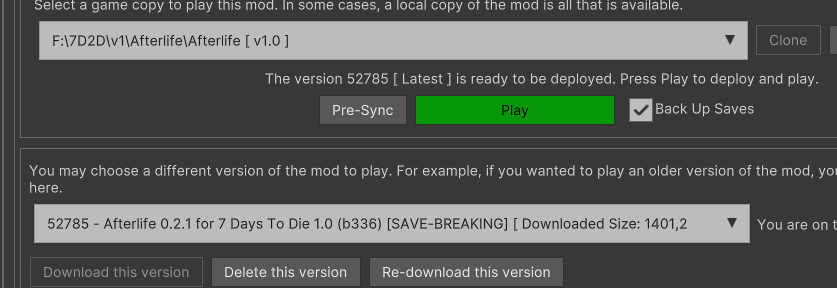 mortal remnant
yea thats correct
slender oar
mortal remnant
i wish we could get an actual logfile fro mwhat is happening
how does he get u one?
he clicked alt+f4 on the screen he was stuck and he got the pink one again
mortal remnant
slender oar
how does he get u one?
thats the fun part, i´m not sure where modlauncher stores the player-log
just got a popup for modlauncher update, did you guys do that? version 5.2.1.9
slender oar
he tried both the old and new versions
i'm on 5219
does afterlife support manual installation?
mortal remnant
thats where we started
slender oar
cuz we tried that too
mortal remnant
modlauncher was ´secondary´ installation caus of it´s popularity
and simplicity for the user ........
mortal remnant
click on this path then drop the output-log testfile in here, that should be the log we need

 slender oar

this is what he sees
when he clicks the link in the launcher
except it's in F:\ for him
mine looks like urs
and his looks like my steam folder for 7dtd
mortal remnant
did he play other mods before, or is this the first time ?
slender oar
his output log is in the top folder - the 7daystodie_data
slender oar
mortal remnant
did he play other mods before, or is this the first time ?
we both play with crafting from chests and mob hp
just those 2
mortal remnant
it looks like he merged multible things into the same path and it might be running 2 programs from that location
alright, it should not be what i hoped it would be
 carmine stratus
slender oar
https://images-ext-1.discordapp.net/external/7UaKuM6DUQedbmq6O6-n148SzULhIFmqrCJ...
carmine stratus
slender oar
https://images-ext-1.discordapp.net/external/7UaKuM6DUQedbmq6O6-n148SzULhIFmqrCJ...
This is the structure created by steam, not the one copied by the mod launcher.
slender oar
carmine stratus
This is the structure created by steam, not the one copied by the mod launcher.
yes, we noticed it looks like my steam and not like my afterlife, but the launcher created this
mortal remnant
no freking way the launcher did this on it´s own .....
slender oar
well he went with a fresh install the last time
mortal remnant
of both steam install and clean install of modlauncher?
mortal remnant
yes that should work
i´m still trying to wrop my head around the modlauncher installing mods in the steam installation
the modlauncher should specifically avoid doing exactly that 😅
unless someone changed the paths it uses
slender oar
he removed the clone, it looked like that because it clones the game
now it looks like mine
but he's getting the same error
the pink screen
that's the log file now
mortal remnant
and it´s a full log this time 👌
ohh yay it is microsplat again
#💬│ɢᴇɴᴇʀᴀʟ message try what they described
it´s currently the only time things worked after encountering this crash
at least the only time we know of
slender oar
mortal remnant
ohh yay it is microsplat again
https://discord.com/channels/949089127918346270/9...
if the game doesent run i have to restart the pc. once i restart it i have to open the launcher and run the game as soon as possible and the open steam in order to log in and the mod works
if i run any other game/app before the modlauncher then i have to restart the pc again
i dont know actually why, if you understand whats going on feel free to le me know xd
this comment?
mortal remnant
slender oar
if the game doesent run i have to restart the pc. once i restart it i have to op...
yes
slender oar
mortal remnant
yes
he restarted, no change
7days to die splash screen with the same console and same errors
mortal remnant
then i´m out of options, sorry
for some still incomprehensible reason this crash happens sometimes
and while i say microsplat again, it is not even guaranteed that is is because of microsplat
slender oar
i guess we weren't mean to play afterlife 😦
mortal remnant
try again next month or so, hopefully we will have gotten a handle on this by then :\
carmine stratus
slender oar
i guess we weren't mean to play afterlife 😦
Just guessing as the result is a pink UI: did you check the graphics driver? Maybe there is a new one which fixes this issue. 🤷
slender oar
carmine stratus
Just guessing as the result is a pink UI: did you check the graphics driver? May...
Its not a pink ui, its game stuck at launch. Sometimes at the 7dtd screen, sometimes at a pink console with errors screen
carmine stratus
As you already copied the installation from a working pc to the other, it's quite unlikely that it is related to the installation itself. And in this case outdated drivers are good candidates for issues.
My hands disappeared after 1 sec in game until I installed latest graphics driver. Although they looked normal within this second. In other mods it worked.
In your case the UI doesn't load. So, as you cannot play anyway, in my opinion checking the drivers doesn't make things worse.
slender oar
we didn't copy the installation from a working pc to the other, the game doesn't recognize it and starts redownloading
the hands issue is not related as that's a graphics bug, we're tlaking here about unable to launch the game at all
 worthy solstice
@slender oar can you try using this dll
slender oar
worthy solstice
<@187590806448766976> can you try using this dll
i'll send it to my friend but he's out until monday I believe
worthy solstice
ok :3
slender oar
worthy solstice
<@187590806448766976> can you try using this dll
where does he put that
worthy solstice
slender oar
where does he put that
does he know where the mods folder is
slender oar
ye the mod manager opens the folder
so what, he puts it there and do what, launch the game ?
worthy solstice
put it in the OcbMicroSplat folder and replace whats there
slender oar
ok, will report back in a few
slender oar
worthy solstice
put it in the OcbMicroSplat folder and replace whats there
game crashes directly now
after the funpimps hat it crashes
he tested the last 2 versions of afterlife
worthy solstice
well shit
slender oar
worthy solstice
well shit
now it gets stuck on loading instead of crashing https://images-ext-1.discordapp.net/external/HOrqJtLfx_HIWZs0f6YRt2zV9O6cZ_XJ37euGwnPfiM/https/i.imgur.com/mCPIWgP.png?format=webp&quality=lossless&width=899&height=506

the log


 worthy solstice
1.1
slender oar
what does that mean
we invited another friend to join us, she was able to run the game 3 days ago, unable now
that's her error
worthy solstice
coz 1.1
slender oar
is there a workaround?
worthy solstice
rollback to 1.0
slender oar
is there an easy way to do that ?
slender oar
worthy solstice
that worked, another friend trying to join, getting this error. He's on 1.0
 worthy solstice
aaaaaaaaaa
slender oar
yeah, we're really trying to do a playthrough on afterlife but ... 😦
 kind orbit
hey what do i do about this
