1 messages · Page 1 of 1 (latest)
 austere dawn
Bedrock itself only stores modified chunks.
I'd recommend using EmptyWorld and SimpleWorldEdit for the platform.
This also ensures, that your wolrd will infinitly generate as void.
Empty world generator plugin for nukkit. Contribute to Syodo-Development/EmptyWorld development by creating an account on GitHub.
A simple worldedit plugin for PowerNukkitX. Contribute to PowerNukkitX-Bundle/SimpleWorldEdit development by creating an account on GitHub.
 rigid urchin
Other than that, is the server affiliated with the one that reports to pnx?
austere dawn
rigid urchin
Other than that, is the server affiliated with the one that reports to pnx?
You mean this discord? This is the official PNX discord
rigid urchin
austere dawn
You mean this discord? This is the official PNX discord
What I meant was, I was asking if it was possible to apply a personal world to a pnx within a Minecraft server.
austere dawn
rigid urchin
What I meant was, I was asking if it was possible to apply a personal world to a...
You mean if you can use a singleplayer world in PNX? Yea you can
rigid urchin
austere dawn
You mean if you can use a singleplayer world in PNX? Yea you can
For example, applying a downloaded castle map specifically for bedrock
Whenever I apply an external map it always creates a new wild map. I also modified the level name in yml.
austere dawn
rigid urchin
For example, applying a downloaded castle map specifically for bedrock
Whenever ...
Thats strange. It should work. What do you put into your PNX server? the mcworld file, or the actual folder the world is in?
rigid urchin
like this
 austere dawn
rigid urchin
like this
austere dawn
rigid urchin
like this
Hm. That looks fine.
Did you enable convertBDS in your pnx.yml?
@broken shale Do you know what happens here?
rigid urchin
convertBDSChunks: true
 broken shale
no idea, my map is fully generated already, I dont faced any new generated chunks, but this is related to the level config, not the pnx config, still it would generate new map only if the chunk is empty, so no idea tbh
austere dawn
broken shale
no idea, my map is fully generated already, I dont faced any new generated chunk...
Might the world from the download be at another x, z that the player spawns in?
broken shale
sounds like it
austere dawn
@rigid urchin Import the world in singleplayer and check coordinates
rigid urchin
austere dawn
<@958572913676668938> Import the world in singleplayer and check coordinates
The map I applied has no natural elements at all, so there cannot be terrain, trees, rivers, etc. even if the coordinates are in different places. However, when I enter the server, a vanilla wild map is always created.
austere dawn
rigid urchin
The map I applied has no natural elements at all, so there cannot be terrain, tr...
If the chunks were not generated before, PNX will generate chunks there. Thats why I ask you to check the coordinates in singleplayer. The world might be at 10k, 10k, but on PNX you spawn on ß, 0. Yk?
rigid urchin
When I checked, there was no corresponding map even if I went to the same coordinates.
austere dawn
Okay. Thats what I wanted to know..
Could you maybe send over the world?
rigid urchin
here
austere dawn
Is it broken? It does not import into singleplayer
rigid urchin
No longer was it just creating a void flat template and exporting it right away.
austere dawn
It was just a void? Nothing else?
rigid urchin
I used the preset available when creating the map.
https://minecraft.fandom.com/wiki/The_Void
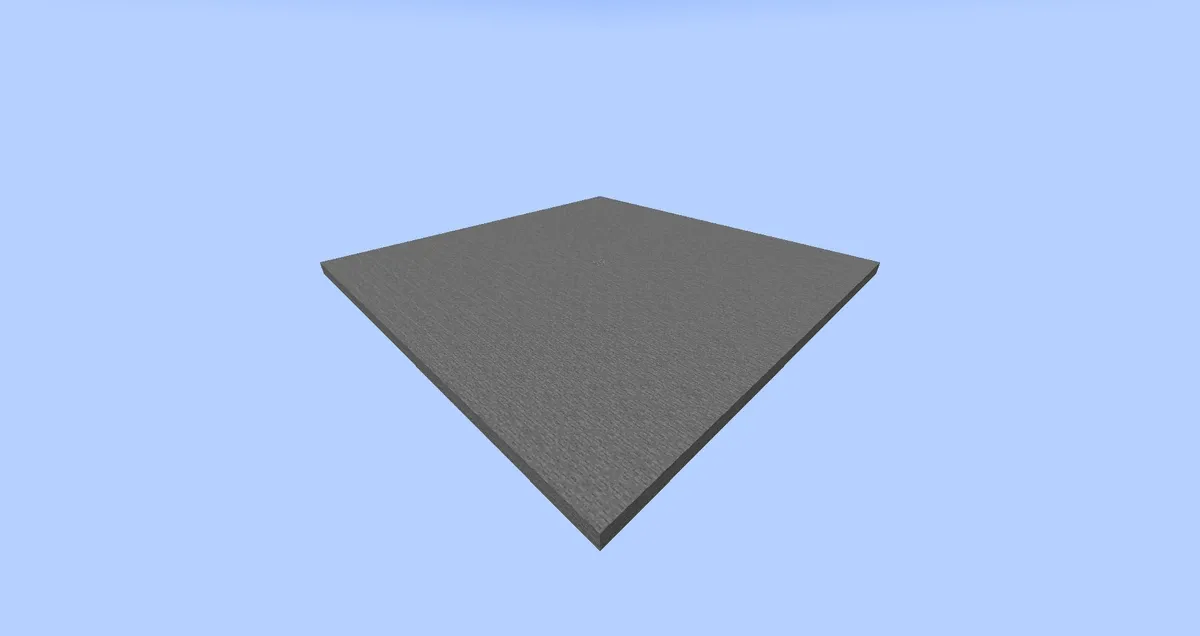
The Void is an empty biome that generates only a 33×33 void start platform centered on a block of cobblestone at coordinates x=8, z=8, and at a height 3 blocks above the bottom of the world. No...
austere dawn
austere dawn
Bedrock itself only stores modified chunks.
I'd recommend using [EmptyWorld](ht...
Do this
rigid urchin
I just wanted to know whether external maps apply or not. So, if I apply this map downloaded from mcpedl, will it be applied properly?
https://mcpedl.com/stonehill-castle-medieval-castle/
austere dawn
If it does not rely on generation like the void world, yea.
For that world, it should work I guess
rigid urchin
When I applied this map it was still a wild map and I got that error. Is there a separate map application guide? docs don't seem to open

