#Need some help about setblock and waiting for a function
1 messages · Page 1 of 1 (latest)
 tranquil heath
 rigid torrentBOT
tranquil heath
so i wanna set a block to air after a tick how do i do that
rigid torrentBOT
tranquil heath
so i wanna set a block to air after a tick how do i do that
<@&1201956957406109788>
Someone will come and help soon!
💬 While you wait, take this time to provide more context and details.
🙇 After a while, hit the Summon Helpers button to ping the helper team. They'll be happy to help you
✅ Once your question has been resolved (or you no longer need it), please click Resolve Question or run /resolve
 near onyx
you can use scoarboards if you know how those work
 tired fossil
tranquil heath
i just wanna wait 1 tick and then just remove the block
tired fossil
tranquil heath
i just wanna wait 1 tick and then just remove the block
what do you need to remove the block for?
there's a few ways you can do it depending on the use.
tranquil heath
tired fossil
there's a few ways you can do it depending on the use.
re-setting a command block
and also a chest
im using a player head method to get a users name
and running it through a command block to run a command
tired fossil
could you send me the commands you are using? i'm not familiar with the player head method.
tranquil heath
# Get player head and set it to the current player's data
item replace block 809 -64 331 container.0 with player_head
item modify block 809 -64 331 container.0 {function: "minecraft:fill_player_head", entity: "this"}

# the player's name is now in item.components."minecraft:profile".name
# Run a function with the name of the player as a macro argument
function namespace:rightclick_run with block 809 -64 331 Items[0].components."minecraft:profile"```this and after that
$setblock 809 -63 331 command_block{Command:"lp user $(name) permission set veinminer.veinmine.* true",auto:true}
tired fossil
@tranquil heath I'm really sorry, I bet there's someone who can explain it better than I can. I haven't really used advanced commands (like using $ and stuff, idk what that does).
 sullen sundial
If it's a hard-coded position, you can use /schedule
So in the function which sets the block, run this command:
schedule function namespace:remove_command_block 1t
That schedules the function to be run one tick in advance
Then in the namespace:remove_command_block function, put:
setblock 809 -63 331 air
That should remove it after one tick
tranquil heath
sullen sundial
If it's a hard-coded position, you can use /schedule
it is
tranquil heath
sullen sundial
Then in the `namespace:remove_command_block` function, put:
```
setblock 809 -63...
actually i have a command block and a chest
so do i just type
setblock 809 -64 331 air
i need 2 setblocks
sullen sundial
Yeah
tranquil heath
sullen sundial
Yeah
oh more issues im having
with a different thing
i want to create a custom command
like /shop or something
sullen sundial
Not possible with datapacks unfortunately
tranquil heath
oh rip
sullen sundial
Although you can use /trigger
tranquil heath
any idea on how i could do that
tranquil heath
sullen sundial
Although you can use /trigger
so like /trigger shop?
nah i would like it to be a bit more simple
sullen sundial
tranquil heath
so like /trigger shop?
Yes
tranquil heath
well i might have to look for another way to code custom commands
the main purpose was the paper thing which is now complete
sullen sundial
Plugins, or mods
tranquil heath
sullen sundial
Plugins, or mods
plugins ig
but the problem is i have to post it on spigot and get the server host to approve the plugin
sullen sundial
I don't see the problem with /trigger shop tbh
sullen sundial
You can use plugins if you want, of course
tranquil heath
tranquil heath
but the problem is i have to post it on spigot and get the server host to approv...
this is the issue with a plugin
which is why i would prefer to use datapacks
tranquil heath
ok ive decided to use /trigger
@sullen sundial
i need to know a few things tho
- is it possible to tie it up with the already present currency system from the essentials plugin
- if njot is it possible to create my OWN currency datapack meaning i would be able to sell/buy items
- would it be possible to buy items/sell with custom data
sullen sundial
- I don't know, I'm not familiar with the plugin
- Yes
- Yes
tranquil heath
well i guess
i would be making my own
currency
i need another command for it which would be /trigger bal
uh how do i go about this
i don t even know how to setup a GUI
sullen sundial
Custom GUIs are... Not very easy to make with datapacks
 sand heathBOT
Custom Gui
>>> The guide is too long for Discord, please follow the links to get to the Guides.
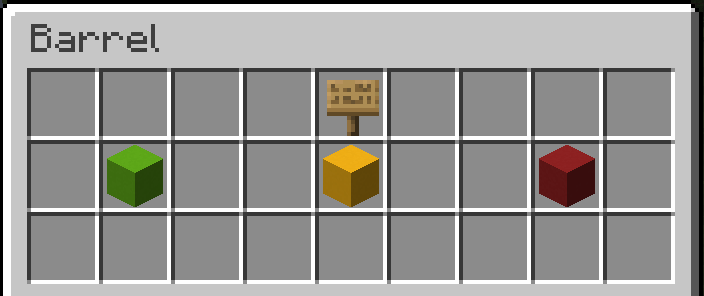 sullen sundial
Here's an example
tranquil heath
well this might take awhile
ima read through the documents real quick
then ill message back
sullen sundial
If you want it to be portable, you'll probably want to make this in a chest minecart