#Connection timed out issue
1 messages · Page 1 of 1 (latest)
 heavy isle
@west ermine https://offworldindustries.zendesk.com/hc/en-us/articles/234684847-Server-Browser-Issues you can try going through this
 formal gorge
You can also try the following:
Open Command Prompt as an administrator and run the following commands line by line:
powercfg -s 8c5e7fda-e8bf-4a96-9a85-a6e23a8c635c
RD /S /Q "%localappdata%\squad"
ipconfig /flushdns
netsh winsock reset
sc config "GameScannerService" start= disabled
sc stop "GameScannerService"
[!] Note:This will delete your user cache which will reset all of your in-game settings including resolution and keybinds.
Also what's your hardware?
 west ermine
formal gorge
Also what's your hardware?
west ermine
formal gorge
Also what's your hardware?
It might be a hard ware issue
Because I only have a single stick of ram and a hard drive
formal gorge
west ermine
Because I only have a single stick of ram and a hard drive
Can you please post the output of cmd.exe > systeminfo
west ermine
I will do it eventually, not at my computer rn
west ermine
formal gorge
Can you please post the output of cmd.exe > `systeminfo`
hey uh, where is that in system info?
formal gorge
west ermine
hey uh, where is that in system info?
Search for CMD.exe,run as administrator, enter systeminfo
west ermine
alright, I tested connection with better internet
still timed out
Ok I opened command prompt
with admin
@formal gorge what next?
formal gorge
Enter systeminfo
west ermine
I am in
formal gorge
And copy paste the results
west ermine
sorry never had problems with my games so I've never done this
but all I see is this
formal gorge
west ermine
but all I see is this
?
To post images and stuff you'll need to do !links in #549701742238105610
formal gorge
west ermine
sorry never had problems with my games so I've never done this
No worries
 formal gorge
west ermine
this
formal gorge
west ermine
this
Scroll further down
west ermine
I am at the bottom
 formal gorge
Ok
west ermine
also I cleared my cache
and verified my files
and also I did the whole command thing but it says "gamescannerservice" is not an actual thing so I dunno
formal gorge
Can you run a speed test (like http://www.speedtest.net)?
west ermine
sure
formal gorge
west ermine
and also I did the whole command thing but it says "gamescannerservice" is not a...
That's okay
west ermine

thats alright?
This is the one I switched to in a an attempt to find out if its a speed problem
the old one was like 4 mb/s
formal gorge
Okay it seems like you have sufficient speed
formal gorge
FIX TO TRY FOR
"Server closed connection" ISSUE
TRY FIRST IF RELEVANT TO YOU (ASUS GAMEFIRST)
Asus gamefirst is software that comes with/is related to Asus motherboards, if you have this software try disabling/removing this software and see if it resolved the issue.
FIRST STEP
https://offworldindustries.zendesk.com/hc/en-us/articles/221442887-Easy-Anti-Cheat-Errors
Starting from the top of this page, follow it through and take OPTION 1. Looking further down the page, ensure Cheat engine is not running/even not installed. Then do Step 4 from OPTION 2, which is the Command Prompt step, remember to restart and open Command Prompt as Admin.
SECOND STEP
You will then also need to set this.
https://cdn.discordapp.com/attachments/127841357636042753/559445812707328011/500ping.png
THIRD STEP
Tweak the priority on EAC client in task manager.
Boot the game -> Task manager -> details -> easy anti cheat -> set priority -> realtime
FOURTH STEP (If still facing issues)
Follow this page through
https://offworldindustries.zendesk.com/hc/en-us/articles/360023840633-NIC-Offloading
If it is possible, have a wired internet connection.
 formal gorge
west ermine
I only have a hard drive and 8 gigs of ram
formal gorge
west ermine
I only have a hard drive and 8 gigs of ram
Yeah that's something you should upgrade in the future, but that shouldn't affect your networking
formal gorge
formal gorge
FIX TO TRY FOR
"Server closed connection" ISSUE
TRY FIRST IF RELEVANT TO YOU (...
Have you tried this one ?
west ermine
uhhh yeah actually
I am not sure if I have asus
probably not
Like not sure if its contained in one of these folders

but I'll assume their labelled correctly
formal gorge
west ermine
I am not sure if I have asus
No, you have an Acer, but most of the steps could still help.
@heavy isle do you have any other ideas ?
west ermine
The only one I have not tired is the "fourth option"
Also also\
if its relevent
the connection time out prompt happens after this screen

which if its relevent
formal gorge
west ermine
The only one I have not tired is the "fourth option"
Give it a shot
west ermine
happens after a deployment screen
heavy isle
west ermine
Like not sure if its contained in one of these folders
Go to the windows Apps and features, search for Gamefirst there
west ermine
formal gorge
Wait you get it before connecting to a server
no no
like
I connect to a server
it goes to the deployment screen with the map
then after a pretty long time
formal gorge
Oh okay
west ermine
it goes to this loading screen
then after another few minutes
it kicks me out
sometimes it'll show a badly textured version of the map before going to the screen described above
in addition, I usually watch the game with task manager when its loading. It says "Not Responding" during the loading screens
however it does not say that when first loading into the game, only the server
anyway
I'll try offloading
formal gorge
west ermine
in addition, I usually watch the game with task manager when its loading. It say...
Do you know what piece of hardware is getting maxed out during this ?
west ermine
the memory?
it reaches 87 - 94 98 or something
when running squad
So…..is that the reason?
formal gorge
Yeah, your connection times out as your application hangs
formal gorge
Yeah
west ermine
Ok but I have a question
How did I connect to some servers before
I could not connect to basically all of the servers
But I’ve connected like 5 times before
west ermine
hey sorry to bother you about the same issue again. But I think in the thread we came to a conclusion that this is a hardware issue involving application hang. However, I do believe I have the hardware necessary displayed on the stream page?
west ermine
@formal gorge You told me to put this here?
formal gorge
west ermine
<@114803803693252609> You told me to put this here?
yeah
formal gorge
west ermine
hey sorry to bother you about the same issue again. But I think in the thread we...
@heavy islethis q is for you
heavy isle
west ermine
hey sorry to bother you about the same issue again. But I think in the thread we...
Open up windows settings, go under Apps, in "Apps & Features" there you can search Asus gamefirst there. If it does come up then just uninstall it.
https://i.imgur.com/qCwWazp.png should look like this
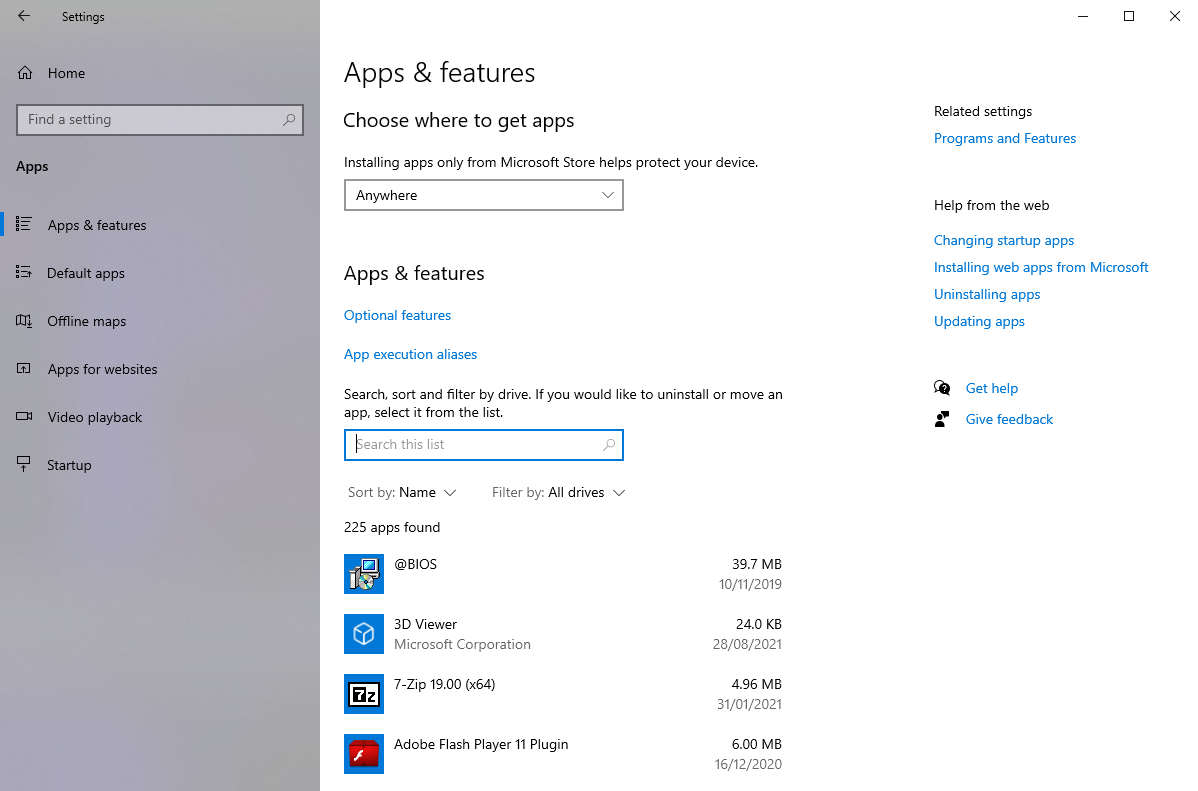
Not sure if your hardware will cause you to time out. Maybe if your load times are excessively long though.
formal gorge
heavy isle
Not sure if your hardware will cause you to time out. Maybe if your load times a...
His game seems to freeze, (ram maxed out, app not responding) for a couple of secs, likely causing the timeout
heavy isle
https://docs.microsoft.com/en-us/sysinternals/downloads/rammap Could try downloading RAMmap and cleaning up the standby list

An advanced physical memory usage analysis utility that presents usage information in different ways on its several different tabs.
should give you as much available RAM as possible, potentially stopping the freeze
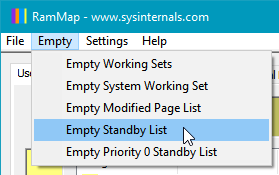
That should empty it
west ermine
I understand
I was confused because the steam game minimum calls for 8GB and that is exactly what I have
However I understand PC processing power does get passively used on all programs that require calculation
So my actual ram is probably less then 8
I use 30 to 40 percent normally
According to task manager
west ermine
formal gorge
His game seems to freeze, (ram maxed out, app not responding) for a couple of se...
Also keep in mind the game window does not go a faded white. It’s just inside my task manager.
west ermine
@heavy isle I was right
I did some investigating
With all the passive processes my computer does
I only have 2-3 GB of ram left to do anything
heavy isle
west ermine
I only have 2-3 GB of ram left to do anything
I guess try and close as many unnecessary ones as possible
west ermine
heavy isle
I guess try and close as many unnecessary ones as possible
But I think turning 3 GB of ram into 8 is pretty hard
Considering my entire ram space is 8GB
formal gorge
west ermine
But I think turning 3 GB of ram into 8 is pretty hard
Can you send a list of tasks open & how much ram they use ?
formal gorge
west ermine
Also keep in mind the game window does not go a faded white. It’s just inside my...
That's not required for a hang
west ermine
formal gorge
Can you send a list of tasks open & how much ram they use ?
It does not matter now
I am aware of what I need to fix
And I will fix it by getting some more ram
Thank you for you time
But I don’t think I need this thread no longer


