#╟🎑reshades
1 messages · Page 44 of 1
 midnight basin
 nova heart
which ones are you using? <@162971420782100480>
nova heart
which ones are you using? <@162971420782100480>
this is a modified AtmosFILM (comes default with the game)
if you're interested i can show you my complete settings list and everything i did to achieve the effect
nova heart
please
midnight basin
it'll take a few minutes
never actually did a detailed guide on my settings now that i think about it
this is running very stable by the way, you can get this to look much better if you don't care about performance and only want to take pretty pictures lol
midnight basin
i'll write it down so i can use it as future reference
nova heart
okay!
nova heart
im scared
nova heart
idk whjat to do!
midnight basin
 green lake
madlad*
green lake
madlad*
kid named editing messages:
nova heart
why
green lake
causes lag too
nova heart
ah then i wont
green lake
its just not as good as aydins grass
midnight basin
it is overrated
nova heart
ah i will not use it then
green lake
if you want it to be green like zone reality
nova heart
thank you
midnight basin
i'm using spring right
i think my first attempt i accidentally set summer and it was super bright
 pulsar wolf
My dudes don't even bother with other reshades. Eden's Reshade that comes with GAMMA is baller. This looks fukken GOOD


 green lake
pulsar wolf
My dudes don't even bother with other reshades. Eden's Reshade that comes with G...
green lake
pulsar wolf
My dudes don't even bother with other reshades. Eden's Reshade that comes with G...
too dark
too much contrast
ill pass
midnight basin
Anomaly Launcher:
Set Shadow Map 1536 and click Save Settings
Visual settings:
- Use DX11 as base (I use AVX)
- Rendering Distance and Rendering Quality sliders MAX and all options ON (NO Anti-Aliasing or SMAA)
- Grass Density 76% (use
r__detail_density 0.24for precision), Rendering Dist. 110, Height 1.0, Grass Shadows ON - Sun Shadow Quality MEDIUM, Sun Rays VOLUMETRIC and HIGH, Intensity 1.1
- SSAO Quality and Mode OFF
- All Effects ON except Motion Blur
ReShade 5.7.0:
Hippobot's AtmosFILM as base with the following additional effects (if any are already on keep them on):
- prod80_03_FilmicTonemap
- Clarity2
- iMMERSE Anti-Aliasing
- FlexibleCA
- FilmGrain
- ArtisticVignette
Mods:
REINSTALL:
- Grass Tweaks // choose Spring preset
INSTALL:
- KVMAS and Azetrix Model Merge Project 1.9 // NPC models
- DynaHud HUD Manager // automatically hide HUD
- Ammo Check // to use with DynaHud
- FireModeCheck // to use with DynaHud
- Hide PDA Message HUD (with ping) // to use with DynaHud
UNINSTALL:
- Simple Autumn Retexture No Leaves
- Gardener of the Zone Textures
- Autumn No Leaves LOD Fix
@nova heart
nova heart
oooo
midnight basin
there's a bunch of stuff you can do for performance like enabling Low Latency Mode ULTRA and Triple Buffering for GAMMA specifically if you're using an NVIDIA card
this also neglects to mention the affinity script for MO2 that sets your CPU threads up for you properly
midnight basin
here are a few more preview screenshots for you


you could use some gun reposition mod to make these look even cooler but i never dabbled in this
midnight basin
they're just a pain in the ass to set up
nova heart
im amlost done lmao
midnight basin
i might be able to send my ReShade preset over
nova heart
oh sweet
midnight basin
idk if i can just copy the thing and it passes my settings to you
nova heart
my game is broken rn
midnight basin
what's broken
nova heart
wont launch anymorte
midnight basin
yeah but after which part is it not launching anymore
did you install any of the mods?
or disable anything not in that list
midnight basin
have you made sure to disable the mods KVMAS said to disable?
nova heart
yes i disabled them
 midnight basin
tell me exactly what you did
you went in-game and changed all the visual settings i assume
settings applied, you were told to restart the game if you changed the grass stuff, then you entered game and it still worked yeah?
 blazing creek
nova heart
blazing creek
nova heart
i dont think reshades are gonna cause errors like that lol
nova heart
it was a few mods i had to install
midnight basin
nova heart
it was a few mods i had to install
you messed up either DynaHud or KVMAS
nova heart
probably
midnight basin
because DynaHud has like 3 mod requirements and KVMAS requires you to disable 4-5 mods
yeah we should move to #🔨modded-gamma-support
 gaunt pawn
What happened to Hippo's Atmo's channel? Just noticed it gone. :/
disregard I found it lol
 somber prairie
o
 late mist
can you let me know if that's ok, and if not how can i fix it?
 midnight basin
late mist
can you let me know if that's ok, and if not how can i fix it?
midnight basin
late mist
can you let me know if that's ok, and if not how can i fix it?
@weary rivet
 weary rivet
late mist
can you let me know if that's ok, and if not how can i fix it?
weary rivet
late mist
can you let me know if that's ok, and if not how can i fix it?
yeah thats fine you dont need those
 tidal peak
Can anybody help me get more than 50 fps and still have reshade because i know that its reshade capping my fps
 oblique ridge
How to enable TFAA
 quartz fern

Google Docs
GAMMA Reshade Database w/ FAQ
S.T.A.L.K.E.R. GAMMA Reshade Database, FAQ,Graphic Enhancement Tips
Author,Shader Name,Included
by default
in GAMMA,Includes
Textures/
Effects,Last Update,Notes,Discord Download Link,Direct Download Link,Screenshot,Question,Answer,Grass Settings
127Z,FALL 1.0,08/1...
 swift robin
can someone guide me to install hd models? just watched something on youtube , that is like 2 mo old and did exactly the same , but it didn`t worked. Help!
 clever totem
is there a way to have the arena not a portal to the etherial plane?
 green lake
clever totem
is there a way to have the arena not a portal to the etherial plane?
green lake
clever totem
is there a way to have the arena not a portal to the etherial plane?
was your weather foggy
any specific reshade you're using that makes dark areas brighter than usual
clever totem
clever totem
is there a way to have the arena not a portal to the etherial plane?
this is with hunter but its like this in vanilla
green lake
then ope
you're entering the heavenly planes when you're about to fight for your life
they have the arena set up in the clouds so you have easy travel to heaven
clever totem
oh ok
green lake
yeah yep
clever totem
i was messing with nullmoxy's extraction playtest tho, i glitched out of the hideout room, so no fighting there
 verbal magnet
where is the drop down menu to select reshades?
midnight basin
verbal magnet
where is the drop down menu to select reshades?
right here
 midnight basin
swift robin
can someone guide me to install hd models? just watched something on youtube , t...
midnight basin
swift robin
can someone guide me to install hd models? just watched something on youtube , t...
don't use HD Models, revert all the changes you've made and use KVMAS https://discord.com/channels/912320241713958912/1143233268595044493
swift robin
uzing kvmas
midnight basin
there's a detailed guide on how to install this in the readme file inside the archive
you have to disable about 4-5 mods and also don't select the (01) GBOOBS BWWR patch, use the one in the pins
make sure not to select duplicate optionals
keep KVMAS last on the order list with the GBOOBS patch below it
that should cover it
 rigid pendant
Would I realistically see any performance increase in gamma upgrading my cpu 
green lake
rigid pendant
Would I realistically see any performance increase in gamma upgrading my cpu <:k...
probably
rigid pendant
Cause I am going to college and can only realistically afford to upgrade either my GPU or mobo/cpu/ ram, and my cpu is 4 core i5 7600k so Its kinda bad LOL
And then I'll upgrade my GPU later this year
I think 1080 is still decent enough if I pair it with a better processor
green lake
ywH
rigid pendant
Whereas pairing the 7th Gen i5 with a 4070 doesent make much sense to me
 visual axle
rigid pendant
Would I realistically see any performance increase in gamma upgrading my cpu <:k...
visual axle
rigid pendant
Would I realistically see any performance increase in gamma upgrading my cpu <:k...
It depends what resolution you play at I don't know how it works with Anomaly engine but basics are higher the resolution higher the GPU bound will be. You can see improvments in 1080p that's for sure but once you hit 1440p or 4K,CPU gets a bit less important
rigid pendant
Yeah I'm playing at 1440p, I still need to make the upgrades anyways realistically though and then just slap a new GPU in later this year
I think my case may see some performance atleast just cause I'll be going from a 4 core i5 7600k to a i7 13700kf which is like sooooo much faster but yeah
 past shuttle
rigid pendant
I think my case may see some performance atleast just cause I'll be going from a...
past shuttle
rigid pendant
I think my case may see some performance atleast just cause I'll be going from a...
it will for sure. i went from an ryzen 1800x to an ryzen 5700x and it brought me something like 15 fps on a gtx 1080 @1440 . With my last upgrade to the 4070 RTX it doubled my fps. Now i have roundabout 80-100 fps on a really nice custom setting with reshade. Without Reshade FPS peak around 130-140 @1440.
rigid pendant
past shuttle
it will for sure. i went from an ryzen 1800x to an ryzen 5700x and it brought me...
Sounds perfect 15-20 fps boost would be lovely til I can slap a better GPU in later this year
The difference between 45 fps and 60 for me is massive, and it just sets me up nice spec wise for a GPU upgeade
rigid pendant
past shuttle
it will for sure. i went from an ryzen 1800x to an ryzen 5700x and it brought me...
Would Ryzen maybe be a good option for myself? Like the new AM5 platform for futureproofing, get something like a 7700x with some new DDR5 ram and slap a 4070 TI in it later this year or something
Or do you think id be better off going intel 🤷
 shy hazel
Does anyone have a link for RAW Reshade?
past shuttle
rigid pendant
Or do you think id be better off going intel 🤷
I took the ryzen 5700x because i had the AM4 Plattform already and it was the best pick for me at this time. If i had to start from scratch i would take the 7800x3D and AM5 but thats just me. I think the Intel 13700k would be great aswell for you. GPU wise you should wait for the 4xx0 Super refresh which is coming in January and see what it brings.
 mint owl
Updated my preset to the LUT standards


 idle talon
It looks really nice = )
 long dune
mint owl
Updated my preset to the LUT standards
long dune
mint owl
Updated my preset to the LUT standards
CAN WE GET TO PLAY WITH THEM ??
mint owl
idle talon
It looks really nice = )
Thank you 💙
mint owl
long dune
CAN WE GET TO PLAY WITH THEM ??
Currently checking with Norfair for a tweak or two but I intend to release very soon for sure, my old preset present in Gamma is severely outdated and quite frankly not good at all
long dune
mint owl
Currently checking with Norfair for a tweak or two but I intend to release very ...
i have one question bro will you help me ?
mint owl
Depends, what can I do ?
long dune
like i want to know how you guys make game brown like in the photos i have seen
long dune
mint owl
Updated my preset to the LUT standards
my whole game is in blue nd green shade i want something like
mint owl
long dune
my whole game is in blue nd green shade i want something like
Are you using default Gamma ? Any custom reshade ?
On pictures above I'm merely using the Autumn coming from default Gamma, the rest is the Reshade preset
The one effect that makes it browner by default is called Glamarye with Fake GI
long dune
mint owl
Are you using default Gamma ? Any custom reshade ?
On pictures above I'm merely...
i am using zone 3.0 nd some reshade but all reshades are same
mint owl
Then the problem might come from how Zone 3.0 is setup, it uses green vegetation if I remember correctly
 long dune
mint owl
Then the problem might come from how Zone 3.0 is setup, it uses green vegetation...
long dune
mint owl
Then the problem might come from how Zone 3.0 is setup, it uses green vegetation...
whats the solution then ??
i want my game to look like this
 mint owl
A reshade will only improve what's already there, meaning you will never get the brown color with Zone 3.0 by default, if anything, you can ask on their page in this server https://discord.com/channels/912320241713958912/1153770802819383346
You can also try to reinstall Aydin's grass tweaks (in your MO2 list) and select Autumn, making sure it's loaded after Zone Reality, but that might not work since I don't play with it I have no idea
Lastly, the screenshot you're showing is rather green, since it looks like the Summer version of Aydin's grass
long dune
my game likes like this


 mint owl
Yup, that's Zone Reality, green by default, so either try reinstalling Aydin's grass, Autumn version and load it after, or ask them there for any way to do it I guess
long dune
ok i have reinstalled it let me check now
mint owl
Delete shader cache folder in your appdata folder if it doesn't work and see again
Also make sure it's loaded after Zone Reality in MO2
long dune
mint owl
Also make sure it's loaded after Zone Reality in MO2
After loaded means ?
mint owl
long dune
After loaded means ?
In MO2 you put it after/below Zone Reality
mint owl
Yup 
long dune
grass tweak is in game fixes nd zone reality 3.0 is in Gamma disable
is it fine @mint owl
mint owl
You don't have to disable it if you want to keep it, just make sure that in the order, Grass Tweaks comes after Zone Reality
It has to be lower, the category doesn't matter much
mint owl
I can, I will just be on mobile
long dune
fine you can see my screen right now mobile
mint owl
Yup but I won't be able to talk vocally
mint owl
long dune
fine you can see my screen right now mobile
Not good, Grass Tweaks is still above
Yup
Now it's good
Try to check now
Just delete the shader cache before maybe
Not like that
In appdata is the proper way to do it, this method you used can be buggy
!shader
 void depotBOT
@mint owl To clean your "Shader Cache", don't use the option in the Anomaly launcher.
Go in this folder: Anomaly\appdata, you'll find a folder called shaders_cache, delete this folder and launch the game normally from MO2, using your preferred DX.
mint owl
If it doesn't work then you'll have to ask on the section I linked above for Zone Reality 3.0
Worst case scenario, try to disable Zone Reality and see
long dune
long dune
i want my game to look like this
This one is it default textures ?
mint owl
Default in Gamma is Autumn
 stable nest
Some of mine reshade tweaks


 mint owl
stable nest
Some of mine reshade tweaks
mint owl
stable nest
Some of mine reshade tweaks
Looks great, if only Abnormal Weathers was more consistant between cycles
stable nest
mint owl
Looks great, if only Abnormal Weathers was more consistant between cycles
Abnormal is perfect for taking screenshots, that's the only reason to use it
mint owl
stable nest
Abnormal is perfect for taking screenshots, that's the only reason to use it
Definitely so, maybe someday there will be a gameplay + screenshots revised version
midnight basin
 echo socket
What's the recommended Reshade preset to use?
echo socket
What's the recommended Reshade preset to use?
there is none, check out the pinned preset database and decide for yourself
or you can check out #╟📸screenshots and ask people what they're using if you like what you see
 robust nebula
Why does my reshade presets don't really change the colors that much?
It changes the effects like sharpness, depth of field and etc, but colors do not really change that much
robust nebula
long dune
my game likes like this
I want to make it vibrant and stuff
 teal dagger
Hello! I been trying to reshade my game for some time, I installed a few mods like zone reality, kvmas, ultimate gun pack + its balanceed verison and everything works fine so far. I follow each step to the Tee but for some reason...everything looks...grey? Its hard to discribe what Im seeing but its not "clear" its patchy or sth.


Sorry forgot to mention that I been messing around with the reshade, norfair in particular. I tried resetting the reshader foldeer but it still looks...off
robust nebula
Why does my game look bland? I've tried reshade but the colors are not changing that much unlike those that I see on youtube that also use the same reshade preset.
 long dune
robust nebula
I want to make it vibrant and stuff
long dune
robust nebula
I want to make it vibrant and stuff
I can help
robust nebula
long dune
I can help
What do I do? I was told to try reinstalling enhanced shaders in MO2
robust nebula
long dune
my game likes like this
What reshade preset do you use and how are is your grass green, mine is brown.
 stray zodiac
is there a low fps reshade built in gamma?
im on a handheld and need some low graphics
mint owl
robust nebula
Why does my game look bland? I've tried reshade but the colors are not changing ...
The reality is all about editing, youtube videos are made to be as pretty as possible, ingame you won't have the same results. Colors are also very time and weather dependent, and you can always bump up the saturation in the game base settings or modify the Reshade yourself
mint owl
stray zodiac
im on a handheld and need some low graphics
You can use Norfair's multi LUT based Reshade, that's very lightweight, otherwise, as in built in Gamma I don't know if it's in or not
stray zodiac
mint owl
You can use Norfair's multi LUT based Reshade, that's very lightweight, otherwis...
how do i grab that?
mint owl
stray zodiac
how do i grab that?
stray zodiac
the corev3 thingo comes with gamma built in, is that the same thing or am i dumb
mint owl
Yup, same thing, but use the < > on that one if you can to change presets
stray zodiac
ok i just unticked all the reshade thingos and now im ettin 55fps
thatll do haha
in rookie village
not bad for a handheld
mint owl
stray zodiac
ok i just unticked all the reshade thingos and now im ettin 55fps
Try reducing grass density and draw distance in the game settings for more fps
long dune
robust nebula
What reshade preset do you use and how are is your grass green, mine is brown.
you have to reinstall one mod for that
reinstall this mod @robust nebula haan delete shader cache when you will reinstall this mod you will have optionn for selecting grass you can get what ever type you want
 midnight basin
@slow star i'd like to DM you, can you send me a friend request? thanks
this is to do with visual game optimization
robust nebula
long dune
reinstall this mod <@705795479820042261> haan delete shader cache when you will ...
Yep I already did that! I solved it, grasses are greener now, thank you!
long dune
robust nebula
Yep I already did that! I solved it, grasses are greener now, thank you!
your welcome
 tacit bramble
Quick question is it possible to run Gamma with decent graphics and over 100 fps wit a 1660 and an i5 10400F
 snow pasture
no
tacit bramble
ok
 atomic meadow
reshade is dead ? i can't use a shader in my game ...
 thorny vortex
atomic meadow
reshade is dead ? i can't use a shader in my game ...
thorny vortex
atomic meadow
reshade is dead ? i can't use a shader in my game ...
read the most recent announcement
 keen wasp
How to reactivate?
thorny vortex
keen wasp
How to reactivate?
uncheck all the the boxes and hit install/update in launcher. that "should" add it back
keen wasp
thnx mate, ill try
atomic meadow
work for me thanks you 🙏
pulsar wolf
thorny vortex
uncheck all the the boxes and hit install/update in launcher. that "should" add ...
This won't reinstall everything right? I just finished re-enabling all the mods I used to have on Mod Organizer
rigid pendant
Well that was one way to find out
pulsar wolf
Oh well, no pain no gain
 uncut wraith
im confused
will reshade be useless when the next atmos update comes out..?
because im playing without reshade rn and the game looks like hot ass
thorny vortex
uncut wraith
will reshade be useless when the next atmos update comes out..?
you wont need reshade for any color grading after those mods update but its still good for using effects like TFAA, Deband, MXAO, Fake GI, Bloom, Vignette, Ambient light, Etc
 raw vigil
So.. "we're removing reshade by default" but also "reshade is still good to use for certain things"?
 past lava
raw vigil
So.. "we're removing reshade by default" but also "reshade is still good to use ...
past lava
raw vigil
So.. "we're removing reshade by default" but also "reshade is still good to use ...
Yes, Grok states that the upcoming versions of atmospherics and Screen Space Shaders will produce such good visuals that FPS-intensive features like reshade will be unnecessary for the majority of players.
Players looking for the specific suite of features reshade provides will probably still hold onto reshade for the time being.
raw vigil
Interesting, thanks for the info
 robust wren
 fast lily
anyone know why
fast lily
anyone know why
Same here i think its been removed for now
rigid pendant
//Reshade has not been removed, if you updated to the new launcher today, the update has ticked 'Delete Reshade DLLs' in the launcher in preparation of future updates to shader mods that will no longer require G.A.M.M.A to come with Reshade.
if you want to continue using reshade:
Open G.A.M.M.A Launcher as Admin and untick ALL the boxes on the left and hit install/update G.A.M.M.A*
After it finished and you boot up the game you should be able to hit Home and access your reshade settings and presets\
 odd creek
or just reinstall reshade that also works
 tepid sleet
rigid pendant
//Reshade has not been removed, if you updated to the new launcher today, the u...
tepid sleet
rigid pendant
//Reshade has not been removed, if you updated to the new launcher today, the u...
Will it do the same if I'll do full fresh reinstall and just untick Delete Reshade DLLs?
rigid pendant
Yeah that would do the same thing it'd just take longer cause it's having to do the major files etc, but you don't need to do that if you've already updated to the Christmas update today / yest
robust nebula
How do you install reshade presets, First I need to drop the .ini file right? Then copy and paste the shaders and textures folder. However, if it asks because of duplicates, what do I do?
 hidden carbon
robust nebula
How do you install reshade presets, First I need to drop the .ini file right? Th...
hidden carbon
robust nebula
How do you install reshade presets, First I need to drop the .ini file right? Th...
Overwrite them
robust nebula
hidden carbon
Overwrite them
But when I overwrite them, it ruins my other presets.
 inner ingot
can i use my old save after the update?
hidden carbon
robust nebula
But when I overwrite them, it ruins my other presets.
In what way ? If you have duplicates you can manually delete them
mint owl
robust nebula
How do you install reshade presets, First I need to drop the .ini file right? Th...
No need to overwrite
 marsh mural
inner ingot
can i use my old save after the update?
marsh mural
inner ingot
can i use my old save after the update?
supposedly
 tropic vale
Im getting an error in reshade that some effects cant be loaded. Where is the log and how can I fix it?
 tropic vale
Also TFAA with DRME is not working (not doing anything).
midnight basin
tropic vale
Also TFAA with DRME is not working (not doing anything).
you have to make sure that DRME is directly about TFAA on the list
you will surely notice a 10+ FPS impact
 cloud gulch
robust nebula
How do you install reshade presets, First I need to drop the .ini file right? Th...
cloud gulch
robust nebula
How do you install reshade presets, First I need to drop the .ini file right? Th...
download the preset and put it in the bin folder
void depotBOT
@violet cliff
Legend - lvl 60 (445,550 XP)
Master - lvl 46 (213,325 XP)
Veteran - lvl 35 (101,675 XP)
Professional - lvl 26 (46,475 XP)
Experienced - lvl 20 (23,850 XP)
Trainee - lvl 12 (7,030 XP)
Rookie - lvl 6 (1,625 XP)
Novice - lvl 0 (0 XP)
You get XP by chatting in the text channels (5-13 XP per message, it is random);
Type/rank viewin #🤖bot-commands to see your level;
Type/rank xp_levelin #🤖bot-commands to see how much XP you'll need to reach the level you're interested in.
 inland mural
so with the current update is said that reshade will be built into SSS in the next update right?
im gussing it will help with FPS and better visuals but do we know when this might be?
 steep bridge
inland mural
so with the current update is said that reshade will be built into SSS in the ne...
steep bridge
inland mural
so with the current update is said that reshade will be built into SSS in the ne...
reshade will be removed by default with the next update, as it's said it wont be needed on new versions of atmospherics and SSS
tropic vale
@midnight basin it is directly above.
tropic vale
Tfaa does nothing

 midnight basin
tropic vale
<@162971420782100480> it is directly above.
midnight basin
tropic vale
<@162971420782100480> it is directly above.
you don't think this has something to do with your effects each getting a duplicate and some completely not working?
fix your effect directories lol
tropic vale
How?
midnight basin
remove the ** directory and switch to single effects
let me get on my PC real quick
tropic vale
Thank you. Since I started playing gamma, many things are new to me.
Many, many things. And I considered myself computer savvy...
midnight basin

also ensure that you don't accidentally have duplicates in these directories
i don't know if it'll fix your issue but i know for a fact getting duped effects is not normal @tropic vale
tropic vale
Got rid of many dupes. Shiuld there be files in shaders folder, or just folders?
Some of the files that turn up red have only one copy. What do I do with those?
tropic vale
What do these warning mean? Can the warning with TFAA be why it doesn't seem to work?

 outer fiber
GUYS PLEAS HOW CAN I REENABLE RESHADE ?
 brave crescent
outer fiber
GUYS PLEAS HOW CAN I REENABLE RESHADE ?
brave crescent
outer fiber
GUYS PLEAS HOW CAN I REENABLE RESHADE ?
Reupdate game without option ticked so launcher download missing files?
 wicked drift
outer fiber
GUYS PLEAS HOW CAN I REENABLE RESHADE ?
wicked drift
outer fiber
GUYS PLEAS HOW CAN I REENABLE RESHADE ?

 marble relic
What does redline and depthhaze do exactly?
rigid pendant
Adding these to the database ❤️
 amber trout
found these screenshots from ages ago, wish I remeber the reshade i was on 😥


 mortal shuttle
maybe one of phrozac's
 slender oracle
First one is Phrozac Zone79. Already shipped with GAMMA
 uncut steppe
Just to make sure, is reshade already installed? Theres some files in the anomaly bin, but somebody else said to install it in there
thorny vortex
uncut steppe
Just to make sure, is reshade already installed? Theres some files in the anomal...
as of the christmas update "delete reshade DLL" is checked in the launcher by default, so unless you unchecked the box, reshade is removed. you would need to run the launcher again without that box ticked.
uncut steppe
thorny vortex
as of the christmas update "delete reshade DLL" is checked in the launcher by de...
So I uncheck the box, and then I should be able to open the thing? 
thorny vortex
uncut steppe
So I uncheck the box, and then I should be able to open the thing? <a:Loading:98...
you need to uncheck it and click install/update again.
uncut steppe
thorny vortex
you need to uncheck it and click install/update again.
It's installing a whole bunch of stuff. Is that normal?
Welp, gona go eat some food until that's done
 cobalt parrot
amber trout
found these screenshots from ages ago, wish I remeber the reshade i was on 😥
cobalt parrot
amber trout
found these screenshots from ages ago, wish I remeber the reshade i was on 😥
yeah I was about to say that color grading is def z79, it's burned into my memory
uncut steppe
thorny vortex
you need to uncheck it and click install/update again.
What do I do now? Can I just load in and open it? I think it was the home button? And do I delete the shader cache?
thorny vortex
uncut steppe
What do I do now? Can I just load in and open it? I think it was the home button...
just load in and see if home key works
uncut steppe
thorny vortex
just load in and see if home key works
It does 
uncut steppe
thorny vortex
just load in and see if home key works
What do I do now? Is there an instruction manual somewhere? I usually just fuck around and find out, but I'd rather not here
Or, just tell me what to do if you don't mind
oh my fuck this is beautiful
thorny vortex
uncut steppe
Or, just tell me what to do if you don't mind
for making a reshade preset? if you use the dropdown box you will see presets that gamma includes. you can also go to this link for other gamma based community reshade presets - https://docs.google.com/spreadsheets/d/1psiAYFNaGSYs2j5Gbd6p67SyVi6PQvhr9vSUOiyFATw/edit?usp=sharing

Google Docs
GAMMA Reshade Database w/ FAQ
S.T.A.L.K.E.R. GAMMA Reshade Database, FAQ,Graphic Enhancement Tips
Author,Shader Name,Included
by default
in GAMMA,Includes
Textures/
Effects,Last Update,Notes,Discord Download Link,Direct Download Link,Screenshot,Question,Answer,Grass Settings
127Z,FALL 1.0,08/1...
uncut steppe
thorny vortex
for making a reshade preset? if you use the dropdown box you will see presets th...
Alright, thanks for the help!
thorny vortex
 tidal stratus
HOW DO I ACTIVATER RESHADE
tidal stratus
HOW DO I ACTIVATER RESHADE
hit home key in-game for the menu to come up
 willow bough
Hi, I have some strange dark effect in corners and I don't know how to fix it. Any ideas?

 verbal dust
willow bough
Hi, I have some strange dark effect in corners and I don't know how to fix it. A...
verbal dust
willow bough
Hi, I have some strange dark effect in corners and I don't know how to fix it. A...
sss19 has just been updated 
stray zodiac
So I should leave remove reshades ticked now?
if i've got a decent rig and I want the best loooking game, should i keep reshades?
 tawdry sky
how do i see if my reshade works ? xDf
marble relic
Keep reshades. Untick delete dll when updating. If you are in game, hit the HOME key. If nothing happens, update your game again with the delete dll unticked. Then try again. Select a reshade option from the drop down menu on the top. I don't think the next SSS update is out yet. Either way, reshade allows for more customization. @stray zodiac @tawdry sky
tawdry sky
marble relic
Keep reshades. Untick delete dll when updating. If you are in game, hit the HOME...
i got the SSS so i just use the anomaly exe in the folder right ?
marble relic
tawdry sky
i got the SSS so i just use the anomaly exe in the folder right ?
To check to see if reshade works hit the home key while in game. If a window pops up it's working. If nothing happens update your game again through the gamma launcher with delete dlls unticked. Then try again.
tawdry sky
marble relic
To check to see if reshade works hit the home key while in game. If a window pop...
alright
stray zodiac
whats everyones fav reshade that comes with gamma?
tawdry sky
marble relic
To check to see if reshade works hit the home key while in game. If a window pop...
reshade opens now on pos1
 red jay
hey, would anyone know what to do if i checked the delete dll's box but decided that i want the shaders back?
marble relic
red jay
hey, would anyone know what to do if i checked the delete dll's box but decided ...
Re update with delete dll unticked
red jay
thank you sm @marble relic
marble relic
stray zodiac
whats everyones fav reshade that comes with gamma?
All of them are really personal taste. I personally like capa reshade. I've been working on my own from capa's template. You can download different ones from the community spreadsheet. Just drop the .ini file into the anomaly/bin folder.
https://docs.google.com/spreadsheets/d/1psiAYFNaGSYs2j5Gbd6p67SyVi6PQvhr9vSUOiyFATw/edit?usp=sharing

Google Docs
GAMMA Reshade Database w/ FAQ
S.T.A.L.K.E.R. GAMMA Reshade Database, FAQ,Graphic Enhancement Tips
Author,Shader Name,Included
by default
in GAMMA,Includes
Textures/
Effects,Last Update,Notes,Discord Download Link,Direct Download Link,Screenshot,Question,Answer,Grass Settings
127Z,FALL 1.0,08/1...
 lusty acorn
How do i make my own reshade from scratch? Or i just load some reshade and play with options in HOME menu?
 balmy knoll
How do i access the Hunter Reshade?
rigid pendant
balmy knoll
How do i access the Hunter Reshade?
Check the reshade database, Author : Jaeger
 midnight basin
@gaunt grail please for the love of all that is holy restrict the editing of the document to just a select few members, we've been undoing damage from random people whose mouse drifted or the delete key was pressed by accident for weeks now
midnight basin
marble relic
All of them are really personal taste. I personally like capa reshade. I've been...
Capa Reshade except it's been down for two days since some dumbass deleted the download link
had to fix everything again lmao
 gaunt grail
midnight basin
<@430903255883841545> please for the love of all that is holy restrict the editi...
gaunt grail
midnight basin
<@430903255883841545> please for the love of all that is holy restrict the editi...
dm me a list of editors I locked it down for now. I’m far away from my computer
 shut shell
Anyone know why i cant acces the Shader menu by pressing HOME
marble relic
shut shell
Anyone know why i cant acces the Shader menu by pressing HOME
Update gamma again with the delete dll unticked. Everyone has been asking this the last few days. Even I.
shut shell
marble relic
Update gamma again with the delete dll unticked. Everyone has been asking this t...
I had to reinstall everything after I tried updating earlier. I hope it doesnt break it again but ill try.
marble relic
lusty acorn
How do i make my own reshade from scratch? Or i just load some reshade and play ...
On the top of the reshade menu you can create template or something like that based off of one of the other reshades. It might be in the gamma folder. Just copy it into the anomaly bin folder. You can see the paths for folders in the settings section. You can rename it too. I've been figuring stuff out myself. There could be a better way.
My explanation is shit too right now. Just woke up.
 viscid rover
!sss
void depotBOT
@viscid rover
1.) Go to your
GAMMA\downloadsfolder and deleteScreenSpaceShaders_Updatex.x.zip(x.x. means version number, and yes delete them all if you have multiple of those zip files)
https://www.moddb.com/mods/stalker-anomaly/addons/screen-space-shaders/
2.) Download the mod file from moddb. DO NOT EXTRACT.
3.) Place it into yourGAMMA\downloadsfolder.
4.) Run the GAMMA Launcher as ADMIN.
5.) Uncheck every box, but leave "Force zip extraction" box checked
6.) Click install / update G.A.M.M.A.
marble relic
viscid rover
!sss
Do we need to do this? Isn't the current update giving us the new sss?
viscid rover
marble relic
Do we need to do this? Isn't the current update giving us the new sss?
nah, i was just seeing if i did anything wrong
i was updating from an older version and it had 1.18 installed, so i had to remove it for 1.19 to properly work
 dusk peak
I need to delete the mod from the folder and it will download the new version ?
tropic vale
Do we need to tick top 3 in launcher for it to update to newest sss? Or just untick everything and update?
tropic vale
And what do these warnings mean?

 rustic cape
so with the new reshade version shouldnt grass and trees be schmovin? and if so how do i enable this
midnight basin
rustic cape
so with the new reshade version shouldnt grass and trees be schmovin? and if so ...
i believe you're referring to SSS, they're not the same thing
they're also incompatible(?)
which is i believe why ReShade is automatically deleted with the new update
thorny vortex
midnight basin
which is i believe why ReShade is automatically deleted with the new update
not incompatible, just not entirely needed for the average gamma user since SSS19 and Atmos 2.3 added great new features. still can be used for AA, AO, Etc
midnight basin
that's good to know, thanks for the correction
rustic cape
midnight basin
i believe you're referring to SSS, they're not the same thing
you right, but still anyone know how to activate it?
thorny vortex
rustic cape
you right, but still anyone know how to activate it?
download the Exes that released hours ago. official SSS19 support now. grok hasnt updated gamma exes yet.
rustic cape
gotcha
tropic vale
How do we install it?
thorny vortex
tropic vale
How do we install it?

GitHub
STALKER Anomaly exe edits with patches by community - themrdemonized/STALKER-Anomaly-modded-exes
rustic cape
!sss
void depotBOT
@rustic cape
1.) Go to your
GAMMA\downloadsfolder and deleteScreenSpaceShaders_Updatex.x.zip(x.x. means version number, and yes delete them all if you have multiple of those zip files)
https://www.moddb.com/mods/stalker-anomaly/addons/screen-space-shaders/
2.) Download the mod file from moddb. DO NOT EXTRACT.
3.) Place it into yourGAMMA\downloadsfolder.
4.) Run the GAMMA Launcher as ADMIN.
5.) Uncheck every box, but leave "Force zip extraction" box checked
6.) Click install / update G.A.M.M.A.
rustic cape
its this right?
thorny vortex
yes but, until grok updates gamma exes manually install new ones from link above
tropic vale
Thank you
rustic cape
ill just wait for daddy grok to update, i dont need fancy tree physics
tropic vale
@thorny vortex Just copy paste the folders into anomaly directory?
from the modded exes
file
thorny vortex
tropic vale
<@97494947300655104> Just copy paste the folders into anomaly directory?
yes, copy into anomaly game folder. 28 overwrites i think.
thorny vortex
rustic cape
ill just wait for daddy grok to update, i dont *need* fancy tree physics
should be very soon
tropic vale
Yo this is some next level shit. Amazing work.
 quiet imp
how to fix the white skybox? pls help a brother out. feel like i tried everything for my knowledge

 quasi hull
quiet imp
how to fix the white skybox? pls help a brother out. feel like i tried everythin...
quasi hull
quiet imp
how to fix the white skybox? pls help a brother out. feel like i tried everythin...
Fresh install of new update?
I would check your render distance, and if that’s normal maybe delete shaders cache
quiet imp
quasi hull
Fresh install of new update?
ye i basically updated or tried to fix all the errors and shader problems i had every free min i had today
now everything works without crashes and looks amazing but the sky, its driving me crazy 💀
quasi hull
Hmm try playing in debug and mess with the weather settings. Put it on clear and see if it’s still foggy
 prisma nexus
Same issue. Tried the fixes, no luck. But everything that should be here after the update is here
quasi hull
Did you update gamma as administrator?
prisma nexus
Yes
quiet imp
quasi hull
Did you update gamma as administrator?
yes ofc, its gotta be something with the atmospheric and sss update today
prisma nexus
But I haven't tried deleting the other SSS versions from the downloads since the newest hotfix
quasi hull
@rustic cape
1.) Go to your
GAMMA\downloadsfolder and deleteScreenSpaceShaders_Updatex.x.zip(x.x. means version number, and yes delete them all if you have multiple of those zip files)
https://www.moddb.com/mods/stalker-anomaly/addons/screen-space-shaders/
2.) Download the mod file from moddb. DO NOT EXTRACT.
3.) Place it into yourGAMMA\downloadsfolder.
4.) Run the GAMMA Launcher as ADMIN.
5.) Uncheck every box, but leave "Force zip extraction" box checked
6.) Click install / update G.A.M.M.A.
This was what I did, I had 2 sss folders. Deleted both then dropped the new one in
 prisma nexus
Just checked, they aren't there. Just the up-to-date one. So it must have stuck from when I did it earlier. But I will retry the direct download again
quasi hull
Yeah, just remember don’t extract the folder into downloads
Let launcher do it when you hit update
 velvet sierra
!sss
void depotBOT
@velvet sierra
1.) Go to your
GAMMA\downloadsfolder and deleteScreenSpaceShaders_Updatex.x.zip(x.x. means version number, and yes delete them all if you have multiple of those zip files)
https://www.moddb.com/mods/stalker-anomaly/addons/screen-space-shaders/
2.) Download the mod file from moddb. DO NOT EXTRACT.
3.) Place it into yourGAMMA\downloadsfolder.
4.) Run the GAMMA Launcher as ADMIN.
5.) Uncheck every box, but leave "Force zip extraction" box checked
6.) Click install / update G.A.M.M.A.
velvet sierra
why is sss 18.0 version ticket in gamma it should be 19 right?
quasi hull
Yes, you can do it manually or wait for grok to update
velvet sierra
i thought he did already
prisma nexus
Still getting the white skies. It’s designed to work with reshade, isn’t it?
quasi hull
I don’t think it’s going to use reshade like we’ve been using. I could be wrong.
My impression was it’s going to all be adjustable through SSS
Or atleast reshade will not be necessary
 stray hatch
Well it was never necessary, and mainly from what I understand the updates to SSS and atmospherics mainly mean you'll need to use reshade for less rather than not at all
 chilly flare
with these new updates of sss and atmospherics being bundled in, will reshade still be required? havent checked in in a while
prisma nexus
Either way, I’m testing different reshade options to see if maybe one of the active dlls is causing the overbright sky for me
So now it looks fine, I guess it was only getting like that for cloudy weather
prisma nexus
The AmbientLight dll in particular is a big offender
 cursive wedge
Should I still be using reshade now with the new sss and atmo?
rigid pendant
Well I don't think the game looks very good without it so I probably will be for now, until theres a better guide for how to make new SSS stuff look good
Feels like I'm missing something here
 slow star
@cobalt parrot Thanks for the video on xmas ❤️
I was thinking for future vids, what if you remove, or move around, the "faction identification" mod hud elements from the MCM menu?
This is just something that would align a little bit better with your general font placement theme, imo. (or to add to that "unique" factor).
top is og, the rest are some random general variations.
To "remove" the faction ident overlays, I move them on X axis to -100 or smth. otherwise, +
 cobalt parrot
slow star
<@173302802859294720> Thanks for the video on xmas ❤️
I was thinking for future...
cobalt parrot
slow star
<@173302802859294720> Thanks for the video on xmas ❤️
I was thinking for future...
dude this is awesome
honestly I didn't even know I could do this :<
100% trying it for next time, thank you for looking out <3
slow star
You got it!☕Merry xmas🎅
The faction ident mcm menu is kinda wonky, i had to tinker with it a little to understand it
rigid pendant
slow star
You got it!☕Merry xmas🎅
Norfair what are you using as of today's updates? Reshade/no reshade? Just SSS + in game settings?
Sorry for the ping just curious cause ik you were excited for the updates
slow star
Yeah I haven't touched the game yet, just updated to the last version!
cobalt parrot
slow star
You got it!☕Merry xmas🎅
merry Xmas to you too!
slow star
Will do, merry xmas to you too!!
rigid pendant
☃️❄️🌲🔔🕯️🎄
slow star

 tall spruce
Yo, not good at this bit but I cannot for the life of me get the game to look normal with this update
Skies are hella bright once I do cfg_load atmos
NVGs are borked
Water (like lakes) is white AF
No idea how to use SSS
 cunning gazelle
is RTGI gone in the newest update? Loaded Atmos R++ and don't see the effect anywhere..
quasi hull
@cunning gazelle Cfg_atmos
went thru the lumscale options to make shadows look good.
trying to figure out r__color_grading
Not sure how it works just yet
 manic sage
Guys it’s really simple as far as setting up atmospherics
Install ES like so

Sss under that
And then atmospherics
No need to fiddle around
quasi hull
no reshade, only SSS settings


 quasi hull
Color graded tho ^
 light valley
So with the new updates, the 'Home' button (for me at least) no longer opens the reshade configuraiton menu. Is this supposed to be the case? (seems like it from Grok's notes on the update from a few days ago). If it is, what do I need to do to regain that capability? I would like to enable some PostFX anti-aliasing
thorny vortex
light valley
So with the new updates, the 'Home' button (for me at least) no longer opens the...
run gamma launcher again but uncheck the "delete reshade DLL" box. hit install/update. can uncheck all boxes to do update faster.
light valley
thorny vortex
run gamma launcher again but uncheck the "delete reshade DLL" box. hit install/u...
I just tried that, but no dice. Currently attempting method Max recommended with reinstalling ES, SSS, and Atmospherics Manually
If it gets borked, I will do a fresh install. I don't have a current save file I am looking after
thorny vortex
light valley
I just tried that, but no dice. Currently attempting method Max recommended with...
those have nothing to do with reshade
light valley
I see that. Well the reinstall must have worked then because we're back in business
 celest ingot
someone having this problem with lightining strike during storm? i updated the game via new launcher, and deleted shader caches
in other weather scenarios its fine, but with storm 1 and 2 this happend

 undone stump
hello, you guys still need reshade post-newest update ? the graphics went insane already, idk still need reshade or not lol
rigid pendant
I still find I need it to get the right color grading / anti aliasing
I'm confused how people are getting good visuals without reshade, what is handling aliasing etc?
quasi hull
thorny vortex
run gamma launcher again but uncheck the "delete reshade DLL" box. hit install/u...
Doing this allowed reshade back for me
rigid pendant
Yeah I'm using it, I was just curious what people are talking about when they say they don't need reshade after the update lol, without reshade everything is washed out, jagged edges etc
Makes me think my SSS didn't update properly or something
Although I can see the new options in the SSS menu so 
Just gonna keep using reshade for now
quasi hull
manic sage
Guys it’s really simple as far as setting up atmospherics
So I manually messed with SSS setting in game but I believe doing this is what does that for you.
@rigid pendant
rigid pendant
Yeah I did that, didn't do anything as far as I can tell, still produced far better results visually with reshade
quiet imp
still couldnt fix the white sky texture and extremely bright shading. did a full reinstall. Anyone knows a fix?


 muted rivet
DAMN with the new sss update and just with gtr optimized and film reshade, it already make the game look so great

But i notice the lighting is so bright compare to old sss or is that a bug with me
reshade dont affect the lighting when emission over with the sun, i try turn on few reshade
 timid iron
Is there a way to get the white fps counter in the top right? I can't access my reshade menu as I can't use the home key
tropic vale
If we don't "need" reshade, and the suggestion is to use luts - how do I use luts without reshade?
timid iron
muted rivet
try tick off the delete reshade dll and update again
I can't use my home key :( how do I access it without one?
tropic vale
@quiet imp Are you sure its not just cloudy weather? I had that too, went into weather settings and saw cloudy was set to regular. I changed it to rare and it seems fine now.
quiet imp
tropic vale
<@257930852007149569> Are you sure its not just cloudy weather? I had that too, ...
the horizon and most of the sky is literally just a blank white texture.
celest ingot
celest ingot
someone having this problem with lightining strike during storm? i updated the g...
still no suggestion how to solve this? 😄
tropic vale
Did you do the manual exe install?
Btw - how do I use luts without reshade (2nd try)?
celest ingot
tropic vale
Did you do the manual exe install?
nope i updated the game via the new launcher, and than waited for groks to update the game again for sss, deleted reshade folder did nothing, with reshade did nothing, did not touched any graphics option. this happend only when there's a storm
tropic vale
I was actually talking to @celest ingot , but you should try the manual exe install too. Its the holidays and people are trying to holiday, so you should try the method that will ensure its installed correctly (until grok does it). I had some graphical issues before going the manual route. I hope this helps.
slow star
@rigid pendant tried the new sss19+atmos, looks amazing, im gonna ditch reshade
i get like 2ms + 15 fps extra w/o reshade so it's a no brainer for me. Regarding your aliasing question, for me at least it gets fixed with nis scaling work to 90% or smth
green lake
im finally unmuted
slow star
Try increasing the values in the ao and sss .h files, that stuff can replace mxao grass looks entirely
green lake
cant you get mxao with just grass shadows
pretty much
(send over the settings when you're done)
 slow star
green lake
pretty much
slow star
green lake
pretty much
Yeah you're right, but i'm checking if the ao module works the same way if tweaked (and with less frame consumption)
just in case
prisma nexus
I’d also try tuning the basic light settings from the settings menu. I know atmos has fairly high values by default
 calm jasper
Why does 'home' button not bring up the reshade menu for me?
green lake
calm jasper
Why does 'home' button not bring up the reshade menu for me?
the recent update delets reshade by default
you'll have to reinstall it
calm jasper
green lake
the recent update delets reshade by default
ah, thx mate
green lake
make sure to not tick the "delete reshade dlls" in the launcher
calm jasper
green lake
make sure to not tick the "delete reshade dlls" in the launcher
I could have swore that the recent update specifies TO DO that, no?
green lake
its not required
calm jasper
green lake
its not required
cheers
 tacit saffron
asking because theres a lot of chat the past hours: so with the new update reshade being removed, how can i activate norfairs reshade (for example core v3) so i can use fxaa, holefiller and so on? without the game is useless for me to play
do I just download reshade, place it in folder and place norfair in there?
tacit saffron
green lake
make sure to not tick the "delete reshade dlls" in the launcher
yea because grok recommended it I did it 😦
tacit saffron
slow star
<@234007863696162816> tried the new sss19+atmos, looks amazing, im gonna ditch r...
nis scaling? explain please. the fps increase is huge yes, but the AA sucks without fxaa, holefiller etc.
 sour chasm
Nvidia image scaling
it's essentially like budget DSLR or FSR, upscaling a lower resolution to your natural resolution
you can enable it in Geforce Experience globally or on a per-application basis through nvidia control panel
I was using it before this update to good effect but now I can play at 2k with just a bit of AA and it looks just as good + gives me more frames than I did before with 85% scaling and TFAA + DRME
actually just quint motion vectors + TFAA without the DRME give really nice AA without any blur and frames are still good even at 2k
long dune
sour chasm
you can enable it in Geforce Experience globally or on a per-application basis t...
can you share which option it is ??
sour chasm

and in nvidia control panel

It wont let me snip it but there's a drop down menu for Image Scaling that lets you adjust sharpening as well. I usually set it low like 10% or turn it off completely and use a sharpen in reshade.
tropic vale
Suggestions about basic light settings? Darks are way too overbearing.
sour chasm
I feel like that's going to depend on the type of monitor you have and whether its own color and brightness settings are properly set up
I have an IPS panel so I like my darks dark. I use HDR (FakeHDR.fx) with SharpContrast with either a .9-1 gamma, 1-1.1 brightness and something like 1.3 saturation
quasi hull
slow star
Try increasing the values in the ao and sss .h files, that stuff can replace mxa...
In mcm Grass shadows Non-directional shadows ( Flashlights, Bonfires, etc. ) are enabled in the ULTRA quality. Looks very good
SSS^
quasi hull
Also, shadows/volumetric maxed
 gilded ermine
Anyone know how to fix this?
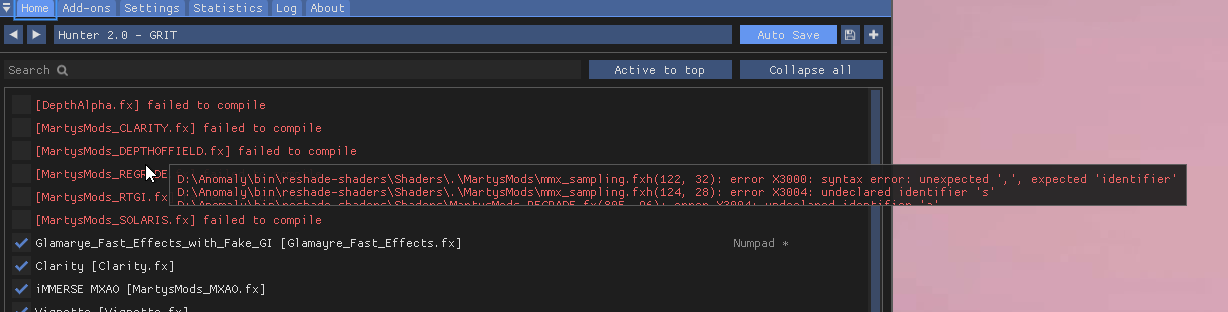
I did a clean reinstall recently for the new update, and made sure I cleared my reshade stuff before adding Zone Reality and stuff and the reshade presets I like and I'm unclear why it throws me errors now
I'm thinking this must be an incorrect path to the shaders because I havent touched reshade itself
Though the compile errors dont indicate it's file path but something with the files and identifiers, idk, this was fine a while back and now I'm not sure why it's happening
midnight basin
btw @slow star @green lake @rigid pendant @weary rivet if you guys need to make changes to the reshade document you should either DM sunn so he gives you access or you can ping/DM me because i already have it
midnight basin
gilded ermine
Though the compile errors dont indicate it's file path but something with the fi...
check the shader paths under the settings and make sure there are no duplicates
it should only be reshade-shaders\Shaders
and if you want TFAA then that with "\TFAA" at the end
green lake
ok
gilded ermine
oh it does appear to be looking in both the overall Shaders folder and some subfolders
I'm assuming it only needs the one place to look then?
 midnight basin
remove everything that is not Shaders and see if that helps
if you break something i'll just show you what my paths with no errors look like
cunning gazelle
was able to dial in a new Atmos R++ preset, tweaked basic light settings to let reshade have finer control over the exposure, and contrast, messed with HDR and added RTGI. Using all the volumetrics

 feral grail
sour chasm
Nvidia image scaling
feral grail
sour chasm
Nvidia image scaling
sorry, if I have an FHD monitor, will scalling nvidia give me some kind of quality boost?
cunning gazelle
gilded ermine
Yea still failing to compile, weird
the new update didnt give me RTGI either. If you look its technically locked behind Marty's patreon, wonder if that had anything to do with it? had to get it off github
gilded ermine
Thing is I think this happened before I updated and I didnt notice because I wasn't using reshade to test some stuff
its only now I have to like, fix it because it's annoying the hell out of me
huh
the phroZac presets also dont work now
what in gods name
feral grail
feral grail
sorry, if I have an FHD monitor, will scalling nvidia give me some kind of quali...
@sour chasm
gilded ermine
oh thats the Lut effect doing that, it just makes my screen black, huh
quiet imp
does anyone know how to fix the super bright shading and white skyboxes? first pic is a lightning strike


the only way i ''fixed'' it is by using this weather setting in debug
 sour chasm
feral grail
sorry, if I have an FHD monitor, will scalling nvidia give me some kind of quali...
sour chasm
feral grail
sorry, if I have an FHD monitor, will scalling nvidia give me some kind of quali...
It's not going to improve image quality, it's for performance really, and I can't vouch for using it on scalings below 1080 so ymmv
sour chasm
stable nest
Some of mine reshade tweaks
that shot with the detector out looks incredible
gilded ermine
Ok, this has to be human error, because I just compared my reshade textures and shaders to the ones Gamma provides and I am straight missing things it's looking for, I think this needs to be cleaned from 0
Yep, solved it
It appears the install instructions for Zone Reality 0.3 will cause this, idk how, but if you follow the steps to ensure no duplicate shaders you will just be missing stuff, probably age, stuffs probably been updated since
Just DepthAlpha not compiling and I think that's meant to happen
cunning gazelle
quiet imp
does anyone know how to fix the super bright shading and white skyboxes? first p...
Go make sure you have enhanced shaders installed correctly with the right packages. Hippobot posted last night a picture in atmospherics channel showing the correct way to install/reinstall. Enhanced shaders was not even ticked for me with the new update... Then from there upon loading in type cfg_load atmos into console, after it loads tweak your basic light settings, then shadows and lighting in SSS, and then finally any reshade effects you want to use.
prisma nexus
tropic vale
Suggestions about basic light settings? Darks are way too overbearing.
I put everything at 1 and it looks fine for me, but I use a reshade on top of that. So your mileage may vary a little bit
 wicked jewel
sour chasm
Nvidia image scaling
wicked jewel
sour chasm
Nvidia image scaling
Could this improve performance?
sour chasm
You're basically running it at a lower render resolution so yes it will improve performance
And with some AA from reshade overtop it won't look terrible
sour chasm
What resolution are you running at
You shouldn't be losing frames from running a lower resolution
wicked jewel
1920x1080
its just that, in intensive place like rostok my gpu usage drops
and my fps drops to 55-60 while in non intensive scenarios i get 90-100 fps
sour chasm
I mean some areas are always going to take a frame hit. You can always try resetting your graphic/visual settings to default.
wicked jewel
sour chasm
I mean some areas are always going to take a frame hit. You can always try reset...
I'll try
quasi hull
@wicked jewel lower your grass shadow settings and make sure the in-game AA is off
wicked jewel
quasi hull
<@422097759563284482> lower your grass shadow settings and make sure the in-game...
I don't have grass im running inverno without grass for performance
AA is off
avx is off because i get more fps core 0 is off
no reshade
quasi hull
And you get under 60 fps?
quasi hull
Weird, you know what I used to run winter on my gamma back in the day and it would always crash in rostok. I’d check inverno chat to see if anyone has a similar problem
midnight basin
wicked jewel
and my fps drops to 55-60 while in non intensive scenarios i get 90-100 fps
this is natural, you're CPU bound in those areas because of the alife, the only fix to that is using the Dynamic Despawner to lower alife or the "Turn this on if you stutter" mod
all of those graphics tweaks won't do
it's specifically the NPCs that are causing drops in frames in populated areas like Yanov
wicked jewel
already tweaked the turn this on and the dynamic despawner
midnight basin
you may also turn off Dynamic Combat in Settings but that is not recommended
wicked jewel
i got 30 npcs from 40 that they used to be on stock
wicked jewel
midnight basin
you may also turn off Dynamic Combat in Settings but that is not recommended
i saw it was for really bad cpus
r3700x shouldn't be that bad i hope
midnight basin
it's for really bad everything lol it makes the game far less fun
i wouldn't use it
but if it bothers you that much then yeah
for reference i'm getting 110-120 FPS in emptier maps and then drop all the way to 61 and such in Jupiter
that's just the reality of it
wicked jewel
welp i guess my pc suffers from the so called "skill issue"
midnight basin
nah it's the case for everyone
that's like saying "well why do i drop frames when using 3D scopes"
everyone does
framerate gets cut in half
quasi hull
Yeah 60 fps is pretty normal for me . It’s definitely not consistent fps
sour chasm
17 year old engine problems
wicked jewel
ok thanks to everyone, i guessi just have to live with the bother
I will accept the fate of mine
quasi hull
I tend to have my mouse sens lower to not notice it as much haha
sour chasm
The fact that I can get the performance I do with the game looking this good on such an old engine is absolute witchcraft
midnight basin
yeah
 quasi hull
Exactly, we basically have stalker 2 with where we’re at, stalker 2 can flop and I wouldn’t be upset cause we always have gamma
sour chasm
Yeah actually lol
quasi hull
wicked jewel
Graphically talking now, does this look great?
Go to a more lit up area? I feel like I can’t see that well what it’s needing
sour chasm
Honestly as long as the base game of Stalker 2 is reasonably stable it could be total ass and I wouldn't care because it would just be 6 months before we got Gamma in Stalker 2 lol
quasi hull
Yeah like I’m more excited for what the modders do with that engine
sour chasm
Samesies
I mean actually I want to see if their vision for the game aligns with how things have been done in Gamma. Like if they just looked at Gamma and the things we love about it and made those the new standard for the base game. But I won't be heartbroken if it's not because we'll just make it that anyways.
midnight basin
quasi hull
Exactly, we basically have stalker 2 with where we’re at, stalker 2 can flop and...
we basically have stalker 2 with where we’re at
don't let anybody outside this community hear you say that
or hell even people here
quasi hull
I guess what I mean by that is looking at base anomaly and where we are with gamma now it’s a significant jump in graphics quality
midnight basin
yo @green lake are you using Meowie's reposition?
i saw you were active in the thread
midnight basin
could you take a look at my mod load order list and tell me if i would be fine to run it?
i'm struggling to understand those obtuse fucking instructions
green lake
its simple
anyinth with uhh
[Reposition]
before it
wait no
[Reanimation]
Goes first
then
anything with
[Repositoin]
after
then any scope overhaul and patches
midnight basin
i put all the new guns and reanimations into New Additions and then made a new separator called Repositions above GAMMA Combat
is that right
that is not simple at all mf that's like 40 different things that i need to take into account
what about the existing EFP repositions or whatnot
do i need to consider those
wicked jewel
@quasi hull
 quasi hull
wicked jewel
<@548924231191101461>
quasi hull
wicked jewel
<@548924231191101461>
Are you using new SSS?
wicked jewel
quasi hull
Are you using new SSS?
I have the new update so it should
quasi hull
quasi hull
In mcm Grass shadows Non-directional shadows ( Flashlights, Bonfires, etc. ) are...
@wicked jewel
Try this
green lake
midnight basin
i put all the new guns and reanimations into New Additions and then made a new s...
probably idk
im not using it anymore

this was my load order
quasi hull
It’s going to be a performance hit but it’ll help your lighting look better
wicked jewel
quasi hull
It’s going to be a performance hit but it’ll help your lighting look better
i'll try if its too much i will just play in potato mode
quasi hull
Yeah, it’s worth a shot cause for me it didn’t hurt performance and looks great
quasi hull
Then I believe it’s console command lumscale ambient? and set 0.8 it’ll give your interior darkness to make volumetrics look very nice
(Sun shining through a building, contrast of light to dark will look more realistic)
Oh! But your on inverno! It might make things too dark for you sense you don’t have sun during a winter storm haha!
 slate dew
hi guys, is reshade in game files or do we have to download it after the update?
quasi hull
In the gamma launcher untick delete reshade dlls
slate dew
okey ty
slate dew
quasi hull
In the gamma launcher untick delete reshade dlls
i disabled them but it doesnt save, any help?
quasi hull
You untick them all then hit update?
slate dew
oh no...i did not 😄
quasi hull
Once that’s finished delete shaders cache to
In MO2 I did anomaly launcher then delete shader cache. And everything looked good
I think most people delete the one in anomaly folder but I don’t have issues when I do it through the launcher
slate dew
it all good now, thanks dude!
quasi hull
No problem!
prisma nexus
sour chasm
17 year old engine problems
It’s not so much that X-Ray is 17 years old, it’s more that X-Ray can’t do multithreading
sour chasm
I wouldn't expect anything as old as this engine to have any modern efficiencies
rigid pendant
slow star
<@234007863696162816> tried the new sss19+atmos, looks amazing, im gonna ditch r...
Do I have to do anything besides just update GAMMA to get that though? In my MO2 SSS still says 18.0 so Im slightly confused
Is this supposed to say 19? I have the wind and shadow / light options so it definitely got updated
 prisma nexus
True, but that’s like the one feature this engine would need to run MUCH much smoother than it does
slow star
rigid pendant
Do I have to do anything besides just update GAMMA to get that though? In my MO2...
just updating with 6.0 launcher and all ticks on is enough, the "18.0" name is from the mod folder name, it didnt get renamed
rigid pendant
Ok cool! I'm trying it out now !
weird lol i cant show you because it wont show up in screenshots, but NiS for me atleast at 90% makes everything weirdly sharp. Might have to tweak with it til I find the right % for my monitor or something
slow star
theres sharp % values both in NCP and GFN , try decreasing
rigid pendant
GFN = GFE?
GeForce experience? I don't think I have GeForce now
Dont have a Image Sharpness option under 3D settings in NCP so maybe its a newer RTX thing
sour chasm
Enable it in GeForce Experience and change the global sharpness settings to 0%, or in control panel under Manage 3D Settings, go to the program settings tab and find the x-ray exe and Image Scaling should be the first option at the top of the list. You can set the sharpness there too.
Def not a newer card thing I have a 1080 and it's there for me
sour chasm
Enable it in GeForce experience

 rigid pendant
Ohhh I had to update GFE
Duh Lol
Should be good now I'll see
I'm going to just copy your values and see how it works
sour chasm
I recommend 20% sharpen or less. If I ever actually use it I only put it at 10%, or just turn it off since I'm using SharpContrast and the sharpening built into any of the Reshade AA
rigid pendant
Yee, I'm trying to ditch reshade like norfair though so I'm trying to get the scaling / sharpening right to deal with the aliasing
It's a lot better now with your values norfair, trees are still a bit rough with the sparkles though vs reshade
Looks good otherwise, I literally just wish I could slap fxaa on or something though cause the performance is great
sour chasm
I don't think there's really any way to get away from Reshade if you want more refined AA. The game looks pretty good without it but it's not perfect and you definitely still need supplemental things from Reshade to make it look amazing.
If anything only having to use Reshade for just quint motion vectors + TFAA + sharpcontrast + fake HDR is less of a performance hit than I took in the past and it looks better than it ever did.
green lake
sour chasm
I don't think there's really any way to get away from Reshade if you want more r...
better AA can be created for aonmaly
its not like its just hard coded into the game
and the shimiering issues with textures isnt even because of AA
its with the textures themselves
 lilac quest
Hope I'm in the correct channel for this , I'm using capa reshade and i was wondering if this an error or normal.. very new to all of this
 green lake
lilac quest
Hope I'm in the correct channel for this , I'm using capa reshade and i was wond...
green lake
lilac quest
Hope I'm in the correct channel for this , I'm using capa reshade and i was wond...
reshade does not affect any of the game files at all
i dont think we ues atmosr anymore
so just use atmos
cfg_load atmos
lilac quest
oh ok . Thank you very much
rigid pendant
Aliasing is the biggest issue by far visually with anomaly
It was my main concern with the move from reshade is how is that going to get consistently reliably handled
rigid pendant
slow star
Yeah sorry GFE
Last question, what are you using as far as AO goes?
wicked jewel
quasi hull
<@422097759563284482>
uhm...enabling the grass shadows in ultra fixes light? don't i have to set cascades aswell?
rigid pendant
slow star
Try increasing the values in the ao and sss .h files, that stuff can replace mxa...
Ah I didn't see this, let me know what results you come across for a good looking AO this update, cheers 🥂
rigid pendant
sour chasm
I don't think there's really any way to get away from Reshade if you want more r...
Yep settled for just using reshade tbh, my performance still bottoms out at the same low of 45 in areas where my cpu can't keep up and maybe a 10 fps difference in less cpu dependant areas so it's not that bad tbh
raw vigil
green lake
https://streamable.com/2duyxa
That is gorgeous
sour chasm
rigid pendant
Yep settled for just using reshade tbh, my performance still bottoms out at the ...
Yeah someone will figure something out or implement something better but for now it's just Reshade and slowly disabling things until core gamma supports a better solution natively
rigid pendant
Norfair is trying to optimize the no reshade experience, I trust he'll come up with something awesome if given a couple days
But yeah as of atleast right this moment for playing I'm just gonna use reshade
green lake
hippo allready did a great job making the game look good without reshaed
green lake
mannnnnn it looks so good
still would need reshade for some more
cinematic looks

no reshade in this
looks so goododd
quasi hull
wicked jewel
uhm...enabling the grass shadows in ultra fixes light? don't i have to set casca...
Yes sorry, cascades shadows set to ultra
green lake
marsh mural
For ppl using AA from reshade, those sharpness are not needed right
why would the sharpness be needed
it was never needed
rigid pendant
Norfair found that without reshade the best way to tackle aliasing was by using image sharpening / scaling in GFE/NCP
And he's right but it's not quite enough for me atm
slow star
rigid pendant
Norfair is trying to optimize the no reshade experience, I trust he'll come up w...
don't expect much because the .h shader settings that come with atmos are already pretty good, im just trying to increase AO intensity from ao.h
quasi hull
 slow star
Im just doing what anyone can do which is raise the ao.h (like the hbao mod in moddb) and ssr.h values ,
I already found my sweetspot which is NIS 90% (1221p) which gives me 70FPS on most areas. reshade or not, that's pretty good!
rigid pendant
NIS 90%, and same values in GFE as your original SS?
slow star
Yeah, it would be the "closest" resolution you can get to your native
For me it's 1221p (from 1440p) idk if it's 90% but that's the closest one
I found no perf difference between lower NIS resolutions
Now, obviously effects that affect the depth buffer like FFGX and others, are always gonna spice up the scene, and there's the immerse smaa, tfaa, etc, all of that stuff ~ but I chose to ignore it and just play the game by itself and see how much the sss settings can be cranked up ~ so far, the volumetric light values seem to add a lot to scenes where they are active
And for me having the 70-120 fps range is too smooth to give up with reshade effects, although, in NIS mode i'm not really getting that much lower FPS because of reshade, so it's a win win. On native it's another story
quasi hull
@slow star Have you messed with the color grading at all? I was having trouble trying to figure that out
slow star
Not yet I been just trying to enjoy the game
rigid pendant
Maybe next SSS will include a holefiller option
slow star
it's been so long since i actually played
green lake
not sure why you're set on AA
AA is something that is going to be changed a long time down the road
and AA isnt even needed right now
its not that bad without it
rigid pendant
That's the kind of statement that makes me think I messed something up updating, because for me the aliasing is pretty bad
Like it just looks like default anomaly for me without reshade
quasi hull
Eh, it’s not terrible but even for me it is noticeable
marsh mural
How do you play with LUT within the new sss?
green lake
go into the console
type in lut
look at the default values
0,0,0,0
1,0,0,0
the first number means the intensity of the LUT
1,15,0,0
the second one means the level
dont change that probably
just change the first one
not sure what hte other two number use
green lake
rigid pendant
That's the kind of statement that makes me think I messed something up updating,...
im not using aliasing
rigid pendant
green lake
im not using aliasing
Ik cause you're not using reshade, but that's not what I'm saying I'm saying for me the aliasing is bad but it might be just a personal issue cause I'm comparing it to how good trees / shimmering looks with my reshade AA
It might not be that bad but atleast compared to how good it looks with reshade it is bad
green lake
no i am using reshade
im just not using AA
my laptop is dying rn
im getting 84c gpu temperature just idling on the computer
rigid pendant
?
quasi hull
For the time being I’m using tfaa, drme, and ismaa
rigid pendant

 slate dew
is anyone knows hunter presets still usable after the update?
rigid pendant
green lake
94
slate dew
slate dew
is anyone knows hunter presets still usable after the update?
without any bugs n glitches i mean
rigid pendant
slate dew
without any bugs n glitches i mean
Uhh seems fine to me
quasi hull
green lake
go into the console
Console colorgrade adjust or no ?
slate dew
rigid pendant
Uhh seems fine to me
which one ur using?
quasi hull
Or unnecessary?
green lake
no
quasi hull
Ok
green lake
that wont change the LUT
rigid pendant
slate dew
which one ur using?
Hunter 2.0
It's modified slightly but looks good for me with the update
U should be okay to use it
slate dew
okey ty
cunning gazelle
gorgeous rays

 rigid pendant

apparently im getting 69 fps and 64 fps
so i add those 2 together right meaning i should be getting a total of 133 fps
huge
green lake
hude
 marsh mural
quasi hull
85 fps
marsh mural
quasi hull
85 fps
What are those gloves
quasi hull
I use eft hands for thap
green lake
why you holding out the gun so far away from you
quasi hull
green lake
why you holding out the gun so far away from you
it looks better with my primary weapons
sour chasm
I find I have to constantly swap back to a non-pistol and set my HUD fov back to 65 constantly. Something weird with the pistol fov script making it go crazy to like 99 sometimes.
 winter summit
nobody here have heared about amtospheric density shader? i want to share it, cause it adds sort of atmosphere scattering effect with heavy fog, maybe someone like me will like it (i wish sss would kindly implement this effect in the future). i'm using it most of the time, but it's kind of abandoned during wip, so is heavy on perfomance. here is a link https://github.com/siriusinko/MShaders


GitHub
Repository for my ReShade based shaders. Contribute to siriusinko/MShaders development by creating an account on GitHub.
marsh mural
quasi hull
I use eft hands for thap
Got link?
green lake
winter summit
nobody here have heared about amtospheric density shader? i want to share it, ca...
that looks really cool
green lake
winter summit
nobody here have heared about amtospheric density shader? i want to share it, ca...
is this for reshade or?
green lake
cool

R9-7945HX/ STD /LED Back-lit(240Hz)-Narrow border /AMD / /Anti-Glare /2TB PCIE G4 (PERFORMANCE) SSD/.
should i get this super laptop for my birthday
quasi hull
Didnt have much time but got alittle more blue color out of ssfxlut
 winter summit
green lake
cool
winter summit
green lake
cool
i suggest also to enable misc controls, so you can configure blending
 green lake
ok
quasi hull
green lake
https://www.amazon.com/ASUS-Zephyrus-Gaming-Laptop-240Hz/dp/B0BS9X9TVG/ref=asc_d...
do it haha
do they have 165hz?
 topaz root
Hey guys so i want to make my game look good but dont want to pester you all with constant questions. Is there a guide or video i can follow
green lake

Timestamps:
Part one (mod setup) 0:44
Part two (in-game graphics menu) 2:12
Part three (reshades) 6:07
Weapon reposition guides:
https://youtu.be/LF8p9_tyqWo?si=-cC49bv7bjdLr_iM
https://youtu.be/x6IP8vnjdbc?si=Wh6iFcQ4So4EcVfG
Attributions:
Textures: https://www.youtube.com/watch?v=VRd_6riulrI
https://www.youtube.com/watch?v=hpJGE89fqOw
---...
topaz root
Thank you brother much appreciated
slow star
winter summit
nobody here have heared about amtospheric density shader? i want to share it, ca...
thanks for the suggestion
winter summit
there is also agx shader i'm using, which I also found on the net, the idea behind it to convert image to AgX colorspace. so roughly saying, it's like reinline capa use, but author tried to simulate agx instead of reinhard (btw it's killing feature of latest blender release). it's not close to ground-truth in my opinion, but can be useful after some value tweaks with pleasing results.
links:
reshade thread https://reshade.me/forum/shader-presentation/8306-agx-display-rendering-transform
shader itself https://github.com/MrLixm/AgXc/tree/main/reshade
AgX - Display Rendering Transform

GitHub
Fork of Troy.S AgX, a display rendering transform available via OCIO and more - MrLixm/AgXc
marsh mural
quasi hull
place under thap
Does gamma come with thap?
winter summit
marsh mural
Does gamma come with thap?
 marsh mural
cool thanks, pc not with me


 rigid pendant

The extra volumetrics and wind sway and everything is so good though, immersion levels are way upp
 frail dirge
green lake
frail dirge
green lake
Is this further tweaking from what you posted on what to do in your video or just thoses mods ?
because its.... mint
 frail dirge
well it looks great to me
green lake
 frail dirge
forgive my ignorance if I missed it but did you ever post your weapon repos?
green lake
frail dirge
forgive my ignorance if I missed it but did you ever post your weapon repos?
nah thats the only gun i've repositioned so far
im not gonna reposition every single gun in the game though
probably just the ones i like or i think would look nice with it
ill make a mod post when its ready
frail dirge
Gotcha.. I was about to say... that would be a hell of a task
green lake
good alternative ishttps://discord.com/channels/912320241713958912/1118909693813862492
even that mod isnt finished yet lol
midnight basin
@green lake how are you doing custom repositions?
green lake
midnight basin
<@605090865748115475> how are you doing custom repositions?
i wouldnt recomend it
its a lot of work
but here

Short Tutorial On How To Make Mod_Systems And DLTX Them For Mod Making On Gun Repositioning!
DRAGGABLE HUD EDITOR : https://www.moddb.com/mods/stalker-anomaly/addons/draggable-hud-editor
STALKER ANOMALY DEMONIZED EXES :
https://github.com/themrdemonized/STALKER-Anomaly-modded-exes
midnight basin
a lot of work
damn nevermind then lol
thought it was like changing a few values
oh hang on it is like changing a few values
doesn't look that hard
cobalt parrot
not hard, just time consuming and a lot of work
muted rivet
timid iron
I can't use my home key :( how do I access it without one?
oh it Fn+K
im using 60 layout
tropic vale
Question about not using reshade: Is it then that I use cfg_load?
visual axle
tropic vale
Question about not using reshade: Is it then that I use cfg_load?
If you have the last updated version of GAMMA then it doesn't use reshade anymore (just disabled, not removed) all you have to type in is "cfg_load atmos" done
midnight basin
cobalt parrot
not hard, just time consuming and a lot of work
not if someone already made most of the work for you and you're just fixing/cleaning up after them
 long dune
green lake
long dune
green lake
whats the settings
swift robin
Hello everyone
serious help needed
I have a laptop with rtx 3060, ryzen 7 6800h, 16gb ddr5 4800hz and ssd

fps is like no more than 30 at best and the visuals are just plain ugly
 gilded current
looks like you're playing a roblox game that ported the map over
swift robin
at this point stalkercraft looks better
 fierce valve
swift robin
serious help needed
fierce valve
swift robin
serious help needed
did you try the cfg_load atmos?
maybe that helps
but the colors looks way off
rigid pendant
Managed to get no reshade looking nice
 undone stump
rigid pendant
Managed to get no reshade looking nice
undone stump
rigid pendant
Managed to get no reshade looking nice
no reshade club detected
wicked jewel
undone stump
no reshade club detected
Im in the no reshade club aswell
just because my pc suffers from skill issues and can't handle fancy reshade
undone stump
wicked jewel
Im in the no reshade club aswell
yea because the new update is already good
wicked jewel
i just run the new zone reality 0.3 and nothing else basically
every thing is at medium and the shaders are low
wicked jewel
Ayo wait, did they optimize the grass shaders? because im playing with them on and didn't lose Any fps
with ultra sss settings
This was the best i could get without killing performance below 60 fps

 rustic pilot


 tired steeple
rigid pendant
Managed to get no reshade looking nice
tired steeple
rigid pendant
Managed to get no reshade looking nice
drop the .ltx king
fierce valve
does this look too dark?
 swift robin
Any good Lens flare reshade that wouldn't use up half my fps?
 proven swan
Depth of Field in the game settings keeps turning on, anyone got the same problem?
swift robin
proven swan
Depth of Field in the game settings keeps turning on, anyone got the same proble...
#🤖bot-commands message
 tawny root
 past crescent
guys is there a alternative to SSS?
manic sage
No why?
quasi hull
fierce valve
does this look too dark?
It does in this screenshot but I’d suggest adjusting basic light settings with different weather options
Find a good balance

 green lake
fierce valve
green lake
fierce valve
yeah it looks really dark for me too
fierce valve
green lake
yeah it looks really dark for me too
clear weather looks way better but man, as soon as stormy weather goes on my black goes black as hell 
 green lake
thats because its stormy weather
fierce valve


 modern cape
what's a good reshade for making the game gloomy and grey-ish

 safe igloo
just read the instruction of reshade you wanna install
its not complicated to install reshade
 spice moss
homekey doesnt bring up the reshade menu any help?
marsh mural
@green lake do you know how to disable built in lut in sss?
thorny vortex
marsh mural
<@605090865748115475> do you know how to disable built in lut in sss?
reinstall SSS19 without the Lut module checked
green lake
marsh mural
<@605090865748115475> do you know how to disable built in lut in sss?
ssfx_lut 0,0,0,0
marsh mural
What does lut do exactly in sss? Moddb does not say much beside a look up table
green lake
thats what it is
quasi hull
consoloe ssfx_lut 2,4,0,0

Only tested in cordon, clear 1
basic light settings, default
dark cloudy3 (2,3,0,0)

clear 1 with 2nd option. personally like this one more

 lavish relic
Looking good max


 quasi hull
green lake
Unreal Zone 3.0 SSS 19 test
quasi hull
green lake
Unreal Zone 3.0 SSS 19 test
does unreal zone add different tree colors?
green lake
quasi hull
does unreal zone add different tree colors?
no im using golden autumn texture pack
sholdnt look too different with aydin's though
i mean the reshade
it shouldnt look to different when usign aydin's
quasi hull
gotcha thx!
green lake
im gonna hope i can get this 1440p rtx 4070 laptop for my birthday
🙏
my rtx 3060 is dyin
quasi hull
lol!
quasi hull
im running 4070 very good opt
green lake
nice!
have you tried upscaling with DLDSR?
capa does that with his 4070
goes from 1080p to 4k
quasi hull
should i max that quality you think? lol
quasi hull
green lake
yeah i spoke to him abou ti
^
quasi hull
1440
dude this looks insane
idk if this screenshot does justice but its insane

very smooth
i did 4x DSR, feels like you unlocked some shit for me thank you haha
green lake
quasi hull
i did 4x DSR, feels like you unlocked some shit for me thank you haha
whats the fps?
capa told me he was getting around 40 or something last time
no he said 50
quasi hull
i had like 90 lol
quasi hull
this update helped a ton with my fps
i still get 60 in certain places but im usually around 70-80 idk why this is hitting 90 right now
 mild ice
green lake
Unreal Zone 3.0 SSS 19 test
mild ice
green lake
Unreal Zone 3.0 SSS 19 test
Where is this shader
mild ice
Oooh okay
rigid pendant
green lake
I haven't released it yet
Btw I just decided to use reshade only for FXAA lol, because the AA was the only thing bothering me about not having reshade

loll
FXAA on


Off
begone sparkles
green lake
rigid pendant
FXAA on
what are you fxaa settings?
 jolly frigate
whats the best aa shader? fxaa works great against the edge shimmering, but it made the whole scene blurry as frick